#graphics-cards
1 messages · Page 85 of 1
 livid idol
 odd siren
Node shrink, efficiency, ipc, better training models
Lots go into why the 9070 seems good
 fluid grotto
I see, thanks to both of you. I was initially confused about how less RT cores can theoretically give better performance. I was taking into consideration the idea of selling my 7900 XT to get a 9070 XT but in all honesty I feel like it's not worth it. I'm new to PC world so what's your opinion on this?
 junior locust
livid idol
I'll be skipping this coming generation too
junior locust
livid idol
I'll be skipping this coming generation too
coming from the 6000 series it could be a pretty compelling upgrade tbf
for someone like mine it'd probably make sense
livid idol
Midrange 6000 I could see, something like a 6900 XT, maybe not unless they really want that RT performance
junior locust
Do note that RT performance will be more and more important
RT only games will only grow in number
livid idol
Indiana Jones does run on a 2060 after all
livid idol
It is, yes. But it's very light on the RT when you turn it down.
 random walrus
junior locust
like Metro Exodus (I think?)
random walrus
junior locust
like Metro Exodus (I think?)
PC enhanced version is. Base game is normal raster/baked lightning
It's pretty crazy, I watched a video about it and they had to go through and redo pretty much all the lighting for the full RT version
I think LTT briefly mentioned in a recent video how games built for RT (Metro PC, Indiana Jones) have much better RT performance than games where it's just slapped on
Which is great, & I played through both of those and they do run well
But the issue is that there are still such a large percentage of gamers on non-rt cards that most AAA devs don't want to fully swap over to RT
livid idol
random walrus
I think LTT briefly mentioned in a recent video how games built for RT (Metro PC...
Funny how much better it works when it's not just "the dev ticked the box in UE5 to enable RT" and they actually put in the effort.
 tough plinth
why did my drivers suddenly decide to not be on my system?

this isnt the first time this has happened
it was because of an update
windows update
why does it do this?
 olive bobcat
tough plinth
why did my drivers suddenly decide to not be on my system?
olive bobcat
tough plinth
why did my drivers suddenly decide to not be on my system?
Had this issue with my 8500g
Not sure what happened
odd siren
Yes by pausing windows updates, downloading the driver yourself, doing ddu properly, then the newest driver again
 heady plover
It took me so much longer than tomorrow. After another day of testing two months later I’ve now gotten it to get to 5000-1000000 watts. I’m not even kidding. I cannot fathom what kinds of witches got this laptop. I’m so lost on what to try now lmao.


I did end up finding this in device manager. No idea how relevant it is to the Gpu but hey, I thought “if it says power measuring device and my Gpu can’t measure power then surely it’s got something to do right”

 livid idol
heady plover
It took me so much longer than tomorrow. After another day of testing two months...
livid idol
heady plover
It took me so much longer than tomorrow. After another day of testing two months...
What model is the laptop? You might need to reinstall some drivers
heady plover
You and I have already gone through this together. Unfruitful efforts. Gonna try it again “definition of insanity” I know I know just why not lmao
heady plover
basically a checklist of things im certain ive done : all windows updates are there, bios is updated, drivers are up to date, try older drivers for gpu, use nvflash to try other vbios(only 5 of the 8 i tried displayed normally but still didnt fix the issue), clean install of windows and repeat all of the above. none of those have solved the misread power consumption issue and gpuz still reports 8pin power/752 watts. is this all i can do ?
Could this just be a hardware thing atp? And if so is there a way for me to verify and repair it?
odd siren
heady plover
basically a checklist of things im certain ive done : all windows updates are th...
I read back and it just looks like a software glitch
No laptop chip would be feasibly pulling that much, your hand would burn touching the keyboard yo

heady plover
Ofc
heady plover
odd siren
No laptop chip would be feasibly pulling that much, your hand would burn touchin...
The hardware thing I’m referring to wouldn’t be the board actually drawing 752 as like you said it would be impossible. I’m more talking about if the sensor on the board could be broken. Cuz idk if it is still software atp since none of these software fixes we’ve tried have done anything
odd siren
It would be broken if it's not detecting power in the way it's like reading upwards with more draw
Like you are doing anything and the sensor is just writing any number with no reason behind it
Otherwise it's something else misreporting
As if it were weight scales that weren't set up properly (So it's not tared/zeroed to be accurately measured)
I've seen this bug before but it's so rare I have long forgotten the fix
I tend to see it mainly in msi laptops
heady plover
Specifically the number 752 is what makes me suspect the shunts are not right in some way since I’m seeing posts with that number draw on 30 series cards. Almost everyone’s solution is to rma it which I don’t know if is possible with this laptop 💀
odd siren
If I can't remember the fix then the fix is definitely convoluted
I have a stupid memory like that lol
 jagged sphinx
hey everyone! is newegg gonna have 5090 series gpus for sale on jan 30th? also will there be a preorder option or no? the gpu is the last thing I need for my pc build
livid idol
No clue. No one here works in either the sales or website departments, which would be the ones that might know.
You might be able to get some answers from the customer support email, but no promises.
 zenith parrot
Can someone list the parts needed to set up a custom loop, specifically for water cooling only the GPU?
I plan on getting a Gigabyte Waterforce 6900 XT Xtreme, but I'll be cooling the cpu with an aio
livid idol
Some of these can be combo units
Pump
Reservoir
Radiator
Tubing
Fittings
O-rings and other little things like that too
Oh and coolant ofc
You'll want to avoid mixing metals as much as possible also
I believe that GPU uses nickel plated copper so stick to that as much as you can
Avoid aluminum, it's very reactive
 forest oasis
Try not to mix metals due to galvanic corrosion
Or make sure their anodic index is similar enough
zenith parrot
Hmm. I'm having a hard time figuring out which of those I need without buying any unnecessary parts or overspending. There seems to be very little info that guides newcomers. Think you may be able to throw together a part list as reference?
livid idol
All of the things I listed are necessary
As in the loop will not work or will leak without any one of those things
 hot bough
Note, any custom loop will run you in the hundreds
livid idol
easily
hot bough
Custom loops are mostly for looks
And depending on circumstances to my knowledge a quieter system while having the same performance
Though don't expect a big uplift in performance
@livid idol this a good summary?
livid idol
If done correctly yes, you end up with a quieter and similar performing system as air cooling
But it can also easily be louder based on fan and pump choice
zenith parrot
Yeah this is purely for aesthetic purposes
hot bough
What was the verdict on the Eisbaerer Pro 360mm? I genuinely think that may be the best way for me to get my toes wet by buying that than later buying a better radiator until eventually I upgrade the pump as well
livid idol
hot bough
What was the verdict on the Eisbaerer Pro 360mm? I genuinely think that may be ...
It's a relatively bad setup, worse than many AIOs until you replace the radiator, pump, and fans
zenith parrot
I think one of the biggest things throwing me off Is figuring out what to do with the second.. hole in the graphics card block
hot bough
livid idol
It's a relatively bad setup, worse than many AIOs until you replace the radiator...
Worse than my LT720?
zenith parrot
I usually see it connected to the CPU in custom loops, but I don't want to water cool the CPU.
forest oasis
zenith parrot
Hmm. I'm having a hard time figuring out which of those I need without buying an...
if you are worried about cost, then custom loop might not be for you to be perfectly honest
livid idol
hot bough
Are there any other AIOs that are modular?
EKWB has one
hot bough
livid idol
EKWB has one <:kekw:741678350791081994>
Oh?
livid idol
Don't buy it the company is dying and you probably will never receive it
It's also $600
livid idol

Main Website
The EK-Quantum Power Kit D-RGB P360 is the ultimate fully addressable D-RGB customizable liquid cooling kit dedicated to all users who seek the mo... 3831109818404
zenith parrot
forest oasis
if you are worried about cost, then custom loop might not be for you to be perfe...
I'm not worried about cost, I just don't want to accidentally buy parts I don't need lol
forest oasis
i would recommend planning out your loop first
then you'll know what parts you'll need
zenith parrot
I'm trying rn 😭
forest oasis
also you should water cool your cpu if you're doing a custom loop anyways, since it'll cost around the same
the gpu block often has 4 holes, but 2 of them would ususally be closed (they're used for multi-gpu or different tubing routing, so you don't have to worry about that too much)
zenith parrot
Did you see which gpu I mentioned? It comes with a pre installed block
Waterforce 6900 XT
forest oasis
yeah looks like the typical water block
zenith parrot
Okay, so from what I understand one tube would run from the GPU, to the pump, to the radiator
Correct?
forest oasis
hold on let me draw
forest oasis
 zenith parrot
That actually explains a lot
Okay so wait
What if the rad at the top is occupied by an aio, but the front panel has space for a rad
forest oasis
this setup is specifically for a pump and res combo unit, so the res is part of the pump
yeah that works as well
zenith parrot
Hmm okay
forest oasis
often times, people may even use 2 radiators for their custom loop, both the front and top panels would have a radiator
i would HIGHLY recommend you custom loop your cpu as well
zenith parrot
Ahh I see
zenith parrot
How come? I'm kinda against it since I have a sick aio for aesthetic purposes
forest oasis
(only a few cpu cooler mount designs, while there needs to be a custom design for every single gpu)
zenith parrot
It's the strix ryou 3 and I reeallllyy wanna keep it lol
forest oasis
how old is it
forest oasis
how long you've had it
livid idol
Example cheaper setup (for the record I don't recommend buying, this is for illustrative purposes)
~~Rad https://www.titanrig.com/alphacool-nexxxos-st30-full-copper-radiator-240mm-dual-fan-0330ac010200xx.html?color=158~~
~~Pump/res combo https://www.titanrig.com/xspc-qx5-argb-mini-12v-tank-reservoir-and-pump-combo-0355xs014501on.html ~~
Fitting x6 https://www.titanrig.com/barrow-g14-to-38-id-12-od-compression-fitting-for-soft-tubing-0360ba010300xx.html?color=158
Tubing x2 https://www.titanrig.com/alphacool-alphatube-hf-flexible-tubing-10mm-id-13mm-od-38-id-12-od-1-meter-0370ac015800xx.html?color=2397
Fluid (add to distilled water) https://www.titanrig.com/xspc-pure-distilled-concentrate-coolant-150ml-0375xs012000xx.html?color=198

Main Website
The new Alphacool NexXxos ST30 Full Copper Radiator 240mm, a name that stands for experience and quality has come to bring a fresh breeze to the radiator market. For more visit here!

Main Website
The new QX5 Mini Tank Reservoir Pump Combo is a small, self contained unit, allowing for a high performance, in a small space with its 5-6m Lift a 5060596651869

Main Website
Buy Barrow G1/4" to 3/8" ID, 1/2" OD Compression Fitting for Soft Tubing in Black color at our store. It is manufactured with high quality Nickel-plated Brass material.

Main Website
A water cooling system consists of many different elements. Pumps, radiators, cooling blocks, reservoirs and often other com-ponents. 4250197174947

Main Website
XSPC PuRE CONCENTRATE is a clean, eco-friendly concentrated coolant for PC water-cooling. It's base contains a refined 8 stage, triple distilled w 5060596651746
zenith parrot
Fresh out the box
forest oasis
hmm... is it too late for a refund lol
it wouldn't make much sense to use an aio for the cpu when you're doing custom loop
zenith parrot
No but I am emotionally attached to it lol
forest oasis
lol
there are some custom waterblocks that have a screen on it if that tickles your fancy
zenith parrot
Trust me I believe you and I considered that
But honestly I fawn for the anime matrix designs
livid idol
All things considered you could squeeze all the parts into a $200 budget, more options and bigger things cost more ofc
zenith parrot
I'm willing to go a bit over $200
It looking sick while also functioning is my main goal
livid idol
Alright there's a few more things to add to the list anyway so it would almost certainly go over $200
zenith parrot
Works for me. I'd say $400 is optimal
livid idol
zenith parrot
Works for me. I'd say $400 is optimal
What case do you have? So we know what kind of room you have to work with
livid idol
Switch to this rad then https://www.titanrig.com/alphacool-nexxxos-st30-full-copper-x-flow-radiator-360mm-triple-fan-black-0330ac014101on.html
And this pump/res https://www.titanrig.com/alphacool-eisbecher-aurora-d5-150mm-reservoir-with-d5-vpp655-pwm-pumpacetalglass-0355ac012401on.html
O-rings https://www.titanrig.com/xspc-g14-o-ring-0360xs015700xx.html?color=180
Fans https://pcpartpicker.com/product/yDmNnQ/thermalright-tl-c12b-s-v3-x3-6617-cfm-120-mm-fans-3-pack-tl-c12b-s-v3-x3
Plug fittings x4 https://www.titanrig.com/barrow-g14-stop-fitting-with-composite-plate-finish-0360ba021100xx.html?color=158
Tube cutter https://www.titanrig.com/ekwb-ek-loop-soft-tube-cutting-tool-0545ek010801on.html
I know I'm missing a few more things, give me a minute to figure them out

Main Website
The Alphacool NexXxos ST30 X-Flow Radiators 360mm are the first to truly deserve the "Full copper" attribute. All main parts, not only the fins and channels, the chambers are also made from copper.

Main Website
The Alphacool Eisbecher Aurora reservoir has an integrated pump top for powerful D5 pumps and comes with a VPP655 PWM pump. 4250197134996

Main Website
O-rings can become brittle over time, which leads to failure. If you've used your fittings for over a year, and you want to use them in a new buil... 5060596651524

Thermalright TL-C12B-S V3 X3 66.17 CFM 120 mm Fans 3-Pack (TL-C12B-S V3 X3)

Main Website
Barrow G1/4" Stop Fitting with Composite Plate Finish is available at Titan Rig in Black, Blue, Golden, Green, Red and Silver colors. For product specifications visit here!
zenith parrot
OH ALSO
livid idol
Fill bottle https://www.titanrig.com/xspc-ldpe-filling-bottle-500ml-0375xs011201on.html
Drain fitting (recommended, not required) https://www.titanrig.com/alphacool-g14-2-way-ball-valve-0360ac017100xx.html?color=166

Main Website
The XSPC LDPE Filling 500ml Bottle is designed to make your life easier with its long filling tube, you can reach places right at the top of your 5060596651623

Main Website
Alphacool's fitting series is future-oriented and characterized by excellent workmanship. Shop the Alphacool's G1/4" 2-way Ball Valve in Chrome at Titan Rig.
 livid idol
Uni fans are really bad performance
livid idol
They're more comparable to 92mm fans than 120mm
zenith parrot
Like how bad are we talkin
Oof
So I should use them with the liquid cooling rad?
livid idol
It's because the frame is really thick so there's less room for the fan blades
livid idol
You could use them if you really wanted, it won't impact the GPU performance in any noticeable way
zenith parrot
Okay
I think I'll keep them in that case
I'm a little afraid of the Newegg reviews
livid idol
The fans will just have to run faster/louder to make up the performance, not a huge issue
zenith parrot
Yeah I don't mind that
Oh so my last question
It was halfway answered by that image earlier but
Wait lemme look at it again
Actually yeah it was answered nvm
The second hole in the GPU was confusing me
It's always that second hole..
So what's the stop fitting for?
livid idol
The extra holes
The extra holes in the radiator and GPU block are there so you have more options for which way the tubes should face
The plugs are for the ones you aren't going to use
zenith parrot
I wish I could send you pics of my PC on here 😄
livid idol
It's not a bad idea to get at least a couple 90 degree fittings to make routing the tubes easier
You can send pics now
zenith parrot


Note that nothing is connected due to cpu not coming till wed
Also I will have a vertically mounted gpu
I'll need to buy a heat gun for the tubes right?
livid idol
This is soft tubing so no
I chose it because it's more beginner friendly
What you will need to worry about is maintenance
At least once a year you should drain and reverse flush the loop and replace all the O-rings
zenith parrot
Hmm okay
livid idol
If you notice a lot of buildup you might need to disassemble the GPU block and pump to scrub them
This is why I recommend a ball valve drain fitting, it'll save you during those maintenance cycles
Ooh right you'd need a 3 way fitting like this one for the drain too https://www.titanrig.com/ekwb-ek-quantum-torque-t-splitter-fitting-3x-female-ports-0360ek019100xx.html?color=158

Main Website
EK-Quantum Torque Splitter 3F T is a simple cylinder-shaped adapter fitting with 3 (three) G1/4" Female threads. 3831109826683


 livid idol
You don't need the hardline bend kit with soft tubing
Just a simple cutter like I put above
livid idol
It's soft and flexible so it's very easy to work into the shape you need, just don't kink it
zenith parrot
Kink?
livid idol
Like when you bend a garden hose too much and it blocks the water flow
livid idol

Main Website
Shop the EKWB EK-Loop Soft Tube Cutter from Titan Rig. We provide shipping of PC components and accessories throughout the USA.
Discord only embeds 5 links in a message and that was the 6th
zenith parrot
Ahh
They're not on Amazon lol, finding a replacement


As such?
Do I have the right amount of everything ya think? Will I only need one of the 2 way ball valve?
Oh wait
livid idol
I switched my pump recommendation because this one is both bigger (so it holds more liquid) and has a better pump https://www.titanrig.com/alphacool-eisbecher-aurora-d5-150mm-reservoir-with-d5-vpp655-pwm-pumpacetalglass-0355ac012401on.html
Main Website
The Alphacool Eisbecher Aurora reservoir has an integrated pump top for powerful D5 pumps and comes with a VPP655 PWM pump. 4250197134996
Only one ball valve
zenith parrot
Yeah I was gunna mention that lol
livid idol
I'd recommend at least 2 meters of tubing
You're going to have quite a few pieces that get scrapped, it happens to all first timers
Keep at least one scrap piece to use on the drain
zenith parrot
Added a second tube
livid idol
I'd recommend a couple of 90 degree fittings too
It'll help with routing to/from the pump and GPU in particular
zenith parrot
Could all of my fittings possibly be red 🙂↕️
livid idol
Yes
zenith parrot
Sick
livid idol
That's the beauty of custom
livid idol
Might need to switch tube sizes, give me a minute
 livid idol
No not those ones
livid idol
That's for rigid tubes and much thicker ones at that
livid idol

The Dracaena compression is a revolution in fitment design. It simplifies the process of setting up a liquid-cooling loop and provides a seal that outperforms traditional compression fittings. By using 4 pre-installed O-rings and an overhauled design, the fitting can satisfy your requirements per...
Same size tubes as you have already
90 degree ones don't seem to exist in red for soft tubing, which is fine. That's the point of soft tubing, to be flexible.
zenith parrot
Thank you!
My brother in Christ, you are my guiding light in this expensive excursion
I'm guessing those replace these little guys here

@livid idol
livid idol
Correct
zenith parrot
Nice
zenith parrot
@livid idol good morning fine sir. I have one more question about the build. First, do you think this coolant is safe for it?

Also, do you think this is worth?
 livid idol
zenith parrot
<@396513761550270464> good morning fine sir. I have one more question about the ...
livid idol
zenith parrot
<@396513761550270464> good morning fine sir. I have one more question about the ...
Colored coolant leaves a lot more residue, so it needs to be cleaned out much more frequently and it'll start to lose it's color after about 3 months. Besides these things, it would be compatible with the loop.
livid idol
zenith parrot
Also, do you think this is worth?
No. You don't need a distro plate with only a single component loop.
Oh they even admit in the product page the shortcomings of the coolant.
PrimoChill has gone to great lengths to make Vue as easy to use as possible, but please keep in mind that it is for experienced users looking for that extra aesthetic and requires more attention and maintenance.
zenith parrot
Dang 😫
Knowing me I might still use it cuz I'm hard headed
Plus the Gengar aesthetic must be utilized to its full potential
 cosmic bluff
Why not look into colored soft tubing?
zenith parrot
cosmic bluff
Why not look into colored soft tubing?
Fair enough. I kinda like how this coolant looks in motion, but I suppose static coloring wouldn't be so bad if it's safer


:
The thickness of silicone tubing = ( OD - ID ) / 2.
The tubing can withstand temperatures from -76 to +428 Fahrenheit Degree.
This soft, flexible tubing is designed for a variety of pump and transfer applications. It is made of silicone rubber which is nonreactive, flexible, and resistant to h...
Does this work as a replacement without having to change any fittings? I noticed it shows as 9mm instead of 10mm that the clear tubing shows
forest oasis
Could be a rounding error if it's an imperial tube diameter
zenith parrot
Hmm I think I'll just use the clear one I was sent earlier to be safe
@forest oasis do you think this will cause the same issues as the dyed coolant?

 wild glen
guys i found new deal for used zotac 4080 non super for $800 is it a good deal?
 heady turtle
No
wild glen
wild glen
guys i found new deal for used zotac 4080 non super for $800 is it a good deal?
and the new ones goes for ~$1400 fyi
wild glen
heady turtle
New 4080 supers are 1k or less
where i live $1400
heady turtle
Is it not USD?
wild glen
heady turtle
Is it not USD?
5200rs
heady turtle
Idk what country that is tbh
wild glen
the the used one for 3000rs
wild glen
heady turtle
Idk what country that is tbh
mb saudi arabia
wild glen
heady turtle
But again 50 series should be quite soon if you can wait
ik but no points if i didn't get a deal like this one
and 50 series will be sooo pricy in saudi arabia
and even if i wait when they come out 3000rs when the new ones for 5200rs is a good deal no?
forest oasis
zenith parrot
<@297812853174566913> do you think this will cause the same issues as the dyed c...
Anything other that just clear has a risk of additional residue that would need maintenance
zenith parrot
😩
heady turtle
wild glen
and even if i wait when they come out 3000rs when the new ones for 5200rs is a g...
Depends may push the 4080's down in price even more or something like that
wild glen
heady turtle
Depends may push the 4080's down in price even more or something like that
no i can't there is others who bit at same price
heady turtle
Fair enough if it's good then it's good
zenith parrot
@forest oasis by the way bud, do you think it's worth going out of my way to rig this 6900xt up when I already have an air cooled 7900xt lol
Like, performance wise
forest oasis
Value wise? No lol
Air coolers for GPUs (that aren't on the extreme budget end) are often overkill for the chip
zenith parrot
But.. what about looking sick-wise 👀
While also comfortably running 1440p ultra-wide on ultra in modern games
forest oasis
zenith parrot
But.. what about looking sick-wise 👀
Custom loop (as long as the tubing is ran nicely) will look sleeker at least
Tubing done poorly will look worse though
It's much easier to make a good looking flexible tubing custom loop than hard line at least
hot bough
zenith parrot
<@297812853174566913> by the way bud, do you think it's worth going out of my wa...
Why would you even water cool the 6900xt when you have a 7900xt???
forest oasis
oh yeah also technically you should probably be able to find a waterblock for your 7900xt
though you need to make sure it's made for your specific AIB design

 forest oasis
hot bough
Why do I feel like we're being played... This doesn't make any sense. <:Confus...
forest oasis
hot bough
Why do I feel like we're being played... This doesn't make any sense. <:Confus...
they wanted a specific waterblock design from the 6900xt i'm guessing, they've linked it before
(it was one of the pre-waterblocked cards)
hot bough
I guess but still that would be downgrading yourself.
Like I admit I overspend on looks for my PC but it's never a downgrade.
Same perf but aesthetics is my minimum bar.
forest oasis
zenith parrot
Waterforce 6900 XT
https://www.gigabyte.com/Graphics-Card/GV-R69XTAORUSX-WB-16GD#kf found what they were talking about
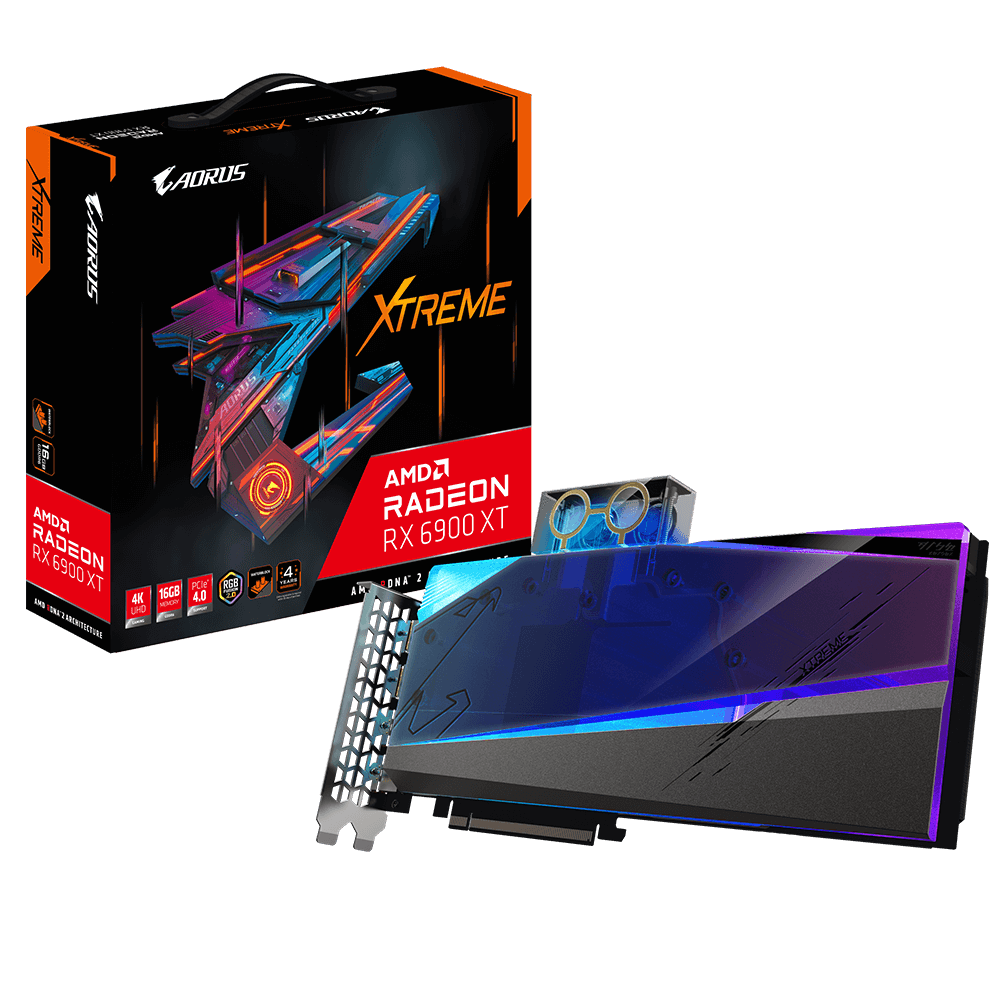
GIGABYTE
Discover AORUS premium graphics cards, ft. WINDFORCE cooling, RGB lighting, PCB protection, and VR friendly features for the best gaming and VR experience!
forest oasis
interestingly enough, gigabyte hasnt made a 7000 series waterblocked gpu

but 20-50 series has them
hot bough
Just not worth it is my guess.
People who buy those pre locked cards from what I can tell 9/10 times are using an Nvidia variant
forest oasis
perhaps
they've only waterblocked the 5080 though for some reason?

logically speaking, shouldn't they have done it to the 5090 instead lol
ok they did it for the 4090 at least
forest oasis
 hot bough
I keep coming across this pic case

darkFlash Full-Tower ATX Gaming PC Case, Back Plug-in Motherboard, 1 Fans, Dual-Chamber, Panoramic Glass, Up to 2 x 360mm Radiators, RTX 40 Compatible(DY470) (1 PWM ARGB Fans, Black)
That weird trapezoid shape bugs me though
0.o @forest oasis check this out.
It looks like what would happen if the Torrent's rugged look was in a box fishbowl form.
https://www.amazon.com/YAWYORE-Computer-Support-Cooling-Chassis/dp/B0DP4ZBF71/ref=mp_s_a_1_113?

This is a 270 ° full-side tempered glass sea view room game ATX computer chassis, three-sided quick release design, support double 360 water cooling, support main board back plug, support up to 10 fans
forest oasis
i dont like side IO like that ngl
i feel like the cables would get in the way of your mouse, or be unnecessarily strained
hot bough
Fair.
@forest oasis any idea what the difference is between the Haf 700 and Hac 700 Evo case?

Torrent like setup bug buggeg.
But bigger.
forest oasis
hot bough
<@297812853174566913> any idea what the difference is between the Haf 700 and Ha...
no idea
zenith parrot
I'm back
zenith parrot
hot bough
Why would you even water cool the 6900xt when you have a 7900xt???
And basically to answer your question:
Idk lol. Aesthetics?
 limber flax
Aesthetics the 7900xt
zenith parrot
limber flax
Aesthetics the 7900xt
Fair enough
 cursive wedge
Should I upgrade my 4070 to super to the 5080 or just wait for next gen?
random walrus
cursive wedge
Should I upgrade my 4070 to super to the 5080 or just wait for next gen?
Probably wait, or get AMD 9000 when that releases
Nvidia 50 series is leaning heavily on multi frame gen for the claimed "performance increase"
livid idol
If you're happy with the performance of the ti super there's not much reason to upgrade it. 50 series won't be much better in the raw performance department.
hot bough
cursive wedge
Should I upgrade my 4070 to super to the 5080 or just wait for next gen?
The 5080 is essentially the 4080 with a minor speed boost and access to DLSS4.
cursive wedge
hot bough
The 5080 is essentially the 4080 with a minor speed boost and access to DLSS4.
i thought all rtx cards get dlss 4 but not mfg
hot bough
I could be wrong. As far as I am aware that is 5000 series only. Double check with @livid idol or @odd siren
livid idol
cursive wedge
i thought all rtx cards get dlss 4 but not mfg

Mostly yes, you're correct. 30 and older get all features except frame gen. 40 series gets the usual single frame gen. 50 gets the new MFG.
Nvidia is also working on a way to enable DLSS 4.0 on all games that support 3.0+, probably through DLL swaps at the driver level if I had to guess.
forest oasis
Has Nvidia elaborated what has been "enhanced"
I didn't watch the keynote
livid idol
Yes, a fair bit has been elaborated
Hang on I'll grab the vids
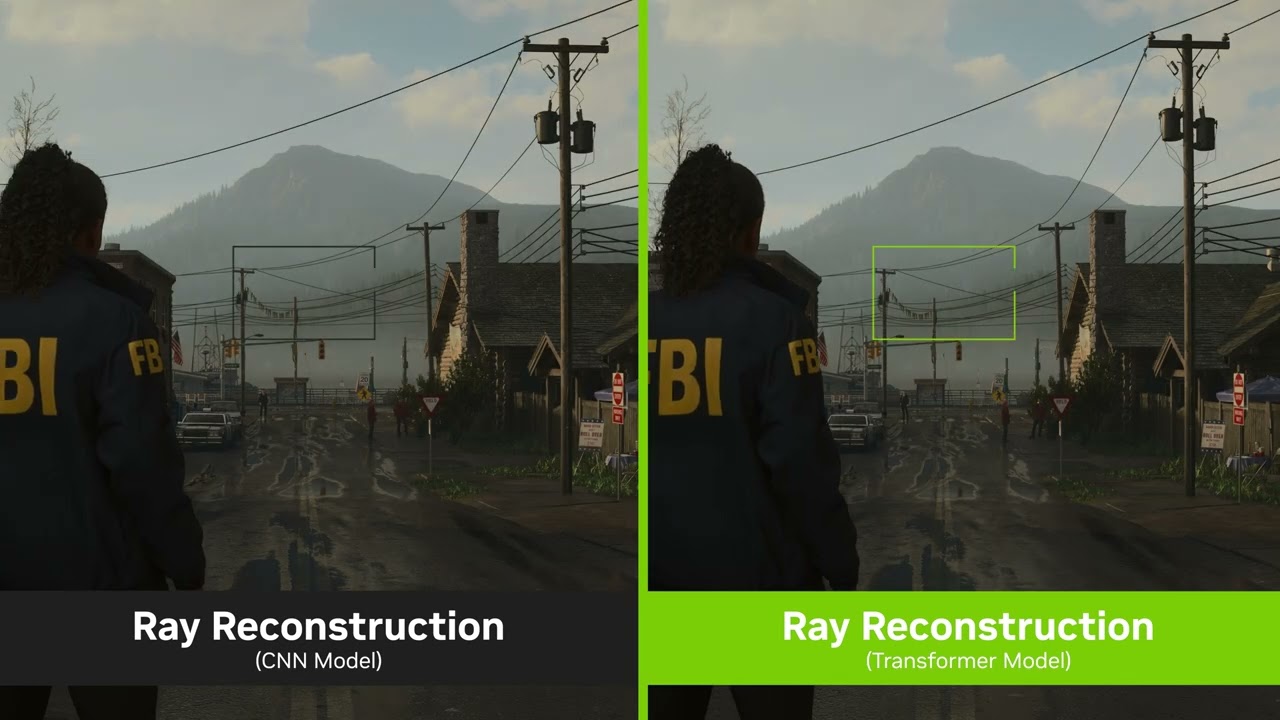
In intensive ray-traced content, the transformer model for Ray Reconstruction gets an even bigger uplift in general quality, especially for scenes with challenging lighting – all of the common artifact from typical denoisers are significantly reduced.
Learn More: https://www.nvidia.com/en-us/geforce/news/dlss4-multi-frame-generation-ai-innovati...
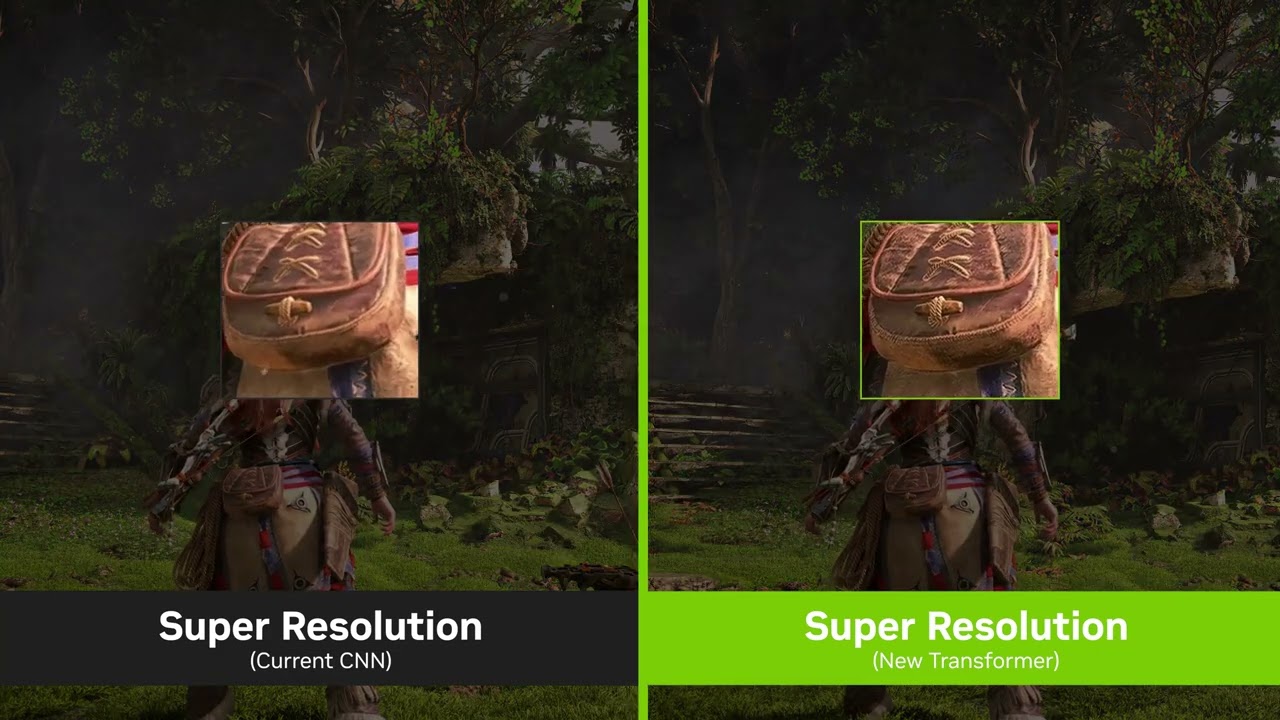
When using the transformer-based model of Super Resolution, the output image has improved stability and higher detail in motion.
Learn More: https://www.nvidia.com/en-us/geforce/news/dlss4-multi-frame-generation-ai-innovations
Subscribe to @NVIDIAGeForce today!
GeForce Twitch: https://www.twitch.tv/nvidia
GeForce Instagram: https://www.insta...
Oh they already figured out the DLSS version override

TL:DW the new RT methods and upscaling use less resources and look better
random walrus
I'm actually hyped for the new transformer model. Hopefully that HFW scene isn't like super cherry picked lol
hot bough
I plan to start enjoying ray tracing come 5000 series
livid idol
That depends more on the games than the GPU
Most games have really poor implementations of the tech
hot bough
Fortnite my main game has pretty good implementation imo but my frames on a 3070 suck
livid idol
Oh no you're not about to be one of those people getting a 5090 for fortnite are you
hot bough
Not for fortnite lmao.
For gaming and work in general
I just play Fortnite more than my other games.
Tbh I don't really game much anymore.
I play for 2-3hrs every other day due to work
livid idol
I should upgrade my GPU soon too actually. 12GB isn't enough for what I play in 1440p any more, there's a few games that I've maxed out the memory on.
hot bough
All my time goes toward family and work. I my spare time I spend it working on videos, and games with friends.
livid idol
If it weren't for all this AI nonsense I could trade up to a 3090
hot bough
I also want the 5090 so I can actually get serious about Blender. The 3070 doesn't do to well in it.
hot bough
livid idol
If it weren't for all this AI nonsense I could trade up to a 3090
I can inagine
@livid idol I gtg but when you get a chance can I get your thoughts on the monitors I listed in #old-monitors-and-tv ?
I am going to hold out on a 3D Printer to save and get a very nice one that isn't finicky
cursive wedge
Is dlss 4 and the new transformer model coming to the 40 series at the same time of the 50 series drivers release?
odd siren
It's coming to 40 series yes
Early dlss 4 comparisons are quite good, it's only really multi frame gen that is debatable
Questionable quality in all but a couple games, very little support at launch even with driver overrides
But dlss 4 itself looks good if you ignore that part
As well as reflex 2
Transformative modelling is a lot better, but it's not faster as claimed, yet
junior locust
The argument for the used 4080S is getting stronger by the day
odd siren
Been saying it to a few people since dlss 4 was announced, genuinely looks like the play rn
 keen nacelle
junior locust
The argument for the used 4080S is getting stronger by the day
keen nacelle
junior locust
The argument for the used 4080S is getting stronger by the day
Im going to be suggesting dual 4080s over a 5090 for workstation tasks that can utilize dual gpus
 rich cedar
Hey guys, my RX580 8gb has started to struggle in some of the games I play. I was originally waiting for Radeon 9000 but after hearing it may not be out until march, I had a really hard look at Intel and liked the B580 price and performance, and I know AMD might end up dropping the ball on this one. Should I wait for Intel’s other battlemage cards? Or hold out for AMD? Im curious what the B7xx may look like
livid idol
What kind of budget are you working with?
The 9070 XT is supposed to be about as good as a 7900 XT so you might as well get a 7900 XT now
rich cedar
I don’t really wanna spend any more than like 375 dollars
400 is my hard limit
I really wish AMD would have shown something more affordable first lol
 lofty island
rich cedar
Hey guys, my RX580 8gb has started to struggle in some of the games I play. I wa...
lofty island
rich cedar
Hey guys, my RX580 8gb has started to struggle in some of the games I play. I wa...
i have a B580 with a 9800x3d (it's to hold me over til i'm ready to buy a heftier card, i'm an odd case lol), i can vouch for it being a cheap beast. really depends on your cpu though.
the guy i bought it from had an older cpu, he didn't get great performance out of it. for me though, it's awesome. i think someone made a chart comparing performance by cpu vs a 4060. might wanna check that
livid idol
rich cedar
I don’t really wanna spend any more than like 375 dollars
At that budget I'd go with a 7600 XT for $315. It's got 16GB of memory so it'll be better in games that use more than 8GB at 1080p, which is a growing pool of games. https://pcpartpicker.com/product/sqyH99/gigabyte-gaming-oc-radeon-rx-7600-xt-16-gb-video-card-gv-r76xtgaming-oc-16gd

Gigabyte GAMING OC Radeon RX 7600 XT 16 GB Video Card (GV-R76XTGAMING OC-16GD)
The next step up would be a 7700 XT at $410, unless you're ok with a used GPU in which case you can go for a 6750 XT or 6800
rich cedar
I looked at the 6800s but they’re like $600 still
livid idol
Used? No they're not
rich cedar
I can hardly find any at all
I looked on new egg. There’s only like four or five of them.
livid idol
wegg isn't great for used stuff

eBay
This is the Sapphire Pulse AMD Radeon RX 6800 16GB graphics card. The card is designed for high-performance gaming and content creation on a computer. If your computer case can't take one of the monster-sized 6800 cards, this could be a perfect fit.
odd siren
lofty island
i have a B580 with a 9800x3d (it's to hold me over til i'm ready to buy a heftie...
Word of caution, I tried this card with a 5600X. Had a wildly different experience
rich cedar
I have a 5600 X
lofty island
^
odd siren
I reckon within a year or two I'd feel way more comfortable recommending it
lofty island
again i'm an odd case, most people looking at this card don't have a 9800x3d. i wouldn't put it with a 5600x
rich cedar
OK, no worries. I’ll have a look at a 7600xt
odd siren
I'm not saying you're wrong, just keeping the information clarified is all
odd siren
rich cedar
OK, no worries. I’ll have a look at a 7600xt
6750XT also an option
$330 typically
rich cedar
That was originally one of the cards I was looking at
odd siren
It's still a good card
rich cedar
I’d like to keep it newer, so I get driver support for longer
keen nacelle
odd siren
$330 typically
It was just $320 but is now back to $354
Like in the last 20min

 craggy pier
Curious why such a chonky cpu for a mid range gpu
rich cedar
The 5600 X is pretty mid range
odd siren
craggy pier
Curious why such a chonky cpu for a mid range gpu
Some people leapfrog gens
keen nacelle
Theres a $238 4060
odd siren
Cpu one gen, gpu next
odd siren
keen nacelle
Theres a $238 4060
Oooo
craggy pier
I suppose yeah
keen nacelle
Refurb
odd siren
Oooooo
keen nacelle
Well open box
craggy pier
Eh
odd siren
Oooooooooooooo
keen nacelle
2 years warranty (shipped in generic box with no accessories)
odd siren
That's not bad
rich cedar
Yeah, I’d like to have a 16 gig card
random walrus
I'd be wary of buying an 8gb card though
rich cedar
With how optimized everything is nowadays, it’s nice to have
odd siren
rich cedar
Yeah, I’d like to have a 16 gig card
16 for 400 you're looking at a 6800, maybe used 7800xt if lucky
random walrus
Optimized 🤣
random walrus
6700/50xt is more than 8gb
livid idol
eBay
This is the Sapphire Pulse AMD Radeon RX 6800 16GB graphics card. The card is designed for high-performance gaming and content creation on a computer. If your computer case can't take one of the monster-sized 6800 cards, this could be a perfect fit.
random walrus
7600xt is as well
odd siren
7600xt is just so middling imo
rich cedar
What would you take between the 6870 600
odd siren
They throw on 8gb more vram for like $70 more, really meh
rich cedar
Sorry, I’m using text to speech
odd siren
Lol
rich cedar
I’m constantly driving
craggy pier
Blud is driving and teching
random walrus
Could also try r/hardwareswap. I posted there and got a pretty good deal
odd siren
6800 is good, 7700XT also good (similar perf but newer)
Used 7800xt would be your highest catch, but you should check your psu is good
Also yes ask when not driving pls
Ima stop chatting to help you drive
🤐
lofty island
craggy pier
Curious why such a chonky cpu for a mid range gpu
undecided on gpu, and got the b580 for $200 lightly used. odd case where it's insane value for me
rich cedar
I’ve got a 600 W EVGA
craggy pier
I see, fair enough
keen nacelle
rich cedar
I’ve got a 600 W EVGA
This is either decent or a bomb
rich cedar
Ive had good luck with it
rich cedar
Yeah when I made a major upgrade i went from a 400 to 600 watt so i would have headroom
livid idol
But if that's an EVGA N1 or W1, once you actually load it up it can literally go up in smoke
rich cedar
Ooh
odd siren
Are you still driving
livid idol
It's not so much that it sucks, it's just not better except in certain circumstances
 solemn panther
No, it sucks

But yes, it is barely an upgrade for those who financially fortunate to get a 4090 or 80
But as for me, with a 3080ti, it is not impressive
They could improve with a better version of DlSS to get rid of the artifacts, but everything else will remain the same
livid idol
The funny part is the DLSS upgrades will apply to all RTX
rich cedar
I looked at nvidia and nothing really impressed me
solemn panther
The 5080 will not be a real upgrade for me. I'll pass this gen.
livid idol
At least the 5080 isn't more expensive than the 4080 super msrp
I hate that this is the bar we have to set now
livid idol
It's quite likely at least
craggy pier
The fact yall are already talking about next gen speaks volumes
forest oasis
ran out of things to talk about for current gen frfr
random walrus
livid idol
The funny part is the DLSS upgrades will apply to all RTX
bouta boot up cyberpunk with the new transformer model on my 40 series card 😈
update: it didn't work
Ok had to launch with old DLL's, turn off DLSS, then close game, swap to new DLL's, relaunch and turn DLSS back on
I'll wait for the professionals to make scientific comparisons but at first glance, transformer balanced mode is looking at least as good as old quality mode
*at 1440p
Performance mode crashed the game
random walrus
trying BO6 now
 odd siren
Cyberpunk never seems to change
random walrus
tbf I'm uhh, on an old version, and manually replacing the dlls
im sure an official implementation will be fine
BO6 launched without issues
And perf mode didn't crash it either
Granted I don't need the extra fps from perf but it looks quite good 👀
 muted phoenix
Ummmmm what's going on with my display???
Like its legit going crazy right now
Display drivers are up to date btw
Btw in the BG I'm importing videos and writing a scrjpt
And I can still do things, it's just the display
forest oasis
could be the cable, could be the monitor, could be the gpu, could be the drivers
if you have another cable, see if that fixes it
if you have another cable, you could test with that as well
muted phoenix
Damn it, the one cable I dont think I have another one of is a displayport
forest oasis
and after your background tasks are done, try reinstalling gpu drivers if trying a different cable or display doesn't work
you could try using hdmi if your monitor has it, which it probably does
forest oasis
forest oasis
and after your background tasks are done, try reinstalling gpu drivers if trying...
?ddu
 neat ventureBOT
DDU (Display Driver Uninstaller) Guide by Pato
https://github.com/NeweggTechie/Graphics-cards/wiki/How-to-use-DDU

GitHub
Contribute to NeweggTechie/Graphics-cards development by creating an account on GitHub.
forest oasis
use this to uninstall the gpu drivers before reinstalling for a clean reinstall of the drivers
but this requires a system restart so wait till your background tasks are finished
muted phoenix
forest oasis
use this to uninstall the gpu drivers before reinstalling for a clean reinstall ...
I just swapped to HDMI and no problems now so maybe it was the cable?
forest oasis
possibly, or the connector on either the monitor or gpu side is faulty or something
though considering using a diff cable isnt having the issue now, it's likely the cable, so you dont have to bother with reinstalling drivers at least
cable failure is a fairly common thing, especially with the included monitor cable
if the dp cable was included with your monitor
muted phoenix
That's the reason it's the included monitor cable
It's an Asus ROG monitor, great monitor but I'm gonna need a new display port cable. Any suggestions?
you can DM me a suggestion if you don't wanna send through ehre
forest oasis
muted phoenix
It's an Asus ROG monitor, great monitor but I'm gonna need a new display port ca...
honestly you'd be fine with pretty much anything
like, even the amazon basics dp cable should probably be fine
also i'm assuming you're in the US, but looks like this may be a decent option as well https://www.amazon.com/dp/B077BPW8XJ

The DisplayPort 1.4 to DisplayPort 8K@60Hz 6 Feet Cable - Black is designed for connecting DisplayPort1.1 and 1.2 equipped computer systems to DisplayPort equipped monitors, providing optimal video quality up to 8K (7680×4320) Ultra HD resolution and supporting 3D. It is a cost-effective solu...
rich cedar
odd siren
16 for 400 you're looking at a 6800, maybe used 7800xt if lucky
hey, i looked real hard at the 6800s on like, Ebay, these things are like 350-375, and perform "better" im some areas than the 7600XT, but is more power hungry

eBay
This SLI/CrossFire Ready card is compact in size, G-SYNC/FreeSync Compatible, and VR Ready. AMD Radeon RX 6800 Graphics Card GPU - 14 Cards Available.

eBay
Bought this but decided to go a different route. Barely used still had original box.
muted phoenix
thank yo ufor your help sir
rich cedar
these 2 really caught my eye
keen nacelle
rich cedar
hey, i looked real hard at the 6800s on like, Ebay, these things are like 350-37...
the 6800 destroys the 7600xt
rich cedar
yeah
keen nacelle
the 6800=7700xt, it's like a 25% gap
rich cedar
it does, i was looking at benchmarks
keen nacelle
if not more
rich cedar
 keen nacelle
6700xt is also abt 10% better than the 7600/xt
 keen nacelle
while youre at it could see if you can find a deal on a 6800xt or similar
just if its similarly priced
livid idol
rich cedar
@keen nacelle I have a 100 dollar Amazon gift card, I could pull a funny and snag a 6800 for like 250 out of pocket
keen nacelle
W
rich cedar
I should honestly do this
although those refrence Ebay cards look nice
should the fact the card is almost 4 years old bother me? I'm jumping from an RX580
keen nacelle
its going to be a massive difference
rich cedar
are there any specific uh, what are they called, aftermarket cards? (Sorry, I'm a car guy and thats how I would see them) that are better than reference
hot bough
rich cedar
are there any specific uh, what are they called, aftermarket cards? (Sorry, I'm ...
If I recall correctly (IIRC), MSI's Suprim lineup is considered very good and Powercolor's Red Devil models.
hot bough
Now the stock performance difference wouldn't really be noticable. It's mostly for if you want to tune the thing.
rich cedar
oop, that was an XT for like 700
yeah, Amazon isnt much help for a 6800, I could use my gift card though lol
hot bough
country?
rich cedar
USA
hot bough
The Saphire Pulse models are also considered pretty good
hot bough
You are looking for XT or no?
rich cedar
nope, XTs are nutty expensive here
Trying to keep it under 400

PowerColor Red Dragon AMD Radeon™ RX 6800 Gaming Graphics card with 16GB GDDR6 memory, powered by AMD RDNA™ 2, Raytracing, PCI Express 4.0, HDMI 2.1, AMD Infinity Cache
hot bough
I haven't heard anything bad about powercolor other than that their gpus tend to be louder
@rich cedar
rich cedar
Ahh
Ive got a Phanteks P500A, and my RX580 cranks away, i was hoping that would be quieter lol
hot bough
rich cedar
Ive got a Phanteks P500A, and my RX580 cranks away, i was hoping that would be q...
I may have found a interesting upgrade gimme a sec
budget is $400 max?
rich cedar
Yeah
hot bough
you play at 1080p correct?
rich cedar
Yeah, I might bump to 1440 eventually but 1080 for now
hot bough
rich cedar
Yeah, I might bump to 1440 eventually but 1080 for now
Check this out then, you might have a minor vram bottleneck at 1440 but it will rock 1080 no issues. Sits between a 6800 and 6800xt.
-
XFX Speedster 7700XT 12GB $399
https://www.amazon.com/XFX-Speedster-SWFT210-Graphics-RX-77TSWFTFA/dp/B0DDY9YRM8/ref=sr_1_2? -
PowerColor Hellhound 7700XT 12GB $419
https://www.amazon.com/PowerColor-Hellhound-Radeon-GDDR6-Graphics/dp/B0CFP9LTMG/ref=sr_1_4? -
RTX 3080 LHR 10GB $399 (RENEWED)
https://www.amazon.com/MSI-GeForce-320-Bit-Architecture-Graphics/dp/B0DSJ5MZKJ/ref=sr_1_2?

The XFX AMD Radeon RX 7000 Series graphics cards, featuring the groundbreaking AMD RDNA 3 architecture, deliver ultra-high frame rates for your favorite games

PowerColor Hellhound AMD Radeon RX 7700 XT 12GB GDDR6 Graphics Card

MSI Gaming GeForce RTX 3080 LHR 10GB GDRR6X 320-Bit HDMI/DP Nvlink Torx Fan 3 Ampere Architecture OC Graphics Card NVIDIA GeForce RTX 3080 NVIDIA GPU Video Cards for Gaming PC (Renewed)
rich cedar
Hmmm
hot bough
The 3080 LHR should perform like a 6800XT just with a lower vram in games.
rich cedar
I never thought i would be looking at nvidia cards
hot bough
You will experience a bottleneck in some 1440P titles on the 3080 LHR so be ware.
keen nacelle
6800=7700xt but the extra vram on the 6800 is nice
id take the 8800 for less money any day of the week
i cant type
im leaving it
rich cedar
Yeah the 6800 is nice for the VRAM, thats why it’s probably my priority pick atm
hot bough
I play a lot of modern shooters at 1080, my 3070's 8GB of VRAM is cutting it close with 7/8GB being used typically
works but not ideal
rich cedar
I feel like the 3080 would hold its value better though, and everyone dreams of owning an 80 series someday lol
hot bough
@rich cedar search at your own time and risk but the used market on Ebay may be worth taking a look. I recall seeing a lot of 3000 and 4000 series cards popping up for cheap.
If you do go that route make sure to pay using PayPal no matter what and do it as Goods and Services
rich cedar
Yeah those 2 6800s I found for like 360 were on eBay, barely used
hot bough
Just be warned, I have had a very iffy experience with used parts. So be prepared to return it.
As things stand 2/3 times it works in my experience.
rich cedar
eBay
Bought this but decided to go a different route. Barely used still had original box.
keen nacelle
rich cedar
I feel like the 3080 would hold its value better though, and everyone dreams of ...
imo 6800 will, with its vram
hot bough
true
rich cedar
True
hot bough
I wouldn't be surprised if people are selling their 4070s now
rich cedar
The 6800s just seem like absolute beasts from everything I’ve been reading
rich cedar
Yeah Ray Tracing i was looking at then I was like, eh, do I really need it?
hot bough
Not a need by any means
rich cedar
Yeah
hot bough
Just a nice perk and rarely well implemented
Fortnite (my main game) does a good job though imo
But usually RTX in games is horrendously implemented
rich cedar
Only game id be interested in seeing it on is Minecraft
Just because of how…beautiful it looks?
hot bough
Mhmm Minecraft has some very very good shaders for that
Though say goodbye if you want to run RTX shaders in Minecraft without a nvidia card lmao
rich cedar
Yeah
hot bough
Honestly the 6800 is a solid card if all you are doing is gaming and don't care for upscalers.
rich cedar
I see all the RTX memes then remember I don’t have 2k laying around for those cards
Then get sad
hot bough
Otherwise I'd avoid it if you do CAD or any kind of production app.
rich cedar
I do very minor amounts of work in Giants Editor and maybe Blender eventually, I play Farming Simulator 25 and have been dipping my toes into light modding the last few weeks
rich cedar
Modding is almost more fun than playing the game
hot bough
Blender has a serious Nvidia bias.
rich cedar
ahh i see
rich cedar
Oh dang
hot bough
Welp I gotta get my butt back to work.
I am interested to learn what you settle on, @rich cedar keep me posted.
 raven wharf
rich cedar
It’s probably gonna be a 6800 lol
raven wharf
rich cedar
It’s probably gonna be a 6800 lol
what are you running now?
raven wharf
I had a RX 570 in my prebuilt for like 5 years before i built my own in 2023
raven wharf
went to a 6700 XT, then saw a good deal on my 6950 XT i have now and jumped on it
hot bough
I have a GT700 series sitting in my closet somewhere that I got as a emergency backup gpu
rich cedar
Twas my dream card back in high school but couldn’t afford it, and bought a prebuilt, then saved and built what I really wanted
I had a GT710 in that prebuilt
Jesus friggin christ that card sucked
Why did i spend 400 on that PC, good lord
😂
Then i got that 580 and was in heaven, it was basically what i wanted all along
 thorn flume
should i get a 4080 or new 5070 when it comes out?
odd siren
4080 is gonna be better
50 series benefits aren't nearly at the point where quote "4090 performance" is openly doable
Multi frame gen isn't officially supported in more than a handful of titles (Only a couple of which are even passable in quality) and only up to 75 games at release with the override tool
Put simply the new tech that 50 series is getting is more like an alpha or beta release rn
Whereas frame gen, the older stuff looks very good now, and 40 series gets all the benefits of the new 50 series cards apart from multi frame gen specifically (dlss 4 comes to all rtx, reflex 2 is coming to 40 series)
In terms of raw performance a 5070, even 5070 Ti won't match a 4080
It won't happen
4080/Super cards look way better rn
 uncut folio
13600K with RTX 3080 running OLED 32" 4K 240Hz. What's the best card? I don't necessarily need 240Hz constantly so thinking of RTX 5080 since I have 850W PSU. Any feedback?
zenith parrot
My well informed brothers- gaming on 1440p ultra-wide, do you guys think it would be worth upgrading from a sapphire 7900xt to an xtx? I'm noticing my frame rates hitting 124-144, but I'm aiming for a consistent 144.
What do you guys think
 elder hollow
zenith parrot
My well informed brothers- gaming on 1440p ultra-wide, do you guys think it woul...
elder hollow
zenith parrot
My well informed brothers- gaming on 1440p ultra-wide, do you guys think it woul...
No
Get a 5080 or 4080 super or wait for AMD next gen
hot bough
zenith parrot
My well informed brothers- gaming on 1440p ultra-wide, do you guys think it woul...
unless you are selling the 7900xt to cover the bulk of the upgrade to a 7900xtx then absolutely not.
odd siren
zenith parrot
My well informed brothers- gaming on 1440p ultra-wide, do you guys think it woul...
How much was the 7900XT
elder hollow
I mean it’s just a negligible upgrade in general feels hasty and silly
odd siren
Also
If you want a consistent 144
Turn settings down
You are not limited in this capacity on that combo, you can optimise settings to get 144 with negligible clarity loss
Digital foundry guides are an excellent tool for this
zenith parrot
It's still with return dates and it was around $650
@odd siren
@elder hollow I am absolutely not buying a 5080 lmao
elder hollow
At MSRP an FE is a good value
odd siren
zenith parrot
It's still with return dates and it was around $650
Ain't no way anything you buy rn in exchange is worth it
650 is stupid good for that
zenith parrot
Anything close to $2000 ain't happening
odd siren
The lowest price for 7900 XT was $620
elder hollow
zenith parrot
Anything close to $2000 ain't happening
5080 FE is $999 but yea u got a good price on that 7900XT
odd siren
In a couple months, maybe if that 9070 XT is 599 or less, it could be better
But like
$50?
Lots of wasted time for $50
You did well enough
zenith parrot
I don't mind sticking with the 7900 XT but I need to figure out how to push these frames 😩
Yeah probs
odd siren
Like I said, use digital foundry optimisation guides
odd siren
They show you how to get better fps for no real detail loss
They're excellent guides
Besides, the 7900 cards may end up getting an FSR 4 update
Don't panic now
You never know what can happen
zenith parrot
I'll keep my cool then 🙃
odd siren
Honestly the 7900 XT, 7900GRE and 7800 XT buyers are probably best equipped for next gen in terms of price/perf
zenith parrot
Could you link one of these guides?
zenith parrot
Sweet
odd siren
They'll either have one or not, depends on their coverage
odd siren
Alr
But like, some granularity rq
You got near 4080 raster (just under)
You got near 4070 Ti RT
But you paid $650
The 4080 and even 5080 for that matter aren't over 30% better
The numbers don't lie
Now DLSS 4 and reflex 2 is nice, hell, it makes regular frame gen workable, but FSR 4 might be expanded to include older generations
Which means you'd leap frog all that and potentially effectively end up net loss
The 5080 outside of FE may end up more than the msrp at that
So you'd be talking a loootttt of money for what isn't even a remotely mature tech yet
With multi frame gen
Rule that out, and the 4080 used can look quite good, but, if FSR4 comes to older gens (They've said they're working on this possibility) then the 7900XT could well end up way better
And the XTX just isn't really worth by value metric at all here
Value wise the 7900XT is an easy winner, frame gen completely out of the equation
My take based on that thought process is the 7900XT is easily worth keeping
Cos banking on software promises not wildly supported is a poor approach rn
The software looks good, but it requires maturity
And that simply means, don't shop on promises
It's worth keeping the card
And all that said, 9070 XT could be better overall, but you'd be losing a month or more gaming, just waiting to save the what, $50 or so potentially lmao
Really hard to justify that
zenith parrot
Mm .. based on that I think I'll follow your advice and keep the 7900xt. I hope FSR4 lives up to its potential.
I have a spare 3080 to sit on until 9070xt comes out, if that makes any difference @odd siren
odd siren
zenith parrot
I have a spare 3080 to sit on until 9070xt comes out, if that makes any differen...
If you think it's worth camping out for it sure
The pressure is on for amd to not mess up the price here, so it's looking favourable
zenith parrot
Well what puts me off to that idea is initial availability of the 9070xt
odd siren
But that 7900 is already good
I agree
That's going to be a huge issue
They will sell FAST
If priced correctly
Big if
zenith parrot
*botted 🥲
odd siren
Which you know, if priced correctky, you'd buy it right?
zenith parrot
I mean yeah for sure
zenith parrot
I think I'll keep the 7900xt and sell it after I secure a 9070xt
odd siren
That's a plan too
Anyway meditate on it, you have ways of hitting your goals here
20 fps is a very achievable target
zenith parrot
While I'm here, do you know a good place to sell a dead card? My ASRock 6900Xt OC Formula went kaput as far as I can tell. Only powers on when it's NOT connected to the power supply
Whole PC refuses to post if it is plugged in which is weird
Tried a different power supply, no dice. Tried a different card and it works just fine
You may have been the one who gave me advice on that before but I'm not sure @odd siren
odd siren
How old is it
zenith parrot
Pff like.. 3 years?
odd siren
Have you opened it?
zenith parrot
Once
odd siren
Mmmm
zenith parrot
To clean and repasted
odd siren
Curious
You can definitely confirm the gpu has no power?
Or is it just not spinning up
They can get warm but sometimes the fans don't spin
zenith parrot
Like it doesn't post as long as the PSU cables are plugged. Just for funsies I tried it without the cables and it posts just fine. Fans and RGB on the card come on like normal
odd siren
Do all the lights on the power leds come on or no
zenith parrot
When plugged to the PSU the power button does nothing but make a little click noise on the mb but only the mb and ram RGB get power
odd siren
Like this
 zenith parrot
I'd have to try it when I get home but my initial thought is no
odd siren
Tbh I can't find anywhere showing it has those
But if it does those should indicate something if there's bad power
zenith parrot
I don't think it does tbh
Yeah I bought a whole new PSU and tried it but it does the same thing
Tried a test card with both psu's and get the same results
odd siren
Yeah I don't see a power led
zenith parrot
As in any other card works with both psu's
odd siren
Ok well the best way to figure this one out is likely a multimeter
odd siren
Not much else I can say, it's been opened (This shouldn't stop warranty tho cos asrock was warned by the us government) but the warranty probably isn't 3 years
 odd siren
Oh hang on
Actually
@zenith parrot

Worth a shot
How did that not get automodded
Wha
Wait hold on
zenith parrot
Wym
 zenith parrot
Lmao
odd siren
Maybe it's one word
 odd siren
Anyway try the warranty
@zenith parrot bring this too

HotHardware
The Federal Trade Commission (FTC) is cracking down on warranty policies that run afoul of the right-to-repair movement, and/or are otherwise deceptive.
You have the government supporting you opening the card with a broken warranty sticker
So you are justified to try this
Don't hold back
Getting a perfect working card back would be a W
 thin plaza
4080 super in stock on Best Buy right now
zenith parrot
Lmao will do
@odd siren so according to the very sweet customer service lady, being a US buyer, opening le card doesn't void warranty 😃 BUT it will be taken into account if any physical damage is found 🙃
odd siren
zenith parrot
<@101107951401455616> so according to the very sweet customer service lady, bein...
That's like saying "Oh we'll just void it for something else because it's damaged anyway"
That wouldn't fly in a court
That's a pretty nasty way of putting it
Actually a little disappointed tbh
You're sending it cos it's damaged, like, that part should be obvious
zenith parrot
Lmfao
I'm just gunna send it anyway since it's just collecting dust in my room now
Gunna be pretty pissed if they void it
rich cedar
I've been doing some hunting for a 6800, and I've also done a fair amount of research on buying through both eBay and Amazon, reason I say amazon is I still have a 100 dollar unused gift card that I could put towards the purchase. Both sites seem pretty sketchy. are there any other reputable sites that have 6800s? Newegg has a few but for around 700 dollars.
 cerulean rover
Are you trying to buy used? New prices are really bad for 6800s, best bet is likely eBay
rich cedar
Yeah, I definitely used. That’s the only way I can afford it.
 little slate
Has there been any info on what time the RTX 5090/5080 sales are supposed to go live on Newegg?
cosmic bluff
Wasn’t it around the 28th of this month?
 balmy magnet
Jan 30 release date, no time specified that I can find
livid idol
It's often between 7 and 9 AM PST
random walrus
This is interesting. the new transformer model works much better on 40 and 50 series


The new transformer model for Nvidia DLSS 4 lives up to its name, with transformational improvements over the convolutional neural network approach seen in DLSS 2.0 upwards. We'll be tackling super resolution improvements in the second video on this topic, but by far the biggest enhancements are seen with ray reconstruction - as you shall discov...
*for ray recontruction at least
oh ok it doesnt apply for dlss resolution scaling
 livid idol
Probably using the tensor cores or something
random walrus
They also confirmed what I was seeing in cp2077 yesterday - transformer model in performance mode easily beats CNN model in balanced mode, and even looks similar to CNN quality mode
So even though there's a higher perf cost for transformer, you can drop the base resolution by one setting
 scenic elk
can someone help me choose between the new 5080 asus , msi gpus?
whats the difference between tuf , prime astral , suprim etc...
livid idol
The difference is what it always has been. Appearance. That's the end of it.
Occasionally there's one or two bad models to avoid, we won't know which ones until they release and get tested.
scenic elk
so the marked up prices on the new asus gpus are for the asthetics?
livid idol
Nvidia is EXTREMELY restrictive on the actual hardware so there's nothing they can do to make one model perform more than 1-2% better than others, which is margin of error only.
Asus is a brand tax
scenic elk
livid idol
Asus is a brand tax
seems like it lol
livid idol
They're the brand you spend more on to say you spent more on it, like Tiffany diamonds
cerulean rover

TweakTown
ASUS's new Intel 800 and AMD 800 series motherboards and its new 'PCIe Slot Q-Release Slim' has already damaged NVIDIA's new GeForce RTX 5090.
 quartz gull
It's crazy to me that the 90 series has had such stock issues, 3090, 4090 and inevitablely the 5090. I remember when the 1080Ti and 980Ti launched everyone made fun of how expensive they were and they had MSRP models available
random walrus
quartz gull
It's crazy to me that the 90 series has had such stock issues, 3090, 4090 and in...
xx80ti =! xx90
Titan cards were the old xx90
random walrus
Yeah, about $1530 inflation adjusted
But also AI wasn't really a thing back then so there were probably less people wanting top of the line GPUs
quartz gull
I saw a leaked benchmark that the 4090 was 21% faster than the 5080 on average... I kinda hope that's true, my resale value gonna be through the roof 🤑
solemn panther
What a joke
 hot folio
If the 5080 is only 15% faster than the 4080 super, then the 4090 stays winning
keen nacelle
hey, hey. it could be 16%
quartz gull
I think there's a reason embargo is 1 day before release for the 5080 and not for the 5090... They're hiding the 5080 performance
 devout sonnet
Anyone here?
random walrus
 livid idol
quartz gull
I think there's a reason embargo is 1 day before release for the 5080 and not fo...
livid idol
quartz gull
I think there's a reason embargo is 1 day before release for the 5080 and not fo...
Not hiding it very well since there's dozens of leaks of charts already
All the media outlets have to say is "oops I forgot that this workstation was set to automatically upload all photos to imgur" and they won't get in any real trouble
 native lagoon
 sudden frigate
I just swapped from a 3060ti to a 7900xt. Now I am having problems with certain games, either not launching or like Fortnite it is running at 4 fps. Any ideas of what I did wrong?
forest oasis
sudden frigate
I just swapped from a 3060ti to a 7900xt. Now I am having problems with certain ...
have you fully deleted the old gpu drivers and installed the amd drivers
sudden frigate
Yes
sudden frigate
Ddu?
neat ventureBOT
DDU (Display Driver Uninstaller) Guide by Pato
https://github.com/NeweggTechie/Graphics-cards/wiki/How-to-use-DDU
GitHub
Contribute to NeweggTechie/Graphics-cards development by creating an account on GitHub.
forest oasis
try uninstalling all drivers (including the current ones) and then reinstalling them
sometimes an incomplete uninstall of like nvidia drivers can cause issues for amd chips, and vice versa
if using ddu to fully uninstall, then reinstalling doesnt fix it, i'd probably try clearing cmos if you havent done that; it might fix it, though somewhat unlikely; usually it just causes you to not be able to post in my experience
drivers is probably a more likely cause though
sudden frigate
The windows version should not matter correct?
sudden frigate
Used ddu to uninstall and installed new driver. It still didn’t change anything
The gpu isn’t even trying it’s sitting at 20%.
forest oasis
sudden frigate
The gpu isn’t even trying it’s sitting at 20%.
what cpu and resolution
sounding like you might be cpu bottlenecked at this point? though 4fps is also really low
sudden frigate
5600x 1440p
My cpu usage is not showing it maxed. Only 50-60%
And only certain games have issues
livid idol
Memory speed?
sudden frigate
3600
livid idol
xmp on?
sudden frigate
Yessir
sudden frigate
Huh?
livid idol
Download this and it'll shed some light on things https://zentimings.com/

ZenTimings
ZenTimings is a simple and lightweight app for monitoring memory timings on Ryzen platform.
If a bunch of things are greyed out you either need a bios update or chipset drivers update
 lost sierra
For installing an RX 7900 XT, is it sufficient to plug it into the PSU with one cable that has the two 6+2/8 pin connectors or should I use two separate power cables going to the PSU?
odd siren
If the psu is a good model 1 cable works
And the answer to that question is not "Oh it's a corsair so it's a good model" no, specific exact models matter
Lol
lost sierra
How about a Leadex V Platinum Pro?

Super Flower Leadex V Platinum Pro 850 W 80+ Platinum Certified Fully Modular ATX Power Supply (SF-850F14TP)
lost sierra
It's a Super Flower if that helps any.
odd siren
lost sierra
https://pcpartpicker.com/product/X94Ycf/super-flower-leadex-v-platinum-pro-850-w...
Yep use 2 cables actually
It's technically ok, but no redundancy on 1 cable
I would be safe and use 2
lost sierra
I looked at a PC world forum and the suggestion was to use two cables if you can simply because you spread the resistance out and the cables themselves won't get as hot.
odd siren
Ah
Many people say that to be very pedantic
But if the gauge of the cable is good enough it would hold up
In this case I don't see this
lost sierra
I'm not exactly very electrical theory savvy, but it sounds good I must admit
odd siren
Hence me saying 2 cables
lost sierra
I'll go with the two. Does it matter which connector on a daisy chain cable I use if only one is plugged in?
odd siren
Technically it does yeah but I wouldn't go with 1 unless you have no choice
Cross that bridge when you get to it
lost sierra
No, what I mean is if I am using cables with daisy chain connectors, and if I only plug one of those connectors in per cable, does it matter if I use the connector at the very end or second to the end?
Because if it doesn't matter, plugging into the very end will help clean up cable management.
random walrus
lost sierra
No, what I mean is if I am using cables with daisy chain connectors, and if I on...
Second to end will have the most robust wires to it; sometimes the daisy chain is slightly smaller wire
random walrus
But if you're using two cables it's probably ok to use the daisy chain one (very end)
odd siren
lost sierra
Because if it doesn't matter, plugging into the very end will help clean up cabl...
Well as above I'm saying you use two cables cos they're standard quality with no redundancy so yes I feel it matters enough
They're 18+20 awg no capacitance in wire, it's about as minimum spec as that daisy chain cable can get
But 18awg has redundancy when only used for a single plug
So using 2 of them would give you redundancy
lost sierra
I am erring on the side of caution. I specifically opted for a metal panel case so my cable management is less of a concern than it might otherwise be.
odd siren

keen nacelle
so my 2080 ti idles at 75w
is this fixable
i need to use google more
so ive now "fixed it" with three different things and it goes back to 75w after about 10 seconds lmao
surprisingly ddu did not work
solemn panther
💀
odd siren
keen nacelle
aaaand 68
Something you're doing is dragging it out of idle state
Maybe too many screens/wallpaper/video
keen nacelle
1 display with a regular windows wallpaper and nothing running aside from windows stuff, albeit non debloated windows
Maybe I need to try ddu again
odd siren
Is it a big display
High refresh rate
4k etc
The more pixels it's displaying along with 3d, the more it's out of idle state
Discord also uses hardware acceleration
That can also weigh in
keen nacelle
1440p 180hz mini led, normally I run two but I turned second off for the sake of ruling it out
(Not two mini leds)
random walrus
Also check if your voltage curve is weird
 solid glacier
Budget 2k usd 1440p gaming FPS mainily. Build for a 5080.
keen nacelle
Definitely a 5600
odd siren
Hesitant to even suggest anything at this point cos it's likely going to end up with some sort of issue
Lmfao
livid idol
You're not getting a 5080 for msrp I can promise you that now
At least not within a few months of launch
Launch day they've got stock of about a dozen of each model, and tens of thousands of people that want it
 obtuse iris
 livid idol
We already have prices for most models, they're already listed on sales pages
5090 starts at $2100 but there's only 2 or 3 models at that price
Others are at $2200+
5080 similar story
odd siren
I've seen gigabyte has one model at $999 for a reference spec
Which I've heard from many places basically doesn't exist as far as stores are concerned
random walrus
Reddit
Explore this post and more from the pcmasterrace community
uncut folio
Is 5080 a worthwhile upgrade from 3080 for 4K gaming?
odd siren
Nope
Go get a used 4080 or 4080 super
5080 is 5% better than these and will cost way more even at msrp
junior locust
uncut folio
Is 5080 a worthwhile upgrade from 3080 for 4K gaming?
It technically is
But the 4080/4080 Super gives you the same tier of upgrade for like 300 bucks less
uncut folio
Or wait for 5080 Super maybe?
 frank prairie
I have a 4080 super- trying to figure out why COD BO6 is lagging like bad