#archived-urp
1 messages · Page 19 of 1
 mystic delta
 past capeBOT
 supershooter99 has been warned.
 cunning surge
kind people how would I do this in rendergraph?
cmd.SetGlobalTexture(NoiseTexID, _noiseTexture);
cmd.SetGlobalTexture(MainTexID, _mainFrame);
cmd.SetGlobalTexture(TrashTexID, blitTrashHandle);
I tried doing this,
digitalGlitchMat.SetTexture(TrashTexID, blitTrashHandle);
but it would give me error "Current Render Graph Resource Registry is not set. You are probably trying to cast a Render Graph handle to a resource outside of a Render Graph Pass."
 rose vault
does anybody knows where's the guide to migrate to unity 6 from the previous version?
my game view looks black when disabling the render graph compatibility mode.
cunning surge
rose vault
does anybody knows where's the guide to migrate to unity 6 from the previous ver...
 rose vault
oh thnk you soo much
 sinful gorge
Does anyone know if you can render an object with a shader graph material from an URP render feature (I need a blit after all post processing to be used instead of the opaque texture)
cunning surge
cunning surge
kind people how would I do this in rendergraph?
cmd.SetGlobalTexture(NoiseTexI...
I finally figured it out. we have to send the texture Id and the texture as pass data so they are accounted for by the render graph properly I think.
here is my example,
        TextureHandle mainFrame = UniversalRenderer.CreateRenderGraphTexture(renderGraph, renderTexDesc, "_MainFrame", false);
        TextureHandle trashFrame1 = UniversalRenderer.CreateRenderGraphTexture(renderGraph, renderTexDesc, "_TrashFrame1", false);
        TextureHandle trashFrame2 = UniversalRenderer.CreateRenderGraphTexture(renderGraph, renderTexDesc, "_TrashFrame2", false);
using (IRasterRenderGraphBuilder builder = renderGraph.AddRasterRenderPass(k_DigitalPassName + "4", out TextureData data, profilingSampler))
{
data.src = mainFrame;
data.dst = src;
data.material = digitalGlitchMat;
            data.mainTex = mainFrame;
            data.mainTexID = MainTexID;

            data.trashTex = blitTrashHandle;
            data.TrashTexID = TrashTexID;

            builder.UseTexture(mainFrame);
            builder.UseTexture(blitTrashHandle);
            builder.SetRenderAttachment(src, 0);
            builder.SetRenderFunc((TextureData data, RasterGraphContext context) => ExecutePass(data, context, 0));
        }
static void ExecutePass(TextureData data, RasterGraphContext context, int pass)
{
data.material.SetTexture(data.mainTexID,data.mainTex);
data.material.SetTexture(data.TrashTexID,data.trashTex);
Blitter.BlitTexture(context.cmd, data.src, scaleBias, data.material, pass);
}
I hope this might help someone else if needed
 slender bone
hey guys this is just a general question, but is using Graphics.DrawMeshInstanced any slower if its called in a monobehaviour instead of via the job system/dots etc? it's just using the GPU anyways right?
 iron compass
slender bone
hey guys this is just a general question, but is using Graphics.DrawMeshInstance...
iron compass
slender bone
hey guys this is just a general question, but is using Graphics.DrawMeshInstance...
An individual call to the api disregarding context is not slower/faster because you call it from jobs/ecs/mono, unless you understand exactly what makes jobs/entities perform better in some context you don’t need to worry about it. The potentially fast API is the -InstancedIndirect variant that allows you to calculate transforms for your instances in a compute shader without round-tripping the results through the CPU/RAM before they can be used in rendering
 jagged helm
I've been working on this project for a while now and I never faced into this issue before. Today I opened the project and this was happening. Any idea what this is? If you can't tell btw it's the big shadows that appear for a split second and then disappear. Also happens when in playing mode.
https://streamable.com/j1kn2p

 grave knoll
Anyone else having issues with URP volumes on Unity 6 not updating in playmode ?
Really frustrating because you want to do the tuning in game, not in editmode when nothing is loaded
 flint steppe
Hey guys can someone explain what is this artifact happening with spot light, its only rendering to part of the screen ?

 marble vigil
flint steppe
Hey guys can someone explain what is this artifact happening with spot light, it...
marble vigil
flint steppe
Hey guys can someone explain what is this artifact happening with spot light, it...
No need to crosspost
 shrewd rune
Heyo, how do I get scene lights' info in my hlsl shader?
marble vigil
shrewd rune
Heyo, how do I get scene lights' info in my hlsl shader?
https://github.com/Cyanilux/URP_ShaderGraphCustomLighting this includes custom nodes but the code in them should work just as well
slender bone
jagged helm
I've been working on this project for a while now and I never faced into this is...
I've also been having this issue
jagged helm
slender bone
I've also been having this issue
i managed to fix it just by creating a completely new project and importing all my assets into the new project.
don't know any other solution 🤷♂️
 magic stump
Hello, does anyone know how I can fix the super grainy shadows I get in URP for some reason? They are not there in built in (or hdrp). I tried messing with a bunch of settings from atlas sizes to cascades to all the other stuff I could find but nothing really removes the Noise


 polar cipher
magic stump
Hello, does anyone know how I can fix the super grainy shadows I get in URP for ...
polar cipher
magic stump
Hello, does anyone know how I can fix the super grainy shadows I get in URP for ...
This is because of Ambient Occlusion renderer feature, try tweaking its settings.
magic stump
Thank you, I never thought to check my AO settings for some reason
the blue noise method does not look good lol
Not sure why that's the default
 spare lagoon
Hi, does anyone know how to fix this cascading issue?

Anything far away has low quality shadows
 normal sparrow
I notice BLOOM is very Frames per second expensive, I go from 320 fps to 200 on my laptop. when enabling it. Any idea how to achieve bloom another way? While using URP pipeline?
 soft lion
normal sparrow
I notice BLOOM is very Frames per second expensive, I go from 320 fps to 200 on ...
soft lion
normal sparrow
I notice BLOOM is very Frames per second expensive, I go from 320 fps to 200 on ...
Bloom is an fullscreen effect with a lot of downscaling and upscaling passes. The only option that could affect performance as far as I know is High Quality Filtering which you may want to try to disable if it isn't. Depending on the specific usecase you may find workarounds to fake Bloom with custom shaders or glowing quads etc.
 oblique ibex
hey, anyone knows how to do "Shadow Matte" in URP? a plane that receives shadows but doesnt render its mesh (so its only a shadow container, for invisible grounds that show shadow)
 harsh pollen
How should I go about overriding default rendering to render out models with a scriptable render feature
 cyan bay
hey yall, I'm having an issue where I create a texture to be used in several RenderGraph Passes, last of which is a compute shader, the texture is created like the first pic and used like in the second pic. For some reason I'm getting the typical no UAV flags set, but the texture is created with the enableRandomWrite flag on before creating it through RenderGraph, any help?


feel free to ping
cyan bay
harsh pollen
How should I go about overriding default rendering to render out models with a s...
what effect do you want to achieve?
 bright bramble
Alright so I'm trying to make some code that renders an outline effect over a select few renderers (based on custom code, and setting the layers isn't an option because I'm using said layers for other important gameplay functions). It's my understanding you can set up a command buffer to execute custom render operations like this, but with the code I have set up absolutely no change occurs (although I know the code is running because of the debug messages).
What am I doing wrong here? Or is there a better way to do what I'm trying to accomplish?
using System.Collections;
using System.Collections.Generic;
using UnityEngine;
using UnityEngine.Rendering;
using UnityEngine.Rendering.Universal;

public class CustomBuffer : MonoBehaviour
{
    public Camera camera;
    public List<Renderer> renderers;
    public Material overrideMaterial;

    CommandBuffer buffer;

    private void Awake()
    {
        buffer = new CommandBuffer();
    }

    private void OnEnable()
    {
        RenderPipelineManager.beginCameraRendering += RenderCustomData;
    }
    private void OnDisable()
    {
        RenderPipelineManager.beginCameraRendering -= RenderCustomData;
    }

    private void RenderCustomData(ScriptableRenderContext context, Camera cam)
    {
        //if (cam != camera) return;

        buffer.Clear();
        foreach (Renderer r in renderers)
        {
            Debug.Log($"Adding render command for {r}, frame {Time.frameCount}");
            buffer.DrawRenderer(r, overrideMaterial);
        }
        context.ExecuteCommandBuffer(buffer);
    }
}
 hearty tundra
bright bramble
Alright so I'm trying to make some code that renders an outline effect over a se...
hearty tundra
bright bramble
Alright so I'm trying to make some code that renders an outline effect over a se...
Enable debug symbols in your shader and check in Renderdoc, maybe the camera properties aren't set up by URP at that point in the pipeline.
Also check whether depth testing fails and so on (also in Renderdoc).
cyan bay
bright bramble
Alright so I'm trying to make some code that renders an outline effect over a se...
for what you're doing it might just be easier to setup a renderer feature so that you can debug it in the frame debugger and put it at the drawing stage you want
hearty tundra
Frame debugger is meh, Renderdoc is way more useful: debugging depth testing, stencil testing, debugging vertex and pixel shaders line by line with a variable watch and stepping through the frame, pixel history. I'd die if frame debugger was the only thing you could use for graphics programming.
oblique ibex
hearty tundra
Frame debugger is meh, Renderdoc is way more useful: debugging depth testing, st...
In what scenarios do you need stepping through shader line by line?
hearty tundra
Debugging complex effects, compute shaders as well.
It's like asking in what scenarios you need to use a C# debugger.
 versed gust
why does my scene have these weird grainy noises?? its a brand new project. Unity 6:

URP
I scrolled up for like 2 seconds and found the solution
Screen Space Ambient Occlusion.
 indigo crag
 limber vale
Hi, I want to create a completely transparent/invisible geometry that occludes everything behind it. I'm having a lot of trouble figuring it out, I've tried Render Features, Stencil Buffer, editing shader renderer queues and such, but I'm a bit too new to rendering. Hoping someone could push me in the right direction, as I'm sure it's easier than it seems. Is stencil the right way to go, or can it be done some way else? Thanks
oh, and in case anyone is wondering why i would do that, its for a mixed reality project where its rendering the players real room, but i want to hide vr rooms in the environment that i will teleport the player to. unfortunately the ar/vr sdk's arent that savvy yet afaik so i cant simply hide it under the floor
 haughty garnet
limber vale
Hi, I want to create a completely transparent/invisible geometry that occludes e...
haughty garnet
limber vale
Hi, I want to create a completely transparent/invisible geometry that occludes e...
https://www.youtube.com/watch?v=EzM8LGzMjmc
Similar idea, but he makes the masks in the shader, but you can actually forgo the shader completely and make the mask using the render object

Games like Antichamber feature impossible geometry where multiple objects seemingly inhabit the same physical space, but only appear when viewed from certain angles. We can recreate the effect in Unity using stencil shaders and Universal Render Pipeline's special Renderer Features functionality!
👇 Download the project on GitHub: htt...
limber vale
haughty garnet
https://www.youtube.com/watch?v=EzM8LGzMjmc
Similar idea, but he makes the masks...
i actualy just watched that but it wasnt super clear to me and my implementation of it didnt work.. i just want to have one transparent object that will render over everything regardless of what it is
haughty garnet
Eh, you can probably get away with a second camera, otherwise you could probably just disable depth testing on the transparent
ZTest Always, and you'll have to change the queue to render before after other transparents
But this is like absolute forcing it always render on top
limber vale
haughty garnet
ZTest Always, and you'll have to change the queue to render ~~before~~ after oth...
nothing im trying is working 😵💫 idk if i need to go completely back to the drawing board or what.
 haughty garnet
limber vale
nothing im trying is working 😵💫 idk if i need to go completely back to the d...
haughty garnet
limber vale
nothing im trying is working 😵💫 idk if i need to go completely back to the d...
Do you need a mask for any purpose? Otherwise you only need to force the transparent to render on top
 limber vale
haughty garnet
https://i.imgur.com/LnwOhgF.png
limber vale
haughty garnet
https://i.imgur.com/LnwOhgF.png
Well I want anything behind the transparent occluder to essentially "disappear"/not render. Tried the above and it didnt work for it. I'm gonna go back to the drawing board with learning to make a stencil shader i spose

 haughty garnet
limber vale
Well I want anything behind the transparent occluder to essentially "disappear"/...
haughty garnet
limber vale
Well I want anything behind the transparent occluder to essentially "disappear"/...
Shader "Custom/Mask"
{
    SubShader
    {
        Tags { "RenderType"="Opaque" "Queue"="Geometry"}

        Pass
        {
            Blend Zero One
            ZWrite Off
        }
    }
}```

https://i.imgur.com/WgXBAb9.png
https://i.imgur.com/yC2CTcA.png

Basically the same thing as the video but I made a Render Object for the mask to control instead of in the shader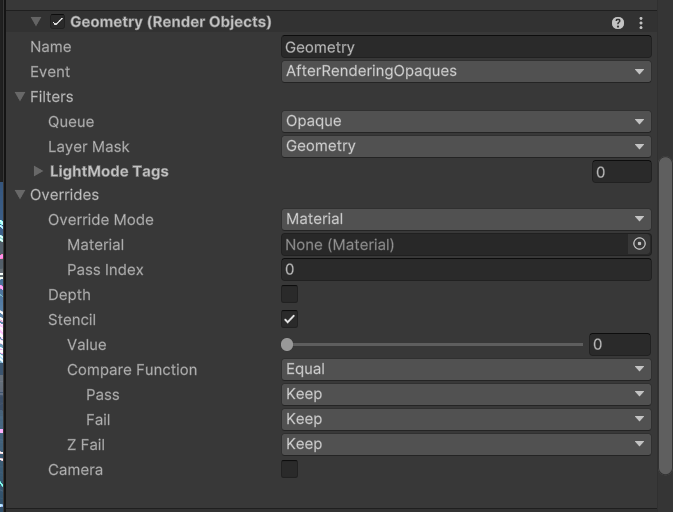
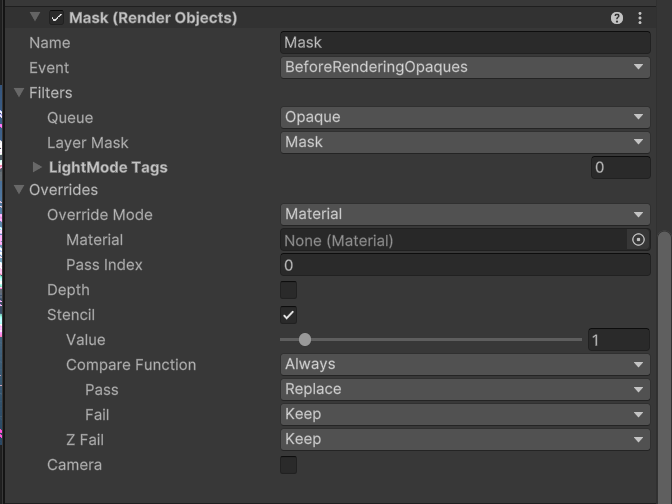
The mask is opaque for rendering order reasons, but if you need to mask transparents refer to the video
bright bramble
@hearty tundra @cyan bay cheers thanks, I'll look into those things
cyan bay
hearty tundra
Frame debugger is meh, Renderdoc is way more useful: debugging depth testing, st...
I agree, but it seems a bit overkill sometimes, at least for me. Also doesnt help that i cant read shader assembly so stepping through shader code is kinga useless
limber vale
haughty garnet
```cs
Shader "Custom/Mask"
{
SubShader
{
Tags { "RenderType"="Op...
Idk why but it still doesnt work. The background cube does have the Geometry layer


 haughty garnet
You have filtering set to everything
the render objects should be in control of their rendering
limber vale
i toggled them off but it didnt do anything

wait
i had tweaked the render queue order when i was trying things. after moving that back to 2000/geometry it works
Awesome, thanks so much for your help. I'll try to use this to learn what exactly happened for it to finally work lol
haughty garnet
Nice. Anyway, it kinda does similar to the video but you want to do the inverse which is why the mask and value index is a little whack. I'm actually not sure of the best way atm to make more independent geometry queues (it's kinda hard bound to index 0)
The video allows for having the mask and what you want to render on the same index, but that's actually easier to set up if you want to reveal
bright bramble
cyan bay
for what you're doing it might just be easier to setup a renderer feature so tha...
ooh yeah the frame debugger's helping. I haven't fully viewed everything yet, but I do know the draw operations are occurring
cyan bay
bright bramble
ooh yeah the frame debugger's helping. I haven't fully viewed everything yet, bu...
nice, especially with the rendergraph api, you can never be too sure if your stuff is getting stripped/culled
limber vale
haughty garnet
The video allows for having the mask and what you want to render on the same ind...
yeah i get the sense my use case is pretty rare which makes sense..not a lot of info out there.. chatgpt fed me a lot of stuff that didn't work too.
bright bramble
cyan bay
nice, especially with the rendergraph api, you can never be too sure if your stu...
in the preview, each object appears a solid pink as if the shader is incorrect, although the shader is recognised
 cyan bay
hey yall, I'm having an issue where I create a texture to be used in several Ren...
cyan bay
cyan bay
hey yall, I'm having an issue where I create a texture to be used in several Ren...
btw for anyone wondering, the texture I had created had MSAA samples set to whatever the active camera texture descritor had (not None) and that's why the enablerandomwrite flag wasn't getting applied
bright bramble
the test material is just an unmodified unlit shader (technically there's stuff in it but none of it connects to the outputs)
I tried a test that changes the vertex values, in case the material was being rendered behind but covered up, but nope still nothing
ooh hang on I don't think I set a render target
tried adding buffer.SetRenderTarget(camera.activeTexture); after the buffer was cleared, but that hasn't seemed to have done anything
bright bramble
RenderTargetIdentifier identifier = new RenderTargetIdentifier(BuiltinRenderTextureType.CameraTarget);
buffer.SetRenderTarget(identifier);
Trying this and messing around with different BuiltInRenderTextureTypes, nothing yet
hearty tundra
cyan bay
I agree, but it seems a bit overkill sometimes, at least for me. Also doesnt hel...
Uhm, when you enable shader debug symbols in Unity, you step through actual readable code, not assembly instructions.
cyan bay
hearty tundra
Uhm, when you enable shader debug symbols in Unity, you step through actual read...
oh for real? I’ve only really tried the shader debugger with standalone applications, I’ll take a look, thanks!!
hearty tundra
You just need to add #pragma enable_d3d11_debug_symbols to your shader, it doesn't matter if you capture in the editor or build.
cyan bay
hearty tundra
You just need to add #pragma enable_d3d11_debug_symbols to your shader, it doesn...
should i wrap it in a UNITY_EDITOR preprocessor? or does it not change performance?
hearty tundra
This is something you add to your shaders when you're debugging and remove afterwards. It does decrease perfomance (and makes the depth testing less precise for some reason, there's a whole lot more z fighting with debug symbols on).
 sick tapir
Hello, does anyone know how to perform culling with a custom CullingParameters in render graph? previously I would just use ScriptableRenderContext.Cull, but that doesn't seem to be available in the ScriptableRenderPass anymore 🤔
for a bit more context, I'm trying to render a shadowmap of my terrain and a few other big objects, even simply not culling anything would be enough in my case, as you can seesimply using renderingData.cullResults is less than ideal hahaha
 slender bone
hey guys, sorry for the strange question, but I'm trying to optimise my game, and I was wondering if its possible to make a transparent cube that casts shadows but does not receive them? I want to simplify the lighting on my larger tower block buildings, by disable them casing shadows, and placing a big cube inside them to cast shadows for them (and also on their interiors), how would I go about achieving this?
 little wharf
slender bone
hey guys, sorry for the strange question, but I'm trying to optimise my game, an...
little wharf
slender bone
hey guys, sorry for the strange question, but I'm trying to optimise my game, an...
Make a shader then unselect receive shadow
slender bone
little wharf
Make a shader then unselect receive shadow
thank you!
 runic lotus
Hello !
I'm working with the new render graph API for my game, and I'm trying to render some procedural geometry to the main shadow map using a ScriptableRenderPass. There does not seem to be any documentation on how to do that. I've tried looking into the URP's MainLightShadowCasterPass but a lot of the rendering functions used to setup the camera and cascades seem to be internal. Is there a more standardized way to do that ? Or do I need to hijack the whole URP package ?
 green smelt
I don't know if this is what you want, but with the built in pipeline you can use the Graphics.Render functions to draw objects, they internally get added to the rendering of the scene, unlike Graphics.DrawMesh, I was under the impression this would work for SRPs as well, and you can select there if it should be going to the shadows or not.
https://docs.unity3d.com/6000.0/Documentation/ScriptReference/Graphics.RenderMesh.html
There are equivalents for instanced/procedural
runic lotus
sick tapir
for a bit more context, I'm trying to render a shadowmap of my terrain and a few...
Don't know if it helps a lot but URP seems to add culling data for the shadows in ShadowCulling which uses the UniversalLightData, so maybe you could add a additional light that casts shadows at the same place you put your terrain's shadow map renderer ?
sick tapir
gonna give it a shot, thanks!
runic lotus
green smelt
I don't know if this is what you want, but with the built in pipeline you can us...
URP works quite differently, especially with the render graph, the new equivalent of that would be to inject a render pass which is what I'm currently doing, but the matrixes are apparently not setup for shadow casting in the BeforeRenderingShadows or AfterRenderingShadows so my geometry does not render properly or at all :/
harsh pollen
how should i go about blitting a texture onto the cameraColorTargetHandle and having transparent parts not be black, instead having the transparent parts not be changed and the parts of the original texture before the blit show there
 dry willow
harsh pollen
how should i go about blitting a texture onto the cameraColorTargetHandle and ha...
dry willow
harsh pollen
how should i go about blitting a texture onto the cameraColorTargetHandle and ha...
Use URP Sample Buffer node w/ Blit Source mode (or _BlitTexture in code) to obtain the source input. Lerp with that and the result using alpha as t input
rose vault
Hi i want to make a recommendation, after building your rendergraph pipeline update from urp16 you also have to change change the urp rendering in quality settings.
If you could add those steps too in the guide would be great for other users.
https://docs.unity3d.com/6000.0/Documentation/Manual/urp/upgrade-guide-unity-6.html
limber vale
I have spherical skyboxes (Skybox/Panoramic shader) on spheres that I use to allow player to view areas with various skyboxes in VR. Problem is, these skyboxes don't render outside of Play Mode for whatever reason. Apparently it's just how Unity works by default.
Anyone know any hacks or settings I can use to make these visible? Makes it very difficult to design my scenes for each Skybox when I have to be in Play Mode to see them
Worst case scenario I can create a separate Scene for each Skybox world and set the Skybox on the global Lighting settings for the sake of editing. But seems risky as the scenes will likely look differently than they will once inside the spheres
 hollow gorge
i want one asset to not have fog affect it so that way you can see it from far away, what can i do for that?
haughty garnet
Secondary camera and just not enable fog on it
limber vale
limber vale
I have spherical skyboxes (Skybox/Panoramic shader) on spheres that I use to all...
Turns out deleting the Skybox Material in Lighting>Environment makes these other Skyboxes appear
I'll take it I guess
 vivid dock
[Unity 6] I'm getting this error on a camera that uses a Render Texture on Output Texture:
InvalidOperationException: Trying to use a texture (_CameraNormalsTexture) that was already released or not yet created. Make sure you declare it for reading in your pass or you don't read it before it's been written to at least once.
Im couldnt understand the error message, I have no idea what that means, anyone could help me with that?
 rich garnet
Hello, can someone help me? Using more than one camera, for example, to render world-space UI over everything, causes the built project to appear black. It works fine in the editor. Turning off anti-aliasing (MSAA) resolves the issue, but I'd like to keep anti-aliasing enabled. Am I missing something? I'm using Unity 6.
 paper vine
Writing my own custom lighting for a shader (toon), and I'm wondering how do you insert baked GI into the calculations? I thought you would just multiply it in, but lightmap is completely black apart from the lights so you end up with a 90% black scene and when there's no lightmap, it's completely white so adding it just makes everything pure white
little wharf
slender bone
thank you!
You are welcome
 thorn lake
Does anyone know when Unity combines URP/HDRP in the future, which one will be most similar or easiest to convert to the combined end result? HDRP or URP?
 signal fractal
Which is better for performance: an objects made out of four different mesh renderers, each with a rigidbody and collider, or one skinned mesh renderer with four bones, each with a rigidbody and collider? For context I'm working on a grenade for a VR game targeting Quest 2.
 karmic iron
signal fractal
Which is better for performance: an objects made out of four different mesh rend...
karmic iron
signal fractal
Which is better for performance: an objects made out of four different mesh rend...
If you can avoid it being a skinned mesh renderer, do so. Skinned mesh renderers cost quite a bit more than standard renderers, as a general rule.
 fathom path
How do sprites work in 2.5D with Unity 6.0? I've noticed that now sprites are rendered above 3D models. Why is this happening?
haughty garnet
fathom path
How do sprites work in 2.5D with Unity 6.0? I've noticed that now sprites are re...
Like the depth testing is disabled? Perhaps the SpriteRender shader was changed, but usually you want to make your own shader for 2.5D anyway for opaque sprites
Unity 6.0 does actaully introduce SRP batching for sprite renders too so could be related
fathom path
To fix the issue, I created a Sprite-Unlit material instead of using the default one that comes
 chrome cliff
Hey guys, I am facing this weird rendering issue on a specific device, and after searching for the cause, I realised it's Vulkan causing this issue. This wasn't the case in older unity versions tho. Forcing opengl does fix it but my game used to work fine on this device before with Vulkan, and Vulkan seems to perform better too so I don't want to let go of it. Any help?
Unity version: 2022.3.52f1 (latest 2022 lts)
Render pipeline: URP
https://youtu.be/sE3ne2lXdrc?si=AOlRIIZsDh1de3xl
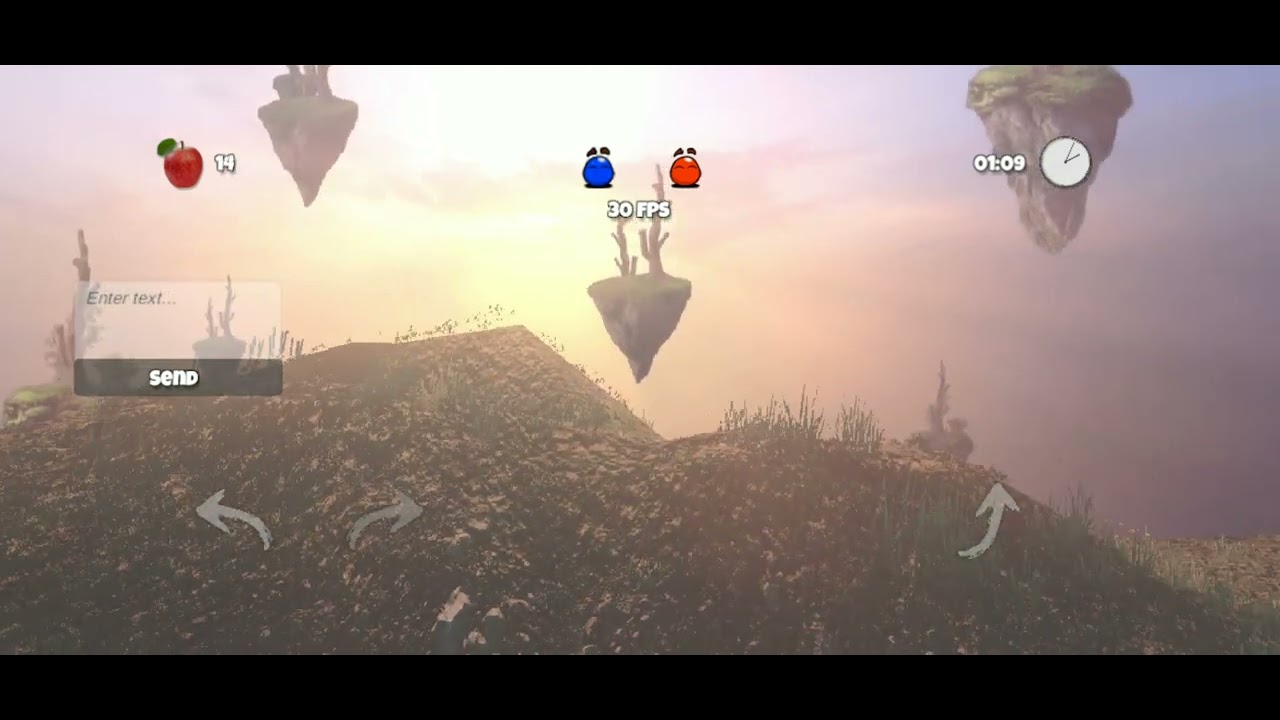
For extra info, the device I am facing this issue on is a Redmi note 7. Every shader seems to be working, it's just that the rendering is broken. I tried BIRP too and this vulkan issue doesn't happen there but I want to keep using URP. Also on a slightly newer phone the game works perfectly fine with Vulkan and it's supposed to look like this
 sinful gorge
Sadly older or lower end devices have poor vulkan drivers.
There is a workaround that injects arguments. That could help switching Graphics APIs based on the device.
Although it is easier to report the bug (help, report a bug) and let it happen until it is fixed :/
Or look into the shader/effect that causes it and update/fix that ofc
chrome cliff
I'll file a bug report
The thing is it was fine in older unity versions
Should I try downgrading? Just seeking your opinion
sinful gorge
After reporting it you can revert to an older version yeah. Just make sure to clear the Library folder as the cache is there and it can mess up. (Thinking of it, maybe do this first and try a clean build. Maybe there was a caching issue)
chrome cliff
And there doesn't seem to be any issue with the shaders
Even if I disable everything, using vulkan as the graphics api causes it on that specific device (and this may probably happen on more older devices idk)
chrome cliff
sinful gorge
After reporting it you can revert to an older version yeah. Just make sure to cl...
Ah alright
Thanks 🙂
 wary nacelle
Kinda happy to have been able to make a toon shader responsible to multiple light colours, glossiness, GI and specular power. The stepping still is super rough and the shadowing has been lost in the posterization, but after a few adjustments it should look just fine. Doing it in Unity6 and it’s quite more laid back with the includes as well.
 wary nacelle
paper vine
Writing my own custom lighting for a shader (toon), and I'm wondering how do you...
wary nacelle
paper vine
Writing my own custom lighting for a shader (toon), and I'm wondering how do you...
you can do it directly from the Shader Graph in URP with the BakedGI node. To avoid the black you can call MixRealtimeAndBakedGI() (I think it’s in the Lighting.hlsl or in GlobalIllumination.hlsl, can’t remember the exact include)
 autumn verge
Using Shader Graph and Unity 6 is it possible to exclude the shader from AO?
Also, is there a way to get an AO similar to the built-in one (Multi Scale Volumetric Obscurance)?
 tawny tiger
Any custom render feature expert around? I'd like to convert my older custom render feature to using Render Graph for URP 17 but I am kinda stuck... 😦
 copper pilot
tawny tiger
Any custom render feature expert around? I'd like to convert my older custom ren...
copper pilot
tawny tiger
Any custom render feature expert around? I'd like to convert my older custom ren...
Just ask your questions.
tawny tiger
In the older code we use Execute in the pass. I have this: Camera camera = renderingData.cameraData.camera; context.DrawSkybox(camera); // Draw the skybox to the skyboxTextureHandle to draw the skybox and feed it to the shader. How is this possible from within RecordRenderGraph?
tawny tiger
Basically what I would like to know is how do I get a render of the Skybox using Render Graph... Digging for hours now but can't figure it out 😦 Was so easy before.. Just 1 line of code
 lost charm
i'm trying to render from a different position from within a render graph render pass. this is what i'm doing from within the render function that i'm assigning to the render pass delegate (this is a RasterRenderPass):
var camera = data.Camera;

// cache initial values
Matrix4x4 cm = Matrix4x4.TRS(Vector3.zero, Quaternion.identity, new Vector3(1, 1, -1));
var cachedViewMatrix = cm * camera.transform.worldToLocalMatrix;
var cachedProjectionMatrix = camera.projectionMatrix;

// calculate new view matrix from new camera position
Vector3 newPos = GetNewPos(camera.transform.position);
Vector3 o = newPos - camera.transform.position;
var offset = new Vector3(-o.x, -o.y, o.z);
Matrix4x4 m = Matrix4x4.TRS(offset, Quaternion.identity, new Vector3(1, 1, -1));
var viewMatrix = m * camera.transform.worldToLocalMatrix;
var projectionMatrix = camera.projectionMatrix;

// apply matrices and draw
context.cmd.SetViewProjectionMatrices(viewMatrix, projectionMatrix);
context.cmd.DrawRendererList(data.RendererListHandle);``

// reset initial values for next pass
context.cmd.SetViewProjectionMatrices(cachedViewMatrix, cachedProjectionMatrix);```

it's kinda working, but things don't look right and it seems like the view matrix isn't correct. Any guidance or ideas are appreciated.I think I have to use 'renderGraph.CreateSkyboxRendererList(cameraData.camera)' and 'DrawRendererList()' and somehow use it to feed it to the shader with 'SetTexture("_SkyboxTexture", ...'. Anyone that can point me in the right direction??
 spring pelican
RG question: Trying to render different renderer lists into different channels of a texture. Each renderer list is created with an override material pass that has a given ColorMask (one with R and one with G, for example). Is that supposed to work?
Meaning this

 faint night
I tried to find some info on this online, and while I found basic stuff about textures and cameras I struggled to find a way to do what I wanted, so here I am. How do you make a static fog of war map based over a sprite. As in, I have my world and then a sketch of it. This sketch is going be a fog of war map that gets revealed as the player walks around it, although it doesn't ever get hidden again. What's going on in the scene doesn't really matter, just trying to show the parts of the map that have been traveled through or near to where the player has traveled. If possible, I would like some sketch-like outline on the edges of where it's been revealed but not necessary if it's significantly more complex
haughty garnet
faint night
I tried to find some info on this online, and while I found basic stuff about te...
Classic fog of war is just an overlay transparent texture where you would edit the alpha values depending if it's visible or not.
 mighty cargo
I have a full screen render feature that I'm using for scene transitions. But my UI is appearing on top of this transition. I'd like it to be underneath, but I'm not sure how exactly
I'm thinking I need some kind of camera stuff, but I'm not sure exactly what
haughty garnet
mighty cargo
I have a full screen render feature that I'm using for scene transitions. But my...
If the UI is an overlay then it's being rendered with a different viewport. There's an option of changing it to camera screen space on the canvas itself
mighty cargo
haughty garnet
If the UI is an overlay then it's being rendered with a different viewport. Ther...
My UI is handled in a separate scene. I'm having trouble getting it to show using camera screen space. But I'll keep trying.
haughty garnet
mighty cargo
My UI is handled in a separate scene. I'm having trouble getting it to show usin...
Could try a second camera and just render the UI to that, assuming you don't need any scene depth/color info for the transition
mighty cargo
Hmm, I'm still having trouble getting it to display with a second camera.
mighty cargo
I got it now. Thank you!
 pallid sleet
Hi guys, the objects in my game is 95% made of cubes stacked together, kind of like minecraft... But the rendering's really not fast, judging on profiling it's the main bottleneck at the moment, how should I go about optimizing this?
- Instancing is said to be not recommended for small meshes, cubes are... Well, small meshes (36 vertices)
- I heard of BatchRendererGroup, maybe I could make a renderer that uses the BatchRendererGroup to handle all the cubes in the world, however I'm not sure if that'll work, it's not something I can just try for a moment either.
- My brother oppose the idea of BatchRendererGroup, saying that it uses instancing too so it would be as good as GPU instancing.
- I might have to update the whole buffer every frame to account for flashing, movement and so on.
- I could maybe combine everything into models, it sounds like the straightforward way, however with the current setup the amount of things that can be combined as a mesh isn't quite big.
Reference for what kind of setup to expect:

It's a sandbox game, and a procedurally generated world, so can't really bake much either, nor is anything static as things are only loaded up within a certain range of the player
haughty garnet
pallid sleet
Reference for what kind of setup to expect:
How many verts are you rendering here, and what's the batching
chrome cliff
sinful gorge
Sadly older or lower end devices have poor vulkan drivers.
There is a workaroun...
Turns out it was just a fucked up urp asset. Idk what was the issue but maybe I did something in the hidden debug settings that broke the rendering on older devices. And switching to unity 2021 fixed it for me so seems like whatever the setting was, wasn't available before. I'll try comparing my old and new assets to find the cause. Atleast it's fixed now and everything is working well and I am on the latest 2022 lts too
 haughty garnet
That's pretty good
pallid sleet
In fullscreen it runs at 40fps
Our device might not be a good device to tell, though, it doesn't run Unity well, and we're running it with the editor
haughty garnet
Yeah, I'd try out a build because what you have there seems pretty fine as far as basic tooling goes.
haughty garnet
could be more specific to the rendering profile settings
pallid sleet
What do you suggest I test? Like, what data would help here?
haughty garnet
And you sure it's rendering related that you've not used the profiler yet
pallid sleet
I was looking at the profiler earlier, there's a large part where it appears to be simply waiting

Before I get comments on this being a decent framerate- It used to run slower, I don't know why it suddenly runs faster either, it often occurs that one moment Unity runs slower than the other
Sometimes it's unusable, while another moment it runs just fine with the same setup
haughty garnet
pallid sleet
I was looking at the profiler earlier, there's a large part where it appears to ...
If you're sure it's rendering related I'd start making a new render profile to test with and start removing features one-by-one. If you've got any fancy shaders that's another thing to disable for the heck of it, but I'm just kind of backtracking on what I usually do.
I assume you're using URP, but it does seem like you're static batching as well. I've been reading that hybrid batching isn't really much of a performance gain, and that the SRP batcher itself does most of the work anyway, even if it's not represented on the statistics there.
pallid sleet
Doesn't look like I have static batching... And honestly I'd be surprised as nothing is static here.
Oddly I thought I saw static batches before lunch but now that I search for it, I have no idea where I even saw it...
haughty garnet
pallid sleet
Doesn't look like I have static batching... And honestly I'd be surprised as not...
That frame window isn't that accurate for SRP batching, and sometimes it'll not update how much of the batches were reduced. Usually my built-in projects have similar information as yours as it's recommended to use static batching with that pipeline. Anyway, if you wanted more accurate info you can open the Frame Debugger window and it'll chunk out the batches for you there.
 late kernel
Hi, I am facing a wierd issue. I can see shadows of game objects in editor, but not in build (Android). How can I fix this?
hearty tundra
@pallid sleet does your world consist of voxels?
Or mostly handplaced custom 3d models?
pallid sleet
hearty tundra
<@589400575305842690> does your world consist of voxels?
Those are hand placed
But those aren't models either
pallid sleet
pallid sleet
Hi guys, the objects in my game is 95% made of cubes stacked together, kind of l...
Read there
It's hirarchies with the logic of
- node
- node
- cube
- cube
- cube
- cube
- node
hearty tundra
I did, but some of your objects are clearly custom models.
pallid sleet
hearty tundra
I did, but some of your objects are clearly custom models.
For example?
hearty tundra
The white tree.
pallid sleet
It's cubes
There ain't no white tree either, maybe you're talking about the one in the fog?
hearty tundra
The birch one.
pallid sleet
There are no models, except the "grass" which I combined at some point to see how well it optimizes, and the player (Tbh I want to revert it back to cubes, rigged model clashes with the rest of the project)
hearty tundra
You probably should make things like that in Blender or something, you're creating a lot of wasted hidden polygons if you're stacking up cubes without removing obscured sides.
mystic delta
If you are building stuff from basic geometry you might as well use ProBuilder or another editor to construct them. You are keeping a lot of extra transforms on the scene that you don't need.
pallid sleet
The "birch" is actually a furnace, and it's also cubes.
I know my project, thanks.
hearty tundra
For something like terrain that has grid aligned blocks you can do remeshing at runtime on a per chunk basis, that's what voxel based games do for the world to optimize.
But you can't do that automatically for non grid aligned cubes easily.
pallid sleet
I know, that's also why most of the faces can't be deleted
Although a good part can, yes
I've been considering this quite a few times, like, it would be nice if I can keep it cubes...
I'm pretty sure that there must be some way to use this factor of my game to my advantage but... So far most people just say to combine it into meshes...
hearty tundra
BatchRenderer does use instancing from what I gather and DirectX doesn't have some unknown magic way to reduce overhead outside of instanced and instanced indirect rendering.
You definitely can reduce the gameobject overhead by converting them to data in your buffer and removing the renderers at runtime. Then it'd be just a simple instanced draw with a cube mesh. You'll have to put per instance data into a structured buffer.
pallid sleet
I wrote that once before actually, a renderer using BatchRendererGroup... The one I wrote used 1 material and allowed setting individual colour for each cube...
That's the main reason why I've been considering it, but honestly I'm kind of indecisive as I worry that I'm bloating my framework with unnecessary flexibility, although in another way, I feel like I've basically been enjoying writing a framework instead of an actual game 🤷♂️
hearty tundra
Rendering instanced colored cubes isn't really much of a framework 😆
pallid sleet
I'm talking about the whole game's workings
Basically a bunch of systems and design choices, if I choose one it'll be a pain to migrate all content built on top of the first to another if I end up changing my plan
Especially this one would be a massive difference that could make certain things unreasonable to replicate.
(Visual effects of cubes forming objects, for example)
mystic delta
pallid sleet
That's the main reason why I've been considering it, but honestly I'm kind of in...
You can make multi-material object for that.
pallid sleet
mystic delta
You can make multi-material object for that.
Haha you got it, but it's another situation to be in compared to cubing, sub meshes is the same deal as meshes in general, it's restricted to it's setup, and requires either texturing or an expansive arsenal of materials.
mystic delta
You are using simple colors though, you don't need texturing. Just need not broken uv's that any editor can fix for you.
Simple custom shader can provide with random noise for variation as well
pallid sleet
Texturing means that you can have the freedom of using any colour on any part...
While submeshes mean that you need 20 materials to colour your world in 20 hues, or am I missing something?
mystic delta
You use tint color and still color them how you want with multiple materials, can overlay grey noise as well
pallid sleet
Materials don't have tint... No?
In sprites and ui that's possible, but I never saw tint on mesh renderers?
mystic delta
Simple custom shader can provide with random noise for variation as well
pallid sleet
Noise isn't exactly the matter... I mean actual colours '^^
mystic delta
tint is just one blend node in shadergraph
pallid sleet
In my current setup I reused Eldertree bark material for tons of different parts, while there's a blueberry material that's only used on blueberries, I'm talking about those cases
pallid sleet
mystic delta
tint is just one blend node in shadergraph
I hardly touched shadergraph... So I don't exactly know what tint does...
mystic delta
same shader can accommodate that, you can use tint on white/noised/texture or not, you can use texture without changing tint.
pallid sleet
Actually, I just remembered, Unity seems to instance all materials at runtime, right?
Basically you can modify one without affecting any other?
mystic delta
Asset will use its material instance, you can create instances of it and reuse those as groups or however, you have to manage that.
pallid sleet
Ah, just did a quick search, I was only half right- Unity does instance the material, but it does it specifically when I modify a property instance-wise
mystic delta
if not when, you don't have to touch the property
pallid sleet
Well... Frankly, I touched it when introducing flashing to enemy body parts... Haha...
Through emission
Will have to rethink that too, I guess, later
mystic delta
You can use https://docs.unity3d.com/ScriptReference/Renderer-sharedMaterial.html and not clone asset material, I prefer to manage every instance myself to not lose track of autoinstanced ones and create garbage.
pallid sleet
Ah no, I'm aware of shared material, but thanks
I was simply not aware that by default they're not instanced...
Y'know, honestly... I think that the cube instance drawer is worth a shot first, I kept hesitating so I took none of the sides, but honestly I think that it's only making more hesitation than anything
Unless if you've got a good reason why BRG would be a bad choice?
mystic delta
if you access regular material property then it will be instanced, and if you not cache and track it, it can outlive the object and live in memory entire runtime.
pallid sleet
mystic delta
if you access regular material property then it will be instanced, and if you no...
That's crazy... That means that something is keeping track of all the materials somewhere
mystic delta
it's have to do with C++ side of the engine, so dereferencing will not mark it for garbage collection
pallid sleet
Either a manager of some kind or the original material, I'm guessing
pallid sleet
mystic delta
it's have to do with C++ side of the engine, so dereferencing will not mark it f...
Y'know... It makes it sound like magic '^^
I mean that it sounds like an exception out of the blue
mystic delta
It is just still referenced somewhere that you don't have access to.
pallid sleet
Whelp, um... Unless you have comments on BRG or similar techniques to draw repetitive meshes, whether it be good or bad... I'm going back to reading stuff and soon sleep
I don't think you have... Right?
mystic delta
Whatever you use, compare it when you switch to multimaterial simple meshes while profiling. Then you'll have your answer.
 lime grove
Hi everyone, running into a weird problem where all the UI Images are showing up as untextured squares in my build
Below on the left is the build version and the right is in editor


The play button uses unity's default background sprite where as the rest uses a custom 1x1 square sprite
 queen bronze
lime grove
Hi everyone, running into a weird problem where all the UI Images are showing up...
queen bronze
lime grove
Hi everyone, running into a weird problem where all the UI Images are showing up...
Are you using any fancy custom shaders that might not work on your GPU? the bright pink is 99% shader errors/incompatible shaders
haughty garnet
lime grove
default UI Shader
In settings, either where you set platform settings or Graphics you can change what render profiles are built with them, so make sure it's using the correct one for your platform
lime grove
Would UI/Default not being here be the reason?

Ok I tested it while waiting for the answer, and added UI/Default and it worked
 spring mesa
qustion, if I have matrix of positions (Lets say i have 10 cubes) and I want to render them via draw mesh instanced indirect, does the order of positions in this matrix matter to rendering or does it not?
Because I need to render thousends of trees with indirect rendering but I also want to make sure that they are properly z tested and ocluded pixels are discarded
any help would be greatly appreciated 🙂
 ember ermine
Hey there people! i have some problems with using the shadow caster for my unity 2d urp project!
basically i have setup the lights to have shadow strength and set the shadow caster for the elements that i want but no shadow appears, i can't seem to find where the problem is as everything seems to be setup properly! im using unity 2022.3 lts
 wispy sierra
is it possible to switch "Renderer.receiveShadows" on and off during runtime, for a shader made with shader graph? I ask because it does not work changing the variable in the sprite renderer (it is always receiving shadows, and I want to deactivate that at some moments).
ember ermine
wispy sierra
is it possible to switch "Renderer.receiveShadows" on and off during runtime, fo...
im not using shaders to make the shadows, shadow caster as far as my knowledge goes interacts with 2d lights if they are added to a gameobject and the light has shadow strength enabled but for some reason it's not working, i found some poeple saying the problem is with this unity version messing up shadow caster but im not sure :(((
wispy sierra
I was making another question, not answering. 🙂
ember ermine
oh hahah my bad :))))
autumn verge
By any chance, has anyone tried to implement 8 cascades as in Genshin Impact?
magic stump
Is there a good solution for Dynamic reflections in URP? For example the Player walking over a puddle or something. Just leaving a Probe on dynamic seems a bit much (and I don't wanna move to HDRP just to get SSR - but tbh I am not a big fan of SSR anyway; though it'd be better than nothing).
wispy sierra
magic stump
Is there a good solution for Dynamic reflections in URP? For example the Player ...
You can also use planar reflection with a secondary camera. Anyway, either you do one way or another, you can turn off reflection when the puddle is not visible
 stable island
magic stump
Is there a good solution for Dynamic reflections in URP? For example the Player ...
stable island
magic stump
Is there a good solution for Dynamic reflections in URP? For example the Player ...
Dynamic probes are usable at a limited resolution (you can at do 1 cube face per frame) but are very poor for planar reflection. Planar reflection is still a big omission from URP (SSR is the only one on roadmap), but is also expensive as you have to render the scene again from a different angle, however only 1 direction not 6 as with a probe! I wish it was available as it is in HDRP without third-party plugin
 thin lagoon
not entirely sure where to put this - has anyone encountered this before? or a solution?
not sure how to send a better video format, but here is a screenshot
 marble vigil
thin lagoon
not sure how to send a better video format, but here is a screenshot
marble vigil
thin lagoon
not sure how to send a better video format, but here is a screenshot
Convert to webm or mp4
The shader is producing NaN values for some reason
thin lagoon
not using any custom shaders, just the probuilder shader and a standard shader for the gold colour
I also have one emissive material, but it's also only using the standard lit shader
stable island
Hope you are not on a mac - M1/M2 models had issues for me
if you have loads of lights you may get flicker
thin lagoon
nope this is a pc, there is also only a directional light - also several of my students are having this issue as well and are also on pc
stable island
hmm weird! Is Unity 6 issue only? You have different spec. PCs?
thin lagoon
pcs and different specs, we are all using unity 5, but this has happened to me in the past with previous versions
stable island
ah well that's a tough one - tried turning everything off in the scene one at a time? And disabling post processing
thin lagoon
yes, even stranger.. I made a new scene and put in some similar probuilder objects with the same 3 materials... and it does not occur
 steel hollow
thin lagoon
yes, even stranger.. I made a new scene and put in some similar probuilder objec...
steel hollow
thin lagoon
yes, even stranger.. I made a new scene and put in some similar probuilder objec...
Maybe your library is messed up due to some unity update. Try deleting the folder
thin lagoon
deleting the library folder? don't updates these days make you redownload the entire engine
magic stump
stable island
Dynamic probes are usable at a limited resolution (you can at do 1 cube face per...
I'll work with what i have yep, thank you
On a side note i really wonder who left Blue Noise as the default method for SSAO in URP when you make a project, it looks so bad
 stray scroll
is it possible to user the Render Pipeline Converter on one specific folder? instead of the entire project.
 junior lake
is it possible to apply fullscreen shader not to ui?
haughty garnet
junior lake
is it possible to apply fullscreen shader not to ui?
Set the canvas to overlay and not world space
 formal nebula
Would it be possible to have a material that fades the alpha value?
 pliant vigil
I have a 2D URP project but I'm not using the lighting system. Every time I save scenes now, it saves an extra file of lighting data, even though I seem to have all the lighting settings off that I could find. Is there any way to stop it from making these files that do nothing?
the renderer is set to unlit as well
sinful gorge
formal nebula
Would it be possible to have a material that fades the alpha value?
Yes, fade it in C# (or with the time methods in shader graph)
formal nebula
sinful gorge
Yes, fade it in C# (or with the time methods in shader graph)
No no like a static material with fading alpha value, not like making it transition from opaque to transparent
sinful gorge
formal nebula
No no like a static material with fading alpha value, not like making it transit...
You might be able to set it via script as well, but maybe you'd need to swap materials.
Don't recall on the top of my head, maybe someone else knows
formal nebula
I did a kinda hacky solution by having 15 thin rectangles and making 15 materials with increasing alpha values, then assigning each material to each rectangle respectively
It works well enough for the project so 👍
 lusty scarab
Q: I'm making a 2D game using URP with unity 6 and need to have game elements that are a combination of sprite/text (they are playing cards, sortof--with a suit symbol and a letter draw over that). But, so far have not managed to get this actually working. The sprite part is a .svg asset to hopefully look good regardless of the final size it appears, and hmmmm ... this gives me an idea actually. Maybe I should actually do the letters as .svg too.
marble vigil
formal nebula
I did a kinda hacky solution by having 15 thin rectangles and making 15 material...
I assume you mean a fade over distance rather than over time
You would use a texture that has a gradient as its alpha channel
marble vigil
lusty scarab
Q: I'm making a 2D game using URP with unity 6 and need to have game elements th...
I cannot see any question there
 whole hazel
Anyone know a good way to debug what causes shaders to display on the editor but not on the build
marble vigil
whole hazel
Anyone know a good way to debug what causes shaders to display on the editor but...
Usually either your build uses a quality level (or target platform) that can't render the shaders, or shader stripping gets rid of them at build time
 swift ruin
So… I have a simple renderer feature out here.
It works totally fine (both in editor and standalone build), but there's a weird issue that I can't really figure out
Immediately after building a standalone build, the editor's scene viewport stops rendering, generating a lot of exceptions about the fact that the material passed into BlitTexture() is null.
Debugging reveals that the material objects (maskGenerationMaterial and maskApplyMaterial, you get it) have been destroyed, even though OutlineRenderPass.Release() was never called. Does Unity dispose them while doing the build for whatever reason and how do I prevent that?
Not that it's a big problem (it's fixed by entering play mode and going back), but I wonder – am I doing something wrong or is it a bug in Unity (I'm on 2022.3.16f1 to be specific)?
marble vigil
Don't crosspost please
copper pilot
lusty scarab
Q: I'm making a 2D game using URP with unity 6 and need to have game elements th...
Svg imported to unity is rasterised, so it is no longer resolution independent. One popular option to look at might be sdf rendering, such as what textmeshpro does.
 dreamy stratus
copper pilot
Svg imported to unity is rasterised, so it is no longer resolution independent. ...
dreamy stratus
copper pilot
Svg imported to unity is rasterised, so it is no longer resolution independent. ...
There's this old package that imports SVGs as meshes ... no sure if it still works propertly though 😅
stable island
In Unity 6 the default URP volume has all the post process effects on and you can not toggle them off. What do you do to remove all default volume effects?
dreamy stratus
stable island
In Unity 6 the default URP volume has all the post process effects on and you ca...
We decided to take this approach to avoid confusion.
The volume interpolation system does always have all the volume component. But before the ones that were not in the default volume profile were using default hardcoded values (the one declared in the different volume components scripts).
Now the last fallback for volume interpolation is always visible in the default volume.
If you don't want a volume effect to be enabled, usually one if its settings will trigger it off, IE if the bloom has an intensity of 0 it will be disabled.
stable island
dreamy stratus
We decided to take this approach to avoid confusion.
The volume interpolation sy...
wait... I have to go through every effect and find something to turn it off like an intensity?
dreamy stratus
Well, only those that you want disabled.
Don't you want some of them to be enabled by default for all your scenes ?
Note that previously, when you added bloom to take the example again, but disabled the component in the default probile, you actually disabled it for the inteprolation, so that one got ignore and bloom could still be active because if was falling back to the default hardcoded value.
stable island
That is mad. Many times I want only 1 or 2 and I have to struggle to find how to turn off all the others? From a usability perspective it is terrible. And what about on your code side - why do you not have simple checks - oh this is enabled or not so skip it all. Or there are no effects turned on so skip a big chunk
ALso if I make a new volume profile I can toggle on and off effects - but I guess that is just overrides. The fact that when it becomes the default profile it then has them all toggled on with no toggle is just confusing. Is this even covered clearly in the docs?
Is there an example volume profile with all effects off as a starting point?
why run every effect possible with any values instead of skipping it if not wanted - not a speed issue there?
dreamy stratus
stable island
why run every effect possible with any values instead of skipping it if not want...
The effects don't run if the interpolated values disable it.
In 6.x, that default volume profile with all overrides should have the exact same setting as the default coded values, and iirc, they have "disabled" settings by default.
stable island
dreamy stratus
The effects don't run if the interpolated values disable it.
ok I see - maybe there should be an indicator by the effect title to show that it is 'disabled' as intensity is 0 etc.? I think maybe this information is not clear
autumn verge
Is there somewhere an example on how to properly implement a renderer features using both RenderGraph and the obsolete API? Reason is that I'm still running on compatibility mode because of some outdated assets but I need to create a new renderer feature. I'm looking specifically for how to render object of a certain layer to a temporary mask that will get passed to another material and then blit into the main color (it's a post process renderer feature).
stable island
default bloom seems to be on and there is no obvious way to disable it. If you have an over-bright light it always show and the intensity does nto disable it
looks like clamp 0 is off but how would I know without playing around?!
dreamy stratus
stable island
looks like clamp 0 is off but how would I know without playing around?!
Did you try to Volume tab of the Rendering Debugger Window ?
Here for example you can see how bloom is interpolated in 2022.3 and 6.1 :


The rightmost column with the "base" value is the same, but in 6.x it can actually be edited now with the default volume profile.
stable island
so the default is same as before, but the default is 'on' to some degree?
dreamy stratus
stable island
so the default is same as before, but the default is 'on' to some degree?
In the case of bloom, it's on if intensity > 0
stable island
dreamy stratus
In the case of bloom, it's on if intensity > 0
but seems like all others are off by default but bloom is on. Tryng to see which are on a bit by default
dreamy stratus
autumn verge
Is there somewhere an example on how to properly implement a renderer features u...
Not really a doc, but you can look at how we implemented legacy and rendergraph compatible renderer features in the URP samples project.
The FullscreenEffect.cs script for example.
But basically, you just override the two fonction of both path, Execute for legacy, and RecordRenderGraph for RenderGraph
dreamy stratus
stable island
but seems like all others are off by default but bloom is on. Tryng to see which...
You did look in the Rendering Debugger ? This should easilly show you why bloom is enabled.
stable island
dreamy stratus
You did look in the Rendering Debugger ? This should easilly show you why bloom ...
yes and the default values say on
dreamy stratus
stable island
yes and the default values say on
Can you screenshot the window please ?
stable island
dreamy stratus
Can you screenshot the window please ?
sorry so depends on HDR setting. So default is intensity 0, but if in HDR you have a lower clamp value you get bloom appearing. So off is well not always defined by intensity
Also Vignette - the intensity seems to not work currently. Only the smoothness shows or hides it
autumn verge
dreamy stratus
Not really a doc, but you can look at how we implemented legacy and rendergraph ...
Ah, completely forgot about the URP samples. I was looking at the included renderer features under com.unity.render-pipelines.universal but there are some function that are not available (e.g. RenderingUtils.CreateRendererListWithRenderStateBlock). I'll check the URP samples, thanks!
stable island
dreamy stratus
You did look in the Rendering Debugger ? This should easilly show you why bloom ...
So on default settings bloom runs in non-HDR or HDR looking at the frame debugger. So does it always runs?
dreamy stratus
stable island
So on default settings bloom runs in non-HDR or HDR looking at the frame debugge...
You mean that you have a bloom pass active and rendered even when bloom should be disabled ?
stable island
dreamy stratus
You mean that you have a bloom pass active and rendered even when bloom should b...
exactly - I can find no way to not have it run
dreamy stratus
stable island
exactly - I can find no way to not have it run
If you are talking of the bloom blur (downsample and upsample) passes, it might be because other effects needs them. It is something less obvious to understand ...
Using the rendergraph viewer you should be able to see which passes are using the buffers.
stable island
Can anyone confirm in current v6 the Vignette intensity is not working?
stable island
dreamy stratus
If you are talking of the bloom blur (downsample and upsample) passes, it might ...
I will have to report a bug I think - intensity 0 bloom but the rendergraph viewer shows the 6 iterations of bloom happening!
dreamy stratus
stable island
I will have to report a bug I think - intensity 0 bloom but the rendergraph view...
Can you show a screenshot of the rendergraph viewer and volume debug please ? I'm testing with the URP sample scene, and I can see the passes removed if bloom is disabled.
dreamy stratus
stable island
Can anyone confirm in current v6 the Vignette intensity is not working?
And I do see vignette intensity having an effect.
stable island
dreamy stratus
And I do see vignette intensity having an effect.
hmm ok this is odd - Are you using 26f1 and which rendering? forward + deferred?
 dreamy stratus
stable island
hmm ok this is odd - Are you using 26f1 and which rendering? forward + deferred?
dreamy stratus
stable island
hmm ok this is odd - Are you using 26f1 and which rendering? forward + deferred?
6.23, forward+
Could you also screenshot the rendering debugger with the bloom volume displayed ?
stable island
ah sorry - so the rendering debugger shows another profile coming in but I do not know where - I should have started with a new scene from scratch as I was about to do. The problem is I have no idea where it comes in from

I do not have a volume in the scene
dreamy stratus
stable island
ah sorry - so the rendering debugger shows another profile coming in but I do no...
It is the one assigned in the SRP asset (either default SRP asset or the one of the quality level)
So each quality level can override the default volume settings if needed.
stable island
ahhhhh sorry thank you - there is the volume in the PC_RP asset! Well thank you so much for the debugging help, I will now be able to understand what is overriding what. Sorry for the confusion
I wonder though, the fact the default template has a volume override in that asset which only overrides very specific elements (only intensity on the Vignette) does not cause some confusion... Should there maybe not be any second volume with overrides by default or this is somehow clear and I just missed it in my rush to try things out?
dreamy stratus
stable island
I wonder though, the fact the default template has a volume override in that ass...
I'm unsure to understand what you are trying to express here 😅
stable island
dreamy stratus
I'm unsure to understand what you are trying to express here 😅
 so you start a new project. You want to play with post effects. You go to default volume and change values. Some do not work because of specific overrides in the the one assigned in the RC_RP/SRP asset. Is it obvious why?
Probably it is, but as a long term user some of these things still catch me out?!
dreamy stratus
No, it's not obvious at all -_-
I know that the volume system is confusing, that's why we have the debugger to show how things are interpolated, but we want to revamp it for better understanding, maybe with a dedicated window (something that would look like the debugger, but also allow you to edit the values there).
stable island
ok thanks, BTW while you are here! Forward+ is now the default PC renderer, is this thought of as best for speed vs lighting abilities?
dreamy stratus
Kind of, yes.
Like for everything, it depends on what you are doing 😅 I some cases deferred might be better.
autumn verge
How to get UniversalRenderingData, UniversalCameraData and UniversalLightData in the obsolete Execute method for renderer features? The RendererListRenderFeature in the samples only shows the new RenderGraph API 😢 I need those for creating a DrawingSettings to pass to the RendererListParams
Duh, used CreateDrawingSettings instead of RenderingUtils.CreateDrawingSettings 🤔
 warm igloo
How to use the Renderer feature's Render Objects, while also avoiding this problem ?
I'm trying to avoid using camera stacking for my weapons because
- You don't get shadows
- doesn't work if I switch it to deferred rendering.
- I don't want to manage 2 cameras.
I tried all sorts of settings but nothing works... Why is this happening ?
Any help on how I could solve this please. thank you


 dreamy stratus
warm igloo
How to use the Renderer feature's Render Objects, while also avoiding this probl...
dreamy stratus
warm igloo
How to use the Renderer feature's Render Objects, while also avoiding this probl...
That's seems to be AO leaking through your object.
You could try to add a second render objects feature that would draw it only in the depth buffer (with a custom shader) before the AO pass
warm igloo
dreamy stratus
That's seems to be AO leaking through your object.
You could try to add a second...
oh yeah the AO part makes sense since it seems only shadows are coming through mostly .
If its possible to explain the last part a bit more, I'm not sure how to approach it.
Custom shader for which one? Thanks in advance still new to this render feature stuff / renderers in general
dreamy stratus
warm igloo
oh yeah the AO part makes sense since it seems only shadows are coming through m...
Basically, AO is calculated using the depth and normal buffers.
So if you don't want the AO to show over your mesh you need to either :
A. correct the AO to propertly include it
B. make your mesh no be affected by AO
C. render it before AO applies
Option A here requires to force write that mesh into the depth and normal buffer so it's properly taken in account by AO. Now that I think of it, it might not be so simple, as it requires a dediced shader that only writes in those, and properly bind the normal buffer, so might as well need a custom renderer feature :/
Also, I see that you are using stencil buffer, why ?
iron compass
Writing the weapon to the depth buffer likely defeats the point of using the render objects feature for it (to avoid clipping?)
dreamy stratus
iron compass
Writing the weapon to the depth buffer likely defeats the point of using the ren...
Well, it doesn't need to be a correct depth, it could be force to be further than the wall close to the camera for example.
warm igloo
dreamy stratus
Basically, AO is calculated using the depth and normal buffers.
So if you don't...
here is what happens when I don't use stencil option

 timid root
I'm having a real strange issue with Screen Space Decals.
They don't work unless I have the Frame Debugger enabled (see screenshots, the white square in there is the decal).
Does anyone has an idea what could be going on there?


 crystal forge
Hi, I'm seeing an issue where the CopyDepth pass is not happening after opaques despite the Depth Texture Mode being set to 'After Opaques'. It is happening after transparents instead. This is causing a one frame delay in a transparent shader I have that samples the depth texture. Has anybody else seen this before? URP 2022.3.30f1 LTS. EDIT: Discovered a third party asset was doing this.
 placid laurel
Hi. I am using a URP project. I imported a city environment, then converted the tree materials to URP because the trees were pink. But now my trees look weird like 2D cardboard cutouts or something...How do I fix this problem?

 trim scroll
placid laurel
Hi. I am using a URP project. I imported a city environment, then converted the ...
trim scroll
placid laurel
Hi. I am using a URP project. I imported a city environment, then converted the ...
Make sure on the texture import setting you have "Alpha is Transparency" checked and then make sure your shader clips based on alpha.
placid laurel
trim scroll
Make sure on the texture import setting you have "Alpha is Transparency" checked...
Thank You 🙏
 blazing dirge
how can I enable and disable custom renderer features in code?
dry willow
blazing dirge
how can I enable and disable custom renderer features in code?
Get a reference to it (i.e. public field of ScriptableRendererFeature or of the custom class, then set value from inspector) and call it's SetActive(bool) method
blazing dirge
dry willow
Get a reference to it (i.e. public field of ScriptableRendererFeature or of the ...
reference from the URP renderer?
blazing dirge
nvm i got it, thanks!
 empty spire
Hello everyone, I have this weird issue. I have quite a bit of overlapping opaque textures in my game so I have enabled "Depth Priming" to avoid overdraw. It seem to have made a significant change when I view it in the scene view using "Rendering Debugger" overdraw tool, however, when I switched to the game view the overdraw has not decreased, it looks the same. Is that normal? I have attached the image showing the difference when the depth priming is enabled.
I use:
Unity 6
URP 17.0.3
Forward+
 autumn verge
dreamy stratus
That's seems to be AO leaking through your object.
You could try to add a second...
autumn verge
dreamy stratus
That's seems to be AO leaking through your object.
You could try to add a second...
Sorry for breaking in the conversation, I'm trying to do exactly that (render object feature that draws to depth buffer only). In my custom shader I tried both no LightMode tag and ColorMask 0 or LightMode DepthOnly and ColorMask R but it always seems to draw to both color and depth. What's the correct setup here?
dreamy stratus
autumn verge
Sorry for breaking in the conversation, I'm trying to do exactly that (render ob...
Colormask 0 should be enough 🤔
autumn verge
😭

Unless the render objects renderer feature is overriding that.. I forgot to check with a standard material, will do that now.
marble vigil
That doesn't seem to have anything to do with URP
 modest aspen
anyone know how to use RWTexture in fragment shader , this seems not work


i want to do some accumulation in fragment shader
haughty garnet
one heck of a z-fight
 glad bane
Hey, can I make the shadows look better or is this as good as they get?
The lights are basic spotlights, I don't know if that has an impact.
 maiden depot
The strange console messages appeard after upgrading to unity 6: The Disc light type on the GameObject 'Area Light (1)' is unsupported by URP, and will not be rendered. I have many baked disc area lights in my scene, so this error message is kinda annoying (my game has source-like ingame developer console, that can display unity debug logs and errors) and most importantly wrong: Disc area lights DO emit light and they are being baked into lightmap. is there a way to get rid of this?
 late meteor
Hey guys! I am trying to use the fullscreen shader graph to sample the frame buffer and do some post processing. The issue is that an assertion in the RenderGraphResources.cs file is failing. It is in the ResourceHandle function and the assert is this: Debug.Assert(value <= 0xFFFF); I am new to the graphics pipeline, so I don't know what this means. Could someone explain what be going wrong?
soft lion
I believe this usually happens with post processing effects like bloom with somehow invalid or black pixel values
 errant cloud
Is there a way to have different shadow rendering distance for different objects?
I have big objects that need to cast shadow from afar (and are destructible so no baking) and a ton of small objects who need shadows but kill performance if shadow distance is too far. I'm looking for a way to have buildings and co render their shadow at large distance, and the small/medium ones only when up close.
soft lion
errant cloud
Is there a way to have different shadow rendering distance for different objects...
Other than shadow cascades (which might be useful, take a look), I'm not aware of such system.
 thick gust
URP doesn't support ambient occlusion? Ive looekd in the Volume component and pretty much every effect is there besides ambient occlusion.
haughty garnet
https://i.imgur.com/CJ5BkUS.png
Any general way to render the skybox via camera stacking without fullscreen shader passes from affecting it? I've tried a bunch of ideas like not initializing the skybox at the base, but you can't initialize it further upon the stack. I've tried making secondary non-stacked cameras, but the initialized skybox from the second camera will still draw over the skybox camera
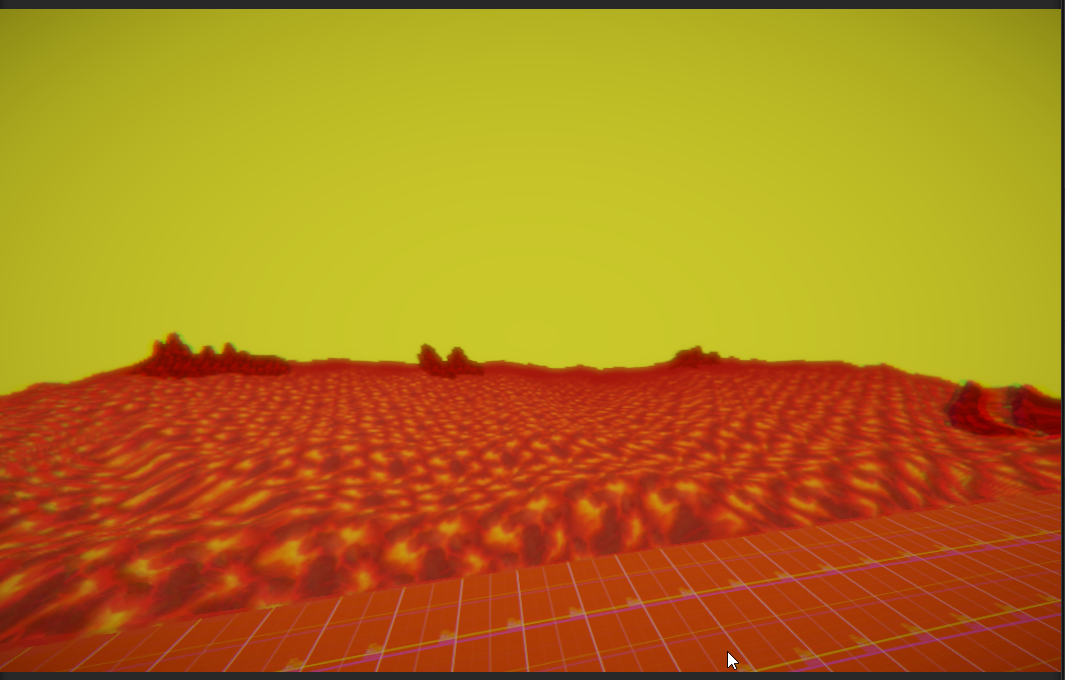
My only other idea outside of using the skybox is making a inward cube and just doing it myself /shrug
 stone crest
haughty garnet
https://i.imgur.com/CJ5BkUS.png
Any general way to render the skybox via camera ...
stone crest
haughty garnet
https://i.imgur.com/CJ5BkUS.png
Any general way to render the skybox via camera ...
mask it out based on depth or normal maps? or draw it with a fullscreen pass after other post effects run? possibly I'm missing something about your question.
haughty garnet
Yeah, I probably want to depth mask it. I was just thinking I could cull everything then render the skybox behind it but I don't think any ordering can fix that issue
Inward cube idea does kinda work but there's some artifacting from the previous camera that i would have to clear which isn't ideal
trim scroll
errant cloud
Is there a way to have different shadow rendering distance for different objects...
You should use shadow cascades, but if that’s not enough you need to render your shadows to a seperate rendertexture, then sample that texture alongside the default shadowmap on your opaque pass.
 winged portal
Hey can any Unity gurus help explain what is happening here?
I have an issue where my navigation marker is being drawn on top of my player units (i want the decal to only render on surfaces i've marked).
The spinning navigation marker is a URP Decal Projector, the rendering layer is set to a layer called ReceiveDecals.
The player mesh is on another layer called Units.
The Camera is a child of an empty game object which is what the camera controller moves.
The expectation is that the decals won't render on my units, but will render on the floor plane (marked as ReceiveDecals)
The weird part is it looks fine as long as my camera is positioned correctly with the decal being in the top half of the frame. See the video demonstration.
I'm sure its something to do with how i've set up my camera. I've tried messing with the clipping planes and priority settings but I've got no idea what's causing this.
Any ideas?


 hearty tundra
errant cloud
Is there a way to have different shadow rendering distance for different objects...
hearty tundra
errant cloud
Is there a way to have different shadow rendering distance for different objects...
You could implement a script that turns off shadows on the attached renderer when the distance to camera is too far.
winged portal
it also looks correct in the scene view
its something to do with the camera - it won't respect the rendering layers on the top half of the frame
Fixed - I had to edit the toon shader I was using and turn off Auto Render Queue. Setting the render queue to a lower number fixed the issue.
 nova bear
glad bane
Hey, can I make the shadows look better or is this as good as they get?
nova bear
glad bane
Hey, can I make the shadows look better or is this as good as they get?
HDRP Can do more realistic shadows (think variable penumbra), but aside from that, I don't see much wrong with those shadows. Are you looking to improve some specific part of it?
glad bane
nova bear
HDRP Can do more realistic shadows (think variable penumbra), but aside from tha...
The staircase edges is what's bothering me, even on high quality with soft shadows it looks as if they are low resolution
nova bear
Check the inspector for the spotlights to see if you can turn up the soft shadow quality
but aside from more expensive filtering, or higher shadow resolution, there's not a ton you can do about that stairstepping
marble vigil
glad bane
The staircase edges is what's bothering me, even on high quality with soft shado...
They are rather low resolution, at least perceptually
The resolution is a specific defineable value, but also if you're using spot lights for shadow casting the wider their angle is, the lower the shadow resolution is near the center of the shadow
Counterintuitively
glad bane
thanks for the replies
i think someone said something about the shadow distance being too high? i saw it in my notifications but can't find the comment
sinful gorge
glad bane
i think someone said something about the shadow distance being too high? i saw i...
That was me, but that's only for directional light shadows!
Since you're using additional shadows that shouldn't matter
marble vigil
Drawing objects through walls with the Render Objects feature is simple enough, but how would you control the Override Material on a per object basis?
In a situation where multiple skinned mesh characters need to be seen through walls in their unique color it doesn't seem like the material override is a viable method at all
But neither are extra material slots since they can't be on different layers
Having multiple overlapping meshes with the same rig would work, but seems really wasteful to do the skinning multiple times
 bleak lichen
Guys, im using URP,Autohand and OVRcamerarig, and im trying to modify realtime URP profile values, the post processing works but only if its edited at the begining of the scene, and not in realtime. could anyone please tell me what im doing wrong?
` using UnityEngine;
using UnityEngine.Rendering;
using UnityEngine.Rendering.Universal;
public class ChangeSettings : MonoBehaviour
{
[SerializeField] public Volume volumeProfile;
Bloom bloom;

void Start()
{
    volumeProfile.profile.TryGet<Bloom>(out bloom);
}

void FixedUpdate()
{
    bloom.intensity.value = Mathf.PingPong(Time.time * 2, 10);
}
}`
The value moves in the editor but i cannot see it change on the XR simulator or on the unity window, and ofc not on the **Quest2 **( my desired platform )
 tranquil narwhal
sup gang
I started this project as a 2d game

however, switched to 3D and... now I was willing to add Ambient Occlussion and realized, I still have a Renderer2D
is there any way I can get a Universal Renderer and have Ambien Occlussion (SSAO) available?
 elder basin
hello everyone, i have a problem, i have a 3d grass mesh, and a urp/lit material and the grass does not cast shadows, only receiving it, any way to make it cast shadows?

and its overlapping too
fixed nvm
 spare coral
Decal Rendering Layers not working on android build ?
spring mesa
Hi, on empty scene in console build I have 150 fps, but wuen i disable shadows i have 240
How is that possible when there are 0 objects on the scene
Is there any way to fix it?
 final parcel
for the life of me I can't find where I can change the texture compression format for the whole project. Or, do i need to manually override here for every texture?
 marble vigil
final parcel
for the life of me I can't find where I can change the texture compression forma...
marble vigil
final parcel
for the life of me I can't find where I can change the texture compression forma...
Might be in Project Settings>Player>OtherSettings>Rendering under the tab for that target platform
Or in Build Settings/Profiles
I think it's meant to show up for any non-windows platform, but I'm wondering where it's for windows specifically
final parcel
i'm using VisionOS target. And yeah, i'm looking in both those places, and best i see is 'compression Method', but i don't see format anywhere
maybe it was removed in Unity 6?
marble vigil
final parcel
maybe it was removed in Unity 6?
Push comes to shove you can at least use Project window's filtering to find all textures and multi-edit them for appropriate compression overrides
The ideal format tends to vary by type of texture anyway
final parcel
whats weird, is the default is actually incompatible with VisionOS. which is kind of annoying because i used a VisionOS sample project 🙄 . But, thanks for those tips. I'll try just using the project window filtering
marble vigil
final parcel
whats weird, is the default is actually incompatible with VisionOS. which is kin...
With foresight I might've personally added some name prefix or suffix for textures based on what texture format needs they have
Assuming the automatic format doesn't get it right, and that it's not immediately obvious on import what format they should have
 normal gust
I have a custom render pass that needs to render to only the 1st 2 mips of a RT. I am trying to convert from Unity's old Graphics/GL API:
// Renders to the 2nd mipmap of a specific index in a texture array
Graphics.SetRenderTarget(pages, 1, CubemapFace.Unknown, i_array);
GL.Begin(GL.QUADS);
GL.TexCoord2(0, 0);
GL.Vertex3(0, 0, 0);
GL.TexCoord2(0, 1);
GL.Vertex3(0, 1, 0);
GL.TexCoord2(1, 1);
GL.Vertex3(1, 1, 0);
GL.TexCoord2(1, 0);
GL.Vertex3(1, 0, 0);
GL.End();
CommandBuffer.Blit wont work because it has now way for me to specify the mipmap level
I'm using
cmd_buf.SetRenderTarget(pages, 1, CubemapFace.Unknown, i_array);
cmd_buf.DrawMesh(quad, Matrix4x4.identity, blit_mat);
quad is Unity's default quad mesh. This "works" except evidently its not actually drawing an orthographic quad

I used GL.LoadOrtho(); before, what is the equivalent with CommandBuffers?
Ahh I see
cmd_buf.SetViewMatrix(Matrix4x4.identity);
cmd_buf.SetProjectionMatrix(Matrix4x4.Ortho(-0.5f, 0.5f, -0.5f, 0.5f, 1, -100));
 craggy sparrow
Does URP not support tessellation in a shader? I've used that before in HDRP, though the standard lit URP shader lacks it
I'm guessing if the shader lacks the feature, the URP doesnt support it
karmic iron
It definitely supports it, but no, the default URP lit and simplelit shaders don't have it from memory.
craggy sparrow
karmic iron
It definitely supports it, but no, the default URP lit and simplelit shaders don...
thats good to hear. I know there can be hardware limitations as I think some GPUs cant support tessellation. Could there be issues if I implemented it myself?
karmic iron
craggy sparrow
thats good to hear. I know there can be hardware limitations as I think some GPU...
Tessellation support requires SM4.6 which is ancient. You'll run into performance problems before you run into shader support problems, so you're good. What kind of tess are you planning on using in your shader, just basic tessellated heightmaps?
craggy sparrow
I've generated a mesh, my shader alters the vertex positions. And unless I increase the mesh density its not the prettiest looking thing


tessellation went a long way when I was using it previously
hearty tundra
@craggy sparrow are you using a trilinear sampler or a point sampler when sampling the heightmap?
craggy sparrow
hearty tundra
<@871788550167871608> are you using a trilinear sampler or a point sampler when ...
Are you talking about when I sample it inside SL? (ShaderLab)
hearty tundra
Idk what SL is 😄 Shaderlab?
craggy sparrow
yeah my bad 😅
oh no, I meant ShaderGraph
@hearty tundra dont mind the dyslexia. my brain keeps smashing the two names together 🤣
I'll read "lab" one moment then it switches to "graph" its sooo annoying
But yeah, in ShaderGraph, I'm using whatever the default setting is on the Sample Texture 2D node. I cant say right now what the parameters for the input RenderTexture that came from my ComputeShader
hearty tundra
Well, if you're doing the vertex offset from the shader, make a new sampler state in your graph, set it to trilinear and try plugging it into your sample height map node.
craggy sparrow
so it'll smooth everything out a little?
hearty tundra
craggy sparrow
so it'll smooth everything out a little?
It should if the issue was in the sampler.
 blazing crypt
I upgraded to Unity 6 (6000.23f), added a URP decal to the scene, and then added the default decal render feature. Shortly after, my scene started flickering black and I got an error saying “AssertionException: Assertion failure. Value was False. Expected: True”. Does anyone have a fix for this? I tried going through the code of the referenced script to see if it is just a simple true/false bool, but it seems it is just a bunch of functions that return those values, and I don't want to accidentally break Unity’s render feature system
sinful gorge
blazing crypt
I upgraded to Unity 6 (6000.23f), added a URP decal to the scene, and then added...
If you upgrade, why upgrade to an outdated version. Try the latest (there have been some Decal fixed iirc)
Also change the decal settings and see if that fixes it
 broken totem
I am using a dither and motion blur together this creates an artifact in the shape of an X, but I would like it to be straight along the motion path. Like an I or an O. Im currently using film grain to obscure the x. And it if effective but it's not ideal. Here is my current effect. It is zoomed in a bit so the features are easier to see.

I'm drawing inspiration from the initial D manga. I want to replicate the lines in the road with rendering. Maybe a noise texture on my road will help. But i think blurring the dither maybe an important step.

I am using URP for post processing
karmic iron
broken totem
I'm drawing inspiration from the initial D manga. I want to replicate the lines ...
Yes, the road would need that sort of additional noise/lines/normals/whatever data otherwise the rest of the scene would look like that too, even once you sort out your blurs.
That does not look like something that would be easily reproducible, as the blur direction in the reference shot there seems to follow the curvature of the road as opposed to what would be the motion vector. So you may be better off trying to go for a custom road shader that takes the road curvature and does the 'line blur' in-shader based off a global velocity variable. That's just one idea though, but not simple to do.
broken totem
karmic iron
Yes, the road would need that sort of additional noise/lines/normals/whatever da...
i found that a slight dither makes it appear to follow the road. slightly
karmic iron
broken totem
i found that a slight dither makes it appear to follow the road. slightly
Builtin dither is purely screenspace with no knowledge of motion vectors or the scene, so that's not what will end up being the solution to get it looking like the reference image.
But could be a good starting point to the kind of look you want for the road surface
broken totem
karmic iron
Builtin dither is purely screenspace with no knowledge of motion vectors or the ...
yeah im trying to use 3 contradictory art styles in 1 project. just throwing them to the blender (pun intended) lol. I hope it looks ok.
i quite like shader graph now that im getting used to it. reminds of of the olden days using Maya.
I quite like how this is coming along.

 ornate pewter
Anyone had problems with assets loading in a browser game on mobile for a unity webgl build? It's built with urp
 manic stone
I’m working on a Unity project using the Universal Render Pipeline (URP) and Bakery for lightmapping. The baked lightmaps look perfect in the Editor before entering Play Mode, but when I hit Play, the lightmaps are not applied, and the scene appears unlit or different from expected.


The picture on the left is the bakedmap before play, and the picture on the right is the bakedmap after play.
 earnest widget
Is anyone else experiencing a bug with DrawRendererList in the RenderGraph system? I copied and pasted the example in the docs, and it is using the same texture in both sprites:

When I move to cull the blob on the left, I get the right texture:

and this is with the render feature turned off

This is a bug, right?
earnest widget
Genuinely, I need advice on how I'm supposed to learn the URP RenderGraph system with very little examples, even less in 2D, and minimal documentation
How did anyone else figure it out?
iron compass
earnest widget
Genuinely, I need advice on how I'm supposed to learn the URP RenderGraph system...
What is your goal?
earnest widget
I want to write a simple outline effect, and I wanted to do it using the vertices of each sprite.
I wanted to use DrawRendererList to draw all the sprites with a material I made that expands the vertices from the origin and fills it black. This is a feeble outline effect but it works for proof of concept
But I can find very little information on drawRendererList, less for 2D
iron compass
So you don’t want to write a whole pipeline, just a shader or feature? There is plenty documentation on that (maybe not quite straight up tutorials). For learning people would typically look at examples that illustrate relevant usage.
earnest widget
Yeah, I am just writing one single feature/past using the renderGraph API and URP. My problem is that looking for examples and documentation on renderGraph features yields basically no results.
But I am going to keep looking
thanks for your help
Though let me add I am experiencing the bug even with the in-built Render Objects feature

The sprite should be the same as the renderer it is superimposed upon
iron compass
earnest widget
Yeah, I am just writing one single feature/past using the renderGraph API and UR...
You can look at the HDRP implementation as one example and there is also a number of render features on GitHub
 shut raptor
Hey everyone, being encountering a weird URP bug in my project. I added a full screen outline render feature to my URP asset. Once I do this in the scene view, i see a very thin outline which I love and works exactly like I want it, but once I start the game the outline becomes thick and heavy and I don't understand why not matching the one in the scene view. Here two screenshost that show the difference (the first is correct scene view and the second is the game view). It's the first time that I see such a difference between game and scene and I can't understand why. I also have another full screen render feature that looks the same in both, so I can't understand where the problem lies in. Any help will be much appreciated!

 autumn verge
In a renderer feature how do I correctly draw color, normal and depth? This my configuration in OnCameraSetup:
RTHandle[] attachmentRTs = new RTHandle[] { m_ColorRT, m_NormalRT };
ConfigureTarget(attachmentRTs, m_DepthRT);
ConfigureClear(ClearFlag.Color | ClearFlag.Depth, Color.black);```
Texture descriptors should be correct (texture format is Default for color, Depth for depth and ARGB32 for normal) because both color and depth gets rendered correctly. My goal is to also draw view-space normals.My guess is you're doing a sobel filter on depth instead of eye depth. And since the far clipping plane distance is different between play mode camera and scene view camera, you're getting different values with the same depth threshold.
shut raptor
hearty tundra
My guess is you're doing a sobel filter on depth instead of eye depth. And since...
I mean, I followed a yt tutorial on edge detection and what I ended up doing is this shader graph. I only show one of the four checks since it is repeated other 4 times with the vector 2 offset changing sign and value x or y. I think I am using both the eye and the raw depth value, do you think that is where the problem lies?
On a similar but different note, while experimenting with another outline shader I noticed that when moving the camera around quickly the outline fails to follow up correctly as it seems to be updating with the old depth buffer. Of course in the scene view this works perfectly. We may have nailed the problem down to the fact that we are using cinemachine camera and maybe the shader runs before cinemachine brain does its thing, but I couldn't find a way of making the shader wait for the total update of cinemachine. I know there is an event you can call from script which we are using in a different part of the game, but we can't undertand how to make it work with a shader graph.
 hearty tundra
Yeah, this is most likely the issue. Multiplying eye depth by nonlinear depth is pretty nonsensical.
marble vigil
shut raptor
I mean, I followed a yt tutorial on edge detection and what I ended up doing is ...
Cinemachine is not related to rendering, it only moves the camera around
If the image doesn't "update fast enough" that may suggest some temporal effect like TAA or motion blur is factoring into it
shut raptor
marble vigil
Cinemachine is not related to rendering, it only moves the camera around
If the...
But we don't have any TAA or motion blur enabled in the game. This only happens to the outline and only in the game view
marble vigil
If you're using clip plane dependent depth, it's best to be mindful what your camera's clip planes set to, and either disregard or match scene viewport's clip plane settings
Usually best to design effects such as these purely in Game view
 sudden siren
Hi, whenever I try to bake my occlusion and it gets to 100% this error pops up and unity crashes, I haven't been able to find this anywhere else online
 marble vigil
sudden siren
Hi, whenever I try to bake my occlusion and it gets to 100% this error pops up a...
marble vigil
sudden siren
Hi, whenever I try to bake my occlusion and it gets to 100% this error pops up a...
Occlusion baking isn't related to URP, and there isn't much anything we can do without any crash logs
Probably not even with crash logs so your better bet is to file a !bug report
past capeBOT

🪲 To make bug reporting as quickly as possible, we made a bug reporting application for you. When running Unity choose Help->Report a Bug in the menu, or you can access it directly through the executable in the directory where Unity is installed. It will also launch automatically if you experience a crash.
📝 If your bug report is to do with Documentation, either an error, typo, or omission, you can report it by scrolling to the bottom of the page where you found the issue and click ‘Report a problem on this page’!
💡If your report is to do with a new feature idea, you can check the Unity Product Roadmaps page to see if your idea has already been planned.
For more complete instructions on how to report bugs, access: https://unity3d.com/unity/qa/bug-reporting
 reef patio
Hello, I have been trying to fix this bug for a while, but I can't seem to figure out what is causing this and it is driving me crazy! I am on Unity v2021.3.281f, URP v12.1.12. I am making a custom render feature that I want to do some post processing on the screen first, and then draw everything with using a special shader I made to assign pseudo random colors to all the objects on screen (Everything looking mostly white is fine, the vectors are different enough for edge detection). However, if I try to configure a render target, or execute a command buffer containing some blits before the drawRenderers call, then it fails to draw objects properly and results in the glitches in the first 2 images. The 3rd image is what I would want to happen when I call drawRenderers. I also noticed that these issues dont happen when I move the post effect blits after the draw Renderer call. The final 2 pics are the code I have setup as of this moment. I have removed comments and commented out code for clarity. I am desaturating after the draw renderers call as a test. Any idea what could be causing this weird bug?


 unique tiger
Hi
I have a webgl game. And my fps drops on android with urp but works fine with built in. What can possible be wrong?
sinful gorge
unique tiger
Hi
I have a webgl game. And my fps drops on android with urp but works fine with...
URP settings most likely
And make sure texture compression is on ASTC so mobile devices work better
unique tiger
sinful gorge
URP settings most likely
And make sure texture compression is on ASTC so mobile ...
it is on ASTC
how do i fig out what are the optimal settings?
sinful gorge
unique tiger
it is on ASTC
how do i fig out what are the optimal settings?
Read up on the docs and make educated guessed, then test and profile
Unity probably has a WebGL profile Documentation somewhere.
You can also send your URP asset and rendered here and I could give some pointers
unique tiger
here you go. I will look at the docs as well
One more thing, in graphics i have set my urp but in quality my render pipeline asset is set to none. is that fine?
and my vsync count is set to dont sync
 polar swallow
yall got some water shaders
thick gust
polar swallow
yall got some water shaders
Check asset store theres a bunch of free ones
 lofty lily
In URP, is there a way for me to automate switching the current render path to deferred from a script?
marble vigil
lofty lily
In URP, is there a way for me to automate switching the current render path to d...
If your URP asset has a renderer for each, it'd be simplest to swap it per camera https://discussions.unity.com/t/urp-how-to-change-camera-renderer-at-runtime/805752/3
If that's not an option I guess you'd modify the URP asset's renderer list itself
Though I believe you'll have to make sure all renderers and renderer features are included in some combination of asset and renderer to make sure they're included when building the application
lofty lily
Hmmm ok I’ll look into that, thanks!
It’s more that I want to modify existing ones automatically since this is for something that others import into their own project
unique tiger
unique tiger
@sinful gorge did you get a chance to look into it?
sinful gorge
No, send screenshot if you want me to help out @unique tiger


 sinful gorge
That looks fine. If there are any issues on the latest Unity version make a big report
Also check your camera. I heard someone who replaced there camera rigs and got s performance boost somehow

 unique tiger
sinful gorge
Also check your camera. I heard someone who replaced there camera rigs and got s...
unique tiger
sinful gorge
Also check your camera. I heard someone who replaced there camera rigs and got s...
ohh will look into that
these are my camera settings as well. is there anything i can tweak here?
sinful gorge
Disable post processing (also from URP renderer) and disable occlusion culling if not used?
I am not sure tbh. Maybe file a bug report
unique tiger
okay
polar swallow
thick gust
Check asset store theres a bunch of free ones
none thos work
thick gust
polar swallow
none thos work
I typed ‘’water urp’’ and a bunch popped up for me
polar swallow
thick gust
I typed ‘’water urp’’ and a bunch popped up for me
i tried those and they gave me errors
 blazing gull
that's very vague
what did you actually try doing? what specific problem did you encounter?
 timber pagoda
Where are ScriptableRenderPass.colorAttachmentHandles set? Having a really strange issue where some of them are randomly null causing exceptions at startup. Both in DrawDepthNormalPrepass and DrawOpaqueObjects
oh, looks like them being null is actually intended? So them not being checked for null in RenderingUtils must be wrong?

 timber pagoda
ended up sending in a bug report, I think it's an issue with the full screen render feature
blazing crypt
I upgraded my project to Unity 6 and I want to use the GPU resident drawer but for some reason, I don't see the SRP batcher checkbox
Is this available in later Unity 6 versions? I am currently running 6000.0.23f and I am already planning on upgrading to the most recent version tomorrow, mostly because this current version has a bug with the texture settings window.
Found it. I had to search nonstop until I figured that I needed to click the vertical dots beside rendering and then advanced properties for it to show
junior lake
Why color is different?(camera and in-scene)


 hasty fern
junior lake
Why color is different?(camera and in-scene)
hasty fern
junior lake
Why color is different?(camera and in-scene)
I think that is for shader , do you use shader ?
junior lake
hasty fern
I think that is for shader , do you use shader ?
yes
hasty fern
junior lake
yes
Then turning off the shader can solve the color problem
junior lake
hasty fern
Then turning off the shader can solve the color problem
The issue was disabled post-processing on camera
 pure kelp
Hey, does anybody know if GPU Resident Drawer is beneficial on mobile considering you need to switch to Forward+ and can't do static batching?
iron compass
pure kelp
Hey, does anybody know if GPU Resident Drawer is beneficial on mobile considerin...
that is an exceedingly self-contradicting question, you would want to use Forward+, SRP batching (not static batching) and the resident drawer, specifically on mobile, to improve performance and render quality.
placid laurel
Hello, I recently changed my project to URP. Currently I am trying to make a particle but it doesn't correctly display the image I set. Does anybody have an idea why? These are my renderer settings and the texture

 iron compass
placid laurel
Hello, I recently changed my project to URP. Currently I am trying to make a par...
placid laurel
iron compass
<#532260045887373352>
iron compass
placid laurel
Hello, I recently changed my project to URP. Currently I am trying to make a par...
placid laurel
iron compass
<#532260045887373352>
It worked before not after URP
is there maybe something wrong with my urp settings?
iron compass
you arent showing URP related things
placid laurel
wait
iron compass
your clip threshold is 0, which is, in most cases, wrong
pure kelp
iron compass
that is an exceedingly self-contradicting question, you would want to use Forwar...
Really? I apologize for my lack of knowledge on graphics and rendering as my main knowledge goes mainly towards gameplay and game systems. I just assumed 'Forward+' would mean less performant on mobile due to the fancy looking name 🤣 . Just to ensure I have this correct, using the SRP Batcher, and GPU Resident Drawer would be better performance wise (speaking in general as I am aware it could vary from game to game)?
iron compass
pure kelp
Really? I apologize for my lack of knowledge on graphics and rendering as my mai...
well, it improves the performance in certain situations (lots of object that share mesh and shader), if you don't have those, it'll offer no benefit and might even reduce performance (by a tiny amount) over using a simpler option. but generally, forward+, SRP batching and resident drawer are "better".
forward+ aims to combine the advantages of deferred and forward rendering
pure kelp
iron compass
well, it improves the performance in certain situations (lots of object that sha...
Alright thank you, this does seem like what I need as my game allows players to purchase items which spawn in and the amount of objects very well could get very high, very quickly.
Thank you very much for the insight! 🙂
pure kelp
iron compass
well, it improves the performance in certain situations (lots of object that sha...
Sorry for being a pest, I do have one last thing I would like to clear up. Is it correct of me to assume that I should use CPU (or regular) Occlusion Culling rather then GPU Occlusion culling, as in my case most dynamic objects are generally low poly and I would assume not have a huge impact on performance (poly/vert wise).
Once again, sorry for being a bother and thank you so much for the help.
iron compass
pure kelp
Sorry for being a pest, I do have one last thing I would like to clear up. Is it...
(baked) cpu occlusion culling is mostly used for situations where your world consists of many areas that appear like a room, where walls or other barriers occlude other "rooms" from all positions a camera can possibly see while under player control, for all other situations, and on top of CPU culling, the GPU culling reduces overdraw dynamically by analyzing the depth texture before calculating anything in later passes that would be invisible. CPU occlusion culling can have significant CPU overhead and should be used with caution. GPU occlusion culling is new may also have some overhead, though likely less, and might be something that is almost always helpful (personally i dont know yet). In any case, your own tests will be the best guide on what you should do.
Mind however that profiling in the editor is almost useless. Also take care to profile realistic situations and not synthetic/mock/test scenery that wouldn't occur in your project.
pure kelp
Alright, thank you again. My game is sort of in between the rooms and big open areas as it contains both many buildings with rooms and also a few large open areas. I just saw one person see less performance with GPU Occlusion Culling but it very much appears to depend on the game itself. I'll try to take a look at which is better for my game at some point.
And I'll make sure to profile for real (and more extreme) situations such as a player spawning in more objects then you'd usually expect. Thank you so much for the help!
iron compass
pure kelp
Alright, thank you again. My game is sort of in between the rooms and big open a...
GPU occlusion culling still needs to render all these objects at least to the depth buffer, where CPU culling would not even start to render them but has to perform all the calculations on the CPU, depending on how your game is organized one or the other can be better. Before even thinking about occlusion, you should optimize object count, render distance, LODs and distance-based culling via LODs
lofty lily
in urp 6000, why is the ONLY way to get motion vectors to render/get created is to turn on TAA on the camera?
 vocal dragon
in unity 6 if i have many different meshes but they use the same material (though may have different uv offset values) what options do i use to optimise rendering many meshes.
they got many different options like GPU instancing, static batching, dynamic batching, mesh combining, then they got the resident drawer, so many different things i can't work out which ones are still relevant in unity 6 and which ones i should implement
then theres the other complexity that i believe gpu instancing makes them no longer usable for resident drawer
karmic iron
vocal dragon
in unity 6 if i have many *different* meshes but they use the same material (tho...
I would take a step back and ask what platform you are trying to optimise for, and what kind of scene you are trying to optimise.
vocal dragon
well im developing for mobile and pc so just squeezing what i can since im procedurally generating a fair number of spline meshes
haughty garnet
For URP it's usually -> SRP Batching vs Instancing
Dynamic and static batching are relics of built-in, but dynamic batching is still kinda used for SpriteRenders
Something to profile, but from my testing that instancing only really noticable with a large number of meshes like grass
karmic iron
vocal dragon
well im developing for mobile and pc so just squeezing what i can since im proce...
Procedurally generating them means static batching probably isn't an option, and mesh combining becomes a lot harder to do/probably not worth it, so instancing/dynamic batching would be your two main options. It's usually better to profile first though and see if/where your bottleneck actually is though, then optimise from there. You may find that the amount of meshes you're drawing isn't actually the issue, maybe you're bandwidth bound or texture read bound (particularly on mobile) in places.
haughty garnet
Mesh combining is worth it assuming it makes sense. There's a balance to be made as even though you can bake your entire scene into one mesh and have a single draw call, you'll be rendering every single vertex from that mesh, even if it's out of the camera's frustum. GPU culling kinda does help leverage this problem by allowing the GPU cull independent triangles.
So if it moves -> SRP Batching / Dynamic Batching for simple geometry (no clue why it's still used but the devs insists it's still useful)
If it's static -> Bake it / Chunk it / Add occlusion
If there's thousands of similar instance -> Instance it
 random bear
Hey all! I'm trying out the new render graph API, and oh boi am I confused. I managed to have a simple blit work, and now trying to port a feature from the old API. One of the key things I was doing is copy the depth buffer to a custom separate one to use in multiple passes. To avoid writing a whole new CopyDepthPass, I was enqueuing the URP one and calling Setup with my custom output. But with the RenderGraph API, I am struggling to do that. Here's what I have so far
private class MyCopyDepthPass : ScriptableRenderPass
{
    private CopyDepthPass m_CopyDepthPass;

    private class PassData { }


    public MyCopyDepthPass(string name, Shader copyDepthShader)
    {
        profilingSampler = new ProfilingSampler(name);
        m_CopyDepthPass = new CopyDepthPass(RenderPassEvent.BeforeRenderingTransparents, copyDepthShader, shouldClear: true, copyToDepth: true);
    }

    public override void RecordRenderGraph(RenderGraph renderGraph, ContextContainer frameData)
    {
        UniversalResourceData resourceData = frameData.Get<UniversalResourceData>();
        SharedData sharedData = frameData.Create<SharedData>();

        TextureHandle source = resourceData.activeDepthTexture;

        TextureDesc depthTextureDesc = source.GetDescriptor(renderGraph);
        depthTextureDesc.name = "_OutlinesTex_Depth_" + passName;
        depthTextureDesc.clearBuffer = true;
        depthTextureDesc.colorFormat = GraphicsFormat.None;
        depthTextureDesc.useMipMap = false;
        depthTextureDesc.filterMode = FilterMode.Point;
        depthTextureDesc.msaaSamples = MSAASamples.None;
        depthTextureDesc.depthBufferBits = DepthBits.Depth24;

        sharedData.depthCopyTexture = renderGraph.CreateTexture(depthTextureDesc);

        m_CopyDepthPass.Render(renderGraph, frameData, source, sharedData.depthCopyTexture);
    }
}
But I'm getting an exception:
InvalidOperationException: Trying to use a texture (_OutlinesTex_Depth_HighlightsCopyDepth) that was already released or not yet created.
I used to allocate textures with ReallocateIfNeeded before, but it seems the new clean way is to use renderGraph.CreateTexture. In my isolated blit tests, with a color buffer, this works perfectly, and I don't need to do further allocation. But in this case, it's simply not working and I can't figure out why. The CopyDepthPass.Render already sets the source and destination as Used, so they should definitely be there!
Does any of you have an idea why this wouldn't work?
Oh my god I'm going to blow something up... I just figured it out as I posted this. If anyone finds this through search, the issue is literally that m_CopyDepthPass.Render has reversed destination and source params from literally every other blit function I've seen where it's source, destination...
I'm sure there's a valid reason why it's like that, but honestly I can't think of one
 hollow raven
https://youtu.be/HyGmHCkogGk?si=c22Cuhrm95_oy6z7
Here's a tutorial I made for Unity URP custom terrain toon shader (with triplanar mapping), thought some of you might find it useful

In this tutorial I will show you the steps I took to recreate the cozy retro look of games like "A Short Hike" and older "Animal Crossing" games.
I am using Unity URP for it, but might eventually make a tutorial for the Built-in render pipeline version of this shader.
Links and stuff in the comments as yt won't let me include them in the desc...
haughty garnet
Looking pretty good
steel hollow
Hey all! I am working on a 3D platformer. Playtesters struggled judging the X/Z position of the character, since my directional light is not coming fron straight above.
Games like Mario Galaxy solve this by adding a blob shadow underneath the player. I would love to do something similar:
- fade in a decal blob shadow the further a player is away from the ground
- fade out the shadows of the player the further a player is away from the ground
I got very little experience with hooking into the URP, so I am unsure how to approach the fading of the actual player shadow and would love some feedback whether this is possible! My thinking is that I would need to grab the shadow texture for shadows that only my player character has created and then turn down the opacity of them based on ground distance.
Is this even possible, to get only shadows generated by certain objects?
sinful gorge
steel hollow
Hey all! I am working on a 3D platformer. Playtesters struggled judging the X/Z ...
Fading the shadow for only your character will suck shader wise. Would not recommend.
Maybe check how crash bandicoot 4 does it. It has shadows iirc, but just an indicator when jumping. Fading blob shadows can be done with a custom decal shader and a flow value, which sets the alpha. Then in C# set this value based on distance
steel hollow
sinful gorge
Fading the shadow for only your character will suck shader wise. Would not recom...
I don't worry about how to fade in the blob shadow, I mainly worry that I won't be able to fade shadows since the shadow map is just a 0 or 1 depth texture, so there are no transparent shadows
sinful gorge
steel hollow
I don't worry about how to fade in the blob shadow, I mainly worry that I won't ...
You can read the shadow in a shader as well. Then you would need baked lighting for all objects and then fade the shadow when jumping. This will fade all realtime shadows tho, so kinda limits things as well.
My asset Shadow Receiver URP has a GetMainLightShadows node for shader graph(free one has hard shadows, paid has soft shadows with cascades)
hearty tundra
steel hollow
I don't worry about how to fade in the blob shadow, I mainly worry that I won't ...
You can't do that without a deep knowledge of rendering. In order to be able to differentiate between which shadows belong to what object, you'd have to allocate an extra player tag render texture and write 1 or 0 into it from the shadow caster pass of each object depending on whether the IsPlayer shader property is true or not. And since directional shadows are packed into a single atlas, you'll have to make a copy of all shadow sampling functions and add zeroing of the shadow attenuation depending on whether the value in the player tag texture is 1 or 0(depending on the shadow cascade a different part of an atlas will be sampled so you'll have to implement the shadow negation deep in those shadow sampling functions).
Personally, I just wouldn't have 3d shadows on characters, give them just a blob shadow.
haughty garnet
Can probably do a silhouette decal projection and just position it relative to the directional scene lighting
tawny tiger
Any Render Graph expert around? I am trying to send the skybox texture as seen from the camera to a blit pass with material. I need a render of the full screen skybox (So also whats behind the geometry)
Pre render graph I used this:
context.DrawSkybox(camera); // Draw the skybox to the skyboxTextureHandle```
But this has been deprecated in Render Graph Unity 6
Can anyone point me in the right direction? digital wharf
any idea on why the shadows look so bad on a fresh urp project? all settings are those from the template downloaded

 normal dome
digital wharf
any idea on why the shadows look so bad on a fresh urp project? all settings are...
normal dome
digital wharf
any idea on why the shadows look so bad on a fresh urp project? all settings are...
is it swinging or moving at all?
digital wharf
normal dome
is it swinging or moving at all?
nope
steel hollow
hearty tundra
You can't do that without a deep knowledge of rendering. In order to be able to ...
that sounds complicated :/ Do you think the solution you proposed would be a significant performacne hit?
steel hollow
hearty tundra
Personally, I just wouldn't have 3d shadows on characters, give them just a blob...
might be the better option, but the character looks so clean with real shadows ✨ I also thought about not rendering shadows of the visible player and then rendering a second invisible, dithered player object that cast shadows. This would give me artifacts on the shadows, but with some AA it might be posible to emulate fading of shadows by adjusting the strength of the dither
blazing gull
steel hollow
Hey all! I am working on a 3D platformer. Playtesters struggled judging the X/Z ...
You could give your shader a custom shadowcaster pass that fades out with a dither
My game fades out parts of your body in first person (mostly your head). I skip that in the shadowcaster pass to make sure your shadow isn't headless!
That's in the HDRP, but it should work roughly the same in the URP
i've got a funny custom function that I use in my shader graph that tells me if I'm casting shadows
 midnight gate
In urp I can put cube(100km X 100km X 1) only 520-530km away from camera(at Vetor3.zero) and after that distance it disappears(camera far is set on 2000km or 1000km the result is the same). Can we change this thru shaders or changing some parameters in editor etc so to see objects at greater distances? Or I am I doing something wrong?
Hdrp works on greater distances but picture for some reason becomes blurry(but some time ago when i tested this in HDRP it worked fine but now in unity6 it doesnt work properly any more)...
steel hollow
blazing gull
You could give your shader a custom shadowcaster pass that fades out with a dith...
The ShadowCaster pass is a good hint, in that case i won’t even need two player models for fading shadows. I am still a bit concerned about whether it will look good, but I will try it out, thanks!
 cold wyvern
hello, I apologize if this might be the wrong channel to post this in, but I am having an issue. I am doing the Unity Learn pathway for the new input system and I'm doing it in Unity 6. I imported the package and I am having an issue with the textures of some objects showing up, namely the track and car textures. What can I do to fix this?

I got it figured out, I didn't realize there was a button to convert materials to URP
 terse ledge
public class Atmosphere : ScriptableRendererFeature
{
      private static void ExecutePass(PassData data, RasterGraphContext context)
      {
          // Implicit conversion TextureHandle -> Texture
          data.material.SetTexture(Ids.ColorTexture, data.color);
          data.material.SetTexture(Ids.DepthTexture, data.depth);
          context.cmd.DrawProcedural(Matrix4x4.identity, data.material, 0, MeshTopology.Triangles, 3, 1);
      }

      public override void RecordRenderGraph(RenderGraph renderGraph, ContextContainer frameData)
      {
          using (var builder = renderGraph.AddRasterRenderPass<PassData>(PassName, out var passData))
          {
              var resourceData = frameData.Get<UniversalResourceData>();
              passData.color = resourceData.backBufferColor;
              passData.depth = resourceData.activeDepthTexture;
              passData.material = _material;

              builder.UseTexture(passData.color);
              builder.UseTexture(passData.depth);
              builder.SetRenderAttachment(resourceData.activeColorTexture, 0);
              builder.AllowPassCulling(false);
              builder.SetRenderFunc((PassData data, RasterGraphContext context) => ExecutePass(data, context));
          }
      }
}
```This assertion failed:
```cs
Debug.Assert(handle.m_ExternalTexture != null || handle.rt != null);
```Why? And how can I solve this?I'm using unity 6. This failure seems not affecting rendering.
 simple python
i've downgraded my project from hdrp to urp today and im getting this weird shadow/light glitch can someone tell me how can i fix this?
nvm i've had 4 per object limit, i increased it to 8
 worn hamlet
hey guys. I was wondering if there is a plugin or method that will allow me to bake lights inside a build, So I can create a level editor
if not I'll have to script my own and that's a hassle
 robust lintel

Hi everyone
I wanted to ask for some help to make this model on a unity URP scene on the left look more glossy or have more reflection like it does in blender or substance
The goal is to look similar to a fresh coat of black.
I don’t understand what would I need to do in the URP shader graph to make it look like that than just connect all the maps substance exports
soft lion
robust lintel
https://media.discordapp.net/attachments/949311414986768387/1316056874856218645/...
Maybe you have Smoothness and Roughness mixed up? They are inverted values so if the map represents the other one and you use it for the other, it won’t work very well. You may also want to take a look at Clear Coat which may give nice glossy effects on cars and such (you should fix the smoothness texture first though if that’s the case)
robust lintel
soft lion
Maybe you have Smoothness and Roughness mixed up? They are inverted values so if...
So Smoothness is just 1 - Roughness then?
soft lion
robust lintel
So Smoothness is just 1 - Roughness then?
Yup
 upbeat rover
hey all,
I've been having issues with Unity's Transparency Sort Mode custom sort via y axis. I've tried using both Built in and URP. Neither do the job the transparency sort mode claims to.
doing everything right so far as I can tell:
pivot sort axis
same layer & sorting layer
same order in layer
if anything it gets weirder bc the player was sorting with a background layer that wasnt anywhere CLOSE to being on the same layer. and it wasnt even happening on the y axis, it was on the x axis. this is resolved now by changing the material or something to default sprite or something haha but yeah, would love to have this sort function work visually
upbeat rover
is this perhaps a camera settings issue? does this work with perspective? or only orthographic? the orthographic camera is too far away and i cant ifgure out how to make it closer lol
upbeat rover
To the devs, I think this may actually be a bug. I’m following the docs word for word to no avail, and every scripted or editor/inspector solution I’ve tried doesn’t work.
Is there any way this could be resolved / any solution I may be missing?
blazing gull
so you're getting completely random sorting results?
upbeat rover
i'll paste screenies.
unfortunately the sorting is constant, not dynamic. as in: the player remains on top of or below other objects/characters, without changing that sorting state.

note: I've tried this with the player sprite under the same category as "Square" (wich in this case is hte other object) and gotten the same result


dont mind the undertale-esque vibes atm haha
i will change the sprites at some stage 💀
but both characters properties are - layer: player; sort layer: player; and sort in layer: 0.
 ocean tangle
Good morning/day to everyone. I am wondering, is there a reason, why the polycount is increasing on playmode? I have a simple sphere with one material, building on URP for visionOS. In edit mode, its 16M, in playmode its 32M triangles, any clue?
Okay, found it myself. Its creating the volume camera in Unity and that doubles the rendering...
blazing gull
"volume camera"?
upbeat rover
upbeat rover
i'll paste screenies.
unfortunately the sorting is constant, not dynamic. as in...
Did you have any thoughts @blazing gull ?
 fickle fern
I'm having the weirdest issue: my URP decals work completely fine in the editor and playtest mode, but just vanish when I build the game.
I have to use either the Forward/Forward+ renderer as my game makes heavy use of culling masks and camera stacks, so even though switching to Deferred completely solves this problem it breaks the game in numerous other ways.
Additionally, while switching the technique to DBuffer fixes the issue, it messes with the colors of the decal and they end up being suuuper transparent to the point you can hardly see them.
Any advice?


I'm on 2022.3 LTS btw
 sage bluff
I am using URP, any one knows why CullScriptable taking too much CPU? Even I have baked occlusion culling.

 modern jolt
Why are objects not casting shadows anymore on my terrain if I use deferred? forward+ does show shadows
idk what happened to make deferred not work anymore
The objects do cast shadows on other objects. Just not the terrain
sinful gorge
sage bluff
I am using URP, any one knows why CullScriptable taking too much CPU? Even I hav...
This might be frustum culling. Are there many objects in the scene?
Occlusion culling might only add to the CPU load tbh.
Also is this in builds? Builds perform way better
sage bluff
sinful gorge
This might be frustum culling. Are there many objects in the scene?
Occlusion cu...
Yeah! Objects are not combined I think I have to combine the objects.
Yes this is build.
sinful gorge
sage bluff
Yeah! Objects are not combined I think I have to combine the objects.
Yes this ...
Check out Mesh Baker if you wanna merge objects. It's great
Less objects generally is better
sage bluff
Sure! Thanks
 north crow
hello all! I'm trying to create a simple outline shader using URP and shader graphs, however the "base material" always renders under "outline" material... i feel like there is something wrong with my settings or render queue!
 north crow
hello all! I'm trying to create a simple outline shader using URP and shader gra...
north crow
north crow
hello all! I'm trying to create a simple outline shader using URP and shader gra...
nevermind, just set the render face to back in the shader graph and that did it

 random peak
Hello, I have a rendering problem, when launching my game in editor mode i have normal particles, but when building for WebGl the particles turn black.


the material they use is on an unlit shader so I would assume the ligthing isnt a problem
haughty garnet
random peak
Hello, I have a rendering problem, when launching my game in editor mode i have ...
looks like the blend mode is becoming subtractive if you're using a custom material. Go experiment with other shaders like Unity's default unlit to make sure it's not a pipeline problem
random peak
haughty garnet
looks like the blend mode is becoming subtractive if you're using a custom mater...
That's what I ended up doing, switched from URP particles unlit, to standart unlit and also I set the shader to always include and it worked, thanks tho.


 worn mulch
is there any way to vertex paint a mesh without using probuilder?
iron compass
worn mulch
is there any way to vertex paint a mesh without using probuilder?
use any other vertex painting package or build your own?
worn mulch
iron compass
use any other vertex painting package or build your own?
can you recommend one? or point me how to do this? I built my own shader, but in order for it to work, it needs probuilder.
iron compass
worn mulch
can you recommend one? or point me how to do this? I built my own shader, but in...
whats wrong with probuilder?
 hollow moon
This is a more appropriate location for a question. URP decal projectors seem to project transparent portions of the texture I'm using weirdly, almost like it's impacting lighting:

Any ideas?
tawny tiger
Any Render Graph expert around? I am trying to send the skybox texture as seen from the camera to a blit pass with material. I need a render of the full screen skybox (So also whats behind the geometry)
Pre render graph I used this:
context.DrawSkybox(camera); // Draw the skybox to the skyboxTextureHandle```
But this has been deprecated in Render Graph Unity 6
Can anyone point me in the right direction? cosmic peak
Hi dear artists, so i'm no artist at all but i'm using 2D sprites for decals on the ground for vermins and blood stains. If i want to make some "topography", i mean simulate some height (with light or not), what can i do easily and for free if possible ?
I saw that i can add some second texture in sprite editor, currently using a URP/Lit shader to get shadows/lights on my sprites
 low otter
Hey guys. can someone please help me with shaders. ive got an asset from the asset store but initially everything was pink. i've followed the process to convert the materials to URP and set all of the shaders to URP - Lit but everything has gone from magenta to white.
sinful gorge
Check logcat maybe?
sinful gorge
low otter
Hey guys. can someone please help me with shaders. ive got an asset from the ass...
We need more details on the materials used and lighting settings etc
sinful gorge
Always share the fix for others who might have the same issue then :P\
stable island
Is there an easy way to only render some objects through marked areas of a scene - i.e. windows, but only from one side? With stencil buffer perhaps?
 shell plinth
Material ‘OutlineYellow’ has _TexelSize / _ST texture properties which are not supported by 2D SRP Batcher. SRP batching will be disabled for 2D Renderers using this Material.”
After changing version to unity 6 I got this message. My sprites with this shader becomes invisible. Game in 2D.
blazing gull
stable island
Is there an easy way to only render some objects through marked areas of a scene...
This is classic way to use the stencil buffer, yep
stable island
Ok but not having used stencil buffers I am struggling to find examples of this using shader graph
 unkempt crypt
Hi, Im trying to render a snapshot of a camera view into a png image, went through a few huddles but it seems to work now. The last problem I am having is that transparent textures are kinda wacked to hell, very pixellated as if they've been run through a few thresholds, and I don't get it.
On the picture you can see how the greenish fog-light-ray thingy looks during runtime (upper picture)
On the lower picture you see the same ray thingy but now its not smooth but pixellated and crappy.
What am I missing?
 unkempt crypt
I think it's called Color Banding?
 iron compass
unkempt crypt
Hi, Im trying to render a snapshot of a camera view into a png image, went throu...
iron compass
unkempt crypt
Hi, Im trying to render a snapshot of a camera view into a png image, went throu...
How are you rendering that snapshot?
unkempt crypt
iron compass
How are you rendering that snapshot?
I am making a copy of my main camera, I copy its parameters with CopyFrom, then I copy more parameters by copying UniversalAdditionalCameraData (because the post process flag is located there) and then
I render that camera to a render texture
Then Im reading pixels encoding that texture to a png.
 iron compass
unkempt crypt
I am making a copy of my main camera, I copy its parameters with CopyFrom, then ...
iron compass
unkempt crypt
I am making a copy of my main camera, I copy its parameters with CopyFrom, then ...
You are probably rendering a HDR camera with 10 bit per channel into a 8 bit per channel texture without dithering
unkempt crypt
iron compass
You are probably rendering a HDR camera with 10 bit per channel into a 8 bit per...
I may be doing that, however I went back a few steps before and made sure to enable dithering on my camera. But tell me, how do I either change camera mode to 8 bit ( which will probably band my colors?) or get a texture mode that has 10 bits per channel? if thats possible?
Ah yes, Ive been trying different things instead of ARGB32, like ARGBHalf and ARGBFLoat, which both result in an incredibly dark image
Okay, update. Ive found that HDR box, its in the Debug mode
 iron compass
unkempt crypt
Ah yes, Ive been trying different things instead of ARGB32, like ARGBHalf and AR...
unkempt crypt
iron compass
Try this https://docs.unity3d.com/ScriptReference/ScreenCapture.CaptureScreensho...
iron compass
unkempt crypt
Ah yes, Ive been trying different things instead of ARGB32, like ARGBHalf and AR...
unkempt crypt
iron compass
Try this https://docs.unity3d.com/ScriptReference/ScreenCapture.CaptureScreensho...
Son of a... This is... And it has a functionality to increase resolution... God damnit. Thank you! Thank you very much
Yup, this is the stuff, it even takes into consideration the window size as the base resolution. Thank you!
little wharf
fickle fern
I'm having the weirdest issue: my URP decals work completely fine in the editor ...
You should add a decal material that have a texture or other shader features.
little wharf
simple python
can someone help? idk why is that happening
Seems like there is some glitch with the lighting. I think, you should try rebuilding that part
 small slate
Hello everyone. I have a rally huge problem with decals on URP.
A. So I had everything on one scene, meshes, logiczne, player, decals. I got 60fps, around 15ms CPU usage. It was ok
B. Further with development we decided to implement Addressables system. So we separated meshes with decals to second scene. Now one the scene is loaded to the main scene we got a huuuuge bottleneck. Now we have 15fps and 60-100ms CPU. When I disabled all URP Decal Projector component everything is going back to normal, and the second scene is still loaded.
I tried many options, static, no static, gpu instancing. We have two lightmaps, two occlusions Baked. I dont know how to resolve this.
Its like unity lost something between scenes. Its not the fault of addressables. When I moved the scene to scene manually its the same problem...
without decals

with decals:

we have more batches, but this is not the case (I guess). I have rtx4090 so even with 10k batches still got 60fps with heave geometry
iron compass
small slate
Hello everyone. I have a rally huge problem with decals on URP.
A. So I had ever...
Just put everything back in the original scene, why did you even split decal objects into another scene?
small slate
iron compass
Just put everything back in the original scene, why did you even split decal obj...
becuase I'm making the small open world in unity. There will be 30 houses and each of them will have around 200 decals. So making them in one scene will kill every computer
hearty tundra
You're not saving any perfomance if you're just putting decals in a separate single scene and load it together with the main scene.
iron compass
small slate
becuase I'm making the small open world in unity. There will be 30 houses and ea...
This is no reason for splitting into scenes. You get the same performance if you just disable the relevant gameobjects. Decals also have a built in LOD (max view distance)
Scenes are for memory management and potentially containers for workflow optimization in teams (scenes don’t need as much on-change re-serialization opposed to nested prefabs)
tawny tiger
I am working on this Render Graph render feature were I am trying to render the skybox and add it to a 'BlitWIthMaterial' feature so it can be assigned to the material with '_SkyboxTexture' as reference. I thought I could create 2 passes and reference the output of the SkyboxPass (Which renders the skybox correctly in the frame debugger) to the blit pass but for some reason the texture is no longer valid in the second pass. Getting "Skybox texture is not valid at the time of passing to OutputTexturePass." warning. Would really appreciate if someone can take a look 🙂
blazing gull
iron compass
Scenes are for memory management and potentially containers for workflow optimiz...
(scenes don’t need as much on-change re-serialization opposed to nested prefabs)
Really? I haven't observed changes in prefabs when a nested prefab is changed.
iron compass
blazing gull
> (scenes don’t need as much on-change re-serialization opposed to nested prefab...
you need quite a few nested things, similar to what you would put into a scene. Say you have a tree that comes up 1000 times in such a scene-prefab, if you for example add a collider to that tree and there are maybe 10 scenes that have each 1000 such tree prefabs, you end up waiting ~10 seconds when you save that tree prefab. I don't know exactly what unity is doing, probably just validating stuff, since the tree is not repeatedly serialized in those container prefabs... but regardless what it is, it doesn' thappen in scenes.
blazing gull
iron compass
you need quite a few nested things, similar to what you would put into a scene. ...
Oh, I see -- this isn't about the serialized asset data changing
iron compass
yes
tranquil narwhal
hello people

my shadows look scuffed, I tried using hard shadows and still look bad

it happens with a lot of my stuff, objects mostly

this is the topology on them btw

I tried playing with these but no luck
small slate
iron compass
This is no reason for splitting into scenes. You get the same performance if you...
its impossible to make whole game in one scene where you have 4GB limit per scene. it will be heavy. it is also better for development where you can bake smaller lightmaps, works on few scenes instead of one. There are many benefits to split game into smaller scenes except decals projectors
small slate
small slate
Hello everyone. I have a rally huge problem with decals on URP.
A. So I had ever...
so I will ping my question and hoped somebody will know 😛
stable island
tranquil narwhal
welcome to shadow maps they have some limitations! The reason for soft shadows is to reduce the jagged look you see at extra cost. But unless you really shorten the distance you will always see some 'jaggies', you can only use as big as possible shadow maps with as small as possible Max Distance and blur the edges with soft shadows.
 tall sand
Is it possible in URP to make emissive on a decal from a different texture than the one that is attached as basic to the base color and alpha?
 dusk elbow
stable island
welcome to shadow maps they have some limitations! The reason for soft shadows i...
dusk elbow
stable island
welcome to shadow maps they have some limitations! The reason for soft shadows i...
Indeed - if you don't need dynamic lights and they can be used as static lights, I strongly suggest doing so and baking the lighting if you want crisp shadows
iron compass
small slate
its impossible to make whole game in one scene where you have 4GB limit per scen...
That’s what I said, memory and workflow
small slate
iron compass
That’s what I said, memory and workflow
so maybe do you have any idea what is happening and why this decals have so much impact on CPU?
dusk elbow
small slate
with decals:
Probably worth opening the Frame Debugger to see what the SRP Batcher is doing. With SRP batching the regular Statistics aren't entirely useful
Your setpass calls go from 478 to 1170 - that's massive
(for context, setpass calls are expensive as they require a context change on the GPU, they are more expensive that draw calls that don't require a setpass call as well)
iron compass
small slate
so maybe do you have any idea what is happening and why this decals have so much...
Can you show a screenshot of this decal usage and illustrate the scene boundaries in it?
 zealous peak
I am little bit confused about one thing. I wanted to follow Unity's tutorial about "NavMesh basics" and i had to download blockout package and also character and environment package. It turns out these materials dont work with urp, cuz they are pink. Is there a way to convert them somehow? I did convert the simple ones by edit --> rendering --> materials and convert, but others dont want to be converted this way. Or i am supposed to create built in or hdrp project to find out if they are fixed there?

When i go to the 3d game kit character pack - it doesnt say anything about which rendering pipeline it is working on. Neither in the tutorial anyone mentions which rendering pipeline i am supposed to choose.
small slate
dusk elbow
Probably worth opening the Frame Debugger to see what the SRP Batcher is doing. ...
thats true but still this is not the case of GPU
I had even more setpass calls and still got ~60 fps
so here is 1400 set pass calls
1200 should not sudenly change fps from 60 to 20
 small slate
iron compass
Can you show a screenshot of this decal usage and illustrate the scene boundarie...
small slate
iron compass
Can you show a screenshot of this decal usage and illustrate the scene boundarie...
this is the sample decal

and I'm sure its all about URP Decal Projector component. I disabled any logic and networking from it and it was not the issue. The issue is specific this component on them
small slate
iron compass
Can you show a screenshot of this decal usage and illustrate the scene boundarie...
scene boundaries what you mean? the size of the "playground"
small slate
dusk elbow
Probably worth opening the Frame Debugger to see what the SRP Batcher is doing. ...
frame debugger
 iron compass
small slate
scene boundaries what you mean? the size of the "playground"
iron compass
small slate
scene boundaries what you mean? the size of the "playground"
show the scene view, illustrate whats in which scene
small slate
iron compass
show the scene view, illustrate whats in which scene
"Main" scene, empty city, with grass, ground, background, trees, main logic, players

"House" scene with one house with full interior
 iron compass
small slate
this is the sample decal
iron compass
small slate
this is the sample decal
have you tested whether that quad mesh collider is quicker than a box collider?
does the performance change when you set a different scene as the active scene?
small slate
and now on the Main scene we load the scene with house, once the player will be close enough
iron compass
does deferred rendering change anything?
small slate


i can look into the sky to make camera less renders and still CPU has bottleneck, so in my opinion its not about GPU
this is full load, and now I will disable URP decal projectors component, My player will still be looking away from the house
iron compass
the issue is likely in what the CPU does to set up the rendering
small slate

 iron compass
are there 59 decals in that scene?
small slate
iron compass
the issue is likely in what the CPU does to set up the rendering
no, much more
iron compass
59 different decal materials?
small slate
350
iron compass
are the decals very large in texture size?
small slate
yes, the have different materials, we have 102 different materials
512 max size of the texture
iron compass
does resolution have a significant effect, currently your're rendering 4K
small slate
its doesnt change anything if I will switch to full hd
or lower

and these decals worked, when these two scenes were in one.
idk but it smells like unity lost something between these scenes, maybe some baked occlusions? I ahve two different ligthmaps and occlusions baked for each scene
and they are working for visibility
but maybe unity going crazy under some calculations? idk
iron compass
do you have static batching enabled?

 iron compass
you should disable static batching
small slate
and I tried to disabled static batching/gpu instacing and I tried every "combo"
zero changes
iron compass
you can expand the decal pass in the frame debugger to see why it isn't batching
(if thats the problem)
 small slate
 iron compass
small slate
iron compass
small slate
helpful 😄
so, generally, 100 decals is a lot (depending on platform), they should be batched, if they aren't, static batching toggles/feature are a probable cause, since you are in forward, check if lights have to do anything with it, try changing the decal render mode and limit the number of objects they affect (if possible, and maybe only to see if thats the cause for any perfomance issues). Other things to check: disable MSAA, disable emission on the decals.
small slate
i cant disabled emmision on them ;/ its a mechanic in game to highlight the remaining dirt
I will try msaa
iron compass
try to disable it to see what happens
small slate
ok
iron compass
these are just things that are issues when implementing decals, idk if they have an impact, they just come up and the handling may be inefficient.
 wooden sierra
There are only around 30-35 lens flares and batch number is 1744, this is crazy. Is there anything like gpu instancing that fits for lens flares (srp)?
 iron compass
wooden sierra
There are only around 30-35 lens flares and batch number is 1744, this is crazy....
iron compass
wooden sierra
There are only around 30-35 lens flares and batch number is 1744, this is crazy....
why do you need 30 lens flares?
wooden sierra
iron compass
why do you need 30 lens flares?
I just wanted to test
iron compass
what are you testing?
wooden sierra
iron compass
what are you testing?
How many lens flares can i handle, how many draw calls will i have etc.
I have scenes that have 10-15 lens flares
Is there anything to optimize them?
iron compass
idk, never used them in a SRP
tranquil narwhal
stable island
welcome to shadow maps they have some limitations! The reason for soft shadows i...
Well
What should I do? 🤣
 wintry imp
tranquil narwhal
What should I do? 🤣
wintry imp
tranquil narwhal
What should I do? 🤣
To make the shadow map bigger/higher quality like he said you can increase its resolution in the Lighting section of the RPAsset.
there will always be jaggies though if you zoom in close enough

 sage tapir
hi. where is "SRP Batcher"?

 wanton fable
delete the empty srp
wanton fable
the srp batcher changed a lot in unity 6
 twilit acorn
sage tapir
i have like 60-120fps max
twilit acorn
sage tapir
i have like 60-120fps max
Use the profiler to identify the bottleneck.
twilit acorn
sage tapir
hi. where is "SRP Batcher"?
As for the setting, check that your editor and urp package version matches that in the tutorial.
sage tapir
yeah
 ebon karma
sage tapir
hi. where is "SRP Batcher"?
ebon karma
sage tapir
hi. where is "SRP Batcher"?
right click on the inspector and "show additional parameters"
sage tapir
lol yeah that was it . But it was "on"
i change version for better fps
thats for help
 granite monolith
Hey all, I was wondering what the most performant approach for Gaussian blur might be in URP FOR QUEST VR. Kawase? Standard issue separable pass blur shader? Computer shader? Thx!
karmic iron
granite monolith
Hey all, I was wondering what the most performant approach for Gaussian blur mig...
A fullscreen blur or something else? For fullscreen blur on quest, you want to be really minimizing bandwidth usage. I can't say off the top of my head but I would start by trying a ~1/4 downsample, then a separable blur on that in vert/frag shaders, and see how you go. Main thing is to make sure you're using URP's new framebuffer fetch in Render Graph and not sacrificing a whole blit just to get the framebuffer.
Compute could save you passes, but comes with the downside that color compression doesn't apply to compute shaders (I'm pretty sure) so it's a bit of a tradeoff.
But yeah TL;DR = try some stuff, profile to check if it works for your target hardware
granite monolith
Amazing! thanks @karmic iron
 brazen quarry
 fresh ruin
Anyone knows why when I add an overlay camera the game becomes much darker? is there a way to fix this?
copper pilot
fresh ruin
Anyone knows why when I add an overlay camera the game becomes much darker? is t...
Any post processing involved?
fresh ruin
copper pilot
Any post processing involved?
I do have postprocessing but on one of the cameras is disabled
And if I disable both postprocessing in the cameras it still happends
copper pilot
Does it still happen if you switch the order
fresh ruin
copper pilot
Does it still happen if you switch the order
It doesn't change anything
 night prawn
Hey, a while ago I made a janky Dreams-like SDF based 3D model editor, which operated on one big 3D volume texture, and didn't take much advantage of the more complex/lower level graphics APIs ie custom render passes etc (running the compute shader to update the volume was done entirely from a component independently from the render pipeline itself, and the volume was rendered by ray marching the texture in a pixel shader on a cube mesh in the middle of the scene)
I'd like to restart the project but this time do it proper (models as octrees of 8x8x8 voxel bricks generated at runtime and individually updated as needed, culling/rasterizing each brick separately, fancier stuff like soft shadows and better GI that takes advantage of the format, etc)
I'm however still not very experienced at custom render pipelines stuff both in unity and outside of it, are there good resources on the subject, official or unofficial? like, on all the different types of data, their ideal use cases, the most efficient ways to send them to the gpu and update them, most efficient ways to schedule many different compute shader operations, etc
for reference : streams/talks where the Dreams dev talked about the voxel brick based renderer I'm trying to reproduce
https://www.youtube.com/watch?v=1Gce4l5orts
https://www.youtube.com/watch?v=u9KNtnCZDMI

Ever wondered what makes Dreams tick? Tune in to our first Under the Hood stream, where Alex and Liam run you through some of the magic behind Dreams!
Ready to explore the Dreamiverse? Dreams Creator Early Access is now available in select territories! 💝
Find it on the PlayStation Store here: https://play.st/Dr...
Alex went to Helsinki recently and presented his Siggraph 2015 talk to the good folks there. Listen as Alex discusses the journey - including the failures - of 'finding' the Dreams engine.
Read more:
http://www.mediamolecule.com/blog/article/siggraph_2015
Find out more about Dreams at:
http://dreams.mediamolecule.com
Follow us on twitter:
htt...
 hushed sundial
Hello , please do someone know how I can fix this wierd bug in unity 6 urp with high soft shadow ?
 sinful gorge
hushed sundial
Hello , please do someone know how I can fix this wierd bug in unity 6 urp with ...
sinful gorge
hushed sundial
Hello , please do someone know how I can fix this wierd bug in unity 6 urp with ...
Can you show what it looks like on medium?
If that looks better I would just use that. You can also file a bug report of course
hushed sundial
Thank u but I found a better solution , i had just to increass the Depth bias on my main ligth
 mild flicker
I'm having some trouble getting transparency from sprite sheets rendering correctly
I have three background sprite sheets, each layered with different order layer, and everything looks exactly correct except transparency on my rain drops.
Image one is what it looks like and image two is what it's supposed to look like (hardly visible)
I've been all over the internet and chatgpt to provide any kind of insight and I've played with many things. I've even started a brand new project and it still happens there. I've verified the exported spritesheets that I'm importing are correctly set up and when I reimport them into a photo editor are still correct. So the issue is definitely Unity.
Does anyone know where/why this might be caused? I'm working specifically in Unity 6 with SRP.
Notably, it's only semi transparent pixels that are problematic, and it's rendering everything else that has transparency correctly


Oh and these are the import settings on the sprites
 trim scroll
Have you tried enabling alpha is transparency?
marble vigil
mild flicker
I'm having some trouble getting transparency from sprite sheets rendering correc...
Which type of SRP, URP 2D or something else?
I'd rather see the import settings for the rain drop texture showing what the Format there is set to, as well as the preview below it
Also, are you using sprite renderers or images
And what is the raindrops source image like?
mild flicker
trim scroll
Have you tried enabling alpha is transparency?
Yes, this is enabled, they are slightly transparent when you zoom right in you can see a bit behind it, it's like it's just too intense.
marble vigil
"alpha is transparency" isn't meant to have any effect whether the sprite appears as transparent or not
mild flicker
marble vigil
Which type of SRP, URP 2D or something else?
I'd rather see the import settings ...
I started the project with SRP for 2D so, default unity settings in that regard, it's still set to defaults. I did add a CRT filter effect to the project as a post process, but the new unity project still had the same problem without it, so it's not related to that I don't think. I played around with that too.
When you mention import settings for rain drop, it is these here. I have the background in three layers looping a simple animation, so in total it's three animationclips. They are set up with animiation controllers and are using sprites to render.
The source image is png's, would a different format help with this more? I always understood png being better with transparency than other formats.
is this the preview you'd like to see?

also the sprite editor here

All three are 15 frames, identical settings
marble vigil
mild flicker
I started the project with SRP for 2D so, default unity settings in that regard,...
Is this the one with the rain?
mild flicker
Ah no, the rain is actually only on two of the backgrounds,
These are the two that have the rain


and advanced on both of those look like this
 mild flicker
marble vigil
Is this the one with the rain?
mild flicker
marble vigil
Is this the one with the rain?
My next thought is to export the rain completely separate and lower the opacity on the layer itself. I'd like to avoid this option, if possible though.
 dense harness
Hey there,
I'm using Unity on Ubuntu, and unfortunately I'm having a weird issue.
Opening an existing project (Or creating a new one) will prompt me to enter safe mode, and upon opening the project I am greeted with all my materials being broken, and 2 blank errors in the console.
I noticed that Unity is using OpenGL 4.5, I'm not sure if this is standard or not.
 blazing gull
You're not in safe mode here. Do you see different errors when you go into safe mode?
dense harness
blazing gull
You're not in safe mode here. Do you see different errors when you go into safe ...
Same errors in safemode, just blanks.
 drifting knot
Hi I got this issue in Unity 6 . This is only happening in the build not in unity so Pic 1 is the build Pic 2 is in unity. So the meant to look like Pic 2 but in the build is clearly a issue with your texture. So Pls reply soon

 marble vigil
drifting knot
Hi I got this issue in Unity 6 . This is only happening in the build not in unit...
marble vigil
drifting knot
Hi I got this issue in Unity 6 . This is only happening in the build not in unit...
Usually differences between build and editor are because they are set to use different quality settings levels from project settings > quality
A difference in bloom color and intensity could imply a difference in HDR settings
But also it's possible that even if the quality levels are the same or similar, your target platform might not support some rendering features like HDR, if it's not the same platform you're using the editor on
drifting knot
Okay
drifting knot
marble vigil
But also it's possible that even if the quality levels are the same or similar, ...
Can you show me how I mess around the quality but it didn’t fix
marble vigil
drifting knot
Can you show me how I mess around the quality but it didn’t fix
I'd start by setting your build targets to use the same level as editor
Having only one guarantees they use the same
It'd help to tell if your build target platform is the same you're using your editor on or not, also
drifting knot
marble vigil
It'd help to tell if your build target platform is the same you're using your ed...
?? What is after the also
drifting knot
this is my settings @marble vigil
 marble vigil
drifting knot
this is my settings <@166982635950702592>
marble vigil
drifting knot
this is my settings <@166982635950702592>
Most of your platforms are using different quality levels
Windows (and editor) are the only ones using Ultra
The VR platform there looks to be using Very Low
drifting knot
So I need to match the quality?
marble vigil
Either that or make sure the settings for each quality tiers are how you expect them to be
marble vigil
The docs page can explain how the quality level selection works exactly
drifting knot
the build issue is still their
marble vigil
drifting knot
it didn't work
I have no idea what you did that "didn't work"
But it seems clear you don't really understand how the quality level selection works, or how the specific quality assets work
drifting knot
this still happening
 marble vigil
And like I said originally, if the platform you're building for doesn't support some graphics features like HDR, it will always be disabled in the end regardless of what the settings are defined as
drifting knot
marble vigil
And like I said originally, if the platform you're building for doesn't support ...
I mean this build issue didn't happend to me until now
drifting knot
marble vigil
And like I said originally, if the platform you're building for doesn't support ...
Pls help me @marble vigil Pls
marble vigil
drifting knot
Pls help me <@166982635950702592> Pls
I have tried but you are not really following up on my suggestions at all
drifting knot
Here

 drifting knot
marble vigil
I have tried but you are not really following up on my suggestions at all
drifting knot
marble vigil
I have tried but you are not really following up on my suggestions at all
Can you pls show pics
Like a step to step guide pics @marble vigil ?
I got a good idea idk if it works
marble vigil
drifting knot
I got a good idea idk if it works
The documentation has information, study it so you understand what you're doing
drifting knot
Okay
Oh is it when I’m not using liner except gamma? @marble vigil ?
I think is that
Because in gamma the very bright light turns white except the color
I think is that I will try that out when I am free
marble vigil
drifting knot
Oh is it when I’m not using liner except gamma? <@166982635950702592> ?
That is related to HDR rendering and one typical limitation of weaker platforms
But I don't think you ever actually mentioned what platform you are building for
drifting knot
marble vigil
But I don't think you ever actually mentioned what platform you are building for
For PC. One day console
Because I don’t have that much money to buy unity pro
 sour nest
What's the best way to tint the darkness? our artists wish for dark to be more "purple and blueish" So i just wanted to check how possible that is (In 2D)
drifting knot
The same issue is happening and here is my settings @marble vigil? can you help @sour nest?


 sour nest
I sadly only do 2D
drifting knot
oh okay
 sharp shell
Oh my bad Spazi
i misread your response
device, not pipeline
whoops
Yes make game first for SDR and then add HDR on top, when a user switches from SDR to HDR you need to change the lights dynamically to adjust to HDR
or just dont include HDR, its not that useful, just make the game look good in SDR
drifting knot
sharp shell
or just dont include HDR, its not that useful, just make the game look good in S...
I will try that out
drifting knot
sharp shell
or just dont include HDR, its not that useful, just make the game look good in S...
I tried but didn't work can you just do it your self? I am so tried of this issue
pls
@marble vigil can you help me pls
magic stump
Has anyone tried to implement Raytracing in URP (specifically Reflections, don't really need RT GI, AO, etc.)? I attempted to do it in a compute shader a bit ago based on some article but it was rough, deffo above my Paygrade. Curious if there's other examples (or even Assets). As for "Why not just use Hdrp then?" the answer is just that I like Forward+.
iron compass
magic stump
Has anyone tried to implement Raytracing in URP (specifically Reflections, don't...
URP is supposed to work on all platforms, including mobile and low end/old devices. Raytracing is the antithesis of portability.
magic stump
I mean, sure. That's Unity's default out of the box intent. But I am not talking about that. I am using URP not because I want to make mobile games but because I dislike Deffered rendering; and looking to costumizer it from defaults.
 jolly quail
magic stump
Has anyone tried to implement Raytracing in URP (specifically Reflections, don't...
jolly quail
magic stump
Has anyone tried to implement Raytracing in URP (specifically Reflections, don't...
idk but Kronnect have asset called SSRP and they said it's using raytracing and they support forward and deffered rendering
marble vigil
magic stump
Has anyone tried to implement Raytracing in URP (specifically Reflections, don't...
Doesn't HDRP use forward+ by default
It doesn't advertise it, but its light limits are per screen tile just the way it works in forward+
magic stump
jolly quail
idk but Kronnect have asset called SSRP and they said it's using raytracing and ...
Thanks ill check it out
magic stump
marble vigil
Doesn't HDRP use forward+ by default
Hmmm I am not sure then cuz Docs do not say so but could be, it just says normal basic Forward
guess i should investigate
iron compass
Basically all advanced rendering features (assets) for URP use path tracing to some extent. They generally limit its application to whatever effect they are implementing and generally don’t offer what’s typically called ‘ray tracing’ of an entire scene.
bright bramble
How do I set up a camera so that it doesn't render a particular layer normally, but it still renders that layer using a render feature e.g. RenderObjects?
I want to have a toggleable camera effect that renders a transparent material in place of certain opaque objects, but RenderObjects only acts as an overlay and the opaque object is still visible underneath
oh hang on, I realised the stuff I want the player to see through the transparency will also be rendered with an (opaque) overlay effect. So I could probably render both the opaques and transparents over the regular scene, in a way that ignores/overwrites the existing depth values.
bright bramble
alright I tried testing with 2 RenderObjects, both with the depth test set to Always. That works at ensuring the visual effect of opaque objects appearing as transparent, but it means that the depth of some objects messes up when viewed from different positions.
bright bramble
I think I need to add some custom stuff to clear the depth buffer
bright bramble
So I'm making a custom ScriptableRenderPass. The Execute() function runs (I know because of debug messages), but nothing renders differently. What am I missing to add the rendered data to the image?
Here's the contents of said function. Disregard GetMaterial() because I know that works fine.
public override void Execute(ScriptableRenderContext context, ref RenderingData renderingData)
{
    CommandBuffer cmd = CommandBufferPool.Get("Thermal Render Pass");

    CameraData cameraData = renderingData.cameraData;
    Camera camera = cameraData.camera;
    if (cameraData.isStereoEnabled) context.StartMultiEye(camera);

    // Reset depth data so everything renders right over the original scene
    cameraData.clearDepth = true;

    FilteringSettings m_FilteringSettings = new FilteringSettings(RenderQueueRange.opaque);
    SortingCriteria sortFlags = renderingData.cameraData.defaultOpaqueSortFlags;
    DrawingSettings drawSettings = CreateDrawingSettings(ShaderTagId.none, ref renderingData, sortFlags);
    drawSettings.perObjectData = PerObjectData.None;
    // Figure out ambient heat value
    drawSettings.overrideMaterial = GetMaterial(ObjectHeat.ambientHeat, 1);

    // TO DO: Draw skybox/colour background
    // Draw base colour
    context.DrawRenderers(renderingData.cullResults, ref drawSettings, ref m_FilteringSettings);

    // TO DO: once ambient heat is rendered, perform specific extra renders based off ObjectHeat scripts
    foreach (ObjectHeat heat in ObjectHeat.existingHeatSources)
    {
        foreach (Renderer r in heat.renderers)
        {
            bool isSmoke = r.gameObject.layer == LayerMask.NameToLayer("Smoke");
            float alpha = isSmoke ? 0.1f : 1f;

            Material m = GetMaterial(heat.degreesCelsius, alpha);
            cmd.DrawRenderer(r, m);
        }
    }

    context.ExecuteCommandBuffer(cmd);
    CommandBufferPool.Release(cmd);
}
ah so I double-checked and did some fiddling, and the the indvidual DrawRenderer() functions work, but the context.DrawRenderers() bit does not.
 primal lily
hey everyone. Can anyone offer any insight as to why this decal projection moves around when the player camera moves? The issue occurs when using DBuffer as the projection method, and stops when using screenspace (but then the decal is much, much too dark)
sinful gorge
primal lily
hey everyone. Can anyone offer any insight as to why this decal projection moves...
I assume the brightness of the decals is easier to fix, maybe try to look into why screenspace decals are too dark? Personally havent touched DBuffer decals much
Also props to the graphics, I thought this was AR at first.
night prawn
hey, if I use URP with deferred lighting, is it possible for a custom render pass to implement a custom global illumination solution that overrides whatever unity's doing?
night prawn
Also is there any way to sample the pixel shader of a primitive at an arbitrary world space point or whatever without drawing the entire thing? like how ray tracing samples a mesh's shader wherever it hits when bouncing
I wanna take a crack at implementing POE2 radiance cascades and it'd be nice if it could sample the shaders of whatever the rays hit directly
marble vigil
night prawn
Also is there any way to sample the pixel shader of a primitive at an arbitrary ...
You can't really "sample" a pixel shader
Maybe you're looking for sampling depth or normals instead
Compute shaders let you do any calculation on any arbitrary data on the GPU which is something that really helps when making complex rendering features like realtime GI systems
 pale flume
what is the right way to set global shader properties with render graph render passes? This is what I have now, and it seems to work, but I think I would rather have access to the command buffer to do it that way. Not sure how to get a reference to the command buffer in the RecordRenderGraph function:
public class PlayerLightRadiusRenderPass : ScriptableRenderPass
{
    int lightRadiusPropertyName = Shader.PropertyToID("_lightRadiusLightIndex");
    int lightRadiusIndex;

    public override void RecordRenderGraph(RenderGraph renderGraph, ContextContainer frameData)
    {
        var lightData = frameData.Get<UniversalLightData>();
        var lights = lightData.visibleLights;
        if (lights.Length == 0) return;

        for (int i = 0, lightIter = 0; i < lights.Length && lightIter < UniversalRenderPipeline.maxVisibleAdditionalLights; i++)
        {
            if (lightData.mainLightIndex != i)
            {
                if (lights[i].light.name == "LightRadius")
                {
                    lightRadiusIndex = lightIter;
                }
                lightIter++;
            }
        }
        Shader.SetGlobalInteger(lightRadiusPropertyName, lightRadiusIndex);
    }
}
 thorny horizon
Hay, does anyone have any clue how to implement MSAA using the RenderPass/SubPass system in a custom SRP?
night prawn
marble vigil
You can't really "sample" a pixel shader
Maybe you're looking for sampling dept...
So how does unity's light baking system go about getting accurate color/emissive data from surface hit by rays then? Cause those are accurate to what their shaders output rather than something arbitrary
night prawn
The light baker is sampling that somehow, I'd like to figure out how to do it myself
night prawn
also fwiw, I've done computer shaders before, the project I'd like to implement custom GI on is a new version of this https://papermartin.itch.io/toybox

itch.io
Build a small scene by adding or removing shapes and changing their color.
if sampling arbitrary pixel shaders isn't possible I'll just limit myself to a few shaders I can reproduce in compute shaders but it would've been nice to be able to "automatically" support any shader on any primitive with the right pass
and have GI that affects both volumes and meshes
marble vigil
night prawn
The light baker is sampling that somehow, I'd like to figure out how to do it my...
I see
The lightmapper is a path tracing system that calculates rays between the geometry surfaces and light sources in the scene, and runs the object's shader for the UV for that texel
I don't really have a clue how it technically does that or if it uses pixel shaders at all
night prawn
with the meta pass's existence I'd wager it uses pixel shaders somehow, even if in a hacky way that's not appropriate for real time
marble vigil
As far as I've needed to know, pixel shaders run only per screen fragment so you can only use them for realtime rendering
But there surely are other ways to run the shader code to get the result at a specific UV coordinate
marble vigil
night prawn
with the meta pass's existence I'd wager it uses pixel shaders *somehow*, even i...
It's running the shader for sure, otherwise shaders couldn't show up in the baking result
But the meta pass is nothing more special than just an override if you want something different to happen when the lightmapper is running the shader code
I think blitting is one way to run pixel shaders that doesn't always draw the result to the screen buffer, so there surely are options
Just beyond my pay grade
night prawn
yeah, but it's indicative that it's possible to sample the pixel shader at arbitrary points without rendering the entire mesh (unless it's some really unperformant method like drawing the mesh to a render target and masking out every pixel except the one from the ray hit point)
marble vigil
If you can find resources for path tracing GI systems or GI of other sort, I expect they deal with this somehow
Unity's Progressive Lightmapper is closed source afaik
night prawn
unity at the very least has ray tracing shaders, maybe there's functions to use those with arbitrary ray hit data that I'd compute myself instead of hit data straight from hardware ray tracing
marble vigil
night prawn
unity at the very least has ray tracing shaders, maybe there's functions to use ...
It matters quite a bit if you're making an offline lightmapper or a realtime GI system, and if the latter whether it's working in screenspace or beyond it
night prawn
Radiance cascades are real time GI, the basic idea is that there's multiple voxel grids overlapping eachother but at different resolutions, and for any given point in the world, which voxel in which grid has its GI calculated is based on how far that point/voxel is from a light source
so the high res grid is gonna exist in full, but only have GI run on the voxels which are closest to light sources, and the lowest res grid is only gonna have GI run on the voxels the furthest away from sources
Revolves around the idea that you only need high GI definition near light sources for sharp shadows etc, and can get away with low GI definition further away since you'll be doing soft shadows etc

Radiance Cascades are an innovative solution to global illumination from the devs of Path of Exile 2. Let's explore and implement their approach.
Gamedev Courses: https://simondev.io
Support me on Patreon: https://www.patreon.com/simondevyt
Follow me on:
Instagram: https://www.instagram.com/beer_and_code/
Twitter: https://twitter.com/iced_coff...
Google Docs
fwiw I'm talking about voxel grids but it can work with 2D grids and and they can be world space or screen space, I'm just planning to do it with world space voxel grids cause I'm gonna have to work with voxel brick octrees anyway for the distance field based "models"
marble vigil
night prawn
https://drive.google.com/file/d/1L6v1_7HY2X-LV3Ofb6oyTIxgEaP4LOI6/view the actua...
I guess based on this it's not a screen space effect, so you'll need a way to sample the world even outside the view frustum rather than relying on the data from the raster renderer?
night prawn
yes
calculate ray bounces somehow, find which primitive was hit by which ray and where, get properties like color, metallic, roughness, emissive, normals that are accurate to what the shader is supposed to output for that point
marble vigil
night prawn
yes
calculate ray bounces somehow, find which primitive was hit by which ray and...
HDRP has screen space GI and screen space reflections, and their extensions RTGI and RT reflections which make light able to bounce of off surfaces outside of the camera frustum
Unlike the Progressive Lightmapper I believe you can read the source of those
Not the same exact thing but perhaps there's clues how to sample those arbitrary surfaces and how to make it work with the SRPs
night prawn
will have a look then, thank you
 sage egret
i tried each one of the rendering but i cant see my spot light in the build of the game, but i can see in editor, why is that?
 marble vigil
sage egret
i tried each one of the rendering but i cant see my spot light in the build of t...
marble vigil
sage egret
i tried each one of the rendering but i cant see my spot light in the build of t...
The build could be using a different quality level than that High Fidelity asset
The Quality tab of Project Settings lets you set the levels per build target
 marble vigil
sage egret
its set to this one
marble vigil
sage egret
its set to this one
What build target is it and can you show the quality level table that proves it
sage egret
marble vigil
What build target is it and can you show the quality level table that proves it
quality level table? this one? or?
 marble vigil
sage egret
quality level table? this one? or?
marble vigil
sage egret
quality level table? this one? or?
No, Quality tab of Project Settings as I mentioned


 marble vigil
sage egret
marble vigil
sage egret
Your desktop build target is set to use the "performant" quality level and its associated URP asset
 sage egret
oh
i didnt see
it has additional light on disabled
i think thats it, thanks a lot :DD
kinda bizzare to have lights turned off for a quality level
marble vigil
The quality levels are there so you can reduce the rendering quality for each of them, and then give the user the ability to swap between them at runtime
How you choose to customize the quality levels and how many graphical glitches you have them cause as a compromise is up to you
Or up to the user if you give them full control
But in development you don't usually need more than one quality level that always reflects the changes you make to it
marble vigil
sage egret
but unity changes the quality level, or its manual?
Automatic only in the sense that you can set up a default per platform, if you're building to many different ones (which the green colored checkmark defines)
But basically it's all manual, you have to make a quality selection system so that it's possible to swap between them at runtime
sage egret
got it, and also is there any difference between forword and forward+, graphically speaking?
marble vigil
sage egret
got it, and also is there any difference between forword and forward+, graphical...
Not beyond that forward+ has very high light limits which are per screen tile, while in forward it's the "additional light limit" per mesh object
They look the same but forward+ is newer so it may not be supported by all platforms and it's a bit more likely to get unexpected graphical bugs
sage egret
good to know, thanks a lot :DD
 crude elk
if anyone can help me out with the new render graph stuff that would be absolutely amazing.
// This sets the render target of the pass to the active color texture. Change it to your own render target as needed.
                builder.SetRenderAttachment(resourceData.activeColorTexture, 0, AccessFlags.WriteAll);
ok, how do I use that? All I want to do is run the active color texture through my shader. Do I need to create a texture, blit it to that texture, then blit it back?
and if so why do I need to call that command?
there doesn't seem to be any good explenations online either
specifically their documentation
looking in the render graph viewer, it looks like these passes somehow magically do their stuff in one pass (on the left) meanwhile mine takes 3 and 2 textures just for a super simple effect.
 bright bramble
night prawn
https://www.youtube.com/watch?v=3so7xdZHKxw
bright bramble
night prawn
https://www.youtube.com/watch?v=3so7xdZHKxw
radiance cascades? I shouldn't mess around with those, I don't wanna summon any headcrabs
Anyone here used ScriptableRenderContext.DrawRenderers before? I'm trying to use the function but there's no visible effect. I've been looking at the RenderObjects class, which I know uses it, but I haven't yet figured out what it's doing that I'm not in my own code.
 rotund flower
is there still no proper 2d particle light solution?
ive tried in the past to figure it out via ideas and lots of googling, but still seems its an issue
i know there is the "add a light overtop of the particles yourself and keep them synced" method, but i have LOTS of particles, so i dont feel i can have that many 2d lights, there could be 5000 on screen at once as its a bullet hell top down
bright bramble
rotund flower
i know there is the "add a light overtop of the particles yourself and keep them...
how about trying it anyway and seeing how much it affects performance?
or what about somehow grouping together particles that are close together, and assigning lights to light up those groups?
rotund flower
too much pattern variability
but yeah im aware i can just try anyways
not why im asking here
thats why i said i know thats a way, just wanting more advice if anyone has it
bright bramble
I still think that if you have that many particles on screen, they'll be close enough together that you can use single lights to represent multiple particles
bright bramble
rotund flower
but yeah im aware i can just try anyways
well I'd recommend trying that while you wait for an actual answer, so that if it turns out to not be an issue you can just move on
bright bramble
fair enough
rotund flower
performance on a smaller scale seems meh, for SURE a large hit
would need to cut that for mobile then most likely
 chrome herald
Sorry to jump in right away with a question but maybe someone can help. I'm not sure this is the right channel, but since I have no clue what causes this, it might as well be here:
What you see here is a Blender standard Cylinder with extruded wall, but you see the inside wall here (outside wall has the same problem). Even though there are no dublicated vertices (tripple checked), I can see a seam at the top and buttom face edges, the ones that are perfectly alighted with the camera forward vector (if I move the camera to the side, this goes away).
The only thing I can do to make this go away is activate TAA. The mesh seems to be perfectly fine, and I played around with every possible export and import setting I can think of. I have no idea why this seam is being rendered.
Any help would be appreciated.

Normal smoothing the shading doesn't make a difference by the way. The seam persists
marble vigil
chrome herald
Sorry to jump in right away with a question but maybe someone can help. I'm not ...
It's a bit mystifying to me
If it's shaded smooth there should be no technical reason why it can happen
I'd also check that your camera's near and far planes aren't set to any crazy values
It seems the most obvious solution is to rotate the cylinder or bevel the edges so that no edge perfectly aligns with the camera anymore
chrome herald
This is a prototype asset, so it's not this specific asset I'm worried about. but I'm worried that this is happening at all because I have no idea why it is happening, and it could cause me issues later. The camera is at default settings
And yes, I agree, there should be no technical reason, that's why it bothers me. And I'm not fully sure why TAA prevents it from happening either.
That's the only AA setting that prevents it btw, the others don't.
marble vigil
chrome herald
And yes, I agree, there should be no technical reason, that's why it bothers me....
TAA wiggles the camera ever so slightly
So if it's some floating point weirdness related to how the edge and the camera are lined up totally perfectly it's conceal it
chrome herald
Oh it's definitely floating point weirdness, since it appears and dissapears based on forward motion
But the point remains that it shouldn't be happening
It's a connected mesh
marble vigil
chrome herald
Oh it's definitely floating point weirdness, since it appears and dissapears bas...
Yeah, it's curious and I'd say to keep an eye out
But by the time you've swapped out the placeholder models it might be gone on its own