 blazing gull

#archived-urp
1 messages · Page 14 of 1
 fluid sorrel
Did they remove point light 2D?
I see all the other 2D lights
I've created a 2D URP project
 cyan talon
fluid sorrel
Did they remove point light 2D?
I see all the other 2D lights
I've created a 2D ...
cyan talon
fluid sorrel
Did they remove point light 2D?
I see all the other 2D lights
I've created a 2D ...
Don't cross-post.
https://docs.unity3d.com/Packages/com.unity.render-pipelines.universal@17.0/manual/2DLightProperties.html
Light Type Select the type of Light you want the selected Light to be. The available types are Freeform, Sprite, Parametric, Spot, and Global.
fluid sorrel
Apologies, thank you!
 spark crest
is this memory usage normal ? I am not using any render textures of my own, they're all URP related. This is after having the editor opened for a few minutes, I havent even run my game yet. In my scene I have 2 stacked cameras, which both use a different URP renderer. This is making my editor very laggy especially when I run the game and I pause it


 nova bear
spark crest
is this memory usage normal ? I am not using any render textures of my own, they...
nova bear
spark crest
is this memory usage normal ? I am not using any render textures of my own, they...
Seems like a bit too much, but just don't use stacked cameras at all if even remotely possible
They waste so much work overall
What's your specific usecase? A lot of the time it can be both customized, and a lot faster if converted to some custom shaders and a render pass
(common examples include an fps weapon with a different fov, or even just fancy UI)
As for the 17GB that does feel wrong though
 heady pine
i think it is a urp problem. anyone knows why since i updated my project to be a urp project it renders every single frame?
as shown here.

i did it with htis video(https://www.youtube.com/watch?v=BCR2xQ7jWMU&t=0s)

In this short tutorial we'll have a look at the new flow of converting your project to URP. Universal Rendering Pipeline has a lot of amazing features and it would be pity to miss them out! This flow works great in Unity 2021 LTS.
If you would like to show me some support:
https://www.patreon.com/pitiit
If you are looking for a great commun...
 errant isle
Guys how do I set up Lens flares in URP 2020.3 ?? I feel like no matter what I try, it simply won't render anything
 remote tusk
How do i stop my directional light from bleeding through objects? Cast shadows is on for cieling floor and walls. The first image is directional light at -90 x and second is at 37 x. As you can see the light bleeds through still. I want it to be completly dark. Any help is much appreciated!

 cyan talon
remote tusk
How do i stop my directional light from bleeding through objects? Cast shadows i...
cyan talon
remote tusk
How do i stop my directional light from bleeding through objects? Cast shadows i...
It looks like reflections to me, though it's hard to tell with your art style. Generally the solution would be to bake reflection probes so you're lit by the actual room and not just the skybox
But for your art style you may want to set them up manually (in the Lighting Settings)
also, if your walls are not double-sided it could be lighting, and in that case you may want to set them to cast shadows using double-sided
which should be a setting on the renderer
 marble vigil
remote tusk
How do i stop my directional light from bleeding through objects? Cast shadows i...
marble vigil
remote tusk
How do i stop my directional light from bleeding through objects? Cast shadows i...
Post only to one channel at a time
We try to avoid having people spend time saying the same things in multiple places
 vapid pumice
Help?? Its taking very long for the project to build after I switched to URP.

Hi, were you able to resolve this?
 silver dome
In URP, I'm having an issue with setting a material color. I cache the reference to the material, but I get an error that the material has been destroyed. But when I look in the editor, the reference is still there and the instance of the material is the same instanceID.
EDIT: It seems like the debug.log isn't relevant, it works fine only the first play after a domain reload. But the variable isn't serialized and it's overwritten every time in Start
private void Start()
{
    matLed = GetComponent<MeshRenderer>().materials[1];
}
public void Set(bool on)
{
    matLed.SetColor("_EmissionColor", stateColor);
}
 dry willow
silver dome
In URP, I'm having an issue with setting a material color. I cache the reference...
dry willow
silver dome
In URP, I'm having an issue with setting a material color. I cache the reference...
If you want to edit the material asset, use .sharedMaterials. If you need instances, .materials returns clones but iirc doesn't assign them - you're meant to do :
Material[] mats = meshRenderer.materials;
mats[1].SetColor("_EmissionColor", stateColor);
meshRenderer.materials = mats;
This might also work, not sure
private void Start()
{
    MeshRenderer meshRenderer = GetComponent<MeshRenderer>();
    Material[] mats = meshRenderer.materials;
    matLed = mats[1];
    meshRenderer.materials = mats;
}
public void Set(bool on)
{
    matLed.SetColor("_EmissionColor", stateColor);
}
Or only get/set sharedMaterials and create the material instance yourself, e.g. new Material(mats[1]). Might be better if you don't need instances for the other materials assigned to the renderer
silver dome
wouldn't setting sharedMaterials change it for everything? I need an instance per object, for this one material
.materials does assign the instances, they all appear as MaterialName (instance) in the inspector after it's accessed. It's starting to seem like the material is only destroyed (or missing?) when some other script calls Set, because calling it from an inspector button gives no errors. I wish Unity wasn't so full of mysteries 😦
dry willow
silver dome
`.materials` does assign the instances, they all appear as `MaterialName (instan...
Hmm odd, I didn't think that was the case. Maybe it's changed or was always like that 🤔
I know the docs mentions this too though
Note that like all arrays returned by Unity, this returns a copy of materials array. If you want to change some materials in it, get the value, change an entry and set materials back.
https://docs.unity3d.com/ScriptReference/Renderer-materials.html
dry willow
silver dome
`.materials` does assign the instances, they all appear as `MaterialName (instan...
What other script is calling Set? Is it possible Start() hasn't run at that time?
I guess that error would be null, not destroyed though
silver dome
No, everything is starting and I'm testing with the inspector button. It's called as a delegate by the player interacting
silver dome
dry willow
I guess that error would be null, not destroyed though
exactly
silver dome
ughhhhhhhhhhhhh. It wasn't a renderer problem at all. It was the event list not getting cleared. I'm a dope 😭
 rustic salmon
guys i have a simple question
in the basic Unity 3D lit shaders there is no input for specular nor smoothness textures
which shader should i use then
and also why is that 🤔 , if someone wants to answer this.
dry willow
rustic salmon
in the basic Unity 3D lit shaders there is no input for specular nor smoothness ...
What shader are you referring to? URP/Lit?
It has a "Workflow Mode" at the top to switch between metallic and specular workflows, the latter should have a Specular map field.
Also smoothness uses whatever is set as the "Smoothness Source". It'll be the alpha channel of the Albedo or Metallic/Specular maps
rustic salmon
dry willow
What shader are you referring to? URP/Lit?
It has a "Workflow Mode" at the top t...
the default-lit i think
it is not URP nor HDRP
dry willow
Well you're in the URP channel.
I think Built-in RP is the same though. The Standard shader should have similar settings to workflow and smoothness source.
rustic salmon
dry willow
Well you're in the URP channel.
I think Built-in RP is the same though. The Stan...
ok nice to know, thank you sir
 ocean hinge
Hey! Got a weird problem after upgrading from 2021 to 2023.
My Trees seem to be cutout weirdly. First image is the Editor View. Second Image is Camera View.
I already figured out, that when i deactivate Anti Aiasing (MSAA) in the Quality Settings, this problem disappears. But in my mind, it should become better, when activating AA not worse? Can someone explain that to me? 😄


 harsh pollen
for some reason the Scene Depth node in shader graph is just blank and dosnt do anything, does anybody know why thats happening?


im using a render feature with a material btw
but ive tested it with a normal sprite and its still the same
dry willow
harsh pollen
but ive tested it with a normal sprite and its still the same
Sprites are typically transparent and so don't write to the depth buffer/texture
dry willow
harsh pollen
im just using a sprite as a display
As in a SpriteRenderer, or UI? As shader graph doesn't really support UI unless you use the Canvas type graph in 2023.2
It might be easier to display it to a 3d quad
harsh pollen
spriterender
harsh pollen
dry willow
It might be easier to display it to a 3d quad
true
but it still dosnt render to the depth texture at all
dry willow
Is the Depth Texture option enabled on the URP Asset?
harsh pollen
yes
dry willow
What 3d objects is the camera looking at if you remove this sprite. It's hard to tell the setup here
harsh pollen
if im rendering normally the camera is looking at a cube and a sphere
 normal orbit
which version of URP has volumetric that looks half decent?
 hot wharf
how can I make it so I can plug two things into emission without mixing them?
 iron compass
hot wharf
how can I make it so I can plug two things into emission without mixing them?
iron compass
hot wharf
how can I make it so I can plug two things into emission without mixing them?
you can switch the sources based on a condition in a custom shader
harsh pollen
harsh pollen
if im rendering normally the camera is looking at a cube and a sphere
Never mind I sadly cannot use the depth texture with a 2d renderer
 dim imp

 strong aspen
normal orbit
which version of URP has volumetric that looks half decent?
strong aspen
normal orbit
which version of URP has volumetric that looks half decent?
URP doesnt support volumetrics out of the box
normal orbit
strong aspen
URP doesnt support volumetrics out of the box
k thanks.
 open linden
Heya, so I'm trying out a bit of procedural grass generation but my shader is acting a bit funny. When grass blades are instantiated on a slope, the vertex shift I do for the animation is a lot bigger than when its on flat ground for some reason. I'm using a shader graph and essentially the way I do it is by taking the UV and displacing the vertex based on noise * uv.y
strong aspen
@open linden#archived-shaders + show your graph
 covert roost
Hello guys! I'm having a problem with my point lights. I'm having multiple point lights next to eachother and this dark square appeared. It seems like if I remove the lamp gardens it becomes normal. I've also tried using render mode to important and I've also baked the light. I don't know what to do anymore... If anybody has any idea, it will be much appreciated.
I've also posted here since I'm using URP
 marble vigil
covert roost
Hello guys! I'm having a problem with my point lights. I'm having multiple point...
marble vigil
covert roost
Hello guys! I'm having a problem with my point lights. I'm having multiple point...
Post only to one relevant channel
 foggy hull
Hi, I have a doubt, I bought a pack from the store, can we convert a built in to URP?
marble vigil
foggy hull
Hi, I have a doubt, I bought a pack from the store, can we convert a built in to...
Custom shaders not, default shaders yes
 marble vigil
foggy hull
Shader: IL3DEN is being used
marble vigil
foggy hull
Shader: IL3DEN is being used
Custom shader so no
foggy hull
To use the water in my scene, Is there a work around?
marble vigil
foggy hull
To use the water in my scene, Is there a work around?
Find or make a water shader for URP
 crude nexus
Does anybody have suggestions for optimizing large amounts of foliage like grass and bushes? I didn't want to use Graphics.RenderMeshInstanced if I could help it. Why doesn't unity do a better job of batching things like grass? It's the exact same prefab 100,000 times, so same material, mesh, etc.


 marble vigil
crude nexus
Does anybody have suggestions for optimizing large amounts of foliage like grass...
marble vigil
crude nexus
Does anybody have suggestions for optimizing large amounts of foliage like grass...
What kind of grass is it exactly?
ocean hinge
ocean hinge
Hey! Got a weird problem after upgrading from 2021 to 2023.
My Trees seem to be ...
@marble vigil - you have a clue? ^^
marble vigil
And is the grass SRP Batcher compatible
You'd rather trust the frame debugger over stats window
crude nexus
marble vigil
What kind of grass is it exactly?
Yeah I should’ve mentioned that lol. It’s just 2 perpendicular planes with a texture on them
marble vigil
crude nexus
Yeah I should’ve mentioned that lol. It’s just 2 perpendicular planes with a tex...
100K of those seems like quite a few
Games often cull them rather aggressively over distance
I'd first look to confirm that they indeed are SRP Batcher compatible, and alternatively see if swapping to GPU Instancing for them causes any improvement
If they can't be batched, Frame Debugger should tell you why
marble vigil
ocean hinge
<@166982635950702592> - you have a clue? ^^
I'd have chalked it up to MSAA just being weird with transparency, but it's hard to say why or where the white fringes are leaking in from
I'd rather poke it more
crude nexus
marble vigil
100K of those seems like quite a few
Games often cull them rather aggressively o...
Yeah it’s about a 50 unit squared map and even that much grass doesn’t seem like enough for that area
I mean how do huge worlds do this?
marble vigil
They only have grass up close
crude nexus
Is it just procedural?
marble vigil
Sometimes, but not necessarily
It's important to have a ground texture that blends visually with the grass
It also helps to have some clever fading or flattening near the maximum distance so you can't tell when or how the grass is culled
marble vigil
crude nexus
True. Is LOD useful?
With grass it heavily depends
LOD component itself requires processing power, and if your grass is already 8 verts total you can't practically go lower than 4, and then you'd have the transition to deal with somehow
However, it can be beneficial if you want the grass to have up close much higher detail, or if you have patches of grass that over distance have many grass patches per one quad
ocean hinge
marble vigil
I'd have chalked it up to MSAA just being weird with transparency, but it's hard...
i deactivated the MSAA in the Quality Setting and activates SMAA in the Camera (no clue whats the difference) but deactivating AA in the Quality Setting fixed it..lol
crude nexus
marble vigil
With grass it heavily depends
LOD component itself requires processing power, an...
So do you think I might just have to do procedural grass generation with manual draw calls?
For this situation
marble vigil
ocean hinge
i deactivated the MSAA in the Quality Setting and activates SMAA in the Camera (...
Multi-Sample Antialiasing practically renders the geometry at higher resolution, which may cause graphical glitches with shaders that don't write to depth buffer the same way
Subpixel-Morphological Antialiasing is a post process edge-detection AA, on the other hand
The AAs in quality settings are "hardware AA" and the ones on the camera are "post process AA"
Post process AAs have less opportunity for glitches and are cheaper but they have less information to work with
marble vigil
crude nexus
So do you think I might just have to do procedural grass generation with manual ...
Enabling GPU instancing will likely be more efficient than a manual draw call
SRP Batching is often more effective than GPU instancing so you'd first want to look into why it doesn't seem to work here
In general you'd first want to troubleshoot those before putting in the work to implement something of your own
crude nexus
marble vigil
Enabling GPU instancing will likely be more efficient than a manual draw call
SR...
I’ve never used the SRP Batcher lol
I’ll look into it
marble vigil
crude nexus
I’ve never used the SRP Batcher lol
It's automatically enabled unless something prevents it from working
It's also more powerful and flexible than all the traditional batching methods
It doesn't reduce batches, but reduces their cost
In my tests it even beats GPU instancing marginally in a situation that favors GPU instancing
crude nexus
marble vigil
It's automatically enabled unless something prevents it from working
It's also m...
Oh cool. So the gameobjects don’t tank the FPS?
Im not sure of the memory consumption, but I was under the impression the iteration had issues
marble vigil
crude nexus
Oh cool. So the gameobjects don’t tank the FPS?
Gameobjects and their components have a separate CPU cost from rendering which can tank the FPS on their own
Procedural rendering can be a good option if that becomes an issue, but it's way less straightforward
VFX Graph can also do grass which is very efficient, I think there's an official sample of it somewhere
crude nexus
marble vigil
Gameobjects and their components have a separate CPU cost from rendering which c...
Yeah something about hundreds of thousands of grass gameobjects doesn’t strike me well
It just sounds inefficient
I mean there’s no colliders or any specific component I need for it, it’s just strictly rendering
I don’t even need interaction from the player since it’s a free flying camera lol
marble vigil
crude nexus
Yeah something about hundreds of thousands of grass gameobjects doesn’t strike m...
If your game area is very big you'll probably want to be loading and unloading it in chunks
Not just for the sake of grass but all gameobjects
crude nexus
marble vigil
If your game area is very big you'll probably want to be loading and unloading i...
Oh no that won’t be necessary
It’s just a tower defense with a ~50 unit squared map
marble vigil
crude nexus
It’s just a tower defense with a ~50 unit squared map
That seems to add up to at least 44 tufts of grass per square unit, which sounds really excessive
You may want to spread out the geometry so you have more tufts/bushes/blades per mesh/object
crude nexus
marble vigil
That seems to add up to at least 44 tufts of grass per square unit, which sounds...
Hm. It sure doesn’t look like that much lol
Maybe it doesn’t blend as well as it should
I seen somebody made the whole thing in a shader I believe
They just used one triangle per blade of grass and it looked really cool
I forget how they did it though
marble vigil
crude nexus
I seen somebody made the whole thing in a shader I believe
You see a lot of tutorials for geometry shader grass but they are not very performant
And you rarely need to simulate each blade of grass anyway
Especially if you're having trouble getting it done with patches
crude nexus
marble vigil
You see a lot of tutorials for geometry shader grass but they are not very perfo...

This is what my grass used to look like
I forget how I did it lol
I think it was all a shader, or it was CPU computed for all the positions and then the GPU did the rest
This wasn’t something I came up with, though. There was a tutorial somewhere
I’m not the graphics king. I suck at art I’m only good at the programming part lol
marble vigil
crude nexus
You definitely don't need to render it that far
It also looks like one of those inefficient geometry shaders
crude nexus
Yeah I don’t recall the performance but it probably wasn’t great
I should learn more about shaders. I don’t know how the internal graphics API works like how it draws triangles and stuff
Because AFAIK you can’t do that stuff in shader graph, only HLSL and internal function calls?
crude nexus
marble vigil
You definitely don't need to render it that far
It also looks like one of those ...
Oh I think I remember. It triangulated the terrain and then modified the vertex data to appear like grass. So yeah probably not the most efficient lol
marble vigil
crude nexus
Oh I think I remember. It triangulated the terrain and then modified the vertex ...
If you did that purely with shaders then it wouldn't be terrible at all
Just rather limited with how it can look
 sterile holly
hi all! I'm building a baked shadowmap system. I preprocess the shadowmap to get nice soft shadows with only one sample. Thing is, when dealing with large levels I'd like to split the shadowmap into tiles because the memory cost can be quite high if everything is loaded at max res (8k R16 texture for each 1km^2 light frustum tile). Now, I'm trying to use TextureArray2D to store tiles, and try to set the desired mipmap level according to camera position using Mipmap Streaming. But it seems Mipmap Streaming does not work with TextureArray2D. Does anybody know about this? Also, virtual texturing which could be another solution seems to have been abandoned 😦

That's the resolution i'm going for, in a 4x4 km scene. When blurred it looks nicer ha
In the case of sun directly overhead, 16 baked shadowmap tiles. But without TextureArrays, the sampling gets a lot uglier. I may have to go deep into loading/unloading unmanaged textures...
 mighty cargo
SSAO question, but using Depth option for my trees looks really nice, but terrible on all other objects. And using Depth Normals makes the other objects look great, but the trees awful. Is there anyway I can combine the two methods somehow?
 ionic cypress
Upgraded Unity to 2022.3.19 and I'm now getting this shader error (on Mac) - anyone seen this / solved this?

 jolly quail
i have performance problem whenever i use tree, even thought my drawcall,bathces,and tris is not that big, and checking the profiler make me confuse


this time i tried to manually placing it, and the perfromance is far more better
 iron compass
jolly quail
i have performance problem whenever i use tree, even thought my drawcall,bathces...
iron compass
jolly quail
i have performance problem whenever i use tree, even thought my drawcall,bathces...
profile in build, you are looking at editor overhead
your rendering takes 7ms, which is fine, you have an occasional CPU bottleneck thats worth investigating but might go away entirely when in build
jolly quail
iron compass
profile in build, you are looking at editor overhead
that's what i thought first, but when i build it there's still CPU bottleneck

https://forum.unity.com/threads/low-terrain-tree-fps-but-wierdly-low-cpu-and-low-gpu-usage.930963/
well looks like this is not Render pipeline problem but the terrain system itself 
Unity Forum
Working on a large terrain project (8 km^2 ) and getting some very strange benchmarks early on.
I'm getting low < 20 fps but also very low CPU and GPU...


 drowsy bone
I'm having this weird bug only on the Android build of my game I was wondering if anyone would know what I could do to fix this?
My unity version is 2022.3.14f1
This does not happen in the editor or windows builds at all
 drowsy bone
I'm having this weird bug only on the Android build of my game I was wondering i...
drowsy bone
drowsy bone
I'm having this weird bug only on the Android build of my game I was wondering i...
Update its happening randomly but only on my pixel 7. Sometimes everything looks normal and sometimes it's just randomly all like that? The camera isn't set to uninitialized or anything and there's only 1 active camera in the scene when it's happening. I can't find any answers on what could be causing this
 iron compass
jolly quail
that's what i thought first, but when i build it there's still CPU bottleneck
iron compass
jolly quail
that's what i thought first, but when i build it there's still CPU bottleneck
Is this just the plain terrain system? How many tree/grass instances are you rendering? How big is the terrain, what are the resolution settings? This is most likely not specifically a URP issue. From the looks of your screenshot you are likely at the edge of what a plain unity terrain can do and you should maybe consider a custom/assetstore renderer/instancer or reducing your detail density.
jolly quail
iron compass
Is this just the plain terrain system? How many tree/grass instances are you ren...
tbh, i am already using GPUinstancer asset, and probably the main issue is from the total polygon of the tree which is exceed 10.000 tris, and i just realize that unity recommend the maximum of total polygon to be 2000
iron compass
jolly quail
tbh, i am already using GPUinstancer asset, and probably the main issue is from ...
Your cpu overhead is likely from calculating the frustum culling then
your only option is to reduce details
Unity’s recommendations are irrelevant if you don’t use their builtin things
but ofc, trees/grass should be as optimized as possible
jolly quail
iron compass
Unity’s recommendations are irrelevant if you don’t use their builtin things
i see thank for the tips. definitly going to reduce the details, hope it's going to fix my issue 🫡
drowsy bone
My game is having really weird artifacts in URP and I don't know what to do, could anyone help?

 harsh wharf
in URP, I wish to render objects to a specific layer. The shader will depth-sort the objects first, before drawing the pixels to that layer, and then apply a screen space postprocess effect (such as a blur) only to the objects in that specific layer. I know how to do this using the built-in render pipeline, but I do not know how to do this using URP. I know that I need to build a custom blur render pass for it, but I've found no documentation that even comes close to explaining what the approach would be for this 🤔 I've been researching URP and scriptable renderer features for a few weeks now and I've made zero headway, and it's all I've been doing. Where would Ieven start, for this? I have the manuals, the guidebooks, documentation, etc.
What would be most useful: more examples in URP (either on github or elsewhere) that demonstrate object-specific postprocess effects being applied, or postprocess effects that are restricted to a layermask.
Or anything that shows how to integrate a multipass shader with URP. I have one example of the latter, but the uncommented code is so arcane with so many variable types that it's tough to understand the underlying motivations for choosing/omitting certain methods
 safe topaz
Hey guys our game DIESELDOME: OIL & Blood has had a visual overhaul using URP recently. What do you think about the new look?


And these are from the old look:

 ocean hinge
safe topaz
Hey guys our game DIESELDOME: OIL & Blood has had a visual overhaul using URP re...
ocean hinge
safe topaz
Hey guys our game DIESELDOME: OIL & Blood has had a visual overhaul using URP re...
i think you should try to keept he pixalation effect the same on every model. The character has very tiny pixels but the statue in the back has very very big pixels
safe topaz
ocean hinge
i think you should try to keept he pixalation effect the same on every model. Th...
Thanks that's true, we're going to be doing a polish pass over the environment again for sure.
 forest token
Does anyone know a method of applying baked AO a scene has so as to reduce reflective quality in those areas?
I have a number of spots that have baked AO as they should but because they are also receiving reflections they are still bright which doesnt make a whole lof of sense visually
For example

 lapis basin
uhh guys? is there a way to reflect post processing with a reflection probe? tried but didnt work : WITH POST PRCESSING:

REFLECTION:
 marble vigil
lapis basin
uhh guys? is there a way to reflect post processing with a reflection probe? tr...
marble vigil
lapis basin
uhh guys? is there a way to reflect post processing with a reflection probe? tr...
No, post processing is applied on the whole rendered image after rendering
In theory the objects in the reflection should get exactly the same post processing as the real objects, because they should visually be the same
An exception that might break this would be if you're potentially using post processing to render effects over specific objects
marble vigil
lapis basin
time to use custom ssr 💀
If the issue is a custom post process effect, I expect you'll face the same issue with any kind of reflection
lapis basin
we'll see I guess
marble vigil
If the reflection happens before PP, it won't include the custom PP
If it happens after PP, the reflections would be drawn over bloom, tonemapping, etc
The only workaround that comes to my mind is to create an approximation of the planetary glow using perhaps transparent emissive textures just for the duration of the reflection probe bake
lapis basin
true
I'll try all methods that I can think of and see what works best for my project
 fickle fern
is there any reason why im getting shadows in scene view, but not in game view? (look bottom left of flashlight)


 lost basalt
fickle fern
is there any reason why im getting shadows in scene view, but not in game view? ...
lost basalt
fickle fern
is there any reason why im getting shadows in scene view, but not in game view? ...
are the other shadows on the right baked? make sure realtime shadows are enabled for your light type in the current urp settings
harsh pollen
this custom function in shader graph is the best thing i have found for blur, but it dosnt work if the Blur float is different on different pixels. is there a way i could fix this and get different amounts of blur on different pixels?
void GaussianBlur_float(UnityTexture2D Texture, float2 UV, float Blur, UnitySamplerState Sampler, out float3 Out_RGB, out float Out_Alpha)
{
    float4 col = float4(0.0, 0.0, 0.0, 0.0);
    float kernelSum = 0.0;

    int upper = ((Blur - 1) / 2);
    int lower = -upper;

    for (int x = lower; x <= upper; ++x)
    {
        for (int y = lower; y <= upper; ++y)
        {
            kernelSum ++;

            float2 offset = float2(_MainTex_TexelSize.x * x, _MainTex_TexelSize.y * y);
            col += Texture.Sample(Sampler, UV + offset);
        }
    }

    col /= kernelSum;
    Out_RGB = float3(col.r, col.g, col.b);
    Out_Alpha = col.a;
}
 void tinsel
Has deferred lighting moved in URP. I can't find the render path option anywhere
marble vigil
void tinsel
Has deferred lighting moved in URP. I can't find the render path option anywhere
It was added in editor version 2021.2. if my memory serves right
To choose the rendering path you have a drop-down in the renderer asset
void tinsel
I'm using 2023. That drop down doesn't seem to exist anymore.
marble vigil
void tinsel
I'm using 2023. That drop down doesn't seem to exist anymore.
2023.3.
 void tinsel
Thank you! I found it!
 shell basin
Does anyone know if there is an equivalent of the blender "reflection texture coordinate" node in shadergraph?

 heavy quiver
Today I downloaded the other version of Unity 2023.2.10f1 and downloaded the "3D (URP) core" template and created a project named "URPtest".
As soon as the Editor/project was done initializing, I clicked one of the many pre-created rendering files in the Project view and to my surprise it threw
multiple errors, continuously as I clicked through them.
Anybody that could test this out and confirm it ain't only on my end? The other versions/builds of Unity I can download (2021/2022 LTS, 2023 BETA) doesn't do it.


 mellow shoal
heavy quiver
Today I downloaded the *other version* of Unity **2023**.2.10f1 and downloaded t...
mellow shoal
heavy quiver
Today I downloaded the *other version* of Unity **2023**.2.10f1 and downloaded t...
I've been trying to get URP installed in my project and having a lot of issues. I upgraded my project to Unity 2023.2.10f1 today to see if that would help me get past some of the errors and I am seeing this same error when I click on either UniversalRenderPipelineGlobalSettings or DefaultVolumeProfile assets that were created in my Assets folder
heavy quiver
Thank you @mellow shoal.
It seems like this is not a isolated "me" issue, i'll see if I can figure out how to bug-report.
fickle fern
lost basalt
are the other shadows on the right baked? make sure realtime shadows are enabled...
no they aren't, and realtime shadows are on
 bold patrol
Hello, I've recently updated my 2D Unity project from version 2021.3.18f1 to 2023.2.7f1. Since the upgrade, whenever I build the project, I get several shader warnings, only for Unity shaders:

Error message: Shader warning in 'Hiden/Light2D': semantics in type overriden by variable/function or enclosing type at line 223 (on d3d11)
or Shader warning in 'Universal Render Pipeline/2D/Sprite-Lit-Default': use of potentially uninitizalized variable (UnitySkinSprite) at Games/Unity/<GameFolder>/Library/PackageCache/com.unity.render-pipelines.universal@16.0.5/Shaders/2D/Include/Core2D.hls(35) (on d3d11)
I haven't found any information regarding this error so far.
I've tried:
- upgrading to latest Unity version + URP 17 -> didn't help at all, got even more shader warnings
- delete Library folder an reopen project -> problem occurs again
Does anyone else have this problem or have an idea how I could solve this?
ocean hinge
Anyone has a clue why i have this lines when using forward and forward+ rendering path?
In Deferred it seems to be okay. Its WEBGL
 marble vigil
ocean hinge
Anyone has a clue why i have this lines when using forward and forward+ renderin...
marble vigil
ocean hinge
Anyone has a clue why i have this lines when using forward and forward+ renderin...
Looks like it's the SSAO failing in some way
Could confirm by disabling it and then tweak its settings
ocean hinge
Seems like changing from Forward to deferred and back to forward fixed it. lol
 mellow oyster
I upgraded my unity project to use urp 14 and everything works fine after fixing some scripts and shaders, but for some reason some objects in my scenes are now only lit by the directional light and not any mearby dynamic lights.
Anyone ever have something like this happen? And what are some things I could try to fix this?
 grave plume
Hi ! I have a new computer with the M2 Pro but when I open a scene all the parts which do not receive light are red, the sky box have also a red line which doesnt appear when I visualize it in the inspector.


 winged grove
Hey guys, does anyone know how to erase/reduce the self shadowing artifacts in unity? I'm referring to those dark lines on the canopy.
It shouldn´t be a normals problem since they work perfectly well in the blender version (and when I remove shadows the problem disappears). Changing shadow resolution or soft shadow quality does not solve the problem.
The only solution that I found so far is to increase the poly count (from ~300 to ~1000) making the effect less perceptible (but still visible if you look for it).
If I could completely erase those lines and simplify the geometry that would be awesome, so if anyone has suggestions let me know! :)


 violet bison
winged grove
Hey guys, does anyone know how to erase/reduce the self shadowing artifacts in u...
violet bison
winged grove
Hey guys, does anyone know how to erase/reduce the self shadowing artifacts in u...
It might be the Screen-space ambient occlusion post-processing effect?
oh, it disappears when you remove shadows - nevermind then.
violet bison
winged grove
Hey guys, does anyone know how to erase/reduce the self shadowing artifacts in u...
check for non-manifold geometry in the model. It might be the cause.
and maybe recalculate normals while you're at it
marble vigil
@winged grove I'd check also it's not SSAO
Then tweak light bias settings but avoiding extremely low or high values
winged grove
Ive checked, I am currently not using any form if SSAO and the meshes are manifold geometry. I'm starting to think that this is just a normal artifact of the unity method of producing shadow maps :/
 vagrant ice
Cam we Implement a custom Depth test in srp?
winged grove
Changing light bias definitely helps quite a bit tho, so thank you for that!
ocean hinge
winged grove
Changing light bias definitely helps quite a bit tho, so thank you for that!
looks like your mesh is not connected somehow.
But i guess it is?
I had a similar problem, somehow it helped to switch to deferred rendering path and back to forward.. lool 😄
 vagrant flax
does anyone know what could cause this to happen with the shadows?
 marble vigil
vagrant flax
does anyone know what could cause this to happen with the shadows?
marble vigil
vagrant flax
does anyone know what could cause this to happen with the shadows?
Soft shadows are disabled, and you have a super harsh border set up for shadow cascades
vagrant flax
marble vigil
Soft shadows are disabled, and you have a super harsh border set up for shadow c...
ahhh. its the preset menu i downloaded
 marble vigil
vagrant flax
marble vigil
vagrant flax
Having a split at 1 meter doesn't make much sense
Soft shadow setting is there too, but individual lights have their own override for it
vagrant flax
marble vigil
Having a split at 1 meter doesn't make much sense
Soft shadow setting is there t...
what should this be set to usually?
 marble vigil
vagrant flax
what should this be set to usually?
marble vigil
vagrant flax
what should this be set to usually?
It depends on your max distance and how your camera will be looking at objects
First cascade means "up to what distance should objects have the absolute highest resolution shadows"
vagrant flax
marble vigil
First cascade means "up to what distance should objects have the absolute highes...
ahh i see. im more of a programmer so this is all new to me haha
marble vigil
You'll want it just far enough that the jump between cascades won't be where it's visible
This depends a bunch on the game's camera perspective
vagrant flax
got it! im going for a top down sort of perspective with small areas
sort of like pokemon mystery dungeon
marble vigil
If there's empty space between the camera and and objects, you can move it forward quite a bit as you don't want to waste the first cascade on the empty space
vagrant flax
understood
marble vigil
With a top down perspective it's possible that all shadows will be together roughly at the same distance from the camera
In that case cascades will not be useful, they'll just create those jarring borders
Then you have the option to decrease cascade count or even use just one, and adjust shadow distance accordingly
You'll want shadow distance as low as possible as shadow resolution is spread across that distance
vagrant flax
got it.
 wraith current
hey guys! i want to have a pixelation effect by decreasing the render resoltuion in the urp settings and setting the filter mode to nearest neigbor for crisp pixles, but when i load the game up in VR the mode gets set to bilinear.
marble vigil
wraith current
hey guys! i want to have a pixelation effect by decreasing the render resoltuion...
Nearest neighbor is limited to only some target devices / graphics APIs I believe
Wouldn't full screen pixelation be really painful to look at in VR anyway?
I think VR also requires some fancy reprojection rendering that makes it kind of difficult technically to disable filtering on the render target
 storm roost
hello, what can I do to improve the jaggedness of shadows such as these: ?
 ocean hinge
storm roost
hello, what can I do to improve the jaggedness of shadows such as these: ?
ocean hinge
storm roost
hello, what can I do to improve the jaggedness of shadows such as these: ?
you can try to adjust the bias of the light source a little or rotate it on the axis your arrow is pointing on and maybe increase the shadow resolution
marble vigil
storm roost
hello, what can I do to improve the jaggedness of shadows such as these: ?
What shaders are you using here?
storm roost
marble vigil
What shaders are you using here?
URP/Lit
marble vigil
storm roost
URP/Lit
In that case the best cure might be to have a higher polycount on the mesh, and better topology
Additionally you'll want to adjust light bias values as Kjarudi mentioned, but avoid any really high or low values
storm roost
marble vigil
In that case the best cure might be to have a higher polycount on the mesh, and ...
thank you very much
bold patrol
Hej guys, any ideas regarding my shader problem when building the project after updating to Unity 2023.3.7f1? Or is this the wrong channel to ask?
Error message: Shader warning in 'Hiden/Light2D': semantics in type overriden by variable/function or enclosing type at line 223 (on d3d11)
or Shader warning in 'Universal Render Pipeline/2D/Sprite-Lit-Default': use of potentially uninitizalized variable (UnitySkinSprite) at Games/Unity/<GameFolder>/Library/PackageCache/com.unity.render-pipelines.universal@16.0.5/Shaders/2D/Include/Core2D.hls(35) (on d3d11)
I have absolutely no idea what to do 😦
I guess there is no way to edit the Unity internal shaders and I probably shouldn't.
marble vigil
bold patrol
Hej guys, any ideas regarding my shader problem when building the project after ...
Shader warnings are rarely if ever serious
bold patrol
That might be, but if there's a way I'd like to resolve it. Before the Previews Unity update the warnings didn't occur.
marble vigil
bold patrol
That might be, but if there's a way I'd like to resolve it. Before the Previews ...
I don't think there is any way to resolve it besides updating again and hoping it goes away, if deleting the Library folder doesn't do it
The only mostly reliable way to avoid internal warnings or errors is to never upgrade an existing project (you can patch it though) and only use LTS editors that are out of beta
 hushed dirge
Is there any way to disable an overlay camera from rendering gizmos?
 dreamy horizon
hushed dirge
Is there any way to disable an overlay camera from rendering gizmos?
dreamy horizon
hushed dirge
Is there any way to disable an overlay camera from rendering gizmos?
toggle gizmos on the scene view?
there is a button on the top right of the scene view
I have an issue that most of my textures are not working on windows or Linux build, but they are working perfectly in the editor . any idea why this may happen? I have git set up, I have updated unity to the latest version 2022.3.20 , deleted library folder...
They dont work in any scene
ocean hinge
dreamy horizon
I have an issue that most of my textures are not working on windows or Linux bui...
any file format linux cant read?
marble vigil
dreamy horizon
I have an issue that most of my textures are not working on windows or Linux bui...
Does it also happen in a fresh project?
dreamy horizon
ocean hinge
any file format linux cant read?
I can actually build from a different Linux pc
dreamy horizon
marble vigil
Does it also happen in a fresh project?
I'm gonna try
dreamy horizon
Thank you how can I build from a different PC that's strange
hushed dirge
dreamy horizon
toggle gizmos on the scene view?
No I mean the base camera and the overlay camera are rendering the same gizmos in the game view
dreamy horizon
hushed dirge
No I mean the base camera and the overlay camera are rendering the same gizmos i...
as far as I know game view doesnt display gizmos, they are on the scene view
dreamy horizon
ocean hinge
any file format linux cant read?
never had an issue like that
dreamy horizon
Ok solved by installing the editor again wtf
 left nexus
how can i improve optimisation with urp? i have a simple scene with just a character controller and im getting around 60 fps or sometimes 200. how could i make it more performant.
 haughty garnet
left nexus
how can i improve optimisation with urp? i have a simple scene with just a chara...
haughty garnet
left nexus
how can i improve optimisation with urp? i have a simple scene with just a chara...
make sure you're flagging static batching on everything if not gpu instancing
 sharp prairie
left nexus
how can i improve optimisation with urp? i have a simple scene with just a chara...
sharp prairie
left nexus
how can i improve optimisation with urp? i have a simple scene with just a chara...
profile first ... otherwise you're stabbing in the dark 😉
 reef wraith
Hello I have some questions, I don't know if this is the right place to ask this question. Is it possible for model (2) to have some of their skin mesh renderer be move on model (4). Will this work in blender they have the same rig when I parent and weight them. But I use 2 different method on exporting the model. model 2 use native export and the model 4 use better fbx exporter & importer, I don't know if it will work because they have different armature on unity? if it's possible what's the best way to move the skin mesh renderer to another model?
 marble vigil
reef wraith
Hello I have some questions, I don't know if this is the right place to ask this...
marble vigil
reef wraith
Hello I have some questions, I don't know if this is the right place to ask this...
If the armatures and meshes are exported with the exact same scale and transforms, you should be able to simply swap the mesh referenced in the components to another
If you have non-skinned meshes in the hierarchy also it'll be a bit of a mess
Also, I can see you have MCH bones which are not supposed to be exported
It doesn't affect this issue but may complicate other matters down the line
reef wraith
i think it's complicated because the other one is exported natively and for the other one I exported it using an addon (Better fbx exporter & importer). They have different armature after exporting it. So when I try to move the skinned meshed renderer from the 1st model to another it's not working the way i wanted
 drifting wadi
im not sure im the right spot but I cant transoform all my materials in urp, why ? how do i fix this ?
 marble vigil
drifting wadi
im not sure im the right spot but I cant transoform all my materials in urp, why...
marble vigil
drifting wadi
im not sure im the right spot but I cant transoform all my materials in urp, why...
Converter only works for unity's own materials, likely reason
haughty garnet
Render objects having having a max stencil ref value of 15 has became a larger problem than running into a layer shortage.
I wonder why it's capped so low
It's really convenient of not having to make 10 different shader variations with different ref values
 noble anchor
I have a problem with the texture on the model
 marble vigil
noble anchor
I have a problem with the texture on the model
marble vigil
noble anchor
I have a problem with the texture on the model
It's enough to post on one channel at a time
 topaz smelt
Hi 
[Solved]
I created a shader with shadergraph for the walls in my game. Also, I created a shadergraph for decals. Now, I want my decals to show up when projected onto my walls, but they... don't show up. I put a default cube with a default lit material next to it to check if there's something wrong with the way my decal works and it looks alright when shoved onto it.
These are the settings for my wall shader. Is there something I setup incorrectly? I tried changing values, but nothing makes the decal show up again 

When I posted this, I remembered that at one point, I had changed a few things in the renderer settings... And I managed to not render decals on my walls. Fixed that in the settings, now it shows up correctly again 👍

 distant sky
I'm having some issues with URP. I'm using Unity 2022.3.20f1 (TLDR the 2022 LTS) on DirectX11.
Importing the URP package crashes the Unity Editor and makes me unable to open the project in the editor.
I've removed the URP package from manifest.json and packages-lock.json, and then attempting to open the project works.
Then manually re-installing the package from the package manager crashes the editor again.
This therefore happens on new projects (from template) and existing projects. Has anyone faced similar issues? What did you do to solve it? If no one, should I open a bug report?
 royal iron
Where can I get more info on the "IsMatchingLightLayer()" shader function?
distant sky
distant sky
I'm having some issues with URP. I'm using Unity 2022.3.20f1 (TLDR the 2022 LTS)...
I have tried the solution provided here: https://forum.unity.com/threads/cant-open-project-after-installing-urp-v2021-3-2f1.1288730/#post-8745612
Sadly, no success. Once again calling for anyone if they have experienced similar behavior and how they fixed it
Unity Forum
Start importing Packages/com.unity.render-pipelines.universal/Editor/2D/Resources/InspectorIcons/PointLight.png using...
distant sky
distant sky
I have tried the solution provided here: https://forum.unity.com/threads/cant-op...
forgot to post it but the solution lies in that my graphics driver was horribly outdated. Updating it helped
 analog cloud
does urp have a vertex painter?
marble vigil
analog cloud
does urp have a vertex painter?
Vertex painting is not related to any render pipeline, it's modifying mesh data
PolyBrush can maybe do it
URP's particle shaders are the only ones that apply vertex color when rendering, but it's easy to make your own shader with shader graph that utilizes the vertex color node whichever way you need
analog cloud
marble vigil
Vertex painting is not related to any render pipeline, it's modifying mesh data
...
would it work like this?
 marble vigil
analog cloud
would it work like this?
marble vigil
analog cloud
would it work like this?
Basically so, vertex painting works pretty much the same regardless of program
But note that the fancy texture blending based on vertex color you see here is handled by the shader, not the paint tool, and will need to be implemented separately
strong aspen
analog cloud
would it work like this?
yeah polybrush can do that and more
 crimson crescent
Is there any way to avoid these artifacts that happens whenever two of my sprites are at the exact same Z value?
https://gyazo.com/2a427c814c79e70c81d8c132ca30bfcc

This is the shader I'm using

 old violet
hey guys I bought Microverse addons and some of the essential files don't import in no matter what, even in new projects
so confused by this

 tulip breach
in urp project when i am watching in game tab in that it's showing like this

and i don't know how solve this can anyone give me the solution ?!!
 radiant sonnet
any resources on how to replace a camera that renders to a rendertexture with a render feature? this articles describes it https://agentlien.github.io/cameras/index.html, but it does not go into all the implementation details.
 compact mica
hello! i created a new urp project in the latest beta (2023.3.0b8) and was greeted with this error whenever the game view window is open. i was wondering why this is and if possible if i could fix it in this version?

 viral breach
Hi! I'm planning to bake my scene but it looks like everything is too bright, I'm expecting the baked lighting should look like the same way as I have in the editor right now. I'm using Unity 2020.3.13f1 with URP & here are the settings attached. I noticed the light values are really high (100-300s) in the editor but it is the only way to achieve the look as I wanted before it's baked. Is there a way to bake the lighting to just look like how it is in the editor before it's baked?


 unreal lava
Hey, I want to use one material for a bunch of models and use tilling on them without affecting everything. Is there a way that each model has their own tilling offset without affecting the material
 sinful gorge
viral breach
Hi! I'm planning to bake my scene but it looks like everything is too bright, I'...
sinful gorge
viral breach
Hi! I'm planning to bake my scene but it looks like everything is too bright, I'...
Turn down those values and try again.
Baked lighting can often change, since realtime lighting doesn't include any reflections/light bounces.
marble vigil
viral breach
Hi! I'm planning to bake my scene but it looks like everything is too bright, I'...
No crossposting please
ocean hinge
unreal lava
Hey, I want to use one material for a bunch of models and use tilling on them wi...
There are a few ways.
The easiest is to create a script that changes the tiling at runtime, so a new material instance will be created with its own tiling.
You can also change the size of the UV of your models. If you need a higher tiling, just increase the UV size or vice versa.
sinful gorge
ocean hinge
There are a few ways.
The easiest is to create a script that changes the tiling...
I think creating a new instance per object kind of breaks the purpose.
I would rather recommend to use proper UVs or make a tool to scale the UVs
haughty garnet
So I've a few extra cameras rendering very minimal amount of stuff and the problem I am having is that they cause a small hiccup a few seconds into the game and I believe it has to do with prewarming because it won't happen again thereafter. So, I've tried prewarming the shaders and it didn't seem to have an effect, so maybe it has to do with textures not loading in completely?
Some ideas was just send those cameras throughout the scene before giving the player control and cache what's needed.
 solar valley
haughty garnet
Some ideas was just send those cameras throughout the scene before giving the pl...
solar valley
haughty garnet
Some ideas was just send those cameras throughout the scene before giving the pl...
show your if progress by this, while loading a gltf / glb from designer, there containing camera/s than we have to do in c# rotation x-90 , while the model is correct the camera wasnt
haughty garnet
ohh I do have a single glb model in my scene, you think that's related?
solar valley
haughty garnet
ohh I do have a single glb model in my scene, you think that's related?
could be, check the glb if it have cameras, it could get main camera and render in rotated +90 x directions
recalculate normals, in some models
haughty garnet
Yeah, I'm not too sure. Just disabling things left and right but the cameras only render very specifics. It's webgl so it could more related to the platform, and can't exactly profile it unfortunately
haughty garnet
solar valley
could be, check the glb if it have cameras, it could get main camera and render ...
ah, ok so it was actually a single model that was creating the hiccup, I don't understand why the hiccup wasn't continuous as if rendering the model for the first time sufficed.
what ever the case is, I need to run my secondary cameras throughout the scene to prewarm it for some reason. Unless prewarming the shaders isn't working, there seems to be an issue with models/textures not being loaded completely.
it also eliminates minor startup hiccups too surprisingly
 orchid pine
Hey everyone got a strange issue and I was hoping someone could help me out. I'm having a issue with the terrain system. I have multiple scenes in a project that im exporting for Blade & Sorcery. Yes I know its easy to say ask them over there or its on there end which is most likely is but heres the issue. I have three scenes. one is like the original scene. has a terrain with grass and what not. i made neighboring terrains and copied them to other scenes. now my issue is trees with show but only the grass/detail mesh doesnt on the other scenes. the original scene that all these terrains branched from shows the grass in-game but any other scene doesnt. all settings are concruent and yes draw is on for them. not recieving any errors either so im at a bit of a standstill. is there anyway on the editor side or some way i can tell it to forcefully show the grass? im not sure if its scene related to as when i created a new terrain not a neigbhoring terrain and applied the same things the same results happened. could anyone help me figure if its what i said earlier about overiding if thats even possible or finding what may be causing it so i know what way to look since i have no errors. thanks im on 2021.3
 ebon belfry
why do my planes look like this?
 ebon belfry
this is how it looks like when i turn off normals and it has value of 0,0,0,0.
 unreal lava
ocean hinge
There are a few ways.
The easiest is to create a script that changes the tiling...
unreal lava
ocean hinge
There are a few ways.
The easiest is to create a script that changes the tiling...
But wouldn't the script cause the cpu to use more power as it would be creating the same mat
ocean hinge
unreal lava
But wouldn't the script cause the cpu to use more power as it would be creating ...
That’s negligible
ocean hinge
unreal lava
But wouldn't the script cause the cpu to use more power as it would be creating ...
The more performant way would be to adjust the UV
unreal lava
Yea thats what I'm thinking about but I might need to change the scale time to time again so I guess the script will do just fine
 wide fern
Is it possible to have a decal block/override the emission of the surface underneath? In my case I have a wireframe shader on the surface behind the decal but I would like the decal to draw on top such that the emissive wireframe does not show through


 sharp sun
In URP 16, what is the best way to render UI and screen space VFX on top, after motion vectors & TAA?
Previously I was using the Render Objects feature but it doesn't appear to be suitable for this purpose anymore, when I try to set it after post process my UI just disappears
is the only way a separate camera?
ocean hinge
wide fern
Is it possible to have a decal block/override the emission of the surface undern...
Im quite sure that you shader is build to be always on top?
open linden
Just converted materials to URP and ended up with this, anyone know what I can do?
https://gyazo.com/c1d9088f1a2dd1da7e9230a72d06c512

They're supposed to be bushes
 fringe bolt
whys there no sprite unlit shader on urp
is there usually one or do i have to make one myself or smt

 mortal furnace
Is it possible to define StructuredBuffer inside CustomFunction node with string type (not file) ?
marble vigil
fringe bolt
whys there no sprite unlit shader on urp
is there usually one or do i have to ma...
Which editor version? It's supposed to be there
Did you try searching for "sprite"

 silent owl
Is there still a converter to convert a project to URP? The menus in this page seem to not exist anymore. https://docs.unity3d.com/Packages/com.unity.render-pipelines.universal@17.0/manual/features/rp-converter.html#render-pipeline-converter
I found it. I hadn't installed the package yet. #moron
silent owl
Wow, my basic boring scenes are hella slow now to load... any idea why?
marble vigil
silent owl
Wow, my basic boring scenes are hella slow now to load... any idea why?
The choice of render pipeline shouldn't really affect scene loading at all, I think
You'll want to profile it for more information, in a build preferably
silent owl
I'll check it out but its incredibly minimal
 blazing crest
for some reason my decal work on everything even though I have set the rendering layers to nothing 🤔
 blazing crest
fix: this comes disabled lol

 ebon light
does URP help with baked GI in any way? comapred to BIRP I mean
strong aspen
ebon light
does URP help with baked GI in any way? comapred to BIRP I mean
by using APV's yes, but the baking system is pretty much the same, its just URP's lighting its better in general so it will look better in URP by default
ebon light
strong aspen
by using APV's yes, but the baking system is pretty much the same, its just URP'...
oh okay  I was looking more towards a better workflow, but I guess looking better is a bonus too ... any idea if any of the "realtime GI" solutions on the asset store are good? I'm just doing interior stuff on a relatively small map
strong aspen
ebon light
oh okay <:surmu:748620711890911372> I was looking more towards a better workflow...
i dont use 3rd party tools so idk to tell you, in unity 2023 the lightbaker got updated and using that with the new APV's its pretty good, if the scene is relatively simple you can get away with using enlighten baked realtime GI if you want actual realtime GI, you will have to use HDRP that supports SSGI and RTGI
 whole nexus
I loaded in a backup from Github and now the renderers are broke
How can I fix that?

 marble vigil
whole nexus
I loaded in a backup from Github and now the renderers are broke
How can I fix t...
marble vigil
whole nexus
I loaded in a backup from Github and now the renderers are broke
How can I fix t...
Try reimporting the project or deleting the project library
whole nexus
I will try it ty
 tame python
When i change the layer of a volume from Default to something else, I can no longer see it in the scene view, but I can see it fine when its layer is set to default. Is there anywhere I can change which volume layers are visible in the scene view??
It is enabled in the Layers drop down at the top right too. Im using Unity 2023.1.13f1
 pure ibex
Hello everyone !
I am trying to follow a video tutorial : https://www.youtube.com/watch?v=CSeUMTaNFYk&t=1095s
I am at the end, with the "visibility effect" (the timestamp should be correct).
It's a bit old, so it uses the LWRP but I guess that's the URP now ?
anyway, they create a custom rendering data to play with some stencil masks.
I am trying to do the same thing, but I am stuck in a quite basic question :
How do I tell my game to use the custom Renderer data I created ?
It looks like I have to select my custom renderer in the inspector of the Main Camera, but the dropdown only lists the default renderer.
I tried creating everything from the Create/Rendering menu, but nothing I create appears in the renderer selecter.
How do I use the custom Renderer Data I created ?
(first time using custom renderer).

✅ Get the Project files and Utilities at https://unitycodemonkey.com/video.php?v=CSeUMTaNFYk
Let's make an awesome Line of Sight effect that interacts with walls, enemies outside the Field of View are not visible. Excellent effect for any sort of Stealth or Horror game.
Get Survivor Squad and Survivor Squad: Gauntlets in the Game Bundle
https:/...
pure ibex
Nevermind, found the UniversalRP in my Assets/Settings folder.
spark crest
Hello ! Wondering how to do edge decal normals with URP. Saw a post on the unity forum where it says its possible with HDRP, but for optimization reasons I dont want to switch. (the post in question : https://forum.unity.com/threads/normal-edge-decal-shader-hdrp.994154/)
The artists in my team are used to working in Unreal Engine and have an easy way of achieving the edge normal effect, but I cannot figure out how to achieve this in Unity URP.

 bold relic
@spark crest There is no normal blending for decals. You can only overwrite in URP, so if you have walls that have normal detail, it will be erased. You would have to do this within a shader graph, as some UV2 channel effect and combine base material normal and additive edge normal.
whole nexus
I got a problem with my renderers neither the scene nor the game is loading correctly its just grey I have 4 errors here are pictures:

 marble vigil
whole nexus
I got a problem with my renderers neither the scene nor the game is loading corr...
marble vigil
whole nexus
I got a problem with my renderers neither the scene nor the game is loading corr...
The field says no Renderer assigned
Have you tried to create and assign a Renderer?
If you're supposed to have one, the reference may have broken in which case a reimport / library delete may help potentially
whole nexus
marble vigil
The field says no Renderer assigned
Have you tried to create and assign a Render...
yesterday i tried assigning a new renderer and it didnt work but I didnt try it with deleting the library thank you! You just saved 18 days of my work
marble vigil
whole nexus
yesterday i tried assigning a new renderer and it didnt work but I didnt try it ...
I'd first look into the Renderer thing more
If you create a new one, are you able to assign it at all?
 latent skiff
Does anybody know which shader i should use for this shirt material, i cant choose between standard and URP.Lit? What does it all mean?
 latent skiff
nvm figured it out
tulip breach
any one can help me how to solve this problem
 ocean hinge
No double postings pls 🙂
 sour bridge
Good evening, how can I improve my game? Can anyone tell me my problem by looking at the screenshots? I optimized my code, but now the rendering part remains. I'd be very happy if someone could help. I'm new to optimization.


 haughty garnet
sour bridge
Good evening, how can I improve my game? Can anyone tell me my problem by lookin...
haughty garnet
sour bridge
Good evening, how can I improve my game? Can anyone tell me my problem by lookin...
https://docs.unity3d.com/Manual/static-batching.html
https://docs.unity3d.com/Manual/GPUInstancing.html
Some topics to read on
 sour bridge
ok thank you
 scarlet lava
hi ,
I've exported a package but some materials became invisible for no apparent reason, the material was a basic Ulit with a texture
no warnings or errors are poping the object has gone invisible
any idea what could have went wrong ?
Shader "Unlit/test"
{
    Properties
    {
        _MainTex ("Texture", 2D) = "white" {}
    }
    SubShader
    {
        Tags { "RenderType"="Opaque" }
        LOD 100

        Pass
        {
            CGPROGRAM
            #pragma vertex vert
            #pragma fragment frag

            #include "UnityCG.cginc"

            struct appdata
            {
                float4 vertex : POSITION;
                float2 uv : TEXCOORD0;
            };

            struct v2f
            {
                float2 uv : TEXCOORD0;
                UNITY_FOG_COORDS(1)
                float4 vertex : SV_POSITION;
            };

            sampler2D _MainTex;
            float4 _MainTex_ST;

            v2f vert (appdata v)
            {
                v2f o;
                o.vertex = UnityObjectToClipPos(v.vertex);
                o.uv = TRANSFORM_TEX(v.uv, _MainTex);
                return o;
            }

            fixed4 frag (v2f i) : SV_Target
            {
                // sample the texture
                fixed4 col = tex2D(_MainTex, i.uv);
            return float4(1, 1, 1, 1);
                return col;
            }
            ENDCG
        }
    }
}
could someone tell me why is this shader invisible ????
 silent flume
If I change the render Queue of an Opaque material to something over 3000 using material.renderqueue
It is simply thrown at the end of the Transparents Pass.
Is there any way to make it separate out into its own pass that occurs after transparents???
I want to inject a custom pass BETWEEN the transparents pass and one particular Opaque object
 hoary dome
Hi, need help. Im trying to build an app but it failed and the error is "Counld't open include file 'Packages/com.unity.render-pipelines.universal/ShaderLibrary/MontionVectorCommon.hlsl'", i look up the unity github and the file did exsit but i counldn't find it on my PC, Universal RP version 14.0.10
what should i do?
hoary dome
Ok so i figured out its version mismatch problem, the shader i got is written in higher URP version, thats all.
 crude elk
I'm not sure if this is the right place to ask, but... why does sorting priority not seem to work how I think it will work? (as in, rendering it in front of stuff with a higher priority)

 radiant igloo
Hello, I need some help with light baking URP (2022.3.6f). I have imported from blender a few assets to use as 3D "tiles" to build the map I am working on inside the unity editor instead of blender, they are all made to be flush togheter with no gaps or interruptions. However after baking the lights there are visible seam lines between them. I have tried to rebake modifying almost everything in the lighting menu and it's not an issue of lightUV overlap. Does anyone know how I can fix this issue? Screenshot attached. Thanks
 strong aspen
radiant igloo
Hello, I need some help with light baking URP (2022.3.6f). I have imported from ...
strong aspen
radiant igloo
Hello, I need some help with light baking URP (2022.3.6f). I have imported from ...
in the mesh renderer there should be a stich seams checkbox, make sure its checked
strong aspen
are the walls snapped properly?
no 1mm gaps and stuff
also can you show your lightbake settings?
radiant igloo
the walls are precisely one beside each other with 0 gap

the lightmap resolution is a bit low to have it bake a bit faster but tried up to over 80 and still the same results
strong aspen
do your meshes have lightmap UV's?
radiant igloo
yes
checked the generate lightmap UV in the importer
tried without and with the probuilder one
strong aspen
aha, did you try turning on ambient occlusion?
radiant igloo
the dynamic one?
strong aspen
no the one in the lightbake settings
strong aspen
also i would decrease the direct and indirect samples to half of what they are right now, make sure the padding and resolution are the power of 2 numbers
you can try incresing the pack margin in the import settings manually
radiant igloo
thanks
will try
tried increasing the pack margin in the import settings, no change
and now it says there are objects with overlapping UVs
fixed the overlap but no change to the weird lines
strong aspen
yeah, the old lightbaker is pretty trash
radiant igloo
:/
strong aspen
my reccomendation right now is to update to unity 2023.2 and use the new lightbaker, i use it for my game and its soo much better
radiant igloo
unfortunately it's not really an option, and since the game is for VR i doubt it will be able to handle many realtime lights
worst case i export the map as a single objects
thank you very much anyway
strong aspen
lets try one more thing tough
turn off all the lights in the scene
and add just one area light in the room
see how that looks
 strong aspen
why is it so bright tough?
radiant igloo
tbh idk, it's a single light and the intensity is 1
 strong aspen
it does seem to look better, but yeah, honestly i dont know what more you can do other then update to unity 2023
strong aspen
you will probably have to merge the walls for now
radiant igloo
could it be an issue with unity precision?
strong aspen
doubt
the issue is with overlapping UV's
and the object scale in lightmap
you can try manually making UV's for the mesh
radiant igloo
how would i go about doing that?
tried baking on a couple of unity planes attached togheter, still makes a line in between
ocean hinge
radiant igloo
tried baking on a couple of unity planes attached togheter, still makes a line i...
you need to merge the mesh together, otherwise you often get seems between the modular pieces when baking lights
radiant igloo
Can it be made in unity or must be done in blender?
ocean hinge
radiant igloo
Can it be made in unity or must be done in blender?
Blender is the better choice
radiant igloo
however why does it have no issue on the floor, that is also made of separate quads, but only with the walls and a the ceiling
if it works for one should work also for the rest, i think
ocean hinge
radiant igloo
however why does it have no issue on the floor, that is also made of separate qu...
Well, as i said. baking modular pieces often comes together with this dark edges.
Not always
radiant igloo
Guess I will merge them, regretably
the fact that the floor is the only one with a texture and not standard color can it impact things?
ocean hinge
radiant igloo
the fact that the floor is the only one with a texture and not standard color ca...
not really.
a texture may hide seams better than another
fringe bolt
is there anyway to fix this

whenever i use an unlit shader it just
makes all my textures be the colour i set for it
idk how to make it not have a colour
nvm i fixed it
 autumn cobalt
is there a way to prevent a render feature from rendering on the scene camera?
 glass beacon
hey so im using simple lit textures and i added 6 directional lights in all directions(up, down, left right so on) PS. if there is a better way to do it please lemme know lmao. anyway why are those 4 walls without lighting while the middle one is normal.

in case your wondering why i did simple lit. i want unlit textures but have realtime lighting affect them too. similar to how ultrakill did it
ocean hinge
glass beacon
hey so im using simple lit textures and i added 6 directional lights in all dire...
You can use Environment Lighting for that. It lights up the whole scene (nearly as what you did) - you can set is at a single color or as a gradient.
ocean hinge
glass beacon
hey so im using simple lit textures and i added 6 directional lights in all dire...
The dark walls could come from the light limit.
I have made a tutorial for for this topic: https://youtu.be/y_vw-jzuNs0
Maybe have a look and leave me a comment if it works for you 🙂

This video deals with the common problem of flickering or invisible lights in Unity.
If you also have the problem that your Unity lights flicker or become invisible depending on the viewing angle, this is the video for you.
Fixing the problem of flickering or invisible lights in a few seconds with a few mouse clicks
If you are interested in g...
glass beacon
ocean hinge
The dark walls could come from the light limit.
I have made a tutorial for for t...
alright cool thanks alot. also will do! haha
ocean hinge
glass beacon
alright cool thanks alot. also will do! haha
btw. the environment light i mentioned above is in window > rendering > lighting > Environment > Environment light
glass beacon
ocean hinge
btw. the environment light i mentioned above is in window > rendering > lighting...
yup was just searching it lmao. thanks alot man!
 shell drift
So I'm new to Unity and I'm building my first UI in my URP project, I want my pause menu to have a simple blur effect, but unfortunately the tutorials I found on YouTube are outdated and I wasn't able to find a working solution.
Even though I'm still a beginner it sounds to me like this is a trivial thing to do, but somehow I'm not able to get anything to work.
What's my best bet? How would I accomplish this?
Thanks a bunch in advance! :)
 azure mural
coudl you bake a skinmesh renderer?
 fresh fossil
When setting shader properties via scripts, I'm wondering where in the frame will a corresponding performance slowdown be expressed?
glass beacon
hey so i made 2 cameras and stacked them (one for the world and one for the weapons) but im using an fullscreen shader how do i enable it on one camera and not the other?
 lilac osprey
is it possible to stop decals from going through the meshes?

this image makes it more clear

I don't want the decal to project in the x areas
because it hits the top plane first
 vivid oxide
I have problem bcs my fence in blender is transparent, but in unity it is not.
I tried to change shader to transparent / diffuse and then convert it to urp material (usually works with other materials)
Can someone help how can i import this with alpha?

 ocean hinge
vivid oxide
I have problem bcs my fence in blender is transparent, but in unity it is not.
...
ocean hinge
vivid oxide
I have problem bcs my fence in blender is transparent, but in unity it is not.
...
Where do you store the transparency?
If it’s a PNG texture, you can set the alpha in the import settings of your texture (alpha from transparency)
 nocturne yarrow

 orchid rock
So, i'm running into a issue where i'm trying to upgrade or convert many materials to urp but they don't change when using the built in convert feature under edit/rendering. Does anyone have a idea how to fix that?
ocean hinge
orchid rock
So, i'm running into a issue where i'm trying to upgrade or convert many materia...
Did you select them and then run the convert?
glass beacon
hey so i was watching a video and i saw this. can someone let me know how to make this ground fog? or at least what its called so i can know where to look?
 strong aspen
glass beacon
hey so i was watching a video and i saw this. can someone let me know how to mak...
strong aspen
glass beacon
hey so i was watching a video and i saw this. can someone let me know how to mak...
its called height fog, and the latest URP samples has a shader for that you can use
glass beacon
strong aspen
its called height fog, and the latest URP samples has a shader for that you can ...
Awesome thanks alot
orchid rock
ocean hinge
Did you select them and then run the convert?
Yes I did. I fixed it. I had to figure out how to edit the shader graph to make it work in urp.
 tawny stump
Guys, can someone help me please ?
I have a project on Maya ( it's a house) When I try to export it using the maya feature for unity, the house texture is bugging ( the roof is not using the correct coverage. And the walls are not with the proper material
Picture 1 = maya
picture 2 = unity


 hardy fiber
Hello
I made a dynamic Object with rigidbodys and hingejoints. The top of the Mushroom is a n single Object without boneweights. It renders it in the sceneview but not in game? I added a normal Meshrenderer.
 wide fern
I'm creating a two-pass render feature but am getting the following error whenever the window size changes:
Dimensions of color surface ("_CameraColorAttachmentA_1716x811_R16G16B16A16_SFloat_Tex2D") do not match dimensions of depth surface ("_1717x811_Depth"): (1716, 811) != (1717, 811)
Can anyone tell what I'm doing wrong?
Here's the source for the render feature and passes: https://pastebin.com/zkTy9aiX
First Pass: Very similar to the Render Objects feature, but instead of drawing to the screen it draws to an offscreen color/depth texture.
Second Pass: Draws the offscreen color texture to the screen, using the depth texture for stencil masking.
The first pass updates the offscreen color/depth texture descriptors to match the resolution of the camera color texture so the resolution should match right?
// ColorRenderPass.cs
public override void Configure(CommandBuffer cmd, RenderTextureDescriptor cameraTextureDescriptor)
{
    // (Abbreviated as comment) Updates _color/depthTextureDescriptor to match resolution of cameraTextureDescriptor

    RenderingUtils.ReAllocateIfNeeded(ref ColorHandle, _colorTextureDescriptor);
    RenderingUtils.ReAllocateIfNeeded(ref DepthHandle, _depthTextureDescriptor);

    ConfigureTarget(ColorHandle, DepthHandle);
    ConfigureClear(ClearFlag.All, Color.black);
}
The render feature assigns the textures from the Color Pass to the Composite Pass
// SobelRenderFeature.cs
public override void SetupRenderPasses(ScriptableRenderer renderer, in RenderingData renderingData)
{
    _compositePass.ColorHandle = _colorPass.ColorHandle;
    _compositePass.DepthHandle = _colorPass.DepthHandle;
}
And finally the Composite Pass draws the custom Color texture to the screen, using the custom Depth texture for stenciling.
public override void Execute(ScriptableRenderContext context, ref RenderingData renderingData)
{
    var cmd = CommandBufferPool.Get();
    var cameraColorHandle = renderingData.cameraData.renderer.cameraColorTargetHandle;

    _materialPropertyBlock.Clear();
    _materialPropertyBlock.SetTexture("_ColorTexture", ColorHandle);
    _materialPropertyBlock.SetVector("_BlitScaleBias", new Vector4(1, 1, 0, 0));

    // DepthHandle is the custom depth texture from the ColorRenderPass. Used for its stencil buffer
    // THIS IS WHERE THE ERROR OCCURS
    CoreUtils.SetRenderTarget(cmd, cameraColorHandle, DepthHandle);

    cmd.DrawProcedural
    (
        matrix: Matrix4x4.identity,
        material: _settings.compositePassMaterial,
        shaderPass: 0,
        topology: MeshTopology.Triangles,
        vertexCount: 3,
        instanceCount: 1,
        properties: _materialPropertyBlock
    );

    context.ExecuteCommandBuffer(cmd);
    CommandBufferPool.Release(cmd);
}
so uhh I opened up a URP project of mine but everything is pink, I have no idea what is causing this I tried reinstalling the URP package but it still would not work:


nvm I fixed it just had to delete libaray folder and let it rebuild it
 foggy jay
autumn cobalt
is there a way to prevent a render feature from rendering on the scene camera?
foggy jay
autumn cobalt
is there a way to prevent a render feature from rendering on the scene camera?
yes if you coded your own renderfeature you can use CameraType to determine the target camera type, so you need to check for smting like if(yourcamera.CameType != CameraType.SceneView){..
blazing crest
How can I have more than one Full Screen Pass Renderer working as a combo? I can't get more than one working together, or it does not work or one cancels the other.
 blazing crest
 slate falcon
I am XR developer, I noticed a huge performance difference in URP and standard pipeline.I found it out standard is far more batter then URP. Any idea why so is there any bug in URP. Standard: 70 fps, URP: 45fps
 hot ledge
Hello. Is there any pre/post event relative to a given RenderObjects? I need to temporarily override (and restore) camera properties that are not available in the supplied camera overrides (transform, nearClipPlane, and projectionMatrix, for use with stencil portals). Couldn't find much on that end.
solar valley
when you try a webp picture than you coud see also the unity editor or play mode: buildin/ urp effects ani.webp
 tough harness
Hello!
I've discovered something that I can't find a fix for:
- I have a GameObject that contains a SphereCollider.
- This GameObject has a mesh as it's child that uses a SkinnedMeshRenderer.
- For some reason the Skinned Mesh Renderer is triggering the Physics.SyncTransforms() function. Sometimes up to 9 times per frame randomly.
- When I have 5000 of this types of GameObjects the Physics system has a 12-13 ms cost even when I'm doing nothing with the GameObjects.
- If I move the GameObjects with the SkinnedMeshRenderer removed, Physics.SyncTransforms() does get called, but it only costs 1ms.
- Using a Mesh Renderer instead of a SkinnedMeshRenderer does not call Physics.SyncTransforms().
- The SkinnedMeshRenderer does have an Animator in the parent, with "Animate Physics" set to false.
- I've tried removing all components and only leaving the parent Collider and the SkinnedMeshRenderer, but the issue persists.
- I've tried moving the collider to a second child so that the SkinnedMeshRenderer isn't a a child of a collider, still the same issue.
- I've tried setting the Physics Simulation mode to Script and then only call it once per frame a "GameManager" Update void, still same performance issue.
I am using URP, and just in case it's related I'm writing this here, (I've also asked the same in "physics" chat)
Any help would gladly be appreciated.
Thanks for your time!
 haughty garnet
 cloud oxide
you're using the imported asset instance, drag it onto the scene, unpack it, and make a new prefab out of it. (I forget if it will still reference the same material so you may need to make a new one)
cloud oxide
haughty garnet
you're using the imported asset instance, drag it onto the scene, unpack it, and...
oh
thank you
🧀
 boreal blaze
Anyone knows what cause the slight "transparancy" effect while using a overlay camera for rendering object on top of the main camera:
 blazing crest
Guys... Where can I find the render graph window or any way to configure it
"Trying to render to a rendertexture without a depth buffer. URP+RG needs a depthbuffer to render."
After the RG update I have no clue on how to set these things lol
 gaunt marlin
Hi. We are transitioning our live game from Unity 2020 to Unity 2022. Specifically 2022.3.20f1 - 21f1 to support Oculus Quest 3 however, it seems like there is a bug or an issue when building to Quest 3 (Android) where only the base camera is rendering and any overlay is black so when all is loaded, processed and running, everything is black. I have already tried disabling any other stuff like HDR, MSAA, Post rendering etc. But still black. The URP we are using is version 14. The thing that works is when I enable clear depth on the second camera (Which renders almost everything except the background/props elements) which of course will not work for us. We are basically adding the second camera to the primary camera stack at runtime.
Is there a workaround here or is this a URP / Unity bug? Thank you for the assistance.
 tawdry raft
Hello!
I just updated the editor from 2022.3.12 to 2022.3.21 and I'm getting an error on most custom shaders. I have no idea how to fix this, so any help is appreciated.
I'm working on macOS
undeclared identifier '_FOVEATED_RENDERING_NON_UNIFORM_RASTER' at /Users/username/ProjectName/Library/PackageCache/com.unity.render-pipelines.universal@14.0.10/ShaderLibrary/Clustering.hlsl(30) (on metal)
 mental trail
is there a simple way i can limit how many layers of semi-transparency the camera renders? when tons overlap this (obviously) lags a ton but i dont want to give up the look i have
 mental trail
turns out it was actually post processing murdering the performance
 still vigil
How would I go about overriding a stencil state in a raster pass for render graph?
I didn't event realize overriding a stencil of a shader was even possible
https://docs.unity3d.com/ScriptReference/Rendering.StencilState.html
But, I was hoping to override a stencil state of a fullscreen shader
wide fern
Is it possible to use a material property block in conjunction with ScriptableRenderContext.DrawRenderers?
I don't see anything in the SRP API that allows this, but it seems like an important thing to be able to do 🤔
wide fern
still vigil
But, I was hoping to override a stencil state of a fullscreen shader
Does the fullscreen shader need to be made with shadergraph?
still vigil
wide fern
Does the fullscreen shader need to be made with shadergraph?
Mine currently is, but if it's feasible without using shadergraph, then that would be great
still vigil
wide fern
Is it possible to use a material property block in conjunction with `ScriptableR...
ScriptableRenderContext.DrawRenderers takes in a RenderStateBlock, which can include a stencil override it seems
But rendergraph now uses CommandBuffer.DrawRendererList, which doesn't seem to take in a RenderStateBlock argument
https://docs.unity3d.com/ScriptReference/Rendering.ScriptableRenderContext.DrawRenderers.html
https://docs.unity3d.com/ScriptReference/Rendering.CommandBuffer.DrawRendererList.html
https://docs.unity3d.com/ScriptReference/Rendering.RenderStateBlock.html
 hearty tundra
wide fern
Is it possible to use a material property block in conjunction with `ScriptableR...
hearty tundra
wide fern
Is it possible to use a material property block in conjunction with `ScriptableR...
The only way is to use SetPropertyBlock() on all your renderer components. I just did it yesterday. And you can't remove the property blocks from renderers just after DrawRenderers, in my case the values were only used if your renderers never removed their property blocks during the whole frame.
wide fern
hearty tundra
The only way is to use SetPropertyBlock() on all your renderer components. I jus...
Good to know, thanks!
hearty tundra
I disliked this limitation so I'm using cmd.DrawRenderer together with cmd.SetGlobalX methods for my usecase. It requires collecting and culling renderers yourself though.
wide fern
still vigil
ScriptableRenderContext.DrawRenderers takes in a RenderStateBlock, which can inc...
Looks like CommandBuffer.DrawRenderList takes a RendererList which can be created via ScriptableRenderContext.CreateRendererList which takes a RendererListDesc which can be assigned a render state block
https://docs.unity3d.com/ScriptReference/Rendering.RendererUtils.RendererListDesc-stateBlock.html
still vigil
wide fern
Looks like `CommandBuffer.DrawRenderList` takes a `RendererList` which can be cr...
Oh thanks! I was creating a RendererListParams another way and didn't realize it took in that argument
 velvet slate
Hi, Is there no option for bend factor with LOD trees?
 gaunt marlin
Hi is there a way to circumvent by modifying URP to enable support for stacked cameras? Using Unity 2022.3.21f1 and URP 14 specifically line starting on UniversalRenderer.cs line 705. This is for Quest 2,3 (Android using OpenGLES3) as the contents of the secondary camera is either black (Game) or not rendered (On a sample scene) forcing base and overlay to use m_XRTargetHandleAlias does not work. This is for us to upgrade our game to the latest Unity version without also hitting a performance issue because of the final blit process. Thank you very much for the assistance.
 oblique ibex
hey. anyone knows why the terrain loses its checkmark texture in build?


and its extra bright too
the top screenshot's from Editor, the below one is from windows build
Lightmapping Settings' Indirect Intensity is set to 0
marble vigil
oblique ibex
hey. anyone knows why the terrain loses its checkmark texture in build?
If something's different in a build, set your editor's quality level to the one your build is using or vice versa
oblique ibex
marble vigil
If something's different in a build, set your editor's quality level to the one ...
thanks. yes i set them both to the same quality settings which didnt help
ah it was the terrain's issue. apparently a default terrain with no texture layer comes with that problem. i added a basic checker layer and it got fixed
solar valley
clear bake lights, because it can not be rebuild in runtime, but first Window->Lights->clean than you can build or set realtime
 ancient sable
Okay so i have been bashing my head with trying to add bloom to my game on certain game objects. I have a Base camera set up to render absolutely nothing, and two overlay cameras in its stack, one for rendering everything i want post processed, and one for everything i do not want post processed. Currently i have it set to render the post processed elements first, then render the non post processed elements on top of it, and it works as intended, the red capsule which is being properly post processed, and the green capsule is not.


The only issue i have is that i want the red capsule to render over the rest of the scene. i assumed this would be solved by simply changing the order of the cameras in the stack, but when i do, it applies the post processing effect to the entire camera view. i do not understand why this happens or how to fix it, as the of all the cameras, only the "PostCamera" has post processing enabled, and that camera is rendering exclusively the red capsule. why is it applying to the whole scene
 dry willow
ancient sable
The only issue i have is that i want the red capsule to render over the rest of ...
dry willow
ancient sable
The only issue i have is that i want the red capsule to render over the rest of ...
Post processing occurs on the rendered image. Even with camera stacking, the previous camera render is included in that - It doesn't allow you to apply it to certain objects only.
For this, you may just want the bloom threshold to be higher, make sure HDR is enabled in URP settings and use a shader on the red one that outputs a high intensity color (color property with HDR enabled).
Could also consider faking the glow with some quad with transparent texture instead of using a capsule mesh. Probably cheaper than bloom.
ancient sable
Thanks for clarifying. i plan on applying the bloom to a particle system, the capsules are just easier to show. Does the trasnparent quad approach work for particles?
dry willow
ancient sable
Thanks for clarifying. i plan on applying the bloom to a particle system, the ca...
It's pretty often particles are transparent textured quads anyway, so yes. Just use a particle texture that contains the glow. And probably an additive particle shader.
ancient sable
Sick, will look into it. Not super familliar with shader stuff, do you know a good place to learn about them?
dry willow
ancient sable
Sick, will look into it. Not super familliar with shader stuff, do you know a go...
Shaders is a pretty big topic, but should be tutorials if you google. Making a shader graph may be easier if you need a custom particle shader but the shaders Unity/URP provides might already do what you need. Create a Material and on the Shaders dropdown at the top check under the Universal Render Pipeline heading.
wide fern
I'm working on a custom render feature. One of the passes draws renderers into a render texture using an override material that outputs the vertex color of the mesh. This pass only draws opaque objects so I'd like to pack some extra info into the alpha channel when rendering this pass. However when the alpha is zero the colors drawn into the render texture are black. Is there a way to render the objects such that the alpha channel is drawn straight into the render texture without affecting the RGB?
Here's the render pass https://pastebin.com/FeMwfGM4

Pastebin
Pastebin.com is the number one paste tool since 2002. Pastebin is a website where you can store text online for a set period of time.
dry willow
wide fern
I'm working on a custom render feature. One of the passes draws renderers into a...
I assume you're changing the Render Queue on the material right? Since the graph uses Transparent queue while the render pass uses RenderQueueRange.opaque.
Even with that I think the alpha will still affect the RGB here. May need to avoid using shader graph as it's transparent surface type always uses a Blend mode.
wide fern
dry willow
I assume you're changing the Render Queue on the material right? Since the graph...
The render queue of the pass is set to RenderPassEvent.AfterRenderingOpaques and the material is also created by the pass. Do I need to set the render queue on the material as well as on the ScriptableRenderPass?
Even with that I think the alpha will still affect the RGB here. May need to avoid using shader graph as it's transparent surface type always uses a Blend mode.
Roger that. I'll see about writing it manually
dry willow
wide fern
The render queue of the pass is set to `RenderPassEvent.AfterRenderingOpaques` a...
Oh it's an overrideMaterial, nvm then
dry willow
wide fern
> Even with that I think the alpha will still affect the RGB here. May need to a...
Was checking the docs, you may also be able to override the blend mode in the RenderStateBlock
wide fern
dry willow
Was checking the docs, you may also be able to override the blend mode in the Re...
Good callout. I poked around the render state block api but somehow missed this
Got it working, yay!
var blendState = new BlendState(separateMRTBlend: false, alphaToMask: false)
{
    blendState0 = new RenderTargetBlendState
    (
        writeMask: ColorWriteMask.All,
        sourceColorBlendMode: BlendMode.One,
        destinationColorBlendMode: BlendMode.Zero,
        sourceAlphaBlendMode: BlendMode.One,
        destinationAlphaBlendMode: BlendMode.Zero,
        colorBlendOperation: BlendOp.Add,
        alphaBlendOperation: BlendOp.Add
    )
};
_renderStateBlock.blendState = blendState;
RenderTargetBlendState.defaultValue might also work. I would assume it has values the same as that, but the docs don't mention it exactly.
oblique ibex
solar valley
clear bake lights, because it can not be rebuild in runtime, but first Window->L...
👍👍👍
with urp i could render 3 x 50k tris with the default surface shader with no additional optimization, on a mid end Android phone. That's nice
And forward rendering at that.
 flint kelp
Hi there,
I have a hard time to download URP sample scene template using Unity Hub and every time this .tgz file is downloaded incompletely. Is there any online source other than Unity Hub to get that?
 haughty garnet
maybe can grab it from the repositories from their github
 wintry axle
Hey everyone so I'm new to unity and I am looking to make water for a mobile game. It's actually a sea for more accuracy, how can I make a sea using urp.
marble vigil
wintry axle
Hey everyone so I'm new to unity and I am looking to make water for a mobile gam...
This question is more vague than it might appear on its surface
There's countless different ways to make a "sea", what it needs to look like, how it needs to interact with objects and how it needs to be optimized for your target mobile platform
 severe tiger
How do I create universal top down lighting (everything lit equally), in a 2d game, so everything will cast shadows.
jolly quail
wintry axle
Hey everyone so I'm new to unity and I am looking to make water for a mobile gam...
Ocean for mobile? well if it's for mobile then there's really no option beside normal tex tilling and probably you can add some foam or depth calculation but forget about real time reflection
wintry axle
marble vigil
This question is more vague than it might appear on its surface
There's countles...
Thanks for info, but how do I generate the desired product with urp
 marsh glade
Not sure where to ask this exactly...
Can Text Mesh Pro text have baked lighting?
Like if wanting to convert this sign text to actual text (instead of painted in the texture), is there a way to include it in the baked lighting pass?
 ocean hinge
marsh glade
Like if wanting to convert this sign text to actual text (instead of painted in ...
ocean hinge
marsh glade
Like if wanting to convert this sign text to actual text (instead of painted in ...
Not sure but I guess if you use a lit shader for the tmp it should work.
marsh glade
lot shader? Is 'lot' an abbreviation for a shader type?
ocean hinge
Oh sorry. Writing on my smartphone…
„Lit shader“
But I googled a little and found nothing about baking light for TMP 😵💫
ocean hinge
marsh glade
lot shader? Is 'lot' an abbreviation for a shader type?
There are three variants of the SDF shader, known as Distance Field, Distance Field (Surface), and Distance Field Overlay. The regular and overlay shaders are unlit, so they don't interact with the scene lighting.
Maybe try to use the SDF (Surface)
marsh glade
ocean hinge
But I googled a little and found nothing about baking light for TMP 😵💫
Yea, I tried googling as well and couldn't find anything
I thought it might only be for dynamic lighting
ocean hinge
marsh glade
Yea, I tried googling as well and couldn't find anything
What I always do with texts is, baking the light and after the scene finished baking, I adjust the color of the Text so it fits better into the scene. It’s a little hacky, but that’s how GameDev works 😂
marsh glade
haha yea that's what I'd suggested to the team
radiant igloo
hello, i am creating a crt scan lines shader, i'm using cyanilux blit texture, however no matter what i do in the end the scan lines completely block the actual game behind, i have alredy set both the camera and the pipeline to render opaque, but to no avail


thank you
solar valley
would like more to be a option bake light on load scene, in case a gate gets open, now the light can shine for next level, (also for a magic light by pushing a magic box cube to generate lights by direction of box)
dry willow
radiant igloo
hello, i am creating a crt scan lines shader, i'm using cyanilux blit texture, h...
For 2022.2+ I'd likely recommend using the Fullscreen Graph and Fullscreen Pass Renderer Feature provided by URP rather than mine now.
And use the URP Sample Buffer node with BlitSource, rather than the Scene Color node.
radiant igloo
Oh damn, the man himself, thank you very much will try
dry willow
Should also put the scanlines result/mask into the T of the Lerp
radiant igloo
Not sure why that, what would go into the other slot then?
dry willow
radiant igloo
Not sure why that, what would go into the other slot then?
Whatever colour you want the scanlines to be. If you want them to have some opacity, multiply before inputting into T.
If you use what you have currently, I think the screen between the lines would be darkened as you increase your opacity property. I guess just depends on the result you want.
radiant igloo
@dry willow thank you very much it works like a charm!
 spring depot
For ghost through wall shaders like this, is there any way to not have further away meshes sort over top of closer ones? Or is that just something I have to live with?

You can see the material rendering overtop as desired in the top left, but when more than one instance of it overlaps itself, it stacks up
Hmm actually self doing this effect like this is also not desireable

two pass is fine if two pass will achieve this  ill google into that
wide fern
I'm working on a sobel render feature but enabling msaa causes color artifacts. I see there's a cmd.ResolveAntiAliasedSurface method but I don't if that's the solution/how to use it.
Here's the feature source: https://pastebin.com/LTYxAGJP
As a high level breakdown:
- Renders the vertex colors of objects to a render texture.
- Runs a sobel filter over the vertex color texture and composites resulting edges over the camera's color texture
Could someone give me some pointers on how to support MSAA?


 clear yarrow
Went to go install URP and convert all the pink materials back to normal and got this:
 haughty garnet
spring depot
For ghost through wall shaders like this, is there any way to not have further a...
haughty garnet
spring depot
For ghost through wall shaders like this, is there any way to not have further a...
ztest being greater seems to be the culprit here, right? But you're not only drawing it over the geometry, but also other similar blocks
usually the examples I see of this just merge the silhouettes together, but otherwise the only way I can think of is selective testing between the geometry and similar renders
https://docs.unity3d.com/Packages/com.unity.render-pipelines.universal@11.0/manual/renderer-features/how-to-custom-effect-render-objects.html
The example for them seems similar and it looks like it tackles the self see-through problem
spring depot
haughty garnet
https://docs.unity3d.com/Packages/com.unity.render-pipelines.universal@11.0/manu...
Sweet, thanks for the info Ill look into that 👀
 sinful fog
Cross-posting this question here in case the problem is related more to URP than VR: #🥽┃virtual-reality message
 fresh oak
I imported a model from blander to unity,The mesh looks like this. I tried multiply vertex y with noice. It works to unity default sphere and cylinder. But it doesnt work for my model

WHyyy
dry willow
fresh oak
I imported a model from blander to unity,The mesh looks like this. I tried multi...
I would assume the noise is mapped using UV0, and your model UVs aren't unwrapped
fresh oak
Oh.Thx. Got it
spring depot
haughty garnet
https://docs.unity3d.com/Packages/com.unity.render-pipelines.universal@11.0/manu...

Im having difficulty implementing this effect

I cant seem to find the combination of variables that will render the meshes in the correct order without further away things overlapping closer things
it also abruptly flips on camera movement

do I need a stencil?
haughty garnet
if you dont write depth then you're basically sorting like transparents
via pivots
spring depot
haughty garnet
if you dont write depth then you're basically sorting like transparents
How would I write depth correctly? Ive tried applying various values but I dont really know what I am doing, and havent found anything on google
haughty garnet
like I was saying though, sorting seems pretty hard between similar types because you're already overriding the depth to get the effect
spring depot
Oh are you saying its just not possible? Theres no stencil value that will sort it correctly?
haughty garnet
I can think of ways merging silhouettes though with stencils, but the page above doesnt seem use use stencils so im curious if it works
spring depot
I can change mine to use stencils if you think it will benefit it
haughty garnet
stencil idea would do something like this:
https://i.imgur.com/SD5HRxy.png
where it merges the silhouettes

similar to how you'd do those blob shadows
without multiplying color
spring depot
Oh like when you want to overlap shadows without building a darker shadow
haughty garnet
ye something like this
https://i.imgur.com/5b3jpAd.png
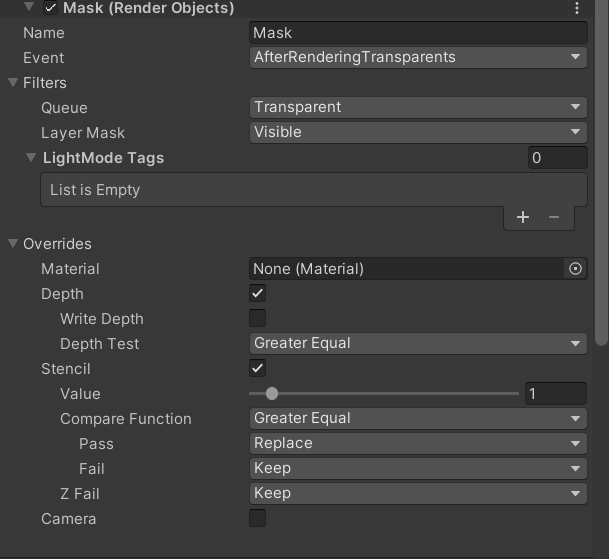
the page does it without stencils though
maybe it's because it's not writing depth as opaque which is interesting
 analog anchor
hello, I am dealing with a weird problem... I created a shader graph and a material out of it and I attached that material to 2 sprites. Now the 2 sprites behave differently in the scene view, when both of them are rendered versus when only one of them is. Anyone knows what could be the cause?


the black cross is supposed to be at the object.position(3) - however when multiple objects are rendered it's on (0,0)
dry willow
analog anchor
hello, I am dealing with a weird problem... I created a shader graph and a mater...
Sprites using the same material are dynamically batched, which combines their meshes. Vertices are already in world space, "Object" space isn't really a thing when this batching occurs. Could try using UVs instead.
That said, 2023.1+ now uses SRP batching for sprites instead so it may work there (during play mode at least...)
analog anchor
okey 🤔 that sucks... I will try to find some way around it then (or potentialy get the 2023.1+)
normal orbit
what can cause bloom not showing up in game view but in scene view?
 hard talon
heya, is anyone here familiar with marching cubes?
#archived-code-general message
I haven't been able to find any answers for my particular situation so far
 copper pilot
analog anchor
okey 🤔 that sucks... I will try to find some way around it then (or potentialy...
copper pilot
analog anchor
okey 🤔 that sucks... I will try to find some way around it then (or potentialy...
You can't just use uvs?
analog anchor
copper pilot
You can't just use uvs?
Well this is only a demonstration of the issue - I need the position of the object to find it's relative position within the camera to crop the light texture which is the whole camera view, not only the object being rendered
copper pilot
Can't use screen position?
I'm unsure of what effect you're actually trying to make
fresh oak
If I want value is between 0 - 0.2 otherwise the value is 0. What math method should I use?
copper pilot
fresh oak
If I want value is between 0 - 0.2 otherwise the value is 0. What math method sh...
So that above .2 or below zero is zero?
Or that it is clamped to 0-.2
copper pilot
fresh oak
<@172484507788771328>
if (x >0f && x<=.2f){return x;} else {return 0f;}
fresh oak
copper pilot
`if (x >0f && x<=.2f){return x;} else {return 0f;}`
how to I use this on URP? Like write the code in URP
To connect node?
I found smoothstep can solve this. edge 1 = value , edge 2 = 0.2, in = 1
analog anchor
copper pilot
I'm unsure of what effect you're actually trying to make
I am trying to make a pixelation effect (in 2D) including the lighting - so I need the right area of the light map... That's actually all... I am just kinda new to the shader graph and not able to plug the right values into the tiling and offset node
 rugged cradle
what can I do about that now? 🙂

just enabled StarterAssetsURP. Camera can't see anything, majority of textures are magenta, another part of textures are black.
rugged cradle
okay, that was easy. Disabling URP was the easy solution 😄
 stiff dagger
this is maybe a dumb question, but is it possible to have the color of a sprite override the color of a glow material, so I can just change the color of the sprite but have the glow change too
or, more specifically, it would be really nice to be able to make a button glow with HDR intensity on hover
 haughty garnet
sounds doable, grab the properties and script some logic for yourself
stiff dagger
I cant figure out how to access the intensity of a Material's emission via script. Do I access a normal Material asset or does it have to be a different object
orchid pine
I’m not sure if this is because of my terrain but im trying to export my scene and im getting this assertstion error that’s not letting me. What is that pertaining to?
 orchid pine
What does the assertion error mean or would anyone know where to look for a fix
ocean hinge
stiff dagger
I cant figure out how to access the intensity of a Material's emission via scrip...
the intensity is in the HDR Color of the emissive color
 cyan swallow
I'm porting stuff over to the new RenderGraph API and I've found that no matter what I do, I cannot change a global keyword. I've tried unsafe and raster contexts, builder.AllowPassCulling(false) and AllowGlobalStateModification(true). I assume this is either bugged or exceptionally counterintuitive; no warnings or errors are thrown, it just ignores these instructions. All the other instructions (eg drawing, setting global vectors or floats) execute as expected. Do I have to set something somewhere to enable the buffer to action changes to global keywords? I've tried both command.SetKeyword and command.Enable/DisableShaderKeyword, no luck.
also, I like the new RG API, but it's a serious pain to maintain it alongside previous editor versions. Lots of #ifs, and impossible to avoid at least some duplication of code. This is representative of a typical pass I've rewritten so far:
 haughty garnet
https://i.imgur.com/zpe9Vpk.png
When I use a ortho game camera, the picture is very grainy as if it's being rendered at a lower resolution. I can somewhat fix the picture by upscaling the picture, but it's still not as clean as it would be in scene mode. Can someone give me settings ideas I should be flipping here?
I mean, render scale does work it seems, but I don't know if I should be increasing the resolution two-fold
ocean hinge
haughty garnet
https://i.imgur.com/zpe9Vpk.png
When I use a ortho game camera, the picture is v...
did you try playing with the AntiAliasing?
haughty garnet
ocean hinge
did you try playing with the AntiAliasing?
Yeah, I've been messing with it all, but it just seems like a resolution issue. I only use the ortho camera so much that I'm not sure if this is just a general problem with it.
https://i.imgur.com/byHpFzN.png
The scene view is crisp by default
 ocean hinge
well, its not really crisp. Jost not that many/big steps
haughty garnet
https://catlikecoding.com/unity/tutorials/custom-srp/render-scale/
is what I've been changing to make it work on the game camera im just not sure if that's the setting I should be changing

A Unity Custom SRP tutorial about decoupling the render resolution from the target buffer size.
ocean hinge
i tried an orthographic camera as well. and for me it looks crisp
 ocean hinge
haughty garnet
https://catlikecoding.com/unity/tutorials/custom-srp/render-scale/
is what I've ...
ocean hinge
haughty garnet
https://catlikecoding.com/unity/tutorials/custom-srp/render-scale/
is what I've ...
What render scale are you using in the quality settings??
and whats the resolution of your game view? ^^
and are you zoomed in?
haughty garnet
the game view is at 1920 x 1080
where is scene resolution actually
would just use the pc's settings, right
but it does seem like increasing from 1920x1080 does make is a little more crisp, but still odd how it's that grainy at 1920x1080
ocean hinge
hmm, no in quality settings you describe how the game looks.
(when your players change settings from Low, Medium,High - it changes resolution etc. for the game)
go to Edit > Project Settings > Quality > Render Pipeline Asset
should be 1

and there is also the AA
haughty garnet
yeah guess ill fool around with the settings a bit more. Using the higher quality templates so kinda expected a lot to be maxed out.
it just strange how perspective seems fine, but ortho suffers
beats me, but ty ;p
marble vigil
haughty garnet
https://i.imgur.com/zpe9Vpk.png
When I use a ortho game camera, the picture is v...
Looks like game window zoom
The screenshot is unfortunately cropped
ocean hinge
marble vigil
Looks like game window zoom
The screenshot is unfortunately cropped
thats what i said. But its the Scene view 😮 (well it is in the 2nd screenshot)
haughty garnet
first was game view 1920x1080 at 1x scale, the second was scene camera
cranking up the render scale does fix it though
marble vigil
haughty garnet
first was game view 1920x1080 at 1x scale, the second was scene camera
Show what zoom level the game window has
haughty garnet
I played around with the AA too which I think was creating problems
this is after playing around with a lot of the settings
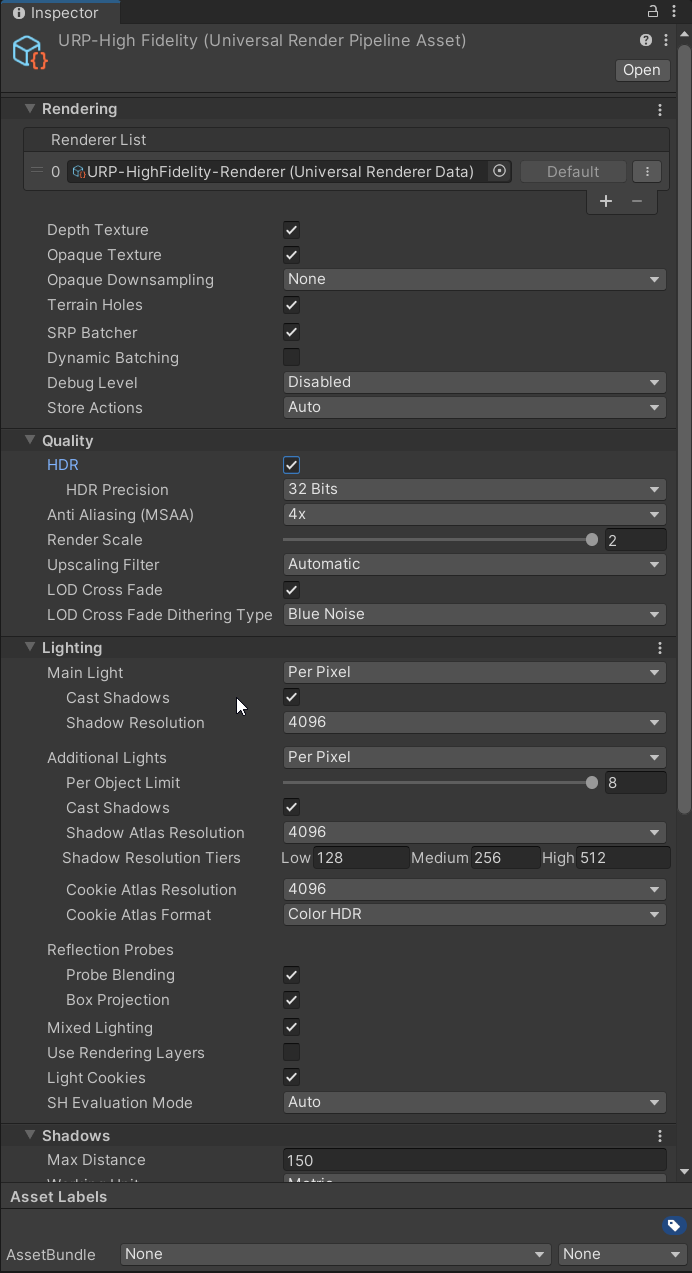
https://i.imgur.com/8ZfkyvP.png
This with render scale turned down but I think the AA was fixed now
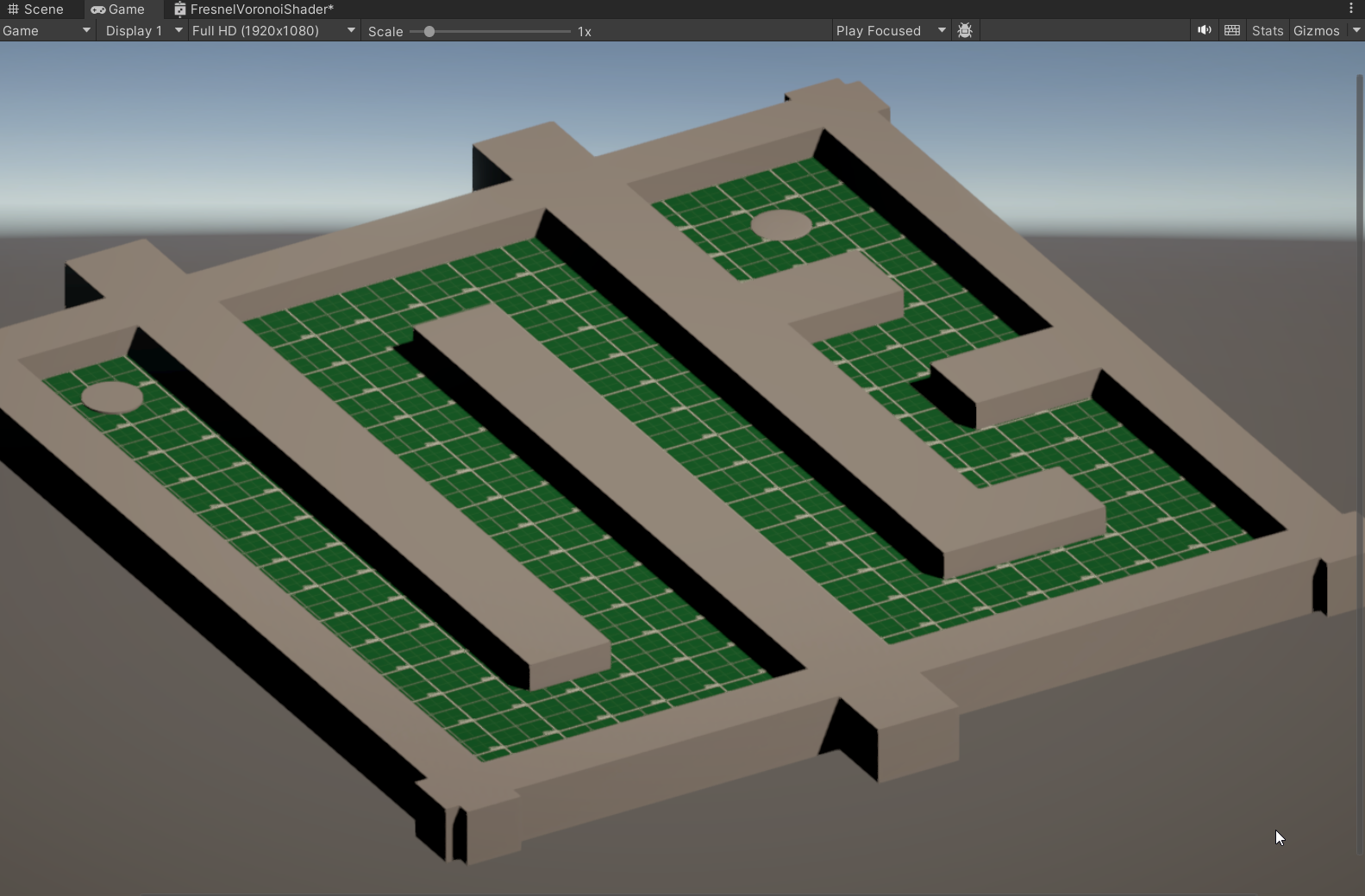
think there was mipmap settings I played around with too
just cranking everything to max then see how webgl works out lel
marble vigil
@haughty garnet Either your game window scale slider was not exactly 1x or your render scale was below 100%
No really any other cause for an uneven "pixel stretch" like that
haughty garnet
Yeah, I could have smidged the scale by mistake when setting the pipeline texture options upon generating the project
the resolution in general much more noticeable with ortho camera
haughty garnet
When using URP rendering layers and switching on decal layering support it seems that unless I disable depth priming or switch to deferred rendering (which I've not looked into if it works with webgl), that my camera will not render anything. I'm not sure if there's like some extra culling options with decal layers enabled, but I'm not seeing anything inside of the project settings.
 dapper thicket
Hey guys, I’m getting a weird glitch that when I bake my lights, add a urp volume, it works fine, scene view and game view. Then when I hit the Unity play button, my urp volume seems to disappear in scene and game view, and even after I stop the game, it stays without pp. the only fix I’ve found is rebaking lights, but it does the same thing when I hit play again. Seemingly no reason why this should be happening. Does anyone have a fix?
 hoary swallow
can anybody help me about Nature Soft Occlusion shader thing
jolly quail
anyone here know how to create cached shadow?
 mint goblet
Does anyone know why by not setting the resolution in the Game window, the GPU consumption is the lowest of 21%, but when I set a resolution of approximately 1080 it consumes 40 and 50% and when I compile and run it ends up consuming 90% of the GPU ? I'm trying 3D URP DEMO.
cyan talon
Not setting the resolution means it's literally the resolution it is on your screen
Profile it if you're wondering what's going on
mint goblet
I keep wondering why so much consumption, since that example is optimized for mobile phones. 1920x1080 aprox
I use a Sapphire Amd Radeon Rx 470 Nitro 4gb
Consume 95% from 1080 or native resolution from Build
 agile mortar
If I have a sprite shape that dynamically grows over time, is there any property I could key on to indicate the edge of the spriteshape? UV seems to repeat tile in segments along the shape.

I could pass the edge and the direction and check some distance threshold from the end point in reverse direction but I'm wondering if theres a simpler way with a builtin property to do stuff in a material to that last little bit of the segment
cyan talon
mint goblet
I keep wondering why so much consumption, since that example is optimized for mo...
Profile it. If the framerate is not capped (or VSync is not enabled) then the GPU will render it as many times it can, which will consume as much resources as given.
 rare goblet
I need help. I have a 3D game that I want to be hardlocked to 640 by 480 Resolution, but I cannot find a way to do this. When I build the game at 640/480, the window is blurred, and does not render correctly, and when I try to use a render texture to downscale, it interferes with HUD elements. Does anyone have any idea how I can do this?
copper pilot
rare goblet
I need help. I have a 3D game that I want to be hardlocked to 640 by 480 Resolu...
Pixel perfect camera package?
rare goblet
copper pilot
Pixel perfect camera package?
That only really functions for 2D games, as far as I can tell. I did try it, but it instantly ruined pretty much everything visually
copper pilot
And how does a render texture interfere with ud elements?
rare goblet
copper pilot
And how does a render texture interfere with ud elements?
I can't have the render texture set to a specific scale and then change the resolution scale, because the UI will no longer match its visible appearance on the screen. I haven't been able to figure out how to fix this, yet.
copper pilot
I'm not sure I understand.
mint goblet
cyan talon
*Profile it*. If the framerate is not capped (or VSync is not enabled) then the ...
How active VSync?
strong aspen
mint goblet
How active VSync?
in quality settings
mint goblet
Is Vsync count?
 bold wolf
hello how do i enable the Urp 2d on unity, i have installed Universal render pipeline , i have created the two Urp2d files and set in project setting and Graphics, but nothing happens if i then add lights, it stays the static lights as at the beginning of the project
 undone cape
bold wolf
hello how do i enable the Urp 2d on unity, i have installed Universal render pip...
undone cape
bold wolf
hello how do i enable the Urp 2d on unity, i have installed Universal render pip...
It is recommended if you change the renderpipeleine of your project to make a new project with the new renderpipeline and port your files over.
marble vigil
undone cape
It is recommended if you change the renderpipeleine of your project to make a ne...
There's no technical reason why that'd be necessary
An upgraded project will work the same as one created from a template
undone cape
Iirc the default values and settings will still remain to be the original RP
If you make a material f.e.
been a while since I switched RP, but I do recall this being a thing
marble vigil
bold wolf
hello how do i enable the Urp 2d on unity, i have installed Universal render pip...
If you have correctly followed the steps to configure your project to use URP with your URP asset and the URP 2D renderer asset to go with it, you can then use the lit sprite material and 2D light components to get 2D sprite lighting
marble vigil
undone cape
If you make a material f.e.
Asset and gameobject creation obeys the active graphics/quality asset, at least in the newest LTS
I don't know of other settings
undone cape
marble vigil
Asset and gameobject creation obeys the active graphics/quality asset, at least ...
Perhaps I am still on old LTS versions that do not have this fix
marble vigil
Showcases should go in #1180170818983051344
This is a development channel
 ripe shale
Does anybody know how I can get a bug escalated within Unity? Using DBuffer decals with deferred rendering has never worked correctly in 2023.2. It's preventing my upgrade to it, and 2023.1 has its own bugs I'm keen to get away from. I raised this bug back in Jan and it's been silence ever since 😦 https://issuetracker.unity3d.com/issues/decal-gameobject-is-flickering-when-changing-the-cameras-position-if-using-the-deferred-rendering-path-and-dbuffer-decal-type
How to reproduce: 1. Open the user’s attached “DecalTest.zip” project 2. In the Hierarchy window, select “Main Camera” GameObject 3....
marble vigil
 odd sinew
should i remove it?
odd sinew
should i remove it?
It would be preferable so a moderator doesn't have to
marble vigil
ripe shale
Does anybody know how I can get a bug escalated within Unity? Using DBuffer deca...
There isn't practically a way to "escalate" a bug report, but since it's a fresh bug in a new editor version it's likely to be addressed quick since they're actively working on that
Unity's bug pipeline seems to work quite fast so there's no need to worry about them not seeing it
ripe shale
This was reported 2 months ago now
marble vigil
ripe shale
This was reported 2 months ago now
Does it also appear in newer versions than 2023.2.7f1?
ripe shale
2023.2.14
odd sinew
marble vigil
It would be preferable so a moderator doesn't have to
done 😉
marble vigil
ripe shale
2023.2.14
Does it also appear in 2023.3.? Doesn't seem to be happening on my end
Note that development on .2. will stop once .3. gets a release, under the current release scheme
When developing on a non-LTS editor it always will be incomplete, unstable, or both
 atomic scarab
Does anyone know if there is a way to "override" Unity's frustum culling, either in base unity or with URP?
I have a portal and I need to render the contents on the other side of the portal via a duplicate camera and some stencil buffer trickery. But I only want to render the objects that are going to be visible through the portal, and not everything else that will be stencilled away. I've thought about just changing the camera's frustum to "focus" entirely on the portal bounds (which from the camera's view is always a convex quadrilateral), but this will distort/stretch the outgoing render and likely won't work with the stencilling. It would be better if I could override the frustum like this purely for the culling process, but not for the actual rendering itself.
I need to likely cull more objects than unity does with its frustum culling.
Either the portal we are looking through envelops the entire viewport if we are very close to it, or it only takes up a portion of the viewport, and so more stuff that won't be visible outside the portal bounds ought to be culled.
 gritty marlin
why the hell is my transparent shader not rendering only the texture, but when it's opaque, it renders find. only happens in a build btw
atomic scarab
I suppose I can yeah, but I imagine it would be a bit slow and I'd have to recull objects from multiple portal viewpoints potentially, which is why I just wanted to see if there was a better way to do it, like the way Unity handles frustum culling automatically
 ionic adder
Hey there, I was wondering if anybody knows a way how I could get an object to render in front of everything but still receive shadows and have proper material layering. I tried using the Render Objects render feature but it makes one material show up in front of the other.


Okay then, I actually found an acceptable solution! For anyone that stumbles upon this here's the article that had the answer: https://www.linkedin.com/pulse/how-prevent-weapon-clipping-unity-urp-without-
 drowsy sundial
Hello! I've a question about URP, searched on discord but not found an answer, I apologize if it was already asked.
Did Unity changed something in lighting attentuation between 14 and 16 version of URP? I've digged through changelog and I saw only some minor bugfix in 15.0, probably not related. I've two projects and lights, especially close to objects look very oversaturated.
I'll provide screenshots, because image explains better.
URP v14

v16

Its more visible when I move light really close to surface, here is how it looks when I put light just next to surface, here is v14 with light really close

& 16

The effect intensifies thats why I was considering its somewhat related to attentuation (they changed formula?)
I've checked:
- light & cube material settings are equal
- urp renderer & settings assets are equal
- post processing are equal (i've even disabled post processing, did not help)
marble vigil
drowsy sundial
& 16
It looks like in this picture your project might be in gamma color space rather than linear
drowsy sundial
its in linear space
however it might be related to my project settings, because i've downgraded my project to 2022 & urp 14 and problem still persist
i'm not sure where and what to search thou
marble vigil
drowsy sundial
i'm not sure where and what to search thou
Could be missing HDR
drowsy sundial
figured this out, my old project had tonemapping setting to neutral in default profile, I've missed this
however your help made me search in other places as I got fixated about urp versions, so thanks for your help 🙂
rare goblet
My game currently fuunctions by rendering one camera to a 640/480 Render Texture, and then displaying that render texture in front of a second camera, but the issue is, while the Render Texture can scale freely and correctly, the UI malfunctions when making the screen's aspect ratio more narrow than the 4:3 of the render texture.

Is there any way I can fix this?
ocean hinge
rare goblet
My game currently fuunctions by rendering one camera to a 640/480 Render Texture...
As long as you render to 4:3 it will only show a 4:3 texture. You may have to change resolution size of the render texture at runtime.
pure ibex
Hello everyone !
I need some help with a project I'm on.
Here is a little visual aid :

My character (greeen circle at the bottom) shoots with their gun, and it creates 3 "projectiles" (proj A, proj B, and proj C).
They are not really projectiles, as they are simple objects with sprites. I set their positions where they are because of the walls.
anyway.
the sprite I created for the projectiles has a bullet and a trail. I want the trail to be hidden when it is at the position of the character (because the projectile hit a wall too close to the character), or even behind them.
I thought there was an option in the sprite renderer to handle this. I think by making it tiled and adjusting something so it only has 0.7 tile long (or whatever length is displayed), instead of the full 1 tile image.... but I can't find how to do that anymore -_-
Can anybody help me ?
marble vigil
rare goblet
My game currently fuunctions by rendering one camera to a 640/480 Render Texture...
I might not see it quite well, but it looks like your Canvas scaler is not set up to scale down uniformly, instead the ui elements use their anchor points to move positionally but retain their size
marble vigil
pure ibex
I thought there was an option in the sprite renderer to handle this. I think by ...
You probably can set draw mode to Tiled in Sprite Renderer component and adjust the Height in code from 0 to 1 from code during a short time when the projectile spawns
Or adjust the Transform Scale in the same way
Either way the Sprite Renderer itself has no knowledge that it's a projectile or where it's traveling
Or use a Trail Renderer instead, which does have more knowledge of that
pure ibex
marble vigil
You probably can set draw mode to Tiled in Sprite Renderer component and adjust ...
Thanks !
I'll try to check out the Trail Renderer before I do the Tiled size thing 🙂
 placid laurel

so i been using DirectX11 in my project and i tried to switch to DirectX12 and now i keep getting this error and no matter what i do, this ever never go away
 stone schooner
i want to add ambient occlusion effect in my urp project. since i cannt use post processing package what way can i add it?
marble vigil
stone schooner
i want to add ambient occlusion effect in my urp project. since i cannt use post...
stone schooner
marble vigil
<https://docs.unity3d.com/Packages/com.unity.render-pipelines.universal@14.0/man...
thanks
rare goblet
Is there a way to have a Canvas render to one camera, but recieve events from a different camera? I notice in the editor, it says that the renderer camera is also the one used for events, but I need some way to get around that.
 jagged hull
Hi, so im currently making a 2D pixel style management game. Im currently using tilemaps and when i zoom the camera out, the tiles start creating weird grids. I noticed if i change the sprite sheet to Bilinear compared to point, the gridding stops but creates a low quality version of the tile. I also noticed a bit map option that sounds like my solution but made no difference enabled. I looked into changing the sprite sheet quality during runtime but couldn't find a working way so i manually made a 2nd tilemap using a separate Bilinear version of the tile sheet and switched the two when the camera zooms out far enough but u can still notice the change. I also played with the camera and the pixel perfect component that also fixed the gridding but the only way to get zooming to work is by changing the pixel per unit and that causes a jump when zooming. Is their another option to fix this? iv spent about two days looking up diffrent things with no luck so any help would be greatly appreciated!
Tilemap when zoomed out:https://gyazo.com/8dd2ce22152e6f44e3f7cf0d2b0067a7
What the tiles are doing when zoomed out: https://gyazo.com/fc4994dff97c47104351f67e5beb832f
 marble vigil
jagged hull
Hi, so im currently making a 2D pixel style management game. Im currently using ...
marble vigil
jagged hull
Hi, so im currently making a 2D pixel style management game. Im currently using ...
If you want pixel textures you'll need the pixel perfect component or something similar
Usually that means no smooth zooming
But there are some third party alternatives that can allow it
Such as this which implements a type of texture antialiasing rather than any pixel perfectness: https://assetstore.unity.com/packages/2d/smooth-pixel-209066
Or this one which seems to enable you to smoothly zoom into the pixel perfect render texture, though it might not let you smoothly change the render target size
Smoothness and pixel perfectness aren't really a combo that mix
 marble vigil
bold wolf
How do I light around an area without then crossing walls like or certain object...
marble vigil
bold wolf
How do I light around an area without then crossing walls like or certain object...
With 2D sprites you'd have to use 2D URP renderer's shadow casting
bold wolf
How does it work how do I implement it ?
marble vigil
bold wolf
How does it work how do I implement it ?
 stark adder
Do anyone know why this trial renderer is like this, at the bottom side of the screen
haughty garnet
stark adder
Do anyone know why this trial renderer is like this, at the bottom side of the s...
My experience using it is it's pretty hard to eliminate those hard edges. Fool around with the settings a bit more and if it's still problematic I've seen other solutions out there.
think there was an asset titled "Better Line Renders" in the asset store I've been told about haha
 cosmic marsh
I've designed my 2D game with normal maps for everything. But to improve performance, when run on a lower-end machine or mobile device, the code swaps all Lit materials for Unlit versions. This yields a processing performance, yet the memory profiler shows the normal maps are still persistent in memory. Does an approach exist that could avoid allocating memory for all these unused textures or somehow purge them? URP 2D in 2022.3 is the platform.
 soft root
Hi. Im trying to do camera using render texture. After adding it to object light are displayed not smooth
I'm using URP, light is realtime, 20223.12f1 and urp high fidelity render pipeline
 nova bear
cosmic marsh
I've designed my 2D game with normal maps for everything. But to improve perfor...
nova bear
cosmic marsh
I've designed my 2D game with normal maps for everything. But to improve perfor...
https://docs.unity3d.com/ScriptReference/Resources.UnloadUnusedAssets.html
This might be what you're looking for
cosmic marsh
nova bear
https://docs.unity3d.com/ScriptReference/Resources.UnloadUnusedAssets.html
This ...
Hello there, I had seen that discussed, but I'm not sure how one uses it in this case. For example I have a Texture Atlas that is 16MB in size, it also has its normal loaded in memory that is 16MB in size. If the player turns off normal mapping in settings, I change all the materials to Unlit, so the normal is no longer needed. Can it specifically be unloaded? I've read that unloading everything destroys co-routines which likely has unintended side effects for most games and is messy. It also occurs to me that unloading the normals would prevent them from being used later? What do I call with the unload function to do this?
bold wolf
From one scene to another with the same objects the lights in the Boss scene don't work, the shadows don't work
nova bear
cosmic marsh
Hello there, I had seen that discussed, but I'm not sure how one uses it in this...
https://docs.unity3d.com/ScriptReference/Resources.UnloadAsset.html
This could work, assuming nothing references that normal texture
cosmic marsh
Sure, but it cannot ever be reloaded once that is called, right?
nova bear
one thing worth considering though, a single 16MB atlas is basically nothing on even a weak system
cosmic marsh
On older Android Tablets it is a huge issue.
When applied to multiple atlasses that is.
Even looking forward to eventual 3D game development, I am surprised you can't reduce RAM usage by turning off unused features.
nova bear
cosmic marsh
Sure, but it cannot ever be reloaded once that is called, right?
It can be, you just need to create a new object for it
you cant reuse the object reference once unloaded, but you can load it again if you want as a new object
nova bear
cosmic marsh
When applied to multiple atlasses that is.
Ah
Yeah I see
cosmic marsh
So I have 32 prefabs using textures in this atlas, and the atlas has a normal. The player turns off normal mapping by accident, I unload the Atlas'd normal. Now they want to turn it back on. How does one re-load that?
nova bear
cosmic marsh
Even looking forward to eventual 3D game development, I am surprised you can't r...
In HDRP especially that's basically a core feature, you can turn off everything pretty granularly to save on both cpu and gpu memory. (Though URP doesn't seem to do that much)
cosmic marsh
Yeah, unfortunately HDRP isn't a valid render pipeline for older android devices haha.
nova bear
yeah for sure
cosmic marsh
Taking this a step further, I have a shader creating render textures for shadows that consumes about 200MB of memory. And while I can turn off everything code-wise related to shadow generation and management... I can never seem to free up the byproducts of including all of that in the build either.
nova bear
cosmic marsh
Taking this a step further, I have a shader creating render textures for shadows...
200mb sounds like shader variants
and that's a lot
cosmic marsh
No its not shader variants.
I've stripped everything there down. There's just the basics, about 20MB worth.
The shadow shader creates textures for each unit's specific real time 2.5D shadows.
It works fine on mid to high end devices. I just desperately want a way to unload stuff unused by older devices.
There is periodic discussion on this in various places since 2012, but no good answers or approaches. Someone mentioned using an asset bundle to effectively duplicate every game object and code base and dynamically load one vs the other. But that effectively doubles the size on disk and sounds horrible to properly maintain.
Was hoping I'd missed some obvious design approach or call to avoid this being a concern. I can just see how when you make a really high fidelity 3D game, there would be benefit to culling unused normals, parallex, lightmaps and so on in the scene.
nova bear
cosmic marsh
The shadow shader creates textures for each unit's specific real time 2.5D shado...
Shouldn't they be in vram not cpu ram?
cosmic marsh
So if I recall correctly, the Memory Profiler has trouble differentiating the two and is not helpful.
And second, low end android devices have little GPU memory either :p
nova bear
cosmic marsh
Was hoping I'd missed some obvious design approach or call to avoid this being a...
As for that virtual texture streaming is a good solution, and a lot of big games use it
cosmic marsh
My understanding is texture streaming is for texture resolution only though?
It doesn't affect the layers?
nova bear
cosmic marsh
The shadow shader creates textures for each unit's specific real time 2.5D shado...
What kind of data needs to be in these texutres?
Could you maybe reduce bit depth?
cosmic marsh
I've considered just pure optimization. It may be possible. There is a fine line though where it impacts the fidelity and asthetic of the high end rendering.
nova bear
cosmic marsh
My understanding is texture streaming is for texture resolution only though?
Yeah, but it can turn really distant objects (including all their normal information and whatnot) into only a handful to pixels, which reduces memory usage to virtually nothing
cosmic marsh
From what I've profiled, the full texture is still in memory because it may be used.
Its just not being processed so it saves on GPU load?
Like in this game you can middle-scroll to Zoom in and out. And zoomed out I can certainly SEE the mip map is applied and looks good.
But the memory profiler shows the same memory footprint
The other large render textures seem to be _LightTexture_0_0 through 4_0. I'm unclear on what creates those and how they are managed and in my Unlit scene how I could clean them up.
nova bear
cosmic marsh
From what I've profiled, the full texture is still in memory because it may be u...
Might only disk stream when using asset bundles / addressibles
cosmic marsh
nova bear
Might only disk stream when using asset bundles / addressibles
I don't know, and lack the resources to properly experiment. Given how most released games seem to do memory cleanup when changing texture quality and settings, it feels more like I'm missing the proper approach here with Unity.
 queen cloak
hey so im trying to debug why Unity's mainLight shadow attenuation is causing flickering for realtime lighting. The shadow attenuation values for relatively still objects with soft shadows causes bands to appear and im not really sure why?
If anyone's got some insight - that'd be much appreciated
bold wolf
From one scene to another with the same objects the lights in the Boss scene don't work, the shadows don't work
 tired pagoda
bold wolf
From one scene to another with the same objects the lights in the Boss scene don...
tired pagoda
bold wolf
From one scene to another with the same objects the lights in the Boss scene don...
Assuming, you are facing this issue in the editor? I have also faced the same issue in the editor, But in the build everything works fine.
bold wolf
same issue in the editor and game
cyan swallow
Anyone here using the RenderGraph API yet?
 rancid plover
Problem - please help if possible 🙂
I mixed a lot of things on my forest scene (adding/removing some plugins, changing setting, etc)
and now in Scene view all looks OK - but in Play mode when I raise camera view over the trees to show horizon/skybox - the trees extend/multiplay themselves and never show skybox.
 marble vigil
rancid plover
Problem - please help if possible 🙂
I mixed a lot of things on my forest scene ...
marble vigil
rancid plover
Problem - please help if possible 🙂
I mixed a lot of things on my forest scene ...
Most likely your camera's background is set to uninitialized
Or it's failing to render the skybox for some other reason
rancid plover
- Addin new camera - same effect
- Changing to URP-Balanced - same effect
- Disabling post-processing - same effect
 marble vigil
rancid plover
marble vigil
rancid plover
Your camera's background is uninitialized as I presumed
rancid plover
Yes. I'm a noob 🙂
I wonder sometimes how many days I would spend to look for this mistake of mine without help of people like you... ❤️
THANK YOU! 🙂
 jade warren
Is it possible to use Packed maps in URP - lit defualt shader
marble vigil
jade warren
Is it possible to use Packed maps in URP - lit defualt shader
URP lit shader already utilizes channel packed mask maps for PBR textures
Are you referring to that or something else?
jade warren
I am refering to the standard (urp -lit) mat. Do I just drag the mask maps into the designated spots on the material or do I need the actual shader?
marble vigil
jade warren
I am refering to the standard (urp -lit) mat. Do I just drag the mask maps into ...
For what kind of mask maps exactly?
marble vigil
jade warren
I might be asking the wrong question here
Either that or I'm not understanding your goals precisely
jade warren
however the material has individual slots for each of the maps. Do I just add the mask to the slot it

So we have the metalic , smoothness, occlusion. I pack them into an RGB using substance or whatever, do I just add packed map to each of those and magic happens or do I need to specify a different shader?
or create my own ?
marble vigil
As you see there you have separate texture slots for most maps
Except smoothness
That comes from metallicness texture's alpha channel by default
No magic here
marble vigil
jade warren
I think I understand .
If Substance doesn't specify what type of mask map it wants to export for Unity, I'd guess it makes one meant for HDRP
That one has more maps in one texture
They're not interchangeable
You can also swap the smoothness source to be base map alpha instead, if preferred for some reason
Also note that metallic and specular maps are alternatives to each other, depending on whether you're using specular workflow or metallic workflow
jade warren
That was wat Iwas looking for. Having AO, smoothness, roughness ect all in a single map. but I understand
marble vigil
I wish the process was more standardized or automated, but it isn't
Ideally the engine could pack and unpack the data from any form
 still light
Greetings, has anyone dealt with modifying materials used in a full screen render pass before? Aiming to get a copy of the material so changing it during runtime does not effect the base version in the project.
void Start()
    {
        var renderer = (GraphicsSettings.currentRenderPipeline as UniversalRenderPipelineAsset).GetRenderer(0);
        var property = typeof(ScriptableRenderer).GetProperty("rendererFeatures", BindingFlags.NonPublic | BindingFlags.Instance);

        List<ScriptableRendererFeature> features = property.GetValue(renderer) as List<ScriptableRendererFeature>;

        foreach (var feature in features)
        {
            if (feature.GetType() == typeof(FullScreenPassRendererFeature))
            {
                damageFX = (feature as FullScreenPassRendererFeature).passMaterial;
                // damageFX = new(damageFX);
                // (feature as FullScreenPassRendererFeature).passMaterial = damageFX;
            }
        }
    }
Grabbing the material this way based off of not finding a nicer way to do it in 2022 at the time. Whenver this is run in editor sans commented code, will modify the material in the project. With it there's a seperate instance, but it runs only once before complaining an invalid material was assigned.
dry willow
still light
Grabbing the material this way based off of not finding a nicer way to do it in ...
Does "only run once" refer to after exiting play mode it breaks? The material instance is likely destroyed so the renderer feature asset can't find it anymore. You may need to cache the original material and reset it in OnDestroy.
Also, you can use an exposed field and select the feature in the inspector to avoid needing to loop through the features.
Maybe try something like :
public FullScreenPassRendererFeature feature;
private Material materialAsset;
private Material materialInstance;

void Start(){
  if (feature == null) return;
  materialAsset = feature.passMaterial;
  materialInstance = new Material(materialAsset);
  feature.passMaterial = materialInstance;
}

void OnDestroy(){
  if (feature == null) return;
  Destroy(materialInstance);
  feature.passMaterial = materialAsset;
}
That's what I noticed in terms of caching, let me double check real quick if OnDestroy logic works on all types of termination
I had some OnDisable code which reset things, but that seemed inconsistent
still light
dry willow
Does "only run once" refer to after exiting play mode it breaks? The material in...
That paradigm works pretty cleanly from testing, thanks!
OnDisable seems to not quite be what you want there, so noted for future. Was going down a rabbit hole even accessing the full screen render pass feature initially.
 sick sluice
Guys, tf is that?
marble vigil
sick sluice
Guys, tf is that?
I guess you mean the trailing?
Does your camera have any background set?
 tidal pond
Anyone just love when for some reason urp emission doesn't work on a new project?
 jolly quail
tidal pond
This happening when using progressive gpu?
jolly quail
tidal pond
This happening when using progressive gpu?
does the floor use quad or custom mesh'
jolly quail
no, well normal plane should be fine idk why this happen, maybe increase the texel size for the lighting bake settings?
tidal pond
It seems to have fixed after switching it to a cube..
jolly quail
i see, at least there's another way, but i never encounter this problem when using quad mesh for bakign
tidal pond
Actually no it seems like the lighting isnt even baking now
Managed to get lighting working again, still same issue getting weird black rectangles
Texels? Where is that at

Really just completely skipping over things
Enabling realtime global illumination seems to have fixed it
Yeah no issues now
jolly quail
tidal pond
you can try to debug using this option
 tidal pond
Right forgot about that
Now that I'm baking right, what are some settings you'd recommend
 jolly quail
tidal pond
Now that I'm baking right, what are some settings you'd recommend
jolly quail
tidal pond
Now that I'm baking right, what are some settings you'd recommend
tbh, it depent on what type your environment is so i cant give any recomendation
tidal pond
Ah right I don't really have anything setup I'm just messing around with learning about it rn haha
 jolly quail
and this is URP channels, mayabe you can ask someone in the lighting channels, sorry if it's sound rude but we want the channles to be more organize
tidal pond
Oh no problem I thought this was dependent on URP
 warped roost
sick sluice
Guys, tf is that?
warped roost
sick sluice
Guys, tf is that?
Parent the orange background image to your camera
 robust lintel
I am using a package called amplify shader. I found this highlight feature.
There will be many assets sharing the same material, is there a way I can locally set the highlighted checkmark on or off without creating duplicates of the material one for on and on for off?
 cosmic marsh
robust lintel
I am using a package called amplify shader. I found this highlight feature.
Ther...
cosmic marsh
robust lintel
I am using a package called amplify shader. I found this highlight feature.
Ther...
I frequently set material properties on a per object basis. In my case I exposed a _Tint value, and set it with someMaterial.SetColor("_Tint", someColor);
All of those properties should be exposable I'd think. Though it may require some hand-editing of things. Just not familiar with the asset.
If you look inside UnityEngine.Material, it supports SetColor, SetInteger, SetFloat. You pass in the property and value and it updates it.
robust lintel
cosmic marsh
I frequently set material properties on a per object basis. In my case I expose...
So in your case each object would have different tint even if it had the same MT_Materialexample_00?
marble vigil
robust lintel
So in your case each object would have different tint even if it had the same MT...
Modifying a renderer's material in script at runtime creates and assigns a unique material instance so yes
cosmic marsh
robust lintel
So in your case each object would have different tint even if it had the same MT...
Yup! I basically use it when you mouseover NPCs to highlight them.
I've also seen materials with an exposed tint variable that handles color replacement/shading, so you could make textures with green-screen that gets dynamically replaced at runtime. ie, for coloring NPC unit shirts uniquely per faction sort of thing.
 spring depot
Which asset is scene and game view showing and how do I change that?
I know that its Performant-Renderer because if I make changes to it, the scene/game view in editor changes appearance (eg like toggling SSAO on/off)
but why is it this one? 🤔


if I am reading this correctly, for PC the default quality level is HF, not performant, or am I just reading this wrong?
Trying to test visuals before/without needing to make making a build to see it
oh I am blind and possibly dumb, its literally a string right there

oh no wait that's just its title of me selecting it
none of the scene view tabs seem to relate to quality level

Oh I see now, bizarre but okay:

this thing itself IS the selection for quality setting
meaning editor/game is showing high fidelity when its selected there as in clicked on
jolly quail
spring depot
if I am reading this correctly, for PC the default quality level is HF, not perf...
you can check it in the project settings
 marble vigil
spring depot
if I am reading this correctly, for PC the default quality level is HF, not perf...
marble vigil
spring depot
if I am reading this correctly, for PC the default quality level is HF, not perf...
When building the executable yes
marble vigil
jolly quail
you can check it in the project settings
The choice of render pipeline asset here doesn't seem to have an effect in editor or in build (as long as there is any one there) so I'm a bit confused what the significance of that is
 trail anchor
Hello there. I need help. What happened here?

It happened after I baked my lightning?
marble vigil
trail anchor
Hello there. I need help. What happened here?
This most closely resembles errors you get from an overly noisy environment
Looking at your walls it looks like your normal maps are way, way too intense
You could clear the light cache and show what the scene looks without any baked lighting
You also need to fix the missing UV warnings that can be seen in the console
trail anchor
I found it. The issue was in my light settings.
 alpine badger
cool
marble vigil
trail anchor
I found it. The issue was in my light settings.
What light settings specifically?
 night berry
Howdy community, is there a way to either texture a 3D object with a dynamic particle system, OR use the 3D object as a mask to show the particle system through it?
night berry
night berry
Howdy community, is there a way to either texture a 3D object with a dynamic par...
Ok I did it with a Render Texture
fresh fossil
I am having some rendering issues on build so I've been scrutinizing the frame debugger. There are a bunch of material instances which share an uber shader and keywords. The SRP batcher has managed to batch these things all together which seems plausible as they share an uber shader and keywords, however, in the frame debugger, the values of the properties are said to be identical which seems wrong as I set them differently in scripts every frame.
Is this a known bug with the frame debugger? Or is there something about batching and setting shader properties that I don't know about that is lead to properties being shared amongst multiple batched materials? Thanks!
rare goblet
I'm not afraid to admit when I've reached my limit. I want myy 3D game to render at a specific resolution (640/480), but I can't get it to do so without one of the following problems happening:
- Setting it in the Build Settings (The game becomes blurry when the window is maximized/fullscreened)
- Rendering the game to a Render Texture hard set to 640/480 (The UI uses the game's resolution, resulting in a mismatch of UI size to render resolution)
- Rendering the game and UI to a render texture that is hard-set to 640/480, and putting that texture in front of the camera (The UI no longer matches the screen for detecting clicking)
I can't get the UI to render to multiple cameras in screen-space-camera, I can't get the UI to match one camera fully if it's rendering in worldspace, and I can't apply neccecary post processing to the UI in Screens-space-overlay.
Can someone help me figure out the RIGHT way to force a low res in my 3D game, such that the UI also matches it? I would just use a post-processing effect, but those cannot be applied to screen-space-overlay, like I mentioned before..
ocean hinge
rare goblet
I'm not afraid to admit when I've reached my limit. I want myy 3D game to rende...
Set the canvas to 640x480. And that’s it. 🤓
strong aspen
rare goblet
I'm not afraid to admit when I've reached my limit. I want myy 3D game to rende...
lower the render scale option in the URP settings, it doesnt affect UI
marble vigil
I don't think either of those do exactly what's being asked for here
But there isn't a "right" or any simple or easy way to do this either
 red escarp
anyone know how i can change this anti aliasing in runtime??

i cant seem to find the answer online
ocean hinge
red escarp
anyone know how i can change this anti aliasing in runtime??
you could change the quality settings.
Or use Post Processing AA
red escarp
i found it out u can access it with "msaaSampleCount"
 dreamy trout
I’m using URP to make a Mod for a game and I need to make a shader graph that raises lowlights to make a night vision effect. I’m not versed at all in shaders or shader graphs so if someone could help or tell me how to make a shader graph to do that, that would be a HUGE help because im completely lost
fresh fossil
I'm running into an issue where SSAO depth prepass doesn't seem to use the custom shaders which employ alpha clipping to discard pixels (and avoid writing to the depth buffer). Is there any way around this?
placid laurel
is it normal that in URP the gameobjects in scene view have lot of jagged edges? never experienced this in built in and never used anti aliasing, but even in URP if I set this up, nothing changed only when applying Post processing with "FXAA" but it seems to lower the performance a bit.
 ocean hinge
placid laurel
is it normal that in URP the gameobjects in scene view have lot of jagged edges?...
ocean hinge
placid laurel
is it normal that in URP the gameobjects in scene view have lot of jagged edges?...
Depends on your quality settings.
Try activating MSAA in the URP Asset
or do you have a scale > 1.0 in the scene view?
cosmic marsh
placid laurel
is it normal that in URP the gameobjects in scene view have lot of jagged edges?...
I believe assets exist now for DLSS in URP as well, and that can both improve performance and soften the edges of models in URP.
placid laurel
ocean hinge
or do you have a scale > 1.0 in the scene view?
scale is normal, I tweaked the quality settings of the URP asset, disabling and enabling MSAA, no matter what I do it is always the same, only if I bump the "render scale" up to 1 then it goes away but it lowers even more performance then, sure isn't the most ideal way
placid laurel
cosmic marsh
I believe assets exist now for DLSS in URP as well, and that can both improve pe...
ok, never heard of DLSS, I've seen that it seems to be only supported in HDRP
cosmic marsh
DLSS is available on Nvidia graphics cards. It uses Deep Learning AI to significantly increase image quality by rendering at a lower resolution, and using AI to "upscale" it to your native resolution. Generally speaking the end result looks about as good as the original, at a much improved framerate. There are several versions of DLSS, 3 which adds generative frames in between each render frame to further boost performance but is only found on Geforce 4x cards. AMD also has FSR (which also works on Nvidia) which is a poorer version of DLSS but still can improve performance.
Anyways, its a big thing. Most modern games support it, and many older games are having it added by the user community.
And I saw assets on the unity store to add DLSS and FSR to URP rendering.
Personally, I tend to prefer the AA that DLSS adds over the native AA found in most games.
placid laurel
cosmic marsh
DLSS is available on Nvidia graphics cards. It uses Deep Learning AI to signifi...
awesome to know, I just have a very old GTX 980, will probably switch back to Built in then, may seem better, thanks for the info
ocean hinge
placid laurel
awesome to know, I just have a very old GTX 980, will probably switch back to Bu...
thats not a URP thing. I use URP without any AA and its crisp.
placid laurel
ocean hinge
thats not a URP thing. I use URP without any AA and its crisp.
do you just disable it in the URP asset or is there something to change in the project settings?
ocean hinge
There are several AA possibilities ^^
MSAA in the URP Asset File
And several in the Camera
placid laurel
ocean hinge
There are several AA possibilities ^^
MSAA in the URP Asset File
And several in ...
thanks for the help
cosmic marsh
placid laurel
awesome to know, I just have a very old GTX 980, will probably switch back to Bu...
Yeah I agree with Kjarudi, URP isn't "making it jaggy". There is probably a resolution mismatch or some other setting causing the reduced quality.
cosmic marsh
Surprisingly, Steam statistic is showing over 40% of video cards reported support DLSS. And if you include AMD cards it looks like the majority of gamers have access to FSR or DLSS. I wasn't aware the adoption had been so fast for it.
 tawdry grotto
Here I cannot see the AO, it looks pretty bad, but as soon as I get close it shows up. How do I make the distance it can be seen further?


 runic basin
i added urp just now, and all my point lights are just glitching in and out. their render modes are on important, but still does it. what did i do wrong

 fierce anvil
Hi friends, I have a flickering issue in my URP project, I have a grid of 3d objects, and each object has a cross-cut pattern on top, so when I zoom in/out or move these cross patterns flickers I try different clipping planes near values but can't solve this flickering issue. Please help me.
ocean hinge
fierce anvil
Hi friends, I have a flickering issue in my URP project, I have a grid of 3d obj...
i think your lines are to thin to be displayed correctly
or resolution is to low, so the white pixels fight the black pixels, becasue your GPU dont know which of them it should render on the screen.
marble vigil
runic basin
i added urp just now, and all my point lights are just glitching in and out. the...
URP has stricter maximum light limit than BiRP, see: https://youtu.be/y_vw-jzuNs0
runic basin
alright thanks
fierce anvil
@ocean hinge thnx i change the model with large lines and its worked
 cyan talon
 junior knot
why is my mesh pink?
junior knot
why is my mesh pink?
Presumably you are not actually using the correct render pipeline for that shader. Ie. you have not actually configured URP
junior knot
cyan talon
Presumably you are not actually using the correct render pipeline for that shade...
how would i do that?
its my first time using this stuff so im kinda lost 😭
cyan talon
junior knot
how would i do that?
The setup steps are pinned to this channel
junior knot
wait
 cyan talon
That does show that you are not using URP, yes
junior knot
cyan talon
That does show that you are not using URP, yes
no i got that but how do i switch it
coz when i try clicking on the render piplline asset
it doesnt give me any options for selecting another pipeline
cyan talon
junior knot
it doesnt give me any options for selecting another pipeline
Then you haven't created an asset. The setup instructions are pinned
See configuration/upgrade
junior knot
cyan talon
Then you haven't created an asset. The setup instructions are pinned
ohh
tysm!!
it works now
bold wolf
why my cube is not glowing
marble vigil
bold wolf
why my cube is not glowing
The main thing is that your active camera has post processing enabled and that the correct volume is in effect at runtime
Bloom is based on visual brightness
bold wolf
marble vigil
Bloom is based on visual brightness
how do i make the blocks i place have a glow effect using urp
marble vigil
bold wolf
how do i make the blocks i place have a glow effect using urp
I thought your scene window was already showing bloom, but maybe that was just your smudgy camera lens
Use an actual screen recorder
Instructions for setting up post processing for each render pipeline can be found pinned in #💥┃post-processing
normal orbit
for those here who made their own SRP or modified URP base code, how is it and what benefits did you notice?
runic basin
I REMOVED URP AND ITS ALL GONE WHAT DO I DO

 mystic delta
you need to manually reassign default shaders
they can be multiselected and assigned as well
junior knot

im trying to drag the octave factor variable into the graph thing
but it doesnt let me
and i get that null pointer exception but i have no clue where its coming from because it gives no information about the error
can somsone hlep

im able to place the variable octave factor in this graph thing but not the other one
 woven spoke
im new to unity 3d and ive been following the catlike coding tutorial. Ive been trying to learn about the profiler and its working fine in play mode but when i try to profile a build im only getting one frame of data. Ive done this a few times and once I got 3 frames I think. let me know if there is any other information that would be useful to provide for this problem.

 cursive field


