#archived-urp
1 messages · Page 9 of 1
 blissful zephyr
 drowsy flint
how can i fix this?

 coarse rune
fairly confused, I have no idea what's causing this extreme white glow other than maybe a material not loading properly? it looks fine on mobile builds

ah. i think it was the compression method
nope, i was wrong. this is what it looks like the second before i press polay but then it returns to that white mess

 chrome cliff
Is that unity 2022?
coarse rune
nop. you reckon i need to update it?
 solar jackal
Hi there! ✨ I'm working on a game where we want 2D sprites in a pixelated 3D world. I've been following this tutorial https://www.youtube.com/watch?v=dpNhymnBDQw and it works fine for 3D objects, but as I said I want 2D ones and sprites are either rendered on top or at the bottom of everything regardless of where they are in scene so it's not viable I think.
We've tried using a quad with a texture, but we have to make the object transparent because our sprites have alpha BUT that makes them transparent objects which are rendered at the end of the rendering queue I think - long story short this method also breaks the shader from the video.
So what we've come up with is having a 3D object the shape of our sprite but it's not a very classy solution.
Would you know a better way to go about this?
(sorry if this in the wrong channel, but I think the solution might be to render things differently (but I've no idea how to do that  ))
))

Check out my Basic Tutorial here for more info on the first steps: https://youtu.be/6Pg0kDw1aqc
GitHub Repository: https://github.com/Madalaski/PixelatedIntermediate
My itch.io page: https://madalaski.itch.io/
Steps:
- Create a second Camera which only renders the Layer which all pixelated objects are on.
- Set its output to a low-resolutio...
 lost cliff
coarse rune
fairly confused, I have no idea what's causing this extreme white glow other tha...
lost cliff
coarse rune
fairly confused, I have no idea what's causing this extreme white glow other tha...
particles?
drowsy flint
how can i fix this?

 cyan talon
drowsy flint
how can i fix this?
cyan talon
drowsy flint
how can i fix this?
See Configuration / Upgrade pinned to this channel
 lilac plume
Hello everyone, don't know if it's the right place to share this but i have a issue with occlusion culling in URP with Unity 2021.3.11f1 :
When i bake and i want to clear that bake, this message pop up and i need to restart Unity (Unity crash)
Anyone have the same issue ?

 pseudo jacinth
How can I turn this off programmatically , or maybe automatically

Reason is, my app makes new images during runtime but they are compressed and I can't change the quality of them during build ofc

 exotic bobcat
been toying with materials and shaders lately, i've noticed that according to the MaterialPropertyBlock documentation, i should not use it if i'm using URP (since it'll likely result in a drop in performancec)
however, looking at the documentation for the SRP Batcher, it states that for it to work properly, the gameobject requires a mesh or a skinneed mesh. The shader i'm working on is for usage with SpriteRenderers (i'm working ona 2.5D prototype)
ergo, should i use MaterialPropertyBlock on my use case or not? i'm a bit confused
 iron compass
exotic bobcat
been toying with materials and shaders lately, i've noticed that according to th...
iron compass
exotic bobcat
been toying with materials and shaders lately, i've noticed that according to th...
SpriteRenderers should benefit from batching so long as you don’t change reference values (like the sprite) on them. A property block would break that. Would advise experimenting with it (profiling) to see if it matters for your project.
 marble vigil
iron compass
SpriteRenderers should benefit from batching so long as you don’t change referen...
marble vigil
iron compass
SpriteRenderers should benefit from batching so long as you don’t change referen...
Which batching, SRP?
By change reference values I assume you mean at runtime
Most of what I've read indicates that sprite renderers don't utilize SRP batching but I'm not sure
Might misremember or might've changed
iron compass
marble vigil
Most of what I've read indicates that sprite renderers don't utilize SRP batchin...
They very easily break batching that’s for sure
iron compass
marble vigil
Which batching, SRP?
By change reference values I assume you mean at runtime
sprite renderers with different sprites won’t be batched, doesn’t matter when/where they are made different
marble vigil
iron compass
They very easily break batching that’s for sure
"Break"? I don't think SRP batching breaks like other types of batching do, unless compatibility is outright removed
SRP batching doesn't have to combine drawcalls, rather optimizes their cost, right?
iron compass
marble vigil
"Break"? I don't think SRP batching breaks like other types of batching do, unle...
It somehow violates a required condition and therefore become excluded from a batch that has the same properties with only a variation in let’s say tint
iron compass
marble vigil
SRP batching doesn't have to combine drawcalls, rather optimizes their cost, rig...
That is my understanding
All this is just extrapolation from a very simple test I made a while back. Not remembering all the details.
marble vigil
Hmm maybe it was dynamic batching instead of SRP batching
iron compass
Might have been
 untold hound
yo! How do I switch from HDRP to URP? I installed URP. Now I have both of them. As much as I know I am supposed to change the shaders to urp lit and in the project settings too. But I can't find the urp assets. Help?
 dry willow
untold hound
yo! How do I switch from HDRP to URP? I installed URP. Now I have both of them. ...
dry willow
untold hound
yo! How do I switch from HDRP to URP? I installed URP. Now I have both of them. ...
You need to create the URP asset. The docs goes through it - https://docs.unity3d.com/Packages/com.unity.render-pipelines.universal@15.0/manual/InstallURPIntoAProject.html
untold hound
which one is the best one? HighFidelity, Balanced or Performant?
 exotic bobcat
iron compass
SpriteRenderers should benefit from batching so long as you don’t change referen...
exotic bobcat
iron compass
SpriteRenderers should benefit from batching so long as you don’t change referen...
Got it, I'll see what Ill do in the end, the project is still at its infancy so profiling might be a bit difficult
 sharp notch
Does anyone know if in my 2d game I can render stuff normally covered by a sprite at runtime while a mesh is over it?
 lunar garnet
Hi guys, what's the best way to make it so a line renderer has an outline?
 toxic forum
Honestly, probably just putting another, thicker line underneath it. 🤷♂️
marble vigil
sharp notch
Does anyone know if in my 2d game I can render stuff normally covered by a sprit...
Not fully sure what that means exactly but you can combine 2D and 3D stuff perfectly fine as long as you are not using the 2D renderer
With the 2D renderer all non-2D shaders stop functioning entirely
sharp notch
well i never used urp before
and i need my screen black
but witl a hole
i followed a tutorial but cudent finish it cus it was to outdated
so i have a mesh thats where i need the hole
and thats it
marble vigil
sharp notch
so i have a mesh thats where i need the hole
Is the mesh the hole or you need something with a hole for the mesh?
sharp notch
marble vigil
Is the mesh the hole or you need something with a hole for the mesh?
the mesh is the shape and posision of the hole i need
 timid hedge
does urp works with webgl builds?
 modest horizon
it should work I think, there was a few bugs that break urp on webgl back then on 2021.2 (iirc) but should be already fixed in 2021.3
timid hedge
Doesn't work on 2021.3, I'm gonna try 2022
marble vigil
timid hedge
does urp works with webgl builds?
All versions of URP work with WebGL
Specific rendering features might not
timid hedge
marble vigil
Specific rendering features might not
Like custom shaders?
marble vigil
timid hedge
Like custom shaders?
They work as well, within the WebGL graphics API limitations
timid hedge
marble vigil
They work as well, within the WebGL graphics API limitations
What are the limitations?
marble vigil
timid hedge
What are the limitations?
timid hedge
marble vigil
<https://docs.unity3d.com/Manual/webgl-graphics.html>
Thanks
sharp notch

✅ Get the Project files and Utilities at https://unitycodemonkey.com/video.php?v=CSeUMTaNFYk
Let's make an awesome Line of Sight effect that interacts with walls, enemies outside the Field of View are not visible. Excellent effect for any sort of Stealth or Horror game.
Get Survivor Squad and Survivor Squad: Gauntlets in the Game Bundle
https:/...
does anyone know how to do this part on urp?
i coped the link in a way that it starts when i need it to
sharp notch
i think i got it working somewhat
i dont understand much but it works
nope nvm
i got it working but the objects are always visable
the object layer is above the black layer and everything else works
idk how to fix it tho
nvm the walls were on the bad layer my bad
now the object are invisible and the view cone passes thru them
it only works while on the mask layer but then i cna always see it no matter what
I got it to show but the rays pass thru it
nvm i must have changed some layers on accident all works now
 modern star
I have noticed that when I swap my URP project to use DX12 I am getting a lot of Internal: JobTempAlloc warnings. I haven't changed anything to do with the graphics settings other than setting the project to use DX12 and I am getting warnings both when in play mode and just by clicking around in the editor opening panels etc. without running Play mode. Is there a fix to this? The only thing I could find online were warnings caused by code people had specifically written, which I haven't done yet
 midnight oar
Hello guys. I'm quite new to a custom RP and i'm trying to understand how things work.
Right now i'm trying to make my camera use custom depth and color buffers using ScriptableRendererFeature/ScriptableRenderPass, but the way i'm setting it up does not work as i thought it would, but i can't see where the error is.
The way i'm doing it is using this CustomScriptableRenderPass that is fired on RenderPassEvent.BeforeRendering, to setup the new buffers before doing anything.
On CustomScriptableRenderPass.cs

private int _colorBuffer = Shader.PropertyToID("_PixelColorTarget");
private int _depthBuffer = Shader.PropertyToID("_PixelDepthTarget");

public override void OnCameraSetup(CommandBuffer cmd, ref RenderingData renderingData)
{
  cmd.GetTemporaryRT(_colorBuffer, 320, 180, 0, FilterMode.Point, RenderTextureFormat.Default);
  cmd.GetTemporaryRT(_depthBuffer, 320, 180, 16, FilterMode.Point, RenderTextureFormat.Depth);
}
...
public override void Execute(ScriptableRenderContext context, ref RenderingData renderingData)
{
  CommandBuffer cmd = CommandBufferPool.Get("Setup Custom Buffer");
  context.ExecuteCommandBuffer(cmd);

  renderingData.cameraData.renderer.ConfigureCameraTarget(_colorBuffer, _depthBuffer);
  CommandBufferPool.Release(cmd);
}
This seems to almost work.
But: The screen becomes black. Using the frame debugger, It seems that everything works as intended until the command "FinalBlit", which turns the screen black because it is blitting nothing to this final image.
It also seems that clearing i need to manually clear the depth and color buffer this way. Is this intended?
I tried creating another pass that would fire on RenderPassEvent.AfterRendering that would do a blit to the CameraTarget.
Then, in the frame debugger, i can see a proper image that fits the whole screen, but the final blit is still a black image.
public override void Execute(ScriptableRenderContext context, ref RenderingData renderingData)
{
  CommandBuffer cmd = CommandBufferPool.Get("FinalBlit");
  cmd.Blit(_colorBuffer, BuiltinRenderTextureType.CameraTarget);
}
Does anyone know why this is happenning and how to fix it?
 left shale
Hey! Not sure if this is the proper place to post this, but I couldn't find something specific for Cameras. I'm going crazy... i don't know how but I somehow broke the production build... WHen I play in the editor, everything works just fine. But when I create a build, suddenly the camera only sees the 3d world but not the canvases... Has anyone ran into this before? It used to work fine, and I'm not sure what I changed to make it break...Thanks you
 sinful gorge
left shale
Hey! Not sure if this is the proper place to post this, but I couldn't find some...
sinful gorge
left shale
Hey! Not sure if this is the proper place to post this, but I couldn't find some...
Which Unity version? Maybe it has been fixed already
Do you get any errors?
left shale
sinful gorge
Which Unity version? Maybe it has been fixed already
Do you get any errors?
i finally was able to pinpoint it to adding the GameSDK from Discord... makes no sense, but remove that fixed everything... will try to figure out exactly why that was happening later
 upbeat hearth
Anyone run into issues upgrading their project to URP and having every TextMeshPro Button rendering at the same spot, when the canvas is using Screen Space - Overlay?
The UI looks fine in the Editor, but when it's built for my Google Pixel, it looks like all the buttons are stuck at the anchor point. I'm able to replicate this on a New project using the 2D (URP) template.
Here's what it looks like in scene

Here's what it looks like on my phone
 sinful gorge
@upbeat hearth
- Can you try your phone's aspect ratio in editor?
- Is unity up to date?
- How is the UI set up?
 modest swift
upbeat hearth
Anyone run into issues upgrading their project to URP and having every TextMeshP...
modest swift
upbeat hearth
Anyone run into issues upgrading their project to URP and having every TextMeshP...
What ui scale mode is the canvas using?
upbeat hearth
sinful gorge
<@1118606558461440000>
1. Can you try your phone's aspect ratio in editor?
2. I...
- In the simulator, it looks correct
- I think I am, it is
2022.3.3f1 - The canvas is on the root hierarchy, the with the buttons inside the canvas. The only odd thing I can think of is that the anchor is in the center top for the buttons.

 upbeat hearth
modest swift
What ui scale mode is the canvas using?
upbeat hearth
modest swift
What ui scale mode is the canvas using?
I tried it with each of the Scale settings and it still has the same result

For now, I can get away with using Screen Overlay - Camera, but I was just wondering what I am doing wrong to mess up Overlay
here's the rect transform for the top most button
 chrome cliff
How practical is it to use complex lit for mobile projects?
And are there cheaper alternatives? Specifically to have mask maps
sinful gorge
chrome cliff
And are there cheaper alternatives? Specifically to have mask maps
The fastest is probably an unlit shader with custom lighting and custom textures. Otherwise benchmark it and try. There are too many variables to say how practical it is. If it's just a few objects and the poly count is low, it's probably fine
chrome cliff
sinful gorge
The fastest is probably an unlit shader with custom lighting and custom textures...
URP Is like 10-15fps slower in my case
But pretty sure it's just me using complex lit for the rocks
Urp

Built in
 sinful gorge
But you also load more textures with complex, right? So it can be that the texture adds too much bandwidth and it's not necessarily the shader
Ah those are big, then it might impact performance. Simple lit, baked lit, or custom shaders are the best for mobile. Decals can also work nicely for better visuals on simpler objects
chrome cliff
I personally like Urp for how easy it is to get a good looking post processing profile and the depth based lens flare. Also the mask map support for terrain. It's just perfect but I needa find a way to make it perform as good as built in rp
chrome cliff
sinful gorge
Ah those are big, then it might impact performance. Simple lit, baked lit, or cu...
Alright got it!
Appreciate you
Also does the terrain mask map decreases the performance alot?
sinful gorge
chrome cliff
Also does the terrain mask map decreases the performance alot?
Terrain in general has terrible performance on mobile.
You can export the terrain to mesh using open source/free tools to make them run faster
chrome cliff
Alright I'll do that
Unity should have stuffs like that built in
And maybe should auto convert the terrain to chunks of mesh before building
 small nova
Hello! I'm new here so I don't know if it's good place to post this.
I have problem with some kind of outline when I'm using Shadow Caster 2D it look like in image.
How can I fix it?
 marble vigil
small nova
Hello! I'm new here so I don't know if it's good place to post this.
I have pro...
marble vigil
small nova
Hello! I'm new here so I don't know if it's good place to post this.
I have pro...
I would check if disabling any antialiasing both from the camera and quality settings will help it any
small nova
marble vigil
I would check if disabling any antialiasing both from the camera and quality set...
It wasn't antialiasing but I found "Render Scale" because of your help and it was on 0.5 so I changed it to 1.0 and it work now. Thanks 🙂
marble vigil
small nova
It wasn't antialiasing but I found "Render Scale" because of your help and it wa...
I wouldn't have expected that, good to know!
 tight furnace
Hey, could somebody experienced in URP guide me towards good resources for learning?
I'm currently developing a small mobile game with the default renderer and it runs 100% smooth on my phone
Out of curiosity, I copy+pasted the project and imported URP, created a new Asset, Renderer, Settings etc and build the game, and the difference in performance is significant
Basically, I need a resource towards setting up URP properly for Mobile Projects that need to run on low-end devices, I'd love to use URP for it's PostProcessing and Shader Graph capabilities
Also, the startup in URP is taking like 10 seconds more time then Default Rendering, anything to do about that? Or have it initialized manually/async to at least show a (fake) progress bar?
upbeat hearth
I've noticed the performance gains for high-end mobile devices and but worse performance on low/mid-end devices, after swapping to URP. It seems like some optimizations needed to be do on the engine, according to some threads in #1116741337543360542
I also noticed disabling Auto Graphics API makes it builds faster from this post https://blog.unity.com/games/optimize-your-mobile-game-performance-expert-tips-on-graphics-and-assets
There's also settings in Project Settings -> Graphics -> URP Global Settings that seems like could make builds faster, according to the docs, but I haven't played with them.
The profiler might help you find more places to optimize. I also had my project on Unity 2019 and updated URP on it, but it was very slow performance and builds, not all shaders were converted after doing the Convert Materials to URP (I think it was still including the old shaders in the build).
I ended up just making a new Unity 2022 project and manually copying over all the files and objects over to a new scene. The builds become faster than my old upgraded project and seems to perform better on high-end devices.

 jolly quail
you have LOD?
it could be the material of the LOD is not yet convertet to URP
probably
 heady marsh
it's been a long day and I'm feeling stupid, but how do I get my portal stencil to hide the floor of the scene as well?

 dry willow
heady marsh
it's been a long day and I'm feeling stupid, but how do I get my portal stencil ...
dry willow
heady marsh
it's been a long day and I'm feeling stupid, but how do I get my portal stencil ...
Render the floor with the NotEqual comparison
heady marsh
I need to add another render object just for the floor?
heady marsh
got it figured out, thanks :)
 cold pier
Question on volumes: Does URP only use volumes for postprocessing?
 zinc dirge
Hey people! Talking about 2D rendering. I am trying to figure out if it's possible to have 2 sprites in 2 different game objects overlap in the way I want, also if they are on the same layer and same sorting order. I did some googleing and found this: https://discussions.unity.com/t/same-sorting-layer-and-order-in-layer-rendering/104875, also checked the video part linked in this post, but when I try to play with transform Z nothing seems to change.
I am using pixel perfect camera, tried to disable it but no good news. Any idea?
I kind of need this for tecnical reasons, but I am quite sure I can handle it differently. Just curious if it's possible since this would be the laziest way possible to solve my issue 😄
 haughty garnet
Can you clarify what you want to happen with your two sprites?
Such that you want to force one particular sprite to always render first, ect
zinc dirge
I have a bed and a blanket on screen. I want the blanket to be always on top of the bed, and both of them correctly placed and oredered on screen with respect to other objects and the character. It's convenient to have them have the same sorting order because, like so, I can easily control the overlay of "the entire bed" as a whole, with respect to other objects, but I would like to keep the bed structure and the blanket separate objects so that I can, for example, change blanket.
I can of course approach the thing in a different way, but you know...
Let's say I am curious to understand if it's possible
The same logic can be then applied to objects on a table etc
haughty garnet
Well, how sprites sorting works is first it checks the sort group, then the sort order (of that group), and if there's multiple sprites overlapping with the same ordering, then it will use the closest pivot (to the camera) to determine what is rendered in front.
SpriteRenders actually have an option to render from the center specifically, and you can also change the transparency sorting order inside of the project settings.
Not entirely sure of your question, but if I were to make a bed and a blanket which a player can use, then I'd order them for which I want to render first (bed -> player -> blanket)
So, 3 sprites and 3 different game objects
marble vigil
zinc dirge
I have a bed and a blanket on screen. I want the blanket to be always on top of ...
There are multiple 2D sorting methods used by Unity in priority order
https://docs.unity3d.com/Manual/2DSorting.html
You can utilize them strategically to categorize your objects by depth
For example you could have different Sorting Layers or Order in Layer to differentiate characters from furniture, and different pieces of furniture from each other with depth position
Or have all objects at different depths, but designate certain depth ranges for specific purposes
zinc dirge
marble vigil
Or have all objects at different depths, but designate certain depth ranges for ...
What I have now is 4 layers, Background, Floor, Default, Foreground.
Forniture, Objects and Characters are on the Default Layer, and I use Order in Layer to control the sprite "stacking".
I tried to tamper with Position Z of sprites with the same Order in Layer, but nothing really happened, perhaps due to project/camera settings...? Not yet sure
marble vigil
zinc dirge
What I have now is 4 layers, Background, Floor, Default, Foreground.
Forniture, ...
The third sorting method is distance to camera
Z position usually corresponds to that, but not necessarily
It does so with an ortho camera that directly faces the Z direction but not otherwise
zinc dirge
marble vigil
It does so with an ortho camera that directly faces the Z direction but not othe...
Seems like I can make the sprites go behind the camera, and so disappear from the screen, but I can't change the way they overlap
Well... I guess I'll have to find an other way!
But I still am willing to understand this
All I can think about is that probably I messed up something in project settings
marble vigil
zinc dirge
All I can think about is that probably I messed up something in project settings
If you've defined a custom sort axis I believe that will override distance to camera
zinc dirge
Yeah I was going to check that right now
zinc dirge
marble vigil
If you've defined a custom sort axis I believe that will override distance to ca...
Well.... I might be.... 😅
 marble vigil
zinc dirge
marble vigil
zinc dirge
Yeah a zero vector will not be sorting very effectively 
zinc dirge
Ok now it works, thanks! 😅
 main flint
Hi, I've got a question. I was following a tutorial about Shader Graphs with URP. I have the issue, that whatever I input, the Main Preview (and applied shader) is this weird purple texture. I was following the exact instructions and everything seems to be correct for me. I tried it in different projects with different versions. However I dont know what I'm doing wrong. Any ideas?
 dry willow
main flint
Hi, I've got a question. I was following a tutorial about Shader Graphs with URP...
dry willow
main flint
Hi, I've got a question. I was following a tutorial about Shader Graphs with URP...
Make sure URP is configured (see pinned). Otherwise assign the Built-in target under the Graph Settings instead.
 rancid path
So, I have a question:
Over here https://docs.unity3d.com/Manual/render-pipelines-feature-comparison.html
It says that URP has motion vectors.
I want to get a texture of the motion vectors in C#, but I cant find how.
I guess its possible, because TAA uses motion vectors, right?

 jaunty pebble
You would have to enable the motion vectors on the camera and then create a fullscreen shader effect that can render the motion vectors to a temporary render texture
Motion vectors are created via a special render pass whose result is written to the depth buffer
It is automatically generated when the camera has the correct flags on it set
And this stage occurs before the opaque pass
The motion vector buffer will contain 2d vectors that combine camera motion with object motion, and there is a github project called simple object blur that demonstrates the effect
I should also add that I'm not sure which operations you wish to perform in c# as in most cases, c# is merely used to queue rendering and buffer operations, while anything that is calculative usually occurs in hlsl/cgsl
 barren mural
Hey everyone:). What is the most effective way to get depth of field and saturation reduction for the background? There's a lot of tutorials but clearly most are not up to date to the new LTS update. I'm currently using Volume on the main camera with color adjustment and depth of field and it shows the blur for the whole scene regardless of settings. I'm also using URP 2D.
rancid path
jaunty pebble
It is automatically generated when the camera has the correct flags on it set
Like this?
Camera.main.depthTextureMode = DepthTextureMode.Depth | DepthTextureMode.MotionVectors;```And, what is that special render pass?
Also, I want to then read that texture so I can use it in C#
jaunty pebble
barren mural
Hey everyone:). What is the most effective way to get depth of field and saturat...
There's many things that could cause DOF to affect everything in 2D. It come down to how your camera is set up and how your scene is set up. I'd check to see if everything is sitting on the same depth plane or if the camera focal settings are incorrect, for starters.
jaunty pebble
rancid path
Like this?
```cs
Camera.main.depthTextureMode = DepthTextureMode.Depth | DepthTe...
Yeah those are the camera flags that tell the renderer to render depth and motion vectors to the depth buffer.
barren mural
thanks moat
jaunty pebble
When I get back to my desk I can send the link to the object blur effect.
jaunty pebble
rancid path
And, what is that special render pass?
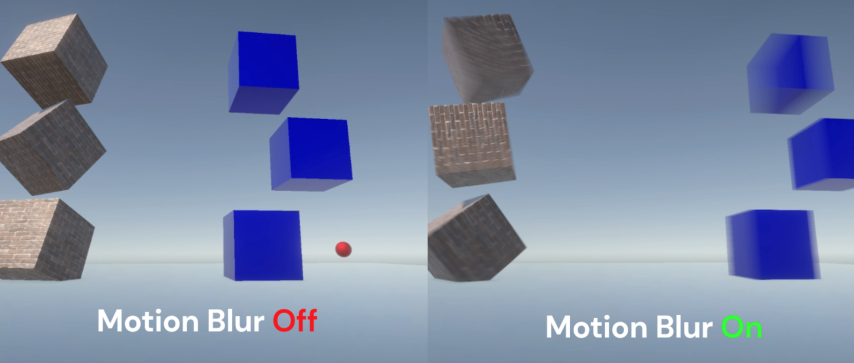
GitHub
A simple implementation of a Per-object motion blur effect for Unity URP (v14+) - GitHub - Estradel/URP-Simple-Per-Object-Motion-Blur: A simple implementation of a Per-object motion blur effect for...
It still works on 2022.3.3f1
rancid path
Where is the render pass thing?
jaunty pebble
The depth/motion vector render pass is internally created and executed and can only be accessed in a fullscreen shader
 rancid path
Whats the difference between a fullscreen shader and a normal shader?
jaunty pebble
upon opening up the shader graph provided with the PerObjectMotionBlurShader I get:

a fullscreen shader is used in post process effects and is not applied on scene geometry
rancid path
Writing to the screen itself?
jaunty pebble
sort of
the screen renderbuffer is treated like a texture and rendered THROUGH the shader onto a fullscreen quad
rancid path
Ok
jaunty pebble
well, they USED to use fullscreen quads
rancid path
And I could write that to a RenderTexture and read it from C# later on?
jaunty pebble
yes
one easy (but INEFFICIENT) way to do it is to target a camera to render onto a render texture, and to use that shader, but modify the shader to render the motion vectors directly out as-is instead of applying the blur effect
I say that it's inefficient because telling a camera to render under URP incurs an overhead penalty (where it sets up command buffers and allocates/deallocates render buffers, etc.
the less-easy but more performant way is to create a custom fork of the fullscreen renderer feature that can directly dump to a render texture, that way it doesn't require a separate camera that is targeted to a render texture
It should also be noted that the shader graph for the effect is a FULLSCREEN material

I would recommend using the former method first for prototyping purposes
If you decide that you like the results that it's creating then you can look at the performance hit that it creates and then decide whether it's worth your time to pursue a more performant but conceptually difficult procedure
barren mural
I have the assets at different depths on the z axis. I think my focal settings are correct but I clearly must be missing something somewhere.
 jaunty pebble
try the Bokeh mode, it's a little easier to work with
has additional controls

it lets you directly specify the focal distance
barren mural
It definitely blurs just doesn't have any control for blur per depth. The whole scene maintains the same amount of blur.
jaunty pebble
also it allows for a greater range of blur
There's Focal Distance and there's Focal Length
Focal Distance is the distance by which an object will be clearest
but focal length is how "close" the object has to be to the distance before blur begins to set in
so a reduced focal length will make the blur occur sooner. If the blur is affecting EVERYTHING then you may have to increase the focal length
and Aperture affects how much blur is applied overall
Also there is "sprite depth"
and then there is actual world placement depth
sprite depth is merely used to control draw sorting
but actual world placement depth will affect blur effects
barren mural
so the focus distance should be the main character and walking path
but no matter the focal length never works out
my background is set to 50 z axis, my mid is set 30 z and my main path is 20 z.
Thanks for the help btw been losing my mind on this going through useless tutorials for a few days.
jaunty pebble
Focal Distance should be distance between camera and main character
Focal Length of 0 means that anything nearer or farther than that focal distance will fall out of focus and become blurred
a greater Focal Length will make it more forgiving and keep things sharper
and your Renderer Data Asset MUST be set to create depth information

otherwise the filter won't know how far or near objects are to apply depth blurring
 sinful gorge
barren mural
okay yeh, im using the renderer2d should I be using the universal renderer?
sinful gorge
barren mural
okay yeh, im using the renderer2d should I be using the universal renderer?
You could start up the 2D URP template and see how that's set up
jaunty pebble
I don't know how the renderer2D pipeline handles depth -- my work is all in 3D 💀
barren mural
@jaunty pebble still thanks so much I appreciate you
@sinful gorge ill give that a try
 hardy violet
how many fps should I expect when using URP on a gaming mobile device?
from what I have read its commonly laggy when using URP on mobile
 lusty onyx
hardy violet
from what I have read its commonly laggy when using URP on mobile
lusty onyx
hardy violet
from what I have read its commonly laggy when using URP on mobile
yes true, also check your graphics rendering API
vulkan mostly the default and they ran worse on low-end
change to OpenGL 3.0, it improves up to 15%
 marble vigil
hardy violet
from what I have read its commonly laggy when using URP on mobile
marble vigil
hardy violet
from what I have read its commonly laggy when using URP on mobile
URP is designed to be suitable for all kinds of mobile devices
What kind of performance you realistically get depends entirely on the graphics API as mentioned, the graphics features you've chosen to use and how well your game's visuals are optimized
rancid path
jaunty pebble
upon opening up the shader graph provided with the PerObjectMotionBlurShader I g...
After using that, I got a black image, so I did this

And now I have this:

This is the normal scene

Using the non multiplied version is fine?
I sometimes see something on the non multiplied version though
jaunty pebble
the Motion Vectors are signed meaning they can be positive/negative
so if an object is moving in a negative axis it will have a 'negative' brightness
and just to confirm, those objects ARE moving, correct?
Also I would test with the unmodified object blur shader to make sure that objects are actually blurring before making changes to it
rancid path
Yes, the objects are moving.
The cube is rotating, and the ball is bouncing
I also managed to make a custom render pass that writes the motion vectors to a render texture
So, thank you for everything 🙂
Also, I think that you asked why did I want to use the motion vectors in C#, right?
Im trying to use a class I found on the namespace UnityEngine.NVIDIA for DLSS on URP
And it asks me for motion vectors
Im having more issues with DLSS now though
Issues never end
rancid path
Someone told me to continue using this channel, so, here is the issue:
Im using this https://docs.unity3d.com/ScriptReference/NVIDIA.GraphicsDevice.html to use DLSS on URP.
The thing is, that my code is crashing. And I dont know why. I have checked multiple times, and everything is initialized. The only thing Im not touching is something called DLSSCommandExecutionData, since Im not interested on inverting the x axis or other things like that. The docs are terrible, and there are zero resources online about this. Any help is welcome
Here is all the code that uses DLSS
https://gdl.space/memudumabi.cs
My graphics card supports DLSS (RTX 4070)
marble vigil
rancid path
Someone told me to continue using this channel, so, here is the issue:
Im using ...
There's zero resources because URP doesn't implement DLSS, and it seems unlikely at this point for someone to have made a third party implementation of it
If they have, they haven't published a writeup about it
marble vigil
It's probably possible but I assume you'd be the first, and likely requires you to make your own branch of URP that implements it
rancid path
Wait rewritting URP?
marble vigil
I expect so
rancid path
That sounds like a lot of work
marble vigil
If it only took a script to get it working it'd likely be in already
This is outside of my wheelhouse, but considering that implementing a custom post processing effect takes more scripts and assets than that, and that's an officially supported functionality, I expect this to be much much harder
rancid path
The docs say that DLSS is in on the core of unity, but only HDRP implements it
How Im supposed to "Implement" it?
I hope the docs are good
Wait I just found the HDRP code that uses it
sinful gorge
Unity is working on a system for upscaler implementations for both render pipelines more easily.
Maybe you can find a WIP in the alpha branches on github
@rancid path
rancid path
sinful gorge
Unity is working on a system for upscaler implementations for both render pipeli...
Do you have a link to an article or something like that about it?
sinful gorge
rancid path
Do you have a link to an article or something like that about it?
Nope, just seen it mentioned by devs on the forums. If you look throught the last few blitz days archives you might find it
 dense delta
I want to create magical trail particle animation in unity canvas so i followed some tutorials but they are using URP but i have doubt that it will not work in canvas. Any Suggestion guys
 maiden hatch
Hi guys, I am new to the server, I am trying to solve a problem and I could not find the answer , I have a simple decal projector, it works in the editor but I can't see the decal after build , I am using URP projector and I have tried every single config suggested on unity forums/google, could anybody please help me ?
This is the image of the project running in the editor and the build on the right hand side
 jaunty pebble
rancid path
My graphics card supports DLSS (RTX 4070)
jaunty pebble
rancid path
My graphics card supports DLSS (RTX 4070)
Im still using a gtx1080 so this is as far as I can go.
rancid path
jaunty pebble
Im still using a gtx1080 so this is as far as I can go.
Im watching the HDRP implementation, and its very low level
The main objective of DLSS is performance, and getting the motion vector and depth textures without loosing fps is kinda hard
jaunty pebble
maiden hatch
This is the image of the project running in the editor and the build on the righ...
Not using any addressables, right? (Sometimes this causes issues where something works in Editor but not in a build)
jaunty pebble
rancid path
The main objective of DLSS is performance, and getting the motion vector and dep...
Ok, so if you're using a camera to specially dump the motion vectors out to a render texture, it's slower because you're invoking a whole new pipeline along with its overhead penalty
What you can do at this point is to duplicate the full screen render feature
rancid path
No
jaunty pebble
Then give that feature the ability to point at a render texture
rancid path
Im using my own render feature that directly writes onto a render texture
rancid path
Yes
Just one cam
But fps dropped from 700-600 to 500-600
Also, I need the motion vector texture to change resolution based on the output resolution
On a 1080p I would need a 1920x1080 render texture, on 1440p a 2560x1440 and so on
I managed to do that, but fps dropped to 25-40
jaunty pebble
Oh damn.
Is the motion vector texture used as a mask to inform your system where to apply/ignore an area to use an algorithm?
Because if this is the case, you might not need so much accuracy and resolution in the motion vector texture
rancid path
It can be lower res
jaunty pebble
Additionally you may consider changing the format of the rendertexture you're writing to
rancid path
rancid path
It can be lower res
But I dont understand this https://docs.unity3d.com/ScriptReference/NVIDIA.DLSSCommandExecutionData-mvScaleY.html
And depth HAS to be the same resolution as the color input
jaunty pebble
In the end, you're blitting from the actual motion vector texture into a new render texture through a shader that is applying an operation
Maybe it's possible to get some savings by performing the blit without the shader altogether, and as long as the texture is the same format as the motion vector texture, the data should be preserved.
rancid path
What do you mean by that?
jaunty pebble
I was assuming that you were using a variant of the shader from the simple object based motion blur
rancid path
I made my own
rancid path
rancid path
After using that, I got a black image, so I did this
Is this without the multiply
jaunty pebble
Blitting can be done with no shader specified, in which case it's more like a direct copy using the interpolation settings from the output render texture
rancid path
And how could I do it?
At the moment Im using commandBuffer.DrawMesh
With the material and all that stuff
jaunty pebble
You're using some sort of blit operation to write to the render texture, correct?
jaunty pebble
I'll ping you when I get back to my desk. I need about 25 min.
Having a late lunch
jaunty pebble
rancid path
I might be sleeping then
https://docs.unity3d.com/ScriptReference/Rendering.CommandBuffer.Blit.html okay, so there's commandbuffer.blit
and it has a TON of overloads
if you choose the ones without a specified material then it will just be a simple duplication, applying whatever interpolation settings there are on the target RenderTexture
rancid path
And how can I get the texture without a material
jaunty pebble
and you'll find these settings on the Filter Mode
 jaunty pebble
rancid path
And how can I get the texture without a material
jaunty pebble
rancid path
And how can I get the texture without a material
choose the ones that don't have a Material parameter

OH
hang on
right
rancid path
I dont understand
jaunty pebble
you're using a fullscreen material to access the depth buffer in the first place
jaunty pebble
using (new ProfilingScope(cmd, profilingSampler))
{
    if (requiresColor)
    {
        // For some reason BlitCameraTexture(cmd, dest, dest) scenario (as with before transparents effects) blitter fails to correctly blit the data
        // Sometimes it copies only one effect out of two, sometimes second, sometimes data is invalid (as if sampling failed?).
        // Adding RTHandle in between solves this issue.
        var source = isBeforeTransparents ? cameraData.renderer.GetCameraColorBackBuffer(cmd) : cameraData.renderer.cameraColorTargetHandle;

        Blitter.BlitCameraTexture(cmd, source, copiedColor);
        passMaterial.SetTexture(m_BlitTextureShaderID, copiedColor);
    }

    CoreUtils.SetRenderTarget(cmd, cameraData.renderer.GetCameraColorBackBuffer(cmd));
    CoreUtils.DrawFullScreen(cmd, passMaterial);
    context.ExecuteCommandBuffer(cmd);
    cmd.Clear();
}```this comes from the FullscreenpassrendererFeature.cs
it's the part that does the actual blit transfer
jaunty pebble
rancid path
Can I use textures of different resolutions?
yes!
it will upscale/downscale, using the Filtermode setting specified by your render texture
rancid path
Thats interesting
Because DLSS requires for some textures to have the same resolution
jaunty pebble
blitting does not involve any 3D operations (as opposed to older legacy operations that drew a fullscreen quad
rancid path
And not being able to resize a RenderTexture was an issue
jaunty pebble
and blitting is a very basic (but frequently used) operation for copying information from one texture to another, sometimes applying a fragment shader in the process
jaunty pebble
rancid path
And not being able to resize a RenderTexture was an issue
There are provisions for getting a temporary render texture from the pipeline that is automatically sized to match the viewport / rendertexture that the camera is targeted to
rancid path
My fix to the resolution issue was something like that
Creating intermediate render textures
 rancid path
Oh, so with this I dont have to create one?
jaunty pebble
correct
rancid path
I get the one I need and copy it with the Blit to the DLSS texture list?
jaunty pebble
I recommend looking at FullScreenPassRendererFeature.cs (which comes with Unity) for an example of Blit
also look at CustomPostProcess.cs which has some instances of GetTemporaryRT
jaunty pebble
rancid path
I get the one I need and copy it with the Blit to the DLSS texture list?
yeah looks like it
with the fullscreenpassrendererfeature code I posted above:
var source = isBeforeTransparents ? cameraData.renderer.GetCameraColorBackBuffer(cmd) : cameraData.renderer.cameraColorTargetHandle;
that will get you the viewport rendertexture (or RTHandle) which probably has a depth channel already inside it
renderingData.cameraData.renderer.cameraDepthTargetHandle
use that! That's the RTHandle for depth (and blur!)
@rancid path
you probably don't even need shaders OR blitting. Maybe all you need to do is send that off to DLSS.
 kind harbor
Presume you mean make them sharper? Looks like your shadow resolution is too low. Thread here:
https://forum.unity.com/threads/how-to-make-a-better-shadow-quality.1136731/

Unity Forum
Hello everyone, I'm trying to improve graphics in my game, but I don't know how to improve shadow's quality, they are so quad.
[ATTACH]
In Project...
 ivory prism
I'm getting some really awful banding after rendering to a render texture and putting it through to another camera
HDR is enabled, dithering is enabled

Post processing is off
Here are my URP settings

I tried looking at the render texture settings and the only thing i can think of is the color channels, but theres like 80 options and i dont know what any of them mean
changing the colorspace to gamma fixed it...
with the cost that my game is now in gammaspace..

now theres no color banding but it looks gray and washed out
just to confirm i swapped back to linear, and yep, still there

welp by pure luck i chose the right color format for the render texture thanks guys
 marble salmon
For particles what is more performant in project that uses URP:
- LegacyShaders/Particles/Additive
- URP/Particles/Unlit
?
sinful gorge
marble salmon
For particles what is more performant in project that uses URP:
1) LegacyShaders...
Try both with 10k particles and run the profiler with GPU profiling enabled (or just check GPU frametime)
marble salmon
sinful gorge
Try both with 10k particles and run the profiler with GPU profiling enabled (or ...
Testing my self would be great, but then I would need to test it on multiple platforms, webgl and etc. That would take quite some time to build it prepare and etc. That's why I asked in discord, so maybe who already spend that time would be so nice and share their knowledge. Is it lazy approach? yes. But at the same time maybe someone knows something I dont.
modest horizon
I would need to test it on multiple platforms, webgl and etc
Why not just test it on your target platform?
 soft lion
Id imagine one platform would be enough to give some estimate. Id just maximize the amount the particles cover from the screen and test it on one
sinful gorge
I would recommend to test both on a mobile device and desktop device to see the difference between mobile/tiled GPUs and desktop GPUs, as these can differ in performance wildly
But yeah you don't have to test all platforms
marble salmon
soft lion
Id imagine one platform would be enough to give some estimate. Id just maximize ...
WebGL profiling on PC and Mobile gives totally different results. Also GPU profiling and some other information is not accesable on webgl. And you cant even profile it on WebGL mobile. It is really pain in the ass... I just want easy apporach asking for others. I guess I will need to build that HTTP developer build, create interface to spawn particles and in msot cases create new project for testing only.. Thanks guys
 terse ledge
Why my object's color doesn't change after I set it?
public void Paint()
        {
            _meshRenderer = transform.GetChild(0).GetComponent<MeshRenderer>();
            Material material = new Material(Shader.Find("Universal Render Pipeline/Lit"))
            {
                name = "HexMat"
            };
            _meshRenderer.sharedMaterial = material;
            _meshRenderer.sharedMaterial.SetColor(BaseColor, _baseColorMapper[type]);
        }
This function will called after the object instantiates

The inspector can show the color, but the object is white

 glossy lake
The green color in the inspector is not the object's color, it's what's selected in the color picker
You'll have to show how _baseColorMapper is defined, I'm guessing this is another Color/Color32 mixup
terse ledge
That color picker is that object's, if I click it, the color changes
glossy lake
Yup, that's how color pickers work but it's not really relevant to your problem
terse ledge
private readonly Dictionary<HexType, Color> _baseColorMapper = new()
        {
            { HexType.Grass, new Color(0x89, 0xF0, 0x73) },
            { HexType.Water, new Color(0x5F, 0xC6, 0xEF) },
            { HexType.SnowCovered, new Color(0x1E, 0x1E, 0x1E) }
        };
the Color here is UnityEngine's
glossy lake
Right, Color takes values between 0 and 1. If you want to use 0-255 you have to use Color32
terse ledge
Ah! I forget that, thanks for your help
 stiff knoll
hello
i have been trying to animate the Opacity property of a URP Decal Projector but it just doesnt work
the slider for opacity moves thanks to the animation
but visually there are no changes
sinful gorge
stiff knoll
but visually there are no changes
Is the material set to transparent? (been a while since I used decals, so might be completely off)
stiff knoll
sinful gorge
Is the material set to transparent? (been a while since I used decals, so might ...
no that isnt the option with the material
opacity option otherwise works, i cant animate it
marble vigil
ivory prism
I'm getting some really awful banding after rendering to a render texture and pu...
Your RT texture needs a higher bit depth
sinful gorge
stiff knoll
opacity option otherwise works, i cant animate it
Ahh I see
Maybe you have to directly change the material alpha?
This property lets you specify the opacity value. A value of 0 makes the decal fully transparent, a value of 1 makes the decal as opaque as defined by the Material.
stiff knoll
the material only has these 3 options,
the Opacity is in the URP Decal Rpojector


they are blue cus they are animated, and i am in the animation preview
kind harbor
I would guess that it needs to apply the opacity as a parameter to the decal shader, and that is done by the editor when you move the slider but not when it's animated.
stiff knoll
it has come to my attention that nothing in the URP Decal Projector can be animated, not just opacity
the values change but are not updated in scene
kind harbor
Probably same reason. All these settings are on the script component, but need to be copied into the material to take effect.
stiff knoll
i cant rly animate any properties of the material, and i am using Unity URP Decal Material
probably will have to try make my own
kind harbor
If the C# is exposed you can probably find a function where the mtl is updated and call it yourself. If not you're going to have trouble :/
soft lion
marble salmon
WebGL profiling on PC and Mobile gives totally different results. Also GPU prof...
I guess no one have tested that specifically here. Unlit shaders for particles are really really simple tho (looking at the source code, the built in particle shader for example just outputs the main texture multiplied by vertex color and tint property and applies fog + deals with particle fading in case soft particles are enabled). id assume the difference between those two is very negligible, if something, the urp one could be slightly faster because it supports SRP batcher but because theres propably not many particle systems at the same time, it may not matter that much.
ivory prism
marble vigil
Your RT texture needs a higher bit depth
idk what that means
I mean I kind of do but I don't know how or what to change it to
marble vigil
ivory prism
I mean I kind of do but I don't know how or what to change it to
Try this color format
 marble salmon
Could anyone help me with where should I start? Pipeline is URP. Effect that I want to get is:
Lets they there is a sphere, I want to use invisible plane or cube, which when moving on top of the sphere would dissolve it, or make sphere invisible. Invisibility should be gradual, not just enabling disabling renderer.
I found how to make edge lines or show game objects behind objects, dissolving by coordinate and etc, but that is bit opposite that I want to achieve. If that object would have one material, I could just hack the way and feed coordinates and dissolve it, but that will limit objects I can use this effect on.
Effect I trying to make is similar to this:
https://www.youtube.com/watch?v=fFC_UzknThY
Anyone could guide me with key words I should be searching for?
jolly quail
found bug where UI wont render when i use opngl and enable MSAA in VR (unity 2020.3)
did anybody experience this?
sinful gorge
jolly quail
found bug where UI wont render when i use opngl and enable MSAA in VR (unity 202...
Are you in the latest 2020.3 version?
jolly quail
sinful gorge
Are you in the latest 2020.3 version?
let me check it first
 frigid willow
how do I control sprite sort order inside a URP project?
(this is for a 3D urp project where we recently added sprites into the 3D scene for performance reasons to replace other things we used to have)
haughty garnet
sorting group -> sorting order -> pivot relativity
frigid willow
thanks Mao.., but where do I find that then? Project settings?
frigid willow
haughty garnet
sorting group -> sorting order -> pivot relativity
writing a response like this so I get your attention in a better way 🙂
haughty garnet
They are on the sprite renderer itself
frigid willow
ah right.., so how do I set the sort axis then? I'm used to that being a separate vector I can tweak
haughty garnet
If you're doing something isometric though, you want to sort pivots by the bottom usually, otherwise change the transparency sorting axis to x:0, y:1, z:0 in the project settings
frigid willow
thing is there doesn't seem to be a sort axis setting anymore when using URP?
I'm not sure if I'm missing something basic though.., how do I check if a project is using URP? (I'm pretty convinced that's what we're using.., the one where you can set up your own scriptable render pipeline)
haughty garnet
Project Settings -> Graphics
frigid willow
yeah.., no such thing in there
haughty garnet
oh yeah they moved it I didnt know that
frigid willow
I'm not supposed to program my own in the render pipeline script then?
kinda feels like it hehe
haughty garnet
Unity Forum
Is it possible to access/edit the custom axis while using URP? If so, how?
setting the pivots to the bottom of the sprites and sorting by pivots works fine too via spriterenderer
marble vigil
Darn I really wish that wasn't another baseline feature locked behind the URP 2D renderer
 vocal topaz
So, i'm using a srp from https://www.youtube.com/watch?v=Z8xB7i3W4CE in URP version 13.8.1, and the tutorial is on 7.3.1. Since i can't downgade my URP verrsion to that one (I'm using unity 2022.1.16f1) , i'm using another one.
I'm getting this warning, beacause the _CameraColorTexture Texture isn't creating.
CommandBuffer: temporary render texture _CameraColorTexture not found while executing BasicFeature (SetRenderTarget)
UnityEngine.GUIUtility:ProcessEvent (int,intptr,bool&)
How can i fix this?
jolly quail
hi, if i already bake light and doesnt have real time light, does it matter whether i use baking lit material or lit material, or did lit is more expensive than baked lit?
marble vigil
jolly quail
hi, if i already bake light and doesnt have real time light, does it matter whet...
Iirc baked lit shader only uses the lightmap so it's cheaper
jolly quail
marble vigil
Iirc baked lit shader only uses the lightmap so it's cheaper
ah ok,thanks for the info
vocal topaz
vocal topaz
So, i'm using a srp from https://www.youtube.com/watch?v=Z8xB7i3W4CE in URP vers...
Anybody knows?, in version 2019.4.1f1 works.
 arctic parcel
I have a 2D Freeform Light configured with Overlap Operation to Alpha Blend and color to black. In the Scene View and when I run the game the light it's good, but whenever I leave the scene and enter again the light just disappears. It's in the hierarchy but it's just invisible in the game view. Anyone has an idea of why it's happening?
marble vigil
arctic parcel
I have a 2D Freeform Light configured with Overlap Operation to Alpha Blend and ...
I've seen the same problem reported a few times but with no follow up solutions
Does it seem there's anything you can do to prod at the problem when it occurs? Such as enabling/disabling the light, changing its target sorting layer or transform position during Play mode
arctic parcel
marble vigil
I've seen the same problem reported a few times but with no follow up solutions
...
If I enable and disable the light, it shows up again. Though this only happens with freeform light, if I use a Spot light, with the same configuration, it doesn't happen, which is weird.
I'll just use the spot light instead
marble vigil
arctic parcel
If I enable and disable the light, it shows up again. Though this only happens w...
Could be a bug
I'd try to make a repro case to file a report
The 2D lighting system isn't known to be very robust
@arctic parcel Could be worth checking if the problem persists in build
A workaround might be to enable and disable the light via script when it loads in on scene change
vocal topaz
vocal topaz
Anybody knows?, in version 2019.4.1f1 works.
som1?
marble vigil
vocal topaz
som1?
URP has changed rapidly since that, I'd simply recommend you upgrade your project (with all appropriate precautions) and find up to date tutorials
I doubt anyone here is familiar with an old tutorial that likely was relevant only for a short while
vocal topaz
marble vigil
URP has changed rapidly since that, I'd simply recommend you upgrade your projec...
It's like it wasn't creating the texture. I suppose there is a line to create it right?
 dusky tiger
I updated to URP can someone please tell me why this is happening?
marble vigil
dusky tiger
I updated to URP can someone please tell me why this is happening?
I think your sky has no valid material, or your camera's background type is uninitialized
 split pier
Can I blend lit and unlit materials in shader graph? I've made a shader allowing switching between two unlit colors for a pulse effect, which I want to apply onto a lit material. However, using the Emission property results in an unwanted color mix with lit material. I need the pulses to retain their exact color.
 marble vigil
split pier
Can I blend lit and unlit materials in shader graph? I've made a shader allowing...
marble vigil
split pier
Can I blend lit and unlit materials in shader graph? I've made a shader allowing...
No
A mesh can have only one material/shader
split pier
marble vigil
No
A mesh can have only one material/shader
Is there any other way to overlay a solid color onto it?
marble vigil
split pier
Is there any other way to overlay a solid color onto it?
I would try changing the Emission color of the lit material as you said you did
What was the problem with the result that way?
The Emission property is basically what an unlit material is
split pier
It only works as intended for pure white. If, for example, I wanted it to be grey, it would just make it a little brighter. If it was red, it would just increase the R channel. If I wanted a black pulse, it would do nothing at all.
I'd like to have the solid color.
I might be able to do some shenanigans by setting the lit material to pure black when I do it
It looks like a metalic factor of 1 + no color makes it pure black
marble vigil
split pier
It looks like a metalic factor of 1 + no color makes it pure black
That is an option if you have the patience to control all those properties manually
Note that modifying material properties from code creates a material instance which is not automatically destroyed from memory even if the object is
split pier
I am modifying the asset directly
marble vigil
Then it's not a problem
dusky tiger
marble vigil
I think your sky has no valid material, or your camera's background type is unin...
Oh yeah the skybox somehow doesnt apply correctly? It should tho. The material has no error and the skybox is set in settings
 half ridge
Anyone ever work with DrawingSettings.overrideMaterial? is there a way to copy original material properties to the override material?
marble vigil
dusky tiger
Oh yeah the skybox somehow doesnt apply correctly? It should tho. The material h...
Checked camera's background as well?
I'd try setting skybox material to Default-Skybox to see if it helps
Also if you have multiple cameras, disable all but one
dusky tiger
I have all Cameras Disabled except for the main camera
Setting it to anything will make the background remain black
Oh
i just read
Skybox is not supported by 2D Renderer
How sad
marble vigil
dusky tiger
Skybox is not supported by 2D Renderer
Oh, 2D renderer
Barely anything is supported on that
dry willow
half ridge
Anyone ever work with DrawingSettings.overrideMaterial? is there a way to copy o...
There's also DrawingSettings.overrideShader (in 2022.2+ iirc?) which keeps properties. Though it doesn't work with the SRP batcher currently, so is more expensive to render.
half ridge
dry willow
There's also DrawingSettings.overrideShader (in 2022.2+ iirc?) which keeps prope...
Yeah that's the main issue why i'm testing overridematerial. Kinda sucks that override shader doesn't support srp batcher
dusky tiger
marble vigil
Oh, 2D renderer
Barely anything is supported on that
Quite Sad Actually.
marble vigil
dusky tiger
Quite Sad Actually.
Basically anything that isn't explicitly a 2D component, shader or rendering feature is no longer a thing in it, unlike Built-in render pipeline which can combine 3D and 2D features without any limits
I can't imagine why they made it that way
 gritty void
do anchor overrides for reflection probes work for anyone in forward+?
 placid marsh
does someone know how i can fix those black lines in my game? they are like everywhere randomly
 jolly quail
using SRP increased my batches instead, is it ok to disable it?
 marble vigil
jolly quail
using SRP increased my batches instead, is it ok to disable it?
marble vigil
jolly quail
using SRP increased my batches instead, is it ok to disable it?
Ok to disable what?
SRP batching doesn't reduce the number of batches, but reduces their cost
It's almost always more performant to have many batches with SRP batching than to try to reduce batches using other batching methods instead
But if you're unsure, profile the build performance and compare different batching techniques
jolly quail
marble vigil
Ok to disable what?
SRP batching doesn't reduce the number of batches, but reduc...
yeah just figured it hour ago, thank for the clarification tho 
half ridge
dry willow
There's also DrawingSettings.overrideShader (in 2022.2+ iirc?) which keeps prope...
Oh,i find a way to render custom pass with SRP batcher without having to override Shader or Material. Bit Clunky tho but it works 😬
 daring light
How do I get my polygons to look more like this? The individual poly being discernible and just... Nicer!! Mine appear smoothed and... Weird!


(First one is blender, second is my Unity)
They're both 3D...
 fringe lotus
Switched to Forward+.. it's absolutely beautiful.. Anyone have any idea why everything would flicker like crazy?
 midnight oar
How am i supposed to include "Packages/com.unity.render-pipelines.universal/ShaderLibrary/Lighting.hlsl" in a .shader file?
If i include this i get several redefinitions errors
soft lion
fringe lotus
Switched to Forward+.. it's absolutely beautiful.. Anyone have any idea why ever...
Is there something special about those flickering objects or do everything flicker equally? Do all of them use custom shaders for example?
soft lion
daring light
How do I get my polygons to look more like this? The individual poly being disce...
What shader are you using in unity? If the default lit shader/material, its probably the lighting thats messed up
daring light
soft lion
What shader are you using in unity? If the default lit shader/material, its prob...
It was actually the fact that I was missing UV!
I made a triangle from code


I extruded it downwards

most of the UVs are perfect

And then there is this one...
How could I fix it?
public Mesh createMesh(List<Vector3> vertices, float thiccness, float offset)
{
    Mesh mesh = new Mesh();
    float topHeight = thiccness * (offset+1);
    float botHeight = thiccness * offset;
    //Set the vertices
    Vector3[] meshVertices = new Vector3[6];
    meshVertices[0] = vertices[idA] * topHeight;
    meshVertices[1] = vertices[idB] * topHeight;
    meshVertices[2] = vertices[idC] * topHeight;
    meshVertices[3] = vertices[idA] * botHeight;
    meshVertices[4] = vertices[idB] * botHeight;
    meshVertices[5] = vertices[idC] * botHeight;
    mesh.vertices = meshVertices;
    //Set the triangles
    int[] triangles = new int[3*8]
    {
        0, 1, 2,    //Top
        0, 2, 3,    //AC Top
        5, 3, 2,    //AC Bot
        4, 1, 0,    //AB Top
        0, 3, 4,    //AB Bot
        5, 2, 1,    //BC Top
        1, 4, 5,    //BC Bot
        5, 4, 3     //Bot
    };
    mesh.triangles = triangles;

    // Set the UV coordinates
    Vector2[] uv = new Vector2[6];
    uv[0] = new Vector2(0, 1);
    uv[1] = new Vector2(1, 1);
    uv[2] = new Vector2(0, 0);
    uv[3] = new Vector2(0, 0);
    uv[4] = new Vector2(1, 0);
    uv[5] = new Vector2(0, 1);
    mesh.uv = uv;
    //Calculate normals (optional)
    // mesh.RecalculateNormals();
    // Return the created mesh
    return mesh;
}
Here's the code I used!
fringe lotus
soft lion
Is there something special about those flickering objects or do everything flick...
Everything flickers. Except the skybox. They all mostly use amplify shader editor. I even detached all of the nodes of one of the shaders and it still didn't fix it.
soft lion
fringe lotus
Everything flickers. Except the skybox. They all mostly use amplify shader edito...
But does the default shaders work? It may be that amplify doesnt support forward+
 ebon bramble
Uh... is this normal? I'm on Unity URP 2022.3.2

Only happens when going into a prefab from the scene
Found the reason of this bug, this error is triggered by post process button

 narrow venture
I'm working on some assets to import into someone else's mobile game, and I'd like to know which texture format would use the least VRAM on a Quest (2) for a normal map.
not asking about png or what not I'm asking about etc2, dxt1, and such. Import settings.
jolly quail
narrow venture
not asking about png or what not I'm asking about etc2, dxt1, and such. Import s...
jolly quail
sinful gorge
Get .48f1
so, i already test it up to newer version of 2021LTS,and the UI still didnt render when using MSAA and opengles3, and when i using vulkan the performance is very bad,some people write in unity forum that by disabling opaque texture it will fix the issue, and this was from very old forum,cant belive this bug still exist (UI didnt even have image component and diidnt have any costume shader)
*confirmed, diasbling opaque fix the UI didnt render
sinful gorge
jolly quail
*confirmed, diasbling opaque fix the UI didnt render
Interesting. Is the bug already reported on the issue tracker?
jolly quail
sinful gorge
Interesting. Is the bug already reported on the issue tracker?
i believe so,here is the forum link : https://forum.unity.com/threads/lwrp-ui-not-displayed-on-oculus-quest.697922/
Unity Forum
Hi there,
I'm actually working with our new Oculus Quest and the last version of LWRP (5.16.1),
and when I build (Android) on the headset, the UI are...
and i just submit too, thought they still didnt review it yet
sinful gorge
Thanks for reporting!
jolly quail
sinful gorge
Thanks for reporting!
 cerulean viper

 marble vigil
 last snow
How do i fix the 2d sprite sorting issues in a 3d world??
last snow
How do i fix the 2d sprite sorting issues in a 3d world??
What sorting methods are you using for the character's parts?
last snow
marble vigil
What sorting methods are you using for the character's parts?
they have sorting orders set, but these sorting orders cause overlapping with the other characters that use the same or higher values, even though theyre much further away from the camera
marble vigil
last snow
they have sorting orders set, but these sorting orders cause overlapping with th...
https://docs.unity3d.com/Manual/2DSorting.html Looking here you can see distance from camera is the lowest priority sorting method, but also the only one that works in 3D
The sprites must be in the same sorting layer and have the same order in layer and render queue so that distance sorting can work
You should be able to use Sorting Group component to internally sort the parts per character without losing ability to sort them by distance to camera
last snow
marble vigil
You should be able to use Sorting Group component to internally sort the parts p...
"Sorting Group" is where exactly?
 marble vigil
last snow
"Sorting Group" is where exactly?
last snow
marble vigil
last snow
"Sorting Group" is where exactly?
last snow
Thanks!
Think it still has the same issue edit: or maybe i set it up wrong
It works! Thank you so much
 tight elk
Hello peeps. Why does my sofa look so shiny?
- I made the textures using Substance Painter
- I exported using Unity URP Metallic
- I marked my normal map as normal map
- I marked my Metallic/Smoothness as non-sRGB
 placid marsh
Does someone know what pixels of my pixel art change when placed in the game? the top of this fence for example, is supossed to look like the second picture, but changed when placed in game

 placid marsh
Basically they deform in game vieuw but not in scene view
jolly quail
did anyone know where can i get these costume version of URP from oculus is?

 cinder kindle
jolly quail
did anyone know where can i get these costume version of URP from oculus is?
cinder kindle
jolly quail
did anyone know where can i get these costume version of URP from oculus is?
Follow the developer guide https://developer.oculus.com/documentation/unity/unity-asw/
 red tartan
Hello everyone, just today I started a new project on 2022.3.2f1 with URP
And the editor runs at an horrible frame rate, If I put my game view in "Full HD" with an empty scene, I can't reach 40 fps, on free aspect it goes to 65 max (and that is with vsync off)
I tried to look at cpu and gpu usage, cpu usage is less than 25% and GPU usage goes all the way up to 95% when I hit play or move around the scene in editor, that's terrible performance with an empty scene, it's kind of impossible to work
The scene view laggs...
My specs:
Ryzen 7 5800X
Radeon RX 6800
32 GB Ram
850W PSU
And a MSI dual vents AIO watercooler
Everything works fine in built-in
Do you guys have any idea where does that URP terrible performance comes from?
All my graphics driver are up to date
 misty turtle
Hi, i was using materialpropertyblock. but now I have to test performance using srpbatcher that isn't compatible with materialpropertyblock. I imagine that I have to clear the current propertyblock to makes srpbatcher works, how to?
 eternal geyser
Anyone have any guesses why my water shader looks different (neither of them right) in scene and game views? The colour should vary according to the a depth texture, but instead it's full deep in the game view and full shallow in the scene view. It works correctly in another scene and turning off post processing has no effect, so I'm not sure what could be the reason it's not working as it should.
 sinful gorge
jolly quail
did anyone know where can i get these costume version of URP from oculus is?
sinful gorge
jolly quail
did anyone know where can i get these costume version of URP from oculus is?
On git there also are repos with updated URP versions if you want to use app sw
sinful gorge
red tartan
Hello everyone, just today I started a new project on 2022.3.2f1 with URP
And th...
Disable SSAO, that will probably go a long way.
Otherwise share all your URP and quality settings you use
 mortal jolt
Hi so i enjoyed making visual effect based on YouTube tutorials. Thing is that there's very few kf them and far few of what i want to creste is there. I wanna learn it, nit buy it. Is there any good resource for learning visual effects and shaders
red tartan
sinful gorge
Disable SSAO, that will probably go a long way.
Otherwise share all your URP and...
Disabling SSAO doubled my framerate but how can it be that demanding on a near empty scene o_o
sinful gorge
red tartan
Disabling SSAO doubled my framerate but how can it be that demanding on a near e...
Since its a screen space effect the calculations always happen, so changing scene content does not change it that much (i think?)
There are many more urp settings you can tune if you want to use ssao
red tartan
Mmmh I see, gonna have to dive into that then
sinful gorge
mortal jolt
Hi so i enjoyed making visual effect based on YouTube tutorials. Thing is that t...
For shader graph there are plenty YouTube tutorials. Start with a simple shader with base texture and normal textures as input and then move to more complex shaders.
For vfx graph there are a bit fewer tutorials on YouTube, but there still are some. And there are sample vfx assets online you can take a look at
 solar coral
I don't know if this belongs here or in #archived-shaders or somewhere else... but I'm getting odd behaviour with z ordered alpha... I don't know how to describe it, but it is like it is doing alpha correctly below, but incorrectly above... Does that make sense?

here is what it looks like in game view with orthographic camera (and sprite size increased)

 thorn rampart
Im having an issue with decals in urp, when I use the dbuffer technique it works perfectly fine and I can modify the base color and everything, but when I switch it to screen space it’s just white and I can’t change anything in the shader??
I need to use the screen space method because the dbuffer method doesn’t render on mobile
screenspace:

dbuffer:

okay so with screenspace i can modify alpha but not base color?? seriously please help

oh and it works fine in deferred but not forward
ohhh so the base color is being overidden by light probes
everything i found on this says update unity, so im going from 2021.3.27 to 2021.3.28  , i cant use 2022 because mirror doesnt support that version yet
thorn rampart
unity version wont install, so im resorting back to google, please please please if you know the issue help
 mortal tiger
Is there any one with another URP shader knowledge that could make a deformation shader for me as a commission?
marble vigil
mortal tiger
Is there any one with another URP shader knowledge that could make a deformation...
!collab
 past capeBOT

📢 Collaborating and Job Posting
We do not accept job or collab posts on discord.
Please use the forums:
• Commercial Job Seeking
• Commercial Job Offering
• Non Commercial Collaboration
 dusk orbit
Hello, I really stuck at finding on how I can render my UI Images ontop of everything regardless the hierachy position.
marble vigil
dusk orbit
Hello, I really stuck at finding on how I can render my UI Images ontop of every...
You mean on top of everything relative to other UI images or relative to non-canvas gameobjects?
dusk orbit
marble vigil
You mean on top of everything relative to other UI images or relative to non-can...
Other UI Images in canvas, screen space overlay
Some googled solutions give shader code but it not working, so I thought it might be URP prob.
marble vigil
dusk orbit
Other UI Images in canvas, screen space overlay
As far as I know canvas objects are always sorted by hierarchy
You can use multiple canvases though, and sometimes it's good to
dusk orbit
marble vigil
As far as I know canvas objects are always sorted by hierarchy
You can use multi...
For this situation this aren't applicable.
marble vigil
dusk orbit
For this situation this aren't applicable.
What kind of situation is it?
dusk orbit
I don't know how to explain in text, maybe if you're interested in helping me a call would be a great help?
marble vigil
Sorry no
I'd try explaining the problem in #📲┃ui-ux even if it may seem difficult
There's more knowledgeable people there about this kind of stuff
 kindred plume

Elevate your workflow with the 3D Wizard asset from Weskel. Find this & other Humanoids options on the Unity Asset Store.
I found this character. It says it's not compatible with URP. Only Built-In. Is there no way to make it work?
marble vigil
kindred plume
I found this character. It says it's not compatible with URP. Only Built-In. Is ...
What that means is that it doesn't come with URP compatible shaders
You can make your own, or even convert it automatically if it uses built-in render pipeline's standard shaders
 fast coral
anyone here with BRG knowledge/experience?
I'm wondering if BatchDrawCommands are sorted amongst themselves. Basically, do I create 1 BatchDrawCommand for each transparent object, or 1 for each transparent material/mesh set. For opaque I can do per set, but per set doesn't seem to work for transparent
jolly quail
hi, i want to turn off bloom, in runtime, but whenever i tried this it always throwing error (i am using 2020.3.3, URP 10)

whups,nvm, turn out it because i have post processing package on my URP project and prob it clashed between each others? idk
nvm i take it back
still error
 cyan talon
jolly quail
nvm i take it back
cyan talon
jolly quail
nvm i take it back
Have you made your own type called Bloom?
jolly quail
cyan talon
Have you made your own type called Bloom?
uh, you mean in the inspector?sorry i didnt quite understand
 cyan talon
No, a class you made yourself
jolly quail
oh,do i need to do that? because this tutorial that i following didnt do that :
https://www.youtube.com/watch?v=r7zg3JhLhI8 (3:31)

In this unity3d tutorial i will be showing you how we can edit values on our Post Processing Volume in code. We will be using the Universal Render Pipeline however i believe the process is slimier for most of the other render pipelines.
If you need any help please feel free to join our discord server...
Discord: http://bit.ly/2DnVbdE
Like what...
cyan talon
No, if you did that it would be the error you are seeing
jolly quail
oh
yeah, i didnt creat that, wait let me check first
whups
yeah there it is

lol, thanks for the help
 neon dove
Hello ! Does somebody know if the 2D Renderer of URP is fully compatible with Nintendo Switch ? While it's part of the URP, I presume it is but I would like a confirmation before starting working with it
 cinder crown
neon dove
Hello ! Does somebody know if the 2D Renderer of URP is fully compatible with Ni...
cinder crown
neon dove
Hello ! Does somebody know if the 2D Renderer of URP is fully compatible with Ni...
Console related stuff should better be asked in Nintendo developer portal or Sony devnet than a public discord sir.
 zenith dirge
Will the HDRP water system ever be supported for URP?
jolly quail
zenith dirge
Will the HDRP water system ever be supported for URP?
for right now? no it wont, probably we need to wait quite loong time
sinful gorge
You gotta make water using frag and vertex shaders instead. Hdrp water relies too much on compute shaders @zenith dirge
 glass gorge
compute shaders work fine in URP
theyre not porting the water because they dont work on all mobile devices, so people using URP for pc or consoles dont get toplay with the nice things either 😦
 hybrid tundra
Could these lines between tiles be related to URP? I read somewhere that it has something to do with ambient occlusion, but upon disabling it, nothing changed.
I also tried playing around with texture settings and occlusion culling, but to no avail. I feel like making minecraft-style culling where you can only see the faces you need to see would fix it, but i have no idea where to start

Oh, and this only appears in the Game window, you can't see it in the scene itself
These are the settings for the dirt and water textures

oo nvm i fixed it, the problem was that i had everything in one texture for the objects
 bleak cave
Why does it take so many CPU time (~20.0ms)?
It takes only 35 batches!
 marble vigil
bleak cave
Why does it take so many CPU time (~20.0ms)?
It takes only 35 batches!
marble vigil
bleak cave
Why does it take so many CPU time (~20.0ms)?
It takes only 35 batches!
You can use the profiler to figure out what the CPU is doing
https://docs.unity3d.com/Manual/profiler-profiling-applications.html
 mortal furnace
Hello! Anybody know real production state games which uses 2D URP as is?
 vague gale
how can i add an additional renderer to specifiy for cameras?
my idea is to add a different renderer to the top most camera on the camera stack.
 sinful gorge
vague gale
how can i add an additional renderer to specifiy for cameras?
my idea is to add ...
sinful gorge
vague gale
how can i add an additional renderer to specifiy for cameras?
my idea is to add ...
Have different renderer files?
vague gale
but i think i have an other solution now without an additional renderer. would be still nice to be able to specify different renderers tho
 low oracle
Why does my game look almost deepfried in the game view in comparison to the normal looking scene-view?

 sinful gorge
low oracle
Why does my game look almost deepfried in the game view in comparison to the nor...
sinful gorge
low oracle
Why does my game look almost deepfried in the game view in comparison to the nor...
Which unity version?
Any post processing?
sinful gorge
vague gale
where do i have to reference them ?
Maybe they need to be in a quality tier?
low oracle
but changing to normal doesnt change it
sinful gorge
low oracle
2021.3 using the default settings
Latest 2021.3 version?
And any post processing? Look for the volume in the scene for it
vague gale
sinful gorge
Maybe they need to be in a quality tier?
they are 😄
low oracle
sinful gorge
Latest 2021.3 version?
And any post processing? Look for the volume in the scene...
deleting the volume didn't change anything, but i updated to 2023 and it seems fine now so 🤷♂️ fixed i guess
sinful gorge
vague gale
they are 😄
Hmm weird, then I'm not sure. If you need it maybe post on the forums?
And make sure unity etc is up to date with all bugfixes
sinful gorge
low oracle
deleting the volume didn't change anything, but i updated to 2023 and it seems f...
Interesting, but nice
 empty grove
low oracle
Why does my game look almost deepfried in the game view in comparison to the nor...
empty grove
low oracle
Why does my game look almost deepfried in the game view in comparison to the nor...
Its the camera
Well probably was
 placid laurel
Hi folks: Getting some wonky results in Unity -- this is supposed to be a log wall -- I know the diffuse is off -- I'll fix that later -- the results from the normal look odd to me:

heres my normal map

im very new to URP, so it would not suprise me I have something set up wrong
heres a screen shot from blender where I created the model and baked the maps
 marble vigil
placid laurel
Hi folks: Getting some wonky results in Unity -- this is supposed to be a log ...
marble vigil
placid laurel
Hi folks: Getting some wonky results in Unity -- this is supposed to be a log ...

 marble vigil
placid laurel
ok, fixed -- still looks wonky
marble vigil
placid laurel
ok, fixed -- still looks wonky
Your normal map itself is wonky as well
placid laurel
Ya, I thought it looked funny -- I just did a straight up bake in blender
heres the model it was baked from
 marble vigil
placid laurel
Ya, I thought it looked funny -- I just did a straight up bake in blender
marble vigil
placid laurel
Ya, I thought it looked funny -- I just did a straight up bake in blender
Probably not correctly
placid laurel
LOL -- ya probably not
marble vigil
Remember to set color space to non-color when baking
Your normal map doesn't have uniform reflections, which becomes apparent when you line it up with a rotated version of itself
 placid laurel
huh -- how did i manage to cause that?
@marble vigil im trying reconfiguring the model a bit to get rid of some hidden faces and gonna try re-baking the maps
 main canyon
i finally found why 2022 LTS is leaking memory. It was because I set rendering path to Forward+ in URP asset
 copper pilot
bleak cave
Why does it take so many CPU time (~20.0ms)?
It takes only 35 batches!
copper pilot
bleak cave
Why does it take so many CPU time (~20.0ms)?
It takes only 35 batches!
That's still 4.2 million tris.
copper pilot
hybrid tundra
Could these lines between tiles be related to URP? I read somewhere that it has ...
It could be shadow bias settings.
 final crater
Why are my point light shadows so jagged

 plain kayak
is there a way to force pixel light count above 8 or am i gonna need to divide the floor up even more?
 bleak cave
copper pilot
That's still 4.2 million tris.
bleak cave
copper pilot
That's still 4.2 million tris.
That's not so much.
Really.
It shouldn't take so much CPU time when I use DX12.
 worldly goblet
i made a new urp project to test smth but for some reason i cant move or use probuilder etc?

 lunar bloom
How can I get realtime shadows on moving objects in URP?
Like viewmodels or balls rolling
lunar bloom
worldly goblet
i made a new urp project to test smth but for some reason i cant move or use pro...
You've tried restarting right?
lunar bloom
lunar bloom
How can I get realtime shadows on moving objects in URP?
In general my imported objects seem weird colour when compared to other software like blender / unreal
worldly goblet
lunar bloom
You've tried restarting right?
i was in the game view instead of scene xD
fixed it anyways thanks
marble vigil
lunar bloom
How can I get realtime shadows on moving objects in URP?
If shadows are enabled on lights and meshes then they should be casting shadows
lunar bloom
marble vigil
If shadows are enabled on lights and meshes then they should be casting shadows
Sorry I may not have explained myself well
I meant shadows cast onto these moving objects
I don't need them to shadow each other but having shadows from the environment would be great
I don't want my stuff looking worse than games from like 2004
marble vigil
lunar bloom
I don't need them to shadow each other but having shadows from the environment w...
Anything with a Lit shader receives shadows, and casts them as well if Cast Shadows is on in the mesh renderer
There isn't particularly anything you must "do" to achieve that
Even by creating default cube gameobjects into a new basic scene should you be seeing shadows being cast from the cubes onto each other
lunar bloom
Hm, I'm using the VR template
So it might be disabled from optimization?
Unsure
All the objects seem like they aren't getting shadows from like directional light or anything
they just sort of blend they're entire shading between light probes
marble vigil
lunar bloom
So it might be disabled from optimization?
Likely; shadow casting is expensive
You could have a look at shadow casting settings on lights, meshes and project quality settings as well as check what shaders they're using
Or fully rely on baked lights with light probes and reflection probes for lighting, though you won't get any projected shadows that way
lunar bloom
Yeah that would kind of suck

From what I can tell this is pretty solid

As is this
marble vigil
lunar bloom
As is this
This all looks correct
The quality settings (URP asset in this case) will have more shadow options
lunar bloom
From what I can tell the quality urp config has the same options, unless I misunderstood sorry
 marble vigil
lunar bloom
From what I can tell the quality urp config has the same options, unless I misun...
marble vigil
lunar bloom
From what I can tell the quality urp config has the same options, unless I misun...
Ah that above image was from the URP asset
I'd check the lights themselves as well
The Project Settings>Quality tab tells you what URP assets you're using and what your target platforms are using, and may provide some more clues
Besides that I don't have really ideas
Maybe it's some template thing I'm not aware of
lunar bloom

Hard to get a good screenshot but yeah no casting or receiving it just looks so bad

Do I need to set it to mixed or something?
lunar bloom
Okay setting things to mixed gives ground shadows
But shadows from other objects dont cast onto my moving objects 😦
worldly goblet
how do i make it less bright? cant see anything xD
 lunar bloom
worldly goblet
how do i make it less bright? cant see anything xD
lunar bloom
worldly goblet
how do i make it less bright? cant see anything xD
if your scene is white, that won't help.
But turn your directional light brightness down and maybe change its color
worldly goblet
lunar bloom
But turn your directional light brightness down and maybe change its color
brought the intensity to 0,7, looks alright
hmm nvm it doesnt
lunar bloom
worldly goblet
hmm nvm it doesnt
Feel free to show again, focus on your light
worldly goblet
idk it feels weird
 lunar bloom
Looks like a white scene would to me
worldly goblet
hmm alright then, thanks!
lunar bloom
Recommend turning your lower layers brown, helps you keep reference of realism
worldly goblet
lower layers? wym?
lunar bloom
as in further down those hills
if you're not used to seeing a lot of snow I can see hopw that might look weird to you
worldly goblet
lunar bloom
as in further down those hills
you mean something like that?
 lunar bloom
worldly goblet
you mean something like that?
lunar bloom
worldly goblet
you mean something like that?
Honestly it doesnt matter haha my main point is it's hard to judge lighting stuff with hard blacks and whites
worldly goblet
lunar bloom
Honestly it doesnt matter haha my main point is it's hard to judge lighting stuf...
xD alr tysm!
lunar bloom
np
marble vigil
worldly goblet
how do i make it less bright? cant see anything xD
Lighting and visual brightness of a scene are affected by:
-Light components' color and intensity
-Scene environmental lighting including ambient lighting and cubemap reflections
-Post processing volume overrides such as tonemapping, post exposure and bloom
-Project color space and HDR quality settings
And of course material properties
worldly goblet
marble vigil
Lighting and visual brightness of a scene are affected by:
-Light components' co...
Thank you!
 tall mica
Hey guys, I'm pretty new to unity and I have a weird problem. I'm participating in a local game jam right now so I've been experimenting with shaders and assets in my own project (3D URP) however my team used just 3D when creating the main project so we've been trying to make it URP compatible. It should work now, but when I try to import a water asset that works fine in my project it breaks in the main project. Anyone have any ideas as to why?

 lunar bloom
tall mica
Hey guys, I'm pretty new to unity and I have a weird problem. I'm participating ...
lunar bloom
tall mica
Hey guys, I'm pretty new to unity and I have a weird problem. I'm participating ...
Shaders are different, check the materials etc
I'm also still having an issue getting non-static objects to receive shadows in my scene
tall mica
lunar bloom
I'm also still having an issue getting non-static objects to receive shadows in ...
Not sure what to do if the shaders are different or materials don't work
 hidden pawn
how to fix image pixelated in unity canva ui? so i make vr ui in unity and using ui image. but the image is pixelated.

 slate spade
My high setting for my urp game gets my 3080's GPU usage to 50% just sitting in the menu with vsync on. What are some common things I could tone down or look at to lower this a bit without affecting the graphics fidelity of the game much?
 sacred gale
not exactly sure is this is the right place to put this, but I have been making some basic 2d tilemaps and I created a shadergraph which just applies some pixelated noise to the base color, yet for some reason this appears to break the rendering of the tilemap.


the same problem appears by simply creating a sprite lit shader graph, making a material from it, and applying said material

any ideas on how I can use materials with tilemaps
lunar bloom
slate spade
My high setting for my urp game gets my 3080's GPU usage to 50% just sitting in ...
Would be good if you could show or describe your main menu
If it's a 3D scene main menu with is pretty popular these days, it'll obviously depend on that
marble vigil
sacred gale
not exactly sure is this is the right place to put this, but I have been making ...
You could show the shader graph
sacred gale
marble vigil
You could show the shader graph
it works with any shader graph
like you can just make a new sprite-lit shadergraph
make a material from it
and apply it
and then it breaks
marble vigil
sacred gale
it works with any shader graph
According to your description you're applying noise to base color, which seems to imply you're not utilizing the base texture at all and the result is consistent with that
That's why I want to see your node setup
sacred gale
I mean the issue isnt the node setup I think
since the issue is still the same when using a blank shader graph
marble vigil
sacred gale
I mean the issue isnt the node setup I think
Can you please show the nodes
sacred gale
I mean I can go open unity and make an empty one if you want
marble vigil
An empty one doesn't have the required nodes for displaying sprite textures
sacred gale

all I am trying to do is apply a material to a tilemap, and yet for some reason it seems to be different than doing it with anything else
tbf I am also very very new to using shaders and materials
marble vigil
I'd have preferred to advise where exactly you need to put them but with this info I can only tell you that you need to utilize the _MainTex property
sacred gale
I am not really sure what other info you would need to be honest
the result appears to be that it is overwriting the sprites with the base color
and all you need to do to replicate it is make a tile map with some tiles in it, make a new urp sprite-lit shader graph, make a material from it, and apply the material to the tilemap
actually, this extends not just to tilemaps
marble vigil
Sprite Renderer uses the _MainTex property for the sprite texture reference
Sprite Graphs do not utilize it by default, so you need to create that property yourself and use it in your graph
 marble vigil
Indeed
sacred gale
will do some further testing to be sure, but thank you
marble vigil
sacred gale
will do some further testing to be sure, but thank you
I can give more pointed advice if you can describe how you want to apply the noise and show the node setup you had for the earlier example
But generally just need to combine the MainTex with your noise and optionally with BaseColor
sacred gale
For my purposes taking in _MainTex as a texture2d, sampling it, and multiplying that with the desired effects was enough to work
So I do thank you
marble vigil
sacred gale
For my purposes taking in _MainTex as a texture2d, sampling it, and multiplying ...
I should've said to do that a lot earlier, but I assumed it wasn't working despite you doing that so I wanted to see the nodes to confirm what we were working with
 flat escarp
does anyone know what causes these weird concentrated patches of light that appear when baking lightmaps?
 marble vigil
flat escarp
does anyone know what causes these weird concentrated patches of light that appe...
marble vigil
flat escarp
does anyone know what causes these weird concentrated patches of light that appe...
Always first rule out UV overlap issues using the debug scene draw view modes (as well as other problems using the debug view modes)
Beyond that it looks like it could be "fireflies" as in chapter 14 here
https://forum.unity.com/threads/lightmapping-troubleshooting-guide.1340936/
flat escarp
Thank you
 last eagle

hmm any ideas why i'm getting this error?


okay the error seems to be only in the editor
 tepid turtle
Hello, I am new to using URP and I could use some help
last eagle
what's up?
tepid turtle
I am trying to import some 3d models I made in Blender, but my materials aren't showing properly
But I am not getting pink materials like others said

It worked just fine in SRP, so I am a little confused to how I can fix that
marble vigil
tepid turtle
I am trying to import some 3d models I made in Blender, but my materials aren't ...
What's the material like in blender
URP and HDRP are SRPs aka scriptable render pipelines
tepid turtle
@marble vigil Sorry for the late reply, but what am I looking for in the materials exactly?

(This is the other material for the remote)
 marble vigil
tepid turtle
<@166982635950702592> Sorry for the late reply, but what am I looking for in the...
marble vigil
tepid turtle
<@166982635950702592> Sorry for the late reply, but what am I looking for in the...
That's what I wanted to see, just to confirm your blender materials weren't incompatible with unity
Previously it looked like the embedded materials weren't imported with the mesh which should happen regardless of render pipeline
That's not a big problem though because you'll usually always want to make new materials anyway, as the fbx format doesn't seem to store material properties in any kind of accurate way
tepid turtle
Does that mean there's nothing I can really do to fix the problem?
tepid turtle
marble vigil
That's what I wanted to see, just to confirm your blender materials weren't inco...
I mean no way other than making new materials for the model when I import it to Unity
marble vigil
tepid turtle
I mean no way other than making new materials for the model when I import it to ...
Actually I think the materials were imported now that I'm looking at it again, just that they're missing textures
If you place the textures used in Assets/Textures/ folder in your unity project, they should connect automatically to the embedded materials
If that works you should also be able to use the "Extract Materials..." button to place them in your materials folder while keeping the references, and then be able to edit them if their properties are not correct
tepid turtle
I got the issue fixed now after I had set the base map to its texture, thanks!

Although, it looks a little darker and a little glowy than when I put the same thing to SRP
marble vigil
tepid turtle
Although, it looks a little darker and a little glowy than when I put the same t...
By "SRP" do you mean the Built-in Render Pipeline?
tepid turtle
Yes
marble vigil
tepid turtle
Yes
Post processing by default and sometimes lighting conditions are different are different between render pipelines
You'll have to tune them to suit your scene
tepid turtle
Ah I see
marble vigil
BiRP if I recall correctly doesn't start with any tonemapping or bloom
 shut needle
Hi there, updated a project which i didn't touched some time to 2022.3 now i have spotted a issue with a missing renderer feature, may it was already missing, but i can't remove it, when i click the 3 dots i just get the error msg you can see in the console... Do i have to create new ones or is there another way to remove the missing reference?
 marble vigil
shut needle
Hi there, updated a project which i didn't touched some time to 2022.3 now i hav...
marble vigil
shut needle
Hi there, updated a project which i didn't touched some time to 2022.3 now i hav...
If making a fresh renderer asset fixes it then that's likely the easiest solution
slate spade
is it possible to use different renderer pipelines for different cameras? i have a ui camera and one more in addition to the main. was wondering if i could just set them to use the low profile while the main camera uses whatever is in the settings. i only see the high one showing up in the dropdown
 marble vigil
slate spade
is it possible to use different renderer pipelines for different cameras? i have...
marble vigil
slate spade
is it possible to use different renderer pipelines for different cameras? i have...
I've heard it may be technically possible to have multiple RPs in a project, though I don't know how and it's not supported
Multiple in one scene probably won't be possible unless the upcoming SRP coexistence feature allows it

 ocean hinge
With this amount of information, you could google as well xD
 noble igloo
ocean hinge
With this amount of information, you could google as well xD
noble igloo
ocean hinge
With this amount of information, you could google as well xD
doesn't work cuz every tutorial i've seen when they install urp and set it up the lights appear
i have not seen any solution on youtube or google
ocean hinge
Could have dozens of reasons.
Maybe you are not using a 2D light. Maybe you are not using a 2D Project. Maybe your shader is Unlit.. etc.
 chrome pagoda
U probably set it up as a 3d project instead of 2d
lunar bloom
Hi I'm having difficulties with particles in editor and ingame. Soft particles aren't working, and my particles seem to be drawn underneath objects that are children of it.

I've checked my depth texture is enabled

 marble vigil
lunar bloom
It seems like the option for soft particles should be here:
marble vigil
lunar bloom
It seems like the option for soft particles should be here:
It's there only in built-in RP
We should stick to just one relevant channel
What editor version were you using?
lunar bloom
marble vigil
It's there only in built-in RP
We should stick to just one relevant channel
What...
I'm on latest I believe, updated last week
marble vigil
lunar bloom
I'm on latest I believe, updated last week
There are multiple latest ones 
lunar bloom
marble vigil
There are multiple latest ones <:UnityChanThink:885169594560544800>
Oh sorry let me check for you
lunar bloom
marble vigil
There are multiple latest ones <:UnityChanThink:885169594560544800>
Assuming it's this? 2022.3.4f1
 marble vigil
lunar bloom
Assuming it's this? 2022.3.4f1
marble vigil
lunar bloom
Assuming it's this? 2022.3.4f1
I've got the opposite problem using the same version, it seems
I've got this warning and made sure no settings asset has depth texture enabled
Yet I get soft particles no matter what if the material is checked to use them

As far as I know there are no options beyond Depth Texture in the URP Asset that controls this
lunar bloom
Yeah I don't even get that warning.
Which I see a lot on the forums
Let me check in a blank project
could be a vr thing, a lot of shader stuff can be messed with due to stereo rendering
marble vigil
True
lunar bloom
marble vigil
I've got this warning and made sure no settings asset has depth texture enabled
...
Where are these options?

My particle setup looks a bit different
marble vigil
lunar bloom
Where are these options?
 lunar bloom
marble vigil
lunar bloom
marble vigil
Uh oh....
marble vigil
What does yours look like uncropped
 marble vigil
Ah that's a logical explanation
Which is good in this business I believe 😄
lunar bloom
Copied a standard dust particle to make it work, wish it warned me it wasn't setup right for URP
Having not done much with particles that would've been great
Yeah looks great now thanks
lunar bloom
marble vigil
Ah that's a logical explanation
Which is good in this business I believe 😄
Is there any way to make the particles clip with other objects like it's children is a nice way, currently I have to choose either above or below completely using order in layer, which seems strange given the particles do have a 3d position
marble vigil
lunar bloom
Copied a standard dust particle to make it work, wish it warned me it wasn't set...
They rarely do warn even if the discrepancy is obvious to the system
lunar bloom
Yeah I saw the thread where the guy made the PR for the warning you received above
Seems few and far between
marble vigil
lunar bloom
Is there any way to make the particles clip with other objects like it's childre...
To my knowledge hierarchy doesn't have anything to do with render order (except when working with UI)
If the child object material and the particles are both using alpha transparency, then they are both sorted by their origin relative to each other
lunar bloom
They are indeed using transparency, but it doesn't seem like it's ordered on a per particle basis
but I guess that could be expensive
marble vigil
lunar bloom
They are indeed using transparency, but it doesn't seem like it's ordered on a p...
It's not indeed
A particle system is one procedurally created mesh
lunar bloom
marble vigil
It's not indeed
A particle system is one procedurally created mesh
Thanks for your knowledge, it's been really helpful to me, I really appreciate it
slate spade
how come my game uses 50% gpu just sitting in the main menu? there's really not a lot going on, 13k tris 10k verts. it's capped at 144fps. behaves the same way both in build and editor

a much busier scene only goes to 76% from the 50% it starts out at

i have another urp project i was working on and see something similar with that too, 40% usage sitting in a menu, actual gameplay only goes up by 20% more or so
 stoic umbra
Super basic problem I'm sure but could someone point me in the right direction with this issue? https://cdn.discordapp.com/attachments/934467467160485948/1131348115765600316/send-help.mp4
The outer dial is blinking in/out, it's not a z fighting issue as far as I can tell
marble vigil
stoic umbra
The outer dial is blinking in/out, it's not a z fighting issue as far as I can t...
Is it transparent? Did you check in scene view that it's still there when it disappears from the camera's view?
stoic umbra
Yes and yes
@marble vigil Thank you. A coworker had tried to mess with the shader and had forgotten to change it back to an opaque material, we didn't need it to be transparent so this actually solved the issue.
You're huge
slate spade
slate spade
how come my game uses 50% gpu just sitting in the main menu? there's really not ...
figured out what my issue was, the rendering scale was set to 2x, so using twice as much gpu as it should
lunar bloom
stoic umbra
Super basic problem I'm sure but could someone point me in the right direction w...
Does your editor have a blue light filter theme? That's pretty cool
stoic umbra
lunar bloom
Does your editor have a blue light filter theme? That's pretty cool
It's his playmode tint :p
bleak cave
Culling Mask for Light doesn't work.
 cyan plover
So I have a weird issue with post processing rn
I have a simple setup : one base camera with one overlay camera. I want the stuff in the overlay camera to NOT have any post processing effects (its not being rendered in main cam), but whenever I try to control the culling mask for the post processing volume from the base camera, it doesn't change anything. It only changes when I mess with the culling mask on the overlay camera and affects all objects in scene with post processing, which is not what I want. Anyone know whats going on
marble vigil
cyan plover
So I have a weird issue with post processing rn
I have a simple setup : one bas...
Is it the urp 2D renderer, per chance?
marble vigil
cyan plover
is that why?
Yes, seems to be a bug that came up recently
cyan plover
marble vigil
Yes, seems to be a bug that came up recently
Oh I see. Was it ever fixed though
last eagle

hmm any ideas why with this line of code it's rendering at lower res than the camera?
the "camera_color_target_handle" is the camera's colour attachment texture
which i set like this
 marble vigil
cyan plover
Oh I see. Was it ever fixed though
marble vigil
cyan plover
Oh I see. Was it ever fixed though
I don't know, make sure your editor is on the latest bugfix version, or test it in newer feature versions of the editor
cyan plover
marble vigil
I don't know, make sure your editor is on the latest bugfix version, or test it ...
alr!
last eagle

well this is a lead... some downscaled version of the camera col tex is input to the shader??
dry willow
last eagle
Should use _BlitTexture in the shader to obtain the source texture of the blit, rather than _CameraOpaqueTexture. It's also common to blit to a temporary target and back to the camera to avoid using the same target as source & destination as that's not always supported / can be buggy.
I've got more info/example here - https://www.cyanilux.com/tutorials/custom-renderer-features/#blit
last eagle
dry willow
Should use `_BlitTexture` in the shader to obtain the source texture of the blit...
oh omg thanks, i was using CameraOpaqueTexture in the shader. Thanks for the info, i'm very familiar with gfx coding so should be fine in terms of pingponging and etc!
great tutorial
last eagle
dry willow
Should use `_BlitTexture` in the shader to obtain the source texture of the blit...
No graphics API supports this actually! So if it's supported, Unity is doing some magic to get it working?
but it still doesn't always work?
cool, works now :))
https://www.cyanilux.com/tutorials/urp-shader-code/
also great reference! needed exactly this
lunar bloom
Are there any planar reflection solutions that work for VR in URP?
sinful gorge
lunar bloom
Are there any planar reflection solutions that work for VR in URP?

Add depth to your project with Mirrors and reflections for VR asset from Tom Goethals. Find this & more VFX options on the Unity Asset Store.
lunar bloom
sinful gorge
https://assetstore.unity.com/packages/vfx/shaders/fullscreen-camera-effects/mirr...
Yeah I was hoping to find something slightly more performant than having extra cameras.
But needs must I think
I think instead or rendering a camera for each eye you could probably get away with one if you could parallax correct it somehow
I think that's what source2 does
marble vigil
Extra cameras are the only option for real mirrors (save for ray tracing)
marble vigil
lunar bloom
I think instead or rendering a camera for each eye you could probably get away w...
That's basically what SSR does
It's cheaper than extra cameras only if your renderer/platform can handle the required back end stuff to run it
lunar bloom
marble vigil
Extra cameras are the only option for real mirrors (save for ray tracing)
Yeah I'm just looking to get some nice water reflections and stuff, I was hoping the distortion could prevent it looking too off
lunar bloom
marble vigil
That's basically what SSR does
It's cheaper than extra cameras only if your rend...
Problem with screenspace in vr is the player tends to look around a little too much I think
they look up and down a lot more than say a normal fps player
marble vigil
lunar bloom
Problem with screenspace in vr is the player tends to look around a little too m...
Doesn't really matter how much the player looks around, but how visible the reflective surfaces will be in general
And how different the SSR reflections would be from cubemap reflections
Speaking of, box projected cubemaps can produce perfectly acceptable reflections on unclear surfaces, though without dynamic objects
But really you don't have much options
last eagle
can i sample the AO pass texture with some helper function in a text shader?
ao
iii think it's this

found it =)
okay how can i sample the normal gbuffer in a shader?
okay found this

 tired creek
any1 if its possible to have a camera just for scene gizmos and disable gizmos for my main camera? I'm doing some downscaling/upscaling to the main camera render texture that breaks gizmos. would be nice to just have gizmos not effected by that on a seperate camera in edtior
 leaden granite
Why does unities fog causes the floor to glow when the camera faces a certain direction?
And is it fixable?
 west wing
The fog based on the pivot of the object and requires enough vertices iirc. Make sure the pivot is close enough to the camera and not far outside the level. Tesselate the mesh abit to have more verts for the fog to create the gradients in between.
marble vigil
leaden granite
Why does unities fog causes the floor to glow when the camera faces a certain di...
What kind of fog are you using?
And with what variables
Moreover what kind of material/shader does the ground have
leaden granite
Ah I'm sorry guys. I fixed the issue. My bad I forgot to delete this particular question
marble vigil
It might be a reflection instead of fog
leaden granite
I had a number of problems this evening and when I fixed this one it slipped my memory
It was a shading error due to ... I can easily show than explain
Sjors was on the right path
Basically adding in these cuts in the image fixed it. Before I did that the face was a non-convex ngon, I think that's what it'd be called.
 marble vigil
Still I'm curious if it really was a fog problem
leaden granite
this was the problem
 leaden granite
marble vigil
Still I'm curious if it really was a fog problem
leaden granite
marble vigil
Still I'm curious if it really was a fog problem
It was. I tried all 3 fog settings and the materials are all 0 smoothness
and when I turn fog off it was fixed 100% of the time
marble vigil
Interesting
leaden granite
This face was screwing with the depth buffer, is that what it's called?
Anyway thanks for replying and trying to help 🙂
marble vigil
leaden granite
Anyway thanks for replying and trying to help 🙂
I'm learning all the while ^^
You may want to consider patching your editor if your project allows for it
2020.3.5 is two years of patches behind 2020.3.48
 glass beacon
i dont know why it does that. it used to work normally. does anyone know what might be the problem?
sinful gorge
glass beacon
i dont know why it does that. it used to work normally. does anyone know what mi...
What's 'that'?
If you want support be specific
glass beacon
sinful gorge
What's 'that'?
If you want support be specific
In the video the lighting changes when pressing play
Reimporting gets it back to what it was but pressing play again messes it up again
sinful gorge
Check the lighting settings and maybe remove post processing.
Did you delete the library folder already?
Any custom scripts on there?
Also a slight chance the latest 2021lts fixes it
marble vigil
glass beacon
In the video the lighting changes when pressing play
That's not supposed to happen, but implies a missing environmental lighting
You should be able to click "generate lighting" on the lighting window
 rocky creek
why does my flat-colored, smooth-shaded low-poly model look like this?

i imported the same model back into Blender and it seems ok

these are my import settings

changing my project quality a step lower seems to fix it, but i lose some of my drop shadows
 marble vigil
rocky creek
why does my flat-colored, smooth-shaded low-poly model look like this?
marble vigil
rocky creek
why does my flat-colored, smooth-shaded low-poly model look like this?
Screen Space Ambient Occlusion
It's in the renderer asset
 rustic patrol
Hello. I moved my project to another computer by making it a package and replacing the project settings folder. Unforunately all my urp pipelines and urp related files are now giving me this issue :

I did install the urp package again btw
marble vigil
rustic patrol
Hello. I moved my project to another computer by making it a package and replaci...
You can re-create all the necessary URP assets and URP renderer assets
rustic patrol
marble vigil
You can re-create all the necessary URP assets and URP renderer assets
It works now. I fixed all the errors an everything worked out. But now all the lighting is messed up
I had a soft purple volumetric light before
marble vigil
rustic patrol
I had a soft purple volumetric light before
Volumetric light in URP?
rustic patrol
marble vigil
Volumetric light in URP?
not a literal one, I just used regular 2D lights to give a nice tint. But now it gives all the objects a hard light and it looks horrible. same for all the other lights. The image I sent before is not loading unforunately.
but now its comepletely overpowering

nice it loaded
yea so in the past additive lighting worked properly but now its just covering everything
sacred gale
yo
can anyone link me to a thing that has all the texture properties URP uses for 2d textures
like I know _MainTex exists
but I need the one for alpha value, yet I cant find it anywhere
nvm I got it

nvm nvm
this did not fix this

this is with the "Alpha as transparency" enabled in the tileset
this is it with the alpha turned off

wierd

none of those seemed to help
marble vigil
You have not stated what you are trying to do
sacred gale
render a transparent tileset
urp seems to not like base transparency in 2d sprite lit shaders
or maybe there is something I am not getting with these inputs
from what I can tell URP is just rendering the textures as solid white or sometimes mostly white, but not the actual sprite itself
I have a custom shader which creates a pixelated tiling effect for the path shown above, and this is what I have the URP default inputs set to

 marble vigil
sacred gale
or maybe there is something I am not getting with these inputs
marble vigil
sacred gale
or maybe there is something I am not getting with these inputs
What if you just set the alpha as 0.5 direcetly
sacred gale
wdym
you mean setting the color of the sprite to be transparent?
because I can easily make the path transparent as a whole
but part of the texture is opaque, while another part of the texture is transparent, and urp wont render them
it just flips its shit when it tries to render the transparent parts
idk whats going on tbh
marble vigil
I mean unplug this and just type in 0.5
 sacred gale
wouldnt that make the whole thing 50% transparent
sacred gale
sacred gale
because I can easily make the path transparent as a whole
I can make it all transparent
or at least in theory I should
can you use alpha clip or something in this?

adding it makes it grayed out
so I am guessing not?
marble vigil
Semi-transparently textured lit tilemaps work fine on my end, both with and without alpha clipping


 clever vapor
marble vigil
Semi-transparently textured lit tilemaps work fine on my end, both with and with...
clever vapor
marble vigil
Semi-transparently textured lit tilemaps work fine on my end, both with and with...
i have a question, how can i access these node systems in the engine
sacred gale
I had input the _AlphaTex thing, but not multiplied it with the alpha value of MainTex
so doing that fixed it
banana
marble vigil
clever vapor
i have a question, how can i access these node systems in the engine
In what way do you mean "access in the engine"?
clever vapor
like, how/where can i find the node editor dont know what its called
 echo notch
So I want to create a Character Profile similar to world of warcraft, I created a render texture and 2nd camera, the problem is, the fps is tanking hard, from 500 fps to 15 fps, anyone knows how to fix it? (I tried most you can find on google)
clever vapor
im trying to use the Voronoi noises texture and im not sure why nothing is working
 sinful gorge
What does the note say at the right of the node? Might be an error
marble vigil
clever vapor
im trying to use the Voronoi noises texture and im not sure why nothing is worki...
This occurs when your graph has no active targets
Are you sure your project is using URP?
west wing
echo notch
So I want to create a Character Profile similar to world of warcraft, I created ...
Add a far distance culling value to your 2nd camera that makes sense? E.g. set it to 10 units
echo notch
It increases from 15 to 100, but the main fps is 500
west wing
Do you need the render texture? Unity has camera stacking
echo notch
I just want to display the character in character panel, exactly like in world of warcraft and it's very easy to do it with a render texture.
modest horizon
what is you rendertexture size?
 inland spoke
yoo :)) this is a 2D URP Project and i was playing around with some lighting for a game idea but as you see in the image, the light isn't as smooth as it should be. I don't really know where these "rings" are coming from but i am hoping some of you could help me :) (Default 2D URP project, nothing changed, just played around with shader graphs for glowing effects etc., that's a normal 2D Spotlight in the image)
 marble vigil
inland spoke
yoo :)) this is a 2D URP Project and i was playing around with some lighting for...
marble vigil
inland spoke
yoo :)) this is a 2D URP Project and i was playing around with some lighting for...
Enabling Dithering on the camera may solve it
inland spoke
marble vigil
Enabling Dithering on the camera may solve it
oh okay :)) i'll try that
inland spoke
marble vigil
Enabling Dithering on the camera may solve it
didn't solve it unfortunately :/ but ty anyways
marble vigil
inland spoke
didn't solve it unfortunately :/ but ty anyways
Did it have any effect? Is the project using gamma or linear color space?
west wing
inland spoke
yoo :)) this is a 2D URP Project and i was playing around with some lighting for...
Enable hdr in the renderpipeline settings or player settings whereever they hid it
 compact stump
Does anyone know how to fix URP causing transparent materials from becoming black?

figure out the fix: needed to go to the material that isnt being transparent, press the drop down, then surface type choose transparent
oo actually thats done something a bit strange

thiss is trippy as balls and i dont have the google skills to search for whatever the hell this even is
pls help
marble vigil
compact stump
thiss is trippy as balls and i dont have the google skills to search for whateve...
That is transparency
Materials of transparent type are depth sorted by their polygon winding order within each mesh
So, the windows should have their own separate material slot / submesh
compact stump
the windows are part of the model for the whole exterior of the building,
its comprised of 2 materials
 clever vapor
marble vigil
This occurs when your graph has no active targets
Are you sure your project is u...
clever vapor
marble vigil
This occurs when your graph has no active targets
Are you sure your project is u...
sorry i didnt respond, my project is using URP ill look into this more