
#🌐┃web
1 messages · Page 8 of 1
 sweet oriole
 plain willow
UnityWebRequests should be used for wider platform compatibility, like the browser platform.
plain willow
this is browser platform , am i wrong ?
sweet oriole
The code being used for HTTP communication doesn't have the same platform compatibility as Unity's version https://docs.unity3d.com/6000.0/Documentation/ScriptReference/Networking.UnityWebRequest.html
sweet oriole
Same thing for that version https://docs.unity3d.com/2022.3/Documentation/ScriptReference/Networking.UnityWebRequest.html
plain willow
oh god so all codes wrong almost
sweet oriole
Well they just got the HTTP library wrong, but a lot of it will transfer.
plain willow
are there any easy way to transfer all ? or i have to write one by one ?
sweet oriole
plain willow
are there any easy way to transfer all ? or i have to write one by one ?
All HttpWeb things need to be replaced and adjusted
sweet oriole
No, UnityWeb API is a bit different
plain willow
oh god it is really complicated
plain willow
Okay here is the thing i have question. I made everything connected database to api as well but cannot connect to my unity, can't give respond or cant get respond
How can i solve that?
I am pretty sure api endpoints working well but not working
Error 400 bad request
 sleek schooner
I can't upload my build to unity play. I'm doing it for the course project but unity play won't recognize my files.
It's supposed to take .zip files but it just opens my zip file to look for files inside, I can't actually upload it
sweet oriole
sleek schooner
I can't upload my build to unity play. I'm doing it for the course project but u...
Could also try the WebGL Publisher package
sleek schooner
sweet oriole
Could also try the WebGL Publisher package
Thanks, I can do that
But it's not supposed to be like that
There isn't much info around the web on webgl at all
sweet oriole
sleek schooner
There isn't much info around the web on webgl at all
What sort of information are you looking for? Unity's documentation is a pretty solid starting point https://docs.unity3d.com/6000.1/Documentation/Manual/webgl.html
sleek schooner
sweet oriole
What sort of information are you looking for? Unity's documentation is a pretty ...
It was a folder with multiple zip files in it
I just had to zip the whole thing and it worked
 marsh swan
Any project people have built with unity web ??
I want to take inspiration
sweet oriole
marsh swan
Any project people have built with unity web ??
I want to take inspiration
Not sure why your search is limited to Unity browser games since you can build pretty much any browser game you want. Here are browser playable games tagged as Unity on itch.io https://itch.io/games/platform-web/tag-unity. Unity Play site is another Unity focused source.
marsh swan
sweet oriole
Not sure why your search is limited to Unity browser games since you can build p...
Unity gui is easy to build game rather than javascript html game
 blissful turret
what is preferred size resolution for webgl games in unity ?
 nova kindle
Anyone help regarding pushing game to microsoft appstore
blissful turret
nova kindle
Anyone help regarding pushing game to microsoft appstore
Its cost 99$ for developer program of microsoft
nova kindle
blissful turret
Its cost 99$ for developer program of microsoft
Already we purchased it
sweet oriole
blissful turret
what is preferred size resolution for webgl games in unity ?
Anywhere from a pretty small window to fullscreen on a varying set of displays. Reasonably responsive builds are the way to go.
sweet oriole
nova kindle
Anyone help regarding pushing game to microsoft appstore
Is this relevant to browser game development? #💻┃unity-talk seems more appropriate.
 crimson inlet
Hi! Anyone have experience working with Multiplayer on the WebGL platform? Any help would be appreciated!
 fresh dagger
Hi everyone.
I tried to make the canvas responsive when resizing the window but when I resize the window the canvas flickers to black and in the console there is the warning: Performance Warning: Recreating Offscreen FBO for example (1107x922 => 1109x922) .
How can I avoid this?
PS: sorry for any error in my English , I'm Italian
 sand umbra
Ok, well, when I go to build my game for Web (when I click Switch Profiles) , this error appears error "CS2006: Command-line syntax error: Missing '<text>' for '-define:' option" has this been encountered ?
It has gone away and then once again repaered after I clicked "Build"
 daring lake
crimson inlet
Hi! Anyone have experience working with Multiplayer on the WebGL platform? Any h...
daring lake
crimson inlet
Hi! Anyone have experience working with Multiplayer on the WebGL platform? Any h...
Depends on what multiplayer you are aiming for. You have different libraries already like Unity Multiplayer code, Mirror, Colyseus, Photon too I guess and etc.
daring lake
fresh dagger
Hi everyone.
I tried to make the canvas responsive when resizing the window bu...
Are you using default template for webgl unity provided?
fresh dagger
daring lake
Are you using default template for webgl unity provided?
Yes, I'm using the default webgl template but I changed the generated css because the default template isn't responsive when I resize the window
daring lake
Well webgl autimaticly uses canvas size as its resolution, do you set it correctly with your css? Also flickering is normal while resising, not normal after you change size.
fresh dagger
daring lake
Well webgl autimaticly uses canvas size as its resolution, do you set it correct...
I think I set the css correctly.
The only strange thing is that in the player setting I set 960 width and 600 height
In the generated index.html the canvas attributes are set 1200 width and 750 height
And I'm using the constants {{{WIDTH}}} {{{HEIGHT}}} because I created a custom webgl template based to default webgl template.
so flickering is normal while resizing maybe I understood why the game presents in unity play not flickering it use overflow hidden in the body so the canvas dimension is fixed but my case is different because I wanted to keep the aspect ratio while resizing
daring lake
Performance Warning: Recreating Offscreen FBO (689x1229 => 693x1229)
this is normal logs when you resising unity webgl. You can ignore it.
Aspect ratio should be set in your css if you want to keep the aspect ratio.
The UI aspect ratio in Unity is a bit complicated in general, but I guess you first need to figure things out with css.
the logs just states that resolution was changed.
fresh dagger
Ok, I ignore the Performance warning unfortunately ruins the user experience a bit.
What about GL_INVALID_FRAMEBUFFER_OPERATION: framebuffer is incomplete. Attachments are not all the same size?
I'm sure the css is set correctly, but the same costant {{{WIDTH}}} {{{HEIGHT}}} generate different dimension in style.css is correct, in index.html canvas attribute not, in the js file is correct.
How can i fix this dimension in the canvas attribute (index.html)?
 radiant anchor
Hello i have a question how to disable Unity Default Copy and pasting? because im currently creating my own copy and paste logic because unity cant paste from the clipboard and because its like duplicated one is Unity Defauly copy and paste and one is my custom copy paste its makes bug, So i want to disable unity default copy paste, is that possible?
daring lake
fresh dagger
Ok, I ignore the Performance warning unfortunately ruins the user experience a b...
it would be easier if you would share you css:
element.style {
width: 100%;
aspect-ratio: 960 / 600;
}
this would keep the aspect ratio and will let you rescale it, but blinking will be still there and warning. messages stays, as you changing resolution and it need to redraw full image
To escape of warning you could debounce scaling changes until scaling is finished. then it will blink only once, but the scale of rendring will cahnge only after you finished scaling.
crimson inlet
daring lake
Depends on what multiplayer you are aiming for. You have different libraries alr...
I updated since last time. I'm now working on creating something like Plants vs Zombies where
- there is a main lobby where everyone can do whatever they want
- matching making to different game modes
- private matches
But I am having trouble trying to figure exacout tly what type of process to take for this. I was looking at Unity documentation and came across Multiplay hosting but the payment plan is confusing. There is a free option but it does not let me choose it. I don't even know if this is the correct route to go though.
daring lake
crimson inlet
I updated since last time. I'm now working on creating something like Plants vs ...
It depends on how much control you want. Unity services are great, as it lets you ignore infrastructure creation and lets you focus on the game. The free plan is more for development duration, you most likely will need to pay when you will have user base, so you need to have some kind of income in mind (tho that goes with every solution anyways, servers do cost :D). You can always move away from it anyways.
Other solutions are great if you want more control over your services, but it will require quite more planning and handy work.
In short any of solutions I mentioned can get what you want, difference in amount of control, implementation and price. In my opinion Unity networking solution is the easiest way, as they even have drop and drag elements for lobbies and etc. I personally would most likely go with Mirror and its solutions (I am used to it and it works well). It wil require more work, like implementing matchmaking and on webgl clients cannot be hosts, but it will give you more control of what I need and want. But you need to find where to host your servers and etc your self.
crimson inlet
Thank you for the start man I appreciate. I’ll check out Mirror.
You know a lot. Do you have a game you made? Can I follow if possible
daring lake
crimson inlet
Thank you for the start man I appreciate. I’ll check out Mirror.
You know a lot...
Sadly one I made is private now and public is only one that was a remake of Unity game on PlayCanvas. And it is metaverse stuff, so not really interesting to see.
crimson inlet
daring lake
Sadly one I made is private now and public is only one that was a remake of Unit...
Do u have social media page for it?
daring lake
I will share via dirrect message, I am not sure if sharing it here is allowed by rules.
 woeful matrix
I'm having a problem where the browser is loading an older version of the build, even after a rebuild (opening an incognito tab loads the new version though). How do I avoid this from happening (in production, i want to prevent users from seeing stale version on new updates (such as bug fixes). I'm using Unity 2022 with the WebGL PWA template.
daring lake
It depends on where you host it. You have multiple solutions:
- In publishing settings select Name Files as Hashes. That should make then unique every time you build. but you will need to update the html file that loads it.
- Create script on upload that names the files with some kind of version number, and same script to update your html code.
- Force cache update from server. Inform browser that cache is outdated. Note, this is possible not everywhere, depends on host and your website.
- On update ask users to reload with empty cache.
- disable cache at all
woeful matrix
Ah, "Name Files as Hashes" looks useful. What do you mean by update the html file that loads it? Wouldn't the unity build process automatically do that?
fresh dagger
daring lake
it would be easier if you would share you css:
element.style {
width: 100%;
...
yes the css is the same
#unity-canvas{
  background-color: {{{ BACKGROUND_COLOR }}};
  width: 100% ;
  display: block;
  aspect-ratio: {{{WIDTH}}} / {{{HEIGHT}}};
}
ok, i try to debounce for avoid multiple warning
PS: thank you very much, it was a pleasure talking with you.
 forest pilot
so is UI Toolkit better than old unity UI for webgl layouts and compatibility issues?
daring lake
forest pilot
so is UI Toolkit better than old unity UI for webgl layouts and compatibility is...
UI toolkit is better if:
- you dont need 3d Space UI,
- want to decouple code from UI
- Like css based design
It is a bit more work with UI toolkit to get used to it, but after harder start it is very smooth to work with. Highly recommend it.
it has nothing to do with webgl tho. YOu can achieve same ui with classic UI. Also there are more assets and premades templates with classic UI.
fresh dagger
what means this log?
WARNING: RGBA Compressed DXT5|BC3 UNorm format is not supported, decompressing texture

BuildWebTemplateCustom.framework.js.gz:9 WARNING: RGB Compressed BC6H UFloat format is not supported, decompressing texture

BuildWebTemplateCustom.framework.js.gz:9 WARNING: RGBA Compressed DXT5|BC3 sRGB format is not supported, decompressing texture

BuildWebTemplateCustom.framework.js.gz:9 WARNING: RGB Compressed BC6H UFloat format is not supported, decompressing texture

BuildWebTemplateCustom.framework.js.gz:9 WARNING: RGBA Compressed DXT5|BC3 UNorm format is not supported, decompressing texture

BuildWebTemplateCustom.framework.js.gz:9 WARNING: RGBA Compressed DXT5|BC3 sRGB format is not supported, decompressing texture

BuildWebTemplateCustom.framework.js.gz:9 UnloadTime: 2.600000 ms

BuildWebTemplateCustom.framework.js.gz:9 WARNING: RGBA Compressed DXT5|BC3 sRGB format is not supported, decompressing texture

BuildWebTemplateCustom.framework.js.gz:9 RenderGraph is now enabled.

BuildWebTemplateCustom.framework.js.gz:9 WARNING: 0:2: 'GL_EXT_shader_texture_lod' : extension is not supported
WARNING: 0:3: 'GL_EXT_shader_framebuffer_fetch' : extension is not supported
ERROR: too many uniforms


BuildWebTemplateCustom.framework.js.gz:9 Note: Creation of internal variant of shader 'Universal Render Pipeline/Lit' failed.
Browser: Chrome Android
daring lake
fresh dagger
what means this log?
```
WARNING: RGBA Compressed DXT5|BC3 UNorm format is not...
https://docs.unity3d.com/2020.1/Documentation/Manual/class-TextureImporterOverride.html
you can read it here more. But in short each platform supports different compression of your textures. DTX is for pc,, and mobile browsers will not read it, so they will return to RGBA format, making your textures use at about 4 times more of Memory.
To solve this your either need to have separate build for different platforms and have code that will load correct one depending on platform. If memory is not a problem ignore it, while it uses more memory it will work anyways. I chose ASTC format for builds, as that format is supported on iOS, and iOS have most problems with memory, while pc and android mostly can handle it.
So it up to you what you ganna do, good luck.
 fresh dagger
daring lake
https://docs.unity3d.com/2020.1/Documentation/Manual/class-TextureImporterOverri...
fresh dagger
daring lake
https://docs.unity3d.com/2020.1/Documentation/Manual/class-TextureImporterOverri...
thank you, got it.
 random talon
Upgraded my WebGL project to Unity6, it now takes like 40min to build instead of 10, is it normal?
daring lake
ddelete library folder and let it regenerate. then first build will take long. Make sure build options are correct, optimized for build speed not runtime. Then second build should be faster.
marsh swan
how is AR application is unity ??
 vagrant oak
how to fix this problme


 tall mist
Hello! I'm building my project to WebGL with Unity 6000.0.32f1, and I get this error:
Building Library\Bee\artifacts\WebGL\il2cpp\release_WebGL_wasm\ewfw6bm1rbnt.o failed with output:
Traceback (most recent call last):
  File "C:\UnityEditors\6000.0.32f1\Editor\Data\PlaybackEngines\WebGLSupport\BuildTools\Emscripten\emscripten\emcc.py", line 4468, in <module>
    sys.exit(main(sys.argv))
// ...
  File "C:\UnityEditors\6000.0.32f1\Editor\Data\PlaybackEngines\WebGLSupport\BuildTools\Emscripten\emscripten\tools\cache.py", line 31, in acquire_cache_lock
    raise Exception('Attempt to lock the cache but FROZEN_CACHE is set')
Exception: Attempt to lock the cache but FROZEN_CACHE is set

I also tried to do clean build & re-install the unity & delete Library, but the result was same.
 true robin
tall mist
Hello! I'm building my project to WebGL with Unity 6000.0.32f1, and I get this e...
true robin
tall mist
Hello! I'm building my project to WebGL with Unity 6000.0.32f1, and I get this e...
Try deleting your shader cache
There are some checks which happen which might find it
tall mist
Isn't ShaderCache in the Library folder?
tall mist
tall mist
I also tried to do clean build & re-install the unity & delete `Library`, but th...
I also tried to delete the whole Library folder..
true robin
@tall mist did you update anything / running any libraries / plugins ?
tall mist
true robin
<@846904815459106888> did you update anything / running any libraries / plugins...
yup
all plugins & libraries are up-to-date
(unitask / dotween)
sleek schooner
Guys, I haven't worked on a webgl game yet...
If my game uses one button, does that mean it works on both mobile and desktop browser? (Provided it performs fast enough)
 wet grail
Buttons work on touch. But WebGL support is spotty on mobile, especially on iPhones. Should read up on specifics.
sleek schooner
wet grail
Buttons work on touch. But WebGL support is spotty on mobile, especially on iPho...
That's what I meant, only one input. Like left mouse or touch
Not surprised about iphone
wet grail
Prototype Match3-like game I've made like a year ago was working for people on both Android and iPhones though, with it's massive amounts of drag and button events handling.
Was played directly from Itch WebGL build.
true robin
tall mist
yup
Did you make a build before ?
daring lake
tall mist
Hello! I'm building my project to WebGL with Unity 6000.0.32f1, and I get this e...
Never seen error like that, sometimes it is worth to check if there were any errors before this. What you can try is:
Go to
C:\Users<YourUsername>\AppData\Local\Temp\emscripten_cache
And delete cache here.
Check what settings state in your emcscipten settings:
C:\Program Files\Unity\Hub\Editor\6000.0.32f1\Editor\Data\PlaybackEngines\WebGLSupport\BuildTools\Emscripten
and try to change to FROZEN_CACHE = False and see if that still error. Dont forget to change it back as it should be true.
Did you updated Unity version?
Have you tried running Unity as adminsitrator?
Have you tried building emty project, does it build succesfully?
Do you have JS plugins?
tall mist
daring lake
Never seen error like that, sometimes it is worth to check if there were any err...
-
there isn't
emscripten_cachefolder in C:\Users\username\AppData\Local\Temp\ -
i tried to modify FROZEN_CACHE value of
.emscripten, but result was same. -
updated 6000.0.32f1 -> 6000.0.33f1, but result was same.
-
administrator, but result was same. (with same error)
-
empty project also couldn't be built.
-
no i don't have any js plugin.
daring lake
tall mist
1. there isn't `emscripten_cache` folder in C:\Users\username\AppData\Local\Temp...
- emty project failure to build shows that something is missing or broken.
Have you ever succesfully build webgl build or any unity build on your computer?
Are you using visual studio? have you installed needed libraries to build? Like:

to be honest the most simple variant would be reinstall unity and its dependancies and try again. That should fix most of the problems.
 elfin narwhal
Hey, is there a list of common issues with webgl builds?
Issues related to players not being able to play the game.
I don't have specifics, we just want to have something just in case(we can't afford to release the game and wait for feedback so we need some way to solve common issues or at least let players know if it's not in our hands like disabling addons or supported browsers)
The game is hosted on itch
 empty anchor
Hey there folks , i've got a small question , i tried downloading unity but something went wrong not allowing me to download it because there's was a problem with website but my internet works fine . what should i do about this?
 daring lake
elfin narwhal
Hey, is there a list of common issues with webgl builds?
Issues related to playe...
daring lake
elfin narwhal
Hey, is there a list of common issues with webgl builds?
Issues related to playe...
Sorry but there is no list of every problem.
https://docs.unity3d.com/6000.0/Documentation/Manual/webgl-technical-overview.html
this is closest thing that summaries things. Webgl just hard to predict and it case to case basis. But you can prevent common problems that is mentioned in this thread:
- cache update problems on game update
- using not supported features like threading or VFX
- frame rate lock (as webgl will run on the monitor refresh rate frames by default)
- UI and game scaling problems, as resolution is very dynamic depending on device and their options.
and many more, just scrolling up you will find quite alot of problems
daring lake
empty anchor
Hey there folks , i've got a small question , i tried downloading unity but some...
I think you posted in wrong section of discord. This is more focused on webgl build and etc. Did you used Unity Hub to download? or unity hub it self you cannot download? try
https://unity.com/download
or
https://public-cdn.cloud.unity3d.com/hub/prod/UnityHubSetup.exe
Or just try again later. Make sure you not runnign any VPN just in case

Unity
Download Unity in 3 easy steps to get started with the world’s most popular development platform for creating 2D & 3D multiplatform experiences and games.
tall mist
daring lake
to be honest the most simple variant would be reinstall unity and its dependanci...
it not worked :(
i thought i should wait for updates
empty anchor
daring lake
I think you posted in wrong section of discord. This is more focused on webgl bu...
I don't have vpn , also i was going to just download the unity game engine from here .

 hollow pasture
empty anchor
I don't have vpn , also i was going to just download the unity game engine from ...
hollow pasture
empty anchor
I don't have vpn , also i was going to just download the unity game engine from ...
download the unity hub, and install editors from within it.
empty anchor
hollow pasture
download the unity hub, and install editors from within it.
Actually , when i downloaded from here just now it worked , but thanks for your suggestion !
fresh dagger
Hi everyone.
I don't understand why the Essential project works on both pc and mobile but when I create the project from scratch it only works on pc.
There is only one cube as ground, directional light, and the main camera
what could be the problem? Any solutions?
fresh dagger
never mind I solved it
sleek schooner
fresh dagger
never mind I solved it
What was the problem? I was following this cause I want to make a webgl game that works both on mobile and desktop browser
fresh dagger
sleek schooner
What was the problem? I was following this cause I want to make a webgl game tha...
Warning: before changing any settings make a backup of your project.
In brief I changed in Project Settings -> Graphics setting the default Render Pipeline with URP-HighFidelity (Universal Render Pipepline Asset) instead of the default when creating a blank project.
then I changed the quality levels, the project from scratch has only 2 levels the Render Pipeline Asset is set to URP-Balanced (Universal Render Pipeline Asset)
Please note each quality level has the same Render Pipeline but the other settings change
I changed the other quality level settings like the essentials project.
Quality Levels Default -> icon pc -> High Fidelity
Quality Levels Default -> icon web -> Balanced
after that I enabled the checkbox on Project Settings -> Scene Template -> Scene Asset in the empty project it was turned off I am not sure if this setting has anything to do with making it start on mobile but I think not
By doing this the build is rendered on both webgl pc and mobile. I hope it works for you too
PS: Now I'm curious if it also works with the same settings as the Web Demo project shown on Unity Learn.
PPS: Unity Version 6, Editor Version 6000.0.33f1
 worn pasture
Has anyone on here noticed that the option to not show the Unity logo doesn't seem to work in WebGL builds?


 arctic rose
Those are the splash screen settings. They don't affect the loading screen.
worn pasture
arctic rose
Those are the splash screen settings. They don't affect the loading screen.
Well yeah, the splash screen displayed while the app is loading should not show the Unity logo if that box is unchecked. This worked correctly in my desktop build but not in the WebGL build.
https://docs.unity3d.com/6000.0/Documentation/Manual/class-PlayerSettingsSplashScreen.html
arctic rose
Yes but your screenshot doesn't show the splash screen. It's the loading screen. Desktop apps don't have the loading screen at all
 low oasis
Where is best hosting service to host webgl build?
 lunar ibex
low oasis
Where is best hosting service to host webgl build?
lunar ibex
low oasis
Where is best hosting service to host webgl build?
at least for PC itch.io is nice
low oasis
lunar ibex
at least for PC itch.io is nice
thank you but i wanna show my own ads.
I need hosting like firebase hosting
 orchid stag
Good morning! I'm not sure this is the most appropriate place for this question but I figured unity users would likely have some familiartiy with Steam's APIs. I was wondering if anyone would be able to provide some wisdom on the issues I'm having getting started with Steam's Web API:
I got myself a key and am trying to make my first request to GetPlayerSummaries with my steam id as a parameter, but I seem to just be getting steam's default demo response of "Robin Walker" when it should return my info.
GET http://api.steampowered.com/ISteamUser/GetPlayerSummaries/v0002/?key={{key}}&steamids={{my-steam-id}}
I verified my key and steamids inputs are correct. My first thinking was maybe since I just generated the key, steam hasn't recognized it yet?
Maybe it has to do with my privacy settings, it seems trying a different user worked. Strange, I thought that there was at least some minimum level of information that comes back
Nevermind, figured it out. It had nothing to do with the API, the steamid input I was using was not correct.
worn pasture
arctic rose
Yes but your screenshot doesn't show the splash screen. It's the loading screen....
Thanks, so it sounds like it's user error on my part. So let's make this simple: how do I disabe the Unity logo on WebGL builds? (what settings screen/checkbox do I change)?
arctic rose
The easiest way is to change the WebGL template to "minimal" under Resolution and Presentation (you can even see what the loading screen looks like in each template's thumbnail)
worn pasture
arctic rose
The easiest way is to change the WebGL template to "minimal" under Resolution an...
Thanks.
 ionic flint
Hey, I am uwing Unity 6+URP, and working on a game for web.
It works fine for the most part but there are some issues.
- Are multiple renderers are supported because I have one for the world, one for the player and I plan to add one for the UI(to be able to have separate post processing for each).
- Are decals supported(they currently don't work, quite possibly due to the fact I have multiple renderers)
- Is depth of field supported(it doesn't work either, quite possibly because of multiple renderers)
Lastly, here are a few screenshots:
- The game view in the editor, you can clearly see depth of field and the weapon(player) not being affected by them.
- Web build, you can clearly see that ssao, dof and a few other things are non existent(this leads me to believe that this could be related due to the fact I am using a renderer feature to allow for stacked post processing)
- World renderer(what most of the game is using)
- Player renderer(what the weapon(player) camera is using)
- URP Asset
- URP Asset(Post Processing)
Please @ me when replying and thanks in advance!


Oh, here's my camera setup too:
- Main camera, used to render most of the game, except for the player and ui. It takes post processing from the default and world layers(default is applied to everything(world, player, ui), world is stuff like motion blur and depth of field)
- Player camera, used to render the player(weapon), it uses post processing from the default layer(and possibly the player layer afterwards)
- Will add a ui camera, same way as player camera


And lastly, I mentioned decals not appearing in my web build.
Decals utilize the URP Decal Projector component.
They are rendered to a layer called decals that all the world meshes use.
They are rendered to the main camera from pictures above and behave properly in the editor and native build, but not the web build(they are just not there).
- Decal prefab
- Decal material
- Renderer settings for decals(I tried all 3 options and they were left unaffected)


Again, please @ me when replying and thanks for your help in advance!
ionic flint
I think I narrowed this down to renderer features not being supported in webgl, am I wrong?
I switch depth of field volume to the default layer(so it's applied to the player camera too) and now it's visible.
Before it wasn't because, I am guessing, player post processing that came on top of the world processing overwrote it or something.
This would also explain decals not being visible since they require the decal render feature.
ionic flint
Ok, a quick update to this situation, I narrowed it down to webgl having a different(mobile) render profile being used.
I switched to using the pc render profile and now it works, except the fact the decals render feature doesn't work(results in black screen).
Will try to play around with that and hopefully come up w something.
ionic flint
Ok, it was caused by Use Rendering Layers, unbelievable o_0

 neat hazel
I’m using Unity 6 WebGL for my project, and everything is working fine except for one issue on iOS devices. The audio playback does not respect the silent mode toggle (activated via the silent button).
I’ve tried checking my Unity audio settings but haven’t found a solution yet. Are there any specific Unity settings or configurations in the WebGL build process that I can adjust to ensure the audio adheres to iOS silent mode?
 orchid bridge
👋 Hi all, I'm very interested in connecting with other developers who are laser focused on building out multiplayer, live service games for the web such as "Hordes.io, Tribals.io, Dotbigbang.com, Bloxd.io etc." I want to exchange analytics, revenue reports, user behavior, marketing strategies, and of-course discuss technology & game development as it relates to Web Games as a Service (WgaaS).
I decided to kick things off by acquiring wgaas.dev domain & with a new discord community dedicated to this. So if this is something you'd like to connect on, I'd love to invite you to join, just PM for more info. Thanks all, 🙏
 formal vessel
Hello! I'm building my project to WebGL with Unity 6000.0.31f1, and I get this error: Invoking error handler due to
TypeError: Module._malloc is not a function
at worklet.port.onmessage (blob:http://127.0.0.1:5500/55880e40-5d91-42f1-ac31-db6dfea2fc80:1280:165681)
55880e40-5d91-42f1-ac31-db6dfea2fc80:1280 Uncaught TypeError: Module._malloc is not a function
at worklet.port.onmessage (55880e40-5d91-42f1-ac31-db6dfea2fc80:1280:165681)
orchid bridge
formal vessel
Hello! I'm building my project to WebGL with Unity 6000.0.31f1, and I get this e...
did you try searching for Module._malloc in your code to see where it's being pulled in from? You may be able to comment out the code if it's comming from a plugin or other asset you are using.
sleek schooner
quick question...urp or built in for a simple looking 2d webgl game?
tall mist
tall mist
Hello! I'm building my project to WebGL with Unity 6000.0.32f1, and I get this e...
this is not an issue of only 6000.0.32f1,
it also causes in unity 2022
what's wrong in my pc 😭
sleek schooner
if I get mouse position, there's no way that will work on a mobile browser, right?
Clicking on buttons will, but is there a way to save touch position as well as mouse position somehow for webgl?
 fierce harness
Does anyone know why the mouse position and size just completely breaks when building for web? The cursor should be 4x smaller, and the hotspot seems to be completely off center. It works perfectly fine when built for Windows.
fierce harness
Figured it out. The custom cursor texture I was using was too big for WebGL to handle, so it got all wonky when it tried to work with it.
 thin hull
Got an interesting issue here. I have a small webgame that I made to teach english to Japanese students (basically classic snake where you collect words to build a sentence). As such some of the instructions need to be in Japanese. I added a font with Japanese support (notosansJP) which is a google font, and it works fine on windows. However if I open it on android the font wont render. It's not that the text objects are not rendering though, because if I use the default font everything works fine.
Anyone have any suggestions

 warm plume
thin hull
warm plume
thin hull
Is this tmp and is the font set to be dynamic or static?
This is not related to web?
thin hull
warm plume
Is this tmp and is the font set to be dynamic or static?
This is not related to...
Yes, text mesh pro and static.
Given the fact that its a web build that works fine when opening on windows but not when opening on android I figured it is probably related to a limitation of open GL
warm plume
thin hull
Yes, text mesh pro and static.
Given the fact that its a web build that works fi...
Oh that wasn't super clear. All i can think of then is that the material or textures are not functioning correctly. Make sure its 2k max size and perhaps try an mobile sdf shader instead?
thin hull
Mobile sdf shader?
warm plume
thin hull
Mobile sdf shader?
there should be some mobile variants for tmp shaders that you can change your font materials to. Could maybe help?
woeful matrix
after upgrading to unity 6, reducing my textures from 20+mb to just 6mb, my build size got larger (or almost similar) compared to when i was using unity 2022 - https://pastebin.com/raw/K6kipNBd
im getting 25.6 mb total build size. am i doing something wrong?
woeful matrix
i reverted the version back to unity 2022, but something is still weird, my total build size with 17mb textures is 22mb (https://pastebin.com/raw/YNJhPhML), and after reducing texture sizes via spriteatlas and removing stuff, i have 8.4mb textures but total build size of 21mb (https://pastebin.com/raw/DWfqEEQU). only 1mb saved from build size?
 main shale
// wrong enterprice version of unity 2021.3.48 has broke to build webgl in 2021.3.45 and 2021.3.44 incompatible reinstall fails at webgl build 2021, some bee is in system newer and fails again:
Building Library\Bee\artifacts\WebGL\GameAssembly\master_WebGL_wasm\GameAssembly.bc failed with output:
C:/Program Files/Unity/Hub/Editor/2021.3.44f1/Editor/Data/PlaybackEngines/WebGLSupport/BuildTools/Emscripten/llvm\llvm-ar.exe: error: Library/Bee/artifacts/WebGL/GameAssembly/master_WebGL_wasm/GameAssembly.bc: function not supported
UnityEditor.EditorApplication:Internal_CallGlobalEventHandler ()
//+Windows Build il2cpp Support /config without/with but, no webgl build: stuck in 2021.3.48 , or any parameter to fix?
daring lake
thin hull
Got an interesting issue here. I have a small webgame that I made to teach engli...
Hello there, Welcome to the nightmare of text on webgl.
- what you need to do, is to create Font asset of ALL japanese symbols you will need. On windows if font is not found, it goes to system default font, so it renders it correctly, however on webgl it cannot do that (unless you use legacy fonts, they are able to do that, but have other problems). So after you create Font asset with all kanji/katakana/hiragana you need, and select it as your font asset, it will work on webgl or android or anywhere else.
- Note, if you need all kanji,.... you will need to create asset for ALL kanji, and no I am not joking, that will make you webgl build huge in size but there are no workarounds. But if you need only specific ammount of kanji, it will be actually quite nice as you will be sure that it will work on all platforms.
Right now I don't have dirrect access to old project that we had this problem at, so I cant only decribe what to do, instead of giving tutorial 🙂 tho there is quiet a lot of tutorials for that part so I think you will be okay,.
thin hull
daring lake
Hello there, Welcome to the nightmare of text on webgl.
1) what you need to do,...
Thanks for the reply. The issue was actually not with webGL per se.
I already had an atlas with all the characters encoded into it and while it would work with webgl on windows, it would not work with webgl on android (both running google chrome). Turns out the problem was that I had encoded it at a 8k texture size and stepping down to a 2k texture size fixed it. No clue how it was working on windows, I tested it on a computer that did not have the font installed at all and it still displayed the correct font. Extra irony is that its a google font.
daring lake
thin hull
Thanks for the reply. The issue was actually not with webGL per se.
I already ha...
Interesting indeed. Thank you for updating me, if I ever have similar problem I will remember yours solution. glad you found the problem!
warm plume
thin hull
Thanks for the reply. The issue was actually not with webGL per se.
I already ha...
Usually you dont want to go above 2k to support all mobile devices. modern ones can handle 4k and higher but you may start to encounter issues. Im not suprised that webgl is worse at this vs a real app on ios/android. (This is why i suggested this in the first place)
thin hull
warm plume
Usually you dont want to go above 2k to support all mobile devices. modern ones ...
Yeah, I have extensive experience working with mobile, though mostly with unreal. Problem is Unreal doesn't support webGL and I need this to run on a bunch of locked down chromebooks. This is actually the first project I have made on unity, and the tutorial I was following to add in Japanese support told me to make it 8k, so I made it 8k. Thank you for your suggestion though, I forgot to thank you after I implemented it so I appoligize, but your intuition was correct.
 nimble tide
!code
 somber questBOT

Posting code
📃 Large Code Blocks
Use links to services like:
https://paste.mod.gg/, https://hastebin.skyra.pw/, https://paste.ofcode.org/, https://paste.myst.rs/, https://scriptbin.xyz/
📃 Inline Code
Surround code with three backquotes. Not quotation marks.
To format as C#, add cs to the first line:
```cs
// Your code here
```
Add a comment with a line number if there is an error message.
 arctic imp
Hi can anyone help me with a WebGl problem because i have a problem with Safari
 subtle hamlet
arctic imp
Hi can anyone help me with a WebGl problem because i have a problem with Safari
subtle hamlet
arctic imp
Hi can anyone help me with a WebGl problem because i have a problem with Safari
We won't find out unless you post the problem 🙌
 daring lake
arctic imp
daring lake
arctic imp
You will need to describe problem in words. As now i can only assume there is problems with textures. Try changing texture compression to safari supported one ASTC or something like that. Check if that solves your problem.
arctic imp
daring lake
You will need to describe problem in words. As now i can only assume there is pr...
I basically did this build webgl with this character and on Chrome works fine, while on Safari from this problem
I can’t describe the problem well because I don’t know if it’s Shader, materials or mesh
arctic imp
daring lake
You will need to describe problem in words. As now i can only assume there is pr...
however in all the scene they go, except on this model
is a model with a skeleton that has the cloth simulation


this is the problem that does on Mac
daring lake
arctic imp
Buddy, take some time and decribe problem clearly. If you dont know what is wrong take a screen shot how it should look like, how it looks. And it would be nice if the screenshots would be a bit bigger than this. So it happens only on this model? other models on Safari works correctly?
As I still have no idea what exactly is bad with your project.
But I will go back to my previous guess. Are you using any compression on your textures?
arctic imp
daring lake
Buddy, take some time and decribe problem clearly. If you dont know what is wron...
It only on this model, the others work perfectly
arctic imp
daring lake
Buddy, take some time and decribe problem clearly. If you dont know what is wron...
Yes, I’m using it
daring lake
What compression are you using on the textures of that model, try changing it to either not use or ASTC and confirm f problems persists
arctic imp
daring lake
What compression are you using on the textures of that model, try changing it to...
Good morning I tried that but it doesn’t work
daring lake
If that happens only on this model, then maybe reimporting it would help. Or it hapens to all models similar to it?
arctic imp
daring lake
If that happens only on this model, then maybe reimporting it would help. Or it ...
I can try to reimport
arctic imp
arctic imp
This is on Chrome
daring lake
So problem is with cloth simulation then. what cloth simulations are you using? Some kind of plugin? asset? does same happens on other cloth simulations on other objects if you have any?
arctic imp
daring lake
So problem is with cloth simulation then. what cloth simulations are you using? ...


 arctic imp
but by disabling the cloth the problem remains only on Safari
 outer wave
What happens when you exceed the 4 layer limit for terrain texturing with webgl? It's another shader pass operation, right? But what does that imply? Am I effectively rendering the terrain more than once?
woeful matrix
unity webgl PWA service worker is a bit painful to work with. its caching index.html files.. and when i deploy new index.html, the browser service worker just reads from the cache..
 cerulean crag
Hey gang, did a clean install of Unity on a new machine, and cant seem to build anything, even a fresh 2D project :/ Anyone have the same issue? Just getting a lot of "goto FOUND_MYDIR" errors :/
 pearl igloo
i cant build to web gl, project is new with nothing extra added. Building Library\Bee\artifacts\WebGL\build\debug_WebGL_wasm\build.js failed with output:
emcc: error: '"C:/Program Files/Unity/Hub/Editor/2022.3.57f1/Editor/Data/PlaybackEngines/WebGLSupport/BuildTools/Emscripten/binaryen\bin\wasm-opt" --strip-dwarf --post-emscripten -O2 --low-memory-unused --zero-filled-memory --strip-debug --strip-producers Library/Bee/artifacts/WebGL/build/debug_WebGL_wasm/build.wasm -o Library/Bee/artifacts/WebGL/build/debug_WebGL_wasm/build.wasm --mvp-features' failed (returned 3221225477)
UnityEngine.GUIUtility:ProcessEvent (int,intptr,bool&)
 daring lake
pearl igloo
i cant build to web gl, project is new with nothing extra added. Building Libra...
daring lake
pearl igloo
i cant build to web gl, project is new with nothing extra added. Building Libra...
This one of harder to find reason problems. I would investigate editor logs deeper by opening logs file. Is it totally new project? Did you updated unity version recently? YOu can try deleting library folder and let it regenerate, if that is not totally new project. try reinstalling webgl build support and try building with totally new project with it to double check.
daring lake
cerulean crag
Hey gang, did a clean install of Unity on a new machine, and cant seem to build ...
have you installed Visual studio and unity package with it?
friendly tip, start from learning webgl limitations (like not DOTS, no VFX and etc), and move from there on. As webgl have quite a lot of things that cannot do, what other platforms can. Easiest to to develop webgl first i guess, but then other platforms will suffer from lower quality. For multiplayer (for example Mirror), with most solutions with unity your game and server needs to run same project, so there will be a lot of compromises and definitions which code run on which platform. You can look for multiplayer solutions that runs separately from game, like Colyseus, then as long the network messages are the same, it doesnt care on what platform it runs at. But then you lose quite a lot of engine powers, like server side trigger zones and etc. Also need to implement more security things to recgnise is it actually comes from your game, or network message was generated in someone notepad 😄 And friendly suggestion, dont try running your project on Mobile WEB. Mobile is fine, Web is meh, but mobile web is just asking for problems 😄
pearl igloo
daring lake
This one of harder to find reason problems. I would investigate editor logs deep...
it was a new unedited project
daring lake
pearl igloo
it was a new unedited project
try switching into developer mode and build again. does it let you build it? Have you tried reinstalling webgl platform? does other platforms build succesfully?
pearl igloo
it builds to windows
maybe im missing something, i was able to build to webgl on an old pc
daring lake
do you have Visual studio isntalled and Unity module installed as well?
cerulean crag
Is the visual studio editor mandatory for webgl publishing? Im a Rider guy myself, so i always disable the VS installation
daring lake
cerulean crag
Is the visual studio editor mandatory for webgl publishing? Im a Rider guy mysel...
It is not mandatory, as you choose your editor in external tools setttings. However, visual studio install all things what you need for compiling, so there is no problems of missing features. I cannot guarantee that with rider if you missing something, like Microsoft Net code is different version or something. My apologies, I never installed Unity with Rider so I do not know process.
cerulean crag
Thats fair, will try tomorrow to fresh install it with VS. But it will be wild to know that Unity has a hard dependency on an external editor to compile :/
daring lake
its more about having correct windows packages than external editor. It just VS have everything in one package. Have in mind, that can be only one of reasons why it doesn't work. The most random reason I had years ago, that if directory of project had non English symbols, webgl fails to build. Also I strongly suggest check unity logs file, it might give you more information about it. Or it could just be faulty Unity instalation and you jsut need to reinstall it.
 cunning vine
Anyone able to give me reasons why my WebGL builds get stuck on Linking build.js (wasm) seemingly forever?
sweet oriole
cunning vine
Anyone able to give me reasons why my WebGL builds get stuck on `Linking build.j...
Probably LTO taking its time. Make sure to adjust build settings for faster build times while iterating
 grave ember
Anyone know how to get grass from a prefab to actually show up in a webgl build? so far i've gotten it working with unlit cutouts but not any of my custom shaders
notably even when the custom shader (shadergraph) is set to unlit and not really doing anything it still doesnt show up so i suspect theres something fixable somewhere i just dont know how to find it
 stoic tinsel
Does anyone actually get working builds with LTO enabled? A regular release build is fine but LTO dies on startup compiling wasm or something. Not a huge deal because we don’t really need it…
 magic solar
Hi everyone. I have a question: I want more perfomance for my Unity WebGL build, is it better to import my 3d models as GLTF file or not?
Or perhaps, Unity automatically convert them in to GLTF when I build the web app?
sweet oriole
magic solar
Hi everyone. I have a question: I want more perfomance for my Unity WebGL build,...
File format is only relevant if you are loading external files at runtime. Files in build are converted to Unity's internal format, which is probably more efficient than any standard spec.
magic solar
sweet oriole
File format is only relevant if you are loading external files at runtime. Files...
So, there is no performance improvement in the web app if I build using FBX or GLTF?
Thanks!!!
 opal maple
if i build & run my game will people see how many coins i collected? will people see this bcs it is (automaticly saved) (this is unity editor but it saves auto on my pc) how can fix the coins to 0 when new people download it
 sweet oriole
opal maple
if i build & run my game will people see how many coins i collected? will people...
sweet oriole
opal maple
if i build & run my game will people see how many coins i collected? will people...
Saves are local if you are writing them to the filesystem
opal maple
Normal i do writing them local
Bcs i dont have the money to save it in a server nor database
grave ember
opal maple
Normal i do writing them local
if its local it means its on your own computer so someone else on a different computer wont see it so you dont need to "reset" it unless you want to reset it for yourself.
opal maple
Iknow, but how do i reset that for myself
grave ember
how are you saving it?
 stoic kite
I'm trying to test occlusion culling in unity 6.1 beta. I can't seem to get it to work in WebGL - with or without WebGPU.
It works in the editor and in a standalone build.
My simple test to validate is reporting how many meshes are visible (from the On*Visible events), which correctly updates on the other platforms.
Has anyone got it working and I've just messed something up?
grave ember
grave ember
Anyone know how to get grass from a prefab to actually show up in a webgl build?...
I finally figured this out, for any other weary traveler who stumbles upon this I had to remove "#pragma instancing_options renderinglayer" from the forward pass of the shader. I have no clue what it does but removing it it fixes the grass shader in webgl!
sleek schooner
Guys, my itch.io webgl build doesn't have the right window size. Tried changing the default resolution to the project settings one but the edges of my screen are still eaten up.
What could be happening there?
sleek schooner
Anyone? I can find no results on google. Not talking about top and bottom, I'm talking about horizontal cutoff. Nothing I Do changes it. Going fullscreen on itch just keeps the same cutoff window, rest is blackscreen
sleek schooner
Nvm, fixed, kinda
sleek schooner
https://antaresstudio.itch.io/builder-ball
If anyone can troubleshoot what could be the problem with scaling on dekstop. It works in unity game view fullscreen, works on mobile, works everywhere but it doesn't on itch.io desktop
woeful matrix
my game wont load on my chrome browser anymore. It works if I open an incognito tab. How do i debug this? The error is not showing up on sentry (probably because unity hasnt loaded yet)
 woeful matrix
my game wont load on my chrome browser anymore. It works if I open an incognito ...
woeful matrix
woeful matrix
my game wont load on my chrome browser anymore. It works if I open an incognito ...
so i ended up fixing my problem by enabling "Name file as hashes", and configuring a better cache policy for my s3 objects (avoiding caching loader.js for too long)
 warped panther
for things like these, is it possible to see the specific loation it is talking about?
 sweet oriole
warped panther
for things like these, is it possible to see the specific loation it is talking ...
sweet oriole
warped panther
for things like these, is it possible to see the specific loation it is talking ...
Make sure to use development builds. You can test locally without uploading to Itch by using the "Build and Run" button, which sets up a temporary web server for you.
warped panther
sweet oriole
Make sure to use development builds. You can test locally without uploading to I...
Thx
stoic tinsel
woeful matrix
so i ended up fixing my problem by enabling "Name file as hashes", and configuri...
We spent a lot of time being frustrated with this a while ago. Names as hashes and a short TTL is all we came up with!
 keen sigil
I'm trying to upload a gzip compressed unity webgl build to cloudflare pages, with my headers file looking like this :
Content-Encoding: gzip
Cache-Control: public, max-age=31536000, immutable```
as far as I can tell, the headers are being configured correctly, but I get an error on loading,
```Refused to execute script from 'https://abcdedgh.pages.dev/Build/buildname.framework.js.gz' because its MIME type ('application/gzip') is not executable, and strict MIME type checking is enabled.```
```Unable to load file Build/buildname.framework.js.gz! Check that the file exists on the remote server. (also check browser Console and Devtools Network tab to debug)```

According to GPT, before uploading, I actually need to remove `gz` extensions from the build files, and inside `index.html` remove any references of `.gz`. Is this how I'm supposed to do it? Because cloudflare doesn't have native gzip support. Mainly this :
 sweet oriole
keen sigil
I'm trying to upload a gzip compressed unity webgl build to cloudflare pages, wi...
sweet oriole
keen sigil
I'm trying to upload a gzip compressed unity webgl build to cloudflare pages, wi...
Did you try setting content type to application/javascript?
keen sigil
sweet oriole
Did you try setting content type to application/javascript?
I haven't, do you mean in the headers file? or somehwere in the unity build outputs
 civic torrent
Hi guys please SOS .
I have the issue where I build & run in WebGL showing old Version I tried these things :
Delete old build .
Delete Project Library,Logs,cproj files.
Delete Cache.
Disable Cache.
Change the project version.
Install new Browser.
Now matter what I change I still get same first version I build .
In Editor I have the Latest version running normaly but after build not .
Can you please tell me what is the issue ?
Unity 6
Update : Some of codes updated and some of codes not
 charred briar
civic torrent
Hi guys please SOS .
I have the issue where I build & run in WebGL showing old V...
charred briar
civic torrent
Hi guys please SOS .
I have the issue where I build & run in WebGL showing old V...
You can add code to the page to tell it to stop caching and to do a fresh download each time, but there is a possibility of the website caching it as well (i.e cloud flare). If it is PC side, simply opening it in an incognito tab is enough to ignore the cache.
civic torrent
charred briar
You can add code to the page to tell it to stop caching and to do a fresh downlo...
I'm trying Build and Run and its not ignoring the cache.
I can see the issue from the Unity side because I did all steps above and still not showing latest updates with different Browsers and Private tab .
for example If i added a new UI Button to the Scene will be updated but if i changed the color or updated the Event of this button will not be updated
keen sigil
keen sigil
I'm trying to upload a gzip compressed unity webgl build to cloudflare pages, wi...
Okay, I'm not sure how it worked yet, but I enabled Decompression Fallback in build settings which starts producing .unityweb files instead of .gz, and my _headers file looks like this as of now (still assumes its serving .gz instead of .unityweb), but its working!
Content-Encoding: gzip
/Build/*.wasm.gz
Content-Encoding: gzip
Content-Type: application/wasm
/Build/*.js.gz
Content-Encoding: gzip
Content-Type: application/javascript
/Build/*.symbols.json.gz
Content-Encoding: gzip
Content-Type: application/octet-stream``` obtuse estuary
Hey guys!
So I participated in the brackeys game jam, but the web version wont load any scenes. It works flawlessly in the editor and windows build tho...
Any ideas why this could happen unity-wise? (In the meantime I'll check why it couldnt work step by step even further)
Does WebGL maybe not support Tasks?
that might be it...
subtle hamlet
obtuse estuary
Does WebGL maybe not support Tasks?
WebGl doesn't support multiple threads, so if you dispatch tasks on threads other than the main thread, or use things like Task.Delay etc, that won't work.
Similarly if you're using classes that use threads under the hood, like httpClient is a common gotcha.
obtuse estuary
subtle hamlet
WebGl doesn't support multiple threads, so if you dispatch tasks on threads othe...
Yea I figured that out and replaced everything with coroutines. It's surprising if worked first try, honestly xD
woeful matrix
if i enable Debug Symbols as "External" in Webgl publishing settings, would that make my unity binary decompilable (risk of code getting copied)?
 ashen schooner
Hello, I have a very strange bug in Web builds, no matter what options I change or even if I create an empty project.
If in Project Settings -> Player -> Publishing Settings, I enable “Data caching” and “Decompression Fallback” at the same time, then there will be an error in the loader.js file while the web page is loading.
I have this problem only in Unity 6, I tested on 6000.0.36f1 and also on the beta 6.1.
On older versions, there's no problem.
ashen schooner
I would like to know if I am the only one with this bug ?
woeful matrix
Are you using pwa? I had bad caching errors with that.
lunar ibex
is there a way to make reliable local save/load thingie for webgl outside of playerprefs?
without using hosts
arctic rose
Depends on what level of reliability you're looking for but saving files to Application.persistentDataPath works the same way as on other platforms
lunar ibex
arctic rose
Depends on what level of reliability you're looking for but saving files to Appl...
what are the caveats?
arctic rose
Clearing browser data will wipe out the files. Playing in incognito mode won't persist them. These are true for all local data though
lunar ibex
that's reasonable
and the data size limit?
I would just go fro player prefs but their size is fairly limited and as I have heard new builds on like itch would override them
which I hope to get solved by something else
arctic rose
They go to the same place as playerprefs. If Itch changes the domain URL then there's not much you can do other than cloud saves
sweet oriole
lunar ibex
I would just go fro player prefs but their size is fairly limited and as I have ...
Unity by default uses a hash of the URL to determine persistentDataPath. You can replace it with your own "idbfs/UniqueGameName" path to target a fixed location instead https://itch.io/post/8798355
 frigid root
anyone got any thoughts on how one might go about embeding a webpage (from a URL) into a 3d scene like on a plane for example?
a quick look around says its very niche and ehhhh but wanted to see if anyone here had any advice for this type of requirement.
tyia
sweet oriole
frigid root
anyone got any thoughts on how one might go about embeding a webpage (from a URL...
How well does it need to interact with the rest of the rendering? You could overlay an iframe and apply some 3D transformations and positioning on top of the game canvas. There are many browser in Unity projects, but I imagine at least the full browser ones will increase build size by quite a bit.
frigid root
sweet oriole
How well does it need to interact with the rest of the rendering? You could over...
hmmm, well i was thinking like, labels on the side of a 3d object where each label is generated from a url like so: https://domain.com/label?id=xxxxxxx
so a lot of labels, but maybe i should just use a different solution for labels
sweet oriole
What are labels in this context?
Product labels?
If you can know these ahead of time and have them as images on your site, you could just download them and use as textures.
frigid root
sweet oriole
If you can know these ahead of time and have them as images on your site, you co...
yeah it's like inventory labels, problem is the entire system is super dynamic so the labels are generated from data from a db
sweet oriole
frigid root
yeah it's like inventory labels, problem is the entire system is super dynamic s...
Where are they generated? If you can view them as images in a browser, Unity build can download them.
frigid root
it's just generated as part of a react app, using jsx
 magic comet
Hello everyone, I am having issues with IOS Safari browser. Game working properly in other browsers but on the IOS Safari browser game or sound doesn't pause when user clicks tab selection button. It works at first try but when I try it again it doesn’t work. I already tried “pagehide” and “pageshow” but didn’t solve my issue. Is there a way to overcome this?
daring lake
magic comet
Hello everyone, I am having issues with IOS Safari browser. Game working properl...
Sorry to hear that you have problems with iOS. As workaround you can try implementing you own pause logic for iOS. For example on visibility change you can send message to unity, which can do all logic you need to pause. Where you can pause or do other things manually.
document.addEventListener("visibilitychange", function() {
    if (document.hidden) {
        // Send message to Unity to pause the game
        unityInstance.SendMessage('GameManager', 'OnTabHidden');
    } else {
        // Send message to Unity to resume the game
        unityInstance.SendMessage('GameManager', 'OnTabVisible');
    }
});
From what i know, "visibilitychange" is bit more universal between browsers.
There is way to suspend audio context as well, but I don't thing it is good idea to go there yet.
lunar ibex
AudioListener.pause might be it
magic comet
daring lake
Sorry to hear that you have problems with iOS. As workaround you can try impleme...
Thanks for the suggestion, I've tried SendMessage without adding unityInstance. I remember I was getting an error like SendMessage method not found or smth like that. I'll try with unityInstance now
magic comet
lunar ibex
AudioListener.pause might be it
Yes, but the issue I can't get the browser status if it's minimized or not
daring lake
Please have in mind unoty instance name depends on template you are using. It is created at initialisation in web template js code part
magic comet
I am using yandex sdk and as I checked the sdk codes it already has that event listener like this.
document.addEventListener('visibilitychange', function () {
if (ysdk !== null && initGame == true) {
if (document.hidden) {
YG2Instance('SetFocusWindowGame', 'false');
}
else {
YG2Instance('SetFocusWindowGame', 'true');
                if ((ysdk.deviceInfo.isMobile() || ysdk.deviceInfo.isTablet()) && ysdk.screen.fullscreen.status == 'off')
                    ysdk.screen.fullscreen.request();
            }
        }
    });
google-sign for webgl is just so confusing..
 formal reef
woeful matrix
google-sign for webgl is just so confusing..
formal reef
woeful matrix
google-sign for webgl is just so confusing..
using firebase?
I have an older project that does all of these things - auth, firestore db, etc
I made to learn and test all of these only so you can use it as a starting point or template if nothing deprecated.
But that uses email pwd for auth

GitHub
A unity webgl project implementing Firebase Firestore DB and authentication system via email password. - MdAsimKhan/Unity-WebGL-Firebase-Auth-Firestore-Databse
woeful matrix
oh ok. i guess firebase-web jslib method is the way to go
i found another repo thats a bit similar https://github.com/rotolonico/FirebaseWebGL

GitHub
A Unity package that makes use of the Firebase Javascript SDK to implement the basic Realtime Database functions on WebGL builds. - rotolonico/FirebaseWebGL
 plush pawn
Hey guys
how to remove this indentation in itch.io?

Why in pc version restart works fine, but webgl hangs game?
 plush pawn
hey
lunar ibex
does webgl build always crash on getting an error in the script?
orchid bridge
👆for anyone building an upcoming Unity | Mirror Networking WebGL-based game and is in need of a Lobby Server! This Lobby Server is currently managing Eonfall's game sessions deployed on Edgegap's network across US, Europe, and Asia Regions.
 tame violet
Hello all! I am making a webgl game were I want the user to be able to select image files from their disk and the game should be able to use it as a texture. I would like the user to able to save a file ( savefile? ) at any location they want ( basically a download file feature ).
Can anyone guide me on this?
 timid notch
Hi there,
I have a webgl application and I want to send notifications in the browser, when the page is not the active tab like new email in Gmail. How can I do that? I found the push notification packet, but that seems wrong
timid notch
I used the java script bridge.
daring lake
@tame violet @timid notch For both of you my suggestion is to use JavaScript for those tasks.
https://docs.unity3d.com/Manual/webgl-interactingwithbrowserscripting.html
Java script have a lot of tools for those tasks, and you then just need to send message to unity to do visualization.
civic torrent
Hi ,
I have an issue with Unity 6 webgl ,
If I add a new UI and elements it will work on build.
but if I modified the Same UI and build again It will not show in the browser no matter what I do ( Disabled Cache from Unity ,Cleaning cache, New Browser, Private Browser) still not reflecting latest update .
How to fix this please ?
Like I want everytime I build i get latest version of every code .
daring lake
civic torrent
Hi ,
I have an issue with Unity 6 webgl ,
If I add a new UI and elements it wil...
are you running Build and run function? or running manually. Normaly problem is that names are the same in cache.
- if you running it manually you might have this problem: Your index hmtl have old file names (file names depends on build folder name you built in) and it jsut loads old data. But as you mentioned private browser I guess you running it manually. Be sure your loading script have correct names.
- if you running build and run you can in Player options in publishing section chose Name Files as Hashes. Then you guarteed new names every time.
 plain forum
Halo everyone,I’m new to using unity,I want to create a project for my coursework,but when I want to build my project, there are 2 errors that appear which cause when I upload the game on itch io, the game cannot be run.
Code error 1 : Building Library\Bee\artifacts\WebGL\build\debug_WebGL_wasm\build.js failed with output:
emcc: error: ‘D:/2022.3.57f1/Editor/Data/PlaybackEngines/WebGLSupport/BuildTools/Emscripten/binaryen\bin\wasm-opt --strip-dwarf --post-emscripten -O2 --low-memory-unused --zero-filled-memory --strip-debug --strip-producers Library/Bee/artifacts/WebGL/build/debug_WebGL_wasm/build.wasm -o Library/Bee/artifacts/WebGL/build/debug_WebGL_wasm/build.wasm --mvp-features’ failed (returned 3221225477)
UnityEngine.GUIUtility:ProcessEvent (int,intptr,bool&)
daring lake
plain forum
Halo everyone,I’m new to using unity,I want to create a project for my coursewor...
Sorry there can be a lot of reasons for it happening, so we would need to do generic troubleshooting.
so two errors appear when you build? so you fail to build? then how you upload it to itch.io?
Have you updated unity version of this project recently? does new project that is totally empty also fails to build? does other platforms build successfully?
plain forum
so two errors appear when you build? yes
so you fail to build? yes but i think this is code fail 3221225477
then how you upload it to itch.io?
i just upload because i'm new using unity,and when i'm upload on itch io,nothing problems,but when i'm play the game any problem like this
Have you updated unity version of this project recently? iam using 2022.3.57f1 this version,and i'm not update my unity
does new project that is totally empty also fails to build?
I tried just entering a cube, then I built a webgl, and the result is still an error.
does other platforms build successfully?
for now i never try to other platform

I asked my friend to share their campus project because I wanted to see the contents of the file after the build, is there a difference, it turns out there is a difference.
this pict from my friend,and game successfully executed

and this my file after build in my computer,idk why but my friend has 4 files after the build, and I only have 2.
 daring lake
if you have build error then you most likely wont have full files either. so no wonder it wont work. Lets see what can be an error about. What compiler are you using, visual studio? if yes, have you installed unity package with all requirements? is there any errors or warning before building? anything in console?
have you change any build options before building?
plain forum
daring lake
if you have build error then you most likely wont have full files either. so no ...
ohhh, I just found out, so when we build and error, we will never get the file?
plain forum
but when I upload it on itch io it appears like this

and I compared it with the same project built by my friend, and the final file has a difference.
plain forum
daring lake
yes, if you get error it fails to build.
Have you ever experienced this?
daring lake
plain forum
Have you ever experienced this?
If there is an error on build, there is no point uploading it any where. the easiest way to test it press Build and Run. The error you have is very generic, Maybe full logs could say more. It could be permission problem ,missing packages. I would try reinstalling unity, then opening new project, switching platform to webgl, trying to build it. If fails open logs file and post more information about error.
plain forum
daring lake
If there is an error on build, there is no point uploading it any where. the eas...
okei,i will try,have u advice best version unity ?
daring lake
Depends. I would go with unity 6. It have quite nice featureas. And for web games, newest versions are better as there are more fratures and focus on web.
Older versions are more stable, less bugs. But with webgl you will strugle anyways, do why not newest unity version
 inner wraith
i made a random 3d game in unity urp, i made a webgl build of it, ran it through my vscode locally using live server. It worked perfectly in my browser on my machine.
there was no compression in the build, it was disabled.
However, when i uploaded it to simmer.io, this is what im looking at.
Any tips or advice on how i can fix this?

this is how it looks when i run it locally
 daring lake
Are you using filenames as hashes ?
Please open browser console and check errrors if any
inner wraith
daring lake
Are you using filenames as hashes ?
Please open browser console and check errr...
I mean i did open, and there definitely be so many errors im lost ☠️
daring lake
inner wraith
I mean i did open, and there definitely be so many errors im lost ☠️
it is better to have errors than nothing. It might be overwhelming at first, but lets see one by one. If you would share it here maybe we could help a bit more.
inner wraith
daring lake
it is better to have errors than nothing. It might be overwhelming at first, but...
Sure, should i share the ones im getting when i locally run the code through vscode, or the errors when i post on shimmer io and it opens from there
daring lake
well you should have no errors in your game, but lets start from errors you get not locally.
timid notch
I have a webgl application from unity that is started in an iframe from a desktop app/website (gather).
I can control Javascript functions on the iframe and call functions in the webgl app from JavaScript and vice versa.
My problem is, that browsers do some energy saving thing that puts my site/app to sleep, which messes with all the timing sensitive things.
I tried background sounds to circumvent my app from being sent to sleep, but even when music is playing continuously, functions are still not called in the 1 sec intervals I set.
Unity documentation has no help. I tried a JavaScript lib called Hackertime, which is supposed to help, but it doesn't.
Next thing I would try is a java script based web worker, but I'm not sure if this is the right path. Also I suck at webdev, if that isn't obvious.
 hoary heart
@sweet oriole Hi, thanks for the resource, I'll check that out
and yes, I'm looking to reduce loading times for instant game platforms like Crazygames
sweet oriole
hoary heart
and yes, I'm looking to reduce loading times for instant game platforms like Cra...
Afaik that's a regular web game portal, so I wouldn't stress too much about it. I would primarily focus on making sure rest of the content can be downloaded on demand.
hoary heart
well loading times is definitely something I want to improve
I spoke to a Crazygames employee at a convention (Pocketgamer) earlier this week, and she mentioned load times are critical for games that are submitted to their platform
it takes a solid 20 seconds to load my game here https://skraggl.io/
Make your own rules! Skraggl.io is a free online multiplayer turn-based strategy game. Construct words, collect loot, and destroy your enemies!
games made with babylon.js or three.js load nearly instantly
sweet oriole
hoary heart
it takes a solid 20 seconds to load my game here https://skraggl.io/
That should only be the case on a really slow internet connection
10mbit connection would load your whole site in 13 seconds.
 sweet oriole
Load times are critical, but you are already doing a lot better than a lot of stuff submitted to these sites
Crazygames features games with 40MB builds
hoary heart
oh really? That's good to hear
So far my build is 16 mb compressed, and it's not feature complete yet
sweet oriole
hoary heart
So far my build is 16 mb compressed, and it's not feature complete yet
You can download content while the game is running
hoary heart
I want to experiment with addressables to stream assets, but according to my build log I don't have a ton of assets to begin with
sweet oriole
hoary heart
I want to experiment with addressables to stream assets, but according to my bui...
Yea, but you can keep adding content essentially without limits as long as it's downloaded separately
hoary heart
Good point
one last thing I wanna ask—does having a super large codebase affect load times at all? Most of my game is procedural, and I'm considering creating a bot of some kind (for single player mode), but I'm unsure if it's worth it to implement on the client or server
if it's done on the server then an internet connection is required though
sweet oriole
I highly doubt code will be a problem. Latency and lag spikes also aren't great when it comes to metrics 😛
sweet oriole
hoary heart
games made with babylon.js or three.js load nearly instantly
If your plan is to keep building super simple (as far as engine tech goes) games and want those truly instant game tier sizes, looking into those is a valid option. PlayCanvas, Wonderland and Cocos Creator are also options if you are looking for similar workflows (like having an editor) and capabilities to Unity.
hoary heart
I don't plan on porting my game, which is why I'd just like to optimize the Unity build
hoary heart
@frosty plaza Setting code stripping to high helped a little. Shaved off 2mb from the compressed build, and surprisingly 20mb from the uncompressed build
sweet oriole
@hoary heart Meant to link Unity Web docs at some point: https://docs.unity3d.com/6000.1/Documentation/Manual/web-optimization.html
They have been updated to cover quite a bit.
hoary heart
debating whether or not to upgrade to Unity 6 to remove the splash screen since that saves a few seconds of loading
 frosty plaza
hoary heart
<@238006757765545986> Setting code stripping to high helped a little. Shaved off...
frosty plaza
hoary heart
<@238006757765545986> Setting code stripping to high helped a little. Shaved off...
Nice. Double check any unused using statements, that might add to the build (or check docs how to add even manual code stripping).
sweet oriole
hoary heart
debating whether or not to upgrade to Unity 6 to remove the splash screen since ...
I would do it. You also get the ability to use https://docs.unity3d.com/Packages/com.unity.web.stripping-tool@1.0/manual/index.html if you go to 6.1 or above.
hoary heart
sweet oriole
I would do it. You also get the ability to use <https://docs.unity3d.com/Package...
wait.. that looks really useful! Unity 6.1 is still in beta, I'll wait until the official release
 spice ermine
I'm trying to host a WebGl build on Cloudflare. However, like many developers before me, I've ran into a problem with compression settings. I don't want to select decompression fallback or disable compression if I don't have to. Has anyone been able to accomplish this?
 dapper nebula
Hey so does webgpu STILL not support float32 4 component rendertextures that you can write to?
sweet oriole
spice ermine
I'm trying to host a WebGl build on Cloudflare. However, like many developers be...
Assuming Cloudflare Pages is the origin, this is probably what you are looking for https://developers.cloudflare.com/pages/configuration/headers/.
sweet oriole
Apparently Cloudflare Pages might have trouble passing through pre-compressed files and max individual file size on Cloudflare Pages is 25MB
https://community.cloudflare.com/t/how-to-serve-directly-my-brotli-and-gzip-pre-compressed-css-and-js-instead-of-the-cloudflare-compressed-ones/247288/11
https://developers.cloudflare.com/pages/platform/limits/
You might want to use a different origin server and just keep Cloudflare as the CDN. I've had success with Netlify + Cloudflare.
 ebon kraken
Hello. Can you please tell me, is there a chat room in this discord channel where I could offer someone a part-time job?
sweet oriole
ebon kraken
Hello. Can you please tell me, is there a chat room in this discord channel wher...
!collab
somber questBOT
:loudspeaker: Collaborating and Job Posting
We do not accept job or collab posts on Discord.
Please, use Discussions to promote yourself as job-seeking, advertise commercial job offers, or look for non-commercial projects to participate in:
• Collaboration & Jobs
ebon kraken
sweet oriole
!collab
thx
 oak portal
Just curious if it's a general problem. But I'm using Unity 6 and building for WebGL is ridiculously slow. Like, it took me 35 of building after which I cancelled... and it didn't cancel it for solid 7 minutes after which I just killed the process.
I saw that wasm-ld took like extra 10 GB of RAM fully filling it up.
I remember WebGL being slow, but not that slow
timid notch
oak portal
Just curious if it's a general problem. But I'm using Unity 6 and building for W...
My current project's webgl builds also take ~12 minutes for release, 7 for debug and windows is done in about 2 minutes
oak portal
When I switched to shorter build time (had it set to runtime speed) it reduced the build time to 15 minutes, which makes a bit more sense
Tho, I am surprised that optimizing for runtime speed requires an hour of building
spice ermine
I'm trying to create a custom WebGL template with an external mute button. If possible, I would like this done on the website side and not send a message into the game instance. I tried finding documentation for the unityInstance returned by createUnityInstance to see if there's anything in the API to help me, but couldn't find anything.
 rare lagoon
Does anyone know how to get fullscreen to work for iOS WebGL?
I am checking Screen.fullscreen, but Chrome for iOS seems to have Screen.fullscreen equal to true (despite it not being true) and then it only properly updates after tapping the instance
On Chrome for Android everything works as expected, I am able to go fullscreen (through app) and I am able to tell when I am fullscreened
Furthermore, is there a way to detect if the user is running the application on an iOS device to disable / enable features?
*more research suggests that Safari doesn't support fullscreen at all
but Im not sure why this limitation would also extend to iOS chrome
I think I'd just like a way to detect iOS user in general to disable features, if that is possible
sweet oriole
rare lagoon
*more research suggests that Safari doesn't support fullscreen at all
but Im not...
Unity HTML templates demonstrate a way to get platform information. You can communicate between JS and Unity through https://docs.unity3d.com/Manual/webgl-interactingwithbrowserscripting.html, so if you can do it in JS, you can do it in Unity.
 bright galleon
Hello, I do not understand how to fix this? I'm using netlify to host unity webGL

 minor grove
I've continued working on my hobby project - the Raspberry Pi 5 visualization in Unity. I've placed a few screen-printed decals on the PCB and added some of the soldered jumper pins for the PCIE components. Once I'm finished with this I'd like to present it as an example of precision modeling, realistic materialization and lighting with with a layer of scripted interaction.
https://jamesarndt.itch.io/microelectric-workshop
 sweet oriole
minor grove
I've continued working on my hobby project - the Raspberry Pi 5 visualization in...
sweet oriole
minor grove
I've continued working on my hobby project - the Raspberry Pi 5 visualization in...
We generally don't allow showcase posts outside of the project showcase section.
sweet oriole
bright galleon
Hello, I do not understand how to fix this? I'm using netlify to host unity webG...
How to configure Netlify HTTP headers: https://docs.netlify.com/routing/headers/
Example for Brotli compression https://gist.github.com/marcusx2/959908bccde199bf75eb2c39683bb37c. I recommend switching from gzip to brotli for smaller builds.
bright galleon
sweet oriole
How to configure Netlify HTTP headers: <https://docs.netlify.com/routing/headers...
K, thx
 fossil osprey
Anyone else having issues with WebGL on iPad's running the new iOS version 18.4?
Everything worked on 17.x, but now crashing/failing to initialize. Have a ticket open with Unity and trying to get one started with Apple. We've confirmed this on 8th and 9th generation iPad's for certain, pro models seem to be unaffected.
Not finding a lot online about this yet but since 18.4 only started rolling out to devices it could be problematic for folks.
 full perch
fossil osprey
Anyone else having issues with WebGL on iPad's running the new iOS version 18.4?...
full perch
fossil osprey
Anyone else having issues with WebGL on iPad's running the new iOS version 18.4?...
Heyo - Web product manager here - what's the ticket you have open with Unity? I'd like to see if my team can take a peek at this.
fossil osprey
full perch
Heyo - Web product manager here - what's the ticket you have open with Unity? I'...
Lorenzo is looking at it now, #2135750 @full perch
This apple thread from flightradar (using CesiumJS webGL) is observing similar behaviour on the same range of devices: https://developer.apple.com/forums/thread/778735
 void canopy
All my objects using this one shader are invisible in my game and im wondering whats causing this. this wasnt a problem a while ago. How can i fix this?

these are shader graph shaders
For extra context, I am using webGPU experimental. building to webGL 2 yields the same problem
warm plume
void canopy
All my objects using this one shader are invisible in my game and im wondering w...
is it right, is the texture depth?
could be a bug you need to report
void canopy
warm plume
is it right, is the texture depth?
as far as I am aware, the shader does not use any depth stuff
actually i think it uses depth write?
warm plume
well this is implying its a depth texture and if your shader does depth writing its not related to this
void canopy
warm plume
well this is implying its a depth texture and if your shader does depth writing ...
there's no interaction with any depth texture in this shader, from what im looking at currently. you're telling me the depth write and depth test dont matter here?

 warm plume
sorry, there is a depth buffer but its not a texture unless explicitly made during the render process (which is then usable post opaque rendering)
void canopy
there doesnt appear to be any sort of depth texture
warm plume
Somehow its all your shaders wtf 🤔
all i can think of is a texture name is somehow colliding with something else. I always use MainTex for the base diffuse/main texture
void canopy
warm plume
all i can think of is a texture name is somehow colliding with something else. I...
I'll check for this. Should be noted i've never had any issues with PC, but i assume the rendering engine is differfent
warm plume
yea probably some fuckery with webgl (opengl/vulcan)
void canopy
warm plume
yea probably some fuckery with webgl (opengl/vulcan)
this is the whole variable list
 warm plume
Looks fine to me. btw there is a unity package for toon shaders if you didn't know: https://docs.unity3d.com/Packages/com.unity.toonshader@0.11/manual/index.html
void canopy
warm plume
Looks fine to me. btw there is a unity package for toon shaders if you didn't kn...
I see, looks good but looks a bit old?
warm plume
It was last updated in dec 2024?
void canopy
oh ignore me then
wasnt looking in the right places
do u think maybe some urp settings could be screwing this up?
 warm plume
You can specify if you want the depth texture to be made or not, could be 🤔
Check if its enabled for you
 void canopy
warm plume
You can specify if you want the depth texture to be made or not, could be 🤔
Ch...
void canopy
warm plume
You can specify if you want the depth texture to be made or not, could be 🤔
Ch...
Am i looking in the right spot?
 warm plume
This is my quality asset on unity 2022
 void canopy
warm plume
This is my quality asset on unity 2022
void canopy
warm plume
This is my quality asset on unity 2022
i have multiple, and its off for all of them
 warm plume
Im thinking its a bug with shadergraph or something else thats producing an invalid shader. If you want maybe you can try to check the shader it made and see whats specifically wrong
void canopy
warm plume
Im thinking its a bug with shadergraph or something else thats producing an inva...
how can i check a built shader like that?
warm plume
webgl shaders should be plain text somewhere in the build but im not sure where
void canopy
warm plume
webgl shaders should be plain text somewhere in the build but im not sure where
all i see is a big wasm file
and nothing else
warm plume
😦 I'm not familiar with wasm enough to know. My experience with webgl is three.js
void canopy
warm plume
😦 I'm not familiar with wasm enough to know. My experience with webgl is three....
fair enough. thanks for your help anyway, you're steering me in the right direction 😄
wasnt expecting an answer at all considering this channel is usually a ghost town
warm plume
I was your rubber duck today
full perch
Heya! Might be worth putting a post in the Unity Discussions to get a different set of eyes on it as well. We (the web platform engineering team) also spends time each week looking at those and seeing if we can help in any way. If it really is a bug please do report it!
 faint path
fossil osprey
Anyone else having issues with WebGL on iPad's running the new iOS version 18.4?...
faint path
fossil osprey
Anyone else having issues with WebGL on iPad's running the new iOS version 18.4?...
Hey, do you have any updates on that? I'm facing the same issue... Webgl build crashes randomly on iOS 18 devices. I even tried an empty scene
fossil osprey
faint path
Hey, do you have any updates on that? I'm facing the same issue... Webgl build c...
As of last night we've submitted 2 different project files to unity to debug (internal projects stripped down, and new projects built up). The first round of feedback was based on spine (we removed it) and texture atlas sizes (limit to 1024x1024). We've done these things to no avail and are waiting to hear back further.
faint path
fossil osprey
As of last night we've submitted 2 different project files to unity to debug (in...
Ok, if you get any info pls share it 🙂
 calm mural
Anyone here with working brotli compression?
I have configured my web server to support br files but i don't know how, it is not working on safari if i use https://www.....
in http connection there is no problem but when its time to open with ssl it says that Unable to parse Build/lastupdate5.framework.js.br! This can happen if build compression was enabled but web server hosting the content was misconfigured to not serve the file with HTTP Response Header "Content-Encoding: br" present.
 high patrol
yeah I guess brotli is still somewhat new--or more correctly, unadopted universally
change your compression to something else and it should work
full perch
calm mural
in http connection there is no problem but when its time to open with ssl it say...
I asked our web engs about this - they said that the error message indicates the server hasn’t been set up properly to serve the brotli files with the brotli headers. If you could prove any more information about it, we might be able to help further.
https://docs.unity3d.com/Manual/webgl-server-configuration-code-samples.html This documentation might be helpful
 rotund yarrow
full perch
I asked our web engs about this - they said that the error message indicates the...
rotund yarrow
full perch
I asked our web engs about this - they said that the error message indicates the...
What if for gzip compression? The problems are same but im using gzip compression. I made WebGL build and using server from Node.js + Express. I deploy it on cloud server on Google Cloud Platform and setup domain and SSL with nginx. When I open my domain link on browser, theres issues "Unable to parse Build/Build.framework.js.gz! This can happen if build compression was enabled but web server hosting the content was misconfigured to not serve file with HTTP Response Header "Content-Encoding.gzip" present." I have set up the middleware to change header and content type of gz on Node.js server. But still have that issues. I already have setup change header on nginx (follow instructions on Unity documentation) but also still have that issues. So, anyone know how to solve that?🙏
sweet oriole
rotund yarrow
What if for gzip compression? The problems are same but im using gzip compressio...
Same thing. Something in your web hosting setup is misconfigured if the HTTP header is wrong or missing.
You can verify the received headers with network debugging tools in browsers.
rotund yarrow
sweet oriole
Same thing. Something in your web hosting setup is misconfigured if the HTTP hea...
Yeah. I already solved that issues. I setup compression gzip on node.js server and also in nginx (for nginx, follow instruction on Unity documentation). Clear cache on browser and then try load domain again on browser. Its work, but any other issues. Its says Uncaught RangeError: too many arguments provided for a function call. Build.loader.js:1:9247
rotund yarrow
error like this. how to solve this?

Is it error from build.loader.js? I used generate file build.loader.js from WebGL build Unity, not have modified on it
 little pumice
I have these decals in my Unity scene and when I play in engine they look fine. However, when I create a build for WebGL, they look extremely blurry/pixelated when looking at them from a distance. Up close they look fine though. I tried overwriting the quality settings, but this still happens. Does anyone know how to fix it?

 vestal cloak
little pumice
I have these decals in my Unity scene and when I play in engine they look fine....
vestal cloak
little pumice
I have these decals in my Unity scene and when I play in engine they look fine....
It looks like a lack of anisotropic filtering. There are settings on the texture per-platform, and a global setting in the quality settings
 twilit jetty
I'm using Unity latest version and working on a game that has a main menu with a canvas and then the main game . The game works perfectly in the Editor and in a Standalone PC build, but when I build to WebGL, it just shows a black screen.
but i can hear the music from the main menu in webgl build
how can I solve it
 left fable
I'm trying to build my game and suddenly it's not working
Its building for 20 minutes and then it exists with the following error:
Build completed with a result of 'Failed' in 1355 seconds (1355379 ms)
Building Library\Bee\artifacts\WebGL\build\debug_WebGL_wasm\build.js failed with output:

C:\Users\[User]\Desktop\Starve>set MYDIR=D:\Unity 2018.4\6000.0.43f1\Editor\Data\PlaybackEngines\WebGLSupport\BuildTools\Emscripten\emscripten\

C:\Users\[User]\Desktop\Starve>goto FOUND_MYDIR
emcc: error: '"D:/Unity 2018.4/6000.0.43f1/Editor/Data/PlaybackEngines/WebGLSupport/BuildTools/Emscripten/binaryen\bin\wasm-metadce" --graph-file=C:\Users\[User]\AppData\Local\Temp\emcc_dce_graph_pyxugzpo.json Library/Bee/artifacts/WebGL/build/debug_WebGL_wasm/build.wasm -o Library/Bee/artifacts/WebGL/build/debug_WebGL_wasm/build.wasm --mvp-features --enable-mutable-globals --enable-sign-ext' failed: [WinError 2] A rendszer nem tal�lja a megadott f�jlt (This just means file not found)
I've got no idea what's causing this other than Empscripten
full perch
left fable
Its building for 20 minutes and then it exists with the following error:
```
Bui...
I asked one of our web engineers: Do you have the project on a Windows Desktop? I'd recommend trying something else, C:\Projects\MyProject or something like that.
left fable
Alright, I'll se if that works
full perch
They said those special folders might do something weird, so it's worth checking.
left fable
I mean previously It did work and I don't think I installed anything new into the project
fossil osprey
@faint path we may have isolated the webgl crash in our projects after the latest IOS device on some devices to the way that we check for the types of texture compression supported. We change this based on mobile vs desktop platforms
gl.getExtension("WEBGL_compressed_texture_astc");
this line seems to be crashing on some safari instances on some ios devices.
We're continuing to look into it, but have had some success by falling back to default platform detection offerings from the engine opposed to hard checking the graphics support (the former hasn't been super reliable in the past)
left fable
full perch
They said those special folders might do something weird, so it's worth checking...
It did not have anything to do with it
still the same error
Could it be a faulty editor version?
left fable
I reinstalled the editor and it's still happening
full perch
fossil osprey
<@1007594956006887464> we may have isolated the webgl crash in our projects afte...
We got reports that ios18.4 is causing crashes - I'm looking into if we know why and if there's anything we can do on the Unity side to help with this.
full perch
full perch
We got reports that ios18.4 is causing crashes - I'm looking into if we know why...
https://discussions.unity.com/t/webgl-is-not-working-on-safari-after-ios-18-4-update/1628007 - related. We're actively looking into this!
 winged obsidian
I have a web game i'm gonna upload to crazygames, crazygames automatically makes the game fullscreen. my game is vertical so when i build and run it in chrome if i don't make it fullscreen i have scripts that keep it vertical and it looks great but when i make it fullscreen the UI breaks completely. anyone know any ways to force it to stay portrait in fullscreen mode? (images are in and out of fullscreen mode)

 full perch
We’re excited to share that Unity 6.1 is officially live! 🎉 This release is a big one for the Web Platform team, and it’s packed with some awesome new features tailored for web development.
Here’s a quick look at what’s new in Unity 6.1 for web:
🌟 Facebook Instant Games Build Profile – Streamline your processes and optimize builds specifically for Facebook Instant Games.
🌟 Meta Instant Games C# SDK – A brand-new SDK to make development for Meta Instant Games smoother than ever.
🌟 Web Submodule Stripping Tool – A powerful new package that allows you to profile your game and strip out unused parts of the Unity engine. This means faster load times and smaller file sizes for your web builds!
➡️ The Web Submodule Stripping Tool is another step toward giving developers greater control over optimization. While the tool already delivers impressive performance improvements, it’s an evolving project. We’ll continue adding new submodules over time, giving you even more opportunities to fine-tune your builds as your needs grow. If you explore this tool, we’d love to hear your feedback—it’ll help us refine and expand its capabilities in future updates.
💭 Let us know what you think! Whether it’s ideas, usability suggestions, or opportunities for improvement, your input helps us shape what’s next.
Happy creating, everyone!
 dreamy root
Hey, can someone give me a hand?
I have a very simple concept of a game uploaded here:
https://play.unity.com/en/games/27e967d2-2e73-4a2d-9459-f2adcbaf1fa8/webgl-builds
But I don't know why it does not play. It actually freezes my browser when I hit play, lol
Same happens building it locally and trying to run.
I'm using URP, is there any config I need to change?

A social room based minigame concept I'm working on
sweet oriole
dreamy root
Hey, can someone give me a hand?
I have a very simple concept of a game uploaded...
Thread usage is high and no relevant looking errors. Is your code stuck in a loop?
dreamy root
sweet oriole
Thread usage is high and no relevant looking errors. Is your code stuck in a loo...
It was the shaders, they are too heavy for web it seems
I replaced them all and it worked almost fine, despite low FPS
 dusk junco
I got this problem where the mouse doesn't lock properly on web, it still goes outside the window and I can't rotate further if the mouse is at the edge of my screen
how do I correctly capture the mouse? we've tried a few things and still no dice
 raw flint
dreamy root
raw flint
dreamy root
I have this problem that only happens in WebGL, some walls are all messed. Does someone have any idea how to fix this? Tried changing baking light generation but couldn't figure it out yet
 warm plume
dreamy root
I have this problem that only happens in WebGL, some walls are all messed. Does ...
warm plume
dreamy root
I have this problem that only happens in WebGL, some walls are all messed. Does ...
Does it flicker when the camera moves? If so it's z fighting
dreamy root
warm plume
Does it flicker when the camera moves? If so it's z fighting
got it, z fighting, will look into it later
 bright ivy
Excuse me I need help
I have a scene and there is an input field, a code must be written in order to play the game.
The thing is that the code is generated in a html website
how do I connect Unity to my website?
sweet oriole
bright ivy
how do I connect Unity to my website?
If the HTML is on the same page, https://docs.unity3d.com/Manual/web-interacting-browser-unity-to-js.html
 severe vigil
Hi all
I'm getting these 3 errors in webgl

I'm using GPU Instancer asset. But... is it supported for webgl?
sweet oriole
severe vigil
I'm using GPU Instancer asset. But... is it supported for webgl?
https://wiki.gurbu.com/index.php?title=GPU_Instancer:FAQ#What_are_the_Minimum_Requirements.3F Minimum requirements do not mention WebGL at all and it mentions compute shader support, so most likely not.
severe vigil
Hmm... i'm really struggling to make my webgl scene even playable. Frame rate is just so slow
Yes i'm testing what kinda graphics is viable for web. I have around ~50 bamboo plants, each are 18k verts according to unity's mesh inspector
Being in a place where there's no bamboo visible, i still get this kinda stats
(Dynamic Batching)    Batched Draw Calls: 0     Batches: 0     Triangles: 0     Vertices: 0     Time: 0.00ms
(Static Batching)        Batched Draw Calls: 0     Batches: 0     Triangles: 0     Vertices: 0
(Instancing)        Batched Draw Calls: 4     Batches: 4     Triangles: 48     Vertices: 96
Used Textures: 0 / 0 B
Render Textures: 0 / 0 B
Render Textures Changes: 64
Used Buffers: 188 / 3.7 MB
Vertex Buffer Upload In Frame: 1 / 96 B
Index Buffer Upload In Frame: 1 / 12 B
Shadow Casters: 183```My shader for the plants has sway. So, some animated vertex. Is it true that if verts are animated, batching don't work?
The bamboo have LOD1, just 700 verts
severe vigil
I use LOD1 as the LOD0, but it still shows hundred thousands of verts even when only ~5 bamboos are present
Maybe this needs a clean build
Nope. Still this many verts
The thing is the mesh asset is coming from my blender file, which still contains the 17k vert bamboo. Could it be that, the whole blender file still gets included, and thus gets loaded in for each bamboo plant instance in the scene?
severe vigil
Hi. So maybe part of the issue is related to pro pixelizer (URP only) asset, which the author is on it (possibly, just about a GC alloc)
But my issue is maybe more general towards webgl
Ok so:
Dev build, auto connect profiler = lag
Dev build, auto connect profiler, deep profile = no lag (profiler failed to connect)
Dev build only = lag
No dev build = lag
So i thought it was related to a profiler overhead only issue, but shouldn't a release build (dev build disabled) be the most lag free?
 native ember
after starting the "Build and Run" , my browser opens with http://localhost:59185/ which works fine, however, on the same device, my local LAN ip does not work http://192.168.xxx.xxx:59185/ , my goal is to streamline my mobile browser testing workflow. SHOULD it be possible to connect to the unity webserver remotely (LAN)? Or is it hardcoded restricted to localhost only?
sweet oriole
native ember
after starting the "Build and Run" , my browser opens with http://localhost:5918...
I imagine it's intentionally trying to limit connections outside of the machine. I would set up a new web server with live reloading if I wanted to go beyond what Unity does out of the box.
native ember
yeah i guessed as well, oh well, thanks
twilit jetty
I just finished making a game in URP. When I build it for standalone, the graphics look good. But in the WebGL build, the quality gets worse. How can I fix this?
sweet oriole
twilit jetty
I just finished making a game in URP. When I build it for standalone, the graphi...
Screenshot might help. I would start by checking default quality settings for each platform
 acoustic relic
HI, I'm exploring options for an in-game video streaming solution that can directly broadcast to platforms like YouTube, Twitch, and similar services.
My immediate requirement is support for WebGL builds, with the intention to eventually extend the functionality to Unity builds on Android, iOS, and Windows.
Any recommendations or guidance would be greatly appreciated.
bright ivy
please, help me. I built my game to webgl but it wont load, instead it will show me this message
 sweet oriole
bright ivy
please, help me. I built my game to webgl but it wont load, instead it will show...
sweet oriole
bright ivy
please, help me. I built my game to webgl but it wont load, instead it will show...
Are you trying to run the html file directly? The files need to be served from a web server to work properly. You can use Unity's "Build and Run" option to let Unity set up a temporary web server for you. Setting up your own web server or uploading it somewhere would also work.
bright ivy
I just built it and clicked on the html file
sweet oriole
Opening the html file directly won't work.
sweet oriole
Build and Run also builds the project normally.
bright ivy
okay, so I just need to upload the whole folder to my website right? Itchio for example
sweet oriole
Yes
bright ivy
all right thanks!
severe vigil


Hi. I tried building, it takes so long, then i get this followed by a massive lag
I tried building webgl for similar scene, similar amount of verts. This time, none of the LOD works
sweet oriole
severe vigil
Did you check JS console for additional hints? You might get more helpful details in development builds. I would guess it's another unsupported feature/addon thing.
severe vigil
Yes. And also ticked allow exceptions in player settings
Apparently my asset sets targetFramerate to 300... Removed that and it's fine now
severe vigil
Hi all. We're making our game with separated scenes. But (how much) does this matter in webgl? Why not just put everything in 1 scene?
Separate scenes are just for different areas
Yes if we have battles like pokemon then that can be a different scene
And menu
And mini game i guess
sweet oriole
severe vigil
Hi all. We're making our game with separated scenes. But (how much) does this ma...
Scene separation between the first screen and rest of the game is pretty convenient for addressables integration, but beyond that it gets looser. Lines between gameobjects and scenes have gotten more and more blurry as Unity has decoupled functionality from scenes and introduced things like InstantiateAsync, so I would say it depends on what you need and how you like to work.
severe vigil
I'm just prioritizing performance in this case
Designe wise this game world is like pokemon, there's barely any transition from town to town to field etc. Unless going to indoor scene
If the whole game world contains all the props, grass, trees, npc maybe they all walk around too. Sure can disable by proximity/zone too
But does webgl put everything in memory, or some in disk and called when needed?
I talk about memory but actually not sure how other platform does this
severe vigil
https://unity.com/blog/engine-platform/understanding-memory-in-unity-webgl
I'll start reading

Unity
Some users are already familiar with platforms where memory is limited. For others, coming from desktop or the WebPlayer, this has never been an issue until now. Targeting console platforms is relatively easy in this respect, since you know exactly how much memory is available. That allows you to budget your memory and your content is guaranteed...
sweet oriole
severe vigil
If the whole game world contains all the props, grass, trees, npc maybe they all...
Unity puts everything directly referenced into memory. You would be able to tell if Unity had to synchronously wait for something from a HDD.
If you don't have to interact with something through a more involved API like SceneManager or Addressables, it and everything it needs is most likely loaded in memory.
severe vigil
If it's about perf, i guess it all depends on how efficient we call processes/disable things
But specifically, is it sane to aim for it to also be playable in webgl thru phones, for example? Or ofc i guess making android version is more efficient
 dim vapor
I have a problem with my webxr project not detecting a webxr subsystem. I followed this tutorial to the letter for setting up a webxr project. I have the following packages added to a Unity 6.1 URP 3D template:
-
WebXR Export - 0.22.1
-
WebXR Input Profiles Loader - 0.6.2
-
WebXR Interactions - 0.22.0
-
XR Plugin Management - 4.5.1
-
XR Interaction Toolkit - 3.1.2
-
XR Legacy Input Helpers - 2.1.12
-
XR Hands - 1.5.1
The project functions relatively normal, but I get this warning:
No active WebXR.WebXRSubsystem is available. Please ensure that a valid loader configuration exists in the XR project settings.
UnityEngine.Debug:LogWarningFormat (string,object[])
WebXR.SubsystemLifecycleManager3<WebXR.WebXRSubsystem, WebXR.WebXRSubsystemDescriptor, WebXR.WebXRSubsystemProvider>:GetActiveSubsystemInstance () (at ./Library/PackageCache/com.de-panther.webxr@fab01af98209/Runtime/XRPlugin/XRSystemLifecycleManager.cs:68) WebXR.SubsystemLifecycleManager3<WebXR.WebXRSubsystem, WebXR.WebXRSubsystemDescriptor, WebXR.WebXRSubsystemProvider>:EnsureSubsystem () (at ./Library/PackageCache/com.de-panther.webxr@fab01af98209/Runtime/XRPlugin/XRSystemLifecycleManager.cs:48)
WebXR.SubsystemLifecycleManager`3<WebXR.WebXRSubsystem, WebXR.WebXRSubsystemDescriptor, WebXR.WebXRSubsystemProvider>:Awake () (at ./Library/PackageCache/com.de-panther.webxr@fab01af98209/Runtime/XRPlugin/XRSystemLifecycleManager.cs:37)
WebXR.WebXRManager:Awake () (at ./Library/PackageCache/com.de-panther.webxr@fab01af98209/Runtime/Scripts/WebXRManager.cs:150)
UnityEngine.GameObject:AddComponent<WebXR.WebXRManager> ()
WebXR.WebXRManager:TryAutoLoad () (at ./Library/PackageCache/com.de-panther.webxr@fab01af98209/Runtime/Scripts/WebXRManager.cs:143)

Getting started guide for WebXR Export and XR Interaction Toolkit in Unity, January 2024 Edition.
Base project uses:
Unity OpenXR package, Unity XR Hands package, XR Interaction Toolkit package and URP.
The base scene is from XR Interaction Toolkit Starter Assets sample.
Links from the video:
WebXR Export - https://github.com/De-Panther/unity-...
What could be causing the error?
Edit: This error occurs in the editor. I will test now if it occurs in a build as well
 daring musk
my webgl build is not receiving Input.GetKeyDown or Input.GetAxisRaw, is this a known bug in 2023.2.20f1
 fast wing
My friend is looking to create a webgl based multiplayer car racing game for mobile. What are the best assets that he could use for making a multiplayer racing game on webgl, that should be optimized to run smoothly? anyone?
full perch
daring musk
my webgl build is not receiving Input.GetKeyDown or Input.GetAxisRaw, is this a ...
Hiya - my team tested this on 2023.3.20f1 and 2023.2.20f1 and we were unable to reproduce the bug. Are you still experiencing this issue?
daring musk
full perch
Hiya - my team tested this on 2023.3.20f1 and 2023.2.20f1 and we were unable to ...
idk what is causing it because it only happen in web build
i even switched to new input system but still no luck
for now i settled with a win build, maybe i will remake the project in the future and keep an eye on web build from the start
 quaint wraith
any ideas as to what could cause my build to stop loading and completely freeze my browser?
it stops at about 80% and then I can no longer interact with chrome unless i restart it
if only have an empty default scene included in my build, it loads normally. but if i include my game scene into my build, it never fully loads and completely freezes my browser
bright ivy
Excuse me, I need help, Im trying to make a webgl game (on Itch io) which needs a code to be played. Said code is generated in a website (uploaded on Netlify). But CORS Policy wont let me access the webpage from my game!
Access to XMLHttpRequest at '' from origin '' has been blocked by CORS policy: No 'Access-Control-Allow-Origin' header is present on the requested resource.
how do I solve this?
https://pastebin.com/1ihtZ666
My verifycode.js script
Pastebin
Pastebin.com is the number one paste tool since 2002. Pastebin is a website where you can store text online for a set period of time.
 ashen coyote
Is there any particular reason why just SOME sprites look like that when exporting into WebGL? Pretty sure they are using the same sprite config on everything

Just a plain square in place of the sprite
arctic rose
bright ivy
Excuse me, I need help, Im trying to make a webgl game (on Itch io) which needs ...
What is the actual origin in the error message?
bright ivy
arctic rose
What is the actual origin in the error message?
origin 'https://html-classic.itch.zone'
arctic rose
That's the origin you have to set in the JS script then
 arctic rose
Looks better
bright ivy
this is a netlify function btw
bright ivy
still nothing
when I put the code the F12 debug log would tell me that there is no header in the requested resource
arctic rose
This is more about debugging Netlify now but you can also open the Network tab in the console and check what the server returns. The first thing to do would be to right click on the request and choose "Open in new tab" and check that the URL is correct and it shows the correct content

 arctic rose
There's something wrong with the basic setup of the server. It's not supposed to show the JS code, it should just show the result (either { isValid: true } or { isValid: false })
bright ivy
how do I check the setup?
arctic rose
I haven't used Netlify. You'll have to ask on a webdev server or forum or their customer support
bright ivy
okay, thanks!
 snow oasis
hi guys
i wanna build my game for web and wanna force tha game to be played in portrait mode but i dont know how should i do it
can anyone help me fix this?
wet grail
Rotation modes are for mobile devices. For web you set resolution.
snow oasis
can i somehow use the resolution of client mobile? cuz all mobiles dont have the same res
i mean get the size of user screen and use that
 indigo junco
snow oasis
can i somehow use the resolution of client mobile? cuz all mobiles dont have the...
indigo junco
snow oasis
can i somehow use the resolution of client mobile? cuz all mobiles dont have the...
You seem to be trying to accomplish two different things at once. I presume youre trying to use WebGL for your game on mobile devices. Why not build specifically for mobile? I'm sure you have your reasoning, but web doesn't really distinguish a mobile resolution. Specifically because different devices use different browsers, and trying to program for all of them is near impossible.
Just the same as your comment "not all mobile has the same res" you'll be trying too many things. My advice is pick a single resolution and force all devices to run with that. Because there isn't really a way to tell WebGL to "get the devices resolution and size my canvas/camera to that".
sweet oriole
snow oasis
can i somehow use the resolution of client mobile? cuz all mobiles dont have the...
You can get the size of the page viewport and use that.
 dire veldt
Just a referral from #💻┃unity-talk, but I checked to see if WebGPU is a package or a module, to no avail in Unity 6.0 LTS?
 vast sonnet
dire veldt
Just a referral from <#497872424281440267>, but I checked to see if WebGPU is a...
vast sonnet
dire veldt
Just a referral from <#497872424281440267>, but I checked to see if WebGPU is a...
Found the post where Dnach, a Unity Staff member showed how to enable it all the way back to 2023.3
Alright so to enable WebGPU in Unity versions older than Unity 6.1, you have to actually edit a value in the Project Settings asset by opening it up in a code editor.
 dire veldt
Oh I found the article - do you have to set webGLEnableWebGPU to 1?
vast sonnet
Yep, that is exactly what I was about to say.
For anyone who can't move their project to Unity 6.1, but want to try WebGPU for certain older Unity projects, here is a step by step instruction on how to do it.
For reference this enables certain things like Compute Shader support for Web Platforms.
Just read up on Unity WebGPU manual before trying it out.

Just note FireFox and Safari might require you to turn on a flag for it to work in those browsers.
Think Safari has a Technical build with it enabled by default now.
sweet oriole
vast sonnet
sweet oriole
<https://caniuse.com/webgpu>
I should of shared that earlier. That has been a great source of information for web development for a long time.
Thank you for posting it.
 rapid oasis
Hey guys, has anyone by any chance figured out why some iphones seem to give that "recurring error" when loading a webgl build of a unity project.
I have compression set to ASTC
I have tried a completly new project which is blank
I have tried to disable maximu memoory size set to 128 and different memory growth modes
ofcourse built with no stacktrace and with better build size LTO
I am in unity 6 but this used to happen before as well.
I am wondering if it is literally worth more of my time or maybe this is just something i will hvae to deal with
 brittle flicker
Unable to parse Build/WebGL.framework.js.gz! This can happen if build compression was enabled but web server hosting the content was misconfigured to not serve the file with HTTP Response Header "Content-Encoding: gzip" present. Check browser Console and Devtools Network tab to debug.
??
sweet oriole
brittle flicker
Unable to parse Build/WebGL.framework.js.gz! This can happen if build compressio...
That's a common thing people deal with. As the error message says, web server needs to be configured to send those files with correct content encoding headers. Unity has examples for common web server software. If you are using some managed web hosting service, you need to consult documentation of that service.
brittle flicker
sweet oriole
That's a common thing people deal with. As the error message says, web server ne...
I got it now
but thanks!
 sinful ravine
oh it was totally both of those issues
tried solving each of them independently and it didn't work
ty
 south solstice
I really wish Unity would implment a proper cancel build. Some WebGL builds can take a very long time and cancel takes a long as a build.
 vital palm
south solstice
I really wish Unity would implment a proper cancel build. Some WebGL builds can ...
vital palm
south solstice
I really wish Unity would implment a proper cancel build. Some WebGL builds can ...
TFW trying a Runtime + LTO build 🥲
 gloomy vessel
Hey, I'm trying to build my web app , and I specifically need .br files. When I build though, it only makes unityweb files. Is there some kind of setting I forgot?
vital palm
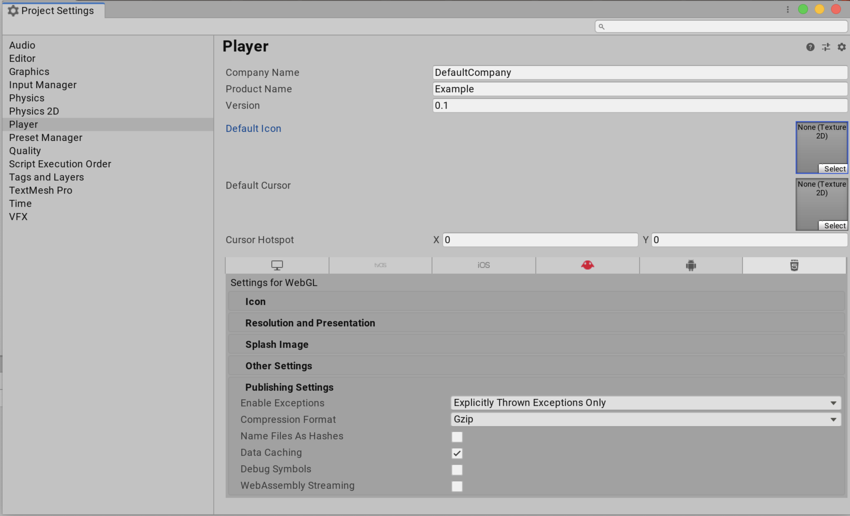
When you build a WebGL project in release mode (see Publishing builds), Unity compresses your build output files to reduce the download size of your build. You can choose the type of compression it uses from the Compression Format options in Publishing Settings (menu: Edit > Project Settings > Player > WebGL > Publishing Settings):
Brotli
 dapper void
Anyone know a way to stop Vivox asking for microphone permission on webGL builds? (I only want it for text-chat)
left fable
Does anyone have any clue as to why my game randomly turns blue? It's almost like if the window is getting selected but only in a build.
Maybe it's not a webgl thing, but my own doing
even though it's a bit weird
sweet oriole
left fable
Does anyone have any clue as to why my game randomly turns blue? It's almost lik...
Screenshot might be useful. Could the blue color be the default background color?
 flat bronze
my webgl build on itch.io has desaturated colors compared to my standalone windows build which has the correct colors
not just the UI but literally everything is desaturated
I saw some people online saying to switch this setting from linear to gamma, so I did that and rebuilt it and republished it but it's still the same desaturated colors

very strange. first time I'm having this issue
left fable
flat bronze
my webgl build on itch.io has desaturated colors compared to my standalone windo...
Are you sure that this is the actual settings that you are building with?
If yes then it might be Post-processin
flat bronze
left fable
Are you sure that this is the actual settings that you are building with?
I'm fairly sure but not 100% sure. how can I know what settings I'm building with?
left fable
Are you in unity 6?
flat bronze
yes
left fable
You might be using a different build profile, one that has linear color space
File > Build profiles
then see what is set
 left fable
Are there no player settings overrides?
flat bronze
I'm not sure
left fable

scroll lower, I can set the color space to a different type there than in the player settings
flat bronze
oh the screenshot I sent was just the straight up web platform settings but not the build profile settings

I made a new web profile just then
and the color space was automatically gamma
left fable
Well, I mean you are using the default profile, which should be using gamma
switch profile? maybe that fixes it
I had something like this happen, but it just solved itself somehow...
 unborn sorrel
What is this error?
 arctic rose
See your browser JavaScript console for more info
brittle flicker
HTTP Response Header "Content-Type" configured incorrectly on the server for file Build/WebGL.wasm , should be "application/wasm". Startup time performance will suffer.
Tried at least 2 youtube tutorials for this fix and did not help.
 glacial vector
not sure if this goes here, but its been like this for the past 8 minutes or so

I dont believe any progress has been made
 primal heath
yep web builds can take a while!
primal heath
next one will be much faster 😂
if you enable any of the LTO optimisations for code optimisation, it'll take 90+ minutes
 full vigil
I’m trying to speed up a timeline that includes an audio track. I want the audio to play faster, but without increasing the pitch.
What’s the correct way to do that?
I tried routing the audio source through an audio mixer and applying a pitch shifter effect, but I cannot modify audio mixer effects with webgl build.
 left bloom
Are compute shaders supported in the web player?
 woven sandal
hey all 🙂 i havent dont web stuff with unity in a while, and I was wondering what the current state of AR in Web with Unity is? couldnt really find any up2date info online, so i guess we do not have support out of the box?
 forest dust
anyone here have much experience with SQL databases?
I am making a highscore list ... using an SQL database...
with oculus quest, which has a 40-character string, unique identifier for the hardware...
a requirement is multiple people sharing the same hardware/headset... being able to upload unique scores. (unique player name string)
Im thinking off the top of my head - i'm going to use the unique ID + playerName as the 'key' for the sql table.
is this a terrible idea? It's been a long time since ive messed with sql stuff. If anyone wants to tell me this is a terrible idea, i would love to hear why before i waste hours trying to make it work 😄
--nevermind, everything worked out fine!
 rotund sable
I'm having a weird problem with a webbuild, when run in firefox and wonder if anyone can help me.
This is on 6.000.0.38f1 with urp and all visuals are UI images on a screen space overlay canvas and a solid color background. The problem occurs with firefox 139.0.4, but not in chrome.
- [img1] When first starting the game it looks as intended.
- [img2] When clicking on the fullscreen button the while screen gets tinted blue. I think this may be the browsers "selection" color. no clicking within the game can remedy this.
- [img3] When leaving fullscreen and clicking anywhere outside the iframe the blue tint disappears, but the colors are now shifted towards a mid grey.
This problem occurs with Color Space set to linear as well as gamma.


 rotund sable
Found a solution in case anyone else has this problem:
in the webbuild css file set the canvas to user-select:none
 cunning badge
hey guys i recently landed a job working with webgl, its a change from usually working on VR games and apps and i was wondering if anyone would be able to either directly help me or point me in the right direction for developing and building for WEBGL
its a entry level job
arctic rose
Your employer is responsible for arranging sufficient onboarding
In any case the usual sources of information are the manual and the Learn site: https://docs.unity3d.com/Manual/webgl.html and https://learn.unity.com/tutorial/create-and-publish-webgl-builds
cunning badge
arctic rose
Your employer is responsible for arranging sufficient onboarding
i get that i just wanna be ready so i dont seem like a complete novice you know
cunning badge
arctic rose
In any case the usual sources of information are the manual and the Learn site: ...
thank you
left bloom
Hi! Does the web player support the VFX graph? Where is that even documented?
sweet oriole
left bloom
Hi! Does the web player support the VFX graph? Where is that even documented?
https://docs.unity3d.com/Packages/com.unity.visualeffectgraph@17.3/manual/System-Requirements.html#unity-player-system-requirements
https://portal.productboard.com/8ufdwj59ehtmsvxenjumxo82/c/2415-vfx-graph-compatibility-for-webgpu?&utm_medium=social&utm_source=share
https://docs.unity3d.com/6000.2/Documentation/Manual/webgl-graphics.html
WebGL does not. WebGPU apparently does, but WebGPU is in experimental status.
primal heath
I'm at Climb UK in Leeds this time next week, shoot me a DM if you're there (or nearby) and want to say hello & chat CrazyGames or web games in general 🙂 you'll find me sat with the south yorkshire games cluster with a little arcade cabinet and probably some sweet treats 😉

Climb UK
As the festival of business growth, Climb brings together founders, innovators, investors, and world-class speakers to share insights, spark collaboration, and drive growth. Join us at Climb25 for impactful talks, immersive workshops, and unmatched networking opportunities. Let’s shape the future t
 frosty crow
Hi guys, this is my 2nd time getting a resource.asset file corruption error for webgl, the first i figured it out after spending 3 days looking for the file, is there any easier process that could help me find it faster for this second time?
 runic sphinx
Hey,
I just published my game on the play.unity.com as a webgl build and for some reason all the right side I can't interact with it 🤔 Why is that please ?

 spice mango
I would guess you have a UI element or something over there blocking it, but fully transparent.
 analog yacht
hi, I've been trying to upload my game to webgl by building and running, but it is giving me this error. how can I fix it?
 arctic rose
It's not a good idea to have the project in Onedrive
analog yacht
i am aware that the project is on onedrive, but I don't know how to remove it from onedrive
arctic rose
Open file explorer, move the folder somewhere else
full vigil
Is there any guide how to reduce .wasm size or initial build size?
daring lake
full vigil
Is there any guide how to reduce .wasm size or initial build size?
https://github.com/JohannesDeml/UnityWebGL-LoadingTest
this have quite a lot of info at. And good for reference.
GitHub
Unity WebGL platform and version comparisons with a lot of nice extras - JohannesDeml/UnityWebGL-LoadingTest
 atomic axle
Does anyone know a fix for webgl games getting a blue overlay (like a highlighted text) when mouse dragging from right bottom to somewhere left top when in full screen mode?
Im currently making a game with mouse dragging controls and this is a very annoying feature/bug. I only just noticed this seems to apply to all my webgl games , for example https://paulvanderlaan.itch.io/the-odd-one-online

 sweet oriole
atomic axle
Does anyone know a fix for webgl games getting a blue overlay (like a highlighte...
sweet oriole
atomic axle
Does anyone know a fix for webgl games getting a blue overlay (like a highlighte...
Add user-select:none to canvas CSS #🌐┃web message
atomic axle
sweet oriole
Add `user-select:none` to canvas CSS https://discord.com/channels/48922216872751...
Thanks, that worked!
 dense torrent
this is a webGL build of my game, when i switch to fullscreen mode in the browser and click left mouse button on the screen, the screen gets highlighted like this and controls are disabled. Any idea why this is happening?
 dense torrent
ok i fixed it by changing the webGL template. The issue is with the index.html file
 fleet badge
Hello, people.
Trying to complete Junior Programmer pathway on Unity Learn, stuck on Mod the Cube exercise. Graphics just don't render in Web build. Or something else.
Maybe it's not the correct place to ask, but I've googled everything, check Q&A section on that lesson on Unity Learn, asked GPT for possible reasons, nothing helped.
Unity 6000.0.51f1 Clean install.
I previously had other versions installed on another drives, but deleted completely (I believe)
Trying Build and Run and just see blank screen with no graphics rendered, while it's all working in Game view in Unity.
No errors in logs after compilation.
Checked in Chrome, Opera, Firefox, all up-to-date - same.


 vapid geode
fleet badge
Hello, people.
Trying to complete Junior Programmer pathway on Unity Learn, stu...
vapid geode
fleet badge
Hello, people.
Trying to complete Junior Programmer pathway on Unity Learn, stu...
Are you building the correct Scene? On build settings, you can select which scene you want to build.
fleet badge
vapid geode
Are you building the correct Scene? On build settings, you can select which scen...
ye, it's the only scene in the project
vapid geode
fleet badge
ye, it's the only scene in the project
Sometimes, even if you create a new scene, it still builds the sample scene - I made that mistake before 🙂 !
fleet badge
vapid geode
Sometimes, even if you create a new scene, it still builds the sample scene - I ...
holy crap, seems like it was the real reason, brb in 5 minutes (is this ok time to compile web build on 13600k and 32gb ram from m.2 ssd?)
fleet badge
vapid geode
Sometimes, even if you create a new scene, it still builds the sample scene - I ...
It worked. Finally. So small and dumb thing took away 3 hours of my life. And I was 90% sure that I'm just missing something.
Thanks a lot. You are the Hero of my day.
vapid geode
fleet badge
It worked. Finally. So small and dumb thing took away 3 hours of my life. And I ...
Haha always start simple when debugging! Been there many times 😄. You are welcome!
 humble adder
What's your average clean build time for WebGL?
For me it started growing and it's now 1 hour 10 minutes for WebGL (it's 32 minutes for Windows), building using GitHub agent in Unity 6.1.3f1. Is that build duration normal?
do I need to just get used to these build durations or is there sometihng I can do to fix this?
charred briar
humble adder
What's your average clean build time for WebGL?
For me it started growing and it...
For me, with Unity 6, an empty WebGL project (i9-14, 4080, 128GB RAM, running off SSD's) building a release package takes as long as 40mins.
Subsequent builds about 3mins.
And I'd have to check, but I believe 2022 and 2023, we were getting clean empty builds to webgl as release in approx 25mins
humble adder
OK thanks, so with a larger project I guess 1:10h doesn't seem that big of a deal
humble adder
charred briar
For me, with Unity 6, an empty WebGL project (i9-14, 4080, 128GB RAM, running of...
one more question, if you're experienced in WebGL. Do you know how to make a HTTP request from WebGL build inside a web browser?
this code works fine in Windows build but crashes in WebGL
            using var request = UnityWebRequest.Get(url);
            yield return request.SendWebRequest();
the error message is
The Same Origin Policy disallows reading the remote resource at ... (Reason: CORS request did not succeed)
That looks like a CORS error (trying to access something on a different domain, or from https to http)
humble adder
Yes indeed it is, is there a way to circumvent this?
charred briar
humble adder
Yes indeed it is, is there a way to circumvent this?
I haven't tried this, but if you control both domains, you should be able to add a CORs exception that lets the other domain access this one
charred briar
I'm not that familiar with web stuff I'm afraid. I think all our stuff is under the same domain
arctic rose
You can't make requests to domains that don't explicitly allow it, for security and privacy reasons
If you need to access Discord you have to use their API
humble adder
well, it's not exactly true, as the code works fine from desktop, so it's just a matter of build type. Works in desktop, doesn't in WebGL. Exact same code and usage.
arctic rose
It's a browser safety feature. Desktop apps don't have that
humble adder
Okay, so I guess it won't be possible to work around?
arctic rose
Use their API, or set up your own server to use as a proxy
humble adder
OK, thanks
charred briar
humble adder
well, it's not exactly true, as the code works fine from desktop, so it's just a...
Yeah its specifically a website-to-website thing. Desktop-to-website shouldn't have the issue, or website-to-api shouldn't have the issue. My understanding is it is to (try) to stop someone from creating say discrd.com and acting as a man-in-the-middle attack of sorts.
 knotty garden
Why does RenderTextureFormat.RInt work inside the editor but not in my WebGPU build? Is there any way to use a Integer texture in shaders in WebGPU?
sampler2D _IntTex;
SamplerState sampler_IntTex;
intTexture = new RenderTexture(width, height, 0, RenderTextureFormat.RInt, RenderTextureReadWrite.Linear)
{
    enableRandomWrite = true,
    filterMode = FilterMode.Point,
    wrapMode = TextureWrapMode.Repeat,
    useMipMap = false,
    antiAliasing = 1
};
intTexture.Create();
renderer.sharedMaterial.SetTexture("_IntTex", intTexture);
Validation: None of the supported sample types (Sint) of [Texture (unlabeled 256x256 px, TextureFormat::R32Sint)] match the expected sample types (UnfilterableFloat).
analog yacht
humble adder
What's your average clean build time for WebGL?
For me it started growing and it...
For me it’s like 5 mins idk
 cosmic smelt
tbf it does say "fastest" not "fast"
 cosmic smelt
FMOD is making web console unreadable

Only happens in dev builds
How do you even debug a WebGL build because it won't let me attach a debugger.
Failed to connect to player IP: localhost:8000. Socket: Async poll failed, error: No connection could be made because the target machine actively refused it.(10061) Check if there is an app running on the correct device and it was built with Developer Mode enabled. In case of further issues you can enable the player connection diagnostic switch to get more information.

and yes its a development build
 edgy mulch
might need a bit of help here, my scene is getting rendered in a different way across platforms, left is from windows/any other platform and the right is for web

 charred briar
edgy mulch
might need a bit of help here, my scene is getting rendered in a different way a...
charred briar
edgy mulch
might need a bit of help here, my scene is getting rendered in a different way a...
Is it set to gamma or linear maybe and it's a color space mismatch?
But that to me reminds me of reflection probes going awol
That's a pretty extreme difference
analog yacht
edgy mulch
might need a bit of help here, my scene is getting rendered in a different way a...
do you have auto generate lighting on for the web builds?
edgy mulch
yep
i forgot to update but webgl apparently doesnt support reflection probes, so i took the cubemap baked by the reflection probe and applied it to a cubemap shader on the material
 silk arch
Hey, I'm looking for a library that will allow me to extract images from PDF. It needs to work for WebGL projects.
 harsh knoll
silk arch
Hey, I'm looking for a library that will allow me to extract images from PDF. It...
harsh knoll
silk arch
Hey, I'm looking for a library that will allow me to extract images from PDF. It...
can just copy it if you're viewing with adobe pdf reader
harsh knoll
Hey have you found a way to publish webgl on your own website yet? I'm planning to do so myself too!
arctic rose
harsh knoll
Hey have you found a way to publish webgl on your own website yet? I'm planning ...
analog yacht
Try using GitHub build and using GitHub to import the webgl to the website
I have used GitHub to build my game to a website and it has worked
harsh knoll
analog yacht
I have used GitHub to build my game to a website and it has worked
Is there any video tutorial going about it?
analog yacht
I can tell you how to do it
 rocky parcel
my game is crashing as soon as i press play
 iron knoll
rocky parcel
my game is crashing as soon as i press play
iron knoll
rocky parcel
my game is crashing as soon as i press play
F12 -> Console
This is the error:
[.WebGL-0x67c00c54e00] GL_INVALID_OPERATION: Error: 0x00000502, in ....\third_party\angle\src\libANGLE\renderer\d3d\d3d11\Context11.cpp, rx::Context11::triggerDrawCallProgramRecompilation:1032. Internal D3D11 error: HRESULT: 0x80004005: Error compiling dynamic pixel executable
The game doesn't crash for me, it "works" normally when I look in the first direction, but goes down to 1 fps when I turn around

 rocky parcel
damn okay, are you able to get a video of it
i just tweaked a couple of the build settings to try optimise it for webgl as i kept them all default
ah thatll be it
 rocky parcel
so i removed the sky box which was 87% of texture memory but its stll not good enough for it to run
rocky parcel
Strange thing is if I try to run it on my phone it actually loads
 iron bronze
Can anyone help me with a build issue? I'm getting an error:
Build completed with a result of 'Failed' in 135 seconds (134632 ms)
Building Library\Bee\artifacts\WebGL\build\debug_WebGL_wasm\build.js failed with output:
D:\GitHub\The-Wanderer-1-2023>set MYDIR=C:\Program Files\Unity\Hub\Editor\6000.0.27f1\Editor\Data\PlaybackEngines\WebGLSupport\BuildTools\Emscripten\emscripten\
D:\GitHub\The-Wanderer-1-2023>goto FOUND_MYDIR
Assertion failed: int(_id) == int(T::SpecificId), file C:\emsdk\binaryen\main\src\wasm.h, line 779
emcc: error: '"C:/Program Files/Unity/Hub/Editor/6000.0.27f1/Editor/Data/PlaybackEngines/WebGLSupport/BuildTools/Emscripten/binaryen\bin\wasm-opt" --strip-dwarf --signext-lowering --post-emscripten -O2 --low-memory-unused --zero-filled-memory --pass-arg=directize-initial-contents-immutable --strip-debug --strip-producers Library/Bee/artifacts/WebGL/build/debug_WebGL_wasm/build.wasm -o Library/Bee/artifacts/WebGL/build/debug_WebGL_wasm/build.wasm --mvp-features --enable-mutable-globals --enable-sign-ext' failed (returned 3221226505)
UnityEngine.GUIUtility:ProcessEvent (int,intptr,bool&)
Worth noting a dev build works fine, production build fails.
 urban knot
Hello everyone. My webgl game limits 60fps on 120hz ios devices (iphone pro and ipad pro models). This issue only happens on ios devices. Android devices can get performance that their refresh rate needs. I can get 90 fps on 90hz android devices or 120 fps on 120hz devices. This issue only happens on "pro motion". Does anybody know how to fix this? I searched for it on forums but can't find anything.
 elfin pine
did someone manage to get unity c# webrequest connected to a selfhosted version of ollama open webui ? a simple response from a model would suffice

GitHub
User-friendly AI Interface (Supports Ollama, OpenAI API, ...) - open-webui/open-webui
 burnt token
Hi I made a unity game 13 years ago and uploaded it to kongregate, but now I cant seem to find a way to play it. Any ideas on how to play old unity web games?
It was also a very small and unpopular game, so platforms like flashpoint don't have it.
burnt token
nevermind, got it to run using flashpoint
 outer monolith
Trying to build just a simple start menu scene for web. Windows works fine so far, been at it for 5 hours. Keeps exiting with a ton of errors.
Unity 6000.1.13f1
TopDown Engine
It's day 1 with unity so I'm hoping there's a basic config step that I've missed.
Any help would be appreciated, thank you.
arctic rose
It would help if you showed only the build errors instead of the entire editor log
also the asset has its own Discord server and customer support
full vigil
is audioSource.GetOutputData supported on webgl. I can find 2015 forum posts that it does not but what about now?
Docs didn't help me much
 short pier
Hi all, first post here. I seem to be having some issues with my build in WebGL. I have a prototype vehicle script I'm writing and using only built in physics components (primarily just Rigidbody and WheelCollider). The vehicle works fine within the editor, and debug outputs seem to look sensible. However, when I build to WebGL the physics do not seem to work correctly and my outputs show wildly different torque values and slip on each WheelCollider and not enough force is generated to move the vehicle. Are there documented differences in the physics engine between platforms? Using 6000.2.0b04, not tried the project on 6.0 or 6.1 yet
hmmm ok, it seems the same on a Windows build too
arctic rose
Sounds like physics forces applied in the wrong place or misuse of deltaTime
First try to replicate in the editor by capping the fps
short pier
all is running in FixedUpdate, will check framerate / vsync
ah, ok disabling vsync breaks in the editor too, thanks for the tip - will investigate further
short pier
arctic rose
Sounds like physics forces applied in the wrong place or misuse of deltaTime
brilliant, thanks got it, was moving wheels during update
I'll just get a build done to check, but thanks again
 hazy epoch
Just wanted to post this out there. Anyone have any slight suggestions to let this process or should i continue waiting

 lost fern
Hello, I'm a training manager for ASTM. I've been bumbling around unity trying to animate and build a materials test. I have the project done, except I can't get any usable performance on Web. I want to prove, unity could be a good option to educate. Can anyone help me get my single scene working?

 warm plume
3M triangles seems quite high for the view you share in the first image so I have concern from that
 latent pecan
yeah, check your models. You might want to reduce that tri-count a little bit. I'm assuming the detailed vehicle there could be an issue.
warm plume
I tried to play the example but my browser just shat the bed even though I have a good pc
warm plume
lost fern
Hello, I'm a training manager for ASTM. I've been bumbling around unity trying t...
Can you enable shaded wireframe in the scene view and share a screenshot of the main stuff in the scene?
latent pecan
also, Chrome, Firefox, Edge, Safari, and Opera (plus some other browsers) support GPU-instancing. This should reduce your draw-calls quite a bit, which is a big deal when it comes to performance.
 warm plume
this button
 lost fern
 warm plume
shows the mesh wireframes on top of the normal shading
OOF yea those mounds look way too detailed. Are you using unity terrain for the "floor"?
lost fern
yes
warm plume
How do they work? are the mounds terrain too?
lost fern
they are objects, only the one in front is used in animations
latent pecan
those mounds have too much detail I'd say. Try hiding them and check the tri-count.
warm plume
You need to greatly reduce their detail or introduce LOD levels for them
lost fern
 lost fern
warm plume
You need to greatly reduce their detail or introduce LOD levels for them
lost fern
warm plume
You need to greatly reduce their detail or introduce LOD levels for them
What is the best way to do that?
warm plume
Are they a model you made? some dynamic model?
If i could play the game I could figure out more but it did not want to launch
lost fern
I had a coworker who I think made the models?4

I have it on github

GitHub
Contribute to Kneeshaw-Developments/ASTM development by creating an account on GitHub.
warm plume
Games do not always use super detailed models, something called LOD or "level of detail" gets used where we adjust the model used dynamically based on distance. models get simpler as we go up the LOD levels (because its further away its not noticeable usually)
So someone should either optimise this model to not be soo complex for no good reason or make LODs
in games we dont give a shit about "quad flow" if the model is too detailed with no visual benefit
Also for me the game fails to work due to some shader compilation issue which is odd:
-------- Shader Universal Render Pipeline/Lit
-------- GLSL link error: C:\fakepath(995,31-56): warning X3092: unary negate of unsigned value is still unsigned
C:\fakepath(1051,59-97): warning X3092: unary negate of unsigned value is still unsigned
C:\fakepath(1053,31-54): warning X3092: unary negate of unsigned value is still unsigned
C:\fakepath(1671,57-95): warning X3092: unary negate of unsigned value is still unsigned
C:\fakepath(1673,31-54): warning X3092: unary negate of unsigned value is still unsigned
C:\fakepath(317,12-121): warning X3570: gradient instruction used in a loop with varying iteration, attempting to unroll the loop
C:\fakepath(1635,3-15): error X3511: unable to unroll loop, loop does not appear to terminate in a timely manner (31 iterations) or unrolled loop is too large, use the [unroll(n)] attribute to force an exact higher number
I'm on the branch called animation. sorry
warm plume
Pass on what I said and have who made the models look up game ready models
Main thing to fix is to greatly optimise the models to reduce tri count
lost fern
so the root problem, is the models use a ton of triangles?
ahh okay
what about the front end loader?
that was a pain to get in and animated
could it stay?
warm plume
its detail looks fine
the mounds are soo bad because all those extra triangles dont even do anything useful
If they are all the same mound mesh, do enable "GPU instancing" on your materials too
lost fern
thanks
warm plume
lost fern
thanks
Do use the profiler to get more information after incase there are cpu side issues too
I think it can work with webgl builds but needs some special set up so best research that.
 snow helm
I have to shift+reload every time I run my game in web. Anything I can configure to not cache the game?
arctic rose
Either the web server or your browser
sweet oriole
snow helm
I have to shift+reload every time I run my game in web. Anything I can configure...
Using "Name Files As Hashes" option in Web publishing player settings is a simple and reliable way to bust caches.
snow helm
sweet oriole
Using "Name Files As Hashes" option in Web publishing player settings is a simpl...
Thanks
snow helm
sweet oriole
Using "Name Files As Hashes" option in Web publishing player settings is a simpl...
Works great, exactly what I was looking for
 spare onyx
Running into an error when I try to auto connect the profiler with my webGL build.
[2] The message header is corrupted and for security reasons connection will be terminated.
This is in Unitiy 6.1, any folks run into this?
 bleak wadi
Please, check web browser security policies.
 balmy axle
Hey everyone, super new here! I asked this in the audio channel, but this may be more appropriate.
I have a React application that contains a Unity WebGL build to create the 3D experience. I'm trying to allow the React app to have access to the microphone, but on iOS Safari the Unity app seems to take over the audio context causing it to return the error "AudioSession category is not compatible with audio capture." when attempting to use the microphone in React.
Does anyone know of a way to use the microphone in React when using a Unity WebGL build?
bleak wadi
👋
spare onyx
I’m trying to reduce my build size. Anyone know how to reduce or get rid of the built in extra resources? It’s about a half a megabyte
 uneven dew
Hey everyone, I implemented a simple fullscreen toggle to change my webgl build's display size/full screen functionality in the browser
public void ApplyFullscreen(bool fullscreen)
{
    Screen.fullScreen = fullscreen;
}
I call this function on a toggle.
problem is that after I toggle it, I need to press/click something and apply another input for the full-screen to be set, disabling fullscreen works fine when I turn off the toggle and needs only one user input,
the problem persists even with UI buttons.
However, when I link the function to a keyCode KeyDown call it applies the first time with no additional input required
it also works fine on a normal windows build.
Is this a browser security limitation ? how can I get around it ?
here is a video of the problem:
0:03 - I press the toggle (full screen is enabled and shown in the console)
0:07 - pressed the MB0 button which applies the fullscreen option
0:11 - as mentioned, when I press the toggle off button it applies the full-screen off function with only that button press
0:17 - I try with GetKeyDown and it applies on the first attempt
 limber jewel
Any clue if there's a way to view more detailed progress info from wasm-ld on the "Linking build.js (wasm)" step of a build? I'm on a laptop as I'm away from home and it's considerably slower, so it'd be nice to know when a build is still progressing and have some projection of an estimated duration
I'll try a build without LTO in the meantime, but I'd like to build an optimised version of my project on this machine so some more info on the build progress would be nice
worn pasture
Can I pick the brains of the brilliant Unity devs on this channel?
My Legends of Learning game is crashing on some browsers/machines.
Initially, it was crashing on my low-end Chromebook and I did lots of optimization and tweaked the WebGL build settings and was able to get it to run on my Chromebook.
However, it's crashing on my Windows 11 Lenovo gaming laptop when running in Microsoft Edge but runs fine in Firefox on the same machine.
It also runs on the Windows 11 gaming desktop I use for development (in Microsoft Edge).
This is the error I get when it crashes:
Invoking error handler due to abort() at Error at jsStackTrace (blob:https://www.midniteoilsoftware.com/fbe6d1a2-cb80-4cfc-a421-f314391bfa5c:10:23983) at stackTrace (blob:https://www.midniteoilsoftware.com/fbe6d1a2-cb80-4cfc-a421-f314391bfa5c:10:24246) at abort (blob:https://www.midniteoilsoftware.com/fbe6d1a2-cb80-4cfc-a421-f314391bfa5c:10:1030) at ___cxa_allocate_exception (blob:https://www.midniteoilsoftware.com/fbe6d1a2-cb80-4cfc-a421-f314391bfa5c:10:74868) at wasm://wasm/0474d0f2:wasm-function[1398]:0xb04e7
I've applied suggestions from ChatGPT including using WebGL 1.0 (deprecated) instead of WebGL 2.0.
Any ideas/suggestions on other things to try?
I don't get anything useful in the developer tools console even with a debug build.
Thanks!!!
 torpid valley
Anyone ran into issues in 6.2 where when building for webgl in development mode things just never fully load
 dry locust
Is there any way todo threading or Unity Jobs in web yet?
sweet oriole
dry locust
Is there any way todo threading or Unity Jobs in web yet?
C# threads are not supported at all. Native multithreading has been supported for a while and in0finite reported Jobs being at least somewhat functional, but I wouldn't necessarily rely on this. Most web game portals (and instant gaming platforms, afaik) end up disabling SharedArrayBuffer, so even shipping with native multithreading is not really viable outside of your own site + some exceptions.
torpid valley
yeah working on a game that is web first platform wise and we are ingnoring webgpu and threading stuff for now since support is not consistient enough
Anyone run into The message header is corrupted and for security reasons connection will be terminated. errors when trying to do profiling of webbuilds
been hitting it on multiple versions of 6.x and 6.2
 tardy yacht
Not sure if this is the best place to ask this or if this is a dumb question, but if I build a Unity game, could I just have a build folder in the base directory of the project and push all of it to Github? That would allow people to download a Unity project of my game and have a folder that contains an executable for the game itself, correct?
arctic rose
Not the right channel but yes
More common would be to upload the build as a release and people would be able to download it from the releases section in the Github repo
tardy yacht
arctic rose
More common would be to upload the build as a release and people would be able t...
gotcha, thanks 👍
torpid valley
or just using itch.io or something since Github is more directed at devs not consumers
torpid valley
https://issuetracker.unity3d.com/issues/the-message-header-is-corrupted-and-for-security-reasons-connection-will-be-terminated-is-thrown-when-autoconnect-profiler-and-threadssupport-are-enabled
anyone been running into this, i tried muliple 6.0 and 6.2 versions and can not get profiling webgl going due to this error
How to reproduce: 1. Open the attached project "webgl-multithreading.zip" 2. Build And Run the project for WebGL Expected results: T...
is a little frustrating not having profiling working on the most resource limited platform
 rain relic
Has anyone got experience working with WebGL running on mobile browsers? We're experiencing some challenges on a project where full screen isn't working right and need a solution. I feel like it's on the webpage side of things which I'm not that experienced with. Itch.io games give the results I'm after
arctic rose
You'll have to give some details
 craggy cloud
Hi everyone,
We are working on a WebGL mobile game and need it to run smoothly on all browsers. Everything works perfectly on Chrome and Firefox (both desktop and mobile), but on Edge Mobile and Safari Mobile, there is no audio at all.
Here’s what we’ve found so far:
On desktop browsers, audio works great on all platforms, including Edge and Safari.
On mobile browsers, the game runs fine, but there is no sound or music.
Things we’ve tried:
Audio formats:
WAV, OGG, MP3 – all tested with no success.
Tested Unity compression settings: Vorbis, PCM, and ADPCM → same result.
Interaction requirement:
We know mobile browsers need a user gesture to unlock audio.
Added a “Tap to Start” screen inside Unity → didn’t fix it.
Added an HTML button outside the Unity canvas to manually unlock audio → didn’t fix it either.
On Edge desktop using the mobile simulator in DevTools, it initially blocks audio until you click, and then it works. This makes us think it’s 100% a mobile-specific issue.
External tests:
We visited several Unity WebGL games on itch.io using Edge Mobile → none of them had sound either.
This makes us think it’s not just our project, but maybe a Unity + Edge/Safari WebGL bug.
Summary:
Audio works everywhere except on Edge and Safari Mobile.
We’ve tried every format, compression, and unlock method we can think of.
It looks like Unity WebGL audio is completely broken on these mobile browsers.
Is anyone else experiencing this issue, and does anyone know a workaround or solution?
We’ve completely run out of ideas and really need help here.
Thanks in advance!
arctic rose
Attach a console to Safari and see if there are errors or warnings
craggy cloud
yes, I think thats a good idea, thank you
 naive ermine
Hey all,
what are the BEST WebGPU demos out there, made with Unity6?
naive ermine
@torpid valley do you think 6.3 is viable to make small WebGPU experiences?
torpid valley
naive ermine
<@173795534627143680> do you think 6.3 is viable to make small WebGPU experienc...
Don't know at work we are using 6.0 and 6.2 but are targeting webgl not webgpu since webgpu does not have enough browser adoption yet for us
naive ermine
@torpid valley do you know anyone who’d be up for a micro-freelance bit of work, for a quick POC?
 winter haven
Good day, unity community!
I got very annoying bug in the WebGL build, which is present only in mobile browsers, and there it is:
I use a built-in Unity's VideoPlayer component to show a video and there are 2 points when it "blocks" all the input -- the start of video and the end of the video.
In between if I "unlock" the input with remote connection from desktop via Chrome devtools and do a simple mouse movement over the unity player area, which is translated as video to PC, then pause/resume the video doesn't block anything, UI is responsive until very end of the video, where it became "blocked" again.
So once again video started -- input "blocked".
If I'll debug my mobile Chrome tab from the Chrome devtools on PC then any mouse action (even simple movement) over the UnityPlayer zone "unlocks" the input and game became responsive again. If I destroy the screen with VideoPlayer via "exit" button, then input won't be blocked.
But if video finished/completed and stopped "naturally" -- input is "blocked" again.
I'm not 100% sure, but I suggest there is happening a change of focus to the browser's "native" HTML video player and remote input from debug window (see the screenshot) might force return the focus to the unity player. But without remote debug input I can't unlock it. App is not frozen, I intentionally added always visible animated object and it is animated, but any input over playable area does nothing.
In desktop Chrome this bug is not reproduceable, everything works fine there.
Does anyone met this kind of behaviour and know how to fix that?
Thanks in advance!

 haughty vineBOT
 @viskala muted
Reason: Multiple channels spam.
Duration: 29 minutes and 53 seconds
 paper quiver
yo guys, I created a wp plugin for unity games but I don't know where to promote it on the forum so I put it here. (free, no ads and open source as well)
https://wordpress.org/plugins/enosi-embedder-unity/

Displays a Unity WebGL game inside your page using a shortcode.
haughty vineBOT
@blaiselopez82_15859 muted
Reason: Multiple channels spam.
Duration: 29 minutes and 53 seconds
haughty vineBOT
@plaxor. muted
Reason: Multiple channels spam.
Duration: 29 minutes and 53 seconds
winter haven
winter haven
Good day, unity community!
I got very annoying bug in the WebGL build, which is ...
I fixed this "unfocus" issue this way:
- Having VideoFocusFix.jslib in the Assets/Plugins/WebGL folder.
- having VideoFocusFix.cs, which just "transforms" C# to the JS method invocation.
- Calling the VideoFocusFix.Trigger() on video start and on video end (attached to the loopPointReached and prepareCompleted events of the VideoPlayer component)
Hope it will be useful to anyone.
haughty vineBOT
@theyupa muted
Reason: Multiple channels spam.
Duration: 29 minutes and 53 seconds
 hardy python
maybe a silly question, but after I initially published to Unity Play, it won't update... I've made several local builds and confirmed that the build its pointing to is the recent one
yet it just shows the old one
haughty vineBOT
@hamza_qaisi muted
Reason: Multiple channels spam.
Duration: 29 minutes and 56 seconds
haughty vineBOT
@sensorstrike muted
Reason: Multiple channels spam.
Duration: 29 minutes and 51 seconds
 ivory musk
why i dont get add module option? and now i have builded a project for WebGL what should i do?
 torpid valley
ivory musk
why i dont get add module option? and now i have builded a project for WebGL wha...
torpid valley
ivory musk
why i dont get add module option? and now i have builded a project for WebGL wha...
it only shows if that unity version was also installed with hub
severe vigil
Hi all. For webgl, for lighting purpose, im looking to have day night system. I have both unistorm and magic lightmap switcher
For something like newer pokemon or octopath. Fixed cam angle. Outdoor scenes, some indoor
Is it feasible to use both assets? I have both already
full perch
👋 Unity Web Devs: We need your input on Facebook Instant Games support in Unity!
Have you used any of these features? We’d love your input! Take our feedback survey now to help us improve.
▶️Facebook Instant Games Build Profile
▶️Facebook Instant Games SDK
▶️Web Stripping Tool Package
⏱️ It takes about 5-15 minutes.
Your feedback is essential for better tools - thank you! 🙏
✍️Survey Link: https://forms.gle/YvUuFf5xJhZg5gZh7
Thank you for helping us improve Unity support for the Facebook Instant Games platform!
 opal lintel
hey guys im trynna build my app for web but it looks terribly off from what i made in the editor
Is there no way to like replicate the look?


 red coral
Good day!
Has anyone made a multiplayer game (Photon Fusion) with Discord SDK inside Discord? Am I correct in understanding that I need to lock the region and add the necessary servers to the Allowlist?
 frail swan
Hello, anyone know why URP Lit shaders are not rendering in a WebGL build?
https://realanthonycolmenero.itch.io/urp-glass-demo-webgl

 void elm
frail swan
Hello, anyone know why URP Lit shaders are not rendering in a WebGL build?
http...
void elm
frail swan
Hello, anyone know why URP Lit shaders are not rendering in a WebGL build?
http...
Have you tried multiple browsers? Also - have you checked the console for errors?
 primal ocean
Hey everyone, I am having trouble in reducing webgl build size in Unity 6.000.0.25f1 (LTS)
First I made an empty project with nothing added, built it with Gzip, got the build size around 7.7mb
Then I did built again with brotli got around 7.5mb..
I want it to be around 2-3.5mb but I don't understand why I can't achieve this.
Ironically, when I tried the same thing in Unity 2022.3.56f1, I got build size around 2.5mb with brotli
sweet oriole
primal ocean
Hey everyone, I am having trouble in reducing webgl build size in Unity 6.000.0....
Are those projects using different render pipelines? https://github.com/JohannesDeml/UnityWebGL-LoadingTest
primal ocean
sweet oriole
Are those projects using different render pipelines? <https://github.com/Johanne...
no, using same built in rp
primal ocean
sweet oriole
Are those projects using different render pipelines? <https://github.com/Johanne...
i did check this loading test earlier, wasnt helpful
 jaunty plover
Hello! I once started making simple browser games in Unity 2022.3 LTS. Unity 6 has WebGL improvements. What are the current realities of browser games? Should I continue making those games in 2022.3 LTS, or should I migrate my projects to Unity 6, or would it be better to re-create the games in Unity 6?
arctic rose
If the games work fine with 2022 there's no reason to switch just for that reason. Also re-creating would be silly, nothing has changed that much that you couldn't just migrate the project
charred briar
primal ocean
Hey everyone, I am having trouble in reducing webgl build size in Unity 6.000.0....
@jaunty plover you can turn on build info reporting which will show you more info on what compiled to what file size
Last time I tested an empty 6.x web project with compression, no fall back, we got (about) the same ~2.7mb build size or so.
(Had to reduce a project from 300mb to 18mb - wasnt fun)
charred briar
My guess is there is some option enabled (fallback decompression?) Somewhere that bloated it for you. Although, 6.x does compile slightly larger than 2021/2022/2023
jaunty plover
arctic rose
If the games work fine with 2022 there's no reason to switch just for that reaso...
I haven't finished these games yet, so I don't know how well they're working now. But I need to make a choice: start working on them in 2022 or at 6x. I'm also not sure what improvements 6x has for web games. If it only affects compilation size, it's not important.
sweet oriole
!collab @violet mirage
haughty vineBOT
sweet oriole
!collab <@1362211384087150592>
:loudspeaker: Collaborating and Job Posting
We do not accept job or collab posts on Discord.
Please, use Discussions to promote yourself as job-seeking, advertise commercial job offers, or look for non-commercial projects to participate in:
• ** Collaboration & Jobs**
 scenic fulcrum
I have multiple renderer features from URP (mostly Renderer Objects that change the depth of an object). In editor, it works completely fine. But when I build it as a webgl, it doesn't seem to work anymore?
 strong violet
im confused where i should buy a domain
sweet oriole
strong violet
im confused where i should buy a domain
It generally doesn't matter beyond whether you trust them to manage your domains. I lean towards keeping domains in a company dedicated to that business, but your hosting provider probably provides domains as a service.
||Probably don't buy domains from GoDaddy or Google 😛||
 craggy forum
Looking for some help with my unity webgl build, whenever I run the project or change scenes, the screen appears very zoomed in to the bottom left corner of my the game. However, when I change the zoom as shown in the second screenshot the resolution becomes fixed
We've tried setting the project settings to have the correct resolution that we want and we've tried using the scale with screen size option with all of our canvas objects (although it looks like its an issue beyond canvases now)
Any help would be much appreciated :(


this image is probably better than the first one for reference
 craggy forum
found a fix
 summer juniper
 lapis sand
Hi, sorry if something very similar was already asked about, I'm working on a project using Unity 6 and it's supposed to be able to open 3D models from solidworks, it works fine on that aspect, however if I open/close/reopen and so on the same model, a message in my browser console will state "Memory out of size detected", I don't know how to prevent that, the only way to be able to reopen 3D models once this appears is to refresh the page, is there anything else I can do?
 cinder creek
Has the WebGL build times been improved?
charred briar
lapis sand
Hi, sorry if something very similar was already asked about, I'm working on a pr...
You can increase or pre-allocate RAM for the web build. Not sure what you are doing with it all, but sounds like it didn't release the memory or something therein, and it will be very tricky to resolve.
lapis sand
charred briar
You can increase or pre-allocate RAM for the web build. Not sure what you are d...
To be fair I'm not the one working on Unity directly, I'm only implementing the build in an angular app, but our issue is pretty close to this one: https://issuetracker.unity3d.com/issues/webgl-players-memory-is-not-released-when-calling-quit-function-on-unity-instance-with-decompress-fallback-enabled
Though it doesn't matter wether "Decompress Fallback" is enabled or not in our case. What I'm doing on my part is calling unityInstance.Quit().then(...) and I'm getting a response in the dev tools from the webgl stating that the application was closed succesfully but when I do a memory snapshot it seems like the memory isn't released at all, it's increasing each and every time I open a a model
How to reproduce:1. Open the attached project's Scene labeled "SampleScene"2. Go to the Publishing Settings (Edit->Project Settin...
charred briar
lapis sand
To be fair I'm not the one working on Unity directly, I'm only implementing the ...
Yeah, without looking at it, id guess whatever is doing the allocation and importing (in unity) isnt sending something to garbage collection. There are some gotchas with unity/web, I.e. garbage collection doesnt happen immediately. It does it in "bulk" at the end of the frame. So even iterating on large strings (i.e. deep json parsing) can chew up the memory
There is a profiler for unity as well that can sometimes help trace memory leaks
 vast lark
I have a problem with my webgl 3d game when i start the game it lodes and than this error pops up dose some one know why
 arctic rose
See your browser JavaScript console for more info
sweet oriole
vast lark
I have a problem with my webgl 3d game when i start the game it lodes and than t...
Errors in a development build might be more helpful
vast lark
sweet oriole
Errors in a development build might be more helpful
The proplem was that one obj didnt had read/write or somthing thank you
 formal fog
Hey everyone. I'm trying to figure out how to minimize the build size for the web. It seems like I can't for the life of me get a base 3D scene with URP to be under like 9MB. Has anyone here tried to optimize for size successfully?
charred briar
formal fog
Hey everyone. I'm trying to figure out how to minimize the build size for the we...
With standard Unity, I dont believe you can get it much more below 9MB. Especially in 6.2. Just because its packaging the runtime.
You can do a build report to see where the space went though
The biggest offenders are usually textures, audio, models.
Yeah, looks like the smallest i got our project down to was 7mb. Mind you the target was 20mb, so I stopped there.
Going with BiRP though this guy got it to 1.8mb
https://discussions.unity.com/t/webgl-builds-for-mobile/711925/87
formal fog
charred briar
Yeah, looks like the smallest i got our project down to was 7mb. Mind you the t...
Yeah BiRP seems to be a few MB smaller, but afaik it's kinda deprecated, and it has some problems on iOS. Hmm maybe Unity just isn't a good choice for the web.
arctic rose
Typically Unity web games have in the order of magnitude 100mb of assets and at that point the 10mb overhead doesn't really make any difference. But yeah, if download size is a significant factor then Unity is not the right choice
charred briar
formal fog
Yeah BiRP seems to be a few MB smaller, but afaik it's kinda deprecated, and it ...
It isnt if you want small as possible or highly optimized
Its not like say phaser which will load things as you go
torpid valley
loadtime is important, but yeah i am not using BiRP just to save a few MB
the same amount of load time split over a few parts of your application is better then 1 long load time. So you can get around it by choosing when certain parts of your game get downloaded
If unity is a good choice for web or not, i would say it depends on what you are trying to accomplish
Current project i am on is web and to do everything we have done yeah a good engine like Unity is needed.
I have worked on web projects with much smaller scope, using stuff components of CreateJS and ThreeJS and it was great. One of them was ultra optimized 5mb for the entire game
but it was only doable and able to be created on time due to the constrained scope
 desert swallow
I added simple AudioSources with ogg and wav files to my previously working webgl build.
now it just crashes whenever an AudioSource is played.. (Unity 6.4 Alpha)
 formal fog
torpid valley
Current project i am on is web and to do everything we have done yeah a good eng...
formal fog
torpid valley
Current project i am on is web and to do everything we have done yeah a good eng...
Mind sharing what project you're working on? Have you used Unity for the web successfully before? I'm just afraid that games will lose out on a lot of players once the build size gets too big.
charred briar
formal fog
Mind sharing what project you're working on? Have you used Unity for the web suc...
You can get around a lot of that with addressibles and such i think though. In my case we had to go below 20mb because it was for an elementary school and their internet was crazy slow
That client makes me angry though so i dont like to think about that project
sweet oriole
formal fog
Mind sharing what project you're working on? Have you used Unity for the web suc...
Based on some rather large initial download size games ranking high on web game portals, it doesn't seem that critical for a lot of users. I would just make sure to have the initial download size small so you can show something to the user without too much delay and load the rest after. Unity has made it pretty easy to load additional content after the initial scene with addressables.
formal fog
Yeah I've seen some fairly successful big games online as well. I was hoping to get the initial download size under 10MB, but that seems very hard with Unity if I'm not going to use the BiRP.
haughty vineBOT
@josu._.22 muted
Reason: Too many messages with links sent.
Duration: 29 minutes and 55 seconds
 outer rampart
formal fog
Yeah I've seen some fairly successful big games online as well. I was hoping to ...
outer rampart
formal fog
Yeah I've seen some fairly successful big games online as well. I was hoping to ...
While by default it's bigger, it's becoming better. You can now also fully strip out physics (built in package) with URP for example. And I feel like shaders take up a big chunk, which you can also strip out manually I believe
Yes it's more effort, but it's possible from what I've heard
formal fog
outer rampart
Yes it's more effort, but it's possible from what I've heard
That's nice. I'll have to see if I can figure out how to strip the physics. I also wonder what the build size will end up at once Unity transitions to the newest version of .NET.
Unity is really cool, and I might transition to it later for desktop/moving. But it's hard for me to justify using it for web games when engines like Defold can export games that are less than 1MB in size.
outer rampart
formal fog
That's nice. I'll have to see if I can figure out how to strip the physics. I al...
Not sure where it landed. Might be 6.3 beta or 6.4 alpha haha
I don't think build size will change too much when moving to CoreCLR, as most space often is taken by other assets and shaders. But performance should be great.
And fair enough, cool you use Defold. How's the developer experience with it?
formal fog
@outer rampart oh, I'll wait a bit then lol. I wonder how much the size will decrease by removing physics. I don't really need it for some of the games I'm planning.
I am still a newbie to Defold, so I'm not the best person to ask. But I really love that you can build for pretty much any platform for free with the click of a button. And the community is really awesome. I'm not a fan of untyped Lua though, and the Lua version they're using is like 20 years old. It kinda sucks if I'm being honest. They are working on implementing support for a typed version of Lua, but it still has some ways to go.
The built in code editor isn't that good either, and they have no official support for third party editors, so you have to rely on community extensions, which have their own problems...
But people have managed to build pretty successful games with the engine, so it's definitely capable.
I'm a TS/C# developer though, so Unity looks really appealing to me. I just wish I could get the wasm files down to smaller sizes.
outer rampart
formal fog
<@512275182228865024> oh, I'll wait a bit then lol. I wonder how much the size w...
Definitely check out removing built in packages if you haven't done so already. This helps a lot with size
And cool! Think I'll stay away from Defold as I'm also not the biggest Lua fan haha. Godot and maybe Flax are interesting to me atm
If you have a bigger project feel free to ask for help on size & performance optimizations
formal fog
I tried Godot briefly last year and it was really fun. I loved how lightweight it felt if you just stuck to GDScript. Unfortunately for me it produces pretty large web exports, so it ended up being a no-go.
Flax looks really cool. I've never tried it, but maybe I will at some point.
I'll try to remember that. I most likely won't have anything worth your time for the next few months though. I'm still very indecisive about which engine to use. Right now I'm using Defold, but it feels like Unity has greater potential long term, if I want to make more complex games.
outer rampart
formal fog
I tried Godot briefly last year and it was really fun. I loved how lightweight i...
When you've tried some just pick one and go with that. You can make almost any game in almost any proper engine. It just takes time to get used to it.
I chose Unity for the big community and wide (XR) support
formal fog
Yeah upon further consideration I'll stick with Defold for now. If I'm going to switch then I'll take a look at the available engines at that point. I feel like no engine is perfect for me, so if I don't just pick one then I'll end up in analysis paralysis, like I usually do. 😅
 verbal estuary
Does anyone know how to upload a unity game to itch.io and newgrounds?
Or at least make an export of your game that can be played on those two platforms?
arctic rose
 gentle kite
formal fog
Yeah upon further consideration I'll stick with Defold for now. If I'm going to ...
gentle kite
formal fog
Yeah upon further consideration I'll stick with Defold for now. If I'm going to ...
If you haven't seen it yet, you can use typescript for defold with https://ts-defold.dev. Much better than lua, imo

An awesome TypeScript toolkit for leveling-up Defold.
formal fog
gentle kite
If you haven't seen it yet, you can use typescript for defold with https://ts-de...
Yeah I've seen that. It looks interesting. However the project hasn't really been updated since 2023, and I'm not sure how much it'll impact performance, compilation speed, and build size. Have you tried it?
gentle kite
@formal fog Tbf, there's not much to update since it's main dependency, TypescriptToLua is doing the heavy work. And the types are updated regularly, with each defold release.
I haven't had any performance issues since the generated lua is relatively simple and straight forward.
Transpiling to lua is pretty instant.
By default, when you use builtins like typescript arrays / maps, it creates a bunch of utility functions (the forEach, map, stuff) even if you don't directly use them (for library interop) but you can trim it down with "luaLibImport": "require-minimal" in the tsconfig.json.
Even if you don't, the generated lua will be less than 80 ~ 100 KB (which will be compressed at build time anyway) in my experience.
verbal estuary
arctic rose
<https://itch.io/t/3260941/packaging-your-unity-game-for-itchio-a-step-by-step-g...
Thank you
 charred cove
 final bloom
i want to do real time automation communication between unity and website
such as for example i can type on Google and search something with code instead of doing it manually. going to new website, and can also communicate with that website by code
anyone know where i should start learning that?
warm plume
final bloom
such as for example i can type on Google and search something with code instead ...
Unity web request can be used for most general web requests https://docs.unity3d.com/ScriptReference/Networking.UnityWebRequest.html
 bronze swan
final bloom
anyone know where i should start learning that?
bronze swan
final bloom
anyone know where i should start learning that?
UnityWebRequest can be used to make requests to an API:
https://docs.unity3d.com/6000.0/Documentation/ScriptReference/Networking.UnityWebRequest.html
Such as the Google search API https://developers.google.com/custom-search/v1/overview
 slow obsidian
Hey guys, one of my WebGL build’s buttons don’t function and there also some inconsistencies with how the game plays when compared to the Unity Editor. I’m unsure what’s the error
Do you know if rebuilding my game would fix the errors?
arctic rose
Rebuilding rarely if ever changes anything
Things to check:
- make sure there aren't any errors or warnings in the browser console
- test the game in the editor with the same aspect ratio as the built game
- make a standalone non-WebGL build and see how that behaves
slow obsidian
Thank you!
 umbral oracle
Im gonna copy this here incase its webgl related:
For some reason my Shadows just disappeared at some point, only now did i notice since i wanted to ship a wip build to my website.
I checked the Lightsource, Lighting Settings and the URP Settings and i rebaked my lights, nothing.
Anyone has a clue, on URP (Unity 6) with WebGL as a Build Setting.


 haughty vineBOT
@suryaelidanto2191 muted
Reason: Too many messages with links sent.
Duration: 29 minutes and 57 seconds
 merry chasm
umbral oracle
For some reason my Shadows just disappeared at some point, only now did i notice...
merry chasm
umbral oracle
For some reason my Shadows just disappeared at some point, only now did i notice...
Go to Lighting->Environment and double-check your current values for Ambient Color and Intensity Multiplier. (marked blue in my screenshot).
Also make sure that under your lights settings for all of your active lights you do have: Light->Mode equals either Mixed or Baked (obviously that your basic values are good enough like Light Intensity and Range) under Light->Emission.
Then very important in your particular case, that your Light->Shadows Strength (and type) are strong enough as to be able to be considered to be worth drawing by the render engine.
Hope it helps!


 broken vessel
Does Netcode for GameObjects support WebGL games? like if I wanted to make a game like Uno that you can play on the web. will it work? Similar question for Lobby and Relay
 acoustic elm
I've got a weird issue specific to Unity WebGL being played on Safari mobile.
On my game over screen, I have a "Play Again" UI button that, for some reason, cannot be clicked. It might be a screen resolution thing, but on other mobile devices (android) I can click the button fine. Strangely enough, if I go back to the main menu, play through the game again, and get to the game over screen a second time, the button works.
Anyone seen something similar before? This is on the old UI system
merry chasm
acoustic elm
I've got a weird issue specific to Unity WebGL being played on Safari mobile.
O...
Try to check if for some reason the first time you run the game, some special menu item or button its right atop the "Play Again" button. It could even be a simple image overlapping with your button. Here's a somewhat PRO tip?
-
There's a 'Raycast Target' [x] checkbox that you should always have 'off' or not toggled if such UI element should not interact with the Player actions. This should effectively eliminate such UI element from the list of objects to be selectable so that the UI (not considered on the selection events). This is so it can not overlap in any UI's Player selection event on its vicinity.
-
Also always do consider the order of the UI elements on the Hierarchy as elements that are defined or located 'bellow' any other ones are drawn Atop by Unity (think like layers in Photoshop or any other similar image editing software) where layers that are Atop inherently block those that bellow (behind) it from your view. Even if such UI element is not visible on the simulation (gameplay) it is still there as long as it is 'active == true' and Unity and it might get accounted for Raycasting events (the events that the UI system uses in order to spot UI elements on the scene.
In the screenshot MyPlace corresponds to a Button that is considered to be behind the ButtonsBlocker Image that is Atop the rest of the buttons - effectively transforming it into a 'blocker' visually if the size and opacity overrides those behind it. However, for that reason since I only needed a 'Visual blocker' (to help me hide them with a fade-in / fade-out of the 'blocker' image in my case - however, notice that I do have the 'Raycast Target' [ ] checkbox disabled to help that Unity will not inadvertently block the UI's element that are behind it and thus made those buttons 'un-clickable' even if they are active and visible because of their opacity values say.
 merry chasm
acoustic elm
I've got a weird issue specific to Unity WebGL being played on Safari mobile.
O...
merry chasm
acoustic elm
I've got a weird issue specific to Unity WebGL being played on Safari mobile.
O...
- Also check on the Responsiveness of your Canavas' aspect ratio in relation to multiple possible resolutions, some times anchors are not very well thought off for some resolution / display ratios and because of this some UI elements might get in the way of others inadvertently as well. For this I do recommend that you do take the time to resize your Unity Window Editor's Game view for different aspect ratios while validating your Game's UI responsiveness. Even better if you do have the interest and/or the time you might take a look at Simulating your Game's view under different device type simulation - I have personally found this is helpful to help me validate the responsiveness of my UI as well.

I hope that your issue might be something related to this or that its helpful anyways if not the case 😅 Best with your gamedev efforts!
👊🏽 😁
 void flax
hello guys.... i need one help plz .....problem when serving Unity WebGL builds to phones UI being squashed on mobile why and how to fix ..... the video also squashed ???
wet grail
void flax
hello guys.... i need one help plz .....problem when serving Unity WebGL builds ...
You need to build UI with a fixed aspect ratio https://docs.unity3d.com/Packages/com.unity.ugui@1.0/manual/HOWTO-UIMultiResolution.html
And for a video you need to provide more information what it is. But really should do some research first.
charred briar
Also, i like to monitor the screen resolution. Itll let you know if someone's phone is rotated, and its easy to give them a popup and asking them to rotate back
full vigil
How do pull video from addressables? I don't want it to be included in original build but I want to preload the video. What do I put in the URL field? How do I do this?
final bloom
is it possible to kinda make like a Browser in unity? Basically i can open website in unity, and interact with it such as login and etc. meanwhile Unity can also read/write the web data
full vigil
final bloom
is it possible to kinda make like a Browser in unity? Basically i can open websi...
Asset store has plugins for that but they are quite costly. Search "web view x" x = your target platform.
full vigil
If you want a log in feature or other interaction with web services make a backend and build APIs for that
But then you will build the UI in unity.
But its so much easier to deal with unity UI.
final bloom
hmm... this seems hard 
full vigil
I guess you could make some JS script which sends data to unity but I'm not a web dev
With logins etc sending data through js is not secure
final bloom
damn...
full vigil
What you are trying to make?
final bloom
something like auto web-game clicker and web clawer?
full vigil
And why would you want to use unity for that? Is it feature inside a game?
final bloom
not really a game... but I'm thinking maybe using game engine with lots of feature will help
rather than coding it from scratch
full vigil
for web-game clicker/web clawler there are much easier ways
final bloom
how
full vigil
There are even free github repos
final bloom
what is it
full vigil
even Claude or ChatGPT can spit out ready made code (like python) for that
final bloom
is it like python package? 
but again i don't think it can
since i need a website view
if code it from scratch making the windows and view is already pain, not to mention the input and other things
full vigil
Ok, you need a website view, well.. build a DOM overlay for the browser
final bloom
what is that
full vigil
I think Unity is a bad choice/tool for your purpose.
Since you are inexperienced I would suggest that you start talking with AI (even tho people hate it here) about what you want to build, how to approach that and what would be the best tool/framework to do that.
Then you can decide if you want to learn all of the coding yourself or use AI as an assistant for your prototype
final bloom
full vigil
I think Unity is a bad choice/tool for your purpose.
Since you are inexperienc...
no... bro AI aren't going to help with this thing. I'm not talking about something that can be made with just thousand lines of code
final bloom
full vigil
Then you can decide if you want to learn all of the coding yourself or use AI as...
it aren't going to work. i have tried AI, it is only that smart. it good for quick short-medium code
full vigil
No, but it will get you started. At the same time you will think what features you want and expand on that.
AI will not do that for you because you don't know what to tell AI to do. What modules to build etc. You cannot one shot this kind of things. You need to build it piece by piece.
It's a learning jurney, even with AI.
Google things AI talks about and read if they are good.
I would not use Unity in your case. You will save a lot of headaches if you shift your approach
final bloom
again, i have used AI
i am searching for more info here.
full vigil
But for your case Unity is the wrong tool
final bloom
full vigil
But for your case Unity is the wrong tool
at this point, i probably can't really trust u. wdym it wrong tool? People literally already made the thing i want in the store.
full vigil
Well.. I might be missunderstanding what you are trying to acchieve.
You wanted webview but then you want auto clicking.
final bloom
yes
full vigil
For interacting with the web browser there is playwright or puppeteer.
Fot web crawler there is python + scrapy
Which can be also attached to the Playwright
One way would be to make a browser extension to do all that for you.
final bloom
yes... i do have plan to use browser extension as my plan b.
but that is if this not possible...
anyway I'm out... i will search for Unity info in other place
 raw quartz
Hello, I am not sure if this is the right place for this porblem but I have no idea why unity is saying this when I try to play test my game on unity play:
"Failed to download file Build/Game Creations (Unity).data.br. Loading web pages via a file:// URL without a web server is not supported by this browser. Please use a local development web server to host Unity content, or use the Unity Build and Run option."
arctic rose
How exactly are you playtesting it?
 lost cedar
Hi there. I'm trying to deploy my app as a PWA on my own siteground domain. App works correctly, but even if i delete the old version of my app, chrome or other explorers wont force the updated version of the app. can anyone help me with that? ❤️
PS: Im not a web developer, so im trying to make changes on my serviceworker with chatgpt... not working at all though
charred briar
final bloom
is it possible to kinda make like a Browser in unity? Basically i can open websi...
There are some third party web view plugins for Unity, but iirc, they all have some strong JS limitations
torpid valley
Anyone found a way to work with mouse delta's in safari
they are much much smaller values when the browser is safari on macOS compared to other browsers running on the same hardware
arctic rose
I don't remember the solution but the cause is likely the retina displays that have a bigger pixel density than normal screens. Probably need to multiply by the pixel density (from somewhere?) If that helps at all
torpid valley
it happens even with a external monitor no dpi scaling
also the chrome tests are the same machine same display
i tried window.devicePixelRatio but i can 1 back in both cases
charred briar
torpid valley
Anyone found a way to work with mouse delta's in safari
Painful, but you could compare the mouse XY against the screen resolution, to get a percentage of screen movement. I had to do that a few times, I dont remember why.... or why I didnt use mouse delta
merry chasm
raw quartz
Hello, I am not sure if this is the right place for this porblem but I have no i...
I don't know why this would happen in Unity Play? That message usually is brought up when you do attempt to directly load the resulting Unity game html file from your drive into your browser. Is this actually what you are attempting to do? If so, unity web games are meant to be 'served' to your web browser via a web server and should not really be attempted to manually load from your files/drive.
Unity should* be able to serve it via an internal small web server it silently runs but it is only valid during a "Build and Run" command specifically and it is only 'once time'. Meaning that if you close your browser (tab) and attempt to run directly again the link will not be valid anymore and you will need to hit the "Build and Run" command again to be able to run again.
Hope it helps.
merry chasm
lost cedar
Hi there. I'm trying to deploy my app as a PWA on my own siteground domain. App ...
Try to disable data catching for your build like in this screenshot, see it this helps.
