Probuilder is not to make something look good its to quickly test your level layout, If your making parkpur game you would us probuilder to create a level with obstacles for the player to jump on. For example you could create a shipping yard where the containers are cubes. Once your level is how you like it press play and jump around see how it plays out. Once your happy with your testing, Go to your modeling tool of choice build a shipping container or find an asset. aonce you have the asset go into unity and replace your probuilder containers. It would help to enable probuilder edge size overlay this way you can compare with real life dimensions of a shipping container so replacing the cube will be more precise
#🛠️┃probuilder
1 messages · Page 5 of 1
 prime sun
Essentially your blockouts should be very low polly of the object you want to be there, a car would essentially look like a kids drawing of one. but its important that the dimensions are correct for your game
 ebon widget
Actually, this is a good place to post - I am, of course, working on a new "ProBuilder" - would love to know (thread in here please) what people really want it to do these days. My general idea this time around is to align more directly with pure level design work, fast blockouts, setting up logic, that sort of thing. But ... more? Other? Different? I'd love to hear!
 half horizon
ebon widget
Actually, this is a good place to post - I am, of course, working on a new "ProB...
half horizon
ebon widget
Actually, this is a good place to post - I am, of course, working on a new "ProB...
Might be better if you started the thread?
ebon widget
Actually, this is a good place to post
 jagged sable
Hi in a tutorial I'm following this instructor says to change the shape to another color besides white. They do this as shown in the screenshot below where they select the white color under Surface Inputs > Albedo.
However with the latest version I've installed this is greyed out


 clear root
havent used probuilder in a while but from first glance the top screen seems to be editing a URP material..
the bottom material doesn't have the _URP suffix.. maybe different types of materials? i do know that standard materials wont work in urp and vice versa.. but not sure if thats what the suffix is eluding too
 maiden breach
I'm using ProBuilder, and specifically the PolyShape tool to create a room using the Flip Normals option. The walls, floor, and ceiling have been created, but there are gaps in the room that allow light to enter. How can I fix this?

 exotic tinsel
maiden breach
I'm using ProBuilder, and specifically the PolyShape tool to create a room using...
exotic tinsel
maiden breach
I'm using ProBuilder, and specifically the PolyShape tool to create a room using...
Light bleeds could be fixed by using two faced shapes
Outer facing face will act as an occluder for the enviromental light which would fix this
If you don't want to do any two faced shapes for performance reasons you can have a manually placed plane obscuring inner interiour from outer light
maiden breach
how can i create two faced shapes?
ebon widget
jagged sable
Hi in a tutorial I'm following this instructor says to change the shape to anoth...
Hi! You have a "default" material applied, which can't be edited. Create a new material in your project, then drag-drop it to the PB object 🙂 (and tell your prof to update their info 😛 )
ebon widget
maiden breach
I'm using ProBuilder, and specifically the PolyShape tool to create a room using...
Generally simplest to fix by setting the "bias" in the Directional light. But yes as @exotic tinsel says, you may need to put a light-blocking "shell" around it.
More info on this older thread:
https://discussions.unity.com/t/probuilder-meshes-show-weird-bright-lines-within-meshes-from-outside-light-sources/772153/3?clickref=1011lByfLpTu&utm_source=partnerize&utm_medium=affiliate&utm_campaign=unity_affiliate
ebon widget
maiden breach
how can i create two faced shapes?
In the material, set "Render Face" from "Front" to "Both"

 proven vale
Anybody knows how the hell do i keep probuilder from doing this shit

It literally did the exact same thing minutes before
I am trying to build an custom blocker mesh on certain rocks that prevents player from getting onto them, and beyond this occasionally happening, probuilder is great for it
I have been able to build borders for my map using it already but for some reason it really likes to do this and it completely screws me over
 hollow gust
proven vale
Anybody knows how the hell do i keep probuilder from doing this shit
hollow gust
proven vale
Anybody knows how the hell do i keep probuilder from doing this shit
It's hard to tell what's happening in the image. Is it that thing where new vertices snap to a completely different plane when added?
proven vale
hollow gust
It's hard to tell what's happening in the image. Is it that thing where new vert...
They seem to suddenly start snapping to a completely differrnt height than rest in the oject
 winged thunder
Anyone else experiencing a lot of errors with probuilder in the new 6.2?
 harsh verge
Anyone understand why ProBuilder doesn't let me merge these two vertices? Nothing happens when I press "Collapse Vertices" 😕
harsh verge
Nvm just had to restart Unity
I've had to do it three times already
ProBuilder keeps breaking...
 verbal nymph
Has anyone else dealt with this issue? I have spent the past day and a half trying to fix it. For context, I am helping with the level design for the game while the others tackle other aspects (like the graphics/textures and coding). However, they asked me to move working on the levels directly to a project linked with the repository. When I set the project in unity up it was doing this. I verified that probuilder was indeed installed on the project and the URP/HDRP was installed. Even then, I can't seem to get probuilder to operate and don't know what to do. Any guidance?

 hollow gust
proven vale
They seem to suddenly start snapping to a completely differrnt height than rest ...
hollow gust
proven vale
They seem to suddenly start snapping to a completely differrnt height than rest ...
Oh yeah that's happened to me before. Not too often, but every once in a while. I end up having to delete the polyshape and make a new one


 hearty hill
@fervent terrace - You mean like this:

 fervent terrace
hearty hill
<@212181791757303808> - You mean like this:
fervent terrace
hearty hill
<@212181791757303808> - You mean like this:
yezh
hearty hill
@fervent terrace I use both Probuilder and UMX.
With Probuilder try to select your face and then go into scale mode. Extrude the scale . This may take a bit of adjustments.
I made it with UModeler X. There a tool called the inset tool where you can pull in the side of a face and the edges are balanced.
fervent terrace
hearty hill
<@212181791757303808> I use both Probuilder and UMX.
With Probuilder try to sel...
yeah i just ended up using inset in blender
sorry
hearty hill
Gotcha! having a inset tool is good. what ever gets the job done.
 spare hearth
https://docs.unity3d.com/Packages/com.unity.probuilder@6.0/manual/ref_actions.html are these buttons gone in the latest version of probuilder? getting used to the new interface overlays
ebon widget
verbal nymph
Has anyone else dealt with this issue? I have spent the past day and a half tryi...
Seems like the PB default material was broken by a URP/HDRP conversion. Create a new material (URP Lit, or whatever you prefer to be default), then go to Edit > Settings > ProBuilder, set the new material as default ProBuilder material.
ebon widget
spare hearth
https://docs.unity3d.com/Packages/com.unity.probuilder@6.0/manual/ref_actions.ht...
Yup just right-click when you need them now. Also, they should show a pop-up overlay with the action info - eg, how far to extrude, etc. You can adjust it live, like Blender/etc.
ebon widget
harsh verge
Anyone understand why ProBuilder doesn't let me merge these two vertices? Nothin...
@shadow kindle yeah c'mon guys fix this 😄 😉
verbal nymph
ebon widget
Seems like the PB default material was broken by a URP/HDRP conversion. Create a...
Thank you I ended up finding out it was something doing with the repository and figured it out a temporary solution with a team member. I will need to give that a shot though once I get to my computer.
 warped lance
Is there a way to edit shape according to the grid snapping?
 young vapor
warped lance
Is there a way to edit shape according to the grid snapping?
young vapor
warped lance
Is there a way to edit shape according to the grid snapping?
in what way? they should already able to snap if you turn grid on
 warped lance
For some reason it didnt seem consistent when under certain rotations and such
i wasnt too sure why
young vapor
warped lance
For some reason it didnt seem consistent when under certain rotations and such
ohhh is it in global mode ?
warped lance
Yeah
 broken marten
Hey everyone,
I’m working on a 3D Sonic-style game and I want to build loop-de-loops, corkscrews and spiral track pieces. Can this be done entirely in Unity using ProBuilder instead of importing from Blender? If yes, what’s the method? If not, what alternatives are there?

 haughty sonnet
broken marten
Hey everyone,
I’m working on a 3D Sonic-style game and I want to build loop-de-...
haughty sonnet
broken marten
Hey everyone,
I’m working on a 3D Sonic-style game and I want to build loop-de-...
nope, probuilder can't do that 😔
it's pretty easy in blender though, i'd use that
you can still use probuilder for the simpler parts that don't involve curvy stuff though
broken marten
haughty sonnet
nope, probuilder can't do that 😔
it's pretty easy in blender though, i'd use t...
oh damn that's a shame. I was hoping it could as it would make blocking out and prototyping levels so much easier by doing everything in engine. With blender i'd have to constantly, model, export, import, test and rinse and repeat until it's how I want it 😭
haughty sonnet
broken marten
oh damn that's a shame. I was hoping it could as it would make blocking out and ...
unity can take .blend files so you wouldn't need to export every time
broken marten
it can?!
haughty sonnet
broken marten
it can?!
yeah
broken marten
how did I not know this...
hearty hill
@broken marten You can do that with UModelerX, inside unity so you dont have to use Blender at all
haughty sonnet
hearty hill
<@978630601080975390> You can do that with UModelerX, inside unity so you dont h...
that thing can do these curves? dang, why did unity buy probuilder and not that?
young vapor
broken marten
Hey everyone,
I’m working on a 3D Sonic-style game and I want to build loop-de-...
should not be a problem in PB actually
you can play with the Pivot and extrude into a certain direction
I did something like this for curved arched hallways.. Im sure you can probably use the same technique to do the floor
https://youtu.be/fvF1Lxe1cec?t=29

Struggling to create curved tunnels and hallways in Unity? This tutorial will show you a quick and easy method using ProBuilder! Learn the steps to effortlessly build stunning curved levels and take your game design to the next level.
Probuilder:
https://docs.unity3d.com/Packages/com.unity.probuilder@latest/
 wheat forge
broken marten
Hey everyone,
I’m working on a 3D Sonic-style game and I want to build loop-de-...
wheat forge
broken marten
Hey everyone,
I’m working on a 3D Sonic-style game and I want to build loop-de-...
Probuilder is generally used for grayboxing, not actual gameplay usage. However, probuilder can be used for gameplay it was not designed with this intent in mind. Love the map by the way
hearty hill
@broken marten - Yeah its pretty easy using Polyline Tool and the Follow Tool

 hearty hill
Its prob best to make some modular pieces, never tried to make Sonic style roads 😛
 broken marten
hearty hill
Its prob best to make some modular pieces, never tried to make Sonic style roads...
broken marten
hearty hill
Its prob best to make some modular pieces, never tried to make Sonic style roads...
wait this is sick
is it free?
hearty hill
@broken marten - Not Free but I believe the 45day trial is still going on so you get a full copy for about a month and a half.
ebon widget
That's really cool! Umodeler really needs to update tha that UI though, yikes.
Personally, I'd recommend Spline Mesher by Staggart Creations, really nicely integrated: https://assetstore.unity.com/packages/tools/modeling/spline-mesher-280289

Get the Spline Mesher package from Staggart Creations and speed up your game development process. Find this & other Modeling options on the Unity Asset Store.
Side note, I've been really having fun extending PB myself, from the outside 😄 Doing all the things I wanted before! The API is amazing (thanks team!), highly recommend others poke at it too.


 young vapor
wish we could get that awesome menu back with icons 🙂
ebon widget
I mean, you can now 🙂 It's part of this pack. Not my pref but ... do as you like! I also added (worst of the worst) old-school editor panel 😄 😛 "overdrive toolset", let me know on our discord server or just DM if you want an early copy!
young vapor
ebon widget
I mean, you can now 🙂 It's part of this pack. Not my pref but ... do as you lik...
yes plz! 🙂
 forest vortex
Bot ate invite. https://discord.gg/JVQecUp7rE
ebon widget
Thanks @forest vortex ! 😄
haughty sonnet
ebon widget
Side note, I've been really having fun extending PB myself, from the outside 😄 ...
"doing all the things i wanted before"?
did unity not allow you to work on these things?
young vapor
haughty sonnet
"doing all the things i wanted before"?
did unity not allow you to work on these...
I bet its probably typical corporate where decisions are made with an entire chain of command making you jump through hoops, instead of just being able to add something whenever..
ebon widget
Honestly, I chose to focus on foundational work, Unity really needed that for good tooling.
ebon widget
Finally! Would love if PB folks here could give it a try, let me know what else you'd like to see.
https://youtu.be/14rB2bAL3Us

Free beta on Discord! https://discord.gg/JVQecUp7rE
After being acquired by Unity, we mostly stopped ProBuilder work – so, consider this the “Directors Cut”, all our planned helpers and secondary features, finally available! Check it out, and let us know if you’d like other additions!
 potent plank
where is the editor for probuilder? i remember there's a dedicated editor window for it before

 buoyant flower
hi, is there a way to cut the same shape with the same size in different objects? i have 2 walls and i want for them to have same door cut, but i dont know how (sorry for basic question)
 untold quarry
Why this mesh looks so bad? PolyShape from ProBuilder. Can I somehow fix that? Trying to make boundaries of the map. Collider doesnt fit with the walls properly
 ebon widget
potent plank
where is the editor for probuilder? i remember there's a dedicated editor window...
ebon widget
potent plank
where is the editor for probuilder? i remember there's a dedicated editor window...
I think you want this 🙂
https://youtu.be/14rB2bAL3Us
But also - in ProBuilder 6, the editor window was replaced with the (new to U6) right-click menu.
potent plank
so basically, unity created this overlay windows api stuff which is cool. then proceeded to do a right click menu. didnt even have the option to use the previous editors and just removed it. and now, i have to pay(?) for third-party asset to have it back? i see.
ebon widget
potent plank
so basically, unity created this overlay windows api stuff which is cool. then p...
Hmm? No it's free to download on my discord for anyone 🙂
 rapid tiger
Hey this is the map I created for FPS game by following the link https://youtu.be/OKpOJM3f5E0 anyone suggest me on improvisation! the whole map is 10x10.

This is the early stage of my FPS training map built in Unity 6! 🔫
No textures or lighting details yet — this is just the foundation for what’s coming next.
🎮 Tools & Setup:
- Unity 6 (HDRP)
- Basic layout and lighting for flow testing
- Early concept phase of the FPS arena
If you’d like to follow the progress of this FPS projec...
rapid tiger
rapid tiger
Hey this is the map I created for FPS game by following the link https://youtu.b...
 haughty sonnet
rapid tiger
Hey this is the map I created for FPS game by following the link https://youtu.b...
haughty sonnet
rapid tiger
Hey this is the map I created for FPS game by following the link https://youtu.b...
oh no... please enable grid snapping next time 😨
rapid tiger
haughty sonnet
oh no... please enable grid snapping next time 😨
Thanks
the arrow icons red, blue and green present in the scene view is missing
I tried for
layout rest
Update the latest LTS version
Not found how to enable it! I'm stuck in here!
 acoustic igloo
Are you referring to the gizmos arrows?
https://docs.unity3d.com/6000.2/Documentation/Manual/GizmosMenu.html
 rapid tiger
acoustic igloo
Are you referring to the gizmos arrows?
https://docs.unity3d.com/6000.2/Document...
rapid tiger
acoustic igloo
Are you referring to the gizmos arrows?
https://docs.unity3d.com/6000.2/Document...
I am refering to this!
 haughty sonnet
rapid tiger
I am refering to this!
rapid tiger
haughty sonnet
rapid tiger
I am refering to this!
rapid tiger
Try Window → Layouts → Default. Something got messed up with your editor layout, like maybe you had an editor window open from a plugin that you removed.
what plugin might have caused, I didn't removed any.
 haughty sonnet
rapid tiger
Try Window → Layouts → Default. Something got messed up with your editor layout,...
haughty sonnet
rapid tiger
Try Window → Layouts → Default. Something got messed up with your editor layout,...
probuilder probably did it? you can probably also just do Scene tap right click → Overlay menu → Orientation Click
rapid tiger
haughty sonnet
probuilder probably did it? you can probably also just do Scene tap right click ...
yep this worked thanks!
ebon widget
rapid tiger
yep this worked thanks!
Or, in the Scene View, use the toolbar to toggle it on.
 rapid tiger
ebon widget
Finally! Would love if PB folks here could give it a try, let me know what else ...
rapid tiger
ebon widget
Finally! Would love if PB folks here could give it a try, let me know what else ...
cool
Checkout https://youtu.be/LBPU_68-_00

I created a 3D Infinite Maze using Unity – a never-ending labyrinth that keeps players guessing with every turn.
#Unity3D #GameDev #InfiniteMaze #IndieGame #CSharp #ProceduralGeneration #GamedevJourney
 violet wraith
Ping me when you answer.
Tell me about the brand spankin' new Probuilder!
young vapor
violet wraith
Ping me when you answer.
Tell me about the brand spankin' new Probuilder!
scroll up
 heavy arrow
i want the newer pro builder but i dont like there isnt a window anymore
young vapor
heavy arrow
i want the newer pro builder but i dont like there isnt a window anymore
downgrade the package
or i think someone has made an extention/asset for it ?
or try the version of probuilder the original dev making
https://youtu.be/14rB2bAL3Us
Free beta on Discord! https://discord.gg/JVQecUp7rE
After being acquired by Unity, we mostly stopped ProBuilder work – so, consider this the “Directors Cut”, all our planned helpers and secondary features, finally available! Check it out, and let us know if you’d like other additions!
heavy arrow
young vapor
downgrade the package
or i think someone has made an extention/asset for it ?
o...
alright ty
heavy arrow
young vapor
downgrade the package
or i think someone has made an extention/asset for it ?
o...
i cant find the package?
young vapor
heavy arrow
i cant find the package?
which package ?
 calm grove
help I'm unable to extrude edges in probuilder!

 smoky falcon
Anyone know how to cover up the bottom side of the stairs? I hate seeing it just being invisible

 calm grove
smoky falcon
Anyone know how to cover up the bottom side of the stairs? I hate seeing it just...
calm grove
smoky falcon
Anyone know how to cover up the bottom side of the stairs? I hate seeing it just...
Uhh check if the material renderer is set to two sided
young vapor
material got nothing to do with it staircase by default doesn't make the bottom
smoky falcon
calm grove
Uhh check if the material renderer is set to two sided
Not really knowledgeable about unity nor this asset type stuff
but can you guide me? where can i check that
 smoky falcon
young vapor
material got nothing to do with it staircase by default doesn't make the bottom
smoky falcon
young vapor
material got nothing to do with it staircase by default doesn't make the bottom
so theres no possible ways to cover that up?
calm grove
smoky falcon
Not really knowledgeable about unity nor this asset type stuff
but can you guide...
Oh my bad according to nav thats the default
smoky falcon
id go with blender if theres none
young vapor
smoky falcon
so theres no possible ways to cover that up?
You can but might require a bit of work especially on a curved surface
maybe you can give bool function a try
smoky falcon
young vapor
maybe you can give bool function a try
how can i do that, is that gonna be a separate script or something just for this block of stairs? ;-;
and what exactly would that do exactly
young vapor
smoky falcon
how can i do that, is that gonna be a separate script or something just for this...
try filling the hole first

with bool operation I meant this one
https://docs.unity3d.com/Packages/com.unity.probuilder@6.0/manual/boolean.html
but fill hole should work
smoky falcon
young vapor
try filling the hole first
how were you able to do it like this?
young vapor
smoky falcon
how were you able to do it like this?
set yourself to Edge mode, select the two opposite edges and right click to get context menu
 smoky falcon
ahhh!!! thank you it worked!

 raw torrent
does anyone know how I cant cut a clean square hole in this pro builder shape (its a hollow block representing a hallway)
 young vapor
raw torrent
does anyone know how I cant cut a clean square hole in this pro builder shape (i...
young vapor
raw torrent
does anyone know how I cant cut a clean square hole in this pro builder shape (i...
edge loops
raw torrent
young vapor
edge loops
heard of that but cant find it
young vapor
raw torrent
heard of that but cant find it
id suggest looking through all the PB tutorials especially concerning v6 since things are changed.
select the mesh in edge mode and right click edges to insert loops
 raw torrent
young vapor
raw torrent
young vapor
alr thx🤙
young vapor
tip : holding shift extrudes
raw torrent
ye found that out already
thats how I made the hallway (started of as a flat cube )
idk if thats the best way but worked
young vapor
there are many ways to approach something
smoky falcon
I made the shape myself trying to make a curve, now how can i actually make it literally smooth curved structure instead of being a flat plane to plane?
 haughty sonnet
smoky falcon
I made the shape myself trying to make a curve, now how can i actually make it l...
haughty sonnet
smoky falcon
I made the shape myself trying to make a curve, now how can i actually make it l...
smoothing groups? or what do you mean
smoky falcon
haughty sonnet
smoothing groups? or what do you mean
I just want it to make the curve actually curved and not rough like that said image above

this perfectly curve is from the arch shape which has a built in function to increase its side counts, the other doesnt because its self made shape, so i just want to know how to make that a curve
young vapor
smoky falcon
I made the shape myself trying to make a curve, now how can i actually make it l...
You tried smoothing groups ?
smoky falcon
im still confused on how that works, i selected the rough edges, then selected a number(group)...
 young vapor
smoky falcon
im still confused on how that works, i selected the rough edges, then selected a...
young vapor
smoky falcon
im still confused on how that works, i selected the rough edges, then selected a...
it should be smoothed now, did it smoth it ?
smoky falcon
young vapor
it should be smoothed now, did it smoth it ?
no
young vapor
smoky falcon
no
not the best but you can merge the faces
smoky falcon
young vapor
not the best but you can merge the faces
calm grove
Is there a way to like, re-import probuilder? Even when starting a new project, the "extrude edges" option is still greyed out
 versed tendon
guys what was the fix so textures dont tile differently on different sized walls for example?
 molten oar
 foggy vine
HOW DO I DISABLE THIS!?

 rich agate
How do you guys usually put materials on walls so it doesn't get stretched? I made 1x1 walls for every meter and masking it with the default walls.
How should I do it? Make 10-15 materials and tile all of them differently?

 night shore
Okay, SERIOUSLY!! Who thought it would be a good idea to remove the previous ProBuilder interface and replace it with what we have right now in Unity 6=!
foggy vine
night shore
Okay, SERIOUSLY!! Who thought it would be a good idea to remove the previous Pro...
AGREED, I don't want to constantly open nested right click menu's damn it!
young vapor
rich agate
How do you guys usually put materials on walls so it doesn't get stretched? I ma...
don't scale the mesh but use extruding
rich agate
young vapor
don't scale the mesh but use extruding
I'm not really sure what you mean, I did use extruding
young vapor
rich agate
I'm not really sure what you mean, I did use extruding
show
 young vapor
rich agate
Well I can show you this
young vapor
rich agate
Well I can show you this
show inspector
rich agate
 rich agate
young vapor
show inspector
rich agate
young vapor
show inspector
There, is 1.5 on the z a problem?
young vapor
rich agate
There, is 1.5 on the z a problem?
maybe.. first I'd check the UV editor and set it proper there too
rich agate
There is a uv editor I see
rich agate
young vapor
maybe.. first I'd check the UV editor and set it proper there too
Yes, I'll set that up thanks
rich agate
young vapor
maybe.. first I'd check the UV editor and set it proper there too
I have no idea how this works, can you quickly explain the usage of it?

 whole hawkBOT
 @mikhail_52 muted
Reason: Too many messages in multiple channels
Duration: 29 minutes and 55 seconds
rich agate
young vapor
https://docs.unity3d.com/Packages/com.unity.probuilder@6.0/manual/workflow-uvs.h...
Is there a better way to align UVs then to select each face and align that?
Not every face is the same so I need different properties for each

Anybody knows?
 proper sun
anyone know how to change tiling of probuilder materials
 silk hearth
hi guys, am quite new to Unity and learning Probuilder - is there a way to toggle wireframe on objects so I can see edge loops, subdivisions etc?
haughty sonnet
silk hearth
hi guys, am quite new to Unity and learning Probuilder - is there a way to toggl...
maybe this works? not sure cause older versions had it in a different spot. also not sure if the shaded wireframe view is good enough for you
https://i.imgur.com/lpB16rv.png
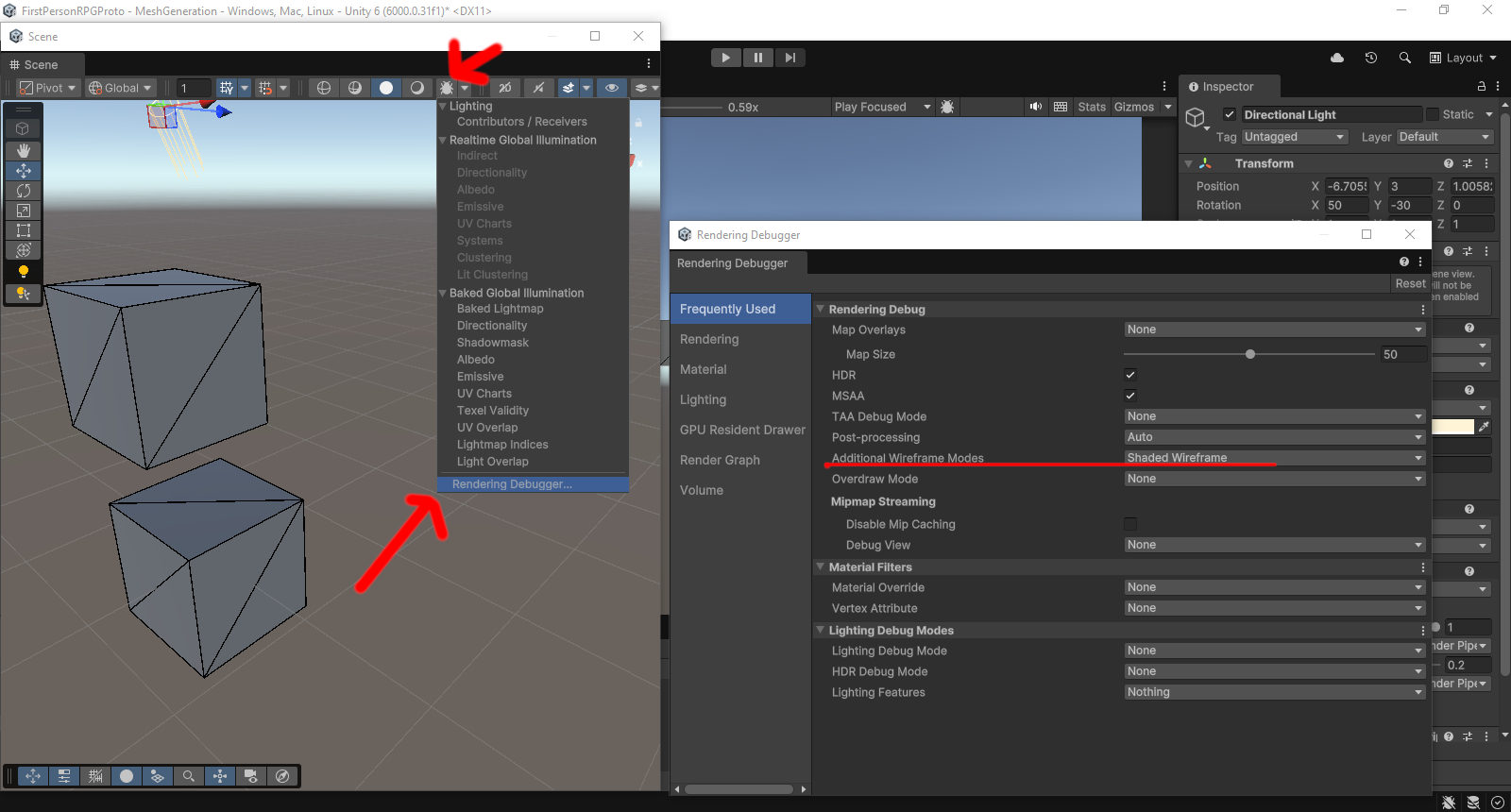 silk hearth
haughty sonnet
maybe this works? not sure cause older versions had it in a different spot. also...
silk hearth
haughty sonnet
maybe this works? not sure cause older versions had it in a different spot. also...
hi John thanks for the reply! That looks great but is there a hotkey or something for it? like in 3d software you'd hit '4' or something for shaded on wireframe
either way will check it out ty
 sonic timber
can someone help me, i wanna delete faces for a door but the surrounding edges are empty and leaves a gap im using probuilder
sonic timber
 solar pumice
https://docs.unity3d.com/Packages/com.unity.probuilder@6.0/manual/Vert_FillHole....
solar pumice
https://docs.unity3d.com/Packages/com.unity.probuilder@6.0/manual/Vert_FillHole....
fill hole is greyed out
nvm it just undoes what i just cut
what am i supposed to select
forest vortex
sonic timber
fill hole is greyed out
You need to be in the right mode for a tool. You should go through the ProBuilder tutorials.
sonic timber
how do i fill the edges out
 solar pumice
There's also this you can try:
https://docs.unity3d.com/Packages/com.unity.probuilder@5.2/manual/Edge_Bridge.html
sonic timber
solar pumice
There's also this you can try:
https://docs.unity3d.com/Packages/com.unity.probu...
this doesnt work
ive selected 2 edges and its still greyed out
solar pumice
Okay, well these two options are what you use to collect vertices and add faces. If it doesn't work, then it could be how you're using them. Find a tutorial or something that explains them in better detail.
sonic timber
so you cant help me
solar pumice
I did, I provided two options that the tool gives you to bridge faces.
solar pumice
Ah, okay, you're a hand holding required user. Yeah we get those from time to time. Good luck.
sonic timber
Ah, okay, you dont know unity. Yeah I get those from time to time, Good luck.
@whole prawn you seem smart can you help
forest vortex
@sonic timber Don't ping people not in conversation with you into your questions. Also don't spam off-topic, read #📖┃code-of-conduct
sonic timber
forest vortex
<@468430900766572554> Don't ping people not in conversation with you into your q...
my deepest and most sincere apologies @forest vortex
sonic timber
sonic timber
how do i fill the edges out
chat how do i put a door here#
forest vortex
sonic timber
chat how do i put a door here#
You go through tutorials and learn to use the tool.
sonic timber
forest vortex
You go through tutorials and learn to use the tool.
what tutorial
all the ones ive seen are usecases that dont apply to this
solar pumice
Using the bridging tool is how.
 forest vortex
sonic timber
what tutorial
forest vortex
sonic timber
what tutorial
The ones on Unity Learn https://learn.unity.com/tutorial/more_probuilder_tools
Unity Learn
Free tutorials, courses, and guided pathways for mastering real-time 3D development skills to make video games, VR, AR, and more.
sonic timber
solar pumice
Using the bridging tool is how.
the edge bridge?
what do i select to fill the hole, opposite edges doesnt work
the wiki doesnt show either
smoky falcon
so this is basically just a cylinder, how can I add a face from the outside? it looks like a one-way mirror at this point
young vapor
smoky falcon
what you could do is select those faces, duplicate faces as a separate gameobject or as a submesh (stays as one piece,) up to you . Then simply flip face normals for those faces
 smoky falcon
young vapor
what you could do is select those faces, **duplicate faces** as a separate gameo...
smoky falcon
young vapor
what you could do is select those faces, **duplicate faces** as a separate gameo...
thanks thats what i ended up doing yesterday
anyways is there a way to subdivide the middle part and make each of those faces a separate game object?
(im looking for a way to make a destructable object)
 young vapor
smoky falcon
anyways is there a way to subdivide the middle part and make each of those faces...
young vapor
smoky falcon
anyways is there a way to subdivide the middle part and make each of those faces...
the process is the same , subdivide how you want then use detach face option as separate gameobject
 median plover
How to improve the quality? After I built the project into an apk file, the quality dropped, the shadows disappeared, the material quality dropped, etc. (onn the phone)
young vapor
median plover
How to improve the quality? After I built the project into an apk file, the qual...
this isn't a Probuilder question..
 lament mason
I keep getting this error when trying to install probuilder, anyone have a solution?
Edit: downgrading to 2022 lts solved the issue

 torn basin
lament mason
I keep getting this error when trying to install probuilder, anyone have a solut...
torn basin
lament mason
I keep getting this error when trying to install probuilder, anyone have a solut...
restart unity and/or delete your library folder
lament mason
torn basin
restart unity and/or delete your library folder
That didnt work but downgrading the unity version did.
torn basin
lament mason
That didnt work but downgrading the unity version did.
upgrading ProBuilder probably would have done it too
lament mason
I was doing a fresh install.
 warm vapor
What is this dropdown used for?

Also I keep getting this error whenever I add any material to any slot. I didn't write or edit any code or scripts.

Alternatively, can I just apply materials like the usual way (the way I apply them to Unity primitives), instead of this material editor? Or is it needed (for some reason) for objects made with ProBuilder?
half horizon
yeah you can, just select the faces and you can drag them on
doesn't work when your selecting multiple pro builder objects though iirc
 lunar saddle
how would I fix this shading issue here?
 young vapor
lunar saddle
how would I fix this shading issue here?
young vapor
lunar saddle
how would I fix this shading issue here?
Probably more of #1390346776804069396 question than probuuilder
 rose imp
Why is there no more editor window for pro builder but it's all under the Tools menu on the top which is really weird

before it was like this and you didn't have to go painfully through that menu each time
 warm vapor
I'm using a custom on trigger event script to detect when I touch that fence or move away from it. I made the object using ProBuilder. But it seems like "Convex" checkbox makes even the empty area detect as enter/exit. So it keeps running even if I'm near the wall or in the middle of those walls.

It's like a room (4 walls and an opening on one wall) but no roof.
Like a fence.
I want it to detect enter/exit only when I'm actually entering those walls.
It's treating it as a filled box instead of hollow box.
 tawny elbow
Use an trigger collider only at the fence gate
warm vapor
tawny elbow
Use an trigger collider only at the fence gate
I want to detect whenever character collides with any of the wall.
tawny elbow
You can setup box colliders there
warm vapor
tawny elbow
You can setup box colliders there
Using one for each wall?
If I use the same mesh and add box collider component, it has same issue. So I guess I need individual collider meshes for each wall.
tawny elbow
Just create an empty object and add 4 trigger colliders to it
warm vapor
I did same for now
 small ferry

Any idea why my shapes are disregarding their form when I hover over them with a material preview or Polybrush
If I reset the shape then Ctrl Z it fixes it, but it's very annoying and finnicky to do
small ferry
Figured it out, it's this

 rancid frigate
when i create a box or something is there a way to automate applying physics materials to different faces and tags etc?
its really annoying to separate the faces individually to apply different tags and materials
rancid frigate
Prefabs it is then
 desert ridge
Does anyone know how to fix this warning? Because my game keeps crashing
 desert ridge
Does anyone know how to fix this warning? Because my game keeps crashing
desert ridge
desert ridge
Does anyone know how to fix this warning? Because my game keeps crashing
I fixed why I was crashing
but I still dunno whats wrong with this warning
young vapor
desert ridge
but I still dunno whats wrong with this warning
You have to share at very least the versions you're using, this message alone is pretty meaningless
very likely its a bug / oversight in PB code
 manic zealot
quick question how do i get the probuilder window screen?
young vapor
manic zealot
quick question how do i get the probuilder window screen?
can't its all context menus now.
use 5.x or use the new probuilder https://www.overdrivetoolset.com/probuilder-plus/
manic zealot
Thanks for the link
 limber pier
I've seen a lot of youtube videos on how to use probuilder to make internal spaces, or one building inside and outside in a void, but I was hoping for something that could help me wrap my head around building an external space - like a few alleyways in a city or a village.
I guess my main question is this: everywhere I see people using the extrude function to do basically everything, but when I that in my scene of the city it makes it difficult or impossible to move the buildings around after the fact. Should I be building as seperate objects and then plop them onto a plane?
 junior sorrel
limber pier
I've seen a lot of youtube videos on how to use probuilder to make internal spac...
junior sorrel
limber pier
I've seen a lot of youtube videos on how to use probuilder to make internal spac...
yes
 green jacinth
Why is my polyshape tool build my shape at some random plane (y=? ) I want to make a somewhat regular shape and click and snap to a visible progrid. I also tried adding a large basic 3e plane, when create any other probuilder shape it start on this visible plane with the grid, but starting a polyshape the points don't match the grid, and then after I extrude I see that probuilder decided to start my shape at -280
forest vortex
!collab
whole hawkBOT
forest vortex
!collab
:loudspeaker: Collaborating and Job Posting
We do not accept job or collab posts on Discord.
Please, use Discussions to promote yourself as job-seeking, advertise commercial job offers, or look for non-commercial projects to participate in:
• ** Collaboration & Jobs**
rose imp
I am selecting one vertex and doing this Set Pivot to Selection, but when I exit ProBuilder edit mode the pivot is still not at that point

Should be at the base like I selected here but it's way up where there is not even a vertex and only one selected anyway

Solved. It was because of this selection in the scene view
 warm flax
I am trying to probuildarize this model so I can export it as an STL and 3d print it, but when the objects are selected the probuildarize option isn't available. I'm very new to this, but would really appreciate help
 young vapor
warm flax
I am trying to probuildarize this model so I can export it as an STL and 3d prin...
young vapor
warm flax
I am trying to probuildarize this model so I can export it as an STL and 3d prin...
probably because you don't have mesh only selected, anyway why probuildirize it in the first place?
None of this needs probuilder/unity. Put it in blender or something more appropriate for your use case
warm flax
young vapor
probably because you don't have mesh only selected, anyway why probuildirize it ...
I acquired the model from a friend as a Unity package, and when trying to export it as an FBX to put in to blender, it doesn’t allow me to export the Model and Animations. Plus, I have zero blender experience on top of that all 💀
young vapor
warm flax
I acquired the model from a friend as a Unity package, and when trying to export...
where does probuilder even come into this though ? why would you need animations if its going to be printed anyway
warm flax
young vapor
where does probuilder even come into this though ? why would you need animations...
I posed the model myself. I think that counts as an animation
young vapor
warm flax
I posed the model myself. I think that counts as an animation
again still doesn't answer why you are trying to probuildarize it..but you only need the fbx use the package
warm flax
Probuilder was recommended when I looked up how to export unity models as an STL
So that’s what I’ve been stuck on
young vapor
info was wrong
warm flax
Probuildarize- > merge objects -> export
young vapor
you can just export it as fbx , put in blender and export whatever format you want
warm flax
young vapor
you can just export it as fbx , put in blender and export whatever format you wa...
If only that worked
Guess I’ll look into that instead
young vapor
I mean probuilder could export as STL but you probaby wont get the animations that way
warm flax
Damn
young vapor
and probuilderizing sometimes breaks
yeah its not really a modeling program like blender, mainly just grayboxing into unity
warm flax
Well, thanks for the help anyways
 forest vortex
 rancid raven
yo any of you guys know how to make this map better or how to make it easier
rancid raven
yo any of you guys know how to make this map better or how to make it easier
I directed you here to be aware of this tool, not to ask general questions. Check the pinned messages for tutorials on how to use it.
 twilit cloud
soooo, my probuilder meshs keep vanishing, anyone knows what could be the reason??
this is the object when is putted on the scene

this is the same object, after I change a bit of the thickness, it was invisible before i made a change

it was not hidden below, there is other 4 objects that are the same way, and you might think, so this is solved right? no
if I update the prefab or create a new prefab, the probuilder meshs will vanish again
the only exeption it seem is when I change so the object keep being active when I instantiate it, but I would apreciate if I could at least understand why this is happening
the read only object size seem to be the only thing that changes between the two
half horizon
to be honest probuilder stuff in prefabs just exploding is something i've never found a solution for
forest vortex
Might be a good idea to not keep it in editable state and export to .obj file to use. Can always convert it back if you need to.
twilit cloud
ohhh boy...
ebon widget
twilit cloud
soooo, my probuilder meshs keep vanishing, anyone knows what could be the reason...
For prefab use, I'd suggest using the "Meshes are Assets" toggle in the PB prefs. It works very well, we just never quite finished the workflows around that. I've been poking at it with PB+, but is a big big area 😅
twilit cloud
ebon widget
For prefab use, I'd suggest using the "Meshes are Assets" toggle in the PB prefs...
Hmmmmmmmm, thanks!
 runic obsidian
I just started to learn using probuilder and i want to create a path on my gameobject but when i use polyshape it just goes through the gameobject while creating simple shapes works just fine


erm maybe i shoud just cut out a path on the objext and extrude instead
ebon widget
runic obsidian
erm maybe i shoud just cut out a path on the objext and extrude instead
Cutting and extruding will create much messier geo, the separate shape is best.
I just tried this myself ... looks there's a bug with polyshape not respecting geometry, going straight to the grid.
If you hide the visual grid (the top button in image), it will work.
Feels fair to note, since Unity isn't updating PB anymore, that I'll add a fix for this to my PB+ task list 🙂
https://www.overdrivetoolset.com/pbplus/
Oops, image here. So toggle the one with the "Y" (might have X or Z" in your setup, it's the top one though). That'll hide the grid and let you draw onto shapes again 🙂

 gleaming dock
I need to cut simple polygons in planes, maybe other shapes later. I used the arch tool, then deleted from faces and closed it off into a solid shape. When i applied the boolean with plane, it came out a little messy but I deleted everything I didnt need. This mesh just looks like a disaster. Is there a better way to do this?

 ebon widget
gleaming dock
I need to cut simple polygons in planes, maybe other shapes later. I used the ar...
ebon widget
gleaming dock
I need to cut simple polygons in planes, maybe other shapes later. I used the ar...
Best to avoid Boolean if you can. We never got the chance to fully test and build it up.
Can you share a drawing of the shape you are hoping to end up with? I can show you how I would make it! 🙂
gleaming dock
Right now im taking planes and adding a hole mask on it with a material (and having to scale and align the mask)

Then I have to create some box colliders around it to get this 2d art style

I was just tryign to see if i could use probilder to make quick meshes to fit doors better, or to maybe even cut holes in meshes.
ebon widget
Super cool look. Ok, so you need to create both the outer arch (a flat plane), and the inner arch, also flat plane?
gleaming dock
yea, right now i have a wall texture that i set to world space so it will automatically align textures. Then i can connect a quad walls this doorway setup i have here and the textures align
ebon widget
cool, I'll make a vid, 5 min ... 😄
gleaming dock
no rush, im a little preoccupied until this afternoon, ill check back when i can. I appreciate anything you can share!
ebon widget
Uploading, should be done in about 3 min 🙂
https://youtu.be/M3AP2XqfC68

 gleaming dock
ebon widget
Uploading, should be done in about 3 min 🙂
https://youtu.be/M3AP2XqfC68
gleaming dock
ebon widget
Uploading, should be done in about 3 min 🙂
https://youtu.be/M3AP2XqfC68
Thanks that is super useful, I really appreciate it! I can likely use this trick to make some basic mesh colliders as well. I was doing this by drawing a mask and then trying to scale and offset the image to fit which felt like a bit of a pain (image for example) on material. I'm thinking that making meshes in probuilder or blender may be the way to go.
 ebon widget
Cool happy to help!!
 grand spindle
Is there any way to install earlier versions of probuilder in unity 6?
I'm not a fan of the new UX and everything being located in right click menus or in the toolbar so if there's a way to switch probuilder 6 to an older style of UX that would also work for me
ebon widget
grand spindle
I'm not a fan of the new UX and everything being located in right click menus or...
You can use PB+, it's free and adds features too (see bio)
 abstract forge
 oblique lily
also i am muslim too :D
oblique lily
also i am muslim too :D
assalamualaikum
oblique lily
abstract forge
assalamualaikum
WaAlikumAssalam
abstract forge
didnt have time to check pf ; D
 vapid cloak
Using polybrush to sculpt these little planets
Unity spheres are too low poly so i made a 7 subdivision UV sphere in blender and imported it.
IT WORKS
but now i have these strange seams when paining textures. Any idea what i should do?

 misty fractal
・Set custom actions to the overlay menu (like shortcuts)
・Display icons and action names (icons alone are confusing)
・Brush-based painting and sculpting (no more Polybrush)
Please include at least these... Isn't the current design outdated?
 rustic haven
Weird Seam with Probuilder Walls
ebon widget
misty fractal
・Set custom actions to the overlay menu (like shortcuts)
・Display icons and acti...
Hey, I'm providing most of this (not painting yet) for free with PB+, Actions Pal, other. Free and yours to keep/use/modify as you like 🙂
 chilly escarp
Got one small question regarding Probuilder:
Is there an option to do proportional editing?
ebon widget
chilly escarp
Got one small question regarding Probuilder:
Is there an option to do proportion...
This could be a couple things, can you give an example?
chilly escarp
ebon widget
This could be a couple things, can you give an example?
Basically
In blender, you can select a vertex/edge/face, and when you for example, try moving it, then you can toggle "proportional editing" to move all nearby vertices/edges/faces at the same time, but often with some kind of falloff
Here is a link with it explained in more detail in case I explained it poorly:
https://docs.blender.org/manual/en/2.81/scene_layout/object/editing/transform/control/proportional_edit.html
So was wondering if there is a similar feature to this in Probuilder
ebon widget
chilly escarp
Basically
In blender, you can select a vertex/edge/face, and when you for exampl...
Ahhh that's fantastic yes! I totally forgot I always wanted to add that 😄 it shall be done 😉
(er, to clarify - no PB does not currently have this)
chilly escarp
Ah, thank you for telling me and I'll be looking forward to the future!
ebon widget
Soft Select / Proportional Edit for ProBuilder (progress tracker)
vapid cloak
misty fractal
・Set custom actions to the overlay menu (like shortcuts)
・Display icons and acti...
Is there a way to brush paint on a sphere without poly brush? i was unaware
ebon widget
vapid cloak
Is there a way to brush paint on a sphere without poly brush? i was unaware
Nothing in default Unity for this, no. You'd need a custom asset package. Unless something really new and cool was added in 6.3+ 😄
ebon widget
Hey folks, in case anyone else gets the "points aren't truly snapping" trouble, here's the script that fixed the seams issue above 🙂
- place it in a folder named Editor (eg, "Assets/stuff/otherstuff/Editor")
- select the verts to be super-duper-grid-snapped
- use "Tools > ProBuilder > Push Verts to Grid" , you can also assign a shortcut if you use it frequently
This is a custom solution for PB 5.x, if you have PB6+ then PB+ is the way to go 😉
Happy snapping 😄
 jolly cargo
ebon widget
Finally! Would love if PB folks here could give it a try, let me know what else ...
jolly cargo
ebon widget
Finally! Would love if PB folks here could give it a try, let me know what else ...
That looks awesomee I need it
 past oyster
how to fix this?
 ebon widget
past oyster
how to fix this?
ebon widget
past oyster
how to fix this?
That's an issue in current ProBuilder, I hear the team is expecting to have a fix soon. You can safely ignore it for now.
warm vapor
I used options Set Collider and Set Trigger from Probuilder menu. They work. But they show these green/yellow materials. Do I need to remove them? I see them both in Scene view and Game view. Shouldn't they be invisible in game view?
 ebon widget
warm vapor
I used options Set Collider and Set Trigger from Probuilder menu. They work. But...
ebon widget
warm vapor
I used options Set Collider and Set Trigger from Probuilder menu. They work. But...
When you enter Play mode (or in your build), they will be hidden automatically 🙂
warm vapor
ebon widget
When you enter Play mode (or in your build), they will be hidden automatically �...
My bad, I had removed Set Collider/Trigger scripts manually but those green materials were still there. So they behaved like normal visible materials. I added those components again and now it work as expected.
ebon widget
Ah, I didn't even recall that it used components like that. Been so long. Maybe I could change that. I assume you removed them to clean things up? Understandable for sure. Could use tags/layers/something instead ... also, I think technically on build, it simply does a one-time pass and removes all the PB components and hides those objects (keeping their collision active, of course). So it's not something to worry about in-game at least.
warm vapor
ebon widget
Ah, I didn't even recall that it used components like that. Been so long. Maybe ...
I was just exploring probuilder. Yeah I removed the components thinking that all it needs is that green material to work as trigger and collider lol. Technically I could use simple Unity objects too instead of probuilder.
 wintry zodiac
i was wonder how would i create hollow cube in probuilder?
i searched and i saw suprisingly no results?
anybody know how?
mb just needed to flip faces
😌✌️
ebon widget
wintry zodiac
i was wonder how would i create hollow cube in probuilder?
Hi hi 🙂 Yes, exactly the flip!
- create cube
- use "Flip Normals" action, done 🙂
warm vapor
These are 3 verticle edges. I want to merge them and make single vertical edge. I can't find any option to do so. Is it possible?
 ebon widget
warm vapor
These are 3 verticle edges. I want to merge them and make single vertical edge. ...
ebon widget
warm vapor
These are 3 verticle edges. I want to merge them and make single vertical edge. ...
In standard ProBuilder:
- select the two middle verts
- use Collapse
- select the new vert
- add-select a bottom/top vert
- choose "Collapse"
This multi-step process should work 🙂
Or, using PB+ (sorry folks I gotta point it out here 😛 )
- select the verts, use "Dissolve", done 🙂
warm vapor
ebon widget
In standard ProBuilder:
1. select the two middle verts
2. use Collapse
3. select...
Yeah I found that option right now. I also tried another option "Weld vertices". It seems to work with distance you specify. But I guess both options eventually collapse vertices?
ebon widget
Yup, weld is more for ... you have a lot of verts pretty close, you want to "zipper them up". so they'll smartly collapse together. Collapse is just a black hole 🙂
warm vapor
Thanks
 fathom sphinx
Hello everyone. I'm new to unity and probuilder. Is there a way to change the color of the default shaders so that they're easier on the eyes?
never mind. just found it lol.
 split crown
I am having a weird problem where when I resize it by an increment of 0.25 it is showing these decimals that are all off. Idk how to fix this
 ebon widget
split crown
I am having a weird problem where when I resize it by an increment of 0.25 it is...
ebon widget
split crown
I am having a weird problem where when I resize it by an increment of 0.25 it is...
Scale is not super exact, the numbers will slowly get off. Better to do actual vertex/edge/face editing. More importantly though ... the warning (yellow text) in the console seems to show that your object is too large. What are you trying to build? there might be better options.
split crown
Im building props for my game
ebon widget
split crown
Im building props for my game
Do they need to be so large? 500 "units" is half a kilometer. It would be better to use several partial objects, if you do need that size.
split crown
No I am scaling by 0.25 and the max size it would be would be around 20-30
Also making buildings too
ebon widget
Ah ok. So that warning must be something else. So I'd suggest ... use ProBuilder's mesh editing instead of scale. That's the simplest solution 🙂
split crown
I tried probuilder but I don't really understand it
ebon widget
Easy peasy!
https://youtu.be/VCt3UoGnlLI
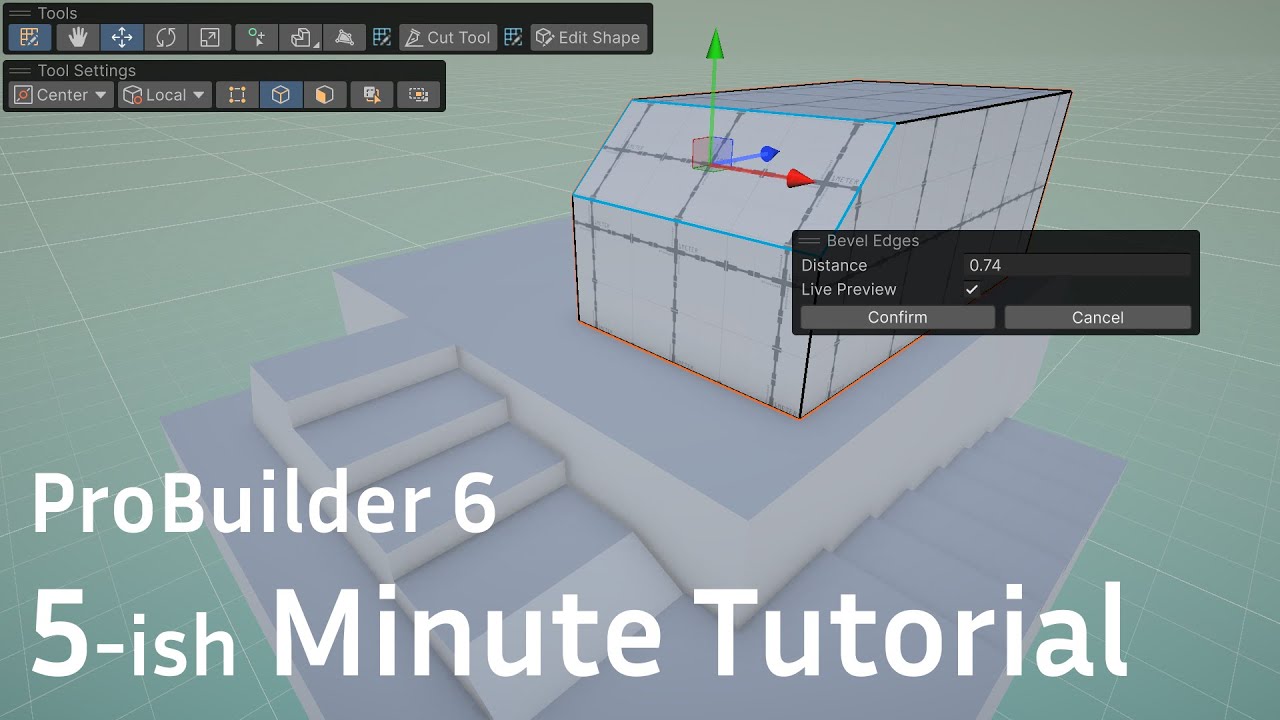
UPDATE: I've built a newer version! https://youtu.be/14rB2bAL3Us
jolly cargo
ebon widget
Do they need to be so large? 500 "units" is half a kilometer. It would be better...
Is there a drawback for having big objects ?
ebon widget
jolly cargo
Is there a drawback for having big objects ?
Unity (all game engines? all 3D software) gets wonky at extreme scale, IIRC. And apparently (just judging by the warning in that screenshot above), it's extra problematic if the object has very few verts in the geometry. I'm no expert on this, but from what I've heard, it's a "floating point" values thing. I've seen various games where they solve this with tricks like moving the world, instead of the player (so the player is always relatively close to (0,0,0) which keeps the wonkyness down).
forest vortex
!collab
whole hawkBOT
forest vortex
!collab
:loudspeaker: Collaborating and Job Posting
We do not accept job or collab posts on Discord.
Please, use Discussions to promote yourself as job-seeking, advertise commercial job offers, or look for non-commercial projects to participate in:
• ** Collaboration & Jobs**
 waxen flint
Would it be easier to create my indoor environments using probuilder compared to blender? I'm not much of a visual arts-guy lmao so I'd rather use what's easier 😭
And plus im new to both either way
young vapor
waxen flint
Would it be easier to create my indoor environments using probuilder compared to...
arguably Probuilder is easier to start with
 left sapphire
New to probuilder.
young vapor
left sapphire
New to probuilder.
UPDATE: I've built a newer version! https://youtu.be/14rB2bAL3Us
 rain gate
why is my UV Editor empty? where is the texture ?
 young vapor
rain gate
why is my UV Editor empty? where is the texture ?
young vapor
rain gate
why is my UV Editor empty? where is the texture ?
That's not a probuilder model is it ?
rain gate
young vapor
That's not a probuilder model is it ?
model random/ no bilder
young vapor
rain gate
model random/ no bilder
well you do realize UV editor is a Probuilder tool? It works with probuilder meshes.
if its not a skinned mesh you can probuildarize it, or just use blender.
ebon widget
@young vapor @rain gate Yup it does need to be a PB mesh - you can use "ProBuilderize" to make any mesh a PB mesh, then you can edit it. That said ... this appears to be a vertex colored object? Or multi-material? Those can all also be edited by PB, but same thing (need to convert). Tools > ProBuilder > Object > Probuilderize
ebon widget
left sapphire
New to probuilder.
Oh hey! 😄 Let me know if you need any pointers/info to start 🙂
 pine swift
Hey! 👋
I'm making a small horror game in Unity. I already have movement, sprint, crouch and camera working.
I'm still a beginner and trying to build my first map (school corridor style).
Do you have any tips for level design or making it feel more like a horror game?
Thanks! 🙂
okay ty
ebon widget
pine swift
Hey! 👋
I'm making a small horror game in Unity. I already have movement, sprint...
If mods don't mind, I think this is an ok place for the question, as I read it. The category title does say design of levels. Delete/move my reply here as well if needed 🙇♂️
I would suggest looking up the Left 4 Dead (and maybe other similar games?) developer mapping videos/posts. I seem to recall some really interesting deep dives and explainers on how they chose to build and layout the levels. Of course, that has a multiplayer aspect, changes some of the design.
Another good idea is to watch some good horror movies (or, parts of). There are lots of good architectural and lighting tips in those, like:
- long creepy corridors
- "downward" slopes - subtle thing that affects our old brain parts about going "underground", vs straight/up
- hallways that get smaller as you go. feeling of being forced/closed in on.
- rickety bridges/etc, dangerous env adding an extra level of anxiety
- lighting, lighting, lighting ... so key to good horror, and key to level design in general
All this stuff you should be able to block out nicely with ProBuilder in Unity, tweak and edit with playtesting, etc. Then detail in Blender/etc if needed.
Hope it helps!
 vestal depot
is it possible to import meshes with world position of blender?
 lucid kiln
vestal depot
is it possible to import meshes with world position of blender?
lucid kiln
vestal depot
is it possible to import meshes with world position of blender?
If you don't have Apply Transforms enabled, and are exporting to FBX with correct units and axes this is how it would work without having to do anything special
Question more suited for for #🔀┃art-asset-workflow
pine swift
Hey! 👋
I'm making a small horror game in Unity. I already have movement, sprint, crouch and camera working.
I'm still a beginner and trying to build my first map (school corridor style).
Do you have any tips for level design or making it feel more like a horror game?
Thanks! 🙂 and please a cannot build
haughty sonnet
pine swift
Hey! 👋
I'm making a small horror game in Unity. I already have movement, sprint...
hey buddy... you literally asked this 3 messages ago. and you got an answer from the creator of probuilder himself, who you ignored completely.
explain yourself
pine swift
because i really need a builder and im really sorry about it😩
young vapor
pine swift
because i really need a builder and im really sorry about it😩
Okay but you already been told this isn't the server for recruiting people and should be done on the website linked to you .
#💻┃unity-talk message
forest vortex
@orchid plaza This is the ProBuilder channel.
Check the pinned resources as well before asking questions.
 stray sail
how do i connect this edge on the other side? im kinda new to this pro builder 6.0.9

 bleak dust
stray sail
how do i connect this edge on the other side? im kinda new to this pro builder 6...
bleak dust
stray sail
how do i connect this edge on the other side? im kinda new to this pro builder 6...
Select the two edges, right click and bridge
stray sail
bleak dust
Select the two edges, right click and bridge
i see thanks though whats the difference between bridge edges and connect edges?
bleak dust
stray sail
i see thanks though whats the difference between bridge edges and connect edges?
Bridge adds another face connecting the two edges, Connect will generate another edge that will connect the two edges down the center
stray sail
bleak dust
Bridge adds another face connecting the two edges, Connect will generate another...
ohh i see, thanks alot
 hollow knot
I just Probuilderized an Synty Polygon Landing Pad building prefab and it become glow, anyone what caused this?
Known problem?
 young vapor
how's this related to ProBuilder ?
young vapor
hollow knot
I just Probuilderized an Synty Polygon Landing Pad building prefab and it become...
have you tried a different project to see if its not project specific
hollow knot
young vapor
have you tried a different project to see if its not project specific
Yep, still the same effect on this object
After probuilderizing object become glow, disabling emmision on material have no effect on glow
hollow knot
young vapor
how's this related to ProBuilder ?
Cause object become glow after prebilderizing it, was thinking this is known.
young vapor
hollow knot
Cause object become glow after prebilderizing it, was thinking this is known.
this was in reply to someone else...
young vapor
hollow knot
After probuilderizing object become glow, disabling emmision on material have no...
on the original material emission turns on ?
sounds like a bug
hollow knot
young vapor
on the original material emission turns on ?
Yep after turn off same effect
ebon widget
hollow knot
I just Probuilderized an Synty Polygon Landing Pad building prefab and it become...
I've seen this happen when the mesh has errors after pbize. Can you try on a simple cube to test? Also, try using "Weld Vertices" on all verts at once, after pbize on the Synty object. That might help, if it's somehow created lots of overlapping verts.
 wary panther
This wall dosnt give a "yellow ish" preview when i hover over stuff?
 hollow knot
ebon widget
I've seen this happen when the mesh has errors after pbize. Can you try on a sim...
hollow knot
ebon widget
I've seen this happen when the mesh has errors after pbize. Can you try on a sim...
Thanks for suggestion but cube after pbize not become glow and while that Synty building after checking "Weld vertices" and then pbize still become glowy, sadly.
jolly cargo
interesting bug with probuilder, anyone else have it on unity 6.4 ?
ive done a bug report, im just curious if im the only one who had that happen
jolly cargo
Turns out it has to do with this, if you are in "grid" mode and then select a face and move it, it breaks and flies off
also grid gets renamed to element when in face selection mode, and keybinds to cycle through local/global/grid doesnt work while in face selection mode
 ebon widget
jolly cargo
Turns out it has to do with this, if you are in "grid" mode and then select a fa...
ebon widget
jolly cargo
Turns out it has to do with this, if you are in "grid" mode and then select a fa...
Wait there's a "Grid" mode in Unity 6.4? I'm falling behind 😄 That's interesting. Too bad it has some issues. Have you tried using my own Grids thing instead? 😅 Purpose-built for PB.
ebon widget
wary panther
This wall dosnt give a "yellow ish" preview when i hover over stuff?
Hard to tell what's going on here, can you give more details? Thanks!
jolly cargo
ebon widget
Wait there's a "Grid" mode in Unity 6.4? I'm falling behind 😄 That's interestin...
Yeah and its not very good <w>
well idk it is probably very versatile or whatever but ive found two new bugs using it so far after this one ive just showed here, not so awesome
One is rotation snapping being innacurate sometimes and the other is stuff snaps to the wrong grid when using local mode on the handle
And again shortcuts generally not working right
Raah
 obtuse tendon
Hi, does anyone know how i could make all of this the same height? (pls ping if you reply)

 barren oasis
on god this pisses me off
tried restarting the editor too doesn't fix it
worse part is it was working just before I made this object
 bleak dust
barren oasis
on god this pisses me off
bleak dust
barren oasis
on god this pisses me off
This seems the same issue as the one if you scroll up a bit. Seems to be related to the new grid system.
barren oasis
bleak dust
This seems the same issue as the one if you scroll up a bit. Seems to be related...
yea I fixed it
bleak dust
obtuse tendon
Hi, does anyone know how i could make all of this the same height? (pls ping if ...
Select each vert and snap them to the same height
obtuse tendon
bleak dust
Select each vert and snap them to the same height
but how do i snap it to a fixed height if i cant see the heights yk what i mean?
bleak dust
Just snap them all to have the same height first, then you can select all the verts you want and move them to the height you want
 rugged verge
Im completely new in this space but I specifically want to focus on designing environments, what tools do I best use for that?
obtuse tendon
bleak dust
Just snap them all to have the same height first, then you can select all the ve...
Yeah but i dont know how to snap all of them to have the same height yk? Like how do i makr one vertice match the height of another?
bleak dust
obtuse tendon
Yeah but i dont know how to snap all of them to have the same height yk? Like ho...
turn on snapping and move the vert up or down, now it is going to be at a set height, you can do the same with every vert and they will all be set to the same height
bleak dust
rugged verge
Im completely new in this space but I specifically want to focus on designing en...
You mean Unity specific tools?
obtuse tendon
bleak dust
turn on snapping and move the vert up or down, now it is going to be at a set he...
ahh i see, thank you very much
if i want to make a sort of entrance here, should i do that in blender or probuilder? I really dont know for what to use blender and for what probuilder
 bleak dust
obtuse tendon
if i want to make a sort of entrance here, should i do that in blender or probui...
bleak dust
obtuse tendon
if i want to make a sort of entrance here, should i do that in blender or probui...
Use probuilder for grayboxing and simple meshes, use blender for more complex stuff
obtuse tendon
ok ty
rugged verge
bleak dust
You mean Unity specific tools?
anything
unity tools for greyboxing, blender for detail?
bleak dust
pretty much
barren oasis
bleak dust
Use probuilder for grayboxing and simple meshes, use blender for more complex st...
I usually use probuilder for the final product
 wild river
hey there is anyone here good with probuilder?
every time i place a object it just this texture it used to so like one meter on the texture so on

 icy haven
Looks like PolyShape not respecting geometry was never fixed? :-(
https://gyazo.com/b041cc6be9b3a613701f679bc89946cf

I guess I'll have to get PB+, it looks great so it's probably worth it
bleak dust
barren oasis
I usually use probuilder for the final product
I did as well, but I figured out that probuilder models are serialized to the scene, which can seriously bloat your scene size. So if you want to model stuff in probuilder it is best that you export them as FBX.
obtuse tendon
Do you make caves with probuilder in unity or do u make them in blender?
jolly cargo
it depends what you prefer or what kind of caves you want to make
i think blender would be easier unless your caves are really simple shapes
obtuse tendon
okay ty
barren oasis
bleak dust
I did as well, but I figured out that probuilder models are serialized to the sc...
oh damn alright
obtuse tendon
jolly cargo
it depends what you prefer or what kind of caves you want to make
i think blende...
what about creating a fully fledged level? like mapping it out and such? (like a dungeon map)
jolly cargo
Well like any modeling software you can do pretty much anything with probuilder, its just got its own limitations so you should choose depending on the amount of detail or complexity of your level.
if its lots of curved and complex geometry, go with blender.
if its just boxy rooms or simple things that you can do with probuilder's tools, then go with that.
I like probuilder because i dont know blender and having it directly in unity is handy, if you already know blender i think its a better idea to go with that, as its go much much more tools
if you really dont know just look at what other people make with probuilder or look at the tools it has and if they fit your needs
You can even use both if you have a mix of complex and simple geometry
jolly cargo
obtuse tendon
what about creating a fully fledged level? like mapping it out and such? (like a...
ive made many full levels in probuilder but its becasue i dont know blender, often i get into situations where i gotta model the more complex things by moving individual verticies or edges and its really tiedeous lol
Go with blender if you already know it
obtuse tendon
okay ty, ill go with probuilder as i just need a simple small map for my game
obtuse tendon
Can i modify this blender model with probuilder somehow? i want to change the height of the middle pilllar
 young vapor
obtuse tendon
Can i modify this blender model with probuilder somehow? i want to change the he...
obtuse tendon
young vapor
obtuse tendon
Can i modify this blender model with probuilder somehow? i want to change the he...
obtuse tendon
tysm!
 odd solar
i wonder how to see collisions in editor
young vapor
odd solar
i wonder how to see collisions in editor
you have to enable gizmos
also this belongs in#💻┃unity-talk
barren oasis
this boolean tool is buggy

How can I make it carve into the object without anything being left from the cube
 sick spindle
its mesh based and not great, booleans are going to kinda suck, for the case showen above i would just extrude into the wall, and setup what ever edge loops you need to do so
 woven depot
ima ask here as i cannot find it anywhere else any one got the unity package for probuilder 5.2.4 i cannot use any of the newer versions of it as it is diabolical "here have a cube" is lit all it can do, i do not care that there is a new version, i do not care if there are bug i need that version, i cannot get it to do anything im used to and ive been sat here for 2h trying
young vapor
as it is diabolical "here have a cube" is lit all it can do
what?
woven depot
i cannot get it to do any mesh vertex or rotaion snaping like v5 has
or edditing for that matter
young vapor
woven depot
or edditing for that matter
if its a probuilder mesh then yes the option is there, did you check the manual it specifically mentions this
https://docs.unity3d.com/Packages/com.unity.probuilder@6.0/manual/modes.html
woven depot
i did not i thought it would have stayed the same and i would be able to carry my 3 years over and not go digging though forrums
young vapor
things change, you should be mindful to keep up with them.
You update a new editor version and never see what change ? strange..
there is no digging needed, literally consulting the manual for a second would've answered it all
https://docs.unity3d.com/Packages/com.unity.probuilder@6.0/manual/whats-new.html
woven depot
young vapor
things change, you should be mindful to keep up with them.
You update a new edit...
im comming from an old unity version where v5 was the latist and now my studio has swiched to unity 6
young vapor
its also mentioned here.
keep it in mind next time you upgrade into new things
https://docs.unity3d.com/6000.3/Documentation/Manual/WhatsNewUnity6.html#:~:text=ProBuilder
anywho here is a video if needed for side by side.. context menus is pretty much the only difference though
https://www.youtube.com/watch?v=cv4e8fH2kQs

UPDATE: I've built a newer version! https://youtu.be/14rB2bAL3Us
woven depot
thx man i hate when things change lol
young vapor
yea, when its drastic change it can throw ppl off
woven depot
so how do i gert it to do that then this is v5 in this pc, idk how on the newer version, is it not supported or? and im on about how i can build a shap on a shape and it will keep the rotation of the shape im building on
 young vapor
woven depot
young vapor
woven depot
whats it doing now instead ?
 young vapor
woven depot
will not build unless its on a flat mesh no curved meshes ect
young vapor
woven depot
will not build unless its on a flat mesh no curved meshes ect
wdym like this? or am i misunderstanding what you're asking
 woven depot
young vapor
wdym like this? or am i misunderstanding what you're asking
woven depot
young vapor
wdym like this? or am i misunderstanding what you're asking
exsacly like that
young vapor
weird its working fine for me as you see
young vapor
woven depot
huh..you tried extruding out instead of in?
young vapor
 woven depot
young vapor
woven depot
young vapor
try it with probuilder 5 then. Remove the current package and add a specific version in package manager when you add by name
woven depot
cant wont allow anything older than 6.0.8
young vapor
like this ?
 woven depot
i havnt tryed that 1 sec
weaird that work thx
ok nvm it stright up dosnt work lol its some how worse than 6
ill just dev in old unity and export obj's
 void tendon
Hey, guys! Is there is a way to actually seperate meshes in Unity?
Let's say I have clicked a game object and there are two meshes or more
on this single object selected
In Unreal Engine there is a tool within Modeling tool it's called seperate if I remember.

its tri select basically
I am playing with Rendering Layers with Lighting and you know I have some difficulties because I dont want some of my meshes to be affected by light but some of them to be and they are combined together and I have to split them.
I think I can do within blender but I dont want to mess right now with it because my models are already fixed and I dont want to break anything
 toxic frost
anyone else get this issue with probuilder in unity 6.3 LTS (6000.3.10f1)
when i go to use the right click context menu buttons, this pops up and i can't edit any value


keeps popping up this menu action settings overlay and none of the buttons do anything
ebon widget
obtuse tendon
Hi, does anyone know how i could make all of this the same height? (pls ping if ...
Hi, catching up and helping - if not already answered, use the scale tool + snapping, in the direction to align (y for height, here).
obtuse tendon
ebon widget
Hi, catching up and helping - if not already answered, use the scale tool + snap...
hahah better late then never, someone already helped me but still thanks
ebon widget
woven depot
ill just dev in old unity and export obj's
Hi, sry late response - if you can send me a list of issues, I'm working on solving many with PBplus. 🙂
ebon widget
void tendon
Hey, guys! Is there is a way to actually seperate meshes in Unity?
Let's say I h...
Yup - use "Separate". Should be available with faces selected. You can separate to a new mesh (GameObject), or submesh.
ebon widget
toxic frost
anyone else get this issue with probuilder in unity 6.3 LTS (6000.3.10f1)
when ...
Once you call the action (eg, Extrude), an overlay should show with the options.
toxic frost
ebon widget
Once you call the action (eg, Extrude), an overlay should show with the options.
sorry thats not the screenshot i meant to post 

clearly unity had too many drinks becuase it kept duplicating itself over and over again
void tendon
ebon widget
Yup - use "Separate". Should be available with faces selected. You can separate ...
Bro it was Unreal Engine
The question was if there is a similar tool in Unity's Pro Builder tool
or something that I can use to seperate meshes
young vapor
void tendon
or something that I can use to seperate meshes
they literally just told you how 😂
obtuse tendon
Hi, i have a question:
When i was working with blender i needed to make my models thick, for light to not penetrate them. Is it the same when working with probuilder? or are the walls from flipping normals of a cube enough?
haughty sonnet
obtuse tendon
Hi, i have a question:
When i was working with blender i needed to make my mode...
you mean you want light not to come through the backside of one-sided meshes?
obtuse tendon
haughty sonnet
you mean you want light not to come through the backside of one-sided meshes?
yes
haughty sonnet
haughty sonnet
haughty sonnet
@obtuse tendon check this out, from the creator of probuilder
obtuse tendon
oh i see, thanks!
 latent oracle
I'm pretty new to Unity. Does anyone know why my Character Controller is falling through a plane? And how can I fix this?
young vapor
latent oracle
I'm pretty new to Unity. Does anyone know why my Character Controller is falling...
show screenshots in #💻┃unity-talk
this isnt a probuilder question
 tight tiger
yo
i came from roblox studio
i want to try building in unity
can i have some tips?
forest vortex
tight tiger
can i have some tips?
!learn - You should start with Essentials course on Unity Learn. If you have ProBuilder specific questions, checkout pinned manual and resources.
whole hawkBOT
forest vortex
!learn - You should start with Essentials course on Unity Learn. If you have Pro...
:teacher: Unity Learn ↗
Over 750 hours of free live and on-demand learning content for all levels of experience!
 rotund pond
My character fits fine through 2 height holes, but whenever the wall is completely flat it needs to be 3 tiles high in order for my character to fit through. What's the cause of this, and is it possible to fix?


Also, im following a tutorial where theres a mention of increment snapping, but i can't for the life of me locate the settings for it
torn basin
rotund pond
My character fits fine through 2 height holes, but whenever the wall is complete...
We can't see your character's actual collider gizmo(s) here - nor do we know how it's moving and what obstacle detection, if any, your script has
hollow gust
When using Probuilder in Unity 2022.3.62f3, I noticed that when I create a New Poly Shape, right mouse clicking also creates a new vertex point. I don't recall this being how it worked in previous versions, and it makes it impossible to move the camera while creating a new shape. Is this just a bug or an intended feature?
hollow gust
It also seems like Middle Mouse Click adds vertices when in Poly Shape tool
I don't think this was how it worked in previous versions
 timber dock
tf?
timber dock
timber dock
tf?
(This happens on the Newest version of probuilder)(I selected a cube from the probuilder tool and it started to act weird when I rotate it , scale it , or even move it the problem occurs randomly after starting a new project and is bumming me out)
 ocean beacon
timber dock
(This happens on the Newest version of probuilder)(I selected a cube from the pr...
ocean beacon
timber dock
(This happens on the Newest version of probuilder)(I selected a cube from the pr...
damn
timber dock
ocean beacon
damn
(Fix: unity 6.4 sucks don’t use it)
ocean beacon
timber dock
(Fix: unity 6.4 sucks don’t use it)
man i want the probuilder window back ;-;
the tab thingy
timber dock
ocean beacon
man i want the probuilder window back ;-;
You deleted it?
ocean beacon
ahh ik that but you cant put it next to inspector now irght?
 drifting cargo
I have an issue with probuilders light maps:

I can't fix the Real Time GI Lightmaps
removing the faces and then adding them back is not fixing it
 lapis trench
Does anyone have an issue with polybrush's vertex painting not working inside convex objects?
lucid kiln
<@&502884371011731486> spamming that in multiple channels
 bronze dagger
Hi everyone! I have been trying to get the alpha clipping working with the probuilder material (to add dithering transparency), but it seems like the material is not affected by that property at all? I am extremely beginner with Shader Graph, but it seems like with those values I shouldn't have anything visible at all (alpha is smaller than threshold here, period), and yet the material is rendered normally?


 wild oasis
i'm on unity 6.4, anyone ever have an issue with probuilder's move function acting squirrely? its like the scale is off
if i grab a face and move it my mouse a tiny bit it moves like 10 meters and is very slippery
bleak dust
wild oasis
if i grab a face and move it my mouse a tiny bit it moves like 10 meters and is ...
Its a bug from the new grid system
 zinc wren
Hi everyone, Im not sure where to ask this, but my Transformation Gizmo is following my mouse when i select an object instead of staying on the center of the object, im not sure how i made this happen
I am on Pivot Mode
young vapor
zinc wren
Hi everyone, Im not sure where to ask this, but my Transformation Gizmo is follo...
can you show what you mean
zinc wren
ill try but it needs to be a video if anything
young vapor
anything helps
zinc wren
young vapor
zinc wren
ohh.. so its not a probuilder question.. #💻┃unity-talk
looks like its stuck in vertex snap mode? usually that comes up when you hold V key..
did you try restarting unity
zinc wren
young vapor
ohh.. so its not a probuilder question.. <#497872424281440267>
looks like its s...
yeah sorry about it being in the wrong place, ill give it ago and if not ill go there
 whole prawn
Documentation:
https://docs.unity3d.com/Packages/com.unity.probuilder@latest/index.html
Forums
https://forum.unity.com/forums/world-building.146/
Resources
Unite - Faster level design iteration: https://www.youtube.com/watch?v=GioRYdZbGGk
Roadmap
https://unity.com/roadmap/unity-platform/3d-world-building
whole prawn
whole prawn
**Documentation**:
<https://docs.unity3d.com/Packages/com.unity.probuilder@lates...
 meager zinc
Does pro builder have like a snapping feature that I missing ?🤔
junior sorrel
meager zinc
Does pro builder have like a snapping feature that I missing ?🤔
and also this
 meager zinc
junior sorrel
https://docs.unity3d.com/Packages/com.unity.progrids@3.0/manual/index.html
meager zinc
junior sorrel
https://docs.unity3d.com/Packages/com.unity.progrids@3.0/manual/index.html
Hmm thank you
 rough lodge
can also use progrids to assist (anikki's pic has it on the left of the viewport)
solar pumice
 sudden coyote
whats this thing
sudden coyote
whats this thing
Google it
 buoyant grail
Hey, does anyone know how I would be able to create a world like earthbound in a 3D space using probuilder?

Game info/discussion at http://s.nesgui.de/eb | "EarthBound" (SNES), published by Nintendo, 1995 | Also known as "Mother 2" on the Super Famicom. | Basic demonstration of natural gameplay; no commentary, no cheats/tool-assistance, not a speed-run. Captured from an original model North American SNES console.
SNESguide is currently in the proce...
torn basin
buoyant grail
Hey, does anyone know how I would be able to create a world like earthbound in a...
Using Probuilder? Seems like more of a Tilemap thing.
buoyant grail
torn basin
Using Probuilder? Seems like more of a Tilemap thing.
The thing is that my world is 3D.
torn basin
So what are you asking exactly?
if you want to use probuilder use it.
The way to create anything in probuilder is with its various mesh editing tools
buoyant grail
I'm asking if pro builder is the best tool for the job to create something like that in a 3D world
torn basin
It's hard to say because I'm struggling to understand what you mean since you've posted a decidedly 2D game as your example
buoyant grail
What dont you get? What part doesn't make sense?
torn basin
You said your world is 3D but you showed a video of a 2D world
So I'm struggling to visualize what you're actually going for
 eager brook
I'm a bit conflicted, How can I merge two probuilder objects?
Also, for some reason, newly created probuilder geometry appears "black", even after assigning other materials to it. Using HDRP rendering pipeline (The material is using HDRP rendering as well)
junior sorrel
eager brook
I'm a bit conflicted, How can I merge two probuilder objects?
you can't boolean-merge them (if that is what you mean) only combine multiple meshes into one mesh (with potentially intersecting faces). Thats called "Merge" in "Tools > ProBuilder > Objects".
 viral lynx
junior sorrel
you can't boolean-merge them (if that is what you mean) only combine multiple me...
viral lynx
junior sorrel
you can't boolean-merge them (if that is what you mean) only combine multiple me...
You can, actually. It's just super janky, and a bit unstable.
Enable experimental features for ProBuilder in your Preferences. Just click the checkbox once, it freezes the editor for a moment after you click it.
Then it's under Tools > ProBuilder > Experimental > Boolean (CSG) Tool
He should definitely do a regular merge though, and just cut and Weld. This abomination of a CSG implementation should really be tossed off a cliff.
torn basin
viral lynx
Then it's under Tools > ProBuilder > Experimental > Boolean (CSG) Tool
Their CSG is still experimental??
I swear I was using it 5 years ago and it was experimental then
junior sorrel
poly-mesh boolean operations on arbitrary meshes seem to be a yet unsolved problem of computer science
it would be so amazing to have a proper CSG modeller in unity... that would open so many doors
eager brook
junior sorrel
you can't boolean-merge them (if that is what you mean) only combine multiple me...
Thanks, it was the merge tool I was looking for!
viral lynx
junior sorrel
it would be so amazing to have a proper CSG modeller in unity... that would open...

Get the Realtime CSG package from Prenominal and speed up your game development process. Find this & other Modeling options on the Unity Asset Store.
It's bretty gud
viral lynx
torn basin
Their CSG is _still_ experimental??
I swear I was using it 5 years ago and it w...
By "used it", surely you don't mean you actually did any work with it?
Because I didn't know that was even possible.
My experience with it years ago was, "Oh look a CSG Tool, neat let's try it out. DEAR GOD WHAT IS THAT?! KILL IT KILL IT"
And last night was the first time I looked at it in years, and it was only to make sure they hadn't removed it.
I can confirm that the rotting dead cat, is indeed still in the box.
torn basin
viral lynx
By "used it", surely you don't mean you actually did any work with it?
No just messing around with it
viral lynx
Funny thing is, Unity hired the RealtimeCSG developer for a while. I thought for sure they were going to improve ProBuilder, or even better, integrate RTCSG into the editor and add some probuilder features to it.
But it appears they just wasted his talent, and nothing appears to have come from it.
Now he works at Roblox.
whole prawn
At least he's still working on https://discord.gg/DYHY35j4
With the help from the community, it might end up being the next RtCSG/SabreCSG/etc.
Last I tried it it was unusable, but that was probably a year ago
viral lynx
whole prawn
At least he's still working on https://discord.gg/DYHY35j4
Yeah, I'm letting it cook. Keeping an eye on it, though.
 daring bloom
meager zinc
Does pro builder have like a snapping feature that I missing ?🤔
daring bloom
meager zinc
Does pro builder have like a snapping feature that I missing ?🤔
pro grids
rough lodge
viral lynx
You can, actually. It's just super janky, and a bit unstable.
To quote source engine level designers, "NEVER CARVE"
The CSG features are... Not good to say the least. You can do better doing manual vertex/edge edits. Its not too daunting once you the hang of it
And I didnt realize there is a merge object feature somehow, so this new channel is already helpful!
viral lynx
daring bloom
pro grids
ProGrids is more or less abandoned.
The built-in grid system is a little better now. Not quite as good as Progrids, but it worked for me.
Unity seriously needs to make sure more geometry editing features are embedded in the scene view, so people can use them when the Scene tab is maximized.
Terrain, grids, ProBuilder, etc.
 lavish isle
viral lynx
ProGrids is more or less abandoned.
lavish isle
viral lynx
ProGrids is more or less abandoned.
Yeah, they took away Pro Grids, which was easy to use because it's controls were in the scene view, but a bit Janky. And they replaced it with their own snapping system...for which you actually need a dedicated window available if you want to change the snap size.
eager brook
rough lodge
To quote source engine level designers, "NEVER CARVE"
I came from Source SDK background, and we had to encapsulate the entire level inside BSP. We could use terrain, but that wouldn't be considered as BSP at all (VVIS would not see this as it's treated as entity instead of world brush). Funny how displacement can be something, but not visible to world optimization.
rough lodge
lavish isle
Yeah, they took away Pro Grids, which was easy to use because it's controls were...
You can still obtain it, its just kind of hidden. And it seems to work fine in the 2021 version of unity
eager brook
You can still install Progrid from package manager anyway?
rough lodge
eager brook
I came from Source SDK background, and we had to encapsulate the entire level in...
Ah! A fellow scientist! I have to say not having to worry about leaks is pretty nice. However i do miss the ease of prototyping BSP brushes gave... Thus my use of probuilder
rough lodge
eager brook
You can still install Progrid from package manager anyway?
Yes, but you do have to put in a git link
 rough lodge
Huh. I swear i already did that
eager brook
This is in 2019 version of unity, checking in 2020 version.
rough lodge
But i ended up having to use a link to add the asset
rough lodge
eager brook
This is in 2019 version of unity, checking in 2020 version.
Ah thts probably why
eager brook
What version of Unity are you using?
rough lodge
2021 and 2020
eager brook
2020 shows up under preview package only

This is what you have to do to get the preview packages show up in 2020 -
 rough lodge
Im gonna have to check again on my projects, this is making me question my memories lol
eager brook
😅 Hard to rely on your RAM!
rough lodge
Lul
So i checked the forum post i got the asset link from, and it seems tht its gone starting 2021
But is experimental in 2020, so in tht version you do only need to enable experimental features and it will be available, as previously established
https://forum.unity.com/threads/what-happened-to-progrids.889885/ post for reference
 sudden nymph
Hi all! Lightmaps UV partially break in ios and android builds and look different. But the main work scene looks normally.
unity version 2021.1.19f1
I have that problem in 5.0.3 and old 4.5.0 bro-builder version
 regal ledge
probuilder is driving me nuts, i like to model by numbers. extrude along x 0.5 for example. yet extrude only goes against normals. also if i have dimensions overlay showing they dont stay if im moving a face so I don;t know how much to move a face
for example if i have a square of a certain size and i move a line out i wont know how big that square is until i reselect it all
lucid kiln
regal ledge
probuilder is driving me nuts, i like to model by numbers. extrude along x 0.5 f...
I don't fully know what probuilder is capable of, but I believe it's intended to be fast rather than accurate
Dedicated modeling programs like blender allow you to manipulate geometry using precise numbers and a huge variety of methods
 steep fossil
what's up with that? happens after drawing the shape, as long as mouse is hovering over it.
 viral lynx
regal ledge
probuilder is driving me nuts, i like to model by numbers. extrude along x 0.5 f...
viral lynx
regal ledge
probuilder is driving me nuts, i like to model by numbers. extrude along x 0.5 f...
Click the transform handle orientation in the tool bar, or press 'P'. If the handle is already orientated the way you want, select a face, hold shift, and drag the transform handle in the axis you want to extrude.
regal ledge
thanks but i think im gonna try to learn more about blender
barren oasis
How do I get pro builder in unity?
I have been using unity for about four months now but haven't ever heard of it or saw it
whole prawn
barren oasis
How do I get pro builder in unity?
The documentation pinned to the channel has a getting started section
barren oasis
Oh thank you
whole prawn
Actually, that doesn't mention how to install it 👀
You just use the package manager
Oh it has an Installing ProBuilder section further down
barren oasis
Ok thank you
 scarlet cipher
Hi! after lightmap baking i have these flares sometimes. How can i fix it?

 fathom cloak
After boolean subtracting a longer cylinder from inside a fatter cylinder I need to increase the sides count from 6 to 32. Can this be done afterwards? I am not sure where the tool is.
Replies or @s would ring my phone. Thanks
 junior sorrel
fathom cloak
After boolean subtracting a longer cylinder from inside a fatter cylinder I need...
junior sorrel
fathom cloak
After boolean subtracting a longer cylinder from inside a fatter cylinder I need...
not possible, you have to add the subdivisions manually, if you need a boolean/CSG workflow, probuilder is not (yet) the right tool
fathom cloak
Things have arrived.
ProBuilderMesh GendPipe = ShapeGenerator.GeneratePipe(PivotLocation.Center, circleRadius, circleHeight, circleThickness, circleSubdivAxis, circleSubdivHeight);
 fathom cloak
First throw together. Telescopes, camera lens, Robot eyes.
Am trying to figure out how to assign a material from this doco:
https://docs.unity3d.com/Packages/com.unity.probuilder@5.0/api/UnityEngine.ProBuilder.ProBuilderMesh.html#UnityEngine_ProBuilder_ProBuilderMesh_SetMaterial_IEnumerable_UnityEngine_ProBuilder_Face__Material_
 broken jacinth
Hi I'm new to unity and modeling and was wondering if i should use probuilder or an external program like blender to make graphics with.
junior sorrel
broken jacinth
Hi I'm new to unity and modeling and was wondering if i should use probuilder or...
Probuilder is meant for prototyping/blocking… an external tool will be required (or at least considerably more convenient) if you want to create more complex shapes with good UVs and topology.
broken jacinth
Oh ok thanks
 wary prawn
scarlet cipher
Hi! after lightmap baking i have these flares sometimes. How can i fix it?
wary prawn
scarlet cipher
Hi! after lightmap baking i have these flares sometimes. How can i fix it?
Most of the time, this caused by downsample
 south brook
uhh.. this hard to explain but i need help lots
never mind i just figured it our i thinj


 snow solstice
Wow that’s impressive
barren oasis
 lilac hawk
whole scene each and every mesh is made with probuilder
lilac hawk
whole scene each and every mesh is made with probuilder
oh damn
lilac hawk
snow solstice
Wow that’s impressive
thanks
hollow gust
How do you move the Probuilder grid up or down? I'm trying to build a new poly shape, but the grid is way too high
rough lodge
lilac hawk
very neato!
rough lodge
hollow gust
How do you move the Probuilder grid up or down? I'm trying to build a new poly s...
size or transform? are you using the default unity grid? (someone eles might have to chime in in that case, i don't know how to make the grid move with the selection either)
 fossil carbon
so why can't I find "enable preview packages" in the project settings to install ProGrids?
Unity 2021.1.2
all i got
 whole prawn
Pre-release is preview
fossil carbon
well, it doesn't show up in my package manager with pre-release packages
the only pre-release packages the Unity Registry has is XR Interaction Toolkit and 2D Tilemaps Extras
fossil carbon
ty
well, now I'm having problems with proBuilder itself
keeps throwing me this error whenever I make a shape and press play

fixed it by restarting unity
 lime briar
how do i use probuilder
i want to make a slope, like a ramp type deal
nvm, i got it
 torpid summit
barren oasis
torpid summit
barren oasis
Are there supposed to be some kind of search results here or something?
 whole prawn
barren oasis
Are there supposed to be some kind of search results here or something?
whole prawn
barren oasis
Are there supposed to be some kind of search results here or something?
No, why?
barren oasis
Oh.
Wait then how am I supposed to install probuilder?
whole prawn
In the package manager
barren oasis
Where's the Unity Registry?
barren oasis
whole prawn
In the package manager
I am in the package manager .__.
 barren oasis
Wait then where is that at?
Ugh, sorry.
whole prawn
Window / Package Manager
 spark locust
For some reason when subdivide a face it subdivides it into triangles. I want it to subdivide into squares. Sometimes it subdivides it into squares, sometimes it doesn't. How am I able to make it only subdivide into squares? (Please ping me if you respond.)
 hollow gust
How do you move the poly shape grid up or down? I can't actually build the shape because the grid is too high up
 fickle briar
Hello, how do I snap to grid on probuilder pls ?
rough lodge
fickle briar
Hello, how do I snap to grid on probuilder pls ?
magnet icon on the top of the screen controls snapping, you can move verts/edges/faces while it is activated to edit with snapping
note that you can only toggle the 🧲 button when youre in object selection mode, not in vert/edge/face modes
fickle briar
Yeah I had found it eventually, thank you
 supple zodiac
lilac hawk
whole scene each and every mesh is made with probuilder
supple zodiac
lilac hawk
whole scene each and every mesh is made with probuilder
u mind telling me some tips on how to achieve that?
lilac hawk
supple zodiac
u mind telling me some tips on how to achieve that?
Idk
I am a simple game developer working at Ubisoft
just learn and try again and again till you achieve such a result
supple zodiac
ok thanks
 quaint sky
it sucks how probuilder can't snap to progrids anymore
I'm trying to expand the edge of my cube by exactly .1 meter and probuilder isn't allowing me to do it evenly on all sides
originally i would expand using the scaling tool then align the positions of the faces to the right position using the snap feature
but it's grayed out
it is telling me it's only available when tool rotation mode is global and yet it's on global and still unavailable

i wish i could still use the old progrids package instead of this funky built in version
 twin bolt
Anyway to use the Calculate pack margin for light UVs in probuilder?
 desert cipher
is probuilder free?
whole prawn
Yes
quaint sky
desert cipher
is probuilder free?
free in the package manager
unity bought it
desert cipher
ok. thanks
quaint sky
progrids though was removed around the release of unity 2020 since they integrated it into the engine
twin bolt
quaint sky
progrids though was removed around the release of unity 2020 since they integrat...
You can still download it from the package manager. Was it integrated into the engine? I'm still using the package
quaint sky
twin bolt
You can still download it from the package manager. Was it integrated into the e...
they deleted it from the package Manager.

it is gone even with the prerelease packages box ticked
quaint sky
twin bolt
You can still download it from the package manager. Was it integrated into the e...
which unity version are you on?
twin bolt
quaint sky
which unity version are you on?
You need to add it using git name
packages on 2021.1 and forward that are preview won't show up, only pre-release. You need to add them manually
for pro grids go to add using git "com.unity.progrids"
quaint sky
twin bolt
for pro grids go to add using git "com.unity.progrids"
its a part of the engine now.
 grizzled lichen
whole prawn
grizzled lichen
whole prawn
The documentation is pinned to this channel
 plush crypt
Finally a Probuilder channel!
Quick question, is it bad to have the level be one mesh ? I feel without knowing it this might be causing my lights to disappear
 paper sleet
plush crypt
Finally a Probuilder channel!
Quick question, is it bad to have the level be o...
paper sleet
plush crypt
Finally a Probuilder channel!
Quick question, is it bad to have the level be o...
Like the entire level? With obstacles / etc included?
plush crypt
paper sleet
Like the entire level? With obstacles / etc included?
Not boxes or anything , like that.. but the entire level being one mesh because it’s so easy to extrude stuff on PB and I keep extending the level , I thought I about detaching faces tho
forest vortex
One problem it may create is unable to cull meshes.
paper sleet
plush crypt
Not boxes or anything , like that.. but the entire level being one mesh because ...
Depends on your goal. I’m making a Mario Party type game and I made a majority of the game board a single mesh, worked fine
plush crypt
Oh ok , I’m coming from a Quake/half life level building so I’m used using a ton of brushes cause those brushed based editors and probuilder helps me build similar levels
forest vortex
You want to have at least some sections, so they won't be forced to render when you are not looking at them
barren oasis
I want to create a stage for basic movement.
How do I use that to determine what I want to create with ProBuilder?
 clever talon
I created a 4X4 rooms through Probuilder. I saved the scenes and changed materials. Quit Unity, next day I came on to Unity, it is now a one object. I can't select faces and edges.
Any help?
 soft prism
yo does anyone know if theres a way to turn a concave probuilder shape into multiple convex colliders without having to manually split it into pieces?
 woven lake
plush crypt
Oh ok , I’m coming from a Quake/half life level building so I’m used using a ton...
woven lake
plush crypt
Oh ok , I’m coming from a Quake/half life level building so I’m used using a ton...
Some engines(like quake) handle the culling in a different way so it is good for them to all be one mesh. For unity... not so much.
fossil carbon
so I need some help
it seems that probuilder shapes has some kind of offset in relation to their center?
for example, I've made a ring shape in probuilder for an RTS game so it can show me if the unit is selected or not

the unit and the ring shape are both at 0,0,0. I've also decoupled them from each other
like, it seems the 0,0,0 for the ring shape (it comes from the pipe shape, actually) starts at the top left
instead of the center
how could I fix this?
torn basin
fossil carbon
how could I fix this?
You have to change the pivot/origin of the mesh
there's many ways to change the mesh's pivot in PB
Also make sure to set this pivot/center thing to Pivot

so you can actually see where your object's pivot is properly
 soft spire
How do I invert the material so it renders on the inside of a sphere
solar pumice
soft spire
How do I invert the material so it renders on the inside of a sphere
Depends on if the shader you're using supports it. If you're using the standard shaders, you can change Render Face to Back
soft spire
solar pumice
Depends on if the shader you're using supports it. If you're using the standard ...
ok thx
torn basin
soft spire
How do I invert the material so it renders on the inside of a sphere
alternatively you create a sphere mesh with internally facing normals
can be done simply in Blender by just creating a sphere and inverting its normals
soft spire
… how
torn basin
by just creating a sphere and inverting its normals
 gaunt shore
Hello, I am having troubles with shaders for polybrush
Anyone think they might could help... been trying this for 5 days now
wary prawn
better to just say whats your problem is, or else you'll spend more days trying to solve it 🙂
barren oasis
Is there any greyboxing tutorials for ProBuilder?
daring bloom
barren oasis
Is there any greyboxing tutorials for ProBuilder?
yes one by unity itself
 frank dagger
Hello gentleman, I need your opinion. I'm starting to prototype the level design for my TOPDOWN 2D game and I just want to greybox the level with tilemaps so my artist can apply the pixel art in the game. What's the best approach to do this? Is Probuilder useful for a topdown, or should I use something else?
rough lodge
frank dagger
Hello gentleman, I need your opinion. I'm starting to prototype the level design...
If its completely 2D I dont think probuilder will be appropriate, 2.5D might be okay though.
hollow gust
When I build a shape in Probuilder using the ProGrids snapping feature, the object's dimensions snap to the grid properly (1 unit x 1 unit). However, after I've built the object, if I adjust a face, it doesn't seem to snap properly. It'll first snap to a 0.5 increment before resuming the 1 unit increment. Is there a setting to change this? It makes adjusting the shape afterward cumbersome
 gritty isle
Hi, I'm trying to insert a edge loop, but it doesn't work? It stopped working when I merged some faces together?
 granite socket
does probuilder not support tessellation in HDRP ?
barren oasis
is there a way to have the cutting tool snap to the grid? I can't get it to snap to the grid with Progrids, or by holding down Ctrl/Command like with other things.
I can't find any info anywhere for this. Nobody seems to care about it, but cutting with precise measurements is really critical.
wary prawn
granite socket
does probuilder not support tessellation in HDRP ?
Both two different things... if you mean that the geometry doesn't work properly with tesselation then google for subdivision and UV Mapping
UV editing is on progress tho, thats a plus I guess

I wish they could add a feature to scatter prefabs based on where the normals are facing, I guess that's too much to ask
 stable kraken
im super new to probuilder, how can i remove just the middle of this face to make a doorway?
 stable kraken
 ivory pecan
Is Progrids still a thing in 2021.2?
ivory pecan
Is Progrids still a thing in 2021.2?
i had to do the add package from git url thing and enter com.unity.progrids
 cunning nimbus
Can someone give me the probuilder.unitypackage because i live on limited internet cuz me broke and i dont wanna download probuilder everytime i make a new project and i make a project like thrice a day
i am ok to download the unitypackage once here and just import it to every project i make
i just want the probuilder.unitypackage or whatever they use withotu downloading anything every project
stable kraken
The probuilder boolean csg tool keeps crashing whenever i try to subtract
 left stump
I’m following a YouTube tutorial about making a map and he used Probuilder to make the map. He inserts probuilder from the tools tab and that’s my problem, for some reason I don’t have the tools tab. How do I fix this?
granite socket
wary prawn
Both two different things... if you mean that the geometry doesn't work properly...
For some reason the LitTesselation material has minimal(almost non excitant) effect on probuilder objects compared to default objects and when i crank up the values i get weird results. anyway I just used a 3D software to create the geometry i needed. thank you
barren oasis
When I try to create a mesh collider for this (with either Set Collider or manually adding the component), I get a simple box shape, not one which also accounts for the central hollow. This shape was made using the experimental boolean tool.

 dry grove
Hi everyone ✌🏻. Im new here. I would like to create a simple lowpoly 3d game map. What tools can i use? How can i use snaps prototypes pack?

 glad helm
How do you install probuilder on the latest version of Unity?
To note, it's not under the Package Manager by default, for me.
solar pumice
Show a screenshot of your package manager?
 rapid lantern
glad helm
To note, it's not under the Package Manager by default, for me.
rapid lantern
glad helm
To note, it's not under the Package Manager by default, for me.
It should be... Maybe try enabling show preview packages option
glad helm
My bad. I finally figured out that it was sorted by "In Project" as opposed to "Unity Registry". Obvious in hindsight but I didn't know that categorization tab existed as I haven't used the package manager before.
 eager surge
Anybody know how to use polybrush with probuilder shapes, if its possible at all? Im trying to get the texture brush to work on a shape but it wont work even when i change the shader to a polybrush one
OH WAIT NVM I THINK I FIGURED IT OUT
 twin aspen
WAIT YOU CAN USE POLYBRUSH ON PROBUILDER OBJECTS 
I feel so dumb not thinking about it
 long path
can anyone tell me if i can turn off the segment grid or change its color? ive seen that u can but i forgot how

 long tide
long path
can anyone tell me if i can turn off the segment grid or change its color? ive s...
long tide
long path
can anyone tell me if i can turn off the segment grid or change its color? ive s...
if I understand your question correctly, change the shading mode on the Scene view control bar: https://docs.unity3d.com/Manual/ViewModes.html
 vale charm
Hi, I made this gun in Blender and put it in Unity and it looks like this why?
 whole prawn
vale charm
Hi, I made this gun in Blender and put it in Unity and it looks like this why?
whole prawn
vale charm
Hi, I made this gun in Blender and put it in Unity and it looks like this why?
#🔀┃art-asset-workflow was the correct channel for this question btw
vale charm
Okay, thank you
 umbral mango
whole prawn
<https://help.vertx.xyz/graphics/models-and-materials/models/inverted-normals>
umbral mango
whole prawn
<https://help.vertx.xyz/graphics/models-and-materials/models/inverted-normals>
I actually have a similar question, but I hope it belongs here. I know I need to flip my normals, but am having trouble doing so. I did start with a blender asset, but had other issues. So now im just in unity, with probuilder, but the tools are all greyed out

 keen nova
Hey there, I was wondering if anyone knows of a vanilla way to select a bunch of faces and assign a random material from a specific pallette to them?
Alternatively, does anyone know what I should be looking for in the API documentation to find the currently selected ProBuilder faces? (I have quite a bit of experience working with custom editors etc)
The end goal is to be able to select a large area of tiles and randomly assign varied grass materials to them
(I'm using ProBuilder 4.5.2)
 jaunty crown
what's the best intro tutorial for probuilder, progrids, and polybrush in 2021?
jaunty crown
How come every object is on its own grid Y axis Grid? I need them to snap to the same grid wtf is this tool even doing?
it works now, not sure how I even did what I did 😦
keen nova
jaunty crown
How come every object is on its own grid Y axis Grid? I need them to snap to the...
That’s probably down to pivot position (centre vs global or something)
I noticed some weird stuff like that
And you have to be pretty strict with your grid snapping
 smoky kestrel
why does this allocate so much garbage?

im activating/deactivating a bunch of objects from a list
rough lodge
umbral mango
I actually have a similar question, but I hope it belongs here. I know I need to...
I think you need to "probuilderize" this. Im not at my computer at the moment so i cant quite investigate, but you can try it by clicking on Probuilderize on the probuilder window
umbral mango
rough lodge
I think you need to "probuilderize" this. Im not at my computer at the moment so...
I'll take a look. Thank for the tip 🙇♂️
 lucid axle
I have probuilder and progrids installed I'm trying to scale the edge of a mesh with by snapping the increments of the scale but it's not working for some reason, I have scale snapping turned on

I'm trying to scale the edge loop inwards by a specified value
I found a way to do it, you can go to edge selection and selection each edge manually and it will snap
haughty sonnet
New probuilder update changed the creation of objects completely, why is the origin point of every single object I create somewhere far off in the distance??
haughty sonnet
And why did they have to make object creation so complicated?
woven lake
umbral mango
I actually have a similar question, but I hope it belongs here. I know I need to...
You need to be in faces mode, I believe?
 median nimbus
I'm having trouble cutting simple holes in boxes like these.
Basically, when I create Edge Loops outside, they are somehow off compared to inside edges. And as result I can't really make hole same from outside and inside.
Any idea how to deal with this?

As of now the only solution I can think of - creating walls as separate objects
but is there any better one?
solar pumice
You need loop cuts to shape it, then you can delete the face where the door would be for example.
 median nimbus
solar pumice
You need loop cuts to shape it, then you can delete the face where the door woul...
median nimbus
solar pumice
You need loop cuts to shape it, then you can delete the face where the door woul...
yeah, that's what I did but
for some reason when I do same thing but inside
these edges are somehow off
so, I either have to change grid snapping to way smaller snapping
to get it correctly
or there's supposedly an intended way
solar pumice
What do you mean by "inside"? 🤔
median nimbus
yeah, this is exactly what I'm talking about


so, this selected edge is somehow off
Mesh is simple cube
texture perfectly aligns it vertically
so it's supposed to be exactly on edge of texture, yet it's not
to be certain I tried to move it into existing edge and this is result

it just won't snap to it
I feel like I'm doing smth terribly wrong
but I can't find out what is it
this is driving me crazy

 solar pumice
Dunno, I don't use probuilder. I see what you mean though. 😆
median nimbus
solar pumice
Dunno, I don't use probuilder. I see what you mean though. 😆
any other solutions for this kind of stuff tho?
for right now I just want to be able to do level with basic stuff like boxes, walls and etc
solar pumice
Probuilder is meant for quick blockouts, so if it's a little off or ugly, it doesn't matter since it's just to see the level and test stuff. You would remake things anyway in another program like Blender.
barren oasis
I'm currently unable to see the mesh collider of a mesh generated by the experimental boolean CSG tool, is there anything I should check on the generated mesh to see why it's not showing up?
barren oasis
Okay so following Osteel's advice I made the mesh in Blender, but I still can't see the mesh collider in Unity.

 spiral berry
Hello, so i am in unity 2020.3.25f1. and was wondering how i can select a different shape than the cube, i would like to put some stairs in my level too

i found it
needed to use alt
lucid axle
How do you snap a vertex from one position to another vertex? I know aboutshift + v it wont work
 stable orbit
Just V
 sharp monolith
I looked up a couple ProBuilder tutorials and they mentioned to also download ProGrids, I tried looking up ProGrids on the Unity Registry for packages but I couldn't find it. Was there a change with ProGrids that happened lately?
 fleet jasper
its listed as a preview package for some reason. you'll need to enable preview packages from the package manager project settings
rough lodge
median nimbus
for right now I just want to be able to do level with basic stuff like boxes, wa...
you can always manually move the edge loops after creating them on grid
personally i recommend a workflow that doesnt involve edge looping 20m cubiods though 😅 Break them down into smaller, modular, more manageable chunks
lucid axle
okay what the heck, I have a mesh that has 2 submeshes but there's only one material on the object
ah i fixed it
bizarre the mesh renderer had more materials in the array than it displayed at the bottom of the inspector
 forest kernel
vale charm
Hi, I made this gun in Blender and put it in Unity and it looks like this why?
forest kernel
vale charm
Hi, I made this gun in Blender and put it in Unity and it looks like this why?
you need to flip the normals 🙂
 sharp monolith
 indigo hawk
https://i.gyazo.com/cdc38a4c7060a304a426a6ff39661060.gif
indigo hawk
https://i.gyazo.com/cdc38a4c7060a304a426a6ff39661060.gif
Is it toggled on? There's usually an icon at the top with a grid and a magnet that represents grid snapping
indigo hawk
sharp monolith
Is it toggled on? There's usually an icon at the top with a grid and a magnet th...
That one is disabled, it is the ProGrids one that is turned on
 hardy jolt
Hi, I am stuck on something, and I really need your help please:
I want to collapse 2 Vertices into 1. Problem is: the 2 vertices are almost on the same position. Without that I can't fill the gap and add a face.
Please help QwQ
 solar pumice
You probably want the weld feature
https://docs.unity3d.com/Packages/com.unity.probuilder@4.0/manual/Vert_Weld.html
 raw comet
How do I add an "inside" to a 3d house that only has an outside?
The inside of it is "filled"
Do I have to flip the normals for it? If so, how would I select all normals at once?
solar pumice
@wise dirge In the future, just ask your question instead of asking for help.
 wise dirge
solar pumice
<@!613785930289119245> In the future, just ask your question instead of asking ...
wise dirge
solar pumice
<@!613785930289119245> In the future, just ask your question instead of asking ...
Not a question
solar pumice
Don't be annoying, or you won't be asking questions here for a while.
 warm breach
This tool cant be used to modify a mesh directly in unity, can it?
 lethal flax
Can I texture Pro Builder stuff with pixel art tiles? I want to achieve a pixel art style to my terrain but I don't know how. I'm making a 2.5D open world game.
 pliant quarry
Designing the entrance to a train station, how does it look?

The building on the left and right are the waiting room and a tickets office
The sidewalk beside the office is just another trashcan
pliant quarry
warm breach
This tool cant be used to modify a mesh directly in unity, can it?
You can probuilderize the mesh using one of the buttons and then modify it
 vagrant wraith
pliant quarry
Designing the entrance to a train station, how does it look?
vagrant wraith
pliant quarry
Designing the entrance to a train station, how does it look?
That's really good!
pliant quarry
Thanks! Do you have any suggestions for it?
 livid mountain
Hey im new to all the 3D building stuff and im trying to connect the roof to the walls and it doesn't want to snap to it and i cant make it connect what can i do ?

 lavish isle
livid mountain
Hey im new to all the 3D building stuff and im trying to connect the roof to the...
lavish isle
livid mountain
Hey im new to all the 3D building stuff and im trying to connect the roof to the...
I think you hold "v"


 stone beacon
Like a train station!
pliant quarry
That's good to hear 😄
Probably should have disabled the grid before taking the screenshot
 pliant quarry
livid mountain
Hey im new to all the 3D building stuff and im trying to connect the roof to the...
pliant quarry
livid mountain
Hey im new to all the 3D building stuff and im trying to connect the roof to the...
Set your progrids to snap at a smaller increment
 stone vortex
Hello. I'm using ProBuilder. No matter what I do, my lights in the scene won't illuminate objects I create in ProBuilder. I tried changing materials.. What am I missing?
They only get illuminated by global lights or directional lights
 dire obsidian
Hello everyone!
Anyone got any advice on how I could make a voxel-styled game using probuilder? I can't figure grid snapping and stuff like that (also, how to I cut a damn door inside a wall? (Yes I did watch tutorials online))
 steady grove
light baked lighting wont work or dynamics dont work?
baked lighting will only illuminate static objects
indigo hawk
Hello, how can I create an edge like the green dot line from the 2 points marked in the image below? It is a corner but has no edge

Thanks for the help
stone vortex
steady grove
light baked lighting wont work or dynamics dont work?
dynamic don't work. sorry for late reply.
i even tried making a simple cube with probuilder, exporting it as a mesh. importing it and adding the default "Lit" material to it
but my dynamic light won't illuminate it. and i'm comparing it to a default unity cube side by side and i can see no difference in inspector.
i'm lost
stone vortex
I think my situation was a bug.. ? After countless things i've tried, next day it's working. I have no clue what solved it.
barren oasis
Am I able to assign a ProBuilder object as terrain?
 ripe sedge
I'm trying to edit a UV map in probuilder and every time I move a line, it just snaps back to its original position
ripe sedge
anyone?
barren oasis
How can I snap ProBuilder meshes to the grid?
barren oasis
 twin aspen
@barren oasis use progrids
uv editing can be a bit tricky. And I was never able to move a line or a point. Only faces. If you find a way I wanna know @ripe sedge
 bleak crest
I have a door object, and a face I want the door to be in. How can I make a hole that is the same dimensions as the doorway, in the same place withouit manually cutting?
ripe sedge
twin aspen
uv editing can be a bit tricky. And I was never able to move a line or a point. ...
I just ended up covering it with a metal frame
no idea why it's blue, but I just covered it up with a blast door (I disabled the door to show the problem)
 bleak crest
I have a door object, and a face I want the door to be in. How can I make a hole...
bleak crest
bleak crest
I have a door object, and a face I want the door to be in. How can I make a hole...
Anyone know? I wanna get rid of the circled part
 solar pumice
bleak crest
Anyone know? I wanna get rid of the circled part
solar pumice
bleak crest
Anyone know? I wanna get rid of the circled part
You would probably use a Boolean:
https://docs.unity3d.com/Packages/com.unity.probuilder@4.0/manual/boolean.html
bleak crest
solar pumice
You would probably use a Boolean:
https://docs.unity3d.com/Packages/com.unity.pr...
Boolean keeps crashing unity. Like the window just closes, no “unity has stopped working” or anything
solar pumice
Well, then guess you're doing it manually. 😛
bleak crest
Alright then, thanks for your help
barren oasis
How do u even build in unity. It is hard to navigate
solar pumice
The usual workflow is to use a proper 3D modeling program and import it. Using probuilder to do full, detailed modeling is going to be a pain for sure.
It's real intended purpose is for blockout, though, I suppose if you got really good at it, you could go pretty far with it.
ripe sedge
bleak crest
Boolean keeps crashing unity. Like the window just closes, no “unity has stopped...
I usually just create 4 segments at the bottom and move the middle face up, but that can cause uv mapping problems
texture will appear very wierd, at least the way I did it

here as well
 bleak crest
I have an object, and I used flip normals on it to make it visible from the inside. However, I want it to be visible from both interior and exterior, is there anyway to have normals on BOTH sides beyond copying the object, flipping normals, and merging? The model is fairly complicated so I want to avoid this if possible
barren oasis
Hey I just started using unity and I was creating rooms in probuilder. I was wondering if it was possible to merge multiple objects together like the floor, walls, and ceiling? I was also wondering if it was possible to copy objects I’ve already made like a pillar for example?
wary prawn
bleak crest
I have an object, and I used flip normals on it to make it visible from the insi...
enable both faces in the material
wary prawn
barren oasis
Hey I just started using unity and I was creating rooms in probuilder. I was won...
You can do this pretty easily with CombineMeshes https://docs.unity3d.com/ScriptReference/Mesh.CombineMeshes.html
as to how bcos you said you're new with Unity, sorry, you must google it
 vague merlin
just started using the package but i cant seem to find which tool deletes extra edges like this?

 mint belfry
im trying to cut a rectangle [ door shape ] out of a wall, but im trying to do a bunch of them on the same wall and have them symmetrical, so was kinda wondering on how to do so. I am using probuilder atm
 waxen venture
mint belfry
im trying to cut a rectangle [ door shape ] out of a wall, but im trying to do a...
waxen venture
mint belfry
im trying to cut a rectangle [ door shape ] out of a wall, but im trying to do a...
maybe create a prefab of the door
mint belfry
so, another way of saying what im trying to do is [probably a better way of describing it]
i have a wall
the x value is 200 [ cm long ]
the y value is 40 [ cm tall ]
I need to fit 20 doors within one side of the wall
So the doors could be something like 15cm wide, 30cm tall with a spacing of 5cm inbetween each door
mint belfry
waxen venture
maybe create a prefab of the door
this still true?
waxen venture
uhhh...i am so sorry but umm i dont know maybe ask other poeple who could response well but umm can i get a screen shot?if u dont mind tho
mint belfry
 waxen venture
oh
mint belfry
waxen venture
hmm should prob get someone else cus i dont know how to response abt this :/ so umm sorry bro. cya next time
mint belfry
thanks though
waxen venture
umm i didnt even help tho;/
mint belfry
mm, u tried
mint belfry
gn
mint belfry
mint belfry
im trying to cut a rectangle [ door shape ] out of a wall, but im trying to do a...
any1 got any ideas?
mint belfry
okay... im familiar with boolean operations in something like freecad, and it seems unity has them as well, but for some reason it cant see my cube?

well cube == door, and im trying to subtract the door from the north and south wall

ahh okay, gotta make a probuilder cube, and not a unity cube
mint belfry
experiemental cries.... UG nonstop crashes just trying to subtract one probuilder cube from another >.>, definitely reminds me of freecad lolz
was working earlier, and now it is not... not sure what i was doing differently earlier
 clever thicket
how do you delete and edge?
mint belfry
is that for me or you @clever thicket ?
clever thicket
nvm figured it out
mint belfry
any help with a boolean subtraction?
ive created a wall using probuilder, and a 3d rectangle using probuilder, but when i try and subtract them, i get a new game object, but it doesnt really exist, and doesnt have a hole, and is no longer a wall
 steady juniper
Hello
This happens when I am using the ProBuilder. Anyone knows why? How could I keep the materials being there in Play mode?
 steady juniper
For those wondering: I was constantly using the preview-mesh for some reason.
 gritty flame
First ever build lol, I think im gonna some home put it into a game
