#🧰┃ui-toolkit
1 messages · Page 29 of 1
 tulip sparrow
np
            foldout.style.flexDirection = FlexDirection.Column;
            foldout.style.flexGrow = 1.0f;
            foldout.style.justifyContent = Justify.FlexStart;
            foldout.style.alignItems = Align.FlexStart;
            foldout.contentContainer.style.flexDirection = FlexDirection.Row;
            foldout.contentContainer.BordersWidth(1.0f);
            foldout.contentContainer.BordersColor(Color.magenta);
            foldout.BordersWidth(1.0f);
            foldout.BordersColor(Color.red);
this is annoying. Is there a better route you guys would go in altering a foldout? Just a clip of an example how I feel like I have to alter both the foldout itself and it's contentContainer element

thinking at this rate I'm just going to make my own foldout also hehe
tulip sparrow
guess it might be better to just add my own content container, but, does it ever become to much to have all these visual elements instead of adding to the ones that already exist?
 whole tusk
How do I make these Buttons go in a line from left-to-right and not top-to-bottom?

 viral vector
why does my UI only work once? after I try to play the scene it just breaks and ui buttons stop working
than I rebuild visual studios and it works on the first play scene and every time i try to play the scene after that the buttons just stop working
 fervent bay
Hi, how do I add sprites in texts ? I can't make the <sprite index=0> tag work
Example found here : https://docs.google.com/document/d/1q7jWhuYGVVsNRK5cuJcZdtZsp0UWmXSm67LFFxmFa1Q/edit#heading=h.ojly7ackfg0p

 obsidian jungle
whole tusk
How do I make these Buttons go in a line from left-to-right and not top-to-botto...
obsidian jungle
whole tusk
How do I make these Buttons go in a line from left-to-right and not top-to-botto...
Set your ScrollView to Horizontal maybe
whole tusk
I think I resolved the issue by placing my buttons in a GroupBox.
obsidian jungle
depends if you need the scroll functionality or not
whole tusk
It would be nice but I couldn't get it to work.
obsidian jungle
whatever you're using to contain them, that should have its flex-direction set to row instead of column
whole tusk
Yeah it just didn't work. I had to put a GroupBox inside the ScrollView just to get the flex-direction to work.
obsidian jungle
and may need to stretch the container to the full width of your window with
width: 100%;
Did that also.
obsidian jungle
hm, weird lol
obsidian jungle
idk, i use UXML/USS, trying to remember how you do it in C# lol..... think it was btn.styleList.Add() or something
whole tusk
I got a simple button to appear but it's the wrong size/style.
obsidian jungle
gotta love UIElements documentation lol

no example lol, but i imagine it'd just be btn.style =
whole tusk
I wish
obsidian jungle
you get a full list of styles to access by the looks of it, using dotnotation

so,
 whole tusk
obsidian jungle
you get a full list of styles to access by the looks of it, using dotnotation
whole tusk
obsidian jungle
you get a full list of styles to access by the looks of it, using dotnotation
You are totally right.
 obsidian jungle
anyone know why this UI would cause these errors? There is literally no stacktrace lol, but they occur whenever i view this tab


Wish I had the slightest clue what the errors mean lol... cos it mentions the Enum type, I'll assume it's the dropdowns.... but what about the dropdowns????
they aren't causing any malfunctions of any kind.... not that I've bound the UI to anything yet....
obsidian jungle
i just need a little confirmation on something. Is it true that UIElements ListView really is not intended for population via UXML or UIBuilder, and MUST be populated via C#?
obsidian jungle
Is this correct practice when trying to log your selected item in a listView? (can find NOTHING on suggested practices on the interwebz, I swear)

oh that doesn't seem to be a valid cast either.... grrr.... how the hell do i log my clicked item? lol
obsidian jungle
ah, so I use LinQ to turn it into a list first....... then i can cast it

is this.... the standard practice?
i mean, thanks a tonne, documentation, lol

 obsidian jungle
if you use DropdownField, it can bind to a string and best suits a Dictionary<string, T>.
If you use an EnumField, it simply binds to an enum
so it's up to you which of those you use
obsidian jungle
either of those lol, I'm still struggling with it myself as I am trying to intelligently bind a dropdown to a list, not an enum or dictionary string lol

How do I do this on objects that don't inherit from Unity.Object? I need this to work for serializable custom class
 obsidian jungle
if this can't work for non Unity.Object types, and I can't actually bind a UIElement to properties of a custom class, would anyone think it is acceptable to bind it manually like this?
TextField txtName = ve.Q<TextField>("txt-name");
txtName.value = _target.name;

txtName.RegisterValueChangedCallback(e => {
    _target.name = e.newValue;
    EditorUtility.SetDirty(DBResources.GetEnemies);
});
UIElements has quite a few gotchas lol
obsidian jungle
does anyone know if RegisterCallback adds to an observable list? or replaces current callback?
 hardy parrot
how to respond to button click?
obsidian jungle
you get a reference to your button in code then add a callback to it
@hardy parrot you can do it like this
btn.RegisterCallback<ClickEvent>(e => { Debug.Log((Button)e.target); });
or like this
btn.clicked += () => { Debug.Log("Clicked"); };
If you also need info about the clicked button, use the first option. If you just want basic actions, probably the second one
though I have reason to suspect that RegisterCallback REPLACES callback, rather than adds to... as per that last question I asked above. So if you want to ADD events, use the second option, for sure.
hardy parrot
obsidian jungle
<@761159873194491915> you can do it like this
```cs
btn.RegisterCallback<ClickEv...
where do i put this 😂
it's my first time trying UI builder
where do i add the scripting
obsidian jungle
oh dear lol, it depends how you are building your UI i guess
that is a much much bigger question
hardy parrot
wdym how im building the ui
obsidian jungle
well, you can build your UI with
- the UIBuilder window
- UXML
- or C#
sounds like you need to start from step 1
here

raywenderlich.com
In this Unity tutorial, you’ll learn how to use Unity’s UIElements to create complex, flexible editor windows and tools to add to your development pipeline.
hardy parrot
obsidian jungle
well, you can build your UI with
- the UIBuilder window
- UXML
- or C#
i'm using UXML
obsidian jungle
That helped a lot when I was trying it first time
hardy parrot
don't i use UXML with the UIBuilder tho'/?
obsidian jungle
you do, so i guess you could say UXML and UIBuilder are the same
but you have the option of using both
obsidian jungle
but yeah, in terms of where you put your code, that depends if you're working on custom inspector, editor window or in-game UI, you'll understand heaps more once you go through that tutorial
 fiery mountain
is there a way to invoke events through a script? Like activating a button? I wanted to setup some tests
tulip sparrow
is this the uhhh most direct way to do changes based on the opening/closing of a foldout?
        foldout.RegisterValueChangedCallback(OnBoolValueChange);
        void OnBoolValueChange(ChangeEvent<bool> e)
        {
            Debug.Log(e.newValue);
        }
@fiery mountain you mean like Eliseus' example here?
@tulip sparrow looks right to me, going by other similar events I've had to run with so far. Not interested in lambda syntax / anonymous functions?
fo.RegisterValueChangedCallback(e => print(e.newValue))
looks (only slightly) more direct
at first I thought this would be a problem because you can't unregister an anonymous function, but after testing, it seems to handle clearing itself when you register. I think I take that to mean you can only have one delegate assigned at any one time? unlike += events (like btn.clickabe.clicked += delegate does still need to be cleaned up after)
@tulip sparrow I tried to make my own custom binding approach for UIElements but failed pretty hard.... it'd be 10x easier if ref keyword worked within anonymous functions :S
or if pointers weren't unsafe only in C#
might try again sometime... for now... registering callbacks is a reasonable substitute for the lack of any automated 2-way binding system.
 ember charm
Is it possible to change the size of a background image without changing the whole background?
obsidian jungle
you mean like.... have a big button with a grey background maybe, but a background image that scales within that space?
i forget the CSS version of what you're after, but in CSS it's possible... sec, I'll check
@ember charm God knows if it works in USS though:
https://www.w3schools.com/cssref/css3_pr_background-size.asp

W3Schools offers free online tutorials, references and exercises in all the major languages of the web. Covering popular subjects like HTML, CSS, JavaScript, Python, SQL, Java, and many, many more.
tulip sparrow
obsidian jungle
```cs
fo.RegisterValueChangedCallback(e => print(e.newValue))
```
looks (only sl...
Sorry for late response, never got back to computer last night. I'm still in the "learning" phase I guess you could say for lambda syntax. I'm not fully familiar with it, and it still kinda scares me
tulip sparrow
obsidian jungle
at first I thought this would be a problem because you can't unregister an anony...
I'm not sure to this question. I think when you use one of the events Unity has already created they auto "clean up" for you. Let me see if I can find again what it is they do. You can think of it as like a sort of garbage collect they have created for your events, but, I forgot exactly what it is
tulip sparrow
ember charm
Is it possible to change the size of a background image without changing the who...
Unfortunately, that is my next step, is understanding how texture scaling works so you don't have to create a new texture, but, at this moment all my rescaling is actually reinitialization of a texture
you can try messing with something like IStyle.unityBackgroundScaleMode
tulip sparrow
if resolvedStyle and/or layout data shouldn't be read till after a frame if you change it, can you register to a valuechange callback to do something? Or is that value change already updated before the layout phase?
tulip sparrow
does anyone know if foldout.contentContainer.style.overflow = Overflow.Hidden; is doing similar things that would happen to just creating those visual elements on the fly?
Also, is there a way to pre-calculate what a visual elements dimensions will be? I'm currently having the visual elements dimensions cached with GeometryChangedEvent, and then actually removing the visual element till I need it displayed, but, IDK if there is a better approach
tulip sparrow
depending on how foldout.contentContainer.style.overflow = Overflow.Hidden; works, I was looking at moving the content in the list via listContainer.style.translate = new Translate(0.0f, -heightValue + (foldout.contentContainer.resolvedStyle.height * percent) , 0.0f);, but IDK if that is a route to go? I'm still trying to figure out how to best handle massive lists. I was reading that ListView reuses UIElements already, but that still making your own custom one could be better? IDK, anyways
 south swan
I have been profiling UI Toolkit on PC and it seems to be slower then UGUI canvases. Does anyone know for sure if UGUI is actually faster than UI Toolkit? 🤔
tulip sparrow
south swan
I have been profiling UI Toolkit on PC and it seems to be slower then UGUI canva...
TBH, I'm not sure. I've always seen it suppose to be an alternative, and in fact, in some cases, with all the "experimental" things, UIToolkit being way worse than UGUI, either because of bugs, or user error.
south swan
Thanks, ya I have not done enough profiling to confirm it but just something that I found interesting
tulip sparrow
south swan
Thanks, ya I have not done enough profiling to confirm it but just something tha...
the goal though SEEMs to make it at least equal in terms of performance, at least I'm assuming, since Unity says,
Unity intends for UI Toolkit to become the recommended UI system for new UI development projects, but it’s still missing some features found in Unity UI (uGUI) and IMGUI. These older systems are more appropriate for certain use cases, and are required to support legacy projects.
tulip sparrow
south swan
I have been profiling UI Toolkit on PC and it seems to be slower then UGUI canva...
Something I personally think though might end up being cumbersome on someone, somewhere, is, using the elements Unity has created, will sometimes have excessive amount of visual elements in them, and I'm wondering if that might be the case in your instance? Is there anyway you can just for my own edification tell me the difference between number of visual elements in your test, and game objects?
south swan
I used about 50 elements/go for both tests. It was a small test and am looking for a better way to compare the two since its not a 1 to 1 comparison.
obsidian jungle
tulip sparrow
I'm not sure to this question. I think when you use one of the events Unity has ...
I got some clarity from one of the unity devs, so apparently the register methods ignore a delegate that it already contains, rather than doing cleanup behind the scenes.
I thought the quirk with anonymous functions is that they dont track in memory, so im surprised the registration can recognize 2 anonymous functions that are identical
 digital pulsar
Hey everyone, I was watching this video to learn UI toolkit https://www.youtube.com/watch?v=6zR3uvLVzc4 and was wondering if there was a way to reuse a created UI element alongside it's corresponding script (kinda like a component in React). Let's say I'm creating a Counter, I have a script to handle the logic of clicking a button and updating some text, I see that in the library tab in the UI builder there's a tab for project and I can import the UI document, but I also need to import the script for the functionality. Is there a way to be able to associate a UI document with a script?

Check out Admix here: https://admixplay.com/
UI Toolkit Forum: https://forum.unity.com/threads/ui-toolkit-1-0-preview-available.927822/
Demo Project: https://github.com/Unity-Technologies/UIToolkitUnityRoyaleRuntimeDemo
Tutorial Repo: http...
obsidian jungle
You can write a class that inherits from a visualelement of your choice.
And use constructor to do the setup
digital pulsar
And it will show in the library? Do you have some resources on this?
digital pulsar
Thank you!
obsidian jungle
@digital pulsar at bare minimum, this works
using UnityEngine;
using UnityEngine.UIElements;

public class MyButton : Button {
    public new class UxmlFactory : UxmlFactory<MyButton, UxmlTraits> { }

    public MyButton(): base() {
        Debug.Log("I exist!");
        // Add UXML.
        // Add CSS.
        // Add any other child-elements you want.
        // Reference any data you need.
        // Bind any controls.
    }
}
just remember to refer to your class in the UxmlFactory

in the constructor is where you can reference a UXML vta, and either Q<T>() your elements or make new ones
obsidian jungle
there is some additional info in my notes that I don't quite understand
not sure what all this is about but i'll try to link you to the page where i found it, or maybe someone else here can explain

it doesn't seem necessary for my element to work though...
obsidian jungle
oh they actually have a page on it now... yay!
yeah i guess it just lets you customize what attributes are editable in UIBuilder
kinda cool
you only need this if you want it to show up in library though, i have a few instances where i am just inheriting from ListView or Button or VisualElement but not bothering with the UxmlFactory stuff as I'm content calling:
var elCustom = new MyElement();
and leaving it completely up to UXML/USS what happens after that point, and using the constructor for functionality where possible.
tulip sparrow
digital pulsar
Hey everyone, I was watching this video to learn UI toolkit https://www.youtube....
I see some have already responded to you, but, to also add to this, though IDK if it helps you, you can also reuse visual elements for when they are needed. What I mean by this, is if you take ListView for example, it recycles visual elements for what is being displayed. This concept can be applied to essentially everything visual element. So, in a sense, you create an invisible "pool"
for example, if you have a bunch of textures (though this is another problem in itself since you can "recycle" textures also), you don't need to have a separate visual element for each texture if they aren't being displayed. I know that might seem like a "duh" comment, but, it is also so easy to just attach a texture to a visual element and keep it that way till you need it
tulip sparrow
However, I'm finding caching visualElements with List<VisualElement> visualElements = new List<VisualElement>(); and then displaying appropriately seems to be causing me no lag just as recycling supposedly does, so, not sure how much you need to recycle
granted, my list of visuals I'm testing with atm was just a couple items, so, might have not been a big deal
tulip sparrow
does anyone know where calculations are done for things BEFORE the layout phase? I'm trying to find a way to go about figuring out the size of something without having to have it done in the layout phase followed by being removed
Like, I've done some sort of pseudo way with basically a background visual element that can't be seen with getting stuff from either layout or resolvedstyle from GeometryChangedEvent, but, yeah
 tawny flax
How to increase sensitivity on ScrollView?
Wanted to match to ScrollRect sensitivity, documentation says that I need to change verticalPageSize, but it has no effect 😦
tulip sparrow
tawny flax
How to increase sensitivity on `ScrollView`?
Wanted to match to `ScrollRect` sen...
is that through scroll wheel or touch?
tawny flax
Scroll Wheel
tulip sparrow
tawny flax
Scroll Wheel
so, you are adjusting these in builder and then making sure to save?
 tawny flax
Yeah, I've changed Vertical Page Size here and it had no effect
tulip sparrow
tawny flax
Yeah, I've changed Vertical Page Size here and it had no effect
but, you made sure to save and then made sure that you are referencing that specific USS/UXML or whatever?
tawny flax
Yeah, I see the change in UXML
tulip sparrow
tawny flax
Yeah, I see the change in UXML
okay, let me mess with this in the UIBuilder and see why
tawny flax
I'm using Unity 2022.1.0f1 and it's for Runtime code, not Editor 😉
tulip sparrow
tawny flax
I'm using Unity 2022.1.0f1 and it's for Runtime code, not Editor 😉
have you tried testing excessive page size changes? Minimal changes may not be noticeable with a wheel because of the wheel speed. Have you tried changing the page size and clicking the low/high buttons of the scroller to see if it changes?
tawny flax
<ui:UXML xmlns:ui="UnityEngine.UIElements" xmlns:uie="UnityEditor.UIElements" xsi="http://www.w3.org/2001/XMLSchema-instance" engine="UnityEngine.UIElements" editor="UnityEditor.UIElements" noNamespaceSchemaLocation="../../../UIElementsSchema/UIElements.xsd" editor-extension-mode="False">
    <ui:ScrollView vertical-page-size="8" style="font-size: 40px;">
        <ui:RadioButtonGroup label="Radio Button Group" value="-1" choices="a,b,c,d,e,f,g,h,i,j,k,l,m,n,o,p,q,r,s,t,u,v,w,x,y,z" />
    </ui:ScrollView>
</ui:UXML>
I created test UXML and added it to empty Scene with UIDocument, Camera and EventSystem. Changing vertical-page-size doesn't have an effect. I tried 8 and 100. Scroll speed is slow every time
digital pulsar
Hey guys, how should I handle switching UI screens? I have a typical main menu with a button for settings, should I:
- Change the UIDocument Visual Tree Asset directly to display the settings? (this has the nice advantage of separating menu from settings)
private void OnSettingsButtonClick(ClickEvent e)
{
    UIDocument.visualTreeAsset = settingsMenu;
}
- Should I have the settings menu inside my
MainMenuUI.uxmland just change visibility? (this has the advantage of being able to bind all event handlers on the buttons in the same script, but could result with a large uxml file) - Have separate scenes for MainMenu and Settings and do a LoadSceneMode.Additive, so it renders on top of the MainMenu and unload the settings when pressing back (Every UI is separated, with their own scripts and own UIDocuments, but feels really hacky)
- Probably something much better
obsidian jungle
@digital pulsar do you do any transitions during your UI switching? slide from left/right? fade?
if so, its a little more critical to choose the right method
if not, I would store the rendered view in a VisualElement variable and remove current visual element, and add the one i want, have it managed all in one main class
the thing you swap it out with should handle its own layout/style/bindings/functions etc
out-with-the-old, in-with-the-new approach
but still having a central brain to track and manage em
if you need transitions.... idk, you'll have to ask an adult
tawny flax
digital pulsar
Hey guys, how should I handle switching UI screens? I have a typical main menu w...
Regarding large UXMLs - there are UXML templates, so you can have your settings code in another file and just use it in your menu file, something like instantiating
tawny flax
digital pulsar
Hey guys, how should I handle switching UI screens? I have a typical main menu w...
You definitely don't need additional scenes here. Rendering additional UI elements on top of others is easy - just show another UIDocument on top of current
digital pulsar
obsidian jungle
<@185921118689951744> do you do any transitions during your UI switching? slide ...
Not for the moment, but this is something that we might add for polishing
digital pulsar
tawny flax
Regarding large UXMLs - there are UXML templates, so you can have your settings ...
Yeah true, but I'm still not sure if having the different screens invisible and toggling the visibility depending on the state is a great way to go about this
obsidian jungle
heh, well ultimately you just gotta weigh up your options and decide what you think is best. I don't really believe in a best option, it will be whatever gets your UI working lol
 inland fossil
in my game I want a set of modal user behaviors (one mode at a time like edit, fight, craft, etc). I'm making one class for each modal behavior. Best practice... should I store them in the UIController? Somewhere else? They need to be able to reach out and manipulate the game world in some way and receive user input.
 slender token
is it possible to force unity somehow to beautify the label of the custom attribute in the UI Builder
basically if I declare an attribute like that in UxmlTraits:
private readonly UxmlEnumAttributeDescription<SliderStyleType>
  _sliderStyle = new() { name = "SliderStyle", defaultValue = SliderStyleType.Default };
(so attribute has the name SliderStyle)
I have this in the builder:

usually unity is beautifying anything with camelcase or pascalcase and doing that for other attributes
I just can't make it work for my custom ones
slender token
oh, ok, that was stupid, if I follow html conventions (slider-style) it works as expected
tulip sparrow
having a problem where verticalScroller.highValue doesn't seem to be actually stopping the slider itself from going over
the same with pageSize? For example, if I do verticalScroller.highValue = 6297; and verticalScroller.slider.pageSize = activeElementAmount; which in this case I current have set to 10, then even clicking the low button and not scrolling will still result in an out of range index. Obviously, I could fix this with clamping, but, not sure exactly where or what to clamp on the Scroller class. I did try
        void OnFloatValueChange(float f)
        {
            int clampValue = (int)Mathf.Clamp(f, verticalScroller.lowValue, verticalScroller.highValue);
            ...
        }
but didn't work, at least the way I'm using it (maybe need to mess more with that). I thought the default values was already clamped, but I don't even know how to check that
tulip sparrow
ugh, just going to make my own visual elements into a scroller I guess
tulip sparrow
so, does hierarchy access the actual contentContainer visual element? And parent is like the "container" visual element? This doesn't matter in most cases, but, in the case of something like foldout, certain changes must be directly done to the contentContainer visual element. All visual elements have a content container visual element though, so it peaked my interest?
 weary pewter
tulip sparrow
so, does `hierarchy` access the actual contentContainer visual element? And pare...
weary pewter
tulip sparrow
so, does `hierarchy` access the actual contentContainer visual element? And pare...
the root element of a document is a container
 glacial root
how would I make a UI popup with the press of a button?
 fickle flume
Im trying to apply a grey shadow to some text but its making a spectrum of colors instead?
 obsidian jungle
tulip sparrow
ugh, just going to make my own visual elements into a scroller I guess
obsidian jungle
tulip sparrow
ugh, just going to make my own visual elements into a scroller I guess
Hm, that sounds worth raising as a bug on the forums (unity actually seem to engage within a day or 2 if you say something is bust with their UIElements so far)
obsidian jungle
tulip sparrow
so, does `hierarchy` access the actual contentContainer visual element? And pare...
this is a good question. Haven't looked at the hierarchy property yet... haven't even tried logging it.... i'll try getting a list element to log its hierarchy and see what happens lol... great stuff in the documentation as usual. They managed to bust the grammar for such a small sentence...
 obsidian jungle
@tulip sparrow I logged mine to see what it shows:
var h = ((VisualElement)e.currentTarget).hierarchy;
Debug.Log($"childcount({h.childCount}), nameOfHParent({h.parent.name}), nameOfHChild({h.Children().ToArray()[0].name})");
Debug.Log($"hName({h.Children().ToArray()[0].parent.name})");

string s = "";
foreach (var c in h.Children().ToArray()[0].parent.GetClasses()) {
  s += c + ", ";
}
Debug.Log(s);
and got the following which is kindof interesting...

given, this is my hierarchy

so looks like hierarchy searches upward for the first TemplateContainer. so i happen to use UXML a lot, but you said you use just raw C# for your UIElements, so your list items would probably find something much further up the list, if not the root (my makeItems in my listview are a UXML element)
obsidian jungle
fickle flume
Im trying to apply a grey shadow to some text but its making a spectrum of color...
looks worth logging as a bug :S
obsidian jungle
Anyone know a global/generic way to disable focus outline on buttons, period? Seeing as USS styles by specificity, it looks like
Button:focus {
  border-radius:0;
}
is not specific enough and just gets overridden by defaults >_>

but i have hundreds of buttons in my UI, there has to be another way aside from making specific selectors for all of them.... (there's gotta be a generic way)... Unity, would it kill you to add !important????
tulip sparrow
obsidian jungle
so looks like hierarchy searches upward for the first TemplateContainer. so i ha...
thanks for all this info! I enjoy talking so much that I sometimes forget I can debug log some of my questions haha
tulip sparrow
obsidian jungle
Anyone know a global/generic way to disable focus outline on buttons, period? Se...
in the case of this, I'm not sure how to do this vs a USS. I think you have to use .addclass or whatever to add something to a specific USS to overwrite another USS? Not 100% sure, however, in c#, just when the element is initialized you initialize it with your own value instead, and it shouldn't be overwritten
I did find that you need to be careful with StyleKeyword also. Setting something to StyleKeyword.Null for example, doesn't give it in inline overwrite. It will end up just receiving the values from the default USS
you can almost thinking of it as rather it saying that the element is null to any inline styling, which is good in a sense of if you edit values, you use to go back to USS values, but yeah
tulip sparrow
obsidian jungle
but i have hundreds of buttons in my UI, there has to be another way aside from ...
so, something you can do is uhh, let me try to remember. All of unities UIElements are still initialized. You can go into those buttons and change the default values, let me see if I can remember
I can't remember right now what it was you edit 😦
obsidian jungle
heh, in lieu of a default adjustment, maybe I'll just use VisualElements in place of buttons lol
of make my own button class that sets its own focusable property to 'meh'
tulip sparrow
does anyone know what style.borderBottomLeftRadius and the likes are doing in terms of comparison to a texture? In some of my dynamic stuff I'm debating if I should just have a custom texture for something like a triangle, or if shaping a visual element into a triangle is better
obsidian jungle
cant see how you'd do it with raw styling, ie sans-texture.

You can make them with a single div. It's nice to have classes for each direction possibility.
slender token
obsidian jungle
Anyone know a global/generic way to disable focus outline on buttons, period? Se...
interesting, that's working for me as expected (2021.3.1f1)
(you've meant radius exactly, not width?)
obsidian jungle
cant believe i didn't spot my own simple mistake there haha... ty @slender token
 small wigeon
can anyone recommend a "code behind" style code generator for uxml? The best I've found is https://github.com/Eastrall/Rosalina

GitHub
Rosalina is a code generation tool for Unity's UI documents. It generates C# code-behind script based on a UXML template. - GitHub - Eastrall/Rosalina: Rosalina is a code generation tool fo...
tulip sparrow
is there a way you can set flexGrow and flexShrink to increase and decrease in increments?
trying to figure out how to handle a texture that would be off centered if the dimensions of a visual element are even?
obsidian jungle
probably would have to set it in C# rather than USS....
i don't think flex works that way though, you'd have to do full logic in a method
digital pulsar
Has anyone tried to make a mobile on-screen stick with UI Toolkit? Since the VisualElements are not in the scene hierarchy, I don't think you can just slap the On-Screen Stick script that was available by default (this one https://docs.unity3d.com/Packages/com.unity.inputsystem@0.9/api/UnityEngine.InputSystem.OnScreen.OnScreenControl.html). I'm trying to see how it was implement and I saw that it was using SendValueToControl to actually send the Vector2 data to the InputSystem, but I can't see what is the actual implementation of that function, so I can implement it myself.
Does somebody have more insights to share on this topic?
obsidian jungle
think it is normally just
Vector2 dir = (v2Pointer - v2Center).normalized
to give you x,y input values
digital pulsar
@obsidian jungle But how do you feed it in to the InputSystem?
obsidian jungle
oh sorry, lol, just read first part of your question haha, dunno the new input system yet :/
it's gotta be a one-liner, though, surely
obsidian jungle
not normally no, sometimes they release their experimental stuff on git, but normally no
digital pulsar
😔
obsidian jungle
hm, i cant even google a good response for it... "how to send data to InputSystem via UI?"
Probably better to ask in #🖱️┃input-system
digital pulsar
And the ones that pop results are for old UI
obsidian jungle
their docs talk allllll about how to get data OUT of the input system, but not to how send data to it xD
digital pulsar
Yeah :/
I think I'm unto something tho with InputSytstem.QueueEvent
I'll try to take a look at it
obsidian jungle
nice, now please get hired at unity for a day so that you can write it into the documentation ^^;
digital pulsar
Well they did open some offices in Montreal 👀👀
 proven sand
Hi I have recently discovered UI toolkit started working on it. Can anyone please help out how to get the alingment of the textbox to right-centered
 heady rune
Hi, has anyone transitioned their game from using ugui to ui toolkit? Happy or unhappy with the results? And what about a hybrid approach of having new screens use the toolkit?
obsidian jungle
@proven sand are you using UIBuilder? You will find text-alignment options in the UIBuilders inspector when you click your text field
proven sand
yes it's there in the UI builder. But the sad part is that it dosen't let me change any values.
obsidian jungle
weird...
proven sand
It only lets me change the alingment value of the preset text and not the text that the user will input.
 gusty estuary
How can I transform raw path to UXML asset into VisualElement?
 summer moth
The easiest way would be to have a field of type VisualTreeAsset on a monobehaviour, drag your uxml file on to there, and then in the MB do theAsset.CloneTree().
gusty estuary
summer moth
The easiest way would be to have a field of type `VisualTreeAsset` on a monobeha...
not an option, working in ECS
no monos here xD
summer moth
gusty estuary
How can I transform raw path to UXML asset into VisualElement?
The asset won't be in the build, unless you put it in Resources, in which case you can load the resource, again with type VisualTreeAsset, and then use CloneTree again
gusty estuary
hmm
summer moth
ie Resources.Load<VisualTreeAsset>(thePath)
I'm getting a NullReferenceException thrown from quite deep in the UI Toolkit code, does anyone know a way I can debug that to try and see what's happening?
gusty estuary
summer moth
I'm getting a `NullReferenceException` thrown from quite deep in the UI Toolkit ...
why not just paste error?
summer moth
I mean I can, but I doubt anyone's going to just spot what the problem is
UnityEditor.UIElements.VisualTreeAssetChangeTrackerUpdater.StartVisualTreeAssetTracking (UnityEngine.UIElements.ILiveReloadAssetTracker`1[T] tracker, UnityEngine.UIElements.VisualTreeAsset asset) (at <2ecce437bf894bc0a6688cccd99eabeb>:0)
UnityEditor.UIElements.VisualTreeAssetChangeTrackerUpdater.StartTracking (System.Collections.Generic.List`1[T] elements) (at <2ecce437bf894bc0a6688cccd99eabeb>:0)
UnityEngine.UIElements.VisualElement.SetPanel (UnityEngine.UIElements.BaseVisualElementPanel p) (at <cce578fc5f344bd79194d0850d7f4c47>:0)
UnityEngine.UIElements.VisualElement+Hierarchy.SetParent (UnityEngine.UIElements.VisualElement value) (at <cce578fc5f344bd79194d0850d7f4c47>:0)
UnityEngine.UIElements.VisualElement+Hierarchy.Insert (System.Int32 index, UnityEngine.UIElements.VisualElement child) (at <cce578fc5f344bd79194d0850d7f4c47>:0)
UnityEngine.UIElements.VisualElement+Hierarchy.Add (UnityEngine.UIElements.VisualElement child) (at <cce578fc5f344bd79194d0850d7f4c47>:0)
UnityEngine.UIElements.VisualElement.Add (UnityEngine.UIElements.VisualElement child) (at <cce578fc5f344bd79194d0850d7f4c47>:0)
[my code calling visualElement.Add(anotherVisualElement) - neither of these are null]
 tepid folio
Hey, what's a good way to serialize and display a 2d array of strings in a new custom editor window? I'm familiarizing myself with ui-toolkit and I've got an editor window setup but I'm not sure about this part. Is it easy to spawn a new window with the array of strings displayed or should I use a "foldout" from the ui builder or something like that?
tulip sparrow
tepid folio
Hey, what's a good way to serialize and display a 2d array of strings in a new c...
since we are in UIToolkit channel, I would say the best native way would be to use listview
tepid folio
Will that actually work for a 2d array though?
tulip sparrow
it can look a little overwhelming at first, but, it has a "scrollable" list and and can handle a lot of elements very well
tulip sparrow
tepid folio
Will that actually work for a 2d array though?
it will work for anything you have in a visual element, wether you custom make it, or unity already has one
tepid folio
Thanks. Can I make a new visual element that has multiple text fields next to each other, rather than each one going in a new line below?
tulip sparrow
does anyone know off the top of their head if PointerId.mousePointerId is like a catch all? Or do I need to do something to check that the PointerId is not PointerId.invalidPointerId for that?
tulip sparrow
tepid folio
Thanks. Can I make a new visual element that has multiple text fields next to ea...
yes, among many ways to do this, one of them is to make the parent flex horizontally, and not wrap text
but depending on what you want specifically there is a lot of other options you need to potentially mess with
tepid folio
Something like this would be perfect, basically how Unity serializes arrays

I'm looking at the getting started with editor scripting video. I'll try to look through it again to see if the answer is there, but there's honestly way too much stuff in that video in too little time
tulip sparrow
tepid folio
I'm looking at the getting started with editor scripting video. I'll try to look...
check out listview, and all the available elements unity has already created
tepid folio
Thanks, I'll give it a shot
tulip sparrow
tepid folio
Thanks, I'll give it a shot
don't look at that uielement specifically
but in the left hand side all the classes for UIElements should be displayed
tepid folio
Got it, thanks
tulip sparrow
tepid folio
Got it, thanks
oh and IDK if you have messed with it yet, but the UIBuilder is great if you don't want to mess with your things!
you can basically create what you are asking for and see it in like a live view essentially
tepid folio
Yup that's what I'm using right now. I'm using a listview from that, but nothing there screams 2d array to me haha
Maybe there's something I can add as an element to the listview as you said though
tulip sparrow
tepid folio
Maybe there's something I can add as an element to the listview as you said thou...
yeah, you can create your own custom listview in it. I personally have created my own custom listview, but it is all through C# so I can't really explain the ease of it in the UIBuilder
tepid folio
Yeah I'm doing that part in C# too. I just hope I don't have to mess with CSS
There's a multi-column list view element apparently
Ah damn that's only in Unity 22 and I'm using 21. I'll just try to use an element template that has horizontal flex like you mentioned. Just figured that out.
obsidian jungle
@tepid folio ListView doesn't seem like it will help you here seeing as you would still have to bind it to an actual List<T> in C#, but your type is Array[,]. If you want to look at a 2D array, you need some way to get labels in your layout and populate them with your strings.
I'd probably make a layout like this

be somewhat different depending on if your 2D array has a fixed-size or not. If size is dynamic, maybe those VisualElements become ScrollViews
just make sure you store an array[,] reference to your visualElements for [x], and a reference to your inner labels for [y]
something like (pseudoCode)
for x in arrStrings.getLength(0)
  for y in arrStrings.getLength(1)
    elColumn(x).children[y].text = arrStrings[x,y];
 primal parcel
Is it possible to navigate through the UI with a gamepad / keyboard and not only with the mouse ?
tepid folio
Thanks for the answer. I'm trying to instantiate visual elements in code now. I saved a new visual element as a template. I can load the template using Resources.Load, but then I'm unsure how to instantiate a copy of it. Instead, I tried to just instantiate a new ordinary VisualElement. This works, but I don't know how to change the flex direction of the element to horizontal so it fits multiple columns in it.
obsidian jungle
@tepid folio if you mean for in-game UI, I have no idea. If you mean for editorWindow, instantiate template like this

 storm haven
Hello, why I can't change it even though already input another font?
 obsidian jungle
hm... weird... i've never tried replacing the fonts before, must be a quirk to it
obsidian jungle
tepid folio
Thanks for the answer. I'm trying to instantiate visual elements in code now. I ...
about your flex-direction - like this:
 tulip sparrow
obsidian jungle
<@173743184294313984> `ListView` doesn't seem like it will help you here seeing ...
tulip sparrow
obsidian jungle
<@173743184294313984> `ListView` doesn't seem like it will help you here seeing ...
the reason I suggested ListView to him is because they created ListView to natively reuse VisualElement things. It's is very powerful compared to some of their other things they have made
like scrollview for example
so if you end up having any list of visual elements, and not wanting to display them all, it's basically better than anything else you can use
except a custom visual element list
that you make yourself
 prisma trellis
guys how i bring this button down
 obsidian jungle
tulip sparrow
the reason I suggested ListView to him is because they created ListView to nativ...
obsidian jungle
tulip sparrow
the reason I suggested ListView to him is because they created ListView to nativ...
oh yeah, the automated stuff. Like, actually if you can competently inherit from it and override the right stuff, I guess it is a great option, I didn't realize what you meant at the time actually.
have you had success with fashioning your own ListView that binds to something other than List<T> already? I haven't given it a proper go yet, had a quick look but was worried I was going down a rabbit hole I might not return from for awhile
 digital marsh
prisma trellis
guys how i bring this button down
digital marsh
prisma trellis
guys how i bring this button down
UI Builder is "Web Dev based". you'll find it in the buttons properties and position. I suggest using percent so your UI scales to different resolutions correctly.
 storm haven
Hello, why when i hover the button, the background color doesn't change, but the font is
 obsidian jungle
@storm haven what are you changing in code?
/*Changes the colour of your button.*/
background-color: #f00;
/*Changes the colour of your text.*/
color: #f00;
I don't change anything in the code, I don't even access it yet
obsidian jungle
I see a USS file there, that counts.
storm haven
Ooohh you mean at the top-left
storm haven

Yes, I did change the background to be darker
But the background doesn't even change a bit when I'm hover it
obsidian jungle
you able to open that file? button-style.uss? In text-editor
storm haven
Wait, I will find a way to do it
obsidian jungle
should be able to type it in here to find it

then you can open it in Notepad or VSCode or SublimeText or something
 obsidian jungle
yeah
that's where you wanna change your background-color if you want it to be a different colour when you hover over
 obsidian jungle
oh, mm, just bad luck i suppose
storm haven
Wait what? There's no scientific explanation about this?
obsidian jungle
haha
storm haven
It's magicaly error?
 storm haven
yes
obsidian jungle
yeah, unlucky
storm haven
So I can't fix this?

 prisma trellis
guys when ever i open ui toolkit this error pops up
System.Collections.Generic.List`1+Enumerator[T].MoveNextRare () (at <6073cf49ed704e958b8a66d540dea948>:0)
System.Collections.Generic.List`1+Enumerator[T].MoveNext () (at <6073cf49ed704e958b8a66d540dea948>:0)
UnityEngine.UIElements.UIElementsRuntimeUtility.UpdateRuntimePanels () (at <a1bb4781672a473da2508a63172fb75e>:0)
UnityEngine.UIElements.UIElementsRuntimeUtilityNative.UpdateRuntimePanels () (at <15a98e5804a14d9abff4fca9f4f7603a>:0)
 grim sail
Can anyone recommend a good tutorial for getting started with making a UI Unity?
I need to make something simple, but quickly, and there are so many options.
I just need something to get me off the ground.
I am a programmer, not a designer.
prisma trellis
guys why this all are disable
 tepid folio
obj.bindingPath = "isStreamingAssets";
Should this work for registering a toggle element to a boolean in c# named isStreamingAssets? Does the boolean have to be public or serialized or something?
tepid folio
obsidian jungle
<@173743184294313984> if you mean for in-game UI, I have no idea. If you mean fo...
Thanks, I figured this part out eventually 🙂 Thanks for the flex direction stuff too, I was hoping not to have to delve into css lol
tepid folio
obsidian jungle
I'd probably make a layout like this
I made a new visual element in the UIBuilder and set its flex to horizontal in the UIBuilder (Not sure if that saves?) then saved it as a template. I'm not instantiating one for every row with a label in that row for each entry in that row. But it's all appearing in a single line - meaning most likely the flex setting isn't working. So I'll try using CSS for that but let me know if I'm missing something please, thanks!
Found the code for flex direction in the documentation, yay to no USS!
Just need help with binding a toggle to a bool now, the code I mentioned above doesn't seem to do it. Thanks!
obsidian jungle
prisma trellis
guys why this all are disable
it's disabled cos you aren't expected to deal with them. Unity does the setup for you, you only have to worry about the root element
tepid folio
obsidian jungle
it's disabled cos you aren't expected to deal with them. Unity does the setup fo...
Hey, sorry to bother you, but can you tell me how to bind a toggle to a boolean in c#? I find the toggle then do this - obj.bindingPath = "isStreamingAssets"; and isStreamingAssets is a public bool. It isn't working. I read something about the Bind() function too but I have no idea what that is or what it's for or what has to be passed into it
prisma trellis
obsidian jungle
it's disabled cos you aren't expected to deal with them. Unity does the setup fo...
will i able to access the disabled element via script ?
this is how i want to make , non image drop down is of Ui document drop down
 tepid folio
Also, is there similarly any example for dropdown menus? The lack of documentation is terrible. I want to set the options for a dropdown menu using a enum I have in code. No idea how to do that or how to, again, successfully bind it to something in code.
I'd rather write AI or shaders than mess with this system, so poorly documented. I should've stuck to Unity's old UI :/
obsidian jungle
tepid folio
Hey, sorry to bother you, but can you tell me how to bind a toggle to a boolean ...
the binding is horrible. I actually ended up making custom binding workflow cos Unity's only works with MonoBehaviours or ScriptableObjects, and mine are POCO (Plain Old C# Object) / Custom Class.
If you're fortunate enough to be working with MonoBehaviours or ScriptableObjects, then you're fine. And you do it in 3-steps
1. Convert your target object to a SerializedObject
2. Store the property of that object as a SerializedProperty
3. perform the binding with Bind()
... I think it's different if you're using bindingPath? I could be wrong but I think I remember it was like:
1. Convert your target object to a SerializedObject
2. there is some method you call that tells SerializedObject to update all its paths or something
going with the first set of steps i mentioned, i think you store a reference to your MonoBehaviour or ScriptableObject like this:
SerializedObject so = new SerializedObject(myTank);
then later you can bind properties by storing variables as SerializedProperty then performing your bind
SerializedProperty sp = myTank.FindProperty("speed");
ve.BindProperty(sp);
heads up though, I read about all this but never got to use it, so i have no clue what I am talking about lol
tepid folio
Thanks a ton, I'm going to try that real quick. This system really is horrible, I shouldn't have switched to it. I thought there was value in learning Unity's latest system for UI, which maybe still stands true.
obsidian jungle
i think by default, each type of visual elements has a specific data type it can bind to? so toggle will only bind to bool, which i handy i guess.... but dropdown binds to string instead of int.... so not handy at all... for me
obsidian jungle
tepid folio
Thanks a ton, I'm going to try that real quick. This system really is horrible, ...
it sucks less after you give it a week or so...
i used the unity forums a bit and some of the unity guys replied sometimes, so that was helpful
and Eliseus here gave me tonnes of help xD
this has been a useful reference on occasion
https://www.raywenderlich.com/6452218-uielements-tutorial-for-unity-getting-started
tulip sparrow
obsidian jungle
have you had success with fashioning your own ListView that binds to something o...
Um, probably not to the extent that Unity has? However, I have been working on my own custom ListView because I ran into some "customizations" if you will, that I couldn't do with Unitys. It will display anything thats base is VisualElement. I'm not 100% sure on how Unity reuses its elements in its ListView as I've only skimmed over it very fast, but, I'm not "reusing" elements in my persea, but rather, caching all the possible elements in a List<VisualElement> visualElements = new List<VisualElement>(); and displaying what the amount from that that the user wants to see. From my limited testing, which is only roughly 6278 Vector3 Visual Elements, it is quite fast, and much faster than lets say adding all the elements to a parent visual element and controlling them with Style.Display or something
obsidian jungle
ah yes that's a definite downside to my scrollview idea, fine only if your 2D array is small lol
so ListView works kinda like a carousel behind the scenes?
tulip sparrow
obsidian jungle
so ListView works kinda like a carousel behind the scenes?
Kinda, if I am to understand it correctly. I have only used it a couple times a long time ago, but, this carousel idea is something I just read when I was trying to figure out why Unities scrollview was still super laggy on huge lists of elements
which, something I found funny, was them talking about eventually updating the scrollview to work similarly.. which was like 2 years ago I think the response was.
heres where mine is at atm though just as an example. Ignore the border problems on the scrollbar. Not only was done for testing, but also working to see why they aren't lining up correctly to begin with
 tepid folio
obsidian jungle
going with the first set of steps i mentioned, i think you store a reference to ...
tepid folio
obsidian jungle
going with the first set of steps i mentioned, i think you store a reference to ...
This worked, thanks!
I'll check the raywenderlich page too
tepid folio
tulip sparrow
heres where mine is at atm though just as an example. Ignore the border problems...
Beautiful!
This is my hack for now haha -
 obsidian jungle
tulip sparrow
heres where mine is at atm though just as an example. Ignore the border problems...
obsidian jungle
tulip sparrow
heres where mine is at atm though just as an example. Ignore the border problems...
man, nice!
tepid folio
I plan to allow editing in the window later, so I'd try to make it more like yours then
obsidian jungle
ohhh it's for CSV, that should be cool once you're done
tulip sparrow
yeah, I'm hoping to give it as much functionality as the current ListView, but with hopefully more options, and less annoyance it feels like to use? Even the foldout I created is my own and the scrollbar. I have the textures for the arrows event generated in code XD
tepid folio
Yeah I wrote some CSV reading/parsing for a project and decided it would be nice to turn it into a general purpose tool
tulip sparrow
I guess none of it is technically my own since I haven't delved deeper than VisualElement yet and inherit from it haha
obsidian jungle
tulip sparrow
yeah, I'm hoping to give it as much functionality as the current ListView, but w...
ah that's why you were asking about styling triangles the other day lol
tulip sparrow
obsidian jungle
ah that's why you were asking about styling triangles the other day lol
yeah, I want to add a scaling system to the scrollbar, so still looking into understanding that more
right now I just have scrollbars default to a 19x19 with no flex grow or shrink
which obviously should be fine since no one is going to have a UI smaller than that which also includes a scrollbar that is realistically usable. Nonetheless, I'm still curious
but yeah, I haven't really worked on some sort of "binding" system yet. Most my visual elements rely on providing a visual element, not that data to put into a visual element, however, I have stuff like extension methods for Vector3 called something like .VisualElementDisplay() that will create a new VisualElement and stuff of that. Maybe soon I'll add like a static dictionary to direct references idk
 vivid merlin
I'm wondering how many people here are juggling uGUI and UI Toolkit for very complex projects?

I've decided after trying to port over our existing uGUI to Toolkit, that Toolkit really is better suited to tiny projects with simple UI. Not for management games or RPGs.
This is the profiler on my ported Toolkit version, and it is even worse than my Canvas system for batches and meshes.


Some things, like Flexboxes, are way easier.
Virtually everything else feels like I need a degree in webdev to get used to, and adds a week of work to a day's task compared to uGUI.
tulip sparrow
vivid merlin
I've decided after trying to port over our existing uGUI to Toolkit, that Toolki...
how so? I'm still in tiny project phase I suppose, but this seems irrelevant regardless?
The problem I find isn't UIToolkit itself (well besides any bugs or nonexistent features yet), but, people spending time learning a new way to do something they are already doing. However, I would say the disadvantages of UIToolkit, (and no offense intended), is, how to use it efficiently seems to be... less documented? atm. To one of our earlier discussions in this chat, ListView is 1 example. The way elements are recycled in ListView is amazing compared to some of other elements Unity has made. I also noticed, that between style and other classes available for us to edit from, but that do similar things, some of them perform exceptionally better than others. For example, ignoring recycling elements, if I want to deal with visibility of something, using style.visibility and style.display seem to be huge differences
I'm also not convinced that using style sheets is actually a performance gain. It is one reason I've stuck to basically just doing my UIToolkit in C#. Just logically speaking, having what I consider is this "middle man" seems like it would be very taxing
prisma trellis
i need tips how to use drop down
 obsidian jungle
prisma trellis
i need tips how to use drop down
obsidian jungle
prisma trellis
i need tips how to use drop down
I fought with dropdowns a bit.... what you need exactly?
 wary cloud
is there a way to get this?
wary cloud
wary cloud
is there a way to get this?
is the reaction a no...?
:c
I guess I can just split that part of the script
 rough scarab
wary cloud
is there a way to get this?
rough scarab
wary cloud
is there a way to get this?
It's a UnityEvent
I'm not sure it has a UIToolit version, check with the debugger or just use an IMGUI Container
wary cloud
oh yeah right!
if that doesn't work
I'll just put the list of that class that contains it into a separate script
prisma trellis
prisma trellis
this is how i want to make , non image drop down is of Ui document drop down
@obsidian jungle i want to make like this
images with colored label
obsidian jungle
tepid folio
Also, is there similarly any example for dropdown menus? The lack of documentati...
depends what you wanna do with your dropdowns. And again if you're working with MonoBehaviours/ScriptableObjects or not... I decided Dropdown bindings are useless to me cos I need dropdowns to select an INDEX.... but Unity programmed the dropdown to bind to a string.... so... yeah pointless... i ended up writing a bit of a mess with extension methods to get dropdowns to do what I needed
your use case might be totally different from mine though
obsidian jungle
prisma trellis
this is how i want to make , non image drop down is of Ui document drop down
yep, this works fine
you said you needed tips with drodowns though, what tips exactly? the built-in ones should work the way you show in your gif
prisma trellis
the big drop down is made with unity.ui , and the small one is with ui toolkit , and idk how to make the same in ui toolkit
obsidian jungle
Oh, I see.
yeah you will need to style the child-elements manually, either in USS or C#.
And to get the image to display, I think you will have to manually inject a new VisualElement in C# at the correct place in hierarchy and provide it the background image you want
ve.Q<DropdownField>("name-of-dropdown") should get the dropdown field you're trying to edit
then just use similar Q<>() queries to find the child you need from there
not sure how well it will work though, haven't done that myself
 ancient pivot
Hey guys! I've got a simple sprite I want to add text on, I tried adding TextMeshPro UI as a component, and can see my text and edit it, but it shows behind my sprite. Is there any way to fix this or do I just need to make the text it's own game object?
 empty void
Why does UI builder inspector keeps losing focus when editing a text field such as Name or Text ?
It's so annoying, you type 1 letter and it's gone, you have to click that field again and again and again.
rough scarab
empty void
Why does UI builder inspector keeps losing focus when editing a text field such ...
empty void
rough scarab
Which version are you using
<https://issuetracker.unity3d.com/issues/uibuilder-e...
2022.1.x, so I suppose I need to update.
obsidian jungle
@empty void I asked about this on forums, looks like it is fixed in 2022.2

Unity Forum
When I open UIBuilder and begin editing the names of my elements, as soon as I type a single letter, the UI switches focus to my Hierachy and...
obsidian jungle
ancient pivot
Hey guys! I've got a simple sprite I want to add text on, I tried adding TextMes...
This sounds like a question for #📲┃ui-ux
 tribal void
How do I constrain which RadioButton elements are in the same group? its just allowing me to use 1 on an entire document
 flint mirage
For some reason my UI made with UI toolkit doesn't work when I use AR functionality and when I use the 'user' camera direction (it either doesn't render, or sporadically disappears when I'm also using the face manager). When the camera direction is set to 'world' it renders fine.
tribal void
empty void
Perhaps you are looking for Check Box ?
I wanted Radio's but grouped. I have things that are in the same page (language, location) but should be individually selectable. The Radio things in unity arent able to do that
its fine tho, I ended up just making my own extension of the VisualElement class and implementing it myself
obsidian jungle
anyone else trying out the latest 2022.1.2f1?
I just updated from 2022.1.0f1 and am getting HELLA lag when typing into UIBuilder
i touch-typed this, the slowness is the lag I'm talking about lol

it also now calls CreateGUI() on every character I press as well...
i updated because I heard the bug where attribute field loses focus whenever you type into it has been fixed.... yes... it has been fixed... but now this instead ^^;
empty void
obsidian jungle
anyone else trying out the latest `2022.1.2f1`?
I just updated from `2022.1.0f1...
Another bug report 😅
obsidian jungle
yeah, done lol. I'm enjoying UIToolkit despite its shortcomings and occasional bugs lol
IMGUI always felt like balancing a pea on the tip of a knife, like the structure alone would just topple-off at any moment lol. Even though UIToolkit is much harder overall, the resulting structure is fantastic!
tribal void
How do I register something to its parent from inside a C# control? I need to execute some code after the object is added the the document
    public class RadioButton : VisualElement
    {
        public RadioButton()
        {
            //Add to controller object
            if (parent.GetType() == typeof(RadioController))
            {
                (parent as RadioController)?.AddRadioButton(this);
            }
        }

        private bool enabled = false;

        public new class UxmlFactory : UxmlFactory<RadioButton, UxmlTraits> { }
        public new class UxmlTraits : VisualElement.UxmlTraits
        {
            public override void Init(VisualElement ve, IUxmlAttributes bag, CreationContext cc)
            {
                base.Init(ve, bag, cc);
                RadioButton ce = (RadioButton) ve;

                //set styles
                ce.AddToClassList("language-container");
            }
        }
    }
that constructor fires when I hover the element in the Library of the UI Builder... I can't drag the RadioButton into the Document
rough scarab
It can't have a parent in the constructor yet, it'll only have one at the point Add is called
You can find the right event for when it gets added to a hierarchy and do something then. (AttachToPanelEvent probably)
tribal void
I was just looking at the events, that does indeed look like the one I want
 flint wagon
Hi guys. Any tips on how to work with object fields? Specifically the RegisterCallback. I'm trying to do :
lightmapParameters_Field = new ObjectField("Lightmap Parameters") { objectType = typeof(LightmapParameters) };
lightmapParameters_Field.RegisterCallback<ChangeEvent<LightmapParameters>>(evt => lightmapParameters = (LightmapParameters)evt.newValue);
but it doesn't seem to work. Any idea?
fervent bay
Hi the font tag, i.e. <font="Arial">Hello</font> World ! works in editor but not in build, any idea why ? It gives <font="Arial">Hello World ! in build, notice the closing font tag disappeared, font is in resources/fonts & materials folder
 rare quiver
maybe an odd suggestion and i'm not sure if it will work, but have you tried escaping it?
fervent bay
yes, I set the text in c# and I escape the quotes
rare quiver
nvm, i figured since the later tag was disappearing, maybe something was escaped
Have you seen this already? https://forum.unity.com/threads/font-tag.779927/
Its seems to describe your issue
fervent bay
Yeah, i've seen it but idk, my font is named correctly, is in the correct folder and it works in the editor so I don't know what should I do now, I guess i'll just split the text into different labels and assign the font in ui builder directly, while waiting for more info on this
rare quiver
last thing that comes to mind is that you don't have the include font data toggle checked on the font itself, which if left unchecked, leaves the font excluded from the build
fervent bay
It is checked, and I use the font for other labels too so it should be included in the build, but it could have been that indeed
empty void
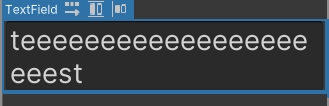
Why can't label/Text field expand vertically ?
my flex-direction is row and wrap is wrap
 obsidian jungle
flint wagon
Hi guys. Any tips on how to work with object fields? Specifically the RegisterCa...
obsidian jungle
flint wagon
Hi guys. Any tips on how to work with object fields? Specifically the RegisterCa...
I've been setting types in UIBuilder. Not sure what the correct way is when spawning dynamically in C# :/
empty void
rare quiver
https://i.imgur.com/VDbmCKT.png
Yes, but apparently when it finally renders in a window, all the text is rendered in 1 line making it go beyond the window width(hence not visible)
In edit mode(UI Builder), it's fine and dandy. Also, I am rendering this in a editor window class by cloning the uxml file to the root(which is the normal way)
rare quiver
I'm doing the same thing, but i got to go now
If you're using a textfield like in the image, make sure to enable Textfield - Multiline, however that alone doesn't work.
You also want to make sure Text - Wrap is turned on
This is how that codesnippet should look like: <ui:TextField text="teeeeeeeeeeeeeeeeeeeeest" multiline="true" style="white-space: normal;" />
empty void
rare quiver
I'm doing the same thing, but i got to go now
If you're using a textfield like i...
Textfield will allow editing which I don't want. I just need to show multi line information, which can't be edited.
obsidian jungle
hm mine seems ok

that is the result of pressing the return button though.... if you want it to wrap with excessive text...
still seems fine.... i get this result after just enabling wrap

but you say you are wrapping, so problem must be somewhere else
fervent bay
Hello, why do scroll views feel so weird ? im using ui toolkit for runtime with version 2021.3 and in the editor scroll view scrolls veeeeerry slowly and changing vertical page size doesnt do anything, also, I want to be able to scroll by dragging elements with the mouse, it seems I've no way to do that out of the box
 karmic depot
Hi everyone how do you refrence a list with choices in a dropDownField in uxml? Thanks for help
obsidian jungle
there is a string field, just separate your words with a comma
if you fill it out and save, you can see what shows up in the xml file

@karmic depot
karmic depot
<ui:DropdownField label="Language" index="-1" choices="System.Collections.Generic.List`1[System.String]" name="language_selector" focusable="false" style="font-size: 24px; flex-grow: 1; -unity-font-style: bold;" />
so this is wrong?
obsidian jungle
your choices field has the default value there
you gotta remove that system.collections.blabla and replace it with choices you want
karmic depot
but the choices I want is from a list in c#
obsidian jungle
oh ok i show u soon if no-one else has
karmic depot
Thanks!
empty void
obsidian jungle
hm mine seems ok
It was a bug. Basically, by default, Text wrap property is set to "white-space"(the first option in text wrap) but I had to write it in code to sort of enforce that value. After doing that, it worked.
obsidian jungle
oh right, sometimes i set my things up in UIBuilder too and they look totally messed up, then i hit save and they fix themselves lol
@karmic depot you can just assign an array of strings directly to your dropdown choices in C#

it only takes strings is the problem, which is annoying if your list is some other type
like if you have an array of weapons, and each weapon has name and damage etc
karmic depot
obsidian jungle
it only takes strings is the problem, which is annoying if your list is some oth...
It is only strings
obsidian jungle
ah ok
karmic depot
Okay so I should just delete choicse="ystem.collections.blabla"?
obsidian jungle
well if you are overriding choices in C#, no need
karmic depot
But is there any reason to have it since it does nothing?
obsidian jungle
guess not lol. I remove it cos it makes me sad to look at it
karmic depot
Also what does index="-1" do?
obsidian jungle
i think that is default "nothing selected"
you can set it manually to whatever choice you want
karmic depot
In this line what should I write instead of _self and names?
 obsidian jungle
_self should be a reference to your dropdown field
and names should be your string array/list
sorry, i took a snippet form one of my extension methods, hence the weird 'self' naming
karmic depot
Np, the reference to my dropdown field where do I find it?
 obsidian jungle
uh, hm, depends on your C#
is this for a custom inspector, or editor window?
if it's for in-game, i have no idea, haven't done an in-game implementation for this yet
karmic depot
obsidian jungle
is this for a custom inspector, or editor window?
Hmm not sure what either is haha
karmic depot
obsidian jungle
if it's for in-game, i have no idea, haven't done an in-game implementation for ...
I think its ingame
karmic depot
Doing this gives me an error saying "The name 'language_selector' does not exist in the current context"
 obsidian jungle
you probably need to get a reference to your uxml first
you might wanna learn some of the foundational stuff first from one of the tutorials out there
https://www.raywenderlich.com/6452218-uielements-tutorial-for-unity-getting-started
raywenderlich.com
In this Unity tutorial, you’ll learn how to use Unity’s UIElements to create complex, flexible editor windows and tools to add to your development pipeline.
tepid folio
I've got a MVP working, but man using UI Elements was a terrible idea. The tool I made isn't even working with my Unity 2020 project. I'll have to re-write it using old UI anyway now.
tulip sparrow
I'm still semi confused on how to cancel default actions. Just like, in general, IDK if I've overlooked it, but is there a visual like https://docs.unity3d.com/Manual/ExecutionOrder.html but for UIToolkit? I know I've seen visuals for bubbleup and trickledown, but, I think having something similar for UIToolkit would be nice? As in Subscription Events > DefaultExecution > DefaultExecutionAtTarget. Unfortunately, I have never actually looked into how to give Unity feedback, as most times I find feedback to never go anywhere. Just the appearance of feedback to matter. (usually a common strategy in game development) hehe
karmic depot
how do you add choices to dropdown field from c#?
 hybrid galleon
What's the expected way to find the local position of a visual element (with regard to the parent element) ? There doesn't seem to be any way to do this directly, as far as I can tell.
empty void
myDropDownField.choices = <list of strings>
that is for adding choices in one go.
you can also add one by one:
myDropDownField.choices.Add("MyChoice");
karmic depot
empty void
myDropDownField.choices = <list of strings>
How do you refrence the dropdownField?

this is somehow not working and I cant figure out why
tulip sparrow
hybrid galleon
What's the expected way to find the local position of a visual element (with reg...
VisualElement.layout
The position and size of the VisualElement relative to its parent, as computed by the layout system.
hybrid galleon
tulip sparrow
`VisualElement.layout`
Ah, thanks! I'll try this and see how it works
tulip sparrow
hybrid galleon
Ah, thanks! I'll try this and see how it works
I also believe everything in resolved style is relative to the parent also?
can also try out VisualElement.contentRect if the info in layout doesn't work
The rectangle of the content area of the element, in the local space of the element
hybrid galleon
Yeah I was using resolvedStyle.top and resolvedStyle.left so far
hybrid galleon
tulip sparrow
can also try out `VisualElement.contentRect` if the info in layout doesn't work
This is in the local space of the element and not the parent. So it doesn't seem to carry any position information
min returns 0,0 when I tested it
tulip sparrow
hybrid galleon
This is in the local space of the element and not the parent. So it doesn't seem...
can also try out VisualElement.localBound. Sorry, a lot of what I've done in local has been from mouse positioning and then an element going to that spot haha
karmic depot
How do you make a dropdownlist in uxml?
tulip sparrow
hybrid galleon
min returns 0,0 when I tested it
well, part of the problem is some of the values read from VisualElements must be done after the layout pass. So, the easiest way to do this is to register to, or use the default action if inheriting, GeometryChangedEvent and then reading the values
since a lot of these properties are just shorthand if you will from styles that Unity made, they still need to be done after the layout phase
hybrid galleon
tulip sparrow
well, part of the problem is some of the values read from VisualElements must be...
Hm, I think if the layout pass hasn't happened you get NaN instead of 0?
tulip sparrow
hybrid galleon
Hm, I think if the layout pass hasn't happened you get NaN instead of 0?
Not in all cases, but, I could be wrong. I also think if you set a value inline, you will get immediate results from the resolved style. Still trying to understand this more everyday
hybrid galleon
tulip sparrow
Not in all cases, but, I could be wrong. I also think if you set a value inline,...
ah, that makes sense. I'll have to test with the GeometryChangedEvent to make sure in that case
tulip sparrow
sometimes it's pretty dumb though, like, this is how I have something setup in the "initialization" of one of my classes because of this wait.
        void OnGeometryChangedEvent(GeometryChangedEvent e)
        {
            MinX = 0.0f;
            MinY = 0.0f;
            MaxX = target.parent.resolvedStyle.width - target.resolvedStyle.width;
            MaxY = target.parent.resolvedStyle.height - target.resolvedStyle.height;
            target.UnregisterCallback<GeometryChangedEvent>(OnGeometryChangedEvent);
        }
I've been trying to avoid that as much as possible since async code just to check and adjust values on creation of a new VisualElement feels a bit...ungainly
hybrid galleon
tulip sparrow
sometimes it's pretty dumb though, like, this is how I have something setup in t...
yep, exactly
tulip sparrow
It's why I've been trying to transition some of my things into ExtensionMethods. I haven't figured out a good way yet to make like a universal extensionmethod for GeometryChanged
Tried to make something earlier where I could do like VisualElement.WaitForFrame(Action) but it was a mess for now so I'll come back to it
I was trying to hook into monobehaviours update though, so that is why I probably got confused. Didn't just do a GeometryChangedEvent
how exactly does GetPooled work? Haven't used it before, so kinda confused on it. If I want to register something to lets say, a PointerOverEvent do I use that to check if the element is already registered to it?
I guess, how do I check if an element is already registered to an event before accidentally registering it again? I know how to get a delegates invocation list, but I guess IDK how to get these ones?
tulip sparrow
oh wait, if I'm reading this correctly, I can register to the same callback multiple times? Just not register the same method to the same callback multiple times?
karmic depot
This code should create a dropdown list but inst working somehow does any know why?
 obsidian jungle
@karmic depot the stuff i told you yesterday will work, where you've gotten stuck though is step #1, getting a reference to your dropdown. You need to follow a tutorial to cover the basics of UIElements cos it really depends how you're using the dropdown as to how you should get your reference to it
In general
DropdownField ddf = ve.Q<DropdownField>("name-of-dropdown");
Then you can start using ddf to refer to your dropdown from then on. But idk how you are building your setup, or what ve should be in your case. That's why im recommending using a getting started tutorial so you can get past the fundamental bits yourself
empty void
karmic depot
this is somehow not working and I cant figure out why
Error?
tribal void
Does the password boolean not work on a text field when it is set in the editor?
Whenever I save, it just resets itself to false every time
karmic depot
empty void
Error?
no error I just cant open it
karmic depot
obsidian jungle
In general
DropdownField ddf = ve.Q<DropdownField>("name-of-dropdown");
Then y...
But how about just making a dropdownfield couse the thing I'm doing is not working (just hard coding in the different choices)
empty void
karmic depot
But how about just making a dropdownfield couse the thing I'm doing is not worki...
you can do that by:
var dropDownField = new DropDownField();
dropDownField.choices.Add("my choice 1");
dropDownField.choices.Add("my choice 2");
myVisualElement.Add(dropDownField);
Where myVisualElement can be rootElement or any other VisualElement inside it.
(If I understood it correctly, you wanted a C# solution as an alternate to the uxml solution)
karmic depot
empty void
you can do that by:
```cs
var dropDownField = new DropDownField();
dropDownField...
Would this be writin in uxml?
empty void
no a C# file
karmic depot
My code looks a like this, the current (not working) dropdownfield is made inside a menu
 empty void
karmic depot
My code looks a like this, the current (not working) dropdownfield is made insid...
empty void
karmic depot
My code looks a like this, the current (not working) dropdownfield is made insid...
Don't use images to show code texts, can't see any thing but in any case, if you can get the dropdown to render on the window, rest is an easy task.
karmic depot
empty void
Don't use images to show code texts, can't see any thing but in any case, if you...
Understood. This is how it looks in unity the problem is the dropdown menu dont open
 empty void
karmic depot
Understood. This is how it looks in unity the problem is the dropdown menu dont ...
empty void
karmic depot
Understood. This is how it looks in unity the problem is the dropdown menu dont ...
How did you add that option "en" in it ?
I suppose other control elements(like the exit button or the sliders above) are working.
karmic depot
from a c#
yes

I can only send image of the code appperently
but this is where the language is set to en
empty void
karmic depot
remove the code line:
language_selector.index =....
and try again.
oh wait this must be CreateGUI function to set default value
empty void
karmic depot
from a c#
When clicked on the dropdown, does the dropdown list even open at all ? (to show all the available choices)
empty void
DropdownField does not open when there are no choices available, that I am sure of but will open even if there is only one choice.
in this case, there is at least one choice available.
karmic depot
There should be many. I think the problem is in the uxml I send ebove
the code might be outdated since it used to work in er previos version of unity
empty void
karmic depot
There should be many. I think the problem is in the uxml I send ebove
Found it...
I think
your DropDownField is set to focusable=false
karmic depot
what should this be
 karmic depot
okay I can try
empty void
Use the UI Builder
karmic depot
the Ui builder?
empty void
yes, how else are you making your UXML files ?
writing XML is pain.
From the Unity toolbar
Window > UI Toolkit > UI Builder
Also, double clicking the uxml file inside Unity should open that in UI Builder.
hmmm Focusable is not the issue.

 empty void
karmic depot
empty void
karmic depot
yeah, checked it myself. Focusable is for keyboard support.
karmic depot
Did the images I send help or do you need something else?
empty void
karmic depot
Did the images I send help or do you need something else?
Image of the dropdownfield's settings/inspector perhaps, although the xml image doesn't show anything wrong.
Also, that C# code you sent earlier, is that in the Start function ?
karmic depot
This is a function that should run when esc is pressed and the menu is "called"
 empty void
karmic depot
This is a function that should run when esc is pressed and the menu is "called"
empty void
karmic depot
This is a function that should run when esc is pressed and the menu is "called"
yeah I meant to say, the function containing that code should be called once(not every frame).
empty void
karmic depot
This is a function that should run when esc is pressed and the menu is "called"
Also this screenshot is of the child element PopupTextElement, I was interested in DropdownField which is the grandparent to this
 empty void
karmic depot
empty void
karmic depot
I want the parent of this.
empty void
karmic depot
I think it is called everytime you press esc and not every frame
That should be fine.
karmic depot
 empty void
Does any of those elements say DropdownField at the top of inspector when selected?
Instead of VisualElement it should say DropdownField

 slender token
I see that unity have IMGUIContainer to host imgui as visual element. I wonder if I can do the other way around. Basically if I'm inside some immediate OnGUI can I draw a visual elements tree somehow?
 stone urchin
Does the UI toolkit have an impact on performance?
 old gorge
Why does a undo on a TextField only undo one letter at a time?
 halcyon scroll
Hey guys
I want to have spritebased UI elemts
and I have this here
but I want it to retain the edges
how do I need to set it in the sprite editor

 halcyon scroll
I was using images instead of panels,
panels now solved my problem
 true cobalt
Has anyone utilized the InspectorElement or BindableElement at all for UI Elements?
I'm trying to make a scriptable object, that when added to my scriptable object, it loads the inspector / property drawer for it, without reinventing the wheel. Seems in 21.3.3f1, it fails rather spectacularly 
 golden brook
Hey Everyone
I'm using UIToolkit to make a custom editor
I want to make a custom VisualElement inherited from ListView, and be able to change the list from inside of it
but I have lot of troubles doings that
public class CustomListField : ListView
{
    public new class UxmlFactory : UxmlFactory<CustomListField , UxmlTraits> { }
    public CustomListField () : base(){

        ...
        var btn_add = new Button();
        btn_add.Add(new Label("Add ..."));

        btn_add.RegisterCallback<ClickEvent>(OpenPopup);

        hierarchy.Add(btn_add);
    }

    void OpenPopup(ClickEvent evt)
    {
        var e = (VisualElement)evt.currentTarget;
        // This popup show a list of elements and returns the selected element using a callback
        CustomDropdown.Open<CustomData>((VisualElement)evt.currentTarget, (data) => {

            // Dont know how I'm supposed to update the array collection from here.
            // I would like to be able to add/remove items
        }, false,null);
    }
}
Is there a way to know whether during click action from new input system, anything in UI was clicked?
I need some kind of system that avoid doing ingame logic of click, when click is done on UI
empty void
https://docs.unity3d.com/ScriptReference/UIElements.VisualElement-visualTreeAssetSource.html
This property is always null even if I clone a uxml into a VisualElement. The cloning happens without any issue, as it gets rendered and is reactive.
As per the documentation, it should have the reference to the VisualTreeAsset if cloned.
empty void
gusty estuary
Is there a way to know whether during click action from new input system, anythi...
I dunno if there's a direct solution available, but you can set a "global" flag whenever the mouse pointer is inside/over the UI area/ a UI Element.
Check for this flag in the function associated to the click input and return if true.
empty void
golden brook
```cs
public class CustomListField : ListView
{
public new class UxmlFactory...
Why do you need a custom DropDown system ?(I am trying to assess if we can achieve what you want with the default DropdownField)
golden brook
empty void
Why do you need a custom DropDown system ?(I am trying to assess if we can achie...
Hey @empty void and thank you for your reply. I made a custom dropdown field which is able to display icon and search through a collection
here how it looks
 empty void
Right, default DropdownField doesn't have image support.
golden brook
yes !
but maybe my issue is related to my lack of knowledge about how binding is supposed to work
I know I could be able to do this using a PropertyDrawer instead of a VisualElement with a binding because I can access the SerializedObject from there
but I would rather use a VisualElement i think it's cleaner
tulip sparrow
is there a way to get position from a style? I'm using layout.position, but always been told to do what you can through style if it exists
oh wow, I overlooked the position in resolved style, whoops
oh even more oops, that is is the absolute and relative
does translate only have a value after you give it one, or is it already taking into account padding on the parent?
tribal void
Could anyone tell me what is going on here?```cs
public class Product : VisualElement
{
public Product(DatabaseItem item)
{
ProductName = item.name;
}
    public string ProductName { get; set; }

    public Product() { }

    public new class UxmlFactory : UxmlFactory<Product, UxmlTraits> { }
    public new class UxmlTraits : VisualElement.UxmlTraits
    {
        UxmlStringAttributeDescription productNameAttr = new UxmlStringAttributeDescription() { name = "ProductName" };

        public override void Init(VisualElement ve, IUxmlAttributes bag, CreationContext cc)
        {
            base.Init(ve, bag, cc);
            Product ce = (Product) ve;

            var label = new Label
            {
                text = productNameAttr.GetValueFromBag(bag, cc)
            };
            ce.Add(label);
        }
    }
}
When I change the value of the UXML property it doesnt behave properly and just adds another text element to the VisualElement.Anyone able to say why that is? rough scarab
Try adding the label in the product constructor and just setting its value in Init
tribal void
ah, thats how you do it
so Init is not the initializer? it takes whatever exists and adds stuff to it then 🤔
as in, interpret the values from the attributes and applies them
rough scarab
Initialize VisualElement properties using values from the attribute bag.
Yeah, not for creating things
tribal void
fair enough. I must've missed that
one more thing as well, how do I set the background and pass in a sprite?
There doesnt appear to be a UxmlTextureAttributeDescription...
gusty estuary
Any tip how to get world position of VisualElement translated into screen?
worldTransform property returns values I don't really get. Those positions are far far away from screen.
here example, there are 9 visual elements (they are invisible)

I grab transforms from them aaaand
there they are in scene view

meanwhile I want exactly positions of those rects translated into current camera view
 ocean girder
Heya, new to UI Toolkit and was curious if VisualElement.Q<T>(name) really is the only way to obtain references to UI elements? It seems kinda expensive to look for a string and it annoys me.
 peak rampart
ocean girder
Heya, new to UI Toolkit and was curious if ``VisualElement.Q<T>(name)`` really i...
peak rampart
ocean girder
Heya, new to UI Toolkit and was curious if ``VisualElement.Q<T>(name)`` really i...
You can iterate through all of the children of an element if that helps. I'll provide an example.
Assume you have obtained a reference to a parent element called itemContainer using the VisualElement.Q<T>(name) syntax. Also assume that the children in the container are VisualElements.
foreach(VisualElement item in itemContainer.Children())
{
  // Do something with item
}
You're supposed to do it only once though
And often you do search on already found children
Which optimizes it
ocean girder
gusty estuary
You're supposed to do it only once though
you mean via an UIController or something, I guess...
gusty estuary
ppl do it differently
ocean girder
this still has the flaw (or at least I would call it one) that you're referencing by strings which makes it impossible to rename shit
gusty estuary
I personally just create class for each screen which clones asset and manipulates it
Then in order to enable screen, I just add this VisualElement to root of UIDocument
all Query manipulations only happen once
upon creation
then in case of need, all references are saved into fields
 static canyon
So I'm also not the biggest fan of strings.. however:
- They are the easiest way to decouple code from authoring
- In practice a lot of the time a visual element has only one or a few of the Type of child you're looking for so we often use e.g. Q<Toggle>() until the hierarchy gets more complicated (at which point we'll do Q<Toggle>("SomeToggle")
- Importantly, custom visual elements (as alluded to by Issue) are really powerful in being explicit and composable.
empty void
The Button component used to have this bool called interactable that disallowed clicks(greyed out) while still keeping it visible.
Is it possible with UIElement Button ?
static canyon
empty void
The Button component used to have this bool called interactable that disallowed ...
I think maybe you can just use the .enabled property for that
empty void
static canyon
I think maybe you can just use the `.enabled` property for that
Right, yeah SetEnabled is available. Thanks
 velvet frost
Is picking mode inherited by children elements?
Or do I have to set it for the entire hierarchy for it to be ignored
static canyon
velvet frost
Is picking mode inherited by children elements?
It's not inherited. In practice we haven't found too many that we've needed to set at once but if you have some situation where there are many, it's probably easiest to just edit the uxml directly.
velvet frost
static canyon
It's not inherited. In practice we haven't found too many that we've needed to s...
Alright thanks
tulip sparrow
does anyone know why the EnumField class doesn't seem to exist for me for some reason?
it's part of namespace UnityEngine.UIElements so not sure
lol oops, just realized I'm not on the newest unity
 toxic wraith
I created a HUD using UI Toolkit using this tutorial but looking into the controller script, I don't know how I would for example change VisualElement properties inside a Unity DOTS System. https://dots-tutorial.moetsi.com/ui-builder-and-ui-toolkit/responsive-game-ui-in-unity-ecs Does somebody already came up with the same problem ?

Code and workflow to make a responsive game UI in UI Builder
gusty estuary
toxic wraith
I created a HUD using UI Toolkit using this tutorial but looking into the contro...
Just use SystemBase as MonoBehaviour
you have update, OnCreate, OnStartRunning
toxic wraith
gusty estuary
Just use SystemBase as MonoBehaviour
but the data I want to display into the HUD is stored in an IComponentData. That means that I have to use a SystemBase to retrieve the data through an Entities.ForEach loop.
gusty estuary
toxic wraith
but the data I want to display into the HUD is stored in an IComponentData. That...
so, what is stopping you?
toxic wraith
I have an UIDocument with my uxml file. I want to change the width of a VisualElement with the data stored in my IComponentData
gusty estuary
query for that component and assign to your VE
I don't really get what is it you're struggling with
toxic wraith
I'm struggling to retrieve my VisualElement in my SystemBase (Since it's the UIDocument file)
gusty estuary
Oh, you can simply do Object.FindObjectOfType<UIDocument>() in OnCreate
toxic wraith
oh ok ty i'll try it right away
toxic wraith
gusty estuary
Oh, you can simply do Object.FindObjectOfType<UIDocument>() in OnCreate
Since i'll be rewritting the code after implementing multiplayer, do you know if I need to add a UIDocument for each players ?
gusty estuary
no idea, never touched multiplayer code
toxic wraith
ok, thank you for helping me I was really stuck 👍
 regal pollen
hey guys, how can I match the background width of a Label to the text length? if the text becomes longer I'd like the background to stretch dynamically
toxic wraith
public partial class GameUISystem : SystemBase
{
protected override void OnCreate()
{
var UIDocumentObject = Object.FindObjectOfType<UIDocument>();
Entities.WithAll<UIDocument>().ForEach(
(UIDocument uiDocument) =>
{
uiDocument = UIDocumentObject;
}
).WithoutBurst().Run();
}
protected override void OnUpdate()
{
Entities.WithAll<UIDocument>().ForEach(
(UIDocument uiDocument, in PlayerData playerData) =>
{
var healthBar = uiDocument.rootVisualElement.Q<VisualElement>("player-health-bar");
healthBar.style.width = playerData.Health;
}
).WithoutBurst().Run();
}
}
``` I have implemented what you suggested but I get an error on this line `var healthBar = uiDocument.rootVisualElement.Q<VisualElement>("player-health-bar");`. But in the UIDocument that I created in the Scene, I added the uxml file containing a VisualElement with the name "player-health-bar" but i doesn't seem to be accesible. I also added a UIDocument component to my player archetype. Does someone has an idea why ? gusty estuary
toxic wraith
```cs
public partial class GameUISystem : SystemBase
{
protected ove...
gusty estuary
toxic wraith
```cs
public partial class GameUISystem : SystemBase
{
protected ove...
#archived-dots this question better be asked there
toxic wraith
ok i'll switch channel
tribal void
how do I make it so that an uxml property retains its value when the field is deselected? that string property isnt being serialized
using System;
using System.Collections;
using System.Collections.Generic;
using UnityEngine;
using UnityEngine.UIElements;

public class BetterTextField : TextField
{
    private bool placeHolderMode = true;
    private string PlaceHolderText { get; set; }
    private TextField field;

    public new class UxmlFactory : UxmlFactory<BetterTextField, UxmlTraits> { }

    public new class UxmlTraits : VisualElement.UxmlTraits
    {
        UxmlStringAttributeDescription placeholderAttribute = new UxmlStringAttributeDescription() { name = "PlaceHolderText" };

        public override void Init(VisualElement ve, IUxmlAttributes bag, CreationContext cc)
        {
            base.Init(ve, bag, cc);
            var btf = ((BetterTextField) ve);

            if (btf.field != null)
            {
                btf.field.value = placeholderAttribute.GetValueFromBag(bag, cc);
            }
        }
    }
}
Current implementation of ToolbarOverlay requires to do some really cumbersome stuff, like making EditorToolbarButton class for every button with unique id.
Last time I checked ICreateHorizontalToolbar was a public interface and now it's internal (like seriously?) I guess this interesting design choice is justified by ui consistency, but I don't care for internal tools.
Is there a way to just return VisualElement to put into horizontal or vertical toolbars like it used to be?
slender token
I think I've found a workaround for anybody interested:
[EditorToolbarElement(ID, typeof(SceneView))]
public class HorizontalToolbar : VisualElement, IAccessContainerWindow
{
    public const string ID = "MainToolbar/Horizontal";
    public EditorWindow containerWindow { get; set; }

    public HorizontalToolbar()
    {
        var ui = AssetDatabase.LoadAssetAtPath<VisualTreeAsset>("Assets/Scripts/Editor/MainOverlay.uxml");
        ui.CloneTree(this);
    }
}

[Overlay(typeof(SceneView), "main-overlay", "Game Toolbar")]
public class MainOverlay : ToolbarOverlay
{
    private MainOverlay() : base(HorizontalToolbar.ID)
    {}

    public override VisualElement CreatePanelContent()
    {
        var ui = AssetDatabase.LoadAssetAtPath<VisualTreeAsset>("Assets/Scripts/Editor/MainOverlay.uxml");

        var root = new VisualElement();
        ui.CloneTree(root);

        return root;
    }
}
that way you can create any visual element for toolbar in UI builder
not ideal (only one layout supported), but I'm happy enough
still, the current workflow is just from another world

 signal schooner
How can I make a label's font be large enough to fill the height of the parent?
Ive got this setup:
<ui:UXML xmlns:ui="UnityEngine.UIElements" xmlns:uie="UnityEditor.UIElements" editor-extension-mode="False">
    <ui:VisualElement name="FlexWrapper" style="flex-grow: 1; align-items: center; justify-content: center;">
        <ui:VisualElement name="TopRow" style="flex-grow: 0; width: 100%; align-items: flex-end; font-size: 14px; -unity-font-style: normal; max-width: none; max-height: none; height: 10%;">
            <ui:Label tabindex="-1" text="1000k Gold" display-tooltip-when-elided="true" style="align-items: stretch; font-size: 100%; height: 100%; -unity-text-align: middle-left;" />
        </ui:VisualElement>
        <ui:VisualElement name="Spacer" style="flex-grow: 1; width: 100%;" />
        <ui:VisualElement name="BottomRow" style="flex-grow: 0; width: 100%;" />
    </ui:VisualElement>
</ui:UXML>
does anyone know why my ui toolkit performance is pretty bad on a phone? (galaxy S21+)
even with a pretty basic UI the framerate seems to be very low (feels like 30 fps) compared to 700-800 fps on my desktop
 urban totem
I've overriden ExecuteDefaultActionAtTarget on a custom control. Does anyone know why I would get MouseEnter/Leave events but not MouseDown/Up events? If I register for the mouse button callbacks, they get work just fine.
protected override void ExecuteDefaultActionAtTarget(EventBase evt)
{
    base.ExecuteDefaultActionAtTarget(evt);

    // This works
    if (evt.eventTypeId == AttachToPanelEvent.TypeId())
    {
        RegisterCallback<MouseDownEvent>(OnMouseDown);
    }

    // This doesn't
    if (evt.eventTypeId == MouseDownEvent.TypeId())
    {
        OnMouseDown((MouseDownEvent)evt);
    }
 cerulean gulch
I'm trying the ui builder (for the first time) and I'm having trouble accessing the slider's label to style. Can somebody give me some tips on how to add a selector for it please?
 cursive escarp
Making a custom paged listview. Consists of a label, a propertyfield (to only see one element of the list at a time), and some controls to change the page index and rebind the propertyfield to a different element in the list.
I inherit from BindableElement and change the bindingPath of the PropertyField to $"{bindingPath}.Array.data[{PageIndex}]" in the constructor for my custom element.
Unfortunately, this doesn't seem to work. Anyone know how to "pass down" binding paths and bind child elements? Binding is such a black box...
 royal latch
how do you write a selector for multiple classes e.g. write a selector that applies to both text fields and buttons
https://forum.unity.com/threads/how-to-make-selector-list.834190/ has this been fixed?
Unity Forum
I'm trying to make a selector for both a class and children from a class, looking at normal css and docs its says it should be with comma, but...
 rotund cape
Hey all! Wondering if there is a native UI pack for iOS for unity
I've seen there's one in the asset store but it's out of date
 tacit forum
Are there any good tutorials on how to handle menu system with sub/nested menu in uitoolkit?
ocean girder
static canyon
So I'm also not the biggest fan of strings.. however:
- They are the easiest way...
the reference system via strings is indeed trash
cursive escarp
custom element's bindingPath is null at construction even though it's bindingPath attribute is set in UXML. Anyone know why?
 unborn bluff
I can not Click my button in World Space. In the pointer of mouse event stands the panalSettings. How i can fix that , that the button can pressed in world space ?


 merry kettle
I am tryn to achieve that i have a visualelement which i can click on, then instantiate a building preview a
and as long the mouse Button is clicked and instantiate the real building when mouse Button is releases. All works fine with the old Input GUI System. But in ui toolkit, i cannot get IT working. The onpointer down Event is fired, but the onpointerup event only gets fired when the mouse is over the visualelement or maybe another ui toolkit element i add the call Event to. BUT how can i get a Pointerup Event fired when releasing the mouse Button over my Terrain ? IT Drives me nuts...
 cloud panther
for the UI toolkit documentation it says:

This "Panel Settings Asset" option is missing from the context menu under UI Toolkit for me

This is all I have. Any ideas?
slender token
Is there a simple way to emulate clicking behavior on the element (I see I can use SendEvent but I'm not sure how to do that, not very familiar with immediate events)
more specifically I want to trigger object picker from ObjectField
though may be I can use object picker more directly? also couldn't find any examples and EditorGUIUtility.ShowObjectPicker seems tied very closely to imgui event loop
 wicked wing
Why does the slider move so slow? The page size is not a good option for increasing the speed for obvious reasons. What is the solution??
 misty minnow
Hey folks, decided to start messing with ui toolkit. Is it possible to get this scrollbar to control the items inside the visual element to the right of it?
 wary cloud
How can I move this button to the right edge of the window?

 silver needle
Hi,
I'm having some trouble with showing / hiding my UI
I want that when I'm clicking on a object, a canvas appears (with an UIDocument) appears
For that, i've used the "SetActive()" method of the canvas gameObject
But when I SetActive(false) it seems that sometimes the object is destroyed or null
I've tried to use the alpha of a canvas group also, but it doesn't affect my UIDocument
silver needle
wary cloud
How can I move this button to the right edge of the window?
Having multiple VisualElements (One for the row, 3 for the columns) and then you can set the align on each cell
wary cloud
silver needle
Hi,
I'm having some trouble with showing / hiding my UI
I want that when I'm cl...
You can use DisplayStyle.Flex and DisplayStyle.None
I think idk if it'll work in your situation but you can try
wary cloud
silver needle
Having multiple VisualElements (One for the row, 3 for the columns) and then you...
Could you maybe explain differently? I can't really understand what you mean
silver needle
wary cloud
Could you maybe explain differently? I can't really understand what you mean
I guess you don't use UIDocument then but if you do you can do styles like in CSS and html
 silver needle
If you know html it's just like that, if you don't, it's not that important
create a visual element that will extend all the screen
then create other visual elements inside it (one to make a row), and three other inside that row (to make the cells)
 merry lantern
Hi, everybody.
I'm trying to animate transitions (popup slides in/out of the scene).
Could it be done with .uss transitions? Is there a proper way of animating my VisualElements?
 copper solar
merry lantern
Hi, everybody.
I'm trying to animate transitions (popup slides in/out of the sce...
copper solar
merry lantern
Hi, everybody.
I'm trying to animate transitions (popup slides in/out of the sce...
YOu have multiple approaches. One is with USS, just have class Slide-IN and Slide-Out and just change them, and leave animation to UItoolkit. Or you can animate by changing values in coding, it is pretty much the same as changing old UI elements values like transform, rotate and etc.
royal latch
anyone else having issues with the space bar after loading a new scene when a button is pressed?
merry lantern
copper solar
YOu have multiple approaches. One is with USS, just have class Slide-IN and Slid...
thank you
wary cloud
how can I add a floating window over my graph view?
like in shader graph for variables
slender token
wary cloud
how can I add a floating window over my graph view?
I'd suggest to use this: https://github.com/alelievr/NodeGraphProcessor
It's relatively thin API over GraphView providing lots of convenient stuff
for example to make these windows you can use PinnedElement there. it has couple of examples to create floating inspectors
if you still want to do it yourself you can check https://github.com/alelievr/NodeGraphProcessor/blob/master/Assets/com.alelievr.NodeGraphProcessor/Editor/Views/PinnedElementView.cs essentially you need to derive from GraphElement give it manipulators for dragging and resizing and make sure it's on top
wary cloud
slender token
I'd suggest to use this: https://github.com/alelievr/NodeGraphProcessor
It's rel...
I know about it, but I already made a system myself, I just learned how to do it before finding this
NodeGraphProcessor is still in my project tho
I am currently using a TwoPane element or whatever it's called
slender token
yeah, I've done the same (unfortunately I had to modify NodeGraphProcessor to support it, out of the box it doesn't support graphview not in the window root)
wary cloud
I actually accidentally deleted my previous system while trying to switch to NodeGraphProcessor
It took a while cause it doesn't have much documentation
And the example assets weren't included in the install method they mentioned
But at least now I got further with a better system in just a couple hours
I guess I'll just use windows like in unity
wary cloud
slender token
yeah, I've done the same (unfortunately I had to modify NodeGraphProcessor to su...
I could maybe make a custom element like the Minimap thing for GraphView, but that tends to have scaling problems
 lyric saddle
how to change the speed of the mouse wheel scroll inside DropdownField or ScrollView this is making me crazy, and the forum solutions are outdated sadly 😦
wary cloud
is there any way to correctly get the mouse position in graph view?

why is the SearchWindow one different from the ContextualMenu event mousePosition
 eternal fiber
Yoyo need a little help here, with multiple documents on screen at the same time, only one gets input from the mouse (buttons etc.). Any way to fix this, thanks 🙂
silver needle
eternal fiber
Yoyo need a little help here, with multiple documents on screen at the same time...
If you found the answer i'm also interested in knowing how
static canyon
eternal fiber
Yoyo need a little help here, with multiple documents on screen at the same time...
I’m not sure why you would want that. If they don’t overlap it doesn’t matter and they overlap, wouldn’t you want eg a button on top to prevent clicking on a button underneath it? Just to check are you aware of being able to set the ‘picking mode’ for visual elements to ignore to help control this?
Otherwise I’m curious about your use-case.
silver needle
My use case was having multiple panels and canvases that you can move (rts style) and open dynamically
If you think it's still better to have one UIDocument "per screen" i'll try it this way, but i thought that it was better to have a panel per functionnality
For example 1 panel that shows the units, one panel to create units, one for the minimap, etc.
eternal fiber
In my case there are some general documents (inventory, popup) that carry from scene to scene, then there are some in-scene documents, but as stated only one can be interacted with a time. I don't really understand if they don't overlap it doesn't matter because they don't overlap and it very much matters. If I disable the interactable one another "rises to the top" and is now the interactable one, even after re-enabling the one I turned off. It sounds like I shouldn't really have this problem, any thoughts?
silver needle
Also, separation of concerns, but if it's better not to do it, i wont 🙂
@static canyon
static canyon
I would suggest separate uxml files rather than separate UIDocuments just in general. Though sometimes multiple uidocs are required if eg you need to insert a blur pass. I thought you were asking for mouse events to fire for two panels at the same time but perhaps not? In which case it should “just work” - just be sure to set the picking mode for eg the root of your uxml etc. note that the picking mode is not inherited.
So let’s say you want an ‘inventory’ panel on the left and a ‘menu’ on the right. I would suggest one uxml for each then I would instantiate them and add them to the main UIDocument. Set the root of the parent to flexdirection row and that should just work.
Let’s say that instead of that the menu had a frame that wanted to take up the whole screen. In that case I’d set the menu root (lets say the frame was a border of the root visual element) to use position absolute: 0,0,0,0, then set the root visual element of the menu to ignore picking, then eg set the child with buttons in to have a fixed width.
Sorry on mob atm otherwise I’d send screenshots
silver needle
Thanks for the advice 🙂
 quartz agate
Hello, is it possible to use a UI Document from this ui toolkit as world space? Or should I use canvas instead?
 rain briar
quartz agate
Hello, is it possible to use a UI Document from this ui toolkit as world space? ...
rain briar
quartz agate
Hello, is it possible to use a UI Document from this ui toolkit as world space? ...
UI toolkit does not support world space rendering
silver needle
Hi,
existential question here :
I'm going to do advanced ui, for an RTS, with multiple panels that can move, that can resize
I've tried doing things in UI Toolkit, but i feel that it's "not fully finished" it feels like simple css
But I want text in text mesh pro, with materials, and glowing effects
Am I going in the wrong direction with UI Toolkit ?
static canyon
quartz agate
Hello, is it possible to use a UI Document from this ui toolkit as world space? ...
If you set the panel settings to output to a render texture, you can then put that texture on a material on any mesh. In my exp it works pretty well for putting ui in world space.
static canyon
silver needle
Hi,
existential question here :
I'm going to do advanced ui, for an RTS, with ...
static canyon
silver needle
Hi,
existential question here :
I'm going to do advanced ui, for an RTS, with ...
The text effects aren’t as fully featured as in traditional workflow. If custom materials are an absolute requirement for your text then you will struggle. Fwiw though a) you can do this stuff https://forum.unity.com/threads/feedback-wanted-new-text-engine.1007585/ and b) a lot of the tmp material stuff is less useful than it appears. Eg depth sorting in world space, drop shadow not looking very good etc.

Unity Forum
Hello, today we are excited to share with you the last major addition to UI Toolkit 1.0, namely the integration of a text engine coming directly from...
quartz agate
static canyon
If you set the panel settings to output to a render texture, you can then put th...
I'll try that, thank you!
I supposed that, thank you too @rain briar
fervent bay
Hello, how to show email specific keyboard when clicking on a text field in Android ?
wary cloud
so in shader graph, if you drag an edge out of a port and release it into nothing
it opens the search window

how can I detect this?
edge.output == null
uhhhhh
nvm you can use an interface!


 slender knot
When I place 5 elements in a flex row with a width of 20% each, they fully take up the parent's width. When I change each element to have a width of 18% with margin left and right of 1%, the elements are wider than the parent. Is this the expected behaviour and why does this happen?
It appears that adding a margin makes the content larger, doesn't matter if it's percentages or px. This doesn't feel like something that is supposed to happen.
Update, it does matter if it's percentages or px. Percentage margin makes the content wider.
 unreal citrus
does anyone get extremely low fps when in the UI builder editor but get high fps when not in the UI builder editor?
I'm using 2021.3.4f1 btw
 tame pawn
tawny flax
tame pawn
tawny flax
Two questions
1 - Is it somehow possible to deselect RadioButton?
I'm trying to replicate functionality that we had in old UI, when there are a lot of Toggles connected to ToggleGroup that Allows SwitchOff
2 - I was trying to register my PointerUpEvent handler on RadioButton to deselect it (value = false / SetValueWithoutNotify(false)) if it's selected and clicked again, but after I change the value, it is selected once again 😦 Can I somehow execute my handler after built-in functionality?
rain briar
tawny flax
Two questions
1 - Is it somehow possible to deselect `RadioButton`?
I'm trying t...
Why do you not want to use checkboxes?
tawny flax
Because I want to have only one selected at a time
rain briar
tawny flax
Because I want to have only one selected at a time
But basic radio button functionality provides this, if you want to deselect it anyway, there wouldn't be another radio selected, no?
tawny flax
The thing is I can't deselect RadioButton in UITK. It just keeps being selected when I click on it
rain briar
tawny flax
The thing is I can't deselect `RadioButton` in UITK. It just keeps being selecte...
The way to deselect is to select the other radio button, is this not what you want?
tawny flax
Oh, sorry, yeah, but I also want nothing to be selected 🙂
rain briar
tawny flax
Oh, sorry, yeah, but I also want nothing to be selected 🙂
Ah okay, so you want three states, rb1 selected, rb2 selected, or none selected?
tawny flax
Yeah
rain briar
Okay, so you can do this with checkboxes, but on each checkbox referenced in a script that, whenever you set a checkbox to true, check status of the other checkboxes, and deselects all other ones
tawny flax
Yeah, this is an option, thank you
I just thought, maybe there's an easier way 🙂 Like, add some settings element where I can control this deselection functionality. Oh well
rain briar
tawny flax
Yeah, this is an option, thank you
I just thought, maybe there's an easier way �...
If you really want to use them, I had to implement that for work. So you create a third radio button that is hidden and label it as a None value, if you try to click on a true radio, set the none radio to true instead. But since it's hidden, the user will not know and it looks like they deselected the radio button
tawny flax
Hm, nice idea, will try it! Thanks
tawny flax
rain briar
If you really want to use them, I had to implement that for work. So you create ...
Unfortunately it didn't work 😦 Because of what I wrote in question 2
I click on selected Radio, in PointerUpEvent handler select hidden Radio, then selected Radio becomes false, but because I clicked on it and it became false, it changes to true again 😦
wary cloud
I have this weird issue with Groups in Graph View not initializing properly
I have to move them for them to be recognized by graph view
and then they recenter as well
no events occur as well
wary cloud
basically
    {
        base.SetPosition(newPos);

        functionNode.position.x = newPos.xMin;
        functionNode.position.y = newPos.yMin;
}```every time you move the group the first time, newPos just gets reset to 0
merry lantern
Hi!
I'm using a Dropdown element on my UI but it has this weird behaviour.
On the editor, the preview looks fine but on the Simulator/Game Window it is shown like this.
How do I fix it?

Any ideas?
... erasing the Label's text on the dropdown solved the issue.

 spiral lotus
Does anyone know of a way to get images into the textmesthpro text object or regular text via URL. i know i can use a sprite asset with glyphs, but i want to add from a url.
 tidal lance
Hello I was wondering if there is any work around with this one. It seemed that whenever I try to render my camera into the canvas, once I change the camera to solid color the camera starts tearing.

I placed it on a canvas to create a pixel effect but it seems solid colors don't work
 tropic fractal
Good afternoon, can anyone help?) Unity 2022.1.6f1 has a GridLaoutGroup in it is a set of ui images that are automatically distributed to the grid. I go through the transform grid of the foreach element and take the child transforms, i.e. I want to get their current position, but each child element has the SAME LOCAL AND GLOBAL POSITION. I've already broken my head.


 gusty vapor
wary cloud
I have to move them for them to be recognized by graph view
gusty vapor
wary cloud
I have to move them for them to be recognized by graph view
SetPosition must happen after anything else.. set it in the next frame
wary cloud
I fixed it
by setting it in the constructor
just calling the function
it wasn't needed for the Nodes, but I guess the Groups need that and are bugged
gusty vapor
Schedule.execute is your bff when working with graphview
gusty vapor
Its to schedule your execution..
SomeVisualElement.schedule.Execute(someLambdaHere).ExecuteLater(someVal);
wary cloud
I don't know how it would help with anything
gusty vapor
Basically it says, it will execute after anything else in SomeVisualElement
wary cloud
ah, I see
gusty vapor
It would, trust me .. that small little function is very handy when working with uielements
wary cloud
I don't see how, and my system is almost done so-
eh?
I'll look into it tho if I have time
gusty vapor
That setposition issue, you can fix it with that
wary cloud
I mean, I fixed it by literally just calling it in the Initialize function
gusty vapor
Im working with graphview as well cureently, the quirk you mentioned is very familiar to me
wary cloud
because the Group element for some reason doesn't do that automatically like the Node element
gusty vapor
Yes thats one thing
wary cloud
so moving it would offset it to 0, 0
gusty vapor
Another way is to schedule it
wary cloud
yeah
 trail oasis
what is justify content exactly?

the icons dont really make it visually obvious and hovering over them has no description
 cyan pike
hi, how can I repaint from property drawer using ui elements?
trail oasis
is ui toolkit buggy ? nothing seem to line up properly
rain briar
trail oasis
is ui toolkit buggy ? nothing seem to line up properly
Make sure you're creating UI on your development resolution in UI builder
rain briar
trail oasis
what do you mean by that
If you select a uxml in UI builder, there should be a display resolution, and you can set width and height (I use 1920x1080) for the UI builder preview window
trail oasis
oh ive been setting it to game view
rain briar
trail oasis
oh ive been setting it to game view
Yeah I have trouble with game view on alignment too
trail oasis
hm made no difference for me after quickly testing it
it looks perfectly aligned in the builder
its just in game window where it isn't
rain briar
trail oasis
its just in game window where it isn't
Try maximizing game window?
 rain briar
trail oasis
yeh still bottom aligned
rain briar
trail oasis
yeh still bottom aligned
Hmm what are the alignment settings for the parent object of the text for display?
Make sure everything is center justified
trail oasis
i use % to align everything
the text is 100% width height of the parent then in text ive centered the font
 rain briar
trail oasis
the text is 100% width height of the parent then in text ive centered the font
rain briar
trail oasis
the text is 100% width height of the parent then in text ive centered the font
So the text object is a child of some box, what are the alignments for that box? Because it might be bottom middle justified for items
trail oasis
wouldnt the text be showing bottom in the ui builder in that case
because its perfectly centred in the actual builder
rain briar
trail oasis
wouldnt the text be showing bottom in the ui builder in that case
Ehh possibly, but the box can be too thin to tell
trail oasis
the text is absolute positioned by the way
because the parent has items left aligned for the progress bar to expand to the right
i needed the text to overlap the progress bar
without absolute it would just be below the whole element
rain briar
Oh okay, so I would make a visual element that occupies the space of the box, and have the text be relatively positioned in the center
trail oasis
but that visual element would be below the progress bar then

this is currently how its laid out so the text shows above the progressing bar
rain briar
trail oasis
but that visual element would be below the progress bar then
I just looked at how I handled this, and it seems the same as you, an absolute text element 100% width and 100% height of parent with text center justified
trail oasis
did you have same alignment issue?
rain briar
trail oasis
did you have same alignment issue?
No
trail oasis
can you show all the element settings ill try match it
rain briar
I guess make sure the size if the text is actually the same as the box by clicking and checking its margins
Yeah I will when I get back home
rain briar
trail oasis
can you show all the element settings ill try match it
If you click the text in UI builder, are the bounds going past the box?
trail oasis

yeh but strangely its above it
which makes the fact it aligns at the bottom even less logical lol
rain briar
I'm gonna guess that the label expands downward, so you have to make the label a child of the green box and have the w/h 100% of that, because it should never expand with that condition
trail oasis
cant be a child of the green box since it changes size
it goes all kind of wonky then

its very noticeably different
@rain briari found this weird issue

if i change the padding of the text it updates in game window but not builder window
rain briar
trail oasis
<@135911199450595328>i found this weird issue
okay so have the background box be:
 rain briar
and then the text will be:
 rain briar
just turn the Display->Visibility off
 rain briar
hmm, so then why is the text in your UI builder not growing to the background box size?
 rain briar
what are your panel settings like?
trail oasis
for which element
 trail oasis
 trail oasis
still no change
rain briar
hmm, send me the .uxml file and I'll take a look at it
trail oasis
hopefully you get the same bug 😛
what unity version are you using by the way
im on 2022.1.8f
it seems to be related to setting it to absolute position rather than relative
thats when it screws up for me
but then i cant have it overlap the progressing green bar
rain briar
hmm I got it to be centered, but your document design is much different than mine, so I had to rewrite it

I see you modify the transforms and pivots and use 50% relative positions
and the background is some arbitrary size
I recommend this tutorial to set up your docs, so that any doc will work with any resolution and there won't be alignment issues https://dots-tutorial.moetsi.com/ui-builder-and-ui-toolkit/intro-to-ui-toolkit-in-unity-ecs
They use a flex-grow = 1 option so the UI encompasses the whole screen. Just do the "Intro to UI Toolkit" and "Create a ScreenManager section"

Code and workflows on how to use UI Builder and UI Toolkit from scratch
but if you just want a temporary fix, add some margins to manually adjust the label position
 empty silo
Hello, was wondering if there is a way to zoom in on the sprite in the key frame for animation? My sprite is really small
trail oasis
rain briar
I recommend this tutorial to set up your docs, so that any doc will work with an...
the whole screen is a bit over kill as i just wanted a small window in the middle of the screen
i assumed using % would always work for any resolution too
trail oasis
rain briar
hmm I got it to be centered, but your document design is much different than min...
can you send your uxml so i can compare it to mine
rain briar
trail oasis
can you send your uxml so i can compare it to mine
I already deleted it, but I set up the document like so:
UXML:
-VisualElement (plain, only change is flex-grow = 1) (this is the screen element only purpose to position children on screen)
- VisualElement (background-box) Alignment is center justified
-Label (health-number) Text is center justified
trail oasis
what does flex grow mean ?
adapts size by its children ?
also what about the foreground box
rain briar
flex grow just grows to the available space, so a simple visual element with no siblings right under the uxml should fill the whole screen
rain briar
trail oasis
also what about the foreground box
foreground box can be a sibling of the label, so just another child to background box
trail oasis
mines going all kind've weird when touching alignment buttons
rain briar
trail oasis
mines going all kind've weird when touching alignment buttons
might have to make new elements and just rename to the old names or unset all the properties
trail oasis
this is center aligned horizontally yet its not doing it

its still seems to hug the top of the black background element
rain briar
set the justify to the 2nd option
trail oasis
but that just centers it
 rain briar
trail oasis
but that just centers it
rain briar
trail oasis
but that just centers it
oh actually, you can left justify it b/c you want it to be dynamic and then make it auto width
trail oasis
i want it centered left aligned
so it can grow to the right
now it seems to be correct wit hthe same 2 buttons

makes no sense since this is not how it looked in the first image
feels like theres some janky calculation going on with these buttons it doesn't always get it correct
rain briar
trail oasis
feels like theres some janky calculation going on with these buttons it doesn't ...
yeah you'll have to fiddle with the margins/padding to get it to look right on this configuration
trail oasis
shame it doesnt work like css does dont know why not using % and alignment wouldn't work by comparing to it's parent
seems like the simplest more precise approach yet its janky
rain briar
yeah it is unintuitive from a css/html background, but unity considers the flex-grow best practice
https://docs.unity3d.com/Manual/UIE-LayoutEngine.html
trail oasis
Use the flexGrow property (USS: flex-grow: <value>;) to assign a flexible size to an element. The value of the flexGrow property assigns a base weight to the size of an element when it’s determined by its siblings.
but i have no elements flexibly growing by its siblings 🤔
all i have is the green visual element increasing in width
by %
which i do via progressBar.style.width = new StyleLength(Length.Percent(p));
pretty sure unity did this method for their demo for a health bar
rain briar
ah hmm, interesting, maybe they did something funky to get it to work that way
trail oasis
rain briar
ah hmm, interesting, maybe they did something funky to get it to work that way
interesting, it centers if i left align the text

it matches the builder
but if i center it no longer keeps the horizontal alignment
oh it works now wtf
lmao
i just reloaded unity and its now centered with my original document
rain briar
So, to summarize the workflow:
- Create a VisualElement with flex grow = 1
- You can do whatever within this VisualElement acting as the "page" (so you can do the 50% alignment I think as long as its a child of this page)
trail oasis
i didnt use flex at the moment as im not sure i understand the use of it atm

it looks nice now though
rain briar
ah okay, nice
trail oasis
thanks for helping debug it though !
rain briar
sure thing
trail oasis
theres so many properties to remember
wary cloud
does anyone know how I could get this in my graph view?
 trail oasis
can a ui visual element be saved as a prefab and then instantiated in code?
trail oasis
god damn it its misaligning AGAIN

this system is beyond unusable
this is getting annoying now
even with absolute position instead of relative its completely off


 dull parcel
Hello! Do you guys know what approach should I take to make a plugin using UI-Toolkit as compatible as possible? I thought about making it in 2020 LTS because for example if I make the plugin in 2021 LTS there are things you don't have in 2020 like progress bar so maybe I can use some tools that in other versions don't exists and break the compatibility
 fast escarp
Hello, I am trying new UI toolkit. And I want to make a listview like this: https://s-mobilegaming.com/wp-content/uploads/2022/01/Heroes-in-call-of-antia.png But i cant add more than 1 element to a row in ListView?

 fast escarp
Also tried flex but it does this instead of moving to new row
 gusty vapor
fast escarp
Hello, I am trying new UI toolkit. And I want to make a listview like this: http...
gusty vapor
fast escarp
Hello, I am trying new UI toolkit. And I want to make a listview like this: http...
ListView wasn't meant for doing this.. somebody, pls correct me if I'm wrong
you technically can, but man...
fast escarp
gusty vapor
ListView wasn't meant for doing this.. somebody, pls correct me if I'm wrong
what am I suppossed to use then?
rough scarab
Grid Layout is under consideration in the roadmap. In the meantime you just have to use flex in a list view
fast escarp
rough scarab
Grid Layout is under consideration in the roadmap. In the meantime you just have...
thanks for info, I just did that but I cant disable selecting rows. SelectionType is none. Do you know how to disable these grey and blue selections?
 rough scarab
Add your own overriding style 🤷
fast escarp
where can I find the selector for these lines tho?
can I see the result tree(?) like html after it renders?
rough scarab
You can use the UIElements Debugger
It's probably in window/analysis or UITK, I'm on mobile and can't check
fast escarp
oh didnt know about it, thanks a lot

Soo I can see the :selected thing but cant find the light grey one
idk why there is a light grey either, seems kinda random
fast escarp
well it seems debugger doesnt show state..
light gray was caused by .unity-collection-view__item:hover
fast escarp
fast escarp
well it seems debugger doesnt show state..
my bad, it shows when the debugger has enough width
Okay last question just to make sure
https://cdn.discordapp.com/attachments/439354663079247873/996040134887739502/unknown.png https://cdn.discordapp.com/attachments/439354663079247873/996040135151988796/unknown.png


With my setup(Elements that contain 4 squares inside ListView), responsiveness is provided only by scaling
Can I make it so more elements fit to one row according to screen width?
tawny flax
I have a RadioButton and still want to handle its PointerDownEvent. Is it somehow possible or should I implement my own "RadioButton"?
fast escarp
Do I have to add these by hand everytime I create a new uxml? I want some global styles
 wary cloud
parameterDropdownField.Add(newParameter);```
why does this happen
why isn't it inside the dropdown field
parameterDropdownField.choices.Add(newParameter.text);
it seems I have to do this-
tawny flax
fast escarp
Do I have to add these by hand everytime I create a new uxml? I want some global...
You can add global USS here

 sleek pelican
Not sure if it should be asked here, but can we make a c# class (extending VisualElement) that uses the uxml file I designed for the control? For runtime
merry lantern
Hi!
Unity erased my last hour of work on the UI Builder after I changed some properties of an image I imported.
The image was being used in many places on the UI.
Besides not editing my assets with UI Builder open, is there a way to prevent this from happening?
urban totem
I don't know about everyone else's experience here but I approach UIToolit with a 0% trust in the GUI
merry lantern
😢