

1 messages · Page 25 of 1
 fast escarp
one is for default stuff that wont change from game to game and other is more game spesific stuff
https://cdn.discordapp.com/attachments/1303079012809179157/1509317083140198501/Movie_004.mp4?ex=6a18bc92&is=6a176b12&hm=427f28659a721bcc1d61201a31c03e4f8e701316153dc88093a8f16a88746f33& Just wanted to share some progress. I wrote about a problem here before: the initial animation state issue, which I solved with a 1-frame delay. I solved the visual 1 frame stagger by hiding it behind the loading UI :p
 outer flame
I wish there was something that works with playable director out of the box or something like animation clip 🙁
 fervent cloak
Seems like they added drop shadow support in the latest alpha
 shadow quartz
fervent cloak
- UI Toolkit: Added the drop-shadow filter function.
Seems like they added drop...
shadow quartz
fervent cloak
- UI Toolkit: Added the drop-shadow filter function.
Seems like they added drop...
Was about to just mention and announce that lol.
shadow quartz
outer flame
better AA next maybe ?
Text Core updates on the render side would be nice for AA.
 rugged shard
@shadow quartzcan you help me
shadow quartz
rugged shard
<@207684904379482112>can you help me
Do you have any styling on the buttons in a style sheet or is it all inline styling on the element itself?
Also do you have a screen shot of your panel settings asset
Not sure if you have used the UI Toolkit Debugger before, but you might be able to open it up and choose the panel your menu is on and see what the style for the text and buttons are. Basically make sure they match what are in your UI Builder to make sure your styles loaded correctly.
 forest bloom
rugged shard
<@207684904379482112>can you help me
forest bloom
rugged shard
<@207684904379482112>can you help me
also be careful doing this...
rugged shard
shadow quartz
Not sure if you have used the UI Toolkit Debugger before, but you might be able ...
alright i will give it a shot
rugged shard
forest bloom
also be careful doing this...
yeah dont worry i save everytime so the menu get not deleted
forest bloom
no im telling you be careful randomly pinging users in the server
its against the rules, if someone isnt happy you pinged them it can get you muted
shadow quartz
Oh I helped a couple people a few days ago and told them if they need more help I am okay if they pinged me.
So couple have asked before just pinging.
forest bloom
shadow quartz
Oh I helped a couple people a few days ago and told them if they need more help ...
Yeah of course, im talking about in general :)
shadow quartz
True
rugged shard
forest bloom
Yeah of course, im talking about in general :)
yeah i saw that he said that so no worries
there is no need to follow me in every room
forest bloom
rugged shard
there is no need to follow me in every room
nobody is following you, this is a public channel
besides you were already complaining how nobody is active here
rugged shard
forest bloom
nobody is following you, this is a public channel
just to make things clear
forest bloom
youre not really making anything clear
rugged shard
forest bloom
youre not really making anything clear
try learn something
this server for the people who wants to learn and develop thier gamedev skills
not to annoy strangers for fun
forest bloom
rugged shard
not to annoy strangers for fun
ironic youre the one saying that
rugged shard
forest bloom
ironic youre the one saying that
want anything else ?
forest bloom
a better comeback I suppose, but I guess we cant all get what we want
good luck with your thing.
rugged shard
forest bloom
a better comeback I suppose, but I guess we cant all get what we want
wym ?

thats my refrence btw

it needs a lot of work
 rough scarab
UI Toolkit is UIElements renamed
UI Toolkit is not UGUI, please see #📲┃ui-ux to ask general UI questions
Documentation
Developer Guide: https://docs.unity3d.com/Manual/UIElements.html
Comparison of UI Systems: https://docs.unity3d.com/Manual/UI-system-compare.html
Introducing the Vector API: https://forum.unity.com/threads/introducing-the-vector-api-in-unity-2022-1.1210311/
Runtime Support (2021.2+ is built-in): https://docs.unity3d.com/Packages/com.unity.ui@latest
Forum
UI Toolkit: https://forum.unity.com/forums/ui-toolkit.178/
Blogs and Videos
UIToolkit at runtime: https://blog.unity.com/technology/ui-toolkit-at-runtime-get-the-breakdown
Extending the Editor with UIElements: https://www.youtube.com/watch?v=I_kP06o2oyk
Samples
Editor Examples: https://github.com/Unity-Technologies/UIElementsExamples
Unite LA Turret Demo: https://github.com/Unity-Technologies/UIElementsUniteLATurretDemo
Migration
Versions below 2021.1 require migration steps when moving to 2021.2+:
https://forum.unity.com/threads/ui-toolkit-migration-guide.1138621/
rough scarab
rough scarab
*UI Toolkit is UIElements renamed*
**UI Toolkit is not UGUI, please see <#502171...
 opaque gull
😮
 analog bear
💀
 scarlet fossil
Is there any ETA when it will be ready for production?
opaque gull
Never
 umbral zodiac
@rough scarab sorry for pinging you but thank you so much for this!
 oblique vigil
what is thius
 hallow glen
From the very first line in the very first post,
UI Toolkit is UIElements renamed
And UIElements is basically HTML+CSS to make UI, instead of... UGUI? The old stuff, whatever it is formally called.
 tulip sparrow
Aha! I was just looking for this channel the other day! Glad to see it is here!
tulip sparrow
do I use IMGUIContainer for previewRenderUtility inside UITK?
I see MeshGenerationContext but I'm curious about an entire scene, unless
I do it all through that
tulip sparrow
Messing around with UITK more, I've done
    void CreateGUI()
    {
        Debug.Log("CreateGUI");
        InitializeFields();
        AddFields();
        visualElement.Bind(new SerializedObject(this));
        visualElement.RegisterCallback<GeometryChangedEvent>(GeometryChangedCallback, TrickleDown.TrickleDown);
    }
    void GeometryChangedCallback(GeometryChangedEvent gce)
    {
        Debug.Log(visualElement.contentRect);
    }
Works great! I assumed though the position part of rect would change, however, am I correct in saying that it wouldn't unless I changed it since it's local position would always be 0, 0, as a child of the EditorWindow?
Also, does a UIElement have something you can subscribe to to remove a callback? Or do I have to just do that in the EditorWindows ondisable/destroy?
 still lantern
tulip sparrow
Also, does a UIElement have something you can subscribe to to remove a callback?...
still lantern
tulip sparrow
Also, does a UIElement have something you can subscribe to to remove a callback?...
Attach/DettachPanelEvent (or something close to that)
tulip sparrow
still lantern
Attach/DettachPanelEvent (or something close to that)
Thanks, bud
not sure if correct, but,
    void DetachFromPanelCallback(DetachFromPanelEvent dfpe)
    {
        visualElement.UnregisterCallback<GeometryChangedEvent>(GeometryChangedCallback);
        visualElement.UnregisterCallback<DetachFromPanelEvent>(DetachFromPanelCallback);
    }
seems to be doing that! Thank you
 chrome owl
Is there a way to set which Visual Element will be the parent for child elements? For example, if I wanted to make something like a reusable background view:
UIBackgroundView:
Has a VisualElement called #container that has the background styles on it. I want this element to be the parent to child elements
UITestView:
Uses UIBackgroundView in its hierarchy. I want to add a label inside of the UIBackgroundView element, and have it be a child of the #container
UIBackgroundView

UITestView
 tulip sparrow
chrome owl
Is there a way to set which Visual Element will be the parent for child elements...
tulip sparrow
chrome owl
Is there a way to set which Visual Element will be the parent for child elements...
If you are talking about USS yes you can use the same USS for all UXMLs. Just note, that a change to that USS will also change the style for all UXMLs using it
chrome owl
tulip sparrow
If you are talking about USS yes you can use the same USS for all UXMLs. Just no...
no im not talking about the USS
tulip sparrow
chrome owl
no im not talking about the USS
if you are talking about having a visual container parent, you can have that also. You can have multiple visual elements in a visual element.
for example
 umbral zodiac
chrome owl
*UIBackgroundView*
umbral zodiac
chrome owl
*UIBackgroundView*
You could unpack the template container here and assign the label under it since its unlocked. If you are creating these by C#, then you can override contentContainer and whenever you add anything in that templatecontainer it will get added to visualelement instead.
chrome owl
umbral zodiac
You could unpack the template container here and assign the label under it since...
unpacking it defeats the purpose though, since it is not a reference to the original element anymore. any updates to UIBackgroundView would not be reflected in UITestView
umbral zodiac
chrome owl
unpacking it defeats the purpose though, since it is not a reference to the orig...
That’s true. Then your other choice is to create them using C#. As in your own library of ui elements.
chrome owl
yeah, i wish i could do this from the UI Builder, but that may not be possible
might have to just rely on C#
umbral zodiac
Yeah, sadly man. (I might be totally unaware of any other method)
still lantern
chrome owl
Is there a way to set which Visual Element will be the parent for child elements...
As far as I know the only way to do this is in C# create a class that inherits from a VisuelElement class and override the contentContainer property.
tulip sparrow
I remember reading something about parents and children let me see if I can find it
tulip sparrow
chrome owl
Is there a way to set which Visual Element will be the parent for child elements...
does this help at all? At least it looks like it's for what you are trying to do

 chrome owl
No I’m not talking about position, I’m talking about hierarchy
tulip sparrow
chrome owl
No I’m not talking about position, I’m talking about hierarchy
that shows how to use the hierarchy
there is also VisualElement.Hierarchy.parent
you can literally drag and drop the elements also
tulip sparrow
so I'm messing around with UI stuff in code to help me better understand it. If I want all the children to flex down, I would just do something like rootVisualElement.style.flexDirection = FlexDirection.Column; on the parent right? Instead of on every child, then, if I wanted to change it up for a specific child, I would do this again, but, on the childs root?
I'm also playing around with
        ve1.style.width = StyleKeyword.Auto;
        ve1.style.height = StyleKeyword.Auto;
        ve1.style.flexBasis = StyleKeyword.Auto;
        ve1.style.flexGrow = StyleKeyword.Auto;
And not entirely sure what flex properties I have to include if already using others. Like, do I need flexShrink if I'm using flexGrow?
I also think I'm not actually understanding StyleKeyword.Auto and it's just setting those values IDK if they have an enum to 2 lol
oh, think thats because I need to use ve1.style.height.keyword = StyleKeyword.Auto
 deep sequoia
Does anyone know if there is a way to disable this behaviour where when your press the return key inside a TextField it toggle your focus on this text field ? I tried registering for key event and preventing default nothing changed
 delicate talon
anyone have an example of ListView.UnBindItem?
I have been trying to figure out how that is suppsoed to be used for ListView and I can't seem to find anything on it.
delicate talon
Never mind I figured it out. I didn't know I had to add new data into the ItemSource in order for the data to be changed.
still lantern
delicate talon
Never mind I figured it out. I didn't know I had to add new data into the ItemS...
You don't. You need to call listView.Refresh().
delicate talon
Hold on I'm gonna try that
tulip sparrow
I'm using it, but, like, I really gotta know. Does GetValueFromBag have some sort of programming connotation?
delicate talon
still lantern
You don't. You need to call `listView.Refresh()`.
Calling ListView.Refreash() actually doesn't really fix my issue but the way I did it does for some reason
This is called when I want to add to my list
list.bindItem = (element, index) =>
        {
            Button ach_button = element.Q<Button>("achievement-button");
            Button del_button = element.Q<Button>("delete-button");

            ach_button.text = achievement_names[index];
            ach_button.clickable.clickedWithEventInfo += b =>
            {
                selected_Index = index;
                Debug.Log(selected_Index);
            };

            del_button.text = "X";
            del_button.clickable.clickedWithEventInfo += b =>
            {
                RemoveAchievement(achievement_Container.Achievement_List[selected_Index]);
            };
        };
And I call this when I need to refresh it and it works fine
ListView list = window.rootVisualElement.Q<ListView>("achievement-list");

        list.itemsSource = achievement_Container.Achievement_List;
        list.unbindItem = (element, index) => { };

        list.Refresh();
But if I change BindItem to UnbindItem and remove List.Refresh() the editor throws an error because some code gets a index is out of range error
as if it is still using old values
But the values I'm trying to put in are new
still lantern
delicate talon
Calling ListView.Refreash() actually doesn't really fix my issue but the way I d...
It depends on how you are adding/removing items to the list and how you assign the list (basically if you ever create another or edit another copy of the list).
still lantern
delicate talon
But if I change BindItem to UnbindItem and remove List.Refresh() the editor thro...
Well of course. It requires BindItem to be set in order to function.
delicate talon
I don't create a new list I just edit the one that already exists
delicate talon
still lantern
Well of course. It requires BindItem to be set in order to function.
Wait so if I want to clear the list UnbindItem isn't really needed then?
Because it seems like BindItem just clears the list of items and then adds new ones
still lantern
delicate talon
Calling ListView.Refreash() actually doesn't really fix my issue but the way I d...
Btw, just so you know, you are completely breaking C# naming rules for your fields/parameters, you should be using camelCase.
still lantern
delicate talon
Wait so if I want to clear the list UnbindItem isn't really needed then?
Correct.
still lantern
delicate talon
Because it seems like BindItem just clears the list of items and then adds new o...
You should read the docs if you haven't.
delicate talon
I have, but they never said anything about updating the list just creating it
Unless I missed something
still lantern
delicate talon
I have, but they never said anything about updating the list just creating it
Read the docs/comment for Refresh()
delicate talon
Thing is I don't think that works because in my code I set button names when I bind the items. I don't think Refresh() is going to do that for me.
It actually throws the error I was having issue with in the first place because of the index not being in range
still lantern
delicate talon
It actually throws the error I was having issue with in the first place because ...
Yeah.. you doin something wrong I think. Can you share your code to take a look at it?
still lantern
delicate talon
You are setting the bindItem callback to be nothing.
The only thing you need to do when an item is added/removed to the list is to call Refresh()
delicate talon
Yeah and that seems to work but if I tried UnBindItem nothing happens
still lantern
delicate talon
Yeah and that seems to work but if I tried UnBindItem nothing happens
Why are you setting it to nothing...?
delicate talon
Honestly I have no idea
still lantern
Do you still want it to display items?
delicate talon
Yeah basically the ClearList function just clears the list and repopulates it with new data
still lantern
delicate talon
Yeah basically the ClearList function just clears the list and repopulates it wi...
Try just doing list.Refresh() and nothing else.
delicate talon
Tried that and I get the index out of range exception when I try to repopulate the list
still lantern
delicate talon
Tried that and I get the index out of range exception when I try to repopulate t...
Where are you repopulating it?
delicate talon
OK wait I told it not to populate the list but instead just refresh and it works but i still get that error
I populate the list when I call AddAchievement
Basically I populate the list when I open my editor window and then again if I add something to the list or remove something
still lantern
delicate talon
I populate the list when I call AddAchievement
Yeah.... that would do it.
Just do achievement_Container.AddAchievement();
and then refresh the list.
that's all.
delicate talon
yeah that works. I will have to loop through all the buttons after and set their text
Thanks for the help 👍
still lantern
delicate talon
yeah that works. I will have to loop through all the buttons after and set thei...
What...?
Do you mean the buttons in the list?
delicate talon
yeah
still lantern
You shouldn't
tulip sparrow
why does every unity editor window include an IMGUIContainer? Is that part of the fallback?
still lantern
tulip sparrow
why does every unity editor window include an ``IMGUIContainer``? Is that part o...
It is for the background and header iirc.
delicate talon
still lantern
You shouldn't
I keep getting the IndexOutOfRange exception when I refresh the list. It doesn't take into account that the list was updated at all
But I think I know why
still lantern
delicate talon
I keep getting the IndexOutOfRange exception when I refresh the list. It doesn'...
You may be setting a different instance of it. Worst case you can just set the itemsSource instead of refreshing. But again you shouldn't need to.
delicate talon
I see what I was doing wrong. inside the BindItem function I was setting values based on old data every time I called Add achievement.
But if I pull the data directly from the object everything is fine and when I call Refresh everything is good
 jade sky
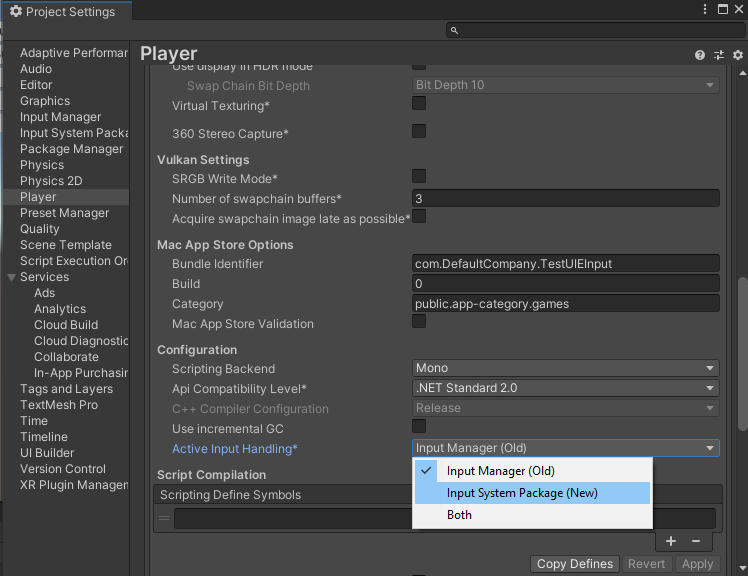
I am using new InputSystem, and installed UI Toolkit from package manager. I am getting this error:
InvalidOperationException: You are trying to read Input using the UnityEngine.Input class, but you have switched active Input handling to Input System package in Player Settings.
UnityEngine.UIElements.DefaultEventSystem+Input.GetAxisRaw (System.String axis) (at Library/PackageCache/com.unity.ui@1.0.0-preview.16/Core/DefaultEventSystem.cs:424)
I thought UI Toolkit supported new InputSystem 🤔 ?
rough scarab
No, support is "planned". I don't know why they don't prioritise it. I cannot imagine it being complex to have a stop gap too
chrome owl
still lantern
As far as I know the only way to do this is in C# create a class that inherits f...
This actually put me on the path to find how to do this in the UI Builder. contentContainer is what I needed to look for, and you can actually set this in UXML with content-container="true". Thanks for this!
You can't use UI Toolkit and the new InputSytem at the same time? 😐
still lantern
chrome owl
This actually put me on the path to find how to do this in the UI Builder. `cont...
Ah, cool. I thought there might be a way to do it in just UXML, thanks for letting me know 🙂
umbral zodiac
chrome owl
You can't use UI Toolkit and the new InputSytem at the same time? 😐
It does work since preview 8. I am using it without any fail on 2021.2 beta. (Just the normal event system and input system ui module)
For reference:
https://forum.unity.com/threads/feedback-wanted-new-input-system-support.963111/
In 1.0.0-preview.8 we have made the Event System component compatible with the new Input System.
By default, UI Toolkit’s runtime event loop relies on...
chrome owl
umbral zodiac
It does work since preview 8. I am using it without any fail on 2021.2 beta. (Ju...
Gotcha, thanks!
tulip sparrow
doesfocusOnlyIfHasFocusableControls not exist anymore? i see
public override bool canGrabFocus { get; }
in IMGUIContainer
public override bool canGrabFocus { get; }
public override FocusController focusController { get; }
public sealed override void Focus();
in VisualElement
public abstract FocusController focusController { get; }
public bool focusable { get; set; }
public int tabIndex { get; set; }
public bool delegatesFocus { get; set; }
public virtual bool canGrabFocus { get; }
public virtual void Focus();
In Focusable
bool hasFocusableControls = false;
internal bool focusOnlyIfHasFocusableControls { get; set; } = true;
public override bool canGrabFocus => focusOnlyIfHasFocusableControls ? hasFocusableControls &&
 base.canGrabFocus : base.canGrabFocus;
on the GITHub, so I guess, trying to figure out if testIMGUIContainer = new IMGUIContainer(OnGUIHandler) {name = "unity-test-imgui-field", focusable = true}; is correct, in terms of the focusable part?
tulip sparrow
ugh, I need to get better at using resolvedStyle instead of style
tulip sparrow
think I finally get this
        RenderTexture currentRT = RenderTexture.active;
        RenderTexture.active = Camera.current.targetTexture;
        Camera.current.Render();
        Texture2D image = new Texture2D(Camera.current.targetTexture.width, Camera.current.targetTexture.height);
        image.ReadPixels(new Rect(0, 0, Camera.current.targetTexture.width, Camera.current.targetTexture.height), 0, 0);
        image.Apply();
        RenderTexture.active = currentRT;
        root.style.backgroundImage = image;
I guess, I don't need Camera.current.Render() since Camera.current is already the current rendering camera?
 verbal quiver
Can I use the new ui toolkit in games yet (Unity 2021.1.20f1)? I've installed com.unity.ui and I'm trying to create a document but it's giving me errors:
Exception thrown while invoking [OnOpenAssetAttribute] method 'Unity.UI.Builder.Builder:OnOpenAsset (int,int)' : NullReferenceException: Object reference not set to an instance of an object
and
BadImageFormatException: Expected reference type but got type kind 17
Also a couple of assertion errors. Here's one for example:
[Worker0] Assertion failed on expression: 'state.artifactID == result'
Edit: I'm installing builder now... I did forget that step.
Now my editor ui seems to have largely gone missing

A restart seems to have solved that. And installing the builder seems to have solved the errors.
It's weird though. If it's a dependency, shouldn't it install it automatically?
Final(?) update, assertion errors are still there.
[Worker0] Assertion failed on expression: 'state.state == kUpToDate'
[Worker0] Assertion failed on expression: 'state.artifactID == result'
[Worker0] Assertion failed on expression: 'state.state == kUpToDate'
[Worker0] Assertion failed on expression: 'state.artifactID == result'
And now my editor ui is gone again. I'll check back in a couple of years
scarlet fossil
Is it possible to use custom materials/shaders with ui toolkit yet?
tulip sparrow
scarlet fossil
Is it possible to use custom materials/shaders with ui toolkit yet?
like with a native UxmlAttributeDescription?
is there any advantage to using CreateGUI instead of OnEnable?
a panel in UIElements is just referring to VisualElement right?
sorry, just a bunch of questions I'm going to try today, instead of trying to search for hours again with no answers
rather, my failing of understanding the answers
So, if I use UIBuilder and create a .uss file. Anything I have in the .uxml file related to style will overwrite anything in .uss and then anything done in script towards those styles will overwrite anything in the .uss or .uxml files?
umbral zodiac
tulip sparrow
So, if I use UIBuilder and create a ``.uss`` file. Anything I have in the ``.uxm...
That’s right but to be honest it’s the order there. The latest style will overwrite the previous (or old) one.
tulip sparrow
okay, so, it's not that c# has some priority? Just that the way this is all handled, it's the "newest" thing to happen?
umbral zodiac
That’s right.
still lantern
verbal quiver
And now my editor ui is gone again. I'll check back in a couple of years
Well it is marked as experimental still so you get what is expected. Just check back in when it is a verified packaged if you don't want to deal with instability 🙂
verbal quiver
still lantern
Well it *is* marked as experimental still so you get what is expected. Just chec...
Yeah but it's also a lot nicer so I had to try 😄
tulip sparrow
is there a way to Extract Inlined Styles to New Class from the UIDebugger?
still lantern
tulip sparrow
is there a way to Extract Inlined Styles to New Class from the UIDebugger?
What do you mean?
tulip sparrow
still lantern
What do you mean?
I'm not sure, uhh, but we have in the UIBuilder Inspector, and, not exactly sure how to use it yet, but, when viewing a visual element through the UIDebugger, is there a way to do this also?
 still lantern
tulip sparrow
I'm not sure, uhh, but we have in the UIBuilder Inspector, and, not exactly sure...
still lantern
tulip sparrow
I'm not sure, uhh, but we have in the UIBuilder Inspector, and, not exactly sure...
There is not.
tulip sparrow
if I'm trying to immitate a scene view in editor window, with code above, I have that setup now, however, should I be using VectorImage instead? Also, is there a way to make the different settings of a SceneView like showGrid?
tulip sparrow
nvm I think I figured out. Either activeTexture shows these things, or making a new camera that copies from main did something
tulip sparrow
So, I just made a base Scene window that inherits from SceneView and am calling its OnGUI from the editor window I want to view it in. Then in the UIElement GeometryChangedEvent I'm adjusting the size of it, and it got me wondering, is it better to do it this way, or constantly update a RenderTexture?
I was going to just try and get the scene views VisualElement but, I apparently don't know how to do that yet
still lantern
tulip sparrow
So, I just made a base Scene window that inherits from ``SceneView`` and am call...
This is probably a better question for #↕️┃editor-extensions since it really has more to do with that then UITK.
 carmine birch
How can i do an UI but ist behind every thing in unity
 marble crow
Any way to reduce the amount of stuff that is in this list?

Preferably I'd only have 'ChargePistolUnlock()' in there
(There will be more methods that need calling eventually, but it'd be nice if I could filter that specifically only those show)
opaque gull
No, most of those are default ones
marble crow
opaque gull
No, most of those are default ones
I know, but is there any way for those default ones to not show in that menu?
marble crow
Which is a huge pain in the ass presumably?
opaque gull
More a lot of effort if you're skilled in custom editors
 toxic void
Hello, I'm working on a project where I need to make an editable multi-line text field, and I can't find anything like that online, it's either editable or multi-line
tulip sparrow
toxic void
Hello, I'm working on a project where I need to make an editable multi-line text...
TextField.multiline
toxic void
Thanks
 dull holly
I have a Modal which receives Text from a JSON-File. That's working fine. What I want to do is to make a single word in the text clickable and it should redirect me to another Textmodal which is in the same JSON. Do you have any ideas how to do that? Thank you
still lantern
dull holly
I have a Modal which receives Text from a JSON-File. That's working fine. What I...
You would need make that word it's own Label.
 simple flare
how can i make the UI fit to every screen size?
 north epoch
UI tutorial on Unity should be your first investigation
simple flare
Okay Thx
 urban totem
simple flare
how can i make the UI fit to every screen size?
urban totem
simple flare
how can i make the UI fit to every screen size?
Are you talking about UIs that work for dramatically different aspect ratios (vertical vs. horizontal) or different screen resolutions of roughly the same AR?
I'm not a UI dev, so take with a grain of salt. But so far my rule of thumb is for the former, you're stuck building two different UIs. For the latter, you want to go to your Panel Settings object, decide on a reference resolution and set your Scale Mode to Scale With Screen Size
still lantern
Is there a way to pause layout updates? I am clearing items in a ScrollView and then immediately repopulating them but it still will cause flickering sometimes.
urban totem
I use the scrollview and I haven't run into that issue
I assume you're using the Refresh api, and bindItem callbacks?
still lantern
urban totem
I assume you're using the `Refresh` api, and `bindItem` callbacks?
ScrollView doesn't have either of those.
still lantern
I think i found the problem though. It is because each item in the scrollView is a PropertyField.
Not sure how to solve this though...
New problem. PropertyFields are not creating their content until the next frame...
still lantern
Is there a way to get events even if the mouse is not over the element?
urban totem
Yeah, I created a fullscreen transparent visualelement
It works for mouseevents, but I couldn't get it to capture keyboard events for some reason
still lantern
urban totem
Yeah, I created a fullscreen transparent visualelement
Won't work for me unfortunately because I need it t work in the editor.
I'm trying to get a custom list dragging/reordering to work
urban totem
Gotcha, yeah dragging VE's was my exact usecase for needing to do that too
If you can't do that in the editor, can you hack around it by setting a mouse-down flag and moving the VE on Update()?
I'm fairly certain the event system only fires input events for actual VE interactions
Is anyone else getting these errors ocassionally? ``` [Worker0] Assertion failed on expression: 'state.state == kUpToDate'
...
0x00007ff7881dc2f4 (Unity) MessageReader::Read
0x00007ff7881dda56 (Unity) TcpMessagingSession::OnReceiveCompleted
0x00007ff7881c0327 (Unity) asio::asio_handler_invoke<asio::detail::binder2<<lambda_7bb410c7c74bfc0040fa015a32e4550e>,std::error_code,unsigned __int64> >
0x00007ff7881ce6df (Unity) asio::detail::win_iocp_socket_recv_op<asio::mutable_buffers_1,<lambda_7bb410c7c74bfc0040fa015a32e4550e> >::do_complete
...
Thread::RunThreadWrapper
0x00007ffc27c37034 (KERNEL32) BaseThreadInitThunk
0x00007ffc27f42651 (ntdll) RtlUserThreadStart
I mean I know a way to do dragging in editor using the DragAndDrop class. But it is just rather messy and was hoping for a cleaner solution. But thanks for the help.
 spiral rain
So, I tried installing UI Toolkit following the official instructions and it's just been stuck here for more than 30 minutes. Unity 2021.1.23f1

It's my second attempt, already
 autumn lantern
Is is possible to give each corner of a button a different color?
 spark grove
spiral rain
So, I tried installing UI Toolkit following the official instructions and it's j...
spark grove
spiral rain
So, I tried installing UI Toolkit following the official instructions and it's j...
Last time it happened to me, i had low bandwidth (shared connection with a phone 😅 )
 mild ember
I've started doing unity recently and I've been interested in doing some UI. should I use unity's UI system or UI toolkit? Thanks
still lantern
mild ember
I've started doing unity recently and I've been interested in doing some UI. sho...
UIToolkit is still in preview so I would most likely still use UGUI for UI right now. UIToolkit also lacks some features right now like worldspace UI, and the ability to add shaders to elements.
still lantern
mild ember
I've started doing unity recently and I've been interested in doing some UI. sho...
There is always this if you want to check what would be good for you.
https://docs.unity3d.com/2020.1/Documentation/Manual/UI-system-compare.html

 summer moth
We use UI Toolkit at work but our product isn't a game, it's an engineering application, so having a more basic style of UI works. If you want to make a cool game UI, I think it would be a LOT of work at the moment. And yes, there are missing features, and also layout is quite slow so if you want to move stuff around with game objects you can get a bit of a framerate drop.
still lantern
So this isn't really a UI problem and this channel is for the new UXML and USS based ui system. #archived-code-general would be the appropriate channel for this.
 amber plinth
Ah Ok thank you! I'll move it over
 little marsh
@brisk needlein 2021.2, runtime support is included out of the box (https://blog.unity.com/technology/whats-new-in-ui-toolkit)
before that it's probably that separate package
rough scarab
It's not included out of the box in 2021.2. I'm pretty sure "Equipped with runtime support" means it works and they're advertising it, vs not talking about it in previous releases.
No project I have ever made has had runtime support installed by default. Unless I just keep using a template that doesn't include it, or alpha/beta versions don't have it.
 gilded locust
How do i use a PNG sequence for unity UI ??
 thin coral
gilded locust
How do i use a PNG sequence for unity UI ??
thin coral
gilded locust
How do i use a PNG sequence for unity UI ??
Don't crosspost. #📲┃ui-ux
 gritty raven
I have this pause menu but it isnt interactable 🤔 it doesent recgonize mouse hoover on buttons and when I click it snaps back to game and my mouse dissapears... any tips like what I should look into?
what I think is happening is that because that pause menu comes from pressing esc, but esc also gets mouse out of game so thats why it doesent recgonize my mouse movement or clicks
oh ok fixed it... lol happens always after I have posted the question. But all I had to do was to change my cursor lockstate when opening pausemenu
little marsh
@rough scarabhuh, really? I haven't tried it but they've surely talked it would come out of the box version in about this time frame, totally expected it to be there
not trying to question you, just genuinely surprised
for example the original post here made it sound like it should be included out of the box: https://forum.unity.com/threads/ui-update-q3-2021.1138603/
still lantern
I am like 90% that it is included by default now...
little marsh
"The version of UI Toolkit in 2021.2 is more complete than what's in the package (there are features only available in 2021.2, for example). To make the package, we bring some of the fixes from 2021.2 to it, but no new features (some of the fixes, that would require big refactors, are not copied to the package). You're definitely getting more updates/fixes by using Unity 2021.2+ than by using the package"
that really sounds like it's in Unity core now
(and that separate package install is only meant for pre 2021.2 at this point)
rough scarab
Wait, so runtime support isn't even in a package? Fucking hell Unity, how can you be so damn confusing even to those who have used you for a decade
Side note: I absolutely detest how package names (com.unity.x) are not shown in UPM any more. What are they thinking?
That's certainly why I thought it wasn't there, because it's not moved to core like Bolt moved to core, it's moved to core like they ship it as a DLL, runtime support is in UnityEngine.UIElementsModule.dll. Amazing. I suppose that must have something to do with them requiring assembly definitions to migrate. https://forum.unity.com/threads/ui-toolkit-migration-guide.1138621/
 light osprey
how do i make my ui linked to a key press (on my keyboard)so when i press it the ui disappear and opens
gritty raven
I have used .SetActive()
still lantern
light osprey
how do i make my ui linked to a key press (on my keyboard)so when i press it the...
This channel is for the new UXML and USS based UI system. #📲┃ui-ux or #archived-code-general would the the appropriate channel.
light osprey
@still lantern i put it in there then everyone ignores me
still lantern
light osprey
<@!131292153300123648> i put it in there then everyone ignores me
If it has been a little bit you can ask again. Either people who saw didn't know, or didn't have time to answer. Doesn't mean you should ask in the wrong channel.
#💻┃code-beginner may actually be a better place now that I reread your question.
carmine birch
Hey does anyone know how i can slide some ui's into my scene if i click a button? It should slide maybe into the half screen and then stop and if i click a button again it should slide back
still lantern
carmine birch
Hey does anyone know how i can slide some ui's into my scene if i click a button...
Is this UGUI(GameObject and components), IMGUI(GUI/GUILayout classes) or UIToolkit (USS and UXML files)
 faint oak
Does anyone have some good references to suggest for making my UI shake or boom pop when a player scores and the points increase?
still lantern
faint oak
Does anyone have some good references to suggest for making my UI shake or boom ...
Is this for UGUI? If so this is the wrong channel. #archived-code-general is what you want. For a quick answer, I would use a tweening library. DoTween is good.
dull holly
I want to change the basic text in unity to Text Mesh Pro. How can I convert the existing Text elements? And how do I reference it in my .cs file? With TMPro? Or TextMeshPRoUGUI?
dull holly
ping
still lantern
dull holly
I want to change the basic text in unity to Text Mesh Pro. How can I convert the...
Please see my previous tow messages.
 hot terrace
UI toolkit channel existing above the UI-UX channel leads a lot of newbies to confuse the two. They see UI and they think the gameobject version while UIToolkit is "hidden" from the normal creation workflow. Much like how DOTS is but they're pushing forwards with it regardless... Grrr, Unity...
At least they made UI builder actually functional over the past few months. My first shot at it a while ago didnt even save the resulting UXML and USS files without a dozen or so errors and manually needing to clean it.
And there is absolutely 0 guides on UITK / UIB. Then again, I'm a DOTS masochist so fumbling in the dark is my usual state of mind these days.
Still, it's like 2 batch calls for an entire UI when game object based UI would take 60. Fucking amazing.
 gray lark
Is it possible to retrieve the value of a SerializedPropertyChangeEvent? The PropertyField that sends this event is of type double3.
 steady geode
gray lark
Is it possible to retrieve the value of a SerializedPropertyChangeEvent? The Pro...
steady geode
gray lark
Is it possible to retrieve the value of a SerializedPropertyChangeEvent? The Pro...
you mean this? https://docs.unity3d.com/2020.3/Documentation/ScriptReference/UIElements.SerializedPropertyChangeEvent-changedProperty.html
gray lark
Yep
tulip sparrow
think I'm finally understanding ListView more, now, just need to figure out how to setup it actually do things in a list now? How can I make a foldout in UIElements
still lantern
tulip sparrow
think I'm finally understanding ``ListView`` more, now, just need to figure out ...
Hmm, maybe the Foldout element might help? 😉
tulip sparrow
still lantern
Hmm, maybe the `Foldout` element might help? 😉
yeah lol, I should have been more specific. Is there a way I use the foldout element in UIElements?
still lantern
tulip sparrow
yeah lol, I should have been more specific. Is there a way I use the foldout ele...
What do you mean...?
tulip sparrow
still lantern
What do you mean...?
so, when I do
        Func<VisualElement> makeItem = () => MakeItem(new VisualElement());
        VisualElement MakeItem(VisualElement ve)
        {
            ve.name = "RootVisualElement";
            Label newL = new Label();
            newL.name = "Label";
            ve.Add(newL);
            return ve;
        }
        Action<VisualElement, int> bindItem = (e, i) => BindItem(e, i);
        VisualElement BindItem(VisualElement ve, int i)
        {
            ve.Q<Label>("Label").text = assemblyInformationList[i].toString;
            return ve;
        }
        const int itemHeight = 16;
        ListView listView = new ListView(assemblyInformationList, itemHeight, makeItem, bindItem);
        listView.selectionType = SelectionType.Multiple;
        listView.onItemsChosen += obj => Debug.Log(obj);
        listView.onSelectionChange += objects => Debug.Log(objects);
        listView.style.flexGrow = 1.0f;
        visualElement.Add(listView);
it doesn't create any foldouts, and, I know how to use the foldout when I use it through OnGUI but not sure if I'm suppose to just do the same here?
still lantern
tulip sparrow
so, when I do
```cs
Func<VisualElement> makeItem = () => MakeItem(new V...
That is cause ListView doesn't have any foldout. All it does is have a scrollview with elements in it. No other styling*
*Unless you are on 2021.2+ then it has things so it is closer to ReorderableList, but still no foldout.
tulip sparrow
still lantern
That is cause ListView doesn't have any foldout. All it does is have a scrollvie...
oh okay, I'm atm trying to turn these into propertyfields instead, see if that comes with it
still lantern
tulip sparrow
oh okay, I'm atm trying to turn these into ``propertyfields`` instead, see if th...
It will not.
still lantern
tulip sparrow
oh okay, I'm atm trying to turn these into ``propertyfields`` instead, see if th...
Unity does not support PropertyDrawers for arrays, and that is what PropertyField uses. The IMGUI ReorderableList is created in the Editor for a component when iterating over the SerializedProperties.
If you want a UITK element to look like the ReorderableList you need to do that yourself.
tulip sparrow
still lantern
If you want a UITK element to look like the ReorderableList you need to do that ...
fortunately it looks likes a PropertyField still comes with isExpanded so although that doesn't just spit out children, it solves the foldout problem
from there just using an action
to iterate through children on isexpanded XD
oh, foldout is a uielement lol whoops.
didn't evne notice
thought it was just in the imgui
still lantern
tulip sparrow
oh, foldout is a uielement lol whoops.
.... I literally said as much
tulip sparrow
still lantern
.... I literally said as much
I know, but I thought you meant the imgui foldout 😦 Ii'm sorry
still lantern
tulip sparrow
thought it was just in the imgui
Boy, what channel we in. I ain't going to be talking about no IMGUI 😛
tulip sparrow
still lantern
Boy, what channel we in. I ain't going to be talking about no IMGUI 😛
truth
 royal zealot


I have my canvas set to "Scale With Screen Size" but my image and button aren't scaling? Why
tulip sparrow
so, do I add things to foldouts visualelement or foldouts contentcontainer visualelement, those 2 confuse me
royal zealot
royal zealot
I have my canvas set to "Scale With Screen Size" but my image and button aren't ...
Nvm I figured it out
still lantern
royal zealot
For future reference this is the wrong channel (see channel description and pinned message). #📲┃ui-ux is the channel you want.
 tribal void
Is there a way to convert the % value of a width property to a pixel value? (I'm trying to make a square element based on how many I want in a row)
This is setting it to 50% on both width and height, but that height needs to be converted to px value to make it a square element```cs
document.rootVisualElement.Query<Button>().Class("button_square_row").ForEach(b =>
{
b.style.width = Length.Percent(100f / squareButtonPerRow);
b.style.height = b.style.width;
});
Like maxContainerHeight / numberOfElements?
tribal void
example: if the parent is 100px by 1000px
The width should be 25% per button, which is 25px
the height that will resolve to is 25% with what I have, which resolves to a height of 250px where it should be 25
@still lantern
still lantern
tribal void
example: if the parent is 100px by 1000px
The width should be 25% per button, wh...
Oh I see, sorry I misread. So doing b.style.height = b.style.width sets height to be "25%"?
Used b.resolvedStyle.width maybe?
tribal void
I did try that, that resulted in NaN
still lantern
tribal void
I did try that, that resulted in NaN
Need to do it after wards since it is not resolved when set. I think there is a event you can register to for style resolved.
tribal void
still lantern
Need to do it after wards since it is not resolved when set. I think there is a ...
any idea where that event is located? I cant find it on the IResolvedStyle or IStyle properties...
still lantern
tribal void
any idea where that event is located? I cant find it on the `IResolvedStyle` or ...
No, on the VisualElement, like RegisterCallback<>()
tribal void
still lantern
No, on the VisualElement, like `RegisterCallback<>()`
that I dont know about, you are very much right. but im unfamiliar with how to use that specific event handler
still lantern
tribal void
that I dont know about, you are very much right. but im unfamiliar with how to u...
What...? That is how you do things like mouse down and stuff with UITK.
https://docs.unity3d.com/Manual/UIE-Events-Handling.html
tribal void
well yeah but how are you supposed to know which callback to listen for?
tribal void
I literally typed that, and then looked on the left of the screen in the index and saw that page
I am going blind I think
tho im not sure one of those applies 🤔
still lantern
Well it looks like there isn't know (I could have sword there was...). You can try GeometryChangedEvent
still lantern
tribal void
tho im not sure one of those applies 🤔
I was right, but for some reason it was not on that page... :/
still lantern
And if that doesn't work, you can just use GeometryChangedEvent to set the heights to be the b.style.height = localBounds.width
Or b.style.height = evt.newRect.width
still lantern
No problem 😄
tribal void
now the question is if I can do that OnValueChanged for the width in the USS class 🤔
if I can do that, even the previews will look proper
still lantern
Nope, ya can't 😛
tribal void
would have been nice, but I'll take what I can get
tulip sparrow
how hard would it be the write a wrapper with EditorGUI.BeginChangeCheck?
tulip sparrow
I meant for his USS class
opaque gull
I thought this was #↕️┃editor-extensions
tulip sparrow
do you guys know what property I need to set in FoldOut to make elements visible? I assumed opening and closing the foldout would default do that, but, it doesn't seem to be? Unless I have my flex settings wrong I guess
still lantern
tulip sparrow
do you guys know what property I need to set in FoldOut to make elements visible...
You just set .value
tulip sparrow
still lantern
You just set `.value`
I mean to make the elements shoe when .value is true? I've tried adding to do the visualElement.Add() and also visualElement.contentContainer.Add() but I can't it to work? Maybe I'm doing something wrong in my binding.
still lantern
tulip sparrow
I mean to make the elements shoe when .value is true? I've tried adding to do th...
Those two are the same thing. Show how you are binding and what to because setting the value to true should show them.
tulip sparrow
still lantern
Those two are the same thing. Show how you are binding and what to because setti...
    public VisualElement UI(VisualElement ve)
    {
        Foldout f = new Foldout(){name = "Foldout", value = false};
        ve.Add(f);
        PropertyField pf0 = new PropertyField(){name = "PropertyField0", bindingPath = nameof(position)};
        f.Add(pf0);
        PropertyField pf1 = new PropertyField(){name = "PropertyField1", bindingPath = nameof(rotation)};
        f.Add(pf1);
        ve.Bind(new SerializedObject(this));
        return ve;
    }
Are the binding path set to a property or a field?
tulip sparrow
still lantern
Are the binding path set to a property or a field?
field
still lantern
tulip sparrow
field
Well it all looks okay, you can try adding a label or whatever to the foldout just to make sure that it is working.
tulip sparrow
still lantern
Well it all looks okay, you can try adding a label or whatever to the foldout ju...
oh good idea
the other thing I was thinking about doing was trying to bind propertyfields individually
okay, Labels definitely working, but, need to at some flex settings I think as they appear on top of other visual elements
honestly, flex and stuff still confuses me. I'm wondering if there is a default alignment settings basically can just use for all visual elements unless I need to specifically change something lol
still lantern
tulip sparrow
okay, Labels definitely working, but, need to at some flex settings I think as t...
If that is the case then some of your elements must have strange settings because that shouldn't be the case by default.
still lantern
tulip sparrow
honestly, flex and stuff still confuses me. I'm wondering if there is a default ...
Yes, the default ones should be working just fine... You shouldn't need to change anything normally.
tulip sparrow
still lantern
Yes, the default ones should be working just fine... You shouldn't need to chang...
oh okay, I just copied the tutorial text in ListView which might be the problem since the height is a const
const int itemHeight = 16;
still lantern
tulip sparrow
oh okay, I just copied the tutorial text in ListView which might be the problem ...
The ListView is an exception to the rule that defaults are fine. It requires a fixed height for the items (This is no longer the case in 2021.2+) and either needs to have the flex grow style set to > 0 or a set height, otherwise it will not show items.
If your foldout is in a ListView it will not work properly because of the fixed height of the items.
tulip sparrow
still lantern
If your foldout is in a ListView it will not work properly because of the fixed ...
okay, I'll just scrap using listview I guess
just make my own
still lantern
tulip sparrow
just make my own
I have a list that looks and acts like the IMGUI ReorderableList if you want it.
tulip sparrow
still lantern
I have a list that looks and acts like the IMGUI ReorderableList if you want it.
I would love to look at it if you don't mind
still lantern
tulip sparrow
ty!
still lantern
Only thing I have left to do is to add the icon on the left to display that it can be dragged. Do you want the reorder manipulator too?
tulip sparrow
I'm not sure what manipulators are yet. Still trying to learn this UITK
still lantern
Well there are some other things to do like let you set custom header content.
still lantern
tulip sparrow
I'm not sure what manipulators are yet. Still trying to learn this UITK
They are just wrappers around registering to a bunch of events at once.
This one I need to add more comments to, but other than that it works.
tulip sparrow
okay sweet! I'll check it out! To better learn the UITK I'm basically trying to remove a lot of my IMGU things and add a UI method to all my editor scripts for displaying fields if I want to see them
which has been kinda annoying. I mean, the UITK has been great! I'm just trying to wrap my head around some of these things
 tawny flax
Did you have problems with registering callbacks for events in UITK?
I extended RadioButton and added RegisterCallback<PointerOverEvent> (tried PointerEnterEvent too)
Why is this event triggered multiple times when I move Mouse inside the element? How to prevent this?
I want similar functionality as UGUI IPointerEnterHandler. As I tested, it triggers only once
This RadioButton has a couple of children inside, but I did the same with Toggle and haven't put anything inside, and it triggers twice too 😦
tribal void
I am unable to get the hover state to work in the game view with the new input system. Is this a common issue?
rough scarab
Do you have a new event system component in the scene?
rough scarab
It's set to be for the new input system, not the legacy one I assume
tribal void
I have clicked the button on the component to change the bindings 🙂
they are bound to UI/... on all fields
rough scarab
what's your UI Toolkit runtime version?
and your input system version
If you can upgrade either of them (especially the input system) you should do so
tribal void
rough scarab
what's your UI Toolkit runtime version?
UI Builder version 1.0.0-preview.17, UITK version 1.0.0-preview.18 and input system version 1.0.2
rough scarab
The input system only started properly supporting UITK as of 1.1.0-pre.5
tribal void
I assume I need to download that from a git url?
rough scarab
If it doesn't let you upgrade it via UPM, just modify your package.json
if it doesn't compile after updating you will need to use a newer Unity to use UITK and the new input system properly
tribal void
im using unity 2021.1.24f1 so I should be fine there
where the heck is the package json again?
oh right, nvm its called manifest
rough scarab
Sorry, I blame the UIToolkit dev who said that on the forums
tribal void
fair enough, is the version you mentioned the latest "stable" version?
not sure where I can find which that would be
rough scarab
https://docs.unity3d.com/Packages/com.unity.inputsystem@latest/ the changelog section of the docs. Though, just because it's listed doesn't mean it's compatible with the unity version you use
there's 1.1.0 and 1.1.1
tribal void
ima start with the version you mentioned and see what happens
that version does appear to work, ty 🙂
I wish that was n the UPM tho... so I can install it directly and se if there is an update...
or is that only becuase it is still experimental?
rough scarab
I see them both in UPM on 2022
 unkempt moss
Is there now way to create a dropdown for runtime ui with a prebuilt component?
It's not there in the UI builder...
tribal void
unkempt moss
Is there now way to create a dropdown for runtime ui with a prebuilt component?
?
 tribal void
2021.1.24f1, but im pretty sure i had it in my 2020 installation too
unkempt moss
Odd, I'm on 2020.3.19f1
tribal void
maybe you need to update UITK version?
tribal void
that should get the stable version, which may not have everything I have
can you check the package manager?
tribal void
 unkempt moss
What would be the best way to create a text field that only accepts numbers in UI Toolkit? I haven't used it much yet and my idea was to query all elements with my tag, and then hook the change event, but that won't work for runtime created visual elements...
tribal void
unkempt moss
What would be the best way to create a text field that only accepts numbers in U...
use the event listeners that exist likely with this one https://docs.unity3d.com/ScriptReference/UIElements.InputEvent.html
unkempt moss
But I would have to do that for each runtime element and add the callback when I create the element right? There's no way to say "run this callback for all visual elements with this class, even if they are created later"
unkempt moss
Well yeah, but that won't get "future" elements since they dont exist yet
I would have to re-run it after creating elements
"run this callback for all visual elements with this class, even if they are created later"
tribal void
I mean, you cn cache that list and add them to that cached list
so you dont need to query all the time
still lantern
unkempt moss
What would be the best way to create a text field that only accepts numbers in U...
Would a FloatField be what you are looking for?
unkempt moss
still lantern
Would a `FloatField` be what you are looking for?
Yes, but that doesn't seem to be a default control for UI Builder?
unkempt moss
tribal void
I mean, you cn cache that list and add them to that cached list
That's not what I mean. I want to tell my visual tree at the beginning of my runtime that all elements with a specific class should run a callback when e.g. clicked, even if I create them in 10 minutes, without explicitly hooking up another callback to that element
I assume that just doesn't work
still lantern
I guess it is editor only... odd.
unkempt moss
tribal void
use the event listeners that exist likely with this one https://docs.unity3d.com...
How would I stop propagation of the event in this case?
still lantern
You just hook in to the value changed event and check if the string has a number and if it does remove the number and set the value without notifying changing.
unkempt moss
Calling StopImmediatePropagation doesnt seem to do the trick
unkempt moss
still lantern
You just hook in to the value changed event and check if the string has a number...
How do I set it without notifying change handlers?
Ah, setValueWithoutNotify
still lantern
unkempt moss
How do I set it without notifying change handlers?
SetValueWithoutNotify() 😉
unkempt moss
Also, is there no way to add a selector to multiple elements in ui builder? seems kind of annoying...
tribal void
Why does the GeometryChangedEvent fire over 100 times on a single element 🤔
seems a little excessive, considerig its on startup
unkempt moss
What would you say is a good way to do tooltips? Hook the relevant class and then simply display an absolutely positioned text element with the tooltip text that is removed on unfocusing?
still lantern
unkempt moss
What would you say is a good way to do tooltips? Hook the relevant class and the...
Can't you just use the .tooltip property?
still lantern
unkempt moss
Also, does UI Toolkit not work on macOS?
It does, most of the editor wouldn't work if it didn't. Idk about runtime but I know it should work.
unkempt moss
I'm mainly talking about runtime
 dusk coyote
Hello fellow devs, i'm currently on 2020.3 (where only UITK prev.17 is aviable) and need a feature from UITK prev.18 - specifically popup choice fields beeing aviable via c#. (as can be seen here https://docs.unity3d.com/Packages/com.unity.ui@1.0/changelog/CHANGELOG.html)
TL;DR - how can i problematically target an uxml attribute (in this case the "choices" attribute)?
unkempt moss
still lantern
It does, most of the editor wouldn't work if it didn't. Idk about runtime but I ...
Kind of very annoying that this isn't documented anywhere... >_>
still lantern
unkempt moss
Kind of very annoying that this isn't documented anywhere... >_>
What would be documented?
unkempt moss
Whether or not runtime works on what platforms
That's kind of important
It seems to build now, but it was throwing very cryptic errors earlier
still lantern
unkempt moss
Whether or not runtime works on what platforms
Oh, it should just work on all platforms.
iirc the backend uses Skia to handle the drawing (I could very easily be misremembering this though).
And it just uses the same Event system that IMGUI uses.
unkempt moss
still lantern
Can't you just use the `.tooltip` property?
Tooltips are only supported in the Editor at this time. You'll need a custom tooltip solution for runtime.
:(
 obsidian jungle
when using the UI editor tool, is there a way for me to save only the xml? instead of overwriting the css and segregating all my classes again?
like in some cases where i offer similar styles to multiple classes
unity always reformats it into several separate css sections, i counter it with ctrl+z in vscode, its just slightly annoying
tribal void
slightly open-ended question but does anyone know how I can create a color picker with UITK? I need to make one but im not exactly sure how to do such a thing (runtime)
opaque gull
Which part are you struggling with?
tribal void
both elements if im honest, the square area to pick the saturation and value, and the way to hueshift on the image in the GUI
opaque gull
Usually you create a shader that you render in the specified ui element
You can steal some of the math from here https://www.shadertoy.com/view/MttXR8
tribal void
hmm, this might get annoying because I dont have materials in UITK do I? Just textures
opaque gull
Yeah that's the part I don't know how to do in UITK
tribal void
or am I missing smt?
mking an rgb field and hex value is easy enough but a colorpicker is a thing that isnt available
I can mnipulate the texture directly, but that doesnt sound like unity would enjoy that
maybe if I used EmguCV?
opaque gull
You can just do the same math on the cpu based on the x/y coordinate you click in
tribal void
there are quite a few event handlers on the UITK elements so I should be able to hok into that
opaque gull
I guess you can't GetPixel on a render texture since that would've been an option as well
tribal void
im tempted to create it with an IMGUI container, but I would rather not
I found this, which is pretty much what I want
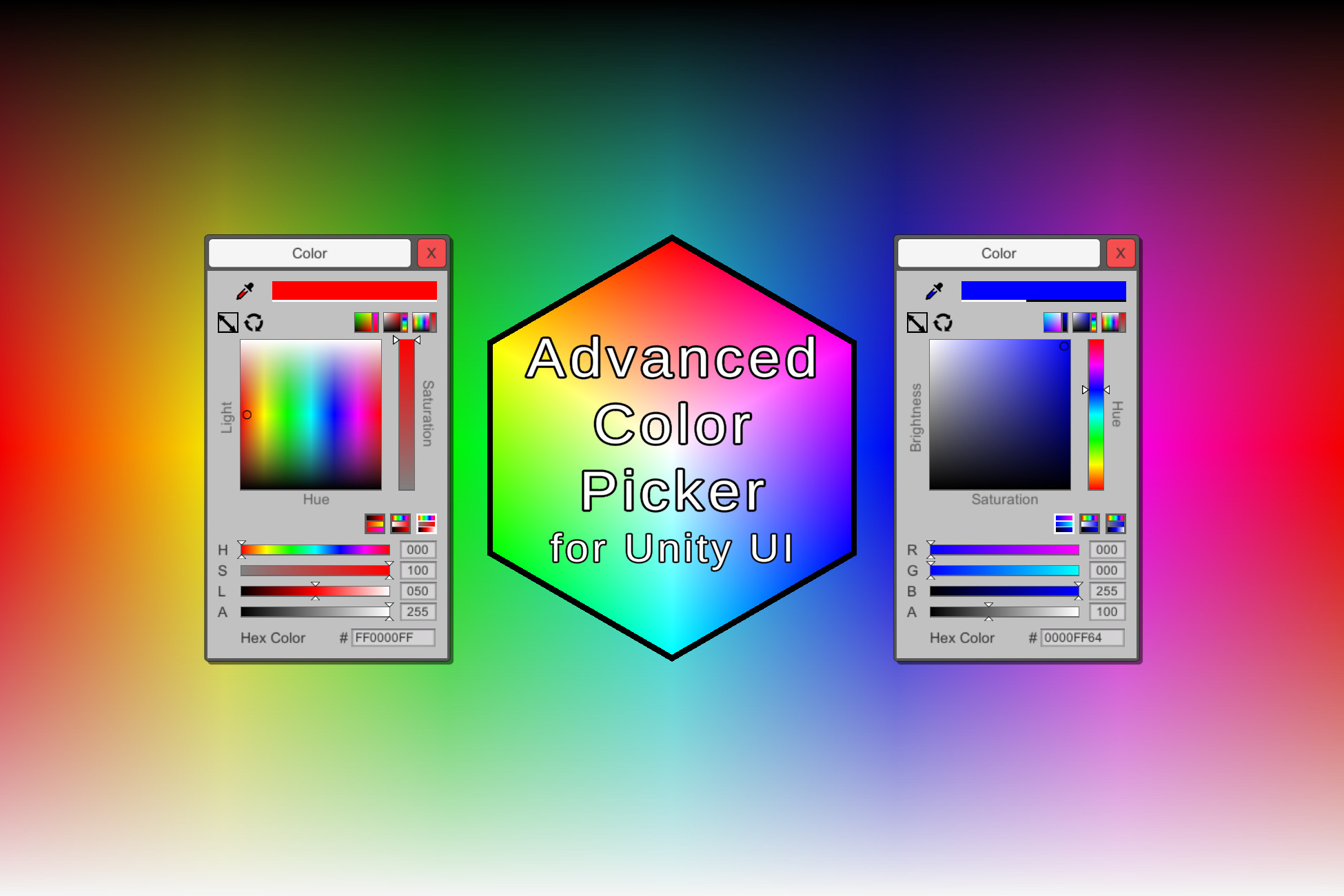
Use the Advanced Color Picker for Unity UI from Troien on your next project. Find this GUI tool & more on the Unity Asset Store.
but ofc its not UITK
dusk coyote
Anyone knows how to change an already set UXML attribute via c#?
umbral zodiac
tribal void
slightly open-ended question but does anyone know how I can create a color picke...
Hey, someone created this in UI elements. I don’t know if you can pick colors by hovering on some other element, but its basic one. I will link it to his github repo (I hope posting links are okay here):
https://github.com/plyoung/UIElements
Various scripts related to Unity UI Toolkit (UIElements). - GitHub - plyoung/UIElements: Various scripts related to Unity UI Toolkit (UIElements).
tribal void
pretty proud of this, ended up not needing the colorpicker for now. Thx either way cuz I may need it later!

 drowsy nimbus
drowsy nimbus
drowsy nimbus
damn look at those transitions, uielements is way better than i thought it was
 glacial verge
Why do rect transforms get constrained when I make an empty parent to organize them?
The anchor points get constrained within a tiny box in the center, so I can't anchor to screen positions

god this is not intuitive
still lantern
glacial verge
Why do rect transforms get constrained when I make an empty parent to organize t...
This is the wrong channel (see channel description and pinned message). #📲┃ui-ux is the channel you want.
 idle flicker
how do i emulate the type of drop don unity editor has? I want my skills window to expand that same way..

i click the button. the skills in that catagory drop down, and the skills on the bottom of that one move down too
i really like the estetic
still lantern
idle flicker
how do i emulate the type of drop don unity editor has? I want my skills window ...
This is the wrong channel (see channel description and pinned message). #📲┃ui-ux is the channel you want.
idle flicker
actually, i think i figured it out, i made a script with a for each loop on button press, and it makes the top of the transfrom/bottom a constant pixel size(padding) no matter the current size of the other child objects. so, doesnt matter.
 worldly topaz
how do i adjust the scroll speed?
still lantern
worldly topaz
how do i adjust the scroll speed?
Of what? If you mean of a component and not a VisualElement (USS, UXML) then you want #📲┃ui-ux
worldly topaz
still lantern
Of what? If you mean of a component and not a VisualElement (USS, UXML) then you...
sorry how to explain the scene, basically the scroll speed when im in the scene is too fast is there a way to slow it down?
for better control
umbral zodiac
worldly topaz
sorry how to explain the scene, basically the scroll speed when im in the scene ...
Is it for ui toolkit or the normal gameobjects scrollview?
worldly topaz
umbral zodiac
Is it for ui toolkit or the normal gameobjects scrollview?
when you are scrolling only gameobjects on the main scene.. a lot of the time it zooms too far i want more control
umbral zodiac
worldly topaz
when you are scrolling only gameobjects on the main scene.. a lot of the time it...
Uhm, I think you are talking about normal UI system that Unity got. Post it in #📲┃ui-ux. This channel is for the new ui system that’s in preview.
worldly topaz
oh sorry about that xD
idle flicker
https://www.youtube.com/watch?v=IjW5okCIX7w for people who were asking how to make accordian UI in the past. i got you. No more paying 15$ in asset store. xD

After seeing a very large demand for people asking how to do this in the forums and on the unity discords I decided to make a video on how to do this, you don't need any content fitters for this(aka ignore what I had) the only important thing is the rect tranform anchors! Also, I know my big fat stupid head was blocking some of the coding so, I'...
still lantern
idle flicker
https://www.youtube.com/watch?v=IjW5okCIX7w for people who were asking how to ma...
This is the wrong channel (see channel description and pinned message). #📲┃ui-ux is the channel you want. (And if this is your video, you need to boost the audio like x5)
 atomic cobalt
Hey guys, I have a quick question on the new UI builder/toolkit. I have a background in WPF/XAML and that's how I prefer to work, I only recently found out about Unity's UI toolkit but I was wondering if it supports data-binding and animations?
The technology looks amazing as it achieves true separation of concerns between the UI and the game logic but I'm not how in-depth the UXML is or what you can currently do with it?
still lantern
atomic cobalt
Hey guys, I have a quick question on the new UI builder/toolkit. I have a backgr...
It does not support runtime data-binding, there is a value property, and a event for when the value of the element changes, but no way to automagically update the element to stay inline with a C# field.
Animations are supported, mostly sort of? Currently animation related things are in the UnityEngine.UIElements.Experimental namespace.
https://docs.unity3d.com/Packages/com.unity.ui@1.0/api/UnityEngine.UIElements.Experimental.html
atomic cobalt
@still lantern Thanks, I'll check out the link
still lantern
This is the wrong channel (see channel description and pinned message). #📲┃ui-ux or #archived-code-general is the channel you want.
tulip sparrow
I'm going to try and work on something I think that I can use for runtime. Not sure, but, basically make a UI attribute I think. Just an idea atm, so idk how well it will work
tulip sparrow
do I have to use Init on an EnumField after creating it, or is there a way to do it in the initial creating like UnityEngine.UIElements.Foldout calendarFoldout = new UnityEngine.UIElements.Foldout(){text = "Calendar", value = false}; for example. I did try setting it's value, and just gave a blank enum field
the Init definitely fixed it, but, still wondering if I can do it in 1 line
rough scarab
tulip sparrow
do I have to use ``Init`` on an ``EnumField`` after creating it, or is there a w...
When posting please use one backtick and not two. One is correct markdown. Two doesn't work on certain phones
tulip sparrow
rough scarab
When posting please use one backtick and not two. One is correct markdown. Two d...
is 3 still for blocks still correct?
 ornate cliff
Yes
 sick thicket
I find unity's UI system to be frustrating is there a trick to the stretch and anchor to work better?
 static canyon
sick thicket
I find unity's UI system to be frustrating is there a trick to the stretch and a...
static canyon
sick thicket
I find unity's UI system to be frustrating is there a trick to the stretch and a...
to give MechWarrior a small break, you're probably looking for #📲┃ui-ux or #archived-code-general - this channel is specifically about the new UI workflow (UI Toolkit).
sick thicket
oh by bad, I read ui and assumed wrong
static canyon
sick thicket
oh by bad, I read ui and assumed wrong
np 🙂
 lethal sleet
Is there a renderer for the ui toolkit yet? I cant seem to find a component that I can use to render my uxml files
still lantern
lethal sleet
Is there a renderer for the ui toolkit yet? I cant seem to find a component that...
Depends what version you are using. In versions prior to 2021.2(I think) it requires a preview package to use UITK at runtime.
lethal sleet
still lantern
Depends what version you are using. In versions prior to 2021.2(I think) it requ...
I'm running 2021.1.25f1
still lantern
lethal sleet
I'm running 2021.1.25f1
Then you need to add the package.
lethal sleet
Would you happen to know which one/ones? I've got Unity UI, that is the new ui system, right?
still lantern
lethal sleet
Would you happen to know which one/ones? I've got Unity UI, that is the new ui s...
com.unity.ui
lethal sleet
Thanks 🙂
light osprey
Hi as was wondering do i need to write any code to link my ui slider value to a text ui object
and how do i link the u to a keypress
lethal sleet
@still lantern something odd happens when I open the builder now tho
 still lantern
lethal sleet
<@!131292153300123648> something odd happens when I open the builder now tho
still lantern
lethal sleet
<@!131292153300123648> something odd happens when I open the builder now tho
Maybe update the ui builder if you can?
lethal sleet
Well, the builder is apparently included in the core project now
still lantern
light osprey
Hi as was wondering do i need to write any code to link my ui slider value to a ...
If you mean to show the value of your slider as text, then yes you do need to write code to do that.
lethal sleet
I also tried installing the exp package of the builder, but that broke everything :p
still lantern
lethal sleet
Well, the builder is apparently included in the core project now
Ehh, really? Well is the builder still usable?
lethal sleet

Not really 😄
I keep getting the feeling that its too early to use the new ui system
Which is sad, since I come from web dev
 spring torrent
I haven't looked too much at UI in Unity...I'm just assuming that you update the UI fields in a regular monobehavior script for something like a progress bar, correct?
still lantern
lethal sleet
I feel like I have seen that error before, you could try googling it a bit to see if you can find something. Also, it is marked as experimental... 😛
lethal sleet
Hehe cheers for ur help Mech
still lantern
spring torrent
I haven't looked too much at UI in Unity...I'm just assuming that you update the...
There are two runtime UI systems in Unity. UGUI which is gameobject and component based. Then there is the new system called UI Toolkit that is inspired by HTML/CSS/javascript from webdev. With UXML/USS/C#.
So to answer your question, it depends.
spring torrent
Yea - I'm using the UI Toolkit package and the UI builder
still lantern
spring torrent
Yea - I'm using the UI Toolkit package and the UI builder
Ah, then in that case.. I don't know. I haven't touched runtime UITK yet. A quick google for something like "Unity UIToolkit runtime data binding" should get something helpful I think.
spring torrent
Yea - it's always hard to find information on the newer unity features. It looks similar to UE, but you change things through a monobehavior instead of storing a variable in the UI file itself and then syncing it
It's actually a lot more professional than UE's though
Which I don't mean as a universally good or bad thing
 unborn bluff
Currently whenever I create new field and button (for runtime) I need to create a new script according to it's hierarchy and no. of buttons, is there a way to make a generic system for simple cases?
Like in Unity UI we could just hook up unity event callback on each button for prototyping
Could we do something similar for UI elements?
tribal void
unborn bluff
Currently whenever I create new field and button (for runtime) I need to create ...
you can create a List<KeyValuePair<string, UnityEvent>> and use it in a very similar way

or create a class so you can make a list of that, easier to expand
you do need to make unique ID's for each button for this to work tho
unborn bluff
tribal void
you do need to make unique ID's for each button for this to work tho
Yeah, that's the annoying part
tribal void
unborn bluff
Yeah, that's the annoying part
Technically you could read it from the VisualTreeAsset object too
unborn bluff
tribal void
Technically you could read it from the VisualTreeAsset object too
But I would need to know it's exact hierarchy for that
tribal void
 unborn bluff
Btw I just had one more question
How do I approach things like multiple menu screens visible at once, I mean should I use multiple UIDocument GO to store multiple menus and deactivate/activate as necessary?
tribal void
i think you can choose, you either have multiple documents rendered with layers above each other,
or you have them all in ine document and control everything through some C# for the visibility
@unborn bluff
unborn bluff
Okay thanks @tribal void
 warm heart
So uh, I followed a tutorial from codemonkey for dragging and dropping items into slots in the inventory, but when dropping the item, setting the item's rectTransform.anchoredPosition to the slot's anchored position puts it to the top right of the screen, instead of on the slot? Is this because the slots are children of other rect transforms? (item is the purple thing)
 lethal sleet
Try using the slots position instead of anchored position
warm heart
that works, ty 😄
lethal sleet
Keep in mind, the reason why anchored position didnt work is probably because you set the canvas / children of the canvas up wrong
But for now, you're welcome ^^
 tame pawn
hi. how to made onscreen joystick
i need to create somehow custom component + bind it
@lethal sleet seems like you work with this package
still lantern
tame pawn
hi. how to made onscreen joystick
It would have a lot of the same logic as a UGUI based one. Main difference is that you would register with PointerMoveEvent for updating the position.
still lantern
tame pawn
<@!147682289181130752> seems like you work with this package
Also, it is consider bad form (just in general on discord) to @ people who are not already part of the discussion just to ask them a question. If someone knows the answer to your question, sees it, and has time/interest, they will answer you.
tame pawn
still lantern
It would have a lot of the same logic as a UGUI based one. Main difference is th...
im using "Input System" package. and there some onscreen controls already
 still lantern
tame pawn
im using "Input System" package. and there some onscreen controls already
still lantern
tame pawn
im using "Input System" package. and there some onscreen controls already
That is using UGUI, not UIToolkit.
still lantern
tame pawn
im using "Input System" package. and there some onscreen controls already
UIToolkit is a new UI system based on USS and UXML files. If you want the UGUI (gameObject and component) system then you want #📲┃ui-ux
tame pawn
still lantern
UIToolkit is a new UI system based on USS and UXML files. If you want the UGUI (...
ok so for new system what i need to do? rewrite all code about that>
cuz there no kinda "code behind" for uxml files
still lantern
tame pawn
ok so for new system what i need to do? rewrite all code about that>
Yeah, you would need to code it from scratch. For more info on using UIToolkit please see the pinned message.
tame pawn
still lantern
Yeah, you would need to code it from scratch. For more info on using UIToolkit p...
probably this is kinda what i want
still lantern
tame pawn
https://docs.unity3d.com/Packages/com.unity.ui.builder@1.0/manual/uib-structurin...
Yeah you will most likely want a custom element. Again for more info, see pinned message.
tame pawn
still lantern
Yeah you will most likely want a custom element. Again for more info, see pinned...
what is best practice to controll new UIToolkit ui? create top level big controller?
like when you want to change view
still lantern
tame pawn
what is best practice to controll new UIToolkit ui? create top level big control...
No? Generally you want to avoid 'big top level' controllers, just in general.
tame pawn
how i can apply another editor for custom property?

thats sample from on-screen stick
and it gives filed like
 still lantern
tame pawn
how i can apply another editor for custom property?
still lantern
tame pawn
how i can apply another editor for custom property?
The new input system doesn't support UIToolkit yet.
tame pawn
still lantern
The new input system doesn't support UIToolkit yet.
tho i cant combine them easily?
still lantern
tame pawn
tho i cant combine them easily?
Can't combine them, at all.
Stick with UGUI for now I would say.
tame pawn
still lantern
Can't combine them, at all.
ehh. ty. then ill use default ui system
tame pawn
still lantern
Stick with UGUI for now I would say.
do you know UGUI well enough?
still lantern
tame pawn
do you know UGUI well enough?
I do, however
A. #📲┃ui-ux would be the proper channel for further discussion on UGUI.
B. I would look up some tutorials.
C. Iirc the input system comes with an on screen joystick component.
tame pawn
still lantern
I do, however
A. <#502171135350407168> would be the proper channel for further ...
ok. but why #📲┃ui-ux ix in art section and there only #🧰┃ui-toolkit in programming? is there #📲┃ui-ux but only about programming?
still lantern
tame pawn
ok. but why <#502171135350407168> ix in art section and there only <#89276249846...
#archived-code-general or #💻┃code-beginner would be the proper channel if it is code related. There is not currently a code channel for UGUI.
 rose vortex

good?
the slider is for velocity and rings values
if u "boost", the ring slider will decrease
rough scarab
rose vortex
good?
If you want feedback use #archived-works-in-progress, this channel is for questions and discussion specifically around UIToolkit
rose vortex
rough scarab
If you want feedback use <#502171560359100437>, this channel is for questions an...
oh, srry
 ancient yew
hey guys, i have a problem where i have UI on 2 displays but the UI on the second display still activates when im clicking on the first display. so for example i have a button in the top right of the second display but clicking on the top right of first display activates it. anyone encountered something like this before?
still lantern
ancient yew
hey guys, i have a problem where i have UI on 2 displays but the UI on the secon...
Is this for UGUI or the new UI system UIToolkit? #📲┃ui-ux if it is UGUI.
If it is UIToolkit, can you explain the setup a bit more?
tulip sparrow
what field do you guys like to use to display an attribute? Just a TextField?
actually yeah, I like the idea of using textfield, then I can copy from it
still lantern
tulip sparrow
what field do you guys like to use to display an attribute? Just a `TextField`?
What do you mean an "attribute"?
tulip sparrow
still lantern
What do you mean an "attribute"?
like [ExampleAttributeAboveField]
tulip sparrow
so I have something like
    public static UnityEngine.UIElements.TextField UITextField<T>(this T t, string label = null)
    {
        UnityEngine.UIElements.TextField textField = new UnityEngine.UIElements.TextField(){label = label != null ? label : "Text Field", value = t.ToString()};
        textField.name = t + "TextField";
        return textField;
    }
was thinking about just taking the fields names and using UnityEditor.ObjectNames.NicifyVariableName(), but, I don't remember atm how to get the field name if anyone knows off the top of their head
sorry, its late
tulip sparrow
oh derp, think I can just do nameof()
still lantern
This is UI not AI. #🤖┃ai-navigation or #archived-code-general.
Also, you could be needing an assembly reference.
 wicked ether
noob question -
from what i saw, editor scripts are just for specific mono behaviour classes, right? like any other custom editor stuff is only made in ui toolkit?
oo ok maybe not i see theres #↕️┃editor-extensions
opaque gull
😕
UITK is something to render UI with
Whether that's inside a custom editor, a property drawer, or an editor window doesn't matter (or shouldn't matter)
wicked ether
ok then, i have more research to do
 acoustic oyster
Hello everybody, I am trying to change the UIElement element style cursor. The cursor changes fine, however, I can't get the size of the cursor to change. It is always 32x32. How can you change the cursor size?
 cunning cove
acoustic oyster
Hello everybody, I am trying to change the UIElement element style cursor. The c...
cunning cove
acoustic oyster
Hello everybody, I am trying to change the UIElement element style cursor. The c...
I did not see anything in the documentation (or in the UIElements sample project) that indicates you can resize a mouse cursor.
My assumption is that you can't (since USS is a subset of CSS); but I don't feel I'm knowledgeable enough about the UI Toolkit 😁 (hopefully an expert will chime in and correct me or validate me, ha!)
You might be able to achieve what you want using different size cursors, each with their own class that gets applied to the VisualElement when needed.
 weak fog
What format does the "Type" field of an Object picker expect? Assuming it's my own type without a namespace.
To answer my own question:
For class MyDataObject : ScriptableObject without a namespace or assembly definition the answer is
MyDataObject, Assembly-CSharp
rough scarab
or just typeof(MyDataObject)
weak fog
Oh yeah I should've specified that I meant the field inside of the UI Builder and not code
urban totem
Any suggestions on how to hookup audio effects for things like button presses when you have a complicated ui w/ dynamic buttons?
Ideally, I'd like to just register a callback on the root visual element for button creation and hookup audio callbacks there... not seeing an event for that
 analog adder
Heya i'm wondering, does ui toolkit support custom shaders already?
I'd love to move from the old component system to the toolkit one, but one of the things i used occasionally are custom shaders for things like multiply blending
or special effects (like scrolling backgrounds etc)
still lantern
analog adder
Heya i'm wondering, does ui toolkit support custom shaders already?
No, but it is a planned feature.
analog adder
so i cant even inject some shader via unconvential methods?
still lantern
analog adder
so i cant even inject some shader via unconvential methods?
I'm not sure tbh, you might be able to? But you will have to look or ask on the forums I think. The devs of UITK are pretty active on the forums.
analog adder
alright thanks!
 dense idol
Hello everyone! Someone solved such a problem that I want to allow reorderable inside a Listview, which is an element of another Listview (in makeitem I create an empty Visual Element and put some data into it and additionally put a new Listview), but it is always taking the element of the top Listview, not the inner one? Of course, it happens to me that at the very first creation, I can still move the internal ones without affecting the external ones, but if this is not done in the first element or move the upper list, then everything breaks down.
 unborn furnace
Hey, I'm trying to make a mobile game, but there's a big quality issue. On my laptop Unity screen, this is what it looks like. The quality isn't too bad.

And on my phone it looks squashed and pixelized.

I'm guessing the pixelisation (if that's even a word) happens because of it being squashed
I changed it to 2960 1440 res and it seems to work better for my phone, but Im not sure about other smartphones
still lantern
unborn furnace
Hey, I'm trying to make a mobile game, but there's a big quality issue. On my la...
Is this with the new UIToolkit system (USS, UXML files) or UGUI (GameObjects, Components)? If it is the latter than #📲┃ui-ux is the right channel for it.
unborn furnace
I'm not sure where I had to post this. And as it doesn't really have to do with UI I was confused
scarlet fossil
So just for the test I created a button with some text and an image, then I ran the frame debugger and I noticed that 2 draw calls were issued, first one rendered button and second one rendered text and the image. Shouldn't everything be drawn with 1 draw call?
 supple geyser
plz help
i tried to make a sprite
but its not in
CREATE > SPRITE > SQUARE
the sprite section is not there
if anyone can hlep please do
ive never had this problem before
and its very odd
NVM
umbral zodiac
supple geyser
plz help
i tried to make a sprite
but its not in
CREATE > SPRITE > SQUARE
the...
This is definitely not the channel for asking that at all.
 vast temple
Hey guys - I'm wanting to add callbacks to a Dropdown created in a UXML template.
Basically replicating the calback parameters passed here:
DropdownField ddf = new DropdownField(title, choices, 0, selectedCohortItemCallback, formatCohortItemCallback);
I can get to the DDF via root.Q<DropdownField>(), but I'm at a loss as to what to do then. Anyone know if this is possible? And if so, how to accomplish it?
still lantern
vast temple
Hey guys - I'm wanting to add callbacks to a Dropdown created in a UXML template...
vast temple
@still lantern : Yeah - I've seen that. My issue is that there's no callback that I can find in the docs that corresponds in any way shape or form to the formatSelectedValueCallback or the formatListItemCallback params from the constructor.
So if I do a "VisualElement myVisualElement = myWidget.CloneTree();", then a "DropdownField myDDF = myVisualElement.Q<DropdownField>("ddf");" - how do I add a custom formatter to the DDF?
still lantern
vast temple
<@!131292153300123648> : Yeah - I've seen that. My issue is that there's no call...
Yeah, strangely the are both internal...
Seems dumb to me... Their names are exactly the same as the parameter names in the constructor if you want to get them with reflection.
vast temple
Won't work on iOS though, will it?
Hmm....maybe it will. I've just assigned "reflection" to a big "nope" bucket for mobile.
still lantern
vast temple
Won't work on iOS though, will it?
unborn bluff
so if I have 2 monos with their respective Documents added, e.g. two custom forms that I made
and I have a popup window mono+document with a VisualElement child, then all I have to do to create a window with dynamic content is use
this.visualElementChild = windowInnerContent.CloneTree(); ?
 wicked wing
Is there a way to add a color picker to the game UI?
 placid crag
Yes. Search for one either in the Asset Store or Google.
 oak reef
I am confused... what is Unity UI 1.0.0 and how does it relate to UI Builder?
 hollow igloo
So, I'm trying out the experimental UI Builder thing. It's pretty neat so far, but I have one concern. I can't seem to find any options to use a Material on things instead of an image or color. Any chance I'm just overlooking it somewhere, or is that really not a possibility? I have a Material that uses a custom shader I use for the background of my UI elements that blurs everything behind it, and I'd hate to lose that feature.
umbral zodiac
hollow igloo
So, I'm trying out the experimental UI Builder thing. It's pretty neat so far, b...
Shader capabilities are still not supported. But there are ways to do so. The blur one specifically: https://github.com/plyoung/UIElements
Various scripts related to Unity UI Toolkit (UIElements). - GitHub - plyoung/UIElements: Various scripts related to Unity UI Toolkit (UIElements).
umbral zodiac
oak reef
I am confused... what is Unity UI 1.0.0 and how does it relate to UI Builder?
Unity UI 1.0.0 is the unity system used everywhere else - the gameobjects approach. UI toolkit is very webdev approach to UI, it’s a new system for UI.
umbral zodiac
wicked wing
Is there a way to add a color picker to the game UI?
Ui Toolkit (css) or UI normal (gameobjects)?
oak reef
Whats confusing me is I saw docs that referred to Unity UI in order to use the new "animation feature" from 2021.2's UI Toolkit.

didn't help that they say "Unity UI is a Ui Toolkit" lol
umbral zodiac
oak reef
Whats confusing me is I saw docs that referred to Unity UI in order to use the n...
Oh lol. Poor choice of words there.
oak reef
I have been trying to figure out how to add animation support to 2021.2 via UI Toolkit and haven't found anything
umbral zodiac
Well, UI toolkit does have this experimental animation support. The materials are pretty scarce for sure - the repo I posted above should have examples in it. At least I have seen them using scheduler to animate stuff.
Alternatively, you can use dotween to change variables.
oak reef
Thanks. We are hoping to stick with the "pure" ui toolkit methods as they are developed and not intermix old or third party if we can keep from it. We are still quite a way from release and are hoping this stuff fleshes out as we move along.
Looking forward to the shadergraph integration, although I fear it is still quite a ways away 🙂
umbral zodiac
Fair point, really. Let me see if theres any material on it. I will ping you with the material if I find. 🙂
oak reef
awesome, thanks.
umbral zodiac
oak reef
awesome, thanks.
Actually, wait theres one haha. https://forum.unity.com/threads/animation-via-code-examples.948161/ there is a single line example there.
Hello
I would like to create a simple spinning wheel animation in my custom editor window. I understand UIToolkit does not yet support animations, but...
oak reef
umbral zodiac
Actually, wait theres one haha. https://forum.unity.com/threads/animation-via-co...
thanks, ok exposed via scripting currently. I guess ill be figuring out how to expose this to our UI artist lol.
umbral zodiac
oak reef
thanks, ok exposed via scripting currently. I guess ill be figuring out how to ...
Haha sadly. You could probably create your own UI elements and have fields exposed to do certain animations (schedulers) for now + transitions are already built in.
oak reef
it is what is is.. although I suspect ill do this work only to find out it gets added to ui builder a month later lol. ¯_(ツ)_/¯
umbral zodiac
LOL, true. I wish more field types are supported on custom UI elements - wanted to add sprite field but that's not possible.
 runic jasper
Has anyone encountered issues with UI Builder where it will randomly pop up after performing certain actions like exiting play mode, saving, etc. and jumbling up the positions of the elements of the UXML file?
I've encountered this multiple times on 2021.2.0f1 and needless to say it's becoming extremely demoralizing when creating a UI and then having it be ruined repeatedly.
tribal void
Does anyone have an example on how to use the MeshDrawContext (I'm trying to draw a line between 2 points in the UIDocument)
tribal void
This is what I currently have and am trying to get to work, but I am not getting anything ```cs
public class LineDrawer : VisualElement
{
public new class UxmlFactory : UxmlFactory<LineDrawer, UxmlTraits> {}
public LineDrawer()
{
    generateVisualContent += OnGenerateVisualContent;
}

void OnGenerateVisualContent(MeshGenerationContext ctx)
{
    MeshWriteData mesh = ctx.Allocate(2, 2);
    Vertex[] vertices = new UnityEngine.UIElements.Vertex[2];
    vertices[0].position = Vector3.zero + Vector3.forward * Vertex.nearZ;
    vertices[1].position = Vector3.up * 10  + Vector3.forward * Vertex.nearZ;
    vertices[0].tint = Color.white;
    vertices[1].tint = Color.white;
    mesh.SetAllVertices(vertices);
    mesh.SetAllIndices(new ushort[] { 0, 1 });
}
}
I'll add your case to this if it's not there already 😄
tribal void
oh wait, a mesh with 2 vertices isnt smt that would work actually would it? xD
rough scarab
you have two vertices? Surely that's not enough to see anything
tribal void
I just wanna draw a line, I figured I needed 2 vertices
I need 4, with a slight width
hmm 🤔 ```cs
public class LineDrawer : VisualElement
{
public new class UxmlFactory : UxmlFactory<LineDrawer, UxmlTraits>
{
}
public LineDrawer()
{
    generateVisualContent += OnGenerateVisualContent;
}

void OnGenerateVisualContent(MeshGenerationContext ctx)
{
    MeshWriteData mesh = ctx.Allocate(3, 3);
    UnityEngine.UIElements.Vertex[] vertices = new UnityEngine.UIElements.Vertex[3];
    vertices[0].position = Vector3.zero + Vector3.forward * Vertex.nearZ;
    vertices[1].position = Vector3.up * 10 + Vector3.forward * Vertex.nearZ;
    vertices[2].position = Vector3.right * 10 + Vector3.forward * Vertex.nearZ;
    vertices[0].tint = Color.white;
    vertices[1].tint = Color.white;
    vertices[2].tint = Color.white;
    mesh.SetAllVertices(vertices);
    mesh.SetAllIndices(new ushort[] { 0, 1, 2 });
}
}
appears to be blank when drawing, tried it with both winding methods to be sure
@rough scarab 
the 3 things you mentioned are present as far as I can tell, so Im quite confused
 rough scarab
Give me a sec
Let me amend my site so I can see if you can see what you did wrong from my docs (give me a mo)
tribal void
im digging around what it might be, for reference I am using this forum post https://forum.unity.com/threads/draw-a-line-from-a-to-b.698618/
Hi UIElement specialists
What is the simplest way to drawing a line from position A to position B using UIElements?
It seems people are resorting to...
rough scarab
tribal void
im digging around what it might be, for reference I am using this forum post htt...

basically if you do swap your winding order it does work fine
rough scarab
Because the space is upside down from our perspective
tribal void
I had to re-add the element into the hierarchy. the changes didnt seem to stick
rough scarab
If you use internal mode there is a Reload Window (F5) button in the tab right-click that's handy
tribal void
that is quite handy
now I just need to figure out a way to draw a mesh that I can use as a line thats not necessarily straight between 2 points
some trigonometry, should be fine
wicked wing
umbral zodiac
Ui Toolkit (css) or UI normal (gameobjects)?
I was hoping for a UI Toolkit color picker... there are game object based ones but even though there is a color picker in the samples it doesn't seem like it's for games... I am confused what the point of the samples is if they don't work in projects and where I could find anything beyond basic stuff for this system
umbral zodiac
wicked wing
I was hoping for a UI Toolkit color picker... there are game object based ones b...
Oh yes, I did link to a repository that’s got UITK color picker for runtime. It’s pretty nice so far.
Also the whole point of UITK is for you to build custom components. It’s shame though we don’t have built in fields for runtime, but it’s really not stopping us to implement our own.
 rancid meadow
Anyone know how to stop Element 'VisualElement' has no registered factory method. errors? I'm trying to go through some tutorials for UI Toolkit
 spark lance
tribal void
hmm 🤔 ```cs
public class LineDrawer : VisualElement
{
public new class Uxml...
spark lance
tribal void
hmm 🤔 ```cs
public class LineDrawer : VisualElement
{
public new class Uxml...
How I can write like that on ds?
 proper latch
Hi, has anyone of you done some complex UI work with the new UI Toolkit? How does it feel working with it? Any problems? I'm planning on creating a pretty much completely UI-based game, and I would love to use the new UI Toolkit. Also, I didn't find information on if TextCore is implemented already in Unity 2021.2 - does anyone have information on that? Thank you!
wicked wing
It seems the glitchy laggy UI Builder will open automatically every time you change the xml file in a different program... Is this fixable without removing Builder altogether?
umbral zodiac
proper latch
Hi, has anyone of you done some complex UI work with the new UI Toolkit? How doe...
Feels way better than GameObjects (also I come from webdev department so..) but I do want shader support and more features to TextCore. There are glitches here and there though but it’s really not that bad - especially with UI Builder.
proper latch
thank you @umbral zodiac !
 tame wadi
Is there a good way to prevent clicks on UIElements from going through to the game world? e.g. I have some click to move navagent and when I click on a button in the UI I don't want to click on the ground and move the navagent
Everything I have found on google suggests using EventSystem.current.IsPointerOverGameObject() but that doesnt seem to work with ui toolkit
unborn bluff
are there USS frameworks for UI Toolkit, like Bootstrap for css?
umbral zodiac
tame wadi
Everything I have found on google suggests using `EventSystem.current.IsPointerO...
Huh, that works for me. I am creating level editor in-game and that helps a lot.
tame wadi
umbral zodiac
Huh, that works for me. I am creating level editor in-game and that helps a lot.
For me it always returns true if I am anywhere over the root UI document
umbral zodiac
tame wadi
For me it always returns `true` if I am anywhere over the root UI document
That’s correct. False means its not over any ui element.
tame wadi
So it's not really useful if you have a UI document that covers the whole screen?
umbral zodiac
tame wadi
So it's not really useful if you have a UI document that covers the whole screen...
Well, you can turn off detecting mouse over certain element. I did it for gameview in my editor but right now I can’t remember what option was that. I can ping you tomorrow if you don’t get the answer.
tame wadi
I suppose what I want is for it to work on just a single layer inside of my UI document (the UI you see while actively playing a level)
umbral zodiac
Yep gotcha
tame wadi
I have all my UI layers stacked in a single UI document and I just activate/deactivate them as I go through various screens
umbral zodiac
That’s fair, I am doing something like that.
tame wadi
For the time being I just did some simple rect checks since my UI is fairly rectangular around the edges of the screen and that works fine 🤷 trying to not get too caught up on this lol
tame wadi
Thank you, I will look into it
 digital dew
Is there any way for an element to appear in front of its sibling without affecting its sorting?

like Button2 to appear in front of Button1 and Button3
tulip sparrow
I'm looking at using ProgressBar to imitate EditorUtility.DisplayProgressBar with the UITK instead since I think I might be able to customize this better. Are any of you familiar with this? ATM I was looking at creating a new editor window and just adding the ProgressBar to its root visual element like normal. Just didn't know if i should instead get a different rootVisualElement and add it to that?
tulip sparrow
digital dew
like Button2 to appear in front of Button1 and Button3
to answer your question, BringToFront
tulip sparrow
is there an equivalent to EditorWindow I can use for runtime? Or do I just manipulate UIDocument
tulip sparrow
have PopupWindow but I'm confused on if that still needs a root visual element?
is it best to create UIDocument gameobjects on the fly for UI related things? I'm trying to figure out how to best approach runtime UIToolkit things. Do I just treat a UIDocument GameObject almost like how some people with scenes and UI? Just make a global UIDocument?
digital dew
tulip sparrow
to answer your question, `BringToFront`
BringToFront will change it's order, I have to make them Absolute Position to fix their position
tulip sparrow
digital dew
BringToFront will change it's order, I have to make them Absolute Position to fi...
Brings this element to the end of its parent children list. The element will be visually in front of any overlapping sibling elements. which is what you want no? Note the VISUALLY part
so, what I'm saying is you use BringToFront to visual aesthetics, then something else to send it back since it should still be in it's the tree order
so, basically, I would use IndexOf to save a reference to the index, BringToFront to bring to front, then SendToBack and then iterate PlaceBehind and/or PlaceInFront to put it back in the right position visually if you want to be that precise
depending on what you are doing, it may be better to just refresh, or, insert a completely new element and destroy that one. I'm not sure
but I believe with callbacks, it would not be
 wary swan
Is it possible to use the "new" Input system with UI Document?
tulip sparrow
wary swan
Is it possible to use the "new" Input system with UI Document?
I'm on 2020.3.22f1 LTS and there is a component in the the UIToolkit category for new input
wary swan
tulip sparrow
I'm on 2020.3.22f1 LTS and there is a component in the the UIToolkit category fo...
Aha, I'm on 2021.2.1f1 , couldn't find anything specific. What is the name?
tulip sparrow
wary swan
Aha, I'm on 2021.2.1f1 , couldn't find anything specific. What is the name?
I know you need toe UIToolkit package
wary swan
So I can't use the built in one?
tulip sparrow
I'm not able to right this minute to look it up, but, I know you go to a game object, click the add component, then down under UIToolkit iirc
tulip sparrow
wary swan
So I can't use the built in one?
I know Unity wants to make all of their new UI features built in, however, IDK if they are yet at the patch you are on. Let me see if I can find you some more info
tulip sparrow
wary swan
So I can't use the built in one?
The Input System provides two MonoBehaviour components that simplify how you set up and work with input:
Component Description
PlayerInput Represents a single player, and that player's associated Input Actions.
PlayerInputManager Handles setups that allow for several concurrent users (for example, player lobbies and split-screen gameplay in a game).
Note: These components are built on top of the public Input System API. As such, they don't do anything that you can't program yourself. They are meant primarily as an easy, out-of-the-box setup that eliminates much of the need for custom scripting.
does that help at all?
You can use the Input System package to control any in-game UI created with the Unity UI package. The integration between the Input System and the UI system is handled by the InputSystemUIInputModule component.
NOTE: The Input System package does not currently support IMGUI or UIElements.
wait
that was an old doc I was on
As of Unity 2021.2, UI Toolkit is supported as an alternative to the Unity UI system for implementing UIs in players.
Input support for both Unity UI and UI Toolkit is based on the same EventSystem and BaseInputModule subsystem. In other words, the same input setup based on InputSystemUIInputModule supports input in either UI solution and nothing extra needs to be done.
Internally, UI Toolkit installs an event listener in the form of the PanelEventHandler component which intercepts events that InputSystemUIInputModule sends and translates them into UI Toolkit-specific events that are then routed into the visual tree. If you employ EventSystem.SetUITookitEventSystemOverride, this default mechanism is bypassed.
wary swan
Aha ok
tulip sparrow
wary swan
Aha ok
There are some additional things worth noting:
UI Toolkit handles raycasting internally. No separate raycaster component is needed like for uGUI. This means that TrackedDeviceRaycaster does not work together with UI Toolkit.
A pointer click and a gamepad submit action are distinct at the event level in UI Toolkit. This means that if you, for example, do CSharp button.RegisterCallback<ClickEvent>(_ => ButtonWasClicked()); the handler is not invoked when the button is "clicked" with the gamepad (a NavigationSubmitEvent and not a ClickEvent). If, however, you do CSharp button.clicked += () => ButtonWasClicked(); the handle is invoked in both cases.
wary swan
tulip sparrow
> There are some additional things worth noting:
>
> UI Toolkit handles raycast...
Thank you
tulip sparrow
Here is something I'm working on with the UIToolkit and just need some opinions on things I could do and shouldn't do. Also, how I should handle the saving of the description. ATM I just have a .txt being saved and hidden with File.SetAttributes(descriptionPath, FileAttributes.Hidden); I was thinking maybe I should use the built in asset tools instead? Idk
tulip sparrow
okay, just settled for now on a scriptableobject script to store all the descriptions
another example just for fun

 half light
Hey guys, whats the difference between UI Toolkit and UI Builder?
tame wadi
half light
Hey guys, whats the difference between UI Toolkit and UI Builder?
UI Toolkit is the underlying package for powering the new UI stuff. UI Builder is a subset of that, it's the visual editor for constructing uxml/uss.
You can technically use UI Toolkit without UI Builder if you want to hand write all the uxml/uss yourself.
 heady sequoia
How can I render UI Documents behind game objects? Is it possible?
Using URP in 2021.2, I tried using RenderObjects but doesnt seem to work (unless im doing it wrong)
tribal void
tulip sparrow
another example just for fun
is that a custom inspector for a folder? How did you manage to do that?
tulip sparrow
tribal void
is that a custom inspector for a folder? How did you manage to do that?
Make a custom inspector for default asset. Check if the default asset is a folder. This can be done through several ways. I chose AssetDatabase.IsValidFolder(folderPath). I need to switch it around though because I like to slowly convert my scripts away from UnityEditor so they can be included in builds if needed. Then some more checks, but then public override VisualElement CreateInspectorGUI() for the visual element
tribal void
ah, like that. I avoid default asset inspectors but that is really cool
I wonder how you would do taht without that function tho (checking the folder validity)
tulip sparrow
tribal void
I wonder how you would do taht without that function tho (checking the folder va...
well, I do if (!File.Exists(Application.dataPath + "/FolderDescriptions/FolderDescriptions.asset")) for the scriptable object. I think there is something similar for folders. It's just early so can't think yet haha
better yet
you can use exactly that if you know what a folders extension is
tribal void
Directory.Exists probably?
tulip sparrow
tribal void
`Directory.Exists` probably?
oh, yeah, that!
tribal void
this is probably how RainbowFolders works actually 🤔
tulip sparrow
tribal void
this is probably how RainbowFolders works actually 🤔
I have no idea. I actually try to build all my own assets so that I can learn haha
tribal void
 tribal void
I got it as part of a pack sometime. dunno when
I build a lot of custom tooling, but I do use some tools that are already available 🙂
tulip sparrow
tribal void
I build a lot of custom tooling, but I do use some tools that are already availa...
Does this rainbow folders use the UIToolkit? One reason I haven't looked up many assets for UI stuff is since Unity (at least from my understanding) wants to move everything over to the UITK, and I know a lot of assets still use the old system, so I haven't bothered
tribal void
tulip sparrow
Does this rainbow folders use the UIToolkit? One reason I haven't looked up many...
I am going to say it doesnt, because it is quite old
it was initially made in 2016, so no UITK afaik
half light
tame wadi
You can technically use UI Toolkit without UI Builder if you want to hand write ...
Oh, So UI Toolkit is the base scripting part and UI Builder is the "Visual scripting" part?
Also, any tutorials on how to get started moving from the old UI system for Editor development to new one?
tulip sparrow
so I'm adding to the scriptableobject so someone can edit and see everything from that if they want, however, how come the little arrow disappears from the foldouts after the root foldout? It still opens and closes clicking their name, but I like the little arrow

okay, it has something to do with scroll view
when I removed that they all showed back up hmm
another example of missing triangle on initial foldout in a scroll view, but none after

 small wigeon
@tulip sparrow UITK has first class support for imgui in the editor
tulip sparrow
small wigeon
<@65164956399579136> UITK has first class support for imgui in the editor
what does that mean? I'm sorry.
small wigeon
Imgui is the older editor UI, and you can reuse it in the UI toolkit
tulip sparrow
small wigeon
Imgui is the older editor UI, and you can reuse it in the UI toolkit
oh okay, I get what you are talking about now. Was that into reference about UIDocument?
 prisma rock
Is UI toolkit the ugui system that is in unity by default?
Cause I could definitely use a better system, maybe something like what ue4 has
tulip sparrow
did I do this correct?
textField.RegisterCallback<ChangeEvent<bool>>(e => VisibilityChangEvent(textField.visible));
        void VisibilityChangEvent(bool visibility)
        {
            if (visibility)
            {
                textField.RegisterCallback<InputEvent>(InputEvent);
            }
            if (!visibility)
            {
                textField.UnregisterCallback<InputEvent>(InputEvent);
            }
        }

        void InputEvent(InputEvent inputEvent)
        {

        }
Is there some proper order of styles you should on which parent elements? As in, if I set flexGrow = 1 on the root element lets say is that applied to everything down the entire hierarchy? Or is it just the children of the initial root, and then I need to set it again on the children to apply to their children etc... Take like,
            container.style.display = DisplayStyle.Flex;
            container.style.flexDirection = FlexDirection.Column;
as something I'm doing. I have it set like that on every single one of my "Containers" in the hierarchy, but, do I need to do that? Can I just set it on the root, then container.style.flexDirection = FlexDirection.Row; only when I need it?
digital dew
Does anyone have any solution for this ? https://forum.unity.com/threads/what-is-the-correct-way-to-use-style-sheets-and-templates-at-runtime.1195078/#post-7641616
A UI I am making is as follows:
[ATTACH]
Here's the following questions:
1,When I want to make a ListView, I need "dataSource", "makeItem" and...
tulip sparrow
digital dew
Does anyone have any solution for this ? https://forum.unity.com/threads/what-is...
so this is on the 2021.2 manual https://docs.unity3d.com/2021.2/Documentation/Manual/UIE-HowTo-CreateRuntimeUI.html I'm not sure if it will help you
I don't use the XMLs unfortunately, and ended up creating my own UIBuilder with just c# code, so can't help 😦 sorry
tulip sparrow
Can someone better help me understand manipulators? I'm confused by them because isn't it the same as registering to a callback?
I guess, if I were to look at them further, they are basically flavor added to events? As in, clickEvent for example, detects a click, but, Clickable seems to include that and all the other necessary events. However, I'm more wondering if there is any added benefit to using manipulators vs manually registering to all the necessary callbacks? Like, some optimization that is most likely unnoticed from using manipulators
tulip sparrow
do you guys know of a better way to handle UI drags? Currently, I have
    void OnMouseDownEvent(MouseDownEvent e)
    {
        if (e.button == 1) ((VisualElement)e.target).RegisterCallback<MouseMoveEvent>(OnMouseMoveEvent);
    }

    void OnMouseUpEvent(MouseUpEvent e)
    {
        if (e.button == 1) ((VisualElement)e.target).UnregisterCallback<MouseMoveEvent>(OnMouseMoveEvent);
    }

    void OnMouseMoveEvent(MouseMoveEvent e)
    {
        ((VisualElement)e.target).transform.position += new Vector3(e.mouseDelta.x, e.mouseDelta.y, 0);
    }
and it works pretty well, however, if I do happen to move to fast, mouseupevent doesn't ever happen if its not on that UI element. So, I was thinking about just subscribing to mouseleaveevents also
tulip sparrow
does anyone know the best route to go to create a runtime enum field? Just wondering before I just remake the editor enum field, but without being in UnityEditor namespace
 jovial mortar
I'm trying to draw an integer property in a custom property drawer with UIElements, but I'd like to use a custom format string to do so. How can I?
umbral zodiac
tulip sparrow
does anyone know the best route to go to create a runtime enum field? Just wonde...
Uh, there is dropdownfield now. You can use that for enum field?
tulip sparrow
umbral zodiac
Uh, there is dropdownfield now. You can use that for enum field?
I'm still on 2020.3.22LTS
going to check if I can update to a version with it yet. I sometimes don't close my Unity for days
umbral zodiac
tulip sparrow
I'm still on 2020.3.22LTS
Uhm, dropdownfields and other new controls came since UI toolkit preview package 15 if I remember.
tulip sparrow
umbral zodiac
Uhm, dropdownfields and other new controls came since UI toolkit preview package...
Hmm, I must be looking at the built in stuff, I just started a new project recently and completely forgot about the actual package
umbral zodiac
UI toolkit for runtime is not built in for 2020. Is it?
Because these packages are for older versions like 2020.
tulip sparrow
umbral zodiac
UI toolkit for runtime is not built in for 2020. Is it?
not sure, however, I'm using it at runtime. My use of it hasn't gone super far though yet. In the process of creating a UIBuilder from the ground up with all unityengine elements only so that I can include it in builds
umbral zodiac
Anyway, if you want to create dropdown - use one label element (parent) and another visual element (child of label) that can create multiple labels the more “texts” you enter. For styling, make sure label is position: relative and another visual element position: absolute. Then you can manually change the position of that to place it under label.

The W3Schools online code editor allows you to edit code and view the result in your browser
Something like that to be precise
umbral zodiac
tulip sparrow
not sure, however, I'm using it at runtime. My use of it hasn't gone super far t...
Yea, I am not sure at all if 2020 got built in for runtime. Most likely stuff for UI Builder. All I know is few controls and really good improvements exist now - they are on preview package 18. For 2021.2, it’s built in.
tulip sparrow
umbral zodiac
Yea, I am not sure at all if 2020 got built in for runtime. Most likely stuff fo...
thank you, redownloading the packages now
umbral zodiac
Back it up if you can haha - you never know.
tulip sparrow
is there a color picker UIElement? Or do I just make a button that pops up a color picker and just change that buttons background
tulip sparrow
nvm, just ended up making a custom element with UxmlColorAttributeDescription
umbral zodiac
tulip sparrow
is there a color picker UIElement? Or do I just make a button that pops up a col...
Nope but there is one that's made by user. It's pretty nice.
tulip sparrow
the bar is just a visual element, so, you need to change the background color of element
oh, your question is gone
how do you determine if it is better to inherit from visual element, or one of the many bases, or one of the many tiers after base
tulip sparrow
is there a basefield without a label?
I know I can remove the label and adjust the margins of the field, I'm just wondering if there is a way to either just create a field from a visual element or a step between visual element and basfield I'm overlooking
rough scarab
I think if you provide a field with an empty string the label doesn't draw (it didn't used to work on older Unity versions)
tulip sparrow
rough scarab
I think if you provide a field with an empty string the label doesn't draw (it d...
oh okay, I haven't tried since updating from lts to 2021.2. I guess I'll check that again
rough scarab
At least this is how PropertyField in 2022 behaves now (and I swear it didn't earlier)
tulip sparrow
@rough scarab oh yeah, it seems to auto lineup perfect now

I wonder if that is what the new paddingrect field is
tulip sparrow
is there any reason you need to include any of the uxml parts if you are creating visual elements from just c#
 dense torrent
Whenever I open my project, a couple of scripts will throw the CS0246 error related to ui toolkit components until the script recompiles. After which the error goes away. Can anyone help me on fixing this?
tulip sparrow
dense torrent
Whenever I open my project, a couple of scripts will throw the CS0246 error rela...
It probably has something to do with your order of script compiling. There is a few things you can do to alleviate the problem, however, it is larger subject I could type out. Look into assembly definitions, also look into InitializeOnLoad and InitializeOnLoadMethod, also check out the attributes that allow you to set the order
depending on how you like to handle things, I actually don't like to use InitializeOnLoad in multiple places if that is something you do. I create 1 script that has is InitializedOnLoad and essentially Initializes everything I want in the order I want
is Class MeshGenerationContext how all the actual visual appearances of a visual element on displayed?
hmm, well, just saw https://docs.unity3d.com/2021.2/Documentation/ScriptReference/UIElements.ImmediateModeElement.html also, but, what way does unity use to actually draw text and field boxes
dense torrent
tulip sparrow
It probably has something to do with your order of script compiling. There is a ...
it turned out to be related to the assembly definition, the UiElements reference was suddenly missing, adding that back in fixed the issue.
thanks for the tip
 cosmic cliff
someone help please, my Canvas height is at 6000 and i cant change it

 uneven oyster
cosmic cliff
someone help please, my Canvas height is at 6000 and i cant change it
uneven oyster
cosmic cliff
someone help please, my Canvas height is at 6000 and i cant change it
It's always set to whatever resolution your Game Window is set to.
tame wadi
Is there a recommended way of getting the localization package working with ui toolkit?
Currently I'm setting the text for TextElement controls to be the localization key that I want to pull and then recursively going through each element and substituting, but that seems kind of heavy handed.
tulip sparrow
tame wadi
Currently I'm setting the text for TextElement controls to be the localization k...
If you already know the name of the element, Query it
for example, textField.Q("unity-text-input").style.backgroundColor = Color.red; if that helps
tame wadi
The recursive technique is to avoid having to query every little piece of text that I may want to localize.
I guess what I'm wondering is has there been any integration with localization in the UI builder kind of like canvas elements have.
tulip sparrow
that is literally what the point of the UQuery is there for
tame wadi
but now that i've googled specifically that it looks like they have it on their roadmap but no ETA
tulip sparrow
I'm not sure I fully understand by what localization means, but, if you are talking about saving a reference, I at some point was just using a dictionary to save elements gotten from query. I didn't do any performance tests to compare vs using Query, but, haven't had any noticeable difference, so just went back to query. If you are referring to not wanting to get multiple elements with the same name, you can easily fix this by either a better naming convention, or, just tagging your visual elements with unique IDs
kinda like what unity already does if you check out the visual element debugger
tame wadi
if a player swaps languages you want to go thru the entire UI and substitute labels for the correct language
hand querying every little piece of text for that purpose would be more heavy handed than the recursive approach
Canvas elements have localization features built into the editor but it looks like UI toolkit is still working on that
my current approach is similar to this https://gist.github.com/andrew-raphael-lukasik/72a4d3d14dd547a1d61ae9dc4c4513da

So the above will get turned into this

But If i switch the dropdown to spanish it becomes

notice Back > Hola
tulip sparrow
yeah, I unfortunately don't know anything about different languages yet. I know it's something I'm going to have to eventually tackle haha
tame wadi
I'm actually fairly happy with this system I was just wondering if anyone else had come up with a better approach
tulip sparrow
where is the initial field created? I'd like to maybe create a new field from that instead of TextField? Just so don't have toe tell my field to not have things like rounded corners by default?
tulip sparrow
just going to do public static void ResetIStyle(this UnityEngine.UIElements.IStyle style) for now I suppose
tulip sparrow
oh wait, is this it? TextInputBase
though I'm not entirely sure if you can use it without reflection
tulip sparrow
Looking at this made me want to mess around with things, so I put together
    public string GetLabel {get {return textField.label;}}
    public string GetValue {get {return textField.value;}}
    public IStyle GetLabelStyle {get {return textField.labelElement.style;}}
    public IStyle GetValueStyle {get {return textField.Q("unity-text-input").style;}}

just to better understand programming in general, is there any benefit to using a container such as TextField to hold these instead of just VisualElement?
I guess, rather, is there any downside, not benefit
err hold on, that wasn't good I mean, what is the point of TextInputBaseField
like, there seems to be a lot of unnecessary polymorphism from visual element all the way up to textfield
idk, just seems overly complex at time. For example, everything is either an input field, or isn't. A toggle for example, is easily still just an input field, but, all these things branch off in all these different directions
digital dew
Can't the UQuery be used in this way?

Both of them return null
rootElement is BaseInfoPanel
 tulip sparrow
digital dew
Can't the UQuery be used in this way?
tulip sparrow
digital dew
Can't the UQuery be used in this way?
what is root element?
digital dew
BaseInfoPanel
I found out The Q<T> method can't be used like Transform.Find("A/B/C/...")
tulip sparrow
I'm not sure if you can search like this, I think by just name and class
digital dew
it just can use one word to search
rough scarab
The method explicitly takes a name, nowhere does it mention it can take a path, so no, that won't work
tulip sparrow
you can try using the array parameters to try and imitate this, but, since you know the info, can just check if base info
or tech info
all visual elements come with a parent field
digital dew
I build my UI like UGUI's way... so many element's name is the same...

So it's painful to search in that single word
digital dew
class refer to ?
rough scarab
Then .Q<VisualElement>("RatedVoltage").Q<Label>("Key") for example
tulip sparrow
or, create unique IDs as Unity does it if you check out the visual debugger
rough scarab
Pretty sure you can also use UQueryBuilder to perform complex searches if you want, you could write your own extension methods using it
tulip sparrow
IDK how bad it eventually gets on performance, but, I just do .name = parent name + new visual element name. Not perfect, but yeah
so, you would have RatedVoltageKey for example
digital dew
Well, the best practice should be like Transform.Find()
tulip sparrow
Well, Transform.Find() isn't good practice
digital dew
I mean the from UGUI to UIToolkit
For now I can't find a convenient way to search for child nodes
rough scarab
Paths are also not robust to change, so it'd be worse than just performing a nested query like my example
digital dew
rough scarab
Paths are also not robust to change, so it'd be worse than just performing a nes...
If the path is very long like "A/B/C/D/E/F/...", this way is too..
rough scarab
You don't do that
ever
You should have unique names in your hierarchy that you use to find key objects, then you can find commonly named ones below that
digital dew
The requirement of a unique name is not realistic in my project😫
tulip sparrow
UIToolkit already has Contains ClassListContains ElementAt SelectRange panel parent among other things I just didn't want to keep typing out
but, you should also be hooking up callbacks
because that is your easiest way to not need to search for anything
rough scarab
You've been provided with options, if you want to search via path it would not be difficult to write your own extension method
though I would just advise not doing it that way, as there's really no reason to not just have unique names above common ones
your example image doesn't look special as far as that's concerned
tulip sparrow
yeah, I have to look for it, but, I think there is even a c# or unity method to add uniqueIDs
digital dew
When using a template, if you create a template at runtime, do you have to change the name one by one?
rough scarab
You would grab the root element when it's spawned
so you can search amongst the children and not have any name worries
If you have a list view you don't have any trouble getting a label somewhere in one of the elements, because you index into the root of that element and query its children
doesn't matter if 10,000 elements in the list share the same setup
rough scarab
This seems fine, though I would perform the initial Content queries similar to the others
tulip sparrow
what are you trying to change exactly? As in, if you are trying to get those values, wouldn't you have to Q for all of that regardless?
rough scarab
and would probably make a local method so you can just pass it a string and it'll do the work without having to retype it
digital dew
tulip sparrow
what are you trying to change exactly? As in, if you are trying to get those val...
I'm trying to get all the values and refer to fields one by one
tulip sparrow
you could also do something like an interface, and instead, just Q the 1 element, then do something like you can do with IStyle style = visualElement.style
digital dew
If it’s not that the runtime template is too difficult to use, I don’t have to be so troublesome.
rough scarab
rough scarab
This seems fine, though I would perform the initial Content queries similar to t...
Though I don't think the first things are Labels are they? That would have to be VisualElement
digital dew
Yeah, forget to change
tulip sparrow
Oh, you could also do something I'm doing right now if it helps. Make a custom visual element
digital dew
Can we make custom VisualElements?
tulip sparrow
yes, for example
    public Label label {get; private set;}
    public TextField xField {get; private set;}
    public TextField yField {get; private set;}
    public TextField widthField {get; private set;}
    public TextField heightField {get; private set;}
is my rect field
public class RectField : VisualElement
digital dew
Is that can be used in the UI Builder?
tulip sparrow
probably less sloppy ways of doing this, but, atm, I'm just trying to create some concepts, then make it look prettier
it can because I have the uxml code included, but, I built it for the C# UIBuilder I'm working on primarily
https://forum.unity.com/threads/ui-builder-and-custom-elements.785129/ I thought was a great start to custom visual elements
but because I do most of my stuff on C# side (IDK if just being stubborn, or I really just don't like the XML), I put things into constructors and stuff instead, for example
    public RectField() {Initialize();}
    public RectField(string label) {Initialize(label);}
    public RectField(string label, Rect value) {Initialize(label, value);}
Well, write a simple extend method to turn back my code😩

 tacit mantle
Did something significant change in the implementation of VisualElement.transform between 2021.1 and 2021.2? I'm seeing different behaviour from the same code between the two versions
tulip sparrow
tacit mantle
Did something significant change in the implementation of `VisualElement.transfo...
what exactly are you seeing? here is 2021.2 UI notes
UI Toolkit: Exposed ProgressBar.lowValue and ProgressBar.highValue. (1357268)
UI Toolkit: Fixed minor instabilities in the layout that would cause text to wrap (1332695)
UI Toolkit: Fixed performance test issue for UI Toolkit renderer repaints. (1337832)
UI Toolkit: Fixed right-click menu not appearing on Foldout header for hierarchical PropertyFields. (1306190)
UI Toolkit: Fixed scissor clipping on hidden elements. (1340827)
UI Toolkit: Fixed setting cursor value in :hover selector does not update cursor (1351689)
UI Toolkit: Fixed the unstable ellipsis of text (1294350)
UI Toolkit: UXML factory types are now preserved automatically (1336612)
tacit mantle
Yeah, I don't think it's related to any of these. Further down the release notes there's something about a change to the way scaling is done, which I think miiight have introduced a regression
UI Toolkit: Added support for negative transform scaling on x and y axes, enabling mirroring to be performed. When crossing zero, the geometry will be regenerated to flip the winding.
(I'm not using a negative scale in this use case, I just think this change is a likely candidate)
To try and summarise the weird behaviour: basically, I'm composing an interface that the user can pan with the middle mouse button and zoom with the scroll wheel (keeping the camera centred in place). In 2021.1 this works as expected, but in 2021.2 the resulting camera position seems to be offset on the X axis by half the width of the containing element
I've implemented a workaround for this but it relies on doing #if UNITY_2021_2_OR_NEWER and adjusting the calculation, which feels mad hacky
especially if this is actually a bug
tulip sparrow
Is there a way we could get some more constancy in the UIToolkit? How come Slider, for example, has no name in the default label, and no name for the visual element container, then in the visual element container, more containers, that do have names like, unity-drag-container, which, in of itself doesn't really help anyone except people who specifically know what that is. It would help if the slider visual element was maybe labeled, but, continuing down the line we have things like unity-tracker and unity-tracker-border and unity-dragger, but like why? Why is something like this so convoluted this way? Finally, if you do something like showTextField on the slider, you will make it to an element named unity-text-field. Finally, an element that is plainly obvious, however, then that is followed up with unity-text-input... Oh yeah, now we are getting somewhere, oh wait! unity-text-input is internal nested inside of unity-text-field, so, you can only manipulate it with overhead included, or, rely on reflection, which isn't recommended.
tame wadi
I imagine they only named the elements that they need to query in the Slider script.
And showing the structure in the hierarchy is most likely so that you can easily figure out which selectors you would need to override if you want to custom style it
Without having to pull up the ui debugger etc
tulip sparrow
I mean, I guess, realistically, I could just build the visual elements myself, however, I I'm trying to do what I'm doing from the toppest level first hehe
tame wadi
Also, I believe the main issue with using reflection is performance, so as long as you arent doing it in some type of Update every frame it's probably not bad, most UI would be doing reflection in response to some type of user interaction.
Or reflection during some type of initial setup
tulip sparrow
tame wadi
Also, I believe the main issue with using reflection is performance, so as long ...
the main issue with Reflection is unreliability in the data you get with it. Since, a lot of people use it to access things that aren't intended to be access through normal methods, as such, can also cause performance issues as trying to retrieve all the necessary information isn't just a flick of the wrist
tame wadi
Yea I'm just assuming people are using it because they know what they are doing, in which case you can still run into perf issues.
tulip sparrow
so, like, using reflection to use unity-text-input would actually be quite easy, without hurting much, however, if Unity decided tomorrow to update it's name to something else, I break all my code when I update
tame wadi
i do wonder though why they didnt just name all the internal elements, e.g. if i want to actually inherit from the slider script and target some stuff they didnt care about
tulip sparrow
it's actually part of my consistency complaint to give a better example. They do keep consistency through the name unity as you can see, but, having missing names completely means a missed element if you search for contains unity. Which could (imo) lead to potential confusion when coming across something like unity-dragger. I personally would propose that all unity default containers have the names they have listed in the manual. So, the empty visual element names I mentioned should be unity-slider-field or, since people might not like the field just unity-slider, but that being said, imo consistency is better than not, so ``unity-slider-field` would be more streamline
idk if they even read this here. I've never actually looked in how to provide feedback to Unity haha
even something better they can do, and something I've tried adopting also is unity-whatever-container and unity-whatever-label and unity-whatever-field should be the basis for all UI elements
tame wadi
They seem pretty responsive on their forums
 rigid wren
This is going to be really basic, but how do I make a button not be fucking useless?
It's not recognizing when the mouse is over it, it's not recognizing when it's being clicked
Google is not helping
It's just sitting there on the screen doing nothing
And yes, I have changed the colors associated with hovering and pressing
tulip sparrow
rigid wren
This is going to be really basic, but how do I make a button not be fucking usel...
something like
public class UIContainer : VisualElement
{
    public UIContainer()
    {
        Button button = new Button(OnButtonClick);
        Add(button);
    }

    void OnButtonClick()
    {
        //DoStuff
    }
}
further examples if it helps
public class UIContainer : VisualElement
{
    public UIContainer()
    {
        Button button = new Button(OnButtonClick);
        Add(button);
        button.RegisterCallback<PointerEnterEvent>(OnPointerEnterEvent);
        button.RegisterCallback<PointerLeaveEvent>(OnPointerLeaveEvent);
    }

    void OnButtonClick()
    {
        // Do Stuff
    }

    void OnPointerEnterEvent(PointerEnterEvent e)
    {
        // Do Stuff
    }

    void OnPointerLeaveEvent(PointerLeaveEvent e)
    {
        // Do Stuff
    }
}
I don't think you get the nature of the problem I'm having
The button does not detect that it is clicked
The button does not detect that it has something hovering over it
The Event System does not detect that the cursor is hovering over it or anything else
The input manager is the right version, all the other settings are (supposedly) fine, and it still does not work
tulip sparrow
Is this for runtime?
rigid wren
Yes
tulip sparrow
did you attach the input component?
tulip sparrow
oh, this isn't UIToolkit related
rigid wren
Okay, didn't know that
tulip sparrow
let me check over your pics
thought it was UIToolkit related
I don't see anywhere you are telling the button to do anything
I just see you have a button, and changed its colors
rigid wren
Yeah, no, i was trying to earlier, the-
rough scarab
digital dew
Anyone know how to display the new UI in the World Space?


