#🧰┃ui-toolkit
1 messages · Page 16 of 1
 manic plover
this is why i was asking previously about alternative solutions outside of the unity editor like importers for Figma or AdobeXD
 cinder pier
Understandable. I'm in a similar predicament with my held button issue. Everything else about using UI Builder has been so simple I could rebuild the entire UI with transition animations in a single day for my project... but then I can't figure out how you could have a button that acts differently depending on if you tap or hold it. xD
manic plover
yeah, it def feels like everything that's there works wonderfully, but the very core parts which should have been prioritised before the product was released have been somewhat neglected
I imagine you could do a hacky workaround for that by directly getting the player's input however
for your case I mean
on start input -> set a bool to true and start a timer
while bool is true -> depending on how long the timer is running for (how long the player has been holding) act differently
on cancel -> set bool to false and cancel timer
(or use a hold button type in the inputasset, though I've never done this before)
I've seen you can script your own components for use in the UI toolkit, I haven't tried it myself but you could maybe make a holdable button that way
this figma bridge looks very promising but I don't know how complete it is:
https://www.youtube.com/watch?v=4LjvsMXwaI8
cinder pier
manic plover
on start input -> set a bool to true and start a timer
while bool is true -> dep...
The only event for UI Toolkit buttons seem to be OnClicked though. There is nothing looking specifically for input start/stop
Omg I just found it.
As for the Figma bridge, I remember looking into it quickly but not enough to tell you how complete it is, sorry. xD
 alpine vault
Is there a way to make a custom PropertyDrawer modify the original visual element of a property? For example, I'd like to be able to add attributes to my serialized properties to just modify parts of the original view (e.g. the width, the color, etc.) without creating a new visual element from scratch? This would be cool, because multiple attributes could than stack on top of the original view to modify different features of the displayed UI.
For example, right now, I only know how to create new elements inside a property drawer, here's an example of what I mean:
[CustomPropertyDrawer(typeof(WrappedMultilineAttribute))]
public class WrappedMultiLinePropertyDrawer : PropertyDrawer {
    public override VisualElement CreatePropertyGUI(SerializedProperty property) {
        var visualElement = new TextField(property.displayName);
        visualElement.BindProperty(property);

        // Unity adds these to property fields by default, which makes sure the label size aligns with other fields.
        visualElement.AddToClassList("unity-base-field__aligned");

        visualElement.multiline = true;
        visualElement.style.whiteSpace = WhiteSpace.Normal;

        return visualElement;
    }
}
But could I somehow fetch the original TextField element that Unity creates when I don't have a custom drawer?
 analog bronze
cinder pier
~~The only event for UI Toolkit buttons seem to be OnClicked though. There is no...
analog bronze
cinder pier
~~The only event for UI Toolkit buttons seem to be OnClicked though. There is no...
Gonna share ?
cinder pier
analog bronze
Gonna share ?
I was planning to when I'm sure my fix works. xD
cinder pier
So the solution is on this forum thread: https://forum.unity.com/threads/button-hold-in-ui-toolkit.1534531/
From this point on there's nothing stopping us from just checking how long it's been pressed for to check if it's been held down for x time. 🙂

Unity Forum
I've gotten a request for a button that would act one way if a button is tapped and another way if it is held down for a second or so. I can see other...
The issue is I was using
buttonName.clicked
instead of
buttonName.RegisterCallback<T>()
which does allow for other events.
 gusty vapor
alpine vault
For example, right now, I only know how to create new elements inside a property...
gusty vapor
alpine vault
For example, right now, I only know how to create new elements inside a property...
you can do var txt = vis.Query("unity-text-input").First();
that's for getting the default input text field
also you'd need to know which one via a debugger, the above just an example
or you can use the generic version vis.Query<TextElement>().First();
 median sphinx
let's say that I want to have multiple world space health bars, do I need to create one UIPanelSettings and one render texture for each health bar? Is there a better way to do it?
 static canyon
median sphinx
let's say that I want to have multiple world space health bars, do I need to cre...
static canyon
median sphinx
let's say that I want to have multiple world space health bars, do I need to cre...
I might suggest a single render texture with multiple bars - more like a texture atlas where your shader displays a region. That said, this use-case is basically why the docs say UITK isn’t good for world space.
manic plover
https://github.com/leetful/u.movin
is there any way I can export adobe after effects / illustrator/ animate shapes to unity other than this plugin?
Ideally i would love a direct adobe animate to UI toolkit pipeline so I can have some dynamic vector UI elements with animations
I'm def going to look into using the third party animation timeline support for UI toolkit but I would rather be able to import directly from a more artist friendly app like Animate so I could have a UI designer who doesn't know how to use UI toolkit (or unity at all) be able to quickly make something
manic plover
looking for any and all cool UI libraries. unity-webview doesn't work on windows (so i cant use it for html5/js based GUI) which is my main target platform
analog bronze
does it actually avoid redraw?
eg, if we simply move or scroll an element will all child elements be fully redrawn from scratch or would they simply be buffered in a set of textures for fast repaint
 winged nexus
Hey, I'm trying to create a CustomBinding on Unity 2023.3.0b3 to bind a Label's text to our own localization system. I'm replicating the example here https://docs.unity3d.com/2023.2/Documentation/ScriptReference/UIElements.CustomBinding.html . But the timeFormat field behaves erratically - the input field just doesn't accept input half of the time.

I can find several threads about how UI Builder has to do weird trickery and seemingly related issues, but no clear way to prevent this.
 harsh drum
Hi everyone,
I have made two interfaces into two different umxl files: first.umxl and second.umxl.
I would like to close the first and load the second when the NextPage button in the first interface is pressed? how can I do?
I made this script (that I attached to the UI Document in the hierarchy of the scene)
using UnityEngine.UIElements;

public class UIManager : MonoBehaviour
{
    public VisualTreeAsset settingsScreen1;
    public VisualTreeAsset settingsScreen2;
    private VisualElement currentScreen;

    void Start()
    {

        ShowSettingsScreen(settingsScreen1);
        VisualElement root = GetComponent<UIDocument>().rootVisualElement;
        Button buttonAvanti = root.Q<Button>("NextPage");
        buttonAvanti.clicked += buttonAvantiPressed;
    }

    void ShowSettingsScreen(VisualTreeAsset screen)
    {

        if (currentScreen != null)
        {
            currentScreen.RemoveFromHierarchy();
        }


        currentScreen = screen.CloneTree();
        currentScreen.style.flexGrow = 1;


    }

    void buttonAvantiPressed()
    {
        ShowSettingsScreen(settingsScreen2);
    }
}
but it doesn't work (probably because I don't change UI Document'source assets). How can I fix it?

 rocky root
In EditorWindow , I'm a little confused on binding path and binding in general.. I have a ListView that I am creating, everything displays ok but..In my bindItem func
// Bind the data
Action<VisualElement, int> bindItem = (e, i) =>
{
var label = e.Q<Label>();
var toggle = e.Q<Toggle>();
label.text = items[i].Name;
toggle.value = items[i].IsGettingSaved;
toggle.bindingPath = ????```
How would I go binding this toggle to the boolean of my `items` ?
The bool in question is the one I'm passing to toggle.value `items[i].IsGettingSaved` tall vortex
rocky root
In EditorWindow , I'm a little confused on binding path and binding in general.....
tall vortex
rocky root
In EditorWindow , I'm a little confused on binding path and binding in general.....
I might be wrong as I can be quite confused about binding too, but can't you create a serializedObject with your item. Make toggle.Bind(serializedObject) and set the toggle.bindingPath to "IsGettingSaved" ?
rocky root
tall vortex
I might be wrong as I can be quite confused about binding too, but can't you cre...
thank you for the response, I did see something about serializedObject but still confused how to create one from this value type, or am I just looking at the wrong thing ?
The constructor for serializedObject takes an Object so I got confused how to adapt it to a value type in my class.
 broken marten
Hi! Im trying to make a custom property drawer with UI Toolkit but find it very confusing. Basically i the class i want to draw has a list with "StatModifiers". In CreatePropertyGUI i cant create labels for them since i dont know how many there are. Should the list have its own custom property drawer maybe? I feel this topic within ui toolkit is not so well documented, but i hope im wrong. Maybe someone can push me in the right direction?
tall vortex
rocky root
thank you for the response, I did see something about serializedObject but still...
IIRC, you can do new SerializedObject(item[i]); in your case
rocky root
tall vortex
IIRC, you can do new SerializedObject(item[i]); in your case
the reason I cannot do that is because my Item is not a UnityEngine.Object which the constructor expect.
my items[i] is a regular custom SpriteInfo class I've made
[Serializable]
public class SpriteInfo
{
    public Sprite TheSprite;
    public string SpriteName;
    public bool IsGettingSaved;
    public SpriteInfo(Sprite sprite, string name, bool isGettingSaved = true)
    {
        TheSprite = sprite;
        SpriteName = name;
        IsGettingSaved = isGettingSaved;
    }
}```
all the Docs pages use binding example with UXML which I don't use
I'm just using regular C#
I suppose I could make SpriteInfo a ScriptableObject but idk if thats a good workaround
tall vortex
rocky root
the reason I cannot do that is because my Item is not a UnityEngine.Object which...
Ok, so make the binding path of your ListView the name of your collection variable, and the binding path of the item toggle, the name of the variable in an item
You shouldn't need to define bindItem that way
I'll have a proper look in a few minutes once I'm on a computer
rocky root
thanks ! ill try it out.
btw can you explain a bit more this statement :
, and the binding path of the item toggle, the name of the variable in an item
rocky root
Hope I see something different on it, I was staring at this page for 4 hours last night
which made me conclude I need to prob start using UXML
their binding example just does it inside the UXML
tall vortex
rocky root
thanks ! ill try it out.
btw can you explain a bit more this statement :
> , an...
It should be "IsGettingSaved" in your case
rocky root
tall vortex
It should be "IsGettingSaved" in your case
so like this ?
          img.sprite = items[i].TheSprite;
          toggle.bindingPath = "IsGettingSaved";

      var listView = new ListView(items, 32, makeItem, bindItem)
      {
          showAlternatingRowBackgrounds = AlternatingRowBackground.All,
          showBorder = true,
          selectionType = SelectionType.Multiple
      };
listView.bindingPath = nameof(SpriteInfoList);```Yeah, that should be it
rocky root
tall vortex
Yeah, that should be it
yeah something weird happens.. whenever I toggle 1 it toggles others on the listview
 tall vortex
Ah that's probably due to recycling
rocky root
yeah the virtualization of items or whatever?
if I change the value in the original List, they somewhat retain the value but i have to do toggle.value = items[i].IsGettingSaved
tall vortex
Do you still have a bindItem method in your code ?
rocky root
but obv that doesn't work Two ways
rocky root
tall vortex
Do you still have a bindItem method in your code ?
yea
this is my entire thing
 Action<VisualElement, int> bindItem = (e, i) =>
 {
     var label = e.Q<Label>();
     var img = e.Q<Image>();
     var toggle = e.Q<Toggle>();
     label.text = items[i].SpriteName;
     img.sprite = items[i].TheSprite;
     toggle.bindingPath = "IsGettingSaved";
     label.AddManipulator(new ContextualMenuManipulator((ContextualMenuPopulateEvent evt) =>
     {
         UnityEngine.Debug.Log("right click");
     }));

 };


 var listView = new ListView(items, 32, makeItem, bindItem)
 {
     showAlternatingRowBackgrounds = AlternatingRowBackground.All,
     showBorder = true,
     selectionType = SelectionType.Multiple
};```Let me try something on my side
rocky root
sure thing! thanks for the help btw
broken marten
I'll try asking this instead. With ui toolkit is it still CustomPropertyDrawer that should be used to make UI elements that is tailored made for a certain class? Cause i have lots of confusion understanding how i can create a view with the same flexibiliy as with imgui where i can have access to the source object.
tall vortex
rocky root
sure thing! thanks for the help btw
Sorry for the late reply. So, after messing around with UIToolkit, I found something that is working.
Example monobehaviour: https://paste.ofcode.org/GLbK8CaG9yfWpdU9TfbKsm
The editor: https://paste.ofcode.org/PmwdpM5zsZzxe6vXJYyqhg
I got help from this post : https://forum.unity.com/threads/bindingpath-listview-and-click-events.1366569/
You can skip the bindItem method actually, but I wanted to find the full answer before replying.
rocky root
tall vortex
Sorry for the late reply. So, after messing around with UIToolkit, I found somet...
Thanks! I'll take a look & funny enough, I did stumble on this thread last night too lol
@tall vortex It does seem to work:)
there a way to do this using the EditorWindow instead of Inspector/Custom editor for MB ?
since the serializedObject isn't there here
tall vortex
Well, where are your data stored in you editor window ?
I did a MB for the sake of going quickly, but it should be the same logic
rocky root
tall vortex
Well, where are your data stored in you editor window ?
its just inside a List<>
private List<SpriteInfo> SpriteInfoList = new List<SpriteInfo>();
I populate this from AssetDatabase function
tall vortex
And I suppose this list is in your EW definition ?
rocky root
yes its inside the editorwindow class
tall vortex
I'm afraid it won't work then since data binding require to work with SerializedObject. You could use a ScriptableObject and have a reference to it in your window, then making a ScriptableObject from it, but it wouldn't fit your design I presume
Unless, the EditorWindow itself can be turned into a SerializedObject... I dunno if that's possible actually
rocky root
actually I think it might! let me try
I believe i had to do that for my Texture field
tall vortex
Here is another example for an EditorWindow, but they have GameObject "target" to work with : https://docs.unity3d.com/Manual/UIE-create-a-binding-csharp.html
rocky root
tall vortex
Here is another example for an EditorWindow, but they have GameObject "target" t...
yeah checked this one as well, was trying different methods but none worked or some did but it was mixed results.
I may need to either make this a custom inspector instead or just figure out the uxml binding with the SO example.
Appreciate the help! if I get it working I'll give you a ping if you don't mind
tall vortex
Np. Hope you'll figure it out 🙂
tall vortex
broken marten
I'll try asking this instead. With ui toolkit is it still CustomPropertyDrawer t...
Hi ! Sorry, didn't took the time to answer you. Actually, there's not a single answer to this. Both IMGUI and UIToolkit work, so I'd go for the one you're more comfortable with. From my perspective UIToolkit offer new possibilities in terms of styling through USS, despite being confusing at first glance, and messing with the Debugger is quite handy to be honest.
 cosmic raft
I haven't used ui toolkit in about a year. Is there a changelog or article that outlines the updates ui toolkit has gone through over the last year?
median sphinx
is there a way to make the dropdown open to the correct direction? it's trying to open to the bottom where there's no space
 median sphinx
Now I found a lot of complains and they say they won't fix, that just ridiculous lmao, I just can't have a dropdown in the bottom part of my screen
 trail oasis
with ui elements as custom editors how do you get the script field to show like the previous editors do:

my custom editor (condition) no longer shows the script field and i can't see how to add it back
 rough scarab
trail oasis
my custom editor (condition) no longer shows the script field and i can't see ho...
rough scarab
trail oasis
my custom editor (condition) no longer shows the script field and i can't see ho...
Iirc, m_scriptm_Script property
trail oasis
huh?
trail oasis
i tried this:
        private void AddScriptRef()
        {
            var objField = new ObjectField("Script");
            objField.objectType = target.GetType();
            objField.value = target;
            objField.SetEnabled(false);
            RootVisualElement.Add(objField);
        }
which i call in public override VisualElement CreateInspectorGUI()
but that causes the inspector to not show anything at all
rough scarab
Just use a Property field. Also that above code would just show the object you're looking at, not the script
trail oasis
a property field?
rough scarab
trail oasis
but how do you bind it to the script ?
they changed the binding ui in toolkit which is a pain
rough scarab
Set the binding path to what I said and call Bind
trail oasis
oh so m_script is some built in thing
private void AddScriptRef() => RootVisualElement.Q<PropertyField>("m_Script").Bind(serializedObject); like this?
rough scarab
You wouldn't bind until you're done, and I think it's also called automatically after the editor is built?
trail oasis
huh
rough scarab
Let me open my laptop
trail oasis
oh i found a way
private void AddScriptRef()
{
   var scriptRef = new ObjectField("Script");
   scriptRef.objectType = typeof(MonoScript);
   scriptRef.value = MonoScript.FromMonoBehaviour(_component);
   scriptRef.SetEnabled(false);
   RootVisualElement.Add(scriptRef);
}
copilot suggested to use monoscript typeof and suddenly it now worked
rough scarab
That would work, but doing it manually seems very unnecessary
trail oasis
true
rough scarab
I quickly just wrote this:
[CustomEditor(typeof(Test))]
public class TestEditor : Editor {
    public override VisualElement CreateInspectorGUI() {
        VisualElement ve = new();
        var scriptField = new PropertyField() {
            bindingPath = "m_Script"
        };
        scriptField.SetEnabled(false);
        ve.Add(scriptField);
        return ve;
    }
}```
In sublime text (Rider do be downloading)
It does call Bind after CreateInspectorGUI, so all I needed to do was provide the correct binding path and disable it
rough scarab
Because it was the same path for IMGUI
You can print/iterate the serialized properties, or look at the source code for how Unity implements things
trail oasis
is it mentioned in the docs some where
 gritty viper
Has anyone had any luck trying to bind a USS class name into the class attribute of an element when using <ui:DataBinding /> ? I want to add/remove specific classes driven by the model being bound but it doesn't look like class is a supported binding target at the moment.
trail oasis
If you add default inspector via inspector element helper class how can you Q for one of the elements so I can register a callback on value change
 cloud thorn
is there a way to make borders on ui elements scale with screen resolution? any remotely large border gets way too large to be practical on lower resolutions and any small one is mostly useless
1920x1080 vs 640x480 with these settings


 cloud thorn
Also is there a way to make the border replace the background color instead of being additive
 wooden peak
Can i make my text box automaticaly adapt to the text ammount
lets say i have a single line of a 20 text, if i add another line, i want my text box to be 40, can i do that?
 quick sable
wooden peak
lets say i have a single line of a 20 text, if i add another line, i want my tex...
quick sable
wooden peak
lets say i have a single line of a 20 text, if i add another line, i want my tex...
Set the box's flex-grow to 0
quick sable
cloud thorn
1920x1080 vs 640x480 with these settings
I think this has more to do with the scaling mode. Which mode are you using in the UI Document?
trail oasis
so confused why i cant get the list element in custom editor
quick sable
trail oasis
If you add default inspector via inspector element helper class how can you Q fo...
Check the debugger to see the whole structure
trail oasis
where is the debugger
 trail oasis
its not showing my custom inspectors in there
quick sable
trail oasis
its not showing my custom inspectors in there
Are they using IMGUI?
you can use this to pick an element as well
 trail oasis
ah i found it

so i am using the correct name
yet it still doesn't work
very strange
quick sable
It could also be that the inspector element hasn't built the inspector when you query
try putting a breakpoint where your querying and then checking the children of the inspector element class thing
trail oasis
var errors = RootVisualElement.Q<PropertyField>("PropertyField:_errors");
errors.RegisterValueChangeCallback(SetErrors);
im calling this in CreateInspectorGUI
which is what they say to do in custom editors
quick sable
But what creates the property field? Do you instantiate a VisualTreeAsset (uxml file)?
show the full code
quick sable
If you override the editor unity won't draw a default inspector
trail oasis
the reference to it is correct in the code its not returning null but the call back doesnt execute
when the list changes the callback should get caleld so i can change the total error count

but its not occuring for some reason
quick sable
Show the code
trail oasis
void SetErrors(SerializedPropertyChangeEvent evt)
{
    Debug.Log("TEST");
    _errorLabel.text = evt.changedProperty.arraySize.ToString();
}
i don't get TEST show up
trail oasis
thats a lot of code across a bunch of classes
trail oasis
no i would get a null error if that was the case
var errors = RootVisualElement.Q<PropertyField>("PropertyField:_errors");
errors.RegisterCallback<SerializedPropertyChangeEvent>(SetErrors, TrickleDown.TrickleDown);
this seems to work but only when elements are added to the list, if they are removed it doesn't trigger
so its still not quite right
 indigo hound
currently trying to swap out the background assets of the default sliders to custom sprites my artist made and UIToolkit absolutely refuses to have them centered properly. at this point I've trial and errored every single relevant stat on the uxml and style sheet and nothing seems to be working.

current implementation has the unity-dragger and unity-tracker background images swapped out for the new assets. I've also tried to swap the unity-tracker and unity-drag-container, all to no avail
I also can't figure out how to remove that gray border on the ouside of each sprite
trail oasis
is unity forums dying off these days?
gritty viper
indigo hound
currently trying to swap out the background assets of the default sliders to cus...
Not sure if this helps or not, but I was able to move the dragger up & down, and remove the border using just these selectors.
 trail oasis
So i just used Unity's docs to make a custom control its pretty much identical but it immediately errors:
namespace CustomVisualElements
{
    [UxmlElement]
    partial class ProgressBar : VisualElement
    {
        [UxmlAttribute]
        public string myString { get; set; } = "default_value";

        [UxmlAttribute]
        public int myInt { get; set; } = 2;
    }
}
Element 'CustomUIElements.ProgressBar' is missing a UxmlElementAttribute and has no registered factory method.
there docs dont say anything about a factory method what the heck does this error mean
any one know what the error means ?
gusty vapor
is there any built-in apis on visualElements that can do raw quaternion for it's rotation?
gritty viper
gusty vapor
is there any built-in apis on visualElements that can do raw quaternion for it's...
The Rotate constructor that accepts a quaternion is internal, as is all access to the Axis property that I can see. So unless you do something really nasty it doesn't look like you'll be able to pass a quaternion in.
 gusty vapor
I see, thanks!, Ver! 👍
 prime raft
Hello, I'm seeking assistance with managing scrolling behavior in a ScrollView within Unity's UIElements. Here's the scenario:
My ScrollView contains a single Label, and when I run the Unity Editor, the ScrollView allows for scrolling even when there's only one Label, which is not visually ideal. What I'd like to achieve is for the ScrollView to become scrollable only when it contains enough Labels to exceed the visible area of the screen.
Additionally, there's a button in my UI that, when clicked, adds more Labels to the ScrollView. How can I configure the ScrollView to be fixed (non-scrollable) when there's insufficient content to require scrolling, and only enable scrolling when the content is ample enough to necessitate it?
Thank you for any guidance on how to implement this behavior using UIElements.
cloud thorn
quick sable
I think this has more to do with the scaling mode. Which mode are you using in t...
I ended up finding the PanelSettings / Scale Mode / Scale with screen size thing which fixes it in game but not in the UI builder but that's good enough to me
now I have another problem, I have an enum on a side panel but the current enum choice + dropdown menu are unreadable because for some reason the enum name takes up more space than it actually needs and I can't figure out how to make it take less, any idea how to do it?
quick sable
trail oasis
So i just used Unity's docs to make a custom control its pretty much identical b...
are you using 2023?
trail oasis
quick sable
are you using 2023?
Yeah
cloud thorn
ok it fixed itself, genuinely do not know what I did that fixed it
I still don't get in general how you modify the styles of child elements on enums, float fields, etc
gritty viper
You need to use the unity selectors that are inherently present on those child elements. For example on a text field this is what I use to change the default background colour. You can access everything by using their selectors
 gritty viper
I think those child elements are protected from direct editing in the UI Builder due to how the elements are constructed.
It's generally better to avoid inline styles anyway though.
cloud thorn
not super practical when you just wanna get something working quick and dirty though
gritty viper
True, but it's only quicker if you have a single field. As soon as you have two or more it's better to use a style sheet or you'll be replicating the actions multiple times.
I've been fighting the built in styles for a few days, trying to find the correct selector combination to override their default ones.
I actually think it would be better if they just provided the full default USS that we could modify instead of having it all secretly hidden away where we can't see/change it.
cloud thorn
but then you can just extract the inline style from that first field and slap it onto the others
well, theoretically
gritty viper
Yeah, and I've done that before and it's been okay, but I avoid it where possible because the UI Builder is destructive when it saves the UXML and USS back down to disc. Say goodbye to anything it doesn't like the look of.
cloud thorn
I tried and couldn't get it to work but this instead seems close to what I need? https://docs.unity3d.com/Manual/UIE-USS-Selectors-child.html
why is it so much work to just change the color on an element you can see in the editor
gritty viper
In my example the ".form .form__input" bit is specific to my setup, so if you just used the ones that start with .unity it should work
cloud thorn
ok I think I semi figured it out this seems to work
 cloud thorn
Aren't list view supposed to have a scrollbar when they go past the screen? I made a list view, bound it to a list, and rebuild it every time I add an item but no scroll bar
cloud thorn
I ticked Horizontal Scrolling and it added a vertical bar go figure
last element isn't fully visible tho

ok turns out I had set shrink to 0 and that broke it, fixed now
indigo hound
is it possible to change a visual elements translate at runtime? most attempts I've tried are throwing errors

trying resolvedStyle didn't work since it's readonly. and I've tried various syntactic variations of the sc above
rough scarab
indigo hound
is it possible to change a visual elements translate at runtime? most attempts I...
trail oasis
im lost. ive created a custom control progress bar, made the elements and style sheet, looks something like this, but when i add my custom element to another ui document it loses its size even when i put the parent element to have 100% width and height

come out like this when i add the custom control

completely loses all its default setup
also noticed the style sheet doesn't link to the classes in the documet when i mouse over so something is off there
one thing i notice it adds an extra visual element container
which has grow = 0 and i can't edit it
seems a bit strange to me i dont understand how to do this properly
trail oasis
ok found a work around
not hugely happy with it but at least i can kind've continue working on it
winged nexus
Anybody ever encounter something similar? I'm updating a project to 2023.2 and the :focus pseudostate in my custom stylesheet doesn't seem to work anymore. All elements default to the :focus selectors implemented in the default style sheet.
cloud thorn
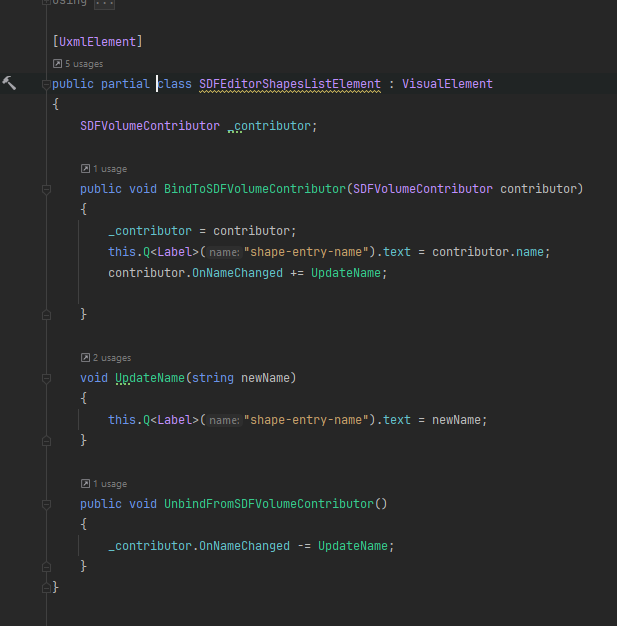
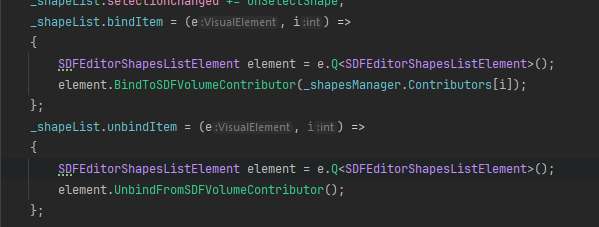
so how exactly do you link things in UI toolkit to variables on gameobjects etc at runtime? I have a listview that's got a list of SDFVolumeContributor (a custom component) as the itemsSource and it's creating a visualElement with a label and icon for each of them off of a template but I have no idea how to make the label take its corresponding component's gameobject's name and update when it changes, seemingly the actual binding system is editor only according to the doc
winged nexus
cloud thorn
so how exactly do you link things in UI toolkit to variables on gameobjects etc ...
So I presume this is something you need to be able at runtime (i.e. outside of the editor namespace)?
cloud thorn
yeah
winged nexus
Yeah, then you either have to use the more work-intensive way of linking all this manually with events.
Or if you're on 2023.2+ you could try making a CustomBinding
Then you can kind of define it however you need it to work.
winged nexus
winged nexus
Anybody ever encounter something similar? I'm updating a project to 2023.2 and t...
Ignore. Just found out Unity's default stylesheet now always selects for :focus:enabled, which always gave it precedence over our own :focus.
cloud thorn
I'm on 2023.2 so that's an option
is it viable to have a class that inherits from VisualElement & serves as the root for a given element in the list, and have a function in it that takes a SDFVolumeContributor and takes care of its own binding?
so the list element template would use that custom visualelement instead of the stock one
winged nexus
cloud thorn
I'm on 2023.2 so that's an option
is it viable to have a class that inherits fro...
Probably is, yeah, though I'm not sure. We've only had to define our own element type once. It's a little involved, but possible.
In our case, we wanted to tie labels and other text elements to our own localization framework and we first wanted to create a custom "localized label", but the exposed attributes on that didn't serialize reliably.
So just keeping default elements and using the CustomBindings worked better.
cloud thorn
I'm not sure how much less involved it can get based on how ListView seems to work
winged nexus
cloud thorn
I'm not sure how much less involved it can get based on how ListView seems to wo...
Uh. Yeah. Fair point. 😛
cloud thorn
got something working ok ish just gotta make sure that specific function on the component is used to change the name https://i.imgur.com/rUJ0ZB9.png https://i.imgur.com/7eheQsd.png
 gritty viper
You can also use pure UXML to do binding using the <Bindings/> approach. First to bind a list of your custom C# class into the itemsSource, then to bind your custom C# class in your UXML component that is specified in item-template on the ListView

Inside the UXML component:
 gusty vapor
is there a built in control for AnimationCurve in uitoolkit?
I can't seem to find them
 undone scaffold
what's the state of UI Toolkit + ECS/DOTs? any issues?
 cursive quail
gusty vapor
cursive quail
<@726512159940411422> https://docs.unity3d.com/ScriptReference/UIElements.CurveF...
cursive quail
gusty vapor
cursive quail
<@726512159940411422> https://docs.unity3d.com/ScriptReference/UIElements.CurveF...
oh thanks! appreciated 👍
 karmic gyro
How do I activate antialiasing in an image that is used as a button?
not this

It should look like this but this is through the sprite renderer and not a button
 trail oasis
how do you make a visual element only be a width based on its children
right now it has no children so it should be zero width but for some reason its 100% width instead
gusty vapor
set both grow/shrink to 1 and leave width/height unset on the parent
 stiff talon
In case of the following class
public class Foo
{
        [SerializeField]
        private Vector3 vectorA = new();

        [SerializeField]
        private MyVector vectorB = new();
}```
Unity hides fields of MyVector vectorB in a foldout, but doesn't do the same for Vector3 vectorA. What I need to write for MyVector class to achieve the same behaviour as with build-in classes?Write a property drawer for MyVector
stiff talon
rough scarab
Write a property drawer for MyVector
It worked! Should I add a null check for values or UIElements will do that for me? Should I use Vector3Field or it's better to inherit my own implementation from BaseCompositeField<T, FloatField, float>?
Apparently a public or serialized field can't be fully null, because Inspector shows their default values no matter what.
gusty vapor
if they're value types then nothing wrong with that
trail oasis
how do you remove elements from code
im have a list of visual element references and im removing them like this:
        void RemoveAllCells()
        {
            Debug.Log("Removing: " + _cells.Count);
            foreach (var cell in _cells)
            {
                cell.RemoveFromHierarchy();
                Debug.Log("Removed: " + cell);
            }
            _cells.Clear();
        }
but it doesn't remove them its frustrating
i also tried _parent.Remove(cell)
that also didn't work
trail oasis
ok got it working now
made my first custom control for my custom progress bars

theres still so much boiler plate you have to write for all this stuff i hope they can remove some of the repetitive code we have to keep writing for custom controls
rough scarab
trail oasis
theres still so much boiler plate you have to write for all this stuff i hope th...
Like what? I could imagine that being an extremely small amount of code
trail oasis
you have to include xml factory and attribute stuff in the class its annoying
rough scarab
Only if you're not using 2023
trail oasis
oh they changed it in 2023?
trail oasis
oh thank god for that!
rough scarab
trail oasis
oh thank god for that!
You should probably watch the:
Create better Editor and game interfaces faster with UI Toolkit (Unite 2023)
talk that is pinned to this channel
 errant harbor
Anyone know how i can add a texture selection with a preview similar to what you get on materials when selecting textures?
Want to do the same thing but in my own cusotm window

 sick turtle
https://docs.unity3d.com/2021.2/Documentation/Manual/UIE-HowTo-CreateEditorWindow.html <- I'm using this tutorial as a point of reference. I'd like to collect all of the Quest scriptableObjects in my assets and display them as foldouts in the left column. When the user expands the foldout, they can modify the name and description of the quest. When the quest is selected, the right column updates with the Tasks associated with that quest.
sick turtle
sick turtle
https://docs.unity3d.com/2021.2/Documentation/Manual/UIE-HowTo-CreateEditorWindo...
I currently have this but have no idea how to display the contents of the scriptable object in an expanded foldout. Can anybody help me out?
 trail oasis
so does adding a class that changes a property value not trigger transition animations
or only pseudo classes like adding :hover is the only way to trigger it?
my uss has this:
.stepwise-progress__sub-bar {
    background-color: red;
    height: 100%;
    transition-property: background-color;
    transition-duration: 0.75s;
    transition-timing-function: ease;
    transition-delay: 0.75s;
}

.stepwise-progress__empty {
    background-color: rgb(0, 0, 0);
}
if i add .stepwise-progress__empty the transition does not happen, it instantly changes i cant figure out why
same if i remove that class its instant
 agile urchin
Hi; just want to check I'm not missing something. Using runtime data binding in 2023.2.
Is there any way to debug bindings? I find that when I make a mistake setting up a data binding it just silently does nothing, with no indication of where the issue might be or even that there's a problem at all. There doesn't seem to be anything about bindings in the UIElements debugger either. Is there anywhere I can look at, hook into or even breakpoint to get some feedback when a binding fails to bind correctly?
gritty viper
You can change the logging output on the panel settings, then it will throw a bunch of warnings for every binding error it encounters
 agile urchin
Perfect, thanks!
errant harbor
is there no way to get the height of a visual element that has it's height set to auto?
because even though the element stretches or shrinks as needed on auto if you try to check the height on style.height it is alwas 0 because it's on auto. But i can't always specify how much space an element "would have" taken up there has to be a way to check how many pixels it's taking up even in auto
Unless i'm just missing something obvious but this is one of the major issues with ui toolkit
static canyon
errant harbor
Unless i'm just missing something obvious but this is one of the major issues wi...
style is a request for what you want, resolvedStyle is what you get after layout has happened. Layout typically takes a frame - so if you set something to auto, the next frame the resolved style will give the calculated values. That said, when it comes to height, depending what you need you may need to convert it to units you need. Registering a callback to the GeometryChanged event can also be useful.
errant harbor
Ok i will try that and let you know if it works. Thank you
prime raft
Hello, can anyone show me a small example of how to bind Label and a variable through the UIBuilder directly using the 3 dots as said in the official video to ensure that the data is well updated when any changes occur? I don't seem to grasp this part of binding even after watching the official video.
 vague echo
I have an block of text, where some of the words need to have an gradient effect applied to them. I could not use TMPs built in gradients as they cannot be applied on per word basis (only a per character one). So instead, i opted to make a gradient texture, and just use <font="my font" material="gradient_material">word</font>.
This works well, except for an small issue: Since the horizontal map mode is set to line (anything else will not have the desired effect), when I try to use this gradient effect within a big blob of text. For example:
"Hello, this is a test string for no other purpose whatsoever <...>wordWithGradient</...>"
My gradient texture will be streched to fit the entire line, resulting in "wordWithGradient" only having the final part of the gradient effect.
How can I fix this? If there's a way of either limiting texture streching to each word, or to just within a tag, thats enough for my use case. I don't need both, either will work. Thanks in advance
quick sable
sick turtle
I currently have this but have no idea how to display the contents of the script...
You can either:
- create the fields manually, set their binding path and call Bind() on each foldout
- or use InspectorElement (which will draw the default inspector with all fields + a script field)
agile urchin
prime raft
Hello, can anyone show me a small example of how to bind Label and a variable th...
This should be about as simple an example as you can get:
using Unity.Properties;
using UnityEngine;

[CreateAssetMenu]
public class TestDataSource : ScriptableObject
{
    [CreateProperty]
    public string TestText { get; set; } = "My Test String";
}
This example uses a ScriptableObject so you can create an asset and assign it directly to the Data Source field in UI Builder, but you can use any type if you set the data source through code. The example also uses a property, but you can equally use any public field.

 fervent echo
karmic gyro
not this
fervent echo
karmic gyro
not this
does it look like this in the build? because stuff tends to look like that in the unity editor
 solar tangle
working on some tests working in keijiro's tools (plus live link) into ui toolkit =). ill be limited by ui toolkit restrictions, but seems super fast so far and fun.. (example: the notes being played are just class add/removes)

 spring silo
There is a sample for help boxes, how can I introduce it on the UI Builder?
spring silo

I'm not very sure how to create templates to use directly in the UI Builder, I know you can, just don't know how.
spring silo
I guess people aren't trying the UI toolkit lol
 sly folio
I'm having a hell of a time getting a button to dynamically resize to its child text box (with dynamic text), while also including it in a horz layout group. Is there a trick to doing this?
rough scarab
sly folio
I'm having a hell of a time getting a button to dynamically resize to its child ...
Horizontal layout group? That sounds like UGUI not uitoolkit. #📲┃ui-ux
sly folio
Thanks!
cloud thorn
hey this doc has a color field but I can't find it in the UI builder, what gives? https://www.foundations.unity.com/components/color-field

A color field allows the user to select a color and an associated alpha value to define the color’s transparency. UIT IMGUI


nvm it's editor only that's a shame
cloud thorn
is there any alternative for color pickers at runtime? vector fields are terribly unwieldy for this
agile urchin
It'd need to be designed pretty differently; since you don't have a windowing system at runtime it couldn't do the "pop up a floating window with a colour picker" thing, it would have to be a dropdown. And I'm sure the code to properly support the eyedropper would be a bit of a nightmare.
But other than those issues I think someone could code one with the tools fairly straightforwardly; I don't know whether there's been much push by people to compile any libraries of user-made runtime UIElements controls yet, though?
static canyon
I made a highly customisable runtime uitk colour picker (gpu driven textures, oklab colour support etc) I was going to put on the store... then decided it wasn't worth the effort 🙈 😂 . Perhaps more usefully(!), here are a few github options: https://github.com/plyoung/UIElements (best) ||https://github.com/mmaletin/UnityColorPicker (simple) oops not uitk|| https://gist.github.com/andrew-raphael-lukasik/e7476208779f70e66fbedf5eb10aa2f8 (v simple). Re draggable window - new process windows aren't an option in Unity but you can (relatively) easily make a window that drags around within the application eg above everything else.


 trail oasis
something i really dont like about uitoolkit is all the look ups and classes are string based. so changing them in USS etc means your scripts all fail. where as in ugui its references of objects so they still remain linked
it becomes really annoying when you rename stuff for better organising and then you have to go in your scripts and change it all too
agile urchin
I think that's part of why the docs are so repeatedly insistent on recommending devs adopt BEM naming conventions as early as possible.
(Though I still haven't got the hang of them.)
rough scarab
BEM does make a world of difference
however I think they may have meant UXML, not USS
In that case, I would try to encapsulate things better 😄
agile urchin
I suspect for a lot of UI Toolkit's design decisions the decision wasn't based on "is this alternative better?", but on "is this alternative so obviously and thoroughly better that it's worth doing something different from HTML/CSS, which is so much more well known and thoroughly analysed?".
trail oasis
if you have two style sheets that affect font size how does it decide which one takes precedent ?
ah i see its the order of the USS files
neat
gritty viper
I've solved the issue of magic strings and the inherent change management issues by writing a small console program that parses all USS and UXML files and generates C# code with consts for everything it finds. Could probably be moved to a source generator once they're fully supported.
If you add/remove/change USS classes or UXML element names and then re-gen the code, your C# will break since those identifers don't exist any more (which is what you want, not silent failures). It also makes spelling errors a non-issue since it's codegenned from the source.
Ends up looking like this in practice
 trail oasis
the whole ui builder just decided to crash with some random array out of bounds error now i cant open it
analog bronze
solar tangle
working on some tests working in keijiro's tools (plus live link) into ui toolki...
awesome
how can i access the UI Toolkit from a script
 rough scarab
Reference it like you would reference any other object—however you like
analog bronze
how can i find it by name
rough scarab
Presumably your (canvas? or) scene setup is different; be it post processing or something else. However, this question is not suited to this channel, it should be in #📲┃ui-ux
winged nexus
Anybody know why setting the value of Basefield<T>.labelElement.text triggers a value changed event on that field?
cloud thorn
hey I have a listview and I want ppl to reorder things from it, but right now that listview is bound to a readonlycollection
I'd rather not bind it to the actual list behind because I wanna handle the reordering logic myself, is there a way to get listview to call some function when trying to reorder things instead of directly modifying the bound list?
 wanton solar
Hi everyone! This probably will look like a dumb question, but i need to complete a very specific task. Is there a way to create a graphview-like system? Doesn't need to make it look good, just working is fine.
(of course i can't use graphview or graphtool API lol)
winged nexus
winged nexus
Anybody know why setting the value of Basefield<T>.labelElement.text triggers a ...
Self response for anyone else wondering. Apparently this has always been this way for all BaseFields. The change event from the label bubbles up to the field itself. https://forum.unity.com/threads/proper-way-to-get-changed-values-from-a-textfield.1432954/ This is pretty painful...
Unity Forum
I'm probably doing something wrong here, but why does changing the label of a text field trigger a value changed event?
protected virtual void...
analog bronze
https://docs.unity3d.com/Packages/com.unity.ui@1.0/api/UnityEngine.UIElements.html is this the latest as of 2023 ?
rough scarab
analog bronze
https://docs.unity3d.com/Packages/com.unity.ui@1.0/api/UnityEngine.UIElements.ht...
No. Use the core documentation
analog bronze
it seems to be missing TabView
rough scarab
analog bronze
yay
MarkDirtyRepaint Triggers a repaint of the VisualElement on the next frame. This method is called internally when a change occurs that requires a repaint, such as when UIElements.BaseField_1.value is changed or the text in a Label. If you are implementing a custom control, you can call this method to trigger a repaint when a change occurs that requires a repaint such as when using generateVisualContent to render a mesh and the mesh data has now changed.
hmm, seems that UI Toolkit does indeed use draw caching, awesome
This delegate is called only when the VisualElement needs to regenerate its visual contents. It is not called every frame when the panel refreshes. The generated content is cached, and remains intact until any of the VisualElement's properties that affects visuals either changes, or VisualElement.MarkDirtyRepaint is called.
does this apply to VisualElement transitions such as animation and scrolling
(eg doing such simply moves the cached data around and does not trigger regeneration)
(imma assume it does)
reorderable A property that adds dragging support to tabs.
i assume that TabView has scrollable tabs in the case where all tabs are unable to fit within the bounds of the parent
 past ermine
does UITK editor still not have a dropdown that's searchable?
rough scarab
past ermine
does UITK editor still not have a dropdown that's searchable?
It had it for many releases, but it was removed due to UX regressions
personally, saddest thing to happen to the 2023 release
it'll be back when they stabilise it
past ermine
i thought that was just the right click context menu?
past ermine
other try, how to get this window? in graphview it's very easy with ISearchWindowProvider but for a CustomEditor i have no idea
 rough scarab
past ermine
other try, how to get this window? in graphview it's very easy with ISearchWindo...
rough scarab
past ermine
other try, how to get this window? in graphview it's very easy with ISearchWindo...
That's an AdvancedDropdown, it's not UITK
past ermine
damn, i thought everything's ported to uitk by now
 rough scarab
trail oasis
what exactly is the relationship of % for text size ?
rough scarab
trail oasis
what exactly is the relationship of % for text size ?
It's not supported.
 upper garnet
I have a question about Textcore, that is used in UI toolkit, and apparently should become the standard Unity text tool in the future.
Does/Will Textcore solve one of the big issues of Textmeshpro (at least, it was an issue for me in all my projects), AKA giving us the ability to have rich text editors for strings that are meant to be used in TextCore (with styles and smileys/icons being applied visually like in MS word), or, at the very least, being able to generate previews of text that can be seen in Odin Inspector previewfields/ the project tab?
Textmeshpro texts are actually invisible on those standard preview tools. If a Gameobject prefab only contains a TextMeshPro, no preview is available and we get a generic prefab icon instead. if the TMP is combined with sprites or a mesh, the preview will display everything except the texts.
I have been (slowly) building up the skills required to create a deckbuilder game. But being unable to have rich text editors or previews (even with Odin inspector asset on top) make the data entry for my texts very complicated, as those are filled with icons/styles to make the cards easier to understand and read from far away.
I had made a thread in the forums about that 1 year ago. https://forum.unity.com/threads/is-there-a-way-to-make-textmeshpro-visible-in-prefab-preview.1428489/
Will textcore finally solve this issue in some way? Rich text editor might be asking for too much, but previews would be very, very useful already. Thanks
Unity Forum
When creating a prefab with textMeshpro, the text can not be seen in the preview that appears in the asset folder. It also can't appear on previews...
cloud thorn
is there any way to get a callback when someone reorders a list through listview? I have some systems that need to refresh specific data when that happens
upper garnet
This screenshot I posted in the thread linked above kind of sums up the issue of TMP not generating visible previews.
I repost it here for convenience.

If the text was visible in project tab, it would also be so in Odin preview fields. Which at least would allow us to check if no mistake was done with style tags, since we would be able to see the result while in editor. I really hope textcore will allow this in some way.
Because right now, it's impossible to test if my card texts are correct without running the game. And it slows down my workflow MASSIVELY. 😦
 split swallow

 thin coral
That's not UIToolkit? Delete the canvas from your hierarchy.
 royal tiger
Hi, could someone help me check if I'm missing something or what I did wrong? I'm using https://docs.unity3d.com/2022.1/Documentation/Manual/UIE-HowTo-CreateRuntimeUI.html as reference.
The errors I'm getting are shown in the picture along with the two scripts concerned


 rough scarab
royal tiger
Hi, could someone help me check if I'm missing something or what I did wrong? I'...
rough scarab
royal tiger
Hi, could someone help me check if I'm missing something or what I did wrong? I'...
And your UXML? !code
 analog sorrelBOT

Posting code
📃 Large Code Blocks
Use links to services like:
https://gdl.space/, https://paste.ofcode.org/, https://hatebin.com/, https://paste.myst.rs/, https://hastebin.com/
📃 Inline Code
Surround code with three backquotes. Not quotation marks.
To format as C#, add cs to the first line:
```cs
// Your code here
```
Add a comment with a line number if there is an error message.
royal tiger
rough scarab
And your UXML? !code
for the list entries or for the main view?
royal tiger
uxml for the list entries: https://hastebin.com/share/aporanowiw.xml
uxml for the content container (where the list view is): https://hastebin.com/share/cudewacujo.xml
i figured out how to fix the null reference but now it says list is empty although i have sample data done already. i'm unsure what mistake i did or what i've missed out
in case it's important: i'm trying to do a list that displays the image in the same container as the labels so no selectables
 woeful cave
I can't get the UI to update when i modify my datasource:
I wanted this video where it shows a setting on the property called "Add binding", but i can't find it. I'm using the newest editor (2023.2.8f1)
https://youtu.be/HQ0TmO8ZA4o?si=xwYWnTsGLletvesi&t=664

We’re constantly evolving the UI Toolkit to put the best UI tools in the hands of our users. Watch this video for expert guidance and valuable techniques to level up your UI skills. We show you how UI Toolkit can elevate and speed up teamwork with the new data-binding system, innovative UXML objects, and tailored inspectors in UI Builder. Don’t ...
Screenshot of it here

I defined my ResourceCounter as a partial class derriving from VisualElement, marked it with the UxmlElement attribut, marked the attribute count which is an int with the UxmlAttribute. Also my datasource is a scriptable object with same variable name count and int for type - so the toolkit should be able to see it maps
UPDATE: In the video they have c# properties for the xmlattributes on the VisualElement. That does not seem to work - i can bind if i change them to normal fields instead - not a getter/setter property
- UPDATE: If i mark the get/set property with SerializeField - then the VisualElement will allow me to Add Binding to that property
 marsh stream
Hi guys, how can we disable some (not all) choices in a dropdown in UITK? I noticed when an option is null it become a separator
cloud thorn
how does one get a callback for when someone reorders things in ListView?
cloud thorn
ended up finding it, it's itemIndexChanged
another question, is there any quick way to figure out whether or not the user is currently typing in any text field? I currently have the interface set up to hide when pressing h but that runs even when the user is typing
rough scarab
royal tiger
uxml for the list entries: https://hastebin.com/share/aporanowiw.xml
uxml for th...
Your list view does not use the name that you refer to it in code
woeful cave
I have a wierd problem in my document. I have one root node with flex (and 100% height) - space-between, and two child node. This means i have one node in the top of the screen and one in the bottom. In the game view, in the editor, i see my bottom element nicely placed in the bottom, but once i hit playmode, the game view shows that in the middle of the screen. In both modes, the top is displayed correctly in the top. Is this a common problem?
This is when not in play-mode:

And this is when i hit play:

This is the UI Builder view:

Ok this is wierd - if i go to the UI Builder while the game is running and manually update the value for the progress bar in the bottom, the value updates and the bar pops into place in the bottom...
royal tiger
rough scarab
Your list view does not use the name that you refer to it in code
It still shows 'list is empty' in runtime. I made sure to copy paste its name just in case. am I misunderstanding something?
rough scarab
royal tiger
It still shows 'list is empty' in runtime. I made sure to copy paste its name ju...
If there's no errors any more, then no, it looks fine. Make sure the backing list actually has items
royal tiger
rough scarab
If there's no errors any more, then no, it looks fine. Make sure the backing lis...
at the moment, I have two samples. these two are both made from DestinationData.cs
 rough scarab
royal tiger
at the moment, I have two samples. these two are both made from DestinationData....
rough scarab
royal tiger
at the moment, I have two samples. these two are both made from DestinationData....
I have no idea what these are meant to be
if they're what you're trying to load via Resources, you have not read the documentation for Resources/Resources.Load and don't understand how it works
royal tiger
rough scarab
if they're what you're trying to load via Resources, you have not read the docum...
I have read it and it is true that I have yet to understand how it works. So, the issue is probably from there. Thanks for the pointer
royal tiger
rough scarab
I have no idea what these are meant to be
Just to show that I have samples/items that should be displayed in the list during runtime
analog bronze
class TextView <E> : ListView {
    List<E> source;
    Func<E, string> cast;

    public TextView(List<E> source, Func<E, string> cast) {
        this.source = source;
        this.cast = cast;
        reorderable = false;
        makeItem = make_item;
        bindItem = bind_item;
        itemHeight = -1;
        itemsSource = source;
    }

    private void bind_item(VisualElement element, int arg2) {
        Label label = (Label) element;
        label.text = cast(source[arg2]);
    }

    private VisualElement make_item() {
        return new Label();
    }
}
would i do this to make a text view?
eg
        data_source = new List<string>();
        Debug.OnMessageEmitted += obj => data_source.Add(obj);
        Debug.Log("START");

        GameObject[] gameObjects = gameObject.scene.GetRootGameObjects();
        foreach (var item in gameObjects) {
            if (item.name == "UIDocument") {
                ui = item.GetComponent<UIDocument>();
            }
        }
        if (ui == null) {
            Debug.Log("could not find UI");
            return;
        }


        TabView tabView = new TabView();

        Tab log_tab = new Tab("Log"); // all Debug.Log messages would appear in this tab
        log_tab.Add(new TextView<string>(data_source, s => s));
        tabView.Add(log_tab);

        Tab ui_tab = new Tab("UI");
        tabView.Add(ui_tab);

        ui.rootVisualElement.Add(tabView);
welp it seems so

how do i get the content to align to the bottom of the tab
doesnt seem to be log_tab.contentContainer
i tried new TextView<string>(data_source, s => s) { style = { marginTop = 10 } } but i still get the same position
analog bronze

is this normal ?
hmm
Cannot modify VisualElement hierarchy during layout calculation
prime raft
I'm using Unity 2023.2.7 on Windows 11 on intel i5 11th Gen Tiger Lake with 16 GB RAM and 512 GB SSD.
The UIBuilder is pretty choppy and laggy in terms of experience in general. Is it normally like this or is this like this for what specs I'm using or the UIBuilder is still not in a state of giving smooth use experience?
The clicks on VisualElement hierarchy responds pretty slow with a ping of about 0.4 -0.7 seconds. And many other things are also pretty slow compared to other normal software.
rough scarab
UIToolkit is unrelated to UGUI, which uses Canvas, etc. #📲┃ui-ux was the correct channel
 vocal timber
mb someone told me both channels and im getting desperate 
gritty viper
prime raft
I'm using Unity 2023.2.7 on Windows 11 on intel i5 11th Gen Tiger Lake with 16 G...
It seems like you're new to software development so just a heads up that "ping" usually refers to network latency, which isn't relevant when you're talking about local application performance.
I'd suggest having a look at the resource utilisation of your computer while you're using Unity and seeing if it's maxing something out which could result in the delay you're witnessing. If everything looks fine, then it could be an issue with AV or something else interfering with the normal operation of Unity.
 uneven oyster
So I have a VisualElement called "background" and visual element rows that are children of it.
The background has a manipulator on it that looks like this:
internal class NomadDragAndDropManipulator : Manipulator {
protected override void RegisterCallbacksOnTarget() {
target.RegisterCallback<DragEnterEvent>(OnDragEnter);
target.RegisterCallback<DragLeaveEvent>(OnDragLeave);
target.RegisterCallback<DragUpdatedEvent>(OnDragUpdated);
target.RegisterCallback<DragPerformEvent>(OnDragPerform);
// target.RegisterCallback<PointerDownEvent>(OnPointerDown);
}```
Each of these has a corresponding Debug.Log in it.
The individual rows have callbacks added to it like this:
```cs
row.RegisterCallback<MouseEnterEvent>((evt) => {
Debug.Log("Row MouseEnter");
});
row.RegisterCallback<MouseLeaveEvent>((evt) => {
Debug.Log("Row MouseLeave");
});
row.RegisterCallback<MouseDownEvent>(evt => {
Debug.Log("Row MouseDown");
});
row.RegisterCallback<MouseUpEvent>(evt => {
Debug.Log("Row MouseUp");
});```
I'm expecting that if I click on a row - I will _eventually_ get the "Row MouseUp" to get called. But I do not. Instead I get the sequence of events visible in the console window of my screenshot. What am I doing wrong here? analog bronze
analog bronze
analog bronze
Oh i know what its doing
it is not respecting the element height or ignoring the content height
eg a multi-line text will be displayed as if it where a single line, causing further items to overlap the multi-line text
how do i fix this ?
in my ListView
analog bronze
analog bronze
```cs
class TextView <E> : ListView {
List<E> source;
Func<E, string> ca...
The code is here ^
marsh stream
marsh stream
Hi guys, how can we disable some (not all) choices in a dropdown in UITK? I noti...
Hi guys, looks like it isn't possible right now, correct? maybe should I create my own popup for that..?
I don't wanna, although it may look better...... 🤔
cloud thorn
is there a simple way to swap between different panels based on which ui button someone presses? as far as I can tell it's either tabbed menus which don't have the format I want, or requires custom script which seems like a lot of boilerplate code
like having a main menu with a save button and an option button, and either buttons open a different corresponding menu
analog bronze
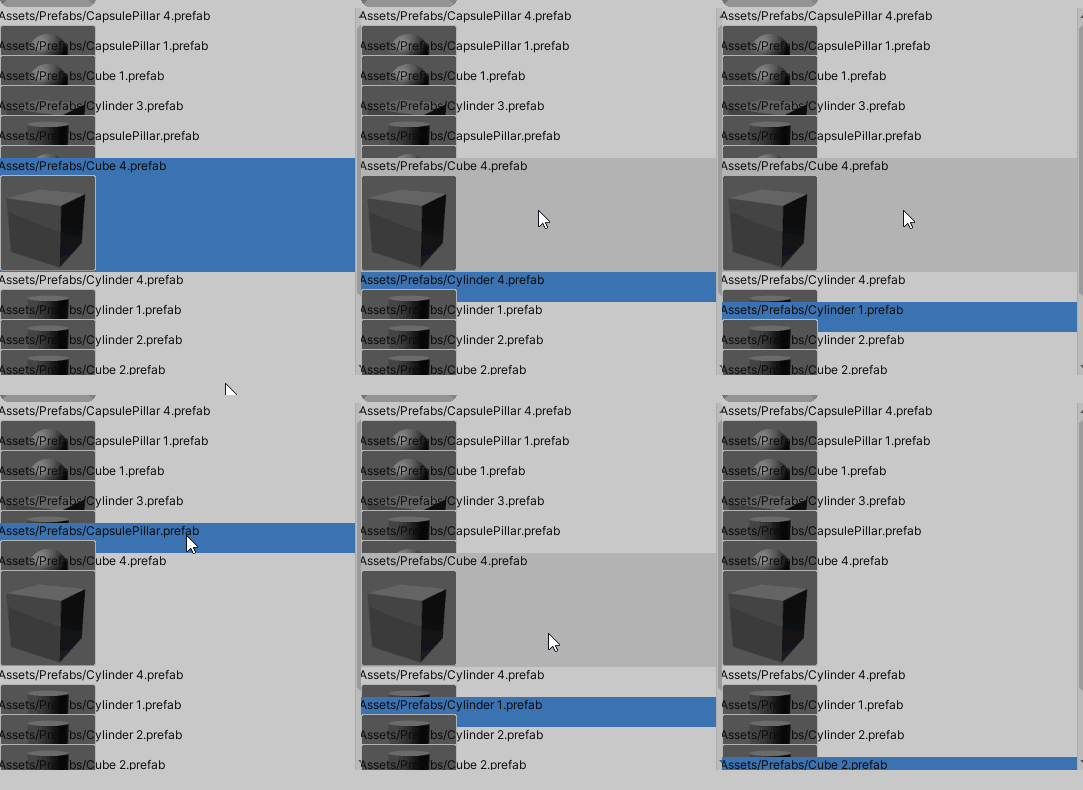
Unity Forum
I'm trying to change the height of an element and while visually I can achieve this, it technically isn't working right as what the mouse selects still...
is sad qwq
 fleet forge
Can the appearance of read-only elements be edited?
 rough scarab
fleet forge
Can the appearance of read-only elements be edited?
rough scarab
fleet forge
Can the appearance of read-only elements be edited?
Yes, with the same USS queries as everything else
See the Styling elements pinned link
fleet forge
rough scarab
See the Styling elements pinned link
Is it possible to accomplish without writing USS?
rough scarab
fleet forge
Is it possible to accomplish without writing USS?
how do you want to do it instead?
fleet forge
rough scarab
how do you want to do it instead?
Dragging and dropping an item in Unity.
rough scarab
I don't know what you mean by that, what does dragging and dropping have to do with styling?
fleet forge
rough scarab
I don't know what you mean by that, what does dragging and dropping have to do w...
I mean doing something in this window and then access to read only elements and edit
 rough scarab
Create a query in the top left, select it, and modify its styling
fleet forge
rough scarab
Create a query in the top left, select it, and modify its styling
Can you write an example for this?
 rough scarab
There is no example to write, select the text area in this screenshot, type in that class name, press enter, select it, and modify its styling
 fleet forge
rough scarab
There is no example to write, select the text area in this screenshot, type in t...
fleet forge
rough scarab
There is no example to write, select the text area in this screenshot, type in t...
I don't know why, but none of them seem to work when attempting to modify the style.
 rough scarab
works fine here
 fleet forge
rough scarab
works fine here
fleet forge
rough scarab
works fine here
It's works. Thanks.
 crystal wind
is there any site to download free uss style files?🤔
fleet forge
Why is the UI not same even when I toggle the "Match game view" option?

 hollow kernel
Hey all. Id like to use UIToolkit but with zero editor interaction. Has anyone successfully bundled the xml/css assets and built UIDocuments at runtime from code?
quick sable
hollow kernel
Hey all. Id like to use UIToolkit but with zero editor interaction. Has anyone...
You can use the C# api to add VisualElements and do all of the things uxml can do
If that's what you mean
quick sable
fleet forge
Why is the UI not same even when I toggle the "Match game view" option?
Probably has something to do with your UI panel settings scaling mode
 unborn bluff
How can i use .USS by Editor Theme? For example, i wan't to use Lighty .USS File while Editor is in Light Mode and use Darky .USS File while Editor is in Dark mode. (UI Toolkit)
quick sable
unborn bluff
How can i use .USS by Editor Theme? For example, i wan't to use Lighty .USS File...
Open the uxml file in UI builder and use the theme dropdown in the top right
unborn bluff
quick sable
Open the uxml file in UI builder and use the theme dropdown in the top right
You mean this?
 unborn bluff
But my USS Class still applies Dark even it is in Dark mode
unborn bluff
quick sable
Oh I get what you mean now
Yes!
quick sable
You probably need to switch it out with C#
unborn bluff
There is almost no documentation for it inside UI Toolkit Documentation.
quick sable
There might be a better way, but I think checking VisualElement.styleSheets for light/dark editor mode style sheets could work
unborn bluff
I don't get what you mean by that but i found a video in Official Unity Youtube Channel. I will watch that and come back to here.
quick sable
This the name for the default ones
 quick sable
unborn bluff
I don't get what you mean by that but i found a video in Official Unity Youtube ...
quick sable
unborn bluff
I don't get what you mean by that but i found a video in Official Unity Youtube ...
oh alright
hollow kernel
@quick sable i mean, i still want to use html/css basically
quick sable
hollow kernel
<@308117922260451340> i mean, i still want to use html/css basically
Seems like you want to create uxml and uss from strings at rutnime, see this
https://forum.unity.com/threads/loading-uxml-and-uss-from-text-in-runtime.1200964/
Unity Forum
I'm trying to load uxml and uss from textasset in runtime.
Is this possible in common way now?
Currently, ScriptedImporter generates VisualTreeAsset...
hollow kernel
They can be files, but I don't want to have to serialize stuff in the editor
quick sable
They will have to serialized
hollow kernel
Ok. Its just really lame.
quick sable
This person did manage to get it to work at runtime with OneJS and some work
https://forum.unity.com/threads/load-stylesheet-from-string.1327482/#post-8409525
Unity Forum
I am interested in user defined themes.
What I want is to load a StyleSheet (USS) from a string.
Note that this has been asked before:...
not at all familiar with onejs though
hollow kernel
that looks sick
unborn bluff
quick sable
oh alright
Hello again. I watched almost all and he did show something cool that i didn't even knew it exists...
The Unity's Built-in variables changing it's self by the selected theme. That way, they don't worry about the theme-switching. But i wonder how it goes with custom ones...
quick sable
I'm pretty sure that just comes from that both of the default style sheets define variables with the same names
I tried to do my idea of looking through VisualElement.styleSheets to find if it has a dark/light mode sheet on it, but they don't show up in the list
analog bronze
analog bronze
hmm https://forum.unity.com/threads/changing-list-item-height.896423
When will this be fixed
 delicate coral
Would anyone happen to know why the TreeView seems to have a "SetRootItems" pattern with a small number of "...Root..." methods?
It seems to be pretty much identical to a "SetItems" method, just without an auto-refresh. And looking through the Unity cs reference code, I don't really see any consistent way it's being used - one place seems to initialize it with a blank list that's never referenced anywhere else, for example, since they don't seem to want this functionality. The documentation doesn't really seem to mention this odd set of functions, either. Maybe this is just a legacy thing? Or maybe it's for some very particular tree view in Unity that needs it?
unborn bluff
How could i fully destroy a VisualElement? I tried VisualElement.RemoveFromHierarchy(); but the cached variable says it still exists even i do null check.
cloud thorn
anyone knows if there's any simple way to make the input field on a slider larger? mine get unreadable for any number with more than 1 decimal
gritty viper
Has anyone managed to use the Template & Instance system without it creating the intermediate TemplateContainer element? Or managed to get a similar custom template system working that also doesn't use an intermediate element? I've gone through all the Template & Visual Element code but I'm unable to find a way to get it to work.
From what I have seen it seems like controls always need to generate an element in the tree at their position regardless of anything else going on around them. Would be nice to get around that somehow.
rough scarab
gritty viper
Has anyone managed to use the Template & Instance system without it creating the...
If you don't need the template container (I rarely do) then just index into the child and add that to your hierarchy and just disregard the TemplateContainer entirely
gritty viper
Do you mean move the instance out after it's been instantiated by the template system? Or intercept the standard flow and do it that way somehow?
unborn bluff
How could you bind a getter setter property to a visual element?
gritty viper
It sounds backwards, but you use [CreateProperty] to make properties bindable

 tranquil sigil
Anyone have square icon with radial fill element free for use?
I found one but its not using Vector Graphic API, so its very jagged at edges.
The others are radial circles instead of squares.
quick sable
cloud thorn
anyone knows if there's any simple way to make the input field on a slider large...
Make a USS selector for it with a larger fixed width
winged nexus
Hey all. This ring any bells for anyone? After upgrading from 2022.3.9 to 2023.2.8, I'm seeing a change in event propagation for a Button that sets its parent VisualElement to Display.None when clicked (via subscribing to the clicked callback).
In 2022.2.9, this would send an PointerUpEvent to the Button, which gets consumed. Then, a ClickEvent would bubble up, all the way from the Button to root.
In 2023.2.8, the PointerUpEvent is still sent, but the ClickEvent is nowhere to be found. This sucks because we were using it play (configurable) UI sounds.
Alternatively, anyone have any good approaches for playing "on click" button sounds, without having to subscribe to each button individually? (E.g. it should also deal with arbitrary buttons created at runtime, etc.)
 sullen bay
I'm just getting started with UITK... Why is my xml not updating?


I've saved and reserialized the file a couple of times
is there some trick to it?
rough scarab
sullen bay
I'm just getting started with UITK... Why is my xml not updating?
There should be no trick to it, just File>Save or ctrl-S and it should update. Your IDE may be overriding what it deems as the correct text to display
sullen bay
rough scarab
There should be no trick to it, just File>Save or ctrl-S and it should update. Y...
Nope, I needed to restart unity
Then save started working again
rough scarab
I have not seen that bug before
 dreamy scaffold
Is UI toolkit meant only for editor uses, or also for in-game uses?
 steel cradle
dreamy scaffold
Is UI toolkit meant only for editor uses, or also for in-game uses?
steel cradle
dreamy scaffold
Is UI toolkit meant only for editor uses, or also for in-game uses?
It is also intended for runtime use https://docs.unity3d.com/2023.3/Documentation/Manual/UIE-support-for-runtime-ui.html
dreamy scaffold
Thanks!
 solid notch
So I want to create a little texture array creation tool. Currently I want to be able to drag and drop texture assets directly into a content aware scroll view. Any ez way to do this with ui-toolkit?
hollow kernel
I have a VE that is full screen to allow a small VE to be dragged around the screen. However, if I have two, then one traps all clicks. Is there a way to pass a mouse down event to a parent if I don't want to handle it? I don't want to ignore events altogether because I want the mouse move/up/leave events to happen.
I could dynamically change it, but that causes some jarring re-renders
rough scarab
dreamy scaffold
Is UI toolkit meant only for editor uses, or also for in-game uses?
To be clear, it's not yet the recommended runtime solution
sullen bay
rough scarab
To be clear, it's not yet the recommended runtime solution
Would you use it? I had a look around at other options on the asset store and it seems like it might be as better than any other on balance.
rough scarab
sullen bay
Would you use it? I had a look around at other options on the asset store and it...
I am using it, but I am an educated expert
sullen bay
rough scarab
I am using it, but I am an educated expert
But that's why I'm asking you
My education is just the feature comparison on the unity page
rough scarab
sullen bay
But that's why I'm asking _you_
My advice is to not use it unless you are using 2023 
sullen bay
rough scarab
My advice is to not use it unless you are using 2023 <:UnityChanwow:885169594879...
Damn. They're not doing updates for LDS
rough scarab
Otherwise creating custom elements sucks and many controls are missing
sullen bay
rough scarab
Otherwise creating custom elements sucks and many controls are missing
Damn.
It seems so good. :-(
I want it
rough scarab
If your UI needs are minimal it's fine for prev versions
sullen bay
They're pretty complex, but that's why I want to move out of UGUI hell.
i want layouts that work
rough scarab
The Unite talk that's pinned is a great overview of the 2023 stuff that makes it properly extensible
sullen bay
Thanks, I'll take a look
I guess 2023LTS is not too far away. Pretty hesitant to migrate yet.
Hm, if timerborn can use it...
He's talking about buttons now supporting icons... Can you not nest arbitrary elements within a button element as you would in HTML?
Would you say the main feature lacking in 2022 is the data binding? I'm happy to add selectors to add handlers and set values I think. No worse than UGUI.
Although this does look quite nice.
Ah, lack of RTL text could be a problem!
rough scarab
Having to make UXML factories and all that shit
the few missing controls that are extremely handy, I don't have a list on hand
Imo every little bugfix and update is valuable when the system's in the state it's in rn
It has worked for versions, but there's less hurdles and issues to workaround every release
sullen bay
rough scarab
Imo every little bugfix and update is valuable when the system's in the state it...
Thanks, that paints a picture.
rough scarab
sullen bay
Thanks, that paints a picture.
To be fair, I experience UGUI as a broken mess with an unbearable layout system, but at least if you've worked with it you generally understand when you're hitting a forever UGUI bug
if you hit something missing or broken in UITK it often means an hour or two tangent
sullen bay
rough scarab
To be fair, I experience UGUI as a broken mess with an unbearable layout system,...
I dunno, I end up having to write my own layout systems for vertical layour etc which is a pretty brutal maintenance cost. They simply don't work regardless of how many force redraws and such.
and even when you do find the magic combinations of calls to make them layour correctly they will break again.
Also I still have yet to build my own shared styling system.
And the scene thrashing is quite annoying too for merge conflicts.
Needing to keep every object disabled, and even then they manage to create prefab overrides whenever they're dirty.
it's like yeah... I understand it... But that's why I feel I can't rely on it.
rough scarab
I'm not against using runtime UITK in earlier versions, I just wouldn't recommend it to everyone. And Unity won't recommend it even now.
I personally would recommend 2023 because the usability improvements are massive, but you can get the same out of 2022 except certain things will just take longer, and other things may either need to be pulled from 2023 source or made from scratch
But yeah, all those things that we all hate from UGUI are mostly gone
It's a balanced decision based on that pain and just being wary that some UITK bugs can be a time sink due to it being in development, the community not having answers, and certain things not having as much access
sullen bay
Thanks @rough scarab, sounds like I just need to try it out a bit more now and consider 2023
rough scarab
Also just do a color test in your project and check if things come out as you'd expect, because I've experienced some gamma/linear problems on certain projects at some point that had no apparent solution. I haven't had the issue recently but it's a nasty one when the recommended solution was to change the global setting for a project
sullen bay
rough scarab
Also just do a color test in your project and check if things come out as you'd ...
Thanks for the heads up. ❤️
gritty viper
gritty viper
Has anyone managed to use the Template & Instance system without it creating the...
Just a follow up for future reference. It's possible to get this working utilising the existing <engine:Template /> mechanism by setting up a custom control and calling ResolveTemplate (using reflection) on the parent.visualTreeAssetSource to get a template VisualAsset.
From there the instantiated VisualElement can be inserted into the current controls parent at the current controls index (parent.IndexOf(this)) and then the control can remove itself.
The end result is the root VisualElement in the referenced template exists where the custom control was placed, without any additional elements to interfere with layout.
The downside is that it uses reflection to access ResolveTemplate which means it can break at any time when Unity updates, but hopefully they expose a way for us to access templates directly in the future. There also may be other unseen downsides to messing with the tree in this way but I haven't seen any yet.
 flat smelt
Hey everyone. I'm trying to style my dropdown boxes here in UI Builder but everything is greyed out:
It seems not correct that these wouldn't be editable, how can I change the style of my dropdowns?
I've seen people mention creating .USS for them, which I have done, but I can't actually seem to drag the USS to these elements to get them to work.

Also for this checkbox too, I need to be able to change this also
 flat smelt
Okay I figured it out (and for the record I hate it lol)
You need to create USS files that inherit from the existing base unity files.
You do this by naming your USS files thusly:
.Dropdown > .unity-base-popup-field__input
You then drag the USS onto the editable parent object of what you want to change, and edit the USS file directly
I don't know why it's set up like this, but it seems way too difficult and unintuitive, personally.

 flat smelt
So now I'm trying to figure out how to change the Focus and Hover behaviours, and I'm again hitting a wall.
UI Toolkit is amazing, but for sticking with that amazingness it feels like your reward is a barrage of constant, swift punches to the face
gritty viper
flat smelt
So now I'm trying to figure out how to change the Focus and Hover behaviours, an...
UI Toolkit is influenced heavily from standard css/html tech, so using things like :focus and :hover pseudo selectors will help with understanding how the base styles are applied.
flat smelt
gritty viper
UI Toolkit is influenced heavily from standard css/html tech, so using things li...
Yep, I've basically spent the last 8 solid hours tinkering with it 😜 I've managed to hack myself a not half bad set of menus now
Real steep learning curve. The issue is probably that I've never touched CSS or HTML before in my life
 dapper scarab
How would I go about getting the world space vector of a point on a render texture that I have assigned to a visual element? Before using UI toolkit I could just use the rect transform of a raw texture with the render texture and take use RectTransformUtility. How would I go about doing this in UI elements?
I used this for my original method and all of it should work fine with UI toolkit except the first line, which requires a rectTransform class. Even if I can find an equivelent, how do I recreate the method? I can't just convert an ITransform struct into a rectTransform class.
RectTransformUtility.ScreenPointToLocalPointInRectangle(_rectTransform, Mouse.current.position.ReadValue(), null, out Vector2 localClick);
localClick.x = (_rectTransform.rect.xMin * -1) - (localClick.x * -1);
localClick.y = (_rectTransform.rect.yMin * -1) - (localClick.y * -1);
Vector2 viewportClick = new(localClick.x / _rectTransform.rect.size.x, localClick.y / _rectTransform.rect.size.y);
Ray ray = _camera.ViewportPointToRay(new Vector3(viewportClick.x, viewportClick.y, 0));
ray.origin = new Vector3(ray.origin.x - _camera.transform.position.x, ray.origin.y - _camera.transform.position.y, ray.origin.z);
Something I don't understand about UI toolkit's callbacks/handlers: What is the point of having PointerUpEvent separate from PointerCaptureOutEvent?
the former seems to trigger the latter if you capture the pointer
Is it because you wouldn't get the PointerUpEvent sent to the correct element?
and, unrelated, is the old GUI (uGUI) deprecated?
 pseudo sentinel
dreamy scaffold
and, unrelated, is the old GUI (uGUI) deprecated?
pseudo sentinel
dreamy scaffold
and, unrelated, is the old GUI (uGUI) deprecated?
no
 abstract sandal
hey so with the sliders, theres the "showInputField" that allows you to put in a numeric value. is there a way to have this numeric value not be constrained by the sliders limits, so the user can do like a manual override if needed?
rough scarab
dreamy scaffold
Something I don't understand about UI toolkit's callbacks/handlers: What is the ...
Because pointer capture is completely unrelated to a pointer button being released?
You can have one event without the other easily
 gilded tendon
I'm trying to get a VisualElements bounding box in screen space. I've tried several ways but it did not work for me. How can i achive that?
```var bounds = visualElement.worldBound;
var rect = GetScreenRect(bounds); ->Something like this.
GUI.Box(rect,"Screenspace Box");```
gilded tendon
Also is there a way to add an outline around a VisualElements image?
gusty vapor
no other way other than your image here must be a vector graphic
gusty vapor
gilded tendon
I'm trying to get a VisualElements bounding box in screen space. I've tried seve...
worldBound is relative to the editor window it's in, assuming you're doing editor stuff
gusty vapor
dreamy scaffold
Something I don't understand about UI toolkit's callbacks/handlers: What is the ...
they're not the same , see this https://docs.unity3d.com/Manual/UIE-Capture-Events.html
 flint bough
when do people use data binding vs just querying and updating the values?
Is there any doc about what is considered good ui toolkit design rn? It seems there are so many ways to do everything (in C#, in uxml, querying/data binding, developing custom controls vs just using normal controls and modifying etc)
Basically I am using dots so each frame I will have so query (think of database query) and then want to update the ui. If I'd do data binding I'd need to create intermediate C# classes and update them, if I query, I just query and update
gusty vapor
flint bough
Is there any doc about what is considered good ui toolkit design rn? It seems th...
if you're familiar with the concept of XAML in c#, it's basically what uxml/uss trying to achieve.
It decouples boilerplate codes (in a form of reusable templates) from your game logic.
gusty vapor
as for the binding part, uxml/uss does not even comparable, it's way too lacking
flint bough
I don't have a background in XAML. I did lot of webdev as side jobs, so thats an easy comparison for me
gusty vapor
flint bough
Basically I am using dots so each frame I will have so query (think of database ...
sounds like a question that @gusty estuary can answer due for a fact he made a mvvm binding and also used to DOTS ecosystem
flint bough
there I'd say querying and setting is the most "bare bones" approach and then there are thousands of frameworks that improve upon that, many in some way of doing something similar to data binding
yeah the question is not fully dots specific though. Basically just saying I have the data laying around somewhere in a non-managed type (some arrays)
 gusty estuary
tertle and enzi worked on new bindings for dots
flint bough
each frame I check some of the data and want to update it on screen
ah is it in tertles repo already?
flint bough
ah ok, thanks
gusty estuary
but basically, they somehow managed to make it burst compatible
gusty estuary
just ask them
flint bough
but the question is actually quite basic maybe: How do people decide between using data binding and querying?
gusty estuary
whatever is easier/faster
if I have to do tons of boilerplate to save 0.1ms - hell no
if I have to waste 1ms to save on doing smth smarter - hell no
flint bough
is it clear what is faster? probably querying is in general?
I imagine the binding has to query underneath anyways
 tulip sundial
I have an asset that has an IMGUI-based property drawer. When it's displayed inside of a UIToolkit inspector, the Rect is wrong -- it looks like it doesn't understand what its minimum X value should be. This causes it to draw out of bounds and get clipped.
Is there anything I can do to fix that?

I noticed that the IMGUIContainer has a margin-left of -57px. If I reset that to zero, it looks perfect
also, interestingly, this doesn't appear to be a problem for less-nested IMGUI containers. The example above has the following class:
unity-foldout__unity-imgui-container--depth-4
If I create a List<ActivityData> (which is what that "Qualities" list contains, the IMGUIContainer looks totally fine. Its left margin is 3 pixels And it has this class...
unity-foldout__unity-imgui-container--depth-3
It just goes off the rails at a depth of 4
a plain ActivityData also gets a left-margin of 3 pixels, and its class is
unity-foldout__unity-imgui-container--depth-2
ah, I see that the depth-3 element has an extra selector match that winds up resetting the left margin to 3px

I guess this is a hack to make it work right in that case, and there just isn't an equivalent fix for the depth-4 container
tulip sundial
tulip sundial
I have an asset that has an IMGUI-based property drawer. When it's displayed ins...
I feel like it'd be easy to fix this if I could add another stylesheet to the inspector. Is this possible?
Alternatively, since I'm probably XYing myself, any other suggestions w.r.t. the original problem would be appreciated!
(perhaps I just need to figure out how to rewrite this thing in UIToolkit...)
 tepid gazelle
I feel super stupid, I cant get runtime binding to work going by the docs - https://pastebin.com/2ePaSf6K
I assume its how im binding it as debugging it shows that the dataSource is set
(also im testing the child value and binding)
gilded tendon
I'm trying to get a VisualElements bounding box in screen space. I've tried several ways but it did not work for me. Anyone knows how can i achive that? I'm stuck with this problem for a while now.
var bounds = visualElement.worldBound;
var rect = GetScreenRect(bounds); ->Something like this.
GUI.Box(rect,"Screenspace Box");```Sure, just walk up the .parents until you reach the element with the sheets on them, and add yours. I generally make a helper method to do it that also checks whether the sheet is already there
 fickle perch
how do I, just, set the style override on a single visualElement?
if I have a class on it with a unity style, and then I want to set a specific thing, like, setting flex-grow to 1
I can only find USS/UXML answers but nothing on how to do it through C# directly
oh I literally just acces .style lol
im stupid c:
ok, now I want to draw, things, inside of a visual element
ideally relative to the coordinates of this element
and clipped to its region
I want to draw meshes with custom shaders
as well as some primitives like lines
I presume I should use the UITK vector stuff, and not Handles.whatever
I basically want to set up a viewport, that you can pan around in, where I need to draw mostly custom meshes and lines
with imgui I would use GUI.Matrix and Handles.Matrix to transform, and read mouse events to update the panning etc
I'm not entirely sure where to start with this in UITK, since it's constructed in CreateGUI. idk where interaction happens
(also I'm thinking out loud and yall are welcome to interrupt if you have an actual question, don't mean to flood this place!)
alright looks like OnGenerateVisualContent in a custom VisualElement is the way to go
fickle perch
hm, alright, so I got Painter2D to work in drawing stuff
but I can't quite figure out how to draw meshes, or, immediate mode drawing in general I suppose
I found this in unity's GraphView minimap lol

I guess I could just make the UI render a render texture, and then I do all of my drawing to the RT with command buffers, but that seems, wasteful, surely there's a way to draw to the existing buffer in the UI
i just want to draw an existing mesh with an existing material why is it so obtuse 
fickle perch
ok so apparently that's not possible
and so now I'm trying to draw to a render target
but the Handles.Matrix seems deeply cursed and weird and idk what's going on
gusty vapor
fickle perch
I want to draw meshes with custom shaders
sadly uitk can't do this just yet
gusty vapor
fickle perch
alright looks like OnGenerateVisualContent in a custom VisualElement is the way ...
yes, that's the way to do it. You can export it as VectorGraphic too if you want and put in an Image container
note that VectorGraphic here is uitk's or unity's own format, not the standard vector file
fickle perch
gusty vapor
no custom shader yeah that's the downside of uitk
that and the non-existent z-order
I'm not sure if they already fixed the custom shader issue or not, proly @rough scarab knows it
gusty vapor
fickle perch
I presume I should use the UITK vector stuff, and not Handles.whatever
or the mesh api, vector api basically a wrapper on top of that
to make things less verbose and easier to work with
fickle perch
right, but they don't support rendering custom shaders, so that's a dead end for me
gusty vapor
yeah, unfortunately
fickle perch
it just seems like there's no way to draw to a region inside an editorwindow, which, seems kinda, silly
I can set up a render target but I feel like there has to be a way to access the existing target of the editorwindow, so you don't have to double up on that memory
static canyon
I just pay the mem cost. There might be an internals way along the lines you found above but if you're making an editor tool to support multiple unity versions, that's challenging enough without worrying about the internal difs imo 😅. My stuff is mostly at runtime though - similar but different frustrations. Why they had to put everything outside of all the existing rendering code & apis I don't understand.
fickle perch
yeeah
just a little annoying that if I go the command buffer + RT route, I can't use Handles
which means I need to reimplement move/rotate/scale handles for both rendering and probably interaction too

rough scarab
Embedding some IMGUI isn't the end of the world if it makes some bit of it easier
fickle perch
yeah, it also didn't fix the issue in my case since handles are still drawn outside
I did end up solving it though
all I had to do was tear out and refactor PreviewRenderUtility and fix a bug in it, and then reflect a few internal calls, and now finally it works 🥲
in an OnGUI, this now works for me


 hollow kernel
Has anyone gotten uss property -unity-text-align work with a "lower" variant? '*-center' works, but 'lower' seems to be ignored.
sullen bay
Is there a method for cloning a visual element hierarchy?
I also have a question on how to manage components. This post says:
VisualElement was made to be inherited from and overridden. This is how you make custom elements with custom behavior, like a TreeView.
It's kind of old, and I can't see a guide for doing this in this docs.
Should I be created a custom class and referencing it from my UXML to create an OOP interface for my elements?
Something like:
class AttackInfo : VisualElement {
  Label _name;
  public AttackInfo() : base() {
    _name = Q<Label>("name");
  }
  public void Initialize(string name) {
    _name.text = name;
  }
}
And if so, how do I reference this from UXML? Does it just search every namespace for a matching class, or do I need a special prefix like ui:?
rough scarab
sullen bay
Something like:
```cs
class AttackInfo : VisualElement {
Label _name;
public...
Are you using 2023 or not 
sullen bay
rough scarab
Are you using 2023 or not <:blushie:1068134625697874013>
Nope, still on LTS for now
But that message is from 2019 I think
rough scarab
Well, you don't clone visual elements, you use VisualTreeAsset (UXML) and clone those.
You can create objects in C# fine without any extra stuff, but to use stuff in UXML you need to do the part that sucks in versions below 2023
sullen bay
Cheers
rough scarab
In 2023 you can just decorate the class with [UxmlElement] and members you want to expose with [UxmlAttribute]
Before then you need to implement the UXMLFactory and UXMLTraits manually
Which is a ton of boilerplate
sullen bay
Yikes
Calls for something like jsx
I wonder if that's planned
I believe CSX is a thing
rough scarab
You just use the attributes in 2023, there's no issue
sullen bay
Ah right, and you can link to a uxml file for the structure?
Oh wait, you put the component at the root of your XML asset
rough scarab
I'm not sure what you mean. In 2023 you just use the attributes on your class and its properties and it generates the code for the factory and traits, and because those exist they are exposed to the UXML correctly
sullen bay
rough scarab
I'm not sure what you mean. In 2023 you just use the attributes on your class an...
Right, the attribute points to an XML file?
I don't understand how you define the hierarchy
rough scarab
There is no XML file, you can use the element in your own UXML.
I have a disgusting old-style Factory + Traits "toggle button" implementation https://gdl.space/uyufumumew.cpp
and then I just use it in my UXML:
<Scan.Runtime.ButtonAsToggle on-icon-image="..." value="false" off-icon-image="..." name="SidebarToggle" tooltip="Toggle sidebar" class="toolbar-button toolbar-button--square" />
(I only did it this way because I was extending Button)
sullen bay
rough scarab
There is no XML file, you can use the element in your own UXML.
I have a disgust...
Ah I see
I assumed the code gen was for the child elements
rough scarab
https://gdl.space/usukijadaf.cs
<Scan.Runtime.InlineShapeElement points="0.5x0,1x0,1x0.6,0.5x1" picking-mode="Ignore" background-color="#FFFFFFFF" style="width: 11px; height: 15px; margin-left: -5px;" />
Another example, but how it works in 2023
sullen bay
But it's to build the element attributes definition
Cool. I get it. I was imagining a react style component model rather than custom elements.
So you could add a slider that automatically creates a set of child elements
Which would be best expressed in XML
But it seems this is for a different use case
rough scarab
I'm sure that stuff will exist in some farflung future
sullen bay
Yeah, well the good news is I have no need for this feature yet. Thanks!
i think it'd be pretty trivial to make a custom components solution anyway
If i need it
 rain pond
Would ListViews/TreeViews theoretically support Dragging and dropping elements between them using https://docs.unity3d.com/Manual/UIE-drag-across-windows.html ? I'm using 2022, otherwise I could have just used https://docs.unity3d.com/2023.2/Documentation/Manual/UIE-create-drag-and-drop-list-treeview-between-windows.html
Looking for a maybe/no/example
gusty vapor
it should work, attach your your manipulator to the listview not the items oof the listview OR even better attach it to the parent of the listview instead
fleet forge
How to get value of duration in C#?
 flint bough
Hey I have the following uxml:
<ui:UXML xmlns:ui="UnityEngine.UIElements" xmlns:uie="UnityEditor.UIElements" xsi="http://www.w3.org/2001/XMLSchema-instance" engine="UnityEngine.UIElements" editor="UnityEditor.UIElements" noNamespaceSchemaLocation="../../../UIElementsSchema/UIElements.xsd" editor-extension-mode="False">
    <ui:VisualElement name="LifeBarRoot" style="background-color: rgb(48, 255, 0); position: absolute; width: 500px; height: 500px; min-width: 500px; min-height: 500px;">
        <ui:Label text="LABEL" style="flex-grow: 1; width: 100px; height: 100px;" />
    </ui:VisualElement>
</ui:UXML>
so
- outer file boilerplate <UXML>
- inside one absolute position, with min-width and min-height set to 500px and green background
- one text label as child
What I see however is only the outer box, not the text. Replacing it by a button also does not work

only 500px times 500px box, no text shown inside
does anyone know why?
 fallow thorn
I don't know precisely why but try splitting your UXML document into a UXML + USS selector we'll be able to read it way more clearly putting style="" in the UXML is bad practice anyway
To do this you'll have to create a Selector, then in the USS file write classes like :
.My_Label{
margin : 0;
padding : 0;
}
Then in your UXML just write inside the "<>" class="My_Label"
flint bough
fallow thorn
I don't know precisely why but try splitting your UXML document into a UXML + US...
yeah I am just prototyping, I'll change to uss later. the above is just a minimal not-working example
but that's not where the error stems from
cosmic raft
Is there a repo that has some basic elements I can use? Tabs, Header, Screen (responsive), etc?
Doesn't make sense for everyone to need to reinvent these things over and over
fallow thorn
cosmic raft
Doesn't make sense for everyone to need to reinvent these things over and over
I mean you already have the unity UI Elements 🤷
cosmic raft
Respectfully, that doesnt address my concerns
fleet forge
fleet forge
How to get value of duration in C#?
By chance, I discovered that I am able to get the value of transitionDuration using this code:
print(_creditSection.resolvedStyle.transitionDuration.First().value);
It seems that _creditSection.style is used for setting values, whereas resolvedStyle is used for getting values. Utilizing LINQ, we can extract the first value of transitionDuration.
I'm curious if there is any way to get the value of this.
rain pond
Allright, how tf do you get a callback when a ListView Element is clicked? I have a simple list view, with simple Labels in it. Using 2023.2
- Tried to use,
element.RegisterEvent<ClickEvent>, but this breaksListViewas I assume the event doesn't bubble up, and it isn't "selected" in the list view - Tried to use,
element.AddManipulator(Clickable)which lends to the exact same behaviour as the previous poitn - Tried to use
ListView.selectedIndicesChanged, but this is called as soon as key is pressed rather than key down, so kinda breaks the purposes of a click, and mimics more of a drag start behaviour - I also tried to use a Button instead of a Label inside the ListView, but the button somehow manages to eat up the event so I can't drag or "select" a ListView element ever
- Here, I got desperate and tried to make my own ClickEvent which looked like below, and this doesn't register clicks. can't copy the rest of
ClickEventbecause most of it is internal
    public class CustomClickEvent : PointerEventBase<CustomClickEvent>
    {
        protected override void Init()
        {
            base.Init();
            this.bubbles = true;
        }
    }
Has anyone been able to add a font asset via an uss file. The below does not work
-unity-font-definition: url(“Assets/TextMesh Pro/Fonts/LiberationSans.ttf”);
When I add the font definition via the UI Builder it does something like this:
-unity-font-definition: url('project://database/Assets/TextMesh%20Pro/Fonts/LiberationSans.ttf?fileID=12800000&guid=e3265ab4bf004d28a9537516768c1c75&type=3#LiberationSans');
which works
How do I add the font via uss code instead via the UI Builder?
 brittle brook
I'm trying to animate the width of a VisualElement. I thought to just create a .hidden and .visible class, with 0% and 20% width respectively, and this works when I swap around using a Button, however I can't get it to animate on creation (I assume because the class swap happens before the first draw?)
Is there a neat way to get this to work?
https://hastebin.com/share/iziviwisez.csharp
Hastebin is a free web-based pastebin service for storing and sharing text and code snippets with anyone. Get started now.
brittle brook
flint bough
Has anyone been able to add a font asset via an `uss` file. The below does not w...
Right-click the ttf and create > text > font asset, then load that with -unity-font-definition: url("Assets/TextMesh Pro/Fonts/LiberationSans SDF.asset");
 analog elk
fickle perch
just a little annoying that if I go the command buffer + RT route, I can't use H...
analog elk
fickle perch
just a little annoying that if I go the command buffer + RT route, I can't use H...
Yeah drawing custom things in UI toolkit is a pain right now, I'm using separate render textures for each gradient for my color picker 🫠
unborn bluff
How can i bind a getter setter property to UI Toolkit element? I don't want to do "<{PropertyName}>k__{BackingField}"
unborn bluff
unborn bluff
How can i bind a getter setter property to UI Toolkit element? I don't want to d...
Hell no Unity using that trick too...

 past kayak
I've made custom editor window with ui toolkit, but every time i close the editor window every value or uss style will reset to the default value?
So how to save the changes in editor window when using ui toolkit
prime raft
is it possible to create c# scripts that work globally in any scene if the visualelement in uxml document is uniquely named.
there is a uxml template that i want to use in many scenes by treating it as a visualelement in c# script to display flex and none.
can anyone show me simple example?

 flint bough
brittle brook
Right-click the ttf and create > text > font asset, then load that with `-unity-...
flint bough
brittle brook
Right-click the ttf and create > text > font asset, then load that with `-unity-...
thanks!
 wide gyro
I'm wanting something like this, with tristate checkboxes whose children can be collapsed. If I have no webdev/css background coming into this, would you recommend trying to create this with the ui toolkit or canvas?
 hollow kernel
using UI Toolkit, has anyone seen "middle" vertical alignment not work for text?
prime raft
hollow kernel
using UI Toolkit, has anyone seen "middle" vertical alignment not work for text?
works for me, can you show how it doesn't work for you?
tall vortex
Hi ! Did anyone encounter an issue when displaying content with FlexDirection.Row and unity forcing some label to a width of 0 ?


As it is noted as Inlined, I'm understanding that the style is forced through C#, but since I didn't add style this way, I'm wondering if Unity doesn't have some fallback if there's not enough space for its label. Whenever I resize the inspector, it snap back to 0 even while i'm toying with the debugger
hollow kernel
prime raft
works for me, can you show how it doesn't work for you?
I'm using oneJS which converts to ui toolkit. I believe there's some problem with a text node. It seems to grow to its parent's width, but the flex model isn't allowing the text node to grow to its parent's height.
unborn bluff
I have private List with a type of GameObject.
I set that List's attributes to be **SerializeField **and HideInInspector. **SerializeField **works fine but when i declare HideInInspector, it gives me an error of:
ArgumentException: Can't find array size property!
UnityEditor.UIElements.Bindings.SerializedObjectList.RefreshProperties
...
But that happens when i use Custom Editor which is what i need.
Didn't fixed yet but i found a way to show my list in a performant way 😄
prime raft
hollow kernel
I'm using oneJS which converts to ui toolkit. I believe there's some problem wi...
i am not any expert in it but, have you tried setting the position of the label as absolute inside the parent visualelement and the text size as pixels?
i can't think of other ways since i don't use the platform that you do.
 modern oxide
Good afternoon, I have an pending question in the ui-ux channel but would it be better in here? Ty!
it's more of a question on what's the difference between ui-ux and ui-toolkit
tepid gazelle
modern oxide
it's more of a question on what's the difference between ui-ux and ui-toolkit
ux is user experience, ui-toolkit refers to a specific subset of features within unity(because unity has several other ui systems). like having an art channel and a photoshop channel
modern oxide
tepid gazelle
ux is user experience, ui-toolkit refers to a specific subset of features within...
thanks. So would toolkit be able to speak about ideas/issues with say the UI componentry?
such as Canvas/grid/button functionality
tepid gazelle
best bet is taking a look at the pinned message because canvas makes me think of the old system prior to uitoolkit
hollow kernel
when rendering stuff relative to screensize (in windowed mode), when on my mac laptop display, everything renders 2x size- im assuming this has something to do with Screen.wdith giving true pixels rather than retina pixels or something like this. When I display on a non-retina monitor, everything is groovy. What's the proper way to scale?
sullen bay
I'm a bit confused about this example from the docs works...
Reading "Create the custom control class" in the "Element-first approach" here.
The example code shows that the default constructor is empty and says the other constructor is called (confusing in itself).
    // Custom controls need a default constructor. This default constructor
    // calls the other constructor in this class.
    public CardElement() {}

    // Define a constructor that loads the UXML document that defines
    // the hierarchy of CardElement and assigns an image and badge values.
    public CardElement(Texture2D image, int health, int attack)
    {
        // It assumes the UXML file is called "CardElement.uxml" and
        // is placed at the "Resources" folder.
        var asset = Resources.Load<VisualTreeAsset>("CardElement");
        asset.CloneTree(this);
If the default constructor is calling the other constructor, then where are the arguments coming from in the following usage example?
<ui:UXML xmlns:ui="UnityEngine.UIElements" xmlns:uie="UnityEditor.UIElements" editor-extension-mode="False">
   <CardElement />
   <CardElement />
   <CardElement />
</ui:UXML>
Intuitively I'd expect this to work like:
    public CardElement() {
        var asset = Resources.Load<VisualTreeAsset>("CardElement");
        asset.CloneTree(this);
    }


    public CardElement(Texture2D image, int health, int attack) : this()
    {
        // ...
The way it's shown here makes no sense
Am I missing something?
sullen bay
How do I reference a controller that is not in the global namespace?
<EffortStar:Ui:EquipmentInfo class="equipment-info">
namespace EffortStar.Ui {
  public class EquipmentInfo : VisualElement {
This clearly doesn't work
rough scarab
Should work if your'e in 2023 and have applied the UxmlElementAttribute, or you're below that and using the UXMLFactory.
This default constructor calls the other constructor in this class.
I'm not sure what this means, but you can use the debugger to see when either constructor is being called
I too would expect a
public CardElement() : this(null, 0, 0) {}
cool, I'll give it a shot. I ended up getting stuck because nothing worked due to namespaces.
but I found out that if I put in default namespace it works, otherwise it complains of no registered factory.
but that's okay, I can isolate them in an assembly
I'll give it another shot today
 tranquil geode
Hey there has anyone worked with generating meshes in ui toolkit im trying to figure out how to add caps to a radial
 prime raft
[UI Toolkit] Could not set value for target of type 'ProgressBar' at path 'text': the path is either invalid or contains a null value. (PanelSettings)
hello, can anyone tell me how can i fix it?


 thick timber
Quick question, if I disable and enable a gameobject with a UIDocument on it, I lose all ability to interact with it (new Input system). Is this a bug, or am I doing a dumb.
dapper scarab
How can I have a camera not have UI elements rendered over it? I have two cameras, one of which renders to a render texture, but for some reason the render texture has the UI rendered onto it, which seems a bit dumb. The only workaround I've found is to convert ALL of my UI to render textures which are rendered on raw images. Is there a way to simply disable the ui to also being rendered to render textures?
dapper scarab
thick timber
Quick question, if I disable and enable a gameobject with a UIDocument on it, I ...
If the gameobject with the ui document is disabled it shouldn't be rendered or interactable.
thick timber
dapper scarab
If the gameobject with the ui document is disabled it shouldn't be rendered or i...
andenable
dapper scarab
thick timber
*and*enable
never had that issue, report it.
thick timber
🙂
 blissful chasm
Hi all, a very quick question on organizing UI Elements in UI Toolkit.
Do I create a single document for UI? (feels it will become convoluted?)
Do I create a UI document per UI element?
Or smth else?
thick timber
blissful chasm
Hi all, a very quick question on organizing UI Elements in UI Toolkit.
Do I crea...
If you're going to be reusing elements, you can make a separate document, and use them like other elements.
blissful chasm
ok, thanks!
 opaque bane
Hello! I'm making some UI using visual elements in code. I have a TMP FontAsset I would like to use on my label but I can't figure out how to apply it to the style. I'd prefer to avoid using USS or UI Builder.
FontAsset font = GetFont();
var label = new Label();
label.style.unityFont = new StyleFont(font);
// This is compiler error for obvious reasons. What do I do to make TMP fonts work?
 rough scarab
opaque bane
Hello! I'm making some UI using visual elements in code. I have a TMP FontAsset ...
rough scarab
opaque bane
Hello! I'm making some UI using visual elements in code. I have a TMP FontAsset ...
When you say TMP font asset that implies you are using the UGUI font, not the UIToolkit one, which are similar but a different type https://docs.unity3d.com/Manual/UIE-font-asset-landing.html
opaque bane
Text mesh pro font asset.
It's supported in UI toolkit.
I actually found it.
It's
label.style.unityFontDefinition = new FontDefinition()
{
    fontAsset = font,
}
Asked too soon I guess 😐
rough scarab
I will look into it when I'm back at my computer but I don't believe you're correct. UITookit supports Text Core FontAssets, not TextMeshPro TMP_FontAssets
yeah, it doesn't support it, they are two different systems. You must just be mistaken about what type you're working with. TextMeshPro is not used in UIToolkit, its text backend is called Text Core.
opaque bane
I believe TMP supports Text Core Assets.
Though it's kinda blurry to me what's TMP now and what's Unity's own thing so.
I don't have the TMP package installed so I guess it's Text core now. It looks exactly the same as TMP so I guess I still associate it* with TMP
rough scarab
TMP's text backend was incorporated into the engine as Text Core. UIToolkit uses that, and has no relationship to TMP. TMP was also absorbed into the UGUI package recently which has made it somewhat clearer that they're used together. If you're no longer using UGUI (or TMP's 3D text) you're using Text Core now, or just don't specify a prefix as it's built-in
sullen bay
Is there a simple way to add a class to the root element of a component via its XML asset?
public class AttackInfo : VisualElement {
  // ...
  public AttackInfo(AttackActionConfig attack) {
    var asset = Resources.Load<VisualTreeAsset>(nameof(AttackInfo));
    asset.CloneTree(this);
    Initialize(attack);
  }
}
<ui:UXML ...>
  <ui:VisualElement class="attack-info">
    <ui:VisualElement class="attack-info__chain-container">
Here there is a new element created to wrap the hierarchy (makes sense) .
However I would love to be able to set the attack-info as a class of the component itself.
Ah, I guess I don't really need to, I can use the element type for the selector... maybe that's a preferable pattern.
Yep, nvm that works quite well!
rough scarab
sullen bay
Is there a simple way to add a class to the root element of a component via its ...
I know you've solved this, but you'd probably add it via C#. You'll notice that most built-in controls have public const fields for their class names that are added via code
sullen bay
rough scarab
I know you've solved this, but you'd probably add it via C#. You'll notice that ...
I considered that option but it feels a bit obfuscated having the root class in C# and the rest is UXML
i think i might try to set up SASS and just do everything like:
MyElement {
  .label {}
  .leftButton {}
}
I saw someone made a SASS plugin for unity so if that works it'll be nice
The naming convention they suggest is really designed for SASS not raw CSS anyway
Ah wait, I see the problem with this approach.
What I want is...
.myElement {
  &-label {}
  &-leftButton {}
}
or equivalent
Okay, I think your suggestion makes sense @rough scarab. Maybe even best to make a base class that adds its own name as a class to the root.
 ivory heath
Probably a stupid question, I just want to make sure that if I make an editor window with UIToolkit it won't show up in a build right? Only for the editor
gusty vapor
correct
flint bough
and is there any way to have textured border in UITK? (like border-image in css)
gritty viper
flint bough
has anyone here used onejs?
Haven't used it, but I did look in to it some time ago. At the time it needed your UI to be bundled with your Unity build as a ZIP on disk which put me off the whole idea. It's a shame since React in Unity would be absolutely perfect imo.
sullen bay
How can I get the inner element to stretch out to fill the width of its container?
The container is a flex-direction: column.
I've tried width: 100% on the child, as well as align-items: stretch on the parent.


Right, it seems that if I combine flex-grow: 1 with a max-width on the parent the layout ends up with that empty space on the right. Perhaps a USS bug.
 tacit rose
I'm thinking about switching all UI in my game from game object based ui to toolkit, I'm using unity 2021.3.16f would you guys say toolkit in this version is stable and good to completely replace the old system?
gusty vapor
2021? just don't, but it's up to you
tacit rose
gusty vapor
2021? just don't, but it's up to you
so its not good enough in 2021 version I assume you mean?
gusty vapor
yeah, even in current 2022 LTS imo, it's not production ready
tacit rose
I see, alright thanks for the quick reply :)
 hallow prawn
Does anyone know how to override the
unity-collection-view__item:hover
` class in USS? Im unable to remove an Hover pseudo state from the ListView items..
for some reason th e :hover state im overriding is not being applied
flint bough
How do I make the template container have full height? Or how would I go about adding children with full height? Even if I set position absolute and min-height:100%, they do not have full height
the problem is that the node #Ui-Container which contains everything has height 0
blissful chasm
How do I style a progress bar?
Is the only way is to override the default class?
But If I want to have multiple different progress bars?
Creating a new class and assigning doesnt seem to do anything
blissful chasm
Ok, It's leterally easier to create a custom progress bar
 shadow quartz
tacit rose
I'm thinking about switching all UI in my game from game object based ui to tool...
shadow quartz
tacit rose
I'm thinking about switching all UI in my game from game object based ui to tool...
Going to be honest UI Toolkit was stable and ready to replace UGUI in 2023.2, but before that I am not sure about it.
Unity 2023.2 did a complete rework of the UI Toolkit code. It no joke removed in most cases 35% of the code you have to normally write for complex UI systems after the rework.
Talking about the Binding System, new UXML C# attributes, and the introduction of using the properties systems in some areas.
shadow quartz
hallow prawn
Does anyone know how to override the
unity-collection-view__item:hover
` class...
Depending on what version of Unity you are using that was a bug that was recently fixed and backported to different versions of Unity and LTS releases.
There was some issues with pseudo classes not either being overwritten or not updating properly.
For example sometimes the pointer would put a UI in the wrong pseudo state.
hallow prawn
shadow quartz
Depending on what version of Unity you are using that was a bug that was recentl...
Unity 2023.2.7
i am using
shadow quartz
hallow prawn
Unity 2023.2.7
Let me check which version of Unity 2023.2 the bug fix was pushed to.
I know Unity 2023.3 beta 8 was the version that got the fix for beta cycles.
Unity 2023.2 patches 9 through 11 had bug fixes for UI toolkit in areas of the pseudo state
Image below shows some of the pseudo state bug fixes. Due note there were several not just these two. The rework on the event prorogation might of busted a couple things by the looks of it.
You could try updating to that version of Unity if you want to take the time try it, but it might be something unrelated to the hover state bugs that were fixed.
If you do try the update and it still doesn't work you canping me here and I can try tohelp.
 hallow prawn
I will once I get to it again at work. I'll let you know! Thanks for your reply 🙂
shadow quartz
hallow prawn
I will once I get to it again at work. I'll let you know! Thanks for your reply ...
Np, just ping if you might need more help.
I am currently working on some UI stuff for a UI Creator Kit at the moment anyways, so I can happily try and help others that had issues.
If the update doesn't help I can also suggest something I remember Martinpa a while back mentioning about overriding default classes.
Not sure if Martinpa still works on that Unity team, but they had some forums posts that could help as well on Unity's forums from a while back.
sullen bay
rough scarab
I know you've solved this, but you'd probably add it via C#. You'll notice that ...
This is what I ended up with:
#nullable enable

using UnityEngine;
using UnityEngine.UIElements;


namespace EffortStar.UiToolkit {
  /// <example>
  /// class MyElement : BaseVisualElement {
  ///   public new class UxmlFactory : UxmlFactory<MyElement> {}
  ///   public MyElement(): base() {}
  ///   public MyElement(...) : this() {
  ///     Initialize(...);
  ///   }
  ///   public void Initialize(...) {
  ///     // ...
  ///   }
  /// }
  /// </example>
  public abstract class BaseVisualElement : VisualElement {
    // NOTE: This doesn't work.
    // public new class UxmlFactory : UxmlFactory<T> {}

    public BaseVisualElement() {
      var assetName = GetType().Name;
      var asset = Resources.Load<VisualTreeAsset>(assetName);
      if (asset == null) {
        Debug.LogWarning($"Unable to load {assetName}.uxml");
      } else {
        asset.CloneTree(this);
        AddToClassList(assetName);
      }
    }
  }
}
Seems to work pretty well.
sullen bay
flint bough
the problem is that the node `#Ui-Container` which contains everything has heigh...
If you want a full sized element you can do:
.yourSelector {
  position: absolute;
  left: 0;
  right: 0;
  top: 0;
  bottom: 0;
}
Should work I think (i'm new to USS but this is the way to do it in CSS).
flint bough
sullen bay
If you want a full sized element you can do:
```css
.yourSelector {
position: ...
yeah i know thats also what i know from css
doesnt work
sullen bay
Ah I see... Sorry I'm not sure then. I am about to do a full screen element myself so I'll let you know if I work something out.
I guess the other option would simply be flex-grow: 1 align-self: stretch
That assumes a container though
flint bough
sullen bay
Ah I see... Sorry I'm not sure then. I am about to do a full screen element myse...
that'd be great! the problen is the root which has height 0 which i wasnt able to change since I could not apply styles to it
sullen bay
flint bough
that'd be great! the problen is the root which has height 0 which i wasnt able t...
Why can't you apply styles to the root?
flint bough
my hierachy is like
root -> fullscreen
templatecontainer #Ui-container -> height 0
my stuff
sullen bay
My #UIDocument-container is full height
 flint bough
dont know, i tried applying things to the ui container name aand its unity___root__class (or somethinf like that) and it didnt work
sullen bay
You'll need to use ` to surround your code to not use markdown formatting
flint bough
yeah i am on my phone
flint bough
ok thats really good to know thanks
sullen bay
Anyway, I'm far from an authority, probably best to get advice from someone else
flint bough
the only style sheet which applies to that is your default one right? which you probably didnt change?
haha yes thanks anyways, good to know that this isnt expected behaviour
or at least not for everyone
sullen bay
flint bough
the only style sheet which applies to that is your default one right? which you ...
I haven't changed the default styles, but I don't know how the style tag applies.
flint bough
can you maybe just tell me what height-related styles you are applying to your third elem in the hierarchy?
so the child of Ui-Document-container
then ill try tomorrow
sullen bay
Is it possible to accept child elements into a user-defined component? e.g.
<Modal>
  <SomeContentHere />
</Modal>
Hey, sorry I missed this. I'm not knowingly applying any styles to it.
And there is nothing in graybox at all

well, just variables on :root
Maybe try removing all your styles and re-adding them gradually
sullen bay
sullen bay
Is it possible to accept child elements into a user-defined component? e.g.
```x...
Still trying to work out the idiomatic way to do this if anyone has any pointers.
So far I've worked out that the elements are not present when UxmlTraits.Init is called.
But they are added to the element after its creation, just appended to the end of the immediate children.
So I can move them around the DOM, but it feels hacky.
sullen bay
Is there some way to get a callback after a VisualElement has been added to the DOM?
sullen bay
Okay, after much screwing around this is what I came up with:
#nullable enable

using UnityEngine.UIElements;
using EffortStar.UiToolkit;
using UnityEngine.Pool;

public class Modal : BaseVisualElement {
  public new class UxmlFactory : UxmlFactory<Modal, UxmlTraits> { }
  public new class UxmlTraits : VisualElement.UxmlTraits { }

  public void Initialize() { }

  void HandleGeometryChanged(GeometryChangedEvent _) {
    NestElements();
    UnregisterCallback<GeometryChangedEvent>(HandleGeometryChanged);
  }

  void NestElements() {
    var window = this.Q("window");
    using var _ = ListPool<VisualElement>.Get(out var children);
    children.AddRange(Children());
    foreach (var child in children) {
      if (child != window) {
        Remove(child);
        window.Add(child);
      }
    }
  }

  public Modal(): base() {
    RegisterCallback<GeometryChangedEvent>(HandleGeometryChanged);
  }
}
Example:
  <Modal>
    <ui:VisualElement class="Modal-header">
      <ui:Label class="Modal-title" text="[Modal title]" />
    </ui:VisualElement>
    <ui:VisualElement class="Modal-body">
      <SelectWeapon name="selectWeapon" />
    </ui:VisualElement>
    <ui:VisualElement class="Modal-footer">
      <ui:Button name="cancel" class="Modal-button" text="Back" />
      <ui:Button name="confirm" class="Modal-button" text="Confirm" />
    </ui:VisualElement>
  </Modal>
I think I could potentially generalize this a bit... But I kind of feel like there must be a real way to do this.
tranquil geode
Hey guys, I am running into an issue in Unity 2023.2.10 where I cannot see my UI from UI toolkit, when gizmos are turned off, I need to be able to see it always not just when gizmos are on, has anyone faced this?
I just realized this only happens when scenes are loaded in additionally only. very strange
flint bough
sullen bay
And there is nothing in graybox at all
thanks for checking!
rough scarab
sullen bay
Is there some way to get a callback after a VisualElement has been added to the ...
https://docs.unity3d.com/Manual/UIE-Panel-Events.html
There's events that detect changes to element's panels
sullen bay
rough scarab
<https://docs.unity3d.com/Manual/UIE-Panel-Events.html>
There's events that dete...
Ahhhh nice
I'll see how that interacts
Do you happen to know if there's a better way to handle the nested children?
rough scarab
Sadly no events to check for added children and stuff
sullen bay
Ah, okay. I've got it working pretty well so far
rough scarab
I'm not sure what you're doing exactly, we have different workflows 😛
sullen bay
I'm just making a reusable modal container
So i can make a wide variety of modals
Ultimately i want something like this:
<Modal title="Foo" hasCloseButton="true">
  <Various />
  <Elements />
  <Here />
</Modal>
But I think I've got a generalized solution coming along.
gusty vapor
rough scarab
Sadly no events to check for added children and stuff
GeometryChanged would work, no? also not following the convo
sullen bay
gusty vapor
GeometryChanged would work, no? also not following the convo
It's working, yeah.
rough scarab
Sure, it "works", but it also triggers for all sorts of other changes.
sullen bay
I intend to try the other options vertx suggested too
Just noodling with it
haha, the visual element is speaking to me

Got a nice generalized solution (I believe)
https://gist.github.com/rhys-vdw/eae96c78b0c8a3117295f9f1b95fa376
if anyonhe is interested
Basically you just include a Children element somewhere in the element's XML and then it will be replaced by anything that is passed within its tags when you call NestChildren.Apply(this); from its constructor (after loading its hierarchy asset in)
Still can't believe I had to do this manually, but whatever.
rough scarab
sullen bay
Got a nice generalized solution (I believe)
https://gist.github.com/rhys-vdw/eae...
I'm slightly confused as to why you need this, but maybe I've just not run into the issue.
If you want a default container to add to in a UXML document then you can decorate it with content-container="true"
in code you can override contentContainer and that will be what's added to by default
sullen bay
rough scarab
I'm slightly confused as to why you need this, but maybe I've just not run into ...
Ah, that is what I was looking for. god damn
I googled a lot before I resorted to this
rough scarab
I didn't know about the UXML way to do it, I only knew about contentContainer and googled for the UXML part
and then had to test if it worked 😄
sullen bay
rough scarab
I didn't know about the UXML way to do it, I only knew about `contentContainer` ...
cool, I'll give it a shot this arvo. Thanks
sullen bay
rough scarab
I'm slightly confused as to why you need this, but maybe I've just not run into ...
Sweet. Turns out there is no attribute required, you can just override the field.
At least not that way I have things set up.
I think the attribute is for the Template element
rough scarab
Yes
 fervent bay
Hello, my stylesheet is applied at runtime but not in builder any reasons why ?
 stone urchin
Nevermind i'm giving up
Tempted to just bundle WebView2 with whatever game i end up wanting to use something other than gameobjects with
dreamy scaffold
Is the de facto way to associate behaviors with specific VisualElements to reach into the UI Document programmatically and query by ID for specific elements?
Let's say I make a UI Document and edit it in the visual editor, and want to set callbacks for the buttons. Is the canonical way to do that to do rootVisualElement.Q<Button>("someId").clicked += ...?
for uGUI elements I would set the callback in the editor
 wind gorge
dreamy scaffold
Is the de facto way to associate behaviors with specific VisualElements to reach...
wind gorge
dreamy scaffold
Is the de facto way to associate behaviors with specific VisualElements to reach...
Yup, that's the only way
dreamy scaffold
Thanks for the info.
sullen bay
I'm sure I'm probably doing something silly here, but can anyone help identify why this USS selector is not matching the .EquipmentInfo element?
.EquipmentBox.-selected .EquipmentBox-content {
  background-color: red;
}

.EquipmentBox.-selected .EquipmentBox-content .EquipmentInfo {
  background-color: green;
}


You can see the previous selector is matching as expected.

 thorn stump
sullen bay
I'm sure I'm probably doing something silly here, but can anyone help identify w...
thorn stump
sullen bay
I'm sure I'm probably doing something silly here, but can anyone help identify w...
well im not sure but just try removing .EquipmentBox-content from the second one(green)
sullen bay
thorn stump
well im not sure but just try removing .EquipmentBox-content from the second one...
That does work, mysteriously.
sullen bay
However, the actual selector I want to use is this:
.EquipmentBox.-selected .EquipmentBox-content > * {
And that doesn't work either
thorn stump
.EquipmentBox.-selected .EquipmentBox-content > * {
  background-color: red;
}

.EquipmentBox.-selected .EquipmentBox-content > .EquipmentInfo {
  background-color: green;
}```dont mind the cs that was there
sullen bay
Nope
thorn stump
rip
sullen bay
Nothing like that works
Oh well, I've got a workaround
I guess if some selectors fail I can just use more classes
thorn stump
Yeah, idk. probably not understanding what the question is either lol, its 3:15AM here
lemme see again
sullen bay
thorn stump
Yeah, idk. probably not understanding what the question is either lol, its 3:15A...
I'm just wondering why the selector doesn't work, but I'm not going to get fixated on it now
I'll use the broken selector and circle back to it later
Might just be my first uitoolkit bug
thorn stump
well that works ig lol
however if someone with more knowledge than me sees the above problem, please help out as i cant lol
thorn stump
haha thank you, wishing you the best!
hallow prawn
shadow quartz
Np, just ping if you might need more help.
I am currently working on some UI st...
Updating did not fix it. It seems that setting :hover on the ListView items will not override the hover states that unity adds on default.
shadow quartz
hallow prawn
Updating did not fix it. It seems that setting :hover on the ListView items wil...
Are you okay sharing your css code for it or did you set it in the UI builder.
tepid gazelle
ugh - anyone had it with uitk where something(in my case, a menu) will work on first run in editor, but then not on followup playmodes? have to restart the whole editor oddly and annoyingly for the menu to work again.
kind of a bizarre problem
tepid gazelle
oh, had deleted the EventSystem and input. not sure why it would work once and not again but problem solved
dreamy scaffold
What's your preference, chat? Make UITK docs in the WYSIWYG editor and link callbacks in behaviors after or build the entire DOM in code? I feel like the latter is better because you don't have brittle ID lookups everywhere.
rough scarab
I personally do a combination of both
dreamy scaffold
Interesting!
gritty viper
dreamy scaffold
What's your preference, chat? Make UITK docs in the WYSIWYG editor and link call...
My preference is working with the UXML & USS directly in my IDE and only using the editors when I want to see how something manifests down into markup (like using a sprite from a sprite sheet as a background image in USS).
The editor is heavy handed and will remove/reformat the content of your UXML and USS files when you save them, so it's something to be wary of.
sullen bay
dreamy scaffold
What's your preference, chat? Make UITK docs in the WYSIWYG editor and link call...
I've been doing 100% in code. I didn't really understand how you'd do stylesheets via the UI.
Also it's similar to my existing flow for building websites.
How do I set a USS variable in code?
sullen bay
sullen bay
How do I set a USS variable in code?
Apparently not yet supported.
 dreamy heath
Hey guys! I'm having trouble with importing an svg file into my UXML
How would I do this? I already installed the com.unity.vectorgraphics package
sullen bay
dreamy heath
Hey guys! I'm having trouble with importing an svg file into my UXML
I believe there is a specific import option for it
but beyond that I haven't tried


 dreamy heath
Youre amazing, tysm
sullen bay
no probs
maybe you can help me...
I'm trying to turn off picking mode for a custom element
dreamy heath
Ah, sorry xD
I'm a total Unity beginner
sullen bay
no probs haha
dreamy heath
By the way, do you have any ideas how I could import this into my UXML?
sullen bay
dreamy heath
By the way, do you have any ideas how I could import this into my UXML?
The sprite?
dreamy heath
The UI Toolkit Vector Image
sullen bay
Yes, I do
dreamy heath
 sullen bay
Do you wan to set it from code or from USS:
dreamy heath
Is this the right way?
dreamy heath
sullen bay
Do you wan to set it from code or from USS:
Oh, I thought it was possible within UXML, I didnt know you needed to do it via a style sheet
dreamy heath
sullen bay
I'm new to UITookit but I got an image working
Yeah, I can relate
In HTML I would just plop in the <svg> tag straight into html and not do it via css or js
sullen bay
THis is how I got it working:
.EquipmentInfo-reload-icon {
  background-image: resource("Icons/ReloadIcon");
}

.EquipmentInfo-ammo-icon {
  background-image: resource("Icons/AmmoIcon");
}
So I assumed it would be the same here
sullen bay
using the "resource" command
dreamy heath
Oh I see, so instead of using a tag you just set the background
I mean if it works 😂
sullen bay
 dreamy heath
I'll give it a try, thanks a bunch
sullen bay
dreamy heath
Oh I see, so instead of using a tag you just set the background
No, what you're doing is right
you just need to put it in a resources folder
there is a page in the docs for it
Do you know about resources folders?
It's a magic folder name
dreamy heath
Nope lol, I'll look it up
sullen bay
i can explain quickly
dreamy heath
That would be amazing ❤️
sullen bay
just make a folder called Resources anywhere in your project
then put them in there (see my screenshot)
then use resources(Path/To/YourSvg)
If it's in, for example, Assets/Resources/Path/To/YourSvg.svg
dreamy heath
Yeah, I'll try it
sullen bay
does that make sense?
dreamy heath
I'm sure it makes sense somehow, but like I said I'm a total nebiew and mayb I don't see the point
dreamy heath
sullen bay
you can also set it through code
Through code as in?
With the background image thingy
sullen bay
dreamy heath
Through code as in?
    void SetBackgroundImage(VisualElement element, Sprite sprite) {
      element.style.backgroundImage = new(sprite);
    }
 wind gorge
you can also just use url('') to set the oath
dreamy heath
By the way, whats the difference between UI SVGImage and UI Toolkit Vector Image
sullen bay
wind gorge
you can also just use url('') to set the oath
Ah okay, is that relative to /Assets or to the file you're referencing it from?
wind gorge
relative to assets ye
sullen bay
wind gorge
relative to assets ye
nice
wind gorge
it can also be relative to the file
 glacial lantern
What setting in the UI Builder do I change for them to order the children in a way that is more conventional coordinate system wise?
{
InventoryBackgroundRoot.style.width = Grid_Item_Pixel_Size * Grid_Width;
InventoryBackgroundRoot.Clear();
for (int x = 0; x < Grid_Width; x++)
{
for (int y = 0; y < Grid_Height; y++)
{
var newSlot = CloneBaseItemGrid();
newSlot.PositionInInventory = new Vector2Int(x, y);
newSlot.RegisterCallback<MouseDownEvent>(OnMouseClick);
newSlot.RegisterCallback<MouseOverEvent>(OnMouseOverGrid);
var gridLabel = newSlot.Query<Label>("GridElementText").First();
gridLabel.text = $"X:{x} | Y:{y}";
InventoryBackgroundRoot.Add(newSlot);
if(InventoryDictionary == null) Debug.Log("Dictonary is Null");
InventoryDictionary.Add((x,y), newSlot);
}
}
}`` wind gorge
./path
sullen bay
cool
dreamy heath
wind gorge
you can also just use url('') to set the oath
<ui:VectorImage style="background-image: url('svgs/mysvg.svg'); width: 100px; height: 100px;" />
Would this be correct?
As an UMXL tag
Assuming svgs folder is inside the assets folder
wind gorge
no, you need to reference it from the Assets folder
also idk what the VectorImage class is, don't think that even exists
dreamy heath
Maybe google gemini made it up lol 🥲
sullen bay
dreamy heath
Maybe google gemini made it up lol 🥲
lol
wind gorge
lmao