#archived-code-advanced
1 messages · Page 97 of 1
 plucky trellis
 rugged radish
I want smoothed interpolation between centroids of the voronoi (driven by symmetric curve functions)
cpu side has the graph and other related data, and compute shader must turn it into a height map that will be later read back by cpu
I use compute shaders because cpu is too slow to generate it at runtime
particularly, this stage is the first in the pipeline, intended to block in major areas of foundation
 sage radish
rugged radish
I want smoothed interpolation between centroids of the voronoi (driven by symmet...
sage radish
rugged radish
I want smoothed interpolation between centroids of the voronoi (driven by symmet...
Just curious, have you looked into using C# Jobs and Burst for this problem? That can be a good middle ground when scripts are too slow, but it's complicated to move to a compute shader.
rugged radish
sage radish
Just curious, have you looked into using C# Jobs and Burst for this problem? Tha...
yep, I started with jobs but it became quickly apparent that at the scale I wanted to use it's too slow
basic noise jobs were already enough to make it barely keep up with the moving streaming "window"
also, I still have no good algorithm
the ones I found are much heavier than simple benchmarks I used
those are from other fields, that aim towards precision
plucky trellis
are you sure you want to store this as a heightmap and not just generate a mesh outright?
rugged radish
I couldn't find anything directly compsci related
mesh is not a problem, issue is to find a fast algo that can interpolate a surface based on nodes of the graph
sage radish
rugged radish
also, I still have no good algorithm
I'm approaching this problem with little background in this, so bear with me, but what about a simple blur pass on the height map?
rugged radish
sage radish
I'm approaching this problem with little background in this, so bear with me, bu...
I suspect it will result in a similar result to my 2nd approach (3rd screenshot)
so first pass would be linear, and second pass will blur, producing an interpolation, but I think it will have a very similar look
I will give it a try tho, thanks
just to see how it looks
sage radish
But I agree that generating a mesh instead of a heightmap seems ideal, if you want sharp edges.
rugged radish
oh, actually I want the opposite for this stage, it must be smooth
detailing stages are the ones that will have sharper transitions
sage radish
rugged radish
I suspect it will result in a similar result to my 2nd approach (3rd screenshot)
Just so we're on the same page, the issue with the 3rd screenshot is that the "stairs" are smoothed, but still visible? But otherwise, the flat regions and bevelled edges are what you want?
Or do you want to smooth it all the way so it looks like rounded hills?
rugged radish
ideally I'd like the 2nd picture, so even more smoothed, but w/o any visible artifacts (like the seams)
it should produce more like plateaus, flat top with smooth transitions
the example is just the extreme to easily see how good an algo can smooth out transitions, in practice cells will be in large groups of the same height, that will need smooth transitions from one group to another
and multiple groups of different height can neighbor eachother
 soft marlin
my best guess would be that creating gameobjects in [RuntimeInitializeOnLoadMethod(RuntimeInitializeLoadType.**SubsystemRegistration**)] will fail because there is no scene loaded to create a gameobject in. (but in the editor you already have a scene). try and change it to AfterSceneLoad
or maybe **BeforeSceneLoad ** would be better actually
 languid remnant
Weird question, im currently in the making of a pathfinding system, and i have various "NavigationVolumes", with different sizes (length, width, height). Im currently trying to make a method for flattening int3 index into a regular int index. The Problem is that each Volume has different Sizes, so its not known if the x, y or z axis is the highest length, any idea how i can make a modular array flattening method?
 spice ocean
soft marlin
my best guess would be that creating gameobjects in `[RuntimeInitializeOnLoadMet...
spice ocean
soft marlin
my best guess would be that creating gameobjects in `[RuntimeInitializeOnLoadMet...
hf i love you
it should throws a exception when trying to access the instance it doesn't, but it works when changing it thks
 delicate mural
Hey guys
How do I go about rendering an object without a gameobject?
This is what I use right now, but as you can see the object only has one material
RenderParams rp = new RenderParams(round.mat);
Graphics.RenderMesh(rp, round.mesh, 0, Matrix4x4.TRS(RoundPoints[0].position, RoundPoints[0].rotation, Vector3.one * 5));

 sly grove
delicate mural
This is what I use right now, but as you can see the object only has one materia...
sly grove
delicate mural
This is what I use right now, but as you can see the object only has one materia...
When you say "only one material" are you asking how to render different sub meshes with different materials? Not sure what the image is showing
delicate mural
The round you see in the mag is missing the head, and primer in the back.
These are all one object but the regular rounds have multiple materials
sly grove
Right that means a different submesh
delicate mural
Different materials are submeshes?
sly grove
RenderMesh has a submesh parameter
Yes each material is applied to a different submesh
delicate mural
Didn't know
sly grove
First material goes to submesh 0 and so on
So you would call it again with submesh 1 and the second material
And so on for however many submeshes and materials you have
delicate mural
Well that's not right

    void RenderAmmo() {
        CartridgeData[] rounds = ammo.ToArray();
        for (int i = 0; i < rounds.Length; i++) {
            CartridgeData round = rounds[i];
            for (int ii = 0; ii < round.mesh.subMeshCount; ii++) {
                Graphics.RenderMesh(new(round.mat), round.mesh, ii, Matrix4x4.TRS(RoundPoints[i].position, RoundPoints[i].rotation, Vector3.one * 5));
            }
        }
}```Right now I'm passing in the material through cartridge data
I always felt that this is a realy bad way of doing it
@sly grove Is there any way to make this more efficient? I don't want to have to serialize an array of materials for each bullet type
sage radish
delicate mural
<@179367739574583296> Is there any way to make this more efficient? I don't want...
This would be much simpler if the bullet was just one mesh and one material. If it were properly textured, that's usually how it would be anyway. It looks like what you have now is a simplified placeholder model.
delicate mural
Hmm, okay
I'll bake it in blender
It looks so ass when I import it into unity, maybe this will fix that too
 delicate mural
There, much better

 slender rivet
Does anyone have experience with playables? I have an AnimationClip with a curve of "LimitRotation" and when I use an AnimationClipPlayable it doesn't update the Animator with that curve. I've seen some stuff online about animator.BindStreamProperty but can't figure out how to get that working.
 dusty wigeon
slender rivet
Does anyone have experience with playables? I have an AnimationClip with a curve...
dusty wigeon
slender rivet
Does anyone have experience with playables? I have an AnimationClip with a curve...
I did rewrite a part of the Animator for prototype and I did not need to bind any stream property manually. Unless there is more to it than what you are saying, simply animating the property from an Animation Clip should work.
Also, is there any reason why you would not use the Rigging package for ? (Unless you are using it and I'm overstepping what I assume) You would be able to read the curve and modified the resulting animation.
https://www.youtube.com/watch?v=xwwK0lAlSyY

The Animation Rigging package can be extended with C# to enable precise results for specific gameplay needs. In this session, Unity Animation Developer Sven Santema demonstrates how to build custom rig constraints in C#. You'll see how you can easily extend the package to add secondary motions on your character rigs at runtime and how you can cr...
slender rivet
I was under the impression that the animation rigging package was for IK. The main think I'm trying to do is keep a mechanim system for most of the character control, but then have a playable graph with a mixer that goes between the controller and a one-off animation clip. Think emotes from Dark Souls or other online games. There can be hundreds, so I don't want a state for all of them. States in the main state controller use a parameter called "LimitRotation" that will stop the character from rotating towards the move direction when certain actions are taken (sword swing, throw grenade, etc). The animation clips used in the state controller have that LimitRotation curve on them, but I also want the emotes to use that curve. However, just adding it does't update the float. so if I'm doing an emote and called Animator.GetFloat("LimitRotation") it comes back as 0. I heard I can use the BindStreamProperty to sync the curves between the Animator controller and AnimationClipPlayable, but so far have had no luck
dusty wigeon
slender rivet
I was under the impression that the animation rigging package was for IK. The ma...
Why are you not using a standard animation key in a clip ?
Why are you not using Animator Controller Override to change the animation in the Animator ?
Why cant you use a parameter in your State Controller and control from there ? (I imagine that you would have an Attack State, a Taunt State, etc. to control the behavior of the character. Simply limit the movement when the character is in that state instead of when he is in an animation)
Something like:
public void AttackState : State
{
  public override bool AlignWithMovement => false;
}

public void State
{
  public void Update()
  {
    if(AlignWithMovement)
      character.LookTowards(character.LastMovement);
  }
}
What do you mean by "standard animation key in a clip"? This is a curve on the clip, and if the clip is on a state in the animator controller then it works, but when using playables it doesn't update the animator float.
I thought the playables API was the new way of doing things and animator controller override was the old way since it's limited. I can't programmatically create several animation clip sequences for example. Everything has to be there exactly right at editor time, not runtime.
LimitRotation is a parameter on the controller. If the clip was there it would work. I wouldn't even mind needing to read LimitRotation from two places if I have to check it from the Animator and also check if there's an AnimationClipPlayable playing a clip that also has that curve.
It's not as simple as "when you're in the attack state, look at the camera".
 sly grove
 astral roost
how to get the camera pos if I know the ray point the ground is 0,0,0
astral roost
how to get the camera pos if I know the ray point the ground is 0,0,0
camera pos would be myCamera.transform.position
astral roost
if it is isometric
sly grove
or are you asking where should the camera be to point at a specific point?
sly grove
astral roost
if it is isometric
changes nothing
astral roost
I want do a thing
such as point on map to get a cord
and use the cord to know the camera pos
sly grove
astral roost
I want do a thing
such as point on map to get a cord
and use the cord to know th...
Vector3 desiredCameraPos = pointOnMap - (cam.transform.forward * cameraDistance);```thanks
dusty wigeon
slender rivet
What do you mean by "standard animation key in a clip"? This is a curve on the c...
There is so many other option before trying to play with Playable API. The playable API is not the "new way", it is simply a way.
You can simply have a MonoBehavior on your gameobject that has a Monobehavior with a variable LimitRotation.
You can use animation layer with the sync attribute. https://docs.unity3d.com/Manual/AnimationLayers.html => Animation Layer syncing
You can read the Animator state. https://docs.unity3d.com/ScriptReference/Animator.GetCurrentAnimatorStateInfo.html
You can modify an animation clip. https://docs.unity3d.com/ScriptReference/AnimationUtility.html
You can use the Rigging Package to add post animation job. https://docs.unity3d.com/Packages/com.unity.animation.rigging@1.0/manual/index.html
You can use AnimatorController Override (And yes, you can do it at runtime) https://docs.unity3d.com/ScriptReference/AnimatorOverrideController.html
There is so many option, using the Playable API is not one that would recommand from what I see.
slender rivet
dusty wigeon
There is so many other option before trying to play with Playable API. The playa...
Most of these aren't what I'm looking for. I already have a controller with a bunch of layers and states. I'm trying to play a clip without using the states. I know I can use AnimatorController Override at runtime, but I don't think you understood what I meant by that. I meant I can't adjust transitions at runtime, so if I would need permutations of every kind of transition out of the overridden state including ones where they trigger a sequence of other animations, or have a short transition out of the clip, or a long transition, or a transition halfway through. I would rather do this with script.
What does the Rigging Package have to do with this? I already tried setting up an AnimationScriptPlayable IAnimationJob and grabbing the value during the ProcessAnimation function using the BindStreamProperty method I talked about before, but couldn't get it to work either. I'm not sure if "post animation job" is different than the animationjob I already tried.
I feel like I'm looking for something simple. I have an animation clip with a custom curve on it. I want to evaluate that curve when the clip is being played by an AnimationClipPlayable. Is this impossible? The AnimationClip only has a SetCurve function, not a GetCurve. I've seen some editor utilities to grab stuff, but I can't use that because this has to be runtime and you can't build editor scripts.
dusty wigeon
slender rivet
Most of these aren't what I'm looking for. I already have a controller with a bu...
I have no idea what you are trying to do, however it seem to me that you are making the issue way more complex than what it is. I cannot answer you on why binding the stream does not work, only that it might not be necessary to solve your issue.
(I've work on Dark Soul like project professionally and solve issue that is akin to what you descrived)
 lost badger
I have this problem where if I move my player it jitters. I am using a cinemachine/pixel perfect camera. The sprite is (supposed to be) 32 units with point filter and no compression. I think the problem is because of the camera movement, but I dont know. Can someone help me with this?
on the video it doesnt seem much but for me it is a lot of jittering
dusty wigeon
lost badger
I have this problem where if I move my player it jitters. I am using a cinemachi...
lost badger
damit
slender rivet
dusty wigeon
I have no idea what you are trying to do, however it seem to me that you are mak...
Here's a basic version of what I'm trying. This works where I can call Play(animationClip) and it overrides the Mecanim Controller with the Clip I want. I just also want to either update the Animator's float parameters with the clip curves like mecanim does by default, or have some other mechanism to evaluate the clip's curves. I know there's other ways to get this to work, but I just want this to because I'm trying to learn more about the Playables API and I'm losing my mind because everything feels either half finished or completely undocumented and every time I search the forums for help all I find is answers by one guy who keeps telling everyone to buy his asset instead of using the API.
(sorry about sending a code screenshot, but I don't have discord nitro so it kept telling me my message was too long)
 dusty wigeon
slender rivet
Here's a basic version of what I'm trying. This works where I can call Play(anim...
dusty wigeon
slender rivet
Here's a basic version of what I'm trying. This works where I can call Play(anim...
What exactly, concretely is the objective.
Weapon Animation ? Taunt Animation ?
languid remnant
Does anyone have a method to flatten a int3 index into a int index?
I have a dynamic grid, where the user can define the height,, width, depth
dusty wigeon
Or a bit of thinkering
slender rivet
dusty wigeon
What exactly, concretely is the objective.
Well, anything really. Emotes right now, but I was thinking if I was making a game like The Sims where a house is full of hundreds of different items that all use their own unique interact animations, you could have the objects themselves provide the animationclip used to interact with them. Or maybe a hack and slash where the weapons themselves provide the different attack combo animations. I know Override Controllers exist, but that wouldn't work with attack combos where complexity can vary wildly there. I just want to figure out how to do this with the playables api.
dusty wigeon
slender rivet
Well, anything really. Emotes right now, but I was thinking if I was making a ga...
From an architecture stand point, it is really a bad idea to have the items define the animation. The decision of what animation to play is a conjoint decision between the item and the animation, the item could "suggest" an animation but ultimately, the decision should be done by the actor.
In situation like the Sims, having every animation defined in the Animator could effectively become an issue, however the usage of Animator Override Controller would suffice. Before playing the animation "Emote", replace it with the appropriate animation.
In situation like an hack n slash, you should definitely be able to define all the different archetype weapon animation inside the animator. I see no issue with simply using the animator how it should be used.
If you really insist in using Animation by code, you can use the Legacy Animation, use the Animator.Play function or you can buy Animancer which is a well reputed asset that does the work you are trying to do there. https://assetstore.unity.com/packages/tools/animation/animancer-pro-116514
The last I would suggest to do is to reimplement the Animator yourself or to extend it with Playable. It is a considerable task, there is not a lot of documentation and you will most likely finish with something worst than using the Animator byitself.
slender rivet
dusty wigeon
From an architecture stand point, it is really a bad idea to have the items defi...
I disagree about it being bad. Weapons can have wildly different combos. A mixture between light and heavy attacks, various transitions between them, if there's early exits for some attacks if the player is also moving vs standing still, etc. Every weapon can be wildly different. Also, lol, Animancer is built on Playables. If it does what I'm trying to do, then how did it do it? I'm not looking for other architectural solutions or other options. I want this to work with Playables. I don't want to use the legacy system, override controllers, or an asset. I just want to figure this system out for myself. If you're not sure, then that's okay too. I don't want another solution tho. Also, even if I remade the animator, I still have the problem that I can't read the clip curve values which is what I'm trying to solve in the first place!
dusty wigeon
slender rivet
I disagree about it being bad. Weapons can have wildly different combos. A mixtu...
My point is that the Playable API is not something that is easy to work with (Having rewrite a part of the Animator function for a prototype), hence other solution should be favorize (The issue is not with the solution base on Playable, but bulding a solution that use Playable). From my experience (50 weapon archetypes for an Action Combat title with combo), the Animator Override Controller does the job.
I am sorry that I cannot help you directly with your issue. Usually, to "read" a value from an Animation clip you simply have to the key in the Animation Clip. By example,
public class MyClass : MonoBehavior {
  public float MyValue;
}
Then have a key in the animation clip that reference MyValue. The same way you would edit a position or a rotation.
 shy wraith
"So.. to sum it up, my boyfriend is working on creating a 3D racing game in Unity and its going good so far but... we've run into a problem... we can't find the right script for adding a nitrous boost to the car itself (example Need for Speed Heat)... i was hoping someone here could help?
The car does move, and we'd need the script written in C#, with a separate script for the sound and key binding for the booster. (Left shift if anything) Is this the right place to come to?
sly grove
Are you asking to hire someone to write it for you?
If you want help with a script you're trying to write you can share the details about it and ask for help in one of the code channels ( #💻┃code-beginner #archived-code-general or here)
shy wraith
I'm only looking for assistance in getting the script because we cant find it anywhere online.. even the Unity webpage. I'll see about posting it there.. hopefully I can get some help...
sly grove
shy wraith
I'm only looking for assistance in getting the script because we cant find it an...
there is no script to "get"
shy wraith
ah..
sly grove
this is the kind of thing you write yourself
shy wraith
oh yikes... I'll be honest... I dont know the first thing about this.. I'm only trying to help my boyfriend (who is the one that has knowledge in this)... basically being a "middle-man" so to speak....
sly grove
shy wraith
oh yikes... I'll be honest... I dont know the first thing about this.. I'm only ...
We can help with a script he's writing if he wants to come and share what he has so far. This isn't a place to come and just get a pre-written script.
shy wraith
I've sent him an invite so he should be in soon..
sly grove
Most likely you would want to go to #💻┃code-beginner or #archived-code-general
shy wraith
I'll be sure to tell him that
 opal cape
Any ideas on how to make this faster and consume less?

 scenic forge
opal cape
Any ideas on how to make this faster and consume less?
scenic forge
opal cape
Any ideas on how to make this faster and consume less?
What does "faster and consume less" mean? If it's about performance, have you profiled it first?
opal cape
yes
scenic forge
Have you profiled it?
opal cape
the problem is run steep 4 in the find minimum part
scenic forge
What's the problem?
 scenic forge
Good, so you actually profiled it and the problem is pretty clear from the result, you are doing 1.6 million comparisons, that's going to be slow.
Look to reduce the amount of comparisons.
opal cape
How can I send a video that can be seen here?
scenic forge
I don't think you need to, you just need to think about your problem a bit more and figure out ways to reduce the amount of comparisons you are doing.
It seems like you are scanning the entire board every time you makes changes to the board, which is a lot of unnecessary work. Minimum of parts of the board that didn't get changed don't need to be recomputed.
opal cape
 craggy kettle
I've been trying to create an abstract Singleton MonoBehavior class but I failed to do so:
public abstract class Singleton<T> : MonoBehaviour where T : MonoBehaviour, new()
{
    private static readonly Lazy<T> s_lazy = new(() => new());

    public static T Instance { get { return s_lazy.Value; } }
}

public class ManagerGame : Singleton<ManagerGame>
[...]
Basically the plan was to make my Manager classes extend this class, and have my singletons.
However I evidentally get this message:
You are trying to create a MonoBehaviour using the 'new' keyword. This is not allowed. MonoBehaviours can only be added using AddComponent(). Alternatively, your script can inherit from ScriptableObject or no base class at all
My project's structure is the following; I have one base scene which has all the manager and never gets unloaded, and I all the other scenes are able to access my managers using X.Instance
So I'm wondering if anyone has been able to do this, or achieve something resembling this?
(Or if what i'm trying to is even possible to begin with lol)
 austere jewel
craggy kettle
I've been trying to create an `abstract Singleton MonoBehavior` class but I fail...
austere jewel
craggy kettle
I've been trying to create an `abstract Singleton MonoBehavior` class but I fail...
new GameObject().AddComponent<T>()
craggy kettle
austere jewel
`new GameObject().AddComponent<T>()`
Like so?
private static readonly Lazy<T> s_lazy = new(() => new GameObject().AddComponent<T>());
 I forget if you need more braces when calling a method on a
 new instance, but yes. As the error says: You are trying to create a MonoBehaviour using the 'new' keyword. This is not allowed. MonoBehaviours can only be added using AddComponent().
craggy kettle
austere jewel
<:tryitandsee:1090612861178478703> I forget if you need more braces when callin...
I will, one moment
 tall ferry
you can also directly pass the name and type to the GO
new GameObject("", typeof(T));
austere jewel
But then you'd need to use GetComponent anyway
Not sure what's faster, but it probably doesn't matter
tall ferry
oh true
austere jewel
Personally I don't really understand the value of using a MonoBehaviour if you're not serializing data on the instance
 regal lava
public abstract class StaticInstance<T> : MonoBehaviour where T : MonoBehaviour
{
    public static T Instance { get; private set; }
    protected virtual void Awake() => Instance = this as T;

    protected virtual void OnApplicationQuit()
    {
        Instance = null;
        Destroy(gameObject);
    }
}
This is what I do for my abstract singleton, is there a reason to new the components?
craggy kettle
austere jewel
Personally I don't really understand the value of using a MonoBehaviour if you'r...
private void OnEnable()
{
    Skills = Resources.LoadAll<Skill>("Objects/Skills").ToList();
    Players = Resources.LoadAll<Player>("Objects/Players").ToList();

    WeaponBullets = Resources.LoadAll<WeaponBullet>("Objects/WeaponBullets").ToList();
    Weapons = Resources.LoadAll<Weapon>("Objects/Weapons").ToList();


    AddDummyData();

    MainCamera = GameObject.Find("MainCamera");
    EventSystem = GameObject.Find("EventSystem");
    Canvas = GameObject.Find("Canvas");
}
I am
But now using new GameObject().AddComponent<T>() creates a duplicate of the manager game object?
austere jewel
None of that is serialized
craggy kettle
 craggy kettle
austere jewel
None of that is serialized
craggy kettle
austere jewel
None of that is serialized
But I need OnEnable ?
and sometimes OnDisable
austere jewel
But you're just using that as a constructor. Regardless, if it's already in the scene then you shouldn't be creating one, you'll have to check for that
delicate mural
Hello.
How might I go about making a loose ammo belt with physics?
I mean obviously you could string a bunch of rigidbodies with joints, but this is simply unfeasable performance wise. There could be as many as 200 rounds in a loose belt.
I was wondering if anybody could think of a much, much more performant solution
What I'm referring to, if anyone doesnt get it

 long ivy
find a way to cheat. If you were carrying the above thing around, probably only the hanging bullets would move much so add a couple joints to let them sway around to sell the effect and the rest are stationary
otherwise you might try something based on a rope solution
delicate mural
long ivy
otherwise you might try something based on a rope solution
Oh yeah ropes, how the hell you do those?
That would be perfect for my game... if it was performant
delicate mural
long ivy
find a way to cheat. If you were carrying the above thing around, probably only ...
The only thing I can really think of is not adding joints per round individually, but only once per every 5 rounds or so. It would still give off the basic idea, just that rounds would look a little stiff in between
Hell, I could even make a system that smothes out the curve, so it would look smooth while using less rigidbodies
What is the performance impact of 40 rigidbodies connected by joints?
long ivy
is physically-simulated bullet-belt jiggling a crucial gameplay element? The idea I suggested would probably use like, 5 or 6 joints total. Just enough for some sway in a skinned mesh that was modeled around the gun. Normally the cpu time you'd spend on this would be better used elsewhere
delicate mural
VR
No game I know of has physical belt links. Even hardcore gun simulators like H3VR shy away from them
long ivy
you might want to just slap it together exactly as you described to see how well it works. My gut says using so many joints not only won't be performant, but the physics will bug out in some way and totally destroy the effect you're going for
delicate mural
long ivy
you might want to just slap it together exactly as you described to see how well...
Links clipping into the ground is not too bad, you could just move the gun out of the way
long ivy
I was thinking more along the lines of they bug into the gun and then physics depenetration shoots them into space
delicate mural
Oh well the closest links will ignore cols with the gun
The only practical usage of belt links is putting em over your shoulder, they could be made to sleep when in that state
Well, I know People Playground's people consist of 14 limbs all connected by links and rigidbodies
There is barely any performance impact from 3 people in the scene
I guess I will just have to see for myself
sly grove
delicate mural
Hello.
How might I go about making a loose ammo belt with physics?
I mean obviou...
Verlet integration
delicate mural
sly grove
Verlet integration
What for?
Had to look it up
Woah, this is crazy
https://www.youtube.com/watch?v=c4qQWZ-xUb8
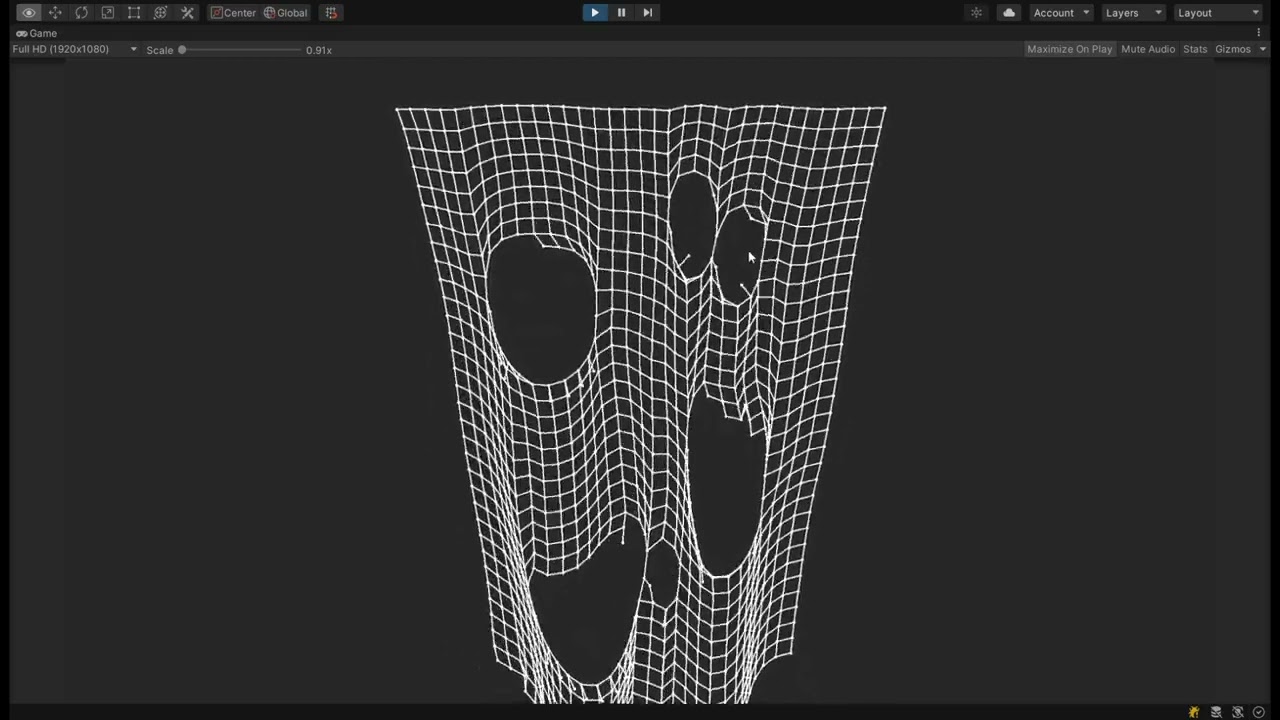
Link to real-time demo: https://joaen.github.io/assets/verlet/
Link to Github repo: https://github.com/joaen/verlet-cloth-simulation
This is exciting. Looks like I can easily simulate every link in the chain with this
sly grove
Yep!
 dense mural
Hey, me and my friend have a recipe system where a player can place items on a table and it would combine the two or more items. However we have a problem with rendering the items, if the player, for example, wants to make something that requires lettuce and tomato, when the player places lettuce and a tomato, it wouldn't know whether to display a salad with the lettuce and tomato, or part of a burger w/ lettuce and tomato. What could we do to fix this?
tall ferry
dense mural
Hey, me and my friend have a recipe system where a player can place items on a t...
is this a code problem? it should be pretty trivial to find that both require the ingredients and display all for the user to choose an option
 clever prism
tall ferry
is this a code problem? it should be pretty trivial to find that both require th...
clever prism
tall ferry
is this a code problem? it should be pretty trivial to find that both require th...
The thing is, user doesn't choose, it has to automatically display it and we just dont know how to get around how it should automatically be displayed. I was thinking maybe only show final product when it is on a plate but that just seems quite annoying to do.
I'm his friend btw
sly grove
clever prism
The thing is, user doesn't choose, it has to automatically display it and we jus...
Doesn't seem like a code problem so much as a design problem
How do you want it to work
clever prism
sly grove
Doesn't seem like a code problem so much as a design problem
We weren't sure whether to post it in code or game design so we did both.
clever prism
sly grove
How do you want it to work
When player, for example, places lettuce and tomato we need a way to display it for both a salad and a burger, only way i can think of is by just not having something that has the possibility of being 2 different recipes in the same level yk.
Which now that I am saying it, it is a game design issue, shouldn't have posted in this channel
Well if anyone here is good at game design lmao
 coral citrus
heya, would anyone be able to point me in the right direction with an issue i'm having involving rigidbody movement? nothing i've been able to find online has helped so far
it might be a little hard to see here, but you can ignore the clipping into the ground and etc.
the issue is that while I'm moving (and while the rigidbody/flamethrower is meant to be moved to my new position), it's rotating and therefore won't actually move for some reason
basically, it seems like it will only ever rotate or move, so it won't snap to me until i stop moving my mouse
if (pinToCaster) {
                    Vector2 direction = MathExtensions.VectorFromAngle(moveAngle) * (1 + pinAngleOffset);
                    if (lifetime + moveDelay <= Time.time) {
                        rb.Move(transform.parent.position + new Vector3(direction.x, 0, direction.y), GetIconRotation());
                    }
                }
the flamethrower is the child of the player and this is the code setting it to the new position
a few q&as suggested calling MovePosition and MoveRotation separately was doing it, but no luck. a few others said it was using transform.position instead of rb.position, but same deal
rotation and position values are correct, i know that for sure, it's just like it's incapable of moving and rotating simultaneously
or, i guess from looking at the video, it's more like it will only ever snap to me once i stop moving altogether, not when i stop rotating it
 final night
Hello,
I am trying to create a procedural generated race course using points generation and a convex hull algorithm, in this case the monotone chain convex hull algorithm. My issue is that for some reason, sometimes the algorithm does not count some points even when it should as well as I need help tuning it so it actually works how I need it to work. First picture is said generated track in how it is now. Does anyone have experience in this and could help?
Second issue is that its simply too round. Any ideas how I can fix that?

I can post code if anyone needs.
 tiny pewter
does your points sorted?
 compact ingot
final night
Hello,
I am trying to create a procedural generated race course using points ge...
compact ingot
final night
Hello,
I am trying to create a procedural generated race course using points ge...
There is no way to fix your algorithm from a picture like that. Also a convex hull will always be too round
You could do a Delaunay triangulation of the point set, then pick a triangle in the middle, then incrementally pick random adjacent triangles, repeat a couple of times. The outside edge of the so selected triangles should be continuous and concave
final night
compact ingot
There is no way to fix your algorithm from a picture like that. Also a convex hu...
The picture was more of a reference to understand what I meant. From an article I found from 11 years ago did the same method and got a lot more corners than I do which is why I am questioning if what I have implemented is correct.
I will look into Delaunay triangulation, thank you.
compact ingot
final night
The picture was more of a reference to understand what I meant. From an article ...
Well, you can’t have sharp corners with points like that. It’s a convex hull.
You can try another hull algorithm that isn’t convex
all those will use a variation of Delaunay
final night
https://www.gamedeveloper.com/programming/generating-procedural-racetracks
This is the article I followed. As you can see he gets a lot of sharp corners. I suspect its one of my functions that pushes the points away or the way I use my displaced points isnt working properly
A big amount of games is using procedural techniques to fill their games with replayable content. This post shows how to think when planning a procedural feature, how to avoid the trap of over-engineering, and how to make racetracks procedurally.
The article is missing a few things though since its pretty old
 lapis gale
Hi! I have a very specific problem and if anybody will manage to solve it, I'll literally swing my ballz ;D
RAYCAST vaultHit.point is where the raycast hits. It's a vector position.
The entire box is box collider.
I have another vector position (raycastOrigin1) to which I have to move the vaultHit.point but I need to know how far is that distance from vaultHit.point to raycastOrigin1. It needs to be calculated somehow. I'm struggling with this for so long and I can't find a solution. This is really important.
Note that you can't just use bounds.size x y or z because the collider can be rotated or the size/scale can be different so then it's not working correctly.
I think it's a realy complicated advanced math problem. Im not good at math so...

 untold moth
If you know the plane that goes through the raycastOrigin and the center, you can project your Hotpoint to the plane to get the point.
lapis gale
... how can I do that?
 upbeat path
what's wrong with Vector3.Distance ?
untold moth
Or closest point on plane.
Probably even better
https://docs.unity3d.com/ScriptReference/Plane.html
Assuming it's the plane going through the center of the collider, you can create it from the collider center and it's up direction
Oh wait, I think I misunderstood the question
The image doesn't align with your question...🤔
lapis gale
it's topdown view of box collider
the entire rectangle
and the vaultHit.point is on the side wall of it
untold moth
Yeah, I don't understand the question. You said that you want to move the hitpoint to the raycast origin..?
untold moth
If you know the target destination(raycast origin), just use it, no?
I don't understand what the problem is?
lapis gale
the raycastOrigin is where the vaultHit.point should be moved
but it will be different on every box collider because of it's scale
untold moth
Since it's the raycast origin I assume that you already know it?
untold moth
Okay, then my initial reply was correct.
Because you're talking about raycasting and hit points, so I assumed that raycast origin is the origin of your raycast.
lapis gale
yeah my bad. I named it like that.
untold moth
Maybe name it "target point" or "unknown point" instead of raycast origin.
lapis gale
initial raycast is vaultHit.point
lapis gale
untold moth
Maybe name it "target point" or "unknown point" instead of raycast origin.
yeah
compact ingot
final night
https://www.gamedeveloper.com/programming/generating-procedural-racetracks
This...
Did you add the perturbed points along your hull edges?
final night
Ive now sat the entire day trying to get an implementation of Delaunay triangulation without taking from other libraries. Its very complicated cant lie
 full ledge
Hey fellow nerds,
I'm working on an app for a client/friend. I'm trying to get images that are pulled from firebase to display in-line with text. I'm told by gpt that converting it into a sprite would be the best way to do it. I'm successfully converting to a sprite but stuck on getting it to show up.
description.text = (string)selectedTask["Description"];
        if ((string)selectedTask["TaskImageRef"] != "")
        {
            Texture2D imageTexture = await fBRequests.GetImage(
                (string)selectedTask["TaskImageRef"]
            );
            spriteAsset = Sprite.Create(
                imageTexture,
                new Rect(0, 0, imageTexture.width, imageTexture.height),
                new Vector2(0.5f, 0.5f)
            );
            spriteAsset.name = "Task Image";
            description.text += $"\n<sprite=Task Image>";
        }
 tiny pewter
 karmic token
I've a crash il2cpp in unity 2022.3.15f1, I haven't found it anywhere
This code is defined in a separate C# DLL that's imported into unity
any ideas welcome ^^'
// helper struct that's only used with AlignementOf<T>
struct AlignmentHelper<T> where T : unmanaged
{
#pragma warning disable CS0649 // Field '...' is never assigned to, and will always have its default value 0
    public byte Padding;
    public T Target;
#pragma warning restore CS0649
}
public static int AlignmentOf<T>() where T : unmanaged
{
    return (int)Marshal.OffsetOf<AlignmentHelper<T>>(nameof(AlignmentHelper<T>.Target));
}
(GameAssembly) [\libil2cpp\vm\Class.cpp:1793] il2cpp::vm::Class::GetFieldMarshaledSize
(GameAssembly) [\libil2cpp\icalls\mscorlib\System.Runtime.InteropServices\Marshal.cpp:604] il2cpp::icalls::mscorlib::System::Runtime::InteropServices::Marshal::OffsetOf
(GameAssembly) [\Library\Bee\artifacts\WinPlayerBuildProgram\il2cppOutput\cpp\GenericMethods__39.cpp:6892] Marshal_OffsetOf_TisAlignmentHelper_1_[...]_gshared
(GameAssembly) [\Library\Bee\artifacts\WinPlayerBuildProgram\il2cppOutput\cpp\GenericMethods__48.cpp:19841] Utils_AlignmentOf_TisTileData_[...]_gshared
perhaps related to code stripping, though it's already set to Minimal and I don't have a way to add the [Preserve] keyword here to test
soft marlin
karmic token
I've a crash il2cpp in unity 2022.3.15f1, I haven't found it anywhere
This code...
if it's related to stripping, have you tried setting preserve="all" in link.xml? I have to do that for most external library that use reflection magic at least
 karmic token
I will see if I can try that first thing tomorrow morning, thanks for the tip
I made a separate test project and it seems to be related to the generic (without generic it works)
 static flint
how can I call a function that runs in the main thread from a different thread
 novel plinth
static flint
how can I call a function that runs in the main thread from a different thread
novel plinth
static flint
how can I call a function that runs in the main thread from a different thread
just call it normally?
as for your future question that you'll likely to ask such as "will it break things?", the answer is most likely, yes
static flint
If I call it normally, it will be running in the thread that isnt the main one
novel plinth
yes, correct
static flint
I want it to be called by the other thread and run in the main thread
novel plinth
you'd need to dispatch it so it will run on mainthread
static flint
could I get an example or resource
novel plinth
thread dispatching is just some fancy terms 😃
here's a poor mans one :
void MyThread()
{
   Thread nthread = new Thread(()=>
   {
      myqueue.Enqueue(()=> Debug.Log("From thread YAY!"));
   });

   nthread.Start();

   //OR just use TaskFactory tagged with LongRunning so it will guarantee create a new thread
}

static ConcurrentQueue<Action> myqueue;

void Update()
{
  while(myqueue.TryDequeue(out var func))
  {
      func.Invoke();
  }
}
based on how you asked this matter, just don't do it. It's clear you've no clue of how to do this let alone doing it properly.
if you're expecting it will make your game runs faster, fat chance it might not
also use JobsSystem instead of rolling your own
soft marlin
static flint
could I get an example or resource
what Slim said. also depending on use case, using async/await with Unitask library might serve you needs better, as there are handy utility functions for this kind of stuff.
eg.
async UniTask SomeExpensiveFuntion() {

    await UniTask.SwitchToThreadPool();   // Multithreading, run on ThreadPool under this code
    // slow work.


    await UniTask.SwitchToMainThread();   // return to MainThread
    // call unity functions

    await UniTask.SwitchToThreadPool();   // Multithreading, run on ThreadPool under this code
    // do more slow work.
}
UniTask.SwitchToMainThread is just Task.ThreadPool.QueueUserWorkItem which basically the same as Task.Run
scenic forge
UniTask is great 💯
 icy smelt
Can a IL2CPP project dynamically load a .NET DLL?
sage radish
icy smelt
Can a IL2CPP project dynamically load a .NET DLL?
No.
icy smelt
sage radish
No.
tysm
 sand vale
can someone dm me code for simple 2 way communication between python and unity file? like sending data / a simple message from python to unity, and corresponding one sending from unity back to python.
thanks
 pastel finch
Anyone in here an expert in mesh creation and stitching from code? Looking for a consultant.
 hushed fable
sand vale
can someone dm me code for simple 2 way communication between python and unity f...
hushed fable
sand vale
can someone dm me code for simple 2 way communication between python and unity f...
Unity runtime or Unity Editor? I would probably go for a websocket if the requirements aren't super high.
Unity Editor has some Python integration
sand vale
uh like editor
basically to run my own ml stuff (im aware of ml agents already, wanted to run customs stuff)
tiny pewter
C# side opens process and listen to stdout or whatever
upbeat path
sand vale
can someone dm me code for simple 2 way communication between python and unity f...
I can't give you code but I would recommend looking into named pipes which are available in both C# and Python
 random dust
Please ask these type of questions in #💻┃code-beginner and share what you have done so far.
karmic token
is it normal to lose a lot of the debug logs when building il2cpp in C++ release ? most of them are gone for some reason 🤔 nvm it's our in-game console that is buggy (in il2cpp that is)
 tawny sand
upbeat path
I can't give you code but I would recommend looking into named pipes which are a...
tawny sand
upbeat path
I can't give you code but I would recommend looking into named pipes which are a...
give me pipes
 sleek lantern
Hey guys kind of a weird question but I want to add modding support to my game. I tried using preinstalled Bepinex but its kinda weird and I want more in-game control over it. I have previously figured out runtime execution of a raw c# file, but I kinda want the hooking stuff from Bepinex, specifically HookGen from Monomod that kinda makes all the existing functions into events you can latch onto. Is there some way to integrate that or make a similar thing myself? Obviously without redoing a lot of the game.
soft marlin
sleek lantern
Hey guys kind of a weird question but I want to add modding support to my game. ...
I've never used bepinex so can't say much about that. first off, I want to target il2cpp so bepinex is a no go. but most importantly the multiplayer/netcode stack I have calls for good control over execution of scripts (and 'mod scripts'), so that mods are multiplayer compatible out of the box. To that end I've had a good time / experience implementing Lua w/ moonsharp.org as the scripting environment. But it's not a catch all, if you need to be able to mod 3dmodels etc, then combining moonsharp with unity addressables is probably the way to go. you're also probably going to have to sprinkle on some JSON/XML as well to hold metadata.
now, for a lot of this I'd say that you don't need to redo a lot of the game. but that depends a lot on the scope of modding capability you need and architecture of the game. I'd say that modding isn't a drop-in last minute thing, as it is a lot of work to get these systems working and talking with eachother, but maybe that's what bepinex offers.
 hardy jacinth
how can I make an observable property in unity, that aside from working with UI Toolkit also works with my other scripts? What I mean is for example a Sphere : MonoBehavior class which has float radius property, which:
- can be displayed in inspector
- can be controlled by other scripts (for example animator or something)
- can be controlled with gizmo
- I can watch for changes, so for example when radius updates, I can watch those changes and update some shader uniform
I was previously used to the old, non-UI toolkit way of storing new value + old value and comparing if(old != new) doThing(), but I see now that UI Toolkit offers data bindings and whatnot, so maybe there is a better way of doing that nowadays?
untold moth
Just write a poco wrapper for your value with events and what not.
hardy jacinth
But what to wrap to marry events, serialization and inspector though? I am a bit lost, can you show an example?
 gilded ginkgo
I am trying to make a tone generator and have tried about 8 different ways, but I get issues no matter what I do. This one has a click/pop sound in between each cycle. I have tried making the cycles longer and fading, but that makes it far worse. I have tried doing 3 at a time and cross fading, but still have popping sounds. Code link since its kinda long, I have buttons setup for changing frequencies: : https://pastecode.io/s/uxj1mw5r
Has clicking problem in between each cycle.
 bleak citrus
a "cycle" being a single iteration of that while loop?
You reset the angle to 0 every time that happens.
This is going to cause a discontinuity
You need to remember the angle you stopped and resume from there.
bleak citrus
gilded ginkgo
I am trying to make a tone generator and have tried about 8 different ways, but ...
otherwise, you will get a very noticeable click as the signal rapidly changes (back to zero, in this case, since sin(0) is 0)
 steady stirrup
gilded ginkgo
I am trying to make a tone generator and have tried about 8 different ways, but ...
steady stirrup
gilded ginkgo
I am trying to make a tone generator and have tried about 8 different ways, but ...
Have you tried adding delay times? AudioClip.Create is called continuously in a while loop, and I don't know the overhead of it. On top of that, why is the initial angle 0? Maybe that's the typo you're looking for?
bleak citrus
You need continuity in both the amplitude and in the change in amplitude (so, a continuous first differential: it shouldn't suddenly change direction)
When I'm editing an audio clip to loop seamlessly, I trim off the ends so that it ends and starts with a rising amplitude that's just crossing over zero
an example of your problem
 gilded ginkgo
Thanks guys! Makes sense, I got it much smoother now, just a little stutter, maybe adding a buffer?
ehh, buffer made it worse, maybe it will be fine
gilded ginkgo
uhg, nm, sounds good on the PC, but crackles on Android/Quest3
bleak citrus
Your other problem is that yield return new WaitForSeconds is not precise enough
It's going to resume on the first frame after that much time passes
Assuming you're allowed to modify the data in an audio clip as it's playing (i haven't done this before), you should consider using it like a ring buffer
you write data to the buffer over and over, jumping back to the start every time you run off the end
the audio source just loops over it
 dapper cave
Any ISerializationCallbackReceiver pros in the house?
I'd like to get OnAfterDeserialize and OnBeforeSerialize to only fire up when the property is changed https://paste.ofcode.org/f7wDwJk3kfWZwaAdkC3TMu
 midnight violet
dapper cave
Any ISerializationCallbackReceiver pros in the house?
I'd like to get OnAfterDe...
midnight violet
dapper cave
Any ISerializationCallbackReceiver pros in the house?
I'd like to get OnAfterDe...
As soon as something changes, Unity does serialize it. Not sure, what your issue is here
dapper cave
midnight violet
As soon as something changes, Unity does serialize it. Not sure, what your issue...
is there a way to detect if the change was made by the user?
in the inspector
midnight violet
dapper cave
is there a way to detect if the change was made by the user?
I guess in most cases, the inspector is updated by the user, isnt it? Unless you have custom code, that changes something in it, updates it and tells Unity to redraw to get updated values
dapper cave
midnight violet
I guess in most cases, the inspector is updated by the user, isnt it? Unless you...
ok and?
midnight violet
and what? 😄 I guess, you could check on your custom inspector, if a user was interacting or something. Why do you need that information btw? maybe there is a better approach
regal lava
serializeproperties would update as you change them tho
I dont do much editor scripting but they would always update when I was editing my level editor
dapper cave
They do, so that part seems to work.
It's the serialization portion I've never worked with, trying to not have it called in certain conditions
for example when I drop a prefab in the scene, I'd like the serialized field to not be reset to null
it seems weird that OnAfterDeserialize and OnAfterDeserialize get called each frame even if i don
t touch the inspector, but that's ok for now, the prefab losing its value is more important
the documentation on deserialization is good
problem fixed.
wow that serialization is something
here's what happened: when you drag a prefab, when it reaches the scene view, the prefab gets serialized then deserialized then serialized again each frame you move the instance.
midnight violet
dapper cave
here's what happened: when you drag a prefab, when it reaches the scene view, th...
Thanks for the insights. Funny enough, I always wondered about shadergraphs animations running while moving the mouse over the sceneview 😄 now I know
dapper cave
midnight violet
Thanks for the insights. Funny enough, I always wondered about shadergraphs anim...
oh you're right, that explains a lot of behaviors
regal lava
I've stuck some logging in there once and I'm pretty sure I froze unity
dapper cave
regal lava
I've stuck some logging in there once and I'm pretty sure I froze unity
using Rider by chance?
 errant wharf
Hey I got a video of a problem I have that's a bit advanced, and I've tried searching online but nothing has helped me, anyone think they can help?
midnight violet
errant wharf
Hey I got a video of a problem I have that's a bit advanced, and I've tried sear...
dont ask to ask... how would you answer your own question
errant wharf
midnight violet
dont ask to ask... how would you answer your own question
mb, anywho, i have a problem with vector3.MoveTowards. so i have a save system in my game, and when i go back in the save, i got enemies that are saved from the same position that the game saved them on.. if that made sense. problem is, it looks like the problem is always the same:
there are 6 points in which the enemies follow. when they hit point 1, they go to point 2, and so on. when i reload a saved game, the closer the enemies are to their next point, the slower they are. then the second they touch that next point, its like their movement is back to normal.
ive checked all the settings and they are perfectly fine, the movement speed is normal, position is normal, its just that its like the closer the enemy was to their next point, they got way slower until they hit that point. i think its because of vector3.movetowards
i have a video if you need it
i just use transform.position = Vector3.MoveTowards(transform.position, nextPoint.position, moveSpeed * Time.deltaTime); btw
midnight violet
errant wharf
i just use ```transform.position = Vector3.MoveTowards(transform.position, nextP...
That is not really advanced but more general, but anyway. Your problem might be, that you use the same timespan for a shorter distance, if they are closer to the next point. So they walk the same speed/hour but need to do less distance, so they slow down, if you get what I mean.
errant wharf
midnight violet
That is not really advanced but more general, but anyway. Your problem might be,...
I mean I kind of get that. what do you suppose I should do? I've tried a ton and researched a ton but I'm stuck
bleak citrus
errant wharf
mb, anywho, i have a problem with vector3.MoveTowards. so i have a save system i...
Share the entire script.
Assuming that moveSpeed isn't changing, that line of code is fine
 cursive perch
Does anyone have experience encrypting json files? Im continuously getting errors and corrupted files
upbeat path
cursive perch
Does anyone have experience encrypting json files? Im continuously getting error...
share your !code
 thorn flintBOT

Posting code
📃 Large Code Blocks
Use links to services like:
https://gdl.space/, https://paste.ofcode.org/, https://hatebin.com/, https://paste.myst.rs/, https://hastebin.com/
📃 Inline Code
Surround code with three backquotes. Not quotation marks.
To format as C#, add cs to the first line:
```cs
// Your code here
```
Add a comment with a line number if there is an error message.
cursive perch
upbeat path
share your !code
{
    using Aes aes = Aes.Create();
    aes.Key = Convert.FromBase64String(Key);
    aes.IV = Convert.FromBase64String(IV);
    using ICryptoTransform cryptoTransform = aes.CreateEncryptor();
    using CryptoStream cryptoStream = new CryptoStream(stream, cryptoTransform, CryptoStreamMode.Write);
    var json = JsonUtility.ToJson(data);
    await cryptoStream.WriteAsync(Encoding.ASCII.GetBytes(json), 0, json.Length);
    cryptoStream.Close();
    stream.Close();
}

public static T ReadEncryptedData<T>(string datapath)
{
    byte[] fileBytes = File.ReadAllBytes(datapath);
    using Aes aes = Aes.Create();
    aes.Key = Convert.FromBase64String(Key);
    aes.IV = Convert.FromBase64String(IV);
    using ICryptoTransform cryptoTransform = aes.CreateDecryptor(aes.Key, aes.IV);
    using MemoryStream decryptionStream = new MemoryStream(fileBytes);
    using CryptoStream cryptoStream = new CryptoStream(decryptionStream, cryptoTransform, CryptoStreamMode.Read);
    using StreamReader streamReader = new StreamReader(cryptoStream);
    var decryptedData = streamReader.ReadLine();
    cryptoStream.Close();
    decryptionStream.Close();
    streamReader.Close();
    return JsonUtility.FromJson<T>(decryptedData);
}```ah that didnt work great


its incredibly inconsistent. ive tried different json serializers and same thing happens
upbeat path
one thing I notice, your aes.key needs to be exactly 32 bytes long
upbeat path
let me share my code
        static byte[] DefaultEncrypt(KeyData keyData, byte[] bytes)
        {
            //Common.ErrMsg($"Encrypt {keyData} {bytes.Length}", true);
            using (MemoryStream ms = new MemoryStream())
            {
                using (Aes aes = Aes.Create())
                {
                    aes.Key = keyData.GetKeyBytes();
                    aes.IV = keyData.GetIVBytes();

                    using (CryptoStream cryptoStream = new CryptoStream(ms,    aes.CreateEncryptor(), CryptoStreamMode.Write))
                    {
                        cryptoStream.Write(bytes, 0, bytes.Length);
                    }
                }
                return ms.ToArray();
            }
        }

        static byte[] DefaultDecrypt(KeyData keyData, byte[] bytes)
        {
            //Common.ErrMsg($"Decrypt {keyData} {bytes.Length}", true);
            using (MemoryStream ms = new MemoryStream())
            {
                ms.Write(bytes, 0, bytes.Length);
                ms.Position = 0;

                using (Aes aes = Aes.Create())
                {
                    using (CryptoStream cryptoStream = new CryptoStream(ms, aes.CreateDecryptor(keyData.GetKeyBytes(), keyData.GetIVBytes()), CryptoStreamMode.Read))
                    {
                        using (MemoryStream ms1 = new MemoryStream())
                        {
                            byte[] buffer = new byte[4096];
                            int numRead;
                            while ((numRead = cryptoStream.Read(buffer, 0, buffer.Length)) != 0)
                            {
                                ms1.Write(buffer, 0, numRead);
                            }
                            return ms1.ToArray();
                        }
                    }
                }
            }
        }
in this case KeyData contains byte[] for Key and IV
cursive perch
is there any specific reason you set the length of the buffer to 4096?
upbeat path
nope, just personal preference
cursive perch
okay, I tried to integrate some of your code into mine, hows it look?

changed var decryptedData = ms.toString to var decryptedData = Encoding.ASCII.GetString(ms.ToArray());
upbeat path
I think you need to set decryptionStream.position back to 0 after filling it
upbeat path
Also I think you should only be passing the Key and IV into the Decryptor not into the create
cursive perch
commented that out
how do i go about converting my class into a byte array for the encrypt?
upbeat path
but you had that in your original code
var json = JsonUtility.ToJson(data);
    await cryptoStream.WriteAsync(Encoding.ASCII.GetBytes(json), 0, json.Length);
I presume you have tested this without the encryption
cursive perch
yes, worked great
upbeat path
cool, so you know the data is good
cursive perch
yes, ive got your code working now so i will see if I can manage to break it again, but hopefully it works
upbeat path
excellent
cursive perch
broke it
getting the same exact error as before
probably something to do with my other methods then
upbeat path
how are you creating your IV ?
cursive perch
i just have it as a private variable
upbeat path
Ah, I let aes create it
            byte[] bytes = Encoding.UTF8.GetBytes(key);
            this.key = new byte[32];
            if (bytes.Length < 32)
            {
                Array.Copy(bytes, this.key, bytes.Length);
            }
            else
            {
                Array.Copy(bytes, this.key, 32);
            }

            using (Aes aes = Aes.Create()) {
                aes.Key = this.key;
                IV = aes.IV;
            }
so it's a random key and iv everytime? would that work for a game where you can download other player's levels?
upbeat path
the key is not random, that comes from a predefined string and aes generates the IV based on that key
cursive perch
ah i see, my first time working with encryption. so i could just run this in the encrypt decrypt methods and I would be okay?
cursive perch
had no luck with letting aes create it
anything wrong with: private static readonly string Key = "xXpHrsMPSBqHgF8zDvIFjkRGUgAI3OAh"; private static readonly string IV = "22UTdQohm3SczcwpIwHfmL==";
upbeat path
I can't speak to the IV but the Key looks ok but why are you using FromBase64 to change it to a byte[] you only really need Ascii.GetBytes
cursive perch
gives me a IV / block size error when i replace it
upbeat path
the first thing I said to you was the key size must be 32 bytes.
            string key = "xXpHrsMPSBqHgF8zDvIFjkRGUgAI3OAh";
            byte[] bytes = Convert.FromBase64String(key);
produces a byte[] of 24 bytes in length
scenic forge
IV should never be static, it should be generated randomly for every message and attached to the message, otherwise it's trivial to break your encryption.
But taking a step back, what are you using this encryption for? If you are using it to do things like protecting game saves and what not, just so you know that it's practically useless. Anything in client should be considered compromised, and your key is in your client.
upbeat path
I think it best to just get his code actually working first and then consider the implementation details, we don't even know if this is running on the client
scenic forge
Both can happen at the same time 😄
But I personally like to address XY problem as early as possible so it's not wasted effort to get an infeasible solution working just to be discarded.
upbeat path
even if it is discarded it's a good learning experience
 tired fog
Is there any way to calculate how long did a burst job took to finish without having to start a watch before scheduling and stopping after complete?
 stuck plinth
tired fog
Is there any way to calculate how long did a burst job took to finish without ha...
stuck plinth
tired fog
Is there any way to calculate how long did a burst job took to finish without ha...
just to understand the problem, what's wrong with using a stopwatch?
tired fog
the first one is that there might be some delay since scheduling until the job actually starts, the second is that if I don't want a delay I need to call complete inmediatly after schedulling and that removes my use case
 sly flower
hey devs!! I need some suggestions when it comes to managing delegates... currently for one of my projects, I have multiple managers in place and am using delegates extensively to manage the communication between them... I have a static Delegate Manager class to handle all these delegates and anyone of the managers can subscribe and unsubscribe to them depending on the situation... this thing works like a charm but somewhere I have realised that this is definitely not the best way of doing it due to the issues that arises from singleton and also might increase the dependency on the managers... I am trying to stick to the SOLID pattern and hence I went on into doing it this way... How do you guys handle them
sly grove
sly flower
hey devs!! I need some suggestions when it comes to managing delegates... curren...
What's the advantage of this Delegate Manager to just using static delegates (events) in various classes where they're relevant?
Anyway the risk of static delegates is failing to unsubscribe which leads to bugs and memory leaks.
which is maybe fine, assuming you are diligent about finding and mitigating such issues.
 little pulsar
One message removed from a suspended account.
scenic forge
little pulsar
One message removed from a suspended account.
In general DM is discouraged. If you have a question, ask in the relevant channel, that way more than one person can help you, and the conversation will help others in the future.
little pulsar
scenic forge
In general DM is discouraged. If you have a question, ask in the relevant channe...
One message removed from a suspended account.
little pulsar
scenic forge
In general DM is discouraged. If you have a question, ask in the relevant channe...
One message removed from a suspended account.
 misty walrus
Does unity or any other ready made solution have a functionality to shorten this workflow:
    [RequireComponent(typeof(MeshCollider))]
    public class Foo : MonoBehaviour
    {
        MeshCollider _meshCollider;

        void Awake()
        {
            _meshCollider = GetComponent<MeshCollider>();
        }
    }
Where instead of adding an attribute to the class, I'd just assign [Require] attribute to a serialized field and it would add it if it doesn't exist in the object and assign it, this is the result I am hoping to get:
    public class Foo : MonoBehaviour
    {
        [Required] MeshCollider _meshCollider;
    }
Preferably RequiredAttribute would inherit from SerializeField making it easy.
Note: the field restriction would probably be fields inheriting from Component
If not I'll create one myself because I can't think of a downside...
sly grove
misty walrus
Does unity or any other ready made solution have a functionality to shorten this...
Note: the field restriction would probably be fields inheriting from Component
Careful as this will exclude interfaces
stuck plinth
nothing built in afaik, there's some overhead there with reflection and processing attributes at runtime that's probably better left up to users
misty walrus
sly grove
> Note: the field restriction would probably be fields inheriting from Component...
Does unity even allow serializing interfaces?
sly grove
Yes with SerializeReference
stuck plinth
i think some of the unity-aware DI frameworks like zenject can do something like this? although i've never used them that way myself
misty walrus
stuck plinth
nothing built in afaik, there's some overhead there with reflection and processi...
Not runtime, it'll be setting a reference in editor.
stuck plinth
well, your example has it in Awake
sly grove
but yeah it's unclear when the assignement would happen
misty walrus
I'd just create a custom attribute drawer, and assign it during its gui generation phase.
    public class Foo: MonoBehaviour
    {
        [SerializeField] ITest _test;
    }

    public interface ITest
    {

    }
Am I misunderstanding what you meant by serializing interfaces?
stuck plinth
drawers are fine if you definitely only create these by hand in inspector, watch out for issues if you ever want to create instances programatically though! since the drawer gui code won't run
stuck plinth
misty walrus
```cs
public class Foo: MonoBehaviour
{
[SerializeField] ITest _...
you'd do
public class Foo: MonoBehaviour
{
  [SerializeReference] ITest _test;
}
I don't know of any readymade attribute like this, NaughtyAttributes has one for a visual reminder inside the editor only. but if you want it to also try and assign a value if it's null , implementing something like this using Harmony/Cecil wouldn't be too bad.
cursive perch
scenic forge
But taking a step back, what are you using this encryption for? If you are using...
Using it to prevent general users from putting invald data into levels, so when they upload a level, it doesn't break. Not concerned about having a large player base so if I got a substantial amount I would consider something more secure.
cursive perch
upbeat path
the first thing I said to you was the key size must be 32 bytes.
```cs
...
Yeah i have played around with different sizes but they all produce the same error
upbeat path
cursive perch
Yeah i have played around with different sizes but they all produce the same err...
Why do you not just implement my code, this is production code so I know it works
cursive perch
upbeat path
Why do you not just implement my code, this is production code so I know it work...
Sure, ill let you know
scenic forge
cursive perch
Using it to prevent general users from putting invald data into levels, so when ...
At least randomize the IV like in Steve's code.
misty walrus
misty walrus
Does unity or any other ready made solution have a functionality to shorten this...
Not sure if it's allowed or even if this is needed but I created the thing I was asking for.
Example usage: https://streamable.com/tcnsnf
Gist: https://gist.github.com/ZengerU/5ce959e505403e826f63fb3981fb006a
hardy jacinth
scene picking and selection pass
cursive perch
Encrypting JSON data
 earnest canopy
how can i calculate localBlockPos
localPos can be min at 0,0,0 and max at 31,31,31
our global pos can be positive and negativ
how can we handle negativ worldpos correctly to get the right local ones
public void OnEditBlock(int3 globalBlockCoords, BlockNative block)
{
    if (!dataGenerated) return;

    int index = localBlockCoords.x + localBlockCoords.y * width + localBlockCoords.z * width * height;
    chunkData[index] = block.BlockID;

    // Assuming chunkManager is an instance of ChunkManager
    // Generate mesh for the chunk containing the modified block
    chunkManager.GenerateMesh(Generate(false));
}
so you want local values to not go into negative positions so make sure your coordinates just extend into the positive plane of values (pivot would usually be a corner defined as 0,0,0)
so by doing transforming a point from world space to local you'd always get a positive value
probably ways to do it with a centered pivot, but I've went with the easiest solution
 mellow plinth
Can under some circumstance in Time.frameCount become negative? I ask because the documentation says:
Internally, Unity uses a 64 bit integer which it downcasts to 32 bits when this is called, and discards the most significant (i.e. top) 32 bits.
Not exactly sure what does that means,
untold moth
mellow plinth
Can under some circumstance `in Time.frameCount` become negative? I ask because ...
Unless it overflows the 64 bit value(which is probably physically impossible - they would need to have your game running until the death of the sun), it shouldn't happen.
mellow plinth
Ok, thanks!
 twilit grove
how do i tell if i am a code-advanced or a code-beginner?
untold moth
twilit grove
how do i tell if i am a code-advanced or a code-beginner?
How do you make that jump between beginner and advanced, skipping the intermediate phase?😅
twilit grove
ok
quiz me
tell me which one I am
out of the three
ik im atleast intermediate
i hope 🥺
untold moth
I don't have time or effort to do that. A reliable enough test would take a few hours.
twilit grove
bruh i aint lookin for accuracy im just curious
ask me something only an intermediate woul;d now
untold moth
twilit grove
ik im atleast intermediate
Well, then that's good enough. What's the actual question though?
untold moth
This is not the place to satisfy your boredom.
Go do some leetcode challenges if you want to test yourself
twilit grove
i have
untold moth
Great then.
twilit grove
i did these by myself

 worldly pecan
twilit grove
i did these by myself
worldly pecan
twilit grove
i did these by myself
I'm proud of you ❤️
 tawdry hamlet
twilit grove
i did these by myself
tawdry hamlet
twilit grove
i did these by myself
where
what is the website
is the website for training
 left coral
I assume LeetCode
untold moth
tawdry hamlet
is the website for training
To be honest it's not gonna benefit you that much in real life scenarios.
 modest lintel
I'm trying to read a dll and pdb file, using Cecil. Fairly working if I don't use the pdb file. This DLL has been compiled by Unity. From what i understand, Unity generates portable format PDB files.
~~Cecil is failing while reading the PDB file while checking the magic number 1112167234U in latest its in hexadecimal but still the same 0x424a5342 inside the PDB file. Mainly at ImageReader.ReadMetadata : ~~
private void ReadMetadata()
    {
      this.MoveTo(this.metadata);
      if (this.ReadUInt32() != 1112167234U)
        throw new BadImageFormatException();```

~~So, my PDB file does seem to be correct, but Cecil unable to open. Ideas?e~~
SolvedI do see the BSJB magic number, so what's wrong :o
 tropic vigil
I want to create a method that can take any variable as ref, then replace the value of this variable to the value based on what button I pressed. My code looks more or less like this:
void DrawButton<T>(ref T item) where T : Object
{
  DropdownField dropdown = new DropdownField();
  dropdown.RegisterCallback<ChangeEvent<string>>((registeredEvent) =>
  {
    item = assetsByName [registeredEvent.newValue];
  }
}
The problem is that the compiler won't let me use ref values inside a delegate. I think I need some workaround.
scenic forge
That's simply not allowed
item could be a variable on stack, which might be gone by the time the lambda is called.
You can either have a wrapper that contains the value, or you can simply make DrawButton take a callback.
tropic vigil
scenic forge
You can either have a wrapper that contains the value, or you can simply make `D...
I think a callback will do the job. Thanks.
sly flower
sly grove
What's the advantage of this Delegate Manager to just using static delegates (ev...
Basically to store all the delegates and Invoke them as required by the managers... for instance the wave manager needs to call the enemy manager to spawn enemies whenever a wave is initiated... since they dont have reference to each other and the only way to call the enemy manager is to first call the game manager as GM is the one who is maanaging all these different managers
sly grove
sly flower
Basically to store all the delegates and Invoke them as required by the managers...
This has no advantage over a static delegate
You don't need a reference for a static delegate
sly flower
sly grove
You don't need a reference for a static delegate
regardless of that class being a monobehavior?
so if I had a static delegate in a script... do I not need to instantiate the object before subscribing to them
coz currently the DelegateManager is itself a static class
sly grove
sly flower
regardless of that class being a monobehavior?
Static is static... these are C# basics
 ebon locust
Is there a builtin way to get a checksum of a UnityEngine.Object or asset? I see there's a way to get a dependencyhash.
delicate mural
Anyone here messed around with Verlet integration? I understand the basic concept of how points move
newPosition = 2 * currentPosition - previousPosition + acceleration * deltaTime * deltaTime
But am struggling to wrap my head around how to constrain it to other points to make a rope
Well, to be clearer, I need a chain. Non-elastic.
 naive cliff
Hey there, I am trying to learn how to make procedural generated maps, but I want my maps to be already determined before I actually generate them, For example a game like Helldivers (First one), the maps are procedurally generated but it shows the mini map before dropping to the game, how does it do that? The only knowledge about procedural generation I have is creation of maps using perlin noise only
this is the example
 sly grove
naive cliff
Hey there, I am trying to learn how to make procedural generated maps, but I wan...
sly grove
naive cliff
Hey there, I am trying to learn how to make procedural generated maps, but I wan...
Looks like they do at least some phases of the generation in order to produce that preview, yes. Or a lower resolution version
no doubt using noise functions and a seed value
 tender crest
Is there any way to perform asynchronous texture upload to gpu available to us?
 severe tundra
trying to grab the accelerometer from... well anything and am not getting the results i want
What I am trying to do:
The "Basic" thing I am trying to do is get an object to move around the same way your hand is... Kinda like one of those VR hand things (Except i dont own one)
I have tried:
Joycon: Accelerometer seems to track rotational speed instead of movement speed in space?
Ps4 Controller: Gyro gives good data, accelerometer gives garbage data.
Any tips/ideas? Or should I hanker down and find a cheap VR hand controller?
 somber tendon
naive cliff
Hey there, I am trying to learn how to make procedural generated maps, but I wan...
somber tendon
naive cliff
Hey there, I am trying to learn how to make procedural generated maps, but I wan...
seeded random. With the same procedural algorithm, same seed should produce same map.
karmic token
does anyone have experience with the vfx graph? I'm seeing something shady...
When I first activate an effect, the system starts playing. This works.
Now, when at a specific frame after activation I activate a second effect, the first effect will stop playing. (HasAnySystemAwake becomes false etc)
This is impossible to reproduce when playing only a single effect, but quite easy to reproduce when playing two of them within 1 or 2 frames of each other. This is happening for effects with the same graph, shortly after activating one of them (when none of them were active before)
 vestal obsidian
Does this server have a channel where I can post a job for someone ?
 thin mesa
vestal obsidian
Does this server have a channel where I can post a job for someone ?
thin mesa
vestal obsidian
Does this server have a channel where I can post a job for someone ?
no. !collab 👇
thorn flintBOT
📢 Collaborating and Job Posting
We do not accept job or collab posts on discord.
Please use the forums:
• Commercial Job Seeking
• Commercial Job Offering
• Non Commercial Collaboration
sly grove
karmic token
does anyone have experience with the vfx graph? I'm seeing something shady...
W...
 sturdy frost
why the funnel is not almost 100%, this is unity analytics service
 sleek lantern
This might be shader related but i'll ask here: I'm tryna make a strategy game and i have two players. Each player starts with territory, and needs to capture the other player's territory. Currently, the world map is just an image, and I have another image with the territories of each player (red and blue). What would be the best way to render the territory? I intend to have free moving units that actually capture the territory. I could split it up into a bunch of smaller segments manually, or I could use a grid based thing, but I feel like that isn't the best way. World map is pictured (its an 8000 by 4000 or something image). I have a texture of just the land too with nothing on it.

I feel a massive dictionary of every land point (excluding neutral points which is a vast majority of the map) might not be super performant but I dunno
my main issue tho is how to render it
sly grove
sleek lantern
This might be shader related but i'll ask here: I'm tryna make a strategy game a...
you likely want each country as an individual image.
that way you can handle things like selecting/mousing over each
that will make it easier to handle the mouse events as well
dusty wigeon
sleek lantern
This might be shader related but i'll ask here: I'm tryna make a strategy game a...
I second what @sly grove said. You want to have every country as individual image. Or, at least a different color schema by country to be able to manipulate them.
sleek lantern
eh I don't really think i need each country to be individual image since I'm planning on focussing more in individual units than whole countries
and each faction is basically a bunch of countries anyway
actually its gonna be turn based so I don't think I'll have to deal with mouse input so thats nice
I'm currently planning on using a low res texture to store the territory
like blue = player 1 and red = player 2 and it just gets put above the background to show it
dunno if it will be super performant cuz I have heard bad things about Texture2D.Apply()
 storm onyx
Hi, I am making a zuma like game but i just cant wrap my head around this. I have a DoTween path that only one object follows, it is currently speed based. When I destroy balls the balls behind the destroyed should stop and the front balls should go back to reconnect. But I am not sure if This is the right way to do it, with a timer. Anybody have any idea on how I should approach this?
Here is the code https://gdl.space/ujuyekelax.cpp
 karmic solar
sleek lantern
dunno if it will be super performant cuz I have heard bad things about Texture2D...
karmic solar
sleek lantern
dunno if it will be super performant cuz I have heard bad things about Texture2D...
literally the last thing you should consider rn is performance brother
you make it run, and having a few 2D textures applied each "turn" or whatever on a series of flat images is NOTHING for your CPU
the idea of using a dictionary or at least a map for your... map seems like a nice idea I think, but as other people said, you probably need to break that map image into smaller managable chunks
sleek lantern
yeah i got it working with a texture2d and setting pixels, seems to be fine
worldly pecan
Does anyone have a good estimation on the upper bound of geometry generated from marching cubes? Previously I was doing
#cubes * (5 triangles per cube) * (vertex_stride * 3)
However, if you account for duplicate vertices, you can reduce it to
(#cubes + 1) * (3 vertexes per cube) * vertex_stride
Which reduces the amount of vertices by a factor of ~5. However, I do believe it's impossible for literately every cube edge to contain a vertex--is it possible to reduce it further with a better estimation? I want to save on buffer space
 upper island
does anyone here use MemoryPack serializer?
 mystic geode
Hi everyone !
I have a question about responsability : I'm struggling to define which script should be responsible for what.
I have a plain, serializable Unit class that, that is pure data. This stores the Id, the Health, Magic Points and whatsoever. This is represented in the scene via an UnitController, which has an Unit as a property.
I also have an IDamageable interface, which has a Health property and a TakeDamage(int amount) void.
I'm not sure if my Unit should be the IDamageable, or if I should create a Monobehaviour attached to the same object as the UnitController, which would be the IDamageable and reflect it on the Unit.
What would you say ?
 humble leaf
Personally I would make the UnitController implement it
mystic geode
Why that in particular ?
regal lava
mystic geode
Why that in particular ?
IDamage on whichever script has the stats
karmic solar
You can have a UnitController class implementing IDamageable for strictly ensuring each unit is damage-able, or if you want to have more control over which units are damagable, create a separate DamagableComponent and add it to the Base Prefab of an Unit
then again, using an interface you can also just have "canBeDamaged" and toggle that, so I would go with whatever means less work for you
sly grove
mystic geode
Hi everyone !
I have a question about responsability : I'm struggling to define ...
I lean towards creating a separate component over interfaces but that's just me
mystic geode
Most of my objects live in a "pure-data world". The Units are plain classes. Most of my Monobehaviours only exist for "game view" reasons. All my types of enemies are not prefabs or gameobject for example, all the units (allies and enemies) share the exact same logic, except for the fact that enemies have a "strategy" that dictate how they behave.
karmic solar
I like doing seperate components once the complexity jumps up and treating them as universal blocks, where you can just Broadcast a message/create an Event on a specific function and have other components respond to it if necessary without any hard-binding and direct refs. If you document them in any way, you can have them easily adapted in other projects or parts of the game
decisions decisions decisions
mystic geode
karmic solar
I like doing seperate components once the complexity jumps up and treating them ...
This is my approach as well, I'm mostly using events and Unity events
This is why to me, it would seem logical that the "plain class" implement the IDamageable, and the Monobehaviours "listen" to it and react in the game view. But again, I'm not really sure about that part
regal lava
I mostly use interfaces for GetComponent calls, but other than that I don't really touch them too much with unity since you cant serialize them
unless you want to go the serialize reference route I guess
karmic solar
I wonder if there is a hard-set preference that Unity recommends, performance or engine-wise 🤔
sly grove
mystic geode
Most of my objects live in a "pure-data world". The Units are plain classes. Mos...
sure but you need a presentation layer regardless. Anyway if you use a separate component you don't need an interface at all
mystic geode
regal lava
I mostly use interfaces for GetComponent calls, but other than that I don't real...
If you're trying to have a certain level of abstraction, interfaces can't be neglected in my opinion. In my game for example, both Units and Buildings are objects that the player can place on the map. Of course, they can inherit from an abstract class, but in the end it's so much more convenient to have the PlacementManager (or whatsoever) using IPlaceable instead of instances of a class
karmic solar
Agreed on the abstract class/interface, the worst thing you can do is tie yourself to a strict 4-level non-sense classes hierarchy, where the last guys hardly use half the functionality provided 😆
mystic geode
sly grove
sure but you need a presentation layer regardless. Anyway if you use a separate ...
Using a Monobehaviour would mean that any logic that needs to deal damage would have to have access to the Unit, then to its GameObject in the scene, then to call GetComponent on it. It seems like a smell to me, isn't it ?
sly grove
mystic geode
Using a Monobehaviour would mean that any logic that needs to deal damage would ...
the logic that deals damage would deal damage to the Damageable script only
Unit wouldn't be involved
except perhaps as a listener to an event that the Damageable script exposes
like OnTookDamage
karmic solar
you can have a TryGetComponent and have it fail gracefully, oryou can BroadcastMessage() that calls on anything if its there, e.g. onDamage
mystic geode
Yes but the IDamageable would only live in the scene then, so for example if I'm calling a command like new DamageCommand(UnitA, UnitB, 2), I would have to access UnitB's Monobehaviour in a way or another right ?
sly grove
It's unclear what "UnitB's Monobehaviour" actuially is in this context
since you said you're living in a data-centric world with only some thin presentation layer presumably?
mystic geode
If I were using a Monobehaviour as the DamageTaker as suggested above, this would mean that the DamageCommand in that scenario would not accept the target unit as a parameter, but rather its DamageTaker component
So this would mean that to create a DamageCommand, I would have to access the Monobehaviour to pass it as an argument isn't it ?
In the scenario of a DamageCommand for example, it would seem logic to me that the parameters are "Unit owner, IDamageable target, int amount"
If the Damageable is a Monobehaviour, it would mean that my logic relies on my Unity Scene, which is what I'm trying to avoid in order to keep a data-centric world
karmic solar
if you need a 2-way communication, not just an invocation then it does make sense for me skip the seperate component and go with a direct interface, less ways to fuck it up
mystic geode
Unless I'm wrong in my logic 🐸
I think I'd like to avoid the 2-way communication
To me the ideal world would be that Units can damage each other, then the GameObjects in the scene listen to that and update the view accordingly
But the logic wouldn't have to know about the view
 cold canyon
how can i make such an animation of picking up a ring with code? That is to make it fly spherically away from the player and then back into him
 rugged radish
you can use the spline unity package to define the trajectory and move ring along it, after ring reaches the end of the curve start lerping it towards player's position
although I'd end the trajectory on the loop's apex point (or slightly past it), instead of going all the way down
cold canyon
rugged radish
you can use the spline unity package to define the trajectory and move ring alon...
that's actually a good idea. Thanks!
karmic solar
that was quick, gj!
rugged radish
yw 👍
rugged radish
I'm considering adding hydraulic erosion pass to world generation, but it has to be generated in chunks and at play time
are there any erosion implementations that allow chunked execution ? world isn't infinite, and I also generate the low resolution height map (of the entire map), so rough location of peaks and valleys can be precalculated
cold canyon
how to find the point on the spline closest to the player?

var length = splineContainer.Spline.GetLength();
lightSpeedDashTimer = Mathf.Clamp(lightSpeedDashTimer + lightSpeedDashForce * Time.deltaTime, 0, length);
var normalized = lightSpeedDashTimer / length;
splineContainer.Spline.Evaluate(normalized, out var pos, out var dir, out var up);
the spline package has SplineUtility.GetNearestPoint
 silk trench
I'm trying to integrate Google Play Games into my game and I followed every step, used the same app signing key as the one I used in my upload, tried disabling anti-piracy, overriding the proguard file, the android manifest file, etc. and I can't seem to log in. The following code:
PlayGamesPlatform.Instance.Authenticate(status =>
{
  Debug.Log(status);
});
ALWAYS returns with status "Cancelled"
I've also tried clearing cache and data on my Google Play Games app and that didn't work. I'm totally lost right now. Any ideas?
 long ivy
ah yes GPG, where the error is either DeveloperError (incorrect signing key) or Cancelled (literally anything else has gone wrong)
Did you set up the OAuth consent screen with the right credentials and add testers? Also if you're testing on internal, your bundle is re-signed with google's key so you should have two signing keys
setting it up was a real pita because the info is scattered all over the internet
silk trench
long ivy
ah yes GPG, where the error is either DeveloperError (incorrect signing key) or ...
I set it up to the best of my ability, so I believe it should work properly
And I just added my email to the testers
on both google cloud and play console
I've uploaded the app before, and I'm just making an update with the GPGS addition
and I'm using the same signing key to sign the build
And I'm using the fingerprint from that signing key for the google cloud credentials
(but I've also tried the public app signing key and the upload key given in google play console)
long ivy
App signing key cert = google's signing key, used for internal builds and releases
Upload key cert = sign your local builds with this
If you are only using one, then either only test track/production builds will work, or only local builds that you've signed with your upload key will work
silk trench
Right
I'm only doing internal testing right now
So I should be using the app signing key?
long ivy
if you're downloading your build from the play store as an internal tester, yes
long ivy
it does, then you should be using your upload key and signing your apk or bundle with that key
cold canyon
long ivy
the spline package has `SplineUtility.GetNearestPoint`
i can't figure out how to work with it i'm so sorry, but can you explain?
var length = splineContainer.Spline.GetLength();
lightSpeedDashTimer = Mathf.Clamp(lightSpeedDashTimer + lightSpeedDashForce, 0, length);
SplineUtility.GetNearestPoint(splineContainer.Spline, transform.position, out var t, out var t2);
var normalizedT2 = t2 / length;
splineContainer.Spline.Evaluate(normalizedT2, out var pos, out var dir, out var up);
Gizmos.DrawSphere(splineContainer.transform.TransformPoint(Math.ConvertFloat3ToVector3(pos)), 0.2f);
 silk trench
Here's my confusion though, the upload key cert fingerprint is different from the fingerprint on my .keystore file
 long ivy
do you have multiple keys in your keystore? They should match
the other thing you should try is deleting play store cache on your device, delete your app, open play store again and make sure it's set to the right account. Then reboot phone
if the email it's signed into isn't on your tester list, you will also get that error and sometimes it seems to forget which one to use
silk trench
I've done all of that except reboot my phone
silk trench
long ivy
do you have multiple keys in your keystore? They should match
My .keystore file fingerprint and Upload Key cert fingerprint should match?
So then should I request a new upload key?
long ivy
no, if you're able to upload it's signed correctly. Maybe you just have multiple keys in your keystore
silk trench
I didn't know that was possible lmao
long ivy
cold canyon
i can't figure out how to work with it<:sadok:1068114223621754981> i'm so sorry...
what's not working? iirc the method expects a point in local space so maybe that's your issue
silk trench
oh nvm it matches mbmb
long ivy
silk trench
oh nvm it matches mbmb
:( maybe go over the oauth stuff again. I don't recall exactly what my problem was when I encountered your same issue but it had something to do with the settings there
silk trench
alright
I just tried restarting my phone after clearing cache and stuff
didn't work
so it must be an oauth thing ig
but I have the right key for sure
The oauth consent screen really doesn't have much to it to mess up
cold canyon
long ivy
what's not working? iirc the method expects a point in local space so maybe that...
red sphere (pos) is always at the beginning of the spline. I converted player's position to local space, but still
long ivy
what scale is your spline at? maybe you just need more resolution? this looks like it works fine for a script I slapped onto a cube and move around a spline I made
var ourPosWorld = transform.position;
SplineUtility.GetNearestPoint(splineContainer.Spline,
    splineContainer.transform.InverseTransformPoint(ourPosWorld), out var nearestPointLocal, out _, 24, 8);
var nearestPoint = splineContainer.transform.TransformPoint(nearestPointLocal);
@long ivy I figured it out
But it's extremely embarassing
My package name was wrong on the oauth consent screen
but to be fair, it's a really long name, so when I typed it in, I was just missing one letter
but now it works just fine
Thanks for your help
long ivy
ah ha, yep that would do it. Nice work
silk trench
thank you lol
regal lava
So I'm looking for some ideas to create a more performant type of effect system such that I've multiple time comparison operations going on. The most basic ways to create such a system is to just use a list and iterate over it and comparing a time variable. Another way is to create an independent coroutine for each effect, which is my current system, but it does create a lot of garbage such how much this system is being used.
So, I was thinking about some type of queue system such that only the first element is compared against for time, and if that one is popped we keep compare and continue popping the next few until we arrive at one which returns false. One problem with this is that not all effects have the same duration, so I can't be just throwing them at the end of the queue when starting a new effect, and another problem is effects which are triggered x amount of times in a duration, so I'd have to stick it back into the queue after it pops.
So, an ideal situation is have some bucket type container like a hash-set for quick insertion, but also ordered in a way like a queue so I only need to compare against the first elements. Any ideas?
some other ideas I had was just make a global container that groups effects by their duration or ticks, such that I'd have a group of 1 second effects, 2 second effect, 3 second effects, this way I have to check a max of # duration group effects every frame
long ivy
how frequently are you inserting elements? sorted list by soonest expiration time is simple and would probably work fine unless there can hundreds of effects; then maybe it makes sense to use a priority queue or sorted linked list
regal lava
talking about hitting like 300 units with a ticking type effect every 2 seconds for 10 seconds
as a single effect source
long ivy
so do you have 300 units, each with a list of effects on them? or 1 list with 300 effects?
regal lava
regal lava
some other ideas I had was just make a global container that groups effects by t...
This idea is actually pretty interesting but one large problem is there's less work done over the frames so more likely to run into hiccups
regal lava
long ivy
so do you have 300 units, each with a list of effects on them? or 1 list with 30...
I've been playing with both ideas, but iterating over a single list I'd assume be the better choice here
but let's say I have 5 status effects that are ticking on 300 units every 2 seconds for 10 seconds for probably the largest sample im working with now
or add some variance and say two of those effects tick every 3 seconds for a total of 12 seconds
scenic forge
That's looping over 300 lists, that's tiny number for modern CPU which does minimum millions of instructions per second.
Are you sure you need something more performant, have you positively identified performance is indeed an issue atm?
regal lava
yeah it's probably not that big of a deal, I just find checking every frame excessive when these effects dont need that precise accuracy of execution
scenic forge
Well coroutine is not magic either, when you tell it to wait 2 seconds, it's nothing more than checking if the current time has reached the ending time every frame.
regal lava
right, I was reading more on them and yield waitforseconds still does check every frame
I was thinking there was some more sleeping optimization done with them but the underlying code isnt public
ill probably convert back to a single/multi list and play around with it since I've already been reading that coroutines also create garbage so something to compare against
novel plinth
With such amount of Lists I assume you're dealing with lots of structs
instead ArrayPool up. if you really love List due to it's flexibility of adding/removing, you can have a custom List with the backing array renting/returning to the pool (think of it like a pooledList)
lots of pooledlist impl on git or nuget you can take a peek at for this if you're interested
Personally I would just use arraypool for such scenario and ditch out List completely 😌
regal lava
Havent heard of that one yet, but I think a single list with large capacity should suffice. Maybe I'll make it a little more custom and add some dynamic capacity extension and clean up.
or perhaps some circular buffer someone keeps recommending me
 chrome sparrow
Hey guys im trying to use the PreviewRenderUtility in unity to create a render of a 3D model but it doesnt seem to work no matter what way i try i was wondering if anyone had any idea why its not rendering the camera to a Texture2D?
i add the moels to a queue so im only using 1 PrefabUtility instance and 1 Render Texture for both the Model preview and the rendering of the images themselves due to the lay restriction, (I did try creating a prefabutility and a render texture per model instance but its not possible due to that)
 PreviewUtility.Render();
 PreviewUtility.EndPreview();

  AsyncGPUReadback.Request(_RenderTexture, 0, TextureFormat.RGBA32, request =>
  {
      if (request.hasError)
      {
          Debug.LogError("Error on GPU readback.");
      }
      else
      {
          // Create a new Texture2D and read the RenderTexture image into it
          _Texture2D = new Texture2D(_RenderTexture.width, _RenderTexture.height, TextureFormat.RGBA32, false);
          _Texture2D.ReadPixels(new Rect(0, 0, _RenderTexture.width, _RenderTexture.height), 0, 0);
          _Texture2D.Apply();
      }

      onComplete?.Invoke(); // Call the onComplete action
});```i have tried assigning a texture to the endpreview but it does not seem to work either.

 long ivy
what about the other configuration? I snagged some code off a quick google search and it seems to work fine (aside from a URP-specific render issue that took one line to fix)
chrome sparrow
ahh tis is in Standard render pipeline at the moment i havent tested in other pipelines.
this is the RenderTexture property
     {
         get
         {
             // Check if the texture exists and has the correct settings.
             if (renderTexture == null || renderTexture.width != (int)PreviewResolution || renderTexture.height != (int)PreviewResolution ||
                 renderTexture.format != RenderTextureFormat.ARGB32 || renderTexture.antiAliasing != 4)
             {
                 // If not, release the old texture and create a new one.
                 if (renderTexture != null)
                 {
                     renderTexture.Release();
                     UnityEngine.Object.DestroyImmediate(renderTexture);
                 }

                 renderTexture = new RenderTexture((int)PreviewResolution, (int)PreviewResolution, 24, RenderTextureFormat.ARGB32)
                 {
                     antiAliasing = 4,
                     autoGenerateMips = true,
                     useMipMap = true
                 };

                 PreviewUtility.camera.targetTexture = _RenderTexture;
             }

             if (PreviewUtility.camera.targetTexture != renderTexture && renderTexture != null)
                 PreviewUtility.camera.targetTexture = renderTexture;

             return renderTexture;
         }
         set => renderTexture = value;
     }
and my PrefabUtility
      public static PreviewRenderUtility PreviewUtility
      {
          get
          {
              if (previewUtility == null)
              {
                  previewUtility = new PreviewRenderUtility();
                  previewUtility.camera.fieldOfView = 30f;
                  previewUtility.camera.nearClipPlane = 0.01f;
                  previewUtility.camera.farClipPlane = 100f;
                  previewUtility.camera.allowMSAA = true;
                  //previewUtility.camera.forceIntoRenderTexture = true;
                  previewUtility.camera.useOcclusionCulling = false;
                  previewUtility.camera.clearFlags = CameraClearFlags.SolidColor;
                  previewUtility.camera.backgroundColor = BackgroundColor;
              }
              return previewUtility;
          }
          private set => previewUtility = value;
      }
and you're calling this in an OnGUI somewhere?
maybe we should back up. What are you trying to do exactly? You want these previews in Texture2Ds for some reason instead of using this prefab utility thing to draw them in the normal way?
chrome sparrow
yes, im creating an asset for Converting Models to icons

the previews should be up in the top left corner after dragging them into the Drag Game object to preview here, you can adjust lighting camera angle and a few other settings at the moment. im having issues generating the icons in the top left at the moment. it seems to jsut skip the first one then on the second image it aplies the previous render to it
but its all blacked out and not how it should be
i am using 1 RenderTexture and 1 PrefabUtilityRenderer instance due to restrictions of layer usage with it
the rendering of the _Texture2D works fine, but if i try to run the icon preview generation it does not seem to work?
 long ivy
are you generating Texture2Ds for them also, and just displaying that texture in the larger view?
chrome sparrow
yep
thats whats not working
for some reason this is what happens, the first render is blank, the second render is the first render, then the 3rd is the 2nd and so forth its like its not registering the GPU Callback and its coming back late and fetching the wrong render?
long ivy
well your use of the async gpu readback is fishy by itself. Makes no sense to do that until it's time to save to disk anyway
unless your tool isn't updating anything until you press the button? That would be a design fail imo, it should update immediately
chrome sparrow
i was having issues with the _Texture2D being captured by the render.
Essentially what happens is when you drag multiple models into the preview drop down section it addes them to a queue for processing, it setups up lighting spawns the model centers it based on bounding box, calls render then stores the image to each instance of the model in a custom class, once this is done it then destroys the model instance and repeats the process
      {
          if (Model == null)
          {
              Debug.LogError("Model is null, cannot render texture.");
              return;
          }

          if (PreviewUtility == null)
          {
              Debug.LogError("PreviewUtility is not initialized.");
              return;
          }

          // Configure camera settings based on the bounds
          SetupLighting();

          Bounds bounds = CalculateBounds(Model);
          // Calculate camera distance such that the model is well within view
          float maxExtent = Mathf.Max(bounds.extents.x, bounds.extents.y, bounds.extents.z);
          float cameraDistance = maxExtent / Mathf.Tan(Mathf.Deg2Rad * PreviewUtility.camera.fieldOfView / 2.0f);
          cameraDistance *= 1.05f; // Adding a buffer for better view

          // Set camera aspect ratio to match _RenderTexture
          PreviewUtility.camera.aspect = (float)_RenderTexture.width / _RenderTexture.height;

          // Position the camera to look at the model's center
          Vector3 cameraPosition = bounds.center - cameraDistance * Vector3.forward;
          PreviewUtility.camera.transform.position = cameraPosition;
          PreviewUtility.camera.transform.LookAt(bounds.center);

          // Orient the model to face the camera
          Model.transform.forward = PreviewUtility.camera.transform.forward;

          if (PreviewRect.width != _Texture2D.width || PreviewRect.height != _Texture2D.height)
              _Texture2D.Reinitialize((int)PreviewRect.width, (int)PreviewRect.height, TextureFormat.ARGB32, false);

          PreviewUtility.BeginPreview(PreviewRect, GUIStyle.none);

      }
          PreviewUtility.Render();
          PreviewUtility.EndPreview();

          //EditorApplication.delayCall += () =>
          //{
          //    onComplete?.Invoke();
          //};
          // Convert the RenderTexture to Texture2D

          AsyncGPUReadback.Request(_RenderTexture, 0, TextureFormat.RGBA32, request =>
          {
              if (request.hasError)
              {
                  Debug.LogError("Error on GPU readback.");
              }
              else
              {
                  // Create a new Texture2D and read the RenderTexture image into it
                  //_Texture2D = new Texture2D(_RenderTexture.width, _RenderTexture.height, TextureFormat.RGBA32, false);
                  //_Texture2D.ReadPixels(new Rect(0, 0, _RenderTexture.width, _RenderTexture.height), 0, 0);
                  //_Texture2D.Apply();

                  Graphics.CopyTexture(_RenderTexture, _Texture2D);
              }

              onComplete?.Invoke(); // Call the onComplete action
          });

          /*
               AsyncGPUReadback.Request(_RenderTexture, 0, TextureFormat.RGBA32, request =>
               {
                   if (request.hasError)
                   {
                       Debug.LogError("Error on GPU readback.");
                       onComplete?.Invoke(); // Even on error, you might want to proceed with the queue
                       return;
                   }

                   _Texture2D = new Texture2D(_RenderTexture.width, _RenderTexture.height, TextureFormat.RGBA32, false);
                   _Texture2D.LoadRawTextureData(request.GetData<uint>());
                   _Texture2D.Apply();
                   onComplete?.Invoke();
               });
               */
//_Texture2D = Utilities.ConvertRenderTextureToTexture2D(_RenderTexture, PreviewResolution);```this is the section for the processing.
 {
     if (modelQueue.Count == 0)
     {
         isProcessing = false; // No more models to process
         EditorUtility.ClearProgressBar();
         return;
     }

     isProcessing = true;
     var modelData = modelQueue.Dequeue();
     modelData.ChangeModel();
     modelData.SetupLighting();

     // Update the progress bar
     float progress = 1f - (float)modelQueue.Count / initialQueueCount; // Calculate progress
     EditorUtility.DisplayProgressBar("Processing Models", $"Processing {modelData.PrefabReference.name}", progress);

     // Trigger the rendering process for the model
     modelData.ConvertToTexture(onComplete: () =>
     {
         OnModelProcessingComplete();
     });
 }```


```  private static void OnModelProcessingComplete()
  {
      isProcessing = false;
      EditorUtility.ClearProgressBar();
      ProcessModelQueue(); // Start next model if queue is not empty
  }
the whole thing with manipulating camera target texture and using RenderTextures and stuff looks like wasted effort. Did you look inside PreviewRenderUtility? It already uses a RT, and even has an EndStaticPreview that copies the RT to a Texture2D for you
chrome sparrow
yeh i did try that but that also was not working
would just render a blank image
The sequence of steps is this
If a model is already spawned destroy imediate, spawn the new model position it correctly infront of the camera, setup the lighting
render and set to the _Texture2D
but for some reason the _Texture2D is being assigned the previous render
actually i think i fixed it but all images are dark af >.<
in image preview this is what was happening the first render was blank then green was being rendered as red and this would continue the pattern
 chrome sparrow
long ivy
the whole thing with manipulating camera target texture and using RenderTextures...
chrome sparrow
long ivy
the whole thing with manipulating camera target texture and using RenderTextures...
thanks for the bounce back i got it working 🙂
long ivy
rubber duck 👍
 earnest root
Does anyone know of an elegant way of matching the set bits of one int field by the value of another?
Kind of like math.countbits, but in reverse
public const int SIZEOF_ID = 10; // The amount of set bits in the bitmask
private const uint INDEX_BITMASK = 0b_1111_1111_11; // Corresponding bitmask
Right now these two values HAVE to match, otherwise things break. The code is performance sensitive, so I can't actually use math.countbits, and I would prefer they remain constants. It would be nice if I only needed to change SIZEOF_ID, and have the bitmask automatically be set correctly. Kind of similar to 1 << SIZEOF_ID, but where the trailing zeros are set to one instead.
I think I figured it out:
private const uint BITMASK_INDEX = ~0u >> (sizeof(int) - SIZEOF_INDEX);``` zealous fern
Hello everyone, In my unity game I want to analyze voice recording and determining number of filler voices used in the complete recording, can someone please guide me how do I approach this?
 latent harness
zealous fern
Hello everyone, In my unity game I want to analyze voice recording and determini...
latent harness
zealous fern
Hello everyone, In my unity game I want to analyze voice recording and determini...
 fresh salmon
earnest root
I think I figured it out:
```cs
private const uint BITMASK_INDEX = ~0u >> (sizeo...
fresh salmon
earnest root
I think I figured it out:
```cs
private const uint BITMASK_INDEX = ~0u >> (sizeo...
I'm late, but there's also (1 << SIZEOF_INDEX) - 1, which does not rely on sizeof and can also be const
0100_0000_0000 // 1 << 10
0011_1111_1111 // - 1
 viscid bramble
Hello
I got a problem with SetFloat
animator.SetFloat("InputMagnitude", inputMagnitude, 0.05f, Time.deltaTime);
For some reason, when the character stops moving
the magnitude on the animator goes to like
44 digits negative
fresh salmon
viscid bramble
44 digits negative
It might just display it using scientific notation if the number gets too close to 0. Does the number have a e near the end of the value?
viscid bramble
yes
fresh salmon
Then it's scientific notation
fresh salmon
Where's the negative sign located at?
fresh salmon
Before the number itself or right after the e?

 fresh salmon
Okay that's just really close to 0, again, just how scientific notation works
viscid bramble
but the animator doesn't detect it though
fresh salmon
0 dot, then 44 zeroes, then 1401
 fresh salmon
IsMoving might not be true
viscid bramble
viscid bramble
This doesn't run
thin mesa
viscid bramble
i can't say l*ke
you can, just not only that.
but yeah, seems like you need to ensure the other parameter is what you expect it to be
viscid bramble
thin mesa
you can, just not *only* that.
why
fresh salmon
Your condition has 2 operands, check both values
viscid bramble
fresh salmon
IsMoving might not be true
You're right, however, like, i think i need them both
thin mesa
viscid bramble
why
read the message it said next time?
viscid bramble
yes, but why was it blocked
NO WAIT
you're right
my ba
Makes sense
I'm gonna add a second condition
so it'd work like &&
fresh salmon
If you transition to "end run", would it not make more sense to check that you're NOT moving AND that magnitude is less than 1.1?
viscid bramble
well
fresh salmon
Maybe you need another parameter, IsRunning
viscid bramble
yes i'm thinking
been a while i dont open the project
but i think i don't need this "IsMoving"
just the magnitude
works fine
thanks, i thought the problem was on the magnitude
the value was so weird i thought it was unity's fault
 fringe root
Hey guys. I've been looking into composition for this project of mine and I'm wondering if i could do the following:
Create classes that are NOT MonoBehaviour(save up on performance) that CAN be kinda dragged and dropped into a serialized field or reference and would allow me to set some variables on them in the inspector.
I dont want to use scriptable objects because i want data to be exclusive for each object
thin mesa
where would you drag it from if it were not a component or SO?
but you can just use a serializable type and serialize a field on a MB or SO to create an instance of it, or if you need some polymorphism for that you can use SerializeReference and some custom property drawers (or a premade package that does the drawing for you)
fringe root
could i maybe add polymorphism to a list?
languid remnant
im trying to implement a pathfinding system with a grid, works perfectly fine, but now i want to be able to update the grid if there are moving "obstacles", anyone knows a good and performance approach for it?
 wild bane
fringe root
could i maybe add polymorphism to a list?
wild bane
fringe root
could i maybe add polymorphism to a list?
Sure, if the stored type has a [SerializeReference] field
karmic solar
fringe root
Hey guys. I've been looking into composition for this project of mine and I'm wo...
create some hierarchy of Serializable structs? But they would have to live inside some script in a instantiated GameObject, or as a single ScriptableObject containing these SerializedObjects (or whatever you'd like to name the parent of them all)
fringe root
might just opt into serialize references for now. maybe ill dig deeper if my need havent been met
 jaunty swallow
Does anyone know of a way to cull parts of a single mesh? I've only really found solutions on culling separate meshes
novel plinth
the convenient way is to chunk that mesh (assuming it's a single mesh)
jaunty swallow
yeah it's a singular mesh, the issue is that I create it from combining smaller pieces so I can batch them together
regal lava
well, similar to building, you can do the same by restructuring the mesh and reducing the verts and triangles
jaunty swallow
culling is not the same as restructuring though
my issue is that unity is telling me it is rendering a constant 1.1m verts no matter which direction I turn the camera
meaning it doesn't cull anything
regal lava
ah, right, usually breaking up the mesh and letting unity cull by what's visible towards camera's frustum is probably easiest, otherwise something like backface culling with a shader perhaps
jaunty swallow
the first way is kind of what I'm trying to avoid, I'm trying to cut down on the amount of game objects, I'll try the second way and let you know how it goes, thanks!
 shell horizon
Not sure if this is the right channel to ask this, but I'm getting pretty absurd numbers in my memory profiles. Is this a leak? And if so, is it a Unity leak or is it a leak I could have caused? I'm using burst/jobs/native collections but as far as I know I'm disposing everything correctly.
 regal lava
jaunty swallow
the first way is kind of what I'm trying to avoid, I'm trying to cut down on the...
regal lava
jaunty swallow
the first way is kind of what I'm trying to avoid, I'm trying to cut down on the...
I don't really touch unity's mesh library tools much, but im pretty sure you can use mesh instancing without having the gameobject overhead. Frustum culling is pretty standard if we're talking about mesh chunks.
earnest root
fresh salmon
I'm late, but there's also `(1 << SIZEOF_INDEX) - 1`, which does not rely on `si...
Of course! How come I never thought of this — I had a bit counting algorithm in front of me the entire time. Thanks.
jaunty swallow
regal lava
I don't really touch unity's mesh library tools much, but im pretty sure you can...
surely there's a way to just... cull the verts themselves no?
regal lava
well, it's a little technical but you doesn't usually cull by verts but faces. Usually you do try to Frustum cull first (wouldn't need to draw at all), and if it fails then you backface cull, though this is my experience for making voxel world stuff.
untold moth
shell horizon
Not sure if this is the right channel to ask this, but I'm getting pretty absurd...
It says reserved. From my experience the latest unity versions would reserve some percentage of the total available memory from the system even if it doesn't actually use it. I'm not sure if that's an editor behavior only but that would make sense if it is. Maybe try profiling a build instead.
Also, how much memory in total do you have on that machine?
shell horizon
untold moth
It says reserved. From my experience the latest unity versions would reserve som...
Only 16 gigs, which is the strange part. I'm pretty sure it's also maxing out the pagefile, but it doesn't seem to cause any performance issues. At least not until Windows nukes the process
untold moth
shell horizon
Only 16 gigs, which is the strange part. I'm pretty sure it's also maxing out th...
That's weird indeed. Maybe that's a total memory allocated over a long period of time..?🤔
Haven't used the dedicated memory profiler that much, so I'm not entirely sure what these numbers represent.
shell horizon
It seems to grow over time, which is what made me think it was a leak, but whenever I check task manager the usage seems reasonable, all the way up until Windows kills it. Its very strange
untold moth
I guess it could potentially mean that at one point unity tried to allocate that much memory at the same time and then after releasing it, it kept it as reserved memory.
untold moth
shell horizon
It seems to grow over time, which is what made me think it was a leak, but whene...
Might want to investigate why windows kills it. It's probably connected.
Also, are you sure that windows kills it and it's not an internal crash?
Often when you run out of memory, an allocation would fail inside the app, which would trigger some kind of segfault or other error that would then cause a crash. Or it could lead to some other undefined behavior, like an infinite loop(for example if you're awaiting allocation somewhere, but it doesn't happen). If the awaiting is on the main thread, the app would become unresponsive and windows would kill it after a few sec.
Basically, I'd try taking snapshots at different timings of your game, maybe even around where the crash happens. In one of them you'd probably see most of that memory actually being used instead of being in "reserved"
That's when you can track down the underlying cause.
shell horizon
untold moth
Also, are you sure that windows kills it and it's not an internal crash?
I guess I just assumed it was Windows killing it since there's no warning in Unity and most of the other programs running on my computer close at the same time, but I guess it could be an internal crash as well.
So you think the most likely cause is that Unity is at some point allocating that much memory, then keeping it in reserve afterwards?
untold moth
shell horizon
I guess I just assumed it was Windows killing it since there's no warning in Uni...
Yeah. It's just an assumption though, you'd need to test and profile further to confirm it.
shell horizon
Okay, thanks
 modest glacier
any idea how to disable this post-process by Unity? Only happens on Linear and URP on Android. Thanks for any hint

 ashen hill
I need an algorithm to create a hexagonal maze of random shapes. What algorithm can I use?
like... this. this site is https://www.mazegenerator.net/Default.aspx but I can't get source


Create, download and print random mazes in varying styles and sizes.
 somber swift
ashen hill
like... this. this site is https://www.mazegenerator.net/Default.aspx but I can'...
somber swift
ashen hill
like... this. this site is https://www.mazegenerator.net/Default.aspx but I can'...
Have you looked at this https://en.wikipedia.org/wiki/Maze_generation_algorithm? Most of the resources will show how to generate rectangular mazes but most of the methods will work just as well with hexagonal mazes, each cell just has 2 more neighbouring cells. The wikipedia article I linked even shows visualization of the depth-first search algorithm used for hexagonal mazes
ashen hill
Oh thanks very much
fringe root
hey guys
Anyone can give me some tips on how i can create events that take arguments?
Nvm, i think i got it
    public UnityEvent<Damage> OnDamageTaken = new UnityEvent<Damage>();

 public void Start()
    {
        OnDamageTaken.AddListener((dmg) => TakeDamage(dmg));

    }


  public void TakeDamage(Damage dmg)
    {
        currentHealth -= amount;
        FloatingTextManager.Show(amount.ToString(), 12, Color.white, transform.position + transform.localScale / 2, Vector3.up, 1.0f);
        if (currentHealth < 0)
        {
            StartCoroutine(Die());
        }
    }
this works, right?
 haughty condor
fringe root
Nvm, i think i got it
```
public UnityEvent<Damage> OnDamageTaken = new Uni...
haughty condor
fringe root
Nvm, i think i got it
```
public UnityEvent<Damage> OnDamageTaken = new Uni...
system.action<type>
slender rivet
dusty wigeon
My point is that the Playable API is not something that is easy to work with (H...
Hey, thanks for trying to help me with my Playables issue last week. I actually ended up figuring out how to get the curves from an AnimationClipPlayable by using an AnimationScriptPlayable. If you're interested, I made a tutorial for everything here: https://www.youtube.com/watch?v=qPQkFYt7smk The part about curves starts 18 minutes in.

Learn about the Playables API and how you can use it to override an Animator component and play one-off Animation Clips from code without needing to create a state on your Animator Controller for them. This video serves as an easy introduction to many concepts in the Playables API including: Playable Graphs, Animation Clip Playables, Animation M...
dusty wigeon
slender rivet
Hey, thanks for trying to help me with my Playables issue last week. I actually ...
Yeah, I still do not understand why you cannot simply create a field with the name LimiteMovement. I havent use the Curve directly from the Animation import window, but I believe that you could easily do with simply creating a script with a serialized field LimiteMovement and use it directly.
On the animator, add the following script:
public class MyScript : MonoBehavior
{
[SerializeField] private float LimitMovement;
}
In the animation window, add a property for the script you created.
If the animation is coming from an external application (i.e. maya or blender), you can bake the property in the animation clip.
 void meteor
Does anyone know why serialized references (i.e. reference to a SO) get shuffled in builds? My feeling is that it makes no sense ... but I made a test and a reference to a SO ended up pointing to the ARM of a prefab .... in editor all works fine. Using standard Jsonutils from unity.
stuck plinth
in what way are you using JsonUtils together with scriptable objects? i wouldn't rely on it to serialize direct references, i can't remember exactly what it puts into the json but IIRC there's issues with it
usually it's safer to store a key or ID of some kind
dusty wigeon
void meteor
Does anyone know why serialized references (i.e. reference to a SO) get shuffled...
Are you keeping any dynamic/non serialized information into the SO ?
 pine topaz
i need you guys advice, im gonna make an mining game by using marching algortihm to create world and deform it by tools. i know i had to use burst for better performance on calculating and creating new meshes or modifying the mesh but do i need ECS ?
dusty wigeon
pine topaz
i need you guys advice, im gonna make an mining game by using marching algortihm...
No, you do not need ECS to use burst.
Use GPU for marching algorithm if possible.
pine topaz
yeah i would like to, can you tell me what is the difference between CPU and GPU basicaly ? other than performance
dusty wigeon
pine topaz
yeah i would like to, can you tell me what is the difference between CPU and GPU...
Performance and complexity. It is way harder to work with the GPU.
rugged radish
is it possible to blur the edges (X shape in the center) w/o using filter type algorithms ?
this picture is a visualization of shortest distance to polygon, knowns are the shortest distance obv., nearest point, nearest edge
polygons can be concave
 somber swift
pine topaz
yeah i would like to, can you tell me what is the difference between CPU and GPU...
somber swift
pine topaz
yeah i would like to, can you tell me what is the difference between CPU and GPU...
the main reason to use GPU is the extreme parallelism that they can achieve. modern GPUs have thousands of cores making it possible to do thousands of calculations simultaneously so many repeating tasks could be a lot faster on GPU. the two main disadvantages of GPUs are that 1. if calculation A depends on calculation B, it means B has to be calculated before A making it impossible to do them in parallel. Therefore many tasks are impossible to do in parallel and GPU won't speed up that process, the single core speed of a GPU is slower than the one in CPU. 2. moving data between CPU and GPU, especially from GPU to CPU is really slow. In games often times the reading from the video memory is done asynchronously because otherwise it would slow down the game too much so doing small tasks in GPU every frame isn't really a good idea. GPU is calculating something for millions of pixels or something similar to that. It could be used for mesh generation as well but often times the extra overhead is not worth it and simply multithreading on CPU is enough. I think Minecraft for example does the mesh generation on CPU (I assume the mesh generation code is such simple that moving all the data back and forth wouldn't be worth it)
tired fog
Does applying ApplyAndDisposeWritableMeshData into a mesh with 254x254 vertices and that taking 100ms seem to slow?
I feel like it should be faster, but im not sure why is it not
i pass the vertex position and the normals so there's no "recalculate" function called
And Im using this flags
private static MeshUpdateFlags NoCalculations() {
            return MeshUpdateFlags.DontRecalculateBounds |
          MeshUpdateFlags.DontValidateIndices |
          MeshUpdateFlags.DontNotifyMeshUsers |
          MeshUpdateFlags.DontResetBoneBounds;
  }
 tranquil pecan
I need some help, I am generating a simple 2 color texture but i need to convert the white region into a series of verties but I have no idea how to even begin
 runic tendon
After making a build, can I replace a DLL in the build with a same named DLL file with similar name? Or is rebuilding required ?
I'm asking becuase GOG's Steam wrapper docs telling me to replace the steam64.dll with GOG's one. I'm not sure if doing it after the build would work. I can't replace the DLL in the project because steamworks.net is an openupm package.
untold moth
runic tendon
After making a build, can I replace a DLL in the build with a same named DLL fil...
It depends on how you load the dll I guess.
void meteor
dusty wigeon
Are you keeping any dynamic/non serialized information into the SO ?
No no dinamic information, the referenced infos in the SO are just things like defaull Health etc ... this are never touched. Is the reference to the SO by itself that gets changed in build. Thus the serialization (Json utils) looses it. (It points to random asset in the build).
stuck plinth
runic tendon
After making a build, can I replace a DLL in the build with a same named DLL fil...
i wouldn't expect that to break anything as long as the new DLL exports all the same functions as the original
upbeat path
runic tendon
After making a build, can I replace a DLL in the build with a same named DLL fil...
you must make sure that the Version number is EXACTLY the same in both dll's
stuck plinth
i think this is a native DLL, not a managed assembly
runic tendon
stuck plinth
i wouldn't expect that to break anything as long as the new DLL exports all the ...
The docs say that their DLL has the same function as the steam one. But after replacing and running the build, I get an exception when a particular function is called:
EntryPointNotFoundException: SteamAPI_Init assembly:<unknown assembly> type:<unknown type> member:(null)
SteamAPI_Init is a function in the original steam DLL.
Is this the type of error not exporting the same function would cause?
upbeat path
not exporting the same function signature, yes
stuck plinth
runic tendon
The docs say that their DLL has the same function as the steam one. But after re...
that shouldn't be missing if it's meant to be a dropin replacement, can you check what symbols are actually being exported?
 lavish plume
shell horizon
It seems to grow over time, which is what made me think it was a leak, but whene...
lavish plume
shell horizon
It seems to grow over time, which is what made me think it was a leak, but whene...
I have something similar too. After multiple playtests and domain reloads it starts to slow down exponentially. A reboot fixes it but after a while it takes ~30 seconds to reload the domain and another 30 to go into playtest
compact ingot
lavish plume
I have something similar too. After multiple playtests and domain reloads it sta...
Likely a memory leak (as was mentioned above) or something similar. Editor slowdown is often caused by OnValidate code and editor tooling gymnastics that don’t clean up after themselves. Might be a place to start looking.
 shy nebula
lavish plume
I have something similar too. After multiple playtests and domain reloads it sta...
shy nebula
lavish plume
I have something similar too. After multiple playtests and domain reloads it sta...
i have something very similar too (regarding the long wait times to go into play mode), but i have reload domain off and am only reloading scene
my entire editor is really slow but not in the way you'd think. when i press play, it takes a long time for it to enter. when i close unity too, it takes a while to close which doesnt usually happen with other projects. otherwise everything seems to be perfectly fine and responsive. anyone know why this is?
haughty condor
anyone know any good information on procedural animation
i dont just wanna copy a library i wanna learn the fundamentals behind it and try to do it myself
 flint quest
Anyone have any idea why camera.ScreenPointToRay(screenPoint) is returning incorrect rays IFF camera.aspect < 1.0f?
The transform anchor shown in the top left corner has a stable pixel offset if aspect > 1.0f. But starts drifting if aspect < 1.0f.
afaik, my code doesn't have a bug.
var screenPoint = new Vector3(padding, camera.pixelHeight - padding);
var ray = camera.ScreenPointToRay(screenPoint);

var didHit = groundPlane.Raycast(ray, out var distance);
Debug.Assert(didHit);
TopLeftAnchor.position = ray.GetPoint(distance);
i mean what cases is camera aspect not going to be 1
besides in studio
maybe try scaling the vector according to the offset of camera aspect
flint quest
Every device will have a different aspect ratio. i.e. 4:3, 19:10 etc.
haughty condor
yeah so scale it with that
 kindred tusk
haughty condor
i mean what cases is camera aspect not going to be 1
kindred tusk
haughty condor
i mean what cases is camera aspect not going to be 1
lol what
in almost every case
haughty condor
i misunderstood
kindred tusk
Except maybe the apple watch?
kindred tusk
flint quest
I don't see anything going wrong here
haughty condor
maybe try printing camera pixelheight and see if its changing?
are you calculating padding based on an original camera width/height?
those are the only two issues i can see
flint quest
kindred tusk
I don't see anything going wrong here
the offset in screen space is constant when aspect > 1.0f, which is 25 pixels. But when aspect < 1.0f, it starts drifting.
Even using the screen point 0,0 with no padding drifts away from the corner when aspect < 1.0f.
kindred tusk
flint quest
the offset in screen space is constant when aspect > 1.0f, which is 25 pixels. B...
how is that visible in the video?
flint quest
kindred tusk
how is that visible in the video?
Look at the transform axis in the top left of the scene view. notice how it stays a constant distance from the left and top edge when aspect > 1.0f. notice how that distance changes when aspect < 1.0f.
kindred tusk
flint quest
the offset in screen space is constant when aspect > 1.0f, which is 25 pixels. B...
oh are we meant to be looking at the transform widget in the corner?
haughty condor
maybe it has to do something with dividing with screen aspect?
flint quest
This operation is too simple to be a bug in Unity lol. I must be missing something.
haughty condor
flint quest
afaik, my code doesn't have a bug.
```c#
var screenPoint = new Vector3(padding,...
i mean it probably isnt something you are doing here
flint quest
It's probably an assumption I'm working with being incorrect. Maybe.
kindred tusk
flint quest
This operation is too simple to be a bug in Unity lol. I must be missing somethi...
your code is also extremely simple
it looks right I think.
Would be interesting to do a DrawLine from camera to groudn point and see if it always a single pixel/invisible
or if for some reason it's not perfectly parallel to the view
flint quest
Ya the debug draw is never visible from the game camera. So it is colinear with the view rays.
Seems like ScreenPointToRay just stops working with aspect < 1.0f.
LLMs failed to give any hints to what is going on too.
 kindred tusk
wonder where it got that info from
stuck plinth
haughty condor
this is what chatgpt said if that helps
did you read the text? it basically says "skill issue" which doesn't help at all lol
kindred tusk
stuck plinth
did you read the text? it basically says "skill issue" which doesn't help at all...
No, it says it's a bug in unity
Which is pretty much the opposite of a skill issue
for us using the engine anyway hahaha
flint quest
It was someone's skill issue. lol
haughty condor
flint quest
afaik, my code doesn't have a bug.
```c#
var screenPoint = new Vector3(padding,...
at this point maybe try typing your variables
its a shot in the dark
but maybe 😰
stuck plinth
i'm pretty sure it's just making up an answer that sounds right based on nothing, it says "the values might not be what you expect, try something different"
if chatgpt can link to the forum post it's basing this info on i'll believe it lol
flint quest
options: a) bug in unity. b) bug in c# compiler 😉 /s
 stuck plinth
flint quest
options: a) bug in unity. b) bug in c# compiler 😉 /s
stuck plinth
flint quest
options: a) bug in unity. b) bug in c# compiler 😉 /s
yes, but chatgpt contributed absolutely zero information to this investigation 😛
haughty condor
im too broke for the advanced gpt
flint quest
I should just file a bug with Unity. But no free tshirts anymore 😦
also wtf. something this old and core should function in an expected way.
I have a suspicion that the camera rendered to the game window in free-aspect ratio mode is a bit funky.
I wasted too much time trying to understand the issue. Just going to leave it broken for a.r < 1.0f for now.
haughty condor
flint quest
I have a suspicion that the camera rendered to the game window in free-aspect ra...
maybe try maximized
and resize the window
untold moth
flint quest
also wtf. something this old and core should function in an expected way.
Why are you jumping to conclusions? There's nothing in that code that's likely to be an engine bug.
You should debug the involved values properly. That would probably reveal the cause of the issue.
flint quest
untold moth
Why are you jumping to conclusions? There's nothing in that code that's likely t...
A few hours of debugging with no additional insights found. "When you eliminate the impossible, whatever remains, however improbable, must be the truth," -Spock
untold moth
Well, you definitely didn't share any of that debugging info with us, so all we have is doubts towards your debugging methods.
untold moth
How can we give you any ideas if we don't know what you've tried?
haughty condor
maybe code your own custom raycast feature
flint quest
The feature seems common enough that I figured it was a well known gotcha. I wasn't really looking for new debug ideas.
Fun fact: Disconnecting the game window from the editor seems to fix the issue.
So it was an editor only, window layout issue. gg unity.
stuck plinth
since it's aspect ratio related, did you check your viewport settings? the video you showed wasn't even the view through the camera you're raycasting from so it's impossible to tell from that
flint quest
stuck plinth
since it's aspect ratio related, did you check your viewport settings? the video...
The scene camera was aligned to the game camera so I could see the transform widget as I resize the window. What viewport settings are you thinking of? It is completely possible that there is some editor setting I'm not aware of.
stuck plinth
the scene camera isn't 1:1 with the game camera, turn on gizmos in the game view and look through that
untold moth
flint quest
The scene camera was aligned to the game camera so I could see the transform wid...
You know you can enable gizmos in the game view, right?
flint quest
untold moth
You know you can enable gizmos in the game view, right?
Yup. I figured just aligning the scene camera with GameObject -> Align View To Selected was sufficient so I didn't need to draw a custom gizmo.
untold moth
You don't need to draw custom gizmos...
You can enable the normal editor gizmos in the game view tab.
flint quest
Really? Never done that before. What is the entry under Gizmos that I need to turn on? They all seem to be selected by default.
 stable lark
hey does someone know whats goin on here? also my toolbars sometimes go invisible mainly my rotation tool
 untold moth
You just need to make sure that the gizmos button is enabled and have the object selected in the hierarchy.
flint quest
stable lark
hey does someone know whats goin on here? also my toolbars sometimes go invisibl...
Looks like the camera isn't being cleared.
stable lark
flint quest
Looks like the camera isn't being cleared.
if i click the lighticon and re click it it fixes it
stable lark
flint quest
Looks like the camera isn't being cleared.
its in the scene so i dont understand why that would matter in the scene plus its a new scene by default just placed a prefab so its not the camera
also look at this icons just go invis
 flint quest
untold moth
You just need to make sure that the gizmos button is enabled and have the object...
flint quest
untold moth
You just need to make sure that the gizmos button is enabled and have the object...
Hm. Doesn't seem to work for me. Oh well.
flint quest
stable lark
also look at this icons just go invis
Whenever Unity really starts misbehaving, I shut it down, delete the Library directory from orbit, rebuild.
untold moth
stable lark
also look at this icons just go invis
Right, that looks like a bug. I think the most common causes are: broken editor installation and something with your GPU or drivers.
stable lark
untold moth
Right, that looks like a bug. I think the most common causes are: broken editor ...
they're updated
stable lark
flint quest
Whenever Unity really starts misbehaving, I shut it down, delete the Library dir...
the project's library?
flint quest
Sibling directory to Assets. These directories can be deleted for a clean rebuild -> Library, obj, Temp, Logs.
Don't delete Assets if I wasn't clear lol.
untold moth
stable lark
they're updated
Drivers being updated doesn't prevent you from having a problem with your GPU. Though I'd try to reinstall the editor first. But before that Confirm that the issue happens in a new empty project.
stable lark
untold moth
Drivers being updated doesn't prevent you from having a problem with your GPU. T...
i did install a new version for the entire project and its the same thing
flint quest
Did you try a blank new project?
stable lark
i went from 2022.3.18f1 to 2022.3.19f1
flint quest
If its a driver or install issue, it might manifest in a fresh project.
stable lark
flint quest
Did you try a blank new project?
i will do that rq
stable lark
flint quest
If its a driver or install issue, it might manifest in a fresh project.
prolly
flint quest
Also trying the project with the issue on a different computer might help narrow down the root cause.
If you have that option.
But I would try in this order. 1) clean build after deleting library. 2) blank new project. 3) different machine.
flint quest
Also if you are using DOTS, clearing the Entity Cache is sometimes helps hard to explain issues. Though I've never seen bad entity cache result in symptoms in the Editor UI.
stable lark
flint quest
Also if you are using DOTS, clearing the Entity Cache is sometimes helps hard to...
whats DOTS?
flint quest
Unity's Data Oriented Tech Stack. Don't worry about it if you aren't using it.
stable lark
gotcha and yeah i dont think am using it if i dont know what that even is XD
it seems like its fixed for now
kindred tusk
stable lark
also look at this icons just go invis
try clearing your editor layout
if it happens again

this could be an easy fix
stable lark
will do
kindred tusk
my team has been hitting many layout bugs recently
stable lark
kindred tusk
my team has been hitting many layout bugs recently
for some reason that causes the issue
kindred tusk
stable lark
for some reason that causes the issue
"reset all layouts"?
stable lark
creatin a new project
stable lark
kindred tusk
"reset all layouts"?
yah
worst case scenario i'll just upgrade the version of the project and hope that fixes it otherwise i have no clue
kindred tusk
Yeah no idea. The layouts are shared between projects (but not editor versions)
stable lark
i ended up changing versions and it fixed it for now
rugged radish
https://docs.unity3d.com/ScriptReference/Graphics.CopyBuffer.html
is there a similar method for ComputeBuffers ? I need to copy data from one compute buffer to another w/o involving CPU
hardy jacinth
Unity in it's Unity.Properties packages has some nice abstractions over properties, however I have some unanswered questions pending:
How do I get values with the IProperty or PropertyPath? I see PropertyContainer.GetValue<TContainer, TValue>() but... I am afraid that passing the Base class type as TContainer won't really read from the actual runtime type Derived. Is this fear real and is there an alternative to that? Do I have to use a PropertyVisitor and Accept on that only for that?
 umbral trail
Is there an efficient way to render lots of lines with Gizmos.DrawLine?
 umbral trail
oh yeah that works great, from an extra ~20k batches to ~100 👌
 hidden sedge
Would anyone be able to help me convert a mesh generation system to utilize Jobs? I have a basic understanding of how the Jobs system functions so I’m primarily looking for someone who can give me advice and a push in the right direction
I am developing an in-game voxel level editor and I’ve reached a point in its optimization where Jobs seems like the best way to improve its performance impact and speed.
The framerate is normally closer ~90fps when I'm not recording with OBS lol
hardy jacinth
hardy jacinth
Unity in it's `Unity.Properties` packages has some nice abstractions over proper...
I see a PathVisitor, that might be something useful: https://docs.unity3d.com/ScriptReference/Unity.Properties.PathVisitor.html
 velvet rock
I have a weird problem. Lets say I have box, and in the center is a point. Each cardinal direction from the point goes to the scenter of each side. Now lets say if I want a line from the top right front corner to the scenter. I would assume to go in that direction I would rotate a line 45 right and then 45 up, but that isn't the case?
sly grove
velvet rock
I have a weird problem. Lets say I have box, and in the center is a point. Each ...
What does "rotate a line 45 right and 45 up" mean?
What Vector are you starting with?
What do you mean by "rotate right" and up?
 sly grove
What are you trying to accomplish
And you're showing pictures here presumably of something you tried, but without seeing the code you tried it's really hard to know what it actually is you did
your description before "rotate right and up" doesn't make much sense
rotations happen around axes. They don't happen in directions. You can rotate around the x axis. You can't "rotate right"
velvet rock
Yeah it is a bit hard to explain. So rotate yaw 45 and then roll 45. I would assume the corner of the box would align with the line out, but it doesn't. Like the center of each face aligns, and I would think the corners being the meeting point of the face would match that trajectory.
velvet rock
Yeah
sly grove
Take the local coordinate of the corner vertex. That is your vector, by definition.
normalize it if you wish.
velvet rock
I need to get there mathmatically though
sly grove
What's not mathematical about that
Let me ask you again - can you back up and explain what you're trying to do here?
velvet rock
Yeah that could help. I need to figure out if I should do that to get a square around the center, or do this. I need a perimeter around the center, and I was thinking the two perimeters would be the same, but now I am not sure which is better?
sly grove
What do you mean by "a perimeter around the center"?
A perimeter around the center of what?
What does "perimeter" mean? A measurement of the distance of the outside of something? What thing?
A set of line segments?
A shape?
velvet rock
I bounds around the scenter point. A specific distance out in the 8 intersects of regions.
Though I think I a seeing the issue
If I roll 45deg up lets say. it will align with the box's corners, and the sphere.

and then 45deg yaw globally it will match from the top.

But that causes this.

There is just some math principle here I am missing
sly grove
Well you'd have to actually show your code
velvet rock
What? no I am litterally doing this by hand right now to get to it by code. Also it seems 45 degree yaw and then 35 degree roll gets to the point. I am not sure why. Probably something to do with nature of 3D rotations vs 2D

Like that looks like a 45deg from the side views, but isn't 🤯
Someone better at Quaternions or Euler would have to explain this to me, but atleast I know what to do.
well 35.2643...deg
sly grove
What is this gizmo line thing
velvet rock
This is a visualization of a system I am making to get an angle of rotation to add to objects based on the average of the distances of walls/objects around it.
Basically take the rotation of the corner and weight it based on the distance of the collider from the center.
Oh you know why
if you took a slice of that circle and rotated it.

 patent sphinx
How can I access ScrollView from code? For example, to use ScrollTo method
I understand, that it's not a component, so I can't use GetComponent. So how can I access it?
Unity Documentation only shows example, where it's created with "new" keyword. But no example with accessing existing one from code
velvet rock
the projection of a 45deg roll would increase to 90, so you have to offset that.
 misty glade
For CI based builds, what directories should I cache? I'm currently caching /Library and /Temp.. anything else?
sly grove
patent sphinx
How can I access ScrollView from code? For example, to use ScrollTo method
I un...
are you talking about UIToolkit?
misty glade
If you're using UGUI scrollview - the docs are in a different place.. and you just set the normalized position of the content transform:
ScrollRect.normalizedPosition = new Vector2(0.5f, 0.5f); // note it's a 0-1 vector
for UnityEngine.UI.ScrollRect
patent sphinx
sly grove
are you talking about UIToolkit?
I... don't really know.
When I say ScrollView, I actually mean the one that is created by Right Click => UI => ScrollView

Then I assumed that I could use ScrollView class by accessing it somehow from code
patent sphinx
But then I realised that ScrollView is not component. The actual component is ScrollRect
misty glade
oh, well, yeah, it's actually a bunch of things, but ScrollRect is the "parent" thing that you'll be interacting with to control it.. but there's a content component, a rect mask, scrollbars, etc
patent sphinx
misty glade
you can access it from code, yes
Ok, so how can I access ScrollView, if I have ScrollRect?
misty glade
they're sorta the same.. when you create a "scroll view" from the right click menu, like that, unity just creates all the stuff for you - a parent with a "scroll rect" component on it, a rect mask, a child component that would hold all of the content, and it links the child content to the right place in the parent
here, example, lemme clip it and click around.. should make sense
patent sphinx
misty glade
they're sorta the same.. when you create a "scroll view" from the right click me...
I understand this. But if I want to use UnityEngine.UIElements.ScrollView (which inherits from UIElements.VisualElement), is there a way to access it?
misty glade
it sounds like you don't want to access ScrollView - you want the component called ScrollRect
it's kind of weird, maybe unintuitive, but when you use the right click "create UI/ScrollView" thing - it actually creates a component with a scroll rect on it, which is the component that you want to access through code to .. move the content up/down
patent sphinx
misty glade
Thx for example, but actually I already managed to achieve what I wanted with ScrollRect
So now my only question is what the hell is UnityEngine.UIElements.ScrollView 😄 Never encountered VisualElement before
Is that a whole different thing that is not connected with ScrollRect? Or is it something that exists "under the hood"?
stuck plinth
yeah, it's from the new UI library UIToolkit, which is totally incompatible with the old system and doesn't use gameobjects
it has a lot of similar features like buttons and scroll views so you have to tell them apart by namespace if you have both installed in your project
misty glade
right.. and UIToolkit is kinda .. more like xml/html for making responsive design layouts (as far as I understand it, anyway, I don't really use that library).. UGUI or UnityEngine.UI is .. something where you draw components directly to pixel/world/anchors and.. there's a whole different set of components
they're horribly named imho, and the documentation fragmentation on unity is a little hard to parse unless you know what library you're looking for or working with.. since if you just google "ui scroll view unity" who knows which one you'll get 😉
novel plinth
misty glade
they're horribly named imho, and the documentation fragmentation on unity is a l...
if you see UnityEngine.UIElements or there's UIE prefix in the address bar of Unity's official manuals, examples, docs etc, they're guaranteed to be UIToolkit stuff
I do agree they can be very confusing yeah 😄
novel plinth
patent sphinx
Thx for example, but actually I already managed to achieve what I wanted with Sc...
ScrollView in UIToolkit is a ui control similar to ugui's scrollrect
patent sphinx
By the way, about ScrollRect... I use it with VerticalLayoutGroup and ContentSizeFilter
All I want is when I add new LayoutElement, scrollbar should scroll to bottom
I kinda achieved this with:
scrollRect.verticalScrollbar.value = 0f;
But the problem is if I do it immediately after adding new element, it doesn't work.
Then I tried to set scrollbar value to zero after waiting for end of frame with Coroutine. It started to work, but weirldy only in 50% cases
Then I tried to do it after waiting for 2 frames. Finally it worked, but waiting for 2 frames looks like a bad workaround
Any better way to code auto-scroll to bottom when adding new LayoutElement?
misty glade
layout doesn't get recalculated until end of frame, so you have to wait 1 frame for it - alternatively you can force a canvas or component rebuild.. i forget the exact command, lemme dig it up
RectTransform rt = (... your content's transform) as RectTransform;
UnityEngine.UI.LayoutRebuilder.ForceRebuildLayoutImmediate(rt);
Tried it and it gave me the same result as waiting for 1 frame. It works, but in 50% cases
I'll record it
patent sphinx
misty glade
```cs
RectTransform rt = (... your content's transform) as RectTransform;
UnityE...
It seems like it does scroll to the bottom, but sometimes it ignores the size of last added element
misty glade
is your content rect big enough?
your content gameobject won't just auto resize and get bigger.. it's actually kind of a pain in the ass to deal with.. i have a utility method for exactly this sort of problem, but it's not super well groomed .. you're welcome to look at it if you want
patent sphinx
misty glade
your content gameobject won't just auto resize and get bigger.. it's actually ki...
But doesn't ContentSizeFilter component do that?
novel plinth
patent sphinx
what if you do Canvas.ForceUpdateCanvases after each button presses
misty glade

Gist
Utility method to resize a vertical content gameObject based on the children it contains. Respects LayoutGroup padding. Replace w() with your own logging method of choice. - UnityTransformUtilities.cs
ContentSizeFitter should do it, yeah, but again, not sure what order these things get rebuilt
(typically at the end of frame - and if you're resizing/moving scrollrect content around, you might need to wait for multiple passes of resizing to happen - maybe 2-3 frames)
patent sphinx
novel plinth
what if you do `Canvas.ForceUpdateCanvases` after each button presses
Same result as waiting for 1 frame or ForceRebuildLayoutImmediate
Works, but sometimes "ignores" last element
patent sphinx
misty glade
(typically at the end of frame - and if you're resizing/moving scrollrect conten...
Yeah, waiting 2 frames always works, but I just wondered if there is "cleaner" solution
misty glade
i think the 2 frames thing is because contentsizefitter happens at the end of your current frame (1 frame) then the scroll rect size/normalized position recalculation happens at the end of the next frame when it sees a now-dirty rect (2 frames)
but i really don't know for sure and generally just .. don't care about the unclean interaction between these components.. if i need to dynamically load stuff into a scrollrect and I care about "being at the bottom" or "being focused" then i do it another way (like maybe making it expand upward instead)
so that the .normalizedPosition doesn't change
patent sphinx
Expanding upward sounds interesting
But I think I'll stick with 2 frames for now
Thank you
misty glade
misty glade
For CI based builds, what directories should I cache? I'm currently caching /Lib...
☝️ Anyone got any guidance here?
 deep axle
Hihi
So this isn't something im actively doing but im very curious of the "how" part of it
How do you code in a gacha aspect to a game (Ex: Pulling a character in a gacha game). Like the actual gacha part, throwing aside/assuming the needed materials to pull already exist.
How does it work
sly grove
deep axle
Hihi
So this isn't something im actively doing but im very curious of the "how" ...
Weighted random selection algorithm
nothing crazy
deep axle
Yknow what that makes more sense than my mental gymnastics lmao
Ig a cool ui can make anything seem a lot more complicated and advanced than it is lol
 frail umbra
I don't know if this is the right place to ask but for URP I find myself adding a lot of custom render passes
Is there a given template for it
Or any faster way to add custom render passes than to do the long process of adding like 3 scripts?
 craggy spear
frail umbra
I don't know if this is the right place to ask but for URP I find myself adding ...
craggy spear
frail umbra
I don't know if this is the right place to ask but for URP I find myself adding ...
it's not the right place to ask a non-code question.. delete and ask in #archived-urp
 tired wyvern
What ways are there to animate meshes drawn with RenderMesh / RenderMeshInstanced?
tired wyvern
not sure how to approach the problem
regal lava
I'd expect you to do some transform operation and redraw
hardy jacinth
isn't using the skinned mesh renderer in the picture?
what exactly do you mean when you say "animate" meshes?
tired wyvern
just regular animations. Not full blown character animations tho with like bones skin weighted whatever. it's for machines & buildings.
frail umbra
tired wyvern
just regular animations. Not full blown character animations tho with like bones...
You could pass some arguments into the shader of the mtl associated with the building
Or have multiple meshes