#🖱️┃input-system
1 messages · Page 60 of 1
 austere grotto
I'm just assuming you have some other logic around whether the gun is ready to fire
like
has enough time passed since it fired last?
does it have ammo?
etc
 olive mortar
that wouldnt matter for this though, i just want the keypress but in the new way
        //shoot
        if (readyToShoot && shooting && !reloading && bulletsLeft > 0)
        {
            bulletsShot = weapon.bulletsPerTap;
            StartCoroutine(Shoot());
        }
        else if (readyToShoot && shooting && !reloading && bulletsLeft <= 0 && !weaponSource.isPlaying)
        {
            PlayWeaponAudio(weapon.emptySound);
}``` this is the other logici think i understand
austere grotto
olive mortar
```cs
//shoot
if (readyToShoot && shooting && !reloading && bull...
yeah in that top if statement you'd do shooting = false
if the weapon is not automatic
or perhaps even inside the Shoot() coroutine
 tame oracle
Hey guys! I'm a Unity noob, so this might be a stupid question, but I can't seem to find out how to check for diagonal directions. The tutorial I'm following uses Vector3Int shorthands (right/left/up/down), but I need something for northwest/northeast/southwest/southeast as well.
I thought writing it out like Vector3Int(1, 0, 0) instead of Vector3Int.right would give me the opportunity to use Vector3Int(1, 1, 0) as well, but it gives me the error "Non-invocable member 'Vector3Int' cannot be used like a method.
How would I solve this? Thanks in advance!
austere grotto
tame oracle
Hey guys! I'm a Unity noob, so this might be a stupid question, but I can't seem...
new Vector3Int(...)
olive mortar
oh hey it works praetor!
    public void OnFire(InputAction.CallbackContext context)
    {
        WeaponSystem currentWeapon = PlayerStats.Instance.weaponStats;
        if (context.started)
        {
            currentWeapon.Shooting = true;
        }
        else if (context.canceled)
        {
            currentWeapon.Shooting = false;
        }
}``` one thing: i dont really need to grab this reference every time im shootingthough i dont know how else to get it
tame oracle
@austere grotto I was happy too early.
Even though I created new Vector3Int for all directions, in-game it only picks up the up/right/left/down
austere grotto
wdym
austere grotto
tame oracle
private IEnumerator HoeGroundAtCursorRoutine(Vector3Int playerDirection, GridPropertyDetails gridPropertyDetails)
    {
        PlayerInputIsDisabled = true;
        playerToolUseDisabled = true;


                //NorthEast
        if (playerDirection == new Vector3Int(1, 1, 0))
        {
            isHarvestingNE = true;
            Debug.Log("NorthEast");
        }
        //NorthWest
        else if (playerDirection == new Vector3Int(-1, 1, 0))
        {
            isHarvestingNW = true;
            Debug.Log("NorthWest");
        }
        //SouthEast
        else if (playerDirection == new Vector3Int(1, -1, 0))
        {
            isHarvestingSE = true;
            Debug.Log("SouthEast");
        }
        //SouthWest
        else if (playerDirection == new Vector3Int(-1, -1, 0))
        {
            isHarvestingSW = true;
            Debug.Log("SouthWest");
        }
        //Right
        else if (playerDirection == new Vector3Int(1, 0, 0))
        {
            isHarvestingSE = true;
            Debug.Log("Right");
        }
        //Left
        else if (playerDirection == new Vector3Int(-1, 0, 0))
        {
            isHarvestingSW = true;
            Debug.Log("Left");
        }
        //Up
        else if (playerDirection == new Vector3Int(0, 1, 0))
        {
            isHarvestingNE = true;
            Debug.Log("Up");
        }
        //Down
        else if (playerDirection == new Vector3Int(0, -1, 0))
        {
            isHarvestingSW = true;
            Debug.Log("Down");
        }
I have a cursor which shows where my mouse is and it picks an animation based on the placement of the cursor relative to the player
But it's only reading if it's left/right/down/up and not the combination of two
austere grotto
well it just depends what you're passing in as playerDirection
if you never pass in any of the diagonals they won't be detected
¯_(ツ)_/¯
tame oracle
Although I might not have a clue what you're saying, looking at my code, I have stuff to experiment with
Thanks for your help!
 valid basin
my .WasPerformedThisFrame() is being called twice. Anyone know why?
void GameInput.IPlayerActions.OnInteract(InputAction.CallbackContext context)
{
  Debug.Log("Pressed : " + context.action.WasPressedThisFrame());
  Debug.Log("Performed : " + context.action.WasPerformedThisFrame());
  //NOTE mfragger :: this is being called twice.
  if (context.action.WasPerformedThisFrame())
  {
    OnInteract.Invoke();
  }
}
in fact, .WasPressedThisFrame() is evaluated 3 times
austere grotto
valid basin
my ``.WasPerformedThisFrame()`` is being called twice. Anyone know why?
well you have two calls in your code
 lunar scaffold
Hello, I couldn't find "Add 2D vector" while adding a new bind. How can I make it appear?
austere grotto
lunar scaffold
Hello, I couldn't find "Add 2D vector" while adding a new bind. How can I make i...
The input action needs to have Control Type -> Vector2
Usually Action Type -> Value, Control Type -> Vector2
lunar scaffold
austere grotto
The input action needs to have Control Type -> Vector2
i dont understand
austere grotto
Show your input action
lunar scaffold

sorry but i just started unity so i kinda dont understand things here
@austere grotto
austere grotto
lunar scaffold
clcik on Movement and show how it's configured in the right panel
lunar scaffold
 lunar scaffold
then?
austere grotto
then you can add 2d vector bindings to it
 valid dagger
With the new input system I cannot have the same button lead to different functions at different times?
austere grotto
valid dagger
With the new input system I cannot have the same button lead to different functi...
you certainly can
valid dagger
I tried adding a second left-mouse click and didn't work.
lunar scaffold
i want to get it like this
 austere grotto
lunar scaffold
i want to get it like this
austere grotto
lunar scaffold
i want to get it like this
yeah you can do that once you have a Value/Vector2 action
I think they changed the name of it in more recent versions though
lunar scaffold
it doesnt appear for me
valid dagger
austere grotto
you certainly can
I thought maybe I'd need to have one function that uses bools to tell the input system what function to run.
austere grotto
lunar scaffold
it doesnt appear for me
show how you have set it up
and show what does appear
austere grotto
valid dagger
I thought maybe I'd need to have one function that uses bools to tell the input ...
you can have different input actions in different action maops
and enable/disable input actions and action maps
lunar scaffold
 valid dagger
Tried creating a different action map but didn't work. Hmm enable/disable....
austere grotto
lunar scaffold
the up leftt right down composite is the same as the 2D vector composite
it was just renamed
lunar scaffold
oh thx
valid dagger
Oh, it's working now.... ╰(°▽°)╯
Or not. When I changed it a bit I lost the "Player" part to select which function to connect it to. Weird.
I'm guessing I shouldn't be getting these error messages?
 austere grotto
what did you do
valid dagger
 valid dagger
austere grotto
what did you do
valid dagger
austere grotto
what did you do
The normal?
I simply tried to add a new action map with some buttons. Their is another action map with the same button used though.
I wonder if I should just remake my project fresh.
 granite apex
How irrational is an attempt to handle InputActionAsset in a scriptable object? I don't want to generate C# class and instead assign callbacks inside SO using InputActionReference.
austere grotto
granite apex
How irrational is an attempt to handle InputActionAsset in a scriptable object? ...
Nothing terribly wrong with it, you'll just need a sane way to:
- initialize the callbacks (Awake/Start etc are weird in ScriptableObjects)
- communicate the data to your other scripts that need to use them.
Honestly have you looked into just using InputActionReference directly in your MonoBehaviours? Or Referencing the INputActionAsset directly?
granite apex
Yes, but it becomes outrageously tedious once I need to use inputs in multiple scripts or swap different input assets.
With SO I can setup all pairs for action name/event and set them OnEnable(). Kinda... Because it indeed occasionally breaks with NullReferenceException in binding.
austere grotto
A singleton MonoBehaviour might be easier because the lifecycle events are more predictable. I believe Awake works for ScriptableObjects but only in build, not in editor.
granite apex
Huh, you are correct. I never noticed that SO OnAwake debug message doesn't show up in the console. Probable I can call this part manually using EditorApplication.playModeStateChanged callback.
 maiden dust
Hi how would you do if (Input.GetButtonDown("Jump")) in the new input system
granite apex
.wasPressedThisFrame? Or a callback on .performed binding.
https://docs.unity3d.com/Packages/com.unity.inputsystem@1.3/manual/HowDoI.html
maiden dust
granite apex
.wasPressedThisFrame? Or a callback on .performed binding.
<https://docs.unity3d...
So would I then have to type both the controller thing and the keyboard thing? Thanks.
granite apex
If you want to do away without the Input Asset and support both devices, then yes.
maiden dust
Hmm I'm sorry but I don't quite understand would it then be if ( Keyboard.current.space.wasPressedThisFrame && Gamepad.current.aButton.wasPressedThisFrame){jumpBufferCounter = jumpBufferTime;}else{jumpBufferCounter -= Time.deltaTime;}
valid basin
austere grotto
well you have two calls in your code
the debug.logs?
One is Pressed and the other is Performed.
I tested both, and both methods get's called and evaluated multiple times
here's the sanitized code.
void GameInput.IPlayerActions.OnInteract(InputAction.CallbackContext context)
{
  Debug.Log("Pressed : " + context.action.WasPressedThisFrame());
  Debug.Log("Performed : " + context.action.WasPerformedThisFrame());
}
and here's the result.
 valid basin
further sanitizing the code.
this code:
public void OnInteract(InputAction.CallbackContext context)
{
  if (context.action.WasPerformedThisFrame())
  {
    Debug.Log("Called");
    OnInteracted.Invoke();
  }
}

evaluates the .WasPerformedThisFrame() twice
austere grotto
valid basin
evaluates the `.WasPerformedThisFrame()` twice
Nope just once. If that prints twice the whole method is running twice
which means you've registered it twice somehow.
how did you register it?
valid basin
.WasPerformedThisFrame is called twice.
 real charm
In my project, it seems like controller input is only processed when I'm in Game view. I would like to process input and move my character while in Scene view, is it possible to enable controller input in Scene view?
 granite apex
maiden dust
Hmm I'm sorry but I don't quite understand would it then be if ( Keyboard.curren...
granite apex
maiden dust
Hmm I'm sorry but I don't quite understand would it then be if ( Keyboard.curren...
Of course not unless your game requires to press space and A button at the same time. wasPressedThisFrame returns true only if the button on the given device was pressed during the current frame.
 sullen pebble
for some reason my inputs are being weird? Im using InputSystem
if I hold W my character sometimes moves upwards after you regain control once he does its normal walk-in animation, but sometimes they input doesn't register until I hit another WASD key like D, which then makes W work. Is there a way to fix this? Just always return which buttons are being pressed when a map is enabled?


 austere grotto
sullen pebble
for some reason my inputs are being weird? Im using InputSystem
if I hold W my ...
austere grotto
sullen pebble
for some reason my inputs are being weird? Im using InputSystem
if I hold W my ...
please share more relevant code.
What is HandleInput? directionsHeld? LerpInput? Where's the actual movement code? The code you showed just raises a lot of unanswered questions 😵💫
sullen pebble
I can I thought it was more the input system itself bc of the wierd behaviour, but it might be my code
I can show handleinput if you want but it shouldn't be relevant bc it doesn't have any movement code
I just didn't want to dump too much on everyone
here it is
sorry had to do some file digging
austere grotto
Can you please share code via a paste site, as per #854851968446365696
I'd rather not have to download a file to read it
sullen pebble
austere grotto
Can you please share code via a paste site, as per <#854851968446365696>
Pastebin
Pastebin.com is the number one paste tool since 2002. Pastebin is a website where you can store text online for a set period of time.
 lofty girder
how can i rebind a composite binding?
 static sail
Anyone have a barebones tutorial laying around for unity's new input system? I've used like 6 tutorials, and im still stumped on how to use it, haha
 zinc stump
In the package manager you can import practical examples of it.
static sail
!! thank you! I didn't think about that
 raven egret
Anyone know how calling the OnCancel event works with the Input system UI input module?
I tried using in in a script on the UI canvas but it seems to never be called. Here is that script:
using System.Collections;
using System.Collections.Generic;
using UnityEngine;
using UnityEngine.UI;
using UnityEngine.SceneManagement;
using UnityEngine.InputSystem;
using UnityEngine.EventSystems;

public class ControlScreen : MonoBehaviour, ICancelHandler
{
    public GameObject basicsSlide;
    public GameObject buildingSlide;
    public GameObject controllsSlide;
    public GameObject loadingSlide;
    public Button next;

    private int count = 0;

    public void Progress()
    {
        switch (count)
        {
            case 0:
                basicsSlide.SetActive(false);
                buildingSlide.SetActive(true);
                count++;
                break;
            case 1:
                buildingSlide.SetActive(false);
                controllsSlide.SetActive(true);
                count++;
                break;
            case 2:
                controllsSlide.SetActive(false);
                loadingSlide.SetActive(true);
                loadLevel();
                break;
        }
    }

    public void loadLevel()
    {
        //SceneManager.LoadScene("Level1");
        SceneManager.LoadScene(SceneManager.GetActiveScene().buildIndex + 1);
    }

    public void OnCancel(BaseEventData eventData)
    {
        Debug.Log("CANCEL CALLED");
    }

}
 lethal pecan
Hey folks, can anyone help me with Rebinding A composite binding with the new control system?
        inputAction
            .PerformInteractiveRebinding(_bindingIndex)
            .WithControlsExcluding("Mouse")
            .WithBindingGroup(bindingGroup)
            .WithCancelingThrough("<Keyboard>/escape")
            .OnMatchWaitForAnother(0.1F)
            .OnCancel(op => CancelRebinding(op))
            .OnComplete(op => RebindComplete(op))
            .WithExpectedControlType("Button")
            .Start();```
Error:
```InvalidOperationException: Cannot perform rebinding on composite binding 'MovePlayer:2DVector(mode=2)' of 'Gameplay/MovePlayer[/Keyboard/w,/Keyboard/s,/Keyboard/a,/Keyboard/d]'
UnityEngine.InputSystem.InputActionRebindingExtensions.PerformInteractiveRebinding (UnityEngine.InputSystem.InputAction action, System.Int32 bindingIndex) (at Library/PackageCache/com.unity.inputsystem@1.3.0/InputSystem/Actions/InputActionRebindingExtensions.cs:2763)
RemappableBinding.RemapBinding () (at Assets/Scripts/RemappableBinding.cs:73)
 gleaming oar
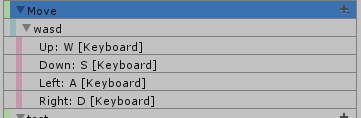
Unity Forum
I have a composite action for movement
[IMG]
And I want to have a button in game for each of those. So that when it's clicked it would start...
 fallow vine
private PlayerInputActions playerInputActions;
that line is giving me error but i have that with that name
Assets\Scripts\Player\Movement\PlayerMovement.cs(10,13): error CS0246: The type or namespace name 'PlayerInputActions' could not be found (are you missing a using directive or an assembly reference?)

I renamed that PlayerInputActions it was just PlayerActions before maybe it created some problem?
is it because my script is in a different directory?
how do i do it then?
fallow vine
Ok so, i created a new InputActions called PlayerInputActions.
private PlayerInputActions playerInputActions; but this is giving me this error :
Assets\Scripts\Player\Movement\PlayerMovement.cs(10,13): error CS0246: The type or namespace name 'PlayerInputActions' could not be found (are you missing a using directive or an assembly reference?)
The InputActions file is not in the same folder as my PlayerMovement script. Is that the issue? and how to fix it
austere grotto
fallow vine
Ok so, i created a new InputActions called PlayerInputActions.
`private PlayerIn...
Did you check the box on your input actions asset to "Generate C# script file" or whatever it's called?
fallow vine
austere grotto
Did you check the box on your input actions asset to "Generate C# script file" o...
its off
austere grotto
fallow vine
its off
well... turn it on?
 mint valve
hello using the input system but i cant seem to find a way to show some of the drop down menus for path in this screenshot i installed the package + all the additional plugins to the package can someone help pls.
PS : Pls ping / I'me in France rn so it's 01:41 so I wont be able to answer you but thanck you for the time you took to reply to me

 spark pumice
mint valve
hello using the input system but i cant seem to find a way to show some of the d...
spark pumice
mint valve
hello using the input system but i cant seem to find a way to show some of the d...
what are the path's that you're trying to get but don't show up in the drop down? I think it usually filters what paths it considers valid based on the action type in your composite binding (the ZQSD line). If it's button vs axis vs stick, etc. Try messing with that and see if it solves your problem.
mint valve
spark pumice
what are the path's that you're trying to get but don't show up in the drop down...
I’m using vect2 analog
mint valve
spark pumice
what are the path's that you're trying to get but don't show up in the drop down...

► ANIMATIONS
https://drive.google.com/drive/folders/1j2HicZMabg4h2Oe8ocxGNuKBHY5kzFJA?usp=sharing
► PLAYER MODEL
https://drive.google.com/drive/folders/1X6DLqSsLT2EAIYpcZGYL-Z93hYOo2sxa?usp=sharing
► EPISODE TWO
https://youtu.be/c1FYp1oOFIs
► SUPPORT ME ON PATREON!
http://www.patreon.com/SebastianGraves
► ASSET STORE PAGE (Animations & Model...
I'm following this tutorial and 3:35 i dont have this dropdown menue or others
can someone help pls ^^
 stark notch
mint valve
can someone help pls ^^
stark notch
mint valve
can someone help pls ^^
you mean the dropdown with where you can assign wasd?
when you have the action check if it is a value and a vector 2
then right click it and select up/down/left/right composite
this should be good for wasd movement
I have a small question myself, i am using a generated script for my inputs and would like to know how i can make a function to get the current control scheme via the generated class
I can see you can read an array with controlschemes but i can't see if it's possible to get the current one from it
 late inlet
I have a 3rd party usb "playstation" controller that i created a Gamepad control scheme for. It works fine for the buttons but i can't make it work with the sticks. I tested that my controller works in an online html5 gamepad tester - so it's not broken.
I created the movement to be a Value/Vector2 type and it works fine for my keyboard scheme. for the gamepad i tried binding the path to left stick, right stick - i tried the generic gamepad, the playstation 2 controller and even the webgl gamepad and it picks up nothing. I try to debug out ReadValue<Vector2> as well as ReadValueAsObject - both axis stays at 0,0. Then i opened the Analysis/Input Debugger and it won't show any input from the controller - not even the buttons that actually work in-game. Does anyone else have or have had this problem?
late inlet
fallow vine
Ok so, i created a new InputActions called PlayerInputActions.
`private PlayerIn...
Have you split your project into multiple assemblies? I sounds like the assembly your PlayerMovement is in needs an assembly reference to the assembly that your PlayerInputActions is part of. Also you could move the created file (or change the location in the properties) so the file is placed in your Scripts folder and not in the Samples folder
 chrome walrus
fallow vine
Ok so, i created a new InputActions called PlayerInputActions.
`private PlayerIn...
chrome walrus
fallow vine
Ok so, i created a new InputActions called PlayerInputActions.
`private PlayerIn...
Did you check to auto create the c# file from your input system file?
fallow vine
chrome walrus
Did you check to auto create the c# file from your input system file?
no i didnt had that but i have it now
mint valve
stark notch
this should be good for wasd movement
Yes this work but like I can’t access the different key bindings
mint valve
mint valve
hello using the input system but i cant seem to find a way to show some of the d...
In path in this image @stark notch
stark notch
mint valve
In path in this image <@!320963967948423179>
Press that T symbol near it
mint valve
stark notch
Press that T symbol near it
Yep doesn’t work no list
stark notch
Maybe you need to reinstall it not sure what the problem is
 crisp star
How do you get cursor position during click?
basically I have this

and I simply want to get cursor position during this action
 indigo patrol
asnwered you already in #archived-code-general
crisp star
indigo patrol
asnwered you already in <#763495187787677697>
but, is that the correct way?
With New Input System?
indigo patrol
give it a try
crisp star
that seems like old input method
indigo patrol
not much of a difference
crisp star
but is there a intended way of getting cursor pointer position with button action type?
austere grotto
crisp star
but is there a intended way of getting cursor pointer position with button actio...
Button action type doesn't make sense for cursor position
crisp star
So I came up with this
 austere grotto
You should use Action Type: Value, Control Type: Vector2
crisp star
yeah
late inlet
When i run my game in the editor i can use WASD to move plus , and . to shoot. When i do a webgl build - only the wasd keys are working - could this be because i'm using a nordic keyboard?
austere grotto
late inlet
When i run my game in the editor i can use WASD to move plus , and . to shoot. W...
maybe O.o
late inlet
Does anyone have experience with webgl keyboard layout problems? am i confined to use a-z keys only if i want it to work on a webgl build?
fallow vine
why does this says left stick/down?
 fallow vine
https://docs.unity3d.com/Packages/com.unity.inputsystem@1.0/manual/Gamepad.html
this just says left stick and what is the "down" supposed to be
austere grotto
the down is the "downwards" portion of it
it will register if you tilt the stick down
fallow vine
uhm ok gotcha, anyways found the left stick, thx
mint valve
Why dont i have this dropdown menue pls help

 fallow vine
is the processor for left stick/direction to make it not move by itself this one?
 fallow vine
mint valve
Why dont i have this dropdown menue pls help
fallow vine
mint valve
Why dont i have this dropdown menue pls help
click on path ( on the button on the side)
mint valve
fallow vine
click on path ( on the button on the side)
but in the vid it doesnt have a processor thing
fallow vine
mint valve
but in the vid it doesnt have a processor thing
uhm? the processor is just for my problem
click here
 mint valve
fallow vine
uhm? the processor is just for my problem
mint valve
fallow vine
uhm? the processor is just for my problem
yes i know i did it doesnt show anithing
mint valve
ok
mint valve
fallow vine
thats weird
well when i click on it nothing happends
mint valve
@fallow vine any ideas ?
fallow vine
mint valve
<@419201705389850634> any ideas ?
nothing
mint valve
ok thx ^^
stark notch
did the OnDeviceChange method get replaced with OnControlsChange or is it 2 different things?
 scarlet raft
I'm having a weird behaviour with my UI Elements on mobiles.
In order to press a button multiple times I have to move the cursor at least 1 pixel. But if the mouse remains in exact same position it doesn't work.
stark notch
mint valve
<@419201705389850634> any ideas ?
maybe uninstall the input system and install it again or delete your libraries folder so unity rebuilds that idk if it does anything
mint valve
stark notch
maybe uninstall the input system and install it again or delete your libraries f...
Done nothing
stark notch
mint valve
Done nothing
I have no idea really but maybe you can record a small video showing what you can do with a new input action asset where you try to set it up as much as possible
This could maybe help give an indication to how exactly it isn't working as intended
 outer vector
hola folks, i have an input action with 2 interactions, hold and press, id like to check for it with the callback context but its only firing the first interaction, am i misunderstanding?

 rare girder
I'm trying to use mouse delta, I'm assuming it returns change in screen pixel position, but that doesnt seem to be the case. am I missing something?
rare girder
I'm reading something about 'accumulation' in the manual but i cant make sense of it
I dont get why its not the actual position delta
 halcyon loom
Is there a way to update the value of a Sensor, specifically the StepCounter, manually for debugging?
 mortal ridge
rare girder
I'm trying to use mouse delta, I'm assuming it returns change in screen pixel po...
mortal ridge
rare girder
I'm trying to use mouse delta, I'm assuming it returns change in screen pixel po...
it does
mortal ridge
outer vector
hola folks, i have an input action with 2 interactions, hold and press, id like ...
probably just need to reorder the interactions
 thin kettle
anyone know why unity text input keeps reactivating itself after I call DeactivateInputField()?
it deactivates for about a second, then auto focuses
stark notch
Can i somehow get the current input device without a player input component using a generated class?
I am using a scriptable object for my input system so i can easily have one instance on every object that needs it
so i would like to leave the playerinput component out
rare girder
mortal ridge
it does
It doesn't.
mortal ridge
rare girder
It doesn't.
it does
rare girder
Lol
mortal ridge
 rare girder
If I add up all the deltas as I move my mouse from left side to right it's always more
Or if I add the Delta to a UI element it doesn't follow the mouse, it's like 2x
But if I use mouse position it works
I've tried polling and events, I've tried changing the input system updates, it's never accurate
 queen saddle
I'm new to unity but I remember from a tutorial about clicking and dragging that u have to take in account the canvas scale factor for mousedelta
rare girder
I did
queen saddle
Ok sorry
rare girder
No worries thanks
outer vector
mortal ridge
probably just need to reorder the interactions
however i seem to order it, it seems only the first one is sent to my event
rare girder
I'm using the Delta for camera rotation using mouse or touch, and I've noticed the sensitively is wildly different depending on device. So trying to get to the bottom of how it works
mortal ridge
outer vector
however i seem to order it, it seems only the first one is sent to my event
the first on will be activated first of course, if you hold down longer the first one will be deactivated and the second one will be activated instead
outer vector
ooh, should i be using tap instead of press perhaps?
mortal ridge
outer vector
ooh, should i be using tap instead of press perhaps?
? the behaviour will still be similar
outer vector
well press only gets deactivated when you let go though no? so hold will never start while its active
 copper knoll
I am using the new input system rn with the intent of adding local multiplayer, however when I spawn in all of my prefabs, the controllers control each other (and themselves) instead of their own prefab. I have turned off auto switching (even with it on it does it), I have set any movement variables to private (idk if that affects each other) and setup the controller schemes. Any images needed I can send them, movement code is very basic.
 glass yacht
rare girder
If I add up all the deltas as I move my mouse from left side to right it's alway...
glass yacht
rare girder
If I add up all the deltas as I move my mouse from left side to right it's alway...
Make sure you're acting on the last delta per frame. If you're using callbacks you're seeing deltas as they accumulate, which is rarely useful.
rare girder
glass yacht
Make sure you're acting on the last delta per frame. If you're using callbacks y...
i dont quite understand how i do that
glass yacht
private Vector2 _look;
private Vector2 _totalDelta;

public void OnLook(InputValue value) => _look = value.Get<Vector2>();

private void LateUpdate() => _totalDelta += _look;
To be clear, I don't know what your setup looks like, so this might not be the issue.
glass yacht
This is just how the Starter Assets handle it, and one of the things the input system devs were talking about when I was complaining to them about the Starter Assets 😛
 glass yacht
Also make sure the settings are set to sample in Update and not Fixed Update
rare girder
done
 glass yacht
Hrm, no idea then, sorry
rare girder
public class TestInput : MonoBehaviour
{
    [SerializeField]
    private InputActionReference look;

    [SerializeField]
    private Vector2 delta;

    void OnLook(InputValue value)
    {
        delta = value.Get<Vector2>();
        // transform.localPosition += (Vector3)vector;
        Debug.Log($"OnLook {delta}");
    }

    void LateUpdate()
    {
        transform.localPosition += (Vector3)delta;
        Debug.Log($"LateUpdate: {delta}");
    }
}
i should rule out that the localPosition isnt the cause, but when i set it to pointer position its fine so
glass yacht
What are you expecting to happen here? Is your camera set up to replicate screen space?
rare girder
yes this script is just on canvas image for testing
glass yacht
a non-scaled canvas?
rare girder
yes
ill make a new setup that uses only the pointer position to compare against to rule out any canvas silliness
looking at the logs, i never see any accumulated deltas either
rare girder
Ok so comparing it to position, its wrong

'calcDelta' is just (position - previousPosition)
and delta is from the input system
public class TestInput : MonoBehaviour
{
    [SerializeField]
    private InputActionReference look;

    [SerializeField]
    private Vector2 delta;

    [SerializeField]
    private Vector2 position;

    [SerializeField]
    private Vector2 previousPosition;

    void OnDelta(InputValue value)
    {
        delta = value.Get<Vector2>();
        // transform.localPosition += (Vector3)vector;
        Debug.Log($"OnDelta {delta}");
    }

    void OnPosition(InputValue value)
    {
        position = value.Get<Vector2>();
        Debug.Log($"OnPosition: {position}");
    }

    void LateUpdate()
    {
        var calcDelta = position - previousPosition;
        previousPosition = position;
        transform.localPosition = (Vector3)position;
        Debug.Log($"LateUpdate: delta {delta}, calcDelta {calcDelta}, position {position}");
    }
}
if you look at the highlighted log, it should be (9,-1), but its reporting (12, -2).
heres a more clear example using Update:

if im not using it as intended, someone please enlighten me
glass yacht
rare girder
heres a more clear example using Update:
Is your game view at 1x zoom?
rare girder
yes
i also tried adding up all the deltas as a dragged my mouse from left edge to right, and it didnt match the screen width
im giving up on this, im going to use the position input and calculate my own delta. but im convinced its either broken or too confusing to be useful
for reference im using input system 1.1.1
 rapid isle
why is there no "Add 2D Vector Composite"?

 jagged wyvern
Change it from button to value maybe idk
 tame oracle
I´ve got this setup (following Dark Souls series from Sebastion Graves). Y doesn´t trigger ingame, instead I must click Z.
I´ve German as system language.
Any idea how this can be solves. It seems like y and z are switched.
Thanks

 versed venture
Uh I need to create controllers (left-right buttons + jump button) for my mobile game, but idk how to create those. All I can find are tutorials for joystick input. Can anyone help me?
 pearl void
`using System.Collections;
using System.Collections.Generic;
using UnityEngine;
using UnityEngine.InputSystem;
public class InputManager : MonoBehaviour
{
private PlayerInput playerInput;
private PlayerInput.OnFootActions onFoot;
private PlayerMotor motor;
// Start is called before the first frame update
void Awake()
{
    playerInput = new PlayerInput();
    onFoot = playerInput.OnFoot;
    motor = GetComponent<PlayerMotor>();
}

// Update is called once per frame
void FixedUpdate()
{
    //tell the playermotor to move using the value from our movement action
    motor.ProcessMove(onFoot.Movement.ReadValue<Vector2>());
}
private void OnEnable()
{
    onFoot.Enable();
}
private void OnDisable()
{
    onFoot.Disable();
}
}
`
`using System.Collections;
using System.Collections.Generic;
using UnityEngine;
public class PlayerMotor : MonoBehaviour
{
private CharacterController controller;
private Vectore3 playerVelocity;
public float speed = 5f;
// Start is called before the first frame update
void Start()
{
controller = GetComponent<CharacterController>();
}
// Update is called once per frame
void Update()
{

}
//receive the inputs for our InputManager.cs and apply to our character controller
public void ProcessMove(Vectore2 input)
{
    Vectore3 moveDirection = Vectore3.zero;
    moveDirection.x = input.x;
    moveDirection.y = input.y;
    controller.Move(trasform.TrasformDirection(moveDirection) * speed * Time.deltaTime);
}
}`

Why are you telling me this?
 spiral galleon
pearl void
Why are you telling me this?
spiral galleon
pearl void
Why are you telling me this?
Because there's no such thing as Vectore2, you want Vector2. Note that you have an E extra
pearl void
ooooo i'm very stupid thk man
 sullen lintel
versed venture
Uh I need to create controllers (left-right buttons + jump button) for my mobile...
stark notch
sullen lintel
versed venture
Uh I need to create controllers (left-right buttons + jump button) for my mobile...
stark notch
is there some info maybe on if they plan on improving some things of the input system in the future
I would like to get the current control scheme without having a player input component but can't find a way to make it possible right now
austere grotto
stark notch
I would like to get the current control scheme without having a player input com...
Control schemes are part of https://docs.unity3d.com/Packages/com.unity.inputsystem@1.0/api/UnityEngine.InputSystem.InputActionAsset.html
versed venture
sullen lintel
https://www.youtube.com/results?search_query=touch+controls+unity+new+input
ah thnx
stark notch
austere grotto
Control schemes are part of https://docs.unity3d.com/Packages/com.unity.inputsys...
yeah, but i can't figure out how to get a control scheme that is currently in use through that
with playerinput you can i think use an event it invoked but i want to avoid it
stark notch
InputControlScheme GetScheme(InputAction.CallbackContext context)
{
  foreach (InputControlScheme scheme in _gameInput.asset.controlSchemes)
  {
    if (scheme.SupportsDevice(context.control.device))
    {
      return scheme;
    }
  }
  throw new System.Exception("Could not get control scheme from context " + context.ToString());
}
This is the script someone showed me but it doesn't work for the keys on the keyboard then it doesn't return anything
Any idea how to make it work for everything?
if an input changes i'd like to know the control scheme the input likely was part of
Then i can make my aim system depend on a mouse or joystick for a top-down shooter
stark notch
never mind i think i did get it to work
 hidden laurel
tame oracle
I´ve got this setup (following Dark Souls series from Sebastion Graves). Y doesn...
hidden laurel
tame oracle
I´ve got this setup (following Dark Souls series from Sebastion Graves). Y doesn...
'Y [Keyboard]' in Unity input means "the key position that would produce 'Y' on a US English keyboard". If you're using, say, a QWERTZ keyboard that key will have a 'Z' printed on it instead, but as far as Unity is concerned it's still the same key.
 hot geode
Why does it happen
 austere grotto
hot geode
Why does it happen
austere grotto
hot geode
Why does it happen
NRE is always the same. You're trying to use a method or field from a null reference
hot geode
???
austere grotto
hot geode
???
Something x = null;
x.anything << this causes the error```Figure out which thing is null, why it's null, and fix it.
hot geode
Ik that much
I have no clue why it's nu tho
austere grotto
What is "it" that is null, and how are you assigning it a value. Start there
 devout brook
You might have a serialized field that isn’t filled in
 fallen charm
im still somewhat new to this system so
    private InputAction Fire; //player jump command
    public float damage = 10f;
    public float range = 1000f;
    public float firerate = 1.5f;
    public float spread = 10f;
    private bool shooting;

    public Camera fpscam;

    private void Awake()
    {
        playercom = new PlayerControls();
    }

    private void OnEnable()
    {
        Fire = playercom.PlayerCharacterActions.Fire;
        Fire.Enable();
    }

    private void OnDisable()
    {
        Fire.Disable();
    }
    // Update is called once per frame
    void Update()
    {
        shooting = Fire.ReadValue<true>
}```how can I make it so I can hold down the button to continue shooting?
rather than just tapping the button
I can't find out how to make it fully automatic
austere grotto
fallen charm
I can't find out how to make it fully automatic
it'd be bool shooting = Fire.IsPressed(); in Update
fallen charm
Ah
austere grotto
but you'll need to actually write some code to handle the shooting after that of course...
fallen charm
i know like raycast damage etc
austere grotto
well obviously that, but I mean code that will ensure the gun fires at the correct firerate etc
all of it
fallen charm
oh yeah that too.
tame oracle
hidden laurel
'Y [Keyboard]' in Unity input means "the key position that would produce 'Y' on ...
Thanks. Yes, I got that and I´m using Z for now, so I can press Y on my QWERTZ keyboard. So there´s no way / setting in Unity for QWERTZ keyboard?
Switching these two keys is easy, but I´m not sure if other things are different?
 fossil walrus
Hello !
Is there a function in the Input System to know if a binding is already attached to an action (and that return this action) ?
austere grotto
fossil walrus
Hello !
Is there a function in the Input System to know if a binding is already...
There's a FindBinding here: https://docs.unity3d.com/Packages/com.unity.inputsystem@1.3/api/UnityEngine.InputSystem.InputActionAsset.html
 fallen phoenix
Hey.
Im using the UI Event System Input Module to navigate UI with inputs. Im also using a ToucheZone for my Character Movement. Its the StarterAssetsInputs Touch Zone for mobile from the Unity Asset. https://forum.unity.com/threads/say-hello-to-the-new-starter-asset-packages.1123051/
The thing is.. every inputs gets recognized from my UI / Navigate Event System except the TouchZone. I've already tried to set something up in my input actions but i couldnt find anything that would fit.
So how can the Input System UI Module can pick up my TouchZone as direction input for UI navigation?
 austere grotto
fallen phoenix
austere grotto
fallen phoenix
Is this a screenshot from your project? Shouldn't you use your own actions asset instead of the DefaultInputActions there?
fallen phoenix
austere grotto
Is this a screenshot from your project? Shouldn't you use your own actions asset...
well the default one immediately worked with every input ive set up in my input actions
 nimble locust
Does anyone know why i cant select gamepad right stick?

nvm I figured it out i needed to change the action type
hidden laurel
nimble locust
Does anyone know why i cant select gamepad right stick?
You're setting up a binding for a button. The "Right Stick" binding is a pair of axes, you can't press a pair of axes; if you want to bind something to clicking the right stick, choose "Right Stick Press".
austere grotto
fallen phoenix
well the default one immediately worked with every input ive set up in my input ...
The default one isn't your input actions at all, it's a premade one
fossil walrus
Hey, is there a way to override an action with "no input" ?
When using action.ChangeBinding(0).Erase();, it seems that I won't be able to find the base value
 fathom thunder
Hi, whenever I reload my scene with scenemanager.loadscene and I press start to open up the UI, I get this error message:
MissingReferenceException while executing 'performed' callbacks of 'UI/Pause[/XInputControllerWindows/start,/Keyboard/escape]'
UnityEngine.InputSystem.LowLevel.NativeInputRuntime/<>c__DisplayClass7_0:<set_onUpdate>b__0 (UnityEngineInternal.Input.NativeInputUpdateType,UnityEngineInternal.Input.NativeInputEventBuffer*)
UnityEngineInternal.Input.NativeInputSystem:NotifyUpdate (UnityEngineInternal.Input.NativeInputUpdateType,intptr)
Any help on what exactly is the missing reference and how can I avoid this error?
austere grotto
fathom thunder
Hi, whenever I reload my scene with scenemanager.loadscene and I press start to ...
Sounds like you're subscribing to an action and not unsubscribing when your object is unloaded
hot geode

 hot geode
And what is it?
austere grotto
what is what
fathom thunder
austere grotto
Sounds like you're subscribing to an action and not unsubscribing when your obje...
Thanks, going to check it out 👍
hot geode
m_wrapper
austere grotto
hot geode
m_wrapper
you tell me. it's your code
Or I'd gather it's probably the auto generated code from an InputActionsAsset?
show your PlayerMovement script
 austere grotto
hot geode
Tried this or adding a function to .performed, both show the same error
austere grotto
hot geode
Tried this or adding a function to .performed, both show the same error
show the whole script
hot geode
 austere grotto
hot geode
austere grotto
hot geode
you can't do that:
movementActions = new InputActions.MovementActions()
Do this:
InputActions inputActions;

void Awake() {
  inputActions = new InputActions();
}

// later...
if (inputActions.Movement.Jump.triggered)
or it might be inputActions.MovementActions - whatever you named it
hot geode
Now there's no error but it doesn't work still
austere grotto
that's a whole other issue 😛
you also need to do inputActions.Enable(); at some point
 austere grotto
why would there be any "slip"
the new input system doesn't have any built in "momentum" to the axis values the way Input.GetAxis() had. It behaves like Input.GetAxisRaw
austere grotto
yes
it's not there in the new system
it's quite easy to replicate if you really want it
austere grotto
Vector2 move;
float axisGravity = .5f; // configurable

void Update(){
  Vector2 target = < that whole big line you have right now for "Vector2 move = " >;
  move = Vector2.MoveTowards(move, target, Time.deltaTime * axisGravity);
  controller.Move(move * (speed + speedOffset) * Time.deltaTime);
}```Idek what's it supposed to do and there're clearly a couple errors xD
 hot geode
What was it supposed to do..?
austere grotto
hot geode
Idek what's it supposed to do and there're clearly a couple errors xD
you were not meant to include the < > verbatim...
nor the text "for "Vecto2 move ="
I was just saying put your existing code there
it will add momentum to how you process the input, same way that GetAxis used to do it
hot geode
Oke
Now it works
But very weird
It works like I wasn't multiplying it by transform.right/forward and it's hard to start and stop walking at all xD
austere grotto
show the code you ended up with
 austere grotto
oh it;'s a Vector2/Vector3 problem
Sorry I wrote Vector2
should be Vector3
in all places
hot geode
Still the same
austere grotto
no way
you probably missed a spot
did you make move a Vector3?
Vector3.MoveTowards?
Vector3 target?
hot geode
Oh yea move
Now it is relative to the rotation but it's still very hard to start or stop walking
austere grotto
we're kinda mixing up the input with the movement vector itself. Try this:
Vector2 input;
float axisGravity = 0.5f;

void Update() {
    Vector2 target = new Vector2(movementActions.LeftRightMovement.ReadValue<float>(), movementActions.ForBackMovement.ReadValue<float>());
    input = Vector2.MoveTowards(input, target, Time.deltaTime * axisGravity);

    Vector3 move = transform.right * input.x + transform.forward * input.y;
    controller.Move(move * (speed + speedOffset) * Time.deltaTime);
}```have you tried adjusting the axis gravity?
hot geode
Yep
 small hill
hey all. im trying to get 1.4.0 into my project (I'm on 1.3.0) and running 2021.3.1f1 version. but i just cannot get the package manager to see the pre-release package in package manager to update it... any thoughts?
i really want to use the "exclusive modifier" fix in 1.4.0.
 frank star
Has anyone ever had this? I tried switching branches with Git and now NOTHING works anymore. NO branches. NONE
 mortal ridge
small hill
hey all. im trying to get `1.4.0` into my project (I'm on `1.3.0`) and running ...
mortal ridge
small hill
hey all. im trying to get `1.4.0` into my project (I'm on `1.3.0`) and running ...
you can't do that. if manually referencing the desired version does not add it, it is most likely less than incompatible with the unity version. the only possible way would be to manually add it to the assets folder
small hill
hm. i bet it's that unity is feeling incompatible. changing the manifest.json to 1.4.0 doesnt do anything. dang.
mortal ridge
small hill
hm. i bet it's that unity is feeling incompatible. changing the manifest.json ...
so you could at best add it manually
small hill
ill try that. just download the source code for 1.4.0, and then do "add packlage from disk", and select folder right? never done this, but this is what im gonna follow: https://docs.unity3d.com/Manual/upm-ui-local.html

 small hill
mortal ridge
so you could at best add it manually
small hill
mortal ridge
so you could at best add it manually
well, i did finally get 1.4.0 in (manually imported it from downloading source code) and it has fixed my issue. 🙂 thanks for some tips in there.
austere grotto
 wide hawk
Having an issue where mouse aim does not work when camera position changes.
wide hawk
Having an issue where mouse aim does not work when camera position changes.
I don't see any mouse related code here. For the joystick code it seems like you're just using absolute axis directions (Vector3.forward and right)
 glad steppe
wide hawk
glad steppe
wide hawk
Your ground plane stays at 0 0 0 that's why it's rotating wierd
if you wanna move the camera you should move the plane with it
You raycast at the plane, but the camera moves under the plane
 austere grotto
wide hawk
austere grotto
wide hawk
yeah what @glad steppe said is right - you should use the position of the ground in the current arena instead of Vector3.zero there
 tranquil knoll
gotta love how there's an entire chat dedicated to the complexity of the input system package
glad steppe
I think it's mostly to keep the same input questions out of the other chats ^^
 analog siren
In Unity3D Ive got this player controller, but it seems to only create a zero vector, does anyone know how i could fix this?

 zealous wedge
analog siren
zealous wedge
analog siren
Might be a silly mistake but is your speed variable set in inspector? I like to set defaults in my declaration because I've made that mistake so many times
 tropic vortex
I've got a problem, The input system doesn't work with unity remote 5 for some reason
hidden laurel
tropic vortex
I've got a problem, The input system doesn't work with unity remote 5 for some r...
What version? Versions of Input System before 1.4.0 don't support Unity Remote.
tropic vortex
hidden laurel
What version? Versions of Input System before 1.4.0 don't support Unity Remote.
nvm, i just rewrote the entire input system to make it work
tropic vortex
tropic vortex
nvm, i just rewrote the entire input system to make it work
took a while but its very customizable
analog siren
zealous wedge
Might be a silly mistake but is your speed variable set in inspector? I like to ...
That isn’t the issue, I set it at runtime to prevent this issue.
austere grotto
tropic vortex
I've got a problem, The input system doesn't work with unity remote 5 for some r...
It's documented that it's not supported.
austere grotto
hidden laurel
What version? Versions of Input System before 1.4.0 don't support Unity Remote.
Oh nice to know they added support
hidden laurel
Yeah, literally only released in the last couple of weeks I think. It might still only be available direct from the github repo.
 lethal osprey
okay so i am pretty familiarised with unity but my keyboard input does not register and only my mouse does
i used Input.anyKeyDown to check my theory
is there anything from stopping it from working
austere grotto
lethal osprey
okay so i am pretty familiarised with unity but my keyboard input does not regis...
maybe you need to click on game view to give it focus?
raven egret
Does anyone have any tips on creating a back button with the Input system UI input module? I want to create a method that will be called when a back button is hit that I can make switch to the previous scene. I tried using ICancelHandler and the OnCancel(BaseEventData eventData) event but it never seems to be called. And I'm not sure how to override the basic Input System UI Input module functions.
 sharp geode
what's the best approach for input actions that only work when the event system reports the pointer is over the "background"?
the objective is to create an input action reference i can drag and drop into cinemachine input provider
which correctly (1) orbits the camera (a pointer delta action) (2) when the button press started over the background (3) as long as the button is pressed
otherwise i guess i can override methods in cniemachineinputprovider
 undone imp
is there any way of getting an action's control type, without allocating GC memory as .ReadValueAsObject(); does?
austere grotto
sharp geode
what's the best approach for input actions that only work when the event system ...
I wonder if you're trying to inject too much "smarts" into the input system. its job is to read input from input devices. it shouldn't care about things in the game like event system. That's for your user logic to disentangle
 burnt talon
Anyone here has experience with Keijiro's Minis (MIDI input)? I'd like to control parameters with a midi knob but I can't find any resources
I'm a Unity beginner so I'm a bit lost
sharp geode
austere grotto
I wonder if you're trying to inject too much "smarts" into the input system. its...
i am modifying the input provider from cinemachine instead
lethal osprey
austere grotto
maybe you need to click on game view to give it focus?
i fixed this by using a recent unity version, thanks for the help tho :D
 inner lava
Is there any reason to use the new input system over the old one if I only plan to support pc?
austere grotto
inner lava
Is there any reason to use the new input system over the old one if I only plan ...
Yep for all the reasons the new input system exists:
- option for event-based input handling
- better local multiplayer handling
- better device swapping handling
- runtime rebinding support
inner lava
austere grotto
Yep for all the reasons the new input system exists:
- option for event-based in...
Thanks. Is there an article on doing runtime rebinding?
undone imp
is it possible to get the action by its name even thought there are 2 actions with the same name in different action maps? PlayerInput.actions[actionName] ^this will return the first action found, even if its action map is disabled
austere grotto
undone imp
is it possible to get the action by its name even thought there are 2 actions wi...
you can do actions["mapname/actionname"]
undone imp
didnt know that, ty
 vague wedge
can someone help me with this https://pastebin.com/Xqbezm8a
i used WasPressedThisFrame() to get the exact frame a button was pressed down but what happens is if i hold the button down WasPressedThisFrame() always returns true for every frame the button is held down which is not what i want (basically I want the old Input.GetKeyDown() functionality)
ok i get it now, onActionTriggered gets called on press and on release so it only updates the bool during those times
austere grotto
yeah wass gonna say that doesn't make sense
 plush stream
Hey everyone for some reason i dont have an input actions button any fix to that pls??
austere grotto
What button are you referring to
plush stream
To create input actions , i installed the input system but not sure how to open the interface
This one
This is a video on youtube

Ive seen a few and they all say create > input actions
plush stream
plush stream
This is a video on youtube
Its on the very bottom my bad
tame oracle
Hey guys! I'm not friends with the new Input System yet. I'm trying to create a four way attack system based on the right stick and I want to animate the attack based on the input on the stick. Because it's humanly impossible to always push the stick 100% straight, I tried to play around with the deadzone and the input values to make sure the right animation plays. It still doesn't seem to work perfectly.
Does anyone know how to go at it the right way?
austere grotto
tame oracle
Hey guys! I'm not friends with the new Input System yet. I'm trying to create a ...
Use the "digital normalized" processor
tame oracle
Is that the same one as the normal normalized?
oh wait, I have to change the control type
tame oracle
Got it working @austere grotto, thanks mate ❤️
plush stream
Can anyone please help with this i cant make an input action system
 safe iron
seems like there's a graveyard of very similar questions, but is there any way to get a switch pro controller working w/ the input system on mac, so that it doesn't continuously spam input?
👀
 sick stratus
Is there a reason that InputSystem.XInput does not exist? I am trying to query the device type as "InputSystem.XInput.XInputController" but I am getting an error that there is no definition for XInput in InputSystem even though it very clearly shows in the documentation here: https://docs.unity3d.com/Packages/com.unity.inputsystem@1.0/api/UnityEngine.InputSystem.XInput.XInputController.html
Actually, it seems it only works if I add the namespace rather than trying to call it directly, which is a bit odd but I guess it works okay for what I need it for
 broken totem
plush stream
Can anyone please help with this i cant make an input action system
broken totem
plush stream
Can anyone please help with this i cant make an input action system

I want to share the approach that I began to use most often for quick testing... a couple of lines of code and the event is connected. Input System in #Unity is cool
#gamedev #unity3d #gamedevelopment #coding #unitytips #indiedev #IndieGameDev #indiedeveloper #indie

 Twitter
·
vague wedge
Twitter
·
vague wedge
i fired up my project today and the input system decided it doesn't want to work. my onActionTriggered callback is not being triggered at all. also noticed the player input object does not assign me a device nor a control scheme
 vague wedge
somehow, the solution was to plug in a controller
otherwise the user is not assigned a device and control scheme
sharp geode
is there a way to prevent the editor input devices from attaching
when entering play mode
by default it seems there are devices and no user, and then when i add a device paired with a new user, i get these unassociated devices + proper user
i would rather have no devices, and then proper user
 late berry
heya people, i made roll-a-ball in the unity editor and it worked flawlessly, built it and nothing wants to work
why 😃
undone imp
can I check the version of the input system thru code?, like
#if INPUT_SYSTEM_VERSION 1.3.0
sharp geode
undone imp
can I check the version of the input system thru code?, like
```#if INPUT_SYSTE...
you can use an assemblydef's scripting define
which supports the version numbers
 pulsar lion
Anyone know why my Inputsystem will randomly break? I have done nothing to it's script (honeybee.cs) but it decided to have a full melt-down; this happened once before with once again, no input from me; and the way I had to fix it was simply destroying and remaking the whole thing from scratch; which I'd like to avoid doing a third time haha

oh nevermind, turns out the problem was I had moved the script to my Scripts Folder, apparently the inputActions file and the script need to be in the same folder or the input actions just duplicates it when exiting playmode
normally I'd delete my message but figure I'd leave it here incase anyone comes across this issue
 radiant shard
guys i am starting to learn new input system
any good tutorial you guys recommend , actually i need architecture of input system so i can understand how its work , even flow chart also work
jagged wyvern
radiant shard
any good tutorial you guys recommend , actually i need architecture of input sy...

Unity Learn
In this project, you'll learn how to take advantage of Unity's new Input System.
radiant shard
guys how can i use custom ui as input for the input system
 fossil walrus
radiant shard
guys how can i use custom ui as input for the input system
fossil walrus
radiant shard
guys how can i use custom ui as input for the input system
What do you mean by "custom ui" ?
If you mean like a joystick, there's one given by the input system
that you can attach to an action
 kind anvil
Hi, I have kind of a dumb problem.
Im trying to set up multiplayer with the "Player Input Manager" Component
however the Player is not spawning when the join action is triggered
and there are no errors in the console
this is my PlayerInputManager Component:

 floral scarab
Hello, I don't receive the input system message.
I expect that when I hit ESC button, it will trigger the following method.
It's currently not happening, I tried if I receive other events from the system and I do in that script. What could be the issue of not receiving it?

 undone imp
private const string DEFAULT_CANCEL_BINDING = "<Keyboard>/escape";
private const string DEFAULT_EXCLUDED_BINDING = "<Keyboard>/NULL";
var excludedBindings = new[] {DEFAULT_EXCLUDED_BINDING, DEFAULT_EXCLUDED_BINDING, DEFAULT_EXCLUDED_BINDING};
cancelBinding = DEFAULT_CANCEL_BINDING;
_rebindingOperation = inputAction.PerformInteractiveRebinding()
.WithControlsExcluding(excludedBindings[0])
.WithControlsExcluding(excludedBindings[1])
.WithControlsExcluding(excludedBindings[2])
.WithCancelingThrough(cancelBinding)
.OnMatchWaitForAnother(0.1f)
.OnCancel(operation => RebindingComplete())
.OnComplete(operation => RebindingComplete())
.Start();```
Im using this code to rebind an action binding, but i found out that the E key cancels the process, and i cant figure out why frosty raft
undone imp
```
private const string DEFAULT_CANCEL_BINDING = "<Keyboard>/escape";
private c...
frosty raft
undone imp
```
private const string DEFAULT_CANCEL_BINDING = "<Keyboard>/escape";
private c...
I recall reading that the E key in input system had weird problems, could be relevant
https://forum.unity.com/threads/input-system-rebind-not-detecting-single-key.1224747/
 night hill
Hello guys, my on-screen stick is always zero. It is not returning any value. It is binded with left stick and while controller is giving normal value the on-screen stick doesn't work. I also read that people are complaining that 1.1.1 , 1.2 and 1.3 of the new PlayerInput system versions are broken when it comes to the on-screen stick. Is that true?
austere grotto
night hill
Hello guys, my on-screen stick is always zero. It is not returning any value. It...
You'd have to show your setup and your code. I'm not aware of any systematic brokenness
 proven ice
I know this is probably asked a thousand times, but is there a built in controller vibration function? Or do I need a third party for that
austere grotto
There is support for haptics and rumble in the input system
 lone inlet

im having an issue with a ps4 controller where its stuck moving
anyone had a similar issue?
 main basin
Whats the best approach for making a button accept a right mouse click using the input system (not the old input manager)? Im having issues wording what exactly what i need in order to get appropriate search results online... Basically I want a button to accept both left and right mouse in order for it to do different things on each event.
austere grotto
main basin
Whats the best approach for making a button accept a right mouse click using the...
you add a script to it with IPointerClickHandler
and you can read which click it was from the PointerEventData parameter to your OnPointerClick function
it's not really an input system issue at all
assuming you're talking about a UI Button?
 austere grotto
 whole light
Anyone knows why my select is blurry like this in my drop down list
whole light
Anyone knows why my select is blurry like this in my drop down list
This is a #📲┃ui-ux question
whole light
austere grotto
This is a <#502171135350407168> question
thank you
whole light
austere grotto
This is a <#502171135350407168> question
hello, would u know the answer to my question ?
 oblique steppe
@whole lightbecasue you need to change the text size then rescale it. i cant remember what way round works well. or just use TextMeshPro
my project has just stopped using my xbox inputs completely when i didn't change anything about the input settings. works fine in my other projects
tried a bunch to fix it and im left with creating a fresh project unless sombody knows why that may happen?
 inland path
Does anyone have experience making games in split screen?
I want to make a fun little project for my friends and I, and would like to have keyboard controls for one player and controller for the other. Would it be as simple as having a player one and player two prefab, each with the right controls assigned?
oblique steppe
usualy yes,
once u get used to it, but if like me unity has just decided to ignore controller inputs for no reason i can see, can get a bit tricky lol
inland path
Has your issue happened after you changed something?
even if its not relevant to your inputs
oblique steppe
well like i said, no reason i can see
inland path
are you making sure that you've referenced all the right events or enabled all your controls?
oblique steppe
it was working ive been making a digger game with this project i copied the inputs from another project, and nothing about the input system changed because i wasn't touching it.
inland path
are you 100% certain you installed the same version of the Input system?
and that it's enabled in the project settings too
oblique steppe
its the old input system
and its been working fine in everything up till about an hour ago
well this is a massive waste of time
inland path
Ahh, i see. I've got no clue about the old input system. I never figured that out
oblique steppe
well its usualy quite simple
well i was hoping to have this game ready to test in week, now il probls spent more time on this than i did making the rest of the game so far
oblique steppe
yup still wasking time, with a fresh project it works fine but then when i bring my old stuff into it it stops working. even if leave the Input table the same. so Somthing is messing it up but in 5 years of using unity. Ive neaver seen or heard of anyhting that would do this
main basin
austere grotto
assuming you're talking about a UI Button?
Correct. I had tried something similar but not with IPointerClickHandler. I THINK I used OnPointerClick which might be for input manager
austere grotto
main basin
Correct. I had tried something similar but not with IPointerClickHandler. I THIN...
Those are the same thing
OnPointerCllick is the method defined in the IPointerClickHandler interface
main basin
Oh. I see. Then im not super sure whats up because it wasnt responding last i tried
I also have a script with OnPointerEnter in it on the same button, ill remove tht and try again later
main basin
austere grotto
Those are the same thing
i just tested it and it works! I had used OnPointerDown not click..
the highlighting etc effects don't work with right click it seems ,but i think thats a nonissue considering what i want to use this function for. Thank you for the pointers 😊 (no pun untended)
hot geode
How do I get scrolling up/down?
 kindred badge
Hi, anyone could tell* why is this error dropping? Input Key named "" is unknown, when i literally have the input key there?
 austere grotto
kindred badge
Hi, anyone could tell* why is this error dropping? Input Key named "" is unknown...
austere grotto
kindred badge
Hi, anyone could tell* why is this error dropping? Input Key named "" is unknown...
GetKey uses keys
GetButton and GetAxis use axis names
poopKey is an axis name
kindred badge
Thank you!
 bleak hound
do somebody knows how to recreate an OnButtonDown with the new input system? It's been hours I'm searching for solution but I've found nothing yet and the fact that there are no simple solutions sounds very strange..
bleak hound
I'm trying to use .started but its NEVER true
 distant cliff
bleak hound
I'm trying to use ```.started``` but its NEVER true
distant cliff
bleak hound
I'm trying to use ```.started``` but its NEVER true
can you show the code you are trying?
 onyx osprey
I dont know if this is the right place to be but for UI's using sliders and buttons with keyboard navigation and controller navigation, how can I make it so that the keyboard and controller can actually use the slider because currently it can just highlight them and doesnt do anything else, like i cant press anything to select the slider to slide it or anything and im just wondering how i can get that to be a thing
proven ice
Using new Input System, I can't make my movement be detected by my left stick on my controller. It works perfectly fine for WASD but for the controller it can't read joystick input.


Here is the script that moves the player(movedelta is a vector3)

This works fine with vector2 but it's really important for the rest of my script I use vector3 for movement
I spent around an hour searching for solutions online and got nothing, any help would be really appreciated
I don't want to use a system like WASD for left stick up left stick down because it doesn't have the precise left stick rotations I need
 lunar drift
hi
i have this piece of code in my script
public Input input;
but i dont see it in the inspector
btw input is the name of my input actions
pls help me
using System.Collections;
using System.Collections.Generic;
using UnityEngine;
using UnityEngine.InputSystem;

public class Main : MonoBehaviour
{
    public Input input;
    private void OnEnable()
    {
        input.Actions.DropBall.performed += DropBall;
        input.Actions.DropBall.Enable();
    }
    private void OnDissable()
    {
        input.Actions.DropBall.performed -= DropBall;
        input.Actions.DropBall.Disable();
    }
    public void DropBall(InputAction.CallbackContext context)
    {
        Debug.Log("drop");
    }
}
```this is the whole script
 plucky hatch
With the new input system how do I make an empty game object move depending on mouse position? I plan on using the empty game object as a source object for multi aim constraint but I can't find a way to essentially store the mouse position in an empty game object with the new input system
lunar drift
plucky hatch
With the new input system how do I make an empty game object move depending on m...
Try to Google something like how to get mouse position new input system
And then just move the go
 quartz ledge
lunar drift
```cs
using System.Collections;
using System.Collections.Generic;
using UnityEng...
quartz ledge
lunar drift
```cs
using System.Collections;
using System.Collections.Generic;
using UnityEng...
screenshot your console
olive mortar
thats not the inspector, i dont know what that picture is trying to show
lunar drift
quartz ledge
screenshot your console
I get an errir that the input is not set to any thing
quartz ledge
lunar drift
I get an errir that the input is not set to any thing
screenshot
lunar drift
olive mortar
thats not the inspector, i dont know what that picture is trying to show
Im not on pc rn
quartz ledge
and screenshot the inspector too
quartz ledge
... get better
lunar drift
It's like 2 am rn for me
quartz ledge
ok so? its 2am for me too

 quartz ledge
what is Input? show the file
lunar drift
 lunar drift
lunar drift
lunar drift
.
do u need the script too?
its generated throught the input thing tho
olive mortar
you have compile errors, its not going to update the inspector
lunar drift
so i should do something like this? ```cs
using System.Collections;
using System.Collections.Generic;
using UnityEngine;
using UnityEngine.InputSystem;
public class Main : MonoBehaviour
{
public Input input;
/private void OnEnable()
{
input.Actions.DropBall.performed += DropBall;
input.Actions.DropBall.Enable();
}
private void OnDissable()
{
input.Actions.DropBall.performed -= DropBall;
input.Actions.DropBall.Disable();
}/
public void DropBall(InputAction.CallbackContext context)
{
Debug.Log("drop");
}
}
try it and see
lunar drift
i dont get any errors but i still cant see it in the inspector
olive mortar
you should just have this sort of class:
and assign the things in the events from the inspector
 lunar drift
so i need player inpt component?
input*
sorry if im being dumb
im just a bit tired
olive mortar
go to sleep and come back to it tomorrow
lunar drift
nah id like for it to be solved
im gonna try a few more things
when i ctrl clicked the "Inputs" it redirected me to the inputs script
is that good?
I... i.. i fixed it 🎉🎉🎉
private void Awake()
    {
        input = new Inputs();
}```this took me like 1H
proven ice
proven ice
Using new Input System, I can't make my movement be detected by my left stick on...
Could anyone please help me with this
proven ice
Is there really no way to do the input horizontal and it automatically assign the left stick, like the old input system?
hot geode
How do I get scrolling up/down?
 near raven
proven ice
Is there really no way to do the input horizontal and it automatically assign th...
near raven
proven ice
Is there really no way to do the input horizontal and it automatically assign th...
Sounds like it may just be an issue somewhere in your action map? idk about it just automatically happening but I believe detecting input from controller is possible and shouldn't be too complicated. Maybe try explicitly defining your controller as input for your action. And then making sure it is the horizontal input from the controller?
near raven
hot geode
How do I get scrolling up/down?
This is very vague question, mouse scrolling can be found as an input for an action, is that what you're looking for?
 restive glade
hot geode
How do I get scrolling up/down?
restive glade
hot geode
How do I get scrolling up/down?
Input.mouseScrollDelta
which is just
10 * Input.GetAxis("Mouse ScrollWheel");
hot geode
restive glade
Input.mouseScrollDelta
Okee
What range does it return?
restive glade
1 when scrolling up and -1 when scrolling down
near raven
I have a question about the callbacks from the actions. Is there a way to pick up the input as having happened for a single frame. Something like context.triggered?
hot geode
Okay thx
near raven
If the action has no interactions, the context.started callback doesn't ever become true inside the Update method and if you introduce the hold interaction it last for more than one frame...
Im trying to keep context.performed true while button is pressed and have context.started be true for only one frame
hot geode
Okay one more thing
Is there a way to get if positive/negative button of an axis is pressed? (directly button, not axis >< 0)
onyx osprey
I dont know if this is the right place to be but for UI's using sliders and buttons with keyboard navigation and controller navigation, how can I make it so that the keyboard and controller can actually use the slider because currently it can just highlight them and doesnt do anything else, like i cant press anything to select the slider to slide it or anything and im just wondering how i can get that to be a thing
 harsh crest
Hi, how would i convert basic GetKeyDown input to the new Input System, thanks
 high crystal
I just went down this rabbit hole myself
can't seem to post code. weird
click = new InputAction(binding: "<Mouse>/leftButton");
click.started += .... (mouse down)
click.canceled += ... (mouse up)
@harsh crest
and to make it actually do something you must do click.Enable()
 umbral jewel
Hi I'm having this issue where new controllers aren't recognized if I plug them in while the game is open.
If 2 controllers are plugged in when I launch the game everything is fine they both work and can be unplugged and plugged back in, but if I plug 1 controller in and start then game then plug in the next controller it will never be recognized until I restart the game.
harsh crest
I am trying to make it so that a bool is equal to true when a button is pressed, but once i press the button the bool true forever
 harsh crest
I think this line of code is what is making it do performed forever

but i dont know how to get both, does anyone know how to take both performed and canceled
 pliant copper
Hey, I'm making a local multiplayer game with controller input using the new input system. When I run the game in the editor, the player moves smoothly and everything looks fine.
However, when I build the game, the movement becomes jittery for some reason. I'm not really sure why this might be happening. I have my rigidbody set to interpolate and I believe I'm doing input and physics in the right updates. I'm using 2021.3.2f. Can anyone see what's wrong?
Here's a link to my player controller script:
https://www.toptal.com/developers/hastebin/xudelawuso.csharp
I'll also attach a video of the glitchy movement. The recording doesn't capture it too well, so it doesn't look that glitchy on video, but it's super noticeable in real life.
Hastebin is a free web-based pastebin service for storing and sharing text and code snippets with anyone. Get started now.
 vagrant sluice
Hello again, just wanted to ask in regards to the New Input System, are we not allowed to use the code we make for our movement or menu stuff? 🤔
pliant copper
Interesting, it seems to work if the rigidbody is kinematic. It would be nice to have a dynamic rigidbody, but I guess kinematic is fine given that I don't need any forces in my game like that. Still, if people know how to make it smooth with a dynamic rigibody, I would love to hear the fix.
austere grotto
vagrant sluice
Hello again, just wanted to ask in regards to the New Input System, are we not a...
Huh?
austere grotto
harsh crest
Did you not also subscribe to canceled??
 inland cedar
hello, I am having problems with my character automatically walking backwards. this problem did not exist yesterday, i closed the project, reopened today, changed nothing and all of a sudden my character is accelerating backwards. unity does not think that i am pressing S (i've checked with a debugger)
inland cedar
also, i stop moving backwards when the game view is not focused
austere grotto
Any character movement will be due to your code and you should be able to debug your way to the source of it.
Check for any plugged in controllers/joysticks too
inland cedar
This is embarrassing
My steering wheel was plugged in
That was the cause
Thank you
 verbal star
is there a way to change the order of execution of input events ?
like the UI event always fires before the player
or knowing if the UI event was fired
verbal star
nvm, found a way around it
oblique steppe
Ok this is Insane, Twice now unity has stopped talking controler inputs
and both times ive not touched anything to do with the input system
nobody know any reason why? can it get corrupted? is there an event thing needed for Axis inputs?
 misty crown
Did you check the console if unity detected the controller being disabled/unplugged?
oblique steppe
console says nothing, i always have it up
... ok well it started working for bit
ive no idea why
it works in my other projects ive been using the same inputs for more than a year in diffrent games
this is not a code thing, ive made this and a clean scene to test it ```
public class InPutTester : MonoBehaviour
{
public Vector2 Stick1;
public Vector2 Stick2;
void Update()
{
    Stick1.x = Input.GetAxis("Horizontal2");
    Stick1.y = Input.GetAxis("Vertical2");
    Stick2.x = Input.GetAxis("Horizontal");
    Stick2.y = Input.GetAxis("Vertical");
}
}
there must be SOMTHING that causes it to ignore controller inputs or but all i can find when i search is people missing the basics.
Il have to waste another 2 hours rebuilding my project bit by bit again because of this bug and Worst is ive no idea why.
look, now its working but ive restarted the project like 3 times and this time it working... its like its corrupting somthing on rebuild

ok... well loading my old scene breaks the inputs for the Whole project...
yay
wth could cause that
oblique steppe
Ok Steam doing somthing becuse it thinks its "spacewar" and when its off its all fine, they must have done something with controller inputs
 brittle turret
Will Rewired allow me to use Pro Controller, Dualshock, and Dualsense controllers with my game?
Assuming that the only other alternative would be the old unity input system
 candid brook
yes
brittle turret
For some reason, no controllers I own work with the old input system
candid brook
I was using New Input... I had issues with a trigger randomly getting stuck, couldn't figure it out.. went to OLD input, it worked fine.. went from old input to REWIRED and now i play 100% of the time with Dual Shock 5
that alone letting me test in Unity is worth 50 bucks right there
brittle turret
How easy is it to switch from old system to rewired
because i have a LOT of old input in my code
candid brook
well i had a integration for my thing
but they give you like 200 examples
of everything
joystick to mouse. probing for input. multi input. remapping. full control remap prefab
drop in game ready
brittle turret
My dualsense controller and my pro controller just get garbage input
would you think that rewired would help?
candid brook
yes
i can play gamepad / gamecube / PS5 / HOTAS... for god sake.. etc
the guy wrote drivers for everry gamepad and mapped it to Unity Old Input
basically
brittle turret
Thank you.
brittle turret
When I buy the package, I just install it through the package manager in my current project?
candid brook
yes, but I always like to start a fresh new project
import just tat
and play with it
tinker with demos, see whats in there, read manuals, watch videos, watever
then do full Version control.. the install and go nuts
brittle turret
You'd say that conversion from a pre-existing old input system game would still be 100% possible? I have one interaction button, movement buttons, and look buttons
with the look buttons being Mouse X and Mouse Y input vectors
So it's not toocomplex
candid brook
yah you should be fine
I am running OLD input AND was running new input and then i went to OLD input and im doing DOOZY UI with old input and all of this was same project, going back and forth and all over, and my input is still OK after all the switching
but if you want Dualshock / Nintendo / etc all working on PC, this is the way to go
brittle turret
Thank you so much for the reply and recommendation. I'll let you know how it goes.
candid brook
ok good luck!
bleak hound
using the new Input System how can I detect if my mouse is over a specific button?
 blissful bridge
bleak hound
using the new Input System how can I detect if my mouse is over a specific butto...
blissful bridge
bleak hound
using the new Input System how can I detect if my mouse is over a specific butto...
You can implement IPointerEnterHandler and IPointerExitHandler and define their handler methods OnPointerEnter and OnPointerExit to find out when your mouse enters and exits the button.
bleak hound
thanks in the end I solved by adding some event trigger directly on the buttons
blissful bridge
However it doesn't look like there is an IPointerOverHandler or something that can replace MonoBehaviour.OnMouseOver(). So here is my question, what's the best substitution for it?
bleak hound
I personally just attached the Even Trigger component to every button I specifically needed that feature
I can attach a specific method they call when triggered
so you can make them call a custom "OnMouseOver" method
blissful bridge
bleak hound
so you can make them call a custom "OnMouseOver" method
But I need to be able to catch "OnMouseOver" events first.
I don't see anything that fires every frame your pointer is above the button.
 bleak hound
blissful bridge
But I need to be able to catch "OnMouseOver" events first.
bleak hound
blissful bridge
But I need to be able to catch "OnMouseOver" events first.
I think the two things shouldnt coexist, your either use the IPointer interfaces or you set everything via editor by assigning Trigger Events
blissful bridge
I can't do it either way since there is no event to begin with.
austere grotto
blissful bridge
I don't see anything that fires every frame your pointer is above the button.
you just use IPointerEnter/PointerExit to set a bool and Update
blissful bridge
It doesn't work if the button is moving and the pointer is not.
austere grotto
The button is moving?
blissful bridge
Yeah
austere grotto
well that's a bit of an edge case
blissful bridge
Resolved with some magic. Thanks for the answers.
harsh crest
I am trying to use new input system for local multiplayer, but both players are moved by the same input, its driving me crazy. Does anyone know a fix?
 devout sun
The new input system is kinda hard. I literally can't find the 2d vector binding can some one help?
 harsh idol
Hey i have this errror and dont know how to fix it

 blissful bridge
harsh idol
Hey i have this errror and dont know how to fix it
blissful bridge
harsh idol
Hey i have this errror and dont know how to fix it
Can you show your Build Settings?
 blissful bridge
So, the problem is, indexing starts with 0, so the scene with build index 2 can't be loaded because it refers to the scene number 3, and you only have 2 scenes.
harsh idol
blissful bridge
So, the problem is, indexing starts with 0, so the scene with build index 2 can'...
ammm so i need to just put +0 in the code?
harsh idol
blissful bridge
So, the problem is, indexing starts with 0, so the scene with build index 2 can'...
or just change the index to the scene name?
blissful bridge
You can load scenes by name like so: SceneManager.LoadScene("Scenes/SampleScene")
harsh idol
blissful bridge
You can load scenes by name like so: `SceneManager.LoadScene("Scenes/SampleScene...
Thanks it worked, and should i worry about the 2 audio listeners message?
blissful bridge
Yeah, you probably have 2 cameras and each of them has its own audio listener component. Remove one of them.
(one of the listeners, not one of the cameras)
harsh idol
blissful bridge
(one of the listeners, not one of the cameras)
thanks the errors are solved now, but i have another problem when i click on the start buton nothing happens it just shows a black screen. I can see that the scene has changed but the scene does not load for me 😦
blissful bridge
harsh crest
I am trying to use new input system for local multiplayer, but both players are ...
Can you show your input asset and code for player movement? I suspect, both players are subscribed to the same events.
blissful bridge
harsh idol
thanks the errors are solved now, but i have another problem when i click on the...
Does it print anything in the console?
harsh idol
blissful bridge
Does it print anything in the console?
sadly no
blissful bridge
Try substituting "Scenes/SampleScene" with "SampleScene".
harsh idol
blissful bridge
Try substituting "Scenes/SampleScene" with "SampleScene".
sadly did not work
blissful bridge
If you open the SampleScene itself by double-clicking its asset, does it work fine?
harsh idol
blissful bridge
If you open the SampleScene itself by double-clicking its asset, does it work fi...
it opens up left side, but the view doesn not change in the editor
blissful bridge
And when you hit Play?
harsh idol
blissful bridge
And when you hit Play?
it just stays in the start screen
blissful bridge
blissful bridge
If you open the SampleScene itself by double-clicking its asset, does it work fi...
Can you screenhot the entire unity window after opening SampleScene this way?
harsh idol
blissful bridge
Can you screenhot the entire unity window after opening SampleScene this way?
this is after i play the game and press "Žaisti'

This is before
 blissful bridge
What about the black screen?
harsh idol
blissful bridge
What about the black screen?
sorry that was before, it doent happen anymore, now it just stays in the same scene image
blissful bridge
You have both scenes opened at the same time. MenuScene is literally a black screen since it only contains a camera, while your menu belongs to SampleScene. This can be seen in the hierarchy.
So close the SampleScene and move your canvas to the MenuScene.
harsh idol
blissful bridge
So close the SampleScene and move your canvas to the MenuScene.
all of my canvas? it cointains thing i need to see in the samplescene
blissful bridge
devout sun
The new input system is kinda hard. I literally can't find the 2d vector bind...
Actions > + > Add 2D vector action or something.
 blissful bridge
harsh idol
all of my canvas? it cointains thing i need to see in the samplescene
blissful bridge
harsh idol
all of my canvas? it cointains thing i need to see in the samplescene
It's better to have a separate canvas for each scene. When you load a scene, the one you had before gets replaced completely. There is a way to bypass this with DontDestroyOnLoad, but this is definitely not the right case for that.
harsh idol
blissful bridge
It's better to have a separate canvas for each scene. When you load a scene, the...
ye so i moved the main menu stuff into the menuscene and now after i start the game it does not show at all
blissful bridge
Screenshot
harsh idol
blissful bridge
Screenshot

and if i start the game it just goes instantly to the sample scene
blissful bridge
You still have both scenes opened at the same time.
SampleScene is the 1st in the hierarchy, so that's what you see.
harsh idol
blissful bridge
SampleScene is the 1st in the hierarchy, so that's what you see.

ohhhhhh i needed an eventSystem
blissful bridge
Not if the button worked without it.
harsh idol
blissful bridge
Not if the button worked without it.
i added a canvas and it seems to be fixed but the resoliution of the main menu image is messed up when i build the game i see it at a small window and everything around it is generic unity blue color, what can i change?
and the main camera sees this now
 blissful bridge
The camera doesn't see anything, blur is set as the background color for it.
Compare your canvas object with this:
 harsh idol
blissful bridge
Compare your canvas object with this:
harsh idol
blissful bridge
Compare your canvas object with this:
it helped but still i dont get the full screen p.s. i changed the backroudn color to brown
 blissful bridge
Compare your canvas object with this:
blissful bridge
blissful bridge
Compare your canvas object with this:
Screenshot this for your canvas.
 blissful bridge
Seems fine. And this for your camera:
 harsh idol
blissful bridge
Seems fine. And this for your camera:
harsh idol
blissful bridge
Seems fine. And this for your camera:
i only see these settings
 blissful bridge
Ah, that's because of different render pipelines.
Can you screenshot the Scene window again while camera is selected?
Like so
 harsh idol
like this?
 blissful bridge
Yeah, what happens when you try to resize the canvas from here?
harsh idol
blissful bridge
Yeah, what happens when you try to resize the canvas from here?
nothing it does not let me do that
blissful bridge
That's good, now just resize the camera so the canvas fits in perfectly.
harsh idol
blissful bridge
That's good, now just resize the camera so the canvas fits in perfectly.
amm how can i do that?
blissful bridge
harsh idol
like this?
White circles on the borders
harsh crest
@blissful bridge


sorry if its messy this is my first time sharing code like this
harsh idol
blissful bridge
White circles on the borders
i restared unity and now this is what i see, cant move anything

 surreal moth
Is it a good idea to write a state machine for handling contextual left clicks or should I be doing something different?
what left click does differs in almost every situation and even differs depending on what the previous click was so that sounds like a state machine to me but I'm not very experienced with mouse input
blissful bridge
Just create actions for each situation and assign a left click binding to each one. (It shouldn't actually matter if their defaults are all set to left click or something completely different: players should be able to rebind them freely.) Ask player input component to send c#/unity events and subscribe to them where appropriate. That's it. Just don't forget to validate the input, e.g. check what the previous click was where you need it.
 hearty lance
Hello I have a joystick for movement and a code for my mouslook where I move my screen when I touch.
The problem is when I move the joystick it interferes with the touchscreen
Please someone help I have been stuck on this for days
blissful bridge
What input system are you using?
hearty lance

Let's learn how to implement touch controls in Unity!
● Project Files: https://github.com/Chaker-Gamra/FPS-Game-Unity
● Joystick Pack: https://bit.ly/3xytjhl
● Standard Assets: https://bit.ly/2SL1pji
● FPS Controller: https://youtu.be/3XUC2C2SpTs
● Build Game To Android: https://youtu.be/Vp6cxY9yv30?t=289
● NEW INPUT SYSTEM: https://youtu.be/m...
hearty lance
blissful bridge
What input system are you using?
both
in the settigns i selected both
hearty lance
blissful bridge
What input system are you using?
this is tutorail i used
hearty lance
hearty lance
https://www.youtube.com/watch?v=ikxcj55BBuE
this one
it worked until like 12: 25 where i got the same issue with him
i followed what he did but nothing changed
blissful bridge
So when you move the joystick, it also rotates the camera?
hearty lance
yh
blissful bridge
In the video they check if pointer is over game object, with the object being this virtual stick. If it is, they don't move the camera.
 lament thorn
Hey folks,
Using the new input system with C# events.
My player should be able to jump, or move along the x axis.
As such on move started I set a float with the input value, and on canceled I set it to zero.
Then in FixedUpdated I have this
if (_horizontalMovement != 0)
{
    _playerRigidbody.AddForce(
        new Vector3(_horizontalMovement * sidewaysForce * Time.deltaTime, 0, 0),
        ForceMode.Force
    );
}
It's working great and I understand that multiplying by Time.deltaTime is to fix framerate specific issues.
For the Jump I have .performed bound to a single method which currently does
private void Jump(InputAction.CallbackContext ctx)
{
    _playerRigidbody.AddForce(Vector3.up * jumpForce, ForceMode.Impulse);
}
My question is - do I need to use Time.deltaTime here too?
If not, then why not?
vague wedge
For FixedUpdate, you will want to use Time.fixedDeltaTime instead of Time.deltaTime.
For impulse type force, I believe there is no need to multiply by delta time.
blissful bridge
Acceleration    Add a continuous acceleration to the rigidbody, ignoring its mass.
Impulse    Add an instant force impulse to the rigidbody, using its mass.
VelocityChange    Add an instant velocity change to the rigidbody, ignoring its mass.```
Keywords are instant and continuous.When calling AddForce you never need deltaTime or fixedDeltaTime
As long as you are calling AddForce in FixedUpdate, which you always should
If you do ForceMode.Impulse and multiply by fixedDeltaTime that's the equivalent of doing ForceMode.Force
lament thorn
Thank you
hearty lance
blissful bridge
In the video they check if pointer is over game object, with the object being th...
Yh I copies his code exactly
harsh crest
I have been trying to add local coop to my game with new input. But both chracters are controlled by all controllers, I figured a way to get indpendant movement but unity events dont trigger the same as update and its a really poor experience. doe anyone know a way to get seperate actions in local coop
austere grotto
harsh crest
I have been trying to add local coop to my game with new input. But both chracte...
harsh crest
@austere grotto ive tried the things that are suggested here, I think the issue is because of input asset not being duplicated? But i dont know how to do that
austere grotto
harsh crest
<@179367739574583296> ive tried the things that are suggested here, I think the ...
PlayerInputManager does it for you
harsh crest
do you know of any common reasons why more than one character would be controlled by one
@austere grotto
austere grotto
because you set everything up wrong
you need to use the PlayerInput component
and you need to use PlayerInputManager to spawn the player prefabs
If you're not doing that, you'll have issues.

 austere grotto
And how's your code set up
harsh crest
i think this has something to do with it?
 austere grotto
harsh crest
i think this has something to do with it?
austere grotto
harsh crest
i think this has something to do with it?
Yeah this is all wrong. You're using the generated C# class file from your input actions asset instead of the real PlayerInput component
Read up on how the PlayerInput component works. It's in that same link I sent above
harsh crest
ok
hearty lance
Ey is there a way to make it that if I put my finger on a joystick I would have to use a second finger for my screen
hearty lance
Idk man I'm lost just like u
 plain palm
Does anyone have like a standard input system i can freely use that basically just registers a touch on an ios or android device as a click?
tame oracle
is there amny way to change the min/max values
so instead of a dualshock 4 trigger being at rest and giving value of -1 it gives 0?
blissful bridge
plain palm
Does anyone have like a standard input system i can freely use that basically ju...

 sly frost
Can We Do Key Rebinding using unity old Input System
 solar plover
sly frost
Can We Do Key Rebinding using unity old Input System
solar plover
sly frost
Can We Do Key Rebinding using unity old Input System
Sure, make a subscription system and associate particular keys with functionality.
sly frost
solar plover
Sure, make a subscription system and associate particular keys with functionalit...
Is their any tutorial about it...
solar plover
sly frost
Is their any tutorial about it...
Doubt it but you could always ask Google.
sly frost
solar plover
Doubt it but you could always ask Google.
Can you explain it a little more pls
blissful bridge
sly frost
Can We Do Key Rebinding using unity old Input System
Let's say you want your player to jump when one of those keys is preseed: Space, W, ↑. Create a list and put all those keys in there. You can later edit the list to rebind some keys. Make an event that gets invoked every time you press one of those keys.
{
if (actions["Jump"].Any(binding => Input.GetKeyDown(binding))) Jumped();
}
public event Action Jumped;```
Subscribe to this event where you want to handle it.
```private void Start()
{
YourInputClass.Jumped += HandleJump;
}``` frigid hull
Hello there, I am having an issue with my third person controller, the camera's sensitivity became quite high after importing another vehicle controller. I tried deleting some of the new input cs files but the issue persists
austere grotto
frigid hull
Hello there, I am having an issue with my third person controller, the camera's ...
You probably have framerate dependent code
 torpid barn
frigid hull
where do I look, any tips on how to fix the issue?
torpid barn
frigid hull
where do I look, any tips on how to fix the issue?
You are probably making some calculations in the Update() funcion of some of your scripts, but are not considerating the Time.deltaTime value. So the sligthtly changes on your fps could mess up your more sensitives behaviours
frigid hull
Seems so, thank you all for the help
tame oracle
Hi, I dont understand how to make make toggle interaction in new input system. I want to be able to press button and action 1 start, and press button again and action 1 stop
austere grotto
tame oracle
Hi, I dont understand how to make make toggle interaction in new input system. I...
bool actionisStarted;

void HandleInput() {
  actionIsStarted = !actionIsStarted;
}```not really an input system problem
more of a code problem
bleak hound
Using the new InputSys I'm trying to simply move the mouse cursor using the controller
    leftAnalogMovement = controls.Player.LeftAnalog.ReadValue<Vector2>();

    if(leftAnalogMovement != Vector2.zero)
    {
        Mouse.current.WarpCursorPosition(Mouse.current.position.ReadValue() + leftAnalogMovement);
    }
This is the code, It works but the cursor only goes up and left .-.
austere grotto
bleak hound
Using the new InputSys I'm trying to simply move the mouse cursor using the cont...
Rather than warping the system cursor just use a virtual cursor
bleak hound
austere grotto
Rather than warping the system cursor just use a virtual cursor
Like an object in the scene that gets moved by both mouse and controller?
austere grotto
bleak hound
Like an object in the scene that gets moved by both mouse and controller?
a UI element, yes
bleak hound
Problem is I'm using lots of Event triggers so would be pretty easy to just move the cursor with the analog
Is it problematic?
austere grotto
bleak hound
Is it problematic?
The new input system has support for this kind of thing built in actually https://docs.unity3d.com/Packages/com.unity.inputsystem@1.1/api/UnityEngine.InputSystem.UI.VirtualMouseInput.html
bleak hound
austere grotto
The new input system has support for this kind of thing built in actually https:...
Do I have to manually generate it via code?
nvm found the component
I'm trying it out, the virtual one doesnt seems triggering the Event triggers
the Hardware more does it but its literally the same as using cursor warp
 crimson schooner
Hello I'm currently issues with the input system trying to get input from a gamecube controller adapter and was wondering if I could get some help with it
The game I'm currently working on is a platform fighter (Think smash bros), so gamecube controller support in one way or another is a must
Currently when I go into the new input system debugger I can see my adapter but none of the inputs appear

The adapter is a 4 port mayflash gamecube adapter
No events register when a button is pressed with a controller plugged into any port
Anyone got any ideas why nothing is registering?
Seems to be a pretty rare problem since not a lot of people are designing their games for a 20 year old controller and old hardware, and all of the stuff I could find on it was the old input system
 fickle scaffold
i made some inputactions and id like to reference them and see if they were used , but using public InputAction i can not select them but instead the inspector wants a path? AM iusing the wrong type?

i did it different now, using a reference to the Player Input component and then getting the InputAction via code, is that how youre uspposed to do it?
vague wedge
it's one of the ways to do it
fickle scaffold
also do I have to enable inputmap/ inputactions in code ? is there no way to have them all enabled by default?
 wooden wyvern
I do command in my game to move the player it is:
if (Input.GetKey(KeyCode.W)) { Transform.position = transform.forward * speed * Time.deltaTime; }
And for the jump:
if (Input.GetKeyDown(KEYCODE.Space)) { Getcomponenet<rightbode>(), velocity(0, 25, 0) }
And it's working with me but I can jump 2787282 per second and is can move in the sky
🤣
How i can do it?
The project 3d
And i put varibal for speed
But I can move in space and sky 
hearty lance
wooden wyvern
I do command in my game to move the player it is:
`` if (Input.GetKey(KeyCode.W)...
Assalamu alaikum
I'm guessing that you can infinitely press the space bar
You have to check if you are on the ground
void OnCollisionEnter2D(Collision2D collision)
{
if (collision.gameObject.tag == "Ground") {
onFloor = true;
}
}
hearty lance
hearty lance
void OnCollisionEnter2D(Collision2D collision)
{
if (collision.gam...
So you would need to replace the 2d with 3d if u are using 3d and basically u need to go to your ground platform and set a tag to it and call it Ground
hearty lance
wooden wyvern
I do command in my game to move the player it is:
`` if (Input.GetKey(KeyCode.W)...
Then replace if(input.Getkey(Keycode.W)) with if(input.Getkey(Keycode.W &&
onFloor = true))
Let me know if it works
wooden wyvern
hearty lance
If it don't work send me a dm bec I got some code on my pc
Ok thx you my friend 
wooden wyvern
hearty lance
void OnCollisionEnter2D(Collision2D collision)
{
if (collision.gam...
Why the collision is 2d
The project is 3d
Oh nothing thx you
hearty lance
Yh u can try replacing it with 3d
void OnCollisionEnter(Collision collision)
{
}
U can use this instead
hearty lance
Np salams lemme know if it works
wooden wyvern

 woeful lava
ok idk if im dumb as rocks but ive been looking all day yesterday for a way to access the invert box in the input manager through code in visual studio to invert camera controls, is there a way to get that setting?
 austere grotto
woeful lava
ok idk if im dumb as rocks but ive been looking all day yesterday for a way to a...
austere grotto
woeful lava
ok idk if im dumb as rocks but ive been looking all day yesterday for a way to a...
Input Manager is completely not accessible through code
Which is why the old input system is not great
inverting it should be as simple as multiplying the value by -1 though, so easy enough to do in your own code.
woeful lava
oh, alright thanks for letting me know, i'm using the cinemachine camera so i thought the easiest way to invert the controls would be to mess with the input system, ill keep looking for other ways.
 stable coral
Uh so i downloaded the new IS but the namespace isn't showing up
any ideas?
proof that it's installed


proof the namespace aint present

nvm clicked on regenerate project files and it fixed
 remote mantle
while I was testing my game, I came across these errors but they never appeared before. I didn't add any input code before this error showed up so what should I do?

it doesn't really affect my game but how should I fix it
austere grotto
remote mantle
it doesn't really affect my game but how should I fix it
You need to convert your input module. There's a button on it to do so.
It's a component on the event system GameObject
 haughty parcel
hello everyone, I've been stuck with this for sometime now, my input code works on device simulator but doesn't work on my android mobile phone, this is the code;
// Track a single touch as a direction control.
            if (Input.touchCount > 0)
            {
                Touch touch = Input.GetTouch(0);

                Diference = (Camera.main.ScreenToWorldPoint(touch.position)) - Camera.main.transform.position;
                if (Drag == false)
                {
                    Drag = true;
                    Origin = Camera.main.ScreenToWorldPoint(touch.position);
                }

                // Handle finger movements based on TouchPhase
                switch (touch.phase)
                {
                    //When a touch has first been detected, change the message and record the starting position
                    case TouchPhase.Began:
                        // Record initial touch position.
                        Debug.Log("Began");
                        startPos = touch.position;
                        break;

                    //Determine if the touch is a moving touch
                    case TouchPhase.Moved:
                        // Determine direction by comparing the current touch position with the initial one
                        Debug.Log("Moved");
                        direction = touch.position - startPos;
                        break;

                    case TouchPhase.Ended:
                        // Report that the touch has ended when it ends
                        Debug.Log("Ended");
                        break;
                }
            }
 winter basin
To implement camera movement, zoom and rotation for city building games.
The input actions are different for mouse, keyboard and touches.
For example to implement camera zoom with touches, we require three input actions (two touch positions corresponding to two fingers and a touch contact button) but if we go with mouse, it is required only scroll value.
How do you handle? Separate action maps for each?
I do not think I can use one input action with several bindings for each input type (mouse, keyboard and touch)
 zenith ivy
why am i getting this error?

 winter basin
Sometimes one input action with different binding does not work for different inputs (touch and mouse). So, how do you handle it? The detection routine is different and I cannot put them in one input action.
Separate input control or action map?
Game Input control -> Camera (Action Map) -> Zoom (Input Action)
Game Input control -> Camera_Touch (Action Map) -> Zoom (Input Action)
Game Input control -> Camera_Mouse (Action Map) -> Zoom (Input Action)
Camera Input control (Touch) -> Camera (Action Map) -> Zoom (Input Action)
Camera Input control (Mouse)-> Camera (Action Map) -> Zoom (Input Action)
Check if it is null or not, player_input and weapon_input.
Player_input should be created
zenith ivy
its fixed now, and no that was not the problem , i still don't know how its fixed but i mean if it works then it works ¯_(ツ)_/¯
winter basin
The line shows exactly where the problem is. Maybe it is inside performed callback, Camera.main ,..
 tight condor
Please help.
I am using the new input system and was making a for loop and well...

My for loops are broken?
haughty parcel
To implement camera movement, zoom and rotation for city building games.
The input actions are different for mouse, keyboard and touches.
For example to implement camera zoom with touches, we require three input actions (two touch positions corresponding to two fingers and a touch contact button) but if we go with mouse, it is required only scroll value.
How do you handle? Separate action maps for each?
I do not think I can use one input action with several bindings for each input type (mouse, keyboard and touch)
@winter basin
Hey thanks for the response, I’m not really using the new input system for this, so I think the code there is pretty much it on how I handle the inputs.
And I’m trying to just drag left and right on the x Axis only. It works on the device simulator
austere grotto
tight condor
I am using the new input system and was making a for loop and well...
There's nothing wrong with this specifically, your problem lies in the rest of your code, or where you put this code.
Also this is a #💻┃code-beginner question not input system related.
 frosty sequoia
I've been having an issue with the axis for an Xbox One controller. I found the axis for the left and right stick, but there seems to be just 1 singular axis for both triggers (left trigger adds negative value, right trigger positive). I've been trying to make it work as a button and while I could make that, I'm unable to figure out how to check if both triggers are pressed, since axis value of 0 could mean they are both pressed fully or not pressed at all. Does anyone know if it is possible to separate the triggers to 2 individual axis, or if there is something else that I could use in this case instead of GetAxis?
blissful bridge
frosty sequoia
I've been having an issue with the axis for an Xbox One controller. I found the ...
Make an Action of type Button. Create a Binding with whatever button you want.

 willow dawn
Hey guys. I'm implementing controller support using the new input system and testing in Editor is fine but when I build for android, none of the controls work. I'm using the SteelSeries Stratus Duo controller. In the logs I can see that the controller is connecting properly via bluetooth but it's using the old input system? I have active input module in Player settings set to "Both"

Any idea where are these logs coming from?
tame oracle

any idea why this automatically goes to a value of 1 and only goes between -1 and 1, no in between
haughty parcel
Hello everyone
I tested my mobile touch input on the unity device simulator and it worked fine, but when I try it on an actual mobile device it wouldn’t work, what could be the issue please?
hearty lance
Do u have any invisible panels around the joystick?
 verbal shadow
hey gang, has anyone ever encountered an issue where enabling the action map and adding delegate subscribers at the same time in OnEnable() causes neither of them to work?
they both work when theyre the only pieces of code in the function, but when theyre in there together they throw a fit
 verbal remnant
verbal shadow
hey gang, has anyone ever encountered an issue where enabling the action map and...
verbal remnant
verbal shadow
hey gang, has anyone ever encountered an issue where enabling the action map and...
maybe you need to be a bit more precise about what exactly you are doing and expecting to happen (how do you check if they work or don't, any errors, any other things affecting the action maps?)
 tired lava
zenith ivy
why am i getting this error?
tired lava
zenith ivy
why am i getting this error?
you could always use Input.GetMouseButtonDown(0) for left click or respectively Input.GetMouseButtonDown(1) for right click
zenith ivy
tired lava
you could always use Input.GetMouseButtonDown(0) for left click or respectively ...
does this look like the old input system to you? seriously?
im using the new inputsystem package
zenith ivy
L
tired lava
i was just trying to help but ok
 quiet kettle
What is the difference between the old input system and the new input system
blissful bridge
quiet kettle
What is the difference between the old input system and the new input system
Pinned message, first link.
 north anchor
Clicking with my left mouse button does not seem to trigger the corresponding ".started" event in my game, any idea what might be amiss?
and if i switch to ".performed" it triggers twice, once when pressed and once when released
austere grotto
north anchor
Clicking with my left mouse button does not seem to trigger the corresponding "....
You'd have to show:
- how the input action is configured
- how the binding is configured
- how your code is set up
north anchor
in the relevant script's Start() method, we have:
controls.Default.Interact.started += ctx => OnClick();
and OnClick right now just prints a message to the console.

 austere grotto
north anchor
in the relevant script's Start() method, we have:
```controls.Default.Interact.s...
austere grotto
north anchor
in the relevant script's Start() method, we have:
```controls.Default.Interact.s...
I don't think passthroughs ever give you started or canceled
I think you can just make it Action Type -> Button
verbal shadow
verbal remnant
maybe you need to be a bit more precise about what exactly you are doing and exp...
so this is the only script that touches the input system atm, and im just trying to enable the input controls in OnEnable() like this
private void OnEnable()
{
  PlayerControllerEvents.HandlerSetupEvent += HandlerSetup;
  controls.Enable()
}
however, controls.Enable() breaks everything if its in OnEnable() with the delegate assignment. Putting either the controls.Enable or HandlerSetup assignment in individually will work, but means the other one never gets called.
debug inputs show that it detects input when controls.Enable() is in OnEnable or that HandlerSetup is running when the delegate assignment is in there, but neither call when theyre combined
verbal remnant
you are still only showing things where you already know that they aren't containing the error
 cold shoal
Hello everyone, I have a problem with a script, on a normal 3D scene everything is fine but when switching to HDPR I have Assets\Scripts\FirstPersonController.cs(67,11): error CS0246: The type or namespace name 'PlayerInput' could not be found (are you missing a using directive or an assembly reference?)
austere grotto
That has nothing to do with render pipelines
You're missing the input system package, or you forgot a using directive
 uneven elm
while playtesting my game, unity still responds to all my keypresses so game window gets resized when i try to sprint and jump at the same time
hearty lance
cold shoal
Hello everyone, I have a problem with a script, on a normal 3D scene everything ...
Have u installed the Input system library?
 haughty quest
How do I switch the old input system code for the new one?

The Unity learn tutorial says to make sure Api Compatibility Level is .NET 4.x , but there is no option for it. I'm in 2022.1
 cold shoal
hearty lance
Have u installed the Input system library?
cold shoal
hearty lance
Have u installed the Input system library?
Yes
austere grotto
cold shoal
Yes
Then you're simply missing a using directive, as the error says.
hot geode
What works like the Input.GetButton in the new Input system
hot geode
I tried that and it always debugs default
 austere grotto
It kinda depends on a bunch of things too:
- Whether you properly enabled your
inputActionsobject - how you configured the
Jumpaction - When you are running this code
hot geode

 hot geode
Noo
Now it works lmao
thx
One more thing
Can I get if a positive/negative button of an axis is pressed? (not checking the axis value, cuz then holding both would return the same what holding none)
 crisp bluff
Hi there, so I'm newbie at unity and i was wondering if I should use tutorials with the new input system, or the older one? Because, it seems like there are more tutorials available out there using the old default input system
 slender night
crisp bluff
Hi there, so I'm newbie at unity and i was wondering if I should use tutorials w...
slender night
crisp bluff
Hi there, so I'm newbie at unity and i was wondering if I should use tutorials w...
If its a big project use new input system. If its a small one use old input system.
I would recommend new input system, more feature packed, there are tuts on both
 wheat copper
I have space as a jump key, and w as an alternate. How can I stop them both from registering and applying a double velocity jump, if pressed simultaneously?
 chrome lake
Hello
So i'm trying to use OnEnable to register events using the Input System
But it always gives me a NullReferenceException
But if I register on Start() it works
crisp bluff
slender night
If its a big project use new input system. If its a small one use old input syst...
Thankss
chrome lake
chrome lake
But it always gives me a NullReferenceException
I've never seen this before
 shut dew
how do you make an action show up in the events list on the player input component
 paper tusk
Hey friends!
I subscribed a method to the action.performed event, but the method is only called when I press the key for the first time (I have a flag that checks if the game started before allowing the player to move, but even if the flag is set to true, the player will only move if I press the key again). Is there a way to make the method work so the player moves as soon as the flag is set to true?
This would be my method that's subscribed to the .performed and .canceled events

 brave gyro
I'd like to have the player click on the screen to make things happen, like commanding units to move to a point. I have a GameObject with a PlayerInput > Events > UI > Click > Runtime Only / MonoScript.name / MyScript / Hello. in MyScript i have a public void Click(InputAction.CallbackContext context) that is not being triggered. What did I miss?
the docs (https://docs.unity3d.com/Packages/com.unity.inputsystem@1.3/manual/Components.html#notification-behaviors) refer to a NewBehaviourScript.SendMessage option that is not available to me.
@paper tusk I don't understand your description of the problem. I got lost at
the player will only move if I press the key again
 weary nimbus
Okay so I am struggling here... Player Input > Events > Player Movement > Thrust CallbackContext --- within the Thrust CallbackContext event, I have it set to Runtime only, my script is slotted and when I go to select my function, there is no options...
Here is my function I am attempting to call there:
    public void OnThrust(InputAction.CallbackContext context)
    {
        thrust1D = context.ReadValue<float>();
    }
What am I doing wrong so that I cannot select the function I want the event to trigger?
I have called using UnityEngine.InputSystem; before any functions.
Any help would be awesome!
]


 brave gyro
I have the same right now. No Function or Monoscript.name.
I put my method name but i don't get a callback.
 molten nest
is there an equivalent in the new input system to input.AnyKeyDown?
I want to make a "press any button to continue" screen
molten nest
brave gyro
<@143144634837762048> maybe https://docs.unity3d.com/Packages/com.unity.inputsys...
oh man it was in the quick start guide? how did I miss that? Rip. Thanks for your help!
brave gyro
they recommend don't do it much, it's expensive.
molten nest
brave gyro
they recommend don't do it much, it's expensive.
yeah, I only intend to use it for 10 seconds in one place so it shouldn't hurt that badly. Appreciate the advice though!
brave gyro
@weary nimbus I might have it working. I added a PlayerInput to GameController. I created a GameObject that has a my Script. The Script is ```cs
using System.Collections;
using System.Collections.Generic;
using UnityEngine;
using UnityEngine.InputSystem;
public class EditBP : MonoBehaviour {
public void Click(InputAction.CallbackContext context) {
Debug.Log("EditBP.Click");
}
}```
then in GameController > Player Input > Events > UI > Click I set Runtime Only and chose Scene > the GameObject with my Script. the dropdown that appears automatically offered me EditBP.Click.
weary nimbus
Got it! I will try that when I am home. Appreciate it! @brave gyro
brave gyro
I guess I've got my actions set up wrong because I click all over the screen and I don't get the log report.