#🖱️┃input-system
1 messages · Page 55 of 1
 stark notch
it basically never returns false when using the mouse position, it does when using mouse delta but i need mouse position and the isMouse to return false
public void OnMousePos(InputAction.CallbackContext context)
{
        RotateEvent.Invoke(context.ReadValue<Vector2>(), IsDeviceMouse(context));

        Debug.Log(IsDeviceMouse(context));
}

private bool IsDeviceMouse(InputAction.CallbackContext context) => context.control.device.name == "Mouse";
here is a photo, basically this will somehow prevent the system to say that the mouse is not being used currently, i would like it to not do that cause i can't properly create the system like this
 stark notch
basically the mouse just dominates the input fully, i would like the gamepad to takeover while mouse is not moving if there is a gamepad connected
 austere grotto
stark notch
here is a photo, basically this will somehow prevent the system to say that the ...
austere grotto
stark notch
here is a photo, basically this will somehow prevent the system to say that the ...
you need to use pmouse delta instead of mouse position
stark notch
but i would like to get the position so i can get the rotation of the mouse around the center of the screen, that's why i need it
so i would like it to not dominate all the other inputs on the action when the mouse isn't used, so if a gamepad is connected it can easily swap to that
because mouse delta doesn't give me a position around the center of the screen, so i can't use it for topdown aiming
austere grotto
stark notch
but i would like to get the position so i can get the rotation of the mouse arou...
problem is a joystick and mouse delta work the same but joystick and mouse position work comepltely differently
Anyway mouse position dominates it because the mouse alweays has a position
it doesn't always have a delta
stark notch
is there a way to make it so if the mouse doesn't move the gamepad can change it?, it would be a great feature to have kind of
austere grotto
by putting them on different input actions
stark notch
i guess that's how i will do it then
austere grotto
double click on it
wait wdym by PlayerInput asset
PlayerInput is a Component
the asset is an input action asset
Ok but...
did you name your input actions asset "PlayerInput"?
i.e. is that the PlayerInput component, or is that the generated C# class file?
If you're using the PlayerInput component, you generally don't have a need to access the InputActions directly
you would use one of its three modes of operation:
Unity Events,
Send Messages,
C# Events
Which one are you using
Then you assign your functions to listen to the events from the inspector of the component
If you really want to get at the InputActionAsset from the PlayerInput you use this property: https://docs.unity3d.com/Packages/com.unity.inputsystem@1.0/api/UnityEngine.InputSystem.PlayerInput.html#UnityEngine_InputSystem_PlayerInput_actions
wdym
you can
through that property
e.g. InputAction ia = controls.actions["MapName/ActionName"];
 ruby canopy
Hi everybody, I'm using the new input system of unity, so hopefully you will help me. I'm trying to rotate the camera using the touch position of a phone. But right now, I'm having a bug where the camera keeps rotating infinite times, even if I lift my finger off the phone, somebody can help me with that?

I've tried attach it to Input action but it didn't work, only update once, I need an camera rotation for a FPS mobile game.
austere grotto
ruby canopy
I've tried attach it to Input action but it didn't work, only update once, I nee...
You've taken code that was intended for processing mouse delta and applied it blindly to mouse position as far as I can tell
 outer mesa
Has anyone encountered issues in editor play mode when switching to another fullscreen application?
If I'm running the scene in play mode and I switch back and forth between a fullscreen game, input callbacks no longer fire
But in a standalone build it works fine
austere grotto
outer mesa
But in a standalone build it works fine
Might be a bug. If you can reproduce it I recommend submitting a bug report
outer mesa
Okay, I will try to reproduce in a clean project
Another interesting thing is that it doesn't happen with all fullscreen applications
 daring crater
Hello
I have a problem with the new input system.
Whenever I press the button to rotate object eg D key
I'm getting vector2(0,1) which is good
but when I let the key, value stay the same it stays on 0,1 not 0,0
It seems to not reset what can I do about that?
private void OnEnable()
    {
        obj_input_actions.PlayerMap.Rotation_Keyboard.performed += x => rotationVec2 = x.ReadValue<Vector2>();
        obj_input_actions.PlayerMap.Rotation_Keyboard.Enable();

        obj_input_actions.PlayerMap.Rotation_Mouse.performed += x => rotationVec2 = x.ReadValue<Vector2>();
        obj_input_actions.PlayerMap.Rotation_Mouse.Enable();
    }
Might be because you are doing ReadValue in your callback, which is only executed when you perform the key down, not key up
If you put ReadValue in Update I'm guessing it would be fine
daring crater
but if im right the 1 line is subscribing to the event or somethink like that
hmmm
i'll try
outer mesa
the started, performed and canceled callbacks are all called in different ways based on how you setup your interactions. I believe for a simple button interaction performed is only executed when you actually press down?
austere grotto
daring crater
Hello
I have a problem with the new input system.
Whenever I press the button to...
private void OnEnable()
    {
        obj_input_actions.PlayerMap.Rotation_Keyboard.performed += x => rotationVec2 = x.ReadValue<Vector2>();
        obj_input_actions.PlayerMap.Rotation_Keyboard.canceled += x => rotationVec2 = x.ReadValue<Vector2>();
        obj_input_actions.PlayerMap.Rotation_Keyboard.Enable();
}```to get the cancelled you need to subscribe to it separately
outer mesa
ah there you go
daring crater
Oh
outer mesa
i wasnt sure if canceled was actually called when you let go of the button but it appears it is
 carmine burrow
Hey all Im new to unity. I opened the thirdpersoncharactercontroller "playground" scene but the camera isnt following the Playerarmature.
I made sure the PlayerfollowCamera had the Playerscameraroot on Follow but still doesnt follow
ruby canopy
austere grotto
You've taken code that was intended for processing mouse _delta_ and applied it ...
My intentions was to reuse code of the old input system, with touch input it worked.
But know is not working with the new system
 tacit elk
Since it's also Input related i'm gonna put this question here, I'm trying to make my objects draggable with mouse input drag but for some reason when i click or drag it the code does nothing, i placed a debug in everything but it doesn't even run that code, Here's the line
{
    private RectTransform rectTransform;
    public void Start()
    {
        rectTransform = GetComponent<RectTransform>();
    }

    public void OnPointerDown(PointerEventData eventData)
    {
        Debug.Log("OnPointerDown");
    }
    public void OnBeginDrag(PointerEventData eventData)
    {
        Debug.Log("OnDragStart");
    }

    public void OnDrag(PointerEventData eventData)
    {
       Debug.Log("OnDrag");
       rectTransform.anchoredPosition += eventData.delta;
    }

    public void OnEndDrag(PointerEventData eventData)
    {
       Debug.Log("OnDragEnd");
    }

    // Start is called before the first frame update
 haughty thorn
What packages should I download for Nintendo Switch?
To get the Input System working in it that is
haughty thorn
and for playstation and for xbox?
the documentation just says "you gotta install additional packages" but it doesnt give any link to them
haughty thorn
anyone know something?
 hidden laurel
I would assume they're available from the platform holders' developer sites by logging in with your developer credentials, same as the rest of the platform support.
 paper galleon
I've a problem.
My UI Buttons work in Unity Editor with mouse click but not on a mobile device
 queen frigate
I am not new to making maps, but I am new to everything else on Unity. I was following a tutorial on adding controller input, but the video has an older input ver 0.2.10 (I have 1.0.2) Some parts of the tutorial do not match up, like the two images below.
Where is the one highlighted in the video?


Do I have to code the joystick movement for each direction?
hidden laurel
queen frigate
I am not new to making maps, but I am new to everything else on Unity. I was fol...
The video is setting bindings for a Vector2 action, whereas the dropdown you're showing is for a Button action. If you change the type of the action the dropdown should show you different bindings.
queen frigate
hidden laurel
The video is setting bindings for a Vector2 action, whereas the dropdown you're ...
It does help to have an up-to-date video, I figured that out as I watched it.
Thanks for the info though.
paper galleon
My UI Buttons work in Unity Editor with mouse click but not on a mobile device with touch.
I'm using Standard Assests.
 frosty finch
I need help trying to get the vr custom buttons working
Im trying to make a pause menu when you click the left flat button on the controller but i have no idea how to tell which button is being pressed because im not using the link cable
so if i cant tell which button it is i cant map it to code
paper galleon
paper galleon
My UI Buttons work in Unity Editor with mouse click but not on a mobile device w...
Could someone help?
frosty finch
try seeing if you have all SDK's installed and if your on android build.
austere grotto
tacit elk
Since it's also Input related i'm gonna put this question here, I'm trying to ma...
Do you have an event system in the scene?
Does your canvas have a graphic Raycaster?
 mossy roost
How to get which key was pressed this frame in the new input system?
 tranquil quartz
Would enabling/disabling the player controls on my action map be the best way to disable user input when in an inventory or on a pause screen?
 willow remnant
is it worth it to migrate from old input system to new input system?
 mortal ridge
tranquil quartz
Would enabling/disabling the player controls on my action map be the best way to...
mortal ridge
tranquil quartz
Would enabling/disabling the player controls on my action map be the best way to...
yes
mortal ridge
willow remnant
is it worth it to migrate from old input system to new input system?
yes
mortal ridge
mossy roost
How to get which key was pressed this frame in the new input system?
create an action map asset, create your input actions and subscribe to the events
willow remnant
what’s the benefits to the new input system? i’ve just used the old one for years lol
austere grotto
No need to switch if the old system meets your needs
 glass yacht
I just used the cursor warping API yesterday and it's so sweet  how easy it is
willow remnant
austere grotto
No need to switch if the old system meets your needs
i just watched a video on the new one, looks better for compatibility on all devices.
mossy roost
mortal ridge
create an action map asset, create your input actions and subscribe to the event...
May I ask how exactly would I create such an input action?
'Couse usually you'd need to create a binding that listens to a specific keystroke, how would I create a binding that takes listens for any keystroke?
haughty thorn
hidden laurel
I would assume they're available from the platform holders' developer sites by l...
Well... that's what I expected as well, but I'm unable to find them in the Nintendo Dev portal :/
mortal ridge
mossy roost
'Couse usually you'd need to create a binding that listens to a specific keystro...
That was not your initial question
mossy roost
mortal ridge
That was not your initial question
Well this question is a part of last one
mortal ridge
What do you need it for?
mossy roost
Binding keys
mortal ridge
The new input system has a full nativecbinding API integrated
mortal ridge
mossy roost
Well, i'll look into that, thanks for the help!
You can even download a rebinding sample from the package manager page itself
mossy roost
Damn, didn't know that, thanks again!
 plush summit
Hi ! I have a question concerning the new input system : does it support wheel and pedals controllers or do I have to handle it the old way ?
mortal ridge
plush summit
Hi ! I have a question concerning the new input system : does it support wheel a...
it does
plush summit
OK, thanks. I was unsure of it because of some old forum posts.
 crisp smelt
Steps to reproduce: 1. Select scene "TestScene" 2. Build & Run on Android 3. Select "Touchsceen" from device list at the top 4. ...
1.5 years mark, maybe by the 2nd year mark Input System will finally be usable for high input sensitive games.
mossy roost
Hey again, may I ask how would I rebind 2D Vector composite with the new Input System? I know how to do it for a single button, but I am struggling with setting the vector composite

 sonic pulsar
how can i turn this to event?

 gleaming oar
Is it possible to setup pinch zoom (2 finger touch) to bind to the Mouse Y axis?
I checked a samyam tutorial and could edit that script to work, but I feel like it could be simply setup in the inputactions settings
also, that script only works in the z axis (which could be changed to a variable axis, but right now I feel like it could be done with the inputactions)
 undone imp
Hello! Is it possible to remove all the actions from a InputActionProperty thru code?
 mossy roost
Hey, how to correctly use ```cs
ChangeCompositeBinding()
 foggy notch
    public void OnRotation(InputAction.CallbackContext context)
    {
        mouseX = context.ReadValue<float>();
    }
    private void CameraRotation()
    {
        Vector2 targetMouseDelta = new Vector2(mouseX, 0);

        currentMouseDelta = Vector2.SmoothDamp(currentMouseDelta, targetMouseDelta, ref currentMouseVelocity, mouseSmoothTime);

        transform.Rotate(Vector3.up * currentMouseDelta.x * mouseSensativity);
    }
I can't figure out why this isn't working. I have Mouse X linked to OnRotation of course
Image

 spark pumice
foggy notch
```C
public void OnRotation(InputAction.CallbackContext context)
{
...
spark pumice
foggy notch
```C
public void OnRotation(InputAction.CallbackContext context)
{
...
What's not working about it? Where do you call CameraRotation()? Where do you hook up OnRotation to the InputAction (either using the PlayerInput component or manually via script)?
foggy notch
spark pumice
What's not working about it? Where do you call `CameraRotation()`? Where do you ...
It doesn’t get called at all. I have the Player Input set to Unity events and then I hooked them up
Or at least the value never changes
 teal ravine
anyone know why when I build my game, nothing for the new input system works? player settings are set to "both" and all the old mouse controls work, but new one using an xbox controller have zero effect
Works fine in the editor
or.. even where to begin looking to debug this
 timber ocean
Hi everyone, I switched to new Input system and I dont like it, how can I change back to normal input system
stark notch
you just need to uninstall the package, and change the code
timber ocean
I uninstalled it but my controls dont work
Everything worked on old Input
I switched to nee
new
I got errors and I uninstalled but I still have errors and my controls are broken
stark notch
can you show the errors?
 valid basin
timber ocean
Hi everyone, I switched to new Input system and I dont like it, how can I change...
valid basin
timber ocean
Hi everyone, I switched to new Input system and I dont like it, how can I change...
number 1, why don't you like it?
number 2, Editor > Player > Other Settings > Scroll Down and find Active Input Handling > Change it "Input Manager (Old)"
timber ocean
valid basin
number 1, why don't you like it?
number 2, Editor > Player > Other Settings > Sc...
Thank youu, now it works...I already made 1/3 of game with old system and I had idea to make local multiplayer to my game so you can play with keyboard and other player with gamepad/joystick so I added new system so I can make gamepad controls but I changed my mind cause its too hard for me and I dont have much time to change every code
mortal ridge
changing your game to make local multiplayer available is definitely harder and more time consuming than changing the input system
timber ocean
okay, anyway, I wont do it, thanks for help
 shy reef
how do i work with onmouseOver and stuff with new input system
spark pumice
foggy notch
It doesn’t get called at all. I have the Player Input set to Unity events and th...
OnRotation doesn't get called, or CameraRotation doesn't get called? It looks like OnRotation should be getting called based on what you described, but I don't see CameraRotation getting called anywhere. If that's the case, your code is just storing the mouse input and doing nothing with it.
austere grotto
shy reef
how do i work with onmouseOver and stuff with new input system
That's old deprecated stuff. Use the event system stuff e.g. IPointerEnterHandler
 young comet


    private void Update()
    {
        CameraRotation();
    }
    public void OnCamera(InputAction.CallbackContext context)
    {
        mouseX = context.ReadValue<Vector2>();
    }
    private void CameraRotation()
    {
        Vector2 targetMouseDelta = new Vector2(mouseX.x, 0);

        currentMouseDelta = Vector2.SmoothDamp(currentMouseDelta, targetMouseDelta, ref currentMouseVelocity, mouseSmoothTime);

        transform.Rotate(Vector3.up * currentMouseDelta.x * mouseSensativity);
    }
For some reason this doesn't work and I don't understand why
public void OnMove(InputAction.CallbackContext context)
    {
        print("OnMove() " + Time.timeSinceLevelLoad);
        movementDirection = context.ReadValue<Vector2>();
    }
``` This works for movement though and all the other ones work. Only camera doesn't workSry 2 accounts, its called in Update and it doesn't work still
gleaming oar
Oh man, could we pin this? https://docs.unity3d.com/Packages/com.unity.inputsystem@1.0/manual/HowDoI.html
life saver
 lime temple
i'm trying to make a game with the xbox 360 kinect in unity but I've never done anything with the kinect before. I already made a version of the game with the switch motion controllers, and I used someone's github project for the inputs. does anyone know of any github projects that handle kinect input?
mossy roost
Hey there, can someone please help me explain why after doing this once ```cs
input.Movement.Move.ChangeCompositeBinding("WASD")
.InsertPartBinding("Up", input.Movement.MoveBindingHelperW.bindings[0].effectivePath)
.InsertPartBinding("Down", input.Movement.MoveBindingHelperW.bindings[1].effectivePath)
.InsertPartBinding("Left", input.Movement.MoveBindingHelperW.bindings[2].effectivePath)
.InsertPartBinding("Right", input.Movement.MoveBindingHelperW.bindings[3].effectivePath);
The next time it returns null?
It's difficult to explain, if someone wants to help, I'll provide more info about the code
 bold mauve
gleaming oar
Oh man, could we pin this? https://docs.unity3d.com/Packages/com.unity.inputsyst...
bold mauve
gleaming oar
Oh man, could we pin this? https://docs.unity3d.com/Packages/com.unity.inputsyst...
Well the package manual is litteraly the first pinned message in this channel. So you're supposed to have read it.
Can't pin each page individually IMO
 stiff trench
Are there a full tutorial on Unity new Input System?
 crude flower
How do i make player attack with arrow keys?
 mental musk
private void Awake()
{
  inputMaster.Players.PlayerMoves.performed += context => PlayerMoves(context.ReadValue<float>());
}

private void PlayerMoves(float movement)
{
  playerMovement = movement * runSpeed;
}
This works almost perfectly. However, when the movement key (a or d) is released, the player obviously keeps on moving because the event isn't called. How can I stop the movement when the movement key is released?
mental musk
Oh okay let's see, didn't know this property existed
ruby canopy
Hello, guys some tips about how to optimize this part of my code using the new input system

This function is called in the update method
mental musk
mossy roost
Or maybe its .released
Yup thanks, canceled was the trick
mossy roost
No prob, happy to help!
mental musk
Does anyone know why my Jump action with the Press Only interaction still also fires when the key is released?
Smells like a bug to me
mortal ridge
mental musk
Smells like a bug to me
probably one in your own code
mental musk
Interactions are code-less .-.
I mean perhaps I also understand it wrong, but I would expect the 'Press Only' trigger behaviour to also only trigger when it is pressed, and not when it's released
 late urchin
hi so I used this
bool buttonEast= gp.buttonEast.isPressed;
if(buttonEast)
{
Debug.Log("Pressed buttonEast");
}
and it thinks I pressed R2
mortal ridge
mental musk
Interactions are code-less .-.
they are not. what's your code though?
mental musk
No really, I just use the InputMaster
 mortal ridge
you don't even need an interaction there
mortal ridge
late urchin
and it thinks I pressed R2
use the event based approach rather than the if statement approach
mental musk
It says so, but I wanted to try around because the default (just like this one) also fires when I release the jump button
Obviously it should only fire if the button is pressed
mortal ridge
mental musk
It says so, but I wanted to try around because the default (just like this one) ...
show your codeeeeeeee....
late urchin
mortal ridge
use the event based approach rather than the if statement approach
you mean the input manager like bread is using
mental musk
mortal ridge
show your codeeeeeeee....
I use the Player Input on my GO, which calls the jump method
late urchin
sorry I don't get it how do you do that?
mortal ridge
mental musk
I use the Player Input on my GO, which calls the jump method
SHOW

 mortal ridge
i would recommend not using the player input component. what is happening though is, it probably invokes the method at .performed and .cancelled as is the expected behaviour. but you don't want the .cancelled invocation. i do not know how to 'fix' it with the playerinput component though
mental musk
I thought it was the preferred way :O
austere grotto
You can add the CallbackContext parameter and check if it's performed
Vs canceled
(and reassign the Unity event
mental musk
Oh okay
mortal ridge
mental musk
I thought it was the preferred way :O
in actual production games: probably not
valid basin
mental musk
I thought it was the preferred way :O
up to a point.
it's great to visualize what's happening with what during development.
remember that for each Player Input Component that exists, it creates a new copy of the Input Action Asset.
You can imagine this being a pain when you want to implement rebindable controls.
mental musk
Oh okay, thanks everyone
late urchin
mortal ridge
use the event based approach rather than the if statement approach
ok but my problem is that it thinks I pressed the wrong button
mortal ridge
late urchin
ok but my problem is that it thinks I pressed the wrong button
check if you bound the correct button and your pc's locale is correct. lots can go wrong there. otherwise: no idea
mortal ridge
valid basin
up to a point.
it's great to visualize what's happening with what during develo...
'you can imagine this being a pain when you want to implement rebindable controls' : not really. if you know how to, it's no problem at all
late urchin
uh bound the corrct button? I thought button south already means the south button on any controller like in ps5 it is the X
can someone help?
hidden laurel
late urchin
can someone help?
What controller are you using? If it's an unusual model there's no guarantee that it will report the buttons to the computer the way the computer expects. If the controller says the button pressed is R2 then Unity has no way to know any different.
 daring vapor
Hey beautiful people, is there any way to check what kind of device actually triggered a specific action?
I want to create a system that automatically changes the prompt sprites to match the controller type you're using. However, I am unsure how to get this information. Does anyone know? :)
hidden laurel
daring vapor
Hey beautiful people, is there any way to check what kind of device actually tri...
The CallbackContext in input callbacks has a control property, which has a device property.
daring vapor
hidden laurel
The `CallbackContext` in input callbacks has a `control` property, which has a `...
thank you very much, exactly what i was looking for!
crude flower
Hey how do i bing my arrow keys on the new system to do melee attack and when i hold them to do range attack
 tired crow
How can I get a script in a child gameobject (relative to where my PlayerInput component is) to respond (e.g. call an ability function) to specific inputs?
 iron fern
How do i get the 2D axis on the input system for typical WASD controls? I see the "positive/negative" (1D Axis input) option but not anything for 2D Axis. or am i blind?
 glacial thicket
hey, if I set the input system to process events in fixed update, will it always process them before any monobehaviour's fixed update gets called? or is the order not reliable like any monobehaviour?
glacial thicket
iron fern
How do i get the 2D axis on the input system for typical WASD controls? I see th...

 zinc spear
can i use ps4 controller accelerometer to get 3d location of controller
i want to make epik shooter by using controller as gun
foggy notch
glacial thicket
hey, if I set the input system to process events in fixed update, will it *alway...
If you are checking the values in fixed update, it should would in the correct order
foggy notch
iron fern
How do i get the 2D axis on the input system for typical WASD controls? I see th...
Vector2
glacial thicket
okay, thanks
foggy notch
tired crow
How can I get a script in a child gameobject (relative to where my PlayerInput c...
I don’t recommend using the player input component but you can use unity events and make methods with the parameter InputAction.callbackcontext and then link them in the inspector
 stark fiber
Hello
I have a UI button and I want to know which touch in Input.GetTouch is pressing the button.
Is there a way to do so?
 trail python
            playerActionMap.CharacterController.Movement.performed += ctx => movement = ctx.ReadValue<Vector2>();
            playerActionMap.CharacterController.Movement.canceled += ctx => movement = ctx.ReadValue<Vector2>();```

I'm using the input system but I found a bug which is really annoying, when unfocusing the game while having "W" pressed and re-entering the game it still thinks W is pressed infinitly
Does anyone have a fix for this?Some how it does not reset, my input
https://forum.unity.com/threads/input-system-buttons-get-stuck-while-unfocussing-game.1222896/
hidden laurel
trail python
``` playerActionMap.CharacterController.Movement.started += ctx => mo...
For a continuous input like movement you can just read the action value in Update (or FixedUpdate if you've set the InputSystem to work in FixedUpdate) rather than using the events; that will always get the current state of the input, whereas the events will only be called if the game is the thing that receives those events.
trail python
I did that before, I was just trying different thing from forums, to resolve the issue. Unfortunately it did not fix my bug that I'm encountering
        {
            movement = playerActionMap.CharacterController.Movement.ReadValue<Vector2>();
}```Yes
foggy notch
trail python
I did that before, I was just trying different thing from forums, to resolve the...
Can you send the whole script plus show what you’re InputActions look like
trail python
foggy notch
Can you send the whole script plus show what you’re InputActions look like
Yes 1 sec

@foggy notch I've made added this aswell
            GUI.Label(new Rect(40,330, 200,40), "Is shooting - ",inputSystem.CharacterInput.ShotPerformed.ToString());
            GUI.Label(new Rect(40,360,200,40), "W pressed - ",Keyboard.current.wKey.isPressed.ToString());
            GUI.Label(new Rect(40,380,200,40), "A pressed - ",Keyboard.current.aKey.isPressed.ToString());
            GUI.Label(new Rect(40,400,200,40), "S pressed - ",Keyboard.current.sKey.isPressed.ToString());
            GUI.Label(new Rect(40,420,200,40), "D pressed - ",Keyboard.current.dKey.isPressed.ToString());```

This tells me that W is actually pressedSo did you create the Inputs yourself with Script or did you let unity create it?
trail python
I've let Unity Create it
https://www.toptal.com/developers/hastebin/ipelebesaj.rust
foggy notch
What are the purposes of the two scripts
And which one in specific isn't working or are they all not working
trail python
Well it is working perfectly, but the issue is when pressing "W" and unfocussing the game and then entering the game it keeps detecting W is pressed.
Just taking W as an example, reproduction for this bug with every key
foggy notch
By unfocused you mean clicking off the game scene? Or what
trail python
Yes, I run the game in windowed mode or I could even do it by alt-tabbing
So walking forward & clicking outside of the game, and then re-entering the game view reproduces this bug for me
foggy notch
Try not use a variable for the movement vector in PlayerCharacterInput
Rather just have ```C
Vector2 movement = playerActionMap.CharacterController.Movement.ReadValue<Vector2>();
You can pass that directly into your characterMove function
trail python
Ah ok I will try that, I made it this way so it was more structured.
So I have a player and I add the PlayerCharacterInput script to it
trail python
I will try your solution thanks ! 🙂
foggy notch
        Vector2 movementInput = playerInput.Player.Movement.ReadValue<Vector2>();
        playerMove.PlayerMovement(movementInput);
Thats essentially how mine works
trail python
Ah it still reproduces the same issue,
                .ReadValue<Vector2>();

            var data = new NetworkInputData
            {
                Direction = new Vector3(movement.x, 0,
                    movement.y)
            };```

It simply detects that my key is still pressed some how, if it is possible @foggy notch could you maybe check if you make a windowed build and press your forward button and then unfocused and refocus your game if you encounter this similar bug?I can check for you
trail python
at 0:03 I click out side of the screen with W pressed, after that my (W) keeps being pressed even though I released it
ruby canopy
A question it's posible to assign the input system of the player into a thread of the CPU?
foggy notch
trail python
at 0:03 I click out side of the screen with W pressed, after that my (W) keeps b...
I’m having the same issue
trail python
foggy notch
I’m having the same issue
Seems to be a Unity bug unfortunately... I've been seeing posts about it since 2019😅
Just a couple, and it is a edge case but still quite annoying
 grave thunder
Hi. I'm wondering, I'm working on trying to implement SteamInput in my Unity project via Facepunch's Steamworks API, and I'm wondering if there's a way that I can fire InputActions from code functions like this:
{
  // Fire jump input action here
}```I was thinking on making an input handler of sorts in which SteamInput wraps around Unity's new input system (Specifically binding ActionSets to ActionMaps, and then Digital and Axis states to Button and Axis mappings respectively), so then I don't have to mangle a ton of code in any main gameplay functions to get my desired result.
If anyone can help me wrap my head around this, I'd greatly appreciate it.
 outer ermine
I've been trying to use the new input system today in conjunction with cinemachine. I set up an input action for mouse input (vector2 / mouse delta) and I seem to be seeing very inconsistent/jumpy mouse inputs being generated.
Is there some really obvious stupid thing I might be overlooking?
It almost seems like the input system is only providing values at very random times. No idea on cause.
stark fiber
foggy notch
Yes
How? :)
foggy notch
outer ermine
I've been trying to use the new input system today in conjunction with cinemachi...
Send the script
outer ermine
No script in this case
Just cinemachine and input system.
I changed the update method and it smoothed out.
Either cinemachine or input system aren't behaving nicely.
Shame
stark fiber
stark fiber
How? :)
....you said it's possible but didn't tell me how to do it.
That didn't help
mental musk
After switching to the new unity input system, mouse events (like clicking buttons) have stopped working. Does anyone know the fix?


 ornate spindle
Just taking a look at InputSystem and I don't see the place to attach the control script
public class Player : MonoBehaviour
{
    public InputMaster controls;
This doesn't appear in the Inspector
austere grotto
ornate spindle
Just taking a look at InputSystem and I don't see the place to attach the contro...
It is not supposed to
You are using the generated C# class, it is not a serializable object
you just instantiate it in code and use it directly
ornate spindle
I was following a few year old Brackey's he drags a file into the script
austere grotto
controls = new InputMaster();
controls.Enable();```You did something different than he did then
Is InputMaster a MonoBehaviour?
Do you have any compile errors in your console?
ornate spindle
I've done what you said and it works, very strange
Brackey's was using an experimental version of it
Thanks for the help 🙂
mental musk
ornate spindle
I've done what you said and it works, very strange
It used to be a thing, but the backend changed (for the better imo)
 mental musk
 upbeat drift
bro where tf is 2d axis
upbeat drift
bro where tf is 2d axis
You might've selected the wrong type
gleaming oar
Normalize processors should take my values and normalize them between a given min and max correct?
 glass yacht
gleaming oar
Normalize processors should take my values and normalize them between a given mi...
glass yacht
gleaming oar
Normalize processors should take my values and normalize them between a given mi...
Normalizes input values in the range [
min..max] to unsigned normalized form [0..1] ifminis >=zero, and to signed normalized form [-1..1] ifmin<zero.
Sounds like it only normalises them if in that range, and will normalise them differently if min is negative or 0
 pliant copper
I'm trying to use an IEnumerator to have haptics on my gamepad. The problem is, I'm starting the coroutine on a button press, so as soon as the button has been pressed, the coroutine ends instead of going through the full time. Are there any alternatives to StartCoroutine that will let the entire coroutine play out, even on a very short button press?
 runic depot
Hello, I'm having trouble with the new input system. I try replicating the old GetAxis on my Axis control type. Basically I want the value to increment by steps instead of going to -1 or 1 straight away
mortal ridge
pliant copper
I'm trying to use an IEnumerator to have haptics on my gamepad. The problem is, ...
The coroutine will always execute fully except the gameobject is destroyed
ornate spindle
I like this new InputSystem, there I said it, I was a bit sceptical at the start but it's super simple to implement.
shy reef
is there any requirements to make IPointerEnter and exit work? im unable to get it work
mental musk
there are numerous requirements
UI, Even System, No blocking objects (especially images), etc
undone imp
is it possible to access the control type thru the context ?, and then use it with this context.ReadValue<controlValue>();
 mortal ridge
undone imp
is it possible to access the control type thru the context ?, and then use it wi...
mortal ridge
undone imp
is it possible to access the control type thru the context ?, and then use it wi...
not natively. that's a .net 'limitation' though. but it would also be pretty useless. you could get it to work though if you just write a simple source generator
undone imp
mortal ridge
not natively. that's a .net 'limitation' though. but it would also be pretty use...
but thru public InputActionReference something ?
mortal ridge
undone imp
but thru `public InputActionReference something` ?
???
undone imp
mortal ridge
???
if i have access to the action, can i get the control type ?
mortal ridge
you can but you can't use it in ReadValue<>
undone imp
oh
austere grotto
runic depot
Hello, I'm having trouble with the new input system. I try replicating the old G...
Just use MoveTowards with your own float axis value moving towards the "raw" one each frame
upbeat drift
Hey, so, it looks like value type action would not call performed if the value changes to 0, can I make it do this?
upbeat drift
Control type is Vector2 and bound to standard WASD if that helps
upbeat drift
Will work if also bound to cancelled but that's some kinda confusing logic
austere grotto
upbeat drift
Will work if also bound to `cancelled` but that's some kinda confusing logic
Your options are:
- poll the action in Update instead of listening for events
- listen for the canceled event
- write a custom interaction that works the way you want
undone imp
How can i check for the control type? if(context.action.activeControl == something) ?
 austere grotto
undone imp
How can i check for the control type? `if(context.action.activeControl == someth...
austere grotto
undone imp
How can i check for the control type? `if(context.action.activeControl == someth...
if (context.action.activeControl is Vector2Control v2c) {
  v2c.Whatever();
}``` I thinkty so much 😄
undone imp
austere grotto
```cs
if (context.action.activeControl is Vector2Control v2c) {
v2c.Whatever()...
1 more thing, i saw a video that mentioned that u can use if(is), but i didnt quiet understand. Is it the same as ==?
 west oracle
"is" compares type, == is an equivalency
undone imp
west oracle
"is" compares type, == is an equivalency
oh, thanks 😄
west oracle
ie:
  //yep 99 is indeed an integer
}```it doesnt work Debug.Log(context.action.activeControl); if(context.action.activeControl is Vector2Control) Debug.Log("merge");
 austere grotto
undone imp
it doesnt work ```
Debug.Log(context.action.activeControl);
if(conte...
austere grotto
undone imp
it doesnt work ```
Debug.Log(context.action.activeControl);
if(conte...
well a key control is not a Vector2Control
west oracle
undone imp
it doesnt work ```
Debug.Log(context.action.activeControl);
if(conte...
what is activeControl? it looks like a key. do a Debug.Log(context.action.activeControl.GetType());
undone imp
west oracle
what is activeControl? it looks like a key. do a Debug.Log(context.action.act...
 west oracle
yes, but what specific type
keyboard controls, thumbsticks, mice, etc, will all derive from InputControl
so a keyboard button will never be a "Vector2Control", but rather a "KeyControl"
undone imp
 west oracle
"*Control" is generally associated with a phsical input. it sounds like you're looking to determine whether the Action is a Vec2 or not, not the Control itself.
undone imp
yep
undone imp
now it works, but i have to compare strings :c
 austere grotto
😦
undone imp
ty
austere grotto
undone imp
How can i check for the control type? `if(context.action.activeControl == someth...
Thing is I think that control type field is not really part of the input system so much as just a hint to the UI to show the appropriate options for bindings
undone imp
could be
west oracle
action.ReadValueAsObject().GetType()
you can test against its value to see what it gives back implicitly
ie:
if(action.ReadValueAsObject().GetType() is Vector2){

}
 west oracle
austere grotto
Thing is I think that control type field is not really part of the input system ...
west oracle
austere grotto
Thing is I think that control type field is not really part of the input system ...
Its used for more than UI. Its how its serialized / tested against runtime binding of any device.
austere grotto
west oracle
Its used for more than UI. Its how its serialized / tested against runtime bind...
ah interesting

 undone imp
oh yea
west oracle
because GetType() would return a System.Type 🙂
undone imp
ty again
west oracle
comparably you could do action.ReadValueAsObject().GetType() == typeof(Vector2)
undone imp
Also if i have GetButtonUp() and another function GetButtonDown() that have the same code, but the only difference is that _buttonReleased is changed with _buttonClicked, is it recommended to use the a() function?
 west oracle

Unity Forum
Decided to make a few of these to help folks that are new, or struggling (as I did) to move from the Old Input Manager to the New Input System.
Hope...
undone imp
west oracle
https://forum.unity.com/threads/best-practices-getting-started-tutorials.875818/...
I watched part5, but im doing kinda of the same thing as you, but in my case im using scriptable objects or a string to call the function, but nice video
 magic ore
Hello, Not sure if this is the right place to ask im just guessing here as im at a bit of a loss for how to fix an issues im having!
I was working fine on a project and then all of a sudden after adding a switch statement to a script to change a sprite on a UI Image I am getting a boat load of errors every second that are referencing the Input system which is causing my whole game to no longer work. The error messages are attached and are ticking up while in the editor without even running the game. When I click to play the game I get an error message for each possible button I could map in the action mappings and I cannot do any sort of input in my game however the game will load up and appear to run.
Any help would be greatly appreciated as I dont want to have to move this all to a new project as it's some university work due on Friday that I was putting some finishing touches on 😢

 undone imp
west oracle
https://forum.unity.com/threads/best-practices-getting-started-tutorials.875818/...
undone imp
west oracle
https://forum.unity.com/threads/best-practices-getting-started-tutorials.875818/...
Im trying your workflow, but im not getting any response from the GetButtonUp function
private static bool ButtonReleased => _inputActionCache.triggered && _inputActionCache.ReadValue<float>() <= 0;
public static bool GetButtonUp(InputData inputData) =>
            IsSameInputAction(inputData.InputAction) && ButtonReleased;


mb i didnt set the button interaction
to press and release
west oracle
also wtf is InputData? 😛
undone imp
its a scriptable object with a InputActionReference on it, and it subscribes a function from the static class NewInput to the input action
west oracle
👍
https://forum.unity.com/threads/alternative-inputactionasset-c-wrapper.870556/#post-5729542 here's some more stuff to explore in that line

Unity Forum
Hey all, I've been ... wrapping... my head around the new InputSystem!
I'm sharing the alternative C# Wrapper Generator that does some interesting...
 kind perch
Hi I need some help with the new input system. I have configured it to work only on press but it also works on release and my OnMove is called only on change not continuously. I bind to actions using SetCallbacks and pass my input module which implements the appropriate interface. Can anyone guide me towards solution?


Also when I disable my Player input to pause the game and reenable it after resume inputs do not work 😦
 quaint tusk
Hello, I was wondering if it would be possible to have one Interactive Rebind for all actions given the name of the action or the action itself. Here is the code I have so far and it works to rebind the "Jump" action, is it possible to have the Jump be replaced with say Movement instead? I don't want to have all of these lines for each action.
void Rebinds(PlayerInputActions playerInputActions, InputAction action)
    {
        playerInputActions.Player.Disable();

        //I want to replace the Jump part of the following method
        playerInputActions.Player.Jump.PerformInteractiveRebinding()
            .WithControlsExcluding("Mouse")
            .WithCancelingThrough("<Keyboard>/escape")
            .OnComplete(callback =>
            {
                Debug.Log(callback.action.bindings[0].overridePath);
                callback.Dispose();
                playerInputActions.Player.Enable();
            })
            .Start();
    }
action.ReadValueAsObject() for a button(action type) returns a system.single and not a float ?
 austere grotto
undone imp
`action.ReadValueAsObject()` for a button(action type) returns a system.single a...
austere grotto
undone imp
`action.ReadValueAsObject()` for a button(action type) returns a system.single a...
float and System.Single are the same
undone imp
but im doing if(action.ReadValueAsObject() is float) and it doesnt go thru
austere grotto
float is just a convenient alias for it
austere grotto
undone imp
but im doing `if(action.ReadValueAsObject() is float)` and it doesnt go thru
show the code, it should
undone imp
        {
            if (_inputActionCache.ReadValueAsObject() is T)
                return true;

            Debug.LogError($"Invalid Action Type for the Action {_inputActionCache.name}");
            CacheInputAction(null);
            return false;
}```IsSameActionType<float>();
austere grotto
private static bool IsSameActionType<T>()
        {
            object o = _inputActionCache.ReadValueAsObject();
            if (o is T)
                return true;
            Debug.LogError($"Invalid Action Type for the Action {_inputActionCache.name}. Saw {o.GetType().Name}, expected {typeof(T).Name}");
            CacheInputAction(null);
            return false;
}```It's better than calling ReadValueAsObject() multiple times
and less typing
easier to read, IMO
but you can do what you wish
undone imp
but isnt the same as mine? like would this work ?
mental musk
Is the axis control type from the new input the same as Input.GetAxis or Input.GetAxisRaw?
gleaming oar
OR do you mean does the new input system apply smoothing to axis input
I'm also curious

 winter crown
How would I go about making a menu UI(new input system) with on screen buttons but by mapping them to say a generic pointer, or touchscreen presses, does action maps not go by actions->bindings, if so why can't I use pointer press for different functions if the action is different?
 split bear
kind perch
Hi I need some help with the new input system. I have configured it to work only...
split bear
kind perch
Hi I need some help with the new input system. I have configured it to work only...
I believe the new input system is specifically designed to only run when the value changes. What I would probably do is have a Vector2 value that is updated whenever OnMove runs, and then an Update() loop that runs whatever code needs to be ran continuously.
winter crown
how can I use the same binding with different actions to do different functions?
split bear
winter crown
how can I use the same binding with different actions to do different functions?
You could maybe have one action with one binding, whose function will then perform one of a number of different functions depending on the criteria?
What's a good way with the new input system to press any key and obtain its binding? I currently use this code but (a) it's causing an inexplicable bug where sometimes I press it and the value returned is a value I pressed previously and which blatantly isn't the one I just pressed, and (b) it seemingly won't work with certain inputs like D-pad buttons on a controller.
getPressedKeyForUpdatingBinding = new InputAction("Get New Key");
getPressedKeyForUpdatingBinding.AddBinding("/*/<button>");
getPressedKeyForUpdatingBinding.performed += GetCurrentButtonPressed;
I don't really understand your answer, so I'll explain my question further in the hopes of coming to another, easier answer that I can understand, ... I want to make a menu UI that are clickable but the new input system allows left mouse button to bind to one function, but say you have a start button and a settings button, both would need the left mouse button, so is there any way to get a button to recognize the action then binding to have a more accurate control, or if you can think of an alternative?
Longest run on sentence of my life right there
split bear
winter crown
I don't really understand your answer, so I'll explain my question further in th...
yeah I don't really understand your question either. Sorry about that
mental musk
There is something I don't get about the new system that's driving me crazy, perhaps somebody can help me here.
On the awake method, I call csharp LevelManager.instance.inputMaster.UI.SkipDialogueLine.performed += _ => SkipDialogueLine();
which handles some basic UI tutorial stuff (when you left click, you skip to the next line, but that's not really of importance). So I assumed that I simply add
LevelManager.instance.inputMaster.UI.SkipDialogueLine.performed -= _ => SkipDialogueLine();
on the OnDisable method in order to prevent the method from firing when it shouldn't. But that is not the case.
When I enter another scene or reload it, and then left click, the old event again/still tries to fire even though it totally shouldn't, thus resulting in several exceptions.
What am I not seeing here, do I have to do something different than removing the lamda?
This is really driving me nuts, so any help would be appreciated
winter crown
@split bear StartButtonAction->LeftMouseButton->StartGame(), SettingsButtonAction-> LeftMouseButton-> StartGame(), but I want SettingsButtonAction-> LeftMouseButton-> Settings()
austere grotto
mental musk
There is something I don't get about the new system that's driving me crazy, per...
This is not an issue with the input system, it's a misunderstanding you're having with how events, delegates, and lambdas work
You need to unsubscribe the exact same instance of your delegate for the unsubscribe to work
In other words you can't subscribe with a lambda directly if you want to be able to unsubscribe later. You need to either save your lambda to a variable and reuse it or use a real method to subscribe/unsubscribe instead of a lambda
In your example the two lambdas you have are not related to each other. they happen to share the same code but they're different objects so the unsubscribe won't work.
mental musk
austere grotto
In your example the two lambdas you have are not related to each other. they hap...
Oh, interesting, thank you!
Can you give me an example of how to unsubscribe from the same object later?
 proud bone
What would be a good replacement for mouse events on the new input system? (onMouseDown, onMouseDrag, etc). Googling about it gives me a ton of conflicting, incorrect or overly cumbersome options. Is really setting a raycast rig the way to go? Project is 2D, in case it makes a difference
mental musk
mental musk
Oh, interesting, thank you!
Can you give me an example of how to unsubscribe fr...
I've done it like this and it seems to be working. Is this the prefered way, though?
// Saving the actions
private System.Action<CallbackContext> dialogueLineSkipEvent;
private System.Action<CallbackContext> completeDialogueSkipEvent;

private void Awake()
{
        dialogueLineSkipEvent = _ => SkipDialogueLine();
        completeDialogueSkipEvent = _ => OnTutorialCompletion();

        LevelManager.instance.inputMaster.UI.SkipDialogueLine.performed += dialogueLineSkipEvent;
        LevelManager.instance.inputMaster.UI.SkipDialogueCompletely.performed += completeDialogueSkipEvent;
}

private void OnDisable()
{
        LevelManager.instance.inputMaster.UI.SkipDialogueLine.performed -= dialogueLineSkipEvent;
        LevelManager.instance.inputMaster.UI.SkipDialogueCompletely.performed -= completeDialogueSkipEvent;
}
In any case, thank you :)
 wintry cloak
Using the recent input system and im wondering if I use Button West or Button North would this be for any controller plugged in or do I have to have multiple actions per type of controller (ps4, switch, xbox)
undone imp
wintry cloak
Using the recent input system and im wondering if I use Button West or Button No...
yes, they are the same for all types of controllers
wintry cloak
Thanks!
winter crown
How can I detect if an UI element has been clicked, perhaps with a handler?
 tulip grove
winter crown
How can I detect if an UI element has been clicked, perhaps with a handler?
tulip grove
winter crown
How can I detect if an UI element has been clicked, perhaps with a handler?
If you are using uGUI (UnityEngine.UI), you can use the Interfaces like IPointerClickHandler (https://docs.unity3d.com/2019.1/Documentation/ScriptReference/EventSystems.IPointerClickHandler.html). The link is to the old documentation because UnityEngine.UI became a package and has thus moved out of the core Unity API reference. It's actually a part of UnityEngine.EventSystems, but it's used by UnityEngine.UI.
I'm sorry. Got mixed up on the channels. If this was a question about UI Elements, please disregard my answer.
winter crown
It was
@tulip grove can you give an example code of how I would use the Ipointerclick handler with like a button or something
tulip grove
Try attaching the sample code in the IPointerClickHandler reference documentation to a Button. It's short, so I'll post it here:
using UnityEngine;
using UnityEngine.EventSystems;

public class Example : MonoBehaviour, IPointerClickHandler
{
    //Detect if a click occurs
    public void OnPointerClick(PointerEventData pointerEventData)
    {
        //Output to console the clicked GameObject's name and the following message. You can replace this with your own actions for when clicking the GameObject.
        Debug.Log(name + " Game Object Clicked!");
    }
}
If your class implements the IPointerClickHandler interface, then C# requires it to implement an OnPointerClick() method that will be called any time the button is clicked.
On the other hand, you can also use a UnityEvent to call a specific public method any time the button is clicked, which might be easier to work. Check out the OnClick UnityEvent in this manual page: https://docs.unity3d.com/Packages/com.unity.ugui@1.0/manual/script-Button.html
winter crown
@tulip grove I guess I am stupid but I still don't understand, so ill ask a different question, how to call a function with a button (like the old input system) but with the new input system with the UI input module?
 tidal zodiac
is there like a checklist of what i need to do for an inputaction to actually respond? i've enabled the action (which is a button bound to a keyboard key), action.phase returns "waiting", but pressing the associated key doesn't do anything
like the phase is waiting every frame regardless of pressing the button, i'm starting to think the editor just isn't letting any input through even though the game window is focused or something but the settings related to that don't affect anything either
the control scheme should be set correctly too
.... oh, i had added "keyboard" to the input system package project settings supported devices and apparently that ... stopped the keyboard from working
handy
yup both keyboard AND mouse need to be added to supported devices for the keyboard's inputs to register at all
tulip grove
winter crown
<@!356503677990731778> I guess I am stupid but I still don't understand, so ill ...
@winter crown I don't think you're stupid at all. I just think I answered the wrong question. All of my answers were for the uGUI system, not the UI Toolkit. It took me a while to find, but this is the documentation for adding click event handling to a Button in the new UI Toolkit version of Unity UI. https://docs.unity3d.com/2020.3/Documentation/Manual/UIE-Events-Handling.html
 winter crown
@tulip grove Thanks for your help
 muted aspen
hey, ive been trying to convert my project to input system, but the one thing i cant do is detect mouse movement... rn the whole keyboard control scheme doesnt work too for some reason
i tried using pointer delta as vector 2, also pointer position and the mouse equivalents, but none of them called my function
austere grotto
muted aspen
hey, ive been trying to convert my project to input system, but the one thing i ...
explain how you set things up
muted aspen
okay so right now ive been trying to set a variable mousepos in a script to turn my character to my mouse, and am usuing Mouse.current.position.readvalue()
the above calls teh function, but it is always in the bottom left corner of the screen
i also tried getting a vector 2 from a binding, tried both position and delta for pointer, mouse, and virtual mouse and none even called my turning event
i call this function in update currently if the current scheme is keyboard
 wintry cloak
Im making it so my player can look up and down left and right with the mouse and right thumbstick. However the mouse moves faster than the gamepad does. Is this code related and if so how would I sort it out?
Or in simpler terms is there a way to normalise the two inputs
muted aspen
in the processing for ur binding, you can normalize the stick
i htink that could do it
wintry cloak
That didn't work, Is there a way of setting the sensitivity for each individually
muted aspen
ohh thast what you mean sorry i didnt read your question right
maybe when you get the vector in code, do [vectorname].normalize * lookSpeed?
wintry cloak
Unfortunately the way ive programmed my player look I cant do that
austere grotto
muted aspen
i call this function in update currently if the current scheme is keyboard
It should be Mouse position, not mouse delta, and it's in screen space, not viewport space so it should be ScreenToWorldPoint not ViewportToWorldPoint. Also Make sure you're using an orthographic camera
muted aspen
still looks to the bottom left :/
muted aspen
but when i try to do it with a bind, it doesnt even get called at all
wintry cloak
How do you check to see if the input was done by a keyboard or Gamepad
muted aspen
you can use playerinput.currentactionmap.name
undone imp
why do i get a null reference for InputActionReference.Set, even though there is a input action that goes into the function
public void SetInputAction(InputAction newInputAction)
{
Debug.Log(newInputAction);
inputAction.Set(newInputAction);
}```` mental musk
undone imp
why do i get a null reference for `InputActionReference.Set`, even though there ...
mental musk
undone imp
why do i get a null reference for `InputActionReference.Set`, even though there ...
Maybe inputAction is null
undone imp
mental musk
Maybe inputAction is null
if inputAction is null, cant i set a new input action for it ?, because inputAction is a InputActionReference
mental musk
undone imp
if inputAction is null, cant i set a new input action for it ?, because inputAct...
You cannot. If inputAction is null, that means it is nothing. So there is no Set method
undone imp
mental musk
You cannot. If inputAction is null, that means it is nothing. So there is no Set...
and how should i instance one? like this inputAction = new InputActionReference(); ?
mental musk
undone imp
and how should i instance one? like this `inputAction = new InputActionReference...
What type is inputAction
undone imp
mental musk
What type is inputAction
InputActionReference
mental musk
Then yes
That would instantiate inputAction if it is possible
But no idea if this does what you want
 mental musk
I can't help you then, sorry
undone imp
okk
 tame oracle
so im stuck on the mouseX axis and mousey axis it just says its not set up and i dont know how to set it up!
austere grotto
tame oracle
so im stuck on the mouseX axis and mousey axis it just says its not set up and i...
You need to spell and capitalize it properly
It's set up by default
tame oracle
teal ravine
anyone know why when I build my game, nothing for the new input system works? pl...
did you find a fix?
teal ravine
tame oracle
did you find a fix?
Yeah I had an event system setup in an object in the scene. Deleted that and it worked
tame oracle
teal ravine
Yeah I had an event system setup in an object in the scene. Deleted that and it ...
hmm but i think its needed to add InputSystemUIInputModule for UI presses, if i delete this then ui dont work (in editor)
mental musk
How do you check the current input type (controller & mouse connected, only mouse connected, etc.)
undone imp
is it possible to get all the Input Action References from the Input Action Asset ?

 graceful venture
What would be the best way for me to get the range of value I can expect to read from an InputControl? I need to change behavior based on if I expect a digital 0/1 or a float 0 - 1 or a signed float -1 - 1. There's an internal m_MinValue and m_MaxValue that I can't get to from code, that would be perfect. But otherwise I seem to be stuck at not descriptive enough descriptions like "Axis." The best I've come up with far is to use the control's stateBlock.format as a hint, but that's not covering all devices as it's at best a guess. I need some way to know what the possible range I could expect from ReadValue<float> would be, and if it's a float that could be in a range or just on/off.
For my use case, in specific, I allow you to interactivly rebind any analog button, digital button, or stick, etc. but then need to change behavior based on what you select as a user.
mortal ridge
graceful venture
What would be the best way for me to get the range of value I can expect to read...
if you really need m_MaxValue etc, you can easily use reflection
graceful venture
Interesting Idea. I was also considering modifying the package source and having it be a local package. Both have flaws, but could get the job done. Thanks for the idea!
 chilly hamlet
i just installed the input system package and on the line cs using UnityEngine.InputSystem; VS is telling me The type or namespace name 'InputSystem' does not exist in the namespace 'UnityEngine'. i have Project Settings -> Player -> Active Input Handling set to Input System Package (New), and also tried going to Preferences -> External Tools, checking Generate .csproj files for Registry Packages and clicking regenerate project files. no good. any ideas?
chilly hamlet
actually the script compiles and works fine, VS just doesn't understand that line
wintry cloak
Just making sure im heading the correct way, If I want to create something which switches between weapons, would I use a 1D axis and if left shoulder was pressed it would go down the inventory bar and the opposite for the right bumper
wintry cloak
chilly hamlet
i just installed the input system package and on the line ```cs
using UnityEngin...
Have you tried closing vs and opening it up again?
also see if visual studio editor in the package manager is fully updated
chilly hamlet
wintry cloak
Have you tried closing vs and opening it up again?
i restarted my computer and the VS editor package is up to date 😦
chilly hamlet
chilly hamlet
i just installed the input system package and on the line ```cs
using UnityEngin...
any ideas about this? i'm still stumped. tried everything i can find on google
 verbal remnant
chilly hamlet
any ideas about this? i'm still stumped. tried everything i can find on google
verbal remnant
chilly hamlet
any ideas about this? i'm still stumped. tried everything i can find on google
can you show the full error?
chilly hamlet
verbal remnant
can you show the full error?
there isn't any error, the script compiles and runs fine. just VS doesn't recognize the namespace
verbal remnant
is there also no error when reopening the project?
chilly hamlet
nope, nothing
verbal remnant
the likely reason is, that the reference to the required dll is missing from the generated project description file that VS is using to load and analyse the project, usually a restart fixes that, or a minor code change that triggers a recompile
chilly hamlet
hmm
i saw one post saying to delete the Library folder, but i wasn't sure if that was a good thing to do
chilly hamlet
i don't know if it's related but i also have had this ever since installing VS. i installed the SDK but the message remains every time i open VS
 verbal remnant
its usually what fixes most problems caused by inconsistent data
chilly hamlet
verbal remnant
it is safe to delete the library folder
i'll try this
verbal remnant
unless you are using some experimental .NET 6 stuff i don't see how that can be related
 wintry cloak
Trying to use a composite binding with the 1D axis type. I've tried reading the values with .readValue<float>(); however it never came back with a number other than 0
 spiral galleon
wintry cloak
Trying to use a composite binding with the 1D axis type. I've tried reading the ...
spiral galleon
wintry cloak
Trying to use a composite binding with the 1D axis type. I've tried reading the ...
Show your input actions
wintry cloak
float invAction = playerActions.UI.Inventory.readValues<float>();
spiral galleon
And the asset
wintry cloak
Currently can't get access but I'll try explain my setup
Inside an action called Inventory I have a composite with a composite type of 1D Axis.
austere grotto
wintry cloak
float invAction = playerActions.UI.Inventory.readValues<float>();
Did you enable your playerActions object?
austere grotto
Show your code and your asset/InputAction and its bindings setup
wintry cloak
I can't sorry, currently at college. Is the code I put above correctly used to get a float from a 1D Axis composite?
spiral galleon
yes
wintry cloak
When I get time I can recreate the issue but it won't be for another hour
 clever kayak
Hi, I'm really lost right now. I'm trying to make a grappling hook shoot in VR when I press and hold the trigger button, but no matter how much I search online I only find stuff like the code below. Is there a way to see if the player is holding the button down? cs ShootLeft.action.performed += ShootGrappleLeft;
 vapid yarrow
So basically input system input keyboard W is like Z on french keyboard without any setup from my side?
This tool is very intelligent
He can detect my keyboard setup
wintry cloak
austere grotto
Show your code and your asset/InputAction and its bindings setup
I just opened the project and tested it and it works
 loud echo
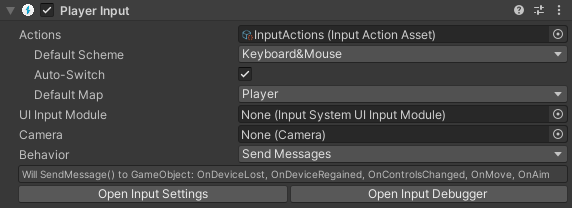
Why my function OnMove() and OnAim() don't trigger ? I have this component on my prefab
 mossy roost
Hey there guys! I have a slight problem with my unity rebinding script. When I PerformInteractiveRebinding().Start() do I need to add some method like ApplyBindingOverride? Because it does work, but it also throws some exceptions my way. To be specific "MissingReferenceException while executing 'performed' callbacks of 'PlayerInteractions/Pause[/Keyboard/escape]'"
Any advice would be deeply appreciated
austere grotto
loud echo
Why my function OnMove() and OnAim() don't trigger ? I have this component on my...
Do you have the correct parameter type? Are you seeing errors in console?
 sudden bone
im using unity input system and i made a player script but when i run the game and test it it doesnt move and it keep swapping in the tabs of scene can anyone help me ?
loud echo
austere grotto
Do you have the correct parameter type? Are you seeing errors in console?
I figured out, it doesn't work if we have more than one player input component in the scene
But now I have another issue, this is my simple code that define the movement direction
public void OnMove(InputAction.CallbackContext context)
{
    var inputDir = context.ReadValue<Vector2>();
    _inputDirection = new Vector3(inputDir.x, 0f, inputDir.y).normalized;
}```
But how do I know when the player stop moving so I can reset `_inputDirection` to zero ?wait how did you hook this up
I thought you were using SendMessages
if you're using SendMessages I'd expect this to have an InputValue parameter not a CallbackContext
loud echo
I was but I changed to this, I prefer to use the api instead of component black box
austere grotto
loud echo
I was but I changed to this, I prefer to use the api instead of component black ...
I'm assuming you've subscribed to the performed event
loud echo
yes
austere grotto
if you want the zeroing out you'll need to subscribe to canceled as well
loud echo
hoo I didn't know this was a thing
austere grotto
For this kind of thing I feel it's cleaner to just poll action.ReadValue<Vector2>() in Update rather than use events
but it's up to you
evens are better for more of a "button" type control IMO
loud echo
hmm your right I think
pliant copper
I'm trying to make haptics work with controllers. I'm using a coroutine to do this, and the coroutine works fine when called in Update or something like that. However, when I call it in a function tied to a button input action, it rumbles for a split second and then stops. Does anyone know why this might be happening? Here is a screenshot of my haptics coroutine.

I'm starting the coroutine in the shoot function, which is called here.
 austere grotto
pliant copper
austere grotto
pliant copper
put debug.log in Shoot to see when and how often it's being called
and with what duration
pliant copper
austere grotto
put debug.log in Shoot to see when and how often it's being called
It's being called for the whole duration of the coroutine. Just the haptics aren't working for some reason.
austere grotto
pliant copper
It's being called for the whole duration of the coroutine. Just the haptics aren...
right - that's not good
you want it called once, no?
Or the previous calls will call ResetHaptics and cancel the haptics started by the later calls
pliant copper
Well the set haptics thing gets called and then it waits and resets it.
austere grotto
I see what it does - what I'm asking is are there multiple coroutines running at once
Are you starting the coroutine multiple overlapping times
austere grotto
log the duration
pliant copper
The "start haptics" and "stop haptics" are being logged half a second apart, like they should

This is the function with the logs

 clear musk
I found an issue regarding to the Mouse.current.delta value when mouse is locked. The behavior is different on Windows and Mac. On windows, when you set Cursor.lockState = CursorLockMode.Locked; the next time when mouse is moved, you will get some normal delta values which are accurate. But on Mac, after locking the cursor, the next immediate delta value will be a huge number (I am guessing that delta is related to the position when cursor is locked vs the center of screen cursor position). This is regarding to Input.System 1.2.0 on Unity 2021.2.8f1.
 hot pewter
How can I disable a button for 1 second after loading into a new scene? The problem is when I am hovering over the button it is constantly switching scenes. I want it to switch the scene and for the button to disable and reenable.

 calm tapir
hot pewter
How can I disable a button for 1 second after loading into a new scene? The prob...
calm tapir
hot pewter
How can I disable a button for 1 second after loading into a new scene? The prob...
you can store the time the button is loaded in Start, and in update check if enough time has passed and set the button interactable again
i don't think this is really an input question #💻┃code-beginner would be better
undone imp
Hello!
I was wondering if I can get all the Input Action Reference from the Input Action Asset, or if there is any way I can get them thru code.
 haughty thorn
@undone imp
var _playerInput = GetComponent<PlayerInput>();
_moveAction = _playerInput.actions["move"];
_attackAction = _playerInput.actions["attack"];
i think this might be a bug? like InputAction.Reset() doesn't seem to be working correctly because after using it when holding a key, the action phase does get put in waiting, but WasPressedThisFrame() and the Released version don't return true for the next input, it eats one and then starts working again
and i'd expect Reset() itself to actually trigger WasReleasedThisFrame() to be true as well but the documentation is a bit ambiguously worded on that count
doing it in OnApplicationFocus might be screwing with it somehow but i don't see how doing it too late in the frame or whatever would cause it to eat the next input
 tight cobalt
Anyone know how to make it so the UI "catches" the input and doesnt let it interact with the gameobject beneath it?
the solutions on the internet are really old and i was wondering if there are any new, easier solutions
mental musk
tight cobalt
Anyone know how to make it so the UI "catches" the input and doesnt let it inter...
What do you mean exactly? Can you give an example? Also, are you referring to the new system or the old?
tight cobalt
mental musk
What do you mean exactly? Can you give an example? Also, are you referring to th...
I want to make the object beneathe an ui element not interactable
I dont know what you mean by old or new system but im using ver 2021.1 if that helps
gleaming oar
Can someone help me understand what value I can read from a touch?

if that is bound to the touch #0, the value should be the Vector2 of the touch position, right? Well if I try to use ReadValue<Vector2>() from that action, it tells me it doesn't output a Vector2 type, but it doesn't bother telling me what type it DOES expect
austere grotto
gleaming oar
if that is bound to the touch #0, the value should be the Vector2 of the touch p...
try ReadValueAsObject and print the object's GetType().Name
Debug.Log(myAction.ReadValueAsObject().GetType().Name);```ah, thank you!
 vast wren
So I'm currently trying to save my controls and I'm wondering if I can rebind an "InputAction" with a string.
per example if I have an InputAction I want to remap it with "/Keyboard/leftArrow"
(ok I just found out it's InputAction.ApplyBindingOverride(String))
undone imp
haughty thorn
```csharp
var _playerInput = GetComponent<PlayerInput>();
_moveAction = _playerI...
it gives a Input Action, and not a Input Action Reference

 late jolt
alright this is a really stpid question and its hard to explain but just hear me out:
ok, how do you have like a bunch of different windows in the ui? like how do you edit them? just group them and enabled/disable?
austere grotto
undone imp
it gives a Input Action, and not a Input Action Reference
the only point of InputActionReference is to allow you to serialize a reference directly to the Input Action in your script. If you can get to it through these other means then it's not doing anything for you
austere grotto
late jolt
alright this is a really stpid question and its hard to explain but just hear me...
 sudden lagoon
Anyone could help me with this. I am searching but not with a lot of success.
So I have two schemes, UI and Player. Both of them Have left click trigger. but I want that if mouse is on top of UI, it should shoot in my Player scheme. How is the best way to implement that. Just switching schemes is an option, but I want player to be able to move even if mouse is on top of UI.
is (!EventSystem.current.IsPointerOverGameObject()) {} is the only way, or there is more defautl way
 honest imp
Any ideas on how to handle mouse look and restrict it to only be sending events while the right mouse button is held down? Works fine if I just read from mouse delta, but I want it to only work when the right mouse button is down.
 honest imp
I think the best thing is to separate each action and then handle how to use it inside code
glass yacht
honest imp
Any ideas on how to handle mouse look and restrict it to only be sending events ...
In the actual binding (the one below what you have suggested) use one with a Modifier
honest imp
Oh nice I can use ButtonWithOneModifier
 nova fractal
hi all, is there a New Input System equivalent to the button.Select(); method from the old input system? I'm just trying to get the restart button to be automatically selected when I activate my GameOver function
mental musk
nova fractal
hi all, is there a New Input System equivalent to the ```button.Select();``` met...
You have to tell your event system
Should be something like EventSystem.current.SetSelected or similar, don't have it in my head right now
nova fractal
mental musk
You have to tell your event system
Should be something like EventSystem.current....
ah ok thanks! Does that use the EventSystems namespace?
mental musk
Yup
nova fractal
OK brill, will figure it out. Nice one!
mental musk
👍
undone imp
austere grotto
the only point of InputActionReference is to allow you to serialize a reference ...
I have a field of a input action reference and i cant just .set the action because the reference is null
austere grotto
undone imp
I have a field of a input action reference and i cant just .set the action becau...
It'll be null until you assign it in the inspector
undone imp
austere grotto
It'll be null until you assign it in the inspector
But im creating custom scriptable objects that have the field, into a folder thru a editor script and i dont want to assign the ref to all of them
 winged cosmos
Okay so I'm using the input system for VR development, and the xr socket interactor has an On Hover Event. I know how to add a method to the event, however is there a way to detect which object hovering it? I need to check the tag to make sure the item is the correct item for my specific game.
austere grotto
undone imp
But im creating custom scriptable objects that have the field, into a folder thr...
sudden lagoon
Could anyone share script to use to get game object on which you clicked with mouse?
void update() {
if (Camera.main is null) return;
        var ray = Camera.main.ScreenPointToRay(Input.mousePosition);
        if (!Physics.Raycast(ray, out var hit)) return;
        var clickedGameObject = hit.collider.gameObject;
        Debug.Log("gameo object was clicked" + clickedGameObject );
}
This was my old code with old input system. Maybe there is better method now?
sudden lagoon
Can any one explain me why
https://assetstore.unity.com/packages/essentials/starter-assets-third-person-character-controller-196526
doing thing in code controller is so much different than all other documentation?
is it better to use Behaviour of send messages or Unity events? I am confused... maybe c# events..
public void OnLook(InputValue value)
        {
            if (cursorInputForLook) {
                LookInput(value.Get<Vector2>());
            }
        }
This is code to get Look Delta position. But what if I nneed Position position? what kinda of message will ne there to get that value
 mental musk
if (Gamepad.current is XInputController)
  Debug.Log("Is XBox-Controller");

if (Gamepad.current is DualShockGamepad)
  Debug.Log("Is PS4-Controller");
Would this be the preferred way to check whether the current controller is a ps4 or xbox controller or is there something more "elegant"
 plain raft
@mental musk this is fine, what are you trying to achieve though?
austere grotto
sudden lagoon
```c
public void OnLook(InputValue value)
{
if (cursorInputF...
Delta and Position should be on different actions
mental musk
plain raft
<@!208972191000297472> this is fine, what are you trying to achieve though?
My tutorial level contains different gameobjects depending on the gamepad that is activated
plain raft
@mental musk do you have something for a case where I gonna plug a generic gamepad then?
mental musk
plain raft
<@!208972191000297472> do you have something for a case where I gonna plug a gen...
Right now only PS4 and XBox gamepads are supported in the first place
gleaming oar
am I allowed to have two input actions listening for the same thing?
austere grotto
gleaming oar
am I allowed to have two input actions listening for the same thing?
yes
mental musk
gleaming oar
am I allowed to have two input actions listening for the same thing?
Since there is no anyKey for gamepads, I assigned all buttons to a single action xD
gleaming oar
Right now I'm having a hell of a time just trying to differentiate between a tap and a drag movement haha
I tried adding a hold interaction for the X axis movement, but that prevented the action from even firing.

My latest idea is to tap into the EnhancedTouch Touch api and see if I can use the isTap bool. If the touch isn't a tap, then read the axis value
gleaming oar
hmm changing the default tap time to .5 seconds and upping the radius to 50 and calling cs var test = UnityEngine.InputSystem.EnhancedTouch.Touch.activeTouches[0].isTap; // .isTap; debugtext.text = test.ToString(); only evaluates to false
gleaming oar
maybe this is an execution order issue. I'm checking this inside the performed event callback
actually now that I think about it, the performed callback fires off immediately when touching the screen, so isTap would never be true. I need to figure out how to get that input action to fire off performed after a delay time
gleaming oar
Ok so here's what I did. Changed the InputAction to a Pass Through Touch bound to touch #0 with no interactions or anything. Then in the event handling function I used ```cs
bool test = context.action.ReadValue<UnityEngine.InputSystem.LowLevel.TouchState>().isTap;
this only works in a performed event handling function, not started or cancelled
 solar kite
How can I create an input manager for the new input system? I want to detect multiple players but the current way isn't compatible with how I have single input set up. I've used chop chop example of scriptable object with events.
mortal ridge
just instantiate multiple input assets
 cunning crypt
is it possible to convert a vector2 input to a float?
solar kite
Multiple input assets doesn't fix the issue of them sending events out without anyway to identify them
mortal ridge
well then check from which input device the event came
solar kite
Do input devices have a way of determining multiple of the same type of gamepad?
mortal ridge
solar kite
Do input devices have a way of determining multiple of the same type of gamepad?
if it's the same input device you'll only get different input by different buttons anyway
solar kite
Then I guess context.control.device.name would not be the way to tell if it's a new device
austere grotto
solar kite
How can I create an input manager for the new input system? I want to detect mul...
The PlayerInputManager / PlayerInput components are designed for exactly this and take care of most of the hard stuff for you
gleaming oar
cunning crypt
is it possible to convert a vector2 input to a float?
In what way? Do you want an average value between the two?
austere grotto
cunning crypt
is it possible to convert a vector2 input to a float?
Everything is possible you just have to clarify what you mean by that
 real crystal
Making a picross game, I plan to have a few methods of control (ie. mousing over, but also with arrow keys/gamepad/virtual dpad (in the case of mobile etc.)), I'm used to the input manager thing found in Edit > Input Manager, but I'm seeing there's a new way of doing it as well with a new Input System. I don't have any experience with it, is there any recommendations either way? I notice it tells me that it completely disables the old input APIs
gleaming oar
You can use both at the same time, but if you're going to use the new input system I'd recommend going all in
the key difference I think for people should be that the new input system is event driven instead of using the Update() loop with a giant wall of if statements
real crystal
sound
undone imp
Hello! Does someone know why the control type is null?

 foggy notch
undone imp
Hello! Does someone know why the control type is null?
foggy notch
undone imp
Hello! Does someone know why the control type is null?
That’s the abstract class can we see the real class?
InputAction shouldn’t be assigned to InputAction.action
I’m awake you should do InputAction = new InputAction();
undone imp
foggy notch
InputAction shouldn’t be assigned to InputAction.action
? thats a property and would do the same if it was in awake
undone imp
foggy notch
That’s the abstract class can we see the real class?
its just calling base function
foggy notch
undone imp
? thats a property and would do the same if it was in awake
No it would not
undone imp
foggy notch
No it would not
i dont want to create a new Input Action i want to take it from the reference
foggy notch
undone imp
i dont want to create a new Input Action i want to take it from the reference
What is your InputActions class called?
The one you created in the inspector
And generated into a script
undone imp
foggy notch
What is your InputActions class called?
InputAction class is from the new input system
foggy notch
undone imp
InputAction class is from the new input system
Thats unitys class

What is this called
For you
undone imp
doesnt metter, Demo Input Action Asset
undone imp
foggy notch
Can you show me what its called
Demo Input Action Asset
i dont want to that the type from the asset, instead from the action itself
foggy notch
Idk what your trying to do
But I have not done that method and dont know if it works
undone imp
InputActionReference.action returns a Input Action, so the problem is not from it
maybe ReadValueAsObject works only on play
foggy notch
undone imp
InputActionReference.action returns a Input Action, so the problem is not from i...
Why would you want a singular input action
It only carries a reference to one input
undone imp
long story short im working on a asset that wraps the new input system on the old one
foggy notch
Good luck, Im afraid I cant help you
undone imp
foggy notch
Good luck, Im afraid I cant help you
ty, dont worry, thanks though for trying
 manic dirge
How do I know in a input with multiple binding which binding was used?
input.Player.Navigate.performed += ctx => InteractAttachments(ctx.ReadValue<Something>());
 spark pumice
manic dirge
How do I know in a input with multiple binding which binding was used?
```cs
inp...
spark pumice
manic dirge
How do I know in a input with multiple binding which binding was used?
```cs
inp...
you can see everything available in the CallbackContext struct here: https://docs.unity3d.com/Packages/com.unity.inputsystem@1.0/api/UnityEngine.InputSystem.InputAction.CallbackContext.html
in this case, you want ctx.control
manic dirge
Thank you 👍
 livid yacht
In the new input system, can I have an action with a return value? I want to select to be able to select a hotbar slot, but I don't want to have to have a separate action for each slot.
Similar to how the built in movement has a vector for the key's value
 brittle basin
how to i assign the R button to be a preset reload button in unity? like in the location where you edit all the preset keybinds for your game?
please @ me with your response, i've been trying for a while and i can't figure it out
 grand coral
austere grotto
The PlayerInputManager / PlayerInput components are designed for exactly this an...
grand coral
austere grotto
The PlayerInputManager / PlayerInput components are designed for exactly this an...
Do you have much experience with this? I'm kinda struggling with this same issue while using those two components. Cannot figure out how to get unity to stop taking input from all gamepads of the same type
austere grotto
grand coral
Do you have much experience with this? I'm kinda struggling with this same issue...
Maybe try downloading the "Simple Multiplayer" example mentioned here https://docs.unity3d.com/Packages/com.unity.inputsystem@1.3/manual/Components.html#playerinputmanager-component
grand coral
Yeah thats whats tripping me up
That one works fine I get how it works
but when i take that example and apply it to say unity's own camera controller example it falls apart
though i checked the input debugger and it's not even registering the second controller
nvm
It will detect a keyboard + gamepad fine but two controllers of the same type control the same player input module - i cannot figure out why they are detected the same in my scene
is it because of these Move functions?
public void OnMove(InputValue value)
        {
            MoveInput(value.Get<Vector2>());
        }
Getting the feeling this is whats catching the input from all gamepads
but that doesn't make sense to me because Unity's own demo is just this
public void OnTeleport()
    {
        transform.position = new Vector3(Random.Range(-75, 75), 0.5f, Random.Range(-75, 75));
    }
I don't get what the difference is between their ultra barebones example and mine - they look the exact same
Mine

SimpleMultiplayers

Anyways if anyone knows the answer please HMU. Appreciate any time spent by all on replies. have a good one
 pseudo needle
Hi. I have primitive script for picking objects. When player's ray hits collider it perform Collect() function. When user click in that time it fulfills if statement and object is taken. Simple. Problem is that it works on Windows and when I'm trying to import everything to Unity on Linux it's not working. I copied whole project folder to linux and added it in UnityHub. I find out that OnMouseDown() and OnMouseUp() no react and bool clicked is false whole the time. Other scripts are working fine. When I'm clicking in rage both mouse buttons in the same time it's randomly works. Any ideas?
public class CollectMe : MonoBehaviour
{
    bool clicked = false;
    public GameObject player;

    void OnMouseDown()
    {
        clicked = true;
    }
    void OnMouseUp()
    {
        clicked = false;
    }

    public void Collect()
    {
        if (clicked == true && Inventory.maxUsedSlot < Inventory.backpackSize - 1 )
        {
          player.GetComponent<Inventory>().AddItem(this.gameObject.name);

          Destroy(this.gameObject);
        }
    }
}
 reef summit
i have a line that says if (click.triggered), how can i change that so that it checks if the mouse is held, not just clicked on that frame?
 ivory sand
pseudo needle
Hi. I have primitive script for picking objects. When player's ray hits collider...
ivory sand
pseudo needle
Hi. I have primitive script for picking objects. When player's ray hits collider...
I got the same problem.
if you're using the new input system OnMouseDown & OnMouseUp don't work anymore. You have to manually code in the logic.
pseudo needle
ivory sand
I got the same problem.
if you're using the new input system OnMouseDown & OnMo...
I'm still using same. Nothing changed. On windows working and on linux not. Unity ver. 2021.2.8f1
I will check to change code. Thanks for hint
ivory sand
New Input system or old ?
pseudo needle
Old one
pseudo needle
It have
tame oracle
hi, quick question, is it okay if I use update rather than fixed update for calling a physics method if it's a single frame input?
or are there any better ways
 royal cedar
tame oracle
hi, quick question, is it okay if I use update rather than fixed update for call...
royal cedar
tame oracle
hi, quick question, is it okay if I use update rather than fixed update for call...
usually standard procedure is storing some variable (bool or float) as class variable that is set by looking for input in the update method and then the fixedupdate checks for whether to do something depending on conditions with said class variables
royal cedar
tame oracle
or are there any better ways
depends on what you're trying to do, i've found the new (event based) input system to be quite nice but i'm really new to unity
 pearl fractal
What'd be the equivalent of Input.GetAxis("Horizontal") > 0 for the Input System's UI action map?
It'd like to implement this: https://forum.unity.com/threads/non-interactable-ui-element-e-g-button-not-skipped-by-navigation.285500/#post-2522528
Unity Forum
If I set a UI element (e.g. a button) as not interactable, I would expect it to be skipped by the navigation events (up, down, left, right), but it can...
 indigo patrol
Hi, what is the key assignment for tilde or grave in InputSystem.Controls.KeyControl for Keyboard?
I can find anything else, but not ~ key
solar kite
Using the PlayerInputManager is there a way to get past the playerPrefab requiring PlayerInput?
tame oracle
royal cedar
usually standard procedure is storing some variable (bool or float) as class var...
what I want to do is a simple jump after a single frame input, easily missed in fixed update. i could make a ‘shouldJump’ bool set to true in update and false after a jump but it doesn’t seem right
and im using a custom input class so it doesn’t seem very efficient to write new input variables in the player class
 vivid echo
How do I assign an input interaction mid game through script? I've gone digging through the documentation and I cant find anything that adds an interaction without straight up creating a new binding? thanks
pearl fractal
indigo patrol
Hi, what is the key assignment for `tilde` or `grave` in InputSystem.Controls.K...
You can find the key you want by using the Listen button on the prompt.
 indigo patrol
pearl fractal
You can find the key you want by using the **Listen** button on the prompt.
indigo patrol
pearl fractal
You can find the key you want by using the **Listen** button on the prompt.
thanks! 👍
austere grotto
pearl fractal
What'd be the equivalent of `Input.GetAxis("Horizontal") > 0` for the Input Syst...
The equivalent is myInputAction.ReadValue<float>() > 0
pearl fractal
austere grotto
The equivalent is `myInputAction.ReadValue<float>() > 0`
Ah, thank you! I'll try that. Thought it'd be something different for UI.
austere grotto
pearl fractal
Ah, thank you! I'll try that. Thought it'd be something different for UI.
UI is essentially unrelated
That's a different system
The only thing linking them together is the UI Input Module
pearl fractal
Yeah I meant the mappings for UI navigation, but I didn't connect that it's basically the same inputs to make different things happen.
pearl fractal
austere grotto
The equivalent is `myInputAction.ReadValue<float>() > 0`
Got it working. Thank you!
_inputManager.InputActions.UI.Navigate.ReadValue<Vector2>().x > 0
This was my specific case. Needed to separate horizontal and vertical.
 zinc oriole
Hi guys! I've trying to use my 🎮 Nintendo Joy-cons as Gamepad Input using the new Input system, but can't make it work. Right now Unity keeps recognising single joycons as a Joystick instead of a Gamepad (detected this both by script and the debug on the PlayerInput component) and probably because of this all controller's inputs look messy. I want to use the controller as a simple gamepad (don't need the movement inputs). Made some web search but couldn't find anything that worked. Anyone have any guide, documentation or reference material about it? Thanks! 😸
mental musk
zinc oriole
Hi guys! I've trying to use my 🎮 Nintendo Joy-cons as Gamepad Input using the n...
Is it compatible with Unity in the first place?
There is a tab called supported devices, you might check if there are some settings that need to be adjusted
zinc oriole
mental musk
Is it compatible with Unity in the first place?
Thanks for answering! I think that yes, but searching a little further, looks like there's a specific Unity version when working with Nintendo Switch games. I'll try to register as a Nintendo switch developer and put my hands on this! Thanks for the insight!
 crisp star
Any idea how to correctly get name of binding in composite actions?
button.text = action.bindings[bindingIndex].ToString();
this brings me only cursed strings
 iron estuary
Hey I think there’s a problem with my controller it’s control stick kinda jitters and it makes my camera jitter(I think) does anyone know how to make it so these little movements are ignored
Or do you think that there’s a different problem not related to my controller
spark pumice
crisp star
Any idea how to correctly get name of binding in composite actions?
`button.text...
did you try action.bindings[bindingIndex].name?
Also, unclear whether you already know this from your post, but it looks like each element of the composite is its own binding with a different index (following the parent composite binding). https://docs.unity3d.com/Packages/com.unity.inputsystem@1.0/manual/ActionBindings.html#composite-bindings
In other words, several consecutive entries in InputActionMap.bindings or InputAction.bindings together form a Composite.
sudden lagoon
austere grotto
Delta and Position should be on different actions
thank you. Did exactly it 🙂
 thorn ridge
Hi everyone! Any idea on how to get the Player Input Manager’s devices? I’m getting an error with:
playerInput.devices[0];
Thanks in advance!
crisp star
spark pumice
did you try `action.bindings[bindingIndex].name`?
Also, unclear whether you alr...
There's actually a built in 'ToVisualString()'
. name is not it
crisp star
thorn ridge
Hi everyone! Any idea on how to get the Player Input Manager’s devices? I’m gett...
Try to attach debugger and put breakpoint somewhere where you have your input reference. Then you'll be able to just browse all fields and might find devices
sudden lagoon
void OnMouseEnter(){}
void OnMouseOver(){}
void OnMouseExit(){}
is intended not to work with new input sytem 1.2?
aka needs to have some kind special configuration
?
sudden lagoon
As I just tested, if unity project runs only with new input system, these don't work. the moment I use old input system as well it starts working.
austere grotto
sudden lagoon
```c
void OnMouseEnter(){}
void OnMouseOver(){}
void OnMouseExit(){}
```
is inte...
These are pretty much ancient/deprecated. You should use the event system equivalents
IPointerEnterHandler etc
sudden lagoon
austere grotto
These are pretty much ancient/deprecated. You should use the event system equiva...
thank you! ❤️
sudden lagoon
austere grotto
These are pretty much ancient/deprecated. You should use the event system equiva...
why there is not documentation on 2021 for these anymore? and only on 2020?
Does it work only for UI? As I cant make it work on game objects with colliders. Or now to detect game objects only ray cast method is valid?
As I got these events trigger only on UI. Even if script is on game object I want to check
austere grotto
sudden lagoon
why there is not documentation on 2021 for these anymore? and only on 2020?
Doe...
The documentation was moved to the UI package. It works for normal GameObjects (non UI) as long as you have a collider on them and a PhysjcsRaycaster on your camera
sudden lagoon
mmmmmm, PhysjcsRaycaster on my camera, got it, will try that.
austere grotto
(and Event system in the scene)
sudden lagoon
Thank you! PhysicsRaycaster on camera solved the problem. Could I ask about performance impact? Rather than manually firing raycasts and triggering hitboxes?
indigo patrol
InvalidOperationException: Already have an event buffer set! Was OnUpdate() called recursively? Pretty sure they fixed this already in the v1.1.1 .. why it's still happening tho?
 undone imp
Hello!
How can i make Mouse X action work like it did with the old input system?(as an example take Horizontal, its the same as it was with the old input system)
There is a Back and Forward bind but doesnt work.
 indigo patrol
`InvalidOperationException: Already have an event buffer set! Was OnUpdate() cal...
indigo patrol
indigo patrol
`InvalidOperationException: Already have an event buffer set! Was OnUpdate() cal...
apparently it was because i keep detecting multiple keyboards via OnValidate..
austere grotto
undone imp
Hello!
How can i make Mouse X action work like it did with the old input system...
Don't use an axis composite, just bind the action directly to Mouse Delta/X
undone imp
austere grotto
Don't use an axis composite, just bind the action directly to Mouse Delta/X
i tried that but made my camera rotate with a huge speed. I had made a Test Axis action and bind Mouse Delta/X to the negative and positive .

like this ?
 austere grotto
sudden lagoon
Thank you! PhysicsRaycaster on camera solved the problem. Could I ask about perf...
austere grotto
sudden lagoon
Thank you! PhysicsRaycaster on camera solved the problem. Could I ask about perf...
There are no performance concerns to be worried about here
 jagged wyvern
I have a question relating to code structure
currently I'm receiving input through c# input script and when inputs are performed it sets bools to true
I'm checking if the input is true and then I set the bool to false
is there a better way of doing this?
I'm doing it this way because, say attacking won't just do one action, there's lots of actions I'm planning on using that button for
I'm a beginner so I'm not sure how I should be structuring my code
austere grotto
jagged wyvern
I'm checking if the input is true and then I set the bool to false
Why not just do the reaction to the bool being true directly in the input event listener and skip the variable?
jagged wyvern
would I put every method reacting to that button in the event listener?
austere grotto
Whatever you want to happen when the button is pressed
crisp star
Is there any way to create an action, that is active only 1 frame (even if button still pressed), without involving Update() method?
crisp star
nah, I need to pass booleans of whether button is active and pressed to system that is not based on object oriented design
basically I can't register any methods
on performed
jagged wyvern
dont use the new input system it sucks
crisp star
no way
I love it
besides, I never learnt old input system
dived right into new one
kek
jagged wyvern
well its not going to do that
austere grotto
crisp star
Is there any way to create an action, that is active only 1 frame (even if butto...
There's a WasPressedThisFrame() method
crisp star
well, and how do you use it without Update()?
indigo patrol
How do you know what key was pressed in the new input system?
austere grotto
crisp star
well, and how do you use it without Update()?
IDK you tell me.
Not sure I understand what you're trying to do
You need to check input either in Update or via events
 rugged raven
austere grotto
There's a WasPressedThisFrame() method
rugged raven
austere grotto
There's a WasPressedThisFrame() method
wasnt it removed? at least it does not show up on mine
austere grotto
rugged raven
wasnt it removed? at least it does not show up on mine
It was added after v1.2
crisp star
passing values into ECS World, that might have a problem with being 1 frame behind if you rely on Update
rugged raven
austere grotto
It was added after v1.2
Gives me an error.
rugged raven
 rare carbon
can somebody help me
rare carbon
can somebody help me
dont ask help. ask ur question
austere grotto
rugged raven
Gives me an error.
What error? You're either calling it incorrectly or you don't have the right version of the Input System package
rugged raven
austere grotto
What error? You're either calling it incorrectly or you don't have the right ver...
That it does not exist.
Gonna try and find it its on latest version
yeah its latest dk why its error
yeah still complains that the method still does not exist
o well
austere grotto
rugged raven
yeah still complains that the method still does not exist
You're calling it incorrectly then
rare carbon
rugged raven
dont ask help. ask ur question
in my actions when i want to select vector 2 it doesnt show up
rugged raven
austere grotto
You're calling it incorrectly then
bool a = Player.PlayerInput.currentActionMap.FindAction("ToolClick").WasPressedThisFrame();
this correct?
anything i need to include aside from UnityEngine.InputSystem?
that might make it work?
rugged raven
rare carbon
in my actions when i want to select vector 2 it doesnt show up
make sure action type is value like:

u can then select vector2 in control type
rare carbon
thx
rugged raven
np
jagged wyvern
rugged raven
`bool a = Player.PlayerInput.currentActionMap.FindAction("ToolClick").WasPressed...
I think you need a reference to the button itself from the control
Not the action
rugged raven
jagged wyvern
I think you need a reference to the button itself from the control
how? (and no im not asking 4 like Mouse.button1.WasPressed() or smth)
 muted turret
Hi! With this: https://gdl.space/setepucafe.m IsPointerOverGameObject. Are you able to choose which UI you want this to affect?
i have this world space ui that i dont want to be affected by it, but i want all screen space overlay to be afffected
 solar bluff
what would be the best way to make a character jump in an arc in 2d while still being able to control it? I tried this (control is a RigidBody2D, h is the input, spe is horizontal speed on ground) but when I jump with any amount of speed it ends up becoming way too fast while it's way too slow when I move after jumping with no speed
if (groundCheck.isGrounded)
{
Control.velocity = (new Vector2(Spe * h, Control.velocity.y));
}
else
{
Vector2 AirControl = new Vector2(AirSpe * h, 0);
Control.AddForce(AirControl);
}``` peak orchid
Keyboard.current is returning null - what should i do?
austere grotto
solar bluff
what would be the best way to make a character jump in an arc in 2d while still ...
Seems like a #⚛️┃physics or #archived-code-general question, not input system
not sure why you would take two different approaches to controlling the horizontal speed depending on whether you're in the air or not though
solar bluff
Oh that's so the speed doesn't become 0 when I let go of the arrow keys in the air
 digital cosmos
Is there a way to get input from Nintendo Switch Joy cons or is it already implemented? i dont know very much about the new Input system
 ebon merlin
digital cosmos
Is there a way to get input from Nintendo Switch Joy cons or is it already imple...
ebon merlin
digital cosmos
Is there a way to get input from Nintendo Switch Joy cons or is it already imple...
You can get Input from any controller that is in the list, Joy Cons are included
 proven dove
Hello guys I am new here, I have a doubt. How can I check which input device user is using and change text/icons to the specific controller?
mental musk
proven dove
Hello guys I am new here, I have a doubt. How can I check which input device use...
You can use Gamepad.current
If it's null, there is no gamepad connected (mouse & keyboard input)
proven dove
mental musk
You can use Gamepad.current
If it's null, there is no gamepad connected (mouse ...
Thanks, and how to update it, when user clicks in any key or move the sticks in the controller?
mental musk
proven dove
Thanks, and how to update it, when user clicks in any key or move the sticks in ...
You need to check for the gamepad type. For example, the PS4 controller uses the DualShock4GamepadHID class I think.
So a simple check like
 // ...
if (Gamepad.current == null) { // Keyboard Layout }
else if (Gamepad.current is DualShock4GamepadHID) { // PS4 }
// ...
You can find the class types here: https://docs.unity3d.com/Packages/com.unity.inputsystem@1.0/manual/Gamepad.html
Then, the only thing remaining is creating a system that selects the active device when the player presses any button on the respective device. For keyboard, this is really easy as you can use anykey, but for gamepads you unfortunately have to bind all buttons to an action (if you want to be able to press any button to swap to the gamepad that is)
proven dove
mental musk
You need to check for the gamepad type. For example, the PS4 controller uses the...
Thank you so much, i'll check the docs as well. Xbox is XInputController right?
proven dove
mental musk
You need to check for the gamepad type. For example, the PS4 controller uses the...
well, the Gamepad.current is DualShock4GamepadHID gives me an error, though the name is correct.
 livid yacht
How should I go about getting a number key input w/ its value? I am making a hotbar.
(with the new input system)
WHY CAN'T I CLICK THE ADD PROCESSORS BUTTON??? I can click the add interaction button

restarted unity, nothin
mental musk
proven dove
Thank you so much, i'll check the docs as well. Xbox is XInputController right?
Yes
mental musk
proven dove
well, the `Gamepad.current is DualShock4GamepadHID` gives me an error, though th...
Obviously you need to include the class
proven dove
mental musk
Obviously you need to include the class
Yeah, sorry just noticed now. I've fixed it. Thanks for the help Bread 🙂
jagged wyvern
I'm trying to make a decoupled system for my player actions, but I'm not sure how to accomadate that with the new input system.
I'm using state machine behaviors(SMB) with the animation system, so I can keep context specific actions away from the player class.
My goal is to have the player class not care what actions it can do
but with the way the new input system relies on events, it makes this approach hard to do
would it be best to subscribe to performed events straight from the SMBs??
this is the SMB that I'm talking about
so would I access the player class in OnStateEnter() and add to onPerformed?
anyone know any better approach?
indigo patrol
indigo patrol
How do you know what key was pressed in the new input system?
To those looking for this, you can listen to the OnEvent then filter the button manually.
there is also OnAnyButtonPressed which practically just a wrapper to the OnEvent (). I'm guessing this to make it look like the legacy api in a sense?
The documentation is pretty scarce as seen here https://docs.unity3d.com/Packages/com.unity.inputsystem@1.1/api/UnityEngine.InputSystem.InputSystem.html#UnityEngine_InputSystem_InputSystem_onAnyButtonPress
Even the OnEvent examples are wrong
indigo patrol
but +1 for the fluent style
        EventListener = InputSystem.onEvent
        .Where(e => e.HasButtonPress())
        .Call(eventPtr =>
        {
            foreach (var button in eventPtr.GetAllButtonPresses())
                Debug.Log($"Button {button} was pressed");
        });
You can do this with by subscribing/without subscribing to the OnEvent se my previous example right before this
crisp star
what I mean by this, there are no objects
to make a call
there's job system
and it doesn't have a way to call things
outside of it's job loop
indigo patrol
I've no clue what you mean 🥲
indigo patrol
indigo patrol
but +1 for the fluent style
```
EventListener = InputSystem.onEvent
...
This would throw exception without further filtering the StateEvent...
Use this instead, incase anybody want to use it
        InputSystem.onEvent
        .ForDevice<Keyboard>()
        .Where(e =>
        {
            if(e.type != StateEvent.Type && e.type != DeltaStateEvent.Type)
            return false;
            else
            return e.HasButtonPress();
        })
        .Call(ctrl =>
        {
            foreach (var button in ctrl.GetAllButtonPresses())
            Debug.Log($"Button {button} was pressed");
        });
 dawn forum
Hi, someone here has already developed a multi-local game and who had to test his game to advise me on the best way to do it? Because having several controllers connected all the time for testing is quite complex...
 carmine marsh
if anybody has any examples on how to handle multiple controller inputs (like in a local co-op game). I'd love to see them!
mental musk
carmine marsh
if anybody has any examples on how to handle multiple controller inputs (like in...
There is absolutely no difference whether you use the input system for one, two or seven hundred players. Or what do you mean?
austere grotto
carmine marsh
if anybody has any examples on how to handle multiple controller inputs (like in...
There's a "Simple Multiplayer" example in the package manager, mentioned here https://docs.unity3d.com/Packages/com.unity.inputsystem@1.1/manual/Components.html#playerinputmanager-component
indigo patrol
dawn forum
Hi, someone here has already developed a multi-local game and who had to test hi...
Prior to v1 this is a bit pickle to do, but now it's way much easier.. there are example packages you can import from the inputsystem tab in the package manager
Because having several controllers connected all the time for testing is quite complex... then how you'd test it without controllers 🤣
did not see that last part 😆
proven dove
To know if the key is pressed with the new input system is:
if (Gamepad.current.aButton.isPressed) or if (Gamepad.current.aButton.wasPressedThisFrame)
I tried to do that with Gamepad and Keyboard but nothing works...
indigo patrol
proven dove
To know if the key is pressed with the new input system is:
`if (Gamepad.current...
misread 😃
indigo patrol
proven dove
To know if the key is pressed with the new input system is:
`if (Gamepad.current...
You can try to list all connected Input devices like this
        var t = InputSystem.devices;
        var f = new List<Gamepad>();

        foreach (var r in t)
        {
            if (r.name.Contains("Gamepad"))
            {
                f.Add(r as Gamepad);
            }
        }
then print all those found devices via debuglog, and see if you can find your gamepad there
There is a built in function of this already if you don't want to do it this way. Just google it
also, it may not marked as current if you have several connected... you can make it to be current by calling MakeCurrent()
proven dove
Thank you so much 🙂 i'll try it
tame oracle
Hello, how should I detect if a finger touched and held the screen? I'm trying to detect whether it's on the right or left side of the screen so I can move my character left and right.
I work with a new input system and I have action Pass Through with Vector2 as position. But I want to only use this value when screen is being touched.
 raven nimbus
HMMMM.. if I go and put "using UnityEngine" in it.. it still gives that error.. so idk how to fix it
 austere grotto
raven nimbus
HMMMM.. if I go and put "using UnityEngine" in it.. it still gives that error.....
austere grotto
raven nimbus
HMMMM.. if I go and put "using UnityEngine" in it.. it still gives that error.....
Are you actually writing unit tests? If not you can just uninstall the test framework package. You cannot/should not be changing package code.
raven nimbus
okie ty
raven nimbus
austere grotto
Are you actually writing unit tests? If not you can just uninstall the test fram...
well I cannot remove it :/
austere grotto
raven nimbus
well I cannot remove it :/
Why not
raven nimbus
idk..
austere grotto
How did you try to remove it
raven nimbus
package manager ==> testframework ==> remove
austere grotto
yeh that should work - although maybe another package you're using depends on it
raven nimbus
eeeh.. i shall start over ig kekw
austere grotto
Try updating all your packages to the latest version
Also what does any of this have to do with the Input System? 🤔
raven nimbus
austere grotto
yeh that should work - although maybe another package you're using depends on it
meep.. i should start over completely.. I wasnt really far (like 20 hours in)
 plucky depot
    void Update()
    {
        if (Input.GetMouseButtonDown(0)) {
            // If the user is clicking, what are they clicking on?
            Vector3Int pos = Vector3Int.FloorToInt(Camera.main.ScreenToWorldPoint(Input.mousePosition));
            pos.x += (width * 2 + DeadZoneWidth) / 2;
            pos.y += height / 2;
            print("Click at:");
            print(pos);
            TileBase tile = baseMap.GetTile(pos);
            print(tile);
        }
    }
this is probably a better place for it

the bottom left tile is 0,0
and top right is 11, 7
(12x8 grid)
ping me pls if you have the answer
I figured out that they are on Z axis 0 and fixed that
but now some tiles dont retrieve properly
mental musk
plucky depot
ping me pls if you have the answer
You haven't asked a question
plucky depot
I moved this question from #💻┃unity-talk
proven dove
I still am problems on how to check if a key from keyboard or a key from controller or left joystick of the controller is moving/pressed... using the if/else on the new input system
young comet
proven dove
I still am problems on how to check if a key from keyboard or a key from control...
Can you share your code and elaborate on the problem
proven dove
young comet
Can you share your code and elaborate on the problem
Sure. Here:

it does nothing. i tested with debug before, and before line 114 (which i deleted because i knew it works there, but not inside of that if) the check of the pressed key and it works
young comet
Ok so don't do it like that
What method do you want to call if the button is clicked?
Also go ahead and send the whole script
As text preferably
proven dove
That is a bit messy for now, but can i send in pastebin?
young comet
Yeah
Buts its really easy to send here
Just three of these before and after `
Add a C after the first 3 `
Stuff will highlight
 proven dove
using System.Collections;
using System.Collections.Generic;
using UnityEngine;
using UnityEngine.UI;
using UnityEngine.InputSystem;
using UnityEngine.InputSystem.Users;
using UnityEngine.InputSystem.DualShock;
using UnityEngine.InputSystem.XInput;
using TMPro;

[System.Serializable]
public class Tutorial : MonoBehaviour
{
    [SerializeField]
    public TextMeshProUGUI dialog;

    private bool isDone;
    private int messageId = 0;
    private Collider2D collider2;
    public Animator animator;
    public List<string> name = new List<string>();

    PlayerControllers controls;

    void OnTriggerEnter2D(Collider2D collider)
    {
        var gamepad = Gamepad.current;
        var keyboard = Keyboard.current;
        var mouse = Mouse.current;

        List<string> nameList = new List<string>();

        if (dialog == null)
        {
            Debug.Log("NULL");
        }
        else
        {
            animator.SetBool("isClosed", false);
        }

        Debug.Log("Entered here");
        messageId = CallMessageId(1);

        if (collider.gameObject.name == (name[messageId - 1]))
        {
            Debug.Log("The name entered is: " + (name[messageId - 1]));
            if (CallMessageId(1) == messageId && isDone == false)
            {
                if (gamepad is XInputController || gamepad is XInputControllerWindows)
                {
                    dialog.text = "Use <sprite index=9> and <sprite index=10> keys to move";

                   if (isDone == true)
                    {
                        messageId = CallMessageId(2);
                    }
                }
                else if (Gamepad.current is DualShock4GamepadHID)
                    dialog.text = "Use [leftStick] to move to left and right";
                else
                    dialog.text = "Use [leftArrow] and [rightArrow] keys to move";
                //isDone = true;

                //animator.SetBool("isClosed", true);
                if (isDone == true)
                {
                    isDone = false;
                    messageId = CallMessageId(2);
                    Destroy(collider.gameObject);
                }
            }
        }
        else if (collider.gameObject.name == (name[messageId - 1]))
        {
            if (CallMessageId(2) == messageId && isDone == false)
            {
                // go to the next section
                animator.SetBool("isClosed", false);

                if (gamepad is XInputController)
                    dialog.text = "Press <sprite index=1> to jump";
                else if (Gamepad.current is DualShock4GamepadHID)
                    dialog.text = "Press [cross] to jump";
                else
                    dialog.text = "Press [upArrow] key to jump";
                }
            }
    }

    void Update()
    {
        character player;

        player = GetComponent<character>();

        isDone = false;

        if (messageId == 1 && isDone == false)
        {
            // check if the section 1 is done
            if (Keyboard.current.leftArrowKey.isPressed)
            {
                Debug.Log("Arrow key pressed");
            }
        }
    }

    private int CallMessageId(int id)
    {
        return id;
    }
}
Alright nice
Okay so create the method for what you want to happen when the left arrow key is pressed
Idk where you getting the variables Gamepad, Keyboard, and Mouse
proven dove
from the namespace InputSystem
young comet
Ahh I see
proven dove
my method is something like this:
void keyPressed()
    {
        //do stuff?

    }
Yeah nice
Ok so are you hard set on using the Input namespaces rather than creating an Input Actions
proven dove
I have InputActions though, but I just want to check some action for the tutorial of my game
young comet
What is your InputActions called?

Mine for example is literally called InputActions
proven dove
Mine is PlayerControllers
 proven dove
 young comet
Which of those is what should trigger the function
proven dove
in this case, the "Move"
austere grotto
Also why the Press and Release interaction, it's not necessary as the message says
young comet
All good
Okay so I gotta go but Imma leave you with this
One sec
private PlayerControllers playerControllers;
private void Awake()
    {
        playerControllers = new PlayerControllers();
    }
private void OnEnable()
    {
        playerControllers?.Enable();
    }
    private void OnDisable()
    {
        playerInput?.Disable();
    }
This is how it should be set up
To make a button do something you do this
private void Awake()
    {
        playerControllers = new PlayerControllers();
        playerControllers.actionmapname.actionname.performed += ctx => methodname; //method should have void return type
    }
For passthroughs you have to read them in update like this
Vector2 input = playerControllers.Player.Movement.ReadValue<Vector2>();
^ In Update
proven dove
but for example, i'm asking the user " left and right to move" how can i confirm that he did that? with the new input system
 radiant temple
I have a question but I'll wait till you guys are done.
austere grotto
proven dove
but for example, i'm asking the user " left and right to move" how can i confirm...
bool hasMovedLeft = false;

Vector2 input = playerControllers.Player.Movement.ReadValue<Vector2>();
if (input.x < 0) {
  hasMovedLeft = true;
}```oh thank you so much. I'll try that 🙂
radiant temple
Ok I'll jump in now if everyone is done. 👍
I want to check the type of interaction that is currently true ( press or hold ). I can print( value.interaction ); to get "HoldInteraction" or "PressInteraction" in console. But I don't know how to put that into the form of a if statement. I don't know what to compare ( value.interaction == ??? ) to.
austere grotto
radiant temple
I want to check the type of interaction that is currently true ( press or hold )...
I guess you'd say cs if (value.interaction is HoldInteraction hi) for example
radiant temple
austere grotto
I guess you'd say ```cs
if (value.interaction is HoldInteraction hi)``` for exam...
I've tried that. Let me post you this screenshot.
 radiant temple
Oh! I've never used is. ever. What's the difference between is and ==
Obviously one is checking type and the other is checking value?
austere grotto
radiant temple
Oh! I've never used is. ever. What's the difference between is and ==
They are very different. == is for checking if two objects are equivalent.
is checks the type of an object

Learn about the C# is operator that matches an expression against a pattern.
radiant temple
Me == Mother
Me is Human
Got it. Cheers! Let me go play with this see if i fixed my issue.
Worked like a charm. Thank you @austere grotto
 lost swift
Hello! Is there a way to change Input managers positive button for axis in runtime?
 willow geyser
I'm making an endless runner mobile game. I want the player to tap and hold to move the player. How could I do this?
I was thinking of using an invisible slider but I don't think that thats the best idea
It would also be nice if I could use the arrow keys for testing on my pc
real crystal
simple grid movement, using the new input system, I am grabbing a 2D vector based on the arrow keys and I want it to accept diagonals. Right now with the code I think me pressing say down + right doesn't give me a down right vector but instead just keeps one of the inputs (I think it's always the first, holding right produces a (1,0) like you'd expect but then pressing down while holding doesn't generate a (1, -1), just (1,0) like before) with the other. Is this something where maybe I should take a 1D vector, 1 for horizontal or 1 for vertical? Or is there a clean way of letting the system just take a down and a right press and treat it as (1, -1)?

I was wanting the same input system to work with both keyboard and gamepad (ie. someone using a stick) but it looks like I may just need to make a specific couple of 1Ds for keyboard movement and keep the current movement there for people with analog sticks etc.
austere grotto
real crystal
simple grid movement, using the new input system, I am grabbing a 2D vector base...
Missing a large piece of context here which is how you've set up your input action


 lost swift
Hello! I did this to get mouse position, but in script i always get zeroes. What i do wrong?
 real crystal
austere grotto
Missing a large piece of context here which is how you've set up your input acti...
real crystal
austere grotto
Missing a large piece of context here which is how you've set up your input acti...
oh and here's the input script etc.
 austere grotto
real crystal
austere grotto
real crystal
Get rid of the press and release interaction
And get rid of digital normalized on the 2d vector binding
real crystal
excellent, thank you
I suppose I'll just write something in the script to account for analog inputs
proven dove
austere grotto
```cs
bool hasMovedLeft = false;
Vector2 input = playerControllers.Player.Movem...
It's not working... Here is the code:
void Update()
    {

        PlayerControllers controls;

        controls = new PlayerControllers();
        bool hasMovedLeft = false;
        bool hasMovedRight = false;

        Vector2 input = controls.Gameplay.Move.ReadValue<Vector2>();

        isDone = false;

        if (input == null)
        {
            Debug.Log("Something wrong");
        }

        if (messageId == 1 && isDone == false)
        {
            Debug.Log(input.x);
            // check if the section 1 is done
            if (input.x < 0)
            {
                hasMovedLeft = true;
                isDone = true;
                Debug.Log("Moved");
            }
        }
    }
It only does not enter on the
if(input.x < 0)```it says on debug it is 0 when the character is moving to the left
austere grotto
proven dove
it says on debug it is 0 when the character is moving to the left
Why are you making a new controls object every frame???
proven dove
austere grotto
Why are you making a new controls object every frame???
Well, playboi said to passing the "Vector2" in update, and like I said, I'm still getting use to the new input system... that's why I have difficulties
 wraith basin
I'm having a bit of trouble with the enhanced touch API. I want to use it to detect touches on a touchscreen, but it also triggers when the user is interacting with UI, which is not something i want. I've tried EventSystem.current.IsPointerOverGameObject(); but it's always false when FingerDown triggers. Here's my code:
public class InputManager : MonoBehaviour
{
    public Camera mainCamera;
    public delegate void StartTouchEvent(Vector2 position, float timeStarted);
    public event StartTouchEvent OnFingerDown;

    public delegate void EndTouchEvent(Vector2 position, float timeStarted);
    public event EndTouchEvent OnFingerUp;

    public delegate void MoveTouchEvent(Vector2 position, float timeStarted);
    public event MoveTouchEvent OnFingerMove;

    public static InputManager instance;

    public bool selectingUI;

    private void OnEnable()
    {
        enhanced.EnhancedTouchSupport.Enable();
        instance = this;

        enhanced.Touch.onFingerDown += FingerDown;
        enhanced.Touch.onFingerUp += FingerUp;
        enhanced.Touch.onFingerMove += FingerMove;
    }
    private void OnDisable()
    {
        enhanced.Touch.onFingerDown -= FingerDown;
        enhanced.Touch.onFingerUp -= FingerUp;
        enhanced.Touch.onFingerMove -= FingerMove;
        enhanced.EnhancedTouchSupport.Disable();

    }

    private void FingerDown(enhanced.Finger finger)
    {
        OnFingerDown?.Invoke(mainCamera.ScreenToWorldPoint(finger.screenPosition), Time.time);
    }

    private void FingerUp(enhanced.Finger finger)
    {
        OnFingerUp?.Invoke(mainCamera.ScreenToWorldPoint(finger.screenPosition), Time.time);
    }
    private void FingerMove(enhanced.Finger finger)
    {
        OnFingerMove?.Invoke(mainCamera.ScreenToWorldPoint(finger.screenPosition), (float)finger.currentTouch.startTime);
    }

    private void Update()
    {
        selectingUI = EventSystem.current.IsPointerOverGameObject();
    }
}```You're using it in an insane way. You're create a new input object every frame, and not even enabling it (which is why it's 0)
Just read the value from the same place you're reading it for movement
proven dove
You mean inside of here:
controls.Gameplay.Move.performed += ctx =>  {
            direction = ctx.ReadValue<float>();
        };
or inside here:
 void Update()
    {

        // create vectors
        isGrounded = Physics2D.OverlapCircle(groundCheck.position, 0.1f, groundLayer);
        playerRB.velocity = new Vector2(direction * speed * Time.deltaTime, playerRB.velocity.y);
        freezeRotation(pos);
    }
any ideas?
 thin blade
wraith basin
I'm having a bit of trouble with the enhanced touch API. I want to use it to det...
thin blade
wraith basin
I'm having a bit of trouble with the enhanced touch API. I want to use it to det...
first turn off your pc and if it doesnt work then delete the code and use the old input system
austere grotto
proven dove
or inside here:
```C
void Update()
{
// create vectors
is...
Reuse the direction variable here, no?
mortal ridge
thin blade
first turn off your pc and if it doesnt work then delete the code and use the ol...
🤣
mortal ridge
wraith basin
I'm having a bit of trouble with the enhanced touch API. I want to use it to det...
btw, it's much better to use a System.Action than to declare own delegates
wraith basin
I'll look into that
but i want input to be blocked when interacting with ui
And i have no clue how
mortal ridge
wraith basin
but i want input to be blocked when interacting with ui
well why don't you just disable the input when you open a UI and enable it again when you close the UI?
wraith basin
Because the ui is always thereç
proven dove
austere grotto
Reuse the direction variable here, no?
i'll try
mortal ridge
wraith basin
Because the ui is always thereç
maybe instead of IsPointerOverGameObject() just raycast into the scene and check if you hit an object
wraith basin
Yeah, that's a good option, albeit a bit slower
I just wish the event system had something implemented already
or rather the touch api
thin blade
mortal ridge
maybe instead of IsPointerOverGameObject() just raycast into the scene and chec...
i said him that but... you can see