#🖱️┃input-system

1 messages · Page 45 of 1

cursive tulip
#

It still not work:

        bool _ButtonPressed = _controls.Player.Movement.ReadValue<float>() != 0;
        Debug.Log("Update Inhalt: " + _ButtonPressed);

        if (_ButtonPressed == true)
        {
            Debug.Log("rightclick-zoom ON!!");
        }
        if (_ButtonPressed == false)
        {
            Debug.Log("rightclick-zoom Off...");
        }
austere grotto
#

it says false every frame?

#

or what

cursive tulip
#

"rightlick-zoom Off... is looping infinity without a single console notification with a true (no matter if I press rightclick multiple times or hold it )

austere grotto
#

Aren't you using the wrong action?

#

shouldn't that _controls.Player.CameraZoom?

cursive tulip
#

oh...

cursive tulip
#

VERY VERY THANK YOU!

mighty ivy
#

ah, i only get that data from UnityEvents it seems

#

sorry , maybe not

#

so it sends the whole PlayerInput with the message?

austere grotto
#

When you use PlayerInputManager it Instantiates a prefab for you for each player, right?

mighty ivy
#

i'm not using playerinputmanager

austere grotto
#

I thought you were from this comment

mighty ivy
#

yeah sorry, so further to that, i'm not currently using it due to that

austere grotto
#

due to what

mighty ivy
#

it not working how i think i need it to?

#

like it seems pre-written for most scenarios

#

but that i may need my own

austere grotto
#

The way you are suppsoied to use it is this:
PlayerInputManager instantiaes a prefab for a new player that joins

#

that prefab has a PlayerInput component on it

#

the PLayerInput component has the playerIndex

#

but also - you don't need the playerIndex 99% of the time

#

each PlayerInput has its own InputActionAsset and so handles its own input

#

so pressing a button on player 2's controller only will trigger an event for player 2's PlayerInput

mighty ivy
#

okay, perhaps my problem isnt what it does then, perhaps its what i've done with rewired

#

i used the unity UNET lobby tutorial and built a lobby around that

#

it picks up a rewired join event from a player and then creates the lobby prefab

austere grotto
#

online multiplayer vs local multiplayer

#

the player index is a local multiplayer thing

mighty ivy
#

its not though, its both

#

🙂

#

but yeah online is a part of it

austere grotto
#

UNet will have its own concept of a client index or whatever

#

that's separate

mighty ivy
#

i currently can have local players and remote players join my lobby

austere grotto
#

ok

mighty ivy
#

i'm quite n00bish so i got everything working from examples really

#

so i was hoping just be able to receive events from like a repository then i can replace what i have

#

SendMessage does seem to send the data perhaps: SendMessage(messageName, m_InputValueObject, SendMessageOptions.DontRequireReceiver);

deep oxide
#

I did that now. Seems to work. Do I have to make a script and link it to the map ?

mighty ivy
#

so i can receive the data like this: void OnJoinGame(object inputObject)
{

#

i can see in the debugger the values

#

i cant receive it using OnJoinGame(PlayerInput inputObject) though, even though thats what its sending

mighty ivy
#

okay so latching to PlayerInput isnt the way

#

i guess what i'm looking to do, is hook onto the Generated InputManager.cs class callbacks, in the same way the playerinputmanager does

deep oxide
#

Could someone explain me, how this player movement works ? I dont really understand the new system yet. The code works though

wary tartan
#

hello! input system noob speaking, sorry to change the subject. looking to control multiple characters at once with the same keys i.e. you press right and all your characters move right. simply duplicating a working player object results in only one that moves.

wary tartan
#

if the PlayerInput component has its "Behaviour" property set to "Send Messages," it looks for any scripts that have appropriately named methods and activates them. in this case, you have actions called "Move" and "Jump." so, when you press the buttons associated with the Move and Jump actions, it activates methods called OnMove(InputValue [name]) and OnJump(InputValue [name]) respectively.

#

i was confused early on because it seemed like nothing was calling the methods but they magically worked. nope, the PlayerInput component is calling the methods! it automatically locates methods for an input action called "Action" if the methods are titled OnAction() and have one parameter of type InputValue

ripe turtle
#

I have a single rigid body attached to multiple colliders, I want to react to the player clicking on each of the colliders differently, obviously the onMouseDown event was called because the game knows that one of the colliders was clicked, is there a way to access that information from inside the onMouseDown function?

austere grotto
#

(put the colliders on separate child objects of the RB)

ripe turtle
#

I've already done that, the parent is eating the event

austere grotto
#

The scripts on the child objects won't get the event?

#

You can also use IPointerEnterHandler instead

#

which will give you more data

#

and implement this method:

void OnPointerEnter(PointerEventData eventData)```
#

and you might find the data you want in eventData

ripe turtle
#

I can't seem to get that event to trigger. is it version dependant?

austere grotto
#

no

#

You need an Event System in the scene and you need a Physics Raycaster on your camera

ripe turtle
#

Okay with that it seems to be working the way I want it to, don't even need to look into the event data, it seems to be calling it on the collider objects instead of the rigid body object. (Why doesn't onmousedown just work that way?)
Thanks for the help

austere grotto
#

OnMouseDown is just... not great

dense ridge
#

I'm making a co-op game and 2 of my players preset keybinds use gamepad will it connect to the same one

#

gamepad

deep oxide
#

I mean whats that:

#

CharacterController characterController;

#

I never told the Player Input component about the script

#

Oh, so the InputValue is a set thing ? I just called it value. I have another Vector3 moveVector that during OnMove is taking that value.x and value.y part.

crimson jacinth
#

Is there a simple way I can find out what Device is currently being used?

crimson jacinth
#

I'm currently working with Actions and have delegates on performed and canceled. How can I detect things like GetButtonDown and GetButtonUp this way?

austere grotto
#

canceled == GetButtonUp

crimson jacinth
#

Thanks!

austere grotto
#

Just to be clear - what I mean by that is you would replace this: cs void Update() { if (Input.GetButtonDown("Jump")) { // do some stuff. } }
with this:

void OnJumpStarted(InputAction.CallbackContext context) {
    // do some stuff
}```
low widget
#

i followed the famous brackey's first person tutorial, but i'm having a problem with my camera.
it snaps around instead of being smooth, any fixes?

austere grotto
#

that tutorial is both famous and infamous for including that little bug

low widget
#

i also had to decrease the sensitivity, way too fast without time.deltatime

remote meteor
#

I am so annoyed by the way input system lacks documentation and proper tutorials if anything. Are we supposed to migrate our code to this new input system or just stick with the old one? I have hard time making stuff work with the new system. Is there some in depth tutorial that properly explains things? I was looking to have both mouse and touch screen controls but to use the new input system.

west oracle
#

I don't cover mouse or touch in these sadly, but I will update that thread when I get back to it :)

frozen wasp
#

anyone knows how to turn off button in new UI?

sonic light
#

I'm using the Input System package, and have bound an action to the pointer scrolling. But on trackpads, performed is called many times, so my counters go way off. Is there a way to detect a single scroll gesture?

ashen pagoda
#

InvalidOperationException: Cannot read value of type 'Vector2' from control '/Keyboard/leftShift' bound to action 'Keyboard[/Keyboard/leftShift,/Keyboard/w,/Keyboard/s,/Keyboard/a,/Keyboard/d]' (control is a 'KeyControl' with value type 'float')
UnityEngine.InputSystem.InputActionState.ReadValue[TValue] (System.Int32 bindingIndex, System.Int32 controlIndex, System.Boolean ignoreComposites) (at Library/PackageCache/com.unity.inputsystem@1.0.2/InputSystem/Actions/InputActionState.cs:2038)
UnityEngine.InputSystem.InputAction.ReadValue[TValue] () (at Library/PackageCache/com.unity.inputsystem@1.0.2/InputSystem/Actions/InputAction.cs:934)
Playermovement.MoveInput () (at Assets/Scripts/Playermovement.cs:113)
Playermovement.Update () (at Assets/Scripts/Playermovement.cs:44)

It's just every time i press the key i assigned as sprint

#

I get error

#

help

static walrus
#

@ashen pagoda check SprintStart, it needs to be V2
right now it's probably button

ashen pagoda
wary tartan
uneven mulch
#

I have a general input question

#

I want an action to happen when the player holds a button down and fires their weapon. i can't get the action to happen while holding z and click the mouse button to shoot, it make the gun just shoot but if i was to make the player press two buttons at once like z & x then i can get the action to work

static walrus
#

@uneven mulch bool X is shooting; if(bool X is shooting){ action Z } else {action Y}
it wasn't a general input question but general programming question

uneven mulch
#

thats the basic of that?

#

just a left mouse click fires weapon but holding z and left mouse click does another action instead of firing the gun

#

like throwing the gun instead of shooting it

#

one sec ill get my code

static walrus
#

yeah pretty much that. it's pretty similar in both but i recommend getting into the new system just to save yourself some trouble down the line

#

``

#

not ''

#

jesus christ just pm that

uneven mulch
#

shit my bad havent got the hang of posting code

static walrus
#

yeah you just check if the other one is active or not

#

e.g. you have gun in left hand and right hand, both shoot their own thing but combine into 3rd type..

#

then you do something like leftgunkeydown { if(alsoholdingother){ do combo} else { shoot normally } }

#

that is assuming you always have those 2 "weapons". it might get complicated pretty fast otherwise

uneven mulch
#

ok thank you

earnest swift
#

hey so,,, I need some help with something, I want to be able to destroy a crate with an input when I am next to it, how do I do that? I'm really struggling so I thought i'd ask for help

earnest swift
#

pfft, I just gave up and hoped the other person i'm with can do it,,,,

mental zenith
#

is there a way to make lasting changes to a specific script in the input system without moving the package to assets?

#

I need to force the playerinput for a single object to treat the game as singleplayer even though its multiplayer. Know exactly what to do in code and how to handle all the effects in the other scripts, but the package system resets all my changes, and If I move the package to assets all script references on objects break

#

which is a mess

spiral galleon
elfin maple
#

What's the equivalent to this: Input.GetAxis("Mouse X") and Input.GetAxis("Mouse Y") in the new system?

jolly robin
#

mouse delta

elfin maple
#

thx

crimson jacinth
#

If I was using the ESC key to open a menu, would I have the ESC key as button to switch the Actionmap on the Player ActionMap and the UI/Menu ActionMap as well or on a seperate Master ActionMap?

sonic maple
#

any advice on detecting that a player is not pressing the movement keys?

uneven mulch
#

Hello input system community. Is there any newer tuts on the new input system? haven't found anything so far that's helping m,e to wrap my head around it. I have a somewhat idea of it.

mossy crest
#

Events, the generated class etc.

mossy crest
mossy crest
raw jackal
#

i wanted to limit the character length of my inputfield to 4 ,
so i used inputfield.characterLimit ,
Used it as Answer.characterLimit = 4 ;
but still i am able to write more then 4 character ,
am i missing something ?

visual gull
#

Should the output of Mouse.current.position.ReadValue() be independent of the size of the game window within the Unity Editor? Because it is not for me

#

In both screenshots my mouse is (roughly) located in the lower left corner of the game window. But that should not result in a y-value of -200 when the game window is small, or should it?

#

Very interesting. It seems that when I resize the game window, it changes the actual point on the cursor image of my system. When it set it to the max. possible size, the returned point will be where you expect it on the cursor image (top-left). When I make the window smaller, the point will travel downwards so that on the smallest window size, it will be on the bottom of the cursor image (bottom-left). That explains the -200px discrepancy. Anybody ever experienced this? I am on Ubuntu 20.04

slate jetty
#

I'm wondering, is there any way to access Mouse Events not using Input Actions ? I need mouseDown, mouseUp, mouseMove events basically as for the TouchScreen we have EnchancedTouch.Touch.onFingerDown, Up, and Move
I've seen that we can get position with Mouse.current.position.ReadValue(); but I don't see any event function that triggers when we click 😦

odd cosmos
#

So I'm trying to add a vector 3 composite binding, and while I could write a custom composite i see that in the 1.1 version of the input system there is already a vector 3 composite.

My project is simply for learning so I don't mind possibly buggy betas, is it possible to install the 1.1 prerelease of the input system somehow?

odd cosmos
#

so idk why it wasnt showing up in my package manager list, maybe because it thinks the old recommended version is an update?

#

but i managed to add the beta by typing the version from the wiki manually

small pier
#

Hey guys, is there a way to get Action input key as string in code? For example I have Action called "Sprint" and I want to get only an Input Key String (Left Shift) with code

slate jetty
#

Not sure if that's what you want though.

small pier
#

no no, I mean I want to get mapped button to action via code so for example I'd to call a function or something in code for get Sprint Action key for example: getActionInput("Sprint") and it would return a "Left Shift" as in input window

austere grotto
#

Embrace the new system instead.

#

My recommendation is to use InputActionReference:

[SerializeField]
InputActionReference sprintAction;

void Update() {
  bool currentlySprinting = sprintAction.action.ReadValue<float>() != 0;
}
#

^ Then assign your sprint action to that field in the inspector

odd cosmos
#

so my old hard coded input system used this, I'm currently trying to move the system over to the new input system... but i'm not sure how

#

it locked your mouse if you held right click, and you could look around, but with rebind-able keys i wanted to support a controller i.e i press a controller button and then an assigned joystick moves the view

#

but how do i keep the "hold key to look around" thing, and specifically the cursor lock state

#

i need to like.. only lock the cursor to the game if the axis is bound to mouse delta

#

if the axis is rebound to a controller axis i dont want it to lock the cursor.. but i'm not sure how on earth i'd do that

#

is there some way to lock the mouse cursor in the input system? can i maybe get the name of the device mapped to an axis, and if that device is a mouse then do the cursorlock?

#
    //generates a local move command.
    private void CreateMoveCmd()
    {
        if (!IsOwner) return;
        MoveCmd cmd = new MoveCmd { sprinting = false };
        bool dirty = false;
        if (Input.GetKey(KeyCode.W))        { cmd.move.z++; dirty = true; }
        if (Input.GetKey(KeyCode.S))        { cmd.move.z--; dirty = true; }
        if (Input.GetKey(KeyCode.A))        { cmd.move.x--; dirty = true; }
        if (Input.GetKey(KeyCode.D))        { cmd.move.x++; dirty = true; }
        if (Input.GetKeyDown(KeyCode.Space) && (Body.velocity.y < 0.1) && IsGrounded)    { cmd.move.y+=0.5f; dirty = true; }
        //if (Input.GetKey(KeyCode.C))        { cmd.move.y--; dirty = true; } DEPRICATED
        if (Input.GetKey(KeyCode.LeftShift)){ cmd.sprinting = true; dirty = true; }
        if (Input.GetMouseButton(1))
        {
            Cursor.lockState = CursorLockMode.Locked;
            aim.x += MouseAccel * Time.deltaTime * Input.GetAxis("Mouse X");
            aim.y += MouseAccel * Time.deltaTime * -Input.GetAxis("Mouse Y");
            dirty = true;
        }
        else
        {
            Cursor.lockState = CursorLockMode.None;
        }
        cmd.aim = aim;
        if (dirty)
        {
            MoveServerRpc(cmd);
            if (IsOwner && IsClient && !IsServer) MoveClientRpc(ProcessMovement(cmd));
        }
    }
``` this is my old hard coded movement system
#
    private PlayerInputCmd CreatePlayerInputCmd()
    {
        PlayerInputCmd cmd = new PlayerInputCmd();
        if (!IsLocalPlayer) return cmd;
        if (IM.Game.Move.IsPressed()) cmd.Movement = IM.Game.Move.ReadValue<Vector3>();
        if (IM.Game.FreeLook.IsPressed())
        {
            Cursor.lockState = CursorLockMode.Locked;
            PlayerAim += IM.Game.Look.ReadValue<Vector2>();
            cmd.Look = PlayerAim;
        }
        else Cursor.lockState = CursorLockMode.None;
        
        return cmd;
    }
``` and here is my current wip new system
austere grotto
odd cosmos
#

i.e tell if the axis is bound to a mouse, so i can only lock the cursor if the mouse is assigned to the axis

austere grotto
#

I'm not sure what the point of that would be but

#

You can just do 1:1 translations form the old code if you want instead of using InputActions

#

if (Input.GetMouseButton(1)) -> if (Mouse.current.rightButton.isPressed)

odd cosmos
#

the point is, now that my inputs are rebindable, if i / the user rebinds the look from the mouse to a joystick controller for example, i dont want the mouse to be locked

odd cosmos
#

how would i get if the device is a mouse? would i have to get the string path and do some string comparison for like "/mouse/"

austere grotto
#

e.g.

if (myInputAction.activeControl is Mouse) {

}```
#

not sure if there's a way that doesn't involve type checking

odd cosmos
#

rooThink type checking is fine

odd cosmos
#

activeControl appears to only work when my mouse is moving

odd cosmos
austere grotto
deft burrow
#

I'm trying to use get the input value of 1-4 from the input system, this solution works but its retrieving the exact value of the hotkey pressed. How would I make it fetch the scale of the input action?

#
            int numKeyValue;
            int.TryParse(value.control.name, out numKeyValue);
            Debug.Log(numKeyValue);
        }```
#

Another question,how does the call back function in the new input system work? Is it being called every frame if the player spams a bunch of keys as if it were the old input system? Can they potentially break the game if they were to spam a bunch of keys?

odd cosmos
#
if (IM.Game.Move.IsPressed()) cmd.Movement = IM.Game.Move.ReadValue<Vector3>();

can i not use IsPressed for axis's?

#

do i have to do ReadValue<Vector3>() != new Vector3()?

austere grotto
#

Not Vector2?

#

And no you can't really do isPressed for an axis- you generally would do ReadValue

odd cosmos
#

my player has a "flying mode"

#

so i'm using vector 3 with up and down

austere grotto
#

interesting

odd cosmos
#

is there an IsPressed for buttons? rooThink

#

or like.. "held"

austere grotto
#

yes

#

but it's discouraged to use that

#

as you should use the input actions

odd cosmos
#

yeah i mean is my input action held

austere grotto
#

If you want to know if it's currently held you either do ReadValue or you listen to the started and canceled events to set your own bool

odd cosmos
#

i'm using polling instead of events because i'm doing server authoritative movement in multiplayer and need a fixed polling rate for reconciliation

austere grotto
#

then you do readvalue

#

if (myAction.ReadValue<Vector3>().sqrMagnitude > 0)

odd cosmos
#

thanks, are buttons not bools?

austere grotto
#

nope

#

float

odd cosmos
#

thanks again <3

marsh fractal
#

Is it best practice to have a script solely as an InputManager for the player? And if so, what's the preferred method for forwarding the input action to the appropriate player script? Delegates perhaps?

austere grotto
#

but yes a separate script and the use of delegates is perfectly valid

#

that being said - the new input system largely bypasses the need for a script that has its own input delegates

#

as you can directly subscribe to the C# events on an InputActionReference for example

marsh fractal
#

Alright, the second part I'm not sure I understand though. Currently Player Input is invoking Unity Events. If I use C# events I can just subscribe to let's say Interact directly in the Interacting script?

#

With no middle man?

austere grotto
#

Just use a InputActionReference interactAction;

#

with [SerializeField] of course

#

and you can hook up to your input action directly, with no middleman

marsh fractal
#

Okay, brain is loading... But I still use an Input Action asset?

austere grotto
#

Yes

#

this will reference an InputAction that is defined in the InputActionsAsset

marsh fractal
#

Alright, I'll try to wrap my head around it. Thanks a bunch! You're always extremely helpful ^_^

#

Quick question: How do I read a value off of said action?

#

moveAction.action.ReadValue<Vector2>(); doesn't seem to do the trick

#

oh okay now it works, I needed to enable the bastard 😄

#

This feels so clean! Thank you @austere grotto

molten leaf
#

can someone help

cunning abyss
#

oh wait

#

lol

#

u forgot space between mouse and x

molten leaf
#

in the script?

cunning abyss
#

yes

#

the error is basically telling u MouseX doesnt exist

molten leaf
#

i got a new error

cunning abyss
#

my guy, thats a basic syntax error

molten leaf
#

i do that

#

then even more come

cunning abyss
austere grotto
fast sand
#

hi i want to press the shift button

#

like hold the shift button

#

and i want to know the code for that

#

with the new input system

fast sand
#

i did this but of course it wont work

#

i tried

#

shiftControl.action.triggered

#

and when i press shift once. it kept running and never stopped

#

i dont understand what to put here

pliant fjord
#

Hi All, this is really bothering me. (the flashing at the end)
Is there a reason why it's happening?
I'm handling the scene changing through coroutines, and the game script also runs on a coroutine.
As you can see, the scene changing in the beginning is fine, I don't know why it's going crazy

austere grotto
fast sand
sudden trail
#

Y'all I can't get Unity New Input System to detect any input

#

oh wait

#

so it works if i define the bindings in the inspector but not if I define it in the code.. why is that?

exotic bloom
#

So, yeah why doesnt this fire the event? ```CS
action.Player.Target.performed += _ => TargetEntityTrigger();

wide summit
#

did you enable it with action.Player.Enable();?

solar kite
#

Does anyone know why my input would be printing out twice for true but once for false?
This is just one keypress of 'ctrl'

vestal latch
#

Can you show us some code, its unclear what twice-for-true actually is. What is true?

exotic bloom
#

Thanks, it worked when i did enable!

sudden trail
tame oracle
#

I have made a WebGL game with unity bolt, and none of the inputs works. Only the premade unity buttons show their animations when clicked upon, but none of the code execute. Does unity bolt not work in WebGL games?

ashen pagoda
#

What does that mean? Someone help how do i fix

vestal latch
#

What about the error message do you not understand?

ashen pagoda
#

Yeah

#

I don

#

nt

vestal latch
#

What part? It says 'I cant read a Vector2, your control is a float'

ashen pagoda
#

All right

#

What control doe

vestal latch
#

It says right there in the error message?

ashen pagoda
#

I can't read sorry

ashen pagoda
vestal latch
#

ok

ashen pagoda
vestal latch
#

What key does it say in the error message?

ashen pagoda
#

KeyboardLeftShift x 2, Keyboard w, Keyboard s, Keyboard a, Keyboard d

#

I only get the error message when i press left shift doe

vestal latch
#

Leftshift indeed, and it cant read an XY (Vector2) from leftshift. It can only read a float.

vestal latch
#

Yep

ashen pagoda
#

Yeah, why do i get error then

vestal latch
#

Because you're trying to read an XY from the shift key, and the shift key can only read a float.

ashen pagoda
#

OK, and how do i make it a float instead of am vector then?

vestal latch
#

When you call ReadValue dont use Vector2 as a generic parameter, use float instead.

vestal latch
#

Something is. Can you read the entire callstack from your error, see how it happens

ashen pagoda
#
UnityEngine.InputSystem.InputActionState.ReadValue[TValue] (System.Int32 bindingIndex, System.Int32 controlIndex, System.Boolean ignoreComposites) (at Library/PackageCache/com.unity.inputsystem@1.0.2/InputSystem/Actions/InputActionState.cs:2038)
UnityEngine.InputSystem.InputAction.ReadValue[TValue] () (at Library/PackageCache/com.unity.inputsystem@1.0.2/InputSystem/Actions/InputAction.cs:934)```
vestal latch
#

Is that the entire error, the entire callstack?

ashen pagoda
vestal latch
#

How did you fix it

ashen pagoda
#

This shit

#

Was vector 2

#

I made it double

#

And it work

stone sleet
#

how do i fix this

#

it doesn't open when i click it in unity

timber robin
#

Go to Assets > Import Package > Import Custom Package

stone sleet
#

ok

stone sleet
#

how do i fix this?

solar kite
# austere grotto Not without seeing code

Using PlayerInput component events to call method OnCrouch()

public void OnCrouch(InputAction.CallbackContext value)
{
   isCrouchPressed = value.ReadValueAsButton();
   Debug.Log(isCrouchPressed);
}
marsh fractal
#

@austere grotto Just to be clear, with InputActionReference I need to check for inputs in Update(), right? Or can I get an event?

round stratus
#

How can you change keys in the input manager with code? I want to make a menu where the player can select what action is performed with what key

sudden trail
#

Is there a way to check which controlscheme is being used?

#

I would like to set controller sensitivity to be different from mouse sensitivity so I can adjust them independently

mental zenith
#

OKAY, so I have finally, after weeks of fighting, managed to get a menu working in multiplayer without using th multiplayereventsystem solution

#

with autoswitching between controllers

#

GOD it feels good

vocal ruin
#

Yes I would like to preview this Character Controller, but I am unfamiliar with the process to go from GIT -> Unity

#

I do not use GIT, myself

#

I cant seem to be able to find it as a package version

spark pumice
#

that repo doesn't look like it is set up for import via the Unity Package Manager, so that's not a simple option

#

or you could download git (or github desktop or some other front-end for git) and fork and/or clone the repo

sudden trail
#

Has anyone figured out a way to adjust controller look sensitivity and mouse look sensitivity separately? Should I make two input maps and scripts for each?

crimson jacinth
#

Is it recommended to use the Player Input component for managing input or rather writing own scripts?

crimson jacinth
sudden trail
sudden trail
crimson jacinth
#

Unfortunately I haven’t worked a lot with switching control schemes yet. I think it is what you’re looking for though

sudden trail
#

yeah no worries, I might just use the old input system for now until I figure out how to do the same thing on the new system - or better yet Ill just lock it to one control scheme

crimson jacinth
#

Yeah it takes a lot of time to get into the new one. Hopefully it’s worth it in the long term

#

How do I toggle using the new input system? I tried using context.started and cancelled but it’s somehow glitchy

inland flower
#

hey guys. im reading the axis of a xbox controller. the Right Trigger to be specific. But it seems im doing something wrong. Letting the trigger go never results in a value of 0. If i press him fast, it is sometimes over 0.5. Action type is set to Value and Control Type to Axis.

    {
        if (context.performed)
            engineThrust = context.ReadValue<float>();
    }```
austere grotto
#
InputAction a = myInputActionReference.action;
a.performed += PerformedHandler;
a.canceled += CanceledHandler;
a.started += StartedHandler;
marsh fractal
cursive tulip
#

What do I wrong?
I want to take the mouse position input for my look around camera...
I tried 2 things and both ways of them was not responding and have no errors in VS or Unity...
Why can I not look around because it worked well with the old input system:

// This was my first try that also had no responce in the game
        Vector2 targetMouseDelta = _controls2.Player.Camera_Movement.ReadValue<Vector2>();
// This was my second try that also had no responce in the game
        Vector2 A = _controls2.Player.Camera_Movement.ReadValue<Vector2>();
        Vector2 targetMouseDelta = new Vector2(A.x, A.y);
#

that was my line of code that worked well with the old input system for this...:

Vector2 targetMouseDelta = new Vector2(Input.GetAxis("Mouse X"), Input.GetAxis("Mouse Y"));
austere grotto
cursive tulip
#

and where should this be ?

#

@austere grotto

#

I thought I already made this in line:
"48", "51", "65", "69" and the final line: "141"

austere grotto
#

You need to enable it

#

Oh you are

#

In OnEnable

cursive tulip
#

do you mean I should put the "OnEnable" and "OnDisable" fuctions over the "Awake" ?

austere grotto
#

Don't use a 2d Vector composite for mouse Input

#

Just add a simple binding for mouse delta

#

Value/Vector2

cursive tulip
#

no clue waht you mean now

#

inside the editor or the script, no idea....

#

@austere grotto

austere grotto
austere grotto
#

Delete that binding

#

Set the action to value/Vector2

#

And add a simple binding for mouse Delta

cursive tulip
#

Should this stay?

Vector2 targetMouseDelta = _controls2.Player.Camera_Movement.ReadValue<Vector2>();
#

@austere grotto

#

now the mouse is responding but she is super fast

cursive tulip
#

ok very thank you.

austere grotto
#

Working ok now?

cursive tulip
#

for the mouse, yes.

cursive tulip
# austere grotto Working ok now?

do you also know how to check this only if the button is down once ?
Like the good old "KeyCode.GetButtonDown"

        bool _ButtonPressed = _controls.Player.ESC_returnButton.ReadValue<float>() != 0;

        if (_ButtonPressed)
        {
austere grotto
olive loom
#

Are there any simple documentations on converting from the old to new input system? All i need is a global one, none of that fancy per-case one

cursive tulip
#

"Esc_returnButton" does not exist in the current context, if I replace this intp the if statement

austere grotto
#

bool _ButtonPressed = _controls.Player.ESC_returnButton.phase == InputActionPhase.Started;

#

@cursive tulip

#

Sorry I shortened it before because I'm on my phone

cursive tulip
austere grotto
cursive tulip
#

        if (_ButtonPressed)
        {
austere grotto
#

The part inside the if statement is still running every frame?

cursive tulip
#

yes like before

austere grotto
#

Print out the current phase each frame?

#

I find it hard to believe it would be started every frame 🤔

#

Can you show more of the code?

cursive tulip
#

the thing is that "if (_ButtonPressed)" is executing every frame while the button is still pressed

austere grotto
#

Yes which will happen if the current phase every frame is 'Started' which seems not possible to me

#

I think something else is up with the rest of the code

cursive tulip
# austere grotto Yes which will happen if the current phase every frame is 'Started' which seems ...

        if (_ButtonPressed)
        {
            Debug.Log("every frame");
            // Offnet das Menu ueber den ESC-Knopf...
            // Wechselt den derzeitigen True oder False Status:
            obj_CanvasOptions.SetActive(!obj_CanvasOptions.activeSelf);


            if (obj_CanvasOptions.activeSelf == true)
            {
                audiosource.clip = Resources.Load<AudioClip>("click_mainmenu");
                audiosource.Play();

                MovementAllowedPlaceholder.MovementAllowed = false;
                Cursor.lockState = CursorLockMode.Confined;
                Cursor.visible = true;
            }
            else
            {
                audiosource.clip = Resources.Load<AudioClip>("click_mainmenu");
                audiosource.Play();
                MovementAllowedPlaceholder.MovementAllowed = true;
                Cursor.lockState = CursorLockMode.Locked;
                Cursor.visible = false;
                ////////////////////////////////////////////////////////////////////
                /// ALLES INNERHALB DIESES BEREICHES WIRD UEBERNOMMEN WENN DAS ESC MENU GESCHLOSSEN WIRD! ////
                // Maus Anfang
                MovementAllowedPlaceholder.mouseSensitivity = SaveGame.Load<float>("MeineMausEmpfindlichkeit");
                // Sicherheits Mindestbeschleunigung (Damit das Bild nicht stehen bleibt und man weis das es and der Mausgeschwidigkeit liegt!!!
                if (MovementAllowedPlaceholder.mouseSensitivity < 0.02f)
                {
                    MovementAllowedPlaceholder.mouseSensitivity = 0.02f;
                }

                MovementAllowedPlaceholder.mouseSensitivity = 
MovementAllowedPlaceholder.mouseSensitivity * 5f;
            }
        }
austere grotto
#

Debug.Log(_controls.Player.ESC_returnButton.phase.ToString());

#

Can you print that every frame and tell me what it says

cursive tulip
#

it says a few hundert times "Started"

austere grotto
#

Really?

#

How is that action set up

austere grotto
cursive tulip
#

wait there is a second fuction under it

#

but this is only a mouse click button...

#

this is a seccond fuction but it should be only executed if a UI button was pressed with mouse:

    public void OnClickESCReturn()
    {
        // Wechselt den derzeitigen True oder False Status:
        obj_CanvasOptions.SetActive(!obj_CanvasOptions.activeSelf);


        if (obj_CanvasOptions.activeSelf == true)
        {
            audiosource.clip = Resources.Load<AudioClip>("click_mainmenu");
            audiosource.Play();

            MovementAllowedPlaceholder.MovementAllowed = false;
            Cursor.lockState = CursorLockMode.Confined;
            Cursor.visible = true;
        }
        else
        {
            audiosource.clip = Resources.Load<AudioClip>("click_mainmenu");
            audiosource.Play();
            MovementAllowedPlaceholder.MovementAllowed = true;
            Cursor.lockState = CursorLockMode.Locked;
            Cursor.visible = false;
        }
    }
austere grotto
cursive tulip
#

in update

#

@austere grotto (short video )

olive loom
#

this new input system is really clunky ConfusedAlchemically

velvet onyx
#

How to use New Input System to monitor Touch Inputs at the rate of the TouchScreen (especially when it's much faster than display rate), and buffer those inputs/touches ready for the next time frame processing of game data is done?

cursive tulip
#

@austere grotto So I have now been able to find an alternative solution to the whole thing, but at least thank you for trying.

sick vine
#

hello guys! Do you happen to know how to solve this?

#

also, a small increase in performance would be nice

#
        {
            audioManager.PlayTouch();

            if (gameManager.gameHasStarted == false)
            {
                if (gameManager.revivedButtonPressed == false)
                {
                    audioManager.PlayRollingBall();

                    if (notificationPopup.activeSelf)
                        notificationPopup.SetActive(false);
                    intro.SetActive(false);
                    score.SetActive(true);

                    _startMovingBall = true;

                    gameManager.gameHasStarted = true;
                }
                else if (gameManager.revivedButtonPressed == true)
                {

                    Touch touch = Input.GetTouch(0);
                    if (touch.position.x >= Screen.width / 2)
                        _moveOX = true;
                    else if (touch.position.x < Screen.width / 2)
                        _moveOZ = true;

                    this.gameObject.GetComponent<ReviveBehavior>().DestroyArrows();

                    gameManager.gameHasStarted = true;
                    audioManager.PlayRollingBall();
                }
            }
            else
            {
                _canSwitchDirection = true;
            } ```
#

the problem is here: ```Touch touch = Input.GetTouch(0);
if (touch.position.x >= Screen.width / 2)
_moveOX = true;
else if (touch.position.x < Screen.width / 2)
_moveOZ = true;

#

it does not take my last touch

#

any idea?

velvet onyx
sick vine
#

no

#

any tutorial?

#

or, what to search for?

#

this is an active game, you need to touch the phone or lose the game

wide summit
#

You said you are having issues but you didn't say what type of issues exactly

#

is that bool check returning true?

#

Did you try logging touch to see its values?

#

Etc etc

sick vine
#

It does not take my last touch

#

after pressing the revive button

#

on pc is working fine, but on phone if you die and continously touch

#

it will not take last touch after button pressed

ebon escarp
#

hey guys so I have a problem.. Im curently trying to create local multiplayer.. and I used the Player Input Manager that come with the asset package. I mean this prebuild script is really only here to instantiate a new player when a new input device has clicked a button right? well its working with my kbm but not with my controller.. I already checked if the problem was my controller but it cant be because its showing everything correctly in the input debbuger... did anyone have the same issue and can help me?

finite bramble
#

does someone have time to help me with the new Input Manger, I know the issue but not my mistake
I get my input right but it doesnt take effect ingame

austere grotto
gentle mango
#

how do i store the value of InputAction.CallbackContext context in a variable

austere grotto
#

it's not any different from any other variable

#

most likely you only really need one or two tidbits from it though, right?

gentle mango
#

like what would be they type of variable would it be a string

austere grotto
ebon escarp
#

how can I recreate a getaxis instead of the getaxisraw?

austere grotto
spiral galleon
ebon escarp
#

no acceleration and decceleartion

#

and and another question I want the controller input be the same as the kb input.. so that when you just tilt the stick a little you already are on full speed so its fair ya know? I tried normalizing the Vector2 but when I tilt the stick up right or up left it still goes slower

gentle mango
#

how do i have a function trigger if any input is triggered

ebon escarp
#

how can I check the scheme and do an if else statement for each scheme?

jaunty steppe
#

has anyone here watched https://www.youtube.com/watch?v=VzOEM-4A2OM ? i dont understand how he linked the grave key to the script, and i cant follow the rest of the video if i dont know that. no other Inputsystem tutorials ive seen have used that method of scipt input

Learn how to create an in-game console that will allow the user to input cheat commands. Perfect for debugging builds and hiding fun easter eggs into your game...

Interior Mapping Shader: https://www.youtube.com/watch?v=dUjNoIxQXAA
UI Line Renderer: https://www.youtube.com/watch?v=--LB7URk60A
Making UI Look Good: https://www.youtube.com/watch?v...

▶ Play video
austere grotto
#

he does skip a little bit but It seems like he's using the PlayerInput component in "Send Messages" mode

#

which is the missing bit

#

Anyway that part's not really important to the tutorial - it's just a simple button input

#

you can do that bit however you like

jaunty steppe
#

well im trying to do it like hes doing it, because in other tutorials, for a simple button press, you have to assign the input action first using multiple lines, but hes doing it by just putting "InputValue value" in the parameter field, which seems more convenient

#

i think i see what you mean though

austere grotto
jaunty steppe
# austere grotto yep you can do this if you use the PlayerInput component

well thats the part im doing wrong then. My code looks exactly like his when he shows the box appearing and disapearing. I have

    {
        showConsole = !showConsole;
        print("functioning");
    }```
and then it prints nothing.  The playerInput component and the script are on the same object.  my action setup looks just like his too
austere grotto
jaunty steppe
austere grotto
#

and specifically the ToggleDebug action

jaunty steppe
austere grotto
jaunty steppe
austere grotto
#

hmmm.. that should be fine

#

it's not even printing anything?

jaunty steppe
#

no, no print

austere grotto
#

there's no errors in console right?

jaunty steppe
#

nothing in the console

jaunty steppe
#

ok, im using

    {
        if (Input.GetKeyDown(KeyCode.BackQuote))
        {
            showConsole = !showConsole;
            print("functioning");
        }
    }```
and thats working
wide ridge
#

If you assign key mappings using the Input UI do you have to use Invoke Unity Events and not Invoke C# Events? Following the quick start guide and API I can't figure out how to reference the action names. Neither of these methods work for me:

public InputAction Forward;
public InputActionMap gameplayActions;
void Awake() {
  Forward.performed += _ => Move(_);
  gameplayActions["Forward"].performed += _ => Move(_);
}
#

In the InputUI I named the action "Forward"

austere grotto
jaunty steppe
austere grotto
#

If oyu're using the PlayerInput component, you don't reference that stuff at all in your script

#

you just write the callback functions

wide ridge
#

Ah kk so it should be

Public PlayerInput playerInput
void OnForward(ctx) {}

austere grotto
#

it just needs to be attached to the same GameObject and be configured appropriately

wide ridge
#

So does it auto add the "on" part to the reference?

austere grotto
#

yes

#

PlayerInput needs to be in "Send Messages" mode

noble grove
#

Hello, does anyone have any idea how to use the d-pad of xbox one in windows? I have not been able to get any results from configuring it in the inputs or scrips that I have found.

inland flower
#

So im trying to get the release of a button. Im using the PlayerInput component with Invoked Unity Events. But i get only Press Interactions and the following error if i log the context object:

UnityEngine.InputSystem.LowLevel.NativeInputRuntime/<>c__DisplayClass7_0:<set_onUpdate>b__0 (UnityEngineInternal.Input.NativeInputUpdateType,UnityEngineInternal.Input.NativeInputEventBuffer*)
UnityEngineInternal.Input.NativeInputSystem:NotifyUpdate (UnityEngineInternal.Input.NativeInputUpdateType,intptr)

Any Ideas?

ebon escarp
#

how is it possible not to reset the Vector2 of a controller stick when input was stopped

timber robin
#

Cache the input into a variable which only updates if the magnitude of the input Vector2 is greater than 0.

#

And use that cached Vector2 for the movement.

austere grotto
#

You may need a concept of a minimum magnitude threshold, so you know to only remember the last input if the stick was pushed at least halfway or some threshold like that

ebon escarp
#

ye got it thanks

wide ridge
austere grotto
wide ridge
#

Ah, that makes more sense thanks.

#

Should be added to the API get started guide

gentle mango
#

how would i send a inputs context though a rpc since if i send the actual context mirror complains that it docent know what the unity input system is

#

like should i break the callback context into vectors and strings so mirrors rpc script recognizes it

wide ridge
#

Is it okay to do input like this? (Invoke C# events). I read that if statements should be avoided when possible. (The code works)
Simplified version:

austere grotto
#

If the code works, then it's ok

#

unless or until you run into some problem with it

#

¯_(ツ)_/¯

languid robin
#

This seems like a stupid question, but how do you make a UI that automatically updates for the new Input system? E.g. "Press [A] to Continue". I was sure there was going to be an asset for it, but nope..

languid robin
#

There's not a asset you'd recommend for it? Literally every game I've played has this feature, I'd be surprised if they're all implementing it from scratch

austere grotto
#

¯_(ツ)_/¯

#

it's pretty easy to do

languid robin
#

No, it isn't. You really need a good collection of images to make it work

austere grotto
#

so are we talking about images or are we talking about detecting which button it is? Once you know which button, you show the image.

#

knowing which button is easy

#

showing an image for a specific button is easy

#

the rest is art

languid robin
#

Man, I don't disagree with you, I just am substantially lazier than you give me credit for

austere grotto
#

I'm not aware of any assets but maybe they exist

#

that's a different input system than Unity's input system obviously

#

not sure if they give you the images too

languid robin
#

Ah, the Unity package comes with an "In-Game Hints" asset that demonstrates the first part

delicate snow
#

I'm trying to get mouse movement as a 2D vector through an InputAction in my MonoBehaviour

#

I have a WASD input as well

#

I am reading the values like so in Update:

#

_move works, but I am getting 0,0 for mouse

austere grotto
delicate snow
#

ok

austere grotto
#

and they come from an InputActionAsset

delicate snow
#

yeah, I am familiar that there is that other way

austere grotto
#

that being said - have you enabled the InputAction?

delicate snow
#

yes, and check this out

delicate snow
austere grotto
#

use Value/Vector2

austere grotto
delicate snow
#

OH

#

lmao

#

I forgot that!!!

#

had it for wasd

#

let me see...

#

YES

#

hahahaha

#

that was it

#

thanks 😄

#

I will probably switch over to the InputActionAsset method

#

I just saw this new method with InputAction inside the script and wanted to give it a whirl

languid robin
# austere grotto so are we talking about images or are we talking about detecting which button it...

FYI I spent the rest of the evening looking into this. It's not at all obvious. Ignoring features like modifiers and interactions, you still end up with the problem that your input binding is for <Gamepad>/buttonSouth (too generic), and the actual control reported is <XInputControllerWindow>/buttonSouth (will vary by platform).
It seems you have to do InputControlPath.Matches("<XInputController>/buttonSouth", control.path) to determine any control that comes from an XBox controller (i.e. appropriate to show a green A)

austere grotto
unkempt jewel
#

I'm following along with Unity's Open Projects input system and implementing it into my project. I cannot figure why this error is happening when I've already generated a GameInput cs file

austere grotto
#

When you implement an Interface you must provide an implementation for all the methods in the interface

unkempt jewel
#

Seems like it. Apparently I have to add all functions that the game input uses

#

Will take note of that next time. Thanks

#

That explains why I'm also seeing empty methods in the Open Projects InputReader script

merry parrot
#

How does one get the display string of the active binding of an action of a PlayerInput component? I'm seriously baffled this isn't documented nicely as it's such a basic feature of an input system.

stray copper
#

Hi guys, I need help with an issue in my game.

#

My game has an interface while gaming with a Pause Button/Mute Audio buttons

The problem is that when I click on the buttons, my player counts this as a movement and I dont want that!

vestal latch
#

What is you guys favourite way of knowing which action triggered an input event?

In this case i have a button that can be pressed with both the left and right trigger buttons, i'd like to distinguish which one it was in the event listener. Is there a neater way than this?

#

Comparing the name is a bit ucky, and slow.

Comparing the button with Gamepad.current.LeftTrigger is something i'd consider, but that means no support for non-gamepad.

#

Using this now, think thats ok. Bit hard to understand perhaps

austere grotto
#

you could of course call a third, common method from each listener with any shared behavior they have

solar kite
#

When I have input separate from my class driven fsm character what is a good way of going about getting each state the input since each state is it's own class

slate jetty
#

Is it possible to use Input Actions with TouchScreen without knowing how much fingers will be touching the screen ? I only see specific fingers inputs (i.e. "Primary Touch"), not any generic one

chrome walrus
#

I think you can just use standard mouse down too, which will act as the recent recognized touch too.

slate jetty
#

I've already used Mouse inputs for another Action Map and I want them to work simultaneously 😦

chrome walrus
#

You can bind as much to it as youw ant, dont you?

slate jetty
#

Yeah but I still need informations like how many fingers are touching the screen

#

So mouse might not give me that info ?

chrome walrus
#

its right there 😉

#

touches 🙂

slate jetty
#

But which binding should I chose ?

#

Here I can only chose "primary touch" for example and I won't get info on the other fingers

chrome walrus
#

Not sure you need that in your input system at all tbh. What do you need from it? only count of touches or position and so on too?

slate jetty
#

Position of every finger at any moment actually

#

I've already implemented a version of this with InputSystem.EnhancedTouch and it's working great, but I was wondering how to do with Input Actions

#

(and if it was even possible)

chrome walrus
slate jetty
#

well that's what I was thinking

chrome walrus
#

I guess its not made out of the box for multitouch yet, which is weird 😄

slate jetty
#

Yeah, few things to improve there. But at least I made it with the new input system using Enhanced Touch

chrome walrus
#

EnhancedTouch.Touch Class might be the thing that helps there

#

oh yeah 😄

#

You wrote it already, guess thats the way for now 🙂

slate jetty
#

I can just get EnhancedTouch.Touch.onFingerDown / Up / Move

#

And do things on these events

chrome walrus
#

For simple things, i think its fine the editor inspector, but for complex stuff, just stick to code 😄

slate jetty
#

InputActions allow me to do that for PrimaryTouch with .performed

#

But not for all fingers

#

Thanks for your time!

chrome walrus
#

You are welcome, even if you fixed it yourself 😄

fluid pine
#

Should I only be creating one instance of the c# class that is generated by Unity from the Input asset or can I just create a new instance of the generated class in every script that needs to read an input action?

#

the heck was that reaction lol...

chrome walrus
#

@fluid pine You should call the same instance, as you otherwise have to enable every instance you are generating of it, at least thats what I do.

fluid pine
#

@chrome walrus Okay I gotcha, thanks!

unique trench
#

Hello guys, I think I found a bug in Unity's Input Action Callbacks, which causes me a few problems. I've actually already posted a detailed description of this around a month ago, but apparently noone had an idea what to do, so I hoped someone over here could help me out.
Here's the link: https://answers.unity.com/questions/1837395/input-system-input-action-started-callback-doesnt.html

#

In short: Depending on the type button which is being physically pressed, the "started" callback doesn't always fire at the same time the "performed" callback starts being called.
So I can basically "hold the button down without ever starting to press it", if that paraphrase makes any sense. I don't think this is supposed to happen.

austere grotto
unique trench
#

I attached an exemplary script on my Unity Answers question, if that helps

austere grotto
#

I looked at it

#

that's why I said what I said

unique trench
#

Oh, you mean, which button I mapped to the Crouch Action? That was the left trigger of an XBOX 360 gamepad

austere grotto
#

That's part of what I mean

#

but I'm really looking for screenshots of how you have configured the InputAction

unique trench
#

Okay, hold on, I'm making a few screenshopts

austere grotto
#

For example

unique trench
austere grotto
#

ok thank you

#

now just to be sure - how have you determined that started isn't running? just from your debugs?

#

What if you put a Debug.Logdirectly in the callback function for started instead of in Update?

#
_input.ActionMap.Crouch.started += ctx => {
  Debug.Log("Started called!");
  _inputCrouchStart = ctx.ReadValueAsButton();
};```
unique trench
#

I'll try, one sec

#

Huh, it IS being called... I... okay, so that weird

#

No Debug Log in Update though.... Interesting

#

If I Debug.Log the value of _inputCrouchStart right after setting it to ctx.ReadValueAsButton() in the callback, it returns false, for some reason

austere grotto
unique trench
#

Let me put a log in canceld, too

#

Nope, doesn't seem like it. Like I said, I find it weird that _inputCrouchStart is already false within the started callback

austere grotto
austere grotto
# unique trench

have you tried setting a custom press point for the left trigger here?

unique trench
#

afaik I didn't meddle with the default setting, I'll check

austere grotto
unique trench
#

Nope... No Interactions have been added

austere grotto
#

maybe make that .01 or something

#

I think the default is .5

unique trench
#

I'll try

austere grotto
#

so like - if you start pressing your trigger and you haven't made it to the halfway point in the first frame of pressing it, it won't return true for GetValueAsButton

austere grotto
# unique trench I'll try

Another alternative is just switch from GetValueAsButton to:

_input.ActionMap.Crouch.started += ctx => _inputCrouchStart = ctx.ReadValue<float>() != 0;```
#

or just
_input.ActionMap.Crouch.started += ctx => _inputCrouchStart = true;

unique trench
#

Ah, yeah, that's it!! You're a godsend!

unique trench
austere grotto
unique trench
#

Okay, didn't know about that 0.5 threshold. Thanks again for helping out, mate

austere grotto
#

np, happy coding

wraith basin
#
InvalidOperationException while executing 'started' callbacks of 'Player/Movement[/Keyboard/a,/Keyboard/d,/Keyboard/leftArrow,/Keyboard/rightArrow]'
UnityEngine.InputSystem.LowLevel.NativeInputRuntime/<>c__DisplayClass7_0:<set_onUpdate>b__0 (UnityEngineInternal.Input.NativeInputUpdateType,UnityEngineInternal.Input.NativeInputEventBuffer*)
UnityEngineInternal.Input.NativeInputSystem:NotifyUpdate (UnityEngineInternal.Input.NativeInputUpdateType,intptr)
#

I set up a movement map with 1d axis

#

and it gives me this

#

I've tried with control type 'double' and 'axis'

#

which don't work

#

help

#

OMG I FIXED IT

#

BRUH

#

i had to read <float> not <int>

#

dum dum

twin stag
#

uh

#

im doing a basics first person movement system, and i have this script where it reads the callback context and stuff but my player is moving literally up and down, not forward and back

#
    void Update()
    {
        transform.Translate(direction * (speed * Time.deltaTime));
    }

    public void OnMove(InputAction.CallbackContext context)
    {
        direction = context.ReadValue<Vector2>();
    }
solar plover
#

If you wanted horizontal input to rotate instead of strafe (rotate instead of walking sideways relative to 3d) it would be```cs
transform.Rotate(transform.up * direction.x * speed * Time.deltaTime);

twin stag
#

i already got it! but thanks! yummy

lost galleon
#

anyone had this issue where the new ui elements TextFields dont take backspace input? As in I cant delete text from the input fields

wide ridge
#

Is it possible to chain commands in the callbacks like so?

context.action.started += _ => func(); setBool = true;

or

context.action.started += _ => func();
context.action.started += _ => setBool = true;
austere grotto
#

don't think so

#
context.action.started += _ => {
  func();
  setBool = true;
};
#

is an option though

wide ridge
#

Noice! thx

wide ridge
#

How do I read a 1DAxis? context.ReadValue<Axis>(); <Axis> is undefined

austere grotto
haughty whale
#

how to add a controller joystick as a vector2, with a keybord i make the 2 axis control binding thing but when i do that with joystick i dont get any values between 0-1, i only get one of them.... aka: they r treated like buttons, @me

fossil walrus
#

Hi ! I think that I'm losing my mind with the new Input System

I have 2 scenes that have on the EventSystem a PlayerInput comp, and an Input System UI Input Module comp
They both have my own Input Action Asset plugged (With 2 maps ; Player and UI, where UI is the same as the DefaultInputActions).

Scenes :

  • MainMenu : Only UI for menus
  • GameDev : Where's the gameplay, with UI

The UI of the Input System works well on the MainMenu, but when I switch to GameDev (loading it), the UI doesn't work anymore. I have to go to the Input System UI Input Module, set the Actions Asset to None, then back to the good one to make it work. The second thing that I can do, is disable / enable the EventSystem GO. And I have no idea w h y

The only thing that differs is the Current Pointer ID & Index which are at 0 & 2 in MainMenu but -1 & -1 in GameDev. Also, the cameras in the 2 scenes aren't the same

I went on every forums talking about Input System's UI, but couldn't find anything that worked, any clues here ? Would save my day T_T

#

Here's the setup

fossil walrus
#

PS : I think that it comes from the Owns Enabled State which should be set to true, but when loading the scene it seems to not go through the OnEnable() func

hidden laurel
haughty whale
proud fjord
#

How can I know the current device information ?
I don't use PlayerInput Component. I'm using it as a Generate C# Class method.
More precisely, "most recently used". device

In fact, i found the same problem as this forum thread.
https://forum.unity.com/threads/detect-most-recent-input-device-type.753206/#post-7234043
It's been a very long time since this thread was discussed, but i haven't had a clear answer.

The latest solution of 'NiblleByte3' seems to be close to the answer.
Does anyone currently know any other information about this issue?
Is it correct that there is no API that can get the most recently used device information like "InputAction.currentDevice.."?

austere grotto
clear blade
#

For some reason, the mouse delta is sometimes inverted. Has anyone else had this?

vast wren
#

So I have a problem with the new input system that a script that's on a gameobject is still active after I change scenes and if I delete or disable the gameobject before changing scenes it'll spit out a MissingReferenceException when I use inputs that the script listens to

#

even if I disable the script itself it still spits out MissingReferenceException

hidden laurel
#

Are you disabling the InputActions that gameobject uses in its OnDisable method?

vast wren
#

I didn't know that was a thing

#

it worked

#

thank's a lot

hidden laurel
#

Generally whatever you're doing in OnEnable you should be undoing in OnDisable, like enabling actions or attaching callbacks to them. (If you're not doing anything in OnEnable, you're probably doing something in Start or Awake that you should be doing in OnEnable instead).

vast wren
#

thank's for telling me there's still a lot of the new input system I have to learn 😅

hidden laurel
#

So an action.Enable() should have a corresponding action.Disable(), and a action.pressed += MyMethod should have a corresponding action.pressed -= MyMethod.

#

No problem!

orchid flint
#

im having trouble with using an xbox one wireless controller on mobile;
i have managed to get the left joystick value with Input.GetAxis("Horizontal") and Input.GetAxis("Vertical"), which both work perfectly fine
the problem is, i can't detect the buttons.
i have set the "Positive button" key of the action "Jump" in the input manager to "joystick button 0" and listened to it with if (Input.GetButtonDown("Jump")), but it never gets triggered. what am i doing wrong?

#

im gonna be offline for a while if anyone has an idea feel free to dm or ping me

proud fjord
#

@austere grotto Do you also use onActionChange like this?

    InputSystem.onActionChange += (obj, change) =>
            {
                if (change == InputActionChange.ActionPerformed)
                {
                    var inputAction = (InputAction) obj;
                    var lastControl = inputAction.activeControl;
                    var lastDevice = lastControl.device;
                   
                    Debug.Log($"device: {lastDevice.displayName}");
                }
            };

Do you know the difference between onActionChange and onEvent?
Document is missing description of onEvent...

austere grotto
#

no idea what that does

#

I will look it up now 😄

#

hmm that's an interesting event

#

could be pretty useful for a "press any key" type situation

#

seems like a decent way to get the last active input device, yeah

proud fjord
#

I thought the new input system itself would have an api such as a callback or event to inform when the device was changed.

proud fjord
#

That's right.
If use PlayerInput component, there is a way too good for it.

It's a strange that there isn't a way with out using PlayerInput

#

Similar results can be obtained with onEvent and OnActionChange.
However, checking and processing the device at every keystroke (even every moment the joystick is being pressed) feels very messy.

austere grotto
#

eh - it's not so bad. Performance-wise it's certainly fine. Humans are very slow

proud fjord
#

Well, actually, it may not be such a big performance issue.
According to Forum Threads, the value of gyrosensors is too high when using a ps4 controller.
So there were people who worked on filtering it.
I don't know if it's a significant factor because I haven't checked the actual test or load on it yet.

I thought this function was necessary and natural.
I was wondering if there was any other information that I had missed out and hoping to get other information here

night trout
#

// Update is called once per frame
void Update()
{
if(Input.GetButtonDown("Fire1"))
{
Shoot();
}

}

This is my code, and its for a top down shooter. The problem is, the gun is controlled by this script and it fires single, not full-auto. I want to change it to full-auto, is there an input controller that makes the gun fires on full auto instead of single

timber robin
#

GetButton will trigger every frame the button is held down. However you'll need to implement a cool down between bullets.

night trout
twin trellis
night trout
#

ok thank you

twin trellis
#

Like if the fps is 300, you'd shoot 300 times per second lol

night trout
#

oh ok

#

ok its broken lol cuz the bullets have colliders and when OnCollisionEnter the bullets explode, thanks for giving solution anyways

twin trellis
#

@night trout Cooldowns are really easy to do too. A really simple one is just:

float cd = 0.0f;
public float timer = 2.0f;

void Start()
{
  cd = timer;
}

void Update()
{
  if(cd > 0) { cd -= Time.deltaTime; }
  else if(Input.GetButton("Fire1"))
  {
    Shoot();
    cd = timer;
  }
}
night trout
twin trellis
# night trout wow you actually spent time to write that thank you so much

Just to explain it a little, timer is something you can set in the unity inspector, in seconds. So in that example its 2 seconds. The code just subtracts time from that number using Time.deltaTime, and then once that number is 0 or less you can shoot and it resets that number. There are a ton of ways to do timers, but this is probably the most simple unless Unity added something I'm not aware of

round blaze
#

I'm having an issue with the new input system when it comes to letting the player change control bindings.
As far as I can tell the code does introduce an override path for the binding, but the action does not respond to the override path and only to the original binding path.
I'll post the code shortly

#

//The code is set up so it can change more than just one binding, that's why there are some arrays and a switch, but it currently only changes one binding for testing

  public void StartKeyRebind(int reNum)
    {
        int bind = 0;

        buttons[reNum].SetActive(false);

        switch (reNum)
        {
            case 0:
                bind = 0;
                break;

            default:
                Debug.Log("Invalid input for rebinding keys. Value sent: " + reNum);
                return;
        }

        refs[reNum].action.Disable();

        reOp = refs[reNum].action.PerformInteractiveRebinding()
            .WithCancelingThrough("<Keyboard>/escape")
            .OnMatchWaitForAnother(.1f)
            .WithTargetBinding(bind)
            .OnComplete(operation => EndKeyRebind(reNum, bind))
            .OnCancel(operation => EndKeyRebind(reNum, bind))
            .Start();
    }

    public void EndKeyRebind(int reNum, int bindingIndex)
    {
        buttons[reNum].SetActive(true);

        reOp.Dispose();
        reOp = null;

        conText[reNum].text = InputControlPath.ToHumanReadableString(
            refs[reNum].action.bindings[bindingIndex].effectivePath,
            InputControlPath.HumanReadableStringOptions.OmitDevice);

        refs[reNum].action.Enable();
    }
#

The UI display text changes to show the correct binding, but as I said, the input system only responds to the original binding.

haughty parcel
#

Hey everyone, please how can I use the new unity’s input system to determine up/right right stick inputs like this

timber robin
#

Set a binding for the right analogue stick. You then read the value (it's a Vector2) which will give you the direction.

haughty parcel
#

Okay thanks let me try that

round blaze
#

Why on earth are there two instances of my actions and why is my player input using the one that does not change when rebinding?

#

Please, I've been banging my head over the desk the whole day over this, if anyone has an idea, hit me with it

austere grotto
#

the point being local multiplayer support

round blaze
#

That would make sense, but I tried adding a Player Input into a unity sample scene for rebinding, and it works there, but you have given me an idea to test out. I'll check out those docs too

#

Oh my god, finally!

#

Thanks mate

#

I found a solution that works, thought I'll try to find a more optimized solution by checking the docs (if there is any, which I hope there is)

#

I just remove and add back in the Input Action Asset into the Player Input after rebinding

#

I hope there is a way to refresh it rather than doing it my way

austere grotto
#

Caveat - I've never used rebinding features yet

#

so Idk how they work

round blaze
#

I've never used it before either, I'm rather new to this input system. So new I didn't even know I could change the controls directly like that, though I don't think that would have been the best solution for my case.

#

Anyhow, you saved me from a lot more head banging on the desk, so thanks a lot!

merry wing
#

Hey,
I am trying to use the new input system with c# action. It is not working. Please help

austere grotto
#
Debug.Log($"Got a callback. Action name was {callbackContext.action.name}");
spiral galleon
austere grotto
#

^certainly possible although I think PlayerInput usually enables itself

#

this isn't the same as instantiating the generated class

spiral galleon
merry wing
merry wing
young knoll
#

Hi, can someone help me out with a minor bug? The player can move up to an object in range and begin a conversation with it. However, the input to begin a conversation is the same as the "next" button, so it immediately skips the first dialogue.

timber robin
#

Have a state on the player. When the state is set to InDialogue, handle the input different when they press the key.

real jolt
#

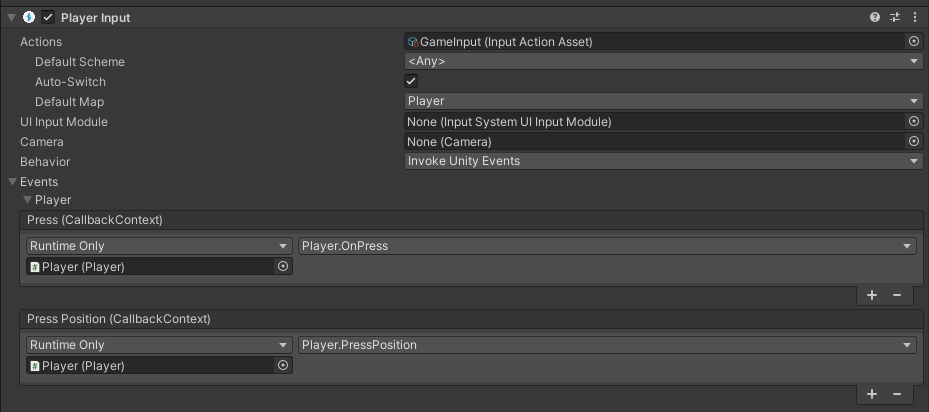
Hey everyone, I'm starting in Unity (2020.3.12f1) and I'm trying to set up a CharacterController with the new Input System's PlayerInput component using Invoke Unity Events , I've set up the script and methods to handle the callbacks but they don't seem to be triggering.

I tried getting an instance of the InputActions i created and manually enabling it and attaching the callback on Awake, and it works.

        input = new InputActions();
        input.Enable();
        input.Gameplay.Move.performed += OnMove;

I was wondering if anyone else has had this problem. And if I have to do anything else to using it with the PlayerInput component

public void OnMove(InputAction.CallbackContext context)
    {
        Debug.Log("OnMove" + context);
    }

    public void OnLook(InputAction.CallbackContext context)
    {
        Debug.Log("OnLook" + context);
    }

    public void OnJump(InputAction.CallbackContext context)
    {
        Debug.Log("OnJump" + context);
    }```
keen hearth
#

Hey, I'm setting up really basic 2d platformer movement with a keyboard and controller. The keyboard input works fine but I have a particular problem with controller input. If I happen to flick the left stick to the opposite side and hold it, the input system continues reading the input as the input from before flicking (if I were to flick to the left, I would continue receiving input to the right). I can achieve this same effect with the dpad as well if I execute the inputs quick enough. Is this a common problem, and how could I go about fixing it? It's very easy to achieve this unintentionally, especially with the stick.

#

here is the move input action

#

and the gamepad binding

keen hearth
#

Okay, I think I've managed to find a decent solution to it by adding a restriction to the input within the invoked method. It works for now so I'm satisfied lol

chrome walrus
chrome walrus
#

@winter basin Sounds like there is something weird either a bug or in your setup

#

Can you show your setup and values and when the 1 float happens?

tawdry wasp
#

hey imm watching a tutorial atm and can't quite work out how you'd do zoom for mobile, I have this and im looking under touch screen but can't see what would correspond to the standard zoom action of 2 fingers pulling in and pulling out to zoom

lost galleon
#

Anyone had an issue where backsapace doesn't work in uielements runtime/ui toolkit?

tawdry wasp
#

I decided to come back to it later lol

#

first gonna just do the keyboard inputs then ill add mobile later on if I can work it out

#

keyboard/mouse

#

it's so much more difficult holy crap

tawdry wasp
#

is it possible to execute code while right mouse button is held? it doesn't seem doable with the new input system as far as i've found so far - I also need to get the right mouse positrion which I have done already

#

im thinking it has something to do with this hold interaction somehow but

tawdry wasp
#

I worked it out

round blaze
#

I'm having some problems with making the cursor movable with controller input

if (refs[10].action.bindings[0].effectivePath != "<Mouse>/delta")
        {
            mousePos += refs[10].action.ReadValue<Vector2>() * mouseSensitivity * Time.unscaledDeltaTime;
            Debug.Log("mousePos = " + mousePos);
            Mouse.current.WarpCursorPosition(mousePos);
            Debug.Log("Mouse.current.position = " + Mouse.current.position.ReadValue());
        }

refs[10] is the index of my mouse delta action which can be set to a controller stick input. By using Debug.Log() I have been able to conclude that the Vector2 mousePos variable does in fact change correctly, but the position of the cursor itself does not change with the WarpCursorPosition() function.

It's not an issue of unity not being able to move my system cursor (I checked with the unity sample scene) so I'm kinda lost here.
I have checked the code of the unity sample scene, but I haven't really found anything useful to change my code (I could have very well missed something important, so I will still be going through it).

Thanks in advance.

round blaze
#

Alright, it would seem I'm just a dumbass. The code I provided does move the mouse, but very slowly , so slowly you can't notice it even with highest mouse sensitivity....

real jolt
#

So it seems that the Unity Event callbacks stop working when I add Control Schemes, my bindings stop triggering if I put them inside a Control Scheme

olive loom
#

Is there any equivalent to this for the new input system?

tame oracle
#

how to give input for hold?

#

does unity have it?

real jolt
# tame oracle how to give input for hold?

If you're using the new input system, the callbacks get triggered with a context that lets you know the "phase", there's a performed when the button is pressed, and a cancelled when it's let go, so holding merely signifies that the cancelled event is delayed

tame oracle
real jolt
# tame oracle can you pls send an example if you have

don't really have one at hand, I've just been seeing lots of examples on the unity youtube channel https://www.youtube.com/watch?v=5tOOstXaIKE

In this video, we are showing you how to create a cross-platform character controller using Unity's Input System!

Download this project here:
https://on.unity.com/39WT0iv

For more information about the Input System - click here!
https://on.unity.com/2MJnzj2

Chapters:
00:00 Intro
00:29 Input Manager
01:10 Installing the package
01:34 Using th...

▶ Play video
tame oracle
#

oh thanks

tawdry wasp
#

Can I have 2 different scripts access the same thing with the new input system? I have
playerActions.PlayerControls.RotateCamera.performed += rotateUsed => mousePos = rotateUsed.ReadValue<Vector2>(); atm in 1 script, can I just do

        playerActions = new PlayerActions();
        playerActions.PlayerControls.RotateCamera.performed += rotateUsed => mousePos = rotateUsed.ReadValue<Vector2>();```

in a different script and have it work there too?
#

because thats what i have atm and it isn't getting the mousePos

undone notch
#

Hi everyone, I need help for one little thing, I have multiple scripts that uses the new input system, like for example an UI script that just control the visibility of a UI Element, and my player (just to make it simple). What is the best way of using it, instantiating a new InputAction in both scripts and use it there, or just make a static global InputAction instance and use it everywhere ? Thanks!

#

@tawdry wasp I think you need to call playerActions.Enable() and after that the events are going to work.

tawdry wasp
#

aah okay

#

I did it a different way so far but still having some weird issues with my script but think unrelated to inputsystem

small pier
#

Hey does anyone know why am I always getting Error "A Native Collection has not been disposed, resulting in a memory leak" when I'm disposing it on complete function?

green arrow
#

Can someone tell me where the heck the Input Manager has gone, or even where the project settings window has gone or where the Player settings have gone in this picture? I have the project open, for any follow up questions. I can only open the Preferences window for some reason... is there a limit to the total number of windows allowed on one monitor or something Idk Idk about?

austere grotto
green arrow
#

Nothing happens... it's freaky.

#

I did prior to noticing I lost the input manager import a game asset from the asset store that was pretty big, but this disappearance is on all flavas of the game: 2019, 2020, and 2021. What could do that, and is there a way to reverse it? It's not just a saved layout thing? Let me check in default...

austere grotto
green arrow
#

Holy bjesus. It works in default layout! tyvm for being next to me as miracles happened!

#

I have an unrelated question. In the input manager it has default axes. I thought it had a crouch as a default too, but I don't see it at the moment. I even remember c being the default getkeydown() assignment... is crouch a non-trivial thing to do in Unity?
There's an ongoing thing with the Empyrion Devs that don't want to give the players the ability to crouch, and I thought it was a default action... it's not? Have I experienced the Mandela Effect?

frigid ridge
#

@green arrow GetKey doesn't rely on those input settings though.

#

Whether the input axis is there by default doesn't really have anything to do with the complexity of the feature

green arrow
frigid ridge
#

It being a part of the course template project seems very plausible

green arrow
#

k, I'm calling shenanigans... talk about not knowing what Idk Idk... ty, I'm a little less concerned now...

twin sundial
#

I'm trying to make it in my game so that I can connect 1 controller per player, and have that controller only move the player it's connected to

#

how would I go about doing this in the Input System?

ruby rampart
#

every time unity recieves an input, it lags a lot, im talking from 300 fps to 50 fps

#

im not using the new input system i believe

#

im just using the usual getkeydown etc

austere grotto
#

Have you tried using the profiler?

ruby rampart
#

cant say i have

#

i dont really notice any lag in builds of the game, only in editor

#

strange, i accidentally closed unity and when i reopened it its working fine

#

mustve been an editor bug

tame oracle
#

ok so i want my movement method to be only called if the player is putting in the a or d keys but im also using this X = Input.GetAxisRaw("Horizontal"); to do this Vector2 movement = new Vector2(X * speed, rb.velocity.y); so that i can move and its short and simple but idk how to do what i just descirbed with it

austere grotto
#

what you said makes sense and should work fine

tame oracle
#

Well I want my movement method to be called in an if statement with a input.ect in the condition so that it only gets called when A and D is pressed

wide summit
#

You just need to check if X is not zero then.

#

Because if it is anything other than zero then it means you are pressing either A or D (or whatever movement hotkeys it is configured to)

opaque island
#

Wondering if someone could help me setup new input

#

Follows the quick start guide but it’s not working

#

I add Player Input component

#

I click creat actions

#

I get an error

#

NullRefExceptipn : SerializedObject of SerializedPeopery has been disposed

timber robin
#

Double check if the package has an update. And restart Unity.

opaque island
#

Yea latest and restarted

timber robin
#

Try creating it the other way. Create an input asset, open it and create the actions that way.

#

Don't forget to generated the input and save the asset.

#

Also what version of Unity?

opaque island
#

Unity 2020.3.12f1

#

Latest input package

clever oyster
#

Hi guys how do you disable mouse gamepad in the example provided

#

I want to control the mouse with the left stick of the gamepad

#

In pause menu

#

So I downloaded the unity example, but I can't change the action map the usual way i do it in code

#

For example when I exit the pause menu, i want to use another map, like running and waking

velvet onyx
#

How do I poll touch input on modern, faster than 60 fps touch responsive phones, at the rates of the phone's display or touch systems?

#

How do I do it without adjusting/increasing the fixedUpdate rate, or the Update rate?

austere grotto
austere grotto
hallow moon
#

Hello Community

#

can anyone help, why my character isnt moving ?

#
using System.Collections;
using System.Collections.Generic;
using UnityEngine;
using UnityEngine.InputSystem;

public class Player_Controller : MonoBehaviour
{
    // Create Variables
    public Rigidbody2D rb;
    public float moveSpeed;
    private float inputX;
    private float inputY;


    // Start is called before the first frame update
    void Start()
    {
        
    }

    // Update is called once per frame
    void Update()
    {
        // Move the Player on X and Y axes        
        rb.velocity = new Vector2(inputX * moveSpeed * Time.deltaTime, inputY * moveSpeed * Time.deltaTime);        
    }

    // Methode Move
    public void Move(InputAction.CallbackContext context)
    {
        // Get context, what is being pressed
        inputX = context.ReadValue<Vector2>().x;
        inputY = context.ReadValue<Vector2>().y;
    }
}
timber robin
#

Where you are actually defining your input actions?

hallow moon
#

in the new input system. i use the standard controlls

#

for wasd

#

and in the script, there are in the move method

timber robin
#

You have to define it in your script as well. This script has no idea it needs to use the input. And the input has no idea it has to call the Move method.

hallow moon
#

i use it with the unity invoke method

timber robin
#

With the PlayerInput component?

hallow moon
#

yep

#

i have defined it already

austere grotto
#

Does it need to be called "OnMove" for that?

timber robin
#

Ah okay. Then in Update, debug.log your inputX and inputY.

austere grotto
#

make sure your "Move" method is being called too

hallow moon
#

they go to 1 and -1

timber robin
#

So the input is working.

#

Try just increasing your moveSpeed value.

hallow moon
#

mh its weird...because i found this on a tutorial video on youtube..and his characters moves

#

can i send the link to it ?

austere grotto
#

it's velocity, not distance

hallow moon
#

oh okay.

#

Learn how to use Unity's Input System to create a simple platformer controller!

Download the starter files to follow along at https://drive.google.com/file/d/12L2pZ1O7OEe4Wh7bwG3JrTFhLC7WZ4jc/view?usp=sharing

Wishlist 'Scoot Kaboom and the Tomb of Doom' right now at http://bit.ly/scootkaboom !

Get my new Udemy course 'Learn To Create A First ...

▶ Play video
austere grotto
#

that might be shrinking your motion by enough that it looks like it's not moving

hallow moon
#

here was the tutorial

timber robin
#

What's your moveSpeed set to.

hallow moon
#

4

austere grotto
#

did you try without the deltaTime?

timber robin
#

The video doesn't even use deltaTime.

hallow moon
#

yea

timber robin
#

If you're going to follow a tutorial, follow it.

austere grotto
#

Also is your Rigidbody kinematic or dynamic?

hallow moon
#

dynamic

austere grotto
#

And "simulated" is checked or no?

hallow moon
#

no checked

austere grotto
#

not checked? it should be checked

hallow moon
#

oh....

#

because i want to use the controller for a top down movement..and i thought this was for the falling thing

#

so i turned it off

austere grotto
#

"falling thing" is gravity scale

hallow moon
#

ah, so gravity scale needs to be 0

austere grotto
#

simulated is "will this thing move at all via physics"

hallow moon
#

ah okay. thanks. i try it now^^

#

now it works

#

it was the "simulated"

austere grotto
#

if your game is top down it may make sense to just globally set gravity to 0 in the physics 2d settings

hallow moon
#

in project settings ?

austere grotto
#

yes

hallow moon
#

thank you 🙂

#

i can move my character now ^^

#

thanks 😄

#

my first time using unity..

#

xD

austere grotto
#

no worries

#

there's a lot to learn

hallow moon
#

but its really a nice engine 🙂

#

so back to work. thank you..and have a good day! 🙂

solar kite
#

Using events and scriptable objects for input reading is blowing my mind. I can't figure out how it goes from myInputAction to myInputHanlder

I just have events created then OnMove(CallbackContext ctx) and somehow it knows OnMove is specifically for move. Before playerinput component would have to have it manually selected the method.

velvet onyx
austere grotto
#

look into how to do it for a native anfroid app for example

#

and then call a unity function in C# from that java code

whole scroll
#

On mobile, RegisterCallback<MouseDownEvent> is called twice on VisualElement, why?

lavish grail
#

for some reason the Input in my game isn't working in the final build

#

neither mouse nor keyboard

#

oh wait that's not the problem

austere grotto
whole scroll
whole scroll
#

I get spammed with this: InvalidOperationException: You are trying to read Input using the UnityEngine.Input class, but you have switched active Input handling to Input System package in Player Settings.

austere grotto
#

For example in UGUI you need to make sure to use the correct InputModule for the new input system.

#

Not sure if UI Toolkit still uses EventSystem or not but if it does, maybe you just need to switch the input module

whole scroll
#

Hmm idk, I don't have an input module on my scene right now, if thats where the input module resides

whole scroll
#

I haven't explicitly put in anything like that

austere grotto
#

it looks like Input System support is added in the UI TOolkit version in Unity 2021.1

#

if you're on Unity 2020 it doesn't support it

whole scroll
#

I am on 2021.1.7f, maybe theres some setting i need to change

austere grotto
#

well this thread was from last year - maybe they didn't actually get those changes into 2021.1

whole scroll
#

Well I switched to using both systems for now

#

But I think i'll still have the issue of MouseDownEvent triggered twice

#

I'll try to update UI Toolkit to the latest preview if possible

#

So I didn't have an EventSystem in my Scene, UI Toolkit would then try to use a Default event system where it still uses old input system. Adding an EventSystem and using the new Input System in it fixed my issues with UI Toolkit.

austere grotto
#

cool

velvet onyx
# austere grotto look into how to do it for a native anfroid app for example

Cheers. I'll do more research. Every path I've taken has been a dead end, suggesting that this must be done in Unity, somehow. One way that seems possible, but outside my programming ability.... spinning up a thread to act as a timer, in Unity, that then polls for input based on its timings (faster than Unity's updates) and sets flags for the logic in Update/FixedUpdate to digest when they get around to happening. This ensures latency is as low as physically possible.

clever oyster
#

Hi guys how do you disable mouse gamepad in the example provided by unity
I want to control the mouse with the left stick of the gamepad
In pause menu
So I downloaded the unity example, but I can't change the action map the usual way i do it in code
For example when I exit the pause menu, i want to use another map, like running and waking

fossil walrus
#

PlayerInput.SwitchCurrentActionmap()

#

It doesn't work for you ?

#

Like, it's not changing the binds ?

clever oyster
#

There should me a method to switch the actual Action Map
@fossil walrus
Thank you, I'll try to look deeper into the class

clever oyster
#

I got this example

clever oyster
#

ok now I get to switch actions, but cant move the cursor under the canvas...

polar compass
#

Just came across this, does the Input system replace the movement scripts? Havent looked up yet how it works, but if anyone could do a really short tl:dr on the new Input System, that would be awesome! ❤️

timber robin
#

There's no real short way of explaining it. It doesn't use the old Input.GetKeyDown(...) method, if that's what you're asking?

#

Unity has a whole video on implementing basic movement with it that goes into exactly how to set it up. It will be on their Youtube channel.

polar compass
#

That's what I'm asking, but is it used for controllers etc? What im working on only uses m/kb

timber robin
#

It's used for input.

polar compass
#

okok, thanks! ❤️

timber robin
#

Be it keyboard/mouse, controllers, joysticks, custom HIDs

#

It even works plug and play with arcade button/joystick inputs, bought off Amazon (I recently tried. 😆 )

polar compass
#

Got it, first thing i found when googling was in relation to Controllers etc

timber robin
#

Well, the whole point of the new input system is that it's very easy to add different input types without adding any code.

polar compass
#

So wanted to double check, no reason to learn something (yet) if i cant use it 😄

#

Sweet!

timber robin
#

If you want to add controller support to your game, you just add the mapping to the asset and it just "works".

polar compass
#

Great! If my vision become a reality, adding a controller option to it would be hilarious

#

Thanks for the quick answer!

whole scroll
#

I moved over to the new Input System but UI Toolkit is not reacting to touch inputs (works fine for mouse), why could that be happening?

light kindle
#

Hey, is there a way to scroll a multiline TMP text input field to the end?

light kindle
#

Okay, I found a way but I don't think it's the intended way to achieve this:

PointerEventData pointerEventData = new PointerEventData(null);
pointerEventData.scrollDelta = new Vector2(0, -1000f);
inputField.OnScroll(pointerEventData);
clever oyster
#

I moved over to the new Input System but UI Toolkit is not reacting to touch inputs (works fine for mouse), why could that be happening?
@whole scroll
What's UI toolkit?

whole scroll
#

I managed to fixed it though by using UI Toolkit Event System script instead of Input System UI Input Module

#

However I have an issue on Mobile where after the Scene reloads, the Player Input does not register anymore and im not sure why.

polar compass
#

Is it bad practice to use both new and old at the same time?

austere grotto
polar compass
#

Can anyone recommend a nice tutorial on how it works?

crimson jacinth
#

is using context.canceled a legit way to achieve the same thing as with GetButtonUp and context.started / GetButtonDown?

spark pumice
wide ridge
#

With input system can I do something like:
InputAction = "Directions"
And have WASD output as bitflags?

austere grotto
#

You can get a Vector2

wide ridge
#

Ya, I have that atm.
... Just realized I'm not forced to stick with a uint in photon and could make that a Vector2 as well.

austere grotto
#

If you want, for networking compactness, if you just need binary values for WASD being pressed you can certainly convert the Vector2 into a unit bitfield

#

but you'd do that outside of the purview of the input system

whole scroll
#

I don't get it, I reload a scene and Player Inputs stop triggering

austere grotto
whole scroll
#

I have one .inputactions file where i have some actions

#

and a player game object which has a Player Inputs components, referencing the GameInputs asset, events are subscribed to through Unity events

austere grotto
#

mhmm

#

alright

whole scroll
#

Could there be an issue that has with keeping a static reference to the player in my code?

austere grotto
#

And is any of this DontDestroyOnLoad or anything

whole scroll
#

btw this only happens on a phone build, not in the editor player

whole scroll
# austere grotto maybe

How could I debug this? Maybe i should use an alternative way to singletons through static variables

whole scroll
#

So im using this component to handle input (https://i.imgur.com/RiiMYQo.png)
However only in mobile builds, after another Scene is loaded, the inputs are no longer recognized. UI inputs still work but not the Player inputs. Everything works fine in editor player.

whole scroll
#

Im using unity 2021, but i see here it mentions its verified for 2020.3 https://docs.unity3d.com/Manual/com.unity.inputsystem.html
Could this be an issue for me using 2021? I read something about this here so imma downgrade and test 2020.3.8f1 https://forum.unity.com/threads/controls-changed-event-not-invoking-on-scene-change.885592/.

hollow arch
#

how do i put a script in button component

#

pls

hollow arch
#

guys?

timber robin
# hollow arch guys?

Don't spam. If someone wants to answer they will, there's no need to set the channel as unread for everyone just because you're impatient.

Also, if you're not going to read replies, then don't ask again:
#💻┃code-beginner message

wide ridge
#

Does unity have objdump so I can find the symbol and use a hex editor to find out how much space a Vector2 takes up?
Microsoft API vector mentioned that you can do something like Vector<2>(sbyte) which might force the vector size to be small.

austere grotto
#

You can do sizeof(Vector2)

wide ridge
#

Ah thanks. Hmm... Ya, I suppose 4 bits is much better than 8 bytes.

#

thx

austere grotto
#

sort of - but the uint you'll pack that into is still 4 bytes

grand crow
#

I'm getting this after installing the new input system package. I've never seen this before in any of my projects and idk what to do...

zinc stump
grand crow
#

I'm not tho, I commented out all the Input.GetKeyX() calls I have

zinc stump
#

You can follow the execution, second line UI package utility uses Input system to get mouse position.

whole scroll
#

Now im very confused. I downgraded to Unity 2020.3.8 and in my android build the Player Inputs work fine even after scene reload, but now it doesn't work at all in the editor anymore. https://i.imgur.com/zH0vK4o.png

zinc stump
#

Did you delete Library after downgrade?