#🖱️┃input-system
1 messages · Page 43 of 1
 austere grotto
Check the value in the inspector
Is your code actually running? Any errors im console?
Is the rigidbody kinematic?
What keys are you pressing
 west oracle
   private void FixedUpdate(){
        Vector3 velocity = rb.velocity;
        //this preserves the existing Y velocity from gravity
        velocity.x = xInput * speed;
        rb.velocity = velocity;
    }
 dawn sapphire
is there a way to get the text on a rich text input without the markdown stuff
likeHello<i>World</i>would result in HelloWorldeven tho its being displayed as italic
or is there a way to set a word's color without the use of <color=#xxxxxx></color>
welp found it
 fair roost
Hi guys, how do I detect joystick released? I mean how to detect when my thumb left the joystick
currently my problem is, say I move the joystick to some value like (0.5, 0.6), and then I release it, and the input value goes back to around 0 with the joystick reset
I want to keep the last input value as (0.5, 0.6) after my thumb left
please help😫
(stick deadzone doesnt work, the last input value just goes back to min deadzone instead of 0)
austere grotto
fair roost
Hi guys, how do I detect joystick released? I mean how to detect when my thumb l...
Make sure you're either polling input every frame or also listening for the canceled event/phase
The callback for canceled will contain the return to 0 values
west oracle
fair roost
I want to keep the last input value as (0.5, 0.6) after my thumb left
You will have to cache that value yourself.
 tame oracle
im not sure what this input system is or what an input manager is for unity, I want to create an input that activates when I press the right mouse bottom down called aim. Anyone know how to create this so I can use it in my code, I want to add the action to my player.
 rough ledge
Fixed. Thanks @rough ledge
 vestal grotto
Can i somehow use two joysticks with different bindings using this new inputsystem maybe DevID? I'm using the traditional one, GetKey.. Works fine, but my joysticks are same brand same model, and unity likes to mix them up every once in awhile when re-opening project.
 misty tangle
guys is there a way I can implement gamepad to my game without new input system
 timber robin
misty tangle
guys is there a way I can implement gamepad to my game without new input system
timber robin
misty tangle
guys is there a way I can implement gamepad to my game without new input system
https://docs.unity3d.com/Manual/class-InputManager.html
You can map it in the old input system via the Joystick button #.

 wet olive
I'm having a weird problem with input

Excuse the picture of a screen, I'm on a school computer
So basically the jump input doesn't register if I'm holding two directional keys
Unless it's up and right
I had to come here and ask because I have no idea how to google this
I don't think it's a problem with the code as it never even reaches the OnJump method under those conditions
timber robin
That shouldn't a problem, it definitely works:

So either it is the code, or there's something funky with that version of the Input Manager you're using. Though I'm more inclined to think it's code related.
wet olive
I don't think it's the code
I put a print statement in the method and it doesn't print it
Meaning it never reaches that part of the code to begin with
Is there any way to check what version I'm on?
timber robin
The package in the package manager will tell you. You can also update it if there's one available.
wet olive
It's on 1.0.2
timber robin
Yep, same. I have no issues with running and jumping. 🤔
austere grotto
wet olive
Always a possibility of a keybaord rollover issue
but never heard of that with only 2 keys
are you pressing other keys too at the same time?
wet olive
No
austere grotto
wet olive
No
Try pressing the two directional keys and the jump key at the same time
see if they show up properly here
If not - it's a keyboard rollover issue
Oh here's a simpler page for the same thing
austere grotto
ok
tame oracle
Every time i try to make an Input Action Asset this error pops up. i did try to Google it but did not understand that much

and this
 austere grotto
tame oracle
Every time i try to make an Input Action Asset this error pops up. i did try to ...
austere grotto
tame oracle
Every time i try to make an Input Action Asset this error pops up. i did try to ...
Have you tried restarting Unity?
seems like a bug
tame oracle
yeah i have
we are a group of 3 people and i am the only one i the collab that have this problem
 edgy pendant
Hey guys! I've got a gyroscope and a mouselook on the same file, they both work fine but when I move with my mouse once I take it off (in this case my finger) it snaps to where it was before I moved it

Any one have a clue of what I could do?
austere grotto
Not 100% sure what you're asking but (0, 0, 0, 0) is not a valid Quaternion
Use Quaternion.identity
 livid nimbus
Anyone know if installing Input System can break code that doesn't interact with it? Because, after switching to it from AirConsole some of my code no longer work despite not using the Input System or AirConsole at all. It's really frustrating
austere grotto
livid nimbus
Anyone know if installing Input System can break code that doesn't interact with...
Any errors in console?
Does your code use the Unity event system at all?
 echo wharf
how do i get the current device of the player input?
when i use gamepad.current it checks for all devices being pressed when a player joins.
echo wharf
I figured it out in case someone else might need it: Instead of using gamepad.current use PlayerInput.devices[0]; to get the current device on the player input. My understanding is that it is an array in case you want to have multiple devices connected to one player.
livid nimbus
austere grotto
Any errors in console?
Does your code use the Unity event system at all?
What is the Unity event system?
echo wharf
unity event system is for ui
if you have a canvas in your scene it will spawn in automatically
if you click it and youre using the new input system it asks you if you want to switch over to the new input system. just hit yes
livid nimbus
Oh that, I think I deleted it as it didn't like not having the old system
echo wharf
go ahead and add it again but click it and convert it to the new input system
livid nimbus
what is it for?
 small kite
is there any example code for 😦 3rd person shooter
something like the last of us
using cinemachine :c
austere grotto
there are plenty of tutorials for that on YouTube
 pulsar mist
do action performed and action canceled have to be checked every frame? If yes, what's the use for the event actions if you are checking them every frame anyways?
austere grotto
pulsar mist
do action performed and action canceled have to be checked every frame? If yes, ...
No you can use events
The InputAction have events you can subscribe to
pulsar mist
austere grotto
No you can use events
that's what I'm trying to do, but for whatever reason that never changes my value to true
austere grotto
pulsar mist
that's what I'm trying to do, but for whatever reason that never changes my valu...
Maybe explain a little about your setup and share some code?
pulsar mist
this is inside my playercontroller in Start():
inputManager.CrouchPerformed += ctx => isHoldingCrouch = true;
inputManager.CrouchCanceled += ctx => isHoldingCrouch = false;
this is the action in the inputmanager:
        public event Action<InputAction.CallbackContext> CrouchPerformed;
        public event Action<InputAction.CallbackContext> CrouchCanceled;
...
        public void CrouchingPerformedButton()
        {
            playerControls.Player.Crouch.performed += CrouchPerformed;
        }

        public void CrouchingCanceledButton()
        {
            playerControls.Player.Crouch.canceled += CrouchCanceled;
        }
that's how it's supposed to work, is it not?
austere grotto
I'm not actually sure you can add events to other events like that.. though maybe you can
But... How are you calling those functions?
pulsar mist
i'm not, they are in the inputmanager
 visual egret
Can anyone help a newbie to understand why my Unity game scene is not visible in HTC Vive headset? The view from the headset is just black (or white if I reset the headset and it has not yet gone to standby). The headset connection is fine (connection in Vive vireless and steamvr shows ok and white screen after resetting it indicates that it's able to function) but from Unity side I have almost no experience and I suspect the problem is there. I have read the docs but there are different guides for different versions and I keep getting stuck by ending up in searching for an item in my Unity menu that does not exist or the result simply does not work like described.
I have done:
- new VR project (Unity 2021.1.3)
- new input system + gamepad controls
- added one cube to fly it around in vr
- added c# script to move the cube (and it moves ok in computer screen)
- checked that in project settings xr plugin management the Mock HMD Loader is ticked and 'initialize xr on startup' is also ticked.
- read Unity manual 2021.1 about xr getting started and made sure GameObject > XR > Add XR Rig is done (in my case it offered to convert main camera to xr rig and did it. The main camera is now placed: xr rig > camera offset > main camera). No error messages.
- all looks good on computer screen and can move the cube but no image in the headset and it soon goes to sleep because it thinks it's not in use.
What am I missing ?
pulsar mist
it does work well if I call them in the update function inside the playercontroller, but that seems a bit useless for the events
austere grotto
You subscribe your listeners to the inout actions events directly
Or maybe your way works but you'd have to actually run the code that subscribes your input manager's own events to the imput actions events
Because right now I don't think that code is even running
pulsar mist
austere grotto
Or maybe your way works but you'd have to actually run the code that subscribes ...
do you know a better way of making a button work with hold?
pulsar mist
I want to implement hold to crouch
pulsar mist
do you know how to set them up?
austere grotto
normally you just do this:
playerControls.Player.Crouch.started += ctx => isHoldingCrouch = true;
playerControls.Player.Crouch.canceled += ctx => isHoldingCrouch = false;
But if you want this input manager in the middle you could either have the input manager expose playerControls publically so other scripts can subscribe to it, or else provide public methods to subscribe
pulsar mist
austere grotto
But if you want this input manager in the middle you could either have the inpu...
great, I think I'm nearly there. But what about the functions inside the inputmanager? ```csharp
public void CrouchingPerformedButton()
{
playerControls.Player.Crouch.performed += CrouchPerformed;
}
should the CrouchPerformed stay there like that?My personal preference is to not use the generated C# code and instead use an InputActionAsset directly, with InputActionReference fields on my various scripts for them to subscribe to directly.
austere grotto
pulsar mist
great, I think I'm nearly there. But what about the functions inside the inputma...
those functions don't do anything and are never called as far as I know
pulsar mist
o I see.
so you are doing
playerControls.Player.XXX.started += ctx => XXX;
everywhere?
austere grotto
austere grotto
My personal preference is to not use the generated C# code and instead use an In...
nope I'm doing this^
but both ways work
austere grotto
Yep. You just use an InputActionReference in your scripts as needed:
[SerializeField]
InputActionReference crouchAction;

void OnEnable() {
  crouchAction.action.started += ...;
}
and assign through inspector?
austere grotto
exactly
austere grotto
then I have a separate class that has a reference to the asset itself but that's just for managing when various action maps are enabled/disabled etc..
InputActionAsset input;

void OnEnable() {
  input.Enable();
}``` etcYeah I find this way to be the cleanest/most maintainable
pulsar mist
awesome, thank you so much ;D
austere grotto
np
 midnight radish
So this is using the UnityEngine.InputSystem so I think its related to this?
I am trying to move a sphere around and used the tutorial for making a roll-a-ball game thingy, https://www.youtube.com/watch?v=QIShB1p_Gls&t=243s ^ This one to be exact, I made the code the exact same but im still not getting any movement. Anyone know the problem?

In this tutorial, you’ll:
- Understand components and how to add them to your objects
- Understand what the rigidbody and Collider components are and how they function on an object
- Be able to use package manager and know how to add packages
- Understand what is the Input System is and how to use PlayerInput on a basic GameObject
- Creating a ...
using System.Collections;
using System.Collections.Generic;
using UnityEngine;
using UnityEngine.InputSystem;

public class PlayerController : MonoBehaviour
{

  private Rigidbody rb;
  private float movementX;
  private float movementY;

    // Start is called before the first frame update
    void Start()
    {
        rb = GetComponent<Rigidbody>();
    }


    void OnMove(InputValue movementValue)
    {
         Vector2 movementVector = movementValue.Get<Vector2>();

         movementX = movementVector.x;
         movementY = movementVector.y;
    }

    void FixedUpdate()
    {
        Vector3 movement = new Vector3(movementX, 0.0f, movementY);

        rb.AddForce(movement);
    }
}
@austere grotto Hi. Do you happen to know how to unsubscribe from the inputs?
austere grotto
pulsar mist
<@!179367739574583296> Hi. Do you happen to know how to unsubscribe from the inp...
[SerializeField]
InputActionReference crouchAction;

void HandleCrouch(InputAction.CallbackContext context) {
  // blah
}

void OnEnable() {
  crouchAction.action.started += HandleCrouch;
}

void OnDisable() {
  crouchAction.action.started -= HandleCrouch;
}
I am currently doing this; playerLogic.crouchAction.action.performed += ctx => Crouch();. Is there a way to easily convert that into your code without making it that large? I have a lot of input actions and need to unsubscribe from all of them
austere grotto
you can't use lambdas - or if you do use lambdas you must save them to a variable:
[SerializeField]
InputActionReference crouchAction;

Action<InputAction.CallbackContext> crouchHandler;
void OnEnable() {
  crouchHandler = ctx => Crouch();
  crouchAction.action.started += crouchHandler;
}

void OnDisable() {
  crouchAction.action.started -= crouchHandler;
}```Okay will try
pulsar mist
austere grotto
you can't use lambdas - or if you do use lambdas you must save them to a variabl...
Works like a charm! Many thanks 🙂
 pale jacinth
Hi I ha a problem with the input system
I am using the default Input Action map generated by unity which has a Move action that gets input from WASD, Arrow Keys and the left stick on a controller. If the controller is connected the OnMove event is fired twice: first with the input on the keyboard and then with the input on the controller, this if I move with the keyboard (say input (0, 1))it immediately gets cancelled by the input on the controller (which is (0, 0)), on the other hand if I move with the controller I first receive a (0, 0) value which resets the player rotation and then I receive the controller's value making movement really wonky. If I disable either schema the other one works fine. So how can I keep both bindings without having this strange behavior (BTW I haven't touched unity's default bindings for Move).
 ashen arrow
Hi there! I have a problem with the input system editor and it does not show any properties! may I have some help?

 fossil vector
Hello Everyone,
Might be in the wrong channel but my buddy and I are working on an Archery System (3rd Person) that uses mouse location to screen. We are also using cinemachine with an Aiming Camera attachment.
The concept is:
Rotation with Mouse Movement
onClick turns on Reticle and switches to Aim Camera (Zooms over character shoulder)
While holding mouse down, player pulls back on mouse causing bow string to be pulled backward
On mouse up, Arrow releases with applied force * charged multiplier
Mouse Location must reset after release
The Problem:
After getting the system set up, on the drag pull we experience our camera dumping viewpoint to the floor(as we pull mouse backward)
This is the only headache we have but it's a big one. Has anyone tried something like this?
Thanks for any help
fair roost
ashen arrow
Hi there! I have a problem with the input system editor and it does not show any...
I suspect there are compiles errors, go check the console
 glass yacht
@stone crystal #archived-unitytips is not for questions. Your issue is a basic input system issue where your project is configured to use the new input system and yet you have some code using the old one. Choose to use either one or the other. You can switch your project to use both, but it's not advised.
ashen arrow
@fair roost holy moly, for some reason I had to uninstall a thing called vJoy on my computer and it finally worked after that
??? insanely weird fix?
 next hound
Hi guys. Do you know why I cannot make a binding to mouse delta

Somehow
I cant bind the path option to mouse delta
 neat pebble
does BOLT use the new input system?
op nvm
just had to use the new input system library on the setup
 heavy finch
hey guys im having a problem with unity's new input system, my controller works if it is connected via a lead, but it only works via bluetooth if steam is not running.
as soon as steam is running it just inputs random buttons really fast and just goes crazy, i cant figure out what is going on
has anybody else had this problem?
heavy finch
ds4
west oracle
are you launchign your game through Steam?
austere grotto
Or launching Unity through steam or something
heavy finch
in the unity editor and in a windows build
austere grotto
I've seen crazier stuff. I launch Epic Games Launcher through Steam sometimes so that Steam can properly configure my DS4 controller to work over my Steam Link
austere grotto
jeez
Yeah I just have the 1 that I think I paid ... $20 for?
maybe 10
don't remember
Haha wtf they're on Amazon for $160 now
Is that you @west oracle selling your stockpile
west oracle
lol nope i'm keepin em
way too useful for deploying tradeshow shit

I ended up in elevator with Gabe's brother at GDC one year and had a talk about wtf that was about
austere grotto
interesting
west oracle
#just-sf-bayarea-things
heavy finch
found some others with my controller issue, doesnt seem like there is a fix for it https://forum.unity.com/threads/buggy-input-from-bluetooth-ps4-controllers.898703/ 😦
Unity Forum
I am making a local multiplayer game using gamepad controllers as my input. I noticed that when I connect ps4 controllers via bluetooth, the input is...
heavy finch
disabling playstation controller support in steam and resetting the controller seems to have fixed it
 dense raven
I can't seem to see any input devices with the new input system
When I press the + button, nothing happens
Project Settings > Input System Package > Supported Devices > "List is Empty"
If I create an inputactions, it says <No Binding> and the properties pane is blank
If I add a Control Scheme, it says "List is Empty"
My Google-fu has failed me on this one
"All Devices" dropdown is grey-ed out
it's like I don't have anything connected
But clearly, I'm typing with a keyboard 🙂

Latest version of unity, new project, installed New Input System and Cinemachine,
Went into Input System Package and clicked the 'Create Asset' button
Tried to create a new inputactions, and this is result ^
Looks like @ashen arrow has the same thing
dense raven
ashen arrow
Hi there! I have a problem with the input system editor and it does not show any...
Me too!
Same thing
It looks like there's a bug here
This kinda thing happens every time I try to learn stuff with Unity 🤨
I don't know whether I'm doing it wrong, or it's broken 😆
I've got a fix for my issue @thorny pike @ashen arrow
I had to uninstall vJoy. vJoy was causing an error, which caused the Input system to throw an exception, which stopped it seeing any devices
Platform: Windows Repro: 1. Install vJoy (http://vjoystick.sourceforge.net/site/) 2. Launch Unity 3. Observe error in console. ``` C...
It's a shame because there's actually been patches submitted, that haven't been accepted
https://github.com/Unity-Technologies/InputSystem/pull/949
https://github.com/Unity-Technologies/InputSystem/pull/1140
GitHub
Tested with the Official Wii U Gamecube Controller Adapter. I also profiled memory usage in editor, since whilst working on this I did cause the editor to crash a few times due to introduced memory...
GitHub
Issue: https://issuetracker.unity3d.com/issues/inputsystem-error-when-vjoy-is-installed
vJoy may produce NaN value that breaks the process of adding a device.
 umbral kite
hey everyone im having a really weird issue with unitys new input system where keyboard input seems to be delayed by ~300ms.
Changing V sync settings fixed it for a brief moment and then it came back. I'm soooo confused. Has anyone experienced anything like this before?
 charred zenith
Hello all,
I've been working my way into the new input system for days and now I'm stuck. Unfortunately, I can't find any examples for the use-case and this makes me think that I have chosen a completely wrong approach. I want to build a tower on a tile and then not exit the build mode when the player holds down shift. For this I created the actions on the image. Now I try to determine in the code from InputAction.CallbackContext whether shift was pressed when clicking the mouse or not. I could not see any difference so far. Also not in the debugger. I got a difference with ctx.ReadValue<float>(). However, only on the first click. From the second on it doesn't work anymore. 😦
 charred zenith
Hello all,
I've been working my way into the new input system for days and now I...
charred zenith
charred zenith
Hello all,
I've been working my way into the new input system for days and now I...
Hm, I just found out that I get this information via ReadValue<float>. I just interpreted it the wrong way around. Also, you have to click shift again for the next mouse click and can't hold it down all the way. Can I set that you can keep shift pressed continuously?
ashen arrow
@dense raven yup! i had to uninstall vjoy as well, I thought I said that in a msg but im sorry if I didn;t!
dense raven
I can't even get .performed to fire
I hate about Unity, that most of my time is spent debugging why something doesn't work because every tutorial is subtly different to whatever you have
because Unity and all the projects are constantly changing
Like constantly
austere grotto
dense raven
I can't even get `.performed` to fire
How is your input action configured and how are you listening to the event?
Unity adds a lot but only rarely does "old stuff" stop working unless it was beta/experimental
dense raven
{

    public CameraControls controls;

    private void Awake()
    {
        controls = new CameraControls();
        controls.Movement.RotateZoom.performed += ctx =>
        {
            Debug.Log(ctx.ReadValue<Vector2>());
        };
        Debug.Log("aa");
        controls.Movement.Pan.performed += ctx =>
        {
            var delta = ctx.ReadValue<Vector2>();
            Debug.Log(delta);
            gameObject.transform.position = new Vector3(gameObject.transform.position.x + delta.x, gameObject.transform.position.x + delta.y, gameObject.transform.position.z);
        };

    }
}```controls.Enable(); is missing
one of my pet peeves about the generated C# class files is that they don't start out enabled
One of several reasons I don't tend to use them
dense raven
Ah, that's interesting, thanks
 quartz ledge
public void Jump(InputAction.CallbackContext context)
{
if(context.performed && IsGrounded())
{
rb.velocity = new Vector2(rb.velocity.x, jumpForce);
}
if(context.canceled && rb.velocity.y > 0f)
{
rb.velocity = new Vector2(rb.velocity.x, rb.velocity.y * 0.5f);
}
}
``` heres my code and i get these errors when i try to jump. austere grotto
quartz ledge
```cs
public void Jump(InputAction.CallbackContext context)
{
if...
austere grotto
quartz ledge
```cs
public void Jump(InputAction.CallbackContext context)
{
if...
Seems like you set up the space bar as a binding on your Move action which is a Vector2 action
e.g. it's not related to your code it's an issue with how you set up the InputActions
quartz ledge
yeah i think its with the input actions but what do i do to fix it xD
austere grotto
show screenshot of your Move action
probably remove spacebar as a binding for it
that doesn't seem to make sense
quartz ledge
 austere grotto
exactly
quartz ledge
lol
now it gives me no error
ty 🙂
actually it doesnt work for holding down the button to jump higher though
it just jumps the full way instead of the hold to jump higher
nvm i fixed it lol
quartz ledge
how do i see if a input action is pressed?
 twilit plume
quartz ledge
how do i see if a input action is pressed?
twilit plume
quartz ledge
how do i see if a input action is pressed?
you can just setup a Debug.Log(); to check the action
 rich cloak
Good day folks! I have a weird issue that I do not understand: I am trying to use the new Input System with URP... and now my project seems to be broken.
I can't make my player jump or move around anymore. It happens once, then just stops working entirely. Input system was working until I added URP 8.3.1. Already crossposted in #archived-hdrp. I am using Input System 1.0.2. I have found, https://issuetracker.unity3d.com/issues/urp-errors-are-constantly-thrown-when-active-input-handling-is-set-to-input-system-package?page=1#comments, but I can not use the work-around listed as I can not found out where to set 'Active Input Handling' to 'Both'.
How to reproduce: 1. Create a new URP template project 2. Open Project Settings > Player > Active Input Handling and set it to...
Found where to set the input handling to Both.
Let's pray this workaround works. I am rather baffled as to why a rendering subsystem can affect the input system.
Nope. Did not work.
austere grotto
rich cloak
Good day folks! I have a weird issue that I do not understand: I am trying to us...
Are you seeing errors in your console?
What version of Unity and URP are you using ? 8.3.1 is quite old
rich cloak
I do not get errors @austere grotto, and 8.3.1 is what my Package Manager lists as available version.
Using Unity 2020.1.16f1, Input System 1.0.2, URP + Shader Graph 8.3.1.
I can upgrade to 2020.3 LTS latest and see if that fixes my issues.
https://i.gyazo.com/39c1f0ee4f1d14debbcc26754e09d784.png Screenshot of my package manager.
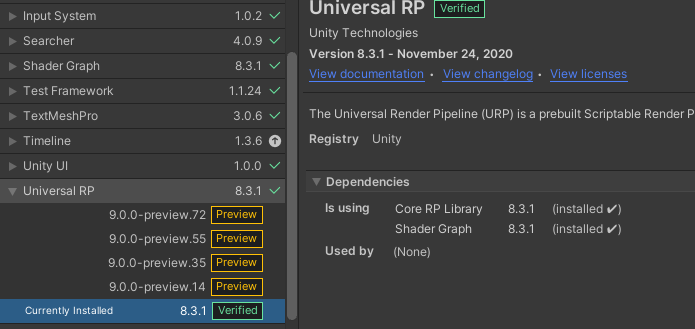 austere grotto
rich cloak
I do not get errors <@!179367739574583296>, and 8.3.1 is what my Package Manage...
austere grotto
rich cloak
I do not get errors <@!179367739574583296>, and 8.3.1 is what my Package Manage...
You should update and upgrade. But if you're not getting those errors why do you think setting input handling to both would solve your issue?
For the record the latest version of URP on LTS is 10.4.0
More likely I think something is just wrong with your input setup
rich cloak
With Unity I have had countless of times where a workaround mentioned that came with a bug or problem that was slightly related to my problem helped. Figured it may have helped here too, upgrading project as we speak.
Update complete, it did not work. And I am taking a wee break. Using 2020.3 latest LTS.
austere grotto
rich cloak
Update complete, it did not work. And I am taking a wee break. Using 2020.3 late...
did you upgrade URP too?
rich cloak
Yep, URP and Shader Graph are on 10.4.0
I found something interesting, what I meant earlier with 'it does not work', and only lets me jump once etc: That's only visually the case. I can actually still rotate the player (the rotation values change in the inspector).
Still not sure what is wrong though, because I have a double jump mechanic implemented... and it does not allow me to double jump. Only single jump, and still after that jump is performed it won't let me jump again.
Real strange stuff is happening. Lmfao.
So here you can see the playerprefab sometimes 'walk in air'.... I don't get that because there's no collider that big that would prevent it from dropping down.
austere grotto
Most likely just an issue in your script that is controlling the player?
I have very little to work with here
rich cloak
That code did not change when I added URP/ShaderGraph.
That code worked fine before adding URP/ShaderGraph.
austere grotto
If you revert, does it work again as expected? Are you using version control?
rich cloak
So I am perplexed as to why adding URP/ShaderGraph has any influence on an Input System at all.
I am using version control but I want to use URP/ShaderGraph.
austere grotto
It shouldn't. But maybe you changed something and forgot about it
something that was minor in your mind
rich cloak
Hmm. Maybe the order in which I did was wrong
I first added ShaderGraph then URP.
I wasn't aware that ShaderGraph was related to URP, hence that order.
austere grotto
that shouldn't really matter
rich cloak
So you understand my confusion.
austere grotto
They actually both just depend on ScriptableRenderPipeline
I'm not you so of course I don't know exactly what happened - but I would check my version control diffs and see if anything changed in any scenes, prefabs or scripts
rich cloak
If it happens again when I add URP/ShaderGraph, I'll report back.
I'm somewhat convinced it will happen again because I made sure to have a working project before adding these packages.
Still quite frustrated that adding an official package broke my project.
Confirmed, the order mattered.
I did a git reset/clean, added the Universal RP package. Everything works as expected.
To verify if my order was messed up, I did the git reset/clean again... imported ShaderGraph first and then I had input issuess again.
There is a definite possibility 'something' of note was in the file diffs before git reeset/clean, but I was not able to quickly spot it.
And it's gamejam time, so I don't feel like spending my time on figuring out exactly why. I am happy I have a solution now though.
rich cloak
Before I forget, thank you for helping me rationally solve the issue @austere grotto 🙂 Much appreciated.
austere grotto
np though I can't say the result was not surprising to me
Usually when people have an issue like this it ends up with "oh yeah I forgot I changed that one little thing"
 raven coral
I'm a total noob with the input system, in fact i've never touched it before, so this is probably a really dumb question - any change someone could help clarify this error?
ArgumentException: Input Axis Mouse 2 is not setup.
 To change the input settings use: Edit -> Settings -> Input
AimBehaviourBasic.Update () (at Assets/3rdPerson+Fly/Scripts/PlayerScripts/AimBehaviourBasic.cs:27)
I know it says right in it there what the problem is - but, like, it's confusing to me - is it looking for the axis, or mouse2, or.. what even
figured it out - I lost my project settings during a series of unfortunate events earlier, so input settings were all wrong
ahhhh nevermind, jumped the gun - same error after re-importing the settings
yeh, no idea what it wants.
help plz 😛
austere grotto
raven coral
I'm a total noob with the input system, in fact i've never touched it before, so...
what does your code look like
in AimBehaviourBasic line 27
Sounds like this is the "old" input system you're talking about?
raven coral
yessir, it is using the old input system, I temporarily just now installed the new system in an attempt to possibly fix, quickly realized its not anywhere near the same thing at all, and reverted
austere grotto
yeah it's not a "quick" fix, you'd have to rewrite basically all of your input handling code
raven coral
yeah, after realizing my character controller was 100% incompatible, figured best to try and fix this axis mouse 2 thing
austere grotto
anyway what does the code look like?
But it just sounds like you need to set up an axis named "Mouse 2"
Though I'm curious if this is supposed to be a Button or an Axis
raven coral
button I think based on the code, here it is
er wait one sec ill have to hatebin it
well! hatebin refuses to make a url
raven coral

I did not write this btw, it is from an asset
my character controller is like, three assets mashed together, with a bunch of customizations
dirty, I know
austere grotto
Ok so it seems like in the inspector for this object you've put "Mouse 2" into the Aim Button field
is that the case?
raven coral
yes sir
austere grotto
Ok so ... the real question is what button do you want to use to activate this thing?
raven coral
well, it self populated
austere grotto
It seems to be the button for... aiming
raven coral
Oh you know what, yeah, I want it on mouse1 not 2 - 1 is right mouse button eh
austere grotto
Well it's really going to depend on what you set up in the input manager
raven coral
I think im starting to follow now though
yes exacto
it must have repopulated Mouse2/3 in the inspector when I re-imported the asset
austere grotto
but basically the string you put here in the inspector needs to exist as an axis in the Input Manager with the same name
 raven coral
Turns out that was the last error from my corruption - game loads and everything is functional again
phewwwwww
6-ish hours to re-jigger everything, lost libraries, player settings, mlapi, and my main player prefab
 true stag
How can I check to make sure the player is holding the key down in the new input system for moving the character and once they release it stops
austere grotto
true stag
How can I check to make sure the player is holding the key down in the new input...
Use the started and canceled phases or events. Set a bool to true on started, and set it false on canceled
Alternatively, read the action's value every frame and check if it's > 0
true stag
Uh, not quite sure how to do that yet to be honest. I just started with the new input system today
I created the Input C# class from the input asset and created a new instance by using the new keyword
austere grotto
Do you have a reference to an InputAction?
ok
so get the input action you care about
what's it called?
true stag
controls.Movement.Player.performed += ctx => Debug.Log("Test"); I called it InputMaster
austere grotto
Your input action is called "Player"?
true stag
I have it Movement -> Player, Other
For now I have 2 objects I wanna control individually, I know that probably sounds weird
austere grotto
Ok on a basic level it would be something like this though:
bool playerHeldDown = false;

void OnEnable() {
  InputAction playerAction = controls.Movement.Player;
  playerAction.started += ctx -> playerHeldDown = true;
  playerAction.canceled += ctx -> playerHeldDown = false;
}```Ohhhh okay, I didn't know you could do started and canceled
Like that they were part of the actions. that makes more sense
 long badge
Just wondering how to set up a toggle using the InputAction.CallbackContext?
Ah everyone is asleep 😛
 calm cosmos


I'm trying to translate the C# to visual script and make my character rotate in the direction I want
I'm almost there but I'm having a problem with making my character rotate properly
calm cosmos
"First of all, we're checking if the character is moving by checking that the movement direction is not zero." I don't really know what this means. I'm pretty new to this so I'm trying to understand this as well.


I tried to apply it here but it's still not working and I don't know if I'm supposed to be using "If"
long badge
What is the graph tool you are using?
calm cosmos
Script Graph, one built in unity, not bolt
I should be able to type a certain unity in and get the unit I want
It's been easier to translate C# into Visual. There are somethings I still don't understand
Unit*
long badge
I think you may want to do a rotation instead of the translation.
calm cosmos
Transform rotate?
long badge
using the horizontal axis
and using the vertical axis for moving forwards and backwards
calm cosmos
In my visual script, what would be my "movementDirection"? If I can find that out, I can solve my problem right now, maybe.
If I can grab that and then apply the "if" and "!=" to my visual script, I can solve a lot
long badge
brb
long badge
transform.rotation = transform.rotation * Quaternion.Euler(new Vector3(0f, h * speed * Time.deltaTime, 0f));
that may help fix that rotation issue
long badge
What is h?
calm cosmos
Yeah
long badge
float speed = 10f;
float speedRot = 100f;
float h = Input.GetAxis("Horizontal");
float v = Input.GetAxis("Vertical");
    transform.rotation = transform.rotation * Quaternion.Euler(new Vector3(0f, h * speedRot * Time.deltaTime, 0f));
    transform.Translate(Vector3.forward * v * speed * Time.deltaTime);
OH!!
long badge
that may make more sense!
so that is working for me.. But i was wondering what kind of movement are you aiming for?
calm cosmos
I want the movement to be like Dark Souls
long badge
oh ok!!!! lol
calm cosmos
Bloodborne stuff like that
long badge

► ANIMATIONS
https://drive.google.com/drive/folders/1j2HicZMabg4h2Oe8ocxGNuKBHY5kzFJA?usp=sharing
► PLAYER MODEL
https://drive.google.com/drive/folders/1X6DLqSsLT2EAIYpcZGYL-Z93hYOo2sxa?usp=sharing
► EPISODE TWO
https://youtu.be/c1FYp1oOFIs
► SUPPORT ME ON PATREON!
http://www.patreon.com/SebastianGraves
► FOLLOW ME IN INSTAGRAM!
https://www....
so i found someone doing a tutorial on it
So i code i wrote will not strafe.
calm cosmos
Oh damn! This series has been goin gon for awhile, hopefully I can transfer his C# to Visual properly
long badge
just write it in c# use visual for quick scripting
calm cosmos
I wanna know how to do everything in visual script tho, I prefer it that way. It may be more difficult but if I can get it down to the tea, then I'll be a happy man.
long badge
i thought the visual stuff is for map designers and artists.
calm cosmos
Visual script can do everything C# can do, I just need to find the right units to translate the code
long badge
it looks like more work to me but good luck
anyway back to my space sim development for me.
Just wondering how to set up a toggle using the InputAction.CallbackContext?
long badge
Ok worked it out 😛
 astral karma
can someone help me with my buttons as an input?
mainly just the on click stuff
    {
        if(pc.health == 3 && endgame == false){
        Destroy(Player);
        endgame = true;
        Debug.Log("Game Over");
        GameObject newCanvas = Instantiate(canvas) as GameObject;
        Button btn = button.GetComponent<Button>();
        btn.onClick.AddListener(Restart);
        }
    }
    void Restart(){
        SceneManager.LoadScene("Main");
} ```The instantiation of the canvas works and it shows up normally
but im trying to get the click of the button to work
When the canvas is instantiated, there is a button and a piece of text parented to it, so they show up as well
how can i control that button that comes with the canvas?
west oracle
@astral karma it sounds like you want to get a reference to the button that is a child of the canvas prefab (instaniated as newCanvas)
astral karma
Correct
west oracle
just from the code you pasted, "button" variable is probably reference the prefab's button, not the new instance.
so you'll need to use either .Find, GetComponentInChildren, or keep another script on the canvas to hold a reference to the instantiated copy of the button
west oracle
ie: newCanvas.transform.Find("ButtonObjectName").GetComponent<Button>();
this type of lookup is kinda sloppy and I prefer having something like "MenuManager.cs" that holds a reference to the button ahead of time, but to each their own.
astral karma
Im getting an error saying object referenced not set to an instance of an object
Oop Nevermind
Just needed to change the name
Thank you it work
west oracle
and thats why its "Sloppy" 🙂
astral karma
Works*
west oracle
lots of human error involved
west oracle
its one button now 😛
astral karma
True true
west oracle
then its....200 buttons in your project lol
and you rename one thing and it all goes to shit lol
astral karma
Understandable
west oracle
#bestpractices
astral karma
Well thank you anyways for now
west oracle
anyway, this was more of a #archived-code-general thing than an #🖱️┃input-system thing. FYI 🙂
west oracle
👍
 small sequoia
Hi, I'm using the new input system and i ran into this error. it won't respond to my joystick inputs
 austere grotto
small sequoia
Hi, I'm using the new input system and i ran into this error. it won't respond t...
austere grotto
small sequoia
Hi, I'm using the new input system and i ran into this error. it won't respond t...
That has nothing to do with the input system per se - you've just got an unassigned or improperly assigned variable
small sequoia
i fixed t, i just need to enable the controller.enable()
 dawn apex
Hello, I am using this to subscribe to a button press
Controls.Gameplay.Interact.started += context => OnInteract();
and this to unsubscribe
Controls.Gameplay.Interact.started -= context => OnInteract();
The subscribing is working just fine, but the unsubscribing doesn't seem to happen. What am I doing wrong?
austere grotto
dawn apex
Hello, I am using this to subscribe to a button press
`Controls.Gameplay.Interac...
You're unsubscribing a completely different lambda function basically
dawn apex
I see, would I have to subscribe not using lambda then?
austere grotto
Either promote it to a full method or save the lambda in a variable and subscribe/unsubscribe that
dawn apex
alright that makes 100% sense thank you
austere grotto
np
dawn apex
austere grotto
Either promote it to a full method or save the lambda in a variable and subscrib...
what would the return type be for the full method? I get this when I try
Controls.Gameplay.Interact.started += OnInteract()
 dawn apex
figured it out, it had to look like this
public void OnInteract(InputAction.CallbackContext context)
and then
Controls.Gameplay.Interact.started += OnInteract;
austere grotto
dawn apex
and then
`Controls.Gameplay.Interact.started += OnInteract;`
yep, no parentheses when using the method as a delegate
 maiden holly
Hey, should be fairly simple. My UI buttons aren't recognising taps or the likes on the screen (the default onclick). I've got a slightly changed version of the default input action maps, with Touch support setup. I've got the Event System setup to use the new UI Input Module too.
I've tried reading from Touchscreen.current.position.ReadValue() and it debugs the position as expected, so Touch is being recognized.
What might be the issue?
(It works on the editor, just not on the actual device.)
 old spire
how can change from old input to new input inside a script because i am doing a player movement script and i am watching a tutorial video that using the old input system and i am stuck
 vocal juniper
old spire
how can change from old input to new input inside a script because i am doing a ...
vocal juniper
old spire
how can change from old input to new input inside a script because i am doing a ...
With what?
 untold sun
You can't. You could run in "Both" mode but it's not a really good idea.
Probably better to ask what you're stuck on and someone can help you translate old->new
It's not usually complicated in basic movement scripts
 topaz jacinth
gamepad*
 split moth
Need some help setting up an action map for mouse movement. Right now I have this. I'm only reading the X axis but the value is always 0 when I attempt to print it to the console. How do I correctly set this up?

 noble owl
Can someone send me a link to a tutorial video on how to use the new input system properly, I’ve had such a trouble trying to understand, it’s ridiculous.
 ashen maple
hey, can someone help me out here? i want to make my character climb the wall, but i want him to do it if i press the button before getting close to the wall too, here's the code i'm using:
 void Climb()
    {
        controls.Player.Climb.performed += ctx =>
        {
            if (!onWall)
            {
                wallGrab = false;
            }
            if (onWall)
            {
                wallGrab = true;
            }
        };
        controls.Player.Climb.canceled += ctx => wallGrab = false;
        if (!onWall)
        {
            wallGrab = false;
        }
    }
he is just making the variable wallGrab = true when i press the button near the wall, but i want to press, and then go to the wall too
 silk leaf
While using the new Input system Action based Rig and Oculus Plug In, my camera in my headset is only updating when the Game window is focused, can I change that behavior?
 sly plank
Hey,
In my build my character moves to the left border. Does not in Editor Playmode. I don't have the problem with bought games and I unplugged all perepherie.
Any ideas what's happening?
Actual project is a platformer with corgis engine, but the problem appears in every build I do.
Unity 2019.4
 west pond
I need some help with what backward movement to use: https://www.strawpoll.me/45211566
Please check out and vote. Thank you.

Straw Poll
Vote Now! [turn and run in that direction] [run backwards]
austere grotto
west pond
I need some help with what backward movement to use: https://www.strawpoll.me/45...
kinda depends on the style of the game, no?
e.g. I would expect a tank to roll backwards without turning probably.
Also I could imagine it being different under certain circumstances. E.g. maybe the character turns and runs under normal circumstances but if you are in "aiming mode" they run backwards.
west pond
austere grotto
kinda depends on the style of the game, no?
That you for the alternative! Its been a week and I still am not confident in what action.
tame oracle
Hello ! I have a problem with the d-pad in my built game, it simply doesn't work although everything works fine in the engine...
(With controller)
 reef jetty
Does anyone know why the (old) input system seems to stop reading continuous input when you trigger a scene load and how to avoid/fix the issue? For example, if you are holding a direction and reading out the horizontal axis from Input it will suddenly read 0 once a scene load completes and won't change until you release and re-press the direction. I think you can sort of work around this by loading scenes additively and then manually unloading old scenes but that particular structure is not ideal for what I'm doing, so I'm hoping someone else maybe has a different solution?

 fierce stone
ez
 toxic bison
I have no idea what this is.
 fierce stone
use ```
if(Input.getkey (keycode.KEY) && Input.getkey (keycode.KEY)){}
or somthing
wait
yea it works
toxic bison
This is My Script, it's easy to understand.
using System.Collections;
using System.Collections.Generic;
using UnityEngine;

public class Idenje : MonoBehaviour
{
    public CharacterController kontroler;
    float brzina = 20f;
    float zemljina_teza = -1.5f;
    float ripanje_jacina = 4f;
    public Transform sevnja_provera;
    float sevnja_doleko = 0.2f;
    public LayerMask sevnja_maska;
    Vector3 pravac;
    bool prizemen;
    void Update()
    {
        prizemen = Physics.CheckSphere(sevnja_provera.position, sevnja_doleko, sevnja_maska);
        if(prizemen && pravac.y < 0)
        {
            pravac.y = -1f;
        }
        float x = Input.GetAxis("Horizontal");
        float z = Input.GetAxis("Vertical");
        Vector3 odenje = transform.right * x + transform.forward * z;
        kontroler.Move(odenje * brzina * Time.deltaTime);
        if(Input.GetButtonDown("ripanje") && prizemen)
        {
            pravac.y = Mathf.Sqrt(ripanje_jacina * -2f * zemljina_teza);
        }
        pravac.y += zemljina_teza * Time.deltaTime * 32;
        kontroler.Move(pravac * Time.deltaTime);
    }
}
Although I have no idea what CharacterController is.
toxic bison
Hmm... I do not know. When I press the button.
toxic bison
Yes! There!
toxic bison
So "W".
fierce stone
oh
toxic bison
That is a jump. 😄
toxic bison
What about My old line? What about ripanje?
fierce stone
what is ripanje?
toxic bison
I do not know, that's the problem, exists only there as far as I know.
toxic bison
It's fine. So what does keycode means in your line?
fierce stone
keycode is getting the key that ne eds to be pressed
do you use Visual studio code?
if so
then use that in for your code
the double click the command
and it brings you the the dir of the command
and shows you the code
of how it works
and the commands have //comments
witch makes it easyer to read
toxic bison
Not sure how to do that, double-clicking just select.
 toxic bison
I have a question, how to change this? It's in My Player.

public CharacterController kontroler;
I assume this is the default and I need the one I just created.
toxic bison
Sorry.
fierce stone
you need to make a new PlayerController
toxic bison
Yes but how?
fierce stone
public CharacterController Name;
toxic bison
I mean I have a quite experience in programing but I am new to Unity.
toxic bison
But old name is okay.
fierce stone
oh ok
toxic bison
I just have to change that CharacterController I guess.
fierce stone
yea
tame oracle
anyone know how to revert back to the old input system
austere grotto
tame oracle
anyone know how to revert back to the old input system
It's in project settings
search for "active input handling"
tame oracle
anything else
austere grotto
that's it
tame oracle
k thanks
austere grotto
you will need to restart Unity
tame oracle
in that case lemme just
austere grotto
when prompted
tame oracle
save everything first
austere grotto
probably a good idea
tame oracle
sucks that theres no autosave
k im in the player settings
what do I need to do next
austere grotto
there's a setting called Active Input Handling
you change that back to the old input system
 austere grotto
what did you change the setting from and what are you trying to change it to?
tame oracle
another thing
austere grotto
You can just say no if you don't want to use the new input system
tame oracle
this message started popping up when I switched from VS to VS Code
austere grotto
probably unrelated to that - you'll see this message if you installed the input system package but have this setting set to use the old input system
tame oracle
k then imma just press No each time
austere grotto
You should uninstall the inpuit system package in package manager
and you won't see that message anymore
tame oracle
figured
 chilly scarab
I'm kind of at a loss rn and would be happy if someone could help me out.
I can't disable or enable Actions and I don't know why.
I'm trying to disable movement while reading signs, but it doesn't work.
This is my code for enabling and disabling.
    void Interact()
    {
        if (playerInRange)
        {
            if (dialogueBox.activeInHierarchy)
            {
                dialogueBox.SetActive(false);
                interact.Player.Move.Enable();
            }
            else
            {
                dialogueBox.SetActive(true);
                dialogue.text = dialogueText;
                interact.Player.Move.Disable();
            }
        }
    }
The only thing I can think of it not working is, that I've made multiple instances of InputActions in different scripts.
But I couldn't think of another way to do it and couldn't find any info on it.
austere grotto
chilly scarab
This is my code for enabling and disabling.
```
void Interact()
{
...
Yep if you've created different copies of your generated C# class in different scripts, each one is independent of each other
a few options:
- Use one singleton object to be the custodian of a single instance of the generated C# class and share it with other scripts
- Use a direct serialized references to an InputActionAsset in your project instead
- Use InputActionReference in all your scripts to directly reference individual input actions on your InputActionAsset
I prefer the third one
The generated class is sorta convenient but not really worth it IMO
chilly scarab
The third options sounds the most convenient I think.
But I don't know how I can reference individual input actions on my InputActionAsset.
austere grotto
I just told you
Use InputActionReference
[SerializeField]
InputActionReference moveAction;
Ah, yes!
I was just a little bit confused overall, just got it to work.
Thank you very much!
I appreciate it a lot.
Also, it seems like the game is now lagging a bit every time the player interacts with a sign.
Is there a way I can fix that?
austere grotto
you'd have to use the profiler to see what the issue is. I doubt it's related to the input system
chilly scarab
Well, something new I need to get into then.
But thanks!
You were a big help!
 dawn cobalt
okay so I'm trying to use the new Unity InputSystem and I have added a Jump action in the Input Actions editor window. but for some reason when I press the corresponding button (space) the event is fired 3 times. does anyone know how to fix this?
austere grotto
dawn cobalt
okay so I'm trying to use the new Unity InputSystem and I have added a Jump acti...
You're getting 3 different events
started
performed
canceled
You're supposed to check which one it is in your code and act accordingly
dawn cobalt
how do I check which event I'm getting? and which one do I even want? performed?
austere grotto
It's in the callback context
dawn cobalt
sorry but I have no idea what you mean. do I need to add a parameter to the event function that Unity will assign?
dawn cobalt
the documentation is so confusing. I get that I need to use InputAction.CallbackContext context in the function but I have no idea how to check for the right event. maybe I should figure out how to get Visual Studio to work and make it use Autocomplete so I can see methods more easily. right now I'm just working in Sublime Text with no error correction, code completion or anything
austere grotto
You 100% need to get autocomplete working
dawn cobalt
I tried to use Visual Studio but it didn't seem to have autocomplete either. is there a way to fix it?
austere grotto
Yes check the pinned messages in #💻┃code-beginner for how to configure VS for use with Unity
dawn cobalt
austere grotto
Yes check the pinned messages in <#497874004401586176> for how to configure VS f...
I got it to work! but that'll help quite a bit. but I have a question. can I use a button as a boolean instead of calling an event like how it used to be? I need to check a boolean from an API so I want the button to be a boolean too instead of an event. otherwise I'll have to set a boolean in the event and check it together with the other boolean
austere grotto
dawn cobalt
I got it to work! but that'll help quite a bit. but I have a question. can I use...
Yes you just need a reference to the InputAction and you can check wasPressedThisFrame
austere grotto
so constructive
timber robin
Don't spam the channel or use offensive language.
tame oracle
whats the best input system to use in terms of most compatible
and how many input systems are there
austere grotto
Unity has two - the "old" one and the "new" one
the "new" one is the best in my opinion.
There are also third party assets like ReWired
untold sun
Indeed. The old one is legendarily bad
tame oracle
is the input action asset apart of the new or old
austere grotto
new
austere grotto
sure - what trouble are you having with it?
tame oracle
I created the "shoot" left click action, whats the code to use it, so if this action is active, then do this
 austere grotto
There are a lot of ways to do it.
My personal favorite is to put this in your script:
[SerializeField]
InputActionReference shootAction;

void Shoot(InputAction.CallbackContext context) {
  Debug.Log("Shoot!");
}

void OnEnable() {
  shootAction.action.performed += Shoot;
}

void OnDisable() {
  shootAction.action.performed -= Shoot;
}
Then you assign the Shoot Action variable in the inspector
to the Shoot action you created.
tame oracle
do I need to put private before InputActionReference shootAction;
tame oracle
did I do something wrong


@austere grotto what should the action type and control type for the shoot command be
 austere grotto
tame oracle
im getting this again
austere grotto
tame oracle
im getting this again
You need to find your EventSystem object and convert it to the new Input Module
There should be a button on it to do that
tame oracle
austere grotto
You need to find your EventSystem object and convert it to the new Input Module
event system object as in the player? or
tame oracle
idk this is complicated, everything I touch makes an error, and its my first time using unity, idk why I decided to use unity for my computer science project, lol its due today, it would be faster if I started from scratch and use another engine that I already know how to use instead
austere grotto
The new Input system has a steep learning curve if you don't know C# and Unity already
tame oracle
basically
im going straight in, and learning C#, unity, and the new input system all at once
so thats prob whats giving me issues
austere grotto
Yeah
tame oracle
i'll come back after a month when school is over and I have summer break so I can learn this stuff, thank you though
 mystic knoll
hey guys i am trying to undestand how the oculus touch controller work... and yeah i got it but the thumb control does not work... the thumbstick is a stick with touch detection so how do i use this in unity?
 turbid mango

Check out the Course: https://bit.ly/3i7lLtH
Learn how to use the new Unity3D Input System. The system is in an early access form and available now to try out. In this tutorial, I'll show you the basics of setting up the system. We'll create a mini project with some different behaviors like rapid fire, movement, and more all using t...
can have different inputs mapped to the same action and it sees controllers
mystic knoll
yeah but does it also sees the thumb touch input?
turbid mango
im pretty sure it can map to that as well
mystic knoll
so its not premapped?
turbid mango
nope, the action maps you create with the new unity system you map yourself
but it makes it really simple
mystic knoll
uhhhh
turbid mango
at the same time it gets rid of the Input.getAxis stuff
mystic knoll
i think i did it in a other way...
wait a sec
using System;
using System.Collections;
using System.Collections.Generic;
using UnityEngine;

public class Hand : MonoBehaviour
{
    Animator animator;
    SkinnedMeshRenderer mesh;
    public float speed;
    private float triggerTarget;
    private float gripTarget;
    private float gripCurrent;
    private float thumbTarget;
    private float thumbCurrent;
    private float triggerCurrent;
    private String animatorGripParam = "Grip";
    private String animatorTriggerParam = "Trigger";
    private String animatorThumbParam = "Thumb";


    void Start()
    {
        animator = GetComponent<Animator>();
        mesh = GetComponentInChildren<SkinnedMeshRenderer>();
    }


    void Update()
    {
        AnimateHand();
    }

    internal void SetGrip(float v)
    {
        gripTarget = v;
    }

    internal void SetTrigger(float v)
    {
        triggerTarget = v;
    }

    internal void SetThumb(float v)
    {
        thumbTarget = v;
    }

    void AnimateHand()
    {
        if(gripCurrent != gripTarget)
        {
            gripCurrent = Mathf.MoveTowards(gripCurrent, gripTarget, Time.deltaTime * speed);
            animator.SetFloat(animatorGripParam, gripCurrent);
        }
        if (triggerCurrent != triggerTarget)
        {
            triggerCurrent = Mathf.MoveTowards(triggerCurrent, triggerTarget, Time.deltaTime * speed);
            animator.SetFloat(animatorTriggerParam, triggerCurrent);
        }
        if (thumbCurrent != thumbTarget)
        {
            triggerCurrent = Mathf.MoveTowards(thumbCurrent, thumbTarget, Time.deltaTime * speed);
            animator.SetFloat(animatorThumbParam, thumbCurrent);
        }

    }

    public void ToggleVisibility()
    {
        mesh.enabled = !mesh.enabled;
    }
}
this is my hand.cs it works but the thumb dont work :(
using System.Collections;
using System.Collections.Generic;
using UnityEngine;
using UnityEngine.XR.Interaction.Toolkit;

[RequireComponent(typeof(ActionBasedController))]

public class HandController : MonoBehaviour
{
    ActionBasedController controller;
    public Hand hand;

    void Start()
    {
        controller = GetComponent<ActionBasedController>();
    }


    void Update()
    {
        hand.SetGrip(controller.selectAction.action.ReadValue<float>());
        hand.SetTrigger(controller.activateAction.action.ReadValue<float>());
        hand.SetThumb(controller.activateAction.action.ReadValue<float>());
    }
}
and this is the handcontroller.cs
what do you think?
turbid mango
are you capturing the input yourself?
or tying to?
I would go with the new input system its wayy easier than that
you dont even need to code it
turbid mango
yeah, its drag and drop with the new unity system basically. The code then reads the values from the input regardless of the input device being used
mystic knoll
fuuuuuuuuck
i sat there all night long and coded because i know nothing about the input system
okay
hmmm
turbid mango
yeah take a look at the new input system
mystic knoll
and where exactly can i do this "drag and drop" in unity?
oh okay
thanks anyways
lol
turbid mango
Package Manager -> Input System
but when you install it it deactivates the old input system
 magic pier
You can activate both in Project Settings -> Player -> Other Settings -> Active Input Handling. Useful when switching over.
I'm actually struggling with the Input System after initially prototyping in the old Input Manager. I think I've got the hang of it in some ways, but my problem is that, for example, my player object has multiple states and not every state uses the same controls. Like my jump state has both horizontal movement and jump controls, but the "idle" state only has horizontal movement. Right now, that's easy to implement using the Input Manager because I can just run the Move() or Jump() methods from the player controller in the Update method of the appropriate state, and the Move() method for example only has this code:
public void Move() {
    if (Input.GetAxis("Horizontal") != 0) {
        movement = new Vector3(Input.GetAxis("Horizontal"),0,0);
        rb.AddForce(movement * thrust);
    }
}
That's super easy. I can give states domain over controls by running or not running those methods and by extension their conditionals. But I'm not sure what is the best way to have state-managed controls with the Input System, if that makes sense? All of the tutorials I've looked at didn't work with state machines on the affected game objects.
austere grotto
magic pier
I'm actually struggling with the Input System after initially prototyping in the...
You can do this with separate action maps
give your player a different action map for each state they're in
when you switch states, you can enable/disable the different action maps as needed
you can also just enable/disable individual InputActions
magic pier
Thanks. Enabling/disabling individual InputActions was the solution I came up with, but I wanted to ask before implementing since I already wasted a bunch of time on failed solutions. Separate action maps is also an interesting idea!
austere grotto
Yeah separate action maps more or less just lets you group the input actions so you can enable/disable them with a single line of code.
magic pier
So I happened to come across this blog post from a few months ago: https://blogs.unity3d.com/2020/11/26/learn-the-input-system-with-updated-tutorials-and-our-sample-project-warriors/ It concerns the Input System UI Input Module component. There's some sample code where it seems that you can disable it using the DeactivateInput method, to disable input to the whole UI I guess. It's throwing an error that it does not contain a definition for that method, so am I just misunderstanding the blog post?

Unity Technologies Blog
With the Input System, you can quickly set up controls for multiple platforms, from mobile to VR. Get started with our example projects and new video tutorials for beginners and intermediate users. Input is at the heart of what makes your real-time projects interactive. Unity’s system for input standardizes the way you implement controls and […]
Is it just saying that you can disable player input while in a menu, not that you disable UI input?
austere grotto
magic pier
So I happened to come across this blog post from a few months ago: https://blogs...
I haven't read that article but I do this sometimes. The input module has a reference to an InputActionAsset. If you disable that asset, it will disable all the UI interactions
By default it points to a default asset from inside the input system package, but you can also point it at your own custom InputActionAsset
magic pier
Oh, duh 🤦 Let me try that!
austere grotto
You'll need a reference directly to the same asset. You can have a Serialized Field of type InputActionAsset to point to it.
magic pier
GetComponent<InputSystemUIInputModule>().actionsAsset seems to work.
But that is good to know for maintaining a reference so I don't have to GetComponent every time!
austere grotto
Oh yeah that'll do it too
That way might be better because then the references can't go out of sync.
magic pier
Oooh, ok, thanks! This is still much better than my way of locking input before, which required separate code for locking the keyboard and mouse.
austere grotto
Yeah once you get the hang of the concepts of managing InputActionAssets and actionMaps it's really cool what you can do with the Input System 😎
magic pier
Yeah, my opinion has totally changed since this morning because of you! 👍
west oracle

Unity Forum
Decided to make a few of these to help folks that are new, or struggling (as I did) to move from the Old Input Manager to the New Input System.
Hope...
 loud patrol
Hey there! I'm trying to enable both the old and new input systems on my project, so I've set the Active Input Handling setting to "Both". However whenever I add an Event System with the old Standalone Input Module I'm getting an error because I'm using the old InputManager
Does anyone have any ideas why this is happening?
 flat crater
so I'm using InputAction.CallbackContext listener

How the hell do I change the presspoint?
I've been searching and searching and I'm kinda lost here

😦
 surreal smelt
Hi i'm trying to learn the new input system, my first goal was to achieve something like Input.GetAxis() and I failed........ pls help me
 private PlayerControls controls;

    private void Awake()
    {
        controls = new PlayerControls();

        controls.Player.Pitch.performed += ctx => pitch = ctx.ReadValue<float>();
    }
 surreal smelt
flat crater
omg how hard is it to get the presspoint
surreal smelt
flat crater
omg how hard is it to get the presspoint
Do you need any help or did you just want to say that?
flat crater
oh scroll up
surreal smelt
oh
flat crater
flat crater
How the hell do I change the presspoint?
here
I don't get why this is so incredibly hard and complicated for whatever reason
I'm getting salty here 😛
XD
surreal smelt
is press point the time it was pressed or the posiition?
flat crater
and yes I've been reading the docs and watching vids
oh it's the time it's pressed for a float
surreal smelt
hmm
flat crater
for an axis or value
flat crater
flat crater
just trying to find a way to access this and change it during runtime....
surreal smelt
I just downloaded a example that had a input recorder script they probably had something like that
hold on ill see if theres any thing usefull in that script
Sorry i cant find anything but u should probably take a look at it
surreal smelt
surreal smelt
Hi i'm trying to learn the new input system, my first goal was to achieve someth...
Could anyone pls help me
flat crater
@surreal smelt just use the unity callback system
surreal smelt
whats that?

 surreal smelt
oh that
 flat crater
flat crater
flat crater
and add the object with that script on it to that listener
surreal smelt
but how could i set a float using that?
flat crater
samwe way you just did kinda
surreal smelt
ok thx
flat crater
float x = context.ReadValue<float>();
context is this

this accesses your input action map
 surreal smelt
thx
surreal smelt
like the time since the game started right?
flat crater
surreal smelt
like the time since the game started right?
? you just went from inputsystem to game loop logic
what do you mean?
surreal smelt
your goal is to get the time the button was pressed after starting the game right?
flat crater
I'm just gonna write my own pressinteraction, this system is so freakin' spaghetti it's unbelievable
surreal smelt
it is
flat crater
I'm giving up, I'm just gonna write it myself
Yh it's like it's made by someone who just wants to frustrate everyone... It's extremely hard to see if something is readonly cause there are so many values, where do i find the set, i only see get, do i create a reference first? ... and their new api is layered ontop of the old api
so it's like, super handy unity callback listener system... great! but if you want the rest of the functionality you have to resort to their old super weird syntax
if I'm wrong (I hope I am) then great job on making input simpler, rly made my life easier (sarcasm)
I'm salty af XD
@everyone anyone? going nuts here
how the hell do i access the presspoint of an action
this thing

why is this so hard
 sick cradle
@flat crater have you checked https://docs.unity3d.com/Packages/com.unity.inputsystem@1.0/manual/Interactions.html ?
flat crater
Yes
sick cradle
but yeah I do agree that new input system is quite complicated in compared to the old stuff
flat crater
also I JUST found out that I have to use InputActionReference class to get a reference to an action that is predefined in the inputsystem asset
I couldnt find that in the docs
I had to read an article
-____-
sick cradle
you probably don't have to, there's usually several routes to get access to new input system things
it doesn't help that Unity's own examples use different approaches for different things either
but yeah, what you wrote does make sense
I haven't spent much time recently on new input system but when I did evaluate it (and integrate my own native input code for it), it was quite difficult to find the specific things from the docs or examples
flat crater
So I guess InputActionReference is going to magically define itself cause the author is only declaring it
This is like someone writing uncommented code
it's absolute hell
flat crater
flat crater
This is like someone writing uncommented code
the docs i mean
it's so extremely misleading cause
look how beautiful and simple this looks

no unity dev in their right mind would think that this will be a chore to access
"looks easy to me"
then further down the line you realise you're deep into a spaghetti mess up till your neck
surreal smelt
I think ill keep using the old system
why are you trying to use the new one?
@flat crater
flat crater
two reasons... automatic device detection (switching on the fly during runtime)
and the rebinding system
inputsystem does a great job at that
surreal smelt
thats actually the same reason i wanted to use the new one but there has to be a option for the old one
something like```
if(input.buttons!= false)
{
return input.currentButton;
}

Use the Rewired from Guavaman Enterprises on your next project. Find this utility tool & more on the Unity Asset Store.
sick cradle
there's plenty of reasons to not use the old input system on unity
it's just not great
nor is the new replacement (it's very buggy still)
surreal smelt
Its way simpler tho
surreal smelt
And it feels hard dirty and undocumented to use the new one
sick cradle
and old thing just works unless you need hotplugging or support for devices that the old thing doesn't support
hotplugging is one huge thing that is lacking on the old setup, it still amazes me that Unity didn't just patch it
 surreal smelt
sheeeeeeeeeeesh

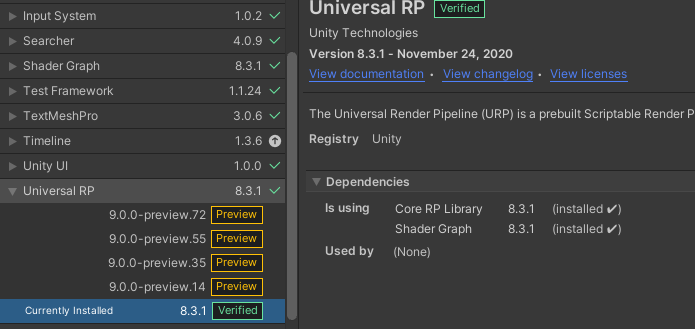 surreal smelt
really?
flat crater

so that's just two ways of accessing something
I'm still nowhere near to find out how to change the interaction!!!
😂
surreal smelt
So ill just stay with the old one for now Im not planning to realese my current project so i dont really car if its not perfect
flat crater
Yeah I agree with you man, I'm pretty much too far into this now
surreal smelt
Yh
Just look at this:```CSharp
public class Plane : MonoBehaviour
{
public float pitch;
public float roll;
public float yaw;
void Update()
{
    GetInput();
}

void GetInput()
{
    pitch = Input.GetAxis("Vertical");
    roll = Input.GetAxis("Horizontal");
    yaw = Input.GetAxis("Yaw");
}
}
So easy
flat crater
but yeah i agree, rather use a plain old fashioned hammer and nail than a broken nailgun that'll get you into the hospital instead
surreal smelt
Rewired seams pretty cool.
flat crater
I would still recommend looking at Rewired though, Olento is right, hot plugging is a must-have if you build for multiple devices
surreal smelt
true
flat crater
Yeah no not dealing with this stupid sh*t
I'm getting Rewired
Unity Forum
So budget is not a problem. I have used both rewired and I've started using unity's new input system. So far unity's new input system has really...
People are PISSED 😂
Solution:
 sick cradle
there is this trend with new Unity packages that they do overengineer and complicate things more than necessary, this new input system isn't exception there IMHO
afaik rewired isn't all around great either but it's probably one of the most solid asset store offerings still
input is tricky but depending on your game genre, assets like rewired might just work well for you
flat crater
dude @sick cradle If I can't access or change a variable in a system with ease... Then I can't be arsed
It's just mindblowing
sick cradle
rewired was too limited for my use cases but I'm really difficult customer.. new input system did let me expand it and fix some of the weird stuff myself
well... you can do most of the things with the new input system but it's not a piece of software that's trivial to use + it's still very bugged
flat crater
you working for nasa or something?
sick cradle
I reported bunch of bugs some months ago, they've fixed one so far I think
sick cradle
this is the one they fixed https://issuetracker.unity3d.com/issues/input-system-input-system-axis-deadzone-minimum-value-fallsback-to-default-value-if-its-set-to-0
Reproduction steps: 1. Open the attached user's project "BugInputSystemDeadzone.zip" 2. In the Project window under the "Assets" fol...
but even their fix was super hacky
sick cradle
I could tell some stories about similar stuff that broke for similar level wtf stuff
flat crater
if it works for you that's great, but when I have difficulty with docs and reaching a variable, that's not good
sick cradle
they hardcode all kinds of weird things there
I literally spent one month integrating my own stuff to it + fixing some of the weird stuff they had there
flat crater
Yeah I've already wasted enough time thanks to it
sick cradle
new input system also is super sketchy on HID devices
it's straight up broken on many older devices
flat crater
❤️
 sick cradle
but those aren't really thing you'd normally worry about on game that's not some sort of sim (like racing game or flight sim)
anyway, good luck with rewired 🙂
flat crater
dude this already looks way better at the installation
Thanks man! ❤️
Thanks for the support guys
Here's a cool script for converting circle analogue to square analogue values
(You usually only find square to circle so this is pretty rare and you might need it some day for rectangle or UI crosshair/reticule)
{{ description }}
Save it! 🙂 Wish you guys goodluck too!
❤️
@sick cradle
@surreal smelt
surreal smelt
Thanks
 uncut crescent
Hello 👋
i use the new input system and i will create a binding who call my methode one times. Currently my methode is called six times 🤔 Does anyone know what i should do differently?
Thanks!
flat crater
show some code @uncut crescent
do it like this:

ignore the red squiglies, i just hopepd over to Rewired
anyway that right there is a unity invoke method (you can set that up in your player input component)
crazy thing is... it's not a button... that right there is a value or axis
with a presspoint
once that presspoint is passed, the inputsystem will call the phase "Started"
the trick is to not read the value but simply let the value trigger whatever method
and then write the functionality in that method
this is way to have single-frame execution with a value input in the inputsystem
with a Button it would be much much simpler so you'll figure that out definitely
with a button you would do (context.performed)
goodluck 🙂
uncut crescent
@flat crater This is my code:
            _inputMaster.VehicleAi.SelectTargetAi.performed += ctx =>
            {
                Debug.Log("Open AI Target Dialog");
                _G.GuiManager.ToggleGui(GUIs.AiTargetSelector);
};``` The entry in the log will print with that code two times when i press the binding (lctrl +h)InputMaster is the generated cs-file from the inputactions
uncut crescent
it's very misterios 🤔
{
    lock(lo)
    {
        if (_toggle)
        {
            Debug.Log(string.Format("{0} {1} {2}", ctx.duration, ctx.ReadValue<float>(), ctx.ReadValueAsButton()));
            _G.GuiManager.ToggleGui(GUIs.AiTargetSelector);
        }
        _toggle = !_toggle;
    }
};``` This will also print the entry multiple 🤔when and where are you running this code?
uncut crescent
Uhh.. this was the right question 🤦♂️ I have two vehicles, and now it will call it on booth 🙄
I thinks that is my error and not the inputsystem 🙈 Thanks for your support @austere grotto and @flat crater 🙂
timber robin
 modest meteor
Guys please have u got some tutorials for the new input system
modest meteor
Guys please have u got some tutorials for the new input system
Unity has an in-depth one on their YouTube Channel.
 plucky flint
Hey, I have a question about the new unity input system. In the UI menu there is a Submit text and its keybind is Submit[any] How do I actually know what keybinds is in this Submit[any] and how do I modify them? Thanks!
timber robin
modest meteor
have u got the link <@!140305629238657025>
Do you know how to use YouTube? Just look up input system on their channel, I don't need to do it for you.
 zinc stump
@modest meteor Don't post off-topic media
modest meteor
zinc stump
<@!792131965402611742> Don't post off-topic media
oki !
modest meteor
timber robin
Do you know how to use YouTube? Just look up input system on their channel, I do...
No need to be arrogant
austere grotto
plucky flint
Hey, I have a question about the new unity input system. In the UI menu there is...
It's based on what InputAction you have bound to Submit in your Input Module
plucky flint
austere grotto
It's based on what InputAction you have bound to Submit in your Input Module
Thanks for that, but I'm still somewhat confused. I am using the default input module, I can open that up in the event system by clicking on it. Inside is a script with a ton of examples and the only time time I can find them using the submit action is in the examples ///submitAction.AddBinding(...) Do you know where I can find the actual module that binds all my keys?
austere grotto
plucky flint
Thanks for that, but I'm still somewhat confused. I am using the default input m...
So if you look here this actually points at an InputActionAsset that comes built in to the Input System (by default). You shouldn't modify it. But you can click on that to find it and duplicate it. Then you can modify your duplicate and drag your duplicate into that slot instead
 plucky flint
austere grotto
So if you look here this actually points at an InputActionAsset that comes built...
plucky flint
austere grotto
So if you look here this actually points at an InputActionAsset that comes built...
So that is the original concern. The binding is just Usages > Submit
 plucky flint
lol that's what I've been trying to figure out
austere grotto
not sure where to find exactly what that is
plucky flint
It says in the docs something about all controllers having a "default" setting.
So its controller specific but I don't know where to get docs on the controllers
austere grotto
I guess it comes from here: https://docs.unity3d.com/Packages/com.unity.inputsystem@1.0/manual/Controls.html?q=submit#control-usages but again still not sure how a particular InputControl gets the "submit" usage
plucky flint
Yeah thats what I found before
A Control can have one or more associated usages. A usage is a string that denotes the Control's intended use. An example of a Control usage is Submit, which labels a Control that is commonly used to confirm a selection in the UI. On a gamepad, this usage is commonly found on the buttonSouth Control.```So there's a usages array on InputControl but it's read only: https://docs.unity3d.com/Packages/com.unity.inputsystem@1.0/api/UnityEngine.InputSystem.InputControl.html#UnityEngine_InputSystem_InputControl_usages
You're trying to change/assign a usage to a control right?
plucky flint
I think its the other way around, change a control to a usage
austere grotto
I guess it's supposed to be these functions:
https://docs.unity3d.com/Packages/com.unity.inputsystem@1.0/api/UnityEngine.InputSystem.InputSystem.html#UnityEngine_InputSystem_InputSystem_SetDeviceUsage_UnityEngine_InputSystem_InputDevice_System_String_
https://docs.unity3d.com/Packages/com.unity.inputsystem@1.0/api/UnityEngine.InputSystem.InputSystem.html#UnityEngine_InputSystem_InputSystem_AddDeviceUsage_UnityEngine_InputSystem_InputDevice_System_String_
But that seems to be for a whole device? 🤔
plucky flint
Okay, I'll look into it. Thanks! This is pro
flat crater
wow Rewired is so much better 🙂 I'm rly happy
 loud patrol
Hey there! I'm trying to enable both the old and new input systems on my project, so I've set the Active Input Handling setting to "Both". However whenever I add an Event System with the old Standalone Input Module I'm getting an error because I'm using the old InputManager
Does anyone have any ideas why this is happening?
 ancient sluice
If a key is held down during scene change, the Input.GetAxisRaw() returns 0 until the key is repressed. how could I fix this?
plucky flint
This seems like a stupid question, but how do I "click" a button in the new unity input system with keys. Enter is the default, but I don't know how to change the keybind. I've changed my action map to UI, and the "Submit" action to they Space [keyboard] key, but the buttons still click with enter.
west oracle
@plucky flint the default action map for UI has a universal submit mapping

sot hat will respect any OS-set "Submit" button
if you specifically only want Click, you'll need to copy/modify the default mapping
plucky flint
I was actually trying to do that yesterday (See just a few posts up) But i can't seem to figure that out. I would have assumed that just doing this would have changed the keybinding to space.
 west oracle
(On gamepads thats typically Button South, mouse left click, etc)
plucky flint
The other issue, is that space isn't working as a submit keybind
west oracle
seems to do the right thing; mapped only the Spacebar to the submit action
plucky flint
Ah, I think I figured it out. So I was working with a Player Input component that was active on another game object. The UI element was using the default input, not the player input on that other game object.
west oracle
^ this.
plucky flint
So another dumb question then. What determines which action map is used?
west oracle
within PlayerInput?
generally oyu enable/disable actionmaps yourself. PlayerInput lets you set a Default Action Map and provides helper functions for switching.
plucky flint
Yeah, so the event system handled my UI even though I had another game object controlling my character.
west oracle
the Input System UI Input Modle (or multiuser one) automatically enables specific actions from the list (Point Left Click, etc)
what's your goal? the multiuser-event-system stuff is pretty obnoxiously complex but I'm very familiar with it
plucky flint
At the moment just a better understanding. I have a character controller for movement, firing etc. I open up the pause menu, turn the player controller ActionsAsset to UI mode and suddenly I'm using a different Actions Asset. Instead of using the Actions Asset that was a component of my player character I'm using the Actions Asset on the eventsystem. I'm not sure why
west oracle
which event system?
plucky flint
The root eventsystem game object that has the "Event System" componenet and the "Input System UI Input Module" component
west oracle
are you dealing w/ multiple players / devices?
plucky flint
Nope
west oracle
so when you enable the Pause Menu, is the Input System UI Input Module under it in the hierarchy? (specifically, is it Enabled when you open pause?)
plucky flint
Yes, the eventsystem gameobject is the last thing in the hierarchy and the Input System UI Input Module component is always enabled and active
west oracle
lemme ask better heh... is the UI Input Module a child of the PauseMenu?
plucky flint
no
west oracle
ok, so its not getting activated when you pop open the pause menu
plucky flint
no.
west oracle
when you're using PlayerInput, how are you instantiating it?
plucky flint
It is a component of the root player-controlled object, instantiated on scene load, and is referenced in various scripts that are children of the root game object.
west oracle
instantiated with? the PlayerInputManager or are you just spawning the gameobject?
plucky flint
Just spawning a gameobject.
Okay so I think I understand. Playerinput component is only necessary in multiplayer games. I didn't know this was a thing. Here is what I was missing from the docs
The way PlayerInput notifies script code of events is determined by notificationBehavior. By default, this is set to SendMessages which will use SendMessage to send messages to the GameObject that PlayerInput sits on.
So my UI is not associated with my player object.
it won't ever recieve sendmessage so it will never be activated by the UI.
west oracle
^ "wont ever" unless you set it
PlayerInput does still have some uses, but it adds complexity.
Unity Forum
Decided to make a few of these to help folks that are new, or struggling (as I did) to move from the Old Input Manager to the New Input System.
Hope...
I covered a bunch of it here
plucky flint
Well thanks for the input!
west oracle
@plucky flint
here's a really simple version w/ PlayerInput implemented
mostly just makes use of PlayerInput's ActivateInput and DeactivateInput rather than worrying about switching UI contexts around
(also sorry for sending you the other crap in the experiments folder! my bad!)
plucky flint
lol its alright, thanks for the resources
 lucid vortex
nvm
 marsh fractal
Does anyone know why OnControlsChanged doesn't always work? I use currentControlScheme to automatically switch between keyboard/mouse and controller, but sometimes it just won't change to controller.

It's a wireless xbox one controller.
 harsh seal
I have a controller script that contains
   private void Awake()
    {
        playerController = new PlayerController();
        playerController.PlayerInput.Jump.performed += JumpPressed;
    }

    public void JumpPressed(InputAction.CallbackContext obj)
    {
        Debug.Log("call");
    }
then i have a combat state where i would like to check if say jump is pressed. In the old inputsystems i have
        if (Input.GetButtonDown("Jump"))
        {
            player.StateMachine.ChangeState(player.JumpState);
        }
how do i change
Input.GetButtonDown("JUMP")
to work with my newly set up playerController
 thick tiger
The JumpPressed function will be called when the button is pressed (since it is added to the event Jump.performed)
which is what happens with GetButtonDown
in the case, you can call your Jump function inside the JumpPressed one
harsh seal
yeah i am trying to keep them separated though
because i have many different player states that i only want certain interactions to be able to happen
if i put the Jump function inside JumpPressed you would be able to jump at any time
so that is why i want to check if GetButtonDown inside the state and not the controller
thick tiger
You could assign a boolean with the jump input. And change it on where GetButtonDown is
on Jump.performed assign a function that makes the jump boolean true
and on Jump.canceled assign a function that makes the jump boolean false
Or even better, maybe you just need to assign it to true on Jump.performed
and after you guaranteed that your character jumped, you return it to false
harsh seal
i was thinking of doing it that way only issue is returning it to false. just seems a lot messier then Input.GetButtonDown("Jump")
 eternal pecan
hey! trying to get used to the new input system here. so I'm making a game where your controls are mainly only jumping forwards and backwards. and I am following samyams tutorial, which went well.
but since I'm sorta new to coding how would I do the jumping where its back and forth like how the moving back and forth script does?
Here's a screenshot where I kinda "explain" it (green is result). also this is a 2d game.

i had a few typos in the screenshot, for the top red text I meant to say "makes player only jump forwards"
austere grotto
eternal pecan
hey! trying to get used to the new input system here. so I'm making a game where...
You would need to do something like this:
void Start() {
  playerActionControls.Land.Jump.started += Jump;
}

void Jump (InputAction.CallbackContext context) {
  float axisValue = context.ReadValue<float>();

  if (IsGrounded) {
    rb.AddForce(new Vector2(Mathf.Sign(axisValue) * 5.1f, 7f), ForceMode2D.Impulse);
  }
}
Thanks for the reply! Idk whats wrong but your code makes it do nothing. no errors btw. also I edited it so that it says "IsGrounded == true" instead of what u had.
heres your same code that I pasted into my script.
 austere grotto
the == true is not necessary, but also not harmful.
Perhaps try .performed instead of .started, but it should work with started 🤔
what do you have Jump bound to?
How is it set up?
Is it a single keyboard key? A controller dpad?
eternal pecan
this should answer your question.
