
#🖱️┃input-system
1 messages · Page 20 of 1
 austere grotto
 quasi wren
```cs
namespace FPS_Test.Client
{
[Serializable]
public class Cmd
{
...
quasi wren
```cs
namespace FPS_Test.Client
{
[Serializable]
public class Cmd
{
...
you never called controls.Enable();
austere grotto
how was Move defined as per actionMap.FindAction(Move,true);? Also any errors in console?
 hollow roost
austere grotto
how was `Move` defined as per `actionMap.FindAction(Move,true);`? Also any error...
hollow roost
austere grotto
how was `Move` defined as per `actionMap.FindAction(Move,true);`? Also any error...
no, no errors. Move is a vector 2 value action.
austere grotto
hollow roost
no, no errors. Move is a vector 2 value action.
No it's a string here
Can you show where this string is initialized?
hollow roost
ah, you mean that. I defined field of string type that describe action name, so that I can change it in the editor
    [Header("Action Name References")]
    [SerializeField] private string Move = "Move";
    [SerializeField] private string Look = "Look";
    [SerializeField] private string Jump = "Jump";
    [SerializeField] private string Sprint = "Sprint";

    private InputAction moveAction;
    private InputAction lookAction;
    private InputAction jumpAction;
    private InputAction sprintAction;
What's it set to in the inspector
hollow roost
As "Move", I haven't changed it there
funny things is, i also have rotate or look action in the same script, and it does work
  public Vector2 moveInput { get; private set; }
  public Vector2 lookInput { get; private set; }
  public bool jumpB { get; private set; }
  public float sprintInput { get; private set;}

private void HandleRotation()
{
    float xRotation = inputHandler.lookInput.x * mouseSensetivity;
    transform.Rotate(0,xRotation,0);

    verticalRotation -= inputHandler.lookInput.y * mouseSensetivity;
    verticalRotation = Mathf.Clamp(verticalRotation, -upAndDownRange, upAndDownRange);

    camera.transform.localRotation = Quaternion.Euler(verticalRotation, 0, 0);
}
Try removing one of the two bindings
 weak viper
Hey I don't see the option to get a 2D vector composite like in this tutorial I'm following. What I see vs what he sees in screenshots. I'm using free version on mac (his video is from two years ago).


I'm happy to work around this if need be. He said he got it by right clicking but didnt work for me.
austere grotto
weak viper
Hey I don't see the option to get a 2D vector composite like in this tutorial I'...
It was renamed
It's up/left/right/down composite now
Also make sure the action has
Action Type: Value
Control Type: Vector2
weak viper
so which do I click? I don't see an option for up/left/right/down @austere grotto
 twin sundial
how do I get the expected return type of an InputAction? Like if I set the ControlType to Vector2, how can I get that in code?
basically I just want to get what Control Type is set to
 twin sundial
nvm I got it
I tried expectedControlType earlier and it wasn't working fsr but it was an unrelated reason so it's working now
 cinder shell
Hi I am trying to do networked multiplayer using mirror and the new input system. The networked multiplayer I have set up works fine if I handle all my movment not using the new input system but for some reasons using the new input system and networked multiplayer it makes it so the first player the host can move around fine but the next player that connects is using my controller scheme and can move around fine using the controller. But no matter what I do I can't get the second player to use its keyboard. Its scheme keeps changign to the controller scheme or if i get rid of the controller scheme itll just not work at all. What iv gathered is the new input system only sees the one keyboard (the hosts) and therefore wont assign me to another keyboards since the only one it sees is already taken. How do i make it recognize the keyboard on the computer that is connecting?
Edit Found a fix on this forum post if anyone else is having this issue: https://forum.unity.com/threads/the-new-input-system-package-doesnt-seem-to-work-with-mirror-networking-api.951107/
Unity Forum
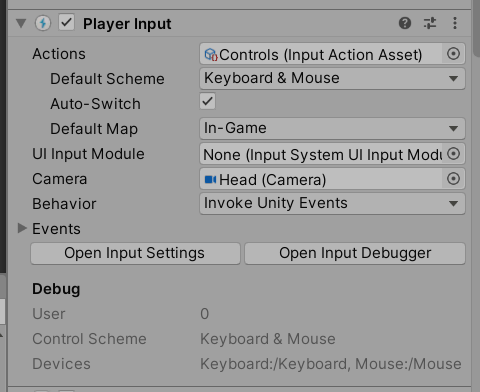
Everytime I spawn 2 players (one host and one client) with the package, the Player Input component on the host looks like this:
[IMG]
It works...

 verbal remnant
cinder shell
Hi I am trying to do networked multiplayer using mirror and the new input system...
verbal remnant
cinder shell
Hi I am trying to do networked multiplayer using mirror and the new input system...
You need to send the other computers inputs via netcode to the host. InputSystem and netcode are entirely separate modules.
austere grotto
weak viper
so which do I click? I don't see an option for up/left/right/down <@179367739574...
You will see it when the action is set up as mentioned
weak viper
austere grotto
You will see it when the action is set up as mentioned
can you walk me through what I click to set it up as you said?
I do it from here right?

I found the docs and they show different options than mine

@austere grotto Never mind, got it. Thank you!

 hidden roost
Hi there! I want to rotate an obj with a button. Is there a way of doing it with the new input system without using a boolean in Update? I want the object to rotate if the button is being held.
austere grotto
hidden roost
Hi there! I want to rotate an obj with a button. Is there a way of doing it with...
If you want to do something each frame, Update is the way to go
the alternative would be a coroutine
 topaz sapphire
okay, so, I've added a new key to my input system and it REFUSES to register the key being pressed.
"Q" is the Inventory key
It is set in the Input Actions asset, under its Actions.
It has identical settings there to another key that does function.
It is in my inputmanager script
It has identical structure to another key that does function.
In my Inputmanager, it's set to play a debug.log message if it successfully registers,
https://pastebin.com/2B9infbG
important lines:
Line 22: the private variable for the button
147: the lines holding the actual meat of it, including the Debug.Log that isn't firing.
The image I've linked is a screencap of my input asset, in which Pause (which works) is identical to Inventory (which does not)
Pastebin
Pastebin.com is the number one paste tool since 2002. Pastebin is a website where you can store text online for a set period of time.

I have no earthly idea what's going wrong here, but I know it's in the "Inventory" action somehow not firing at all, or the InventoryButtonPressed() function not firing.
nevemind, I found the problem. There's THREE places you have to put new keys/actions before they work... I swear this has happened before. Apologies.
 hybrid tapir
is there a built-in way to calculate the time between button is held down and is released?
austere grotto
hybrid tapir
is there a built-in way to calculate the time between button is held down and is...
record the time when it's pressed and compare it with the time when it's released
 hexed geode
Hi, is there a way to define the callback method of a CallbackContext given as parameter?
I would like to have a RegisterActionCallback(InputAction.CallbackContext, delegate) method that would be called from other classes that would need it, but i struggle to do so
austere grotto
hexed geode
Hi, is there a way to define the callback method of a CallbackContext given as p...
I'm not sure what you mean by this
What does "define the callback method of a CallbackContext given as parameter" mean?
You define which function is called when you subscribe to one of the events
e.g. performed, canceled, started
hexed geode
Sorry if i explain myself badly. I have a method inside a class that i would like to be called for the performed event.
My InputActions custom class is inside another class (my InputManager). So i wanted to create a public method of the InputManager that my class would call to define it.
This method would take as parameter the action name as string, the event i want and the method to define.
Is it better...? 😅
austere grotto
hexed geode
Sorry if i explain myself badly. I have a method inside a class that i would li...
sure - simple enough... something like
public void AddListener(string actionName, Action<InputAction.CallbackContext> listener) {
  myInputActions["actionName"].performed += listener;
}```
Note that action name in this case should be like "ActionMapName/ActionName"And if i would like the method to be more generic? User could choose between performed/cancelled with another parameter?
austere grotto
many options - provide three different methods is one option
pass in an enum and use a switch statement is another
alternatively you could just have your input manager allow access directly to the input actions thing
then you could just do like myInputManager.actions["Map/Action"].performed += MyListener
hexed geode
Yes of course... i cleary search for too complicated things (or don't understand well the events here). Thank you very much !
(EDIT: Understood what i missed, another time thanks !)
 elfin rain
Hi, sorry where can I ask questions about the XR interaction tool kit please? thank you
austere grotto
elfin rain
Hi, sorry where can I ask questions about the XR interaction tool kit please? th...
austere grotto
This is fine
 frail sedge
im trying to find a simple solution to add a Player 2 to my game. can someone link me a video tutorial as i can't find anythign useful other then the new input system
being a beginner, i feel i under the old input systems logic more so
frail sedge
and then rename to "HorizontalP2" ?
austere grotto
For example, sure
frail sedge
i see, i just wondered if there was a quick way to do this
but i get thats it
i assume the new input system can do this automatically
austere grotto
There's a reason the old input system was abandoned
austere grotto
frail sedge
i assume the new input system can do this automatically
The new system has a much more elegant solution, yes. https://docs.unity3d.com/Packages/com.unity.inputsystem@1.7/manual/PlayerInputManager.html
frail sedge
ty
 crisp ferry
For some reason my screen input touch only runs once
but it works just fine for my mouse bind

here are my bindings
this it working properly with the mouse
then it not working properly with my phone using unity remote
oh wait I think i actually I might know why
alr its kinda working now
I was using MousePosition insttead of the callback position lol
but still not working
and not sure if its jsut because its the untiy remote on my iphone
cuz with the mouse it works perfectly
austere grotto
unity remote is always very janky
it's not a true mobile experience
make a dev build if you really want to test things on your phone
 bronze hound
Is there any way to get sub-pixel cursor position when using a drawing tablet?


My lines look pretty bad when editing zoomed out, but I'm sure the drawing tablet captures in a higher precision


In Krita this is almost non-existent, I get perfect squiggly lines even when zoomed out that much
I don't think it would be the smoothing algorithm as at that point there probably isn't even much to smooth
 pure obsidian
hey i have a quick question im trying to make an fps game rn but i want to make the camera look speed the same when using a controller and a mouse but right now the mouse is way faster and i dont know how to fix it can anyone help
 surreal moth
In my game I cannot click on any canvas UI elements or interact with anything in the canvas if I am using anything but the DefaultInputactions input action asset. This asset has to be set on both the EventSystem and the Player Input components.
I'd like to use my own input asset, but I cant get it to recognize it it. What do I have to do to fix this? Just setting my asset in those two places and making sure my asset has an action map with all the same hooks as the default isnt enough to replace the default and have UI interactivity continue to function
 austere grotto
surreal moth
In my game I cannot click on any canvas UI elements or interact with anything in...
austere grotto
surreal moth
In my game I cannot click on any canvas UI elements or interact with anything in...
The input module is where the actions asset needs to be set up for the event system
surreal moth
austere grotto
The input module is where the actions asset needs to be set up for the event sys...
Which component is an input module? Or is that something in the player settings maybe?
austere grotto
surreal moth
Which component is an input module? Or is that something in the player settings ...
it's a component on the Event System
InputSystemUIInputModule
surreal moth

Oh, yes in that case yes I have it set
But I cannot click on anything in my scene, if I replace my action map with the default, then I can
austere grotto
I think you might also need to manually call Enable() on that action map somewhere/somehow ?
surreal moth
Hm okay Ill write a script that runs on start and attach it to that
austere grotto
yeah try that
surreal moth
austere grotto
yeah try that
Enable() doesnt appear to be a method of it. I can set .enabled to = true but I think thats just the tick mark in the corner of inspector
or wait you mean the action map
not the component
yeah you meant this
austere grotto
surreal moth
Enable() doesnt appear to be a method of it. I can set .enabled to = true but I ...
public InputActionAsset asset;

void Start() {
  asset.Enable();
  // OR
  asset.FindActionMap("UI").Enable();
}```or that yea
surreal moth
testrunning that now
surreal moth
austere grotto
```cs
public InputActionAsset asset;
void Start() {
asset.Enable();
// OR
...
No luck - no console error, but no click interaction
austere grotto
dumb question but you actually added the same/similar bindings?
surreal moth
austere grotto
dumb question but you actually added the same/similar bindings?
I -think- I did? I copied and pasted the entire UI action map from the default into mine
 austere grotto
oh interesting yeah if you copy and pasted that should work
surreal moth

drilling down I found a difference
it looks like none of the actions are bound to be used in the default control scheme
going through every single key and ticking that off is going to be a pain in the butt ._.
austere grotto
ahh yeah I was going to suggest control scheme as the culprit next
control schemes are too often the culprit
surreal moth

Is there any way I can tick these off without manually going through every binding of every action do you think?
I tried to copy/paste it again but it came in with the same not checked
austere grotto
surreal moth
maybe copy the control schemes first then copy the action map again?
surreal moth
oh you can copy control schemes? Ill try that next
surreal moth
austere grotto
maybe copy the control schemes first then copy the action map again?
How do you copy a control scheme?
When I right click on it, I see add, edit, duplicate, delete
But no copy

dang was hoping I could do it from project view
austere grotto
surreal moth
How do you copy a control scheme?
no idea
You know one thing you could do is instead copy the entire DefaultInputActionsAsset
Then maybe copy and paste your GameControl action map into it
surreal moth
maybe I can do it through code like default.control scheme copy and paste through there
 slow crest
anyone know how i can impliment touch controls for iphone for "selecting multiple items by dragging touch"?
e.g. a vertical list of items and toching the top item, then dragging your finger down to the bottom will select all whom collided.
 mighty tiger
Is it allowed to use multiple Input actions assets? No inputs will be named the same… I’m just trying to extend solution from asset store (adventure creator).. and for some reason it’s ignoring any new action maps I put into existing input action asset. So I figured out workaround using extra one to define my extra controls
mighty tiger
I found working solution while using action maps so now it’s more of a curiosity question
austere grotto
mighty tiger
Is it allowed to use multiple Input actions assets? No inputs will be named the ...
Yes there's nothing stopping you from using multiple assets
Not sure what you mean by ignoring action maps though
mighty tiger
I had an issue that the game was somehow forcing only two first actionmaps to be enabled and nothing else. It’s kind of hard to explain.. but I figured a way to fix it, it’s possible my additions to scripts were messing with it somehow
Thanks for the reply regarding those assets though 🙏
 rough cave
so im trying to install 1.8.0 version but its not appearing in the unity package manager. im using version 2022.3.10f1 for my project has anyone run into this before
austere grotto
rough cave
so im trying to install 1.8.0 version but its not appearing in the unity package...
1.8.0 isn't realeased yet.
it's in prerelease
rough cave
its not appearing even if i have that on
austere grotto
What happens if you try install by name
and add the version manually
com.unity.inputsystem
1.8.0-pre.2
 lament plaza
austere grotto
and add the version manually
lament plaza
austere grotto
and add the version manually
Hey, just a heads up 1.8.0 will either be out this week or next.
It was pushed already to GitHub as a stable branch release tag.

oh lol nvm I was just informed it came out two minutes ago no joke.
I just started the download.
rough cave
lament plaza
oh lol nvm I was just informed it came out two minutes ago no joke.
I just start...
tyty
lament plaza
rough cave
tyty
Due note when I tried to update from 1.8.0-pre.2 to 1.8.0 I got an error.
It was solved by downgrading to 1.7 than updating to 1.8. Just in case you get that error too thought the information might help.
rough cave
nope
lament plaza
rough cave
nope
My error could of been related to the version I was on honestly. Testing out a Beta version of Unity so I can update a project to Render Graph. I know 2023.2 + newer has extra features related to Input System so that could be it.
rough cave
lament plaza
My error could of been related to the version I was on honestly. Testing out a B...
i see, thanks for sayinbg
lament plaza
rough cave
i see, thanks for sayinbg
No problem. If you get any issues with the update I am sure the community be happy to help. I know 1.8.1 is already in development and has some stuff coming down the pipeline as well.
Mainly bug fixes which is honestly the best patch to see most times.,
Okay did some test and the error I ran into is only on Unity 6 beta that came out this morning. On Unity 6 beta for some reason I had to downgrade the Input System to 1.7 than upgrade to 1.8.
This could be just because some of the package cache needed cleared do to all the changes in Unity 6.
rough cave
unity 6 is out already?
wait i thought it was named based on year
did i miss some news
austere grotto
rough cave
wait i thought it was named based on year
 glass yacht
topaz sapphire
glass yacht
topaz sapphire
I want to make my input system trigger inputs only on press, not when held and released for its callbacks, I'm having the issue that apparently a lot of people have, where all inputs on the input system fire three times, due to three different phases?
I can't figure out how to fix this problem, and it's driving me insane.
austere grotto
topaz sapphire
I want to make my input system trigger inputs only on press, not when held and r...
The problem is fixed with an if statement
if (ctx.performed)
bronze hound
pure obsidian
hey i have a quick question im trying to make an fps game rn but i want to make ...
the mouse speed depends on how fast you move the mouse, there is no maximum speed
 crimson frost
Just got this bug today, I can't properly see the input field when picking a path for my input binding.

Is there a workaround? I tried restarting Unity but its still like this
 limpid sleet
Hi everyone! I've been putting my mind to work with a bug but I really can't find the fix. When the player is below 45 FPS my character moves slightly diagonally. I've put a video down below and I'm holding only W or S and it's teleporting slightly to the right or to the left depends if I move forward or backwards. I'm using rigidbody for my player and I've avoided this problem a lot by trying to optimize the game better but some PC's are really slow and need to fix this for them. Anyone has any problem?
 tame oracle
quick question, does someone encouter input lags with the "new" input system from unity? Sometimes like variables won't initialize fast enough
austere grotto
tame oracle
quick question, does someone encouter input lags with the "new" input system fro...
You're going to have to elaborate on that. What do you mean?
 granite apex
The documentation states if the binding is a composite, then the composite will determine value type of the input action. But how can I get InputBindingComposite from InputAction in order to get valueType property?
austere grotto
granite apex
The documentation states if the binding is a composite, then the composite will ...
What are you trying to do exactly?
granite apex
austere grotto
What are you trying to do exactly?
I'm trying to get Type of each InputAction form an InputActionMap at the start of a scene. Because this is start, activeValueType is null. Therefore I need to read valueType from controls. But if there is a composite binding, I should read from it instead. Except I don't now how to get one having InputAction and InputActionMap.
And InputBindingComposite isn't polymorphic to InputBinding so I can't cast it.
austere grotto
granite apex
I'm trying to get Type of each InputAction form an InputActionMap at the start o...
Looks like it has an "isComposite property
granite apex
austere grotto
Looks like it has an "isComposite property
Yes, but this only the indication that this particular InputBinding is a composite. Unless I'm missing something, I can't read valueType from it.
https://docs.unity3d.com/Packages/com.unity.inputsystem@1.8/api/UnityEngine.InputSystem.InputBindingComposite.html#UnityEngine_InputSystem_InputBindingComposite_valueType
I suppose there is a way to get InputBindingComposite using the index of the binding with isComposite flag, but I can't find it.
Basically, I want something like this:
foreach ( var binding in action.bindings ) {
if ( binding.isComposite ) {
//FIXME: Find a way to retrive InputBindingComposite.valueType
// return ???.valueType
}
}
return action.controls[0].valueType;
}``` mighty crystal
I am unable to install 1.8 to my project (unity 2022.3.20f1)

is there a workaround?
austere grotto
mighty crystal
it's not released yet
Or it wasn't yesterday...
probably you need to update Unity to the latest version first
As of yesterday 1.8 was still in preview
mighty crystal
austere grotto
it's not released yet

i was able to find it by name
unless maybe that release was supposed to be a pre release ☠️
 sterile cairn
Can I get some help? The button isn't doing anything, I click on it after I start the game and it just does nothing, I'm stuck on the first scene trying to switch to the actual game scene.


 austere grotto
sterile cairn
Can I get some help? The button isn't doing anything, I click on it after I star...
austere grotto
sterile cairn
Can I get some help? The button isn't doing anything, I click on it after I star...
that's not an input system question it's a #📲┃ui-ux question but the answer is you are missing an Event System in this scene
Create -> UI -> Event System
sterile cairn
Thats it? Tysm
 indigo parrot
is the Left Button [Mouse] binding in PlayerInput (Input Actions) window cross-platform? so for Android, it is same as player tapping with finger?
 austere grotto
indigo parrot
is the `Left Button [Mouse]` binding in PlayerInput (Input Actions) window cross...
austere grotto
indigo parrot
is the `Left Button [Mouse]` binding in PlayerInput (Input Actions) window cross...
The other way around actually, assuming you enable touch simulation, the mouse will act like a touch input
indigo parrot
thank
 slate pelican
is there a simple way to make two sets of input actions link to the same controller bindings?
like, if I add one key to one action, the other input action will also have that key registered to it
i’d like to split up some of the different interactions, because it would be easier for code, I think
 distant salmon
I'm using the input-system to read inputs for the mouse/joystick.
The mouse works fine, but when I use the joystick it ignores the inputs that have the same value as the previous one.
I'm not sure if this is intended, but I'm guessing it is and I'm using the system wrong...
The jiggle in the video is when I'm moving the joystick. The debug shows when the action is read by the system. It's subscribed to all three actions too:
lookInput.action.performed -= UpdateLook;
lookInput.action.started -= UpdateLook;
lookInput.action.canceled -= UpdateLook;
 still trout
distant salmon
I'm using the input-system to read inputs for the mouse/joystick.
The mouse work...
still trout
distant salmon
I'm using the input-system to read inputs for the mouse/joystick.
The mouse work...
Yes, input system gives you only changes, not the current value each frame, save the current values in a variable and act on them in Update/FixedUpdate
distant salmon
still trout
Yes, input system gives you only changes, not the current value each frame, save...
I ate the input after using it, so that's why it was jittering. Works well now, cheers!
ate meaning I set it to zero.
topaz sapphire
So, in the input system I currently have a script that handles getting the mouse position, but now I'm looking to get a proper Drag-and-drop system implemented. I've noticed online that there seem to be people trying all sorts of differnt methods to handle mouse dragging. What is the best practice for it, currently?
Are there some resources that would help me learn a robust means of handling mouse-dragging?
my current plan is to just define mouse click and release, and have my game logic use click to begin observing the mouse position, and release to stop observing it.
austere grotto
topaz sapphire
So, in the input system I currently have a script that handles getting the mouse...
Using the standard Drag and Drop support from UGUI
IDragHandler, IBeginDragHandler, IEndDragHandler
https://docs.unity3d.com/Packages/com.unity.ugui@1.0/manual/SupportedEvents.html
topaz sapphire
I am so glad I asked here first, because I've never heard of that when I was looking up how to handle mousedragging in the new input system.
austere grotto
The input system isn't really all that related to it
You just need to make sure your Event System has the correct input module
Otherwise it's part of UGUI
Oh also IDropHandler
topaz sapphire
So mouse inputs are handled differently from keyboard/gamepad inputs?
austere grotto
I don't understand the relevance?
topaz sapphire
I'm trying to figure out how to implement a drag and drop system, and I'm getting a lot of conflicting anwers of how to do that. Apologies if I'm not understandable, but this is all very confusing to me.
Is this a good tutorial for using the Drag events correctly? I can't find any more recent ones, after a cursory search.

In this short Unity Tip I will show you how to drag and drop UI image in Unity so that it follows the mouse when we drag it and stays in place when we drop it.
To create this we will be using Event Trigger component that allows us to react to many different events regarding player input.
austere grotto
topaz sapphire
I'm trying to figure out how to implement a drag and drop system, and I'm gettin...
I don't understand what the keyboard has to do with it
That tutorial seems very incomplete but I only skimmed through it
topaz sapphire
You're saying the input system doesn't have anything to do with mouse inputs, that's what's confusing me.
austere grotto
The input system has to do with inputs but it has little to do with drag and drop
UGUI abstracts away input from the drag and drop stuff
topaz sapphire
I don't understand,, but it sounds like I'm going to have to keep looking for some kind of resource that has information on how to implement this.
 worldly agate
Anyone can help me with this?


I just upgraded to 1.8.1
But not sure where that UI action map is
And what inputs it need
 supple crow
topaz sapphire
I don't understand,, but it sounds like I'm going to have to keep looking for so...
supple crow
topaz sapphire
I don't understand,, but it sounds like I'm going to have to keep looking for so...
The EventSystem is responsible for sending UI events, like OnSubmit and OnPointerDown
It uses an input system (either the old Input Manager or the new Input System) to produce these events.
You respond to those events to do things.
so the Input System isn't terribly relevant when making many UI interactions
 weary remnant
I'm having an issue with when I press "Tab" to open the inventory it doesn't have a press delay, so if i hold it down for the slightest amount of time it will instantly close it. I can't figure out a way to make it so it has to wait like .3s or something this is the code snippet in an update function.

if i press it as fast as i can it works fast but thats not user friendly at all
austere grotto
weary remnant
I'm having an issue with when I press "Tab" to open the inventory it doesn't hav...
You'd have to show your code for this InventoryTriggered thing
weary remnant
public static PlayerInputHandler Instance { get; private set; }

    private void Awake()
    {
        RegisterInputActions();
    }
private void RegisterInputActions()
    {
        inventoryAction.performed += ctx => InventoryTriggered = true;
        inventoryAction.canceled += ctx => InventoryTriggered = false;
    }
Why not just toggle the inventory from the performed action
As it is right now that will be true for all the frames while you hold the button
weary remnant
because i don't want it to be a hold
i want it to be a press
i press tab to open and close the menu
austere grotto
What you implemented here is a hold
If you toggle the inventory directly in performed it will be a press
weary remnant
how can i change it to a press then?
austere grotto
I just said how
weary remnant
started?
austere grotto
Performed is just fine
You don't need this intermediate bool variable
You just do performed += _ => ToggleInventory();
Your problem is this whole bool variable an use of Update thing
An alternative is dump the events and the field entirely and just do this:
public bool InventoryTriggered => inventoryAction.wasPerformedThisFrame;```would that not yield the same result?
austere grotto
it would not yield the same result
I don't think you're understanding the problem here
You have a bool variable that is keeping the value true UNTIL you release the key
because that's how you wrote the code
the bool variable is a bad idea - you don't ever actually need to store that for a period of time
weary remnant
not sure if this is the best way to do it but it works for me and works in game most importantly thank you for the help of understanding it
 austere grotto
weary remnant
not sure if this is the best way to do it but it works for me and works in game ...
austere grotto
weary remnant
not sure if this is the best way to do it but it works for me and works in game ...
yes this is basically equivalent to what I had here #🖱️┃input-system message
weary remnant
alright then im happy 🙂
 rough thistle
Hi there. jumping straight to the point, I'm using the new input system with the built-in OnScreenButton script to simulate other devices' input on the mobile version of the game. While it works completely fine on editor, on mobile it does not work. My suspicion is that the jitter caused by the auto-switch is making it dysfunctional.
I attached a video in-which the jitter on the component inspector is shown. While it works fine in the editor as shown in the video, it does not function in the build
Input system:

button setup:

code:

any help is much appreciated <3
austere grotto
rough thistle
Hi there. jumping straight to the point, I'm using the new input system with the...
Probably a control schemes issue TBH
On mobile the gamepad device probably is excluded due to the Touch control scheme
Documentation around control schemes is shit unfortunately.
rough thistle
@austere grotto thanks for the response. I guess I could instead of GamePad use the Keyboard control scheme but I doubt itll make any difference
so confusing to me how something as simple as mobile controls is handled so poorly with the new input system. If you have no other ideas for a fix (and other people in the forums) I might just use the old input system instead and call it a day
 mental musk
Using the new input system, why is there started, canceled and performed, but not updated for hold actions?
I want to know the percentage the key is held before being performed?
austere grotto
mental musk
Using the new input system, why is there started, canceled and performed, but no...
Simple - the input system is for handling input
it's not for driving game logic
If you want to do something every frame, that's what Update or a coroutine are for
Also what does "percentage the key is held" mean?
mental musk
The hold input type waits for a set duration (I think by default it's 0.5f) before triggering, so I assumed it would have an event that yields the current amount of hold time. You're right, percentage doesn't really make sense.
I've simulated this even by using started and cancelled and fixed update
austere grotto
mental musk
The hold input type waits for a set duration (I think by default it's 0.5f) befo...
yes that's what the hold interaction does
it gets performed after the specified amount of time
austere grotto
The input system is there to tell you:
- When input changes
- The current value of input
it's not there to synthesize events for frame updates
frame updates are completely orthogonal to input
extra data about the interactions just wasn't part of the design I guess
 spare frigate
Im trying to setup input binding with RebindingOperation, is there a "correct" way to handle unbinding a key? For example, I can call someInputAction.PerformInteractiveRebinding(index).OnComplete(SomeFunc) where SomeFunc can check if the overridePath is <keyboard>/backspace for example, and if so then someInputAction.ApplyBindingOverride(index, string.Empty) seems to work but seems odd, another approach I found was using .OnComplete(...).WithControlsExcluding("<keyboard>/backspace") which then returns <keyboard>/anyKey when hitting backspace, so I can then check for "anyKey" and then call the same ApplyBindingOverride, but im wondering if this is the intended way of handling unbinds, or if theres some extension or something that handles this logic already?
 dense hare
About the Input field, how do I set it to where you can type any numbers and any letters?
When I try doing that, (setting it to Standard) It's not working.
 lavish bluff
Is there a built-in way you're supposed to go backward through menus? Like pressing B to exit a pause menu
austere grotto
lavish bluff
Is there a built-in way you're supposed to go backward through menus? Like press...
More of #📲┃ui-ux question. You're meant to use the Event System "Cancel" event
lavish bluff
Thanks
 kindred finch
When i generate C# script for my input system, opening it in Visual Studio makes that script in VS really slow (others work fine) any idea why?
problem is with this "class" which if extended, makes IDE really slow

 remote radish
kindred finch
When i generate C# script for my input system, opening it in Visual Studio makes...
remote radish
kindred finch
When i generate C# script for my input system, opening it in Visual Studio makes...
How big is the class lol
I cant imagine a huge class makes the IDE happy
 sweet jay
I'm trying to make it so I can navigate through menus with keys other than WASD and the arrows. I'm in the DefaultInputActions asset. When I add the additional keybindings, and then click "Save Asset," I get a warning.
"The package cache was invalidated and rebuilt because the following immutable asset(s) were unexpectedly altered: Packages/com.unity.inputsystem/InputSystem/Plugins/PlayerInput/DefaultInputActions.inputactions.
Then all of my changes are immediately erased. I was watching a YouTube tutorial video on how to add additional keys when navigating menus, and this is how it told me to add them. Since it's immutable, what's the right way to accomplish this?


 ornate saffron
sweet jay
I'm trying to make it so I can navigate through menus with keys other than WASD ...
ornate saffron
sweet jay
I'm trying to make it so I can navigate through menus with keys other than WASD ...
make a copy of it in your own assets folder
then make sure your input module references yours and not the one in the package, of course
sweet jay
Got it working with the copy, thanks!
 sweet roost
Hi, i have some InputActions with InputBindings to following inputs for example:
<Gamepad>/leftStick/y
sometimes it happens that certain devices (joysticks) have a totaly broken axis.
This results in swapped positive / negative ranges. Sometimes the ranges are non linear... or scaled somehow wierd.
Any suggestions to kind of make this more reliable ?
under windows' own gamepad/joystick/driver view the axis looks fine!
i always expect an axis as control tho:
mRebindOperation.WithExpectedControlType<UnityEngine.InputSystem.Controls.AxisControl>();
mental musk
sweet roost
Hi, i have some InputActions with InputBindings to following inputs for example:...
Maybe you can try to clamp the input values?
sweet roost
already clamped, but sometimes the positive and negative range is swapped of the axis! the values are not continuous
for example of the stick is moved from left to right the values go from 0 to 1 then jump to -1 and go to 0
thats clamped and normalized!
kindred finch
remote radish
How big is the class lol
I cant imagine a huge class makes the IDE happy
1k rows, not too much, but lots of it uses "dynamic coding", i think IDE has trouble connecting all of the references
sweet jay
I'm trying to juggle keyboard and mouse controls in a menu. As buttons are selected and clicked, they are playing a sound effect. I used to perform these tasks via the Event Triggers, but then the mouse and keyboard would step over each other and cause the sounds to play twice. My goal is to avoid the sound being played twice while allowing keyboard and mouse controls.
This code below works for the mouse, but it's completely ignored by the keyboard. Is there a way to replicate these methods for keyboard only so both input types don't step over each other?
[RequireComponent(typeof(Selectable))]
public class ButtonProperties : MonoBehaviour, IPointerEnterHandler, IPointerExitHandler, IDeselectHandler, IPointerDownHandler
{
    public void OnPointerEnter(PointerEventData eventData)
    {
        if (!EventSystem.current.alreadySelecting)
        {
            AudioManager.PlaySoundStatic("PointerEnter");
            EventSystem.current.SetSelectedGameObject(this.gameObject);
        }
    }

    public void OnPointerExit(PointerEventData eventData)
    {
        EventSystem.current.SetSelectedGameObject(null);
    }

    public void OnPointerDown(PointerEventData eventData)
    {
        AudioManager.PlaySoundStatic("PointerClick");
    }

    public void OnDeselect(BaseEventData eventData)
    {
        this.GetComponent<Selectable>().OnPointerExit(null);
    }
}
Make your audio manager not play a sound if a sound is already playing.
sweet jay
That's an option, but as I'm navigating through the menu, I want it to make a sound each time an option is highlighted. If it only plays one sound at a time it will eat some of the other menu sounds that could be playing.
Otherwise I could probably scroll through 3 different options by the time the sound finishes.
Let me rephrase that first sentence, reading through it again I don't think it makes sense.
austere grotto
pass in the source of the sound to the audio manager if you wish
then the audio manager can make all these decisions about whether to play or not.
sweet jay
My audio manager will always have access to the audiosource of the sound. But how am I able to differenciate what's two of the same sound happening immediately to tell it to only play one of them?
austere grotto
Check if the audio source is currently playing
sweet jay
austere grotto
Check if the audio source is currently playing
This is where the AudioManager plays the sound.
    public void PlaySound(string name)
    {
        Sound s = Array.Find(sounds, Sound => Sound.name == name);
        if (s == null)
        {
            Debug.LogWarning("PlaySound: " + name + " not found!");
            return;
        }
        else if (s.randomPitch)
        {
            s.source.pitch = Random.Range(0.8f, 1.2f);
        }
        if (!s.source.isPlaying)
        {
            s.source.PlayOneShot(s.source.clip);
        }
    }
The audio source is coming from an array of sounds. I just added in the last if statement to see if it's playing. This works, but it makes it so I stop hearing the other menu items being selected while the sound effect is being played. Each button makes a click sound when it's highlighted/selected, and it stops doing that until the sound effect finishes.
I still want to hear the highlight/select sounds while the sound is playing.
If there's a way I can make a keyboard only version of those pointer methods I think I can avoid the issue as well.
austere grotto
sweet jay
If there's a way I can make a keyboard only version of those pointer methods I t...
Why not just OnSelect/OnDeselect
OnPointerXXX are all for mouse
sweet jay
Does OnSelect apply to mouse and keyboard or just keyboard?
austere grotto
it applies to clicking on the thing for mouse
or just highlighting it with the keyboard
I guess I'm confused about what you're trying to prevent here
when are users ever using a mouse and a keyboard simulatenously to navigate a menu? Isn't that a really weird situation?
sweet jay
I don't think people are going to use them simultaneously, but when you switch to keyboard or mouse, I want to be able to handle it. If a menu is small I like to use the keyboard, but if the menu is big I tend to use the mouse.
I need a few minutes though because I ran into a different problem that's preventing me from working on this one.
sweet jay
austere grotto
Why not just OnSelect/OnDeselect
Alright, I added OnSelect, and it's playing a sound effect. That works for keyboard, but if I highlight over a button with the mouse, it triggers OnPointerEnter and OnSelect at the same time, therefore playing a double sound effect.
sweet jay
OnPointerEnter consistently gets triggered before OnSelect does with the mouse. I set a "static bool blockSound = true" there to block the sound from playing in OnSelect, and then when OnSelect is triggered I set it back to false. I made the bool static because multiple buttons have this component and I want them to share the same value. I think I'm good now. Thank you PraetorBlue. 
austere grotto
sweet jay
Alright, I added OnSelect, and it's playing a sound effect. That works for keybo...
Well that's because you're calling EventSystem.current.SetSelectedGameObject(this.gameObject);
you're actually selecting it
but yeah if you figured out something that works
enjoy
 forest badger
Is there any way to enable OnHover with action bindings?
For example if I click some where random on screen, hold the click, then move the cursor over the button, it still triggers?
currently it only triggers if I directly press on the button.
surreal moth
UnityEngine.GUIUtility:ProcessEvent (int,intptr,bool&)```
I get this error in my console every time I make a change to my input action asset. Googling I havent found much answer to the cause or sollution. Is it something I've done wrong or is it something inherent to unity/the input system? Ive been having some anomalous behaviour issues in my project so I am trying to resolve all the red error messagesA followup to the above. It looks like the problem is that there's a typo in unity's input system package, but every time I fix it, it unfixes it automatically with this error message
Is there any way I can get my fix to stick?
 austere grotto
surreal moth
A followup to the above. It looks like the problem is that there's a typo in uni...
austere grotto
surreal moth
A followup to the above. It looks like the problem is that there's a typo in uni...
you can't modify packages unless you conver them to embedded packages
 surreal moth
austere grotto
you can't modify packages unless you conver them to embedded packages
surreal moth
austere grotto
you can't modify packages unless you conver them to embedded packages
Ahh I see, like this?

Ahh it says remove @<package-version>
surreal moth
austere grotto
you can't modify packages unless you conver them to embedded packages
That worked, thank you as always 👍
 barren smelt
I'm rebuilding my input setup, but I can't seem to figure out what I'm doing wrong. I've tried a variety of things, but none of them seem to work. I've hooked up input directly to InputActionReferences before, but that didn't work here. So I tried something more directly connected to the player's controller script, but I can't seem to get that working either. What could I be doing wrong?
InputAction throttleAction, steerAction, brakeAction;
PlayerInput playerInput = controller.GetComponent<PlayerInput>();
if (playerInput)
{
    throttleAction  = playerInput.currentActionMap.FindAction(throttleActionReference.action.id);
    steerAction     = playerInput.currentActionMap.FindAction(steerActionReference.action.id);
    brakeAction     = playerInput.currentActionMap.FindAction(brakeActionReference.action.id);

    if (throttleAction != null)
    {
        throttleAction.performed    += OnThrottle;
        throttleAction.Enable();
    }
    if (steerAction != null)
    {
        steerAction.performed       += OnSteer;
        steerAction.Enable();
    }
    if (brakeAction != null)
    {
        brakeAction.performed       += OnBrake;
        brakeAction.Enable();
    }
}
(Some subsequent debug does appear to indicate that the InputActions are getting correctly discovered, but none of them call the callbacks.
austere grotto
barren smelt
I'm rebuilding my input setup, but I can't seem to figure out what I'm doing wro...
Your code is incredibly weird
You seem to be somehow using direct input action references but then looking them up through a PlayerInput component for some reason?? Show the rest of the code?
quasi wren

any ideas on what's happening?
using UnityEngine;

public sealed class Player : MonoBehaviour
{
    [HideInInspector] public Transform TR;

    public Cmd cmd = new();
    public Movement move = new();
    public Look look = new();
    void Start()
    {
        TR = transform;
        cmd.Init(this);
        move.Init(this);
        look.Init(this);
    }
}
using System;
using UnityEngine;

[Serializable]
public sealed class Cmd
{
    [HideInInspector] public Player player;
    public bool Active = true;
    public PlayerControls controls = new();

    public PlayerControls.ActionMapActions inputActionMap;

    public void Init(Player player)
    {
        this.player = player;
        inputActionMap = controls.ActionMap;

    }
}```Ver 2023.2.13f1
 austere grotto
quasi wren
austere grotto
quasi wren
Exactly what it says
you can't call that constructor from your MonoBehaviour field initializer
do it in Awake instead
quasi wren
austere grotto
you can't call that constructor from your MonoBehaviour field initializer
ah right, thanks
felt a little dumb
 hallow monolith
Hi devs! I've just been pointed in the direction of this channel for some help 🙂 I don't suppose someone could impart their wisdom and help me with something? I am trying to make my first person character controller work with an Xbox controller. I have everything working with PC but when I connect my controller (using the new input system), my movement and jump is already set up, but I need to find a way of getting the right analogue stick to work with the camera. Would anyone be able to help me out with getting this to work? I'm hoping that once learning this, I can teach future students with this method for their projects 🙂 TIA!
supple crow
you just need to add a new binding to your "Look" action
You're using an input action asset, correct?
austere grotto
It might not be that simple if you're currently using mouse controls
mouse and joysticks work a little differently
supple crow
yes, you have to deal with that
mouse input is an absolute distance; joystick input is a rate of change
supple crow
supple crow
You're using an input action asset, correct?
(rather than just directly reading input from a device, such as with Mouse.current.delta;)
slate pelican
hallow monolith
Hi devs! I've just been pointed in the direction of this channel for some help �...
define a control on your PC that works with arrow keys instead of mouse. When hooked up right, arrow keys should work. Then it will be trivial to connect the XBOX controller to the same inputaction binding
as fen and praetor are saying, it is likely that your core issue is that mouse position is absolute position, while joystick/keyboard is delta.
it might also work to set up mouse position delta, but then you need a specific correction to scale it properly. it is best to just start with something that you know produces a vector with coords -1 to 1
barren smelt
austere grotto
You seem to be somehow using direct input action references but then looking the...
I've tried a whole mess of things, and this is where I've ended up. My old system, which was made before Unity really had any good documentation about this system, just relied on a script attached to PlayerInput, and relaying that input to other objects via interfaces. It works, but it's clunky.
When I learned that actions could be hooked up directly via an input action reference, I implemented a little feature that made of use this, and it worked great. Now that I'm trying to do it again for player controls, it doesn't want to work the same way. Here's an example of what I was doing:
throttleActionReference.action.performed += OnThrottle;
Here's a simplified sample of my new vehicle script:
public class Vehicle : BaseEntity
{
  public InputActionReference throttleActionReference = null;
  public InputAction throttleAction = null;

  public void OnThrottle(InputAction.CallbackContext obj)
  {
      Debug.Log(string.Format("Throttle = {0}", obj.ReadValue<float>()));
  }

  public override void OnPossess(int userID)
  {
      base.OnPossess(userID);

      UserController controller;
      if (GameMode.GetUserController(userID, out controller))
      {
          PlayerInput playerInput = controller.GetComponent<PlayerInput>();
          if (playerInput)
          {
              throttleAction  = playerInput.currentActionMap.FindAction(throttleActionReference.action.id);

              if (throttleAction != null)
              {
                  throttleAction.started    += OnThrottle;
                  throttleAction.Enable();
              }
              Debug.Log(string.Format("Binding input:  {0}", throttleAction));
              //This shows that the throttle action IS getting detected, but it's not producing any OnThrottle calls.
          }
      }
  }
}
Iiiinteresting, in the input debugger, the sections show "debug menu", "default", and "ui", but not any of the other categories I've added. 🤔
 wraith bough
barren smelt
Iiiinteresting, in the input debugger, the sections show "debug menu", "default"...
wraith bough
barren smelt
Iiiinteresting, in the input debugger, the sections show "debug menu", "default"...
you might need to add a Player Input component to one of your game objects, pointing it at your input controls asset and the action map you want to use
 crisp smelt
Have recently updated from Input System 1.7.0 to 1.8.1, some Android users reported a regression that when they are using headphones, tapping on UI buttons (I'm using UGUI) causes click events to fire twice.
Any idea what could be the cause?
sweet jay
How do I grab the value of a triggered InputAction that has multiple key bindings? I know I can check "foo.triggered" to see if it's triggered, but since there are multiple keys, I don't know which one was pressed and I don't know how to check for that. I also don't know how to check the value of a 2D vector that is pressed on an InputAction that has multiple directional keys.
austere grotto
sweet jay
How do I grab the value of a triggered InputAction that has multiple key binding...
If it's a button you shouldn't care which control was pressed.
If it's a 2D vector you read the value from the input action or the callback context.
ReadValue<Vector2>()
sweet jay
austere grotto
If it's a button you shouldn't care which control was pressed.
If it's a 2D vect...
That's true, I shouldn't care since if there are multiple keybindings that are all supposed to do the same thing, it doesn't matter.
For the 2D vector, I see ReadValue<Vector2> has a lot of information inside of it. I want to access the keyCode specifically, in this case DownArrow since that is what was pressed. I can't figure out the syntax to access that value.

 simple pewter
can I have multiple input settings asset due to some circumstances
austere grotto
sweet jay
That's true, I shouldn't care since if there are multiple keybindings that are a...
Why do you want to access the keycode
There's no reason for that
ReadValue<Vector2>() returns a Vector2, naturally
there is not "a lot of information inside of it"
there are two pieces of information, x and y
austere grotto
simple pewter
can I have multiple input settings asset due to some circumstances
You mean input actions assets?
Sure
you can have as many as you'd like
austere grotto
sweet jay
That's true, I shouldn't care since if there are multiple keybindings that are a...
from this screenshot it's incredibly unclear what you're doing here. Can you back up and explain what you're up to? What is this keyboardKeys array? Why do you have an array of actions?
you should have ONE action with a 2D vector binding
Action type: Value
Control Type: Vector2
and add 2D bindings to it. Either Up/Left/Right/Down composites, or a joystick.
From there you can read a Vector2 to get the input.
sweet jay
austere grotto
from this screenshot it's incredibly unclear what you're doing here. Can you bac...
What you see are leftovers from me experimenting, so there were multiple keybindings and the Vector2 in the same InputAction. Now the InputAction only has the Vector2. So one action with a 2D vector binding, as you said.
I'm working on a menu that seamlessly allows you to switch between keyboard use and mouse use. There are multiple actions because one action is the Vector2 directional, and the others are separate keyboard keys, like the escape key for example to go back if you're in a submenu.
At this point I just need to know which of the four directions the user pressed in the Vector2, because if the user is using the mouse to navigate through the menu, but then changes to the keyboard directionals, I want to be able to keep track of their location in the menu and select the appropriate button based on the direction that was selected.
So now I'm trying to read the Vector2 to get the input like you suggested, but I don't see the correct method to select.
            Vector2 bar = keyboardKeys[0].ReadValue<Vector2>();
            bar.???
It wouldn't be keyboardKeys[0]
you would't have an array
If you're talking about menu navigation that's already built into the UI system
you don't really need to do anything special there
austere grotto
sweet jay
So now I'm trying to read the Vector2 to get the input like you suggested, but I...
if (bar.y > 0) // up
if (bar.y < 0) // down``` etcI started with using the built-in functionality for my menu, but because I'm juggling between mouse and keyboard controls, it's caused issues with triggers being hit more than they should, two buttons being selected at the same time, and the position of the last button selected not being maintained when switching between inputs, so I've had to partially devise my own system.
sweet jay
austere grotto
```cs
if (bar.y > 0) // up
if (bar.y < 0) // down``` etc
This is exactly what I needed. Thank you!
 final hound
So I'm having an issue in my project where using the delta (mouse) in the new input system does not work in editor but works just fine in a build. Any idea why? I checked and the vector 2 is returning 0, 0 unless it's in a build in which it works just fine.
austere grotto
final hound
So I'm having an issue in my project where using the delta (mouse) in the new in...
show your setup and your code
final hound
Okay, give me one second and il send the code for camera movement and a video of the problem. The old input system works, and I just tired it on my laptop and the mouse movements work in editor on the same project on my laptop but not on my desktop. It's the exact same project and editor version.
final hound
I though so as well
austere grotto
control schemes bite everyone in the ass at some point
final hound
Il play around with them.
austere grotto
If you can - deleting them makes things easiest
they're mostly important if you're doing local multiplayer
final hound
The control scheme is set to keyboard and mouse and the look input is on keyboard and mouse. Here's the camera code, it's a module for cinemachine. The Included camera movement with cinemachine works, but it uses the old input system
Pastebin
Pastebin.com is the number one paste tool since 2002. Pastebin is a website where you can store text online for a set period of time.
austere grotto
final hound
The control scheme is set to keyboard and mouse and the look input is on keyboar...
this code doesn't handle input
also if you want to do input handling for cinemachine you can use the supported component
final hound
austere grotto
also if you want to do input handling for cinemachine you can use the supported ...
Il check that out. For input I am just using the read vector2 value of the look input, but it's on another script.
austere grotto
well the input is the broken part
so that's the part we care about
but you should really use the CinemachineInputProvider
final hound
Thanks
 vale raptor
how would i make it so a gameobject is active while the keybind is held down would it just be if ctx.started then setactive else if ctx.performed then set inactive
 idle monolith
How do I turn a button press into a boolean in C#?
idle monolith
I want to somehow do this
{
       booleanName = true;
}
else
{
      booleanName = false;
}```myBool = myAction.WasPressedThisFrame();
Assuming you want when it's first pressed
final hound
I got everything figured out btw PraetorBlue. I have another completly unrelated question. So I have a climbing feature for my game and so I want to limit the rotation the player can look while they are climbing. I have a method I can call that looks like this
cinemachinePOVModule.SetMinMaxXRotation(minRotationAngle, maxRotationAngle);
```cs
The first parameter is the minimum angle that the player can look and the second is the max. I want to make it so thatt they can look -90 and +90 degrees from the face of the wall they are on. I kind of got it to work but the problem is that I can just get the orientation of the wall because this is face dependant. I want to make it so that the player can only look 90 degrees to the left and 90 degrees to the right of the face of the wall they are on so just using the orientation of the wall will result in issues because each face has a different rotation. This might have been confusing (it almost for sure was) so I can take a video and explain what I want but it might make sense to you. slim root
Do i need to understand how InputAction.CallbackContext works to know if i can put my pausemenu code and playerinteract code into the player controller script and it works?
 mellow fog
I already regret I decided to use InputSystem for my project. This is a mobile project, so for testing purposes I combine mouse input and touchscreen input from device to be able to test in editor with mouse and play in build with device's touchscreen.
So I've created an Action of ActionType Button and bind to TouchScreen/Position and subscribed to performed.
But performed doesn't get called without any exceptions in build on device. What am I do wrong?

And the right one setup is on screenshot. How I suppose to know that? This setup even can't be constructed without ignoring Button action type restrictions
 wraith bough
mellow fog
I already regret I decided to use InputSystem for my project. This is a mobile p...
wraith bough
mellow fog
I already regret I decided to use InputSystem for my project. This is a mobile p...
You don't need the mouse input if you're only doing mobile. If you run it in the simulator in the editor, it'll treat the mouse as touch. but, i still wouldn't expect exceptions. What's the exception?
mellow fog
The mouse is here because for some reason simulator didn't work for me, so I decided to add mouse. However I can remove mouse from here and touch still won't work. There is no exception, just performed doesn't get called
It need modifier to work with Button type, I've read it here https://manuel-rauber.com/2023/01/14/get-mouse-touch-position-on-click-touch-with-unitys-new-input-system/

Manu's Techblog
Quick tip: How to get the mouse/touch position on click/touch with Unity's new Input System.
austere grotto
mellow fog
I already regret I decided to use InputSystem for my project. This is a mobile p...
Position wouldn't be a button that makes no sense
Position would be a Value/Vector2
Click and position would be two separate actions
This is really weird the way you set it up
mellow fog
Ok, then how should I setup things if I want to get Vector2 when player touch screen but only once until finger up, not continuously
austere grotto
Also if you're trying to do touch controls look into Enhanced Touch Support
austere grotto
mellow fog
Ok, then how should I setup things if I want to get `Vector2` when player touch ...
Why does it matter. Just record the mouse position at the moment of the click
Save it in a variable
Look into Enhanced Touch Support though it will really be easier
mellow fog
austere grotto
Why does it matter. Just record the mouse position at the moment of the click
Because otherwise performed will be called every frame until finger up
mellow fog
Ok, I understand what you're saying, but how can I distinguish touch down like Input.GetKetDown from other performed calls?
wraith bough
if you want to continue to use input actions, you'll need to setup two actions. one button for touch and one value/vector 2 for position. when the touch input's canceled event is called, get the value from the position input
there's a youtuble channel from samyam that has some good vidoes on the subject
mellow fog
yeah, I know that I can do this way. But then there is no sense in term Action, because now Action is the same as Binding
wraith bough
from my time struggling with it, that's the way it seems it works with input actions. one action type isn't going to get you all that you're looking for. you have to combine data from multiple actions.
i don't have experience with enhanced touch, so that might be simpler?
austere grotto
mellow fog
Ok, I understand what you're saying, but how can I distinguish touch down like `...
That's what performed does
when you assign a BUTTON action to just the CLICK
mellow fog
yep
mellow fog
so more then 1 action?
mellow fog
ok, again I think this isn't what actions is about, because in this way it is just simpler to write custom script listening to bindings, because when you have more than 1 action for particular platform, your solution isn't cross-platform anymore, not only because you can't use those actions for another type of input but also because your input subscribe logic is now handles combination of actions in particular way
austere grotto
mellow fog
ok, again I think this isn't what actions is about, because in this way it is ju...
I think this isn't what actions is about
I think the whole problem here is that you have an incorrect perception of what actions are about. Yes.
mellow fog
maybe
austere grotto
Again, for touch input, I recommended the better way already
Use enhanced touch support
mellow fog
for me actions is like create a "Jump" action, and then jump handler just subscribes on performed and shouldn't care about how it happens on different platforms
austere grotto
yes
spare frigate
Is there a way to get the "manufacturer" of a XInput USB controller? It seems for the Xbox One controller I have, when I connect/disconnect it, Unity will use Input.GetJoystickNames() to report to the console the controller with the manufacturer - but using device.description.manufacturer gives a empty string for the Xbox controller, yet is correct for the PS4 controller - why does the old Input system have a way of getting this info for the Xbox controller but its not in description? Is there another way to get that info with the "new" input system?
In the screenshot, highlighted logs are what Unity reports when connecting/disconnecting, the logs starting with * is whats logged from Input.GetJoystickNames() and the logs with | is whats logged from device.description, all being logged from Inputsystem.onDeviceChange
Debug.Log(device.name + " | " + device.displayName + " | " + device.description.manufacturer + " | " + device.description.interfaceName + " | " + device.description.product + " | " + device.description.deviceClass);
foreach(var c in Input.GetJoystickNames()) { if (string.IsNullOrEmpty(c)) { continue; } Debug.Log("*" + c); }

 olive turtle
Hey everyone.
I'm currently working on a system which allows players to rebind input actions at runtime. The base functionality is working so far, but now i'm trying to exclude already assigned hotkeys from the ongoing rebind to prevent conflicts, as we've encountered a bug which passes state of buttons pressed while switching action maps and some gameplay reasons of course.
I guess the relevant code is pretty short:
var otherControls =
    GameInput.bindings.Where(binding => binding.effectivePath != action.bindings[index].effectivePath);

foreach (var control in otherControls)
{
    _ongoingRebind.WithControlsExcluding(control.effectivePath);
}
But one of the issues i encounter with this, which i can't explain to myself is:
The first time i try to assign some hotkey to an action, which is already assigned to another one, the current implementation already recognizes somehow that it's used - but it will assign "any key" to the action instead of ignoring that input. The second time i try it tho - it will ignore it and keeps the rebind operation going.
Does anyone have a clue why this happens? 🙂
spare frigate
olive turtle
Hey everyone.
I'm currently working on a system which allows players to rebind i...
Its a little late here (or technically a little early lol) to fully explain, though im also working on rebinding - what I found is if there is a conflict, thatll be stored in RebindOperation.candiates property, which always contains anyKey by default as a "catch-all" case, when you exclude a path and try to use that path, it will return "anyKey" as default as well, knowing that ive used it to exclude backspace for example, and when "anyKey" is returned I know backspace was attempted to be bind, and I can treat it as a "unbind key" for my use case, maybe you could also try excluding "anyKey" if that default functionality is something you dont want
olive turtle
spare frigate
Its a little late here (or technically a little early lol) to fully explain, tho...
Thank you, excluding "<Keyboard>/anyKey" does indeed fix it as far as i can tell from my tests right now, and is also something which wouldn't make sense anyway in our game i guess 🙂
But i still can't really figure out why this happens in first place. Also curious how a player would be able to assign anyKey ingame without this happening 🙂
surreal moth

What is the difference between a Mouse and a FastMouse?
I cant find much info on what a FastMouse even is in the documentation

this is mostly curiosity, its not causing me any bugs or anything
surreal moth

actual bug question: I have an input system priority(?) bug issue, when I mouse click my virtual cursor is the clicking device instead of the mouse
How do I make that not happen when the actual mouse device clicks?
For some reason it thinks the real mouse is the virtual mouse
it being the code which gets the mouse clicker's device ID, which it returning the device ID of the virtual mouse not the real one when I make a mouse click with my physical irl mouse
hrmg im looking in my input asset and if I set it to not use the virtual cursor, then I cant use the virtual cursors at all
I need both but I dont want it to misinterpret my real mouse as virtual
I thought I had this input stuff solved a while ago but its proving to be troublesome
i think ill have to debug this in another scene or something, I am not sure why its even happening
I cant resolve this issue:
if there is no control scheme, the virtual cursor is able to click and real mouse can click
if no virtual cursors are registered, thats fine, but if any virtual ARE registered, the clicks of the real mouse are treated as virtual.
If there IS a control scheme but only for mouse and keyboard, virtual cursors are no longer recognized. Even if the inputs read virtual cursor values, they're just ignored, the virtual cursor cant interact at all.
And if there is a control scheme for both mouse and virtual mouse, first problem again
this returns the virtual cursor's ID even when its the real mouse pointer that performed the click


how do I map mouse inputs to mouse and virtual mouse inputs to virtual mouse, while having both input methods active at the same time?
as soon as the virtual mouse exists, the hardware cursor is taken over by it
I cant find any way to make that not happen
austere grotto
surreal moth
how do I map mouse inputs to mouse and virtual mouse inputs to virtual mouse, wh...
are you using control schemes and/or PlayerInput?
surreal moth
austere grotto
are you using control schemes and/or PlayerInput?
I think I am but probably doing it wrong? Here are the variations I've tried and their results:
no control scheme - all inputs work, virtual takes higher prio over real mouse
control scheme that takes in mouse and keyboard - virtual inputs no longer proccessed
control scheme that takes in mouse, keyboard, and virtual - same problem as no control scheme again

I havent tried two separate control schemes because I am not sure how to run two schemes at the same time 🤔 if thats even possible
here is a gif if my problem I am trying to solve if this helps
- Clicking with hardware mouse when no virtual - reads as expected
- Virtual clicks when also real mouse exists - reads as expected
- Real mouse clicks when virtual mouse device exists - no longer reads as expected, treats real mouse as the virtual mouse
 surreal moth
I think I am but probably doing it wrong? Here are the variations I've tried and...
surreal moth
surreal moth
I think I am but probably doing it wrong? Here are the variations I've tried and...
addendum to this - suddenly now when I have a control scheme with mouse and virtual mouse, I cant get it to read the virtual mouse at all  which is a step backward
So far currently only having NO scheme allows the virtual mouse to actually interact
Oh that problem was I just had to turn off play mode and back
okay yeah double confirmed - control scheme that takes in mouse, keyboard, and virtual - same problem as no control scheme (virtual takes prio over regular mouse)
Im going to take a shower and think on this.
Nuclear option is maybe that I don't have a physical mouse at all and map even the server inputs to yet another virtual mouse? But I am not sure I will be able to differentiate between virtual cursors at all, and its not easy to test three client mice on my own hmm
But thats a worst case sollution because ideally the server is not networking its own inputs that'd just introduce lag for the server
will test two virtual clients here now
okay so update
if there is NO contol scheme, multiple virtual cursors function AND the code can tell the click events by device separately apart
if there is ANY control scheme, even one that accepts virtual cursors, only the first virtual cursor created functions
all the rest their inputs and states are completely ignored
but that with no scheme, it CAN tell the two virtual cursors appart
so I might just have to instantiate a virtual cursor that the real cursor is piloting around? 🫠
if its dumb and it works its not dumb situation, ill leave it here for now though in hopes that there is a cleaner sollution than this
surreal moth
"solved" this by also instantiating a virtual cursor for the GM player 🤷♂️
if its going to be mapped to be virtual cursor at least this one is uniquely for that player
 hoary spear
Im trying to make a 2d platformer with 2 players on one computer i have the first player moving and i duplicated it and changed the inputs to arrow keys only but the character wont move (the first character still moves) no errors are coming up or anything. for the Scripts i just copy and pasted. is there something im missing?
 brisk mango
hoary spear
Im trying to make a 2d platformer with 2 players on one computer i have the firs...
brisk mango
hoary spear
Im trying to make a 2d platformer with 2 players on one computer i have the firs...
You sure you’ve done the arrow keys input properly?
 brisk mango
What about in the code?

 brisk mango
I’ve never seen that way of doing a player controller before… I normally use Input.GetAxis(“Horizontal”)… but maybe that’s because I normally do 3d Unity projects
hoary spear
ive just been following a video for single player platformer because ive never used unity or c#
brisk mango
Ah
hoary spear
would changing it to that fix it though?
hoary spear
alright
brisk mango
like this is my simple player controller script (no jumping)

 tulip tartan
brisk mango
I’ve never seen that way of doing a player controller before… I normally use Inp...
tulip tartan
brisk mango
I’ve never seen that way of doing a player controller before… I normally use Inp...
What you're describing is for the old input (input manager). Input system is new-ish and a separate way of doing things
brisk mango
that's how Input.getaxis is used
brisk mango
tulip tartan
What you're describing is for the old input (input manager). Input system is new...
really? I didn't know that... then why does it still work?
ah that's what it was saying when it was like "use the new input system"
tulip tartan
brisk mango
really? I didn't know that... then why does it still work?
Well they didn't remove the old one
tulip tartan
There are just two ways of doing things
brisk mango
is the new way better?
tulip tartan
brisk mango
is the new way better?
It has significant advantages but with a steeper learning curve
brisk mango
right
hoary spear
should i just plug in what chat gpt did and pray it works💀
tulip tartan
It is generally callback/event based
brisk mango
hoary spear
should i just plug in what chat gpt did and pray it works💀
that's what I normally do xD
tulip tartan
hoary spear
should i just plug in what chat gpt did and pray it works💀
If you want potentially horrible answers that make things harder, sure
brisk mango
tulip tartan
It is generally callback/event based
so is it faster?
yeah I've literally had to guide chatgpt through some things to fix a bug
tulip tartan
brisk mango
so is it faster?
It is more performant I think. But the big benefit is having callbacks and the action asset
brisk mango
ok...
hoary spear
Yeah its not working some variables and stuff just dont exist like jump force and movement speed and idk how to code that in
brisk mango
hoary spear
Yeah its not working some variables and stuff just dont exist like jump force an...
there you go xD (try telling it that)
hoary spear
i cant even for the life of me find a tutorial on how to do 2d movement for local 2 player
hoary spear
tulip tartan
If you want potentially horrible answers that make things harder, sure
do you see anything wrong with my code already?
brisk mango
what about that code chatgpt gave you
hoary spear
its just not workin im trying to walk it through it but idk
brisk mango
k g'luck
tulip tartan
hoary spear
do you see anything wrong with my code already?
How does your code differentiate between the two players?
surreal moth
surreal moth
"solved" this by also instantiating a virtual cursor for the GM player 🤷♂️
if...
turns out this wasnt solved, I cant get the virtual mouse to mimic the real hardware mouse at all, won't move, clicks occuring in the wrong place. I once again need a sollution to make sure the server prioritizes the mouse over the virtual mouse device

what are possible reasons why mouse input delta reads as no delta?
value of 0, 0
actually scratch that I think I know why and its the same @#$@^@^& chicken and the egg problem again FFS

I cant access ANYTHING from the real mouse when the virtual mouse exists
and I cannot make the input manager use both
and I cannot make the input manager only use the real mouse while ALSO using the virtual mouse for other stuff
delta is 0 because the virtual mouse didnt move and it didnt move because the code to make it move is dependent on reading the movements of the actual mouse and I cant read the movements of the actual mouse because the #$@^ input system cannot SEE the real mouse if a virtual mouse exists :/
immensely frustrating
How do I fix the hardware mouse being hidden behind a virtual mouse without damaging the virtual mouse's ability to function?
hoary spear
tulip tartan
How does your code differentiate between the two players?
Oh i fixed it! i realized my events in player input wasnt linkde
surreal moth
im having major showstopping problems with unity project blocking all progress.
The problem is as follows: Using Unity's new input system, my game uses both one mouse and multiple virtual mice. The real mouse is a mouse plugged into the computer, the virtual mice are controlled by network clients sending commands.
The problem I am having is that with the unity new input system, to be able to use the virtual mice, the input system cannot have a control scheme set, it must use default. If default is not used, then none of the virtual inputs get read by the input system and the virtual mice are completely ignored all together. So I HAVE to have no control scheme set.
This creates a new problem: When a virtual mouse device exists, the actual physical mouse stops being read all together. The virtual mouse intercepts all clicks, mouse movements, everything. I can no longer access or see or read the real mouse at all. This is useless because it prevents me from interacting with my own game.
I cannot get acess or read or use the real mouse without negatively impacting the performance of the virtual mice. The virtual mice MUST work AND the real mouse MUST work, both, at the same time
How do I fix this?
I had the stupid idiot idea of creating a virtual mouse device just for the real mouse to interact with the game, but I forgot that this hides all of the real mouse variables, so it became impossible to drive the virtual mouse since getting the mouse's delta was returning the virtual mouses delta
and the virtual mouse hadnt moved so I cant use the real mouse to move the virtual mouse at all
Im beating my face off of the input system and nothing I do is working to debug or fix this, I am stumped, I need your help
 tropic tulip
is there a way i can change the forward here to vector3.forward cuz it not definatly not behaving like vector3.forward would
 austere grotto
tropic tulip
is there a way i can change the forward here to vector3.forward cuz it not defin...
austere grotto
tropic tulip
is there a way i can change the forward here to vector3.forward cuz it not defin...
it's just input data
it has nothing to do with coordinate systems
Your code should handle translating that to whatever world space concept it needs
although that should return 0,0,1 when you press w
what happens when you log it?
Debug.Log(inputVector);```so like the 1,0,0 or wtv comes i see what key it means n send the input accordingly?
tropic tulip
austere grotto
what happens when you log it?
yea thats working fine its just that when i use vector3.foward even when i rotate my player it moves with that respect but with using the vector i get from input system
it keeps going in the same direction
austere grotto
tropic tulip
yea thats working fine its just that when i use vector3.foward even when i rotat...
you'd have to explain what you're talking about
you need to show the code
and explain what you're trying to do accomplish
tropic tulip
austere grotto
and explain what you're trying to do accomplish
now if i use vector3.forward the characeter would move in the direction its roatated autmatically
austere grotto
tropic tulip
looks like it's going forward to me
austere grotto
tropic tulip
now if i use vector3.forward the characeter would move in the direction its roat...
definitely not
you are confusing Vector3.forward with transform.forward
tropic tulip
wait let me show u
tropic tulip
austere grotto
you are confusing Vector3.forward with `transform.forward`
maybe
austere grotto
definitely
tropic tulip
let me check
austere grotto
100%
remember the input system doesn;t know anything about your character
there is no link between the input action and which direction that particular GameObject in your game is facing
tropic tulip
austere grotto
there is no link between the input action and which direction that particular Ga...
so should i translate things like 0,0,1 = run transform.forwrd something something
austere grotto
tropic tulip
so should i translate things like 0,0,1 = run transform.forwrd something somethi...
Vector3 rotatedInputVector = transform.TransformDirection(inputVector);```intresting
tropic tulip
austere grotto
```cs
Vector3 rotatedInputVector = transform.TransformDirection(inputVector);```
my char isnt moving anymore
austere grotto
tropic tulip
my char isnt moving anymore
make sure you're using the correct transform
tropic tulip
using UnityEngine;
using UnityEngine.InputSystem;

public class Movement : MonoBehaviour
{
    [SerializeField]
    private float speed;
    private Animator anim;
    private Vector3 direction;
    private Rigidbody rb;

    void Start()
    {
        rb = GetComponent<Rigidbody>();
        anim = GetComponent<Animator>();
    }

    void FixedUpdate()
    {
        Vector3 rotatedInputVector = transform.TransformDirection(direction);
    }
    void Update()
    {
        Animation();
        Rotate();
    }

    void OnMove(InputValue value)
    {
        direction = value.Get<Vector3>();
    }


    void Rotate()
    {
        if(Input.GetKey(KeyCode.A))
        {
            transform.Rotate(0,-1f,0);
        }
        if(Input.GetKey(KeyCode.D))
        {
            transform.Rotate(0,1f,0);
        }
    }

}
    void FixedUpdate()
    {
        Vector3 rotatedInputVector = transform.TransformDirection(direction);
}```this isn't doing shit
you need to actually move the character if you want to move it
this is just calculating a vector
 twin zinc
idk where else to put this but i made a few buttons that i want you to be able to select with your keyboard but not the mouse. this works fine until i click in the game window and it stops working. i think by clicking in the game it unselects the buttons but idk how to stop that. any help?
austere grotto
twin zinc
idk where else to put this but i made a few buttons that i want you to be able t...
That's a setting on the event system or the input module
twin zinc
i cant find it
tropic tulip
can anyone help me out with this input like it gets the input but if the movement in dynamic it goes to 0
austere grotto
tropic tulip
can anyone help me out with this input like it gets the input but if the movemen...
sounds like a problem with your code
 foggy kettle
Hi, I want to implement a very basic steam input api support for my game, and need help with it
I'm using the new input system, and have trouble understanding how it's done
Is there no packages in coordination with this
tropic tulip
austere grotto
sounds like a problem with your code
yes fixed appatently
 simple fog
InputBinding.id gives me the same GUID every time when we assign the same key to different bindings, instead of a new one during OnComplete. How do I get the newly generated GUID?
InputBinding binding = action.bindings[bindingIndex];

KeyBindingJSON bindingJSON = new
(
   action: $"{action.actionMap.name}/{action.name}",
   id: binding.id.ToString(),
   path: binding.overridePath,
   interactions: binding.overrideInteractions.IsNullOrEmpty() ? null : binding.overrideInteractions,
   processors: binding.overrideProcessors.IsNullOrEmpty() ? null : binding.overrideProcessors
);
 cerulean coral
how to detect if left or right touchpad was pressed on playstation controller with new input system? there is no such thing, it's only general "touchpadPressed" binding
 visual sphinx
Hey 👋 im working on a simple system but having a major brain fart... i have gameInput class on my player prefab. When the player spawns gameInput starts up and enables my player action map... all is well.
My issue is, when a player despawns i want to have a different action map enabled.
My player input handling is in the player action map, and my other map is Menus.. should i make my input class static and access it from anywhere. Type of thing? Or am i being dumb.
 timid dagger
visual sphinx
Hey 👋 im working on a simple system but having a major brain fart... i have ga...
timid dagger
visual sphinx
Hey 👋 im working on a simple system but having a major brain fart... i have ga...
Some sort of input manager should do the job. Over time you will probably create more states, so it's good to have it all in one place.
visual sphinx
Could i have my base level input map enabled. And enable another ontop of it. Or is it strictly one at a time?
timid dagger
visual sphinx
Could i have my base level input map enabled. And enable another ontop of it. Or...
You can have enabled as many of them as you want.
visual sphinx
Thanks, that helps.
visual sphinx
My game input class is my manager for input. Just gunna remove it from my player controller, have it live elsewhere. And give access. And allow the map to change. .. thanks for clearing the fog.
In game map. Will allow esc menu, tab,l for scores, etc. Then player map can be enabled or disabled if the player is spawned. ❤️
 hard nimbus
show me latest doc of 2 player with player imput manager using input system ?
 pallid niche
This is very random but does anyone know why my PlayerControls UI is behaving badly? it overlays the selection behind it so I can't click listen or even select anything from the first menu
 austere grotto
pallid niche
This is very random but does anyone know why my PlayerControls UI is behaving ba...
austere grotto
pallid niche
This is very random but does anyone know why my PlayerControls UI is behaving ba...
are you up to date in Unity/Input System?
pallid niche
austere grotto
are you up to date in Unity/Input System?
Input system is 1.7.0 and Unity is 2022.3.19f1
hard nimbus
that can contain SimpleMultiplayerDemo to Demonstrate how to set up a simple local multiplayer scenario. Latest is 1.8.1
austere grotto
what is MouseMoveEvent?
tame oracle
I got a problem with MultiplayerInput with this code and shooting
austere grotto
That's a UI toolkit thing
maybe a question for #🧰┃ui-toolkit but maybe it's using the UI coordinate space
tame oracle
And i got this
austere grotto
Well it's unclear to me what "screen coordinate system" is. Mouse.position gives us a screen space coordinate So I can only assume "screen coordinate system" is something specific to the UI toolkit
As such the input system won't have a way to get that
surreal moth
I am struggling to debug a problem with the input system.
The problem: my mouse clicks are getting eaten. I can click exactly once, then all subsequent clicks fail to be read by the input system


this method only gets called once ever IF the commented code is not commented
so somehow something I am doing with the click subsequently causes clicking to stop working
but I stepped through every subsequent method, and nothing of interest or note ever occurs, the input system is not accessed, mouse, etc
I can't find anything that could possibly cause the aberrant behaviour
    public static void OnLeftClick(UserGameData data, bool isClicked)
    {
        data.cursor.LeftClickAtCursor(isClicked);
    }

    public void LeftClickAtCursor(bool isLeftClicked)
    {
        this.isLeftClicked = isLeftClicked;
        Debug.Log($"IsLeftClicked is {isLeftClicked}, and isLeftclickStateOnPreviousFrame is {isLeftclickStateOnPreviousFrame}");
    }
I assume the problem has something to do with my cursor being eaten by a virtual cursor that just keeps plauging my project and nothing I do manages to fix it
ive exhausted my ability to make this work, its held together with bubblegum and paperclips and at every turn unity does some new aberrant thing
surreal moth
back to basics I suppose, strip it all down to nothing and see where it goes wrong
 idle swift
Need help, im new to the new unity input system, i downloaded the Third person starter example scene and everything looks fine, when i try to recreate my own input settings just like the default one, everything works in editor but breaks when build on andriod, any ideas?
austere grotto
idle swift
Need help, im new to the new unity input system, i downloaded the Third person s...
Did you copy the control schemes too?
If possibly try to duplicate the default asset entirely and work off that
idle swift
austere grotto
Did you copy the control schemes too?
That is exactly what i did for hours just compare the Unity Default input setting's control schemes and mine, try copy everything and still no luck, when using the default input setting in the Input System UI Input Module, UI reacts to user input but wont trigger anything in the Player Input (which it did when on PC Editor), when using the input asset i created by my self and mimick the default one, it wont event react to user input like there is a invisible layer on top of those UIs. And the worse part is, if i connect the smartphone to editor and check the Input debugger, it did record user input even tho the UI have no reaction at all.
idle swift
austere grotto
Did you copy the control schemes too?
Kinda burn out by this so im working on something else right now, might check it again during the weekend
austere grotto
idle swift
That is exactly what i did for hours just compare the Unity Default input settin...
you don't need to compare anything
when I said "copy" it, I literally meant copy it
ctrl+D
weak viper
Hi all, what's the binding for the mouse scroll wheel called in the new input system?
austere grotto
weak viper
Hi all, what's the binding for the mouse scroll wheel called in the new input sy...
"Scroll [Mouse]"
weak viper
@austere grotto I don't see that as an option, do I maybe have the wrong action type?
I guess it's not a button?
austere grotto
it's not a button no
it goes in two directions
it would be an axis
Value / 1D Axis
weak viper
ok
It makes sense to have:
WeaponRotateNext - Right Shoulder (Gamepad)
WeaponRotatePrevious - Left Shoulder (Gamepad)
WeaponRotate - Mouse Scroll, and handle as a Vector2 in code?
austere grotto
not a vector2 no
it's just an axis
float
Vector2 would be for something with two dimensions
scrolling is one-dimensional
 austere grotto
yes
weak viper
thanks
 quick fractal
Im just having general issues with the input system overall. Any help? Here is the issue v
- I have to start Unity up with the Gamepad controller already on and ready for unity to let the new Input System use it
- With number 1 above, that is the only time i can use the listen function
- When i start the game in the editor, the input system no longer works.
- AND the listen function in the "Input action asset" stops working
Let me record a video for further explanation real quick
I have been to darn near every youtube video i could find, many websites, and even ChatGPT. I still cannot fix this issue!
 small sequoia
hI

I'm have a problem with the joystick sending the player upwards while the dpad moves them normally, is there any suggestion for this?
crisp smelt
crisp smelt
Have recently updated from Input System `1.7.0` to `1.8.1`, some Android users r...
After some back and forth with testers, it seems like the issue is not specific to upgrading from 1.7.0 to 1.8.1, but likely due to updating from Unity 2021 LTS to 2022 LTS, perhaps some default behavior changed.
Specifically, when using UGUI on Android with pointer behavior set to "Single Mouse or Pen But Multi Touch And Track," for Android users who have any USB-C devices connected (headphones, keyboards, etc), UGUI events fire twice.
I've since changed to "Single Unified Pointer" and that fixed the issue. It's a band aid fix but I don't have the time atm to deal with reporting bugs and what not.
austere grotto
small sequoia
hI
uhh are you running CharacterMovement() every frame???
if so you're subscribing that listener every frame
that's a huge memory leak and performance problem down the line
that subscription should only happen once
small sequoia
austere grotto
uhh are you running CharacterMovement() every frame???
I'm running CharacterMovement() in update
austere grotto
then yes
you are doing it every frame
Update runs every frame
the first line of CharacterMovement() belongs in either OnEnable or Start or Awake or something
small sequoia
do you mean this line? ProSwitchControl.InBattle.MovePlayer.performed += ctx => moveDirection = ctx.ReadValue<Vector2>();
austere grotto
that's the first line in CharacterMovement yes
Won't fix your problem but this is a separate problem
anyway which object is this script attached to exactly?
small sequoia
it's Attached to the player Object
 austere grotto
small sequoia
it's Attached to the player Object
austere grotto
small sequoia
it's Attached to the player Object
does that object ever look up or down
or is it always flat on the x/z plane
small sequoia
The X and Z rotation are at zero while the Y is moving on my input
austere grotto
small sequoia
The X and Z rotation are at zero while the Y is moving on my input
I'm going to venture a guess that you've actually got another script or something doing this
the code you showed cannot result in upward motion assuming the object doesn't tilt
so it's another script that's the problem, or some other code you didn't show here.
small sequoia
No I don't have another script. that's it
I commented out Camera move and gravity but that doesn't seam to fix it so it would have to be either in characterMovement or CharVector3
 small sequoia
@austere grotto did you find anything for this issue?
austere grotto
small sequoia
I commented out Camera move and gravity but that doesn't seam to fix it so it wo...
Why don't you show the full script
and use a paste site not screenshots
!code
 sonic sageBOT

Posting code
📃 Large Code Blocks
Use links to services like:
https://gdl.space/, https://paste.ofcode.org/, https://hatebin.com/, https://paste.myst.rs/, https://hastebin.com/
📃 Inline Code
Surround code with three backquotes. Not quotation marks.
To format as C#, add cs to the first line:
```cs
// Your code here
```
Add a comment with a line number if there is an error message.
small sequoia
give me a sec
small sequoia
austere grotto
Why don't you show the full script
here's the full script
https://pastebin.com/gcyExmEY
Pastebin
Pastebin.com is the number one paste tool since 2002. Pastebin is a website where you can store text online for a set period of time.
austere grotto
small sequoia
here's the full script
https://pastebin.com/gcyExmEY
do you have a Rigidbody on this object?
You should remove it or set it to Kinematic.
austere grotto
small sequoia
which one? because the InputMovement works fine
inputmovement yes
comment that out and see if the up and down motion still happens
small sequoia
I commented out these 2 lines and the controls work fine now

it was in Awake not start.
question now is.
do i need the cancel line?
if not Thank you @austere grotto for help ing me out
 fading sphinx
Hello
I'm using new imput system

This for action

This for camera

Player Input (Camera) attached to camera gameobject

Agent, is attached like this.

When both enable, my Agent Click value can't be detected. But when I disable camera it can detect.
austere grotto
fading sphinx
Player Input (Camera) attached to camera gameobject
You should not have more than one PlayerInput component in your game unless you are doing local multiplayer. Each PlayerInput component corresponds to one human player.
fading sphinx
Oh, that's mean one playerinput per game?
austere grotto
One playerinput per human player
Each one will take exclusive use of a set of input devices
austere grotto
I would avoid using the PlayerInput component if you wish to modularize things like this
My recommendation is to follow the "Using an Actions Asset" workflow here:
https://docs.unity3d.com/Packages/com.unity.inputsystem@1.5/manual/Workflows.html
The C# wrapper is pretty nice
fading sphinx
Thanks, I'll look into it 😄
fading sphinx
Yup, It's working thanks.
Havent yet tried the wrapper, but look really sick. Better than old input system.
weak viper
Hey there, I have an issue where entering sighted/ADS mode causes my bullets not to hit things. I know it's caused by the BoxCollider because disabling the BoxCollider eliminates the issue. Regular shooting is fine, it's ADS/sighted shooting that's an issue.
One potential fix I had in mind was to disable the box collider when an item is picked up and re-enable it when it's dropped. But maybe there's something more elegant or standard here?
Note that ADS/sighted shooting repositions the gun
austere grotto
weak viper
Hey there, I have an issue where entering sighted/ADS mode causes my bullets not...
I know it's caused by the BoxCollider because disabling the BoxCollider eliminates the issue.
This is really vague. which BoxCollider?
weak viper
I went with this:
public void StartADS()
{
if (isActiveWeapon) {
animator.SetBool("isADS", true);
isADS = true;
// Disable the collider which causes problems during ADS
GetComponent<BoxCollider>().enabled = false;
HUDManager.Instance.middleDot.SetActive(true);
}
}
public void StopADS()
{
    if (isActiveWeapon) {
        animator.SetBool("isADS", false);
        isADS = false;
        // Reenable the collider which causes problems during ADS
        GetComponent<BoxCollider>().enabled = true;
        HUDManager.Instance.middleDot.SetActive(false);
    }
}
the BoxCollider on the gun
austere grotto
Why would the collider on the gun ever matter
shouldn't that just be excluded by a layermask?
are you doing raycasts?
Or projectiles?
weak viper
ah right
looks like projectile
// Instantiate the bullet
GameObject bullet = Instantiate(bulletPrefab, bulletSpawn.position, Quaternion.identity);
    // Pointing the bullet to face the shooting direction
    bullet.transform.forward = shootingDirection;

    // Shoot the bullet
    bullet.GetComponent<Rigidbody>().AddForce(shootingDirection * bulletVelocity, ForceMode.Impulse);
why does the gun have a collider in the first place
weak viper
for picking up
austere grotto
just disable it when you pick it up
weak viper
but need to renable on drop then
austere grotto
the giun doesn't need a collider while you're holding it
austere grotto
weak viper
but need to renable on drop then
yes
weak viper
makes sense
I thought cus I said "is trigger"
on the collider
that it wouldnt be relevant to physics
austere grotto
it won't be
but it will trigger OnTriggerEnter
if that's what you're using
you can also of course use layer-based collisions
weak viper
ok all good, thanks
i think this approach is more elegant because why should the collider even be on the weapon once in hand
 last echo
i wanna get the D-PAD input from my XBOX controller online it said this but that takes the wrong input what are the right?
 crisp smelt
After some back and forth with testers, it seems like the issue is not specific ...
crisp smelt
crisp smelt
After some back and forth with testers, it seems like the issue is not specific ...
It seems like the band aid fix doesn't really work, the bug seems to be deep rooted in the input system itself, because with enhanced touch support turned on you can see that there are two touches (1 real and 1 ghost one) causing all sorts of issues.
Is this a known issue?
 sinful grotto
what is the equivilant of Input.GetKeyDown in the new input system? im trying context.performed, started, wasperformedthisframe, and some others, but i keep getting the same result. It returns true twice, and then false. So when picking up the object, it basically sets it down 80% of the time. I even added the Press interaction or the other one but nochange.
https://paste.ofcode.org/33BeUajEBkYDf2H7XK3q39A
well, GetMouseButtonDown(0) works just fine. and i dont see why i cant justfix this later
 lean arrow
Any way to save the input list from scrunching itself together like this?
 surreal moth
How do I prevent the new input system from detecting click events that occur outside of unity's Game window?
I am trying to debug an issue and its detecting clicks of me navigating my PC which is obstructing me
wraith bough
surreal moth
How do I prevent the new input system from detecting click events that occur out...
in the Input Debugger, click the Options drop-down and make sure Simulate Touch Input from Mouse or Pen is not selected
surreal moth
wraith bough
in the Input Debugger, click the Options drop-down and make sure `Simulate Touch...
Dang, went to check that - its not selected
wraith bough
surreal moth
Dang, went to check that - its not selected
Bummer. I'm not sure then - that's the only time I've had that happen to me.
 subtle maple
Hey guys, Input Actions is not visible in my code for some reason. Does anyone can recommend anything? (it lacks "s" in the code, but this is not the problem)

 austere grotto
subtle maple
Hey guys, Input Actions is not visible in my code for some reason. Does anyone c...
austere grotto
subtle maple
Hey guys, Input Actions is not visible in my code for some reason. Does anyone c...
PlayerControls is the name of your asset
not PlayerControl
also make sure you actually generated the C# file
subtle maple
austere grotto
PlayerControls is the name of your asset
I mentoined this in the comment. Adding S doesn't change anything.
subtle maple
austere grotto
also make sure you actually generated the C# file
i might have skipped this part. Yeah, thanks, it works.
idle swift
Ok i really need help here. When I build my android app using the Default Input Setting in the Input System UI Input Module at least the UI on screen could react to the user input, if i switch to the one i made by copy the input setting from the Default Input Setting, NOTHING WORKS
im not even asking how to react to input events because i already know how to do that by the Player Input component which is already working on PC editor controlling my character using WASD keys
But the UI just didnt work and i compare between the one i made and the Unity Default one for hours i just dont know what went wrong
 boreal birch
Hey guys, having issues getting inputs when unity is unfocused with the Input System Package
Basically, i dont receive any inputs once the window is unfocused.
There's also a bunch of issues im running into involving pen and tablet but i wont mention them yet unless someone asks bc it seems less relevant
further information:
I am using Unity 2022.3.21f1 in a 3D URP Project.
Under Project Settings > Player > Resolution and Presentation > Run In Background is CHECKED for true.
I am using the v1.7.3 Input System Package ONLY: Project Settings>Player>Configuration>Active Input Handling> Input System Package (New)
for Input System Package i have Update Mode: Process Events in Dynamic Update
and Background Behavior: Ignore Focus
as well as at the very bottom Editor: Play Mode Input Behavior: All Device Input Always Goes to Game View
My event system has the Input System UI Input Module Component which i belive is associated with Input System Package and not the old Input Manager
it has Send Pointer Hover to Parent checked
it has Deselect On Background Click unchecked
it also has Pointer Behavior: All Pointers As Is
i think it is insane that there are five different settings that all seem to refer to the same features.
and i also am going insane thinking i have a setting wrong (ive tried changing one at a time but not all combos) or that i havent found one yet.
austere grotto
Possibly a control schemes issue
 nocturne hatch
Hey everyone, I'm brand new to unity, had a novice question. I am trying to transform the scale of my objects. I type in the "x" value and have to mouse over to the "y" value. (I would like to simply type the "x" value and hit "TAB" to move to the "Y" and again for "Z". Is this possible?
 timber robin
This isn't an input system question? But yes, if you tab from a property, it should jump to the next. Why it isn't for you, no idea.
nocturne hatch
timber robin
This isn't an input system question? But yes, if you tab from a property, it sho...
Thank you, I'm sorry for posting in the wrong section. My problem may have to do with running a linux system.
timber robin
That would be the major difference, so likely yeah
 full forge
how do i get the inputaction values in input debugger?

double clicking doesn't do shit
 sharp loom
When does unity trigger inputAction.cancelled event? I have a custom on-screen joystick, and I want it to be THE ONLY source which sends value to my "Move" action (the move action only has 1 binding: GamePad Left Stick, the custom joystick sends value to the binding).
But during drag Unity itself sends 0,0 to the control and triggers a cancelled event.
How to avoid that?
austere grotto
sharp loom
When does unity trigger inputAction.cancelled event? I have a custom on-screen j...
It depends on the interaction. The default interaction does canceled when the control goes from nonzero to zero
sharp loom
austere grotto
It depends on the interaction. The default interaction does canceled when the co...
It didn't go to zero when it got cancelled, but I figured it out.
I just recreated the input map asset from scratch instead of using the default one.
Default one had control schemes and those somehow messed things up for me.
By the way, what are control schemes for? Why can those mess things up?
austere grotto
They're basically for local multiplayer to assign sets of devices to different players
sharp loom
austere grotto
They're basically for local multiplayer to assign sets of devices to different p...
I see, then I won't need those, thanks for the response!
 mellow berry
I'm not sure if this is possible but I'm experimenting with an idea. When selecting the Generate C# Class button in an input action asset, is there any way to add an interface or abstract base class to the generated script? For example, I'm creating a plugin and I provide some default input actions that the user can use, however I would like them to be able to create their own input actions but still have the generated class from their input asset tied to an interface which may expose some kind of Vector3 Position method I can read from. I know this sounds pretty strange because usually you can do other things to allow this behaviour like creating a [SerializeField] public InputAction MyAction field on a MonoBehaviour and then the user can populate it with what ever input binding they like, however I'm using unity DOTS and unfortunately I've tried this solution and a few others but unity doesn't like it because of the way ECS works
austere grotto
mellow berry
I'm not sure if this is possible but I'm experimenting with an idea. When select...
no there's no way to modify the generated class
just make your own wrapper around the generated class or whatever you need to do
mellow berry
Yeah, that's what I was planning to do in the end if I couldn't figure out how to modify the generated class in some way. Thanks
ornate saffron
mellow berry
I'm not sure if this is possible but I'm experimenting with an idea. When select...
it generates a partial class right? you can add interfaces to it outside the generated code by adding another part in a separate file
 oblique jackal
Hello guys.
Im trying to make a hotkey Ui that will trigger skills and im going to be using the new input system for this.
will i have to set every single action in code, or is there anyway i could maybe make a dictionary of actions and functions or something like that?


or maybe a way to connect every single callback to the same function but with a different parameter?
austere grotto
oblique jackal
Hello guys.
Im trying to make a hotkey Ui that will trigger skills and im goin...
InputAction[] skillActions;

void Awake() {
  skillActions = new InputAction[] {
    playerInputs.Player.Skill1,
    playerInputs.Player.Skill2,
    playerInputs.Player.Skill3,
    ... etc
  }
}

void OnEnable() {
  for (int i = 0; i < skillActions.Length; i++) {
     int iCopy = i;
     skillActions[i].performed += _ => SkillPerformed(iCopy);
  }
}```
something like thisawesome, thanks so much dude!
oblique jackal
roger, can i ask why tho?
austere grotto
lambda expressions do a thing called variable capture
the variable you pass in is captured by reference
so if oyu did SkillPerformed(i) it would call SkillPerformed with the current value of i at the time the function is called
oblique jackal
ohh okay. so i would be a reference and not an actual value
austere grotto
that would be skillActions.Length for all of them
by making this copy you get the actual snapshot alue at each loop iteration
which is what you want
that way button 3 corresponds to calling it with i == 3 (or actually 2 in this case because of the 0 indexing of the array)
full forge
is this how you use InputActionReference for XR?


.action needs Activate and Deactivate
slim root
ok so the documentation doesnt really explain it but can someone tell me how Inputaction.callbackcontext works?
austere grotto
slim root
ok so the documentation doesnt really explain it but can someone tell me how Inp...
What isn't explained in the docs?
Wdym by"how it works"?
it's pretty much just a data container containing information about the callback you're handling
austere grotto
What part are you confused about?
tulip tartan
slim root
ok so the documentation doesnt really explain it but can someone tell me how Inp...
When using the events mode, callback methods are called. A callbackContext is passed to that callback. It is a struct that contains contextual information about the input event
 drifting sandal
❓ I'm using unity 2022.3.17f1. Every time I add a new Input into my Input Actions asset, I have to reboot Unity, otherwise I get these errors when I try to run. Any ideas why?
 austere grotto
drifting sandal
❓ I'm using unity 2022.3.17f1. Every time I add a new Input into my Input Action...
austere grotto
drifting sandal
❓ I'm using unity 2022.3.17f1. Every time I add a new Input into my Input Action...
Do you have domain reloading disabled or something?
drifting sandal
austere grotto
Do you have domain reloading disabled or something?
oh geeze. yes. I always disable it for entering 'play' quickly. Because I've never discovered anything breaking when I do that. Well...maybe today is the day I've now discovered it. Thank you!
timid dagger
drifting sandal
oh geeze. yes. I always disable it for entering 'play' quickly. Because I've nev...
The outcome of disabling domain reloading is kinda random. It pretty much works fine as long all the scripts were coded with it in mind. It's safer to keep it turned on. But it bugs me that an official asset doesn't support it, you should probably report it as a bug. 🤔
ornate saffron
anecdotally i don't have this issue at all with domain reloading off so i don't think it's inherently incompatible with it
 fresh galleon
Code please?
tulip tartan
did you write transform.up ? Vector3.up? Gotta actually show code
 thick fossil
Hi all - we're building a system to instantiate our scene from prefabs to avoid having loads of scenes in the project.
We've run into an issue where for some reason, the Player Input that gets created uses a clone of the Input Action asset that's assigned to it which means all player inputs get sent to a different instance of player input. Any idea of a way to resolve this?
This is how the instantiated one appears

versus one just placed in the scene
 austere grotto
thick fossil
Hi all - we're building a system to instantiate our scene from prefabs to avoid ...
austere grotto
thick fossil
Hi all - we're building a system to instantiate our scene from prefabs to avoid ...
Yes that's exactly how PlayerInput is supposed to work
PlayerInput is designed such that each instance corresponds to a different human player
If you have more than one PlayerInput, it will basically assign each one to a different person. And they each are their own instance tied to a different set of input devices
thick fossil
ah damn ok. The trouble is, I have other classes that reference specific input actions, which means they don't ever receive any events from the new instance. Is there a way to disable that functionality, so it runs in a more static / singleton way? We aren't ever going to have more than one person playing
austere grotto
thick fossil
ah damn ok. The trouble is, I have other classes that reference specific input a...
no - you sound like you've outgrown the PlayerInput component and shouldn't be using it
manage your own asset intance(s) yourself
Or have a single object that is accepting/handling input from the PlayerInput and have it broadcast that data to other scripts
something like an InputManager that is the central place for managing the single input action asset instance is not uncommon.
thick fossil
Surely this is a pretty standard use case for the input system? Seems odd that there'd be no way around it.
The way we have it set up is that classes that need to respond to inputs will have e.g.
[SerializeField] InputActionReference toggleVisibleInputAction; and then they can hook whatever the like into it in the Awake method using toggleVisibleInputAction.action.performed += OnToggleUIVisibleInput;
thick fossil
I mean using the system itself, instead of writing it myself :)
I'm using Unity to take advantage of that kind of thing being written already!
austere grotto
I don't understand what you mean, what I mentioned is using the input system
InputActionReference is fine too
you just have to recognize that it's referencing that specific instance of the asset
thick fossil
It's just annoying that it creates a clone when you instantiate it, when it doesn't if it's just in the scene already
austere grotto
I think you're just misusing PlayerInput if you think that's annoying
PlayerInput is designed specifically for that local multiplayer use case.
If you have two PlayerInputs in the scene, they will do the same thing
thick fossil
We only have one in the scene, we just have moved to creating it at runtime rather than having it in the scene hierarchy
If you say Player Input is not intended for this use, what is the intended way to broadcast input events to Input Actions?
thick fossil
Right, and we're using one of the recommended ways - https://docs.unity3d.com/Packages/com.unity.inputsystem@1.7/manual/Workflow-PlayerInput.html
Which doesn't mention anything about being designed for MP
heh, interesting. Looks like they did think about this case looking at this comment in the PlayerInput class. But they didn't actually resolve it ...
////REVIEW: should we *always* Instantiate()?
            // Check if we need to duplicate our actions by looking at all other players. If any
// has the same actions, duplicate.```Not directly in that doc but here it mentions it's for multiplayer
https://docs.unity3d.com/Packages/com.unity.inputsystem@1.7/manual/PlayerInput.html
distant salmon
Probably something off with my setup, I'd love some help to figure out what.
I've got an InputAsset.
My GameObject has a PlayerInput component attached to it set to Send Messages
The script that should listen to these messages (which is on the same GameObject as the PlayerInput component) subscribe to the event in OnEnable like so:
private void OnEnable()
    {
        triggerPan.action.started += TriggerPan;
        triggerPan.action.performed += TriggerPan;
        triggerPan.action.canceled += TriggerPan;
        // etc...
    }
The TriggerPan in this case is a InputActionReference; in the field set like so: public InputActionReference triggerPan;
This is then set in the inspector to reflect the input I want from the InputActionAsset.
The OnEnable does trigger, yet the input isn't caught.
The TriggerPan is a really simple method:
private void TriggerPan(InputAction.CallbackContext obj)
    {
        readPan = obj.ReadValueAsButton();

        Debug.Log(readPan);
    }
The code is never run though...
I've already gone to Project Settings/Player/Active Input Handling -> Input System Package (new), which should only allow for the new system to function in my project.
Anyone know why this isn't working?
I checked the Input Debugger too, and I've confirmed that my mouse is indeed working properly.
The Action Type of the input is also a button, so ReadValueAsButton() should be correct.
distant salmon
Removed the InputActionAsset and created a new one from Unity's preset. It now works. Lovely, stable system.
 upbeat pumice
anyone here know how to make functions in unity visual scripting?
upbeat pumice
thanks
 wet osprey
Hello. How can I get this names via script (I use 'InputActionReference' to define needed action in script)?
 austere grotto
wet osprey
Hello. How can I get this names via script (I use 'InputActionReference' to defi...
wet osprey
austere grotto
https://docs.unity3d.com/Packages/com.unity.inputsystem@1.7/api/UnityEngine.Inpu...
austere grotto
wet osprey
Hello. How can I get this names via script (I use 'InputActionReference' to defi...
wet osprey
austere grotto
https://docs.unity3d.com/Packages/com.unity.inputsystem@1.7/api/UnityEngine.Inpu...
little more than I need

 austere grotto
wet osprey
little more than I need
austere grotto
wet osprey
little more than I need
looks like "WASD" and "Arrows" are showing up
Also note:
https://docs.unity3d.com/Packages/com.unity.inputsystem@1.7/api/UnityEngine.InputSystem.InputBinding.html#UnityEngine_InputSystem_InputBinding_isComposite
and
https://docs.unity3d.com/Packages/com.unity.inputsystem@1.7/api/UnityEngine.InputSystem.InputBinding.html#UnityEngine_InputSystem_InputBinding_isPartOfComposite
wet osprey
austere grotto
Also note:
https://docs.unity3d.com/Packages/com.unity.inputsystem@1.7/api/Unity...
yeah, this is what I need to use. Thank you 🙏
 amber wigeon
is it better to use the Player Input component to the player, or rather control everything via code?
which one gives me more control?
 fair flax
using the Input System, when my controller (xbox 360 wireless) gets disconnected (in editor or player), unity refuses to recognise the reconnection about 90% of the time, and i have to retart the editor/player to get it to pick my controller up.
does anyone know how to fix this issue?
 lament anchor
I have a jump method with multiple jumps in air and it works perfectly. Calling it like this
IA_Controller.FPS.Jump.started += Jump;
Now I want to call it every fixed frame (or every .25 seconds, best would be variable), when I hold down the button.
Changing it to
IA_Controller.FPS.Jump.performed += Jump;
does not work. Do I need to use a hold interaction or should I rewrite my code to check the value of button every frame and execute jump accordingly?
austere grotto
lament anchor
I have a jump method with multiple jumps in air and it works perfectly. Calling ...
don't use events for this
events are for detecting when input changes
lament anchor
InputAction
austere grotto
if you want to drive code to run every frame, that's what Update or FixedUpdate are for
If you want to just check if that button is currently pressed in e.g. Update you can do IA_Controller.FPS.Jump.IsPressed()
lament anchor
Oh thats good to know, still learning about the new input system and don't know the most efficient ways to do stuff
austere grotto
the other option is setting a bool field in performed and canceled events
or starting a coroutine and stopping it in those same events
but Update is really the most straightforward
lament anchor
I'm thinking of using a coroutine with a delay, so every x seconds it checks if it's pressed and then jumps if that's the case. Would that suffice?
austere grotto
seems overkill but sure of course it would. Just be careful because getting consistent timing in a coroutine is not straightforward. It can't be done with e.g. WaitForSeconds
lament anchor
while(autoJump)
{
  if (buttonPressed)
  {
    Jump();
    yield return new WaitForSeconds(delay);
  }
}
yield break;
something like this
austere grotto
sure but if it's important for you for the timing to be consistent, that won't do it
lament anchor
lament anchor
```cs
while(autoJump)
{
if (buttonPressed)
{
Jump();
yield return ne...
Check for input ofc*
This better?
austere grotto
WaitForSeconds will not ever get you consistent timing
lament anchor
Oh fr?
austere grotto
it waits for the next frame after at least that many seconds have passed
so there will always be some error
lament anchor
Oh I see why some stuff was working weird then
How is this?:
for(int i = 0; i < 60; i++)
{
  yield return new WaitForFixedUpdate();
}
Would this wait for 1 second?
austere grotto
only if Time.fixedDeltaTime is 1/60
austere grotto
I would write it more like
for (float t = 0; t < 1; t += Time.fixedDeltaTime) {
  yield return new WaitForFixedUpdate()
}```then it will always work even if you change fixed timestep
lament anchor
Ooh that's smart
austere grotto
but wait
lament anchor
Is 60 * Time.fixedDeltaTime == 1?
austere grotto
almost never
lament anchor
Yeah that's what I thought
austere grotto
but really if you're talking about a repeaqting action this is what you want
lament anchor
And if I ran at 100 fps with fixed time step being 0.01?
austere grotto
float timer = 0;
float interval = 1; // number of seconds between events

void Update() { // or a loop in a coroutine waiting each frame
  timer += Time.deltaTime;
  if (timer > interval) {
    timer -= interval;
    DoTheThing();
  }
}```So at 60 fps it's +- 0.016?
lament anchor
Yeah
if I set it to 100
that would make the value 0.01
So not an infite number like 0.0166666667
austere grotto
0.01 isn't possible to represent in binary though 🙂
it's an infinite repeating decimal in binary
lament anchor
Oh I see
austere grotto
Floating point format explorer – binary representations of common floating point formats.
lament anchor
austere grotto
```cs
float timer = 0;
float interval = 1; // number of seconds between events
...
How is this different from waiting for timer seconds? Just curious
austere grotto
we keep track of the error between events
lets say the first shot gets fired at 1.01 seconds. We subtract 1 and leave the 0.01 on our timer variable
now we only wait the appropriate 0.99 seconds for the next event
and so on
lament anchor
Ah I see
austere grotto
(i'm using shots fired i know your event is jumping, just an example)
lament anchor
So delta time > fixedDeltaTime here?
lament anchor
austere grotto
(i'm using shots fired i know your event is jumping, just an example)
yeye
I was messing with jumping and had the idea to make a jetpack, thats why I want to use hold down
Had a jetpack, just had to spam click
austere grotto
for a jetpack wouldn't you want more of a continuous force while holding it down?
rather than intermittent impulses?
lament anchor
Well I guess depends on how realistic the jetpack should be
austere grotto
sure of course you can do whatever you'd like
lament anchor
I do have a max speed
But it's accelerating, so I add speed if it's below the threshold
Also this is not an input system convo anymore, thanks for your help, much appreciated!
subtle maple
Can someone help me out? I have a button with a new input system. I want to make the following behaviour.
If held, do X (indicates as performed [1 or -1] while until released)
If double tapped, do Y
How to achieve it?
austere grotto
subtle maple
Can someone help me out? I have a button with a new input system. I want to make...
you need a state machine basically
Although:
indicates as performed [1 or -1] while until released
I don't understand this part of your sentence
subtle maple
austere grotto
Although:
> indicates as performed [1 or -1] while until released
I don't unders...
New input system has interactions. However, i found out that hold doesn't send a continuous signal. Only once, after the threshold is achieved.
 austere grotto
but basically double tap is a state machine:
WaitingForInput
  WaitingForSecondInput
    GotSecondInputBeforeTimeThreshold - do double tap action here
    TimeElapsedWithoutSecondInput - do single tap or hold aciton here
correct hold tells you when you've held the button for the indicated time
the input system doesn't generally send continuous signals
it's not made for that
If you want to do something every frame that's what Update is for
The input system basically is there to tell you when things change and/or what the current state of things is.