#🖱️┃input-system
1 messages · Page 19 of 1
 errant sandal
errant sandal
errant sandal
oh! really... thanks!
 slate pelican
that tutorial was mid. it just shows you how to do her thing, but not how most of it works
and then the result is really screwey when an actual mouse is involved, which is also the point of the vid. leaving you with a subpar controller. And it doesn’t work right with the navigation mode of eventsystem
Source: This happened to me
I’m still quite unhappy with my gamepad cursor, even after putting a lot more time into improving it after sam’s tutorial
 lone loom
This here triggers my action 3 tiemes, usign player action -> invoke unity events.
In my other project it only does it once and I cant find why.

here are my controls

I tried wrapping the code inside in if context.performed and then it does never activate the function.

any idea whats going on and how I can fix this?
also the freeze function works fine even thought its done same

my bad I had a script on that was making the cursor invisible each frame.
 uncut swift
is there a way to differentiate in code between a press and a hold of an input action?
 wanton egret
Hey, anyone knows how should I make that button on controller do different things which depends on if player hold (select) something in that controller or not? Using XRI.
slate pelican
uncut swift
is there a way to differentiate in code between a press and a hold of an input a...
yes. inputactions can have Interactions which you can define in your InputActionAsset. In the code, delegates get called with InputAction.CallbackContext, and this object contiains information about the interaction
interaction can define tap, hold, etc
slate pelican
wanton egret
Hey, anyone knows how should I make that button on controller do different thing...
idk about XRI, but using interactions (see my above comment) is likely the main solution
uncut swift
slate pelican
yes. inputactions can have Interactions which you can define in your InputAction...
ah thanks
slate pelican
uncut swift
ah thanks
oh, a word of warning. Usually when you are getting a hold interaction, you start by getting a Tap interaction started. And then after you get a Tap canceled, and a hold started
the game doesn’t know if you are holding or tapping on the first feame the button is pressed, after all.
samyam has a good video explaining the timing
point being, the logic for checking and filtering tap vs hold will get a little more dirty than just “if tap do X, if hold do Y”
uncut swift
samyam  time for some research. thanks alot :D
slate pelican
Good luck
the video in question should have an infographic with horizontal bars on it. You’ll know when you see it
wanton egret
slate pelican
idk about XRI, but using interactions (see my above comment) is likely the main ...
I am aware of interactions but unfort it isn't that what I am looking for. Its simple toggle to turn off "turn" option from controller but without putting direct reference to the component I can't do it or I rather don't know how. Defo I am overcomplicating things
What I am looking for is to via getcomponent get reference to controller component and tell it to not use "turn" action. But everything in controller is private except things that I don't need atm.
And maybe I can do it via I put system, without inputactionrefenrece
 surreal moth
took a break from this to emotionally recover and started over based on this tutorial https://youtu.be/Y3WNwl1ObC8

I am hitting a small snag with this system that I am not sure the cause, the problem is that if I click the real mouse, the virtual mouse no longer will click when a key is pressed unless I first give it a little jostle of movement
I am guessing under the hood unity is doing some kind of smart input system swtiching when it detects movement so its ignoring my virtual cursor after I click with my real cursor? But I am not sure if thats actually what happening, and if it is, how to disable it
I don't want to disable my virtual cursor's ability to click just because I also clicked with my real cursor 🤔
Because my use case I am trying to build up to is multiple virtual cursors for multiple gamepads functioning in tandem for a local coop lobby
tthis is the script from their tutorial
but what i suspect is happening is unrelated to this, Im thinking it has to do with the input system itself expecting a single input source and disabling the ones that are not the current one, in this case the mouse is overpowering the virtual mouse 🤔

Unity Discussions
I am making a game where the mouse is only used as a secondary pointer device for menu navigation. Use of mouse is 0% necessary and is completely optional, but provided for UI convenience. I am using the InputSystem package. Whenever the mouse is moved, the current control scheme automatically changes from whatever is current to “Keyboard&Mous...
here we go maybe, reading this
hm nope
doing that completely disabled the real mouse, it no longer can interact with ui elements

I noticed when I set a control scheme, I lose all of the automatic bindings present in the UI group there
is there a way to not lose all the automatic bindings?
Ill give it a rest for tonight, this is progress
next time Ill look for tutorials for multiple simultanious gamepads
m adding an extra layer of complexity with the virtual mouse, there arent going to be any tutorials for solving multiple virtual mouses, but there will be for multiple gamepads
and maybe the gamepad ones explain how to fix this
 tame oracle
I'm having an issue with using Delta [Mouse]
it works fine in the editor but after i build the game, i am not getting the mouse movements, also does not work for other people, however the gamepad attached to it does work
tame oracle
i also had to check "add devices not listed in supported devices" in the input debugger to make the mouse work in the editor in the first place
tame oracle
fixed it i had to manually add the mouse to supported devices in input package manager
 livid glade
Anyone having any issues where interactions seem to be ignored? I'm using unity 2022.3.18. I'm not sure of the specific input system version as I'm not home right now, but there seems to be a big where interactions are just ignored.
I have a multitap interaction that just triggers with one tap. Changing to hold, same thing. I was wondering, how can I choose a version directly that's not the latest? Like maybe one or two versions earlier than that that are compatible with 2022.3.18?
 muted vessel
is the new imput system worth using over the old one? at first it seems easier but then it just seems complicated to understand
 austere grotto
muted vessel
is the new imput system worth using over the old one? at first it seems easier b...
austere grotto
muted vessel
is the new imput system worth using over the old one? at first it seems easier b...
It's worth using if you want the things it provides over the old system
- event based input handling
- runtime rebinding
- local multiplayer support
- control scheme support
- cursor warping
- ability to handle input in FixedUpdate instead of Update
- highly flexible API with different workflows
 nova plaza
Is there a easy way to change key binding? Like if I have multiple inputActionAssets with a 2d vector for movement, since the inputAction is treated as different classes , every time I have to change the binding I have to update all of them in every action map, and every asset
austere grotto
nova plaza
Is there a easy way to change key binding? Like if I have multiple inputActionAs...
Why do you have multiple assets/maps?
nova plaza
Different assets with the player input to slove difference problem
And other approach I think of is adding the inputAction from the asset to a inputActionmap,this would be easy to change key binding but this might have a problem of triggering multiple (unnecessary)event
austere grotto
nova plaza
Different assets with the player input to slove difference problem
And other ap...
Different assets with the player input to slove difference problem
What does this mean?
The right answer here is if you want to be able to rebind globally, you should use a single shared actions asset across your whole game.
nova plaza
austere grotto
> Different assets with the player input to slove difference problem
What does t...
Ugh forget it it just a bad way of solving problems
 devout pike
I've been using the default built-in input system for a game I'm making for about a year. Would installing the new input package mess with any existing code? (Like GetButtonDown, GetKeyDown, Cursor inputs, etc.)
austere grotto
devout pike
I've been using the default built-in input system for a game I'm making for abou...
Yes all of your input handling will need to be rewritten
 tulip tartan
devout pike
I've been using the default built-in input system for a game I'm making for abou...
tulip tartan
devout pike
I've been using the default built-in input system for a game I'm making for abou...
One caveat. You can enable both input systems in settings. So you can install the new input system, and still use all your old code.
Then you can incrementally rewrite bits and pieces as you want.
You have to rewrite to actually use the new input system though..
 wet echo
in the new unity input system. does the "Any Key [Keyboard]" include esc or not?
 agile mango
Hey guys there is a controller mechanic I am trying to implement and need some direction on how to go about it.
What I wish to do is, uising the controller to:
- To make my character run, move the left and right analog sticks up and down one after the other.
- To turn, tilt the controller left and right.
How do I go about implementing this? Thank you
To give an example: https://youtu.be/Px03ChyMSq4
Rayman Raving Rabbids marks the return of the iconic video-game hero, Rayman, in his funniest and zaniest adventure ever. When the world of Rayman is threatened by a devastating invasion of crazed, out-of-control bunnies Rayman must rise up against his furry foes to foil their wicked plans. Utilizing an array of amazing new abilities, and with t...
Same, mechanic except this example has no tilt to rotate
surreal moth
Im writing a virtual cursor based on a tutorial and need to make some changes to its functionality to support multiplayer multiple virtual cursors
How do I hook into a specific playerInput's button press event thingy? The tutorial originally hard codes a path to a specific gamepad button, I need to we-write it to hook into this player input instance

the net give an example like
but when I tried this on my end, it couldn't find 'Jump'
and its getting called every single frame so I was having trouble debugging why it cant find it
austere grotto
surreal moth
but when I tried this on my end, it couldn't find 'Jump'
it needs to be .actions["MapName/ActionName"]
so if the Jump action is inside a Player action map, it'd be ["Player/Jump"], just for example
surreal moth
austere grotto
it needs to be `.actions["MapName/ActionName"]`
Ahh okay, yeah I was thinking that it felt weird that the example didnt include which action map was in use

Ill ammend the path, thanks 👍
Hmm its still not working
and debugging is very hard becaue the method is called every frame
Give me a minute to boil it back to an earlier working state
austere grotto
are you getting an error? What's actually happening?
surreal moth
No error, when I press the button that should react, nothing happens
here is the old code that did work that is hardcoded to a specific button, but I dont want that button, I want to set my own button

actually I dont even want to use the input system honestly, I need to send this button input over the network so I just want to be able to make this true and happen completely arbitrarily
but thats the next problem to overcome after figuring out how to make it arbitrary
what I am trying to do is replicate this virtual cursor (that is hardcoded into working for one specific input action asset and gamepad) but make it work completely independent of input actions or gamepads because i need it to work over a network

but so far I cant find a tutorial that meets that specific nieche
so I am been struggling along trying to find tutorials that cover aspects of that and then trying to frakenstein weld them together
its not going well because thers very little drip feed of info on the new input system in this specific use case
and like, every tutorial does it differently
one tutorial hooks into events, another tutorial is doing it every frame on update, etc
austere grotto
Yes there are many ways to use the input system
surreal moth
Yeah
Ill give it another break and come back at it when I feel less distressed
Im sure its do-able, maybe I should focus on bypassing input system all together instead of trying to navigate its opaque depths
 viral flicker
how can i make a player leave a game and destroy itself?
i dont see anything in the documentation
austere grotto
viral flicker
i dont see anything in the documentation
Do you mean with PlayerInputManager/PlayerInput?
viral flicker
austere grotto
Do you mean with PlayerInputManager/PlayerInput?
yeah
austere grotto
viral flicker
yeah
A good idea is to basically separate the actual player object from the concept of a connected device.
Like - make some kind of invisible object for the player when the device is connected. All tjhat thing should do is for example let the player press a button to join the game.
Then you can create the actual player object then
You can likewise give them some button or option to "quit", which restores them back to that "invisible" mode
That's how I'd model it
viral flicker
austere grotto
That's how I'd model it
i would do it like this, but the player objects is spawned in with the player input manager so idk how i'd do it like that
austere grotto
viral flicker
i would do it like this, but the player objects is spawned in with the player in...
make the thing that is spawned the invisible thing I'm talking about.
i.e. use that invisible thing as the "player prefab" that the PlayerInputManager wants
viral flicker
austere grotto
make the thing that is spawned the invisible thing I'm talking about.
but how would i link that to the player?
like how would i make that invisible object make the player move?
i also have the player to be DDOL to move between scenes, how would i deal with that?
austere grotto
viral flicker
but how would i link that to the player?
public class InvisibleThing : MonoBehaviour {
  public PlayerScript playerPrefab;
  PlayerScript spawnedPlayer;
  public void SpawnPlayer() {
    spawnedPlayer = Instantiate(spawnedPlayer);
    spawnedPlayer.inputActions = GetComponent<PlayerInput>().actions;
  }
}``` for a quick and dirty exampleyou could also just handle all the input in this script
viral flicker
but how would u remove them though?
austere grotto
and "forward" it to the player
public void DespawnPlayer() {
  Destroy(spawnedPlayer.gameObject);
  spawnedPlayer = null;
}```hook SpawnPlayer and DespawnPlayer up to input or UI buttons or whatever you want
viral flicker
i see
yea i guess i could do that
in my old game i did the forwarding thing
i just dont see why its necessary
viral flicker
lets say i have 0 users, and add a user, that user becomes user 0 in the input system. if i remove that user, the next user becomes user 1. How can i make it so removed users dont keep their ids?
austere grotto
generate a user ID when you spawn the player, e.g with this #🖱️┃input-system message
Just don't use the PlayerInput user id directly
viral flicker
why does the user ID stay when it gets deleted, though?
austere grotto
Make your own
austere grotto
viral flicker
why does the user ID stay when it gets deleted, though?
it's more tied to the set of devices the player was using
rather than to a human
austere grotto
Assuming you mean PlayerInput.playerId or whatever
viral flicker
yeah
i just thought deleting the user and device would fix that
cus i have this line player.pi.user.UnpairDevicesAndRemoveUser(); which i thought would do that
 idle trail
Question. I have items set to hot keys 0-9. If I set the action type to value/integer, will the number be passed as the context? Or is there some way of knowing which number was pressed instead of having to setup an action for ever single number?
austere grotto
idle trail
Question. I have items set to hot keys 0-9. If I set the action type to value/in...
The best way is set up 10 actions
idle trail
fun
austere grotto
I've been down this rabbit hole
everything leads back to 10 actions if you want to stay sane
idle trail
No way to get the bind from the CallBack context, and then setup a map for the bind string to values?
austere grotto
there are ways
and they are worse than using 10 actions
The main problem is the lack of rebinding support
and garbage creation
and they take longer to set up than just setting up 10 actions, which really takes only about 5 minutes
 static thorn
Is the right approach for this type of controller/keyboard setup?
 austere grotto
static thorn
Is the right approach for this type of controller/keyboard setup?
austere grotto
static thorn
Is the right approach for this type of controller/keyboard setup?
no
Action maps are not for different devices
That's what control schemes are for
also you would use a single action for the up/down/left/right movement
not 4 separate actions
static thorn
I am not used to this system, so I am trying to understand how to use it.
austere grotto
static thorn
I am not used to this system, so I am trying to understand how to use it.
Actions are supposed to be things like "Move", "Jump", "Interact"
static thorn
Although for a movement setup where you have WASD and Left Stick, what type of Action is it?
austere grotto
static thorn
Although for a movement setup where you have WASD and Left Stick, what type of A...
Action Type: Value
Control Type: Vector2
static thorn
Okay. How does Unity know to map WASD to that space?
I understand it for a Stick, but not for WASD
austere grotto
austere grotto
Actions are supposed to be things like "Move", "Jump", "Interact"
Following from this you can create multiple bindings for each action - one binding for each device
and the bindings can be assigned to control schemes (e.g. Keyboard + Mouse, Gamepad, etc)
austere grotto
static thorn
Okay. How does Unity know to map WASD to that space?
I understand it for a Stick...
You make a composite binding and bind those keys to it.
austere grotto
austere grotto
Action Type: Value
Control Type: Vector2
You will see the option to make a composite binding when you set your action up like this
 austere grotto
static thorn
Where do I see the composite binding option?
austere grotto
static thorn
Where do I see the composite binding option?
when you press the button to create a binding
it should be called something like "up/left/right/down composite binding"
static thorn
I see.
Yea, I see it.
Thanks. I might return.
Do I then read it like this? (assuming actions is the input map)
this.actions.Move.ReadValue<Vector2>();
austere grotto
static thorn
Do I then read it like this? (assuming `actions` is the input map)
`this.actions...
Yep!
static thorn
Thank you
austere grotto
assuming you're using the generated code class
static thorn
Yes, I am.
static thorn
Hmm, I am likely doing something wrong.
NullReferenceException: Object reference not set to an instance of an object
Game.Player.PlayerInputActions+DefaultActions.get_Move () (at Assets/Source/Player/PlayerInputActions.cs:282)
Game.Player.PlayerMovementReader.Update (System.Single delta) (at Assets/Source/Player/PlayerMovementReader.cs:31)
Game.Agents.AgentManager.Update (System.Single delta) (at Assets/Source/Agents/AgentManager.cs:94)
Game.GameManager.Update (System.Single delta) (at Assets/Source/Game/GameManager.cs:69)
Game.Startup.Update () (at Assets/Source/Game/Startup.cs:59)

I know the PlayerInputActions do get instantiated
 trail kite
What is the best way to track the player's cursor when using the Input System given that the following doesn't work: mainCam.ScreenPointToRay(Input.mousePosition);
austere grotto
trail kite
What is the best way to track the player's cursor when using the Input System gi...
Use an input action bound to mouse position or Mouse.current.position.ReadValue()
trail kite
austere grotto
Use an input action bound to mouse position or `Mouse.current.position.ReadValue...
Mouse.current.position.ReadValue() won't work as im using it for a ray
i should have mentioned i suppose, i didnt think it would break it
this is probably uber stupid, but am i along the right track of thinking?
 austere grotto
trail kite
Mouse.current.position.ReadValue() won't work as im using it for a ray
austere grotto
trail kite
Mouse.current.position.ReadValue() won't work as im using it for a ray
yes it will
Mouse.current.position.ReadValue() is identical to Input.mousePosition in the old system
trail kite
it says it cant convert vector2 to ray
austere grotto
trail kite
it says it cant convert vector2 to ray
of course not
You couldn't use Input.mousePosition as a ray either
That's why you had mainCam.ScreenPointToRay(Input.mousePosition); before
now it would be mainCam.ScreenPointToRay(Mouse.current.position.ReadValue());
see how we're just replacing one way of getting mouse position with another?
everything else stays the same
idle trail
austere grotto
and they take longer to set up than just setting up 10 actions, which really tak...
Would I grab the binding from InputControl on the callback context?
 half geyser
Does the Player Input Manager Component support Horizontal split screen?
I can only seem to get Vertical split screen working.

 weak tundra
When I specify that WASD is movement, I don't mean those keys exactly. I just mean these keys, regardless of layout. The image is Dvorak, as an example.
Is there a way to make these keys the movement keys regardless of layout?

 glass yacht
weak tundra
When I specify that WASD is movement, I don't mean those keys exactly. I just me...
glass yacht
weak tundra
When I specify that WASD is movement, I don't mean those keys exactly. I just me...
I've not tested it, but that seems to sound like what it does by default https://docs.unity3d.com/Packages/com.unity.inputsystem@1.8/manual/Keyboard.html
weak tundra
glass yacht
I've not tested it, but that seems to sound like what it does by default <https:...
That's definitely what it says. Thanks!
I just had to read a bit further, nevermind. 🙏
glass yacht
It says that key controls have a displayName that you can use. A lot depends on the methods you're using to get input though, too many ways to do the same thing
 half hemlock
Hi. Does anyone know how could I edit the RebindActionUI script that is included with the new input system package so the player can for example set the bind to just one key or multiple keys? Like I don't know if the player will want to set a bind to "a" or "ctrl+a". I am aware of the CustomComposite script, but I honestly have no idea how to implement it or even if that's what I have to use. Thanks
austere grotto
idle trail
Would I grab the binding from InputControl on the callback context?
There's no need to grab the binding
 potent ridge
player input with mouse binds doesnt work in webgl, in editor its fine, but the build doesnt respond, this is using the unity events setting
 hard nimbus
you can try to fix it, Open (for Canvas) GameObject -> EventSystem => if red>!< Standalone InputSystem UiModule [Both] -> Replace with InputSystem
potent ridge
hard nimbus
you can try to fix it, Open (for Canvas) GameObject -> EventSystem => if red>!...
my ui works fine, this is for player input unity events
 hard nimbus
 potent ridge
hard nimbus
potent ridge
hard nimbus
this isnt ui related, the ui doesnt cause these functions to fire...
which makes even less sense since my mouse clicks work for ui and not my playerinput
which means playerinput isnt binding the mouse correctly for webgl builds
i can poll for any and all device inputs and see the mouse can show up, but my player input events never fire, only in editor or standalone
hard nimbus
is set active: Edit > Project Settings > Player > Configuration > Active Input Handling > Both ? else check the Standard WebGL Template
surreal moth
What are possible reasons why the input system suddenly doesnt recognize my mouse ?

I can still click UI elements in game scene but I can't get mouse delta
even if I forcefully enable the mouse device, delta is still zero
I tried restarting unity, that didnt restore the mouse
Oh, 'Simulate Touch Input' was set to on
I didnt know that killed mouse delta 🤔
 spark ledge

Hey guys! 😄 I have a joystick plugged in, Windows properly recognizes it but I can't seem to get it to work. Is this even possible to do?
I'm trying to read the values of "Z Rotation" and "X Rotation", for reference I can perfectly read the Axes using unity
But not the rotation and other params

Okay with the debugger i figured out that i need these, my issue is i dont see anything resembling rx, ry or rz in the input system
Is what I'm trying to do even possible? Or do I need to do it manually without the input system
Thanks a bunch in advance! :)
surreal moth

How do I give multiple virtual cursors a unique ID to reference them?
I tried apending it to the name but all that resulted in was a null error
"LayoutNotFoundException Cannot find control layout 'VirtualMouse1750868416'"
but it works if I do just 'VirtualMouse'
and virtualMouse.name is read only so I cant set it after
livid glade
Does the input system 1.7.0 (with unity 2022.3.17) have major bugs with the action map asset? It seems to be ignoring any interactions added to the action properties
However when an input action is serialized in the inspector on a script, interactions such as multi-tap work.
 polar cosmos
spark ledge
Is what I'm trying to do even possible? Or do I need to do it manually without t...
polar cosmos
spark ledge
Is what I'm trying to do even possible? Or do I need to do it manually without t...
The input system has a generic controller / gamepad component, try using the sticks from that
polar cosmos
surreal moth
not currently at the pc to look into it, but have you tried putting a . behind the closing bracket and seeing if there is an option to set the name ?
Thats what i would look for first, if its not that, i can look later (if noone else did till then).
surreal moth
polar cosmos
not currently at the pc to look into it, but have you tried putting a . behind t...
oh like see if its an extra parameter I can pass in? Ill check
surreal moth
polar cosmos
not currently at the pc to look into it, but have you tried putting a . behind t...
That worked, thanks 👍
 polar cosmos
I meand something else but im glad that fixed it
 umbral ivy
So i started working on my game on my work laptop. Made a bunch of scripts including a player movement controller with the new input system. However when I launched the project on my desktop, the InputMaster is completely broken. If i go on my laptop it works fine. After importing my project to my desktop I have 57 errors all for the InputMaster which is pregenerated. I have my laptop right next to me, hit play no problems. On my desktop unity which is the same verision as my laptop its completely broken??

Both have the exact same build files, both on the exact same verision of unity
 quiet ice
Hello, I'm in the process of making a key rebinding system and I wanted to know how to change the keys according to the currency of the keyboard (US, FR, ect...). Anyone know how to do this?
 paper ether
Hey, using the new input System and Steamworks Api.
Under Analysis > Input Debugger i see 3 Devices: Keyboard, Mouse, Gamepad.
When i start everything works as expected.
Now there were circumstances where the Gamepad disconnected after the very first frame. I could not get it back until i restarted the whole Unity Editor.
I have figured out this only happens when i have a game object enabled, that has very basic code from the steamworks tutorial.
using Steamworks;
using UnityEngine;

public class SteamScript : MonoBehaviour {
    void Start() {
        if(SteamManager.Initialized) {
            string name = SteamFriends.GetPersonaName();
            Debug.Log(name);
        }
    }
}
That's it. No other code.Why does this interfere with my input devices?
It's not throwing errors either. Printing my correct steam user name.
My assumption is that there may be a bug with the Steam Remote Play feature. I have tried to invite a friend to remote play when testing and it might be that this has been happening since. Even if i restart steam though, running this code will cause my gamepad to disconnect with no way of reconnecting it without restarting the editor. Has anyone ever had this issue?
 vague falcon
What method should be used for handling touch gestures and taps? OnGUI or Update?
 stiff sand
When I try to make a build of my game I receive this error:
ArgumentException: The Assembly nunit.framework is referenced by Unity.InputSystem.TestFramework ('Library/PlayerScriptAssemblies/Unity.InputSystem.TestFramework.dll'). But the dll is not allowed to be included or could not be found.
Editor is 2019.4.31f1
and InputSystem is 1.7.0
the game runs fine on unity


the dll in question is there
austere grotto
stiff sand
When I try to make a build of my game I receive this error:
ArgumentException: ...
Are you using any custom asmdefs?
stiff sand
austere grotto
Are you using any custom asmdefs?
I'm not even sure what those are
austere grotto
stiff sand
I'm not even sure what those are
https://docs.unity3d.com/Manual/ScriptCompilationAssemblyDefinitionFiles.html
Basically if you had one that's referencing an editor assembly somehow it might cause this
 stiff sand
austere grotto
https://docs.unity3d.com/Manual/ScriptCompilationAssemblyDefinitionFiles.html
Ba...
stiff sand
austere grotto
https://docs.unity3d.com/Manual/ScriptCompilationAssemblyDefinitionFiles.html
Ba...
I never made something like this.. is it possible I had one by default?
stiff sand
I made a backup of the game, ported it to 2022 version (everything got screwed) but building worked
So my theory that 2019.4.31f1 is incompatible with inputsystem is confirmed
austere grotto
who originally wrote it?
stiff sand
austere grotto
who originally wrote it?
Me
quiet ice
Hello, I'm in the process of making a key rebinding system and I wanted to know how to change the keys according to the currency of the keyboard (US, FR, ect...). Anyone know how to do this?
 verbal remnant
quiet ice
Hello, I'm in the process of making a key rebinding system and I wanted to know ...
verbal remnant
quiet ice
Hello, I'm in the process of making a key rebinding system and I wanted to know ...
keybindings can be set to be defined by the location on ANSI layout or the character they represent, which should allow you to bind special characters depending on the keyboard layout currently in use.
 sinful grotto
hello, im having trouble using the new input system with the mouse in order to rotate the player like an fps shooter camera would. I have this code so far, and it rotates the player, but it does not change which way forward is for the player. If i press W i will be moving based on the world and not local axis.
public void Look(InputAction.CallbackContext context)
{
    deltaPoint = context.ReadValue<Vector2>();

    transform.Rotate(0, deltaPoint.x * mouseSens, 0);
    Debug.Log("looking around");
}
That all depends on:
- which object this look code is on
- how your hierarchy is set up
- how your movement code works
sinful grotto
I am using a character controller and this code is on the player script, the empty object that holds the logic
the camera is under the empty logic object,
austere grotto
sinful grotto
I am using a character controller and this code is on the player script, the emp...
Wdym the empty object
Show the hierarchy and show which thing is on which object
And again, the movement code is important
sinful grotto
okay one sec
using System.Collections;
using System.Collections.Generic;
using UnityEngine;
using UnityEngine.InputSystem;

[RequireComponent(typeof(CharacterController))]

public class PlayerScript : MonoBehaviour
{

    public Animator playerAnimations;
    public Camera mainCamera;
    CharacterController playerController;


    Vector2 moveAmount;
    Vector2 deltaPoint;
    Vector3 direction;

    [SerializeField] private float moveSpeed = 5f;
    [SerializeField] private float mouseSens = 1f;

    private float vertRotation;
    private float upDownRange = 45f;


    private void Awake()
    {
        playerController = GetComponent<CharacterController>();
        mainCamera = GetComponent<Camera>();

    }

    public void Update()
    {
        playerController.Move(direction * moveSpeed * Time.deltaTime);
    }


    public void OnMove(InputAction.CallbackContext context)
    {
        // read the value for the "move" action each event call
        moveAmount = context.ReadValue<Vector2>();

        // the x and y inputs read from the Input Action are converted into a Vector3
        // to move forward and backwards, not up and down.
        direction = new Vector3(moveAmount.x, 0f, moveAmount.y);

        // Checks if the player is moving and changes the bool "isWalking" accordingly
        if (moveAmount.x > 0.01f || moveAmount.x < -0.01f || moveAmount.y > 0.01f || moveAmount.y < -0.01f)
        {
            playerAnimations.SetBool("isWalking", true);
        }
        else if (moveAmount.x == 0 && moveAmount.y == 0)
        {
            playerAnimations.SetBool("isWalking", false);
        }

    }

    public void Use(InputAction.CallbackContext context)
    {
        if (context.performed)
        {
            playerAnimations.SetTrigger("isWorkingOnPrinter");
            Debug.Log("Performed Use | Working On Printer Animation: Enabled");
        }

    }

    public void Look(InputAction.CallbackContext context)
    {
        deltaPoint = context.ReadValue<Vector2>();

        transform.Rotate(0, deltaPoint.x * mouseSens, 0);
        Debug.Log("looking around");

        vertRotation -= deltaPoint.y * mouseSens;
        vertRotation = Mathf.Clamp(vertRotation, -upDownRange, upDownRange);
        mainCamera.transform.localRotation = Quaternion.Euler(vertRotation, 0, 0);
    }
}

the vertRotation stuff and mainCamera stuff doesnt work rn. and i cant find a correct way to use the Pointer value to rotate where the player thinks is W
sinful grotto
im still fighting this. idk what i can do other than to change the methods im using to reference movement
austere grotto
sinful grotto
the vertRotation stuff and mainCamera stuff doesnt work rn. and i cant find a co...
Your code is just directly taking the input and moving the thing in world space accordingly
There's no accounting for the object's forward direction in your code
Also your tool handle rotation in the editor is set to global mode
Press X to change it to local
sinful grotto
how could I account for it?
austere grotto
Vector3 rotated = transform.rotation * direction;```Then use rotated in your Move call
Assuming this script is on the character controller object
sinful grotto
hahaha so i changed it and took out all the vertical camera movement bc it only rotated the model horizontally, and the player can walk i the way its facing, only when its not walking it can change direction loll
just had to put it in update
quiet ice
verbal remnant
keybindings can be set to be defined by the location on ANSI layout or the chara...
The problem is that I have a key icon array and on I press a key, I retrieve the name of the key to apply its image to it
Is there no way to directly retrieve the key name based on the keyboard?
Because hey, I'm in azerty and when I press m it displays; 😂
sinful grotto
Why is the vertical value for where the player is looking keep resetting itself to 0 or something
public void Look(InputAction.CallbackContext context)
{
    lookDirection = context.ReadValue<Vector2>();

    gameObject.transform.Rotate(0, lookDirection.x * sensitivity * Time.deltaTime, 0);

    playerCam.transform.localRotation = Quaternion.Euler(-lookDirection.y * sensitivity, 0, 0);
}
 haughty ocean
 formal girder
How to rebind on a different layout than US? I have a german layout where "z" and "y" are swapped. What do I have to di when I'm pressing "z" (y on US layout) that it will be a "z" in my UI? Currently it will put a "y" in my UI.
austere grotto
formal girder
How to rebind on a different layout than US? I have a german layout where "z" an...
formal girder
austere grotto
Does this function help? https://docs.unity3d.com/Packages/com.unity.inputsystem...
got it...thanks🫶
sinful grotto
https://paste.ofcode.org/p5kk4Er5w424UZ5fzR8iG7
I dont understand why the POV jitters when moving the mouse and the player at the same time, is something clashing?
I just replayed the video and it didnt show it in the video? ig the recording frame rate is lower than what was on screen
 valid dragon
sinful grotto
https://paste.ofcode.org/p5kk4Er5w424UZ5fzR8iG7
I dont understand why the POV ji...
valid dragon
sinful grotto
https://paste.ofcode.org/p5kk4Er5w424UZ5fzR8iG7
I dont understand why the POV ji...
Didn't read through the previous convo thoroughly, but if you're using transform for movement or rotation, that would break rb interpolation and cause jitter.
sinful grotto
i changed a part that used transform.up for the jump, but that didnt change the weird fuzzy look it gives when theres alot of motion onscreen
movement is fine,but once you add the mouse into the mix it gets fuzzy, almost like a lag
also, the camera isnt parented to the player, the camera has its own code to rotate using cs cameraPosition.localEulerAngles = new Vector3(xRotation, yRotation, 0f);
 mellow fog
Hello all!
I want to get [0; 1] value by touchscreen sliding. Like when player slide to the left value goes to 0 and when he slide to the right value goes to 1.
What Action should I use to implement this. I understand that I need to use Primary Touch/Delta to detect sliding. But then how can I convert result Vector2 to float?
My guess is action type should be Value and control type should be Axis.
austere grotto
mellow fog
Hello all!
I want to get `[0; 1]` value by touchscreen sliding. Like when play...
you would do something like collect the delta value over the course of a few frames or a certain amount of time
then add all the x deltas up
If it's over a certain magnitude, do a swipe, and the direction of the swipe would be the sign
mellow fog
@austere grotto can I do this inside conrtrol scheme to allow client code just recieve result sign?
 supple crow
I am noticing something really weird with InputAction.
I have Domain Reload disabled. The first time I enter play mode after recompiling, InputAction fields are not null. They have some kind of weird invalid action object in them.
using UnityEngine;
using UnityEngine.InputSystem;

public class Test : MonoBehaviour
{
    private InputAction action;

    void Start()
    {
        Debug.Log(action + " " + (action == null));
    }
}
This logs " false" on the first run
On the second run, it's fine. I get " true" as expected.
But the thing is that I never assign anything to this field
I don't understand where this object is even coming from.
It's not serialized, so Unity shouldn't be doing anything to it.
What
[System.NonSerialized] private InputAction action;
This fixed it
But private fields aren't serialized by default
supple crow
supple crow
```cs
using UnityEngine;
using UnityEngine.InputSystem;
public class Test : Mon...
If someone could reproduce this to make sure I'm not going crazy, that'd be great..
(this is in Unity 2023.2.2f1)
Okay, that's really interesting. I thought you'd still need [SerializeField]
glass yacht
supple crow
Okay, that's really interesting. I thought you'd still need `[SerializeField]`
Unity will serialize everything it can, even private fields, so it can do a shitty script reload where possible and display things in debug mode
supple crow
Ah. So that's how it reloads and explodes my game.
glass yacht
it just won't display it in the inspector or save it properly
supple crow
Terrifying. Good to know.
glass yacht
It's annoying when you have to work around it 😄
For me it's only really come up with localisation strings
supple crow
you know, I think I have had similar "ghosts" with localized strings
at least I know what to do now!
[System.NonSerialized] private readonly const volatile dont-touch-this-or-i-keel-you MyClass myVar;
 merry parrot
This is a Switch Pro Controller, I'm not touching it. It's constantly sending out these inputs, which makes it work incorrect in gameplay.
Tried resetting the device, re-pairing it, upgrading Unity, downgrading Unity, upgrading Input System package, downgrading Input System package.
Has anyone ever seen this and or know the solution?
 merry parrot
the problem with this is that my PlayerInput now switches every single frame between mouse and keyboard and this gamepad
ok
it seems to be Stick Drift
merry parrot
however, mac has no gamepad stick calibration tools available
sinful grotto
https://paste.ofcode.org/f7A8NFGJCH5AkxnJ6kzpek
so i am havin some trouble with the crouch speed. It will Debug.Log the Input action so i know its seeing it, how come the sprint method works but the crouch doesnt?
supple crow
well, what's getting logged?
 copper comet
Is there anything wrong with using old version of input systems.
supple crow
sinful grotto
https://paste.ofcode.org/f7A8NFGJCH5AkxnJ6kzpek
so i am havin some trouble with...
I'm suspicious of how OnCrouch uses ReadValueAsButton() and OnSprint does not. Check what that method is actually telling you.
supple crow
copper comet
Is there anything wrong with using old version of input systems.
I can't imagine going back, for sure (:
I really like how expressive input actions and bindings are.
copper comet
I guess I'm living under the rock huh
supple crow
I just set up a new system for showing input hints yesterday

each of my icon sets has a list of input control paths
give an action, I grab its bindings and find the icons that match each bindings' path
copper comet
What exactly is Outline used for
supple crow
i have different styles of icons
copper comet
For UI purposes?
supple crow

yeah
I think it's less about the old system being wrong. If you're happy with what you already have, you don't need to drop everything and migrate to the new system
copper comet
supple crow
I think it's less about the old system being *wrong*. If you're happy with what ...
Oh, it makes it easier for console players and mobile players right?
supple crow
another fun thing: I assign action references to each thing you can do

so that's not hard-coded anywhere
supple crow
copper comet
Oh, it makes it easier for console players and mobile players right?
It really shines when you want to support many different input sources, yes
copper comet
for Multi-platform purposes right?
That's kind of cool
Oh Fen, you always have solutions for everything haha, nice work bud
sinful grotto
supple crow
I'm suspicious of how OnCrouch uses `ReadValueAsButton()` and OnSprint does not....
Yeah i thought it had something to do with it, i read up on that before using it and honestly idk, i should probably take it out and use what sprint used
supple crow
It should match the performed/cancelled state of the button
Ah, maybe this is it

The default release point is 75% of the press point
If the button is at, say, 45% actuation, then ReadValueAsButton() will return false, because it's below the activation threshold
But the button control has memory. It knows that it entered the pressed state, so it will stay pressed until you drop below the release threshold
Even if it's currently below the press point
but looking at your code, I don't think that'd matter
sinful grotto
Ohh yeah thats what it was, a threshold. Yeah i gotta change that i dont like that. I thought it would be cool but i guess its proving a pain. And i am creating the ultimate super extreme fps controller with the new input system, or learning how to
 vestal smelt
I need some help. I just converted my project doe from the old input system to the new one. I spent a couple of hours getting why I was only triggering things once but now I think I get it cause it seems the input system seems to only activate with SendMessages whenever you press or release a button which seems to be the default for stuff like Button action type.
However, there's a functionality I'm trying to get to work. In the old system, you only cared about if there was a button press for a single frame. And never have to determine it again. However, because the polling for input seems to only happen on specific moments, it seems the input system leaves the onus on tracking releases on you.
For instance, if I press A to jump, OnJump gets called from the Action Map gets called. However, no matter what interaction I use, even if I use Press and Release, I can hold A and I'll still keep jumping cause it doesn't care about a single frame of use.
I'm currently using the OnJump(InputValue value) version of the function.
vestal smelt
I changed from Send Messages behavior to Invoke Events. It gave me access to the InputAction.CallbackContext, which does things a lot better. So I'm using that for now.
Though all of this is just making me miss the old system's simplicity.
 wheat dagger
Anyone know how to replicate the values from Unity's GetAxis for Mouse? I've tried using Delta [Mouse] and normalizing the Vector but it's not quite that
supple crow
GetAxis isn't in the [-1..1] range for mouse input
If the axis is mapped to the mouse, the value is different and will not be in the range of -1...1. Instead it'll be the current mouse delta multiplied by the axis sensitivity. Typically a positive value means the mouse is moving right/down and a negative value means the mouse is moving left/up.
you just need to look for the right value to scale the input by
austere grotto
wheat dagger
Anyone know how to replicate the values from Unity's GetAxis for Mouse? I've tri...
Mouse.current.delta.ReadValue()
vestal smelt
austere grotto
`Mouse.current.delta.ReadValue()`
I keep seeing this way of accessing the controls. Doesnt that undermine the Input Action system? I cant tell if Unity wants the Input Actions to be the standard or not.
tulip tartan
vestal smelt
I keep seeing this way of accessing the controls. Doesnt that undermine the Inpu...
Unity doesn't care. Do it any way you want. If it's always gonna be Mouse and KB, it's fine to do it that way.
If you want more control types, it would be better to do it with actions
Actions are very flexible and easy to tie in wherever you need
supple crow
vestal smelt
I keep seeing this way of accessing the controls. Doesnt that undermine the Inpu...
use Input Actions if you want to declare high-level actinos
if you don't want to, you can just skip them completely
vestal smelt
supple crow
use Input Actions if you want to declare high-level actinos
explain high level?
supple crow
these are input actions

they represent gameplay actions, like "sprinting" or "leaning to the side"
Run is an input action.
Run has two input bindings.

Input bindings provide a way to perform an input action.
An input action can be performed in many different ways.
vestal smelt
this is how Im using them
 supple crow
This is not how you should use input actinos.
They aren't representing ideas
they're just directly parroting the single input binding that triggers them
Input actions should be things you do in your game
Otherwise, there's no point to using them at all: you might as well just directly reference the specific controls you want via script
vestal smelt
I have the implementation abstracted so I can replace it at anytime
but if I can do direct, Im definitely going to
austere grotto
vestal smelt
I keep seeing this way of accessing the controls. Doesnt that undermine the Inpu...
The other option is just binding an input action to the mouse delta as you would with any other input
then you can just read it with myInputAction.ReadValue<Vector2>() or using event-based input handling
but you basically asked specifically for the Mouse equivalent of your other code, so I gave you that
 sonic sageBOT

Visual Studio guide
If your IDE is not underlining errors in red or autocompleting code,
please configure it using the link below:
• Visual Studio (Installed via Unity Hub)
• Visual Studio (Installed manually)
 split zodiac
Hello everyone, I am currently using the new input system and a virtual mouse to select and click on screen buttons for my game. However, I am experiencing an issue where the virtual mouse stops hovering over the button if it remains still, and therefore i can't click on buttons. I am only able to click on the buttons if i am moving the mouse while trying to click. To confirm this issue, I added a purple image for the "highlighted" option in the button component settings. Does anyone know any possible solutions?


 lofty garden
Need some help about inputs
 little flower
I have this imput system that came with Unity assets. I want to access fire an reload propieties.
How to access this without creating new instance of player controlls?

Ping me if someone responds, head no work no more
 spare frigate
little flower
I have this imput system that came with Unity assets. I want to access fire an r...
spare frigate
little flower
I have this imput system that came with Unity assets. I want to access fire an r...
Why might you not want to create a new instance? You could also store that instance in a static class if multiple classes need to access this asset
little flower
spare frigate
Why might you not want to create a new instance? You could also store that insta...
Last time I did that input system broke and only accepted one input at a time.
Maybe I messed up something but after that happend and I started storing it in a GameController DDOL object
spare frigate
little flower
Last time I did that input system broke and only accepted one input at a time.
...
You have to enable the input after you create a new instance - storing it in a DDOL or a static class is a good choice, I usually set mine up something like this:
public static class SomeInputService
{
public static SomeInputAsset Input {get; private set;}

public static void Init()
{
Input = new SomeInputAsset();
Input.Enable();
}
}

public class SomeUsageScript : Mono
{
void Awake() {SomeInputService.Init();}

void OnEnable()
{
SomeInputService.Input.SomeMap.SomeAction.performed += ...;
}

void OnDisable() { ... }
}
There are other ways to do this general idea, though I like having one entry point to call Init() and then from there anything can just access the static Input as needed (such as UI toggling certain input when they are shown/hidden)
 solemn python
I have weird behaviour on macos with two bluetooth ps5 controllers. Pressing the join action on one calls OnPlayerJoined() and somehow ends up with one player with two Paired devices. I can't find anywhere where managing paired devices is, and i dont know why i'd end up with two on one playerinput
okay - so i have a red and white one, this is not important except for this: start on red, get 1 user with 1 paired device, start on white then adds user 2 with 1 paired device. Hit start on white and get 1 user with TWO paried devices.
I wonder if its to do wiht the names
Mac Unity Input system window sees them as DualSenseGamePadHID:DualSenseGamepadHID and Mac sees them as DualSenseGamePadHID:DualSenseGamepadHID1 - i wonder if its some subtring matching somewhere
solemn python
and now after the controllers power off and i restart it starts working properly
 exotic spear
Hi, is there a way to programmatically create the InputActionsAsset in my project folder? I've tried with AssetDatabase but it returns these errors
UnityEngine.StackTraceUtility:ExtractStackTrace ()
Babbitt.Tools.Editor.ProjectFolderSetupWizard:InitializeInputFolder (string) (at Assets/Babbitts-Custom-Tools/Editor/ProjectFolderSetupWizard.cs:134)
Babbitt.Tools.Editor.ProjectFolderSetupWizard:OnWizardCreate () (at Assets/Babbitts-Custom-Tools/Editor/ProjectFolderSetupWizard.cs:73)
UnityEngine.GUIUtility:ProcessEvent (int,intptr,bool&)``` at (wrapper managed-to-native) UnityEngine.JsonUtility.FromJsonInternal(string,object,System.Type)
at UnityEngine.JsonUtility.FromJson (System.String json, System.Type type) [0x0005f] in <1a33381171f2411d8ffae255a64550dd>:0
at UnityEngine.JsonUtility.FromJson[T] (System.String json) [0x00001] in <1a33381171f2411d8ffae255a64550dd>:0
at UnityEngine.InputSystem.InputActionAsset.LoadFromJson (System.String json) [0x00013] in .\Library\PackageCache\com.unity.inputsystem@1.7.0\InputSystem\Actions\InputActionAsset.cs:382
at UnityEngine.InputSystem.Editor.InputActionImporter.OnImportAsset (UnityEditor.AssetImporters.AssetImportContext ctx) [0x00074] in .\Library\PackageCache\com.unity.inputsystem@1.7.0\InputSystem\Editor\AssetImporter\InputActionImporter.cs:76 )
UnityEngine.StackTraceUtility:ExtractStackTrace ()
Babbitt.Tools.Editor.ProjectFolderSetupWizard:InitializeInputFolder (string) (at Assets/Babbitts-Custom-Tools/Editor/ProjectFolderSetupWizard.cs:134)
Babbitt.Tools.Editor.ProjectFolderSetupWizard:OnWizardCreate () (at Assets/Babbitts-Custom-Tools/Editor/ProjectFolderSetupWizard.cs:73)
UnityEngine.GUIUtility:ProcessEvent (int,intptr,bool&)
If it isn't possible then fine I'll work around it.
I'm making a script to generate project folders for a new project
 bright geyser
Hello does anyone know when checking if on UI with return EventSystem.current.IsPointerOverGameObject(); the top part of my screen where i have no ui returns true it may have to do with my canvas scaling? thanks
demo:
nvm was able to fix it by setting my canvas rendermode to camera
 ionic latch
can I use 2 action maps at the same time with the same input? I have one map with only cursor moving and click needed for paused state and menu stuff, but in other I have mouse and click for camera movement and interaction
I dunno, but I recieve no input from my first map for menus with identical settings, so I wonder can I do this stuff
austere grotto
ionic latch
can I use 2 action maps at the same time with the same input? I have one map wit...
Yes not a problem at all
Note that if you're using PlayerInput by default it only has one map active at a time
Otherwise, you can manage the active state of each map independently
tulip tartan
Pj is asking how to get a 2d axis binding
austere grotto
tame oracle
what binding do you use for wasd?
Make an action with:
Action Type: Value
Control Type: Vector2
Then create an up/left/right/down binding and bind wasd to it
tame oracle
austere grotto
Make an action with:
Action Type: Value
Control Type: Vector2
Then create an up...
I can’t find it
It’s not there
I looked up how to find and still can’t find it
tulip tartan
tame oracle
I looked up how to find and still can’t find it
Show the action with control type vector2
austere grotto
tame oracle
I can’t find it
Did you set the action up as mentioned? Show screenshots.
 willow scarab
I'm currently working on a patch to my InputSystem wrapper to add additional features but there's something I can't quite distinguish. I know Pointer.delta has various unique behaviours, however, does Mouse.current.delta actively return the mouse movement delta like Input.GetAxis("MouseX"/"MouseY") does, or is there extra work for value conversion?
austere grotto
willow scarab
I'm currently working on a patch to my InputSystem wrapper to add additional fea...
wdym by "actively"?
it returns the mouse change since the previous frame, same as the old GetAxis
willow scarab
austere grotto
wdym by "actively"?
actively - does it return it as-is or does it modify it such as scaling multiplier, sensitivity or similar
austere grotto
willow scarab
actively - does it return it as-is or does it modify it such as scaling multipli...
There are no modifiers afaik
willow scarab
thanks, I was having second-guesses because of some of the forum posts out there
 heady minnow
in Unity I have fog, but on my computer in the exe file I don't have it. WHY?!

 tulip tartan
heady minnow
in Unity I have fog, but on my computer in the exe file I don't have it. WHY?!
tulip tartan
heady minnow
in Unity I have fog, but on my computer in the exe file I don't have it. WHY?!
This is a channel for the input system
heady minnow
so were i can send this?
tulip tartan
heady minnow
so were i can send this?
Dunno, depends on multiple things
Use #🔎┃find-a-channel
Are you using #archived-urp or #archived-hdrp?
If not, i guess #archived-lighting ?
Or last bet is #💻┃unity-talk
heady minnow
tulip tartan
Are you using <#900380950083534888> or <#517108768933281843>?
If not, i guess <...
i`m using casual 3d
tulip tartan
heady minnow
i`m using casual 3d
That doesn't really have anything to do with what I said
Urp or HDRP? If not, it's built-in
In any case, it's certainly not an Input System issue 😸
heady minnow
what i can do?
tulip tartan
heady minnow
what i can do?
What do you mean? I told you what to do.
Ask in one of these channels
#🖱️┃input-system message
heady minnow
okay\
 wicked radish
Could use some basic help, I've looked through and followed a couple different tutorials online for setting up the new input system, but every time i try to use 'Send Messages' or 'Invoke Unity Events' nothing ever works, the input system isn't reacting to my input at all. Going into the input debugger I can see it records my inputs but for some reason unknown to me it's not calling the events or sending messages


 austere grotto
wicked radish
Could use some basic help, I've looked through and followed a couple different t...
austere grotto
wicked radish
Could use some basic help, I've looked through and followed a couple different t...
Well you're mising the InputValue parameter for one
Double check you're not getting an error in the console
wicked radish
No errors in the console, it doesn't ever call the function in the first place either
austere grotto
you don't need to call Enable and Disable on the action maps when using PLayerInput
it does that on its own
wicked radish
And if its the nature of vertical being an axis, ive also tried switching it to a button to just see if it'd work and still got nothing
 austere grotto
Try adding the InputValue parameter
You may also have a control scheme issue happening
wicked radish
Is this what you mean? I switched the action to a 'any' value and im trying to read that value as either a 0 or 1


and if its a control scheme issue i've turned off auto switch and set the default to keyboard and mouse
 austere grotto
wicked radish
Is this what you mean? I switched the action to a 'any' value and im trying to r...
austere grotto
wicked radish
Is this what you mean? I switched the action to a 'any' value and im trying to r...
No I mean InputValue not CallbackContext
also put Debug.Log in the function OUTSIDE of an if statement
wicked radish
you mean something like this?
 austere grotto
yes
wicked radish
Unfortunately that still doesn't do anything when i try to play it
I think its the Player Input class not calling the events
austere grotto
wicked radish
I think its the Player Input class not calling the events
- is this GameManager object in the scene?
- Is it on an activated GameObject?
- Is the game running?
- Is your console window OPEN and NOT hiding info logs?
wicked radish
Yes to all
I've been stumped on this for a while
Hmm, actually the function doesn't show up for unity events at all now
this being the function

 austere grotto
wicked radish
this being the function
austere grotto
wicked radish
this being the function
For unity events it would need to have an InputAction.CallbackContext parameter
wicked radish
Okay, that makes sense ive done that before
Something else I just tried was to get a constant log of the value of the action
 austere grotto
I don't think this will help though - I suspect it's something with the control schemes
Did you actually add your devices to your control schemes?
wicked radish
but this always returns 0, reguardless of if i press the key or not
austere grotto
My recommendation if you don't really care about control schemes is not to create one / delete them all
wicked radish
Well currently control schemes shouldn't be a problem? I have auto switch off and defaulted the control scheme to keyboard and mouse only
 austere grotto
wicked radish
Well currently control schemes shouldn't be a problem? I have auto switch off an...
austere grotto
wicked radish
Well currently control schemes shouldn't be a problem? I have auto switch off an...
yes you have K&M control scheme selected here, but did you add the keyboard to that control scheme?
wicked radish
I will have to care about control schemes eventually because i want efficient controller and keyboard support
austere grotto
that's something you do in the actions asset
austere grotto
wicked radish
I will have to care about control schemes eventually because i want efficient co...
It's really only relevant if you're doing local multiplayer
otherwise you can just add bindings for both devices
wicked radish
oh really?
austere grotto
yeah control schemes are there so the system can distribute different devices to different players
wicked radish
I see, well let me try removing all of them
austere grotto
It's unfortunately a very under-documented and confusing feature
wicked radish
That would explain my lapse of knowledge in them
 wicked radish
Ah, I see
well if its really only for local multiplayer i dont really need it
I did get this warning when deleting all my control schemes

but im not exacly sure if its relevant
austere grotto
looks like an editor gui bug
wicked radish
I figured
austere grotto
yeah all of them will probably start working now
wicked radish
Yep working like a charm
Thanks a ton, i knew it'd be something small i just didn't notice
austere grotto
You're not the first person to get tripped up by control schemes and won't be the last
What I can't figure out is why there seems to be so little documentation for them
wicked radish
Yeah, it seems like there really should be some more info on what they do and if you even need them
 main basin
is there any docs or tutorial i can follow to be able to integrate custom key binds all i could find was for the old input manager .
austere grotto
main basin
is there any docs or tutorial i can follow to be able to integrate custom key bi...
 clever oyster
bool HasPressedExitButtonTutorial()
    {
        if (Gamepad.current.buttonSouth.wasPressedThisFrame || Input.GetKeyDown(KeyCode.Space))
        {
            return true;
        }
        return false;
    }
how can I even get a keypress if the timescale is zero?
    {
        if (isTutorialUp)
        {
            if (HasPressedExitButtonTutorial())
            {
                Time.timeScale = 1;
                Invoke(nameof(QuitTutorial), timeTutoUp);
            }
        }
}```how do you do this?
austere grotto
clever oyster
```
bool HasPressedExitButtonTutorial()
{
if (Gamepad.current.button...
Time scale doesn't matter for getting key presses
(unless using FixedUpdate mode)
clever oyster
trust me it will get the gamepad but not the keyboard presses
not sure it is a bug, im using update
clever oyster
yes, I tried the new one and no luck
this one doesnt work either for keyboard
`if (Gamepad.current.buttonSouth.wasPressedThisFrame || Keyboard.current.spaceKey.wasPressedThisFrame)
austere grotto
clever oyster
this one doesnt work either for keyboard
`if (Gamepad.current.buttonSouth.wasPre...
You'd have to show more context, i.e. the rest of your code
!code
sonic sageBOT
Posting code
📃 Large Code Blocks
Use links to services like:
https://gdl.space/, https://paste.ofcode.org/, https://hatebin.com/, https://paste.myst.rs/, https://hastebin.com/
📃 Inline Code
Surround code with three backquotes. Not quotation marks.
To format as C#, add cs to the first line:
```cs
// Your code here
```
Add a comment with a line number if there is an error message.
austere grotto
And add debug.log statements
clever oyster
ok thank you , at the moment Im giving up, if the player uses keyboard, I wont stop the game...
it must be a bug
    {
        //if (ControllerManager.currentControls == ControlType.Gamepad)
        Time.timeScale = 0f;
        isTutorialUp = true;
        tutorialsGO.SetActive(true);
        CancelInvoke(nameof(QuitTutorial));//in case there is other tutorial up already
    }
 quiet gust
Guys, how to handle infomation about which pad is used? I mean manufacter of gamepad, xbox, ps, nintendo. Preferably using the steam input api, we need this to display the corresponding icons I'm losing my mind over this
austere grotto
quiet gust
Guys, how to handle infomation about which pad is used? I mean manufacter of gam...
surreal moth
In the new input system and eventsystem, I want to both complete a text mesh pro input field line and submit that line per the ISubmitHandler submission method in a single keypress.
Currently hitting submit on the field causes the field to end editing it, but it doesn't also submit the field (as in it doesnt call the method from ISubmitHandler). You then must press submit a second time to call the method.
Is there any known way to both finish writing and submit in the same keystroke?
The problem in the other direction from using the 'EndEdit' method that comes from the TMP_InputField is that EndEdit is called both when you hit Submit, AND when you deselect the field itself, with no way to differentiate if the call came from submit being pressed or from the field being deselected. So I can't use that as my method to both end editing and submit, because I have no way to prevent it from false positive sending when the field is deselected 🤔
austere grotto
surreal moth
In the new input system and eventsystem, I want to both complete a text mesh pro...
Maybe make a handler for https://docs.unity3d.com/Packages/com.unity.textmeshpro@1.3/api/TMPro.TMP_InputField.html#TMPro_TMP_InputField_onEndEdit that calls https://docs.unity3d.com/Packages/com.unity.textmeshpro@1.3/api/TMPro.TMP_InputField.html#TMPro_TMP_InputField_SendOnSubmit ?
Looks like that second one is protected which means you might have to make a custom subclass of TMP_InputField to do it.
surreal moth
austere grotto
Maybe make a handler for https://docs.unity3d.com/Packages/com.unity.textmeshpro...
Ill check this out when I get back from my walk, clearing my head of distress
 zealous turtle
so I just switched over to the new input system but I got this error: Assets\CameraController.cs(2,19): error CS0234: The type or namespace name 'InputSystem' does not exist in the namespace 'UnityEngine' (are you missing an assembly reference?)
why is this happeneing? I switched over to the new input system


 tulip tartan
@zealous turtle You just don't need that using at the top
 foggy thistle
I'm struggling to determine most recent input (gamepad vs keyboard/mouse), using the c# generated class, no Player Input attached to character.
I was able to manage something by doing this:
    private void OnDeviceChange(InputDevice device, InputDeviceChange change)
    {
        if (change == InputDeviceChange.Removed && device == lastInputDevice)
        {
            lastInputDevice = null;
        }
    }
    private void Jump_performed(InputAction.CallbackContext context)
    {
        OnJumpAction?.Invoke();
        lastInputDevice = context.control.device;
        Debug.Log("Last input device changed to: " + lastInputDevice);
    }
But 1. I'd have to put that in every method then, and two, I am polling my movement code, so there's no context:
// called in Update()
    public Vector2 GetPlayerMovementInput()
    {
        Vector2 inputVector = _input.Player.Movement.ReadValue<Vector2>();
        inputVector = inputVector.normalized;
        return inputVector;
    }
I am not trying to detect if a new input was added, removed, etc. but more of if you had a keyboard/mouse connected, as well as a gamepad, and then you switched between the two. Just getting the most recently used input.
surreal moth
How do I make it so when I hit submit on a unity TMP_InputField that it submits the field, as in calls whatever submit method?
Currently I am using the ISubmitHandler interface but it does not submit when you hit submit the first time, because the first 'submit' press instead calls OnEndEdit, and then the SECOND press of submit calls OnSubmit.
OnEndEdit which I cannot use because OnEndEdit is ALSO called when you deselect the TMP_Inputfield, which I do not want to always submit the field every time it gets deselected
 bronze arch
surreal moth
How do I make it so when I hit submit on a unity TMP_InputField that it submits ...
bronze arch
surreal moth
How do I make it so when I hit submit on a unity TMP_InputField that it submits ...
What do you mean "when I hit submit" on a TMP_InputField? Do you have a Button or something that serves as your submit button?
surreal moth
bronze arch
What do you mean "when I hit submit" on a TMP_InputField? Do you have a Button o...
Submit in this context is the UI Input Module 'UI / Submit'
Which by default is enter, or the bottom button of a gamepad
The problem I need to find a work around for is:
TMP_InputField, you hit 'Submit' (in this context, Enter key on a keyboard)
The first press calls OnEndEdit of the field, but doesn't call the EventSystem ISubmitHandler OnSubmit method https://docs.unity3d.com/2019.1/Documentation/ScriptReference/EventSystems.ISubmitHandler.html
Only on a second subsequent press does OnSubmit get called.
I want to call my own code and advance the game state on submit, simultaniously with ending edit of the input field.
The problem is that I cannot just use OnEndEdit directly because OnEndEdit is also called when you Deselect the TMP_InputField, and there is no possible way I can find to differentiate if the OnEndEdit was called by deselection of the field or from pressing submit callback from the EventSystem
I have not been able to find any sollution for this that allows me to make the TMP_InputField work like any other normal system text input field, eg; hitting enter once sends it, deselecting does not send it
and its not really reasonable to ask the end user to just hit enter twice in my mind, just because I have not been able to figure out how to make it work on a single OnSubmit 
foggy thistle
How do you detect current input changes without using PlayerInput component?
austere grotto
foggy thistle
How do you detect current input changes without using `PlayerInput` component?
Use any workflow except the PlayerInput one:
https://docs.unity3d.com/Packages/com.unity.inputsystem@1.7/manual/Workflows.html
 vapid dew
Hi, the teleport provide is supposed to be working with Quest Left stick, but it works with Grip on my project. Also my InputActionReference doesn't show X button but only Primary button.
However, it works fine on simulator.
I think my InputAction is wired on my project. Does anyone know how to fix?
foggy thistle
austere grotto
Use any workflow except the PlayerInput one:
https://docs.unity3d.com/Packages/c...
This is an awesome doc! However, I'm still not sure how to detect current input. I'm using this set up: https://docs.unity3d.com/Packages/com.unity.inputsystem@1.7/manual/Workflow-ActionsAsset.html with C# generated.
This is my input manager: https://www.nombin.dev/zfmkysjryq
I am trying to create a boolean to determine whether keyboard/mouse was used, or if controller was used. Again, specifically if both are connected (gamepad + kb) and you moved mouse for example, it should update boolean, same for gamepad, etc.
I have also made control schemes.
foggy thistle
austere grotto
Use any workflow except the PlayerInput one:
https://docs.unity3d.com/Packages/c...
Not my favorite, but came up with: https://www.nombin.dev/fcflpon5wg
Gotta be a better way, but even all the forum posts show people struggling to get this without PlayerInput.
austere grotto
foggy thistle
Not my favorite, but came up with: https://www.nombin.dev/fcflpon5wg
Gotta be a ...
It wasn't clear to me what you meant by "detect current input"
Sounded just like normal input handling to me
foggy thistle
austere grotto
It wasn't clear to me what you meant by "detect current input"
All good. Yeah seems to be very difficult to do without PlayerInput. Lots about it on the forums. I guess just polling it like this will suffice.
 stray cove
Hey guys, could someone help me please? I'm trying to make a inventory system that you can cycle through with the keyboard numbers, the thing is that I'm using the new input system and I don't know how to check which key was pressed.
should I make a different action group for each key? or is there a way to do it like this

I'm currently doing it like this but I'm sure there is a way more efficient way
 austere grotto
stray cove
Hey guys, could someone help me please? I'm trying to make a inventory system th...
austere grotto
stray cove
Hey guys, could someone help me please? I'm trying to make a inventory system th...
It will be simpler if you just make 10 different actions
Lots of people end up going down this rabbit hole only to realize that 10 actions is the best
stray cove
austere grotto
It will be simpler if you just make 10 different actions
okey thx
 visual sphinx


@stray cove
absolutely better than 10 diff input actions haha 1 action, multi- bindings. and check which was used to perform the action..
vapid dew
vapid dew
Hi, the teleport provide is supposed to be working with Quest Left stick, but it...
Does nobody know? I tried to bind the primary button in the Input Action Reference, but the private bool doesn't show it.
stray cove
visual sphinx
absolutely better than 10 diff input actions haha 1 action, multi- bindings. and...
im going to try this
stray cove
visual sphinx
absolutely better than 10 diff input actions haha 1 action, multi- bindings. and...
wow man it works perfectly, I appreciate u so much for this thx ❤️
no way i was gonna figure that hahahah
 heady umbra
please provide proper screenshots and the code
austere grotto
visual sphinx
absolutely better than 10 diff input actions haha 1 action, multi- bindings. and...
Well this is slow, creates GC and is also going to make it impossible to rebind the actions. 10 actions is the way to go IMO @stray cove but up to you
from the logs it looks like it's working fine
what's the issue?
 azure abyss
I got it fixed but idk how I fixed it
vapid dew
Hi, I’m using Unity 2021.3.33f and XR interaction toolkit and it works fine on the simulatior game view.
But the teleport provider is supposed to be working with Quest Left stick, but it works with Grip on my project. Also I tried to bind the primary button in the Input Action Reference, but the private bool doesn't show it.
Does anyone know how to fix it?
 stone veldt
Hello world, I am a new member here and I am learning unity while trying to make a small project. I use the Unity new input system and I am trying to make an action happens only while holding a certain button like holding C to crouch also I want some codes to happen only while holding this certain button and it should turn off after that, I would really appreciate if can you please help me do one or two of those 2 things.
 lost bay
Okay need help,
What I’m trying to accomplish like most games that support controller and keyboard I want when the player touches the keyboard all the UI and controls switch to the keyboard control schemes and vice versa for controls. I’m using the sample from Unity for the input system rebinding with the image replacement as well fyi but the only tricky thing I’m trying to figure out is right now it just shows the players the controls for keyboard but I want to switch them to gamepad when the player touches their controls
 molten loom
PlayerInput+WalkActions.Get () (at Assets/Scripts/InputSystem/PlayerInput.cs:194)
PlayerInput+WalkActions.Enable () (at Assets/Scripts/InputSystem/PlayerInput.cs:195)
InputManager.OnEnable () (at Assets/Scripts/InputManager.cs:33)```
anyone know how to fix this error?

```public InputActionMap Get() { return m_Wrapper.m_Walk; }
public void Enable() { Get().Enable(); }```
line 194+195 ^

```WalkMovement.Enable();```
line 33 ^how can i check when the trigger is being pressed down or released? im trying to add aiming support to my game but it only triggers the on aim when i press the trigger button and doesnt give a second trigger when i release

 azure abyss
nevermind
turns out that everything i tried to fix it DOES work
and i just forgot that i need to click save asset 💀
tulip tartan
azure abyss
and i just forgot that i need to click save asset 💀
That's a classic one that gets a lot of people. Don't feel bad. Glad you got it!
 cinder kayak
Good afternoon, I need to get some clarification to begin please. I'm using a Canvas/UI with buttons. I'm using them as suggested for an inventory system as slots and has worked with a gamepad for navigation and when i need to use the item in the inventory slot it uses the OnClick() method.
I'm guessing this click of the South button on the game pad is handled by Unity's new Input System and a default Input map under the UI/Submit action as a Submit [Any] in the map?

this train of thought will eventually get me to/into the Input System btw 🙂
austere grotto
cinder kayak
Good afternoon, I need to get some clarification to begin please. I'm using a C...
It's handled by Submit, yes
Same as it always has been
cinder kayak
Hi Praetor, hope you've been well
So I'm stumbling across an issue while working with my Inventory system. It's more or less trying to translate a tutorial youtube which uses mouse controls and I wish to use a gamepad. I'll explain a bit more as I go:
So far the comment above has worked fine because from what I understand, using buttons best helps with as I said Navigation on a panel automatically. It worked well as well for performing a similar function if I were to use a mouse's left-button click. Now I need to enable different gamepad buttons to serve different actions upon items in the inventory (e.g. dropping an item, using an item, holding an item, maybe split a stack - pretty typical).
What is a way to perform different actions on a button? As you can see the button component only provides the On Click() event which I've assigned to the ItemSlot prefab [in the inventory grid] and the method on that script component which is called OnClick().
Image
 austere grotto
cinder kayak
So I'm stumbling across an issue while working with my Inventory system. It's m...
austere grotto
cinder kayak
So I'm stumbling across an issue while working with my Inventory system. It's m...
A Button is more or less just a Selectable + an Event Trigger with ONPointerClick defined
If you add an EventTrigger component you can add other event handling to it
Or add a custom script implementing one of the interfaces
cinder kayak
Hmmm, haven't worked with EventTriggers perhaps directly yet
so btw, I have implemented by sheer luck the ISelectHandler and IDeselectHandler interfaces (if i'm using that term correctly). What that allowed me to do was to have my gamepad D-pad navigate and show the item slot and ofc deselect it upon leaving it
is IPointerDownHandler exclusive to just mice?
cinder kayak
would that include a gamepad though?
specifically would a button press on a gamepad on in this case a UI button
austere grotto
no a gamepad is not a pointer device/control
cinder kayak
ah ok, that at least explains when I tried using IPointerClickHandler, it didn't work
I'm going to guess that none of those Interfaces you had in your link will hit the mark for me in my case, right?
I can probably see that I'm using ISelectHandler and IDeselectHandler are still valid
[to at least identify what I'm hovering over]
btw I'm trying to not get too deep into a rabbit hole if I can avoid it
the only other idea based on the knowledge I have so far is that if I'm able to identify the inventory slot I'm on/highlighted, then maybe I then have to branch off to say if(pressWestbuttonIsPressed) while i'm on an inventory slot, then do a certain function like DropItem or whatever. What do you think? Other suggestions are welcome [while I look more into your 'add an EventTrigger component']. Thanks
austere grotto
cinder kayak
the only other idea based on the knowledge I have so far is that if I'm able to ...
Yes something like the last thing you described
cinder kayak
ok cool. I'm sure you've come across this common need while creating an inventory system 100 times over 🙂
btw, i'll look more into the Event Trigger component but based on the choices, correct me if I'm wrong but these sound again more like actions using a mouse, don't they?

certainly point out any choice where you think clicking a button other than the South button would be applicable, thanks @austere grotto
austere grotto
cinder kayak
certainly point out any choice where you think clicking a button other than the ...
One thing you can look into is a custom event message:
https://docs.unity3d.com/Packages/com.unity.ugui@2.0/manual/MessagingSystem.html
and either acustom script or a custom subclass of input module would invoke it
cinder kayak
ah cool, thank you man. always great to be shown more tools because in my case I just don't know the keywords to search for 🙂
one last thing which is a bit of an unusual behavior which I guess I wasn't expecting. I'll certainly do a double/triple check on it...
as I described, I have a grid of slots which have the button component on each. if I use an item (let's say it's a health potion), that as you mentioned is more of less a Submit
however, there seems to be a very unique occurrence when I happen to hit the East button. basically the cursor/highlighter no longer works and I cannot re-enable it unless I come out of Play mode and start again
i can only assume that the east button is invoking a cancel but it doesn't seem like it's recoverable
any light you can shed/confirm on this behavior?
stray cove
do you guys know how can I check if a key is being pressed?
tulip tartan
stray cove
do you guys know how can I check if a key is being pressed?
Just any key pressed at all? How are you using the input system?
That's pretty much the most basic function of the input system though. So if a callback runs or message is called or anything like that, the key associated with the action was pressed
stray cove
!code
sonic sageBOT
Posting code
📃 Large Code Blocks
Use links to services like:
https://gdl.space/, https://paste.ofcode.org/, https://hatebin.com/, https://paste.myst.rs/, https://hastebin.com/
📃 Inline Code
Surround code with three backquotes. Not quotation marks.
To format as C#, add cs to the first line:
```cs
// Your code here
```
Add a comment with a line number if there is an error message.
stray cove
tulip tartan
Just any key pressed at all? How are you using the input system?
I'm just trying to check if I'm pressing the shift button or no, because if the player is not moving but the shift is still pressed it sprints hahaha
public void OnSprint(InputAction.CallbackContext context)
{
    if (move.magnitude > 0f) sprinting = context.ReadValueAsButton();

    //if (move.magnitude == 0f) sprinting = false;

    else sprinting = false;

    if (move.magnitude == 0f && context.started) sprinting = false;
}```i just fixed it
tulip tartan
stray cove
I'm just trying to check if I'm pressing the shift button or no, because if the ...
I am confused by the choices here. You do an if check where you evaluate magnitude, then an else where you set sprinting false, then another evaluation of magnitude in an IF, and if it IS started where you set sprinting to false
Oh, nice then
stray cove
i added this to the update function
if (move.magnitude == 0f) sprinting = false;
yeah i was just messing around to see if something worked hahaha
tulip tartan
Why not just if context.started sprinting = true and if context.cancelled sprinting = false
That handles the SPEED of movement,
Then the move.magnitude handles if you move at all, and is completely separate
stray cove
lemme try that
yeah it doesnt work, this happens, which is what i was trying to fix
i use the move.magnitude to check if the player is still or nt
tulip tartan
stray cove
yeah it doesnt work, this happens, which is what i was trying to fix
I didn't say remove the magnitude
Are you using shift for ADS as well?
stray cove
tulip tartan
I didn't say remove the magnitude
oh mb
stray cove
tulip tartan
Are you using shift for ADS as well?
wym by ADS
tulip tartan
stray cove
wym by ADS
Aim Down Sights. The zoom in effect in the video
tulip tartan
stray cove
oh mb
I just mean that inside the OnSprint method, you ONLY toggle the sprinting bool.
You do all checks and whatnot in Update
stray cove
tulip tartan
Aim Down Sights. The zoom in effect in the video
the shift triggers that yeah
the sprinting variable not the shift
stray cove
tulip tartan
I just mean that inside the OnSprint method, you ONLY toggle the sprinting bool....
yep it works fine this way too, and its probably cleaner
tulip tartan
Dealing with ads and sprint being the same button may be a bit complex, but if you got it, then awesome
stray cove
to be honest I dont remember having trouble with it
i dont even remember where i wrote it
tulip tartan
stray cove
to be honest I dont remember having trouble with it
I think because (now I understand) it's only sprint when moving and only ads when you're still
Which makes sense! 😸
 peak elk
Can anyone help me with a click-to-move game, where I want "tap" and "hold" to be applicable to my movement system. I get an error with that it cannot read the Vector2 from control "/Mouse/leftButton":
Here's how it looks (see printscreens).
public class PlayerInput : MonoBehaviour
{
    public Vector2 MoveInput {get; private set; } = Vector2.zero;
    public bool MoveIsPressed = false;
    public bool RunIsPressed {get; private set; } = false;

    CharacterActions _input = null;
    private void OnEnable() {
        _input = new CharacterActions();
        _input.Player.Enable();

        _input.Player.Move.performed += SetMove;
        _input.Player.Move.canceled += SetMove;

        _input.Player.Run.started += SetRun;
        _input.Player.Run.canceled += SetRun;
    }

    private void OnDisable() {


        _input.Player.Move.performed -= SetMove;
        _input.Player.Move.canceled -= SetMove;

        _input.Player.Run.started -= SetRun;
        _input.Player.Run.canceled -= SetRun;

        _input.Player.Disable();
    }


    private void SetMove(InputAction.CallbackContext context) {
        Debug.Log("Set Move: " +  context);
        MoveInput = context.ReadValue<Vector2>();
        MoveIsPressed = MoveInput != Vector2.zero;
    }

    private void SetRun(InputAction.CallbackContext context) {
        Debug.Log("Run initialized: " + context);
        RunIsPressed = context.started;
    }
}
PlayerController.cs
HandleMovement()
if(_input.MoveIsPressed) {
            RaycastHit hit;
            Ray ray = _cameraController.GetComponent<Camera>().ScreenPointToRay(Mouse.current.position.ReadValue());
            if(Physics.Raycast(ray, out hit)) {
                Debug.Log("Actually hit something at " + hit.point);
            }
        }
...
if(_input.RunIsPressed) {
   _navMeshAgent.speed *= _runMultiplier;
}


And the errors I get is that:
Cannot read value of type 'Vector2' from control '/Mouse/leftButton' bound to action 'Player/Move[/Mouse/leftButton]' (control is a 'ButtonControl' with value type 'float')
What I want to do:
Press on screen to move to that specific place, if holding down keep following the "hit" of the screen.
If holding shift and pressing it should "run" and increase the movement speed of the navmeshagent.
austere grotto
peak elk
And the errors I get is that:
Cannot read value of type 'Vector2' from control '...
you will need one action for the click and a separate action for the mouse position
the click is only a button
the position one would be where you can read the Vector2 position from
peak elk
@austere grotto could you explain more in detail?
And How do I solve the error I get? Do I need to check something else or re-do my mappings?
austere grotto
peak elk
And How do I solve the error I get? Do I need to check something else or re-do m...
you would bind the SetMove function to the mouse position action
not to the mouse click action
the position action will be a Vector2 control, so reading a Vector2 from it will work
you can't get a Vector2 from the mouse left button... it's just a button, make sense?
peak elk
private void SetMove(InputAction.CallbackContext context) {

        // Read mouse position
        Vector2 mousePosition = context.ReadValue<Vector2>();

        Ray ray = _cameraController.GetComponent<Camera>().ScreenPointToRay(mousePosition);
        if(Physics.Raycast(ray, out RaycastHit hit)) {
            Vector3 moveDirection = hit.point - transform.position;
            moveDirection.Normalize();

            MoveInput = new Vector2(moveDirection.x, moveDirection.y);
        }
        else
        {
            MoveInput = Vector2.zero;
        }
        MoveIsPressed = MoveInput != Vector2.zero;
    }
Something along these lines, meaning I have to link my camera to the playerinput script?
austere grotto
peak elk
```chsarp
private void SetMove(InputAction.CallbackContext context) {
/...
there's no reason you need to start doing all this in the input handler
all you need to do is capture the mouse position and save it to a variable
Also MoveIsPressed would presumably be related to the click action
not the mouse position part
peak elk
private void SetMove(InputAction.CallbackContext context) {

        // Read mouse position?
        MoveInput = context.ReadValue<Vector2>();

}
Or am I totally wrong here?
austere grotto
pretty much
TBH I wouldn't even use event based input handling for that
you can just do _input.Player.Move.ReadValue<Vector2>() as needed
e.g. in Update
using events for a continuous input like is just adding complication, IMO
peak elk
MoveInput = context.ReadValue<Vector2>();
Debug.Log("Value from inpout.player.move" + _input.Player.Move.ReadValue<Vector2>());
Value from inpout.player.move(0.00, 0.00)
Gah
peak elk
See the screenshots above.
austere grotto
According to those screenshots it's bound to left mouse button
Which would be wrong
peak elk
Well, I got it working... sort of.
Can't get my player to move.
So I have it set up like this:
[Parent] - Capsule Collider, RigidBody, NavMeshAgent
[Child] - Just a basic Capsule, no colliders or anything.
private void Start() {
        _navMeshAgent = GetComponent<NavMeshAgent>();
        _capsuleCollider = GetComponent<CapsuleCollider>();
    }
    private void Update(){
        HandleMovement();
    }

    private void HandleMovement()
    {
        if(_input.MoveIsPressed) {

            Ray ray = _cameraController.GetComponent<Camera>().ScreenPointToRay(Mouse.current.position.ReadValue());

            if(Physics.Raycast(ray, out RaycastHit hit, 50f)) {
                // This does not work:
                //_navMeshAgent.destination = hit.point;
                // This logs well, i get the XYZ coordinates
                Debug.Log("Moing to..."+ hit.point);
                // This does nothing
                _navMeshAgent.Move(hit.point * _navMeshAgent.speed * Time.deltaTime);
                // This makes the object fly away like crazy
                _navMeshAgent.Move(hit.point);

            }
        }

 peak elk
Well I figured it out, however if I hold my mouse it will still follow all the points that has been given out to the navmeshagent. I want it to continously follow the mouse If i hold down.
austere grotto
peak elk
Well, I got it working... sort of.
Can't get my player to move.
So I have it set...
You're using NavNeshAgent.Move incorrectly
Which isn't an input system problem
peak elk
I solved it by using setdestination and reset before.
austere grotto
You also seem to be reading mouse position directly from the device instead of using an input action. It's not a problem per se its just not the approach we were discussing
austere grotto
peak elk
I solved it by using setdestination and reset before.
You're just passing the wrong information to it entirely
It wants relative movement
You're giving it a position
 lament whale
hey,
I'm trying out the new input system and I can't figure out how to trigger action only once per key press... I'm essentially looking for something similar to Input.GetKeyDown.
Right now it triggers ToggleInventoryUI() every update while my key is down. But I'd like to do it only once, no matter how long I hold the key down. What am I missing here?
private InputAction actionToggleInventory;
public bool InputToggleInventory { get; private set; }
void Awake()
{
actionToggleInventory = gameControls.FindActionMap("UI").FindAction("Toggle inventory");
}
void OnEnable()
{
actionToggleInventory.Enable();
}
void Update()
{
actionToggleInventory.performed += context => InputToggleDebug = true;
actionToggleInventory.canceled += context => InputToggleDebug = false;
if (InputToggleInventory)
ToggleInventoryUI();
}``` austere grotto
lament whale
hey,
I'm trying out the new input system and I can't figure out how to trigger ...
austere grotto
lament whale
hey,
I'm trying out the new input system and I can't figure out how to trigger ...
It's happening every frame because you put this code in Update:
if (InputToggleInventory)
ToggleInventoryUI();```Update runs every frame
not only that but you're subscribing your event listeners in Update
which is horrifying 😱
lament whale
I simplified the code a bit for the example and am just playing around to figure out how things are working
austere grotto
void OnEnable() {
  actionToggleDebugPanel.Enable();
  actionToggleDebugPanel.performed += _ => ToggleInventoryUI();
}``` delete everything else basicallyAlthough I really can't tell what actionToggleInventory and actionToggleDebugPanel are
are they supposed to be the same thing?
The latter has no definition in the shared snippet
lament whale
ah sorry, copied wrong rows.. yes they are for inventory
austere grotto
Also the use of lambdas is problematic for this because you won't be able to unsubscribe properly, but that's something to solve later
lament whale
clear, thanks a lot for the tips
works like a charm, thanks again ❤️
seems like not all tutorials are made equal 😄
formal girder
Are there any keys especially mouse keys that can't be used for key rebinding? So what about those Corsair 15 keys mouse?
 chrome hornet
How do I apply this in my game?

 tulip tartan
chrome hornet
How do I apply this in my game?
tulip tartan
chrome hornet
How do I apply this in my game?
What is "this"? The sliders?
And this channel is for the input system, not the input manager. I know that is confusing. Thanks unity for the great naming lol
chrome hornet
the sliders holds the information in the input manager i don't know how to actually apply this to the game though
tulip tartan
chrome hornet
the sliders holds the information in the input manager i don't know how to actua...
So it's a preset, like at the top of the image on the right? Never actually used the presets. So I wasn't familiar with the icon
What do you mean "apply this to the game"?
chrome hornet
I have imported a package into my game, and this came with it as the package uses its own key bindings
tulip tartan
chrome hornet
I have imported a package into my game, and this came with it as the package use...
https://docs.unity3d.com/Manual/Presets.html
Looks like the same icons here
 echo sparrow
tulip tartan
What is "this"? The sliders?
And this channel is for the input system, not the i...
echo sparrow
tulip tartan
What is "this"? The sliders?
And this channel is for the input system, not the i...
Yeah one suggestion can be that they should make input system the default inputs, and make input manager legacy
By legacy means we have to install it separately from package manager
tulip tartan
echo sparrow
By legacy means we have to install it separately from package manager
I... really really strongly hate this idea.
No offense 😸
But I respect your opinion
echo sparrow
tulip tartan
I... really really strongly hate this idea.
No offense 😸
But I respect your opi...
Yeah sure, you probably have a solid reason for that
stray cove
Does someone know why the input system works when the game's window is not maximized.
As you can see in the video, I can dash when the window is not maximized
austere grotto
stray cove
Does someone know why the input system works when the game's window is not maxim...
Not an input system problem but a "your code" problem. You have framerate dependent code.
stray cove
oh okey
and can I make it framerate independent?
public void OnDash(InputAction.CallbackContext context)
{
    if (context.started) dashTriggered = true;

    if (context.canceled) dashTriggered = false;

    Dash();
}

private void Update()
{
    //Dash checks
    if (grounded)
    {
        dashPerformed = 0;
        dashing = false;
    }
}

private void Dash()
{
    if (dashTriggered && !grounded)
    {
        if(dashPerformed <= maxDashes)
        {
            dashing = true;

            Vector3 moveDir = transform.InverseTransformDirection(transform.forward) * dashDistance;
            Vector3 targetDashAmount = moveDir;

            Vector3 dashAmount = Vector3.zero;

            dashAmount = Vector3.SmoothDamp(dashAmount, targetDashAmount, ref smoothMoveVelocity, 0.15f);
            Vector3.ClampMagnitude(dashAmount, maxForce);

            transform.Translate(dashAmount * Time.deltaTime);

            dashPerformed++;
        }
    }
}```

This is everything that i wrote for the dashI guess this is the problem right
transform.Translate(dashAmount * Time.deltaTime);```you're only calling Dash ONE time
on the exact frame that the input is performed
(well you're also calling it when it's canceled but it won't do anything then because of your IF statement
so you're getting ONE frame of motion with transform.Translate(dashAmount * Time.deltaTime);
since one frame lasts a different amount of time based on your framerate, you are moving a different amount. Make sense?
To do this properly you need to actually define how you want your dash to work.
- Is it supposed to be an instant teleport forward by a fixed distance? If so, deltaTime should not be a factor in this distance.
- Is it supposed to be fast movement for a certain amount of time? Then you need to make it happen over the course of multiple frames, meaning movement either in Update, FixedUpdate, or a coroutine
stray cove
austere grotto
To do this properly you need to actually define how you want your dash to work. ...
it is a fast movement, okey I'll try doing it in the update function and see, I guess I'll have to change the jump too because it works the same way.
I was wondering how could I fix the moving a diff amount thing, thx a lot
austere grotto
stray cove
it is a fast movement, okey I'll try doing it in the update function and see, I ...
Do you understand the problem with what you have now?
stray cove
austere grotto
Do you understand the problem with what you have now?
I think so, the problem was that I was calling the dash function inside the input function so it would only work on the frame im pressing the button right?
austere grotto
stray cove
I think so, the problem was that I was calling the dash function inside the inpu...
Exactly
main basin
What's the difference between Value, Passthrough, and Button?
main basin
it wasent clear for me thats why i asked here
austere grotto
main basin
it wasent clear for me thats why i asked here
What part is unclear? It's a better explanation than any of us can give.
main basin
actually nevermind.
tulip tartan
!collab
sonic sageBOT
📢 Collaborating and Job Posting
We do not accept job or collab posts on discord.
Please use the forums:
• Commercial Job Seeking
• Commercial Job Offering
• Non Commercial Collaboration
tulip tartan
 tough anvil
Dm me ill get to you shortly
tough anvil
Dm me ill get to you shortly
You misunderstood. I'm telling that you can't make posts like that here. You can use the forums.
I will not dm you
Read what the bot said
tough anvil
okey okey i get it
 lyric turtle
If I want a single InputAction to do different thigns dependent ont what the player is doing. What's the best way to go about that?
Right now my setup is basically a PlayerController that handles Invoked Unity events from every action map.
What I'm trying to do, is basically have an input's effect changed dependent on whether or not the player is at a mini game. Sof for example, normally a scroll wheel might zoom the player's camera in, but when the mini-game is active, I want the scroll wheel to change the value of a number.
austere grotto
lyric turtle
If I want a single InputAction to do different thigns dependent ont what the pla...
- Simple if or switch statement(s) in your code
- Have a state machine for the game(s) and have your input code call a function on whatever the current state is (which would do different thigns on each state)
- make different action maps for the different minigames etc and enable/disable them
TBH 3 makes a lot of sense to me. If you make a minigame it's probably a really good idea to have the minigame have its own Action Map, if not its own Input Action Asset entirely.
lyric turtle
austere grotto
1. Simple if or switch statement(s) in your code
2. Have a state machine for the...
Yeah the more i think about it as well I think 3 might be the way to go for sure
thx
supple crow
Different action maps are a great idea if each game has distinct controls
it's not "Use" -- it's "Push Button" or "Rotate Dial" or "Slap"
 weary cosmos
Can someone please help? i was suggested to ask here, i'm using the unity starter asset's character controller (i'm using it as first person) but suddenly i can't look around more info here: #💻┃unity-talk message
lament whale
do I understand right that if I use Player Input behavior "Send Messages", I can't use CallbackContext and therefore check different action phases?
and it is essentially simplified "Invoke Unity Events" with worse performance and less flexibility?
tulip tartan
lament whale
do I understand right that if I use Player Input behavior "Send Messages", I can...
SendMessage returns InputValue, not CallbackContext, that is correct
I don't know where you heard that Unity events are worse performance and less flexible, but I would say the complete opposite. They are both MORE flexible (can have many listeners) and more performant (sendmessage uses reflection)
lament whale
yes that part was meant for "Send Messages", read somewhere that it can have perf impact due to using reflection
wouldn't really matter for what I'm building, but just trying to understand what is what
but clear, thank you
tulip tartan
lament whale
yes that part was meant for "Send Messages", read somewhere that it can have per...
Ah gotcha, I see how you clearly meant that for SendMessage. I just read into it wrong
 neon falcon
is there a way to override the noisy setting on an axis for a controller? i happen to have a controller with an axis that's incorrectly labelled as not noisy
 iron flicker
Hi, can you tell me how to do the aiming in the new input system? 2d game


when I press aim
 tulip tartan
iron flicker
tulip tartan
iron flicker
A button binding is not a Vector2
You probably want mouse delta, not right button

 tulip tartan
iron flicker
and then how do I make it work by right-clicking?
tulip tartan
iron flicker
and then how do I make it work by right-clicking?
What is right clicking supposed to do?
iron flicker
tulip tartan
What is right clicking **supposed** to do?
take aim
to show the scope, disable the cursor.
iron flicker
Why? I'd like it to be a keystroke, not in and out.
Now when I try to aim I get an error and the mouse doesn't work.
 tulip tartan
iron flicker
Why? I'd like it to be a keystroke, not in and out.
tulip tartan
iron flicker
Why? I'd like it to be a keystroke, not in and out.
If would be a keystroke essentially.
But sure, you could (as the error tells you explicitly) use float instead of Vector2
How could a button be vector2?
iron flicker
and how do I do it on the button?

how do I set this up properly and have it work on the button?
tulip tartan
iron flicker
The BUTTON would be float
The mouse position is Vector2
Sorry for the confusion
iron flicker
I don't understand you.
I rewrote the code a bit, the error disappeared, but I still can't move the mouse.

 iron flicker
Help guys
iron flicker
Why does the screen twitch when aiming?
tulip tartan
iron flicker
I rewrote the code a bit, the error disappeared, but I still can't move the mous...
Can you show where you set up the callbacks?
Oh, you have movement working, just it's twitchy? Then the callbacks aren't the issue
iron flicker
I'm moving smoothly, the scope is twitching.
when I use the dynamic camera, when the camera is standing still the scope moves perfectly behind the reticle
slate pelican
when using InputSystem, my Mouse.current.position does not match the mouse position input action when I click off of the game, and click back in. Any idea why?
 alpine moss
Hello, I have a problem with unity new input system. It is not reading mouse delta right now. I have set Action to value - vector2 and binding to delta mouse but I get no values when I move my mouse. Gamepad works fine but mouse is not working. Any ideas why is that happening?
 tough moat
Hey, I followed this tutorial to get input rebindings into my game with the new input system, when having the c# generated code. https://www.youtube.com/watch?v=TD0R5x0yL0Y
Rebinding keys in your Unity project with the New Input System using the generated C# code. We'll look at how to create the UI code, Input Manager, handles composite inputs, C# Events to update the UI, Exclude devices, save and load the binding at runtime and allow the player to reset the binding back to the default.
Key Rebind Code: https://gi...
The issue I'm having is that while it works fine the first time, if the scene is reloaded I get this issue showing up

And every time I reload it compounds and then the error fires off twice, then 3 times and so on
 reef breach
InputAction is hard. No clue for this one.
playerInputActions.Player.TouchPosition.ReadValue<Vector2>()
This always returns 0,0 on first "simulated" touch. I call this on TouchPress.performed. Is this bug ?

 glass yacht
tough moat
The issue I'm having is that while it works fine the first time, if the scene is...
glass yacht
tough moat
The issue I'm having is that while it works fine the first time, if the scene is...
You probably never unsubscribe from the callback, and it runs on a destroyed object
tough moat
glass yacht
You probably never unsubscribe from the callback, and it runs on a destroyed obj...
That's probably it, it's weird that that hasn't come up until I used the rebinding stuff. How do I unsubscribe from the callback?
glass yacht
callback -= YourMethod
tough moat
So should that happen on disable or on destroy?
(Or I guess it could be both just in case)
glass yacht
If you're subscribing in OnEnable then you should unsubscribe in OnDisable
tough moat
So this is what I currently had when I tried fixing the issue yesterday, is this wrong?
 glass yacht
Yes, because you're subscribing using an anonymous delegate that's created inline you cannot unsubscribe.
You need an actual method or a cached delegate to unsubscribe.
Practically you're doing this:
list.Add(new Thing());
list.Remove(new Thing());```They are two different things, so the first is still added
 sour matrix
tough moat
Hey, I followed this tutorial to get input rebindings into my game with the new ...
sour matrix
tough moat
Hey, I followed this tutorial to get input rebindings into my game with the new ...
I just made a package for making rebinding and input management in InputSystem easier. Here’s the video link for it https://youtu.be/xPN4kGig21A?si=JcRo9QkSRChArgxS
Hope it’s helpful

Repository Link: https://github.com/ppreshh/com.presh.rebindableinputui
Timestamps:
00:00 Intro
00:44 Demo
1:48 Setup from Scratch
7:20 Comments
7:50 Input Routing Example
11:28 Outro
#unity #gamedev #ui
^ this is without generating the class though (using the InputActionAsset directly instead)
 severe violet
Got a bit of an interesting problem here. A project that relies on XR interactions I need to convert into 2D - I've remapped most interactions just fine, but there's this one I can't figure out.
It's a "Vector 3 fallback" and it wants an XR controller of any kind. I tried mapping it to a 3D vector with 6 components but this just throws an error. I've been trying to make my own composite but that's going nowhere since it won't show up in the GUI. Is there something I overlooked?
 vocal juniper
Hello,
I am trying to create a voting system for a local multiplayer with support for up to 4 players. This voting system will be for buttons where people will decide what button to click and then it will choose one based on amount of votes. The issue I am facing is for the indicators that will be showing on the buttons where a player is "located". See picture for reference.
When I try to incorporate more players into this than just one I am not able to update the indicator so it only updates for the player doing any input. The hierarchy is set up as the second picture below. I tried using EventTriggers on the buttons and then add a listener to the button to know whenever a player has selected said button but I cannot seem to only change the indicator I want. I can share code if someone is interested in helping me.


Each player has a Multiplayer Event System component and an Input System UI Input Module that gets assigned when the player is instantiated through the InputManager
I can also see the multiple players highlighting different buttons but the indicators do not want to work.
wheat dagger
Has anyone experienced this bug before? The Editor seems to have forgot the Input System package and now the Player Input component is displayed like this, but despite that everything still works fine. I've tried removing and adding it again but it didn't fix this issue


 austere grotto
wheat dagger
Has anyone experienced this bug before? The Editor seems to have forgot the Inpu...
austere grotto
wheat dagger
Has anyone experienced this bug before? The Editor seems to have forgot the Inpu...
do you have the input system installed in the project still?
wheat dagger
austere grotto
do you have the input system installed in the project still?
yes
I tried removing it and reinstalling it but it didn't fix it
Unity knows its installed, and everything is working fine, but Editor just forgot it I guess
austere grotto
wheat dagger
Has anyone experienced this bug before? The Editor seems to have forgot the Inpu...
Where are you seeing this exactly?
 wheat dagger
on the project files
austere grotto
where
where in project files?
your screenshots are too cropped!
show more context
wheat dagger
the file is what used to be the input actions

 austere grotto
wheat dagger
the file is what used to be the input actions
austere grotto
wheat dagger
the file is what used to be the input actions
That's very different from the PlayerInput component
You should not name your actions asset Player Input
that's extremely confusing
wheat dagger
I know, as I said the whole Package is not working in the editor
austere grotto
It might just be getting confused because you named your thing the same as the built in PlayerInput component in the input system
It seems like maybe you tried to attach your generated C# script as a component
it's not a component
wheat dagger
I've not, for reference I've opponened a different project where I had a similar set up
This is how the Player Input looks in this project, and it looked like this is in the project where the bug is now happening

fixed it! deleted the Library folder and reoponed the project
 dusky drift
Guys, why doesn't my game menu appear during the build on a PC? Although everything works in the Unity editor itself


 plush compass
dusky drift
Guys, why doesn't my game menu appear during the build on a PC? Although everyth...
plush compass
dusky drift
Guys, why doesn't my game menu appear during the build on a PC? Although everyth...
Try building a dev build and check logs for any errors
tulip tartan
dusky drift
Guys, why doesn't my game menu appear during the build on a PC? Although everyth...
I'm not sure what this has to do with the Input System, but also modding is off-topic here
dusky drift
plush compass
Try building a dev build and check logs for any errors
okay
 onyx sequoia
Hello,
I am using new input system in my project, but for world UI I am using old UI. In world UI I have buttons, which are controlling game objects. My problem is, that I want to deselect button, when user hover outside of button. I found, that I can detect this status via Event trigger component with pointer exit trigger. But my problem is, that I didn´t found how to deselect it... I tried EventSystem.current.SetSelectedGameObject(null); but button keeps selected...
Thank you! 🙂
 fringe condor
I'm having a serious bug with a joystick input in unity 2022.3. In this screenshot you can see that no button is pressed, in this case I'm not in play mode

Once I hit play the buttons will press without actually being pressed

this only happens randomly and it's quite frequent
I thought it would not be a problem and it would not happen in builds, but it's also happening
I don't know what to do
to make things worse the value is not changed in the first or second frame, but only in the third frame, as if anythings happens in this moment and things start to go crazy
now it's happening in the second frame, I think it might vary
I'm using Input system 1.7.0, I'd try to use a lower version but a package I'm using depends on it so...
the action will only return to it's correct value if I change it (press the button or move the joystick)
I wonder if there's a function or something to make unity update the value on all actions, idk
this is only hapening with my joysticks
I tried all of these options and nothing solves the problem

well, for now I'll wait half a second before assigning button actions and wait for the joysticks to return to the default state before accepting any value
 chrome lake
If I'm doing something on FixedUpdate that needs input, I should still check for input on Update, right?
austere grotto
chrome lake
If I'm doing something on FixedUpdate that needs input, I should still check for...
Input handling goes in Update yes
Under normal circumstances
It kind of depends on the kind of input though whether it matters
 austere grotto
heady minnow
i cant move it why?
austere grotto
heady minnow
i cant move it why?
Probably part of the problem here

also this question has nothing to do with the input system
Please ask in the appropriate channel in the future.
 signal pebble
Hey, does anyone have any experience developing something on unity with custom controllers?
I am looking into writing a game that would use a rc transmitter (Jumper t-lite or DJI controllers)
What would be some good resources to check out?
Thanks ❤️
verbal remnant
signal pebble
Hey, does anyone have any experience developing something on unity with custom c...
What’s the receiver for those? Does it have a driver or SDK? You can custom write an input source for any kind of device. You may just need to dig for some driver or get your hands dirty in C making your own. Which requires documentation. Most commonly used custom controls represent as a HID device that XInput and co. already understand. Alternatively you see protocols like ANT, OSC, DMX, CAN, etc being used that encode whatever over a standardized transport layer.
weary cosmos
@verbal remnant Hey are you busy? I'm using the character controller SUPER and i can't get my mouse to work (it uses the old input system), i've tried another package that uses the new input system and the same thing happened, it was working before, but suddenly it didn't. I switched to character controller SUPER to see by chance it would fix it and nope, it doesn't. I've been searching and trying everything i can. Nothing seems to work.
The only thing thats working is WASD.
weary cosmos
I don't know but it seems that now my Horizontal axis is moving the camera, I'm going nuts here
signal pebble
Experimented a bit, got it working!
P.s the project is a mess but I just wanted to see if i can make the concept work 👀
 humble hemlock
Does anyone know why the enhanced touch API isn't working for builds that aren't marked as "development build"
UnityEngine.InputSystem.EnhancedTouch.EnhancedTouchSupport.Enable();
When I uncheck this box, my code that handles touch input won't detect any touches
 weary cosmos
<@544260011430248467> Hey are you busy? I'm using the character controller SUPER...
weary cosmos
weary cosmos
<@544260011430248467> Hey are you busy? I'm using the character controller SUPER...
@verbal remnant Hey man can you please help me?
🙏
tulip tartan
weary cosmos
🙏
You may want to ask in #archived-code-general because it does not have to do with the new input system.
Also, just ask without pinging people
weary cosmos
well it's not really code...
tulip tartan
weary cosmos
well it's not really code...
Oh, you aren't using any code for it? Ok
Then maybe #💻┃unity-talk
Either way, the issue doesn't seem to be with the input system
 thick wedge
Yo ! I want to know the current device that the player is using. To be clear, I don't want InputSystem.onDeviceChange. I searched on the internet and on the documentation but I didn't find anything. Can you help me ?
In case you want to know. I want to know if the current device is a Mouse or a Gamepad so I can change the sensitivity only one time at the Start of the script. Maybe this will help for the answer.
 ivory comet
thick wedge
Yo ! I want to know the current device that the player is using. To be clear, I ...
ivory comet
thick wedge
Yo ! I want to know the current device that the player is using. To be clear, I ...
I did something like you were asking, basically I created multiple control schemes per device, and assigned an event for the control changed, and then updated a global enum that helps specify controller/layout specific things to happen (such as light bar for playstation controller being usable or just keyboard mouse/controller sensitivity values). Though not sure if that's the specify thing you don't want (not sure if InputSystem.onDeviceChange is the same but seems somewhat similar) so maybe that gives you an inkling of what to do?
Here is a code example, it's pretty basic though
if (input.currentControlScheme.Equals(playerInput.KeyboardandMouseScheme.name))
            {
                GameManager.Instance.currentControlInput.sprite = GameManager.Instance.keyboardMouseSprite;
                GameManager.Instance.playerInputType = InputType.Keyboard_Mouse;
            }
            else if (input.currentControlScheme.Equals(playerInput.Gamepad_xboxScheme.name))
            {
                GameManager.Instance.currentControlInput.sprite = GameManager.Instance.controllerXboxprite;
                GameManager.Instance.playerInputType = InputType.Controller_Xbox;
            }
            else if (input.currentControlScheme.Equals(playerInput.Gamepad_playstationScheme.name))
            {
                GameManager.Instance.currentControlInput.sprite = GameManager.Instance.controllerPlaystationSprite;
                GameManager.Instance.playerInputType = InputType.Controller_PlayStation;
            }
For testing I had at the time setup to change a sprite to show which control scheme was being used, and yeah the input type is just a standard enum
oh one other thing that I nearly forgot to mention is that this is tied to the event from the PlayerInput component, I have one on my player game object
 formal girder
How do I assign a Unity Event at runtime through code instead of the inspector (It's from the Input System with Invoke Unity Events)?
 austere grotto
formal girder
How do I assign a Unity Event at runtime through code instead of the inspector (...
austere grotto
formal girder
How do I assign a Unity Event at runtime through code instead of the inspector (...
however in this case instead of trying to find the synthetic UnityEvent PlayerInput creates you can just subscribe to the C# event on the action
i.e. myPlayerInput.actions["MyActionMap/MyActionName"].performed += myListenerFunction;
formal girder
austere grotto
i.e. `myPlayerInput.actions["MyActionMap/MyActionName"].performed += myListenerF...
yeees that's what I was looking for, thanks
formal girder
austere grotto
i.e. `myPlayerInput.actions["MyActionMap/MyActionName"].performed += myListenerF...
for unsuubscribing it is the same right?
austere grotto
With -=
 solar field
If I want my player to be layered above terrain when they die (They float for a few seconds in the air, then explode for example), what would be the correct layering order to do this? Right now when they die, the terrain is over the player
thick wedge
ivory comet
I did something like you were asking, basically I created multiple control schem...
Thank you for the answer. I can't work on my game today, so I will look at this tomorrow and tell you if it answered my question 👍
ivory comet
thick wedge
Thank you for the answer. I can't work on my game today, so I will look at this ...
No problem! I asked that exact same question myself and went through and did some research to so yeah hopefully this helps!
 sharp sundial
I have two actions: 1 and shift+1. When I press shift+1, then both methods get invoked. Is my setup incorrect? I see others asking similar questions, but not getting a good answer.
Might be useful to pin this for these questions: https://forum.unity.com/threads/new-input-system-tab-shift-tab-conflict-shift-tab-also-triggers-tab.902576/
The second to last post has the best answer.

Unity Forum
I'm trying to create a navigation scheme here, tab to select the next button or input field, and shift-tab to go backwards. The problem I'm having is...
austere grotto
sharp sundial
Might be useful to pin this for these questions: https://forum.unity.com/threads...
Just make two separate actions. One bound to shift, one bound to 1. Forget the composite. Then in your code for the second action simply have an if statement to check if shift is held or not.
thick wedge
ivory comet
No problem! I asked that exact same question myself and went through and did som...
I got time to look at your answer. Thank you! Your code isn't what I want, but the logic of using controlSchemes is perfect for me. Thanks!
 gilded meteor
How to deselect inputfield when clicked away?
ivory comet
thick wedge
I got time to look at your answer. Thank you! Your code isn't what I want, but t...
Ah sweet, yeah I was hoping the concept was really what you wanted to get things done, glad it worked for you in the end!
 crystal ibex
is there any better way to get action maps other than using strings?
austere grotto
crystal ibex
is there any better way to get action maps other than using strings?
If you use the generated C# class you get to directly use the action map name with compile time safety
crystal ibex
hmm i am not using the c# generation method, i am trying to write my own wrapper class for the inputs and would like to change my current action map and enable-disable accordingly. (Just like to keep string use to minimum)
austere grotto
crystal ibex
hmm i am not using the c# generation method, i am trying to write my own wrapper...
https://docs.unity3d.com/Packages/com.unity.inputsystem@1.7/manual/Workflow-ActionsAsset.html#referencing-the-actions-asset-through-a-c-wrapper
Why write your own wrapper when Unity will generate one for you?
crystal ibex
I heard that there are some limitation with it like bindings and also that that we can't control which action to enable? I might be misinformed, let me have a look
austere grotto
crystal ibex
I heard that there are some limitation with it like bindings and also that that ...
you are misinformed
crystal ibex
Aye thanks for the answer
sharp sundial
austere grotto
Just make two separate actions. One bound to shift, one bound to 1. Forget the c...
I see that this is possible, but then the question is: why does unity have modifiers in the input manager, if they don't properly support them.
ivory comet
sharp sundial
I see that this is possible, but then the question is: why does unity have modif...
I use modifiers for my game, in this case with the screen shot it's when you either hold shift + q or q, CallbackContext can tell you if it's either equal to either one and you can do what you need with either. The setup I have is rudimentary but it gets the job done

 blazing plank
how should I handle the on screen controls if I have the "auto-switch" on, it seems that when you have touchscreen, input system thinks that its different device and then on screen input creates new input and they are fighting which gets to be the primary input
austere grotto
sharp sundial
I see that this is possible, but then the question is: why does unity have modif...
IDK
 winged oar
How could I change it so something a will happen when a button is held down and pressed?
austere grotto
winged oar
How could I change it so something a will happen when a button is held down and ...
how can you change what
maybe share what you have currently
 wild walrus
hey there i have a problem with my input system. when i want to generate the c# class. it gives me this error. please help

please help i need to fix it rn
 tired ember
i have an issue with my jump function, if i hold my jump button until my character starts falling down, i can jump again without losing my "jumpsRemaining" (a variable i use for double jumping)
public void Jump(InputAction.CallbackContext context)
    {
        if (jumpsRemaining > 0)
        {
            if (context.performed) //if button is pressed = Big jump
            {
                player.velocity = new Vector2(player.velocity.x, jumpStrength);
                animator.SetTrigger("jump");
                jumpsRemaining--;
                if (jumpsRemaining == 0 && maxJumps >= 2) ParticleFX.Play();
            }
            else if (context.canceled && player.velocity.y > 0f) //if button is let go = Small Jump
            {
                player.velocity = new Vector2(player.velocity.x, player.velocity.y*0.66f);
                animator.SetTrigger("jump");
                jumpsRemaining--;
                if (jumpsRemaining == 0 && maxJumps >= 2) ParticleFX.Play();
            }
        }
    }
according to your code it looks like under normal circumstances you would have jumpsRemaining be reduced twice for a normal small jump
that doesn't seem right
what's the desired behavior here?
are you using a hold interaction?
 onyx tiger
Im confused how to use new input system with old input everything is new
 violet hazel
Is anyone using 1.8.0-pre.2? I noticed that the inputs in ProjectSettings aren't being saved anywhere 😅
tired ember
austere grotto
according to your code it looks like under normal circumstances you would have j...
This has been all solved with a single else if statement ;~;
You can see it in #💻┃code-beginner
onyx tiger
will it be difficult to use raycast inside the new input system?
not sure how much I should change, since every action is inside the interactor (one with raycast)
onyx tiger
I'm worried it isnt as customizeable as the old system
like, I want to hook something to raycast, but wouldnt the command for e not appear, im confused
and they are three separate scripts if I will use the new input system thingy, I am unsure how to continue
or is there a way to make different control inputs but keep the old system?
like script for walking using oldsystem, then when i go inside a car, the control inputs change with script while still using oldsystem for car movement? I was redirected to use the new input system because i want to change control inputs but confused how the new system work
I watched a few tutorials and everyone has a different approach, but neither did raycast or stuff with dictionaries, and i dont know if they would be compatible or not sure how to execute
fringe condor
is it possible to composite a 2d vector with two float axis?
I can't find this option
glass yacht
fringe condor
is it possible to composite a 2d vector with two float axis?
https://miro.medium.com/v2/1*Nqn0MKH_tVjo6ZfZCEL-lA.gif
https://christopherhilton88.medium.com/2d-vector-composite-binding-in-unitys-new-input-system-9115e1cc5ea8
 fringe condor
glass yacht
https://miro.medium.com/v2/1*Nqn0MKH_tVjo6ZfZCEL-lA.gif
<https://christopherhilt...
fringe condor
glass yacht
https://miro.medium.com/v2/1*Nqn0MKH_tVjo6ZfZCEL-lA.gif
<https://christopherhilt...

I don't have this option
glass yacht
And is your Action set to the same configuration?
fringe condor

Input system 1.7.0
also, I don't want to use up, left, down, right buttons
I have two analog axis, and I want to make a vector 2 with them
glass yacht
What values to you want to use as axes?
fringe condor
I have a custom joystick, with rx and ry axes
I want to use them in UI navigation, which is a 2d vector
glass yacht
You have to set it up with 4 individual floats.

The earlier composite was also 4 values
fringe condor
hmm, but my joystick will only give me 2 values, let me check again in the debug window
glass yacht
Also, you can probably make your own InputBindingComposite if it really comes down to it, just duplicating the Vector2Composite and modifying it for 2 Axis's. Though, I've not done it before
 fringe condor
glass yacht
Also, you can probably make your own InputBindingComposite if it really comes do...
fringe condor
glass yacht
Also, you can probably make your own InputBindingComposite if it really comes do...
I see, I'll try to see how it works
I think they should support it by default though, it seems weird that you can combine 4 buttons but can't combine 2
glass yacht
fringe condor
I think they should support it by default though, it seems weird that you can co...
Seems like you can just do this:
and delete the other two~
 fringe condor
oh, ok. I'll try that
glass yacht
fringe condor
oh, ok. I'll try that
Actually, scratch that, I accidentally had another action that was inputting instead. This causes errors that weren't printing when I tested the first time 🤷
My project has just broken 💀 maybe it works
fringe condor
haha, I'll try anyways
it will just take a few seconds
thanks for the help
if I do this up and right work
down and left don't
i'll try to add left and down negated
@glass yacht this actually worked
using invert modifier on left and down
 glass yacht
Glad it's working... it's not for me 😄
fringe condor
thanks
peak elk
Am I just stupid or something?
I have an action called:
CameraZoomIn of Action Type: Button
and to that I have bound both Scroll Wheel Up and Arrow Up.
When I check for .performed or .started it works fine for single clicks.
I added a "hold" and "tap" modifier to that action and when I hold it just runs once.
I have tried with performed() and started() for the hold-part, but it only fires "once", once on the tap and then one for the hold.
ie: I press <Arrow Up> for 3 seconds, it fires once I press it down, and one time after "Hold Time", but does nothing after that.
What I want is: Able to scroll once to zoom in (it's calling a function) and when I hold it continously should fire that function.
private void OnEnable()
    {
        _playerInput.Enable();
        # Tried all these  with .started and .performed
        _playerInput.Player.CameraZoomIn.started += ZoomInPerformed;
        _playerInput.Player.CameraZoomOut.started += ZoomOutPerformed;
        _playerInput.Player.CameraRotateLeft.started += RotateLeftPerformed;
        _playerInput.Player.CameraRotateRight.started += RotateRightPerformed;
    }
        # One of the functions, there's another one for ZoomOut
 private void ZoomInPerformed(InputAction.CallbackContext context)
    {
        //Debug.Log("Context: " + context);
        _freeLookCamera.m_YAxis.Value -= cameraZoomSpeed;
        Debug.Log($"Value: {_freeLookCamera.m_YAxis.Value}, Camera zoom speed: {cameraZoomSpeed}");

    }
Do I have to have something in the update function to make this work?

 valid dagger
I can't get my keyboard WSAD movement to work. It doesn't detect when the buttons are pressed. Any ideas?
using UnityEngine;
using UnityEngine.InputSystem;

public class WSAD : MonoBehaviour
{
    public GameObject GO;
    public CharacterController characterController;
    private InputAction movementInput;
    private Vector2 movementDirection;

    [SerializeField] private float movementSpeed = 5f;

    private void OnEnable()
    {
        movementInput.Enable();
    }

    private void OnDisable()
    {
        movementInput.Disable();
    }

    private void Awake()
    {
        GO = GameObject.Find("Model");
        characterController = GO.GetComponent<CharacterController>();

        // Initialize the movement input action
        movementInput = new InputAction("Movement", InputActionType.Value, "<Keyboard>/wsad");
        movementInput.Enable();

        // Register the movement callback
        movementInput.performed += ctx => movementDirection = ctx.ReadValue<Vector2>();
        movementInput.canceled += ctx => movementDirection = Vector2.zero;
    }

    private void Update()
    {
        // Move the player based on input
        Vector3 movement = new Vector3(movementDirection.x, 0f, movementDirection.y) * movementSpeed * Time.deltaTime;
        characterController.Move(movement);
        Debug.Log("Update - movement: " + movement);
    }
}

 tough atlas
Hi, this is from the Input System of the third person template. There this is just used to get a Vector2 if any of these buttons are pressed. Now i want to get a response when only 1 Button, for example "W" is pressed. I know how to just create a new action for this, but i wonder if there is a way to just access the same action but only check for this one specific key. Thanks for any help!
 austere grotto
peak elk
Am I just stupid or something?
I have an action called:
**CameraZoomIn** of Acti...
austere grotto
peak elk
Am I just stupid or something?
I have an action called:
**CameraZoomIn** of Acti...
What are you trying to accomplish?
austere grotto
tough atlas
Hi, this is from the Input System of the third person template. There this is ju...
it's best to make a separate action but you can just read the value of the vector2 and interpret the data to see if w is pressed, i.e. check if the y component is positive
peak elk
austere grotto
What are you trying to accomplish?
I want to be able to push a button once too zoom one step, and to hold it to make it run the ZoomIn continously (keep zooming in if i hold).
 tired hare
what does this do? preload the audio so it instantly plays?
 austere grotto
tired hare
what does this do? preload the audio so it instantly plays?
austere grotto
tired hare
what does this do? preload the audio so it instantly plays?
preload it so it's loaded when the asset is loaded rather than the first time you try to use it
tired hare
austere grotto
preload it so it's loaded when the asset is loaded rather than the first time yo...
I could hear a slight delay. and clicking this fixed it.
thank you
 remote ridge
Within Input System I knoticed at the top it mentions gamepad controls. Are these universal for each system such as PS Xbox, etc
 coarse void
How to fix that shi please:…
 austere grotto
coarse void
How to fix that shi please:…
austere grotto
coarse void
How to fix that shi please:…
!code
sonic sageBOT
Posting code
📃 Large Code Blocks
Use links to services like:
https://gdl.space/, https://paste.ofcode.org/, https://hatebin.com/, https://paste.myst.rs/, https://hastebin.com/
📃 Inline Code
Surround code with three backquotes. Not quotation marks.
To format as C#, add cs to the first line:
```cs
// Your code here
```
Add a comment with a line number if there is an error message.

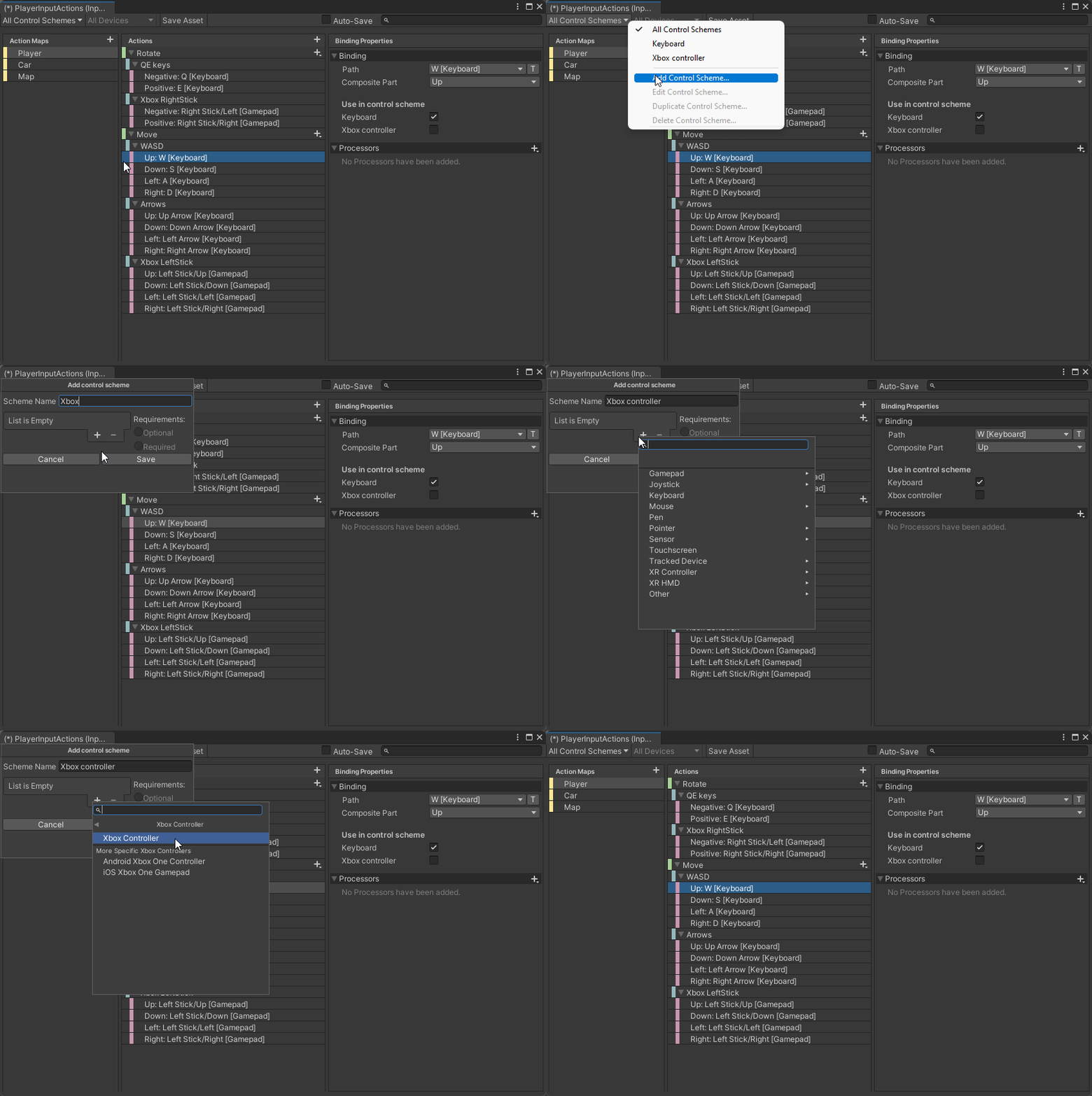
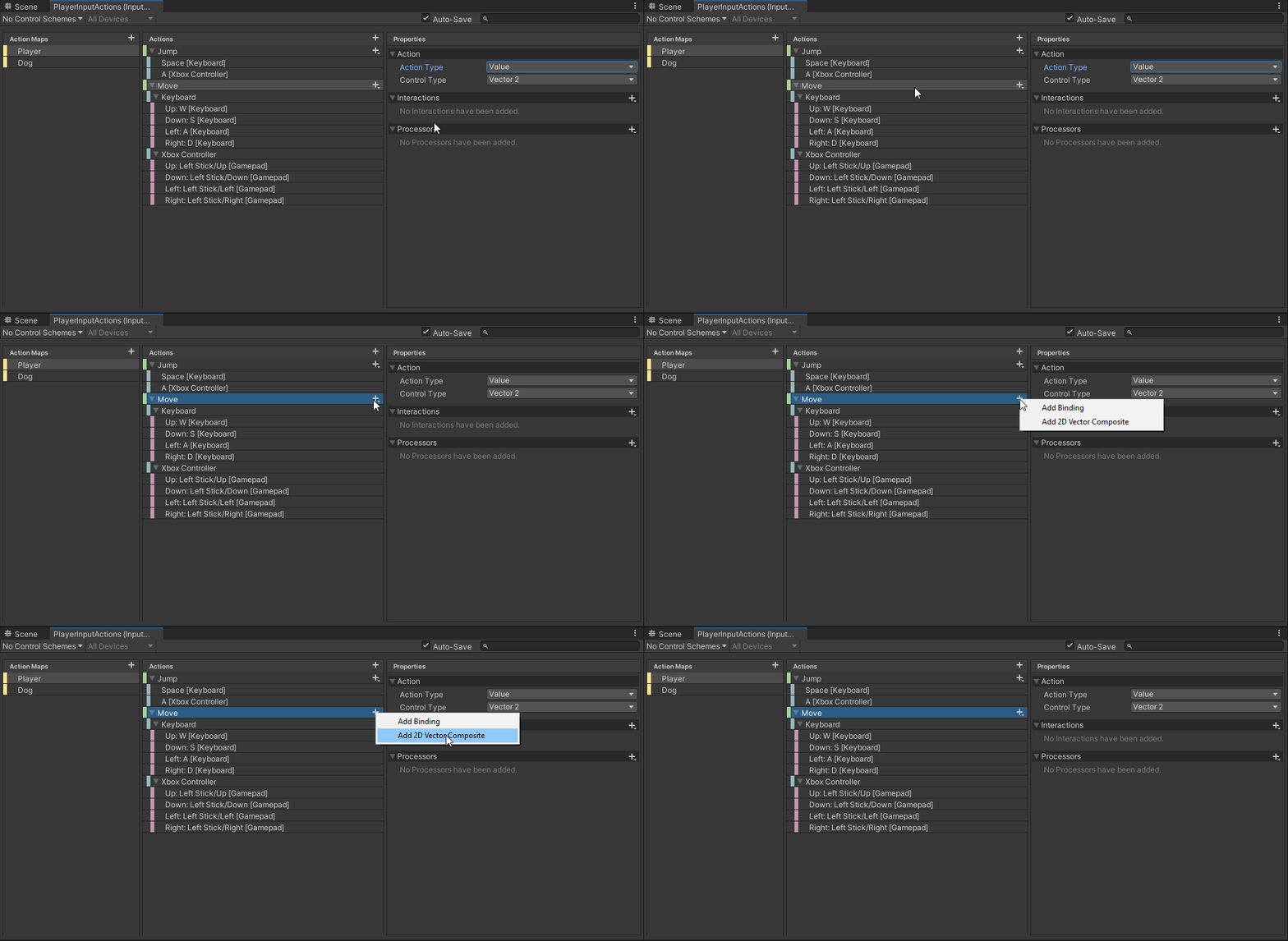 austere grotto
If you want help, provide the requested information.
tulip tartan
Dang bot won't pop up. Oh well.
Don't show screenshots
tired hare
Is there a way to set a tile on a tilemap using float?
tilemap.SetTile takes in a Vector3Int but I would like to place it at 1.5 instead of 1 or 2
austere grotto
tired hare
tilemap.SetTile takes in a Vector3Int but I would like to place it at 1.5 instea...
Tiles can only exist on the grid. But you can further adjust their rendered position with https://docs.unity3d.com/ScriptReference/Tilemaps.Tilemap.SetTransformMatrix.html
You could also just use a regular SpriteRenderer or a second tilemap offset from the other by half a unit
 compact acorn
is there a way i could cycle through all the items in "GameInputs" with an index? for example GameInputs[0] would be select one and so forth
 verbal remnant
compact acorn
is there a way i could cycle through all the items in "GameInputs" with an index...
verbal remnant
compact acorn
is there a way i could cycle through all the items in "GameInputs" with an index...
InputActionAsset > ActionMaps > Actions or somesuch API exists
 hollow roost
I have set up input system for the fps. I have basic movements and in the code below you can see how i implemented it. For some reason jump and look actions work, but move action doesn't work. Vector 2 is always zero. I have no idead why.
private InputAction moveAction;
private InputAction lookAction;
private InputAction jumpAction;

private void Awake()
{
    var actionMap = InputAsset.FindActionMap(MapName);
    moveAction = actionMap.FindAction(Move,true);
    lookAction = actionMap.FindAction(Look,true);
    jumpAction = actionMap.FindAction(Jump, true);
    sprintAction = actionMap.FindAction(Sprint,true);

    RegisterActions();
}

private void RegisterActions()
{
//Here i assign values read from values to public properties with private set method
    moveAction.performed += context => moveInput = context.ReadValue<Vector2>();
    moveAction.canceled += context => moveInput = Vector2.zero;

    lookAction.performed += context => lookInput = context.ReadValue<Vector2>();
    lookAction.canceled += context => lookInput = Vector2.zero;

    jumpAction.performed += context => jumpB = true;
    jumpAction.canceled += context => jumpB = false;

    sprintAction.performed += context => sprintInput = context.ReadValue<float>();
    sprintAction.canceled += context => sprintInput = 0f;
}
Yes, In the same script i enabled all of them. And in another script CharacterController
Oh yeah, in another script i read values from action and manage movement with character controller component
private void HandleMovement()
{
    float speed = walkingSpeed * (inputHandler.sprintInput > 0 ? sprintMultiplier : 1f);
    Vector3 movingDirection = new Vector3(inputHandler.moveInput.x, 0, inputHandler.moveInput.y);
    Debug.Log(inputHandler.moveInput); //alway equals zero
    Vector3 worldDirection = transform.TransformDirection(movingDirection);
    worldDirection.Normalize();
// vector3 field
    currentMoveDirection.x = worldDirection.x * speed;
    currentMoveDirection.z = worldDirection.z * speed;


    characterController.Move(currentMoveDirection * Time.deltaTime);
}
If anyone needs to see
