#🖱️┃input-system
1 messages · Page 10 of 1
 austere grotto
 spice trout
yes I'm changing it now
spice trout
ok thanks
 remote radish
Can someone help? My mouse cursor is not being locked on linux
 dusky lodge
are you using Cursor.lockState?
 sleek pasture
Tested compatibility. Interesting and surprising results.

Looks like any type of Touchscreen Simulation has its issues.
Furthermore, in a different test, saw some disappointing response delay to the Enhanced Touch from the time the key is pressed, to the actual key press actuation.
remote radish
dusky lodge
are you using Cursor.lockState?
Yeah? Ofc
The cursor even gets hidden
And the whole thing works on windows
Its specifically linux thats being a pain
dusky lodge
If you don't provide details and you just complain then it's not possible to help you
remote radish
what details am i supposed to provide lol
it
does not
work
ok actually i do have one detail, it is still confined to the window as far as i can tell
its just not locked to the center like i expect
and thus my raycasts get messed up
 obsidian portal
I'm experiencing an issue, tried to see if I could find anything similar online but nothing overly so that anyone had solutions for.
I'm using the new input system, and I have this thing that happens when im using both keyboard and a controller input, if i spam both of them (the same input type) they both lock up, and prevent me from hitting it anymore. It's semi-random, but happens consistently enough to where its consistently breaking and being an issue. Sometimes it temporarily stops working, sometimes it completely breaks.
Only that one specific input breaks also, i can hit other input just fine, but that input no longer registers. I've thrown some logs and breakpoints in, but its not even entering the function.
This is happening both in Editor, but also in my builds.
I register the input via
input.UI.GameActivate.performed += JoinMatch;
and have confirmed it gets registered. I also unregister it, and have confirmed its never getting unregistered. My actual configuration for the button looks like this.
If anyone has a clue, please let me know, this is very frustrating. For what its worth as well, Unity version is 2019.4.35f1, input system version shows 1.2.0 with a publish date of Nov 02/2021. It appears to be up to date, not sure if im able to update it any further.
 remote radish
and thus my raycasts get messed up
remote radish
remote radish
and thus my raycasts get messed up
The test OS is Ubuntu 20.04.5 LTS, GNOME 3.36.8 and im using X for the windowing
im assuming that would help since these are all probably related to mouse input
 neat pebble
Hey idk if you're still in the server but I experienced the same problem u did and I just refactored their code instead of using their "StarterAssetsInput" file
 old matrix
Recently, I moved a lot of my code over to a new project, and the input broke. Mostly.
I re-set up the new input system, input debugger is working, I have the settings object, everything is put together, but for some reason I'm not receiving any of the messages in my scripts. How do I figure out what went wrong?
old matrix
old matrix
Recently, I moved a lot of my code over to a new project, and the input broke. M...
Update: One of my scripts receives events, the otehr doesn';t
 thorny frigate
If I have this in awake
onMouseLeftClick.performed += OnMouseLeftClick;
Should I also have a
onMouseLeftClick.performed -= OnMouseLeftClick;
somewhere? If so, would OnDestroy() work?
 desert adder
Using the new input system
my Touchscreen Debugger stops working once I hit play; using Unity 2021.3.20.
I have to disable then reenable it to get it to work again, but stops as soon as I hit play again.
Any insights are greatly appreciated.
austere grotto
thorny frigate
If I have this in awake
```cs
onMouseLeftClick.performed += OnMouseLeftClick;
``...
Usually you do OnEnable/ OnDisable
Yes you should unsubscribe
thorny frigate
austere grotto
Usually you do OnEnable/ OnDisable
Thanks. Why OnEnable/OnDisable over Awake/OnDestroy?
remote radish
remote radish
Can someone help? My mouse cursor is not being locked on linux
bump, thanks for taking a look!
remote radish
remote radish
The test OS is Ubuntu 20.04.5 LTS, GNOME 3.36.8 and im using X for the windowing
and debug info
 rugged remnant
thorny frigate
Thanks. Why OnEnable/OnDisable over Awake/OnDestroy?
rugged remnant
thorny frigate
Thanks. Why OnEnable/OnDisable over Awake/OnDestroy?
it'll only listen to the events when the object is active. if used in Awake, it will always listen (even when it does not need to). that uses unnecessary resources. this is really useful, especially if there are events with a lot of listeners (subscribers) . . .
 brisk moon
quick question, I just got a ps5 controller. I cant find anywhere thats recent to say whether or not its supported so I thought I'd ask. If I wanted to use the adaptive triggers in a game is that possible? or still not yet
old matrix
Is there any reason that one component on a GameObject May receive messages from a playerinput , but another doesn’t?
austere grotto
old matrix
Is there any reason that one component on a GameObject May receive messages from...
- Maybe the method signature is wrong
- Maybe the scirpt is disabled?
old matrix
austere grotto
- Maybe the method signature is wrong
- Maybe the scirpt is disabled?
the script appears to be active. I ported this over from another project and didn't touch the setup. Maybe I should change the activation mode to unity events and try hooking them up?
austere grotto
old matrix
the script appears to be active. I ported this over from another project and did...
show your code and your playerinput setup?
old matrix
austere grotto
show your code and your playerinput setup?
taking a second looks, the one that works is like this:
public void OnMove() => Debug.Log("On Move");
and the one that doesn't looks like this:
public void OnMove(InputValue value)
        {
            Debug.Log("Move");
            MoveInput(value.Get<Vector2>());
        }
I am not noticing that the function signatures are different. It should be sending the InputValue along with it, but clearly it isnt.
austere grotto
old matrix
taking a second looks, the one that works is like this:
```cs
public void OnMove...
Show the inspector of the object
old matrix
austere grotto
Show the inspector of the object
Player Hands works, but Starter Assets Inputs does not
 austere grotto
old matrix
Player Hands works, but Starter Assets Inputs does not
austere grotto
old matrix
Player Hands works, but Starter Assets Inputs does not
any errors happening in console?
old matrix
austere grotto
any errors happening in console?
none, no warnings either
austere grotto
Can you show the Start Assets Inputs script?
old matrix
austere grotto
Can you show the Start Assets Inputs script?
Pastebin
Pastebin.com is the number one paste tool since 2002. Pastebin is a website where you can store text online for a set period of time.
austere grotto
old matrix
https://pastebin.com/6gKCZ5bL
You sure STARTER_ASSETS_PACKAGES_CHECKED is true?
maybe it's being cut out in the preprocessor stage
austere grotto
that'll do it 😉
remote radish
Ok im gonna re-ask,
Cursor.lockState = Locked is not working on a specific linux test machine im using (i havent tested on multiple linux machines yet), but it works fine on two windows machines and the unity editor. The look system still works, and the cursor stays confined to the window, but id like to be able cast rays for interacting with and picking up items. is it reasonable to just use the middle of the screen to achieve my goal? id prefer to just fix Cursor.lockState = Locked but i have no clues on how to fix it, and maybe noone does lol
The test OS is Ubuntu 20.04.5 LTS, GNOME 3.36.8 and im using X for the windowing.
 fossil walrus
Hello ! Is it possible to "perform" an InputAction in the code ? Every variable seems to only have a get {} without any set possible
fossil walrus
remote radish
Ok im gonna re-ask,
`Cursor.lockState = Locked` is not working on a specific lin...
if you have a FPS game then raycasting the middle of the screen shouldn't be a problem
remote radish
Well its not neccesarily fps but it is first person
austere grotto
fossil walrus
Hello ! Is it possible to "perform" an InputAction in the code ? Every variable ...
 spare ocean
Anyone knows how I can make the phone vibrate 1 tick when I click a button?
Handheld.Vibrate(); vibrates too long
I just want a single tick
 quiet tusk
spare ocean
Anyone knows how I can make the phone vibrate 1 tick when I click a button?
Hand...
quiet tusk
spare ocean
Anyone knows how I can make the phone vibrate 1 tick when I click a button?
Hand...
Everything I have seen requires native implementation.
 crisp star
How asset maps are meant to be used?
Let's say I have LevelEditor actions and Runtime actions
am I supposed to put them in same asset but separate maps
or am I supposed to create separate assets?
 fallen charm
    {
        if(context.started)
        {
            _jump = true;
        }
        else
        {
            _jump = false;
        }
}```For some reason started isnt working
im trying to make it so you just press and dont hold down for it to work
 radiant quartz
hey I dont fully agree with this problem being an input system but i dont know what it could go under, its very simple I just cant build my project because of this error

 lapis ocean
radiant quartz
hey I dont fully agree with this problem being an input system but i dont know w...
lapis ocean
radiant quartz
hey I dont fully agree with this problem being an input system but i dont know w...

Unity Forum
I know this is kinda common issue, I saw a few people complaining about this problem. But it seemed like the most of them haven't fixed it. And I...
radiant quartz
appreciate it
lapis ocean
radiant quartz
appreciate it
as you want
radiant quartz
i installed it and still cant build the game
what chat should i go to with build and run problems
lapis ocean
Weird
lapis ocean
radiant quartz
what chat should i go to with build and run problems
look in YouTube, well, in the search you lead your problems, well, write a unit, or even optional
 swift lance
Hi there, I wish to use The OnPointerEnter event of the IPointerEnterHandler interface but I use a second camera that output on a render instead of my main one. How can I change the camera used for the event ?
austere grotto
swift lance
Hi there, I wish to use The OnPointerEnter event of the IPointerEnterHandler int...
Either put a physics raycastervon the camera or switch the event camera of the Canvas of it's world space
swift lance
austere grotto
Either put a physics raycastervon the camera or switch the event camera of the C...
it's not on a canvas 😬 that's the whole issue
neat pebble
I don't know why this happened, but I edited my Input Asset Map and then these errors started popping up

I know that it's something to do with ambiguity and that there are 2 functions w/ the same name
but idk what caused it
and how I'm supposed to fix it
are there 2 of the same class?
nvm
there were 2 classes somehow
austere grotto
swift lance
it's not on a canvas 😬 that's the whole issue
That's why it's a physics Raycaster
swift lance
austere grotto
That's why it's a physics Raycaster
Both Camera have one :/
 delicate pollen
Folks, I'm trying to have the combination 'down' and 'jump' recognised in my action map. It's currently working for the keyboard (ie. pressing jump, then holding jump and down triggers the buttstomp) but I can't seem to get that to work for the gamepad. Can anybody suggest a solution?
 neat pebble
if I were to get a bool from ReadValueAsButton of a action type button, would it return false if it isn't being pressed?
if so, then what is wrong with my code?
float targetSpeed; // set target speed based on move speed, sprint speed and if sprint is pressed if (crouch) { targetSpeed = CrouchSpeed; } else { targetSpeed = sprint ? SprintSpeed : MoveSpeed; } this is being used to determine the speed of the movement
playerInput.Player.Sprint.performed += ctx => sprint = ctx.ReadValueAsButton(); playerInput.Player.Crouch.performed += ctx => crouch = ctx.ReadValueAsButton();
those are the 2 code excerpts which should be relevant
whenever I press the crouch key, it changes to crouch speed, but when I release the crouch key, it doesn't change back to move speed and I can't change it to any other speed
I have functions listening to crouch.started & crouch.canceled
could that affect it?
austere grotto
neat pebble
`playerInput.Player.Sprint.performed += ctx => sprint = ctx.ReadValueAsButton();...
playerInput.Player.Sprint.performed += ctx => sprint = true;
playerInput.Player.Sprint.canceled += ctx => sprint = false;

playerInput.Player.Crouch.performed += ctx => crouch = true;
playerInput.Player.Crouch.canceled += ctx => crouch = false;```performed only runs one time during the button press
canceled runs when you release it
neat pebble
austere grotto
```cs
playerInput.Player.Sprint.performed += ctx => sprint = true;
playerInput.P...
That essentially what I ended up doing but using started instead of performed. What was wrong with my original code?
austere grotto
neat pebble
That essentially what I ended up doing but using started instead of performed. W...
you never subscribed to the canceled event
neat pebble
But should performed be false if the key isn't being pressed?
neat pebble
then how does
playerInput.Player.Sprint.performed += ctx => sprint = ctx.ReadValueAsButton();
work
austere grotto
neat pebble
then how does
It's subscribing a lambda to the event
it runs that code when the performed event happens
it tells it to run this ctx => sprint = ctx.ReadValueAsButton(); lambda when the performed event happens
performed is an event
delicate pollen
delicate pollen
Folks, I'm trying to have the combination 'down' and 'jump' recognised in my act...
Turns out I was doing the right thing and it just wasn't working earlier. Odd.
neat pebble
austere grotto
it tells it to run this `ctx => sprint = ctx.ReadValueAsButton();` lambda when t...
so then why didn't ReadValueAsButton return values in a similar way as with the Crouch Action
austere grotto
neat pebble
so then why didn't ReadValueAsButton return values in a similar way as with the ...
It really doesn't matter what it did because you were only running code in response to performed and not canceled
 turbid apex
How do u simulate a mouse right click
austere grotto
All input simulation would be done through the test fixture
Check the input system docs for it
turbid apex
Ok
 chrome turret
hi guys, i'm using starter assets third person controller with ui toolkit but when player gets spawned my buttons stop registering the onclick event
any idea why?
is player input component ther screws everything up?
austere grotto
chrome turret
hi guys, i'm using starter assets third person controller with ui toolkit but wh...
you probably don't have an event system in the scene
Sounds like a #📲┃ui-ux problem not an input system problem though
chrome turret
thx
 vital karma
Pasting this problem here because its more relevant
Im so sorry to come in here and immediately talk about my problems but i just figured i might get more help here. All of my controllers suddenly started being characterized as joysticks and so nothing is working in the editor or the build. I cant possibly manually override the unity code for every single compatible controller, and I cant have generic joystick support because my game uses, like, more buttons than a joystick has.
Has anyone had an issue like this before or does someone know what could be happening? I can give as much information as is needed. This is happening on all projects, not just the one im working on
 dusty ridge
Hello, I need help, I have several actions Up, Down, Left, Right in playerInputActions;
And I'm looking to create a condition, with the new input system, that says, for example if (button pressed/release = Up){ //animator.Play("Animation1")}; what's the best way to write it ? Thanks in advance
dusty ridge
My Input action system

my code:
using System.Collections;
using System.Collections.Generic;
using UnityEngine;
using UnityEngine.InputSystem;


public class PlayerNewInput : MonoBehaviour
{
    [SerializeField] private float speed = 10f;
    private PlayerInputActions playerInput;
    private Rigidbody2D rb;

     void Awake() {
        playerInput = new PlayerInputActions();
        rb = GetComponent<Rigidbody2D>();

    }
    private void OnEnable()
    {
        playerInput.Enable();
    }
    private void OnDisable()
    {
        playerInput.Disable();
    }
    void FixedUpdate(){
        Vector2 moveInput = playerInput.Movement.Move.ReadValue<Vector2>();
        rb.velocity = moveInput * speed;
    }
}```I have no idea what if (button pressed/release = Up){ //animator.Play("Animation1")} means
dusty ridge
if key pressed is UpKey, play an animation
austere grotto
YOu should not be checking which key is pressed
if you want to do something when a specific key is pressed, make a separate Input Action for that
and bind that key to it.
If you want to check if the movement value is "up" just do that:
if (moveInput.y > 0) {
  // do whatever you want to do.
}```Ok thank you very much, I will try with the code you showed me; I believe that I have understood
It worked, thank you very much
 dawn fjord
can someone just help me figure out what im supposed to do? want to set throttle to a value on the range [-1,1] depending on input

 austere grotto
dawn fjord
can someone just help me figure out what im supposed to do? want to set throttle...
austere grotto
dawn fjord
can someone just help me figure out what im supposed to do? want to set throttle...
context.ReadValue<float>();
You'll want to get rid of that if statement though
It also depends how you subscribed
 fluid marsh
hey so i'm following this tutorial https://www.youtube.com/watch?v=rJqP5EesxLk&t=388s
to try to get the basics of first person movement, I notice that he is using a movement script with it's own method for taking in a vector to move the player. is that how it's supposed to be done with the new input system? i thought you were supposed to implement the auto generated methods (for example, OnMovement() if you named your action movement)

The first video in a series where we are creating a First Person game!
In this video we look at setting up our characters movement.
I've setup a Discord!!! and I would love to have you help me start up a friendly community where we can all help each other grow as game developers!
Discord invite link:
https://discord.gg/xgKpxhEyzZ
Can't wait t...
or is it optional to implement those methods
austere grotto
fluid marsh
hey so i'm following this tutorial https://www.youtube.com/watch?v=rJqP5EesxLk&t...
There are many different ways to use the new input system. That's part of its appeal. It's flexible
dawn fjord
austere grotto
`context.ReadValue<float>();`
well i did what u said its not working. can u hold my hand through this to show me what exactly im doing wrong
 trim mirage
ArgumentException: Input Axis Mouse ScrollWheel is not setup.
To change the input settings use: Edit -> Settings -> Input
CameraMovement.Update () (at Assets/Scripts/CameraMovement.cs:49)
what did i do wrong here?

 unkempt goblet
Does input system supports sensitivity and gravity of input actions?
austere grotto
unkempt goblet
Does input system supports sensitivity and gravity of input actions?
That's something you do in your code
austere grotto
trim mirage
ArgumentException: Input Axis Mouse ScrollWheel is not setup.
To change the inp...
Your code is using the old input system (Input.GetAxis) and you're showing a screenshot of the new system.
 mellow jacinth
Hey can somebody help me, It is the new Input System how do I make it so it triggers only when action started (when button is just pressed), please help i am about to break something
 austere grotto
mellow jacinth
Hey can somebody help me, It is the new Input System how do I make it so it trig...
austere grotto
mellow jacinth
Hey can somebody help me, It is the new Input System how do I make it so it trig...
get rid of the rockIsPressed variable entirely - just do what you want to do in that if block
mellow jacinth
thanks man, you probably just stopped my stupid ass from breaking something
 high grove
Okay Hi, so I was looking at the XR UI Input system and all the tutorials I look at do not cover the one I have tried to fill it in but doesn't work at all it lets me hover with the ray interactor thing don't remember off the top of my head. But yeah nothing is working.

 mighty spire
Hey, I currently am using the PlayerInputManager to allow multiple players to join the lobby, however I would now like to know how I can reference which player triggers an onclick event when interacting with different ui buttons as I don't want them to start playing straight away and would like for them to be able to choose their characters, how would I get a reference to the PlayerInput that triggers an onclick event?
 chrome walrus
mighty spire
Hey, I currently am using the PlayerInputManager to allow multiple players to jo...
chrome walrus
mighty spire
Hey, I currently am using the PlayerInputManager to allow multiple players to jo...
Did you check the API of the PlayerInput?
austere grotto
mighty spire
Hey, I currently am using the PlayerInputManager to allow multiple players to jo...
in general you will use the multiplayer event system provided by the input system
 icy river
Hello! Has anyone faced this issue were a host build recognises the input system but the client (player2) doesn't recognise it?
chrome walrus
icy river
Hello! Has anyone faced this issue were a host build recognises the input system...
!code
 sonic sageBOT

Posting code
📃 Large Code Blocks
Large code blocks should be posted as links to services like:
https://gdl.space/, https://paste.ofcode.org/, https://hatebin.com/
https://paste.myst.rs/, https://hastebin.com/
📃 Inline Code
Surround code with three backquotes. Not quotation marks.
To get C# formatting the first line should only contain cs or csharp.
Add a comment with a line number if there is an error message.
```cs
// Your code here
```
Do not share screenshots of code unless requested.
chrome walrus
icy river
Hello! Has anyone faced this issue were a host build recognises the input system...
And only from this piece of code, noone can answer that question. Do you log anything to know, if a specific part of code is even running? How do you determine host and client, is it Unity netcode or what exactly?
icy river
I'm using Mirror with Steamworks. I'm having an issue were the client build doesn't recognise the mouse input but the host does
private bool IsCurrentDeviceMouse
    {
        get
        {
            #if ENABLE_INPUT_SYSTEM
            return playerInput.currentControlScheme == "KeyboardMouse";
            #else
                return false;
            #endif
        }
    }
did you debug log your playerInput and also your currentControlScheme, what do you get on client?
icy river
It's as if the client isn't calling IsCurrentDeviceMouse because the host has already done it or the second user just can't access the input system
chrome walrus
Okay wait, is that local multiplayer or network?
icy river
Where would you recommend I put the debug log in. The input system is assign in the editor
Network, through two steam accounts
chrome walrus
where do you call that iscurrentdevicemouse boolean?
icy river
public void CameraRotation()
    {
        Debug.Log(IsCurrentDeviceMouse);
        // if there is an input and camera position is not fixed
        if (look.sqrMagnitude >= threshold && !LockCameraPosition)
            {
                //Don't multiply mouse input by Time.deltaTime;
                float deltaTimeMultiplier = IsCurrentDeviceMouse ? 1.0f : Time.deltaTime;

                cinemachineTargetYaw += look.x * deltaTimeMultiplier;
                cinemachineTargetPitch += look.y * deltaTimeMultiplier;

                Debug.Log("Deltatime: " + deltaTimeMultiplier + " // look sqrMag: " + look.sqrMagnitude);
            }

            // clamp our rotations so our values are limited 360 degrees
            cinemachineTargetYaw = ClampAngle(cinemachineTargetYaw, float.MinValue, float.MaxValue);
            cinemachineTargetPitch = ClampAngle(cinemachineTargetPitch, BottomClamp, TopClamp);

            // Cinemachine will follow this target
            lookAt.transform.rotation = Quaternion.Euler(cinemachineTargetPitch + CameraAngleOverride,
                cinemachineTargetYaw, 0.0f);

            //if (currentStyle == CameraStyle.Normal)

            //else if (currentStyle == CameraStyle.Combat)


    }
please add cs after your three ` so its formatting better here
icy river
Yes for both. I've tested each side in the editor to see the errors
Client comes back false, so it works for both
But it seems like the client can't identify that I'm using M&K
chrome walrus
And what if you debug log the current controlscheme, what do you get?
icy river
Host comes back true, Client comes back false
CameraRotation() is called in FixedUpdate so is constantly updated
chrome walrus
No, I am not asking for the bool
Debug.Log playerInput and playerInput.currentControlScheme

 sly ledge
hey guys im having a problem, so i made on screen controls with the new input system and it all works perfectly on pc when i click it with my mouse, but when i build it and run it on android the buttons dont work
i used ui buttons
and on screen button script
icy river
Have you got an EvenSystem in the scene?
sly ledge
oh
chrome walrus
icy river
https://i.imgur.com/FPlsiHY.png
https://i.imgur.com/rUVCrff.png
are you running host and client at the same time?
sly ledge
and it should work then?
icy river
chrome walrus
are you running host and client at the same time?
Yes. I run the host as Editor (To get the console) and client as build, then I swap them around Client as Editor and Host as build. I've tried both as build and the same answer
icy river
sly ledge
and it should work then?
Yes should do
chrome walrus
icy river
Yes. I run the host as Editor (To get the console) and client as build, then I s...
do you have two pcs to test out if that happens there too? I assume its blocking the input receive on client side
icy river
I'm using Sandboxie (VM) to have two instances of steam open, then open the build through steam as an app
I doubt Sandboxie will have an issue as I can still use the WASD to move about etc
chrome walrus
But maybe unitys detection has an issue with that
I have not worked with steamworks, but is that based on Unitys own playerInput or hooked into that?
icy river
I don't think it does because my friend tried it on his pc and had the same issue
Steam works is just p2p, game runs as if both people are the host
chrome walrus
doy ou have any code reference of what is client and host?
icy river
So its as if steamworks isn't there to the build
It just thinks it's playing by itself unless told so
So it should just work
chrome walrus
Okay so steamworks is out as an issue I understand. So what about the unity part. Where do you set the player to be host or client?
icy river
Yeah I'd assume so. Host is just the person who starts the lobby, then a prefab of the player gets spawned. Each gets their camera enabled on their end
chrome walrus
and each player gets their input enabled, yes?
Doy ou have any specific host / client code that is missing on the other part probably?
sly ledge
icy river
Yes should do
nope still doesnt work
icy river
Yeah so they each have their own OnStartAuthority() which enables cameras and PlayerInputActions (the name of the Input Action Asset)
chrome walrus
icy river
Yeah so they each have their own OnStartAuthority() which enables cameras and Pl...
can you show parts of the code where you distinguish between both?
icy river
public override void OnStartAuthority()
    {
        cineMachineCameraNormal.gameObject.SetActive(true);
        cineMachineCameraAim.gameObject.SetActive(true);
        cineMachineCameraNormal.Priority = 1;
        cineMachineCameraAim.Priority = 0;

        //Player Setting
        playerModel.SetActive(false);
        jumpTimeoutDelta = JumpTimeout;//Reset
        fallTimeoutDelta = FallTimeout;//Reset

        //Camera Setting
        cineMachineCameraNormal.LookAt = this.gameObject.transform.Find("LookAt");
        cineMachineCameraAim.LookAt = this.gameObject.transform.Find("LookAt");
        cinemachineTargetYaw = lookAt.transform.rotation.eulerAngles.y;

        //Input Setting
        PlayerInputActions.Enable();
        PlayerInputActions.Player.Aim.performed += x => Aim();
        if (sprintHold)
        {
            PlayerInputActions.Player.Sprint.performed += SprintOn;
            PlayerInputActions.Player.Sprint.canceled += SprintOff;
        }
        else
        {
            PlayerInputActions.Player.Sprint.performed += SprintToggle;

        }

        PlayerInputActions.Player.Jump.performed += x => Jump();

        PlayerInputActions.Player.Crouch.performed += x => Crouch();

        PlayerInputActions.Player.Pause.started += x => Pause();


        //UI Setting
        pause = false;
    }
The player Input Actions work as I can walk about
It's just the issue with the ControlScheme
chrome walrus
can you debug log control schemes at all? Like log the list of the available ones?
icy river
Do you know the command for it?
chrome walrus
Where do you instantiate the player?
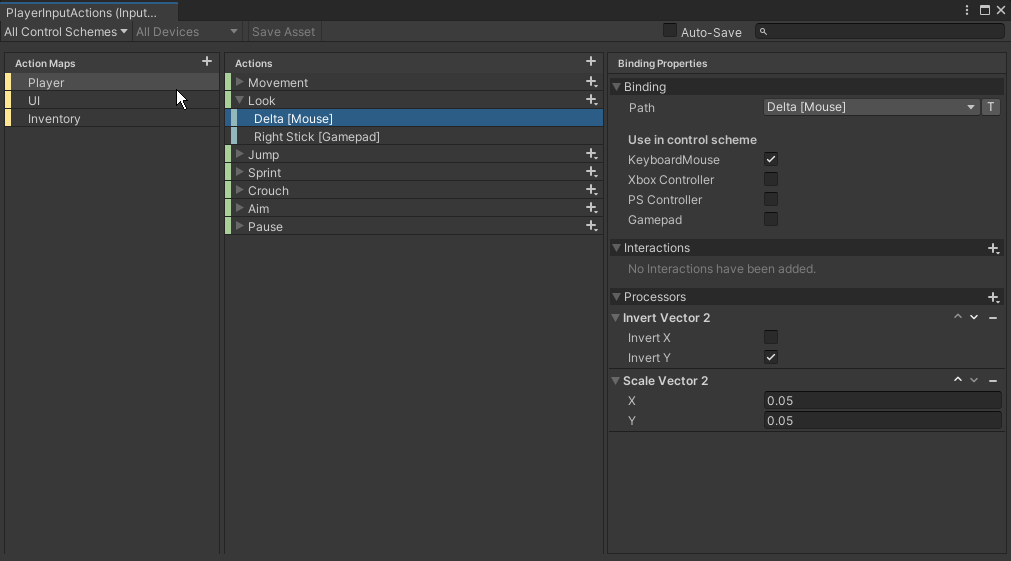 chrome walrus
Any code or is it done automatically?
icy river
public void CreateHostPlayerItem()
    {
        foreach (PlayerObjectController player in Manager.gamePlayers)
        {
            GameObject NewPlayerItem = Instantiate(playerListItemPrefab) as GameObject;
            PlayerListItem NewPlayerItemScript = NewPlayerItem.GetComponent<PlayerListItem>();

            NewPlayerItemScript.playerName = player.playerName;
            NewPlayerItemScript.connectionID = player.connectionID;
            NewPlayerItemScript.playerSteamID = player.playerSteamID;
            NewPlayerItemScript.Ready = player.ready;
            NewPlayerItemScript.SetPlayerValues();

            NewPlayerItem.transform.SetParent(playerListViewContent.transform);
            NewPlayerItem.transform.localScale = Vector3.one;

            playerListItems.Add(NewPlayerItemScript);
        }
        playerItemCreated = true;
    }
    public void CreateClientPlayerItem()
    {
        foreach (PlayerObjectController player in Manager.gamePlayers)
        {
            if (!playerListItems.Any(b => b.connectionID == player.connectionID))
            {
                GameObject NewPlayerItem = Instantiate(playerListItemPrefab) as GameObject;
                PlayerListItem NewPlayerItemScript = NewPlayerItem.GetComponent<PlayerListItem>();

                NewPlayerItemScript.playerName = player.playerName;
                NewPlayerItemScript.connectionID = player.connectionID;
                NewPlayerItemScript.playerSteamID = player.playerSteamID;
                NewPlayerItemScript.Ready = player.ready;
                NewPlayerItemScript.SetPlayerValues();

                NewPlayerItem.transform.SetParent(playerListViewContent.transform);
                NewPlayerItem.transform.localScale = Vector3.one;

                playerListItems.Add(NewPlayerItemScript);
            }
        }
    }
so you can just debug log controlSchemes, is that possible from playerInput?
icy river
I did in the two screen shots, the host was M&K and the client was nothing which then relates back to the
 private bool IsCurrentDeviceMouse
    {
        get
        {
            #if ENABLE_INPUT_SYSTEM
            return playerInput.currentControlScheme == "KeyboardMouse";
            #else
                return false;
            #endif
        }
    }
no, controlSchemes , hence the S at the end 😉
icy river
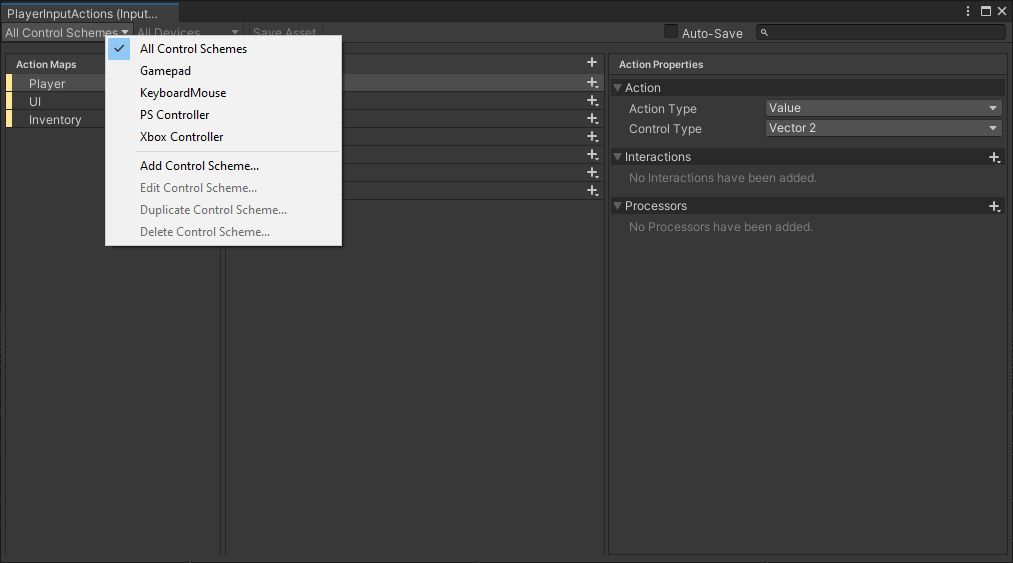
They are here
But my point is, the client goes through the IsCurrentDeviceMouse and returns false
chrome walrus
thats why I wanted to check if the client even has access to all controlschemes or just using a default fallback on top of your actions
icy river
Ahhh. How do I debug that?
Can't seem to list them
I can check for this playerInput.defaultControlScheme
chrome walrus
there is no plural version controlSchemes ?
icy river
Not that I know of
chrome walrus
icy river
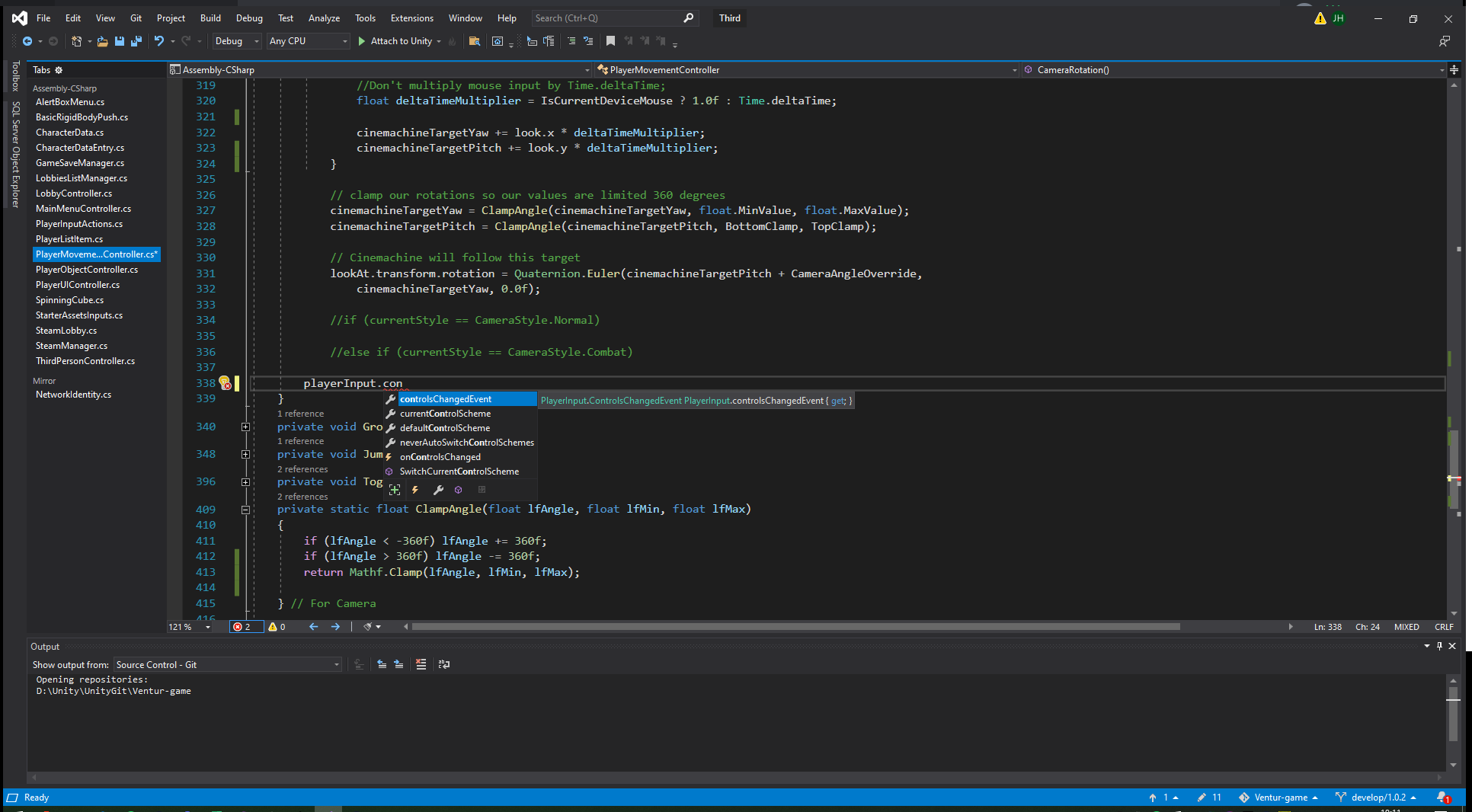 chrome walrus
Let me test this real quick
icy river
Thanks for this
chrome walrus

So this seem to work on my side
But its out of the scope of playerinput. So you gotta get the input asset from the playerInput first
Because from what I read about playerinput, when you use teh playerinput instantiate method, you can pass in a controlscheme
icy river
How have you got .controlSchemes 😆
chrome walrus
playerInput is a wrapper that is using input system, but what I am accessing is the actual input asset c# class
icy river
Wait. I only have [SerializeField] PlayerInput playerInput; declared
chrome walrus
does playerInput have an inputasset reference?
icy river
Ohh yours are PlayerInputActions not the playerInput
Debug.Log(PlayerInputActions.controlSchemes);
chrome walrus
Yes exactly what I was trying to say 😄
icy river
My bad
chrome walrus
Nah its fine, hard to describe only by text
icy river
This is the host:
layerInput: LocalGamePlayer (UnityEngine.InputSystem.PlayerInput) // currentControlScheme: KeyboardMouse /// Schemes: UnityEngine.InputSystem.Utilities.ReadOnlyArray`1[[UnityEngine.InputSystem.InputControlScheme, Unity.InputSystem, Version=1.4.4.0, Culture=neutral, PublicKeyToken=null]]
UnityEngine.Debug:Log (object)
PlayerMovementController:CameraRotation () (at Assets/Scripts/PlayerMovementController.cs:315)
PlayerMovementController:LateUpdate () (at Assets/Scripts/PlayerMovementController.cs:193)
chrome walrus
do a foreach on that array or a for loop abd debug.log out the objects, not just the array object
icy river
So something like this?
for (int i = 0; i < PlayerInputActions.controlSchemes.Count; i++)
{
Debug.Log(PlayerInputActions.controlSchemes[i]);
}
chrome walrus
yeah if its a List, use count or Length if array
icy river
chrome walrus
I think the problem is not, that you rinput scheme is not working, but looks like you have to set a scheme when adding the player somehow. Does the array print out something useful?
icy river
Ok so on the host side it does print out the list, let me check on client

So it does see them
chrome walrus
Yeah i guess you just have to set it to your desired controlscheme
icy river
But it then all relates back to the IsCurrentDeviceMouse bool
Oh wait
The input system doesn't think it's M&K
chrome walrus
what does it think it is?
icy river
No idea, I wonder how to declare it
chrome walrus
If you use playerinput, it should switch automatically
icy river
Yeah it's got auto-switch on
icy river
The onControlsChanged?
chrome walrus
yep
And then just try out in the editor to switch between mouse keyboard and maybe a gamepad
icy river
It seems like that is an action, like .performed etc
Not an output
I can try .notificationBehavior?
chrome walrus
its an event, how do you try to hook into it?
You have to use it like a delegate with +=
chrome walrus
.onControlsChanged += OnControlsChanged;

    }
    public void OnControlsChanged(PlayerInput input)
    {
        Debug.Log("OnControlsChanged");
    }
It doesn't like the (PlayerInput input)
playerInput.onControlsChanged += x => OnControlsChanged(playerInput);
chrome walrus
why do you want to make it a one liner? 😉
its just for testing and you remove it anyway later 😄
chrome walrus
nah just remove the PlayerInput input and let VS autocorrect it for you what it is missing in the brackets 😄
icy river
Ok so I've tested both and none call the method
chrome walrus
Oh wait. can you try to use the playerinputs instantiate function instead of your own?
icy river
So I can declare this in the OnStartAuthority() instead of the Editor reference?
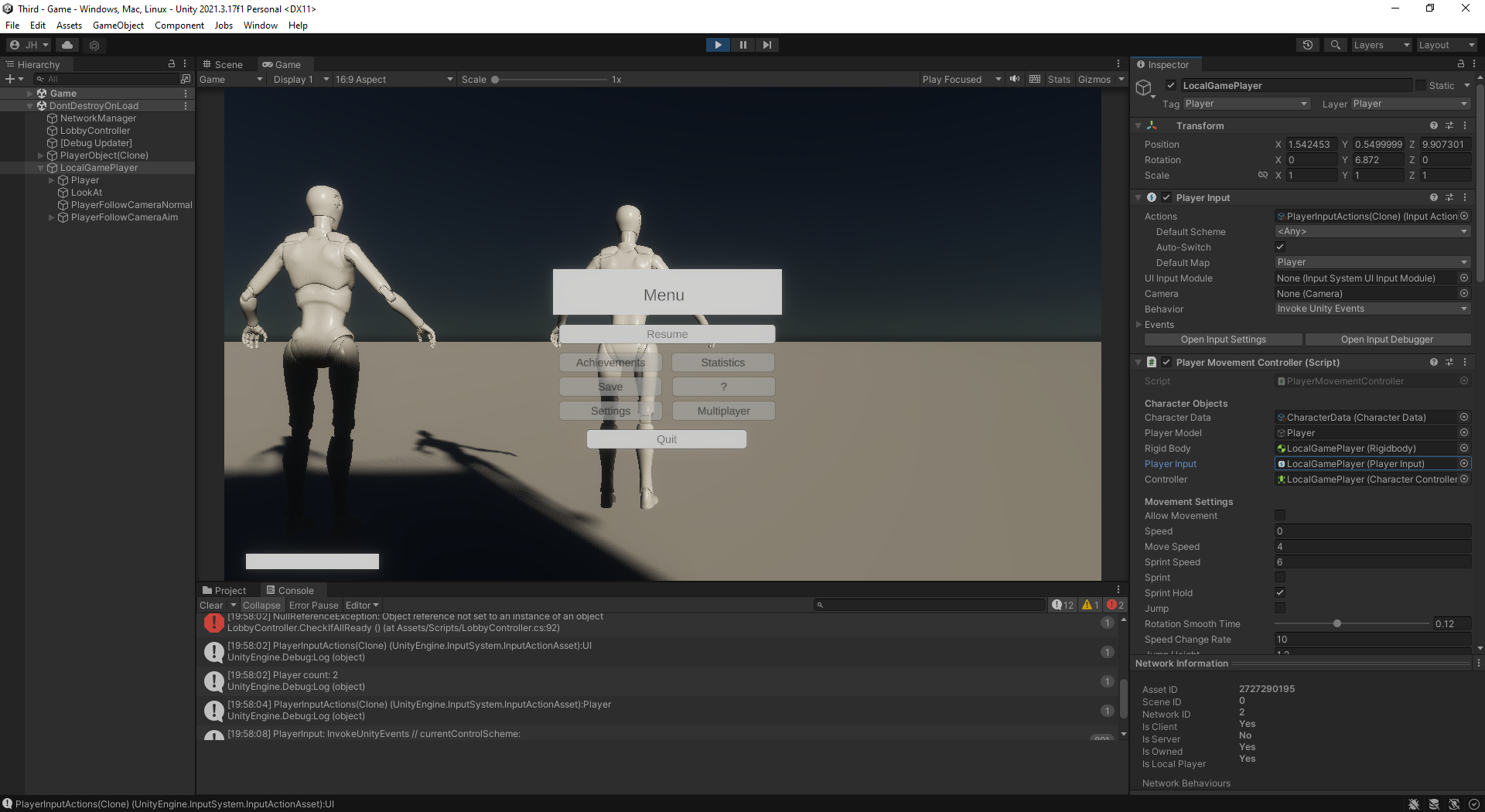
So it looks like it's using the correct PlayerInput
icy river
That's just checking if ready
Like the host can only start the game so client doesn't know what it is
chrome walrus
But an error can break the game and I would not rely debugging on a faulty environment
oh wait, client does not know and is the only one getting the error?
hmmmm 😉
icy river
Hmmm
It doesn't know what his is (localPlayerController.playerIDNumber)
if (allReady)
        {
            if (localPlayerController.playerIDNumber ==1)
            {
                StartGameButton.interactable = true;
            }
            else
            {
                StartGameButton.interactable = false;
            }
        }
then do a null check if localPlayerController is != null and playerIDNumber != null
icy river
Ok so the error has gone but the issue still occurs
chrome walrus
Alright, so lets move on and try to instantiate with the playerinput function
icy river
The one you previously linked?
icy river
Ok
From what I've research, the client is exactly like the host except they use the same camera and canvas, event systems etc
But they have to disable them on their end
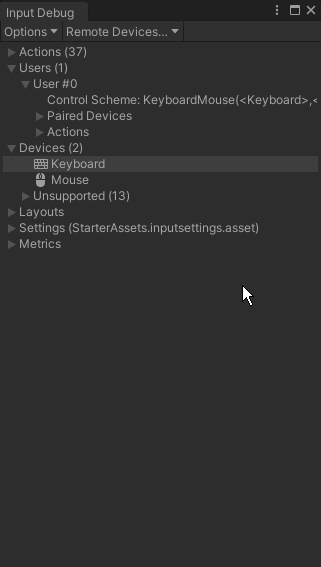
I've noticed this. This host has user #0 (https://i.imgur.com/em2KRfG.png) and the client has nothing (https://i.imgur.com/P9KgovO.png)
 chrome walrus
Oh, is this the solution? 😄
icy river
Nah hahaha
Not just yet
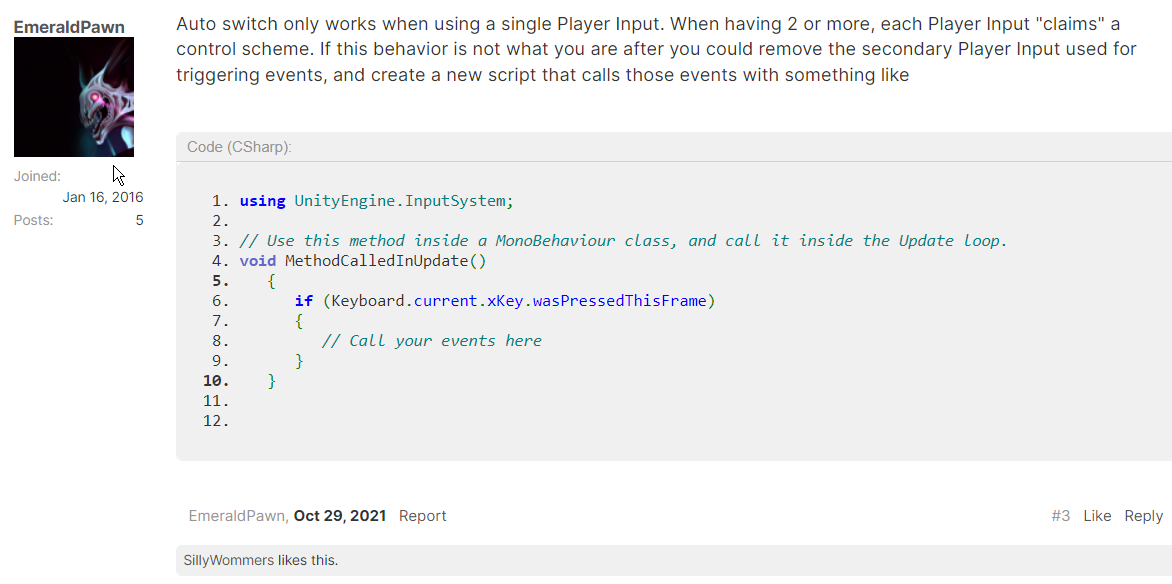
Unity Forum
As far as I can tell — which is a log full of null reference exceptions — no Input Devices are recognized when I make a build. (At the very least, the...
This is what I was looking at
chrome walrus
I am sorry I cant help more with this, cause I never used playerinput with multiplayer, I usually just take the bare minimum I need so I know whats going on and do it myself cause I never really needed game like matchmaking on my game. Just guessing around and researching here 😄
icy river
Yeah I'm the same, thought it would be interesting to make a co-op game and this is the first issue I've run into 😆
chrome walrus
Can you just try to set the scheme?
icy river
I could just set it to mouse, and keyboard in the first bit I set in the game. Let's check if that actually works 😆
chrome walrus
Yeah, try and error 😄
icy river
Ok so obviously it will work because I'm manually setting it 😆 think my brain is fried atm
But that's not the point
It's the input system which isn't happy
#if ENABLE_INPUT_SYSTEM
            return PlayerInput.currentControlScheme == "KeyboardMouse";
            #else
                return;
            #endif
So If Input System is enabled (which it thinks it's not), it returns false
Oh wait
it returns false because of the control scheme not being keyboardmouse
chrome walrus
yep
icy river
So it's not understanding the playerinput
chrome walrus
the PlayerInput somehow does not update its controlscheme, as we learned from oninputchanged event
icy river
Maybe the idea is that I need to get the device the user is using and then just constantly add it in the update or start
chrome walrus
you could check the Mouse.current and Gamepad.current etc. to see, if that at least gets values, otherwise you might ahve another problem 😄
icy river
The mouse does get an input because the Vector2 Look value changes 😆
chrome walrus
Nah the input works as you said, but the Mouse.current is something inside the input system that might also not get registered as it is not detecting the input change.
 chrome walrus
What the heck. are you somehow using a new playerinput instead of the one in the scene on your client?
icy river
The issue we are facing is that the playerinput isn't updating what device it's using
chrome walrus
Thats why I am wondering if the playerinput you look at is the actual one that is active for the client
icy river
I've tried getting the component in the auth start
and no luck
This could be a possibility to do it manually
foreach (var d in Control.devices)
            {
                Debug.Log("running devices check: " + d.lastUpdateTime + " device name: " + d.name);
                if (d.lastUpdateTime < smallestUpdateTime)
                {
                    smallestUpdateTime = d.lastUpdateTime;
                    LastUsedDevice = d;
                }
            }
Sorry, quite hooked into the current gdc talk right now here on the server 😄
icy river
I wonder if it's trying to use the host's playerinput but not being allowed because it's not the host
 chrome walrus
Hm, maybe your multiplayer system is actually just not connecting the client player in network scope to your local playerinput, that might be true
icy river
Which is causing that image


I seem to be able to gain access the playerinputs this way
mighty spire
chrome walrus
Did you check the API of the PlayerInput?
I have been staring at it trying to figure it out 😭 are you suggesting that DisableJoining / EnableJoining or any of the JoinPlayer methods are what I need to use?
mighty spire
austere grotto
in general you will use the multiplayer event system provided by the input syste...
Do you have any references I can read into?
are you referring to this? https://docs.unity3d.com/Packages/com.unity.inputsystem@1.4/api/UnityEngine.InputSystem.UI.MultiplayerEventSystem.html
I have a working system for the players to join however im just not sure how to setup the logic so that players are able to swap teams from a button's onClick event, it is a shared screen local multiplayer setup
 rigid cloak
hiya im using 2022.1.19f1, just installed Input Sytem, restarted editor twice, but still getting this error: error CS0246: The type or namespace name 'InputAction' could not be found (are you missing a using directive or an assembly reference?) any help appreciated.
icy river
rigid cloak
hiya im using 2022.1.19f1, just installed Input Sytem, restarted editor twice, b...
Have you assigned it in the editor?
rigid cloak
icy river
Have you assigned it in the editor?
yes i have and using the using UnityEngine.InputSystem;
icy river
screenshot?
rigid cloak
..and using public InputActionAsset inputActions; private InputAction touchOrClickAction; in script. i'll reinstall InputSystems to see if that works
icy river
rigid cloak
..and using public InputActionAsset inputActions; private InputAction touchOrCli...
Show me a screenshot of the inspector
rigid cloak
icy river
Show me a screenshot of the inspector
inspector script isn't loading because of the complier error - catch 22
icy river
Ohhh, have you generated a c# script for the playerActions?
rigid cloak
yes its just one giant script that has these lines in it but it's that same script that's not being loading because of the 'using UnityEnigine.InputSystem' namesspace issue: ..oh I see it's a usually a separate class/script - just learning this stuff at the moment

basically trying to play my first html build on itch.io, on the iPhone - is there a simpler way the using InputSystems to detect touch so I can run the game in ios browser? thank you
rigid cloak
new error after reinstal: 'UnityEngine.InputSystem.Controls.ButtonControl' is missing the class attribute 'ExtensionOfNativeClass'!
UnityEngine.GUIUtility:ProcessEvent (int,intptr,bool&)
rigid cloak
getting the same 'using' related error with TMPro even thought the package is installed, I think the project got corrupted somehow.
lapis ocean
rigid cloak
yes its just one giant script that has these lines in it but it's that same scri...
`using UnityEngine;
public class PlayerActions : MonoBehaviour
{
public float speed = 10f;
private Rigidbody rb;

private void Start()
{
    rb = GetComponent<Rigidbody>();
}

private void FixedUpdate()
{
    float moveHorizontal = Input.GetAxis("Horizontal");
    float moveVertical = Input.GetAxis("Vertical");

    Vector3 movement = new Vector3(moveHorizontal, 0f, moveVertical);

    rb.AddForce(movement * speed);
}

private void OnTriggerEnter(Collider other)
{
    if (other.CompareTag("Pickup"))
    {
        other.gameObject.SetActive(false);
    }
}
}
`
like it
chrome walrus
!code
sonic sageBOT
Posting code
📃 Large Code Blocks
Large code blocks should be posted as links to services like:
https://gdl.space/, https://paste.ofcode.org/, https://hatebin.com/
https://paste.myst.rs/, https://hastebin.com/
📃 Inline Code
Surround code with three backquotes. Not quotation marks.
To get C# formatting the first line should only contain cs or csharp.
Add a comment with a line number if there is an error message.
```cs
// Your code here
```
Do not share screenshots of code unless requested.
rigid cloak
lapis ocean
`using UnityEngine;
public class PlayerActions : MonoBehaviour
{
public flo...
[SOLVED] I had a random assebly definition script in project folder that didn't reference any scripts. So made new one and delete the random one at it worked. thanks for the assist
delicate pollen
Folks, I'm trying to work out if the same input on an Input Action overrides the output? In my case, I have W set up to request teleport through a door, but also to increase the height that the main character will jump to. I'd like to be able to activate both with the same button press, but I can't seem to activate 'ExtraHighJump' now. Any thoughts?
 icy river
delicate pollen
Folks, I'm trying to work out if the same input on an Input Action overrides the...
icy river
delicate pollen
Folks, I'm trying to work out if the same input on an Input Action overrides the...
It will most likely do the last use of W. You need to set the action
delicate pollen
I'm sorry, can you clarify what you mean by 'set the action'?
austere grotto
delicate pollen
Folks, I'm trying to work out if the same input on an Input Action overrides the...
How are you handling this in code?
delicate pollen
Huh. I just flipped the order of items in the Player Actions and it doesn't seem to change the output.
icy river
delicate pollen
I'm sorry, can you clarify what you mean by 'set the action'?
Set the action
public InputAction extraHighJump;
public InputAction Teleport;
When at door
{ teleport action}
else
{extraHighJump}
delicate pollen
@austere grotto Uh, I'm using a PlayerInput on a separate Input Manager in order to trigger Events which are sent to specific scripts on the main character.
On the "CharDoorTeleport" script, the code is...
public void OnTeleportRequest(InputAction.CallbackContext context)
    {
        if (context.started)
        {
            doorTeleport = CastForDoor();
            if (doorTeleport) Teleport();
        }
    }
With the callbackContext are you setting it up in the inputsystem events?
delicate pollen
On "CharMoveV", the code reads,
public void OnExtraHighJump(InputAction.CallbackContext context)
        {
            if (context.started)
            {
                upwardMovementMultiplier = upwardMovementMultExtra;
                Debug.Log("Higher jump!");
            }

            if (context.canceled)
            {
                upwardMovementMultiplier = upwardMovementMultDefault;
            }
        }
@icy river ,

...
Haaaaang on.
austere grotto
ok i was like "is that intentional"?
delicate pollen
Aaaaand the answer is, "I'm an idiot." =P
icy river
I honestly recommend stepping away for a few mins and coming back to it if you can't see anything
delicate pollen
Fair, but I'm promising to reward myself with a nice dinner if I get this working in time. =)
 viral flicker
how can i set these easily in code so i dont have to do it againt every time?
 austere grotto
viral flicker
how can i set these easily in code so i dont have to do it againt every time?
austere grotto
viral flicker
how can i set these easily in code so i dont have to do it againt every time?
If you want to set them in code don't use unity events mode at all
viral flicker
austere grotto
If you want to set them in code don't use unity events mode at all
how should i use it then 😭
i prefer the event system but im tired of setting up all the values every time
austere grotto
Use SendMessages mode or manually subscribe to the events in your code
viral flicker
I decided to use the event system because using the sendmessages mode broke if i added player input to more than one gameobject, only one would work
viral flicker
austere grotto
Use SendMessages mode or manually subscribe to the events in your code
if i could use the sendmessages mode i'd much prefer it, but the above happens
austere grotto
viral flicker
I decided to use the event system because using the sendmessages mode broke if i...
honestly I don't really get the concern. You should only have to do this once or twice per project
viral flicker
austere grotto
honestly I don't really get the concern. You should only have to do this once or...
its because i have a game manager, and i have to make a new game manager with each scene basically
 austere grotto
viral flicker
its because i have a game manager, and i have to make a new game manager with ea...
austere grotto
viral flicker
its because i have a game manager, and i have to make a new game manager with ea...
why
make it a prefab
viral flicker
and i have to manually set all the events each time
viral flicker
austere grotto
make it a prefab
sorry yeah it is a prefab
austere grotto
If you make it a prefab you only need to do it once
viral flicker
austere grotto
If you make it a prefab you only need to do it once
no, because it accesses the player script which is on the player prefab, so i have to add it each time if that makes sense
 austere grotto
viral flicker
no, because it accesses the player script which is on the player prefab, so i ha...
austere grotto
viral flicker
no, because it accesses the player script which is on the player prefab, so i ha...
make it not do that
make it reference a script on itself
viral flicker
would that work though?
austere grotto
and have that script reach out to the player prefab via singleton reference or something
or have this cript fire an event
and the player script listens to the event
etc.
lots of ways around it
viral flicker
so like a playerhandler script on the gamemanager that fires events or something?
that the player script listens to?
would that work with callback contexts?
like this for example
 austere grotto
viral flicker
so like a playerhandler script on the gamemanager that fires events or something...
austere grotto
viral flicker
so like a playerhandler script on the gamemanager that fires events or something...
yeah
austere grotto
viral flicker
like this for example
yes you'd have it fire an event
or just leave it like that
and the player script reads from it
viral flicker
@austere grotto thanks for your advice, the input system is now a lot easier with this new delegate event system i've made
austere grotto
<@&502884371011731486> spam
 timber robin
!ban 996080823415619594 scam
sonic sageBOT
 LifeNFTs#1502 was banned.
icy river
Hello,
I'm currently facing an issue where my player prefab (host) spawns and works correctly, however when a second player joins (client) and spawns they don't have any devices assigned in the player input.
The prefabs for both players are the same, each having its own Player Input.
I am able to get the player inputs through "PlayerInput.all[0]" (for the host) and "[1]" for the second player. Which proves they are assigned. However, when I try to use a call on PlayerInput.currentControlScheme, the host is OK and will come up with "M&K" but the client will come up with null. Now both players are instantiated the same.
Any ideas on how to get the player to be assigned with a currently active device for currentControlScheme.
Thanks!
mellow jacinth
Hey everyone, do you know how I can trigger action with new input system just like with old Input.GetKeyDown(KeyCode.Space), when i use new input system it triggers button multiple times
 blissful lotus
mellow jacinth
Hey everyone, do you know how I can trigger action with new input system just li...
blissful lotus
mellow jacinth
Hey everyone, do you know how I can trigger action with new input system just li...
Probably, you need to check context.phase if you're talking about working with the events that Input System generates. The phase member will contain info on whether the button was pressed, released, etc.
blissful lotus
@mellow jacinth As an example, your event may fire when started, held, canceled, etc. If you only want to catch the moment it is pressed, check context.phase == InputActionPhase.Started to get the first of these events only.
austere grotto
Simpler way to do this^ is if (context.started)
 split knot
mellow jacinth
Hey everyone, do you know how I can trigger action with new input system just li...
split knot
mellow jacinth
Hey everyone, do you know how I can trigger action with new input system just li...
or if you have a reference to the Input Action, you can just go:
_exampleInputAction.WasPressedThisFrame();
 warm oxide
Alright, so I'm making a platformer, using the new input system, and I have an aiming system controlled by the arrow keys, and then the typical WASD movement.
I can also jump with Space.
Everything works as it should, but the moment I press up+left arrows to aim and try to press Space to jump, the jump doesn't register.
I have this method that returns true when one of the buttons in the first image (south button/X on playstation/etc or spacebar on keyboard), and I tried printing when I press jump. To my surprise, it never prints true when I'm aiming up+left, but all the other directions are fine.
This method is called by Update(), so there is no conditions in between that could mess with it either.
I have no idea what could be causing this.
Does Unity have a limit when it comes to inputs? Maybe up+left somehow overrides the spacebar?


 austere grotto
warm oxide
Alright, so I'm making a platformer, using the new input system, and I have an a...
austere grotto
warm oxide
Alright, so I'm making a platformer, using the new input system, and I have an a...
Could be a hardware limitation. Your keyboard might not be able to handle that particular key combination.
Web-based tool for testing keyboard keys, as well as which key produces which character and level of key rollover.
 twin sundial
how do I consume an input? I have a UnityEvent-based UI and one of the things it does is set the EventSystem.currentSelectedGameObject so controllers work better but pressing one button will press the one that's selected immediately with the same button press. Does anyone know if I can consume the input directly before or after setting the current selected game object?
chrome walrus
twin sundial
how do I consume an input? I have a UnityEvent-based UI and one of the things it...
What do you mean by "consume"?
fossil walrus
Hello ! So, ahah, I have a little problem, but I don't know if it's coming from me or the source code of the Input System (V 1.3.0)
Reminder : When using PerformInteractiveRebind on an action, we can use WithCancelingThrough(InputControl control) to designate a key that'll have the role to cancel the rebind operation.
Context : Of course, I'm using the Escape key to do so on keyboard. So I reference an InputControl linked to the path "<Keyboard>/escape", and I put it in the WithCancelingThrough parameter.
Problem: I spent half an hour inspecting the source code of when the OnCancel() is called, and I found a "FIXME" (screen below) that returns me true (meaning it matches Escape) instead of false when pressing the E key.
-> If I designate the Enter key as the canceling one, same result
Code investigation : That basically comes from the fact that we can use Wildcards such as /* to say that every key will cancel. The code behavior is simply : I pressed E -> is lenght of E > lenght of Escape (1 > 6) ? -> No, so iterate over each characters of E and see if it matches the Escape characters -> Stop at first index -> It's the same, great !
Has anyone had this problem, and how could I fix it ? Is it fixed in ulterior versions ?
The only solution that I can find right now is to not use the WithCancelingThrough and instead do it my way
Thank you for ready, sorry for the long-windedness

 stark notch
The cancel button for the input system in the default inputs is ESC for keyboard right?
chrome walrus
stark notch
The cancel button for the input system in the default inputs is ESC for keyboard...
Input sytem the new one?
stark notch
chrome walrus
Input sytem the new one?
Yeah but figured it out, it’s just because it’s called cancel so you don’t directly see what key is used for it
twin sundial
chrome walrus
What do you mean by "consume"?
consume the input so that nothing else gets activated by it that frame
cuz that frame it's activating the current button, then the new button when I set it as the selected gameObject
so I wanna activate the current button, then select the new gameObject without immediately pressing it
chrome walrus
twin sundial
so I wanna activate the current button, then select the new gameObject without i...
so you press a key and it selects a button, correct? And when you hit that key again, it activates a new button?
twin sundial
no, the same button press activates both buttons
but I want it to be 2 separate ones
so yes actually
in its current state, it presses both buttons at once which I DON'T want
austere grotto
twin sundial
in its current state, it presses both buttons at once which I DON'T want
I believe if you put an event trigger component on your button and set an OnSubmit event:
https://docs.unity3d.com/2018.3/Documentation/ScriptReference/EventSystems.EventTrigger.OnSubmit.html
Then inside there you can call Use() on the eventdata
and that should consume the Submit event, IIRC
twin sundial
thanks! I'll try it out
 livid glade
using the new input system, while holding shift my space bar input is not detected. No where am I disabling that action or unsubscribing from that event. What could be causing this?
austere grotto
livid glade
using the new input system, while holding shift my space bar input is not detect...
Could be a hardware limitation of your keyboard:
http://www.iljitsch.com/2020/keyboardtest/
Web-based tool for testing keyboard keys, as well as which key produces which character and level of key rollover.
See if your key combination is detected properly
Funny enough just yesterday... #🖱️┃input-system message
livid glade
Yes I’ve come to the conclusion this is the issue. It’s a school keyboard and I was swearing to my team it was working at my house. It seems only this combination is affected, so I guess I’ll change sprint to ctrl, since even having it as a toggle could cause problems if the person holds it
Thank you
 pallid wing
Im not sure what this means, I have the player actions spelled right? Is there something im maybe not seeing?


 austere grotto
pallid wing
Im not sure what this means, I have the player actions spelled right? Is there s...
austere grotto
pallid wing
Im not sure what this means, I have the player actions spelled right? Is there s...
looks like your IDE is not configured
 pine pivot
I am getting this error
UnityEngine.InputSystem.LowLevel.NativeInputRuntime/<>c__DisplayClass7_0:<set_onUpdate>b__0 (UnityEngineInternal.Input.NativeInputUpdateType,UnityEngineInternal.Input.NativeInputEventBuffer*)
UnityEngineInternal.Input.NativeInputSystem:NotifyUpdate (UnityEngineInternal.Input.NativeInputUpdateType,intptr)```
when using the new input systemHow do i configure it properly?
austere grotto
pallid wing
How do i configure it properly?
!ide
sonic sageBOT
💡 IDE Configuration
If your IDE is not autocompleting code
or underlining errors, please configure it:
• Visual Studio (Installed via Unity Hub)
• Visual Studio (Installed manually)
• VS Code*
• JetBrains Rider
• Other/None
*VS Code's debugger plugin is unsupported.
We recommend using VS or Rider instead.
pallid wing
austere grotto
!ide
Im using unity 2022.1.10f1, shouldi still update it Visual Studio 2.0.17?
 thin flax
Hey guys, Does anyone know how I can get (Debug.log) the processor values in code for the Scale Vector 2?

 west obsidian
Hello 👋
I want to make a game and use the new input system for once, problem : I don't know how to use it. I found some youtube tutorials but they were either outdated or using input presets, like PlayerInputActions, which I would like to avoid in order to create my own one from scratch. Can somebody help ?
 twin sundial
austere grotto
I believe if you put an event trigger component on your button and set an OnSubm...
twin sundial
austere grotto
I believe if you put an event trigger component on your button and set an OnSubm...
well, a button isn't what's triggering the event, it's something else that uses the Submit button
to be specific, it's a custom Interact script that invokes a UnityEvent
 bleak kestrel
west obsidian
Hello 👋
I want to make a game and use the new input system for once, problem : ...
bleak kestrel
west obsidian
Hello 👋
I want to make a game and use the new input system for once, problem : ...
This tutorial worked for me: https://www.youtube.com/watch?v=Yjee_e4fICc
Long but worth it
austere grotto
twin sundial
well, a button isn't what's triggering the event, it's something else that uses ...
the submit event is what my answer addresses
twin sundial
well yeah, but I didn't know at the time how to incorporate that with my system that didn't use buttons
but I figured that out
for some reason though, even though I've confirmed the event is being Use()d before the newly selected button is selected, it's still Submit()ing the new button too
 wheat cipher
I have a Vector2 path (XR Controller) for a joystick and I was wondering if this is right when wanting to only record the X axis
 austere grotto
wheat cipher
I have a Vector2 path (XR Controller) for a joystick and I was wondering if this...
austere grotto
wheat cipher
I have a Vector2 path (XR Controller) for a joystick and I was wondering if this...
couldn't you just bind it to the horizontal axis only?
and make it value/axis instead of value/vector2
wheat cipher
hmm i guess you're right
 errant inlet
So I figured out that when I lock the cursor, the next frame's delta is really large.
I'm using an input action to trigger my camera movement which is getting triggered in a few different places.
I know I could skip the next frame in all those places, but I was wondering if anyone had any ideas to centralize that / stop the input system from detecting it
west obsidian
bleak kestrel
This tutorial worked for me: https://www.youtube.com/watch?v=Yjee_e4fICc
Yes thank you ! I thought PlayerInput was an input preset, which I wanted to avoid
 stoic fox
pallid wing
Im using unity 2022.1.10f1, shouldi still update it Visual Studio 2.0.17?
stoic fox
pallid wing
Im using unity 2022.1.10f1, shouldi still update it Visual Studio 2.0.17?
for me i went into Edit > Preferences> External tools then in the top click the drop down and click visual studios and it worked
 desert mauve
OKay guys i have an problem, i just found today, that unity gives a script that allows you to control a cursor image with a gamepad, but the problem is that none of it is working, i've connected my controller joystick reference to it, and its still not moving the virtual mouse. The name of the script is VirualMouse/ Virtual Mouse Input.
 sullen sundial
Hey guys, can anyone show me in gamepad, which one is the shoulder and the trigger button please? Like in PS4 it is R1/L1 or R2/L2?
sullen sundial
Thank you bro 
 celest orchid
Is there a way to tell what data type a control type will be from an inputvalue when selecting value as an action type. For instance, obviously a Vector2 control type will be a Vector2, but stuff like Digital is less straight forward (I could see it being a bool, int, or float)
livid glade
celest orchid
Is there a way to tell what data type a control type will be from an inputvalue ...
well for things like this I assume that if I needed to use it, I'd know about it. Especially since there seems to be no documentation about that control type even existing, even though it clearly does. Are you trying to get input a specific way but don't know how?
celest orchid
livid glade
well for things like this I assume that if I needed to use it, I'd know about it...
Yeah I was needing basically a bool for a jump since iirc using button doesn't say if the button was released. Found out digital is not a bool, its a float by running the game trying to grab a bool
livid glade
using it as button you can get if it's released.
celest orchid
I thought it only calls the event when the button is pressed?
livid glade
I'm doing the very thing in a character controller right now actually.
There are 3 events you can subscribe to, started, performed, and canceled
You subscribe to the cancel event like this:
_actionMap.Space.canceled += Space_canceled;
_actionMap of course being an action map, Space being the action you create in the input action asset.
there are also multiple ways to use the new input system. I don't use the built-in components, I instead choose the option to have the Input Actions asset generate a script so that I can create an instance of that script and just subscribe to the events through that.
celest orchid
Ah, currently I'm using the SendMessage way with the Onxxx(Inputvalue value), is the other way better?
Ah
livid glade
celest orchid
Ah, currently I'm using the SendMessage way with the Onxxx(Inputvalue value), is...
this is precisely why I make it generate a script and do it myself. The components are very helpful, especially for things such as handling automatically switching input schemes, adding players, multiple sources of input, etc. But for just regular singleplayer gameplay, I prefer to do it this way.
celest orchid
Yeah since I'm setting up an MP game, I guess I'll research the other way a bit. Just kinda hate that the new input system doesn't have that great of documentation yet especially after moving away from UE after a bit from trying to use that
livid glade
I do believe that the way you're doing it however can work. I believe you can do something along the lines of
if(value.canceled) {
}
``` I'm not completely sure if this works however, as I don't normally use the components.
The way to subscribe to the events through the class it generates allows you to read a canceled value from the parameter it requires, but I've never tried it. tame oracle
hi,
i am looking for any input controllers something like quest 2 touch controllers to use inside unity
but without depending on VR headsets
I am just interested in tracking the controllers Pose in space and also use it's buttons and joysticks for control
any recommendations ?
livid glade
tame oracle
hi,
i am looking for any input controllers something like quest 2 touch control...
maybe the playstation move controller? No idea about unity support for that though.
 chrome vale
brothers...you may or may not have answered this question before, but how the heck to i get an inputfield(TMP) to work with Unity Render Streaming + New Input System
 marble current
Hey folks, is there a way to progamatically create a PlayerInput that only accepts keyboard input and another one that only accepts controller? I was able to get somewhat close but the keyboard one still gets the controller input... I'd like to share the same map between the two.
 robust trail
marble current
Hey folks, is there a way to progamatically create a PlayerInput that only accep...
robust trail
marble current
Hey folks, is there a way to progamatically create a PlayerInput that only accep...
i think control schemes will do that
 onyx sequoia
Hello, I am using new Input system in my mobile game and I want to create this gestures:
-> Tap - for spawning objects
-> Double Tap - for destroying objects
-> Swipe - for moving camera
My goal is to detect only one gesture if player will touch screen. I tried to use interactions Tap, Hold, Multi Tap for created Actions, but Tap action is called every time.
Without swipe gesture I found solution to use for gesture detection MultiTap action:
-> if is multiTap performed, player created double tap
-> if is multiTap canceled, player created single tap.
But this system is not working If I will add swipe gesture, because Tap will be called (because of movement will be multiTap canceled), but hold action will be active. So in this case if player will be swiping, tap gesture will be triggered too.
Do you have any ideas how to solve it? Thank you 🙂

 potent gust
Hi, I have used the new Input system before, but now I have no idea how and why my code works now. And I can't find the method that I used before.
I used the unity event behavior to send events. But I didn't set up any events in the editor (the list is empty). I used the Controls.IKeyboardActions right after the monobehavior, and currently can't find the documentation on it.
public class ControlsManager : MonoBehaviour,
    Controls.IKeyboardActions
{
The code after looks just like if you would write it as a Unity event. (public void OnSmth (InputAction.CallbackContext context) etc...) But I didn't need to subscribe to the publisher.
Another thing that I remembered is that if you don't have a On function for every Input action that you made, it will spit out an error.
austere grotto
potent gust
Hi, I have used the new Input system before, but now I have no idea how and why ...
Sounds like you are not using the PlayerInput component (it might be there, but you're not actively using it). Instead you're using the generated C# class from your input actions asset and registering your script with it as a listener.
Another thing that I remembered is that if you don't have a On function for every Input action that you made, it will spit out an error.
Yes this is how C# interfaces work, you must implement all members of the interface.
Somewhere in Awake, Start, OnEnable you are creating an instance of the generated class and registering yourself as a callback listener.
potent gust
austere grotto
> Another thing that I remembered is that if you don't have a On function for ev...
Ah, so they are called interfaces. Thanks!
 flint snow
Hi there
does anyone know a way to design actions for exclusive overrides?
Like if I have the button F set for one action, how can I prevent it from triggering when another action has Shift+F enabled?
austere grotto
flint snow
Hi there
does anyone know a way to design actions for exclusive overrides?
Like ...
There's not a really good way to do it implicitly. I always just make two separate actions
and have logic like:
if (modifierAction.IsPressed()) {
  // do modified action
}
else {
  // do normal action
}```hm... too bad... especially on controller
 coarse umbra
Is there a way to detect control scheme changes when using the "Generate C# class" option? Everything I've found online appears to rely on the PlayerInput component, which I'm not using.
At the moment, both gamepad and keyboard bindings work simultaneously. This is what I want, but I would also like to know what was the last control scheme they used so that I can update control prompts
 verbal remnant
flint snow
hm... too bad... especially on controller
verbal remnant
flint snow
hm... too bad... especially on controller
You can put the modified inputs in a separate action map from the regular inputs, toggle these action maps enabled/disabled when the modifier is pressed. This works well for modal input schemes on gamepads
 eager prairie
Hi, I am using the new input system and it is working amazingly. Only, for some reason, my switch pro controller joysticks seem to be doing nothing. All of the buttons for it work great though. Is there a different way I'm supposed to set this up..?


@ me if you know, thanks!
flint snow
@austere grotto @verbal remnant I've figured it out
Unity actually has support for that
you need to enable Enable Input Consumption inside the Input System Settings (in Project Settings, off by default,requires a custom settings asset)
but have to be careful how you're handling input actions
verbal remnant
flint snow
<@179367739574583296> <@544260011430248467> I've figured it out
Unity actually h...
Good to know. How does it handle priorities?
 regal osprey
verbal remnant
Good to know. How does it handle priorities?
regal osprey
verbal remnant
Good to know. How does it handle priorities?
(same from different account) it states in the warning that actions with less composites might have priority, but I'm not sure anymore
might've been cool if the sorting order of actions in the same map would set the priority
verbal remnant
regal osprey
(same from different account) it states in the warning that actions with less co...
Maybe there is a counter in the context
 lethal raven
ok so i am trying to get controller to work for my game, and the problem is when i try doing the inputs i set, it doesnt do anything unless i put my code into the update method, but it makes it move way to fast.
control = new Controller();
control.Enable();
control.controls.RotateRight.performed += ctx => RotateRight();
control.controls.RotateLeft.performed += ctx => RotateLeft();
control.controls.Boost.performed += ctx => StartThrusting();
show all of your code
most likely for something like "RotateRight" or "RotateLeft" though it will be cleaner and more natural to poll the input in Update rather than trying to use events.
lethal raven
austere grotto
show all of your code


 austere grotto
lethal raven
austere grotto
lethal raven
Apply rotation is something you'd want to be doing in Update
 ocean lichen
I have a script that sends a ray cast to tell if a player is hovering over an object, is there a way for that object to tell if its being hit by that ray cast?
austere grotto
ocean lichen
I have a script that sends a ray cast to tell if a player is hovering over an ob...
You can and should just use Unity's event system
but yes of course
call a function on a script on the object
not sure what this has to do with the input system though
ocean lichen
i am in the wrong channel
 bitter bridge
hi guys, I made this really simple version of my issue in a new project for ease of demonstration, am I doing something wrong here if I expect "help" to be printed when I press W? It worked yesterday but now I can't get any input to do anything and I can't figure out how I somehow managed to completely cease to understand the fundamentals of the new Input System overnight.
 austere grotto
bitter bridge
hi guys, I made this really simple version of my issue in a new project for ease...
austere grotto
bitter bridge
hi guys, I made this really simple version of my issue in a new project for ease...
Your picture is a bit too blurry to read
Looks like you might be missing the InputValue parameter in your OnAction method
bitter bridge
what device are you looking at this from? this is full resolution uncompressed 2k image
austere grotto
Android
 glass yacht
🗃️ Documentation
New Input System
Legacy Input Manager:
API • Manual
📚 Resources
Tutorials
Github
Blogs and Videos
🤔 Troubleshooting
🗺️ Roadmap
austere grotto
You also seem to maybe have two identically named action maps
Not sure which one may be active
Again kinda blurry for me though 😭
bitter bridge
really hard to get all the details in with a smaller image, but
- input action map 1 is the one active
- input value is optional, but with/without changes nothing in that case
austere grotto
Really stupid question but:
You are running the game right?
And you do have info logs enabled on console?
bitter bridge
running: yes, I kinda want to feel offended by you asking that but at the same time that's definitively a valid question haha
info logs enabled: they can be disabled? How do I check? I tried log, logError, etc. all output nothing but other regular errors or warning show up
I know you can press their logos at the top right of the console, if that's what you meant yea they're on
austere grotto
bitter bridge
running: yes, I kinda want to feel offended by you asking that but at the same t...
Show a screenshot of your console window
Yeah
That
Also if you typed a search term into console that can hide things too
Noting also your action name is lowercase, and even though the inspector shows "OnAction" I wonder if it wouldn't be "Onaction"?
bitter bridge
to remove the console as a variable of the issue I tried a simple transform.position and it doesn't do it either, really doesn't reach the code
convention is always upper case all words (changed the name from Action to Move but yea, same deal)

I'm really at a loss of idea, spent maybe 3 hours on the issue, I have zero lead on what might be causing it because what I'm trying to achieve is so simple, it's like if I spawned a cube in the scene and it didn't appear, it's impossible to debug, like it's just supposed to do it
austere grotto
Could be a control scheme issue possibly
bitter bridge
Maybe, but short of reinstalling unity as a whole I'm not sure what to do, like I created a whole new project for the sake of isolated testing, and it didn't work
austere grotto
Another dumb question - is active input handling set to New?
bitter bridge
yea
bitter bridge
yea, does appear
I think Imma just change job and like become a potato farmer or something
 worn swan
anyone got experience with having an input rebind menu in a game?
i built one that's fully functional when i play my game within the unity editor but as soon as i build my game none of the rebinds work
as in they auto reset back to the original binds as soon as i "close the menu"
 hoary heron
how can I make it so if I'm holding down the button the TapAction is never performed?

when I hold down the button it still gets performed

ok then nvm
tame oracle
if(OnSlope())
        {
            rb.AddForce(GetSlopeMoveDirection() * moveSpeed * 20f, ForceMode.Force);
        }
 private bool OnSlope()
    {
        if(Physics.Raycast(transform.position, Vector3.down, out slopeHit, playerHeight * 0.5f + 0.3f))
        {
            float angle = Vector3.Angle(Vector3.up, slopeHit.normal);
            return angle < maxSlopeAngle && angle != 0;
        }

        return false;
    }

    private Vector3 GetSlopeMoveDirection()
    {
        return Vector3.ProjectOnPlane(moveDirection, slopeHit.normal).normalized;
    }
I am running into an issue where my player jumps on its own when moving upward on a slope. Any ideas? Been working on trying to fix this for like 2 hours and can't think of anything
tame oracle
Figured it out, needed to add downward force when moving up a slope if velocity.y was > 0
austere grotto
You need to check in your code of the context is being performed or otherwise
E.g.
if (ctx.performed) Jump();
You neglected to include the callback context parameter
You must include the parameter and check it in your code

Notice the unity event has a parameter
for example:
public void OnJump(InputAction.CallbackContext ctx) {
  if (ctx.performed) {
    // etc...
  }
}```The property you need
did what
show what you did
ok and
did you reassign the method in the inspector?
also you should put a log statement OUTSIDE the if
it's information about the callback
ctx is just the name of the variable
InputAction.CallbackContext is the type of the variable
this is just the basic structure of functions in C#
parameters have a type and name (like all variables in C#)
ctx.performed is a bool property that tells you if this call is from the action being "performed"
as opposed to started or cancelled
(which you could also check separately if you were interested)
yes
You can name it whatever you want
if (ctx.canceled)
it listens for all of the phases
started, performed, canceled
your code needs to differentiate
hence the if statement
If you're using the Hold interaction, sure
if you're using the default interaction, no
you should almost never be using the Press interaction
it's only for when you want to customize the presspoint
no
But the default interaction does what you normally expect a typical button to do
In this particular context you could probably use either one
and it will behave the same
it would only make a difference when using something like the hold interaction
hold interaction will do something like:
startedwhen the button is first pressedperformedafter it's held for the appropriate amount of timecanceledwhen it's released
 supple crow
oh hey, there's a dedicated chat for this
the input system is very neat and I am frightened at the sheer amount of work that must've gone into it, haha
been digging through the docs
stark notch
Hello, was it possible to use InputValue for 1 frame button press/release?
I have this for my float values but i have 2 buttons for gear shifting which just need to be true on pressing
        private void OnSteering(InputValue value)
        {
            _inputSteering = value.Get<float>();
        }
Could this be done with the Interactions section on the binding?
stark notch
Just got an error and i have no clue what's causing it
Type 'AxisComposite' registered as '1DAxis' (mentioned in '1DAxis(mode=2)') has no public field called 'mode'
UnityEngine.InputSystem.PlayerInput:OnEnable () (at Library/PackageCache/com.unity.inputsystem@1.5.1/InputSystem/Plugins/PlayerInput/PlayerInput.cs:1619)
I fixed it by changing axis to any but i don't think that should be how i can fix it
supple crow
how is it configured in the input actions asset?
it kinda sounds like it tried to configure a 1DAxis like a 2DVector
supple crow
stark notch
Hello, was it possible to use InputValue for 1 frame button press/release?
Are you using PlayerInput?
I don't remember exactly where InputValue comes up (there are quite a few ways to use actions, haha)
stark notch
supple crow
Are you using PlayerInput?
yeah, i think i need to start using callback context but i forgot how it's properly used again
supple crow
well, is your steering input working right now?
if so, you're doing something right :p
stark notch
yeah, that is
supple crow
how are you triggering it?
stark notch
steering is a 1D axis and the inputaction is set up as a value with any
I mostly right now just need to get a good setup for the buttons
supple crow
as in, how is the PlayerInput component configured?
stark notch
ah just setup with the input asset and everything else on default
supple crow
okay, so it's set to Send Messages
stark notch
yeah
supple crow
It looks like you just use zero-argument void-return functions for button inputs
although, it sounds like you can still take an InputValue argument for a button input
public class MyPlayerScript : MonoBehaviour
{
    // "jump" action becomes "OnJump" method.

    // If you're not interested in the value from the control that triggers the action, use a method without arguments.
    public void OnJump()
    {
        // your Jump code here
    }

    // If you are interested in the value from the control that triggers an action, you can declare a parameter of type InputValue.
    public void OnMove(InputValue value)
    {
        // Read value from control. The type depends on what type of controls.
        // the action is bound to.
        var v = value.Get<Vector2>();

        // IMPORTANT:
        // The given InputValue is only valid for the duration of the callback. Storing the InputValue references somewhere and calling Get<T>() later does not work correctly.
    }
}
the relevant part from the docs
stark notch
ah so for me it's public void OnGearUp() and OnGearDown() without inputvalues?
supple crow
Right.
I think that'll get invoked when the performed state is entered
which is what you care about for a button press
stark notch
ah i see yeah, so the best way to make that work is a public event then that other scripts can subscribe to
supple crow
oh, yeah, if you want to have other scripts get notified when the input happens
that's exactly what I'd do
one of my games has this horrific global singleton that eats all of the inputs and sends them to whoever the active player is in the scene
it's...interesting
lol
stark notch
yeah, i have it now invoking an event for shifting gears
        public event Action InputGearDown = delegate { };

        private void OnGearDown()
        {
            InputGearDown.Invoke();
        }
one thing
stark notch
this is how it is now
supple crow
use InputGearDown?.Invoke()
Until someone subscribes to an event, Invoke will spit out a null reference exception
?. will only proceed if it's not null
you usually don't use the ? operators in Unity because they don't behave correctly for anything that derives from UnityEngine.Object -- Unity pretends that destroyed objects are null, even though they aren't REALLY null references
but it's fine here
supple crow
i just remember running into that, at least
ah, I completely missed the assignment of the empty delegate
yeah, I guess that'd do the trick
stark notch
I don't know too much about delegates actually does it always stay there?
like is it basically a subscription technically to the event that never unsubscribes?
stark notch
I only started using it since the open project they did a while back
 velvet badge
Is it possible to use the Google Place API in the Unity input field?
austere grotto
velvet badge
Is it possible to use the Google Place API in the Unity input field?
sure why not
velvet badge
austere grotto
sure why not
How to use😥
velvet badge
austere grotto
sure why not
I try to search in Google but all are not related in Unity 😥
austere grotto
indeed
supple crow
i mean, it sounds like you just need to read input from a field, then query the Google Place API
(also, this isn't the unity input system you're talking about; this is UI stuff)
 simple frost
im using the "new" input system, looking at this documentation:
https://docs.unity3d.com/Packages/com.unity.inputsystem@1.4/manual/ActionBindings.html
Heading "Multiple input sequences", it says that as an example, Shift-B will override B, but this isnt working for me. Both events fire. Does anyone know how I might have messed up my implementation of this? Both bools im setting evaluate to "true" on the same frame as the B key press happens

 simple frost
any idea what its called in there? Enable Input Consumption?
supple crow
Right.
simple frost
ah yeah thats it, thanks very much!
simple frost
yeah i just didnt have the asset yet, i should have enabled the asset and clicked it before asking, my bad
supple crow
ooh right, you have to create that first
i figured this out when i was having the exact same problem a few days ago, lol
simple frost
yeah i usually use the old system but i figured this time around id give the new one a shot... lots of little quirks but once you understand it, seems pretty good
supple crow
it's very neat! I've been liking it
It could definitely use another pass on the documentation. I think it's a little too eager to just throw some examples at you
which is dangerous when there are like
six ways to use it
simple frost
thats all of unity documentation lol, im so spoiled by living purely in msdn world for so long, unity documentation leaves me so confused more often than not lol
supple crow
i have to admit that i...still don't understand visual scripting
i've been programming for 11 years and i just don't get it
oops
 stoic oyster
Is there a way to get a bool from a button action in the new input system?
supple crow
i think you can just read a bool from the InputValue / CallbackContext?
i'm not confident tho
stoic oyster
Thanks!
 minor ridge
hey, i've been trying to make a fun top-down golf game, and i'm calculating my mouse position to change the orientation of the ball. however, when loading any scene, my game loses focus and my mouse position stops tracking. if anyone can help me, it would be greatly appreciated
supple crow
this is not an input-system problem, i don't think
I'm not really sure what kind of problem it is
Although
Maybe you just need to set the cursor lock mode
actually, no, confining it wouldn't help with the problem you're describing: i'm not sure why the game would actually go out of focus like that
minor ridge
im not sure what problem it is either to be honest. the lock mode just ruins the code checking my mouse position but even if it was that it is weird that it loses focus.
i read something on someone else having the problem but i tried to make it work by my script and i ended up getting confused. im gonna link to it right now
Unity Forum
I'm not sure if this is a bug or just the way Unity works. If I click outside the Game tab, Input.mousePosition stops updating until I re-click inside...
i also found this one: https://forum.unity.com/threads/updating-input-mouseposition-when-not-focused.1131220/
Unity Forum
Is it possible to keep unity updating the mouse position when unity is not the focused element? Currently when something else takes focus mouse pointer...
 mellow fog
Hello all! How can I filter actions? For example I want to make simple touch or click action but I want it to be triggered only in upper half of screen. In other words I want to somehow validate value before any of listeners gets it.
supple crow
That sounds a little odd -- I guess you could introduce a custom interaction? But you'd need to feed it the current position of the mouse (since the mouse click action is separate from the mouse position action)
mellow fog
supple crow
That sounds a little odd -- I guess you could introduce a custom interaction? Bu...
yeah, I've found that interactions can override control phase. But it marked obsolete by some reason
 mellow fog
supple crow
is that a script that you added?
mellow fog
supple crow
is that a script that you added?
yep
somehow advice from this thread works https://forum.unity.com/threads/issue-with-custom-interaction-marked-as-obsolete-when-game-runs.1093207/
Unity Forum
Hi all,
I am trying to create a custom Interaction following the official guide (last part:...
supple crow
ah, I guess that it was using a deprecated way of registering the interaction
 patent python
is there a function onMouseDown for right mouse?
 ebon ridge
How would I assign a reference to a specific action, or maybe a specific button in the editor, I want to make a modular button prompt system that can be configured in the editor to respond to a specific action being triggered, what would I do in this case?
supple crow
InputActionReference will let you refer to an action
austere grotto
ebon ridge
How would I assign a reference to a specific action, or maybe a specific button ...
you could also literally just do:
public InputAction action;``` and configure it entirely right thereRight, but “reference a specific action” makes it sound like they already have an input action asset.
austere grotto
right and then they said "or ..."
Just giving multiple options
ebon ridge
supple crow
InputActionReference will let you refer to an action
Sounds good, thanks!
 grave rapids
Hey there! Unity is giving me the following error whenever I try to use movement. The movement still functions, so I'm not sure where the problem is.
UnityEngine.InputSystem.InputActionState.ReadValue[TValue] (System.Int32 bindingIndex, System.Int32 controlIndex, System.Boolean ignoreComposites) (at Library/PackageCache/com.unity.inputsystem@1.4.4/InputSystem/Actions/InputActionState.cs:2808)
UnityEngine.InputSystem.InputAction.ReadValue[TValue] () (at Library/PackageCache/com.unity.inputsystem@1.4.4/InputSystem/Actions/InputAction.cs:987)
SpellbookLogic.<EnableSpellControls>b__13_0 (UnityEngine.InputSystem.InputAction+CallbackContext context) (at Assets/Spells/Spellbook/SpellbookLogic.cs:62)
UnityEngine.InputSystem.Utilities.DelegateHelpers.InvokeCallbacksSafe[TValue] (UnityEngine.InputSystem.Utilities.CallbackArray`1[System.Action`1[TValue]]& callbacks, TValue argument, System.String callbackName, System.Object context) (at Library/PackageCache/com.unity.inputsystem@1.4.4/InputSystem/Utilities/DelegateHelpers.cs:46)
UnityEngine.InputSystem.LowLevel.<>c__DisplayClass7_0:<set_onUpdate>b__0(NativeInputUpdateType, NativeInputEventBuffer*)
UnityEngineInternal.Input.NativeInputSystem:NotifyUpdate(NativeInputUpdateType, IntPtr)```you are trying to read a float from a Vector2 action
"Single" is the internal name for a float
grave rapids
Ah, I guess I'll look at where I'm doing that
supple crow
SpellbookLogic.cs, line 62
grave rapids
I had looked there before, it seems like that has nothing related to my code
It could be from something called from there though - I'll look for that
yup I had set a "Casting action" to use my "Movement Action" for some dumb reason, not sure how I did that
I assume I accidentally messed that up when renaming variables
Well, thank you very much! That's fixed it!
supple crow
no problem!
 cold marsh
input system makes my brain hurt
flint snow
hi there
does anyone know a way to create a "press and hold" action?
like a button that calls "performed" while being pressed
flint snow
nvm, found a github gist for it https://gist.github.com/Invertex/db99b1b16ca53805ae02697b1a51ea77#file-customholdinginteraction-cs

Gist
Unity New Input System custom Hold "Interaction" where the .performed callback is constantly triggered while input is held. - CustomHoldingInteraction.cs
onyx sequoia
Hello,
I am using EnhancedTouch, and these events for detecting up, move and down finger status:
ETouch.Touch.onFingerDown -= HandleFingerDown;
ETouch.Touch.onFingerUp -= HandleLoseFinger;
ETouch.Touch.onFingerMove -= HandleFingerMove;
My problem is, that these events are also detected outside game view, is there any possibility to restrict it to only game view? Thank you!
 vivid echo
Im getting the error Cannot find action map 'UI' in actions 'InputMaster from this line of code PlayerInput input = PlayerInput.Instantiate(navigatorObject, controlScheme: "Gamepad", pairWithDevice: player.gamepad); Im not sure why this error is happening. Thanks!
 wanton rose
Hoody, Im having a problem where I want my character to be able to look around in midair (and their body able to rotate) but their momentum to remain the same. IE running forward and jumping, looking right but continuing to move forward (while in air).
Ive tried a thing or two, but they generally end up locking the players ability to look around.
Heres the code: https://hastebin.com/share/ididitupit.csharp (mouse system at 120)
Hastebin is a free web-based pastebin service for storing and sharing text and code snippets with anyone. Get started now.
Looks like it might be a problem with the way the system determines the position of the player... not just the look script
 scarlet rampart
line 134 you only turning sidewaýs if you are grounded... I assume looking up and down works even if you are in the air...
wanton rose
yeah, that was one of the tests I was talking about. It just locks the cam which doesn't help much
I've found that disabling the line at 111 will prevent the characters rotation from affecting its momentum, but it removes any in air movement. (second you hit jump the character bricks and all velocity is lost in all direction except up and down)
scarlet rampart
than no idea 🙂
wanton rose
thanks for taking a look
supple crow
you need to store your velocity in world space, not local space
supple crow
wanton rose
Hoody, Im having a problem where I want my character to be able to look around i...
since velocity is local-space, you'll always move towards where you're looking after moving forwards and jumping
            currentVelocity.x = Mathf.Lerp(currentVelocity.x, inputManager.Move.x * targetSpeed, blendSpeed * Time.fixedDeltaTime);
            currentVelocity.y = Mathf.Lerp(currentVelocity.y, inputManager.Move.y * targetSpeed, blendSpeed * Time.fixedDeltaTime);
note that this is the wrong chat for this, so ask about it in #💻┃code-beginner and I can show you some ways to fix that
wanton rose
supple crow
note that this is the wrong chat for this, so ask about it in <#4978740044015861...
Awesome thank you! I’m out atm but you you be fine if I post it when I get back home and give you a mention?
supple crow
Ya
 twin lynx
hello so im on visual studio 2019 and im trying to use "Getcomponent" function but for some reason its missing how can i fix that?
 livid glade
twin lynx
hello so im on visual studio 2019 and im trying to use "Getcomponent" function b...
livid glade
twin lynx
hello so im on visual studio 2019 and im trying to use "Getcomponent" function b...
#💻┃code-beginner, and because it's .GetComponent
!ide
sonic sageBOT
💡 IDE Configuration
If your IDE is not autocompleting code
or underlining errors, please configure it:
• Visual Studio (Installed via Unity Hub)
• Visual Studio (Installed manually)
• VS Code*
• JetBrains Rider
• Other/None
*VS Code's debugger plugin is unsupported.
We recommend using VS or Rider instead.
twin lynx
oh sorry ok thx
austere grotto
twin lynx
hello so im on visual studio 2019 and im trying to use "Getcomponent" function b...
Not enough context in your screenshot.
- You've misspelled it
- Depending on what is going on to the left there that object might not have a GetComponent function
twin lynx
austere grotto
Not enough context in your screenshot.
1. You've misspelled it
2. Depending on ...
its fine problem slove on the code beginner
thx anyway
 limpid pecan
First time properly trying to use the input system and I'm really lost. How do I read specific ones? Why the hell does the input system hate it when I try to add the 1D axis into the Vector3?


 austere grotto
limpid pecan
First time properly trying to use the input system and I'm really lost. How do I...
austere grotto
limpid pecan
First time properly trying to use the input system and I'm really lost. How do I...
You've created a single action with three different bindings?
You'd make one action per... well action
You don't read different inputs from a single action
Not sure what examples or tutorials you're following, but that's not the way.
supple crow
An action represents a logical idea
like 'movement' or 'fire the big laser'
bindings are different ways to provide input for that action
'movement' can get 'mouse delta' and 'left thumbstick'
 severe oyster
I’m trying to make a double jump script. Is there a way to make press only trigger one frame? Because if I use tap, the character will burn up all of its jumps, but if I use press, it will eat a couple because it’s not frame specific.
supple crow
it already triggers only once
are you using action.IsPressed() ?
you should subscribe to the performed event
action.performed += JumpFunction;
 analog siren
So apparently this should work, maybe you guys can tell me what I broke.

Just doesn't work period.
supple crow
what if you register for performed?
I don't remember what gets fired for value-type actions
analog siren
supple crow
I don't remember what gets fired for value-type actions
It’s pass through not value
supple crow
pass-through is very similar to value
it just changes the rules for dealing with multiple simultaneous active bindings
austere grotto
analog siren
It’s pass through not value
AFAIK Pass through doesn't do started/canceled
since there's no interactions
you will only get performed events
and it will happen any time the input actuation changes at all
analog siren
Gotcha, I’ll try that, thanks 🙂
analog siren
austere grotto
AFAIK Pass through doesn't do started/canceled
I changed it to this, and it still doesn't work.
AH so bizarrely enough, it just doesnt work on the game screen.
It specifically has to be on the Simulator screen
Nevermind, just one of them works.
supple crow
austere grotto
AFAIK Pass through doesn't do started/canceled
neat, noted
that does make sense
hoary heron
for some reason my HoldInteraction is never performed/canceled
I have the following


whenever I hold, I only recieve the started phase

oh wait I think I might've forgotten a check
yep I did
 gaunt wolf
Ah so my swiping and joystick won't coexist. If I'm holding the joystick, I can't swipe. It's unity new input system
supple crow
show your configuartion.


 supple crow
how do you know you can't use both at once?
gaunt wolf
One sec let me record it
gaunt wolf
It's auto run by the way. The sticks are for moving side
Stick* is*
It's seams like it's reading it from behind the stick
supple crow
ok, but how do you know that the input system is the problem?
maybe your code just isn't handling doing both of those things at once correctly
you could make sure the inputs are being processed by throwing some log statements in
analog siren
This is ass, can someone give me some insight on how to get access to the value = { phase = moved }
its a debug contex from a touch input
you would think it would be context.value but it definitely is not.
 final flame
How can I check when a key is held?
analog siren
final flame
How can I check when a key is held?
Under interactions you can filter for “hold”
Notably, context.ReadValueAsObject() returns id=1 phase=Moved pos=(408.16, 1535.63) delta=(5.26, 0.00) pressure=0 radius=(0.00, 0.00) primary=True }
Its bizarre, it has a different phase than the regular input system
 silk dew
hey, I am trying to make my first online multiplayer game and am a bit confused. I am using server and client rpc's to make the game but when I run the game on the unity editor itself it doesnt work great. Whenever it is just a bunch of build I have open it works fine so I am curious if that is something to do with unity, or if there is something wrong with my code.
analog siren
analog siren
Notably, `context.ReadValueAsObject()` returns ` id=1 phase=Moved pos=(408.16, 1...
The answer is goofy, its in the lowLevel package of the InputSystem
analog siren
silk dew
hey, I am trying to make my first online multiplayer game and am a bit confused....
Wrong chat, you are looking for #archived-networking
or maybe #archived-code-general
silk dew
i kinda figured😅 thanks
 pearl fossil
Is there a difference between c# events and unity events when it comes to performance in the input system?
austere grotto
pearl fossil
Is there a difference between c# events and unity events when it comes to perfor...
It's very unlikely you're using C# events mode anyway
That would mean you're subscribing specifically to to the onActionTriggered event on The PlayerInput
gaunt wolf
supple crow
maybe your code just isn't handling doing both of those things at once correctly
That what I'm thinking as well. I'll just have to go through everything again
supple crow
Have you tried logging when receiving the performed events?
pearl fossil
austere grotto
That would mean you're subscribing specifically to to the `onActionTriggered` ev...
I know. That was how I utilized the system long ago when it first released in a project of mine but years later I've realized that unity events are just way simpler to implement and less pain in the ass code-wise
austere grotto
pearl fossil
I know. That was how I utilized the system long ago when it first released in a ...
There's no significant performance difference you need to worry about. Anything involving player input is too low cardinality for it to matter.
gaunt wolf
supple crow
Have you tried logging when receiving the `performed` events?
Don't have light rn so when the light comes up
I stay in Nigeria so light isn't always on
 twilit wigeon
Is there a way to set a player to a particular control scheme when using c# wrappers
 grave lion
Hey uh, I've got an issue with the new input system
Basically I'm using performed and canceled to manage keys that are being held, mainly for moving the character with WASD
When the event is triggered and performed is true, then I trigger my own event "OnDirectionHeld", and whe nthe event is triggered and canceled is true, I strop triggering my own event
(idk if that's a good way to manage keys that are usually held for an indefinite amount of time, like mouse buttons or character movements)
My problem is : for some reason, sometimes, for no particular reason, the input system will stiop detecting keys that are being held, i.e. it will trigger an event with canceled equal to true, despite my finger pressing as hard as it can into my keyboard
There doesn't seem to be any pattern or anything, it feels really random
I've read a similar issue with an older version of unity, so I updated to the latest version, but it didn't solve anything u_u I'm sure that it comes from the input system, because i'm logging the contextCallback straight from the function that the event targets
That's what my input manager looks like

Oh, I'm suspecting that my xbox controller is interfering with it :v By sending uh, "ghost signals" which makes the input manager switch scheme...
Welp, found my problem.
 amber kindle
How Can i make with new input system something like "If new touch is registered, cancel last one and use new one"
For now I have it, and till player is holding finger, the new input isn;t registered. Sometimes it's make game unpleyable
public void MoveTouch(InputAction.CallbackContext context)
    {
        Vector2 inputValue = context.ReadValue<Vector2>();
        if (context.phase == InputActionPhase.Performed){
            //If touch position is 0 (or not present), stop the player
            playerrb.velocity = new Vector2(0, 0);
            return;
        }
        //Check touch position
        inputValue -= new Vector2(Screen.width/2,0);
        if (inputValue.x > 0){
            //If on the right side of screen, move toward positive x
            playerrb.velocity = new Vector2(1f * movementSpeed, 0);
        }else{
            //Else move toward negative x
            playerrb.velocity = new Vector2(-1f * movementSpeed, 0);
        }
    }```
 vivid lark
Hi, I'm having trouble with a user being auto assigned to my controller while it is plugged in when my game is single player, causing some of my player inputs to register with that user and then my keyboard not working with them. Any way to disable that or to switch users for a player input? Thanks!
austere grotto
amber kindle
```cs
public void MoveTouch(InputAction.CallbackContext context)
{
V...
If you care about specific touch and finger IDs you'll want to be using the enhanced touch features:
https://docs.unity3d.com/Packages/com.unity.inputsystem@1.5/api/UnityEngine.InputSystem.EnhancedTouch.EnhancedTouchSupport.html
amber kindle
austere grotto
If you care about specific touch and finger IDs you'll want to be using the enha...
Well, I don;t need to register more than 1 finger at the time. When new one apears, forget about last one
Something like that
austere grotto
amber kindle
Well, I don;t need to register more than 1 finger at the time. When new one apea...
in order to do that you need to recognize multiple fingers
which means you want enhanced touch support
amber kindle
Ok, Im going to read that then
austere grotto
otherwise it's likely just going to give you the average finger position or something similarly useless to you
amber kindle
austere grotto
otherwise it's likely just going to give you the average finger position or some...
Do you know, if should I change anything from what i have now in Input Asset? Like delete modifier?
austere grotto
amber kindle
Do you know, if should I change anything from what i have now in Input Asset? Li...
enhanced touch basically ignores your input actions etc
it's all irrelevant

 vapid lily
amber kindle
thigns like Touch.lastTouch doesn;t work
vapid lily
amber kindle
thigns like Touch.lastTouch doesn;t work
well you need to have the Touch instance
it's not a static field

oh hang on thats for old input
amber kindle
public void TouchInput(){
        var fingers = UnityEngine.InputSystem.EnhancedTouch.Touch.activeFingers;
        var lastTouch = fingers[].lastTouch;
    }```


 vapid lily
well you need to specify an index if it an a array
amber kindle
How can i know with index is the last touch 🤔
I can;t go straight like fingers.lastTouch
vapid lily
well it's more like which finger do you care about
amber kindle
So if i put 2 real fingers, unity will recognize it like fingers[0] and fingers[1] yes?
vapid lily
yeah
amber kindle
eh, so that don;t solve my problem
Sometimes player don't take the finger off, before new one land on screen. And i need position for the newest touch
vapid lily
going to guess the last finger in that array will be the newest
amber kindle
Ok but
If i put finger, then its 0, next one is 1,then i take the 0 off the screen ,so the third one will be what?
2?
vapid lily
no
"Each Finger simply corresponds to the Nth touch on the given screen." from the docs
so the second finger will always be in [1], third in [2] etc...
amber kindle
Okey, so the lenght of array - 1 would be always the last one
amber kindle
I will take a nap with this info, and try to solve it tomorrow. Thanks for your patient to me and help 🙂
fallen charm
So for some reason, even when I change the interaction, it doesnt take into account whether i tap, hold or release
    private static Vector2 _movement;
    public static Vector2 movementInput { get { return _movement; } set { _movement = value; } }
    private static bool _jump;
    public static bool jumpButton { get { return _jump; } set {_jump = value; } }
    private static bool _crouch;
    public static bool crouchButton { get { return _crouch; } set { _crouch = value; } }
    private static bool _map;
    public static bool mapButton { get { return _map; } set { _map = value; } }
    public void crouchInput(InputAction.CallbackContext context)
    {
        _crouch = context.ReadValueAsButton();
    }
    public void MoveInput(InputAction.CallbackContext context) //movement input
    {
        _movement = context.ReadValue<Vector2>();
    }
    public void JumpInput(InputAction.CallbackContext context) //jump input
    {
        _jump = context.ReadValueAsButton();
    }
    public void MapInput(InputAction.CallbackContext context)
    {
        _map = context.ReadValueAsButton();
}```how do i make it so that it takes it into account
I want it so that map only gets activated if I tap the button
austere grotto
fallen charm
So for some reason, even when I change the interaction, it doesnt take into acco...
you should be checking the phase of the action
e.g. ```cs
if (context.started)
if (context.performed)
if (context.canceled)```
fallen charm
I tried doing that but then it toggles rapidly
fallen charm
austere grotto
what toggles rapidly
the map screen
austere grotto
how am I supposed to know how the map screen interacts with any of this
fallen charm
        {
            _map = context.ReadValueAsButton();
}```also what's the deal with the static variables etc
austere grotto
fallen charm
```if(context.started)
{
_map = context.ReadValueAsButton();...
what's the point of this
why not just:
if (context.started) {
  ToggleMap();
}```this is... stting a static variable which is now going to stay as true permanently...
the whole point of using event based input handling is to not have code in Update
if you're going to do something in update you might as well just read the input directly there
and if you are going to have variables which hold your input state, you need to really think about what they're supposed to represent. Should _map mean "the button is currently pressed"? Or should it mean "the button was pressed this frame"? Or what?
fallen charm
So i should have variables for each context?
fallen charm
I dont know what to do here
fallen charm
So im trying to make it so the map screen only shows up if i push the button,
press only
sort of like a toggle
austere grotto
Set up the action as:
Action Type: Button
Interactions: None
Processors: None
Then something like:
    public void MapInput(InputAction.CallbackContext context)
    {
        if (context.performed) ToggleMapUI();
}``` that's all {
if(isPaused)
{
Resume();
}
else
{
Pause();
}
}``` this is in the script that pausesYou could make it listen to an event instead for when the button is pressed
If you do insist on using Update though, you would want a variable that means "the button was pressed this frame" not "the button is currently pressed".
gaunt wolf
supple crow
Okay, just let me know when you can try it.
tried logging it
austere grotto
Which you would easily do as:
    public void MapInput(InputAction.CallbackContext context)
    {
        _map = context.performed;
}```but I would rename these variables to be a lot clearer if you go that way.
gaunt wolf
so it's like i said it reads moving the joystick as a swipe as well so basically one i am holding the joystick, the swipe technically speaking nv ends
never*
and since there I set a limit to how long u can have ur hand on the screen before it is no longer identified as a swipe, as long as u are using the joystick u pass it and it automatically stops seeing it as a swipe
I was thinking if there was a way i can prevent it from reading it into the swipe position if u hold the joystick
or better still make a limit to the swipeable area. that will be far more convinient since i only want the middle side of the screen to read the swipe. is there a way i can do it in new input system
I've already tried now I'm gassed out. I can't seam to find any documentation on controlling swipe area
I thought up an alternative and that is making it another stick instead
just like the movement joystick I should be able to use a look Joystick to simulate swiping. moving it up and so on. God of messy this is getting me anywhere
amber kindle
What do you think about this touch input? Is there any place for improvements?
    public void TouchInput(){
        //Get all finger touches
        var fingers = UnityEngine.InputSystem.EnhancedTouch.Touch.activeFingers;
        //If there is no touch set veolocity to 0
        if(fingers.Count == 0){
            playerrb.velocity = new Vector2(0, 0);
            return;
        }
        //Get last touch
        var lastTouch = fingers[fingers.Count-1].lastTouch;
        //Get touch position
        Vector2 position = lastTouch.screenPosition;
        //Make the position correct - left side of screen will have negative x
        position -= new Vector2(Screen.width/2,0);
        if (position.x > 0){
            //If on the right side of screen, move toward positive x
            playerrb.velocity = new Vector2(movementSpeed, 0);
        }else{
            //Else move toward negative x
            playerrb.velocity = new Vector2(-movementSpeed, 0);
        }
    }
wait guy with this script u store the multiple swipes sperately right?
oh i think that solves my problem. I could keep track off each finger and ask for their location while on screen. that's it!! that way only the one in the mid queries swipe direction
now i can sleep in peace. I'll try that tomorrow thanks
 abstract sparrow
i want to make my object move using the joystick inputs on oculus quest 2 (xr origin) and i dont know how to do it
i also want the camera to follow the object
 vernal robin
hello this is my code
    public void Look(InputAction.CallbackContext context)
    {

        // Vector2 position = Mouse.current.position.ReadValue();

        Vector2 position = context.ReadValue<Vector2>();
        Vector3 pos = new Vector3(position.x, position.y, 0);

        Vector3 worldPosition = Camera.main.ScreenToWorldPoint(new Vector3(position.x, position.y, 10.0f));

        Vector3 direction = worldPosition - shootPoint.position;

        float angle1 = Mathf.Atan2(direction.y, direction.x) * Mathf.Rad2Deg;
        float angle2 = Mathf.Atan2(position.y, position.x) * Mathf.Rad2Deg;


        shootPoint.rotation = Quaternion.AngleAxis(angle1, Vector3.forward);
        shootPoint.position = Player.position + direction.normalized * 0.5f;
    }```
i want the shootpoint to move around the player but for some reason its stuck at one particular position but its stuck at only 1 position what should i be doing ( this is for a 2d game btw )fixed
perfect as fuck
here's what i did
UnityEngine.InputSystem.EnhancedTouch.Touch.onFingerDown += ctx =>
onFingerDown(ctx.index, ctx.screenPosition);
UnityEngine.InputSystem.EnhancedTouch.Touch.onFingerUp += ctx =>
onFingerUp(ctx.index, ctx.screenPosition);
i used those to take every finger that touched the screen information. then i set it to disregard any on that isn't on the later half of the screen (Only upper right would work) for both axis then once one is on the later half of the screen it starts timing it with a max time of 0.7f, if u release before then then it does everything i originally programmed it to do
that is like swipe position up swipe, downswipe blah blah blah
i think I've earned myself a drink
turbid apex
How do i use a keycode variable
austere grotto
turbid apex
How do i use a keycode variable
Wdym
turbid apex
Public keycode this;
i wanna use it with
if(keyboard.current.this.isPressed)
Does the new input system not have a way to do that in code?
austere grotto
turbid apex
Public keycode this;
i wanna use it with
if(keyboard.current.this.isPressed)
The new system has the Key enum instead of KeyCode
KeyCode is for the old system