#🖼️┃2d-tools
1 messages · Page 69 of 1
 modest cargo
 shut hollow
modest cargo
2D sprites are sorted by their Z position and Order in Layer
shut hollow
modest cargo
2D sprites are sorted by their Z position and Order in Layer
Thanks!
 dusky knoll
There's also a sorting group component for further tweaking
 steel kayak
I have a simmilar Problem . I dort my sprites base on their y Positionspapier so the player can walk infront and also behind them and it works except if i animate the player spririte cause then its just infront of the rest
 paper pendant
What do ya'll think, with outline or without?


im kinda leaning to with outline, it looks crisp, and the tileset has outlines so itll be easier to differentiate the npcs
 lapis trench
Does anyone have a link to advanced tilemap usage, combining and colliders?
I can't find a good way to generate rooms and paths in a roguelike, without compromising either colliders or positions
 remote osprey
how do i remove these?

 worn copper
hey guys spot of help
worn copper
remote osprey
how do i remove these?
need to set ur camera to the proper aspect and stuff
 opaque pewter
remote osprey
how do i remove these?
opaque pewter
remote osprey
how do i remove these?
make sure you haven't set low resolution mode in aspect
worn copper
worn copper
hey guys spot of help
i click new > 2d > tilemap and it just doesnt show up on editor
opaque pewter
not good with 2d tbh 🥶


 nocturne bear
The linked tutorial wont work for me so there wont be any cut out at all.(No matter if transparent or invisible) I would take any solution that makes me see my character behind walls wont matter if there is a circular cutout around him or if the wall in front of him turns transparent its fine as long as i can see him.
 still tendon
for me i changed the anti aliasing settings in player settings
i changed it to disabled in quality
 tranquil yarrow
how do I make it so I dont get stuck on the box collider like this
 lapis trench
can you show the tree's collider?
tranquil yarrow
I deleted that but I have a different question why is this house showing up in the Scene view but not the game view
 modest cargo
tranquil yarrow
I deleted that but I have a different question why is this house showing up in t...
modest cargo
tranquil yarrow
I deleted that but I have a different question why is this house showing up in t...
What do you get when you google "unity sprite not showing in game view"
tranquil yarrow
modest cargo
What do you get when you google "unity sprite not showing in game view"
Yeah I relized a second ago
 solemn latch
nocturne bear
The linked tutorial wont work for me so there wont be any cut out at all.(No mat...
solemn latch
nocturne bear
The linked tutorial wont work for me so there wont be any cut out at all.(No mat...
Ok, so you're sure that you followed it correctly? Because it really should be working.

Make sure the mask and the thing you wanna mask are on the same layer
solemn latch
I don't suppose anyone has come up with a way to convert a skinned sprite to a skinned mesh?
 pliant cipher
In the game view there is a crack in the tilemap sprite. I've followed Brackeys' tutorial and I've turned anti aliasing off.
 modest cargo
pliant cipher
In the game view there is a crack in the tilemap sprite. I've followed Brackeys'...
modest cargo
pliant cipher
In the game view there is a crack in the tilemap sprite. I've followed Brackeys'...
I believe the tiles on the source image need margins
Texture atlas is often recommended as a solution as it adds margins automatically
 true yoke
solemn latch
true yoke
solemn latch
may i ask something
how do i resize an image in this way?
when i try to resize, i can only use red axis and the green axis to resize
true yoke
nvm i figure it out
 long dagger
My player keeps going through terrain that has the tile map and composite collided on the tile map. How could I fix it?
 snow willow
long dagger
My player keeps going through terrain that has the tile map and composite collid...
snow willow
long dagger
My player keeps going through terrain that has the tile map and composite collid...
make sure your character is moving in a physics friendly way
 craggy venture
help, I'm a noob. I'm trying to paint with the "brush", but it only seems to want to paint a long line of tiles. How do I make it paint one tile at a tile again?

 cobalt raptor
use the selection tool in the palette to select a single tile
 silk glen
hello, how do you guys make this spirte smaller?
i try to change "Pixel per units" into 16, and it sunddenly become large..

this what happen when i try to change pixel per unit into 16.
 modest cargo
silk glen
hello, how do you guys make this spirte smaller?
i try to change "Pixel per uni...
modest cargo
silk glen
hello, how do you guys make this spirte smaller?
i try to change "Pixel per uni...
More pixels per unit means smaller sprite relative to world units
You can also change the size of the gameobject
solemn latch
silk glen
hello, how do you guys make this spirte smaller?
i try to change "Pixel per uni...
16 ppu means that every sixteen pixels in the sprite will be one meter in the game world.
If you figure out how large in the game world you want, you can match that to the pixel size of your image.
silk glen
ah i see, will it have anything to do with camera size as well?
modest cargo
silk glen
ah i see, will it have anything to do with camera size as well?
Bigger camera size makes objects appear smaller
still tendon
imported 32x32 png from aseprite into unity. when i import the image into unity, it becomes very small and blurry. (used import new asset)
still tendon
fixed (filter mode was not on point, it was on billinear/trillinear)
 nova bear
Is there a way to use PolygonCollider2D.SetPath() and GetPath() to set all paths that the PolygonCollider2D component which I'm copying to another has?
For example, I have a GameObject with an empty PolygonCollider2D, I'm copying another PolygonCollider2D to it but I don't know how many paths it has
cobalt raptor
 nova bear
I found pathCount but I'm wondering whether or not it's a good take to use it in a for loop
cobalt raptor
Yes? How else would you use it
 chrome wind
I have a simple hexagon sprite rigged with the sprite editor to be squishy like slime. I now have a second sprite to go over that which makes it shine when highlighed, but have no idea how make that follow the hexagon sprite. Any ideas?
 true fjord
do tilemaps just save it in the tile map, and how can i have different maps, do i make a new scene?
or do i save tile maps using a binary formatter and then i just load it overwriting the tilemap that was alr loaded?
solemn latch
chrome wind
I have a simple hexagon sprite rigged with the sprite editor to be squishy like ...
Assuming you are using bones as control points for the slime, the easiest way would probably be to get the centroid of the points you are using to deform the perimeter of the sprite and using that to determine where to place the highlight object.
 rough slate
Does anyone know how to fix this? I am using sorting layers and the player works when going around the pillar but I have a problem with the grid and sprites..
Edit: A way I used to fix this was creating a separate grid which had a sorting group lower than the flame, Which I had to redo the whole level replacing every (Upwall) Hopefully this will help someone with the same problem as me. If you have any interesting fixes ping me pls

 light scaffold
anyone know why a BoxCollider2D with trigger marked would block another BoxCollider2D like as if neither were triggers?
 warm mango
Hi all, I'm having issues with my pixel art when I zoom in, it seems to ruin the pixels for example:

if you look at the eyes one is wider than the other
but it looks fine in scene view

this is my settings for my pixel art
 light scaffold
warm mango
Hi all, I'm having issues with my pixel art when I zoom in, it seems to ruin the...
light scaffold
warm mango
Hi all, I'm having issues with my pixel art when I zoom in, it seems to ruin the...
Don't zoom in on play mode. This will look bad, also poor looking pixel art seems to be an editor only play mode issues. Try to build and run to see if it happens there too
 ionic tapir
hi, when I try to import a png file to unity the file lose quality in the scene view, any help?
modest cargo
@warm mango Pixels by their nature can only be scaled by integer increments without blurring or stretching
With smooth graphics this isn't an issue, but pixel art is a different case
Sprite positions that are off the pixel grid and rotations other than 90° will also cause issues
2D Pixel Perfect package is intended to help with these problems
warm mango
light scaffold
Don't zoom in on play mode. This will look bad, also poor looking pixel art seem...
Thanks for helping me with this issue. Now that i've thought about it, it makes sense why zooming in would have this effect haha
warm mango
modest cargo
<@!262313197636288516> Pixels by their nature can only be scaled by integer incr...
Thanks for your detailed explanation, what you says makes sense and i'll be sure to definitely remember this 🙂
 royal comet
tranquil yarrow
how do I make it so I dont get stuck on the box collider like this
royal comet
tranquil yarrow
how do I make it so I dont get stuck on the box collider like this
I'm having the exact same issue, I'll get to you if I find a way to fix this.
 sly iron
how do i delete sprites on the tilemap?
i messed up smth here on my tilemap, and i wanted to delete it, but i cant find a button, or a function to it?
 opal hill
I am trying to make a 2D endless runner, I want my grass sprites to loop while the robot is moving, how to do that?


 fossil monolith
hey, quick question. I have a platform with a slope setup for my game but i'm having a issue with it and i'm hoping someone is able to help me with it.
If i'm walking too fast the character might clip between the upper platform and the lower platform ignoring the slope (and clipping back up every now and again)
 cobalt raptor
how are you moving the player
fossil monolith
cobalt raptor
how are you moving the player
physics system
applying a force onto the rigid body
cobalt raptor
I'm surprised that it would allow you to penetrate so easily there
but you can try turning on continuous collision detection for the player
fossil monolith
cobalt raptor
but you can try turning on continuous collision detection for the player
that's how it is... i still walk through the platform 😦

 lean estuary
This is what it looks like when you try to mix a thing moving via transform and physics at the same time
fossil monolith
lean estuary
This is what it looks like when you try to mix a thing moving via transform and ...
there's no transforms in the scripts, i checked
lean estuary
If you use MovePosition as well, would override physics
fossil monolith
@cobalt raptor
 lean estuary
The only thing that will force physics enabled object to stay inside a collider is a code updating every frame to reset it there.
cobalt raptor
yeah something weird is happening with your physics controller
fossil monolith
lean estuary
If you use MovePosition as well, would override physics
no MovePositions, i checked just in case
 manic pelican
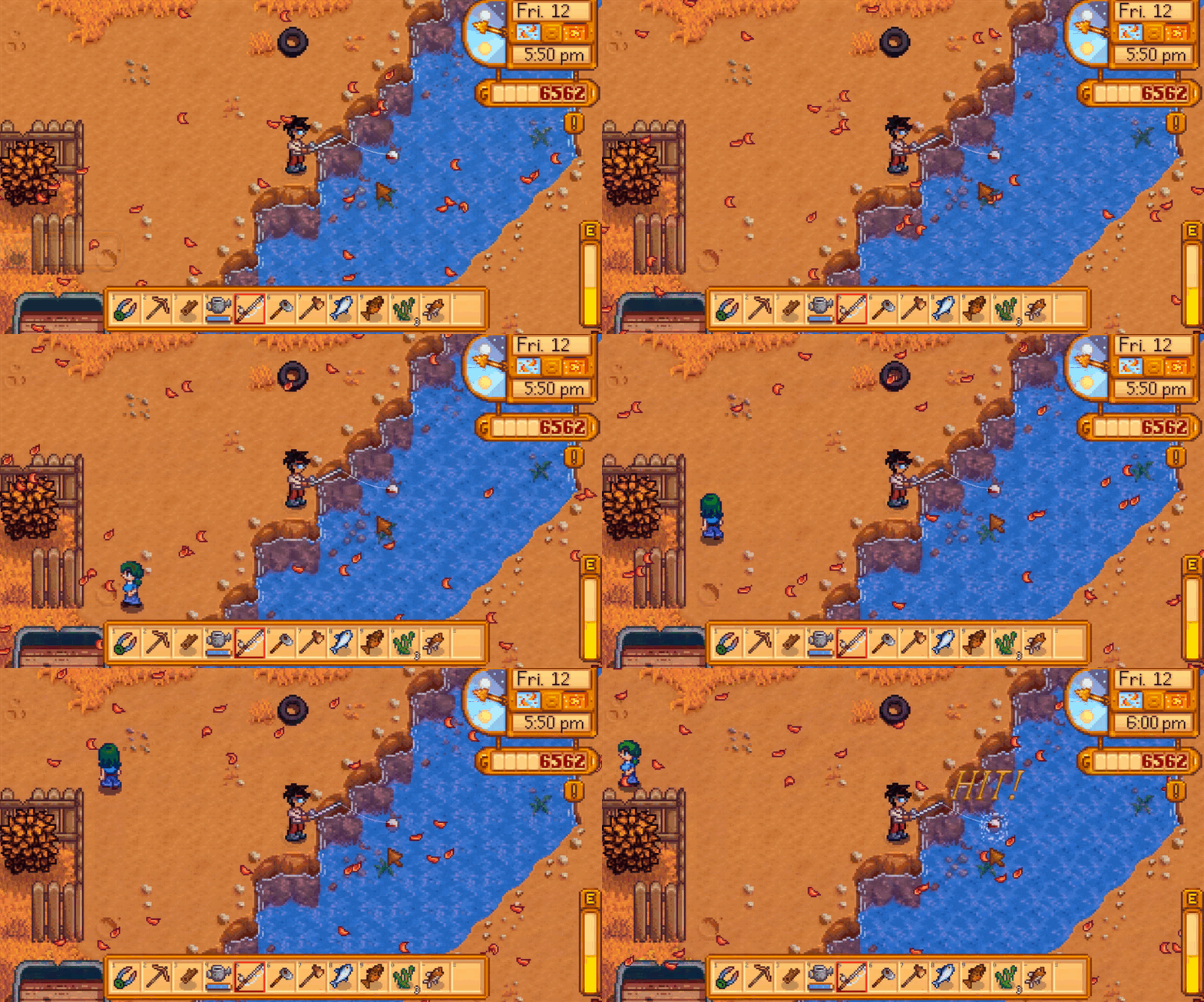
Hey guys, I'm trying to figure out a way to animate water like Stardew does, but I just can't seem to make a good, tiling, animation. Anybody have any tips?
 cobalt raptor
looks like it's a single tiling image that is being horizontally distorted and is slowly scrolling upwards
you can do this in a shader using a single non-animated texture, though the pixel-based distortion might be easier and more artistic to do yourself
but the important part here is that it is based on a single, non-animated texture + some distortion and scrolling
 raw kraken
Question about Tilemap Collider 2D - is there any way to access individual tile colliders and get to the Tile asset from there? We've been dealing with this issue for a few months now. We are unable to use grid coordinates to get placed tiles as our tiles have different shapes than the grid (the grid is only used as a placement grid). We would, however, like to have an ability to interact with the tiles. Any, even hacky way will do
 random spruce
hey guys, I am a beginner at gameart and I can't decide between gimp and krita, which prorgam would fit this art style better?


 fiery pewter
do colliders work TO HIT (an object) or TO BE HIT (by an object)?
modest cargo
fiery pewter
do colliders work TO HIT (an object) or TO BE HIT (by an object)?
It goes both ways
 humble lark
Hola, I'm trying to replace Helltaker daemons with my drawings, but there is a kind of frame that I don't know how to delete. (upward is a screenshot from the game and down .png that I put into the game)


 light elk
random spruce
hey guys, I am a beginner at gameart and I can't decide between gimp and krita, ...
light elk
random spruce
hey guys, I am a beginner at gameart and I can't decide between gimp and krita, ...
use krita its more suited to draw things
solemn latch
humble lark
Hola, I'm trying to replace Helltaker daemons with my drawings, but there is a k...
Looks like the polygon edges.
humble lark
So I should replace the sprite too?
solemn latch
I really have no idea what you're trying to do
still tendon
What’s a free program for pixel art and what are some resources to learn pixel art
random spruce
light elk
use krita its more suited to draw things
ok, thanks
paper pendant
still tendon
What’s a free program for pixel art and what are some resources to learn pixel a...
there really isn't a free program tbh. Theres the standard paid Aseprite, which is 15-20 dollars usd and fully featured with a throwback windows95 UI lol
as for resources
i recommend AdamCYounis on youtube, his work is chefs kiss
still tendon
paper pendant
there really isn't a free program tbh. Theres the standard paid Aseprite, which ...
That sucks
Are you sure there isn’t a free alternative I don’t really wanna pay for an art software that idk I’ll even use for a while
I just wanna do some funny little sprites for games I wanna make
Or just funny little sprites in general :>
paper pendant
aseprite is worth it tbh
its an animation suite and art program in one
and it has tablet support
still tendon
I don’t wanna get a tablet
I’m not an artist just some dude who wants to make a little game but doesn’t want it to be a bunch of squares
paper pendant
are you a programmer?
/how comfortable are you compiling a program
if you download the source and follow the compilation guide, you can build aseprite for free
the source is on git
still tendon
paper pendant
are you a programmer?
Barely
paper pendant
ah ok nvm
still tendon
paper pendant
/how comfortable are you compiling a program
Not at all
paper pendant
well hmm
actually i found a resource that may be of use to you
its an in browser editor hosted by a website called Lospec
they host palette and other art assets
or you could use Paint.NET
its free
still tendon
Alright thanks
paper pendant
cheers
 vestal bridge
still tendon
Are you sure there isn’t a free alternative I don’t really wanna pay for an art ...
vestal bridge
still tendon
Are you sure there isn’t a free alternative I don’t really wanna pay for an art ...
Piskel is a pretty neat tool, and GIMP is less pixel-art specific but still viable, and there's Pixilart if you want an online one
(btw Piskel is either online or downloadable)
All free :)
as for places to learn, Brandon James Greer has some interesting stuff, and I'm no expert but I find looking at pixel art you like and trying to emulate it can help
modest cargo
still tendon
Are you sure there isn’t a free alternative I don’t really wanna pay for an art ...
I believe LibreSprite is a free fork of Aseprite which doesn't need compiling from before it went premium
Never tried it though so can't speak for it
cobalt raptor
I dled libresprite, it runs like garbage compared to aseprite
perf-wise
if you want, you can compile aseprite from source
it is open source after all
paper pendant
I told 'em, he doesn't really have much exp with compiling programs and just wanted an out of the box solution
sly iron
is there a way to remove the white bg on a sprite?
paper pendant
are the colours on the sprite indexed?
you could open asperite and replace the white index with a 0,0,0,0 colour (transparent)
or just use the paint bucket tool on it
 hollow crown

The 2D game art, animation, and lighting for artists eBook is our biggest, most comprehensive 2D development guide, created for Unity developers and artists who want to make a commercial 2D game.
solemn latch
God I hate the 2d urp renderer, it is such crap and them focusing all their features on it is terrible.
How about they fix tangents on sprite meshes
 chrome grove
How would you create a "Laserbeam" style attack, preferably without shaders? Where the middle section duplicates until it hits the wall I suppose?
cobalt raptor
you can use a line renderer
chrome grove
Can that easily be used with Sprites/sprite animations/
cobalt raptor
as in, make the laser beam out of sprites?
chrome grove
Yeah.
Was sort of my original thought was like three sprites/animations.
One: Starting/Spawn.
Two: Looping Animation that tiles.
Three: Collision.
cobalt raptor
that's not a terrible way to do it
chrome grove
And then collision I would assume would just be based on the raycast point.
cobalt raptor
correct
chrome grove
Cool so I got that part done, the only part I'm confused about currently would be, how would I go about adding a sprite renderer/sprite animation on top of the line renderer?
humble lark
solemn latch
Looks like the polygon edges.
yes it is, I just exported txt of the sprite and "bool m_IsPolygon = false" I've changed it to true but it is more complicated. You know how to change it? I'm totally new at Unity and don't see anything useful on the internet...
the sprite
solemn latch
humble lark
yes it is, I just exported txt of the sprite and "bool m_IsPolygon = false" I've...
Like I said, I have no idea what you're trying to do.
humble lark
solemn latch
Like I said, I have no idea what you're trying to do.
I want to have all my picture visible. The red lines had to show how the sprite is changing the picture it is just an example. I've replaced png from the game with the same texture but with red lines on but the sprite is still from the old one, so it cuts it. I'm planning to draw my own textures and they won't fit the frame.
solemn latch
So you're what, modding a game? That you haven't defined any of the details of? Or something else?
 frosty coyote
Do you know any free 2D world generation assets that are good?
paper pendant
isometric? or?
well its easier to do rectagular grids vs hexagonal or isometric i imagine but I posted in resources a week or two ago with a dev blog on terrain generation (not mine, i found it online)
includes well documented code
 next sierra
what is happening here? everytime my character jumps into a corner like that he goes through the floor why?
and yes i have 2 box colliders
on the wall and ground
solemn latch
next sierra
what is happening here? everytime my character jumps into a corner like that he ...
Do you have the collision detection set to continuous?
 solemn latch
Then you probably should.
solemn latch
If you have it set to discrete, you can jump entirely through objects if your are moving fast enough that the move starts and ends outside it.
next sierra
solemn latch
If you have it set to discrete, you can jump entirely through objects if your ar...
btw why this is happening or how do i fix this?
solemn latch
next sierra
btw why this is happening or how do i fix this?
Why is what happening? Can you be more specific?
Rigidbodies don't like being embedded in each other.
next sierra
yeah sry, the player is idk how can i describe it but when you move it to a wall it does that as shown in the clip and its a bit annoying
solemn latch
I'd ask in #⚛️┃physics
next sierra
ok ty
 leaden ice
@next sierraIf you haven't figured it out yet, I'd suggest starting by setting the collision detection on anything that you're moving each frame (e.g. your player) to continuous collision detection
If you've already done that you can try constraining your player by raycasting and not letting them move if it hits a wall
solemn latch
next sierra
yeah sry, the player is idk how can i describe it but when you move it to a wall...
Also, how are you moving it? Are you using physics or just changing the transform's position?
next sierra
solemn latch
Also, how are you moving it? Are you using physics or just changing the transfor...
Transform, idk how to use physics xD
next sierra
leaden ice
<@!391915815915487232>If you haven't figured it out yet, I'd suggest starting by...
i've fixed the 1st problem, the 2nd one is bcs of the physics ig
next sierra
leaden ice
If you've already done that you can try constraining your player by raycasting a...
hmm
solemn latch
Well. There's your problem.
You should avoid moving the transform directly when you have a rigidbody on it.
That will make your physics behave all kinds of weird
next sierra
solemn latch
That will make your physics behave all kinds of weird
Yeah, i didn't know about that, need to change it soon
ty alot
leaden ice
next sierra
Yeah, i didn't know about that, need to change it soon
Yep, since the physics is not updated at the same time regular update runs tons of strange behaviour can occur
light scaffold
does anyone know how chunk culling works on a tilemap renderer?
 fickle vale
yo how do i move stuff in tile pallete , like i select smth using S and try and move it using M it just deselects and switches to the pick or marquee a new brush
cobalt raptor
Think you need to switch into palette editing mode
 clever fractal
I created that UI sprite, loaded it in an UI object, but it ends up looking weird in game


the UI image size is set up to the exact size of the sprite
how can I fix it ?
I don't use bilinear filtering because it makes the sprite blurry
clever fractal
solemn latch
What do you want it to look like?
see the isometric tile below the goblin ? some of its pixels are scaled down compared to the other
But I found out thats a camera issue ? I'm working on my game resolution to display the right number of pixels I want to make it work
solemn latch
Yeah. Pixel art usually needs to be scaled by even amounts or that will happen
clever fractal
Ended up making my display 16/10 because of it. I guess that's fine
So I can easily divide by 64
chrome grove
Is there anyway to create a rule tile that does it on the left?
Right now I get whats on the right? I guess at the end of the day I'd need something like..
"If Bottom Tile is an Edge Piece, Bring it all the way to the top?" Something like that.
 solemn latch
chrome grove
Is there anyway to create a rule tile that does it on the left?
Right now I get...
solemn latch
chrome grove
Is there anyway to create a rule tile that does it on the left?
Right now I get...
You could also put the section on a new layer so it doesn't interact with the side pieces?
chrome grove
solemn latch
You could also put the section on a new layer so it doesn't interact with the si...
I could yes. But I'm procedurally generating a lot of this. So a tile rule would be preferred.
I could also just place things by hand as well. I'd just prefer not to lol
chrome grove
Another problem I'm having is this. Its what I want vs What I get. And I'm not really sure if there is a way to fix this or not.
 solemn latch
Have two rule tiles?
Or perhaps check whether there is more of that same tile anywhere above/below it instead of just checking the immediate neighbors?
 fallen hare
why is it that in the scene view there is a sprite in plain daylight but it doesnt show at all in the game view?
oh, the Z position of the sprite was lower than the cameras Z position
solemn latch
Yeah, that's the most common reason I think. (Or at least, when people ask in here :D)
 empty coral
HOW RIG THIS PROPERLY?!
 empty coral
my geometry was shit
empty coral
How do I make the lower part of the ear influance the back head?

should I make then on separate layers or is it the bones, I just don't know
 main bronze
was messing with the experimental 2d lights in URP and how would i exactly go fixing this
 solemn latch
main bronze
was messing with the experimental 2d lights in URP and how would i exactly go fi...
solemn latch
main bronze
was messing with the experimental 2d lights in URP and how would i exactly go fi...
Define 'fixing.' Without context I have no idea what it should look like.
main bronze
i found a fix to it..the problem was mostly how the shadows reacted to the stacking of objects with different shadow casters on them
turning on self shadow did it
 solemn latch
empty coral
How do I make the lower part of the ear influance the back head?
solemn latch
empty coral
How do I make the lower part of the ear influance the back head?
Just paint weight for the ear bone to the head where you need it.
empty coral
solemn latch
Just paint weight for the ear bone to the head where you need it.
It doesn't work, I tried
solemn latch
empty coral
It doesn't work, I tried
Are you in the right painting mode? Not in smoothing or something?
empty coral
solemn latch
Are you in the right painting mode? Not in smoothing or something?
yess
It just doesn't want them together :/
solemn latch
And if you select the vertices in that area and use the weight slider?
paper pendant
So if i'm looking at multi layered sprites, how would i go about approaching that? im thinking i want to switch from frame-by-frame animation exported to unity to some sort of composite animation made in the unity animator from frame-by-frame
I've looked for tutorials but couldn't find much on the topic / am using the wrong keywords
 cinder escarp
is there a way to overlap something over a light source
solemn latch
paper pendant
So if i'm looking at multi layered sprites, how would i go about approaching tha...
I'm having trouble understanding exactly what you're trying to do as well, so I'm guessing it is a keyword problem. Can you try rephrasing it?
paper pendant
solemn latch
I'm having trouble understanding exactly what you're trying to do as well, so I'...
im thinking of animating sprites in a single layer with a single sprite sheet, or in multiple layers (head, body, arms, etc) and exporting multiple sprite sheets then building the 'composite' in unity but im not sure how to do the composite approach
i use aseprite to make my sprites for 2d
solemn latch
Can you definite, specifically, what you mean when you say composite?
Are you just combining multiple layers of flipbook animation? Or are you rigging the sprites in unity, or...?
Maybe give an example?
paper pendant
multiple layers of flipbook animations if that makes sense
i'd rather not use ik and rig them in unity
by composite i basically meant multiple layers of flipbook anims
maybe its more accurate to say composed or something idk
solemn latch
Composite is accurate enough, just that it could refer to various things 😄
There are a few possible options. You could combine the sheets in a shader, you could just have multiple sprites on top of each other in the scene, or you could combine the textures with a script.
paper pendant
i might do option B for simplicity
im thinking of stuff like clothe options, hair option, gun and items, etc
maybe ill have to use code to create the sprites on the fly
 frail minnow
is it possible to pause/stop animated tiles?
empty coral
solemn latch
And if you select the vertices in that area and use the weight slider?
Yess
solemn latch
empty coral
Yess
...Er, yess it still doesn't work or yess it fixed it?
empty coral
solemn latch
...Er, yess it still doesn't work or yess it fixed it?
Yess it doesn't work!
solemn latch
That is really weird.
 keen siren
Is there a way around textmeshpro's problems with evading pixel perfect camera?
You can "fix" it but as far as I know it's a cheap fix involving "locking" the textmesh position and working out the pixel-perfect values manually but I don't want to because it's obviously broken. I was thinking about creating glyphs for my own text sprite system
Well I heard the suggestion "use legacy text" but I'm likely to want to port my project to other platforms
sly iron
my tile brush isnt working, can someone help?
like, i got everything correct, but when i will paint the scene, the sprite doesnt show up
 gaunt wyvern
im trying to make a tileset
but tile pallete isnt letting me make new palletes
im putting them in a folder and they just dont appear
nevermind
warm mango
is it just me, or is the scene and game view showing different colors for the UI

 winter nest
its you
solemn latch
The black background probably makes a big difference
warm mango
Actually, I noticed its my monitor..im looking at the image now on my laptop and I see they're clearly the same xD
now i just feel like im crazy ahha
solemn latch
warm mango
now i just feel like im crazy ahha
The color you see depends on the surrounding colors.
 frail minnow
Collider2D[] tileColliders = Physics2D.OverlapCircleAll(transform.position, 2f, LayerMask.GetMask("Floor"));
Hi anyone can help me? I want to get my tiles with OverlapCircleAll but Its returning an empty array.
 chrome grove
How would you go about creating a ring that scales, but keeps the same thickness?
next sierra
Yo guys, i want to make a wall go up like, my player goes through a invisible square and a wall goes up, do i use transform.position?
ok im dumb i did it
nvm ty anyway
idk if its very correct but it worked, in case anyone needs it ```public ativadorprimeirosmexe ativ;
float speed = 2f;
void Update()
{

    if (ativ.ativador == true)
    {
            transform.position = new Vector2(transform.position.x, transform.position.y + speed * Time.deltaTime);
    }
    if (transform.position.y >= 14f)
    {
        transform.position = new Vector2(transform.position.x, 14f);
    }
}```
Blendshapes probably.
Or create it procedurally
 uneven wadi
hey
i need help 😦

i tried to add assets with tiles but they are super small?
how can i resize em
paper pendant
uneven wadi
in the sprites import settings try setting the pixels per unit to the width or height of the tile
 eager ravine
I was animating something but misclicked a key and now it's stuck in 3d?

how'd I go back to a 2d plane?
solemn latch
The 2d button in the scene tab.
 topaz crater
does anyone have any clue how I could recreate a movement system similar to Barotrauma (video)
I'm talking about the animations specifically, it seems that the character is a ragdoll although still has animations
https://cdn.discordapp.com/attachments/763500535554375750/822565882995146762/bCP6fCQmfI.mp4
ionic tapir
topaz crater
does anyone have any clue how I could recreate a movement system similar to Baro...
Probably it works like a ragdoll but it's animated
I mean that every part of his body is a single piece and it's rigged to be a ragdoll
and in a code you manage to animate it in this way
cobalt raptor
looks like IK active ragdoll to me
not a single piece, it's like a paper puppet with hinges at the joins
topaz crater
I think I got it, I'll try something tomorrow when I got time, thanks
solemn latch
Doesn't really look like a ragdoll at all. It looks like there's physics on the arm when you release it but the rest seems to just be animation and IK.
Probably not even 'real' physics but just a damped oscillator like the springbone from unitychan or animation toolkit.
 topaz axle
is there any way I can add all of these sprites at once (without creating an animation out of them)? and if so, is it possible to auto organize them on the x axis? https://i.gyazo.com/6faf63f6a7f1b7db3524a315667255d3.mp4
nevermind found out how
 severe aspen
This is a pretty basic issue

Does anyone know how to adjust this
Sprite Editor doesn't change anything with it I think it has something to do with the tile palette
 paper jetty


This metroidvania game is achieving a fake 3d effect with its ground platforms anyone know how this is done? My guess is perhaps heightmaps/depth maps and shadergraph.

Understand how to create interactive 3D photos in Unity. This powerful parallax shader will allow you to simulate three-dimensionality on any 2D image.
 earnest cliff
Hey guys,
Little newbie question here :
I'm trying to make some circles or capsules, as part of the UI of my first game.
When I create a new 2D Cicrcle or Capsule, its dimensions are ridiculously small.
I mean, they are 100 times smaller than they should be : I can see the blue dots and the white selection rectangle around my Circle, but the Circle is 2px big inside a 100 px selection thingy ...
You guys have any idea why ?
I was thinking about a wrong "Pixels per unit" ratio of a "scale" problem, but there does not seem to be a "Pixels per unit" input for these, and the "scale" is at 1 (and embiggens the selection area too when I increase it)
you can see the green circle and capsule on the right of the big red rectangle. They should be as big as the rectangle ...
Please Help ! 😄
 chrome grove

Right now, this is hand animated. But I sort of want to do something similar via code. Example being: Given any shape as a base, do this animation or something similar. I was thinking a shader? But I don't know if I could get a similar looking result.
Thoughts?
 tranquil sierra
is there a way to make the colliders a bit more precise?

ie, having the slant closer to what it actually looks like on the sprite
chrome grove
tranquil sierra
is there a way to make the colliders a bit more precise?
Could use an edge collider and draw it yourself.
tranquil sierra
chrome grove
Could use an edge collider and draw it yourself.
its a tilemap
i really dont want to make a edge collider for the entire map
chrome grove
Honestly doesn't look at that bad though, is the player ever going to be close enough to notice the edge is 2 pixels off?
tranquil sierra
chrome grove
Honestly doesn't look at that bad though, is the player ever going to be close e...
yes
i cant walk up slopes
solemn latch
chrome grove
Right now, this is hand animated. But I sort of want to do something similar via...
Make a gradient from inside to outside and use the shader to remap it to a single band that you can adjust. Feed time into that.
chrome grove
solemn latch
Make a gradient from inside to outside and use the shader to remap it to a singl...
I'm sort of understanding what you're saying. But definitely probably over my head. I'll look into it.
solemn latch
chrome grove
I'm sort of understanding what you're saying. But definitely probably over my he...
So say you have a gradient

You can remap that so that any single color on that is white and the rest black


And if you animate the remapped gradient, you get a band sweeping along whatever shape the first gradient takes
chrome grove
solemn latch
So say you have a gradient
Right, I get it. The only concern I have is that if I always want say, the outline to be 1-2 pixels thick, scaling this up I assume I would expand/be larger then?
solemn latch
chrome grove
Right, I get it. The only concern I have is that if I always want say, the outli...
You are drawing the gradient, you can make it any way you want. Especially with pixel art you have a lot of control over it.
 vestal briar
Hi I am struggling for 3 days with adding bones to a single sprite sheet in PSD format can you please help?
It happening after I apply changed in weights and do the Create bones
The sprite becomes corrupted
solemn latch
vestal briar
Hi I am struggling for 3 days with adding bones to a single sprite sheet in PSD ...
Looks like you have un-normalized vertex weights. Vertices that are missing weight entirely will bug out like that.
My suggestion for a rig like yours is to not use auto-weight at all, but rather to fill the entire mesh with the main body bone at max weight and then paint the limbs on top of that with normalize on.
Normalize doesn't seem to work correctly for erasing, only for painting.
vestal briar
@solemn latch Many thanks for your replay yesterday in 3am i found out was the problem after did the process many times.
After I Set the geometry I went ahead stright into the weight brush without applying the changes of the geometry first
Once I hit apply and only then go to the weight brush it works with no issues
I did not quite grasp the concept of "normalize" yet
maybe you can shed some light on this please?
 static violet
tranquil sierra
is there a way to make the colliders a bit more precise?
static violet
tranquil sierra
is there a way to make the colliders a bit more precise?
dunno if this already got answered, but you need to go into the sprite editor and in the top left dropdown select define custom physics shape, then click the sprite and you'll see handles you can adjust. delete extra vertices and line up the remaining ones to the corners
static violet
chrome grove
Right now, this is hand animated. But I sort of want to do something similar via...
you can do almost anything with a shader, with enough motivation
chrome grove
static violet
you can do almost anything with a shader, with enough motivation
Yeah I tried. And failed 😄
solemn latch
@vestal briar normalization tries to keep the sum of weights on a vertex at 1, to avoid weird behavior. It does this by increasing the weight of other bones when you reduce one, and vice versa... but if you only have one bone it doesn't know what to fill in with... and sometimes when erasing you can remove all bone influence from a vertex.
Normalization isn't required but it is usually a good rule of thumb
 noble wasp
what is wrong with the tilemap? I can't get rid of these blue lines, I tried everything I found on google but nothing seems to work
 dusk edge
Can anybody with experience with Sprite Skinning help me please? I don't know if this is a long-standing Unity bug or if I'm doing something wrong... But I have very patchy results using "Auto Weights". Sometimes it works as expected, but very often it behaves like in this screenshot where it JUST weights everything fully to the root bone only and ignores all the other bones. Any ideas??
 solemn latch
dusk edge
Can anybody with experience with Sprite Skinning help me please? I don't know if...
solemn latch
dusk edge
Can anybody with experience with Sprite Skinning help me please? I don't know if...
I usually see that happen when either there are mesh changes that haven't been applied or when a bone is selected. You can manually add bone influences to the mesh and try again, too.
Generally speaking, I suggest having at least one vertex near the pivot of each bone, to help the algorithm.
All that said, I don't prefer to use auto weights (though it should be better than the result you got!)
Generally, the way the auto weight works works best with some interior vertices to 'travel' along.
Do you have 'Associate Bones' checked in the auto weight wizard?
This sort of setup usually works(and you can delete excess points afterwards if needed.)
 dusk edge
solemn latch
This sort of setup usually works(and you can delete excess points afterwards if ...
dusk edge
solemn latch
This sort of setup usually works(and you can delete excess points afterwards if ...
Thank you so much for the suggestions. I ran "Auto Geometry" first and now it works as expected
solemn latch
Awesome. I still suggest manually editing the mesh manually for the final result of course.
 delicate jackal
Whenever I make a tilemap collider it just decides not to exist even when making a brand new project under a different installation
solemn latch
@next sierra wrong channel.
next sierra
solemn latch
<@391915815915487232> wrong channel.
Sry, should i post it on #🔊┃audio ?
solemn latch
I don't actually remember the question. but use your best judgement I guess
next sierra
Oki
 unkempt dove
Hello, I'm a beginner in unity and I am trying to create a 2D platformer game. I am using tile palettes as a map for my tiles, but as for the background objects, I don't know if i'm supposed to have them in the tile palatte or just place them in the hierarchy in the scene. Cause what if I use the same background object two times, there will be two of them in the hierarchy.
solemn latch
Is that a problem?
unkempt dove
Kinda, would'nt be nice to have it organized in a grid tilemap? These are object which is not intractable with the player, there just background usage.
solemn latch
Anything with its own transform goes in the hierarchy.
You don't have 'two of them' in the hierarchy, really. You have two instances of it with different transforms.
If you want it under the tilemap, make it into tiles.
 mossy hound
is there way to generate sprites through code
Like a 2D array sort of
solemn latch
mossy hound
is there way to generate sprites through code
Like a 2D array sort of
Can you be more specific about what you want to do?
mossy hound
solemn latch
Can you be more specific about what you want to do?
Atari break out sort of way
solemn latch
Oh yeah, of course you can. Just like any other array of instantiated objects.
 frail sequoia
Hello, I think I posted in the wrong area earlier I need some help with exporting bones. ;;
I created an animation using bones successfully however, I'm having a hard time exporting it and importing it into a new project. I figured out how to get the sprite, the controller, and the animation over, but I can't get the bones to export. Is there something I need to have checked or do in order to get them into another project?
mossy hound
solemn latch
Oh yeah, of course you can. Just like any other array of instantiated objects.
Whats the Object name and properties for this?
solemn latch
frail sequoia
Hello, I think I posted in the wrong area earlier I need some help with exportin...
The new project needs to have animation rigging installed.
How are you copying them over? The ideal method is to save the prefab into a package and import the package into the new project- that keeps all links and dependencies intact.
frail sequoia
solemn latch
How are you copying them over? The ideal method is to save the prefab into a pac...
that's exactly how I was importing it. I think it's the animation rigging not being installed....they're showing up now! Thank you so much! ❤️
 craggy compass
hi
I'm making a game in which I want to make a jump that varies according to the angle of the character, is there a simple way to do this or will I need atan2 and etc?
 eternal hamlet
is it best practice to have an empty border around your sprite sheet to avoid graphical glitches?
solemn latch
eternal hamlet
is it best practice to have an empty border around your sprite sheet to avoid gr...
A bit of padding never hurts.
solemn latch
craggy compass
I'm making a game in which I want to make a jump that varies according to the an...
 eternal hamlet
does anyone know if they are planning on improving the sprite editor any time soon? it's been lacking basic functions like multi-select, tile snapping etc for years...can't imagine it would take much to add these in
solemn latch
Seems unlikely.
 grand cove
Helloes!
Planning to make a 2D game where the assets scale up as the game becomes harder.
So does vector images work with unity or should I use some other kind of feature to keep edges smooth and sharp?
solemn latch
@grand cove you can import vector art to unity but it is then converted to raster. You could look into SDFs (like used for textmeshpro) for scalable sharp artwork.
grand cove
Is it less performant than PNG's?
Since I'm planning to use the entity system for it in a bullet hell.
solemn latch
As far as I know, it is exactly the same once you import it.
 thorny cosmos
Hey I’m looking for options for sprite normal maps. I’ve got a lot of animations to work on, and I’m looking at the auto generator programs but based on the results I am skeptical on the quality of the results I need. When looking at something like sprite illuminator I haven’t found a guide on how to test it for animation sets so it’s all consistent. So far SpriteDLight seems like the economical choice, but I’ll loose the control I’m gonna need. And most of what I’m reading is people talking about them 7 years ago. Are there more modern solutions? What’s the go to program? Any advice is appreciated
 robust elbow
Hi I'm a new game dev. And I have to make graphics for my game. I'm very bad at anything to do with painting. Who might have an idea for how I can create graphics without drawing knowledge?
 jolly narwhal
If you want to make the graphics yourself then there's no other way than learning how to make graphics
jolly narwhal
By getting someone else to make the drawings, or using ready-made graphics
modest cargo
robust elbow
Hi I'm a new game dev. And I have to make graphics for my game. I'm very bad at ...
You could choose a style that requires no drawing, such as
-procedurally generated patterns
-photographed images
-primitive geometric shapes
-low resolution pixel art
 fading helm
modest cargo
You could choose a style that requires no drawing, such as
-procedurally generat...
fading helm
modest cargo
You could choose a style that requires no drawing, such as
-procedurally generat...
Yeah I am also bad at drawing so you can see how I made my recent game abstract survival. The graphics are just simple shape which anyone can draw
Play The Game https://radiantgames.itch.io/abstract-survival
 modest cargo

Knytt Underground cleverly combines photos and minimalism to get around the need for drawing many assets
solemn latch
Thomas Was Alone used boxes for everything.
 strong mica
is there some trick to configuring a rule tile to account for 1-wide vertical walls to differentiate between left and right?

my only idea was to check if there's a rule tile exactly the room width across from it, but you don't seem to be able to check than many neighbors out
strong mica
oh, turns out you can expand the editor window very far to get silly rules like this
https://i.imgur.com/Wyd7FBD.png
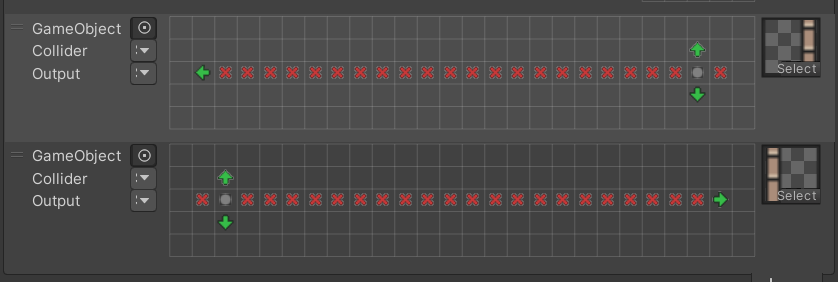
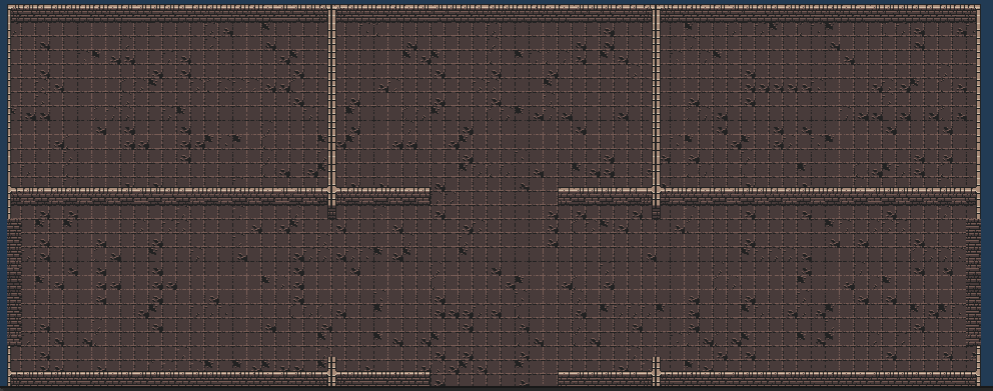
but that doesn't solve the issue when there is no vertical wall in the adjacent room
https://i.imgur.com/9Yteo1y.png
 strong mica
guess it's a tough one ahah
solemn latch
strong mica
guess it's a tough one ahah
How are you generating the rooms? Maybe you should have the generator include metadata for the rule tiles somehow.
strong mica
I don't think there's a way to pass metadata to rule tiles unless I were to completely rewrite my own implementation of them
unless I'm missing something, it looks like they can only interact with other rule tiles of their own type; I can't write a custom rule like "if x tile is in y position relative to you, use z sprite"
strong mica
oh I think I have an idea? maybe putting an invisible vertical line of rule tiles in the middle of every room so that there will always be a set horizontal position to check for
or alternatively one rule tile in the center, but that would probably require much more rules
well I've noticed a flaw in that logic already: a vertical line of rule tiles is.. exactly what I was trying to create a rule for lol. I suppose I'll just try the single invisible tile and many rules option
still neater than.. this.. https://i.imgur.com/RewB1N4.png

that looks like it worked! a bit cumbersome, but definitely works :D
cobalt raptor
that is nutty
you can write rule tiles as a script
that would allow you to query adjacent tiles as much as you like
strong mica
wait really?
cobalt raptor
pretty sure
strong mica
I haven't been able to find any documentation on rule tiles code-wise whatsoever
just inspector stuff in the editor
cobalt raptor
yeah it's pretty sparse
strong mica
I did find this earlier but I must have missed something https://docs.unity3d.com/Packages/com.unity.2d.tilemap.extras@1.6/api/UnityEngine.RuleTile.html
solemn latch
I mean, if you are procedurally generating the rooms it kinda feels like you could just tell it what tiles to use explicitly instead of using the rule tiles
cobalt raptor
that also
strong mica
I figured rule tiles would be a lot easier than hardcoding everything in the long run
hopefully my work paid off
my "procedural generation" is really rudimentary and I probably should have written it from scratch instead of following a tutorial lol
cobalt raptor
lol but you are hardcoding it
just in a different way
what happens if you want to make your rooms a different size?
your rules break
strong mica
well it's like a binding of isaac-esque game, so each room is the same size
I know it's definitely not the best solution, but it works for me at the very least
solemn latch
The point is that you are using a system to place specific tiles, and using rule tiles inside that. So your room system 'knows' which tiles you actually need better than the rule tile does.
 smoky hinge
hi, anyone using SpriteShape tool, do you know if there is a shortcut/hotkey for "start editing the shape" ? (I was expecting the Y of QWERTY but it does nothing and cant find it to configure either)
 mighty dirge
this isnt really an art specific problem but whenever I make a tileset and select a file for it to go, unity freezes
there isnt anything really there I just started a project
mighty dirge
it also is not just with tilesets, whenever i select a file it freezes
 royal fjord
hmm so using tilesets and tilemap on unity. Got a question, how would one replace a pre existing tileset without having to redo the whole level?
 dark atlas
Is there a way to turn box collision 2d on for tiles by default
 karmic bridge
dark atlas
Is there a way to turn box collision 2d on for tiles by default
karmic bridge
dark atlas
Is there a way to turn box collision 2d on for tiles by default
use preset & change default
 twin terrace
dark atlas
Is there a way to turn box collision 2d on for tiles by default
twin terrace
dark atlas
Is there a way to turn box collision 2d on for tiles by default
Tilemap collider?
dark atlas
sorry i'm new to this, its just an extremely basic platformer so when i put the tiles down i want them to be able to be jumped on without having to add collision each time
karmic bridge
dark atlas
sorry i'm new to this, its just an extremely basic platformer so when i put the ...
try searching tilemap with composite collider, you will be able to make them all jump-able
 unique oar
Hello!
I don't know much about the animation system Unity has but I am working with some sprites and I am trying to make a certain animation loop from the second sprite when it ends and not the first
I searched around but the stuff I found didn't help me
Is there a chance I may have to do this with coding instead?

Also if I ask on the wrong channel I am sorry and I can delete it,I just asked here since I am dealing with 2D sprite
solemn latch
unique oar
Hello!
I don't know much about the animation system Unity has but I am working w...
That's probably more of an #🏃┃animation question but probably the best way to do it would be to have two animations, one with the first frame and one that loops without that frame in it.
Run the first animation, then move to the looping version.
unique oar
solemn latch
Run the first animation, then move to the looping version.
That is a good idea!
Thank you!
 viscid whale
can i change a material to a sprite renderer?
 unreal pendant
I have made this custom healthbar fill. I want to so that when I lose hp it will kinda remove the image from right to left. Right now it just stretches it smaller when I lose hp.

nvm I fixed it
 shy jetty
if my character falls a long ways it flattens out like its rotating on a 3d plane, this makes no sense please help
 plain ember
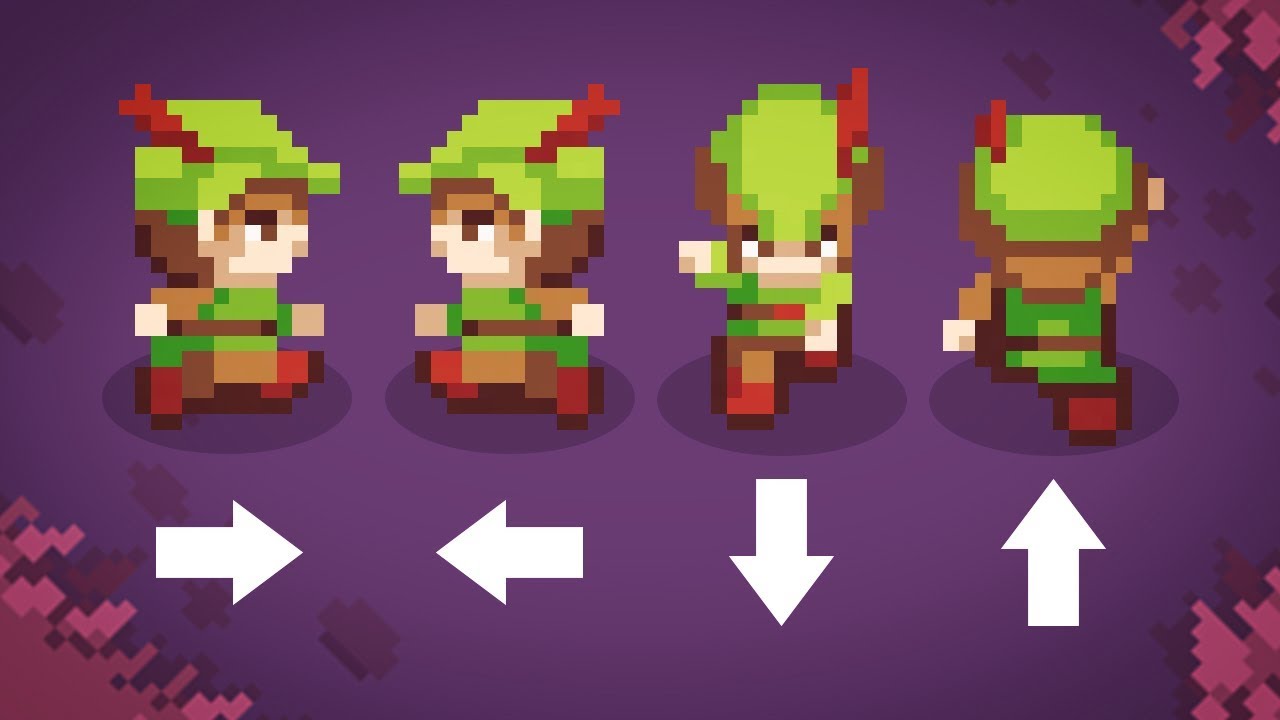
(im just using deltarune sprites for a project) So I followed brackeys top down movement tutorial https://www.youtube.com/watch?v=whzomFgjT50 and I am just wondering how I can make the sprite stay facing a direction
Let's have a look at the easiest and best way to make top-down movement in Unity!
Get costumized art for your game with Outstandly! https://www.outstandly.com/art_for_games/?Brackeys=love
👾 JOIN THE GAME JAM!! https://itch.io/jam/cgj
Thanks to everyone participating in the planning of the jam:
BlackThornProd: https://bit.ly/2GqgkqO
Dani: ht...
instead of always facing the camera
 grizzled stump
i am having trouble

my characters look like this
the sprites are 16x16
i am making a 800x600 game
 tranquil vine
anyone know why my character looks all dotted like this when i add him in?

im using pngs as sprites and idk why it does that
hes supposed to look like this

 proven badge
is it possible to make custom materials?
for like a tile pattern instead of a solid color
proven badge
tranquil vine
anyone know why my character looks all dotted like this when i add him in?
dont trust me but the resolution looks very low and the lines on the PNG are thin so i think it only shows where its thick enough. basically make the lines thicker
solemn latch
tranquil vine
im using pngs as sprites and idk why it does that
What Ricks said, and also make sure you have mipmapping turned on in the importer, and antialiasing on the camera if possible.
tranquil vine
yeah it was mostly fixed by enabling mipmapping
 pulsar void
plain ember
(im just using deltarune sprites for a project) So I followed brackeys top down ...
pulsar void
plain ember
(im just using deltarune sprites for a project) So I followed brackeys top down ...
wdym
plain ember
pulsar void
wdym
So I want my character to continue facing the direction he is moving
instead of facing the cam again
pulsar void
i see. i think u should make a private float direction and lets say when the W key is pressed direction = 1 or if the D key is pressed direction= 2. then just make it so the sprites face the direction of the number
plain ember
pulsar void
i see. i think u should make a private float direction and lets say when the W k...
how do I do that? lol
I am very new to unity
pulsar void
ill try to get a code example brb
plain ember
k
pulsar void
some like that except there are no compiling errors lol
 plain ember
pulsar void
some like that except there are no compiling errors lol
plain ember
pulsar void
some like that except there are no compiling errors lol
How could I change th "W A S D" to be the "Up Down Left Right" arrows?
pulsar void
KeyCode.RightArrow
plain ember
pulsar void
some like that except there are no compiling errors lol
Im getting "The name 'direction' does not exist in the current context"
plain ember
oh yeah lol
ok I got the numbering thing correct
now the main question is how to add it to this https://www.youtube.com/watch?v=whzomFgjT50
Let's have a look at the easiest and best way to make top-down movement in Unity!
Get costumized art for your game with Outstandly! https://www.outstandly.com/art_for_games/?Brackeys=love
👾 JOIN THE GAME JAM!! https://itch.io/jam/cgj
Thanks to everyone participating in the planning of the jam:
BlackThornProd: https://bit.ly/2GqgkqO
Dani: ht...
pulsar void
maybe make so if the direct is 1 (north) it switches to the forward sprite
pulsar void
if (Input.GetKeyDown(Keycode.UpArrow))
oops
if (Input.GetKeyDown(Keycode.UpArrow))
{
direction = 1;
}
if (direction == 1)
{
switch to forwars sprite
}
plain ember
pulsar void
if (Input.GetKeyDown(Keycode.UpArrow))
{
direction = 1;
}
if (direction == ...
so I got
this.gameObject.GetComponent<SpriteRenderer>().sprite = spr_kr_up_0;
but because of the animator, its still returning to the facing down sprite
pulsar void
o
 mystic vale
Hi, guys, I am using tilemaps (and rule tiles) to make my platforms here. However, there is some weird issue where the tiles get gaps in them, but only when the camera is in a certain position. So when the camera moves, gaps randomly appear for a second and then disappear. You can see it in the video. I tried some common fixed from Google for gaps in tiles, but it didn't work.
solemn latch
Which fixes did you try?
mossy hound
i have a tile map question
I never implement it before but For sections of a tile map if you want to add code to it. are u going to have to go across every tile u placed and add the functionailty?
Or does it act as 1
Like unity treats it as 1 big sprite

 civic geyser
Did you ever manage to find a solution for this? I'm in the same boat. Got hundreds of animated tiles on my sheet and doing it like this would take ages. I find it hard to believe Unity hasn't got a smarter solution for this nowadays.
 woeful mantle
civic geyser
Did you ever manage to find a solution for this? I'm in the same boat. Got hundr...
woeful mantle
civic geyser
Did you ever manage to find a solution for this? I'm in the same boat. Got hundr...
I have not sadly. And yeah, you'd think so but I doubt it does, otherwise someone would (should) have pointed me in that direction. Both on here and on Reddit.
Hell, ClickTeamFusion has a way to do this easily. I don't see how Unity doesn't.
civic geyser
That's unfortunate.. Thanks for letting me know!
Maybe some store asset fills the gap. I'd like to avoid writing my own tool for this purpose but doing it via the current available way is not an option either.
 slim inlet
Why does it do the jagged thing? Also his eyes look like they're changing size even though they are both 1 by 1 pixel each.
grizzled stump
For some reason, my character wont render properly, pls help
 modest cargo
grizzled stump
For some reason, my character wont render properly, pls help
modest cargo
grizzled stump
For some reason, my character wont render properly, pls help
https://blog.unity.com/technology/2d-pixel-perfect-how-to-set-up-your-unity-project-for-retro-8-bits-games
You'll probably want to implement pixel perfect rendering if you don't want any distortion in the pixel art, though it's an involved topic
It would also get rid of the tileset gaps
Some seams can remain, which are color bleed caused by lack of margins in the tilemap
You can add the margins manually or let unity compile a texture atlas which can add margins automatically
grizzled stump
modest cargo
<https://blog.unity.com/technology/2d-pixel-perfect-how-to-set-up-your-unity-pro...
i added it but seems liek nothing changed
 modest cargo
grizzled stump
i added it but seems liek nothing changed
modest cargo
grizzled stump
i added it but seems liek nothing changed
You need to do more than "add it", as explained by the blog post
For one, the display resolution does not fit your reference resolution, and the non-uniform zoom will distort pixel proportions anyhow
 grizzled stump
modest cargo
You need to do more than "add it", as explained by the blog post
For one, the di...
grizzled stump
modest cargo
You need to do more than "add it", as explained by the blog post
For one, the di...
Should I set it to free aspect with default scale?
modest cargo
No
grizzled stump
I just don't really understand what to do..
modest cargo
You need to read the instructions
if you want pixel perfect rendering, that is
Otherwise just live with the distortion
modest cargo
grizzled stump
i added it but seems liek nothing changed
Also, the camera is using perspective projection which plain won't be able to work
grizzled stump
modest cargo
Also, the camera is using perspective projection which plain won't be able to wo...
Thank you
modest cargo
grizzled stump
Thank you
There's a lot of weird issues you might face, especially when changing display/reference resolutions or when trying to scale sprites
When solving them, consider that the causes are rarely "technical" like usual, but a misunderstanding of the "rules" of pixel perfectness
mystic vale
solemn latch
Which fixes did you try?
Setting that the sprite has no compression. Setting the sprite filter mode to "Point".
solemn latch
Did you set up a sprite atlas?
mystic vale
Yes, that didn't work as well, forgot about that
modest cargo
mystic vale
Yes, that didn't work as well, forgot about that
The point of the atlas in this case is to generate it with margins
If the color of the gap is the color of another tile (rather than the background) having an atlas with margins should fix it
Another options is o draw margins into the tilemap texture yourself and import it again
 grizzled stump
modest cargo
You need to do more than "add it", as explained by the blog post
For one, the di...
grizzled stump
modest cargo
You need to do more than "add it", as explained by the blog post
For one, the di...
the fix was actually changing the floor to something that isnt 1 color
modest cargo
grizzled stump
the fix was actually changing the floor to something that isnt 1 color
I'm glad you found one that works 👍
grizzled stump
it fixed the problem, all what matters
 tribal kindle
Is there a way I can make animated falling leaves in a pixel art top down game?
Or perhaps rain?
solemn latch
I don't see why not?
 granite parcel
Hey when I press the Main Menu button and return to the Main Menu and then return back to the game I can't move anywhere, but my Sprite switches to the direction its looking any reason why that is?

 junior dawn
Hey gang, anyway to auto populate the Tiling Rules for Rule tiles?
or do I have to add them one by one each time?
 stiff ridge
Hey ... I'm Gonna make my First game .. So first of all i need to design a 2d Character .. how where do i design it ? I want to make it simple
I'm asking for Easiest way or copyright free designs to make it faster
still tendon
stiff ridge
Hey ... I'm Gonna make my First game .. So first of all i need to design a 2d Ch...
You can look up some websites where u can draw Pixel arts online :P
one website in particular is pixilart.com
its the easiest way to just draw a pixel character/object
There are also Asset's available on the Unity Asset store dedicated to drawing pixel art or other stuff within the Game Engine :)
 green fern
grizzled stump
green fern
grizzled stump
really sus if you ask me
grizzled stump
green fern
really sus if you ask me
Indeed..
shy jetty
grizzled stump
i added it but seems liek nothing changed
the main issue ive seen happen is in the editor before you drag it into the scene you have to change the import settings to no filter, no compression and it comes out clean
grizzled stump
shy jetty
the main issue ive seen happen is in the editor before you drag it into the scen...
Did that too

 lean estuary
Try refocusing camera with f. Also this collider editing gizmo bug historically fixed by resetting layout. Could try that.
eager ravine
lean estuary
Try refocusing camera with `f`. Also this collider editing gizmo bug historicall...
tried it but no luck, just a small nitpick but nothing too detrimental
solemn latch
eager ravine
tried it but no luck, just a small nitpick but nothing too detrimental
You can try the camera frustum settings(little button in the upper right of the scene view that looks like a camera)
 tropic haven
Any idea how I can fix this? The tiles are not overlapping...
solemn latch
tropic haven
Any idea how I can fix this? The tiles are not overlapping...
Define 'properly?'
tropic haven
I'm trying to get it so it doesn't overlap at all
So if I place a road tile over it, it wont look like Escher's art
I shouldn't say "properly", bad word to use; fixed the wording in it lol


 white bone
Looks like it is a height issue, is it 2d or 3d objects?
Oh wait thats just an optical illusion making me think that. I believe that is a z buffer or layer issue. Not entirely sure how to correct it but if you look into that it should hopefully provide an answer
 unkempt ether
Physics Material 2D disappeared

 elfin sandal
can the new 2d pixel perfect render 3D models in perspective?
in order to make a ps1 style game
solemn latch
@unkempt ether it is under 2d
 amber bison
Hello 👋 i'm wondering, is there a shortcut to use, when i use a tilemap brush, to press so my mouse stays on the X or Y axis ? i mean, to paint a complete row and that prevent the mouse to go either on X or Y axis
to prevent this happening 😄
 lean estuary
You can select long rectangular area and use it as a brush.
 narrow acorn
Hey, when i import a tileset into Unity the colors get messed up, could you help me with that?
 modest cargo
narrow acorn
Hey, when i import a tileset into Unity the colors get messed up, could you help...
modest cargo
narrow acorn
Hey, when i import a tileset into Unity the colors get messed up, could you help...
Set texture compression to none
amber bison
lean estuary
You can select long rectangular area and use it as a brush.
Even tho i am using a single tile with a tilerule ?
lean estuary
@amber bison There's Paint Filled box option
 nimble light
With tile palette, how can I make so a sprite fits a specific tile size ? I have a sprite but it's way too big
lean estuary
nimble light
With tile palette, how can I make so a sprite fits a specific tile size ? I have...
You need to set the grid to the correct size or all assets. If your asset 64x64 you can set grid to 0.64 to match it when asset pixel per unit setting is default at 100
nimble light
Oh ok it makes sense
Ty
And when I have some other sprites of different size, what should i do ?
lean estuary
With pixel perfect you don't want them to be different pixel per unit size fitting in the same tile, it would look weird.
If something twice the size you can still set it to a tile.
breaking it down to several tiles
nimble light
ok
slim inlet
Hi whenever my character is moving to the left the sprite is lagging. Plus in general the eyes which are 1 by 1 pixel look as if they're changing size when I'm moving. Why is this?
elfin sandal
do u have pixel perfect
slim inlet
no
elfin sandal
that's probably why
slim inlet
Should I just add pixel perfect then
elfin sandal
if u want
 wind hinge
Dear people
I downloaded the Tilemap editor
BUUT
I can't open it through the window
I mean through Window
 short reef
why dose this happen every time i tr y to make a 2d square
 solemn latch
nimble light
And when I have some other sprites of different size, what should i do ?
solemn latch
nimble light
And when I have some other sprites of different size, what should i do ?
Just make them bigger and they'll overflow into other tiles
solemn latch
short reef
why dose this happen every time i tr y to make a 2d square
What exactly is 'this'?
short reef
solemn latch
What exactly is 'this'?
supossed to be a square
i fixed it by rotating the sqaure
elfin sandal
Is it possible to edit the render texture that the pixel perfect component creates when upscale render texture is ticked?
narrow acorn
modest cargo
Set texture compression to none
Thank you! 🙂
 abstract olive
Don't bait people. If you have a question, just ask your question and anyone who can help, will.
 tawny geyser
how can i get hitboxes onto my tilemap objects?
 tulip valve
tawny geyser
how can i get hitboxes onto my tilemap objects?
tulip valve
tawny geyser
how can i get hitboxes onto my tilemap objects?
with a tilemap collider i think
noble wasp
Why do colliders don't collide when "isTrigger" is activated?
 zealous briar
Because there are situations where you want to use them as trigger only
abstract olive
If you want to detect touching it, you can use OnTriggerEnter instead.
 hazy isle
tawny geyser
tulip valve
with a tilemap collider i think
hazy isle
tawny geyser
tulip valve
with a tilemap collider i think
Ok ill check it out when i open up the project again
tawny geyser
update: it worked
 patent lark
Hi, guys. Can you help me, please, with Unity Tile Editor?
My tiles are painted correctly, when I use Flood fill with active brush tool and are painted shifted when I use classic Paint with active brush tool. Changing parameters makes incorrect one or another way

Looks like "Offset" here is applied while using "Paint" and not applied while using "Flood":


 left radish
Anyone got any good recommendations for 2d sprite creation? I wanna create some semi detailed sprites but am not sure what’s best to use for beginner
 light relic
Same, any good ones for smoother art that isn't vectors?
still tendon
left radish
Anyone got any good recommendations for 2d sprite creation? I wanna create some ...
Piskel
still tendon
light relic
Same, any good ones for smoother art that isn't vectors?
Piskel
 spice fossil
Frame by frame, yes
cobalt raptor
@still tendon push your ctrl and alt keys (one at a time and by themselves) and then try again
hm
granite parcel
how can i stop game objects from pushing the player so for example the enemy when he is close to the player to push him in a direction? I just want them to both stand still
 stiff anvil
granite parcel
how can i stop game objects from pushing the player so for example the enemy whe...
stiff anvil
granite parcel
how can i stop game objects from pushing the player so for example the enemy whe...
You should use Physics.IgnoreCollision
 delicate elm
what's the difference between the green border and blue border in sprite editor?
 short crypt
is this cursed? its top-down perspective

 viral ivy
Hello so when i take stuff out of my pallete they are very small when placed on the grid of the 2D game, how do I increase its sizes?
 modest cargo
viral ivy
Hello so when i take stuff out of my pallete they are very small when placed on ...
modest cargo
viral ivy
Hello so when i take stuff out of my pallete they are very small when placed on ...
If the cell size is one unit the sprites need a pixels per unit value that fills the cell
viral ivy
modest cargo
If the cell size is one unit the sprites need a pixels per unit value that fills...
Where do I assign that exactly. I see there is a value on the right when clicking on one of the tiles on palette, that is not it right?
 modest cargo
viral ivy
Where do I assign that exactly. I see there is a value on the right when clickin...
modest cargo
viral ivy
Where do I assign that exactly. I see there is a value on the right when clickin...
The sprite asset itself
viral ivy
modest cargo
The sprite asset itself
This is it right?

By clicking on the assets terrain and on this i got this value, now I just apply them and reinsert them in my pallete?
modest cargo
viral ivy
By clicking on the assets terrain and on this i got this value, now I just apply...
Change the value and see what happens
Judging from the name of the texture it's meant to be used with 16 ppu
viral ivy
modest cargo
Change the value and see what happens
Judging from the name of the texture it's ...
It works. I dont quite understand why when i put it on 3000 it got smaller instaed of bigger. What is exactly happening behind that?
Thanks for your help man, appreciate it
modest cargo
viral ivy
It works. I dont quite understand why when i put it on 3000 it got smaller insta...
Pixels per unit means how many pixels fit in one unit
16 means the sprite is enlarged so that 16 pixels on the texture will fill one unit space exactly
3000 ppu means that a 3000x3000 sprite is the size of just one unit
viral ivy
modest cargo
Pixels per unit means how many pixels fit in one unit
Ok, thank you.
 sly totem
how to switch a tilemap from hexagon to rectangular
 stark badger
I'm using AllIn1Shader to get an outline on my character but it cannot draw at the top or bottom, just inside the actual sprite. Is there a clever way around this except to add padding in the actual sprite ?
 modest cargo
stark badger
I'm using AllIn1Shader to get an outline on my character but it cannot draw at t...
modest cargo
stark badger
I'm using AllIn1Shader to get an outline on my character but it cannot draw at t...
I doubt there is
Sprites can't be rendered larger than their geometry, unless the geometry is expanded while shrinking the sprite proportionally, which may cause sampling issues with tight sprite sheets anyway
 willow solar
anyone knows if tilemap sprite mask is a thing?
atm i can add a sprite mask gameobject to my ruletile which do works, but its not really good for performance
could also manually add spritemasks by hand over the tiles, but that would take some serious time to do + update if i make changes to my tilemap
 fair trellis
 elfin pecan
how do i split them
elfin pecan
how do i split them
theres a button that says it
if you make the window bigger you will see it
fair trellis
screenshot it
elfin pecan
 fair trellis
elfin pecan
fair trellis
elfin pecan
did you change it from Single to Multiple? in the inspector
elfin pecan
i did now
elfin pecan
thanks
fair trellis
copy what
fair trellis
you dont copy anything, you just use them
elfin pecan
like select them
fair trellis
you just put them into a Sprite Renderer or a Tilemap or wherever you want
elfin pecan
its top down
fair trellis
doesnt make a different if your top down or not, they all use the same thing
fair trellis
yes
elfin pecan
where is the sprite renderer
fair trellis
its a Component
elfin pecan
fair trellis
its a Component
ik how do i put it in a sprite renderer
fair trellis
elfin pecan
ik how do i put it in a sprite renderer
you drag it into the slot
modest cargo
elfin pecan
ik how do i put it in a sprite renderer
To learn unity you have to go through beginner guides first
There's way too much stuff to figure out any other way
 elfin pecan
modest cargo
To learn unity you have to go through beginner guides first
There's way too much...
elfin pecan
modest cargo
To learn unity you have to go through beginner guides first
There's way too much...
ig
ik editing is disabled
but how else am i suppose to place it
elo
modest cargo
elfin pecan
There's supposed to be a sprite asset visible here
I'm fairly sure you're doing things in the wrong order
You really need to find a step by step tutorial how to get 2D assets into Unity
elfin pecan
modest cargo
You really need to find a step by step tutorial how to get 2D assets into Unity
they all r doing it from the file
and not from the sprite editor
modest cargo
elfin pecan
they all r doing it from the file
Sprite editor isn't used for making sprites, but configuring them
elfin pecan
modest cargo
Sprite editor isn't used for making sprites, but configuring them
why is it blurry
i know how to upload them
now
modest cargo
elfin pecan
why is it blurry
have you tried searching "unity sprite blurry" on google
That's the standard starting point to solving any problem
elfin pecan
modest cargo
have you tried searching "unity sprite blurry" on google
That's the standard sta...
what do i do
abt the background
of the sprite
modest cargo
I don't know what the problem is, but usually backgrounds are removed in your image editor and transparency saved to alpha channel
elfin pecan
modest cargo
I don't know what the problem is, but usually backgrounds are removed in your im...
u dont/
knoww
 naive apex
Why does the animation speed not work with the animation window?

 alpine verge
What is best tool to design/draw/paint UI elements?
cobalt raptor
naive apex
Why does the animation speed not work with the animation window?
The animation preview plays the clip outside the context of the animation controller, so it is unaffected by the settings there. The speed should take effect in playmode
 distant swallow

How to display cursor coordinates in scene editor?
How to catch pixels on a scene in pause mode?
Simple ✨ Here is my old script.
#gamedev #indiegaming #indiegamedeveloper #code #unity3d @unitygames #gamedeveloper #pixel #indie #indiedev #indiedeveloper

 Twitter
·
naive apex
cobalt raptor
The animation preview plays the clip outside the context of the animation contro...
Twitter
·
naive apex
cobalt raptor
The animation preview plays the clip outside the context of the animation contro...
Yes, it works in play mode.
But why? Wouldn't it make sense to allow users to change the speed and see the result so you can adjust accordingly?
Now you have to make a sandbox scene just to test it out.
cobalt raptor
@naive apex because that's not how the animator works
naive apex
yes, I know, multiple animator can use the same animation but they can each have their own animation speed as well.
But, it would be great if I can just set a speed to the animation window and test it out there, instead of doing a workaround just to test it out.
Not to mention that play mode doesn't save changes, so I can only adjust 1 animation at 1 time, or take note of every changes.
It's tedious and unintuitive.
cobalt raptor
¯_(ツ)_/¯
 steel totem
super beginner question, what is the best way to remove gaps between tiles?
 hollow patrol
I have a problem with my parallax and hit box. Can anyone tell me what the problem is?
steel totem
yeah this is what I mean
 cobalt raptor
I don't see any gaps?
steel totem
In the centre
 hearty stone
cobalt raptor
I don't see any gaps?
hearty stone
cobalt raptor
I don't see any gaps?
 steel totem
nvm ive fixed it, I needed a sprite atlas
cobalt raptor
hearty stone
was on my phone, missed it 😄
modest cargo
steel totem
nvm ive fixed it, I needed a sprite atlas
That did fix it? There's two types of tilemap gaps and usually you need pixel perfect camera instead of sprite atlas to fix this sort
steel totem
It fixed it in my case, although I'll probably switch to pixel perfect camera since that seems like a better solution
modest cargo
steel totem
It fixed it in my case, although I'll probably switch to pixel perfect camera si...
They're solutions to entirely separate problems
Which can be hard to tell apart
One is background showing through the gaps because the camera is rounding sprite renderer positions incorrectly
The other is other tile colors showing through the gaps because the sprite sheet is sampling pixels inaccurately
 robust lava
robust lava
robust lava
can i get some help?
modest cargo
robust lava
can i get some help?
This looks to be a problem with your code or physics, but the video doesn't give any meaningful clues
robust lava
using UnityEngine;
using UnityEngine.SceneManagement;

public class PlayerMovement : MonoBehaviour
{
    [Header("Movement Parameters")]
    [SerializeField] private float speed;
    [SerializeField] private float jumpPower;

    [Header("Coyote Time")]
    [SerializeField] private float coyoteTime; //How much time the player can hang in the air before jumping
    private float coyoteCounter; //How much time passed since the player ran off the edge

    [Header("Multiple Jumps")]
    [SerializeField] private int extraJumps;
    private int jumpCounter;

    [Header("Wall Jumping")]
    [SerializeField] private float wallJumpX; //Horizontal wall jump force
    [SerializeField] private float wallJumpY; //Vertical wall jump force

    [Header("Layers")]
    [SerializeField] private LayerMask groundLayer;
    [SerializeField] private LayerMask wallLayer;

    [Header("Sounds")]
    [SerializeField] private AudioClip jumpSound;

    private Rigidbody2D body;
    private Animator anim;
    private BoxCollider2D boxCollider;
    private float wallJumpCooldown;
    private float horizontalInput;
    private Vector3 respawnPoint;

    private void Awake()
    {
        //Grab references for rigidbody and animator from object
        body = GetComponent<Rigidbody2D>();
        anim = GetComponent<Animator>();
        boxCollider = GetComponent<BoxCollider2D>();
        respawnPoint = transform.position;
    }

    private void Update()
    {
        horizontalInput = Input.GetAxis("Horizontal");

        //Flip player when moving left-right
        if (horizontalInput > 0.01f)
            transform.localScale = Vector3.one;
        else if (horizontalInput < -0.01f)
            transform.localScale = new Vector3(-1, 1, 1);

        //Set animator parameters
        anim.SetBool("run", horizontalInput != 0);
        anim.SetBool("grounded", isGrounded());

        //Jump
        if (Input.GetKeyDown(KeyCode.Space))
            Jump();

        //Adjustable jump height
        if (Input.GetKeyUp(KeyCode.Space) && body.velocity.y > 0)
            body.velocity = new Vector2(body.velocity.x, body.velocity.y / 2);

        if (onWall())
        {
            body.gravityScale = 0;
            body.velocity = Vector2.zero;
        }
        else
        {
            body.gravityScale = 7;
            body.velocity = new Vector2(horizontalInput * speed, body.velocity.y);

            if (isGrounded())
            {
                coyoteCounter = coyoteTime; //Reset coyote counter when on the ground
                jumpCounter = extraJumps; //Reset jump counter to extra jump value
            }
            else
                coyoteCounter -= Time.deltaTime; //Start decreasing coyote counter when not on the ground
        }
    }

    private void Jump()
    {
        if (coyoteCounter <= 0 && !onWall() && jumpCounter <= 0) return;
        SoundManager.instance.PlaySound(jumpSound);

        if (onWall())
            WallJump();
        else
        {
            if (isGrounded())
                body.velocity = new Vector2(body.velocity.x, jumpPower);
            else
            {
                //If not on the ground and coyote counter bigger than 0 do a normal jump
                if (coyoteCounter > 0)
                    body.velocity = new Vector2(body.velocity.x, jumpPower);
                else
                {
                    if (jumpCounter > 0) //If we have extra jumps then jump and decrease the jump counter
                    {
                        body.velocity = new Vector2(body.velocity.x, jumpPower);
                        jumpCounter--;
                    }
                }
            }

            //Reset coyote counter to 0 to avoid double jumps
            coyoteCounter = 0;
        }
    }

    private void WallJump()
    {
        body.AddForce(new Vector2(-Mathf.Sign(transform.localScale.x) * wallJumpX, wallJumpY));
        wallJumpCooldown = 0;
    }
see ther is nothing worng in my code
still tendon
Lil question how do you type letters like that
 knotty wadi
Hey, I'm trying to import a spliced png as a tileset but was wondering if it was possible to import it into the tile palette exactly as it appears in the png. Right now it just forms a block and it would take forever to sort all of the tiles.
 steady radish
oi
elfin sandal
knotty wadi
Hey, I'm trying to import a spliced png as a tileset but was wondering if it was...
open the sprite editor and chose autoslice
knotty wadi
elfin sandal
open the sprite editor and chose autoslice
I already have it spliced, I want to make it into a tile palette without having to reorganize all of the tiles as it would take too long.
knotty wadi
This is what I am doing by hand, but I want to import the whole sprite sheet in this format so that it stays organized in the palette and is easily manageable if that is possible
 knotty wadi
Update: for those struggling importing tile palettes as a layout, fill in every tile of your resolution size with a bright/different color and import the spliced image directly. Then go in and delete all of the magenta tiles from the sheet and files, keeps layout and only takes 5 minutes versus three hours.
 naive apex
Is there a way to make one object bouncy and another not?
E.g. A have 0 bounciness, B have 0.5 bounciness.
Currently, after I use this setting, when A run into B, it will get bounced back a little
 urban nacelle
Hey fellows.... apparently I can't make more than one transition from one state....how can I solve this issue ....I can't make a transition from hitted to die...is there another way I can do this please

Whenever I make 2 transition when I try adding a third one ...the option does not appear
modest cargo
urban nacelle
Whenever I make 2 transition when I try adding a third one ...the option does no...
no crossposting
solemn latch
@knotty wadi you can also just tell unity to slice on the grid, right?
 past spear
hello! i think this is the right place to put this,
i accidentally started my project as 3d when i meant 2d, and now the tilemap is disabled,.. is there a way to reenable it?
solemn latch
Define 'disabled.' Is it in the project but not working, or not in the project?

 solemn latch
Do you have tilemap installed?
past spear
solemn latch
Do you have tilemap installed?
its in the "built in" tab,. but not the "in project" one,. i never had to install it manually before lol
 solemn latch
You probably were using a preset that had it included.
past spear
yea probably the 2d one lol, but i made it in 3d by mistake :P
 split widget
Hey! i need to create a tile with a color around the hexagon (the border) how can i do it ?
i've an hexagon grid
urban nacelle
modest cargo
no crossposting
Meaning
 vivid iron
hey, so ive started working on a 2d game and for some reason, i click on the sprite editor button, and the button and the inspector tab icon flash blue as if clicked, but then nothing opens. Im using unity personal 2021.3 and yes ive also looked in the manifest, restarted the project, made new projects, got it set to multiple, got it set to 2d sprite and everything, as well as resetting the tabs, wtf have i done wrong, its the first thing ive done in the project so nothing has changed apart from importing one png! Please @still tendonryone, help me, ive spent days on this one stupid bug and im starting to think about moving to another game engine!
modest cargo
urban nacelle
Meaning
Means to not post about the same issue on multiple channels
 stark flame
Hi trying to make a skinned/rigged 2d gameobject, i have the bones set up, i have hit apply. all the resources seem to suggest this now magically becomes a prefab. it isnt and i dont have any bones added to the scene when i add it.
does any one know about this


 solemn latch
stark flame
Hi trying to make a skinned/rigged 2d gameobject, i have the bones set up, i hav...
solemn latch
stark flame
Hi trying to make a skinned/rigged 2d gameobject, i have the bones set up, i hav...
It only becomes a prefab if using the 'character rig' option of the PSD importer package. If it is just a sprite, you need to manually add the skinned sprite component for the bones to appear in the scene view.
stark flame
solemn latch
It only becomes a prefab if using the 'character rig' option of the PSD importer...
is skinned sprite in a package that isnt 2d animation
found it 'Sprite Skin' thank you dunno why that was so hidden 🙂

 sacred flume
stark flame
sacred flume
stark flame
Nice
vestal bridge
 ember orchid
like this oto
ember orchid
like this oto
It looks like you need to either use the pixel-perfect camera or render it at a resolution that works with pixel art
solemn latch
,,,,,,,,,,,,,,
 tranquil ice
Hello,
I have weird seams in my tileset at certain camera positions, what could be causing that?

as this is how it looks when it randomly fixes itself
 tranquil ice
(also, I hope I didn't post in the wrong channel)
 sharp socket
can anyone help me pls? 😦
tranquil ice
sharp socket
can anyone help me pls? 😦
for your tilemap, in the composite collider 2d try changing geometry type from outlines to polygons
that should atleast stop the character from phasing into the geometry
 tranquil ice
on the object that holds the ground you've painted look for a component with this name https://docs.unity3d.com/Manual/class-CompositeCollider2D.html
and if you only have a tilemap collider 2d, try adding in the composite collider 2d component onto it
 sharp socket
these are the ones i added
 sharp socket
tranquil ice
and if you only have a tilemap collider 2d, try adding in the composite collider...
sharp socket
tranquil ice
and if you only have a tilemap collider 2d, try adding in the composite collider...
now i added but same result
tranquil ice
could you show me the object you used for the environment?
sharp socket
are you talking about these
 tranquil ice
Ye, the „tilemap” object is what I’m asking about
modest cargo
tranquil ice
Hello,
I have weird seams in my tileset at certain camera positions, what could ...
Using pixel perfect rendering would fix this
Don't know of any simpler way
*assuming the gaps are showing the background color instead of leaking color from other tiles, that'd be a separate problem
tranquil ice
modest cargo
Using pixel perfect rendering would fix this
Don't know of any simpler way
Was using it, though I did eventually find the solution
I messed up the sprite scaling, so the images were so small that floating point precision errors started causing those gaps.
modest cargo
tranquil ice
Was using it, though I did eventually find the solution
I messed up the sprite ...
Meaning you solved it without pixel perfect?
Was the sprite scaling too big or too small
tranquil ice
Nah, I had pixel perfect all along
And sprites were so dang small that everything moved in such small increments that floats run out of decimal places
That’s what I get for leaving the standard 100 pixels per unit for a retro pixel art sprite lol
Setting that to 8 pixels per unit fixed all of that
solemn latch
@tranquil ice yeah, should add that to the faq
tranquil ice
solemn latch
<@198167364934565888> yeah, should add that to the faq
where can I find it and add to it?
solemn latch
Oh, not really an official thing, just that that question is frequent and solutions are good :D
tranquil ice
Ah lmao
elfin sandal
https://resources.unity.com/games/2d-game-art-animation-lighting-for-artists-ebook?ungated=true
unity says you can combine 2d and 3d in their website
but they don't give any details
anyone know of a tutorial?
The 2D game art, animation, and lighting for artists eBook is our biggest, most comprehensive 2D development guide, created for Unity developers and artists who want to make a commercial 2D game.

because the 2d renderer removes the ability to use a perspective camera
 somber rampart
elfin sandal
because the 2d renderer removes the ability to use a perspective camera
somber rampart
elfin sandal
because the 2d renderer removes the ability to use a perspective camera
You might be able to create another renderer, add it to your pipeline object, and then make a new camera and set the renderer to the new one. Although I've only done it with multiple 2D renderers (it was the only way I could figure out to get post-processing to happen at a higher resolution on top of the pixel-perfect camera set to upscale render texture) so there might be extra steps for 2D and 3D
elfin sandal
but isn't the renderer tied to the URP asset and not the camera?
so you can't switch it
hollow crown
You can have multiple, that's why it's a list in the asset
somber rampart
I'm pretty sure cameras have an option to select a renderer
hollow crown
Though if you don't need any of the specific 2D features provided by the 2D renderer you can also just use the normal renderer, which can still render sprites. Just doesn't have complex 2D lighting or the other specific things the 2D renderer implements
elfin sandal
unfortunately the 2d features are required
sucks that unity hasn't merged the features into urp yet
hollow crown
I am unsure whether that's their intention
 timber finch
Hey, anyone knows what this style called? (I mean the web-like shape)

When your cursor approaches one of the vertices, there'll be a line forming between the neighboring vertices and cursor
Is there any asset that I can use to achieve this effect?
elfin sandal
linerenderer?
timber finch
elfin sandal
linerenderer?
Yeah, it can be made by linerenderer, I think. But I want an out-of-box-to-be-used asset.
elfin sandal
probably doesn't exist
solemn latch
elfin sandal
because the 2d renderer removes the ability to use a perspective camera
Just don't use the 2d renderer. It is shit.
The features it has are half finished garbage, and it removes too much other functionality.
solemn latch
timber finch
Hey, anyone knows what this style called? (I mean the web-like shape)
The usual term for the effect is a plexus
elfin sandal
solemn latch
Just don't use the 2d renderer. It is shit.
How else am i going to get 2d shadows
Or pixel perfect
 ruby iron
hello .. i forgot how to fix this composite collider .. as far as i remember it was not that hard ... you have to click somewhere to edit the collider shape .. somwone know where to click? ;D
 sacred flume
I am having pixel distortion with my character does anyone know the fix?

 modest cargo
sacred flume
I am having pixel distortion with my character does anyone know the fix?
modest cargo
sacred flume
I am having pixel distortion with my character does anyone know the fix?
Pixel art cannot be zoomed in/out (fractionally) or it'll be distorted
nor can it be rendered with subpixel variance in position
Pixel perfect rendering is designed to solve this, but requires some setup
timber finch
solemn latch
The usual term for the effect is a plexus
Thank you so much!
sacred flume
modest cargo
Pixel art cannot be zoomed in/out (fractionally) or it'll be distorted
but why does it look like that only in the game window
modest cargo
sacred flume
but why does it look like that only in the game window
The sprite is shrinked and/or your game window is zoomed in
The scaling errors will show up in any window where it's scaled incorrectly
or if the camera is zoomed in, sprite scale is always relative to
solemn latch
elfin sandal
Or pixel perfect
Pixel perfect doesn't need 2d renderer, and I've not used the unity 2d shadows but they don't really look great
elfin sandal
what's the alternative to 2d shadows
solemn latch
SmashRiot
Use a shadow render texture and a custom shader to create environment shadows for 2D Sprites
Or make your own I guess
Slembcke’s Site
Techniques to implement simple yet efficient hard shadows for a 2D game.
Those are literally the first two results from google so there might be better ones
solemn latch
I've not yet found a complete, accurate, and up to date list of EVERYTHING that is and isn't supported by 2drp
Very frustrating
paper jetty
I've been using the the unity 2d shadow caster.

 solemn latch
paper jetty
I've been using the the unity 2d shadow caster.
solemn latch
paper jetty
I've been using the the unity 2d shadow caster.
But they need features that aren't supported by 2d renderer
Though actually, you're one of the few people I know who've done a lot with the 2drp; do you happen to know a full list of what is and isn't supported?
I keep coming across bits and pieces but no outright list
paper jetty
I don't know. I've just learned what I can from picking through Unity's tech demos and youtube clips.
elfin sandal
i just wish unity would make the 2d renderer customizable
solemn latch
I wish they'd just make it part of the normal URP through render features
(And fix the broken tangents on *&$$% sprite renderers, which would just fix normal mapping without any special features)
still tendon
Is there a way to unpackaged these sprites after I sliced them from the sheet? I would like to use them in different animation cycles
 modest cargo
still tendon
Is there a way to unpackaged these sprites after I sliced them from the sheet? I...
modest cargo
still tendon
Is there a way to unpackaged these sprites after I sliced them from the sheet? I...
There's no need to unpack them in any way
You aren't restricted to just one sprite sheet per animation
 umbral olive
hi, I use URP for my unity 2d platform game. I used postprocessing too. now game is bit lagging in unity. I want increase performance. I make some objects static as well. Can I bake lights for that. Also I saw Occulsion culling window, is there something to do with
still tendon
umbral olive
hi, I use URP for my unity 2d platform game. I used postprocessing too. now game...
You got low specs?
umbral olive
still tendon
You got low specs?
I think its lagging when I make it, since I got the game out put...It is fine. But I want is that to do all to increase its performance. Is there any other thinks to do. I reduce some images quality and made static objects static. I use some particle systems all over the game too. I have heard some game developers disable game objects when they are not in camera view...is there any think like that
solemn latch
@umbral olive most of the performance optimization tools are more geared to 3d, but you can definitely open up the profiler and see just what is causing the lag.
umbral olive
solemn latch
<@835197230985773167> most of the performance optimization tools are more geared...
Yeah I opened it. but actually it seems more complicated to read
solemn latch
It is complicated, but unfortunately there are a lot of things that could potentially slow a game down and it is a lot easier to have the profiler tell you than to go through every possibility manually.
 grim stream
Hi, I'm currently fiddling around with the Isometric Tilemaps feature, and I've run into an issue I'm not sure how to solve. You can see in the image my issue. The behaviour I would like to have is that the moving orange cube is always on top of the green (I have solved this before by making the green a lower sorting layer, but that dooesn't solve the larger issue) and also for the orange cube to move in front of and behind the grey blocks in a way that makes sense. I can take screenshots of all of my rendering settings for the tiles, moving sprite, tilemaps, and tilemap renderers if that would help.
 solemn latch
grim stream
Hi, I'm currently fiddling around with the Isometric Tilemaps feature, and I've ...
solemn latch
grim stream
Hi, I'm currently fiddling around with the Isometric Tilemaps feature, and I've ...
You'll want to fiddle with the sorting method.

And if you are using chunk rendering the tiles need to be in the same atlas to be chunked correctly
grim stream
This is currently what that looks like for me. In the tutorial I was looking at in the unity docs, it said to put my z to -0.26 if I'm using Z as Y, which I am.
 solemn latch

Google Docs
Isometric Tilemap Overview In addition to Hexagonal Tilemaps, Unity provides the option to create Isometric Tilemaps as well. The isometric perspective displays all three axes - X, Y, and Z, which allows you to create pseudo-depth and height on the Tilemap. Isometric tilemaps are popular in the ...
I've not used the tilemap tools at all personally so I'm only going off of what other peeps have said.
grim stream
That looks like an excellent resource, thanks for the link.
solemn latch
Lemme know if it helps, so I'll know whether to link it next time someone asks 😄
lean estuary
@grim stream Do all of your tiles have anchor on the bottom? I think that's the requirement for isometric style
Only the tall ones should have it in the middle, so you can get behind them
 neat hollow
how am i supposed to do/split the edge part ?. I split them to 4 but 2 are identical, and even those 2 dont align properly with horizontal and vertical part provided

new to processing tileset sry. edit: it is supposed to be a whole big tile, took me an embarrassing amount of time FailFish
 deft pike
How do I make my tile terrain not fall out of the sky when I press play?
Its probably very simple but I just started today
hollow crown
deft pike
How do I make my tile terrain not fall out of the sky when I press play?
Did you add a rigidbody to it for some reason?
deft pike
I think I fixed it but now my character is just floating above the ground ever-so-slightly
 golden root
Hello. I am looking into rule tiles so I can draw my tilemaps quick and easy but I don't think I can configure them to do what I need.
Problem is, in a given tile I want to have a direction associated to another specific tile.
Let us say tile a will have b on the right and c on the left and so on
c<-a->b
a<-b->c
b<-c->a
and have edges c->d e<-a
As far as I understand it, normal rules just let you define edges an a repeating tile in the middle? Am I missing something?
neat hollow
@golden root I think you can look here https://doc.mapeditor.org/en/stable/manual/terrain/
golden root
neat hollow
<@535617158265438218> I think you can look here https://doc.mapeditor.org/en/sta...
so +1 point towards switching to Tiled, thanks.
 grand oracle
i'm not sure where to ask this, but i want to have a pixelated line to be drawn from point a to be. anyone know where to get started on this?
basicly i need like a pixel perfect line
 foggy reef
hi guys im trying to make custom box colliders that is like inside my grid and that part doesn't have an object i just need to create custom collision i tried to make custom box colliders on it but it didn't work.

the custom I tried to use
 grand oracle
wdym it didnt work
foggy reef
my player would not collide with it.
grand oracle
this seems like a physics thing. also make sure that it is set to simulated and that the player does not ignore those collisions
foggy reef
 grand oracle
you should probably try to fix it not colliding
and that isn't really a 2d tools topic
foggy reef
there is so many different topics I have no idea where exactly to post things lol
maybe im just a dummy 🤔
grand oracle
does your player have a collider?
grand oracle
does the building have a rigidbody
foggy reef
the collider does
foggy reef
Is this a problem? I had just made an empty game object I thought the colliders would work regardless if it was attached to an actual object
 grand oracle
it shouldn't be

 strange root
I'm trying to write a shader that essentially does 2D bulge deformation - move each vertex of the object in the direction of its normal, so the whole thing sorta "puffs" up.
however, it seems like 2D objects (specifically, i've tried primitive shapes with sprite renderers and tilemap renderers) have identical vertex normals as if they were a plane. I was hoping they would have normals like this:

i'm struggling to think of any solution to this problem, so i'm kinda just posting in the hopes that someone has a hail mary idea
modest cargo
strange root
I'm trying to write a shader that essentially does 2D bulge deformation - move e...
They quite literally are just rows of planes facing the camera
The only solution that comes to mind is to expand the tilemap data programmatically
Meaning just add a tile to every empty space next to a tile
I don't know how that's done usually with tilemap data, but in graphics terms that'd be a morphological filter
 cunning basalt
hello i am using unity 2017 and i would like to know how would i be able to do 2d lighting?
 craggy lava
guys anyone have a isometric square like that idk how make it lol i just need to test my placement system
 modest cargo
craggy lava
guys anyone have a isometric square like that idk how make it lol i just need to...
modest cargo
craggy lava
guys anyone have a isometric square like that idk how make it lol i just need to...
https://github.com/Unity-Technologies/2d-extras
I think there's some here, and more
solemn latch
@strange root you can add a secondary texture that has the normal direction you want.
Your tiles are already split up by direction so...
 cinder sphinx
cunning basalt
hello i am using unity 2017 and i would like to know how would i be able to do 2...
cinder sphinx
cunning basalt
hello i am using unity 2017 and i would like to know how would i be able to do 2...

Let's learn how to make 2D lights using the new 2D Renderer in Unity!
● Check out Zenva Academy’s curriculums: https://academy.zenva.com?zva_src=sponsored-brackeys
● Sign up for the free boot camp: https://academy.zenva.com/brackeys
● Project Files: https://github.com/Brackeys/2D-Lights
● Unity Samples: https://bit.ly/31vdQ2w
● 2D Light Foru...
pretty sure it will work for that version
solemn latch
Should be basically similar but the actual component names have changed.
cunning basalt
cinder sphinx
https://youtu.be/nkgGyO9VG54
nvm i just updated to 2019 and used URP which works great
3d lights in a 2d scene kinda sucks so the URP stuff is pretty useful

 haughty magnet
solemn latch
<@167766221419315200> you can add a secondary texture that has the normal direct...
haughty magnet
solemn latch
<@167766221419315200> you can add a secondary texture that has the normal direct...
I've been trying to get that to work in 2021.3 with no results.
Using the sprite-lit-default shader then going into sprite editor doesn't show the drop down in the secondary materials
solemn latch
haughty magnet
Using the sprite-lit-default shader then going into sprite editor doesn't show t...
Did you update the 2d package?
I'm on 2021.1 and it works fine for me
I'm only on 5.04 and have the secondary textures
haughty magnet
5.04 of which package?
solemn latch
 split portal
Psd importer
split portal
Psd importer
Depends on your needs, I guess
haughty magnet

I used the 2D (URP) project template in my case
I'm just trying to get the normals to work.
solemn latch
Oh, well, I dunno about that. I don't use the 2d renderer.
But it still won't give you normals on your sprite mesh
It just does shading
haughty magnet
There should be the option for the secondary texture just doesn't come up.
solemn latch
Sounds like it might be a ui issue, hard to say


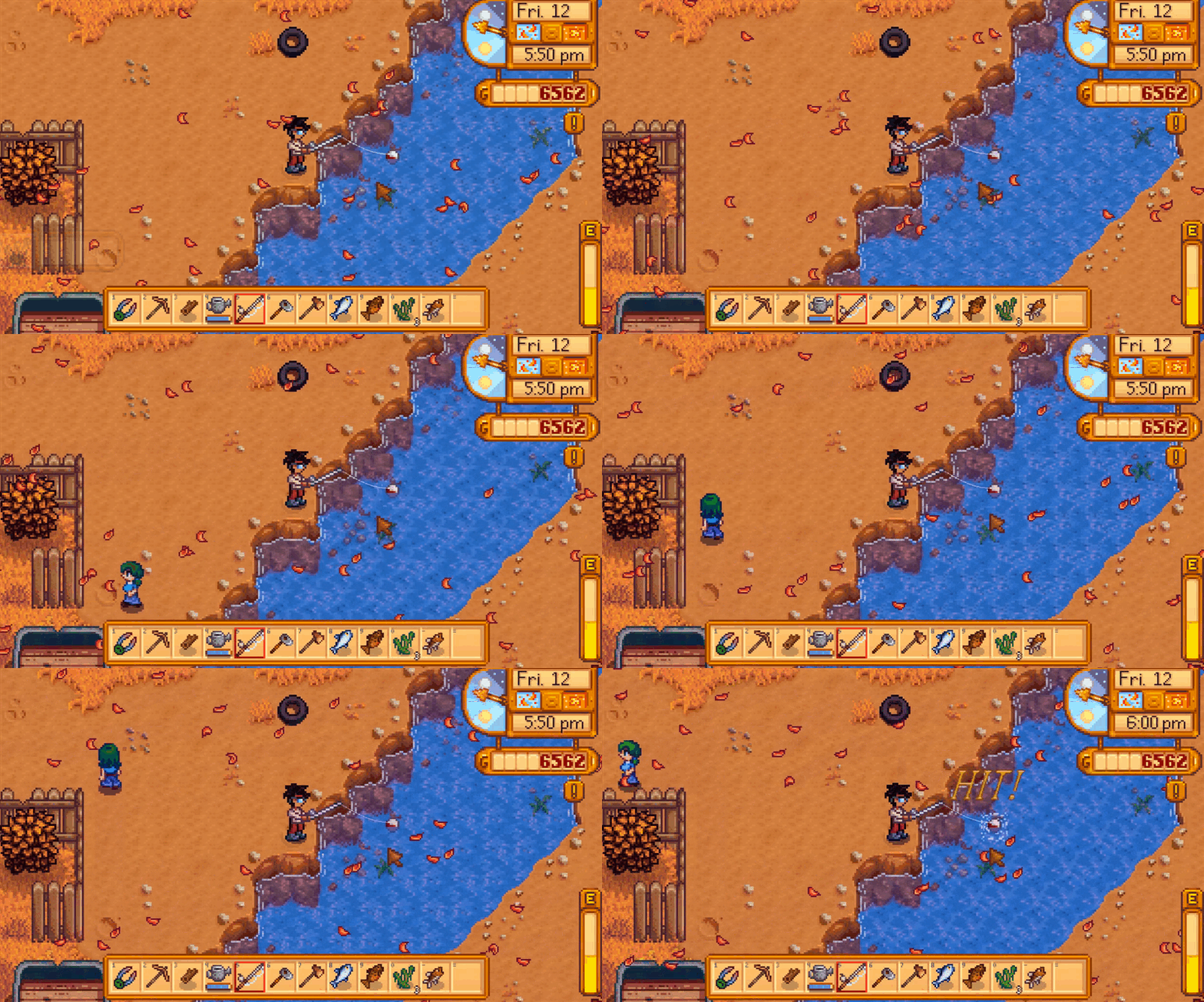


 haughty magnet
solemn latch
I am not sure what you mean; that looks correct
haughty magnet
solemn latch
I am not sure what you mean; that looks correct
I figured it out

change light to spot and make sure normal maps are turned on
and you can just plug a new material and use the Normal Map slot instead of the sprite editor.

 lusty olive
Is there a way to make a 2D sprite be the same shape as a 2D poly collider or in general just change the shape of a sprite freely?
elfin sandal
lusty olive
Is there a way to make a 2D sprite be the same shape as a 2D poly collider or in...
Make a procedual mesh
solemn latch
lusty olive
Is there a way to make a 2D sprite be the same shape as a 2D poly collider or in...
Sprite shape package
solemn latch
haughty magnet
I figured it out
OH. I thought you were the person I replied to originally. They wanted normal vectors for a mesh displacement, not for lighting.
lusty olive
Yea I found sprite shape while looking around
 spark minnow
How can i put in a sprite being the same size of an already existing sprite? Of a 2D sprite