#🖼️┃2d-tools
1 messages · Page 42 of 1
 still tendon
 keen schooner
yall talking enchantment table
 azure meteor
So to clarify I have two objects player and interactionObject.
Player has rigid body 2D, Collider2D and script with Debug.Log on triggerEnter2D.
InteractionObject has Collider2D set as trigger, and script with Debug.Log on triggerEnter2D.
Now for some reason only Player's script responds can anyone help me with that? I can show two codes as well if needed.
 zealous topaz
Hello, I'm at a loss here. This is my tree:

and this is the code that is run (I checked it was):
                rend.sprite = Sprite.Create(tex, new Rect(0, 0, tex.width, tex.height), new Vector2(0.5f, 0.5f), GraphicData.CharacterPortraitPixelPerUnit);
                rend.sortingOrder = 11;
                rend.transform.position = cam.ViewportToWorldPoint(new Vector3(0.5f, 0.5f, 0f));
where rend is a SpriteRenderer attached to a child of CharacterBar, and tex is a Texture2D
the camera attached to MainCamera has a Z value of -5
and no matter what, the sprite is never drawn
I'm a beginner but I'm not new to programming. I believe all the structures/classes I've been using are basic so far.
I've been pondering this over and over and I can't figure out why the sprite doesn't show up
Never mind. The Z value was switched during runtime.
 violet timber
I tried to add a title card in with my warp/fade in/out scripts, but whenever I hit a warp point the game freezes, can I get some help?

nevermind
 rapid wagon
Whenever I play an animation on GetButtonUp, it only plays for a split second. How do I have it play for longer than that (like, still less than a second but a bit longer than what it is now)?
 worn narwhal
Okay. So I have built out a procedural generation object that has a script that handles generating the very basic vertical 2d map to walk down, and the player who is instantiated with the basic ui and camera attached. i have a second script that instantiates another object which needs to be able to follow the player along the y axis but not move along the x axis. I had created a follow the leader function in this object but im not sure how to connect the two when the objects are instantiated through procedural generation anyone have any ideas? i normally would make the player the leader through a serializedfield on the other object.
violet timber
Pastebin
Pastebin.com is the number one paste tool since 2002. Pastebin is a website where you can store text online for a set period of time.
I'm trying to code in attacks, but some times it's not picking up the spacebar input
 sage gorge
Okay, i am struggeling for 4 hours with this now ... maybe you can help me. I found nearly every solution, but now i need to Add my WeightedRandomTile to my AutoTiling ... is this possible ?
i hope this is the right channel for this :/
violet timber
@sage gorge maybe try in #💻┃unity-talk
sage gorge
violet timber
<@159838872107220995> maybe try in <#497872424281440267>
yeah i figured that out and asked there aswell soon after. Just joined the server and didnt had a complete overview where to ask for what
violet timber
@sage gorge good luck!!
sage gorge
violet timber
<@159838872107220995> good luck!!
Thank you! I hope there is someone who can help me out with that!
 red parrot
hi, so im working on a 2d side scroller and im trying to implement falling objects into my game. i understand collision but confused on how to make it make the falling object loop where after it collides with a platform, it restarts back to its original positioning
any help 😄
 raven forge
Hello 👋
A question I'm making a 2D enemy, I'm put the rigidbody of the enemy as dynamic, but is falling through the world.
Is it a good implemenation make a enemy with dynamic physics. I want the enemy feel the gravity that's why I put the dynamic ridigbody
 gray brook
red parrot
hi, so im working on a 2d side scroller and im trying to implement falling objec...
gray brook
red parrot
hi, so im working on a 2d side scroller and im trying to implement falling objec...
Easiest thing is probably to have your script store it's starting position/ orientation and then on collision you can set the current position/orientation back to those defaults.
red parrot
gray brook
Easiest thing is probably to have your script store it's starting position/ orie...
is that the best way of tackling it, i originally added a rigidbody2d comp to it and have it fall onto the platform and is there no way for me to create a script where when it collides with the platform to go back to its original orientation?
gray brook
What you have is fine, but you still need something to track it's original position and some method that resets it's current position to the original.
You could do that in an external script, but it is easier to just handle that with a script on the actual object.
red parrot
hm alright thats sounds feasible thanks for the answer!
raven forge
Yes, I agree with @gray brook is easier with a script
@gray brook can you help me with my question?
gray brook
Haven't messed with dynamic physics, but if you use rigidbody2d you can have it obey gravity with just that.
You will also need some kind of collider on the floor so that the rigidbody2d has something to interact with.
raven forge
Yes, it has the terrain collider where he can land. But somehow when I put the ridigbody as dynamic it doesn't interact with it.
raven forge
Yes, because when the enemy falls the platform. It continues to walk, in mid air. 😆
gray brook
It shouldn't need dynamic for that.
If it has gravity enabled and there is no collider beneath it, it should fall.
red parrot
ok I'm back and my problem now is that I've created the script but when i make contact with the platform, it doesnt reset position
raven forge
@red parrot send a picture of the script
red parrot

it falls but when it makes contact with the platform that has a box collider on it, it jus falls through it
raven forge
Aren't you doing a 2D game. Why the vector3?
red parrot
kinda unsure i was using an online source and it suggested this but yeah i realized it should just be a Vector2 lol
nvm i realized that i had to reattach a 2d rigidbody to it
raven forge
Lol, all right.
 solemn latch
Does anyone have any suggestions for keeping a 2dIK limb from flipping seemingly at random?
still tendon
I can't stop my character from moving when I click on the Quit button?
 sullen wadi
hi all
Where can I find the name of such mechanics?

Hi! This video will be about update on my game Gaming shop Tycoon. There are new systems, items tables, decorations a promocodes. If you are interested in my heist game progres there is some info about it too. If you have any ideas ho to improve Gaming Shop Tycoon please leave a comment.
I'm just a small indie game developer for androids and I'...
 sleek sleet
 violet timber
Pastebin
Pastebin.com is the number one paste tool since 2002. Pastebin is a website where you can store text online for a set period of time.
Pastebin
Pastebin.com is the number one paste tool since 2002. Pastebin is a website where you can store text online for a set period of time.
Pastebin
Pastebin.com is the number one paste tool since 2002. Pastebin is a website where you can store text online for a set period of time.
My HP Sliders aren't tracking HP when it instantiates
They're just flimsy and moveable
 crisp thorn
I'm trying to find the distance between the player and enemy with the code
' Vector2 distance = ((Vector2)player.position -(Vector2)rb.position);
Debug.Log(distance);'
But I keep getting the error 'NullReferenceException: Object reference not set to an instance of an object defaultEnemyController.TakeDamage (System.Int32 damage) (at Assets/defaultEnemyController.cs:35)' Why????
 knotty barn
Because the reference you tried to access wasn't set to point to anything (null).
crisp thorn
How would I fix this?
knotty barn
Make sure the reference has been assigned to something before accessing it
violet timber
@knotty barn can you help any with my hp slider issue?
crisp thorn
Let me give that a try, thanks!
knotty barn
First you need to figure out which reference is null, which can easily be done by adding a breakpoint and hovering over all values
violet timber
It seemed like the script was working for a second, but idk what happened
violet timber
It's treating my player object like the enemy object, and the enemy object like there are no values
still tendon
Hi! I am pretty new to Unity and i am currenty working on a top down 2d shooter. I want the maps to be randomly generated and i have a spritesheet. I already did a bit of research into it and found that using perlin noise was the best method. The problem is i dont think it works for an top down game. Are there any good alternatives to it?
gray brook
Perlin noise just creates a grid with smoothly changing random values, you should be able to use it for whatever you want.
still tendon
Okay. Thanks for your advice ^^
 rare lake
If I wanted to do something during a certain frame of an animation or after an animation is done what would the code look like?
 gleaming moss
Hello :)
In my game, I want the player to be able to rotate but not be able to roll over.
Is that possible with a simple code?
I use Rigidbody 2D, so I can easy unfreeze the Z Rotation, so that the player rotates on an ramp, but then the player can roll over...

I also tried something like:
If z-rotation > 20: set z rotation to 20
but it did not work
sullen wadi
How can you release wall painting in the game?
 winter heart
rare lake
If I wanted to do something during a certain frame of an animation or after an a...
winter heart
rare lake
If I wanted to do something during a certain frame of an animation or after an a...
Animation events. You can put triggers in specific frames in the animation it self
 fickle prairie
gleaming moss
Hello :)
In my game, I want the player to be able to rotate but not be able to r...
fickle prairie
gleaming moss
Hello :)
In my game, I want the player to be able to rotate but not be able to r...
You can clamp the angular velocity in Update()
gleaming moss
Hey @fickle prairie, thanks for the tipp!
But can you give me an example, how to set the angular velocity?
I did not find one in the internet :(
Thanks!
fickle prairie
gleaming moss
Hey <@!502591701517598740>, thanks for the tipp!
But can you give me an example,...
It's on rigidbody
gleaming moss
You see there, what the player should do. And in the end you see, what the player should not do...
So I want, that the player can only Rotate on the Z-Rotation from -20° to 20° but not more
So that the player dont roll over
 vocal condor
You could just clamp the Euler Z value of rotation to a value between -20 and 20.
zealous topaz
hello
how do you access the RectTransform component of an object with a TextMeshProUGUI component?
I want to change the width and height but
        RectTransform rt = objj.GetComponent<RectTransform>();
        rt.rect = new Rect(0f, 0f, 200f, 50f);
triggers the error:
Assets/CharacterBarBehaviourScript.cs(36,3): error CS0200: Property or indexer 'RectTransform.rect' cannot be assigned to -- it is read only
The calculated rectangle in the local space of the Transform.
Unity automatically attaches these to UI elements. Manipulate aspects of the rectangle in the Inspector such as the position, dimensions, rotation, and scale. This is read-only in a script.
Modify the size with https://docs.unity3d.com/ScriptReference/RectTransform-sizeDelta.html rather than the calculated size that is a read only variable.
zealous topaz
ok thanks
gleaming moss
vocal condor
You could just clamp the Euler Z value of rotation to a value between -20 and 20...
Yeah thats what I try, but how?
vocal condor
gleaming moss
Yeah thats what I try, but how?
Maybe something like: ```cs
float z = transform.eulerAngles.z;
z = z < 180f ? z : z - 360f;
transform.rotation = Quaternion.Euler(0f,0f,Mathf.Clamp(z, min, max));
@vocal condor thanks for you help!!! I try that tomorrow in my game!
 snow herald
Hi, I am learning 2D game development with Unity (YouTube courses) and I have a problem with the checkpoint.
When I pass the map / scene, it starts from the place of the previous checkpoint and not from the starting point of that map / scene.
 snow willow
snow herald
Hi, I am learning 2D game development with Unity (YouTube courses) and I have a ...
snow willow
snow herald
Hi, I am learning 2D game development with Unity (YouTube courses) and I have a ...
You're going to have to provide a little more context such as what video/tutorial you're following and maybe the code you are using

 umbral cape
How hard would it be to procedurally fracture a 2d object?
 rotund burrow
how do i set the color of an object to a color variable in a script. I tried this code but for some reason it doesnt work idk why
using System.Collections;
using System.Collections.Generic;
using UnityEngine;

public class CollisionManager : MonoBehaviour
{
    public SpriteRenderer sr;
    public Color onDamageColor;

    private void OnCollisionEnter2D(Collision2D collision)
    {
        if (collision.transform.CompareTag("Hazard"))
        {
            sr.color = new Color(onDamageColor);
        }
    }
}
nvm i fixed it
 desert warren
Benkey that fall on the face thing is funny.
 errant cloud
    private Rigidbody2D rb;
    public float speed;
    public Vector2 minusMousePosition;

    void Start()
    {
        rb = GetComponent<Rigidbody2D>();
    }

    void Update()
    {
        minusMousePosition = new Vector2(speed * -1 * Input.mousePosition.x, Input.mousePosition.y);

        if (Input.GetMouseButtonDown(0))
        {
            rb.velocity = minusMousePosition;
        }
    }
this is for a recoil gun i made for a platformer. It works fine if i dont count that it Launches the player miles away. how can i make it launch player not that high?
 misty vine
You're turning screen space coordinates into a velocity. That's never going produce reliable results. If you had the mouse at 0,0 the player wouldn't move at all.
misty vine
Depends what you're trying to achieve. If you just want to knock the player back a bit, add a bit of force in the opposite direction to which they're firing
https://docs.unity3d.com/ScriptReference/Rigidbody2D.AddForce.html
 errant cloud
i want to make like a rocket launcher
well a bit different
you get pushed from where the mouse is looking
so i need to find where the cursor is looking for player
misty vine
Is your player already looking there to fire though?
errant cloud
the cursor indicates where the player is looking
misty vine
Yeah so you don't need to find the mouse position again, as you're already facing that way. So just add a bit of force in the opposite direction. transform.forward should give the direction they're facing, so add force in the opposite direction
errant cloud
if the mouse is away from the player it should launch him more if its closer it should launcher less
errant cloud
misty vine
Yeah so you don't need to find the mouse position again, as you're already facin...
wait the player doesnt look at the cursor sorry. i was meant to type this code to do that and launch it opposite of where he was looking
@misty vine
misty vine
OK so I think what you want to do is get the position of the mouse and the position of the player. Calculate the difference between them to get a new vector that should be the direction from the player to the mouse.
Then use https://docs.unity3d.com/ScriptReference/Vector2.Distance.html to get the distance between the 2 points.
Then you can add some force in the opposite direction to what you just calculated, and scale it based on the distance.
errant cloud
MousePosition = Vector2.Distance(Input.mousePosition.x, Input.mousePosition.y);
``` so this? misty vine
Yes
errant cloud
how can i detect for Player?
misty vine
transform.position on the Player GameObject
errant cloud
MousePosition = new Vector2(Input.mousePosition.x, Input.mousePosition.y);
        VectorDistance = Vector2.Distance(gameObject.transform.position, MousePosition);
That should give you the distance between the 2 positions. Now you need to do the first part to get the direction.
misty vine
Well you should be using the mouse position and player position which are both Vector2, no floats involved
errant cloud
then why does it give that error
misty vine
Because you're using the wrong variables
errant cloud
what should i use?
misty vine
I literally told you before you said it gave an error!
still tendon
how do i make it if player losses one health it plays 1 out 4 sound effect
errant cloud
Playsound
 humble forge
What would be the best way to rotate a top-down character to face where it's going? I'm currently just lerping its up vector to face the movement direction vector, but that gives some unwanted results
I've concidered quaternion.slerp already but don't know how to use it in this situation
if i just quaternion.euler() the vectors and try to slerp it works good but snaps to 0 on negative values
misty vine
still tendon
how do i make it if player losses one health it plays 1 out 4 sound effect
Put the 4 sound effects into an array. Generate a random number between 0 and 3. Play the sound at that array position
still tendon
misty vine
Put the 4 sound effects into an array. Generate a random number between 0 and 3....
thank you
 royal goblet
i am trying to instantiate bullet but every time i press spacebar it just creates too many clones

 copper minnow
that's the problem
GetKey returns true as long as you keep pressing the key
what you might want to do is use Input.GetKeyDown(); instead
that only returns true for the first frame the key is being helf
royal goblet
copper minnow
that's the problem
ohh i totally forgot that . Thank you so much
 hearty anvil
I'm still hoping for a solution on this. If I need to provide any other information that can help, I can
 mossy grotto
@royal goblet Is this topdown or platformer?
hearty anvil
I can't get instBulletEmitter to be recognised as a GameObject by the emitter's script so the emitters will not move but the bullets they emit act fine
hearty anvil
I don't really want to rush anything but this is the 4th or 5th time I've posted this here and I'm no closer to figuring out how to move forward
When I create the emitter object in the boss script (both the emitter script and boss script inherit from the same script which has the private GameObject instBulletEmitter), I want it to be able to move and rotate but it doesn't because the emitter still has instBulletEmitter as null. It creates bullets so it is receiving all the other values here successfully but the object does not seem to exist? I'm just confused as to why this is and what I'm doing wrong.
 mossy grotto
@hearty anvil Make prefabEmitter a prefab
hearty anvil
You mean by dragging and dropping it in the inspector?
mossy grotto
Ye
hearty anvil
That's already done
mossy grotto
I can't help you by just looking at the code u sent
hearty anvil
Should I share my Boss and Emitter scripts?
mossy grotto
Show video of what's happening
hearty anvil
The bullet emitters are the things firing the green bullets but they're doing it at the boss's position instead of moving with the emitter because the emitter game object instance does not exist.
I clicked on the boss (Cherry) and in the inspector it does have a value for the instBulletEmitter but when I click on the Emitter clone it does not
still tendon
Is there anyway to make this code smoother its going to be used on a camera but sadly it can be quite jittery

 earnest wind
How could i make it so that when an enemy dies it instiatiates an object randomly?
when i mean randomly i mean with a chance of 50%
snow willow
earnest wind
when i mean randomly i mean with a chance of 50%
bool doTheThing = Random.value > .5f;
if (doTheThing) {
  // do something
}```this will work because Random.value returns a random number between 0 and 1
so checking if it's greater than .5 gives you a 50% chance
earnest wind
Nice thanks 👍
 pearl acorn
Hi, I'm using playmaker in Unity2d and I can't get my "Character" to jump. My get key down is functioning and linked to the Add Force 2d but still it just won't jump.
Example:
 snow willow
pearl acorn
Hi, I'm using playmaker in Unity2d and I can't get my "Character" to jump. My ge...
snow willow
pearl acorn
Hi, I'm using playmaker in Unity2d and I can't get my "Character" to jump. My ge...
Try ForceMode.Impulse
Or VelocityChange
pearl acorn
How would I change the velocity @snow willow? (Also the impulse thing didn't work, I've tried a bunch and tried again and nope)
snow willow
I'm saying ForceMode.VelocityChange
earnest wind
It works 👍
 pearl acorn
It's not an option for me, my only options are force and impulse
pearl acorn
Hecc.
pearl acorn
Could set velocity 2d work?
And impulse doesn't work either, I do not understand why this damn cube won't leave the floor.
snow willow
pearl acorn
Could set velocity 2d work?
And impulse doesn't work either, I do not understand...
Can you set your button press to print something to the console?
Make sure that it's actually working?
I'm not super familiar with playmaker so not 100% how to best debug it
pearl acorn
Could you tell me how to do that, sorry, I really don't know unity the best.
Like how would I get the console to show it
snow willow
I don't know playmaker >_>
pearl acorn
Frick
snow willow
but is there a Debug.Log function you can call with it
pearl acorn
I despise this cube. And I know it's sending out the signal, both things glow up when I click space. I'm doing everything right and still this cube does not move.
 ancient willow
    public GameObject Player;

    public float MoveDist = 0.1f;
    public float DesiredX;
    public float DesiredY;

    void Start()
    {
        DesiredX = Player.transform.position.x;
        DesiredY = Player.transform.position.y;
    }

    void Update()
    {
        Player.transform.position = Vector2.Lerp(Player.transform.position, new Vector2(DesiredX, DesiredY), Time.deltaTime);
    }

    public void MoveLeft()
    {
        Debug.Log(DesiredX -= MoveDist);
        DesiredX -= MoveDist;
    } ```
Hello I have a question about this script, the player starts at 0,0 and when moving left they move to -50 which is not the move distance
What I want to happen is the player moves by 0.1, but the Debug.Log results in -50 and I am just really confused. Apologies if i'm missing something obvious.im calling it via a button
snow willow
Debug.Log(DesiredX -= MoveDist); this log call is actually also decrementing DesiredX by MoveDist
you're doing it twice
that's a problem but maybe not your main problem
What is MoveDist set to in the inspector @ancient willow
snow willow
well there ya go
Anyway you should fix this too:
    public void MoveLeft()
    {
        Debug.Log(DesiredX -= MoveDist);
        DesiredX -= MoveDist;
} ```It should be:
    public void MoveLeft()
    {
        DesiredX -= MoveDist;
        Debug.Log(DesiredX);
}```I dont remember changing the values in the inspector though, and do they overwrite what is in the script?
snow willow
ancient willow
I dont remember changing the values in the inspector though, and do they overwri...
they will overwrite the values in the field initializer, yes
 abstract shore
how do I make the damage animation loop while the enemy is touching the thorn?
rare lake
So how much would it help me if I learn C# before going into Unity scripting
mossy grotto
rare lake
So how much would it help me if I learn C# before going into Unity scripting
Unity is c# wdym?
snow willow
rare lake
So how much would it help me if I learn C# before going into Unity scripting
quite a lot
rare lake
mossy grotto
Unity is c# wdym?
Learning the actual code before going into scripting in Unity. Because I have no coding experience 😂
snow willow
rare lake
Learning the actual code before going into scripting in Unity. Because I have no...
learn C# first
or you will be utterly lost
and hopelessly copying scripts and praying
but IDK, a lot of people try to get by that way so
¯_(ツ)_/¯
rare lake
I’d rather be able to bust out my own code whenever I want would make things faster instead of being a script kitty
 hidden fossil
why is the gun not following my mouse?
i changed the position of the gun follow code to Fixed update but it still didn't work
anyone :/
 turbid heart
Is the script attached to the gun? Also.. you named your script Destroy. I’m not sure if that’ll cause problems down the road
 turbid heart
Look at line 83 and debug log everything in there that could be null
And in the future, start your question with the error message. It’s much more helpful than posting the entire code
turbid heart
Yes
 turbid heart
Because you haven’t put anything in as a parameter?
turbid heart
You’re trying to figure out what is null on that line
So put in your variables, one debug log each, and see which one is null
Put it before the line with the error
hidden fossil
oh
the erorr comes after moving
and the moving appears to be fine
so i think fixing that error wont be a big deal
turbid heart
Null reference exceptions are usually game breaking. It means you’re trying to use something that you haven’t assigned
turbid heart
Yes
hidden fossil
alright do i put them between " ?
turbid heart
Show me line 83
turbid heart
You don’t need quotation marks. You’re not printing a string, you’re printing the value of the variables
hidden fossil
ok
i added rotZ and offSet
does the debug text have to be after the line i wanna debug?>
turbid heart
Before
hidden fossil
rotZ is a variable, but when i added it before the line 83 it became red

am i doing something stupid here?
turbid heart
Idk, check difference, or some other variable. Check which one is null. I need to go
Good luck
 naive apex
Hi guys, I have a question.
I'm trying to change my tile with SetTile,
but the new tile is drawn along with the old tile.
Sometimes the new tile stack on top, sometimes behind.
What did i do wrong?
vocal condor
hidden fossil
rotZ is a variable, but when i added it before the line 83 it became red
You cannot use the local variable rotZ before you declare it.
hidden fossil
isn't it already declared in line 86?
vocal condor
hidden fossil
isn't it already declared in line 86?
Aren't you using it before said line though?
vocal condor
vocal condor
You cannot use the local variable `rotZ` before you declare it.
Which I addressed.
hidden fossil
days line?
vocal condor
rotZ does not know what it is until it's declared.
hidden fossil
do i go up and make a variable for it ?

btw i got that chunk of code from thornprod
naive apex
When i use SetTile, the old tile is not removed.
Why?
 coral walrus
I'm working on a mobile game, and I'm interested in being able to draw directly to the screen -- basically having a canvas size equal to the screen resolution of whatever device the app is on at the moment. It looks like most of the code is geared to automatically resizing, etc... but I figure there must be a way to do this -- I've looked around, and been unable to find it though. If anyone can point me in the right direction, that'd be much appreciated 🙂
snow willow
coral walrus
I'm working on a mobile game, and I'm interested in being able to draw directly ...
Assuming you are using a Screen Space canvas (Overlay or Camera), this is pretty much the default behavior
just make sure your Canvas Scaler is in Constant Pixel Size and I think you're good to go
coral walrus
hmm -- I've used Screen Space - Overlay -- and Screen Space - Camera -- maybe I didn't use Constant Pixel Size though -- does it matter if I use Overlay or Camera?
snow willow
no
coral walrus
nm you addressed that
snow willow
not for this anyway
coral walrus
I guess I must've perhaps changed it to scale with screen size or something wrong when I did it before -- thanks much for the help, I'll give this a shot 🙂
snow willow
np
Also Scale Factor should be 1 on the Canvas Scaler
You could optionally just remove the Canvas Scaler as well
 golden bloom
this is the code im writing for my game which is a 2d endless runner where you swap between different characters i got the code to work for swapping characters but im trying to figure out how make different movement speeds for each character

 turbid heart
Would help if you posted the code instead of taking a picture
turbid heart
golden bloom
Look at #💻┃code-beginner pinned messages to see how to post code here
 viral finch
There's something weird that ive been experiencing for awhile
So i basically have a bullet ball, in which if you shoot at it i'll instantiate multiple bullets around it
But for some odd reason it can randomly spawns those multiplie bullets on the origin point (0,0,0) which is basically near the player
And instantly killing the player in process
    {
        if (collision.collider.CompareTag("Bullet") && this != null)
        {
            gm.addedScore += pointsIfShot;
            SpawnSpikes(spikesAmount);
        }
        else if (collision.collider.CompareTag("Player") && this != null)
        {
            gm.Death();
            SpawnSpikes(spikesAmount);
        }

        else if (collision.collider.CompareTag("Ground") && this != null)
        {
            SpawnSpikes(spikesAmount);
        }
    }

    void SpawnSpikes(int numberOfSpikes)
    {
        float angleStep = 360f / numberOfSpikes;
        float angle = 0f;

        for (int i = 0; i <= numberOfSpikes - 1; i++)
        {
            float spikeDirXPos = spikeBallPos.x + Mathf.Sin((angle * Mathf.PI) / 180) * radius;
            float spikeDirYPos = spikeBallPos.y + Mathf.Cos((angle * Mathf.PI) / 180) * radius;

            Vector2 spikeVector = new Vector2(spikeDirXPos, spikeDirYPos);
            Vector2 spikeMoveDirection = (spikeVector - spikeBallPos).normalized * spikeSpeed;
            Vector2 tempPos = spikeVector - spikeBallPos;
            float spikeLookDirection = Mathf.Atan2(tempPos.y, tempPos.x) * Mathf.Rad2Deg - 90f;

            var spikes = Instantiate(Spikes, spikeBallPos, Quaternion.Euler(0,0,spikeLookDirection));
            spikes.GetComponent<Rigidbody2D>().velocity = new Vector2(spikeMoveDirection.x, spikeMoveDirection.y);

            angle += angleStep;
        }

        Destroy(gameObject);
        Instantiate(exploxion, spikeBallPos, Quaternion.identity);
}```This is the code i use to spawn the bullets
    {
        int randomValue = Random.Range(0, ObjList.Count);
        GameObject spawnObject = ObjList[randomValue];

        Vector2 spawnPos = new Vector3(Random.Range(-screenWidth + spawningOffset, screenWidth - spawningOffset), screenHeight, -2);
        GameObject objt = Instantiate(spawnObject, spawnPos, Quaternion.identity);
}```And this is the code i use to spawn the bullet ball
@turbid heart
It's literally the first msg here xp
turbid heart
Your name is different. Are you lotsofshitz?
turbid heart
That would be why
viral finch
Sry
turbid heart
I’m not here to compare pictures
 shrewd token
Also Minimalist mode on discord doesn't show pics
viral finch
Ahh no wonder
turbid heart
Where is spikeBallPos assigned?
Oops. Nevermind
Hard to read the huge chunk of code
 bright dome
viral finch
bright dome
viral finch
I dont think i have a Debug.Log to print out the spikeBallPos
turbid heart
Do you set the spikeBallPos to 0,0 after they’re destroyed or something? Because i notice the spikes use the y pos of the ball
viral finch
Nope
And yeah position of the spikes is instantiate according to the x and y pos of the spikeBall
But for some reason in random instances the spikes just spawns directly at 0,0
turbid heart
Can you post your code in one of these so it’s easier to read?
Large code blocks should be posted as links to services like:
turbid heart
This is a toss up, but try instantiating your exploxion before calling Destroy
Your last 2 lines. Switch them around
turbid heart
Yes try that. Not sure if it’s because the pos keeps updating in Update and there’s some time before it gets destroyed
viral finch
Alright

Huhhh, i would expect the last spikeBallPos being printed out to be 0,0,0
But it's not?
NVM
 turbid heart
Nice
viral finch
I placed the Debug.Log in the update function instead of fixed update
turbid heart
Okay, where’s the code where you spawn the balls that drop
I like your game concept btw
viral finch
turbid heart
I like your game concept btw
Thanks
turbid heart
okay, that's kinda weird. Doesnt look like anything out of the ordinary, but try Debug Log spawnPos before you instantiate in SpawnObjects()
 turbid heart
that's good, on which line?
viral finch

It directed me to this line
I...
dont think it has anything to do with the bullets problem tho?
turbid heart
is the gm null sometimes?
a null ref is pretty game breaking most of the time. It's an error, not a warning
viral finch
I dont think so
But let me check using a debug.log
just in case
Okay.. this is really weird
Now the bug doesn't seem to pop up anymore
which isn't a bad thing
Also ive checked and no, the gm isnt null sometimes
turbid heart
weird 🤷
turbid heart
are you 100% sure it's on that line? 😅
i only ask for gm because the other 2 are floats, and I dont think floats can be null
viral finch
I double clicked the error msg and it instantly brought me to that line
turbid heart
okay cool
viral finch
Im kinda confident its that line, but at the same time abit hesitant
turbid heart
because in the hatebin, line 43 takes me to the opening curly brace before that line
but if it takes you to that line, it should be the case
viral finch
I added a Debug.Log somewhere in the code and the hatebin code doesnt have one, so probably that's why it took you to the curly braces
and yeahhh
viral finch
viral finch
I added a Debug.Log somewhere in the code and the hatebin code doesnt have one, ...
On 2nd thought it's the opposite, the hatebin code has the debug.log and my current code doesnt have one
anyways im stumped
 eternal kraken
Can I try to help?
viral finch
Definitely
viral finch
You could scroll up there
viral finch
The spike ball is the falling object that once shot, will spawn multiple bullets around the spike ball
eternal kraken
oh ok
viral finch
It was going to be a spike ball, but a bullet ball would be more valid
turbid heart
https://hatebin.com/oejeejysua
https://hatebin.com/qodctnrres
You'll need these 2 scripts
viral finch
spikeBallPos is the bullet ball's position that is falling
viral finch
yeah
eternal kraken
ok just saying, im pretty dumb and i dont know math

so im going to guess this is correct
is spikeVector the new spike's position?
viral finch
Nope, the spike/bullet's position is directly at the spikeBallPos

You could see it from this code
eternal kraken
when you take numberOfSpikes here, you always put in the same amount - spikesAmount. So instead of using numberOfSpikes inside the function, just use spikesAmount.
 turbid heart
i think it's fine to leave it as is though
eternal kraken
yeah
viral finch
Im assuming it has the same affect doe
turbid heart
it allows for them to use SpawnSpikes with changeable number next time
yes, it's not a problem. In fact, it's probably better this way
viral finch
I see
eternal kraken
also here you dont have to update it every FixedUpdate, instead, just use Start and set the gravity scale to 0 in the Rigidbody2D component in the inspector


So you don't have to use FixedUpdate
eternal kraken
turbid heart
yes, it's not a problem. In fact, it's probably better this way
I disagree.
viral finch
Oo alrighty
eternal kraken
eternal kraken
I disagree.
The only place @viral finch is calling the function is within the class it is initialized in.
Plus, the function is private
turbid heart
eternal kraken
The only place <@401239521372667904> is calling the function is within the class...
Yes, but if they want to call SpawnSpikes with a different paramter value in the future, that might help. They have different items planned later on too.
eternal kraken
turbid heart
yes, it's not a problem. In fact, it's probably better this way
It's not better.
turbid heart
it doesnt matter.. but it's not better. okay. I'll just step away because it feels like nitpicking at this point.
eternal kraken
yeah sry
what are spikeDirXPos and spikeDirYPos?

btw, this will never be equal to null if you are running that if statement

because if this == null you wouldn't be running the script
viral finch
eternal kraken
what are `spikeDirXPos` and `spikeDirYPos`?
I must admit, i just followed a tutorial and i think it has something to do to find the direction of each spikes/bullets
But i dont think it has anything to do with the bug
 turbid heart
spikeBallPos is 0,0 occasionally. So the problem might be before spikeDirXPos even comes into play
eternal kraken
viral finch
I must admit, i just followed a tutorial and i think it has something to do to f...
you can do that easily with something i can explain
hold on
viral finch
Sure
viral finch
turbid heart
spikeBallPos is 0,0 occasionally. So the problem might be before spikeDirXPos ev...
I agree
viral finch
viral finch
It happend awhile back, but suddenly it stopped happening
Now a new problem arose doe, i sometimes get those Error msgs in my console
viral finch
viral finch
These error msgs
viral finch
viral finch
and once i checked which line the error came from, it directed me to this line
So in context it basically increases the score by a certain value after being hit by a bullet
and gm is the script that controls the scoring of the game, among other things
eternal kraken
private float[] GetBulletRotations(int nBullets)
        {
            var bulletRotations = new float[nBullets];
            var deltaRotation = 360 / nBullets;
            for (int i = 0; i < bulletRotations.Length; i++)
            {
                var currentRotation = deltaRotation * (i + 1);
                bulletRotations[i] = currentRotation;
            }

            return bulletRotations;
        }```
@viral finchthis is how to get the bullet rotations
I'm pretty sure
I haven't tested it

ohhh
i get what you are trying to do now
viral finch
Hohhh, alrighty thanks
eternal kraken
you shoot all the bullets at the same time from spikeBallPos right?
eternal kraken
ok
ok
so you need to rotate them, and "shoot" them in their directions
right?
viral finch
Yep
viral finch
Appreciate it man
eternal kraken
np
actually, here it's supposed to be just i

and not (i + 1)
but that should still work
viral finch
Hohh, okie okie
eternal kraken
change this to spikePrefab

at the top
because you are instantiating a prefab, you are not instantiating spikes
 viral finch
Alrighty
viral finch
eternal kraken
```cs
private float[] GetBulletRotations(int nBullets)
{
var...
After reading it for awhile i think i understand this code now
eternal kraken
btw did you change the gravityScale in the spikes/bullets' Rigidbody2D?
eternal kraken
viral finch
After reading it for awhile i think i understand this code now
nice
viral finch
eternal kraken
btw did you change the `gravityScale` in the spikes/bullets' `Rigidbody2D`?
Yep, to 0
eternal kraken
viral finch
Yep, to 0
You can try to write here what you understood and I'll tell you if you understood it correctly
woops
that was not supposed to be a reply
viral finch
Sure
eternal kraken
I'll try to explain to you
viral finch
Oh i also forgot to say
Thanks @turbid heart for the help earlier
I think my problem is fixed for now
turbid heart
Np. Was an interesting problem
 brave creek
http://pastie.org/p/73yztNrDU1OA7DOve953bI heyo, i've been having some trouble involving a very off IEnumerator at line 92 that just kinda decides on what it wants to do, sometimes it just gets stuck never starting the waitforseconds(0.02f), so it just stays forever at the while so i can't move. the IEnumerator gets called at an OnTriggerEnter2D (the ground check hitbox). I've asked here before, but they said the IEnumerator is fine? any ideas?
huh and now it just always never starting things past the waitforseconds(0.02f)???
okay so now i figured out its the waitforseconds indeed being completely broken, yahoo
now just figure out how to fix a regular unity codeline
 scarlet apex
How do u get a refrence to an instantiated gameObjrct
snow willow
brave creek
http://pastie.org/p/73yztNrDU1OA7DOve953bI heyo, i've been having some trouble i...
not seeing where you're actually starting the landed() coroutine
usually if a coroutine does not resume from a yield, it's because the MonoBehaviour it's associated with was destroyed, disabled, or deactivated
Also not seeing where you ever set the value of StateLanding except at the end of that coroutine @brave creek
so of course it will get stuck in the while look on line 96 unless there's somewhere else it gets changed from
brave creek
I stated it at the end of my message with "the IEnumerator gets called at an OnTriggerEnter2D (the ground check hitbox)", currently i'm just getting problems that the StateLanding is refusing to turn off until its the air
snow willow
brave creek
I stated it at the end of my message with "the IEnumerator gets called at an OnT...
You did say that but I'm not seeing it in the code
and like I said
StateLanding is only set at the end of that very coroutine as far as I can see
so I'm not sure why you would expect anything else, unless there's more code to be had
turbid heart
scarlet apex
How do u get a refrence to an instantiated gameObjrct
Assign it to a declared variable when instantiating?
brave creek
StateLanding is also set to true on the OnTriggerEnter2D and its the only thing changing the StateLanding that isnt on the pastie, the reason i didnt add the code is because of those being the only things that really react to it
currently the waitforseconds is working again after a restart, but the statelanding is just acting off, which im currently trying to fix myself
snow willow
brave creek
StateLanding is also set to true on the OnTriggerEnter2D and its the only thing ...
By definition you're not sure what's causing the issue, or you wouldn't be here asking for help. Could you include the rest of the code?
brave creek
aand it stopped working again after 2 plays
scarlet apex
turbid heart
Assign it to a declared variable when instantiating?
it doesn't become a gameObject tho, im instantiating a new character and i want the camera to follow it so i need a gameObject reference
brave creek
snow willow
By definition you're not sure what's causing the issue, or you wouldn't be here ...
http://pastie.org/p/6kJE7ddLJOckArLDCUcPXd this is the only other code i have, it's fairly simple so i dont think it would effect too much
 still zinc
scarlet apex
it doesn't become a gameObject tho, im instantiating a new character and i want ...
still zinc
scarlet apex
it doesn't become a gameObject tho, im instantiating a new character and i want ...
Anything you’re instantiating can become a variable when you’re instantiating it if you just assign it to one
snow willow
scarlet apex
it doesn't become a gameObject tho, im instantiating a new character and i want ...
When you call instantiate, it returns a reference to the instantiate object
scarlet apex
ok thanks
snow willow
brave creek
http://pastie.org/p/6kJE7ddLJOckArLDCUcPXd this is the only other code i have, i...
            player.StateLanding = true;
            StartCoroutine(player.Landed());```
```cs
public IEnumerator landed()
    {
        float lastAirVel = rb.velocity.x;

        while (StateLanding)
        {
            rb.velocity = new Vector2(0, rb.velocity.y);
            ESpeed = 0;
            altSpeed = 0;
            yield return null;
            Debug.Log("landing bus");
        }
I'm confused about how StateLanding is ever supposed to become false here.
(also I'm assuming you changed landed to Landed)
brave creek
yeah i did sorry, changed it for some better naming, but i wonder why in that case IEnumerator JumpStartup does work
esp considering it's actually the original IEnumerator, that Landed is based off of
 gentle apex
Hey, I'm trying to set AI in my game, i have instantiated gameobject - enemy bullet, but i need to set velocity / force and move it towards player. Can anyone help me? It's probably little bug but i don't see it. All green rectangles are enemies bullets.
https://pastebin.com/g2C8Cu3p
Pastebin
Pastebin.com is the number one paste tool since 2002. Pastebin is a website where you can store text online for a set period of time.
snow willow
brave creek
esp considering it's actually the original IEnumerator, that Landed is based off...
Because you do it in the opposite order for JumpStartup()
            StartCoroutine(JumpStartup(0.06f));
StateJumpStarting = true;```you start the coroutine then you set the state to true
brave creek
ah thanks, flipping it fixed it, kinda weird to me that it completely breaks it, but eh, code is code and thanks for the help!
 native pelican
Here's my mobile game. As you can see, everything is a little stretched vertically. How do I fix that? Also, I don't want the app to be in fullscreen, as I want to avoid the space with the phone's round edges and the camera. But I'm not sure how to modify Unity settings in order to achieve that.

 orchid pewter
i'm trying to make a knockback effect when taking damage

how do i post code? sorry
 plush coyote
read the second pinned message in #💻┃code-beginner
orchid pewter
        // Hurt
        if (Input.GetKey(KeyCode.Q)) {
            if (transform.localScale.x == 1)
            {
                rb.velocity = new Vector2(rb.velocity.x - 10, rb.velocity.y);
            }
            if (transform.localScale.x == -1)
            {
                rb.velocity = new Vector2(rb.velocity.x + 10, rb.velocity.y);
            }
            isHurt = true;
        }
        if (Input.GetKeyUp(KeyCode.Q))
        {
            isHurt = false;
        }
thank you
any tips to improve it please
plush coyote
well, most of the improvement would come when you start using it with enemy attacks
since you would need to change the code to push you based on which side the attack hit you on
and you would no longer be using GetKey
orchid pewter
yeah using Q key just to test the animation and knockback
plush coyote
I would set it up more for enemy attacks by making it a coroutine
not two separate GetKey statements
and I'm not really sure what isHurt does, is that for your effects?
orchid pewter
just tells the animator that the player is getting hit
plush coyote
then I would make it like this
private IEnumerator KnockbackRoutine()
{
  rb.AddForce(new Vector2(-10f * Mathf.Sign(transform.localScale.x), 0f), ForceMode2D.Impulse);
  isHurt = true;
  yield return new WaitForSeconds(.1f);
  isHurt = false;
}
oh i should try addforce too
plush coyote
then in your update loop you would do something like
if (Input.GetKeyDown(KeyCode.Q))
  StartCoroutine(KnockbackRoutine());
if you wanted to be super consistent, you would also want to cancel any previous coroutines of this when you make a new one, so probably like
private Coroutine _knockbackRoutine;

if (Input.GetKeyDown(KeyCode.Q))
{
  if (_knockbackRoutine != null)
    StopCoroutine(_knockbackRoutine);
  _knockbackRoutine = StartCoroutine(KnockbackRoutine());
}

private IEnumerator KnockbackRoutine()
{
  rb.AddForce(new Vector2(-10f * Mathf.Sign(transform.localScale.x), 0f), ForceMode2D.Impulse);
  isHurt = true;
  yield return new WaitForSeconds(.1f);
  isHurt = false;
  _knockbackRoutine = null;
}
just in case you get damaged in extremely quick succession
you don't want conflicting coroutines trying to modify isHurt


 paper timber
I'm currently redoing my character controller due to some bugs/architecture I wasn't fond of and sort of struggling to come up with something that feels "clean". Would it be good practice to separate collision detection, input processing and the actual movement logic into their own non-MonoBehavior classes and just manage them from a single MonoBehavior instead?
solemn latch
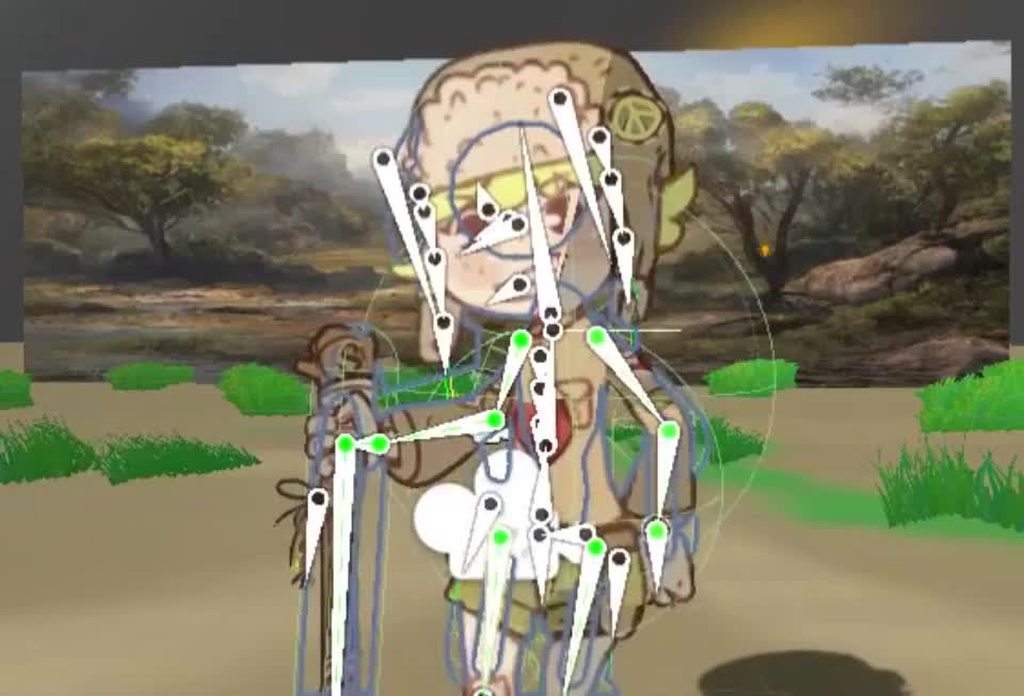
I'm having some trouble with sprite skins not following 2d bones that have bone an animation and rotation applied in LateUpdate(). The bones are updated but the sprite skin isn't. https://i.imgur.com/YZhXRJA.mp4
 violet timber
So I was following a tutorial that messed up the warp function when it introduced a second BoxCollider2D to the player, and he has a fix, but I'm using a different room warp script than he is, and the player/camera is still zooming way above the map whenever I go into a different room, can I get some help?
Pastebin
Pastebin.com is the number one paste tool since 2002. Pastebin is a website where you can store text online for a set period of time.
line 18 is what i tried as the fix,
violet timber
If posing a video of the error would help, I can
 spare urchin
Hi i am having a question related to Coloring and Painting game. I want to do floodfill with Texture with a lock area. If i am not clear please see this link.

Stack Overflow
I am developing a coloring app and was able to fill white color of the image with different colors using the below code.
Here is the Java class
import java.util.LinkedList;
import java.util.Queue;
How can i achieve this in Unity.
 regal gull
Hi, Can anybody tell me how to spawn a gameobject at a random x and y as -15?
[using instantiate]
I want to spawn infinite gameObjects also.
spare urchin
Use object pooling concept if you want to instantiate infinite gameobjects
turbid heart
regal gull
Hi, Can anybody tell me how to spawn a gameobject at a random x and y as -15?
[u...
Do you know how to instantiate?
spare urchin
Gameobject obj = Instantiate(urPrefabObject);
obj.transform.position = new Vector3(Random.Range(0, 20), Random.Range(-15,15), Random.Range(0, 10));
u can change the Random.Range values as you want.
snow willow
This person is asking how to spawn something at a random position. I think object pooling may be slightly advanced at this stage
spare urchin
he mentioned Infinite gameobjects so i thought its better to go with the right method...
turbid heart
Yes, and i would probably question what they mean by "infinite" because there's always supposed to be a limit
spare urchin
spare urchin
Hi i am having a question related to Coloring and Painting game. I want to do fl...
Hey can anybody help me with this.... i am struggling with this.
snow willow
Yeah object pooling or no, you ain't gonna get infinite objects
 lost temple
okay so i was messing around with the vector2.movetowards command and thought maybe one of you guys might know.
So i wanted to make an enemy object move towards to player but wanted it to move in a wave pattern perpendicular to the player. I tried using mathf.sin but it didn't work for me.
to illustrate what i mean i made a bad paint diagram.
 turbid heart
a sine wave sounds correct.. could you show where you're calling it?
lost temple
should i be putting it on the parent objects position in the move towards command?
I would show you but i deleted the movetowards function i had lol, i got too annoyed working at it
turbid heart
okay, then what do you have now?
lost temple
just a basic move towards function telling it to go towards the player like the black line in the diagram
 turbid heart
lost temple
just a basic move towards function telling it to go towards the player like the ...
turbid heart
lost temple
just a basic move towards function telling it to go towards the player like the ...
Have you looked at this?
https://stackoverflow.com/questions/37614811/unity3d-how-to-move-objects-in-a-sine-wave-independantly
Stack Overflow
In my game I have targets that spawn and move towards the player in a straight line. I use this code:
transform.LookAt(target.transform);
transform.position = Vector3.MoveTowards(transform.position,
The sine wave part probably needs to be called in the Update() function, which is what i'm guessing you havent done
lost temple
i tried googling it and got loads of results of "following player in waves" zombie games lol. but cheers will check it out
regal gull
spare urchin
Gameobject obj = Instantiate(urPrefabObject);
i tried that but we can just see 2 squares spawn
 turbid heart
regal gull
i tried that but we can just see 2 squares spawn
turbid heart
regal gull
i tried that but we can just see 2 squares spawn
I'll break down what you should do for you
- Find out how to Instantiate objects. Look up the official Unity docs and see how you can use it.
- Find out how to randomize a number from a range.
- Figure out how to Instantiate objects and specify their position.
Let me know if you get stuck on a step.
That's a pretty looking game btw.
regal gull
um i did these things but maybe can you tell me how can i spawn the rectangles at certain intervals?
What i mean is, can i spawn a rectangle at x=0, then the next rectangle at x=4 then 3rd one at x=8 like that
turbid heart
regal gull
um i did these things but maybe can you tell me how can i spawn the rectangles a...
sure. that sounds like you just need to +4 to the x position of the instantiated object
turbid heart
you said you did those 3 things. show me how you're instantiating your objects at the moment
regal gull
    {
        spawnX = Random.Range(0, 20);
        distanceJoint2D.enabled = false;
        screenBounds = Camera.main.ScreenToWorldPoint(new Vector3(Screen.width, Screen.height, Camera.main.transform.position.z));
        StartCoroutine(BoxSpawn());

    }
    private void spawnEnemy()
    {
        GameObject a = Instantiate(square) as GameObject;
        a.transform.position = new Vector3(spawnX, -15f, 0);
    }

    private IEnumerator BoxSpawn()
    {
        while (true)
        {
            yield return new WaitForSeconds(respawnTime);
            spawnEnemy();
        }
}```check it
turbid heart
okay, good that you use a variable for the x value. So, how would you add 4 to a variable?
regal gull
this is what i havedone to randomize the spawnX
the adding 4 part i think i should use a for loop
and add 4 to it every loop
turbid heart
or, you could add 4 every time you spawn the object
regal gull
after calling spawnEnemy function rt?
turbid heart
i dont know, it's your game. I think you know, but you're not trying. It's just adding 4 to the spawnX variable before spawning your object.
regal gull
ok lemme try
yay it worked! thanks
btw instead of adding 4, i picked a random from a range
    {
        distanceJoint2D.enabled = false;
        screenBounds = Camera.main.ScreenToWorldPoint(new Vector3(Screen.width, Screen.height, Camera.main.transform.position.z));
        StartCoroutine(BoxSpawn());

    }
    private void spawnEnemy()
    {
        GameObject a = Instantiate(square) as GameObject;
        a.transform.position = new Vector3(spawnX, -15f, 0);
    }

    private IEnumerator BoxSpawn()
    {
        while (true)
        {
            spawnX += Random.Range(23, 35);
            yield return new WaitForSeconds(respawnTime);
            spawnEnemy();
        }
}```heres the code now
turbid heart
if that does what you want, great
regal gull
thank you so much i hadn't found this fix in google also
turbid heart
regal gull
thank you so much i hadn't found this fix in google also
if your issue is too specific, you wont find it in google. It helps to break down your problem into steps, then search those up.
regal gull
ok
 rocky mirage
hello, how i can say if im on level <10 i use gravity or if im level >10 i use jump ?
turbid heart
rocky mirage
hello, how i can say if im on level <10 i use gravity or if im level >10 i use ...
do you know how to write an if statement already? you need an if, else if statement
rocky mirage
yeah i know that i need if and esle if but, i need to use my currentscene manager for finding my acutal level or?
turbid heart
i dont know how your project is set up, so I dont know what your issue is. If you're having trouble accessing the level variable in another script, you can watch this
https://www.youtube.com/watch?v=ymq2AUckws0
rocky mirage
ok thx
sullen wadi
sullen wadi
Because of what can a person fail?
help
 north rampart
Is there a way to make a sprite mask only mask its children? (trying to do smth and sorting layer for custom range doesn't rlly help)
not sure if this can be asked here or elsewhere- I'll happily move it if it is not here 👀
pearl acorn
Anyone know playmaker bs? This cube isn't able to jump and I do not know why.

I've tried like 10 different ways to have it jump. and everything looks right but it's not somehow.
 keen arch
Hi all, I'm moving a rigidbody via MovePosition(movementThisFrame) where movementThisFrame is calculated like this:
Vector2.MoveTowards(position, target, settings.Speed * Time.deltaTime);
I would like to add some InOut easing to this movement so that it feels a bit smoother. How could I accomplish this? I've tried using DOTween but I'm not sure how to get a single frame movement with it. It asks for a duration and does it over time.
snow willow
keen arch
Hi all, I'm moving a rigidbody via `MovePosition(movementThisFrame)` where `move...
Try replacing MoveTowards with SmoothDamp
gray brook
I imported a png, used the sprite editor to identify all the sprites inside of it and sprite mode is set to Multiple
any idea why I wouldn't be able to assign this as a SpriteAtlas object?
 torn igloo
Ok, so Im working on a top down 2d game. I want to make the player go behind the objects when colliding with them from top and be in front when its colliding from the bottom
This is the code I got from a guy: http://pastie.org/p/1nOaNTya6bE4JJkuplrZfE
I want to make the player be on front of the obstacles when colliding with them from the bottom and being under them when colliding from the top
Like in any other top down 2d game
gray brook
I haven't tested it, but I'd imagine you can just change the sibling index so that the player is either drawn before, or after said object.
torn igloo
If you want, I can give you a link to the video of a guy that used this code
Its a devlog not a tutorial but he said that this code is working
Holly shit
I found another solution in that guy's comment section
And its without code and it works better
 wicked wasp
hey how i can make a pixel art shot ?

The soul of a cinematic platformer and the heart of a sci-fi thriller, The Last Night is set in a post-cyberpunk world with a deep, vibrant vision of the future.
The Last Night is what we call post-#cyberpunk – it’s not the kind of dystopia the genre is famous for, rather it depicts an alternate direction for society. One where the fight for su...
like this
 dense flame
wicked wasp
hey how i can make a pixel art shot ?
dense flame
wicked wasp
hey how i can make a pixel art shot ?
I don’t know what you mean but you should google about pixel perfect
dense flame
Yeah y saw it
wicked wasp
0:49
dense flame
But I don’t understand the “pixel art shot”
wicked wasp
dense flame
Yeah that’s pixel perfect
can you help me?
dense flame
Your game is 2D right?
dense flame
Make an effect with particle system
dense flame
Then add pixel perfect to your camera
wicked wasp
what is pixel prefect?
i'm new in unity
if you won't you can develop the game with me and my classmates
this is the charatter


i need an artis
@dense flame
what is pixel prefect?
hy
dense flame
wicked wasp
what is pixel prefect?
It is a way to make the game look retro
And visual effects look good with pixel art
dense flame
dense flame
It is a way to make the game look retro
Like old games
dense flame
wicked wasp
if you won't you can develop the game with me and my classmates
Well I’m not an artist, I do make art for my game but I prefer programming
And I don’t understand Italian
Try googling “unity pixel perfect”
wicked wasp
But i want my game look modern like kingdom two crowns and like the game in the video
What make pixel prefect?
Literally
@nyancode
@dense flame
zealous topaz
hello, what's the best way to do something like the menu in the pic: https://i.ytimg.com/vi/GVBLwrFNMNw/hqdefault.jpg

should I use buttons if it's more like a scrollbar, although without the bar on the right?
the square of the selected item is colored
still tendon
Hey could anyone give me a reason on why this might not work. Its supposed to make the character dash in any direction on the x and y axis.

The bit after dashDirectionY is dash force
The is dashing is coming up as true than turning false if current dash time = 0 but nothing is happening
snow willow
still tendon
The is dashing is coming up as true than turning false if current dash time = 0 ...
Are you setting rb.velocity elsewhere in the code?
also you're just multiplyinh dashDirectionX and DashDirectionY together
and multiplying it all to transform.right
I would expect the y part to be contributing to some y axis motion
still tendon
would dashing seperately on the x and y work then?
snow willow
impossible to tell from the small amount of context you've given
I'm actually expecting that you're just overwriting the velocity completely elsewhere in your code
still tendon
Alright ill have a look
Yeah i am but the other place its being used is in vital movement mechanics. Is there a way i could possibly have two rb velocitys
Sadly the code is too long for me to screen shot and it wont let me paste it into discord either
snow willow
still tendon
Sadly the code is too long for me to screen shot and it wont let me paste it int...
use a paste site
snow willow
still tendon
Sadly the code is too long for me to screen shot and it wont let me paste it int...
Or otherwise follow the server guidelines: #💻┃code-beginner message
sorry fixed that link
still tendon
Also if it’s Just straight up impossible to fix it it would be highly appreciated if you could link a good tutorial because I can’t seem to find anything remotely good
snow willow
still tendon
https://hatebin.com/etnrvipadq here
Whatever you are setting velocity to in Update is irrelevant
Because your FixedUpdate is over riding the velocity every time
solemn latch
What you'd want to do is to have each place you alter the velocity into a variable and then at the end combine them as needed for a final result
Either that or apply forces instead of setting the velocity.
hearty anvil
In with another problem 😓
I've been following the instructions of this video the best I can in order to make some nice lasers for my bullet hell game:
https://www.youtube.com/watch?v=S6eRVwAtfOM
I'm up to around 4 minutes and have completed the shader which I've triple checked has nothing wrong with it. But when I move my material into the slot in the line renderer, the laser does not appear, I can only see the outline indicating it exists but that something is wrong to make it so the laser is entirely invisible. Is there any reason this would happen?
 thorn oracle
I have a particlesystem prefab that looks how I want it to. When I instantiate it via script, it looks different (Left is how I want it to look, right is how it looks when instantiated) Is there a reason why this happens?
snow willow
thorn oracle
I have a particlesystem prefab that looks how I want it to. When I instantiate i...
Looks like it's just rotated differently
thorn oracle
okay yeah listen i'm a bit special
hearty anvil
Wait no I've almost got it working
My only issue now is no matter what colour I set it to, the output is always entirely black
I'm not an expert but doesn't this come down to lighting stuff?
Okay nvm I got it
still tendon
solemn latch
What you'd want to do is to have each place you alter the velocity into a variab...
My brain doesn’t compute at this time could you please send an example
solemn latch
I'm on my phone so not really.
still tendon
so i have a square that uses rigid body

how do i add a grappling hook to that square?
 plain mortar
I've been struggling with this for a while. I want to lerp 2d movement but do a "smooth start" and "smooth stop" in a single lerp. I can do each of those individually but if I use the smooth start for the 1st half of the duration and the smooth stop for the 2nd half the gameobject "teleports" during the middle of the duration. Is there an equivalent of lerp for this kind of movement? (I'm simulating a jumping frog but the animation already contains top/down movement)
I'm going to try lowering the duration (say 75%) for the smooth stop & smooth start and clamp between 0 and 1. Full duration will still be used overall.
I ended up doing this and it looks kinda ok.
var progress = (movementDurationMax - movementDuration) / movementDurationMax;
if (progress <= 0.5f)
{
//smoothStart2
lerpedPosition = Vector3.Lerp(positionFrom, positionTo, Helper.SmoothStart2(progress * 1.25f));
}
else
{
//smoothStop2
lerpedPosition = Vector3.Lerp(positionFrom, positionTo, Helper.SmoothStop2(progress * 0.75f));
}
 idle sparrow
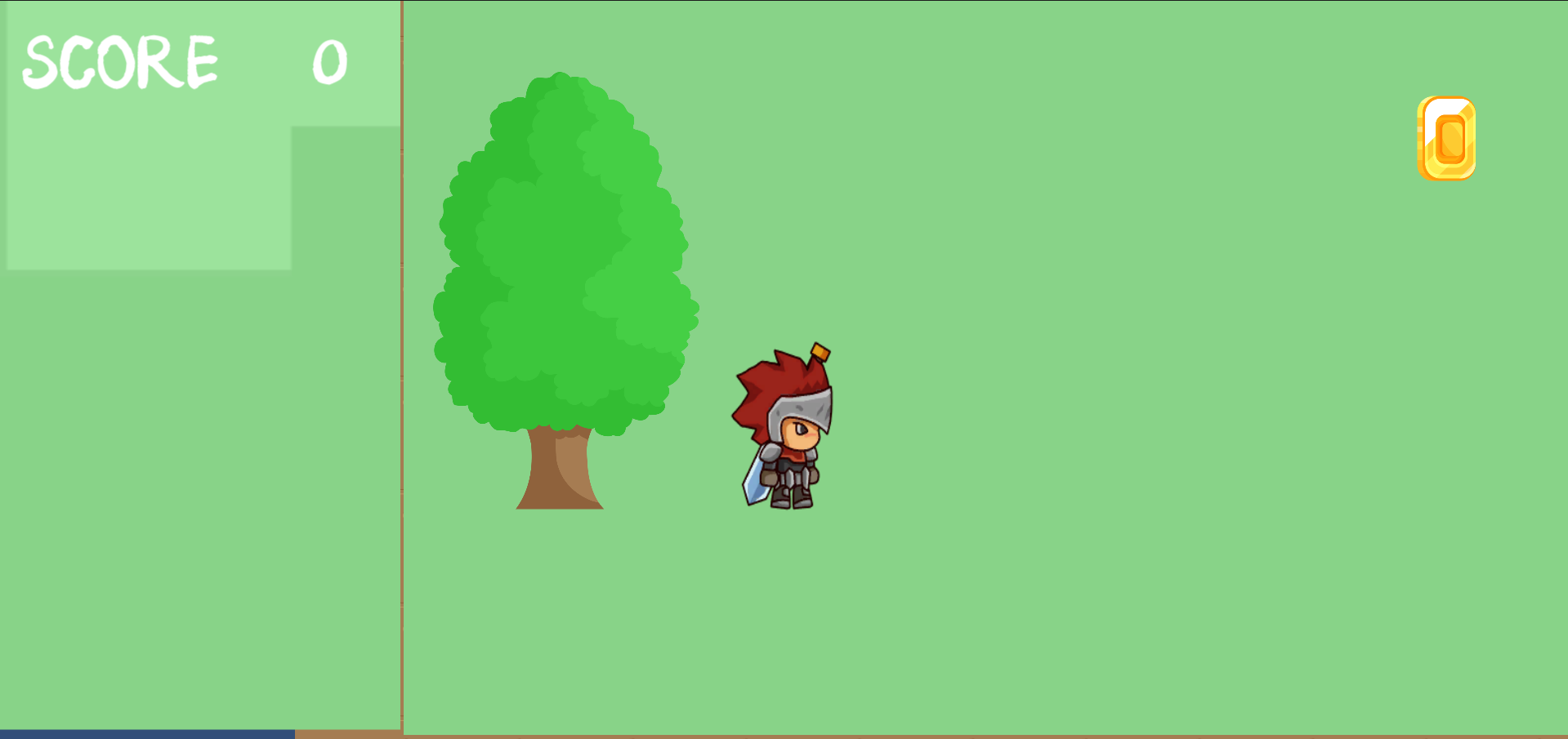
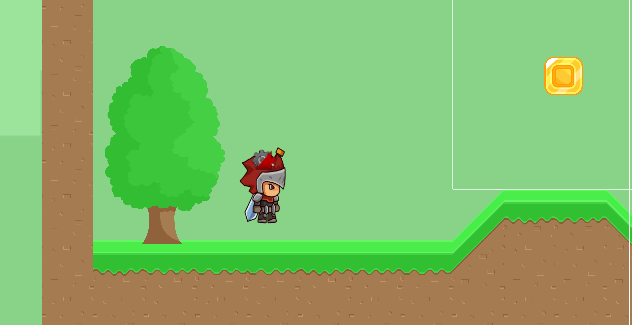
Hi guys, So I am a beginner with unity and C# and creating a simple 2d platformer game. I created a tilemap and when I want to test it with a player, when I click Play button, in Game preview that tilemap are invisible (this is an image how it looks like https://prnt.sc/11fxxsb). And this is how should the game look like (https://prnt.sc/11fy28u) Everytime I load a level scene for the first time ground tiles does not load
 limber idol
idle sparrow
Hi guys, So I am a beginner with unity and C# and creating a simple 2d platforme...
limber idol
idle sparrow
Hi guys, So I am a beginner with unity and C# and creating a simple 2d platforme...
Looks like the ground is loading, but your background is rendering infront of it.
Try moving the background farther away from the camera than the tilemap
I like to use my camera at z: -10.
Then keep my ground (map) at z: 0
Then anything with a lower z will render ontop of items with a higher z.
idle sparrow
@limber idol oh, okay thanks I will take a look at it
 devout wolf
general vector maths question:
if I have two points, I can get the direction vector from one point to the other, then project a line out that first point to the other, but what about if I only have one point. I would like to project a line out in the direction that I'm facing.. i have x, y, dx and dy
 fair vessel
sounds like you'd still have 2 points in that case?
devout wolf
but i dont know what the x, y of that second point is (I think this a major aspect of vectors I have yet to grasp).. I just add a vector in the direction that I'm facing?
unit vector * scalar
fair vessel
so like you'd have a circle with an eye on the edge? then you'd know the location of the eye in reference to the center of the ball and whatever vector those two points create would be what you are facing/looking at? Don't trust me though, i am learning c# so i have no idea how to code that, but i think my concept is solid
devout wolf

so point at center, and point at mouse x,y (the red line currently draws to where ever the mouse is)
instead of 2nd point as mouse x,y, just extend a line out distance 1 (unit vector) in the direction that I'm facing
but the center is some random x,y on the map, not at the origin
1 vector for direction and 1 for postion?
 forest cave
still tendon
so i have a square that uses rigid body
forest cave
still tendon
so i have a square that uses rigid body
using System.Collections;
using System.Collections.Generic;
using UnityEngine;

public class GrapplingHook : MonoBehaviour {
    [SerializeField] private Vector3 target;
    [SerializeField] private float grappleSpeed;
    private void Update() {
        transform.position = Vector3.MoveTowards(transform.position,target,grappleSpeed * Time.deltaTime);
        if(Input.GetMouseButtonDown(0)){
            target = Camera.main.ScreenToWorldPoint(new Vector3(Input.mousePosition.x,Input.mousePosition.y, 10.0f));
        }else if(Vector3.Distance(transform.position,target) <= 0){
            target = transform.position;
        }
    }
}```
should work but no visual fxSo i recently made a WASD controlled orthographic camera, I'd like for someone to look at my code and tell me what i am doing wrong.... The code works and all and does what i want but i feel like i am doing something inefficient, yaknow? I think i am using IF too much, could someone review my code?
https://pastebin.com/pJB4TJjk
It's really nice and smooth, i am proud of the result but not really proud of the code, wasn't sure if i should post this here or beginner code, sorry in advance.
turbid heart
fair vessel
So i recently made a WASD controlled orthographic camera, I'd like for someone t...
Main thing is dont put GetComponent in Update. You can cache the camera beforehand and use that
turbid heart
fair vessel
So i recently made a WASD controlled orthographic camera, I'd like for someone t...
and this is a personal preference, but even if it's a oneliner in an if statement block, I always put opening and closing braces. It leaves less room for error, and it's more consistent
fair vessel
yeah tbh i removed the brackets i had because i thout it looked more "professional" lol, i prefer the extra brackets too
turbid heart
There was an incident at my old workplace where a bug was caused by missing braces, so I'm more particular about making sure they're there
fair vessel
so how would i use cache? sorry i am super new to c#, i have experience in other programming languages though. lol when doing math i am liberal with parentheses, love em
turbid heart
caching is like what you did for linearSpeedLimit. you made a variable, then assigned to it using GetComponent
so, what you can do is declare a variable called cam of type Camera, then assign to it using GetComponent<Camera>().
Then in the rest of your code, you can just use cam instead of GetComponent<Camera> everytime.
I don't exactly know the nitty gritty details, but GetComponent is expensive so you should try to minimize using it when you can
forest cave
still tendon
how do i add a grappling hook to that square?
using UnityEngine;

[RequireComponent(typeof(Rigidbody2D))]
public class GrapplingHook : MonoBehaviour {
    private Vector3 target;
    [SerializeField] private float grappleSpeed;
    private bool moving;

    private Rigidbody2D rb;
    private float oldGravityScale;

    private void Start() {
        rb = GetComponent<Rigidbody2D>();
        oldGravityScale = rb.gravityScale;
    }

    private void Update() {
        if(moving == true){
            rb.gravityScale = 0;
            transform.position = Vector3.MoveTowards(transform.position,target,grappleSpeed * Time.deltaTime);
        }
        if(Input.GetMouseButtonDown(0)){
            target = Camera.main.ScreenToWorldPoint(new Vector3(Input.mousePosition.x,Input.mousePosition.y, 10.0f));
            if(Vector3.Distance(transform.position,target) > 0){
                moving = true;
            }
        }else if(Vector3.Distance(transform.position,target) <= 0){
            if(moving == true){
                target = transform.position;
                moving = false;
                rb.gravityScale = oldGravityScale;
                oldGravityScale = rb.gravityScale;
            }
        }

    }
}```
this'll work better for rigidbody2dwhen i grapple it keeps floating me up
forest cave
it grapples to where u click
using UnityEngine;

[RequireComponent(typeof(Rigidbody2D))]
public class GrapplingHook : MonoBehaviour {
    private Vector3 target;
    [SerializeField] private float grappleSpeed;
    private bool moving;

    private Rigidbody2D rb;
    private float oldGravityScale;

    private void Start() {
        target = transform.position;
        rb = GetComponent<Rigidbody2D>();
        oldGravityScale = rb.gravityScale;
    }

    private void Update() {
        if(moving == true){
            rb.gravityScale = 0;
            transform.position = Vector3.MoveTowards(transform.position,target,grappleSpeed * Time.deltaTime);
        }
        if(Input.GetMouseButtonDown(0)){
            target = Camera.main.ScreenToWorldPoint(new Vector3(Input.mousePosition.x,Input.mousePosition.y, 10.0f));
            if(Vector3.Distance(transform.position,target) > 0){
                moving = true;
            }
        }else if(Vector3.Distance(transform.position,target) <= 0){
            if(moving == true){
                target = transform.position;
                moving = false;
                rb.gravityScale = oldGravityScale;
                oldGravityScale = rb.gravityScale;
            }
        }

    }
}```
try this actually@still tendon
still tendon
ok so when i am grappling from bottom it only moves my x axis but when i am grappling from top it floats me up like before
 fossil crag
hello. im just starting making a 2d game. but i cant seem to get movement to work. can anyone help me? (ive tried using some different code from google but none of it works, i think its user error)
still tendon
Hey does anyone have a semi decent dash script because i cant find anything remotely useful
Top down or easily convertible to top down

 fossil crag
i like the first ones you put
but they both would work for different styles of games
wicked wasp
i'm learning about unity 2d but i'm italian and videos are only american so i don't understand so much
fossil crag
i dont get a lot of the stuff they say. it just doesnt make sense to me but i could try and help
wicked wasp
ok
fossil crag
does anyone have a very basic, mario like, 2d movement code
thorn oracle
What's the fastest way to find something and its position relative to something else? Like I have an NPC that needs to be able to find the player and find whether the player is to the right or left. The player has a Player script on it so I thought I could raycast to both sides and call GetComponent on the hit. For some reason this only works when my player is colliding with the origin of the rays. I did drawray and the rays look fine, but they aren't printing anything unless i go to the origin.
snow willow
thorn oracle
What's the fastest way to find something and its position relative to something ...
you have probably done something wrong with your raycast. Or your raycast is hitting the NPC
Maybe your Raycast is hitting your NPC instead?
or another collider
gotta debug it
 acoustic swift
thorn oracle
i print debugged it, it said it was hitting my player
acoustic swift
thorn oracle
i print debugged it, it said it was hitting my player
maybe offset the position of the grappling hook / hook?
 snow shoal
why is my mesh not rendering all of the tiles? I am trying to make a mesh render a plane at each gameObject, but it only renders one https://paste.mod.gg/icabihahuq.cs
nvm i figured it out
 strong island
Guys, would it be possible to save into a file a level from a tilemap and then load it back into another new tilemap?
Basically saving a set of tiles from a tilemap in a file
thorn oracle
snow willow
if it's hitting your player then it's working
No like it says it’s hitting my player when it isn’t
Well at least it shouldn’t be
.DrawRaw shows me not touching the rays
snow willow
thorn oracle
.DrawRaw shows me not touching the rays
It's possible your DrawRay is not drawn correctly
as in, you didn't pass the right parameters into it
thorn oracle
i just copy and pasted in the same thing for the ray
i'll get the code segment if it helps
 sonic silo
So, I want my enemies in my 2D game to walk from one end of the platform to another and back, how do I tell them when they're on the platforms, and when to stop and turn around? Can anyone help?
snow willow
thorn oracle
.DrawRaw shows me not touching the rays
your colider might also be bigger or smaller or not the shape you're expecting for your player
thorn oracle
that's not it
snow willow
share some screenshots and code
thorn oracle

 //movement is the script exclusive to the player
        RaycastHit2D right = Physics2D.Raycast(transform.position, Vector2.right * 3);
        RaycastHit2D left = Physics2D.Raycast(transform.position, Vector2.left * 3);
        Debug.DrawRay(transform.position, Vector2.right * 3);
        Debug.DrawRay(transform.position, Vector2.left * 3);
        if (right && right.transform.GetComponent(typeof(Movement)))
        {
            print(right.transform.name);
        }
        if (left && left.transform.GetComponent(typeof(Movement)))
        {
            print(left.transform.name);
        }
okay i think i edited my code to what's above now the opposite issue occurs
when i'm touching the ray it doesn't print
and before you ask, yes it's the kindergarten kid sprite
snow willow
in the image
what's the player
which object has Movement on it
and which object is shooting the ray?
This is not correct btw @thorn oracle :```cs
Physics2D.Raycast(transform.position, Vector2.right * 3);
You need to do
Physics2D.Raycast(transform.position, Vector2.right, 3f);
The second parameter is treated as a direction only. The third parameter is the distance, and by default it is infinity
Finally, when you start a raycast, it will not hit any colliders that the ray starts it path inside of already
thorn oracle
OH
okay so makes sense
is it different with Debug.DrawRay() though because the second parameter works for direction and distance with that method
snow willow
thorn oracle
is it different with Debug.DrawRay() though because the second parameter works f...
Yeah
DrawRay treats it as both the direction and the distance
kinda stinks that they work differently
 north pilot
Hey all, I've been struggling for the past few days trying to get a turret on a 2D spaceship to clamp properly. My setup is a ship game object with a turret game object as a child. The script to control the turret lives on the turret game object.
My base code is:
Vector2 turretPosition = Camera.main.WorldToScreenPoint(transform.position); Vector3 direction = CustomPointer.pointerPosition - turretPosition; float currentMouseAngle = (Mathf.Atan2(direction.y, direction.x) * Mathf.Rad2Deg); Quaternion localRotation = Quaternion.Inverse(transform.parent.transform.rotation) * Quaternion.Euler(new Vector3(0, 0, currentMouseAngle)); float localRotationZClamped = Mathf.Clamp(localRotation.z * Mathf.Rad2Deg, min_angle, max_angle); Quaternion localRotationClamped = Quaternion.Euler(0f, 0f, localRotationZClamped); transform.localRotation = localRotationClamped;
This is the closest I've gotten, but there's oddities that happen as the parent ship rotates and eventually everything breaks as the turret stops following the camera. Any help would be much appreciated. My brain is just about broken on this
snow willow
 thorn oracle
ah
Alright
So, yeah, the issue is that the rays are colliding with the NPC.
ty for the help
Code works now
 ruby iron
@north pilot put the turret object as child of the spaceship and it will stick .. 🙂
or do u want the turret to move?
north pilot
It's currently a child and it's sticking properly. I have it moving based on mouse position fine. I'm failing at getting the turret position to clamp based on its local rotation
ruby iron
so no 360's?
north pilot
correct.
ruby iron
but it does clamp? .. and when the ship rotates the clamp breaks or what ?
north pilot
Sort of. It does, but things start to get off kilter as the ship moves and eventually it breaks altogether
Here's an example
north pilot
no problem. Yes I posted the code snippet above
ruby iron
i would
rotate it as animation
so you still work on that 🙂
my idea how to get this thing going is hard to explain .. but imagine a piece of paper with an box on it .. the box will always rotate if u move the paper .. you need a ancher point or somthing for that to not bug out
@north pilot
so u need to concider the movment off the ship in ur clamp
i guess
north pilot
hmm I'll play around with translating the ship's angles into the local space of the turret
Thanks for the suggestion
ruby iron
sry .. i wish i could do more .. but ya know .. .still learning ..
 slate parrot
How do I get the GameObject name when I click on it inside an OnMouseDown() function? Example: I click on a GameObject called circle, I want to get that object's name when clicked
turbid heart
slate parrot
How do I get the GameObject name when I click on it inside an OnMouseDown() func...
fire a raycast and then get the name from the hitinfo
slate parrot
Thanks
turbid heart
or uh..this actually
https://stackoverflow.com/questions/61658245/how-do-i-to-know-on-which-gameobject-i-clicked-on-unity
Stack Overflow
I want to make a Simple Memory Game using C# on Unity. It is a 2D game. I am trying to make a game in which the PC player clicks in a card, and then the game needs to call the function memory(GameO...
apparently you can just do this.gameObject.name
slate parrot
Oh, cool. I'll definitely look into RayCast, though for now I'm going with the OnMouseDown solution
turbid heart
yeah, seems like you can just do gameObject.name
still tendon
Or gameObject.tag
turbid heart
tag is different


 desert cargo
turbid heart
apparently you can just do this.gameObject.name
desert cargo
turbid heart
apparently you can just do this.gameObject.name
Simply name will work too
desert cargo
 pseudo bobcat
like this
pseudo bobcat
like this
When you click and drag, find the vector from the centre to the mouse, then set it's magnitude to the radius of your desired circle. That is the offset from the centre.
keen arch
Hey guys, got a weird (to me, at least) problem. I have a moving platform that I moved using Vector2.MoveTowards and feeding it's result into Rigidbody2d.MovePosition like this:
// Calculate single-frame movement towards target
var movementThisFrame = Vector2.MoveTowards(position, target, settings.Speed * Time.deltaTime);
// Move platform by calculated movement
body.MovePosition(movementThisFrame);
// Calculate platform movement velocity (displacement / time delta) so that we can move the the attached actor along with it
Velocity = (movementThisFrame - position) / Time.deltaTime;
But I wanted easing where the platform accelerates up to speed (defined in settings.Speed, let's say 5f) and then keeps that speed for a while and then when it's near the end it slows down and gets to 0f when it reaches the target position.
Someone suggested I use Vector2.SmoothDamp but it's behaving rather strange
// Calculate single-frame movement towards target
var movementThisFrame = Vector2.SmoothDamp(position, target, ref velocity, smoothTime, settings.Speed);
// Move platform by calculated movement
body.MovePosition(movementThisFrame);
This seems to move the platform very... very slowly and then the velocity just becomes 0 and the platform hasn't even reached it's target
What am I doing wrong here?
 split lake
No triangle sprite
 turbid heart
split lake
No triangle sprite
turbid heart
split lake
No triangle sprite
and the question is?
split lake
turbid heart
and the question is?
no question, just need help to fix a bug
 austere iron
If there's no question, then there isn't a problem...
 sharp lichen
that's not even code related 🤣🤣
austere iron
Then that would be a question for help, yet there is none...
still tendon
"triangle sprite"
is that supposed to be a thing but its not?
austere iron
Not sure what the problem is here...
austere iron
split lake
No triangle sprite
You just wrote a statement, not a question...
split lake
austere iron
You just wrote a statement, not a question...
Why is there no triangle sprite?
there u have my question
sharp lichen
because Unity doesn't include one
 ruby karma
go to the asset store, and download a 2d asset pack which has it
 obsidian finch
split lake
Why is there no triangle sprite?
obsidian finch
split lake
Why is there no triangle sprite?
The same reason there's not a Mega Man sprite. Because Unity didn't add it
ruby karma
but yeah, the why bamboozles me too
obsidian finch
This was the question you saw fit to go crosspost with?
split lake
obsidian finch
The same reason there's not a Mega Man sprite. Because Unity didn't add it
well ofc because its not a shape
obsidian finch
split lake
well ofc because its not a shape
There's no rhombus, trapezoid, or Mandlebrot Set either
Just go into paint and make a triangle
split lake
theres 3 common shapes, circle, square and triangle
turbid heart
do you really want to die on this hill? you're a 3d artist right? i think you can use paint
obsidian finch
This is hardly worth taking up people's time on two channels for
Go make your own damn triangle
it'll be like ten seconds
still tendon
similar to how there is no pyramid for 3d
obsidian finch
You spent ten times longer trying to Karen your way into another channel than it would have taken to just make a fucking triangle
split lake
lol
austere iron
split lake
No triangle sprite
also... 😏
 turbid heart
austere iron
also... 😏
turbid heart
austere iron
also... 😏
I think, because different versions XD mine doesnt have it
ruby karma
package it up random
austere iron
 austere iron
turbid heart
I think, because different versions XD mine doesnt have it
austere iron
turbid heart
I think, because different versions XD mine doesnt have it
i'm on 2019.3...
split lake
this is updated 2020.3 ...
 turbid heart
I'm on 2021.1.1f1
 ember isle
ok
well generly id think you would have the biomes spawn randomly and then do some sort of spread function
yea
and each biome would have differend numbers of spawn each thing
yea
welp you practicly seem to already get it
oh
 austere kindle
hello there, I have no idea about coding!
some games assign a randomized temperature value and assign biomes depending on the value
so you can have stuff like colder climates in one direction and deserts into another
but again, I have no idea about coding
ember isle
yea
austere kindle
I remember a....., what was this game called?
it was like a colony sim
sci-fi
rimworld!
well, depends on how expansive your biomes are
if you care about having a frozen wasteland right next to a desert
a T° map might work
split lake
austere iron
i'm on 2019.3...
um.. i just downgraded to 2019.. still no triangle
 modest marsh
split lake
um.. i just downgraded to 2019.. still no triangle
modest marsh
split lake
um.. i just downgraded to 2019.. still no triangle
you're in the wrong menu. Assets->Create->Sprites->Triangle like the manual showed you
split lake
modest marsh
you're in the wrong menu. Assets->Create->Sprites->Triangle like the manual show...
ahem i just did that
wait wth
lol i upgraded to 4.23 and now it works
austere iron
split lake
um.. i just downgraded to 2019.. still no triangle
You were looking in the wrong spot...
still tendon
Could anyone help me with why when i use this dash script the player dashes at the exact same speed as the walk
 snow willow
still tendon
Could anyone help me with why when i use this dash script the player dashes at t...
snow willow
still tendon
Could anyone help me with why when i use this dash script the player dashes at t...
Mixing AddForce with setting velocity directly is troublesome
But basically that's your issue - you're setting the velocity directly
Which will remove any momentum you had
Also... Are you doing other movement in another script?
This one seems to only do stuff when dashing
still tendon
Yes the script is also used for general movement but that does work like normal
snow willow
Also you should not multiply Time.fixedDeltaTime into your AddForce. It's making you need to set your dashSpeed variable 50x larger than it should be.
still tendon
snow willow
Also you should not multiply Time.fixedDeltaTime into your AddForce. It's making...
Thanks for the suggestions they all made the dash function like 10x better
1 more issue sadly. If i use get key you can hold the dash function and infinitely dash but if i use get key down its really inconsistent and you have to get lucky for it to acctualy register. Could it be a problem with being inside fixed update instead of update ?
snow willow
Yes GetKeyDown is not consistent in FixedUpdate
You need to read it in Update and consume it in FixedUpdate
The reason is some frames don't have a FixedUpdate call, so you can miss the single frame of GetKeyDown
still tendon
Ahh ok
ember isle
@still tendon
python code for temp map biomes:```
import random
class biome:
def init(self,name,objectamounts,temprange):
self.objectamounts = objectamounts
self.temprange = temprange
self.name = name
def isInTempatureZone(temp):
if self.temprange[0]<temp<self.temprange[1]:
return True
biomes = []
def createBiome(name,objectamounts,temprange):
biomes.append(biome(name,objectamounts,temprange))
def initBiomes():
createBiome("desert",{"sand":100,"tree":3,"rock":5},(30,50))
createBiome("forest",{"forestFloor":100,"tree":3,"rock":5},(0,10))
createBiome("None",{},(1,-1))
def getBiome(name):
for i in biomes:
if i.name.lower() == name.lower():
return i
def getBiomes(temp):
bs = []
for i in biomes:
if i isInTempatureZone(temp):
bs.append(i)
return bs
class chunk:
def init(self,temp):
self.temp = temp
self.tiles = []
self.biome = getbiome("none")
emptyChunk = chunk(0)
world = []
worldSize = (100,100)
def initWorld():
for x in range(worldSize[0]):
chunks = []
for y in range(worldSize[1]):
chunks.append(emptyChunk)
world.append(chunks)
def getChunkAtPos(x,y):
//this is taking too long
def assignTempatures():
// make a gradient of temp across map, may want to randomize slightly
for x in range(worldSize[0]):
for y in range(worldSize[1]):
getChunkAtPos(x,y).temp = -50+50/worldSize[0]+50/worldSize[1]
def assignBiomes:
for x in range(worldSize[0]):
for y in range(worldSize[1]):
chunk = getChunkAtPos(x,y)
chunk.biome = random.choise(getBiomes(chunk.temp))
def createWorld():
initWorld()
assignTempatures()
assignBiomes()
// then put tiles into biomes
i did it in python because it would have taken way longer if i did it with C#
yea
anyway gtg
still tendon
@snow willow thanks for all the help man means alot
ember isle
the code probobaly has errors but youl have to reprogram it anyway so shouldent matter
snow shoal
how do i make my character stick to my moving platform?
the way i have thought of doing it is: when my player isn't moving, set it's velocity to the moving platform's velocity; but i am not sure that is the best way to do it
 lean pecan
Hey all, I've been working on trying to figure out a solution to this for many hours, I've done extensive googling, and nothing has been successful so far. Here's my dilemma:
In my puzzle game, both players move at the same time
When the player on the bottom lands on the button, the block that is "hidden" (with the dashed lines) will appear, and the player on the top can walk on it just fine.
My issue is, the player on the top has already started moving when the player on the bottom has hit the button, causing it to not move to the now un-hidden block (I'll send a clip in a second) as there was nothing there when it started moving.
I'd love to hear your thoughts on this; even just saying hello would be nice ;)

here's a clip
snow willow
lean pecan
Hey all, I've been working on trying to figure out a solution to this for many h...
tough problem!
Looks like if there's like an interactive element (a switch or button) on any of the destination squares for the balls, you should resolve that before doing the movement
So I would do something like this:
- Process input, determining player intent
- For each ball, check what the target square for movement is
- If any target squares have a button, activate the button (also deactivate the button on any squares balls are moving from)
- Then process movement
 abstract olive
Yeah, this is hard because the order of things don't work in reverse (ie, player A goes before player B)
Alternatively to the above suggestion, you could:
-
Pseudo-move your characters to the target tiles (have them "target" that tile)
-
Handle any special tiles (ie, buttons turn on/off tiles in this case)
-
Double check the characters and handle what happens now on their target tile (ie, if the tile is set to
invisible, then they reject the move)
But this gets into a weird loop where a tile might not activate due to another tile changing a state on it. 🤔
Of course, you could always just avoid this via level design.
lean pecan
abstract olive
Yeah, this is hard because the order of things don't work in reverse (ie, player...
thank you both for taking the time to respond! I essentially tried both of these already, having more luck with the second. I think the issue I was having was that it was all happening in the same frame; maybe I'll:
Target the tile (my code can already do that)
Handle Special tiles
Wait a frame so that I know for sure that I finished handling the special tiles
Handle again
Move
lean pecan
abstract olive
Of course, you could always just avoid this via level design.
yeah but I'd like to avoid that if possible ;)
abstract olive
You can do it all in the same frame.
You just need to handle it in steps, that frame, before moving them.
lean pecan
alright I'll try some stuff out and possibly come back
thank yall for the responses ;)
still tendon
https://hatebin.com/jphlmqgygl Can anyone check out this code and see why the player might be dashing for the length of dash cooldown instead of dashlength
Its incredibly strange
snow willow
        if (dashLength == 0)
        {
            dashing = false;
        }
        else
        {
            dashLength--;
        }

        if (dashCooldown == 0)
        {
            dashAvailable = true;
        }
        else
        {
            dashCooldown--;
}```not sure but this is all very confusing
if (Input.GetKey(KeyCode.Space) && dashAvailable)```Looks like it's based on dashAvailable which is related to your dash cooldown being 0
still tendon
So im 99% sure i know what that section of code is doing but (i agree how it seems related) i have absolutely no idea how that is increasing the length of the dash
snow willow
which one is longer