#🖼️┃2d-tools
1 messages · Page 38 of 1
 snow willow
 fast siren
i put the file in my empty object with a box collider
it worked for the other scenes but i dont know whats wrong with this one
snow willow
There's special function names you have to use

It's not going to call some random function on your script
 rain ingot
if i spawn multiple instances of a prefab how do i remove them
snow willow
rain ingot
if i spawn multiple instances of a prefab how do i remove them
use Destroy(something.gameObject);
 agile atlas
does anyone know how to do transform.position but with a Sprite.transform.position?
rain ingot
Destroying assets is not permitted to avoid data loss.
If you really want to remove an asset use DestroyImmediate (theObject, true);
UnityEngine.Object:Destroy (UnityEngine.Object)
SpawnerScript:remove () (at Assets/SpawnerScript.cs:22)
UnityEngine.EventSystems.EventSystem:Update ()
rain ingot
snow willow
use `Destroy(something.gameObject);`
?
snow willow
rain ingot
Destroying assets is not permitted to avoid data loss.
If you really want to rem...
don't destroy the prefab
destroy the instance you instantiated
rain ingot
how
snow willow
var instance = Instantiate(prefab);
Destroy(instance.gameObject);```var?
snow willow
I used var because I don't know what type your preffab is
most likely GameObject
but it oculd be any component type
¯_(ツ)_/¯
var will always work here
rain ingot
using System.Collections;
using System.Collections.Generic;
using UnityEngine;

public class SpawnerScript : MonoBehaviour {
    public GameObject NPC;
    public GameObject Canvas;
    public int howMany;

    void Start() {
        spawn();
    }

    public void spawn() {
        int Timer = 0;
        for(Timer = 0; Timer < howMany; Timer++) {
            Instantiate(NPC, Canvas.transform);
        }
    }

    public void remove() {
        Destroy(NPC.gameObject);
    }

}
but it makes your code less readable
GameObject newNPC = Instantiate(NPC, Canvas.transform);
If you want to destroy all of them you either need to add them to a list or go through the children of the Canvas to destroy them all
rain ingot
how do i do the list thing
snow willow
e.g.
foreach (var child in Canvas.transform) {
  Destroy(child.gameObject);
}```or
make a variable: cs List<GameObject> npcs = new List<GameObject>();
then
var newNpc = Instantiate(NPC, Canvas.transform);
npcs.Add(newNpc);```Then:
public void remove() {
  foreach (var npc in npcs) {
    Destroy(npc);
  }

  npcs.Clear();
}```Assets\SpawnerScript.cs(24,25): error CS0103: The name 'npcs' does not exist in the current context
snow willow
with using System.Collections.Generic; at the top of your file
rain ingot
lok
snow willow
where did you make the variable?
it needs to be at the top of the class with your other class variables
rain ingot
using System.Collections;
using System.Collections.Generic;
using UnityEngine;

public class SpawnerScript : MonoBehaviour {
    public GameObject NPC;
    public GameObject Canvas;
    public int howMany;

    void Start() {
        spawn();
    }

    public void spawn() {
        int Timer = 0;
        for(Timer = 0; Timer < howMany; Timer++) {
        List<GameObject> npcs = new List<GameObject>();
        var newNpc = Instantiate(NPC, Canvas.transform);
        npcs.Add(newNpc);
        }
    }

        public void remove() {
    foreach (var npc in npcs) {
        Destroy(npc);
    }

    npcs.Clear();
}
}
ok
snow willow
If you put it inside spawn() it only exists inside spawn()
snow willow
they're about the same in my opinion
rain ingot
the other is shorter
snow willow
but if you know that the canvas will only have NPCs as children
then yeah you don't need the extra variable etc
rain ingot
where do i put it
destroy?
Assets\SpawnerScript.cs(22,27): error CS1061: 'object' does not contain a definition for 'gameObject' and no accessible extension method 'gameObject' accepting a first argument of type 'object' could be found (are you missing a using directive or an assembly reference?)
using System.Collections;
using System.Collections.Generic;
using UnityEngine;

public class SpawnerScript : MonoBehaviour {
    public GameObject NPC;
    public GameObject Canvas;
    public int howMany;

    void Start() {
        spawn();
    }

    public void spawn() {
        int Timer = 0;
        for(Timer = 0; Timer < howMany; Timer++) {
        }
    }

    public void remove() {
        foreach (var child in Canvas.transform) {
            Destroy(child.gameObject);
        }
    }

}
no error
snow willow
you did take out all your spawning code though 🤔
snow willow
just need to add this back in the loop: var newNpc = Instantiate(NPC, Canvas.transform);
and since you're not using the list way you can just simplify it again: Instantiate(NPC, Canvas.transform);
rain ingot
public void spawn() {
        int Timer = 0;
        for(Timer = 0; Timer < howMany; Timer++) {
                Instantiate(NPC, Canvas.transform);
            }
        }
Assets\SpawnerScript.cs(22,17): error CS0116: A namespace cannot directly contain members such as fields or methods
using System.Collections;
using System.Collections.Generic;
using UnityEngine;

public class SpawnerScript : MonoBehaviour {
    public GameObject NPC;
    public GameObject Canvas;
    public int howMany;

    void Start() {
        spawn();
    }

    public void spawn() {
        int Timer = 0;
        for(Timer = 0; Timer < howMany; Timer++) {
                Instantiate(NPC, Canvas.transform);
            }
        }
    }

    public void remove() {
        foreach (var child in Canvas.transform) {
            Destroy(child.gameObject);
        }
    }
too many closing brackets here:
    public void spawn() {
        int Timer = 0;
        for(Timer = 0; Timer < howMany; Timer++) {
                Instantiate(NPC, Canvas.transform);
            }
        }
    }
see you have two opening ones and 3 closing ones
rain ingot
Assets\SpawnerScript.cs(23,27): error CS1061: 'object' does not contain a definition for 'gameObject' and no accessible extension method 'gameObject' accepting a first argument of type 'object' could be found (are you missing a using directive or an assembly reference?)
using System.Collections;
using System.Collections.Generic;
using UnityEngine;

public class SpawnerScript : MonoBehaviour {
    public GameObject NPC;
    public GameObject Canvas;
    public int howMany;

    void Start() {
        spawn();
    }

    public void spawn() {
        int Timer = 0;
        for(Timer = 0; Timer < howMany; Timer++) {
                Instantiate(NPC, Canvas.transform);
            }
        }

        public void remove() {
        foreach (var child in Canvas.transform) {
            Destroy(child.gameObject);
        }
    }
}
again, replace foreach (var child in Canvas.transform) { with foreach (Transform child in Canvas.transform) {
rain ingot
now it deletes my target object
snow willow
Well like i said
this way with the canvas children only works if you're sure that you only have NPCs as children of the canvas
rain ingot
can i make a it a prefab so i can spawn it
snow willow
If that's not the case, either make the NPCs children of a different object, or use the List way
rain ingot
how do i change the text of a textmeshpro
snow willow
rain ingot
how do i change the text of a textmeshpro
It has a .text property
rain ingot
ok
 chrome anchor
using System.Collections.Generic;
using UnityEngine;

public class MoveObject : MonoBehaviour
{
    private Vector2 mousePosition;
    private float offsetX, offsetY;

    public static bool mouseReleased;

    //when mouse is pressed down
    private void OnMouseDown()
    {
        mouseReleased = false;
        offsetX = Camera.main.ScreenToWorldPoint(Input.mousePosition).x - transform.position.x;
        offsetY = Camera.main.ScreenToWorldPoint(Input.mousePosition).y - transform.position.y;
    }

    //when mouse is no longer pressed down
    private void OnMouseUp()
    {
        mouseReleased = true;
    }

    //when the mouse moves
    private void OnMouseMove()
    {
        mousePosition = Camera.main.ScreenToWorldPoint(Input.mousePosition);
        transform.position = new Vector2(mousePosition.x - offsetX, mousePosition.y - offsetY);
    }

    private void OnTriggerStay2D(Collider2D collision)
    {
        string gameObjectName;
        string collideObjectName;

        gameObjectName = gameObjectName.name.Substring(0, nameof.IndexOf("_"));
        collideObjectName = collision.gameObject.name.Substring(0, nameof.IndexOf("_"));

        if(mouseReleased && gameObjectName == "Acorn" && gameObjectName == collideObjectName)
        {
            Instantiate(Resources.Load("Tree_Object"), transform.position, Quaternion.identity);
            mouseReleased = false;
            Destroy(collision.gameObject);
            Destroy(gameObject);
        }
    }
}
"'string' does not contain a definition for 'name' and no accessible extension method 'name' accepting a first argument of type 'string' could be found"
snow willow
rain ingot
how do i change the text of a textmeshpro
The variable type will be TMPro_Text I believe
@chrome anchor
string gameObjectName;
gameObjectName.name
??
what are you trying to do there
chrome anchor
i'm following this video
https://www.youtube.com/watch?v=9-ok9Cn3d90

My new game Guess The Movie Is Available On Play Market For Free For Android devices
Here is the link
https://play.google.com/store/apps/details?id=com.zogames.GuessTheMovie
Consider purchasing my ULTIMATE UDEMY COURSE with a great discount https://www.udemy.com/how-to-make-games-with-unity-software/?couponCode=14-99-SALE-GOOD-LUCK
If you like...
 chrome anchor
i found the error, i accidently put "gameObjectName.name" instead of "gameObject.name"
snow willow
mhmm
chrome anchor
thanks for your assistance
then my code does nothing...
oh, one of the functions was named wrong
there we go
chrome anchor
I can merge the same object just fine but when I try a different object it doesn't work

ex. acorn and acorn work, mana and mana work but acorn and mana don't work
snow willow
 storm coral
edit: fixed problem
storm coral
edit: fixed problem
I think your direction vector is pointing directly away from the target
storm coral
no, i put that - there because it was facing away in the first place... taking it out was one of the first things i tried
snow willow
Vector A - Vector B gives a direction vector from B to A
So you have a vector from your target to the turret
Which is exactly the wrong way
 devout field
Hello, im trying to resize a Texture 2D to match an specific size so that my neural network can read it, but i´m stuck with the resizing part, I don´t quite get the difference between scaling and resizing, so, which is best? and what would be the difference for my neural network, couse I need the specific format of a texture with 438 of height and 310 of width?
storm coral
i removed the bit where it asks for the player tag, and it spams (meaning yes it works) but idk how else to authenticate that its the player
ok i figured it out- the tag was not a legitimate argument or something, so i switched it over to name
how do i stop the raycast from going through my walls?
fast siren
whenever i hit the object that this script is used by, it never reloads the scene . Am I doing something wrong? ```using System.Collections;
using System.Collections.Generic;
using UnityEngine;
using UnityEngine.SceneManagement;
public class collisionlvl2 : MonoBehaviour
{
void OnTriggerEnter2D(Collider2D other){
    if(other.CompareTag("Player")){
        SceneManager.LoadScene("lvl2");
    }
}
}```
 sonic silo
Hey anyone here know of any good tutorials/ways of handling 2D enemy movement?
Pls ping me if so
sonic silo
fast siren
whenever i hit the object that this script is used by, it never reloads the scen...
Are the names completely accurate eg in the inspector is the tag called "Player" and is the scene called "lvl2" instead of say "player" or "LVL2"? Check if the collision is occurring with a Debug.Log maybe?
 tall current
fast siren
whenever i hit the object that this script is used by, it never reloads the scen...
tall current
fast siren
whenever i hit the object that this script is used by, it never reloads the scen...
Both objects need colliders (one of them being a trigger), and at least one needs a rigidbody.
 copper zealot
I'm curious, how would I script to make an animation reverse
sonic silo
copper zealot
I'm curious, how would I script to make an animation reverse
Wdym? Do you want to play the animation from the last frame to the first frame, or do you simply want to flip the sprite?
copper zealot
Ah I found a solution using the direction property but I originally wanted to start from the last and play to the first frame
 unique turret
Alright time to figure out how to code it so players turn into the object they click on
 marsh flint
trying to generate a list of random x,y points based on seed
        Random.InitState(Seed);

        Vector2[] points = new Vector2[PointCount];

        for (int i = 0; i < PointCount; i++)
        {
            points[i].x = Random.Range(0, SizeX);
            points[i].y = Random.Range(0, SizeY);
        }
they are different each run of the project.
 still tendon
when my enemy switches directions all that happens is his sprite switches not his colliders or anything else
pls help
and also
when he shoots
if hes facing left he shoots left
if hes facing right he looks at left for a split second to shoot and goes back to right
rain ingot
Assets\ScoreScript.cs(7,17): error CS0102: The type 'ScoreScript' already contains a definition for 'Score'
using System.Collections;
using System.Collections.Generic;
using UnityEngine;

public class ScoreScript : MonoBehaviour {
    public int Score;
    public void Score() {
        Score = Score + 1;
    }

}
 hard crag
@rain ingot The variable Score and method Score can't have the same name, I assume.
rain ingot
oh
 gusty lichen
thought I'd try my luck in this channel, since it is 2d collider related.
i have a pie chart/spinner mechanic in my game that i'm hoping to implement. So far, I've generated the pie chart using gameObjects with image components. The images have 'radial 360 fill' and then 'fill amount' changes to represent the percentage of the pie chart. i've now got a spinner arrow that rotates around the outside with a box collider on the tip. I was hoping to do an easy 'the only way i know how' collider trigger zone, but not sure how to set the trigger zone for the portion of the 'fill amount' of the circle, if you get me.
any ideas for how to set the polygon collider for the fraction of the pie chart image object automatically? Like the way the 'outline' function works?
I notice that colliders are added to sprites automatically, which i guess would solve my issue if i changed to sprites. However, i don't know how to have the same 'radial 360 fill amount' effect to calculate the size of the pie chart using sprites 😦
 spring adder
gusty lichen
thought I'd try my luck in this channel, since it is 2d collider related.
i hav...
spring adder
gusty lichen
thought I'd try my luck in this channel, since it is 2d collider related.
i hav...
One alternate option is to blit triangles to texture with a circular mask. You can then determine spinner category by correlating spinner end position with triangle area.
Or just predetermine spinner category and animate it accordingly
gusty lichen
spring adder
One alternate option is to blit triangles to texture with a circular mask. You ...
sorry, what do you mean by 'blit triangles to texture'?
may have to just do the 'predetermined' thing for now and choose the value in code >.< it's annoying how with a sprite I can get the amended polygon collider 2D easy but because its a PNG image component it's practically impossible for my skill level!!
that, or i'll just need to figure out how to do the 'radial fill' thing with sprites and shaders which sounds 10 times more difficult
one person suggested the alpha hit test minimum threshold. Could I use that to resolve my above issue? if so, how do I use this code? https://docs.unity3d.com/2019.1/Documentation/ScriptReference/UI.Image-alphaHitTestMinimumThreshold.html
 lusty root
hey guys any one can help with that error
Object reference not set to an instance of an object

i get error here
 spring adder
gusty lichen
one person suggested the alpha hit test minimum threshold. Could I use that to r...
spring adder
gusty lichen
one person suggested the alpha hit test minimum threshold. Could I use that to r...
i'm not sure how this hit test would work exactly... maybe the person was suggesting casting a ray through the end point of your spinner with the alpha threshold to only return hits for non-transparent parts of your pie chart. this would presumably return a hit only for the correct part of the pie chart. if it's not that, then i'm not sure what they intended
 devout falcon
hey i cant add tiles into unity
when i click assets store it it opens web page
i cant import it
 dreamy egret
devout falcon
when i click assets store it it opens web page
dreamy egret
devout falcon
when i click assets store it it opens web page
i think you can just go to Package Manager and look for '2D Tilemap Editor', without going through asset store.
Since it's in the unity registry it should be available already
devout falcon
i there is none of tiles i added in package manager
dreamy egret
should look like this:
https://i.imgur.com/nolNi1i.png
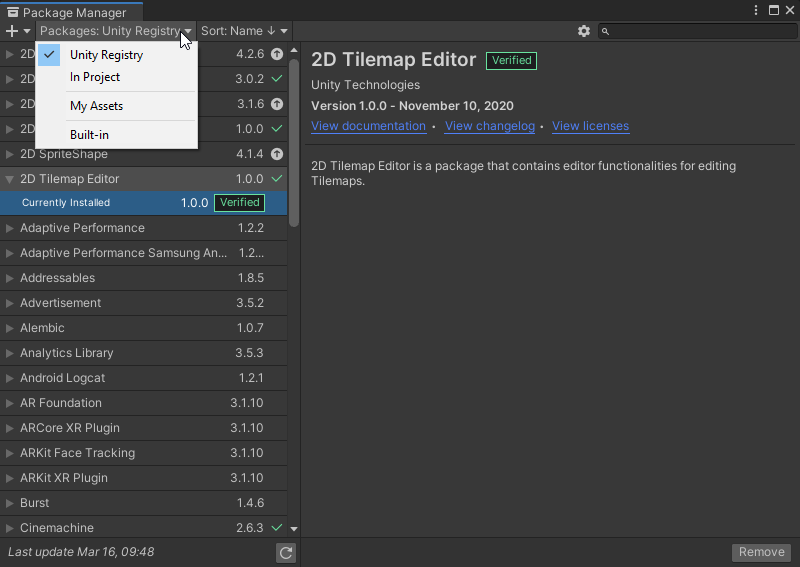
which version unity are you using?
dreamy egret
oh, if you have the tile palette open (new tab that looks like a grid, with some brushes above it),
just drag a sprite into it, and it will prompt you to save it as a ".asset".
and that should add it to your palette
then you select the tile, select brush tool, and start painting a bunch of them on your scene
devout falcon
can you explain i cant understand you
im new in unity i started to make games today
@dreamy egret ?
dreamy egret
nevermind
so you already have the tile editor working
and just want tiles from the asset store?
devout falcon
yes
dreamy egret
ok, well basically, you go to the asset store, and it takes you to a web page. this is correct.
then you get the assets you want, add them to your account.
Once they're associated with your account, then you'll be able to access them inside unity's package manager
just filter by "My assets" instead of "unity registry" in the screenshot i sent above
this will work as long as you're using the same account in the unity hub to launch unity, and on the webpage
rain ingot
how do i check if game objects are colliding
spring adder
rain ingot
how do i check if game objects are colliding
 sinful stag
rain ingot
sinful stag
rain ingot
using System.Collections;
using System.Collections.Generic;
using UnityEngine;
using UnityEngine.UI;

public class NCPscript : MonoBehaviour
{
    int Color = 0;
    public Sprite[] image;
    public GameObject Target;

    void Start(){
        Color = Random.Range(0, 3);
        Debug.Log(Color);
        GetComponent<Image>().sprite = image[Color];
        Vector2 newPos;
        newPos.x = Random.Range(-180, 180);
        newPos.y = Random.Range(-80, 80);
        Target.transform.position = newPos;
        if (collition.gameObject.name == "NPC" && collition.gameObject.name) {
            Vector2 newPos;
            newPos.x = Random.Range(-180, 180);
            newPos.y = Random.Range(-80, 80);
            Target.transform.position = newPos;
            }
        }
    }
Assets\NCPscript.cs(20,13): error CS0103: The name 'collition' does not exist in the current context
 abstract olive
You have nothing declared as collition.
abstract olive
Also, it looks like you're trying to do collision detection. You want to use the built in OnCollisionEnter functions.
rain ingot
declare box colider as colider
rain ingot
abstract olive
Also, it looks like you're trying to do collision detection. You want to use the...
uhh how
abstract olive
At the top of your script, you can put public BoxCollider2D myBoxCollider and assign it in your inspector.
rain ingot
 if (myBoxCollider.gameObject.name == "NPC") {
            newPos.x = Random.Range(-180, 180);
            newPos.y = Random.Range(-80, 80);
            Target.transform.position = newPos;
            }
?
 distant pecan
void OnCollisionEnter2D(Collider2D col)
{
  if(col.gameObject.name == "NPC")
  {
    //your code
  }
}
void OnTriggerEnter2D(Collider2D col)
{
  if(col.gameObject.name == "NPC")
  {
    //your code
  }
}
use any of those methods
btw it's better to check for tags instead of gameobject name
distant pecan
there's a example on this page
the only thing you would change is having 2D at the end of the function name
OnTriggerEnter > OnTriggerEnter2D
rain ingot
void OnTriggerEnter2D(Collider2D col) {
        if(col.gameObject.CompareTag("Collition")) {
            Vector2 newPos;
            newPos.x = Random.Range(-180, 180);
            newPos.y = Random.Range(-80, 80);
            Target.transform.position = newPos;
            Debug.Log("Collition");
    }
why doesnt this work
 hardy heart
Hey guys, i want to make a custom move where when u click script will find closest point on the road and move character there, do u have ideas?

 mellow owl
@hardy heart im a noob but try comparing the distance between the dots?
Theres Vector2/3.Distance which return the Distance between 2 vector, which you can get from the dots position
 radiant root
Hello
 red tundra
Someone can help me out ?
radiant root
Nope
red tundra
Sad 😦
radiant root
☹️
mellow owl
I think you should ask in #🏃┃animation ?
radiant root
mellow owl
I think you should ask in <#502171313201479681> ?
Me too
red tundra
Oh yeah ty wrong channel tho
rain ingot
void OnTriggerEnter2D(Collider2D col) {
        if(col.gameObject.CompareTag("Collition")) {
            Vector2 newPos;
            newPos.x = Random.Range(-180, 180);
            newPos.y = Random.Range(-80, 80);
            Target.transform.position = newPos;
            Debug.Log("Collition");
    }
why doesnt this work
mellow owl
Try to Debug outside of the if so see if the OnTriggerEnter2D work or not first
 left lotus
Is "Collition" intentional? It's mispelled FYI
It doesn't really matter as long as it's also spelled "Collition" on your objects
mellow owl
yeah im thinking that too xD
rain ingot
left lotus
Is "Collition" intentional? It's mispelled FYI
yes
its right my tag
but i mispelled
left lotus
Ok, just double checking. Pham's suggestion of using a debug log outside of your if block is the way to go then
mellow owl
does the console return the debug?
rain ingot
no
hardy heart
private void OnTriggerEnter2D(Collider2D other) {
}
try this
rain ingot
phat shoud dat chage
hardy heart
cause u overdrive func, but u use another argument name
hardy heart
U should rename some vars
hardy heart
do u have rigidbody on of the pbject?
mellow owl
rain ingot
my things are still overlaping
It should overlap tho? cuz when u enable isTrigger, the collider wont work
rain ingot
mellow owl
It should overlap tho? cuz when u enable isTrigger, the collider wont work
they move to another location
if they overlap
rain ingot
hardy heart
do u have rigidbody on of the pbject?
how do i make my code use ir
using System.Collections;
using System.Collections.Generic;
using UnityEngine;
using UnityEngine.UI;

public class NCPscript : MonoBehaviour
{
    public BoxCollider2D myBoxCollider;
    int Color = 0;
    public Sprite[] image;
    public GameObject Target;

    void Start(){
        Color = Random.Range(0, 3);
        GetComponent<Image>().sprite = image[Color];
        Vector2 newPos;
        newPos.x = Random.Range(-180, 180);
        newPos.y = Random.Range(-80, 80);
        Target.transform.position = newPos;
        }
    void DebugCollition() {
        Debug.Log("Works");
    }
    void OnTriggerEnter2D(Collider2D other) {
        if(other.gameObject.CompareTag("Collision")) {
            Vector2 newPos;
            newPos.x = Random.Range(-180, 180);
            newPos.y = Random.Range(-80, 80);
            Target.transform.position = newPos;
            Debug.Log("Collition");
            DebugCollition();
    }
}
}
i did
mellow owl
then it should work, you dont need to access it with your code
rain ingot
huh
hardy heart
Do the object have Collision tag
rain ingot
yes
rain ingot
nope its not
left lotus
You never placed the debug log outside of your if, it's still inside the if statement
Place a debug inside your OnTriggerEnter2D function, but not within the if statement checking for the tag
This way you can confirm if the OnTriggerEnter2D function is ever being called
mellow owl
@left lotus hey do you happen to know how to multiply a force to a direction vector without letting the direction vector affect the outcome? Cuz im using my mouse position to create the direction vector and it is affecting the velocity with its length, like the higher my cursor is, the higher the force, I am using normalize but it doesn't seems to work. Thanks!
snow willow
mellow owl
<@!150016736198918145> hey do you happen to know how to multiply a force to a di...
Normalize will fix it show your code
You normalize the direction Vector and then multiply by whatever magnitude you want
mellow owl
Okay, thanks for the reply
heres how I calculate my jumpForce:
holdTime += Time.deltaTime;
jumpForce = holdTime * jumpMultiplier
then I pass it into Jump method using
void Jump(float x)
    {

        float finaljumpforce = Mathf.Min(x, maxJumpForce);
        rb.velocity = lookDir.normalized * finaljumpforce;


        Debug.LogWarning("Jumped with" + finaljumpforce + "force");
        Debug.Log(rb.velocity);
        _jump = false;
yeah, if I have my cursor near my object, it jump to where my cursor it, despite me holding it for a long time
and vice versa if I hold it higher and hold it, the jump is massive
snow willow
what other movement code do you have
That Debug.Log should at least look similar with the cursor near or far from the object. Is that working right?
mellow owl
its just a float for me to pass in my jumpForce
if(_jump && onPlatform)
        {
            Jump(jumpForce);
        }
the force debug is always the same, but somehow the velocity is different
I actually have lookDir.normalize render on my screen and the y component range from 0 to 0.7
that explains the different in velocity, but I have no idea how to fix it xD
fast siren
is there a way to make an object keep respawning from one point? not a player object just a normal sprite
snow willow
fast siren
is there a way to make an object keep respawning from one point? not a player ob...
You can spawn things wherever you want. Just pass that position into Instantiate
snow willow
mellow owl
I actually have lookDir.normalize render on my screen and the y component range ...
Oh... Well normalize normalizes both x and y
E.g the total length of the vector will become 1
Not just y
Is your object constrained on the x axis or something
fast siren
i just started unity lol im kinda new
mellow owl
no its only constrained on z
@fast siren file:///C:/Program%20Files/Unity/Hub/Editor/2019.4.19f1/Editor/Data/Documentation/en/ScriptReference/Object.Instantiate.html
snow willow
mellow owl
no its only constrained on z
does lookDir include a z component?
mellow owl
oh wait xD
snow willow
Can you print out lookDir?
snow willow
fast siren
i just started unity lol im kinda new
that's ok it works the same for beginners and experts 😄
snow willow
mellow owl
is that why
yeah any Z component will be wasted
fast siren
mellow owl
<@!735557232158179367> file:///C:/Program%20Files/Unity/Hub/Editor/2019.4.19f1/...
what do i do with this do i just put it in my searchbar?
snow willow
So maybe do this @mellow owl :
Vector3 withoutZ = lookDir;
withoutZ.z = 0;
withoutZ.Normalize();
rb.velocity = withoutZ * finalJumpForce;
no
he meant this
fast siren
oh ok
mellow owl
yeah that^, I was opening the local file xD
snow willow
@fast siren use one of these that takes a position
 fast siren
ty
so quantern rotation is just like making the rotation freeze right? or just not rotate
mellow owl
@snow willow THANK YOUUUU
OMG
ive been struggling for days
I actually used this tho Vector2 lookDir2D = new Vector2(lookDir.x, lookDir.y);
left lotus
@fast siren The option with Quarternion rotation is in case you want to provide a starting rotation for the object
In Unity (and most 3d games), Rotations are described with objects called Quarternions
snow willow
mellow owl
I actually used this tho ```Vector2 lookDir2D = new Vector2(lookDir.x, lookDir.y...
that works too
fast siren
oh okay
mellow owl
thank youu 
fast siren
what's a prefab?
left lotus
You may want to look at some of the tutorials or documentation on Unity
https://docs.unity3d.com/Manual/Prefabs.html
https://learn.unity.com/tutorial/prefabs-e
fast siren
o alr
 gentle parrot
Anyone knows how to improve quality of generated 2d collider, so that it wouldn't create such a huge empty area:

What I expect is :

it's using Sprite with alpha for generating
snow willow
gentle parrot
Anyone knows how to improve quality of generated 2d collider, so that it wouldn'...
not sure what I'm looking at here. Which part is the collider
gentle parrot
@snow willow the bottom part, it's the collider generation that's different depending on the hole size
basically if it's too small it won't generate a dip and remains flat
Here is what I want to see:
 snow willow
gentle parrot
Here is what I want to see:
snow willow
gentle parrot
Here is what I want to see:
Is this a PolygonCollider2d?
If so you can manually edit the collider, if that's a feasible option for you
gentle parrot
It's Tilemap collider2d and composite:

I am generating this at run-time
from user input
 fierce cradle
Hello, I need little help. Im working on collectible coin feature where player can get point for each coin they collide with. After succeed implement it (1 coin = 1 value), I copy paste the object to create 10 coins. However, when I collect them, some has 1 or 2 value. The total sometime 13-15. So strange.
using System.Collections;
using System.Collections.Generic;
using UnityEngine;

public class Coin : MonoBehaviour
{
    public int coinValue = 1;

    private void OnTriggerEnter2D(Collider2D other)
    {
        if (other.gameObject.CompareTag("Player"))
        {
            ScoreManager.instance.ChangeScore(coinValue);

            FindObjectOfType<AudioManager>().Play("Coin");
        }
    }
}

 left lotus
You're typing C# code into a .json file
left lotus
fierce cradle
Hello, I need little help. Im working on collectible coin feature where player c...
When do your coins get destroyed? If they are never destroyed, with the code as-is, the player can walk into a coin more than once to collect it over and over again
fierce cradle
left lotus
When do your coins get destroyed? If they are never destroyed, with the code as-...
it destroyed when the player collide. here's the code from player
    private void OnTriggerEnter2D(Collider2D other)
    {
        if (other.gameObject.CompareTag("Coin"))
        {

            Destroy(other.gameObject);
        }
}```hm yeah, first glance looks good then
fierce cradle
That's why Im confused lol. The strange part is the value randomize between 1 to 2.
 valid gull
Can anyone help me? Im making a fnaf fan game and trying to make a camera up and down system and a clock system! Can anyone please help me? You can send me a dm about this just don't spam.
left lotus
fierce cradle
That's why Im confused lol. The strange part is the value randomize between 1 to...
Just some quick guesses:
If you instead move the destroy call into the Coin's OnTriggerEnter2D, (so Destroy(gameObject); at the very end), does it fix it?
Does your player perhaps have multiple colliders?
Actually, I'm a little surprised it never added a zero value. In theory if the Player OnTriggerEnter2D is called first, it could destroy the coin before the OnTriggerEnter2D for the coin gets to fire
fierce cradle
left lotus
Just some quick guesses:
If you instead move the destroy call into the Coin's On...
that's most likely the problem. my player has 2 colliders. I think you are right sir
left lotus
Aha!
I think moving the destroy from the Player function to the coin function would be the easiest resolution
That way it's always destroyed after adding points
If that wouldn't work for some reason, you could add a private bool collidedYet = false; and use that to check if collision has already fired
fierce cradle
oh you mean the destroy command better come from the coin instead of player sir ?
fierce cradle
left lotus
If that wouldn't work for some reason, you could add a `private bool collidedYet...
this is for the coin right ??
left lotus
Yeah
If it's true, just return from your trigger function. Otherwise if it's false the rest of your code will run, then remember to set it = true
And only set it to true if the CompareTag is true, so inside that if
 granite sky
How can i make the layer sorting change when i player is above and below it? example: when my player is below a tree it is above it, when it is above the tree it is below it
is there a way to do this with the tilemaps?
 stray meteor
granite sky
is there a way to do this with the tilemaps?
stray meteor
granite sky
is there a way to do this with the tilemaps?
I don't think so, you must use script
What I do personnally is this :
- I use 2D extras to allow for a custom tile brush, that allows to draw prefabs as if they are tiles
- I make my tree a prefab and add a script on it basically saying
if (tree.transform.y < player.transform.y)
{
    spriteRenderer.sortingLayerName = "theOneOnTopOfThePlayer"
} else {
    spriteRenderer.sortingLayerName = "theOneBelowThePlayer"
}
- I make my custom prefab brush with my tree
- I draw trees everyyyyyyywheeeeerreeeee
still tendon
I want an event to fire whenever something touchs that orange thing but I also want things to be able to go through it, help
 stray meteor
check the "is Trigger" paramater of your box collider
you'll be able to pass through it and to fire a script with it
still tendon
stray meteor
you'll be able to pass through it and to fire a script with it
I did, I can pass through it, but it doesn't fire.
 stray meteor
both of your elements need a collider
and at least one needs a Rigidbody
maybe that's why it doesn't work
 fiery cloak
still tendon
I did, I can pass through it, but it doesn't fire.
fiery cloak
still tendon
I did, I can pass through it, but it doesn't fire.
You should use OnTriggerEnter(), not OnCollisionEnter() if colliding with triggers
stray meteor
still tendon
if its outside
so there's something wrong with your condition
still tendon
fiery cloak
You should use OnTriggerEnter(), not OnCollisionEnter() if colliding with trigge...
Hmm, let me try that.
still tendon
stray meteor
did you check the accuracy of your tags?
Yes, the tags are correct
still tendon
fiery cloak
You should use OnTriggerEnter(), not OnCollisionEnter() if colliding with trigge...
Okay, I tried that and it worked, thanks.
 light elk
hey was wondering if i can maek top down levels iwht spriteshape

example
is there any reason to use tilemaps?
unless ur game is like turnbased grid game?
or its something to do with memory?
m trying to go for a more organic hand painted look instead of same old squares
it seems making spriteshape levels are faster too
feels more natural not blocky
gusty lichen
spring adder
i'm not sure how this hit test would work exactly... maybe the person was sugge...
Won’t I need a collider in order for the raycast to register though? Or can I still raycast down/z axis from the spinner needle to detect the portion of the image underneath it?
stray meteor
light elk
feels more natural not blocky
I agree
But it depends on the game you want to make i guess 🤷♂️
light elk
if i were to make tiles for that
too much time consumed to connect ends artwise
which i already did for a game jam
really disliked making tiles
spring adder
gusty lichen
Won’t I need a collider in order for the raycast to register though? Or can I st...
The idea would be to raycast “into” the screen. Yeah you’d need a collider.
light elk
go make some tile-sets its pain 😄
spring adder
Doing a tiled game rn... it’s convenient on the programming side... I haven’t tried sprite shape though
stray meteor
Is it not possible to just work with Sprites ?
gusty lichen
spring adder
The idea would be to raycast “into” the screen. Yeah you’d need a collider.
But the issue I’m having is that I can’t make a dynamic polygon collider from the pie chart image based on the fill amount 😫
stray meteor
And use tilemap for repetitive things such as the ground, etc..
Or just make the ground a big ass sprite?
spring adder
gusty lichen
But the issue I’m having is that I can’t make a dynamic polygon collider from th...
What about individual images for each fill color, with everything not filled being transparent
gusty lichen
spring adder
What about individual images for each fill color, with everything not filled bei...
I do have an individual png image for the green/red portions of the spinning wheel. The rest is technically transparent if it’s not filled (talking radial 360 fill amount here). I think I’ve read somewhere about raycasting from the spinning wheel needle with pixel colour, I’ll have to try that when I get home.
 limber idol
So, I'm having a mental dilemma, one that may not actually be a problem, but one I'm considering while preparing to start implementing combat in my game. When handling platformer controls in games, rather you're using Physics and applying forces to counter-act sliding / increase speed up inclines, or using a Character Controller and just simply raycasting to the ground and "sticking" to it. (These are common implementations) I started to wonder, what happens when you want to introduce something like knockbacks?
If the character is always glueing itself into position either through forces or position manipulation, when it gets hit by a monster, or another player that should send it flying, wouldn't it just adjust the forces needed (or adjust your position) and keep you on that slope, no matter how hard you're "hit"?
This is my first 2D project and I've been stuck thinking instead of implementing.
I assume this would be less of a problem with forces, as you'd know how much to apply to cancel out the slope, but knockback would just overpower it.
snow willow
Not really a problem with the physics engine yeah
 hallow ore
is there an easy workaround for objects clipping through colliders if they are moving too quickly
snow willow
hallow ore
is there an easy workaround for objects clipping through colliders if they are m...
try setting collision detection to continuous on the fast moving object
hallow ore
thank you
snow willow
other options include:
- Decreasing fixed timestep
- making colliders larger
- Custom raycast logic
- Making objects slower
hallow ore
do I need to set the colliders of my tile map to continuous as well or will it work fine with only my player object being continuous?
snow willow
just the moving object
 raven forge
Hi, everybody somebody knows why this happens?
The player is stuck, and it cannot jump anymore
 knotty barn
@limber idol Yea you would likely build external forces to your character controller or disable it during effects like knockback
snow willow
raven forge
Hi, everybody somebody knows why this happens?
Gotta be a bug in your Player script
raven forge
snow willow
Gotta be a bug in your Player script
This my falling function

it runs every update.
left lotus
Looks pretty fine, what about your jumping code?
On closer inspection of the video, is your character supposed to have their feet go that far into the ground on that bottom layer?
snow willow
raven forge
This my falling function
SHow the whole script if possible. But specifically interested in the jumping code and eligibility to jump
left lotus
Looks like they may have fallen through the terrain
snow willow
Ooh good point @left lotus
left lotus
Yeah didn't see that my first few times. Was trying to watch the animator state machine and noticed it
raven forge
snow willow
SHow the whole script if possible. But specifically interested in the jumping co...
This is the whole script
raven forge
left lotus
Yeah didn't see that my first few times. Was trying to watch the animator state ...
Don't know why that happens because when the player jumps and falls, the character doesn't go through the terrain. Only it does when it falls
left lotus
Can you try changing your Player's Rigidbody's "Collision Detection" value to "Continuous" in your inspector?
raven forge
left lotus
Can you try changing your Player's Rigidbody's "Collision Detection" value to "C...
Dude.. OMG it works!!
Thank you so much!!
left lotus
Cool, so the issue was with the collision and your player's falling speed probably
There are other ways you can adjust this too, changing the physics timestep and other physics settings
"Continuous" works very well though, but it is not fast to run
So don't enable Continuous on all your physics objects by default, just ones with these sorts of issues
raven forge
Thank you! I will keep that in mind.
left lotus
If these issues start to pop up everywhere, then its probably time to dive into the physics settings
No problem, good luck
raven forge
Thanks everybody who help!
 dapper otter
helloo I got a quick question. I'm following this video on how to make a 2d bullet. pm.isFacingRight tests which side the player is facing. When he instantiate the bullet prefab, why does he rotate the bullet around the Z-axis instead of the Y-axis to turn the bullet around? I thought rotating in the Z axis wouldn't do anything in 2d space.

 brisk badge
dapper otter
helloo I got a quick question. I'm following this video on how to make a 2d bull...
brisk badge
dapper otter
helloo I got a quick question. I'm following this video on how to make a 2d bull...
You can imagine the z-axis as coming towards the screen, so, considering said line coming out of the top of your object, you would be rotating it on the z-axis - kind of like spinning the object about that axis
Idk if that makes any sense tho... :p
 gusty lichen
spring adder
i'm not sure how this hit test would work exactly... maybe the person was sugge...
gusty lichen
spring adder
i'm not sure how this hit test would work exactly... maybe the person was sugge...
So I tried this GraphicRaycaster.Raycast example script as a test: https://docs.unity3d.com/2017.3/Documentation/ScriptReference/UI.GraphicRaycaster.Raycast.html. Even with the alpha threshold set, when I click on the transparent/unfilled parts of my pie chart, it still registers a hit 😭
brisk badge
dapper otter
helloo I got a quick question. I'm following this video on how to make a 2d bull...
Also, you could use a Coroutine for bullet timings.```cs
bool canShoot = true;
if (Input.GetMouseButtonDown(0) && canShoot)
{
Shoot();
StartCoroutine(ShootDelay());
}
IEnumerator ShootDelay()
{
canShoot = false;
yield return new WaitForSeconds(fireRate);
canShoot = true;
}
So I thought I’d revisit my predicament to see if you guys had any ideas, and attached a gif to hopefully make things a little clearer.
I have a spinner while with success/fail options. The success portion is determined by fill amount on an image component (typical radial 360 fill amount setup for health bars, etc.). the rest of the pie chart is just a red circle as the background. Both are PNGs.
I have the needle which spins around the chart. This is also an image component/png. There is a box collider on the needle ready to go.
Goal: I want to be able to trigger the needle landing in the green zone in code
Problem: I can’t add a collider to the green success portion of the pie chart, only the entire chart. I also can’t graphic raycast the collision as the raycast still detects the FULL image and not only the success portion.
Possible solutions: Recreate pie chart effect with sprites? Determine random percentage behind scenes and have needle move to predetermined location? PLEASE HELP! 😭

 summer spindle
hey guys so I just tried an attempt at making somewhat of a boid flocking system so that I could make it so my enemies don't collide each other when going towards the player which I have fixed but when I kill one enemy all of the other spawned enemy's avoidance code stops working Im not sure where this problem goes in so I put it here since its a 2D game.
I put the enemies in a List and run the avoidance behaviour but I destroy the enemy in a different script
tall current
Question
When I use circlecast, what hit point is prioritized?
If I circlecast and find an object that covers the entire object, is the hit point in the middle of the circlecast or random???
 inland jacinth
@tall current At least in 3D, a spherecast ignores colliders that start inside the sphere.
Might be the same in 2D
spring adder
gusty lichen
So I tried this GraphicRaycaster.Raycast example script as a test: https://docs....
Sorry, I’m just not sure. I was just guessing based on what you said earlier.
still tendon
Again wrong chnnel sorry
dapper otter
brisk badge
Idk if that makes any sense tho... :p
This makes perfect sense, it's what I thought too, so rotating around the Y axis would achieve the same result tho right I would imagine. For a bullet.
brisk badge
dapper otter
This makes perfect sense, it's what I thought too, so rotating around the Y axis...
No, rotating around the y-axis would cause some behavior, affecting the width of the bullet rather than it's rotation. Go into 3D view and try it out for yourself, that should make it a little clearer
Although, if you're doing a top-down 3D project it would work though
 low wave
Do 3D moving codes work the same for 2D modules/sprites?
 warm pebble
low wave
Do 3D moving codes work the same for 2D modules/sprites?
warm pebble
low wave
Do 3D moving codes work the same for 2D modules/sprites?
I know that you probably want to use vector2's instead of vector3's
low wave
warm pebble
I know that you probably want to use vector2's instead of vector3's
okay, thank you!
warm pebble
low wave
okay, thank you!
for movement, I use Input.getaxisRaw
for horizontal and vertical
low wave
alright
dapper otter
brisk badge
No, rotating around the y-axis would cause some behavior, affecting the width of...
okok thank you
also what does the IEnumerator do
 dusk nebula
I seem to be hitting the tilemap tile edges
 bold bone
 crystal geode
I'm having a really rough time implementing hitboxes and hurtboxes in my game, and I was wondering if I could have some advice
so I've got two characters in my scene, each with an empty gameobject attached to them
one has a BoxCollider2D and a Rigidbody and is tagged as "hitbox"
the other just has a BoxCollider2D and is tagged as "hurtbox"
both of them are set as triggers

and this is the script I've attached to the hitbox gameobject
it seems like OnTriggerEnter2D isn't even being called, and I don't know what's causing it
the only thing I can think of is that since I'm moving and resizing the hitbox within a single frame to get it where it needs to be, that it's not triggering the function, but I dunno
snow willow
crystal geode
I'm having a really rough time implementing hitboxes and hurtboxes in my game, a...
Go through this
it may help you figure out what's missing
crystal geode
thank you
light elk
this looks really cool

I created our game map similar to 'lost temple' is a famous map in starcraft. I created our game's sample map similar to 'lost temple' is a famous map in starcraft. Unity's new component 'Sprite Shape' was used to create the map.
Twitter : https://twitter.com/LabJanus
Tumblr : https://www.tumblr.com/blog/januslabs
i think soon spriteshape going to kick tiles out of picture 😄
let the new gen of making things take over
its time for you to rest grandpa tile sets 😄
chrome anchor
the colliding object keeps changing to the other game object


it should be mana, not acorn
also the name keeps changing from "Acorn" to "Acor" or "Acorn_Obj", i just want it to say "Acorn" which is what the sprite is called
distant pecan
light elk
its time for you to rest grandpa tile sets 😄
its two different styles
one doesn't make the other one deprecated / less useful
its the same as saying "soon 3d will take over and 2d won't exist anymore"
there are things you can do with tile map you can't do with sprite shape, and vice-versa
 terse thorn
ok, i have this problem, i have 2 time alterers, the pause and a powerup that makes the time slower, before they wer 2 diferent scripts but they were acting over eachother so i joined them and all seems to work, the only problem is that the game do'nt pause when i press the space bar i used a debug.log showing the TimeScale and not even that changes, please help me with this
public class TimeManager : MonoBehaviour
{
int TimeScale;
public Text pauseIndicator;
public Text continueText;
public Text quitText;
float time;
public float startTime;
public AudioSource slowMotionStart;
public Animator witheScreenAnim;
void Start(){
TimeScale = 2;
time = startTime;
TimeScale = 2;
}
void Update()
{
if(Input.GetKeyDown(KeyCode.G)){
Debug.Log(TimeScale + " " + time);
}
if(TimeScale == 0){
Time.timeScale = 0;
continueText.text = "press the Space Bar to un-pause";
pauseIndicator.text = "PAUSED";
quitText.text = "press Escape to quit the game";
} else if(TimeScale == 1){
Time.timeScale = 0.6f;
time -= Time.deltaTime;
} else if(TimeScale == 2){
Time.timeScale = 1;
continueText.text = "";
pauseIndicator.text = "";
quitText.text = "";
}
if(Input.GetKeyDown(KeyCode.Space) && TimeScale == 2){
TimeScale = 0;
}
if(Input.GetKeyDown(KeyCode.Space) && TimeScale == 0){
TimeScale = 2;
}
if(time <= 0){
TimeScale = 2;
time = startTime;
}
}
void OnTriggerEnter2D(Collider2D collision)
{
if(collision.transform.tag == "slowMo"){
TimeScale = 1;
slowMotionStart.Play();
witheScreenAnim.SetTrigger("slowMotion");
}
}
}``` slate parrot
My character can't get to the enemy because the enemy is a bunch of parts (body, left leg, right leg, left hand, right hand, etc). Those parts are children of a GameObject, which you can see I have highlighted in the image. Anyway, where I'm going with this is the GameObject is blocking me from moving forward towards him. How do I fix this? I've tried adding a 2D box collider that's set to isTrigger true, in hopes of it letting me pass through, but with no luck

 rich bridge
any way i can toggle player intangibility with certain objects?
but still collide with the ground
slate parrot
I maybe able to help. What do you mean?
Like, make it so certain objects aren't affected by your movement or something?
rich bridge
basically as an ability i want the player to be able to not collide with certain objects for 10 seconds
is there a way i could toggle what a boxcollider collides with?
phase right through them basically
snow willow
Use the collision layer matrix
slate parrot
Ohh, I see. Yeah, so that's actually quite easy believe it or not. What you want to do is make an IEnumerator (For counting down the 10 seconds) and call it when that ability is in use. After the 10 seconds, make the ability false (assuming you have a bool for it, like hasPower or something). Anyway, when that 10 seconds is happening, you need to just set your player collider to false (off)
snow willow
Put your player into a separate layer during the power up that still collides with the ground but not the other items
slate parrot
Yeah
rich bridge
ohhhh i get it
slate parrot
Like
 if (collider.gameObject.tag != "Ground")
{
     // code here
}
That's just an example using a tag. That's what I personally use a lot, is tags
rich bridge
would it work if the player was parented to an empty object that collides with only the ground, and the toggle turns off the players boxcolider
then they become intangable and that p much what im after
slate parrot
How would you make it only interact with the ground? Code?
rich bridge
oh ok
wait so how can i use code to change the players layer
can i do that?
would it just be gameobject.layer
snow willow
Yes
rich bridge
cool
terse thorn
terse thorn
ok, i have this problem, i have 2 time alterers, the pause and a powerup that ma...
could someone help me? 👉 👈
rich bridge
ive got it 🙂
terse thorn
terse thorn
could someone help me? 👉 👈

snow willow
slate parrot
My character can't get to the enemy because the enemy is a bunch of parts (body,...
confused about what you're trying to accomplish and what your problem is
slate parrot
In the image, you saw I had highlighted the GameObject. You could tell by the X and Y arrows. I could not move past it for some reason. I didn't change anything, but now I'm able to get past it like intended. Weird
fast siren
so i use ontriggerenter2d on my script
        if(other.CompareTag("Player")){
            SceneManager.LoadScene("lvl2");
        }
}``` both of the objects have rigidbody2d (player and the object this script is going to be in)and it wont make me respawn to the scene, i think its because they both have rigidbodies because it worked for other objects that didnt have rigidbody
okay so i know why it is not working i need 1 at least have a rigid body but i have 2 but i want those 2 to have gravity
 sand plaza
so im currently trying to make a chess game. i have the basic moves set up, but im not sure on how to make the pawns move two spaces when they start the game. any ideas on how i could add this? ill send my code if you need it
slate parrot
If I have a player and a 2D rag doll, and I want to apply force to the direction the player is facing to the rag doll , how would I do that? Example: I'm left of the rag doll, and I apply force to him when I collide with him using OnCollisionEnter2D, I want to apply that force to the right (Because I pushed him in that direction). If I was to the right of the rag doll, and I walked into him and pushed him, I'd want the rag doll to be forced to the left, again, because that's the direction I pushed him in. How do I do that?
slate parrot
sand plaza
so im currently trying to make a chess game. i have the basic moves set up, but ...
In the Start() in your code, make the pawns move two 'spaces' in the direction you want them to, probably using transform.Translate()
 brazen halo
slate parrot
If I have a player and a 2D rag doll, and I want to apply force to the direction...
brazen halo
slate parrot
If I have a player and a 2D rag doll, and I want to apply force to the direction...
Well, you kind of answered yourself. Get the vector from your player to the ragdoll. It's simple - (enemy.Position - player.Position).normalized();
this is the vector you want to apply force to/move in that direction.
slate parrot
Oh
 strange echo
snow willow
Also your sound effects scared my cat!
strange echo
snow willow
Also your sound effects scared my cat!
What the heck, that literally scared my cat too...
still tendon
holy fuck i was not prepared for that
 worldly patrol
if you called new GameObject() does it get instantiated in the same frame or the next frame?
 boreal knoll
Sorry I wanna to ask some question about Scrolling background
i want to make my background active like this video:

A quick tutorial on how to achieve a cool parallax effect with infinite scrolling. This method uses a simple script, which means you don't need to mess with the z-axis. Personally, I think this is much better for a 2D game, and couldn't find any easy tutorials on it, so figured I would make my own. Go to my discord to download the tutorial resou...
but i can't , i dont know why
I'm trying to record it, but the file is too big for discord
wait a min

My code should be the same as the one in the Youtube video
abstract olive
Use streamable or YouTube to share videos.
 still tendon
Hey Guys :) I'm currently making a 2d platformer (2d jump n run) When my player dies it just gets "teleported" to the biginning of the Level. I want to make a gameover-screen so it doesn't look that broing. I have designed my own gameover-screen but i need help coding it. I have watched a couple tutorials how to make a gameover-screen but none of them worked in my case. I would be very thankful if someone could help me (direct message would be great) I would also paypal that person a couple bucks, if the gameover-screen works. I am a beginner with unity and C#
abstract olive
boreal knoll
Have you changed the ParallaxEffect value for the two layers? They need to be different.
 timid kettle
would you guys recommend using the animator through scripting or just the animator from the editor ?
abstract olive
You have to use both.
You set up your animator in the inspector, and you call the parameters in code.
timid kettle
Yea but I can write all the conditions between states in my script instead
I wonder if that's a better approach
abstract olive
Go with whatever is easier for you. But if you need to handle blending and blendtrees etc., it's probably easier to set it up in the Animator.
But there are code driven solutions on the Asset Store:
https://assetstore.unity.com/packages/tools/animation/animancer-pro-116514
timid kettle
I'm doing a 2D project, so my animations aren't that complex
boreal knoll
abstract olive
Have you changed the `ParallaxEffect` value for the two layers? They need to be ...
My background is composed of only 1 image, I just want to test if it will work just like the video. My "back" ,"back(1)" and "back(2)" use the same ParallaxEffect value.
 zinc grotto
boreal knoll
zinc grotto
boreal knoll
@abstract olive BUT... I DONT KNOW WHY, I put the script "Parallax" into "back". And remove the script "Parallax" in back(1) and back(2). Thank you for telling me to check they......Although I DONT KNOW THE REASON HOW IT IS HAPPENED...
abstract olive
Yeah, seems like it would be conflicting otherwise. Anyway, glad you figured that out.
boreal knoll
THANK YOU SO MUCH...This thing had stucked me for 3 hours...to search Solution🤦♂️
gentle parrot
Seems to me like polygon collider generation directly depends on the texture size: 128x128, 256x256, 512x512

Is it possible to improve accuracy of polygon collider generation for lower texture size ?

so that blocks on the left will get the same generation results as the sprite texture on the right ?
 dense flame
Maybe scale them down
Like it is a big texture and then you scale down the GameObject
gentle parrot
That's one way to do this, I am thinking, unfortunately these are generated at run-time
so I am not sure how fast it's going to be
I am thinking of doing something else, scaling them up, but physics generation is messed up:

I've changed Pixels per unit 100 -> 25, 100 -> 50, 100 -> 100

Removing then adding collider back, fixes it but basically results are the same:
 left lotus
Are they always the same shape like that? You could pre-create one polygon collider and apply it to all the sizes
Guessing they're more dynamic though
gentle parrot
nope, they are generated in run-time based on user input, basically destructible terrain
example
 left lotus
nice
gentle parrot
it kinda works, but accuracy is poor

I am going to try and modify texture (128x128) then upscale it to (512x512) generate collider and try to apply the mesh back to the 128x128 sprite, in theory it may work
 weary ridge
can anyone figure out if this code is right? if so then can you tell me why it wont work with my sprite
light elk
@boreal knoll its easy
@gentle parrot use spriteshape for organic looking levels
u going to love it
gentle parrot
@light elk I tried but i need to modify it's shape in run time up-to complete removal from the scene
crystal geode
is there a way for me to activate a function in a different object's script through a OnTriggerEnter2D function?
because OnTriggerEnter2D can get the boxcollider, but can I then somehow use that to access the script on the object that boxcollider is attached to?
crystal geode
hmm, okay, so I would use like
otherCollider.gameObject.GetComponent<?>(?)
in order to access the script
knotty barn
Yea you can also use GetComponent directly on the component
crystal geode
oh really, didn't realize I would be able to find the function that way
that's convenient
thank you very much, works perfectly!
crystal geode
If I have a game with 2 player characters, what's a good way for them to identify each other during Start()?
right now while I'm just testing stuff, I'm setting it manually for the sake of convenience, but in the final thing, I'm not going to know which 2 characters have been chosen
crystal geode
ah nevermind, I think I found a solution with FindObjectsWithTag()
dapper otter
hello, I made a quick dashing or teleporting to the right code but it seems to only work sometime and sometimes it doesn't work

I'm wondering if you guys know what's wrong with the code
abstract olive
Use Update, not FixedUpdate.
And you probably want to add a check that !isDashing whenever you do input too, to prevent the ability to spam it.
 solemn latch
@light elk it looks like what they have is already better than spriteshape in many ways. Certainly for what they're doing.
@gentle parrot You could write your own collider generation instead of using unity's and pass that into the collider?
Have you seen http://timeshapers.com/2014/05/09/pixel-perfect-collision-in-unity-2d/ perhaps?
Obviously it isn't perfect for a game heavily using built in physics, but might give some ideas?
solemn latch
@lusty root Well, without you saying what your problem is, nobody else will be able to either
lusty root
ok alright
when Player enter collider i get that prob
1 - i cant set hotZone active
2- collider is trigger and is like he cant get player tag and make him like a target

error here

and here in hotZone

 slate parrot
How can I make an IEnumerator call every every x seconds?
    public IEnumerator moveObstacle()
    {
        obstacle.transform.Translate(new Vector3(0, 10, 0));
        yield return new WaitForSeconds(3);
        obstacle.transform.Translate(new Vector3(0, -10, 0));
    }
This makes the obstacle move up, and after 3 seconds, move down. You can put it in Start or Awake, but that only calls once. Update calls every frame, so that's quite useless. What do I do?
 vocal condor
slate parrot
How can I make an IEnumerator call every every x seconds?
```c
public IEn...
vocal condor
slate parrot
How can I make an IEnumerator call every every x seconds?
```c
public IEn...
Wrap the code inside a loop
    //Instance member field:
    [SerializedField] bool running;
    public IEnumerator moveObstacle()
    {
        running = true;
        while(running)
        {
            obstacle.transform.Translate(new Vector3(0, 10, 0));
            yield return new WaitForSeconds(3);
            obstacle.transform.Translate(new Vector3(0, -10, 0));
        }
    }
Example
vocal condor
Loops can be scary but this is a coroutine that will return control on yield return new ....
slate parrot
Yeah, I tried looking at for loops a long while back and gave up in a few minutes
vocal condor
So no issues here as long as there is a return of control sometime during the iteration of an infinite loop.
slate parrot
Yeah. Well, thanks, man
slate parrot
So, I run it and it crashes. I mean, I know why, it's an infinite loop. But, like you said, I need to control it. I've been trying and just thinking but not hard enough I guess, I can't figure out how
 sand light
I have a code that says : when the distance of the x is bigger than y > move along the x and if the y is bigger move along the y

it works fine when its moving on the x but when it moves up both of the x and y values change and he start moving diagonally
I want only the y value to change not the x
any idea on how to fix this :c
I find the absolute value of the difference between transform.position and player.position then I have my if statements
slate parrot
Found a solution not using any loops (Yay) I found a guide on what I was looking for, and it was as simple as making a bool, and if the gameObject's (the obstacle's) transform.position.y > x toggle the bool, making it move down, if its transform.position.y < x, toggle it again, making it move up
sand light
slate parrot
Found a solution not using any loops (Yay) I found a guide on what I was looking...
Can u show me the code ? It may help my case >~<
slate parrot
Sure!
Sorry, didn't see this until now
    void Update()
    {
        if (obstacleY.transform.position.y > 20f)
        {
            moveUp = false;
        }

        if (obstacleY.transform.position.y <= 4f)
        {
            moveUp = true;
        }

        if (moveUp)
        {
            obstacleY.transform.position = new Vector2(transform.position.x, transform.position.y + moveSpeed * Time.deltaTime);
        }
        else
        {
            obstacleY.transform.position = new Vector2(transform.position.x, transform.position.y - moveSpeed * Time.deltaTime);
        }
@sand light
sand light
slate parrot
```c
void Update()
{
if (obstacleY.transform.position.y > 20f)
...
Thank you so much
slate parrot
Of course! I'm glad I could help
dapper otter
abstract olive
Use Update, not FixedUpdate.
I tried it on both and neither work consistantly
 golden lance
still tendon
golden lance
still tendon
i got this code for some simple procedural generated terrain but if i want to add a 2d collider to the spawed terrain how do i do that
 dense flame
So that’s just spawning objects, the objects should have colliders in them
Like a box collider 2d
dense flame
Are the objects prefabs?
still tendon
i have prefabs in my assets that i bound to the script
dense flame
Then just open the prefab and click Add Component, choose Box Collider 2D

 topaz crater
does anyone have any clue how I could recreate a movement system similar to Barotrauma (video)
especially the animation, I've managed to get a similar movement but I'm really not sure how they made the animations because it looks like it's a ragdoll
snow willow
Probably a skeletal system
Also using IK like with https://docs.unity3d.com/Packages/com.unity.2d.ik@1.1/manual/index.html
topaz crater
alright thanks I'll check it out
abstract olive
Give a GameObject a SpriteRenderer component and drag/drop a sprite asset into it.
 drowsy vine

im currently making a project where the player launches in the direction of the spinning arrow whenever they press the jump key
but the angles the Z rotation reads is very hard to transform as it doesnt follow the like, trigonometry angles
so ive been trying to think of a way to get the player to launch in that direction without the use of Mathf.Sin and Mathf.Cos, but to no avail
is there any way to easily get the player to when they "launch" for the addforce to be in the direction of the Z rotation of this arrow
snow willow
drowsy vine
is there any way to easily get the player to when they "launch" for the addforce...
should just be able to use one of the local directions of that transform
e.g. arrow.transform.up or arrow.transform.right
depending on how you set up the sprite
drowsy vine
is there a way I should set it up?
snow willow
usually "transform.right" is considered "forward" for 2D sprites
but it's just a convention
you can do it however you want
 snow willow
First problem is you haven't saved your changes to the file
drowsy vine
@snow willow thanks that solves the issue much simpler than i was doing it
 analog sundial
@snow willow where do i need ot save
analog sundial
i did
analog sundial
the same
snow willow
there's one from your screenshot
analog sundial
yes
analog sundial
yes that raycast is taking 4 arguments
analog sundial
but if i do 3 there is more erros
analog sundial
i want ot make a square planet with gravity
snow willow
are you trying to see if a ray intersects that exact Collider?
analog sundial
i just copy the code
and paste it
Unity is the ultimate game development platform. Use Unity to build high-quality 3D and 2D games, deploy them across mobile, desktop, VR/AR, consoles or the Web, and connect with loyal and enthusiastic players and customers.
im doing gravity 3 days
and all of my previous scripts didint worked
its need to be 2D
slate parrot
What does SerializeField do? I know it makes it appear in the hierarchy, but why not just make it public?
analog sundial
they almost the same but with serializefield its looking more code that with out it
slate parrot
I don't understand
analog sundial
SerializeField makes a field display in the Inspector and causes it to be saved. public makes a field display in the Inspector and causes it to be saved, as well as letting the field be publicly accessed by other scripts.
slate parrot
Ohh
So, is there a way to access, say a variable, that's inside one script from a different script without making it static? I'm using a UI Slider, so making it static would just remove it from the inspector, and without it being there, it's not in the game.
analog sundial
slate parrot
I could just make a Slider in the other script and set it to the UI Slider, but I want to know if there's another way
slate parrot
analog sundial
Google
I'm here because Google doesn't always help
analog sundial
but the answer is there
slate parrot
Sometimes I can't phrase something right into google, but I can say it to another person and they know what I'm talking about
Anyway, if you're not going to help, I don't need your replies. Thanks
analog sundial
your welcome
 novel harbor
if anyone can help me with these, it would be much appreciated.
Original console text was: Failed to Instantiate prefab: DefaultMale. Client should be in a room. Current connectionStateDetailed:PeerCreated
Debug.LogError("Failed to Instantiate prefab: " + prefabName + ". Client should be in a room. Current connectionStateDetailed: " + PhotonNetwork.connectionStateDetailed);
return null;
return Instantiate(prefabName, position, rotation, group, null);
PhotonNetwork.Instantiate(PlayerPrefab.name, new Vector2(this.transform.position.x * randomValue, this.transform.position.y), Quaternion.identity, 0);
If anything else is required lmk, feel free to dm me as well. Please and Thank you
sand plaza
if i wanted to make a button that changes the camera's background color, how might i go about that?
sand light
yo I have a problem
transform.Translate(Vector3.up * Time.deltaTime, Space.World);
this code
transform.position = Vector2.MoveTowards (transform.position, new Vector2(transform.position.x, player.position.y), moveSpeed * Time.deltaTime);
and this code
both make the enemy move diagonally when he goes up
I only want him to go straight up not diagonally so I need a way to disable his movement on the x when he moves up
:<
any idea?
novel harbor
sand light
transform.position = Vector2.MoveTowards (transform.position, new Vector2(transf...
remove transform.position.x would be my best bet
sand light
novel harbor
remove transform.position.x would be my best bet
I tried putting 0 there it still moves diagonally both x and y
and I tried transform.position += transform.up * Time.deltaTime;
also same problem
novel harbor
then i would go to hierarchy and enemy and freeze x axis
sand light
novel harbor
then i would go to hierarchy and enemy and freeze x axis
with a rigidbody right ?
 tidal onyx
Hello everyone, I need some help with the AddForce() function, trying to use it on a 2D Rigidbody and having some trouble
Essentially, the second line here is doing nothing. The first line works fine, isKinematic is set to false for the intended rigidbody, however nothing is happening with the second line. Thanks for any help
 slate parrot
tidal onyx
Essentially, the second line here is doing nothing. The first line works fine, i...
slate parrot
tidal onyx
Essentially, the second line here is doing nothing. The first line works fine, i...
You need to input a forcemode. Not only that, but AddForce is a vector2, and transform.forward is Vector3
collider.gameObject.GetComponent<Rigidbody2D>().AddForce(new Vector2(0, 0), ForceMode2D.Impulse);
Change that how you need, but that's the basis
tidal onyx
slate parrot
You need to input a forcemode. Not only that, but AddForce is a vector2, and tra...
Awesome! That works. Thanks a lot. Also, how would I adjust the parameters if I wanted the force to be applied in the opposite direction?
slate parrot
Great! No problem, I'm glad I could help. If you wanted it to be applied in the opposite direction, just put a negative on the axis you want to turn opposite. Example:
// Here, I just put some random numbers in there

collider.gameObject.GetComponent<Rigidbody2D>().AddForce(new Vector2(5, 3), ForceMode2D.Impulse);
  |
  |
  |
// Here, say you wanted to change the x-axis to be opposite of the first example, just change the 5 to -5

collider.gameObject.GetComponent<Rigidbody2D>().AddForce(new Vector2(-5, 3), ForceMode2D.Impulse);
@tidal onyx
tidal onyx
slate parrot
Great! No problem, I'm glad I could help. If you wanted it to be applied in the ...
👍 Works great, thanks
slate parrot
Awesome, no problem at all
slate parrot
It's not letting me get or change the constraints on my player's RigidBody2D through code
 ruby karma
how are you doing it
slate parrot
player.GetComponent<Rigidbody2D>().constraints and I'm not sure what to do after that. There's nothing else after constraints
Shouldn't there be maybe .constraints.x, constraints.y, etc?
slate parrot
That doesn't really help or tell me anything
ruby karma
You want to toggle these right?
 ruby karma
GetComponent<RigidBody2D>().constraints = RigidbodyConstraints2D.FreezePositionX;
gentle parrot
solemn latch
<@!277174310425198594> You could write your own collider generation instead of u...
Thanks yeah I've seen it, and considered. It's just I want to write as little custom code as possible and rely on unity physics. But I will figure out something eventually..
 mellow sleet
hey idk if this is the right chat but i need some help. I make a android game and im working on a title screen right now. but im new to unity. And i dont know how to add a image as a scene (as an objekt). Can someone help me?
snow willow
Images can be added as either UI images or game world sprites
 mellow sleet
snow willow
Images can be added as either UI images or game world sprites
mellow sleet
snow willow
Images can be added as either UI images or game world sprites
just drag and drop in there?
snow willow
That is a UI image yes
mellow sleet
but i cant drop it in there
snow willow
You need to make sure you set your image as a Sprite in the import settings
On your image
mellow sleet
or are png image blcoked?
mellow sleet
where is the import setting? sry im new to unity
snow willow
On the image itself
Select your image in project window
You will see import settings in the inspector
mellow sleet
snow willow
You will see import settings in the inspector
it worked thanks a lot!
still tendon
so, im working on a 2d sidescroller and i was wondering, whats the correct way of making a shotgun, and how would i make the bullet spread
abstract olive
The same way you would make a regular gun, except it shoots more than one bullet at more than just a straight angle.
still tendon
yes i know, but im not sure how I would fire multiple bullets, do i just instantiate multiple or?
abstract olive
Yes, however you spawn in a bullet for a single shot pistol, you would do the same multiple times with a shotgun.
 plush thorn
anyone have a good resource for explaining how to do geometry wars style movement
currently have a somewhat working astroids implmentation using a rigid body but it feels klunky
 earnest wind
How can i transform the direction of an object to the position of a certain character?
boreal knoll
earnest wind
How can i transform the direction of an object to the position of a certain char...
maybe you should set a value which is called Direction to know the direction?
 visual marsh
The lookat function works just in 3d I think
boreal knoll
if all of your sprite face right , then you can :
objectDirection = !characterDirection
then add some function to know the distance?
if the distance is lesser than zero, then change the direction again?
there is a value called transform.Rotate(a,b,c)
if you change the value b to 180f, then it will flip
just like : transform.Rotate(0f,180f,0f);
earnest wind
Yep i got it
thanks
also, i want that yellow thing to dash everytime it makes visual contact with the character and then stop for like 2 seconds and dash again, how could i do that?
 distant pecan
earnest wind
also, i want that yellow thing to dash everytime it makes visual contact with th...
distant pecan
earnest wind
also, i want that yellow thing to dash everytime it makes visual contact with th...
check for range or use raycast, then use a coroutine or make a timer on update
still tendon
the player has a shotgun that rotates towards the mouse, but when the player is facing left it kind of mirrors the mouse position(hard to explain)
help
 edgy plover
Does anyone know why when he is running and jumps the animation happens later?
but if you jump without running if it works
edgy plover
I have it disabled in the two transitions
maybe i need a transition in jump and run?
 snow willow
play the game with the animator selected and the animation window open on the side
you can watch the state machine go brr while you play
should give you some better insight as to what's going wrong
but yeah maybe it's having to transition through idle to get to run?
or it can't
because there's no transition

 abstract olive
 sullen wadi
help guys
sullen wadi
help guys
Don't cross-post please.
sullen wadi
abstract olive
Don't cross-post please.
I need help
abstract olive
Yes, and you've posted in #🏃┃animation, so wait for help there. Don't cross-post between channels.
 alpine steeple
Im trying to figure out a way to make collisions in a isometric scene, with the player being able to jump up onto higher elevations, but cant walk into them. should i try incorporate 3d physics or is there another way to do it?
still tendon
ok so theres a serious physics problem in my game. When my player jumps up a block and he barely gets over he gets launched into the air because theres no friction, how do i fix this?

 alpine steeple
pretty sure thats not code, but at the top you should be able to change between size, pos, rotation etc and its on there
still tendon
for some reason i cant add an audio source to a prefab, how do i fix it?
mellow sleet
my code isnt working someone know why?
using System.Collections;
using System.Collections.Generic;
using UnityEngine;
using UnityEngine.SceneManagement;

public class MenuController : MonoBehaviour

    public string mainMenuScene;
    public GameObject pauseMenu;
    public bool isPaused;
{
    // Start is called before the first frame update
    void Start()
    {

    }

    // Update is called once per frame
    void Update()
    {
        if(Input.GetKeyDown(KeyCode.Escape))
        {
            if (isPaused)
            {

                ResumeGame();

            } else
            {
                isPaused = true;
                pauseMenu.SetActive(true);
                Time.timeScale = 0f;
            }
        }
    }

    public void ResumeGame()
    {
        isPaused = false;
        pauseMenu.SetActive(false);
        Time.timeScale = 1f;
    }

    public void ReturnToMain()
    {
        Time.timeScale = 1f;
        SceneManager.LoadScene(mainMenuScene);
    }
}
no visual studio errors but these unity errors
 snow willow
mellow sleet
no visual studio errors but these unity errors
snow willow
mellow sleet
no visual studio errors but these unity errors
If VS isn't showing you errors, it's not configured properly
Make sure you configure it https://docs.microsoft.com/en-us/visualstudio/gamedev/unity/get-started/getting-started-with-visual-studio-tools-for-unity#configure-unity-to-use-visual-studio

Learn how to install and setup Visual Studio for Unity development.
and yes those are all real errors. Your { is a bit misplaced near the start of the class definition
All the variables need to be inside the brackets
you can't start declaring variables before the {
drowsy vine
Can someone help me a bit more personally with an issue im having?
Essentially I am producing a "stickWall" that when the player comes into contact to they will stick
The solution I came to was turning Y and X velocity to 0
then turning gravity off
This works like 50% of the time, but the other 50% ill hit the wall, and just immediately begin sliding down slowly rather than staying in place
I think the issue is that the player is bouncy, and they bounce off the wall before they stick, but thats just speculation and I dont really know why its so inconsistent
    {
        if(col.transform.tag == "stickyPlatform")
        {
            rb.gravityScale = 1;
        }
        if(col.transform.tag == "movingPlatform")
        {
            transform.parent = null;
        }

    }

    private void OnCollisionEnter2D(Collision2D col)
    {
        if(col.transform.tag == "stickyPlatform")
        {
            rb.gravityScale = 0;
            rb.velocity = new Vector3(0f, 0f, 0f);

        }
        float volumeLevel = Mathf.Abs(rb.velocity.y) + 0.1f;
        source.volume = volumeLevel;
        source.Play();
}``` these are the two functions I am using for the stickPlatformis there a better solution for this than what I came up with
 vocal halo
snow willow
drowsy vine
```private void OnCollisionExit2D(Collision2D col)
{
if(col.transfor...
vocal halo
snow willow
drowsy vine
```private void OnCollisionExit2D(Collision2D col)
{
if(col.transfor...
You could make it kinematic and teleport it back to the contact point. Or you could stick the object to the wall with a FixedJoint
drowsy vine
ill try a fixed joint first as that sounds easier
although how would i get a fixed joint to allow you to leave
bc i feel that having a break force would impact movement
i tried to have it set the stickyJoint's breakForce to 0 whenever you let up on the spacebar, but that causes issues in scenaries where the joint doesnt exist
is there an easier way to break the joint without forcing it to have some precise breakForce
the solution I came to was not letting a new joint be made until you leave collision
otherwise itd keep infinitely connecting you
 errant cloud
i made this thing trigger code but it doesnt work for some reason
using System.Collections;
using System.Collections.Generic;
using UnityEngine;

public class DeactivateOrActivateSomething : MonoBehaviour
{
    public bool Deactivate;
    public GameObject GameObject;

    private void OnTriggerEnter2D(Collider2D collision)
    {
        if(collision.tag == "Player")
        {
            if (Deactivate)
            {
                GameObject.SetActive(false);
                this.GameObject.SetActive(false);
            }

            else
            {
                GameObject.SetActive(true);
                this.GameObject.SetActive(false);
            }
        }
    }
}
 severe flint
Have you trying to see if its called?
errant cloud
by debug log?
severe flint
yep
errant cloud
lemme try it real fast
severe flint
errant cloud
i made this thing trigger code but it doesnt work for some reason
```cs
using Sy...
Also if the GameObject is not Active Unity don't call its API so OnTriggerEnter2D don't work
errant cloud
it gets detected

but it doesnt run theese lines
GameObject.SetActive(false);
this.GameObject.SetActive(false);
Because when object is Deactivated for Unity dons't exists anymore
errant cloud
severe flint
Also if the GameObject is not Active Unity don't call its API so OnTriggerEnter2...
yeah ik that
but before deactivating it it should activate/deactivate the other objects
severe flint
if you want to hide it without deactivating you need to set is alpha channel of the sprite to 100% so its invisible
errant cloud
the trigger is already invisible
do u mean the gameobject im trying to make invisible
severe flint
yep, sorry
errant cloud
i can do that but it wont work if i wanna disable a platform
severe flint
you can disable collider or you can remove it
errant cloud
the game object has SetActive false
it should activate when i touch the trigger
it doesnt work
i have no idea why
the trigger also doesnt UnActive itself
Debug.Log("Deactivated");
GameObject.SetActive(false);
this.GameObject.SetActive(false);
``` the debug log worksbut the others dont
for some reason
errant cloud
yes
severe flint
Wait you are deactivating 2 time the same gameobject
errant cloud
so i should change the name of the Gameobject?
severe flint
nope use only setActive(false); for the second one if you want to disable the gameobject of the trigger
severe flint
on both area the if and else
errant cloud
like this?
using System.Collections;
using System.Collections.Generic;
using UnityEngine;

public class DeactivateOrActivateSomething : MonoBehaviour
{
    public bool Deactivate;
    public GameObject GameObject;

    private void OnTriggerEnter2D(Collider2D collision)
    {
        Debug.Log("Collision Detected");
        if(collision.tag == "Player")
        {
            if (Deactivate)
            {
                Debug.Log("Deactivated");
                GameObject.SetActive(false);
                SetActive(false);
            }

            else if (!Deactivate)
            {
                Debug.Log("Activated");
                GameObject.SetActive(true);
                SetActive(false);
            }
        }
    }
}
yep
 severe flint
errant cloud
like this?
```cs
using System.Collections;
using System.Collections.Generic;
usi...
severe flint
errant cloud
like this?
```cs
using System.Collections;
using System.Collections.Generic;
usi...
else if(!Deactivated) can be only else
errant cloud
for Setactive i gotta put what is gonna get deactivated/activated before
 severe flint
this.gameObject.SetActive sorry
remember c# is CaseSenitive so gameObject and GameObject is different
still tendon
how to detect if players transform position x went down by 3 or increased by 3
whats previusX ?
use what?
@severe flint
brazen halo
Hominus got muted it seems kekw
still tendon
oof
brazen halo
well, depends on how exactly you want it written, if you want to check for change on every frame, or only if moved from initial position enough, etc
 elfin matrix
https://paste.myst.rs/gwc99lm8 need to chang spacebare for jump into w and up key pls tell me how to
a powerful website for storing and sharing text and code snippets. completely free and open source.
pls pin me as i need to go now i will come backe in 5 to10 min
severe flint
Change the configuration into your input-system
 warped viper
Could anyone tell me how to make my script display 1k coins instead of 1000 coins once it reaches that amount?
Im struggling with that
 hybrid yoke
You will have to switch the display to a string at that point if it's not already
warped viper
It's a double right now
hybrid yoke
but the display is a string correct?
hybrid yoke
Okay so, if you are wanting to include "K" it will have to be a string
as the final output at least
hybrid yoke
but as far as logic goes if it's greater than 999, you'll want to divide by 1000 and round down
 candid plover
Its greater then 9000
warped viper
hybrid yoke
but as far as logic goes if it's greater than 999, you'll want to divide by 1000...
This is kind of what I added, but it's giving me a method error
hybrid yoke
lets see it
warped viper
Probably cause I'm not using a string
hybrid yoke
you'll only want it to be a string right before displaying it
not while you're doing logic
warped viper
private void Update()
{
if (data.gold > 1000) goldText.text = "Gold Coins : " (data.gold / 1000) + "K";
else goldText.text = "Gold Coins : " + data.gold;
}
I don't know how to use a string yet that's the thing lol
hybrid yoke
goldText.text is a string
warped viper
using UnityEngine;
using TMPro;
public class Controller : MonoBehaviour
{
public Data data;
public TMP_Text goldText;
private void Start()
{
    data = new Data();
}

public void Update()
{
    if (data.gold > 1000) goldText.text = "Gold Coins : " (data.gold / 1000) + "K";
    else goldText.text = "Gold Coins : " + data.gold;
}

public void GenerateGold()
{
    data.gold += 1;
}
}
This is all there is now
And then there's one for the data.gold
hybrid yoke
if (data.gold > 1000){
ignore that give me a second
so you are saying gold is a decimal?
warped viper
using System.Collections;
using System.Collections.Generic;
public class Data
{
public double gold;
public Data()
{
    gold = 0;
}
}
hybrid yoke
do you ever want to display decimals?
hybrid yoke
so use integer
warped viper
so public int gold instead of double?
hybrid yoke
yes
warped viper
is that all I need to change?
hybrid yoke
no
warped viper
.nostring something?
hybrid yoke
if (data.gold > 999){
data.gold = data.gold / 1000
goldText.text = "Gold Coins: " + data.gold + "K"
}

 hybrid yoke
public void Update(){
if (data.gold > 999){
data.gold = data.gold / 1000
goldText.text = "Gold Coins: " + data.gold + "K"
}
}
public void update(){
if (data.gold > 999){
data.gold = data.gold / 1000
goldText.text = "Gold Coins: " + data.gold + "K"
}else{
}
}
then put your regular bit in the else
also don't forget ;
on the end of those lines
abstract olive
Just a heads up, but you can format your code with backticks:
#💻┃code-beginner message
warped viper
hybrid yoke
on the end of those lines
Now it just divides my amount instead of only the display
it divides the amount of gold instead of just the amount of what it's displaying
hybrid yoke
so then make a new variable in the update()
set it to the gold amount
int displayGold = data.gold / 1000
then use the display gold in your display
good?
warped viper
Cant I just divide it here
goldText.text = "Gold Coins: " + data.gold + "K";
like
goldText.text = "Gold Coins: " + data.gold / 1000 + "K";
hybrid yoke
you can
hybrid yoke
nah he needs to divide