#🖼️┃2d-tools
1 messages · Page 29 of 1
 lilac bolt
Store it in a static class.
If you want the data to be kept even after you close the application, store it inside of a binary or json file.
Take a screenshot of all of the components in your character game object, and send it here.
 still tendon
kk
@lilac bolt here
which do you want opened?
it happens when I try to go around the stone
lilac bolt
Rigidbody2D and Collider2D
lilac bolt
still tendon
Open Constraints in the Rigidbody2D and enable rotation Z axis
 strong sand
Ok so I played around with some cubes to get my basic "logic" to get started and it worked, however now I want to add sprites as I want to do it in 2D, however my sprites are being moved wrongly. (https://i.imgur.com/hhOFD7k.png)
Does this have to do with me using transform.LookAt? This is my projectile move code:
    // Update is called once per frame
    void Update()
    {
        if(target != null)
        {
            float step = speed * Time.deltaTime;
            this.transform.LookAt(target.transform);
            this.transform.position = Vector2.MoveTowards(this.transform.position, target.transform.position, step);
        }
    }
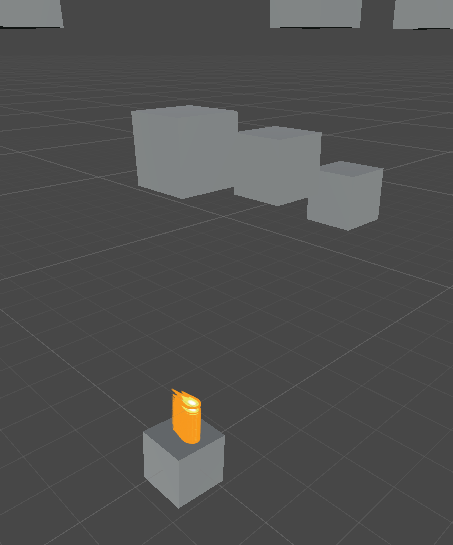
(basically in 2D nothing shows since it's flat)
 still tendon
    {
        float counter = 0;
        isMoving = true;
        Debug.Log("move start");
        while (counter < walkTime)
        {
            counter += Time.deltaTime;
            if (direction == 0) //left
            {
                transform.Translate(new Vector3((attributes.moveSpeed * Time.deltaTime)/10, 0f, 0f));
                Debug.Log("moving");
            }
            if (direction == 1) //right
            {
                transform.Translate(new Vector3(-(attributes.moveSpeed * Time.deltaTime) / 10, 0f, 0f));
                Debug.Log("moving");
            }
            if (direction == 2) //up
            {
                transform.Translate(new Vector3(0f, (attributes.moveSpeed * Time.deltaTime) / 10, 0f));
                Debug.Log("moving");
            }
            if (direction == 3) //down
            {
                transform.Translate(new Vector3(0f, -(attributes.moveSpeed * Time.deltaTime) / 10, 0f));
                Debug.Log("moving");
            }
        }
        isMoving = false;
        Debug.Log("Stopped");
}```Im trying to make a patrol script for my enemies, and they're walking the right distance but the object isnt being updated every frame
they move the right direction and i get moving logs every frame but the gameobject only gets updated after the loop for some reason
any ideas?
@lilac bolt hey
you helped me before can you again
;D
Why when I manually slice the sprite sheets by myself for a certain size
when I collide with it
I can't go how close I sliced it
lilac bolt
@still tendon Send me a screenshot of the gizmo for the collider you’re talking about.
And also, you probably shouldn’t @ anyone when you’re asking a question, even if they’ve helped you in the past. Just ask your question and wait for an answer.
 vocal condor
still tendon
any ideas?
vocal condor
still tendon
any ideas?
Control is never returned during the loop so your result will be that of the final result.
vocal condor
If walk was a coroutine, you could insert a yield at the end of the while statement to return control per frame.
still tendon
it was a coroutine before i can change it back
and what exactly would the yield statement look like
vocal condor
    private IEnumerator Walk(int walkTime, int direction)
    {
//..
        while (counter < walkTime)
        {
            counter += Time.deltaTime;
            if (direction == 0) //left
            {
                transform.Translate(new Vector3((attributes.moveSpeed * Time.deltaTime)/10, 0f, 0f));
                Debug.Log("moving");
            }
            else if (direction == 1) //right
            {
                transform.Translate(new Vector3(-(attributes.moveSpeed * Time.deltaTime) / 10, 0f, 0f));
                Debug.Log("moving");
            }
//else if..
            yield return null;//don't delay more than one frame
        }
//..
    }
```Example.Reminder, you can only yield in a coroutine which has a return type of IEnumerator and will only work properly if you start the coroutine with StartCoroutine(nameof(method)); or StartCoroutine(method(arguments)).
still tendon
👍
strong sand
I found some code for 2D rotation as mine would rotate on Z too or whatever when I used .LookAt(), so now it works as I wanted, however I need to put all my sprites/objects rotated, to make them point towards the point.
So I need to make left go right like:
https://i.imgur.com/brs0Z1j.png
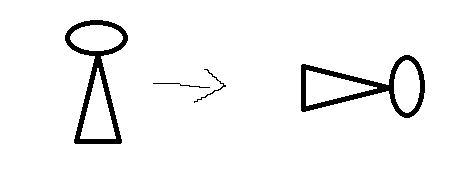
So the "upper" side is to the right
Vector2 direction = new Vector2(chosenObj.transform.position.x - this.transform.position.x, chosenObj.transform.position.y - this.transform.position.y);
float rotation = Mathf.Atan2(direction.y, direction.x) * Mathf.Rad2Deg;
this.transform.eulerAngles = new Vector3(0, 0, rotation);
Is there an actual question or are you simply illustrating your discoveries  ?
?
strong sand
Thought I wrote it, well I'm curious how I would do to let them stand up normally, lol
without having to rotate my future sprites
vocal condor
I don't understand, what is normal? Assuming their default state, you would simply not rotate them or as you are avoiding undo their rotations.
strong sand
Normal as in standing up. Like: https://i.imgur.com/zw867H6.png

If I want to use the rotation code, it would rotate wrongly. (as in the top green part, would be facing the wrong way, not to the point I want)
vocal condor
You'll need to undo their rotation with a rotate
strong sand
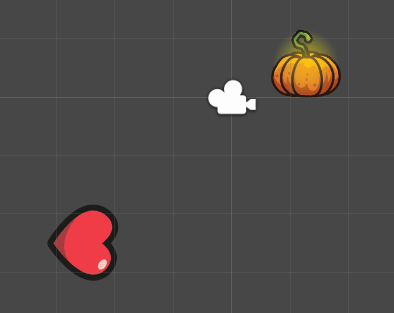
How would I do that? I want them to rotate towards the point, but I want to be able to have my sprites as they are when I put them into my scene (standing up like the pumpkin up there ^) - so I don't have to rotate all of my sprites that I put in.
But they're supposed to rotate - but with the "head" towards the point.
Example:
 vocal condor
I'm assuming it's a single sprite/image so if you want the green to be on the right, you would rotate them that direction; rotate back to 0 for original state.
I'm not understanding the task you're trying to accomplish.
but I want to be able to have my sprites as they are
don't rotate?
strong sand
https://i.imgur.com/NBUeuqa.png
Ok so with the code I sent, the left one here, would aim at the target with its "hole" (https://i.imgur.com/2EHRFvW.png) part (at the top of the heart) where as the right one, would aim its right side (https://i.imgur.com/2QUBuPf.png) towards the target.



Does that make sense?
vocal condor
No
strong sand
Sure about that? lol.
When I put a sprite into the scene, it's like the right sprite in that picture, as in - facing the top with its top part. But if I use it like that, it would aim like this towards its target: https://i.imgur.com/LXuF3g2.png
 vocal condor
I want them to rotate towards the point, but I want to be able to have my sprites as they are
I can only infer that you want a rotation but do not want a rotation. Wherethemis referring to thesprites🤷♂️ .
strong sand
What I want it to do is aim the top part of the sprite, like it looks like when I drag it into the scene, towards the target.
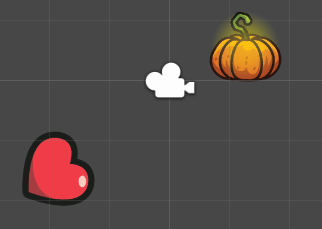
But to achieve the second, with my current code, I need to rotate them before running the scene to the right, like so:
Otherwise it puts this side: https://i.imgur.com/rDvAlrH.png - towards the object. (pumpkin)
 vocal condor
the left one here, would aim at the target with its "hole"
where as the right one, would aim its right side towards the target.
What do you mean by aim? Is there something invisible or that you aren't explaining? The left has the "hole" to the right, the right as the "hole" to the north.
Are you perhaps trying to change it's default orientation?
strong sand
I managed to solve it, lol.
With aim as in I want its top part to look at (I don't know how to explain this part any more) the target (the pumpkin in this case)
But I added + 270f to the rotation, lol
vocal condor
If so, have the object as a child and have the child rotated but everything else relative to the parent.
Okay, whatever works.
strong sand
👍
 pale tide
Every time I run my preview it takes like over 30 seconds to load is there any way to check why? And where
What is "PlayerLoop"?
 hollow crown
that's your game
 meager mural
There is a setting you can tick to not reload everything ever time
Would probably make it nearly instant
I'd need to remember what its called though and where to find it
pale tide
Well it is caused by my script that generates the world
its like
2000 x 250 tiles
No way to really fix that right
 solemn latch
@nova coyote you can di what Fogsight suggested, or you can have a check oncollision that tells ut to ignore that collision undrr the right conditions. (For instance, if tag = player and invincible = true)
 nova coyote
Ty!
 robust ivy
@pale tide you will need to run that as a separate thread if you want to generate massive world like that OR if you want to do in the main thread, space it, generate chunk at a time instead of everything (starting from where your character is)
still tendon
What is the code for making the camera follow the player
 tropic inlet
Depends on how good u want it to be
 livid pilot
Use cinemachine @still tendon
vocal condor
still tendon
What is the code for making the camera follow the player
Googling "Unity camera follow" would give you a large variety.
livid pilot
is easy and very good
Try not to ask for help for any questions you have, try to solve the problems yourself if you will never learn
@still tendon
tropic inlet
float followSpeed = ...;

Vector3 pos = transform.position;
Vector3 camPos = cam.transform.position;
pos.z = camPos.z;
cam.transform.position = Vector3.Lerp(camPos, pos, followSpeed);
i haven't tested this, but maybe it will work
 leaden flame
Cinemachine +1
 glossy marten
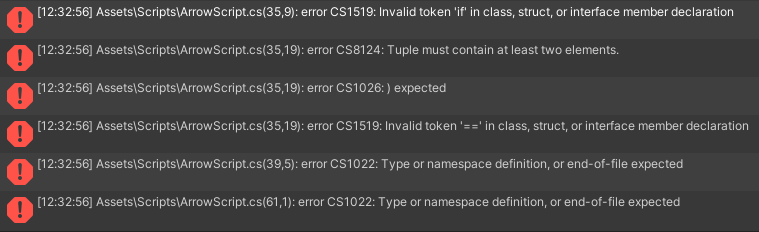
Hey can someone tell me why my arrow isn't dealing damage when hitting an enemy? I have set the arrow damage to 25 and the health of the enemy to 50 but it won't take damage when I shoot at it. Here's the script https://hatebin.com/zyncncbeja
https://i.imgur.com/YCWmuyK.png
https://i.imgur.com/w8Gozh2.png
The console doesn't even say that the enemy is hitted
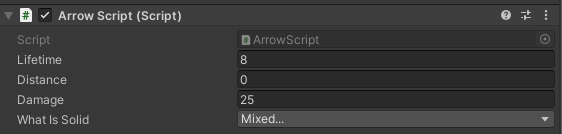
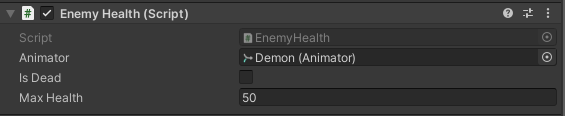
 granite pecan
robust ivy
<@!269151037946986500> you will need to run that as a separate thread if you wan...
granite pecan
robust ivy
<@!269151037946986500> you will need to run that as a separate thread if you wan...
I would never do it in the main thread. Even if the chunk was reasonably sized, I would expect hiccups everytime a new chunk is requested to be generated.
I guess displaying a “Generating” screen and generating the world in another thread could work if the world is not like minecraft sized.
 south oak
someone help
idk how to explain it but
i use prefab hexagon
if i disable it it wont use the spawner to spawn
but if i dont, it will stack on anothe hexagon
 wild cliff
[This is a copied message from works-in-progress. Figured it'd be a good place to put this here to help out fellow 2d devs] Anybody out there using SpriteRenderers in Unity and want a FREE C# script that could help you out? If so, we created a "SpriteGroup" class that can be used to additively control the alpha channel of all child Sprite Renderers and UI Renderers components in a parent object. It really works almost the same as a UI Canvas Group component, but for Sprite Renderers. The documentation may look a little weird though, so beware! Also, if you are interested in testing our game, Treat Team, I would really appreciate that! I'll guarantee you that it'll be a fun experience.
Attached above is the .cs file for the SpriteGroups class. Just download the file and read our (terribly written) documentation! If there are any issues, please direct message me via Discord! Also, if you're interested in testing our game out, please DM me as well!
 craggy briar
We ask that you do not:- Cross-posting across multiple channels #📖┃code-of-conduct
wild cliff
Oh shoots my bad. Should i take down one of my posts?
craggy briar
¯_(ツ)_/¯
 fluid geode
how do i swap tiles when i click them using tilemap?
 sterile timber
Hey! How do I make a sprite looks like it is facing the camera but without using BIllboards? I cannot afford to have the sprite X rotation changed otherwise it will poke 3d environment.
I have something working when the camera angle is 30, i apply 1 + Mathf.Cos(30) to the sprite Y scale and I tried doing the same for other angles but the height just feels wrong
 tame cipher
Changing velocity on 2d sprite causes it to blur, changing it via transform doesn't. Any way to make it not blurred with velocity?
still tendon
livid pilot
Try not to ask for help for any questions you have, try to solve the problems yo...
I just start using unity for one day
i dont have any infomation
But i start to learn
 brittle lagoon
does anyone know how to end a level
i want there to be a door but the door has to be unlocked with a certain amount of coins
still tendon
https://i.imgur.com/qLaqZwr.png
what is this? 🤔


 unreal cairn
Did you edit the script while on play mode?
 dusty turret
https://youtu.be/QGDeafTx5ug Anybody watched this vid? If so, can anybody explain why l can't move my player. My script has no collider errors, l turned on freeze rotation, and gave the script speed. I've never dealt with this type of situation

In this easy Unity and C# tutorial I wil show you how to make a 2D platformer controller complete with double, triple, quadrupel jumps...
By the end of the video you will have a character ready to take on any platforming challenge he may be faced with !
-------------------------------------------------------------------------------------------...
livid pilot
@still tendon Did you rename the script?
When you change the name of the script on unity, you need to enter the script and manually rename the class to the new name
livid pilot
dusty turret
https://youtu.be/QGDeafTx5ug Anybody watched this vid? If so, can anybody expla...
Show the code that you think is causing problems and also show me a screenshot of the components that the player object has
 obsidian finch
still tendon
https://i.imgur.com/qLaqZwr.png
what is this? 🤔
https://images-ext-2.discorda...
obsidian finch
still tendon
https://i.imgur.com/qLaqZwr.png
what is this? 🤔
https://images-ext-2.discorda...
Are your script classes the same as the file name? Have you saved your scene and cleared the console?
dusty turret
livid pilot
Show the code that you think is causing problems and also show me a screenshot o...
Possible this one as it is the code l used for movement
obsidian finch
Input checking doesn't always work in FixedUpdate. You want to get moveInput in Update, but set the velocity in FixedUpdate
dusty turret
obsidian finch
Input checking doesn't always work in FixedUpdate. You want to get `moveInput` i...
So I just take the rb.velocity code and place it inside the parentheses of FixedUpdate?
obsidian finch
dusty turret
So I just take the rb.velocity code and place it inside the parentheses of Fix...
That's not what the parenthesis mean. That's where arguments come from. It's already in fixed update, that's what the curly brackets are for
You want to take your moveInput line and put it in Update, and keep the velocity line in FixedUpdate
livid pilot
Update: Inputs
FixedUpdate: physics
Move the playercontroller component below the rigidbody and collision
and try again
@dusty turret
dusty turret
Didn't work for me
livid pilot
How many collider do you have?
dusty turret
For the player, just a box collider 2d
livid pilot
Did you modify any of the default inputs of unity?
Debug.Log(Input.GetAxis("Horizontal"));
Add that line in update to verify that the input is returning a value
dusty turret
Didn't work for me
livid pilot
send me a screen of console
obsidian finch
So, you have the debug log in update, and you don't get any output at all? Have you added the script to an object?
It should at least be spamming the console with 0s even if you don't have your input set up
livid pilot
I think he thinks that that line that I made him add is going to make the player move
livid pilot
start the game
dusty turret
It is started
livid pilot
it is impossible that it does not show anything in console
sterile timber
Hey, I have a sprite with a billboard to rotate around the Y axis, but at some angles I can see the sides of the sprite renderer. How can I fix that?
dusty turret
Yeah. That's what thought too until now
 acoustic vector
@dusty turret The screenshot you just sent was taken while the game was running?
dusty turret
Yes
acoustic vector
Okay thanks. Within any of your scripts did you mess with something called Time.timeScale? That will stop everything from updating. Are any scripts in your game running or is time completely frozen for everything?
@dusty turret
I see the problem. It should be void FixedUpdate() not void Fixedupdate(). @dusty turret
The U needs to be capitalized. Make sure the spelling and capitalisation is correct on your other update function as well.
Your script should then be working
acoustic vector
Progress is always good. Could you send the code. Null reference usually means a variable isn't assigned.
acoustic vector
start should be capitalized... 😋
 uneven rune
still tendon
acoustic vector
start should be capitalized... 😋
uneven rune
still tendon
acoustic vector
start should be capitalized... 😋
and fields should be private
And curly brackets should have their own line
doggokek
dusty turret
It works now. Thanks. Wished Visual studio would mark undercapitalized words as errors lmao
obsidian finch
Well, it isn't an error
you can call a method start, that's perfectly acceptable C#
but when Unity is running code and looks for a method named Start it doesn't find one
dusty turret
Ah l see
livid pilot
acoustic vector
I see the problem. It should be void FixedUpdate() not void Fixedupdate(). <@!44...
lol
I didn't see that ahahahs
still tendon
someone gave me the code that can make the camera follow player
still tendon
still tendon
someone gave me the code that can make the camera follow player
If you want it done the dumb way just put the camera as a child to your player object
 worn parrot
how do I make it so that my player can stick to other game objects but also be able to pop back off when i drag and shoot it
tropic inlet
transform.position = target.transform.position + offset;
or maybe
transform.SetParent(target.transform);
thanks ill try it out
on which part of my code do I put it on (Sorry kinda new to unity)
 plush niche
Hi, I keep getting this error when running my game for movement "ArgumentException: Input Axis Vertical is not setup", I have no clue what is wrong.
still tendon
Question: Do you know any good source to read/watch about 2d game development? (Yes, I did googled several times and no success on that).
 tidal marlin
@plush niche screenshot
plush niche
I am so sorry, I forgot to update. I figured it out. Thank you so much though.
tidal marlin
k nice
still tendon
how do i make the enemy do damage to the player when the enemy comes in contact with the player? I got this on my script thus far
using System.Collections.Generic;
using UnityEngine;

public class BossScript : MonoBehaviour
{
    public float speed;
    public float lineOfSite;
    private Transform player;
    // Start is called before the first frame update
    void Start()
    {
        player = GameObject.FindGameObjectWithTag("Player").transform;
    }

    // Update is called once per frame
    void Update()
    {
        float distanceFromPlayer = Vector2.Distance(player.position, transform.position);
        if(distanceFromPlayer < lineOfSite)
        {
            transform.position = Vector2.MoveTowards(this.transform.position, player.position, speed * Time.deltaTime);
        }

    }
    private void OnDrawGizmosSelected()
    {
        Gizmos.color = Color.green;
        Gizmos.DrawWireSphere(transform.position, lineOfSite);
    }
}
 nova holly
still tendon
```using System.Collections;
using System.Collections.Generic;
using UnityEngine...
nova holly
still tendon
```using System.Collections;
using System.Collections.Generic;
using UnityEngine...
Use OnTriggerEnter2D() https://docs.unity3d.com/ScriptReference/MonoBehaviour.OnTriggerEnter2D.html

 sleek sleet
how to get the top left corner of a sprite
tropic inlet
still tendon
Question: Do you know any good source to read/watch about 2d game development? (...
You didn't like Brackey's platformer tutorial?
still tendon
Brackeys was my Favourite, so sad he left.
still tendon
lol same
 thorn swallow
still tendon
Brackeys was my Favourite, so sad he left.
thorn swallow
still tendon
Brackeys was my Favourite, so sad he left.
Agreed. At least all of the great content he's made over the years is still there
 karmic storm
Does anybody have a tutorial on how I can make my character slide like he is walking on ice?
 remote moth
How can i draw a text on the screen, without gui?
leaden flame
tropic inlet
You didn't like Brackey's platformer tutorial?
Brackeys is absolutely shit
obsidian finch
If you want a real platformer tutorial, I cannot recommend this one enough:
https://www.youtube.com/watch?v=MbWK8bCAU2w

Learn how to create a 2D platformer controller in Unity that can reliably handle slopes and moving platforms.
In episode 01 we do some set-up work to make our lives easier later on.
Watch episode 02: https://youtu.be/OBtaLCmJexk?list=PLFt_AvWsXl0f0hqURlhyIoAabKPgRsqjz
Download source code here: https://github.com/SebLague/2DPlatformer-Tutorial
...
It is literally perfect. It covers slopes, moving platforms, curved surfaces, everything you'd ever need in a character controller
 strange sierra
Brackeys', 'garbo' or not, was one of the most accessible and concise Unity teachers for years. He's helped more people than you have.
strange sierra
karmic storm
Does anybody have a tutorial on how I can make my character slide like he is wal...
Try looking into Physics materials for 2d/3d depending on your project?
karmic storm
The Physics materials didn't seem to work. I tried to use "addforce" in combination with my rigidbody but it also ended in a huge failure
strange sierra
I am slightly unfamiliar with them other than plopping a bouncy or such effect on an item once in a blue moon, but I'd imagine something with tweaking friction and your rigidbody properties. I'll try to dig something up 🙂
karmic storm
that would be nice. thanks 🙂
strange sierra
Is a it top-down or side view?
karmic storm
top-down
strange sierra
I got it
So something to be aware of is where you're assigning or setting your speed/direction
Sorry trying to explain but I'm finding out I even did it wrong 😛
strange sierra
Unfortunately I could only manage getting it to work in 2d sidescroller type, and I am a bit limited on time for the evening. I found a few links that you may have already found, but maybe something will click, hah. Pay attention to your assignments of speed/velocity and when they're set or it will override or not account for your "ice" effects.
https://answers.unity.com/questions/1507588/is-it-possible-to-make-a-icyslippery-floor-with-co.html
https://www.reddit.com/r/Unity3D/comments/2oszw2/making_a_slippery_surface_using_the_character/
https://stackoverflow.com/questions/29778780/how-to-create-a-slippery-floor-effect
Unity is the ultimate game development platform. Use Unity to build high-quality 3D and 2D games, deploy them across mobile, desktop, VR/AR, consoles or the Web, and connect with loyal and enthusiastic players and customers.
reddit
4 votes and 4 comments so far on Reddit

Stack Overflow
I am making a simple 2D Platform Game, I am having issues with making my character slip and slide on icy ground.
Creating a 2D Physics Material works with Walls but the player doesnt seem to slid...
 real moss
leaden flame
Brackeys is absolutely shit
real moss
leaden flame
Brackeys is absolutely shit
preach it
leaden flame
preach what 👀
real moss
overrated half-baked tutorials are overrated
tropic inlet
remote moth
How can i draw a text on the screen, without gui?
This question is comparable to "How do I swim without getting wet?"
Are you able to rephrase it?
tropic inlet
leaden flame
Brackeys is absolutely shit
What makes you think he's shit?
He's great. He doesn't waffle, his tutorials are just the right length, etc
leaden flame
Shit code, seldom doesn't work, not easy to extend, doesn't explain consequences and better alternatives etc
tropic inlet
You are not supposed to copy-and-paste code you see from tutorials, generally
he's just supposed to inform you of what you can use to do what
then he demonstrates
I've never had any of those issues with his tutorials
And from what I remember, he does "explain consequences", as in, he covers edge cases the user is likely to run into while doing whatever he's doing.
remote moth
tropic inlet
This question is comparable to "How do I swim without getting wet?"
I have ask that question so, because i don't know how i can create are gui
obsidian finch
Then you'll need to learn how to do UI
tropic inlet
remote moth
I have ask that question so, because i don't know how i can create are gui
If your real question is: "What's the quickest way to display text on the screen from code", the answer is creating this function:
private void OnGUI()
{
  string text = "";
  text += "Hello world\n";
  //then u can just keep appending whatever u want

  GUI.Label(new Rect(0,0,Screen.width / 2, Screen.height), text);
}
i use this for quick debugging
remote moth
tropic inlet
If your real question is: "What's the quickest way to display text on the screen...
ok, thx
 hasty mason
It seems like with the tools above the tile palette, you can't get two tiles (like spikes facing to the middle of the tile from different sides) on one tile
move overwrites it, just like using the brush again.
however, changing the position for the selected tile with numbers on the right does work - but it's always 0 0 for each one initially, so these are relative
does that mess with anything later? checking what tile is where basically
is it still meaningful the ground spike was actually one tile further left, or is what you see what you get?
real moss
@hasty mason use object brush
hasty mason
I...what's that? 
real moss
the tile brush can paint with objects
don't remember if it replaces each other, just saying that so you can test it
oh nvm it does
just make several layers then
or make rule tile*
real moss
yeah, depending on whether there's an empty tile around it could bend, changing what you get
i think the tilemap extras were in package manager
not sure
hasty mason
using the 2019.4 version, so this isn't built in package manager yet
real moss
bad memory
hasty mason
at least from what I saw that's why
wait, I need to generally ask
would one do everything with these tiles in a game that's tile based
including the player
real moss
no
i didn't even know they can affect gameplay other than placing objects really easily
do they?
hasty mason
I'm not really talking about the method of placing them I guess
I don't know, huh!
I thought they must be more than decoration
All I want is for things to be understood by the game as being in certain grid positions, being able to check what's next to what, all that puzzly stuff
real moss
well, they obviously can have a collider and be objects in general but is there something else it does other than placement
i think they do that by being same size as normal unity grid
and i assume hexagons are a bit fucked because of that
hasty mason
So sprites are used for that stuff, the player and so on?
even if those also align exactly with the same grid anyway
Can you easily place sprites on the grid just like tiles?
real moss
why the hell not
hasty mason
haha, I have no idea
I should probably look at these roguelike tutorials (not the 2015 ones though) and see how this works
they usually have static tiles and then characters moving on the grid and such
 dense breach
Does anybody know how to make a simple enemy go back and forth on the screen floating in the air?
tropic inlet
just move until Vector3.Distance(transform.position, targetPosition) is below a certain number, or until some timer is reached
maybe there's a better way
idk
Can you provide more details? @dense breach
What condition should be used to determine when the enemy should turn?
Distance? An obstruction? A timer?
dense breach
It should infinitely move left right on the screen just floating there 2D space nothing in its way
It's like a obstacle@tropic inlet
pale tide
Why is animating an 2D character the most annoying thing in the world? First I have made a player with a skeleton. Then I made it so it goes from idle state to walking state when it starts moving. Then I noticed it wasn't moving and I googled a bit and noticed rigidbody does not work with animator component. So I made it a child of an gameobject rewritten the movement now that was fixed. Now last thing I have to do is make the animation flip when moving left and right. Currently it only shows left. The animator animation had a component "mirror" so I binded that to a bool that is true when walking right. Turns out mirror doesn't flip the animation but it reverses the animation. How do I flip the animation on the x rotation. If I set the scale to -1 on the x axis the camera moves so that is not the right way to do it too. Hopefully someone can help me out here would be nice!
Thanks
tropic inlet
It should infinitely move left right on the screen
So,
infinitely move either left or right, correct?
k
[Range(-1,1)]
public int direction = -1; //-1 is left, 1 is right, 0 is no movement

public float speed = 100.0f;
private void Update()
{
  transform.position += Vector3.right * direction * speed * Time.deltaTime;
}
It's like a obstacle
What?
Obstacles block things. So, it's a moving obstacle? Might wanna give it a collider.
Maybe even a Rigidbody2D with the gravity scale set to 0.
thorn swallow
pale tide
Why is animating an 2D character the most annoying thing in the world? First I h...
You can rotate the game object 180 degrees on the Y axis to flip the whole character
dense breach
@tropic inlet
Thanks for the help
 vast falcon
Feeling extra salty
Pastebin
Pastebin.com is the number one paste tool since 2002. Pastebin is a website where you can store text online for a set period of time.
not sure how to jam in sprite flipping
 odd flower
would this be the right schannle for a visual error in 2d i cant figure out and need help on
anyone
obsidian finch
 odd flower
im about to loose it with unitiy's canvas system when im in gameview my charecters head is fully colored in but when i go in game its transparent someone plz help
my charecter is on a ui
if anyone knows how to fix this let me know
obsidian finch
Can you post screenshots?
obsidian finch
Is the face a different GameObject than the other parts?
obsidian finch
Check its Z position
it's probably too close or too far to be rendered by your camera
odd flower
z is 0,0
obsidian finch
Can you show me the inspector of the face object?
odd flower
worn parrot
Can someone please tell me how to freeze my rigidbody2D when it enters on a collision 2D
obsidian finch
odd flower
Are all the other components at Z=0 as well?
odd flower
yes
obsidian finch
Can you post the inspector for your camera?
odd flower
obsidian finch
Yeah, those clipping planes look reasonable. If you enter play mode, does it still show up in the scene view?
Or does it disappear from both scene and game view while the game is running?
obsidian finch
Is the whole object gone, or just invisible?
Do you still have the head object in the hierarchy
odd flower
the head object is just transparent the rest of the body is till there
obsidian finch
If you edit the sprite color while the game is running, can you fix the transparency?
odd flower
well i dont know exactly how to fix it as if i did i would not be asking but what i do no is when i play the base color changes to a peach color
as this is for a charecter customizer
obsidian finch
You can edit the color from the color picker while the game is running
See if changing the color or alpha causes it to come back
then it means that the issue is that something's setting it's transparency
If it doesn't do anything then the problem is somewhere else
obsidian finch
Don't do the eyedropper
open up the color picker
and adjust the alpha slider
and the color
odd flower
it still resets it
i changed alpha to max and color to white
and it just defalted to peach
obsidian finch
So, you've probably got some other code that's constantly affecting the color
I would check that code and see if there's anything you're missing, maybe you're setting alpha to 0
odd flower
want me to send you the color change code so that can be debbuged beacuse alpha is not in my code
obsidian finch
Put the code up one hatebin and post a link
odd flower
ok
oh wait i forgot to remove material
i mean it did not effect anything when i remove it but still
obsidian finch
And these colors are set in the inspector I presume?
odd flower
yep
obsidian finch
Check to make sure those have full alpha
odd flower
ye that was the reason sorry for me being an idiot
obsidian finch
No problem, at least now you've learned like five other things to check if your 2D sprite isn't showing up in game view
livid pilot
worn parrot
Can someone please tell me how to freeze my rigidbody2D when it enters on a coll...
onTriggerEnter or onCollisionEnter and rigidbody.velocity = new vector2(0, rigidbody.velocity.y);
worn parrot
livid pilot
onTriggerEnter or onCollisionEnter and rigidbody.velocity = new vector2(0, rigid...
Thanks
livid pilot
np
 shut path
I seen to have a problem (wait i'll explain)
so, i am making a game (obviously), in that game there's a UI element that i want to face the mouse (or preferably be dragged by the mouse), i googled my problem and found a solution that only works for non UI elements, any help?
still tendon
Does anyone have a good tutorial for 2d or just unity in general
 coral nest
still tendon
Does anyone have a good tutorial for 2d or just unity in general
coral nest
still tendon
Does anyone have a good tutorial for 2d or just unity in general
brackeys
he will make the videos feel like hes learning it the same time you are xD
pale tide
When I run my UI in a screen that is not big it will not scale propely
Canvas Scaler is set to Scale With Screen Size
I think it is caused by Grid Layout Group
Anyone?
It is scaling normally but
If I have the game screen too small when STARTING the game it goes bad
but if it is in full screen its good
Okay I fixed it
Put it on that and it worked
leaden flame
coral nest
brackeys
ew
coral nest
He's a good introduction.
dusty turret
Has anybody seen this vid? https://youtu.be/M_kg7yjuhNg If so, can someone explain this error?

In this easy Unity and C# tutorial I will show you how to make one way collision platforms using the platform effector 2D !
By the end of the video you'll have a character that can jump on a platform from below and also fall down from it !
---------------------------------------------------------------------------------------------------------...
 mystic flame
Hi. i need help. I want my program to click drag this game object and replace the image in throwaway area. For other drop zones I used grid layout but for this i want to destroy the card being dropped on to. Was thinking to use RAWImage.
brittle lagoon
can someone explain to me why
 rocky flame
Hi, I'm trying to set up a basic 'pick up green key -> green door opens' function, but I can't quite figure out how to make the door disappear. The green door has its own layer in my tilemap, and at the start of the level, is impassable. I've tried to SetActive(false) upon picking up the appropriate key, but the tile still blocks the player. I also tried Destroy(greendoor), but I get a
Your script should either check if it is null or you should not destroy the object.```
error. What can I do to make the tile vanish and become traversable?Update: sort of fixed. I modified the boolean that checked if a certain tile was clear, from
if (walls or doors) = cant move
to
if (walls or (doors and not keys) = cant move
 mossy coyote
Hi Folks. I have an issue with my player's movement animation. I don't think it is the code, but I am not sure. The animations, when played, seem fine. Maybe it is the animator? I just don't know enough about animation to know for sure. But, when my character moves, it seems to jump frames or "stutter" in its movement. This is not a consistent issue, and it seems to get worse if I ramp up the players movement speed. Here is a video of what it looks like. Here is also my movement code (its abbreviated for this example) https://hatebin.com/zgivmozhrq Any thoughts on what could be causing this issue?
leaden flame
@mossy coyote do physics in FixedUpdate()
mossy coyote
leaden flame
<@793945905236672532> do physics in FixedUpdate()
ah. let me try that
mossy coyote
leaden flame
<@793945905236672532> do physics in FixedUpdate()
hot damn, that seems to have worked! and, it seemed to help the other issue. The FPS still drops, but the characters movement does not seem to change. when I was doing movement in Update, I also needed a higher speed (like 30). In FixedUpdate, the same speed can be set with a value of 5
leaden flame
@mossy coyote did it fix the animation suddenly getting faster
mossy coyote
yeah, it seems to have. the FPS still dips when I have the Animator window open, but the characters speed seems to stay consistent
leaden flame
Yeah it drops because of editor stuff probably, who cares.
mossy coyote
yeah, it works, so thanks!
still tendon
any idea why this platform might not be appearing in game?
still tendon
ah
 cobalt valley
Hello I'm having a problem I have a Ui that shows the cherries and life and I create create a pause button that disables this ui and that activates again and I'm not getting it because it creates a new and destroy the old and the pause button
worn parrot
Can anyone please tell me how to turn off the fixed joint on drag
still tendon
public void Follow()
{
transform.position = Vector3.Lerp(transform.position, player.transform.position, moveSpeed * Time.deltaTime);
}
anyone know why this being called in update is freezing unity?
tropic inlet
do you have any loops in Update?
tropic inlet
yes
tropic inlet
the thing is
if u write any loop
the entire loop is going to have to be done in one frame
still tendon
aaaaaah
tropic inlet
it's not asynchronous, and you aren't multithreading
still tendon
hmm
tropic inlet
so like
idk exactly what you're trying to do, so this is going to be a guess, but
an IF statement could be more appropriate than a while loop
void Update()
{
  if(aggro)
  {
    isMoving = true;
    Follow();
  }
}
Can anyone please tell me how to turn off the fixed joint on drag and shoot
 lean estuary
@worn parrot Don't cross-post
tropic inlet
@still tendon
What you're doing kind of reminds me of state machines tbh
https://hatebin.com/ztpqodypgy
still tendon
woah
worn parrot
lean estuary
<@!690296222120280139> Don't cross-post
right sorry
tropic inlet
I learned about this programming pattern from Game Maker Studio 2 tutorials
yw
I don't see many Unity tutorial makers using it
idk why
i think it's rly organized
and the nice thing about enums is they are convertible to ints
here:
enum State{
    Wander, Aggro, Stunned
  }
State.Wander is 0, State.Aggro is 1, State.Stunned is 2
just gotta cast
int num = (int)State.Aggro;
print(num); //1
which could possibly be useful if u want to use an array and index-based access or something
still tendon
convenient
would the state machines work with coroutines or would they be started every frame still
still tendon
aight
still tendon
im currently using a white image to make temp platforms in 2d, is there a better way than using filler sprites with box colliders
tropic inlet
@still tendon Oh, and one more thing. If you're actually gonna use this state machine pattern, a quick way to see your current state in-game is, like:
private void OnGUI()
{
  string text = "";
  text += $"State: {state}\n";
  //maybe more appends if you want to display more info

  GUI.Label(new Rect(0,0,Screen.width / 2, Screen.height), text);
}
https://docs.unity3d.com/ScriptReference/MonoBehaviour.OnGUI.html
It's not performant since C# strings are immutable, but whatevs. It's just for debugging.
shut path
what is the best way to make a gameobject stepable button
shut path
nvm i changed it..
 rigid juniper
Right now bullets are shooting from the back of my gun in my top down game instead of th etip of the gun
So how can I make it so they shoot from the tip?
tropic inlet
make sure the spawn position is correct
rigid juniper
Well I know they are spawning at the pivot point which is at the back of the gun. In my code right now they are just spawning at the position of the gun. But I assume I have to do some kind of math the get the bullets to spawn a bit up the gun right? because I cant just say spawn at the position of the gun + 10 because then it will only be 10 up and not 10 towards the mouse, also I just realized that wouldn't even work cause the position is not an int, whatever I need help!
 left nest
Hi I want to make a line which stretches from a starting point to a end point, so I have a point which has a random position and another point at 0, 0 I want a line to connect them how would I do that?
(I want to do this in code when the game starts)
(I have tried nothing because I have no idea how or what I should use or code)
tropic inlet
rigid juniper
Well I know they are spawning at the pivot point which is at the back of the gun...
So, the real issue is you don't know how to get the right direction vector?
The way you get a direction vector pointing from vector A to vector B is:
Vector3 directionFromAToB = (B - A).normalized;
u should memorize this. Super important formula for vector math
10 units from the spawn position towards the mouse is as easy as:
Vector3 dir = (mousePosition - spawnPosition).normalized;
Vector3 result = spawnPosition + dir * 10.0f;
with 2d, u gotta be wary of the Z axis tho
livid pilot
Why don't you add an object to the tip of the weapon and add it as a child to the weapon?
livid pilot
It should open a menu on the right
 brittle kernel
it doesnt
 distant pecan
you should have a menu like this when you click on the sprite
if not, reopen unity, maybe its a bug
rocky flame
i currently have a grid-based movement system, and I want to implement entities that will also move, but only one step at a time, so when the player moved one step, so do the other entities. what's an effective way to implement that?
rigid juniper
tropic inlet
```cs
Vector3 dir = (mousePosition - spawnPosition).normalized;
Vector3 result =...
Thank you.
 worn zealot
@rocky flame Make a function that iterates through all active enemies and has them move once, and call it every time the player moves?
rocky flame
ah you're right
glossy marten
Hey guys how do I make my player always facing my mouse? Just right or left, even when I press A and it walks left it should face right if I have my mouse to the right side of the screen? Should I use Camera.main.ScreenToWorldPoint?
 zenith summit
@glossy marten
tropic inlet
um
i think that would make the player's right point towards the mouse
I think he only wants two possible options: facing left, or facing right
glossy marten
Yes I only want it to face right or left
I tried it out and it's like my player is flying
or floating

I only want my player to face left if I have my mouse on the left side of the screen and right when my mouse is on the right side
rocky flame
is the player in the dead centre of the screen all the time?
glossy marten
The player is in the centre of the screen yes
I have cinemachine
that follows him
rocky flame
i dont know what that means.
well if its in the centre, then you could face the player left or right based on the x-coordinate of the cursor on the screen
 twilit gale
So if I want to get started with the most recent unity stuff to make a top down 2D game, what is a good starting point?
I got c# experience and made html5 games earlier. I want to target web and mobile, is this possible?
 marble carbon
I'm currently having a problem with Read/Write Enabled on a texture. I have it check marked and I split the texture up into different sprites, but the sprite textures are only readable on half of them. Also, the texture name is different in the error:
Texture 'sactx-0-256x128-Uncompressed-sprites-f9e21999' is not readable, the texture memory can not be accessed from scripts.
rocky flame
say it's a 1900*1080 screen, then 1900/2 = 950, so 1-950 is left, and 951-1900 is right
rocky flame
i dunno man, whatever resolution you use
zenith summit
you could also check if direction.x > 0 and if it is set local scale z to 1 and if direction.y is less than 0 set localscale z to -1
tropic inlet
void Update()
{
  Vector3 mouse = Camera.main.ScreenToWorldPoint(Input.mousePosition);
  int dir = mouse.x > transform.position.x ? 1 : -1;
  transform.right = Vector3.right * dir;
}
@glossy marten
try this
tropic inlet
yw
glossy marten
But I still want my player to face the direction of my mouse even when I use A or D
wait nvm
@tropic inlet Can you also help me why my arrow isn't dealing any damage? Here's the script: https://hatebin.com/ekhiptwknn
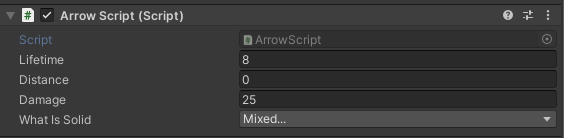
I can deal damage to my enemy with other things that deals damage but not the arrows
tropic inlet
Does the arrow object have the wrong layer?
does the Debug.Log on line 31 happen for the arrows?
marble carbon
If I uncheck the Read/Write Enabled, it outputs the error: UnityException: Texture 'knight_female' is not readable, the texture memory can not be accessed from scripts.
If I have it checked, it outputs this error on half of them:
Texture 'sactx-0-256x128-Uncompressed-sprites-f9e21999' is not readable, the texture memory can not be accessed from scripts.
I'm not sure what's going on. All the sprites share the same texture.
glossy marten
The arrow has the layer Arrows yes, and no the console doesn't say that the enemy is hit
@tropic inlet
tropic inlet
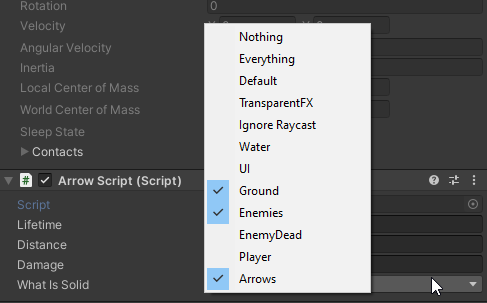
well, maybe it's because What Is Solid doesn't have the "Arrows" layer
marble carbon
I figured it out, half the sprites were in a sprite atlas.
rocky flame
        //    transform.position += (Vector3)direction;
        if (CanMove(direction))
        {
            target = transform.position += (Vector3)direction;
            transform.position = Vector2.MoveTowards(transform.position, target, (speed * Time.deltaTime));
        }
So, commented out is my old grid movement code, which is a simple 'snap to one square over in the direction you push', but i'm trying to make it more of a slide, which is where the MoveTowards comes in, but it's doing the same thing, instead of sliding movement.
glossy marten
I didn't have the "arrows" layer in it but it didn't fix the problem
I still can't deal damage to my enemy
Should I send the script of the enemy? But I don't think that the problem is there because I can deal damage to it in other ways
tropic inlet
idk what's causing it then
u can post the script of the enemy if u want
only thing i can say is just make sure the layermask is correct so the raycast detects the object
glossy marten
the enemy has the "enemies" layer
and the arrow has https://i.imgur.com/CdUD1he.png
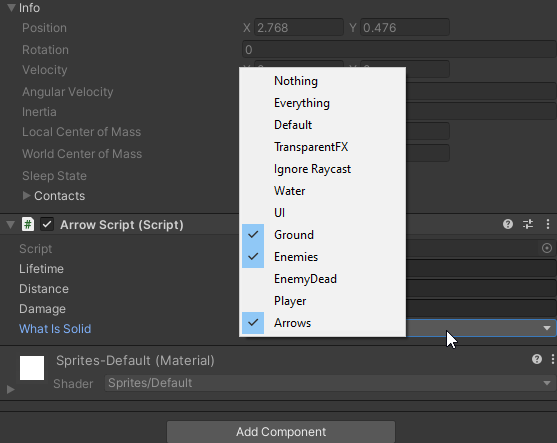 rocky flame
if I wanted a chain to follow behind the player, taking the shortest path from the end of the chain, like in the image above - is that the kind of thing I can do with first-party tools or do I need to get dug into coding pathfinding stuff? it's a tilemap if that helps
 knotty shuttle
I have two problems, they are pretty simular to each other.
- Enemy1 collides with it own bullets. I have them on different layers and have checked them out from each other in physics and physics2D. Enemy1 flying in the bullets direction in like one second then Enemy drops to the floor again.
- If player jump and land on Enemy2's head they both flying up in the sky until player walks away. I think it is something with Enemy2's rigidbody but I don't know what it is.
I have tried to freeze Position.y.
Player, Enemy1 and Enemy2 have rigidbodies
Bullet don't have a rigidbody.
rocky flame
Are the tags set up that an EnemyBullet can only damage a Player, or rather, that they only disappear when colliding with objects or Players?
twilit gale
How would I make simple 2d top down lightning? Like if there's a torch omitting some light. I guess like the players are omitting lights in this picture:
Not sure what light type I should use
distant pecan
just use urp, add 2d lighting package and add some lights
idk if you can use lwrp, never tried
knotty shuttle
rocky flame
Are the tags set up that an EnemyBullet can only damage a Player, or rather, tha...
Haha, thank u, I hadn't saved the bullet layer.. It works now! Do you have any clue about the other problem I had?
twilit gale
distant pecan
just use urp, add 2d lighting package and add some lights
URP = Universal RP?
rocky flame
knotty shuttle
Haha, thank u, I hadn't saved the bullet layer.. It works now! Do you have any c...
hmm. should jumping on an enemy's head damage them? If so, implementing a collision check on a collider that extends a little bit above their hitbox might work, that way you'll get the effect but won't actually risk clipping into the enemy. if you just want to be able to stand on them, I'm not sure
twilit gale
okay that was easy
knotty shuttle
rocky flame
hmm. should jumping on an enemy's head damage them? If so, implementing a collis...
Nope, neither player or enemy will take damage
 proven rock
Hi guys, I'm having an issue with one of my unity scripts, where when I stand on a moving platform my character gets stuck? I didn't write the code, as my course is based on the design of the game rather than the code, it was given to us by my lecturers and they dont reply on weekends and its due in monday 😅 any chance someone could give us a hand? 🙂
odd flower
any one know how to do 2d isometric infinate top down worlds as opposed to a dungeon crawler like binding of izach thing more along the lines of a minecraft world
 icy scaffold
does anyone know how to move an object to another object such as move A to B
i want the red box act like a arm for the white box
 crisp delta
hello ! I try to do a Flappy Bird and I have a code to do jump as the bird but it don't really work. I must wait 2~3 seconds between each jump. The code :
using UnityEngine;
public class BirdMovements : MonoBehaviour
{
public int force = 500;
private Rigidbody2D rb;
void Start() {
rb = GetComponent<Rigidbody2D>();
}
void FixedUpdate() {
if(Input.GetButtonDown("Fire1")) {
rb.AddForce(Vector2.up * force);
}
}
}``` plush coyote
Dont check for input in FixedUpdate
FixedUpdate does not run at the actual game's framerate, so you will miss inputs
Run input checks in Update()
meager mural
I hope you kept the addforce in Fixed update though @crisp delta. And just moved the Input to update
craggy briar
^
mossy coyote
I have a 2d game object enemy that I want to detect if they were hit in the head or body. The game object has a rb2d and a boxcollider2d. Then, it has two child objects (one for the head and one for the body). Each child has a boxcolider2d, set to be a trigger and a script with an OnTriggerEnter2D . When triggered, it is suppose to call the parent script. But, my code is not picking up a trigger event. Here are is my code snippet. Anyone know why the trigger would not be firing? Do I need to add a RB to each child? https://hatebin.com/edklbeqpga
 last surge
Im trying to make a platformer but my character just moves to were the button is
I programed it so when i click D my player will go left but he just instantly goes left right when i start the game
craggy briar
Stop reposting the same question, and then ignoring the answers, imo
hollow crown
 pallid spade
hey what is wrong with this
i still cant look along on the x-axis
pallid spade
hey what is wrong with this
i still cant look along on the x-axis
Do not cross-post. Further cross-posting will result in warnings
pallid spade
k srry
still tendon
Hey, I'm trying to apply a resizing to a sprite renderer during an idle animation, but it doesn't seem to do anything, I can see the number changing from within the editor and other parameters (eg flip) show up fine on the game object; it's just the size attribute. I don't want to apply it to the transform because I don't want to alter the collider, but it works. I remember changing something to make it work, but I can't remember lol, any idea?
update: nvm, figured it out. The sprite renderer must be set to Sliced!
 fluid jewel
How do I make the red rectangle rotate on its own axis to look at the blue square? (sorry google translate)
 dense flame
Quaternion.LookAt
tropic inlet
rectangle.transform.right = square.transform.position - rectangle.transform.position;
should do it
fluid jewel
this.transform.LookAt(new Vector3(player.transform.position.x, player.transform.position.y, 3f));
oh, i just saw the problem
livid pilot
mossy coyote
I have a 2d game object enemy that I want to detect if they were hit in the head...
Use different layers, a layer called hit and another hurt, to the ammunition and the layer that does damage assign the layer hit and the one that should receive the damage you assign the layer hurt
https://hatebin.com/pdmsfvyzly And call the enemy script like this, it will be better
livid pilot
last surge
Im trying to make a platformer but my character just moves to were the button is...
send the code
fluid jewel
tropic inlet
```cs
rectangle.transform.right = square.transform.position - rectangle.transfor...
Thanks, it worked for me
 oak sage
the file is to big
tropic inlet
what file?
 calm wyvern
Large code blocks should be posted as links to services like:
a powerful website for storing and sharing text and code snippets. completely free and open source.
 unborn moss
Does anyone know how I can render a sprite like how GameMaker's draw_sprite_pos ( https://docs.yoyogames.com/source/dadiospice/002_reference/drawing/drawing sprites and backgrounds/draw_sprite_pos.html ) renders them?
i.e., pass a set of four vertices and have it render the sprite (skewed) within them?
tropic inlet
man
Game Maker has such a better API for doing 2D
unborn moss
indeed 😦
tropic inlet
too bad it isn't free
iirc
I'd still be using it, if it was
it got such a big update
GML has member functions now. . .
and static local variables
and structs...
u could make mad progress in it so fast
unborn moss
Whoa what
I didn't know they added all that in GMS 2
That does sound like a pretty big step up. GMS1's GML is so fucked up
tropic inlet
unborn moss
I didn't know they added all that in GMS 2
it was added in GMS 2.3, specifically
before 2.3, structs, static local variables and member functions didn't exist
it is so convenient
like
u can define multiple functions in a script file
instead of each one script being considered a function.
to make a member function, all you do is define the function in the Create event
structs can prolly have member functions too
could make some Vector2 struct and give it .normalize, .magnitude, etc
glossy marten
Hey guys I have a problem that my arrows on my bow won't deal any damage to my enemy but I can still damage the enemy in some other ways
Here's the arrows script: https://hatebin.com/uyfsfrmwgh
https://i.imgur.com/zslGUNw.png
 near vortex
glossy marten
Hey guys I have a problem that my arrows on my bow won't deal any damage to my e...
near vortex
glossy marten
Hey guys I have a problem that my arrows on my bow won't deal any damage to my e...
it might be too fast, so collisions arent being detected
and also, send your code, not the object
try slowing the arrow speed a bit and see if that works
and make sure you have a collider
glossy marten
@near vortex I have a polygon collider 2d and a rigidbody 2d and it still collides with walls and enemies but it just doesn't deals any damage
Im slowing it down now
It is the same
near vortex
the damage giver
near vortex
does it log when it hits?
near vortex
oh nvm the speed
i thought you were using collisions to detect it
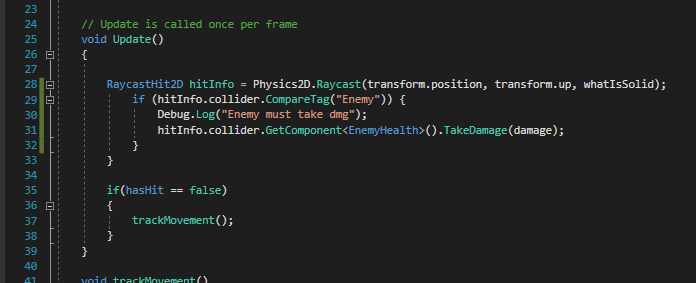
try this
            if (hitInfo.collider.CompareTag("Enemy")) {
                Debug.Log("Enemy must take dmg");
                hitInfo.collider.GetComponent<EnemyHealth>().TakeDamage(damage);
        }```
 near vortex
then
there's a problem with the tags
make sure that the comparetag has the exact same lettering
its also case sensitive
 ruby karma
 honest python
My 2D linecast isn't working
It can detect collision with itself
but not with other objects
I'm already using Debug.drawline to see if it is in range and it is
wait I figured it out
but in order to fix it I need to make an array of the colliders but I can't
distant pecan
take a look at your layer collision matrix
to avoid things like detecting itself, this can prevent raycasts to go further
 distant sun
Hi guys, can I ask here a question that I have been suffering for 2 days and cannot find a solution?
distant pecan
sure, that's what this channel is made for
distant sun
Hello. I have a very simple Scaler script, but I don't know how I can get my current Canvas scale for update my camera and playground Size. I use canvas.lossyScale.y, but this value update doesnt once, this update about 10 frames. How I can imideatly update this value. ForceUpdateCanvases doesn't work.
I call UpdateCameraSize in this method in CameraScalerScript
and call SetupPlaygroudData from GameController script
In Editor I have MainCamera with PlaygroundCameraScaler component
and GameController in playground
worn parrot
Can someone please help me so I added a Fixedjoint2d on my rigidbody2d and set it to false on void start and every time I drag and shoot my player it will stay false I also added some code that turns on the fixedjoint2d sticking my player to a collision2d whenever it collides with a collision2d but after dragging and shooting my rigidbody2d when it's stuck to a collision2d it moves then freezes in place but if I drag and shoot again it works can anyone help me fix it so that it can shoot off the collision2d without freezing this is my code so far
 fallen flicker
Is there a way to make it so when I get a random integer it won't pick that integer the next time it picks a random integer?
hollow crown
store it and do while your random picking to continue if it returns the same thing
fallen flicker
why when I change my buttons position by using a new vector2 to (gameObject.transform.position.x, 100) Does it set the Y value to -391.5 not 100?
tropic inlet
I don't know.
You should show your code.
Maybe some other code you forgot about is also changing it.
 warped rivet
i guess making mobile games is easier than pc games right?
tropic inlet
It's just as easy, I bet
The only difference would be standards
people will expect a PC game to be good
warped rivet
if i can make simple 2D games
that means i am gonna make one in mobile then
since it looks terrible in pc
 tropic juniper
Hi everyone! I need help very bad because I have made a 2d game where you continously move up to get away from rising lava. The only problem is I want to make a system that can connect "puzzle pieces" of levels together to make somewhat of an endless mode
is this possible?
I really want to make this mechanic work
tropic inlet
Of course it's possible.
That's called procedural map generation.
Or procedural level generation.
tropic juniper
@tropic inlet is there anywhere I could get started with this. The only problem is I want the game to be primarily vertical so I cant have the map generation go out horizontally.
tropic inlet
is there anywhere I could get started with this.
I'm not aware of any good tutorials for it, since I haven't really ever wanted to do it, and thus haven't really searched for it.
tropic juniper
Could I theoretically make a bunch of mini levels and bunch them together to make a new repeating game?
tropic juniper
im just such a noob so I dont know how to pull this off
it would be really cool if I can though
 lunar rampart
There's a lot of ways to do procedural generation, and there's no 'right' answer, it really depends on what you want the end result to look like. You could pre-define platforms and have them instantiate randomly within the game boundary, or could could go a step further and have the platforms themselves be procedurally generated.
A lot of it comes down to defining rules about what you want the algorithm to do. For example, you could tell it to place and random value between a and b platforms horizontally, with a random height between c and d between each set of horizontals.
Or you could say to start with each layer be completely solid ground and remove chunks of it to make holes for the player to jump through.
If you want the platforms themselves to be generated, you can define things like max width and height and use some kind of noise function to define the surfaces of them.
 desert linden
why does this code not work? any idea? 2d tilemap .it should spawn highliting tiles but behind the mouse cursor they should get deleted just where the mouse cursor is there should be a tile. : ``` //in update i thought in update the mouse pos is like the previous mouse pos(coordinate is mouse pos)
highlight.SetTile(coordinate, highlighttile);
previousMousePos = coordinate;
if (!coordinate.Equals(previousMousePos))
{
ground.SetTile(previousMousePos, null);
}
 past quail
do u guys have some horizontal movement code because my code sucks and it isn't working
so i came here for help
there wont be any jumping and you will find out why
last surge
i need help with my script my character just breaks down and the animations dont work the problem is that when i click start the running works but never stops but when i jump (W button) my running animations stop and my character just stays idle
https://paste.myst.rs/skxhmo77
a powerful website for storing and sharing text and code snippets. completely free and open source.
some one please dm me or ping me
 humble kayak
Im a bit lost on how to use materials like this with tilemap and using the tile palette brush to paint this kind of tile instead of the plain green im using right now
robust ivy
thats a material you usually paint on a 3d terrain, if you want to make a 2d tile out of it, make it a tile first, its probably too big in size right now (like 1024 or 2048) while your tiles are more likely 32 pixel
humble kayak
Thanks, I found out that it shows as pink because of URP renderer
I'm also not sure how to make it a tile first
Usually I get a sprite sheet, slice it and drag it into the tile Palette
Or perhaps you mean that I have to open the texture in editing program and cut it to 32x32 then export as png and add it like that?
 green wind
I'm making a 2d game in unity
Very simple
I'm trying to move the player using the transform command
transform.position += transform.up * (Time.deltaTime*5)
with an if statement to detect button presses
but for some reason I have to spam w and cant just press and hold to move it.
can someone help?
craggy briar
Make sure you're using Input.GetKey and not GetKeyDown
green wind
Oh, thanks
 flat dome
btw, why when I am putting my canvas prefab to the scene I cant click on the buttons?
(pls tag me when u response)
hollow crown
flat dome
btw, why when I am putting my canvas prefab to the scene I cant click on the but...
craggy briar
You might have forgot the event system in the prefab
flat dome
thanks!
last surge
i need help with my script my character just breaks down and the animations dont work the problem is that when i click start the running works but never stops but when i jump (W button) my running animations stop and my character just stays idle
https://paste.myst.rs/skxhmo77
a powerful website for storing and sharing text and code snippets. completely free and open source.
Some one please help
 civic knot
last surge
i need help with my script my character just breaks down and the animations dont...
civic knot
last surge
i need help with my script my character just breaks down and the animations dont...
You never exit the jump state. Also, I'd assume that your velocity is never actually 0 after you move, preventing it from going into idle state.
last surge
Is it ok if i dm you
civic knot
Nope.
civic knot
Yeah, I got that.
civic knot
Does your object actually physically stops?
Is it only the animation that doesn't change to idle?
last surge
Here is what happens :
1 character drops down and is doing the idle animation
2 if i click A or D he goes into running state and is doing the running animation
3 he doesn't stop unless i jump (W key) or he hits another colider
civic knot
Doesn't stop moving or playing the running animation. Or both?
last surge
If i hit a collider it stops the running state and goes into idle state and does the idle animation
But if i just stop clicking any button he just stays put and still does he running animation and i have no idea what state he is in
civic knot
Ugh... Is it so difficult to just answer my question without adding any additional information?
last surge
Oh sry
civic knot
civic knot
Doesn't stop moving or playing the running animation. Or both?
Which one?
last surge
Also did mean
does it stop moving
Cuz im confused with the first option
He stops moving and still plays the running animation
civic knot
Moving physically through space. I don't know how else to describe it.🤷♂️
civic knot
last surge
He stops moving and still plays the running animation
So he stops moving, but the running animation is still playing?
last surge
Yes
civic knot
Then it must be a problem with your animator transitions.
Also try debugging your state to know what state it's in in any given moment.
last surge
Umm im kinda new to unity soo idk most things
My animator transition is a integer
And i set my transition to when my state (name of integer) is 1 it will go to running and if state is 0 it will go to idle
civic knot
Take a screenshot of your animator controller(where you see your states and transitions). Use Debug.Log to output your state(in script) to the console. https://docs.unity3d.com/ScriptReference/Debug.Log.html
tropic inlet
GUI.Label in OnGUI is better than Debug.Log tbh
civic knot
Perhaps, but seeing that he doesn't know about debug, ongui is just gonna confuse him more.
civic knot
*screenshot. Yes.
civic knot
Is "running" a looping animation?
civic knot
Then uncheck "has exit time". Actually uncheck it on both.
That probably not gonna solve your problem though. So debug your state as I mentioned.
last surge
OMG thankssss
thanks soooooooo much
also why is my running animation a little delayed
civic knot
Did you uncheck it on both transitions?
last surge
yeah
civic knot
Then must be something else. Look at your animator at runtime to see if the parameter change is delayed or the transition is.
last surge
ok wait sry wrong word my animation is like running after i stop moving but does stop in like 1 sec
civic knot
Your running animation is playing when the object is halted?
last surge
yeah but like for a sec
but now its like half a sec
cuz i changed else if (Mathf.Abs(rb.velocity.x) > 0) to else if (Mathf.Abs(rb.velocity.x) > Mathf.Epsilon)
civic knot
I'd just apply a proper drag or set the velocity to zero, when there is no input.
last surge
wait which velocity to zero
you mean you want me to change 10 f to 0
rb.velocity = new Vector2(rb.velocity.x, 10f);
civic knot
Are there several velocities that you are using?
last surge
ohhhhhh thats what you ment
civic knot
On x axis. To 0.
 mighty hare
im trying to move my 2d character using Rigidbody.AddRelativeForce() but I really want to get rid of that drag feeling
any advice
civic knot
set the drag to 0
 empty garden
hey so I did a bit of programming with a friend and was looking to continue what i was doing becuase he is busy now
give me a second and i will get my project open and ask some questions i am very new to unity
i love how easy it is to use pointers and reference classes in unity it hurts
how simple it is
or whatever its called idk i think it was pointes
ok so i was coding in a simple turn based rpg i got so far as to that i can click attack and the enemys health would go down in the debug log. its a very simple prototype.
wait
maybe i can do answer this myself ill be back
omg guys i applied my previous knowledge by myself im becoming a good coder
tropic inlet
^_^
 terse thorn
someone knows about galaxy siege?, is a 2d ship-builder game.
well, im making a game and i want a feature like this:
an inventory that displays the prefabs of the ship modules and you can drag them to the tile-based ship builder but i want that you can't put a module if it does not had another module on its adjacent tiles
AAAAAND!! I would like the ship to be saved for use in the levels, as this function will be available from the main menu
(ping me if can help or even comment)
still tendon
Hey is there a way to safe a room i made in a tilemap to a prefab and somehow let them instantiate via code ? so that i can spawn a room every 50 tiles ?
distant pecan
i think you can just drag your tilemap into assets folder to save the room
humble kayak
still tendon
Hey is there a way to safe a room i made in a tilemap to a prefab and somehow le...
Im doing the same thing, only difference I have a grid with multiple tilemaps and I save the grid as a prefab
Actually I have a template Grid game object with template tilemaps, drag into wherever you want it to be stored
rename the prefab for example Room0, Room1 etc
drag the prefab in the editor under some category
change the transform in the prefab (prefab mode) X,Y (2d in my case) and also draw whatever you want in this specific room
Then Im disabling all the prefabs in the editor, and load them like chunks depending where my player is
 glacial shale
In this video

Subscribe to Lixian► http://bit.ly/1jgxe8e
Download Do It For Me
GameJolt► http://bit.ly/DoItForMeJolt
Itch.io► http://bit.ly/DoItForMeItchio
The game is FREE!!
When you press the download button, make sure to click the
"No thanks, just take me to the download" button for the free download ;)
Fábio's Twitter►http://bit.ly/FabioTwit
Fábio's I...
At 4:55, what software is he using?
still tendon
@humble kayak got it can i ask how do you "spawn"(instantiate) the tilemap ? do you use something like tilemap.GetTilesBlock and then SetTilesBlock ?
humble kayak
No are you trying to do procedural?
still tendon
A bit ye just some random stuff spawning every set tiles
humble kayak
Sorry, I can't help you then, because all my "rooms" are premade
humble kayak
If everything is premade then you just instantiate the prefab and everything will be there
still tendon
Yeah the problem with that is that the tiles are always off center
and i dont know why
humble kayak
Im not sure either, I usually ask for help here ^^
I just know that it can work you are probably doing something wrong
still tendon
i just placed 1 tile on the tilemap and got this https://i.imgur.com/3g6iVXT.png
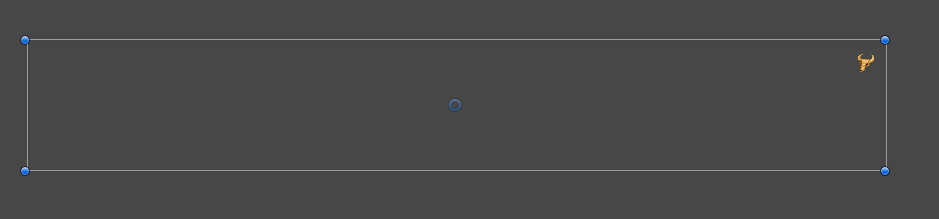
when i now try to instantiate the prefab at player location/tile it will be on the far left
glacial shale
I’d aseprite free?
glacial shale
Is aseprite free?**
meager mural
Probably not. £11 on steam
empty garden
hey so like i probably actually need help now
i did this game many times in c++ console app but i always hit a brick wall and couldnt learn to do more
im trying to think on what to do here and how to ask my question
becuase i did it three times in c++
ok
so i set it up so that when i press a button i get feed back on the fact that i pressed the button in the debug log
when i do that, i want it so that i the player controller script i made that it will check a bool, the bool is for the attack the player choose
first off how would i get the button handler script that makes sure im pressing buttons make a bool true in my player controller script
a pointer right?
i forgets how to do it
civic knot
A reference.
civic knot
You might want to learn some c# first, if you only worked with c++ before.
empty garden
i mean i did a bit of c#
and im getting the hang of it
one sec.
this is a reference right? ``` combatScript.Instance.enemy.takeDamage();
this is from something else
civic knot
Instance might indicate that it's a singleton perhaps.
There are 3 things in that line that are probably references: combatScript, Instance, enemy. At least according to naming conventions.
civic knot
if Instance is an indication of singleton, then combatScript must be a class..?
civic knot
empty garden
but thats how you do it right?
Do what exactly?
empty garden
reference
and make things in one class affect another
this is from my other code
but i was having a lot of help
so its a bit fuzy on what i was doing3.
civic knot
No. Singleton pattern is not the only(and not the recommended) way to get a reference to another script.
civic knot
Depends on your use case. You could use one of the Find functions to get the reference or expose the field in the inspector and assign it in the editor.
That's the 2 most common ways.
empty garden
hmmm
ok what i want to do
is when i press the button it makes a bool in playerController true
and the button code is a different class
so what would i want if i wanted to do that
of the two common ways
civic knot
If both of the objects exist in the scene from the start, you can dawg and drop the player controller object into the field on your button.
empty garden
one sec
civic knot
If they don't exist from the start, you have to use Find and/or GetComponent.
empty garden
i dont think they exist at the start or at all rn, should i make a sprite for the player, i dont think i want a player sprite rn or at all
maybe make just a throw away one
so it can get a script
ok done
i dont want to give it graphics rn
unless thats not what you mean by they dont exist at the start
how do you use find
civic knot
By exist I mean an instance of the script on a GameObject in the scene. It doesn't need to have a sprite or anything else.
civic knot
empty garden
how do you use find
Lookup Monobehaviour and GameObject pages in unity docs. They list all of the available Methods and their descriptions/use examples.
empty garden
well i think it does now but what do you mean by drag and drop it into the field of the button stuff, like add the script to it?
civic knot
When you have public or serialized fields in a script, they are exposed in the inspector for you to assign the references.
You can drag and drop objects/components into these fields of they match the field type.
humble kayak
What would be the reason that this
    {
        //Get the mouse position on the screen and send a raycast into the game world from that position.
        Vector2 worldPoint = Camera.main.ScreenToWorldPoint(Input.mousePosition);
        RaycastHit2D hit = Physics2D.Raycast(worldPoint, Vector2.zero);

        //If something was hit, the RaycastHit2D.collider will not be null.
        if (hit.collider != null)
        {
            Debug.Log(hit.collider.name);
        }
    }```
works, but onMouseOver doesn't trigger ?

solved : z = 0 -> z = 1 worked for mei mean i get the fact that you can do that in unity but where am i dragging and dropping and what am i dropping
civic knot
humble kayak
What would be the reason that this
```private void Update()
{
//Get...
Honestly I don't understand how it works with direction being Vector3.zero.
civic knot
empty garden
i mean i get the fact that you can do that in unity but where am i dragging and...
I assumed that you had a script on your buttons.
empty garden
yes
civic knot
If not, you can use the button component to call simple methods and set primitive type variable values.
civic knot
The you drag the playerwhatever into a field on thatbitron script.
civic knot
Create a public or serialized field in that script first.
civic knot
empty garden
where its highlighted
What?
empty garden
add componet add new script?
civic knot
?
empty garden
idk man im i dont know all the lingo
civic knot
In your button handler script create a public/serialized field of the playerwhatever type.
Than you can drag it's instance into that field.
If you don't understand the lingo, google it.
empty garden
i am really lost
wait
so
add componet then add the buttonHanddler script to the player object
is that what you meant
because that is what i was trying to say
@civic knot
well i have to go soon
civic knot
empty garden
is that what you meant
No.
These are the very basics of working with unity. You gotta learn them properly or you're not gonna be able to develop anything. I suggest you take some beginner courses on unity learn.
empty garden
i can figure it out, ithink you need to be more clear and or explain it better i need to go for now
civic knot
I mean, I don't even need to explain these things. I usually don't, instead I send people to learn properly right away. This time I wasted a little bit of my time and it proved to be ineffective, which means that there's no point in trying to explain things like that.
empty garden
I mean that right there is why I and other people too think that coders are toxic and why they don't come to places like this to learn and get help
This is a place to learn and ask questions isn't it? And you tooknthr time to try to help which is nice but you apperently don't want to explain a small simple thing and how you wasted your time
civic knot
Coders are toxic to people that try to get everything done for them instead of learning properly. Because they know that it takes time and effort to get where they are. When they see a person that doesn't wanna learn they get disappointed in them.
I explained you in the most basic terms what you need to do and how you can achieve it.
If you don't understand that, then there really is a need in a proper learning course. Instead of diving into a project head on.
plush coyote
There is a base level of skill required before someone can really help you over the internet. If the only communication is written words, it is impossible to help without that base level of understanding, since you won't know what the person trying to help you is talking about.
If you were in an in person class, or paying a tutor to help you in real life, that would be a different story though
empty garden
No not really I ask questions all the time qnd get flames for no reason. You weren't that clear. Danon5 makes a good point but this could probably be explained quick more quickly than even look at a beginners course which I kinda am but not entirely
And I would rather talk to people and learn but half the time people get inpatient.
Its whatever I have work tommarow and need to go to bed
civic knot
I could've just given you a complete code, but that goes against my principles.
empty garden
I wasn't asking for that.
 left sonnet
@empty garden an example of serialize field below
doesn't apply to what you are doing, you will need to change the types
but it's a good start
empty garden
So its q script you write
plush coyote
His point is that, in order to waste less of everybody time (including your own), it would be better to learn basic things independently using the many resources available online before coming to ask actual people, people who dedicate their own free time to answering questions
empty garden
I mean that wasn't even clear. And besides I was told that the way I did it that was working was bad
plush coyote
But I get where you are coming from
civic knot
I mentioned 3 times that you need to add it in your script...
When you have public or serialized fields in a script, they are exposed in the inspector for you to assign the references.
Create a public or serialized field in that script first.
In your button handler script create a public/serialized field of the playerwhatever type.
Ok
Fair
Maybe I misunderstood what you were trying to say at some point
I got lost
Thats on me
Somehow I thought you meant go into the editor
Qnd do something
civic knot
And that's exactly why you need to know at least some basics and terminology. In order to not get confused by the received help.
serialized field public field are terms you will hear again and again in this discord. If you don't understand them it will be very difficult to receive any help.
knotty shuttle
So, I got this huge problem that is so annoying. I have tried to debug and find out where the problem is and why but I don't understand, maybe someone of you do.
I have a player and a boss (and a lot of enemies), all have the same problem but I will take the boss as an example. When I attack the boss it loses 2 health, he should only lose 1 because it is what I have written. When the player attacks a damagefield appear. Here is my log:
boss.health 3
player.attack (1)
damagefield (1)
boss.hurt (2)
boss.health 1
The code where boss takes damage is here:
    {
        boss = this.gameObject.GetComponent<Platformer.Mechanics.Boss>();
    }
    private void OnTriggerEnter2D(Collider2D collision)
    {
        if (collision.gameObject.CompareTag("attack") && boss.health > 0)
        {
            Debug.Log("hurt");
            boss.health -= 1;
            boss.animator.SetTrigger("hurt");
            if (boss.health <= 0)
            {
                if (boss._audio && boss.hurt)
                    boss._audio.PlayOneShot(boss.hurt);
                boss.animator.SetTrigger("hurt");
                boss.animator.SetBool("death", true);
                Schedule<Platformer.Gameplay.BossDeath>(2f).boss = boss;
            }
        }
}```Your enemies are probably made up of more than 1 collider, or your attack is made up of more than 1 collider, so it triggers twice
knotty shuttle
plush coyote
Your enemies are probably made up of more than 1 collider, or your attack is mad...
Omg, yes, thank you so much!!
 onyx raft
does anyone know why the angular velocity of my object is changing like this? i apply a force at the beginning, but after that nothing. the ship is made out of 10 objects connected with fixed joints, and each of the 10 objects is a child of a parent object. the parent object is connected to one of the children with a fixed joint
https://youtu.be/mgW9i-Iq8Ns
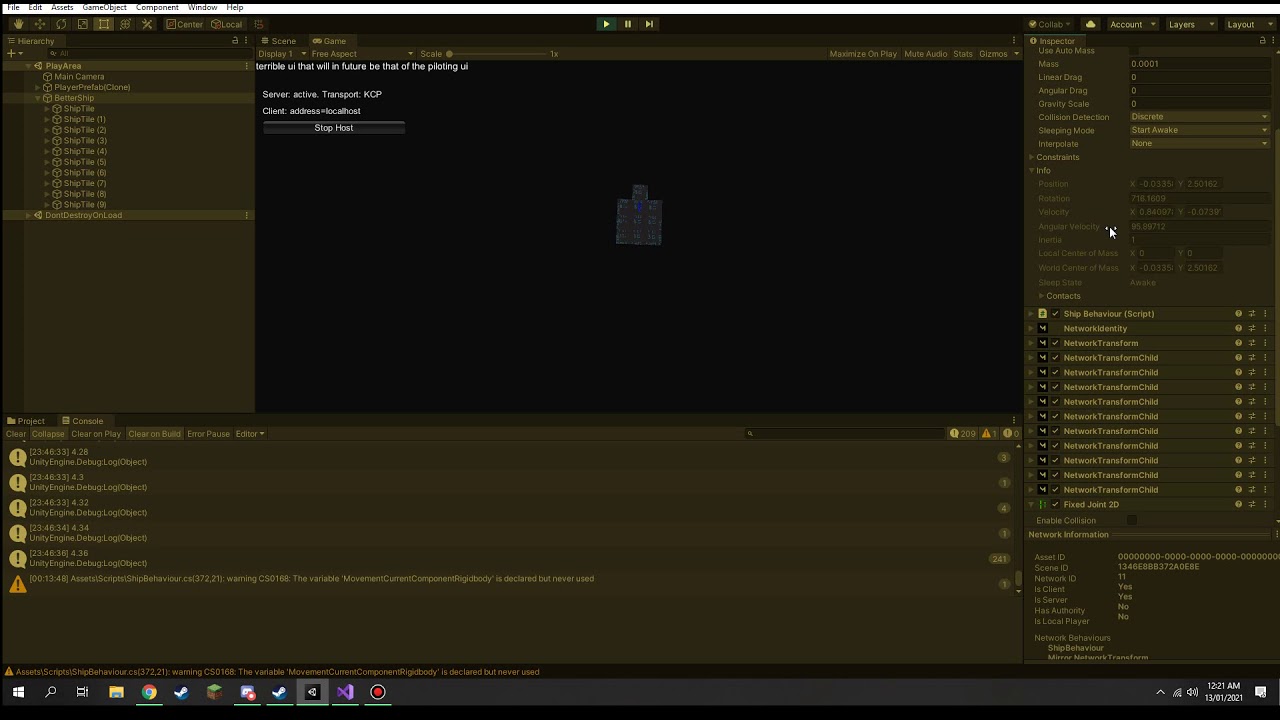


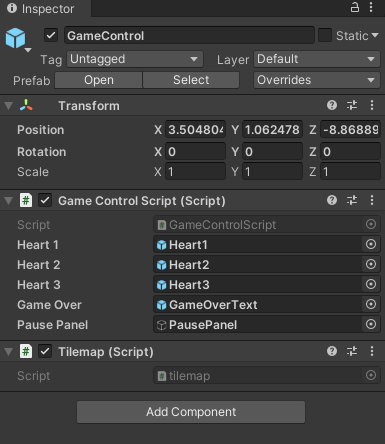


the rotation appears to oscillate, even when no force is being applied to any of the objects
each of the ten tile objects also has a collider that interacts with the others
last surge
hey can any one help me i cant get my states to work for my animation
a powerful website for storing and sharing text and code snippets. completely free and open source.
glacial shale
What is the best tool to make sprites? Is there an application in the adobe franchise that is good for the creation of sprites?
 abstract olive
Depends on your art style. If you're looking to do pixel art, then Photoshop. If you're looking to make vector, Illustrator.
Though, keep in mind, unless you're using the vector graphics package (svg), you still have rasterize vector art into a png and use that.
 stark trellis
i was using 2 raycasts from the enemy to detect the player (in front and behind) but of course that leaves the whole area above the enemy uncovered, is it more convenient to create just one box collider around the enemy and use that one as detection area or should i emit other raycasts above instead?
stark trellis
is it more performant than a collider?
robust ivy
if you just want to detect enemy around a collider work
 night vault
how do i change the shape of my camera? im following a tutorial to make tetris and the camera in the tutorial is vertical, like in tetris, but they dont explain how they did that and i cant figure it out
civic knot
They probably use an Orthographic camera. If they don't explain it, it's either too advanced for you or just a bad tutorial.
night vault
mine is set to orthographic too
and maybe but ive used unity a bit so maybe i could do it
ah so i think i kinda get it?? in the manual it talks about a fov axis menu, and it shows up in the manual's screen shots, but i cant find it anywhere in my version??
oh ok so, when its in the orthographic camera i dont have the setting for fov axis, but when its in perspective i do have it
but changing it seems to have zero effect?
can someone please help me?
night vault
im making progress but for some reason i can no longer see any of the squares in my game view?
does anyone know why this could have happened or how to fix it??
 winged kiln
Can someone help me and show me how i can hide the parts of the green square when its not in shadow? Meaning it would become invisible but the rest of the square, as long as its int he 2D Light it would be visible.
is there a shader that helps with that, or maybe a setting i dont know about?
you see how the part in the shadow is blacked out? I dont want that, i want it to be invisible instead
 inland jacinth
@winged kiln You'd need a shader to do this, probably on the shadow mesh that's drawn.
winged kiln
I thought the same things, but how would I even get access to the shadow?
I mean tbh I know nothing about shaders
@inland jacinth
still tendon
Hey i have a question, can i reproduce two animatios un the same object un the same time??
inland jacinth
@winged kiln Actually, it looks like the lights are sampling the shadow map and darkening themselves. It might be possible for a custom sprite shader to access the shadow map and make its pixels transparent when under shadow.