#🖼️┃2d-tools
1 messages · Page 26 of 1
 rocky vault
and also sometimes not look in correct direction
My code:- https://hatebin.com/udrnfafqdz
 wooden acorn
how can i get the speed of my rigidbody?
rb.velocity.magnitude is always returning zero
i'm moving my player using MovePosition in FixedUpdate
wooden acorn
it returns zero, even when the player is moving
rocky vault
@wooden acorn so you will not using Rigidbody.velocity
might using transform.position +=
You have to use rigidbody.velocity
 still tendon
Yo, I'm making a previewer on a custom anchor tilemap. How should I do my positioning math so as the white sprite gets placed behind the target tile?
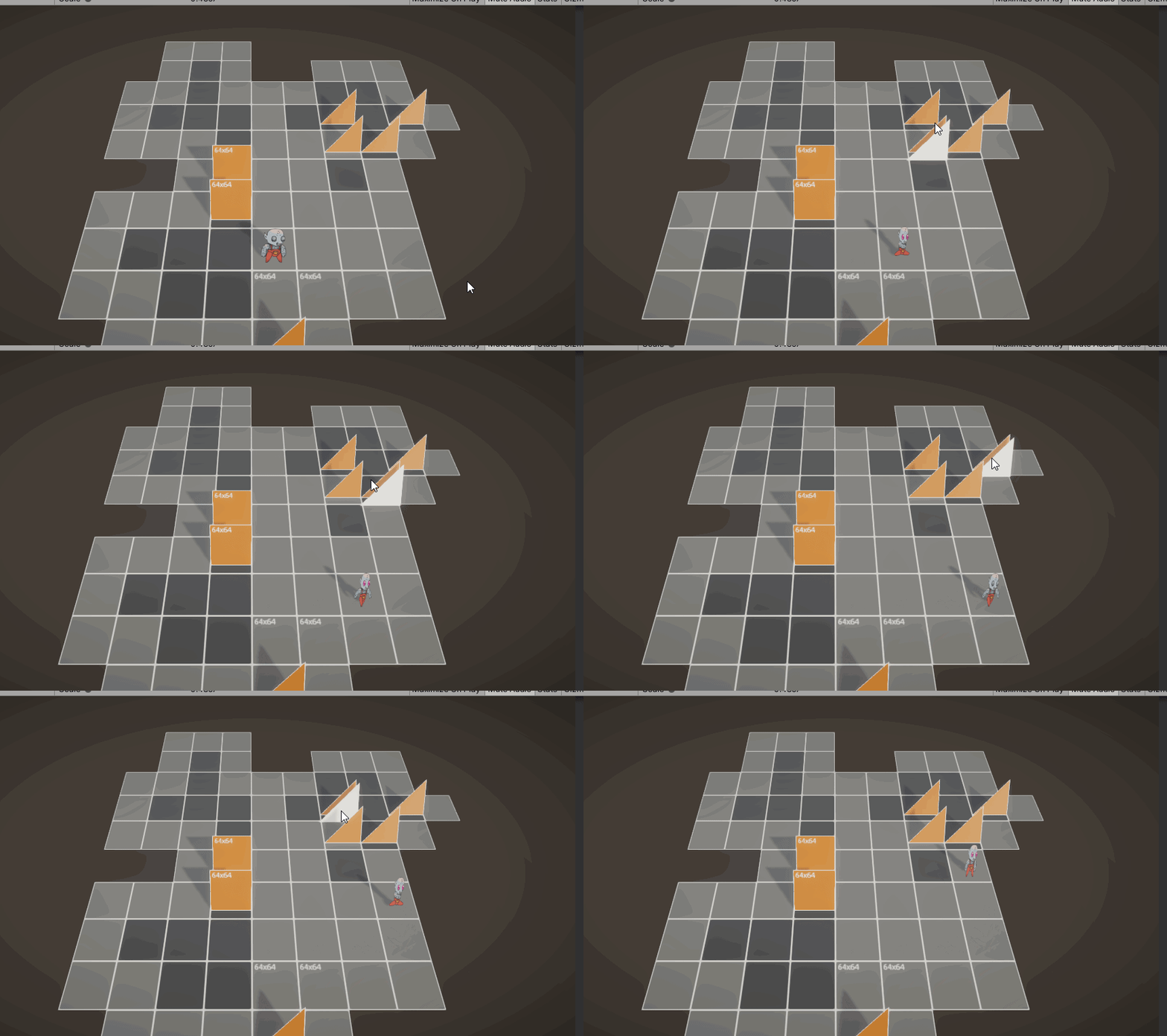
previewer.transform.localPosition = targetPreview.CellToLocal(cellPos) + targetPreview.tileAnchor; ```I'm using a custom orientation as shown here
still tendon
NVM, figured it out
 thorny harbor
Hi! New on c# If some one can help please tag me. Thank you. So how can I make a tile map that works like in the animation below? Its like if the player passes between the walls they show up but if he hits the walls he respawns but remembers where the walls are.
 umbral bane
simple question, but how do i check the rigidbody's velocity when falling?
-y won't work sadly
or actually i don't think i need this atm, i'll come back to this if i got any more problems
 rough kite
void Update()
    {
        radius =  planet.GetComponent<CircleCollider2D>().radius;
        distance = Vector2.Distance(rocket.transform.position, planet.transform.position);
        hightReadout.text = System.Math.Round(distance / 1000, 2) + "km";
    }
this will only return 0.64 as a radius which is very wrong
its applied to a large object that's has a scale of 1500 on x and y but the script needs to be variable for objects of other size too
umbral bane
yeah nvm on my question, i got everything under control
rough kite
well i figured out what my issue was but i dont know how to fix it so the script works with every size object. basically scalling factor changes the size of the collider but not the value that represents said size so it takes the radius * scalefactor to get the in game size
i figured it out i just got the scale from (gameobject).transfrom.localScale.x since its a circle x and y are the same
 violet goblet
how do i make character align to ground on slopes/loops etc?
 elfin sandal
 slate epoch
Anyone knows how can I control this rotation with the mouse, I don't understand Mathf.
    private float Radius = 0.1f;

    private Vector2 centre;
    private float angle;

    void Start() {
        centre = transform.position;
    }


    void Update()
    {
        angle += RotateSpeed * Time.deltaTime;

         var offset = new Vector2(Mathf.Sin(angle), Mathf.Cos(angle)) * Radius;
         transform.position = centre + offset;
    }
are you controlling with scroll wheel or mouse movement
 white heron
Hi anyone managed to make 2d animation package work in version 2019.4.16 lts?
 near vortex
slate epoch
Anyone knows how can I control this rotation with the mouse, I don't understand ...
near vortex
slate epoch
Anyone knows how can I control this rotation with the mouse, I don't understand ...
i would assume linking your mouse to rotatespeed?
maybe by storing two mouse locations, one before a fixeddeltatime, and one which is the present
then subtracting them
then using the magnitude as the speed your mouse moved?
something like this
Vector2 lastPos;
float MouseSpeed
{
get
{
Vector3 mousePos = Input.mousePosition;
mousePos.z = -10;
Vector2 pos = Camera.ScreenToWorldPoint(mousePos);
float val = (lastPos - pos).magnitude;
lastPos = pos;
return val;
}
}``` wispy fjord
Hello. I am a total beginner in game dev, so I was using a tutorial to make top down 8 direction movement, but for some reason MonoBehaviour doesn't work in my script or smth. I assume it's because of MonoBehaviour. It doesn't read some commands (like moveSpeed or rigidbody) or I assume it doesn't read them because their colours don't change. Anyone can help me? I have no idea if it's actually because of monobehaviour or maybe something else, however my script looks like this:
when the guy on the tutorial has it like this:
also, when I put in commands I don't have any of these:
i assume it's because I don't have this next to PlayerMovement.cs
oh yeah, and also, Unity displays this error:
which I don't know how to fix
and what it even means
what is global namespace? 🤔
what is anything in life really
 solar thicket
@wispy fjord well to start, that error means you defined the PlayerMovement class more than once, so get rid of any extras
 prisma ocean
Hello! I'm working with interfaces at the moment and I have mouseover scripts on certain interactable objects. How would I stop the mouseover from happening when my mouse is on the interface and the object is behind it?
wispy fjord
solar thicket
<@!565651316022444064> well to start, that error means you defined the PlayerMov...
oh, okay, so I took care of that 😅 thank you. Now there's another error 💃
The Rigidbody 2D is added as a component already
So I don't know why it's having trouble finding it
prisma ocean
prisma ocean
Hello! I'm working with interfaces at the moment and I have mouseover scripts on...
if(!EventSystem.current.IsPointerOverGameObject())
Found the solution
 winged rivet
@wispy fjord lowercase b in body
 frozen glacier
so i want to have boundaries for my 2d game and what i did was I created a gameObject that has a boxCollider(trigger enabled) and made it so it filled my whole game.Now i was wondering how to make my player not leave this gameObject,this is the code I came up so far but I need something to make my player not leave this gameObject
 fallow pivot
i'm trying to create a line renderer from code but it keeps returning null? do i have to specify something or what
void Awake()
{
barrelPosition = new Vector2(0, 0);
tongue = new LineRenderer();
tongue.startColor = Color.red;
tongue.endColor = Color.red;
tongue.numCapVertices = 0;
tongue.startWidth = 1f;
tongue.endWidth = 0.1f;
tongue.SetPosition(1, barrelPosition);
tongue.SetPosition(2, barrelPosition * 2);
}``` oak sage
Im trying to create a system that ups the cost of the upgrade evry time you buy, any ideas.
 plush coyote
just.. add to the cost?
 hollow crown
oak sage
Im trying to create a system that ups the cost of the upgrade evry time you buy,...
hollow crown
oak sage
Im trying to create a system that ups the cost of the upgrade evry time you buy,...
You should also configure visual studio. It should not say Miscellaneous Files at the top. Config instructions are pinned to #💻┃code-beginner
 idle heron
rb2d.velocity.Set(Input.GetAxisRaw("Horizontal"), 0); // doesn't move
rb2d.velocity = new Vector2(Input.GetAxisRaw("Horizontal"), 0); // move
first time user here, trying to move stuff, why velocity.Set doesn't work?
 lean estuary
@idle heron Vector2 is a struct. They are value types, and velocity gets basically copy of values.
idle heron
so?
lean estuary
Set changes values on the copied Vector2 by value
you can get an intermediate Vector2 set it then assign back as a whole
idle heron

lean estuary
myVelocity.Set(Input.GetAxisRaw("Horizontal"), 0);
rb2d.velocity = myVelocity;``` crude matrix
Also, you don't need myVelocity = rb2d.velocity, you can just initialize it to any other vector, like Vector2.zero
lean estuary
yes, this makes sense only when you want to additionally manipulate/use those values, not just set them.
idle heron
🩲
i mean, rb2d.velocity is also an existing Vector2 so why can't I set it directly?

 vocal condor
Because it's a property of a struct
And structs are not passed by reference
Rather by value
lean estuary
It does not get a reference to the Vector2 (velocity) to be changed, because structs only give their value not the object itself
vocal condor
So when you call someVariable.SomeProperty it returns a copy of the struct rather than the reference.
idle heron
I'm full aware of the difference of value and reference, just don't see how is that the case in here
ok gotta you
what the hell dude, managed language is so confusing then
crude matrix
why does myVelocity.Set(Input.GetAxisRaw("Horizontal"), 0); work in the example Fogsight posted above?
lean estuary
myVelocity there is a local variable, that is present there, you can manipulate it.
while .velocity is not there at all, just its value
idle heron
wait wait wait
rb2d.velocity.Set(Input.GetAxisRaw("Horizontal"), 0); // doesn't move
rb2d.velocity = new Vector2(Input.GetAxisRaw("Horizontal"), 0); // move
in that case isn't the second line the exact same? you are only assigning the new Vector to "someVariable.SomeProperty it returns a copy"
vocal condor
Vector2 myVelocity is a local copy and we're modifying it whereas the dot velocity property will return a copy of velocity, which likely isn't what you want to modify.
If it was a field then the behavior would result in your/many's expectations.
lean estuary
It's the same difference when you are trying to change rb2d.velocity.x separately.
crude matrix
I think it's because of the new keyword Onigumo
lean estuary
You need to either construct new struct or create a local struct to change its values and reassign.
vocal condor
It's the assignment operation rather than method operation
How you should perceive this: ```cs
//If velcity was a field
var copy = rb2d.velocity;
copy.Set(Input.GetAxisRaw("Horizontal"), 0); // doesn't move
rb2d.velocity = new Vector2(Input.GetAxisRaw("Horizontal"), 0); // move
yeah... I get how it works now and probably can just move on, but it just bugs me when I trying to think about how does it work under the hood
idle heron
vocal condor
How you should perceive this: ```cs
//If velcity was a field
var copy = rb2d.vel...
especially if you put it that way
vocal condor
Property would be prefer over direct access of fields in cases where polymorphism may occur; since they are basically getter and setter functions pointing to some local field..
Where override can be used on functions and properties but not fields.
The override modifier is required to extend or modify the abstract or virtual implementation of an inherited method, property, indexer, or event.
https://docs.microsoft.com/en-us/dotnet/csharp/language-reference/keywords/override
idle heron
so the second line equals
Vector2 vec = new Vector2(Input.GetAxisRaw("Horizontal"), 0);
rb2d.velocity = vec;
is that correct?
vocal condor
That should be fine, yes.
Difference would be you having a extra copy of vec sitting around till memory is freed; little to no performance impact.
idle heron
ok now here is the part i don't get because then in that case it's like
var copy = rb2d.velocity;
Vector2 vec = new Vector2(Input.GetAxisRaw("Horizontal"), 0);
copy = vec;
It's a tad bit different from what fogsight posted: ```cs
Vector2 myVelocity = rb2d.velocity;
myVelocity.Set(Input.GetAxisRaw("Horizontal"), 0);
rb2d.velocity = myVelocity;
You'll want to reassign the Vector2 to the velocity property; our original intentions.
idle heron
yes but you guys said that's only a copy
var copy = rb2d.velocity;
copy.Set(Input.GetAxisRaw("Horizontal"), 0); // doesn't move
then no matter what i assign to it, it shouldn't affect the object at all
vocal condor
It would be the same as: ```cs
Vector2 myVelocity = rb2d.velocity;//Copy our velocity so we can manipulate it.
myVelocity.x = Input.GetAxisRaw("Horizontal");
myVelocity.y = 0;
rb2d.velocity = myVelocity;
You need to assign the copy back to the velocity property.
var copy = rb2d.velocity;
copy.Set(Input.GetAxisRaw("Horizontal"), 0); //Modify the copy of velocity
rb2d.velocity = copy;//Update our velocity
ok so you're saying "Set" is not assigning anything
vocal condor
It's modifying a copy; yes it doesn't do anything to Rigidbody2d's velocity.
 vocal condor
Since you're just setting the velocity without regards to the previous values, you could just assign it directly; disregarding/not-caching the previous values: ```cs
rb2d.velocity = new Vector2(Input.GetAxisRaw("Horizontal"), 0);

 vocal condor
You would do the three part operation when you'd want to keep a particular component of the velocity: ```cs
//velocity before is { 1, 2 }
var velocity = rb2d.velocity;
velocity.x = input.GetAxisRaw("Horizontal");
rb2d.velocity = velocity;
//velocity after is { input.GetAxisRaw("Horizontal"), 2 }
Like the usage of functions getters and setters: mainly but not limited to differentiating access restrictions and polymorphism (inheritance with parents and interfaces)
Goes into OOP which may be beyond the use case of what you necessarily need but likely usefully for the game engine; never know what fields will be changed (behavior wise).
 vocal condor
idle heron
then what's the point of these setters <:UnityChanShocked:531995426912469003>
vocal condor
idle heron
then what's the point of these setters <:UnityChanShocked:531995426912469003>
Ah, didn't cross my mind at the moment that you may have been referring to the Vector2 struct rather than the property behavior. It's a function of Vector2 and does what's implied. It isn't related to the access of the property as a method but the Vector2 struct and is working as intended. It's just unfortunate that it's modifying the copy-velocity's components rather than RigidBody2d-velocity's components.
 .
. mystic wren
can anyone help me out with my code. im trying to implement wall jumping and sliding into my game but its not working. this is the relevant area of code https://hastebin.com/oxijavawot.csharp
vocal condor
Should mention what's actually occurring and what's not.
mystic wren
oh, sorry
its not sliding down and its just sticking and when i click jump it boosts you in the y axis but has no visible impact on the x axis even if i crank up the numbers a lot
mystic wren
Any ideas on what to do?
 tall current
@mystic wren Did you set the friction of the rigidbody to 0?
if you don't then it'll just stick to the wall when moving towards it
mystic wren
@tall current that fixed the sliding issue. thank you so much
any idea on the wall jumping issue
tall current
is it when you're jumping while "running" towards the wall, and it doesn't change your x axis, only y?
tldr; it goes up, but not right or left
mystic wren
yeah but when looking at the rigidbody info it shows a breif moment of velocity on the x axis
tall current
right, so, I've had to tackle this problem before
mystic wren
how did you fix it?
tall current
I believe what is happening is that, as you can see in your script:
FixedUpdate handles horizontal movement.
Vector2 movement = new Vector2(mx * movementSpeed, rb.velocity.y);
this changes your horizontal movement, as you know.
The problem is, that when you're walljumping, this pretty much instantly overrides any other forces, the reason for your Y axis being correct is because you're setting it to rb.velocity.y, but the X is set to the input * movementSpeed.
When walljumping on a wall to the right of you, input = 1. Therefore the code above moves into wall instantly after jumping.
tl;dr
The horizontal movement instantly overrides the walljump movement.
mystic wren
any way on how to fix that?
tall current
plenty of ways to fix it, yeah.
Can you think of anything that'd work?
mystic wren
probably but its 3am here and i should be asleep but I cant sleep but am barely able to write a full sentance
so I can try to tommorow
do you mind if I dm you if I cant figure it out for your help
 flint peak
Hi
I have a question
Do I need to know 2 dimension physics? And how can I learn coding it?
 craggy kite
Do I need to know driving a car? Well yes if I want to drive it 😄 so what do you mean @flint peak Youtube got like tons of tutorials on how to start coding as well as how to start physics2D
flint peak
@craggy kite do you suggest any yt channels?
craggy kite
@flint peak Not really, just look for not too old ones when it comes to Unity specifically, as things change in Unity UI, but besides that, there is nothing wrong to go for for the start. I mean, Unity itself as alot of unity tutorials that will help you get started

Unity Learn
Unity Learn provides award-winning free tutorials, sample projects, and full courses for mastering real-time 3D development skills with Unity Learn to make video games, VR, AR, and more.
craggy kite
@flint peak Seriously, put some effort into reading... its right at the site i linked
flint peak
Ok thx :)
prisma ocean
Hello peeps. I'm making a gridlayout for inventory (so I have a bunch of square cells) and I want the number plate on this to appear in front of the next cell rather than beehind it. How would I achieve this without changing the grid's starting position? (as the starting pos needs to be top left so that items appear in the correct order)
every number plate is a child of its corresponding cell
craggy kite
there you are again 😉
prisma ocean
;D
craggy kite
You could add a canvas to it and override sorting then
craggy kite
yep
craggy kite
yw 🙂
prisma ocean
I'm gonna have to start paying you at this rate lmao
craggy kite
😄 I am here anyway in my own project, hopping in and out, all good 🙂
prisma ocean
Crafting system dun
craggy kite
Updates, right now! 😉
prisma ocean
shall put in works in progress 😄
 covert marlin
Would anyone be willing to give me some articles or videos or personal help on generating multiple groups of bricks in a certain area with the groups separated from each other?
 delicate flicker
Hi, I'm new to Unity. I have sprites for a 8D character movement, and 8D gun sprites, so I have character movement nailed, but how should I approach doing the gun? What I did was create a still animation for each graphic of the gun, and then use a blend tree to switch animations based on angles, however I need some offsetting for each gun position and I have no idea how to approach the problem
issue for refence
in the bottom pic the gun needs to be moved NE
delicate flicker
I'm still stuck on this as I have no idea how to approach the problem, anyone able to help? If you need some more info lmk
 abstract olive
The easiest thing would be to just use the same size/pivot as the character and create the 8 directions. Then you simply overlay it on top of your character.
That would also allow you to control how different guns look in the different directions.
delicate flicker
So I am using free assets, should I like change the canvas sizes of the gun assets im using?
and so move the gun left/up/down/right in the asset?
also is using still animations and a blend tree a good way of rotating the gun? or maybe a better method?
abstract olive
You usually don't want to use blend trees with snappy 2D art, because there's nothing to blend.
delicate flicker
I used blend trees, as when I calculate angle of mouse from x-axis I can switch the directions easily
and I dont know a betetr way to do it, how would you recommend?
abstract olive
Right, well if that's working for you, then keep at it.
As for the gun, you can just give it it's own animator, and just manually position it with each animation?
Using free assets is going to be a challenge though, but that's the cost of it. 🤷♂️
delicate flicker
Yeah this is for a small project and Unity has a learning curve for me lol
Ill try messing with the canvas, dont want to spend too long on small graphical stuff until most the structure of the game is built
ty 🙂
 light silo
Hi, I've been trying to do this for a while now so if anybody could help I would be thankful. My situation is I want to change the opacity of a tilemap when a player walks into it, I've got it working with the sprite renderer but not for the tilemap. I want to be able to change the color of the entire tilemap at once as well. Any Thoughts on how to do this?
plush coyote
doesn't the tilemap component just have a color property??
@light silo
as for knowing if you are on the tilemap, you can probably just check if the player's position (rounded to a grid position) has a tile that isn't null
using GetTile
light silo
The tilemap component does have a color property and that’s my issue, I can’t change that in the script. Also sorry I’m very new to this so I don’t quite understand everything @plush coyote#9329.
 tropic hollow
Is it overlapbox meant to not interact with colliders that have isTrigger = true
abstract olive
https://docs.unity3d.com/ScriptReference/Physics.OverlapBox.html
The last parameter defines if triggers are considered. By default, it ignores triggers.
 tropic hollow
Okay, seems like it worked. Before it would not count any collider that had isTrigger = true as a hit
still tendon
how to group parts
 knotty barn
@void jetty Don't cross post.
 void jetty
ok
rough kite
is there a way to cross fade between two sprites. im trying to show something like an engine bell becoming red hot after firing for a set amount of time
 cyan smelt
Hey, I have a question
Can I send here the unity forum post?
I've been the whole day trying to solve it and nothing :c

Unity Forum
Hello!
I've been the whole day trying to solve this, but I didn't found anything, or were ways to solve which I'm not dispossed to do, because it...
craggy kite
@cyan smelt you could use a shader that combines them all in one Z depth, but thats just an idea, cant help you writing that custom shader now
cyan smelt
U have some kind of guide or tutorial about shaders to orientate me along it? I've never worked writing shaders : s
cyan smelt
@craggy kite
craggy kite
google shader graph for unity, I got no tutorials like at hand
 torpid thorn
is this an script error? i don't get how fix it
craggy kite
Where does this come from?
like it should tell you in console where the error comes from
 hearty granite
does anyone know the best way to switch a player between sprites, like an idle shift back and forth kind of thing?
still tendon
Anyone know how to make a bullet destroy itself after it impacts something else? @ me
abstract olive
Assuming you're moving it with a rigidbody, stick a collider on it and a simple collision check:
void OnCollisionEnter2D(Collision2D col)
{
    Destroy (gameObject);
}
Of course, eventually you'll want to consider object pooling the bullets for performance reasons, but the above is as simple as you can make it.
 mental hull
Idk if this belongs here, but I have some objects with box collider 2Ds in a canvas, and I'm trying to make them draggable but it's not working
here's the UI canvas thing
and this is the code:
(btw the code is on each of those wires)
idk if i set it up wrong but it's not debugging that drag message nor doing anything at all which leads me to believe that it's not recognizing the mouse dragging it?
 wide ridge
hey guys, when i move horizontally my character sometimes get stuck between platform and ground tilemap collider. platform uses Box Collider 2D and the ground uses Tilemap Collider 2D. any ideas how to fix this?
I tried combining Box Collider and Edge collider on character which almost worked, but new issues came to light where the Edge collider would go inside the Tilemap Collider causing moer issues than before. help is much appreciated!
here it works fine
but right here it doesnt work in a consistent manner, i dont get it..
wide ridge
yeh, it is
craggy kite
Is that a box collider 2d?
oh, you wrote it there, sry
Did you try to increase the edge radius just a bit? @wide ridge
wide ridge
no, ill give it a shot
wide ridge
so far it looks good! hopefully itll remain that way lol
craggy kite
😄 Yeah the collision thing sometimes does weird things.
still tendon
Anyone know why this is not working. Whats suppoded to happen is when the bullet hits an object it will get destroyed
using System.Collections;
using System.Collections.Generic;
using UnityEngine;

public class BulletScript : MonoBehaviour
{
    void OnCollision2D(Collision other)
    {
        Debug.Log("Collided");
        Destroy(gameObject);
    }
}
what is not working
 tropic inlet
If I was having your error, what I would have said is:
"I defined a function called void OnCollision2D(Collision other). I expected this function to be automatically called whenever the gameobject collides with anything; however, the function never seems to get triggered—nothing from it gets printed to the console and the bullet continues to exist upon colliding with other objects. Does anyone know why?"
This means less guessing
still tendon
@tropic inlet guess what
tropic inlet
wat
craggy kite
he fixed it 😄
still tendon
using System.Collections;
using System.Collections.Generic;
using UnityEngine;

public class BulletScript : MonoBehaviour
{
    void OnCollisionEnter2D(Collision2D col)
    {
        Destroy(gameObject);
    }
}
thats all that is needed
2 freeaking lines
craggy kite
well you just needed to add the 2D to the Collision2D Parameter...
tropic inlet
and Enter
still tendon
i figured that out eventually
craggy kite
oh yeah 😄
abstract olive
@still tendon
#🖼️┃2d-tools message
I literally told you that.
still tendon
hello death
 brittle adder
hello death im hell
 shut trellis
I have these planets
And I want to make them move towards random places like in this video

In the second episode of this "How to make an IOS/Android game in UNITY" we will program the core gameplay using C# !
By the end of this tutorial you'll have a working, playable game on your hands, so get excited :D !
Support me via PATREON : https://www.patreon...
But the script he shows doesn't work
And I can't find anything similar
What should I do?
hearty granite
how do I show my code in discord?
knotty barn
@hearty granite <#💻┃code-beginner message>
 tulip reef
Is there a video anywhere that covers the code in 2D Game Kit?
torpid thorn
i need help with something, i want to do an AI like the space invaders enemies, but i dont know how to make they move one direction and then the other in a certain point
sounds easy, but i have problems, this is my first project ;0;
please help
wide ridge
i want this to return the collision2d contact normals every frame, this script works sometimes but its very inconsistent. any ideas why?
vocal condor
You aren't returning anything per frame but if you're asking about updating value per frame, it is. Unfortunately physics frame (I'm assuming that's where collision info is being updated) isn't sync 1:1 with the standard update frame; hence why you might possibly be having undefined behaviors.
wide ridge
so i should use OnUpdate instead, or doesnt it matter?
vocal condor
Doesn't matter (I'm assuming you're using new input system).
On_ aren't the same as without the On.
I'm assuming you're sending messages with new input system.
wide ridge
i'm using playmaker
its weird, cus i changed it to OnUpdate and now it works, but it previously worked with OnFixedUpdate and suddenly not on runtime
u can see the vector3 bottom left changing
vocal condor
I do not know anything about Play Marker unfortunately.
wide ridge
i found a different approach to do what i want. either way thanks for providing your help!
 latent wasp
https://hatebin.com/nqvyceaszi why is my object not moving forward when pressing W?
im getting this error in unity
 nimble blaze
In my 2d game I have a object follow my mouse but there is a little bit of delay anyone know any fixes
 random plover
can someone help me??
pretty much
when i move i would like my charcter to flip to that postition
that im moving at
still tendon
can someone give me a movement script??
 meager mural
Nope
 opal tulip
help
meager mural
Cant help with that
vocal condor
You're trying to access an object you've already destroyed.
May need to rethink the logic here.
 livid flare
Does anyone know how to properly set the tangentmode of a point of a spline to be continuous?
i do this now, and it actually changes the tangent mode, but it does not seem to have any effect
As you can see, the tangent mode is changed to continuous, but only after i first change it to a different mode, and then back, it works
 lusty scroll
how can make a surface that look like undertale
like no gravity action
like at the main caracter
random plover
hey i need help
im getting this error in my script
https://paste.myst.rs/lzvqtrww this is my script btw
a powerful website for storing and sharing text and code snippets. completely free and open source.
 rare mountain
random plover
im getting this error in my script
rare mountain
random plover
im getting this error in my script
You are declaring movement in FixedUpdate()
its out of scope for Jump()
declare it at the top
random plover
ok thx
rare mountain
np
rare mountain
uh im a beginner as well but sure i guess
random plover
just got one lmao
when you say declare it at the top do you mean like this?
because im still getting the error
rare mountain
did you save the file
rare mountain
yw
rough kite
Ok so i have a image on my canvas and i want it to always point the direction the main object is moving but i cannot get it to function correctly. this is the code i am currently using rocket refers to the rigidbody of the object i am tracking movement for
velocity.Set(rocket.velocity.x, rocket.velocity.y);
transform.right = velocity;
 heady bone
hi i need help
i followed this tutorial on how to make a 2d platformer last night
and i saved my project before i closed the thigny
and now when i open up the project again
all my assets are there
like my coding stuff and the asset art i was using
but the game itself is gone
non of the tilemap's or player's or anything
only the camera is there
and idk what i did
(i used this tutorial https://youtu.be/SN8CKFlsjPA )
This tutorial series will show you how to create and publish a 2D platformer in Unity. In this intro video we will be covering how to download Unity and open our project.
Subscribe: https://www.youtube.com/channel/UCpneKOUKQeN7idt1r67vXMA?view_as=subscriber
Facebook: https://www.facebook.com/pg/humbletoymakergames/about/?ref=page_internal
...
meager mural
@heady bone Did you open up the wrong scene?
heady bone
i dont think so
i just opened it from the unity hub thingy
and the game is gone
and in the scenes folder its just a samples scene
thats the same exact thingy
(by same exact thingy i mean theres just nothing)
 alpine frigate
did u forgot to save your scene the last time you modified something?
meager mural
i make a habit of pressing these 2 buttons about 17 times before i close unity
meager mural
idk. It should be there somewhere
meager mural
click this
and click scene
the button wit hthe shapes
and it will find all scenes within the project
meager mural
meager mural
Click them both
meager mural
demo is a scene, yes?
heady bone
yeah
meager mural
show me
meager mural
Then it looks like you didnt save
meager mural
just the two buttons i marked is what you should press
meager mural
You said you spent a night
heady bone
like 3 hours
meager mural
it might suck, but 3 hours isnt anything to stress about
heady bone
i said i did it last night tho
it is to me
ive never done anything like that before
meager mural
you've done it once, will take half the time to do it again 🙂
heady bone
true
just saddd
i like unity tho
its nice
but on the bright side once i get out of this sad
the tutorial guy who i watched will hopefully have a new video out for the tutorial
so thats nice
meager mural
😎
heady bone
oh quick question
how do you make custom art stuffs
for unity
like a flag or something
to go to another level
meager mural
Draw it i guess
heady bone
i didnt know if there was a special process sorry
meager mural
Errr, Or do you mean applications to draw, or places to get these things?
meager mural
Aesprite is good, but it costs
opengameart.org or itch.io for pixel assets
meager mural
Piskel is a free browser pixel art program. But obviously its not going to be greate
heady bone
but i like my kidney's
meager mural
13 year olds can absolutely get jobs
heady bone
oh
meager mural
Maybe not right now... with the state of the world
meager mural
I did a paper round at 13 till i was 17
heady bone
nice
meager mural
Delivering papers across my town
heady bone
i thought you had to be 16 thats all
meager mural
What sort of game are you making? i have some sprite sheets that might be useful. But they are very... specific
and im not the best drawer
heady bone
idk i kind of want a decently long sorta like
story fighting game
but linear like mario
meager mural
heady bone
and sorta like rogue assasin or whatever
meager mural
heady bone
that flash game where you run in a straight line and fight
meager mural
heady bone
i dont qutie know
meager mural
These are what i've made. they're plastered with Sample so if you want anything, i can jsut send you the proper sheet you can tinker with
heady bone
okie dokie
they're pretty good
just not the style im really wanting
nothing against you
meager mural
No worries, i made these couple years ago 😛
meager mural
there... is a rogue assassin character i used before, let me find it
heady bone
okie dokie
meager mural
 heady bone
oh now thats cool
so if i download lots of stuff of the unity asset store
and i forget the name of it
is there a little area where i can find all my downloaded foshizzle?
meager mural
if its from the unity asset store, it will be in your "my assets" folder
on the page
heady bone
okiely dokiely
meager mural
heady bone
thanks for the help
meager mural
np
heady bone
ur the best
meager mural
@still tendon because the "turret" is in the wall
How do you expect it to move if it's phyiscally blocked.
Same as trying to close... A closed door
still tendon
hey i want snow that piles up in a 2d platformer
already have particle system to show its snowing
but i want the ground to pile up with snow
which you can walk on and it destroys/compresses with like rigidbodies maybe?
any idea what i could use?
oh it should run decent on mobile too
craggy kite
Particles that collide and mobile are not the best friends @still tendon
You can still call particles to work with collisions, if you haven't checked that. That way it can collide with your player and itself
slate epoch
Hi, So I want to make a wave system. I did it but it's not infinite (What I want to). So I want to know how to make it infinite, and adding more enemies every wave .
Here's the code https://paste.pythondiscord.com/anematebew.csharp.
It's long so I put it here.
craggy kite
You will have to make up some algorithm that just multiplies on and on. @slate epoch more of a logic thing than an actual problem. You can check other games on how they do it, just observe some time in the game or google for mechanics on that game. There are different approaches, but in the end, its some kind of simple math to keep the user in the infinite task loop 😉
slate epoch
ok thank you
livid flare
Has anyone here editor the spline of a spriteshapecontroller through code?
im trying to change the tangentmode of a spline point to continuous, which changes the type, but doesn't actually have any effect in the game itself. so it changes the type in code, but doesnt work
craggy kite
I guess you have to set it back to the character you are modifying @livid flare
 red notch
Hello, I'm having an issue where a player character is recognizing a collider, but if I issue a diagonal input, the player will step into the collider and get stuck. The character is using a capsule collider and the wall is using a box collider.
https://hastebin.com/rudovesuco.csharp
 robust ivy
maybe you need to use continuous collision instead of discrete, i think its on the rigidbody
red notch
Thank you for the help, it turns out I didn't normalize the original initialization of moveDir. That solved my issue
 wanton laurel
when i use my transform.LookAt code, my gamobject decides to disappear, how can i fix this
tropic inlet
yea, that's the thing with 2d
u gotta watch out when u use transform.LookAt
One thing u could possibly try is use
Quaternion.LookRotation(...).eulerAngles and zero out unnecessary axes (you only rly need the Z rotation for typical 2D, as far as I've seen)
or, uh, even easier,
just directly assign to either transform.right or transform.up
GameObject a;
GameObject b;
a.transform.right = b.transform.position - a.transform.position; //a's right should now be facing b
//formula for a direction vector from point A to point B in general is
//(B - A).normalized
//But, in this case, normalizing doesn't seem to be necessary
@wanton laurel Disappear you mean it rotates around, right? You should specify on what axis it should rotate then, so it will not rotate around the Y axis.
craggy kite
Dont ask to ask, just ask 🙂
still tendon
xd
 low blade
the problem is the 2 route here
how do i make the player choose to go one way and only one way onward
i have a waypoint system too
craggy kite
Okay, whats the question actually, as we are in coding. Whats the waypoint system, unity build in one? Or custom? And where are you with your code about that part of deciding?
low blade
custom and i really don't know
craggy kite
That sounds like a bad start to help honestly 😄
low blade
oh no
so here 's the script for follow the path https://pastebin.com/XNpkrvFw
Pastebin
Pastebin.com is the number one paste tool since 2002. Pastebin is a website where you can store text online for a set period of time.
 tidal verge
Hello I'm trying to select a tile in a 2D chunk with negative positions. But I can only have positive coordinates because arrays only work on positives. So I have to convert the negative positions to positive positions. Here is what I do. I only do substractions to select the precedent chunk if the selected coordinate is negative.
It works now I solved the issue ! 😆
 terse geyser
function name {
   ...
}
nice compact style
mystic wren
hey, I am trying to make a cube that can be cloned and the clone can be picked up but the problem is that when I change the box collider on the new cube it does it on the original. this is because I have the original cubes box collider linked. I think the problem is using this line instead of something else to detect the BoxCollider2D of the object in-front of it: public BoxCollider2D boxCollider any suggestions on what to do? if needed I can post the code
 split walrus
@mystic wren don't quite understand the issue, you have GameObject with a script and collider and you clone it ? and the script in the clone references the collider in the first object ?
mystic wren
@split walrus Let me try this from the top so I can try to explain better. I have 2 objects. Object 1 is the player, object 2 is a cube. When I pick up the cube using the player I want to set it’s collider to disable. And to be held in the players hand. The problem is that when I clone the cube which would create a 3rd object, when I pick it up, it makes the original cube have no collider and not the new one. Does that make any sense?
split walrus
you do all this logic from script attached to player ?
mystic wren
the cloning script is attached to the cube
split walrus
and the collider disabling ? I feel like you reference 1st cube and when you instanciate 2nd you should newCube.GetComponent<BoxCollider2D>() to get reference to new one
mystic wren
heres a video of it
is there any way to reference both at the same time, maybe by like referencing the layer or something
split walrus
could you send the code where you disable the colider at ?
mystic wren
using System.Collections;
using System.Collections.Generic;
using UnityEngine;

public class GrabObjects : MonoBehaviour {
    public bool grabbed;
    RaycastHit2D hit;
    public float distance=2f;
    public Transform holdpoint;
    public float throwforce;
    public LayerMask notgrabbed;
    public Transform height;
    public BoxCollider2D boxCollider;

    // Use this for initialization
    void Start () {
    }

    // Update is called once per frame
    void Update () {

        if(Input.GetKeyDown(KeyCode.B)) {

            if(!grabbed) {
                Physics2D.queriesStartInColliders=false;

                hit = Physics2D.Raycast(height.transform.position,Vector2.right*height.transform.localScale.x,distance);

                if(hit.collider!=null && hit.collider.tag=="grabbable") {
                    grabbed=true;
                    boxCollider.enabled = false;
                }


                //grab
            } else if (!Physics2D.OverlapPoint(holdpoint.position,notgrabbed)) {
                grabbed=false;


                if (hit.collider.gameObject.GetComponent<Rigidbody2D>()!=null) {
                    hit.collider.gameObject.GetComponent<Rigidbody2D>().velocity= new Vector2(transform.localScale.x,1)*throwforce;
                }

            }


        }
        if(!grabbed){
            boxCollider.enabled = true;
        }
        if (grabbed){
            hit.collider.gameObject.transform.position = holdpoint.position;
        }
        // Debug.Log(grabbed);

    }

    void OnDrawGizmos(){
        Gizmos.color = Color.green;

        Gizmos.DrawLine(height.transform.position,height.transform.position+Vector3.right*height.transform.localScale.x*distance);
    }
}
can you see that?
split walrus
yes
mystic wren
ok
 summer ice
@low blade You'll need to design some branching path logic into your waypoint system but without knowing the context of the waypoint script it's tricky to help
One example you'll need to change is your waypointIndex int for discerning the next waypoint, you could instead have a component on each waypoint that knows what the next waypoint is, then instead of using the index you just use the nextwaypoint value of the current waypoint
Then you could give each a LeftWaypoint and RightWaypoint
And if the left/right waypoints aren't null then potentially use them instead of nextwaypoint but you'll need a way to input whether to use forward/left/right
split walrus
@mystic wren if (hit.collider != null && hit.collider.tag == "grabbable") { grabbed = true; boxCollider = (BoxCollider2D) hit.collider; boxCollider.enabled = false; }
where you raycast and get back collider .. set your collider reference to that collider that you get from raycast it should be correct cube
mystic wren
but how would I do that if the cube isnt created when starting the script
split walrus
it should do that when you press the button to pick the cube up
mystic wren
sorry if dumb question
 steel sentinel
mystic wren
sorry if dumb question
steel sentinel
mystic wren
sorry if dumb question
Dumb questions don't exist
mystic wren
low self esteem does tho and I have plenty of that
split walrus
:D don't worry
just add this line : boxCollider = (BoxCollider2D) hit.collider; in that place where I showed you in the code
and lets see what happens
split walrus
😄 so it works I assume
split walrus
yea sure
mystic wren
its hard for me to explain in words so heres a video of the problem
basically, holding the cube messes up the pressure plate
split walrus
its 41 seconds for me :D
steel sentinel
That was just my Discord bugging or something
mystic wren
the way its detecting a object is by using 3 raycasts on it and any combonation of raycasts to detect if somethings on it
split walrus
so pressure plate uses raycasts too ?
mystic wren
yeah
split walrus
hmm and it doesn't detect button after you held it and then dropped, but it works okay before that ?
split walrus
hmm I would suspect that button checks for some bool or other condition that is being altered when you pick the cube up but is not reset correctly back when you drop it
can't really tell more without looking at buttons code :)
mystic wren
oops, forgot to send code
1 sec
using System.Collections;
using System.Collections.Generic;
using UnityEngine;

public class SpriteChanger : MonoBehaviour {
    public SpriteRenderer spriteRenderer;
    public Sprite spriteA;
    public Sprite spriteB;
    public Transform Point1;
    public Transform Point2;
    public Transform Midpoint;
    void Start() {
    }
    void FixedUpdate(){
        float laserLength = 0.2f;
        //Get the first object hit by the ray
        RaycastHit2D hit1 = Physics2D.Raycast(Point1.transform.position, Vector2.up, laserLength);
        RaycastHit2D hit2 = Physics2D.Raycast(Point2.transform.position, Vector2.up, laserLength);
        RaycastHit2D hit3 = Physics2D.Raycast(Midpoint.transform.position, Vector2.up, laserLength);
        //If the collider of the object hit is not NUll
        if (hit1.collider != null
            || hit2.collider != null
            || hit3.collider != null
            || hit1.collider != null && hit2.collider != null && hit3.collider != null
            || hit1.collider != null && hit2.collider != null
            || hit1.collider != null && hit2.collider != null
            || hit2.collider != null && hit3.collider != null) {
            spriteRenderer.sprite = spriteB;
        } else {
            spriteRenderer.sprite = spriteA;
        }
        Debug.Log(hit1.collider);
        Debug.Log(hit2.collider);
        Debug.Log(hit3.collider);
    //Method to draw the ray in scene for debug purpose
    Debug.DrawRay(Point1.transform.position, Vector2.up * laserLength, Color.red);
    Debug.DrawRay(Midpoint.transform.position, Vector2.up * laserLength, Color.green);
    Debug.DrawRay(Point2.transform.position, Vector2.up * laserLength, Color.blue);
    }
}
is there any reason you don't want to use unity's trigger system for this ? would simplify everything a lot :D
split walrus
ah, you didn't know, I see ;D .. np, let me give you small example how to go about it, just a sec :)
mystic wren
ok
some things just dont cross my mind, especially since I do my best code at 2-3am and its 4pm rn
split walrus
yeah, there are a lot of things going in unity :D, takes time to get used to everything :)
mystic wren
yeah
I was really intimidated by how you had to add components to everything and had to create custom scripts
split walrus
well, you have to think in components, its bit different architecture than say traditional OOP way of coding
mystic wren
yeah
split walrus
but I think it makes at least prototyping much faster when you can just slap components
split walrus
oh I see, never had a chance to try arduino unfortunately
mystic wren
they are really fun to use for hardware prototyping
split walrus
as for trigger stuff here:
you need any 2D collider on your CUBE and rigidbody2D
then you'll need collider2D on your button
and check the Is Trigger checkbox
and script attached to button :
using System.Collections.Generic;
using UnityEngine;

public class PressurePlate : MonoBehaviour
{

    public SpriteRenderer spriteRenderer;
    public Sprite spriteA;
    public Sprite spriteB;

    void OnTriggerEnter2D(Collider other)
    {
        spriteRenderer.sprite = spriteA;
    }

    void OnTriggerExit2D(Collider other)
    {
        spriteRenderer.sprite = spriteB;
    }
}```on triggerenter will fire once when cube's colider enters button's collider .. when collider is market as Trigger it allows other colliders go trough it it just sents notification to scripts attached to same game object
good luck with that ! :), I gotta go now, see ya!
 main narwhal
Is there any good tutorial on how Canvas works? I'm setting a child GameObject's transform.position in code and it seems to multiply the resulting position by some unknown factor
the gameObject has a bunch of RectTransforms within it
 desert cargo
@main narwhal I don't know about tutorials, but RectTransform has helpers for positioning in the context of a Canvas: https://docs.unity3d.com/ScriptReference/RectTransform.html
main narwhal
yeah I figured it out eventually
Basically if you want to position canvas elements on a canvas you just need to give it a rect transform because I have no clue what relation normal transform.position has
to canvas position
desert cargo
Yeah, it's pretty opaque
I try extremely hard to not write any code that interacts with canvas layouts
main narwhal
How do you do UI then?
desert cargo
I use the built ins
I mean the actual laying out of things
I rely on the groups and fitters etc
Anchors
Obviously I wire up event handlers and stuff that modifies text and materials
wanton laurel
how can i rotate something towards something else but only on the Z axis
desert cargo
Hm, that's actually kind of tricky. Looks like sometihng like this might help

Game Development Stack Exchange
I use LookRotation() in order for an object to look at another, but since I'm using 2D I would like to make the axis looking/facing the target to be X instead of Z. I have the code below currently:
static Quaternion XLookRotation2D(Vector3 right)
{
    Quaternion rightToUp = Quaternion.Euler(0f, 0f, 90f);
    Quaternion upToTarget = Quaternion.LookRotation(Vector3.forward, right);

    return upToTarget * rightToUp;
}
Then you can just do the rotation in the normal way
var direction = target.position - transform.position;
transform.rotation = XLookRotation2D(direction);
Is that what you mean by "rotate towards"?
wanton laurel
like LookAt but only for the z axis
desert cargo
Yeah, that'll do it.
I mean, you can always just set transform.right
var direction = target.position - transform.position;
transform.right = direction;
That should work
Might get weird when you're looking up though, I'm not sure.
I think the first solution will be more robust (assuming that stackexchange answer was correct)
latent wasp
Anyone who know of any well made wandering script i can check out? i'm doing a top view and i cant seem to find any wander tutorial where the character moves smoothly around
 raw pelican
Anyone have any suggestions on how I could go about using a tilemap with a rule tile, where certain tiles will have "alternate" variations. For example, holding shift will turn a stair tile into a slope. But still ensure that either the stair or slope behave the same way with respect to all the other rules setup in the rule tile.
I was thinking a similar interface to the rule override, where you basically behave alternate sprites in an array you could cycle through.
Not sure if there is already something that exists in the package or if I'll have to do something custom.
low blade
hey guys
so i'm currently making a board game
so i added some like penalty on the slot
how can i do a check to see if the character has landed on that spot or going to the slot above that spot
so you know not activate that penalty
craggy kite
Did you try just making a simple collision check?
craggy kite
Maybe show your code, so we know what yo are doin
low blade
yea
    {
        if (col.CompareTag("Trigger1"))
        {
            QuestionPanel.SetActive(true);
            Debug.Log("Trigger");
        }
Did you debug.log the comparetag, does it Trigger?
low blade
yes
craggy kite
So what are you struggling with? 😉
low blade
it activate the panel great
but
when the character go above(or to a different spot) is still showed the panel
if you roll a six but the slot is 5 its sill show the panel regardless
 fast phoenix
add else what disables the panel
craggy kite
OnTriggerExit2D then? @low blade
fast phoenix
also you should use codeblocks instead: ```cs
code
```
low blade
but it still show the flash of the panel and then dissapear
i want it to be nothing at all
still tendon

Stack Overflow
We're trying to create a node.js c#(unity) game(using socket.io).While Adding players and emitting data in a room, We got an RangeError: Maximum call stack size exceeded error.
Whole Error:
internal/
Can someone help with this
fast phoenix
this possibly means something like this (in js): ```js
function x(y) {
return function(y);
}
x(50);```will throw maxium call stack size exceeded
so re-check all your recursion functions
@still tendon ^^ pong
still tendon
oh thank you
tropic inlet
I can't seem to get the Animation component to work for sprite animation.
I have player_anim_idle.anim, which I created via stringing together a series of sprites in the animation time line window (the one you open by pressing CTRL + 6).
Then I have a GameObject with a:
> SpriteRenderer component (with the "Sprite" field set to some sprite called idle_0)
> Animation component (and the "Animation" field is set to player_anim_idle.anim)
For the animation component, "Play Automatically" is checked.
But during gameplay, the animation component doesn't seem to be doing anything. All I see is when I look at my player mid-game is the sprite idle_0.
No animation of any sort is occurring. It's almost as if the Animation component isn't even there.
This problem doesn't exist if I use the animator, but the Animation component seems to have a simpler interface.
Nonetheless, for my 2D sprite-based game, I'm tryna create some system that'll allow me to do, like:
public void PlayAnimation(AnimationClip clip)
{
  //...
}
public AnimationClip idleAnim; //set in inspector
public void Start()
{
  PlayAnimation(idleAnim);
}
If anyone knows a way to do that, lemme know
k thx bye
tropic inlet
If there was an immediately obvious way to create states and transitions for the animator component entirely through C# code, I'd be able to work with that, but I can't seem to find member functions for that in the docs.
Oh, interesting:
this looks relevant
 real fjord
How can you get the position of a collision enter with the collision is with a tile?
for me, it always returns 0,0,0
tall current
position of the tile?
torpid thorn
is normal that a 2d camera looks like this?
 finite basin
you can change it from orthapedic to perspective
still tendon
Hey all! I'm new here. I've been tinkering with Unity for a couple months, the 2D side of things to be exact. I'm right now facing a problem with Colliders and smoothed movement with SmoothDamp: when my character collides with a boundary, it kind of "gets absorbed" a little and lags a bit when i try to move away. Removing the SmoothDamp removes the problem entirely. So: is there any way I can keep the SmoothDamp kind of movement while fixing this issue, without having to detect all collisions (triggers) by hand?
Update: seems that the little "bounce" is a default behavior of colliders and rigidbodies, but having SmoothDamp enabled makes that small movement take a very long time. Any parameters I may tinker with?
 solemn latch
@still tendon are you applying the damping before ir after the physics?
still tendon
solemn latch
<@456226577798135808> are you applying the damping before ir after the physics?
I am updating the transform position at the beginning of fixedupdate based on the input axis which is plugged in the damping together with the previous value and a fixeddeltatime*speed parameter
Physics are handled outside of code atm
solemn latch
Just what are you attempting to achieve with the damping, precisely?
Does it need to happen in fixedupdate?
For a lot of situations you only need to apply input smoothing once per frame.
Also, if you are using delta tine inside of fuxed update that coukd cause weird behavior.
still tendon
solemn latch
Just what are you attempting to achieve with the damping, precisely?
I thought it would make the movement more physical for it to have a little weight (it’s a guy with a glider sort of).
It’s in fixed update because that’s where I’ve been updating the movement so far, it kind of made sense since Controls should be kind of consistent in time and not tied to framerate i suppose
solemn latch
Delta time is meant to compensate for variable frame rates in update, whike the rate of fixed update is as close to fixed as possible.
still tendon
Maybe i could achieve similar results by using the physics to govern movement? Instead of adding a delta movement each update
Thank you for your interest by the way, feels good to speak with somebody 🙂
solemn latch
Messing with position directly will mess with physics too, yes.
still tendon
I think i need to review the way i process my input updates and subsequent movement i guess
Do you by chance know some good example about this?
solemn latch
Um, not offhand. Just avoid the brackeys tutorials, they will mess you up :3
still tendon
solemn latch
Um, not offhand. Just avoid the brackeys tutorials, they will mess you up :3
That’s news to me hahah are they really that bad? So far I’ve been trying to figure out as much as possible on my own, trying to build my own workflow but it’s all trial and error
I’m doing a super basic and simple project on purpose
solemn latch
Well, they focus on high production values rather than actually teaching hiw to do things correctly.
And while he was particularly active half the questions in here started wuth 'I'm trying to follow this tutorial and...'
Starting simple is definitely a good idea!
still tendon
solemn latch
Starting simple is definitely a good idea!
Do you think applying the smoothing directly on the axis data could achieve anything? Right now I think it gets messed up because the smoothing’s starting value is taken directly from the transform so it also applies to the movement caused by colliders and stuff
First things first: in general do you think I should apply smoothing to the movement or to the input values?
Like which one is preferable if the objective is to have a smooth motion that feels like it’s accelerating and decelerating left and right?
solemn latch
One thing to note is that unity can apply input smoothing itself
And if you are using physics forces to move then acceleration and deceleration will happen normally.
If you're using physics there shouldn't be much need to apply smoothing to the motion itself.
still tendon
that's definitely something to think about, whether it makes sense to go about it in the current way or if id better move the controls to the physics engine.
Thank you for your insight! Goodnight
 ivory tapir
I have a question about 2d movement, if you use this code to dictate your characters movement:
myRigidbody.MovePosition(transform.position + change.normalized * speed * Time.deltaTime);
How can you check your rigidbodys current movement speed? Checking velocity with this code:
myRigidbody.velocity.sqrMagnitude
returns a consistent 0, as I'm assuming the "MovePosition" code isn't giving the rigidbody velocity, but more so just teleporting a short bit every time.
I've tried getting a previous position and comparing it to the current position of the rigidbody to see if they are equal, i.e. the rigidbody is not moving, but this has its inconsistencies especially when dealing with collisions and the like. If I need to be more descriptive please let me know, and thanks in advance!
tropic inlet
i think moveposition is independent from Rigidbody.velocity
https://docs.unity3d.com/ScriptReference/Rigidbody.MovePosition.html
Moves the kinematic Rigidbody
ivory tapir
Based on my tests it seems like it, is there any other way to check if the rigibody is moving?
split walrus
@ivory tapir moving rigid body with transform sort of defeats purpose of rigid body, there has to be better way to do what you want to do. Either moving the object using physics or if you don't need physics you can calculate velocity yourself by storing position of your transform and comparing that position with new position next frame
 hot fable
ivory tapir
I have a question about 2d movement, if you use this code to dictate your charac...
hot fable
ivory tapir
I have a question about 2d movement, if you use this code to dictate your charac...
to check your Rigidbody's speed, you can always reference myRigidbody.velocity
split walrus
ivory tapir
Based on my tests it seems like it, is there any other way to check if the rigib...
using System.Collections.Generic;
using UnityEngine;

public class VelocityMeter : MonoBehaviour
{
    public float velocity;
    private Vector3 _lastFramePosition = default;

    void Update()
    {
        var distance = Vector3.Distance(_lastFramePosition, transform.position);
        velocity = distance / Time.deltaTime;
        _lastFramePosition = transform.position;

    }
}
``` here's example how to get velocity of transform .. it will work regardless of rigidbodyI figured out a decent solution to my problem^
this SimpleAnimation component is better than Mecanim tbh
And the way you can add AnimationEvents via code is so convenient
//Attack is some Serializable class
//attacks is a public Attack[]
foreach(Attack atk in attacks)
{
    AnimationEvent evt = new AnimationEvent();
    evt.time = atk.clip.length;
    evt.functionName = "OnAttackEnd";
    atk.clip.AddEvent(evt);
}
doing this manually would be soo lame
ivory tapir
Appreciate all the help guys, ended up using @split walruss solution and it's perfect. Thanks!
split walrus
ivory tapir
Appreciate all the help guys, ended up using <@223319934589992960>s solution and...
you're welcome! :)
 dusty nebula
why of this?
https://gyazo.com/7aac55c80e09a815d75ad2ed4c5a6db5

this happen when i move
still tendon
never got an answer, what is the way to get the time since the last time a system ran
meager mural
@still tendon DateTime class, probably
still tendon
doesnt work with parallel jobs I dont think
 pallid kayak
hi, i have a question. i am opening a chest in my game by pressing spacebar, which shows some text on the screen. i also hide this text using spacebar. the problem is that unity instantly hides the text as soon as it is shown, probably because it still detecs spacebar as pressed. How do i fix this?
 if(Input.GetKeyDown(KeyCode.Space) && playerInRange)
        {
            animator.SetFloat("chestOpened", 1);
            if(dialogueBox.activeInHierarchy)
            {
                dialogueBox.SetActive(false);
            }else if(chestOpened)
            {
                dialogueBox.SetActive(true);
                dialogueText.text = dialogue;
                chestOpened = true;
            }
        }
is there any way i can set a minimum time for the text to stay onscreen?
abstract olive
GetKeyDown will only be called once, so it's not that.
pallid kayak
weird, because the dialogue box disappears immediately, but the chest animation happens
abstract olive
Do you want it to autohide after the chest opens up? Or only when you press Space again?
pallid kayak
when i press space again
abstract olive
Is there an animation or any additional code on t he dialogueBox object?
pallid kayak
no additional code, and the only animation is setting another sprite
abstract olive
Right. Well step one to debugging would be to put a Debug.Log inside the if statement for pressing the space bar.
And seeing how many times it's called when you press Space.
pallid kayak
hmmm, looks like it doesn't appear in the first place
alright, it has been fixed, thanks!
i forgot my ! before chestOpened in the else if
abstract olive
Those are always tricky to find, nice job.
abstract olive
Are you using the new input system by chance?
Actually, you aren't, if you're using GetKeyDown.
In that case, your best bet would be to use a bool on your controller which you flag true/false based on if the player is in dialogue (or "busy" otherwise). And then check against that before allowing the player to make input.
pallid kayak
hmmm, i followed a Brackeys tutorial so i have no clue which i am using
abstract olive
Original then.
So you would create something like bool isPlayerBusy = false;
And when you begin dialogue, or opening a chest, you would isPlayerBusy = true;
pallid kayak
    void Update()
    {
        if(dialogueBox.activeInHierarchy)
        {
        Movement.x = Input.GetAxisRaw("Horizontal");
        Movement.y = Input.GetAxisRaw("Vertical");
        animator.SetFloat("Horizontal", Movement.x);
        animator.SetFloat("Speed", Movement.sqrMagnitude);
        }
    }
gonna test this
void FixedUpdate()
    {
        if(dialogueBox.activeInHierarchy)
        {
        rb.MovePosition(rb.position + Movement * moveSpeed * Time.fixedDeltaTime);
        }
    }
Yeah, exactly, you check the state of the game before allowing movement. Though, keep in mind, if you plan to add other times to lock the player, you're going to get a pretty long IF statement.
pallid kayak
there's also this whoops
pallid kayak
abstract olive
And when you begin dialogue, or opening a chest, you would `isPlayerBusy = true;...
but these are different scripts
can i set a bool from another script to false?
abstract olive
You can call any public functions and modify any public variables on another script as long as you have a reference to it, yes.
pallid kayak
how do i reference it? do i reference the object the script is on?
abstract olive
You can reference objects in a variety of ways.
Option 1:
Create a public variable of it public MyScript reference; and drag the object with that script into it, in the inspector.
Option 2:
You can use FindObjectOfType <MyScript>(); and cache a reference in your code
Option 3:
If the reference you want to make is on the same object, you can use GetComponent<MyScript>();
Option4:
If the reference you want to make is a child object, you can use GetComponentInChildren<MyScript>();
pallid kayak
should i name it reference? or after the gameObject?
pallid kayak
error CS0246: The type or namespace name 'MyScript' could not be found (are you missing a using directive or an assembly reference?)
abstract olive
You of course would replace MyScript with your component name.
wanton laurel
is it possible to do an interpolated rotation?
If so then how

 paper fiber
Did you put a second camera with dont clear or something like that on it?
 silver roost
dusty nebula
anyone know why?
silver roost
dusty nebula
anyone know why?
yes it was on here

My top 5 fun ways of breaking the Unity game engine. Prepare to see some crazy glitches, fractals and illusions while perhaps even learning a thing or two about how rendering in video games actually works.
0:00 - Intro
0:22 - Disable Clearing
2:08 - Everything To Rigidbody
2:54 - Extreme FOV
3:58 - Double Camera
5:52 - Inside Out
6:15 - Render ...
dusty nebula
paper fiber
Did you put a second camera with dont clear or something like that on it?
the second camera are disabled
silver roost
you need to enable clearing
silver roost
dusty nebula
https://gyazo.com/af61b2a331f56319eb035fb81919bc35
click on that https://youtu.be/kJrnWvf494w?t=39
My top 5 fun ways of breaking the Unity game engine. Prepare to see some crazy glitches, fractals and illusions while perhaps even learning a thing or two about how rendering in video games actually works.
0:00 - Intro
0:22 - Disable Clearing
2:08 - Everything To Rigidbody
2:54 - Extreme FOV
3:58 - Double Camera
5:52 - Inside Out
6:15 - Render ...
got it?
dusty nebula
in 2d this option is not avaliable
silver roost
most of people help in #💻┃code-beginner
 civic knot
dusty nebula
in 2d this option is not avaliable
civic knot
dusty nebula
in 2d this option is not avaliable
Wdym? Any camera should have the option. Take a screenshot of your cam.
dusty nebula
i rollback the default config of unity and works normaly, but with the blue instead this color
civic knot
It's the background type setting. You can change the color there too.
dusty nebula
where?
 near raptor
Can someone help me? Im doing a top down game, and I want the player to look at the mouse, and it works fine and everything, but when I add cinemachine or just make the camera follow the player, then the player start "vibrating" or "wabbling" Code: ``` void Update()
{
mousePos = Camera.main.ScreenToWorldPoint(Input.mousePosition);
}
private void FixedUpdate()
{
    Vector2 lookDir = mousePos - rb.position;
    float angle = Mathf.Atan2(lookDir.y, lookDir.x) * Mathf.Rad2Deg - 90f;
    rb.rotation = angle;
}```
 summer sigil
Does anybody have any good tutorials on sprite ordering? I'm struggling to get some sprites overlapping how I want them to and i'm pretty new to Unity.
or perhaps somebody here can point me in the right direction?
The issue i'm having is like this: if I have two sprites on the same "order in layer" i want it to sort them from bottom to top. So when a sprite is "lower" than another, it will be rendered on top and when higher it will be behind.
I managed to find a thread with the answer in, if anyone else gets this issue and sees this its here:
https://answers.unity.com/questions/574217/moving-pivot-point-for-a-2d-sprite.html
Unity is the ultimate game development platform. Use Unity to build high-quality 3D and 2D games, deploy them across mobile, desktop, VR/AR, consoles or the Web, and connect with loyal and enthusiastic players and customers.
abstract olive
You can change the sorting axis by going to Project Settings > Graphics > Transparency Sort Axis
Change the values to (0, 1, 0) , which will sort on the Y-Axis for sorting groups.
still tendon
Hey guys
Why is it counting my object in the projects part as part of the scene
I have code here that says if it is null then do something but its counting as the one as a prefab
abstract olive
You need to provide the error and the relevant code.
 wet thicket
For basic player movement in a roguelike / top down game, should I use transform.Translate or rigidbody2d.movePosition
 subtle zodiac
Hey :=) I want to trigger a Coroutine when a gameobject has moved past the cords "x = -5"
My idea was;
void Update()
{
if(transform.position == new Vector3(transform.position.x, -5))
{
StartCoroutine(KnightAttacking());
}
}```
But that just does nothing :( Any idea? wide canyon
@subtle zodiac nope
subtle zodiac
:):)
summer sigil
So the project i'm working on, I want to make it a 2d game with sprites that have paperdolling for equipment. But I can't find any useful tutorials on how to set this up with the animator stuff, does anyone nave any videos they can recommend or anywhere to point me in a direction of getting 2d stuff set up for having something like this without it being an absolute nightmare?
I'm starting to think it might be easier to just do it all in code instead of trying to use the animator tools
 lethal hawk
hello anyone who might be able to help, I would like to put in a particle system to the main menu in my 2D game, however when i make the system it doesn't show over the background, I've tried moving it to the top of the hierarchy but still not showing, Any solutions?? Thanks again
 left nest
Hey does addforce() work in 2d?
rocky vault
@left nest yes work
left nest
awesome thank you :D
rocky vault
ok np
rocky vault
@left nest rigidbody 2d is specific
left nest
ok
rocky vault
not add force
wide canyon
        {
            nextTimeToFire = Time.time + 1f / fireRate;
            Shoot();
        {
@wide canyon what do you need?
wide canyon
A shooting delay
rocky vault
@wide canyon put it in IEnumerator
left nest
and a yield
wide canyon
What's a "IEnumerator"?
rocky vault
but checking input will disturb i think 🤔
wide canyon
hmm
rocky vault

Supports a simple iteration over a non-generic collection.
left nest
Here is the documentation
https://docs.unity3d.com/ScriptReference/MonoBehaviour.StartCoroutine.html
rocky vault
lol @left nest
left nest
lol
rocky vault
i think that input will disturb @left nest in checking ienumerator
and if he try in update it will do instantly
mine is clear. Input.GetKeyDown()
player will automatically slow lol
left nest
hmm
maybe have the Ienumerator just has the slow down and the input starts the ienumerator
rocky vault
but input in ienumerator.... I don't think
and starting from Update will run instantly
no wait in ienumerator
wide canyon
this sucks
rocky vault
input?
that's what i thought
@wide canyon input sucks?
anyway i am telling you one more thing. just wait @wide canyon
use this kind of code https://hatebin.com/mgiywoslvb
but don't just copy
use your mind also
wide canyon
I'll check it out @rocky vault
wide canyon
rocky vault
<@!318349918185979905> input sucks?
nah, unity coding.
rocky vault
ohk
wide canyon
It's hard as hell finding what you need
@rocky vault If I need help with some other stuff can I dm you for help?
rocky vault
ok you can @wide canyon
wide canyon
thanks bru
rocky vault
np @wide canyon
dusty nebula
anyone know a way to make scrollbar adaptive from size of TMP?
craggy kite
@dusty nebula do you use the scrollrect for this?
 stone mesa
I am currently testing a 2D platformer with pixel precise art.
The black lines at the top and the bottom of the ground tiles should have the same pixel width. But when I play, the length of these lines do not stay equal. Sometimes the one at top is a bit longer, and sometimes the one at the bottom. What could be the cause of this problem and how could it be fixed?
dusty nebula
craggy kite
<@!241294586448707585> do you use the scrollrect for this?
yes
but when i edit the scroll not expand
and i have other problem
this is a camera bug or tileset is not correctly sized?
and on buid i have this line

in unity editor not have
craggy kite
try to give your tiles a border of 1px for example. And it should expand when you set either a layout group or a content size fitter to it
 sinful bridge
When I use the Atlas Sprite the textures are weird, is it a bug? (Yes is minecraft texture)
texture size 16x16 px
sinful bridge
can someone help me ?
 muted frigate
 still tendon
"I cant reach pink color so hard"
still tendon
abstract olive
You need to provide the error and the relevant code.
it works like it should but its saying the thing in the prefabs area is part of the game
the gold circle is the prefab btw if that helps
still tendon
any way to enable a tilemap through code like this?
.setactive isn't a thing on tilemaps and it's bugging me
 slow egret
stone mesa
I am currently testing a 2D platformer with pixel precise art.
The black lines a...
slow egret
stone mesa
I am currently testing a 2D platformer with pixel precise art.
The black lines a...
scale 1 1 1?
still tendon
hahaha I made it!
I placed the tilemap in a GameObject and put a active/inactive bool on it :D
tricked my way around the entire thing, meh, as long as it works?
robust ivy
Tilemap is a component
you can Tilemap.enabled = false
setactive is only for gameobject
still tendon
okay, that clears up a lot, thanks!
 ancient jacinth
im having some issues with console errors whenever i create a new 2d project. Would really appreciate some help getting this resolved if anyone can help.
 green veldt
using System.Collections;
using System.Collections.Generic;
using UnityEngine;

using UnityEngine.Tilemaps;

public class TerrainGen : MonoBehaviour
{

    public Tile grass;
    public Tilemap tilemap;


    // Start is called before the first frame update
    void Start()
    {
        basicGen(0, 0, 50, 3);
    }

    // Update is called once per frame
    void Update()
    {

    }

    public float scaler = 1.5f;
    void basicGen(int X, int Y, int width, int height)
    {
        for(int x = X; x < width + X; x++)
        {
            for(int y = Y; y < height + Y; y++)
            {


                int grassHeight = Mathf.RoundToInt(Mathf.PerlinNoise((float)x * scaler, (float)y * scaler));
                tilemap.SetTile(new Vector3Int(x, grassHeight, 0), grass);
            }

        }
    }
}
i have a script to generate rolling hills with perlin on a tilemap, but it only produces very limited results
green veldt
higher
hollow crown
Then multiply the output of the perlin noise
green veldt
kk thx
green veldt
hrmm
vocal condor
green veldt
hrmm
Interpreting that as a "it's going well" 🙂
green veldt
lol
ancient jacinth
hey im going through some tutorial for making a 2d game and im attempting to use Debug.log to print something in the console and getting an error
this tutorial isn't telling me to define anything beforehand
 humble obsidian
capitalize the L
if you dont have intellisense check pinned in #💻┃code-beginner so you dont run into these sorts of problems
stone mesa
slow egret
scale 1 1 1?
Fixed it using the Pixel Perfect Camera
 pearl spoke
how can I transform a 2d mesh into 3d (extend it along the z axis)?
tropic inlet
@still tendon
in whatever code you use for the actual jumping
check to see if the player is crouching firs
if the player is crouching, don't jump
This is why I use enums and switch statement
enum State{
  IDLE,WAlk,JUMP
}
State state;
//... later on
switch(state){
  case State.IDLE: break;
  case State.WALK: break;
}
With your current design, the easiest thing would be:
void Update()
{
  crouch = Input.GetButton("Crouch");
  jump = Input.GetButtonDown("Jump") && !crouch;
}
 celest island
Hello, I'd like to rotate this bow to 0, but due to some Quaternion stuff I really don't get the bow does a flip if the character is turned to the left, despite only being turned locally. Anyone got an idea on how to fix?```
CODE:
//Coroutine gets called 2 seconds after shooting
IEnumerator RotateWeapon()
{
// Loops until rotation.z == 0
while (PLR_WeaponTransform.localRotation != Quaternion.identity)
{
// Lerps rotation
PLR_WeaponTransform.localRotation = Quaternion.Slerp
(
PLR_WeaponTransform.localRotation,
Quaternion.identity,
6f * Time.deltaTime
);
    yield return null;
}
}
 fierce jolt
@celest island Try using localEulerAngles instead of localRotation. It's a vector3 and it doesn't have as many weird maths
celest island
Now that I've experimented it actually works if I store and do all the rotation calculation in a handy Vector3 and just convert the vector to a Quaternion when I have to update the rotation. Thanks :3
still tendon
Hey all, is it just me or when i try to change a rigidbody2d’s body type from script it drops all colliders attached to it?
still tendon
how do i get the camera to follow my character?
still tendon
nevermind
wanton laurel
how can i get the speed of an object as a float?
 wild current
wanton laurel
how can i get the speed of an object as a float?
wild current
wanton laurel
how can i get the speed of an object as a float?
You could initialize the speed variable as a float or typecast it in an expression (to float) if it was of another data type. Hope this helps 🙂
 grizzled gorge
Hi guys, I'm making a mobile game and can't figure out resolutions, how do you make it so your game looks the same on all screen sizes? Thank you very much in advance!
 plain trout
Hey peeps, can someone help me create a level where the walls and floor close in on the player?
meager mural
@still tendon Click on an object, hover over scene and press f
to re-align the camera
still tendon
thanks
split walrus
grizzled gorge
Hi guys, I'm making a mobile game and can't figure out resolutions, how do you m...
that is the question, isn't it ? :) .. unfortunately there is no simple solution .. you could set Canvas to camera space and enable auto scaling .. it will automatically scale all your UI elements to fit any resolution .. but aspect ration is another can of worms and there is no simple way out (or at least I'm not aware of one) .. you'll have to make UI in a way that it adapts to different aspect ratios or design it in a way that it would fit your targeted platform
grizzled gorge
split walrus
that is the question, isn't it ? :) .. unfortunately there is no simple solution...
Alright, thanks!
 mossy bough
grizzled gorge
Hi guys, I'm making a mobile game and can't figure out resolutions, how do you m...
mossy bough
grizzled gorge
Hi guys, I'm making a mobile game and can't figure out resolutions, how do you m...
unity canvas scale with screen size + proper use of anchors
robust ivy
anyone having trouble with shadowcaster2d and gc? each of my shadowcaster create a 1.9kb gc alloc for some reason (coming from ShadowCaster2D.Update())
im not sure if im doing something wrong or what, also i have to setup code next to each shadowcaster wit ha OnBecameVisible and invisible that set on and off the castShadows cause if i just disable the component or game object the number of batch get added everytime
also adding global volume bloom seem to add 19 batching at any cost... anyway to drop that down?
 atomic patrol
How do i animate a Sprite Sheet 2D in a particle system ?
robust ivy
create a mat for your sprite set it in the renderer of the system then check the texture sheet animation and write the number of row and column your picture have, then you can setup the speed it plays and all, make sure its on the good layer if you are using layers (set it in the renderer)
atomic patrol
robust ivy
create a mat for your sprite set it in the renderer of the system then check the...
yeeaah about that when i assign the sprite to a mat it distorts
like UUhh
robust ivy
its just cause the preview is set to sphere
or not
dunnoh lol as long as it work when animating
robust ivy
show your particle system screen shot
@atomic patrol
all you need is that mat set in the render and setup the texture sheet like this
number of cycle is the number of time its animation during the duration of the particle
me i had 3 image on same row so x is 3 y is 1
 silk compass
hey guys, can you give me any pointers on how to achieve this kind of collision when using 2d tilemap, basically I want player to be able to step in the tile from one direction, but also be able to move behind and from NE and NW side
 north oriole
Have someone a tutorial or has the script for a level generation?
 ocean wing
@north oriole Not sure what type of level generation you're looking for, but here's a youtube search of procedural level generation tutorials
https://www.youtube.com/results?search_query=unity+procedural+level+generation+tutorial
north oriole
@ocean wing thanks but i want link to have prefabs and end positions and i need a scipt that place a prefab at the end a prefab
ocean wing
@north oriole Almost like placing blocks?
north oriole
I have predefined level parts and a different one should be spawned after each level part @ocean wing
like here
but i dont now how i do it
 clear tusk
@north oriole if you know the position where each part should go then use a for loop to go through all the parts in the list and instantiate for each position
 neat hollow
i need help on placing and taking object ingame on a grid
like taking a chair and move it to another part of the house
very basic but i dont find anything, can someone give me direction on what keyword to use
closest one i find used in farming-like game, where the object doesnt actually "moving" but farm tile contain all the plant sprite. thats one method for sure but then i would have to fill the whole house floor with gameobject and store all possible furniture sprite in every single one, including orientation of multiple-tile furniture
surely theres a better way no ?, or it realy isnt as simple as i think it is ?
neat hollow
anyway my goal is to make 8x5 tile house with simple gameplay of decorating the house, any help on how i should approach this would be appriciated
still tendon
ok so this is a tip that i discovered the hard way: apparently colliders on children automatically connect to the parent's rigidbody, and adding another rigidbody to the child leads to sorta unpredictable results
clear tusk
@neat hollow to detect an object use ray-cast of tjat ray hits the object you make it follow the player position or mouse depending on you and when click the right mouse button you place it
tropic inlet
still tendon
ok so this is a tip that i discovered the hard way: apparently colliders on chil...
huh
why would someone even add a rigidbody to a child anyways
craggy kite
Mistakes happen