#archived-code-general
1 messages · Page 379 of 1
 upper pilot
 rigid island
ohh
upper pilot
But out of curiousty, can the same be achieved for the above example with a 2d array?
rigid island
why not just List<GalleryThumbnailData[]>?
GalleryThumbnailData[] dataArray = new GalleryThumbnailData[2]
{
new GalleryThumbnailData { SpineName = "Spine1", SpineAnimation = "Anim1", ThumbnailName = "Thumb1" },
new GalleryThumbnailData { SpineName = "Spine2", SpineAnimation = "Anim2", ThumbnailName = "Thumb2" }
};
dataList.Add(dataArray);``` hexed pecan
Not sure I understand. Arrays dont have Add, you just set an item at an index
Ah you are talking about a list of arrays
upper pilot
List<Cat> cats = new List<Cat>
{
    new Cat{ Name = "Sylvester", Age=8 },
    new Cat{ Name = "Whiskers", Age=2 },
    new Cat{ Name = "Sasha", Age=14 }
};
from microsoft docs, its the same thing, I guess I'd have to repeat that few times and it might even work
I use a List, was an Arrat a better option here?
This is for testing, the final data will be read from a json file probably
so I wanted a quick way to add some data
I know that I wasted more time searching for it than it would take to create it manually lol
 daring cloud
does anyone have any information about tilemaps changing in Unity6?
IShortcutToolContext seems to have been deprecated but i dont see an update to Tilemaps which inherits from it.
rigid island
upper pilot
```csharp
List<Cat> cats = new List<Cat>
{
new Cat{ Name = "Sylvester", Age=...
just use a ContextMenu function or something lol
upper pilot
It was List<List<GalleryStruct>>
I wasnt sure how/when to open it up to help me out with autofill
Got it!
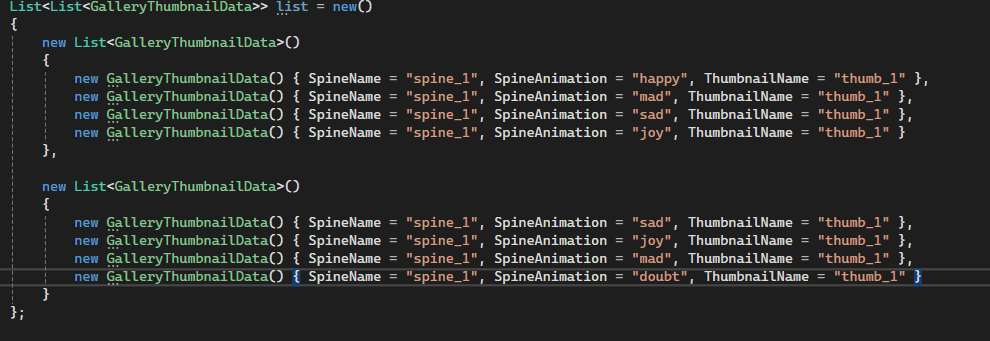

That's the syntax
(assuming that it compiles, but it seems ok)
The reason I need it separated into 2 lists, is to have well 2 lists for the Gallery, but this is enough for testing, I can even use Dictionary or have 2 separate lists.
 marble dome
are there tutorials or are you referring to example in the package
rigid island
marble dome
are there tutorials or are you referring to example in the package
I mean just lookup how each one works, for arms and fingers bones you use for example the IK Two Bone Constraint
https://docs.unity3d.com/Packages/com.unity.animation.rigging@1.1/manual/constraints/TwoBoneIKConstraint.html
you can set the target to be the handle of the weapon/item and thats the one you can change on each item to look for in terms
Its not a simple topic to just describe over a discord post lol
 pure grove
it delays but not much as animation goes.
hexed pecan
Whoever just deleted that, did you find a solution?
Might need to wait one frame/until the end of the frame for the animation to even start
pure grove
I debugged length and it still shows idle animation length I do not know why though
it plays the death animation however checks for 1.44 which is idle time
I didnt find solution but I know the error 😄
hexed pecan
pure grove
I debugged length and it still shows idle animation length I do not know why tho...
Did you try what I suggested?
The animation might not change instantly so you need to wait a bit at the start of the coroutine
pure grove
I didnt actually I just made a const and put the actual length of death animation instead of bothering so much
hexed pecan
Try WaitForEndOfFrame first and if that doesnt work the do yield return null to wait a whole frame
hexed pecan
pure grove
I didnt actually I just made a const and put the actual length of death animatio...
Alright
pure grove
hexed pecan
Try ``WaitForEndOfFrame`` first and if that doesnt work the do ``yield return nu...
do I need to put inside of couroutine at start?
I can try
hexed pecan
First line in the coroutine yeah
I saw someone have a similiar issue recently and this fixed it
pure grove
let me try thank you
pure grove
it didnt work sadly
yield return new WaitForEndOfFrame(); I added this in first line of couroutine
 wooden pawn
Solved
 surreal swan
Hey guys, what linters do you use for c#/unity? To maintain code quality across multiple developers?
 jaunty sundial
with networking when im testing my game by running the build and pressing play in the editor sometimes when i tab back in and do an input it will do everything registered with the input apart from setting the bool that allows them to do the input to false meaning they can do it a second time
wooden pawn
I have code that I found online that I tried to implement in my game. It's currently attached to the "Content" section(a child of viewport, which is a child of scroll view, which is a child of the Canvas).
{
#region Inspector fields
[SerializeField] float startSize = 1;
[SerializeField] float minSize = 0.5f;
[SerializeField] float maxSize = 1;
[SerializeField] ScrollRect scrollRect;
[SerializeField] private float zoomRate = 5;
#endregion
#region Private Variables
private bool isZooming;
#endregion
#region Unity Methods
private void Update()
{
float scrollWheel = -Input.GetAxis("Mouse ScrollWheel");
if (scrollWheel != 0)
{
scrollRect.vertical = false;
scrollRect.horizontal = false;
ChangeZoom(scrollWheel);
}
else
{
scrollRect.vertical = false;
scrollRect.horizontal = false;
}
}
#endregion
#region Private Methods
private void ChangeZoom(float scrollWheel)
{
float rate = 1 + zoomRate * Time.unscaledDeltaTime;
if (scrollWheel > 0)
{
SetZoom(Mathf.Clamp(transform.localScale.y / rate, minSize, maxSize));
}
else
{
SetZoom(Mathf.Clamp(transform.localScale.y * rate, minSize, maxSize));
}
}
private void SetZoom(float targetSize)
{
transform.localScale = new Vector3(targetSize, targetSize, 1);
}
#endregion
}```
I tried to add a section in the update method where it stops the scrollrect from scrolling down and up when the mouse wheel is scrolled because i want to keep that input to only zoom, while clicking and dragging is what you do to scroll. however, when i watch in the inspector while scrolling, it seemingly randomly turns those off when i use the mouse wheel, not every time i use the mouse wheel, and it still scrolls brave geyser
You have the .vertical and .horizontal setting to false in both the if and the else.
I assume you want them to become true in the else.
But if it's turning true at some point already, something else is going on. Do you have any other components interacting with the scrollrect?
 dusk apex
wooden pawn
I have code that I found online that I tried to implement in my game. It's curre...
dusk apex
wooden pawn
I have code that I found online that I tried to implement in my game. It's curre...
You're practically assigning them both the value of false in Update.
Basically, a refactor of your code (which isn't what you're likely wanting) would be: cs private void Update() { float scrollWheel = -Input.GetAxis("Mouse ScrollWheel"); scrollRect.vertical = false; scrollRect.horizontal = false; if (scrollWheel != 0) ChangeZoom(scrollWheel); }
wooden pawn
brave geyser
You have the .vertical and .horizontal setting to false in both the if and the e...
Sorry this was a mistake during trying to fix it. The problem exists when they are both assigned true in the else part of the statement
the idea is that the scrolling will be turned off whenever the mouse wheel has input, but when the mouse wheel doesnt have input, scrolling is enabled which allows you to scroll using click and drag
brave geyser
wooden pawn
the idea is that the scrolling will be turned off whenever the mouse wheel has i...
Ok, well aside from that issue that was just debugging, any other components around interacting with the scrollrect?
Ah, and you're saying the problem exists when you did have things set to true in the else. I'm not too familiar with scroll wheel input. Seems like it is probably pretty instantaneous. Might just happen in one frame?
 acoustic sorrel
I am trying to stop a functions execution from running until an animeation finishes playing. What would be the best way to go about doing that
 chilly surge
surreal swan
Hey guys, what linters do you use for c#/unity? To maintain code quality across ...
chilly surge
surreal swan
Hey guys, what linters do you use for c#/unity? To maintain code quality across ...
https://learn.microsoft.com/en-us/dotnet/fundamentals/code-analysis/categories covers a lot of ground, and you can grab more analyzers as needed.

Learn the different .NET code analysis rule categories.
rigid island
acoustic sorrel
I am trying to stop a functions execution from running until an animeation finis...
animation event or you can poll the state of animation in update then use corotuine to WaitWhile or just while loop with that bool
acoustic sorrel
rigid island
animation event or you can poll the state of animation in update then use corotu...
Say I wanted to use WaitWhile what would I want to have it wait for? Just a bool or is there a specific thing that made it just wait for the animation?
wooden pawn
brave geyser
Ah, and you're saying the problem exists when you did have things set to true in...
thats what i was thinking. im not sure how to fix this, i tried moving stuff around between lateupdate and update to see if i could get a small window of time for it to process but it didnt seem to do anything
rigid island
acoustic sorrel
Say I wanted to use WaitWhile what would I want to have it wait for? Just a bool...
right the bool checked in update but used to wait in coroutine
https://docs.unity3d.com/ScriptReference/AnimatorStateInfo.IsName.html
brave geyser
wooden pawn
thats what i was thinking. im not sure how to fix this, i tried moving stuff aro...
If you take the time dependency out does it at least scale? Unscaled delta time is pretty little.
acoustic sorrel
rigid island
right the bool checked in update but used to wait in coroutine
https://docs.unit...
Im assuming the state updates upon animation completion
rigid island
acoustic sorrel
Im assuming the state updates upon animation completion
well its tricky the bool will turn to true while animation plays, if its false its not playing.The tricky part is catching the first part not considering the bool false initially as animation done
acoustic sorrel
rigid island
well its tricky the bool will turn to true while animation plays, if its false i...
so id want to do C# public IEnumerator WaitForAnimation() { yield return new WaitUntil(() => !animator.GetCurrentAnimatorStateInfo(0).IsName("CardDeath")); } and just hope I dont catch it at the start of the animation?
rigid island
acoustic sorrel
so id want to do ```C#
public IEnumerator WaitForAnimation()
{
yield return ...
I would put it inside Update (bool) , I had weird issues polling IEnumerator that way
private void Update()
{
    someAnimationPlaying = anim.GetCurrentAnimatorStateInfo(0).IsName("SomeAnimation");
}
bool someAnimationPlaying;
IEnumerator Animation()
{
    anim.Play("SomeAnimation");
    while (someAnimationPlaying)
    {
        yield return null;
    }
    //done
}```good to know I dont have to use states and parameters to control the animation
rigid island
acoustic sorrel
good to know I dont have to use states and parameters to control the animation
just an example, I would still use transitions / parameters
I don't typically use .Play but use SetTrigger or Bool etc..
acoustic sorrel
Ok it seems like its still not wanting to wait as the code after it runs and no animation plays
should i maybe wait for the variable to be false and wait for a frame update before the loop?
rigid island
acoustic sorrel
should i maybe wait for the variable to be false and wait for a frame update bef...
it all depends where you're calling it from etc
this is the tricky bit i was talking about as catching the initial part
You can also use those State scripts btw
acoustic sorrel
thats what I placed in my code
rigid island
acoustic sorrel
thats what I placed in my code
what is the current code and what are you trying to exactly do
acoustic sorrel
I have a death animation that I want to play and then I want to deactiveate the gameobject after its done playing
public void TakeDamage(int damage)
{

    Debug.Log(cardName + " taking damage for " + damage);
    currentHealth = currentHealth - damage;
    if (currentHealth <= 0)
    {
        animator.SetBool("Die", true);
        StartCoroutine(WaitForAnimation());
        //Debug.Log(cardName + " has died :(");
        placeholder.inUse = false;
        gameObject.SetActive(false);
        //player.RemoveCardFromField(this);
    }
}

public IEnumerator WaitForAnimation()
{
    yield return new WaitForFixedUpdate();
    yield return new WaitForFixedUpdate();
    //animator.Play("CardDeath");
    while (!deathAnimationPlaying)
    {
        yield return null;
    }
}

 void Update()
 {
    deathAnimationPlaying = animator.GetCurrentAnimatorStateInfo(0).IsName("SomeAnimation");
}```btw the part underneath startCoroutine doesnt wait
you put the part you want to run after wait underneath the loop
acoustic sorrel
Of course its something like that
yep that sort of fixed it. The animation is just looping now which I feel is a completely different issue
rigid island
acoustic sorrel
yep that sort of fixed it. The animation is just looping now which I feel is a c...
check animation clip loop mode n such
acoustic sorrel
rigid island
check animation clip loop mode n such
loop was enabled in the animation. now I fix the issue of the loop catching the animation start
turns out setting the deathAnimationPlayign variable to true for it to work
rigid island
acoustic sorrel
turns out setting the deathAnimationPlayign variable to true for it to work
you got it working ?
acoustic sorrel
rigid island
you got it working ?
yea I just made the variable true after I set the variable to true when the coroutine started
acoustic sorrel
rigid island
you got it working ?
So I lied. It seems like its still in the CardDeath state even after the animation finishes playing. It turns out that I had the variable checking the wrong state name but after changing it to the right state it now skipping the while loop so I have no idea whats going on now
rigid island
acoustic sorrel
So I lied. It seems like its still in the CardDeath state even after the animati...
send updated !code. Use the links
 tawny elkBOT

Posting code
📃 Large Code Blocks
Use links to services like:
https://gdl.space/, https://paste.ofcode.org/, https://hatebin.com/, https://paste.myst.rs/, https://hastebin.com/
📃 Inline Code
Surround code with three backquotes. Not quotation marks.
To format as C#, add cs to the first line:
```cs
// Your code here
```
Add a comment with a line number if there is an error message.
acoustic sorrel
https://hastebin.com/share/vokajuyowe.csharp dont mind the horrid code I am mainly just trying to get this to work
Hastebin is a free web-based pastebin service for storing and sharing text and code snippets with anyone. Get started now.
 bold wraith
!ide
tawny elkBOT
💡 IDE Configuration
If your IDE is not autocompleting code
or underlining errors, please configure it.
Select one:
•  Visual Studio (Installed via Unity Hub)
• Visual Studio (Installed manually)
•  VS Code
•  JetBrains Rider
• :question: Other/None
rigid island
acoustic sorrel
https://hastebin.com/share/vokajuyowe.csharp dont mind the horrid code I am main...
you moved it from take damage to update ?
make sure ur not running the function many times cause now its in update
that causes wonky behaviors
acoustic sorrel
NGL I forgot I did that because I immedently went and tried to make it into a coroutine because I knew it was going to cause issues
rigid island
it was better in Take Damage
even so you can put an extra bool for maybe check if deathHasStarted etc.
if (currentHealth <= 0 && !deathStarted)
{
deathStarted = true;
animator.SetBool("Die", deathStarted );
acoustic sorrel
Yea this was a problem of my own creation from trying to be fancy and forgetting I had a function to apply damage to something
reverting it still broke it so I have no idea whats going on and I should probably just come back to it tomorrow
marble dome
rigid island
I mean just lookup how each one works, for arms and fingers bones you use for ex...
yeah I guess i'm too lazy to get into it and just hustle xD i see it's wont be a "complex" thing but time consuming.. but we gotta do what we gotta do
 swift falcon
Right now I'm implementing movement for an entity in free space. It can move up and downwards in that space as well by adjusting its pitch. But currently, it does not rotate as it should.
https://paste.ofcode.org/NrjHU9Z5KyEi9LnwfMYDzu
I need to rotate my entity with negative values (from -45 to 0), but that doesn't work since Quaternion.Euler(-90f, 0f, 0f) == Quaternion.Euler(270f, 0f, 0f). Hence, it tries to rotate from 0 to 270 instead of 0 to -90. Does anyone have an idea how to fix that?
 short osprey
i have a weird error where my game works in debuggerr but when i build i get a NullReferenceException. Are there things regarding builds i dontn know about that could cause this behavior?
short osprey
swift falcon
Right now I'm implementing movement for an entity in free space. It can move up ...
Try using Quaternion.inverse()
obviously with a positive rotationn
swift falcon
short osprey
Try using ``Quaternion.inverse()``
It's still the same. I used Quaternion.Inverse(Quaternion.Euler(90f,0f,0f)); and it rotated downwards instead of upwards
 compact perch
tried using AngleAxis? you can simply pass inversed axis, should do the trick.
not sure about negative angle tho
short osprey
swift falcon
It's still the same. I used `Quaternion.Inverse(Quaternion.Euler(90f,0f,0f));` a...
Yea at this point id just use Quaternion.Slerp (or Quaternion.Lerp) to just interpolate between them.
Quaternion currentRotation = transform.rotation;
Quaternion targetRotation = Quaternion.Euler(-90f, 0f, 0f);


//Find out whether to rotate up or down. This should differentiate between -90 and +270, i think (but im still new to quaternions too)
if (Quaternion.Dot(currentRotation, targetRotation) < 0) {
    targetRotation = new Quaternion(-targetRotation.x, -targetRotation.y, -targetRotation.z, -targetRotation.w);
}

StartCoroutine(Rotate(targetRotation));
private IEnumerator Rotate(Quaternion targetRotation)
{
  float totalTime = 1f; //can be any number
  float timeElapsed = 0;

  Quaternion originalRotation = transform.rotation;
  while(elapsedTime < totalTime)
  {
    transform.rotation = Quaternion.Lerp(originalRotation, targetRotation, elapsedTime / totalTime;
    elapsedTime += Time.deltaTime;
    yield return null;
  }
    transform.rotation = targetRotation;
}
 stable osprey
swift falcon
Right now I'm implementing movement for an entity in free space. It can move up ...
stable osprey
swift falcon
Right now I'm implementing movement for an entity in free space. It can move up ...
afaik Quaternion.Euler(-90f, 0f, 0f) should be working as it should and provide the correct rotation. Does it take the long way to rotate? OR what's the actual issue?
swift falcon
stable osprey
afaik `Quaternion.Euler(-90f, 0f, 0f)` should be working as it should and provid...
Yeah, it takes the long way instead of the short way when my current rotation is (0,0,0)
stable osprey
eulerAngles.x = Mathf.Clamp(eulerAngles.x, -_maxPitch, _maxPitch); might not be as effective.
You could try this won't work eithereulerAngles.x = Mathf.Clamp(eulerAngles.x % 180, -_maxPitch, _maxPitch).
actually if you step through each of the stuff and check where it breaks, it'd be nice. I'm under the impression the Slerp would always take the short way though. give me a sec to recollect
swift falcon
compact perch
tried using AngleAxis? you can simply pass inversed axis, should do the trick.
I just tried, it's still the same :'D
stable osprey
Yeah I can confirm this takes the short way:
Quaternion q = Quaternion.identity;
void Update() {
    var t = Quaternion.Euler(-90, 0, 0);
    q = Quaternion.Slerp(q, t, 0.1f);
    Debug.Log(q.eulerAngles);
}
@swift falcon your issue lies elsewhere
 swift falcon
This actually fixed it: eulerAngles.x = Mathf.Clamp(eulerAngles.x, _maxPitch, 360 - _maxPitch);
stable osprey
yeah but it's not correct 🤣
 plucky inlet
You could also try using SlerpUnclamped
stable osprey
alright..
while (eulerAngles.x > 180) { eulerAngles.x -= 360; }
eulerAngles.x = Mathf.Clamp(eulerAngles.x, -_maxPitch, _maxPitch);
if (eulerAngles.x < 0) { eulerAngles.x += 360; }
https://discussions.unity.com/t/quaternion-slerp-messing-with-wrong-axies/229019 also has a good way of doing it from quickly reading through it
stable osprey
you don't need the last line, but is convenient to convert back to [0, 360] format
stable osprey
swift falcon
This actually fixed it: `eulerAngles.x = Mathf.Clamp(eulerAngles.x, _maxPitch, 3...
actually this might be perfect 👍 sorry still drinking my first gulp of coffee 🙂 I probably imagined an edge case that doesn't exist
swift falcon
ty a lot!!
 bitter warren
hello! what is better choice for loading map? Ive got everything on one scene and trying to load models etc. Should i use async/await or coroutines?
 grim kiln
bitter warren
hello! what is better choice for loading map? Ive got everything on one scene an...
grim kiln
bitter warren
hello! what is better choice for loading map? Ive got everything on one scene an...
Both will work, but if you're using Unity 6 perhaps even check out Awaitables, I find them really helpful for async loading of assets.
bitter warren
grim kiln
Both will work, but if you're using Unity 6 perhaps even check out Awaitables, I...
oh that looks interesting, thanks!
 zealous bridge
which consoles can unity port to without pro licence? I have found both yes and no answers on internet so I ask here, esspecially knowing that terms of service have changed
 somber nacelle
i think xbox can technically run UWP apps, so probably just xbox if that's the case. also not a code question
grim kiln
zealous bridge
which consoles can unity port to without pro licence? I have found both yes and ...
If you want to ship to the console storefronts then you will need a pro licence.
zealous bridge
grim kiln
If you want to ship to the console storefronts then you will need a pro licence.
for **all types ** of consoles or **some specific types ** of consoles?
grim kiln
zealous bridge
for **all types ** of consoles or **some specific types ** of consoles?
The short answer is yes, a pro licence is required to build for all console platforms. Please refere to the platform documentation for the fine details.
zealous bridge
thanks
 gritty badger
explanation: The red rectangle is a killwall, any npc touched it will be destroyed. But for some reasons the code won't work..
the npc destroy part:
    public npcspawnscript spwner;
.
.
.
    spwner=GameObject.FindGameObjectWithTag("spawner").GetComponent<npcspawnscript>();
.
.
.
    void OnCollisionEnter2D(Collision2D other)
    {
        if(other.gameObject.tag=="killwall"){
            spwner.numberdown();
            Destroy(follower);
            Destroy(gameObject);
        }
    }
}
and the spawner script:
using UnityEngine;

public class npcspawnscript : MonoBehaviour
{
    public GameObject npc;
    // Start is called once before the first execution of Update after the MonoBehaviour is created
    public float timer;
    public float rate;
    public int maxnpcnumber;
    public int npcnumber;
    void Start()
    {
        Instantiate(npc,new Vector3(transform.position.x,Random.Range(-5.0f,5.0f),transform.position.z),transform.rotation);
        rate=3;
        timer=0;
        npcnumber=1;
        maxnpcnumber=3;
    }

    // Update is called once per frame
    void Update()
    {
        if(timer<rate){
            timer+=Time.deltaTime;
        }else{
            if(npcnumber<maxnpcnumber){
                Instantiate(npc,new Vector3(transform.position.x,Random.Range(-5.0f,5.0f),transform.position.z),transform.rotation);
                npcnumber+=1;
                timer=0;
            }
        }
    }
    [ContextMenu("countdownnpc")]
    public void numberdown(){
        npcnumber-=1;
    }
}
note that the script just keeps saying that "spwner" has nullref.
 knotty sun
well, debug it then, then come back with some solid data like console output
null ref exceptions, you should fix before even coiming here
gritty badger
like this?
NullReferenceException: Object reference not set to an instance of an object
npcspecialscript.OnCollisionEnter2D (UnityEngine.Collision2D other) (at Assets/npcspecialscript.cs:49)
```
or
NullReferenceException: Object reference not set to an instance of an object
npcspecialscript.OnCollisionEnter2D (UnityEngine.Collision2D other) (at Assets/npcspecialscript.cs:49)
NullReferenceException: Object reference not set to an instance of an object.
npcmovescript.Start () (at Assets/npcmovescript.cs:43)
that is the bug I have issues with and I don't know how to fix it.
knotty sun
so you have an error and a code line number, what more do you want?
you have null refs, fix them
gritty badger
I don't know how to fix it
knotty sun
well first thing is to find out what is null, then figure out why they are null
gritty badger
knotty sun
don't give me videos, what is line 49 of the code you posted?
gritty badger
spwner.numberdown();
so, spawner is null
gritty badger
originated:
spwner=GameObject.FindGameObjectWithTag("spawner").GetComponent<npcspawnscript>();
and
knotty sun
so the get component does not work
gritty badger
public class npcspawnscript : MonoBehaviour
{
yes
knotty sun
wrong
gritty badger
kay now I halfway done.
compact perch
If there is a lot objects with that tag, you could use TryGetComponent() method that will return True/False for debugging
knotty sun
no
compact perch
Why
knotty sun
because he is still doing a game object .find which will return any object with the tag and probably not the one he is expecting
compact perch
Yes I mean on each gameobj returned call .TryGetComponent to see if there are any tagged spawners without script
knotty sun
ObjectFindWithTag only return one object
gritty badger
now I need the npc to respawn, but They won't.
I used a npc spawn counter to count how many npc's have spawned.
But after destroying the npc, It gave me this error:
MissingReferenceException: The object of type 'UnityEngine.GameObject' has been destroyed but you are still trying to access it.
Your script should either check if it is null or you should not destroy the object.
UnityEngine.Object+MarshalledUnityObject.TryThrowEditorNullExceptionObject (UnityEngine.Object unityObj, System.String parameterName) (at <eb019d4a63d44ca7a73547c38156dec2>:0)
UnityEngine.Bindings.ThrowHelper.ThrowNullReferenceException (System.Object obj) (at <eb019d4a63d44ca7a73547c38156dec2>:0)
UnityEngine.GameObject.GetComponentFastPath (System.Type type, System.IntPtr oneFurtherThanResultValue) (at <eb019d4a63d44ca7a73547c38156dec2>:0)
UnityEngine.GameObject.GetComponent[T] () (at <eb019d4a63d44ca7a73547c38156dec2>:0)
npcmovescript.Update () (at Assets/npcmovescript.cs:68)
UnityEngine.GUIUtility:ProcessEvent(Int32, IntPtr, Boolean&)
the destroy part:
    void OnCollisionEnter2D(Collision2D other)
    {
        if(other.gameObject.tag=="killwall"){
            spwner.numberdown();
            Destroy(follower);
            Destroy(gameObject);
        }
    }
}
Oh right, I misread sorry. Was thinking about FindGameObjectsWithTag
But yeah, that would be a compile error on assignment
 inner shuttle
bump
gritty badger
knotty sun
please actually read the error messages
npcmovescript.Update () (at Assets/npcmovescript.cs:68)
rigid island
marble dome
yeah I guess i'm too lazy to get into it and just hustle xD i see it's wont be a...
a little bit at a time, looks complex at first but its quite easy to use
gritty badger
Yeah but that's because the npc got destroyed. you mean that I'm going to debug that?
I have used the Destroy(follower) function, but it still won't work.
follower has been set to the transform of the npc follower
inner shuttle
bump
 latent latch
inner shuttle
bump
latent latch
inner shuttle
bump
I'd start creating a bunch of logging here if you're having indexing problems. You've also got breakpoints which you can step through the code and using visual studio's debugger will help you see the stack trace in real time.
gritty badger
final issue:I want the player to have collision with the terrain?
Both of the entire terrain and the player have a non-trigger collision box, and the player has a rigid body. But the collision box just do not work.
Does anyone knows how to fix this?
 hasty plinth
Hi, is there a way to generate data through code and then store that data in a scriptable object?
gritty badger
maybe? If it was a built in generated data there should be a way. But other than that, I don't know
knotty sun
hasty plinth
Hi, is there a way to generate data through code and then store that data in a s...
In the editor, very easily, at runtime, no
hasty plinth
knotty sun
In the editor, very easily, at runtime, no
How?
knotty sun
hasty plinth
How?
ScriptableObject.CreateInstance to make an SO
AssetDataBase.SaveAssets to save it
hasty plinth
Ok that should be it, thanks!
gritty badger
anyways, can anyone kix my problem?
marble dome
rigid island
a little bit at a time, looks complex at first but its quite easy to use
i might give this to a freelancer btw. i got feeling of urgency... someone gave me 300usd price
 white birch
I am slightly confused... How exactly can an object this freaking size... walk into a corner of a walll and then through the wall.. the walls have colliders..
Its like making an Elephant fit into an bottle of water... it isn't making sense to me why that would be.

Like if i walk into any wall.. it wont go through.. but.. heaven forbid i walk into a corner...
somber nacelle
how are you moving it
 fickle kettle
I'm having some issues regarding changing the lowpass frequency dynamically for when the player is underwater
it's returning the warning that the name doesn't exist

which makes me wonder what name they're specifically wanting then
white birch
somber nacelle
how are you moving it
void MovePlayer()
{
float moveX = Input.GetAxis("Horizontal");
float moveZ = Input.GetAxis("Vertical");
// Determine current speed
float currentSpeed = isRunning ? runSpeed : walkSpeed;

// Create movement vector relative to the player's orientation
Vector3 move = transform.right * moveX + transform.forward * moveZ;

// Move the player
rb.MovePosition(rb.position + move * currentSpeed * Time.fixedDeltaTime);
}
somber nacelle
I'm gonna go ahead and guess that you just happened to get mostly correct collisions because your rigidbody is dynamic and it just happened to depenetrate from the wall colliders when moving directly against them. MovePosition is meant for a Kinematic rigidbody and as far as I am aware, it does not do any actual collision detection, just smoothly moves a rigidbody to the designated position
white birch
somber nacelle
I'm gonna go ahead and guess that you just happened to get mostly correct collis...
Good guess. I will have to look into a different way to move my player then
 somber nacelle
fickle kettle
it's returning the warning that the name doesn't exist
somber nacelle
fickle kettle
it's returning the warning that the name doesn't exist
check the actual name of the exposed parameter
fickle kettle
somber nacelle
check the actual name of the exposed parameter
the parameter Cutoff freq?
somber nacelle
yes, what is the name of the exposed parameter in the audio mixer
https://docs.unity3d.com/Manual/AudioMixerInspectors.html
fickle kettle
somber nacelle
yes, what is the name of the exposed parameter in the audio mixer
<https://docs....
Cutoff freq
somber nacelle
show it
fickle kettle
somber nacelle
show it
 somber nacelle
no i said show the exposed parameter. not the effect
fickle kettle
the cutoff frequency is the exposed parameter
somber nacelle
did you even bother clicking the link i sent?
if no, then click it and scroll down to the "Exposed parameters" section
white birch
somber nacelle
I'm gonna go ahead and guess that you just happened to get mostly correct collis...
Yeah you are right about that.. thank you! I was moving the player in the wrong way.
fickle kettle
somber nacelle
did you even bother clicking the link i sent?
I did
somber nacelle
then show the exposed parameter name
somber nacelle
i'm guessing you finally looked at the name of the exposed parameter and saw it was different than what you were using in your code?
white birch
somber nacelle
I'm gonna go ahead and guess that you just happened to get mostly correct collis...
What are you currently working on? Or are you just here to help humanity?
wooden pawn
hello, I am building a skill tree. i have a script with ScriptableObject data that is attached to a UI button. when the button is pressed, it will run a script on a SkillTreeManager game object not connected to the button in the hierarchy.
How do you reference data from a script attached to a button from another script when the button is pressed?
latent latch
Add a reference to the script on that script
wooden pawn
latent latch
Add a reference to the script on that script
The issue is im going to have a lot of buttons that each have the same script but a different SO attached to it. Node_1, Node_2, Node_1.1 etc. Each node has an ID with information that can be got from that SO attached in that script. in another script(the one that is being called in the buttons OnClick), i have a method that needs that data. im not sure how to do it.


 grizzled grove
Hey, how to set proguard rule to make it able to use Vivox ?
wooden pawn
wooden pawn
The issue is im going to have a lot of buttons that each have the same script bu...
The only thing I can think of is to attach the node reference script to the onclick button alongside the manager script and have it change a public variable and then reference that variable in the manager script. is there not a way to reference which button was pressed from the manager script itself?
But then I wouldnt be able to put the SO in the script
latent latch
wooden pawn
The issue is im going to have a lot of buttons that each have the same script bu...
Why not make a parameter that sends the SO into the manager or am I not understanding here.
wooden pawn
latent latch
Why not make a parameter that sends the SO into the manager or am I not understa...
would you mind showing me what you mean? im not good enough at code to fully understand what youre asking
latent latch
wooden pawn
would you mind showing me what you mean? im not good enough at code to fully und...
Whichever the function you're clicking on there in the SkillTreeManager should take in a NodeData object which you then assign on the editor here
 short quiver
Does SerializeField support any sort of value type fallthrough? For example, I figured out how to calculate values from expressions at runtime. So, now, I'd like for my value at SerializeField to be able to accept a float (if the supplied value happens to be one), or a string otherwise (which would then get handled by my expression evaluator)
latent latch
short quiver
Does `SerializeField` support any sort of value type fallthrough? For example, I...
Not sure what you mean by a fallthrough as SerializeField is just an attribute of some variable declaration, and usually if you're serializing something it must be explicit.
upper pilot
Can someone remind me how to use Newtonsoft? I can't find any using
I need to convert a List<struct> to/from json
and JsonUtility doesn't work with Lists apparently
 cosmic rain
upper pilot
and JsonUtility doesn't work with Lists apparently
cosmic rain
upper pilot
and JsonUtility doesn't work with Lists apparently
Pretty sure it does.
somber nacelle
JsonUtility would require the List be part of another object, it doesn't like collections as the root object
cosmic rain
Assuming it's a serialized field of a serializable class
upper pilot
Yeah I am trying to add a struct that holds my list of structs to see if that helps.
That works
Is there a unity json package that can handle List as a root?
Do I have to install Newtonsoft?
short quiver
How can I enforce a static class to instantiate on Scene startup (as opposed to first static method invocation)? Because it instantiates as mentioned, it's effectively lazily loading, and I'd prefer for the overhead loading to happen on scene startup
latent latch
short quiver
How can I enforce a static class to instantiate on Scene startup (as opposed to ...
Probably some initializer list on scene load (call some custom init methods of those static classes) or use singletons
 dusky tulip
I genuinely don't have any clue why this is happening?
 wooden pawn
latent latch
Whichever the function you're clicking on there in the SkillTreeManager should t...
wooden pawn
latent latch
Whichever the function you're clicking on there in the SkillTreeManager should t...
Came back to it and figured this out. Thank you. I originally thought when you tried to include a parameter in a method it caused it to not show up in the list when youre on a button, but it was just because the method was not finished yet.
This is exactly what I wanted

 icy depot
Hello, I'm making the UI Animation system for my game. It currently has three types of animation components: Transitionable (which we don't care about), Loopable (which runs all the time once initialized), and Boolean (which activates when events such as button hovering occur)
An example of a Loopable is something that rotates endlessly
An example of a Boolean is something that scaled up when hovered over and scales down when hovered away (like a boolean on-off switch!)
Here's the problem: I'm using a loopable to scale a button big and small with a sine wave, but also using a boolean to scale it even more when the button is hovered over. This should work in theory because the boolean basically multiplies over whatever size the loopable sets the object to. For this to work, the boolean should run MultiplySizeBy(x) after the loopable sets the size to a fixed amount with SetSize(x).
However, Coroutines Loopable and Boolean run basically at the same time. I had originally used yield return new WaitForEndOfFrame(); in my boolean, but when I tested it, it didn't work; in Scene it showed that the object got bigger, but it didn't show in the image. This is because WaitForEndOfFrame() happens after everything is rendered. Which is why I'm at a loss for how I should approach controlling the Coroutine execution order so that Boolean runs right after Loopable. There's still a possible path I can go for but for reasons of adding complexity I don't want to delve into it.
Thank you very much for your time.

 lean sail
icy depot
Hello, I'm making the UI Animation system for my game. It currently has three ty...
lean sail
icy depot
Hello, I'm making the UI Animation system for my game. It currently has three ty...
part of this doesnt make sense, coroutines arent running at the exact same time. if you want exact control of what runs in order, id probably abandon the coroutines and create your own update methods here. call them in the order that you want
 sleek bough
If you have one of them setting absolute size the next frame, there's no point trying to multiply the size.
icy depot
lean sail
part of this doesnt make sense, coroutines arent running at the exact same time....
The thing is, I still want to take advantage of the code structure Coroutines provide. You don't have to create any booleans to partition the logic, and you can define local variables, etc.
Would it be possible, then, to create a Coroutine-like function that implements yield statements but which I control? Not a Unity Coroutine, but my own.
For example, I'd make this:
public class Foo
{
  public IEnumerator coFoo;

  public IEnumerator CoFoo()
  {
      // stuff and yield statements
  }
}

public class FooManager
{
  public Foo[] loopableFoos, booleanFoos;

  // the important part!
  void Update()
  {
    // loop through the loopableFoos and continue running CoFoo() in some way
    foreach(Foo foo in loopableFoos)
    {
        Continue(foo.coFoo);
    }
    // loop through the booleanFoos and continue running CoFoo() in some way
    foreach(Foo foo in booleanFoos)
    {
        Continue(foo.coFoo);
    }
  }
}
if Unity implemented coroutines then perhaps I can take advantage of IEnumerator to re-implement it?
icy depot
sleek bough
If you have one of them setting absolute size the next frame, there's no point t...
this is the basic idea
 lean sail
icy depot
this is the basic idea
lean sail
icy depot
this is the basic idea
well regardless of what you do, if you're directly changing the size from loopable and boolean then its not like this is gonna work. you're gonna need the "base size" or something stored
and yes you could implement your own IEnumerators if you want though id probably look for other options first
 lime umbra
I just noticed the new API for scriptable objects on sprites, it seemed weird at first but I can definitely think of a few use cases (like storing some sort of config). Anyone has any idea what was the original reason of the feature being implemented?
hasty plinth
(Not code related, but I couldn't find a better category, if you think this question belongs ina different channel, I will gladly move it there)
I want to instantiate some button on top of a Spline, but I can only get them to instantiate as Game Objects not part of a canvas but the World Space. As a result the buttons are huge (as they use world dimensions and not ui dimensions) and when baked they can't be interacted with even though they are under a canvas with a graphic raycaster. Any ideas?
 soft shard
hasty plinth
(Not code related, but I couldn't find a better category, if you think this ques...
soft shard
hasty plinth
(Not code related, but I couldn't find a better category, if you think this ques...
Are you passing a GameObject type or a Button type to your instantiation? And are you instantiating your buttons into the canvas or making them a child after instantiating?
hasty plinth
soft shard
Are you passing a GameObject type or a Button type to your instantiation? And ar...
- If you mean they way I instantiate them through the spline then here are the settings. If you mean something then let me know.
- I instantiate them through
Spline Instantiateand the Spline Game Object is under a Canvas, I then Bake them and they get instantated under the splin and weather I move them to a different panel or not, they are not working

Also even if I put the buttons over all other UI elements, they don't even block me from pressing buttons underneath them
 ocean shadow
hello guys I'm new to unity I was wondering how to set space as key bind do I write Input.GetKey ("Space")? or is there other way to put space as key bind
somber nacelle
if you're using GetKey you should (ideally) be using keycodes not strings
soft shard
hasty plinth
1. If you mean they way I instantiate them through the spline then here are the ...
Ah, I misunderstood what you were doing, I thought you were instantiating with GameObject.Instantiate and adding it to your spline object, im not too sure how Spline Instantiate handles instantiating, but im guessing "StageButton" is a UnityEngine.UI.Button prefab? Are you able to instantiate the other way around where you instantiate into a canvas, then move the canvas as a child to your spline (or move it with the spline for world canvases)
hasty plinth
soft shard
Ah, I misunderstood what you were doing, I thought you were instantiating with `...
No worries.
Yes StageButton is a UnityEngine.UI.Button prefab
When I press bake the gameobjects are always instantiated under the Spline Object
I just tryied putting the spline outside of the canvas, instantiating there and then putting them in the canvas but the results are the same
ocean shadow
somber nacelle
if you're using GetKey you should (ideally) be using keycodes not strings
keycodes are only for non leter characters right? sorry for bad english it's not my 1st language
somber nacelle
ocean shadow
keycodes are only for non leter characters right? sorry for bad english it's not...
no. you should read the documentation instead of making baseless assumptions https://docs.unity3d.com/ScriptReference/KeyCode.html
soft shard
hasty plinth
When I press bake the gameobjects are always instantiated under the Spline Objec...
Ah, that could be problematic AFAIK, unless the parent is treated as a RectTransform, it may be spawned as a GameObject in world space, even if the parent is a child of a Canvas, if that parent itself doesnt have a RectTransform (and CanvasRenderer) AFAIK, it will always be treated as just a world space game object, I havnt used that specific component with splines before so im not sure if you have an alternative to baking or modifying how the bake works
ocean shadow
somber nacelle
no. you should read the documentation instead of making baseless assumptions <ht...
ok thanks
hasty plinth
soft shard
Ah, that could be problematic AFAIK, unless the parent is treated as a RectTrans...
Thanks for trying to help, I was thinking the same. There must be a way to do it as it seems to me as something really usefull.
thanks again for the help!
soft shard
NP, GL with the search, maybe the docs might have some extra notes on the API if you might not be able to find any forum posts of people with a similar scenario
hasty plinth
soft shard
NP, GL with the search, maybe the docs might have some extra notes on the API if...
Update. I found nothing online. I even found a reddit post with some guy trying to do something similar and later replying he didn't find a way to do it. here is the link https://www.reddit.com/r/Unity3D/comments/10h0cp3/ui_element_follow_spline_path/
So I returned to re-read your message and thought to put a RectTransform on the Spline, and miraculously, it worked!
So I guess you did manage to solve my problem
Thanks!
soft shard
hasty plinth
So I guess you did manage to solve my problem
Lol oh wow, well good to hear that worked for you
This may be an odd question, im just wondering if it makes practical sense - rendering several cameras every frame can be taxing on framerate, but what about rendering 1 camera several times? Doing a small test, I have 1 camera moving to multiple positions, rendering to a RenderTexture, then outputting that immediately to a mesh, then waiting a frame, so if there are 12 positions, it takes 12 frames to render everything - albeit, my test scene is very basic but it doesnt seem like there is any frame drops checking the rendered frame count and FPS, profiler suggests no GC and < 1 ms with 2 calls to Camera.Render.Drawing as the most expensive - but the drawcalls/batches fluctuates every frame (since moving to a different position changes what the camera sees), without dropping my FPS to like 5, it changes too fast for me to tell the exact batch count - im wondering if doing this approach could be more optimal compared to rendering 12 cameras or some other method, or if there is a downside to this I dont see?
For context, all this is to have a "security room" of cameras watching multiple parts of the scene at once, kind of like a "Big Brother" - this is my test code: https://paste.ofcode.org/RnaNj6nA2YXwd8ZtFVji9S
 copper fable
[deprecated] bool Rigidbody2D.isKinematic { get; set; }```👆
happening in Unity 6 LTS
somber nacelle
yes, did you read it? it's telling you what to use
copper fable
somber nacelle
yes, did you read it? it's telling you what to use
how about this ?
'Object.FindObjectsOfType<T>()' is obsolete: 'Object.FindObjectsOfType has been deprecated. Use Object.FindObjectsByType instead which lets you decide whether you need the results sorted or not. FindObjectsOfType sorts the results by InstanceID but if you do not need this using FindObjectSortMode.None is considerably faster.'
somber nacelle
please actually read the error messages
copper fable
line of code : Asteroid[] asteroids = FindObjectsOfType<Asteroid>();
copper fable
somber nacelle
please actually *read* the error messages
i tested before asking here
somber nacelle
tested what?
copper fable
what happens if i keep the deprecated code in production build ?
somber nacelle
compilation errors prevent your code from compiling so you won't even be able to use the code. just use the method the error message is literally telling you to use instead
copper fable
on it
 rocky vapor
copper fable
on it
rocky vapor
copper fable
on it
do you actually understand the reason why you have to use the new method and things that are happening behind the scene at all? Just in case, it's good to know, because telling others just to what they say will never teach them why they have to actually do it... my pov
somber nacelle
rocky vapor
do you actually understand the reason why you have to use the new method and thi...
you do realize that the error message literally says why the new method should be used, right?
copper fable
rocky vapor
do you actually understand the reason why you have to use the new method and thi...
my bad sir🙂
rocky vapor
somber nacelle
you do realize that the error message literally *says* why the new method should...
yep, sure 😄 I was talking about the overall using Obsoletes 😄
somber nacelle
presumably if someone does not know what the word "obsolete" means then the first place they should look is a dictionary
rocky vapor
somber nacelle
presumably if someone does not know what the word "obsolete" means then the firs...
well... yeah... that's true on the other hand
knotty sun
rocky vapor
yep, sure 😄 I was talking about the overall using Obsoletes 😄
if they want to know, which of course they should but rarely do, they can go and read the docs which they should have done in the first place but didn't. Ho hum.
rocky vapor
exactly, but the thing is telling others "just do it" 😄 will never really teach them at all... but yeah.. they should look for it first 😄
knotty sun
rocky vapor
exactly, but the thing is telling others "just do it" 😄 will never really teach...
absolutely and spoonfeeding them the answer is even worse
somber nacelle
rocky vapor
exactly, but the thing is telling others "just do it" 😄 will never really teach...
my first suggestion to them was to read what the error message said which not only told them what to do, but also told them why. i don't understand why that is too difficult for you to grasp nor why you are pretty much arguing against my suggestion to them
there is no extra information needed when reading that error message, except for the definition of the word "obsolete" if their current vocabulary does not include that word
 vague tundra
I have many of the same component on a game object. The components must remain on this game object.
Anyone have any good suggestions as to what organisation options I have to allow me to distinguish components apart? Something like adding a note against each component would be ideal.
knotty sun
InstanceID
vague tundra
Hmm, that does exactly answer the question I asked...
Thank you!
New question: How could I attach some kind of text description to a component?
knotty sun
I presume you are talking about Unity Components here not Monobehaviours
vague tundra
Yeah correct.
Specifically, I have a bunch of colliders on objects, each doing something different. They all looks the same in the inspector so I forget which one is which
knotty sun
tricky, tbh the best I can offer is a Dictionary<Component,string> with a custom inspector
vague tundra
Ahh yeah sweet, ty ill look into that
 rocky jackal
why doesn't this set the local rotation.z to 3 like youd expect ? instead the value just goes up and up for some reason. Theres no other part of my code that touches the objects rotation

 leaden ice
rocky jackal
why doesn't this set the local rotation.z to 3 like youd expect ? instead the va...
leaden ice
rocky jackal
why doesn't this set the local rotation.z to 3 like youd expect ? instead the va...
You don't understand Quaternions
So you shouldn't be meddling with them
rocky jackal
no i dont
leaden ice
Rotation.z is not the rotation around the z axis
Oh sorry screenshot didn't load
So I assumed you were doing something else
 crude mortar
rocky jackal
why doesn't this set the local rotation.z to 3 like youd expect ? instead the va...
crude mortar
rocky jackal
why doesn't this set the local rotation.z to 3 like youd expect ? instead the va...
it wouldn't set it like you expect if other code is touching it..
rocky jackal
crude mortar
it wouldn't set it like you expect if other code is touching it..
but no other code is touching it
crude mortar
yes well, if that was the case, the value would be 3
it doesn't necessarily mean your code
leaden ice
Rigidbody? Animator?
rocky jackal
doesnt have neither on it
leaden ice
Debug.log the euler angles after you set them
crude mortar
you will need to provide more information then instead of helpers trying to play whack-a-mole
leaden ice
I assure you it won't go up and up
rocky jackal
crude mortar
you will need to provide more information then instead of helpers trying to play...
But idk what i should give you, cuase it makes absolutley no sense
crude mortar
show which components are on the object, show the hierarchy, show the full version of any relevant scripts, etc
rocky jackal
if i do transform.localEulerAngles = new Vector3(90, 0, -3); then the local angle is 90, 0, -3 only if it do what i did it rotates
rocky jackal
crude mortar
show which components are on the object, show the hierarchy, show the full versi...
heres the components
 leaden ice
rocky jackal
why doesn't this set the local rotation.z to 3 like youd expect ? instead the va...
leaden ice
rocky jackal
why doesn't this set the local rotation.z to 3 like youd expect ? instead the va...
The problem here is likely gimbal lock
Euler angles are not independent from each other
rocky jackal
leaden ice
Euler angles are not independent from each other
how can i go arround the probem ?
dusky tulip
So I have a specific scene in unity and upon opening it, it either closes the entire project or constantly loads forever (the most it loaded for was 9 hours). I can't Identify nor will it tell me whats wrong. Is there a way to fix something like this?
 spare dome
you might be able to check the !logs of the project, upon it closing, albeit a have no clue if will produce any since I have never seen this problem before
tawny elkBOT
📝 Logs
Editor logs
Windows: %LOCALAPPDATA%\Unity\Editor\Editor.log
MacOS: ~/Library/Logs/Unity/Editor.log
Linux: ~/.config/unity3d/Editor.log
Unity Hub
Windows: %UserProfile%\AppData\Roaming\UnityHub\logs
Mac: ~/Library/Application support/UnityHub/logs
Linux: ~/.config/UnityHub/logs
spare dome
if you have VC set up, you should probably roll back to a earlier commit if you cannot do anything to the project
dusky tulip
spare dome
you might be able to check the !logs of the project, upon it closing, albeit a h...
checked it and the most I get is this
 rigid island
Any ideas why my allocation for GUILayoutUtility.Begin() is there?
my canvases are disabled from start

I don't have any other GUI functions that I found

 dapper fog
Hello, how can I make a smooth picture blend transition? I want my picture to transition into another for four minutes in a way it blends between. More precisely, I need every pixel to slowly change its color for four minutes until it reaches the color of the pixel of the next image. And, for maximum optimization, I need the image to be updated every 3 seconds. How can this be done?
 quartz folio
rigid island
I don't have any other GUI functions that I found
quartz folio
rigid island
I don't have any other GUI functions that I found
That looks like IMGUI, not UnityUI
rigid island
quartz folio
That looks like IMGUI, not UnityUI
that's why I'm confused, what could be calling this?
quartz folio
Enable call stacks in the profiler, and see if you can select the allocations (I can't remember if you need to be in the timeline view)
rigid island
Yea I was reading something about that as well on forums, I'll give it a look . thanks. very mysterious
soft shard
dapper fog
Hello, how can I make a smooth picture blend transition? I want my picture to tr...
You can use a lerp to transition between 2 points, here are some examples: https://gamedevbeginner.com/the-right-way-to-lerp-in-unity-with-examples/ - if you are changing between 2 UI images, you can lerp their alpha, if you need to actually update the pixels, you could lerp their color arrays and re-apply it to their textures (although depending on how large your textures are, this could be a slow loop)

Learn to animate buttons, move objects and fade anything - the right way - in my in-depth guide to using LERP in Unity (including copy / paste examples).
dapper fog
soft shard
You can use a lerp to transition between 2 points, here are some examples: https...
thanks a lot, ill read the page. Its a 256x256 image
spare dome
dusky tulip
checked it and the most I get is this
might be an editor bug, im not entirely sure what "GUIstateobj" is
dusky tulip
spare dome
might be an editor bug, im not entirely sure what "GUIstateobj" is
Another problem I have when opening a scene

Things like these have never happened before
dapper fog
dusky tulip
Another problem I have when opening a scene
i had also similar things happening, i dont exactly know the cause of it but i had this issue solved by closing unity editor through task manager :((
dusky tulip
dapper fog
i had also similar things happening, i dont exactly know the cause of it but i h...
Ive done this so many times and still get the same issue
knotty sun
 calm kiln
Ah my bad
 dawn nebula
I found this image on twitter. How did they set it up where there are 3 controls?


Hey everyone! We’re updating our website and making all assets on Jettelly socials FREE under CC0, including Godot assets (TBD). More books and courses are on the way! 🚀📚 https://www.jettelly.com/store/books/bundle-usb-ve1-ve2/
#unity3d #godot #GodotEngine #GameDev #indiedev
Full clip
rigid island
dawn nebula
I found this image on twitter. How did they set it up where there are 3 controls...
probably custom handles or just seperate transform children
dawn nebula
rigid island
probably custom handles or just seperate transform children
There's a whole world of editor scripting out there.
rigid island
its a fun rabbit hole
 stable geyser
I've got a weird problem going on. I
I've set up a timeline, very simple, it works perfectly when I run it in the scene. When I incorporate it into my game and have my game load it though...the walk animation switches from ON to OFF. So some script is touching it...is there a way to find out what is touching the animator?
rigid island
stable geyser
I've set up a timeline, very simple, it works perfectly when I run it in the sce...
find all scripts that have reference to Animator component
leaden ice
stable geyser
I've set up a timeline, very simple, it works perfectly when I run it in the sce...
Disable the Animator and see which script throws an exception
stable geyser
leaden ice
Disable the Animator and see which script throws an exception
That is a great idea! Thank you!
white birch
Anyone know how to stop these warnings...

 cobalt dune
Good evening, this is the problem: I’m trying to change the rotation of an entity through the localToWorld matrix:
aspect.localToWorld.ValueRW.Value = float4x4.TRS(aspect.localToWorld.ValueRW.Position, newRotation, scale);
However, nothing changes. What could be wrong?
P.s - newRotation is changing, the bug is specifically in the use of the new matrix
wooden pawn
Hello, this code is meant to unlock a node. in Awake the UnlockNode(rootNode) method is called. The debug log says it makes it to Debug log function in the foreach statement, but it does not make the node set active. I feel like its not finding the gameobject, but the gameobject is the only one with that name(the name would be Node_1 in this case).

I simplified it to see if it was the problem and i was right. The node is set as Node_1 and the name should be Node_1 but when I use the Gameobject.find it returns null


 hidden magnet
Hey, I just started learning Unity and C# this semester in college, so I'm still fairly new even though I have prior programming experience. I'm making a 2d rhythm platformer like geometry dash for my first project in hopes of impressing my professor (lol). I wanted to add some challenge to the game and I had the idea of having a trigger that triggers a camera effect that splits the screen up into 4 screens, while still using the same camera, if that makes sense? I don't want to make a split screen per say as it's only one camera and one player. How would I go about that? Would I just like, have 4 canvases or something? I haven't found anything on the forums or documentation that gives me an idea of how to go about this
Once I know how to actually get the system working, then I can make a script for it
rigid island
hidden magnet
Hey, I just started learning Unity and C# this semester in college, so I'm still...
use the same camera to render texture then split that into 4 raw images on canvas
might be easier to switch to another camera already setup with a render texture in the Output for this purpose
hidden magnet
Thanks, let me try that
somber nacelle
could always just set the camera to always render to a render texture then have 5 RawImage components on the canvas where one of them is covering the entire screen and the other 4 are split however you want. Then you use just the full screen one when you want to only show one camera
hidden magnet
ohhh thats a good idea. that would also make it sooo much easier to program
inner shuttle
is it generally not a good practice to directly access the rotation of objects? isnt it better to access euler angles etc
rigid island
inner shuttle
is it generally not a good practice to directly access the rotation of objects? ...
access is fine, modify you touch it only through euler to quaternion conversion
somber nacelle
no. what you need to access entirely depends on what you are trying to accomplish
inner shuttle
alright nice one
somber nacelle
and remember that the rotation is a Quaternion which is not expressed in degrees and the eulerAngles are interpreted from the quaternion at the time you access them so relying on them for certain things may lead to inaccuracies
leaden ice
inner shuttle
is it generally not a good practice to directly access the rotation of objects? ...
it's fine if you understand using quaternions
 wheat cargo
Is there a decent way to detect text being pasted into a TextMeshPro InputField?
OnValueChanged gets invoked for every character in the pasted string...
leaden ice
wheat cargo
Is there a decent way to detect text being pasted into a `TextMeshPro` `InputFie...
onEndEdit?
wheat cargo
leaden ice
`onEndEdit`?
I guess I could, but I'd like to perform some validation before the screen updates when it is pasted
I essentially have two input fields representing a frequency that I'm treating as one value. So it looks like this:
000.000
I want the user to be able to paste in either one and if it's a valid value populate the fields accordingly
Similar to how this works:
 leaden ice
wheat cargo
I essentially have two input fields representing a frequency that I'm treating a...
leaden ice
wheat cargo
I essentially have two input fields representing a frequency that I'm treating a...
You can write a custom input validator https://docs.unity3d.com/Packages/com.unity.textmeshpro@1.1/api/TMPro.TMP_InputValidator.html
wheat cargo
leaden ice
You can write a custom input validator https://docs.unity3d.com/Packages/com.uni...
Yeah I'm aware of those, but I don't see how that will help me detect the paste event
leaden ice
it doesn't detect the paste event but it lets you do the " if it's a valid value populate the fields accordingly" thing
IDK if "paste event" is a thing
wheat cargo
leaden ice
it doesn't detect the paste event but it lets you do the " if it's a valid value...
The problem is, they come in a character at a time
leaden ice
just make a timer
wait for 0.1 seconds after each character and then run the validation stuff
wheat cargo
leaden ice
wait for 0.1 seconds after each character and then run the validation stuff
Yeah I just don't love it, I'll just do what I was going to do and delay the validation until the end of the frame. I think that should work
It's hacky either way
wheat cargo
So there seems to be an overridable Append method on the InputField, I just have to inherit and handle it there
soft shard
soft shard
This may be an odd question, im just wondering if it makes practical sense - ren...
Still curios, is there any clear downside to using 1 camera at multiple positions to render realtime footage for a Big Brother-like "security room" vs having several cameras or other approaches I might not be aware of?
wheat cargo
soft shard
Still curios, is there any clear downside to using 1 camera at multiple position...
You will only be able to render one view at a time, so no like picture in picture stuff
leaden ice
soft shard
This may be an odd question, im just wondering if it makes practical sense - ren...
I can't imagine the cost to render 1 camera 12 times is any different from 12 different cameras each rendering once
wheat cargo
But you could just have dedicated picture in picture camera
Oh I didn't read your original question, yeah I can't imagine that is more performant. The only way to find out is to test it
soft shard
Interesting, thanks - ill see if I can maybe do some more specific tests, but from what ive done so far it didnt seem like there was virtually any drop at all so I was curios
inner shuttle
is the OnDisable() method called when the object is disabled or just the script
wait im stupid of course it does
 quaint rock
both, but also just try it, things like this are often best to just toss a few logs in and test the assumption
 solid relic
float mouseMovement = Input.GetAxis("Mouse X") * 5f;
Does this value change depending on the rotation of my player?
quartz folio
solid relic
```float mouseMovement = Input.GetAxis("Mouse X") * 5f;```
Does this value chang...
Why would it?
 stark stone
no, it changes depending on the mouse position
solid relic
quartz folio
Why would it?
Sorry i just got confused in my game view aha, because of the way my door was opening
in the video it opens correctly from the outside, but when i go on the inside and try to shut it, it doesn't work properly, how can i fix it?
if (doorOpening && currentDoor != null)
{
    float mouseMovement = Input.GetAxis("Mouse X") * 5f;
    if (db.isFlipped)
    {
        mouseMovement *= -1;
    }
    db.currentAngle += mouseMovement;

    if (db.shutAngle < db.openAngle)
        db.currentAngle = Mathf.Clamp(db.currentAngle, db.shutAngle, db.openAngle);
    else
        db.currentAngle = Mathf.Clamp(db.currentAngle, db.openAngle, db.shutAngle);

    Vector3 newRotation = currentDoor.transform.eulerAngles;
    newRotation.y = db.currentAngle; // Update only the Y rotation

    if (!db.locked)
    {
        currentDoor.transform.localRotation = Quaternion.Euler(newRotation);
    }
    if (db.currentAngle >= db.shutAngle-0.1f && db.currentAngle <= db.openAngle+0.1f)
    {
        if (db.requireKeyCard)
        {
            if (db.cardBehaviour != null)
            {
                db.locked = true;
                db.cardBehaviour.change(true);
                currentDoor = null;
            }
        }
        Debug.Log("Shut door");
    }
    if (Vector3.Distance(transform.position, db.gameObject.transform.position) > playerInventory.pickUpDistance)
    {
        doorOpening = false;
        currentDoor = null;
        db = null;
    }
}
This is my script right now
 atomic spire
!code
tawny elkBOT
Posting code
📃 Large Code Blocks
Use links to services like:
https://gdl.space/, https://paste.ofcode.org/, https://hatebin.com/, https://paste.myst.rs/, https://hastebin.com/
📃 Inline Code
Surround code with three backquotes. Not quotation marks.
To format as C#, add cs to the first line:
```cs
// Your code here
```
Add a comment with a line number if there is an error message.
atomic spire
!cs
tawny elkBOT
Join the C# Discord server, a programming server aimed at coders discussing everything related to C# (CSharp) and .NET. https://discord.com/invite/csharp
 winter bramble
Got it my b. Should I delete my msg above or just post again?
knotty sun
delete please
solid relic
atomic spire
!cs
is this for me?
 barren turret
what is the equivalent of StopCoroutine using Awaitable?
barren turret
wooden pawn
Are buttons allowed to have multiple parameters for the same method they call or do you need to make a separate method
 maiden ibex
wooden pawn
Are buttons allowed to have multiple parameters for the same method they call or...
maiden ibex
wooden pawn
Are buttons allowed to have multiple parameters for the same method they call or...
You mean methods you assign to OnClick?
wooden pawn
Yes
I tested and figured it out myself, you cannot do this
You must add two different methods
maiden ibex
wooden pawn
I tested and figured it out myself, you cannot do this
Nice
wooden pawn
maiden ibex
Nice
Im having trouble with something else. I'm using GameObject.Find() to try and find a named object, but it returns null. There is only one gameobject with the name im using(Node_1) but it cant find it. the object is deep in a set of children(Canvas>Scroll View>Viewport>Content>Node_1). Is there a special way I have to search for it when its a child?
maiden ibex
I don't remember. Ask Gpt. It's the type of question gpt is well suited for.
wooden pawn
I figured it out. For anyone wondering, GameObject.Find() only searches root level in the hierarchy. A better way to search is to add a Transform reference to its parent(in my example, all my Node_ objects are children of a single parent(Content), so i added a reference to that parent).
[SerializeField] private Transform contentTransform;
(in a method) GameObject nodeObject = contentTransform.FindChild(node.name).gameObject;
My VS says that code is obsolete though, which I'm not sure what it means but take it as warning if you try it it may not be perfect

Ignore that i have two debug log messages for the same thing, i was trying to find where in the code it was failing earlier
 mellow sigil
FindChild is exactly the same as Find
GameObject.Find doesn't find disabled objects, Transform.Find does so that's one difference
wooden pawn
Yeah i just realized that as I tested the codde
mellow sigil
But instead of having a reference to the parent and using Find, just have references to the children directly
wooden pawn
mellow sigil
But instead of having a reference to the parent and using Find, just have refere...
I would, but there are going to be a lot of nodes
mellow sigil
Make an array
wooden pawn
mellow sigil
Make an array
This is my first project I'm doing on my own, I'm still learning
I will try to do that
I am using scriptableobjects to keep track of nodes. Each button currently calls this script using its specific SO as a parameter
mellow sigil
Or a reference to the parent and GetChild to get specific children. There's almost always better options to Find
wooden pawn
mellow sigil
Or a reference to the parent and GetChild to get specific children. There's almo...
This would be very simple as it only requires one line of code changed
Ah nevermind I see. It requires I add the array, then takes the value from the array
This look right? Then in the inspector I add each node I make to the list

Im assuming this will improve performance
At this point I'm thinking I just add another array of scriptableobjects like NodeData[] and then put the scriptableobjects and just have this script be one big bulky chunk of data without having to go take in data from other sources
Does an array keep things in order? Or is it like a hashset
quartz folio
Arrays are ordered
 tacit jungle
using UnityEditor;
using UnityEngine;
using System;

public class CreateAssetBundles
{
    [MenuItem("Assets/AssetBundles")]
    static void BuildAllAssetBundles()
    {
        string assetBundleDirectory = Application.dataPath + "/AssetsBundles";
        try
        {
            BuildPipeline.BuildAssetBundles(assetBundleDirectory, BuildAssetBundleOptions.None, EditorUserBuildSettings.activeBuildTarget);
        }
        catch (Exception e)
        {
            Debug.LogException(e);
        }
    }
}
hello, i built AssetBundles with this code, But idk which one is the real AssetBundle to put in my BepInex Mod, that contains the jax prefab

which one should i use?
 slim trail
hey
someone know how can I find all objects with the same name on the scene
(I know I should made it by tags but I cant)
mellow sigil
Get all objects, loop through them, and pick the ones that have the name
but if you need this then it just tells that there are serious design issues in the code
knotty sun
slim trail
someone know how can I find all objects with the same name on the scene
Google exists
 atomic spire
solid relic
is this for me?
atomic spire
solid relic
is this for me?
No.
solid relic
atomic spire
No.
Okay
 cold seal
How would I make generated nodes to have names for function arguments for visual scripting?

Oh i think its because its generating node from property, oof
knotty sun
cold seal
How would I make generated nodes to have names for function arguments for visual...
#763499475641172029 Please use the correct channels
cold seal
Ah, Ive tried to find it but it was below #1062393052863414313 forum so i didnt notice
 rapid glen
Hey, I made a popup window that adjusts it's size depending on the length of the description. My issue is that for the first frame of the popup existing, it is the wrong size. I understand that content fitter waits until the next frame to recalculate the size, so I got around that by using LayoutRebuilder.ForceRebuildLayoutImmediate(popupWindow.GetComponent<RectTransform>()); however, my coworker is telling me it isn't ideal to force rebuild so im trying to find another way.
Panel - Popup Prefab has a script with functions for setting title/description text and button label/actions, and darkens the screen with an image
Popup Window has a vertical layout group and content size fitter. the content size fitter adjusts the "window" size
TMP - Description also has content size fitter, to adjust the size of the text box
is force rebuild really that bad to use in this application? it does not seem there is much to recalculate in the scope i provide and popups are not happening every second or even every minute.
can anyone shed some light on this, or suggest another path to follow? thank you!


 wicked scroll
I would just force the rebuild but you could possibly solve it with an animation
If your pop-up expands into existence or something, it hides the hitch
rapid glen
would this be better? it seems to work on first frame

it does just instantiate, no special animations
wicked scroll
rapid glen
would this be better? it seems to work on first frame
I can't imagine it'll matter much, I'm sure either is fine but it can always be profiled
wicked scroll
rapid glen
it does just instantiate, no special animations
You might be able to keep it around instead and that way the size can be more persistent, but I'm not sure how much that helps (though if your pop-ups are mostly similar sizes, it would)
You probably want an animation eventually anyway though so I'd probably start there
rapid glen
popups would generally be 1-4 lines at most, though i like having the flexibility.
wicked scroll
Instantiation is probably going to be more expensive then a layout rebuild
So if that's your concern, pooling these would be more important then trying to avoid that
rapid glen
i do not understand the concept of pooling, sorry. still new to some things
wicked scroll
it just means keeping objects around and reusing them instead of making a new one each time
especially if you're only ever going to display one popup at a time, you can just have one popup which always exists that you hydrate with content instead of making a new one each time
rapid glen
hmmm that is a good point
wicked scroll
which is more efficient than creating the whole new object each time (though again, not in any meaningful way for this case)
but it means that, unless you reset the size, each popup will 'start' with the size of the previous one
which may look nicer than starting from 0 each time (or wahtever is happening now)
mostly though i think your coworker's feedback is not useful
I would take it as an FYI and then move on
rapid glen
i will see how light SetLayoutVertical is, because couldnt i have a popup in my scene like you say, then i set the values, SetLayoutVertical, then unhide?
wicked scroll
if rebuilding the layout in your popups is ever a performance concern, you can cross that bridge when you come to it
wicked scroll
rapid glen
i will see how light SetLayoutVertical is, because couldnt i have a popup in my ...
yep for sure
rapid glen
wicked scroll
if rebuilding the layout in your popups is ever a performance concern, you can c...
lol true
just trying to follow best practice even if not immediately important!
thank you for the insight 🙂
wicked scroll
there is no such thing as best practices, only the correct tradeoffs made for the situation at hand

rapid glen
but yes, not instantiating it every time would probably be the biggest improvement
hahaha i like it
wicked scroll
anyway sounds like you know what you're about 
rapid glen
thank you! 😄
yeah, 1/1000 of a second or something? it would be on mobile so not completely accurate but force layout rebuild is "slower" by like .0001 seconds, or 100-200% ish

ill use SetLayoutVertical, but yea either is completely fine realistically
stable geyser
Anybody know what the Required checkbox means when adding a device through the menus of the new input system?
rapid glen
wicked scroll
anyway sounds like you know what you're about <:UnityChanSalute:8851695948080332...
no longer prefab, just exists in top canvas and is hidden. switched back to force rebuild layout since SetLayoutVertical doesnt work in time for that setup and after profiling, its like 10% difference in speed on mobile and still is only taking .0003s lol
rigid island
rapid glen
yeah, 1/1000 of a second or something? it would be on mobile so not completely a...
holy shit irfanview.. havent seen this app in ages lol
rapid glen
rigid island
holy shit irfanview.. havent seen this app in ages lol
hahahahha windows photos annoys me too much, irfanview is just flexible enough. definitely a 2000s throwback lol
rigid island
haha yeah its goat app , sparked a good memory lane
 worn kelp
Hi, I had troubles having this spinning up on my Unity Editor on Ubuntu 22.04. Anyone had a similar experience? https://github.com/UnityTechnologies/open-project-1/wiki

GitHub
Unity Open Project #1: Chop Chop. Contribute to UnityTechnologies/open-project-1 development by creating an account on GitHub.
rigid island
worn kelp
Hi, I had troubles having this spinning up on my Unity Editor on Ubuntu 22.04. A...
what kind of troubles ?
I used Linux Mint which is Ubuntu derived distro and worked perfectly fine
worn kelp
rigid island
what kind of troubles ?
I used Linux Mint which is Ubuntu derived distro and wo...
It gives compiler errors with no meaningful (me message at all actually) messages. I pulled from the master branch, now will try to spin up the 0.8 release maybe master is not stable. I will let you know then, thanks for the quick response btw
rigid island
worn kelp
It gives compiler errors with no meaningful (me message at all actually) message...
sure np . let me know how it goes.
if anything will try it again on my end
 heady iris
If you are still getting errors, you'll want to share them.
notably, you could be on the wrong editor version
worn kelp
rigid island
sure np . let me know how it goes.
if anything will try it again on my end
Those are the errors
 worn kelp
Those are the errors
worn kelp
worn kelp
Those are the errors
 worn kelp
heady iris
notably, you could be on the wrong editor version
worn kelp
heady iris
notably, you could be on the wrong editor version
The editor version is correct, one side note: currently I am using integrated gpu not nvidia (due to some driver problems I had before).
heady iris
note that these are not compiler errors
these errors are coming from importers
The game should still run (it'll just be missing some videos)
and some meshes will have wrong UVs, it looks like
 broken heron
how would I allow my interface variables to show in inspector?
somber nacelle
interfaces can only contain properties which unity does not serialize. you can serialize the backing field for a property though by either using an explicit backing field that you serialize, or if you are using an auto property then target its implicitly generated backing field using the field: attribute target
 clear basin
Hi there, help please.
I'm trying to pass multiple parameters into Localized String. Here is how does it look like:
Час: {0:D2}:{1:D2}:{2:D2}.{3:D3}
"Час" means "Time" in Ukrainian.
These are two lines of code that pass needed parameters:
timeLSE.StringReference.Arguments = new object[] { hours, minutes, seconds, milliseconds };
timeLSE.RefreshString();```
And i get this error when run a scene:
```FormattingException: Error parsing format string: Could not evaluate the selector "1" at 13
Час: {0:D2}:{1:D2}:{2:D2}.{3:D3}
-------------^
!!! nooooooo ... I made prefab and then deleted the prefab and I cant recover the stuff I had in the prefab.. hurts my soul...
Do not name prefabs the same as already existing game objects... 😦
 tall lagoon
hey guys i was wondering.so im trying to make a bullet hell game but with old retro compuer astectics so for my bullet hell gamei want to make it so the player can control his shooter in agame window so the game will look like its being played in a retro application. i was just wondering how can i accomplish this?I tried making background image with UI and then placing another image over it and make that the player.This workes however how do icheck if the player image overlaps the background image so it dosent escape the game bounds?Or is there an easier way to do this with UI and gameobjects?
 white birch
Make whatever you want the bounds of the game to be and confine the player to that. You don't need to check with the UI overlay as long as you keep it within the bounds.. and keep the UI overlay always on top you will not see anything you shouldnt.
white birch
tall lagoon
hey guys i was wondering.so im trying to make a bullet hell game but with old re...
Blue is the bounds, Red is the overlay. Green is the player


no matter what the overlay is, as long as it is drawn on top, it will always hide stuff behind it. Make sure you make your screen bounds reflect what you need.
 fresh cosmos
is there any resources out there on how other people have made combo systems? like GDC talks or something like that?
rigid island
most likely
fresh cosmos
i should have said, anyone knows of anything that would like to share about that specifically?
rigid island
fresh cosmos
i should have said, anyone knows of anything that would like to share about that...

In this final video of our programming design patterns video series, we’ll go through an action/fighting game combo system that integrates the design patterns we’ve explored so far. You’ll learn how the different patterns work together to create this action sample.
Follow along with this tutorial by downloading the project created by @HomeMech ...
a bit of an advanced topic
fresh cosmos
nice thanku
tall lagoon
white birch
Blue is the bounds, Red is the overlay. Green is the player
wait thats the thing can i still do that but minimied? like the game should be played in the center then i want 2 other windows on side
 indigo tree
fresh cosmos
is there any resources out there on how other people have made combo systems? li...
indigo tree
fresh cosmos
is there any resources out there on how other people have made combo systems? li...
What kinda of combo system?
fresh cosmos
indigo tree
What kinda of combo system?
im looking for something more similar to the combo system in skate 1-3. the more unique / difficult actions the player performs the more score it adds to the combo until it ends
fresh cosmos
rigid island
https://youtu.be/3xvsaGMb-M0
not input combos like this. but i suppose they are similar in some way because it needs the inputs in some way
indigo tree
fresh cosmos
im looking for something more similar to the combo system in skate 1-3. the more...
Oh, so like a scoring system?
fresh cosmos
yeah i guess so, like a combo scoring system
indigo tree
fresh cosmos
yeah i guess so, like a combo scoring system
I don’t know the specifics of how it works, but you can hold a list of all the different actions that have been preformed. Preforming the action will add it to the list as well as the score corresponding to it after the action is completed. Once the combo ends, you can get the sum of the scores of all actions and add that to your points.
white birch
tall lagoon
wait thats the thing can i still do that but minimied? like the game should be p...
What do you mean minimized?? Like you can't see the gameplay area at all? But whatever you make on a layer in front of the gameplay area will hide everything behind it.
Just confine the gameplay to a specific area, and then put the ui overtop
tall lagoon
@white birch like this so pretend were palying the game and micrsoft edge is where the player shoots thing the game window they shoot in should not take the entire screen just part of it in the center then on the right where discordis would be stats

and the left will be something else
we need to confine the player image insdoe of the center window
and it shuoldent be able to leave
hexed pecan
fresh cosmos
i should have said, anyone knows of anything that would like to share about that...
Nah it was clear that you were asking that, some people just want to be smartasses
white birch
tall lagoon
<@719684342837936169> like this so pretend were palying the game and micrsoft e...
Mathf.Clamp look that up on google. using that you can define the bounds of the area you would like the game objects to be confined to
tall lagoon
white birch
Mathf.Clamp look that up on google. using that you can define the bounds of the ...
does thyat mean i could confine it to the image bounds?
white birch
That would probably work, You could make a box that is the size of the screen you want, and then put all of the other game stuff on top of it so you wouldnt even know it existed, just use it to keep your game objects confined
tall lagoon
@white birch

i clapmed the x pos of the player to the game window but when i it play my player cant move

then i have this code on my playr
 glacial mountain
For unity, what would be a decent way to (its for end of semester class proj and just a small portfolio project): This is top down pixel rpg (single player), to handle leveling. IE: Since each level will have a quantity to level up based on id
Dict system?
cosmic rain
glacial mountain
For unity, what would be a decent way to (its for end of semester class proj and...
An array of values would do..? Unless I'm misunderstanding what you're trying to do.
glacial mountain
Making a system to control leveling. IE: If level == 1, experience cost is 500, on completition you are awarded 1 stat point, etc etc
datatable, dict, etc
lol
cosmic rain
glacial mountain
Making a system to control leveling. IE: If level == 1, experience cost is 500, ...
If it's more than 1 value( i.e. the exp amount + stat points amount), then it might be better to have an array of structs or classes with that info.
glacial mountain
What would be best location to maintain the actual data portion
cosmic rain
I don't see why you'd need a dictionary, if your key is basically an index
cosmic rain
glacial mountain
What would be best location to maintain the actual data portion
A class/struct.
glacial mountain
dict {int, int} where first is level, 2nd is xp amount required}
and then a 2nd dict that is same but level, stat points awarded
Was original thought
But the goal is to not overthink it.
cosmic rain
As I said, one array of struct/class with your data would be the best approach imho.
glacial mountain
Appreciate it bud. I'll do that
 high condor
i would like to make a jump that changes the angle you jump at based on the slope you are on. i am using a rigidbody2d and using spinning ball physics. coud someone help me?
stark stone
Haha, that looks funny, so you want the angle of jump to be applied relative to the surface?
one way would be using a raycast directed downwards from the players position and getting the angle from the normal
 magic spruce
https://paste.ofcode.org/unACWFirLcJrgqEJF2GVbY
This is code I wrote for a car simulator i am working on, following this physics tutorial, https://www.asawicki.info/Mirror/Car Physics for Games/Car Physics for Games.html, Idk why the values just go crazy like in the video, please if someone can guide me here 😓
This is how i ama calculating slip ratios

and this is angular velocity

 tulip breach
with unity save how can I load all data from a player
grim kiln
tulip breach
with unity save how can I load all data from a player
Can you be a little more specific?
tulip breach
how can I use this function to get every piece of saved data

should I use ListAllKeysAsync() to get all the keys and pass it into LoadAsync or is there a smart way to do it
grim kiln
tulip breach
should I use ListAllKeysAsync() to get all the keys and pass it into LoadAsync ...
I'm not an expert in this area but there's a LoadAllAsync that claims to do this?
Downloads data from Cloud Save for all keys. Throws a CloudSaveException with a reason code and explanation of what happened.
tulip breach
Im pretty sure that loads everything from the cloud save and not just the player specific data
I will try it real quick
grim kiln
tulip breach
I will try it real quick
LoadAllAsync(LoadAllOptions) with PlayerId in the options?
Options to modify the behavior of the method, specifying AccessClass and PlayerId
 hot sorrel
 royal iron
I love new unity UI so much
 green wharf
me too
 warm badger
hi, trying to implement some kinf of Glider thing....But can't figure out one thing, how do i create the system that allows to increase the speed while angle is facing downward and reduce the speed gradually when rotating upward? any idea? <sry if its the worst drawing you've ever seen :)>
 cosmic rain
warm badger
hi, trying to implement some kinf of Glider thing....But can't figure out one th...
cosmic rain
warm badger
hi, trying to implement some kinf of Glider thing....But can't figure out one th...
Get the dot product of forward with up or down direction and use it as a multiplier in acceleration or something
Facing down - full acceleration. Facing up - inverse acceleration (slowing down)
dusk apex
Dot product your forward with down would produce the wanted pattern
Where up would produce negative one and down would produce positive one
warm badger
thank you so much
warm badger
cosmic rain
Get the dot product of forward with up or down direction and use it as a multipl...
one thing, when i reach the max speed, i have to rotate towards up to decrease speed, in this case if i am at 90 degree angle and at max speed, then rotating upto 0 degree, the speed won't decrease, only when i rotate towards negative, it decreases...what can i do in this case?
cosmic rain
warm badger
one thing, when i reach the max speed, i have to rotate towards up to decrease s...
Why wouldn't the speed decrease?
warm badger
cosmic rain
Why wouldn't the speed decrease?
doing something like that, in this case speed will decrease when dot product is negative, and when angles are in same acute angle, the dot product won't be negative, this is why it isn't decreasing, i guess

but i think, i am doing it wrong
cosmic rain
warm badger
doing something like that, in this case speed will decrease when dot product is ...
It should be decreasing when forward points up(higher that horizontal direction)
If pointing at up exactly, you're gonna be loosing speed at max rate.
warm badger
@cosmic rain it decreases in that case, but suppose i am facing downwards to achieve max speed, and i achieved it, then until i rotate above the horizontal line, meaning between (90 degree to 0 degree transition) the speed doesn't decrease, only when i cross the horizontal line and rotate up even more, it starts to decrease..
i want it to decrease at a lower rate whenever i rotate up a bit even it is not above the horizontal line
maybe i can't explain what i am trying to getclearly to you
warm badger
cosmic rain
It should be decreasing when forward points up(higher that horizontal direction)
it does
 fossil iron
is there any help to fix this?
 rigid island
fossil iron
is there any help to fix this?
rigid island
fossil iron
is there any help to fix this?
check logs
warm badger
cosmic rain
It should be decreasing when forward points up(higher that horizontal direction)
i wasn't right back then, i thought i should decrease the speed even if i am facing a bit down or gliding horizontally, but actually it should only decrease the speed when facing up
cosmic rain
warm badger
i wasn't right back then, i thought i should decrease the speed even if i am fac...
Okay, then remap the value to whoever you want. If you want to decelerate at any orientation other than exactly down,
fossil iron
rigid island
check logs
so what do i do with the thinks
 west lotus
warm badger
doing something like that, in this case speed will decrease when dot product is ...
west lotus
warm badger
doing something like that, in this case speed will decrease when dot product is ...
Technically you should be increasing the speed based on the change of orientation. So keep your last frame dot result calc a delta with the current frame one and change speed based on that.
 royal marten
hey guys ive been working on ml agents and am wondering why my tensorboard is looking like this instead of proper graphs. I copied CodeMonkey's video and the agent is training correctly however the graph dosent seem to reflect the reward etc
 somber nacelle
royal marten
hey guys ive been working on ml agents and am wondering why my tensorboard is lo...
warm badger
west lotus
Technically you should be increasing the speed based on the change of orientatio...
somber nacelle
royal marten
hey guys ive been working on ml agents and am wondering why my tensorboard is lo...
warm badger
west lotus
Technically you should be increasing the speed based on the change of orientatio...
sorry, but can you please explain this a bit?
 humble forge
anyone know why this code wouldn't work?
                tilemap.SetColor(position, new Color(0f, 0f, 0f, 1f)); // Black with 1 alpha (fully opaque black)
                Debug.Log($"Tile at {position} set to black");
                Color currentColor = tilemap.GetColor(position);
                Debug.Log($"Tile at {position} current color: {currentColor}");
The log says "set to black" and then "current color white"
high condor
stark stone
one way would be using a raycast directed downwards from the players position an...
i do not understand how that works 😓
 strange pine
anyone got an IDE suggestion? using unity 6 and it said something that the VS code extension not being supported much longer and was wondering if there's a decent alternative? Been looking at Rider as I use that day-to-day for work, but ideally don't want to use same IDE license
i'm on Mac OS so Visual Studio itself is a no go
somber nacelle
the vs code editor package is deprecated, but the relevant extensions no longer rely on that extension and use the visual studio editor extension now. 👇
!vscode
tawny elkBOT
Visual Studio Code guide
If your IDE is not underlining errors in red or autocompleting code,
please configure it using the link below:
somber nacelle
rider is, of course, the best alternative to vs code on mac though
strange pine
brilliant, tyvm!
stark stone
high condor
i do not understand how that works 😓
it's not very hard, maybe this will help : https://www.youtube.com/watch?v=wOG-Qu7GwrQ&t=2s

Join the Discord : https://discord.gg/yRJWXT9fwd
in this video, I will show you how to perform four physics casts in unity.
1.RayCast
2.SphereCast
3.BoxCast
4.CapsuleCast
This description may contain affiliate links. If you click the link and make a purchase I may receive a commission at no additional cost to you.
Get HK Foot Placement : htt...
it's 3D but you can swap it out to 2D
and actually, the normal is a direction!, so you can use it directly(i think) and simple multiply it with your jump force.
 barren elbow
is there anything similar to "Mathf.FloorToLong"?
 subtle path
i found the fix......
somber nacelle
barren elbow
is there anything similar to "Mathf.FloorTo*Long*"?
just floor it then cast to long
stark stone
high condor
i do not understand how that works 😓
Code That should work:
// Make sure to get or assign the rigidbody;
[SerializeField] private Rigidbody _rb;
[SerializeField] private float _jumpForce = 5f;
[SerializeField] private float _rayMaxDistance = 0.5f;
private void Jump()
{
    RaycastHit2D hit2DInfo = Physics2D.Raycast(transform.position, Vector3.down, _rayMaxDistance);

    _rb.AddForce(hit2DInfo.normal * _jumpForce, ForceMode.Impulse);
}
just did this (long)Mathf.Floor((timeFromQuit * (Scorer.ppc / 3)));
somber nacelle
just to confirm, you aren't using the total seconds from DateTime.Now you asked about in the other channel for scoring, right? because that wouldn't make sense. someone who plays today would have a lower score than someone who plays tomorrow
rigid island
fossil iron
so what do i do with the thinks
with the thinks?
anyway you open hub logs up and read the lines and any indications of why it went wrong.
also this is a coding channel this belongs in #💻┃unity-talk
barren elbow
somber nacelle
just to confirm, you aren't using the total seconds from DateTime.Now you asked ...
thats the objective, its a semi-idle game
essentialy you can buy points per sec
and then when you log back on the seconds difference will be added
somber nacelle
okay so this is after loading the previously saved time. rather than saving the score based on the time at quit time
barren elbow
somber nacelle
okay so this is after *loading* the previously saved time. rather than saving th...
yes
slim trail
hello
someone have any idea why all text in my game randomly changed on green?

I was just changing some cursor settings?
rigid island
slim trail
someone have any idea why all text in my game randomly changed on green?
no because all we see is a screenshot
slim trail
yeah
cuz i dont know how this changed
i was in build settings --> player settings
what do you want to see?
i can show
rigid island
idk this is a code channel, so unless its code related it belongs in #💻┃unity-talk or #📲┃ui-ux . start by showing the material that is placed on the text
knotty sun
I do find it somewhat interesting that the users who give themselves the grandest titles always seem to be the least competent
 fresh portal
knotty sun
I do find it somewhat interesting that the users who give themselves the grandes...
fresh portal
knotty sun
I do find it somewhat interesting that the users who give themselves the grandes...
me fr
high condor
stark stone
Code That should work:
// Make sure to get or assign the rigidbody;
[Seriali...
oh. i already had something like this in my code, but i am trying to make the ball jump relative to which direction the floor is
 somber nacelle
use -transform.up instead of Vector3.down for the direction of the raycast (assuming the object is being rotated so that its downward direction is pointing toward the floor)
high condor
But the floor is not always directly down
somber nacelle
which is why i gave that suggestion
high condor
but i am not trying to use the rotation of the object to influence which way they jump, just where the floor is relative to the player. with -transform.up, it makes it so the player jumps based on which way it is facing
i have an idea that i will try
spare dome
then just make a new vector which get the hit.normal of the ground below you
then use that for jumping
somber nacelle
high condor
but i am not trying to use the rotation of the object to influence which way the...
this is why i clarified that this works assuming that the object is being rotated so its down direction is the direction of ground. if the ground can be in any direction then you'll need some logic to handle that and will need to do several raycasts to actually find the ground
 naive swallow
I need a script to check for other instances of itself on ancestors. It's for VR grabbable objects combined with a system for slotting objects into other objects, meaning the parents of the objects pretty frequently change, some of it in the deep XR Interactable code I can't easily modify.
Currently, the only way I can think to do this is to do GetComponentsInParent when the object is grabbed, then loop through the list and exclude this, then getting the last element of the list to get the "highest up" parent (closest to root).
This feels really janky. Can anyone come up with a better plan that doesn't involve an expensive get components call and a for loop every time any object is grabbed? Or know of a way I can cache this whenever an object's parent changes, even if some of those parent changes are in package code I can't modify to call an event?
somber nacelle
you could treat it like a tree and give these objects a reference to their parent and each of their direct children
that would at least get rid of the garbage generated by the GetComponentsInParent calls since you would just be traversing the tree in a loop
naive swallow
I'd still need to do the GetComponents (either parent or children) whenever an objects parent changes. Also note that it's not always the direct parent that has the script, sometimes it might look something like this:
Root (has component)
  Generation A (does not have)
    Generation B (has component)
      Generation C (has component)
really you would just need a single GetComponentInParent or whatever when you change the parent so that you can get the closest instance to add to the tree. you can also sort of ignore the objects that don't have the component on for building the tree (unless there is some reason you might need to know when an object doesn't have it, but it's not like you would have had that info with the GetComponentsInParent/Children anyway)
naive swallow
Is there any sort of event I could fire whenever the parent changes, without having to modify the code that actually changes the parent?
somber nacelle
that sounds like it would be far too convenient for something in unity. you'd just have to modify what happens when the parent changes
just make sure that when you call GetComponentInParent or GetComponentInChildren (for whichever direction you are going) you call it on the respective parent/child and not itself so you aren't getting its own instance
naive swallow
Oh, good call, that's a much better convenience than filtering this out of the list
high condor
i figured out a solution! i made 2 raycasts that are 90 degrees away from the angle which the ball is moving (as represented by the red and blue lines on the ball), and have the jumpforce direction dependent on which raycast is touching the floor.
i appreciate all of you that tried to help me, though <3
 broken light
im using [ExecuteAlways] with Graphics API to render from Update function in edit mode, is this not actually going to render up to date every frame? im noticing when i change the transform and render with the new matrix data the meshes don't actually update straight away theres a few seconds before they render in the new location is that to be expected in edit mode?
in play mode it is instant and works fine so im guessing edit mode has some weird behaviour with it
plucky inlet
broken light
im using [ExecuteAlways] with Graphics API to render from Update function in edi...
maybe you can show the script so we get something to analyze, if noone knows that experience right away
 halcyon steppe
I am moving my Camera with a rigidbody (yes I know not the brightest of ideas)
Why is this script causing the camera to always overshoot the target and how do i fix it?
 lean sail
halcyon steppe
I am moving my Camera with a rigidbody (yes I know not the brightest of ideas)
...
lean sail
halcyon steppe
I am moving my Camera with a rigidbody (yes I know not the brightest of ideas)
...
because you arent doing any logic that would ensure it doesnt overshoot. your direction here can have a magnitude thats not 1, so when you multiply by the speed its now possibly faster (or slower) than the cameraSpeed. you should normalize the vector before multiplying by speed
but in reality, use cinemachine. if you arent familiar with basics, you're just gonna struggle making something which already exists and will be better than what most people here will make
halcyon steppe
lean sail
because you arent doing any logic that would ensure it doesnt overshoot. your di...
Thank you very much! I am specifically trying to learn and challenge myself to not just use plugins, thats why i am doing this :)
lean sail
halcyon steppe
Thank you very much! I am specifically trying to learn and challenge myself to n...
Cameras are really hard to do. You can learn it all you want but honestly you're better off just using cinemachine here and learning for example how to do player movement. A rigidbody camera likely wont go so far
 mossy snow
broken light
im using [ExecuteAlways] with Graphics API to render from Update function in edi...
mossy snow
broken light
im using [ExecuteAlways] with Graphics API to render from Update function in edi...
are you sure it's an actual delay? Update behaves differently in edit mode for those types of scripts and happens on screen refreshes. You could force a refresh after messing with the transform
daring cloud
this used to work to return a selection of objects in the project view, but it no longer does in Unity6. Is there a new way to do this?
var selectedObjects = Selection.objects;
the project window also appears to lose selection highlighting when you focus another window (but will remain grey when in single column mode instead of losing completely, but still doesn't solve this problem unfortunately)
plucky inlet
daring cloud
this used to work to return a selection of objects in the project view, but it n...
https://docs.unity3d.com/6000.0/Documentation/ScriptReference/Selection.html states it should be supported. What do you observe?
 daring cloud
so i do have multiple project tabs open (and have in previous versions) but mostly especially in two column mode, if i select a few things in thr right pane and click on a custom tool (renamer in this case) the selection immediately appears to deselect. If i click the window again the selection reappears, but either way the selection isnt being captured anymore
project tab focused versus not

 plucky inlet
And its not just visually but your function does not work then, right?
daring cloud
correct, appears to return nothing, i'll double check
interesting... the list is storing a number of things, but not taking action, maybe some other part of my function stopped working in a different way. Thank you for the reply, will investigate
plucky inlet
daring cloud
interesting... the list is storing a number of things, but not taking action, ma...
yeh thats what I assume. It might be selected, but something else has changed accessing those items now (just a guess) best of luck solving 🙂
daring cloud
plucky inlet
yeh thats what I assume. It might be selected, but something else has changed ac...
interesting, so this is the code that no longer works.
Undo.RecordObject(gameObject, "Rename GameObject");
gameObject.name = originalName;
EditorUtility.SetDirty(gameObject);
i can confirm the new name is coming through but the item is no longer changing its name or setting itself dirty
haha even worse, this works fine on a scriptable object, but not on a prefab variant. I wonder if prefab variants are special now
thanks again for helping me think through it
plucky inlet
daring cloud
thanks again for helping me think through it
yw, hope you find the issue. I can only assume that you might have to use the prefab utility to apply changes or something
quartz folio
PrefabUtility.RecordPrefabInstancePropertyModifications(gameObject)
You call it after your modifications
daring cloud
quartz folio
`PrefabUtility.RecordPrefabInstancePropertyModifications(gameObject)`
that sounds like it would solve my problem but so far hasnt, how do i detect that its a prefab instance? currently doing this:
if (PrefabUtility.IsPartOfPrefabInstance(gameObject))
plucky inlet
I am just wondering, is the gameobject selected in the hierarchy or in the project folder view?
daring cloud
project
quartz folio
I don't think you can modify prefabs from the project simply like that
There's a Prefab System talk pinned to #↕️┃editor-extensions that goes over that sort of thing
daring cloud
ah ok, i guess that makes more sense. I just have a homebrew renamer that works on most things, maybe this is the first time i renaming a swath of instances and got confused by the deselection
daring cloud
quartz folio
There's a Prefab System talk pinned to <#533353544846147585> that goes over that...
thank you!
quartz folio
Though in this case you could probably just detect it's an asset and call AssetDatabase.RenameAsset
 fresh osprey
hello!
i have a function whose goal is to take an input vector and input angle, then rotate the vector by the angle in some random direction. the code i have right now basically takes a vector on the xz unit circle, crosses it with the vector to get a perpindicular one, then uses quaternion angleaxis rotation to rotate it by said angle based off the axis of the perpindicular vector i just generated.
So far i can see two problems, one is if a vector somehow lies perfectly on the generated one (overwhelmingly unlikely) the cross product will be 0
the other is that for some reason the vector after rotation always seems to prefer a specific direction -- running the function on (0,1,0) always seems to return vectors whose x and z components are positive
i would appreciate any feedback/input as to how to do this better 💀
 quartz folio
fresh osprey
hello!
i have a function whose goal is to take an input vector and input angle, ...
quartz folio
fresh osprey
hello!
i have a function whose goal is to take an input vector and input angle, ...
It seems problematic to generate Random.value twice for your random vector
fresh osprey
wait yeah it should jusrt be one call for sin and cos oops
wait let me convert that to radians too lol
ok i think this fixes everything, let me run again
lmao
yeah that seems to do it, really do need another eye looking over this stuff 😔 thanks a bunch!
broken light
mossy snow
are you sure it's an actual delay? Update behaves differently in edit mode for t...
how do you force a refresh
 dusky pelican
Is creating multiple classes in one c# script bad practice? I just use only one MonoBehaviour each C# script like this.
using System.Collections;
using System.Collections.Generic;
using Sherbert.Framework.Generic;
using UnityEngine;

public class ExplorationManager : MonoBehaviour
{

}

public class ExplorationTeam
{

}

public class Exploration
{

}```looks like https://docs.unity3d.com/ScriptReference/EditorApplication.QueuePlayerLoopUpdate.html should work based on ExecuteAlways documentation
broken light
mossy snow
looks like <https://docs.unity3d.com/ScriptReference/EditorApplication.QueuePlay...
hmm didnt work 😦 if i change transform data by dragging or moving the handles its fine but if i type a number in to the transform and hit enter thats when it doesn't seem to update the render
mossy snow
did you try calling the player loop update inside OnValidate? you might need to delay it with EditorApplication.delayCall
leaden ice
dusky pelican
Is creating multiple classes in one c# script bad practice? I just use only one ...
I think it's best practice to make a file for each class but that's my own personal preference. I would say if they are closely related it's ok. Other peoples' opinions might differ.
spare dome
can you return multiple items in a function return Calc1, Calc2;?
stark stone
yes
leaden ice
spare dome
can you return multiple items in a function `return Calc1, Calc2;`?
you can only return one object in C#.
But you can return a struct or a tuple or a class that contains multiple things.
stark stone
private (float calc1, float calc2) DoubleCalc ()
{
}
leaden ice
stark stone
private (float calc1, float calc2) DoubleCalc ()
{
}
this is a Tuple

C# tuples: lightweight data structures that you can use to group loosely related data elements. Tuples introduce a type that contains multiple public members.
leaden ice
basically shorthand for a simple data type containing multiple things without defining a full class or struct
but it's still a single object
stark stone
to return from the function you would do "return (yourcalcualtion1, yourcalculation2);", then you can call the function and get the data like this : var DoubleCalculation = DoubleCalc();
and this DoubleCalculation has the data you want
spare dome
could you access them individually like DoubleCalulation.calc1?
chilly surge
Yes if you name the tuple elements.
Although it's not really recommended to let tuples escape scopes.
dusky pelican
leaden ice
I think it's best practice to make a file for each class but that's my own perso...
Thanks❤️
spare dome
chilly surge
Yes if you name the tuple elements.
I'm guessing if I want to do such I should instead just use a class or struct? although I'm not to familiar with structs
chilly surge
Sure.
The issue is mostly that if you want to name them, you are going to write (int Foo, string Bar), and if you let tuples escape scopes (eg you are going to pass them around in various methods/classes) then you will start having to repeatedly type (int Foo, string Bar) over and over. It just gets very ugly.
spare dome
yeah, I guess I should just stick with a class or struct then to just access them easier and more neat
thanks, I do appreciate it
chilly surge
They have their use cases, if you don't let them escape they are pretty good, eg as implementation details of a class. Something like:
public class Stuff
{
    private (int Foo, string Bar) SomePrivateHelper() => ...;

    public SomePublicAPI()
    {
        var (foo, bar) = SomePrivateHelper();
        // use foo and bar
    }
}
Here they do not escape, and you get the benefits of value tuples (short definition and deconstruct) without having to write a bunch of boilerplate.
rigid island
spare dome
I'm guessing if I want to do such I should instead just use a `class` or `struct...
most of the time when you're working with value types stick to structs they are more efficient
it comes down to how they are handled in memory, classes are handled on the heap and they allocate more because they need to be garbage collected
wheat cargo
Anyone know of a reordable UGUI ListView?
chilly surge
Structs aren't necessarily always going to be more performant, structs need to be copied when passing them around, with large structs the cost of copying can outweigh the cost of classes being heap objects.
For really squeezing out performance with large structs, you might also need to reach into passing by ref.
rigid island
How large is large?
chilly surge
Also hard to say, because you are balancing "the cost of copying a large struct" vs "the cost of derefing a pointer every time you access the struct passed by ref"
And this is also not where the rabbit hole ends, if the method you are passing a struct by ref to, wants to modify the struct but does not want the modification to affect the original data, now you want to use in instead of ref, and that also gets into the rabbit hole of defensive copying (where compiler cannot be sure that the method will not modify the struct passed by ref so it defensively makes a copy anyways, which nullifies all the benefit of passing by ref)
spare dome
rigid island
most of the time when you're working with value types stick to structs they are ...
im not gonna have a large struct, just a small struct with 2 calculations
rigid island
I'd say for the most part you want to stick refs in classes , and value types in structs 😅
chilly surge
Ref as in the ref keyword, not reference type.
rigid island
yeah but when you use ref it still passes as reference anyway no?
from my understanding that still allocates heap
cosmic rain
You can pass value types by reference while avoiding the GC costs. That's the point.
rigid island
makes sense
chilly surge
No, if you pass a value type by ref it simply passes the pointer to it, it does not get moved to the heap.
cosmic rain
I think it passes an address on the stack
chilly surge
Correct, so technically on a 64 bit system, if you have a struct that's larger than 64 bits, passing a pointer is cheaper than copying the entire struct.
However, that of course means that the receiving end has to deref every time it wants to access that struct, which is a cost you need to balance vs the copying.
cosmic rain
Honestly, this kind of micro optimizations are probably meaningless in 99% of cases. There are usually more impactful structural problems that lead to performance issues.
rigid island
it really is a deep rabbit hole 😅
rigid island
cosmic rain
Honestly, this kind of micro optimizations are probably meaningless in 99% of ca...
it matters in certain instances inside coroutine for example
im almost avoiding all New() yield instructions tbhs
at least we got awaitable now so 
cosmic rain
Well, did you actually test and compare it's impact on performance? I'm sure it's close to negligible. Maybe if there are thousands of instances of this case every frame, there might be a difference
chilly surge
Yeah performance is a hard topic, typically I would recommend not preemptively optimize (beyond avoiding common performance traps)
cosmic rain
Point is, you should be basing optimizations based on profiling data, not just because it feels right.
chilly surge
Structs have its own problems beyond performance, eg mutable structs are very problematic.
rigid island
fair point, just got me thinking after looking more into awaitable / unitask
chilly surge
In the wider .NET world especially web dev, lots of developers gone through their entire careers without touching structs, a large part because structs are mostly used by "low level" code (the BCL, libraries, and frameworks they use) rather than their own application code. But game dev is almost its own bubble that structs are basically unavoidable, and unavoidable for good reasons too.
spare dome
if a library/framework contains structs and people think they are "low level" code, doesn't that make their code inherently "low level" if said library/framework is used 🤔
rigid island
I think they mean low level in a sense that they mostly meant to work with primitive data eg (int, float etc.)
like quaternion / vector3 just groups floats and a few extra functions
fossil iron
rigid island
with the thinks?
anyway you open hub logs up and read the lines and any indicati...
sorry i am new to this server
spare dome
rigid island
like quaternion / vector3 just groups floats and a few extra functions
wouldn't that still mean they still have inherently "low level" code still?
cosmic rain
spare dome
if a library/framework contains structs and people think they are "low level" co...
When you say "low level API" you usually mean API that is closer to the hardware. Memory allocators implementation or direct use of graphics API would be somewhat low level. Structs are just a data type. They have nothing to do with "low level".
cosmic rain
spare dome
wouldn't that still mean they still have inherently "low level" code still?
I mean, you're using an engine that includes a lot of low level stuff, so by that logic everyone is using low level code.
Or standard libraries that include low level code
spare dome
that's what I'm saying, also I'm not entirely sure what you mean by your message above by "closer to hardware"
cosmic rain
Well, I was trying to clarify what meaning you were putting into "low level code".
cosmic rain
spare dome
that's what I'm saying, also I'm not entirely sure what you mean by your message...
Well, graphics API for example, send commands directly to the hardware(the GPU).
On top of that you have many layers of abstractions that make up the high level API.
spare dome
ah, so talking directly to the components, yeah I get what you mean now
broken light
mossy snow
did you try calling the player loop update inside OnValidate? you might need to ...
this is what i did:
            if(_asset.transform.hasChanged)
            {
                _asset.Recalculate();
                _asset.transform.hasChanged = false;
                EditorApplication.QueuePlayerLoopUpdate();
            }
if i collapse the component in inspector and re-open it then the mesh visuals seem to update
very odd
it must be some kind've optimisation editor does with [ExecuteAlways] and calling Graphics API in edit mode
 hardy estuary
        Graphics.ExecuteCommandBuffer(commandBuffer);
        (basegrid, output) = (output, basegrid); // Swap to allow for single output buffer.
        computeShader.SetBuffer(1,"grid", basegrid);
        computeShader.SetBuffer(1, "output", output);
My buffer swap doesn't seem to work... am I doing something obviously wrong?
leaden ice
hardy estuary
```c++
Graphics.ExecuteCommandBuffer(commandBuffer);
(basegrid, ...
what exactly are you trying to accomplish?
hardy estuary
leaden ice
what exactly are you trying to accomplish?
I have a compute shader. It reads values from one buffer and writes to an output buffer based on my shader.
Then I want to swap it so it reads from the output and writes to the input
leaden ice
so what isn't working exactly?
hardy estuary
It becomes black (no data) after the first step
leaden ice
that could mean a lot of different things
what exactly is in the command buffer here?
hardy estuary
The command buffer just includes 1 dispatch call to my update kernel
leaden ice
so you're disapatching the compute shader
hardy estuary
Yes
leaden ice
compute shaders don't execute instantly
you're trying to swap the buffers before you know for sure the shader is done executing
leaden ice
the swap is fine
the question you should be asking is "how do I make sure my cpu code runs after the compute shader"?
hardy estuary
No you're saying the swap is executing in a race condition right
Yeah so can I do the swap in the compute buffer?
I just want to it swap every call, without waiting on the cpu
leaden ice
You can set the graphics buffers in the command buffer:
https://docs.unity3d.com/ScriptReference/Rendering.CommandBuffer.SetComputeBufferParam.html
And you can use these also in the buffer to make sure the shader is done first:
https://docs.unity3d.com/ScriptReference/Rendering.CommandBuffer.CreateAsyncGraphicsFence.html
https://docs.unity3d.com/ScriptReference/Graphics.WaitOnAsyncGraphicsFence.html
hardy estuary
Waiting on the graphics fence is still a wait right?
leaden ice
no it's telling the gpu to wait
hardy estuary
Yeah I don't want to tell it to wait
leaden ice
it has to wait
hardy estuary
I want it to just go
It doesn't need to wait for the CPU, the CPU isn't doing anything
leaden ice
I mean it tells it to wait for the graphics fence which will trigger when the compute shader is done running
leaden ice
hardy estuary
It doesn't need to wait for the CPU, the CPU isn't doing anything
I'm not talking about the CPU
We're issuing these commands to the GPU:
- Dispatch a compute shader
- create a graphics fence which will be passed through when the previous dispatched shader is done running
- wait for that fence (wait for that shader to finish running)
- swap the graphics buffers
we're wrapping that sequence up in a COmmandBuffer
and sending it to the GPU
which will then do all those things in sequence
leaden ice
leaden ice
You can set the graphics buffers in the command buffer:
https://docs.unity3d.com...
metnioned it here
hardy estuary
Doh, I typoed the kernel
hardy estuary
leaden ice
metnioned it here
commandBuffer.Clear();

commandBuffer.SetComputeBufferParam(computeShader, 1, "grid", basegrid);
commandBuffer.SetComputeBufferParam(computeShader, 1, "output", output);
Dispatch(1);
commandBuffer.SetComputeBufferParam(computeShader, 1, "grid", output);
commandBuffer.SetComputeBufferParam(computeShader, 1, "output", basegrid);
Dispatch(1);
No graphics fence necessary. Command buffer is required to execute in order
hot sorrel
Hi, im trying to instantiate a rig and play animations from parsed amc/asf files but I have not been able to play the animations correctly. I have validated that all the data from the amc/ asf files is correctly being parsed into the array of amcFrames and jointASF monobehaviours respectively. There are a couple places where I could see this going wrong:
First the way convert euler's to quaternions, I may be applying the rotations in the wrong order (as per the documentation).
Second, I could be instantiating the axes of the rig incorrectly in ParseAllBoneData, the options here are to set each joints global rotation to be the axis, the joints local rotation to be the axis, or not to set the rotation of the joint at all when instantiating. I have reason to believe when i instantiate that they want me to be setting the global rotation of each joint according to the axis... From a different piece of documentation; "Axis is the otation of local coordinate system for this bone relative to the world coordinate system.".
Third, I could be applying the animations in the incorrect way. I have experimented with several different methods of applying the animations. The current screenshot I have attached is my attempt to follow the documentation as close as possible where i traverse the rig hierarchy from root to leaf using C_inv * motion * C and then right multiplying by the parent rotation to get the joint's global rotation. I believe I have also tried setting the local rotation of the joint to C_inv * motion * C. From another piece of documentation: "In .AMC file the rotation angles for this bone for each time frame will be defined relative to this local coordinate system (see Pictures 2a and 3)".


Just generally, I haven't worked a lot with transformation matrices so I'm not quite sure about the conversion to quaternions in unity. In the documentation made by "JEFF" in 1999 he says that L = CinvMCB where C is the rotation matrix defined by the axis euler, Cinv is the inverse rotation matrix, M is the euler in the amc animation file for a particular frame (or so I believe) and B is the translation matrix from the parent joint. Here he is combining orientations and translations in the same matrix multiplication which I can't replicate with quaternions and vectors. Plus do I even need B since when i instantiate my rig, bones, and joints and what not, when i rotate the parent the child's local position is preserved?
Also note the length descrepency between the joint asf data and where i cache it is because im doing a unit conversion from inches to metres.
sc of the animations playing goofy (THIS IS NOT THE DESIRED BEHAVIOUR)

Note there is also a fourth way this could be going wrong: if the axes of unity don't align with the axes when creating the files. I,e. if unity up is y but their up is z. I have also tested this with a few combinations, namely swapping x and z, making x negative, making z negative. I believe the up axis to be correct but there may be something suspicious going wrong with the x axis as if i treat the z blue vector as the true forward, the left arm and leg appear on the right side of the character (as per the joint names) and the right leg and right arm appear on the left side of the character (as per the joint names).
I haven't been able to find affirming documentation on what the coordinate axes are for amc/asf, chatgpt says it aligns with unity but then this documentation says something else (see attached). Also it looks like they don't even have their axes consistent within the same diagram???

 devout knoll
i'm using IEnumerable<SaveManagerInterface> saveObjects = FindObjectsOfType<MonoBehaviour>().OfType<SaveManagerInterface>(); but FindObjectsOfType is deprecated
How can I use FindObjectsByType in a similar manner or can I just use my old code?
mellow sigil
When you try to use it you probably get a warning that also tells what to use instead
knotty sun
devout knoll
i'm using `IEnumerable<SaveManagerInterface> saveObjects = FindObjectsOfType<Mon...
you know you dont need to find Monobehaviurs first
devout knoll
i do need to find something otherwise it errors
knotty sun
yes, just your Interface
devout knoll
FindObjectsByType<SaveManagerInterface>(FindObjectsSortMode.None)?
knotty sun
looks ok
devout knoll
that errors
knotty sun
show the error
devout knoll
 knotty sun
good point, I was thinking of GetComponents not Find. Yes sorry, you will need MonoBehaviour
leaden ice
!code
tawny elkBOT
Posting code
📃 Large Code Blocks
Use links to services like:
https://gdl.space/, https://paste.ofcode.org/, https://hatebin.com/, https://paste.myst.rs/, https://hastebin.com/
📃 Inline Code
Surround code with three backquotes. Not quotation marks.
To format as C#, add cs to the first line:
```cs
// Your code here
```
Add a comment with a line number if there is an error message.
 celest granite
leaden ice
!code
celest granite
leaden ice
!code
I im sorry
rigid island
celest granite
I im sorry
no need to be sorry, just do it correctly as per bot
 hybrid merlin
Not sure which channel to post this ... I upgraded a project from Unity 2022 to 6, and I get these errors everytime I open the project/scene. I don't see from where they come from, and Google gives me nothing

 thin aurora
hybrid merlin
Not sure which channel to post this ... I upgraded a project from Unity 2022 to ...
thin aurora
hybrid merlin
Not sure which channel to post this ... I upgraded a project from Unity 2022 to ...
well, not here
This is a coding channel. These look like internal errors.
I would try in #💻┃unity-talk
hybrid merlin
ok
 feral raven
Is there any way to serialize fields of System.Type type?
Tried this package: https://github.com/SolidAlloy/ClassTypeReference-for-Unity, but it seems to not works with Unity 6.
 steady moat
feral raven
Is there any way to serialize fields of System.Type type?
Tried this package: h...
steady moat
feral raven
Is there any way to serialize fields of System.Type type?
Tried this package: h...
Not built in. Either find a package that works or implement your own. Usually people simply use string instead.
You can use more object oriented pattern such as factory pattern to make the same behaviour. You could also use SerializeReference in some case.
feral raven
Well, nasty solution but I'll go with strings for now
plucky inlet
feral raven
Well, nasty solution but I'll go with strings for now
Whats your goal you are reaching for?
feral raven
plucky inlet
Whats your goal you are reaching for?
Check if a ray collides with the object containing a component of specific Type
Basically
(But Type is not predefined)
plucky inlet
feral raven
Check if a ray collides with the object containing a component of specific Type
So you basically wanna do trygetcomponent?
feral raven
How exactly does it solve the problem?
It's a generic method that takes a type
The type can be different in different instances of the component
That's why I need to serialize it. To specify what Type this specific component needs to check against.
rigid island
feral raven
That's why I need to serialize it. To specify what Type this specific component ...
so whats the problem ?
why not just use interface anyway, sounds like a strange way to just get around using that
feral raven
rigid island
why not just use interface anyway, sounds like a strange way to just get around...
There seems to be some kind of misunderstanding. I cannot predefine type in code, meaning I cannot write go.GetComponent<T>() because the T is component specific, and I don't want to write a couple dozen of factories that have a different T.
And putting all those T types under the same interface will not work
knotty sun
there is GetComponent(Type type) where type can be a variable
 modern creek
Any tips for how to improve the switch-platform time? It's like 5-10 minutes for me for a relatively modest project. I'm doing some push notifications and ad integration work so I'm needing to switch platforms a few times a day and it's a PITA every time
 steady moat
feral raven
There seems to be some kind of misunderstanding. I cannot predefine type in code...
steady moat
feral raven
There seems to be some kind of misunderstanding. I cannot predefine type in code...
It seem a bit strange that you absolutely need ANY component in your system. If you were a bit more specific we could suggest an other approach.
steady moat
modern creek
Have multiple project instead of one.
steady moat
Did not really though of the same code base thingly. Some people work with multiple project for branches and feature development, I do multiple PC for multiple platform development.
modern creek
99% of the code is shared though.. and not just code, but prefabs, scenes, etc
steady moat
modern creek
99% of the code is shared though.. and not just code, but prefabs, scenes, etc
modern creek
I can't imagine trying to keep that stuff in sync manually
yeah um, I don't think this is the solution
steady moat
Personally, if I were to only do this for a couple of days I would just keep it as is. 5-10min shouldnt be that much of a deal for a single feature.
modern creek
a few of these a day is hours
 steady moat
You could also use 2 project same branche. Commit codes and prefabs through
steady moat
modern creek
a few of these a day is hours
Yeah, but for a week that is still only 2-3 hours were just implementing the solution could cost you more time.
Don't worry I know the pain:
 modern creek
https://docs.unity3d.com/6000.0/Documentation/Manual/UnityAccelerator.html Looks like this is "a" solution - not sure if better/worse or if there's issues.
For whatever reason this latest switch is especially long - and all I've done is switch to android, force resolve for a new package, and switch back to windows.. 20 minutes and counting
steady moat
If you have video, you could deactive transcode, usually this is what takes the most time.
modern creek
I don't
steady moat
Than I am not sure why, my switch is mostly 2-3 min if I have done no change.
With video it can takes a long time though, but as you do not have any.
modern creek
24 minutes, done

I suppose the multiple project per platform is the "general" approach I'm finding on the googles. One main project (windows build target, probably) and then "downstream" projects with the same repo but a different local location and project file (and build target). Work in the main project, pull (only) to the downstream projects.
Still kind of a pain in the ass but I suppose pulling and recompiling new code in the downstream projects is faster than switching platforms twice to test an integration
 vague cosmos
What's the best way to make a UI menu that can be navigated by controller? is there a built in system or something i could use?
steady moat
vague cosmos
What's the best way to make a UI menu that can be navigated by controller? is th...
Unity UI support navigation by default. You simply need to correctly config each component to how its navigation work.
inner shuttle
having another door issue where i can drag it with my mouse but only when the raycast is hitting the door layer, i tried adding to the layermask during runtime but that doesnt seem to want to do anything
Pastebin
Pastebin.com is the number one paste tool since 2002. Pastebin is a website where you can store text online for a set period of time.
 drifting pelican
why???


 simple egret
drifting pelican
why???
simple egret
drifting pelican
why???
Do you get the error just in VS, or is it also visible in the Unity console tab?
drifting pelican
simple egret
Do you get the error just in VS, or is it also visible in the Unity console tab?
only in vs
simple egret
Restart VS, it is out of sync with Unity
Your package is installed and available, VS didn't pick up the changes
drifting pelican
simple egret
Restart VS, it is out of sync with Unity
not helped
 viscid plaza
I'm trying to compile Utf8Json into a custom assembly for something, and I get this error when I try to use the DLL:
Stack trace:
Utf8Json.Unity.UnityResolver+FormatterCache`1[Sunless.Game.Entities.Configuration.BuildOptions]..cctor ()```In Unity go to Edit > Preferences > External Tools. Click the "Regenerate project files" button and restart VS
drifting pelican
simple egret
In Unity go to Edit > Preferences > External Tools. Click the "Regenerate projec...
thx
jaunty sundial
im trying to test my multiplayer game out by running a build and the editor at the same time however when i tab out and switch to the other screen to play on the other player it makes the other one lag like crazy I have application.runinbackground to true so i dont get why cause my cpu and gpu and struggling
simple egret
Try moving the camera in LateUpdate, see if that fixes it. You also apply moveSpeed twice here: once when creating the vector, and another in the expression you pass to MovePosition()
Try doing the first thing I said. It might also just feel jittery depending on the background pattern, try on different resolutions and/or on a standalone build
Update Method, if available
Try without the blending also
Absolutely no idea
It might be a value that produces weird stuff in Cinemachine's script formulas
inner shuttle
inner shuttle
having another door issue where i can drag it with my mouse but only when the ra...
bump
simple egret
simple egret
It might be a value that produces weird stuff in Cinemachine's script formulas
If you change the move speed multiplier to something else, does it still happen? And as I said, try without the blending, on different screen resolutions, and in a build
vague cosmos
steady moat
Unity UI support navigation by default. You simply need to correctly config each...
Thanks!
inner shuttle
inner shuttle
bump
nvm
simple egret
Reduce the value of the moveSpeed variable but keep normalizing. Remove the weird code that does the multiplication by 0.6 if there's movement.
Blending is currently set to Ease In Out in your camera's settings, disable it if possible.
Reduce the value of moveSpeed in the Inspector
Get rid of this weird piece of code
And try again
MovePosition works better with a kinematic rigidbody
Have you tried on a build and in different resolutions yet??
 vital granite
Need some advice on the best way to approach this
I need to save the value of a lot of toggle buttons between scenes, is the best way to do that is just to save em with playerprefs within a loop? There're going to have same name like "toggle op num"
rigid island
vital granite
Need some advice on the best way to approach this
I need to save the value of a ...
if its just between scenes just store them inside a poco or something that you carry with or DDOL/singleton
vital granite
rigid island
if its just between scenes just store them inside a poco or something that you c...
Does that work to save it between sessions also?
rigid island
no then you would need playerprefs / file
vital granite
oh okay
hidden magnet
somber nacelle
could always just set the camera to *always* render to a render texture then hav...
btw, this ended up working so thank you to you both. my only problem now is getting the whole "no camera rendering" thing, so I'm trying to figure out how to get rid of that (even though it's rendering just fine in the render texture). so thats today's goal lol
dusk apex
Place some logs and see if they print (inside the if statements)
 prime moat
dusk apex
Place some logs and see if they print (inside the if statements)
prime moat
dusk apex
Place some logs and see if they print (inside the if statements)
nevermind i already found out thats why i removed the comment last second, the Timer float isnt going back to 0 so the audio is playing every frame and thats why i cant hear it
 warped wagon
How can we approach the development of the game linked above? What is the main logic behind it? If anyone has information about the mechanics, please share. [Link: https://store.steampowered.com/app/2198150/Tiny_Glade/]

Tiny Glade is a relaxing free-form building game. Tap into the joy of making something pretty with no management, no combat, or wrong answers - just kick back, doodle some castles, and turn forgotten meadows into lovable dioramas.Explore gridless building chemistry, and watch the game carefully assemble every brick, pebble and plank, adapting to...
Price
$14.99
Recommendations
7982
naive swallow
First you write one line of code, then you write the next. Repeat until done.
quartz folio
warped wagon
How can we approach the development of the game linked above? What is the main l...
What do you mean? It's a complex game made by expert technical artists, but what specifically are you wanting to know, as it's not generally some logically complex thing where some "main logic" is special
warped wagon
quartz folio
What do you mean? It's a complex game made by expert technical artists, but what...
What does the main logic work based on? Is it graphics based or mechanics based? Where to start to make a game like this? I'm looking for information like this.
rigid island
you probably need some type of modular / building system for starters
quartz folio
I have no idea what that means. It's built using Bevy, so its logic is in ECS
warped wagon
Thank you for your answers.
rigid island
I bet the Unity splines would come in very handy , def something to look into
whoever made this put amazing care into it though
 spark stirrup
How would you guys improve this code? My game keeps crashing but only after everything generates so I don't know what is causing it:
https://pastebin.com/y6qUE3gB
Pastebin
Pastebin.com is the number one paste tool since 2002. Pastebin is a website where you can store text online for a set period of time.
spark stirrup
spark stirrup
How would you guys improve this code? My game keeps crashing but only after ever...
Here is the crash btw https://pastebin.com/9LHvCQfP
Pastebin
Pastebin.com is the number one paste tool since 2002. Pastebin is a website where you can store text online for a set period of time.
 hazy kayak
Heyy guys, I'm new to DOTS and the ECS mindset. I want to recreate my "regular" (gobj/monobehaviour based) car controller in DOTS and I've gotten stuck. In the monobehaviour world, I had a parent gameobject "Car" with the CarController script, which had 4 fields of the Wheel type, a monobehaviour script on the child wheel objects. The CarController script would calculate the amount of forces and rotation for the wheels, and update a public property on the wheel which would in turn use that in it's own update func (to actually apply the forces and stuff). How would I design this with ECS? Should I grab the child objects at startup and just save them and do the rest as usual, or is there a more idiomatically correct way of doing this?
cosmic rain
hazy kayak
Heyy guys, I'm new to DOTS and the ECS mindset. I want to recreate my "regular" ...
You'd have different systems performing some logic on entities/components. For example, an input system would query the input for each player and save them in some input component, an "engine" system would take the stored input and other data and calculate the forces to be applied to the wheels and store it in the corresponding wheel entities/components. And so on and so forth.
How you decide author the ecs entities and components is up to you, but if you want to reuse existing setup, you'll need to convert your car gameObjects/components to ecs entities and components
Also, there's #1062393052863414313 channel
 true flower
Hi all, how do you approach scene tests for your game? Do you create a new scene with dependencies or what?
Imagine you have to deal with networking. So you would need a connection manager of some sort and also some client server stuff to create a needed state for your scene (e.g. search and create a match before you can access it)
cosmic rain
true flower
Hi all, how do you approach scene tests for your game? Do you create a new scene...
If you're referring to unit tests, that's precisely why they are not very popular in gamedev. A lot of game logic/setup is usually too complex to bother making unit tests.
But yeah, if you want to use them, you'll need some kind of dummy environment.
true flower
These are more like integration tests
 broken lynx
using System.Collections.Generic;
using UnityEngine;

public class ScopeOverlay : MonoBehaviour
{
    public GameObject scopeOverlay;
    public GameObject weapon;

    private bool isScoped = false;

    private void Start()
    {
        weapon.SetActive(false);
    }

    void Update()
    {
        if (Input.GetButtonDown("Fire2"))
        {
            StartCoroutine(OnScoped());
        }

        if (Input.GetButtonUp("Fire2"))
        {
            OnUnscoped();
        }
    }

    void OnUnscoped()
    {
        scopeOverlay.SetActive(false);
        weapon.SetActive(true);
        isScoped = false;
    }

    IEnumerator OnScoped()
    {
        yield return new WaitForSeconds(0.15f);  // Delay before scoping
        scopeOverlay.SetActive(true);
        weapon.SetActive(false);
        isScoped = true;
    }
}```so i have this script for a scope overlay for a sniper but i have to issues that i would like help with
When i run the game the overlay starts on instead of off even though its set to false at start
private void Start()
{
weapon.SetActive(false);
}
i only want it to work with my sniper curruntly when i press right click on any gun it will run this script and show the overlay on that gun.
hazy kayak
cosmic rain
You'd have different systems performing some logic on entities/components. For e...
I get that I can create multiple systems for my car entity (such as input, engine) but how does the engine component update values on the child wheel components?
cosmic rain
hazy kayak
I get that I can create multiple systems for my car entity (such as input, engin...
You iterate entities. The car entity should have the input component and the wheel components, so the engine system(or any other) can use the input of the specific car to update the wheel values.or alternatively, you could have a car component, that, among other things, contains an id of the wheel entities linked to it, so that in a system you would be able to retrieve or iterate the wheels for each car.
Or alternatively, the wheel entities could have a component linking to the specific car component/entity, so that you can retrieve it's data when iterating all wheels in the scene.
Basically, there are many ways to go about it.
One important thing to note is that in ecs you don't have to preserve the same hierarchy as in gameObjects. The wheels could be a component of the car entity, instead of a separate entity.
 prisma hatch
hello lads, I have a question, will it cost performance for Unity to perforn math every time it Updates?
for example the math's complexity is something like this :
float DamageDeal = Mathf.RoundToInt((attackDamage + ((attackInt == 2 || forcePunch) ? 150 : 0) + ((status.Flux >= status.maxFlux * .25f) ? 72 : 0)) * status.Attack/(((attackInt == 2 | forcePunch) ? -20 : 0) + ((status.Flux >= status.maxFlux * .5f) ? -20 : 0) + 153));
jaunty sundial
for some reason this isnt working
Application.runInBackground = true;
 oblique spoke
jaunty sundial
for some reason this isnt working
```Application.runInBackground = true;```
oblique spoke
jaunty sundial
for some reason this isnt working
```Application.runInBackground = true;```
In what situation? Some platforms aggressively control app behaviour.
jaunty sundial
oblique spoke
In what situation? Some platforms aggressively control app behaviour.
like when i tab out and play on a build of the game to test multiplayer
it makes the build i just tabbed out so laggy
until i tab back in
and idk what to do cause its making it so script logic isnt firing because im not tabbed in
which causes big issues for clients that arent tabbed in when that script function goes off
cosmic rain
prisma hatch
hello lads, I have a question, will it cost performance for Unity to perforn mat...
Obviously, it would cost performance. Any running code costs performance. The question is how much. And to answer that you'll need to test and profile.
lean sail
prisma hatch
for example the math's complexity is something like this :
float DamageDeal = ...
This isnt complex math, and you can profile to see that this is pretty much nothing to do every frame. But dear lord please split this up, this is completely unreadable
prisma hatch
cosmic rain
Obviously, it would cost performance. Any running code costs performance. The qu...
good point!
prisma hatch
lean sail
This isnt complex math, and you can profile to see that this is pretty much noth...
thank you for the answer, and no I love to give myself frequent dyslexia checks every now and then its tradition at this point
lean sail
prisma hatch
thank you for the answer, and no I love to give myself frequent dyslexia checks ...
The "haha funny it's hard to read" usually arent a good argument for why you should stay in this bad habit. This is typically a major sign of being a beginner. Stuff like this would be immediately rejected in reviews
prisma hatch
lean sail
The "haha funny it's hard to read" usually arent a good argument for why you sho...
Fair enough, will fix it later for future references and visibility
Thanks for the tip, cheers
west lotus
Ah our code base has hundreds of fix later and ToDo’s. Better fix it now or it will become e permanent
broken lynx
broken lynx
``` using System.Collections;
using System.Collections.Generic;
using UnityEngin...
…
 coral cosmos
If I wanted to make a Stardew-Valley-style farm sandbox game, how would I store the farm’s data? Specifically which objects were placed where, and if that object is a crop, then I’d want to list its age as well. Is a ScriptableObject still the best way to do it? A list of positions on which to place tiles when loading the scene?
lean sail
coral cosmos
If I wanted to make a Stardew-Valley-style farm sandbox game, how would I store ...
the object placed can just be stored as some ID, map each object to an int and then store the int. as for storing specific data, one way is just having some base class for the data to store of each placeable object, then derived classes can add extra stuff like age.
no scriptable objects are not a good way to do this, changes dont persist across sessions
 prime lintel
Hi, I was hoping to get some help here regarding how I can change the y offset of my components
I am using Aron Granberg's AStar package and here I have a game object with the AIPath component added. Represented by a yellow circle, the component seems to offset really far away from the center of my object's transformation position. How do I move it back to center?

As you can see my move tool is selected but the only position I can adjust is the object's not the AIPath's
dusk apex
This is the general coding channel. Is the question in regards to code?
prime lintel
My bad, where should I post instead?
dusk apex
Non coding questions would be better answered in #💻┃unity-talk or a more relevant channel ( #🔎┃find-a-channel - talk if you're unsure)
prime lintel
Thank you
soft shard
broken lynx
…
I would debug that with logs or breakpoints, its possible you have logic running unexpectedly, if other code outside that script can modify the script or weapon a log can give you a stacktrace to what may be modifying it and provide a second param you can use to locate instances in your scene - your second issue sounds like a prefab or design problem, I would just only attach your script to your sniper prefab and remove it from any other prefab
broken lynx
soft shard
I would debug that with logs or breakpoints, its possible you have logic running...
my second one isnt really an issue more how to do that
soft shard
broken lynx
my second one isnt really an issue more how to do that
You just locate your weapon prefabs in your project, double-click them to open them, then find the script in the inspector, if its not on the root, you can also search for it with t:classname for example t:rigidbody would find all objects with a rigidbody component - then when you find it, remove it, by right-clicking the script header and clicking "Remove Component", it should auto-save if you have that turned on for prefabs in the top right of the Scene window, if not then hit the "Save" button also in the top right or Ctrl + S
broken lynx
soft shard
You just locate your weapon prefabs in your project, double-click them to open t...
im confused i just want my sniper effect to work on that specific gun
soft shard
broken lynx
im confused i just want my sniper effect to work on that specific gun
So my suggestion is to remove it from the other gun prefabs that have the sniper effect, and if your sniper prefab doesnt already have it, then add the script to it
broken lynx
soft shard
So my suggestion is to remove it from the other gun prefabs that have the sniper...
its not on those guns though its an image canvas and when u press rightclick to ads it will pop up on any gun and that what im trying to fix so it only works on the sniper
all the other guns have an ads script on them that also uses right click
soft shard
broken lynx
its not on those guns though its an image canvas and when u press rightclick to ...
Oh, if this script exists on your canvas then yeah its going to affect everything since you have input in it, youd have to either have a script disable it when a sniper is not the current weapon, or have your script check if the current weapon is a sniper in addition to your right-click, I had thought this script was attached to your weapons because of the input
 eager fulcrum
My math is not mathinh.
I have a building system.
Each object that can be built has this:
 BoxCollider collider = GetComponent<BoxCollider>();
 Vector3 size = collider.size;
 Vector3 center = collider.center;

 vertices = new Vector3[4];
 vertices[0] = center + new Vector3(-size.x / 2, 0, -size.z / 2);  // Front Left
 vertices[1] = center + new Vector3(size.x / 2, 0, -size.z / 2);   // Front Right
 vertices[2] = center + new Vector3(-size.x / 2, 0, size.z / 2);   // Back Left
 vertices[3] = center + new Vector3(size.x / 2, 0, size.z / 2);    // Back Right

public Vector3[] GetWorldVertices()
{
    Vector3[] worldVertices = new Vector3[vertices.Length];
    for (int i = 0; i < vertices.Length; i++)
    {
        worldVertices[i] = transform.TransformPoint(vertices[i]);
    }
    return worldVertices;
}

public Vector3[][] GetProjectionLines()
{
    List<Vector3[]> lines = new List<Vector3[]>();
    Vector3[] worldVertices = GetWorldVertices();

    lines.Add(new Vector3[] { worldVertices[0], worldVertices[0] + Vector3.back * lineLength });
    lines.Add(new Vector3[] { worldVertices[0], worldVertices[0] + Vector3.left * lineLength });

    lines.Add(new Vector3[] { worldVertices[1], worldVertices[1] + Vector3.back * lineLength });
    lines.Add(new Vector3[] { worldVertices[1], worldVertices[1] + Vector3.right * lineLength });

    lines.Add(new Vector3[] { worldVertices[2], worldVertices[2] + Vector3.forward * lineLength });
    lines.Add(new Vector3[] { worldVertices[2], worldVertices[2] + Vector3.left * lineLength });

    lines.Add(new Vector3[] { worldVertices[3], worldVertices[3] + Vector3.forward * lineLength });
    lines.Add(new Vector3[] { worldVertices[3], worldVertices[3] + Vector3.right * lineLength });

    return lines.ToArray();
}

which basically creates lines like these
dusk apex
You haven't asked your question yet.
eager fulcrum
let me finish
so what I want to do is when distance between lines of two objects is small, i want to "snap" to these lines to make aligning objects easier
foreach (Vector3[] myLine in currentPart.GetProjectionLines())
{
    foreach (Vector3[] otherLine in otherPart.GetProjectionLines())
    {
        Vector3 myDir = (myLine[1] - myLine[0]).normalized;
        Vector3 otherDir = (otherLine[1] - otherLine[0]).normalized;

        if (Mathf.Abs(Vector3.Dot(myDir, otherDir)) > 0.99f)
        {
            Vector3 closestPointOnMyLine = myLine[0] + Vector3.Project(otherLine[0] - myLine[0], myDir);
            Vector3 closestPointOnOtherLine = otherLine[0] + Vector3.Project(myLine[0] - otherLine[0], otherDir);

            float distance = Vector3.Distance(closestPointOnMyLine, closestPointOnOtherLine);

            if (distance < closestDistance)
            {
                closestDistance = distance;
                bestSnapPosition = currentPart.transform.position - (closestPointOnMyLine - otherLine[0]);
            }
        }
    }
}
thats the code, it works only for the lines that go vertically and not horizontally
not sure how to implement horiz lines too, i tried a few things but it got buggy
plucky inlet
What have you tried horizontally? And what was buggy?
eager fulcrum
i tried doing the same if but with different lines
and it tried to snap to two lines at the same time
plucky inlet
are the lines always at the same grid distance?
eager fulcrum
I dont understand. What do you mean?