#archived-code-general
1 messages · Page 366 of 1
 lean quiver
Hi
i wrote this script from a you tube video
when i enter playmode it stucks like this


i was making a pulse script
 knotty sun
you have an infinite loop in Beat
 leaden ice
lean quiver
Hi
i wrote this script from a you tube video
when i enter playmode it stucks lik...
leaden ice
lean quiver
Hi
i wrote this script from a you tube video
when i enter playmode it stucks lik...
Today you learn a valuable lesson about infinite loops.
knotty sun
In fact I'm not sure why that even compiled
 rigid island
yes wouldnt it need to return value?
leaden ice
@lean quiver hint: You want to add some kind of delay inside your loop in the coroutine.
knotty sun
it needs a yield
lean quiver
leaden ice
<@1231672781138301041> hint: You want to add some kind of delay inside your loop...
mhm
Wait
rigid island
rigid island
if the time doesn't change you can just create it before while loop, or just use DeltaTime end skip the WaitFor (you need nested while for this one)
rigid island
lean quiver
it works
  IEnumerator Timer(float timeBetween)
  {
      var waitTime = new WaitForSeconds(timeBetween);
      while (true)
      {
          //do something before first wait
          yield return waitTime;
      }
  }
  IEnumerator Timer(float timeBetween)
  {
      while (true)
      {
          var time = 0f;
          //do something before first wait
          while(time < timeBetween)
          {
              time += Time.deltaTime;
              yield return null;
          }
      }
}```just good to know you have options 😛😁
rigid island
btw the problem with 2 apps here is also you need to probably have two things code signed now.. unless you're okay with showing up as "Publisher Unknown" which might flag it as sus for most
 jolly phoenix
rigid island
btw the problem with 2 apps here is also you need to probably have two things co...
jolly phoenix
rigid island
btw the problem with 2 apps here is also you need to probably have two things co...
Someone mentioned using something to sign using inno installer... smh... I'm like a lv1 script guy who has slight trouble fighting forest hares so there's many headaches
rigid island
jolly phoenix
Someone mentioned using something to sign using inno installer... smh... I'm lik...
to code sign an app you need to pay a yearly fee
otherwise everyone would be signing malicious software as safe lol
jolly phoenix
My favorite malware is chrome so 💀
rigid island
Inno lets you integrate the signing, doubt they handle signing it for you
rigid island
jolly phoenix
My favorite malware is chrome so 💀
thats more like spyware
jolly phoenix
I have some instructions and will be happy to use the best I can
rigid island
I wonder how Steam handles pre-game launchers..
cause they already sign the game for you basically (another reason the 100$ fee)
jolly phoenix
Steam...
rigid island
an interesting project though. I'm doing a launcher rn to test how comfortable editing some options would be
 wind meteor
Hello, does anyone know why my this: Mathf.InverseLerp(-140, 140, percentage) only returns very small values and doesn't change? percentage is a float in my script that slowly increases, but the function barely increases, even when waiting for a long time. Even when I make percentage public and edit it ingame, visually nothing changes, and the float that's returned by the function increases by nothing above 0.01.
knotty sun
what values do you give to percentage
leaden ice
wind meteor
Hello, does anyone know why my this: `Mathf.InverseLerp(-140, 140, percentage)` ...
InverseLerp only returns values between 0 and 1
if you give it (-140, 140, 0) it will give you 0.5
(-140, 140, -140) will give you 0
(-140, 140, 140) will give you 1
Are you perhaps confusing InverseLerp with Lerp?
wind meteor
Okay I see... 🤔
leaden ice
Your description of "percentage is a float in my script that slowly increases" sounds like you want Lerp
not InverseLerp
wind meteor
leaden ice
(-140, 140, -140) will give you 0
(-140, 140, 140) will give you 1
I'm trying to achieve something like this but so that (-140, 140, 1) returns 140
leaden ice
wind meteor
I'm trying to achieve something like this but so that (-140, 140, 1) returns 140
that's regular Lerp
wind meteor
But doesn't lerp work with time?
leaden ice
Lerp does exactly what you're trying to do
time can be involved
but doesn't have to be
public static float Lerp(float a, float b, float t);
Linearly interpolates between a and b by t.
The parameter t is clamped to the range [0, 1].
When t = 0 returns a.
When t = 1 return b.
When t = 0.5 returns the midpoint of a and b.
 meager tinsel
I'm setting up a power-up, with an ingame object that has the Powerup tag, which should alter my character's walkspeed to make them faster. However, the debug isn't being triggered at all, which means that it isn't even interacting with the collider. Any thoughts on what this could be as an issue? I'm using a character controller, which caused some trouble for me when it came to transforming the position, but the solution for that was to go into physics in project settings and enable Auto Sync.
 private void OnTriggerEnter(Collider other)
    {
        if (other.tag == "Powerup")
        {
            //This destroys the object once touched, and changes the jump force.
            Destroy(other.gameObject);
            Debug.Log("POWERUP HERE");
            walkSpeed = 14f;
            StartCoroutine(ResetPower());
        }
    }
    //We're setting up a coroutine to time the powerup duration.
    private IEnumerator ResetPower()
    {
        yield return new WaitForSeconds(10);
        walkSpeed = 7;
    }
 leaden ice
meager tinsel
I'm setting up a power-up, with an ingame object that has the Powerup tag, which...
leaden ice
meager tinsel
I'm setting up a power-up, with an ingame object that has the Powerup tag, which...
SHow a screenshot of the powerup object's inspector
meager tinsel
 leaden ice
meager tinsel
leaden ice
meager tinsel
you spelled the tag incorrectly
or rather, capitalized it incorrectly
wait nvm
maybe still though
but Add this :
 private void OnTriggerEnter(Collider other)
 {
Debug.Log($"Entered a trigger: {other.name} with tag {other.tag}");```No, I see what the issue is. It was a collider issue.
Thank you for offering assistance all the same, sometimes it's one of those things where I need to speak it aloud before I can figure out the issue.
leaden ice
meager tinsel
Thank you for offering assistance all the same, sometimes it's one of those thin...
btw - a tip - use if (other.CompareTag("Powerup")) instead. It's more efficient.
(because it doesn't generate garbage)
meager tinsel
Will do in te future!
knotty sun
Also, and much more important, it will throw an error if the tag does not exist
 fair jackal
Wait i didn't know that it does that, that's actually so helpful
 midnight void
Anyone know any resources for making a dice block similar to mario party?
 dry crag
Hey all, I was trying to use VSCodium (id really prefer it over vsc or vs) but i cant seem to get unity autofill to work with it. If anyone has suggestions I would really appreciate it
knotty sun
dry crag
Hey all, I was trying to use VSCodium (id really prefer it over vsc or vs) but i...
So having first asked on another channel and not got the answer you were looking for you decided to cross post and ask here?
The answer remains the same, if there is no Unity workflow for your text editor then there is no autocomplete, end of story
 modern creek
I'm trying to set a color property on a shader for a mesh and it's not working.
I've created this simple shader (unlit, colored): https://discussions.unity.com/t/unlit-color-blend-with-texture-simple/758208
Added it to a mesh, and made a local copy at runtime with:
        [SerializeField] private MeshRenderer MoveMeshRenderer;
        private Material _moveMaterial;
        private void Awake()
        {
            MoveCursor.SetActive(false);
            _moveMaterial = new Material(MoveMeshRenderer.material);
            MoveMeshRenderer.material = _moveMaterial;
        }
Then I'm trying to set the color of the shader with:
                Color random = new Color(Random.Range(0f, 1f), Random.Range(0f, 1f), Random.Range(0f, 1f));
                _moveMaterial.SetColor("Main Color", random);
No effect though. Works fine setting the exposed color property in the editor, but nothing in play mode.. Am I doing the "create a local material" thing correctly in Awake?
dry crag
knotty sun
So having first asked on another channel and not got the answer you were looking...
Having first asked in another channel, where I was then directed to ask in this channel, I did indeed ask here. Yes.
knotty sun
Indeed, apologies, but they were wrong to redirect you to here as this is not a code issue
 open plover
modern creek
I'm trying to set a color property on a shader for a mesh and it's not working. ...
open plover
modern creek
I'm trying to set a color property on a shader for a mesh and it's not working. ...
First set the color of the marerial
modern creek
when, at awake()?
open plover
Then MoveMeshRenderer.material = material
modern creek
do I have to make a local copy of the material any time I want to change a value on the shader..? I don't understand
open plover
Could you try MoveMeshRenderer.material.SetColor
open plover
Because in the your code, you change the _moveMaterial
When you say MoveMeshRenderer.material = _moveMaterial
You dont automatically access the movemeshrenderers material
By accessing _moveMaterial
Someone might explain it better
Ok think like this
int a = 5;
When you say 5++;
Do you change the value of a?
You must say a++ to change the value of a
modern creek
I mean, obviously, but that's for a primitive.. I assumed (incorrectly?) Material was a reference type
open plover
I think it creates a copy of that material
And assigns it to movemeshrenderer material
modern creek
ie:
public class MyClass
{
  public Color color;
}
public class Material
{
  public Color color;
}

...
MyClass myClass = new();
myClass.color = Color.pink; // Great, it's pink.

Material myMaterial = MeshRenderer.material;
myMaterial.color = Color.pink; // Doesn't work. Why?
At least that explains it
knotty sun
modern creek
I mean, obviously, but that's for a primitive.. I assumed (incorrectly?) `Materi...
Material is a class so it is a reference type, it's just that unity misbehaves with it
modern creek
I already created the copy (and saved the reference) at awake time.. that's why I don't understand why setting the color prop of the memoized Material doesn't work, but accessing the (same?) material directly through the mesh renderer does
is this just "one of those things" about mesh renderers/materials that I have to remember doesn't work normally? I mean, it's working beautifully, I just don't really know why
open plover
modern creek
is this just "one of those things" about mesh renderers/materials that I have to...
This explains it
modern creek
 simple egret
It's like the ParticleSystem but backwards. Its modules are structs, so you need to make a local variable to modify one of its properties, but you don't need to assign it back to the PS because it's still magically linked to the PS, even though it's a value type
modern creek
ohhhhhh, the meshrenderer material module is a struct..?
that makes sense ... and is utterly confusing at the same time
simple egret
No it's a class
modern creek
I stumbled the same way when first working with particle systems
simple egret
That's why I said it's backwards, structs behave like classes (particle system) and classes like structs (mesh renderer material)
The material you get when accessing the .material property is a copy
modern creek
ok, interesting
So I'm assuming my pattern is correct then, here? ie: create copy in awake, save reference to it, assign copy to mesh.material, edit at runtime with mesh.material.setcolor, and destroy at ondestroy with unity.object.destroy(_material)?
 late lion
I wouldn't describe Renderer.material as if it's a struct, because it will only return a copy the first time you access it. It's best to think of Renderer.sharedMaterial as the actual variable holding the currently set material and Renderer.material as Renderer.GetInstancedMaterial(), where Unity will copy the currently assigned sharedMaterial if it hasn't already, assign it to sharedMaterial and then return it.
late lion
modern creek
So I'm assuming my pattern is correct then, here? ie: create copy in awake, save...
With that understanding, you'll realize that these steps will actually create a second copy of your copy the first time you access Renderer.material, because Unity will see that sharedMaterial is assigned to a material it didn't instantiate previously, so it will do so now.
If you want to manage the material copy yourself, you should stick to always using Renderer.sharedMaterial to avoid the Unity copy. Or you can just let Unity manage it for you, use Renderer.material and just remember to destroy it afterwards because Unity won't do that.
modern creek
K. If I use renderer.material how do I destroy the copy? Do I need to save a reference to it and destroy that? (ie private Material _material; _material = Renderer.material;), or do I just Destroy(renderer.material) at destroy time?
 quartz folio
Either or. I'd save a reference personally
modern creek
Like, will this leak?

ie - does accessing the .material property instantiate a local material from the shared material?
 cold parrot
You are accessing .material, so it will make a copy. It only ‘leaks’ if you don’t destroy it.
 chilly surge
It's unfortunate that things don't implement IDisposable, and things like .material which has implications is a property, I'd prefer it being a method instead.
I wrap my instantiations of Unity objects in an Allocated<T> : IDisposable to make it clear that something is allocated and must be disposed (the Dispose calls Destroy for me) to help with the problem, a poor man's Rust ownership.
 twilit rune
alright, so i'm making my player attack an enemy and reduce it's health, and to make things safe, how should i got about limiting it with properties?
just make set a function that reduces enemy health by value? would make sense, since i do need to clamp the health so it doesnt go past 0
 somber nebula
I have this very broken but slightly working terrain generation and carving system. I wanted to have a ring around the main area, and you carve through it No Man's Sky-style to pretty much increase your available space. How feasible is this actually? Will saving and everything be too impossible for me to even bother with
I know here I can probably just improve toplogy so holes are actual holes, but I also don't know how horribly optimization will suffer down the line
 eager yacht
modern creek
ie - does accessing the `.material` property instantiate a local material from t...
eager yacht
modern creek
ie - does accessing the `.material` property instantiate a local material from t...
keep in mind it only instantiates a new material instance on the first access of .material (it's unique for that renderer). Future access uses that clone, until you manually destroy it.
 upper pilot
Hey, how can I convert string float 1.5 into actual float if its missing "f"?
float.TryParse(v +"f", out float v3);
This doesn't work for me
v = "1.5"
 lean sail
somber nebula
I have this very broken but slightly working terrain generation and carving syst...
lean sail
somber nebula
I have this very broken but slightly working terrain generation and carving syst...
its feasible in the sense that it has been done already. though i wouldnt call this an easy feature at all. your video reminds me of 7 days to die, the ground destroys in a very similar way in that game.
maybe look into what other games actually save to see how you should do this. people who play these kind of games do expect loading times when initially launching (minecraft, terraria, 7 days to die) so i wouldnt stress too much if the game takes a minute to load.
lean sail
upper pilot
Hey, how can I convert string float `1.5` into actual float if its missing "f"?
...
you dont need the "f" on it with TryParse
upper pilot
"3.5" won't convert to float for me
I am trying differnt things at this point
       dict.TryGetValue(key, out string v);
       Debug.Log(v);
       float.TryParse(v, out float v2);
       Debug.Log(v2);
       string v3 = v + "f";
       float.TryParse(v3, out float v4);
       Debug.Log(v4);
v2 is 0
v4 is 0
v is "3.5"
 lean sail
it works fine for me. the "f" would indeed cause it to not work
upper pilot
https://i.gyazo.com/1001e7f491b6849d7b3f6f34854b3288.png
https://i.gyazo.com/374bd00d585b5e48616603c92edd7bb9.png

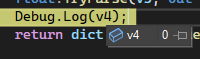
That's why I am lost
I will try to just type "3.5f" in a string and see
lean sail
im not sure why you insist on the f with tryparse. its not needed
https://learn.microsoft.com/en-us/dotnet/api/system.single.tryparse?view=net-8.0
look at the examples
upper pilot
oh ok let me try without, I misread your last message
huh it needs to use comma?
1,5
ok that works with ,
Didn't think that would be the case as you don't type 3,5f in the script
lean sail
upper pilot
Didn't think that would be the case as you don't type `3,5f` in the script
i thought that should be 35 (but i might be very wrong i dont use that format)
https://learn.microsoft.com/en-us/dotnet/api/system.globalization.cultureinfo.invariantculture?view=net-8.0#system-globalization-cultureinfo-invariantculture
try including this as a parameter
 cosmic rain
upper pilot
Didn't think that would be the case as you don't type `3,5f` in the script
cosmic rain
upper pilot
Didn't think that would be the case as you don't type `3,5f` in the script
Probably depends on your locale
lean sail
though i am surprised that 1.5 didnt work for you, because i tried it and both "1.5" and "1,5" convert properly. although 1,5 is 15 so it isnt the same number
upper pilot
"3,5" converted to 3.5, but "3.5" to 0
Let me try that option, I already wrote some code to fix it :c
    public static float GetParsedFloat(Dictionary<string, string> dict, string key, float defaultValue)
    {
        if (dict.TryGetValue(key, out string v))
        {
            v = v.Replace('.', ',');
            float.TryParse(v, out float parsedVal);
            return parsedVal;
        }
        else return defaultValue;

        //return dict.TryGetValue(key, out string val) && float.TryParse(val, out float parsedVal)) ? parsedVal : defaultValue;
    }
I liked the simple 1 line return tho, so I will try to fix it with your link
upper pilot
dont use what?
lean sail
the code you just wrote
upper pilot
yeah, how do I use invariant culture?
cosmic rain
Pretty sure that's controlled by the os settings.
 cosmic rain
upper pilot
yeah, how do I use invariant culture?
cosmic rain
upper pilot
yeah, how do I use invariant culture?
I think there should be a parameter that can be passed to the parse method..?
upper pilot
yeah its IFormatProvider
looking into it now
System.Globalization.NumberStyles.
Is what I get only
lean sail
upper pilot
yeah its `IFormatProvider`
try this
using System.Globalization;

  float.TryParse( strTest, NumberStyles.Float, CultureInfo.InvariantCulture, out test );
oops i named my variables test lol but im sure u can figure out that part
upper pilot
Yeah thanks, I got there almost. It didnt auto complete culture info, only System.IFormatProvider 😄
That works, thanks for the help! Sometimes you get some weird quirks like this, I'd expect it to parse them the same for everyone, not based on system settings.
I wonder if system settings are passed after compilation or if it would check each user system to decide how to parse floats?
Now that it's specified it won't matter tho
lean sail
i think in newer versions of c# you dont need the NumberStyles.Float part. because the docs i linked has declarations which shows 3 parameters, but in whatever version unity uses it didnt work
 steep saddle
Does anyone ever use visual scripting in addition to c#? I can think of some situations or systems where being able to see the logic flow laid out with nodes would be beneficial, but I've never used visual scripting, so curious what others think.
lean sail
steep saddle
Does anyone ever use visual scripting in addition to c#? I can think of some sit...
You can pretty easily just draw out a diagram, like a flow chart.
I doubt theres many people who would willingly use both c# and visual scripting
steep saddle
lean sail
You can pretty easily just draw out a diagram, like a flow chart.
Sure, and I've done that, but my flowchart doesn't update with my code 🙂
lean sail
steep saddle
Sure, and I've done that, but my flowchart doesn't update with my code 🙂
Well nothings stopping you from updating it. I've never felt the need to draw out small flow charts, describing the logic of a single class, which you'd see in visual scripting. Even with some of the more complex logic, the flow of it really shouldnt be so hard to understand.
Maybe some of your classes are doing too much, or could just be organized better
 spring basin
not really related to code but has anyone recently publish their unity game on facebook instant games?
is it still portable in Unity 2022 LTS?
 hard estuary
steep saddle
Does anyone ever use visual scripting in addition to c#? I can think of some sit...
hard estuary
steep saddle
Does anyone ever use visual scripting in addition to c#? I can think of some sit...
I use Shader Graph, which is a form of visual scripting. The main advantage is that it lets me see the preview of particular parts of the graph. It was also more compatible than a code itself (since it generates code anyway), while in the past some code scripts failed to work after changing the renderer pipeline.
I think visual scripting is the most appealing for people who don't know how to code. You could code some nodes, and then let artists/designers use it. I think it's a common practice to use some sort of graphs to "code" story flow (dialogues, quests etc.).
 buoyant vault
oh osrry I think I should move my issue to #⚛️┃physics
 icy depot
After getting an error for not having put a scene I was loading into build settings, I thought to myself, if I'm going to have maybe a thousand scenes in my game, will I really have to put all of those scenes into build settings and manage them? Or am I using scenes wrong by making one for each level I create?
Or is there an alternative way to load scenes without having to put them into build settings? (which I doubt...)
knotty sun
icy depot
After getting an error for not having put a scene I was loading into build setti...
depending upon complexity you could make your scene contents into prefabs and just load/unload those into one scene. If you want scenes then you can use addressables to have them without them being in the build settings
icy depot
thank you, i'll look into both
 last forge
hey does anyone has dealt with this warning message?
"BoxColliders does not support negative scale or size.
The effective box size has been forced positive and is likely to give unexpected collision geometry."
Both my Scale and Size are positive so I don't get it.

 hexed pecan
last forge
hey does anyone has dealt with this warning message?
"BoxColliders does not supp...
hexed pecan
last forge
hey does anyone has dealt with this warning message?
"BoxColliders does not supp...
How about its parent's scale?
lean sail
why does this happen? while(true) causes this to not require it to return anything

not having any specific code issue but just wondering why this is a thing
 sand drift
lean sail
why does this happen? `while(true)` causes this to not require it to return anyt...
sand drift
lean sail
why does this happen? `while(true)` causes this to not require it to return anyt...
while(true) is recursive in all paths. The function is not expected to escape the while statement unless break is used to jump the loop flow.
That's not the same for while(false)
ReSharper gives a warning as well.
 chilly surge
This is called control flow analysis, used by pretty much every compiler.
lean sail
hm i see. i didnt really expect that but the error went away in the middle of this test script and i got confused
chilly surge
It's also what powers analysis like "variable cannot be used before initialized."
 open basalt
Hi all, in a 2D game settings, I have this two objects (the character, and a retractable tongue) that I have a line renderer connected representing the tongue, and using fixedupdate to connect them together (setting the positions of the two objects). The issue Im having is when these objects move in a relatively high velocity, the line renderer struggles to keep track and starting to lag behind visually. Is there a better way to draw a tongue of a character? It acts almost like a grappling hook, zip line mechanic so I would need to render that tongue is a relatively high velocity
potentially I could limit the max velocity and instead move the backgrounds etc to mimic a high speed game feel? But I feel like there has to be a better way of dealing with this
hard estuary
open basalt
Hi all, in a 2D game settings, I have this two objects (the character, and a ret...
I would suggest refreshing visuals in LateUpdate (which is done after all Update methods are called). FixedUpdate is meant to calculate physics and doesn't depend on the frame rate, which means sometimes it can trigger multiple times per frame and sometimes it might not trigger at all.
open basalt
hard estuary
I would suggest refreshing visuals in `LateUpdate` (which is done after all `Upd...
holy, this was it. This fixed the issue I was having. Thanks! However, I'm a bit intrigued on why.
    public void UpdateTonguePosition(Vector3 Position)
    {
        lineRenderer.SetPosition(0, Position);
        lineRenderer.SetPosition(1, transform.position);
    }
This is the code that I am now calling in LateUpdate, and was calling in FixedUpdate. From my understanding FixedUpdate are called more frequently than Update, which means that Im updating the Linerenderer's position more frequently in FixedUpdate.
Wouldn't more frequently = more accurate lines?
ahhh because in Late Update, the calculations for velocity/rigidbody is already executed, THEN I update the line renderer, giving me the most accurate lines
I think that makes sense
knotty sun
open basalt
holy, this was it. This fixed the issue I was having. Thanks! However, I'm a bit...
wrong. Update is generally called more frequestly than Fixed update unless you have really screwed up your FPS
open basalt
hahah yea Im aware of that, just trying to understand why
hard estuary
open basalt
holy, this was it. This fixed the issue I was having. Thanks! However, I'm a bit...
FixedUpdate is meant to be called in constant intervals (the interval duration depends on your project's settings). Update and LateUpdate on the other hand are run once per frame. Intervals are as long as the intervals between frames. Let's assume your FixedTimestamp is 0.02 (default value), which means FixedUpdate will be run 50 times per second in constant intervals of 0.02s. If your current frame rate is 30fps, then it will be usually called more often than Update/LateUpdate. If you current frame rate is 60fps, then it will be called less often than your Update/LateUpdate.
open basalt
open basalt
ahhh because in Late Update, the calculations for velocity/rigidbody is already ...
ahhh that makes so much sense. Now question extending a bit from the issue I was experiencing, is this a fair description of why moving it to Late Update fixed the issue?
"If the function is in Late Update, in that one frame, the rigidbody's movements are already calculated, thus when we update the line renderer, it gives the most accurate position as per that frame"
it would also be smoother because it's only done every frame (visiually would be smoother)
hard estuary
open basalt
ahhh that makes so much sense. Now question extending a bit from the issue I was...
LateUpdate happens after all Update methods, so if you have some repositioning in some Update methods, then it's guaranteed that it will already be done before LateUpdate, therefore all visuals will be good. You could compare Update to preprocessing and LateUpdate to processing, and then all the rendering stuff finally happens.
hard estuary
open basalt
it would also be smoother because it's only done every frame (visiually would be...
Since rendering happens once per frame, it makes sense to do rendering-related calculations only once per frame and just before rendering. 👍
open basalt
ahhh that makes sense. Thankyou. I always forget there's more than just Start and Update lol
open plover
Which one would be bigger in terms of memory: a 10 character string or a reference
simple egret
open plover
Which one would be bigger in terms of memory: a 10 character string or a referen...
Depends on system architecture. References will be 4 bytes on a 32-bit system, 8 bytes on 64-bit.
Too small to make a difference nowadays, where memory comes by dozens of gigabytes
knotty sun
open plover
Which one would be bigger in terms of memory: a 10 character string or a referen...
10 character string, a reference is always 8 bytes. A 10 char string is 20 bytes
simple egret
Looked it up and a string's size will equate to 26 + length * 2. It needs to store a ref to the underlying array, the string length, the capacity, etc. which is where parts of the 26 comes from. Then, 2 bytes per character
open plover
simple egret
Looked it up and a string's size will equate to `26 + length * 2`. It needs to s...
ty
open plover
public ushort[] players;

public Player GetPlayer(ushort player)
{
    return ServerManager.GetInstance().players[player];
}
So I hold the id's of the players in my array cuz I can access the Player class via a dictionary
Should I instead just have an array of Players?
I thought my original idea would be better performancewise (I know the difference is extremely small)
ok nvm decided to keep the ushort[] for other reasons
hard estuary
open plover
Should I instead just have an array of Players?
If the player count is low, then a dictionary won't help a lot. It also won't help if you don't access it many times.
 mighty juniper
Hey, how can i apply a transformation to the position of a 3D point in space to rotate a certain amount of degrees in an axis around another point? Here's a sketch of what i mean in 2D for simplicity. Hope that makes sense, I'm really struggling to get my head around it
 hexed pecan
mighty juniper
Hey, how can i apply a transformation to the position of a 3D point in space to ...
hexed pecan
mighty juniper
Hey, how can i apply a transformation to the position of a 3D point in space to ...
Quaternion rotation = ...
vec = rotation * (vec - pivot);
vec += pivot;```The rotation could be something like Quaternion.AngleAxis(degrees, axis);
So basically vec - pivot converts it into a vector relative to the pivot
Multiplying the vector with a quaternion will rotate the vector
Then add the pivot offset back to the vector
mighty juniper
I see, thanks for the explanation
 warm kraken
private bool CameraDrawn
{
set
{
print(value);
cameraDrawn = value;
camHolder.SetActive(value);
toggleCameraAlternator.Choose(value);
}
}
private void OnValidate()
{
CameraDrawn = cameraDrawn;
}``` this script works fine. executes code when boolean is changed in the inspector. but it throws this warning. should i ignore it or is there a fix? hexed pecan
warm kraken
``` [SerializeField] private bool cameraDrawn;
private bool CameraD...
hexed pecan
warm kraken
``` [SerializeField] private bool cameraDrawn;
private bool CameraD...
Does Choose use SendMessage or what?
warm kraken
        {
            if (isA)
            {
                foreach (GameObject obj in a)
                {
                    obj.SetActive(false);
                }
                foreach (GameObject obj in b)
                {
                    obj.SetActive(true);
                }
            }
            else
            {
                foreach (GameObject obj in a)
                {
                    obj.SetActive(true);
                }
                foreach (GameObject obj in b)
                {
                    obj.SetActive(false);
                }
            }
Im confused about that warning because I dont see SendMessage anywhere
Maybe something in camHolder uses it when it gets enabled?
hard estuary
hexed pecan
Does ``Choose`` use SendMessage or what?
A simple way to find out: remove/comment that line and check if the warning still exists
 versed saddle
Hello, I come here because I really need help for something very simple but which is beyond my ability, I watched lots of YouTube tutorials, I asked someone who kindly helped me with my it still didn't work. So my last solution is you. Here is my problem, I need a script in C# that teleports the player to specified coordinates when he collides with an object like a cube or a cylinder, that's all, for more information I am making a mod for one game called wobbly life and I'm working on Unity version 2020.3.44f1. I really hope someone sees this message and can help me I've had this problem for 1 month. THANKS
open plover

Compare the collision with something ( a tag for example ) then inside the if set the transform.position = new Vector3(0,0,0) for example
rigid island
why cant you do wat you do for player already 🤔
 celest wadi
I have an issue with a rotation of an object based on player mouse movement. For 60 fps it works well, but for 500 fps there's almost no rotation. Multiplying the sensitivity by 10 would make the 60fps one too fast and the 500 one decent. Any ideas on how to fix it?
Edited:
float mouseX = Input.GetAxisRaw("Mouse X") * sensitivityMultiplier;
float mouseY = Input.GetAxisRaw("Mouse Y") * sensitivityMultiplier;
    Quaternion rotationX = Quaternion.AngleAxis(-mouseY, Vector3.right);
    Quaternion rotationY = Quaternion.AngleAxis(mouseX, Vector3.up);

    Quaternion targetRotation = rotationX * rotationY;

    transform.localRotation = Quaternion.Slerp(transform.localRotation, targetRotation, speed * Time.deltaTime);
 west lotus
Do not multiply mouse input by delta time
 somber nacelle
don't multiply mouse input by deltaTime, it is already framerate independent so you just end up with stuttery controls
west lotus
Heh first
celest wadi
@west lotus @somber nacelle thanks for the advice, I did try that previously but I have the same result. As in, if I have sensitivityMultiplier set to 1, on 60fps it moves well, but on 500 it barely moves (I'll remove the Time.deltaTime anyway)
 gray mural
Having 2 serializable classes: the 1st one, which has a List of the 2nd ones, and the 2nd one, which has to access a boolean from the 2nd one in the method, which is called with the custom Attribute when the field is changed in the inspector, what would be a way to do this without getting a stack overflow on serialization?
 open bluff
I control the animations in the game through the blend tree. I want to change the idle animation to rifle idle animation when my character picks up a gun. How can I do this? I tried to open a different blend tree and control the idle transitions there, but I gave up because there were some problems between the transitions with the other blend tree.
 somber nacelle
open bluff
I control the animations in the game through the blend tree. I want to change th...
somber nacelle
open bluff
I control the animations in the game through the blend tree. I want to change th...
not a code question. #🏃┃animation
and consider using a separate blend tree for that
open bluff
somber nacelle
not a code question. <#502171313201479681>
and consider using a separate blend ...
sorry
 paper bobcat
Hey, I'm trying to let my player grab objects and and put them down somewhere else but i'm facing some trouble. When the player grabs the object, the "grabPoint" and the object move to a completley different spot on the player when grabbed. I'm new to coding in c# and in unity so sorry If i explained it bad. Any help would be appreciated.
This is my grabObject script
Hastebin is a free web-based pastebin service for storing and sharing text and code snippets with anyone. Get started now.
 mighty void
exists a way to use new input system and call perfomed action every frame is pressed?
somber nacelle
!code
 tawny elkBOT

Posting code
📃 Large Code Blocks
Use links to services like:
https://gdl.space/, https://paste.ofcode.org/, https://hatebin.com/, https://paste.myst.rs/, https://hastebin.com/
📃 Inline Code
Surround code with three backquotes. Not quotation marks.
To format as C#, add cs to the first line:
```cs
// Your code here
```
Add a comment with a line number if there is an error message.
gray mural
mighty void
exists a way to use new input system and call perfomed action every frame is pre...
Since Input System's performed is called every frame the value is changed, you may consider either using Update or starting a method on started and cancelling on canceled. If required, the method may also invoke a custom action you've created
mighty juniper
Hey all, I'm trying to create my own see through portal system (Similar to games like portal) and am working on rotating the camera on the other side of the portal so that it doesn't appear static, here's my code:
    private void RotatePortalCamera(Transform entryPortalTransform, Transform exitPortalTransform, Transform exitPortalCameraTransform)
    {
        Vector3 offset = entryPortalTransform.position - _playerTransform.position; // Offset between the entry portal and the player

        float angle = Quaternion.Angle(entryPortalTransform.rotation, exitPortalTransform.rotation); // Difference in angles between 2 portals to adjust focus point accordingly

        Quaternion rotation = Quaternion.AngleAxis(angle, Vector3.up); // Rotation quaternion around the exit portal's axis

        Vector3 focusPoint = exitPortalTransform.position + (rotation * offset); // Apply rotation to offset to get the focus point for the camera

        exitPortalCameraTransform.LookAt(focusPoint);

        // Line renderer for visualisation
        _offsetLine.SetPosition(0, exitPortalTransform.position);
        _offsetLine.SetPosition(1, focusPoint);
    }```
The issue is, I cant for the life of me figure out how to move the focus point such that the camera looks the right way for every circumstance. The line represents the direction the camera is looking, and the sphere is acting as the player's POV.
In the circumstance in the first image, it works, however if I was to look through the other portal instead (shown by the second image), the direction it looks is 180 degrees off, requiring me to use Vector3.down as the axis instead of Vector3.up. I think this is where the problem stems from, but I cant figure out a solution that works in every position of the 2 portals, and thinking about it in 3D is really messing with my brain. Does anyone know what i may be able to do to solve it?

 dusky lake
mighty juniper
Hey all, I'm trying to create my own see through portal system (Similar to games...
dusky lake
mighty juniper
Hey all, I'm trying to create my own see through portal system (Similar to games...
I suggest watching this video: https://www.youtube.com/watch?v=cWpFZbjtSQg

Experimenting with portals, for science.
The project is available here: https://github.com/SebLague/Portals/tree/master
If you'd like to get early access to new projects, or simply want to support me in creating more videos, please visit https://www.patreon.com/SebastianLague
Resources I used:
http://tomhulton.blogspot.com/2015/08/portal-rende...
its not too indepths but i think it kinda solves what you are asking here
 eager fulcrum
Have, I have some issues with my conveyord belt placement: https://pastebin.com/p3X9tjJD
Pastebin
Pastebin.com is the number one paste tool since 2002. Pastebin is a website where you can store text online for a set period of time.
mighty juniper
dusky lake
I suggest watching this video: https://www.youtube.com/watch?v=cWpFZbjtSQg
Yeah i've had a look at that after posting and it does look probably too advanced for me right now, especially making shaders for it
eager fulcrum

when I place them like this they connect correctly for a second, but then they change to this
and for some reason the upper belt has InputConnection: Down, OutputConnection: Down
bottom belt InputConnection: Up, OutputConnection: Up
I'm pretty sure that the issue sits in UpdateBeltConnection
dusky lake
mighty juniper
Yeah i've had a look at that after posting and it does look probably too advance...
You dont need to create shaders and stuff but he speaks a bit about the concept of camera placement and perspective somewhere in there
mighty juniper
dusky lake
You dont need to create shaders and stuff but he speaks a bit about the concept ...
the thing is to create distance at least what i understood from that video, you have to place the camera behind the portal, and crop out the surroundings so it only shows the perspective through the portal frame itself, which i believe he did with a shader, I'm not sure how else to do it
dusky lake
if you have a simple environment you can just make sure the camera is always inside the mesh, it has no problem looking out then, unless you enable two-sided rendering
mighty juniper
I suppose, I'll give it another look thanks
mighty void
i'm using unity 6000.0.017f1, when i send my custom events the unity or the exported game crashes and i dont know why
i have to download the 2022.3.44 version?
i dont know why this happens
cosmic rain
mighty void
i'm using unity 6000.0.017f1, when i send my custom events the unity or the expo...
Wdym by "custom events"?
 pure ore
Can I ask what is wrong with this code? My player camera can't look up ```cs
private Quaternion ClampXAxis(Quaternion quaternion, float minimum, float maximum)
{
quaternion.x /= quaternion.w;
quaternion.y /= quaternion.w;
quaternion.z /= quaternion.w;
quaternion.w = 1f;
float value = Mathf.Rad2Deg * Mathf.Atan(quaternion.x);
value = Mathf.Clamp(value, minimum, maximum);
quaternion.x = Mathf.Deg2Rad * value;
return quaternion;
}
 mighty void
cosmic rain
Wdym by "custom events"?
mighty void
cosmic rain
Wdym by "custom events"?
this is my event
 cosmic rain
pure ore
Can I ask what is wrong with this code? My player camera can't look up ```cs
pri...
cosmic rain
pure ore
Can I ask what is wrong with this code? My player camera can't look up ```cs
pri...
Shouldn't do quaternion math.
pure ore
cosmic rain
Shouldn't do quaternion math.
Why.
cosmic rain
pure ore
Why.
Because they're not really meant for you to mess with. Also, no one would be able to help with it.
pure ore
Okay well I guess if I want to be a master programmer I have to figure it out myself
cosmic rain
mighty void
this is my event
So it's just a regular C# event. Looks fine on the first glance. Are you sure it's the event and not the logic that it calls that causes the crash? How are you debugging it?
cosmic rain
pure ore
Okay well I guess if I want to be a master programmer I have to figure it out my...
No. Master programmers don't do that either.
There's no need to.
mighty void
cosmic rain
So it's just a regular C# event. Looks fine on the first glance. Are you sure it...
i was using unity 6000.0.07f and i upgrade to 6000.0.017f1 and this happens i dont know why, sometimes happens when i press on key, somethimes when my player hit the ground, sometimes courutines, i dont know
cosmic rain
pure ore
Okay well I guess if I want to be a master programmer I have to figure it out my...
Maybe master mathematicians do.
cosmic rain
mighty void
i was using unity 6000.0.07f and i upgrade to 6000.0.017f1 and this happens i do...
Did you look at the editor/player logs. Or crash logs? Or crash dump?
mighty void
i can destroy terrain
 mighty void
cosmic rain
Did you look at the editor/player logs. Or crash logs? Or crash dump?
mighty void
cosmic rain
Did you look at the editor/player logs. Or crash logs? Or crash dump?
where are crash log?
cosmic rain
mighty void
where are crash log?
Try googling that. I don't have the path memorized.


 rigid island
mighty void
rigid island
mighty void
hope thats not a production type project instead just testing, you should be on LTS
pure ore
cosmic rain
Because they're not really meant for you to mess with. Also, no one would be abl...
better? ```cs
public void Rotation(Transform character, Transform camera)
{
m_CharacterRot *= Quaternion.Euler(0.0f, m_MouseX, 0.0f);
character.localRotation = m_CharacterRot;
if (camera)
{
    m_XRot -= m_MouseY;
    m_XRot = Mathf.Clamp(m_XRot, -95f, 95f);
    camera.localRotation = Quaternion.Euler(m_XRot, 0.0f, 0.0f);
}
}
IT works, just asking if its the correct way according to your standards
mighty void
rigid island
hope thats not a production type project instead just testing, you should be on ...
hey, how are you?
i'm searching for you in the morning
in the last days i have some problems with eventsystem
y try updating and it was a unity editor problem
and camera z axis problem
rigid island
mighty void
and camera z axis problem
wdym by that
did you try opening the project I sent to your version
mighty void
rigid island
wdym by that
in the last days you try to help me XD
cosmic rain
pure ore
better? ```cs
public void Rotation(Transform character, Transform camera)
{
...
It looks ok on the first glance.
rigid island
mighty void
in the last days you try to help me XD
with the OnPointerEnter ?
mighty void
no, i donwload next unity version and last unity version
mighty void
rigid island
with the OnPointerEnter ?
yeah
mighty void
mighty void
no, i donwload next unity version and last unity version
and works perfectly with the lts version
and the next 6 version
rigid island
well of course
mighty void
but not with my current version
i have to donwload lts version
a lot of bugs in 6 snapshots
rigid island
yes you should be using the lts
don't make any production projects in 6 preview
or 6 any time soon, its always going to be very buggy in the beginning
stick to LTS
mighty void
rigid island
yes you should be using the lts
thank you so much bro
rigid island
mighty void
a lot of bugs in 6 snapshots
if you can reproduce them as bugs don't forget to send bug report through editor
 jade stirrup
hey im new to unity can someone help me with a question i have with making a 2d game
rigid island
jade stirrup
hey im new to unity can someone help me with a question i have with making a 2d ...
!ask
tawny elkBOT
:thinking: Asking Questions
:mag: Search the internet for your question!
:book: Use the API Scripting Reference and User Manual and this troubleshooting site for commonly posted issues.
:wrench: Attempt to debug your issue.
:thought_balloon: Find an appropriate channel by reading the name and description in #🔎┃find-a-channel
:grey_question: And don't ask to ask, ask a full question illustrating with screenshots if needed.
-# For more posting guidelines, go to #854851968446365696
meager tinsel
Weird problem, I'm trying to solve. I'm creating a sword builder, with different models being instantiated on top of each other. However, the end result does not look neat at all, and I'm trying to figure out what the problem is.
using UnityEngine;
using UnityEngine.UI;

public class SwordBuilder : MonoBehaviour
{
    [Header("Sword Parts Pools")]
    public GameObject[] bladePrefabs;
    public GameObject[] crossguardPrefabs;
    public GameObject[] hiltPrefabs;

    [Header("UI Sliders")]
    public Slider bladeSlider;
    public Slider crossguardSlider;
    public Slider hiltSlider;

    private GameObject currentBlade;
    private GameObject currentCrossguard;
    private GameObject currentHilt;

    //Access AudioManager script here.
    AudioManager audioManager;

    private void Awake()
    {
        audioManager = GameObject.FindGameObjectWithTag("Audio").GetComponent<AudioManager>();
    }

    void Start()
    {
        bladeSlider.maxValue = bladePrefabs.Length - 1;
        crossguardSlider.maxValue = crossguardPrefabs.Length - 1;
        hiltSlider.maxValue = hiltPrefabs.Length - 1;

        BuildSword();
    }

    public void BuildSword()
    {
        ClearExistingParts();

        Vector3 currentPosition = transform.position;
        //Instantiate and configure the hilt
        currentHilt = Instantiate(hiltPrefabs[(int)hiltSlider.value], currentPosition, Quaternion.identity);
        currentHilt.transform.parent = transform;
        float hiltHeight = currentHilt.GetComponentInChildren<Renderer>().bounds.size.y;
        currentPosition += Vector3.up * hiltHeight;

        //Instantiate and configure the crossguard above the hilt.
        currentCrossguard = Instantiate(crossguardPrefabs[(int)crossguardSlider.value], currentPosition, Quaternion.identity);
        currentCrossguard.transform.parent = transform;
        float crossguardHeight = currentCrossguard.GetComponentInChildren<Renderer>().bounds.size.y;
        currentPosition += Vector3.up * (crossguardHeight);

        //Instantiate and configure the blade above the crossguard.
        currentBlade = Instantiate(bladePrefabs[(int)bladeSlider.value], currentPosition, Quaternion.identity);
        currentBlade.transform.parent = transform;
        float bladeHeight = currentBlade.GetComponentInChildren<Renderer>().bounds.size.y;
        currentPosition += Vector3.up * (bladeHeight);
    }

    void ClearExistingParts()
    {
        if(currentBlade) Destroy(currentBlade);
        if(currentCrossguard) Destroy(currentCrossguard);
        if(currentHilt) Destroy(currentHilt);
    }
I'm trying to make it so these actually take up the space they would in Maya, where I exported them. Any ideas? Or do I need to specifically center them in maya, which is the problem?
 cosmic rain
jade stirrup
i thought this channel was okay for it
cosmic rain
jade stirrup
i thought this channel was okay for it
The issue is not the channel, but what/how you're asking.
jade stirrup
cosmic rain
The issue is not the channel, but what/how you're asking.
Sorry yeah I corrected it and posted it fully in the right channel after, but the issue is fine now. I am starting too big is the issue
cosmic rain
meager tinsel
Weird problem, I'm trying to solve. I'm creating a sword builder, with differen...
Well, how are the meshes offset from the pivot point? If you export them with the offset, then perhaps you don't need to modify their position at all.
Besides, bounds are a very unreliable thing to use for that imho.
meager tinsel
cosmic rain
Well, how are the meshes offset from the pivot point? If you export them with th...
Yeah, the way I did it is that I positioned everything in maya, and then exported the fbx. They're not all centered in the original file. I wasn't really sure how else to do this specific thing, admittedly.
cosmic rain
meager tinsel
Yeah, the way I did it is that I positioned everything in maya, and *then* expor...
I think that's actually a decent approach. That just means that you don't need to reposition them. Just instantiate them at the same position.
meager tinsel
Oh. Hmm. Should I just remove the currentPosition then? Or is that the float heights...?
cosmic rain
meager tinsel
Oh. Hmm. Should I just remove the currentPosition then? Or is that the float ...
The heights. Don't modify the current position.
meager tinsel
cosmic rain
The heights. Don't modify the current position.
Okay, since the heights are used in the currentPosition, both of them might have to go.
Since I set up Vector3 currentPosition = transform.position;
Which means...I think I shouldn't need it.
Thank god. It worked.
 sick mural
!code
tawny elkBOT
Posting code
📃 Large Code Blocks
Use links to services like:
https://gdl.space/, https://paste.ofcode.org/, https://hatebin.com/, https://paste.myst.rs/, https://hastebin.com/
📃 Inline Code
Surround code with three backquotes. Not quotation marks.
To format as C#, add cs to the first line:
```cs
// Your code here
```
Add a comment with a line number if there is an error message.
 valid latch
Hello ... would someone be willing to throw me a simple syntax example for performing a Binary Search on a NativeArray<float>? I've found reference to the NativeSortExtension BinarySearch<T>(NativeArray<T>, T) definition (https://docs.unity3d.com/Packages/com.unity.collections@2.2/api/Unity.Collections.NativeSortExtension.html#Unity_Collections_NativeSortExtension_BinarySearch__1_Unity_Collections_NativeArray___0____0_)) , but can not for the life of me nail down the syntax for utilizing it ... I keep bumping up against "NativeArray<float> does not contain a definition for BinarySearch", despite adding the Unity.Collections namespace. Doesn't appear to be any existing examples in the Googlesphere ... Is there something more that's required before referencing methods from the NativeSortExtension class?
 dusk apex
Maybe show your script
valid latch
Which one of the many many different iterations? 😉
    public struct ConvertNoiseToTerrainJob : IJob
    {
        public int Size;

        [ReadOnly]
        public NativeArray<float> NoiseResult;
        public NativeArray<float> TerrainHeights;

        [WriteOnly]
        public NativeArray<int> Result;

        public void Execute()
        {
            HeightComparer comparer = new HeightComparer();
            // var terrainHeights = TerrainHeights.ToArray();
            for (int i = 0; i < NoiseResult.Length; i++)
            {
                    // int terrainIndex = Array.BinarySearch(terrainHeights, NoiseResult[i]);
                    var value = (float)NoiseResult[i];
                    int terrainIndex = TerrainHeights.BinarySearch(value);
                    // ^^^^^ ERROR
                    // "NativeArray<float> does not contain a definition for BinarySearch"

                    Result[i] = (terrainIndex < 0) ? (~terrainIndex) - 1 : terrainIndex;
            }
        }

    }
^ Looking for proper syntax for the TerrainHeights.BinarySearch(value) line.
dusk apex
Binary Search looks to be an extension method so your call it as a method from your instance.
I'm assuming the error line is the Array.BinarySearch
valid latch
The NativeArray<T>.BinarySearch, yes.
Commented out Array.BinarySearch() version works, but can't put it into the job system.
dusk apex
Can you show your included name spaces and directives?
valid latch
using UnityEngine;
using Unity.Collections;
using Unity.Jobs;
using Unity.Mathematics;
using Unity.Burst;
using System;
using System.Collections.Generic;
using Unity.VisualScripting;
BinarySearch method should be in NativeSortExtension class in Unity.Collections.
dusk apex
Is it the only error that you've got?
valid latch
Yep ... Hmmm. Looks like maybe it was an Editor/IDE synch issue, not the code. Error just disappeared ... great, except that I've been chasing this for a couple hours! 😄
somber nacelle
valid latch
Yep ... Hmmm. Looks like maybe it was an Editor/IDE synch issue, not the code. ...
that typically means you need to regenerate the project files in the external tools settings. this can happen if you install a package and unity just doesn't generate the csproj file for it
valid latch
That must be it ... Added Unity.Collections package a while ago, and must have somehow tweaked it to reset.
Sorry for the trouble ... really should have tried the Close->Reopen trick first! 🙂
Finally. Build Succeeded! 👍
 primal wind
Let's say i have 3 textures, 3 16x16 and one 32x32. How would i desing an atlas packer that handles that?
I thought about just, making the atlas the width of all images side by side, same thing with height, pack it then remove empty spaces but it wouldn't be very efficient or good (wouldn't be much of a square)
hard estuary
primal wind
I thought about just, making the atlas the width of all images side by side, sam...
I don't think non-squarish shape would be an issue. Some hardwares and algorithms work better if the texture has dimensions that are a power of 2, which means textures like 64x32 are still fine. I think more squarish shapes are better in terms of viewing/editing, because there is less scrolling in such objects, which makes it easier for developers to work on them.
primal wind
I just found a blog entry and it looks nice, but it seems like i requires power of two sized textures to work
It's not really a problem for me tho, more for modders but idk
Tho again i think Minecraft has that limitation? All guides and dos use power of twos
Forge docs even say explicitly to not use non power of two textures
But that was an older version, idk about now
 plucky inlet
Hey everyone. I am wondering whats the best way to handle Unity and system.tasks asynchronous scopes. I am currently running a statemanager that is handling the main app state with Tasks, awaits and callbacks to receive correct app status through different systems like network connections, webserver sync, device capabiliy checks and so on. This works fine so far, but the more I move the logic of states to tasks, I run into the issue, that most unity parts are main thread bound. Currently I am checking and updating the raw state and then dispatch to mainthread for the underlying systems to react to that state. Is there any smarter choice of doing so, or should this already be the best way to separate it and only let task do data driven parts and then return to mainthread to visually update the system and use unity internal calls?
hard estuary
@primal wind For me, the resolution had a significant change when I tested the effectiveness of some compression algorithms. As stupid as it sounds, sometimes files took less space just because I increased their size to fit the power of 2 restrictions. E.g. I've just added a test image of size 1023x2047 and it took 8MB, but when I increased it to 1024x2048 it took only 1,3MB of space due to compression. Similar effect can be achieved by configuring it to automatically change its size to fit the power of 2 restriction.

 primal wind
That is interesting, thanks
I'll probably make this thing a standalone lib lol so i can use it wherever i want with C# support
knotty sun
 simple ridge
knotty sun
<#497874081329184799>
simple ridge
knotty sun
<#497874081329184799>
Sorry, moved to the other channel! Thanks.
cosmic rain
hard estuary
<@246954355817840642> For me, the resolution had a significant change when I tes...
This is due to certain compression algorithms having certain requirements. If you look at the preview window in the second screenshot it has the BC1 compression format. The first one doesn't.
gray mural
Is there any way to make my non-serializable Func<bool> persistent?
 tacit vine
did someone found a way to give a button event in unity a enum parameter?
cosmic rain
gray mural
Is there any way to make my non-serializable `Func<bool>` persistent?
Persistent in what way?
gray mural
cosmic rain
Persistent in what way?
Persistent across game sessions
cosmic rain
gray mural
Persistent across game sessions
Wdym? Functions don't hold any state. What part of it do you want to persist across sessions?
Like, the method that it points to?
gray mural
cosmic rain
Like, the method that it points to?
Yes
It's a Func<bool>, which is assigned in a method. On script compilation, it disappears, so I have to call the method once more
cosmic rain
Well, there isn't an easy way. You'll probably need to implement a custom serialization of functions in your project for that. At which point it's not gonna be a func anymore.
Serialize the full name of the method and use reflection on load to reference the correct function again.
You might or might not be able to get that info from the func. You'll need to check the docs.
gray mural
Alright, this was a bad solution to a bigger problem. I've figured out another way to do it, so I'll just remove this Func
Thank you for your help
cosmic rain
Actually, the above would only work for static functions anyway. For a non static function it's gonna be several times more complicated
gray mural
Well, I can actually retrieve the function by calling the suitable method again in OnEnable, but this doesn't seem like a clear implementation
plucky inlet
plucky inlet
Hey everyone. I am wondering whats the best way to handle Unity and system.tasks...
As a follow up question. Is it possible, to keep a callstack from another thread when you enqueue the debug.log with an mainthread dispatcher?
Well,looks like unity 6 is taking care of this: https://docs.unity3d.com/6000.0/Documentation/ScriptReference/Awaitable.html
 thick terrace
plucky inlet
Well,looks like unity 6 is taking care of this: https://docs.unity3d.com/6000.0/...
thick terrace
plucky inlet
Well,looks like unity 6 is taking care of this: https://docs.unity3d.com/6000.0/...
awaitable is available since 2022 (or was it 2023), it's definitely nice to have but it doesn't do anything that was impossible before
plucky inlet
thick terrace
awaitable is available since 2022 (or was it 2023), it's definitely nice to have...
It seems to make it easier waiting for the mainthread in a background thread and continue then to avoid for example state updates where debug.log will fall behind, because debug.log with context is not threadsafe. Also, about since 2022 or 2023, see the screenshot

 night nexus
Hi, I have a question but I don't know if you could help me.
Basically I follow the Youtube tutorials from TUTO UNITY FR and currently I have a problem with my character's JUMP. There are times my Player jumps well but other times he doesn't want to jump.
thick terrace
oh right, it was 2023
plucky inlet
It says unsupported for 2023
thick terrace
oh no, that's just the whole of the unity 2023.1 release is unsupported since it's not LTS, only the ones with a green bar on the dropdown are supported releases
plucky inlet
So none of 2023? Confusing 😄 but whatever, I am switching to unity 6 anyways. Thanks for the insights tho
 thick terrace
yeah, unity 6 is the LTS version of 2023 due to the renaming!
or it will be, unity 6 preview is like the next tech release of 2023 before the LTS
plucky inlet
Ah , got it. 2023.3 is 6, ya, I vaguely remember reading that 😄
thick terrace
about waiting for the main thread, there's a way to get the equivalent behaviour with Task by passing in the unity task scheduler from the main thread when starting a task, and i assume Awaitable does something similar under the hood, but it's much more convenient 😄
plucky inlet
Yep, convenience is key in this case 😄 I had my sloppy times with tasks and returning back and forth already 😄 If Unity delivers a solution, I grab that for sure 🙂
 lapis pebble
Hey everyone! Hope y'all doing well - I come here with a problem I need solving.
I'm writing a script where it detects the last touched surface, and when it moves into the upcoming collider - it should return to it's original rotation values (0, 0, 0). I'm trying to implement this rotational reset using Quaternion.Slerp, but it doesn't seem to work properly. I've tried to fix this problem by myself - but I always hit the same road block over and over, so I'm sharing this problem here in hopes of getting more insight on how to work with this quaternion method. Any help will be greatly appreciated!
P.S. Here is the script in question, to add more context into what I'm trying to work on:
https://gdl.space/afahafuhex.cs
knotty sun
lapis pebble
**P.S.** Here is the script in question, to add more context into what I'm tryin...
!code. Use a paste site please
tawny elkBOT
Posting code
📃 Large Code Blocks
Use links to services like:
https://gdl.space/, https://paste.ofcode.org/, https://hatebin.com/, https://paste.myst.rs/, https://hastebin.com/
📃 Inline Code
Surround code with three backquotes. Not quotation marks.
To format as C#, add cs to the first line:
```cs
// Your code here
```
Add a comment with a line number if there is an error message.
lapis pebble
knotty sun
!code. Use a paste site please
Sorry, my bad - made an edit already
knotty sun
lapis pebble
Sorry, my bad - made an edit already
Cool, thanks. You are using Slerp incorrectly which is your problem
Lerp and Slerp are
current = start, end, t where t varies between 0 and 1
you are doing
current = current, end , t where t is basically a constant
Also you are only calling it once, it should be in a Coroutine
 lucid ridge
Hi, what is the best way to get a file stored on the dedicated server from the client ?
- Use RPC and send the file to the client
- Use an HttpListener on the dedicated server and download file from the client
lapis pebble
knotty sun
Cool, thanks. You are using Slerp incorrectly which is your problem
Lerp and Sle...
Thanks for the response!
I'll try to correct this problem myself, but I may return and ask for more help, in case I'll get stuck again - hope it's not considered a rude thing to do
knotty sun
lapis pebble
Thanks for the response!
I'll try to correct this problem myself, but I may retu...
not at all, as it happens I am looking at code doing something very similar to you. Wait one
knotty sun
lapis pebble
Thanks for the response!
I'll try to correct this problem myself, but I may retu...
This is very simple code to open and close a door
knotty sun
lucid ridge
Hi, what is the best way to get a file stored on the dedicated server from the c...
I'm confused, in which direction is the file meant to go?
lucid ridge
knotty sun
I'm confused, in which direction is the file meant to go?
The client downloads a file from the server
(.bundle files)
knotty sun
lucid ridge
The client downloads a file from the server
Then you would need a HttpListener on the Server and a HttpClient on the client to initiate the download
lucid ridge
knotty sun
Then you would need a HttpListener on the Server and a HttpClient on the client ...
Thanks, i will do that !
 frozen maple
can unity store a spirte in memory? i have a scriptable with a public sprite variable. and i try to capture a printscreen of a render texture and store the data in the scriptable but i always get typ mismatch
plucky inlet
frozen maple
can unity store a spirte in memory? i have a scriptable with a public sprite var...
Maybe show your code so we know what might be causing the error
knotty sun
frozen maple
can unity store a spirte in memory? i have a scriptable with a public sprite var...
yes, you cannot store runtime data in a ScriptableObject unless you store it as a byte array
frozen maple
knotty sun
Also !code
frozen maple
mhhh
so what i wanna do is, creating runtime ui item icons. depends of the prefab
like weapons which have sockets to add other stuff like scopes
so i want to dynamic genereate ui icons for it.
plucky inlet
frozen maple
so i want to dynamic genereate ui icons for it.
Do you really need to "create" them or can you just layer different parts on top of each other to create the desired visuals?
Also keep in mind, scriptable obejcts on runtime get reset everytime you restart your game/app
frozen maple
yes i want to create it. so actually every item has a 3d object. so i want to generate my ui icons dynamicaly
yea it doesnt matter when it reset. it just update when load inventory and then only when the item changes
 swift falcon
Is there a way to determine if an UObject is runtime instantiated? Currently, i am checking the instanceID. If it is negative, then assume it is instantiated. But this gets broken in editor because the instanceID's are changing for each editor session. Not when you swap to the play mode. There are some cases when instanceID does not gets updated too (stays negative). Besides that, localFileIdentifier is not trustable too. It gets updated when you add a component even while playing the game in-editor. So the problem is editor-player.
plucky inlet
frozen maple
yes i want to create it. so actually every item has a 3d object. so i want to ge...
Okay, got it. So you rather be saving those screenshots as a file on your system/app and reload them before taking new shots for example
frozen maple
exactly. i already was able to laod it when i save it as sprite
but i though its also possible to have it in memory
but seems that this is not working
plucky inlet
as long as it is being used, its in memory anyways.
I guess, as you are regenerating new screenshots in your code, it just loses the old reference. so you might have some dictionary<itemID, texture> or something to keep track of them
frozen maple
thats what i thogougt but without saving it as file i was not able to load it in scriptable. i always get type mismatch
plucky inlet
What mismatch do you get?
frozen maple
mh yea could be
cosmic rain
frozen maple
can unity store a spirte in memory? i have a scriptable with a public sprite var...
Wdym by type mismtach? Is that a runtime error you're getting? Can you share the error details?
plucky inlet
I guess you are trying to create a sprite from the wroong texture type
frozen maple
yeas runtime error in the inspector where it should load the sprite
plucky inlet
frozen maple
yeas runtime error in the inspector where it should load the sprite
Please show it, the error
frozen maple
i already upadted script. sec
lapis pebble
knotty sun
not at all, as it happens I am looking at code doing something very similar to y...
I think I need some further help with my issue
I have redone a part of the script to work with Coroutine instead of a delegate, but I still can't properly utilize it (mostly due to my little knowledge of it)
Here is the second revision now: https://gdl.space/senexiguqu.cs
knotty sun
lapis pebble
I have redone a part of the script to work with Coroutine instead of a delegate,...
look at my code. you are missing a while loop
so your code is still only executing once
lapis pebble
knotty sun
look at my code. you are missing a while loop
Is it even safe to use a while loop in Unity?
knotty sun
of course, as long as it has a yield inside it
you don't think I began coding yesterday do you?
lapis pebble
knotty sun
you don't think I began coding yesterday do you?
No no, not implying anything of that sort
I just don't use such loops myself due to fear of me breaking everything while using them
So the yield return null; should be at the end of the while loop?
knotty sun
you can easily make it a for loop if you're more comfortable with them
knotty sun
lapis pebble
So the `yield return null;` should be at the end of the while loop?
the end inside
basically
while
   increment step
   do stuff
   yield
and, btw you're still doing
curremt = current, end ,t
not
current = start, end, t
also it should be duration / elapsedTime
lapis pebble
knotty sun
and, btw you're still doing
curremt = current, end ,t
not
current = start, end,...
I did some changes based on your remarks, and technically the rotation works - but it only applies to the current gameObject that is being collided with, not the previous one. Will look further into how to fix it
The script: https://gdl.space/saxaqocozu.cs
Nevermind, I fixed already - changed from OnCollisionEnter to OnCollisionExit
knotty sun
lapis pebble
I did some changes based on your remarks, and *technically* the rotation works -...
        StartCoroutine(ResetCourseRotation(lastContact.transform.rotation));
    }

    IEnumerator ResetCourseRotation(Quaternion startRotation)
    {
        float time = 0f;
        while (time <= 1f)
        {
            time += Time.deltaTime;
            lastContact.transform.rotation = Quaternion.Slerp(startRotation, Quaternion.identity, time);
            yield return null;
        }
    }
so you can have multiple coroutines running at the same time
lapis pebble
knotty sun
so you can have multiple coroutines running at the same time
That's...
Actually quite smart
knotty sun
I have my moments
lapis pebble
Gonna keep it in my notes to use for future projects - why don't I think of this??
knotty sun
takes years of practice, you'll get there
lapis pebble
Last question: How do I make the Quaternion.Slerp faster/slower?
knotty sun
in your case. add a multiplier to Time.deltaTime
lapis pebble
knotty sun
in your case. add a multiplier to Time.deltaTime
oh
yeah, right - I forgor
Anyway, thanks so much for the help again! I appreciate it as always)
knotty sun
np, always happy to help those who think
 topaz plaza
I have this super annoying behaviour I can't wrap my head around. I instantiate a Prefab with a spawnPositon. Important to me is that the y-axis is 0f. However y is always 1.27f for some odd reason when the GameObject is spawned.
I added some logs and Pos & LocPos both also show y with 1.27f but SpawnPos looks correct.
Why the hell is that y value altered!? The logs are right after the logic so there can't be anything else mutation the transform meanwhile... right?
var spawnPosition = new Vector3(randomX, 0f, randomZ);
var newWorker = Instantiate(workerPrefab, spawnPosition, Quaternion.identity);

Debug.Log(">>> SpawnPos " + spawnPosition);
Debug.Log(">>> Pos " + newWorker.transform.position);
Debug.Log(">>> LocPos " + newWorker.transform.localPosition);
This is the log
>>> SpawnPos (16.22, 0.00, -3.80)
>>> Pos (16.22, 1.27, -3.78)
>>> LocPos (16.22, 1.27, -3.78)
Please somebody explain to me what is going on 😦
 mellow sigil
Awake on every component of the instantiated object runs right after Instantiate
topaz plaza
mellow sigil
Awake on every component of the instantiated object runs right after Instantiate
Hm ok so I can expect that AIPath and Rigidbody might mutate that value right after instantiation?
mellow sigil
Rigidbody affects it only during the fixedupdate step but I don't know what AIPath does
 clear basin
!cs (why there's no a channel for using commands?)
tawny elkBOT
Join the C# Discord server, a programming server aimed at coders discussing everything related to C# (CSharp) and .NET. https://discord.com/invite/csharp
knotty sun
clear basin
!cs (why there's no a channel for using commands?)
it's in #854851968446365696
clear basin
knotty sun
it's in <#854851968446365696>
i mean why this server hasn't any channel for sending commands as some other servers have?
knotty sun
clear basin
i mean why this server hasn't any channel for sending commands as some other ser...
I have no idea what you are talking about, if in doubt as the mods
clear basin
knotty sun
I have no idea what you are talking about, if in doubt as the mods
oh, nvm
 ebon leaf
yall know how you can say if something doesnt exist then return or continue or break?
im trying to do this in a Ienumerator but it wont work, is there a specific way to do this? would yield return null work maybe?
 thick terrace
ebon leaf
yall know how you can say if something doesnt exist then return or continue or b...
thick terrace
ebon leaf
yall know how you can say if something doesnt exist then return or continue or b...
yield break?
ebon leaf
thick terrace
`yield break`?
lemme try it real quick
 tulip hedge
guys, can I extract a c# code file from a builded game?
thick terrace
ebon leaf
lemme try it real quick
yield break ends the enumerator sequence at that point, it works like return in a normal method if that's what you want
knotty sun
tulip hedge
guys, can I extract a c# code file from a builded game?
This is not the server to ask questions like this
ebon leaf
thick terrace
`yield break` ends the enumerator sequence at that point, it works like `return`...
so i have a while (bombExplosionInstance) loop and i want it to be entirely skipped or anything that has to do with the instance to be skipped if its null
tulip hedge
knotty sun
This is not the server to ask questions like this
then where?
knotty sun
tulip hedge
then where?
Anywhere other than here
tulip hedge
....okay?
thick terrace
tulip hedge
....okay?
this server is about making games, not ripping existing games and modding!
rigid island
tulip hedge
guys, can I extract a c# code file from a builded game?
#📖┃code-of-conduct decompiling and modding is against server rules.
leaden ice
ebon leaf
so i have a while (bombExplosionInstance) loop and i want it to be entirely skip...
break will break out of the loop early, it's unclear what you mean by "anything to do with the instance to be skipped if it's null" though
Just add that null check to the while condition or to an if statement perhaps
if (instance != null) {
  while (...) {

  }
}```This what you want?
Or if you want to exit the Coroutine:
if (instance == null) {
  yield break;
}```Does the rotation not happen at all?
meager tinsel
It does not.
gray mural
Is the method called?
meager tinsel
It should be. I think I figured out what the issue is, actually, but it was mostly a matter of sorting something out on my side.
 teal raven
I want to make a script by which my game object can throw balls towards my bat in curve direction
knotty sun
teal raven
I want to make a script by which my game object can throw balls towards my bat i...
so what is stopping you?
 olive bobcat
Help somewone!!!
I render a texture for an heightMap which I see it and I can save it as PNG in runtime
but when I try to save it in RAW format it became 64bites 😦
{
    Debug.Log($"Saving a texture with a resolution of {resolution}x{resolution}");
    using (BinaryWriter writer = new BinaryWriter(File.Open(path, FileMode.Create)))
    {
        for (int y = 0; y < resolution; y++)
        {
            for (int x = 0; x < resolution; x++)
            {
                writer.Write(heightMap[y * resolution + x]);
            }
        }
    }
    Debug.Log($"HeightMap saved to {path} in RAW format");
}```This is the code that I use for the RAW format.
But when I treat it to show it in the editor and save it as PNG it's fine!
{
    Debug.Log($"Updating preview texture for layer: {generator.currentLayer}");

    // Rigenera la texture corrente e crea una nuova Texture2D per assicurare che sia "pulita"
    Texture2D baseTexture = generator.GetCurrentLayerTexture();

    if (baseTexture != null)
    {
        // Creiamo una nuova texture basata sulla dimensione e formato di baseTexture
        previewTexture = new Texture2D(baseTexture.width, baseTexture.height, baseTexture.format, false);
        previewTexture.SetPixels(baseTexture.GetPixels());
        previewTexture.Apply();

        // Applica i laghi solo se showLakes è attivato
        if (showLakes && generator.lakes.IsCreated && generator.lakes.Length > 0)
        {
            DrawLakes(previewTexture, generator.lakes, generator.gridSize, generator.cellSize);
        }

        // Applica la griglia solo se showGrid è attivato
        if (showGrid)
        {
            DrawGrid(previewTexture, generator.gridSize, generator.cellSize);
        }

        Debug.Log($"Preview texture updated for {generator.currentLayer}. Dimensions: {previewTexture.width}x{previewTexture.height}");
        shouldUpdatePreview = false;
    }
    else
    {
        Debug.LogWarning($"Texture for {generator.currentLayer} is not available. Please generate a new map!");
    }

    Repaint();
}
{
    if (previewTexture == null)
    {
        Debug.LogWarning("No texture to save. Update preview first.");
        return;
    }

    string path = $"Assets/=== CODE ===/Terrain/Renders/{generator.currentLayer}.png";

    if (path.Length > 0)
    {
        byte[] pngData = previewTexture.EncodeToPNG();
        if (pngData != null)
        {
            File.WriteAllBytes(path, pngData);
            //Debug.Log($"Saved {generator.currentLayer} texture to: {path}");
            AssetDatabase.Refresh();
        }
    }
}``` And then I save it.. and goes smoth as slik¯_(ツ)_/¯
simple egret
Log heightMap.Length before saving the raw values. Also I'd add a check that heightMap.Length == resolution * resolution otherwise you'll access indices out of bounds which will result in an exception
olive bobcat
Indeed it happen 😅
I thought I'd convert the array to a texture and then save it. 😁
Thank you @simple egret 🍻
rigid island
olive bobcat
But when I treat it to show it in the editor and save it as PNG it's fine!
```pr...
gpt commenta in italiano ? 😅
olive bobcat
rigid island
gpt commenta in italiano ? 😅
Claude 😅
olive bobcat
rigid island
gpt commenta in italiano ? 😅
I Becomes so lazy that I even remove the comments 😂
rigid island
yeah the comments they write are worthless anyway. basically
 rigid island
olive bobcat
I Becomes so lazy that I even remove the comments 😂
rigid island
olive bobcat
I Becomes so lazy that I even remove the comments 😂
You can tell it not to write comments, just be careful cause the code can be nonsense or over-engineered
simple egret
Once it did:
void OnTriggerEnter(Collider other)
{
    Collider collider = other.GetComponent<Collider>();
    // ...
}
genius
cold parrot
rigid island
yeah the comments they write are worthless anyway. basically
Fake senior devs also
rigid island
simple egret
Once it did:
```cs
void OnTriggerEnter(Collider other)
{
Collider collider =...
haha yes exactly these types of wonky things , I wonder if it grabbed that from somewhere in training lol
rigid island
cold parrot
Fake senior devs also
that is true, there is an art to it. Best advice i got for it, Write out your thought process or explenation of WHY you chose the code you did
cold parrot
rigid island
haha yes exactly these types of wonky things , I wonder if it grabbed that from ...
Learning from yt tutorials
rigid island
rigid island
that is true, there is an art to it. Best advice i got for it, Write out your th...
in a way if the code isn't already obvious what it does, you should probably rewrite it.
cold parrot
rigid island
that is true, there is an art to it. Best advice i got for it, Write out your th...
This is predicted on the author having coherent thoughts
Usually people who come up with clear designs have no problem writing API documentation
somber nacelle
I write self-documenting code. My documentation is full of "this is shit why did i do this"
cold parrot
You want to help the uninitiated get confident using your stuff rapidly
If nobody uses it, it rots
That should be motivation enough to write concisely and precisely.
rigid island
if you work with others or yeah your project is in the wild you should def make it a good habit
cold parrot
I know devs that wrote thousands of lines of code over a year just for none of it being used because it was too convoluted
rigid island
most of my code /comments is just for future me so the comments can be...spicey lol
cold parrot
rigid island
most of my code /comments is just for future me so the comments can be...spicey ...
I like those, they are honest
rigid island
cold parrot
I know devs that wrote thousands of lines of code over a year just for none of i...
monoliths and alike
cold parrot
rigid island
monoliths and alike
Ravioli more often
they tend to forget why they are writing all that stuff
Usually atrocious UX
rigid island
put them through training where they are character limited
 magic harness
Hey guys. Im making a little portal system between scenes. On a couple of them, whats happening is that the Player(dont destroy on load) is going under the terrain and having really weird placement even tho it is teleporting to the right place.
I've tried using Warp() too, but same behaviour. Here is my code
 public void ChangeZones(ZoneDataSO nextZone)
    {
        PlayerInputHandler.Current.gameObject.SetActive(false);

        StartCoroutine(SceneService.Current.LoadAsActiveScene(nextZone.scene.BuildIndex));
        StartCoroutine(SceneService.Current.UnloadScene(currentGameplayScene.scene.BuildIndex));

        PlayerInputHandler.Current.transform.GetChild(0).position = nextZone.GetSpawnPoint(currentGameplayScene);

        PlayerInputHandler.Current.gameObject.SetActive(true);

        currentGameplayScene = nextZone;


    }
3d or 2d?
magic harness
3d
dusk apex
magic harness
Hey guys. Im making a little portal system between scenes. On a couple of them, ...
Probably use a ray cast to determine the ground level and set your elevation to the correct height if you're falling through the world.
 runic pawn
so i have a parent game object with a Circle Collider 2D and the collider was working as expected until i added a child to this game object which has it's own box collider 2d that extends out of the circle... now the box collider is causing collisions to be triggered on the parent game object's OnCollisionEnter2D function..
is there a way i can prevent child objects from triggering the parent's OnCollisionEnter2D function?
rigid island
iirc no as Rigidbody parent compounds them into one big rigidbody as long as they are colliders
maybe if its trigger wont trigger OnCollision but now you have a trigger instead of solid, and could still call OnTrigger
runic pawn
ah, i fixed it, i had to add a RigidBody on the the child objects collider
rigid island
maybe using Layers you can filter it out
rigid island
runic pawn
ah, i fixed it, i had to add a RigidBody on the the child objects collider
oh thats good.. that works too
runic pawn
it was basically using the rigidbody of the parent
rigid island
yup thats default rigidbody behavior
 ebon viper
So I'm trying to make a script for my game that when a raycast is hitting a players specific body part then the crosshair changes colors but atp it only senses if it hitting the player not if it is hitting a child of it
{
    if (mainCamera == null)
    {
        mainCamera = Camera.main;
    }

    // Get the local player's position and forward direction
    Vector3 playerPosition = mainCamera.transform.position;
    Vector3 playerForward = mainCamera.transform.forward;

    // Calculate the start point of the ray slightly in front of the camera
    Vector3 rayOrigin = playerPosition + playerForward * 1f;

    // Perform a raycast from the adjusted position
    Ray ray = new Ray(rayOrigin, playerForward);
    RaycastHit hit;

    bool isHittingPlayer = false;
    LayerMask mask = LayerMask.GetMask("Client");
    // Check if the ray hits something
    if (Physics.Raycast(ray, out hit, 1000f, mask))
    {
        GameObject theObject = hit.collider.gameObject;

        if (hit.collider.gameObject.CompareTag("Player"))
        {
            isHittingPlayer = true;

        }


    }

    if (wasHittingPlayer && !isHittingPlayer)
    {
        // The ray was hitting a player before, but not anymore
        ReleaseMouse();
    }

    // Update the previous state
    wasHittingPlayer = isHittingPlayer;
}
!code
tawny elkBOT
Posting code
📃 Large Code Blocks
Use links to services like:
https://gdl.space/, https://paste.ofcode.org/, https://hatebin.com/, https://paste.myst.rs/, https://hastebin.com/
📃 Inline Code
Surround code with three backquotes. Not quotation marks.
To format as C#, add cs to the first line:
```cs
// Your code here
```
Add a comment with a line number if there is an error message.
rigid island
if you want to detect from the child you would put the script on the child collider
I have a script Called Limb on my limbs
it sends message (event) to the LimbManager on root...
Oh nvm I see all you're doing is putting a bool to true instead of doing anything with limb itself
leaden ice
ebon viper
So I'm trying to make a script for my game that when a raycast is hitting a play...
well do the children have the "Player" tag and are they on the Client layer?
because your code requires both
ebon viper
yeah
leaden ice
you sure? Show a screenshot
ebon viper
wait wdym
leaden ice
I mean show a screenshot of the inspector of the child object(s) that you're having trouble detecting
ebon viper
because the object I am trying to hit has the player tag but the whole object has the Client Layer?
leaden ice
ebon viper
because the object I am trying to hit has the player tag but the whole object ha...
wdym "the whole object"?
Again, can you show screenshots?
rigid island
each object has their own layer, it doesn't cascade from the parent object
leaden ice
each individual object (parent and child objects included) have their own tags and their own layers
they don't inherit from their parents
ebon viper
how do I make it check if I am hitting a objects child no matter the scenario
leaden ice
I don't know what you mean
Does the child object have the correct tag and layer or not?
leaden ice
Can you show a screenshot?
ebon viper
i’m eating right now what will a ss do?
leaden ice
It will prove that the expected object has the appropriate tag and layer
and collider
rigid island
ebon viper
i’m eating right now what will a ss do?
you never know, in the process of showing us the object, you realize maybe it wasn't what you expected it to be.. 😉
ebon viper
what?
quartz folio
Show a screenshot of the objects as asked and stop wasting everyone's time
ebon viper
quartz folio
Show a screenshot of the objects as asked and stop wasting everyone's time
well like i said im eating
leaden ice
So come back when you're done
 foggy pasture
heya, just a quick question about rendering related stuff- I'm using URP atm and I have a shader graph I'm using for my scene that handles outlines and etc., and right now I have it applied per-material. so everything has a copy of this shader and sets its parameters piecemeal. would it be better performance-wise to have a fullscreen shader apply the outlines and only have each material handle stuff like textures & normals?
 spare dome
foggy pasture
heya, just a quick question about rendering related stuff- I'm using URP atm and...
spare dome
foggy pasture
heya, just a quick question about rendering related stuff- I'm using URP atm and...
probably shaders
 elfin tree
I updated the version of Newtonsoft.JSON in my Unity project based on GILES (a map editor made by Unity a while back) and I'm getting the following error
Unable to find a constructor to use for type GILES.Serialization.pb_MeshFilter. A class should either have a default constructor, one constructor with arguments or a constructor marked with the JsonConstructor attribute
Seems to have to do with this code
public class pb_MeshFilter : pb_SerializableObject<MeshFilter>
    {
        public pb_MeshFilter(MeshFilter obj) : base(obj) {}

        public pb_MeshFilter(SerializationInfo info, StreamingContext context) : base(info, context) {}

That implement/extends this
     */
    [System.Serializable]
    public class pb_SerializableObject<T> : pb_ISerializable
    {
That implements/extends this
public interface pb_ISerializable : ISerializable
    {
        /// The type of component stored.
        System.Type type { get; set; }

        /// Called after an object is deserialized and constructed to it's base type.
        void ApplyProperties(object obj);

        /// Called before serialization, any properties stoed in the returned dictionary
        /// will be saved and re-applied in ApplyProperties.
        Dictionary<string, object> PopulateSerializableDictionary();
    }
I tried adding [JsonConstructor] but then I get more errors down the line, trying to figure out what changed with that package
leaden ice
elfin tree
I updated the version of Newtonsoft.JSON in my Unity project based on GILES (a m...
you are trying to deserialize some object that contains a reference to one of those pb_MeshFilters
you should probably mark that field as not serializable or something
elfin tree
leaden ice
you are trying to deserialize some object that contains a reference to one of th...
yeah, it's trying to serialize a whole unity map, it has a custom serializer (afaik) to seriallze the properties
but seems like it broke with the new newtonsoft.json version
leaden ice
elfin tree
yeah, it's trying to serialize a whole unity map, it has a custom serializer (af...
presumably that custom serializer can serialize it, but Newtonsoft JSON cannot
and doesn't know how to do deal with that at all
You should use its custom serializer to serialize that type
elfin tree
yeah but it used to be newtonsoft aswell, so it used to know
i'm just not sure where to begin
public pb_MeshFilter(SerializationInfo info, StreamingContext context) : base(info, context) {}
this is grayed out
if I don't add [JsonConstructor] so i thought maybe that was the one it used to use
leaden ice
I have no idea honestly
elfin tree
yeah it's a tough one even with all the code, hopefuly i can figure it out, ofc this happens after doing all the rest
what's weird is some objects with MeshFilter and MeshRenderer will serialize just fine
cosmic rain
elfin tree
what's weird is some objects with MeshFilter and MeshRenderer will serialize jus...
I don't think that's possible without having a whole system in place for that. How are you gonna serialize resources like meshes and textures?
elfin tree
cosmic rain
I don't think that's possible without having a whole system in place for that. H...
It's all already taken care of, it's code from GILES which is an old map editor Unity made
Cause of a different issue with webgl i had to update the newtonsoft
cosmic rain
I don't see how newtonsoft is relevant here though? Looking at the asset source code they don't seem to be using it anywhere.
elfin tree
cosmic rain
I don't see how newtonsoft is relevant here though? Looking at the asset source ...
it does cause it was using JsonConvert, which was using newtonsoft
and an old version it seems, cause adding the dependency fixed the platform issue
leaden ice
They would have to have implemented some custom serializer for that ISerializable interface then
elfin tree
leaden ice
They would have to have implemented some custom serializer for that ISerializabl...
Did find that
public static pb_ISerializable CreateSerializableObject<T>(T obj)
        {
            if (obj is UnityEngine.Camera)
                return (pb_ISerializable) new pb_CameraComponent( obj as Camera );

            if (obj is UnityEngine.MeshFilter) {
                return (pb_ISerializable) new pb_MeshFilter( obj as MeshFilter );
            }


            if (obj is UnityEngine.MeshCollider) {
                return (pb_ISerializable) new pb_MeshCollider( obj as MeshCollider );
            }

            if (obj is UnityEngine.MeshRenderer) {
                return (pb_ISerializable) new pb_MeshRenderer( obj as MeshRenderer );
            }


            return new pb_SerializableObject<T>(obj);
        }
And then each pb_Whatever class has some constructor to serialize it manually
obj passed seems to be a valid meshfilter (checked in debugger)
cosmic rain
Ah ok, I see the dll now
elfin tree
the error is when deserializing it seems
 odd hedge
anyone know how beamng type softbody works for moving an object?, is force applied to every node in mesh then in every timestep the nodes move and then resolve the change in distances of springs or is every node moved uniformly?
 kind musk
Someone know why I can't ignore layer collisions, even with this : Physics.IgnoreLayerCollision(0, 8);
somber nacelle
kind musk
Someone know why I can't ignore layer collisions, even with this : ```Physics.Ig...
not enough context to know what the issue is
somber nacelle
sure
somber nacelle
kind musk
https://www.reddit.com/r/Unity3D/comments/1f7lj3x/i_cant_disable_collisions_betw...
kind musk
it is what i did before the code, and it don't work
i've tried the Physics.IgnoreLayerCollision, but still don't work
somber nacelle
prove it, show your layer collision matrix as well as the layer(s) that your colliders are on
kind musk
in the project settings ?
somber nacelle
that's the only location that the layer collision matrix is located, yes
 rigid island
god reddit replies are useless..
somber nacelle
so the hidden layer cannot collide with any other layer. if anything is still colliding that means your objects are not on the Hidden layer, or at least their colliders are not
kind musk
I've checked, the object is on the "Hidden" Layer, and the player on the "default" layer
i've triple checked
somber nacelle
show the collider on that layer
rigid island
could you also show the inspector while your holding the object

 somber nacelle
we cannot see what layer either of these objects are on in these screenshots
kind musk
 somber nacelle
this is on the Default layer
kind musk
yes
somber nacelle
so it is not on the Hidden layer
kind musk
i don't want collides between the "Hidden" and "Default" layer
somber nacelle
i asked you to show the object on the Hidden layer
 somber nacelle
and does this object have any children that have colliders?
 somber nacelle
that doesn't have a collider so that doesn't matter
kind musk
yep
somber nacelle
at this point, unless you secretly screenshot the Physics2D collision matrix, or you have something set in the layer overrides on that most recent collider you've shown, i'd bet the issue has something to do with your networking setup
or you have some code changing the layer(s)
somber nacelle
ask in the mirror discord if it could be causing this issue
kind musk
ok thanks :)
 quartz idol
can anyone please help me i need this to be fixed before i can even move forward. my character just wont move, it was moving when i was using transform.translate tho, and when i look in the console the speed of the player is at 1.6 even though its not even moving but yeah if anyone knows anything please help me!!


 somber nacelle
!code
tawny elkBOT
Posting code
📃 Large Code Blocks
Use links to services like:
https://gdl.space/, https://paste.ofcode.org/, https://hatebin.com/, https://paste.myst.rs/, https://hastebin.com/
📃 Inline Code
Surround code with three backquotes. Not quotation marks.
To format as C#, add cs to the first line:
```cs
// Your code here
```
Add a comment with a line number if there is an error message.
somber nacelle
!collab 👇
tawny elkBOT
:loudspeaker: Collaborating and Job Posting
We do not accept job or collab posts on Discord.
Please, use Discussions to promote yourself as job-seeking, advertise commercial job offers, or look for non-commercial projects to participate in:
• Collaboration & Jobs
 dusky tulip
somber nacelle
!collab 👇
dusky tulip
somber nacelle
!collab 👇
Thank you my guy
quartz idol
can anyone please help me i need this to be fixed before i can even move forward. my character just wont move, it was moving when i was using transform.translate tho, and when i look in the console the speed of the player is at 1.6 even though its not even moving but yeah if anyone knows anything please help me!!


 vagrant blade
quartz idol
can anyone please help me i need this to be fixed before i can even move forward...
vagrant blade
quartz idol
can anyone please help me i need this to be fixed before i can even move forward...
Please don't crosspost. Also, if you're going to share large !code, use a bin so people don't have to flip through screenshots.
tawny elkBOT
Posting code
📃 Large Code Blocks
Use links to services like:
https://gdl.space/, https://paste.ofcode.org/, https://hatebin.com/, https://paste.myst.rs/, https://hastebin.com/
📃 Inline Code
Surround code with three backquotes. Not quotation marks.
To format as C#, add cs to the first line:
```cs
// Your code here
```
Add a comment with a line number if there is an error message.
quartz idol
vagrant blade
Please don't crosspost. Also, if you're going to share large !code, use a bin so...
oh ok my bad
 royal birch
HI, I have a terrain script that I'd like to modify. The following script changes the terrain texture from texture 0 to texture 1 on the press of the spacebar. I want to simplify it so it just changes all terrain texture to texture 1 and nothing more. I appreciate any advice. https://paste.ofcode.org/jhAxPqQszaCDcs8T3txfHQ
cosmic rain
royal birch
HI, I have a terrain script that I'd like to modify. The following script chang...
!code
tawny elkBOT
Posting code
📃 Large Code Blocks
Use links to services like:
https://gdl.space/, https://paste.ofcode.org/, https://hatebin.com/, https://paste.myst.rs/, https://hastebin.com/
📃 Inline Code
Surround code with three backquotes. Not quotation marks.
To format as C#, add cs to the first line:
```cs
// Your code here
```
Add a comment with a line number if there is an error message.
 vernal bear
Kinda a dumb question but how do i check what controller the player is actively using within my InputManager.cs script
 river kelp
Is there no way to access positions along a spline in Unity? I was hoping to be able to access a point along the curve of a spline using a float or something similar to that
But from what I can see I only have access to the vertices themselves, not the interpolated positions between them
rigid island
river kelp
Is there no way to access positions along a spline in Unity? I was hoping to be ...
yes
river kelp
Like, built in or do I have to code my own interpolation
I can do that, I'm just wondering if I need to or if there's already something built in
river kelp
Well I'm looking at the splines in the spriteShape type
rigid island
idk what that is
sorry I thought you were talking about another splines
should've been more clear 😛
river kelp
Apparently they are the same type of spline
(Even though SplineAnimate and such don't accept SpriteShapes from what I can see)
a spriteShape contains a normal spline
 cyan musk
how do u make shaders in unity 2d i wanna make an icon that needs to dynamically change in real time ive been trying to set up shaders with a material and a sprite renderer but whatever i do it just doesnt wanna show up
is there something i have to enable?
river kelp
I'll check out the SplineUtility
cyan musk
cyan musk
how do u make shaders in unity 2d i wanna make an icon that needs to dynamically...
to add to this is there like default shaders i can atleast test with?
rigid island
river kelp
Apparently they are the same type of spline
are they ? because these methods seem very different
https://docs.unity3d.com/Packages/com.unity.2d.spriteshape@10.0/api/UnityEngine.U2D.SplineUtility.html#UnityEngine_U2D_SplineUtility_CalculateTangents_UnityEngine_Vector3_UnityEngine_Vector3_UnityEngine_Vector3_UnityEngine_Vector3_System_Single_UnityEngine_Vector3__UnityEngine_Vector3__
thats only 1 method it has and another
that Link is fucking crazy
river kelp
Wait, they made a separate type of Spline called "SplineUtility"
which is different, for some reason?
The datatype of the object I'm getting from the spriteShape is "Spline"
Thanks anyway, I'll check out the SplineUtility stuff. I was just looking at stuff on the Spline object itself
rigid island
river kelp
which is different, for some reason?
pretty sure sprite shapes have been around before the splines (2018 ?)
so maybe they're similiar but not the same
splines package came out since only a few years
river kelp
Hm, I also don't appear to have the same functions available in my SplineUtility
rigid island
sucks doesnt seem to have any type of Evaluate method
river kelp
That's so strange to me it seems like it'd be the first thing you'd want in a spline
like what purpose does a spline serve if you can't access the interpolation
rigid island
yeah who knows why these splines are like that, maybe its buried somewhere in typical unity fashion
river kelp
Ah, they are in fact not the same spline at all. They are just named the same thing
The SpriteShape Spline is a U2D.Spline, and the other Spline is a Splines.Spline
Maybe the Unity guys forgot they already had splines (and a spline editor) and decided to reimplement them in this package too
rigid island
the new splines uses the mathematics package (eg float3 instead of v3) so it is likely not the same workings, the new one is also integrated into a 3d world
 worldly hull
is this a kind of bug or something?
 worldly hull
and what the hell exactly is "experimental.rendering"
teal raven
knotty sun
so what is stopping you?
Idk what to do
knotty sun
teal raven
Idk what to do
then you need to !learn.
I would suggest that rigidbody physics should be sufficient to your needs
tawny elkBOT
:teacher: Unity Learn ↗
Over 750 hours of free live and on-demand learning content for all levels of experience!
 sour trench
I got a grid of tiles, and I don't want to allow an agent moving in the grid to stop anywhere but the exact center of a tile. So I'm doing a distance check:
    bool IsOverCenterOfTile(Vector3 targetPosition, out Vector3 distance) {
        distance = targetPosition - transform.position;

        // NOTE: Ignoring y-axis for horizontal-only movement
        distance.y = 0;

        return distance.magnitude <= 0.1f;
    }
The problem with this is that the 0.1f isn't the exact center, so agents still spill outside a tile sometimes. However, if I lower this value it becomes too small and the method will instead never return true. This is how the method is used:
void Update() {
    if (!IsOverCenterOfTile(targetTile.transform.position, out Vector3 distance)) {
        MoveToPosition(distance);
    }
}

...
void MoveToPosition(Vector3 position) {
    Vector3 move = speed * Time.deltaTime * position.normalized;
    characterControllerComponent.Move(move);
}
Is there any obvious solution to this problem?
 coral scarab
I would add a smoothing
Like this:
!code
void Update() {
if (!IsOverCenterOfTile(targetTile.transform.position, out Vector3 distance)) {
MoveToPosition(distance, Mathf.Clamp(distance.magnitude, 0.1f, 1));
}
}
...
void MoveToPosition(Vector3 position, float moveSpeedMultiplier) {
Vector3 move = moveSpeedMultiplier * speed * Time.deltaTime * position.normalized;
characterControllerComponent.Move(move);
}
!code
@sour trench
What this does is making the Movement slower when it's close to the target.
You can also change the smootness strength:
MoveToPosition(distance, Mathf.Clamp(distance.magnitude / smoothnessOverDistance, 0.1f, 1));
 buoyant oriole
hey, I have grass object and in it is a script, is there a way to optimize it so that i don't lose alot of fps because i'm gonna use alot of grass like 500, kinda like? pls help🐒
 ocean hollow
buoyant oriole
hey, I have grass object and in it is a script, is there a way to optimize it so...
ocean hollow
buoyant oriole
hey, I have grass object and in it is a script, is there a way to optimize it so...
you cant really get optimization suggestions if you dont explain further
#📱┃mobile would be a better place to ask this question
 humble shoal
Anyone here bad at trig like me?
Or once was? Cause I recently found that vectors and trig are quite important in game dev and I’m not sure where to learn. Like I can do the math homework but I’m lost on how to apply those to gamedev
Not sure if that makes sense
cosmic rain
humble shoal
Or once was? Cause I recently found that vectors and trig are quite important in...
Well, it takes experience to learn how to apply these concepts to your game. Watching tutorials, looking at other people's projects/code, reading the manual, going over the courses in unity !learn
tawny elkBOT
:teacher: Unity Learn ↗
Over 750 hours of free live and on-demand learning content for all levels of experience!
late lion
humble shoal
Or once was? Cause I recently found that vectors and trig are quite important in...
I can attest that you can gain an intuitive sense of vectors and trigonometry just from experience using them in the context of game development.
humble shoal
cosmic rain
Well, it takes experience to learn how to apply these concepts to your game. Wat...
thx
humble shoal
late lion
I can attest that you can gain an intuitive sense of vectors and trigonometry ju...
just keep coding and reading/understanding code?
late lion
humble shoal
just keep coding and reading/understanding code?
Yes. At first, you'll just be doing things a certain way because that's how you're told to do it. Over time, you'll see how those concepts relate to others and build an intuition for it.
humble shoal
late lion
Yes. At first, you'll just be doing things a certain way because that's how you'...
wouldn't that be just tutorial hell/copying at the start?
late lion
humble shoal
wouldn't that be just tutorial hell/copying at the start?
To a degree. But many developers never get to the understanding stage, beyond just remembering what steps to take to achieve a certain goal, which is honestly fine for 90% of problem solving. For example, you don't have to understand why (pointB - pointA) gives you the direction from A to B, that's just what you do to get it.
humble shoal
late lion
To a degree. But many developers never get to the understanding stage, beyond ju...
Oh trueee
late lion
Having the intuition for it is useful for when you're solving novel problems, but 90% of problems are not new and don't require it.
humble shoal
I used to use that to calculate distance without knowing how it works lol
humble shoal
late lion
Having the intuition for it is useful for when you're solving novel problems, bu...
so just remembering the functions and what it does it good enough?
late lion
humble shoal
so just remembering the functions and what it does it good enough?
I think that's a reasonable way to start.
humble shoal
late lion
I think that's a reasonable way to start.
Oh alright
 tawdry jasper
Anyone know how to get the center/origin of the navmeshagent? (my npc's sometimes get stuck, when the navmesh agent driving them is getting out of sync with the character (I'm using updateposition=false, because I get issues with the navmesh agent running into things other wise), and I can see the navmeshagent gizmo is offset relative to the charactercontroller. I can then fix it either disabling and reenabling the navmeshagent, or setting https://docs.unity3d.com/ScriptReference/Physics-autoSyncTransforms.html to true. (saw this on some forum, but docs say its only for backward compatibility). But how do I detect the navmeshagent getting out of sync with the character controller in code? (they're on the same game object)
 fathom rose
https://pastebin.com/n5EC4vtb
Can somebody tell by why line is 118 is being overwritten; like i see the position being changed live but it reverts back right after in the same frame and I have no idea why. Does LeanTween or the rigidbody have something to do with it?
Pastebin
Pastebin.com is the number one paste tool since 2002. Pastebin is a website where you can store text online for a set period of time.
leaden ice
fathom rose
https://pastebin.com/n5EC4vtb
Can somebody tell by why line is 118 is being over...
You should never try to move an object with a Rigidbody via its Transform
 quaint rock
via physics and its rigidbody
fathom rose
gotcha
quaint rock
if you want to move it just with a transform it should not be a rigidbody
so can move it by modifying its velocity, adding forces or with the MovePosition on the rigidbody
quaint rock
if its a kinematic rigidbody yes
fathom rose
10 hours trying to pin point the issue, and that's it
quaint rock
would also be doing it in fixed update
knotty sun
fathom rose
10 hours trying to pin point the issue, and that's it
Instead of wasting 10 hours, maybe next time spend 30 minutes reading the docs
 fathom rose
Such a niche issue, I thought it had nothing to do with the rigidbody
 hasty plinth
These are parts of my code, but I think it is sufficient, if not I will send the whole script, no problem
[System.Serializable]
public class City
    {
        public string name;
        public string longitude;
        public string latitude;
        public string population;
        public string country;
    }
[System.Serializable]
public class CityList
    {
        public City[] city;
    }

public CityList[] cityList = new CityList[26];


print(selectionCountry + cityList[letterInt].city[l].country);
        if(selectionCountry == cityList[letterInt].city[l].country)
        {
            print("passed vibe check");
        }
The final print("passed vibe check"); never gets printed
simple egret
What is selectionCountry? Where do you change its value?
hasty plinth
and the print statement before the "if" returns this
JapanJapan
that is my issue
the values seem to be the same
but they don't pass through the if statement as true
leaden ice
hasty plinth
These are parts of my code, but I think it is sufficient, if not I will send the...
Send the whole script - this code won't actually compile.
simple egret
I reiterate, where do you change selectionCountry? Where does the value come from
hasty plinth
hasty plinth
simple egret
I reiterate, where do you change `selectionCountry`? Where does the value come f...
selectionCountry is incerted at the moment from the Inspector window in Unity, I type it manually
cityList[letterInt].city[l].country gets is value from a .csv file
leaden ice
hasty plinth
selectionCountry is incerted at the moment from the Inspector window in Unity, I...
most likely a space or other whitespace character
simple egret
Log the lengths, loop through all the characters of both strings etc
leaden ice
Try @hasty plinth
Debug.Log($"Selection country is [{selectionCountry}] with length {selectionCountry.Length}. The one from the list is [{cityList[letterInt].city[l].country}] with length {cityList[letterInt].city[l].country.Length}");```Huh, I run
print(selectionCountry.Length.ToString());
        print(cityList[letterInt].city[l].country.Length.ToString());
and got 5 and 6
So thats it
simple egret
There you go, the second is actually Japan
leaden ice
And btw instead of that huge switch statement:
        switch (character)
        {
            case 'a':
            letterInt = 0;
            break;
            case 'b':
            letterInt = 1;
            // etc...```
You can just do:
```cs
letterInt = character - 'a';```
@hasty plinthI remembered there was a way to do it by adding on their ascii numbers
But I could bother searching it up, so I just copy pasted it arround
So thanks a lot
hasty plinth
hasty plinth
These are parts of my code, but I think it is sufficient, if not I will send the...
I also have another question. I want to perform a binary search to see if my players input maches any of the city names I have stored. The problem is that the Array.BinarySearch() function needs an array input, and I have my data stored as an array of classes and the name is found inside of the class.
How can I reference those names inside of the Array.BinarySearch() function?
simple egret
Before moving on, binary search requires your items to be sorted properly!
knotty sun
hasty plinth
I also have another question. I want to perform a binary search to see if my pla...
look at the overloads with a custom comparer
hasty plinth
simple egret
Before moving on, binary search requires your items to be sorted properly!
Oh yea, I forgot about that, I will do it later
hasty plinth
hasty plinth
Oh yea, I forgot about that, I will do it later
(If I forget and get back here in an hour or so and my code doesn't work, this is probably it ^)
simple egret
Afterwards you can either pull all the strings with a bit of LINQ. Or just foreach through the collection, for small collections the lookup speed will be negligible compared to a binary search
elfin tree
Is it possible for a function from a non-mono class to call something that calls unity Destroy, and for that class to call another function and finish before the object is destroyed?
leaden ice
elfin tree
Is it possible for a function from a non-mono class to call something that calls...
Is it possible for a function from a non-mono class to call something that calls unity Destroy,
Yes, UnityEngine.Object.Destroy is static so it can be called from anywhere
and for that class to call another function and finish before the object is destroyed
A little unclear what you mean by this. Destroy actually doesn't immediately destroy objects anyway - they get destroyed at the end of the frame. As for callbacks when an object is destroyed, it depends what you're destroying.
elfin tree
leaden ice
> Is it possible for a function from a non-mono class to call something that cal...
Ah okay that could explain it, I have an issue that if I don't destroy something before I load a new scene, I get an error, yet I destroyed it before and still get the error as if it was not destroyed yet (but destroying it in Start() for example would remove the error)
Is there a clean way for a class that does not inherit monobehavior to wait for destruction?, or maybe I should just make a callback?
leaden ice
elfin tree
Ah okay that could explain it, I have an issue that if I don't destroy something...
Maybe it owuld be best to fully understand the error first. What error are you getting and when?
What are you destroying exactly?
elfin tree
leaden ice
Maybe it owuld be best to fully understand the error first. What error are you g...
It's still the GILES thing, I want some objects to dodge serialization cause it's buggy, so I just destroy some object before I go into playtest mode
leaden ice
Is there a clean way for a class that does not inherit monobehavior to wait for destruction
MonoBehaviour and ScriptableObject are the only custom objects you can call Destroy on
destroy isn't relevant for non-Unity objects
and both of those allow you to use OnDestroy
elfin tree
yeah, well it calls a manager, that Destroys a bunch of monobehaviors that inherit "NonSerializable" an interface i made
elfin tree
you mean OnDestroy cause you'd expect it triggers when changing scenes?
leaden ice
OnDestroy will run whenever the object is destroyed, including if it's in a scene that's being unloaded.
elfin tree
Yeah, thing is the serialization happens BEFORE the objects are destroyed organically, that's why I force some destruction before the serialization happens
leaden ice
I'm not sure I understand why serialization is particularly relevant here
elfin tree
Play Test Button Pressed -> ManagerDestroys -> Serialization -> Scene Loads
leaden ice
maybe we ought to step back and explain the actual problem more
elfin tree
Serialization serializes everything in the scene
leaden ice
You haven't actually shared what the error you're getting is yet.
elfin tree
I can but it wont help too much
Long story short I need to do the following
non-mono calls manager -> manager calls destroy on a list of objects marked as non-serializable -> object is destroyed
and the non-mono class to not trigger the next instruction till that's done
alternative is to fix giles serialization but that seems way more complicated
one issue always leads to another
leaden ice
I mean there's always DestroyImmediate - but I don't really get what the problem is with what's going on now
elfin tree
leaden ice
I mean there's always DestroyImmediate - but I don't really get what the problem...
Yeah it's hard to explain just like that cause there's a lot of variables, I'll try destroy immediate, otherwise I'll try to implement a callback
To give you an idea
    public class pb_TestButton : pb_ToolbarButton {
        public void Test() {
            // Preparations
            LevelEditorServices.LevelEditorManager.CleanUp();
            LevelEditorServices.RampEditor.CleanUp();

            // Save pending
            GameServices.SaveService.SavePendingMapAndRecord();

            pb_SceneLoader.LoadScene(pb_Scene.SaveLevel(), true);
        }
The line LevelEditorServices.LevelEditorManager.CleanUp(); destroys a bunch of things, yet the instruction pb_Scene.SaveLevel() is running before destruction is complete which causes issues
leaden ice
destruction being "complete" is the part I don't understand
what specific thing is happening or not happening that is problematic?
Is there a Find call finding one of the destroyed objects for example?
elfin tree
leaden ice
what specific thing is happening or not happening that is problematic?
an object that's supposed to not be in the map editor root node is still there, so the serializer attempts to serialize it
(and crashes)
leaden ice
Well yeah, Destroy does wait until the end of the frame.
You could either wait a frame or just move all those objects elsewhere or create a new root node or whatever
there's lots of ways to work around it
elfin tree
Yeah, just tested DestroyImmediate and that's exactly what I was looking for
Moving could make sense too yeah
tyvm sir
 pliant spade
Hi, I have an issue with IAP, metadata.localizedPriceString does not return the currency symbol, when I do isoCurrencyCode is show USD but in the console I only see the price as 0.99 and not as $0.99 or USD 0.99
twilit rune
public function or property with only set that runs the function?
pliant spade
I don't understand what you mean
leaden ice
twilit rune
public function or property with only set that runs the function?
Did you drop half of your sentence?
twilit rune
i want to run a function in another script but i'm not sure if i should just make it public or use a property that just runs it
leaden ice
twilit rune
i want to run a function in another script but i'm not sure if i should just mak...
Why not make it public? Without any context how should we know?
There are circumstances in which you might do either one
pliant spade
Show the script or any context.
leaden ice
So explaining what you're doing would be step 1 to getting any useful help
twilit rune
there are no restrictions i want to set, i literally just want to run a certain function in another script
leaden ice
twilit rune
there are no restrictions i want to set, i literally just want to run a certain ...
so why are you talking about properties with setters?
Just call a function. It needs to be public of course if you want to call it.
 indigo tree
twilit rune
public function or property with only set that runs the function?
indigo tree
twilit rune
public function or property with only set that runs the function?
A set only variable I would do it this way:
public int Foo { set => _foo = value;}```Well you can do both.
object.GetComponent<ScriptB>().Function()
or
m_scriptB.Function()
or even a singleton and call is from scriptA
ScriptB.Instance.Function()
twilit rune
i've been told to avoid making stuff public if possible, so i'm just a bit confused
somber nacelle
if it needs to be accessed from outside of that object then it needs to be public
pliant spade
Avoid making stuff public if it's not useful to have it public, only if you need do it
somber nacelle
that's like the entire point of making something public
indigo tree
twilit rune
i've been told to avoid making stuff public if possible, so i'm just a bit confu...
That is just for people who make literally everything public
pliant spade
It's more of a clean code thing, I will search if that has an impact on anything on the compiler side
 lavish fox
Anyone got any experience making an interactive 2D grass/foliage shader in unity?
I have spent days googling and everything is 3D, which is not what I am after.
indigo tree
Just encapsulate fields and publicly methods
leaden ice
twilit rune
i've been told to avoid making stuff public if possible, so i'm just a bit confu...
Avoid doesn't mean "never". It means don't do it unless you have a good reason. "I need to call this from another class" is a good reason
twilit rune
alright then, thanks guys 👍
somber nacelle
lavish fox
Anyone got any experience making an interactive 2D grass/foliage shader in unity...
pliant spade
For the compiler it will make unnecessary complexity and latency if you make EVERYTHING public, not really an issue but you will die looking at your code before the compiler slow down your game
lavish fox
- Fair
- I literally explained exactly what I need
pliant spade
pliant spade
Hi, I have an issue with IAP, metadata.localizedPriceString does not return the ...
So, anyone ?
somber nacelle
lavish fox
1) Fair
2) I literally explained exactly what I need
you did not, you asked if anyone has experience with making something. you did not explain any specific issue you are having with making that. if your intention is just to have someone spoon feed you the code to do that, then go somewhere else. this is a place of learning, not a place to get free handouts
pliant spade
somber nacelle
you did not, you asked if anyone has experience with making something. you did n...
Maybe the next question would be "Teach me" 😆
indigo tree
lavish fox
1) Fair
2) I literally explained exactly what I need
Mess around with primitives and research procedural animation
You can go about grass in very specific ways and shader code can be complex
lavish fox
Thank you for being the first person with a normal response xD
God some people LOVE drama and will say any random shit haha
somber nacelle
oh if you wanted an answer like that then here you go: google it
indigo tree
somber nacelle
oh if you wanted an answer like that then here you go: google it
That is rude.
||People can use any browser they want.||
pliant spade
lavish fox
Thank you for being the first person with a normal response xD
God some people L...
You have a tutorial in some kind of 2D/3D game on youtube https://www.youtube.com/watch?v=VcUiksxYT88
From what I saw it's with moving meshes, but 2D and 3D can be used at the same time
Here it's for the wind but similar thing for interactivity

✅ Get the Project files and Utilities at https://unitycodemonkey.com/video.php?v=VcUiksxYT88
Let's learn how to make a simple Wind Shader effect in Unity! 👇
🌍 Get the Complete Builder-Defender Course! ✅ https://unitycodemonkey.com/coursebuilderdefender.php
👍 Learn to make an awesome game step-by-step from start to finish.
Make Awesome Effects ...
indigo tree
There are multiple was to go about it. Depending in style, you could make a 2D rig for grass and play animations, but that wouldn’t be a shader.
lavish fox
somber nacelle
oh if you wanted an answer like that then here you go: google it
Have a nice night 👍
pliant spade
pliant spade
Hi, I have an issue with IAP, metadata.localizedPriceString does not return the ...
No one has a clue why the property does not return what the doc say?
https://docs.unity3d.com/2018.1/Documentation/ScriptReference/Purchasing.ProductMetadata-localizedPriceString.html
indigo tree
pliant spade
No one has a clue why the property does not return what the doc say?
https://doc...
Maybe run unit tests just to make sure nothing is wrong with unity.
Also, this is the 2018 version
pliant spade
I found this one, but the property has the same description
why would unit tests help?
somber nacelle
if that is not the documentation for the version you are using, then you should make sure to actually find the correct documentation
indigo tree
pliant spade
why would unit tests help?
Just to make sure it is a problem with the method and not the way you are using it
pliant spade
somber nacelle
if that is not the documentation for the version you are using, then you should ...
I would love to, but no documentation for the version
/// <summary>
/// Gets the localized price.
/// This is the price formatted with currency symbol.
/// </summary>
/// <value>The localized price string.</value>
public string localizedPriceString { get; internal set; }
i doubt that. are you using unity's In App Purchasing package?
pliant spade
Correct, but for the unity version there is no scripting documentation
pliant spade
Not the scripting documentation
somber nacelle
if only there were a big old "Scripting API" button on the top bar you could click to get the scripting documentation for that package
pliant spade
Maybe you should buy me some eyes!
But that does not help that it's the same documentation.

Debug.Log($"ISO CODE: {p.metadata.isoCurrencyCode} LOCALIZED PRICE STRING
{p.metadata.localizedPriceString}");
ISO CODE: USD LOCALIZED PRICE STRING: 2.99
Are you sure localized price string is about symbols?
leaden ice
pliant spade
But that does not help that it's the same documentation.
If this doesn't include the currency symbol it's either a bug in the code or a bug in the documentation
somber nacelle
also is that the documentation for the version you are actually using? because localizedPrice on an older version just shows "The product's price, denominated in the currency indicated by isoCurrencySymbol." which makes no mention of the currency symbol
ah wait, that's the wrong one
pliant spade
well it's writen in the documentation, and the other property is without the symbol

@somber nacelle that's the other property
indigo tree
I see
pliant spade
I'm sure it's a problem in the doc, but since 2018 it has not been "found"?
leaden ice
which version are you using
pliant spade
unity 2022.3.17f1 and IAP 4.12.2
I will test later if that's because i'm in the editor and not on a device too
somber nacelle
the documentation is correct. the data populated by those properties comes from the store front you are using so there may be some incorrect setup on that end
pliant spade
That's maybe the issue, I'll find out in a few minutes
pliant spade
@somber nacelle that was the issue, in the editor no store is here to tell the currency symbol, I suppose it pick the value in the catalog
 grizzled ferry
Do you recommend me to use web programming architectural patterns like MVC or MVVM when programming for Unity UI Toolkit?
cosmic rain
grizzled ferry
Do you recommend me to use web programming architectural patterns like MVC or MV...
To a degree. Unity is very different to web programming. Make your judgment based on the project needs.
grizzled ferry
cosmic rain
To a degree. Unity is very different to web programming. Make your judgment base...
Let's say I'm making some editor tool that will have interaction with the user simply via EditorWindows. In that case, that'd be the best option, right?
 plain halo
I am using a kinematic rigidbody for the player and a dynamic rigidbody on the ball.
cosmic rain
grizzled ferry
Let's say I'm making some editor tool that will have interaction with the user s...
Probably. The main idea of these patterns is basically separating the presentation from the logic. Which is usually a good idea.
grizzled ferry
Alr, thanks for the advice :)
spare dome
why not just check if the ball's X velocity is a certain amount and the Y velocity is below 1 and if those requirements are met add a force via Y axis
to make it go the way you would like
i havent used 2d in a while so forgive me if the X or Y placements sounds weird
cosmic rain
Only people that deal with VR/XR would be able to answer that, so it's probably better to move to the corresponding channel.
 hallow arrow
is there a channel for that?
hallow arrow
cosmic rain
<#531961806646935564>
found it! thanks 😉
royal birch
TerrainData.GetAlphamaps is defined as float[,,] which is defined in the docs as... returns A 3D array of floats, where the 3rd dimension represents the mixing weight of each splatmap at each x,y coordinate. What is the range of the third dimension? Is it between 0 and 1? or some other range? Thanks
Seeing as it is an alpha value is what makes me assume its between 1 and 0 but would like confirmation please.
cosmic rain
royal birch
Seeing as it is an alpha value is what makes me assume its between 1 and 0 but w...
It probably is. Weights are usually 0 to 1. Can you not test it?
royal birch
cosmic rain
It probably is. Weights are usually 0 to 1. Can you not test it?
Yeah I am testing it but the results are confusing because I dont fully understand all the code
sometimes when I set the weight to 0 I get black
royal birch
cosmic rain
It probably is. Weights are usually 0 to 1. Can you not test it?
Thanks for your reply, I will continue testing as if it is 0-1f
cosmic rain
royal birch
Yeah I am testing it but the results are confusing because I dont fully understa...
You can just loop and output all the values to see if they're always in the 0-1 range.
cosmic rain
royal birch
sometimes when I set the weight to 0 I get black
Yeah, that would imply that the texture/layer is not used
royal birch
cosmic rain
Yeah, that would imply that the texture/layer is not used
yeah, of course, thanks. that helps .
 viral herald
 astral nexus
what can I do if I can't plan my codebase BEFORE I start to code?
like, I sit down to uml diagrams/google doc to plan my systems and relations between them - my brain just empty, I simply don't know what to write/think about
but when I sit down to IDE and write code - my brain starts to fart out some code systems, etc.
how can I fix it? I think it's a huge problem, because when "I code as I go" - I have to rewrite A LOT of stuff from scratch and it's drives me crazy, so most of the time I just give up because of overwhelming amounts of rewrites
somber nacelle
that refactoring process is what gives you the experience needed to understand how you should structure your code and how to plan it
astral nexus
somber nacelle
that refactoring process is what gives you the experience needed to understand h...
okay, got it
thanks!
 marble glade
Is it possible to make a prefab spawn in the player's hand without being affected by the parent game object transform?


 raven basalt
In the project window, how to replace a prefab with another prefab by the same name so all that everything that used to reference that prefab now references the new prefab. I don't want to manually reassign everything that references the original prefab with the new prefab.
plucky inlet
marble glade
Is it possible to make a prefab spawn in the player's hand without being affecte...
You then would have to move the object constantly to the players hand position isntead of parenting it
marble glade
plucky inlet
You then would have to move the object constantly to the players hand position i...
I'm using a script to the knife spawn in the player's hand eveytime I press spacebar
 gray vessel
Can you instantiate objects in start and then raycast against them? I'm doing a simple planet procedural generator and then placing a laser beam which should be exactly between two planets, as shown, but this does not work if I place the planets and the laser building in start for some reason

Is there any weird unity reason that I can't instantiate and then raycast in start or is this a me thing
turns out yes it is a weird unity reason
lean sail
gray vessel
Is there any weird unity reason that I can't instantiate and then raycast in sta...
The rigidbody stuff wouldnt be synced yet iirc, but is there a reason you even need to raycast towards it? You just instantiated it, so you already have the reference
gray vessel
it's more that I'm doing the building logic by code when usually it is done by the player, so the proc gen stuff hooks into that logic, which needs to raycast because the player could be placing anywhere
if that makes sense
essentially the laser has an OnPlace() where it raycasts for the planet overhead
and I want to simulate that behaviour on start
I solved it though
I need to run Physics2D.simulate()
before placing the buildings
painful solution but it's whatever
lean sail
gray vessel
if that makes sense
no, it does not make sense because you mentioned like 5 different features which still doesnt explain why you cannot just use an existing reference to spawned objects. But regardless, .simulate here might be the wrong choice. You might want to sync transforms instead though either solution wont be good performance wise
gray vessel
I apologise if the explanation is convoluted
It's difficult to abstract
I'm trying to say:
- Buildings are usually placed by the player, this forces the building to calculate the overhead planet using a raycast
- Buildings in this very specific instance must be placed by the procedural generator
- I want to simulate the player placement by code, as in, I do not want some separate override for when I place it by code, I want the player building logic and this specific edgecase building logic to be exactly the same
But yes, I could in theory create some sort of override to manually place in the target planet and the normal and hit point etc
Anyway, it's working now, and the lag spike is lost in the one I already have for procedural generation, so I'm fine with this solution
 placid edge
Hello! I'm stuck on a little something I don't think I can find help on in Google. Is anyone available to look at what I'm working on?
 tired elk
placid edge
Hello! I'm stuck on a little something I don't think I can find help on in Googl...
tired elk
placid edge
Hello! I'm stuck on a little something I don't think I can find help on in Googl...
Post your problem and if people have the time and knowledge, they'll answer.
 soft shard
placid edge
Hello! I'm stuck on a little something I don't think I can find help on in Googl...
soft shard
placid edge
Hello! I'm stuck on a little something I don't think I can find help on in Googl...
If you describe your problem, the result your looking for and what you already tried, maybe someone can provide some pointers, if its a complicated problem you could also provide screenshots or a video to help explain
tired elk
Bonus point if you create a thread
 worldly flint
What's the resource path for loading the default quad mesh?
 mental rover
worldly flint
What's the resource path for loading the default quad mesh?
mental rover
worldly flint
What's the resource path for loading the default quad mesh?
are you looking for https://docs.unity3d.com/ScriptReference/GameObject.CreatePrimitive.html perhaps?
worldly flint
mental rover
are you looking for <https://docs.unity3d.com/ScriptReference/GameObject.CreateP...
you sent that right as I stumbled upon that page 😂
thanks
humble shoal
Can someone help me with normalization? I'm kinda confuse
Like it's use to make things move at a constant speed and at the same time find direction of an object from another objects perspective
tired elk
humble shoal
Can someone help me with normalization? I'm kinda confuse
Normalizing a vector transforms it into a unit vector, meaning that it keeps the direction information but its length is equal to 1
For example, if you read the input of a controller stick, if you don't care about the tilt amount and only want the direction, you can normalize the input so that the tilt doesn't affect your character movement
humble shoal
tired elk
Normalizing a vector transforms it into a unit vector, meaning that it keeps the...
Oh so when player presses w and d key it's (1,1) and it includes the length? (from what I've heared)
But why is there length in the input?
tired elk
The input goes generally from 0 to 1, and you can use in between values in some situation, like making a difference between walking and running.
If I tilt the stick a little bit, my character walks, and if i fully tilt the stick, the character runs.
But again, that's an application example.
humble shoal
tired elk
If I tilt the stick a little bit, my character walks, and if i fully tilt the st...
Ohh but if I were to normalized it, it would move at the same speed no matter the tilt?
tired elk
humble shoal
Ohh but if I were to normalized it, it would move at the same speed no matter th...
exactly
humble shoal
tired elk
exactly
But doesn't getAxisRaw just fix the 0 to 1 problem by just returning exactly 1 and 0 immediately?
tired elk
humble shoal
But doesn't getAxisRaw just fix the 0 to 1 problem by just returning exactly 1 a...
it does, I just gave you the 1st example that came to mind haha
cosmic rain
humble shoal
But doesn't getAxisRaw just fix the 0 to 1 problem by just returning exactly 1 a...
It doesn't have that problem in the first place, as it is not a vector
humble shoal
cosmic rain
It doesn't have that problem in the first place, as it is not a vector
Oh yeah
cosmic rain
The problem appears when you put the values as vector components without normalizing
thick terrace
WASD is two separate axes of movement, the (1, 1) is the combined input and you'd lose some information about what the player is pressing if it didn't give you that
tired elk
Yeah my bad, getAxis and getAxisRaw return a component of the actual vector
humble shoal
thick terrace
WASD is two separate axes of movement, the (1, 1) is the combined input and you'...
Yeah but I just don't get why when we normalized it, it would give around (0.7,0.7), and why does it have a length? (am I just dumb?)
thick terrace
humble shoal
Yeah but I just don't get why when we normalized it, it would give around (0.7,0...
imagine a circle with radius 1 around (0,0), (0.7, 0,7) is the point in one corner of that circle
humble shoal
thick terrace
imagine a circle with radius 1 around (0,0), (0.7, 0,7) is the point in one corn...
Ohhhh
So max of the circle/direction is just 0.7?
late lion
When it's diagonal.
thick terrace
humble shoal
So max of the circle/direction is just 0.7?
refer to our friend pythagoras on this 😛
humble shoal
thick terrace
refer to our friend pythagoras on this 😛
lol
thick terrace
a squared plus b squared equals c squared etc


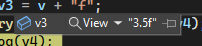
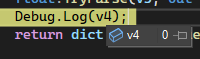 tired elk
Well, I know what I'm looking for so it's easy to find on google x)
late lion
The green vector is (1, 1). The blue vector is (1, 0). The green vector is longer than the blue vector. How long? It's the square root of x² + y², which in this case is the square root of 2, 1.414
 humble shoal
thick terrace
a squared plus b squared equals c squared etc
humble shoal
thick terrace
a squared plus b squared equals c squared etc
that calculates the direction from the origin right? If i didn't forget ;-;
 west hamlet
Hello , I'm trying to add Image component but when I use [SerializeField] Image image; , it doesn't show on editor.
thick terrace
humble shoal
that calculates the direction from the origin right? If i didn't forget ;-;
it's how you calculate the length of a diagonal, which is exactly what's going on here
humble shoal
thick terrace
it's how you calculate the length of a diagonal, which is exactly what's going o...
Ohh
late lion
west hamlet
Hello , I'm trying to add Image component but when I use ``` [SerializeField] Im...
Image is a common word, it's possible that another class named Image exists in a different namespace and is nothing related to the Image component in Unity. Check to make sure you're using the correct namespace.
thick terrace
west hamlet
Hello , I'm trying to add Image component but when I use ``` [SerializeField] Im...
what MentallyStable said
 humble shoal
late lion
The green vector is (1, 1). The blue vector is (1, 0). The green vector is longe...
humble shoal
late lion
The green vector is (1, 1). The blue vector is (1, 0). The green vector is longe...
this calculates ?
cosmic rain
humble shoal
this calculates ?
yes
late lion
humble shoal
this calculates ?
The formula I showed calculates the length of the vector. Can you see how the green vector is longer than the blue one? Well, the blue one is obviously length of 1, because you can see it on the X axis, but how much longer is the green one? The formula I showed you tells you how to calculate that.