#archived-code-general
1 messages · Page 198 of 1
 sharp rose
 spring creek
So a third object. Is the object in the scene before hitting play? Make a public field and drag and drop it. If not, I'll need more info. But once you HAVE the references:
if (thirdObject.valueICareAbout >= valueNeeded)
{
  childObject.SetActive(true);
}
 dreamy sigil
Dumb problem/question... I attempted to migrate my project from 2022.3.9 to 2022.3.10 but there was some package dependency error so I had to revert back to 2022.3.9. Works fine, but in the package manager I'm now seeing all packages labeled as "Custom", and I'm not able to update any of them. Any idea how/why that happened, and how to fix?
 spring creek
dreamy sigil
~~Dumb problem/question... I attempted to migrate my project from 2022.3.9 to 20...
spring creek
dreamy sigil
~~Dumb problem/question... I attempted to migrate my project from 2022.3.9 to 20...
Ask in #💻┃unity-talk
This channel is just for coding
dreamy sigil
spring creek
Ask in <#497872424281440267>
This channel is just for coding
Will do, thanks!
spring creek
I don't know though, just to be clear haha
 jaunty sundial
im actually changing the prefab file
spring creek
jaunty sundial
im actually changing the prefab file
Then yeah, it won't reset
I assume you mean changing it in code, right?
jaunty sundial
spring creek
I assume you mean changing it in code, right?
yeh
spring creek
Then yeah, that is expected behaviour
jaunty sundial
how would i stop it doing that then
spring creek
jaunty sundial
how would i stop it doing that then
Save the original value and change it back
jaunty sundial
change it back when on start?
spring creek
jaunty sundial
change it back when on start?
Sure
Why are you modifying the prefab btw?
jaunty sundial
so it changes of all of the instatiated objects
spring creek
Hmm, ok. Well I guess that's one way to do it 😄
jaunty sundial
is there a better way
spring creek
Save the objects and change all the instances only. Or have them reference an object with the layer and subscribe to when it changes via an event invoked by the setter
jaunty sundial
how do u change all instaces
spring creek
jaunty sundial
how do u change all instaces
You save all of them when instantiating and iterate over the list you saved them in
Or
When instantiating, have them subscribe to an event evoked via a layer property setter, and when you change that property they will all set themselves
I would do the latter
jaunty sundial
spring creek
You save all of them when instantiating and iterate over the list you saved them...
ok so wait for the last option
Instantiate(genTube, cylinder.transform.position, cylinder.transform.rotation);
thats my code for instantiating them
spring creek
You can do:
GameObject go = Instantiate(...);
then you use receive a reference to the instance right there
then you just have that instance subscribe. Maybe to an event on the object instantiating it, maybe to a singleton
jaunty sundial
spring creek
You can do:
`GameObject go = Instantiate(...);`
then you use receive a reference...
so will that put them all as children of that game object
spring creek
jaunty sundial
so will that put them all as children of that game object
No, It will just give you a reference to the ONE object being instantiated
Instantiate has a parent parameter if you want to set them as children though
jaunty sundial
spring creek
No, It will just give you a reference to the ONE object being instantiated
right ok let me try it out
that didnt work
spring creek
I should also say, if you instantiate a component from the prefab you can get the reference to that component. So, like:
MyScript clone;
clone = Instantiate(prefabScript, ...);
then you don't have to do a getcomponent or anything
This is generally preferred, because you rarely need directly reference gameobjects (all monobehaviours can just call .gameObject to get it when needed)
 rugged gale
does anyone know in which channel i can get help with GUID
there are so many channels
spring creek
rugged gale
does anyone know in which channel i can get help with GUID
Depends on what kind of help. Coding with them?
 rugged gale
thanks
 true palm
hey, I have a unity ragdoll and its floating in the air, I have know idea what i should check for.
 somber nacelle
true palm
hey, I have a unity ragdoll and its floating in the air, I have know idea what i...
somber nacelle
true palm
hey, I have a unity ragdoll and its floating in the air, I have know idea what i...
don't crosspost. also check #854851968446365696 for what to include when asking for help
true palm
true palm
hey, I have a unity ragdoll and its floating in the air, I have know idea what i...
My unity ragdoll is floating in one point in the air. Many of the limbs are rotating and turning like they should be but the center around the shoulders is not. I have tried enabling and disabling the enable projection box on the joint but none of it has worked.
true palm
true palm
My unity ragdoll is floating in one point in the air. Many of the limbs are rota...
Got it to work, for anyone else with this issue, your joint cannot have the "Connected Vody" set to the rigidbody on that gameobject,
 versed marsh
Im trying to add default methods to some unity events using the reset method, and it works fine for events that dont have any arguments, but I can't seem to figure out how to give them an argument using the AddVoidPersistentListener method from UnityEditor.Events
private void Reset()
    {
        UnityEventTools.AddVoidPersistentListener(unHoverEvent, ClearHoverPrompt);
        UnityEventTools.AddVoidPersistentListener(hoverEvent, SetHoverPrompt); //this method takes a string argument and gives me an error since there is none
    }
 rain minnow
versed marsh
Im trying to add default methods to some unity events using the reset method, an...
rain minnow
versed marsh
Im trying to add default methods to some unity events using the reset method, an...
You need to have a custom UnityEvent that takes a string . . .
versed marsh
Do you mean a UnityAction? Im not sure how (or why) you would give an event a parameter
 dawn belfry
Wondering if anyone could help me out with this. I have a Behavior tree and im trying to get the players location since I cant make a gameobject public and drag it in, in the inspector. Any way I can find the players location through regular code. I have tried getting the tag of the player on start within my attack node. But its just not working out. Im also using physics.checksphere for the transforms location from my ai.
 cosmic rain
dawn belfry
Wondering if anyone could help me out with this. I have a Behavior tree and im t...
cosmic rain
dawn belfry
Wondering if anyone could help me out with this. I have a Behavior tree and im t...
There are many ways to get a reference programmatically. Finding by tag should work. If it doesn't, debug it.
rain minnow
versed marsh
Do you mean a UnityAction? Im not sure how (or why) you would give an event a pa...
It's ubiquitous and used often. The event invoked passes a value to the subscribed delegate(s) . . .
spring creek
versed marsh
Do you mean a UnityAction? Im not sure how (or why) you would give an event a pa...
To pass the parameter to the subscribers. It's quite normal, and useful
versed marsh
what if the event is subscribed to a method without an argument? is it just ignored?
cosmic rain
versed marsh
what if the event is subscribed to a method without an argument? is it just igno...
The event is not subscribed to a method. A method can be subscribed to an event. And it needs to match the events signature for you to be able to subscribe.
So, if the method doesn't have the correct argument, it can't subscribe to the event.
 calm talon
How do I get the normal of an OnTrigger event?
rain minnow
calm talon
How do I get the normal of an OnTrigger event?
you can't . . .
only with OnColliderXXX . . .
calm talon
Is there any mathematical trick or?
 hard viper
what is the normal of an on trigger event even mean?
collisions with contact points have normals
what does it even mean for a trigger to have a normal? you have a shape inside another
calm talon
A line drawn perpendicular against the closest contact point I guess
hard viper
there are no contact points
because it is a trigger
fyi, you can have a non-trigger collider that doesn’t send/recieve forces
hard viper
colliders have force override settings
if you set the layer override to: Send Forces layer mask = 0 (ie nothing), it will send no forces to anything
you can do this both in inspector dropdown menu when looking at a collider, or set it via code
calm talon
I don't see any such option?
 rain minnow
calm talon
A line drawn perpendicular against the closest contact point I guess
rain minnow
calm talon
A line drawn perpendicular against the closest contact point I guess
a trigger is just a zone that an object can enter/exit. the only thing you can equate (calculate) from the collision is the direction . . .
 calm talon
when was the feature implemented?
 calm talon
for context I'm using 2021.3.28f1
spring creek
hard viper
This is only in 2022+
calm talon
having that rn would remove so much headache
hard viper
I'd back up your project, upgrade editor, and see if anything breaks
I fuck with layer overrides a lot
you can turn off certain layer collisions temporarily
rain minnow
hard viper
the hell is that? 🤨
spring creek
I have literally never used them haha.
spring creek
rain minnow
the hell is that? 🤨
Brand new fanciness haha. On all colliders afaik
hard viper
they are useful when you want to give something a little bit different collision properties without defining a whole new layer
or when you want to temporarily make something intangible (to force) while still sending collision callbacks
for example, you might want a goomba that walks into another goomba, and it knows to turn around.
you don't want forces to get involved, because goombas actually can pass through each other (and don't usually make a janky stack without a special case)
but you do want the collision callback so they know they touched, to turn around
this is a great tsime to use a layer override, and it's a lot easier/simpler than other method
make sense?
 sour plume
hi, I need some help with ads mediation / iron source sdk.
has anyone encountered this issue where video and interstitial ads just popup up and close on their own without fully playing on an android build?
version info:
- unity version: 2021.3.30f1
- installed ads mediation package through package manager
- used LevelPlay integration manager to:
- update iron sdk to latest version (also had this same problem using the v7.2.x)
- install unity ads adapter
 mossy snow
sour plume
hi, I need some help with ads mediation / iron source sdk.
has anyone encounter...
mossy snow
sour plume
hi, I need some help with ads mediation / iron source sdk.
has anyone encounter...
look for errors in logcat. Do you have any dev options enabled on your device? There's one called don't keep activities that can cause problems
(on Android, you didn't specify platform)
sour plume
i haven't installed the logcat package. will do that and check for errors. thanks for the suggestions! i'm testing on android, will update the original message
update: checked my options, don't keep activities is off
 split sparrow
For giggles, have you tried testing it in portrait mode?
Are you forcing the app to landscape?
sour plume
ahh it was because i have auto rotate off. i just tried turning auto rotate on and the ads play properly. yes i forced the app to landscape and haven't tried portrait mode. didn't notice any errors that looked like it was from playing the ad in logcat too. thanks!
 sinful galleon
I understand that I'm in the wrong channel for this, but is anyone able to help me with an input system issue, i havent gotten a reply in there for 2 days lol #🖱️┃input-system
 whole portal
Perhaps you guys can help me debug this one. So the issue I have is I was generating my chunks vertically using local Y co-ordinate, which made the chunks disconnected vertically (as in they would look like slices):
float[] blendedNoise = new float[currentBufferSize];
int chunkHeight = GridMetrics.PointsPerChunk(lod);
for (int x = 0; x < chunkHeight; x++)
        {
            for (int y = 0; y < chunkHeight; y++)
            {
                for (int z = 0; z < chunkHeight; z++)
                {
             int index = x * chunkHeight * chunkHeight + y * chunkHeight + z;
                    float heightFactor = (float)y / (float)chunkHeight;
                    blendedNoise[index] = BlendNoise(terrainNoise[index], caveNoise[index], heightFactor);
                }
            }
        }```
And after updating the code to use a world Y co-ordinate, I no longer see the vertical chunks.
```csharp
float[] blendedNoise = new float[currentBufferSize];
int chunkHeight = GridMetrics.PointsPerChunk(lod);
float worldHeight = 256.0f;
for (int x = 0; x < chunkHeight; x++)
    {
        for (int y = 0; y < chunkHeight; y++)
        {
            for (int z = 0; z < chunkHeight; z++)
            {
             int index = x * chunkHeight * chunkHeight + y * chunkHeight + z;
                float globalY = (globalOffset.y * chunkHeight) + y;
                float heightFactor = globalY / worldHeight;  // Calculating heightFactor based on global position
                blendedNoise[index] = BlendNoise(terrainNoise[index], caveNoise[index], heightFactor);
            }
        }
    }```
This is what I was trying to debug, like why it doesn't work anymore ? I can see the vertical chunks being generated in the object hierarchy, but they are invisible in the scene, this sort of points out to an issue either with the noise generation (may not have Y ?) or with the chunk generation, but not sure.Before: All the vertical chunks were disconnected, and I think the issue is because I was using local Y co-ordinates for the height factor.
After: I am now using global Y co-ordinates, which "should" solve that issue, but instead I can no longer see the vertical chunks being generated at all.
Note (the slices you see, are not 1 chunk, it's like 9 chunks or so per slice. So the horizontal chunks generate still fine in both scenarios. It's the vertical chunks that I have issues with.


 cold egret
- I have a script that is using an audiosource component. They're both on the same object. When i quit, it triggers a sequence of calls starting from other objects' on destroy, which leads to a method that this script has. In there it refers to an uadiosource component, which appears to be destroyed at that point. Other than doing that wasteful null check which is going to occur only ever once during a session, how can i handle this?
 lean sail
cold egret
- I have a script that is using an audiosource component. They're both on the sa...
lean sail
cold egret
- I have a script that is using an audiosource component. They're both on the sa...
You've said 2 things
A wasteful null check
Itll only ever happen once
Which one of these statements above is true? if it happens once then just write a null check and move on in your project.
If its wasteful then it must be happening extremely often, in which case you should profile it and see that it's not wasteful. Meaning you again should just write the null check and move on
cold egret
lean sail
You've said 2 things
A wasteful null check
Itll only ever happen once
Which one...
-
By "only happens once" i mean meeting the null check. In all other cases it's guaranteed to return false, and will only trigger during the application quit
-
The thing is not used every frame, but a dozen of times within a single one with large intervals between such "bursts"
-
Ig it's just my perfectionist speaking. I never liked these null checks of unity objects. Thank you regardless
lean sail
🤷♂️ the issue is that something is unexpectedly null, you need something that conditonally does your logic as long as the object exists. any work around would just be involving an if statement and some bool
 scarlet viper
can you do dictionary lookup with 3 inputs ?
Nvm that would be an array 😂
But... its gonna be extra big
like 100x100x100 is 1000000
lean sail
scarlet viper
can you do dictionary lookup with 3 inputs ?
what input? you could do that yes with the key being a vector3 if its floats for example. i dont know what you mean by that would be an array
scarlet viper
ohh
scarlet viper
lean sail
what input? you could do that yes with the key being a vector3 if its floats for...
Nothing im gonna try to use a dictionary them. I thought i cant and id have to use an array to lookup things but nvm
i didnt realize i can use vector3 as a key in dictionary
 molten venture
I am using an enum with getter/setter. How can I make it show in the inspector?
cosmic rain
molten venture
I am using an enum with getter/setter. How can I make it show in the inspector?
You can only show a backing field in the inspector. If it's an auto property, you can use [field: SerializeField] attribute.
molten venture
I actually want to have the enum in the inspector and call a function if the enum value is changed. Looks like I might need to create a custom inspector for that
cosmic rain
Ah, you want to call a function when you change the value in the inspector?
molten venture
Yes, I don't really need the get/set but I thought I could use the setter to do that
cosmic rain
Custom inspector is one option. Another one is using OnValidate.
 merry seal
ECB from Gameobjects
molten venture
cosmic rain
Custom inspector is one option. Another one is using OnValidate.
Thanks! 👍
 latent latch
molten venture
Thanks! 👍
latent latch
molten venture
Thanks! 👍
something like that maybe? If not, there's probably some other funcs attributes
jaunty sundial
hi so im refrancing all my instatiated objects like this spawnedPipes = Instantiate(genTube, cylinder.transform.position, cylinder.transform.rotation);
then saying this spawnedPipes.layer = 6;
but its not changing any of them
where have i gone wrong
 earnest snow
Hello, I have using the Application.persistanceDataPath to save my data. In the docs said the data will not be delete after an update but it does when I update my app
UtilityState.Instance.SavePath = Application.persistentDataPath + "/" + LessonData.lessonId;
the LessonData.lessonId will be a folder contains some others file
but after an update, the folder "LessonData.lessonId" is being delete
hard viper
jaunty sundial
hi so im refrancing all my instatiated objects like this ```spawnedPipes = Insta...
something like this should work. I suspect something is happening between those lines to lose the reference
given that code, it looks like you only keep one reference to a pipe, and it gets overwritten the moment another gets instanced
cosmic rain
earnest snow
but after an update, the folder "LessonData.lessonId" is being delete
Did you physically navigate to the folder and confirmed that it's deleted?
jaunty sundial
hard viper
given that code, it looks like you only keep one reference to a pipe, and it get...
how would i fix that then
earnest snow
cosmic rain
Did you physically navigate to the folder and confirmed that it's deleted?
I have check the path in code, it doesn't exist. The reason I can't check physically because I build for IOS
hard viper
jaunty sundial
how would i fix that then
personally, I would keep a collection of the gameobjects that can change in size. I assume you’re doing something like flappy bird
I would keep a List<GameObject>
when are you changing the layer? right after it is instanced?
i would go:
…
GameObject pipe = Instantiate(………);
pipe.layer =6;
pipeList.Add(pipe); ```in general, whenever I instantiate something, I always try to log a reference to it in case I need to access it later
 placid island
Hello, how can I create checkboxes like these?

 quaint rock
depends on what you are using to do the UI, but like for IMGUI that is just using
EditorGUILayout.Toggle
placid island
quaint rock
depends on what you are using to do the UI, but like for IMGUI that is just usin...
Thanks!
jaunty sundial
How do i tell what my raycast hit
 leaden ice
jaunty sundial
How do i tell what my raycast hit
leaden ice
jaunty sundial
How do i tell what my raycast hit
Some overloads of the Raycast function give you a https://docs.unity3d.com/ScriptReference/RaycastHit.html as an out parameter
check the Raycast docs for examples of this
jaunty sundial
leaden ice
Some overloads of the Raycast function give you a https://docs.unity3d.com/Scrip...
I did that it said argument 5 may not be passed with the out keyword
leaden ice
jaunty sundial
I did that it said argument 5 may not be passed with the out keyword
be very careful with the ordering of your parameters
make sure you are doing it the same way as the docs indicate
you likely have something out of order or in the wrong place
note that argument 5 is NOT where the raycast hit param should be
so it's definitely an issue of the wrong order

Your IDE should give you something like this too to help^
 eager fulcrum
Hey, I have a question about Zenject.
So I have a class
public class Test
{
  public Something _Smth;
  public Foo _Foo;
  private int Id;

  public Test(Somethnig smth, Foo foo)
  {
    _Smth = smth;
    _Foo = foo;
  }
}
and I install it like this
 Container.RegisterNewInstance<Foo>();
 Container.RegisterNewInstance<Something>();
then I have a list List<Test> Tests
What I want to do is somehow make a for-loop that will create and add Test to Tests list. I want to make sure that _Smth and _Foo are installed using Zenject and I want to pass Id when I create this object. From my understanding of zenject if i do var test = new Test() it wont work cuz Something and Foo wont be installed right?
How can I do this?
scarlet viper
Is there no oneliner to create a list and add one element to it?
var somelist = new List<Part>(part);
this results in error
i want to add part to it
 quartz folio
new List<Part>() { part };
 heady iris
jaunty sundial
leaden ice
be very careful with the ordering of your parameters
heady iris
jaunty sundial
leaden ice
be very careful with the ordering of your parameters
I cant figure it out
Where should the out go
heady iris
Compare what you wrote to the documentation.
jaunty sundial
Wel theres like 15 overloads and ive only got 3 so idk
hard viper
overloads just mean there are different combinations of parameters that call different versions of the same function
hard viper
eager fulcrum
Hey, I have a question about Zenject.
So I have a class
```cs
public class Tes...
idk how much help you will find here with zenject, because that seems like a 3rd party addon
eager fulcrum
hard viper
idk how much help you will find here with zenject, because that seems like a 3rd...
i can't find a better place to ask. Zenject is a really popular addon tho so i thought that someone here would be able to help me
leaden ice
jaunty sundial
Wel theres like 15 overloads and ive only got 3 so idk
pick the one you want to use, and put your parameters in that exact order
again, the docs have code examples
 thick terrace
eager fulcrum
i can't find a better place to ask. Zenject is a really popular addon tho so i t...
thick terrace
eager fulcrum
i can't find a better place to ask. Zenject is a really popular addon tho so i t...
you can make a constructor that just takes the id, then add a separate private method annotated [Inject] that takes the injected values as params and sets them
eager fulcrum
thick terrace
you can make a constructor that just takes the id, then add a separate private m...
but from my understanding if I create object like var test = new Test()
Inject wont be called
or am i wrong?
jaunty sundial
            {
                RaycastHit hit = new RaycastHit();
                pad.GetComponent<BoxCollider>().isTrigger = false;
                StartCoroutine("colliderCooldown");
                sitCheckFalse();
                playerm.isSeated = false;
                Destroy(pad);
                if(hit.collider.tag == "autumn")
                {
                    Debug.Log("woking");
                    BroadcastMessage("AutumnConnect");
}``` im getting object refrence is not set to an instance errorRead the full error message, it will say which line is causing the error
thick terrace
eager fulcrum
but from my understanding if I create object like `var test = new Test()`
yes, part 2 is that you need to call DiContainer.Inject on each instance after constructing it normally (should be able to inject the DiContainer where needed without configuring it yourself i think)
hard viper
better yet, if you click the error message, it will take you directly to the line causing the error
 late lion
eager fulcrum
Hey, I have a question about Zenject.
So I have a class
```cs
public class Tes...
late lion
eager fulcrum
Hey, I have a question about Zenject.
So I have a class
```cs
public class Tes...
I have never seen this RegisterNewInstance method in DiContainer, nor can I find anything about it. Is it an extension method you made?
jaunty sundial
leaden ice
Read the full error message, it will say which line is causing the error
49
leaden ice
jaunty sundial
49
ok and which line is 49?
eager fulcrum
late lion
I have never seen this `RegisterNewInstance` method in `DiContainer`, nor can I ...
yep
its our extension
jaunty sundial
leaden ice
ok and which line is 49?
oh right haha sorry its the 2nd if statement
leaden ice
jaunty sundial
oh right haha sorry its the 2nd if statement
Why did you do this? RaycastHit hit = new RaycastHit();
You need to actually use one of the raycast overloads that provides the RaycastHit
this one isn't going to contain any information
you just made a blank one
So when you try to do hit.collider.tag it's an error, since your hit is empty, hit.collider is null
jaunty sundial
leaden ice
Why did you do this? `RaycastHit hit = new RaycastHit();`
i get the error message hit doesnt exist in current context when i remove it
leaden ice
jaunty sundial
i get the error message hit doesnt exist in current context when i remove it
For the 3rd time, you should really look at the code examples from https://docs.unity3d.com/ScriptReference/Physics.Raycast.html
it will show you how to do this
currently you're just guessing
jaunty sundial
what is it the querytrigger interaction
leaden ice
3/4 of the code4 examples show how to use the raycast hit
leaden ice
jaunty sundial
what is it the querytrigger interaction
Explained right on the page

Everything you need to know is on that page
you actually don't need to worry about that at all though
look at the code examples
none of them are even using that parameter
it's not relevant
 hollow jacinth
Leak Detected : Persistent allocates 75 individual allocations.
What does this mean? How do I fix it?
heady iris
well, with no further information, it's very hard to say anything
Have you written any Jobs code?
If you don't know what that means, then the answer is probably no.
hollow jacinth
heady iris
Looks like this is happening in the URP renderer
heady iris
hollow jacinth
Leak Detected : Persistent allocates 75 individual allocations.
What does this m...
A memory leak occurs when memory is allocated, but never freed (while also not being used anymore)
Short-lived allocations will get marked as leaked if they don't get freed soon enough
But persistent ones are allowed to live for a long time
Does this error appear when you exit Play Mode?
hollow jacinth
Wdym?
heady iris
URP has two different renderers.

I believe ShadowCaster2D (which is in your stack trace) is from the 2D renderer.
leaden ice
Oh god I had no idea about this. They've managed to make the render pipeline thing even more confusing 😵💫
heady iris
i mean, sort of
i find it straightforward enough
the render pipeline is all the machinery; the actual renderer slots into that
By default a 3D URP project will use the standard universal renderer
I believe the 2D renderer was experimental until recently
I need to try it. I've never actaully made a 2D game in Unity...
(i can't draw)
hollow jacinth
I am using with the 2D Renderer I think
And I am using ShadowCaster2D on some of the GameObjects
heady iris
What version of Unity are you using, and what verison of the URP package are you using?
(you can find the latter in Window > Package Manager)
hard viper
render pipeline is pretty confusing ngl. Just a few days ago, I couldn’t figure out why one thing wouldn’t render. Problem: Random checkbox
which was defaulted on, and needed to be off
and normally works fine. Except in 2D, with a certain type of particle, and only when instantiated during runtime
 static matrix
huh?
never had this problem before
 heady iris
well, then you've never tried to do this before
hollow jacinth
heady iris
What version of Unity are you using, and what verison of the URP package are you...
2023.1.9f1, 15.0.6
static matrix
I think I have?
unless foreach doesn't work with lists of vector3s
hard viper
what type is pathpoints
static matrix
List<Vector3>
heady iris
static matrix
I think I have?
unless foreach doesn't work with lists of vector3s
C# won't let you assign to a foreach iteration variable
You're trying to assign to a foreach iteration variable
hollow jacinth
static matrix
huh?
never had this problem before
Use a for loop
static matrix
 heady iris
static matrix
heady iris
static matrix
on which line do you assign to effect?
static matrix
I dont
hard viper
pos is a struct. the iterator gives it to you
heady iris
you also can't do something like
hollow jacinth
static matrix
You are not assigning a new thing to effect
heady iris
Pos.x += 1;
same error
heady iris
Right.
hard viper
it’s like if pos was 4, and now you are trying 4 += 6. That doesn’t make sense
heady iris
It's like doing transform.position.x += 1;
heady iris
hard viper
it’s like if pos was 4, and now you are trying 4 += 6. That doesn’t make sense
well, it's not quite like that
hard viper
my point is: you don’t have a reference to the vector. you have a vector
at least I think he does
static matrix
thats so wierd
maybe it just doesn't work with structs
static matrix
but I can assign to members?
hard viper
i assume if it is reference type, you could modify the underlying variable, but not assign to it
static matrix
but not if its a vector3 iterator
heady iris
You can't assign to a value type member because you can't assign to the variable.
heady iris
heady iris
It's like doing `transform.position.x += 1;`
^
hollow jacinth
heady iris
What version of Unity are you using, and what verison of the URP package are you...
2023.1.9f1, 15.0.6
heady iris
If you want to mutate the contents of the array, write a normal for loop
 quick elbow
I have a gameobject (let’s call it A) that is a child of another object (called B). When A is moved around, the parent B stays in place. I want to periodically update B (the parent) to be at the position of the child. When this happens the child moves because it’s local transform is relative to the parent, so I essentially need to reset the child transform to zero it out. When I do this, I encounter a split second where the child A snaps to a new position relative to B, and then snaps back to be at the same spot as B. How do I update B’s position and A’s transform so that it happens seamlessly?
heady iris
not a code problem. ask in #💻┃unity-talk
heady iris
heady iris
If you want to mutate the contents of the array, write a normal for loop
or go nuts
        Vector3[] foo = new Vector3[3];
        ref Vector3 neato = ref foo[2];
        neato.x += 3;
2023.1.9f1, 15.0.6
heady iris
I saw the first time :p
hollow jacinth
lol
heady iris
This is the tech stream version of unity, so it's more likely to have bugs than the LTS
It's probably not a big deal.
hollow jacinth
the LTS does not work properly for me
But I think I installed URP not correctly
I started the project as legacy 2D
and then switched to urp
and from then weird things started to happen
like the memory leaks
 untold mauve
quick elbow
I have a gameobject (let’s call it A) that is a child of another object (called ...
untold mauve
quick elbow
I have a gameobject (let’s call it A) that is a child of another object (called ...
I would just cut my losses and ditch the parent child relationship
quick elbow
And just control the transforms manually?
heady iris
quick elbow
I have a gameobject (let’s call it A) that is a child of another object (called ...
sounds like you're doing it out of order
The update order will be very important here.
How are you currently doing this? Show your !code .
 tawny elkBOT

Posting code
📃 Large Code Blocks
Large code blocks should be posted as links to services like:
https://gdl.space/, https://paste.ofcode.org/, https://hatebin.com/
https://paste.myst.rs/, https://hastebin.com/
📃 Inline Code
Surround code with three backquotes. Not quotation marks.
To get C# formatting the first line should only contain cs or csharp.
Add a comment with a line number if there is an error message.
```cs
// Your code here
```
Do not share screenshots of code unless requested.
quick elbow
heady iris
How are you currently doing this? Show your !code .
I’m away from my desk atm so I can’t unfortunately 😦 I was messaging here for some ideas as I was thinking about it
quartz folio
Don't cross-post, this is not a programming issue
heady iris
Logging is very expensive
Unity has to generate a full stack trace and write a bunch of stuff into the console
quartz folio
Stack trace generation can be very expensive at times, the logging itself is cheap in comparison
 thick socket
the error only happened once at the launch of the game
surprised that would drop from 200fps->120fps
quartz folio
If it happened once then the logging of the error itself is unrelated to the ongoing performance issue
 fervent vapor
Hey, When I click W and D key together or any one key on each axis I get the input magnitude 1.414. Why is that I should be getting 1 only
 heady iris
fervent vapor
Hey, When I click W and D key together or any one key on each axis I get the inp...
heady iris
fervent vapor
Hey, When I click W and D key together or any one key on each axis I get the inp...
show your code
leaden ice
fervent vapor
Hey, When I click W and D key together or any one key on each axis I get the inp...
because the square root of 2 is 1.414
hard viper
Debug.Assert is generally more useful, and lighter
fervent vapor
leaden ice
because the square root of 2 is 1.414
Oh my dumb ass, got it!!
hard viper
at least in deep profile, Debug.Assert normally mostly costs the string.concat for the error messages I generate. Which need to be generated to call the function
heady iris
oh, that's handy: it logs an error, but doesn't throw an exception like UnityEngine.Assertions.Assert's methods do
 orchid bane
Should I place #if UNITY_EDITOR in front of using Unityeditor?
heady iris
orchid bane
Should I place `#if UNITY_EDITOR` in front of `using Unityeditor`?
You should if this file is making it into the built game
so if it's outside of an Editor folder, yes
 swift falcon
not sure where to ask this - for making levels, say i want to make a maze. so far i'm just scaling up cubes and shoving them in various places. this feels like the very naiive way to do it - is there a better way?
 leaden ice
swift falcon
not sure where to ask this - for making levels, say i want to make a maze. so fa...
leaden ice
swift falcon
not sure where to ask this - for making levels, say i want to make a maze. so fa...
 rigid island
colliders, also make sure you move with rigidbody and not translate
leaden ice
or generate it procedurally
give them colliders and dynamic rigidbodies
(and make sure your player is moving via forces)
swift falcon
procerderal would be interesting, but I know very little about procederal generation
leaden ice
Always a good time to learn
swift falcon
true...
orchid bane
leaden ice
(and make sure your player is moving via forces)
Or velocity
hard viper
if you are making mazes, you want procedural generation
unless you just want a one off simple maze, like the sacred forest in ocarina of time
thick socket
InvalidOperationException: Trying to release an object that has already been released to the pool.
UnityEngine.Pool.ObjectPool`1[T].Release (T element) (at <3b24cc7fa9794ed8ab04312c53e6dedd>:0)
Bullet.OnTriggerEnter2D (UnityEngine.Collider2D collision) (at Assets/Scripts/interactable/Bullet.cs:45)
Is there a way to check if an object has already been released before trying to release it?
imo this error shouldnt be happening anyway
but it still annoys me
void OnTriggerEnter2D(Collider2D collision)
    {
        var tag = collision.transform.tag;
        if ((tag == "Fighter" || tag == "Player") && tag != shooterTag)
        {
            Fighter colFighter = collision.GetComponent<Fighter>();
            colFighter.Damage(dmg);
            //Debug.Log("Pool Release called");
            fired = false;
            StopDestroyAfterDelay();
            pool.Release(this);
        }
        else if (tag == "Wall" || tag == "Floor")
        {
            fired = false;
            StopDestroyAfterDelay();
            pool.Release(this); **Line45**
        }
    }
why not make sure fired is truew or someting
before releasing
or add another bool
thick socket
leaden ice
why not make sure `fired` is truew or someting
that could work...curious how it may be doing error rn anyway
once it "releases" it shouldnt be able to have collider interact with anything anymore?
void ReturnBulletToPool(Bullet bullet)
    {
        //Do Particle Explosion
        EffectType effect = EffectPooling.instance.effectPools[bullet.effectType].Get();
        effect.transform.position= bullet.transform.position;
        bullet.gameObject.SetActive(false);
    }
should immediately be SetActive(false) once released
thick socket
leaden ice
why not make sure `fired` is truew or someting
interesting
I tried this and still getting the error...its a lot less
but still occasionally
void OnTriggerEnter2D(Collider2D collision)
    {
        var tag = collision.transform.tag;
        if ((tag == "Fighter" || tag == "Player") && tag != shooterTag && fired)
        {
            Fighter colFighter = collision.GetComponent<Fighter>();
            colFighter.Damage(dmg);
            //Debug.Log("Pool Release called");
            fired = false;
            StopDestroyAfterDelay();
            pool.Release(this);
        }
        else if (tag == "Wall" || tag == "Floor")
        {
            fired = false;
            StopDestroyAfterDelay();
            pool.Release(this);
        }
    }
I would just do
if (fired) return;``` right at the beginning of the functiongood idea...tossing
if (!fired)
return
before any of the tag checks or things run fixed it
is it just the other code might be too slow
leaden ice
thick socket
is it just the other code might be too slow
no
        else if (tag == "Wall" || tag == "Floor")
        {
            fired = false;
            StopDestroyAfterDelay();
            pool.Release(this);
}```you had this
which is still potentially releasing it without checking if fired was false already.
scarlet viper
How to generate a random string that could work as an ID ?
thick socket
leaden ice
you had this
which is still potentially releasing it without checking if fired w...
ah gotcha
leaden ice
scarlet viper
How to generate a random string that could work as an ID ?
Guid.NewGuid().ToString()
thick socket
still not sure why fired would need to be checked since it should only release
and the disable the object
leaden ice
thick socket
still not sure why fired would need to be checked since it should only release
if OnTriggerEnter2D happens twice in the same physics frame, it can run twice here
this can happen if you have multiple colliders or are overlapping with multiple things simultaneously
thick socket
ah ok thanks, forgot that it could collide with 2 things same frame 😄
thick socket
so for having an object "redirect/richochete" when hitting a wall/floor its easy, you just multiply X by -1 for wall, Y for -1 for floor
issue Im having is how do you tell its a floor or wall on something that has a floor and wall side
ex) a square has a side that would be wall and top would be floor
leaden ice
thick socket
so for having an object "redirect/richochete" when hitting a wall/floor its easy...
typically you'd just reflect the velocity vector over the surface normal
the code is simpler, and the math will work for any surface orientation
not just straight vertical/horizontal surfaces
thick socket
that makes sense...I say while googling what a surface normal is and how its found 😄
leaden ice
you can get the normal vector from any Collision callback or from any raycast-like physics query
leaden ice
As for the reflection: https://docs.unity3d.com/ScriptReference/Vector3.Reflect.html
leaden ice
thick socket
I can just do like collision.normal to grab the normal
yes exactly
thick socket
so I would do
Vector3 newmovement= Vector3.Reflect(movement, collision.normal);
yep
thick socket
assuming my walls aren't bumpy that will work much better thanks 🙂
might have some weird interactions if the walls are bumpy lol
thick socket
leaden ice
yes exactly
any chance you know a workaround?
or will I have to make it on a collider instead of a trigger
rigid island
you can still get a normal with a raycast
thick socket
rigid island
you can still get a normal with a raycast
gotcha thanks
raycasts and I dont get along very well 😄
rigid island
they're very powerful tool
thick socket
oh for sure
I just tend to spend a lot of time debugging them whenever I have to use one
rigid island
yeah gizmos are life saver for that
thick socket
at least it doesn't take my scripts 20s to save anymore
even with gizmos trying to bug fix like 5x takes a few minutes for a 2s code change

😦
rigid island
.collider
 simple egret
You need to get a contact point
thick socket
should I just grab the first one?
simple egret
collision.GetContact(0).normal - this cannot fail since there's always at least 1 contact point (at index 0) for a collision
thick socket
_enemy.detectorWallNormal = collision.contacts[0].normal;
simple egret
That creates an entire array to get the first element, don't
Use GetContact
There's both
GetContacts is useful if you want to get all of them
thick socket
lol
rigid island
walks away in shame
thick socket
bye navarone's messages 😄
simple egret
Now it looks like I'm talking to myself
rigid island
lol thought you were using Collider2D because triggers
thick socket
rigid island
lol thought you were using Collider2D because triggers
I was
then I wasn't cause I was told I can't use triggers to get the normal
rigid island
yea true, what I mentioned you can raycast to the collider to get the normal
its how i fake my bullets sometimes
thick socket
public class ColliderDetector : MonoBehaviour
{
    private EnemyCharacter _enemy;
    [SerializeField] string WallTag;
    [SerializeField] string Floor;
    [SerializeField] string Platform;
    Collider2D myCollider;
    private void Awake()
    {
        _enemy = GetComponentInParent<EnemyCharacter>();
        myCollider = GetComponent<Collider2D>();
    }
    private void OnCollisionEnter2D(Collision2D collision)
    {
        if (collision.gameObject.CompareTag(WallTag))
        {
            _enemy.detectorWall = true;
            _enemy.detectorWallNormal = collision.GetContact(0).normal;
        }
        else if (collision.gameObject.CompareTag(Floor))
        {
            _enemy.detectorFloor = true;
            _enemy.detectorFloorNormal = collision.GetContact(0).normal;
        }
        else if (collision.gameObject.CompareTag(Platform))
        {
            Debug.Log("hit platform");
            Physics2D.IgnoreCollision(myCollider, collision.gameObject.GetComponent<Collider2D>(), true);
        }
    }
why is this not disabling the collision between collider and platform at the end when they hit
The Debug.Log is firing
 simple egret
Collision already happened at the time IgnoreCollision is called
thick socket
simple egret
Collision already happened at the time `IgnoreCollision` is called
thats fair, however my object will still continue to collider with it after this is called
it might even leave, fly away, come back and collide again
rigid island
thick socket
it might even leave, fly away, come back and collide again
which object has ColliderDetector
thick socket
the enemy thats moving around
rigid island
do you only have 1 collider / are you sure ur grabbing the correct collider?
thick socket
prety sure to both
however I just saw I can have the collider2d itself just ignore the layer in inspector so I'll probably do that instead 😄

I think this should work
thick socket
same lol
heady iris
yeah, it's relatively new (in 2D physics)
thick socket
I didn't want to have to go into physics and mess with adding layers and disabling for everythign
rigid island
imso used to collision matrix, this looks handy
rigid island
time to debug..
maybe Print a little more info on what ur actually hitting / layer name n all that stuff at runtime
something must be off
thick socket
rigid island
time to debug..
maybe Print a little more info on what ur actually hitting / lay...
I got it paused
they are showing up in each others contacts
moving to #💻┃unity-talk
scarlet viper
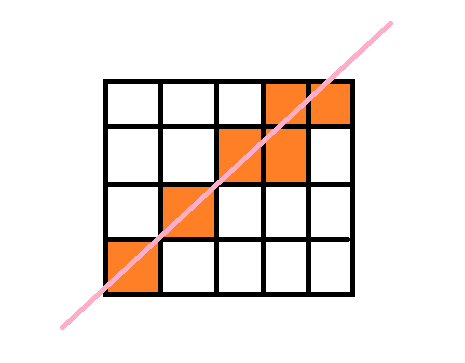
If I have a grid, or a 2d array resembling a grid, or a grid in some other form
https://i.imgur.com/0xfJ9nx.png
Anyone knows how to detect the fields/tiles/squares/cells that were hit by a straight line between two positions ?
each grid cell has position and size specified, and the size is the same for every cell
 rigid island
I think is calledhttps://en.wikipedia.org/wiki/Bresenham%27s_line_algorithm
or would it be Digital Differential Algorithm? sorry If its not helpful
Bresenham's line algorithm is a line drawing algorithm that determines the points of an n-dimensional raster that should be selected in order to form a close approximation to a straight line between two points. It is commonly used to draw line primitives in a bitmap image (e.g. on a computer screen), as it uses only integer addition, subtraction...
orchid bane
I want to share some functionality between Mono and non-Mono scripts, how do I do it? I can only derive from one class...
leaden ice
orchid bane
I want to share some functionality between Mono and non-Mono scripts, how do I d...
create a third helper class
If it's just a bunch of static methods you need, you could even make it a static class
orchid bane
leaden ice
If it's just a bunch of static methods you need, you could even make it a static...
How should I name a class which has methods like these?
protected void UndoCreationIfEditMode(GameObject gameObject) {
        #if UNITY_EDITOR
        if(!Application.isPlaying) Undo.RegisterCreatedObjectUndo(gameObject, "create scene object");
        #endif
    }

    protected void DestroyInEditOrPlayMode(GameObject gameObject) {
#if UNITY_EDITOR
        if(!Application.isPlaying)Undo.DestroyObjectImmediate(gameObject);
        else GameObject.Destroy(gameObject);
#else
        GameObject.Destroy(gameObject);
#endif
}```EditorObjectManager or something? Idk
leaden ice
orchid bane
How should I name a class which has methods like these?
```cs
protected void Und...
there's also no reason these funcitons can't be static as far as I can tell.
they already take a parameter for the object they are intended to manipulate
orchid bane
I just can't choose a good name
orchid bane
But the second method works without undo too
leaden ice
Look, there's two hard things in progamming:
- Cache Invalidation
- Naming things
molten venture
A skinned mesh renderer has several materials and I tried changing them by taking them by index but I get an error. How should materials be changed in this case? (I don't get an error when there is only one material and I access it with .material)
leaden ice
molten venture
A skinned mesh renderer has several materials and I tried changing them by takin...
typically:
Material[] materials = myRenderer.materials; // OR sharedMaterials

// make any changes you want to the materials array
materials[someIndex] = someMaterial;

// assign the modified array back to the renderer
myRenderer.materials = materials; // OR myRenderer.sharedMaterials =```(this works for any type of Renderer)
molten venture
Thanks a lot!
 calm sorrel
Anything that I change in any object in an IEnumerator method will revert back to default when the method is finished. Anyone know why this is happening?
Pastebin
Pastebin.com is the number one paste tool since 2002. Pastebin is a website where you can store text online for a set period of time.
pastebin for the method
swift falcon
I would like someone helping me cuz i typed my problem in beginner and input system but nobody helped
calm sorrel
calm sorrel
https://pastebin.com/6hh74PuK
https://pastebin.com/yG2rutzL
And here's the pastebin for when said method is called
Pastebin
Pastebin.com is the number one paste tool since 2002. Pastebin is a website where you can store text online for a set period of time.
leaden ice
calm sorrel
https://pastebin.com/6hh74PuK
What's an example of a thing that changes back?
Can you also share the rest of the code?
calm sorrel
Yeah
https://pastebin.com/wkfRLidt
Full code
Pastebin
Pastebin.com is the number one paste tool since 2002. Pastebin is a website where you can store text online for a set period of time.
and gimme a second to get an example
first log is sent from within the IEnumerator, second is sent right after
 leaden ice
where in the code are these log statements exactly?
calm sorrel
First one at line 176, second was inserted between line 199 and line 200
gonna be gone for a while, I'll respond to whatever you send when I get back
leaden ice
calm sorrel
First one at line 176, second was inserted between line 199 and line 200
At first glance it feels like a struct value-type semantics kind of issue
molten venture
I am trying to change a URP RenderFeature settings through code. I have the RenderFeature referenced and when I do renderFeature.GetComponent<RenderObjects>() I get a NotSupportedException.
Should I reference the RenderObjects directly?
 dusk apex
Maybe show the full error
molten venture
NotSupportedException: Specified method is not supported.
Unity.VisualScripting.ComponentHolderProtocol.GetComponent[T] (UnityEngine.Object uo) (at ./Library/PackageCache/com.unity.visualscripting@1.9.0/Runtime/VisualScripting.Core/Utilities/ComponentHolderProtocol.cs:70)
Chaos.UpdateScreenSpaceEffect () (at Assets/Scripts/Chaos.cs:139)
Chaos.OnValidate () (at Assets/Scripts/Chaos.cs:71)
Hmmm, I am not even using visual scripting at all
leaden ice
molten venture
```
NotSupportedException: Specified method is not supported.
Unity.VisualScript...
What's on line Chaos.cs:139
You might have accidentally imported the wrong type somewhere
I would:
- uninstall Visual Scripting if you're not using it
- double check your
usingdirectives in Chaos.cs
molten venture
molten venture
I am trying to change a URP RenderFeature settings through code. I have the Rend...
This is in that line ^
RenderObjects ro = renderFeature.GetComponent<RenderObjects>();```^ do these
molten venture
I tried referencing it directly and it is working
dusk apex
Apparently render feature doesn't support your specific method call which seems to be get component
leaden ice
we don't know what type renderFeature is though
which is very important
seems like it might be a ComponentHolderProtocol whatever that is
some Visual Scripting thing
rigid island
molten venture
I am trying to change a URP RenderFeature settings through code. I have the Rend...
doesn't Renderer Feature use ScriptableObjects ? you probably referenced wrong type
molten venture
It's ok. Referencing it through the inspector works but for some reason it doesn't update on the scene, only in the inspector. Is there some update call that should be done on the UniversalRendererData or ScriptableRendererFeature in order to have them update in game?
rigid island
molten venture
It's ok. Referencing it through the inspector works but for some reason it doesn...
whats ur current script?
dusk apex
You'd probably want to define work and doesn't work as well
Your prior stack trace suggests this is an on validate callback which wouldn't change unless the inspector value changes
molten venture
renderObjects.settings.overrideMaterial = someMaterial;
The material is being changed in the inspector on the RenderFeature, however it is not being changed in the scene. When I do the same thing manually, through the inspector, it does get updated in the scene.
(RenderObjects is a built-in RendererFeature in URP)
rigid island
it would help if you sent at least the full script so we get an idea where everything is called
molten venture
I will write the relevant parts as the script has lots of stuff in it.
[SerializeField] private ScriptableRendererFeature SSTextureFeature;
[SerializeField] private RenderObjects renderObjects;
[SerializeField] private List<Material> screenSpaceMaterials;

private void OnValidate(){
  if(/*a certain enum value has changed*/){
    UpdateScreenSpaceEffect();
}
}

private void UpdateScreenSpaceEffect()
    {
        //currentScreenSpaceEffect holds the current value of the enum mentioned above
        if(currentScreenSpaceEffect == ScreenSpaceEffect.None)
        {
            SSTextureFeature.SetActive(false);
            return;
        }
        SSTextureFeature.SetActive(true);
        //line 140
        renderObjects.settings.overrideMaterial = screenSpaceEffectMaterials[((int)currentScreenSpaceEffect) - 1];
    }
But I don't think it really matters as it does do what it is supposed to do and when it is supposed to do it, the issue is in the fact that the scene is not updating with the new settings.
It only updates with activating/deactivating the render feature but not with updating the material
swift falcon
molten venture
I will write the relevant parts as the script has lots of stuff in it.
```cs
[Se...
i might be wrong but try acessing renderer component instead of material and then get to material from there
molten venture
Got it. I just need to set the ScriptableRendererData as dirty
calm sorrel
leaden ice
At first glance it feels like a struct value-type semantics kind of issue
Switched it to a class instead of a struct and that worked, thanks!
scarlet viper
rigid island
I think is calledhttps://en.wikipedia.org/wiki/Bresenham%27s_line_algorithm
~~or...
It finds most of them but not all. It seems instead of choosing all the cubes it passes through, it ignores the cube where the intersecton was smaller
    void Draw3DGridLine()
    {
        Vector3 start = origin.position * 10f;
        Vector3 end = target.position * 10f;

        Vector3 delta = end - start;
        int steps = Mathf.Max(Mathf.RoundToInt(Mathf.Max(Mathf.Abs(delta.x), Mathf.Max(Mathf.Abs(delta.y), Mathf.Abs(delta.z)))), 1);

        Vector3 step = delta / steps;

        List<Vector3> points = new List<Vector3>();

        for (int i = 0; i <= steps; i++)
        {
            Vector3 point = start + i * step;
            points.Add(point);
        }
    }
Anyone knows?

 leaden ice
scarlet viper
It finds most of them but not all. It seems instead of choosing all the cubes it...
leaden ice
scarlet viper
It finds most of them but not all. It seems instead of choosing all the cubes it...
yeah that algorithm does that on purpose afaik
kinda shown in this image

 wicked river
I am casting a ray down to the floor to check what type of layer the floor has however the out hit returns null each time. SUper confused. The layer is set up and I can see the ray being cast and passing through the floor

 leaden ice
wicked river
I am casting a ray down to the floor to check what type of layer the floor has h...
leaden ice
wicked river
I am casting a ray down to the floor to check what type of layer the floor has h...
which line of code is currently running here?
wicked river
It passsed the if statement
leaden ice
Looks like you're inspecting hit before the raycast ran
 leaden ice
right if the raycast function returned false that means the raycast didn't hit anything
so hit will not be populated
There is no point for this
 wicked river
I get that, but it should be hitting somethig
leaden ice
hit.collider will NEVER be null. The raycast can only hit objects with colliders
leaden ice
wicked river
I get that, but it should be hitting somethig
well it's not. Time to check why
perhaps your raycast is in the wrong place, or the object you expect to hit has no collider
or the collider isn't where you think it is
Debug.DrawRay is a common tool to debug raycasts
wicked river
Well, The collider is a mesh collider . It's the floor. The ray passes through the floor
The debug.draw is in the images I sent
you can see the line
leaden ice
wicked river
I am casting a ray down to the floor to check what type of layer the floor has h...
that image is hard to parse visually
unclear if the raycast is starting above the floor or not
or if it's ending below the floor
it could be entirely above or below the ground
wicked river
I starts aboce the floor ends below
leaden ice
there's no perspective
leaden ice
wicked river
I starts aboce the floor ends below
ok and, show the floor's inspector?
Show where the collider is?
and what layer it's on
etc

 leaden ice
wicked river
leaden ice
wicked river
also show the Debug.DrawLine or DrawRay call that drew this
 wraith vector
LAN connection.
If I start server on phone and connect from computer trough phone IP, I can connect.
But if I run server on computer and try to connect by phone with the computer IP, I can't connect.
That would mean my computer is blocking incoming connection request, right?
swift falcon
yo can somebody help me? i dont see my handlebuttonclick in the function dropdown for the ui button, heres my code
leaden ice
swift falcon
yo can somebody help me? i dont see my handlebuttonclick in the function dropdow...
!code
tawny elkBOT
Posting code
📃 Large Code Blocks
Large code blocks should be posted as links to services like:
https://gdl.space/, https://paste.ofcode.org/, https://hatebin.com/
https://paste.myst.rs/, https://hastebin.com/
📃 Inline Code
Surround code with three backquotes. Not quotation marks.
To get C# formatting the first line should only contain cs or csharp.
Add a comment with a line number if there is an error message.
```cs
// Your code here
```
Do not share screenshots of code unless requested.
swift falcon
leaden ice
swift falcon
https://paste.ofcode.org/YbHFhac5NQSU5ueAPar9De
your function is private
it must be public if you want it to show up
swift falcon
 swift falcon
leaden ice
it must be `public` if you want it to show up
swift falcon
leaden ice
it must be `public` if you want it to show up
oh wait
im dumb
thank you
 kindred vessel
Henlo, Cloud code C# modules, cloud save data. I want to access 2 player's data via my game server, how would I do this?
cosmic rain
kindred vessel
Henlo, Cloud code C# modules, cloud save data. I want to access 2 player's data ...
What are you using for the cloud save data?
kindred vessel
Floor save data?
jaunty sundial
public DockScript dS; im making a variable for another script here to access a bool but when i use this if statement if (hit.collider.tag == "Autumn" && dS.autumnIslandConnected == false) im getting the object refrence not set to instance error```
spring creek
jaunty sundial
``` public DockScript dS;``` im making a variable for another script here to acc...
Where and how do you reference dS
And I'm assuming it's not hit, because this if statement is in a raycast if statement, right?
jaunty sundial
spring creek
And I'm assuming it's not hit, because this if statement is in a raycast if stat...
yeah it was working fine before but as soon as i added dS.autumnIslandConnected it fell to bits
spring creek
Ok, then the error is for dS
spring creek
Where and how do you reference dS
jaunty sundial
spring creek
Where and how do you reference dS
only in them two places
spring creek
How do you ASSIGN the reference I mean, sorry
cosmic rain
kindred vessel
Floor save data?
Sorry. I meant to say "cloud". The damn autocorrect...
jaunty sundial
public DockScript dS; there
spring creek
jaunty sundial
```public DockScript dS;``` there
That is declaring the reference, not assigning it
jaunty sundial
omg i forgot to drag it in ima kms ffs XD
spring creek
Ahhhhh, that'd do it
jaunty sundial
cheers
hard viper
the first step to fixing your game is acknowledging you will never succeed
once you accept this, the second step is giving up.
and bam: you don’t have to handle updating anymore
kindred vessel
cosmic rain
Sorry. I meant to say "cloud". The damn autocorrect...
        var apiResponse = await gameApiClient.CloudSaveData.GetItemsAsync(
            context,
            context.AccessToken,
            context.ProjectId,
            playerId,
            new List<string> { PlayerInventory.Keys.MatchDeck }
);``` on my C# module. gameApiClient is `IGameApiClient` sourced by `GameApiClient.Create()`. `playerId` is a string, the other player's IdAs it stands, the requesting user (currently anon login) does not have perms to check the other player's (also anon) data. I don't know if it is possible to make the request as an admin of some sort.
The C# module is called via Unity's CloudCodeService.Instance
 strong geyser
how tf do i fix this 😭 :
 spring creek
strong geyser
how tf do i fix this 😭 :
spring creek
strong geyser
how tf do i fix this 😭 :
Show the code. Looks like you used a string when you should have used an enum?
strong geyser
spring creek
Show the code. Looks like you used a string when you should have used an enum?
`using System.Collections;
using System.Collections.Generic;
using UnityEngine;
using Photon.VR;
using Photon.VR.Cosmetics;
public class ChangeLeftCosmetic : MonoBehaviour
{
public string Left;
private void OnTriggerEnter(Collider other)
{
    if (other.gameObject.CompareTag("HandTag"))
    {
        PhotonVRManager.SetCosmetic(CosmeticType.LeftHand, Left);
    }
}
}`
(this code isnt mine, it's from this repository on github. https://github.com/fchb1239/PhotonVR)
spring creek
Ah, it is SUPPOSED to be a string I guess? I read the error wrong. Lemme take a look at the link
 vivid remnant
Hello! Quick question: Is it bad practice to move a kinematic rigid body inside of update?
spring creek
strong geyser
`using System.Collections;
using System.Collections.Generic;
using UnityEngine;
...
I see this in that repo
PhotonVRManager.SetCosmetics(new Dictionary<string, string>
{
    { "Head", "VRTopHat" },
    { "Face", "VRSunglasses" }
    // And so on
});
Sorry, I've no experience with CloudCodeServive, so can't help you there.
spring creek
It wants a dictionary with strings as the key and value I guess?
Ah, or this
PhotonVRManager.SetCosmetic("Head", "VRTopHat");
cosmic rain
It's usually taken care of by the publishing platform. Steam would try to update the game automatically if you uploaded a new build for example.
If you don't use any publishing platform, you'll need to implement some kind of launcher that does it for you.
strong geyser
the "VRTopHat" and "VRSunglasses" are both example 3d models that don't exist in my project.
so maybe that's the problem?
im a dumbass soooo lol
spring creek
strong geyser
the `"VRTopHat"` and `"VRSunglasses"` are both example 3d models that don't exis...
I think the issue is that you need to just use strings? You wrote Left but you need to write "Left"
I dunno how that string translates into getting the asset, but it probably needs to be referenced somewhere as that 🤷♂️
It just needs to be a string though
strong geyser
alr i gotchu
strong geyser
spring creek
I think the issue is that you need to just use strings? You wrote `Left` but you...
nope 😭
 spring creek
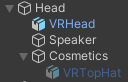
It looks like the string uses the gameobject name:
"Every body part on the player has a child named something with "Cosmetics", under those you put the models of the cosmetics you want. You have to rename the object to the ID of the cosmetic, let's say you put on a hat with the ID "VRTopHat" then under the Cosmetics child of the head you put your model and name it "VRTopHat", like this:"
Theres a picture at the bottom of the repo you linked
Do you HAVE an object named "Left"? Is it a child of an object called "Cosmetics"?
 kindred vessel
cosmic rain
Sorry, I've no experience with CloudCodeServive, so can't help you there.
kindred vessel
cosmic rain
Sorry, I've no experience with CloudCodeServive, so can't help you there.
I cry. I guess I'll ask in advanced
heady iris
spring creek
I think the issue is that you need to just use strings? You wrote `Left` but you...
Left was already a string
heady iris
strong geyser
nope 😭
Show your current code.
spring creek
heady iris
`Left` was already a string
In here?
#archived-code-general message
Ahhhh
heady iris
yes, Left is a field
spring creek
Yep, I see it
heady iris
strong geyser
nope 😭
did you do uh
spring creek
The other one was enum though
heady iris
public string "Left"
Right? Lol
heady iris
Every instance of the method I can find takes two strings
heady iris
strong geyser
`using System.Collections;
using System.Collections.Generic;
using UnityEngine;
...
so, yes, CosmeticType is not a valid argument there
the method takes two strings
give it two strings
heady iris
heady iris
so, yes, `CosmeticType` is not a valid argument there
hence the error complaining you can't convert from Photon.VR.Cosmetics.CosmeticType to string
because the method wanted a string and you gave it a Photon.VR.Cosmetics.CosmeticType
heady iris
heady iris
```cs
public string "Left"
```
This is invalid syntax.
 delicate zinc
I've been trying to understand how picking a random item from a list of weighted values work, because i think it'd be the best option for picking rooms in a dungeon generation algorithm.
If i have say, 3 items, call them A, B, C. and all of these items have a weighte value of 10.
I assume then each item has a... 33.3% chance of being picked?
heady iris
sum up the weights, then pick a random number between 0 and the sum
iterate over the list, subtracting each item's weight from the random number as you go
if the number reaches zero, return the item whose weight you just subtracted
delicate zinc
hmmm...
ok lemme see if i can implement this right
cuz i've been working on a custom collection for this kind of stuff
float startWeight = _rng.RangeFloat(0, TotalWeight);

for(int i = 0; i < _items.Count; i++)
{
    startWeight -= _items[i].weight;
    if (startWeight <= 0)
        return i;
}```methinks this should work then.
heck
i mean, that didnt really answer my question regarding the probability
because currently only one item is being picked constantly
i assume its because all three items have the same weight?

heady iris
delicate zinc
i assume its because all three items have the same weight?
each item should have an equal chance of being drawn
how are you creating that _rng object?
delicate zinc
rng is a custom Random number algorithm i found on github, cant recall where
heady iris
why are you using a custom pseudorandom number generator
delicate zinc
Xoroshiro128Plus i think is the algorithm it used?
delicate zinc
heady iris
why are you using a custom pseudorandom number generator
its seeded
mainly because of that
heady iris
so is every other PRNG
delicate zinc
Unity's global
heady iris
System.Random can be constructed with a seed
You can also save and restore the state of UnityEngine.Random at will
by accessing Random.state
Show your code. If you're not getting random results, I suspect you're deterministically seeding your RNG
you can sanity check your RNG by logging a random integer
delicate zinc
will do
heady iris
I was doing that two days ago while tracking down an rng bug
delicate zinc
https://gyazo.com/17421279c905bfd44f7b2a81a2eb48dc
NextInt does seemm to be quite random, regardless, lemme hastebin the code

Hastebin is a free web-based pastebin service for storing and sharing text and code snippets with anyone. Get started now.
kindred vessel
Aight. I just need this: How do I authenticate as a service account via some Unity library?
heady iris
delicate zinc
https://hastebin.com/share/eziwexexib.csharp
I'm looking for your code, not the RNG's
delicate zinc
my bad
Hastebin is a free web-based pastebin service for storing and sharing text and code snippets with anyone. Get started now.
worth mentioning that the seed i use for the WeightedCollection on my current attempt is basically taken from another instance of my RNG, which itself the seed is set to the current DateTime.Now.Ticks
converted to ulong
heady iris
i would suggest just using Random.Range to rule out a problem with your RNG
I see that you're logging startWeight already, though
if you have three items of weight 10, then you should see a total of 30
with random values between 0 and 30
here's how I did this, by the way
delicate zinc
yeah, 50 + 50 + 50, 150
so thats correct
lemme checkout something


well
the first line is just the start weight, and its always the same value
so... ugh
ok lemme see if removing that custom rng andd replacing it with System.Random works
yeah my RNG is just fucked
guess i'll just use System.Random
and subclass it if need be
placid island
Hello, why my Ah, nothing. It's because I set translation to 0v and p matrix are not zero but the inverse matrix of their multiplication are?
 delicate zinc
heady iris
just construct an instance and you're good
delicate zinc
heady iris
just construct an instance and you're good
letting you know (because i belive i should always say what my outcome was for future people's sake), turns out the custom rng class i have is fine, i just used a constructor that basically creates a copy with the same rng states
so... yeah, of course the same outcome was happening when all of them where on the same state instead of different ones
delicate zinc
indeeed
that's the one i was using
now i'm just using the already existing rng class and generating a new seed from it, instead of using the copy constructor
 verbal grail
I started a new project a week ago. I was able to build and run it without issues. But now, I Build and Run, it goes into script compilation, and shortly stops building, doens't output any logs at all. No build completed, or failed logs, nothing. Just stops. Doesn't write anything to the build folder either. I tried "Clean build", same thing. Anyone else had these issues? Why would it silently stop and not say anything.
 potent sleet
verbal grail
I started a new project a week ago. I was able to build and run it without issue...
potent sleet
verbal grail
I started a new project a week ago. I was able to build and run it without issue...
screenshot console window
verbal grail
build and run then screen it?
potent sleet
ye
verbal grail
woah! it worked Now it shows errors, that's weird. Let me address those first and hopefully that will do it.
 wheat spade
I'm having a weird desync with connecting NavMesh to root-motion movement. If I plug the desired velocity parameter from the agent and convert it to local space into my animator paraneters, the agent starts acting weird. It doesn't path around objects, sometimes it moves away from its target, it may walk out of the NavMesh, or it simply stops as if it reached its destination. I've also tried getting the vector from nextPosition to the agent's position, normalizing it, applying my speed multiplier, and then plugging those values into my animator paraneters, it doesn't desync but the model vibrates due to nextPosition being enlarged so much after being so small. Has anyone done something like this able to help me?
potent sleet
wheat spade
I'm having a weird desync with connecting NavMesh to root-motion movement. If I ...
wdym convert it to local space into animator parameters?
wheat spade
I have two parameters in my animator, x and z, that control the blend of the animations. The navMesh coords are in world, so I have to convert it to local. Local vs world isn't the problem, I've tested them both.
potent sleet
wheat spade
I have two parameters in my animator, x and z, that control the blend of the ani...
hmm is there a reason you're not using agent velocity instead of doing coordinates?
wheat spade
I did use velocity, it's in world coords.
potent sleet
wheat spade
I did use velocity, it's in world coords.
can you show script?
wheat spade
Yeah, give me a sec though.
{
//Only redo the path sometimes (every 1/15 of a second default)
if (updateClock <= 0)
{
agent.SetDestination(target);
updateClock = 1 / navMeshFrames;
}
else
{
updateClock -= Time.deltaTime;
}
//Get the vector from the nextPosition property.
//Doesn't work.
/*
Vector3 worldMovement = agent.nextPosition - owner.transform.position;
worldMovement = worldMovement.normalized * speed;
Vector3 localMovement = owner.transform.InverseTransformDirection(worldMovement);
*/
//Smoothes the movement. Doesn't work either.
//Code from https://docs.unity3d.com/2021.1/Documentation/Manual/nav-CouplingAnimationAndNavigation.html
/*
float smooth = Mathf.Min(1.0f, Time.deltaTime / 0.15f);
smoothMovement = Vector3.Lerp(smoothMovement, localMovement, smooth);
*/
//This doesn't work.
agent.speed = speed; //Doesn't do anything for now since speed isn't changing.
Vector3 localMovement = transform.InverseTransformDirection(agent.desiredVelocity);
animator.SetFloat("MovementX", localMovement.x);
animator.SetFloat("MovementZ", localMovement.z);
}``` mellow zinc
does any one know what endless runners use to make the map infinate and can refer a bideo to me
 wide dock
Type "unity endless runner" into youtube and you'll have at least 3 different series covering that
swift falcon
Hello guys I have a game that consists of a main game and a few mini games that are triggered from it in the same scene. Currently my games are badly coupled and require a lot of editor references. I want my mini games to basically be "plug and play". If I add a new one into the future I want it to be easy. Can you recommend a design pattern that I can look into and implement to solve this problem?
 neat shard
https://hastebin.com/share/ocoqiyetiw.csharp
in my above script, i'm wondering if there is a better way to handle this part
    private void Update()
    {
        if (spinDuration > 0)
        {
            spinDuration -= Time.deltaTime;
            Spin();
        }
        else
        {
            UpdateLayout();
        }

    }
where its not always calling UpdateLayout every frame.. that's bad for performance right?
Hastebin is a free web-based pastebin service for storing and sharing text and code snippets with anyone. Get started now.
 rocky helm
neat shard
https://hastebin.com/share/ocoqiyetiw.csharp
in my above script, i'm wondering ...
rocky helm
neat shard
https://hastebin.com/share/ocoqiyetiw.csharp
in my above script, i'm wondering ...
That looks like it wouldn't really hurt performance to me, unless there are a lot of children in the parent. But you can test this with the profiler.
neat shard
rocky helm
That looks like it wouldn't really hurt performance to me, unless there are a **...
i have 5 reels with this script on with 12 symbols each .. my worry is that is that i'm building for mobile webgl and i'm trying to avoid unnecessary method calls like that if i can
rocky helm
neat shard
i have 5 reels with this script on with 12 symbols each .. my worry is that is t...
To me it seemed like updateLayout only needs to be called whenever the children in the parent become inactive or change size, so unless that happens every frame I believe you could only call upsateLayout whenever one of the children changes in an important way
neat shard
this seems to work
    private void Update()
    {
        if (spinDuration > 0)
        {
            spinDuration -= Time.deltaTime;
            Spin();
            layoutUpdated = false;
        }
        else if (!layoutUpdated)
        {
            Debug.Log("layout updated");
            UpdateLayout();
            layoutUpdated = true;
        }
    }
its my (probably bad) attempt to align slot reels back to even positions because when they stop based on their "spin duration" it ends up like

so just needed that UpdateLayout called once after its done spinning
i dont know how to use the profiler yet ... i should probably youtube that 😅
rocky helm
neat shard
its my (probably bad) attempt to align slot reels back to even positions because...
Then try to align them correctly or call the function once one is done spinning
 worn oasis
Hey all, I am instantiating an object at a target destination. Once instantiated, I am attempting to animate its position on the Y axis, however, it seems as though the animator is resetting the object's x and z positions also. How can I stop the animator from overriding the x and z positions?
cosmic rain
worn oasis
Hey all, I am instantiating an object at a target destination. Once instantiated...
Remove the x and z properties from the animation clip. Though I'm not sure if that's possible.
worn oasis
It's not
cosmic rain
If you only need to animate the visuals, have a separate object with the visuals animated.
cosmic rain
Game logic should be separated from visuals.
worn oasis
cosmic rain
Game logic should be separated from visuals.
Yep, that fixed it, thank you
 main shuttle
There is an ECS/DOTS channel here: #1064581837055348857
merry seal
Ok
static matrix
ugh trying to set up pathfinding in a procedural world will be the death of me I swear
 hexed pecan
static matrix
ugh trying to set up pathfinding in a procedural world will be the death of me I...
hexed pecan
static matrix
ugh trying to set up pathfinding in a procedural world will be the death of me I...
What is the issue?
static matrix
I just don't know how to do it thats all
hexed pecan
Use the navmeshcomponents package and bake the NavMeshSurface(s) from a script after your world is generated
Assuming it is 3D
static matrix
the problem is it keeps being generated
its infinite
I've tried having a surface on each chunk but then enemies can't cross chunks
hexed pecan
Not sure why it would generate infinitely 🤔
It generates when you call the bake function
static matrix
no the world does
it just has like 12 chunks around the player loaded at any given time
so I would need to bake again and again I would think
I had gotten it to work somewhat but it caused freezes every time it baked
which isn't good
before I had gotten it to work without freezing but then enemies couldnt cross chunks
hexed pecan
Ah I see. Didnt come across that issue since I gen my world on start
Generating them asynchronously would be good but I dont think that is possible at runtime
@static matrix This might work if you put a pre-existing mavmesh surface on the chunk prefab 👀
https://docs.unity3d.com/ScriptReference/AI.NavMeshBuilder.UpdateNavMeshDataAsync.html
 static matrix
hexed pecan
<@502615498828021761> This might work if you put a pre-existing mavmesh surface ...
static matrix
hexed pecan
<@502615498828021761> This might work if you put a pre-existing mavmesh surface ...
I have tried this, it did give me a good result
however, the enemies couldn't move between meshes, and were confined to their chunk
hexed pecan
static matrix
I have tried this, it did give me a good result
however, the enemies couldn't mo...
So that is the real issue
Not sure, maybe you need to generate navmesh links between them
static matrix
yes
I was trying to find a workaround
static matrix
hexed pecan
Not sure, maybe you need to generate navmesh links between them
yeah I've tried a couple things with that
most of my solutions cause enems to kinda glitch when they go between chunks
they keep functioning (sometimes) but it looks bad and can cause them to go thru walls
my other idea was having a link in front of the enems at all times but that also didn't work
hexed pecan
All I can think of right now is using a single large navmesh that you update when chunks are created. Maybe limit the area though
I'll tell you if I find some solutoon, I might need to solve it myself too
static matrix
yeah I couldn't figure out how to do that when async
that got the pathing working totally but caused a freezeframe every time a chunk spawned, which ofc I can't have
I've tried doing custom pathing scripts or having enems that don't really need pathing but those don't work for everything
static matrix
hexed pecan
I'll tell you if I find some solutoon, I might need to solve it myself too
thanks
vivid remnant
I've tried using Application.targetFrameRate because I wanted to see how my game behaves at low framerates. Everything behaves well until I set the target framerate value to something lower than 60. If the framerate is below this value, the game starts to look jittery and rigid bodies become unstable both when moving and when colliding with other objects. All these changes have been observed while running the game inside the editor. I did not create a build of the game in order to see how the "final product" behaves. Is it normal for the game to behave this way when running at under 60fps?
hexed pecan
vivid remnant
I've tried using Application.targetFrameRate because I wanted to see how my game...
Sounds to me like you are moving rigidbodies in Update (as opposed to FixedUpdate)
And/or abusing deltaTime
If you do things correctly, the framerate shouldnt affect physics, except when the physics loop struggles and reaches the max time step
Rb jitter can be caused by a few things so you should show some code, how you move things etc. And it could be a camera issue too
hexed pecan
hexed pecan
And/or abusing deltaTime
For example using AddForce with deltaTime
 neon plank
Is there an event raised when a NavMeshAgent collides with another one?
vivid remnant
The scene includes a character that is controlled by the player. The character has a CharacterController component. There are also "interactable" objects such as boxes and barrels that have rigid bodies but I never add forces to them. The Rigidbody components are only there so the boxes will behave appropriately when they fall of something. Lastly, there are doors and elevators that have kinematic rigidbody components. Let's focus on the elevator for a moment. If a box is placed on that elevator, it goes up and down with the elevator as you would expect but if the framerate is under 60, the box starts jumping as the elevator goes up as if the colliders are going through each other. I tried moving the elevator both by using Transform.position as well as Rigidbody.MovePosition() and the behaviour remains the same at under 60fps.
potent sleet
neon plank
Is there an event raised when a `NavMeshAgent` collides with another one?
Probably need a rigidbody with all the constraints checked and use OnCollisionEnter
leaden ice
vivid remnant
The scene includes a character that is controlled by the player. The character h...
This is the main drawback of a CharacterController based character. If you need external physics objects to act on the character, it's going to suck
neon plank
When a NavMeshAgent collides with another NavMeshAgent it doesn't produce a OnCollisionEnter AFAIK, after all, they aren't colliders
So I guess it may be another method, but don't know which one
potent sleet
neon plank
When a `NavMeshAgent` collides with another `NavMeshAgent` it doesn't produce a ...
I never said NavMeshAgent
 neon plank
potent sleet
neon plank
potent sleet
(You didn't specify to add Colliders so I thought you mean Rigidbody + NavMeshAgent)
heady iris
The rigidbody might not behave correctly if the NavMeshAgent is directly moving the object around
Although, from my experience, it's fine
potent sleet
Never had major problems with constraints on, but don't quote me on it
its how I make my agents push physics doors too
potent sleet
I prob should, but I didn't want to deal with the whole collision matrix not detected between certain types
dynamic has more choices
vivid remnant
leaden ice
This is the main drawback of a CharacterController based character. If you need ...
The character controller can wait. :)))
For now, I would like to understand why the elevator and the boxes start acting weird when the framerate drops below 60. They both have rigidbody components(kinematic for the elevator / non-kinematic for the boxes). I tried moving the elevator in FixedUpdate() using Rigidbody.MovePosition() and in Update() using Transform.position and the behaviour still occurs.
hexed pecan
vivid remnant
The character controller can wait. :)))
For now, I would like to understand why ...
Might not be the issue but try enabling interpolation on the rigidbodies and see if it helps at all
A video of the issue could help.
vivid remnant
hexed pecan
Might not be the issue but try enabling interpolation on the rigidbodies and see...
Forgot to mention it. I did that from the start.
leaden ice
vivid remnant
The character controller can wait. :)))
For now, I would like to understand why ...
FixedUpdate with MovePosition should give good results
vivid remnant
hexed pecan
A video of the issue could help.
Alright, I'll be back with a video in a few minutes. 😄
hexed pecan
Then again, I have seen plenty of games that have a similiar issue with elevators lol
vivid remnant
leaden ice
FixedUpdate with MovePosition should give good results
You're right! That's why I'm not sure what did I do wrong.
leaden ice
Showing the code and a video would help
heady iris
Just because you're using FixedUpdate doesn't mean you're doing things in the right order at the right time
whole portal
I have an issue with my character controller which I don't know how to fix. If I stand still, the jumping animation plays normally, from start to end. However if I am walking and try to jump or running and try to jump, the jumping animation plays 2 times in a row but before the first time even finishes, like only a few frames then it stops.
Normally when waking or running, the jumping animation should only play once, from start to finish, just like it does when I am idling. I have checked my animator settings and they are set up correctly I think, also checked the animation transitions and they look normal, so the issue has to be with the code.
If someone can have a look and tell me how to fix it I'd appreciate, code is here: https://pastebin.com/0qtWKP0j
Pastebin
Pastebin.com is the number one paste tool since 2002. Pastebin is a website where you can store text online for a set period of time.
heady iris
we would need to see your animator controller
leaden ice
whole portal
I have an issue with my character controller which I don't know how to fix. If I...
you probably want to use a trigger for the jump animation rather than a bool
 heady iris
You must be going from Walking to Jumping to some other state and back to Jumping again
potent sleet
also you could kill some mess by using blend tree for idle/run/walk
using float for speed control
whole portal
heady iris
You must be going from Walking to Jumping to some other state and back to Jumpin...
Here is what happens.
And I only press spacebar once, as you can see it's jumping two times but only when walking or running.
And the jumping animation stops prematurely as well when walking or running.
heady iris
does your Jumping state have an exit time on its exit transitions
whole portal
No
 dawn mauve
whole portal
Here is what happens.
dawn mauve
whole portal
Here is what happens.
Is the jumping state a trigger?
heady iris
all bools
are the blend times different between the different transitions that enter the Jumping state?
It seems like it's spending a long time blending between Running and Jumping
dawn mauve
It could also be that the jumping animation is looping.
whole portal
heady iris
are the blend times different between the different transitions that enter the J...
Here is all my blends.
potent sleet
you have two bools together probably
oh you have no exit time for Jump, how do you set it back to false?
heady iris
This is wrong. You should only exit the "Jumping" state when isJumping is false.

isWalking and isRunning remain true even when you're jumping
potent sleet
I typically have a state for IsGrounded where my player is mid-air if not grounded
heady iris
So it's rapidly transitioning back and forth.
Keep your animator in the Jumping state until isJumping is false
isIdling gets set to false when isJumping is true
That's why that worked fine.
whole portal
heady iris
Keep your animator in the Jumping state until `isJumping` is false
How do I do that exactly ?
heady iris
add another condition
you can have many conditions
they must all be true for the transition to occur
potent sleet
mp4
whole portal
heady iris
add another condition
That solved it for both!
heady iris
i'll ffmpeg that one for you
vivid remnant
potent sleet
mp4
One sec
heady iris
this is a long one
whole portal
Thank you very much for the help friends!
heady iris
3 minutes and 24 seconds is a very long recording, lol
heady iris
vivid remnant
One sec
potent sleet
lol
vivid remnant
heady iris
3 minutes and 24 seconds is a very long recording, lol
I tried presenting everything. The behavior when the game runs, the code, the way things change when the framerate is below 60.
You can also see the components of the box and the elevator.
potent sleet
so you're talking about the box freaking out
vivid remnant
Yes
vivid remnant
vivid remnant
The scene includes a character that is controlled by the player. The character h...
Description
@hexed pecan, @leaden ice, I'm back with the video presenting the problem I'm facing. :)))
Any help would be highly appreciated.
Uh... anyone?
potent sleet
vivid remnant
Uh... anyone?
where is the script?
looking at video for script is tedious
hexed pecan
On my phone right now and I can barely see anything in the video since you use nearly black materials 😅
vivid remnant
potent sleet
where is the script?
One sec
hexed pecan
Yeah the vid is too long, better share the inspectors as screenshots and the code as a paste link. And record the relevant parts on video only
Maybe make a thread too
And lighter material colors
vivid remnant
potent sleet
where is the script?
Here you go!
https://pastebin.com/P0ZFxszs
Pastebin
Pastebin.com is the number one paste tool since 2002. Pastebin is a website where you can store text online for a set period of time.
potent sleet
vivid remnant
Here you go!
https://pastebin.com/P0ZFxszs
MovePosition this doesn't respect physics btw
vivid remnant
I looked through some forums in the meantime and discovered that If I want the coroutine to behave as it is was code running inside of FixedUpdate(), I should use WaitForFixedUpdate() instead of WaitForSeconds(Time.fixedDeltaTime).
I made the change and now the box has the desired behavior when on the elevator.
vivid remnant
potent sleet
`MovePosition` this doesn't respect physics btw
Please explain.
potent sleet
vivid remnant
Please explain.
its very simple really , you're forcing transforms instead of use physics to simulate movement
the result will always be choppy/inaccurate collisions
heady iris
that'd be Vector3.MoveTowards
i wish you could use the static methods like instance methods
foo.MoveTowards(bar, 1);
potent sleet
yeah apparently my brain this morning, thought MovePosition & MoveTowards were the same 👨🦯
hmm maybe the positions are off
vivid remnant
potent sleet
yeah apparently my brain this morning, thought MovePosition & MoveTowards were t...
For a second you made me think that I never understoon how MovePosition() works. :)))
potent sleet
vivid remnant
For a second you made me think that I never understoon how MovePosition() works....
lol na myb
I usually don't use kinematic, that threw me off 😅
my boxes are usually physics and use .velocity to keep it close to player cam
leaden ice
vivid remnant
Here you go!
https://pastebin.com/P0ZFxszs
How does this InteractiveMove function work?
vivid remnant
As you can see, the method that moves the elevator is a coroutine. When the player activates the elevator, the coroutine starts. I don't want the player to be able to activate the elevator again until the coroutine that is already running has finished its job.
The InteractiveMove method simply checks if a coroutine is already active in order to prevent the player from starting another one.
hexed pecan
vivid remnant
I looked through some forums in the meantime and discovered that If I want the c...
Next time show the code to begin with. I saw IEnumerator and my immediate thought was 'they probably arent using WaitForFixedUpdate'
vivid remnant
leaden ice
How does this `InteractiveMove` function work?
 leaden ice
vivid remnant
leaden ice
vivid remnant
I don't think this check will work properly
vivid remnant
hexed pecan
Next time show the code to begin with. I saw IEnumerator and my immediate though...
That was indeed the problem. :)))
leaden ice
unless you are doing coroutineActive = null; at the end of the coroutine
hexed pecan
Yeah, coroutine reference will not nullify itself when it finishes
vivid remnant
I know.
InteractiveMove is called inside of the Interact method which makes a coroutine null in case the criteria are met.
Look

But you are right, @hexed pecan, I was using WaitForSecond(Time.fixedDeltaTime) when I should've been using WaitForFixedUpdate().
This is how things work after implementing the changes.
potent sleet
nice
vivid remnant
I still have some work to do with the way the box behaves when it's carried around in order to make it look better but I'll figure something out.
Thanks, guys!
leaden ice
vivid remnant
But you are right, <@136926228341850112>, I was using WaitForSecond(Time.fixedDe...
oof yeah that'll do it
 gleaming imp
any idea what this means:
No UI template found for Ads Service GettingStarted.
leaden ice
gleaming imp
any idea what this means:
> No UI template found for Ads Service GettingStarted.
looks like it's trying to show you a getting started page for the ads service package and it failed to for some reason
gleaming imp
I looked in AdsManager.cs and it´s the type of a function arg
private void HandleShowResultUnity(ShowResult result)
just not declared anywhere
orchid bane
We are saving many objects to JSON but we want to have a little bit of composition. So that we can have several JSON configurable MonoBehaviours on one GO and only some of them on another. What would be the best way to do it? The problem is that I don't know of a way to make it all composable without putting one JSON inside another one which will inevitably lead to problems
 tranquil canopy
Hii, can someone help me with an issue in Unity? I need to control the variable 'y' from the script 'x' (the script 'x' is inside a prefab). Please help me
leaden ice
tranquil canopy
Hii, can someone help me with an issue in Unity? I need to control the variable ...
Provide more details. This is pretty vague
Are you instantiating a prefab and then you want to change a variable on the newly instantiated copy's script?

 leaden ice
tranquil canopy
this is the prefab
leaden ice
tranquil canopy
this is the prefab
very simple:
[SerializeField]
PipesMovement pipePrefab; // assign to the prefab
[SerializeField]
PipesController pipesController; // assign to the pipe controller in the scene

void SpawnPipe() {
  PipesMovement newPipe = Instantiate(pipePrefab);
  newPipe.pipesController = this.pipesController;
}```(sorry misread pipe as player. Fixed now)
tranquil canopy
thats from the playerMovement script, right?
leaden ice
tranquil canopy
thats from the playerMovement script, right?
Doubt it?
it's from whatever script is spawning the pipes
 leaden ice
tranquil canopy
i want to acces to that speed var
leaden ice
tranquil canopy
i want to acces to that speed var
yes I've just told you how to do it
you are already accessing the speed variable in your script
tranquil canopy
that speed var is on the pipesController script and i want to acces to it all time on the pipesMovement script
 leaden ice
tranquil canopy
that speed var is on the pipesController script and i want to acces to it all ti...
leaden ice
tranquil canopy
that speed var is on the pipesController script and i want to acces to it all ti...
I understood this complete.y My code example will let you do what you want.
tranquil canopy
yeah, the problem is that i cant assign it on the inspector
leaden ice
tranquil canopy
yeah, the problem is that i cant assign it on the inspector
I know that
My code will do what you want
it assigns it from the script
tranquil canopy
oh, let me try
leaden ice
tranquil canopy
that speed var is on the pipesController script and i want to acces to it all ti...
wait if the pipe controller is the thing spawning the pipes you can make this even simpler
[SerializeField]
PipesMovement pipePrefab; // assign to the prefab
void SpawnPipe() {
PipesMovement newPipe = Instantiate(pipePrefab);
newPipe.pipesController = this;
}``` fervent furnace
this should be code beginner
object in scene cant reference any components in asset or vice verse
tranquil canopy
leaden ice
wait if the pipe controller is the thing _spawning_ the pipes you can make this ...
it doesnt work...

it still the same
leaden ice
tranquil canopy
why did you change the pipe movement script
I didn't tell you to make any changes there
you don't need any changes there
put it back how it was
leaden ice
leaden ice
wait if the pipe controller is the thing _spawning_ the pipes you can make this ...
^ you just need this in the PipesController
leaden ice
tranquil canopy
i want to acces to that speed var
put it back like this
 leaden ice
wait if the pipe controller is the thing _spawning_ the pipes you can make this ...
leaden ice
leaden ice
wait if the pipe controller is the thing _spawning_ the pipes you can make this ...
^
tranquil canopy
leaden ice
put it back like this
 fervent furnace
you dont need to create another field of PlpeController to store the instance itself, you use this to reference itself
leaden ice
tranquil canopy
ok did... you make the change to the function that spawns the pipe?
and did you assign the prefab in the inspector yet?
just.. do all the things I said to do, and it will work



 tranquil canopy
leaden ice
just.. do all the things I said to do, and it will work
tranquil canopy
leaden ice
just.. do all the things I said to do, and it will work
like that, right?
leaden ice
save it - and make sure you assign the prefab in the inspector
tranquil canopy
done...
 tranquil canopy
leaden ice
save it - and make sure you assign the prefab in the inspector
tranquil canopy
leaden ice
save it - and make sure you assign the prefab in the inspector
i can delete that, right?
 bleak moat
Is there anything besides AudioSource.Pause() and AudioSource.Stop() that can possibly set AudioSource.IsPlaying to false and AudioSource.time to 0?
leaden ice
tranquil canopy
i can delete that, right?
delete what
tranquil canopy
 leaden ice
bleak moat
Is there anything besides AudioSource.Pause() and AudioSource.Stop() that can po...
leaden ice
bleak moat
Is there anything besides AudioSource.Pause() and AudioSource.Stop() that can po...
waiting for the audio source to finish playing
leaden ice
tranquil canopy
no there's nothing here you can delete
tranquil canopy
so that needs to be empty?
 leaden ice
tranquil canopy
so that needs to be empty?
leaden ice
tranquil canopy
so that needs to be empty?
yes leave it empty
it doesn't matter
you can even put [NonSerialized] on it if you want
bleak moat
leaden ice
waiting for the audio source to finish playing
Well, that's just the thing. I'm having the most baffling bug. Midway through a yield return new WaitUntil , a 4 second clip is suddenly being set to IsPlaying = false and time to 0, resulting in the wait ending like halfway through.
leaden ice
bleak moat
Well, that's just the thing. I'm having the most baffling bug. Midway through a ...
show the code?
 somber tapir
Visual Studio skips over specific chars, like brackets when you type something. Is it possible to also enable it for '>' and '<' chars?
bleak moat
        public void PlayAudioClip(AudioClip clip, AudioConfigurationSO settings, bool hasToLoop, Transform sourceTransform = default)
        {
            if (!clip)
            {
                DebugTools.Print("No clip to play: make sure that the AudioCue's clips' audio files are not missing and make sure they were checked out in Plastic if they were set to private", "red", "[sfx]");
                NotifyBeingDone();
            }

            // Stop(); // Stop any existing audio
            _audioSource.clip = clip;
            settings.ApplyTo(_audioSource);
            _sourceTransform = sourceTransform; // Store the source transform
            _audioSource.loop = hasToLoop;
            _audioSource.time = 0f; //Reset in case this AudioSource is being reused for a short SFX after being used for a long music track
            gameObject.name = clip.name;
            _audioSource.Play();

            if (!hasToLoop)
            {
                // Stop any existing coroutine
                if (_currentCoroutine != null)
                {
                    StopCoroutine(_currentCoroutine);
                }

                // Start the new coroutine and store its reference
                _currentCoroutine = StartCoroutine(FinishedPlaying(clip));
            }
}``` {
// yield return new WaitForSeconds(clip.length);
yield return new WaitUntil(() =>
{
Debug.Log("<color=green>" + gameObject.name + " " + _audioSource.clip.name + " _audioSource.time = " + _audioSource.time + " isPlaying: " + _audioSource.isPlaying + "</color>");
return !_audioSource.isPlaying;
});
NotifyBeingDone();
}```
Basically, this is used to play clips for a sound emitter pool (they each contain an _audioSource).Sorry for all the debug statements.
tranquil canopy
leaden ice
yes leave it empty
ohhhh it works, thank you so muchh... Lol now im going to look for how it works
leaden ice
tranquil canopy
ohhhh it works, thank you so muchh... Lol now im going to look for how it works
it's not complicated.
newPipe.pipesController = this; sets that empty field
tranquil canopy
what?
leaden ice
= is used to assign values to variables in C#
leaden ice
It means... this!
Because we're in the PipesController script, it means the PipesController
The one on which the code is running
it's like "me"
heady iris
this exists inside of any non-static method
because non-static methods, by definition, must be called on a specific object
and that object is this!
tranquil canopy
ohhh, much clear... and wich is the difference betwen [serializefield] and make the data type public?
leaden ice
tranquil canopy
ohhh, much clear... and wich is the difference betwen [serializefield] and make ...
both of them serialize the field.
public fields can also be read and modified from other scripts in addition to being serialized
serialization is just how data is copied around in Unity for the inspector and with Instantiate, etc.
heady iris
public and private are access modifiers. They determine who is allowed to see that member.
public means that any type can access the member. private means that only the declaring type can access it.
Unity automatically serializes public fields. You can use [SerializeField] to indicate that a field should be serialized (e.g. if it's private).
(a "member" is anything inside of a class or struct: fields, methods, properties, etc)
tranquil canopy
so, in a few words, its the same?
heady iris
They are not the same. They both happen to serialize the field.
A private field cannot be accessed by any other class.
tranquil canopy
thank you so much @heady iris @leaden ice 🙂
hard viper
I have a kinematic rigid body platform which moves using MovePosition. I have a dynamic rigidbody player that I want to parent to it, so player moves in the platform's reference frame.
I can make them move together if I use Translate or transform.position instead of MovePosition, but that doesn't seem right, because that would screw with other collisions, right?
I have tried fixed joint2D and some other joints to try to connect them, but the joints I tried that do make the two things move together ALSO block the player's movement (which is done by forces). Any advice?
leaden ice
hard viper
I have a kinematic rigid body platform which moves using MovePosition. I have a ...
there's really no simple way to move a rigidbody in another moving body's reference frame