#archived-code-general
1 messages · Page 177 of 1

 quartz folio
 west pelican
Do not cross-post. #💻┃code-beginner
west pelican
ok
 wispy raptor
i have a question, is there a way to use something like c#'s Func<T> but serializable?
like a unityevent but that returns something
 leaden solstice
wispy raptor
i have a question, is there a way to use something like c#'s Func<T> but serial...
leaden solstice
wispy raptor
i have a question, is there a way to use something like c#'s Func<T> but serial...
How’s that supposed to work if you change code
You can make a function ID or enum that you define and call function based on it
 lean sail
Unity events are already somewhat limited so I dont think this would be too easy to get working
 delicate zinc
bump (apologies if this isnt allowed lul)
lean sail
delicate zinc
bump (apologies if this isnt allowed lul)
if it works in 1 case and not the other, id just start debugging everything related to the code youve posted and make sure the values match what they should be.
Try to even recreate it without the moving objects, and see if the raycast hits in the same position
 worn stirrup
I'm trying to figure out how to make a single manager check a random number, attempt to spawn that number's object, and if it fails, re-attempt other types, but I can't come up with a clean way to put it together and it's getting pretty jumbled right now, does anybody have any pointers for something that handles this?
I can't really figure out how to google for this specific of a spawning behavior
 leaden ice
worn stirrup
I'm trying to figure out how to make a single manager check a random number, att...
leaden ice
worn stirrup
I'm trying to figure out how to make a single manager check a random number, att...
what does "that number's object" mean?
Have you somehow associated numbers with objects?
"if it fails" < what could/would cause it to fail?
 dusk apex
worn stirrup
I'm trying to figure out how to make a single manager check a random number, att...
dusk apex
worn stirrup
I'm trying to figure out how to make a single manager check a random number, att...
Also, define fails
lean sail
sounds like the numbers are IDs, and not everything can spawn in some areas?
worn stirrup
Uhhh good questions okay
dusk apex
If you're simply trying to not repeat selections or have invalid selections, perhaps remove those selections from the possible choices to be selected.
worn stirrup
I'd like for it to have a set of object categories, and it attempts to spawn from each category at random (being able to weight those would be nice, like some categories are still more likely than others), but if it finds out the max limit of that object is in play, or the max for that level has been spawned already, it skips and attempts another
That way the spawner is always consistently trickling in what's necessary until it's done, and it doesn't skip 2 or 3 attempts because it keeps trying to spawn a maxed category already
leaden ice
worn stirrup
I'd like for it to have a set of object categories, and it attempts to spawn fro...
I'd probably do something like:
- pick a random category
- pick a random enemy from the list of valid enemies for that category
- spawn that enemy.
there shouldn't be any retries necessary
because you should remove invalid choices from the pool before picking
dusk apex
When you spawn the object, if max has been reached for that object remove it from the list.
worn stirrup
Except the list of spawnables is just a range of a resource.load pull e.e I pulled that from a tutorial for spawning random objects of a category
leaden ice
and yes weighted random selection is pretty well trod ground
leaden ice
worn stirrup
Except the list of spawnables is just a range of a resource.load pull e.e I pull...
So change it.
leaden ice
You don't have to stick with what a tutorial taught. In fact tutorial solutions are often suboptimal and not easy to maintain and expand
dusk apex
worn stirrup
Except the list of spawnables is just a range of a resource.load pull e.e I pull...
You could have a list representing all the resources and another representing all currently available resources
Retrying is not preferable
leaden ice
worn stirrup
I don't immediately see a better way to do it that fixes this problem
Create a better data structure. For example use ScriptableObjects for the categories and each category object can store the list of objects it contains.
anyway i have to get some sleep
see ya
worn stirrup
My issue with ScriptableObjects is being able to pull and use their data at runtime, because I end up having to generate something that clones the SO's data into an empty GO in the scene to be referenced
I've never figured out how to put a bunch of data in a ScriptableObject and reference that data from an object in-scene without cloning each varaint of the ScriptableObject into an in-scene reference, and that feels like a junky way to get around it
So I'm trying to avoid the ScriptableObject problem, and I think I'm just hitting that block
It's all too hard-coded now
dusk apex
Either way, retrying is not preferred
worn stirrup
What exaclty do you mean by retrying?
dusk apex
worn stirrup
That way the spawner is always consistently trickling in what's necessary until ...
This
2 or 3 attempts
worn stirrup
Yeah no I definitely want to get around that
But this is going to take a lot more forethought than I have available tonight 😅
So I'll think and plan that out and come back later when I'm implementing
dusk apex
Instead of trying to not generate the invalid number, consider changing the collection to not have invalid entries
worn stirrup
Yeah that makes sense, that's what Praetor had said too at some point, that's a good appraoch
Thank you :3
leaden ice
worn stirrup
My issue with ScriptableObjects is being able to pull and use their data at runt...
yo udo't need to clone anything?
Just reference it directly
especially if it's not mutable
like in this case
but yes think of them as data stores
they don't need to be the final runtime data structure you're dealing with
just a basis for static information to build that with
worn stirrup
Yeah that's exactly how I'd use them, I have a lot of intermingling physics and objects that should come from others, so I need to set up all the relationships of what each thing has, their mass ranges, speeds, and resources provided when obtained
 elder flax
im having an issue with textmesh pro
it was working fine earlier but I built my mac version to Intel instead of Intel+silicon and now all my tmp text is invisible in the build
the thing is, the text is only invisible if it was active on the scene start
if it was inactive or instantiated after scene start its fine
and it only happens when i enter my play scene, my mainmenu scene is fine
should i reinstall tmpro or something
the only thing i did that might have affected it is add standard (specular) to the included shaders
 wicked cape
(Help) how i can parse this json file in unity https://qa2.sunbasedata.com/sunbase/portal/api/assignment.jsp?cmd=client_data
leaden ice
wicked cape
(Help) how i can parse this json file in unity https://qa2.sunbasedata.com/sunba...
You'd have to use Newtonsoft JSON since the "data" section is a Dictionary which isn't supported by JsonUtility
wicked cape
leaden ice
You'd have to use Newtonsoft JSON since the "data" section is a Dictionary which...
okay thanks
 trim spoke
Hi guys , upon uploading my unity android build to google play i get a warning
"Androidx.fragment:fragment has reported version 1.0.0 as outdated" has anyone seen this error? How to resolve?
 bleak thorn
Hi how to change shooting cargo, to actual direction of rocket (not only up?)


 prime sinew
bleak thorn
**Hi how to change shooting cargo, to actual direction of rocket (not only up?)*...
prime sinew
bleak thorn
**Hi how to change shooting cargo, to actual direction of rocket (not only up?)*...
Use transform.up
bleak thorn
prime sinew
Use transform.up
thank you
prime sinew
bleak thorn
thank you
The rocket's transform btw
 void remnant
Hello, is there any difference between StopCoroutine(IEnumerator) and StopCoroutine(Coroutine)? If yes, then what's better to use?
 tired elk
void remnant
Hello, is there any difference between StopCoroutine(IEnumerator) and StopCorou...
tired elk
void remnant
Hello, is there any difference between StopCoroutine(IEnumerator) and StopCorou...
 prime sinew
@void remnant
I personally only use the Coroutine one, because most times I want to stop a specific instance of a Coroutine
I dont know if the IEnumerator version lets you do that
tired elk
It may stop the first or all coroutine which comes from the IEnumerator since it can be linked to multiple Coroutine instances.
I prefer the 3rd option too since it's an instance and you have better control of where and when it's assigned
void remnant
Ok, thank you very much
 cinder oriole
Hello guys i have a bug currently ongoing in my game and i've been trying to find out whats wrong for the past 4 hours,
so basically i instantiated a bunch of items from a list of an item scriptableobject, and then i destroy it via script, and the next time i instantiate a new set of items, for some reason the old destroyed items appeared once again in the scrollview please help

also for some reason my game has invalid AABB errors idk what that means
tired elk
cinder oriole
Hello guys i have a bug currently ongoing in my game and i've been trying to fin...
What's the code for the instantiation ?
cinder oriole
 tired elk
OK. What can happen is you're disabling the object that holds all instances before the destruction method runs.
cinder oriole
 tired elk
FindGameObjectsWithTag() only work fork active objects
cinder oriole
i call destroy from here
cinder oriole
tired elk
OK. What can happen is you're disabling the object that holds all instances befo...
but in my hierarchy they've all been destroyed as well
if u watch the video, u see then i click 'continue' button, all the gameobjects inside the panel gets destroyed
but for some reason the next time i instantiate new items, the old ones magically reappear
tired elk
You're right, my bad. currentItemScene.itemsSO is fed at some point ?
 regal flame
are you never removing the items from currentItemScene.itemSO?
tired elk
Like, is there something that fill this list/array ?
cinder oriole
tired elk
You're right, my bad. currentItemScene.itemsSO is fed at some point ?
its fed manually through an inspector
cinder oriole
regal flame
are you never removing the items from currentItemScene.itemSO?
umm no its always there
oh should i try and remove everything from the list and see if thatworks?
so destroy the game objects and remove everything from the list
tired elk
Well, you could try. The foreach may run longer than you think.
cinder oriole
hmm alright, thanks so much for the help guys, i'll get back here if it didnt work
regal flame
set a debug.log in the foreach with the gameobjects name (or any unique identifier) and you should see that you are instantiating more than you intend on, probably atleast
cinder oriole
regal flame
set a debug.log in the foreach with the gameobjects name (or any unique identifi...
i did, and the items that magically reappeared wasnt included in the debug.log
so somehow they just ghosted their way through the debug.log and just reappeared in the scrollview
tired elk
Now this is weird
cinder oriole
sorry, how do i remove all elements from a list via script?
can i use RemoveAll()?
regal flame
List<> list; list.clear();
cinder oriole
okay thanks
OMG IT WORKS
thank you brother
i had this going for 5 hours
i love u guys
regal flame
glad you solved it 😄
tired elk
Nice ! Well played 🙂
tired elk
cinder oriole
i did, and the items that magically reappeared wasnt included in the debug.log
On this one particular issue, you may have a collapsed console, and duplicates were probably stacked
cinder oriole
oh right..
but anyways i guess i'll stick with the clearing list for now
but yea i did try to run the old code again without a collapsed console, and did Debug.Log(item.name) on the foreach loop, and turns out it did instantiate the old items @tired elk
but thats weird, can you think of any workaround if i dont want to clear the list but instead just destroy the gameobjects?
i mean yea clearing the list solved my problem but what if i wanted to revisit it in the future
tired elk
The list is fed with new stuff at some point in your code. You should find where this happens.
If the inspector was the only place, it wouldn't do this.
regal flame
you probably just don't want to instantiate it all from the same list, separate into different collections, or just be mindful of what you populate that list with
tired elk
Do you have like a "Get current item scene" method ?
cinder oriole
regal flame
you probably just don't want to instantiate it all from the same list, separate ...
basically i have an Item script which isnt a monobehavior and just holds:
-ItemSceneID
-List of Item Scriptable objects
and then from another script i have a list of <Item> where then i can add them manually from the inspector
its not from the same list, just from different instances of a single Item script
tired elk
If you're unsure, you could right click itemsSO in your IDE, click "Find all references" and check if you have Add() or AddRange() called on it somewhere in your code
cinder oriole
hmm
okay
let me chcek
whatever i'll just stick with this for now im too tired for this
 idle stratus
I'm trying to refer to a canvas gameObject inside a prefab, but whenever i turn it into a prefab, it clears the field and when I try to reassign it it shows this

inside the script Game Logic is marked as a GameObject
should I just use Find()?
prime sinew
idle stratus
I'm trying to refer to a canvas gameObject inside a prefab, but whenever i turn ...
what do you mean turn it into a prefab..?
idle stratus
drag it in the assets folder
prime sinew
where is this canvas gameobject
prime sinew
so just to be clear, you have another object in the scene(let's call this ObjectA) that has a reference to this canvas object
and you want to turn ObjectA into a prefab
idle stratus
yes
prime sinew
prefabs cannot have references to scene objects
idle stratus
oh well that clears it
prime sinew
you need to assign it at runtime
idle stratus
idle stratus
should I just use Find()?
so?
prime sinew
usually the spawner of the object should hold a reference to this canvas object
then it passes this reference to the spawned prefab instance
idle stratus
the spawner is the canvas
prime sinew
okay, so pass itself into the spawned object
using a function or something
see Dependency injection
 meager wasp
Hello, I'm currently trying to get dual monitors to work. I read https://docs.unity3d.com/Manual/MultiDisplay.html on how to activate the screen and that works just fine but it activates on my main monitor and I can't get the normal Window options to. Move it to 2. Monitor. Is there some way to activate it on 2. Monitor directly or get the normal window options back to. Move it myself?
 idle stratus
prime sinew
see Dependency injection
idle stratus
prime sinew
see Dependency injection
is it even easier if object a is a child of the canvas?
cinder oriole
does anyone know what this error is and if it'll ruin my build if i decide to go on with it
 prime sinew
idle stratus
is it even easier if object a is a child of the canvas?
prime sinew
idle stratus
is it even easier if object a is a child of the canvas?
idk about easier. it's what you want
prime sinew
cinder oriole
does anyone know what this error is and if it'll ruin my build if i decide to go...
ask in #💻┃unity-talk
 agile temple
Hello, I have issue with gun hitting my enemies. Main problem is I look for enemies through box collider but I have there some spread of bullets to make my game little bit random but I deal damage only if I hit in the collider and if I do bigger collider it will damage too many enemies. Also I cant use bullet trail beacuse it has problem with gameobject and my enemies are some different type. Here is my code https://pastebin.com/qFHqJf3Y
Pastebin
Pastebin.com is the number one paste tool since 2002. Pastebin is a website where you can store text online for a set period of time.
prime sinew
idle stratus
is it even easier if object a is a child of the canvas?
all you need to do is just have a function that will take in the canvas reference as a parameter and use that to assign to the prefab's variable that holds the reference. That's all
idle stratus
will the program recognize that the prefab has this variable?
prime sinew
... if you access the component of the prefab.. sure?
 rocky helm
If I am going to be calling GetComponent<T>() a lot in a frame, would it be faster to have a single script already holding public variables for those components, or would it have the same effect as just calling GetComponent for each of the components I need?
tired elk
rocky helm
If I am going to be calling GetComponent<T>() a lot in **a** frame, would it be ...
Fastest would be to cache the result of GetComponent<T>() in a logical place. If you only need access to this component in a single class, you should cache it inside said class.
 lethal plank
guys will List.AddRange(AnotherList); affect to "AnotherList"?
 hexed coral
lethal plank
guys will List.AddRange(AnotherList); affect to "AnotherList"?
hexed coral
lethal plank
guys will List.AddRange(AnotherList); affect to "AnotherList"?
No, it only mutates "List"
hexed coral
If that's happening it's not on that line of code, you should consider showing us how the rest of your code looks like
 rigid island
lethal plank
mine are somehow affect to "AnotherList"
rigid island
lethal plank
mine are somehow affect to "AnotherList"
probably because they contain the same reference types as item?
lethal plank
hmm its happening just like i let List = AnotherList but only affect the part i added
hexed coral
Oh
lethal plank
when i add something in List it not add to AnotherList
hexed coral
You are mutating the same object
lethal plank
ah
hexed coral
List = AnotherList makes both point to the same reference
 oblique spoke
lethal plank
hmm its happening just like i let List = AnotherList but only affect the part i ...
oblique spoke
lethal plank
hmm its happening just like i let List = AnotherList but only affect the part i ...
What are you storing in those lists?
hexed coral
If you want to clone a list:
List = new List(AnotherList)
oblique spoke
AddRange should also be fine
lethal plank
one is for working and on is based
hexed coral
lethal plank
one is for working and on is based
Could you rephrase that? I don't understand
lethal plank
oh sorry
oblique spoke
Structs and other value types are cloned, but class references will still point to the objects living elsewhere
lethal plank
"List" is a list im using it for working
"AnotherList" is the object i use it for reference
if i using right word
hexed coral
lethal plank
"List" is a list im using it for working
"AnotherList" is the object i use it fo...
We can only understand what you're talking about if you share your code
lethal plank
if you could understand it xd
here
when i delete line 31 it will not affect data.AttachmentSlots
 sudden meadow
How do I make unity cease adding tons of namespaces automatically?
 lethal plank
bro too lazy XD
sudden meadow
it doesn't. it adds tons of things it thinks i need all the time
for example probuilder for "Sprite"
oblique spoke
Unintended includes are probably coming from typos that you aren't undoing
sudden meadow
well, regardless, no way to make it less aggressive when it comes to this? it likes making edits to shader code too without asking
lethal plank
lethal plank
when i delete line 31 it will not affect data.AttachmentSlots
this line is for clean slots
rigid island
sudden meadow
How do I make unity cease adding tons of namespaces automatically?
this comes with drawback of having none show up 😦
hexed coral
lethal plank
when i delete line 31 it will not affect data.AttachmentSlots
This is clearly a reference vs value type problem, AttachmentSlot is likely a reference type so editing an object will also affect any lists that object is on
 gray thunder
afaik you can right click them and click on something like 'remove all unused namespaces'
something along those lines
sudden meadow
@rigid island i wouldn't mind adding a few namespaces
rigid island
also its not unity adding it, and its VS
oblique spoke
rigid island
this comes with drawback of having none show up 😦
I'm sure there is a setting for this somewhere
 late lion
sudden meadow
How do I make unity cease adding tons of namespaces automatically?
late lion
sudden meadow
How do I make unity cease adding tons of namespaces automatically?
Unity doesn't modify your scripts or shaders unless it's auto upgrading a deprecated function.
oblique spoke
Yea pretty sure this is a feature in VS
rigid island
oblique spoke
I'm sure there is a setting for this somewhere
there is to turn it off but you can't like "turn down to mild" or something, i don't think
hexed coral
lethal plank
this line is for clean slots
Please take some time to read about reference types: https://learn.microsoft.com/en-us/dotnet/csharp/language-reference/keywords/reference-types
 lethal plank
alright
lethal plank
i see
so there are no way to clone or copy it?
rigid island
lethal plank
i see
so there are no way to clone or copy it?
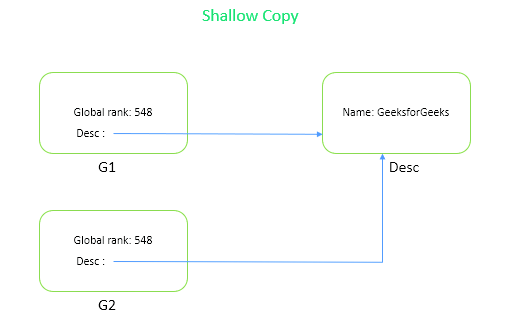
GeeksforGeeks
A Computer Science portal for geeks. It contains well written, well thought and well explained computer science and programming articles, quizzes and practice/competitive programming/company interview Questions.
see this
lethal plank
ok
lethal plank
rigid island
https://www.geeksforgeeks.org/shallow-copy-and-deep-copy-in-c-sharp/
thanks
 carmine prism
I'm using the following script to move a rigidbody player, but when checking velocity.magnitude of the rigidbody, it looks like the rigidbody has higher velocity whenever it goes up a slope.
Any ideas what i'm doing wrong?
private void MovePlayer()
{
    moveValues = playerControls.Move.ReadValue<Vector2>();
    if (isGrounded && moveValues == Vector2.zero) { EnableFriction(); }
    else { DisableFriction(); }


    float calcedMovementSpeed = walkSpeed;
    if (isSprinting && moveValues.x == 0 && moveValues.y > 0) { calcedMovementSpeed = sprintSpeed; } // SPRINT IF GOING FORWARD AND NOT GOING SIDEWAYS
    if (isCrouching) { calcedMovementSpeed *= crouchSpeedModifier; }

    Vector3 movement = (transform.right * moveValues.x) + (transform.forward * moveValues.y);

    movement *= calcedMovementSpeed;
    movement.y = rigidbody.velocity.y;

    rigidbody.velocity = movement;
}
specifically: higher the slope angle, higher the velocity
hexed coral
lethal plank
thanks
Also, if you're cloning a class all the time there's a good chance it should be a struct instead, though be careful dealing with structs, they have a lot of small rules that might not be intuitive at first glance
 static matrix
is it possible to do occlusion culling if I cant do any baking?
like is there a builtin way to do it
 swift falcon
My breakpoints don't seem to be working, anyone know why?
I feel like I remember getting more feedback that I activated a breakpoint, more things going red or something
I am in debug mode in Unity

 knotty sun
you are either not attached or not in play mode.
Notice 'Attach to Unity' at the top
swift falcon
Ah right that worked thanks
 glossy ledge
So if anyone has run into a similar issue, this is how I solved it.
First I added this to the Android Manifest :
<uses-permission android:name="android.permission.READ_MEDIA_IMAGES"/>
And I used this code to get the Android version and depending on the os version do one thing or another:
https://pastebin.com/qGikWUEi
Pastebin
Pastebin.com is the number one paste tool since 2002. Pastebin is a website where you can store text online for a set period of time.
 round creek
anyone have any idea as to why my trail flickers at the end? for context, player moves and camera follows.
leaden ice
round creek
anyone have any idea as to why my trail flickers at the end? for context, player...
how is your player moving
round creek
rb.moveposition
rigid island
round creek
anyone have any idea as to why my trail flickers at the end? for context, player...
only recorded like a split second..nice
round creek
leaden ice
from where?
fixedupdate
leaden ice
round creek
fixedupdate
Do you have interpolation enabled on the Rigidbody?
round creek
no
leaden ice
turn it on
round creek
k
still the same
btw the trail renderer is attached to a child object of the player
leaden ice
should be fine
rigid island
the greens look also choppy but hard to tell on a 1 sec video
maybe its the cam parenting
leaden ice
how is the camera moving
round creek
rigid island
the greens look also choppy but hard to tell on a 1 sec video
nah i just have rlly low frame rate when recording
leaden ice
Once you have rigidbody interpolation enabled, the camera should be following in LateUpdate
(or ideally with Cinemachine)
round creek
leaden ice
how is the camera moving
following player rb's position in update
round creek
leaden ice
Once you have rigidbody interpolation enabled, the camera should be following in...
okay
leaden ice
round creek
following player rb's position in update
don't use the RB position
use the transform position
rb position is not interpolated
transform position is
also yes move to LateUpdate
round creek
leaden ice
also yes move to LateUpdate
alr lemme try. if u don't mind, why exactly is my problem happening? is something out of sync or?
leaden ice
yes the physics updates are not in sync with the frame updates
hence the need for interpolation
and once interpolation is on you need to just make sure your camera is following the interpolated position
round creek
leaden ice
and once interpolation is on you need to just make sure your camera is following...
k, so three things: interpolate rb, use player transform for camera follow instead of rb, and update cam pos in lateupdate?
rocky helm
So, I'm doing rigidbody.position = ...; but there seems to be a chance of this sometimes not moving the rigidbody at all which is quite odd. The rigidbody is CollisionDetectionMode.ContinuousSpeculative; and RigidbodyInterpolation.Extrapolate;. I am also changing rigidbody.rotation and transform.parent on the same frame, in case that matters. Also, I used to do this with around 100 objects in one frame and when it happened, it happened to all of them and it is still like that. I am unable to give logs of the rigidbody position after setting it when it glitches, because every god damn time I put a Debug.Log() anywhere it just completely stops happening, but I can ensure you that the position it is being set to is static and definentely not 0,0,0 where the pieces are being set to.
I have a theory that this could maybe be related to Update and FixedUpdate firing in a certain sequence which makes this happen for some reason??
Also google hasn't been of much help for me in this and this has been a problem for more than a week now
round creek
lmk if it helps
leaden ice
rocky helm
So, I'm doing ``rigidbody.position = ...;`` but there seems to be a chance of th...
If you are directly setting RB position the collision detection mode and interpolation mode are irrelevant
those only apply when using velocity or adding forces
rocky helm
Yeah, I just added them in case they help, since I am not sure what is causing my problem
leaden ice
perhaps an animator? Or some other code setting the position, or the physics simulation fighting with you?
rocky helm
leaden ice
perhaps an animator? Or some other code setting the position, or the physics sim...
No animations/animators yet, no other code is setting the position either. It is probably the physics simulation, yet I don't understand why, and also the fact that printing the rigidbody position right after setting it "fixes" the problem just makes me really confused
Should I head to #archived-code-advanced with this?
lethal plank
hexed coral
Also, if you're cloning a class all the time there's a good chance it should be ...
Sound fun
 modern creek
When I use a TileMap and Grid, I don't see any gameobjects for each of the sprites. If I wanted there to be some sort of underlying data structure or game object.. do I have to use the GemBrush or something else to create the tiles programmatically..?
Or am I approaching this the wrong way - should I create my underlying data structure and optionally my game objects, then render the tilemap as a "view" of those objects? The tutorials I see look like they do something like create an int[,] and populate it, then populate a tilemap based on the values in their array
(And I'm assuming then that user input is "collected" by unity but then I'll have to flow it back to my objects - ie, by overriding TileBase and implementing click handlers)
leaden ice
rocky helm
No animations/animators yet, no other code is setting the position either. It is...
can you show your code?
 twilit canyon
Hello, I made a question in unity forums but didn't got help, only one person answered without even bothering to read the post, then i made a post in stack overflow, got 2 comments of people that didn't bother to see everything and a downvote, last time i got a downvote no one answered after, if anyone can help me i would appreciate it, all of the info about my problem is here: https://pastebin.com/4U0YcDJW
Pastebin
Pastebin.com is the number one paste tool since 2002. Pastebin is a website where you can store text online for a set period of time.
leaden ice
twilit canyon
Hello, I made a question in unity forums but didn't got help, only one person an...
what is the InputManager script?
leaden ice
I mean it's a custom script of yours, that's not a built in part of the input system.
can you show the code for it
twilit canyon
ok
twilit canyon
ik
leaden ice
it belongs in FixedUpdate
twilit canyon
i changed it and didn't work
 elfin quest
I'd change the movement to movement = rawmovement * speed * Time.fixedDeltaTime
rocky helm
leaden ice
can you show your code?
private GameObject ConvertConvexPolygon2DToShard(Vector2[] polygon, Transform relativeTo){
        if(emptyShardsIn.childCount == 0){
            CreateEmptyShards();
        }
        GameObject shatterPiece = emptyShardsIn.transform.GetChild(0).gameObject; //Grabs a pooled object
        shatterPiece.SetActive(true);
        GlassInfo glassInfo = shatterPiece.transform.GetComponent<GlassInfo>();
        Rigidbody rigidbody = glassInfo.m_rigidbody; //So I don't have to call GetComponent<T>() a lot
        rigidbody.rotation = relativeTo.rotation;
        MeshFilter meshFilter = glassInfo.meshFilter;
        MeshRenderer meshRenderer = glassInfo.meshRenderer;
        shatterPiece.transform.name = "GlassShard" + glassPieces.childCount;
        shatterPiece.transform.parent = glassPieces; //Maybe plays a role in this somehow?
        meshRenderer.material = brokenGlassMaterial;
        shatterPiece.layer = 7; //IgnorePickUp layer
        Mesh newMesh = new Mesh();
        Vector3[] vertices = new Vector3[polygon.Length];
        int[] triangles = new int[(vertices.Length-2)*3];
        Vector2 addedPoints = new Vector2(0,0);
        for(int i = 0; i < polygon.Length; i++){
            Vector2 point = polygon[i];
            addedPoints += point;
        }
        Vector2 medianCenter = addedPoints/polygon.Length;
        rigidbody.position = relativeTo.position + relativeTo.right * medianCenter.x + relativeTo.up * medianCenter.y; // <--
        // relativeTo is the transform where I want to create the shard
        Debug.Log(rigidbody.position); //Adding BOTH of these makes the glitch stop happening
        Debug.Log(relativeTo.position);
        //The script goes on for a bit from here, but I believe nothing it does has to do with setting the position, it just creates a mesh and assigns it to the mesh filter of the object
Pastebin
Pastebin.com is the number one paste tool since 2002. Pastebin is a website where you can store text online for a set period of time.
elfin quest
I have never worked with addForce, but whould you not be multiplying by the fixedDeltaTime (when using it on FixedUpdate)
leaden ice
elfin quest
I'd change the movement to `movement = rawmovement * speed * Time.fixedDeltaTime...
why
no
you should never multiply forces by deltaTime or fixedDeltaTime
nor should you call it in Update
leaden ice
twilit canyon
i changed it and didn't work
anyway your issue is just that your force is too small to overcome friction
notice that when you make it huge it goes way out of the world
just set it somewhere in between
and put it in FixedUpdate so it's consistent
twilit canyon
but if i decrease friction or make the force too big the object no clips or goes flying to narnia
twilit canyon
i tried making it bigger
there is no somewhere in between
or is too big or is too small
elfin quest
leaden ice
you should never multiply forces by deltaTime or fixedDeltaTime
Ah, mb, never worked with addForce, as stated. And my dumb ass didn't see that the rawMovement was a Vector2  Forgor everything I've said
leaden ice
twilit canyon
or is too big or is too small
putting it in fixed update will help alot
otherwise it will be very inconsistent
twilit canyon
1
twilit canyon
leaden ice
putting it in fixed update will help alot
It is
someone already told me
is not working
leaden ice
twilit canyon
is not working
can you show the inspector for the gorund
twilit canyon
leaden ice
can you show the inspector for the gorund
ok
leaden ice
is it uses any custom physic materials etc
 twilit canyon
ok
twilit canyon
i made a new scene
it works fine
it has the movement i'm looking for
but why is the other scene failing?
leaden ice
twilit canyon
but why is the other scene failing?
something you have in the other scene is messing it up
some other script or something
twilit canyon
i have 3 other scripts
leaden ice
maybe on the MatchManager or CameraLimits or something
leaden ice
just pointing out objects in your scene that might have scripts on them
twilit canyon
match manager only has score values
i'll add it to the new scene
nothing
is the camera limits
that's causing it
twilit canyon
leaden ice
just pointing out objects in your scene that might have scripts on them
thank you so much
rocky helm
rocky helm
```cs
private GameObject ConvertConvexPolygon2DToShard(Vector2[] polygon, Transf...
Also I noticed that it only stops happening when both of the logs are there
 candid forge
do any of you know how i could go about generating terrain like this from perlin noise?
 rocky helm
candid forge
rocky helm
candid forge
https://www.youtube.com/watch?v=vFvwyu_ZKfU&t=478s Perhaps this video will be of help

In this video we create a terrain in Unity using Perlin Noise.
More on procedural generation:
● Sebastian Lague: http://bit.ly/2qR3Y3P
● Catlike Coding: http://bit.ly/11pMR7O
♥ Support my videos on Patreon: http://patreon.com/brackeys/
····················································································
♥ Donate: http://brack...
candid forge
i've been racking my brain on how to generate procedural meshes from points but i'm wondering if i'm looking in the wrong place
candid forge
rocky helm
https://www.youtube.com/watch?v=vFvwyu_ZKfU&t=478s Perhaps this video will be of...
these don't work because i want layers, not a continous mesh
rocky helm
candid forge
these don't work because i want layers, not a continous mesh
You want these layers to be different objects or one object?
actually doesnt matter much
You could set up what was shown in the video, but snap those points on a grid on the y axis
candid forge
yeah, if i think about it, i can make it go down 90 degrees at certain points
i will try thank you
rocky helm
rocky helm
```cs
private GameObject ConvertConvexPolygon2DToShard(Vector2[] polygon, Transf...
@leaden ice ?
leaden ice
rocky helm
```cs
private GameObject ConvertConvexPolygon2DToShard(Vector2[] polygon, Transf...
does adding Physics.SyncTransforms() in place of those logs also fix it?
rocky helm
leaden ice
does adding `Physics.SyncTransforms()` in place of those logs also fix it?
Nope.
Please don't tell me this is a god damn Unity bug again. I already had to work with one of those I found before.
Let it be my stupidity or something else
 bleak abyss
anyone plz help
 rocky helm
bleak abyss
anyone plz help
rocky helm
bleak abyss
anyone plz help
!vscode did you follow the instructions?
bleak abyss
which instructions
rocky helm
!vscode
 tawny elkBOT

Visual Studio Code guide
If your IDE is not underlining errors in red or autocompleting code,
please configure it using the link below:
tawny elkBOT
Visual Studio guide
If your IDE is not underlining errors in red or autocompleting code,
please configure it using the link below:
• Visual Studio (Installed via Unity Hub)
• Visual Studio (Installed manually)
rocky helm
I don't remember which of these, if these are correct aaaa
bleak abyss
do you know what the error is?
rocky helm
bleak abyss
do you know what the error is?
It seems like an unsupported format that you have, as the warning suggests.
rocky helm
bleak abyss
which instructions
There we go, did you follow this, or something like this to set up vscode?

Visual Studio Code as the editor for Unity
bleak abyss
rocky helm
It seems like an unsupported format that you have, as the warning suggests.
nope the vscode suggested to install c# kit so i installed it
rocky helm
bleak abyss
nope the vscode suggested to install c# kit so i installed it
Then try to follow that guide too, and see if you haven't done some of the things there and then do them
bleak abyss
ok thanks
 brittle haven
In the foreach loop, I need to return a string for a string variable inside the class I created. What should I add to foreach (string s in thisLevel.AllObjects[number].objectname)
leaden ice
brittle haven
In the foreach loop, I need to return a string for a string variable inside the ...
what are you trying to do? What do you mean by return a string for a string variable in the loop
Do you mean return or just that you want to iterate over them?
e.g.
foreach (var obj in thisLevel.AllObjects) {
  string name = obj.objectname;
}``` ??'objectname' is a class and it has a string in it. I want to return a string for the string inside it in foreach loop
modern creek
I have a 100x100 flat-top hex tile, and when I create and use a tilemap with the default swizzle (YXZ) it looks correct, but changing it to XYZ breaks it. I'd like to use XYZ because it makes more sense to my programmer brain. Any idea what I'm doing wrong? Do I need my assets to be "pointy top" even though they're flat top when swizzled to XYZ?


 lapis ruin
Currently I have a whole Rigidbody based first person movement system, and the only problem with it is that it struggles to go up any drastic change in height such as a stair. To counter this, I want to make the player sort of always keep a .5 unit offset from the closest ground to their feet (so floating, pretty much) with the use of a Raycast detecting the ground below them. The way to do this would be to continuously change the Y of the player from the Y of the point of raycast collision plus that .5 unit offset mentioned previously by changing the player's transform. So I did this, it works fine. But is there any way I can fix the jittering?
 lucid valley
brittle haven
'objectname' is a class and it has a string in it. I want to return a string for...
lucid valley
brittle haven
'objectname' is a class and it has a string in it. I want to return a string for...
you are going to have to expand on why you need the loop
are you trying to add them all together?
or do you only need one of them?
leaden ice
brittle haven
'objectname' is a class and it has a string in it. I want to return a string for...
ok so... what is the string variable's name then? I was merely basing my response of your code example and I cannot see your code so I have no idea other than what you have given me
simply access the thing you want to access with .whateverTheVariableNameIs
brittle haven
foreach (string s in thisLevel.AllObjects[number].objectname)
I want to return a string in [System.Serializable] public class ObjectName { public string objectNameName; public float delay; } for 'objectNameName' here
 somber nacelle
is objectname a variable of type ObjectName
brittle haven
AllObjects has ObjectName inside
brittle haven
somber nacelle
is `objectname` a *variable* of type `ObjectName`
yes
 lucid wigeon
[SerializeField] InventoryItem? selected;
Are nullable types like this OK or not? I cant even assign NULL in the Editor. But I can via code. How else would you store such variable? selected = null; makes sense when nothing is selected...
somber nacelle
brittle haven
yes
then you just use the . operator to access one of its public members
leaden ice
brittle haven
```foreach (string s in thisLevel.AllObjects[number].objectname)```
I want to r...
ok so...
foreach (var obj in thisLevel.AllObjects) {
  string name = obj.objectname.objectNameName;
}```but your loop should be ObjectName s in whatever, not string s
leaden ice
I don't know why you have such a ridiculously named class and variable but here we are
brittle haven
but objectname is list
 sage latch
lucid wigeon
`[SerializeField] InventoryItem? selected;`
Are nullable types like this OK or n...
sage latch
lucid wigeon
`[SerializeField] InventoryItem? selected;`
Are nullable types like this OK or n...
The inspector will create an instance for you
dont serialize it
leaden ice
brittle haven
but objectname is list
no it's not
sage latch
if you really need to, then instead have a bool that tracks if you have a selected item
somber nacelle
brittle haven
but objectname is list
at this point i'd recommend you go through some basic C# courses to learn how to use lists and loops. there are some great beginner courses pinned in #💻┃code-beginner
lucid wigeon
sage latch
dont serialize it
How would I see what is selected then?
leaden ice
anyway if you have all these variables with different types and you want us to answer a question about them you'd have to actually show us the code that defines the variables otherwise we're just guessing
sage latch
lucid wigeon
How would I see what is selected then?
A UI element or custom inspector
lucid wigeon
sage latch
if you really need to, then instead have a bool that tracks if you have a select...
But if I have a bool, and non-nullable field as well, something would need to be assigned even if it doesn't make sense
sage latch
just the default value works fine
lucid wigeon
Ok
brittle haven
somber nacelle
at this point i'd recommend you go through some basic C# courses to learn how to...
I know about lists, arrays, classes in C# but still couldn't solve this problem
leaden ice
brittle haven
I know about lists, arrays, classes in C# but still couldn't solve this problem
somber nacelle
brittle haven
I know about lists, arrays, classes in C# but still couldn't solve this problem
you've not really described your problem in a way that seems clear. you also are apparently not understanding how a foreach loop works
lucid wigeon
I suppose I could make a default item like "hand" in my case, and check for item.type == hand instead of item == null
sage latch
lucid wigeon
I suppose I could make a default item like "hand" in my case, and check for `ite...
Don't love that
lucid wigeon
sage latch
Don't love that
why not?
sage latch
Feels over-complicated, a nullable field works fine with just a bit of extra work
brittle haven
somber nacelle
you've not really described your problem in a way that seems clear. you also are...
[System.Serializable]
public class LevelSettings
{
    public string LevelName, LevelAuthor;
    public float MusicBpm, IntroTime;
    public int LevelDifficulty;
    public List<Object> AllObjects;
}
[System.Serializable]
public class ObjectName
{
    public string objectNameName;
    public float delay;
}
[System.Serializable]
public class Object
{
    public float time;
    public ObjectSettings objectSettings = new();
    public List<ObjectName> objectname = new();
    public Add add = new();
    public Vector3Change vector3Change = new();
}```
thislevel is a LevelSettings
```cs
foreach (string s in thisLevel.AllObjects[number].objectname)```
how can i fix thisobjectname was a string but now it's a class
sage latch
Also easy to mess up. Accidentally set an item's type to hand? Now everything about that item is broken and you have a hard issue to debug
And its not obvious what "hand" means. You could name it None or something but that might be mistaken for a generic item without a category
somber nacelle
brittle haven
```cs
[System.Serializable]
public class LevelSettings
{
public string Level...
the local variable created in the foreach loop should be of type ObjectName not string. or just use var like praetor suggested because that will be the correct type no matter what (the correct type being ObjectName in this case)
then, as has already been pointed out, you can access one of the ObjectName's public members using the . operator
brittle haven
somber nacelle
then, as has already been pointed out, you can access one of the ObjectName's pu...
ok, i solved the problem. so what should i do if i need to use string in foreach
knotty sun
foreach (ObjectName objName in thisLevel.AllObjects[number].objectname) string s = objName.objectNameName;
 hollow hound
Why objects have different behaviour dependent of the SerializedField and how to "fix" this?
Simple example:
Component on the prefab in prefab explorer
public class MyPrefab : MonoBehaviour
{
  [SerializeField] List<int> _nums = new();

  public void Add()
  {
    _nums.Add(1);
  }

  public void Log()
  {
    Debug.Log(_nums.Count);
  }
}
Component on the object at the scene
public class Spawner : MonoBehaviour
{
  [SerializeField] MyPrefab _prefab;
  MyPrefab _prefabInstance;

  void Start()
  {
    _prefabInstance = Instantiate(_prefab, transform);
    _prefabInstance.Add();
  }

  void Update()
  {
    if (!Input.GetKeyDown(KeyCode.Q)) return;

    var secondPrefab = Instantiate(_prefabInstance, transform);
    secondPrefab.Log();
  }
}
If _nums is SerializeField, I'm getting 1 after pressing Q. If it isn't, I'm getting 0.
Why?
Seems like SerializeField shouldn't change the behaviour that way.
The result is also 1 if _nums is public or [HideInInspector] public. But it's 0 if _nums is private without SerializeField.
 earnest gyro
Merging two custom Memory objects
leaden ice
hollow hound
Why objects have different behaviour dependent of the SerializedField and how to...
Instantiate copies serialized fields
It doesn't copy fields that are not serialized
that's one of the main points of serialization
somber nacelle
hollow hound
Why objects have different behaviour dependent of the SerializedField and how to...
just FYI HideInInspector does not prevent it from being serialized, just from being shown in the inspector
hollow hound
leaden ice
Instantiate copies serialized fields
It doesn't copy fields that are not seriali...
What if I want Instantiate to copy values but don't want field to be visible in editor nor be public?
leaden ice
hollow hound
What if I want Instantiate to copy values but don't want field to be visible in ...
[HideInInspector] and private
hollow hound
leaden ice
`[HideInInspector]` and `private`
Not working.
[HideInInspector] private List<int> _nums = new();
Still getiing 0
somber nacelle
and SerializeField
leaden ice
yeah mb forgot about SerializeField
hollow hound
somber nacelle
and SerializeField
Thanks!
lucid wigeon
Is private required? I thought that was the default
 hexed geode
How do I let my players choose a file from their computer without using EditorUtility?
string path = EditorUtility.OpenFilePanel("Select image", "", "png");
leaden ice
lucid wigeon
Is `private` required? I thought that was the default
private is not required
somber nacelle
lucid wigeon
Is `private` required? I thought that was the default
if no access modifier is specified for a field, property, or method, then yes. private is implied. it's typically better to be explicit though and you'll see that many devs tend to be explicit with access modifiers
leaden ice
hexed geode
How do I let my players choose a file from their computer without using EditorUt...
either:
- invoke the native file explorer for the current OS (with a native code plugin)
- find a file picker asset on the asset store
- build your own file picker
hexed geode
alright i'll look on the asset store
 gritty hazel
Does anyone have high latency when running Microphone.Start() on Oculus?
hexed geode
leaden ice
either:
- invoke the native file explorer for the current OS (with a native code...
I imported SimpleFileBrowser into my project from the asset store, but doing this doesn't allow me to actually use that namespace, even though Unity shows no errors. Haven't worked with many custom script assets so I'm not sure how I'm supposed to make it work
 somber nacelle
if you don't see any errors in the unity console after saving this then you need to regenerate project files
hexed geode
somber nacelle
if you don't see any errors in the unity console after saving this then you need...
im not sure exactly what you mean by that or how to do that
somber nacelle
in the external tools settings in preferences
might also need to restart visual studio after regenerating
 jolly stratus
Can anyone here who uses photon pun2 public sever for testing tell me how much ping they were getting? I am in one of the server countries and I am getting like 200ms, is it always this bad in public and gets better when you buy premium or what?
Well okay, if anyone answers me, please tag so I can see it later
lean sail
jolly stratus
Can anyone here who uses photon pun2 public sever for testing tell me how much p...
 wild bane
Guys. I'm trying to save a few assets created at runtime, and link them to a GameObject as a prefab, but every time I exit the play mode and place the prefab at my scene, all references are broken. This is the code I'm using:
        [MenuItem("ACKNEX/Generate Lightmap")]
        private static void GenerateLightmap()
        {
            var meshFilters = new List<MeshFilter>();
            foreach (var group in World.Instance.AllWallsByName)
            {
                foreach (var wall in group.Value)
                {
                    meshFilters.Add(wall.WallMeshFilter);
                    meshFilters.Add(wall.GapMeshFilter);
                }
            }
            foreach (var group in World.Instance.AllRegionsByName)
            {
                foreach (var region in group.Value)
                {
                    meshFilters.Add(region.CeilMeshFilter);
                    meshFilters.Add(region.FloorMeshFilter);
                }
            }
            var prefab = new GameObject("Prefab");
            prefab.hideFlags = HideFlags.DontUnloadUnusedAsset;
            for (var i = 0; i < meshFilters.Count; i++)
            {
                var meshFilter = meshFilters[i];
                var newGameObject = Instantiate(meshFilter.gameObject);
                newGameObject.transform.SetParent(prefab.transform, true);
                meshFilters[i] = newGameObject.GetComponent<MeshFilter>();
            }
            for (var i = 0; i < meshFilters.Count; i++)
            {
                var meshFilter = meshFilters[i];
                if (meshFilter.mesh.vertexCount == 0 || meshFilter.mesh.triangles == null || meshFilter.mesh.triangles.Length == 0)
                {
                    continue;
                }
                // some geometry is made up of quads, this is needed to unwrap them
                var triangles = new List<int>();
                for (var j = 0; j < meshFilter.mesh.subMeshCount; j++)
                {
                    meshFilter.mesh.GetTriangles(triangles, j);
                    meshFilter.mesh.SetTriangles(triangles, j);
                }
                if (!Unwrapping.GenerateSecondaryUVSet(
                        meshFilter.mesh, new UnwrapParam()
                        {
                            hardAngle = 88f,
                            angleError = 8f / 75f,
                            areaError = 15f / 75f,
                            packMargin = (float)Padding / (float)Resolution
                        }
                    ))
                {
                    Debug.Log(meshFilter.gameObject.name + " failed");
                }
                meshFilter.gameObject.isStatic = true;
            }
            AssetDatabase.StartAssetEditing();
            foreach (var obj in World.Instance.CreatedObjects)
            {
                string ext = null;
                if (obj.GetType() == typeof(UnityEngine.Material))
                {
                    ext = "mat";
                }
                else if (obj.GetType() == typeof(UnityEngine.Texture2D))
                {
                    ext = "texture2D";
                } else if (obj.GetType() == typeof(UnityEngine.Texture2DArray))
                {
                    ext = "texture2D";
                }
                else if (obj.GetType() == typeof(UnityEngine.Mesh))
                {
                    ext = "mesh";
                }
                if (ext != null)
                {
                    AssetDatabase.CreateAsset(obj, $"Assets/Lightmap/{obj.GetInstanceID()}.{ext}");
                }
            }
            AssetDatabase.StopAssetEditing();
            AssetDatabase.SaveAssets();
            AssetDatabase.Refresh();
            PrefabUtility.SaveAsPrefabAsset(prefab, "Assets/Lightmap/Prefab.prefab");
        }
Do I have to save the Prefab before the Assets, or am I doing something wrong?
 naive swallow
Is there a decent way to get the viewport position of a UI element on an overlay canvas without needing to manually un-transform all the parents' positions?
 slim gate
protected virtual void Start()
    {
        ...
        if (x) return;
        ...
    }

protected override void Start()
    {
        base.Start();

        Debug.Log("X")
    }
Probably a stupid question but just to make sure: Will the Debug.Log be called in the inheriting class if the base returns or no? I assume it will still be called
naive swallow
naive swallow
Is there a decent way to get the viewport position of a UI element on an overlay...
Just running screenToWorldPoint on the object's .position isn't fully accurate. I'd like to get the viewport position of the rect transform's pivot so I can convert that into world space more accurately.
 robust dome
Collider2D[] results = Physics2D.OverlapCircle(transform.position, circleCollider.radius, yourLayerMask);
Debug.Log(results.Length);
The documentation you sent is for PhysicsScene2D.OverlapCircle, not Physics2D.OverlapCircle:
https://docs.unity3d.com/ScriptReference/Physics2D.OverlapCircle.html
There isn't a form of this one that has a list of colliders as the third parameter
Took me an astonishingly long time to figure that out as well
I had to actually plug the code into VS and see what it suggested to realize it wasn't the same
robust dome
good catch
 lean brook
how to reach a canvas' child object's position in script? i've tried plenty of things but none of them worked.
robust dome
@lean brook GetChild(index) then GetComponent<RectTransform>()
rigid island
lean brook
how to reach a canvas' child object's position in script? i've tried plenty of t...
"plenty of things"
sounds ominous
rigid island
robust dome
<@1056576166816923649> GetChild(index) then GetComponent<RectTransform>()
fun fact: You can just cast (RectTransform)transform
naive swallow
I am trying to draw a line renderer pointing from one UI element to a specific spot in the scene. This test version should be drawing a line from that gear button's pivot to some arbitrary position. I'm doing a ScreenToWorldPoint on the gear button's position and it's giving me that offset. It seems to be following a point a bit to the right of the button's pivot. What can I do to get the actual world space position of a UI element?
The canvas is a camera space overlay (of an overlay camera) and scales to screen size. I've tried eliminating the overlay camera from the equation by using it to get screen point to viewport, then viewport to world on the real camera. No dice, same offset.
 leaden ice
naive swallow
I am trying to draw a line renderer pointing from one UI element to a specific s...
naive swallow
leaden ice
You can use
https://docs.unity3d.com/ScriptReference/RectTransform.GetWorldCorne...
leaden ice
naive swallow
I am trying to draw a line renderer pointing from one UI element to a specific s...
naive swallow
leaden ice
You can use
https://docs.unity3d.com/ScriptReference/RectTransform.GetWorldCorne...
This sort of works, but as I zoom out, the main camera's ortho size changes but the canvas is still in the same world location on the overlay camera, so the line doesn't move with it.

At the right size it does point to the spot I want, but not at any other zoom
naive swallow
naive swallow
This sort of works, but as I zoom out, the main camera's ortho size changes but ...
Okay, I got it. I'm not proud of it, but I got it.
Vector3 pos0 = CameraSwapper.activeCamera.ViewportToWorldPoint(CameraSwapper.instance.uiCamera.WorldToViewportPoint(centerPoint));
I have to turn the world position into a viewport point on the overlay camera and use that viewport point on the main camera to turn it back into a world point
I am disgusted looking at this line and I hate myself but it works. Such is programming
lean brook
robust dome
<@1056576166816923649> GetChild(index) then GetComponent<RectTransform>()
I'm trying to get specific pos X and pos Y values under rect transform. I used .anchoredPosition and .rect but didnt work
leaden ice
naive swallow
I am disgusted looking at this line and I hate myself but it works. Such is prog...
Put it in a helper function and never look at it again 😁
 river kelp
Are there any good books that go a bit more in-depth into netcode for gameobjects architecture?
I was hoping for something that went a bit more in-depth about your options than the basic youtube videos I've found
Or, a book that taught you useful patterns for multiplayer games where you feel the knowledge is applicable to network for game objects would be cool too.
 steady moat
river kelp
Are there any good books that go a bit more in-depth into netcode for gameobject...
steady moat
river kelp
Are there any good books that go a bit more in-depth into netcode for gameobject...
Netcode for GameObjects have decent example and some conceptual knowledge. You could start there.
Otherwise, your option is to either look into youtube tutorial for Netcode for GameObjects, or too look for a book for multiplayer solution, not necessary with Netcode for GameObjects/Unity.
https://docs-multiplayer.unity3d.com/netcode/current/learn/ticks-and-update-rates/
https://docs-multiplayer.unity3d.com/netcode/current/learn/bossroom/bossroom/
Tutorial:
https://unitycodemonkey.com/video.php?v=7glCsF9fv3s
Books:
Mirror: https://www.amazon.ca/Unity-Multiplayer-Intermediate-Coding-Networking-ebook/dp/B0C3W6JJTZ
Photon: https://www.amazon.ca/Unity-Multiplayer-Games-Alan-Stagner-ebook/dp/B00HL2GOD2
river kelp
steady moat
Netcode for GameObjects have decent example and some conceptual knowledge. You c...
Thanks for the great reply. These books seem like they predate the netcode for game objects system, did you think they were useful in general when you read them? Like they taught you general good stuff?
 void basalt
river kelp
Thanks for the great reply. These books seem like they predate the netcode for g...
void basalt
river kelp
Thanks for the great reply. These books seem like they predate the netcode for g...
Multiplayer is generally all the same core concepts between network engines. It's usually just the APIs that are different. It all seems like good material to start off with
steady moat
river kelp
Thanks for the great reply. These books seem like they predate the netcode for g...
As far as I know, Photon and Mirror are still actively maintained. You could totally do a full production on either of those.
modern creek
why is the default cell swizzle for hexagon flat tops YXZ instead of XYZ? and why can't I get this to work? I have flat top assets, and I want a flat top grid with XYZ swizzling (ie, "no" swizzling).. but setting the swizzle of a hexagon flat top tilemap to XYZ rotates the tiles 90 degrees..


"flat top" hexagon with XYZ swizzling has the point on top
but point on top hexagon with XYZ swizzling ..... has the point on top
somber nacelle
this is a code channel
modern creek
Fine..
Why does
TileMap.SetTile(new(1,0,0), TileBase);
of a hexagon flat top XYZ tilemap place the hexagon at 0,1 instead of 1,0?
somber nacelle
have you bothered reading the documentation?
https://docs.unity3d.com/2021.3/Documentation/Manual/Tilemap-Hexagonal.html
modern creek
Indeed.. and my question is.. for a Hexagonal Flat top tilemap - why is the default swizzle YXZ? the tile on top of the origin tile should be 0,1,0 - otherwise I have to mirror literally everything else in the Unity ecosystem to find the tile I care about - mouse position, world position, etc
Or in other words - How can I create a flat tile hexagon tilemap with XYZ swizzling - since my attempt at doing so yields this:
 somber nacelle
why don't you go ask in #🖼️┃2d-tools where this question belongs? i'm sure the folks that hang out there might have more info about how the 2d tools, including tilemaps work.
 mystic ferry
I'm using DrawLine to...well, draw lines in a grid system I'm working on, but the lines are extremely thin and even disappear at times when I move the camera. Is there a way to prevent this?
dusk apex
Gizmo or LineRenderer?
mystic ferry
gizmo
dusk apex
They shouldn't disappear if you're still drawing them  Maybe provide code relative to the unwanted behavior.
 heady iris
gizmos are editor-only
the lines are incredibly thin because they're intended exclusively for use as a visualization aid in the editor
 sleek bough
you can turn on gizmo view in game window in editor, also make sure you've set time to display them, otherwise they will disappear instantly
mystic ferry
heady iris
the lines are incredibly thin because they're intended exclusively for use as a ...
quite an eyesore but I guess if there's no alternative it is what it is
mystic ferry
dusk apex
They shouldn't disappear if you're still drawing them <:UnityChanThink:885169594...
code definitely isn't the issue and it's just a part of the engine, but here's the code nonetheless
public BuildGrid(int length, int height, float cellSize, Vector2 gridOffset = default(Vector2))
    {
        this._length = length;
        this._height = height;
        this._cellSize = cellSize;

        GameObject _parent = new GameObject("GridParent");

        _grid = new int[length, height];
        _textArray = new TextMesh[length, height];

        for (int x = 0; x < _grid.GetLength(0); x++)
        {
            for (int y = 0; y < _grid.GetLength(1); y++)
            {
                _textArray[x, y] = GridUtilities.CreateWorldText(_grid[x, y].ToString(), _parent.transform, GetWorldPosition(x, y)
                    + new Vector2(cellSize, cellSize) * 0.5f + gridOffset, 10, Color.white, TextAnchor.MiddleCenter); //grid values

                Debug.DrawLine(GetWorldPosition(x, y) + gridOffset, GetWorldPosition(x, y + 1) + gridOffset, Color.white, 100); // bottom left upward
                Debug.DrawLine(GetWorldPosition(x, y) + gridOffset, GetWorldPosition(x + 1, y) + gridOffset, Color.white, 100); // bottom left rightward
            }
        }
        Debug.DrawLine(GetWorldPosition(0, height) + gridOffset, GetWorldPosition(length, height) + gridOffset, Color.white, 100); //top horizontal
        Debug.DrawLine(GetWorldPosition(length, 0) + gridOffset, GetWorldPosition(length, height) + gridOffset, Color.white, 100); //right vertical
        ```
an example
quartz folio
mystic ferry
Looks like your game view might not be zoomed at 1x
But also, why does it matter, it's a debug line, it's not gonna end up in the final product
mystic ferry
I guess it doesn't but it's bothersome eitherway, I just figured I'd ask if there was a solution I missed
and it turns out I was right, I wasn't zoomed at 1x
I just like when my tools look pretty is that too much to ask 😔
 idle flare
does anyone know how to fix #💻┃code-beginner message ?
void basalt
idle flare
does anyone know how to fix https://discord.com/channels/489222168727519232/4978...
1.) don't crosspost.
2.) Nobody responded to your original post because you never posted any code.
idle flare
void basalt
1.) don't crosspost.
2.) Nobody responded to your original post because you neve...
Got it. Thanks!
 upper pilot
How can I use enum on a button onclick function?
It works with SO, but not with enums.
I want to pass enum as an argument to the function.
 cosmic rain
upper pilot
I want to pass enum as an argument to the function.
cosmic rain
upper pilot
I want to pass enum as an argument to the function.
Enums are just ints, so you can pass an int corresponding to your enum value.
upper pilot
yeah but I have to remember what each int is.
lean sail
upper pilot
How can I use `enum` on a button onclick function?
add it through code
something like
    void Start()
    {
        button.onClick.AddListener(() => TakesAnEnum(TestEnum.a));
    }

    public void TakesAnEnum(TestEnum someEnum) {}
Unless you're dynamically spawning buttons, this should be sufficient
 floral geyser
I've had this issue twice in my project now, in two different scenes, and I can't figure out why it's happening:
When I disable, then enable a UI element during runtime, it becomes unclickable.
Does anybody have any clue why?
It's clickable before it's disabled
It seems to be that disabling it is what causes the problem, because if it starts disabled, then becomes active, then it is clickable
But if it is active, then is disabled, then becomes active again, then it's unclickable
upper pilot
lean sail
something like
```cs
void Start()
{
button.onClick.AddListener((...
Well, I just added a separate class that holds enum and I serialize it.
Then I just pass the class to the function so it can read the enum from it.
lean sail
sounds like an extra layer for no reason tbh, unless you REALLLY want to set this up in inspector
cosmic rain
floral geyser
But if it is active, then is disabled, then becomes active again, then it's uncl...
You can troubleshoot it by looking at the event system inspector when hovering/clicking the button
upper pilot
lean sail
sounds like an extra layer for no reason tbh, unless you REALLLY want to set thi...
It is for "Upgrade" buttons, but those are for different things.
I set them up manually.
In theory I could have an SO to store all possible upgrades, but that would still use enum or something similar since it upgrades different things such as Units/buildings/player
But it uses same UI.
cosmic rain
I never use the button component for global notifications or passing any kind of custom data. It should always invoke a method on a custom component on the same object that would take care of the actual logic.
lean sail
i generally prefer to setup buttons via some script, to keep them more in 1 place and because unity events are limited/hard to kinda go through your whole canvas to see whats linked.
upper pilot
yes I have UpgradeManager and the idea was to pass an enum so the manager could do the logic.
lean sail
U could just..
#archived-code-general message
instead of anything you described
upper pilot
don't you need to create all buttons through code then?
Or do you mean to get reference to all buttons and set listeners that way?
lean sail
U just get the reference and add a listener
cosmic rain
upper pilot
yes I have UpgradeManager and the idea was to pass an enum so the manager could ...
In this case the button would invoke a method in a "UpgradeElement" or something similar that actually has the required data.
upper pilot
yeah so what I need to do is when u click a button it doesnt upgrade anything, but update another UI with actual info.
That UI will have actual listener that "Upgrades" when you click another button.
So there is an extra step there.
Not sure if that matters tho.
cosmic rain
My position is that unity buttons should only handle the act of clicking it and not bear any additional context.
upper pilot
What do you mean by additional context?
cosmic rain
Like your enums
upper pilot
The button needs to have some sort of data right?
cosmic rain
No
upper pilot
Otherwise how is your script going to see the difference between buttons?
cosmic rain
It should only notify that something is clicked. No more, no less.
upper pilot
What is "something"?
lean sail
upper pilot
Otherwise how is your script going to see the difference between buttons?
You can have 2 references..
cosmic rain
upper pilot
Otherwise how is your script going to see the difference between buttons?
Because each button is linked to its own ui element that has it's own unique data.
cosmic rain
upper pilot
What is "something"?
A button, a ui element.
lean sail
// assign upgrade 1 and upgrade 2 in inspector
    void Start()
    {
        upgrade1.onClick.AddListener(() => TakesAnEnum(TestEnum.a));
        upgrade2.onClick.AddListener(() => TakesAnEnum(TestEnum.b));
    }

    public void TakesAnEnum(TestEnum someEnum) {}
So the UI element is storing data? I am confused, what is the difference then?
Yes so the above is basically the same, but done via code
it is still storing data on a button, but you cant see it in the inspector.
cosmic rain
upper pilot
So the UI element is storing data? I am confused, what is the difference then?
The difference is separation of concerns, single responsibility principle.
It makes it easier to debug, read and modify the code.
upper pilot
right
lean sail
upper pilot
it is still storing data on a button, but you cant see it in the inspector.
no its not, its just adding to the delegate chain
upper pilot
So is it any different to having a regular onClick event on a button and adding a Scriptable Object as an argument?
Or does it have to be done via code?
floral geyser
cosmic rain
You can troubleshoot it by looking at the event system inspector when hovering/c...
It doesn't seem to be detected by raycasts anymore after being re-enabled, is what the event system seems to indicate. I have no idea why though, since the graphic raycasters are active
upper pilot
I know this was about enums, but in general is this bad practice to have any sort of arguments in onclick event on a button?(in the inspector)
lean sail
you could do it anyway you wanted. but in the version ive shown, its just referencing a button and adding a listener which is all done in 1 script. yours would involve making a unique SO for every different button
cosmic rain
upper pilot
I know this was about enums, but in general is this bad practice to have any sor...
It depends on your system design and preferences, but if you ask me, yes, it's bad.
upper pilot
Alright, I will see into it tomorrow when I get back to this.
I do feel like having any logic on my canvas is a pain to handle and I barely started with it 😄
lean sail
upper pilot
I know this was about enums, but in general is this bad practice to have any sor...
Idk if id call it bad practice, i just really felt so annoyed trying to go through my own code and seeing what each button was linked to when trying to redesign my canvas.
Id say its fine to setup some things in the inspector, like a pressure plate opening a door.
upper pilot
since I jump around between my script that handles logic and UI.
cosmic rain
floral geyser
It doesn't seem to be detected by raycasts anymore after being re-enabled, is wh...
Does it detect anything else in its place? Or nothing at all?
floral geyser
Nothing at all, I made sure to test without any other images or overlays, just the buttons themselves
upper pilot
Do you tend to have 1 Game manager that stores all SO data + make copies of it?
When I want to upgrade an Unit I have an UnitSO(asset file/not copy) which then I can use to compare in a List unitList.Get(unitSO).damage += 5
What would be a good way to handle this type of thing?
Do I just use SO as a way to identify an object, but only change data on a class/not SO(even if its a copy)?
cosmic rain
floral geyser
Nothing at all, I made sure to test without any other images or overlays, just t...
Then inspect the object in question. See if it has a graphic component and if it's linked to the button. Also that it accepts raycasts.
 void sundial
rigid island
<#502171346503991307>
void sundial
rigid island
<#502171346503991307>
I do implore you to check out the channel lol
swift falcon
how can i give a FPS character arms as a sort of viewmodel? i legit have no idea where to start with this haha
cosmic rain
upper pilot
Do you tend to have 1 Game manager that stores all SO data + make copies of it?
...
I don't ever use ScriptableObjects as actual in game instances. I have separate plain classes that have a reference to an SO. SO are only for static data.
 misty drum
how would i go about dispersing a various number of objects headed towards a single vector?
 swift falcon
wdym dispersing
 swift falcon
i am not sure i understand the problem. they are all heading to a single point and yes they will eventually converge
misty drum
ive tried a few ways and they all look uggo
ik, i want them to head to a general location, but the more head to the same spot, the less accurate they are to that exact point
lean sail
upper pilot
Do you tend to have 1 Game manager that stores all SO data + make copies of it?
...
in general u should just have 1 something manager. Although I dont really understand what you're asking with this question.
I wouldnt change data on an SO at all
upper pilot
cosmic rain
I don't ever use ScriptableObjects as actual in game instances. I have separate ...
Right so if I want to "upgrade" an unit, my SO is storing base stats + List<Stats> which tells how much to upgrade per level(list count = max levels)
Then a class would copy those variables into its own set of same variables that can be used to upgrade units etc?
swift falcon
misty drum
ik, i want them to head to a general location, but the more head to the same spo...
give them a target point
cosmic rain
misty drum
ik, i want them to head to a general location, but the more head to the same spo...
If I understand you correctly, you should look at boids and flocking behavior.
swift falcon
then add a random amount to each target point
misty drum
boids?
swift falcon
so each one goes a slightly different location in the same general area
upper pilot
lean sail
in general u should just have 1 *something* manager. Although I dont really unde...
right I have 1 manager for different things, but never multiple managers for the same thing.
swift falcon
cosmic rain
If I understand you correctly, you should look at boids and flocking behavior.
this is way above my pay grade and i have nothing to say about it
cosmic rain
upper pilot
Right so if I want to "upgrade" an unit, my SO is storing base stats + List<Stat...
The instance class doesn't need to copy the SO. It can reference it to use data defined in it.
lean sail
upper pilot
right I have 1 manager for different things, but never multiple managers for the...
🤷♂️ could be some very weird niche case where you do have multiple. Which is why ill usually say in general
 mystic kiln
How would i go about initialising a list, which stores an array of values which arent all the same datatype e.g. the list may look like this
[ [Vector2, Vector2, float, float] , [Vector2, Vector2, float, float] ]
upper pilot
cosmic rain
The instance class doesn't need to copy the SO. It can reference it to use data ...
Right, but I need to "upgrade" the unit, tho I can imagine that having a Getter that loops through a List<Stats> and counts the total might work too.
 soft shard
mystic kiln
How would i go about initialising a list, which stores an array of values which ...
soft shard
mystic kiln
How would i go about initialising a list, which stores an array of values which ...
You could use a List<object> but then youd have to know the order of your types and cast it to access the data, other options could be a Dictionary if you have unique keys, or a List<SomeClass> or List<ISomeInterface> where you could use a base class or interface for each type to derive from, or possibly ScriptableObjects though some (or possibly all) of these approaches might only make sense in specific cases, what exactly is your usecase where you need 1 list to hold multiple types?
cosmic rain
upper pilot
Right, but I need to "upgrade" the unit, tho I can imagine that having a Getter ...
Yes, each time you upgrade, you can retrieve the relevant value and store the final result in your instance class.
misty drum
mystic kiln
How would i go about initialising a list, which stores an array of values which ...
[System.Serialize]
public class ListTypes
{
    public Vector2 FirstVector;
    public Vector2 SecondVector;
    public float FirstFloat;
    public float SecondFloat;
}

public class ExampleClass : MonoBehavior
{
    public List<ListTypes> ListyMcListyList;
}
So im working on a* pathfinding and for any given node that has been found (explored or not explored) i will need to store its [position, parentposition, fCost, hCost] so that when checking what nodes to explore I can get each nodes cost and then if i need the positions they are accessible. I explained kinda badly but i hope you understand that
mystic kiln
misty drum
```cs
[System.Serialize]
public class ListTypes
{
public Vector2 FirstVecto...
can you explain whats going on here im not super aware of object oriented and would like to understand this for future :D
 hushed notch
You should define Node objects with the stats you want
Then it's just a List<CustomNode> etc
You probably understand Object Oriented more than you think, at least in this case with just properties and no methods, it's creating a custom object that has those properties and so you can reference them instead of having an unnamed array
mystic kiln
hushed notch
You should define Node objects with the stats you want
we are working with a lot of nodes at a time so we would only want to initialise the nodes we are using to save launchtime etc
misty drum
you create a class that stores specific variables. then when you make a list of thsi class, each list index can call all the variable sins aid class. so you could so something like
public List<ListTypes> ListyMcListyList;
public void Update()
{
  float x = ListyMcListyList(1).FirstFloat;
}
Don't see why you'd have to initialize nodes you're not using
soft shard
mystic kiln
So im working on a* pathfinding and for any given node that has been found (expl...
Ah I see, yeah, it would be good to have a specific class for the data you need rather than trying to make a generic one for any kind of data, Nyyssay's approach may be a better implementation for your usecase
mystic kiln
hushed notch
Don't see why you'd have to initialize nodes you're not using
i might have misunderstood what you are saying
mystic kiln
misty drum
you create a class that stores specific variables. then when you make a list of ...
right i see that makes sense
mystic kiln
soft shard
Ah I see, yeah, it would be good to have a specific class for the data you need ...
ah okay nice
misty drum
youre makign a class into a pseudo "superVariable" that can contain any number of variable,s or even functions
mystic kiln
misty drum
```cs
[System.Serialize]
public class ListTypes
{
public Vector2 FirstVecto...
What does the [System.Serialize] do in this example? i know what [SerializeField] Does but am unsure with [System.Serialize]
mystic kiln
misty drum
youre makign a class into a pseudo "superVariable" that can contain any number o...
okay that seems logical
misty drum
its sort of the same thing for classes, im not an expert, someoen else cna explain better, but it allows the class using your variable class to actually see it, and in your inspector int he editor it allows you to intrerract with it
you can also put custom methods and stuff in there like its own class
soft shard
The attribute [System.Serializable] will let that class become serialized, so yes a bonus is it can be seen and drawn by the inspector (though only public types in that class the inspector supports, without editor scripting), and also means it can be saved by JSON or any other serialization method as well, its a good way to think about your data, most of the time, classes that use System.Serializable dont derive from anything, or derive from a class that doesnt derive from anything, so its good for pure data in most cases
misty drum
public class ListTypes
{
    public Vector2 FirstVector;
    public Vector2 SecondVector;
    public float FirstFloat;
    public float SecondFloat;

    public void FirstMethod()
    {
        FirstFloat = 69420f;
        Debug.Log(FirstFloat);
    }
}

public class ExampleClass : MonoBehavior
{
    public List<ListTypes> ListyMcListyList;
    public void Update()
    {
        ListyMcListyList(1).FirstMethod();
    }
}
basicly, youre making a list of a specific class, and that class is used as a glorified variable or method store-r
mystic kiln
right thats pretty cool
misty drum
that stored class cna do anythign a regular class can
mystic kiln
although any idea why its erroring?
 mystic kiln
oh okay thanks
misty drum
i leanred programming by understanding how google spreadsheet functions worked, so, to each their own
hushed notch
in terms of structure and general guidelines for first time devs; are there any major pitfalls to avoid? I've heard a lot about singleton's; what's the alternative? INstantiating certain things with constructors? Or does everything find its dependencies, etc?
mystic kiln
misty drum
i leanred programming by understanding how google spreadsheet functions worked, ...
lol thats brilliant
cosmic rain
I really recommend going over C# basics. You're not gonna get far without knowing object oriented programming, since C# is object oriented language.
 night harness
hushed notch
in terms of structure and general guidelines for first time devs; are there any ...
night harness
hushed notch
in terms of structure and general guidelines for first time devs; are there any ...
Theres a million different opinions on this but atleast from what I've seen a pretty common and reasonable middle ground is just having 1 singleton as a GameManager or such and grabbing and setting references using that if you need
hushed notch
Dealing with nodes is actually probably a really good way to start understanding Object Oriented Programming; can you think of some helpful things those nodes can do themselves, if you really needed to?
misty drum
hushed notch
in terms of structure and general guidelines for first time devs; are there any ...
dependign h=on how new you are, this is a good toe dip into programming

In my Part 1 of my "C# beginner tutorial series" for #Unity will show you the basics of day-to-day programming in Unity. This will include common variable types, setting up scripts, common methods formally known as functions in JavaScript. This will help beginners get to grips with the future of C# programming in Unity!
························...
cosmic rain
hushed notch
in terms of structure and general guidelines for first time devs; are there any ...
Singletons are not bad, there's just good and bad use cases for them. The alternative would be getting references in some other way.
hushed notch
I'm intermediate; done a ton of Leetcode / Project Euler but haven' tmade a game, familiar with Python, javascript, Java, some C#
floral geyser
cosmic rain
Then inspect the object in question. See if it has a graphic component and if it...
Figured out the problem, apparently on deactivation it was somehow getting pushed behind even the parent canvas in terms of sort order, I just used a sort order override and it's fine now, very weird
night harness
My GameManager has storied refs to all my other managers and such so just having my gamemanager as a singleton lets me get pretty much anything i need
mystic kiln
cosmic rain
I really recommend going over C# basics. You're not gonna get far without knowin...
im not super new just mainly struggle with the concept sometimes, i wrote some scripts already for this project just havent properly dipped my toes into oop like this. I previously worked with some perlinnoise for generation.
soft shard
hushed notch
in terms of structure and general guidelines for first time devs; are there any ...
If you have a general understanding of C#, I would suggest "Infallible Code" on YouTube, to help you get familiar with code architecture and design patterns, (I also found "Medium" blogs good references for some patterns you can use in Unity) - singletons have their purpose and there are cases where there are better alternatives, but it largely comes down to why your using a certain thing, and that may be largely affected by the architecture you decide to use in your project
misty drum
cosmic rain
Singletons are not bad, there's just good and bad use cases for them. The altern...
theres no such thing really as a giant pitfall, cuz everything has its uses. the main thing is just try to make it so its easy to understand whats happening in your code, if you use 10 if statements in a row for example, youre gonna confuse yourself. and learn to use less repetative code when really necessary, if youre seing yourself make a script for each unit type that does 90% of the things the same, theres room to minimalize somewhere
cosmic rain
mystic kiln
im not super new just mainly struggle with the concept sometimes, i wrote some s...
I mean C# is OOP. If you don't understand it, it's like you're using 5% of it's potential.
misty drum
prob the biggest annoying bug you will find yourself onc ein a while is making infinite loops with code, usually dealign with while statements and coroutines, when it happens your editor might crash and some stuf fmight not be saved, can be annoying
hushed notch
Yeah I figure the question was sort of "how long is a piece of string" in that it sort of depends
mystic kiln
cosmic rain
I mean C# **is** OOP. If you don't understand it, it's like you're using 5% of i...
yeah true, im working at it bit by bit ig but the questions i asked today definitely made me understand a lot more
hushed notch
I guess I'll try to make a game and figure out what went wrong after 😆
cosmic rain
mystic kiln
yeah true, im working at it bit by bit ig but the questions i asked today defini...
We can't provide a comprehensive teaching course right in the discord, that's why you should look up rigid course or read the C# manual. Getting the knowledge by small pieces like you did now would only make you confused and add misunderstandings.
misty drum
its eaiser to give peopel tips than to tell them what to avoid tbh
mystic kiln
cosmic rain
We can't provide a comprehensive teaching course right in the discord, that's wh...
ill definitely take a look at these. Really enjoying c# so far though in comparison to python and lua it feels way more powerful
soft shard
hushed notch
I guess I'll try to make a game and figure out what went wrong after 😆
I think thats actually a pretty good way to learn, if your more of a hands-on learner and learn better from experience, and not just reading/watching stuff and assuming its all accurate, I like to make "sandbox" projects to just isolate and test out ideas and game mechanics, AI, algorithms etc, and super small game-jam-sized projects to find where I ask myself "theres gotta be a better way to do this..." or where I get confused in my own logic, then I know what I likely should study (and usually make a "sandbox" for, to learn it)
hushed notch
Yeah i'm trying to return to some roots of a project I did in college in java; I had a 2D planetary gravity simulator that I could fly a ship around. Didn't even know Kerbal existed lol
But I like gravitational physics, I think I'm going to try to do some super mario galaxy esque space walking mechanics
misty drum
if you liek to learn vicariously, i would recommend finding youtube series where they show you how to make a specific small game, and follow allong with your own project doing the exact same thing, watching somethign vs doing the same thign while you watch it is exponentially more helpful long run
theres a whole onlien course series based on this idea if yourw willing to pay some money lol
soft shard
One thing I found with watching videos, its a big help to actually NOT copy the code verbatim, and change things up, change the variable names, the values, maybe how you prefer to structure code (if they have everything in Update, maybe you like putting it all in different functions, if they use if-else, maybe you like switch-case, etc), I find you learn more and most importantly understand why they chose to write the words they did in the specific way they did, and see if there are other ways to do the exact same thing, then the question might become "why are there multiple ways? Which one is better? Whats the pros and cons of each? And is it a micro difference I should care about right now?", at least from my experience watching tutorials
hushed notch
I've just started instantiating ragdolls that I can drop into a big pile, so these are all good resources for when I get going, thanks
mystic kiln
misty drum
```cs
[System.Serialize]
public class ListTypes
{
public Vector2 FirstVecto...
sorry to keep asking questions but how would i add to this list using .add()
misty drum
depends ont he use case
mystic kiln
id need to make a new "ListType"
hushed notch
customlist.add(customobject)
misty drum
you could copy, or instantiate, or make a new one
misty drum
list.add(new ListType);
mystic kiln
misty drum
list.add(new ListType);
and to set the values of listType?
would i need to do that seperately?
hushed notch
lookup constructors and the basics of OOP
misty drum
list(ListType).value
mystic kiln
misty drum
list(ListType).value
okay thanks :D
misty drum
list(ListType).Variable = x;
hushed notch
I'm not sure if you're asking about how to manipulate the List or how to manipulate your CustomNode
mystic kiln
hushed notch
lookup constructors and the basics of OOP
I needed a constructor sorry for being a little wierd about it completely forgot about it. Definitely need more research into OOP
soft shard
mystic kiln
I needed a constructor sorry for being a little wierd about it completely forgot...
If your looking for some resources, you could try searching "C# OOP tutorials" or even just "C# tutorials" and find a playlist you can follow along with, they should go over all the basics and hopefully more, other good resources could be W3Schools and MSDN for pure non Unity-specific C#
night harness
Looking to set the BoxCollider.center of one component to another components values but its making my objects fly haha. I think I need to do some localposition converting? but im not sure what im missing
leaden solstice
night harness
Looking to set the BoxCollider.center of one component to another components val...
otherTransform.position = collider.transform.TransformPoint(collider.center);
elder flax
I have a big issue with my Text Mesh Pro text, basically it seems to not be working (completely invisible) when i build my game to Intel on Mac, but it does work when I build it to Intel+Silicon on Mac. Nothing in console is out of the ordinary, it can't load some dylib files but then it loads them later along the line. Additionally, some of the text appears to be unaffected.
 gray mural
Hello, I have been struggling on it for quite a long now. How can it possibly be that SelectOption is printed twice when I click on the button? I call it like SelectOption(true) in Start method
void SaveCreateLevel
OptionSelectionField.cs
the strangest thing is that it's sometimes called once when I add a delay in start and call it in a few seconds
Ok, well, who knew that AddOptionSelectListeners(options) is called also in Start of OptionSelectField.cs. It adds a listener to all children, also adding it to the button that was created in Start method of another script. It is added multiple times when the gameObject with OptionSelectField script is set to active when I click on the button.
The most stupid issue,
 visual pollen
Hey, was wondering if someone could point me in the right direction regarding something I am attempting to do. Such as a forum or key words to look up.
What I would like to do is generate a list of objects, eg OriginalList [1, 2, 3, 4, 5, 6, 7, 8, 9]
I then want to split this list up but not have any double ups, eg;
Player1 [1, 3, 4]
Player2 [2, 7, 9]
Player3 [5, 6, 8]
If anyone could help! That would be awesome, thanks!
gray mural
visual pollen
Hey, was wondering if someone could point me in the right direction regarding s...
make a foreach through the list, then add a number to the random list if it is not full and doesn't contain this number already ?
cosmic rain
Just loop the list and add the desired elements to other new lists.
visual pollen
Appreciate the help! Will try do that and get cracking with it, thank you
 neat herald
I have a issue about modify meshInfo in the same frame in which TMP_Text is created. We can modify the meshInfo of the textInfo property of TextMeshPro’s TMP_Text to change properties like vertex colors of existing meshes. However, I’m currently facing an issue where if I place the creation of the TMP_Text and the code to modify the mesh within the same frame, the changes to the mesh get reverted. ```cs
Button button;
void Awake() {
button = GetComponent<Button>();
button.onClick.AddListener(CreateText);
}
void CreateText() {
    TMP_Text tmp = new GameObject("TMP_Text").AddComponent<TextMeshProUGUI>();
    tmp.transform.SetParent(FindObjectOfType<Canvas>().transform);
    tmp.SetText("This is a test sentence");

    tmp.ForceMeshUpdate();
    TMP_TextInfo textInfo = tmp.textInfo;
    TMP_MeshInfo[] meshInfos = tmp.textInfo.meshInfo;
    foreach (var info in meshInfos) {
        for (int index = 0; index < info.colors32.Length; index++) {
            info.colors32[index] = new Color32(255, 0, 0, 255);
        }
    }

    tmp.UpdateVertexData(TMP_VertexDataUpdateFlags.Colors32);
}```While debugging with breakpoints, I’ve confirmed that meshInfo.colors32 is indeed being modified. But as the execution continues, at some point, meshInfo.colors32 seems to revert back to its original state (the TextMeshPro codebase is quite extensive, and I don’t have the capacity to identify the exact issue). My only assumption is that there might be a refresh operation on meshInfo at the end of the frame after the creation of TMP_Text, causing the reset.
Is there any way I can prevent this reset from happening or, in other words, what approach should I take to immediately modify meshInfo in the same frame in which TMP_Text is created?
If I modify the mesh in the frame immediately following the creation of the TextMeshProUGUI component, it will not be reset. However, writing it this way is a bit cumbersome and is causing me some trouble.
 dense vessel
neat herald
I have a issue about modify meshInfo in the same frame in which TMP_Text is crea...
dense vessel
neat herald
I have a issue about modify meshInfo in the same frame in which TMP_Text is crea...
I've tried your code and it works for me 🤔

(But by the way isn't there a color property?
Why don't you do tmp.color = Color.red ?
But both ways work for me.)
neat herald
dense vessel
I've tried your code and it works for me 🤔
Oh! I remember now, this is my fault. I had previously modified some code in TextMeshPro to reduce the occurrence of GC issues, but it seems I forgot about this. It looks like the problem was caused by my changes. Thank you for helping me verify this piece of code!
By the way, here I used modifying the color as an example, but modifying the meshInfo can achieve many impressive animation effects. However, for the sake of asking questions, I won't include such complex examples.
 cosmic ermine
trying to do some marching squares, and for some reason my mesh just isn't rendering. Guessing I'm messing up my indices or vertices somehow. Is there a way I can debug view vertices or indices in a mesh?
 main shuttle
cosmic ermine
trying to do some marching squares, and for some reason my mesh just isn't rende...
main shuttle
cosmic ermine
trying to do some marching squares, and for some reason my mesh just isn't rende...
Most of the time people forget to actually add the Mesh Renderer to their newly made mesh, so just to make sure, did you add one?
cosmic ermine
main shuttle
Most of the time people forget to actually add the Mesh Renderer to their newly ...
ye, definitely got one
 main shuttle
Regarding the original question, I don't know. I probably would just DrawLine/DrawRay from your indices towards each other and see if they are what you think they are.
You could also put your Scene view in WireFrame mode and see if you did something wrong there probably.
cosmic ermine
Thanks!
gray mural
Does someone know why the same listener is added 4 times here? The bool unique is set to true when method is called.
// private List<UnityAction> _listeners = new();

public void AddListener(UnityAction call, bool unique = false)
{
    if (!unique || !_listeners.Contains(call))
    {
        if (!_button)
            _button = GetComponent<Button>();

        _button.onClick.AddListener(call);
        _listeners.Add(call);
    }
}
private void AddOptionSelectListener(OptionSelectButton option, bool unique = false)
{
    option.AddListener(() => InvokeOptionSelect(option), unique);
    option.AddListener(() => InvokeOptionSelect(option), unique);
    option.AddListener(() => InvokeOptionSelect(option), unique);
    option.AddListener(() => InvokeOptionSelect(option), unique);
    option.SetActive(false);
}
those UnityActions have to be the same, but _listeners.Contains(call) is false
cosmic rain
Anonymous methods are all unique instances. They're not gonna be equal.
gray mural
cosmic rain
Anonymous methods are all unique instances. They're not gonna be equal.
any ideas what I should do instead?
cosmic rain
Pass in a normal method instead.
But it really feels like you're over engineering something.
cosmic rain
gray mural
what does it mean?
Not a lambda/anonymous method.
gray mural
I don't think it's possible..
 simple egret
If these events are not meant to be linked from the Inspector, use pure C# events instead. Allows more control since you can specify the return type and arguments
gray mural
I will try, thank you both
cosmic rain
gray mural
Does someone know why the same listener is added 4 times here? The bool `unique`...
I mean, what you're doing is kind of redundant. You pass in the object to a method in the same object.
Ok, maybe not. But it still feels like you're doing something forcefully wrong.
Maybe explain what you're trying to do and we might provide a better solution?
 heady bronze
Anyone able to explain what the frick is happening here? My child gameobject isn't remaining in the right position in relation to its parent.
cosmic rain
heady bronze
Anyone able to explain what the frick is happening here? My child gameobject isn...
Some scaling must be involved.
heady bronze
cosmic rain
Some scaling must be involved.
Appreciate the response. I've checked every child game object and they all have a scale of 1,1,1 so I don't think that's it.... 😦
heady bronze
Seems like its caused by a Capsule Collider in one of the children... Weird, I'm not sure why that'd be.
cosmic rain
heady bronze
Seems like its caused by a Capsule Collider in one of the children... Weird, I'm...
How do you know that?
 regal gyro
I wanna make the bool to false when the raycast is not hitting an object with a tag "Chest" but it seems that when it hits one, it stays to true while the raycast is no longer hitting the object
if (Physics.Raycast(theRay, it RaycastHit hit, range))
{
       if (hit.collider.tag == "Chest)
{
       colHit = true;
}
else
{
       colHit = false;
}
}
oh god editing this in mobile is a pain in the ars
dense vessel
regal gyro
I wanna make the bool to false when the raycast is not hitting an object with a ...
If the raycast is not hitting anything, the code inside the if() won't be executed so colHit will never be set to false as long as the raycast does not hit another object that doesn't have the "Chest" tag.
Is this the problem?
If so, you could add a else colHit = false; at the end 🙂
regal gyro
that's what I did though
dense vessel
regal gyro
that's what I did though
No I mean like that :
if (Physics.Raycast(theRay, out RaycastHit hit, range))
{
  if (hit.collider.tag == "Chest")
  {
    colHit = true;
  }
  else
  {
    colHit = false;
  }
}
else colHit = false;
oh!
 spring flame
I come back to unity after a long break and I got a bit rusty :P
How do I make a function that assigns variables to my component when I add a script to a game object or when it recompiles*?
regal gyro
dense vessel
No I mean like that :
```cs
if (Physics.Raycast(theRay, out RaycastHit hit, rang...
nice thank you
wicked cape
how i can get which button clicked from list of button in unity through button.onclick event
spring flame
why do you need to check what button was it?
 brazen garden
@wicked cape could u pass it through as an argument (Button this) from the button?
wicked cape
brazen garden
<@492930603058987020> could u pass it through as an argument (Button this) from ...
not working
its always print last variable

 fervent furnace
maybe you can try
for(int i=0;xxx;xxx){
  int j=i;
  buttons[i].onXXX.adXXX(()=>Method(j));
}
i am using same
or what you want to say
dusk apex
Show your code
wicked cape
dusk apex
Show your code
dusk apex
How to post !code
tawny elkBOT
Posting code
📃 Large Code Blocks
Large code blocks should be posted as links to services like:
https://gdl.space/, https://paste.ofcode.org/, https://hatebin.com/
https://paste.myst.rs/, https://hastebin.com/
📃 Inline Code
Surround code with three backquotes. Not quotation marks.
To get C# formatting the first line should only contain cs or csharp.
Add a comment with a line number if there is an error message.
```cs
// Your code here
```
Do not share screenshots of code unless requested.
fervent furnace
this is not the same as me.....
wicked cape
dusk apex
How to post !code
a powerful website for storing and sharing text and code snippets. completely free and open source.
sorry for that
fervent furnace
your code likes:
int j;
for(int i=0;XXXXX){
  j=i;
  btn.onXXXXXXXX.adXXX(()=>Method(j));
}
So the lambda only caches the final result of the class variable
Make a new local variable and assign it the reference. Use that variable in the lambda instead
simple egret
It's important that the copy variable is declared inside the loop for it to work correctly
Else it'll be the exact same as i
wicked cape
simple egret
It's important that the copy variable is *declared inside the loop* for it to wo...
okay
wicked cape
simple egret
It's important that the copy variable is *declared inside the loop* for it to wo...
Thanks bro its working now
fervent furnace
idk why it works actually i d even know how c# compiler compile lambda experssion
(maybe it creates an object which stores the start address of il and the pointer to arguments)
simple egret
fervent furnace
idk why it works actually i d even know how c# compiler compile lambda experssio...
Yeah it does that! It creates a private class to capture the variables (they'll be fields of that class), and where the lambda is used, an instance of that class is created and the values piped into it
The body of the lambda is translated into a full method, stored in that same class so the captured variables as fields can be accessed
fervent furnace
thanks
 rose basin
Hi, I'm doing a project in Unity in which I need to record a video with the webcam, and I wanted to check if the webcam is available or is being used by some other application, does anyone know if there is a way to do it? I've been searching the internet and can't find any way. Thanks 🙂
 grim kiln
rose basin
Hi, I'm doing a project in Unity in which I need to record a video with the webc...
grim kiln
rose basin
Hi, I'm doing a project in Unity in which I need to record a video with the webc...
I think this is the best you can do: https://docs.unity3d.com/ScriptReference/WebCamTexture-isPlaying.html
rose basin
I just tried it and it always gives me false, but the laptop's webcam works. I don't know why 😦
 unreal sonnet
Hey guys how do you export the json files into the build of the game?
i have a saving system set up but it only works in the editor for some reason
dense vessel
unreal sonnet
Hey guys how do you export the json files into the build of the game?
Where do you save the json files?
It should work if you save them in Application.persistentDataPath 🙂
unreal sonnet
oh!
this is how my save path looks right now

do i just change it to Application.persistentDataPath + "/" + folder + "/" + fileName + ".json";
simple egret
Please use Path.Combine() to join paths!!!
dense vessel
unreal sonnet
do i just change it to Application.persistentDataPath + "/" + folder + "/" + fil...
Yes. dataPath points to the Assets folder but it doesn't work anymore in builds.
persistentDataPath points to a path that you can use to save stuff no matter the platform 🙂
 glass ridge
where can i ask for mate
 cunning kestrel
tinder?
 dark cairn
Hi, I'm trying to change animation rigging components via script in visual studio, but it says that the library UnityEngine.Animations.Rigging doesnt work, maybe there is no assembly reference for the library, but there is one, i already regenerated projet files so that it got the new package libraries, but it still says the library is not working. Can anyone help me with this? Thanks
glass ridge
cunning kestrel
tinder?
workmats i mean ?
steady moat
glass ridge
workmats i mean ?
!collab
tawny elkBOT
📢 Collaborating and Job Posting
We do not accept job or collab posts on discord.
Please use the forums:
• Commercial Job Seeking
• Commercial Job Offering
• Non Commercial Collaboration
tired elk
glass ridge
error say me wrong title why ?
 simple egret
Questions about the Forums do not belong in a code channel.
Check that your title is not breaking any rules (check for rules post at the top).
If that still doesn't work, ask in #💻┃unity-talk
heady iris
I have some singleton objects with event members. Other objects in the scene want to add and remove themselves from the event when they're enabled and disabled.
This causes errors when I stop the game. The singletons are getting destroyed before the other objects, so they're throwing errors when they try to use the singleton instance.
Two things here:
- I thought destruction only happened at the end of the frame. Do objects get destroyed instantly when a scene is unloading?
- Is there anything I can do to make these singletons die last, or do I just need to check if the instance is null before attempting to use it?
It's mostly a moot point because the scene is getting thrown out anyway, and failing to unregister doesn't have any consequences
it's not like this is a static event
tired elk
heady iris
I have some singleton objects with `event` members. Other objects in the scene w...
Well, objects are unloaded so yes, objects are destroyed at some point when unloading your scene
heady iris
I was just surprised by the ordering
if you destroy something in Update, the actual destruction only happens after the end of the update loop
but I guess it's different here
tired elk
I suppose it somewhat work like awake does
A specific function is called on every loaded object
But you have no guarantee of order
heady iris
right, and since the destruction appears to happen immediately, that becomes a problem
I could just make the event static.
tired elk
You could consider reverting the responsibility here
heady iris
it just feels weird to do that when everything else about the singletons are non-static
heady iris
The individual listeners will be getting destroyed throughout a gameplay session.
tired elk
Unsub your listeners in OnDisable, which should be called before the singleton is destroyed
heady iris
nope, OnDisable and OnDestroy go off on the singleton before the listener's OnDisable is getting called
(destroying an enabled monobehaviour runs OnDisable and OnDestroy in sequence)
tired elk
heady iris
(destroying an enabled monobehaviour runs OnDisable and OnDestroy in sequence)
Yeah, but I thought it could be different when unloading xD
heady iris
i checked with some log messages
tired elk
IIRC, if it's not a static event, the subscription lives with the object that holds the event. So you could simply check if the instance is null.
If instance is not null, manually unsubscribe. If it is, it should be handled automatically.
heady iris
Right, that's what I'll do
I was just hoping I could avoid having to check if the singleton is valid every time
late lion
heady iris
I *could* just make the event static.
You could make a static wrapper of the event, that checks if the instance is destroyed:
private Action _myEvent;

public static event Action MyEvent
{
    add
    {
        if (Instance == null) return;
        _myEvent += value;
    }
    remove
    {
        if (Instance == null) return;
        _myEvent -= value;
    }
}
Or doesn't need to be static necessarily
heady iris
also, huh, I'm a little surprised by the error I'm getting
I was expecting to be told the object was destroyed
not that it's null
oh, right: my singleton class is trying to find the object in the scene
tired elk
late lion
Or doesn't need to be static necessarily
If the purpose is to have the null instance be checked, it needs to be static
heady iris
using UnityEngine;

public abstract class Singleton<T> : MonoBehaviour where T : Singleton<T>
{
    private static T _instance;
    public static T Instance
    {
        get
        {
            if (_instance == null)
            {
                _instance = FindAnyObjectByType<T>();
            }

            return _instance;
        }
    }
}
so it's calling FindAnyObjectByType<T>() again and failing
I still thought that returned a "dummy object" that threw errors when you tried to use it
i swear GetComponent did that for sure, but neither is doing that
late lion
tired elk
If the purpose is to have the null instance be checked, it needs to be static
Only if the instance is truly null. If it's just destroyed, you should still be able to use non-Unity properties and fields on the instance.
heady iris
That's what's confusing me -- calling GetHashCode() or accessing any non-unity member throws the NRE
late lion
heady iris
That's what's confusing me -- calling `GetHashCode()` or accessing any non-unity...
Isn't it because you're overwriting the destroyed instance with null in the Instance getter?
heady iris
heady iris
I still thought that returned a "dummy object" that threw errors when you tried ...
yeah, but I figured FindAnyObjectByType would do this
tired elk
late lion
Only if the instance is truly null. If it's just destroyed, you should still be ...
Yes but in typical Singleton pattern, don't you set instance back to null in OnDisable or OnDestroy ?
heady iris
also, I threw this into the if (_instance == null) block:
_instance?.What();
where What() just logs "WHAT?" to the console
it never runs
this implies that I never attempt to read the Instance property whilst _instance isn't literally null
oh
nvm that was because other code I wrote was throwing an exception before I could try to read it, haha
okay, yes, there is some instant where it's a destroyed object, not literally null
and then FindAnyObjectByType literally returns null
okay, so one idea here:
if the FindAnyObjectByType fails, don't do anything
everyone else can then happily unregister their events from the singleton's dead body 😬
This could cause problems if I load a scene containing objects that want to use that singleton that doesn't exist in that scene
however, I would simply not make mistakes
🙂
Works like a charm. I will be judged for my sins.
 obtuse hemlock
hello, is there anyone here who could help me to generate a txt file with Windows (CRLF) and UTF-16 LE. I only managed to get UTF-16 LE working, but when it comes to the first requirement, my file keeps getting out as Macintosh (CR) for some reason.
This is my current code - https://sourceb.in/KkK8kDSZ3J
heady iris
silly thought, but what happens if you do "\r\n\n"
rocky helm
Holy mother of jesus what is a 'tuple literal expression'?
rigidbodyChanges.Add(new (Rigidbody, Vector3, Quaternion)(rb, relativeTo.position, relativeTo.rotation));
error CS8181: 'new' cannot be used with tuple type. Use a tuple literal expression instead.
rigidbodyChanges.Add((Rigidbody, Vector3, Quaternion)(rb, relativeTo.position, relativeTo.rotation));
error CS0119: 'Rigidbody' is a type, which is not valid in the given context
rigidbodyChanges.Add(new (Rigidbody rigidbody, Vector3 position, Quaternion rotation)(rb, relativeTo.position, relativeTo.rotation));
error CS8181: 'new' cannot be used with tuple type. Use a tuple literal expression instead
rigidbodyChanges.Add((Rigidbody rigidbody, Vector3 position, Quaternion rotation)(rb, relativeTo.position, relativeTo.rotation));
error CS8185: A declaration is not allowed in this context.
tired elk
(Rigidbody, Vector3, Quaternion) is a tuple
And you're trying to do new (Rigibody, Vector3, Quaternion)
rocky helm
tired elk
(Rigidbody, Vector3, Quaternion) is a tuple
What about this one rigidbodyChanges.Add((Rigidbody, Vector3, Quaternion)(rb, relativeTo.position, relativeTo.rotation));
tired elk
rocky helm
What about this one ``rigidbodyChanges.Add((Rigidbody, Vector3, Quaternion)(rb, ...
Again, a tuple
rocky helm
I want a tuple
tired elk
I'm not even sure of what you're trying to do with this syntax
late lion
You don't need to specify the types beforehand:
rigidbodyChanges.Add((rb, relativeTo.position, relativeTo.rotation));
I want to add a tuple to a list
rocky helm
late lion
You don't need to specify the types beforehand:
```cs
rigidbodyChanges.Add((rb, ...
yes thank you
hushed notch
rocky helm
I want to add a tuple to a list
A tuple is anything in parentheses
It's like an array but less flexible
typically it can be hashed and is not mutable, unlike an array
Useful because you can use a tuple as a key, or as part of a set, unlike a regular array
rocky helm
hushed notch
A tuple is anything in parentheses
I know, I just didn't understand what unity was screaming to me about
 rain minnow
rocky helm
I know, I just didn't understand what unity was screaming to me about
rain minnow
rocky helm
I know, I just didn't understand what unity was screaming to me about
it was your syntax. when you had the types beforehand it thought you incorrectly typed a tuple literal, where you supply a name to each item instead of using Item1, Item2, etc. . . .
static matrix
I presume using a script such as this:
void Update()
    {
        if(Vector3.Distance(transform.position, Player.transform.position) >= 60)
        {
            GetComponent<MeshRenderer>().enabled = false;
        }
        else
        {
            GetComponent<MeshRenderer>().enabled = true;
        }
    }
(lots of objects using this)
will save perf more than not using it
like the lag caused by this script will be less than the lag of rendering
knotty sun
static matrix
I presume using a script such as this:
```cs
void Update()
{
if(Vect...
Dont want to be doing GetComponent in Update if you can help it
static matrix
good idea
I need to break the habit of using get so much
ive gotten a lot better at not using Find in update
knotty sun
GetComponent is fine in Start just not in Update
static matrix
yes exactly
im incrediably stupid I had even already got meshrenderer for a different part of the script
knotty sun
static matrix
yes exactly
im incrediably stupid I had even already got meshrenderer for a diff...
but yes, disabling the renderer when not in use is a good idea
static matrix
ok cool
lean sail
static matrix
I presume using a script such as this:
```cs
void Update()
{
if(Vect...
Seems like u also dont need the actual distance there. You can take the square magnitude and compare that to the 60 squared instead
static matrix
this will be more helpful than clipping planes bcause sometimes I need to render far geometry for immersion
but a lot of the far geometry in this area is covered so I can de-render some of it
static matrix
lean sail
Seems like u also dont need the actual distance there. You can take the square m...
huh? im not sure I understand
knotty sun
static matrix
huh? im not sure I understand
when you use Distance you are using a square root. this is a heavy math function. using square magniture (in your case 60*60) is more efficient
lean sail
static matrix
huh? im not sure I understand
https://docs.unity3d.com/ScriptReference/Vector3.Distance.html
The formula uses magnitude. Magnitude uses a sqr root, which you can avoid in this case
 deep path
yoo
does it make sense to use Symbolic Link at cmd
just to change the Cache directory from drive C to D ?
static matrix
knotty sun
when you use Distance you are using a square root. this is a heavy math function...
so how would I fix this, do I still use vector.dist or something else
knotty sun
deep path
yoo
does it make sense to use Symbolic Link at cmd
just to change the Cache dir...
If you really, really know what you are doing with symbolic links then, yes
 hoary dune
After an update to Authentication package, to login with steam it is suggested to use identity, however it lacks clear explanation what identity actually is, is it a unique game id? player id? Is it something I should retrieve as a part of steam login process?
https://docs.unity.com/ugs/manual/authentication/manual/platform-signin-steam
knotty sun
static matrix
so how would I fix this, do I still use vector.dist or something else
subtract the 2 vector3's then test the result.sqrMagnitude
static matrix
oh duh I can just dubtract
swift falcon
hey can anyone tell me how i can make it so it looks forward instead of right
https://hatebin.com/fcusqfdcpn
static matrix
is this in 2d?
because if its in 2d and you made the sprite you might have to rotate the sprite in whatever you made the sprite in
obtuse hemlock
heady iris
silly thought, but what happens if you do `"\r\n\n"`
well, let's try, it's probably something silly indeed
static matrix
to try and optimize more, imma add a script that gives objects rigidbodies only when they collide
so they arent eating up process power
obtuse hemlock
heady iris
silly thought, but what happens if you do `"\r\n\n"`
nope, same result, but it added 2 line breaks instead of 1
heady iris
obtuse hemlock
nope, same result, but it added 2 line breaks instead of 1
so it's outputting two carriage returns?
obtuse hemlock
if it helps, asked in another channel about plain c# and the guy said my code works outside unity
he said it can be something with the compiler
heady iris
how are you checking the result?
rocky helm
static matrix
to try and optimize more, imma add a script that gives objects rigidbodies only ...
I would just make the rigidbodies on the objects kinematic and make them not kinematic once collided with, instead of adding the rigidbody component once collided with
static matrix
thats.... a very good idea
obtuse hemlock
heady iris
how are you checking the result?
like this, plus this file represents a DB table, which I need to import using another app, my generated file returns a error, so I start to investigate and this format thing was the only difference I could find
 heady iris
i'm not sure i'd trust Notepad's interpretation
can you send an example of a broken file?
obtuse hemlock
heady iris
so it's outputting two carriage returns?
I believe so, this was the output with your suggestion, with the original code the result was one line break per line
 obtuse hemlock
heady iris
can you send an example of a broken file?
obtuse hemlock
heady iris
can you send an example of a broken file?
sure, I can send you both actually, the reference and the broken one
wait a sec
may I send you a dm with it? or I can add it here?
heady iris
you can just drop it in here if it doesn't have anything sensitive in it
obtuse hemlock
no, it doesn't
wait a sec and thanks for your help
I'll remove your suggestion, I'll add one generated with my original code...
here it's
they're big
heady iris
I wonder if it's actually turning "\n" into "\r\n"
static matrix
is /r remove in regex?
obtuse hemlock
static matrix
is /r remove in regex?
if this was for me, I don't know...
static matrix
yeah it was for you
obtuse hemlock
first time generating txt stuff with specific requirements
static matrix
bcause /n is line break and obviously you dont want "\n" everywhere so it might be trying to remove it but something is going wrong somewhere?
just a wild guess
heady iris
heady iris
I wonder if it's actually turning `"\n"` into `"\r\n"`
Yeah, it is.
Your bad files contain the following hex sequences at the end of each line
0D 00 0D 00 0A 00
UTF-16 encoded \r\r\n
Your good files contain 0D 00 0A 00
that's \r\n
I wonder if using '\n' -- the character -- will make it behave differently
heady iris
heady iris
I wonder if it's actually turning `"\n"` into `"\r\n"`
I know that Python does this.
obtuse hemlock
heady iris
I wonder if using `'\n'` -- the **character** -- will make it behave differently
use only "/n"? well, I'll try
heady iris
no, specifically writing '\n' instead of "\n"
'a' is a single character
however, you can also just try joining with "\n"
since that appears to be becoming "\r\n"
heady iris
heady iris
no, specifically writing `'\n'` instead of `"\n"`
the idea being that it can't possibly expand that into "\r\n" because it's a single character
but I don't know where this magic change is happening...
obtuse hemlock
ok, I'll test it again
heady iris
That sounds more plausible to me.
So the last entry would be something like
5000\r
then you add \r\n at the end and get \r\r\n
obtuse hemlock
you think only the last entry has the additional \r which made the format wrong?
only a curiosity anyway
obtuse hemlock
hmm
heady iris
try doing .Trim() before splitting each line
obtuse hemlock
got it
nah, I prefer to stick with this functional version lol
unless you really wanna know this, in this case, it's least I can do considering your help
bleak thorn
Hi I have problem with destroying obstacles on retry button.
In editor everything is okay, but on mobile phone script doesn't works properly (second video) why?
 knotty sun
bleak thorn
**Hi I have problem with destroying obstacles on retry button.
In editor everyt...
knotty sun
bleak thorn
**Hi I have problem with destroying obstacles on retry button.
In editor everyt...
use Android LogCat
gray mural
cosmic rain
Maybe explain what you're trying to do and we might provide a better solution?
I am adding a listener to every OptionSelectButton.cs in OptionSelectionField.cs. But the same listener is added multiple times, that leads to an unpleasant behaviour
 broken light
any one know why in my editor script i keep losing the reference to the object field when i lose focus on the gameobject
gray mural
broken light
any one know why in my editor script i keep losing the reference to the object f...
noone knows how do you get the reference?
broken light
in my editor script i have:
        [SerializeField]
        GameObject _prefab;
with this line of code in my OnInspectorGUI()
_prefab = EditorGUILayout.ObjectField(_prefab, typeof(GameObject), false) as GameObject;
actually I have moved multiple listener add to all gameObjects in from Start to Awake, well, everything works now.
gray mural
broken light
in my editor script i have:
```
[SerializeField]
GameObject _pre...
what if you move this to OnGUI() method?
steady moat
broken light
in my editor script i have:
```
[SerializeField]
GameObject _pre...
You need to apply the change. Also, you should use property field if possible to have prefab support.
broken light
their example is using properties from the monobehaviour though
this particular reference is only in the editor script
steady moat
broken light
their example is using properties from the monobehaviour though
Where you keep your data ?
broken light
in the editor script
steady moat
Then when are you losing data ?
broken light
when i lose focus on the object in question
if i then click back to it the fields are blank
steady moat
broken light
when i lose focus on the object in question
Yes, because your editor is closed.
It lives only when you inspect it.
steady moat
broken light
so i would have to put it in the monobehaviour for it to stay alive
Exactly
broken light
thats frustrating
steady moat
broken light
thats frustrating
Not really
broken light
since its editor tool only not scene objects
steady moat
There is other option
steady moat
broken light
since its editor tool only not scene objects
EditorWindow
gray mural
you can also use SerializedObject
steady moat
If you want your information to persist through multiple session you would need a Scriptable Object
gray mural
steady moat
gray mural
https://docs.unity3d.com/ScriptReference/SerializedObject.FindProperty.html
http...
gray mural
Is there a method that is called when a field is changed in the script? Like OnValidate, but it is called when a field is changed in the inspector
or do I have to use custom properties and/or methods?
I see, I'ma just call the method after assigning fields I need
 light rock
thats exactly what onvalidate does
 proven epoch
Hi! I have worked with unity for a while but I am not an expert by any means.
How do you guys go about writing scripts and building tools for your game development that you can then use accross multiple projects (so you don't have to keep reinventing the wheel or copy paste code from other projects?)
light rock
gray mural
Is there a method that is called when a field is changed in the script? Like OnV...
wait, are you asking for the thing that does it when it changes in the inspector? or when it changes through script? if through script, then use properties
c# properties, to be specific
if in the inspector, use OnValidate
gray mural
light rock
wait, are you asking for the thing that does it when it changes in the inspector...
Is there a method that is called when a field is changed in the script?
gray mural
light rock
c# properties, to be specific
yeah, I have also been talking about it
it's just very uncomfortable.
making a property for every field..
light rock
you can use auto-propeties
public int x {get; set;}
and only implement the set; function
gray mural
light rock
you can use auto-propeties
I see, yes, it makes sense, but you can't serialize it directly in Unity
light rock
i think theres a way. hang on
light rock
well, anyway those are the ways that you can do it. in c# a property is basically a field with a way to run code whenever it changes