#archived-code-general
1 messages · Page 106 of 1
 night harness
 rough crescent
i think you can filter which layers the collider interacts with if i remember lo...
rough crescent
i think you can filter which layers the collider interacts with if i remember lo...
Yeah gonna be looking at that too but wanted a way to do what i asked in addition
rough crescent
uhh
then that's not possible i don't think
layer filtering the only way as far as i know
 nova magnet
i plan to make a better ammo management system, and i have 2 options
1.) revamp all of my weapons and make them all run in one script
2.) make a new script with the ammo management, and do some tweaks in my code
what should i do?
 latent latch
Really it depends on how you want to implement it. I don't think there is a single best way. It's probably easier to lessen the amount of abstraction though if that's your problem, so creating a super class may be ideal.
 trail island
hello i'm facing issue with inputs when double tapping, the game should destroy a tile when user tap on them in certain range but when i do double touch on the screen it will destroy tile between the touches like in the video
 prime sinew
trail island
hello i'm facing issue with inputs when double tapping, the game should destroy ...
prime sinew
trail island
hello i'm facing issue with inputs when double tapping, the game should destroy ...
you dont want them to be able to tap 2 separate tiles right?
then you should probably check if the first and second tap were on the same tile
if they're not the same, then reset the taps
trail island
prime sinew
you dont want them to be able to tap 2 separate tiles right?
nope, you can see when i touch the screen with two fingers it destroys the tile between the touch (in the video it's around my character)
issue starts at 0:04 in the video
prime sinew
so what do you want to happen
is it that when they tap those 2 tiles, it should destroy those 2 tiles?
trail island
prime sinew
so what do you want to happen
it shouldn't be breaking in between cause i'm not touching it
it should only break when i touch them
prime sinew
prime sinew
is it that when they tap those 2 tiles, it should destroy those 2 tiles?
so this?
you should be showing your code at this point
trail island
i'm off my computer rn it's something like
Tilemap tilemap;
public void Update() {
   if(Input.GetMouseButtonDown(0)) {
      tilemap.SetTile(null, myMousePosition)
   }
}
maybe come back and ask later then
no point for people to help you when you cant even act on the help
trail island
okay then
 drowsy harbor
Hello 🙂
Does anyone use Hybrid Renderer with Grass? Looks like Hybrid renderer does not support grass....?

 full ermine
Hi. I have a script for walking and a RigedBody component in it. There are no errors at startup, the collider is configured correctly. But when it comes to walking, the animation is played, and the player does not walk.
prime sinew
full ermine
Hi. I have a script for walking and a RigedBody component in it. There are no er...
please share the code that you have that makes the player walk
prime sinew
drowsy harbor
Hello 🙂
Does anyone use Hybrid Renderer with Grass? Looks like Hybrid renderer...
#⛰️┃terrain-3d maybe this channel is more suitable
drowsy harbor
prime sinew
<#497875195718271004> maybe this channel is more suitable
Ok thanks 🙂
full ermine
public float speed = 10f;
private Vector3 movement;
private Rigidbody rb;
// Start is called before the first frame update
void Start() {
rb = GetComponent<Rigidbody>();
}
// Update is called once per frame
void Update() {
// Read input
float horizontal = Input.GetAxis("Horizontal");
float vertical = Input.GetAxis("Vertical");
// Calculate movement vector
movement = new Vector3(horizontal, 0f, vertical).normalized * speed;
}
// FixedUpdate is called once per physics frame
void FixedUpdate() {
// Apply movement to Rigidbody
rb.MovePosition(transform.position + movement * Time.fixedDeltaTime);
}
}
prime sinew
full ermine
public float speed = 10f;
private Vector3 movement;
private Rigidbody rb;
// St...
can you show the inspector of this object
and please use the discord formatting for code. it's easier to read.
!cs
 tawny elkBOT

You can format your multiline code block with C# highlighting! Just add cs to the start of it. Highlighting example below!
class Fluffs : FluffyCat
{
    public void PetCat ()
    {
        Debug.Log ("Petting Cat.")
    }
}
Posting code
📃 Large Code Blocks
Large code blocks should be posted as links to services like:
https://gdl.space/, https://paste.ofcode.org/, https://hatebin.com/
https://paste.myst.rs/, https://hastebin.com/
📃 Inline Code
Surround code with three backquotes. Not quotation marks.
To get C# formatting the first line should only contain cs or csharp.
Add a comment with a line number if there is an error message.
```cs
// Your code here
```
Do not share screenshots of code unless requested.
 kind frost
Hi, short question:
Is List<T>.ToHashSet generates garbage?
 swift falcon
What is the performance cost of accessing static values in a different script?
Say there is some static field I expect to use lets say 4000 times per frame, is there much overhead on just using it directly like GlobalData.antCache[i] for instance
I thought of just caching it at the start by doing like Matrix4x4[][] antCache = GlobalData.antCache but wouldn't that end up copying it every frame? That sounds expensive
For a bit of context, this is going to be used in a Graphics.DrawMeshInstanced() call
 woeful narwhal
swift falcon
What is the performance cost of accessing static values in a different script?
...
woeful narwhal
swift falcon
What is the performance cost of accessing static values in a different script?
...
I don't think its too bad on performance... I think theres a way to check the impact of certain scripts on your game.
swift falcon
If it were bad I was thinking I could create a struct to contains all the things ants have that I'll use and then foreach it with 1 call instead
I just duno what goes on in the background for static referencing
I think it gets dragged into CPU cache actually
woeful narwhal
yeah thats a good idea since you only need to get the reference once
you could also trying sending data through c# events. Even though there static, Ive got a script sending 5 them to ~200 gameobjects in the update function and i still get 500 frames
swift falcon
I duno about c# events, I want to convert this to dots
woeful narwhal
then ig just do one static reference of a struct
swift falcon
Thing is I already batch these there are 1023 ants , that's why it's a 2d Array
So if I make them structs and then for each batch pass it to a job, I think it'd be cleaner, way cleaner
 swift aspen
kind frost
Hi, short question:
Is List<T>.ToHashSet generates garbage?
swift aspen
kind frost
Hi, short question:
Is List<T>.ToHashSet generates garbage?
any ToXXX most likely creates a new copy of something so yes in this case
swift falcon
Thanks for the input Omle
woeful narwhal
alg
swift falcon
I am still curious about the inner workings of how static field accessing works tho
kind frost
swift aspen
any `ToXXX` most likely creates a new copy of something so yes in this case
New copy is ok. I am asking about LINQ overhead garbage
swift falcon
Like I've heard accessing Unity internal static fields can be expensive which is what leads me to wonder
woeful narwhal
swift falcon
I am still curious about the inner workings of how static field accessing works ...
yeah... i cant be bothered to look into it lol
swift falcon
Hey Unity developers!
I have a little issue, when I make my A* character follow a path in the awake method he moves there all fine but when done in this "state" setup the end path switches between two blocks and starts to build up lag:
            case States.MovingToToolShed:
                if(unit.IsIdle())
                {
                    unit.ChangePath(gameObject, MoveToNode);
                    Debug.Log("On my way");
                }
This causes lag over time but
private void Awake()
    {
        unit = gameObject.GetComponent<IUnit>();
        state = States.Idle;
        MoveToNode = GameHandler.GetToolAreaNode_Static();
         unit.ChangePath(gameObject, MoveToNode);
     }
Does not cause lag
swift aspen
swift falcon
Like I've heard accessing Unity internal static fields can be expensive which is...
Normal C# statics are fast enough. They're probably located near the start of program memory, so you'll most likely have to grab it from memory. Depending on what it is it's prob just a pointer lookup, which is still pretty fast. I wouldn't worry about perf.
An array is a ref type, so caching it means you just cache the pointer to the array
prime sinew
swift falcon
Hey Unity developers!
I have a little issue, when I make my A* character follow...
i'm not familiar with this, but are you sure it's not the log that's making it lag?
swift falcon
prime sinew
i'm not familiar with this, but are you sure it's not the log that's making it l...
Im not 100% sure, it does build up for some reason like 100k of the same message
i can send a video?
swift falcon
swift aspen
Normal C# statics are fast enough. They're probably located near the start of pr...
Would that mean it would be better to do Matrix4x4[][] antCache = GlobalData.antCache; at the start of update if I am going to iterate through it?
If I'm using a for loop and not foreach ofc
swift aspen
swift falcon
Would that mean it would be better to do `Matrix4x4[][] antCache = GlobalData.an...
I don't see a point in doing so. You would just save a single pointer lookup. The reason why caching unity stuff is recommended is because it has to be marshalled back and forth from Unity C++ backend, allocating objects along the way. A simple C# type it probably makes no difference. When you access the array for the first time it's already loaded in to cache for subsequent access anyway
swift falcon
the Unity C++ backend part does make sense, I get that
It'd be an absolute micro change I guess to save a few pointer lookups
swift aspen
Maybe there' s small small perf gain but in the grand scheme of thing it's negligible
yeah exactly
swift falcon
Well thanks, I appreciate the info
 steady moat
swift falcon
It'd be an absolute micro change I guess to save a few pointer lookups
steady moat
swift falcon
It'd be an absolute micro change I guess to save a few pointer lookups
If you have performance issue, profile. If not, then do not overengineer things. The order should always be:
- Make it work
- Make it clean
- Make it performant
swift falcon
Well it's for uni, like an emerging tech thing with dots so I've been focused a lot on understanding the inner workings of things and how they affect performance
But yeh, it's quite easy to overengineer things, I'd care a lot less about the approach if it wasn't an assignment lol
swift falcon
prime sinew
i'm not familiar with this, but are you sure it's not the log that's making it l...
yeah removing the print stops the lag
swift falcon
prime sinew
i'm not familiar with this, but are you sure it's not the log that's making it l...
not sure why the drawn gizmos cubes are still flickering though
Oh yeh logging really adds up
it was printing the position and got up to like 200k
I made a proc gen system once with logs on every tile and CPU hates that
pft
can I have some help with another issue if I send a video?
swift aspen
swift falcon
But yeh, it's quite easy to overengineer things, I'd care a lot less about the a...
For Burst (used in conjunction with DOTS for jobs) you can't even access statics anyway, unless they're read-only. In which case they're completely copied in to the job
swift falcon

steady moat
swift falcon
Well it's for uni, like an emerging tech thing with dots so I've been focused a ...
If this is for academic purpose, this is even more important to be "data-driven" meaning that you should profile before and after to measure the impact of such decision.
swift falcon
swift aspen
For Burst (used in conjunction with DOTS for jobs) you can't even access statics...
I'm not even sure what burst supports but I guess it should support matrix types, they're just floats after all?
But yeh I guess I should change my approach then
swift aspen
swift falcon
I'm not even sure what burst supports but I guess it should support matrix types...
Any type that's not a reference type (class) is fine. Matrix4x4 is a value type (struct) so all good
swift falcon
Okay well that is problematic because that would mean I'd need to merge a lot of scripts for them to work with burst
Wait unless I have the spawner populate the data in the 2nd script instead
Okay yeh I think I get it, thanks, I'll work on that
Matricies can hurt my head lol
swift aspen
swift falcon
Okay yeh I think I get it, thanks, I'll work on that
If you're doing a normal MonoBehaviour project then you don't really need to. Usually what you do is you collect all data that you wish to process through a bursted job and put it in to special containers and run the job. Then when it's complete you "put it back" to the MonoBehaviours and such.
No point complicating stuff unless that's your intention
swift falcon
Honestly I learnt a bit about dots in 0.5 and I'm not sure if that's been a boon or a burden
Still figuring out hybrid
Okay so I have a spawner and that creates everything the structs and etc and I'll get that to populate the data in script that's a container
I have my mono which we'll call the renderer for now... That has the update which grabs the information it needs from the container we created and then passes that to a bursted job with the data as a param?
That'll work? that is what u mean?
Okay yeh I think I understand, as long as I'm not passing it classes and etc
swift aspen
Yeah should work if I understand your explanation
swift falcon
Yeh so "Update" gathers and the "job" processes
swift aspen
yeah
then usually in LateUpdate you Complete() your job to make sure it's all done and put the data back
swift falcon
Ok thanks, wish me luck haha
goodluck!!
Fixed the other issue but why does he like super speed to the next node oop
 stuck glacier
hey i wanted to ask a bit of a technical question, not to troubleshoot but instead to learn something from it.
here are 2 pieces of code:
var XVelocity = RB.velocity.x;
var ZVelocity = RB.velocity.z;
XVelocity = Mathf.Clamp(RB.Velocity.x, -MaxXZVelocity, MaxXZVelocity);
ZVelocity = Mathf.Clamp(ZVelocity, -MaxXZVelocity, MaxXZVelocity);
RB.velocity = new Vector3(XVelocity, RB.velocity.y, ZVelocity);
and a more refined version:
var XVelocity = Mathf.Clamp(RB.velocity.x, -MaxXZVelocity, MaxXZVelocity);
var ZVelocity = Mathf.Clamp(RB.velocity.z, -MaxXZVelocity, MaxXZVelocity);
RB.velocity = new Vector3(XVelocity, RB.velocity.y, ZVelocity);
so basically, the code at the top is supposed to be the same/similar to the bottom. it's clamping the velocity on the X and Z axis. and yet, the one at the top has caused me a drift issue where (using Rigidbody.AddRelativeForce for movement) the player character sometimes goes diagonally to the right or left when trying to move forwards/backwards. realized i could shave off 2 lines to make it cleaner (the bottom code) and for some reason that fixed it? why? need to know to avoid future issues.
 oblique basalt
how can i Serialize a dictionary? I need to store a ScriptableObject named Resource along with an integer for the amount of that resource the player has in an object named ResourceManager
 heady iris
oblique basalt
how can i Serialize a dictionary? I need to store a ScriptableObject named Resou...
heady iris
oblique basalt
how can i Serialize a dictionary? I need to store a ScriptableObject named Resou...
you could write out two lists, then rebuild the dictionary
you'd have to do that work manually, of course
swift falcon
oblique basalt
how can i Serialize a dictionary? I need to store a ScriptableObject named Resou...
protobuf?
heady iris
stuck glacier
hey i wanted to ask a bit of a technical question, not to troubleshoot but inste...
I do not see a reason for a difference. You did forget to use XVelocity on line 3, but that shouldn't do anything
Note that this will cause some unusual behavior
steady moat
oblique basalt
how can i Serialize a dictionary? I need to store a ScriptableObject named Resou...
You could use ISerializationCallbackReceiver https://docs.unity3d.com/ScriptReference/ISerializationCallbackReceiver.html
heady iris
you are clamping the X and Z axes (in world space) separately.
this means you'll be able to go faster on a diagonal
stuck glacier
heady iris
this means you'll be able to go faster on a diagonal
interesting. know a better way to do it?
steady moat
stuck glacier
hey i wanted to ask a bit of a technical question, not to troubleshoot but inste...
You should use Vector3.ClampMagnitude
With Y = 0.
swift falcon
That's a lot better than my 2 dot product approach lol
oblique basalt
steady moat
You could use ISerializationCallbackReceiver https://docs.unity3d.com/ScriptRefe...
this looks like the best method, thanks 🙂
oh wait this is basically what @heady iris said too, thanks aswell
stuck glacier
steady moat
With Y = 0.
oh i thought that could only clamp all axis at the same time?
steady moat
stuck glacier
oh i thought that could only clamp all axis at the same time?
If you make Y = 0. It will only clamp in function of X and Z
stuck glacier
steady moat
If you make Y = 0. It will only clamp in function of X and Z
ight thx.
swift falcon
swift falcon
Fixed the other issue but why does he like super speed to the next node oop
Also with this, if I move the target node around he sticks to it and teleports with it
heady iris
stuck glacier
ight thx.
you would then restore the Y value afterwards
stuck glacier
wait so, id set the y velocity to 0, then clamp x and z, then restore?
heady iris
Right. This way, you would clamp your horizontal speed without affecting your vertical speed.
steady moat
stuck glacier
wait so, id set the y velocity to 0, then clamp x and z, then restore?
You could also do the calculation manually.
        //
        // Summary:
        //     Returns a copy of vector with its magnitude clamped to maxLength.
        //
        // Parameters:
        //   vector:
        //
        //   maxLength:
        [MethodImpl(MethodImplOptions.AggressiveInlining)]
        public static Vector3 ClampMagnitude(Vector3 vector, float maxLength)
        {
            float num = vector.sqrMagnitude;
            if (num > maxLength * maxLength)
            {
                float num2 = (float)Math.Sqrt(num);
                float num3 = vector.x / num2;
                float num4 = vector.y / num2;
                float num5 = vector.z / num2;
                return new Vector3(num3 * maxLength, num4 * maxLength, num5 * maxLength);
            }

            return vector;
        }
 sharp lodge
can someone help please i have a twitch chat intergrated game and im trying to get pubsub to work when people drop bits on twitch how i can get the game to work and drop bit prefabs this is what i have at the moment in unity https://i.imgur.com/hBYOPVc.png
 oblique basalt
[System.Serializable]
public class ResourceMap : MonoBehaviour
{
    public Resource resource;
    public int amount;
}

~~ ANOTHER SCRIPT ~~
public class ResourceManager : MonoBehaviour
{
    public ResourceMap[] resources;

    public ResourceMap GetResourceFromString(string resourceName){
        foreach (ResourceMap rm in resources)
        {
            if(rm.name == resourceName) return rm;
        }
        return null;
    }

}
Why cant i manually edit the resource map in the inspector?
 heady iris
because the property drawer for a MonoBehaviour doesn't draw all of the properties of the object
it just draws the reference
oblique basalt
yeah i noramlly just leave it there since it doesnt cause any problems, need to stop doing that 
 rain minnow
oblique basalt
```cs
[System.Serializable]
public class ResourceMap : MonoBehaviour
{
publi...
rain minnow
oblique basalt
```cs
[System.Serializable]
public class ResourceMap : MonoBehaviour
{
publi...
a MonoBehaviour is already serializable, you don't need Serializable for a script derived from it . . .
heady iris
i believe the intent was to just have a plain old C# object
oblique basalt
👍 working now thx
 oblique basalt
heady iris
i believe the intent was to just have a plain old C# object
oblique basalt
heady iris
i believe the intent was to just have a plain old C# object
yea
heady iris
but they, by force of habit, derived from MonoBehaviour
rain minnow
yeah, that what i wondered. makes sense . . .
 clever canopy
ok i have 1 more thing
i made this but when the game starts then 1 and 2 is printed but when i move its not printed anymore
using System.Collections;
using System.Collections.Generic;
using UnityEngine;

public class DetectDeath : MonoBehaviour
{
    public Collider collider1;
    public Collider collider2;
    void OnCollisionEnter(Collision collision)
    {

        if(collision.collider == collider1)
        {
            Debug.Log("1");
        } else if (collision.collider == collider2)
        {
            print("2");
        }
        print(collision.collider.tag);
    }

}
i have a rigidbody component character controller and 2 box colliders for my player

i turned off the is trigger still didnt work
 leaden ice
clever canopy
ok i have 1 more thing
i made this but when the game starts then 1 and 2 is prin...
leaden ice
clever canopy
ok i have 1 more thing
i made this but when the game starts then 1 and 2 is prin...
you can't mix CharacterController and Rigidbody like that
 rotund burrow
I want to make something like a custom nav mesh link for custom a* pathfinding. The idea is to make a node graph and have nodes that are too far from each other act as links (or mark them somehow else). For example, for a unit with a jump ability the part of a* that checks for neighbor nodes will either check those links or not depending on cooldown and when the unit reaches it it will tell it to jump. The difference from normal link is that there will be unique graphs for units and unique links for abilities. Also there will be more links (for example navmesh will only generate 2 links for a cliff, while i want to have more). Is that a good idea?
what i want to do is make units seem to behave naturally in 3d environment with a lot of verticality where you can fly jump dash etc.
 ashen yoke
links are typically a concept that connects graph parts that need to be normally traversed by anything
as in it acts just as a node connection for the purposes of calculating a path
in your case it seems you just want specific unit to be able to jump somewhere, which can be solved by just flood filling the graph, or sampling target area where it wants to land for valid nodes
what i mean is this doesnt specifically require additional links
rotund burrow
flood filling the graph?
ashen yoke
missed the second line you wrote
yes flood fill, search method
check all tiles starting from x for some condition
are we talking grid here?
or navmesh?
are we talking graphs layered on top of each other?
floor1-2..
rotund burrow
i have a 3d grid thing and unity navmesh which i use to test things, but i would like to make my own 3d navmeshes later if i'm able to
ashen yoke
yeah if you write your own navmesh or use recast/ a* pathfinding project, youll get direct access to node data so just adding a connection based on some ruleset is simple, problem is the ruleset itself
it sounds like a very daunting task to automate, given amount of edge cases
yes it would be insane, with all the collision checks you have to do, so that links arent generated through geometry, at impossible angles and all that
steady moat
rotund burrow
i have a 3d grid thing and unity navmesh which i use to test things, but i would...
A* can be used for anything. The only thing you need to define is:
- The state (It can be anything, not just position)
- The neighbor (All other state that you can get from one defined state, maybe you can use an item which takes you to an other state that is not a new position)
- The heuristic (What is the estimate cost to get to the target.)
- The real cost (What is the real cost that took you to get there)
For optimality, you need to be sure that your heuristic is always smaller than the remaining real cost. (How tight is the difference between your real cost and your heuristic will define the performance of A*)
Note: In your case, time could be a good value for the real cost instead of distance.
ashen yoke
max i can envision is custom tooling for mapwork, for example instead of unity's circly thingy, you define actual areas/rects/polygons which connect different heights
so that the whole area is working as a link, with any triangles in it automatically connected
rotund burrow
yeah i think i'm way over my head with this. It's hard to understand you but i want to learn. maybe you can give me some resources to start with
 rotund burrow
you mean it would be hard to automatically make a graph ?
ashen yoke
to generate "jump" links
rotund burrow
ashen yoke
max i can envision is custom tooling for mapwork, for example instead of unity's...
and this is a solution?
ashen yoke
well its one solution
easiest to implement, more taxing on content creation
youd have to yourself create those areas and connect them, which would generate links
but at least have direct control and validation that those areas are valid for linking
rotund burrow
i think i get it. how would you connect it to the navmesh ?
ashen yoke
i dont understand what you mean
steady moat
rotund burrow
i think i get it. how would you connect it to the navmesh ?
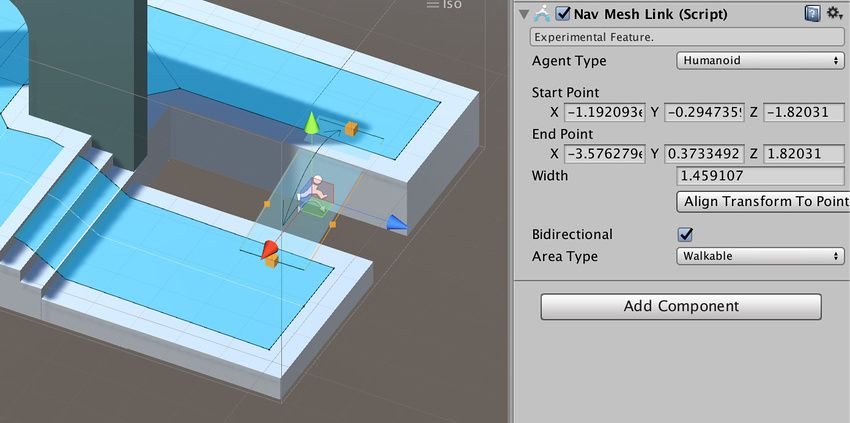
The NavMesh Link component is not in the Unity standard install; see documentation on high-level NavMesh building components for information on how to access it.
heady iris
you could automate the placement of these links
 whole night
i am not able to understand why attributes are required if they dont do anything to the code ?
heady iris
They can be retrieved via reflection
Unity looks for a SerializeFieldAttribute on your fields, for example
It’s true that they don’t do anything by themselves
whole night
There is this AmmoType attribute before the int ammoType

and this class is just empty. I am not able to understand why this is done

this was take from the Unity Learn's FPS Kit
 knotty sun
whole night
and this class is just empty. I am not able to understand why this is done
knotty sun
whole night
and this class is just empty. I am not able to understand why this is done
is there a custom inspector for the AmmoInventoryEntry class?
clever canopy
leaden ice
you can't mix CharacterController and Rigidbody like that
If I remove the rigid body would the colliders work?
knotty sun
whole night
how to find that ?
Find All References in your IDE
knotty sun
clever canopy
If I remove the rigid body would the colliders work?
Colliders do not work without rigidbodies
whole night
knotty sun
Find All References in your IDE
um there is this
 knotty sun
whole night
um there is this
knotty sun
whole night
um there is this
So no custom inspector. In which case the [AmmoType] attribute is surplus to requirements
whole night
knotty sun
So no custom inspector. In which case the [AmmoType] attribute is surplus to req...
oh
is there a use case where putting attributes is good ?
knotty sun
lots and lots
custom inspectors being one of them
the Range attribute is also very convenient
clever canopy
knotty sun
Colliders do not work without rigidbodies
Ok
swift falcon
Does anyone know an efficient way to get the child object index from name ?
heady iris
I believe you can get the child index from the transform
swift falcon
heady iris
I believe you can get the child index from the transform
im tryna get it from the name though
like index of "tool"
I think you could use a loop with a list but im tryna find an efficient quick way
heady iris
Why the object name?
swift falcon
cuz im tryna set and deactive the "farmers" tool at times but some farmers may have more bones etc
so the index will be different
heady iris
Store a reference to the transform
 maiden fractal
swift falcon
Does anyone know an efficient way to get the child object index from name ?
maiden fractal
swift falcon
Does anyone know an efficient way to get the child object index from name ?
You could use dictionaries to connect indices to names but I have never needed to use the name of the object for anything and I think you shouldnt either
heady iris
Finding stuff by name is very error prone
swift falcon
maiden fractal
You could use dictionaries to connect indices to names but I have never needed t...
alright thanks
maiden fractal
swift falcon
cuz im tryna set and deactive the "farmers" tool at times but some farmers may h...
So why dont you store reference to the tool/holder of the tool as chem suggested?
swift falcon
maiden fractal
So why dont you store reference to the tool/holder of the tool as chem suggested...
using a dictionary ?
maiden fractal
No
maiden fractal
Oh man, use [SerializeField] Transform smt;
swift falcon
Oh I thought you meant like in the code itself
heady iris
Well, sort of
maiden fractal
In the code yeah
heady iris
Create a field. Store a reference in it.
swift falcon
yeah i know what u mean now xd
I was thinking of binary formatter for some reason
lol
or protobuf
maiden fractal
You are overcomplicating things a lot
heady iris
You should pretty much never need to find things by index or name. Grab references ahead of time.
swift falcon
heady iris
You should pretty much never need to find things by index or name. Grab referenc...
yeah
that makes sense
im sleepy its 12 am xd
swift falcon
maiden fractal
You are overcomplicating things a lot
seems like it lol

lol thanks for the wake up
 thin maple
is there a way to create something like a GPU background task? like having a compute shader run in the background with lower priority on the GPU while the rest of the game is rendering
 hexed pecan
thin maple
is there a way to create something like a GPU background task? like having a com...
hexed pecan
thin maple
is there a way to create something like a GPU background task? like having a com...
I know this exists, havent tried it myself yet
https://docs.unity3d.com/ScriptReference/Rendering.AsyncGPUReadback.html
swift falcon
" but adds a few frames of latency" suppose thats a minor cost
hexed pecan
I suppose theres a way to wait for it to finish right away if needed
WaitAllRequests?
thin maple
hexed pecan
I know this exists, havent tried it myself yet
https://docs.unity3d.com/ScriptRe...
oh yeah, that's part of the puzzle; obviously you don't want to stall the game loop for some background task
but the other piece would be making it so that the compute shader doesn't cannibalize the GPU resources when rendering the world
swift falcon
hexed pecan
``WaitAllRequests``?
well it says it waits for all so dont see why that wouldn't work
thin maple
basically I want to do long-running terrain generation in the background with compute shaders while the game is running normally
hexed pecan
Yeah this is what you want most likely
swift falcon
apparently you have to call ```cs
AsyncGPUReadbackRequest.done
well i removed rigid body and collision detection stopped working
clever canopy
swift falcon
what are you trying to collide with
i have 2 colliders so when user defends the front collider doesnt deal damage but the second collider still takes damage
swift falcon
does the player/user actually collide or like a trigger
clever canopy
swift falcon
does the player/user actually collide or like a trigger
well ill have a sword and when it enters the collider it damages the player
swift falcon
clever canopy
well ill have a sword and when it enters the collider it damages the player
so its a trigger? you could maybe try printing something when colliding/entering to see if actually does anything
leaden ice
clever canopy
If I remove the rigid body would the colliders work?
Depends what you mean by "work"
swift falcon
I think they mean as in not registering it
heady iris
clever canopy
i have 2 colliders so when user defends the front collider doesnt deal damage bu...
You need to handle that blocking logic yourself
Maybe the attack hitbox should turn off when successfully blocked
(Or is that bot your problem?)
I am unclear.
clever canopy
my problem is that i need which collider was hit
swift falcon
private void OnCollisionEnter2D(Collision2D collision)
{
Collider2D col = collision.gameObject.GetComponent<Collider2D>();
if (goal.IsTouching(col))
{
Debug.Log("Working");
}
}
this is a 2D example I found but should work the same
clever canopy
whats the goal variable?
heady iris
clever canopy
my problem is that i need which collider was hit
Put them on different objects.
And give them components that respond to collisions
Alternatively, handle the collision on the weapon
Then it will know exactly which collider you hit
swift falcon
clever canopy
whats the goal variable?
public Rigidbody2D net;
public CircleCollider2D goal;
clever canopy
heady iris
Put them on different objects.
also is it normal that when a new file is created in visual studio it switches from assembly-csharp to miscellaneous files
heady iris
Unity will have to reload before the file shows up the project correctly
knotty sun
clever canopy
also is it normal that when a new file is created in visual studio it switches f...
you should not be creating files in VS for a Unity project
swift falcon
how to make collision while game object is in (is trigger), is that possible?
 potent sleet
swift falcon
how to make collision while game object is in (is trigger), is that possible?
potent sleet
swift falcon
how to make collision while game object is in (is trigger), is that possible?
you use 2 separate colliders, one for collisions and one for trigger physics messages
swift falcon
potent sleet
you use 2 separate colliders, one for collisions and one for trigger physics mes...
like 2 colliders in one object ?
potent sleet
swift falcon
like 2 colliders in one object ?
one on parent (collision)
one on child (trigger)
heady iris
You could put two on the same object if you wanted
But then you couldn’t tell them apart if you hit a trigger
clever canopy
knotty sun
you should not be creating files in VS for a Unity project
im not, im creating in unity
 zinc parrot
Hey can you call/run compute shaders in an async task?
 left wedge
I have a character using a CharacterController and an enemy that also uses a CharacterController. My boss has an attack where it runs at the character and when it collides I want it to knock the character back. I'm having a mental block here because two CharacterControllers don't report their collisions consistently using OnControllerCollisionHit. Sometimes I get the "Hit character" debug message and other times I don't. I tried changing my boss to use a Rigidbody but this just introduces a whole world of pain with other weird physics reactions when the collision occurs. I've also tried straight up using a larger Trigger collider on the boss to detect it that way but this feels like a hack and again comes with its own issues.
Am I doing something obviously wrong here? I assumed two character controllers colliding would be a pretty normal thing to want to detect reliably but I can't really find any useful info online or in the forum. Any help much appreciated.
heady iris
using a trigger sounds fine to me
left wedge
Yup that was what I assumed would be the best solution but i ended up with odd issues. I may have solved it a slightly simpler way now. My RushAttackState already knows if it "hit" the player based on the distance to the player during the attack, when it reaches a certain threshold it stops, otherwise it stops after a set maxDistance. If it stopped because the player is within the threshold I can just assume they were hit and apply the knockback at that point.
I'll probably wanna do some sort of Line of Sight check but i'd have to do that with a trigger anyway I guess.
 hidden veldt
Anyone know if there's a way to set an object to not be pickable through code?
 hexed pecan
hidden veldt
Anyone know if there's a way to set an object to not be pickable through code?
hexed pecan
hidden veldt
Anyone know if there's a way to set an object to not be pickable through code?
Quick google got me here
https://docs.unity3d.com/ScriptReference/SceneVisibilityManager.html
If you care my search terms were unity editor set object unselectable in hierarchy
potent sleet
neat
 worldly hull
im using linq to cheese a little bit on recreating an array, the array is the base code of other 100+ scripts and wont be able to change, my team lead will NEVER EVER rewrite anything that affects more than 3 main scripts
soooo
GameObject[] newAllInteractables = QuestManager.instance.allnteractables.Except(gameObject);```

apparently the gameobject is wrong, how to convert IEnumerable<GameObject> to GameObject?allInteractables is GameObject[]
worldly hull
nope im not going to change it to list lol

 versed pagoda
Hi, did someone in here made an Leaderboard using Steamworks.NET recently? I've followed everything right but i can't get the player to upload it's score to the leaderboard... Here's my code for that, ignore the bad naming as i'm just trying to get it to work (i'm sending it each 2s only for testing purposes, i'll send only when the game is over):
https://hatebin.com/ndubsokuap
 hidden veldt
hexed pecan
Quick google got me here
https://docs.unity3d.com/ScriptReference/SceneVisibilit...
hidden veldt
hexed pecan
Quick google got me here
https://docs.unity3d.com/ScriptReference/SceneVisibilit...
Oh thanks, google had failed me
versed pagoda
versed pagoda
Hi, did someone in here made an Leaderboard using Steamworks.NET recently? I've ...
also, the leaderboard is created properly on steam

 tacit lance
Don't know if this is the best place to ask but
I have a GameObject looking for touches with TouchPhase.Ended, and filtering out those that touched the UI with EventSystem.current.IsPointerOverGameObject(touch.fingerId). When it gets touched, it opens a menu. It works perfectly, except for a weird edge case: if you click the close button on the menu (which disables the canvas), and the gameobject that opens the menu is just under the button on screen, then in the same frame, the object gets a touch with TouchPhase.Ended, which causes the menu to open again. Is there an easy way to solve this?
 wary latch
where should i save my save files and how?
 solemn rune
Hi. I'm having some trouble with input and movement. I'm moving a game object left and right, depending on input axis (arrow keys in this case, only -1 or 1). This works fluent at 300fps, but as soon as I cap to 60fps the object moves one frame, upon button press, and then stops?
Vector3 newPosition = transform.position + activeSpawn.right * (setUpMoveSpeed * horizontalAxis * Time.deltaTime) ;
anybody any idea?
swift falcon
solemn rune
Hi. I'm having some trouble with input and movement. I'm moving a game object le...
first of all, I hope you aren't assigning your transform position to the new value, you usually don't wanna directly set positions and rotations
second, is this code in Update or FixedUpdate? Update is affected by processing speed, while FixedUpdate tries to run at set intervals (as long as its possible)
solemn rune
its running in Update. And I am setting newPosition to the transform, not using physics for this
swift falcon
you wanna put everything physics-related into FixedUpdate
and use fixedDeltaTime instead of deltaTime
solemn rune
it's not a physics object, just something that moves left / right. no colliders or rigidbodies needed
hexed pecan
solemn rune
it's not a physics object, just something that moves left / right. no colliders ...
Where are you running the code you showed?
Oh I see, Update
It looks fine then
Where does horizontalSpeed come from?
solemn rune
right? it should work. I'm following that thread right now, has to be the way it's called
hexed pecan
And setupmovespeed
solemn rune
horizontalAxis comes from a InputAction. I think I'm figuring it out. Testing just that line of code in a separate script
yeah, has to be higher up.. My systems are probably messing up. Thanks for confirming the code @hexed pecan 🙂
swift falcon
I'm using this piece of code to smoothly transition between hand's and VR controller's rotation
            Quaternion rotation = controller.rotation * Quaternion.Inverse(transform.rotation);
            rotation.ToAngleAxis(out float rotationDegrees, out Vector3 rotationAxis);
            Vector3 angularVelocity = Vector3.ClampMagnitude(_angularSync * rotationAxis * Mathf.Deg2Rad, (rotationDegrees * rotationDegrees * Mathf.Deg2Rad * Mathf.Deg2Rad) / Time.fixedDeltaTime);
            _rigidbody.angularVelocity = angularVelocity;
and it works just fine aside from one (expected) moment - hand does a 360 when the controller's rotation into any axis passes 0 and swings back to 359, any ideas on how to handle this?
I've encountered this problem before but I don't remember the solution
 soft shard
wary latch
where should i save my save files and how?
soft shard
wary latch
where should i save my save files and how?
Anywhere youd like, one common place is the app persistent path: https://docs.unity3d.com/ScriptReference/Application-persistentDataPath.html - you can save and load files with the System.IO namespace, there are many examples online, one common approach is using JSON serialization, though there are other approaches as well
 wary latch
soft shard
Anywhere youd like, one common place is the app persistent path: https://docs.un...
wary latch
soft shard
Anywhere youd like, one common place is the app persistent path: https://docs.un...
thanks
 visual flare
where can I download unity 4.7? the archive no longer shows it but i know that they keep links live for a long time
 vagrant blade
I don't recall the archives every going back before 5 🤔
But if they're no there, then there's no official way to get it.
visual flare
you might be right. I do remember downloading it last year, wonder where...
 somber nacelle
any particular reason you want to download a pre-historic version of unity? 🤔
 dapper sparrow
hello mates ! i m trying to make a drawing program on 3D objects in unity with camera ray hitinfo on the coordonates of the texture but i discovered that the defaults objects do not have an atlas texture but a replicated texture on each face for a cube for example, how can i say to unity to create an atlas texture for each object i add ?
visual flare
they removed beast in 5
 teal mica
dapper sparrow
hello mates ! i m trying to make a drawing program on 3D objects in unity with c...
teal mica
dapper sparrow
hello mates ! i m trying to make a drawing program on 3D objects in unity with c...
i'm not really sure what you mean here, do you want to create a texture atlas at runtime so all your object share the same texture? If so, you can use the PackTextures method to pack an array of textures into a new Texture2D, but you will need to remap all UV coordinates for each object that has its texture packed
 hollow hound
Different behaviour in scripts of instantiated and dragged to scene prefabs
In short, I have events inside struct inside dictionary.
Dictionary<StatusEffect, StatusEffectConfig> _statusEffectsConfig;
public event Action<OnStatusEffectStartRecord> onLockMovementStart;
public event Action<OnStatusEffectEndRecord> onLockMovementEnd;

// init in Awake()
_statusEffectsConfig = new()
      {
        [StatusEffect.LockMovement] = new(
            new() { OnStartEvent = onLockMovementStart, OnEndEvent = onLockMovementEnd },
        )
      };
And then I invoke those events using struct:
dictionaryElement.Events.OnStartEvent?.Invoke()
Works perfectly when prefab with this script is dragged into scene. But doesn't work when it is instantiated.
The problem is that in instantiated prefab there is no one subscribed to the event.
I checked the event field in the class and from struct (that has this event inside) like that:
Debug.Log($"OnStartEvent0 {config.Events.OnStartEvent is null}");
Debug.Log($"OnStartEvent1 {onLockMovementStart is null}");
In the "dragged to scene" prefab both logs says "false", both delegates are not empty as expected.
But in instantiated prefab only second log is "false", so it doesn't have relevant reference to the event.
Why is this happening?
 dusk apex
hollow hound
**Different behaviour in scripts of instantiated and dragged to scene prefabs**
...
dusk apex
hollow hound
**Different behaviour in scripts of instantiated and dragged to scene prefabs**
...
Does your scene instance differ from the instantiated?
Does it differ from the prefab?
hollow hound
dusk apex
Does your scene instance differ from the instantiated?
It is the same prefab on the same scene.
dusk apex
Where you'd instantiate a copy of the prefab but the one in the scene could have had it's inspector fields modified.
dusk apex
hollow hound
It is the same prefab on the same scene.
Show how you're instantiating.
Are you cloning?
The clone would be identical to the instance in the scene.
hollow hound
dusk apex
Where you'd instantiate a copy of the prefab but the one in the scene could have...
I just dragged fresh prefab to my spawner and then dragged fresh prefab ti the scene.
dusk apex
I'm assuming hierarchy instance isn't the same as the prefab
dusk apex
hollow hound
I just dragged fresh prefab to my spawner and then dragged fresh prefab ti the s...
Show us how you're instantiating. Show us the inspector for the scene instance. Show us the inspector for the prefab. Show us the inspector for the spawner.
hollow hound
dusk apex
Show how you're instantiating.
Instantiate(prefabReference, spawnPosition, Quaternion.Euler(Vector3.zero));
Show us the inspector for the scene instance
What part of it? It's like "prefab (1)" and "prefab (clone)" in the scene inspector.
Show us the inspector for the spawner.
Just monobeh with serialised field (of a scriptable object with reference to prefab)
dusk apex
hollow hound
> Show us the inspector for the scene instance
What part of it? It's like "pref...
The error indicates that there is a difference between the components. We're needing to verify it ourselves because this is the most probable cause of the unwanted behavior. There isn't anything wrong with the code. Race condition would be the only other concern but as you're checking if something hasn't been prepared yet rather than the opposite, it isn't the case - you're checking for null.
We need more context else this isn't going to get anywhere.
teal mica
hollow hound
**Different behaviour in scripts of instantiated and dragged to scene prefabs**
...
from this description, it shows that onLockMovementStart is not null, meaning that the assignment could be correct, but the Awake function may not have been called correctly, or was not called at the correct time, otherwise, OnStartEvent should not have been null, it would be good to check if _statusEffectConfig[StatusEffect.LockMovement] has it's assigned parameters at the end of the Awake call
dusk apex
The most reasonable excuse why cs Debug.Log($"OnStartEvent0 {config.Events.OnStartEvent is null}");would differ between the instantiated instances and preset instance would be the availability of the OnStartEvent.
hollow hound
dusk apex
We need more context else this isn't going to get anywhere.
I just dragged it into spawner.
Then I dragged it into the scene.
Works only the one I dragged to the scene.
Maybe I can provide something else for more context?

 teal mica
hollow hound
I just dragged it into spawner.
Then I dragged it into the scene.
Works only t...
teal mica
hollow hound
I just dragged it into spawner.
Then I dragged it into the scene.
Works only t...
please show the full inspector
dusk apex
hollow hound
I just dragged it into spawner.
Then I dragged it into the scene.
Works only t...
You're making this waaaay harder than what it is.
heady iris
I have a rotation that's made from a yaw followed by a pitch. Is there a neat way to recover the pitch from that?
The rotation is the direction the player is trying to look in. I want to adjust the camera's position based on the pitch.
dusk apex
heady iris
I have a rotation that's made from a yaw followed by a pitch. Is there a neat wa...
Keep a local copy separated or do the operations in reverse and pray that you aren't working with quaternion (results would likely differ)
heady iris
I was also just thinking of doing that :p
I'd like for this camera to work with any entity, not just a player
and only the player brain will be storing the yaw and pitch floats
other brains will just be using LookRotation to calculate their desired rotation
hollow hound
teal mica
from this description, it shows that `onLockMovementStart` is not null, meaning ...
_statusEffectConfig[StatusEffect.LockMovement] exists, Awake works correctly, logs correct number of the dictionary elements.
Actually, this config in config.Events.OnStartEvent is the element of the dictionary, so it sets it correctly.
dusk apex
heady iris
The rotation is the direction the player is trying to look in. I want to adjust ...
Having the player forward direction and up direction would be enough to recreate the angles if you're wanting to work with directional vectors rather than Euler angles.
heady iris
You know, I wonder if I should just split this into two rotations
hollow hound
dusk apex
You're making this waaaay harder than what it is.
I don't exactly understand what you mean.
teal mica
hollow hound
_statusEffectConfig[StatusEffect.LockMovement] exists, Awake works correctly, lo...
can you show the inspector, the inspector is usually the right panel, with all the serialized fields, of both the prefab and the dragged object
heady iris
right now, the brain has one rotation property: "desired rotation"
but, really, there are two rotations here
the body rotation and the look rotation
i'm already doing something Gross(tm) to extract just the body rotation
currentRotation = Quaternion.AngleAxis(brain.DesiredRotation.eulerAngles.y, Vector3.up);
...yeah, I think I should just have two separate rotations!
i just realized this is exactly what I did in another game 🤦♂️
teal mica
im not sure what a config is, since this variable is never described, it could also be that you might be overwriting the dictionary somewhere down the line
hollow hound
teal mica
can you show the inspector, the inspector is usually the right panel, with all t...
Prefab is the dragged object, it is the same.
I don't really understand how ot helps, this is just a big prefab with dozens of components.
teal mica
just the component with the script
we're trying to see if there is a discrepancy between your prefab and the scene object
hollow hound
teal mica
im not sure what a `config` is, since this variable is never described, it could...
config is the element of dictionary
_statusEffectsConfig.TryGetValue(statusEffect, out var config);
these snippets of code are not very helpful for understanding the context
dusk apex
hollow hound
I don't exactly understand what you mean.
I've placed quite a bit of effort to acquire the necessary debugging data for validating the inspectors of the referenced - implicitly config. The direction was to move towards why the event delegates weren't the same. You're fighting this every step of the way with "why is it necessary" or abstracts. The logs simply indicate that they are no longer both null. It has likely been modified elsewhere before the second has acquired it - sometime before instantiate. Good luck with the rest.
hollow hound
teal mica
just the component with the script
There is not much in it
 hollow hound
dusk apex
I've placed quite a bit of effort to acquire the necessary debugging data for va...
hollow hound
dusk apex
I've placed quite a bit of effort to acquire the necessary debugging data for va...
You're fighting this every step of the way with "why is it necessary"
No? I provided info you are asking about.
teal mica
hollow hound
_statusEffectConfig[StatusEffect.LockMovement] exists, Awake works correctly, lo...
here, you're saying, for both objects, dragged and prefab, at the end of Awake, these two logs have exactly the same output?
Debug.Log($"OnStartEvent0 {config.Events.OnStartEvent is null}");
Debug.Log($"OnStartEvent1 {onLockMovementStart is null}");
!code
tawny elkBOT
Posting code
📃 Large Code Blocks
Large code blocks should be posted as links to services like:
https://gdl.space/, https://paste.ofcode.org/, https://hatebin.com/
https://paste.myst.rs/, https://hastebin.com/
📃 Inline Code
Surround code with three backquotes. Not quotation marks.
To get C# formatting the first line should only contain cs or csharp.
Add a comment with a line number if there is an error message.
```cs
// Your code here
```
Do not share screenshots of code unless requested.
hollow hound
teal mica
these snippets of code are not very helpful for understanding the context
https://gdl.space/usabefucus.cs
Here is the class I'm asking about.
hollow hound
teal mica
here, you're saying, for both objects, dragged and prefab, at the end of Awake, ...
For dragged onto scene prefab it's
OnStartEvent0 False
OnStartEvent1 False
For instantiated version of the same prefab it's
OnStartEvent0 True
OnStartEvent1 False
teal mica
hollow hound
For dragged onto scene prefab it's
OnStartEvent0 False
OnStartEvent1 False
For...
at the end of Awake?
I literally mean debugging inside Awake, at the end of the call
 rugged storm
        var _currentPacket = packets.Values.Where(p => p.columnIndex == start.columnIndex + 1);

        if (_currentPacket != null || _currentPacket.Count() != 0)
        {
            Packet currentPacket = _currentPacket.First();
            packetsAbove.Add(currentPacket);
            GetPacketsAbove(currentPacket, packetsAbove);
        }```
is there a better what to check if packets.Values.Where(p => p.columnIndex == start.columnIndex + 1).First() exists? when i do currentPacket =packets.Values.Where(p => p.columnIndex == start.columnIndex + 1).First() it errors instead of say returning null if the where has no resultsKnowing the error might help.
rugged storm
oh its that the sequence has no elements
rugged storm
Unity telly me FirstOrDefault is outdated?
dusk apex
rugged storm
oh its that the sequence has no elements
Can you show the entire error from the console?
rugged storm

IK why the issue is happening, its list.where() is empty so when i try to get list.where().first, it throws it
dusk apex
It says they were empty?
hollow hound
teal mica
I literally mean debugging inside Awake, at the end of the call
In awake it's
For dragged onto scene prefab it's
OnStartEvent0 False
OnStartEvent1 False
For instantiated version of the same prefab it's
OnStartEvent0 True
OnStartEvent1 True
teal mica
hollow hound
In awake it's
For dragged onto scene prefab it's
OnStartEvent0 False
OnStartEv...
exactly
so your problem isn't here at all
you've overwrote the entry further down the script
Awake is only called once on initialization, even when you change the event reference, the other reference will not get reassigned
rugged storm
hollow hound
In awake it's
For dragged onto scene prefab it's
OnStartEvent0 False
OnStartEv...
and i want to know if theres a way to do a .Where().First() on a list and have it return null instead of erroring that the .Where() has no elements
hollow hound
teal mica
you've overwrote the entry further down the script
What entry? You mean dictionary element?
teal mica
rugged storm
Unity telly me FirstOrDefault is outdated?
Personally, I'm not sure why this would be, I've been using it fine...
rugged storm
ah, also how do I set a default value for a list??
rugged storm
teal mica
Personally, I'm not sure why this would be, I've been using it fine...
i was wrong, i swear ive tried it before and unity told me its outdated and I should use first but it isn't saying that anymore
teal mica
hollow hound
What entry? You mean dictionary element?
yes, I mean the value to your status effect key
hollow hound
teal mica
Awake is only called once on initialization, even when you change the event refe...
I understand that awake is called only once. But the delegate is the reference type, right? So if I initialise dictionary with the reference and then update value of a reference it should be updated inside a dictionary, if I understand correctly.
teal mica
Your assignment is inside a struct, it will not be reassigned when the parameter you passed in was changed
rugged storm
i assume that the default of a list is null by default(which is what I need in my current case) but how would I set it if I needed to for say List<Packet> packets
teal mica
rugged storm
i assume that the default of a list is null by default(which is what I need in m...
you can just do list.FirstOrDefault() ?? someDefault
knotty sun
rugged storm
i assume that the default of a list is null by default(which is what I need in m...
no, a list is empty by default therefore there is no default value
rugged storm
teal mica
you can just do `list.FirstOrDefault() ?? someDefault`
Oh, okay
teal mica
I think they mean the returned default of FirstOrDefault, which happens to be null, afaik, there's no way to directly change this default
rugged storm
^ that is correct
knotty sun
that depends on the T value of the list
teal mica
yea you're right, for reference types, it is null
rugged storm
im guessing if T cant be null like for things like ints it will return something else?
knotty sun
indeed
rugged storm
in the case of int 0 im guessing?
knotty sun
default(T)
hollow hound
teal mica
Your assignment is inside a struct, it will not be reassigned when the parameter...
But I assigned it with the reference.
public struct Foo
    {
        public List<int> list;
    }
List<int> l = new();
Foo myStruct = new () {list = l};
l.Add(1);
log(myStruct.list.Count); // 1
Delegate is the reference type too, right? So it should work the same. And in fact it is, but only in dragged prefab, not in instantiated.
rugged storm
ty for all the help yall
another thing how would i overwrite a dictionary entry, currently it give this error if i try to add a entry with a key that already exists how would I instead overwrite the old entry with that key to the new one?
 knotty sun
dict[key] = newvalue
teal mica
hollow hound
But I assigned it with the reference.
```cs
public struct Foo
{
pub...
in this example, you are manipulating the same list object, so you are relying on list aliasing to accomplish your goal, in your actual script above, you're assigning by reference with onLockMovementStart, which is null, it will never be changed even if onLockMovementStart changes
hollow hound
teal mica
in this example, you are manipulating the same list object, so you are relying o...
Oh, I think I get it.
Can I somehow create like "empty" delegate to use it as a reference?
rugged storm
knotty sun
dict[key] = newvalue
Okay, would this also set the value of a new entry if one with that key doesn't it exist or should I run an if statement to see if that key already exists and chose between .add and doing that?
knotty sun
rugged storm
Okay, would this also set the value of a new entry if one with that key doesn't ...
no
rugged storm
👌
knotty sun
use dict.ContainsKey
teal mica
hollow hound
Oh, I think I get it.
Can I somehow create like "empty" delegate to use it as a...
your idea requires the object to be mutable, and you're relying on the side effect of mutable operations and having many references point to the same object to have synchronised behaviour, but in this case, delegate is immutable, you will not be able to achieve the same side effect, rely on pure mechanisms and assign the reference yourself, when onLockMechanism changes, assign the struct to the same Action, maybe with the set property
hollow hound
teal mica
your idea requires the object to be mutable, and you're relying on the side effe...
But many different objects can subscribe to this event in different time. And there is a system with invoking this events. There is multiple "configs" and I want generalised approach to not copy the same code for every config.
teal mica
im not really sure what you mean at this point, you seem to have a design issue right now, if different object subscribe to some governing event, then there should only be one event
if you have different events, then its normal that one event does not invoke the methods subscribed to another event
hollow hound
teal mica
im not really sure what you mean at this point, you seem to have a design issue ...
I have different status effects (like stun or burn).
I have Stats script that controls them.
From another scripts I want to apply effects like targetStats.Apply(StatusEffect.Stun).
And I need Stats to invoke events on applying (and when the effect is ended).
Other scripts should be able to subscribe to this events anytime like targetStats.OnStunStart += HandleStun
And I don't want to have different function for every status effect like ApplyStun(), ApplyBurn().
I want to use one function with rewriting code like Apply(StatusEffect effect)
Is there a better approach to this?
teal mica
hollow hound
I have different status effects (like stun or burn).
I have Stats script that co...
okay this is fine
hollow hound
Basically, I want to store a reference to event. So if someone will subscribe to this event later, I should be able to get valid event with all subscribed functions.
Is it possible? Or I should try another approach?
teal mica
yes, it is possible, because both will be pointing to the same object, but you must ensure that the object is correctly initialised in the first place
hollow hound
So
new() { OnStartEvent = onLockMovementStart, OnEndEvent = onLockMovementEnd } is not correct way of doing that?
 narrow summit
For anyone who's used addressables extensively, is it possible to use the SceneLoad API in it to load scenes normally? Basically, I don't want to use addressables, but I'd like to use its async scene loading API. (Loading scenes from paths)
teal mica
hollow hound
So
``` new() { OnStartEvent = onLockMovementStart, OnEndEvent = onLockMovementE...
is StatusEffectConfig a struct
hollow hound
teal mica
is StatusEffectConfig a struct
This is record, can change it to struct
teal mica
hollow hound
This is record, can change it to struct
i've actually never used records before, I'm not sure if this will work always. Generally do not use value types (i.e. don't use a struct) in your described use case, as changes to their variables will only affect that instance
hollow hound
teal mica
i've actually never used records before, I'm not sure if this will work always. ...
But can I wrap those event to use it later?
hollow hound
teal mica
i've actually never used records before, I'm not sure if this will work always. ...
What type of data can I use to store my effects with their events?
teal mica
hollow hound
But can I wrap those event to use it later?
yea, you can, just use a class and try, I don't know what your codebase looks like so I cannot say for sure what you are doing will work
 lament bloom
is there a good way to calculate a location on the HUD/screen overlay based on the position of an object as seen by the camera?
in this case, when a player picks up an enemy drop in my game, i want some on-screen text to appear where the drop used to be that says "Gained ..."
but i don't want this text to appear in world-space, i want it to appear on the screen overlay
dusk apex
Camera should have world to screen conversation
lament bloom
thank u
hollow hound
teal mica
yea, you can, just use a class and try, I don't know what your codebase looks li...
Thanks, I'll try that
 viscid tide
Hey so I’m trying to make a spaceship vr game and I need help with the throttle. I have most of the throttle code done except for one thing. So I want the throttle to follows the players hand position but I want it to stay on a line if that makes sense. Basically follow the hand position but then go the closest position on the line going up the side of the spaceship . I’m stuck so I was wondering if anyone could help me.
 void basalt
viscid tide
Hey so I’m trying to make a spaceship vr game and I need help with the throttle....
void basalt
viscid tide
Hey so I’m trying to make a spaceship vr game and I need help with the throttle....
Get a direction using the body position - hand position
viscid tide
void basalt
Get a direction using the body position - hand position
Wait I’m a little confused. Could you elaborate further please?
void basalt
viscid tide
Wait I’m a little confused. Could you elaborate further please?
When you want a direction, you can do a position B minus position A
If your body is sitting in a chair, and you raise your hand forward, you can minus the hand position from the body position
and you'll get a forward direction
it actually might be backwards so you'll have to negate it
viscid tide
Ok I get it but how would I use that with throttle position? Just use the positions B - Positions A?
void basalt
viscid tide
Ok I get it but how would I use that with throttle position? Just use the positi...
wym throttle position?
Your throttle should be an alpha value between 0 and 1 representing 0% and 100%
0% means no thrust. 100% means full thrust. You can probably go to -1 (-100%) for backwards thrust as well
you'll need to scale the direction by your thrust value
normalize the direction first, then multiply in your thrust
If you're trying to do a large-scale space game also, you're going to run into floating point issues very fast.
@viscid tideLet me know if you're still stuck
viscid tide
Oh I understand now @void basalt Thank you!
 unreal valley
This is problem a very easy answer for you smart folk out there.
How can I change the type of an object to another.
I have an Item, I get all Items. But now I wana dig deeper into what that Item actually is.
If its an EquipmentItem I want to be able to change it to that type, since it derives from Item.
I just don't know how to do this.
Nvm I guess I just figured it out.
foreach (var item in _inventory)
        {
            Debug.Log($"Item Name:{item.Key.ItemName} Item ID:{item.Key.ItemID}");
            if( item.Key.GetType() == typeof(EquipmentItem))
            {
                EquipmentItem equipmentItem = (EquipmentItem)item.Key;
                Debug.Log($"Required Level: {equipmentItem.RequiredLevel}");
            }
        }
 grave fog
using System.Collections;
using System.Collections.Generic;
using UnityEngine;

public class BikeWheelScript : MonoBehaviour
{
    public float speed = 100;
    // Start is called before the first frame update
    void Start()
    {

    }

    // Update is called once per frame
    void Update()
    {
        if (Input.GetKey(KeyCode.UpArrow))
        {
            GetComponent<Rigidbody2D>().AddTorque(Vector2.right * speed);
        }
    }
}```

Keep Getting "Argument 1: cannot convert from 'UnityEngine.Vector2' to 'float'"The Vector2.right still returns a Vector2. But as (1,0)
You need to pull out either the .x or .y values
grave fog
unreal valley
You need to pull out either the .x or .y values
I'd prefer to do z value
because it rotates the way I need it to.
potent sleet
grave fog
because it rotates the way I need it to.
2D rigidbody torque cannot take a v2 or 3
it takes a float
grave fog
potent sleet
2D rigidbody torque cannot take a v2 or 3
Then.. I don't really know how to write that.
potent sleet
grave fog
Then.. I don't really know how to write that.
wdym, just write speed
grave fog
Do I just rewrite it to
GetComponent<Rigidbody2D>().AddTorque(torque);
Yes
grave fog
I changed it to torque to make it simpler.
Now I have another problem.
It seems that the torque is continuous.
Once I hit the Up Arrow it kinda just spins non stop
potent sleet
grave fog
Once I hit the Up Arrow it kinda just spins non stop
do you have drag?
drag = less spinning over time
also just making sure you know
GetKey is constantly fired for more than 1 frame so even if you press it once it will call it at least 3-4 times
unlike GetKeyDown
grave fog
potent sleet
do you have drag?
I don't know what "drag" is
I'm a newbie. But, I get the gist of what I'm doing.
Better question, how do I know if I have drag
potent sleet
grave fog
Better question, how do I know if I have drag
look at the 2D rigidbody component
you will find angular drag there
grave fog
potent sleet
look at the 2D rigidbody component
0.05
pretty sure thats the default value
potent sleet
yeah well it's prob too low for the amount of force you spinning it at
grave fog
potent sleet
yeah well it's prob too low for the amount of force you spinning it at
Ohh, I see what you mean.
5 seems to be a good number
 frosty knot
is Allow Fullscreen Switch broken in unity?
potent sleet
frosty knot
is Allow Fullscreen Switch broken in unity?
wdym
frosty knot
potent sleet
wdym
LOL you won't believe it, but for the past hour even when I unchecked Allow Fullscreen Switch it was still allowing alt+enter. UP UNTIL I asked the question. Now it's working properly.
 turbid lava
yo anyone here able to help me with some force troubles?
 turbid lava
ok fair, but still
its not that the force isnt working, its just tryna get the values right for it
 lean sail
u still havent asked the actual question
turbid lava
im tryna think of how to phrase it so it explains what ive tried already lmao
leaden ice
First explain what you want to do
Then explain what you tried and what the result was
turbid lava
im trying to make a flight sim sorta thing and i have the controls and everything setup, but i cant seem to get the values right for the acceleration so that the plane moves fast enough to use the wings to provide lift and not be a missile as it currently is.
if i lower the value of the "thrust" it barely moves fast enough and doesnt take off, but if i convert the engine hp to newtons ish it has way too much power.
i have a mini calculation bit to figure out how much lift the wings would be producing, and after some testing of the vertical lift value i need to get it to around 7500, which means the plane needs to moving at a little over 300m/s.
issue is that to get it to this speed the thrust value seems to be way to high at +108000 which means i can go vertical, which i shouldnt be
void basalt
ensure that you're applying force correctly at the ailerons using addForceAtPosition
and the propellers or whatever is driving your craft
turbid lava
the force is being applied to the whole aircraft atm cos im tryna get it to work first then break it down onto each part
void basalt
yeah that aint gonna work
turbid lava
so you reckon apply the force to the whole prop then?
void basalt
regardless, the upward lift needs to be applied at the wings
turbid lava
yeah
void basalt
and that's probably your issue
turbid lava
i did do that before but nothing happened because it wasnt getting enough lift
turbid lava
yeah but the speed needs to be higher and the plane doesnt seem to want to go faster without making the thrust a rediculously higher number which then nullifys the purpose of the wings providing lift cos the plane can jsut go vertical
void basalt
you could make the lift force of the wings proportional to the speed of the aircraft
which is probably how it works in real life
 calm talon
How do I avoid the animator preventing script from changing an element on the attached gameobject without disabling it?
(in my case it's the spriterenderer's colour)
turbid lava
void basalt
you could make the lift force of the wings proportional to the speed of the airc...
thats what ive got it doing
ive got it setting the lift to be wing surface area * speed * air desity
void basalt
You should have two force multipliers. One for the actual thrust of the aircraft, and one for the wing lift
hexed pecan
calm talon
How do I avoid the animator preventing script from changing an element on the at...
Try LateUpdate, it runs after animations
turbid lava
but the other issue still is coming from the fact that it wont accelerate to a high enough speed with a lower value, and because supersonic if i set the real newtons value
turbid lava
void basalt
You should have two force multipliers. One for the actual thrust of the aircraft...
i have
calm talon
hexed pecan
Try LateUpdate, it runs after animations
Using a coroutine for the block
turbid lava
the current variables
 calm talon
    protected IEnumerator Flash()
    {
        thisRenderer.color = new Color(initialColour.r - 0.7f, initialColour.g - 0.7f, initialColour.b - 0.7f);
        yield return new WaitForSeconds(0.2f);
        thisRenderer.color = initialColour;
    }```
here's the code on it btwWaitForEndOfFrame I guess
void basalt
@turbid lavaYou're using wheel colliders right?
turbid lava
yeah
hexed pecan
To get a coroutine equivalent of LateUpdate @calm talon
void basalt
turbid lava
yeah
You should have a lift force somewhere
calm talon
Thanks
void basalt
independent of thrust force
turbid lava
i have the lift for the left and right wings as their own values
hexed pecan
calm talon
```cs
protected IEnumerator Flash()
{
thisRenderer.color = new ...
The animation would instantly change the color back though since this does not loop
turbid lava
then the "lift wings" that i am using to add them together to apply it as a single force on the whole plane first
cos when i tried doing it at position it didnt work
calm talon
hexed pecan
The animation would instantly change the color back though since this does not l...
I do love the unity animator
it really is the
void basalt
turbid lava
then the "lift wings" that i am using to add them together to apply it as a sing...
stop doing this
you need to use add force at position
hexed pecan
I mean it does what you put in the animations 🤷♂️ @calm talon
void basalt
the physics engine is much more complicated than you think
it imitates real life physics
adding force upwards at the center of the aircraft really isn't going to give you the desired results
turbid lava
i was using that as a way to debug what was happening and see when it actually starts lifting with what value
gimme a min to revert it to use the add force at pos
void basalt
if add force at position isn't working, then we need to figure that out first
 urban stream
Hello! I'm wanting to know how can I force crash my game's application. I see the documentation for UnityEngine.Diagnostics but I'm not sure how can I code it. Is it a method I call? I want to call it inside a method.
void basalt
urban stream
Hello! I'm wanting to know how can I force crash my game's application. I see th...
infinite loop
turbid lava
void basalt
if add force at position isn't working, then we need to figure that out first
this is the right syntax yeah?
 urban stream
void basalt
infinite loop
urban stream
void basalt
infinite loop
I want to do it without causing a memory leak
void basalt
turbid lava
this is the right syntax yeah?
looks like it
calm talon
urban stream
I want to do it without causing a memory leak
while true in update()?
void basalt
urban stream
I want to do it without causing a memory leak
you can write infinite loops without memory allocations
turbid lava
ok cool
calm talon
that should do the trick
void basalt
if (crashGame) {
while (true) {
}}

 calm talon
void basalt
if (crashGame) {
while (true) {
}}
calm talon
void basalt
if (crashGame) {
while (true) {
}}
just replace that with while(crashGame)
urban stream
I'm gonna test this out.
void basalt
urban stream
I mean, the docs pretty much tell you how. Call ForceCrash and then use one of the enumerations on the page you're viewing
urban stream
void basalt
I mean, the docs pretty much tell you how. Call ForceCrash and then use one of t...
Alright! Sorry I'm a bit slow lol
void basalt
@turbid lavaworking?
turbid lava
currently no, but there arent any console errors
but, i will try going faster hold on
swift falcon
So I am using this piece of code to move and rotate my VR hands, but I'm encountering an issue that the slowdown once they get really close to the controllers is too large, which results in a sluggish feeling and hands pretty much never being exactly at the controllers' positions. What would be the optimal solution here? I've been thinking about declaring a distance at which velocity's magnitude is instead capped at distance and not distance squared (a bit more complicated to provide a smoother transition but you get it) but wanted to know if I'm perhaps missing some obvious solution
        public void FixedUpdate()
        {
            Vector3 offset = controller.position - transform.position;
            Vector3 velocity = Vector3.ClampMagnitude(_velocitySync * offset.normalized, offset.sqrMagnitude / Time.fixedDeltaTime);
            _rigidbody.velocity = velocity;

            Quaternion rotation = controller.rotation * Quaternion.Inverse(transform.rotation);
            rotation.ToAngleAxis(out float rotationDegrees, out Vector3 rotationAxis);

            if (rotationDegrees > 180)
            {
                rotationDegrees = 360 - rotationDegrees;
            }

            Vector3 angularVelocity = Vector3.ClampMagnitude(_angularSync * rotationAxis * Mathf.Deg2Rad, (rotationDegrees * rotationDegrees * Mathf.Deg2Rad * Mathf.Deg2Rad) / Time.fixedDeltaTime);
            _rigidbody.angularVelocity = angularVelocity;
        }
you can test if your add force at position is working by adding an absurd amount of force upward @turbid lava
turbid lava
yeah that is working
calm talon
hexed pecan
The animation would instantly change the color back though since this does not l...
    protected IEnumerator Flash()
    {
        for (int i = 0; i < 12; i++)
        {
            thisRenderer.color = new Color(initialColour.r - 0.7f, initialColour.g - 0.7f, initialColour.b - 0.7f);
            yield return new WaitForEndOfFrame();

        }
        thisRenderer.color = initialColour;
    }```
Attempting to loop it didn't workok yeah its all working
void basalt
great to hear
hexed pecan
calm talon
```cs
protected IEnumerator Flash()
{
for (int i = 0; i < 12; i...
You need to wait for frame end before changing the color
Might also need to add a yield return null before it, unless WaitForEndOfFrame can wait until the next frame, I forgot
calm talon
still no luck with: cs protected IEnumerator Flash() { print(thisRenderer.color.r); for (int i = 0; i < 12; i++) { yield return null; yield return new WaitForEndOfFrame(); thisRenderer.color = new Color(initialColour.r - 0.7f, initialColour.g - 0.7f, initialColour.b - 0.7f); } thisRenderer.color = initialColour; }
hexed pecan
Are you starting it with StartCoroutine?
calm talon
yes
hexed pecan
Then idk, that should happen after animations at least
turbid lava
void basalt
great to hear
part of the problem still exists of that it is requiring an insane force to accelerate the plane fast enough to actually get that lift
void basalt
turbid lava
part of the problem still exists of that it is requiring an insane force to acce...
increase your lift multipliers
that's really the only way
gotta find the sweet spot
turbid lava
i think i have made a few errors with the lift calc which im working on fixing atm
but that still leaves the issue of the realistic thrust value is way too much
void basalt
again, your thrust and lift multipliers should be completely decoupled
they should be two different values
 plucky parrot
hello there, im having a very strange and weird issue and i hope someone can help me debug it
im trying to instantiate a custom class that derives from monobehaviour
Instantiate(playerPrefab, Vector3.zero, Quaternion.identity, null);
when i put that line of code anywhere, like the Start() method, it runs normally and the prefab appears.
the thing is, when I put that line of code, as it is, or inside a function like the following:
void something() {
// logging "A" and then "B"
  Debug.Log("A");
  Instantiate(playerPrefab, Vector3.zero, Quaternion.identity, null);
  Debug.Log("A");
}```
when executing `something()` inside of the part of the script im going to attach, it prints out "A" but not "B", and thus it does not spawn the prefab.
this is my whole code (the relevant part): https://pastebin.com/xXfMJWkx
line 71: i execute the instantiate function, and before that, i log something to the console; the message does get printed out but it does not spawn the prefab.
Pastebin
Pastebin.com is the number one paste tool since 2002. Pastebin is a website where you can store text online for a set period of time.
turbid lava
they are
void basalt
that doesn't make sense then
turbid lava
they are their own values
void basalt
you shouldn't need more thrust to increase the lift internally
you should just be able to increase the lift multiplier
turbid lava
but using the "real world thrust" converting the enigne hp to newtons with an estimate the in game results are no where near realistic
void basalt
forget about using real world values right now
calm talon
is there any way in general to make the animator lose out to script in regards to controlling an object's values?
 plucky karma
plucky parrot
hello there, im having a very strange and weird issue and i hope someone can hel...
plucky karma
plucky parrot
hello there, im having a very strange and weird issue and i hope someone can hel...
Where is "B"? I see two "A"'s?
The logger will print "A" no matter what.
plucky parrot
plucky karma
Where is "B"? I see two "A"'s?
sorry its an error but you get the point: it doesnt log the second one
turbid lava
void basalt
forget about using real world values right now
ok
hexed pecan
If B never prints then you are getting an error in the console @plucky parrot
plucky parrot
for instance, to make it more clear: i added a second log after line 71 (code on the paste link) and it doesnt log neither spawns the prefab; but the first one does log
plucky parrot
hexed pecan
If B never prints then you are getting an error in the console <@374710341868847...
no errors
plucky karma
plucky parrot
sorry its an error but you get the point: it doesnt log the second one
At a glance, you're doing this code wrong. You are creating multiple of managers when you should only have one object existing in the game at time. You use gameobject to respond to your game mechanics, not treat it as a singleton entity that has to exist and attached to a gameobject in your game. It wouldn't make sense to destroy your manager when you go back to the main menu or something otherwise. You wanted to make sure your class exist anywhere in your game almost to a static class, but would refrain from that.
plucky parrot
plucky karma
At a glance, you're doing this code wrong. You are creating multiple of managers...
what does that have to do
where am i creating multiple managers?
plucky karma
For new gameobject you created with this script attached, you are going to open a new connection socket on your pc. Your PC can only have one socket open at a time.
plucky parrot
the playerprefab is just a dummy object with a script attached and nothing else
plucky parrot
plucky karma
For new gameobject you created with this script attached, you are going to open ...
no thats not what it does
that has nothing to do with the error tho
leaden ice
plucky parrot
hello there, im having a very strange and weird issue and i hope someone can hel...
You can't instantiate stuff on a background thread
leaden ice
You can't do much of anything in Unity in a background thread
plucky parrot
leaden ice
You can't instantiate stuff on a background thread
yess thats exactly what i was looking for, i just didn't know how it was called
leaden ice
Unity will kill your thread if you try to touch anything related to the engine
plucky parrot
hmm that explains everything
plucky karma
You would need to create a queue.
hexed pecan
Does it not throw an error?
leaden ice
Nope
plucky parrot
now, how can i overcome that? is there any other way?
hexed pecan
Or just super silent fail?
leaden ice
Unceremoniously kills the thread
hexed pecan
No warning?
plucky parrot
hexed pecan
Or just super silent fail?
yes
void basalt
plucky parrot
now, how can i overcome that? is there any other way?
Pass your instructions back to the main thread
plucky karma
Push new invocation into the queue, then synchronize your queue in your game Update method.
plucky parrot
leaden ice
Unceremoniously kills the thread
that explains why the rest of the code just doesnt run
plucky parrot
void basalt
Pass your instructions back to the main thread
how?
void basalt
plucky parrot
how?
the opposite way they went in
plucky parrot
i tried with a function but i think im not getting the point
plucky parrot
void basalt
the opposite way they went in
can you elaborate?
leaden ice
plucky parrot
now, how can i overcome that? is there any other way?
Send the data to the main thread first then spawn stuff
void basalt
If I have to elaborate, then you don't need to use multithreading
you're just going to slow down your code
plucky karma
leaden ice
Send the data to the main thread first then spawn stuff
Was my solution not that clear?
plucky parrot
void basalt
If I have to elaborate, then you don't need to use multithreading
thats why im asking if there is a better way to do this since i have no idea what i am doing
void basalt
plucky parrot
thats why im asking if there is a better way to do this since i have no idea wha...
step 1.) avoid multithreading
leaden ice
plucky karma
Was my solution not that clear?
It's clear to me but I already know what I'm doing lol
plucky parrot
its the first time i do any of these multithreading stuff, i didnt even know that was what i was doing
plucky parrot
void basalt
step 1.) avoid multithreading
how do i avoid it in this case?
plucky karma
You would need to use Unity's API calls.
void basalt
he's talking about his socket code
plucky parrot
my code goes something like this
socket.BeginReceiveFrom(state.buffer, 0, bufSize, SocketFlags.None, ref epFrom, recv = (ar) => {
    // and there is the big function here
})```If you want to listen on a socket there's no avoiding multithreading
plucky karma
It's just a lambda expression.
The invocation behind BeginReceiveFrom is invoked on a background thread.
plucky parrot
plucky karma
It's just a lambda expression.
but wheres the multithreading part then?
plucky parrot
plucky karma
The invocation behind BeginReceiveFrom is invoked on a background thread.
ooh that explains
leaden ice
Use ConcurrentQueue and TryDequeue it in an Update function somewhere
plucky parrot
so i should instead use something else like ReceiveAsync or something like that?
void basalt
You should also be avoiding TCP for online games
leaden ice
Push things into it from the bg thread
plucky parrot
void basalt
You should also be avoiding TCP for online games
its udp
leaden ice
Also don't make a custom network framework if you don't understand multithreading 😉
plucky karma
Have you look into other multiplayer package solution, @plucky parrot ?
plucky parrot
leaden ice
Also don't make a custom network framework if you don't understand multithreadin...
but i do want to 😏
plucky parrot
plucky karma
Have you look into other multiplayer package solution, <@374710341868847104> ?
yes
but i figured i want to make my own since it looks interesting and its not hard (other than that multithreading thing)
void basalt
@plucky parrotIf you're encoding with JSON, you're gonna have pretty awful performance by the way
when the player count goes up
plucky parrot
void basalt
<@374710341868847104>If you're encoding with JSON, you're gonna have pretty awfu...
im not :D
im currently encoding with plain utf8 strings but i plan to just use bytes
plucky karma
What defense do you have to rely on making your own framework instead of using an existing framework altogether?
void basalt
strings over a network is going to lead to awful performance
plucky parrot
so like the first byte meaning the packet type and the rest just encoded as is
void basalt
especially if it's every single message
plucky parrot
void basalt
strings over a network is going to lead to awful performance
how do i do it then?
isnt a byte array the only option?
void basalt
You'll have to encode primitives yourself
plucky karma
You understand the code well
but do you understand how network works?
The smaller the data you compress into for network, the better.
plucky parrot
plucky karma
but do you understand how network works?
so that may be the problem
plucky parrot
plucky karma
The smaller the data you compress into for network, the better.
yes that i do understand
less banana less weight :D
void basalt
When you're sending data packets for online games, you should pretty much only be working with numeric types
you can have strings for auth
and chat messages
plucky parrot
void basalt
When you're sending data packets for online games, you should pretty much only b...
yep i do know that too
void basalt
but that's you know, not every message
plucky karma
Instead of relying on string, you'd rely on smaller data, They're still Byte, but instead of restricting yourself to say 36 characters, you could just instead use int as "ID" that correspond action to your message.
void basalt
If you're not compressing data, you're also going to run into bandwidth problems very fast
sorry, my rant is done
just letting you know what you're getting into
@plucky parrothttps://learn.microsoft.com/en-us/dotnet/api/system.io.binarywriter?view=net-7.0

Writes primitive types in binary to a stream and supports writing strings in a specific encoding.
plucky parrot
right now to get it to work i simply converted the byte array into a string to then analyze it, but i want to (after receiving the byte array) analyze the byte array one by one depending on the first byte
plucky parrot
void basalt
<@374710341868847104>https://learn.microsoft.com/en-us/dotnet/api/system.io.bina...
yep, thats exactly what i was looking for
the thing is, since i havent started working on that yet, i didnt even know that was how it was called
anyways that has nothing to do with my current problem
void basalt
If you want to analyze the first byte, just mask it out
actually
just index into the byte array LOL
sorry, adderall wearing off
plucky parrot
void basalt
<@374710341868847104>https://learn.microsoft.com/en-us/dotnet/api/system.io.bina...
thats going to be very useful for me when i optimize the thing, thats exactly what i was looking for, thank you a lot
void basalt
you aren't going to optimize anything with binarywriter
you'll need to write your own binary encoder if you want proper compression and performance
plucky parrot
ok
anyways
so how can I not use the receivefrom thing?
so instead using something else
plucky karma
Classic X/Y problem then?
- Nothing in your example explains where your Debug.Log would print "B".
- Avoid multithread framework for networking. There's already firmware that can help you achieve better network connection and
- I've already gave you a solution, please look into Queue. Someone already said something better than Queue, but that's in the history.
void basalt
I heavily doubt receivefrom is using a separate thread
it does, for a fact though, allocate a ton of garbage
it's either the send or receive function
plucky karma
Doesn't it runs through Json de/serializer?
void basalt
No
It's not decoding anything
just writing bytes into a buffer
(as far as I know)
plucky parrot
plucky karma
Classic X/Y problem then?
1) Nothing in your example explains where your Debug....
but what do you mean exactly by "to use a queue"?
plucky karma
plucky parrot
but what do you mean exactly by "to use a queue"?
Represents a first-in, first-out collection of objects.
plucky parrot
how would i use it in this case?
void basalt
You shouldn't be threading this in the first case.
plucky karma
This should be in a thread...
void basalt
why?
plucky parrot
void basalt
You shouldn't be threading this in the first case.
but i do not even know how i am doing it 😭
plucky karma
_Not multi-thread I meant like discord thread my bad 😅 _
hexed pecan
Discord thread or cpu thread lol
plucky karma
haha
void basalt
ah
plucky parrot
omg wait i think i got what you said
you're a genius!! im going to try what you just told me and im going to be right back tomorrow to try it out
good night
plucky parrot
plucky karma
https://learn.microsoft.com/en-us/dotnet/api/system.collections.generic.queue-1?...
thank you very much <3
void basalt
I feel like you didn't understand what we're saying
plucky karma
How did you learn all of socket stuff?
plucky parrot
void basalt
I feel like you didn't understand what we're saying
no yes i got it
plucky parrot
plucky karma
How did you learn all of socket stuff?
i did not
void basalt
if you understood properly, then you shouldn't be using a queue
so I don't think you understood
plucky parrot
void basalt
if you understood properly, then you shouldn't be using a queue
but whats the alternative to that?
plucky parrot
but how
void basalt
by writing normal code
plucky parrot
ooh wait you mean ReceiveFrom instead of BeginReceiveFrom?
void basalt
It doesn't matter
neither involves multithreading
Take a look at the docs if you want to find out how it works
void basalt
correct
plucky parrot
then whats the problem?
void basalt
there is 0 reason to spin up another whole ass core for such a simple task
void basalt
I assumed you were multithreading this whole time
plucky karma
Right? Really hard to tell him it's a delegate function 🤷♂️
void basalt
I skimmed over your code
plucky parrot
void basalt
I assumed you were multithreading this whole time
i think i am since what the other pink-named guy said, the thread does indeed seem to be death after that code executes
plucky karma
I believe he was trying to invoke instantiate inside the lambda function.
but couldn't.
plucky parrot
yes thats exactly
but it doesnt have to do with the lambda function (as i poorly thought) but it has to do with the inner-workings of the BeginReceiveFrom thing
plucky parrot
plucky karma
https://discord.com/channels/489222168727519232/763495187787677697/1108255357333...
yes i read
void basalt
you can probably get rid of BeginReceiveFrom and just use ReceiveFrom
I haven't used C# sockets in a long time but you shouldn't need begin
plucky parrot
o wait
plucky parrot
plucky karma
Classic X/Y problem then?
1) Nothing in your example explains where your Debug....
- typo error, the third line should be printing "B"
- no
- yes thanks!
plucky parrot
void basalt
I haven't used C# sockets in a long time but you shouldn't need begin
i dunno, its kinda weird for me since all the different functions that apparently do the same thing actually take different arguments so i do not want to change it right now but i may after
anyways i think my problem is going to be solved after i apply a queue to my method so thank you a lot guys, i learned a lot today!!
void basalt
or you know
just stop using beginreceive
and use sockets the normal way
and stop making issues for yourself
plucky parrot
void basalt
and use sockets the normal way
how is that
void basalt
You shouldn't need a lambda expression for this
plucky parrot
i searched how to use sockets but i didnt understand
plucky parrot
void basalt
You shouldn't need a lambda expression for this
yes you right
im going to search tomorrow
void basalt
Receives a datagram and stores the source endpoint.
If you bother scrolling down, microsoft has countless examples
In the 3 years I've been messing with low level sockets, I've never had to use a lambda wrapper
plucky parrot
wow, you're right
it takes the same parameters!!
thats crazy, i overlooked that one
thank you very much im going to change it then
thanks guys ;D
void basalt
again, C# sockets have issues with them
so eventually gravitate towards a native C wrapper if you care about your project
 cunning whale
are abstract and virtual methods the same performance-wise?
void basalt
cunning whale
are abstract and virtual methods the same performance-wise?
You really aren't going to see a difference
at all
standard Unity's main CPU bottleneck is the random access pattern
 stone echo
whats a good way to rotate to look towards a certain object using a rigidbody?
i know transform.lookat exists, but i don't want to snap in that direction, i want to turn slowly
void basalt
Just lerp over time
you're also going to break the simulation by manually setting rb rotation
stone echo
im thinking of using rb.moverotation, which won't snap to the object
void basalt
still breaks the simulation
stone echo
wdym
void basalt
your rigidbody isn't going to behave properly when you override the rotation
But if you really want to: then lookat, and lerp to it
prime sinew
using rigidbody.moverotation seems fine
it says it complies with the rigidbody's interpolation setting
it's only an issue if you use transform.lookat, isnt it?
void basalt
I mean, it really depends what you're doing
if you have a character with locked rotation, then yeah
prime sinew
usually using the rigidbody's movement functions make it behave with the physics loop nicely
prime sinew
void basalt
still breaks the simulation
you said using rb.moverotation would still break the simulation
void basalt
prime sinew
you said using rb.moverotation would still break the simulation
simulation and visual interpolation render are two different things
prime sinew
i see
stone echo
i guess my problem is i'm not sure how to get the rotation quaternion corresponding to a vector direction
stone echo
o
void basalt
just the rotation in euler
You already pretty much answered your initial question though
just use lookat and lerp towards it
stone echo
waht is lerp, i'm unfamiliar with the term
stone echo
ah i know what linear interpolation is, just never heard the term lerp
void basalt
do you know how to write a time accumulator for it?
stone echo
looking into it rn 🙂 seems fairly straight forward, will lyk if i run into issues
void basalt
So there's a few different ways to smooth this. Either you can do a continuous interpolation, or an interpolation over like 10 seconds
but yeah just let me know if you need help
nova magnet
guys help
i implemented a pickup system
and it works but my gun isnt facing the right way
void basalt
so then rotate it the right way.
if it's parented to your player then you probably just need the default rotation
If not, then you need to store the first person orientation data on each gun
nova magnet
void basalt
so then rotate it the right way.
void basalt
You know you probably should've mentioned you were using a multiplayer framework
nova magnet
void basalt
You know you probably should've mentioned you were using a multiplayer framework
multiplayer?
void basalt
oh that's just an NPC
nova magnet
void basalt
oh that's just an NPC
yes
nova magnet
void basalt
do you want the local player or the NPC to equip?
local player
void basalt
ok so position and rotate it correctly when he picks it up
nova magnet
i set the parent object to GameObject under camera
void basalt
nova magnet
i set the parent object to GameObject under camera
You need to set the position and rotation after you parent
is what I've been saying
nova magnet
void basalt
You need to set the position and rotation after you parent
yeah i did that
swift falcon
            Quaternion rotation = controller.rotation * Quaternion.Inverse(transform.rotation);
            rotation.ToAngleAxis(out float rotationDegrees, out Vector3 rotationAxis);

            Vector3 angularVelocity = Vector3.ClampMagnitude(_angularSync * rotationAxis * Mathf.Deg2Rad, Mathf.Pow(rotationDegrees * Mathf.Deg2Rad, _angularPower) / Time.fixedDeltaTime);
            _rigidbody.angularVelocity = angularVelocity;
I'm using this piece of code to rotate my hand to the controller's rotaton but once it passes a certain mark in rotation instead of properly rotating the hand does a 360. What bothers me is that this does not happen when I manually rotate the controller in the editor with controllers turned off, and that mark is 90 degrees instead of 0 which I expected to be the point
void basalt
@swift falconyeah that's the issue with euler angles
void basalt
quaternions exist to pretty much solve this problem
you can rotate a quaternion using vector3's
swift falcon
hmm, I'll look into it
I'm using this piece of code to achieve a smooth hand movement and rotation because simply assigning velocity makes them still feel inertia-less
swift falcon
yeah
void basalt
that doesn't sound right at all
swift falcon
wdym
void basalt
your hand orientation should be coming directly from hardware
is it stuttering or something?
swift falcon
...yes, thats whats controller.rotation is. You don't want to directly assign rotation or position, as this will completely prevent them from being affected by other objects and make everything feel fake and weightless
your VR hands should not perfectly fit your real hands position at all times
void basalt
I mean
it should come pretty close
otherwise you're going to get motion sick and puke
swift falcon
yeah I know
void basalt
You should increase the sample rate
swift falcon
angularSync should be around a thousand and angularPower should be close to 1
void basalt
what you're doing is weird
and you probably shouldn't
increase the sample rate and interpolate between samples
60hz sample rate with interpolation is probably fine
swift falcon
...you do realise that this still doesn't help the physics issue?
void basalt
I can tell you that manually overriding the rotation of a physics body isn't going to help the physics issue
really sounds like your simulation rate is too low
void basalt
the physics engine knows what it's doing
it's not going to help to manually override settings like this
especially on a VR hand config
the problem is that you're sampling and simulating too low
 dawn nebula
Would anyone know how to make a shader that replicates the behaviour of these color pickers?

HTML Color Codes
Finding that perfect color is easier than you think. Use our color picker to discover beautiful colors and harmonies with Hex color codes and RGB values.

Or I guess a better question is, "Whats the math behind these?"
swift falcon
void basalt
the problem is that you're sampling and simulating too low
how exactly are you suggesting I move and rotate the hands? assign their rotation directly?
this won't produce any good results
thats the first thing everybody new to VR dev does and it results in either hands that pass through everything or feel completely fake and weightless
void basalt
swift falcon
how exactly are you suggesting I move and rotate the hands? assign their rotatio...
You should be using the raw hardware values
and interpolating between samples
swift falcon
by samples you mean...?
void basalt
every time your hardware pushes a position and rotation to your computer
I don't do VR, so I can't help much more
but this is likely your issue.
void basalt
What's your fixedupdate rate?
swift falcon
0.009999993, any higher results in clipping when interacting with object
pretty much 100hz
void basalt
I wouldn't go past 60hz for this scenario
swift falcon
I already tried many methods and what I'm doing currently works the best
...told you, clipping
VR hands move too much
void basalt
can you like
send me a vid
of what the issue is
do you have rigidbody interpolation enabled?
swift falcon
not now, working through RDP with no physical access to VR itself, manually assigning controller values
yeah, interpolation and continuous dynamic
void basalt
use MoveRotation
and MovePosition
when setting orientation
wait wtf do you mean working through RDP?
swift falcon
...you're the second person suggesting this and it didn't work the first time
remote desktop protocol
void basalt
I mean yeah no shit it's gonna feel fuzzy
swift falcon
that's right now
I was working from my main PC and using the headset itself yesterday
I am not that stupid, just can't send it right now
swift falcon
objects going through/into the hands when you try to interact
void basalt
That's gonna happen no matter what if we're setting physics body orientation manually using position and rotation
100hz simulation rate isn't sustainable
it's gonna cause you issues later on
so yeah setting velocity and angVelocity might be the only way
Try just doing the velocity for position, and then set the rotation itself
swift falcon
yeah I'm using somewhat similar to set velocity
it works just fine
smooth-ish enough to feel real, affected by other objects and their mass, but the difference is small enough to not cause any motion sickness
swift falcon
void basalt
Try just doing the velocity for position, and then set the rotation itself
and if the difference between their position and your controller position is too large then a secondary "holographic" hand with a dither shader is shown, rendered above everything else to show where your actual hands are
helps a lot with motion sickness
disableable ofc
void basalt
Yeah I've never used VR before
if it works, it works
you could also
have a visible hand, that just instantly snaps and interpolates between fixed updates
and then a ghost hand
with an underlying rigidbody
you'd probably get a lot of visual clipping tho
swift falcon
yeah clipping is the main issue
VR design isn't as hard, its just important to put everything into accessibility options, motion vignettes and ghost hands help new players but are extremely annoying to veterans who don't feel motion sickness at all
I'll post videos once I get back to my PC
I can't understand why the flipping point is 90 degrees, it would've made sense if it was 0
void basalt
I mightve been wrong
 honest bane
Hi, guys
swift falcon
I tried
if (rotationDegrees > 180)
{
    rotationDegrees = 360 - rotationDegrees;
}
but it obviously didn't help at all because the flip angle is 90, not 0
in case it flipped to 359 instead of -1
void basalt
Unity is the ultimate game development platform. Use Unity to build high-quality 3D and 2D games, deploy them across mobile, desktop, VR/AR, consoles or the Web, and connect with loyal and enthusiastic players and customers.
swift falcon
thanks, I'll check it out
swift falcon
hmm, its similar but doesn't help much.
            Quaternion rotation = controller.rotation * Quaternion.Inverse(transform.rotation);
            rotation.ToAngleAxis(out float rotationDegrees, out Vector3 rotationAxis);
I think the issue is in my rotation formula
void basalt
yeah I wouldn't know
swift falcon
thanks for the help
 coral kettle
anyone know of an existing library of custom gizmos? like arrows and other weird shapes
 hearty sphinx
When do you use abstraction and when do you use aggregation? I heard game devs prefer aggregation. I found myself preferring it when I did something related to tile types and methods
 cold parrot
coral kettle
anyone know of an existing library of custom gizmos? like arrows and other weird...
cold parrot
coral kettle
anyone know of an existing library of custom gizmos? like arrows and other weird...
GitHub
Debugging Utilities for Unity. Contribute to vertxxyz/Vertx.Debugging development by creating an account on GitHub.
coral kettle
thanks!
cold parrot
hearty sphinx
When do you use abstraction and when do you use aggregation? I heard game devs p...
Do you mean inheritance vs composition?
hearty sphinx
Yes yes that
cold parrot
hearty sphinx
Yes yes that
Use inheritance when necessary and composition when possible
hearty sphinx
Is there a downside to only using composition
cold parrot
hearty sphinx
Is there a downside to only using composition
Not really, bit more code to write, in the long run it’s much preferable, not just in gamedev
hearty sphinx
Thanks
cold parrot
hearty sphinx
Thanks
When using composition it is common to inherit only from interfaces and abstract classes and only ever inherit once. It can make sense to do more generational inheritance if you build an engine for something (eg unity’s MonoBehaviour ancestors) but generally those ancestors should be quite simple and semantically well thought out with close to zero reason to ever change
If you write code that is expected to change, use composition.
hearty sphinx
cold parrot
When using composition it is common to inherit only from interfaces and abstract...
So make a tile interface with minimal methods and properties, then inherent it only once to make other types of Tiles?