#archived-code-general
1 messages · Page 64 of 1
 swift falcon
 glossy basin
swift falcon
Unity Character controller
glossy basin
swift falcon
Unity Character controller
Do the objects in your scene have colliders?
swift falcon
Forgive me if were u already asked this but make sure u have the visual studio code plugin installed in ur package manager
and make sure its up to date
swift falcon
swift falcon
Forgive me if were u already asked this but make sure u have the visual studio c...
I'll look for that, thanks. 🙂
And yes storm
glossy basin
Alright, so you need to download this package "Visual studio code editor"
its on the package manager
glossy basin
swift falcon
They all have box collider2D because its a 2D game
Oh I think you need to add a rigidbody and set it to kinematic on the objects you are colliding with
I faced the same issue but with my own controller
swift falcon
glossy basin
Alright, so you need to download this package "Visual studio code editor"
???
 glossy basin
I dont really like / use built in character controller
swift falcon
Is this it?
glossy basin
swift falcon
Is this it?
Yes
swift falcon
Yea its already installed tho...
Ok, so it's there and up to date.
theres a .json file u need to check
glossy basin
swift falcon
It says It conflicts with the character controller
Add it to the objects you want to collide, not the character
swift falcon
aaahhh i see
Is there something I need to do on VS's side?
U can try installing the unity whatever its called
U have to do that in vs code tho
swift falcon
swift falcon
U can try installing the unity whatever its called
What, the thing below?
 strong forge
I've solved it. Since I am calling this function from a websocket running on a Node server, it wasn't running on Unity's main thread, so I had to sync it.
swift falcon
The thing that's for Visual Studio and not Visual Studio Code?
glossy basin
swift falcon
Is there something I need to do on VS's side?
It seems you need to setup some things on VS code, this video might help https://www.youtube.com/watch?v=1saf4ahn-ek

Visual Studio Code is a source-code editor made by Microsoft for Windows, Linux and macOS. Features include support for debugging, syntax highlighting, intelligent code completion, snippets, code refactoring, and embedded Git. Users can change the theme, keyboard shortcuts, preferences, and install extensions that add additional functionality.
...
swift falcon
No again Visual Studio and Visual Studio Code are not the same thing
Precisely.
Theres something on visual studio Code Where u can install extensions
Ok.
Install the one thats for unity
DO NOT DOWNLOAD THE DEPRACTED ONE
glossy basin
strong forge
I've solved it. Since I am calling this function from a websocket running on a N...
Sheesh, it was beyond my skills, but glad you solved it !
swift falcon
itll be grayed out
@glossy basin i told him the same thing lol i was the one that told him to come here lmao
glossy basin
@swift falcon may I ask why are you using vs code instead of standard one?
glossy basin
swift falcon
<@332573303749214209> i told him the same thing lol i was the one that told him...
lma
did you solve the collision problem?
swift falcon
Im trying it rn
And yeah i would say just use Normal Visual Studio its 10x better in my opinion
glossy basin
swift falcon
And yeah i would say just use Normal Visual Studio its 10x better in my opinion
Same
swift falcon
glossy basin
<@456226577798135808> may I ask why are you using vs code instead of standard o...
That was the one I downloaded long ago, when I first toed into using Unity.
No it didnt work sorry
glossy basin
swift falcon
That was the one I downloaded long ago, when I first toed into using Unity.
I see, I suggest switching to vs unity Hub suggests to avoid this kind of problems
swift falcon
I wanted to use a rigidbody on my player but it causes this weird blur effect
Ive always had this problem in unity
glossy basin
swift falcon
I wanted to use a rigidbody on my player but it causes this weird blur effect
Well, built in character controller has its own gravity / collision detection system
its not good for large projects or complex ones which require physics manipulation
swift falcon
Anytime i set the camera to follow a rigidbody it does this... I know they work on different intervals FixedUpdate(rigidbody) and Update(camera) hence the camera glitching
glossy basin
I would suggest you implement your own, as it is extremely easy
swift falcon
I know how to but that still requires a rigidbody for collision
I mean i guess i could actually just do what u said earlier which was a put rigidboy on everything else
Lemme try that without the character controller
glossy basin
swift falcon
Lemme try that without the character controller
Alright, try it then
it should work that way
if not, then something must be messed up on your project settings
swift falcon
It does
I dont why i didnt just listen lmao u literally gave me the answer. I was just frustrated i guess sorry and thank u
swift falcon
glossy basin
It seems you need to setup some things on VS code, this video might help https:/...
I got to 7:26 and didn't find anything mentioning OmniSharp in VSCode.
In my installation.
glossy basin
swift falcon
I dont why i didnt just listen lmao u literally gave me the answer. I was just f...
lmao, no worries there mate
glossy basin
swift falcon
I got to 7:26 and didn't find anything mentioning OmniSharp in VSCode.
skip that part then , continue the tutorial
swift falcon
k
glossy basin
If that setup did not work, then I suggest switching to standard VS, it is ready to use with unity
swift falcon
OOOHHHHH I see what this means now!
 glossy basin
swift falcon
OOOHHHHH I see what this means now!
glossy basin
swift falcon
OOOHHHHH I see what this means now!
Makes sense
 grave canyon
anyone able to help me to add paypal payment into my site ?
glossy basin
grave canyon
anyone able to help me to add paypal payment into my site ?
site?
grave canyon
glossy basin
site?
its control panel for an game i only need to add paypal into it
glossy basin
grave canyon
its control panel for an game i only need to add paypal into it
Oh, sorry mate, cant help you there
grave canyon
glossy basin
Oh, sorry mate, cant help you there
no worries bro
 wheat plume
mb
it was just a massive text file that had like 1 billion characters in I think it was arabic
 quartz folio
@wheat plume do not post random exes
 thin perch
Hi all, does anyone know what Chrome OS evaluates to in Application.platform ?
i don't see it listed in the public enum RuntimePlatform
 leaden ice
thin perch
i don't see it listed in the public enum RuntimePlatform
leaden ice
thin perch
i don't see it listed in the public enum RuntimePlatform
Oh Chrome OS
not browser?
Probably Linux
thin perch
i would assume linux, but seeing that a bunch of android native feature work, i have no clue without a chromebook to test on lol
 gray zephyr
For monobehaviours that react when a button is pushed, how do I move from polling the button every frame to pushing a buttondown event? does Unity have anything built-in for that?
like I want to get rid of void Update() {if (Input.GetMouseButtonDown()){...}}
 latent latch
gray zephyr
For monobehaviours that react when a button is pushed, how do I move from pollin...
latent latch
gray zephyr
For monobehaviours that react when a button is pushed, how do I move from pollin...
New input system has some tools, but I remember it not having continuous callback, so one way or another you're stuck polling unless you dig around the forums for some custom fixes.
If someone wants to correct me on that, but probably better to ask in #🖱️┃input-system
 vagrant blade
The new input system is event based, yes. So it happens when the button is pushed, and you don't have to check it in Update as with the old system.
swift falcon
how do i get an input fields text as a variable string
swift falcon
glossy basin
Makes sense
So now, after a lot of other downloads (thanks to Visual Studio telling me of different packages to download one at a time and me unticking the option that used only the newest .NET SDK), it finally works. 😄
Thanks!
i did public InputField[] usernamee;
glossy basin
swift falcon
So now, after a lot of other downloads (thanks to Visual Studio telling me of di...
Sound like it was a nightmare, but Im glad it worked!
swift falcon
glossy basin
Sound like it was a nightmare, but Im glad it worked!
It was no daydream, for sure. 😛
glossy basin
swift falcon
how do i get an input fields text as a variable string
Like retrieving its value and put it into a string ?
swift falcon
yeah
exactly
ike i have an input field and uh i want it to be their username they type in their username and in the script it sets the string variable to waht they typed
glossy basin
swift falcon
ike i have an input field and uh i want it to be their username they type in the...
just on the update function use myString = myInputField.value.ToString();
 junior aurora
anyone know resources i can look for to make a 2d world where it can be very large and have things like trees, or villages on them?
glossy basin
are you defining your input field as InputField[] MynputField; or as InputField MynputField;
@swift falcon
glossy basin
swift falcon
idk which one do i use
Which one are you using right now
glossy basin
swift falcon
it says input field does not have a definition for value
My bad, replace .value with .text
that should worl
work
swift falcon
it says it has no definition for text either
wait no that worked i think
i hate unity
 full scaffold
Are you using TextMeshPro?
You need to use TMP_InputField (or something similar of the sort) if you are
 gray zephyr
hey dawgs
which gang are you in
// For single-statement ifs

if (conditional) format = "One Line";
// or
if (conditional)
    format = "Indented Newline";
 simple edge
I do whatever stylecop/codemaid/jetbrains wants me to do
So that's the latter
I find it's best to leave that work to some arbitrary algorithm than waste my own time on it and still mess it up every so often
It also helps when collaborating, because you enforce one style
 hard estuary
gray zephyr
hey dawgs
which gang are you in
```cs
// For single-statement ifs
if (conditi...
hard estuary
gray zephyr
hey dawgs
which gang are you in
```cs
// For single-statement ifs
if (conditi...
Mostly the second one, unless there are dozens of similar condition checks with really short lines of code, then join lines together.
 paper heart
help please?
 merry sequoia
Show me the code you use to trigger the animation
I think it’s because of how your inputs are handled but I’m not sure
 thin aurora
gray zephyr
hey dawgs
which gang are you in
```cs
// For single-statement ifs
if (conditi...
thin aurora
gray zephyr
hey dawgs
which gang are you in
```cs
// For single-statement ifs
if (conditi...
if (conditional)
{
  format = "Indented Newline";
}

if (conditional) { format = "Indented Newline"; }
The only right answer answers
gray zephyr
Sure hope the compiler optimizes that the same as the others
thin aurora
gray zephyr
Sure hope the compiler optimizes that the same as the others
Define optimize
gray zephyr
I'm not sure where I heard it but I thought no brackets = faster somehow
thin aurora
gray zephyr
I'm not sure where I heard it but I thought no brackets = faster somehow
C#/VB/F# compiler playground.
Your code is lowered into a version with brackets. So no, not really
In my opinion leaving out brackets is prone to cause errors, should your one-liner turn into a two-liner, or you end up formatting it in a way that invalidates your if-statement. Since if-statement do not require an explicit body if done wrongly, it can be a cause of quite the bug...
IMO it's also just more readable.
 deep fable
How could I make an effect like this, where if the player is stationary the camera isn't completely stable but rotates a bit? https://youtu.be/TiwDuqw8ycI?t=13

Jump into the famous game Crossy Road with this 3D animated first-person video. Enjoy!
MUSIC:
"Long Stroll" Kevin MacLeod (incompetech.com)
Old School Gansta Hip Hop Beat
https://www.youtube.com/watch?v=cCdt5lqqIng
 rugged plume
hey i wanted to ask, with wheel colliders, what is motortorque
as in what does it represent
is it speed of the wheel, or the acceleration of the wheel
and assuming i kept the valuje of motortorque the same, would it move at the same speed assuming consistent variables like a flat surface
 tardy agate
rugged plume
hey i wanted to ask, with wheel colliders, what is motortorque
tardy agate
rugged plume
hey i wanted to ask, with wheel colliders, what is motortorque
torque is a force, adding torque result in you wheel spinning, with less or more force. so ye it's related to the acceleration in some way
tardy agate
rugged plume
and assuming i kept the valuje of motortorque the same, would it move at the sam...
if you have constant torque, on a flat surface and with constant drag the speed should indeed be constant
Hi, so I have this function to move a target object with a click and drag input. Works great, however I wan't my object to collide with other object so it can never be inside another object. I used a SphereCast that detects such collision, unfortunately the formula inside that cast doesn't seem to affect my object in any way. Am I doing something wrong? Any ideas?
void TargetMovement()
   {
       if (Input.GetMouseButtonDown(1))
       {
           isTargetMoving = true;
       }
       if (Input.GetMouseButtonUp(1))
       {
           isTargetMoving = false;
       }

       if (isTargetMoving)
       {
           Plane plane = new Plane(Vector3.up, Vector3.zero);
           Ray ray = Camera.main.ScreenPointToRay(Input.mousePosition);

           if (plane.Raycast(ray, out float distance))
           {
               if (Input.GetMouseButtonDown(1))
               {
                   dragOrigin = ray.GetPoint(distance);
               }
               else
               {
                   Vector3 newPosition = focus.position + (dragOrigin - ray.GetPoint(distance));

                   Vector3 direction = newPosition - focus.position;
                   float distanceToNewPosition = direction.magnitude;
                   float radius = 0.5f;
                   RaycastHit hitInfo;
                   if (Physics.SphereCast(focus.position, radius, direction, out hitInfo, distanceToNewPosition))
                   {
                       newPosition = hitInfo.point - (direction * radius);
                   }

                   focus.position = newPosition;
               }
           }
       }

       focusPoint = focus.position;
   }
have you checked whether your cast is hitting anything at all, and where that hit is?
rugged plume
tardy agate
if you have constant torque, on a flat surface and with constant drag the speed ...
thank you for this explanation! i skipped hs physics so i never really learnt about that stuff!!
tardy agate
quartz folio
have you checked whether your cast is hitting anything at all, and where that hi...
it does hit, I was about to check where just now
tardy agate
rugged plume
thank you for this explanation! i skipped hs physics so i never really learnt ab...
no worries, there's plenty of short videos about elementary car physics on youtube, you should check that out!
rugged plume
tardy agate
if you have constant torque, on a flat surface and with constant drag the speed ...
about this, is it possible to directly set the torque, it seems doing it through motortorque adds to the torque, whereas id like to try and get a single speed
tardy agate
rugged plume
about this, is it possible to directly set the torque, it seems doing it through...
I have no idea as for wheel colliders, but you can probably add torque then clamp the velocity to get a maximum speed if that's what you want
rugged plume
yeh thatd probably work
tardy agate
quartz folio
have you checked whether your cast is hitting anything at all, and where that hi...
seems to hit at the right position. i do notice a subtle movement when it hits. either the formula or the code surrounding it is wrong 
 tardy agate
welp
tardy agate
rugged plume
yeh thatd probably work
constant torque should work fine too if you have any sort of drag. what are you trying to get exactly? a single speed gearbox? or a maximum velocity?
rugged plume
tardy agate
constant torque should work fine too if you have any sort of drag. what are you ...
a max speed kinda yeh
like in gear one, only up to 60 speedvalues
and in gear two, only up to like, idk 120 or somethingh
tardy agate
really not familiar with wheel colliders but i suppose a mix of changing the torque for each gear and velocity clamp should do the trick.
there's probably a tutorial for that somewhere
rugged plume
ill give it a look, there should be 4 sure
 rotund burrow
i'm looking for advice or good tutorials on 3d pathfinding. i want to implement jumping and flying units, for example, in a space with many floors. right now i have some code from sebastian lague tutorial and a movement system
tardy agate
tardy agate
Hi, so I have this function to move a target object with a click and drag input....
up ⬆️
 plucky inlet
rotund burrow
i'm looking for advice or good tutorials on 3d pathfinding. i want to implement ...
plucky inlet
rotund burrow
i'm looking for advice or good tutorials on 3d pathfinding. i want to implement ...
Did you check navmesh or isnt that an option?
rotund burrow
plucky inlet
Did you check navmesh or isnt that an option?
i think it's not an option, i need more control
 trim schooner
A*
plucky inlet
rotund burrow
i think it's not an option, i need more control
You might want to talkt about what "control" means for you, so people might know what to suggest
ah yea, there is A*, you can try that out
rotund burrow
i already have basic a* as i said, i need to know how to best implement it for 3d spaces with verticality and floors
i mean control over ai unit. i have a movement system script which i want to use for ai units (as well as player), but navmesh uses its own thing as far as i can tell
trim schooner
Are you using the A* asset from the store? That has docs on how to do it
Where did you mention A*? 🤔
rotund burrow
you mean aron pathfinding? i've looked into it but for the 3d aspect you have to pay, and i 'm not sure it's what i need
plucky inlet
You can always ask a refund if it does not work out for you
rotund burrow
i mentioned sebastian lague tutorial on the a*
plucky inlet
You did mention his name, not A* , just for the record 😄
 mystic ferry
how does energy transfer work on box2D rigidbody collisions? obviously mass plays a role but does the engine also simulate other energy transfer types like heat and sound? Just not sure what actually happens
I know about the impulses on overlap and detecting collisions, but not the energy transfer
plucky inlet
mystic ferry
I know about the impulses on overlap and detecting collisions, but not the energ...
Is that a code question?
mystic ferry
well adjacently, yeah
plucky inlet
rigidbody is always mass /velocity related. There is nothing like heat or sound "energy" in unity because heat wont move things just by being hot
mystic ferry
um. Lol
not what I mean. When a collision happens energy is transferred between the two bodies, some energy is lost as heat and sound, friction, etc. just wondering what the depth is here
plucky inlet
ahhh, my bad. I thought heat as the source of energy, not the result of a collision
Well there is no heat or sound generation on collision. but you can always use the velocity of colliding objects and some physics knowledge to actually create your own system with resulting values
mystic ferry
I’m just trying to understand the base collision system essentially. When two bodies collide is it just based on mass and angle? I just want to be able to predict what a dynamic collision is going to look like
I want to know when I need to use kinematic rigidbodies and when I don’t
 simple egret
That's a question for the experts in #⚛️┃physics
 azure heath
Currently trying to use a Physics2D.Boxcast to return an array of touched items, as seen here: https://docs.unity3d.com/ScriptReference/Physics2D.BoxCast.html My code is as follows:
RaycastHit2D[] bashables = new RaycastHit2D[20];
            ContactFilter2D filter2D = new ContactFilter2D().NoFilter();
            if (Physics2D.BoxCast(halfHeight, box2D.size, 0.0f, raycastDirection, filter2D, out bashables, rayLength));
I can't seem to get the parameters to line up right for the version of the function I'm looking for. Can anybody here provide an example of the correct parameters?
 mystic ferry
simple egret
That's a question for the experts in <#497874196274348032>
mystic ferry
simple egret
That's a question for the experts in <#497874196274348032>
are you saying most people don’t know how the physics engine in their own game works?
simple egret
Yep
That's not a reason to post in the wrong channel though, even if the person you're talking with knows how the physics engine works
Channels are driven by the subject of the question, not the knowledge of the people
mystic ferry
😒
 wary wagon
Today i discovered that Unity doesnt handle references in serialization and just do everything by value ? How do you serialize graphs of stuffs ?
Should i replace every reference by identifiers and do the linking myself ?
( i am having a graph with backward and forward links and it is triggering depth limits errors in the serialization )
leaden ice
wary wagon
Today i discovered that Unity doesnt handle references in serialization and just...
That's one option.
Another option is using ScriptableObjects as the graph nodes.
wary wagon
Isnt that costy ? I will have LOTS of small nodes
leaden ice
Through custom editor scripting you can shove any number of SOs you want into a single asset
Costly? Not really
wary wagon
still, that graph will be only editable while in game
leaden ice
If it's editable in game only then Unity serialization isn't much help. Unless you're using JSONUtility?
wary wagon
I plan to do that at some point yus
oh well maybe that json utility can actually help with references ?
leaden ice
Newtonsoft JSON has some support for the kind of referential serialization you want
wary wagon
❤️
leaden ice
TBH though I often end up serializing identifiers and rebuilding my graphs manually at runtime
wary wagon
I think im gonna do it that way too, that way i could use unity serialization and edit the stuff with the editor
(while runing a scene )
 cobalt flint
When dealing with events:
When I subscribe to an event it is acceptable to be void, but when I unsubscribe it expects a return type of EventHandler, but doing so changes makes either the subscribe or unsubscribe not have a correct path, or a correct return type. What should an eventHandler return?

 neat citrus
Hi, I use this code to rotate the rigidbody, and it rotates the x y and z axis, but i only want it to rotate x
Quaternion carXRot = Quaternion.Euler(new Vector3(0f, carRB.rotation.y, carRB.rotation.z));
carRB.MoveRotation(Quaternion.Slerp(carRB.rotation, carXRot, 10 * Time.deltaTime));
 elfin tree
Is it normal that code like this also modifies the prefab itself?
What would be a clean way to avoid this?

 trim schooner
cobalt flint
When dealing with events:
When I subscribe to an event it is acceptable to be vo...
trim schooner
cobalt flint
When dealing with events:
When I subscribe to an event it is acceptable to be vo...
Get VS to create the method for you. ctrl+. on that SaveFinalStats will create a new method
wary wagon
So im doing something like this now to hold my map graph

I have two types, one that handles the serialization with IDs and whatenot
cobalt flint
trim schooner
Get VS to create the method for you. ctrl+. on that SaveFinalStats will create a...
I forgot about that, actually. My problem was I was trying to unsubscribe the wrong way. I had to change it to _saveFinalStats -= SaveFinalStats; since it was of type void
leaden ice
cobalt flint
When dealing with events:
When I subscribe to an event it is acceptable to be vo...
I don't recommend the EventHandler pattern for Unity. Too much garbage is generated. I recommend defining your own delegate type (or using Action)
wary wagon
Why is unity spaming serialization on my game object that is opened in the editor ? 😮
I do nothing and i see my serialization callback called in loops
 grave geode
Hey I need some help converting some scripts from an oculus framework to openXR / steamVR anyone know how to do it?
plucky inlet
grave geode
Hey I need some help converting some scripts from an oculus framework to openXR ...
I think you have to be more specific. Either its a job offer, than its something for forums or you just dont know how to read some API calls and convert them, than you can explicitly ask for it with your code snippet attached
 west sparrow
grave geode
Hey I need some help converting some scripts from an oculus framework to openXR ...
west sparrow
grave geode
Hey I need some help converting some scripts from an oculus framework to openXR ...
I also would not convert Oculus to SteamVR. You should be using an abstraction framework to support all devices. You should be coding it for OpenXR specifically in most cases. The XRI isn't great but is improving and is a good starting point.
grave geode
west sparrow
I also would not convert Oculus to SteamVR. You should be using an abstraction ...
I just want to have steam only stuff since the game is for steam nothing else. It works for oculus still using the steamVR library so on so forth, I tried using I still am using openXR for a lot of things but the rig I have is from steamVR
also I made this script like a day ago deleted it by accident now rewriting it it doesn't work?
 plucky inlet
grave geode
also I made this script like a day ago deleted it by accident now rewriting it i...
plucky inlet
grave geode
also I made this script like a day ago deleted it by accident now rewriting it i...
you might consider some repository to backup your progress first then
grave geode
plucky inlet
you might consider some repository to backup your progress first then
I am using a github repo
west sparrow
grave geode
also I made this script like a day ago deleted it by accident now rewriting it i...
Click on one of the red outlined items and press Control+. It'll tell you a bit more about why it doesn't work and will let you see if you are just missing a Using statement.
But most likely those functions you are calling don't exist in the class. Maybe you have two 'Hand' scripts? Or you've updated a package?
With XR, you almost always want to use your own namespaces, as you are very likely to conflict with their package names at some point.
plucky inlet
grave geode
I am using a github repo
you deleted by accident a day ago and now have to rewrite it? Does not sound like backing up 😉
grave geode
plucky inlet
you deleted by accident a day ago and now have to rewrite it? Does not sound lik...
 plucky inlet
But anyway, if you want to convert your script to OpenXR, you have to figure out what they are doing in steamvr and then just google for that specific behaviour in the docs of OpenXR or any example project.
plucky inlet
grave geode
whatever that should tell me besides that you include the library folder and temp in your git repo which is not a good idea
grave geode
plucky inlet
whatever that should tell me besides that you include the library folder and tem...
We have more then 1 person working on it
plucky inlet
grave geode
We have more then 1 person working on it
We can discuss this in another channel and thread, lets get back to the coding topic
grave geode
plucky inlet
We can discuss this in another channel and thread, lets get back to the coding t...
yeah aha
so found out that the VR FPS System asset I bought had a hand script so I deleted it it almost working but IsGrabStarting isn't
 west sparrow
I highly doubt that is a method
plucky inlet
grave geode
does the autocompletion give any useful suggestion?
west sparrow
But if it is, it would likely return a bool
grave geode
plucky inlet
does the autocompletion give any useful suggestion?
Says hand does not contain IsGrabStarting
plucky inlet
grave geode
Says hand does not contain IsGrabStarting
nah, when you write hand and then . , the autocompletion should suggest you to complete with functions available
west sparrow
Right click on Hand, go to definition, and see what alternatives are in the script.
But yeah I'd probably just flick through what is in autocomplete
grave geode
Nothing there about IsGrabStarting or any of the sort
plucky inlet
can you show the script of the IsGrabEnding source?
And where is that coming from, openXR or steamVR?
grave geode
plucky inlet
And where is that coming from, openXR or steamVR?
SteamVR
plucky inlet
Okay, just to clarify. You want to get rid of steamvr right to convert over to openxr?
grave geode
plucky inlet
Okay, just to clarify. You want to get rid of steamvr right to convert over to o...
No no so I am converting from oculus to steamvr

Found there is a hand.GetGrabStarting
plucky inlet
well that should have been quite obvious in the list 😉 yeah I guess you just have to go manually through the scripts of steamvr and see what fits your needs
grave geode
Yeah seams so
plucky inlet
also there is a #🥽┃virtual-reality for some more specific vr issues
grave geode
plucky inlet
also there is a <#497874524549808128> for some more specific vr issues
Oh didn't know that thanks
thanks you for the help hopefully I can work my way around to get it all to work with steamVR 
elfin tree
So this code is called from .GetComponent after being Instantiated. It is on a prefab and the quads are all gameobject within that prefab. Why does the prefab get permanently modified when calling the code below, shouldn't it all be instances at that point?

 plucky inlet
elfin tree
plucky inlet
elfin tree
What exactly is modified?
 elfin vortex
hey guys, I'm working on a project for college using Unity 2D and a friend wants to add a mount to the game. Anyone knows how to do something similar to Yoshi from Super Mario World?
plucky inlet
elfin vortex
hey guys, I'm working on a project for college using Unity 2D and a friend wants...
You would set the player either as a child of the mount and control the mount from that point or you would have an empty transform sitting as reference point and you just hardmove your player to that position every frame. I would go with setting the new parent and move the mount so they can share a collider
elfin tree
plucky inlet
What exactly is modified?
bottomQuad / Bottom Quad (Root) for example

They all started as 1x1
But that's the prefab now
and other quads also permanently moved cause of other code below
plucky inlet
elfin tree
and other quads also permanently moved cause of other code below
Are you using executealways or ineditmode at some point in your script?
elfin tree
I don't think so, but maybe the prefab was open when the code was running?
plucky inlet
elfin tree
I don't think so, but maybe the prefab was open when the code was running?
The code will not run inside the prefab if you hit enter playmode unless your code is saying [ExecuteAlways]
elfin tree
It does not, but I know in another unity version there was a warning which I could ignore when a prefab was open and pressing play
I'll keep testing and see if it stops happening knowing that
plucky inlet
yeah, maybe try to figure out the exact situation where it affects the prefab
 lunar forum
Anyone have tips/suggestions/links on implementing a master script/scene that tracks game variables throughout the lifetime of the game? Trying to search for it doesn't yield much - probably because I just don't know what search terms I should be using.
plucky inlet
lunar forum
Anyone have tips/suggestions/links on implementing a master script/scene that tr...
Singleton pattern, DontDestroyOnLoad
lunar forum
plucky inlet
Singleton pattern, DontDestroyOnLoad
Thanks, I'll look those up
elfin tree
On another note by the way, does anyone know why first line doesn't work, but the 2nd block does work?

rotationToApply is not null and the changes in variables are mostly just from tests
also note that this code block happens after everything
leaden ice
elfin tree
Why are you using quaternion components as if they were euler angles?
elfin tree
Probably because I don't know what I'm doing haha
plucky inlet
elfin tree
you make two things here. On one thing, you rotate your object for rotationToApply, on the second line you rotate not just by the rotationApply but also by the current rotation
leaden ice
elfin tree
quad.transform.rotation *= Quaternion.Euler(0, rotationToApply, 0);```this is what you want if you want to rotate on the y axis by rotationToApply degrees
or quad.transform.Rotate(0, rotationToApply, 0, Space.World);
elfin tree
And could that work straight on the gameObject instead of on the quads?
That's what's weird, first line has no effect
elfin tree
In the code I showed
leaden ice
What is "the gameObject"?
elfin tree
Yeah they are contained withing the main gameObject lets say
leaden ice
and how does that relate to the quads
leaden ice
elfin tree
Yeah they are contained withing the main gameObject lets say
YOu mean they are children of it?
elfin tree
and the 2nd code block iterates on every children (quad) instead
leaden ice
Well it depends what you are trying to achieve
elfin tree
leaden ice
YOu mean they are children of it?
cause first line didnt seem to work
elfin tree
leaden ice
YOu mean they are children of it?
yeah!
leaden ice
what are you trying to do?
elfin tree
I'm trying to rotate the whole thing haha, so the hallway is aligned once procedurally generated
the 2nd code block is a work around for the first line
leaden ice
if you want to rotate the whole thing you just rotate the parent
elfin tree
yeah which is:
gameObject.transform.Rotate(0, rotationToApply, 0);
leaden ice
If that's not working then there's something wrong with your setup
elfin tree
okay
leaden ice
you'd have to explain the hierarchy
which scripts/components are on which objects
where this code is running
etc
elfin tree
Whenever it's done reloading assemblies I'll give it a try
But hallway prefab has some quads which represent the walls
At the root of the prefab there's the HallwayController code which I showed part of above
The prefab is instantiated
and then the method which sizes it and rotates it, for example, is called
leaden ice
elfin tree
and then the method which sizes it and rotates it, for example, is called
from where
elfin tree
from the room generator
leaden ice
elfin tree
from the room generator
can you show this code?
 leaden ice
Share the RoomGenerator and the HallwayController scripts

 leaden ice
elfin tree
leaden ice
elfin tree
recommend changing GameObject hallwayPrefab to HallwayController hallwayPrefab
so you don't need to do a GetComponent
elfin tree
ohh i see, thanks
leaden ice
elfin tree
could you share the whole script(s)?
Still unclear where the rotation is happening
!code
 tawny elkBOT

Posting code
📃 Large Code Blocks
Large code blocks should be posted as links to services like:
https://gdl.space/, https://paste.ofcode.org/, https://hatebin.com/
https://paste.myst.rs/, https://hastebin.com/
📃 Inline Code
Surround code with three backquotes. Not quotation marks.
To get C# formatting the first line should only contain cs or csharp.
Add a comment with a line number if there is an error message.
```cs
// Your code here
```
Do not share screenshots of code unless requested.
 leaden ice
I'd prefer the bin
elfin tree
leaden ice
can you share the RoomGenerator too?
elfin tree
leaden ice
can you share the RoomGenerator too?
There's currently just what I sent that relates to it, I was using it as a test fixture kinda:
 leaden ice
so what makes you think the rotation isn't working exactly?
Can you share a screenshot of the hallway prefab, including its hierarchy and inspector ideally
elfin tree
Let's see, so I'll start with testing out what you said earlier

I've been waiting on that but I guess it's crashed
But it appeared to have no effect yesterday
But as you said I was using it the wrong way
plucky inlet
I constantly run into unity crashing, especially when using plastic scm open besides Unity editor open.
So just force quit and restart
elfin tree
.


(1) is without the rotation command
(2) is with the rotation command
gameObject.transform.rotation *= Quaternion.Euler(0, 90, 0);
leaden ice
elfin tree
.
what object amm i looking at here
elfin tree
Just to explain what you're seeing, it's two faces of the hallway
In the middle
You can ignore the rest
leaden ice
looks like it's rotated to me
notice how the pattern on the wall is different
it's a different wall
elfin tree
ah ignore the pattern on the wall, it's something different, lemme see if I can remove it
leaden ice
withotut he pattern on the wall what else would we be looking at lol
plucky inlet
Maybe show your sceneview with gizmos 😉
elfin tree
the two faces, basically it's hallway, and it should face towards the hole
leaden ice
yeah
elfin tree
okay 1sec
plucky inlet
And also the inspector and its rotation values
leaden ice
elfin tree
the two faces, basically it's hallway, and it should face towards the hole
what hole?
this is not a very illustrative image
 leaden ice
anyway I'm sure you'll find that in the inspector the rotation has changed
leaden ice
elfin tree
I thought it has 4 quads
what is this thing
can you show the prefab - and the hierarchy etc
elfin tree
yeah it should have 4 but it's messed up lol
elfin tree
 leaden ice
with and without the rotation
also make sure your tool handle rotation is set to local
and position to pivot
elfin tree
ah it was global
(1) is with (2) is without


they could be the same images afaik
but they are not
plucky inlet
And what about the inspector of your rotation?
are the rotation values changing at some point?

 plucky inlet
And the script is on what hierarchy object?
 plucky inlet
gameObject.transform is the root then, yes
elfin tree
it's so weird that it wont rotate then
and that manually rotating the quads instead works
plucky inlet
But you are sure, by adding debug.log before and after setting rotation is doing something?
leaden ice
elfin tree
can you show the prefab's whole inspector?
elfin tree
leaden ice
can you show the prefab's whole inspector?
What am I missing?
But yes, just let me know what to screenshot
leaden ice
elfin tree
What am I missing?
We are only seing the Transform
elfin tree
Ah
leaden ice
I want to see evreything else

 plucky inlet
Oh boy...
elfin tree
 plucky inlet
you are checking the values in prefab mode
You are not in the running scene! you are in prefab mode 😉
elfin tree
The values are the same though
leaden ice
elfin tree
but in this screenshot you're looking at the prefab
elfin tree
I can do the same screenshot in the scene
leaden ice
elfin tree
The values are the same though
Also are you sure you're looking at an instance that was created by the room generator script?
and not an instance that was in the scene already, for example
elfin tree
Hmm good point, let me make sure
I think it might have to do with that, I made a wrong assumption, it's instantiated twice, so I think it might lose it's rotation at the 2nd instantiation.. will keep testing things
Let's say I modify this variable (hallwayX), it wont modify the prefab itself, correct?

Yeah that was it, thanks a lot
plucky inlet
elfin tree
Let's say I modify this variable (hallwayX), it wont modify the prefab itself, c...
you have to write customcode to actually modify a prefab in prefabmode, otherwise it will always modify a runtime instance
 hard sparrow
Bit of a long shot, but am trying to convert worldposition to hex cubic coordinate. It seems to work fine when converting from cell position to cubic, but not from world to cubic: cs ``` cs
public static Vector3Int WorldToCubic(Vector3 worldPosition)
{
var cubicX = (Sqrt3 / 3f * worldPosition.x - 1f / 3f * worldPosition.y) / CellSizeX;
var cubicY = (2f / 3f * worldPosition.y) / CellSizeX;
var cubicZ = -cubicX - cubicY;
    int cubicXRound = Mathf.RoundToInt(cubicX);
    int cubicYRound = Mathf.RoundToInt(cubicY);
    int cubicZRound = Mathf.RoundToInt(cubicZ);

    var xDiff = Mathf.Abs(cubicXRound - cubicX);
    var yDiff = Mathf.Abs(cubicYRound - cubicY);
    var zDiff = Mathf.Abs(cubicZRound - cubicZ);

    if (xDiff > yDiff && xDiff > zDiff)
        cubicXRound = -cubicYRound - cubicZRound;
    else if (yDiff > zDiff)
        cubicYRound = -cubicXRound - cubicZRound;
    else
        cubicZRound = -cubicXRound - cubicYRound;

    Vector3Int cubicCoordinate = new Vector3Int(cubicXRound, cubicYRound, cubicZRound);
    return cubicCoordinate;
}```cs
this just gives bad results
plucky inlet
hard sparrow
Bit of a long shot, but am trying to convert worldposition to hex cubic coordina...
!cs please 🙂
tawny elkBOT
You can format your multiline code block with C# highlighting! Just add cs to the start of it. Highlighting example below!
class Fluffs : FluffyCat
{
    public void PetCat ()
    {
        Debug.Log ("Petting Cat.")
    }
}
!cs
tawny elkBOT
You can format your multiline code block with C# highlighting! Just add cs to the start of it. Highlighting example below!
class Fluffs : FluffyCat
{
    public void PetCat ()
    {
        Debug.Log ("Petting Cat.")
    }
}
cs doesn't work
hard sparrow
it just doesn't work lmao
public static Vector3Int WorldToCubic(Vector3 worldPosition)
    {
        var cubicX = (Sqrt3 / 3f * worldPosition.x - 1f / 3f * worldPosition.y) / CellSizeX;
        var cubicY = (2f / 3f * worldPosition.y) / CellSizeX;
        var cubicZ = -cubicX - cubicY;

        int cubicXRound = Mathf.RoundToInt(cubicX);
        int cubicYRound = Mathf.RoundToInt(cubicY);
        int cubicZRound = Mathf.RoundToInt(cubicZ);

        var xDiff = Mathf.Abs(cubicXRound - cubicX);
        var yDiff = Mathf.Abs(cubicYRound - cubicY);
        var zDiff = Mathf.Abs(cubicZRound - cubicZ);

        if (xDiff > yDiff && xDiff > zDiff)
            cubicXRound = -cubicYRound - cubicZRound;
        else if (yDiff > zDiff)
            cubicYRound = -cubicXRound - cubicZRound;
        else
            cubicZRound = -cubicXRound - cubicYRound;

        Vector3Int cubicCoordinate = new Vector3Int(cubicXRound, cubicYRound, cubicZRound);
        return cubicCoordinate;
}```you have to press enter after cs
plucky inlet
so, back to your issue. Can you explain with some values, what you expect and what is your result?
hard sparrow
it's all based on this https://www.redblobgames.com/grids/hexagons/
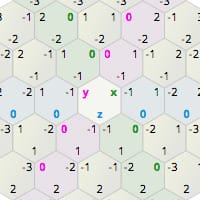
Amit's guide to math, algorithms, and code for hexagonal grids in games
specifically the 'pixel to hex' part
I even asked chatgpt for code and it gave me the exact same thing I already had lol
It's giving wrong values and not even a unique value for every hex
Whereas if I go from cell position to cubic coordinate, it comes out just fine

Probably no one knows, but figured I would ask
plucky inlet
Do you visually display your results so you know, they are wrong?
hard sparrow


world to cell to cubic should be correct
but world to cell calculation is the most expensive part so
 orchid bane
How to fly around an object with DOTween?
hard sparrow
Hm, I changed it so instead of dividing by cell size, I just multiplied by 2. And now it gives correct values. No clue why that works
except it isn't quite perfect... ugh, math
 chrome horizon
Hello! Has anyone faced this issue were a host build recognises the input system but the client (player2) doesn't recognise it?
private bool IsCurrentDeviceMouse
{
get
{
#if ENABLE_INPUT_SYSTEM
return playerInput.currentControlScheme == "KeyboardMouse";
#else
return false;
#endif
}
}
 toxic notch
I'm trying to figure out why my array is being modified even though it's not a global. Psuedo code looks like this:
public float[] myArr;

Start() {
 myArr = new float[] { 0, 0, 0, 0, 0 };
}

Update() {
  MyMethod(Vector3 pos, myArr);
}

MyMethod(Vector3 pos, float[] arr) {

  for (int i = 0; i < 5; i++) {
     arr[i] -= number;
  }

}
When I log arr in the beginning of MyMethod() it changes between frames, and I'm not sure why because I'm never modifying it at the property level. Seems like it would just continue to be that initial array of 0s Any ideas?
 candid kiln
Can i adjust the video length or cut my videoclip inside Unity?
chrome horizon
toxic notch
I'm trying to figure out why my array is being modified even though it's not a g...
What is number? is MyMethod a void or return?
 ionic adder
candid kiln
Can i adjust the video length or cut my videoclip inside Unity?
ionic adder
candid kiln
Can i adjust the video length or cut my videoclip inside Unity?
are you trying to actually edit the underlying video file? or just simulate it in what the end user sees? you can definitely control the start and end times with a VideoPlayer component
 mellow sigil
toxic notch
I'm trying to figure out why my array is being modified even though it's not a g...
mellow sigil
toxic notch
I'm trying to figure out why my array is being modified even though it's not a g...
Well you modify the array in MyMethod. Arrays are reference types so the parameter is the original array.
candid kiln
ionic adder
are you trying to actually edit the underlying video file? or just simulate it i...
I actually want to control the start time and i did it with VideoPlayer. But the problem is i want video to be looped, and i don't want to set start time everytime video resets
toxic notch
@chrome horizon It's just psuedo to show I'm modyifing the elements by some value. MyMethod is void
@mellow sigil Ahhhhh
didnt know they were ref in c#
candid kiln
candid kiln
I actually want to control the start time and i did it with VideoPlayer. But the...
I wonder if there is any variable for that in VideoPlayer or VideoClip
ionic adder
candid kiln
I actually want to control the start time and i did it with VideoPlayer. But the...
can't you just subscribe to VideoPlayer.loopPointReached? the subscribing method can set the start time for you
candid kiln
ionic adder
can't you just subscribe to VideoPlayer.loopPointReached? the subscribing method...
Thank you!
wary wagon
is there a gizmo for displaying text ?
wary wagon
ohh thank you !
 dense spear
Hey guys!! So I am working on a camera system which on start will change the FOV of the camera until all the corners of the plane (which would be the ground) is fully visible to the camera. So if any one of the points are yet to be rendered, it will keep changing the FOV.
I have tried playing with the GeometryUtility and also the Bounds. But I dont exactly know how to use them
Like in the pictures below... Regardless of the FOV value at the starting... it will change the value until the plane looks like the one in the 2nd pic
This is how far I have got
using System;
using System.Collections;
using System.Collections.Generic;
using UnityEngine;
using UnityEngine.EventSystems;
using UnityEngine.UI;

public class TestController : MonoBehaviour
{
    public Camera camera;
    public MeshRenderer renderer;

    public Plane[] cameraFrustum;
    public float zoomOutSpeed;

    [Space(20)] [Header("Plane Properties")]
    public GameObject plane;
    public Bounds planeBounds;
    public Collider planeCollider;
    public MeshFilter meshFilter;

    [Space(20)]
    public List<Vector3> verticesList;
    [SerializeField] private int verticesCount;


    private void Start()
    {
        Mesh mesh = meshFilter.mesh;
        planeBounds = mesh.bounds;
        GetCorners();

        //StartCoroutine(ZoomOutCam());
    }


    private void Update()
    {
        cameraFrustum = GeometryUtility.CalculateFrustumPlanes(camera);


        if (!GeometryUtility.TestPlanesAABB(cameraFrustum, planeBounds))
        {
            camera.fieldOfView += Time.deltaTime * zoomOutSpeed;
        }

    }
Can someone help me figure this out please😃
Thanks

 leaden ice
dense spear
Hey guys!! So I am working on a camera system which on start will change the FOV...
leaden ice
dense spear
Hey guys!! So I am working on a camera system which on start will change the FOV...
Cinemachine can do this for you automatically
dense spear
leaden ice
Cinemachine can do this for you automatically
so does it have the feature to change the FOV automatically?
dense spear
coz... I havent explored Cinemachines much since I have never worked on a top down game before
leaden ice
and put empty objects on the corners and use them in the target group
Cinemachine is absolutely essential for 99% of Unity games
dense spear
leaden ice
and put empty objects on the corners and use them in the target group
thank you so much for the tip... I will definitely check it out
 regal marsh
I am getting this message periodically and don't know what to do. I have tried updating my drivers (they were all up to date) and I only have one driver so I can't disable it (I tried, it made everything even worse). Any ideas?

I know this isn't strictly coding but this seemed like the best place to ask.
simple egret
Ask in #💻┃unity-talk
regal marsh
ok
 hybrid goblet
how can I say that the on destroy function depends on another gameObject and thus it should destroy the other gameObject after it detroys the one with the onDestroy function?
plucky inlet
Just call the destroy method on the other object with a delay instead of trying to run code that has been destroyed
hybrid goblet
so I need to add a script to that gameObject which has a coroutine in the onDestory function?
plucky inlet
For example, an Invoke of destroy with delay or a coroutine, whatever you prefer
hybrid goblet
okay thanks, struggeling with interactable trees atm, I need to replace them in runtime and switch them back after, so the scene isn't empty
plucky inlet
Do you need to destroy them or could you just disable the gameobject?
hybrid goblet
Well I can't do either, I need my terrain, I switch the terrain treedata for an empty array on run time and then want to switch it back to how it was before
plucky inlet
Okay, but you can store the treedata, right?
hybrid goblet
Yea
Oh wait I'm dumb, I'm doing that in a seperate gameObject instead of just attaching the script to the terrain which would prevent it form getting destroyed while running the code
Sometimes my stupidity is insane
 cyan rapids
Hello. Would there be any limitations to or concerns with doing something like this? One issue I ran into is that I can't make a List<Debuff<T>>. My goal is to have all subclasses implment a function that takes itself as a parameter for that function.
public abstract class Debuff<T> where T : Debuff<T>
{
    public abstract void HandleStackAdd(T debuff);
}

public class Poison : Debuff<Poison>
{
    public override void HandleStackAdd(Poison debuff)
    {
        // implementation for Poison...
    }
}
Why cant you make a List exactly?
cyan rapids
private List<Debuff<T>> debuffList;
isn't supported unless T is specified
it doesn't compile
plucky inlet
Could you work with an interface?
cyan rapids
I'm not really sure, I generally try to stick to classes. It might also matter that debuff inherits from some other custom classes and it's a whole chain of things
I could write the same code in every debuff subclass and handle it there manually, but I figured there has to be a better way of doing it that's more maintainable and generic
hybrid goblet
hybrid goblet
Oh wait I'm dumb, I'm doing that in a seperate gameObject instead of just attach...
works flawelessly now
hybrid goblet
cyan rapids
private List<Debuff<T>> debuffList;
isn't supported unless T is specified
your problem is somewhere else

it works
hybrid goblet
didn't want to create new scripts for this, so I just stuck with creating a instance and calling the hi function with:
Poison p = new Poison();
p.hi();
the functioning code:
public abstract class Debuff<T> where T : Debuff<T>
{
    public abstract void HandleStackAdd(T debuff);
    protected List<Debuff<T>> debuffList;

    protected void initDebuffList() {
        debuffList = new List<Debuff<T>>();
    }
}

public class Poison : Debuff<Poison>
{
    public override void HandleStackAdd(Poison debuff)
    {
        // implementation for Poison...
    }

    public void hi() {
        initDebuffList();
        Debug.Log("Hi");
        Debug.Log(debuffList);
    }
}
well it obviusly needs to be defined
simple egret
That's what their issue is about
Assuming that list is meant to go on, say a player, where it's not defined
cyan rapids
simple egret
Assuming that list is meant to go on, say a player, where it's not defined
Yes, this. I want to make a list of debuffs, which can contain any subclass/type of debuff, in whatever class I need, such as an entity or player. I should have specified
hybrid goblet
I thought he wanted to put it into the abstract class
cyan rapids
I think I might've found a better way of structuring it all that might work, I need to test it though
simple egret
Maybe you could reverse it all, get rid of the generics entirely and inject your entity into the debuff method
plucky inlet
good question about the generics. why do you need debuff to be generic when you Inherit from it anyway?
hybrid goblet
true it just goes arround in circles an interface or a pure abstract parent class would be better
plucky inlet
if you want to divide by types of a debuff, just use an enum for example or let poison inherit from debuff without generic approaches
cyan rapids
plucky inlet
good question about the generics. why do you need debuff to be generic when you ...
HandleStackAdd() should be called on a an existing debuff if I try to add a new one of the same type, so I can figure out how to combine them on a per-debuff basis, and that is going to need data from that specific debuff type
Basically the way it is now is:
poison = new Poison(value, duration);
poison.AddTo(entity)
[does this entity already have a posion debuff? if so, I don't need to register to events and all that, I can just tell the old debuff to add X stacks and combine values and stuff, so I call HandleAddStack()]
but, what I realized is it's kind've weird to have a tag handle a method to add itself to an entity like that? so I'm trying something else with a tag list/tag manager thingy
it should work with generics, i just gotta type it out
plucky inlet
yeah, just find the enum == the new enum object and if yes, add up
cyan rapids
plucky inlet
yeah, just find the enum == the new enum object and if yes, add up
Not exactly, I need to reference data from the other tag to combine them. Not every tag will just do stacks++; they need to intepret any sort of variables the other tag of the same type might have
latent latch
I just make my debuff/buff class a non-generic c# class which inits coroutines onto the player mono
 crisp bronze
Hi, I'm running into this really odd problem. I have this code:
targetObjects[i].DOMove(endPosition.position, durationOffset).(Ease.Linear).SetLoops(-1).OnStepComplete(() => {
                    currentRenderer = targetObjects[i];
                    Debug.Log("Loop1");
                });
The actual loop seems to work just fine, but the code inside of OnStepComplete doesn't run UNLESS only the Debug.Log line is there. It seems that if I add anything else, the OnStepComplete doesn't actually get called. Has anyone experienced this?
plucky inlet
cyan rapids
HandleStackAdd() should be called on a an existing debuff if I try to add a new ...
not sure, but if you go with the none generic way, can you still get the GetType() and return the Inheritance from the List then?
so List<debuff> but gettype will return poison if its a inheritance of debuff?
cyan rapids
Huh, I didn't really think of that. Does that work like that?
I thought if you have a list of debuffs, and get the type of an item in that list, it'll always return as a "debuff"
plucky inlet
It works, jsut teste
cyan rapids
Wow, that's crazy, I'll try it
plucky inlet
gettype of secondlevel which is inheritance of firstlevel prints out secondlevel in a firstlevel list 🙂
cyan rapids
There have been so many times in the past that information would have been useful 😅🤣
Thank you
plucky inlet
Very welcome 😄
mystic ferry
I have event triggers on my UI used to call PlayHover() for the OnMouseOver callback, but I'm using a singleton for the audio clips which apparently means the event trigger has a null reference at runtime. How do you guys create global OnMouseOver sound effects?
plucky inlet
mystic ferry
I have event triggers on my UI used to call `PlayHover()` for the `OnMouseOver` ...
you could check the EventSystem API and some events that get fired, maybe there is one you could use to hook into?
 tidal shadow
i have these variables, filled in inside the inspector as you can see
so why when i set the layer of my gameobjects, do i get the error "A gameobject can only be in one layer. THe layer needs to be in the range [0...31]"?

 mellow sigil
Layermask is not the same as layer
tidal shadow
then what datatype is layer?
just int?
sortinglayer?
oh yeah it is sortinglayer
nope, that gives me datatype error
mellow sigil
Layers are ints
tidal shadow
how do i get it nicely in the inspector, to see the actual layer i set it to?
oh wait, i have to follow these numbers right?

 soft shard
mystic ferry
I have event triggers on my UI used to call `PlayHover()` for the `OnMouseOver` ...
soft shard
mystic ferry
I have event triggers on my UI used to call `PlayHover()` for the `OnMouseOver` ...
Why would your audio pool singleton need a reference to event triggers? Shouldnt your buttons themselves be pulling a source from your audio pool when OnMouseOver is fired, or any of the relevant IPointerEvents for example:
public class SomeUI : Mono
{
void OnMouseOver()
{
SomeAudioPool.Instance.Play2D(someClip);
}
}
my audio singleton doesn't have references to any event triggers. The UI is instantiated at runtime so the dependency isn't filled and I guess I have to set them manually. Thought I could get away with it but I guess not
instantiating things at runtime is so much more modular and clean but oh my god the boilerplate dependency resolutions drive me insane
latent latch
Could be a load order issue, so make sure references that are needed after the singleton is created are in Start() or an init/assignment func
mystic ferry
good idea
 rocky hollow
anyone know why unity crashes everytime i run this bit of code? im creating a map generator that generates a grid of tiles first, then a path through the grid that starts on one side and ends on the opposite side. im not sure if the code is even working properly at all as everytime i run the game unity freezes up entirely https://pastebin.com/DtcfHTQr
Pastebin
Pastebin.com is the number one paste tool since 2002. Pastebin is a website where you can store text online for a set period of time.
latent latch
rocky hollow
anyone know why unity crashes everytime i run this bit of code? im creating a ma...
I suggest looking into your while loops as you may not ever be exiting them
rocky hollow
im trying to do that yet i cant seem to find specifically which one is causing the issue/ how to stop it
 unkempt sail
is there a way to set the transform of an object while keeping in mind its bounds for things like teleportations?
 rain minnow
unkempt sail
is there a way to set the transform of an object while keeping in mind its bound...
rain minnow
unkempt sail
is there a way to set the transform of an object while keeping in mind its bound...
bounds for teleportation?
unkempt sail
lets say I am doing this teleportation with a ray cast, when I do that the ray cast hit will return a point lets say at a wall, when I this teleportation on the player on what ever object, the object might be into the wall it self
how can I still do the teleportation, but not have the object inserted into the wall
 hexed pecan
unkempt sail
how can I still do the teleportation, but not have the object inserted into the ...
hexed pecan
unkempt sail
how can I still do the teleportation, but not have the object inserted into the ...
Maybe use this instead of raycast
https://docs.unity3d.com/ScriptReference/Rigidbody.SweepTest.html
unkempt sail
this would tell me if the teleportation does happen if the object will be intersecting with other colliders, my question is about moving the transform so it doesn't intersect
hexed pecan
Pretty sure you can just use the hit.distance from the sweeptest
rain minnow
unkempt sail
how can I still do the teleportation, but not have the object inserted into the ...
Use an offset when placing the object. The raycast will give you the point of intersection but the object position is based on its pivot — which is typically, in the center . . .
unkempt sail
does renderer.bounds return maxs and mins based on rotation, or the identity bound?
hexed pecan
Did you even try sweeptest..?
unkempt sail
yes
hexed pecan
If it hits something, move your character towards the direction.normalized multiplied by hit.distance
Dont use the hit.point
rain minnow
unkempt sail
lets say I am doing this teleportation with a ray cast, when I do that the ray c...
Or you can cast from the hit.point (of the wall) outward using the size of the object and if nothing hits, place your object from thr hit.point using your distance as the offset . . .
hexed pecan
Its perfect for this use case, unless if I misunderstood what you want
unkempt sail
let me try
 buoyant mural
So I want to check if enemy is facing attack position (the enemy is a plane that drops a bomb) I typed this
            float dot = Vector3.Dot(transform.forward, (destination.position - transform.position).normalized);
            if (dot > 0.7f) { Debug.Log("IS facing"); }
but it only works if X and Y are facing the attack position how can I exclude x position?
hexed pecan
unkempt sail
let me try
I just tested this with a cube and it works flawlesslycs var direction = transform.forward; if (rb.SweepTest(direction, out var hit, 10f)) { Debug.DrawRay(transform.position, direction * hit.distance, Color.cyan, 5f); transform.position = transform.position + direction * hit.distance; }
hexed pecan
 unkempt sail
this does pose a problem for objects that don't have rigidbodies
hexed pecan
You can use CapsuleCast, BoxCast etc. They work similiarly
SweepTest is best when you have multiple colliders on one RB
buoyant mural
hexed pecan
SweepTest is best when you have multiple colliders on one RB
What's a SweepTest btw? Because in all my years of programming I never heard of it
buoyant mural
Ok I understand
hexed pecan
Not much different from the other Cast methods
buoyant mural
Yeah
hexed pecan
The trick is to use origin + direction * hit.distance not hit.point
buoyant mural
Hm
hexed pecan
So it takes the collider's volume into account
hit.distance is the distance that the collider/rb can move freely
buoyant mural
Without colliding?
hexed pecan
It moves it to the very point of collision but without overlapping
buoyant mural
Oh yeah that's very good
hexed pecan
Its useful for sure
buoyant mural
Yeah
mystic ferry

really strange error here because I'm not destroying anything, and all of my other actions work perfectly fine
buoyant mural
buoyant mural
So I want to check if enemy is facing attack position (the enemy is a plane that...
And is there any better way to do this?
mystic ferry
any idea what could possibly cause this?
buoyant mural
mystic ferry
really strange error here because I'm not destroying anything, and all of my oth...
Which object does it say is getting destroyed?
hexed pecan
buoyant mural
So I want to check if enemy is facing attack position (the enemy is a plane that...
When exactly do you want it to be valid?
Also is it 2D or 3D
buoyant mural
hexed pecan
When exactly do you want it to be valid?
3D. I want to check if plane's Y rotation axis is facing the attack target
hexed pecan
Okay you could use Vector3.Angle for example
buoyant mural
And I do not want it to be exact so if it's off a bit it should still count as facing
hexed pecan
Can use Vector2.Angle actually
buoyant mural
In a 3D game?
buoyant mural
Yes
Because if it detects X then the plane is just gonna dive to the attack position
hexed pecan
I will show with Vector3 anyway its maybe easier to understand:
-Make a Vector3 that is the plane's forward, but make its Y value zero (so its only on the horizontal plane)
-Make another Vector3 that is the direction from your plane to the target, make this vector's Y zero also
-Check the angle from the first to second vector with Vector3.Angle
buoyant mural
Though I think vector2 would be better code
hexed pecan
Yep, less extra computation because we only need X and Y (really X and Z)
buoyant mural
Yeah I really care about optimization and clean code
hexed pecan
You can do the above steps with Vector2, just put the X into X and Z into Y
And forget the "set y to zero" parts
buoyant mural
Yeah ok will try
buoyant mural
hexed pecan
You can do the above steps with Vector2, just put the X into X and Z into Y
Wait why put Z into Y?
hexed pecan
See, Vector3 is easier to understand 😆
buoyant mural
Well
buoyant mural
hexed pecan
See, Vector3 is easier to understand 😆
It is because I've used it more
hexed pecan
Because you only care about the horizontal plane, so you want X and Z
buoyant mural
Oh yeah
hexed pecan
And if you want to use Vector2 then you need to put the Z into Y
buoyant mural
yeah ok
buoyant mural
hexed pecan
I will show with Vector3 anyway its maybe easier to understand:
-Make a Vector3 ...
Bro I forgot how to do step 2
Ik how to do it
hexed pecan
targetpos - selfpos
buoyant mural
oh oh bro
Probably cuz it's 1:45 am lol
I think it worked
Ok it worked
thanks
 torn eagle
Hey!! I need a hand fixing this code so that it finds a new texture if the resolution is smaller than 256x256
            Texture2D texture = new Texture2D(flower.width, flower.height);
            texture.LoadImage(bytes);
            img.sprite = Sprite.Create(texture, rec, new Vector2(flower.width, flower.height), 1f);
            rt.sizeDelta = new Vector2(flower.width, flower.height);
            texture.Apply();
Alternatively, would there be any way to simply upscale the texture if it were smaller than that resolution as doing so via code seemingly clears the texture
 quasi terrace
Does anyone know why .unitypackages are included in gitignores (or Plastic SCM's ignore.conf)? They are pretty common in assets from the asset store and these assets might not be able to function until you open up the package. Would it be wise to remove it from my ignore.conf so that I can set up plugins across multiple devices (not just the computer I downloaded the asset from) or should it stay the way it is?
 cerulean oak
how do I set a MeshRenderer material back to the shared material, after having modified its material (and thus having a material isntance)?
I tried doing
meshRenderer.materials[0] = meshRenderer.sharedMaterials[0]```
Also tried storing the sharedMaterial before modifying the material, and neither of them workedDid you get a null ref/index out of bounds error or how did that not work?
hexed pecan
Oh wait
cerulean oak
not using the shared material
hexed pecan
materials gives you a copy of the array
So you should get it, modify its [0] item, then assign it back
var mats = meshRenderer.materials;
mats[0] = meshRenderer.sharedMaterials[0];
meshRenderer.materias = mats;```That should work
hexed pecan
cerulean oak
I tried doing
```cs
meshRenderer.materials[0] = meshRenderer.sharedMaterials[0]`...
Here you were just modifying the copy of materials array without assigning it back
cerulean oak
still not working
hexed pecan
Log the materials[0] before and after
cerulean oak
ok setting the sharedMaterial as a property and assigning that works
hexed pecan
Does it have only 1 material?
Im curious if it didnt work because it has 1 mat and you were using the array
cerulean oak
hexed pecan
Im curious if it didnt work because it has 1 mat and you were using the array
actually tried that
meshRenderer.material = sharedMaterial //where sharedMaterial is a field assigned to the material```
works
but
```cs
meshRenderer.material = meshRenderer.sharedMaterial ```
doesnt workwhy would meshRenderer.material = meshRenderer.sharedMaterial do anything?
Once you have used .material, sharedMaterial is gone, no?
cerulean oak
yes, seems like it
hexed pecan
Probably because meshRenderer.sharedMaterial doesnt exist anymore after you have overridden it
Or returns the .material
quartz folio
Exactly, you override it with material, and then that's all it returns
material is just a fancy property that checks whether sharedMaterial has been instanced yet, instances if it can, and then swaps it
otherwise they're just referring to the same thing
cerulean oak
ok now another problem, this was suposed to be a way to improve perfomance but it didnt improve shit
xd
going to sleep now
but for some reaosn having 200 material instances drops the perfomance, but replacing them back with the shared material doesnt recover it?
ok it does
but for like 2ms
 limber agate
Im trying to make a inventory system, I have a inventory array that holds all the item data and the imaginary slots, but idk how I can pair the lets say 3rd inventory slot UI with the 2 index in the array. (Also the amount of inventory slots determined till the game is ran)
cerulean oak
The UI?
 cyan bronze
Is there any way to auto clear unused reference in Assembly Definitions? Only through IDE?
 neat hollow
hiya, I'm getting 'using' related errors even thought theses packages are in the project. could the project have been corrupted somehow? : error CS0246: The type or namespace name 'TMPro' / and 'InputSystems' could not be found (are you missing a using directive or an assembly reference?)
leaden ice
neat hollow
hiya, I'm getting 'using' related errors even thought theses packages are in the...
depends if you're getting these in Unity or just in your IDE
neat hollow
in unity unfortunately
leaden ice
neat hollow
in unity unfortunately
Then either:
- you have spelled something wrong (
InputSystemsis not a thing for example) - you have not installed the appropriate package(s)
- you are using assembly definition files and have failed to include references to those package assemblies in your assemblies.
neat hollow
it could be assembly definitions - I set some up for Testing before, as I have TMP and Input System packages installed and using //using UnityEngine.InputSystem; //using TMPro; at start of script
leaden ice
If you are using asmdefs then you need to add references to those assemblies in the asmdef in order to use those assemblies in your code that is inside an assembly
neat hollow
ill have to rebuild them - its in my asset folder - watching a tutorial now
leaden ice
Assembly Definitions are assets in your asset folder with the .asmdef file extension
neat hollow
yes this video explains its well just going throught the steps https://www.youtube.com/watch?v=eovjb5xn8y0&ab_channel=GameDevGuide


The first 1000 people to use the link will get a free trial of Skillshare Premium Membership: https://skl.sh/gamedevguide05211
Learn how to get back into the Editor faster after making changes to your code by using Assembly Definition Files in your project!
Gameplay Logic using Bolt: https://youtu.be/tP9_YBpBBpI
Attributes and Reflection: htt...
..nope still getting same error even thought i added textmeshpro to the definition
leaden ice
neat hollow
..nope still getting same error even thought i added textmeshpro to the definiti...
did you save it
neat hollow
yes i'm using plastic and saved scene of course - had to role back the changes and will come back to it another day, looks like will take a lot of research to fix. thanks again
leaden ice
Not sure how plastic is relevant exactly...
 split venture
unity is giving me the incorrect answer?? am i using these wrong?

 leaden ice
split venture
unity is giving me the incorrect answer?? am i using these wrong?
leaden ice
split venture
unity is giving me the incorrect answer?? am i using these wrong?
what's with the magic numbers
and what are you expecting here
split venture
leaden ice
what's with the magic numbers
going to replace them with variables soon just trying to get it to work first
split venture
leaden ice
and what are you expecting here
my calculator says its 19.462418
yet im getting 0.35
leaden ice
split venture
my calculator says its 19.462418
are you in degree mode or radian mode
split venture
uhh no idea
leaden ice
Mathf.Atan uses radians
split venture
leaden ice
you should
advise me
leaden ice
leaden ice
Mathf.Atan uses radians
^
leaden ice
if you want the same answer on your calculator you should switch to radian mode on your calculator
split venture
how do i do that
leaden ice
i have no idea
leaden ice
i don't have your calculator
split venture
cheers
 granite nimbus
is there a more efficient way of converting int3 -> Vector3Int than just new Vector3Int(int3.x, int3.y, int3.z)?
leaden ice
granite nimbus
is there a more efficient way of converting int3 -> Vector3Int than just `new Ve...
is there not an implicit conversion?
granite nimbus
leaden ice
is there not an implicit conversion?
no, red underline
leaden ice
wait if you actually mean efficiency then this will actually be faster since it doesn't call a method:
Vector3Int a = default;
a.x = myInt3.x;
a.y = myInt3.y;
a.z = myInt3.z;```if you want to just make it convenient - make an extension method
granite nimbus
leaden ice
wait if you actually mean _efficiency_ then this will actually be faster since i...
hmm. why?
leaden ice
since it doesn't call a method
granite nimbus
oh you edited, ok
hexed pecan
Lemme write that down in my micro-optimization notes 📝
granite nimbus
leaden ice
wait if you actually mean _efficiency_ then this will actually be faster since i...
but what do you mean method? isn't it a constructor?
leaden ice
granite nimbus
but what do you mean method? isn't it a constructor?
constructors are methods
they have the same overhead as calling any other method.
granite nimbus
hexed pecan
Lemme write that down in my micro-optimization notes 📝
do you think I will get more or less than a nanosecond benefit?
 cold parrot
granite nimbus
do you think I will get more or less than a nanosecond benefit?
cold parrot
granite nimbus
do you think I will get more or less than a nanosecond benefit?
optimizations like this can go either way, faster or slower, its impossible to tell the effect without benchmarking on the target platform.
gray zephyr
alright alright
fellas
private bool _active;
public bool Active
{
    get => _active;
}
or
private bool _active;
public bool Active {get => _active;}
or
public bool Active {get;}
👀
I didn't even know that one existed
granite nimbus
cold parrot
optimizations like this can go either way, faster or slower, its impossible to t...
I think it's just not worth benchmarking at all
 wise hollow
The shortest one
Easy to read and quick to understand.
Plus looks good in a wall of code
gray zephyr
leaden ice
```cs
private bool _active;
public bool Active => _active;```
Hmmm... does that still count as a property or is it technically a method now?
leaden ice
gray zephyr
Hmmm... does that still count as a property or is it technically a method now?
it's a property
gray zephyr

wise hollow
Remember kids. The better the code sheet looks the further you will go in ur projects
 deft lake
Alright so I am working on mouse based movement system for a rhythm game that is a hybrid between audio surf and geometry dash (also intend to add other mechanics from various other existing rhythm games). And the system works great! For the most part that is, see I am running into a issue where sensitivity outside of the editor is much higher than inside the editor, and I cant pinpoint why.
Is it possible you guys might be able to see the problem, or see if it is missing something it probably needs.
This is the script used to handle movement for the player. Dont mind my odd way of organizing the code
gray zephyr
before I try to help you
I will not mind but I will question your odd way of organizing code—good code is self-documenting, comments become clutter
second, try adding cs after your ```
it'll make the code highlighted/colored for us to read
transforms cannot be instantiated without creating a dummy gameobject I'm pretty sure
// This seems to be useless but might be needed, I dont really know since the script works perfectly fine without it for some reason
that's a sign that you should remove it from your code so it isn't cluttered
 boreal bone
also yeah you don't need it
deft lake
I probably should, I still dont know however how the hell it works without grabbing the transform.
boreal bone
MonoBehaviour already has a this.transform
leaden ice
deft lake
I probably should, I still dont know however how the hell it works without grabb...
MonoBehaviour automatically has a reference to its Transform through transform
gray zephyr
// Start is called before the first frame update
void Start()
{
}```
that was added automatically by Unity, but you 100% don't need to keep it cosmic rain
deft lake
Alright so I am working on mouse based movement system for a rhythm game that is...
cosmic rain
deft lake
Alright so I am working on mouse based movement system for a rhythm game that is...
Can you upload the code to a paste site following the guidelines? !code
tawny elkBOT
Posting code
📃 Large Code Blocks
Large code blocks should be posted as links to services like:
https://gdl.space/, https://paste.ofcode.org/, https://hatebin.com/
https://paste.myst.rs/, https://hastebin.com/
📃 Inline Code
Surround code with three backquotes. Not quotation marks.
To get C# formatting the first line should only contain cs or csharp.
Add a comment with a line number if there is an error message.
```cs
// Your code here
```
Do not share screenshots of code unless requested.
hexed pecan
deft lake
Alright so I am working on mouse based movement system for a rhythm game that is...
You are multiplying your forces with deltaTime - thats a no-no
And most likely the cause for the issue you are describing
Also yeah please share the code correctly
deft lake
hexed pecan
Also yeah please share the code correctly
Sorry, this is my first time, actually its the first time im doing any of this, and Im surprised I made something that works.
But yeah so removing the deltaTime should fix the issue?
hexed pecan
Forces are already multiplied by deltatime by default
gray zephyr
mmmmm deltatime squared
hexed pecan
Though deltaTime, when called from FixedUpdate, returns the fixedDeltaTime which shouldnt change
Remove the multiplication and remember to make your forces about 50x smaller to compensate for that
deft lake
The issue persists even after removing them and ajusting the forces.
hexed pecan
hexed pecan
Though deltaTime, when called from FixedUpdate, returns the fixedDeltaTime which...
Yeah after remembering this I became less sure of it being the cause of your problem
leaden ice
deft lake
The issue persists even after removing them and ajusting the forces.
you're reading moouse deltas in update
then using them in fixedupdate
since they don't have the same cadence, you will discard many Update frames typically per FixedUpdate
to solve this you must accumulate mouse delta in Update
and consume it in FixedUpdate
Vector2 mouseDiff;

void Update() {
  // accumulate mouse motion
  mouseDiff += new Vector2(Input.GetAxisRaw("Mouse X"), Input.GetAxisRaw("Mouse Y");
}

void FixedUpdate() {
  // consume accumulated mouse movement
  Vector2 mouseSpeed = mouseDiff;
  mouseDiff = Vector2.zero;

  // continue
}```For example^
deft lake
Maybe I really am not cut out for this if I cant understand how any of "that" works.
leaden ice
what are confused about
 dim spindle
deft lake
Maybe I really am not cut out for this if I cant understand how any of "that" wo...
dim spindle
deft lake
Maybe I really am not cut out for this if I cant understand how any of "that" wo...
its all about experience
when i start learning something new, i also dont understand how it works
but after a lot of using it, I get it, and then I can use it with ease
deft lake
leaden ice
what are confused about
Mainly how the code your presented works, my brain is simple, it doesnt like things that are more complex then what goes up should come down.
I do not like my brain.
dim spindle
(this happens ALL the time for me, so dont expect to go without learning new stuff all the time)
leaden ice
deft lake
Mainly how the code your presented works, my brain is simple, it doesnt like thi...
it's really just about that complex
dim spindle
deft lake
I do not like my brain.
nope. its all experience
leaden ice
all it's doing is:
- in update, we're adding all the mouse movement we see into a variable named
mouseDiff
dim spindle
when you need to actually design a solution to a new problem, thats when your brain comes into play
leaden ice
- in fixedupdate, we're using all of that accumulated mouse movement to do our motion
that's all it is
dim spindle
but understanding stuff is 99% just experience
deft lake
Oh I see, so instead of just dumping the mouse values straight into fixed update, we compile it all into one variable that wont throw away half the input data.
deft lake
I will give it a shot. Also thoughts on the rest of the code?
leaden ice
otherwise we're forgetting the mouse input from all the frames where there was no FixedUpdate
Osmal's comments on deltaTime etc are all correct
dim spindle
i think im doing physics wrong since i have not used fixed update once
and i have a player controller
and they can throw stuff
deft lake
With this I should be able to remove the / 4 value since I dont need it to slow the sensitivty down
dim spindle
but its worked so far lol
rocky hollow
im trying to make a script to generate a grid of tiles, then generate a path through that. right now though, it crashes unity everytime and gets stuck looping on the switch statement that determines what tiles are a part of what side of the map. anyone know how to fix it? thx https://pastebin.com/ZeSRA0QQ
Pastebin
Pastebin.com is the number one paste tool since 2002. Pastebin is a website where you can store text online for a set period of time.
hexed pecan
dim spindle
and i have a player controller
Rigidbody or CharacterController?
hexed pecan
Ok, as far as I know, CC should be moved in Update
So you should be good on that part
If by throwing you mean single force impulses, its fine to do from Update too
But for continuous forces you wanna go FixedUpdate
deft lake
leaden ice
```cs
Vector2 mouseDiff;
void Update() {
// accumulate mouse motion
mouseDi...
Thank you so much for this! after some tweaking it works perfectly.
deft lake
Why must I be thanked?
dim spindle
a lot of people will just copy and paste and come back 20 seconds later with an issue
because they understand nothing about the code
people who take the time to learn are much appreciated here, at least by me 🙂
Hopefully by everyone else too!
deft lake
I see, well from what I can tell the code takes my mouse inputs and consoldates them into a variable, I still dont understand fully how it works with Vector2
dealing with vectors scare me, but I am terrified of quaternions, but future mechanics in my game WILL need them
dim spindle
In what way? The vector2 is just for the mouse movements in both directions. you can move your mouse up and down, and you can move your mouse left and right
leaden ice
You can just think of that vector2 as two regular floats nicely packed together as one variable
dim spindle
those are the two values in the vector, just how much you moved your mouse either way
dim spindle
leaden ice
You can just think of that vector2 as two regular floats nicely packed together ...
yeah, makes math in contexts like this easier
deft lake
Oh I see, so I can just pull both X and Y from mouse speed now?
dim spindle
yes technically but why
usually you want to keep them together
but it depends on what you are doing
deft lake
well I have no reason for mouse Y, it is useless for my game at the time being until a add a feature planned for beta. (that being a arcade style flight element)
what I am using the mouse inputs for is this code (sorry for the mess)
// This set of if statements handles left and right movement of the player
        if (Input.GetAxisRaw("Mouse X") < 0) // Checks to see if mouse input is going Left
        {
            rb.AddForce(Vector3.left * -mouseSpeed * mouseSensitivity); // This applies the mouse speed to the player going leftwards
        }

        if (Input.GetAxisRaw("Mouse X") > 0) // Checks to see if mouse input is going right
        {
            rb.AddForce(Vector3.right * mouseSpeed * mouseSensitivity); // This applies the mouse speed to the player going rightward
}```please use this formatting guide !code
deft lake
See I take the X movement of the mouse, and if a mouse moves left, the player moves left, same goes for right
tawny elkBOT
Posting code
📃 Large Code Blocks
Large code blocks should be posted as links to services like:
https://gdl.space/, https://paste.ofcode.org/, https://hatebin.com/
https://paste.myst.rs/, https://hastebin.com/
📃 Inline Code
Surround code with three backquotes. Not quotation marks.
To get C# formatting the first line should only contain cs or csharp.
Add a comment with a line number if there is an error message.
```cs
// Your code here
```
Do not share screenshots of code unless requested.
dim spindle
inline code specifically
discord has cool builtin formatting for code, makes it very clean to read
ah you put the cs on a new line i think?
the cs gives it colors lol
deft lake
oh alright, i do like my fancy colors
deft lake
there
dim spindle
interesting
deft lake
I made it all not so bad looking.
dim spindle
so one thing i noticed, why do you take -mouseSpeed in your left branch?
deft lake
Its because even though its being told to apply a left force, it reads the -mouseX input and applys that to left causing it to go right
Thats a confusing sentence
Basically it for some reason applies the negative value going left, which leads to going right, so I had to negative it agian.
Negative-Ception
hexed pecan
rocky hollow
im trying to make a script to generate a grid of tiles, then generate a path thr...
Its most likely one of those nine while loops that runs infinitely
dim spindle
also, i think you can skip the branching with something like this
float direction = mouse_x > 0 ? 1 : -1
and multiply the whole thing by that.
but im not sure if thats desirable over just two bigger branches
deft lake
Not sure what branching means.
dim spindle
its technically branching but IMO it looks better.
like if cases
and this provides opportunities for less repeating yourself
 mossy vine
Do you guys have a link to c# tutorials that break down the structure of it?
dim spindle
again not sure its desirable here
rocky hollow
hexed pecan
Its most likely one of those _nine_ while loops that runs infinitely
its the switch statement that checks for what tiles are on a side. i used debugging to figure that out. also this is all on awake so does it matter that there are so many while statements or should i fix it
deft lake
Im not sure either, I would hate to have to add needless confusion for something that works using simple to understand systems.
But yea getting mouse speed is very important, as without the mouseSpeed variable in the code, it causes the mouse when moving left or right to act as arrow keys causing the player to move at a set speed instead of with the mouse, but with mouseSpeed it makes the player move faster the faster you move the mouse
hexed pecan
rocky hollow
its the switch statement that checks for what tiles are on a side. i used debugg...
If you already know the cause then why ask 🤔
rocky hollow
i know whats wrong with it, not how to fix it. sorry i shouldve been more clear
hexed pecan
Where does it get stuck exactly?
dim spindle
deft lake
Im not sure either, I would hate to have to add needless confusion for something...
personally i think it looks nicer because it follows DRY (dont repeat yourself) which is a strong programming principle ive seen
rocky hollow
it gets stuck repeating the for loop forever. although i literally just fixed that issue by adding a default case, though the path generation does not work and i get an "out of range" error when running the game
deft lake
@leaden ice Sorry for the ping, but I would hate to use the code you provided without asking if you are ok with me crediting you in the bug fix help section of the credits.
deft lake
dim spindle
personally i think it looks nicer because it follows DRY (dont repeat yourself) ...
I see, umm, what does that mean exactly, sorry for all the questions, this again is my first BIG project.
dim spindle
What part are you confused about?
deft lake
I was wanting to know what the DRY is for and why it is used.
dim spindle
It stands for dont repeat yourself, its a concept used in programming because it general makes things easier to change, to read, etc, and is has the added benefit of being easier to read
imagine if you wanted to make a function to check if a number is even
you could do
bool is_even(int num) {
if (num == 1) return false
if (num == 2) return true
// ... ETC
}
but it would be much better if you just went return num % 2 == 0;
% is modulo btw, its just the remainder of division
deft lake
I see, still somewhat confused, but I get the idea.
I will explore the concept later down the line during beta when I refine and rewrite parts of code to be less crunchy.
 buoyant crane
dim spindle
also, i think you can skip the branching with something like this
```cs
float di...
buoyant crane
dim spindle
also, i think you can skip the branching with something like this
```cs
float di...
would be better as
int direction = Input.GetAxisRaw("Mouse X");
deft lake
Id rather focus on getting things working with the path of least resistance.
dim spindle
buoyant crane
would be better as
`int direction = Input.GetAxisRaw("Mouse X");`
not sure how that works
deft lake
Ya know, seeing its a prototype and all.
dim spindle
deft lake
Id rather focus on getting things working with the path of least resistance.
DRY is the path of least resistance in a lot of cases because it makes changes WAYYYY easier to make
buoyant crane
dim spindle
not sure how that works
the ternary would evaluate as false when there’s no input causing it to always go -1
deft lake
dim spindle
DRY *is* the path of least resistance in a lot of cases because it makes changes...
I cant argue with that then, but that does require I know how to use DRY effectively, which I dont.
dim spindle
imagine if you have repeated code referencing the same variable over and over, and you want to change how the variable is used. maybe you want to split it into two variables? if you repeated the code, you have to go through each repeat and change the code that uses the variable
deft lake
Alright, so the goal is to not have to go through multiple lines of code to fix the change.
dim spindle
deft lake
I cant argue with that then, but that does require I know how to use DRY effecti...
yeah again, its experience, once you run into something like the scenario i put above, i would ask somewhere about it or google it, and try to learn it more.
dim spindle
deft lake
Alright, so the goal is to not have to go through multiple lines of code to fix ...
one of the goals yep
deft lake
Can you provide a example using what I have in my script?
dim spindle
again its also a LOT easier to understand when you go back later to read your code and change it
float mouse_velocity = Input.GetAxisRaw("Mouse X");
float move_direction = mouse_velocity > 0 ? 1 : -1;
rb.AddForce(Vector3.left * mouse_direction * mouseSensitivity);
this is an example
im not sure if this snippet works
since i dont have access to your project
also not sure why you have mouseSpeed and mouseSensitivty
also dont mix caps like i did here, it makes it confusing, i just use snake_case on habit, maybe i should stop lol
OOPS i also forgot to add a check at the beginning if its != 0 otherwise it will just try to move always
deft lake
dim spindle
also not sure why you have `mouseSpeed` *and* `mouseSensitivty`
I have it so first mouseSpeed is used to allow the player to move along with the mouse, instead of moving at a set speed so long as the mouse moves.
dim spindle
OH wait was mouseSpeed that accumulated variable from earlier?
deft lake
Yup.
quartz folio
If you're converting a delta to a fixed value you should be multiplying by deltaTime
dim spindle
this is another example of coding principles, naming your variables clearly so you can understand them again
quartz folio
because it's no longer a delta
though I suppose it's AddForce, so uh not sure any more
deft lake
Since mouseSpeed gets larger the faster you move the mouse, if I add that value into code it allows the speed of the player to increase with the increase in mouse movement speed.
dim spindle
I think mouseVelocity makes more sense
deft lake
since speed can mean many things now that I think about it.
dim spindle
im just saying this from experience
dim spindle
deft lake
since speed can mean many things now that I think about it.
yeah thats why i was confused lol
alr im gonna go do something else now but def feel free to ping, it might just take me an extra minute to respond or something, maybe longer if im extra busy idk
deft lake
Here, before you go, I am packing the project file into a zip that you can freely download to test and mess around to further inspect how it works to give further feed back, since right now, I am a one man show working on this.
dim spindle
ahhh sorry I dont really tend to download other people's projects, not because im not interested, just because it takes a lot of extra effort to get them set up and opened on my machine
and if i downloaded a whole lot, it would clutter my drive lol
you can record a video maybe, or upload a webgl demo if you know how? it could be worth learning that if you want feedback on controls or something
deft lake
Is it all right if I send you a raw build, its fairly small, since it literally looks like this,
 dim spindle
again im REALLY sorry, im not trying to be rude or anything but with unofficial builds i just have a fear of malicious code NOT SAYING that i dont trust you, just paranoid, i hope you understand
i just dont have a workflow that i trust for testing other people's projects
dim spindle
anything you can have code with can be malicious
deft lake
I dont even know how to make a game that doesnt erase everything as soon as you exit it.
That actually still is a problem I need to address later since Soungates whole premise is based on having a geometry dash style level editor.
dim spindle
ok again, im not saying i dont trust you, i just dont trust random executables from paranoia
I hope you understand lol
deft lake
Since the game is practically ment to be geometry dash, but 3D mixed with riff racer
deft lake
dim spindle
I hope you understand lol
I do, and Im not to worried, more time for me to refine my work and now upload something to make a fool of myself.
dim spindle
deft lake
*Since the game is practically ment to be geometry dash, but 3D mixed with riff ...
oh shit i have 3.6k hours in geometry dash lol, never heard of riff racer tho
deft lake
dim spindle
oh shit i have 3.6k hours in geometry dash lol, never heard of riff racer tho
uhh, better example, think of audiosurf.
dim spindle
here isnt really the place to discuss tho
dim spindle
deft lake
uhh, better example, think of audiosurf.
i have seen that yeah
 warm wren
dim spindle
ok again, im not saying i dont trust you, i just dont trust random executables f...
warm wren
dim spindle
ok again, im not saying i dont trust you, i just dont trust random executables f...
Did an exe file break your computer or something lol
dim spindle
nope
deft lake
Yea so my game is just that, and geometry dash combined for a timing based rhythm game with hazards and levels that just look like eye candy and have cool cineamatograhy.
dim spindle
probably because im paranoid
deft lake
Because seeing the same 80s stylized rhythm racer for every game got boring for me.
dim spindle
deft lake
Yea so my game is just that, and geometry dash combined for a timing based rhyth...
sounds like a good idea. despite my 3.6k hours in GD i actually dislike the retry model of it, replaying a lot makes me frustrated. but there are tons of people who do like it, so theres that
deft lake
Run on a track, hit a few procedurlly generated points, and thats it. Super boring.
deft lake
dim spindle
sounds like a good idea. despite my 3.6k hours in GD i actually dislike the retr...
Mine will have more of a health system, so you dont get punished harshly depending on dificulty.
dim spindle
this is more of a #archived-game-design topic though
if you dont have any more programming questions you can go there instead
deft lake
Good point, carry on over there then?
dim spindle
sure but i only really have 20 mins left before i want to sleep
 blissful whale
how would you guys calculate the distance between player and the door to trigger a sprite change?

I want the door's sprite to change when player is near it
but my brain somehow does not work ☠️
full scaffold
blissful whale
how would you guys calculate the distance between player and the door to trigger...
what r u envisioning
blissful whale
When I get near the door it's sprite will change to this
 full scaffold
blissful whale
When I get near the `door` it's sprite will change to this
full scaffold
blissful whale
When I get near the `door` it's sprite will change to this
What constitutes as “near”
full scaffold
Then do exactly that
There is a very common unity method that checks for not “distance” but overlap, or trigger.
 plucky karma
I'm in a empty scene and playing this scene still generates garbage allocation - Why? Where is this method being called from?
 swift falcon
blissful whale
how would you guys calculate the distance between player and the door to trigger...
swift falcon
blissful whale
how would you guys calculate the distance between player and the door to trigger...
Vector3.Distance
blissful whale
This reply worked, even so thanks
 plucky karma
blissful whale
This reply worked, even so thanks
plucky karma
blissful whale
This reply worked, even so thanks
This looks expensive.
cosmic rain
plucky karma
I'm in a empty scene and playing this scene still generates garbage allocation -...
Unity's thread workers pool it seems.
Part of the jobs system
swift falcon
blissful whale
This reply worked, even so thanks
Vector3.Distance does basically the same thing and it’s way simpler and probably cheaper
plucky karma
cosmic rain
Part of the jobs system
What jobs? There's nothing running in a empty scene?
There's no game objects too, not even the main camera.
cosmic rain
plucky karma
What jobs? There's nothing running in a empty scene?
It doesn't need to run. The infrastructure for the jobs system is part of the core unity functionality. It will run regardless of what you have in the scene.
blissful whale
plucky karma
This looks expensive.
Yeahh, it returns alot of errors too
plucky karma
blissful whale
Yeahh, it returns alot of errors too
Probably because you don't have a gameobject called "Player" in your scene anywhere.
cosmic rain
plucky karma
There's no game objects too, not even the main camera.
If your scene is empty, it doesn't mean that the engine isn't doing anything. There's a lot going on in the background. An engine is a complex thing.
blissful whale
plucky karma
Probably because you don't have a gameobject called "Player" in your scene anywh...
Oh, it was because I gave the script to the wrong object. I'll try to understand Vector3.Distance meanwhile
swift falcon
Or just
if(Vector3.Distance(this.position, player.position) > 3)
🤷♂️
blissful whale
alright
plucky karma
blissful whale
Oh, it was because I gave the script to the wrong object. I'll try to understand...
Vector3.Distance calculates the distance between two Vector3 points.
The code above is a simplify, yet, less expensive than calling Vector3.Distance due to the fact that it must use sqrt operation (costly)
swift falcon
Do this.transform.position though
Same thing for the player, don’t forget the transform part
hexed pecan
plucky karma
I'm in a empty scene and playing this scene still generates garbage allocation -...
I dont know much about jobs, but most of those look like some idle stuff
plucky karma
Are you missing an enclosure?
hexed pecan
I wonder what is MyTimerCallback 🤔
Oh its a Threading thing too. The naming just confused me. Like an example method lol
swift falcon
@blissful whale and honestly calculating the distance each frame when you have tons of doors is pretty expensive, so I would personally just use a trigger which is cheaper in this case
blissful whale
I will be planning to continue this game's development and add more levels, probably you are right