#archived-code-general
1 messages · Page 8 of 1
 main shuttle
 mellow sigil
Which line is 47
 thick socket
tmpOffer.Initialize(item, item2.tree, tmpType);```then either tmpOffer or item2
main shuttle
Then it must be tmpOffer or item2
thick socket
thanks, how did you know it wasn't item or tmpType?
thick socket
thanks Nitku, I'll give it a shot 🙂
main shuttle
You can not get a NullReferenceException from anything that doesn't use a .
You are asking something of a value that doesn't exist
mellow sigil
It's not illegal to pass null values to that method
mellow sigil
Is it? Did you verify?
 high violet
i have integrated google play games SDK in my game for login , but even if someone don't have google play games it runs fine just the login fails
is there a way to block the users that don't have google play games
thick socket
lol wat
 void InitialAdd()
    {
        //limitedOffers, dailyOffers, weeklyOffers, monthlyOffers, hollidayOffers
        foreach (var item in offers.limitedOffers){
            var tmpOffer = new Offer();
            OfferTypes tmpType = OfferTypes.Limited;
            foreach(var item2 in iconTrees.offerTypesList)
            {
                if(item2.offerType == tmpType)
                {
                    Debug.Log($"tmpOffer is null? {tmpOffer == null}");
                    Debug.Log($"Item2 is null? {item2 == null}");
                    Debug.Log($"Item2.tree is null? {item2.tree == null}");
                    tmpOffer.Initialize(item, item2.tree, tmpType);
                }
            }
            allOffers.Add(tmpOffer);
            var add = new StoreOffers(item.offerText,OfferTypes.Limited, System.DateTime.Now, 0);
            storeOffers.Add(add);
        }
    }
line50 = tmpOffer.Initialize(item, item2.tree, tmpType);
NullReferenceException: Object reference not set to an instance of an object
OfferIcon.Spawn (UnityEngine.UIElements.VisualElement tmp) (at Assets/Scripts/UI/MainMenuScripts/Offers/OfferIcon.cs:40)
Offer.Initialize (OfferData data, UnityEngine.UIElements.VisualTreeAsset tree, OfferTypes tmptype) (at Assets/Scripts/UI/MainMenuScripts/Offers/Offer.cs:40)
ShopOffers.InitialAdd () (at Assets/Scripts/UI/MainMenuScripts/Offers/ShopOffers.cs:50)
ShopOffers.Start () (at Assets/Scripts/UI/MainMenuScripts/Offers/ShopOffers.cs:21)
all debugs are false
 thorny rock
Maybe item2.tree is null?
thick socket
Im checking that also, said its not
I can send my Offer script as its not that long
mellow sigil
It throws in OfferIcon.cs
 placid summit
use a debugger, step through until you find a null
thorny rock
Have a good read on the error OfferIcon.cs:40
thick socket
mellow sigil
It throws in OfferIcon.cs
thanks, missed that part
skipping that for now as it works if I comment it out 🙂
//offer.starttime is just DateTime.Now a few lines up also
var timeLeft = DateTime.Now - offer.startTime
timeLeft.ToString("mm:ss")
// same error if I do "mm:ss tt"
why can't I do it like this?
throwing errors at my formatting and Im not sure why
tried to follow the dateTime in specific format section
 hollow grove
To add to that, just a nit pick, use DateTime.Now.Subtract(offer.startTime)
 compact socket
hello i need help , no matter what value i put in inventoryGun.Recoildir valuen , a int form 0 to 180 degrees , it seems to only put only a 45° (PI/4) result , can somebody help me please i've been here for 2 H
 hollow grove
thick socket
```cs
//offer.starttime is just DateTime.Now a few lines up also
var timeLeft = ...
hollow grove
thick socket
```cs
//offer.starttime is just DateTime.Now a few lines up also
var timeLeft = ...
Is offer.startTime a TimeSpan?
thick socket
hollow grove
Is `offer.startTime` a `TimeSpan`?
both are a dateTime
I just want to print the Days/hours or hours/min or min/sec left depending
 graceful patio
where do i report unity bugs
Im having a problem with unity's AST
and how it Parses equations
 pearl radish
Lets be honest, it's not a bug is it?
graceful patio
my problem is this
(-1.02 - 11)*100 = -1202. which it does
but in unity decreases it. Idk why 💀
wait
pearl radish
What does "In unity decreases it" mean?
thick socket
🤔
graceful patio
I think i solved my problem
thick socket
what was the issue?
hollow grove
thick socket
I just want to print the Days/hours or hours/min or min/sec left depending
This is a manual way to format a timespan, it will return a string formatted to display the days/hours/minutes if there are any, so you could have:
1d 5h 2m
or
2h 30m
private static string ParseTimespan (this Timespan span)
{
  return $"{(span.Days > 0 ? $"{span.Days:00}d " : string.Empty)}{(span.Hours > 0 ? $"{span.Hours:00}h " : string.Empty)}{(span.Minutes > 0 ? $"{span.Minutes:00}m " : string.Empty)}";
}
It's not beautiful but formatting a timespan never is
thick socket
hollow grove
This is a manual way to format a timespan, it will return a string formatted to ...
oh dang thanks
pearl radish
<@&502884371011731486>
 compact socket
<@&502884371011731486>
hollow grove
thick socket
timeleft.Minutes.ToString()?
:00 is basically that
thick socket
ah gotcha 🙂
hollow grove
It formats the value to 2 digits, so if you did :00.0 you would have 12.1 for instance
graceful patio
graceful patio
this is my problem
i think its a parse expression bug
Though- so a unity issue 💀
bc it works on java
and doesnt decrease on java
 vagrant blade
!ban 553804700495904769 bot
 tawny elkBOT
 Sanji#1639 was banned
pearl radish
graceful patio
i think its a parse expression bug
What result is Unity giving you?
Bearing in mind Unity isn't giving you one, this is a C# thing
graceful patio
pearl radish
What result is Unity giving you?
pic 1 is the same algo written in java
pic 2 is unity

 pearl radish
Which number is it there's a few
pearl radish
Lets see the code
graceful patio
and then adds anything smaller than the max += 0.99
 public bool calcGridLoc(GameObject[] array, float[] arrayOfX, float[] arrayOfY){
  for (int i = 0; i < array.Length; i++)
        {
            Vector2 pos = array[i].GetComponent<Transform>().position;
            if (pos.y < 0)
            {
                pos.y *= -1;
            }
            arrayOfY[i] = pos.y;
            arrayOfX[i] = pos.x;
        }
        // System.Array.Sort(arrayOfY);
        float max = MaxOfArray(arrayOfY);
        for (int i = 0; i < arrayOfY.Length; i++)
        {
            float x = (int)11 + arrayOfX[i];
            arrayOfX[i] = x;
            if (arrayOfY[i] < max)
            {
                while (true)
                {
                    double b = (max - arrayOfY[i]);
                    if (b < 0.99f)
                    {
                        break;
                    }
                    arrayOfY[i] += 0.99f;
                }
                float calc1 = (11 - arrayOfY[i]);
                float calc2 = calc1 * 100;
                calc2 = (int)calc2;
                if (calc2 < 0)
                {
                    calc2 *= -1;
                }
                arrayOfY[i] = calc2;
            }
            else
            {
                float calc1 = (11 - arrayOfY[i]);
                float calc2 = calc1 * 100;
                calc2 = (int)calc2;
                arrayOfY[i] = calc2;
                //            int calc = (int)calc1;
            }
            if (arrayOfY[i] < 0)
            {
                Debug.Log("(false) negative" + arrayOfY[i]);
                return false;
            }
        }
        return true;
}
  private float MaxOfArray(float[] array)
   {
       float max = 0;
       int maxLoc = 0;
       for (int i = 0; i < array.Length; i++)
       {
           if (array[i] > max)
           {
               max = array[i];
               // maxLoc = i;
           }
       }
       return max;
   }
 full scaffold
```csharp
pearl radish
So where am I supposed to be looking for this equation
pearl radish
Yes if you could be less specific
 leaden ice
graceful patio
my problem is this
(-1.02 - 11)*100 = -1202. which it does
but in unity decreas...
leaden ice
graceful patio
my problem is this
(-1.02 - 11)*100 = -1202. which it does
but in unity decreas...
-0.02 is not a number that can be represented accurately in any binary numerical representation
you are never going to get perfect accuracy with it
 mellow sigil
As far as I can tell they're getting -1.6 and -0.6 but expect to get 1160
so it's not an accuracy issue
but still unclear what part of the code is supposed to do that
leaden ice
graceful patio
Im having a problem with unity's AST
Unity didn't write C#
or any ASTs or equation parsing
nor did they invent floating point numbers
graceful patio
leaden ice
Unity didn't write C#
doesnt unity use its own engine for C# and not .NET
I heard it takes C# and transpiles to C++
leaden ice
Unity uses the standard C# compiler
and yes that output gets transpiled
but this is definitely not an issue with that
it's an issue with your understanding of floating point numbers
mellow sigil
If Unity had a bug in doing basic arithmetic I'm pretty sure someone of the millions of its users would have noticed by now
graceful patio
figured i would run into this issue. but one thing that confuses me
why didnt i get that in java
leaden ice
forgive me because i'm jumping in late here
but have you shown the code in question
more likely than "not getting the issue in java" is that there's a different in output formatting
graceful patio
graceful patio
```C#
public bool calcGridLoc(GameObject[] array, float[] arrayOfX, float[] arr...
^ this is the code for unity i used
leaden ice
and what is it supposed to do
graceful patio
// double[] yCoords = {10.98,9.98,8.98,8.98};
//        double[] xCoords = {9,9,9,8};
        double[] yCoords = {-0.6,-0.6,-0.6,-1.6};
//        double[] yCoords = {0,-1.01,-0.01,-0.01};
        double[] xCoords = {9,9,9,8};
        double yCoordsMax = -0.6;
        int[][] grid = new int[1901][11];
        for(int i = 0; i < yCoords.length;i++) {
            xCoords[i] = 11- xCoords[i] ;
            if (yCoords[i] < yCoordsMax) {
                while (true) {

                    double b = (yCoordsMax - yCoords[i]);
                    if (b < 0.99) {
                        break;
                    }
                    yCoords[i] += 0.99;
                }
                double calc1 = (11 - yCoords[i])*100;
//                yCoords[i] = calc1;
                int calc2 = (int) calc1;
                yCoords[i] = calc2;
            } else {
                double calc1 =  (11 - yCoords[i])*100;
                int calc2 = (int) calc1;
                yCoords[i] = calc2;
//            int calc = (int)calc1;
            }
        }
        for(int i = 0; i < yCoords.length;i++){
            System.out.println(yCoords[i]);
        }

//        }
        for(int r = 0; r < grid.length;r++){
            for(int c = 0; c < grid[r].length;c++){
                grid[r][c] = 0;
//                System.out.print(grid[r][c] + ",");
            }
//            System.out.println("\n");
        }```
here is the java version of itwell one problem is you're using different magic numbers
graceful patio
whats magic numbers?
leaden ice
0.99f in C# is not the same as 0.99 in java
you should use 0.99 in both places
it's a double
graceful patio
so switch to doubles in unity?
leaden ice
if you want to write the "same exact code" use the same datatypes yes
 leaden solstice
You will still not get perfect accuracy
leaden ice
no but you should get the same arithmetic results that java is getting at least
for the most part
at least on the same hardware
leaden solstice
They would both follow IEEE so yeah
leaden ice
it's really weird to me what that whole 0.99 thing is doing though
graceful patio
i didnt know that was a possible bug ngl
mellow sigil
well what immediately jumps out is that you have float x = (int)11 + arrayOfX[i]; in Unity and xCoords[i] = 11- xCoords[i] ; in Java
leaden ice
int[1901][11]; ?
+= 0.99
(11 - yCoords[i])*100
yeah there's a bunch of differences
I would recommend that you actually just copy and paste this java code
the syntax is perfectly correct C#
except for the System.out.println
and except for this array declaration: new int[1901][11];
mellow sigil
Again, if the result is -0.6 in one and 1160 in the other it's just a mistake in the algorithm, not rounding errors
graceful patio
leaden ice
`int[1901][11];` ?
`+= 0.99`
`(11 - yCoords[i])*100`
bc grid has 1 and 0
The values arent being stored in grid
the values are x and y values
what I want is to convert thems so I can use them as 2D array locations
why i need todo this way
leaden ice
Sorry not following
graceful patio
bc it incriments at 0.01 a frame and if I multiply by 100 it would make each coordinate 100 a part
leaden ice
nope

0.01 is not an actual number you can write in binary (with a finite number of digits)
you will never get 0.01 * 100 == 1
your approach is kinda fundamentally flawed there
graceful patio
but it works with java
and the problem still exists even if i change it to a double
leaden ice
i never said changing to double with fix it
you fundamentally can't do it with floating point numbers
graceful patio
i cant do it with out floating point numbers either
leaden ice
it doesn't work in Java either
graceful patio
but it gives the out put i want
leaden ice
I just did this in Java:
      float f = 0f;
      for (int i = 0; i < 100; i++) {
          f += 0.01f;
}```you know what the result is?
f = 0.99999934
leaden ice
graceful patio
but it gives the out put i want
it's simply a matter of rounding a display string probably
graceful patio
how would i round it properly
leaden ice
i don't know because I really don't understand what your code is supposed to be doing
thick socket
var tmpDate = DateTime.Now.AddDays(2);
tmpDate.AddHours(5);
this should be today + 2 Days and 5 hours right?
 plain yacht
@thick socket yes, but you can also chain it like: .AddDays(2).AddHours(5);
Also consider using UtcNow
thick socket
plain yacht
<@444142986679549954> yes, but you can also chain it like: .AddDays(2).AddHours(...
thanks...in that case, what am I doing wrong here 😄
 knotty sun
thick socket
```cs
var tmpDate = DateTime.Now.AddDays(2);
tmpDate.AddHours(5);
```
knotty sun
thick socket
```cs
var tmpDate = DateTime.Now.AddDays(2);
tmpDate.AddHours(5);
```
yes, local time, you might want to think about using UTC
thick socket
Its printing out 1 day 23h and not 2D 5h like expected (or technically 2D 4h since it will instantly increment down)
var tmpDate = DateTime.Now.AddDays(2);
tmpDate.AddHours(5);
TimeSpan timeLeft = tmpDate.Subtract(DateTime.Now);
        string tmptime;
        if (timeLeft.Days < 1)
        {
            if (timeLeft.Hours < 1)
            {
                //mm ss
                tmptime = timeLeft.Minutes.ToString() + "m " + timeLeft.Seconds.ToString() + "s left";
            }
            else
            {
                //offerItem.SetTime(timeLeft.ToString("hh:mm tt"));
                tmptime = timeLeft.Hours.ToString() + "h " + timeLeft.Minutes.ToString() + "m left";

            }
        }
        else
        {
            //offerItem.SetTime(timeLeft.ToString("dd:hh tt"));
            tmptime = timeLeft.Days.ToString() + "d " + timeLeft.Hours.ToString() + "h left";

        }
TimeLeft.text = tmptime;```thanks 🙂
 simple mountain
, does this mean that I will be creating 8 Area objects in total?
 knotty sun
simple mountain
, does this mean that I will be creating 8 Area objects in total?
knotty sun
simple mountain
, does this mean that I will be creating 8 Area objects in total?
8? surely you mean 4
 prime sinew
new Area[4] just creates an array that can hold 4 items
children[i] = new Area(); is where you filled those slots in the array
simple mountain
yes okay because I just had a little trip to cpp and there the classes get created instantly when you innitialize them in a list, and now I saw this, so it s just my compiler accepting it and it actually won t work
 graceful patio
leaden ice
i don't know because I really don't understand what your code is supposed to be ...
graceful patio
leaden ice
i don't know because I really don't understand what your code is supposed to be ...
i tested the same code in java. when i give it negatives it doesnt Decrease.
I tested it thoroughly made sure it gives the floating point error. u where talking abt. but it doesnt. It gives the output i want.
thats the original problem
it dcreasing when it reaches negatives
graceful patio
graceful patio
pic 1 is the same algo written in java
pic 2 is unity
^
knotty sun
simple mountain
yes okay because I just had a little trip to cpp and there the classes get creat...
no, because children[i] is null
prime sinew
simple mountain
yes okay because I just had a little trip to cpp and there the classes get creat...
your compiler isn't "accepting" it. I see red lines
leaden ice
graceful patio
pic 1 is the same algo written in java
pic 2 is unity
i don't understand how the numbers in the two pictures relate tbh
data looks totally different
simple mountain
prime sinew
your compiler isn't "accepting" it. I see red lines
that is because my funciton doesn t have a return value
leaden ice
and there's.. multiple numbers printed in the Unity one
so IDK what I'm comparing to what
graceful patio
leaden ice
i don't understand how the numbers in the two pictures relate tbh
there the same algo written in 2 different languages
one in C#
one in java
the on in unity is decreasing when it reaches negatives. (the thing you are supposed to look at is the y coord)
the output in java and unity are different even though they shouldnt be.
java gives the value i want. Unity doesnt give the value i want
which means its most likely a compiler bug-
which is debatable
plain yacht
@simple mountain children[i] = new Area();
children[i].size = size;
thick socket
could someone take a quick peak back up at my code whenever yall get a min 🙂
#archived-code-general message
I can't seem to figure out what I did wrong here lol
prime sinew
thick socket
```cs
var tmpDate = DateTime.Now.AddDays(2);
tmpDate.AddHours(5);
TimeSpan timeL...
how about you show what DateTime.Now is returning for you
thick socket
plain yacht
<@444142986679549954> yes, but you can also chain it like: .AddDays(2).AddHours(...
Are you sure about this?
when I do it the chain way you put
it works correctly
when I put it as
var tmpDate = DateTime.Now.AddDays(timeOffer);
tmpDate.AddHours(4);
it doesn't
plain yacht
Or just pass size into constructor: children[i] = new Area(size);
Or use property:
children[i] = new Area{ Size = size};
leaden ice
graceful patio
there the same algo written in 2 different languages
one in C#
one in java
the o...
But what do you mean by "decreasing when it reaches negatives"? And how am I supposed to compare "1160" to "-1.6" and "-0.6". Thsoe seem like different universes of data
thick socket
aka Chain puts 1d 3h as expected, the .addDays then .AddHours puts 23h
thick socket
prime sinew
how about you show what DateTime.Now is returning for you
figured out the issue thanks 🙂
no clue why its an issue tho
graceful patio
leaden ice
But what do you mean by "decreasing when it reaches negatives"? And how am I sup...
your not going to understand the context.
leaden ice
then it's hard to help tbh
graceful patio
but it shouldnt be decreasing
leaden ice
I don't see anything decreasing
simple mountain
plain yacht
Or just pass size into constructor: children[i] = new Area(size);
Or use proper...
My question has already been answered but thanks for trying to help, I was just asking my self if c# works the same way as cpp in this way
leaden ice
I see -0.6 several times
knotty sun
thick socket
figured out the issue thanks 🙂
tmpDate = tmpDate.AddHours(5);
 orchid bane
(2D) How do I rotate my characters correctly to right and left without knowledge of which side they are facing at the beginning?
thick socket
knotty sun
tmpDate = tmpDate.AddHours(5);
ah thanks, that would do it
prime sinew
orchid bane
(2D) How do I rotate my characters correctly to right and left without knowledge...
you check what their rotation is first
orchid bane
prime sinew
you check what their rotation is first
What if I have characters which have their sprites facing different directions by default?
prime sinew
orchid bane
What if I have characters which have their sprites facing different directions b...
then you make a dictionary of <Sprite, bool> to keep track of the starting directions
seems like a silly problem to have though
just rotate the sprites so they all face the same direction
why make it harder on yourself
plain yacht
@thick socket Yeah, the Add-methods don't actually modify the base struct, they return a new struct.
orchid bane
Well maybe there was a very smart solution I didn't know of
prime sinew
perhaps, but a smart solution to a silly problem is a convoluted solution
orchid bane
If it makes your life easier it makes your life easier
thick socket
me making an entire system of spawning in Offers in UI Builder instead of putting manually saves me time later maybe
but took me longer to do by code than manually doing them all probably lol
 shadow flower
Hi.
Is it possible to rotate the character controller on the side? When I rotate my character the collider of the cc stays vertical.
 shadow flower
cc kinda sucks right ?
vagrant blade
If you say so.
 potent sleet
shadow flower
cc kinda sucks right ?
potent sleet
shadow flower
cc kinda sucks right ?
no ..
depends what ur doing..
you can always use a capsule collider and rigidbody
shadow flower
yea I think i will be switching to that though i have to deal with physics then D:
I want my character to align with the ground so it can walk up walls and such.
vagrant blade
You can still do that with rigidbodies and forces
 worn crystal
how would i detect when a scrollrect is able to begin scrolling? in my example specifically im doing the vertical layout group + content size fitter combo to make it scalable, but i want to know exactly when i can begin scrolling up/down
the only thing i can think of is that i could detect when the scrollbar is visible (since thats when scrolling actually moves the rect and keeps its pos rather than snapping back to its default pos), but it requires me to force update the canvas if i just update the layout elements
 full furnace
Cant add script component MovementJoystick because the script class cannot be found Make sure that there are no compile errors and that the file name and class name match
what do i have to do that it works? hehe
thick socket
Hype, finally got my Menu instantiating as I want! Thanks for the help everyone 🙂
 somber nacelle
full furnace
what do i have to do that it works? hehe
somber nacelle
full furnace
what do i have to do that it works? hehe
fix the errors in your console
full furnace
somber nacelle
fix the errors in your console
the thing is there are no errors
somber nacelle
then click the link
if the class name and file name already match then screenshot the entire console window
full furnace
somber nacelle
if the class name and file name already match then screenshot the entire console...
in unity or vs?
somber nacelle
unity
graceful patio
well i figured out my issue
wanna know what it was :D
I multiplied my coordinates by -1 :')
making them positive numbers
So the y coordinates didnt match what was being muliplied
graceful patio
graceful patio
pic 1 is the same algo written in java
pic 2 is unity
^context
graceful patio
graceful patio
```C#
public bool calcGridLoc(GameObject[] array, float[] arrayOfX, float[] arr...
^ further context
full furnace
somber nacelle
then this: <https://help.vertx.xyz/programming/scripts/loading/script-name>
if my file is called For example test.cs do the class also have to be Monobehaivor : test.cs or just test?
somber nacelle
what does the link say?
full furnace
identical
graceful patio
BiG BrAiN mOmMeNt
full furnace
but in the example it doesent have the .cs ending
full furnace
?
somber nacelle
right because the .cs doesn't show up in unity so don't include that
the picture of the file is how it looks in unity not your file explorer
full furnace
so it doesent matter if there is a .cs right
somber nacelle
the actual file has to have that extension, that designates as a c# file. do not include ".cs" in your class names
full furnace
ok
full furnace
somber nacelle
the actual file *has* to have that extension, that designates as a c# file. do n...
okay my console is colpete empty
somber nacelle
show it
full furnace
u need a proofe or what?
somber nacelle
full furnace
u need a proofe or what?
yes, show the entire console window if you still cannot add the class as a component
full furnace

 warm wren
You got errors
somber nacelle
stop hiding your errors

and i'm also going to assume your IDE is not configured, so get that configured too #854851968446365696
 somber nacelle
yep, now get your IDE configured using the guide linked in #854851968446365696 so that it will underline your errors in the code
full furnace
i dont know if i installed via unity or not
somber nacelle
then just go through the manual installation guide. it's just one extra thing to do and if it's already done then you can move on
full furnace
German is an god damn fucking useless language!
how do i change the language in vs?
 strong ravine
Good day, I have a strange problem that has happened to me while trying to use unityeditor to edit scriptableObjects, the following codes are the ones that I believe are the ones relevant to the problem.
Sooo, what is the problem? well, it simply does not save the changes i make on the scriptable object, it works properly, I can edit the way I want, choose the attributes of the skill, but once I close the game or click play, the scriptable objects reset with the main value and the abilitytype reseting as well, anyone knows what it could be?
the comments are in portuguese, so if in doubt, just ask, I already made some changes and I belive the problem is on the editor
full furnace
 polar marten
<#497874004401586176>
polar marten
<#497874004401586176>
wdm?
thats #archived-code-general everyone can an is allowed to write here @polar marten
full furnace
somber nacelle
yep, now get your IDE configured using the guide linked in <#854851968446365696>...
its not working
strong ravine
just saw now that there is a editor extensions scripting chat, I shaw copy paste my message to there
full furnace
ist it neccesearry ?
somber nacelle
full furnace
ist it neccesearry ?
yes. having a configured IDE is a requirement to receive help here. it will also make your life a lot easier when developing with unity. if you have followed all of the steps in the guide then regenerate project files in unity and restart visual studio
the option to regenerate project files is in the same place you changed a setting in unity when following the guide
full furnace
so the thing is that i have to need red underlined words?
but my programm says no problems found
warm wren
full furnace
but my programm says no problems found
Because it's not configured
somber nacelle
my dude it's like 2 things you need to do and you can change the page to whatever your native language is so you can understand what it says. what purpose would a video serve if you cannot even follow basic written instructions?
 rich leaf
Is anybody here familiar with tile maps in unity?
somber nacelle
rich leaf
Is anybody here familiar with tile maps in unity?
 full furnace
like is there a good tutorial video which it explain it well?
full furnace
full furnace
like is there a good tutorial video which it explain it well?
cause the thing in #854851968446365696 ist to compülicated for me
worn crystal
worn crystal
how would i detect when a scrollrect is able to begin scrolling? in my example s...
anyone able to help out with this one? still struggling on a proper solution for this
rich leaf
Has anybody used a 2D tile map in a 3D game before? If so, how did you handle getting a tile map collider? The unity component for it does not allow you to rotate it to a different plane despite being able to put the tile map in whatever plane you’d like
Seems like an oversight with unity?
 zinc parrot
Hey so why is the vertex buffer stride of a mesh 40, if the mesh itself has this:
or why is the VertexAttributeOffset for UV0 when qued from the CPU 0?
 full furnace
cause the thing in <#854851968446365696> ist to compülicated for me
full furnace
full furnace
cause the thing in <#854851968446365696> ist to compülicated for me
does somebody know a video?
 soft shard
worn crystal
how would i detect when a scrollrect is able to begin scrolling? in my example s...
soft shard
worn crystal
how would i detect when a scrollrect is able to begin scrolling? in my example s...
You could either get the bounds of the "Content" rect and check if its size/height is larger than the parent "Container" or "ScrollView" itself - or you could check the verticalNormalizedPosition or verticalScrollbarVisibility
worn crystal
pretty much doing option 1
rather than grabbing the bounds im just checking if the height of the container is greater than the viewport
although i discovered with option 2 there is an issue where if the container is smaller than the viewport, verticalNormalizedPosition would return 0 or 1 based on what direction you scrolled last
soft shard
worn crystal
although i discovered with option 2 there is an issue where if the container is ...
Oh interesting, I figured it would always return 0 if its less, maybe a forced update would need to happen, but I think comparing the height is much more accurate anyway
worn crystal
yeah height comparison is better imo, but i dont want to force update the canvas so doing something like this for now:

i just cached the height of the prefab im instantiating as an offset of its current height
(although now i have the issue of the height returning 0 for whatever lol, maybe because im doing it in awake?)
_messageCellHeight = ((RectTransform)_prefab.transform).rect.height;
so this is just returning 0, was hoping grabbing the size of the prefab beforehand would work
but im assuming it needs to be actually instantiated and a canvas update needs to happen before i can actually fetch the height?
soft shard
worn crystal
but im assuming it needs to be actually instantiated and a canvas update needs t...
If the prefab has a height already it should be able to return that (even if it may be the wrong height after instantiation), you could maybe try sizeDelta and see if it returns any useful values, if not you could try waiting a frame after instantiation (giving the Canvas time to update itself, which should happen anytime theres a change to its hierarchy or child elements) and see if the value changes then
worn crystal
i think the other issue is probably that the object im instantiating has a content size fitter
might not be initialized the moment i instantiate it, so in any case i should try a canvas update and see if that at least assigns it a proper value
soft shard
worn crystal
i think the other issue is probably that the object im instantiating has a conte...
That could be it, if theres no content in your prefab before instantiation, it will likely be 0 or "uninitialized" from Awake
worn crystal
hm, ill have to play around with this and see what i can do
i dont like the idea of force updating the canvas so ill see if i can cache the height at the least
soft shard
GL, working with Canvas can get... Frustrating for sure lol
worn crystal
def lol, thanks
full furnace
soft shard
GL, working with Canvas can get... Frustrating for sure lol
hey could also help me with my problem? hehe
worn crystal
@soft shard found a better solution actually, since i only want to fetch the height when i want to update the elements in the container i can just use the layout rebuilder so i dont have to force update all of the canvases, instead only the affected recctransform like so:
LayoutRebuilder.ForceRebuildLayoutImmediate(_listContainer);
now the container reflects the most up to date height when i want to grab it too
soft shard
Good to hear you found a solution that works for you
soft shard
full furnace
hey could also help me with my problem? hehe
I could try, whats your problem?
full furnace
soft shard
I could try, whats your problem?
thank you!
full furnace
somber nacelle
yes. having a configured IDE is a *requirement* to receive help here. it will al...
THIS
soft shard
What about it?
full furnace
i am to stupid to understand that. do u know a good video which explain it good?
like a tutorial
somber nacelle
my dude, at this point you could have just followed the instructions and been done with it an hour ago
like the instructions are pretty fuckin clear, and tell you each step you need to take
full furnace
somber nacelle
like the instructions are pretty fuckin clear, and tell you *each* step you need...
brooo NOOO
my vs is on german so i have to translate the german word into english to understand and the funcking translater translate bullshuit sysnonyms!
 simple egret
Are you sure you got the right link? Microsoft Docs are localized, see for yourself (I modified the link manually and it works)
https://learn.microsoft.com/de-de/visualstudio/gamedev/unity/get-started/getting-started-with-visual-studio-tools-for-unity?pivots=windows#install-unity-support-for-visual-studio

Schnellstart: Erfahren Sie, wie Sie Unity und Visual Studio für die plattformübergreifende Entwicklung verbinden. Visual Studio-Tools für Unity bietet Unterstützung für das Schreiben und Debuggen.
You use Visual Studio 2019/2022 right? Not VS Code
full furnace
yes
 tawny jewel
couldnt find anything on it so... why does this not work (key_ (being space in this case) doesnt work)
    {
        GameOverScreen.SetActive(true);
        failSFX.Play();
        highScoreTXT();

        if (Input.GetKeyDown(_key))
        {
            Debug.Log("restarted");
            _button.onClick.Invoke();
        }
    }
Then use that link I provided.
If it doesn't auto-translate you can force it by replacing the /en-us/ part of the URL with /de/
 viral willow
can you change the alpha of a gizmo you are about to draw
full furnace
simple egret
Then use that link I provided.
If it doesn't auto-translate you can force it by ...
its allready installed
simple egret
Then what's the issue
Continue the guide, installing is only the first part, skip the steps you have done already
 cobalt wave
viral willow
can you change the alpha of a gizmo you are about to draw
cobalt wave
viral willow
can you change the alpha of a gizmo you are about to draw
yes, just change the fourth channel of it's color (color.a)
soft shard
tawny jewel
couldnt find anything on it so... why does this not work (key_ (being space in t...
Thats going to largely depend on where your calling that - Input will not register in a function call, its often checked continuously in Update since it runs every frame, while a function only executes once (or as often as its called), which is not the best time to check for input
cobalt wave
tawny jewel
couldnt find anything on it so... why does this not work (key_ (being space in t...
are you calling the void? (gameOver())
tawny jewel
cobalt wave
are you calling the void? (gameOver())
yea, everything except for the space works
cobalt wave
does the "restarted" get logged?
tawny jewel
soft shard
Thats going to largely depend on where your calling that - `Input` will not regi...
oh i see
yea ill try something
tawny jewel
cobalt wave
does the "restarted" get logged?
it doesnt
simple egret
If you're calling GameOver once, it's very unlikely that in the very short time span the code executes you would have pressed the space bar, this requires extreme timing
simple egret
You should migrate the part of the code that checks for input and changes scenes to that GameOverScreen object you conveniently activate
full furnace
somber nacelle
yep, now get your IDE configured using the guide linked in <#854851968446365696>...
where is the modify button its not existing
somber nacelle
in the visual studio installer like the guide says
somber nacelle
screenshot it
full furnace
somber nacelle
screenshot it
 somber nacelle
well it doesn't say "Modify" because it is in german. but surely if you have your stuff in german you should know which one is supposed to be Modify, or at the very least have been using the german version of the instructions so it uses the german word Ändern
somber nacelle
are you blind?
 pallid wasp
Hi guys, I tried setting up my car.
However, whenever I hit play and the car touches the mesh collider or a box collider, it goes absolutely crazy and I cant figure out why.
heres the code:
using System.Collections;
using System.Collections.Generic;
using UnityEngine;

public class CarController : MonoBehaviour
{
    public WheelCollider[] wheels = new WheelCollider[4];
    public float torque = 200;
    private void Start()
    {

    }

    private void FixedUpdate()
    {
        if (Input.GetKey(KeyCode.W))
        {
            for (int i = 0; i < wheels.Length; i++)
                wheels[i].motorTorque = torque; ;
        } else
        {
            for (int i = 0; i < wheels.Length; i++)
                wheels[i].motorTorque = 0;
        }
    }

}
ups
full furnace
somber nacelle
well it doesn't say "Modify" because it is in german. but surely if you have you...
which should i choose 219 or 2022
somber nacelle
which one do you intend to use?
somber nacelle
configure the one you intend to use. i would personally suggest 2022 but it's really up to you
full furnace
and where is the add button?
 simple egret
You already have Unity installed, skip this step
 simple egret
No, safe mode
full furnace
wrong guess
simple egret
One of your scripts has errors, if you ignore you might corrupt your project/lose data
full furnace
oh that is why my hole game is disappeard
so i followed all those steps
"Cant add script component MovementJoystick because the script class cannot be found Make sure that there are no compile errors and that the file name and class name match
what do i have to do that it works?"
but why was this neccesarry i mean my problem will still be there or not?
simple egret
First you need to make sure Visual Studio is configured
simple egret
Though as you didn't start in safe mode it might have failed here and there, I would restart Unity and enter safe mode this time
full furnace
simple egret
Though as you didn't start in safe mode it might have failed here and there, I w...
I am at the safe mode
simple egret
Then you close VS if you have it open, and double-click any of your scripts in Unity
This will open VS, post a screenshot of it
full furnace
okay i hope it will open last time i tried my unity freezed
as expected it freezed
i cant click anything on unity
simple egret
Did it open VS? You need to wait for a bit
 swift falcon
I am in a bit of a pickle and curious if a solution I am pursing is a bad idea that might have adverse effects down the line. The TLDR is that I have a regular c# class that in its constructor would create a gameobject and attach components to it the full works which I basically use as a wrapper so I can still have a constructor on it. Given that a regular monobehaviour derived class can not have a constructor and I assume that is for a good reason I am curious if that would bite me in the bum down the line.
simple egret
swift falcon
I am in a bit of a pickle and curious if a solution I am pursing is a bad idea t...
That should work, calling new GameObject() automatically adds it to the active scene. Same thing if it's a prefab you need to Instantiate, you can call Object.Instantiate() and it'll work.
What you don't want to do is call a constructor on a MonoBehaviour (use AddComponent<T> instead), as it leads to undefined state (you create a MB that isn't attached to a game object, not good!)
swift falcon
simple egret
That should work, calling `new GameObject()` automatically adds it to the active...
That works for me since I just create new gameobjects in the regular c# class constructor and thus store a reference to the gameobject(s) I create. Thanks, much appreciated.
 woeful leaf
simple egret
One of your scripts has errors, if you ignore you might corrupt your project/los...
woeful leaf
simple egret
One of your scripts has errors, if you ignore you might corrupt your project/los...
I don’t see how the latter would happen
Though better be safe than sorry I suppose
But if you’ve git it doesn’t matter much
simple egret
full furnace
unity drives me crazy
Go back to Unity, and from the toolbar menu select Edit > Preferences > External Tools.
Make sure your VS is closed while doing this.
Confirm that you have VS22 set as the External Editor at the top of the page.
At the bottom of the page there will be a button labelled "Regenerate Project Files", click it.
Note: If you're still in safe mode, you might not have access to the Preferences.
swift falcon
https://i.imgur.com/BjobL70.png
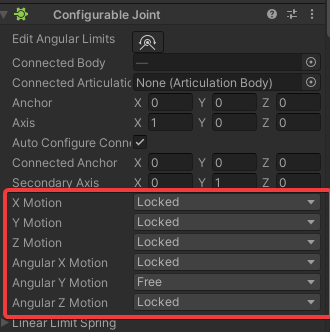
Are these based on target(connected body)'s axes or on source(obj with joint component)'s axes ?
according to my tests - the former, but in some other cases - the latter. its quite confusing
 full furnace
simple egret
Go back to Unity, and from the toolbar menu select Edit > Preferences > External...
full furnace
simple egret
Go back to Unity, and from the toolbar menu select Edit > Preferences > External...
ok i am done
simple egret
full furnace
ok i am done
Okay now open your file explorer and navigate to the place where you created your Unity project
You should see something along these lines

The last two items are very important, make sure you have them
The last one (.sln file) will have a different name
full furnace
simple egret
Okay now open your file explorer and navigate to the place where you created you...
i am so sorry
how do i do that?
simple egret
No, you can't ask this question
simple egret
You forgot how to use a computer!!!
 simple egret
You should know, you provided the save location when you created the Unity project
If you don't remember just open Unity hub and look at your project in the list, it will be displayed
full furnace
thx
full furnace
simple egret
The last two items are very important, make sure you have them
both have them
simple egret
Okay so double-click the .sln file and Visual Studio will open it
full furnace
yees
simple egret
Now if you don't have a script open, select View > Solution Explorer and in the window that opens open any of your Unity scripts
If you don't see your scripts, post a screenshot of your Solution Explorer
full furnace
i see em
simple egret
So open one, and post a full screenshot of Visual Studio
full furnace
its the 50th
 simple egret
Looks like it's configured! I can see that there are errors
You should fix them now, in order to start Unity properly afterwards
They are simple spelling mistakes, they should be easy to solve, knowing that now when you type, you'll get suggestions
full furnace
simple egret
Looks like it's configured! I can see that there are errors
thank youu
woeful leaf
full furnace
its the 50th
oh btw keep stuff private unless you need it to be public
full furnace
woeful leaf
oh btw keep stuff private unless you need it to be public
right
full furnace
simple egret
Looks like it's configured! I can see that there are errors
lol thoes errors dosent make sense
simple egret
Yes they do
Take the one on line 30
The underlined word is misspelled, it should be PointerEventData, not pointerEventData
full furnace
HOOOWWWW😭
simple egret
C# is case-sensitive, meaning that hello isn't the same as HELLO
You even wrote it right at the beginning of the line! Take example on it
full furnace
right!
simple egret
Use the completion list at your advantage. Now that it's configured, suggestions will appear as you type code. No more spelling mistakes
full furnace
did it!
bruh
my hole progress is gone again
what is my mistake?
this happens 100 times a day
full furnace
simple egret
Whole progress as in?
in unity
full furnace
simple egret
You need to fix all the errors before starting Unity
did it
simple egret
You probably don't have your scene open. Happens if you started in safe mode.
Open the scene, it's somewhere under your Assets in Unity
full furnace
simple egret
You probably don't have your scene open. Happens if you started in safe mode.
i am not in safe mode anymore
simple egret
So open the scene
full furnace
unity didnt asked
simple egret
full furnace
unity didnt asked
That's because you don't have errors anymore. It only asks to enter safe mode if you have script errors. Otherwise it starts normally
full furnace
simple egret
That's because you don't have errors anymore. It only asks to enter safe mode if...
yes i know
but why is everything gone?
its so depressing
full furnace
 simple egret
Your scene is not open
full furnace
dont wanna click the wrong
 simple egret
Don't save, you didn't do anything in "Untitled"
 spring lava
I have a player that i want to be able to walk towards an object and interact with it. i have a collider on my player on as a childgameobject of the player that has a collider2d that should just be used as a trigger so i turned "is trigger " on.
the object i want to interact with is just a 2d object that i created using 2dobjects -> sprites -> triangle
i have a script on my player that i use as an interactor. To figure out with what object i want to interact is have an OnTriggerEnter2D and OnTriggerExit2D function that should work just fine.
to actually interact i have to be in range and press E, but i cannot actually do aynthing because the console just tells me
"Script error: OnTriggerExit2D
This message parameter has to be of type: Collider2D
The message will be ignored."
I Will include my 2 scripts and one interface
- us the interactor
- is the interface IInteractable
- is TestInteractable, the script that i add to the triangle to just get an interaction when pressing E and i also already changed the namespace from the Last file to be Max.Scripts.Interactables
https://hatebin.com/rguumqcnau
any help would be appreciated ^^
simple egret
spring lava
I have a player that i want to be able to walk towards an object and interact wi...
Lines 26, 35 in that link:
OnTriggerExit2D
This message parameter has to be of type: Collider2D
private void OnTriggerEnter2D(Collider other)
//                            ^~~~~~~~ Needs to be 'Collider2D'
ah thats what it meant, i thought it wasnt properly getting the actual collider in, thank you, also got to do that at exit aswell
simple egret
Unity should make analyzers for that, where it reports a warning if the signature is wrong
Maybe it's already the case, haven't checked in some time
spring lava
never saw that tbh. i always have spelling mistakes, most common for me is typing start instead of Start and then having to check for 30 minutes to see whats wrong
simple egret
Just for testing, can you switch it back to Collider and see if three gray dots appear at the beginning of the line / method name?
They're not very visible, but that would indicate an analyzer reporting something
 simple egret
Ah well, I guess the runtime error message will have to do the work then, thanks for testing it out
Ah, the method name turns blue if the signature is correct, that would be an indicator
spring lava
thats right, but i just assumed it was yellow because the collider wasnt being recognized. i mean it wasnt being recognized, but signature makes more sense
One more thing, if i am not mistaken, a trigger collider should make it so that my trigger collider is not really physical anymore, so it wont make me stop if i touch something with it, but it should rather trigger an event, that event being my ontriggerenter
its just that right now it is acting as a normal collider which is weird
woeful leaf
spring lava
thats right, but i just assumed it was yellow because the collider wasnt being r...
It should be blue
spring lava
yeah, now its blue since we corrected the signature, making it function
full furnace
Does anybody now what to do against lagging android when i connect my game with unity on it? Is there a setting?
simple egret
You can't do anything, it's because of all the data getting transferred between the computer and the phone
Rest assured that once built into a standalone executable, it will be 100 times more performant
It's just the program that links Unity and your phone has to do a lot of stuff to keep the comms running
spring lava
spr u were a wonderful help, but by any chance am i mistaking the is trigger setting on the collider2d to be something different?
shouldnt that just make it so it just detects wether or not it touches or overlaps with another collider, but doesnt actually collide, in a sense that it stops me from moving?
because the internet tells me so, but my programm just wont act like it
somber nacelle
yes, but you use OnTriggerEnter2D instead of OnCollisionEnter2D for trigger colliders
keep in mind you do still need a rigidbody2d involved in the collision
spring lava
I have a rigidbody on my player, and a collider that is set to be a trigger, but shouldnt actually stop my moving but let me pass through the other collider, since my player collider is set to be a trigger.
and my triangle also has a box collider2d, so that should be it right?
somber nacelle
i mean it sounds right. if you aren't receiving trigger messages go through this: https://help.vertx.xyz/programming/physics-messages
spring lava
my player has actually 2 collider
1 for the feet that should truly collider
the second one for the overlapping
https://hatebin.com/prcwlzqzcc
my function should all work fine, i changed this code from my past code since i want to be in range first, and if i am in range i check that by my collider triggering
so when i am in range and i click my mouse on the collider of the other object i turn a bool to be true and if that bool is true i will interact, what it does when it interacts will not be decided by interactor but rather by the object itself
i still got the problem that my triggercollider acts as a real collider, that stops me from moving, i do not see a flaw in my code tbh and am curious on why i cant move towards the object and right beside it, but rather stop at the edge of my collider, that is set to be a trigger
its rather strange to me
somber nacelle
spring lava
https://hatebin.com/prcwlzqzcc
my function should all work fine, i changed this ...
doesn't appear that you've implemented the interface at all. also use TryGetComponent rather than GetComponent then a null check
spring lava
Ok thanks for feedback, will try
somber nacelle
also just so you are aware "OnMouseDown" is for when you click this object, it has a collider, and you are using the old input manager
pallid wasp
Wheel collider goes crazy
thick socket
        SpecialOffersButton = root.Q<Button>("SpecialOffersButton");
        HeroesButton = root.Q<Button>("HeroesButton");
        EquipmentButton = root.Q<Button>("EquipmentButton");
        OffersButton = root.Q<Button>("OffersButton");
        ResourcesButton = root.Q<Button>("ResourcesButton");

        SpecialOffersScreen = root.Q<ScrollView>("SpecialOffersScreen");
        HeroesScreen = root.Q<ScrollView>("HeroesScreen");
        EquipmentScreen = root.Q<ScrollView>("EquipmentScreen");
        OfferScreen = root.Q<ScrollView>("OfferScreen");
        ResourcesScreen = root.Q<ScrollView>("ResourcesScreen");
When I click a Button I want to hide all other screens and unhide that one
how could I do that with 1 function?
struggling to find anything online for it
leaden ice
thick socket
how could I do that with 1 function?
put them all in an array or list
use a loop to hide them all
thick socket
leaden ice
put them all in an array or list
so I would have a list of buttons and a list of screens and use the same index to hide/unhide them?
leaden ice
thick socket
so I would have a list of buttons and a list of screens and use the same index t...
if there's one button per screen, I suppose ¯_(ツ)_/¯
You just need each button to know which screen is its screen
thick socket
that was the part I was struggling with
how each button would know which screen went with it
spring lava
somber nacelle
doesn't appear that you've implemented the interface at all. also use TryGetComp...
The TryGetComponent part is just for performance right? also yes i just implement the interface, completely forgot to add it
the OnMouseDown part i didnt know, so that means if i wanted to use OnMouseDown it would have to be on the to be clicked object rather than the player clicking right?, so if OnMouseDown is on the player and my player has a collider2d it would simply jsut check for if the player is being clicked right?
What i dont quite get is the old input manager part, what exactly do you mean?
leaden ice
thick socket
how each button would know which screen went with it
a variable you set in the inspector
somber nacelle
spring lava
The TryGetComponent part is just for performance right? also yes i just implemen...
TryGetComponent reduces the clutter/repeated code you have, it combines both the attempt at getting the component and the null check into one call.
As for OnMouseDown, yes if this script is attached to the player then you would have to click the player for it to be called
the input manager is how you get input using the Input class in unity like Input.GetKey and the like as opposed to the new input system which OnMouseDown does not work with. Either way, i would strongly recommend looking into using IPointer events from the event system since that works with both the new input system and the old input manager
spring lava
alright thanks, will look into IPointer
thick socket
SpecialOffersButton = root.Q<Button>("SpecialOffersButton");
        buttonsList.Add(SpecialOffersButton);


        HeroesButton = root.Q<Button>("HeroesButton");
        buttonsList.Add(HeroesButton);

        EquipmentButton = root.Q<Button>("EquipmentButton");
        buttonsList.Add(EquipmentButton);

        OffersButton = root.Q<Button>("OffersButton");
        buttonsList.Add(OffersButton);

        ResourcesButton = root.Q<Button>("ResourcesButton");
        buttonsList.Add(ResourcesButton);

        foreach (var item in buttonsList)
        {
            item.clicked += OpenScreen;
        }
void OpenScreen()
    {

    }
inside the OpenScreen function
how can I tell what object called it?
no parameters is being a huge pain
leaden ice
thick socket
inside the OpenScreen function
give it an int parameter
thick socket
leaden ice
give it an `int` parameter
if I do that this line throws an error
item.clicked += OpenScreen;
since it doesn't have () already
leaden ice
thick socket
since it doesn't have () already
yeah because you need to give it the parameters

 leaden ice
        for (int i = 0; i < buttonsList.Count; i++)
        {
            int copyOfI = i;
            item.clicked += () => OpenScreen(copyOfI);
}```just a syntax problem
thx vertx lol
also copyOfI seems weird but it's very important @thick socket
 quartz folio
You can also pass the button from the foreach instead of the index
leaden ice
also yes that^
thick socket
wow
leaden ice
or the screen you want it to enable
thick socket
passing params makes this so much easier thanks 😄
I had no clue you could pass parameters like that
leaden ice
to be clear we're creating an anonymous function here which calls your other function.
The anonymous function has the parameter baked into it as a closure
thick socket
so it creates a function and all the function does it call another function with parameters that I want?
thick socket
awesome thanks!
spring lava
somber nacelle
TryGetComponent reduces the clutter/repeated code you have, it combines both the...
thanks for the recommendation with IPointer, just added it throughout my whole project. I still have the issue with my player, that the Trigger Collider is stopping me from moving, rather than passing through the other collider and overlapping, as i intended it to do. The collider that should not stop me but just act as a trigger is the circle and the one that should actually stop me is the square on the players feet.
 somber nacelle
show the inspector for that circle collider
leaden ice
spring lava
thanks for the recommendation with IPointer, just added it throughout my whole p...
show the inspectors for everything!

 somber nacelle
spring lava
This one is for my player
somber nacelle
spring lava
This one is for my player
can you also show how you move the player and what that MoveCollide script does
spring lava
ahh, i think you are on it. you are quite right. I set my MoveCollider up the way so it detects any collision and stops me at that immediately. i thought it would ignore the trigger though
https://hatebin.com/kyihvjqdrc
i tried to keep MoveCollide pretty general since i am reusing it for my sheep
somber nacelle
so you're using Rigidbody2D.Cast which is the culprit. any collider that is attached to the object the rigidbody is on or its children are all considered a single collider by the rigidbody
spring lava
right that makes sense.
is there a way so i can just use one specific collider that is attached to the rigidbody?
somber nacelle
you could try using the Cast method on the collider itself instead of the rb
spring lava
will try that
so in start i would get my component BoxCollider2D and just Cast it that way right?
somber nacelle
spring lava
quite clever boxfriend
i set it up as just a general collider, so other mobs that might be round can use the same script and might also be able to interact with stuff and such. Thanks!
 severe coral
Hi, I'm trying to make an open world game, I'm thinking about getting around floating point precision limitations by moving all objects in the scene back to the origin, but wouldn't that be super expensive? Any explanations or alternative solutions would be much appreciated.
 frosty venture
leaden ice
severe coral
Hi, I'm trying to make an open world game, I'm thinking about getting around flo...
frosty venture
leaden ice
severe coral
Hi, I'm trying to make an open world game, I'm thinking about getting around flo...
Yes what you're describing is called the floating origin technique and it's quite a common approach.
leaden ice
frosty venture
https://gdl.space/japoronuwe.cs
Don't move via Translate
It ignores physics
severe coral
leaden ice
Yes what you're describing is called the floating origin technique and it's quit...
So if I have like 500 game objects and move them all at once it shouldn't have bad performance impacts?
severe coral
leaden ice
Yes what you're describing is called the floating origin technique and it's quit...
Also do you know of any other approaches?
leaden ice
It might, or it might be fine. You need to test it
frosty venture
leaden ice
Don't move via Translate
then should I delete the transform.Translate codes
tawny jewel
are scriptable objects best way to add powerups
leaden solstice
tawny jewel
are scriptable objects best way to add powerups
How are they relevant
leaden ice
tawny jewel
are scriptable objects best way to add powerups
"Power ups" would be a whole game system requiring many different pieces.
One piece might be a ScriptableObject for storing data, but that's only one part of the puzzle
tawny jewel
leaden ice
"Power ups" would be a whole game system requiring many different pieces.
One p...
yea i was wondering if i should use scriptable objects to store said data
full scaffold
tawny jewel
yea i was wondering if i should use scriptable objects to store said data
If you want
 cobalt barn
do you guys save your Unity Projects to github?
leaden solstice
cobalt barn
do you guys save your Unity Projects to github?
Surely, with proper gitignore and LFS
cobalt barn
leaden solstice
Surely, with proper gitignore and LFS
ok.
whats LFS?
leaden solstice
cobalt barn
ok.
whats LFS?
Large file storage so you won't have to download every big assets in history
cobalt barn
hmm
 worthy galleon
if i had a question about collision detection in unity, would this be the appropriate channel?
cobalt barn
leaden solstice
Large file storage so you won't have to download every big assets in history
how would this work with github?
so you don't save the assets on github?
leaden solstice
cobalt barn
how would this work with github?
so you don't save the assets on github?
Github supports LFS
leaden solstice
worthy galleon
if i had a question about collision detection in unity, would this be the approp...
Here or #⚛️┃physics
worthy galleon
ay sweet
cobalt barn
leaden solstice
Github supports LFS
im not sure what this is, in relation to github
cobalt barn
worthy galleon
ay sweet
like you 
worthy galleon
ive implemented some nice player movement using the Transform.position thing, and so i now need to do some form of collision detection. I intend to have a box that represents the player that we move to where we will end up in the next frame with our current velocity, and check if this box intersects anything. If it does, then I need the normal and depth of collision to be able to take the maximum step forward without going inside the object, and to remove the component of the players velocity in the direction of the normal. Id need to be able to move the box's position and get the normal/depth info within the same frame. What would be the best way to do this?
leaden solstice
worthy galleon
ive implemented some nice player movement using the Transform.position thing, an...
Like BoxCast?
worthy galleon
bless your soul that looks very promising
all the info i could find was related to Bounds.intersects AABB stuff which doesnt provide normals or depth, or the weird OnCollisionEnter which doesnt really suffice in my case
i will mess with BoxCast and see if I can get it working
tysm
leaden solstice
Your setup sounds like what CharacterController does so maybe see how it is too
Good luck
worthy galleon
for reference this is how movement feels so far, just using a y coordinate check to determine if you’re grounded or not for the moment
leaden solstice
Made me dizzy
full scaffold
worthy galleon
for reference this is how movement feels so far, just using a y coordinate check...
csgo bhop lesgo
 autumn cipher
worthy galleon
for reference this is how movement feels so far, just using a y coordinate check...
autumn cipher
worthy galleon
for reference this is how movement feels so far, just using a y coordinate check...
nice, I'm modifying quake3's movement to replicate call of duty's movement
cuz you know, they're coming from the same game engine
worthy galleon
nice nice
autumn cipher
if you're going for source engine's movement then I recommend this
https://github.com/Olezen/UnitySourceMovement

GitHub
Source engine-like movement in Unity, based on Fragsurf by cr4yz (Jake E.). - GitHub - Olezen/UnitySourceMovement: Source engine-like movement in Unity, based on Fragsurf by cr4yz (Jake E.).
worthy galleon
i did q1 movement from scratch
autumn cipher
also has collision calcs inside
worthy galleon
writing a now 12 page long LaTeX document annotating the original code
- BVH, BSP, GJK and EPA algorithm stuff i looked into
 autumn cipher
worthy galleon
+ BVH, BSP, GJK and EPA algorithm stuff i looked into
autumn cipher
worthy galleon
+ BVH, BSP, GJK and EPA algorithm stuff i looked into
I got no idea what those mean but great
worthy galleon
Bounded Volume Hierarchies, Binary Space Partitioning, Gilbert-Johnson-Keerthi algorithm and the Extruded Polytrope Algorithm
GJK + EPA are a way of detecting collisions and EPA actually gets Normal/Collision depth information
BSP is a way of dividing up space to make figuring out what things to check collisions against not take an enormous amount of time
BVH is that but less insane
autumn cipher
I was always indecisive on how I should handle collision on controllers
whether I should go with rigibody's collision callbacks or just capsulecast my way out
ended up using Character Controller :')
 manic storm
how can i solve this problem?
 glossy barn
If I want to move children to a specified location of a parent object can I just use parent.getchild(0).position = new Vector3()? I am attempting to do that and so far it just literally does nothing nothing. No error or movement or anything. It's very frustrating.
leaden solstice
glossy barn
If I want to move children to a specified location of a parent object can I just...
Set localPosition to zero not position
But why do you need to move children with GetChild
glossy barn
I don't have to do it that way I just need two children to be in the same spot and that's the first way I though to do it
Also they are generated so I can't drag them in though the inspector
leaden solstice
glossy barn
Also they are generated so I can't drag them in though the inspector
You can still keep the reference to instantiated objects tho
Same spot as in parent position?
leaden solstice
Sure
glossy barn
O1 and O2 are different objects that are children of the same parent (which is an empty) The whole object is attached to the big red dot which I want to put in the same location on the parent to combine the two separate objects.

You still there @leaden solstice?
leaden solstice
glossy barn
O1 and O2 are different objects that are children of the same parent (which is a...
So does it move as you want when you manually put 0,0,0 into their inspector?
leaden solstice
glossy barn
Yup
And how is your code look like?
Are you setting both object's localPosition?
glossy barn
I hope this is easy to follow. I tried setting local position and just regular position and I tried changing the position with a reference to the letter script which saves a reference to the shape transform.
 leaden solstice
glossy barn
I hope this is easy to follow. I tried setting local position and just regular p...
leaden solstice
glossy barn
I hope this is easy to follow. I tried setting local position and just regular p...
hope this is easy to follow
No it looks like cryptography
You said there is two objects you want to overlap, what would be the other one
 leaden solstice
You should.. take full screenshot including your hierarchy and inspector and etc
The code is very confusing, you should add some explicit references with meaningful naming
glossy barn
It's meaningful for the project lol
swift falcon
lionel messi
glossy barn
swift falcon
lionel messi
?_?
swift falcon
glossy barn
?_?
lionel messi
glossy barn
⚽
leaden solstice
L3.GetChild(0).GetChild(0) is not meaningful, neither L3 alone...
At least assign to some local variables for readability
glossy barn
I see so instead of having to write that every time just make a variable and use that instead that I can do
swift falcon
glossy barn
⚽
world cup 
glossy barn
I'm trying to set something up to showcase the problem in a more readable way
worthy galleon
leaden solstice
Like `BoxCast`?
oh my god it works Kind Of
quartz folio
swift falcon
world cup <:Adam:502892114313740308>
can you please post on-topic, or not at all
worthy galleon
i got it to detect collisions (nice), give me depth and normal information (sweet) and do the right things with this info (BEAST)
however
it only collides for like a frame
if i hold w i collide but then continue into the object
im guessing id need some delta so you dont collide and get put Directly against the object
leaden solstice
worthy galleon
im guessing id need some delta so you dont collide and get put Directly against ...
That's what CharacterController does as well
With skinWidth
leaden solstice
So you won't start casting from overlapping position
Having some safe distance from contacting point
worthy galleon
mhm
rn seems like you collide, and then it immediately doesnt see you as colliding again so it lets you pass through object
leaden solstice
If you start casting from overlapping position it may not detect collision well
CapsuleCast might be better, as it has fixed radius XZ wise
glossy barn
I fixed it lol
for SOME REASON unity doesn't like it when you try to parent.getChild().getChild.do something lol
Can't imagine why that would cause problems
swift falcon
I am slightly confused. I was looking for Unity's equivalent to the Monogame asset pipeline in that it lets me load assets at runtime and found resources.load but the documentation explicitly says to not use it? Which is weird given that it is not marked as deprecated?
Pretty much everything in our game is dynamically composed at runtime so the whole Editor workflow of dragging references in the editor is a hard no. What else is one supposed to use?
glossy barn
You can instantiate prefabs
Is that what you are looking for?
Like generating a prop, or an enemy, or something that you made ahead of time using code?
swift falcon
Prefabs do not work for our use case.
Our whole scene tree is dynamically composed at runtime.
glossy barn
Damn You need to be in advanced homie
swift falcon
Huh? I basically just want to be able to assign a sprite to something at runtime without having to use the resources folder, or dragging graphics references. I did not deem that advanced.
That is what it boils down to.
glossy barn
What makes it hard is not using the resource folder
swift falcon
We could of course cache everything in a singelton but that feels very hacky.
glossy barn
Perhaps someone with more experience can help but this is not unity 101
swift falcon
I mean we had planned to do that but when unitys own documentation strictly advises not to its hard sell.
glossy barn
So you want to assign a sprite at runtime without having the sprite in your asset folder?
swift falcon
It can be in the assets folder, just not the whole resources.load spiel aka the resources folder
and we need to be basically assign those sprites in code.
One hacky way of doing it we tried is literally just caching all the sprites but that seems wasteful.
Since literally every sprite would have to be in memory for the whole runtime.
Which more or less is just a hackier way of using resources.load
glossy barn
is this what you found? https://docs.unity3d.com/ScriptReference/Resources.Load.html
 glossy barn
swift falcon
Since literally every sprite would have to be in memory for the whole runtime.
glossy barn
swift falcon
Since literally every sprite would have to be in memory for the whole runtime.
Why do the sprites have to be assigned at runtime?
swift falcon
Because gameobjects are composed at runtime as well and they are not static. They all derive from one common class.
glossy barn
Can you say that again with more context I'm still confused
Also from what I can see unity doesn't say not to use resources.load where did you see that?
swift falcon
We found this https://learn.unity.com/tutorial/assets-resources-and-assetbundles#5c7f8528edbc2a002053b5a6

Unity Learn
This is a series of articles that provides an in-depth discussion of Assets and resource management in the Unity engine. It seeks to provide expert developers with deep, source-level knowledge of Unity's Asset and serialization systems. PLEASE NOTE: this tutorial has now been deprecated. We now recommend using Addressables for your projects and ...

Does not get more clear then that
glossy barn
Ahhh I see well that tutorial is depreciated
 swift falcon
The link we found literally was to that "sub part" but I agree we should have looked a bit more clearly.
glossy barn
I think resources.load will work now the 2021.3 doesn't have any warnings
tawny jewel
quick question how can i change my rigidbody2d to trigger and then back to collider via script
swift falcon
Thats why I came to ask given that I assumed if a best practice is not to use it would be flagged as depreciated.
quartz folio
It has never not worked, it's just more advisable to use Addressables
It's fine to use for small assets that are generally always loaded
glossy barn
If you want to cheat the system you could have a sprite at the origin and set it to be invisible and then assign it with a reference
swift falcon
Can I use addressables to do what we need? Aka set sprites of gameobjects in code at runtime?
glossy barn
tawny jewel
quick question how can i change my rigidbody2d to trigger and then back to colli...
I believe its a variable check the documentation for rigidbody 2d
glossy barn
quartz folio
It's fine to use for small assets that are generally always loaded
Is there a sprite atlas system in unity? I know godot has something like that is that what an adressable is ?
tawny jewel
glossy barn
I believe its a variable check the documentation for rigidbody 2d
cant find it anywhere, tho maybe im just blind
glossy barn
tawny jewel
cant find it anywhere, tho maybe im just blind
Lemme chekc
swift falcon
To give a bit of a scope. We have about 9000 sprites for terrain alone, all of them are only 24x24 pixels in size but its still unnecessary to keep them all in memory at all times.
glossy barn
Have you checked Sprite atlas' to see if that would work for you? https://docs.unity3d.com/Manual/class-SpriteAtlas.html
warm wren
tawny jewel
cant find it anywhere, tho maybe im just blind
Collider.isTrigger is what you want i believe
tawny jewel
warm wren
Collider.isTrigger is what you want i believe
ah alr, and how do i revert it?
warm wren
isTrigger = false
glossy barn
tawny jewel
ah alr, and how do i revert it?
Change it from true/false
swift falcon
glossy barn
Have you checked Sprite atlas' to see if that would work for you? https://docs.u...
I have so far only briefly looked into it. Unless I am misunderstanding it, this is for use with the built in tilemap no?
glossy barn
I think it can be anything unless I am mistaken but commonly tilemaps
swift falcon
Sorry if my questions are foolish still not familiar with Unity.
glossy barn
Oh no worries no one really is it's a very complicated program with lots of little cogs that make the whole machine
Most people will never use 90% of it
swift falcon
I am among those I have used unity a bit before but we mostly ended up using it just as a render backend
glossy barn
Lol same
I always want to do very specific things and struggle to find a tutorial that matches what I want to do
swift falcon
That is sadly an issue for pretty much all engines or API's. You find a ton of beginner stuff (that is never scalable to any meaningful level of production. Or you find expert material but the mid range is always a very dry and long winded affair.
And Unity thanks to its popularity is still ahead on that matter, other engines or api's are far worse in that specific regard.
glossy barn
Yeah I keep like, quitting unity because the scale is so massive and I'm so tired of beginner stuff but the custom stuff is so hard lol
I wanted to make a minecraft clone but where you can delete the corners of the cubes to make different shapes and I like wanted to die
swift falcon
I never touched its 3d side, not my terrain (pun intended)
I am firmly at home in 2d
tawny jewel
one more question, how can i switch the collider.isTrigger value from here? im kind of stuck
using System.Collections.Generic;
using UnityEngine;
[CreateAssetMenu(menuName = "Powerups/SpeedBuff")]
public class SpeedBuff : Powerup
{
public float amount;
public override void Apply(GameObject target)
{
Debug.Log("added effect");
target.GetComponent<BirdScript>().myRigidbody
}
}``` junior pasture
when i code in visual studio it does not grab anything from unity when i make a script so things like rigid body and game.Object dont work because they dont exist without unity how do i fix this
glossy barn
junior pasture
when i code in visual studio it does not grab anything from unity when i make a ...
You need intellisense installed
swift falcon
If you have intellisense and it borks it helps if you go into Assets/Open C# Project
We sometimes have do that and it "sticks" until you reboot your machine at the least
glossy barn
tawny jewel
one more question, how can i switch the collider.isTrigger value from here? im k...
you need to get the component of collider and then say like collider.isTrigger = false or true or whatever
warm wren
junior pasture
when i code in visual studio it does not grab anything from unity when i make a ...
Have you configured your IDE? #854851968446365696
junior pasture
glossy barn
You need intellisense installed
how do i download that
tawny jewel
glossy barn
you need to get the component of collider and then say like collider.isTrigger =...
i did, the component is birdscript and then myrigidbody is just rigidbody2d
glossy barn
I think birdscript is a script right?
tawny jewel
well yes it is
glossy barn
You need a direct reference to the collider
glossy barn
junior pasture
how do i download that
That is an excellent question
I'ts been a hot min
warm wren
tawny jewel
i did, the component is birdscript and then myrigidbody is just rigidbody2d
You change the trigger on the collider not on the rigidbody
tawny jewel
glossy barn
You need a direct reference to the collider
wait so how would that look like
glossy barn
so its gunna be like (Transform that has collider).getThingy.istrigger = false/true
warm wren
Get a reference to the collider component, name it something and do something.isTrigger = true;
junior pasture
glossy barn
That is an excellent question
amazinf
tawny jewel
warm wren
Get a reference to the collider component, name it something and do something.is...
ah alright
thanks again!
glossy barn
junior pasture
amazinf
its been a while but im sure you can google it
tawny jewel
one more thing lmao
why does it say that coroutine does not exist
using System.Collections.Generic;
using UnityEngine;

[CreateAssetMenu(menuName = "Powerups/SpeedBuff")]
public class SpeedBuff : Powerup
{

    public float amount;
    public float lifetime;
    public override void Apply(GameObject target)
    {
        Debug.Log("added effect");
        abilityLifeTime();

        void abilityLifeTime()
        {
            StartCoroutine(time());
        }

        IEnumerator time()
        {
            target.GetComponent<BirdScript>().circlecollider.isTrigger = true;
            Debug.Log("ability disabled");
            yield return new WaitForSeconds(lifetime);
            Debug.Log("ability enabled");
            target.GetComponent<BirdScript>().circlecollider.isTrigger = false;
        }


    }
}
I think you need to make a coroutine variable = to corutine.start(time())
Check the coroutine documentation it's on there
tawny jewel
alright
quartz folio
tawny jewel
why does it say that coroutine does not exist
```using System.Collections;
usin...
you shouldn't use local functions for coroutines afaik
tawny jewel
honestly its my first time experimenting with them so i dont have any grasp on it yet
 compact verge
I've noticed that the animation (Archer Character Selection ) only plays when the blue bar below the "Idle State" reaches the end. It's sort of like a cooldown for the animation. Is there a way to remove this animation cooldown?
 tawny jewel
quartz folio
you shouldn't use local functions for coroutines afaik
tawny jewel
quartz folio
you shouldn't use local functions for coroutines afaik
tho when i make the function public is highlights it as error too
quartz folio
what's the error then?
tawny jewel
it says public is not correct for this element
somber nacelle
tawny jewel
it says public is not correct for this element
that's because it's still nested inside of another method
tawny jewel
oh wait
im dumb
didnt notice
when i make it again it jumps right back into its place
sorry if im hard to work with im not very advanced lmao
and it still shows the same error even tho i technically moved it out of that method
tawny jewel
using System.Collections.Generic;
using UnityEngine;

[CreateAssetMenu(menuName = "Powerups/SpeedBuff")]
public class SpeedBuff : Powerup
{

    public float amount;
    public float lifetime;
    public override void Apply(GameObject target)
    {
        Debug.Log("added effect");
        abilityLifeTime();

    public void abilityLifeTime();
        {
            (time());
        }

        IEnumerator time()
        {
            target.GetComponent<BirdScript>().circlecollider.isTrigger = true;
            Debug.Log("ability enabled");
            yield return new WaitForSeconds(lifetime);
            Debug.Log("ability disabled");
            target.GetComponent<BirdScript>().circlecollider.isTrigger = false;
        }


    }
}
it's still inside of the Apply method
tawny jewel
thats the code, i would show the error but its in polish
unless i change the language real quick
somber nacelle
and you should be getting an error for that abilityLifeTime method since that is also nested in the Apply method so it cannot be public
make sure your IDE is configured using the guide in #854851968446365696 so that it will underline errors like that
tawny jewel
i fixed some of that, or at least i tried to
using System.Collections.Generic;
using UnityEngine;

[CreateAssetMenu(menuName = "Powerups/SpeedBuff")]
public class SpeedBuff : Powerup
{

    public float amount;
    public float lifetime;
    public override void Apply(GameObject target)
    {
        Debug.Log("added effect");
        abilityLifeTime();
    }
    public void abilityLifeTime()
    {
        startcoroutine
    }
    IEnumerator time()
    {
    target.GetComponent<BirdScript>().circlecollider.isTrigger = true;
    Debug.Log("ability enabled");
    yield return new WaitForSeconds(lifetime);
    Debug.Log("ability disabled");
    target.GetComponent<BirdScript>().circlecollider.isTrigger = false;
    }


}
no longer shows the error on public method, but now it doesnt recognize target
somber nacelle
you need to fix that unfinished StartCoroutine call
and also pass target to the coroutine or assign it as a field in the class
tawny jewel
somber nacelle
you need to fix that unfinished StartCoroutine call
it just shows that as error so i gave up on typing there
somber nacelle
well yes, you need to actually spell it correctly
also the abilityLifeTime method is pretty much pointless at the moment unless you plan to add more code to it, right now you could just skip that and start the coroutine directly from within the Apply method so that you don't have to pass the target variable to abilityLifeTime only to then pass it to the coroutine
tawny jewel
somber nacelle
well yes, you need to actually spell it correctly
i typed in the whole thing now but it still shows up as error
somber nacelle
"it shows up as error" is not descriptive. what "shows up as error" and what is the error?
tawny jewel
somber nacelle
also the `abilityLifeTime` method is pretty much pointless at the moment unless ...
okay let me do that real quick
tawny jewel
somber nacelle
"it shows up as error" is not descriptive. *what* "shows up as error" and what i...
it highlights the coroutine saying "name StartCoroutine does not exist in this context"
quartz folio
If your code is still as it is above, what on earth is going on here?
 somber nacelle
tawny jewel
it highlights the coroutine saying "name StartCoroutine does not exist in this c...
somber nacelle
tawny jewel
it highlights the coroutine saying "name StartCoroutine does not exist in this c...
did you copy paste that error? because it seems like you typed that error out and spelled it correct there, but it isn't spelled correctly in your code
somber nacelle
just show the code
quartz folio
We don't care if it's in polish, we can infer what it says because we are familiar with errors
tawny jewel
Błąd CS0103 Nazwa „StartCoroutine” nie istnieje w bieżącym kontekście is what it says
quartz folio
Did you always have this error?
Because you're inheriting from a ScriptableObject
which cannot start coroutines
tawny jewel
quartz folio
If your code is still as it is above, what on earth is going on here?
its just me unsuccesfuly trying to be smart
tawny jewel
quartz folio
Did you always have this error?
it does work fine on another scripts with are actually not scriplable objects if thats what youre asking about
using System.Collections.Generic;
using UnityEngine;

[CreateAssetMenu(menuName = "Powerups/SpeedBuff")]
public class SpeedBuff : Powerup
{

    public float amount;
    public float lifetime;
    public override void Apply(GameObject target)
    {
        Debug.Log("added effect");
        StartCoroutine(time());
    }
    IEnumerator time()
    {
        target.GetComponent<BirdScript>().circlecollider.isTrigger = true;
        Debug.Log("ability enabled");
        yield return new WaitForSeconds(lifetime);
        Debug.Log("ability disabled");
        target.GetComponent<BirdScript>().circlecollider.isTrigger = false;
    }


}
thats how it looks for now
quartz folio
Only MonoBehaviours can start coroutines. You would have to start the coroutine on the MonoBehaviour you want to own it
tawny jewel
quartz folio
Only MonoBehaviours can start coroutines. You would have to start the coroutine ...
okay so i would need to make a coroutine on another script and then refer to it from that script?
somber nacelle
well you could always just start the coroutine using one of the components on the target
you also still need to pass the GameObject target as a parameter for the coroutine
quartz folio
You can pass in a MonoBehaviour and call StartCoutine on that variable
tawny jewel
somber nacelle
you also still need to pass the GameObject target as a parameter for the corouti...
about that, im not really sure how to do that
somber nacelle
although i would personally make the parameter a BirdScript and get the component in Apply and pass the component to the coroutine
that would allow you to use the BirdScript component to start the coroutine as well
tawny jewel
somber nacelle
although i would personally make the parameter a BirdScript and get the componen...
so if i understood right i would need to get that coroutine code from this script and paste it into birdscript under new method?
somber nacelle
no
StartCoroutine is a public method inherited from MonoBehaviour, you can just get the component and use that reference to call StartCoroutine
var birdScript = target.GetComponent<BirdScript>();
birdScript.StartCoroutine(time(birdScript));
that also allows the BirdScript component to own that instance of the coroutine so if the component is disabled or destroyed during that WaitForSeconds the coroutine will end instead of continuing then throwing an error when it tries to access the BirdScript component again
of course you should probably use TryGetComponent instead of GetComponent so that you can cover your ass in case a gameobject that doesn't have that component is passed to Apply
tawny jewel
somber nacelle
<https://www.w3schools.com/cs/cs_method_parameters.php>
so i know it doesnt make me look like the smartest being on the planet but i failed to understand how this works
am i supposed to type in console.writeline
somber nacelle
No...
You already have a method that accepts a parameter, maybe take that as an example
tawny jewel
somber nacelle
```cs
var birdScript = target.GetComponent<BirdScript>();
birdScript.StartCorout...
also i have an error to "var"
if that tells you anything its
Błąd CS0825 Kontekstowe słowo kluczowe „var” może występować tylko w deklaracji zmiennej lokalnej lub kodzie skryptu Assembly-CSharp C:\Users\user\sloppy birb\Assets\SpeedBuff.cs
i can try to translate iff thats ll help
 dusk apex
You'll need to as this is an English server - if you're intending to provide details.
tawny jewel
somber nacelle
Most likely you're attempting to use it outside of a method
yea thats likely the case
using System.Collections.Generic;
using UnityEngine;

[CreateAssetMenu(menuName = "Powerups/SpeedBuff")]
public class SpeedBuff : Powerup
{

    public float amount;
    public float lifetime;
    var birdScript = target.TryGetComponent<BirdScript>();
    public override void Apply(GameObject target)
    {

        Debug.Log("added effect");
        birdScript.StartCoroutine(time(birdScript));
    }

    IEnumerator time()
            {
                target.GetComponent<BirdScript>().circlecollider.isTrigger = true;
                Debug.Log("ability enabled");
                yield return new WaitForSeconds(lifetime);
                Debug.Log("ability disabled");
                target.GetComponent<BirdScript>().circlecollider.isTrigger = false;
            }


}
var is for local variables only
You also can't use TryGetComponent in a field initializer
TryGetComponent also returns a bool, maybe read the docs
tawny jewel
somber nacelle
TryGetComponent also returns a bool, maybe read the docs
pretty much all ive been doing last 4 days honestly
quartz folio
Is your IDE actually underlining errors?
tawny jewel
its just that the amount of info in coding for start can be overwhelming, for me at least
tawny jewel
quartz folio
Is your IDE actually underlining errors?
yes(i think)
 quaint rock
a properly setup ide would have flagged it all in red
quartz folio
tawny jewel
yes(i think)
either it is or it isn't, can you screenshot an error in your IDE?
tawny jewel
i did whats told in #854851968446365696
tawny jewel
quartz folio
either it is or it isn't, can you screenshot an error in your IDE?

hope thats it
quaint rock
it will also she in red on the code where issues are
makes it really obvious as you are writing lines
quaint rock
explain what it is, instead of assuming everyone knows
 bronze whale
Is there anything in unity equivalent to unreal engines data tables?
I want to have an asset that contains stats for different characters which I can easily reference and change values from
quaint rock
you can likly make that using ScriptableObjects
 icy wren
Hello is there a help channel for C#?
quartz folio
icy wren
Hello is there a help channel for C#?
If it's not Unity-related, the C# discord is pinned
icy wren
Thank you
bronze whale
quaint rock
https://docs.unity3d.com/Manual/class-ScriptableObject.html
So scriptable objects are basically structs we can set in the editor?
quaint rock
objects that can live as assets you can click and drag reference
they can contain what ever data structures you want
bronze whale
Cool thanks
quaint rock
could easily do a list of structs in one, to have a bunch of per item data
 stable osprey
any questions?
 rain minnow
bronze whale
So scriptable objects are basically structs we can set in the editor?
rain minnow
bronze whale
So scriptable objects are basically structs we can set in the editor?
they're not structs, it's a reference type . . .
it's basically an editable c# class . . .
 frank pumice
I want to be able to load different maps and reuse UI (this is for a multiplayer FPS btw) what are the pros and cons of using a prefab vs a scene loaded additively?
quartz folio
frank pumice
I want to be able to load different maps and reuse UI (this is for a multiplayer...
Please stop cross-posting. Post in one channel at a time and leave it. If nobody is answering, wait, or provide some more context.
frank pumice
quartz folio
Please stop cross-posting. Post in one channel at a time and leave it. If nobody...
I deleted my msg in other channels aready
quartz folio
You're still repeatedly dirtying them
 kind grove
ScriptableObjects are unique, right? Or can they be instanced at runtime?
There's a C# discord?
quaint rock
instantiate works with them as well if you need a runtime copy of one
only serilized data is coppied in that case
 stuck lotus
Hello, i have a very heavy function that contains a few algorithms inside, it usually doesnt stutter the game but when it does it a bit meh, i am ofcourse going to some optimization and stuff like that but i was wondering, if i run everything into a courutine would you say it would solve the stuttering?
i know this introduces some other problems but just wondering, is this like the poor man threading (i know its not threading)
leaden ice
stuck lotus
Hello, i have a very heavy function that contains a few algorithms inside, it us...
It is possible to spread work out over multiple frames in a coroutine, yes. This doesn't work for every use case
leaden solstice
stuck lotus
Hello, i have a very heavy function that contains a few algorithms inside, it us...
Depends but sure you can distribute some overhead
stuck lotus
mmhm ok i will look into it then thanks
 feral flax
can someone please help me
I want to detect how far a trigger has been pressed down
and not just if the trigger has been pressed
leaden ice
feral flax
can someone please help me
Reading the value of the input axis will tell you this
orchid bane
I cloned a repo but checkout failed and now all files are considered new, what do I do?
leaden ice
orchid bane
I cloned a repo but checkout failed and now all files are considered new, what d...
Wdym checkout failed?
Also you should mention which version control system you are using
orchid bane
Fork
leaden ice
Fork is a GUI for git
orchid bane
Found this answer on Stackoverflow, but I don't know how to apply it
 leaden ice
You are using git
orchid bane
Cuz don't know where to put this line
leaden ice
Again you'll need to explain what you mean by checkout failing
That's just a git command line command
orchid bane
Like this
 orchid bane
leaden ice
That's just a git command line command
orchid bane
leaden ice
That's just a git command line command
Well, this is the most popular answer to this question, but I don't know where to use it when downloading with fork
quartz folio
 leaden ice
(after navigation to the repo)
quartz folio
If the repo is open in Fork
leaden ice
No error generally means the command executed without issues
orchid bane
Okay so now the repo on my PC is empty
And each lacked file is considered a change
How do I get the files back
Fetch and pull don't help
leaden ice
Git status first
Sorry I'm useless with git guis, I only know the command line interface
orchid bane
Lets use the command line then
so --git status?
just used git status
got many lines about deleted files
what's next?
orchid bane
Well it says I am up to date
But I need to get files I deleted
Download them from the repo on github
quartz folio
What's it look like in fork?
orchid bane
Took so long to get an answer so I just redownloaded the whole repo
It was smooth this time thanks to the answer for SO

Now fork says everything is okay
But in Rider I see this
 full scaffold
orchid bane
But in Rider I see this
full scaffold
orchid bane
But in Rider I see this
Looks totally great
It would be funny if the caution logo was default
orchid bane
Any ideas what to do with it?
 carmine orbit
Unity pixel art stuttering with pixel perfect camera and cinemachine
https://paste.ofcode.org/7P7gqHQ46YYMHVp2bkvZ9Y
https://youtu.be/BJ_4ugQT5gc


 agile brook
Hi, I want to make an AI navigation system based on waypoints. The AI spawns at one corner of the map and has to try to get to a target point, which is itself linked to a waypoint. Between the starting waypoint and the waypoint linked to the target, I want to search all the waypoint connections to figure out the path to take from start to end. Does anyone know the best way to begin implementing this?
main shuttle
carmine orbit
Unity pixel art stuttering with pixel perfect camera and cinemachine
https://pas...
This is a common #🎥┃cinemachine issue, following physics objects always stutter.
AFAIK setting the update method to FixedUpdate should fix it:

If not, ask in #🎥┃cinemachine. They probably know.
carmine orbit
main shuttle
This is a common <#763497743976497222> issue, following physics objects always s...
didn't help I guess I'll try them
orchid bane
https://github.com/Telov/Extenject
Can you download it and tell me if Zenject.csproj in Extenject\UnityProject\Assets\Plugins\Zenject\Source opens properly?
Because I am getting this

 timber yarrow
idk wher to pu this in general or beginner but QUESTION: What would it look like code wise as a base to make it so after landing on an object a player will play an animation below him. (This is for my dust effect anim to play below the player after he lands on something)
woeful leaf
Have a jump boolean, and whilst the jump boolean is true and a certain collider collides with the ground then you spawn in dust
Though you'd have to have a delay or smth
Else you just have to calculate the inertia or smth
main shuttle
timber yarrow
idk wher to pu this in general or beginner but QUESTION: What would it look like...
https://docs.unity3d.com/560/Documentation/Manual/AnimationEventsOnImportedClips.html
You can also add events like the dust effect on the timeline of animation clips afaik, might be easier to maintain.
 real anvil
Do tilemap colliders not work along the XZ plane?
 main shuttle
real anvil
Do tilemap colliders not work along the XZ plane?
main shuttle
real anvil
Do tilemap colliders not work along the XZ plane?
I would guess not, Unity 2D is XY based, not XZ based. But probably a #🖼️┃2d-tools question.
real anvil
Fair, thanks
 plucky parrot
update: i created a fresh project and i still see this, and even when entering the freshly created project it tells me to enter in safe mode
so it has to be a unity editor error indeed
 lofty barn
If I use mathf.lerp with two rotation values it will be a smooth rotation right?
real anvil
lofty barn
If I use mathf.lerp with two rotation values it will be a smooth rotation right?
Lerp would smooth it out yes
lofty barn
Perfect
main shuttle
lofty barn
Perfect
https://docs.unity3d.com/ScriptReference/Vector3.RotateTowards.html
You can also just use RotateTowards, it's easier to setup then a Lerp.
https://docs.unity3d.com/ScriptReference/Quaternion.RotateTowards.html
Or the quaternion version.
orchid bane
I want to make a fork for Zenject. But there are too many unnecessary files in Zenject's repo on GitHub, such as non-Unity build. Also When I open the .csproj file of Zenject's build for Unity my IDE says that most of the files can't be found even though I just cloned the repo and didn't touch anything. Tried to delete the repo from my PC and clone again, didn't help.
So, do you think I should simply download the version from PackageManager, make alterations to it and download to GitHub? Perhaps even without forking?
Thank you.
woeful leaf
Hey, I'm trying to fix up my movement, since first it said a set amount to rb.velocity but now I'm here and realised that wasn't a great idea, so I've to make it so that it doesn't replace it. Which works, only problem is that diagonal movement is still faster than horizontal/vertical movement. I've been trying to fix it the entire day of yesterday.
Here's the code in question:
public static Vector2 ProcessPlayerMovementToVector(Vector2 vector, in float multiplier, in Axis axis, in Polarity polarity)
    {
        vector.Normalize();

        vector = axis == Axis.X
        ? new Vector2((int)polarity * multiplier, vector.y)
        : new Vector2(vector.x, (int)polarity * multiplier);

        return vector;
    }

    private void MoveOnKeyPressed(KeyCode key, Axis axis, Polarity polarity)
    {
        if (!Input.GetKey(key)) return;

        rb.AddForce(ProcessPlayerMovementToVector(rb.velocity, movementSpeed, axis, polarity));

        onMove?.Invoke(axis, polarity);

        print(rb.velocity.magnitude);
    }

    private void UpdateMovement()
    {
        MoveOnKeyPressed(W, Axis.Y, Positive);
        MoveOnKeyPressed(A, Axis.X, Negative);
        MoveOnKeyPressed(S, Axis.Y, Negative);
        MoveOnKeyPressed(D, Axis.X, Positive);

        rb.velocity *= friction;
    }
(Here's the whole code if needed, it's not much larger https://gdl.space/ikuvihovow.cs)


Axis and the polarity are just enums
 mossy snow
sum up the directional vectors, normalize, then apply movement forces
 fluid kettle
this pretty much
woeful leaf
mossy snow
sum up the directional vectors, normalize, then apply movement forces
Care to elaborate a bit more?
mossy snow
consider this: let's say movementSpeed is 1 and I press up and right. That's 1 unit up and 1 unit right. What's the magnitude of (1, 1)? That's why your diagonal movement is wrong
 spark flower
is this proper way to do a coroutine
 mossy snow
spark flower
is this proper way to do a coroutine
mossy snow
spark flower
is this proper way to do a coroutine
the most common mistake is in how you start it. I would cache the WaitForSeconds, and return null instead of 0
woeful leaf
mossy snow
consider this: let's say movementSpeed is 1 and I press up and right. That's 1 u...
I still don't quite get it, could you provide a tangible code example of how to solve it?
fluid kettle
woeful leaf
I still don't quite get it, could you provide a tangible code example of how to ...
you sum the vectors so N1 = (x1,y1) and N2 = (x2, y2) = N(diagonal) = (x1+x2, y1+y2)
For any vector V = (x, y), |V| = sqrt(x*x + y*y ) gives the length of the vector.
When we normalize a vector, we actually calculate V/|V| = (x/|V|, y/|V|).
If you have the Vectors (1,0) and (0,-1) that results in our diagonal vector of (1,-1).
Applying the formular |V| we see the length of the vector is 2.
When normalizing that vector we essentailly have to count (1/2,-1/2) so
V(new) = (0.5,-0.5)
fluid kettle
I believe unity has a method for normalizing so nothing you actively have to do
woeful leaf
I already normalize it though, no?