
#📱┃mobile
1 messages · Page 9 of 1
 latent raft
 fallen compass
There's thousands of reasons as to why the gradle build will fail, you need to look at the stack trace.. parse it to see what the relevant info is and then google the one you've gotten
 violet warren
thanks, i should probably try that
 bleak junco
how to made the best all android device supported build on unity what is the best settings for that
 tired lily
set min sdk to 22 and target to 31; don't use any third party dependencies that might require features that require api > 22
 glossy sluice
Hello can anyone explain please why google play is telling me that I cant publish a game because it was signed in debug mode?
tired lily
oh and the low end devices are truly potato-like, so super conservative on graphics and cpu use
tired lily
glossy sluice
Hello can anyone explain please why google play is telling me that I cant publis...
create a keystore with your own key. You can't upload a debug signed bundle
glossy sluice
tired lily
create a keystore with your own key. You can't upload a debug signed bundle
Uhhhh
What do I have to create and how?
 forest fox
Hello. I would like to start making a very simple mobile app with Unity. At the moment I just want to paint a background with a button that adds figures. Any recommended tutorial or video about interfaces, buttons, or adjusting things to the size of the mobile?
I don't know if this is the right forum
thank u!
glossy sluice
forest fox
Hello. I would like to start making a very simple mobile app with Unity. At the ...
You probably should just watch some tutorials that explain you the basics of unity, even if they don't explain exactly the part that you need.
After you learn the basics you can just search some tutorials that explain how to do exactly what you need.
What I did was firstly watching some tutorials that explain how to create a 2D platformer, and after that I already had the basics so I started making other games and when I didn't know how to do something I just searched for that exact thing on google
latent raft
I was trying to fix "Gradle build failed", but nothing worked. Versions: android-ndk-r23b gradle-8.2 jdk-11.0.17 sdk from android studio unity 2023.1.0a21
Error:
`stderr[
Picked up JAVA_TOOL_OPTIONS: -Dfile.encoding=UTF-8
FAILURE: Build failed with an exception.
What went wrong:
Could not determine the dependencies of task ':launcher:buildReleasePreBundle'.
Could not create task ':launcher:stripReleaseDebugSymbols'.
Cannot use @TaskAction annotation on method IncrementalTask.taskAction$gradle_core() because interface org.gradle.api.tasks.incremental.IncrementalTaskInputs is not a valid parameter to an action method.
Try:
Run with --stacktrace option to get the stack trace.
Run with --info or --debug option to get more log output.
Run with --scan to get full insights.
Get more help at https://help.gradle.org.
BUILD FAILED in 2s
]
stdout[
Configure project :launcher
WARNING:The option setting 'android.bundle.enableUncompressedNativeLibs=false' is deprecated.
The current default is 'true'.
It will be removed in version 8.0 of the Android Gradle plugin.
You can add the following to your build.gradle instead:
android {
packagingOptions {
jniLibs {
useLegacyPackaging = true
} }
}
Deprecated Gradle features were used in this build, making it incompatible with Gradle 9.0.
You can use '--warning-mode all' to show the individual deprecation warnings and determine if they come from your own scripts or plugins.
For more on this, please refer to https://docs.gradle.org/8.2/userguide/command_line_interface.html#sec:command_line_warnings in the Gradle documentation.
]
exit code: 1`
I updated sdk, jdk, ndk and gradle from default that downloaded with Unity, but empty project can't build for Android
forest fox
glossy sluice
You probably should just watch some tutorials that explain you the basics of uni...
Thank u! Thats what Im doing, Im doing the pathway "Junior Programmer de Unity". I dont know if its the rigth pathway or not for what I want
 opaque anvil
Hey everyone, is anyone good with the build system with android ? I have duplicated classes error and I'm sure it's some tmp file or stuff like that I should remove
java.lang.RuntimeException: Duplicate class com.google.android.gms.actions.ItemListIntents found in modules com.google.android.gms.play-services-basement-18.1.0-runtime.jar (:com.google.android.gms.play-services-basement-18.1.0:) and com.google.android.gms.play-services-basement-18.2.0-runtime.jar (:com.google.android.gms.play-services-basement-18.2.0:)
I deleted the libs in Plugins/Android and force resolved, build force resolve build again
 icy skiff
Hi can someone help me diagnose my crash? there's this open source unity app which was made for unity 2019, i managed to fix some stuff and comilation suceeds, but the app keeps crashing right after i unity logo log:
GitHub
Use your phone as a 6DOF controller for Blender. Contribute to vanjac/ar-recorder development by creating an account on GitHub.
 rotund jungle
Hello here, I need some help with Android File.Exist method:
 ruby isle
Hello!
I have a game for kids on the Play Console. Play Store remove my game due to policy violation(The target age groups you’ve selected are inaccurate. Make sure that you only select the appropriate age groups under 13 years old in your Target audience and content settings.). Now I'm trying to remove the age group 13-15 but Play console won't let me to do this.
I'm facing this error "You must remove the request for location permissions from your app if your target audience only includes children under 13" when I'm trying to remove the age group 13-15. I check the app package explorer on the Play Console and there is no permission for location.
Please let know how I can fix this issue.
I also added these lines in android manifest files but not working <uses-permission android:name="android.permission.ACCESS_COARSE_LOCATION" tools:node="remove" /> <uses-permission android:name="android.permission.ACCESS_FINE_LOCATION" tools:node="remove"/>
I also remove the Google Admob ads SDK but issue remains the same
 last pollen
Hello guys. Im making a button that would execute something when its tapped (touch) for a mobile game. Is there an easier way or the quickest way in making that other than the new input system?
 sick magnet
I am trying to implement In-App Purchases into my project but whenever I try to connect my google play key I get 'please enter the key in a valid format' any help?
 glossy sluice
This version is scheduled to sunset on June 30th 2023. See https:/developers.google.com/admob/android/deprecation for more information.
What the next steps to do?
 tacit escarp
can anyone help me on this error...??
EndLayoutGroup: BeginLayoutGroup must be called first.
UnityEngine.GUIUtility:ProcessEvent (int,intptr,bool&) (at /Users/bokken/build/output/unity/unity/Modules/IMGUI/GUIUtility.cs:189)

 quartz kernel
glossy sluice
This version is scheduled to sunset on June 30th 2023. See https:/developers.goo...
quartz kernel
glossy sluice
This version is scheduled to sunset on June 30th 2023. See https:/developers.goo...
The link has all the information you need, do you have a specific issue?
glossy sluice
quartz kernel
The link has all the information you need, do you have a specific issue?
This issue: exception was raised by workers:
com.android.builder.internal.aapt.v2.Aapt2Exception: Android resource linking failed
glossy sluice
quartz kernel
The link has all the information you need, do you have a specific issue?
WARNING: The option setting android.bundle.enableUncompressedNativeLibs=false' is experimental and unsupported.
quartz kernel
Yes well you're using a deprecated version of admob so you need to upgrade
violet warren
Does OnPointer functions not work with mobile game objects? In the editor I can click just fine but not on my Android build.
Wow, this was frustrating me all afternoon...aparently this is bugged on Android. You have to use OnPointerDown instead of OnPointerClick. 😤
 velvet dock
tacit escarp
can anyone help me on this error...??
EndLayoutGroup: BeginLayoutGroup must be c...
velvet dock
tacit escarp
can anyone help me on this error...??
EndLayoutGroup: BeginLayoutGroup must be c...
post that in #📲┃ui-ux and they can probably help. You'll need to post more than just that error though, since the error pretty much tells you that you have an EndLayoutGroup without a BeginLayoutGroup...
 neat cave
hello there!
I'm writing this code, where when you push a button, nightManager.gyro_enabled is set to true
When that happens, it should activate gyroscope camera controls (the variable object to rotate is itself)
That worked
the thing is that I then wanted to add the function so that when you press the button, your camera will start pointing at the default camera rotation (0, 180, 0).
What i tried to do is calculate the offset on the very first frame the gyroscope is turned on and then keep that offset to add it to future rotations
It kinda works, the thing is that I think I'm not having into account the fact that the ofset will rotate the camera weirdly if it is offseted. Like when you rotate a cube, the face poiinting to the side (the offseted camera) will "roll" while the face pointing forward (the gyroscope) will start facing up
I think that is the problem butt i don't know how to do it
Can any of you help me??
using UnityEngine;

public class CameraRotation : MonoBehaviour
{
   private Gyroscope gyro;
   private bool gyro_on;
   public NightManager nightmanager;
   public GameObject ObjectToRotate;

   private bool isOfsetSet;
   private float offsety;
   private float offsetx;
   private float offsetz;
   private Vector3 offsetEuler;
   private Quaternion modifiedrotation;

   private Quaternion rot;

   private void Update()
   {
     gyro_on = nightmanager.gyro_enabled;
     if(SystemInfo.supportsGyroscope && gyro_on)
     {
        gyro = Input.gyro;
        gyro.enabled = true;


        rot = new Quaternion (0, 0, 1, 0);
     }
     else if (!gyro_on)
     {
        gyro.enabled = false;
        isOfsetSet = true;
     }

     if (gyro_on)
     {
        if (isOfsetSet)
        {
             Quaternion rotation = gyro.attitude * rot;
             offsety = rotation.eulerAngles.y * -1 + 180;
             offsetx = rotation.eulerAngles.x * -1;
             offsetz = rotation.eulerAngles.z * -1;

             offsetEuler = rotation.eulerAngles + new Vector3(offsetx, offsety, offsetz);
             modifiedrotation = Quaternion.Euler(offsetEuler);
             isOfsetSet = false;
             transform.localRotation = modifiedrotation;

        }
        else
        {
             Quaternion rotation = gyro.attitude * rot;


             offsetEuler = rotation.eulerAngles + new Vector3(offsetx, offsety, offsetz);
             modifiedrotation = Quaternion.Euler(offsetEuler);

             transform.localRotation = modifiedrotation;

        }
     }
   }
}
 halcyon summit
Hello guys!
I need some information. I'm starting the test phases to publish a game on Google Play.
I am able to Run and Build using my device (Samsung Note 10)
But I can't download the test version from Play Store. It says that my device is not compatible.
I already checked the Android version and it is supported. Any clues?
halcyon summit
 steady cloud
how to run unity games on mobile directly
steady cloud
how to run unity games on mobile directly
For android you can:
- Enable the developer mode on your device
- Connect your device via USB
- On Unity, go to: FIle > Build Settings
- Make sure you have the correct Platform selected
- Click on Build and Run button
NOTE: Some additional settings may be required (Player Settings button - Player tab)
tired lily
halcyon summit
Hello guys!
I need some information. I'm starting the test phases to publish a g...
what version is your device and what did you set min sdk to?
 delicate nova
Exception while marshalling C:\Program Files\Unity\Hub\Editor\2022.3.4f1\Editor\Data\PlaybackEngines\AndroidPlayer\SDK\build-tools\32.0.0\package.xml. Probably the SDK is read-only
Exception while marshalling C:\Program Files\Unity\Hub\Editor\2022.3.4f1\Editor\Data\PlaybackEngines\AndroidPlayer\SDK\platform-tools\package.xml. Probably the SDK is read-only
Exception while marshalling C:\Program Files\Unity\Hub\Editor\2022.3.4f1\Editor\Data\PlaybackEngines\AndroidPlayer\SDK\platforms\android-31\package.xml. Probably the SDK is read-only
Exception while marshalling C:\Program Files\Unity\Hub\Editor\2022.3.4f1\Editor\Data\PlaybackEngines\AndroidPlayer\SDK\platforms\android-32\package.xml. Probably the SDK is read-only
Exception while marshalling C:\Program Files\Unity\Hub\Editor\2022.3.4f1\Editor\Data\PlaybackEngines\AndroidPlayer\SDK\tools\package.xml. Probably the SDK is read-only
I get this error when building but there is no package.xml in those directories
halcyon summit
tired lily
what version is your device and what did you set min sdk to?
Min API Level: Android 5.1
Device: Android 12
tired lily
so you set min api to 22 and target to 31+?
 tired lily
and it says your device isn't compatible, or that the app failed to install?
halcyon summit
When I click on the Download link, it redirects me to Play Store.
Then I have the message: "This item is not available"
When I click on the App details arrow, below, I can see that my device is not caompatible

 tired lily
are you able to install a local build onto your device?
halcyon summit
yes, I can run the apk file
tired lily
an incorrect min sdk is usually the problem, did you change it recently? maybe your internal test track build isn't the one you think it is
halcyon summit
No, this is the first time I'm setting it up and it was never changed since I assigned the value at the first time.
It worked on 2 other devices (I don't know their versions)
halcyon summit
My sister was able to download it using another device in the same Android version... idk
velvet dock
delicate nova
```
Exception while marshalling C:\Program Files\Unity\Hub\Editor\2022.3.4f1\Edi...
see my previous message here
delicate nova
velvet dock
see my previous message here
https://discord.com/channels/489222168727519232/53...
thank you!! Been trying to get it to work for like 2 days
velvet dock
delicate nova
thank you!! Been trying to get it to work for like 2 days
Same dude. Pain in the damn ass
And it only happened after I upgraded to 2022 LTS from 2021 LTS. Even a complete uninstall/reinstall of the editor didn't fix it
delicate nova
velvet dock
And it only happened after I upgraded to 2022 LTS from 2021 LTS. Even a complete...
Yeah 2022 seems buggy as hell.
 hard torrent
hello everyone i hope u are all good, im new at programming with unity, and a have a conflict trying to program a joystick in my game, i want to asign the directions (up, down, left, rigth) the respect animation of which but i dont know how to change this ones and how, when i move my character it gets the animation of the horizontal but i also don't know how to flip this images and dont know how to assign them please i really need this help, here is my joystick script:
using System.Collections;
using System.Collections.Generic;
using UnityEngine;
public class MovimientoJoystick : MonoBehaviour
{
public Joystick Joystick;
public int velocidad;
public Rigidbody2D rb;
public bool ConFisicas;
private AnimationPlayer anim;
void Start(){
}
private void FixedUpdate() {

    Vector2 direction = Vector2.up * Joystick.Vertical + Vector2.right * Joystick.Horizontal;

    if (ConFisicas){
        rb.AddForce(direction * velocidad * Time.fixedDeltaTime, ForceMode2D.Impulse);
    }else
    {
        gameObject.transform.Translate(direction * velocidad * Time.deltaTime);
    }
}
void Awake(){
    anim = GetComponent<AnimationPlayer>();
}
void Update(){
    if (Joystick.Horizontal !=0f){
            anim.Lados(true);
    }
}
}
fallen compass
!code
 grand windBOT

Posting code
📃 Large Code Blocks
Large code blocks should be posted as links to services like:
https://gdl.space/, https://paste.ofcode.org/, https://hatebin.com/
https://paste.myst.rs/, https://hastebin.com/
📃 Inline Code
Surround code with three backquotes. Not quotation marks.
To get C# formatting the first line should only contain cs or csharp.
Add a comment with a line number if there is an error message.
```cs
// Your code here
```
Do not share screenshots of code unless requested.
halcyon summit
What does it mean? Anyone know?
Native Crash - vk::Image::AccessWholeImage(vk::CommandBuffer*, VkImageLayout, unsigned int, unsigned int, bool, bool)
 rain leaf
did you add the listener to the ads loader?
like
adLoader.OnCustomNativeAdLoaded += this.HandleNativeAdLoaded;
 karmic harness
I'm on Windows, not Linux and trying build APK file.
I think sdkmanager.bat file have a problem. but i can't solve it
I got this Error Message
Win32Exception: ApplicationName='D:\Unity2\SDK\cmdline-tools\latest\bin\sdkmanager.bat', CommandLine='--list', CurrentDirectory='D:\UnityProjectLocation', Native error= Access denied.
I'm using a separate SDK. Not using Add Module in Unity Hub.
Because when i use Download Unity in Hub, it cause Installation failed.
So I did a direct download in official web. and Also, module addition does not appear unless downloaded through the hub.
that is why i use a separate SDK.
also I tried https://discussions.unity.com/t/native-error-access-denied-when-building-the-project/225034 this already but, It dosen't work.
I hope you understand my lack of English and PLZ HELP ME.
Unity Discussions
Error building Player: Win32Exception: ApplicationName=‘/Applications/Unity/Hub/Editor/2019.3.0a6/PlaybackEngines/AndroidPlayer/SDK/tools/bin/sdkmanager’, CommandLine=‘–list’, CurrentDirectory=‘/Users/meeples/Unity projects/myGame’, Native error= Access denied
 languid garnet
Does anyone here use Unity LevelPlay
sick magnet
I am trying to make an Android build for my project, however it appears I am missing the necessary JDK, SDK, NDK files to build the project. I am working on an LTS release so its not as easy as adding them from the Unity Hub. How would I go about fixing this? Is there an option to add these when Installing the editor version, If I re-download and install this version again will that cause errors if i dont first uninstall?
 halcyon summit
@sick magnet you can find it here:
 sick magnet
halcyon summit
<@272447554954985472> you can find it here:
sick magnet
halcyon summit
<@272447554954985472> you can find it here:
“I’m working on an LTS release so it’s not as easy as adding them from the Unity Hub”
 halcyon summit
In that case you can download and install JDK, SDK and NDK manually. Then link the paths to your project.
You can install in a different directiry than the current version. In that case you won't have conflicts and you'll be able to choose which one you want to use for each project
I had to do that because one of them was raising an error stating that the tool was "Readonly"
The Unity Manual helps you learn and use the Unity engine. With the Unity engine you can create 2D and 3D games, apps and experiences.
sick magnet
halcyon summit
In that case you can download and install JDK, SDK and NDK manually. Then link t...
Cheers! thanks :)
 bold tendon
i want to send my mobile unity project to a friend to test on their android phone. how do i do that? Do i export the game into a certain file type?
bold tendon
i cant make a build of my android game
the build button is grayed out
i installed my NDK and SDK
im trying to get the path of them in Preferences

but it just has the copy path buttons
 hasty jacinth
After exporting my game from Unity as an APK file and installing it on my phone, the game shows the Unity logo but then immediately crashes. How can I solve this issue?

How can I fix these errors?
fallen compass
Filter the logcat for Unity (type 'unity' in the fitler box)
Look at the first error when it crashes, then google that error
 keen tulip
My phone is registered as an admob test device, but my application was removed from the play store due to policy and then normal ads started appearing on my phone, why?
 patent sentinel
does anyone know how to solve this error?

 sleek eagle
Did you install the android module and both submodules in the hub?
In preferences external tools is installed with unity checked for all options?
Do you use any custom android templates, manifests, etc? @patent sentinel
 fleet star
Please help me impliment this feature for my app to open game mode @daring bough @odd arrow

 odd arrow
@fleet star Don't ping people not in conversation with you
fleet star
odd arrow
<@714231328991739994> Don't ping people not in conversation with you
Ok
Well do you know anything about this thing bro
glossy sluice
those errors are driving me insane!!! 2021.3.22, android, il2cpp, lz4hc, faster runtime, didnt cancel anything.

what is this
FOR FUCK SAKE
 patent sentinel
sleek eagle
Did you install the android module and both submodules in the hub?
In preferenc...
patent sentinel
sleek eagle
Did you install the android module and both submodules in the hub?
In preferenc...
yep i installed all of this.
yep its checked for all options.
i used the unity android template.
sleek eagle
patent sentinel
yep i installed all of this.
yep its checked for all options.
i used the unity a...
Which template?
patent sentinel
 patent sentinel
sleek eagle
Which template?
patent sentinel
sleek eagle
Which template?
also, when i'm trying to export to webgl i get another error
UnityEngine.GUIUtility:ProcessEvent (int,intptr,bool&)
C:\Program Files\Unity\Hub\Editor\2022.3.4f1\Editor\Data\PlaybackEngines\WebGLSupport\BuildTools\Emscripten\llvm\llvm-ar.exe: error: Library/Bee/artifacts/WebGL/GameAssembly/release_WebGL_wasm/GameAssembly.a: invalid symbol type: 53
sick magnet
I have gone through the proccess of manually installing JDK, NDK, SDK and Gradle, but everytime I try to build for Android I am still getting a Gradle build failed with this error message:
'* What went wrong:
A problem occurred configuring project ':launcher'.
Could not resolve all artifacts for configuration ':launcher:classpath'.
Could not resolve org.jetbrains.kotlin:kotlin-stdlib-jdk8:1.3.21.
Required by:
project :launcher > com.android.tools.build:gradle:3.4.0
...'
Any help with this? I am completely lost
sleek eagle
@patent sentinel start a new blank 3D project and start from there
patent sentinel
sleek eagle
<@813081770114285608> start a new blank 3D project and start from there
okay, i will try it :)
keen tulip
patent sentinel
does anyone know how to solve this error?
did you solve your error
patent sentinel
yep thx!
keen tulip
My phone is registered as an admob tester, but due to policy, my app was removed from the play store and I updated and installed it, and then normal ads started appearing on my phone, why?
 abstract wadi
Is there an easy way to download a game you made straight on an IOS device? Like with android APKs
 median harbor
Does anybody know why my 2D softbodies work fine in the editor but jitter heavily on mobile?
the scene is basically empty apart from them
sleek eagle
abstract wadi
Is there an easy way to download a game you made straight on an IOS device? Like...
Via testflight is the easiest
sleek eagle
median harbor
Does anybody know why my 2D softbodies work fine in the editor but jitter heavil...
Depends on how they are made. Softbodies can be extremely resource intensive, and mobile hardware can be very lacking.
Attatch the profiler in a mobile build
median harbor
sleek eagle
Depends on how they are made. Softbodies can be extremely resource intensive, an...
what's the profiler?
 lusty star
Hello. Can I use ad mediation without making ironsource account? And is there a simple solution to setup the entire thing? Setuping ads always takes a long time
 zealous cypress
Hey, I've built a minimal game for Android, when I try to build it, it results in around 50MB of APK.
When installing on device and checking the game size through Android settings, I see that the entire game is around 200MB...
I searched everywhere through my Assets folder and everything in it doesn't even reach 200MB, even with plugins and such.
Any idea what could happen?
(I cleaned and compressed every asset that I can, none of my code create local files, and I tried using Android Studio to analyze my APK and still got around 50MB of data, not sure where the extra 150 is coming from)
 woeful sentinel
lusty star
Hello. Can I use ad mediation without making ironsource account? And is there a ...
woeful sentinel
lusty star
Hello. Can I use ad mediation without making ironsource account? And is there a ...
Yes, you can use google admob and mediation with your ad partner. If you want to use iron source ad service then you require an iron source account.
More :- https://developers.google.com/admob/unity/mediation/unity

Google for Developers
fallen compass
@woeful sentinel this isn't a channel to advertise your stuff. Delete it and post it in #502171626805133312
lusty star
woeful sentinel
Yes, you can use google admob and mediation with your ad partner. If you want to...
should I not be using Unity Mediation?

it seems like the only ad integration method left is by using ironsource and levelplay but I really don't want to go through the verification process on ironsource
fallen compass
There used to be other ad mediation assets on the store, I haven't looked in years though
 ripe pivot
How can I make sure my game stays the same on all mobile resolutions. Its works fine most phone devices but if someone was to play it on the ipad, it cuts too much from the left and right side. My game is a endless side scroller. I know there are anchor stuff I can do which works fine for ui but how can I made sure all game objects also fit in all screens
 brazen quest
ripe pivot
How can I make sure my game stays the same on all mobile resolutions. Its works ...
brazen quest
ripe pivot
How can I make sure my game stays the same on all mobile resolutions. Its works ...
I too never have been able to do that myself ever. Would be great to know!
 wintry echo
ripe pivot
How can I make sure my game stays the same on all mobile resolutions. Its works ...
wintry echo
ripe pivot
How can I make sure my game stays the same on all mobile resolutions. Its works ...
Have you set your UI Scale Mode to " Scale with resolution size" ?
oh sorry didn't read your whole message
let me think
Never done that but maybe try to change the camera's FOV based on the resolution ?
 modest flint
Hey everyone, I'm trying to add google play auth provider on gaming services, but I can't find the client secret that unity is asking. Does anyone know where I could find it?
I believe that its in google cloud, but there is only client id there, not a client secret
tired lily
modest flint
I believe that its in google cloud, but there is only client id there, not a cli...
you probably did the obvious thing and created an Android OAuth client ID. Create a web application credential instead
modest flint
tired lily
you probably did the obvious thing and created an Android OAuth client ID. Creat...
Really wish there was a tutorial on this, everything that I find uses singInAnonymously
 crisp prism
hey folks, have you also experienced that interstitial ads (test mode / Unity Advertising API ) are displayed in the editor but not on physical mobile phones (android)
tired lily
the editor ads are not real, so maybe you have something wrong in your configuration or something important is being stripped out by proguard
look for any issues with logcat
 late drift
Using 2021.3.27f1 and an up to date version of Android NDK according to this and yet it says I am missing the recommended version of Android NDK installed BY UNITY HUB.

 sleek eagle
late drift
Using 2021.3.27f1 and an up to date version of Android NDK according to this and...
sleek eagle
late drift
Using 2021.3.27f1 and an up to date version of Android NDK according to this and...
Did you install android and both submodules in the hub for that version?
 honest plume
guys
after building they r showing me this error

even tho i have it downloaded it here
 honest plume
problem fixed**
late drift
sleek eagle
Did you install android and both submodules in the hub for that version?
Ofc
late drift
honest plume
problem fixed**
How?!?!?!
honest plume
late drift
How?!?!?!
i had to abandone the NDK that comes with unity and the one from the website
and download it from the sdk manager in android studio
why? i don't know , but ot's working
late drift
The latest version right?
sleek eagle
Then you might have set the target API higher than unity support
honest plume
late drift
The latest version right?
yes
late drift
sleek eagle
Then you might have set the target API higher than unity support
I never touched that
 mint ingot
Hey guys how can I test my game on my phone without having to build everytime from android studio..
fallen compass
You don't ever have to use Android Studio
mint ingot
How should I build then
fallen compass
You should just build an apk from Unity, or use 'Build and Run'
mint ingot
Okay noted, How can I run editor play mode on my device though?
 neon thicket
Unity Remote used to be a way to view the game on your phone (it wasn't representative of the actual gameplay/performance though). Whether that app works for your phone depends on how old your phone is.
Otherwise, your only real option is to make a build.
 storm stream
Hello,
I recently decided to perform a factory reset on my pc but before that I moved my unity game files from my pc to a hard drive. Fast forwards after the factory reset, I realise that I backed up a 1 year old version of my game and not the current one.
The work I did in this one year is quite significant and not worth doing again from the start so I started finding out ways to retrieve my assets.
I currently have retrieved the game scenes and all of the game sprites, but I have struggled a lot with retrieving the code files.
I have currently in my possesion:
an .apk file of the latest version of the game
an Android App Bundle (.aab) file of the latest version
and that 1 year old Unity project file
what do you mean?
no
anyway
storm stream
storm stream
I have currently in my possesion:
an .apk file of the latest version of the game...
Is there a way to retrieve my c# files from these?
velvet dock
You might be able to get lucky and download some file recovery software and see if any of those previous directories/files are still on the disk somewhere
mint ingot
Hey guys, my game looks like it's very laggy on my phone, I tried doing everything my code is efficient and I have like 20 drawcalls from ui, I'm thinking there's probably something wrong with my build settings or some gotcha idk about.. Can anyone point me to some direction? I've gotten very annoyed by this, on my pc obv its on 900fps and on my phone it looks like 30
storm stream
velvet dock
You might be able to get lucky and download some file recovery software and see ...
do you have any to suggest?
fallen compass
storm stream
Is there a way to retrieve my c# files from these?
Talk about decompiling builds isn’t allowed on this discord.
storm stream
Oh sorry
well I am not trying to steal game code as it is my game so I didn't think it would be a problem
fallen compass
Right, but everyone says that it’s “their” game. So it’s a blanket ban
storm stream
Also I wasn't just asking about decompiling
fallen compass
And I only replied and commented on the De compilation bit.
storm stream
Recovering was an option I hadn't thought until Kuolema brought it up
fallen compass
Let this be a huge lesson for you.. learn version control 🙂
 deep belfry
https://pastebin.com/FBWdrMSx so i get this error when trying to build to android,it seems others also suffer from this error but everytime i searched i couldn't find any solutions,any ideas on what to do?
Pastebin
Pastebin.com is the number one paste tool since 2002. Pastebin is a website where you can store text online for a set period of time.
deep belfry
anyone?
velvet dock
storm stream
do you have any to suggest?
https://www.handyrecovery.com/best-data-recovery-apps.html
so maybe Disk Drill or Wondershare Recoverit might work since you just want the C# files which should keep you in the "Free" price range? Let us know if anything works though
 mighty hatch
started a new project in 2023 version of unity and builds take five billion years to make I barely got anything in it but a "quick" look at it is now taking up more than double of time im used to whats up? I dont remember to ever see this particular section
 keen tulip
 coral rain
Game crash after adding admob, anyone got a solution ?
coral rain
Game crash after adding admob, anyone got a solution ?
Can you explain in detail how the game crashes?
coral rain
keen tulip
Can you explain in detail how the game crashes?
i try to open the game
black screen for less than a second
and it exits
sometimes it shows "nekodrift16 keeps not responding"
in the editor everything is great
keen tulip
is it on the phone
keen tulip
coral rain
in the editor everything is great
Have you tried on different phone?
keen tulip
coral rain
still same issue
unity version ?
coral rain
2021.3.26F1
keen tulip
do you check the internet before showing ads
coral rain
keen tulip
do you check the internet before showing ads
no
the first scene supposed to load dont even have ads
keen tulip
coral rain
the first scene supposed to load dont even have ads
Are you doing this for the first time? there must be a bug that needs detailed investigation
coral rain
keen tulip
Are you doing this for the first time? there must be a bug that needs detailed i...
with this unity version, yes first time bulding a game
with admob plugin in it
i also have discord gamesdk in the project (for pc version) can it be the reason ?
keen tulip
coral rain
with admob plugin in it
Like I said, I don't know, it requires a detailed investigation.
tired lily
view logs with logcat. Confirm that you set your app id for admob. Ads working in the editor means nothing, they don't use the mobile sdks at all
deep belfry
deep belfry
https://pastebin.com/FBWdrMSx so i get this error when trying to build to androi...
Help anyone?
tired lily
are you able to just go to the links and access them? I checked a couple and they exist, so maybe your network or machine is blocking them
deep belfry
tired lily
are you able to just go to the links and access them? I checked a couple and the...
so either my network/machine is stopping unity from downloading them?
 limber jungle
Okay this issue is getting wierd now. Google Play Store is now even rejecting a new unity project as an update, for it's sending identifiers? Anyone has this issue before?
tired lily
deep belfry
so either my network/machine is stopping unity from downloading them?
did you try and download them yourself? I told you they definitely exist, so that's what it looks like
deep belfry
tired lily
did you try and download them yourself? I told you they definitely exist, so tha...
do i download them from the links or using the unity installer?
tired lily
what? literally go to one of the urls your error mentions and see if it's accessible. What does the unity installer have to do with it?
halcyon summit
I had my app working fine with UnityADS. One week ago it stopped working.
I tried to update my app to use UnityADS through IronSource integration.
The integration seems to be good and everything is connected on IS panel.
But I'm receiving the following error:
unity-script: IronSource.Agent.isRewardedVideoAvailable - False
Any suggestions?
deep belfry
tired lily
what? literally go to one of the urls your error mentions and see if it's access...
i can download from them,but do i have to download them all manually? and even so,where do i put them?
tired lily
the only purpose of downloading them was to check if they were blocked by your network. Did you try rebuilding, and do you get the same error?
your build errors are claiming they can't be found
deep belfry
tired lily
the only purpose of downloading them was to check if they were blocked by your n...
weird,now i can't install them,it says 403 forbidden
well i can install some of them
 open spear
 lime vessel
Guys, please help. I've been stuck on this for days. How can I achieve the touch drag movement from this following video considering that when you drop a block between two nodes it snaps to the closest one? https://youtube.com/shorts/pWCITdNGxEs?feature=share

 summer flame
Hello, I was wondering if anyone here has any experience with 'Colliding Atttributes' in Unity Android Builds?
Its causing a fair bit of problems on my end, two conflicting attributes from two plugins that use the value FileBrowser. They are both third party so I cannot edit their code sadly, just the Android Manifest. I have been having issues doing that successfully.
I use External Dependency Manager for Unity and Google App Bundle Builder
Even if you dont have an answer, any experience you have had on this one may be helpful 🙂 Thanks yall

Unity Forum
Hello everyone :)
I am reaching out here to see if I could receive a little help or guidance regarding colliding attributes with two 3rd party plugins...
 timber crown
I'm migrating from the old unity mediation to the new levelplay on ironsource. I'm being told to set up SDK netwroks on ironsource to match what I have in Unity Mediation. Unity mediation has separate game IDs for anroid and ios. Ironsource only seems to allow 1 Unity mediation. So should I just pick either game ID and run with it?
Also all the ironsource documentaiton about where to find the data you need to enter is completely wrong
it's using the old version of the unity dashboard
 safe oracle
 trail ruin
can someone please me plz
trail ruin
can someone please me plz
Don't ask for help. Just say what your problem is, maybe people will help. Be specific with what you've tried, and what is going wrong
timber crown
Trying to build on the latest LTS for mobile on android and I get
Task :unityLibrary:processReleaseManifest FAILED
See http://g.co/androidstudio/manifest-merger for more information about the manifest merger.
That URL is caught by Firebase as being bad or something weird like that
trail ruin
ive been tring for a month to get this error removed, i looked over the internet and tried each tutorial and restard over and over again, i dont know what im missing
 trail ruin
safe oracle
Don't ask for help. Just say what your problem is, maybe people will help. Be sp...
trail ruin
safe oracle
Don't ask for help. Just say what your problem is, maybe people will help. Be sp...
if you know this is android google play console idk if anyone know how to fix thix plz lmk
rain leaf
trail ruin
if you know this is android google play console idk if anyone know how to fix th...
have you add any apk or aab to the release?
rain leaf
trail ruin
like i feel like i gotta show a video of everything
You havent add any apk/abb to this release

 heavy furnace
hey when i build within cli for android , i am looking logs i saw this :
Arguments: "/Applications/Unity/Hub/Editor/2020.3.24f1/Unity.app/Contents/Tools/ScriptUpdater/AssemblyUpdater.exe" update -a "Assets/Firebase/Editor/Firebase.Messaging.Editor.dll" --output "/var/folders/sn/xtwr0_t13911b0514czj9ysh0000gn/T/tmpa641ebc.tmp" --api-version 2020.3.24f1 -s "/Applications/Unity/Hub/Editor/2020.3.24f1/Unity.app/Contents/Managed,+/Users/dopi-gitlab-mac-runner/builds/glrt-EZB/0/dopiverse/backend/dopiverse/Assets,+/Applications/Unity/Hub/Editor/2020.3.24f1/Unity.app/Contents/Managed" "/Applications/Unity/Hub/Editor/2020.3.24f1/Unity.app/Contents/Managed/UnityEditor.dll" "/Applications/Unity/Hub/Editor/2020.3.24f1/Unity.app/Contents/Managed/UnityEngine.dll"
firebase messasing cant compile it tooks hours and no compilation complete
any solution for firebasemessaging
 gusty flare
Testing on mobile IOS and this debug menu showed up on top. I think because of the warning it's presenting but how would I close out of this menu or open it?

cause it's all touch I don't know how to close it
trail ruin
rain leaf
You havent add any apk/abb to this release
it says this mann idk
 rain leaf
trail ruin
it says this mann idk
rain leaf
trail ruin
it says this mann idk
you need to increase the versioncode and rebuild the apk/aab
or you can also 'promote' from your previous release. Like if your current release is internal test, you can promote to closed beta release (iirc, been a while since I opened developer console)
trail ruin
rain leaf
you need to increase the versioncode and rebuild the apk/aab
or you can also 'pr...
like the same error pops up in the internal test as well
can i share my screen wit u real quick ill take like 2 mins
 kindred nexus
Why is my screenToWorldPos not working properly?? https://hatebin.com/pqlauspleg
my project is in 3D because I want some depth and my script is just supposed to spawn a sprite mask where the player touches the screen.
But for some reason they just spawn in a fixed position instead of the touch world position
 halcyon reef
gusty flare
Testing on mobile IOS and this debug menu showed up on top. I think because of t...
halcyon reef
gusty flare
Testing on mobile IOS and this debug menu showed up on top. I think because of t...
This is the URP debug window. It triggers with a three finger tap: https://docs.unity3d.com/Packages/com.unity.render-pipelines.universal@12.1/manual/features/rendering-debugger.html#how-to-access
gusty flare
@halcyon reef Thank you
 finite tiger
I am using UGS' leaderboards and I also have Google Play Services sign in using Unity's Authentication Service. But for some reason, although it signs in through Google Play Services, the Leaderboard service uses some random username for the player. Not their Google Play Services Username. How do I fix this?
trail ruin
trail ruin
it says this mann idk
no one can still solve this problem why? 😭 cant i just throw money at the problem
like who can i pay to get this fixed
tired lily
did you change the version code and upload again?
trail ruin
whats that
trail ruin
tired lily
did you change the version code and upload again?
i tried remaking a package with a aab
i never uploaded a apk
idk where i put that
i have clicked on everything
idk if i clicked it in wrong order
tired lily
well the error says you already uploaded a bundle with version code 1, so set version code 2 (or whatever the next unused code is), build another bundle, and upload that
 solemn kindle
hey any idea how I can decide where the game screen should actually begin? would like to move it below the mobile inbuild camera
 fallen compass
solemn kindle
hey any idea how I can decide where the game screen should actually begin? would...
fallen compass
solemn kindle
hey any idea how I can decide where the game screen should actually begin? would...
Unity has a built in SafeArea. API, but it's pretty crap and is missing obvious features.
Saw this recommended the other day
https://assetstore.unity.com/packages/tools/gui/safe-area-helper-130488
solemn kindle
oh okay, I will look into this, thank you 🙂
 pale zealot
Hey everyone
I'm currently tryin to build my project for mobile (worked fine until I configured IronSource and Ads Mediation to add ads support in my game)
Now everytime I try to build, I get this Gradle Build Error
It's driving me insane
 void quartz
pale zealot
Now everytime I try to build, I get this Gradle Build Error
void quartz
pale zealot
Now everytime I try to build, I get this Gradle Build Error
have you downloaded NDK?
pale zealot
Yup
It was a strange bug with IronSource package
I deleted the package and reimported it in Unity and it worked
Kind of a pain... Why IronSource...
 plain jackal
are there any guides on making a game with a pedometer? youtube seems to be lacking on the topic of using step counters in unity
i see there's a StepCounter class, but not really sure what im supposed to do with this https://docs.unity3d.com/Packages/com.unity.inputsystem@1.0/api/UnityEngine.InputSystem.StepCounter.html
timber crown
I've had issues with gradle with my latest Android builds. I can fix the issue by adding the following to the 3 build.gradle files my project has (under Gradle\unityLibrary)
    resolutionStrategy {
        force 'androidx.core:core-ktx:1.6.0'
    }
}```However all 3 files change with each build and I lose this modification. So I assume I have to add it to a template file. Which template file should I add this to (as there seems to be a few) and how should I format it?
 true hawk
I have recently tried to add IronSource packaga to my mobile game project for some ads and after 3 hours of debugging I´ve come to the conclusion if I install UnityAds (which is essential for ads) my game stops being able to be compiled into APK and I have no idea how to fix this or why is it happening

if i dont install UnityAds I am able to compile my game but it won´t show me any ads
 hollow sluice
Any ideas why my notifications (using Unity Notifications) works only when the game is open but do not when the game is closed? (Android)? Also noticed that it is not an issue when builded to .APK instead to .OBB for Google Play Store
timber crown
I've completed my migration to LevelPlay but even in the IronSource demo scene, I get "unsupported platform" when testing ads. I'm on the Android platform in the editor, it's obvious the ads aren't triggering in my game. There's nothing in the documentation offering a way to debug this and the unsupported platform error has literally no other information available to debug. What should I do?
tired lily
timber crown
I've completed my migration to LevelPlay but even in the IronSource demo scene, ...
did you build to a device and test? Ads in the editor are faked in all cases that I've seen, so my expectation is that they didn't bother with the fake stuff and just throw unsupported
timber crown
I looked into it and the answer is Unity hasn't actually made LevelPlay ads work in editor yet
They said in december they wanted to get it working and here we are and it still doesn't work
I read a thread about LevelPlay and now I'm just going back to normal unity ad mediation
It sounds like levelplay is a trash fire
tired lily
no ads work in the editor, they would be faked at best
timber crown
(and for the record, no, after building and applying the apk, ads simply did not trigger)
In normal unity ad mediation yes the ads can be faked in editor, but LevelPlay cannot
Even in test mode it would give the unsupported platform error
TBH I'm in too delicate of a financial situation to risk making this transition without better testing methodology and documentation. I've found multiple instances of outdated documention on both Unity and IronSource's side and people reporting huge losses to ecm on LevelPlay. For something that's been supported since January, this is too amateurly developed for me to deal with.
tired lily
well I don't really blame them for not bothering with editor test ads, because the behavior is going to be fundamentally different than on device anyways. I think you prioritized the wrong thing here, and you should have been looking at why the ads on device weren't working
but I agree with you on the amateur part, that's definitely Unity's jam
timber crown
Debugging on a device is an extremely bothersome thing to do compared to debugging via the editor
I'm using the new knowledge of how bad the project's built to take the out and not bother :)
hasty jacinth
I have created a multiplayer game using two separate Unity Editors, and have successfully connected to a Pun2 server. How can I connect both editors to the same room?
and how to join a specific room with Pun2 ?
 bold obsidian
did you find a way?
brazen quest
hasty jacinth
I have created a multiplayer game using two separate Unity Editors, and have suc...
you should not repost the same question in different channels. I understand your restlessness when stuck while working but idk, if you didnt get the answer, maybe they dont know or want to reply. I just do this only. Dont get a reply, forget it. Go somewhere else.
 ornate remnant
So me and my friend made a game for mobile published it but playstore has issues with us I don’t wanna share the screenshot here but if you could answer me and you are familiar with google play hating you please dm me
sleek eagle
ornate remnant
So me and my friend made a game for mobile published it but playstore has issues...
Feel free to ask your question, just blur or remove any confidential info
halcyon summit
I'm having an issue with canvas...
I already tried a lot of different ways to make it work, but I couldn't
If you check img1.jpeg, I have a gameobject with 100 offset from top and bottom
If you check img2.jpeg, I have another gameobject with offset 250 from top and 0 from bottom.. which was supposed to add a 250 margin from top only.
In my editor it looks perfect, however, when building and running on mobile, it looks wonky (check mobile.jpeg)
I also tried different canvas scales. None of them helped me... I just can't make it work..
Any ideas? Articles or videos indications?


 rare nacelle
so continuing the ndk is not found here is the screenshot of what happens when i do the error and proof that i have android build support

 worthy heron
rare nacelle
worthy heron
rare nacelle
You are missing the recommended Android NDK
 rare nacelle
worthy heron
You are missing the recommended Android NDK
rare nacelle
worthy heron
You are missing the recommended Android NDK
how do i get it??
brb
back
hello?
worthy heron

Download and install JDK & SDK & NDK & Gradle in Unity .
Article for Unity Android Support Setup JDK SDK NDK Gradle For All Versions : https://codeprofessionally.com/unity-android-support-setup-jdk-sdk-ndk-gradle-for-all-versions
Facebook page : https://www.facebook.com/Code-Prof-110511874050372/
rare nacelle
ok
rare nacelle
worthy heron
you'll have to google it yourself
have already done that and they are all to advanced for me to understand😭
worthy heron
from what i see, the fix is downloading the ndk from another unity version, or getting it from android studio

Android NDK not found Unity .
Article for Unity Android Support Setup JDK SDK NDK Gradle For All Versions : https://codeprofessionally.com/unity-android-support-setup-jdk-sdk-ndk-gradle-for-all-versions
ndk versions in this article : https://codeprofessionally.com/unity-android-support-setup-jdk-sdk-ndk-gradle-for-all-versions
Facebook page : h...
this is what software development is like. be brave. i already looked around for you
i googled "you are missing the recommended ndk unity 2021.3.27"
rare nacelle
worthy heron
https://www.youtube.com/watch?v=8rpKy1rBDlA
ok so i have to download android studio ok hold up
do i download giraffe?
worthy heron
i dont know what that is, i didnt watch the full vid
rare nacelle
 worthy heron
nope
you dont need the IDE
check out the second vid also
see which one works for you
rare nacelle
ok
worthy heron
good luck
rare nacelle
worthy heron
https://www.youtube.com/watch?v=0swnyF_lT10
OMG TYSM THIS VIDEO WORKED!!!
 supple peak
unity hub has a bug installing android player on linux it was destroying all of the link files idk if it is fixed now or not that's why I installed it manually
and it worked following this post
https://stackoverflow.com/a/73777524/21962459

Stack Overflow
I used Unity Hub downloaded latest Unity Editor, it works fine for editor,document and language packs, but can not download android build support. Just told me download failed many many times in th...
 limber zephyr
can anyone help me with an issue, i keep running into this issue. ive made sure im building in api levels 31-34, using correct aab format and correctly allocated the devices on google play console. i email google support and they said it was incompatable with samsung s10 and s22 because of a conflict in the apps manifest not supporting framework version 34. is manifest.json the manifest because i thought it had to be an XML?
 halcyon summit
I'm having an issue with canvas...
I already tried a lot of different ways to ma...
halcyon summit
halcyon summit
I'm having an issue with canvas...
I already tried a lot of different ways to ma...
Anyone? Please 🥺
neon thicket
halcyon summit
Anyone? Please 🥺
Can't look at this closely because I'm leaving, but try changing the Match slider on your Canvas Scale component on the root canvas object.
(This is assuming you're using a screenspace canvas)
 sonic otter
canvases got messed up in 2022.3. I've seen weird issues like elements appearing in different places than they appeared in previous versions
 pale silo
SOMEONE I NEED HELP MY GAME WONT BUILD
 sleek eagle
Make sure both android submodules are installed in Unity hub, and that 'installed with unity' is selected in preferences - external sources @pale silo
 spare timber
I have an initialization scene which sets the target fps to the max supported hz of the device using screen.resolution.refreshrate.
It works for most mobile device, but for some reason in galaxy s10 it tries to set the fps to 60 but the game is capped to 30 fps. The hardware supports higher fps but the fps is stuck at 30, why?
finite tiger
Hello. My GPGS Integration worked flawlessly and then suddenly, Unity bugged out and crashed and caused a shit tonne of issues. After fixing everything, I started getting this error:
InvalidOperationException: Requesting server side access requires web client id to be configured. GooglePlayGames.Android.AndroidClient.RequestServerSideAccess (System.Boolean forceRefreshToken, System.Action1[T] callback) (at <00000000000000000000000000000000>:0) GooglePlayGames.OurUtils.PlayGamesHelperObject.Update () (at <00000000000000000000000000000000>:0)
How do I fix this ;-;
finite tiger
This error still exists 😔
tired lily
did you set up the web client id? it looks like it went missing
halcyon summit
sonic otter
canvases got messed up in 2022.3. I've seen weird issues like elements appearing...
Yea.. I think so.. I was able to solve it changing some pivots, anchors and testing every change in my device. It gave me some work, but looks good now.
Thanks @sonic otter and @neon thicket
finite tiger
tired lily
did you set up the web client id? it looks like it went missing
I did, I dont know why it isnt working 😭 I also checked that the GPS Plugin is setup
 zinc geyser
Hello guys!
I have a problem in Unity C#, Android. When I want to play video that is stored somewhere in my phone, Unity says that video player is playing, but I don't see video playing, it is just blank screen.
When I run my project in editor, everything works fine, the problem arises when I build it to my phone.
Another interesting thing is that when I try to load and run my video through Handheld.PlayFullScreenMovie(videoLocation); it works fine in build but not in editor. (I really need the video player functionality, so I don't use handheld)
I don't have any logs or anything, Unity just thinks that I see the video.
My setup is like the one described here: https://www.youtube.com/watch?v=p7iXEZGx2Mc&ab_channel=JimmyVegas
This is the piece of code that actually runs the videoPlayer:
videoPlayer.source = VideoSource.Url;
videoPlayer.url = videoLocation;
videoPlayer.Play(); //works in editor but not in build
// Handheld.PlayFullScreenMovie(videoLocation); //this works in build but not in editor
Anyone has idea?

In this Mini Unity Tutorial we learn how to play a video clip inside Unity.
✦ Subscribe: http://bit.ly/JimmyVegasUnityTutorials
✦ Patreon: http://patreon.com/jimmyvegas/
✦ FREE Assets: http://jvunity.com/
✦ Facebook: https://www.facebook.com/jimmyvegas3d/
✦ Twitter: https://twitter.com/jimmyvegas17/
✦ Start ...
 ashen ermine
Hi Guys,
I am Integration Google Play Games Authentication. I followed this Video (https://www.youtube.com/watch?v=dbLpA2YB6vU) to Integrate. The issue I am an Error when I create a build and run it on my Phone there is no pop-up for the Play Games Services. If anybody has done that, can anyone help me with where I might be getting the issue from?
Thanks in Advance
Hi! This tutorial helps you, a Unity developer, to integrate Google Play Games login into your project.
After this tutorial you should be able to :
- Get an App on Google Play
- Configuring credentials in the developer console
- Authenticating to Play Games trough code
---------------------------------------------------------------------------...
finite tiger
tired lily
did you set up the web client id? it looks like it went missing
Wait, it randomly started working again after I made a new build wtf
 manic abyss
pale silo
SOMEONE I NEED HELP MY GAME WONT BUILD
manic abyss
pale silo
SOMEONE I NEED HELP MY GAME WONT BUILD
I have the same problem ... What version of unity ? Are you using mac or windows?
 dense crater
do you know a cross-promotion platform to share-ads? I have search in the internet and only find out tappx.com but seems outdated...
heavy furnace
hi when i build with cli tools , mobile services like firebase,amplitude didnt include the apk. Why ? can i do something else for mobile services. When i build within editor there is no problem but in cli build there is problem.
plain jackal
im in the early stages of working on a mobile game and pretty new to the android platform. was following a tutorial about setting up saves and they use DataSource.ReadCacheOrNetwork, was wondering if DataSource.ReadNetworkOnly is a better option to use if i want to avoid played editing files and cheating?
 wicked zealot
Hey, is there a legal limit in the frequency that rewarded ads are shown?
(for context, I'm playing with the idea of letting players open a Chest after watching a rewarded ad with a daily maximum count)
wicked zealot
plain jackal
im in the early stages of working on a mobile game and pretty new to the android...
If security is important and you don't want players to cheat on their data, you definitely want to store the data on your server and not on the device itself
What kind of API you're using to access it is up to you
I'm stupid and use System.IO for saving data on the device (for singleplayer without IAPs, so I don't really care about security, if a player wants to cheat, he can)
finite tiger
wicked zealot
Hey, is there a legal limit in the frequency that rewarded ads are shown?
(for ...
Can't you do that with just code? Like, set the max number of times the chest can be opened with ADs per day and then reset it every day.
That's what we're doing at least.
wicked zealot
finite tiger
Can't you do that with just code? Like, set the max number of times the chest ca...
Of course, with what else? I'm asking if it's legal.
In theory, somebody could watch one rewarded ad after another, idk if Ad Providers or Google care about this if somebody watches 10 ads without a break
finite tiger
Oh oh nvm I misread it.
finite tiger
wicked zealot
Of course, with what else? I'm asking if it's legal.
In theory, somebody could ...
"Yes there is a limit. Generally Ad Network Companies don’t show same add more than 2 times within an hour. Another restriction is that user can see at-max 25 (Note - 25 is the best, other ad networks only allow 10–15 ads or even less per device per day) ads in a day."

Quora
Answer: Yes there is a limit. Generally Ad Network Companies don’t show same add more than 2 times within an hour. Another restriction is that user can see at-max 25 (Note - 25 is the best, other ad networks only allow 10–15 ads or even less per device per day) ads in a day.
So the mobile game d...
wicked zealot
Tyvm! Appreciated 🙂
Will read through it!
finite tiger
If you did hit the limit, the AD Service you use will not give you ADs for that day so I don't think you got to worry about that
🫡
 wet spindle
Question has anyone tried building a game for mobile? and how many raycasts are allowed enough for the game to run on a decent amount of FPS
neon thicket
That's not something that you can define an amount for.
It entirely depends on what else the game is doing and if optimization needs to happen elsewhere if you're having performance issues.
 empty charm
Hi I have a question, I have an apk here and I want to open it on unity hub. Can someone tell me how to do it?
 analog plover
You can't. An apk file isn't a Unity project.
empty charm
analog plover
You can't. An apk file isn't a Unity project.
I mean like its a unity game, but its just an apk
analog plover
I know what you mean
empty charm
So there is no way to do it?
analog plover
Correct
empty charm
analog plover
Correct
You cant even decompile?
 dark bough
Ive been having this issue for a while and cant find a solution that works anywhere. Im trying to build an APK and i keep getting this error. Ive done everything any forum post says about the topic of each error and didnt fix it at all
 dark bough
empty charm
You cant even decompile?
dark bough
empty charm
You cant even decompile?
Thats like getting the photoshop file with all the seperate layers from a PNG. Once its built into an APK, thats it. It compiles into a openable program, but not a editable one.
 simple wave
Hi im having some problems with the ads, im using the legacy ads system and i started to get errors about placementid being null this is the first time im seeing this i had other projects with ads and this error never happened to me. my banner ads work btw this only happens with interstitial ads
sorry if im on the wrong channel
simple wave
simple wave
Hi im having some problems with the ads, im using the legacy ads system and i st...
anyways i fixed it so turns out i was trying to load the ad before the ad manager was initialized
 gleaming swift
Is it possible to build an ios app just for testing with unity on Windows? For android i can export an apk file and download it on the androidphone, in order to test it. Is the same possible for Apple phones?
 south tundra
Hello everyone, I implemented google mobile ads in my game ..they are working perfectly on unity editor but not running on my device ...kindly help me out (I used latest plugin..unity 2021, I added my own app I'd of google admob )
south tundra
?????
sleek eagle
south tundra
Hello everyone, I implemented google mobile ads in my game ..they are working pe...
Check for errors with logcat
velvet dock
dark bough
Ive been having this issue for a while and cant find a solution that works anywh...
search this channel for comments with my name and you should find the answer
dark bough
velvet dock
search this channel for comments with my name and you should find the answer
Yeah i fixed it by just moving to 2023
 ember jetty
Anyone experiencing an IAP bug "You are not authorised to set the license key"
Unity version 2022.3.6.
Android Build for Google Play Store
Can we ignore that warning?
 fiery elbow
dose anyone know how to solve this i tried every video and still unable to make a build its working in unity remote but when i try to make a build it shows error
i have downloaded every thing with the exect version but still not working

 fallen compass
It works with Unity remote because you're not making a build, you're streaming a video.. that isn't relevant to this situation.
Read the console for more info (like it says to do..)
fiery elbow
Picked up JAVA_TOOL_OPTIONS: -Dfile.encoding=UTF-8
Error: LinkageError occurred while loading main class com.android.sdklib.tool.sdkmanager.SdkManagerCli
java.lang.UnsupportedClassVersionError: com/android/sdklib/tool/sdkmanager/SdkManagerCli has been compiled by a more recent version of the Java Runtime (class file version 61.0), this version of the Java Runtime only recognizes class file versions up to 55.0
UnityEngine.GUIUtility:ProcessEvent (int,intptr,bool&)
i tried to download java and iahave 3 sdk should i need to download the old one
fallen compass
tick all the boxes and use what was installed with Unity
ember jetty
ember jetty
Anyone experiencing an IAP bug "You are not authorised to set the license key"
...
Anyone can help?
fiery elbow
fallen compass
tick all the boxes and use what was installed with Unity
nothing is installed with unity thats why i installed everything seperatly
fallen compass
You should install these with Unity
 plain jackal
not sure if this is a Unity problem but when i build my android game as an APK and upload it directly to my phone/install...i can sign into google play services without any issues. if i build an AAB and upload that to the Closed Testing track in google play console and download the game from the store, i get "UISignInRequired" when trying to sign in, or sometimes it jsut says Canceled. anyone know what i might be doing wrong?
plain jackal
wasnt a unity problem, had to add the SHA1 cert from the App signing page to the credentials. guess ill just leave this here in case someone else runs into a similar prob in the future
late drift
fallen compass
You should install these with Unity
2021 doesn't even come with a functioning NDK install
 brazen birch
late drift
2021 doesn't even come with a functioning NDK install
brazen birch
late drift
2021 doesn't even come with a functioning NDK install
Yeah they are a bit inconsistent in testing with with android ndk installs. When that does happen you can manually link them to another install if needed. But it seems like they break that about 10% of the time in their releases 😄
late drift
Serveral versions in a row had the same issue, I'm convinced 2021 as a whole is broken
 vernal veldt
I keep getting this in Unity:
[Adaptive Performance] Adaptive Performance is disabled via Settings.
Its making problems such as what I think is affecting my InputHandlers and no madder if I enable it or not nothing changes
What should I do?
fallen compass
late drift
2021 doesn't even come with a functioning NDK install
Yes it does.
late drift
Can somebody explain why I'm getting these errors? I can compile my project on my personal computer but not on my work laptop.
I'm very confused
late drift
Turns out developer mode is the only way it works so that's how I'll be compiling I guess
 neat notch
Has anyone experienced issues using Bluetooth headphones with a Unity app? Audio sources stop playing as soon as you connect headphones, that's fine. But even if audio sources are playing, after some time all audio will be lost and there is no way to recover it.
 limber perch
From what I found, most android devices are 16:9 aspect ratio.
Mine is 20:9 for w/e reason, but is there a way to force Unity to work with 16:9 and add black bars on both sides?
 opaque zenith
Hello
This chanell is for mobile games yes?
It's because I have a problem with the setup of the resources from play console
I've been trying to solve it but I don't fund anything
 tired lily
going to need to provide a lot more context, stack trace, stuff in console. This looks like something went wrong installing the plugin
opaque zenith
O my...
How I can eliminate and install a package?
Can Something get wrong o It's going to appear a lot of errors
?
tired lily
how did you install it to begin with? wipe it out and reinstall
empty charm
Hi, I have a decompiled apk of a game that is capped at 30 fps, can someone tell me how can i make it vsync?
fallen compass
It has for other people. Google it 😉
 silk pewter
Man, that sucks totally that each time I try to run my game on iOS suddenly it doesn't work and I have to update either my phone or XCode.
Like, literally EVERY TIME I try to run my Unity game on my iPhone there is a problem with the provisioning or the versions. Why won't it just work? I run my game like twice a month or less maybe.
Now my phone updated to iOS 16.5 and I have XCode 14.2. So it fails to run. According to the internet I must have XCode 14.3 to run the damn app.
And it's the same each month, either version gets an update and running the app is broken every month. And you are forced to do the damn update. Even though everything worked perfectly & beautifully the month before.
Meh.
I think "well finally I've finished this feature so I'll test it on my phone. Build, run - should take 10 minutes tops". But then I hit a wall. 10 minutes turns to 1h because first I have to Google the XCode errors to find out why it won't work this time.
And then, of course updating XCode breaks some stuff in my MacOS, because lots of tools use "XCode Command Tools". So then the versions are mismatched, aliases are broken, some TOTALLY unrelated stuff like Node or Npm breaks because of library X. So I spend the next 3 days / weeks fixing that, because suddenly I run some command in the terminal, google random errors for 1h. Then everything leads to "Just update your XCode Command Tools". Boom. Same thing again.
Sorry, I just had to vent & rant.
neon thicket
Wait until your mac reaches the point it can't update anymore because it's too old and you're forced to get a new one. 🙃
 vestal radish
guys please help me for video player settings for mobile phone,
my mp4 video runs decent on the editor
but once I build it, nothing appears
is that the render texture ?
fallen compass
neon thicket
Wait until your mac reaches the point it can't update anymore because it's too o...
Or when your battery reaches EoL, expands, and Apple won't do anything about it because they call your ~6 yr old laptop "vintage"
 fast egret
fallen compass
You should install these with Unity
fast egret
fallen compass
You should install these with Unity
Hi, how do I update/add android 31,32 and 33 in unity editor?

I have them in my android studio.

should I just simply copy and paste them?
fallen compass
I've never had android studio installed
fast egret
but the highest installed in editor is just 30.
fallen compass
I've got 31, can't remember where I got it from
oh no, 30.0.2

but I build for 31 ¯_(ツ)_/¯
 fast egret
it's okay, I didn't encounter any issue using AS anyway, I just wish to use unity editor instead of AS.
fallen compass
It was better when Google did the SDK Manager GUI thing
vestal radish
fallen compass
It was better when Google did the SDK Manager GUI thing
Sir can you help me about Video Player
 vestal radish
my video player runs great on the editor, but won't shows up on my Android
violet warren
For mobile performance, let's say I have 100 identical enemies flying across the screen, flapping their wings. They're 256 x 256. Is skeletal animation or frame by frame animation better performance wise? Or does it not make a difference?
(100 would be at the high end. I'd love to go higher but suspect I might be hampered due to frame rate issues.)
tired lily
frames, easily
vestal radish
timber crown
I've had issues with gradle with my latest Android builds. I can fix the issue b...
Yooo where to find build.gradle ?
timber crown
search your project for Gradle\unityLibrary
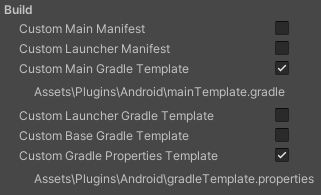
If you hit the checkboxes in project settings -> player -> publishing settings you can see too: https://i.imgur.com/v6U6L4R.png
 vestal radish
timber crown
If you hit the checkboxes in project settings -> player -> publishing settings y...
vestal radish
timber crown
If you hit the checkboxes in project settings -> player -> publishing settings y...
dave why you're not mention,
but hey I got those 2 checked
since I'm doing this right now https://developers.google.com/cardboard/develop/unity/quickstart

Google for Developers
Stack Overflow
I have developed a game in Unity for mobile devices and implemented a tutorial video to show how to play. It works properly on iOS but on Android, only a black screen appears. Please note I do not ...
currently my video only runs at the editor, so I follow the article above from stackoverflow
but it said it needs to modify build.gradle, which is I can't find it anywhere
timber crown
I use the windows app "Everything" to search files on my computer
try that out to find your build.gradle
Mine are in <project>\Library\Bee\Android\Prj\IL2CPP\Gradle
and 2 more in Gradle\launcher and Gradle\unityLibrary
vestal radish
got em !!!
vestal radish
timber crown
and 2 more in Gradle\launcher and Gradle\unityLibrary
why both were on a diff place
vestal radish
vestal radish
https://stackoverflow.com/questions/71610918/unity-video-player-showing-black-sc...
now I need to add this chunck of code,
can I just put it anywhere ?
dave thanks to brought me this far I owe you a life
timber crown
You add it into the template files you find through using those checkboxes
But how to make it work right is unknown to me, I couldn't get it working right
vestal radish
timber crown
You add it into the template files you find through using those checkboxes
But build.gradle ain't included on the check boxes at Publishing settings
 humble jay
As depicted in the image, the player character grasps a downward-facing firearm, which rotates 90 degrees in either direction from the central position indicated by the blue color. Given that I am developing this game for Android, I aspire to employ an Android sensor similar to the "Doodle Jump" game. Presently, I am utilizing the Attitude Sensor, which is functional; however, I've encountered an issue. When I'm seated and the chair is rotated while keeping the device steady, the sensor readings fluctuate. I intend to exclusively capture the device's orientation without these unwanted variations. Could anyone offer guidance on which sensor to employ or how to accomplish this?
 sleek eagle
humble jay
As depicted in the image, the player character grasps a downward-facing firearm,...
sleek eagle
humble jay
As depicted in the image, the player character grasps a downward-facing firearm,...
Probably a combination between gyro and the accelerometer?
The only way to track accurately is using ARCore. Otherwise drifting and lack of tracking with slow movement will exist
 tardy dagger
I want to rotate a camera around a gameObject on touch with clamp limitations of Y-axis.
 tender cloud
Hello, I have a tiny bug on my Android game. When I change the audio source (eg: I connect headphones), my background music stops (but I still have FX sounds).
Here's how my audio source is set

Is there some kind of event method that I can use to reset the audiosource ?
 flint hill
what should be the maximum rewarded ads limit that I should keep ???
flint hill
tender cloud
Hello, I have a tiny bug on my Android game. When I change the audio source (eg:...
wdym ?... your audio is playing on speaker but not in ur headphones ?
tender cloud
flint hill
wdym ?... your audio is playing on speaker but not in ur headphones ?
No like let's say that you start playing with the speakers, then while playing you connect some headphones then the background music stops
But I have found a workaround
flint hill
tender cloud
But I have found a workaround
what ?
flint hill
tender cloud
No like let's say that you start playing with the speakers, then while playing y...
that is weird... maybe not a untiy problem, maybe its ur headphones prob
and if u are using windows 11, it has hell lot of bugs xD
tender cloud
flint hill
what ?
Unity Discussions
I am facing a problem with audio. Every time when Bluetooth headset/earphone is disconnected from the app, background music in the app stops playing. It is supposed to re-route to the phone speaker. Is there any workaround for this? I figured that when connecting or disconnecting Bluetooth, the app loses audio focus. I need help to regain focus...
flint hill
tender cloud
https://discussions.unity.com/t/audio-doesnt-re-route-to-bluetooth-earphone/2483...
oh, thanks got to learn something new :)
tender cloud
No worries 😉
 iron parcel
sleek eagle
Probably a combination between gyro and the accelerometer?
The only way to trac...
iron parcel
sleek eagle
Probably a combination between gyro and the accelerometer?
The only way to trac...
Responding from a different account. I'm working on creating a basic 2D game. Is integrating the ARCore package the sole solution?
fallen compass
You don't need ARCore for non-AR things
iron parcel
Exactly then how can I solve my issue, can you suggestion any other solution?
fallen compass
Not off the top of my head.
You've got three (?) sensors to use, and you're only using 1 atm?
- Attitude (I don't think this is needed at all)
- Gyro
- Accelerometer
flint hill
Apps designed for kids or families

Banking apps

COVID 19 proof of vaccination or contact tracing apps

Crowdfunding or microloan apps

Cryptocurrency wallet or exchange apps

Government services apps

Election apps

News apps

Personal loan apps

Real-money gambling apps

Telehealth or medical apps

Tobacco apps

None of the above```what to select here for game dev acc
I am making a game dev account on play console
fallen compass
.. the things you plan on publishing
flint hill
fallen compass
.. the things you plan on publishing
games
but thats not a option there
iron parcel
@fallen compass
First, I tried with Gyro but it gives us Angular Velocity which we don't want because its value depends on speed in which you move the phone.
Then I tried Attitude Sensor which gives us device orientation, it works somewhat but as I explained above when I am not rotating the phone in my hand but if I am sitting on a chair and rotating the chair the reading from Attitude sensor fluctuates, which I don't want.
Basically I want to rotate my gun only when I rotate my phone in its own axis.
fallen compass
And which one could you select then? 🤔
flint hill
this Apps designed for kids or families
?
fallen compass
no
flint hill
fallen compass
And which one could you select then? 🤔
maybe this :- Apps designed for kids or families
or this : - none of the above
fallen compass
None of the above.. because it's ........... none of the above
fallen compass
why
sleek eagle
fallen compass
Not off the top of my head.
You've got three (?) sensors to use, and you're onl...
I personally have seen a lot of drifting with this, especially with side to side movement.
But I was a lot less experienced back then, so that could also be it
flint hill
To create your account you'll need to pay a one-off USD 25 registration fee. You may be asked to verify your identity using a valid ID to complete your account registration. If we can't verify your identity, the registration fee won't be refunded.
I dont wanna lose 2000 INR that I got to use one time
what PRECIESLY that means ?
what ID ?
iron parcel
@sleek eagle
My mechanics also includes side to side rotation, can you suggest how to get the rotation of the phone in its own axis and not in space.
sleek eagle
For rotation just use the gyro, that's what it's there for
tired lily
flint hill
what ID ?
government ID, for example (USA) a driver's license
flint hill
tired lily
government ID, for example (USA) a driver's license
its preicsly only that or is there any other ?
iron parcel
sleek eagle
For rotation just use the gyro, that's what it's there for
But Gyro gives angular velocity and its reading changes on the speed at which you rotate your phone but I don't want that I want constant value then also I will give it a try. Thanks for replying
tired lily
not sure what you mean? Some kind of official ID is needed. I'm not familiar with other countries, so maybe you need to contact google to find out what they'll accept. You have 90 days to verify (and can't release any apps on the store until you do, ofc)
sleek eagle
iron parcel
But Gyro gives angular velocity and its reading changes on the speed at which yo...
Start with the phone flat to calibrate, and then apply the velocity to the start rotation and you have the current rotation.
Or calibrate via gravity: https://docs.unity3d.com/ScriptReference/Gyroscope-gravity.html
 iron parcel
sleek eagle
Start with the phone flat to calibrate, and then apply the velocity to the start...
iron parcel
sleek eagle
Start with the phone flat to calibrate, and then apply the velocity to the start...
👍
 bright estuary
How would i go around fixing this issue im currently facing on my mobile development, it shows the correct screen resolution on some devices but on others its a bit off

the orange borders shouldnt be there

its a panel scroll view so because the first one doesnt take the full screen on this device it already shows the second panel
but then on others it fits perfect

i can increase the spacing between the 2 panels but background is still visible then because it does not take up the full screen.
tender cloud
Is there a way to disable Picture in picture (floating window in android) in my game ? I tested to use a custom manifest and force the field to false. But it's not doing anything
 versed sundial
Can you use urp for mobile games?
neon thicket
versed sundial
Can you use urp for mobile games?
Yes
 wary crag
Hello my scene have 300+ material and my android build getting low fps. Is it can be the reason for low fps?
timber crown
vestal radish
But build.gradle ain't included on the check boxes at Publishing settings
Hey sorry for not getting back to you instantly. Basically, I never got the gradle template stuff working, so I'm not a good source of information for you. I had to roll back my Unity version back to 2021 just to make android work correctly again. If you want to know more about gradle generation and the template files that add to them, you'll have to do research via google and such because I never got it to work right.
brazen birch
wary crag
Hello my scene have 300+ material and my android build getting low fps. Is it ca...
Yes. Each unique material causes a different draw call
glossy sluice
I Just Updated my google admob and now got. this error after trying Build an apk for google play console
My app is finished but google play told me that maybe i can not make up updates cause of the sunset
 crisp cedar
does ios and android support sqlite in the persistent data path? considering that as a data saving option
tardy dagger
I want to rotate a camera around a gameObject on touch with clamp limitations of Y-axis.
glossy sluice
Hey, sry nur i don’t Untertand the error. Where is my failure?
CommandInvokationFailure: Gradle build failed.
/Applications/Unity/Hub/Editor/2019.4.20f1/PlaybackEngines/AndroidPlayer/OpenJDK/bin/java -classpath "/Applications/Unity/Hub/Editor/2019.4.20f1/PlaybackEngines/AndroidPlayer/Tools/gradle/lib/gradle-launcher-5.1.1.jar" org.gradle.launcher.GradleMain "-Dorg.gradle.jvmargs=-Xmx4096m" "bundleRelease"
- What went wrong:
Execution failed for task ':launcher:bundleReleaseResources'.
1 exception was raised by workers:
com.android.builder.internal.aapt.v2.Aapt2Exception: Android resource linking failed
build/intermediates/bundle_manifest/release/processReleaseManifest/bundle-manifest/AndroidManifest.xml:40: error: unexpected element <queries> found in <manifest>.
Task :unityLibrary:GoogleMobileAdsPlugin.androidlib:javaPreCompileRelease
Task :unityLibrary:transformNativeLibsWithMergeJniLibsForRelease
Task :unityLibrary:generateReleaseRFile
Task :unityLibrary:transformNativeLibsWithStripDebugSymbolForRelease
Task :unityLibrary:transformNativeLibsWithIntermediateJniLibsForRelease
Task :launcher:mergeReleaseResources
Task :launcher:checkRe
Deprecated Gradle features were used in this build, making it incompatible with Gradle 6.0.
 gaunt basin
guys my unity is frozen when building mono apk on macbook 2020. Help!!
it's running in 1hour and not changing any things.
 vestal radish
timber crown
Hey sorry for not getting back to you instantly. Basically, I never got the grad...
vestal radish
timber crown
Hey sorry for not getting back to you instantly. Basically, I never got the grad...
wait what changes you did on your build.gradle ? or you ain't make changes at all ?
 karmic estuary
Hey everyone is 84mb for GC used memory a lot for an android build?

 fallen compass
This is an English speaking server
brazen birch
karmic estuary
Hey everyone is 84mb for GC used memory a lot for an android build?
No
karmic estuary
brazen birch
No
ok intresting... the thing is my android build gets slower and slower after 5 min till it seems like it is frozes. :/
brazen birch
karmic estuary
ok intresting... the thing is my android build gets slower and slower after 5 mi...
That sounds like a memory leak or something bad happening 😄 definitely good to look into!
karmic estuary
yeah can't really make out what the memory leak causes
karmic estuary
brazen birch
That sounds like a memory leak or something bad happening 😄 definitely good to ...
Here is a comparison screenshot
 brazen birch
I see some growth in there, but not enough to kill a phone. It increased by maybe 100mb, which isn't going to cause a phone to crawl
My best guess is another script doing something additive that is slowing it down
 elfin monolith
Is there a way to know if a Unity APK will run on a specific chipset? For example if I'm trying to build for a rockchip rk3326.
 prisma plinth
elfin monolith
Is there a way to know if a Unity APK will run on a specific chipset? For exampl...
prisma plinth
elfin monolith
Is there a way to know if a Unity APK will run on a specific chipset? For exampl...
No reason why it shouldn't, if it's relatively modern. Just check your android api target/minimum, and the android version on the phone you'll be testing.
If an android version runs, then an app built for that android version should also run
 sterile scroll
I get different UI scaling on a mobile device (OnePlus 10 Pro) im testing on and in the "game screen" in the editor (with the same 1440x3216 pixels). Any idea why its different when building?
I would think this would be the same.
fallen compass
Use the simulator when working on mobile
 wary crag
Hello i have a fbx in my scene which haves 451k vert but when i disable it my scene stats down much more than 451k. Why is that?


 sterile scroll
fallen compass
Use the simulator when working on mobile
sterile scroll
fallen compass
Use the simulator when working on mobile
I didnt have a standard OnePlus 10 Pro device in my devices, so i made my own minimal device definition with the width, height, dpi, and OS.
The UI still works on my computer in the simulator while it doesnt on the physical device. Do i need a Complete device definition (and where would i get that)?
So any other ideas? What is different between build and editor.
I tried searching online but all i get are the classic "different resolutions, wrong UI" problems.
fallen compass
The way you worded it originally made it sound like you were using the game view set with a resolution
I've never had to add a new device to the simulator.
What are the specific problems you're having with the UI on device? "It doesn't work" isn't a description..
(Probably easier to show the problem than just describe)
Have you used the Android Logcat package to confirm there's no useful msgs ?
sterile scroll
Sorry, the UI scales differently between a physical device and the editor view (both in game view and device simulator with the same resolution as the device im testing on) @fallen compass

 fallen compass
Everything looks bigger on device, first thing I'd do is log out the resolution and see if it is the same you're using in editor
brazen birch
wary crag
Hello i have a fbx in my scene which haves 451k vert but when i disable it my sc...
Could be lighting. Could be how you calculate polygons vs Unity.
You can make a script to count the verts unity side pretty easily, to see how the importer interprets things.
wary crag
brazen birch
Could be lighting. Could be how you calculate polygons vs Unity.
nothing change without lightning 😦 i disabed but same
 finite tiger
Do we need to have both Apple.GameKit and Apple.Core when I want to use Apple Authentication
Nvm we do
I am getting an error saying Filename "AppleCoreRuntimeShared.swift" used twice:
finite tiger
Anyone knows how to fix this? I have two instances of that file. One in Apple.core and one in Apple.GameKit. I deleted the one from GameKit and got even more errors. I tried renaming one and waiting to see the output now
Yeah I get more errors mainly being Command SwiftCompile failed with a nonzero exit code
 vivid crane
For a mobile game where I wants to have authentication, seasonal events, player data save. Which one would you recommend? Firebase/AWS/Unity? Own solution?
sonic otter
I get the impression you haven't done full stack before
vivid crane
sonic otter
I get the impression you haven't done full stack before
Yep, not sure where to start
sonic otter
It's a lot. Just to have something authenticate a user properly is a lot. I'd recommend completing this course before even thinking about implementing something that people will use https://www.udemy.com/course/complete-guide-to-building-an-app-with-net-core-and-react/?kw=.net+complete&src=sac
This lays a lot down to understand how web apps interact with a back end. Once you understand how the typescript talks with the browser & browser to the server, then substitute the typescript with a Unity front end and move the server instance executable to your aws instance
 wispy trail
My Unity remote 5 is not always showing the game. It notices that my phone is connected to it but it's just not showing anything. It's worked in the past a few times but for some reason has stopped. Anyone have any troubleshooting advice?
 charred sluice
yo this isnt unity related but still in game making i just promgramed a game
how do i download it and put it on playstore
neon thicket
charred sluice
yo this isnt unity related but still in game making i just promgramed a game
how...
If you don't have a Unity specific question, then your question doesn't belong here.
And uploading to the playstore requires you first paid for the developer account, then created the app page and then uploaded your APK.
finite tiger
TypeLoadException: Could not resolve type with token 01000075 from typeref (expected class 'Google.EditorInitializer' in assembly 'Google.VersionHandlerImpl, Version=1.2.0.0, Culture=neutral, PublicKeyToken=null') Rethrow as TypeInitializationException: The type initializer for 'Firebase.Editor.XcodeProjectPatcher' threw an exception.
How do I overcome this error?
tired lily
looks like you're missing one or more dependencies for Firebase.Editor.XcodeProjectPatcher. Firebase used to have some issues if you didn't install ios build support (even if you didn't use it), so you might try that to start
finite tiger
tired lily
looks like you're missing one or more dependencies for Firebase.Editor.XcodeProj...
I am building for Android right now and I have another branch for IOS, so I need to add IOS build support for Android too?
I get like 3 errors
tired lily
did you install ios build support in Unity hub?
ios build support for android is sentence that makes no sense
finite tiger
tired lily
did you install ios build support in Unity hub?
Yes
tired lily
any chance you mixed firebase assembly versions somehow?
finite tiger

I am not sure, I downloaded the SDK from
https://firebase.google.com/docs/unity/setup, that's all
I also have play services and Ironsource, maybe they are colliding or something?
tired lily
they shouldn't, but in case it matters I get my versions from here: https://developers.google.com/unity/archive
finite tiger
Yeah, I verified there and checked that i had the same version
On google, people were saying to update Mobile dependency resolver but I am unable to find a way to update it since it gets imported as a dependency
tired lily
EDM4U is on that page too, when I update Firebase I download the tgz and install locally package by package rather than via .unitypackage. But my next step in your case would be to wipe all firebase packages, wipe out library, and then install them one at a time
finite tiger
Okayyy let me try
finite tiger
tired lily
EDM4U is on that page too, when I update Firebase I download the tgz and install...
I am getting even more errors 😭
But the same errors are repeating
And I am unable to resolve
But it isnt affecting gameplay and the firebase event functions do get called. But they aren't updating on Firebase. Firebase gets initialized since I am not getting errors.
My google-services.json file includes all the Apps I have in firebase dashboard, is that right or?
tired lily
yes
did you try different versions maybe? atm I'm using EDM4U 1.2.176, 1.7.0 of play libraries (except billing is 3.2.3), Firebase 11.0.0 on 2022.3.6f1 with no issue
finite tiger
I haven't tried different versions, will do.
finite tiger
tired lily
did you try different versions maybe? atm I'm using EDM4U 1.2.176, 1.7.0 of play...
Hey, on firebase do we have to make separate projects for different apps or can we use on Project and add all our apps in it?
tired lily
you can use a single project, but you're limited to 30 apps per project
finite tiger
tired lily
you can use a single project, but you're limited to 30 apps per project
Ahh okay thank you. It works in our older projects with older versions of Firebases but the newer versions are not working
And I get this error on mobile 😭
failed to read firebase options from the app's resources
finite tiger
I am getting these errors in editor without even playing the game and it spams this error when I am trying to run Android Resolver https://hatebin.com/fbzjmoiwmc
tired lily
still? even with downgraded version?
finite tiger
Yeah
I have unity Authentication, Google Play sign in, UGS Leaderboards etc Do they affect?
Been stuck on this for hours 😭
tired lily
no, this looks like something is missing (assembly is not being loaded). Maybe you can debug the type load exception by trying to access Firebase.Editor.AndroidSettingsChecker static constructor yourself
vivid crane
sonic otter
It's a lot. Just to have something authenticate a user properly is a lot. I'd re...
Hmm interesting approach, I figured firebase would have been a bit easier, but I'll try this thank you
finite tiger
tired lily
no, this looks like something is missing (assembly is not being loaded). Maybe y...
How do I do that 😭
tired lily
call the Firebase.Editor.AndroidSettingsChecker static constructor (might need to use reflection, they're usually internal) with a try-catch and examine the exception
finite tiger
tired lily
call the Firebase.Editor.AndroidSettingsChecker static constructor (might need t...
Oh
Hastebin is a free web-based pastebin service for storing and sharing text and code snippets with anyone. Get started now.
I did it like this
And got the Class Type Not Found debug
tired lily
then your Type.GetType is wrong, because you know it's there
finite tiger
tired lily
then your Type.GetType is wrong, because you know it's there
Firebase.Editor doesn't exist for me normally 😭
 tired lily
that's because it's probably an internal class
finite tiger
Oh so what should I do now ;-;
tired lily
you need to figure out what's not loading, so time to dive into that method and look around. You can invoke the static constructor yourself like I said to try and get more info, or get inside that method and try to track down which type(s) are not loading
here is how you can get at the constructor
var t = Type.GetType("Firebase.Editor.AndroidSettingsChecker, Firebase.Editor");
var c = t.GetConstructor(BindingFlags.NonPublic | BindingFlags.Static, System.Type.DefaultBinder,
    Type.EmptyTypes, null);
Oh that gives an output https://hatebin.com/hppeggbqcq
tired lily
do you have multiple copies of EDM4U? it looks suspiciously like the wrong assembly is being loaded and this analytics thing is barfing
finite tiger
tired lily
do you have multiple copies of EDM4U? it looks suspiciously like the wrong assem...
I don't even have one now 😭
I just deleted the one I had
Lemme re-install it
Adding it gives me the same Debug
tired lily
I assume you are restarting Unity between these attempts right?
I found some Chinese site that says you should delete Parse/Plugins/Unity.Compat.dll and Unity.Tasks.dll, so there's another thing to try
  internal static EditorMeasurement analytics = new EditorMeasurement(Settings.Instance, Measurement.logger, "UA-54627617-4", "com.google.firebase", "Firebase", "", "https://policies.google.com/privacy")
    {
      BasePath = "/firebase/",
      BaseQuery = Measurement.BaseQuery,
      BaseReportName = "Firebase: ",
      InstallSourceFilename = Assembly.GetAssembly(typeof (Measurement)).Location
    };
this is the field it's not finding (inside Firebase.Editor assembly), and the most suspicious thing there is EditorMeasurement which in this working project, exists in Google.VersionHandlerImpl.dll, which is a part of EDM4U. So something is wrong with your EDM4U version. Look for all references to this assembly, make sure you wipe them out and don't import them from any other packages (admob for example), and install it yourself. This one that has it for sure is 1.2.176
I've got to go to bed now, so good luck
finite tiger
tired lily
```cs
internal static EditorMeasurement analytics = new EditorMeasurement(Sett...
Thank you for the info, I couldnt get it to work so we took the decision to shift to Unity Analytics
 upper ice
hi, im getting this result when im trying to export URP AR app to ios.
 sleek eagle
upper ice
hi, im getting this result when im trying to export URP AR app to ios.
sleek eagle
upper ice
hi, im getting this result when im trying to export URP AR app to ios.
How is the app made?
Unity version?
Arkit version?
Did you follow any guide?
opaque zenith
Can someone help me with this. I do everything I imagine

Is confuse for me
I was about to lose my project because a corrupted crash
 dense flint
I've noticed some recent crashes due to what looks to be supporting older OpenGL versions, does it make sense to switch to 3.0+ exclusively now. It looks like 6.5% of users are still less than v3. In my case that looks like roughly 118 users so I'm tempted to no longer support it.
What do you guys think? I do this has a side project in my spare time so don't feel like I have enough experience to say confidently my thinking is correct.
 atomic siren
making a mobile version of my horror game, the joystick for making player look around does not work, but the movement does.

it works on pc but doesnt in the phone...
 wind orbit
anyone knows why this line exists ?

it only exists on mobile, doesnt exist on pc or during scene play using editor
theres no code in project for these lines to be there
project was made mobile 2d libraries u can select when creating new project
odd arrow
It looks like it's a UI element not resizing properly on mobile resolution
wind orbit
odd arrow
It looks like it's a UI element not resizing properly on mobile resolution
ill double check by disabling all ui components 
wind orbit
odd arrow
It looks like it's a UI element not resizing properly on mobile resolution
ye its not UI, I removed all UI from scene canvas completely gone
and its still there
odd arrow
wind orbit
ye its not UI, I removed all UI from scene canvas completely gone
It might not be your UI. You need to check what else did you add.
wind orbit
odd arrow
It might not be your UI. You need to check what else did you add.
ill remove everything besides empty gameobjects and see how that looks then
odd arrow
wind orbit
ill remove everything besides empty gameobjects and see how that looks then
You don't need to tell me, test first then ask questions
wind orbit
odd arrow
You don't need to tell me, test first then ask questions
no worries just trying to be helpful. turns out its how skybox was setup.
 stuck forge
I am running on ubuntu, have everything working but android building. Do I need to install android sdk before I can build apks?
sleek eagle
stuck forge
I am running on ubuntu, have everything working but android building. Do I need ...
Install android module and both submodules in unity hub
upper ice
sleek eagle
How is the app made?
Unity version?
Arkit version?
Did you follow any guide?
it happens all version. ig urp exporting more different than normal build. can you suggest any tutorial for this? I have tried versions, and different apps. all same.
sleek eagle
upper ice
it happens all version. ig urp exporting more different than normal build. can y...
https://developers.google.com/ar/develop/unity-arf/getting-started-ar-foundation
This is good for ar foundation

Google for Developers
En I just add the AR camera (or XR origin for AR) from the gameobject tab and run it
 olive turtle
So I just have a basic project set up and I want to export to mobile. I downloaded the Android SDK and what not from Unity, but when I try to build I get some pretty long errors (4 of them)
They're all super long so I don't know what's important. Please ping me if you know what's up
Here's the first: https://pastebin.com/6iztAaGV
Second: https://pastebin.com/xFVAxVEH
Third: https://pastebin.com/t299mVnD
Fourth: https://pastebin.com/D8VZqT1W
olive turtle
Got it: you need to upgrade to the SDK version 33 by setting that as the minimum version, let Unity download that, THEN you can switch to minimum of 25
sleek eagle
Tried increasing the framerate?
Can you share the code that runs?
 thorn pivot
Hello everyone, I'm trying to use the latest version of google admob v8 in Unity. I'm constantly getting errors about it. Is there anyone who can help with google ads? Can he write a dm?
 cursive galleon
Hello everyone, I am gonna make a mobile platformer game. Any good recommandations of tutorials or classes to start my project? Anyone interested in helping me create the game ?
 glad quiver
API LEVEL 33 ISSUE
As Google forces people to use the Level 33 target API , I updated the game.
Only to find that this code (which used to work on older target levels), does not trigger a pop up asking for usr permission anymore:
        if (Permission.HasUserAuthorizedPermission(Permission.ExternalStorageRead))
        {
            Debug.Log("King of Crokinole has access to Gallery");
        }
        else
        {
            Permission.RequestUserPermission(Permission.ExternalStorageRead);

        }

        if (Permission.HasUserAuthorizedPermission(Permission.ExternalStorageWrite))
        {
            Debug.Log("King of Crokinole has access to Camera");
        }
        else
        {
            Permission.RequestUserPermission(Permission.ExternalStorageWrite);

        }
#endif```

Has something changed? Is it a bug ... and more important, how do I get this to work again?
Again this code works well on anything but Level 33 (target API)So if anyone has run into a similar issue, this is how I solved it:
First I added this to the Android Manifest :
<uses-permission android:name="android.permission.READ_MEDIA_IMAGES"/>
And I used this code to get the Android version and depending on the os version do one thing or another:
Pastebin
Pastebin.com is the number one paste tool since 2002. Pastebin is a website where you can store text online for a set period of time.
 fast shore
My build in android seems locked at 10 fps by I don't know what the cause, this is what I found in profiler. this is happen in all scene, the fps locked at 10fps regardless whether the scene is super light or heavy. I don't know what's wrong. Last time I build it get 30fps+, I just add unity authentication, unity cloud save which I don't think it's the issue.

 fair thunder
Hello EveryOne, I am Making Third person Game For Mobile I’m using starter asset third person character controller prefab and I’m making a third person game for mobile. controls be like pubg move with joystick and look rotation with touch drag finger. I need help to change script for look rotation. currently look rotation work like joystick which i don’t want.
 rancid crypt
fast shore
My build in android seems locked at 10 fps by I don't know what the cause, this ...
rancid crypt
fast shore
My build in android seems locked at 10 fps by I don't know what the cause, this ...
At the start of the game run this:
Application.targetFrameRate = 60;
or any other number
 untold pawn
I am trying to build my project to android for the first time ever and mostly am getting just black screen with garbled graphics that looks like a NES cart glitching out.
Do you have a guide or step by step first time instructions for getting a project onto android?
neon thicket
Sounds like you don't need a guide for getting it onto android, if it's already running on the phone (despite it not looking right).
You can download the android logcat package in Unity, plug your phone in and run the app. Logcat will show any errors and such that are popping up. Just make sure you select to show only your app from the dropdown at the top of the logcat panel.
ornate remnant
Yall am I good do I just wait now?
 untold pawn
neon thicket
You can download the android logcat package in Unity, plug your phone in and run...
untold pawn
neon thicket
You can download the android logcat package in Unity, plug your phone in and run...
I will google and try this. Yeah I can make and install an apk but I wouldnt call that successfully building to android when the resulting test scene is just a garbled mess of NES glitches.
 nimble lotus
i might be a moron, but my android build just refuses to uncap its frames from 30 and I can not figure out why... I have disabled vsync, have tried setting the target framerate to 60, -1, neither change anything, very confused
if someone has any idea what it could be i would love to hear
the game is extremely simple, and my phone is very good, and i've tested on multiple phones and it's still hard locked at 30. ive profiled the app, no performance issues. im lost
when its built to windows it works as expected, its just mobile / android (cant test ios rn)
nimble lotus
^Nvm, figured it out. Disabling adaptive performance uncaps it. What is it specifically about the adaptive performance package that caps it, is there any way to uncap it without disabling it?
ornate remnant
nimble lotus
^Nvm, figured it out. Disabling adaptive performance uncaps it. What is it speci...
Wait you might have helped me i hardset mine at 90 but it lags on older phones how dud you do this disabling where is it ?
nimble lotus
ornate remnant
Wait you might have helped me i hardset mine at 90 but it lags on older phones h...
Edit > Project Settings > Adaptive Performance > Uncheck the check boxes
 stone creek
Hi guys,
I've setup deep linking for my app and after following the documentation I got it successfully working. Inside AndroidManifest.xml, I've setup unitydl as a scheme and mylink as a host and everything seems to be working just fine. But now when I change the scheme to https and host to the custom domain it doesn't seem to be redirecting to the app. What could be the issue with this?
<data android:scheme="https" android:host="www.example.net" />
Please do ping me. Thank you.
ornate remnant
nimble lotus
Edit > Project Settings > Adaptive Performance > Uncheck the check boxes
Thank you :)
 craggy bronze
Hey guys,
I've just upgraded to latest 2021 LTS on IOS and hit a complier error, Has anyone else seen this or have a possible solution?
ndefined symbols for architecture arm64:
 "_OBJC_CLASS_$_UnityFixedOrientationViewController", referenced from:
     _OBJC_CLASS_$_UnityPortraitOnlyViewController in UnityViewControllerBase+iOS.o
     _OBJC_CLASS_$_UnityPortraitUpsideDownOnlyViewController in UnityViewControllerBase+iOS.o
     _OBJC_CLASS_$_UnityLandscapeLeftOnlyViewController in UnityViewControllerBase+iOS.o
     _OBJC_CLASS_$_UnityLandscapeRightOnlyViewController in UnityViewControllerBase+iOS.o
 "_OBJC_METACLASS_$_UnityFixedOrientationViewController", referenced from:
     _OBJC_METACLASS_$_UnityPortraitOnlyViewController in UnityViewControllerBase+iOS.o
     _OBJC_METACLASS_$_UnityPortraitUpsideDownOnlyViewController in UnityViewControllerBase+iOS.o
     _OBJC_METACLASS_$_UnityLandscapeLeftOnlyViewController in UnityViewControllerBase+iOS.o
     _OBJC_METACLASS_$_UnityLandscapeRightOnlyViewController in UnityViewControllerBase+iOS.o
 grizzled axle
Ads appear when I get my game development build and they don't appear when I get a normal build
untold pawn
Hm im following mobile input tutorials but I am surprised that you are expected to manually code handlers for things like pinch and swipe and drag; the touch input itself doesnt have any concept of the standardized gestures that mobile dev uses
am I mistaken that there is no pre-existing simple call or access some kind of swipe or pinch handler?
glossy sluice
Hm im following mobile input tutorials but I am surprised that you are expected to manually code handlers for things like pinch and swipe and drag; the touch input itself doesnt have any concept of the standardized gestures that mobile dev uses
 shut marsh
glossy sluice
Hm im following mobile input tutorials but I am surprised that you are expected ...
shut marsh
glossy sluice
Hm im following mobile input tutorials but I am surprised that you are expected ...
Yeah, unity is a bit weird with it's abstractions. I believe these gestures aren't the only thing that is missing for "proper" mobile development
~~ ~~
A question for anyone that tried using alpha cutoff materials on mobile: How did you solve the overdraw problem? I get massive performance issues when I am creating forest scenes with big trees. Camera is fixed from overhead, so there is no problem with sudden movements
nimble lotus
Does anyone know how my saved files could be getting wiped when updating my app? Its just some simple stuff being saved to the application.persistentDataPath - upon updating and opening, all of the files inside that folder get wiped. Closing and reopening after the update keeps the data as it should, but updating is wiping it clean. Not only empty files, I mean completely clean with 0 files there, until a save is made.
glossy sluice
hey guys, i had a question with regards to a package for native share in mobile apps. previously i saw a lot of recommendations to use this package: https://github.com/yasirkula/UnityNativeShare, but it seems it is no longer being updated. does anyone have any advice as to what i should do to implement this feature? whether with a different package or without any packages?
 warm garnet
I try to make a mobile app vertically, when I add a canvas and see in the simulator of an android it turns everything that is on the canvas
 vague pilot
Hello so I was building my game with google play games and I upgraded my unity hub version to 3.5.1 but then when I try to build it shows the errors in the picture I tried to force resolve but it didn’t work any help would be great appreciated
 analog plover
The actual error is the third one
vague pilot
analog plover
The actual error is the third one
So do I show you a picture of that
analog plover
Can't help without seeing it
 glossy lintel
Why is it so hard to create the map of something like Clash Royale? I can't even seem to get the camera right. A map, along with its game object, that scales to fit perfectly on every screen size and looks so crisp, nice, and doesn't change the gameplay feel. Do I have to programmatically do this? Are there any tips and tricks you could kindly provide? Thank you.
 sleek eagle
glossy lintel
Why is it so hard to create the map of something like Clash Royale? I can't even...
sleek eagle
glossy lintel
Why is it so hard to create the map of something like Clash Royale? I can't even...
Not sure if it has an orthographic camera or regular perspective.
For the UI use the canvas scaler smart
For the background just make sure that all aspect ratios (usually 16:9) shows the crucial areas. Also make sure there are graphics beyond this limit so you can see those details on wider screens etc
In Clash there probably is some programming done to match it a bit better, but for most this is not needed
glossy lintel
Ill give it a go thank you very much
neon thicket
glossy lintel
Why is it so hard to create the map of something like Clash Royale? I can't even...
This is an angled orthographic camera. You cannot have it look the same on every device, because there are varying aspect ratios on the market. You build your world to fit the largest aspect ratio (or even larger) and then have it cut off on smaller width devices.
The more important thing is that the gameplay area fit the device. You can scale the size property of your orthographic camera to scale the scene to fit. This video explains that concept using an example:
There is no best version, just take the latest LTS and run with it.
That's irrelevant to the version you're using
That's something you need to figure out
But if it works on 2022, then use 2022 and skip that process
So if it works in 2023, then use 2023
Seems like a pretty simple choice at this point
 slim eagle
Hi, i use admob in project. When i try to upload it to Google Play Console always shows me "com.google.android.gms.permission.AD_ID" error. But i already add it to AndroidManifest file. Target: Android 13. And select Custom Manifest option. What should i do for it
 sacred creek
I wrote my problem in the input system but thought it fit here too
#🖱️┃input-system message (read everything I wrote)
 wide pier
omg, this same is happening to me right now! I reinstalled Unity (2022.3.5f1) and now this

 flat light
Did you install android sdk?
wide pier
Everything is as it should be

 wide pier
omg, this same is happening to me right now! I reinstalled Unity (2022.3.5f1) an...
wide pier
wide pier
omg, this same is happening to me right now! I reinstalled Unity (2022.3.5f1) an...
When i press Update Android SDK this is what i get:
UnauthorizedAccessException: Access to the path 'C:\Program Files\Unity\Hub\Editor\2022.3.5f1\Editor\Data\PlaybackEngines\AndroidPlayer\SDK\tempToolsDir' is denied.
flat light
can someone help me fix this, please?
 wide pier
https://forum.unity.com/threads/android-build-issue-switching-from-2021-3-to-2022-3.1443835/
Check this thread maybe it will help you
Unity Forum
Hi, I've just tried 2022.3
The windows build runs fine, not the android one.
First I had errors during the build, some process trying to write to the...
analog plover
The third error is the relevant one
wide pier
Picked up JAVA_TOOL_OPTIONS: -Dfile.encoding=UTF-8
FAILURE: Build failed with an exception.
* What went wrong:
Could not determine the dependencies of task ':launcher:compileDebugJavaWithJavac'.
> Failed to install the following SDK components:
build-tools;30.0.3 Android SDK Build-Tools 30.0.3
The SDK directory is not writable (C:\Program Files\Unity\Hub\Editor\2022.3.5f1\Editor\Data\PlaybackEngines\AndroidPlayer\SDK)``` lusty forge
I'm making a Racing car game for mobile and I have wheel colliders attached to each of the 4 wheels...now everything works fine... but when the car moves there's a bit of a shaking and it gets jittery. I've noticed that the wheel colliders are causing it.
How do I fix this shaking problem?
wide pier
flat light
can someone help me fix this, please?
I fixed this by downloading Android studio and installing SDK Api level 33 and point to it in unity

 unreal stream
Occasionally I get this warning on a pre-launch report for some of my apps.
Excessive use of HTTP
Your app's usage of HTTP is significant. Continued use of this insecure protocol may affect your app's visibility in the Play Store. We recommend the use of HTTPS to avoid this possibility.
If you need help finding the source of HTTP requests, consider instrumenting the entry points of your app with detectCleartextNework
If you find the use of HTTP wholly unnecessary for your app to function, consider setting the android:usesCleartextTraffic flag to false. If you're targeting Android N or above, you may consider setting cleartextTrafficPermitted to false in your network security config.
I don't always get the warning, and usually if I upload a new build of the app the pre-launch report doesn't contain the same warning. But I'd like to know why it sometimes happens and if it does indicate there is an actual ongoing problem, even if it isn't flagged in the report.
I don't issue any WWW or UnityWebRequest calls in any of my own code, but I use Google Play Game Services and that does use UnityWebRequest, however from what I can ascertain, it uses https for the URLs it queries.
I also call Unity.Services.RemoteConfig.Utilities.CheckForInternetConnection(), which I guess could be using HTTP under the hood, but I can't find out one way or the other.
There are very few hits for 'Excessive use of HTTP warning from Google Play' on Google, so I didn't find any help there either.
Has anyone on here encountered and resolved the same issue, or could offer some advice on how I might trace the origin of the HTTP requests?
Thanks
 unborn helm
Can't believe how difficult it should be to upload a dang apk or aab to the google console 🥴 getting the good old **APK or Android App Bundle which has an activity, activity alias, service, or broadcast receiver with intent filter, but without the 'android: exported' property set. This file can't be installed on Android 12 or higher ** error and trying to fix it with android:exported = "true" is just generating me more errors in a complete new program (Android Studio). If anyone could lend a hand on some obvious "solution" I may have overlooked, It'd be more than appreciated. Before I got this error I had the error that the required API was too low, so I increased it to atleast the required 31 and then that gave me this **Android 12 ** error.
 lean knoll
how to fix gradle build failed? already tried to re-install the editor doesnt help,and i am already check that no other application using the adb

 rancid snow
Hi! Do any of you guys know a solution on how i can run my app in the background using unity? Im developing a radio app that should constantly play music even when the power button is pressed (idle state). I'm currently using the latest version of unity it doesnt seem to have that option. I tried onapplicationfocus and onapplicationpause on my script, still no luck. Maybe you guys have an idea on how to do this?
sleek eagle
rancid snow
Hi! Do any of you guys know a solution on how i can run my app in the background...
You need to implement custom android plugins/systems to achieve this outside of Unity afaik
rancid snow
sleek eagle
You need to implement custom android plugins/systems to achieve this outside of ...
Ok will try to research more then, if any of you guys have an idea how to do this ill be glad to try it 👍
 slender scroll
hello I need to open an asset file of a video game but I can't do it, anyone have an idea how?
 brazen birch
slender scroll
hello I need to open an asset file of a video game but I can't do it, anyone hav...
brazen birch
slender scroll
hello I need to open an asset file of a video game but I can't do it, anyone hav...
Are you asking for help ripping someone's assets out of their game?
My advice would be to copy them from the original Unity project
brazen birch
rancid snow
Hi! Do any of you guys know a solution on how i can run my app in the background...
I probably wouldn't use Unity for that to be honest. Background applications need to have very small footprints. You could as mentioned write a library or add on using Android Studio - but it would be easier to build the whole app in Android Studio.
Even then I'm not sure it'll work how you want without some special accessibility setting or something
rancid snow
brazen birch
I probably wouldn't use Unity for that to be honest. Background applications ne...
its fine cause im using a plugin which makes radio streaming possible in unity, btw i found a solution using this article 🙂, just needed to tweek the androidmanifest.xml and CTUnityPlayerActivity.java files in my plugins :
Medium
Hello Friends, welcome to my new android programming Article during this Article I will be able to show you ways to urge background…
brazen birch
Awesome 🙂
slender scroll
brazen birch
My advice would be to copy them from the original Unity project
I don't have access to the unity project
it's a Chinese video game and I need access to their asset file to use images from the game
neon thicket
@slender scroll We don't allow discussions on how to asset rip from games. You'll have to ask this question elsewhere (and no, I don't know where).
south tundra
Hello everyone, I used latest admob plugin with test IDs and it's working on some devices only ...why this is happening..kindly guide ..how can I correct this issue ?
slender scroll
neon thicket
<@799704822101049384> We don't allow discussions on how to asset rip from games...
thank you for your response and I would like to apologize for the inconvenience I did not know that this was not authorized I do not know anything about computers but I would like to point out that this is a personal project for me and that it is not for profit.
 severe lynx
Hi! Is there a way to send custom data with "Push Notifications" package?
 tender summit
can someone please help me, it freezesw here...

also it doesnt want to resolve dependancies
or anything
i reinstalled the damn editor
i use unity ads
 wooden basin
Have you run the external dependency manager?
tender summit
i run the resolving thing
wooden basin
and that looked like it worked?
tender summit
it gave me an error
wooden basin
Ahh.. you need to fix the error first
 wooden basin
If you select the error can you see all the details in the bottom view of the console?
tender summit
it gives me now this error aswell
 wooden basin
Difficult to say exactly why that message appears I would assume something in your setup isn't working. Sadly I haven't built with windows for a very long time.
I think you should go through the setup instructions for the mobile dependency manager again to make sure why it is not working I think a path variable might not be set as expected.
wooden basin
it is a system variable set for your user in windows
 wooden basin
Sounds like the android sdk and java sdks are not correctly installed or setup.
yes, java_home should be set for android builds to work.
 mild warren
I can't find the sign out method for GPGS
any idea what it is? there's barely any documentation online
 vestal merlin
Hi, does some people know how to switch to java 11 on android studio windows ?
I got an error :
Unable to make field private final java.lang.String java.io.File.path accessible: module java.base does not "opens java.io" to unnamed module
I think it's coming from java 17
 gusty pewter
How do I make it so the tmp text is at the same spot for every device the game is played on?
 karmic slate
Hello everyone, can I ask a question about firebase here?
mild warren
anyone else struggled with android setup throwing missing files error?
glossy sluice
When I disable Vulcan Graphics API for my Android game, Particles Stop working and my Water shader also looks glitchy. Anyone here knows what the problem could be?
 heavy wraith
Hey folks. I'm testing my Unity 2D URP game on an Android device, and am finding an odd rendering issue. Zoomed out with dozens of units on a tilemap and I'm getting 60fps. If I zoom far in on a single sprite my fps drops to 15 or less. I have only the Sprite-Unlit-Shader on my sprite renders, and everything is quite simple. No clue why zooming in tanks performance. But only on a sprite, its fine if its just the tilemap. Is this a known issue?
 grizzled tangle
Hi, I'm working on a mobile game and I don't know why I cannot see my craft in these scene, I've implemented the functionality to transfer the craft selected from Main Menu scene to the Game scene. The craft is correctly transferred by not visibile.
 tired lily
UI Image needs a Canvas to render it
grizzled tangle
ok but how to do this that image is displayed based on what the player chooses
tired lily
make it a child of your canvas
grizzled tangle
how, because this is in the game scene whene I hit the play button if I will stop the game it will dissapear
the craft will dissapear
tired lily
it needs to be a child of a Canvas to get rendered. If you're moving it from the main menu scene and then not parenting it to anything, you've done half the job
you probably want to be using a SpriteRenderer anyway
grizzled tangle
ok and I need to add the SpriteRenderer for all other crafts that I have? (it's a battleship themed)
 tired lily
looks like you might benefit from going through some tutorials
grizzled tangle
where to find them, I 'm searching them for hours
 primal solstice
Hi, I was trying to build my game to mobile, but I ran into a problem.
Please help me to fix them. I'm using Unity Levelplay for ads and also push notifications by UGS


 brazen birch
primal solstice
Hi, I was trying to build my game to mobile, but I ran into a problem.
Please he...
brazen birch
primal solstice
Hi, I was trying to build my game to mobile, but I ran into a problem.
Please he...
You need to click on the other error messages to see what the actual error is, it'll be buried in the body of the message
brazen birch
grizzled tangle
where to find them, I 'm searching them for hours
!learn
grand windBOT
🧑🏫 Unity Learn can offer you over 750 hours of free live and on-demand learning content for all levels of experience! Make sure to check it out at https://learn.unity.com/
primal solstice
brazen birch
You need to click on the other error messages to see what the actual error is, ...
This is the error
 brazen birch
primal solstice
This is the error
brazen birch
primal solstice
This is the error
It says in the error you have duplicate android libraries added to your project
 hoary frost
I keep on getting 3 errors when trying to build my project to my phone. Is there a way to fix it or am I doing something wrong?
 analog plover
The third one has the actual error
hoary frost
analog plover
The third one has the actual error
Do you might know what it's causing? I don't see anything in the third warning which shows a solution
analog plover
I literally don't see anything if you don't show it...
 analog plover
Those are just environment variables. Scroll down to the error message.
hoary frost
this?

I do see that the 'build to device' is disabled somehow

skd is read only. I think that's the problem. idk how to fix that
analog plover
You scrolled too far
 gray elk
I've tried all optimization settings for my android game but it's not giving more than 20 fps. Anyone guide me please on this
gray elk
hoary frost
I do see that the 'build to device' is disabled somehow
Turn on development build option just below that
hoary frost
gray elk
Turn on development build option just below that
I tried it, but gave the same result
gray elk
Idk about result but i said about the build to device thing
hoary frost
gray elk
Idk about result but i said about the build to device thing
oh. yeah that enables it indeed
hoary frost
analog plover
You scrolled too far
what do you need to see in the error?
analog plover
Just copy-paste the entire error to a paste site
hoary frost
analog plover
Just copy-paste the entire error to a paste site
Pastebin
Pastebin.com is the number one paste tool since 2002. Pastebin is a website where you can store text online for a set period of time.
analog plover
hoary frost
My skd level was 12 I think. that's it
hoary frost
analog plover
<https://forum.unity.com/threads/android-build-issue-switching-from-2021-3-to-20...
I got these errors now instead. those previous errors are gone
 analog plover
If you're building to a device, you have to uninstall the old version
hoary frost
analog plover
If you're building to a device, you have to uninstall the old version
I have another app via unity built, but I thought it'd replace by itself
It worked indeed, thanks! I found out that everything looks crusted and not on it's place, so I have to find out why that's happening
gray elk
gray elk
I've tried all optimization settings for my android game but it's not giving mor...
If anyone can help me :/
tired lily
use the profiler and find out what's making it slow
mild warren
anyone familiar with GPGS?
tired lily
just ask
brazen birch
gray elk
I've tried all optimization settings for my android game but it's not giving mor...
Just load up the profiler and see whats up
crisp cedar
is saving and reading json and xml files in persistent path supported on ios and android?
tired lily
yes
tired lily
which permissions? maybe your app was already granted them
and you are not seeing any pop up when you request it?
so circling back, are you sure you don't already have the permission?
next step to debug would be looking at logcat output
since some of those are runtime permissions, probably no
well, dangerous permissions have to be requested at runtime. So naturally they're not going to necessarily be listed under allowed permissions for an app
how do you know you're not getting the popups then ...?
I assume you meant Assets/Plugins/Android, otherwise it's wrong. Are you using EDM4U? Delete libraries, then look at the folder I mentioned and clean out anything extra since sometimes it snuck in, then re-resolve
Which ironsource package did you use?
looks like they have their own resolver, how inconvenient. I didn't say delete the folder though, just delete any extra versions of resolved libraries since any old version that gets left behind will cause duplicate class issues
where did you get instructions to do this? Unless this package is horribly configured, using a replacement activity should be something it does automatically
nothing on that page says anything about changing activities that I can see
 near niche
hello, I found something kinda weird when building my project the build filed (due to using preset manifest) if I disable that it work just fine , and app works but not functional due to missing permissions
even if I asked at start method
I don't see any permission when testing on my device .
side note :
-I don't have apt atm , usb run doesn't recognize my phone . also I don't have android studio atm . ( I can set'em later)
-when specifying the minimum and target api levels with the manifest file it build but the app crash .. when the preset have mismatch with the editor options it failed to build
-i'm using an old project and sdk but I don't think that's the problem
near niche
I think because it doesn't boostrap from unity player activity ! i'm using some native libraries too gotta check out how to change that
gray elk
brazen birch
Just load up the profiler and see whats up
I checked in my profiler and it's the vsync that's giving me low fps. Although i have turned it off :/ any idea how can i counter this?
near niche
unityplayer.ForwardNativeEventsToDalvik crash the app how to fix that ?
gray elk
gray elk
I checked in my profiler and it's the vsync that's giving me low fps. Although i...
this is the graph :/
 gray elk
this is the graph :/
gray elk
gray elk
this is the graph :/
Just to let you know i set the target framerate to 60 and now it works very well 👍🏿
karmic slate
Hello, tell me pliz, why does Unity somehow calculate safeArea with a delay? I call this method at the start delayed 1 time
and this is what it displays to me (my screen resolution is 1080 by 2340)
Safe Area: (x:0.00, y:0.00, width:720.00, height:1560.00)
Screen Size: (720.0, 1560.0)
although I have a front camera, on other devices it's the same
at the start it starts on mobile
I even tried it with skipping frames
and on some device it gives out this
Safe Area: (x:0.00, y:0.00, width:1080.00, height:2340.00)
Screen Size: (1080.0, 2340.0)
but on some such (it differs in height, i.e. everything is ok)
Safe Area: (x:0.00, y:0.00, width:1080.00, height:2307.00)
Screen Size: (1080.0, 2400.0) launches on mobile at launch
I tried even with skipping frames


 deft warren
Hello everyone, I have a question about the In app Purchase Android of Unity. My costumer want to add the 2D Mastercard purchase in my Unity project. And i know unity had the In app purchase but i dont know In app purchase Unity support what? If they dont support the 2D mastercard payment, how can i import 2D mastercard into my project?
Tks all.
glossy sluice
Hey everyone! Someone used Firebase (Sign In with Google) in Unity
tired lily
deft warren
Hello everyone, I have a question about the In app Purchase Android of Unity. My...
the actual charging portion is handled by google play billing. I don't understand what else you're asking, but use Unity IAP or write your own native bindings to work with play billing
tired lily
glossy sluice
Hey everyone! Someone used Firebase (Sign In with Google) in Unity
just ask your question
glossy sluice
I am using unity , and I try integrate Firebase in my Unity Application.Everything okay, i integrated all things and complite to apk file, but When i clicking on SignIn button, then i have crash.
tired lily
any errors in logcat? What is the stack trace of the crash?
glossy sluice
tired lily
any errors in logcat? What is the stack trace of the crash?
My logcat logs:
09-04 16:21:55.531 5586 5616 I Unity : Built from '2022.3/staging' branch, Version '2022.3.7f1 (b16b3b16c7a0)', Build type 'Release', Scripting Backend 'il2cpp', CPU 'arm64-v8a', Stripping 'Enabled'
09-04 16:21:55.651 5586 5616 I Unity : Company Name: SopranoDev
09-04 16:21:55.651 5586 5616 I Unity : Product Name: TalkMate
09-04 16:21:58.006 5586 5616 I Unity : Using Auth Prod for testing.
09-04 16:21:58.006 5586 5616 I Unity : Firebase.AppUtilPINVOKE:PollCallbacks()
09-04 16:21:58.006 5586 5616 I Unity : Firebase.AppUtil:PollCallbacks()
09-04 16:21:58.006 5586 5616 I Unity : Firebase.Platform.FirebaseHandler:Update()
09-04 16:21:58.006 5586 5616 I Unity :
tired lily
Firebase has its own logs, so don't limit yourself to just Unity tagged ones
look at anything produced by your app
glossy sluice
I found only crash logs, but i nothing understood
tired lily
you're going to need to find out what's happening. Attach android studio's debugger and investigate the crash
glossy sluice
tired lily
you're going to need to find out what's happening. Attach android studio's debug...
This is doesn't give solution, I told you what i found CRASH errors, but crashes errors is a much and doesn't readable, i might give you all crash logs, but i can send only 500 symbols
tired lily
hence you should attach the debugger and catch the crash mid-crash, so you can explore the program state at that time and figure out what it was doing. Standard debugging stuff
if you can't read the crash errors and can't find anything else in logcat that points out what the issue might be, you're just wasting time shooting in the dark
you have tried re-resolving libraries? turned on dev build? disabled proguard?
glossy sluice
I did anything, how said in Firebase Documentation and YouTube guide videos
brazen birch
You aren't giving us enough information to help you.
 viscid mortar
the mobile notifications package won't build for me. RIP
Execution failed for task ':unityLibrary:compileReleaseJavaWithJavac'.
there is one thread with other people who have the exact same issue in the past month so it might just be unfixable until its patched. and i dont know android studio well so its hard to debug
tired lily
that isn't the error. Look at the error
lime vessel
guys, what is the best version to work with the device simulator?
I'm using v2021.3.28f1 but converting the touch screenPos to WorldPos doesn't work since it's just stuck in (0,1)
This is pretty much the error that I'm facing: https://forum.unity.com/threads/device-simulator-bug.1206826/
Unity Forum
Hi.My unity version is 2021.1.28f1.I'm developing a mobile game. The problem is , when I use the device simulator, I cannot get the touch position as...
tired lily
if your camera isn't orthographic, you need to set a z value for your screen pos before converting to world space
lime vessel
tired lily
if your camera isn't orthographic, you need to set a z value for your screen pos...
I tried but it still doesn't work

am I doing something wrong?
tired lily
z being 0 means no matter what screen pos you use, the output will always be the camera position
your z = 0 is now explicit instead of implicit. Set it to, say, camera near plane instead
lime vessel
tired lily
if your camera isn't orthographic, you need to set a z value for your screen pos...
if I want to make a 2D game and save me all of that trouble the best solution would be to change my camera mode to ortographic?
tired lily
what trouble? touchScreenPos.z = Camera.main.nearClipPlane? Uh sure I guess
lime vessel
tired lily
what trouble? `touchScreenPos.z = Camera.main.nearClipPlane`? Uh sure I guess
oh, sorry. I meant all of the minor problems I could have along the way like this one of having a perspective camera in a 2D game. Or my game could still work fine with the perspective camera?
tired lily
I've seen perspective camera used in 2d games (especially for parallax), but yes it'll be a little bit harder
lime vessel
tired lily
I've seen perspective camera used in 2d games (especially for parallax), but yes...
Okay, thanks! Then I'll give it a shot with the perspective camera xd
tired lily
it sounds like you might have something intercepting the events the scroll rect uses to scroll with. What do you have inside the scroll view?
rain leaf
agree, scrollview by default should work out of the box if set correctly, even without scrollbar.
maybe the content is not long enough to be scrolled (adding content fitter usually help)
spare timber
I don't have a macos so I cannot build the apple gdk : https://github.com/apple/unityplugins/tree/main/plug-ins/Apple.GameKit/Apple.GameKit_Unity
Is there a way to get a finished build? Or is there at least a different way to authenticat users?
GitHub
Contribute to apple/unityplugins development by creating an account on GitHub.
rancid snow

Hi guys, have any idea how to unfreeze gui when i refocus my app? This is the issue i am having:
As you can see the audio is still running but the gui is frozen, any ideas on how to unfreese this would be appreciated 🙂
brazen birch
spare timber
I don't have a macos so I cannot build the apple gdk : https://github.com/apple/...
You need a Mac to do apple builds- even of your game if you want to support apple. It's their intentional design. You could use macincloud or other services I suppose if needed. But you can't really support apple without apple. As you may guess, I'm not a big fan of their ecosystem 😄
brazen birch
rancid snow
As you can see the audio is still running but the gui is frozen, any ideas on ho...
Check the Unity log on device and see why it's frozen
spare timber
brazen birch
You need a Mac to do apple builds- even of your game if you want to support appl...
I'm aware of the cloud build, I was actually looking for a solution to build one of their pacakges (GDK) which allows authentication without having to build it using mac. I managed to find this : https://github.com/lupidan/apple-signin-unity
seems to be working well for authentication

GitHub
Unity plugin to support Sign In With Apple Id. Contribute to lupidan/apple-signin-unity development by creating an account on GitHub.
brazen birch
Perfect sounds solved
rancid snow
brazen birch
Check the Unity log on device and see why it's frozen
The unity log is clear, no errors
 neon badge
should i use the universal render pipeline for mobile games
karmic estuary
Anyone experience with creating screenshots for android? It destroys the renderTexture connection of my map gob?
 quick halo
Anyone knows if I can use unity ads if my game isn't in the app store ? (My game is in itch.io)
 undone stream
Help me to integrate the Stockfish API into a unity project for a mobile chess game.
I am trying to create a chess AI bot required for a chess game running on a mobile phone by using the Stockfish API in Unity. I have already downloaded the Stockfish API for Android and Windows from the official site, and the chess AI running on windows has been completed. However, if I build the project to the Android platform, the AI part does not work. If anyone has an idea please help me. Thanks.
 tardy gust
yo, I know this is a long shot but I've got the same issue (2021.3.27), same thing - script debugging + quest 2.
did you figure out why this happened or how to solve?
brazen birch
Aren't those Android errors? I don't see any unity references or project references in there anywhere.
Yeah, a lot the noise in logcat won't have anything to do with you. Your stuff will usually have Unity in one of the columns
It could hint at an error, if the game won't run or display anything - and you see a lot of Android gfx errors, then it's possible the device doesn't support Vulcan or something. But it's also possible the errors are just noise
Yeah no worries those are just device libraries complaining- mostly about image conversion stuff.
Like, nothing you need to fix or worry about
Yeah that'll be a real problem, it would stop you from accessing ads. I can't help there, I don't use unity ads for anything
 sonic pebble
I have a question regarding skinned meshes. I have a skinned mesh .fbx in Unity. It is working fine. But I would like to add a material to certain faces on the character. I can not use ProBuilder for this as it does not work with skinned meshes. I can import it in Blender then add the material to the faces and then export the fbx again. But then when I overwrite the original fbx and reload it in Unity the mesh is gone. It is not showing anything anymore.
What would be the quickest way to add extra materials to a skinned mesh
sleek eagle
sonic pebble
I have a question regarding skinned meshes. I have a skinned mesh .fbx in Unity....
You probably need to properly unwrap the model and then change the material or texture
spare timber
Is it possible to build to ios with VM Macos? any other tips that don't require an access to a mac?
lime vessel
Guys, can someone get the exact world position of a screen touch with a perspective camera?
tired lily
since there are an infinite number of points on a line, no. You need to specify a distance in some way
 buoyant prairie
 sick umbra
my game is lagging very hard on apk on android and all i have in my game is just 2 joysticks controllers and thats it
like im sending the inout from joysticks to my pc with main game but like the dragging of the joysticks is extremly laggy and when i try to minimize the game on phone it also tends to lag
any ideas what is casuing it?
lime vessel
Guys, I'm using LeanTouch to move my player on the X and Z axis with the LeanDragTranslate. Does someone know how can I clamp the player?
tired lily
sick umbra
like im sending the inout from joysticks to my pc with main game but like the dr...
"sending the input ... to my pc" = you are using Unity remote?
tired lily
lime vessel
Guys, I'm using LeanTouch to move my player on the X and Z axis with the LeanDra...
your question is either very simple or too vague to answer. Use the Mathf.clamp methods?
lime vessel
tired lily
your question is either very simple or too vague to answer. Use the Mathf.clamp ...
But how can I clamp it based on the borders of the screen size?
tired lily
determine edges of screen in world space and clamp it to those values
 fossil breach
I already did everything but nothing
sick umbra
tired lily
"sending the input ... to my pc" = you are using Unity remote?
im using unity photon pun, but it got nothing to do with sending info
the game overall lags for no reason, as i said, there are only 2 ui elements that are joysticks and they dont work smoothly
wooden basin
spare timber
Is it possible to build to ios with VM Macos? any other tips that don't require ...
I would look at using a build pipeline, like github, unity devops, azure devops or similar. But I think you need access to a mac for the initial codesigning setup. You might be able to do that within a VM but it might break as it is a unsupported flow and apple might have checks in their releases to prohibit some part. I have never tried to run macos as a VM


 glossy sluice
my json file works fine in unity editor but doesn't load in unity build
tired lily
hopefully there's another message coming with more info than that, right?
glossy sluice
no
just the game isn't working
it has stopped
and the json file isn't loading therefore the information isn't loading
tired lily
help us help you by not being vague. You are building to what platform? You are loading the json how (code snippet)? By "isn't working" do you mean the game crashed?
glossy sluice
sorry
andorid build
it is not working in android build
and by not working
i mean
the json is responsible for loading the information
because the info is not getting loaded
json is the issue
tired lily
90% of the time it's because people are trying to load the json like it's a file when it's not a file in a build, that's why we need to see some code
tired lily
use a code site next time. It doesn't look like you check if the file exists before you try to load it, so it's probably throwing FileNotFoundException and the rest of the logic doesn't run
glossy sluice
got it
tired lily
and you've made the standard mistake of writing to a path that you don't have access to
glossy sluice
how to correct it
tired lily
you can read and write from Application.persistentDataPath
and if you're hoping to read from a json that's within Assets, that is also going to fail as-is because that path doesn't exist in a build. You can make your json a TextAsset and load from there if it's not found at the persistent path
otherwise, create a StreamingAssets folder and move your json there
actually streaming assets isn't writable on mobile, so you still need persistent path. Do the first thing if you need initial data in that json
glossy sluice
tired lily
yes <https://docs.unity3d.com/ScriptReference/Application-persistentDataPath.htm...
okay i used persistenDataPath still not working
on android,wokring on unity perfectly
string pathFile = Application.persistentDataPath+"/EmployeeData.json";
if (File.Exists(pathFile)) {
string fileObj = File.ReadAllText(pathFile);
employeeDataSet = JsonUtility.FromJson<EmployeeDataObject>(fileObj);
}
i checked the direcotry on android where json was supposed to be present
but it wasn't build
so i think the right question would be how to build the json and put it at the persistentDataPath location
tired lily
yes, now you've figured out the problem
option 1: https://docs.unity3d.com/ScriptReference/TextAsset.html and write to persistent path if not found there
option 2: https://docs.unity3d.com/Manual/StreamingAssets.html and copy to persistent path if not found there
glossy sluice
so in other words i should convert the json file into a text asset
can i just change the extension of my .json file to .txt
tired lily
no, it's already a text asset. Create a script with a serialized TextAsset field and drag it in
glossy sluice
File.WriteAllText(file.text,JsonUtility.ToJson(employeeDataSet));
file is the serialised reference to the json file
this line is throwing an error
glossy sluice
so how to solve this now 😦
tired lily
? this is the logic you're implementing
   load json from text asset
else
   load json from persistent path
you always write to persistent path
tired lily
I don't understand your confusion. You don't need a file to exist in order to write to it. You can create a new one?