#↕️┃editor-extensions
1 messages · Page 95 of 1
 unborn lava
Are you saying to use serialized props or not to, because I don't quite understand what you're saying
 opaque zenith
unborn lava
Are you saying to use serialized props or not to, because I don't quite understa...
opaque zenith
unborn lava
Are you saying to use serialized props or not to, because I don't quite understa...
I was just mostly saying you don't need to actually use the serializedProperty type for anything. It's just easier to get a property as that and display in in the gui override than finding other working methods
 gloomy chasm
You are mistaken. It does draw them in order. The Skinned Mesh Render has a custom editor with it's own styling and ordering. And that is what you normally see in the inspector. 🙂
opaque zenith
gloomy chasm
You are mistaken. It *does* draw them in order. The Skinned Mesh Render has a cu...
yeah, I found that out when looking at the metadata, but, I'm not sure how to find whatever is already altering it
gloomy chasm
opaque zenith
yeah, I found that out when looking at the metadata, but, I'm not sure how to fi...
What do you mean?
opaque zenith
gloomy chasm
What do you mean?
like, if some customEditor somewhere or something that I can make my customEditor a type of instead of the skinnedmeshrenderer, like maybe creating some sort of polymorphism
gloomy chasm
opaque zenith
like, if some customEditor somewhere or something that I can make my customEdito...
Ah, it is an internal class. Almost all built-in custom editors are.
opaque zenith
gloomy chasm
Ah, it is an internal class. Almost all built-in custom editors are.
oh okay. Thanks! I don't really need to do anything different. I still have all the available data I need. I guess I could just imitate it anyways still
if I really wanted to
opaque zenith
I need to remember more when dealing with default things that unity starts most of it's things with m_
 whole steppe
I'm having issues with debugging in vs code. I've reinstalled Unity and vs code, build everything from scratch, and still vs code can't detect Debugger for Unity extension as a debug environment. I thought I solved this problem by manually creating a launch.json file but it didn't work when I created a new Unity project (doesn't make sense to me). I'm out of options and don't know what to do.
The problem is Unity Debbuger not appears on the environment list.
whole steppe
whole steppe
I'm having issues with debugging in vs code. I've reinstalled Unity and vs code,...
More information about the issue...
opaque zenith
Is there a better a way of displaying a property in an EditorGUILayout.PropertyField() from the editor script itself without doing this sloppy work around I did?
    void GetMeshData()
    {
        skinnedMeshRendererEditor = new SerializedObject(this);
        vertices = skinnedMeshRenderer.sharedMesh.vertices;
        normals = skinnedMeshRenderer.sharedMesh.normals;
        uvs = skinnedMeshRenderer.sharedMesh.uv;
        triangles = skinnedMeshRenderer.sharedMesh.triangles;
        serializedPropertyVertices = skinnedMeshRendererEditor.FindProperty("vertices");
        serializedPropertyNormals = skinnedMeshRendererEditor.FindProperty("normals");
        serializedPropertyUvs = skinnedMeshRendererEditor.FindProperty("uvs");
        serializedPropertyTriangles = skinnedMeshRendererEditor.FindProperty("triangles");
    }
What do you mean? All you are doing here is getting serialized properties and also the current values of the fields(for reasons I assume).
opaque zenith
gloomy chasm
What do you mean? All you are doing here is getting serialized properties and al...
I'm trying to make a serializedProperty like SerializedProperty example to make it display in inspector easier with EditorGUILayout.PropertyField(); but just seem to be not finding an easy to access the data I'm looking for without doing it this way
gloomy chasm
opaque zenith
I'm trying to make a serializedProperty like ``SerializedProperty example`` to m...
Why are you getting the sharedMesh data along with the SerializedPropertys?
opaque zenith
gloomy chasm
Why are you getting the sharedMesh data along with the `SerializedProperty`s?
I'm trying to create customEditor for components instead of scripts so I can just edit things there, however, for some reason I can't seem to find out how to get something like the vertices with FindProperty off of a mesh this way.
I was able to do do a Debug.Log for names to find out that the meshfilter that holds mesh is m_Mesh, but, IDK how to figure out data that way
like everything past that seems to give me errors
gloomy chasm
opaque zenith
like everything past that seems to give me errors
That is because there is no c# serialized field for them.
opaque zenith
I actually got kinda confused, because, in the mesh MetaData nothing is Serialized
opaque zenith
gloomy chasm
That is because there is no c# serialized field for them.
exactly, so, I would copy the data into a field that is serialized
also, what happens if you edit metaData
gloomy chasm
opaque zenith
exactly, so, I would copy the data into a field that is serialized
Why are you messing with Meshs? What are you trying to do?
opaque zenith
gloomy chasm
Why are you messing with Meshs? What are you trying to do?
Nothing, atm, well kinda. I've been doing a ton of mesh procedural generation, and, creating a lot of models and things completely in Unity without something like Blender. I wondered today why I don't just make a custom editor for these components like meshfilter and stuff rather than my own component. So, I started trying to do that, but, now I don't have how would I explain this, my own component I can view and add serialized fields in
so I'm trying to figure out how to serialize fields that aren't serialized
basically
        public int subMeshCount { get; set; }
        //
        // Summary:
        //     The bounding volume of the Mesh.
        public Bounds bounds { get; set; }
        //
        // Summary:
        //     Returns a copy of the vertex positions or assigns a new vertex positions array.
        public Vector3[] vertices { get; set; }
        //
        // Summary:
        //     The normals of the Mesh.
        public Vector3[] normals { get; set; }
        //
        // Summary:
        //     The tangents of the Mesh.
        public Vector4[] tangents { get; set; }
for example, exists in the metaData
so, I'm doing a serialized Vector3 field = this to get the data to a serializedProperty
whole steppe
It worked now sir,thanks.
 tired urchin
Hey there. So I have this scriptable object from an asset that has a custom editor and I want to add onto it without modifying the actual asset source. I have some code here to add a serialized property however it erases all the properties the asset sets showing just IsCrop. Is there a way I can add to it without overriding entirely?
https://i.imgur.com/0pcqBwv.png
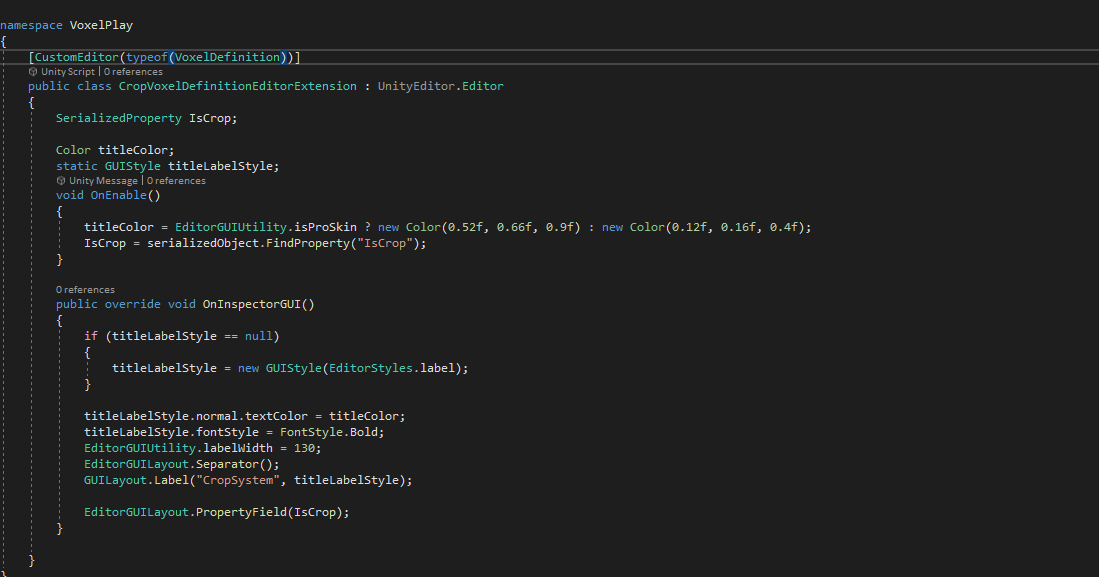
 visual stag
https://help.vertx.xyz/?page=Programming/Editor Issues/Serialisation/Persisting Changes
See SerializedObject / SerializedProperty
tired urchin
visual stag
<https://help.vertx.xyz/?page=Programming/Editor%20Issues/Serialisation/Persisti...
Based on what I gathered I needed an Update() before modifying the properties and and Apply after. Maybe I misunderstood as that didn't work
visual stag
should work, show your code now?
Oh, you mean it's not showing your other fields in addition to that
Call base.OnInspectorGUI at the start of the method
tired urchin
Okay things are getting interesting. It brought back all of the properties however they are all way misorganized and is showing properties the asset had hidden
visual stag
Right, so the asset must have had a custom inspector. You'll have to get a little complex to both use it and yours
I'll see if I have some code for you
tired urchin
Yeah it had a custom inspector, and im looking more of extending onto it without modifying the asset source. (This is so it works like an extension to the asset)
Ty if you got any code examples
visual stag
So. You need to have access to the type of the original editor, if you have it, it is slightly easier.
Declare a field:
private Editor defaultEditor;
In OnEnable:
defaultEditor = CreateEditor(targets, typeof(TheOriginalEditorType));
In OnDisable:
if(defaultEditor != null)
  DestroyImmediate(defaultEditor);
and instead of the base.OnInspectorGUI call, use defaultEditor.OnInspectorGUI
If you do not have access to the original editor type you need to get it manually:
instead of typeof(TheOriginalEditorType), you write: Type.GetType("UnityEditor.TextureInspector, UnityEditor") (except it'll need to be the original type in question, instead of my example type)
tired urchin
Okay im mostly following however EditorType is throwing me off. What defines its 'type' per say. The original inspector code has [CustomEditor (typeof (VoxelDefinition))] so would its type be VoxelDefinition?
It inherits from Editor as well
or wait its the assets editor class huh
Yep its the editor class which I do have access to. That got it working ty so much
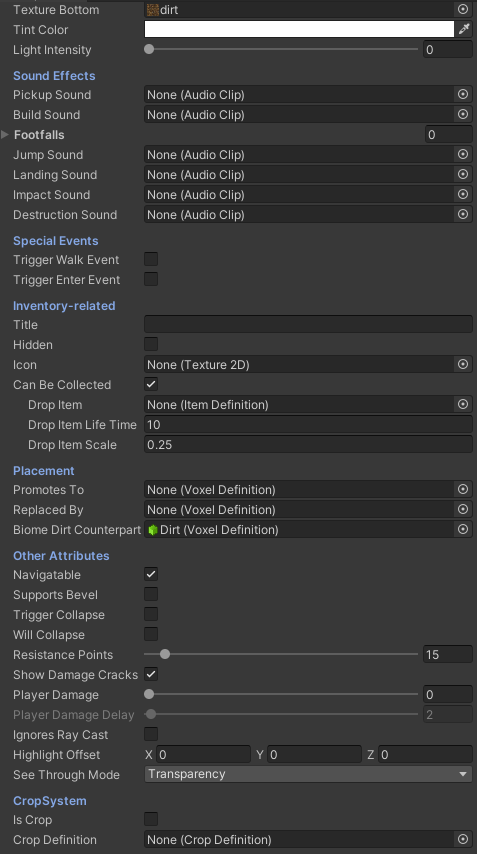
u the real og
 odd delta
Is there a game window audio setting that I might have turned off? I had successfully added in Music and SFX earlier, and my audio mixer looks like sounds are playing correctly, but I'm not hearing it (my computer sound is on I checked that lol)
 waxen sandal
Wrong channel bt there's a mute audio button in the game view
odd delta
What channel?
Posted in Audio thought that was just for non-technical discussion on first glance
waxen sandal
#💻┃unity-talk , #🔊┃audio should be fine as well
 worldly nimbus
@acoustic sentinel
 stray iron
Is there a way I could reach into the models import (.fbx) and then create animation clip inside the importer settings via code?
opaque zenith
how come
    void OnEnable()
    {
        serializedPropertyList.Clear();
        var serializedProperties = serializedObject.GetIterator();
        while (serializedProperties.NextVisible(true))
        {
            serializedPropertyList.Add(serializedObject.FindProperty(serializedProperties.name));
        }
    }

    public override void OnInspectorGUI()
    {
        foreach (SerializedProperty sp in serializedPropertyList)
        {
            EditorGUILayout.PropertyField(sp);
        }
    }
works, but, changing serializedPropertyList.Add(serializedObject.FindProperty(serializedProperties.name)); to serializedPropertyList.Add(serializedProperties) returns errors?
gloomy chasm
opaque zenith
how come
```cs
void OnEnable()
{
serializedPropertyList.Clear();...
Well what errors does it return?
opaque zenith
gloomy chasm
Well what errors does it return?
InvalidOperationException: The operation is not possible when moved past all properties (Next returned false)
side note, think I'm understanding some of this more. Getting things displayed in a way I like doing
        while (serializedProperties.NextVisible(true))
        {
            serializedPropertyList.Add(serializedObject.FindProperty(serializedProperties.name));
            showSerializedProperty.Add(false);
        }
        for (int i = 0; i < serializedPropertyList.Count; i++)
        {
            showSerializedProperty[i] = EditorGUILayout.Foldout(showSerializedProperty[i], serializedPropertyList[i].displayName);
            if (showSerializedProperty[i]) EditorGUILayout.PropertyField(serializedPropertyList[i]);
        }
Anyone? 😦
 gleaming blade
Is there a way to change the InspectorWindow.MouseUp text? I made a super slow function that I would like to be able to keep track of how it is going
 gloomy chasm
stray iron
Anyone? 😦
gloomy chasm
gleaming blade
Is there a way to change the InspectorWindow.MouseUp text? I made a super slow f...
gloomy chasm
stray iron
Anyone? 😦
gloomy chasm
gleaming blade
Is there a way to change the InspectorWindow.MouseUp text? I made a super slow f...
There is not. However I believe you are able to open a progress window yourself. Also perhaps making your function async could be viable, and a good idea (idk if it is possible or make sense for what you are doing)?
gleaming blade
Turns out you actually can
https://docs.unity3d.com/ScriptReference/EditorUtility.DisplayProgressBar.html

it replaces the "Hold on Busy"
waxen sandal
opaque zenith
``InvalidOperationException: The operation is not possible when moved past all p...
Does that also happen if you use foreach directly on the iterator? Also there's Editor.DrawPropertiesExcluding that might help in your case
opaque zenith
waxen sandal
Does that also happen if you use foreach directly on the iterator? Also there's ...
let me check
opaque zenith
waxen sandal
Does that also happen if you use foreach directly on the iterator? Also there's ...
doing a quick
        if (GUILayout.Button("Test"))
        {
            foreach (SerializedProperty sp in serializedObject.GetIterator())
            {
                Debug.Log(sp.displayName);
            }
        }
Still produces an error of Invalid iteration - (You need to call Next (true) on the first element to get to the first element), however, still works and produces debug prints for every prop
 onyx harness
You never do a foreach on an iterator like that
You must compare it to the end
@opaque zenith
gloomy chasm
onyx harness
You must compare it to the end
Actually you don't need to, it does it already.
https://github.com/Unity-Technologies/UnityCsReference/blob/master/Editor/Mono/SerializedProperty.bindings.cs#L212
onyx harness
Incredible!
but this is for GetEnumerator(), not GetIterator
Isn'it?
Oh I see, my bad
the funny fact is that GetEnumerator is the only interface's method that C# handles without being explicitly implemented
Eliseus just need to get the Iterator, call true and foreach on it
opaque zenith
is there an easier way to get the serializedProperties of a serializedProperty than doing this way I did?
SerializedObject tempSO = new SerializedObject(serializedObject.FindProperty(serializedProperties.name).objectReferenceValue);
and repeating all the previous SerializedProperty things I did? Like, I feel like I can remove this step to cast the property as a SerializedObject, but, I'm not sure on what I'm looking for
like, atm, I'm doing
        for (int i = 0; i < serializedPropertyList.Count; i++)
        {
            showSerializedProperty[i] = EditorGUILayout.Foldout(showSerializedProperty[i], serializedPropertyList[i].displayName);
            if (showSerializedProperty[i])
            {
                EditorGUILayout.PropertyField(serializedPropertyList[i], true);
                for (int x = 0; x < subSerializedPropertyList[i].Count; x++)
                {
                    EditorGUILayout.PropertyField(subSerializedPropertyList[i][x]);
                }
            }
        }
to display everything. EditorGUILayout.PropertyField() with showchild doesn't work with what I'm doing unfortunately. Just trying to maybe figure out a better way to go if one
opaque zenith
I decided to just put this into it's own method
    List<SerializedProperty> GetSerializedProperties(SerializedObject target)
    {
        List<SerializedProperty> tempList = new List<SerializedProperty>();
        var serializedProperties = target.GetIterator();
        while (serializedProperties.NextVisible(true))
        {
            if (target.FindProperty(serializedProperties.name) != null) tempList.Add(target.FindProperty(serializedProperties.name));
        }
        return tempList;
    }
saving me a lot now lol
 mystic jolt
if someone can help mah stupid code https://answers.unity.com/questions/1855312/have-problem-storing-guilayout-foldout-bool.html
Unity is the ultimate game development platform. Use Unity to build high-quality 3D and 2D games, deploy them across mobile, desktop, VR/AR, consoles or the Web, and connect with loyal and enthusiastic players and customers.
waxen sandal
There's an isExpanded field on SerializedProperty that persists
Or you can use SessionState
Or serializefields on the editor instance
mystic jolt
aright i've no idea how to use it
 hazy umbra
Have anyone done a custom property drawer using UIElement ? I get "No GUI Implement" error with this
 visual stag
UIToolkit property drawers only work if the Editor is also UITookit
hazy umbra
Oh ok so if I used any IMGUI it won't work, thanks
hazy umbra
UIBuilder attributes doesn't work anymore ?
 half totem
Is it possible to make the editor interpret different file types than .cs as components?
gloomy chasm
I would think not since they need to inherit from MonoBehavior. Unless I am missing something.
opaque zenith
how does the the child set to true work on EditorGUILayout.PropertyField()? I haven't seem to actually be able to get it to display children when set to true
opaque zenith
Hmm, actually, just from checking, it is working. The default if not included seems to be true
the manual says bool True if the property has children and is expanded and includeChildren was set to false; otherwise false. though
oh wait
I get what it is saying now
so, if not set to true or false, it's true when the property with children is expanded, and false when it is not
whole steppe
Do you guys know the extension for C# that we can hover the mouse on a list or dictionary and see their elements inside of a pop up or some kind of box. I remember an extension like this, but I don't know the name of it. If anybody knows its name, that would be really nice.
I think this is a feature of the debugger. Nevermind.
 winged crest
Hey all, I'm getting an extension method error from visual studio even though the code works perfectly fine, is this a bug?

using UnityEngine;

public static class Extensions
{
    public static Vector3 Round(this Vector3 v)
    {
        v.x = Mathf.Round(v.x);
        v.y = Mathf.Round(v.y);
        v.z = Mathf.Round(v.z);
        return v;
    }
}
Here's the code for my extension method. It works fine when I run it in the editor.
winged crest
fixed the issue by moving both scripts into the same folder.
 grim walrus
bit of an out there question because its mostly a limitation of the language. But for asm split code is there a better way to get them to communicate? And doing this without having some circular dependency or even one way dependency. Only solution I have had is to use reflection but  . I mean it works and is only used once but id rather not
guess the design is a fault here as well, so ignore that. Isn't my initial setup so where this could all be contained may not be possible with how its all setup
hazy umbra
Is there a way to add a confirm popup on the remove button from the listview UIElement ? I managed to do it for adding new item using itemsAdded action but itemRemoved only happens once it's removed so there is no way to abort it
 civic river
you have to write one
Well, they've been adding lots of stuff to UIElements so maybe that's not the case anymore but I had to write my own. Not exactly a yes/no dialogue but you can get the jist I'm sure
https://gdl.space/vizojehuve.cpp
whole steppe
Is it possible to get an asset's thumbnail from it's path without loading the entire asset? Trying to create an alternative to the Project browser.
opaque zenith
Anyone that messes with PreviewRenderUtility have settings for the lights they like? I'm having a hard time figuring out how I want to set the lights and can't seem to get... an even distribution?
also, how do I add more than 2 lights? I can edit 2 lights with .lights[0] and .lights[1] but lights itself is just a getter so not sure how to add to it?
 primal heron
whole steppe
Is it possible to get an asset's thumbnail from it's path without loading the en...
opaque zenith
primal heron
whole steppe
Is it possible to get an asset's thumbnail from it's path without loading the en...
opaque zenith
Is there a way to disable the annoying beeping of using a key that isn't doing anything? I made it so I can move the camera in PreviewRenderUtility with keys, but, they beep as if I'm pushing a key that isn't doing anything
while also doing what they are suppose to do
 red falcon
I'm trying to make a float field on scene gui however I would like to use EditorGUILayout.FloatField to get the functionality of dragging on top of it to increase the value, however I can't see the actual value drawn when I do it.
Is there any way to do it? Or get the rect position back from this float field so I could draw a label at the same position?
 near quiver
Hi. I want to make a tool that will be able to, lets say, I play the game in the editor, and in my editor window I press a button and it records the time... so later I can trigger events at that particular time... how can I approach this?
something like this

I was thinking that in the editor window I handle the button and each time it's clicked I use Time.timeSinceLevelLoad and record it in a SO?
waxen sandal
Propertyfield
 keen seal
waxen sandal
Propertyfield
keen seal
waxen sandal
Propertyfield
how to use that any idea
waxen sandal
EditorGUI.PropertyField(rect, property)
keen seal
waxen sandal
EditorGUI.PropertyField(rect, property)
I mean how to create int array using this feature
waxen sandal
Make aserialized property and draw it
keen seal
waxen sandal
Make aserialized property and draw it
ok thanks
stray iron
HI all, is there a way I could tell unity to reimport assets? I am explicit editing the meta files and once the script is done saving it, unity does not recognize the changes made to the file. It works when I click out of unity and then click back in to immediate trigger a refresh to see the changes.
waxen sandal
Asset database. Importasset
opaque zenith
Is the easiest way to write all the data on a Scriptable Object to a more permanent place through using System.IO and iterating through all the properties?
I've been creating a lot of scriptable objects through 1 base scriptableObject, and realized yesterday when I change things to a certain extent I lose all the data I put on one, so, was thinking about instead of doing this route, possibly just writing to a new scriptableObject that inherits from the this base one
Rather, creating an entire new class that is a ScriptableObject that inherits
Also, to clarify the data loss, I mean sometimes I put fields on the ScriptableObject that I manipulate, then, as I put more fields, I sometimes instead put these things into a container for better organization, and that is where I lose the data
I guess I could Just do a copy of the fields before removing them, idk
waxen sandal
ScriptableSingleton
opaque zenith
waxen sandal
ScriptableSingleton
I'm not sure what I would do with that, though, I may of asked my question in a poor way
waxen sandal
Oh right, I misread
I usually write a conversion tool
As a serializationcallback if possible but that's not always
opaque zenith
waxen sandal
As a serializationcallback if possible but that's not always
okay, I'll check that out more, thanks!
stray iron
What GUILayout should I use to have something like scrollable content? I've tried BeginVertical/EndVertical, but was complained with an error staying I'm overflowing GUI...
I'm using this as a log information for dev like me to review and see the data
primal heron
stray iron
What GUILayout should I use to have something like scrollable content? I've trie...
For editor windows it is EditorGUILayout.BeginScrollView and EditorGUILayout.EndScrollView. For runtime it's the same just GUILayout.xyz
stray iron
Is there a way I could wait until Unity editor finish "Playing" or is that something I have to wait at the end of a frame? Trying to find a way to run code inside unity editor that involves placing game object in scene and testing something out without human interaction.
primal heron
If you mean when exiting play mode then there’s an editor callback for that. On mobile so can’t provide url right now.
stray iron
primal heron
If you mean when exiting play mode then there’s an editor callback for that. On ...
I need to invoke playing the editor first, then spawn game object in the runtime of the editor window. Think of this as a automated way of doing CI/CD stuff
 marble charm
stray iron
I need to invoke playing the editor first, then spawn game object in the runtime...
marble charm
stray iron
I need to invoke playing the editor first, then spawn game object in the runtime...
can you just use the testing framework package? it supports play mode tests and can hook into your CI/CD pipeline via command line args
keen seal
I want to add onClick method in some buttons with editor scripting how can i how it
hazy umbra
keen seal
I want to add onClick method in some buttons with editor scripting how can i how...
Can you send a little bit of your code, I'm not really sure what your problem is
keen seal
hazy umbra
Can you send a little bit of your code, I'm not really sure what your problem is
I want to add method here on onClick using code using editor scripting

Like this but using editor scripting
 hazy umbra
Oh well since this is the base editor I don't know how you can modify this part, I think you should just recreate this part of the editor yourself, it will give you a lot more control
keen seal
how can i do this can you tell me
keen seal
hazy umbra
this will probably help you, it's a starting point
ok thanks
waxen sandal
EventTools is iirc the class that lets you add methods
 still gulch
On object instantiation, is it possible to selectively collapse components? Most of them are just clutter and need to exist as dependencies for my custom script. All components are generated via AddComponent<>().
 gloomy chasm
still gulch
On object instantiation, is it possible to selectively collapse components? Most...
gloomy chasm
still gulch
On object instantiation, is it possible to selectively collapse components? Most...
Component expanded/collapsed state is global. So once a type is collapsed it should stay collapsed on all GameObjects. Does it not?
 ancient basalt
hey guys, can someone help me with something. im currently using a material for a switch. the switch can have 10 different colors based on the gameplay.
and i want to change sharedMaterial of the switch mesh and i dont want to instantiate a new material to mesh.
but whenever i do it during runtime using code, when i exit play mode and press ctrl + s, the change is applied to material too.
is there a way to avoid it?
opaque zenith
This is a long winded question, and, maybe can get help on how to phrase this to google it. I'm looking at wanting to imitate the avatar screen for my 3D models, but, not entirely. I'm looking at the onpreviewgui and wondering how I can incorporate the same concept in all my 3D models for adding bones, not just human. I was able to do this all easily with just a basic custom class that has a string name a vector3 position, but, thought it would be fun to be able to incorporate it further with an avatar like window
primal heron
ancient basalt
hey guys, can someone help me with something. im currently using a material for ...
This might help: https://docs.unity3d.com/2020.3/Documentation/Manual/ModifyingSourceAssetsThroughScripting.html and this as well https://docs.unity3d.com/2020.3/Documentation/ScriptReference/Renderer-sharedMaterial.html
opaque zenith
I guess I can just use onpreviewgui for the skeleton stuff. I can maybe just draw a debug mesh for the skeleton
 modest shale
Hello i wanted to Build my Android Game. But while Building i got this Error.
UnityEditor.BuildPlayerWindow+BuildMethodException: 3 errors
at UnityEditor.BuildPlayerWindow+DefaultBuildMethods.BuildPlayer (UnityEditor.BuildPlayerOptions options) [0x002ca] in <5be0ebaa82df43c7b5c1b1db9bde1e97>:0
at UnityEditor.BuildPlayerWindow.CallBuildMethods (System.Boolean askForBuildLocation, UnityEditor.BuildOptions defaultBuildOptions) [0x00080] in <5be0ebaa82df43c7b5c1b1db9bde1e97>:0
UnityEngine.GUIUtility:ProcessEvent (int,intptr,bool&)
opaque zenith
Do I need to do previewRenderUtility.DrawMesh in my PreviewGUIWindow for something like Debug.Drawline()? I tried Debug.Drawline() already, but, didn't know if I was just doing it wrong
whoops I'm using the wrong debug, let me try the correct one
that is for play mode
opaque zenith
so just doing previewRenderUtility.AddSingleGO(go); I guess for now to do my "debugging" with different scaled cube primitives. It's pretty intense tbh, but, until I figure out the other way
gloomy chasm
opaque zenith
so just doing ``previewRenderUtility.AddSingleGO(go);`` I guess for now to do my...
For debugging? Both Handles and I think Gizmos should work iirc.
opaque zenith
gloomy chasm
For debugging? Both `Handles` and I think `Gizmos` should work iirc.
I'm trying to figure out if I'm just placing them in the wrong spot of my code. I noticed with handles something was happening almost off my screen. So, it made me think I might need to add in the Rect area
 tough stream
Hi! I began doing some kind of homemade node system, here's how it looks:
But see the first one? The text is cool, but i would like the text to return when it should get out of the box. Also, i'd like the box to expand with the text (vertically).
Here's my drawing function:
 public void Draw()
    {
        inPoint.Draw();
        outPoint.Draw();
        GUI.Box(rect, title, style);

        GUIContent labelContent = new GUIContent(leaf.SimpleToString() + "\n(aka \""+leaf.comment+"\")", leaf.ToString());
        GUIStyle labelStyle = new GUIStyle(defaultNodeStyle);
        labelStyle.alignment = TextAnchor.MiddleCenter;

        GUI.Label(rect, labelContent, labelStyle);
    }```
Any ideas? 👀 visual stag
Note that Unity's GraphView is capable of being extended and UIToolkit makes this sort of thing easy. No need to reinvent unless you're really just desiring that experience
grim walrus
Is there a place to see all the gui skins/editor styles available? (visual not named)
Looking for a nice scrollview though getting the selectable content inside is another task
tough stream
visual stag
Note that Unity's GraphView is capable of being extended and UIToolkit makes thi...
Oh. Lol
Well, since i'm here 🥴
waxen sandal
🤦♂️
tough stream
👀
modest shale
Jo Guys, anyone Understand this Error? There is no detail where i made a mistake. https://pastebin.pl/view/3bd6defa
Pastebin.pl is a website where you can store code/text online for a set period of time and share to anybody on earth
stray iron
me, playing with EditorWindows, gets this error and be like "What?"
 stray iron
So I am trying to tackle this problem somehow. I have a editor window that helps with some tools that I need to do, but in that same editor window, I need to do the following things:
Start Unity Player
Spawn gameobjects in scene
- Each game objects will have it's own script that will notify the editor window using Events system.
- Once all game objects in the scene flag "Done" notify editor window of completion, and end unity play.
Clean up (Remove the game object from the scene)
is there anyway I could do that inside Unity EditorWindows or do I have to do something else? E.g. Create a separate script to handle gameobjects at runtime instead of editor time?
 feral topaz
what are the game objects doing? any changes they make will be wiped out when play mode ends
stray iron
The gameobject is going to be playing some animations to validate collision detection.
Basically at runtime, I wanted to be able to test the animator's animation across all different kind of mesh and report if any animation's bone clip or interact another bone (WHich I'll handle that separately) but would like to be able to spawn all game object and managed the collision at runtime. Then after runtime, the editor would report any finding.
feral topaz
@stray iron Something like:
- Force enter play mode (EditorApplication.EnterPlaymode). 2) Catch the playModeStateChanged event (for EnteredPlayMode). Disable all game objects in the scene except for the ones you want.
- When the objects are done, have them dump the output of their work somewhere (like PlayerPrefs?) .
- Have your editor script checking for the completed data, and then exit play mode.
- Catch EnteredEditMode and do whatever
you can use EditorApplication.update to poll for changes to PlayerPrefs in the editor (it is called every frame)
stray iron
Will give this a try!
waxen sandal
Sounds like something that should be a playmode test and not a hacked together window
gloomy chasm
Is there a way to force a VisualElement to keep focus? For example I have a dropdown window like the Add Component window, and I want the search field to always have focus.
opaque zenith
gloomy chasm
Is there a way to force a VisualElement to keep focus? For example I have a drop...
MyInputField.Select();
MyInputField.ActivateInputField();
idk if those help
maybe https://docs.unity3d.com/ScriptReference/UIElements.Focusable.Focus.html since it is for VisualElements specifically I think
might be able to do some kind of wrap with https://docs.unity3d.com/ScriptReference/UIElements.FocusOutEvent.html
gloomy chasm
opaque zenith
```cs
MyInputField.Select();
MyInputField.ActivateInputField();
```
I appreciate the effort to help. element.Focus() is what is used to focus an element. Sadly it has no effect when called from a BlurEvent when trying to set focus to the element that the blur event is also on.
I found a workaround by just using MouseDownEvent, but it is not ideal for sure.
 pure siren
Why would the foldout from a list on a serialized class be closing a custom foldout in a custom editor script instead of the list foldout?
waxen sandal
Because they use the same properties isExpanded
pure siren
No actually I was adding the wrong serialized class lol, it's behaving correctly.
With a PropertyDrawer, how can I determine what height my property needs to be if the serialized class uses a list?
tough stream
Hi!
https://pastebin.com/d4juAwGr
I've made a draggable grid on a custom window like this. It works Perfectly, but i just wanted to know if there was a simpler way to do that? Because i think i fetched that on a really old forum
pure siren
I think I would need to override GetPropertyHeight in the CustomPropertyDrawer class, but my serialized class is not a Unity Object so I don't think there is a way to get a reference to the instance of the class to access the list's count.
waxen sandal
SerializedProperties
pure siren
waxen sandal
SerializedProperties
What do you mean?
waxen sandal
GetPropertyHeight gives you a serializedProperty
You can use that SerializedProperty to iterate through your list
There's also EditorGUI.GetPropertyHeight that you can pass a serializedProperty to get the height of that property
pure siren
waxen sandal
You can use that SerializedProperty to iterate through your list
How exactly can iterate through the list? I'm trying to draw the list property I found using FindOrioeryRelative() with EditorGUI.PropertyField() but it's not showing correctly in the inspector
pure siren
omg I had my width and height mixed up on the property field call...
gloomy chasm
@waxen sandal You asked previously so I wanted to let you know in case you didn't see it that in the newest 2021.2 beta they finally made the ListView be able to act like the ReorederableList. 👌
waxen sandal
Oh my god, it's a miracle
You got a link?
Wait they rebranded bolt as their visual scripting solution?
gloomy chasm
waxen sandal
You got a link?
It was somewhere in these release notes...
https://forum.unity.com/threads/unity-2021-2-0-beta-8-is-now-available.1059575/#post-7412087
gloomy chasm
waxen sandal
Wait they rebranded bolt as their visual scripting solution?
I assume so it is easy to find and understand what it does.
I wonder how much they have rewritten the ListView... I know they have done at least a partial rewrite twice since release. I would imagine that this is a third heavy rewrite.
It now also supports dynamic item height.
Which is great... but it would have been nice if it had all this from the start. It has changed more since release then most experimental features 😛
pure siren
Is there a control that displays a string with textwrapping and can scroll for long strings?
Basically would want it similar to how text mesh pro behaves in the inspector
 scenic olive
Is there the right place to talk about NavMesh ?
scenic olive
Thanks 🧙
opaque zenith
gloomy chasm
<@!171650322551275520> You asked previously so I wanted to let you know in case ...
OMG... I literally just last night put in some custom code for this lol. Glad to know it will be built in now
I know that was at Navi, but, just find it funny
pure siren
Is it even possible to create a scrollbar with EditorGUI?
gloomy chasm
pure siren
Is it even possible to create a scrollbar with `EditorGUI`?
You just use the GUI class, not EditorGUI
pure siren
gloomy chasm
You just use the `GUI` class, not `EditorGUI`
But I'm creating a custom property drawer
You can use that for editor too?
gloomy chasm
pure siren
You can use that for editor too?
You can. You are thinking of it backwards. EditorGUI is just all the GUI related methods that can only be used in the editor. While GUI is all of the methods that can be in both editor and runtime. 🙂
pure siren
gloomy chasm
You can. You are thinking of it backwards. `EditorGUI` is just all the GUI relat...
You just blew my mind
gloomy chasm
pure siren
You just blew my mind
😄
Most of the time if something can be used in runtime it can be used in editor.
That is true for almost everything in Unity.
pure siren
Yeah that's true, I just thought if I was creating custom inspector/window stuff I had to use EditorGUI or EditorGUILayout and I thought GUI was only rendered to Game view
gloomy chasm
pure siren
Yeah that's true, I just thought if I was creating custom inspector/window stuff...
Ah, got. Actually almost all of the EditorGUI stuff just uses the GUI stuff at some level.
pure siren
gloomy chasm
Ah, got. Actually almost all of the `EditorGUI` stuff just uses the `GUI` stuff ...
That make sense, thanks for your help!
opaque zenith
if you already have a class setup that it creates a foldout in the inspector basically without using EditorGUILayout.Foldout is there a way to check if that foldout is opened or not? I have some buttons I'm trying to implement that only show up when the foldout is opened, and, it's easy enough with EditorGUILayout.Foldout, but, if I use then then I have 2 Foldouts I have to open and I don't like that lol
oh I think I found it
I'll see, serializedProperty.isExpanded
yep, that's perfect!
pure siren
So is there any way to get similar behavior to the TextArea attribute in a CustomPropertyDrawer class?
The attribute provides a scrollbar, but GUI.TextArea and EditorGUI.TextArea do not.
pure siren
Or is it possible to use an attribute on a field and still use a CustomPropertyDrawer?
gloomy chasm
pure siren
The attribute provides a scrollbar, but `GUI.TextArea` and `EditorGUI.TextArea` ...
I Just took a look at how the TextArea is implemented and it seems that it uses an internal method for the scrollbar. Here the method is if you want to use reflection or just to learn how they did it. Maybe a bit too advanced for you right now though? Or just not worth the effort for you?
https://github.com/Unity-Technologies/UnityCsReference/blob/master/Editor/Mono/EditorGUI.cs#L1772
Looking at it, it isn't too bad actually once you start reading it. Quite self-contained too.
pure siren
Yeah I kinda figured it was internal, I'll take look though anyways! Thanks!
gloomy chasm
Not sure why it is internal tbh... Who knows why they decided not to make it public.
pure siren
Yeah pretty weird, but honestly doesn't surprise me lol
tough stream
Hi! I couldn't find a way to get my custom window's current height or width. Internet is pretty divided by that, or is it just me?
https://forum.unity.com/threads/editorguilayout-get-width-of-inspector-window-area.82068/
Found this, basically saying:
In Unity 2018, trying to get this to work inside Unity's own proprietary ProjectSettings window, I found:
Daniel_Brauer 's EditorGUIUtility.currentViewWidth: returns the width of the WINDOW not the width of the inspector PANEL (the window has a variable extra width, which is Unity's own column of selectable settings-names, and the user can re-size arbitrarily)
@ionic234's EditorGUILayout.GetControlRect().width: returns a number that is just always broken and incorrect. It is sometimes wrong by +300 pixels. Then you move the window around using the mouse and suddenly it's wrong by 400 pixels. etc.
So...?
 steep knoll
tough stream
Hi! I couldn't find a way to get my custom window's current height or width. Int...
steep knoll
tough stream
Hi! I couldn't find a way to get my custom window's current height or width. Int...
thanks for the ping
waxen sandal
this.position.width/height?
tough stream
indeed 😳
near quiver
Hi, I'm working on a custom editor for a ScriptableObject to make one of the fields a pop up list... thing is when I add it its positioned at the end of the properties... is there any way to reorder the properties?
waxen sandal
PropertyDrawer + PropertyAttribute isn't an option?
near quiver
@waxen sandal what do you mean?
waxen sandal
I'm assuming your editor is doing drawdefaultinspector or drawpropertiesexcluding and then drawing your popup
So it's drawing the whole editor while you really only want to change one property
One way which you can do that is to create a propertydrawer for an attribute and put the attribute on your field
That field will then be drawn using your propertydrawer
No matter where it's used
near quiver
I have the original field and a popup... the original field I hide it.. and then in the CustomEditor I create a popup that will set the value for the original field... maybe it;s not the way?
near quiver
I'll check the property drawer ... the idea is to have a string field filled from a list
can I do that?
waxen sandal
Yh
near quiver
Thanks, looking into that
 neat smelt
Hi everyone, anyone using dreamteck splines? I have a weird issue. When I click spline component editor freezes and when i profile it it gives this. Does anyone have any idea?
 opaque zenith
is there something along the lines of SceneManager.GetActiveScene().GetRootGameObjects().Contains(Selection.activeObject) that works for child game objects of in this context, RootGameObjects
nvm, I was able to do what I was looking for with Selection.activeTransform
opaque zenith
if I've set up something like
[InitializeOnLoad]
public class MyEditor
{
    static MyEditor()
    {
        EditorApplication.update += Update;
        Selection.selectionChanged += SelectionChanged;
        SceneView.duringSceneGui += SceneGUI;
    }
How can I create an EditorWindow from this? Normal examples with
    [MenuItem("Window/Editor Window")]
    static void EditorWindow()
    {
        EditorWindow editorWindow = UnityEditor.EditorWindow.GetWindow(typeof(EditorWindow));
        editorWindow.minSize = new Vector2(250, 250);
        editorWindow.maxSize = new Vector2(250, 250);
        editorWindow.Show();
    }
Isn't giving an error, but... also isn't working?
nvm, doing the initializing as EditorWindow editorWindow = ScriptableObject.CreateInstance<EditorWindow>(); fixed it. The previous line was actually getting a window that was already opened
found out from changing the window position and watching it drag the window haha
now I need to figure out how to use the OnGUI()
 silk sinew
Hey! In the Unity 2020 (2020.3.16f1) editor, if I resize and expand the inspector window, it also resizes the hierarchy window automatically, afaik this did not happen in previous editions
Does anyone know how to prevent this from happening?
opaque zenith
I guess I just made it inherit from editorwindow. There is no reason I don't have to
is Type inspectorType = Type.GetType("UnityEditor.InspectorWindow,UnityEditor.dll"); still the most correct way to have an editor window open docked next to inspector?
pure siren
I'm iterating through the visible serialized properties of my custom serialized class. It is returning an additional two members I did not define. currentEvent and data. Are these built in properties for every class?
 lethal edge
opaque zenith
is ``Type inspectorType = Type.GetType("UnityEditor.InspectorWindow,UnityEditor....
lethal edge
opaque zenith
is ``Type inspectorType = Type.GetType("UnityEditor.InspectorWindow,UnityEditor....
i dont think you should use reflection at any point for editor work
pure siren
So it seems that SerializedProperty.NextVisible(false) will continue back up to the parent properties? Is this true? Really wish the documentation had more info on this
pure siren
Seems weird, but I found a working solution on the Unity Forum. The Scripting API Docs really need improvement for SerializedProperty.
pure siren
waxen sandal
No matter where it's used
Didn't know that was possible. Though it doesn't seem possible to have a PropertyAttribute work in conjunction with a PropertyDrawer for the class that uses the PropertyAttribute
pure siren
waxen sandal
Attributes are for fields only iirc
Right, but what if I want to use the property attribute for one field and create a CustomPropertyDrawer for the rest of the class properties by targeting the class.
waxen sandal
Use PropertyField?
pure siren
using System.Collections.Generic;
using UnityEditor;
using UnityEngine;

[CustomPropertyDrawer(typeof(MyTextArea))]
public class MyTextAreaDrawer : PropertyDrawer
{
    public override void OnGUI(Rect position, SerializedProperty property, GUIContent label)
    {
        EditorGUI.BeginProperty(position, label, property);

        var listProp = property.FindPropertyRelative("stringList");
        float listHeight = EditorGUI.GetPropertyHeight(listProp);

        EditorGUI.PropertyField(new Rect(position.x, position.y, position.width, listHeight), listProp, true);

        EditorGUI.EndProperty();
    }

    public override float GetPropertyHeight(SerializedProperty property, GUIContent label)
    {
        return 400;
    }
}

[System.Serializable]
public class MyTextArea
{
    public List<string> stringList;
    [TextArea(3, 6)]
    public string test;
}

public class MyTextAreaMono : MonoBehaviour
{
    public MyTextArea myTextArea;
}

public class MyTextAreaMono : MonoBehaviour
{
    public MyTextArea myTextArea;
}

@waxen sandal This is what I mean, TextArea attribute is ignored
waxen sandal
Well.. yes, you're not drawing it
pure siren
Omg
pure siren
waxen sandal
Well.. yes, you're not drawing it
Thanks, I thought the attribute would just draw it. It makes complete sense that it wouldn't though because then how would it know where to put it.
 languid raven
Hello Everyone, i'm facin an issue (surely my fault, but don't know why) i create some group and box, but my field are not stuck to the top of the group :

GUI.BeginGroup(new Rect(0, 0, width, 200));

        // Draw a box in the new coordinate space defined by the BeginGroup.
        // Notice how (0,0) has now been moved on-screen
        GUI.Box(new Rect(0, 0, width, 200), "Level informations");

        // We need to match all BeginGroup calls with an EndGroup
        GUILayout.Space(30);
        EditorGUILayout.BeginHorizontal();
        GUILayout.Label("Scene / Level : ", EditorStyles.boldLabel, GUILayout.Width(140), GUILayout.Height(20));
        GUILayout.Label(sceneName, EditorStyles.boldLabel, GUILayout.Width(240), GUILayout.Height(20));
        EditorGUILayout.EndHorizontal();


        EditorGUILayout.BeginHorizontal();
        GUILayout.Label("Number of waves : ", EditorStyles.boldLabel, GUILayout.Width(140), GUILayout.Height(20));
        GUILayout.Label(Waves.Count.ToString(), EditorStyles.boldLabel, GUILayout.Width(240), GUILayout.Height(20));
        if(GUILayout.Button("+ Add a new wave", GUILayout.Width(140), GUILayout.Height(20))) { AddNewWave(); };
        EditorGUILayout.EndHorizontal();

        GUI.EndGroup();
var guicolor_backup = GUI.backgroundColor;
        GUI.backgroundColor = Color.red;
        GUI.Box(new Rect(0, 0, width, 200), "Wave data");
        GUI.backgroundColor = guicolor_backup;


        EditorGUILayout.BeginHorizontal();
        GUILayout.Label("Wave number : ", EditorStyles.boldLabel, GUILayout.Width(140), GUILayout.Height(20));
        GUILayout.Label((pWaveIndex + 1).ToString(), EditorStyles.boldLabel, GUILayout.Width(240), GUILayout.Height(20));
        EditorGUILayout.EndHorizontal();

        EditorGUILayout.BeginHorizontal();
        Waves[currentWaveIndex].startAtSeconds = EditorGUILayout.FloatField("Start at (Seconds. Ex 10.5) :", Waves[currentWaveIndex].startAtSeconds, GUILayout.Width(240), GUILayout.Height(20));
        Waves[currentWaveIndex].endAtSeconds = EditorGUILayout.FloatField("Ends at (Seconds) :", Waves[currentWaveIndex].endAtSeconds, GUILayout.Width(240), GUILayout.Height(20));
        Waves[currentWaveIndex].skipAtSeconds = EditorGUILayout.FloatField("Can skip at (Seconds) :", Waves[currentWaveIndex].skipAtSeconds, GUILayout.Width(240), GUILayout.Height(20));
        GUILayout.Button("+ Add a new wave", GUILayout.Width(140), GUILayout.Height(20));
        EditorGUILayout.EndHorizontal();


        EditorGUILayout.BeginHorizontal();
        Waves[currentWaveIndex].numberOfLoop = EditorGUILayout.IntField("Wave loop (replay unit set) :", Waves[currentWaveIndex].numberOfLoop, GUILayout.Width(240), GUILayout.Height(20));
        if (GUILayout.Button("+ Create a new unit set", GUILayout.Width(140), GUILayout.Height(20))) { AddNewUnitSet(); };
        EditorGUILayout.EndHorizontal();

        // We need to match all BeginGroup calls with an EndGroup
        GUI.EndGroup();
any idea ?
onyx harness
My little finger tells me you are not telling us everything
languid raven
@waxen sandal thx a lot, it was this, i was using GUI.BeginGroup instead
thx a lot man
@onyx harness i told you everything 😉
waxen sandal
Not really, you just told me enough
pure siren
So I made a "SmartString" class that just wraps a string with the [TextArea] attribute
However when I use the SmartString in a list the scrolling doesn't work correctly. It scrolls for every one in the list
I'm assuming this is a limitation of how an IEnumerable is drawn?
pure siren
Actually it seems like a limitation of the TextArea attribute when its used inside an IEnumerable. It must tie the scroll position to the serialized property of the list rather than the specific element.
waxen sandal
Show code
pure siren
waxen sandal
Show code
[CustomPropertyDrawer(typeof(SmartString))]
public class SmartStringDrawer : PropertyDrawer
{
    public override void OnGUI(Rect position, SerializedProperty property, GUIContent label)
    {
        EditorGUI.BeginProperty(position, label, property);

        var textProp = property.FindPropertyRelative("text");
        var textPropHeight = EditorGUI.GetPropertyHeight(textProp);

        EditorGUI.PropertyField(new Rect(position.x, position.y, position.width, textPropHeight), textProp);

        GUI.EndScrollView();
        EditorGUI.EndProperty();
    }

    public override float GetPropertyHeight(SerializedProperty property, GUIContent label)
    {
        var textProp = property.FindPropertyRelative("text");
        var textPropHeight = EditorGUI.GetPropertyHeight(textProp);
        return textPropHeight;
    }
}

[System.Serializable]
public class SmartString
{
    [TextArea(3, 6)]
    public string text;
}

[CustomPropertyDrawer(typeof(MyTextArea))]
public class MyTextAreaDrawer : PropertyDrawer
{
    public override void OnGUI(Rect position, SerializedProperty property, GUIContent label)
    {
        EditorGUI.BeginProperty(position, label, property);

        var listProp = property.FindPropertyRelative("stringList");
        float listHeight = EditorGUI.GetPropertyHeight(listProp);

        EditorGUI.PropertyField(new Rect(position.x, position.y, position.width, listHeight), listProp, true);

        EditorGUI.EndProperty();
    }

    public override float GetPropertyHeight(SerializedProperty property, GUIContent label)
    {
        var listProp = property.FindPropertyRelative("stringList");
        float listHeight = EditorGUI.GetPropertyHeight(listProp);
        return listHeight;
    }
}

[System.Serializable]
public class MyTextArea
{
    public SmartString[] stringList;
}

public class MyTextAreaMono : MonoBehaviour
{
    public MyTextArea myTextArea;
}
I changed it to an array, but it behaves the same no matter if its a list or an array
waxen sandal
I wonder if you draw your own textarea whether it will work
Rather than use propertyfield for it
opaque zenith
lethal edge
i dont think you should use reflection at any point for editor work
You have to use reflection from my understanding in what I was trying to achieve since InspectorWindow is an internal class you can't directly reference it
that piece of code did work
I just wanted to know if it was still the best way
pure siren
waxen sandal
I wonder if you draw your own textarea whether it will work
Yeah but if I draw my own TextArea it doesn't have the scollbar
opaque zenith
waxen sandal
That's the way <@!65164956399579136>
cool, thanks!
waxen sandal
pure siren
Yeah but if I draw my own TextArea it doesn't have the scollbar
check the reference source on how they draw it
    [CustomPropertyDrawer(typeof(TextAreaAttribute))]
    internal sealed class TextAreaDrawer : PropertyDrawer
    {
        private const int kLineHeight = 13;

        private Vector2 m_ScrollPosition = new Vector2();

        public override void OnGUI(Rect position, SerializedProperty property, GUIContent label)
        {
            if (property.propertyType == SerializedPropertyType.String)
            {
                label = EditorGUI.BeginProperty(position, label, property);
                Rect labelPosition = EditorGUI.IndentedRect(position);
                labelPosition.height = EditorGUI.kSingleLineHeight;
                position.yMin += labelPosition.height;
                EditorGUI.HandlePrefixLabel(position, labelPosition, label);

                EditorGUI.BeginChangeCheck();
                string newValue = EditorGUI.ScrollableTextAreaInternal(position, property.stringValue, ref m_ScrollPosition, EditorStyles.textArea);
                if (EditorGUI.EndChangeCheck())
                    property.stringValue = newValue;

                EditorGUI.EndProperty();
            }
            else
                EditorGUI.LabelField(position, label.text, "Use TextAreaDrawer with string.");
        }

        public override float GetPropertyHeight(SerializedProperty property, GUIContent label)
        {
            TextAreaAttribute textAreaAttribute = attribute as TextAreaAttribute;
            string text = property.stringValue;

            float fullTextHeight = EditorStyles.textArea.CalcHeight(GUIContent.Temp(text), EditorGUIUtility.contextWidth);
            int lines = Mathf.CeilToInt(fullTextHeight / kLineHeight);

            lines = Mathf.Clamp(lines, textAreaAttribute.minLines, textAreaAttribute.maxLines);

            return EditorGUI.kSingleLineHeight // header
                + EditorGUI.kSingleLineHeight // first line
                + (lines - 1) * kLineHeight; // remaining lines
        }
}```Too bad that it's internal, could do reflection and generate a delegate for it
Or see if you can reimplement the textarea https://github.com/Unity-Technologies/UnityCsReference/blob/61f92bd79ae862c4465d35270f9d1d57befd1761/Editor/Mono/EditorGUI.cs#L1772

GitHub
Unity C# reference source code. Contribute to Unity-Technologies/UnityCsReference development by creating an account on GitHub.
Doesn't look too bad
opaque zenith
The internal classes can actually be recreated... in a way. They are internal, but, you can still open the meta data for them. So, you can kinda see what they are doing. Like InspectorWindow is
namespace UnityEditor
{
    [EditorWindowTitle(title = "Inspector", useTypeNameAsIconName = true)]
    internal class InspectorWindow : PropertyEditor, IPropertyView, IHasCustomMenu
    {
        public InspectorWindow();

        public bool isLocked { get; set; }

        public override void AddItemsToMenu(GenericMenu menu);
        protected override bool BeginDrawPreviewAndLabels();
        protected override void BeginRebuildContentContainers();
        protected override bool CloseIfEmpty();
        protected override void CreateTracker();
        protected override void EndDrawPreviewAndLabels(Event evt, Rect rect, Rect dragRect);
        protected override void OnDestroy();
        protected override void OnDisable();
        protected override void OnEnable();
        protected override void RefreshTitle();
        protected virtual void ShowButton(Rect r);
    }
}
TextAreaDrawer is
namespace UnityEditor
{
    [CustomPropertyDrawer(typeof(TextAreaAttribute))]
    internal sealed class TextAreaDrawer : PropertyDrawer
    {
        public TextAreaDrawer();

        public override float GetPropertyHeight(SerializedProperty property, GUIContent label);
        public override void OnGUI(Rect position, SerializedProperty property, GUIContent label);
    }
}
Or you know, use the reference source
pure siren
waxen sandal
Too bad that it's internal, could do reflection and generate a delegate for it
So I retract my statement about it being a TextArea problem. Its definitely a list problem and how it accesses CustomPropertyDrawers.
waxen sandal
Yeah it caches them
pure siren
[CustomPropertyDrawer(typeof(SmartString))]
public class SmartStringDrawer : PropertyDrawer
{
    Vector2 scrollPosition = Vector2.zero;

    public override void OnGUI(Rect position, SerializedProperty property, GUIContent label)
    {
        EditorGUI.BeginProperty(position, label, property);

        scrollPosition = GUI.BeginScrollView(new Rect(position.x, position.y, position.width, 200), scrollPosition, new Rect(0, 0, position.width, 800));

        GUI.EndScrollView();

        EditorGUI.EndProperty();
    }

    public override float GetPropertyHeight(SerializedProperty property, GUIContent label)
    {
        return 200;
    }
}

[System.Serializable]
public class SmartString
{
    public string text;
}

[System.Serializable]
public class MyTextArea
{
    public List<SmartString> stringList;
}

public class MyTextAreaMono : MonoBehaviour
{
    public MyTextArea myTextArea;
}
That's why you have to disable caching
pure siren
waxen sandal
That's why you have to disable caching
What do you mean?
pure siren
waxen sandal
There's another method you can override
Which method is that?
pure siren
waxen sandal
https://docs.unity3d.com/ScriptReference/PropertyDrawer.CanCacheInspectorGUI.htm...
So added it and return false, but the problem is still there:
[CustomPropertyDrawer(typeof(SmartString))]
public class SmartStringDrawer : PropertyDrawer
{
    Vector2 scrollPosition = Vector2.zero;

    public override void OnGUI(Rect position, SerializedProperty property, GUIContent label)
    {
        EditorGUI.BeginProperty(position, label, property);

        scrollPosition = GUI.BeginScrollView(new Rect(position.x, position.y, position.width, 200), scrollPosition, new Rect(0, 0, position.width, 800));

        GUI.EndScrollView();

        EditorGUI.EndProperty();
    }

    public override bool CanCacheInspectorGUI(SerializedProperty property)
    {
        return false;
    }

    public override float GetPropertyHeight(SerializedProperty property, GUIContent label)
    {
        return 200;
    }
}
🤔
pure siren
I am on 2020.1.8, maybe its not a problem in newer versions?
waxen sandal
Nah it probably is
pure siren
lmao
waxen sandal
But that should theoretically fix it afaik
opaque zenith
waxen sandal
Or you know, use the reference source
yeah, that also, sorry, I was just showing an alternate route since I know it's easy for me for example to just command click in my IDE and it open the metaData
waxen sandal
Well, in that case you can use sessionstate to temporarily save the scroll position
You can use property.propertypath as key
pure siren
waxen sandal
You can use property.propertypath as key
Thanks, I will give it a shot
waxen sandal
Might want to add property.serializedobject.name
opaque zenith
So, I'm adding a lot of additions to sceneGUI and things, and, it looks like I have to jump around between Handles and Gizmos depending on what already exists. If one of them can do something the other can also do, is there a preferred one to use? Or does it not really matter?
pure siren
So with the session state is OnEnable and OnDisable good places to set and erase?
pure siren
okay thought that might be the case
pure siren
waxen sandal
No just every ongui call
But if I erase it at the end of the OnGUI call it won't be there for the next call
waxen sandal
Yeah don't erase it
waxen sandal
It's not that big of a deal
pure siren
lol alrighty
Yeah that works, nice!!
But I just feel like there should be a method for when the instance is destroyed no?
Now I just have to recreate the damn internal scrollable text area lol
opaque zenith
I'm copying over some of my meshData into a more perma place, it looks like
                using (StreamWriter outfile = new StreamWriter("Assets/Scripts/Models/" + target.name + ".cs"))
                {
                    outfile.WriteLine("using System.Collections;");
                    outfile.WriteLine("using System.Collections.Generic;");
                    outfile.WriteLine("using UnityEngine;");
                    outfile.WriteLine("");
                    outfile.WriteLine("public class " + target.name);
                    outfile.WriteLine("{");
                    outfile.WriteLine("    Vector3[] vertices = new Vector3[]");
                    outfile.WriteLine("    {");
                    foreach (Vector3 v3 in target.MeshData.Vertices)
                    {
                        outfile.WriteLine("        new Vector3(" + v3.x + "f, " + v3.y + "f, " + v3.z + "f),");
                    }
                    outfile.WriteLine("    };");
                    outfile.WriteLine("");
                    outfile.WriteLine("    public Vector3[] Vertices");
                    outfile.WriteLine("    {");
                    outfile.WriteLine("        get {return vertices;}");
                    outfile.WriteLine("    }");
                    outfile.WriteLine("");
                    outfile.WriteLine("    int[] triangles = new int[]");
                    outfile.WriteLine("    {");
                    for (int i = 1; i <= target.MeshData.Triangles.Count; i++)
                    {
                        if (i % 3 == 0) outfile.WriteLine("        " + target.MeshData.Triangles[i - 3] + ", " + target.MeshData.Triangles[i - 2] + ", " + target.MeshData.Triangles[i - 1] + ",");
                    }
                    outfile.WriteLine("    };");
                    outfile.WriteLine("    public int[] Triangles");
                    outfile.WriteLine("    {");
                    outfile.WriteLine("        get {return triangles;}");
                    outfile.WriteLine("    }");
                    outfile.WriteLine("}");
                }
so far. Should I store boneWeights and bindPoses also, or, just have those recalculated upon using this data? I know technically triangles can be created based off the vertice data in a similar way that UV and Tangents can be calculated off vertices, but, unfortunately, haven't figured that part out yet
I didn't know also given the reason I'm doing this to begin with if I should just store a Mesh field also. I mean, would be easier, but, it kinda falls along the same lines of why I was moving these over from the ScriptableObjects I had so there was a more permanent place
gloomy chasm
opaque zenith
I'm copying over some of my meshData into a more perma place, it looks like
```c...
I will just be honest, what the heck are you doing here and why? Are you generating a C# class and file for a given type? Why?
Also I would just use a single string with specific characters denoting things that need to be replaced per file. It will improve readability and maintainability a great deal.
opaque zenith
gloomy chasm
I will just be honest, what the heck are you doing here and why? Are you generat...
So, I've been doing a lot of mesh creation from code, and, I had a ScriptableObject that had all the fields for a mesh on it, then, I basically just manipulated a mesh to the data on one of the Scriptable Objects, or, instantiated a mesh using the data. I just got kinda bothered thinking about some of the meshes I've pulled apart and morphed, having to redo if something were to happen, as in, I have some with 10k+ vertices. So, I thought maybe I would take all of this mesh data and essentially throw all of the data somewhere, and this is just what I came to.
gloomy chasm
opaque zenith
So, I've been doing a lot of mesh creation from code, and, I had a ScriptableObj...
SOs should be perfectly fine. But if you are really worried about it, just write the data to binary files, or if you want to be able to edit them, to json. Don't make a cs file each one though. That clutters your 'API' and also causes a recompile each time which takes time to do.
This is quite literally what both SOs and JSON are for.
Also, also. If you are not already, I highly recommend you use git.
opaque zenith
gloomy chasm
SOs should be perfectly fine. But if you are *really* worried about it, just wri...
I am. I think it's just possibly me not actually understanding fully what SetDirty and stuff does and worried about what if it reverted or something. I was still planning on using Scriptable Objects, but, having a base model that I didn't have to worry about
the I am was to the git comment, saw that after I started response
gloomy chasm
opaque zenith
I am. I think it's just possibly me not actually understanding fully what SetDir...
All SetDirty does is to tell unity that whne unity saves, that object needs to be saved. If you never SetDirty then the changes will never actually be saved.
And if you never register an undo, then you never need to worry about that either.
opaque zenith
I guess I could just make an abstract class that inherits from ScriptableObject that has all of this in the base?
gloomy chasm
opaque zenith
I am. I think it's just possibly me not actually understanding fully what SetDir...
// Set data in the SO.
myMeshDataSO.Vertices = mesh.vertices;
EditorUtility.SetDirty(myMeshDataSO); // Now it will save.
// If you want to be sure that the data is saved even if unity crashes before SaveAssets is called.
AssetDatabase.SaveAssets();
yeah, so I already have that in my editor, hold on, let me copy some stuff over, so I have a model scriptableobject that has every mesh property right now to save data for example

I was just worried if something happened and this was deleted, but, you are usually good at giving me reassurance haha
so maybe I won't
gloomy chasm
opaque zenith
yeah, so I already have that in my editor, hold on, let me copy some stuff over,...
Btw, why are you not just saving the meshes as assets instead?
opaque zenith
but I guess if I'm already using git
opaque zenith
gloomy chasm
Btw, why are you not just saving the meshes as assets instead?
I was reading that if you are dealing with procedural generation that baking meshes is actually worse
but maybe it's not anymore?
gloomy chasm
opaque zenith
I was reading that if you are dealing with procedural generation that baking mes...
Where did you read that?
opaque zenith
let me see if I can find it again
originally I was doing a mesh, and then changed it over to this but just hold on
opaque zenith
gloomy chasm
Where did you read that?
I'm having a hard time finding it. Maybe I didn't read that after all
opaque zenith
gloomy chasm
Was it this one? https://www.riccardostecca.net/articles/save_and_load_mesh_data...
no, but that link looks like a good read, so appreciate it nonetheless
gloomy chasm
opaque zenith
no, but that link looks like a good read, so appreciate it nonetheless
Okay, but please read the replies to this comment in regards to that post. It has some serious problems. http://answers.unity.com/answers/1433173/view.html
opaque zenith
gloomy chasm
Okay, but please read the replies to this comment in regards to that post. It ha...
I might be doing mine a different way? This is currently how my scriptable object is
[CreateAssetMenu(menuName="Model")]
public class Model : ScriptableObject
{
    [SerializeField]
    string modelName = "New Name";
    public string ModelName
    {
        get {return modelName;}
        set {modelName = value;}
    }

    [SerializeField]
    List<MaterialData> materialData = new List<MaterialData>();
    public List<MaterialData> MaterialData
    {
        get {return materialData;}
        set {materialData = value;}
    }

    [SerializeField]
    MeshData meshData = new MeshData();
    public MeshData MeshData
    {
        get {return meshData;}
        set {meshData = value;}
    }

    [SerializeField]
    SkeletonData skeletonData = new SkeletonData();
    public SkeletonData SkeletonData
    {
        get {return skeletonData;}
        set {skeletonData = value;}
    }

    Transform transform;
    public Transform Transform
    {
        get {return transform;}
        set {transform = value;}
    }

    public void CreateModelWithMeshFilterAndMeshRenderer()
    {
        transform = new GameObject(modelName, typeof(MeshFilter), typeof(MeshRenderer)).transform;
        Mesh mesh = MeshData.CreateMesh(new Mesh());
        mesh.name = modelName;
        transform.GetComponent<MeshFilter>().sharedMesh = mesh;
        transform.GetComponent<MeshRenderer>().sharedMaterial = materialData[0].CreateMaterial(new Material(materialData[0].Shader));
        skeletonData.CreateSkeleton(transform);
    }

    public void CreateModelWithSkinnedMeshRenderer()
    {
        transform = new GameObject(modelName, typeof(SkinnedMeshRenderer)).transform;
        SkinnedMeshRenderer smr = transform.GetComponent<SkinnedMeshRenderer>();
        smr.quality = SkinQuality.Bone1;
        smr.updateWhenOffscreen = false;
        smr.sharedMesh = MeshData.CreateMesh(new Mesh());
        smr.sharedMesh.name = modelName;
        skeletonData.CreateSkeleton(transform);
        smr.bones = skeletonData.BoneArray;
        smr.rootBone = skeletonData.BoneArray[0];
        smr.sharedMaterial = materialData[0].CreateMaterial(new Material(materialData[0].Shader));
    }
}
then in my MeshData class it returns the new Mesh with the stored values
I don't have any of these loops
I set something up at least that initialized a model based off this mesh data and it seems to work flawlessly without anything in profiler or anything showing any hiccups. Though, for some reason the OnPreviewGUI I have attached to the scriptable object takes about 5-10 seconds to load. Keep meaning to figure out why that is, but, haven't yet
opaque zenith
@gloomy chasm I think this is possibly where some of this started
As I have mentioned at the beginning, when we stop using objects, as in - we don't reference to them anymore, they will be deallocated from memory. But unlike normal objects, Unity Meshes are a special case in that Unity considers them as "assets" and keeps them in memory... FOREVER! (Well, ok, not technically forever as assets will be unloaded if loading another level for example)

Procedural mesh generation is very demanding both on performance and memory. Hence, it is very useful to know how it works under the hood a...
this doesn't look like where I read that exactly, but, i do remember reading this article for something
but that was also mostly relevant to poor initializing of a mesh
Also, whatever making something Threadable means you can apparently make the data this way threadable, and can't do that with a mesh
at the end What I prefer doing when doing procgen is to make my own custom Mesh class that stores all the data in arrays (or lists) as fields. This helps from keeping the data arrays/lists all over the place and makes access for modifying data much easier. Another benefit is that it is also threadable, which is something that Unity's Mesh isn't. And after you complete assigning and editing data, you can just 'upload' and Unity Mesh will be updated (outside of the thread of course). Although this may sound ridiculous since we are making a wrapper of a wrapper, it makes sense for productivity's sake.
opaque zenith
Something I have been wanting to know more is if storing my normals is necessary or not. Is RecalculateNormals good enough?
 ivory fulcrum
I mean, in general, reading stored data is usually faster than recalculating it so it might be a worthwhile optimization. But I don't actually know the performance impact or could even begin to guess.
opaque zenith
ivory fulcrum
I mean, in general, reading stored data is usually faster than recalculating it ...
thanks! Yeah, I just thought about this also that it has to be better. Though, in real procedural generation I might need to use it because there will be generation with no predetermined normals, so might need to call it in those cases
even though I wonder if you can calculate a new normal based off the vertice change that would be faster than RecalculateNormals
opaque zenith
wow, I just realized that unity has a build in optimization of vertices and auto triangles. That will make things a bit easier
silk sinew
Hey, does anyone in here have any experience with this? #↕️┃editor-extensions message
And in general just changing the layout, such as which windows appear on top of each other
 meager sigil
How can I backup the packages listed in the package manager window of a project so I can move them around easily ?
Like for when setting up a new project, instead of going through a list of dependencies and downloading them I want to just be able to copy paste said saved packages and be done with it. Is it possible ?
waxen sandal
Library/packagecache and manifest.json
 proven verge
Anyone know why my .package file may not be installing correctly?
 tribal vapor
Hey uh, has anyone used Road Architect to make roads ?

Cuz i'm trying to, and it doesn't really work :l
woa, I got it to work*
 opaque zenith
Is there a reason why I can't connect just make vertices boneweights be other vertices?
opaque zenith
So, messing around with this, I did some boneweight calculations based off nearest vertices, but, I could only replicate this so far through my level of knowledge by basically creating a GameObject for every vertice since SkinnedMeshRenderer.bones requires references to transforms. Anyone point me in the direction to go to maybe allow this vertice influence without transforms? Would I just need to internally do calculations for the other vertices positions?
 craggy latch
I'm a little lost in making an editor window. My game levels are stored as scriptable objects and are just the contents of a hexagon grid. I figured the best way to edit these levels would be with an editor window that shows the grid of hexagons, lets me click any of them, and set their type.
This is a lot for me given my limited editor scripting experience so I'm not actually sure this is possible. Any pointers in the right direction or even just simpler alteranatives would be appreciated (Not even hell bent on it being scriptable objects. Just made sense with the data not being really tied to game objects).
 cinder canopy
craggy latch
I'm a little lost in making an editor window. My game levels are stored as scrip...
cinder canopy
craggy latch
I'm a little lost in making an editor window. My game levels are stored as scrip...
it might be easier to make a specialized scene for editing levels. If you already know how to make the "make hexagon GOs, set their type on click, save data to a SO" in a scene, its probably easier to get that up and running than it is to learn to write a custom editor doing something as non-standard as rendering hexagon buttons
craggy latch
cinder canopy
it might be easier to make a specialized scene for editing levels. If you alread...
That's definitely easier, and if I do it right gives me a level editor I can use in the game. I'll give it a try.
near quiver
Hi, working on a custom editor... my in the custom editor for A, I do findProperty("b") and it works,,,, Now what I'm trying to do is to get a property from B but doesn't seem to work
something like A.b -> B.c I want to be able to access c? is possible that kind of indirection?
waxen sandal
What's b
 supple willow
hey. i've got a weird problem...
I have this Wave struct with a custom drawer. now when I use a bunch of the at once like
        public Wave wave;
        public Wave wave1;
        public Wave wave2;
        public Wave wave3;
        public Wave wave4;
everything works fine. height-wise

you can see that some of the are folded and some are expanded. and everything works as expected
but when I make an array of them , ...

this is how I calculate it's height ...
 waxen sandal
Guessing totalheight is set in ongui?
supple willow
form what I see, I guess the problem is that totalheight is being calculated in like Wave[1] and used in like Wave[2]
supple willow
waxen sandal
Guessing totalheight is set in ongui?
yup
waxen sandal
Yeah you shouldn't, you should recalculate it in GetPropertyHeight
supple willow
waxen sandal
Yeah you shouldn't, you should recalculate it in GetPropertyHeight
but how can I efficiently make a communication between OnGUI and getPropertyHeight ?
waxen sandal
You don't
supple willow
I could make the totalheight a dictionary though , but it'd get ugly
waxen sandal
You recalculate it based on the SerializedProperty you're given
supple willow
waxen sandal
You recalculate it based on the SerializedProperty you're given
ah. so using Iterators
supple willow
waxen sandal
But it depends on what your GUI is like
Wave is itself inside an array, and it also has an array inside it, so there's many children inside children
waxen sandal
Use serializedproperties
tribal vapor
Is there an extension to edit a mesh directly in the editor ?
I want to edit a plane mesh in order to draw a city's floor, but instead of using multiple planes tiles game objects, I want to use a bunch of bigger meshes
Or if there's none , can you give me advices on how to make floors without being worried about the amount of game objects that it'd use ? :l
waxen sandal
I mean... there's the mesh api to create a mesh
You can just save it to the assetdatabase once it's generated
opaque zenith
can anyone help me better understand https://docs.unity3d.com/ScriptReference/Mesh.SetBoneWeights.html
I'm trying to use this instead of mesh.boneweights = but, these nativearray<bytes> are confusing me
opaque zenith
tribal vapor
Is there an extension to edit a mesh directly in the editor ?
I want to edit a ...
well, to start out, check out probuilder
it's a great beginner tool imo to learn mesh manipulation in Unity itself
then you can expand off that
tribal vapor
Well I ended up using planes for the floor, but then merge many planes into one single game object, to avoid having 15000 planes through all the map :l
But I'm keeping Probuilder in mind, it looks really interesintg, thanks
opaque zenith
tribal vapor
Well I ended up using planes for the floor, but then merge many planes into one ...
so, this is all situational. 15000 planes vs 1 plane with 30k triangles is the same thing
I guess, more to speak, a quad
but the same applies still
tribal vapor
I don't know how unity exactly works, but I guess that looping through one big gameobject is faster than looping through dozens of smaller ones, be it for collision or drawing textures or shadows
opaque zenith
tribal vapor
I don't know how unity exactly works, but I guess that looping through one big g...
looping through a list of vertices would be the same regardless of GameObjects, but, you are right, looping through smaller lists of something is faster than larger lists, but, idk what exactly you are trying to do, because in this case, you can just expand 1 plane?
tribal vapor
well uh, I'm trying to make a floor for a city :l I've tried to use only one plane (or at least expand a plane to cover a larger area), but couldn't find out how to make the texture repeat on the plane
The texture would just stretch out
opaque zenith
tribal vapor
The texture would just stretch out
Have you tried altering the Tiling property on a Material to see if that gives you what you might be looking for?
or Texture
tribal vapor
ye but then it modifies it for every mesh that uses that material, doesn't it ?
opaque zenith
tribal vapor
ye but then it modifies it for every mesh that uses that material, doesn't it ?
if you use sharedMaterial, which I know is annoying and you have to do in the editor for no errors, so, instead, what you do is in code you make a new Material and apply it to the sharedMaterial of the gameObject instead
waxen sandal
There's also submeshes and each has their own material
You can even use the same texture and use splatmapping
opaque zenith
I haven't messed with submeshes yet unfortunately 😦
I want to because that is part of my next step on my mesh generations
so I can customize parts
tribal vapor
Mh I'll check it out then
opaque zenith
but hold on let me see if I can copy an example I have for the material part
opaque zenith
tribal vapor
Mh I'll check it out then
so I made something like this for example,
transform.GetComponent<MeshRenderer>().sharedMaterial = materialData[0].CreateMaterial(new Material(materialData[0].Shader));

    public Material CreateMaterial(Material m)
    {
        m.color = color;
        m.doubleSidedGI = doubleSidedGI;
        m.enableInstancing = enableInstancing;
        m.globalIlluminationFlags = globalIlluminationFlags;
        m.mainTexture = mainTexture;
        m.mainTextureOffset = mainTextureOffset;
        m.mainTextureScale = mainTextureScale;
        m.renderQueue = renderQueue;
        m.shaderKeywords = shaderKeywords;
        return m;
    }
Obviously different routes you can go also since MeshRenderer inherits from Renderer you can shorten this to that so it works for all things that inherit from Renderer. I just like to be specific
 median ravine
how would i go about, or what would i look up, to make a window that is like ProGrids where it overlays a window but doesnt make its own window?
 visual stag
You can just look at the source for progrids and see how they've done it
Namely ProGridsEditor calling ProGridsSceneToolbar. Can't say if it's changed since the version I'm looking at, but there's not much in the package to look at
median ravine
oh its open source?? thats awesome
gloomy chasm
median ravine
how would i go about, or what would i look up, to make a window that is like Pro...
Do you mean in any window, or in the scene view?
median ravine
scene view
gloomy chasm
Then you use SceneView.duringSceneViewGUI
visual stag
(SceneView.duringSceneGui)
As you can see in the pro-grids code I talked about

No need to spoonfeed answers though imo.
Almost all unity packages will have source code that is readable. Sometimes they will contain native DLLs - but other than that, the answers to most questions are there
median ravine
oh sweet, well thank you guys for the guidance!
 gloomy flume
Hello
I'd like to know how can I add a button in the top tool bar in unity Editor same as in the image.
 waxen sandal
MenuItem
 uneven gazelle
Why wont my window show up in tools
 uneven gazelle

i made another script called example window and copy pasted the code from the path editor script and now it works... 30 minutes wasted from unity bs
primal heron
uneven gazelle
Why wont my window show up in tools
[Menuitem] attribute needs to be above the class declaration.
waxen sandal
What
primal heron
never mind I didn't look carefully enough
uneven gazelle
is there a way i can have a hotkey for a custom button?
waxen sandal
Look at menu item docs
gloomy chasm
I am trying to do some stability testing for a editor extension. Is there a way to force quit the editor without it saving the asset database?
visual stag
gloomy chasm
visual stag
<https://docs.unity3d.com/2020.1/Documentation/ScriptReference/Diagnostics.Utils...
Oh, well thank you very much! I wasn't too sure there was something to do that really. How handy!
gloomy chasm
As a rule of thumb, if you are asking why you are getting an error, you will almost always need to provide at least a snippet of code for anyone to be able to help. And that is the case here 🙂
The problem is you are trying to serialize the editor window. You are not meant to do that really, plus there would be other things that you wouldn't actually want. Also, also you shouldn't mix data with view. Meaning that your mod info (data) should be it's own class, and the editor window (how you view the data) should be it's own.
What I would do is rename the window to something like ModInfoWindow, and then make a new class called ModInfo, which is serializable and has the fields that you want to serialize to XML.
Then create an instance of the that class in the ModInfoWindow, and that is what you pass to the XML serializer.
gloomy chasm
ModInfo instance;
 private void SaveModInfo()
    {
        XmlSerializer serializer = new XmlSerializer(typeof(ModInfo));
        FileStream stream = new FileStream(savePath + "/modInfo", FileMode.Create);
        serializer.Serialize(stream, instance);
        stream.Close();
    }
You made them all static... yeah that is a problem.
opaque zenith
how can I go about drawing handles that are persistent without being recreated every onsceneGUI update?
do I have to use something like debug instead since it has a duration?
oh, I guess gizmos are persistent
wait, it's every frame ugh
gloomy chasm
opaque zenith
how can I go about drawing handles that are persistent without being recreated e...
What do you mean 'persistent'?
opaque zenith
gloomy chasm
What do you mean 'persistent'?
I'm using handles to draw debug stuff, and, not sure if it's the calling it every scenegui that is causing hangups or the fact that there is just so many?
gloomy chasm
They are 'immediate mode' meaning they are redrawn every frame.
opaque zenith
gloomy chasm
They are 'immediate mode' meaning they are redrawn every frame.
okay, haven't checked out the modes, let me see
gloomy chasm
opaque zenith
okay, haven't checked out the modes, let me see
No, it is not a 'mode' that can be changed. It is the type of drawing it is.
Immediate mode in computer graphics is a design pattern of API design in graphics libraries, in which
the client calls directly cause rendering of graphics objects to the display, or in which
the data to describe rendering primitives is inserted frame by frame directly from the client into a command list (in the case of immediate mode primitive...
waxen sandal
Chances are it's the amount that causes lag
opaque zenith
gloomy chasm
No, it is not a 'mode' that can be changed. It is the type of drawing it is.
okay, if you don't mind, what would you suggest, condensing the amount of handles drawn, or, a different route to go about that doesn't do this Immediate.mode?
gloomy chasm
opaque zenith
okay, if you don't mind, what would you suggest, condensing the amount of handle...
First I would see if the Profiler tells you anything 😉
waxen sandal
Non immediate mode would be just as laggy
opaque zenith
gloomy chasm
First I would see if the Profiler tells you anything 😉
I tell people all the time to use this, and then I forget, whoops
I'm slowly trying to get to a point where I make the handles more interactive and actually allow a selectable section to display the handles, but, atm, just doing them based off Transform t in Selection.transforms
so, I found a lot of my lag is from the consistent check of the data that I'm drawing the handles for not necessarily the handles themself, so, instead, I'm having my Selection change now pick up the new data and save a reference to it now
 vivid spoke
hey guys, not sure if this is the right channel, but, i'm wondering why i can't see the 3d with extras template when i create a new project?
gloomy chasm
vivid spoke
hey guys, not sure if this is the right channel, but, i'm wondering why i can't ...
#💻┃unity-talk would be better. But you can't see it because they removed it.
 steady crest
Is it possible to hook into the tile palette "active tilemap" parameter and listen for changes so that i can change the way different overlapping tilemaps are rendered in the editor scene view?
this is the parameter I want to listen to

 tender wigeon
Not sure if this is the right Channel to ask, but what is the best way for 2 Programmers to work on 1 unity project with visual studio, so they can merge code and commit changes to the code? the only thing I heard about is github atm
gloomy chasm
It auto saves when you close unity. Just not when it crashes.
No need shout. You just keep a static field that is the time passed, and in EditorApplication.update you just increment with the EditorApplicateion.timeSinceStartup delta. Then once it hits 5 minutes you save and reset.
You should be able to google how to do the rest given those APIs and a basic understand of what you need to do.
gloomy chasm
That API was in the forum I linked where they talked how to do auto saving.
steady crest
yeah, also mech. you dont happen to know a way to access the active tilemap in the tile palette window by any chance (now that seem to have caught you looking I may as well ask)
gloomy chasm
steady crest
yeah, also mech. you dont happen to know a way to access the active tilemap in t...
Nope, I haven't touched anything 2D in Unity since 2017 when I was first learning C# and Unity 😛
I doubt that you can access it though. You could maybe find the source and see if there is a callback for it.
But again I would be surprised.
steady crest
my best shot is that there is some method reflection I can do and hack it together, tho at this point its not exactly worth it anymore and I probably wont bother.
making a toggle control in an editor window is way more convenient to try and control what the sceneview is culling
one extra click to get the sceneview organized isnt THAT bad
tho on the topic of autosave, seems like a thing I should also drop into my editor.
Porbably before I run into a situation where I need it xD
opaque zenith
I need some help with this. I give up trying to figure out why.
            if (showSelectionVertices)
            {
                verticesStartPercentIndex = EditorGUILayout.Popup("Start Percent", verticesStartPercentIndex, percentStrings);
                verticesEndPercentIndex = EditorGUILayout.Popup("End Percent", verticesEndPercentIndex, percentStrings);
                showSelectionVerticesColor = EditorGUILayout.ColorField(showSelectionVerticesColor);
            }
is some settings I have for my onscenegui.
                for (int i = Mathf.FloorToInt(vertexCoordinates.Count * (verticesStartPercentIndex / 100)); i < Mathf.FloorToInt(vertexCoordinates.Count * (verticesEndPercentIndex / 100)); i++)
                {
                    Handles.CubeHandleCap(0, vertexCoordinates[i], Quaternion.identity, 0.01f, EventType.Repaint);
                }
is for my displaying. I'm only getting vertice to show if my my verticesEndPercentIndex is at last index. I was trying to create a way to control more of the handles displayed for what vertices to prevent lagging so bad. Eventually I'm going to move this to display the vertice for selected bones instead, but, for now just trying this
ignoring that I should change this from popup to slider or something,
                vertexToStartAt = EditorGUILayout.Popup("Start Vertex", vertexToStartAt, vertexStrings);
                vertexToEndAt = EditorGUILayout.Popup("Start Vertex", vertexToEndAt, vertexStrings);
                Handles.color = showSelectionVerticesColor;
                for (int i = vertexToStartAt; i <= vertexToEndAt; i++)
                {
                    Handles.CubeHandleCap(0, vertexCoordinates[i], Quaternion.identity, 0.01f, EventType.Repaint);
                }
works, and probably be the route I go, but, still not sure what I was doing wrong in this first one
I like
                vertexToStartAt = EditorGUILayout.IntSlider("Vertex To Start At: ", vertexToStartAt, 0, vertexCoordinates.Count - 1);
                vertexToEndAt = EditorGUILayout.IntSlider("Vertex To End At: ", vertexToEndAt, vertexToStartAt + 1, vertexCoordinates.Count);
better anyways
opaque zenith
would this be the correct way to show the normal of a vertice? Handles.ArrowHandleCap(0, vertices[i], Quaternion.LookRotation(normals[i]), normalsSize, EventType.Repaint); It looks correct on the scengui, but, I want to make sure since I'm still kinda trying to understand normals
 waxen sandal
Sure looks fine, you probably want to hide ones that face away from the camera
Or set the ztest so that they don't show through the mesh
opaque zenith
waxen sandal
Sure looks fine, you probably want to hide ones that face away from the camera
okay, thanks for the tips! I'll try to look into those, that will probably help for all my handles
 long maple
would anyone be willing to help me with a bug in an editor tool I'm working on? I'm trying to use OnPostProcessAssets, put all my code in a dll like the docs recommend, but when unity tries to ref. an instance of a class inside the OnPostProcessAssets call, I get a null ref. error.
my repo (where all the code in the dll is sourced): https://github.com/victrolaface/VFEngine/tree/master/VFTools/AssetManager
nullref error I'm getting: https://paste.ee/p/60WDR#xMFzVWpxBDUDNKFqTquMz1v6498ZCPHT

GitHub
Contribute to victrolaface/VFEngine development by creating an account on GitHub.
 visual stag
So is AssetManager.AssetManager.PostProcessAssets your code?
long maple
it is but its in this class: https://github.com/victrolaface/VFEngine/blob/master/VFTools/AssetManager/AssetsController.cs
which is a singleton who's instance is referenced in the assetpostprocessor here:https://github.com/victrolaface/VFEngine/blob/774900a99e04ff4124ef9b035fb325f8079d6c21/VFTools/AssetManager/AssetPostProcessorController.cs#L55
visual stag
But where is AssetManager.PostProcessAssets
That is the method throwing the NRE, all the rest of this is irrelevant
waxen sandal
Looks like it's not in that repository at all
visual stag
It's presumably in the dll
waxen sandal
I thought they were compiling this repo to a dll
visual stag
There's a DLL in the repo. Personally I wouldn't bother using DLLs now we have assembly definitions
waxen sandal
ˆ
long maple
i can try doing that then.
I was going by this: https://docs.unity3d.com/ScriptReference/AssetPostprocessor.html
"In a production pipeline AssetPostprocessors should always be placed in pre-built dll's in the project instead of in scripts. AssetPostprocessors change the output of imported assets, thus a compile error in one of the scripts will lead to assets being imported differently. "
i'd still like to understand why I'm getting that error though.
visual stag
We cannot tell you what that error is without seeing the method
I don't know if not using an DLL is an issue if you're using packages, I've certainly seen many Unity packages using asset post processors without DLLs. See TMP, URP, ShaderGraph
 long maple
I cannot seem to find that method in any of my classes for the code that gets compiled into the dll
waxen sandal
Theoretically DLLs should be safer but it doesn't matter that much
visual stag
Seeing as packages are isolated from user scripts they compile separately and shouldn't be interrupted by anything other than other broken packages
waxen sandal
AsmDefs compile a bit weird
I've used some code gen that was in standalone Asmdefs and they wouldn't recompile if the rest of the project was broken
However, it does when restarting Unity
(obviously with no references to broken code)
Which is why they're suggesting DLLs as they should always work
visual stag
Regardless, while developing the package the DLL is just hindering finding stacktraces
long maple
so would you suggest creating my own package?
visual stag
Certainly, packages are great
visual stag
I saw the package.json file at the root and assumed it was going to be a package. Probably should be in the package format though and not look like a Unity project
long maple
most of the project is a unity package
project, sorry
i will attempt to move it over into it's own package. thanks for the help
gloomy chasm
opaque zenith
You will get better performance if you just use a line. Each arrow has at least 11 vertices maybe more, while a line just has 2. So if you are running in to performance problems, try switching them. 🙂
 frigid pendant
Neither EditorApplication.projectChanged nor EditorApplication.quitting fires when the editor recompiles. How can I run code just before the editor hot-reloads?? I have a FileStream that I start writing to in my UnityEditor.InitializeOnLoad method, and I need to Dispose() it when recompiling or I'll lose the stream and the file will be blank!
gloomy chasm
frigid pendant
Neither `EditorApplication.projectChanged` nor `EditorApplication.quitting` fire...
frigid pendant
gloomy chasm
https://docs.unity3d.com/ScriptReference/AssemblyReloadEvents.html
Perfect! Never seen that before. Thanks!
gloomy chasm
frigid pendant
Perfect! Never seen that before. Thanks!
Your welcome. IIRC there is also a way to temporarily prevent assembly reloading. But I don't remember what the API was if it even was a thing.
Ah it was EditorApplication.LockReloadAssemblies()
Along with EditorApplication.UnlockReloadAssemblies()
 hallow flax
any source where i can learn about drawProperties and stuff like that ?
opaque zenith
hallow flax
any source where i can learn about drawProperties and stuff like that ?
I mean this with the upmost respect, but, have you tried google?
other than that
is where I would start also
hallow flax
opaque zenith
I mean this with the upmost respect, but, have you tried google?
i know, i wanted to, but i'm really not sure where to head / google and i though someone must have a little brakeys-like video just to get a bit how that works in general
then i'd be googling myself
hallow flax
opaque zenith
https://docs.unity3d.com/ScriptReference/PropertyDra…
you think would be no problem starting here?
my experience with unity docs is pretty bad, when it comes to starting with it
opaque zenith
hallow flax
i know, i wanted to, but i'm really not sure where to head / google and i though...
personally, the best thing I did to learn more about these (still a huge noob mind you) is just delve in, then ask specific questions in whatever you are doing here. This channel is sometimes slower than others, but, a lot of helpful info. But, to give more of an example of what is sometimes helpful, take
using UnityEditor;
using UnityEngine;

// IngredientDrawer
[CustomPropertyDrawer(typeof(Ingredient))]
public class IngredientDrawer : PropertyDrawer
{
    // Draw the property inside the given rect
    public override void OnGUI(Rect position, SerializedProperty property, GUIContent label)
    {
        // Using BeginProperty / EndProperty on the parent property means that
        // prefab override logic works on the entire property.
        EditorGUI.BeginProperty(position, label, property);

        // Draw label
        position = EditorGUI.PrefixLabel(position, GUIUtility.GetControlID(FocusType.Passive), label);

        // Don't make child fields be indented
        var indent = EditorGUI.indentLevel;
        EditorGUI.indentLevel = 0;

        // Calculate rects
        var amountRect = new Rect(position.x, position.y, 30, position.height);
        var unitRect = new Rect(position.x + 35, position.y, 50, position.height);
        var nameRect = new Rect(position.x + 90, position.y, position.width - 90, position.height);

        // Draw fields - passs GUIContent.none to each so they are drawn without labels
        EditorGUI.PropertyField(amountRect, property.FindPropertyRelative("amount"), GUIContent.none);
        EditorGUI.PropertyField(unitRect, property.FindPropertyRelative("unit"), GUIContent.none);
        EditorGUI.PropertyField(nameRect, property.FindPropertyRelative("name"), GUIContent.none);

        // Set indent back to what it was
        EditorGUI.indentLevel = indent;

        EditorGUI.EndProperty();
    }
}
In that ScriptReference. Instead of asking how to create this, you should ask what you want to add this
I personally haven't actually messed with PropertyDrawers much yet. I've been just doing everything through Editor/EditorWindow right now
Also, the unity docs I personally find more helpful than a lot of tutorials. The problem (imo) is sometimes finding your way around the Unity Docs is what makes it hard, while a tutorial sometimes helps with that better
Some things, like previewrenderutility that has very little docs for, on the other hand, the unity docs are almost useless for
hallow flax
yea, i'm actually very confortable with the old system EditorGUI etc.. i thought this would be smth much different that's why i've been hesitant
i can understand from the code you wrote ( thank you a lot btw 😄 ) how basically this goes
hallow flax
opaque zenith
Also, the unity docs I personally find more helpful than a lot of tutorials. The...
i thought, it'd be not the case here
thank you for telling me ^^
hallow flax
opaque zenith
Some things, like previewrenderutility that has very little docs for, on the oth...
yea, i see
opaque zenith
I actually haven't spent almost any time on Unity forums and such. Just mostly discord. I don't actually know what Unity employees focus on for updating in the manual etc..
hallow flax
should be able to google everything myself from here
hallow flax
opaque zenith
I actually haven't spent almost any time on Unity forums and such. Just mostly d...
well, i too xD but in another server
opaque zenith
well, don't just google. One reason I'm talking to you haha. This is a great source of info. I just honestly had no idea how else to answer your question 😦
hallow flax
opaque zenith
well, don't just google. One reason I'm talking to you haha. This is a great sou...
yea, i know ^^
opaque zenith
like if it wasn't for the people here, personally, I would have given up a long time ago haha
onyx harness
Do. not. give. up.
opaque zenith
hallow flax
yea, i know ^^
If you don't mind. If you do find a good tutorial for propertydrawers let me know. I would love to check it out (preferably text tutorial).
hallow flax
opaque zenith
If you don't mind. If you do find a good tutorial for propertydrawers let me kno...
sure ^^
opaque zenith
Here is a sample of my display code
                if (showBoneWeights)
                {
                    Vector3 position = new Vector3(bindPoses[selectedBone].inverse.m03, bindPoses[selectedBone].inverse.m13, bindPoses[selectedBone].inverse.m23);
                    Handles.color = boneWeightsBoneColor;
                    Handles.CubeHandleCap(0, position, Quaternion.identity, boneWeightsBoneSize, EventType.Repaint);
                    for (int i = 0; i < boneWeights.Count; i++)
                    {
                        bool showVertex = false;
                        if (boneWeights[i].weight0 != 0 && boneWeights[i].boneIndex0 == selectedBone) showVertex = true;
                        if (boneWeights[i].weight1 != 0 && boneWeights[i].boneIndex1 == selectedBone) showVertex = true;
                        if (boneWeights[i].weight2 != 0 && boneWeights[i].boneIndex2 == selectedBone) showVertex = true;
                        if (boneWeights[i].weight3 != 0 && boneWeights[i].boneIndex3 == selectedBone) showVertex = true;
                        if (showVertex)
                        {
                            Handles.color = boneWeightsLinesColor;
                            Handles.DrawLine(position, vertices[i], boneWeightsLinesSize);
                            Handles.color = boneWeightsVerticesColor;
                            Handles.CubeHandleCap(0, vertices[i], Quaternion.identity, boneWeightsVerticesSize, EventType.Repaint);
                        }
                    }
                }
I haven't messed around yet with Handles.preselectionColor and the likes, but, would that be the easiest way to change weight influences? The red are the vertices that are being influenced by that bone (the blue) and the faded blacks are just other vertices. Use uhhh Handles.Button? To create code that would add/remove the bone from that boneWeight?

was also debating instead creating an editable radius around the bone, and, instead of this route, doing every vertices within that radius is influenced by whatever bone
 west drum
I have a question. When I "unmaximize" the tab for my custom editor window (by double clicking on it, while attached), apparently "OnDestroy" is invoked. Is this normal??
opaque zenith
west drum
I have a question. When I "unmaximize" the tab for my custom editor window (by d...
How do you have your window being created?
If it isn't static, it may be recreating a new instance every time, causing the ondestroy to be called
west drum
@opaque zenith
 onyx harness
west drum
I have a question. When I "unmaximize" the tab for my custom editor window (by d...
onyx harness
west drum
I have a question. When I "unmaximize" the tab for my custom editor window (by d...
Yes
west drum
@onyx harness Really? Seems rather weird... changing the size of the window, makes it get destroyed...?
onyx harness
It doesnt change the size
this is what you see
but in reality, the whole Editor is being refreshed
Serializing the current, loading the latest layout
Which destroy/create windows
onyx harness
west drum
With ShaderGraph does not happen
What exactly?
west drum
With shader graph, if I maximize (double click) and the unmaximize (double click again), it does not ask me to "discard or save"
onyx harness
Who is asking to discord or save?
west drum
Let me show you better with screenshots
This is my normal editor view

Now, I double tap on the tab name and gets "fullscreen"

And then, if I double tap again, to return to the first view...

I get asked this
Because OnDestroy gets invoked
But this behaviour does not happen, with the "ShaderGrap" editor
onyx harness
Should it?
west drum
Well, one calls onDestroy and the other doesnt
Which must mean, something is different
Or maybe you mean... that ShaderGraph only shows the DialogueModal, if it detects that you are "closing it" and not "unmaximizing it"?
Is there a way to know which one happened, in the code?
west drum
So then, why does ShaderGraph not show the dialog modal, but I do?
They must do something, to knowing NOT to show it
onyx harness
If you close manually (a real close), does it pop the dialog?

 onyx harness
for now i dont know how
west drum
bizarre, no?
Would at least anyone know a way to disable the "maximize on double click"?
because if I cant fix it... id rather at least disable it
opaque zenith
west drum
Would at least anyone know a way to disable the "maximize on double click"?
I'm not sure what that problem is, however, if I set a window in this way, I set it's min size and max size and it completely prevents resizing
you can also easily just set OnDestroy() to do something when that editor window calls it
There is also default unity events you can register to. Check out EditorApplication there might be something in there
west drum
@opaque zenith in "what way" are you talking about?
opaque zenith
west drum
<@!65164956399579136> in "what way" are you talking about?
in some of my window initializing, for example
    static void ShowWindow()
    {
        window = GetWindow<MyEditorWindow>();
    }
I will do
    static void ShowWindow()
    {
        window = GetWindow<MyEditorWindow>();
        window.MinSize = new Vector2(250, 250);
        window.MaxSize = new Vector2(250, 250);
    }
ShowWIndow is an Editor Method?
opaque zenith
west drum
ShowWIndow is an Editor Method?
no, it's just what I have it called. I have
    [InitializeOnLoadMethod]
    [MenuItem("MyWindows/My Editor Window")]
attributes usually for it
opaque zenith
west drum
I see
well, for most of my editor windows I don't actually have the initializeonload attribute. In my main editor window I usually do and have window window = GetWindow<MyEditorWindow>("My Editor Window", false, System.Type.GetType("UnityEditor.InspectorWindow,UnityEditor.dll"));
so that if it isn't opened, it will be made sure to be on unity startup and recompiles
west drum
gottago, thanks for the tips!
visual stag
Dyno deleted it because you haven't properly formatted the code
See #854851968446365696 for posting codeblocks
opaque zenith
SetDirty doesn't refresh anything when you use only it. If you use it on something in scene it already auto sets the scene dirty. A scene is still an asset also, so, if you want immediate results try AssetDatabase.SaveAssets and possibly even an AssetDatabase.Refresh().
 sweet summit
i'd switch to VStudio and ignore this issue altogether but i use linux so yea
opaque zenith
if you don't SaveAssets this way, it is possible that AssetModificationProcessor.OnWillSaveAssets(string[]) may be not having the data overwritten from set dirty
sweet summit
am i in the wrong channel @opaque zenith, btw?
opaque zenith
sweet summit
am i in the wrong channel <@!65164956399579136>, btw?
yes, at least I think so. Ummmm I would personally try maybe #archived-code-general ?
opaque zenith
sweet summit
yea, i agree hahah
No problem. Sometimes these questions get asked in this channel, and, I can get the confusion since some my interpret an IDE as an editor extension
sweet summit
oh definitely, i try to read the room descriptions but i seen Windows in there and i was like HMM this is the place
idk why
monke braen
opaque zenith
sweet summit
oh definitely, i try to read the room descriptions but i seen Windows in there a...
I haven't explored all the channels tbh though I've been in here for months. I'll check out this server feedback and see if I can put in a suggestion for an IDE channel or something idk. Since I've been here at least there is a plethora of IDE questions, and, although that isn't the point of unity, might be nice to have a more concrete area for it idk
sweet summit
it seems like a pretty actual issue even though there is some very nice documentation telling you how to fix it
sadly my knowledge with linux, sdk-s and how everything works is limited and its nice to have that little bit of push from a stranger
stray iron
Has anyone tried Unity's Automation QA stuff yet?
waxen sandal
Which stuff?
opaque zenith
Since I've been doing my own mesh generation and have a lot of this data already stored somewhere I'm looking into start learning more about https://docs.unity3d.com/ScriptReference/Mesh.ApplyAndDisposeWritableMeshData.html
and the likes, to remove a lot of the validations that comes with using all the different built in set methods. However, a few questions for you guys would help immensely.
- Is
Mesh.Optimize()counter intuitive to this process, and this is where I useOptimizeIndexBuffersfollowed byOptimizeReorderVertexBuffer? - Do I need to use
Mesh.MarkDynamicand such? Some of these mesh methods I haven't really used, and don't know the best time to use. I'm assuming they don't just exist to just exist? - Still learning
Mesh.AllocateWritableMeshDatais there an editor extension I can use to fallback on any mistakes I make on accuracy? - In the example of https://docs.unity3d.com/ScriptReference/Mesh.AllocateWritableMeshData.html they still use
mesh.RecalculateNormals();andmesh.RecalculateBounds();RecalculateBounds says,Assigning triangles automatically recalculates the bounding volume.Does this not apply withMesh.AllocateWritableMeshDataas in you are basically doing it twice if calling it in this way? IsRecalculateNormalseffectively just doingVector3.normalized? And would it be faster to just do that myself?
 dire harbor
I'm working on a dialogue editor window with nodes and such. When a node is left clicked on it is 'selected', an editor for the selected node appears on the right hand side.
But clicking on any of the text fields for the nodes does not 'select' the node, and it appears that the event system doesn't even recognise the input at all. It seems like by clicking on a GUILayout element that I can't access the event of the mouse click.

How do I get access to the event of a mouseclick on a gui element like a text field?
opaque zenith
does anyone have an attribute for hiding fields in inspector if null or whatever condition you want to not display that field?
I know I can do this with editor, just, thought this would be easier like the ReadOnly attributes people have
primal heron
You can do stuff like that with odin inspector using a property or expression to control visibility. Not free though.
gloomy chasm
dire harbor
I'm working on a dialogue editor window with nodes and such. When a node is left...
Ah, it seems you don't understand the event system. Events (such as LMB down) are set to the whole GUI at once. And an event can be Use()ed to stop it from propagating. The text field uses the LMB event and it is drawn after your node, so it get's the event first before it reaches your node.
waxen sandal
Well, it becomes EventType.Used rather than stopping
opaque zenith
whoops, accidentally put AssetDatabase.Refresh() into a loop 😦
opaque zenith
I'm trying to remove some of my repetiveness in my Editor Scripts. is
        serializedObject.ApplyModifiedProperties();
        serializedObject.UpdateIfRequiredOrScript();
        if (EditorUtility.IsDirty(model)) AssetDatabase.SaveAssets();
In the proper order? I'm still confused if applymodifiedproperties actually is setting dirty already and can stop manualling calling that?
gloomy chasm
opaque zenith
I'm trying to remove some of my repetiveness in my Editor Scripts. is
```cs
...
It is not the right order. Update updates the serialized properties on the serialized object to match the target objects current values. This can happen if you have not applied changes, or the target was changed else where.
Apply applies the serialized properties from the serialized object to the target object. It also handles setting dirty, undo/redo.
You do not want to call SaveAssets most likely, but it depends on where this code is and what it is doing.
opaque zenith
gloomy chasm
It is not the right order. `Update` updates the serialized properties on the ser...
okay, thanks!
I know that SaveAssets doesn't need to be called at all technically? I think I read just for immediate changes? I'm not necessarily sure what that means exactly though if update is already displaying changes and you have the changes applied
gloomy chasm
opaque zenith
I know that ``SaveAssets`` doesn't need to be called at all technically? I think...
When you change values in the inspector or SerializedObject of an asset, they are not actually changing the asset*. What it is doing is changing the UnityEngine.Object that is in memory that represents an asset file on disk. When you do SaveAssets it saves all the changes from the in memory objects, to the files on disk.
- Some things like importers are changed right away.
This is not exactly 100% how it works, but it is close enough.
opaque zenith
gloomy chasm
When you change values in the inspector or SerializedObject of an asset, they ar...
okay, I guess while I have you, how large do you think a project would have to be to have noticeable differences from just using AssetDatabase.SaveAssets and to take advantage of AssetModificationProcessor.OnWillSaveAssets(string[])?
gloomy chasm
opaque zenith
okay, I guess while I have you, how large do you think a project would have to b...
What?
opaque zenith
gloomy chasm
What?
oh wait, nvm
I for some reason thought SaveAssets resaved everything
it's just unsaved stuff
 tough cairn
lately i feel like i need a bigger monitor to use unity more comfortably
 gloomy chasm
tough cairn
lately i feel like i need a bigger monitor to use unity more comfortably
gloomy chasm
tough cairn
lately i feel like i need a bigger monitor to use unity more comfortably
Yeah.. I just started a new project in URP, and with just a few additions it already took up most of my screen.
I started working on a tool to let you reorganize/hide menu items in any menu, I think I will try finishing it this weekend.
tough cairn
gloomy chasm
Yeah.. I just started a new project in URP, and with just a few additions it alr...
how is it possible to modify those ?
r u overriding the assetMenu attribute* ?
gloomy chasm
tough cairn
how is it possible to modify those ?
gloomy chasm
tough cairn
make a list with check boxes
That is one way to do it. But I prefer to be able to change the paths too. 🙂
tough cairn
too much afford
unless this would be saved across projects ?_?
I know that make new lit shader graph asset didn't use to be located under Shader Graph but rather in the normal Shader ... so there would be conflicts
gloomy chasm
tough cairn
I know that make new lit shader graph asset didn't use to be located under `Shad...
What do you mean?
tough cairn
older version of unity or the urp package used to have a different path
gloomy chasm
tough cairn
unless this would be saved across projects ?_?
It would be optional to change their paths. I am going to try and make it as easy as I can to add/remove/move items.
I think I will save it in preferences so that it can be used across project. Also I think I will be able to have different 'schemes'.
tough cairn
schemes for layouts ?
 gloomy chasm
Yeah, like layouts. Where you could have a multiple menu configuration.
tough cairn
would be neat if u could bind a scheme to a layout ( active layout swaps a scheme )
gloomy chasm
Maybe I will also let you save them per-project preferences OR in preferences (all projects)
I guess that would be possible.
I almost never use layout except to reset to my default layout.
tough cairn
gloomy chasm
Maybe I will also let you save them per-project preferences OR in preferences (a...
wouldn't SO be much more friendlier for git control ?
gloomy chasm
tough cairn
wouldn't SO be much more friendlier for git control ?
More friendly than?
tough cairn
version control for external* git packages
gloomy chasm
If I let you save them per-project, then I would save them in a folder that is not included in git.
Otherwise your menu setup would override other peoples.
tough cairn
gloomy chasm
Otherwise your menu setup would override other peoples.
perhaps
tough cairn
gloomy chasm
If I let you save them per-project, then I would save them in a folder that is n...
project is def the cleanest , for some reason i think SO would be more flexible ( in assets )
anyhow , give me a ping if u want someone to test it ))
gloomy chasm
Alright, will do!
dire harbor
gloomy chasm
Ah, it seems you don't understand the event system. Events (such as LMB down) ar...
This is true, I don't! I'm learning, this is part of an exercise. Could you please clarify what you mean? It sounds like what you said is what I was trying to say (that the text field is using the event before the node underneath it) but I perhaps didn't use the right words to express that.
How would I make it so that LMB down would activate the text field AND 'select' the node?
 wind heart
What's wrong with this code?
I get an error that AnimationClipSettings doesn't contain a constructor that takes one argument. But I'm having trouble even finding the documentation for AnimationClipSettings and I've found multiple examples with this exact code.
I got the code from here: https://answers.unity.com/questions/813960/extract-animations-from-fbx-model-per-script.html?sort=newest&_ga=2.89214875.1809532734.1630645598-915325045.1614431091
Unity is the ultimate game development platform. Use Unity to build high-quality 3D and 2D games, deploy them across mobile, desktop, VR/AR, consoles or the Web, and connect with loyal and enthusiastic players and customers.
Strangely, this code refers to AnimationClipSettings2 which doesn't even exist, but I assume that's a typo because Visual Studio doesn't even think that exists.
tough stream
Hi! I have a custom window with some nodes into it, and i've got a cool "ProcessEvents" function that, well.. Processes events 🥴
Here it is:
 public bool ProcessEvents(Event e)
    {
        switch (e.type)
        {
            case EventType.MouseDown:
                if (e.button == 0)
                {
                    if (rect.Contains(e.mousePosition))
                    {
                        isDragged = true;
                        GUI.changed = true;
                        isSelected = true;
                        style = selectedNodeStyle;
                    }
                    else
                    {
                        GUI.changed = true;
                        isSelected = false;
                        style = defaultNodeStyle;
                    }
                }
                if (e.button == 1 && isSelected && rect.Contains(e.mousePosition))
                {
                    ProcessContextMenu();
                    e.Use();
                }
                break;
            case EventType.MouseUp:
                isDragged = false;
                break;

            case EventType.MouseDrag:
                if (e.button == 0 && isDragged)
                {
                    Drag(e.delta);
                    e.Use();
                    return true;
                }
                break;
        }
        return false;
    }```
And it'd be cool if it could detect double clicks... Any ideas...?My guess is that the 2 is either A a custom class, or B maybe legacy naming from when unity was changing to their new animation system. Of course your code is not going to work, AnimationClipSettings doesn't contain a constructor that takes any parameters. What is it that you are trying to do?
gloomy chasm
tough stream
Hi! I have a custom window with some nodes into it, and i've got a cool "Process...
iirc it is evt.clickCount.
tough stream
gloomy chasm
iirc it is `evt.clickCount`.
wow
Way easier than i expected lol
Thanks!
 muted cave
My class 'Unit' contains a List of 'Spell'. I want to add a button to each Spell in the Inspector.
Do I need to make a custom Editor for my Unit class or can I make a PropertyDrawer for my Spell class?
gloomy chasm
muted cave
My class 'Unit' contains a List of 'Spell'. I want to add a button to each Spell...
Both would work, it depends. If you were use the Spell class some where else, would you want the button to be there too? Then PropertyDrawer, otherwise Editor.
gloomy chasm
Uhh... so I just discovered that if you serialize a field of a custom class type with [SerializeReference] the class, doesn't need to be marked as serializable...
This code is totally valid and the _animal field will serialize...
[SerializeReference] Animal _animal;

public class Animal
{
  [SerializeField] private int _age;
}
Does SerializeReference still show up in default inspector, or, is this just for custom editor?
gloomy chasm
opaque zenith
Does SerializeReference still show up in default inspector, or, is this just for...
It is like [SerializeField] but can do polymorphic data.
wind heart
gloomy chasm
My guess is that the 2 is either A a custom class, or B maybe legacy naming from...
I'm trying to do the same thing CTRL-D does when you select an animation inside an FBX which has been set to Humanoid, while naming the animation the same thing as the FBX. Otherwise I'll have to manually extract and rename hundreds of animations.
Also my research last night indicates AnimationClipSettings is indeed from a really old version of Unity.
opaque zenith
gloomy chasm
It is like `[SerializeField]` but can do polymorphic data.
I'm not sure if relevant, but, I'm running into problems right now where I'm having lists that are getting so large they seem to be hanging up my Unity till I restart, whenever I select that ScriptableObject after making these lists. Every time I search for whats happening, I see responses on something to do with Unitys Serialization, but, struggling to find a good resolve? I didn't know if using SerializeReference could somehow help with that.
wondering if I'm running into this also Organise your data to never have Unity serialize duplicate data or cached data. where I'm duplicating the serialization process, which is why the SerializeReference peaked my interest
gloomy chasm
opaque zenith
I'm not sure if relevant, but, I'm running into problems right now where I'm hav...
How big are the lists? Does the lag go away once you no longer have the object selected?
No, SerializeReference has nothing to do with that. If anything it would make the problem worse because it serializes a bit slower then the normal serialization.
opaque zenith
maybe I need to remove some of these attributes
gloomy chasm
If you are interested https://docs.unity3d.com/Manual/script-Serialization.html
opaque zenith
gloomy chasm
How big are the lists? Does the lag go away once you no longer have the object s...
yeah, so, I had 4 Vector3 Lists with 6k elements in each. Upon selecting that scriptableObject it would lag a little, but, still bearable. I decided to organize my code a bit more and created a custom class that basically instead had a vector3 from each of those lists in it, and then had 1 list that had 6k elements of that list, and now it I completely hang up my unity when I click that scriptable object
gloomy chasm
opaque zenith
yeah, so, I had 4 Vector3 Lists with 6k elements in each. Upon selecting that sc...
Try adding the [HideInInspector] attribute to all the lists.
opaque zenith
I think I might have screwed something up because I'm reading that currently, and I think I'm creating huge strealization streams from new objects being created for null references
gloomy chasm
That is really more items than the GUI can reasonably handle.
opaque zenith
gloomy chasm
That is really more items than the GUI can reasonably handle.
yeah, okay, I'll just do the hideininspector then. If I create a custom property drawer to display just part of the list you think that will work if I want to still be able to view elements from that list in the inspector?
gloomy chasm
opaque zenith
yeah, okay, I'll just do the hideininspector then. If I create a custom property...
Sure you can display part of the items list. Right now you are basically creating 6,000 * ~8 draw instructions.
muted cave
is there a way how I can override the Add and Remove button functions on a list? As soon as I create a custom drawer the list isn't displayed correctly.
For Editors I could use base.OnGUI() but that doesn't seem to work for PropertyDrawers.
opaque zenith
muted cave
is there a way how I can override the Add and Remove button functions on a list?...
you don't override them, you make your own list from the ground up
opaque zenith
muted cave
is there a way how I can override the Add and Remove button functions on a list?...
so, create an editor extension, have the serialized property sent to it, use EditorGUI EditorGUILayout GUI and GUILayout things to replicate a list
    static GUILayoutOption miniButtonWidth = GUILayout.Width(20.0f);

    static void ShowButtons(SerializedProperty list, int index)
    {
        if (GUILayout.Button(moveButtonContent, EditorStyles.miniButtonLeft, miniButtonWidth)) list.MoveArrayElement(index, index +1);
        if (GUILayout.Button(duplicateButtonContent, EditorStyles.miniButtonMid, miniButtonWidth)) list.InsertArrayElementAtIndex(index);
        if (GUILayout.Button(deleteButtonContent, EditorStyles.miniButtonRight, miniButtonWidth))
        {
            int oldSize = list.arraySize;
            list.DeleteArrayElementAtIndex(index);
            if (list.arraySize == oldSize) list.DeleteArrayElementAtIndex(index);
        }
    }
for example for the button part
 fleet mauve

anyone know how I can put button in there?
i want to make little shortcut buttons to jump between scenes
since its really annoying to have to search and double click to switch between scenes quickly
gloomy chasm
fleet mauve
anyone know how I can put button in there?
 hidden shale
how can i change surface type of multiple materials at the same time? they all have different values. when i select an option like in the pic nothing happens
 hidden shale
nvm i just did it manually 💀
opaque zenith
hidden shale
how can i change surface type of multiple materials at the same time? they all h...
Materials are already shared. Unless you create a new one then apply it. Changing sharedMaterial should change it for all objects using that material
tough cairn
anyway to fix that ? its a bit annoying ( not even using a custom editor for this script )
 visual stag
Looks like a bug
opaque zenith
So I have customized lists a bit with
public class EditorList
{
    List<List<SerializedProperty>> listSegments = new List<List<SerializedProperty>>();
    bool[] elementToggles;

    public void Show (SerializedProperty list)
    {
        if (listSegments.Count == 0 || listSegments.Count != Mathf.CeilToInt(list.arraySize / 50.0f))
        {
            listSegments.Clear();
            for (int i = 0; i < list.arraySize; i++)
            {
                if (i % 50 == 0) listSegments.Add(new List<SerializedProperty>());
                listSegments[i/50].Add(list.GetArrayElementAtIndex(i));
            }
        }
        if (elementToggles == null || elementToggles.Length != Mathf.CeilToInt(list.arraySize / 50.0f))
        {
            elementToggles = new bool[Mathf.CeilToInt(list.arraySize / 50.0f)];
            for (int i = 0; i < elementToggles.Length; i++)
            {
                elementToggles[i] = false;
            }
        }

        EditorGUILayout.BeginHorizontal();
        EditorGUILayout.PropertyField(list, false);
        EditorGUILayout.PropertyField(list.FindPropertyRelative("Array.size"));
        EditorGUILayout.EndHorizontal();
        if (list.isExpanded)
        {
            EditorGUI.indentLevel += 1;
            for (int i = 0; i < elementToggles.Length; i++)
            {
                elementToggles[i] = EditorGUILayout.ToggleLeft("Element " + (i * 50).ToString() + " - Element " + (i * 50 + listSegments[i].Count - 1).ToString(), elementToggles[i]);
                if (elementToggles[i])
                {
                    foreach (SerializedProperty sp in listSegments[i])
                    {
                        EditorGUILayout.PropertyField(sp);
                    }
                }
            }
            EditorGUI.indentLevel -= 1;
        }
    }
}
I can now view my list elements in segments without any lag, however, the initial selection of the object takes a second in inspector, and was wondering if someone could help me maybe to help with that also?
I guess I could probably instead of caching the data at the beginning I could just get the data when one of the toggles are selected
gloomy chasm
opaque zenith
So I have customized lists a bit with
```cs
public class EditorList
{
List<...
Use the 🙂
opaque zenith
gloomy chasm
Use the 🙂
:)?
gloomy chasm
opaque zenith
:)?
Profiler... oops I must of deleted by mistake or something... I meant to say use the profiler.
opaque zenith
gloomy chasm
Profiler... oops I must of deleted by mistake or something... I meant to say use...
I did, maybe you can help me? My lag is from GUIRepainting, but, I seem to not be able to tell uhhh where that is from? I don't have any Repaint() so it isn't from that?
gloomy chasm
opaque zenith
I did, maybe you can help me? My lag is from GUIRepainting, but, I seem to not b...
Are you using deep profile?
opaque zenith
gloomy chasm
Are you using deep profile?
hold on, l thought I was, but I don't think I am
I think I crashed my unity recently after some preference changes and some of it didn't save
 desert leaf
Hey, I'm trying to make an editor that lets me place gameobjects in a grid in the editor, I can draw the grid lines and a yellow box to highlight a selected position but I can't figure out how to convert the mouse coordinates on the scene view's camera into the location on the grid.

So ideally, when the mouse moves the yellow box will highlight the blue square the mouse is over
It's all just done with Debug.DrawLine, I was hoping to do this just drawing gizmos and no colliders or gameobjects
Can anyone point me in the right direction?
feral topaz
Then project that ray onto the grid. This is some simple math, shouldn't need to use colliders
desert leaf
Thanks! I'll check it out. Just wasn't sure where I needed to start looking.
desert leaf
That was it, thanks a lot @feral topaz
 mortal bluff
Anyone here knows how to use the unity GitHub plugin?
 storm field
My Editor GUI Cuts off the Object Fields, any help would be appreciated.
I can post code if needed.
 tough cairn
anyone knows how to fix that connection issue in Hub3.0 ?
 tough cairn
storm field
My Editor GUI Cuts off the Object Fields, any help would be appreciated.
I can p...
tough cairn
storm field
My Editor GUI Cuts off the Object Fields, any help would be appreciated.
I can p...
i would try GUILayout.MinHeight( ? ) and GUILayout.ExpandHeight( true ) as the style values inside your container scope
( or just replace the fade group scope with a vertical layout and wrap it all inside an IF( .. ) statement )
if( myScript.projectile.boolValue ) using( new VerticalScope( GUILayout.ExpandHeight( true ) ) ) { ...
waxen sandal
No
 serene mantle
 torpid thunder
is this the right place to ask about 2D SpriteShape?
torpid thunder
is this the right place to ask about 2D SpriteShape?
it depends on your question but you can probably try #🖼️┃2d-tools ☺️
#archived-art-asset-showcase might be helpful too
visual stag
tough cairn
anyone knows how to fix that connection issue in Hub3.0 ?
I've reverted back to the non-beta hub (which fixes the issue) and am just going to check https://unity3d.com/hub/whats-new until beta.5 is out
opaque zenith
so I have my list extension working really good now, but, I want I need some help with maybe how to approach these fields in it I have.
    Dictionary<int, List<SerializedProperty>> listSegments = new Dictionary<int, List<SerializedProperty>>();
    List<bool> showListSegment = new List<bool>();
    int listSegmentSize = 50;
    int amountOfListSegments;
That I can't set to static because if another list uses this extension then I'll have problems right?
Currently I'm just making a new instance for every list with SerializedPropertyExtension someName = new SerializedPropertyExtension(); so would like to just make the class static
I guess I could just make a static dictionary that saves all instance references until recompiles etc..?
gloomy chasm
opaque zenith
so I have my list extension working really good now, but, I want I need some hel...
What is it that you are doing? Where is this code?
opaque zenith
gloomy chasm
What is it that you are doing? Where is this code?
I'll post it all, give me a second. Btw, do you know how to make code blocks collapsable in discord?
gloomy chasm
opaque zenith
I'll post it all, give me a second. Btw, do you know how to make code blocks col...
Using hastebine 😉 https://paste.mod.gg/
Actually looks like hastebin is really working again https://hastebin.com/
opaque zenith
gloomy chasm
Using hastebine 😉 https://paste.mod.gg/
ty going to favorite both these real fast then give more of the code. I didn't want to get to spammy after I realized my last code block took up the entire screen
so then for example in an editor script I'm doing SerializedPropertyExtension listData = new SerializedPropertyExtension(); and then doing listData.GetSerializedPropertyExtension(serializedObject.FindProperty("thisList").FindPropertyRelative("listOnThisList")); for every list, and although it isn't a big deal, would rather just make my SerializedPropertyExtension class static and do one line. I'm just struggling with thinking atm about how to tackle those specific fields in the above as making them static will effect every list currently using this?
I didn't know if a struct or a class would be better to possible hold an instance these fields in if I went that route, also. Still kinda confused on the general idea of when to use a struct. Didn't know if these values would maintain, I think I read, 16 bits and under?
 fossil raft
I know this is possible because I've seen someone do it, but is there a way that I can edit an already existing window? Like the inspector?
Is there a way that I can change/interrupt/override how the inspector draws elements?
opaque zenith
Is there a better way I can write
        EditorGUILayout.BeginHorizontal();
        EditorGUILayout.PropertyField(list, false, GUILayout.Width(EditorGUIUtility.currentViewWidth / 5));
        EditorGUILayout.LabelField("Array Size: ", GUILayout.Width(EditorGUIUtility.currentViewWidth / 5));
        EditorGUILayout.TextField(list.arraySize.ToString(), GUILayout.Width(EditorGUIUtility.currentViewWidth / 5));
        EditorGUILayout.LabelField("Segment Size: ", GUILayout.Width(EditorGUIUtility.currentViewWidth / 5));
        listSegmentSize = EditorGUILayout.IntField(listSegmentSize, GUILayout.Width(EditorGUIUtility.currentViewWidth / 5));
        EditorGUILayout.EndHorizontal();
I have things flowing off inspector if not limiting the width, and can't seem to find any layout or anything that I can throw into BeginHorizontal that will auto take care of all of this. I'm actually quite confused, because, I thought Layout was suppose to auto take care of these things. The issue was a lot worse when adding a label overload and had to split the label into it's own function.
waxen sandal
You're overwriting the width
How do you expect it to handle when you tell it that you want this specific width
opaque zenith
waxen sandal
How do you expect it to handle when you tell it that you want this specific widt...
I should clarify, this is how I set the GUILayout.Width after trying everything else I could find with none of it seeming to work
those weren't there with the things I was trying
waxen sandal
So what does the gui look like without those widths?
opaque zenith
let me grab a couple SS rq
waxen sandal
(also, these controls are really not meant to be squashed like that)

 waxen sandal
https://docs.unity3d.com/ScriptReference/EditorGUIUtility-labelWidth.html
https://docs.unity3d.com/ScriptReference/EditorGUIUtility-fieldWidth.html
are the ones that determine the label and the field width, since these are expected to match the width of the whole inspector they break when you make them small
opaque zenith
I did put a new label/field width in between every layout and that was the only other thing that did help give some positive results. Maybe I just need to keep messing around with that
waxen sandal
Well, changing those properties to something more sane for your usecase should work as well
But they need to exist to keep the layout consistent
Otherwise you'd have different sizes controls all over the place
opaque zenith
I was looking at using BeginArea but I was reading that using that if using Layout caused potential problems?
waxen sandal
You might want BeginGroup
BeginArea starts a new GUILayout compatible area, so nesting those areas are problematic
opaque zenith
I just googled Unity BeginGroup and got Covid results lol
waxen sandal
Wat
opaque zenith
nvm hehe, just thought it was funny
so I'm toying around with uhhh this
EditorGUILayout.PropertyField(list, false, GUILayout.Width(GUILayoutUtility.GetRect(new GUIContent(list.name), new GUIStyle(EditorStyles.foldout)).width));
to get a more precise width, but, think I entered in something wrong because it caused huge space at the beginning
waxen sandal
Well yes...
You're telling it to reserve some space and then it returns the size of the space, to then use normal GUI to draw in there
visual stag
If I'm doing anything complex I avoid the layout system
opaque zenith
visual stag
If I'm doing anything complex I avoid the layout system
oh okay, that was something else I was wondering, if I should just not use layout either and just take more control over everything?
opaque zenith
waxen sandal
You're telling it to reserve some space and then it returns the size of the spac...
Ohh okay
opaque zenith
waxen sandal
You're telling it to reserve some space and then it returns the size of the spac...
I thought it was doing a calculate the necessary space then I was telling it this was the space hehe
visual stag
You can do as you're almost doing there, as Navi is suggesting, use the layout system to allocate space for your section of complexity and then fill that rect manually
opaque zenith
okay, I'll look into that, thanks guys
tough stream
Hi! i've got a custom window with nodes, and i drew some fields in this node.
https://pastebin.com/jMnvFFBy
draw method in L70, and problem is that the fields i draw on line 89-91 aren't saving the changes i input them at all. Any ideas of why? I can't wrap my head around this, propertyField always worked for me
 sinful eagle
So I've been trying to get an animation preview editor working, and this snippet is almost perfect, the preview works correctly, but it's locked at 30 maximum frames, without caring that some animations are longer than that, so most of them cut off before they end, making this preview pretty much useless to me
[CustomEditor(typeof(Skill), true)]
public class SkillEditor : Editor
{
    private Editor clipEditor;

    public override void OnInspectorGUI()
    {
        base.OnInspectorGUI();

        Skill skill = (Skill)target;

        if (skill.useAnimation == null) return;
        if (Event.current.type == EventType.ScrollWheel && !Event.current.control) return;

        if (clipEditor == null) {
            clipEditor = UnityEditor.Editor.CreateEditor(skill.useAnimation);
            clipEditor.HasPreviewGUI();
        }

        GUILayout.Space(50);
        clipEditor.OnInteractivePreviewGUI(GUILayoutUtility.GetRect(256, 256), EditorStyles.whiteLabel);
    }
}
so
        EditorGUILayout.BeginHorizontal();
        EditorGUILayout.PropertyField(list, false, GUILayout.Width(EditorStyles.foldout.CalcSize(new GUIContent(list.name)).x), GUILayout.ExpandWidth(true));
        EditorGUILayout.LabelField("Array Size: ", GUILayout.Width(EditorStyles.label.CalcSize(new GUIContent("Array Size: ")).x), GUILayout.ExpandWidth(true));
        EditorGUILayout.TextField(list.arraySize.ToString(), GUILayout.Width(EditorStyles.textField.CalcSize(new GUIContent(list.arraySize.ToString())).x), GUILayout.ExpandWidth(true));
        EditorGUILayout.LabelField("Segments: ", GUILayout.Width(EditorStyles.label.CalcSize(new GUIContent("Segments: ")).x), GUILayout.ExpandWidth(true));
        EditorGUILayout.TextField(amountOfListSegments.ToString(), GUILayout.Width(EditorStyles.textField.CalcSize(new GUIContent(amountOfListSegments.ToString())).x), GUILayout.ExpandWidth(true));
        EditorGUILayout.LabelField("Segment Size: ", GUILayout.Width(EditorStyles.label.CalcSize(new GUIContent("Segment Size: ")).x), GUILayout.ExpandWidth(true));
        EditorGUILayout.TextField(listSegmentSize.ToString(), GUILayout.Width(EditorStyles.textField.CalcSize(new GUIContent(listSegmentSize.ToString())).x), GUILayout.ExpandWidth(true));
        EditorGUILayout.EndHorizontal();
is what I pretty much ended up settling on. I just don't think I'm skilled enough yet to really get anything else to work. Tried other things out and this just seems to be. Need to maybe add in some more stuff for more flare and fluff, but yeah
smallest inspector

large inspector
 onyx harness
It's better if the value is near the label
opaque zenith
onyx harness
It's better if the value is near the label
yeah, I should probably remove GUILayout.ExpandWidth(true)
onyx harness
opaque zenith
yeah, I should probably remove ``GUILayout.ExpandWidth(true)``
More like setting the label width
opaque zenith
onyx harness
More like setting the label width
when I insert 3 GUILayout.FlexibleSpace()
 opaque zenith
onyx harness
More like setting the label width
opaque zenith
onyx harness
More like setting the label width
So, as in, condense the code back into 1 method with label width overload?
onyx harness
opaque zenith
when I insert 3 ``GUILayout.FlexibleSpace()``
Looks neater
opaque zenith
onyx harness
Looks neater
since I'm in a Begin Horizontal() I can do something like GUILayout.Space(200 - EditorStyles.foldout.CalcSize(new GUIContent(list.name)).x); for more uniform
let me update this see if I can get another ss
maybe instead of specific calcsizes I can do just do off lastrect hmm
for example

obviously need some better space numbers
but ya
need to put EditorGUIUtility.currentViewWidth to use
opaque zenith
thinking I might like this more, basically have those elements to the right no matter how large it is expanded
 onyx harness
opaque zenith
thinking I might like this more, basically have those elements to the right no m...
onyx harness
opaque zenith
thinking I might like this more, basically have those elements to the right no m...
Look good too
gloomy chasm
I decided to make my own Serializable Dictionary because all the ones I found on github use some pretty bad practice.
Now trying to figure out what a good 'native feeling' way to show duplicate keys, and also that the fields are Keys and Values.
 opaque zenith
gloomy chasm
I decided to make my own Serializable Dictionary because all the ones I found on...
opaque zenith
gloomy chasm
I decided to make my own Serializable Dictionary because all the ones I found on...
can't you just do a KeyValuePair loop and with EditorGUILayout.BeginHorizontal() have both displayed with EditorGUILayout.Propertyfield and put a EditorGUI.BehinChangeCheck() to check the dictionary with a helpbox error if the key already exists?
maybe even put where the other key is to make finding it faster in larger dictionaries, idk
gloomy chasm
opaque zenith
can't you just do a ``KeyValuePair`` loop and with ``EditorGUILayout.BeginHorizo...
Well no, for many reasons. But I understand what you mean. The thing I am trying to decide is what the UI should look like basically. Like do I have a Key and Value label on each element in the list? That would take up more horizontal space, but may feel more native. I could make them more like columns, and have Key and Value labels above the fields and below the header. But maybe that feels less 'native'. That sort of thing.
This is what I ended up having to do so that the dictionary will serialize in the inspector and no remove elements as soon as the keys are the same.
https://hastebin.com/bopuhoxevo.csharp
opaque zenith
gloomy chasm
Well no, for many reasons. But I understand what you mean. The thing I am trying...
oh, gotcha. Just from your SS I think if you have multiple ideas and doesn't take much effort could do the enum route with different options. I know from just looking at it I think I personally think there is a lot of open space in the horizontal to display key and value without concerrn, however
gloomy chasm
opaque zenith
oh, gotcha. Just from your SS I think if you have multiple ideas and doesn't tak...
Having multiple options is more work, haha.
That is mostly because I have the inspector pretty wide.
This is what it looks like at a more 'normal' size.
 opaque zenith
gloomy chasm
Having multiple options is *more* work, haha.
That is mostly because I have the ...
opaque zenith
gloomy chasm
Having multiple options is *more* work, haha.
That is mostly because I have the ...
yeah, haha. It's hard to say, I think having key, and value displayed also might not even matter. At that point, anyone using it should probably know that the first one is key, and the value next to it is that keys value. So, IDK, I know as I've been delving more into these custom inspectors I've been trying to display the least amount of info possible while also displaying the most amount of info possible lol
in the case of the List Dictoinary, it might be nicer to remove the element label
unless you plan on naming it something of relevance
gloomy chasm
opaque zenith
in the case of the List Dictoinary, it might be nicer to remove the element labe...
I can't. That is just the default property drawer for lists. I have no control over it.
opaque zenith
gloomy chasm
I can't. That is just the default property drawer for lists. I have no control o...
can build the list from the ground up. https://catlikecoding.com/unity/tutorials/editor/custom-list/ has a quick way of basically imitating a default list with full control of each GUI part
A Unity C# scripting tutorial in which you create an alternative visualization for lists in the editor.
gloomy chasm
opaque zenith
can build the list from the ground up. https://catlikecoding.com/unity/tutorials...
Yes, but I would have to explicitly handle the case of a serialized property being a list/array, and also manage all of the ReorderableList instances as well.
median ravine
what should i look into to copy this custom UI? i was looking at the source code for the package, animation rigging, and found a lot of GUIContent. however, when i went onto the docs and tested it out, it seems to only work during play mode while the custom UI from the package works in the scene window and only shows up while an object is selected.
 opaque zenith
median ravine
what should i look into to copy this custom UI? i was looking at the source code...
opaque zenith
median ravine
what should i look into to copy this custom UI? i was looking at the source code...
I would register to Selection.selectionChanged with an event that checks what you are targeting in scene. Based off the provided SS I would make a popupwindow, possible based off mouse location, or somewhere specific, your call, that would have a toggle, GetComponent for mesh if that target has one into an objectfield, a colorfield, and intfield or textfield, or something for size, and either a Vector3field x2 for Position and Rotation, or 3 seperate intfields x2
but, just to give you can example of registering, I do something like,
    void Register()
    {
        Unregister();
        SceneView.duringSceneGui += OnSceneGUI;
        Selection.selectionChanged += SelectionChanged;
    }

    void SelectionChanged()
    {
        if (Selection.transforms.Length != 0)
        {
            foreach (Transform t in Selection.transforms)
            {
                transform = t;
                GetComponents(t);
            }
        }
    }
in the specific code block if you chose to use this exactly you could use handles for your GUI
and throw it into an OnSceneGUI function
median ravine
opaque zenith
I would register to ``Selection.selectionChanged`` with an event that checks wha...
awesome thank you so much! and then more of a simple question, how should i go about making that window? thats what im mostly confused about because iv learned about GUILayout but it looks very different to the given screenshot
it just makes a gray rectangle that doesnt look much like a window
opaque zenith
median ravine
awesome thank you so much! and then more of a simple question, how should i go a...
Unfortunately, there is a plethora of different ways you can tackle GUI stuff. So, it's kinda hard to say, and I'm still exploring this subject myself even. Just anything with Layout, IE EditorGUILayout and GUILayout are wrappers around GUI and EditorGUI to set position rects for fields automatically
Other then that, if using gui in editor there is so many different things to check out between EditorGUILayout EditorGUI EditorGUIUtility GUILayout GUI GUILayoutUtility GUIUtility etc.... you just have to kinda... find? what has what and which one works best haha
median ravine
oh man thats a lot of GUI stuff lol
opaque zenith
there is more than that, I just didn't want to keep typing them hehe
median ravine
oh no lol
opaque zenith
but let see here, let me see if I can find something you could use to approach this
to start out
you could use EditorWindow.GetWindowWithRect on selectionchanged so that it opens up the window if it doesn't exist already and if it does, you shouldn't have to worry about it making a new instance
then on the OnGUI functions in wherever you are calling that you do all the drawing stuff like EditorGUILayout.Toggle
median ravine
doesnt EditorWindow make windows like the Inspector window and not a... i guess custom popout window that can overlay ontop of the scene one?
opaque zenith
median ravine
doesnt `EditorWindow` make windows like the Inspector window and not a... i gues...
you can customize editorwindow to do basically whatever you want. Even to be on top of everything, but, maybe you are looking for more of PopupWindow
median ravine
maybe... theres so much stuff that i need to learn lol
really not sure where to even start
opaque zenith
median ravine
maybe... theres so much stuff that i need to learn lol
I'm not much help on where to start unfortunately, what I can say though is to just dive on in and make sure to ask questions. You won't already receive an answer, but, it is where I get most of my learning haha
median ravine
oh youve been a lot of help
opaque zenith
the more specific the question sometimes the better also. People don't want to write out an entire script of something, but, usually help with specific stuff more
median ravine
yea, thats one thing im not the best at sadly
opaque zenith
haha, you aren't alone, most of the time MechWarrior for example asks me wtf I'm even asking
so I have to rephrase
median ravine
yea
well thank you so much for the help and what not!
time to start my journey on this
gloomy chasm
@median ravine About EditorWindows. Almost every window of every time in unity is an EditorWindow. It has several methods for show it's GUI in different styled windows, like Show, ShowModal, ShowUtility, ShowPopup, etc. you can try different ones until you find the one you want 🙂
median ravine
gloomy chasm
<@!188851079050428427> About EditorWindows. *Almost* every window of every time ...
oh cool! i will check those out
opaque zenith
is there a way to get an index of a serializedProperty, or, can I only just iterate through it until that number and then break it
not an array, but, a serialized property that has children properties
waxen sandal
SerializedProperties are not indexed
Best you can do is use the propertyPath and then throw that into the Findproperty of the SerializedObject
opaque zenith
waxen sandal
Best you can do is use the propertyPath and then throw that into the Findpropert...
hmm, okay, maybe I'll just make a list and use that in the findproperty based off an int number
tough stream
Hi! Look at this: i've got beautiful nodes.
That, as you can see, i can link to each other.
And those connection, they mean something in particular. In fact, i've got a simple scriptable object that says what they are. So, i said, "Im going to draw the properties just aside those connections! This could be cool."
And indeed, it is, as you'll see on next screenshot, but there's quite a problem...

Here, you can see my properties are drawn like i told them, with rects
Buuuut, i hate my life when i realise they should draw while considering their surrounding

because now they're just drawing awfully
it could be cool if there was a thingy like "if(Rect.Contains(AnythingDrawn)) -> change position to the opposite direction"
waxen sandal
I mean you can make such a thingy
You know where your nodes are, you know where your lines are. So just pre-calculate label positions and check whether they're overlapping


 tough stream
And, about this window: what do you think would be easier: integrating a zoom/unzoom possibility (with the scroll wheel) or some kind of minimap?
I'd say the zoom, because the minimap makes me draw something else from scratch, but at the same time idk how to implement that, because the fields won't shrink magically.
I already tried with this:
public void Zoom(Vector2 delta)
    {
        rect.width += delta.x;
        rect.height += delta.y;
    }```
And this all failed miserably lol
(delta is picked up correctly with the scroll wheel in another script, but it's not unzooming. well, to be honest, it would've suprised me if it workedi might as well send a pastebin:
(TW: those cs scripts do every single thing of my window. So : they're long)
https://pastebin.com/VTR2TqHP
Pastebin
Pastebin.com is the number one paste tool since 2002. Pastebin is a website where you can store text online for a set period of time.
visual stag
All this is why you use UIElements and GraphView. Free scaling, easy layout, etc etc
IMGUI fundamentally hates scaling. Mini map is more feasible
tough stream
oh well, thanks mate!
i really don't know how to do this minimap, but now i know i can stop trying to zoom!
gloomy chasm
Anyone that is well versed in using ReorderableList know why changing an item would cause others to disappear?
waxen sandal
Shoddy drawing code?
gloomy chasm
waxen sandal
Shoddy drawing code?
Yeah, for some reason the rect passed to the DrawElement callback has negative width...
Well just check if the width is less than 0 at the top and if it is returning seems to work, though it is a bit of an ugly work around imo.
opaque zenith
does anyone know if there is a more... streamline? Way of writing this to get the first child property. I ended up with
                    if (!serializedProperties.ContainsKey(i))
                    {
                        SerializedProperty serializedPropertyChildren = serializedProperty.Copy();
                        int index = 0;
                        while (serializedPropertyChildren.Next(true))
                        {
                            if (SerializedProperty.EqualContents(serializedPropertyChildren, serializedProperty.FindPropertyRelative(serializedPropertyChildren.name)))
                            {
                                if (index == i)
                                {
                                    serializedProperties.Add(i, serializedPropertyChildren.Copy());
                                    break;
                                }
                                index++;
                            }
                        }
                    }
                    EditorGUILayout.PropertyField(serializedProperties[i], false);
I was running into issues with GetEnumerator() and such, as in setting Nexts to true giving all children, and false only returning 1 child and stuff like that
so figured I'd just iterate through all of it and compare
waxen sandal
Turn it into a method and just return that child propertly instead of keeping track of an index and a list
pure siren
What's the best way to tell if a SerializedProperty is a string?
waxen sandal
There's a type field
opaque zenith
waxen sandal
Turn it into a method and just return that child propertly instead of keeping tr...
thanks for looking out
pure siren
waxen sandal
There's a type field
Ohh thanks I was using managedReferenceFullTypeName and was getting errors
opaque zenith
pure siren
What's the best way to tell if a SerializedProperty is a string?
best, idk, however, I know you can use SerializedProperty.propertyType to compare
for example
if (serializedProperty.propertyType == SerializedPropertyType.String)
pure siren
opaque zenith
best, idk, however, I know you can use ``SerializedProperty.propertyType`` to co...
Thanks, I'll just use that for a string. I'm assuming custom serialized properties wouldn't show up in that enum though.
opaque zenith
pure siren
Thanks, I'll just use that for a string. I'm assuming custom serialized properti...
you can use .GetType() for customs
pure siren
on the property?
opaque zenith
serializedProperty.GetType() == typeof(Custom)
pure siren
really?
opaque zenith
pure siren
really?
I'm assuming so, but, other than that, I do comparing based off name a lot, so, while iterating, do serializedProperty.name == "fieldName"
not display name mind you. if you do it this way. You can do it off a display name check, but, yeah
pure siren
opaque zenith
I'm assuming so, but, other than that, I do comparing based off name a lot, so, ...
GetType() just returns UnityEditor.SerializedProperty
opaque zenith
pure siren
GetType() just returns UnityEditor.SerializedProperty
well, that makes sense. I didn't really think that one through. Do serializedObject.type
it returns a string though
so you don't compare with typeof
pure siren
Yeah forsure, thanks!
pure siren
When a custom serializable class is used in a list and the first property is a string the "Element x" label gets changed to the contents of the string. Is there a way to avoid this and have it remain "Element x"?
opaque zenith
pure siren
When a custom serializable class is used in a list and the first property is a s...
put the string after other fields.
pure siren
opaque zenith
put the string after other fields.
Yeah but what if the custom class just has two strings and no other fields?
pure siren
pure siren
Yeah but what if the custom class just has two strings and no other fields?
[System.Serializable]
public class StringWrapper
{
    [UnityEngine.HideInInspector]
    public byte throwAway;
    public string text;
}
This seems to work even though it wastes memory
[System.Serializable]
public class StringWrapper
{
    [UnityEngine.SerializeField]
    [UnityEngine.HideInInspector]
    private UnityEngine.Object throwAway = null;
    public string text;
}
This also works, although I'm not sure which one is actually better
I guess byte because it takes less memory
opaque zenith
I'm not sure entirely how. I use HideInInspector specifically for changing element to a string name at times haha
opaque zenith
okay, so, uhh, I don't actually understand what the difference is between a visible property and a regular property, in reference to SerializedProperty.NextVisible and SerializedProperty.Next. I've tried to find out for hours now and just not googling right words I guess
like, it can't be just visible in inspector, because, I've been able to use NextVisible() without so
waxen sandal
HideInInspector ones should not show up in NextVisible afaik
opaque zenith
waxen sandal
HideInInspector ones should not show up in NextVisible afaik
oh okay, ty
pure siren
So I'm having performance issues with my editor script. Seeing allot of GC.Collect and EditorGUIUtility.HandleControlID calls.