#↕️┃editor-extensions
1 messages · Page 63 of 1
 visual stag
visual stag
visual stag
yeah, you might use a change check scope to see if the search has changed, or check if return is pressed while it's focused. IMGUI is a bit tedious if you're not familiar with the API
 severe python
thats why I hate it lol
I've done a lot of imgui, and I don't feel like I'm familiar with the api
like, I'm not sure how I would check to see if return was pressed while its focused specifically
        if(Event.current.keyCode == KeyCode.Return && searchField.HasFocus())
        {

        }
you were right about the height btw
visual stag
yeah, pretty much that, I usually check isKey too, but no idea if it's needed 😛
 onyx harness
Oh never knew about SearchField, always did it manually using TextField and providing it a search style
severe python
can I like, do async await with this
can you make an OnInspectorGui async?
probably not
visual stag
yeah that ain't a thing
visual stag
I mean... you may be able to async void it but that seems wierd
severe python
hmmm, I would have thought I could call .result on this
oh my, no that totally works as bad and terribly as I expected it to
okay, I got it working now, thanks for the help
only problem is that the results don't get displayed as soon as the data comes back because up how updates work
visual stag
call Repaint on the editor, or you can override RequiresConstantRepaint and return true whilst a search is happening
visual stag
Repaint just calls InspectorWindow.RepaintAllInspectors(); so you can reflect into that if you want to
I'm not sure what's best
severe python
    SearchField searchField;
    string searchString;
    Task<IEnumerable<Package>> SearchTask;

    private void Awake()
    {
        searchField = new SearchField();
        searchField.autoSetFocusOnFindCommand = true;
    }

    public override bool RequiresConstantRepaint()
    {
        var isRequired = !SearchTask?.IsCompleted ?? false;
        return isRequired;
    }
    public override void OnInspectorGUI()
    {
        base.OnInspectorGUI();

        var rect = EditorGUILayout.GetControlRect(true, EditorGUIUtility.singleLineHeight);
        searchString = searchField.OnGUI(rect, searchString);

        if (Event.current.isKey && Event.current.keyCode == KeyCode.Return && searchField.HasFocus())
        {
            SearchTask = ThunderLoad.LookupPackage(searchString);
        }
        if (SearchTask?.IsCompleted ?? false)
        {
            EditorGUILayout.BeginVertical();

            foreach (var result in SearchTask.Result)
            {
                EditorGUILayout.LabelField(result.name);
            }

            EditorGUILayout.EndVertical();
        }
    }
you probably want to repaint once more after the task is completed
severe python
I was thinking the same
severe python
nope :/
visual stag
No idea then. Might be easiest if you just subscribe to EditorApplication.update. At this point it's just fiddling
severe python
and then what, step?
visual stag
just query when it's done, and once it's done do the appropriate things with the results and then call repaint
and unsubscribe from update
 topaz lagoon
is there an event to get when a tool is not more use and u select another ?
public override void OnToolGUI(EditorWindow window)
        {
            var sceneView = window as SceneView;

            if (sceneView == null)
                return;

            lastDrawMode = sceneView.cameraMode.drawMode;
            SceneView.lastActiveSceneView.cameraMode = SceneView.GetBuiltinCameraMode(DrawCameraMode.Wireframe);

            foreach (var obj in targets)
            {
                Module1Visibility myscript = (Module1Visibility)obj;

                foreach (GameObject aux in myscript.sceneScopeGobbleGameobjects)
                {
                    Handles.color = Color.red;
                    Handles.DrawWireCube(aux.transform.position, aux.GetComponent<MeshFilter>().sharedMesh.bounds.size);
                }

            }

        }
i want lastDrawModeback when i finish use the tool
 outer kraken
@topaz lagoon
The only thing I can image is changing the drawMode in OnEnable/OnDisable but idk if that would work for your situation
Probably not
topaz lagoon
yeah man i just solve it using that with EditorsTools.activeToolChanging
thanks for the help
outer kraken
Nice, I need to take a look at that
No real help but you're welcome 😀
topaz lagoon
public void OnEnable()
        {
            EditorTools.activeToolChanging += () => ResetDrawMode();
            EditorTools.activeToolChanged += () => SetLastDrawMode();
        }

        public void OnDisable()
        {
            EditorTools.activeToolChanging -= () => ResetDrawMode();
            EditorTools.activeToolChanged -= () => SetLastDrawMode();
        }
and may i ask u another doubt , i want that when my tool is activate i can select gameobjects and add them to a list; the add part is not difficult but i am worried about solve the selection one; i mean i know that i could use Selection class but i am not sure how to keep the tool working when i pick other gameobject
public void OnEnable()
        {
            EditorTools.activeToolChanging += () => ResetDrawMode();
            EditorTools.activeToolChanged += () => SetLastDrawMode();
        }
    public void OnDisable()
    {
        EditorTools.activeToolChanging -= () => ResetDrawMode();
        EditorTools.activeToolChanged -= () => SetLastDrawMode();
    }
and may i ask u another doubt , i want that when my tool is activate i can select gameobjects and add them to a list; the add part is not difficult but i am worried about solve the selection one; i mean i know that i could use Selection class but i am not sure how to keep the tool working when i pick other gameobject i give u also the ResetDrawMode cause u should use EditorTools.isActiveTool() ```css void ResetDrawMode() { if (EditorTools.IsActiveTool(this)) { SceneView.lastActiveSceneView.cameraMode = SceneView.GetBuiltinCameraMode(lastDrawMode); Debug.Log("event"); } }
@topaz lagoon
okey i am dumb using the css '''
 gloomy chasm
@minor salmon You would want to make a custom property drawer for it. At least that what it sounds like to me. https://docs.unity3d.com/ScriptReference/PropertyDrawer.html

Also, why do you have GetDecision()? Unless I am missing something it is completely redundant.
So you have like Decision[] decisions; Right? So you would do decisions[0].GetDecision();?
decisions[0] is this. this just refers to the instance of the object from within itself. You already have the instance of the object. If you didn't, you would be able to call GetDecision() because it is part of the instance @minor salmon 🙂
Haha, no problem. If you need any help figuring out the PropertyDrawer stuff, let me know. Or anyone really. Smart people in here that are happy to help.
severe python
I'm angry to help!
😄
When life gives you lemons, don't make lemonade, get MAD! Make lifes manager take the lemons back!
 minor salmon
Haha, no problem. If you need any help figuring out the PropertyDrawer stuff, let me know. Or anyone really. Smart people in here that are happy to help.
@gloomy chasm i'll skip the drawer at least for now since i got a lot of other more important stuff to chew but ill keep it in mind for later. i'd be grateful if i could add you and annoy you a bit with some of my structures if you dont mind to be honest 😛
gloomy chasm
Sure, I don't mind.
onyx harness
So. Im trying to establish an architecture for my text RPG so i can come later with a story and easily put it together mostly through the editor. (i'm mostly doing this to learn stuff). So is there a way to show only the relevant section in the inspector based on the enum choice? Is what im doing terrible and needs another approach? feel free to give me all your feedback.
@minor salmon https://gist.github.com/Mikilo/8cb969a50a1eac87c9500d4f9f181324
topaz lagoon
how can i get last gameobject selected on sceneview or hierarchy , i mean Selection.activegameobject return the first one no last one selected
severe python
I need a better way to test what I'm working on
I'm setting up a system to store some dependencies which are defined as strings in a ScriptableObject
its easy enough to see those values in the editor, and changing my selection doesn't make the values go away, but if I restart Unity the values stored are gone
I believe this is because I was updating the array directly on the C# object rather than through a SerializedProperty
but the only way I see to test this is to restart unity, am I missing something? is there a better way?
 waxen sandal
Assembly reload should clear the as well
Unless they're serialized in the editor widnow as well as in your SO
 candid pelican
So, does UI Elements change how editor handles are created/used in any way?
candid pelican
Alright, thanks
candid pelican
Is it possible to create a RectangleHandleCap that has sides of different sizes? The example in the docs is for a square, not a rectangle.
 twilit dome
I'm trying to draw multiple instances of the same rect in an editor window as you can see from my beautiful illustration, however all my attempts only move the same rect over to the new position.
GoalPanel = new Rect(QuestPanel.xMax + (GoalPanel.width * (goals.Count - 1)) + 5, menuBarHeight + 5, 256, 512);
^ in my Rect method which gets called for each new goal I add. Anyone know how I can accomplish this?
 fossil gyro
hey, does anyone know if it's possible to somehow override Unity's camera controls in the scene view?
twilit dome
I did some tests on my rects, it's drawing new ones but layering them ontop of the previous ones and just moving them together. I'm so confused.
 left panther
[InitializeOnLoad]
public class SceneViewEditor
{


    static SceneViewEditor()
    {
        SceneView.duringSceneGui += UpdateFunction;
    }

    ~SceneViewEditor()
    {
        SceneView.duringSceneGui -= UpdateFunction;
    }

    static public void UpdateFunction(SceneView sceneView)
    {
    //Rotation
    lastActiveSceneView.rotation = Quaternion.Euler(-currentRotation.y, currentRotation.x, 0);

    //position
        movement += sceneView.camera.transform.forward * deltaTime * movementAxis.y * movementSpeed;
        movement += sceneView.camera.transform.right * deltaTime * movementAxis.x * movementSpeed;

        lastActiveSceneView.pivot += movement;
    }
}
@twilit dome how exactly do you draw them?
i don't see any iteration variable in your code
@left panther thanks, i'll try it
left panther
thats the basis of how I move it. You have to find your own way of getting a vector 2 for rotation and movement
I use the new input system so I can use a controler to move the scene view camera around
twilit dome
@fossil gyro i'm using a foreach loop
left panther
if (lastUpdateTime == 0)
            lastUpdateTime = EditorApplication.timeSinceStartup;


        //Find time since last frame.
        deltaTime = (float)(EditorApplication.timeSinceStartup - lastUpdateTime);
        //Can be to jittery if you let deltaTime get to low
        deltaTime = Mathf.Max(deltaTime, 0.02f);
how to get your own delta time for the editor
fossil gyro
lastActiveSceneView is sceneView.lastActiveSceneView, i guess?
left panther
oh yea, you should be able to use sceneView.lastActiveSceneView if you only want one scene view camera to move at one time
youd replace it for the movement part too
To make it simpler i was switching it to just the passed in scene view but forgot to change the rotation part
fossil gyro
okay, got it. thanks!
left panther
yea no problem
fossil gyro
i wonder why i can't set the cameraDistance directly
left panther
hell if I know, you have to use the pivot
fossil gyro
sure, but i can still zoom in out and out
fossil gyro
oh, crazy
left panther
kind it gets weird if you set it to zero
left panther
yes
fossil gyro
that's nice
left panther
yea
except if you try to zoom out with the scroll wheel
it takes like 5000 scrolls to start zooming out
shrugs
fossil gyro
i just set it to 0 every frame
twilit dome
how do quote code? i got muted twice doing it I thought it was done 🤦
left panther
three `
fossil gyro
with ```
left panther
^
twilit dome
eph me
fossil gyro
maybe later
twilit dome
i've been using one
twilit dome
    {
        DrawMenuBar();
        DrawQuestRect();

        foreach (var g in goals)
        {
            Rect newRect = DrawGoalRect();
        }

}``` { GoalRect = new Rect(QuestPanel.xMax + (GoalRect.width * (goals.Count - 1)) + 5, menuBarHeight + 5, 256, 512);
GUILayout.BeginArea(GoalRect, gStyle);
GUILayout.Label("Goal Creation", EditorStyles.boldLabel);
EditorGUILayout.PrefixLabel("Goal Type");
goalType = (GoalType)EditorGUILayout.EnumPopup(goalType);
GUILayout.Space(5);
EditorGUILayout.PrefixLabel("Description");
EditorStyles.textArea.wordWrap = true;
Gdesc = EditorGUILayout.TextArea(Gdesc, EditorStyles.textArea, GUILayout.Height(50));
GUILayout.Space(5);
EditorGUILayout.PrefixLabel("Required Amount");
requiredAmount = EditorGUILayout.IntField(requiredAmount);
GUILayout.Space(5);
SelectGoalType();
GUILayout.EndArea();
return G;
}```where does index J change?
twilit dome
oh wait..crap
ignore that
ignore the array stuff
i was making changes which didn't work
sorry i'm very flummoxed right now its been a long morning
omg its 3pm
left panther
are you still return goalRects[j]?
ok
should your goal rects be wrapped in a horizontal layout group?
twilit dome
doesn't work. the problem is they're drawing ontop of each other and being moved to the next position down the line
left panther
GoalRect = new Rect(QuestPanel.xMax + (GoalRect.width * (goals.Count - 1)) + 5, menuBarHeight + 5, 256, 512);
this line confuses me, why are you doing this every iteration? it seems like its the rect to hold all the goals?
twilit dome
its the rect to hold all the goal information
candid pelican
Is there a way to display child handles when the parent object is selected? Would make it easier to keep things in order.
left panther
so its for just one goal?
left panther
hmmm im not sure what the issue is, without being able to debug it and look at each variable im not sure
twilit dome
thanks for trying!
left panther
yea no problem, editor GUI can be a pain
 hearty cypress
Hey guys currently working on a tool. It generates spliced animations from a sprite sheet. Anyways the AnimationClips generated for the pixel animation do not have any preview is it possible to set this? I see there that the AddObjectToAsset has a thumbnail parameters but I believe this is for the explorer rather than the preview.
but it is previewable when using the AnimationController editor. Any ideas?
onyx harness
private Rect DrawGoalRect()
    { GoalRect = new Rect(QuestPanel.xMax + (GoalRect.width * (goals.Count - 1)) + 5, menuBarHeight + 5, 256, 512);
        GUILayout.BeginArea(GoalRect, gStyle);
        GUILayout.Label("Goal Creation", EditorStyles.boldLabel);
        EditorGUILayout.PrefixLabel("Goal Type");
        goalType = (GoalType)EditorGUILayout.EnumPopup(goalType);
        GUILayout.Space(5);
        EditorGUILayout.PrefixLabel("Description");
        EditorStyles.textArea.wordWrap = true;
        Gdesc = EditorGUILayout.TextArea(Gdesc, EditorStyles.textArea, GUILayout.Height(50));
        GUILayout.Space(5);
        EditorGUILayout.PrefixLabel("Required Amount");
        requiredAmount = EditorGUILayout.IntField(requiredAmount);
        GUILayout.Space(5);
        SelectGoalType();
        GUILayout.EndArea();
        return G;
    }```
@twilit dome GoalRect is weirdly used
We don't know what is returning goals.Count
I mean, we have so little context, helping is almost a waste of time
onyx harness
I would say yes
 cerulean viper
Like add functionality/QOL for building stuff in unity?
onyx harness
Yep
cerulean viper
Alright
I think I need to find someone to help/trade skill work to make a custom tileset brush thing that works well for my workflow
onyx harness
Well, I don't know if people in here are willing to customize your workflow, but surely we can answer your questions
cerulean viper
At the very least getting some questions answered about what is feasible/infeasible would be good
onyx harness
Well, ask, don't ask to ask 🙂
cerulean viper
need to figure out the right questions first haha
twilit dome
@onyx harness sorry I was taking a nap. that snippet is sloppily corrected from a paste of changed code. return G should be return GoalRect. but here is the whole script if anyone is willing to take a look https://pastebin.com/CM342rRy
 onyx harness
@twilit dome Hope it brought you the solution :)
From what I understand, the DrawGoalRect() will always draw on top of each other
The very first line of DrawGoalRect() sets a X that never changes.
You need to pass the loop iterator into DrawGoalRect() and replace goals.Count - 1 by it
twilit dome
it worked. thanks
 warped gale
is this the right place to ask for animations problem?
visual stag
No. This channel is for creating extensions to the editor.
#🏃┃animation is the correct channel.
warped gale
thank you
candid pelican
I'm trying to figure out how I can display a handle without the object having to be created first. My use case is I have a prefab with nested prefabs. The nested prefabs have custom editors that draw handles. I found that you can register a custom function to the SceneView.duringSceneGui (previously called onSceneGUIDelegate). This only works if the nested object has been selected. There doesn't seem to be any way to get it to display right when an instance of the prefab is created.
Any thoughts on how to go about this or what I might be doing wrong?
 gusty cloud
If I have a EnumPopup with some values from an Enum and I want the Editor window to have a "null"/empty pre-selected when opening the window - do I have to add a garbage value to my enum and on using the tool say you cant use this, or is there a way for me to manipulate the EnumPopup dropdown directly in my editor window script?
onyx harness
If I have a EnumPopup with some values from an Enum and I want the Editor window to have a "null"/empty pre-selected when opening the window - do I have to add a garbage value to my enum and on using the tool say you cant use this, or is there a way for me to manipulate the EnumPopup dropdown directly in my editor window script?
@gusty cloud PropertyDrawer
I'm trying to figure out how I can display a handle without the object having to be created first. My use case is I have a prefab with nested prefabs. The nested prefabs have custom editors that draw handles. I found that you can register a custom function to the
SceneView.duringSceneGui(previously calledonSceneGUIDelegate). This only works if the nested object has been selected. There doesn't seem to be any way to get it to display right when an instance of the prefab is created.
@candid pelican imagine you have thousands of this prefab in the scene, would you want to draw every single GUI?
candid pelican
@onyx harness In my case, yes. Outside of potential performance issues.
I've decided to just build a runtime editor instead since this doesn't seem possible.
 split bridge
it's a bit hacky but you might be able to create instances with hideinhierarchy/dontsave flags whenever the prefab is opened - if you felt it would be worth it obviously @candid pelican
gusty cloud
@onyx harness thanks
I am so close to finishing this tool but I cant figure out how to fix my object reference error
if I call an ObjectManager I have from an editor script, and in my call I ask the ObjectManager to instantiate a new go from a prefab that I pass from the editor sript,
what object reference does it want? I have a singleton instance in my objectManager
gusty cloud
can I not call a objectManager and use its methods and reference to its own property like ObjectManager instance, where instance is set on Awake on that ObjectManager script?
 shadow violet
How can I GetWindow<SceneView>().Repaint(); without it stealing focus? I tried putting it in private void OnInspectorUpdate() and that seemed to update fine, but I cant click on anything or select anything from the console or other Editor windows cause the focus keeps being stolen by the Scene view - I tried putting it in void OnGUI() as well, and that seemed to just not work at all - I have a Debug.DrawLine(...) that I want updated on a button press, and it seems like every time you click the button a new line is drawn (which is what I want), but the old line is not cleared, so I figured forcing the Scene view to update after the button press will fix that, but that seems to give the unwanted result of focus stealing, any workarounds?
onyx harness
How can I
GetWindow<SceneView>().Repaint();without it stealing focus? I tried putting it inprivate void OnInspectorUpdate()and that seemed to update fine, but I cant click on anything or select anything from the console or other Editor windows cause the focus keeps being stolen by the Scene view - I tried putting it invoid OnGUI()as well, and that seemed to just not work at all - I have aDebug.DrawLine(...)that I want updated on a button press, and it seems like every time you click the button a new line is drawn (which is what I want), but the old line is not cleared, so I figured forcing the Scene view to update after the button press will fix that, but that seems to give the unwanted result of focus stealing, any workarounds?
@shadow violet Don't use GetWindow, butResources.FindObjectsOfTypeAll
The focus is taken by GetWindow.
It doesn't matter from where you call it
shadow violet
Hmm, that didnt seem to do anything, maybe im using it incorrectly or in the wrong place? I tried it in OnInspectorUpdate and OnGUI, and as I click the button the old line still doesnt seem to dissapear until I manually update the scene view like moving an object, with your suggestion I assumed I needed to do foreach(var view in Resources.FindObjectsOfTypeAll<SceneView>()) { view.Repaint(); }
But thats good to know about GetWindow always taking focus by nature, ill remember that for the future
onyx harness
Have you tried SceneView.lastActiveSceneView?
shadow violet
Yeah, seemed to have the same effect as FindObjectsOfTypeAll
shadow violet
Hmm, so you think something in my code might be blocking/delaying the update?
onyx harness
Nope, I think you are not calling the right thing
Something in SceneView is being updated while you move
Repaint seems to be not enough
shadow violet
The only thing I can think of, is the Debug.Drawline call itself, but that wouldnt make a whole lot of sense since its drawn by pos1, pos2 which both get updated when you click the button, hmm...
onyx harness
Look into its code
shadow violet
Also, does EditorUtility.DisplayCancelableProgressBar slow down performance in the Editor? If your say looping through a large list of objects? Someone suggested that not having it would sped performance up by a bit and the loop would finish quicker with the downside of not knowing how far along the loop actually is
onyx harness
Yes
In reality, there is a way to show a progression
It asks multi-threading, you run your calculation, and once in a while, you send the progression to the window and repaint it
shadow violet
So, in psudo code, something like?
if(ButtonThatDoesLongForLoopClicked){StartMultiThread(); InvokeRepeating("UpdateThread", someInterval);}

StartMultiThread()
{
new System.Threading.Thread(ForLoopCalculation());
}

ForLoopCalculation()
{
for(...)
{
DoStuff();
}
}

UpdateThread()
{
DisplayProgressBar(i/loopCount);
}
I got an unexpected LinkedIn request the other day, so thanks for that, I can only assume its because they are in here and see me chatting since the topics I cover generally overlap with their work
So thanks, and thats cool
waxen sandal
That's interesting
Are they trying to recruit you?
To be honest, I wouldn't even know how to find you on linked in 😛
severe python
I dunno what they are doing, but they wanted to connect with me
shrugs
I could see working on their project other than that I'm atrocious as C
hearty cypress
Im trying to extend a my tool which generates animation clips from a spritesheet but the animations are currently read-only. I cannot add animation events when these animationclips are read-only mode. This forces me to duplciate (using Ctrl+D). Its a good temp solution but messy. My approach to get around this was to serialize the AnimationClips that were being generated so that I can write the events during serialization. Unfortunately the unity's native AnimationClass class is sealed and does not allow it to be serializable. Any ideas how I can overcome this?
hearty cypress
I found this in documentation https://docs.unity3d.com/2019.1/Documentation/ScriptReference/Animations.AnimationClipPlayable.html. Is a Playable the same as a Prefab or is it only a runtime object? My tool generates AnimationClips from the spritesheet then adds them into the generated prefab using AddObjectToAsset(). If this isnt it i need to figure out how to serialize my AnimationClips to make them two-way data binding instead of read-only ):
waxen sandal
Sounds more like a random person adding you 🤔
severe python
me?
waxen sandal
Yeah
severe python
I could believe that, but, its a Unity related group, they could be on here, they started in unity and expanded out
and the purpose of their framework is basically my entire perspective on UI framework design, they did exactly what I like to do to UI
if my knowledge were not so specifically related
waxen sandal
Fair enough, could always ask them
If it were me I'd be curious and also how they found me 😛
waxen sandal
I'd totally add you if it weren't slightly weird to stalk you and find you on LinkedIn
waxen sandal
Nah I don't think so
 whole steppe
e
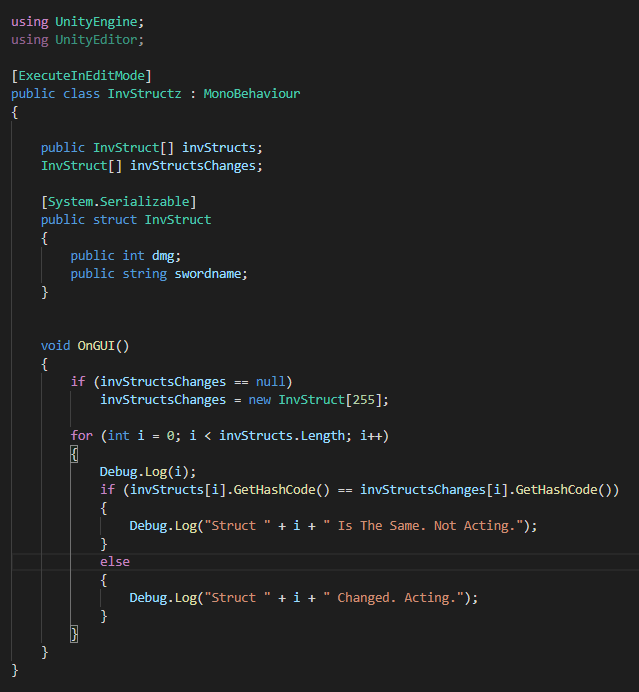
Im trying to create some files (action itself is not important) when Unity Editor detects change in data in inspector struct but this script thinks all the time that the struct has length of 0.
i have no idea about editor scripts. how to perform action when some inspector data changed?
https://i.imgur.com/LUunrF4.png
 waxen sandal
OnValidate or custom editors
Also those are the same since the autogenerated GetHashCode gets the hashcode for each field
And since the value are the same the hash code is the same
whole steppe
yeah i wanted it to act when value changed
waxen sandal
Actually you're not copying the whole array so you should have some changes
whole steppe
idk if it changes hashcode or not
waxen sandal
But I would use a propertydrawer
whole steppe
OnValidate helped, thanks. However
I get this errorIndexOutOfRangeException: Index was outside the bounds of the array. InvStructz.OnValidate () (at Assets/2 Inventory/InvStructz.cs:27)
waxen sandal
What's on that line?
whole steppe
if (invStructs[i].GetHashCode() == invStructsChanges[i].GetHashCode())
it doesnt know the length
of invStructs[]
(i set it in inspector)
 waxen sandal
Not sure
Should just work
You should attach a debugger
Or try to make a propertydrawer/custom editor
It'll be easier to figure out which element has changed
 hexed spire
how do i turn a custom struct into a serializedobject?
hexed spire
well then wtf how do i do the do
waxen sandal
You can only create serailizedobjects from UnityEngine.Object derived classes
What are you trying to do?
hexed spire
using a system close to ecs
waxen sandal
You probably want to get the SerializedObject of the parent class and use findproperty
hexed spire
i have a bunch of components i want to add to each of the items i wanna spawn in
and i made a custom editor to pick which components each item(scriptableObject) has
but idk how to assign values to each the components' variables
the components themselves cannot be serialized objects
waxen sandal
You can make a serializedobject from the scriptableObject and use findProperty on that
If that doesn't help it'd be hard to help without more information on how your architecture is laid out
I'll have to go to bed though so I can't help unfortunately
hexed spire
well frick
i have variables which i want to assign in the inspector which are contained in structs derived from ISpatialComponentSnapshot and a scriptable object for each item which contains a list of components
whole steppe
damn this is nice
now i can generate files
of my structs
(json files)
before clicking play...
and they will be automatically changed into Addressables
Thanks Navi
hexed spire
public class ItemData : ScriptableObject {
  public ISpatialComponentSnapshot[] components; //i have these (which are the snapshot struct listed below)
}
public struct Snapshot : ISpatialComponentSnapshot {
  public someDataType data;
}
[ExecuteInEditMode]
[CustomEditor(typeof(ItemData))]
public class CustomEditor : Editor {
  for(int i = 0; i < target.components.Length; i++)
  {
    //how the frick do i turn variables like "data" from a snapshot into a serializedproperty so i can assign it in the inspector?
  }
}
there
waxen sandal
What's ItemData
hexed spire
a scriptable object
hexed spire
with basic data like weight and size
waxen sandal
Okay, let me be quick
hexed spire
and a list of item-specific components to add
waxen sandal
You use this instead of target
Then do FindProperty to find the components array
Then you get this https://docs.unity3d.com/ScriptReference/SerializedProperty.html
And use this to get the individual element https://docs.unity3d.com/ScriptReference/SerializedProperty.GetArrayElementAtIndex.html
hexed spire
but how do i turn an ISpatialComponentSnapshot into a serialized object
that was my original question
waxen sandal
Why do you need to?
hexed spire
instead of target?
waxen sandal
Nono
Your CustomEditor has a field called serializedObject
Use that instead of target
waxen sandal
😄
waxen sandal
And you might want to consider using this https://sites.google.com/site/tuxnots/gamming/unity3d/unitymakeyourlistsfunctionalwithreorderablelist
Apuntes utiles de informatica
whole steppe
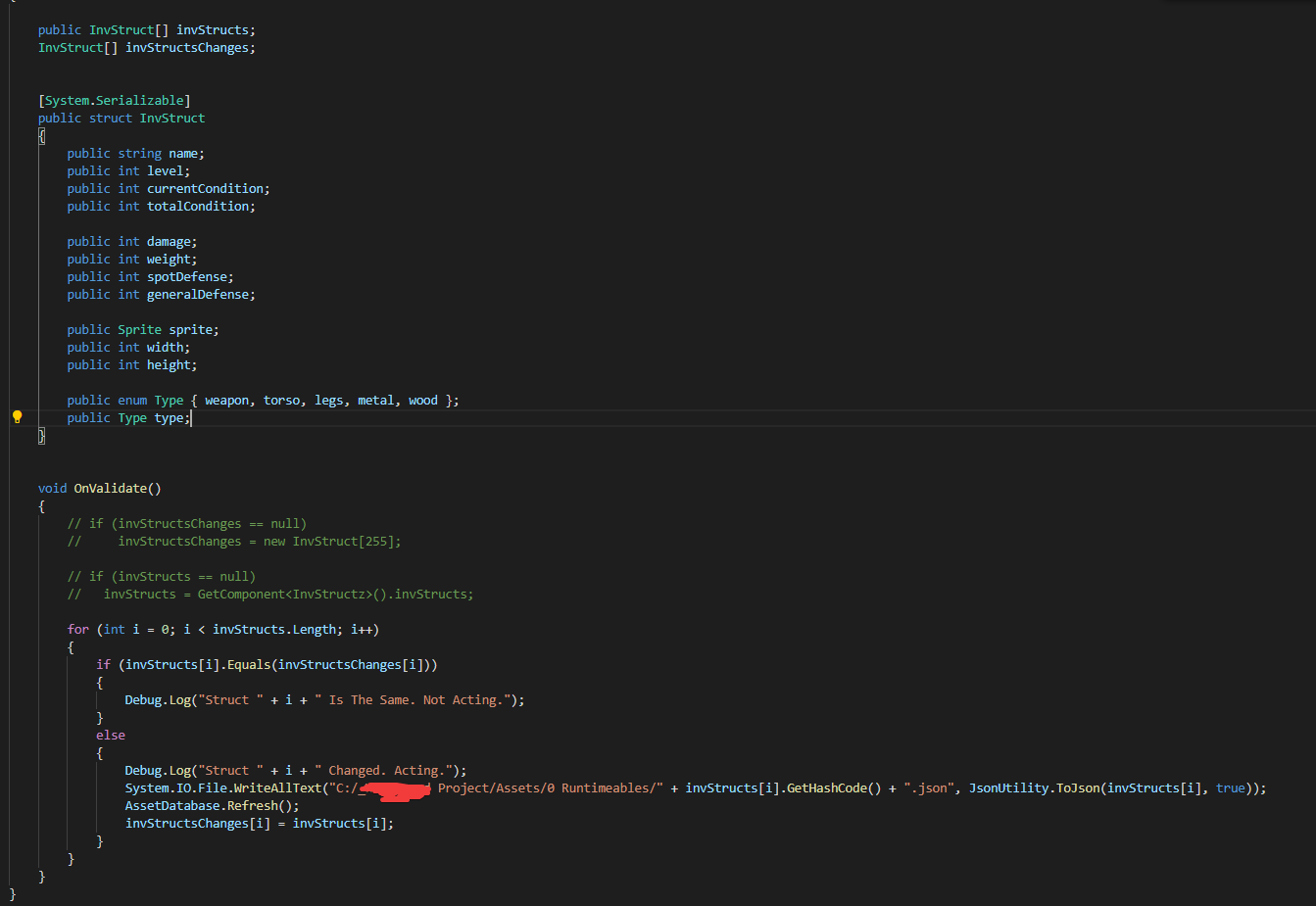
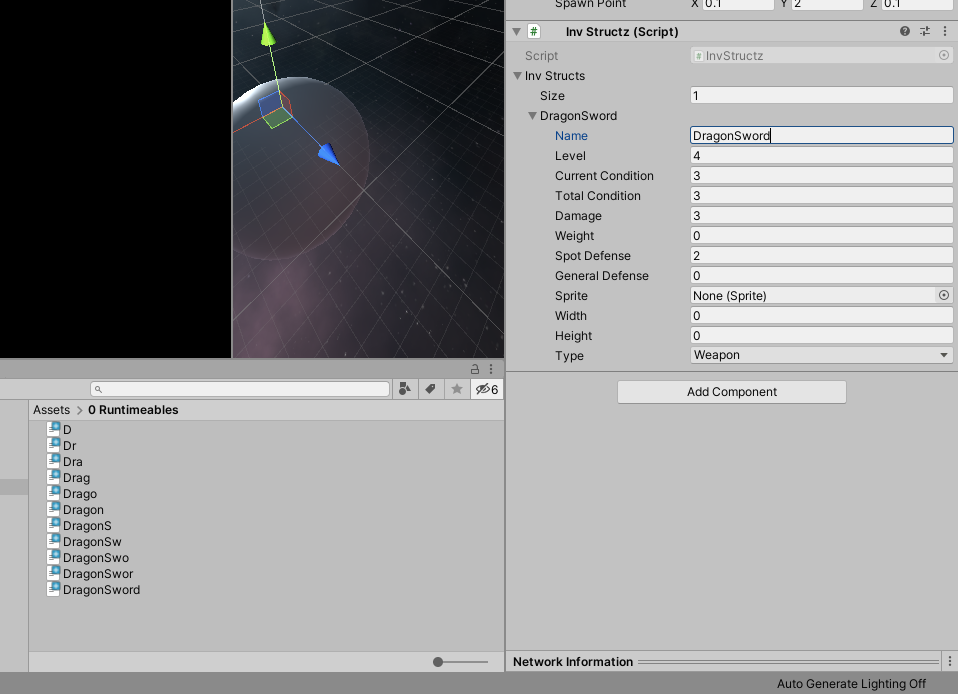
i have problem when i change name of item in inspector.. it creates another file and doesnt remove last (mind you they now spawn in different places cus filename changed)
i know i can store a path to previous file in that struct but that path strng would be useless forplayers.. so id rather not have it in struct. how would you do this guys? https://i.imgur.com/28XdqrA.png
 kindred walrus
Hi is there anyone who can help me about Playmaker extension?
How can i change the sprite of a game object from sprite renderer by using Playmaker?
hexed spire
@waxen sandal it's not working
(target as ItemData).components != null
but
serializedObject.FindProperty("components") == null
 twin ridge
Hey everyone! Having some trouble with an attribute drawer. Getting the "Getting control 1's position in a group with only 1 controls when doing repaint" error, but I'm pretty new to editor scripting, so have no idea why. This is the OnGUI method:
   public override void OnGUI(Rect position, SerializedProperty property, GUIContent label)
        {
            if (property.propertyType != SerializedPropertyType.Boolean)
            {
                EditorGUILayout.HelpBox("The <color=blue>MethodButtonInvoker</color> attribute must be assigned to a boolean value!", MessageType.Warning);
                return;
            }

            EditorGUI.PropertyField(position, property, label);

            if (!property.boolValue) return;

            var __owner = property.serializedObject.targetObject;

            var __methods = __owner.GetType()
                .GetMethods(BindingFlags.DeclaredOnly | BindingFlags.Public | BindingFlags.NonPublic | BindingFlags.Instance);

            for (var __i = 0; __i < __methods.Length; __i++)
            {
                var __method = __methods[__i];
                var __attribute = __method.GetAttribute<MethodButtonAttribute>();
                if (__attribute == null) continue;

                if (GUILayout.Button(__method.Name))
                {
                    __method.Invoke(__owner, new object[] { });
                }
            }
        }
And this is all there is to it. My idea is to make an attribute that, if present in a method, will create a button to invoke it via inspector. Can somebody help me out? Thanks!
hearty cypress
animation clips extension is .anim. What are the extension for atlas and sprite? .spriteatlas and .sprite?
 native imp
.png? Isnt sprite information just stored in the meta?
split bridge
Are there some docs on an api for AssemblyDefinition files I'm missing? This is all I've found so far: https://docs.unity3d.com/ScriptReference/Compilation.CompilationPipeline.html - my editor tool needs to add a reference to the asmdef - my current assumption is I have to write out json but checking here first in case there's an API I'm unaware of
split bridge
Cool thank you - do you manually parse the existing array of refs?
whole steppe
does onvalidate
trigger wherever u edit value in any script in inspector..
or only when inspecting object with that script?
waxen sandal
Yes @split bridge
 wild star
Is there anything obviously wrong with this code?
It should be drawing a box for every Layer changer, but I don't see any in editor
waxen sandal
Attach a debugger
wild star
I'll have to look that up
split bridge
@waxen sandal do you use guid's? If so, mind me asking how you get them? AssemblyDefinitionReferenceGUIDToGUID says it's not a guid reference if I pass it e.g. Packages/com.unity.textmeshpro/Scripts/Runtime/Unity.TextMeshPro.asmdef and google is returning hardly anything
Edit - my bad, it's in the docs - using AssetPathToGUID
waxen sandal
Exactly
waxen sandal
Has anyone figured out if it's possible to add extra package manager "filters"?
 simple urchin
Tip : Delete everything and install Atom. Make your life easier.
simple urchin
It's not a joke, just test it yourself
severe python
the text edtior?
 alpine sleet
Sorry about posting in the other channel, I did not realize I had changed channels.
Hello, I am writing a tool, but having trouble getting it to perform an action when a button is pressed. The Input never returns true. I can not find a way to do this in the editor docs though. So is this even possible?
waxen sandal
Input doesn't work in the editor
You can use Event.current
But a lot of keys combinations are already taken
alpine sleet
Thanks
 idle flower
Hey. This is not really an Editor Extension, I just need some help with a bit of editor code of mine. I generate a map with a button click inside an inspector of my MapGenerator component. The map is then created, and the generator sets a spawnPoint field of my WaveSpawner object to one of the objects that was generated.
Now the problem: when the game starts, the WaveSpawner seems to lose its reference to the spawn point. In fact, even my generator lost the reference to the spawn point (meaning it was not removed when I called "clear" anymore). I fixed it for the generator by adding the attributes [HideInInspector] [SerializeField] (it was a private field). However this doesn't work for the WaveSpawner, there the field is already public.
After the first start of the game, when the WaveSpawner lost the reference, I tried setting it again from code by calling a SetSpawnPoint method from a ContextMenu on my generator. This doesn't work either, the spawner still loses the reference. However, dragging the objects in manually seems to work (but only after I ran it for the first time)! What is going on here?
Sorry for the wall of text, I felt like that was needed to explain the problem properly. I'd be glad if anybody could help out with this.
visual stag
Source Code
Unity C# source: https://github.com/Unity-Technologies/UnityCsReference
Resources
API Versioner: https://ngtools.tech/ngunityversioner.php
IMGUI Debugger: https://gist.github.com/vertxxyz/203ee44a3f0b4eab2371c74b225ff4f5
Packages
Editor Coroutines: https://docs.unity3d.com/Packages/com.unity.editorcoroutines@latest/index.html?preview=1
GraphTools Foundation https://docs.unity3d.com/Packages/com.unity.graphtools.foundation@latest
Package Validation Suite: https://docs.unity3d.com/Packages/com.unity.package-validation-suite@latest/index.html?preview=1
Immediate Window: https://docs.unity3d.com/Packages/com.unity.immediate-window@latest/index.html?preview=1
Quick Search: https://docs.unity3d.com/Packages/com.unity.quicksearch@latest/index.html
Playable Graph Visualizer: https://docs.unity3d.com/Packages/com.unity.playablegraph-visualizer@latest
Search Extensions: https://github.com/Unity-Technologies/com.unity.search.extensions
Blogs
Custom Timeline Markers: https://blogs.unity3d.com/2019/06/25/how-to-create-custom-timeline-markers/
Talks
Prefab System: Slides 45 and onwards are a good resource for anything prefabs https://www.slideshare.net/unity3d/technical-deep-dive-into-the-new-prefab-system-123785944
YouTube
Graph View Tutorial https://www.youtube.com/watch?v=7KHGH0fPL84
IMGUI Resources
https://docs.unity3d.com/Manual/GUIScriptingGuide.html
https://github.com/Bunny83/Unity-Articles/blob/master/IMGUI crash course.md
https://blogs.unity3d.com/2015/12/22/going-deep-with-imgui-and-editor-customization/
Roadmap
Editor: https://resources.unity.com/unity-engine-roadmap/editor
Engineering: https://resources.unity.com/unity-engine-roadmap/engineering
Pipeline & Integrations: https://resources.unity.com/unity-engine-roadmap/pipeline-integrations
idle flower
Alright, thanks! That will help :)
The EditorUtility.SetDirty doc says it's only suitable for non-scene objects.
Can I just ignore that?
visual stag
Afaik, you can.
Though it does say
Use EditorSceneManager.MarkSceneDirty when modifying files within the Scene with no added undo entries.
I'm guessing that works too
idle flower
Okay, I'll check it out. Thanks again for the quick help.
visual stag
visual stag
**Source Code**
Unity C# source: <https://github.com/Unity-Technologies/UnityCsR...
idle flower
I noticed now that my solution was in the pinned messages. Sorry for not checking that before asking!
visual stag
It wasn't, I just made that pin right now 👍
idle flower
You made a new pin, but it seems there was a pin from 2019 with exactly my problem and the right solution. ;)
visual stag
I edited the old pin to reorganise the order (as discord doesn't let me do that)
idle flower
Oh, I see!
 gray pike
Hey. I want to call a method when the project opens up. [IniliazieOnLoad] is always called when assets are even imported. Any idea how to do this?
onyx harness
No no no, it's partialy true.
InitializeOnLoad is called upon a "domain reload" (Project start, compilation, play, stop, etc.)
If you want something to fire only once, use SessionState to prevent further calls.
It is the equivalent to EditorPrefs, but it lives only for the lifetime of the Unity process.
hexed spire
in my CustomEditor script, (target as MyClass).myVar != null but serializedObject.FindProperty("myVar") == null
why
hexed spire
its an interface
onyx harness
I guess you have your answer
hexed spire
well
onyx harness
I know that Unity recently improved their serializer
But I haven't touch it much, can't help you on this matter
hexed spire
is there any way to turn one into a serializedtype?
onyx harness
If the Inspector can't show it, it is probably not serializable
hexed spire
that's not even what i want tho
myVar is actually a struct derived from ISpatialComponentSnapshot (which is an interface) and contains a bunch of variable which i actually want to assign in the inspector
i just can't figure out how to turn values from myVar into SerializedProperties.
onyx harness
Does the inspector show it?
hexed spire
show what?
onyx harness
The struct
hexed spire
doesn't need to
onyx harness
It's a good indicator
hexed spire
i want things from inside the struct to show
i already have a system to get the struct
onyx harness
Use this to display all the available paths of your SerializableObject:
using System;
using System.Reflection;
using UnityEditor;
using UnityEngine;

public static class CSharpExtension
{
    public static void    OutputHierarchy(this SerializedObject so)
    {
        SerializedProperty    it = so.GetIterator();

        while (it.Next(true))
            CSharpExtension.PrintProperty(it);
    }

    private static void    PrintProperty(SerializedProperty it)
    {
        if (it.propertyType == SerializedPropertyType.String)
            Debug.Log(it.propertyPath + " " + it.stringValue);
        else if (it.propertyType == SerializedPropertyType.Integer)
            Debug.Log(it.propertyPath + " " + it.intValue);
        else if (it.propertyType == SerializedPropertyType.ObjectReference)
            Debug.Log(it.propertyPath + " " + it.objectReferenceInstanceIDValue, it.objectReferenceValue);
        else
            Debug.Log(it.propertyPath + " " + it.propertyType);
    }
}
now it's saying Extension method must be defined in a non-generic static class
where do i put that code?
hexed spire
not very
onyx harness
I updated the code above
hexed spire
well
myVar is not showing up
but what i wanted to do was smt like EditorGUI.PropertyField(target.myVar)
but i don't know how to turn target.myVar into a SerializedProperty
any idea how i could do that?
 sleek berry
Editor GUI question, can I invoke a Custom Drawer in such a way that it returns a VisualElement ?
onyx harness
@hexed spire Only if your struct is serializable. Without this, you just can't access it through a SerializedProperty.
sleek berry
There is a CreateInspectorGUI for making an Editor and a CreatePropertyGUI for a PropertyDrawer but how do you call one from the other
onyx harness
Hum... You usually don't create PropertyDrawer from Editor
sleek berry
Some context, I have a List<ISomeInterface> in a ScriptableObject. I'd like to make a custom editor for it to make it easier to configurate
but the concrete types of ISomeInterface will have different GUI's as well, likely implemented through a Custom PropertyDrawer
So I need some ability to invoke these
twin ridge
Is this the right time to set __shouldDraw?
 wintry granite
if i use pro builder can i not use navmesh agent bc i cant bake a surface
severe python
you can bake a navmesh on a probuilder built mesh
you'll need to set things up how its needed for baking though
wintry granite
oh so i cant just bake a navmesh
severe python
you just need to follow the same directions
 stoic thunder
@hexed spire you can do SerializeProperty
and then do serializedObject.FindProperty()
in OnEnable()
shadow violet
Is there a better way to keep a reference to a Editor window variable (object) when its reopened or when Unity recompiles scripts, other than storing a string reference to the assets path to EditorPrefs?
static string ammoPath

static void Init()
{
string ammoRef = EditorPrefs.GetString("PickupsAmmoRef", string.Empty);
 if (ammoRef != string.Empty) { ammoPickup = AssetDatabase.LoadAssetAtPath<GameObject>(ammoRef); }
}

private void OnGUI()
{
ammoPickup = (GameObject)EditorGUILayout.ObjectField(new GUIContent("Ammo Pickup"), ammoPickup, typeof(GameObject), allowSceneObjects: true);
EditorPrefs.SetString("PickupsAmmoRef", ammoPickup ? AssetDatabase.GetAssetPath(ammoPickup) : string.Empty);
}

[UnityEditor.Callbacks.DidReloadScripts]
    private static void OnScriptsReloaded()
    {
        //...
    }
This is just the relevant sections of the code to this issue, the editor window im building is to make it easier and quicker for the designer to place down the different item spawns in the game like ammo, health, etc
waxen sandal
To survive assembly reloads you can just make a serializedfiedl
For reopening you have to save to a file
shadow violet
Ah, alright thanks
gloomy chasm
I am using a genericMenu to add items to a reoderable list, but they are not getting added. Any ideas why?
Method called when generic menu item selected.
private void OnSelectAdd(object objMode)
    {
        PlayerModeBase mode = (PlayerModeBase)objMode;
        SerializedProperty modesProperty = serializedObject.FindProperty("_modes");

        modesProperty.InsertArrayElementAtIndex(modesProperty.arraySize);
        modesProperty.GetArrayElementAtIndex(modesProperty.arraySize - 1).managedReferenceValue = mode;
    }
I guess because the SerializedObject is not properly updated and applied.
gloomy chasm
This is the method that I am giving to the reorderable list's onAddCallback. I also tried putting serializedObject.ApplySerializedProperties() inside of that first method.
private void OnAdd (ReorderableList list)
    {
        GenerateMenu();
        _menu.ShowAsContext();

        serializedObject.ApplyModifiedProperties();
    }
Nope
The callback invoked by GenericMenu is out of this scope
Hum... I'm not even sure 100% of what I just stated
But it might be why
gloomy chasm
I was wondering if that was the case. But I am not sure how to fix the problem if it is the case.
onyx harness
I know GenericMenu blocks the input, but I still think the callback is being called outside this
Call Update() and ApplyModifiedProperties() inside your callback
gloomy chasm
Which callback? The reorderableList onAdd callback?
onyx harness
OnSelectAdd
gloomy chasm
Nope, nothing :/
onyx harness
Show me the code please
gloomy chasm
Here is the full Editor script https://pastebin.com/0Tt0Gr97
onyx harness
Call Update() and ApplyModifiedProperties() inside your callback
@gloomy chasm
I said Update & ApplyModifiedProperties, not only Update
That's the first point
The 2nd point is, Update() must be called before (It updates the C# representation from the C++ side), then you modify your data, you apply.
severe python
iiirc thats a bug?
onyx harness
Hum... Never seen this one before
What I would try, would be to defer the callback into EditorApplication.delay
Just to see if it might change something
severe python
if you do a google search for it I think you'll find info that the message is a bug with unity
onyx harness
Or, something more beautiful, send your Inspector an Execute event command, and do the change inside the Editor scope.
gloomy chasm
It seems that it is a bug. I will try updating to the newest 2019.3 version and see if it is fixed. It says it should be.
Thanks for the help. Will let you know if it is fixed in the newer version.
 solar basin
why do all the changes i set in my custom inspector script get reset when i press play?
menuManager.value for example defaults, instead of being however far i dragged the inspector slider, when i press play
visual stag
visual stag
dictionaries are not serializable
there are serializable dictionary implementations for Unity out there though that you can use
solar basin
reeeeee
why can't you serialise the stuff in your own Unity.Collections library either
visual stag
I don't care about versions tbh, if it doesn't exist in whatever Twiner's using then they should think about updating
onyx harness
I was talking about him
severe python
lol
cause I have a choice in the version i'm on
Im on whatever Risk of Rain 2 uses
which currently is 2018.4
hoping we can go to 2019, but there are barriers such as unet
thats unfortunate though
i wonder if I can dot hat in 2018 somehow
visual stag
unlikely
severe python
bleh, that means I gotta do il shenanigans
gloomy chasm
Update about the error I was getting yesterday. Updating to the newest 2019.3 fixed it.
gloomy chasm
Yep
severe python
nice
SerializedReference is win
I need to rebuild my entire graph arch with it because I can jsut make the whole thing a lot cleaner now
significantly less bs
 wispy delta
Is it possible to create a custom property drawer for a specific list or array type? I've made a property drawer
[CustomPropertyDrawer(typeof(List<TeleportCondition>))]
public class TeleportConditionDrawer : PropertyDrawer
{ ...
and am using the list in a component
[DisallowMultipleComponent]
public abstract class TeleportTarget : MonoBehaviour
{
  public bool alwaysFail = false;
  public List<TeleportCondition> conditions;
but the list is not drawn with my custom gui
 short tiger
I think you'd probably have to make a property drawer for List and Array (if that's even possible) and then check if the element type is what you want
wispy delta
ah darn
short tiger
Just making a custom editor for TeleportTarget is not an option?
Do you expect to use lists of TeleportCondition in other components?
wispy delta
that's what i was doing originally, but yea now I'm doing it on other components and don't really wanna make a custom editor for each one haha
do you think it because unity doesn't support having property drawers target generic or something?
i could always encapsulate the list in a class but ughhh
i guess that's the best option
short tiger
I think it's because List and Array are special types that Unity handles differently
wispy delta
gotcha
onyx harness
You can't
PropertyDrawer are only for element of a collection and not the collection itself.
Or you need to wrap the collection in a class.
As far as I recall, they made a change in the recent version concerning this thing if I'm not wrong, but it's not clear
wispy delta
Interesting - I'll skim the most recent blog posts to see if I can find anything.
onyx harness
@wispy delta https://forum.unity.com/threads/propertydrawers-for-easy-inspector-customization.150337/#post-1031443
A guy confirming my first statement
And just for the fun fact, it used to be able to draw for a collection. They made a change around 4.6 or 5.0 and prevented this behavior (with a nice changelog directed perhaps to me, as I poked them few times about PropertyDrawer and now they buttfucked me :D)
Me & certainly other people
wispy delta
haha damn!
waxen sandal
I tried a few weeks ago and I couldn't find anything about support being changed
I do recall that changelog
onyx harness
https://unity3d.com/fr/unity/whats-new/unity-4.3
Editor: PropertyDrawer attributes on members that are arrays are now applied to each element in the array rather than the array as a whole. This was always the intention since there is no other way to apply attributes to array elements, but it didn't work correctly before. Apologies for the inconvenience to anyone who relied on the unintended behavior for custom drawing of arrays.
@wispy delta @waxen sandal
waxen sandal
Huh, I thought I started slightly before 4.3 but I remember writing trying to write a property drawer to do it for each element
onyx harness
Good ol' days 😎
severe python
good is one way of describing it
I think those of us who've been using Unity since 3.5 should be given some major rewards, just sayin
onyx harness
The Medal of Honor you meant? 😄
severe python
Would anyone know why sometimes my mdbs include .dll in the name and othertimes they don't?
 faint whale
Hey guys, i have a little problem that i really don't understand.
I am new in Unity and an realy yound c# devlopper and as a challeng I wanted to do my first game.
I wanted wall run because why not.
I am using a timer with Time.deltaTime for wall run on my left and right.
And the deltatime on my right Wall Run script is not updating the same as the left one.
If you could help me it will be very cool because I really don't get it
My code ( is the same for the other script, and i am talking french sorry )
public class WallWalkingRight : MonoBehaviour
{
    public Transform wallCheck;
    public float wallDistance = 0.4f;
    public LayerMask wallMask;

    private IsGrounded isGrounded;
    private WallWalkingLeft wallWalkingLeft;

    public bool canWallRun = true;
    public bool allreadyWallRuned = false;
    public float timer = 0;
    private float timeToWallRun = 3f;

    void Start()
    {
        Debug.Log("Wall walking " + wallCheck.name + " ON" );
        isGrounded = GetComponent<IsGrounded>();
        wallWalkingLeft = GetComponent<WallWalkingLeft>();
    }

    public bool isWallWalkingRight()
    {
        // check si pas par terre et limite de temps wallrun
        if (timer < timeToWallRun && !allreadyWallRuned && !isGrounded.isGrounded() && Physics.CheckSphere(wallCheck.position, wallDistance, wallMask))
        {
            // timer here
            timer += 1 * Time.deltaTime;
            Debug.Log(timer);
            return true;
        }
        else if (!isGrounded.isGrounded() && !allreadyWallRuned && timer >= 3)
        {
            allreadyWallRuned = true;
            return false;
        }
        // reset
        else if (timer >= 3 && allreadyWallRuned && isGrounded.isGrounded())
        {
            allreadyWallRuned = false;
            timer = 0f;
        }

        return false;
    }
}
in my Player Mouvment script :
if (wallWalkingRight.isWallWalkingRight() && Input.GetKey(KeyCode.W) || wallWalkingLeft.isWallWalkingLeft() && Input.GetKey(KeyCode.W))
for short : the timer is not updating as the same rate as in the other script
ok so apperently derolling the if statment in the PlayerMouvement script fixed the bug, i don't really know why but yea
severe python
I'd suggest taking this to #💻┃code-beginner
faint whale
ok ok i take note
 distant bramble
need help with error
"Can't add script behavior AssemblyInfo.cs. The script needs to be derive from MonoBehaviour
onyx harness
And then?
distant bramble
i tried dragging the script into a gameobject and it showed that
the class of the script has the same name
onyx harness
Show us the script
It's not about the name, but about the class inside
You can't drop a script that is not deriving from a MonoBehaviour
The error is pretty explanatory
distant bramble
using UnityEngine;
public class CameraFollow : MonoBehaviour
{
public Transform player;    // A variable that stores a reference to our Player
public Vector3 offset;      // A variable that allows us to offset the position (x, y, z)

// Update is called once per frame
void Update()
{
    // Set our position to the players position and offset it
    transform.position = player.position + offset;
}
}
onyx harness
So... you have the class CameraFollow in the file AssemblyInfo.cs and you just said that they had the same name?
I don't understand
 fleet python
Hi all! I hope you are well, staying safe and enjoying the weekend
How do you change the font color and style of things drawn by EditorGUILayout.PropertyField() ?
I am trying to change things with a custom GUISkin or by modifying GUI.Skin or GUI.color but no luck... 😢
gloomy chasm
Have you tried GUI.contentColor?
gloomy chasm
Some one says that changed the default EditorStyles.label.normal.textColor = Color.blue; and it worked. But idk if that is a great idea...
fleet python
hmmm let me try
fleet python
Some one says that changed the default
EditorStyles.label.normal.textColor = Color.blue;and it worked. But idk if that is a great idea...
@gloomy chasm
THIS WORKS!
So EditorStyles is using a different GUISkin that the regular GUI.Skin?
waxen sandal
IIRC EditorStyles copies from the GUISkin
fleet python
but changing the GUISkin didn't seem to have an effect
or better said, it had an inconsistent effect
 tulip mantle
@Anyone ... Is there a way to override the title of the inspector object? I mean, I can place a header/label that displays anything I want ... but I want to edit the unity inspector header that never gets collapsed.
onyx harness
Sorry to be rude, but first of all, don't @anyone
And yes.
But you need to be more precise in your question
Because the Inspector Object is quite large
There is a many things generated when you inspect an Object
tulip mantle
@onyx harness ... @Anyone isn't a Discord flag like @ Every one ... so it doen't send anything to any members AFAIK ... but I'll stop if I'm wrong 😉
But let me be more specific to my question...
onyx harness
I know I know, but you are already in #↕️┃editor-extensions, if people are present and can help, they might come and help, no worry
tulip mantle
To change what it says...
tulip mantle
I assume there isn't a was as it is based on the class name itself. Looking...
onyx harness
You are right, it is based on an Unity API that provides "Title" from any Object
tulip mantle
The link looks like what I want ... i.e. the class name remains the same, just the displayed title is edited 😉
onyx harness
Yep, well the truth behind this is simply an illusion.
tulip mantle
I mean the class the inspector is tied to
onyx harness
I overdraw
tulip mantle
Yeah ... I just want to reduce the overhead of all my buttons :S
But in the example image ... I could have multiple duplications of this component for different things, animals, buildings, whatever. and at this point all I see is multiple listings of just the class name 😦
Which one is which?
onyx harness
Are you willing to completely remove it and just show the button?
severe python
@onyx harness that is a really neat editor extension
did you do it with imgui or uitoolkit
oh wow nice toolkit
onyx harness
UI Toolkit, remember when I ask you stuff? Well is was partialy for this :)
Thanks to you btw
In reality, it is still a mix of UI Toolkit and IMGUI
When dealing with events in IMGUIContainer, UI Toolkit behaves totally differently
severe python
well I'm happy I could help guide you!
its a great looking tool overall
・ 2018.4.16f1 <--- this makes me really happy btw
tulip mantle
@onyx harness ... I was thinking I could just display my title bar(the top-most black bar) and clicking on it toddles the other buttons on/off.
Or I could also move the buttons into the Setup area ... but that would leave two button rows 😦
onyx harness
Technically, you can put your black bar into the header Inspector
tulip mantle
@onyx harness ... [Header("My Header Title")] ???
onyx harness
Oh no no
There is no easy way
You have to inject yourself into the Unity Inspector
tulip mantle
@onyx harness ... Didn't think so 😉
onyx harness
From 2019.1 it is doable, since Unity from there starts using UI Element/Toolkit for its Inspector
tulip mantle
And I've got that version 😉
onyx harness
tulip mantle
Interesting... always something new to learn & master 😉
onyx harness
Don't give much attention to certain element in the Debugger
These are from my injection
But the one I highlighted, this is the one you are willing to "overdraw"
I don't know how you manage to change the title as you stated earlier, but this is the technique I used to do it
tulip mantle
// Display version information
string tVersion = string.Format(Version, RichTextColors[mop.TitleColor], mop.TitleText, ColorTextRT);
tContents = new GUIContent(tVersion, "Click to visit the 'DiGiaCom Tech' support website.");
if (GUILayout.Button(tContents, HeaderStyle))
{
    Application.OpenURL("http://games.digiacom.com/Unity/Assets/MassObject.pdf");
}```Like I said, it's already a button so I could just make it toggle the others on/off vs call my help page 😉
severe python
there is a way to change serialization names right?
I'm aware of FormerlySerializedAs, but is there one that works in reverse?
waxen sandal
I uhh what
split bridge
no way to do the reverse automagically afaik - if it's important I just write a bit of code that writes the old value into the new one and serialize everything before removing the old one
severe python
I need a field named name
but it needs to be a scriptable object
is there a way to serialize the name with tojson
split bridge
don't know - what happens if you just have public string name;?
severe python

What am I missing here that means my version number field doesn't update...
oh actually, any of my fields
onyx harness
Applying?
split bridge
.ApplyModifiedProperties()?
severe python
Oh
severe python
hmm
still doesn't work
I got it
serializedObject.SetIsDifferentCacheDirty();
also needed that
Is there a good way to reference asset bundles in the editor?
Ideally I can specifically build certain bundles with a manifest and identify their built location
 zinc venture
I can increase an array size from the inspector like this. But can I do this from code? I'm making an editor window to expand the array of my scriptable objects
gloomy chasm
If you are using serializedObject then you can easily mySerializedArrayProperty.InsertArrayElementAtIndex(...);
zinc venture
@gloomy chasm so I have to declare the array as system seriealizable?
[FoldoutGroup("Inventory")] public PurchaseCost[] purchaseCost```@zinc venture Nope, the SerializedProperty handles both arrays (int[]), and lists as 'array'.
zinc venture
I have this in the Scriptable object
    void SetItemData()
    {
        if (item.purchaseCost.Length == 0)
        {
            item.purchaseCost.InsertArrayElementAtIndex(...);
        }
        else if (item.purchaseCost.Length > 0)
        {
            item.purchaseCost[0].amount = upgradeCost;
            item.purchaseCost[0].currency = currency;
        }
    }
this is in my editor window
gloomy chasm
Is it a standalone editor window, or a custom inspector?
zinc venture
custom inspector sorry.
so basically. I have this:
that is my item SO
then...
I'm trying to change it from my inventory SO
gloomy chasm
I guess in the example code you could just do.
if (item.purchaseCost.Length == 0)
{
    item.purchaseCost = new PurchaseCost[1];
}
LOL
that worked
wth man I wasted 2 hours on this...
fml
@gloomy chasm thanks a lot!!
gloomy chasm
I once spent 3 hours troubleshooting a problem only to realize that I had forgotten to reset a list :P
No problem.
zinc venture
@gloomy chasm 🤣 I feel you
 sullen helm
what does const mean here and whats the difference between a normal variable and this? just wondering (im pretty new)
onyx harness
"const" is a C# keyword, defining the member as constant, immutable, something that you can't modify at all.
A "member" of a class/struct is either a field, property or a method (including constructor/destructor)
sullen helm
okay sorry if im asking too much but could you show a example for const var and a normal var and the differences even if you cant i still appreciate the help
sullen helm
thank you
onyx harness
It is useful for constant stuff like PI (3.14), or I don't know, the fall gravity (9.81)
Something that can't not change
sullen helm
i know this question is coming out of nowhere but if someone tried to modify the game and tried changing the const value it wouldnt allow it or is it just for the programmer to make things easier
onyx harness
Like, a normal human has 2 legs, 2 ears, 2 eyes, 1 nose, etc. Stupid example, but I hope you understand
It can't be changed at runtime
sullen helm
Okay
onyx harness
The value is written at compile time. Which means hardcoded
To modify it, it implies a lot of stuff
But you should really not worry about these kind of questions
As you barely understand programming for now, focus on doing your thing, make it work
Worry about security or optimization later, way later 🙂
sullen helm
Alright thank you i really appreciate the help
onyx harness
Also, this is not the appropriate channel for such question 🙂
#💻┃code-beginner is more suitable
sullen helm
you too 👍
 dusky plover
Is there maybe an attribute that can be used to tell a field to ignore any custom property drawers that exist for it and be drawn in its default state?
onyx harness
nope
But you can make it I would say
Just write DefaultDrawerAttribute or whatever you want
And in OnGUI draw using the default drawer
 cloud hill
I'm using the UILineRenderer extension and am running into an issue. I have a method that, on begin, moves the first point and on move, updates the second point. So the line draws. However, the start and end points don't line up to where I'm touching on screen. Is there some type of mapping I need to match the UI canvas size and where I touch on the screen?
 lyric thunder
Hopefully a simple one:
I've made a script that I can run during runtime to generate a tank from parts, depending on drop-downs in the UI. I've just realised this would be helpful to have in the Editor, so I can generate them and place them in scenes.
Are there any decent guides on how to do this?
waxen sandal
As long as you can call that method from the editor it should just work
Keep in mind that you'll probably have dirty/register undo on the objects you modify
But if you just spawn them in the scene you can just do https://docs.unity3d.com/ScriptReference/SceneManagement.EditorSceneManager.MarkSceneDirty.html
lyric thunder
It's the "calling it from the editor" I'm unsure of.
The line is public void CreateTank(Vector3 spawnPosition, TankyBody basePart, TankyMobility mobilityPart, TankyParts[] attachParts)
So I'll need another script to take values from dropdowns in the Editor. But I've not touched Editor UI before.
waxen sandal
Right
Is this part of a monobehaviour or scriptableobject?
If so you can use property drawers or custom editors
lyric thunder
The parts are all ScriptableObjects, held in another one in an array. The script is a MonoBehaviour.
waxen sandal
So your monobehaviour has references to the scriptable object?
If so, you can just make a custom editor for the monobehaviour
gray pike
Hey. I wanted to ask if there is a way to reference JSON file or any txt file that lives outside of the project in Editor Window? Or I should try to make my own ObjectField that allows me to do such thing?
waxen sandal
I'd just use a filedialog
gray pike
thanks i did not know about it.!
severe python
If i have a package and I want to read a flat text file from that package, how do I find the file
gloomy chasm
Unless you know the path, I think you would just have to search each directory for it.
waxen sandal
IIRC you can use AssetDatabase.FindAssets in Packages/
Path.GetFullPath returns the fully qualified path to your package, even if it's not in development mode
 wooden haven
Does Unity allow users to modify the code for built-in components?
waxen sandal
No and wrong channel #💻┃code-beginner is the proper channel
severe python
oh good call navi
 tired oriole
are there any good examples of custom editors that use structs with get/set in them?
tired oriole
so I can't do PropertyFields for the get/set, only for their backing fields?
I'm just starting this so I wanted to look into some proper implementations to study but I'm not sure where to start in that regard
waxen sandal
Correct
tired oriole
would you know any projects or pages that serve as good introductory content?
hexed spire
public class SomeClass : ScriptableObject {
  public OtherClass otherClass; //which is set to DerivedClass or some other derivative of OtherClass
}
public class DerivedClass : OtherClass {
  public DataType someVariable;
}
[CustomEditor(typeof(SomeClass))]
public class SomeClassCustomEditor : Editor {
  public override void OnInspectorGUI() {
    serializedObject.FindProperty("otherClass") != null
    //but
    serializedObject.FindProperty("otherClass").FindPropertyRelative("someVariable") == null //how do i get this?
  }
}
Sounds like it's not a serializable class. Unity does not support serialising polymorphism without [SerializeReference]
visual stag
If that is a ScriptableObject (which does support polymorphism) you will need to make a new SerializedObject (as it is not serialised inline)
visual stag
Then you need to use [SerializeReference] on your otherClass variable. I'm not very familiar with it as it's fairly new though, so I can't say more than that
 cosmic patrol
why i can't use String.Empty in a simple inspector dropdown
this is humiliating
yet they exist
oh wait
yes the truth is that i cannot have a simple String.Empty (empty field), but I am trying to workaround it
Lol i did it
if (objectiveTitles[currentQuestTitleIndex] == " ---------- ")
{
    prop.stringValue = String.Empty;
}
But I had to add both " ---------- " and String.Empty to the list which is funny (because only the first appears in it), I added both so my script doesn't think that those lines of code mean a change in the list .
 wild dragon
Hello? I'm trying to program a custom editor, but I am running into an issue atm. When I the attached script, if it's on a prefab, the object resets to whatever the prefab's values are on runtime.
waxen sandal
You're probably not dirtying your object or using serializedproperties
wild dragon
they are appearing in the inspector, so I think they are serialized unless I'm missing something. As for dirtying ... that's new to me.
waxen sandal
Right
So to show something in the inspector to have to be serialized
But you need to interact with them in a special way as you're talking to the serialized representation rather than the object directly
You can talk with the serialized representation using serializedobjects and serializedproperties
You can also do a more hacky way that basically tells unity to update the serialized representation using the object
Which is dirtying the object
But then you need to handle things yourself like Undo support
wild dragon
like a reset button?
wild dragon
ah
waxen sandal
I'm not sure what your code looks like but if you wrote a lot of code then it's probably easiest to just do EditorUtility.SetDirty(object)
Also, your object in the scene probably resets as well but you're probably spamming ctrl+s a lot 😛
wild dragon
It's not that much code but if you'd like I can DM the important scripts to you if you'd be willing to take a look.
waxen sandal
Eh, that doesn't matter mcuh
There's some tutorials out there about serializedproperties that you should look up
 acoustic beacon
For some reason when I generate the geometry it only gives geometry for the torso
severe python
is there a way a GameObject can be modified to be the same as another GameObject?
waxen sandal
Uhh
There used to be a trick to make it part of the prefab and revert it
But I don't think that's allowed anyore
severe python
Is there a way to build multiple different assetbundle manifest inside a single project?
 warm summit
how add item in this menu?
visual stag
By using https://docs.unity3d.com/ScriptReference/MenuItem.html
"GameObject/3D Object/Foo"
warm summit
lol
 blissful burrow
oh, I was just about to ask about something related to this
when creating unity's objects from the top menu, it creates it in root
when right clicking a GO in the hierarchy, it creates it as a child of that object
does anyone know how to replicate this behavior?
(without some hack like add as child to selection because that's not what Unity does)
oh hm just found a MenuCommand thing
the plot thickens
waxen sandal
Isn't it the context of the command?
waxen sandal
Sweet
short tiger
GitHub search is really bad in comparison or I don't know how to use it properly
waxen sandal
If you press T you can at least properly search on file names
blissful burrow
it doesn't search file names by default, it's weird
 minor herald
Does anyone know how bindings work for lists and arrays in UIElements?
https://docs.unity3d.com/Manual/UIE-Binding.html
Or is that something that is currently not possible with UIElements?
minor herald
Shame
Oh right I can take a look at visual templates maybe that will give me some idea on how to tackle my problem
severe python
You can bind anything afaik
And lists and arrays work the same, right now all through serializedproperty
If you look at itemscontrol in visual templates you can see how I handle bindings for it
minor herald
hmm my class is not derived from Object so I can't use SerializedObject
This is my current implementation:
public static void BindDataToElement(VisualElement root,object data)
    {
        foreach (FieldInfo fieldInfo in data.GetType().GetFields())
        {
            root.Query<BaseField<bool>>().ForEach(e =>
            {
                if(e.bindingPath == fieldInfo.Name)
                {
                    e.value = (bool)fieldInfo.GetValue(data);
                    e.RegisterValueChangedCallback(f =>
                    {
                       fieldInfo.SetValue(data, f.newValue);
                    });
                }
            });

            root.Query<BaseField<float>>().ForEach(e =>
            {
                if (e.bindingPath == fieldInfo.Name)
                {
                    e.value = (float)fieldInfo.GetValue(data);
                    e.RegisterValueChangedCallback(f =>
                    {
                        fieldInfo.SetValue(data, f.newValue);
                    });
                }
            });

            root.Query<BaseField<string>>().ForEach(e =>
            {
                if (e.bindingPath == fieldInfo.Name)
                {
                    e.value = (string)fieldInfo.GetValue(data);
                    e.RegisterValueChangedCallback(f =>
                    {
                        fieldInfo.SetValue(data, f.newValue);
                    });
                }
            });
        }
    }
It's probably not the best way to do it
So if I give a visual elements binding path the value listName{0} it would grab the first item in the list?
severe python
that I'm not sure about, but your approach here seems to make sense other than that its uni-directional
if the data in the FieldInfo changes you won't be notified to update your BaseField
minor herald
Thanks
I will think about it some more
 elfin karma
How can i make a Custom Property Drawer with UIElements?
this
        public override VisualElement CreatePropertyGUI(SerializedProperty property)
        {
            // Create property container element.
            var container = new VisualElement();


            var targetProp    = property.FindPropertyRelative("targeting");
            var elementProp   = property.FindPropertyRelative("element");
            var componentProp = property.FindPropertyRelative("component");
            var delayProp     = property.FindPropertyRelative("delay");
            var offsetProp    = property.FindPropertyRelative("offset");
            var nextProp      = property.FindPropertyRelative("next");

            // Create property fields.

            var targetField    = new PropertyField(targetProp);
            var elementField   = new PropertyField(elementProp);
            var componentField = new PropertyField(componentProp);
            var delayField     = new PropertyField(delayProp);
            var offsetField    = new PropertyField(offsetProp);
            var nextField      = new PropertyField(nextProp);

            // Add fields to the container.
            container.Add(targetField);
            container.Add(elementField);
            container.Add(componentField);
            container.Add(delayField);
            container.Add(offsetField);
            if(nextProp.arraySize > 0)
                container.Add(nextField);

            return container;
        }
results in this
tired oriole
I might be mistaken, but aren't you creating one property GUI and shoving 20 things into it?
gloomy chasm
UIElement property drawers only work if the inspector they are in is using UIElements
elfin karma
what i want the property drawer to do is to hide the Next list when it's empty
I'm using the normal inspector window
gloomy chasm
By default the inspector does not use UIElements to draw components.
You need to make a custom editor for each component type you want the propertydraw in.
[CustomEditor(typeof(MyMonoBehavior))]
public classs MyMonoBehaviorInspector : Editor
{
    public override VisualElement CreateInspector()
    {
        return base.CreateInspector();
    }
}
iirc you need to do that for each MonoBehavior that you want your property drawer to show up in.
At least until they fully move the Inspector over internally to using UIElements.
elfin karma
ok
the same thing with EditorGUI
public override void OnGUI(
    Rect               position,
    SerializedProperty property,
    GUIContent         label
)
{
    //var indent = EditorGUI.indentLevel;
    //EditorGUI.indentLevel = -10;
    // Using BeginProperty / EndProperty on the parent property means that
    // prefab override logic works on the entire property.
    EditorGUI.BeginProperty(position, label, property);
    EditorGUILayout.PrefixLabel(label);
    //EditorGUILayout.Space();
    var targetProp    = property.FindPropertyRelative("targeting");
    var elementProp   = property.FindPropertyRelative("element");
    var componentProp = property.FindPropertyRelative("component");
    var delayProp     = property.FindPropertyRelative("delay");
    var offsetProp    = property.FindPropertyRelative("offset");
    var nextProp = property.FindPropertyRelative("next");
    EditorGUILayout.PropertyField(targetProp);
    EditorGUILayout.PropertyField(elementProp);
    EditorGUILayout.PropertyField(componentProp);
    EditorGUILayout.PropertyField(delayProp);
    EditorGUILayout.PropertyField(offsetProp);
    if (nextProp.arraySize > 0)
        EditorGUILayout.PropertyField(nextProp, true);
    EditorGUI.EndProperty();
}
results in this error
and no solutions ive found for that error have worked
I'm using EditorGUILayout because when i add it while the inspector is already visible, it almost looks how it should
and without, there are alot of issues with indentations
onyx harness
You are not suppose to use Layout in a properly drawer
It provides you a Rect, use it
 odd helm
Assets\scripts\PlayerMovement.cs(43,46): error CS0117: 'Time' does not contain a definition for 'deltatime'
what is the problem?
elfin karma
that
public override void OnGUI(
    Rect               position,
    SerializedProperty property,
    GUIContent         label
)
{

    EditorGUI.BeginProperty(position, label, property);
    position = EditorGUI.PrefixLabel(position, GUIUtility.GetControlID(FocusType.Passive), label);
    var targetProp    = property.FindPropertyRelative("targeting");
    var elementProp   = property.FindPropertyRelative("element");
    var componentProp = property.FindPropertyRelative("component");
    var delayProp     = property.FindPropertyRelative("delay");
    var offsetProp    = property.FindPropertyRelative("offset");
    var nextProp      = property.FindPropertyRelative("next");
    _yOffset = 0;

    var targetRect = new Rect(position.x, position.y + _yOffset, position.width, 18);
    _yOffset += targetRect.height;
    var elementRect = new Rect(position.x, position.y + _yOffset, position.width, 18);
    _yOffset += elementRect.height;
    var componentRect = new Rect(position.x, position.y + _yOffset, position.width, 18);
    _yOffset += componentRect.height;
    var delayRect = new Rect(position.x, position.y + _yOffset, position.width, 18);
    _yOffset += delayRect.height;
    var offsetRect = new Rect(position.x, position.y + _yOffset, position.width, 18);
    _yOffset += offsetRect.height;
    var nextRect = new Rect(position.x, position.y + _yOffset, position.width, 18 * (6*nextProp.arraySize+2));
    if (nextProp.arraySize > 0)
        _yOffset += nextRect.height;
    EditorGUI.PropertyField(targetRect, targetProp);
    EditorGUI.PropertyField(elementRect, elementProp);
    EditorGUI.PropertyField(componentRect, componentProp);
    EditorGUI.PropertyField(delayRect, delayProp);
    EditorGUI.PropertyField(offsetRect, offsetProp);
    if (nextProp.arraySize > 0)
        EditorGUI.PropertyField(nextRect, nextProp, true);
    EditorGUI.EndProperty();
}
produces this:
and it doesn't react to the list being expanded/collapsed
Assets\scripts\PlayerMovement.cs(43,46): error CS0117: 'Time' does not contain a definition for 'deltatime'
@odd helmTime.deltaTime
odd helm
thx
Assets\scripts\PlayerMovement.cs(42,27): error CS0019: Operator '+' cannot be applied to operands of type 'float' and 'Vector3'
and that ?
elfin karma
You need to specify what part of the vector you want to add it to
elfin karma
What part to you want to add the float to?
odd helm
what is the best script for a player movement ?
onyx harness
@elfin karma from the code I read and the result I see, it seems perfectly fine
elfin karma
How can i make it look like this?
odd helm
someone know a good way to learn unity i am a beginner and i want a good way plz
 pastel spruce
This is not the appropriate channel for your questions @odd helm. Use #💻┃unity-talk instead. That said, refer to https://learn.unity.com/ for where to start
elfin karma
now when i collapse the Next list, inspector keeps the same height, how do i fix that?
i can't use the return value of the PropertyField because includeChildren is set to true
onyx harness
Your get height property, you must change it accordingly
elfin karma
but how can i get the state of the foldout?
onyx harness
Is Expanded
elfin karma
there is no IsExpanded on EditorGUI.PropertyField
onyx harness
In the SerializedProperty
elfin karma
I dont't think this is supposed to happen
this is my GetPropertyHeight function
public override float GetPropertyHeight(SerializedProperty property, GUIContent label)
        {
            return _yOffset + (_showList?_listHeight:18);

        }
help plz : UnassignedReferenceException: The variable playerBody of MouseLook has not been assigned.
You probably need to assign the playerBody variable of the MouseLook script in the inspector.
UnityEngine.Transform.get_localRotation () (at <e98ed0368295432e8c11e52d6243ee11>:0)
UnityEngine.Transform.Rotate (UnityEngine.Vector3 eulers, UnityEngine.Space relativeTo) (at <e98ed0368295432e8c11e52d6243ee11>:0)
UnityEngine.Transform.Rotate (UnityEngine.Vector3 eulers) (at <e98ed0368295432e8c11e52d6243ee11>:0)
MouseLook.Update () (at Assets/MouseLook.cs:26)
what is the problem here?
and how can i fix it ?
elfin karma
i fixed the previous problem, it was just some code positioning, and added a foldout to show/hide the whole property drawer, but property drawers inside the list in the property drawer all respond when i expand/collapse one of them. whats the problem?`
the foldout in OnGUI:
_foldout = EditorGUI.Foldout(foldoutRect, _foldout, label);
if (_foldout)
{
    EditorGUI.PropertyField(targetRect,    targetProp);
    EditorGUI.PropertyField(elementRect,   elementProp);
    EditorGUI.PropertyField(componentRect, componentProp);
    EditorGUI.PropertyField(delayRect,     delayProp);
    EditorGUI.PropertyField(offsetRect,    offsetProp);
    if (nextProp.arraySize > 0)
        EditorGUI.PropertyField(nextRect, nextProp, true);
}
GetPropertyHeight:
public override float GetPropertyHeight(SerializedProperty property, GUIContent label)
{
    return _foldout? _yOffset  : base.GetPropertyHeight(property, label);
}
how can i fix that?
elfin karma
thanks
 radiant sinew
any reason why the component disable button is gone
the toggle to enable and disable the component
visual stag
it needs either a Start/Update/FixedUpdate/LateUpdate/OnEnable/OnDisable
radiant sinew
oh yeahhhhhhhhhh
dann bruh
it wont show the button if it doesnt have any of those implemented
completly forgot thanks
 sterile lake
Hey guys, If any of you has knowledge or can direct me to a tutorial / guide on creating a Selection Window, will be really appreciated.
what I want is being able to open a Window that list all objects that I've made in a certain database and be able to select and return it to the one that opens it.
ex. An enemy which I need to put Item/s it can drop.
Sorry for my bad explanation.
elfin karma
How can i make Int, Float and Vector3 fields that work both in runtime and in editor windows?
waxen sandal
Huh?
elfin karma
I think i found a solution to it
elfin karma
I need something like EditorGUILayout.EnumPopup, EditorGUILayout.IntField, EditorGUILayout.FloatField and EditorGUILayout.Vector3Field, that works in both EditorGUI and Runtime GUI
elfin karma
im using this https://github.com/Seneral/Node_Editor_Framework to make a Node Editor to create Spells in my game, and i want it to work both in an editor window and in runtime

GitHub
A flexible and modular Node Editor Framework for creating node based displays and editors in Unity - Seneral/Node_Editor_Framework
i technically dont need it to work in an editor window, but it's nice to have
minor herald
Maybe take a look into UIElements? @elfin karma
I believe Unity 2020 supports both runtime and editor UIElements
elfin karma
Im using Unity 2019 because alot of stuff breaks when upgrading to Unity 2020, so im waiting until it's out of beta
pretty much all my scriptable objects break in Unity 2020
but I'm trying out this framework now, and it uses UGUI for runtime https://github.com/Siccity/xNode

GitHub
Unity Node Editor: Lets you view and edit node graphs inside Unity - Siccity/xNode
wispy delta
I'm working on a component for overriding arbitrary material properties with a material property block. I've got it working pretty well, but I can't figure out how to differentiate between int and float properties, so I have to display ints as floats. I'm using the ShaderUtil class to find all properties on the renderers materials, but ShaderPropertyType only has color, vector, float, range and texture :P
Unity does know the difference since it has to draw a material inspector tho, so I'm curious if there's a workaround
waxen sandal
I'm assuming you look at the editors for those materials?
short tiger
@wispy delta That looks cool, do you plan on sharing it?
I would try looking at how Unity draws the default material editor
wispy delta
@waxen sandal I'm drawing and serializing the property overloads myself, but I'd love to offload it to Unity!
@short tiger I'd love to share, but I'm making this at work, so I'll have to ask. Yea I'll look into how the material editor draws stuff, maybe I can hijack it
waxen sandal
I mean the custom editors that Unity uses internally
gloomy chasm
Was about to suggest looking at the Unity code for the material inspector. maybe it will show how they do it.
waxen sandal
Those might have soe secrets
Otherwise you can try tweeting at Aras, he seems to know these random things
wispy delta
Gotcha, thanks!
gloomy chasm
Also, ObjectNames.NicifyVariableName for your entries will make them look nicer if you want that.
waxen sandal
Actually
I don't think they know https://github.com/Unity-Technologies/UnityCsReference/blob/master/Editor/Mono/Inspector/MaterialEditor.cs#L1470

GitHub
Unity C# reference source code. Contribute to Unity-Technologies/UnityCsReference development by creating an account on GitHub.
They just write a custom editor if they need it I think
 fathom glen


 tired oriole
When serializing data, is there a way to ignore properties based on certain criteria? In my case, I'm storing data on xml files but at some point I'd like to ignore 'default' data
severe python
I believe the answer is yes
it sounds like you're doing some custom serialization though, you're using XML, care to explain further?
tired oriole
I'm using the default serializer at this point, but in the future I want to clean it up as 80%-90% of what I'm serializing is default data.
So as long as it's doable I can use the default serializer for now and implement a custom serializer/deserializer later
severe python
You can use iserialiazationcallbackreceiver to modify how serialization works
sleek berry
What is the most efficient way to get all ScriptableObjects of a certain type loaded?
I tried AssetDatabase.FindAssets("t:MyScriptableObject") But this takes a massive 50ms for a nearly empty project. Allocates a lot as well.
This is on AssetDatabase V2 with 2019.3.7
split bridge
I think Resources has a method that takes a type? Though I wouldn't be surprised if it was even slower. Please report back if you find a more optimal way.
waxen sandal
Resources.FindAllAssetsOfType<T> iirc
sleek berry
Correct
However this only loads the "loaded" types
For example if my active editor scene has a reference to 2 of the 3 instances of this ScriptableObject, it will only find those 2, and not the 3rd
However I need all 3
onyx harness
Your first request is taking 50ms, what about if you repeat? Does it take 50ms again?
sleek berry
I've not really tested that. I'm using this to do some pre-processing when the editor enters play mode
Having a quick look at it, it seems to just iterate over every single asset in my project, and return what matched the "search" query
But that by default includes all packages used in the project
Changing the search to AssetDatabase.FindAssets("t:MyScriptableObject", new[] { "Assets" }) cut the time in half to 25ms
Of which almost all time was my own code, not the FindAssets itself
split bridge
I know it's not that directly helpful but a couple of thoughts - 1) if you have full control over the SOs and need fast references they can add themselves to a e.g. master SO OnEnable perhaps? and 2) sub assets are sometimes handy - at least I tend to use them quite a lot for grouping.
sleek berry
I could, but I dont think the extra complexity and bookkeeping is worth it.
Without the Assets filter the AssetDatabase.FindAssets alone takes 37ms. With the filter it is 2ms
Thats kind of insane
split bridge
yea I had no idea about that - handy to know
sleek berry
It seems to not really have a method of querying the asset "database"
looking at the code it literally iterates over every single asset, in all folders and packages (including dependencies)
and filters out everything that doesnt match the search string
split bridge
so where does the search start without the Assets filter? Does it go through all the packages or something too?
sleek berry
There is also a big difference in garbage. 165.6KB without the filter, vs 3.2KB with the filter
Yes without the filter it goes through everything
split bridge
odd because when you search in the project window it defaults to Assets right? good to know
waxen sandal
You can also search in packages
split bridge
yes, just observing they don't have the same defaults but I guess it makes some sense
onyx harness
Without the
Assetsfilter theAssetDatabase.FindAssetsalone takes 37ms. With the filter it is 2ms
@sleek berry Because it might sound confusing, but AssetDatabase is not working on Assets/, but at the root of your project
Hence your your timing, nothing surpring in there
What you can try, is to call AssetDatabase.GetAllAssetPaths(), check files ending with ".asset" and is your required Type
sleek berry
@onyx harness What I did not expect is that it also goes through all assets in packages
And that the "database" doesn't actually have some sort of smarter indexing. But searches by iterating over all assets.
onyx harness
This operation is not suppose to be supa heavy
You do it once, and then cache the result.
If you detect a change in the project, you clear the cache, and do it again
I don't understand why it is such a concern 🤔
severe python
While in the editor is there a way to find the Application.dataPath value for a specific platform?
I'm trying to resolve the Managed library directory from the location of a games Executable
onyx harness
Only from the current platform you are working on afaik
waxen sandal
^
 torn pecan
Whats the best way to get started with custom inspectors?
onyx harness
Have a target/aim/objective, do it
severe python
Use Unity 2020+ use UIToolkit and UIBuilder and
onyx harness
I've seen so many people here asking for a good tutorials/learning site
severe python
write minimal code
onyx harness
That I am really willing to write something one day
severe python
they really need to get the new binding framework built out
torn pecan
Was just curious. Last time I tried I had sooo many issues with serialization
waxen sandal
That's because you're trying to fight the system rather than go along with it
torn pecan
Probably
severe python
yeah it sounds elitist but its reaqlly not and its not really something to be ashamed of,
onyx harness
Serialization is a serious topic, that needs good knowledge prior to fully master it
severe python
I seriously recommend using UIToolkit if you're working in Unity 2020 or greateer
onyx harness
But once you understand it, nothing is hard afterward
torn pecan
I am using 2019
@onyx harness I dont remember exactly, but I think my issues were because I was trying to have some data in the editor that I did not include in the monobehaviour
onyx harness
The context plays a lot, with just that, I can't really help you much
severe python
hmm does 2019 have uitk inspector supprot?
I don't remember when it got introduced
onyx harness
But come back here when you have some, several people covering different fields in this specific channel should be able to help you out
2019.1
If i remember correctly
even before
severe python
not before
onyx harness
but Inspector received its revamp in 2019.1
onyx harness
UI Element and UI Toolkit are the same right?
severe python
yes
onyx harness
And I have my UI Debugger in 2018.4
severe python
UITK/Elements is In 2018.4
but support for inspectors isn't
I'm using it for my project settings for example
onyx harness
severe python
and I can use it for custom editors
onyx harness
but support for inspectors isn't
@severe python Yep yep, it got revamped in 2019.1
torn pecan
UIElements is the new IMGUI?
severe python
don't sully UIElements name by making its history tied to IMGUI like that! :p
but yes, its the new UI system for Unity edit and runtime gui
torn pecan
Oh nice
severe python
its a xml based system that takes inspiration from HTML/CSS/JS and XAML/WPF/C#
merges them into what I see as a beautiful hybrid, assuming they get their binding right, it may be one of the best UI systems ever made (in my personal opinion)
severe python
yeah, the runtime support isn't complete yet, but the whole thing isn't complete yet
what they have already is absolutely excellent, but its missing some key features which they've promised
torn pecan
Alright. So I wont use it yet 😛
severe python
I'm comfortable assuming they will get those pieces in
binding is a pretty big game changer for it, right now Edit time stuff has binding, runtime stuff, has something like binding?
they are looking to make a unified binding system
torn pecan
Finally they got some modern UI going
severe python
Yeah it's great not fighting layout
severe python
is there a way to check the current editor version? I could have sworn there was
onyx harness
Application.unityVersion
severe python
of course its a string!
onyx harness
of course its a string!
@severe python I guess you are more looking forUnityEditorInternal.InternalEditorUtility.GetUnityVersion()
severe python
eh, I have to use FileVersionInfo to get the game version, I'm just doing a version comparison to throw at users
I imagine I can't use that without reflection
onyx harness
It's public
severe python
why is it called UnityEditorInternal...
onyx harness
It is not intended for public use
Therefore not documented
And might change without notice
severe python
yeah I'll use the documentated approach hopefull that will be fine