#↕️┃editor-extensions
1 messages · Page 54 of 1
 fervent jacinth
managed to fix it somehow
added to Assets\Editor\GeneratedAtlas
the generated atlases
and added the folder Assets\Editor\GeneratedAtlas to collabignore
so it won't go to neither the build nor collab
 left gate
can you cancel the closing of a utility window
When the user presses the x button bring up a dialog box asking if they want to save, or cancel - on cancel dont close
The same behaviour as if you click the x on unity's main window
 onyx harness
Nope
left gate
Well that sucks
 outer kraken
you could use OnDestroy inside the editor window, this won't make you able to cancel closing, but you can ask if the changes should be saved or not
@left gate
left gate
That's the reason I'm asking unfortunately, it's getting more and more complex setting the window back up
 marble mantle
Maybe not totally the correct channel but a question for you all. Does anyone use any kind of tooling for generating documentation around your custom classes? I'd like to find some automated fashion to ensure its always in sync.
 waxen sandal
@marble mantle Like a website?
marble mantle
In my mind yes but im more interested if anyone here does anything like that and what solution they are using.
waxen sandal
We're doing that yeah
There's a bunch of applications that let you generate documentation from DLLs
I think there are even a few that generate it directly from your source code
marble mantle
I haven't yet found a need to package as a DLL. But are you using XML or something to comment the code and it's reading that?
waxen sandal
Oh yeah, XML comments are the standards
Unity generates DLLs from your code to use it
They're located in your library folder
marble mantle
Ah ok. Mind if I ask what you are using?
waxen sandal
Sandcastle iirc
marble mantle
Ty, going to give it a look
waxen sandal
It's a bit of a hassle you need to tell it which DLLs to use
Which are only available after Unity generates them
waxen sandal
So you need set up some CI server that opens Unity, forces DLL generation, and then run sandcastle to build the documentation
marble mantle
:highfive:
Aw sad news. Sancastle is abandoned. No more updates
Ah but there is a fork! https://github.com/EWSoftware/SHFB

GitHub
Sandcastle Help File Builder (SHFB). A standalone GUI, Visual Studio integration package, and MSBuild tasks providing full configuration and extensibility for building help files with the Sandcast...
waxen sandal
Yeah that's what we use
Not sure why
It doesn't seem that great imo
But not my choice
marble mantle
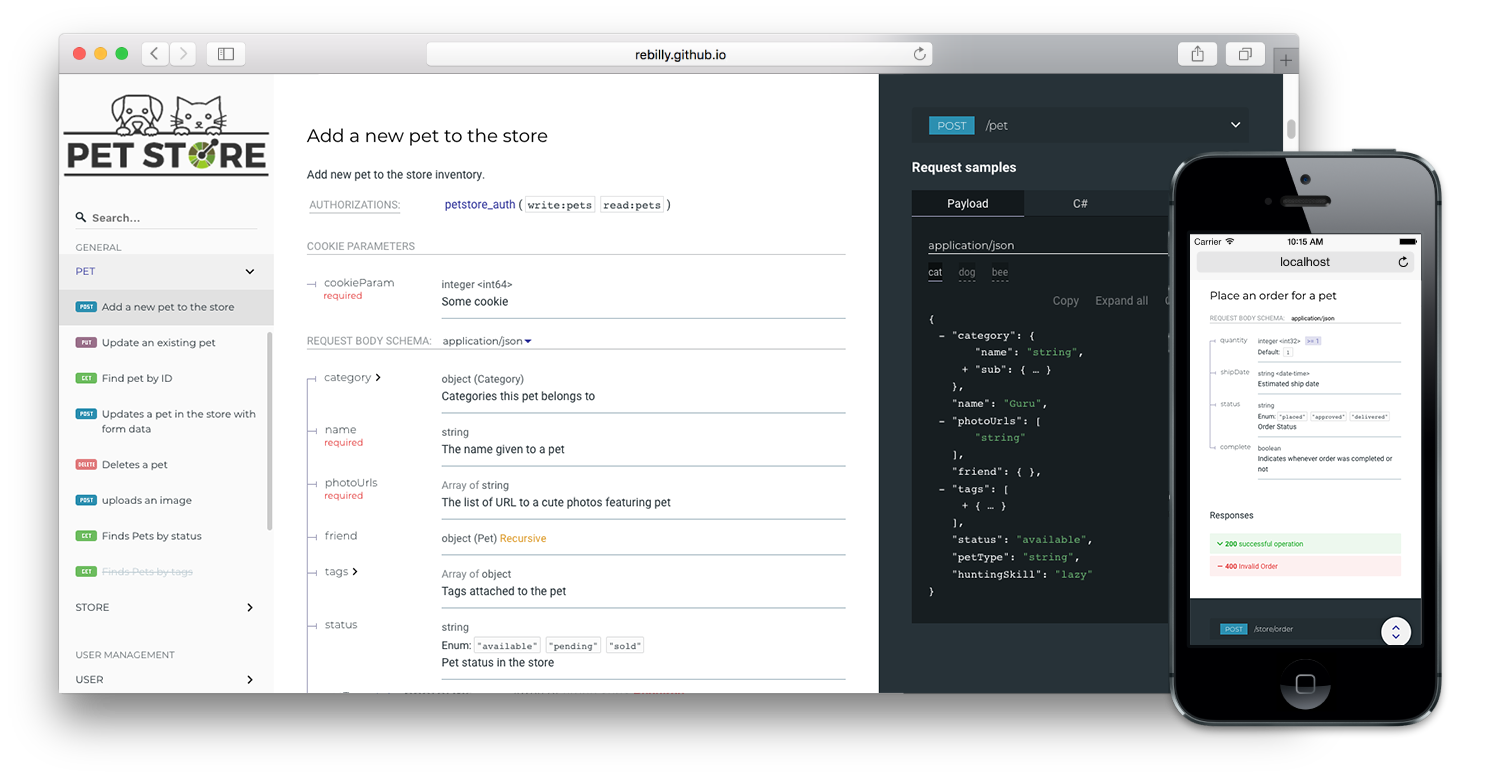
There are such good options out there for REST APIs.
Example of what I wish worked for C# https://github.com/Redocly/redoc
 waxen sandal
There's docfx which already seems a lot better than SHFB https://dotnet.github.io/docfx/index.html
And officially supported by microsoft
doxygen is another
marble mantle
Oh sick. Thanks.
left gate
@onyx harness restorying layouts and stylings
onyx harness
And what is bothering you? @left gate
 austere nest
Does anyone know how to access the "clicked/unclicked" boolean value of the Maximize On Play in the Game window from script? This value is apparently not the same as "gameWindow.maximized".
onyx harness
"Apparently", why is that?
austere nest
just apparently because that's what it seems through trial and error, and I'm new to editor scripting so I didn't know
Looking through the Editor's source code, I see the value I'm interested in in the PlayModeView class, but it's unfortunately an internal class.
https://github.com/Unity-Technologies/UnityCsReference/blob/e5f43177f856c5f5bfe8537c9ab6f92425fdcc3b/Editor/Mono/PlayModeView/PlayModeView.cs#L103-L107
I don't suppose there's any way around this to read the value?

GitHub
Unity C# reference source code. Contribute to Unity-Technologies/UnityCsReference development by creating an account on GitHub.
 visual stag
You can use reflection to read internal values
onyx harness
Oh shit, read it wrong, you talked about Maximize On Play, not Maximized, of course they are different
visual stag
You can also do some sly things like finding editor windows of that type and then using SerializedObjects/Properties to read serialized values.
austere nest
Oh I have the EditorWindow reference already, how do I get the serialized properties from that?
onyx harness
new SerializedObject()
Going through an SO is a bit overkill on my opinion.
You can do:
var p = editorWindow.GetType().GetProperty("maximizeOnPlay");
p.GetValue(editorWindow);
Okay I'm close, but for some reason I don't see PropertyInfo.GetValue() where it only takes a single argument as input, even though I do see that in the C# documentation...
onyx harness
set null to the 2nd argument
austere nest
thanks, let me try that
Awesome, that worked! Thank you guys so much for your help!
waxen sandal
Is there a grid layout thing in UIElements?
 steady crest
not by default to my knowledge
I usually use the odin one. but you could probably make one using horizontal and vertical
steady crest
Can I change the build version when I compile and make a build in the pre-build event? it seems to be read-only...
I wanna automate a build version and show it on the menu of my game
lets say I have current version 0.1-dev and when I build I want that to be 0.2-dev
waxen sandal
What are you using that lets you version unity builds?
Oh there's a setting in playersettings
steady crest
yeah thats the one I am using, but its read only.
Ideally I would like a window that pops up before the actual build happens, but I have no experience with this. except taht I know about prebuild events
waxen sandal
I did a grid!
You gotta make a scroll view then a child that has flex-direction: row; flex-wrap: wrap;
 dim walrus
Any way of calling Gizmos outside of OnDrawGizmos?
 shrewd nimbus
You have a few options. Debug.DrawLine / DrawRay. And Graphics.DrawMesh, but that one will render in the gameview as well.
dim walrus
I need more stuff from Gizmos like the draw cube
Graphics would be the last solution but i was wondering if there was something like Handles.BeginGUI() for Gizmos
steady crest
why do you need them outside of the OnDrawGizmos method? @dim walrus
dim walrus
I'm making an editor tool and don't have any kind of access to that method from an editor window afaik
steady crest
this answer seem promising https://answers.unity.com/questions/58018/drawing-to-the-scene-from-an-editorwindow.html?_ga=2.5814515.1313569929.1579525208-1051136690.1570779407

Unity is the ultimate game development platform. Use Unity to build high-quality 3D and 2D games, deploy them across mobile, desktop, VR/AR, consoles or the Web, and connect with loyal and enthusiastic players and customers.
dim walrus
Yep that's another option but Handles seems to be really bad performant
Was trying to check if with gizmos i can get better performance
waxen sandal
Pretty sure gizmos is just handles behind the scenes
steady crest
that sounds like a thing. might wanna doublecheck but im pretty sure
 shadow moss
I can't seem to find how to create an addressable from an editor script
Anyone know how?
 bold chasm
Hey guys. I created a Unity plugin some time ago. It kinda started growing and more and more people started contributing to it. It's an open source editor extension which expands the number of attributes that Unity provides. I wanna share it with you. Feel free to contribute to it and spread the word. If you like it, I'd really appreciate if you'd give it a star. The more people know about it the better.
https://github.com/dbrizov/NaughtyAttributes

GitHub
Attribute Extensions for Unity. Contribute to dbrizov/NaughtyAttributes development by creating an account on GitHub.
onyx harness
What's the point of having Packages & ProjectSettings in the repository?
Also, as you are targetting Unity 2018 & later, you should have followed this layout:
https://docs.unity3d.com/Manual/cus-layout.html @bold chasm
bold chasm
Didn't know about the layout. I can easily fix it. As for the Package & Project Settings - there is a upm branch that has only the needed assets. It should be imported through the upm branch. You can also import it through the asset store.
waxen sandal
@onyx harness So you can checkout the whole repository and easily work in it
onyx harness
@waxen sandal But this model is obsolete. I am probably not going to create a project specifically for this repo.
I rather import it in a dev/prod project and use it right away, and if I need to modify it, I'll change it on the spot. Not open a parallel project, change it, then backport all the changes
waxen sandal
There's a branch for the package manager if you just want the package
onyx harness
This is more or less how the Package Manager is handling the matter
Yeah dbrizov said it, good to know
 tough cairn
@bold chasm what an absolute banger, thanks for sharing mate
 hallow swan
is there any chance anyone knows if its possible to create an editor window that will create Scriptable objects for me? I have a spell SO that is just used to store a few variables and an audio clip and i just need an editor window that has all the required inputs a create button and would save the SO to a preset folder and use the name specified in the window as the file name
 grand robin
@bold chasm Thanks for making NaughtyAttributes I found out about your asset early into the production of Vacation Simulator and convinced the team it was worth bring in it - It's a great way to quickly add some editor tools to a prototype, Hope you're happy to know you've made it into our credits 🙂 https://youtu.be/TYmokYjSjJQ?t=1180

👑Thank you so much for watching our videos👑
Become a Member TODAY to unlock AWESOME STUFF
https://www.youtube.com/channel/UCitsvZeConV2Im24BVFH8hg/join
We love getting letters and fan art. SEND IT TO-
videogamenewscontact@gmail.com or https://twitter.com/VGNRISE
⭐...
grand robin
@hallow swan
The easier way to create a Scriptable object is to just add a CreateAssetMenu attribute to the class.
[CreateAssetMenu(fileName = "Example", menuName = "Data/Example")]
The other way to do it is to write that window.
https://pastebin.com/CVwRcDwF
 hallow swan
@grand robin thanks I shall have a crack at the example
 stuck cargo
is there any chance anyone knows if its possible to create an editor window that will create Scriptable objects for me? I have a spell SO that is just used to store a few variables and an audio clip and i just need an editor window that has all the required inputs a create button and would save the SO to a preset folder and use the name specified in the window as the file name
@hallow swan ye that Works
Just make a Button and a field for the editor Window
And then there is something like "crrste Asset" or so
I can dig you the Code Up when i am at Home. But should be solveable for you
What i did was create a scriptable object template as an .txt file. And replace a placeholder for the code i want it to do or name Changes etc
And on creation, copy paste that code and rename to .cs
This can then be instantiated Into the Asset Browser
 cedar reef
This is #↕️┃editor-extensions, that's more of a #💻┃unity-talk question
 eternal monolith
moving there then!
 rose geode
i wanted to discuss Unity's new input package. Is this channel an appropriate place for that?
okie dokie. I asked in the general chat. Thanks!
 gloomy chasm
Does anyone know of a generic version of the VFX graph? I have been working on my own. But getting fields to show correctly with ports have become a massive pain.
So I guess if you know how to do that, that would be great too.
 mossy tree
Hey everyone! Could anyone point me to a good place to learn C# along with Unity for absolute beginners who haven't even used Scratch before?
Please mention me in your reply 🙂
Any tutorial will do but when it comes down to it a video tutorial would be best
visual stag
This isn't the right channel for this sort of question. But, there are resources pinned to #💻┃unity-talk that are appropriate @mossy tree
mossy tree
Thanks, I thought I was in #💻┃code-beginner my bad!!
steady crest
I have some editor code running from a few buttons with an OnValueChanged event attached (custom) how do I force redraw the scene when a change is made
i think my viewport isnt updating
dim walrus
Not sure if it works but try SceneView.RepaintAll
steady crest
is that under the editor namespace?
dim walrus
Yep
steady crest
damn
    [SerializeField, OnValueChanged("UpdateTile"), EnumToggleButtons]
    private TileType _type = TileType.NONE;

    private void UpdateTile()
    {
        Mesh tileMesh = GenerateTile();
        gameObject.GetComponent<MeshFilter>().mesh = tileMesh;
        gameObject.GetComponent<MeshCollider>().sharedMesh = tileMesh;
    }
I dont have an editorscript, these drawers are from Odin btw
dim walrus
What about the game window
steady crest
when the game is running it works. Is that what you mean?
visual stag
just add a preprocessor if
visual stag
Are you trying to actually save these as changes too?
steady crest
yeah, its a tilemap generator, basically what I am doing is generate a tilemap and have an enum with an onvaluechanged to change the tile type
visual stag
I would probably do:
Mesh tileMesh = GenerateTile();
var meshFilter = GetComponent<MeshFilter>();
var collider = GetComponent<MeshCollider>();
#if UNITY_EDITOR
UnityEditor.Undo.RecordObject(meshFilter, "Updated Mesh");
UnityEditor.Undo.RecordObject(collider, "Updated Mesh");
#endif
meshFilter.mesh = tileMesh;
collider.sharedMesh = tileMesh;```Something like that
steady crest
these objects will both be predefined rooms for a dungeon generator and part of them will get carved from a script to connect the rooms. so it has to be runtime and editor script
oh like that
that actually sounds logical
well damnit, every time I recompile the script it just instances a new tilegrid...
thx @visual stag that solved it, I did have to repaint the scene as well for it to update tho (but adding it to the undo stack was a good idea)
visual stag
you should probably destroy old meshes and Undo.CreatedCompleteObjectBlah or whatever it is
there's a lot to manage when creating native things 😛
steady crest
generating a new tile on the mesh local variable and replacing the scene reference will let it get handled by the GC wont it 😄
or should I manually clear out that mesh because I no longer need it somehow?
@visual stag
steady crest
oh damn, just with DestroyImmediate or is there something more to it?
visual stag
Yeah, that
steady crest
alright, thx I will do that
visual stag
It's why Unity is giving you the error in your prev screenshot 😛
steady crest
oooooh
I was still looking for why that was lol guess you found it before I even asked xD
hmm what do I destroy tho. I should probably make it a private member so I can delete it before I call GenerateTile() right? @visual stag
visual stag
The old meshes
steady crest
yeah I dont store a reference cuz i thought making it local would clean it up for me
I should just store the mesh as a datamember and overwrite it instead of creating a new one every time probably
    [SerializeField, OnValueChanged("UpdateTile"), EnumToggleButtons]
    private TileType _type = TileType.NONE;
    private Mesh _mesh;

    private void UpdateTile()
    {
        DestroyImmediate(_mesh);
        _mesh = GenerateTile();
#if UNITY_EDITOR
        UnityEditor.SceneView.RepaintAll();
#endif
        gameObject.GetComponent<MeshFilter>().mesh = _mesh;
        gameObject.GetComponent<MeshCollider>().sharedMesh = _mesh;
    }
that should do it
right? @visual stag
visual stag
you're not serialising it so that'll just disappear
and you should probably be null checking it before you destroy it
if you know that the mesh filter will always have a generated mesh on it you can always retrieve the old one via .sharedMesh
steady crest
oh yeah I should for sure do a null check woops
It will, because we are generating the meshes dynamically. when they are generated we strip the unused mesh tiles from the scene
should probably generate the mesh templates in a class and store them for sharedMesh. now Im just creating a mesh for every tile. I can re-use meshes since the grid generation ones are all the same
 molten sierra
Hello, I'm looking for a tool for game designers or non-programmers in my team to easily modify game data (in an RPG, like ability damage, mana cost, cooldown, item price, character max hp, move speed...) with little to no knowledge of programming. Something like an XML editor but maybe prettier, easier to use, more UI-drag-drop-ish...
Please recommend a software or directions to make one. Any help is much appreciated!
waxen sandal
Not the right channel
But there are tools that load from google sheets
That might be what you want
Not sure how they handle building the data into your game
I'm assuming that on build the data is converted to local
molten sierra
Yes a tool to load from google sheets would be nice too.
Though I'm looking for something more, like a Unity editor extension.
If there is something already made for that purpose on Asset Store I'd like to take a look, but I don't know the keyword to search for it.
steady crest
molten sierra
Thanks for the link! Looking great, I think I can learn from it to make a tool for my game.
 trim tendon
Is it possible to use AssetDatabase to add a dependency from one object to another?
I ask because I modify Sprites with information from a particular ScriptableObject; while the Sprite does not directly reference the ScriptableObject, it should be updated when the ScriptableObject is.
onyx harness
The only reference possible between Object is a direct reference.
I don't know what you define by "information", but it might not be a strong dependency
trim tendon
I have a custom palette-swap shader. I pre-process sprites by replacing all colors with their index into a palette
onyx harness
So the "information" is a color?
onyx harness
One color or a full palette, the "information" remains the same
It's not a real reference
trim tendon
It's likely that I'm not explaining this well
 cloud wigeon
Has somebody here already created a custom node for the vfx graph? I am currently looking into it but just cannot get it to work. Am am trying to build a custom VFXOperator and using Shader.SetGlobalFloat from another script to set the value. Any help would be highly appreciated
visual stag
You'd probably be better served by asking in #✨┃vfx-and-particles @cloud wigeon
cloud wigeon
I'll try, it's not really an art&creative topic though so I thought my chances of success are higher here
 ancient sable
Hello, I have found myself creating a text editor window. I am attempting to now create a function which will insert a string where I have placed my cursor in a EditorGui.TextArea.
I found that there is Currently a publicly accessible class named TextEditor which is much older versions contained a public value which indicates cursor position in text. However I can not find that value in Unity 2018. I do find a lot of other publicly accessibility values but none do the job i need. Do you know of a solution ?
ancient sable
I am,just using string.Insert(index, 'c'); where index would be the position of the cursor, the character count up until the blinking cursor
 digital yew
Hey guys! Throwing a long shot here, but worth the try. Has anyone tried to modify the Alembic importer? We need to transfer 4 uv channels, but the current importer only allows 2. Anyone has tried something along those lines?
 feral karma
I modified USD, GLTF and FBX exporters/importers (all for different reasons), but not Alembic yet. Usually it's just a matter of finding the right place in the code (and whether the missing stuff is in native side or C# side), and then duplicating with the right channels
For example, seems that Scripts/Importer/AlembicMesh.cs:31 is one of the places where uv0 and uv1 are declared and where you could add uv2 and uv3 (and then in all the places where uv0/uv1 are referenced)
Then, when going through that, you'll find you need stuff like "aiMeshSummary.hasUV0" where you need to go to the native side, change stuff in C++ (but same copy-paste style, no need to know C++) and recompile the DLLs. (seems to be in Source/abci/Importer/aiPolyMesh.h and aiPolyMesh.cpp).
And so on. BUT do your research first and figure out whether Alembic even supports that at the core level, otherwise you might just hit a wall.
ancient sable
Does anyone know where I can fine a GUIStyle.GetCursorStringIndex example ?
dim walrus
In the input field class for the UI that's called the "caret", maybe you want to check for that
Unity is the ultimate game development platform. Use Unity to build high-quality 3D and 2D games, deploy them across mobile, desktop, VR/AR, consoles or the Web, and connect with loyal and enthusiastic players and customers.
ancient sable
Thanks, i will check out caret.
That is the exact same solution I found but the public values used in that solution are no longer available
 grim monolith
Is there any preprocessor for ios build support module? I don't want
using UnityEditor.iOS.Xcode;
To prevent from compiling if the module is not installed
 severe python
just wrap the using statement in an #if directive on the appropriate IOS build directive
so, UNITY_IOS
that page should contain all the information you need
I actually didn't fully know the answer before responding, I knew that you could block out different chunks of code for different build targets using preprocessor compiler directives, but not if there was a built in directive for IOS.
So I searched on bing for "Unity only build for IOS directive"
grim monolith
That's not if the module is installed, that's if the building platform iOS is selected.
severe python
if you're not setup for IOS it won't be compiled
if you don't have the module installed, you won't be setup for IOS and thus it won't be compiled
is there a reason you need to detect a difference between the build and the module state?
grim monolith
Yes, for settings for a cloud build system. All I need is to check if the computer where the editor is running have the module installed so that the editor have access to UnityEditor.iOS.Xcode
severe python
Just to clarify, you have code you need to compile in the editor when it is possible for you to compile that code because the module is installed, and that code is somehow related to deploying to and running a cloud build system which may not be building for IOS
hmm
grim monolith
I have build settings that I need to apply for the cloud build system (frameworks, capabilities, etc.). I do not want to have to switch the project to ios platform just to be able to set the settings since that takes forever.
severe python
Have you checked the projects compiler directives after installing the module?
it may add a compiler directive, I'm not sure about that, I'm not aware of anything that does that either
An alternative would be to build a layer between Unity and the cloud build server that lets you not have to install/use the module to setup the cloud services
though tbh, It seems an unusual requirement in the first place
 lucid ridge
hey, I have a script with a serialized field (Material)
and at runtime I add it to a newly created gameobject, but the material is reset
it say "default reference will only be applied in edit mode", so that understandable
what can I do to set my field to a default value ?
(When I select my script https://i.imgur.com/3KNUz8N.png)
 steady crest
I have a tile system that I use to generate prefabs. I want to make this into an editor window. Is there a way I can make hexagonal tiles in an editorwindow and have them act as buttons or am I trying something too ambitious?
steady crest
Rephrasing my question. Can I get sprites drawn in an editor window with hexagons and make them click able as such. Effectively creating custom shapes for button in the editor.
Alternatively, can i read the tiles from a hexagon tile map 2d and use this to generate a 3d version of the tiles I placed
 dull summit
Anyone here know anything about Monodevelop/Visual Studio 2019 for Mac?
visual stag
@dull summit This channel is about extending the editor. Though, VS ships with Unity and you can add it as a module to an install if you're missing it. Monodevelop hasn't been supported for ages.
dull summit
I'm not sure where to post my question. But for some reason Visual Studio doesn't have the Unity namespaces. Looks like it's missing a framework, or some addition to the framework library.
visual stag
in Unity make sure Edit > Preferences > External Tools > External Script Editor has Visual Studio set correctly
dull summit
It is.
But when I go to edit things in Visual Studio, it says the namespace is missing. I've uninstalled, reinstalled everything (even Unity) about 4 or 5 times now and it keeps having the same problem.
I'm guessing the mono library isn't getting updated/reinstalled/deleted and that's what's causing the problem.
I don't know for sure.
Was hoping I could get some guidance.
visual stag
You might be missing the .net frameworks? https://dotnet.microsoft.com/download/visual-studio-sdks I think you just need 4.7.2
Though I'm not sure how all that works on mac
dull summit
I would imagine that Unity would install those when installing Visual Studio in general.
I'll look into it some more. Sorry to bother you guys.
 rustic belfry
How do i detect left clicks in scene view so that i can then make it perform some other function?
gloomy chasm
@steady crest As far as I know (and after some googling), there is no way to have none rectangle buttons in the editor.
I am not sure what you mean about making a 3D version, but that should be possible (depending on what you are wanting to do)
 rich marlin
New to Editor scripting, could use some guidance. I'm currently trying to make an Editor window for my dialogue system so I can create and modify dialogue modules in editor and save them to an XML file. I have the serialization/deserialization stuff sorted out, but I'm having issues just getting the initial list of DialogueModules to show up in the inspector. My base Dialogue class which stores the list of modules doesn't inherit from Monobehavior or ScriptableObject. Here's what I have at the moment:
[CustomPropertyDrawer(typeof(Dialogue))]
public class DialogueEditorUI : PropertyDrawer
{
    public override void OnGUI(Rect position, SerializedProperty property, GUIContent label)
    {
        EditorGUI.BeginProperty(position, label, property);
        position = EditorGUI.PrefixLabel(position, GUIUtility.GetControlID(FocusType.Passive), label);
        EditorGUI.PropertyField(position, property.FindPropertyRelative("dialogueModulesUntagged")); //this returns null

        EditorGUI.EndProperty();
    }
}
public class DialogueManager : EditorWindow
{
    public Dialogue dialogue = Dialogue.GetDialogue();

    [MenuItem("Window/Dialogue Manager")]
    public static void ShowWindow()
    {
        DialogueManager dialogueManager = GetWindow<DialogueManager>("Dialogue Manager");
    }

    private void OnGUI()
    {
        GUILayout.Label("[...]", EditorStyles.boldLabel);
    }
}
[System.Serializable]
[XmlRoot("Dialogue")]
public class Dialogue
{
    [SerializeField]
    public List<DialogueModule> dialogueModulesUntagged = new List<DialogueModule>();
    private static Dialogue _instance;
[...]
    public static Dialogue GetDialogue()
        {
            if (_instance == null)
                _instance = new Dialogue();
            return _instance;
        }
im mainly stuck on the propertydrawers and serialized properties/objects at the moment i think
some bits omitted for space
gloomy chasm
@rustic belfry you can do OnSceneGUI() and in that simple get the mouse as you normally would.
or you can utilize SceneView.duringSceneGui and add a method to it to detect mouse input like normal.
rustic belfry
Weird but when i use onscenegui it does nothing
gloomy chasm
@rich marlin I could be wrong, but if I remember correctly, FindProperty() and FindPropertyRelative() only find private fields with the SerializeField attribute. You also don't need ther SerializeField attribute on public fields.
rich marlin
so if they only find private fields, what should I use to display the list
gloomy chasm
@rustic belfry OnSceneGUI only works when the inspector is open, and displaying a object with the component expanded that has the custom editor.
@rich marlin What do you mean? You can just change the field to private.
And if you want to access it outside of the script. Add a Property for it.
gloomy chasm
Yeah, if you want it to work even with out an object selected, then you will want to use SceneView.duringSceneGui
rich marlin
I'm still getting a nullreference on this one propertyfield that I have though
EditorGUI.PropertyField(position, property.FindPropertyRelative("dialogueModulesUntagged")); //this is null
SceneView.duringSceneGui ... okay i'll look that up!
@gloomy chasm Could you explain just a tiny bit more exactly how to use the SceneView.duringSceneGui? 🙂 sorry new to these things
like how exactly i "Subscribe to this event to receive a callback"
gloomy chasm
Oh, sure @rustic belfry ! You just add a method with a SceneView as a parameter to it like you would a delegate.
void OnEnable()
{
  SceneView.duringSceneGui += MyOnSceneView;
}

void MyOnSceneView(SceneView sceneView)
{
  Debug.Log("Getting called from the scene view!");
}
oh damn thats super simple!
and there is the += is there a way to turn it off i guess with -= to stop it calling?
gloomy chasm
Lol, sure no problem.
If you want there is attribute (I don't remember what though, InitializeOnLoad maybe?) that you can put on a method and it will be called when the editor starts. So you can basically add a new 'default' function to the sceneview.
rustic belfry
Thats great, i think i read about that one too
visual stag
@rich marlin @gloomy chasm [SerializeField] is redundant on public fields, but that does not mean public fields are not accessible via SerializedProperty functions. They're still serialized, hence why they appear in the inspector
rich marlin
Okay, I get that. I just don't understand why it's returning null when I use property.FindPropertyRelative
visual stag
Everything should work as expected if all classes/structures are marked with [Serializable], and the fields are either [SerializeField], or public. If it's not working then, then either you've got an exotic setup or are using types which Unity cannot serialize.
What does it look like without the property drawer?
Because if the base editor is not displaying all your fields then you have a serialization issue
if it can, then you have another problem
rich marlin
oh shoot
so
as it turns out I neglected to make the classes that also go into DialogueModule (DialogueNode, etc) serializable too
visual stag
well thar's ya problem
rich marlin
i've got this in the inspector window now (threw Dialogue onto a gameobject already in scene)
doesn't show any of the children but it's progress at least
now I need to actually get this in the editor window as opposed to the inspector on another script
visual stag
If that's from your propertyDrawer you may want to use PropertyField(rect, property, true)
to draw the children too
Though you'll have to be overriding GetPropertyHeight as well
steady crest
@gloomy chasm I am making a sort of editor to create prefabs that I can than use for a tile based map generator. I have a hexgrid in the scene view with gameobjects I ve instantiated but it would b fun to have this in 2d
 whole steppe
hey i have a newbie question
are Scenes individual aspects of my game?
So if i have a full screen world map that would be a different scene that shows up on a keypress (and the current one is hidden)?
Is this how we're supposed to use scenes?
 split bridge
Anyone know if there's an easy way to do replicate the scrubbing number functionality of e.g. x, y, z of Position - the way you can click on the label, move the mouse left/right to change number?
split bridge
Ended up wrapping a label and float field with mousedrag code and to get the same look and feel used EditorGUIUtility.AddCursorRect with MouseCursor.SlideArrow in case it's of interest to anyone.
 red atlas
Hi everyone! I was wondering, is there an easy way to mix different sized tiles in a tile palette ? I currently have a tilemap grid of 8x8 cells but would like to add 8x8 tiles **and ** 16x16 tiles to it.
should I just use two different grid?
ancient sable
I have gave upon trying to get the text cursor position and now i an trying to do what I thought was relatively simple; get the number of lines in a GUI.TextArea.
But first some context around this. I am creating a text editor with full multi page and zoom functionality.
here is a short video showing what I have so far.
image it is
the first image shows a text area at its regulat size, the second image shows pages at 50% zoom.
the issue now is that the text in the TestArea will not scale correctly
Font size is an int so during scaling, I only get a new font size once the calculations hit an int. Okay since i can't find a solution from that angle. I tried limiting text in one page to 58 lines and then move to a new page when i pass 58 lines. Great. But i am unable to even find a single example of finding line count for a GUI.TextArea
If i actually can not get the TextArea line count, are there any other ideas on how I could make this work ?
rustic belfry
Is there a way to detect if a mousedown event is specifically on a Gizmo? like move tool axis thing etc
ancient sable
For my question, I have found a slow but working solution 🙂
rustic belfry
Have you tried getting the word/character count then roughly figuring out how many lines that may be? @ancient sable
 spark zodiac
Have there been any updates to sceneview input gathering in the past year? Or is Event.current still the primary way? (haven't made any serious extensions in the past few months...)
ancient sable
@rustic belfry That would be prone to having more issues. Instead at one point I calculated the height of the text by using GUIStyle.CalcHeight(gui content from text)
So that i know exactly how much height the text needs to take up before I do something like generating a new page.
It worked perfectly until i started zooming out. The fonts will not scale correctly due to font size using int values. So the biggest problem now is not getting line count but making fonts scale correctly
I am currently getting line count by finding all the \n characters in the text inside EditorGUI.BeginChangeCheck
rustic belfry
@waxen sandal SHame.. i'm making a tool where you click to place things, it still fires when you click a gizmo handle :/
@spark zodiac Event.current is what im currently using
spark zodiac
Thanks @rustic belfry - I was trying to find smth to help you, but realized all my experience is Handles-related too :S
rustic belfry
No problem! I think it cant be done 😄
rustic belfry

So i have this tool, it places stuff where you click, but when you MouseUp, it automatically selects it.. which i dont want it to do
i've tried setting selections to an empty array when mouseup but that doesnt work
split bridge
perhaps listen for Event.current.type == MouseUp and then Event.Use?
rustic belfry
yeah i tried
        if (e.type == EventType.MouseUp && e.button == 0
            && enabledToggle.value == true && objectSelector.value != null
            && !e.alt)
        {
            Selection.objects = new UnityEngine.Object[0];
            Event.current.Use();
        }
Have you tried setting Selection.activeGameobject to null? And have you tried messing with GUI.hotControl?
rustic belfry
havent heard of GUI.hotControl but i will try the first!
didnt work! will look into hotcontrol now
actually nevermind, i think something is up with my if, because it isnt even firing a debug.log 😄
it wont get the mouseUp event after the mouse down event does something
weird
spark zodiac
Try debugging the event types you're getting - Check if you're getting an EventType.Ignore on mouse up?
It could be Unity Handles are butting in/intercepting your events...
rustic belfry
could be!
interesting, i think i get a event type of "used"
maybe when you instantiate an object, or raycast, it uses the event somehow
spark zodiac
Ah - Unity generally gives the "hotControl" priority in using events.
You should totally check out GUIUtility.HotControl - I think your editor script is going to need to claim control on mousedown...
rustic belfry
if (e.type == EventType.Used
            && enabledToggle.value == true && objectSelector.value != null
            && !e.alt)
        {
            // Deselect
            Selection.activeGameObject = null;
        }
this ended up working, though might be a bit hacky ? 😄
spark zodiac
Lol, hey, if it works 🤷 Nice!
rustic belfry
the documentation for GUIUtility.HotControl seems a bit... sparse 😄
spark zodiac
Ugh, I know - I've been slowly working on a blogpost about it, but this is a pretty good resource https://blogs.unity3d.com/2015/12/22/going-deep-with-imgui-and-editor-customization/

Unity Technologies Blog
The new Unity UI system has now been out for over a year. So I thought I'd do a blog post about the old UI system, IMGUI.
Strange timing, you might think....
If search the page for hotcontrol, you should get some good stuff
rustic belfry
Right now i'm basically doing an if statement onGui/duringSceneGui and checking if the mouse clicked
i think thats pretty bad? 😄
A lot of it is new to me, so i really appreciate the help you've given
spark zodiac
No problem @rustic belfry - I don't think that's bad - you're making a custom EditorWindow, right? duringSceneGUI is exactly where you need to be doing your Sceneview logic, so you're in the right place!
There is a Selection.selectionChanged callback you could try to use to immediately deselect that object again.
Otherwise, I think you're going to need to do something like
int ID = GUIUtility.GetControlID(FocusType.Passive);
HandleUtility.AddDefaultControl(ID);
or
int ID = GUIUtility.GetControlID(FocusType.Passive);
GUIUtility.hotControl = ID;
at the start of your duringSceneGUI function
These 2nd two bits of code are technically a little hacky, but if one of them works, it's a good indicator of what you need to do next 🙂
rustic belfry
Thanks a bunch!
rustic belfry
Wondered if you know if i can achieve this:

i have this so far, but it would be nice if it rotated to the normal direction
but then it would need a right vector somehow..?
like this
steady crest
Is it possible to create prefabs dynamically in the editor from an SO? I know I can put em in the scene and save as asset, but I would prefer to avoid having to put it in the scene if I want to create one
dim walrus
@rustic belfry try using Quaternion.LookRotation with the forward from the camera and the up from the hit normal
@steady crest afaik nope, how would you place prefabs if they are not in a scene beforehand?
Unless you don't care about where are the prefabs
steady crest
essentially I have a scriptable object that loads data from xml. these objects need a prefab but i am starting to realise the redundancy of my idea cuz I can just create 1 prefab that takes the SO data and applies it to itself
It would be a l ittle dumb to create 200 scriptableobjects, and generate 200 prefabs for them as well. the problem is that i need those SO to hold a reference to a function somehow
because items need to have a function for their usage @dim walrus
dim walrus
Maybe i'm missing here the whole structure but can't the SO itself have the functions or methods you need?
steady crest
hmm
I think I was trying to give it a UnityEvent field. which didnt work because those require a scene object @dim walrus
so the question I have kinda changes, how do I add a function to a SO
dim walrus
I guess you need that function to be saved as well since that function is whatever you attach to it (Like a UnityEvent)
Because then it would simply be adding a method to the SO
steady crest
Yeah I need it as a property, but I cant just store it in a scriptable object with a unityevent
should I make a script with all my functions for my items, and put the function signature as a string to add it as a delegate at runtime? @dim walrus or do you have a better idea?
dim walrus
What i usually do to store "Logic" (for example, in a replay system) is to store every function as a class that inherit from a common class like "ItemCommand" or something like that, then save that class. Main problem will be you can't have references to anything (unless you serialization system actually handles references) but you can add those classes to the SO much like delegates and will be saved.
steady crest
oh like that, you mean to make a class for every SO function I need? and have that as the only function. call that one when I need.
that makes sense
dim walrus
Yep, also check for serialization polymorphism, that can be a problem too
You can either don't make those classes serializable by Unity (Unity will break the polymorphism), or make them other type of SO or use the new SerializedReferenceAttribute
steady crest
Im gonna need to look into that Attribute, thx for the info 😄
steady crest
https://hatebin.com/ppycjqvbbg I cant seem to find why the sprite field is not being put on the screen (+ in general are there things I could improve to gain a better effect for this custom editor?)
logging the screen width gives 349 and the width parameter is 267
dim walrus
For these kind of things i personally prefer using EditorGUI + EditorGUILayout.GetControlRect()
Since you have more control and don't rely in how unity decides to organize your stuff
steady crest
im trying to take full control of it since i wanna put them next to each other
so using 2 areas instead. the get control rect only seems to have a height property
wait i might be wrong here, does that replace the beginareas in my code?
@dim walrus
its called in editorhelpers because its wrapped so taht i can pass the width instead of the strict x and y positions for the end of te rect
dim walrus
GetControlRect gives you a rect that can be used as any field like EditorGUILayout but from EditorGUI and also works as making an empty field (Because unity assumes you are going to use it for the EditorGUI stuff)
So you can get the width from that rect
And the height is by default singleLineHeight iirc
steady crest
oh so that makes it so taht I can use gui code without needing to add spaces in guilayout?
dim walrus
Not sure about that
Also you are using in your BeginArea "Screen.width" which i don't know if that's correct
steady crest
afaik Screen.width returns the width of the inpectorGUI window
how would you do what I did? as in place 3 fields with a sprite next to it like in the screenshot? can you even do that with guiLayout?
dim walrus
If that's so, the docs should mention that lol
You can do that for sure with EditorGUI and GUI since you work with Rect and can draw anywhere you want
I'd normally go with that because Unity layouts drive me crazy and most of the time does stuff that i don't want
But i think it can be done with layouts too
I'd check Screen.width tho
steady crest
i just kinda made 2 columns with areas, and dropped the elements in there
dim walrus
Or maybe check the GetControlRect since it gives you the width of the inspector
steady crest
it should be. I just pplaced a debug log and dragged the inspector view
and it changed the width
dim walrus
I assume that's true only in editor
steady crest
probably, it does return the width of the screen at runtime as well tho
i ll tinker around with it a little bit and let you know what I come up with. about to leave work so
dim walrus
Btw unless i'm missing something, shouldn't be the second area's width be "spriteSize"?
But anyways the first area it's bigger than it should
steady crest
yeah thats what I figured, cuz now its kinda out of the screen. i ll have to check my rects
if i multiply the spritesize with 2 its actually better. the fk?
 inland vale
Is it possible to implement an Are-You-Sure dialog when moving folders in the project panel? i accidentally move giant folders CONSTANTLY and i would like to stop
i'm not sure how i would go about that though. maybe by inheriting from the Project panel class to create a SafePanel?
dim walrus
You can create a window like that but i have no idea how to trigger it in that moment and cancel that action
steady crest
I mean, use the assetpostprocessor and move them back? xD
dim walrus
I think the problem here is the action itself taking too long and being able to cancel it
steady crest
this should be something in unity in general honestly
steady crest
wth?
why does my editor code behave differently on different pcs
is there anyreason it would do that?
 frozen minnow
Is there a clean way via editor script to select a mesh in the Project window, given its name and the name of the model it is part of?
Meshes are of course part of a model, and so don't have their own asset path or GUID. My best idea is to LoadAssetAtPath<GameObject>(modelPath), then search its hierarchy for MeshFilters or SkinnedMeshRenderers, pulling their sharedMeshes until I find the matching name. Not very clean.
rustic belfry
Anyone know what the objectType of gameobjects in the hierachy are? like.. is there a specific one?
frozen minnow
What do you mean by objectType? Each object in the scene hierarchy is a separate GameObject.
rustic belfry
Yeah but if i make an ObjectField's ObjectType gameObject, sadly it allows you to select an asset from the folders in it :/
So i have a "parent" field
frozen minnow
Oh you have a custom editor with an ObjectField, and you only want to be able to assign scene objects, not project assets?
onyx harness
There is an option in the ObjectField for tha t purpose
rustic belfry
oh really
I think it's only for
but i need one for Allow project assets, unticked
😄
frozen minnow
You might have to validate the set object yourself, by checking whether its an asset or in a scene.
rustic belfry
yeah.. thats such a shame
@frozen minnow Do you happen to know the easiest check for that? 😄
frozen minnow
The first thing that comes to mind is AssetDatabase.Contains(obj)
True = Project asset, false = scene object
rustic belfry
is that checked via name?
frozen minnow
Hmm, if you only have the object name, I'd worry about there being both a scene object and project asset with the same name, but you could search one or the other for a match.
You should have an Object reference from the ObjectField though right?
rustic belfry
yeah the .value should be an object reference
frozen minnow
Yeah, so just check !AssetDatabase.Contains(field.value) and set value to null if it fails.
rustic belfry
to be honest i thought using a Transform as the objecttype would work better but apparently assets can still be placed there too
frozen minnow
Yeah, all GameObjects have a Transform, including prefabs, so the same objects would be allowed.
frozen minnow
Cool, glad it helped.
 robust harness
I'm trying to add an event to a button defined in UXML
my button is defined as:
<Button name="choosePathBtn" text="Choose..." />
Then in my script I save it to a variable and register a callback on it:
Button chooseFolderBtn;
private void OnEnable()
{
    //lines above omitted
    chooseFolderBtn = root.Q<Button>("choosePathBtn");
    chooseFolderBtn.RegisterCallback<MouseDownEvent>(OnChoosePath);
   //lines below omitted
}

void OnChoosePath(MouseDownEvent evt){
     Debug.Log("Mouse hit!");
}
Parts of scripts omitted for brevity
The script compiles successfully and the window draws as it should, but when the button is pressed the debug statement does not trigger. What am I missing here?
please tag me
robust harness
I figured it out, here is the solution:
instead of registering a callback, do this:
chooseFolderBtn.clickable.clicked += () => OnChoosePath();

//...
void OnChoosePath(){
        Debug.Log("Mouse hit!");
    }
anyone happen to kow where i can find Odin's ButtonGroupAttribute to use on a custom inspector instead of the propertydrawer?
Or somehow use that proppertydrawer in a custom editor
 uncut snow
Hi just tryin to add a button with a property drawer ```var colorProp = property.FindPropertyRelative("Color");
    var colorRect = new Rect(position.x, position.y, position.width, position.height);
    var buttonRect = new Rect(position.x, position.y + EditorGUIUtility.singleLineHeight, position.width, position.height);

    EditorGUI.PropertyField(colorRect,colorProp);

    if (GUI.Button(buttonRect, "Open Curve", EditorStyles.miniButton))
    {
        var target = (Growth) EditorPropertyUtility.GetTargetObjectOfProperty(property);
        EditorGrowthWindow.DrawWindow(target, target.Color, property.name);
    }``` but the button isnt visible
any idea?
waxen sandal
What if you use no style?
uncut snow
same
waxen sandal
What's the rest of your code?
split bridge
hey all, just trying out UI Builder but hitting a few issues. UI Builder 0.10.0, Unity 2020.1.0a20. 1) When I update something in the builder and save, my editor window doesn't refresh. 2) adding the visualElement (visualTreeAsset.CloneTree()) to an EditorWindow's .rootVisualElement works but following an example adding it via Editor's OnEnable & CreateInspectorGUI doesn't. Does this sound familiar to anyone? Any tips?
onyx harness
@uncut snow forgot to override the property height?
steady crest
Has anyone had it happen that their EditorGUI code runs different on different devices?
at home on my PC my custom inspector works, but with the same code on my work laptop it doesnt
onyx harness
Same Unity?
steady crest
yeah completely the same version
onyx harness
What is the difference?
steady crest
the top 3 lines have a sprite field next to them on my home pc
https://hatebin.com/kmciaweaov (custom editor code)
second screenshot is from yesterday, the spacings have been changed a little but the issue persists
onyx harness
What you can notice from your screen shots
Is that your first lines are not fully rendered
The right part is cropped
It tells you that the width is incorrectly used
steady crest
Yeah, i fixed it yesterday, but I have no screenshot at work atm
onyx harness
Moreover, you use Screen.width which is not related to your Editor window's width
onyx harness
It gives you the screen, your monitor
steady crest
I found it online and it said it give the width relative to the selected window
steady crest
well. It was the docs...
steady crest
either way, what should I be using instead?
onyx harness
Can't you have access to the current drawing window?
steady crest
but that does make sense, because the resolution is different at home (widescreen)
onyx harness
I know
steady crest
hmm Im gonna need to look how I can get the current window
i was under the assumption screen.width gave me the right width
steady crest
Im about to leave work, I should probably update the screenshot from my home pc when I get there. I do need to find out about getting the width of the inspector window
I'll be back in about 20 mins
split bridge
Actually I think Screen.Width & Screen.Height do return the size of the editor window, not the scene view when used inside an editor script ¯_(ツ)_/¯
onyx harness
I beg to differ
Very easy to verify, just print it
Screen is accessible outside a GUI context.
Which is already a clue why they are not related
@steady crest or link me the doc
steady crest
It was the screenwidth doc. But reading it now it's not there and I was wrong. I read it on the forums...
split bridge
@onyx harness I tried about 30mins ago - appeared to work that way in 2020.1 - have you tried it recently?
onyx harness
I'm not behind a computer, I will give it a try ASAP
waxen sandal
That's worked for a long time
steady crest
It's weird. I'll upload my editorscript and monoscript when I get home if you d like
 stark geyser
@static idol Please don't spam multiple channels. #🕹️┃game-jams is fine
steady crest
Side by side comparison of identical editor code @onyx harness
waxen sandal
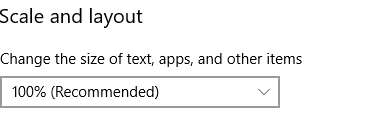
Is windows doing scaling?
steady crest
different resolution, I cant make a screenshot with the scale im afraid
waxen sandal
I mean this option https://i.imgur.com/Yb1d6sc.png
 steady crest
waxen sandal
steady crest
waxen sandal
Interesting
steady crest
on this pc it looks like it should
whole steppe
Isn't that resolution portrait?
waxen sandal
And hte other one is the same?
steady crest
it is not
waxen sandal
Nope
whole steppe
oh
steady crest
just a big screen xD
but i have 2 monitors at home, both results are the same and work like they should. however my work laptop is fucky
when i resize the Inspector window, the area rect extends to the right of my screen, going offscreen instantly
@whole steppe quite funny you thought it was portrait, cant blame you cuz its not a common resolution xD
waxen sandal
But the scale on your laptop is 100% as well?
whole steppe
😂 i'm just not used to seeing that resolution
steady crest
@waxen sandal it is
waxen sandal
That's weird
steady crest
@whole steppe at work I have a similar sized monitor on a vesa mount sideways, its not curved tho
steady crest
this big one?
waxen sandal
No the fucky one
waxen sandal
There's no regular 😛
steady crest
hang on xD
1920x1080 or 1280 im not sure
i consider 1080p monitors the default xD thats what I meant
waxen sandal
Yeah same but laptops are fucky 😛
waxen sandal
Oh no
steady crest
i have not tried undocking it actually
 static idol
@stark geyser Got it! 🙂
steady crest
can you give a quick test on your unity installation?
if you have time ofc
(and want to)
waxen sandal
Sure
steady crest
i ve got 2019.3.0f5 but i dont think the version matters
waxen sandal
It's missing a few things 😛
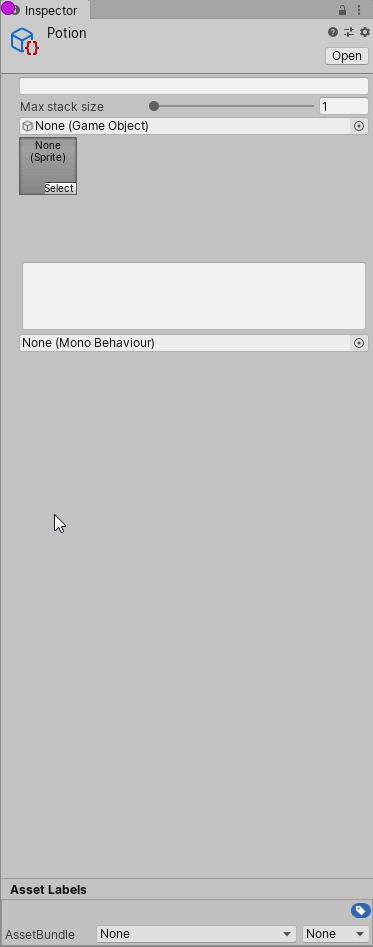 steady crest
yeah I figured, the areas are the ones responsible for getting them next to each other tho. which is the whole issue im having
waxen sandal
Lemem try to fix it
steady crest
if it works on you pc. its just that laptop being fucky and i know its not the code. which still is weird but at least I know what it is than
waxen sandal
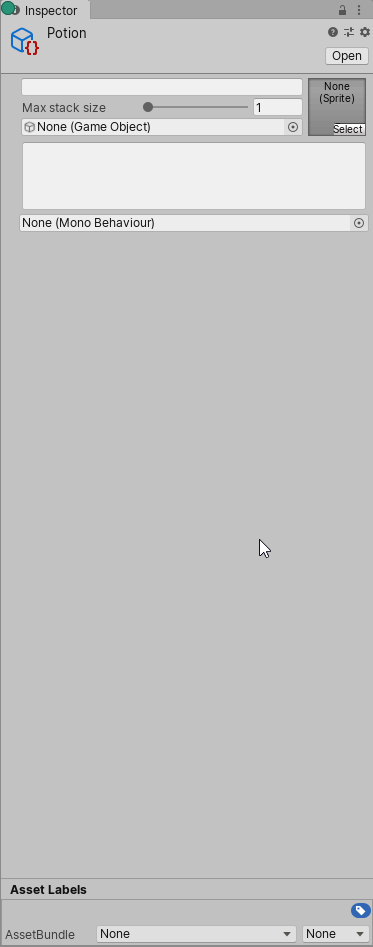 waxen sandal
What if you reset your layout?
steady crest
Well I don't have the laptop at home cuz it's not allowed to take it home...
steady crest
I ll have to get back to it tomorrow over there, but than again. this is a free time project I was doing during lunch break
onyx harness
Holy shit, you are right, Screen provides the current editor window's size
The description is so misguiding "The current width of the screen window in pixels (Read Only)"
It litterally does not mean what it does
waxen sandal
As long as your definition of screen window is the current editor window or build then it's right
onyx harness
But the Screen is not providing the correct area for the Editor Window
It does not take into account the borders
visual stag
There's a little cool bit of API I hadn't noticed in 2019.3 that might have a use: EditorUtility.ClearDirty for un dirtying things
ancient sable
Screen class for getting editor width and height ? if so, Screen.Width and Screen.Height will not provide an accurate value for the width and height of EditorWindows across all machines.
It can return a value 2x the width and height of an editorwindow. Especially on Macs with retina display. i was told that it can even go up to 4x.
I just use position now.
steady crest
@waxen sandal @onyx harness so APPEARANTLY for readability on our work PC we are forced on 125% text scale
i set it to 100% and it was working perfectly
waxen sandal
😂
onyx harness
But with or without text scale, is Screen giving the right answer?
steady crest
the width logs are the same, just the scaling on my screen was kinda fucked
Not exactly sure how that happens tbh, but I changed that and it fixed. work policy enforcements...
 wild drift
Hey quick question, my Unity code snippets VS extension doesnt work sometimes and I wanna know how i can fix that when that happens, because its super frustrating
wild drift
Sorry, unsure where is the best place to ask
 fervent haven
Is there a way to detect if the main editor window becomes unfocussed and act on it?
onyx harness
Not exactly
fervent haven
dread 😦
onyx harness
Maybe with UI Element and events you can try something
Check InternalEditorUtility.isApplicationActive to see if you have the focus
@fervent haven
fervent haven
looking :)
thank you
my goal is to create an autosave on when the editor loses focus
frozen minnow
I've run into a problem with a plugin (I've contacted the plugin creator, but I'm generally curious about possible solutions).
Basically - there are some scripts causing compiler errors, and an editor script that fixes something behind the scenes (in this case, giving an assembly access to another assembly) to stop the compiler errors... but that editor script can't run because there are compiler errors!
The crap solution is, hide/delete the problem scripts so the project compiles, runs the fixer script, then restore the other scripts. Naturally, an automatic fix would be preferable, so I don't have to explain this to each person on the project and make them apply the fix.
 chrome geyser
if u'd compile the editor script to a .dll the issue would be gone
on Unity retsart the script would run
frozen minnow
Good idea, I don't suppose I could simply add an .asmdef for just that script, let Unity compile, then copy the generated .dll into the project?
chrome geyser
that actually might work. never tried tho. always was building w/ msbuild
worth a shot tho
frozen minnow
I'll try it. Where would I then keep the original script?
I assume it can't still be part of the project, or it would conflict with the .dll
chrome geyser
yeah. you can stach it into a foder that starts with a dot ( . )
Unity ignores those
frozen minnow
Ohhh nice. I'll see what I can do. 👍
frozen minnow
@chrome geyser It did not work.
Replacing the editor script with a .dll works fine (I just copied the one Unity created from Library/ScriptAssemblies) and it still applies the fix.
But in the scenario described above, when other scripts are creating compiler errors, it appears Unity is not importing that .dll, or at least something is stopping the editor script within from executing, and so the fix is not applied. 😦
frozen minnow
I've got one other idea; ignore the affected scripts in version control, and store them in an asset package. Then, when someone checks out the project, the editor script runs its fix and imports the package automatically.
I don't love it, but it may be a solution. Still open to better ideas.
frozen minnow
It does the trick. The editor script + package are committed, and the first time each dev opens Unity with that commit, the script applies the fix + imports the package silently.
It's not a robust solution by any means - I don't like having a long, specific path in the ignore list, or having to re-export the asset package if any changes are made to the scripts, not to mention losing file history since the scripts aren't being tracked by version control. 😕
waxen sandal
If the code is in a separate asmdef it will compile and run if you restart Unity
If there are no compilation errors that are related to that asmdef of course
It's a trick to make built in packages work even if your code doesn't compile
 tulip jetty
Should I write editor script as a nested class of the target monobehaviour? This way it can access all properties of the target it's editing.
Otherwise the target class needs to expose the properties that need to be edited, only for the editor script.
waxen sandal
You should use serialized properties and serialized objects to interact with your target object
You can also use internals visible to to access internal properties/functions
tulip jetty
Are these like reflection stuff? I'm seeing code like FindProperty( "PropertyName" ).
waxen sandal
Nah, it's serialization
tulip jetty
I see. I haven't studied those but it looks like the right direction. Thanks for telling me.
Will ask if I have questions.
waxen sandal
👍
tulip jetty
If I want editor code to modify a property, does that property have to be marked [SerializeField]?
steady crest
depends what property it is, is it a custom datatype or not?
tulip jetty
Right now the property is an int.
steady crest
that should be serialized as a class on its own. but i not 100% sure
tulip jetty
What do you mean by "serialized as a class on its own"?
steady crest
I would guess int has [Serializable] above the class declaration as it is a standard type
tulip jetty
I see what you mean. You are saying int may not need a [SerializeField] above it, because it's already serialized by default?
steady crest
yeah, since its a basic type
you would need to check the docs to be sure, but im guessing thats the case
waxen sandal
What no
[Serializable] and [SerializeField] are 2 different things
If your field is private it will need [SerializeField] to serialize it
If you have a custom class that you want to be able to be serialized then you need [Serializable]
steady crest
oooh
waxen sandal
But your field will still need [SerializeField] if it is private
steady crest
fuck
thx for correcting me. i always thought it worked. but I always use private SerializeField and Serializeable sooo...
tulip jetty
Good to know, thanks. Didn't remove the [SerializeField] above the int property.
waxen sandal
If it's public you don't need [SerializeField] but you shouldn't have public fields
steady crest
private field with backing properties amirite?
waxen sandal
Properties with private backing fields 😛
steady crest
I got my terminology wrong, but you know what I meant
frozen minnow
If the code is in a separate asmdef it will compile and run if you restart Unity
@waxen sandal Well damn, you're right, but I would still have to tell each other dev on the project to restart Unity the first time they checkout this commit. It seems weird that a restart does it, but recompiling or reimporting the script/asmdef doesn't.
waxen sandal
It makes sense actually
Since the package manager and lots of other things are packages
So if they wouldn't compile you would be missing all those things
Including IDE integrations
frozen minnow
But I mean if I add an .asmdef, why doesn't it compile separately right away? Why does Unity have to be closed and restarted first?
whole steppe
Hello everyone, hope you are doing fine
Is it possible to order the fields of a Custom Inspector automaticly without doing rect.y +20, rect.y + 40 and so on ?
waxen sandal
UIElements does that
You might be able to use GUILayout as well
But I always forget 😛
whole steppe
but when i wrap my Code in BeginnVerical and EndVertical it completely destroy the inspector window
onyx harness
Code code
whole steppe
 {
        EditorGUI.BeginChangeCheck();
        EventTemplate item = targetscript.eventsList[index];
        SerializedProperty unityeventprop = serializedObject.FindProperty("eventsList").GetArrayElementAtIndex(index).FindPropertyRelative("unityEvent");
        SerializedProperty essentialprop = serializedObject.FindProperty("eventsList").GetArrayElementAtIndex(index).FindPropertyRelative("essential");


        GUILayout.BeginVertical();
        item.templateName = EditorGUI.TextField(new Rect(rect.x, rect.y, rect.width, EditorGUIUtility.singleLineHeight), "Event name", item.templateName);
        item.delayTime = EditorGUI.FloatField(new Rect(rect.x, rect.y, rect.width, EditorGUIUtility.singleLineHeight), "Delay Time", item.delayTime);
        item.sO = (SOClass)EditorGUI.ObjectField(new Rect(rect.x, rect.y, rect.width, EditorGUIUtility.singleLineHeight), "Scriptable Object", item.sO, typeof(SOClass), true);
        item.audioclip = (AudioClip)EditorGUI.ObjectField(new Rect(rect.x, rect.y, rect.width, EditorGUIUtility.singleLineHeight), "Audio", item.audioclip, typeof(AudioClip), true); ;
        EditorGUI.PropertyField(new Rect(rect.x, rect.y, rect.width, EditorGUIUtility.singleLineHeight), essentialprop);
        EditorGUI.PropertyField(new Rect(rect.x, rect.y, rect.width, EditorGUIUtility.singleLineHeight), unityeventprop);
        GUILayout.EndVertical();

        if (EditorGUI.EndChangeCheck())
        {
            EditorUtility.SetDirty(target);
            serializedObject.ApplyModifiedProperties();
        }
    }
everything is drawn overlapped
onyx harness
Can you replace GUILayout with EditorGUILayout for Begin/End?
and can you show us the full code?
Most of the time, the problem is elsewhere
lol
the problem is right in front of you
Layouting is used to automatically layout the GUI.
By using EditorGUI you bypass the layouting behind
Because you specifically provide a position
whole steppe
   private void DrawElement(Rect rect, int index, bool active, bool focused)
    {
        EditorGUI.BeginChangeCheck();
        EventTemplate item = targetscript.eventsList[index];
        SerializedProperty unityeventprop = serializedObject.FindProperty("eventsList").GetArrayElementAtIndex(index).FindPropertyRelative("unityEvent");
        SerializedProperty essentialprop = serializedObject.FindProperty("eventsList").GetArrayElementAtIndex(index).FindPropertyRelative("essential");

        EditorGUILayout.BeginVertical();
        item.templateName = EditorGUILayout.TextField("Event name", item.templateName);
        item.delayTime = EditorGUILayout.FloatField( "Delay Time", item.delayTime);
        item.sO = (SOClass)EditorGUILayout.ObjectField( "Scriptable Object", item.sO, typeof(SOClass), true);
        item.audioclip = (AudioClip)EditorGUILayout.ObjectField("Audio", item.audioclip, typeof(AudioClip), true); ;
        EditorGUILayout.PropertyField(essentialprop);
        EditorGUILayout.PropertyField( unityeventprop);
        EditorGUILayout.EndVertical();
now it is comepltely blank
onyx harness
Where does DrawElement come from?
what is the context?
I asked you the whole code, not a lonely chunk from it
Because you are lacking of knowledge about GUI
Give me the whole code, so I can properly help you
Trust me
whole steppe
ok
onyx harness
(To answer why it is blank, you are using GUILayout in the middle of a non-layout GUI code I guess)
(But can't be sure since I don't know the rest of it)
whole steppe

A simple website for pasting text, mainly code snippets.
it is a reorderable List for your info.
onyx harness
So here we are
ReorderableList handles both GUI & GUILayout
In your code, you use the GUILayout
When calling DrawElement, it provides you a Rect area, where you are suppose to draw your stuff
You are confused about which system to use.
To switch from manual mode (GUI) to automatic (GUILayout), you need to use GUILayout.Begin/EndArea
In your case, you will face height issues
Because your DrawElement is calibrated to default height. Which might be around 16 pixels
whole steppe
Ok. So how to fix? ;D
onyx harness
In your ReorderableList
There is a property to set the height per element
Simple as that
whole steppe
I assume you are talking about these : private void DrawElement(Rect rect, int index, bool active, bool focused)
onyx harness
About what?
whole steppe
to set height per element.
onyx harness
nope
You just showed the signature
I'm talking about ReorderableList.elementHeight
whole steppe
Thank you. I just use the default settings( manual assign rect height on each item)
The elementheight would just change the size of the whjole body not for each item
The default was using this method too, so i guess its ok then.
onyx harness
lol no no,
elementHeight is self-explanatory
"Element Height"
An "Item" is an element
Not a GUI field, property or else
whole steppe
Hey I would like to have my EditorGUI.Popup() have keybinds on the right as Unity top menu has:
Is there any way to do it?
onyx harness
Use a tab between the label and the shortcut
whole steppe
Thank you so much I was trying every combination I could think of and coudnt find it online either
visual stag
Key binds should be rebindable now, so how could you do that without hard coding it 😦
 fresh shell
is there a way to add to the default GenericMenu that pops up as a context menu on a property field instead of just replacing it? More specifically, I am working in a property drawer
 tacit jasper
using UnityEditor;

public class ThingSpawner : EditorWindow
{
    // params
    string baseName = "";
    int objectIndex = 1;
    GameObject prefab;


    [MenuItem("Tools/ThingSpawner")]
    public static void ShowWindow()
    {

        GetWindow(typeof(ThingSpawner));
    }
    private void OnGUI() // fields and buttons
    {
        GUILayout.Label("Thing Spawner", EditorStyles.boldLabel);
        baseName = EditorGUILayout.TextField("Thing Name", baseName);
        objectIndex = EditorGUILayout.IntField("Thing Index", objectIndex);
        prefab = EditorGUILayout.ObjectField("Thing Prefab", prefab, typeof(GameObject), false) as GameObject;


        if (GUILayout.Button("Add Thing"))
        {
            SpawnObject();
        }

    }
    private void SpawnObject()
    {
        if (prefab = null)
        {
            Debug.LogError("Error: thing prefab not set");
            return;
        }
        if (baseName == string.Empty)
        {

            Debug.LogError("Error: must set thing name");
            return;
        }

        GameObject newObject = GameObject.Instantiate(prefab, Vector3.zero, Quaternion.identity);
        newObject.name = baseName + objectIndex;

        objectIndex++;
    }
}```im getting the error: "ArgumentException: the object you want to instantiate is null"
 royal matrix
not very well versed in editor extensions, is it possible/difficult to have a drag drop spot for a GameObject in a component which also has a dropdown list of all the components on that GameObject that you can use to select specifically?
visual stag
An object field as an object picker, do you want a drop-down specifically?
royal matrix
not if its as usable
i want a picker where u put a GameObject in and you can then chose from all the component class names that are currently on that GameObject
visual stag
Ah, no, you'd have to make that yourself.
royal matrix
roughly speaking what would be involved in that? is it doable or one of the more unpleasant things to make?
as i said not made many inspectors and not for a long time XD
royal matrix
a prefab or just an object in the scene, think the unityevent selection but without the selecting a method bit
steady crest
im pretty sure all components inherit from a base class. I would think Component try doing OnValueChange for your variable and print the values https://docs.unity3d.com/ScriptReference/Component.GetComponents.html
              foreach(var component in GetComponents<Component>())
              {
                   if(component != this) components.Add(component);
              }
@royal matrix
or gui changed i suppose, im using Odin so I can just mark an attribute for it
royal matrix
cool thanks ill look into that
frozen minnow
I'm not sure what's going on, but I've got an editor script that executes via static constructor + [InitializeOnLoad] to modify some models, but the changes aren't sticking. This might be an editor script question, might be a mesh importing question.
Basically I'm generating additional data for certain meshes and storing it in UV channel 3. I have a text file with a list of mesh GUID's that need that data, and an editor script that loads the list, finds each mesh, and runs the generator on them. This way, the data automatically exists when you open Unity, and doesn't require each dev on the project to run the generator manually.
However, it's having to execute every Unity launch, if not more often, because for some reason the generated data keeps disappearing?
Even more confusing, when I launch Unity, the static constructor is called twice - the first time, AssetDatabase.LoadAssetAtPath() throws an exception, but the second time it works.
onyx harness
A lot of API are not allowed to be invoked during the very first frame
Delay, you must
frozen minnow
Is there some kind of "Unity has launched and is ready for asset database operations" callback?
I mean, for now I just return when loading fails, and then it works next time, it's just not very clean.
split bridge
@frozen minnow something like this might work too AssemblyReloadEvents.afterAssemblyReload += EditorAssembliesReloaded;
anyone any clue how to set rich text for a label in UI Elements? @severe python ? 🤩
onyx harness
Ask Twiner if he is around :)
frozen minnow
Something is causing multiple recompiles it seems (or maybe there's just a callback for each assembly in the project), so afterAssemblyReload is firing 3 times, and delayCall once at the end of it all, so I'll try the latter.
Alright, that mostly fixed it! Waiting for delayCall makes it execute once, and successfully.
So the only problem is, why does it have to execute every launch? I expecting it to only run once, then the data would be stored with the rest of the imported model in Library/ but each launch, UV channel 3 is apparently empty again.
onyx harness
Why the channel is empty I can't tell, save the project, check if the data is correctly written
frozen minnow
Is that possible? It would be the imported asset in Library/ which I didn't think was readable.
onyx harness
Files in Library are just generated from the actual files in your project
If you update your files, Unity will update the Library
severe python
uhj
you know, I don't know
but I can't imagine its hard
Its gotta just be a toggle
Ilike that I've become known as the UIElements guy 😄
split bridge
haha sorry about pinging you directly
severe python
Pass the message along to the UIElements team, I keep throwing my stuff at them
hey its no problem
split bridge
when i look at the uxml it looks like when I set .text, <b> etc are auto-escaped
severe python
I like promoting UIElements because its the first time that Unity has introduced a UI framework that is actually good
and honestly, I think UIElements may be the best UI Framework ever developed
and I hated HTML/CSS
split bridge
certainly a lot to like about it
severe python
I love WPF/XAML
UIElements takes the best parts of both and combines them
There still some weaknesses
they need to take their data binding further to get it up to par with WPF
DataTemplates need to be a thing
Visual Templates is my custom solution for that, but its a little buggy
anyways, lets look at rich text
(its buggy because I suck at serialized properties cause they are hard)
specifically arrays
split bridge
for some reason everything I first need to do when using the new stuff is complex... currently working on a timeline - draggable stuff, popups, serialized arrays of structs etc 😅
Not loving not having e.g. a serializedObject.OnChanged event and having to do ChangeEvent<int>, ChangeEvent<string> etc etc on all ui elements instead
severe python
you dont
this is why the UIElements documentation needs to be better
it does a pretty poor job of conveying how the binding system works
split bridge
this is for elements that I can't bind to automatically
severe python
I suspect thats not true, but maybe it isn't, my general rule of thumb is, If I'm writing code to update a specific type from the View and writing code to update the View from a specific type, something has gone horribly wrong
or put more accurately
If its properly represented by a SerializedProperty you can setup Binding so you don't have to do the specifics of updating
in the case of Rich Text, I suspect you are doing something fairly complicated, so that may be less true
split bridge
yea, I wish that was the case.. but for example, I need to slide a clip in a timeline and it change a corresponding property of an element of a struct in an array - or two properties - I can't bind e.g. position x of an element to a startTime float
and correspondingly that means that if you use an alternative UI to set the startTime, the clip needs to update its position in the timeline
severe python
ah okay, so you're making a custom element
you
you can solve this
I can't explain at the moment, I'm not in the right head space, currently working
but thats besides the point right now
severe python
yeah, I don't think you get rich text because you can do it other ways now?
because you can apply classes to labels and style labels
and so I think the expectation is for rich text is to follow the Markup approach
split bridge
hmm you mean using multiple labels? like if I wanted to bold a word within some text?
severe python
I'm wrong
I don't htink you can do it with labels, but Text fields support it automatically
I don't know the formatting though
but if you wanted to have a "label" you'd just make read only text field
double wrong
its just like its always been
split bridge
just like its always been? you used to be able to set .richText = true
severe python
well other than that, it seems that rich text is just enabled
there are definitely no flags for it
split bridge
so if you set text via .text on a TextField then rich text works? lemme try
severe python
if it contains rich text
meaning Unity rich text, not RTF
ah
nope
I found it
So, TextElements contain a TextParams struct
and in that struct is the rich text bool
however setting that isn't clear
split bridge
it's not exposed right? you're looking in source?
split bridge
hmmm weird... perhaps it's just not yet supported.. may leave something on the forums and ask
"Textfield does not support text styling at the moment. You can only apply styles with USS on the whole text field." Jul, 2019
severe python
yeah, so you'll need to use the markup approach
which is unfortunate
thats how you do this kind of stuff with HTML/CSS/JS
I wonder if they are actually going to resolve that
split bridge
sorry what do you mean by markup approach? Say I want to write *Bold* this - are you suggesting there's a way other than two labels?
severe python
no
You'll use 2 labels
thats the markup approach
more specifically, in HTML/CSS/JS you'll have a boatload of divs
and you'll apply classes to divs in order to define the style of the text element
split bridge
sure
thanks for taking a look - I've posted on the UI elements forum to see if there's any update on the situation
severe python
is my pleasure, always ready to expand my knowledge of ui elements
onyx harness
Hey Twiner
I got a simple question
I tried to hook into the keyboard events of a rootVisualElement of a window
severe python
I have a simple answer
onyx harness
Unfortunately, it never got triggered
I thought it was going to be easy
is there a way to hook into windows and catch the input?
split bridge
myElement.RegisterCallback<KeyDownEvent>((evt) => Debug.Log(evt.keyCode)) not work?
split bridge
I just tried... doesn't work for me either :/
mouse ones do fine though - that's why I assumed the key down would work the same way
onyx harness
Yep, most of the others work fine
I noticed, if I hold a specific modifier, the input gets triggered
split bridge
well... that's crap 🙂
severe python
uh
I lied, I don't have a simple answer
no
I do
well no not a simple answer, its complicated
You need to understand how the event propogation works
Your event is being swallowed before it reaches rootVisualElement
read this and the sections underneath it
it will be more effective than me trying to explain
onyx harness
Your event is being swallowed before it reaches rootVisualElement
This is what I thought, but I don't understand how it works under the hood yet
Ok, I'll read that, thx
severe python
in most ui frameworks with this kind of event system you can setup event handling at a Preview step
so you always catch it, I'm not sure if UIElements has that feature
split bridge
I assumed it was being captured somewhere too but it's caught even in an empty window or with a simple VisualElement.. that surely can't be intended behaviour? Example code comes from this post: https://forum.unity.com/threads/events-in-uielements.784730/ - I suspect it's more likely a bug
split bridge
wait
simply that you need to mark the element as focusable 😅 ... well that's intuitive..
split bridge
agreed.. wonder why it's not enabled by default for window roots.. could it block other Unity shortcuts being used or something? ¯_(ツ)_/¯
severe python
thats wierd, so they don't use a typical event bubbling system
I mean, I can understand that UIElements has some extra performance considerations, maybe thats why they did so
in most ui frameworks, the event system hits all elements with all events even if the element ultimately bypasses things
split bridge
well the weird thing is that it only applies to keyboard - 'focusable' seems to mean 'enable keyboard events'?
severe python
weird
writes code to set focussable to true on everything
the focus management is probably a bit weak tbh
I don't think they have multiple focus concepts
that said, I'm not too surprised
their popups are not popups
the popups they have would work in game, but in the editor the popups are confined to the window that creates them which limits their utility
split bridge
On a tangent.. when you package an asset for the store, is there a way to say what packages it requires and then they get automatically installed along with the asset?
onyx harness
Now, since AssetStoreTools 5.0, yes
 stable moon
Is it possible to write some Editor script to allow dragging of UnityEvents?
whole steppe
Is there some free way to edit static (serializable) variables in inspector?
 simple cove
free way? 😛
simple cove
you can write a property that reads the variable via reflection
or even not via reflection
you can set it as well
probably via reflection, tho, if you want it to be modular
btw I have a question of my own:
I need to grab and modify a texture's physics shape via editor code
TextureImporter doesn't seem to have any properties for that
frozen minnow
I'm unsure of what I need to create the tool I have in mind. I have a bunch of objects in a scene, which can be arbitrarily connected to each other (metaphorically, not physically).
Rather than slowly and painfully building a list of connections in the inspector or code, I'd like to be able to click-and-drag from one object to another to visibly create a connection. How can I create such a tool?
 shadow violet
Anyone know how I could create a grid of boxes? It seems I can only get horizontal or vertical only, and cant seem to find a way to combine the two, or to tell it "once it reaches 5, make a new row" in a for-loop of "items"
onyx harness
@frozen minnow define visibly, metaphorically, physically
@shadow violet play with begin/end horizontal/vertical
shadow violet
How would I set that up? Like how would I define the rows and cols? Would that be manual or some automatic way? @onyx harness
onyx harness
Using GUILayout, you can begin a horizontal for 5 elements, then ending it, and repeat for every index % 5 == 0
shadow violet
Ohh, mod, good idea, I'll try that, thanks
stable moon
@onyx harness, how is it possible?
frozen minnow
@onyx harness What I mean is, say there are 10 objects named A -> J in the scene, and need a list of arbitrary pairs, such as:
[(A,C), (B,E), (B,G), (D,J)]
I could hard code the list in code, or create a custom editor where I punch in every possible pair, but that's tedious and error prone.
I would like, instead, to be able to use the scene view to click-and-drag from one object to another to create a pair (and then debug draw lines between them to visually connect them).
onyx harness
@stable moon write a property drawer for Object
@frozen minnow yes this is possible of course, look at DragAndDrop and OnSceneGUI
 wispy delta
Is there a good way to go about serializing and displaying a generic list? I'm trying to make it easy to set properties on a compute shader so I've made a super simple base class to hold a "property"
[System.Serializable]
public abstract class ComputeShaderProperty
{
  public string Name;
  public object Value;

  public abstract void Assign(ComputeShader shader);
}
and a generic version
[System.Serializable]
public abstract class ComputeShaderProperty<T> : ComputeShaderProperty
{
  public new T Value;
}
This makes it easy to create properties for the different values that can be passed to a shader. For example, here's a BoolProperty
[System.Serializable]
public class BoolProperty : ComputeShaderProperty<bool>
{
  public override void Assign(ComputeShader shader) => shader.SetBool(Name, Value);
}
I'd like to serialize/display a List<ComputeShaderProperty> in the inspector. I realize I'll have to make some custom gui to allow adding the desired derived type to the list - that isn't the issue. I just want to know if, once elements are added, they'll be serialized and if there's a good way to draw them.
onyx harness
Earlier version, it wouldn't be possible due to serializer not handling polymorphism.
Now the story has changed, can't tell
onyx harness
To test if a field is serializable, its pretty easy.
Write it in a MonoBehaviour, add the MB to a GameObject, save the prefab or scene.
Look at the text content of the prefab or scene. You will know rightaway
 short tiger
@agile void Hey, I made a custom property attribute that mimics the Header attribute but adds a tooltip
https://hatebin.com/mehoplalrb
It works great, except the tooltip appears in a slightly weird place...
You use it like:
[HeaderTooltip("Header", "Tooltip")]
public float variable;
 agile void
hey thats cool! @short tiger Thanks for taking the time do that! 🙂 🙂 🙂
tough cairn
i was following this form [ https://forum.unity.com/threads/problems-with-instantiating-baked-prefabs.324514/page-2 ] for baking lightmaps on prefabs

Unity Forum
I have this problem with the script. When I bake a prefab (without the script, it doesnt "instantiate" baked btw) i have 1 SetPass calls, even if I...
but it doesn't seem to work when moving the prefab between different scenes
anyone got a clue ?
simple cove
does anyone know where I can find the API for the Sprite Editor window?
ah, apparently I still cannot found the Physics Shape Editor on the API..
 pure coral
Hello if anyone can help me
im trying to create a custom editor that on space pressed ( thats another script/class attached to an object that inspects on update) should create a button
now i want that button if pressed to call a specific function
is there any way i can make this for a dynamic set of buttons
since all examples i found online are always for fixed elements
not any dynamically added elements
Please, if you can @ me for any help
 distant atlas
is there a command in the editor API to reset pose for a human type mecanim rig, like it does in the avatar config in the screenshot?
 marsh grove
I have a Scriptable Object with a OrderedDictionary<string, string>. I added button and text fields through a custom editor to allow editing the Dictionary.
I save values using EditorUtility.SetDirty(target);. This kinda works. If I deselect and reselect the object the data persists. But after unity recompiles the dictionary content ist lost....
Any ideas??
 harsh void
In general generic classes aren't serialized by Unity, the exception being List. Google will have several results for how you can serialize a Dictionary
severe python
that should no longer be true starting in Unity 2020.1
steady crest
for real?
dim walrus
Yep
steady crest
wow awesome
severe python
go to release notes
"Scripting: The serializer can now serialize fields of generic types (e.g. MyClass<int> someField) directly; it is no longer necessary to derive a concrete subclass from a generic type in order to serialize it."
steady crest
oww
 north marsh
anyone familiar with how to write a custom editor window array/list so it behaves the same as default unity inspector arrays? (displaying a value for size, and dropdown of objects inside it) I've done it before and I'm just having a complete brain fart on it.
waxen sandal
Propertyfield?
north marsh
yeeeeaaaap, lol thanks
north marsh
lol be careful when you're using custom editors and asset input fields for gameobjects to instantiate them into the scene; make sure you're editing values for the instantiated gameobjects and not the raw FBX assets, which unity will be more than happy to edit transform values for without giving any sort of warning
 quasi shard
how should I go about giving an EnumField my own enum to populate it? (UIElements)
okay got it working by using Init() on the EnumField
 knotty yew
Hey everyone, I'm trying to create a curvefield in a custom node editor. I have an issue where the curve editor window pops up, but when I attempt to select a curve shape, I get:
NullReferenceException: Object reference not set to an instance of an object
UnityEditor.CurveEditorWindow.OnGUI()
I've read that it has something to do with opening another GUI in a GUI. Any pointers?
Here's the code and the associated node for it:
// curve
lineYPosition += labelHeight + 3;
tempRect = new Rect(5, lineYPosition, 110, labelHeight);
EditorGUI.LabelField(tempRect, "Curve");
tempRect = new Rect(xBasePosition, lineYPosition, textWidth, labelHeight);
curve = EditorGUI.CurveField(tempRect, curve);
More visuals, I'm desperate lmao
 silk jolt
Okay, so I have a serialization problem with SO's...
If I make a TestClass : ScriptableObject {} and create 4 of them in the project, then run string[] guids = AssetDatabase.FindAssets($"t:{filterType}"); it will give me 4 results back.
However...
If I rename that class to TestPotatoes : ScriptableObject {} and use the same method to find them, then I get ZERO results back. For some reason, the SO assets are not updated when the class is renamed, and never will be.
The really annoying part is that if I rebuild those asset's GUIDs then suddenly the same code will correctly find all 4 assets.
Basically the question is - How do I identify SOs/Assets after class renaming. I want to be able to find the same assets after they are renamed. I can't go around renaming GUIDs because it breaks references.
visual stag
No
silk jolt
Nice. Instead of looking them up by type, I just made a menu button that finds all of the files in the database folder and reimports them.
Thats pretty weird it cant find them by type via AssetDatabase after a rename.....
either way, thanks @visual stag
steady crest
@half marten just went on sale a while back on cyber monday. Not sure if it ll happen again soon
distant atlas
I get weird behaviour with UnityEditor.PrefabUtility.InstantiatePrefab, any changes I make to the instantiated prefab, it seems to automatically undo them in the next (editor) frame. For example, immediately after I call InstantiatePrefab, I set the instantiated prefab's transform parent to something, but it always ends up at the root when I look at the Hierarchy Window. For now I just end up doing UnityEngine.Object.Instantiate instead, which doesn't have that problem.
and I'm pretty sure the parent I'm setting the instantiated prefab to isn't null, because I check it with debug logs
silk jolt
@onyx harness yes, thats a different limitation in user error which I can't account for, though.
I suppose I could go through significant trouble to look up the type, then find the file and confirm they match, but its too slow to do regularly.
onyx harness
Or you can lookup ScriptableObject and narrow the result down manually
Might be a fair tradeoff between the too long and the not working
silk jolt
I think the file name and class have to match anyway for SOs to work correctly, so I think leaning on the idea that it's standard practice to expect it will be fine for now. I can just plop some deets in documentation troubleshooting/limitations section if really necessary.
severe python
@half marten I know I might bother some people with this comment
but its my opinion that any and all inspector helper tools should be avoided
Odin has gone on sale a number of times
but the latest updates to the Unity Engine with UIElements significantly simplifies the process of creating custom editors that look good and have good functionality
 half marten
I've learned well enough to disregard developer's hot takes about using extensions, or software, or engines, or frameworks, or libraries, or non-assembly languages that make things easier
There's nothing wrong with using anything at one's disposal to help you achieve your goals
Do what is necessary to get shit done
it's not automatically the wisest choice to take a detour from your project to learn how to construct all of the editor/inspector extensions you want for your project
at the end of it, you won't know the half of the process compared to the dedicated group of people working on odin
but you will have spent a whole lot of unnecessary time
and we're talking about the tool literally being on sale here, so you're spending numerous hours building a system that I could afford with 2 hours work at my retail job when i was in high school
 distant vortex
Hi, guys. Can anyone help me access a namespace? I have loaded preview package of Unity recorder and I want to access it in script. However, Unity doesn't recognize UnityEditor.Recording. Why might that be?
I can see in recorder's scripts that they use namespace UnityEditor.Recording
 short cloud


