
#↕️┃editor-extensions
1 messages · Page 17 of 1
 grave hingeBOT
 visual stag
If you have already done those steps:
- Make sure the Visual Studio Code Editor extension is removed from Unity's Package Manager. It uses VS's now.
- Update the C# and C# Dev Kit extensions in VS Code.
- If you're still having issues after restarting, go through the actual configuration steps to make sure something hasn't unassigned itself
 twilit willow
ok i have vsc editor installed thats why i think it doesnt work
thanks
its still broken for me for some reason
some server initialzation fail
 timber stream
I want to randomly place like object instances in the editor so each time i start they will be the same, is there like a feature or a script for the editor
 rose shard
Why can't I import any packages? they keep spinning spinning and spinning. Already restarted unity many times.

 real spindle
timber stream
I want to randomly place like object instances in the editor so each time i star...
real spindle
timber stream
I want to randomly place like object instances in the editor so each time i star...
You can use an integer seed and Random.InitState(seed) before you place the objects
Sorry mech didnt mean to ping you!
Mobile misclick
timber stream
But that would require the game running right? No i want to instantiate the objects in the editor and NOT change them every time i run the game
 gloomy chasm
timber stream
But that would require the game running right? No i want to instantiate the obje...
gloomy chasm
timber stream
But that would require the game running right? No i want to instantiate the obje...
You can use Object.Instatiante() and new GameObject() and most anything else you use at runtime in the editor as well.
 queen wharf
Still would love some advice on this 💖
queen wharf
Been trying hard but can’t figure out how to get a specific property from a gameobject
Can post code in abit but is the while loop .Next stuff I keep finding really the best way?
 spark lotus
Sounds like a feature request. Break the problem down into parts and Google those parts. Example: Unity execute script in the editor
Which would yield you stuff like ||https://docs.unity3d.com/ScriptReference/ExecuteInEditMode.html||
Folks will likely not answer your question if they cannot pinpoint the exact issue (part of the problem) that you're having.
 elfin fiber
Hey, maybe someone will know if there's specifically way to change whole editor application title to include at the end additional text that i would like to use instead overlay or window. At the moment i'm quite annoyed that simple 2 word text is using my precious scene view space.
gloomy chasm
queen wharf
Been trying hard but can’t figure out how to get a specific property from a game...
I assume you are talking about using SerializedObject and SerializedProperty? If so you can do serializedObject.FindProperty(..) or serializedProperty.FindRelativeProperty(..) and pass it the string name of the serialized field you want.
(Also, if you are still having trouble with your earlier question let me know)
gloomy chasm
elfin fiber
Hey, maybe someone will know if there's specifically way to change whole editor ...
I am not quite following what you mean. Can you show an example or something maybe?
 waxen sandal
gloomy chasm
I assume you are talking about using `SerializedObject` and `SerializedProperty`...
waxen sandal
gloomy chasm
I assume you are talking about using `SerializedObject` and `SerializedProperty`...
I'm guessing their problem is that they have a SO of the GO and not of a component?
gloomy chasm
waxen sandal
I'm guessing their problem is that they have a SO of the GO and not of a compone...
That could be, but they talked about using .Next() so that is why I was guess they didn't know about the FindX methods
waxen sandal
I interpreted it as, I don't know the path so I loop through everything to find it and then use FindProeprty for it
But could be both
elfin fiber
gloomy chasm
I am not quite following what you mean. Can you show an example or something may...
Modyfing / overwriting this window label
 gloomy chasm
elfin fiber
Modyfing / overwriting this window label
gloomy chasm
elfin fiber
Modyfing / overwriting this window label
Well I found this, didn't look in to it at all, but might give you a hint. But there is no nice way to do it. https://github.com/mob-sakai/MainWindowTitleModifierForUnity
elfin fiber
Looks promising, Thanks. All it was to finding this is apparently "main" keyword.
gloomy chasm
I have a project that needs the code to work in both editor and play. And I am debating on what the best way to do this is.
On a high level, the code creates ScriptableObjects, and tracks and manages dependencies that they have (not ScriptableObject/asset dependencies)
- I could recreate the runtime code using SerializedPropertis.
- I normally opt for this, but it is harder to maintain and the code is more complex
- Does work nicer with UIToolkit since it uses the binding system as is.
- I could inline
#if UNITY_EDITORinside of the runtime class to handle undo and dirtying
- This is probably the most straight forward. But also feels pretty dirty to me.
- Doesn't play as well with UIToolkit.
- I could possibly create a sort of ViewModel for the class and have it call the relevant Undo and dirty methods
- It would be more maintainable than 1, but also isn't using SerializedObjects.
- Not sure how well it would or would not play with SerializedObject and property system
Any thoughts on how to aproach this? And also, how much to use SerializedObjects for vs direct access with the correct undo/dirty calls.
visual stag
gloomy chasm
I have a project that needs the code to work in both editor and play. And I am d...
If you're asking about how to do the UI you can use https://docs.unity3d.com/Packages/com.unity.properties.ui@2.1/index.html and not use Unity serialisation at all
gloomy chasm
visual stag
If you're asking about how to do the UI you can use https://docs.unity3d.com/Pac...
I mean it is still in the editor, so I do want to use SerializedProperties still
visual stag
I've not delved too deep into the properties UI, but afaik the entire editor will be using it soon, as it will unify editor and runtime binding behaviours.
The properties package (not the UI) is already in the editor core, which is my only problem with the package, including it means you drag a second copy of properties into the project
I'm using ECS and they have practically duplicated the UI package for their editors
I imagine they will undo that when it's in core, but it's speculation
gloomy chasm
visual stag
I've not delved too deep into the properties UI, but afaik the entire editor wil...
I had looked at it before, but I didn't see any way to hook it in with Serializedproperty. And with binding it is only on 2023 :/
But I do hope you are right that it will be used for the editor too 'instead of' SerialiedProperty
I think what I am going to do is make a ViewModel class that wraps a Serializedobject/SerializedProperty. And add methods that wrap the runtime calls, but also does the needed undo/dirty/etc. calls.
visual stag
I don't think it'll be instead of serialized property, it will just mean the API is the same, the object you bind to will remain different
But again, I do have to mention this is speculative, if I ever do get solid answers I will let you know 😅
gloomy chasm
Yeah totally, that was my impression as well
I feel like I am forgetting a obvious reason not to just do undo and dirty calls...
I know it won't do prefab overrides, but that is fine for my use case.
It is this nagging feeling in the back of my mind. Like when you forget to turn something off or bring something with you... but nothing is coming to mind
visual stag
gloomy chasm
I feel like I am forgetting a obvious reason not to just do undo and dirty calls...
Isn't the downside also that everything has to be manual because you can't really use PropertyField?
That's one of the benefits I see with the properties UI, It's kinda a big property field, you don't need to specify how it's all rendering
gloomy chasm
As long as I call serializedObject.Update() after the 'direct access' code runs, the properties should still be fine and usable, right?
visual stag
Yes, Undo runs the diff at the end of the editor 'frame' iirc, so it can confuse me how the two combine
Whereas SO is synchronous
Iirc as long as you're consistent with Update and Apply it works out in the end
But I honestly haven't used Undo much for years
gloomy chasm
visual stag
Iirc as long as you're consistent with Update and Apply it works out in the end
Guess I will find out. This is basically what I have in mind
public class MyClass {
  public void MyMethod() { }
}
public class MyClassViewModel
{
  public SerializedProperty Property { get; }

  public MyClassViewModel(SerializedProperty myClassProperty)
  {
    Property = myClassProperty;
  }

  public void MyMethod()
  {
    var myClass = (MyClass)Property.GetValue<MyClass>(); // Custom extension method to get value.

    Undo.RecordUndo(Property.serializedObject.target);

    myClass.MyMethod();

    EditorUtility.SetDirty(Property.serializedObject.target);
    Property.serializedObject.Update();
  }
}
Oh I guess actually I shouldn't call Update and instead let UITK do that as it could overrite data in the SerializedObject I think...
visual stag
Whats the point of SetDirty here?
gloomy chasm
Does Undo SetDirty?
visual stag
Undo handles dirtying, yes
gloomy chasm
Oh really? huh I never realized that
[insert "the more you know" gif here]
I can never remember though when I should use RecordUndo or RegisterCompleteObjectUndo
visual stag
gloomy chasm
I can never remember though when I should use RecordUndo or RegisterCompleteObje...
Prefer the former. The latter only really makes sense if the entire object might have changed
gloomy chasm
Ahh, got it
visual stag
I forget what those scenarios are, but I remember it often with graph frameworks
As they have a lot of random shit to keep track of
 snow pebble
how do you put a different background colour behind editor inspector area such as for displaying a list of array elements i want to alternatve two colours behind it
visual stag
snow pebble
how do you put a different background colour behind editor inspector area such a...
In UITK, just style a VisualElement that contains your list of elements
in IMGUI, style a VerticalScope
Or manually draw a rect before you draw your controls
snow pebble
okay will look into that thanks
queen wharf
gloomy chasm
I assume you are talking about using `SerializedObject` and `SerializedProperty`...
Tyty. Silly question but if I have a property at the end of a chain how do I figure out the entire property path from that to the gameobject?
gloomy chasm
queen wharf
Tyty. Silly question but if I have a property at the end of a chain how do I fig...
myProperty.propertyPath
queen wharf
But that’s not the full path right, just the one to the property above it? Unless im dumb
gloomy chasm
Nope it is the full path
queen wharf
oh ok lemme have this morning coffee and try to cook haha. Do you mind if I @ you if I hit a wall?
gloomy chasm
queen wharf
oh ok lemme have this morning coffee and try to cook haha. Do you mind if I @ yo...
Go ahead I don't mind. I am going to bed in the next 15 - 30 minutes, but I can always reply tomorrow.
queen wharf
💖 thank you friend, appreciate it
queen wharf
So if i'm hooking into OnBeforeSerialize(), How do I get the object that caused it to run? if that makes sense
struggling to get it from Selection.activeObject and unity doesn't like me trying to getcomponent on selection.activegameobject
 hardy apex
I'm trying to extend the builtin readme editor script to load a different readme on a scene by scene basis.
The LoadLayout() method always throws an "Ambigious match found" error, I've tried a few things to fix it but to no avail
The method in question:
    static void LoadLayout()
    {
        var assembly = typeof(EditorApplication).Assembly;
        var windowLayoutType = assembly.GetType("UnityEditor.WindowLayout", true);
        var method = windowLayoutType.GetMethod("LoadWindowLayout", bindingAttr: BindingFlags.Public | BindingFlags.Static);
        method.Invoke(null, new object[] { Path.Combine(Application.dataPath, "TutorialInfo/Layout.wlt"), false });
    }
could someone help me better understand why this would be ambigious only when I now have other methods calling LoadLayout()?
 teal tinsel
hardy apex
I'm trying to extend the builtin readme editor script to load a different readme...
teal tinsel
hardy apex
I'm trying to extend the builtin readme editor script to load a different readme...
Unity has multiple LoadWindowLayout overloads
So you need to specify method signature
queen wharf
I'm probably missing something silly, Looking to add a menuitem to spawn in a prefab i commonly use so I tried hooking up
    [MenuItem("GameObject/CrimeSpree/Guard")]
    static void SpawnGuard(MenuCommand menuCommand, GameObject prefab = null)
    {
        GameObject gameObject = Instantiate(prefab, Vector3.zero, Quaternion.identity);
        GameObjectUtility.SetParentAndAlign(gameObject, menuCommand.context as GameObject);
        Undo.RegisterCompleteObjectUndo(gameObject, "Create " + gameObject.name);
        Selection.activeObject = gameObject;
    }
But getting MenuCommand is the only optional supported parameter. I know it's probably an inherit issue with how static functions work? but not sure what im missing
teal tinsel
queen wharf
I'm probably missing something silly, Looking to add a menuitem to spawn in a pr...
What does GameObject prefab = null supposed to be set when you click it from menu
queen wharf
Oh fair ok
In the context of what I'm trying to achieve, how do most people go about providing a specified object?
teal tinsel
Either using currently selected object or have dedicated window for it
queen wharf
Hm ok
Still trying to figure out how to play with static stuff haha
wonder if i could just run a function directly or use an event to just turn my generic gameobject into a real boy right after
oh i can grab from a singleton
okie
 light zenith
Hello, is it possible to display a Vector2Int of a monobehavior as a min/max slider, like we can easily do with int and float using [Range(min, max)]?
I found a MinMaxSlider for EditorGUI but I'm not sure how to make it work with my monobehavior class. It seems to require an additional script located in an Editor folder and would mean I have to create a relation between this and my Monobehavior? Seems quite complicated to do when an Int slider works easily with 1 line.
teal tinsel
light zenith
Hello, is it possible to display a Vector2Int of a monobehavior as a min/max sli...
https://dbrizov.github.io/na-docs/attributes/drawer_attributes/min_max_slider.html
No built-in functionality
queen wharf
queen wharf
I'm probably missing something silly, Looking to add a menuitem to spawn in a pr...
ty @teal tinsel for the brain spark, ended up making my EditorManager a singleton so I can do something like this
    [MenuItem("GameObject/CrimeSpree/Guard")]
    static void SpawnGuard(MenuCommand menuCommand)
    {
        Spawn(Instance.guard, menuCommand);
    }

    [MenuItem("GameObject/CrimeSpree/Loot Bag")]
    static void SpawnLootBag(MenuCommand menuCommand)
    {
        Spawn(Instance.lootBag, menuCommand);
    }

    static void Spawn(GameObject prefab, MenuCommand menuCommand)
    {
        GameObject gameObject = Instantiate(prefab, Vector3.zero, Quaternion.identity);
        GameObjectUtility.SetParentAndAlign(gameObject, menuCommand.context as GameObject);
        Undo.RegisterCompleteObjectUndo(gameObject, "Create " + gameObject.name);
        Selection.activeObject = gameObject;
    }
Thanks a lot!
snow pebble
@visual stag bit lost how i use this InspectorElement thing
unity has no code example for it
do i have to add it to a root element
    public sealed class MeshPreviewer : EditorWindow
    {
        Mesh _mesh;
        public void Set(in Mesh mesh) => _mesh = mesh;
        public void CreateGUI()
        {
            // Each editor window contains a root VisualElement object
            VisualElement root = rootVisualElement;
            var element = new InspectorElement(_mesh);
            root.Add(element);
        }
    }
this is what i tried
visual stag
VisualElement root;
InspectorElement.FillDefaultInspector(root, new SerializedObject(mesh), Editor.CreateEditor(MeshEditorType));
Is how I imagine you would have to do it
snow pebble
ah ill try it
visual stag
I haven't tried to create it via the constructor, but it may also work that way, I generally use the FillDefaultInspector method
queen wharf
@visual stag Sorry for the tag just noticed your active here right now, Any chance I could get your two cents on something I was trying to implement?
visual stag
Just ask your question and people may or may not be able to help.
queen wharf
Fair, tried asking in the last two days but got no bites, ill explain it better though
snow pebble
visual stag
```cs
VisualElement root;
InspectorElement.FillDefaultInspector(root, new Serial...
do you know the name of the mesh editor type ?
queen wharf
I want to get and store the parameters set in the inspector of my UnityEvent's for some editor tooling / mechanic validation stuff.
I tried to implement this by inheriting from UnityEvent to make my own EnhancedEvent : UnityEvent and having a newly stored array of a struct that would contain some of the UnityEvent data that Unity currently just stores internally
I wanted to get the data from the UnityEvent's using ISerializationCallBackReceiver.OnBeforeSerialize and then store it in my array but I just couldn't find a way to find the specific UnityEvent object/reference/serializedobject/serializedproperty for it dynamically. I think this is because it doesn't inherit from UnityEngine.Object but I was confused because it was still triggering the Interface correctly.
Regardless, I'd love some thoughts on this. Ideally i'd really want it to get and set the data im looking for inside my custom UnityEvent itself, rather than doing it from a customeditor or such, but if that would be the only way I could look into going down that path
I was able to succesfully pull the data I wanted using a customeditor targetting a specific test monobehaviour but I want it to be more dynamic than that
snow pebble
yeh i tried that but it seems restricted
 visual stag
Yes, you need to get the type with Type.GetType
snow pebble
huh 🤔 the function takes an object though
queen wharf
I was able to get the internally stored data I'm looking for with this propertypath chain when I used a customeditor because I was able to get target which was the specific monobehaviour component, but in my EnhancedUnityEvent.OnBeforeSerialize I just could not find a way to get inside that. at best I could find the monobehaviour but I could not get the serializedobject out of it (again assuming because UnityEvent's aren't from UnityEngine.object)
NAMEOFMYUNITYEVENT.m_PersistentCalls.m_Calls.Array.size[i].GetArrayElementAtIndex(i).FindPropertyRelative("m_Arguments.m_ObjectArgument")
I have tried very hard to do this myself haha 😅
and @gloomy chasm since you kindly said I could do so ❤️
gloomy chasm
queen wharf
I was able to get the internally stored data I'm looking for with this propertyp...
Yeah... I am going to need a lot more context for what the heck you are doing haha
queen wharf
There's a bigger comment a little bit above but happy to provide anything that im missing
tl;dr unityevents store some data internally that i wanna store less internally
gloomy chasm
queen wharf
tl;dr unityevents store some data internally that i wanna store less internally
You want it at runtime (in playmode), yeah?
queen wharf
It would be nice to have it at runtime but its more for editor stuff, In particular I want to get the data in Editor and just save/cache it somewhere in my inherinted UnityEvent so I can access it through
gloomy chasm
queen wharf
It would be nice to have it at runtime but its more for editor stuff, In particu...
Access it when/where?
(When, where and how you want to use it changes how you go about this)
queen wharf
forsure, just getting you an example (i commited my failure then deleted it for now so just grabbibg it haha)
snow pebble
visual stag
Yes, you need to get the type with Type.GetType
ah it sorta worked
getting the window makes it open the window straight away even before i call Show() so it null refs at first because ive yet to apply the mesh
oh nevermind now it doesn't work again
thats kinda weird
visual stag
I'm not sure which window you are getting, or what is null. Probably should make a thread if you're still having issues!
snow pebble
well i do this:
                if (GUILayout.Button("Preview Mesh"))
                {
                    var wnd = EditorWindow.GetWindow<MeshPreviewer>();
                    wnd.Set(_target.Mesh);
                }
but GetWindow opens the window so the create gui mesh is null thus i get a blank inspector
but if i change nothing and recompile the code the inspector then shows the mesh data
snow pebble
okay ill try it
queen wharf
gloomy chasm
(When, where and how you want to use it changes how you go about this)
I had something like this
public class EnhancedEvent : UnityEvent
{
    public EventInfo[] eventInfo;
}

[Serializable]
public struct EventInfo
{
    public int m_Mode;
    public UnityEngine.Object m_Target;
    public string m_MethodName;
    public string m_TargetAssemblyTypeName;
    public string m_ObjectArgumentAssemblyTypeName;
}
And then from the EnhancedEvent class I wanted to grab those internal properties (I was trying with OnBeforeSerialize yesterday) and store them in a public serializable struct array that I would access from other classes and such* (I'm aware I would need to confirm I've grabbed the details before using them and before build and whatnot etc.)*
 visual stag
snow pebble
blank again
visual stag
snow pebble
blank again
In your EditorWindow's CreateGUI you need to be returning a VisualElement with your content in it
snow pebble
returning to what? the CreateGUI is void
snow pebble
InspectorElement.FillDefaultInspector(root, new(_mesh), editor);
doesnt this do it auto since the first parameter is root
visual stag
No
That will add it to root
but root is not added anywhere, you need to add root to rootVisualElement in CreateGUI
rootVisualElement is the actual element that the EditorWindow is aware of, and renders. Your root is just a class with data in it until it has a meaning by being put in a hierarchy to be rendered
snow pebble
for me root is the rootVisualElement i just made it a shorthand:
VisualElement root = rootVisualElement;
visual stag
I am unsure whether you should be adding to rootVisualElement outside of CreateGUI
because the EditorWindow may clear it before requesting you work with it
so perhaps either create your editor in CreateGUI from the context you've set earlier
or cache your editor VisualElement and add it when CreateGUI is called
snow pebble
its inside it:
        public void CreateGUI()
        {
            if (_mesh == null)
                return;

            // Each editor window contains a root VisualElement object
            VisualElement root = rootVisualElement;
            var editor = Editor.CreateEditor(_mesh);
            InspectorElement.FillDefaultInspector(root, new(_mesh), editor);
        }
Huh... well, is _mesh marked as SerializedField?
snow pebble
yeah its got the attribute
visual stag
Perhaps check if _mesh is somehow null before this function is called then. You don't really want the editor to ever exist will a null mesh
snow pebble
yeh it appears to be null
i am using CreateWindow though so not sure why its losing the reference
visual stag
Oh, CreateWindow seems to call Show
Try just EditorWindow.CreateInstance
Got there in the end lol
visual stag
Urgh I'm gonna have to try this myself at this point
snow pebble
do you want full class to save time ?
visual stag
Nah'
Also, just a side note that could be what you want... would just calling EditorUtility.OpenPropertyEditor(_mesh) do what you want
snow pebble
ill try it
the amount of recompiles unity does for editors is crazy
seems to recompile 4 times
snow pebble
visual stag
Also, just a side note that could be what you want... would just calling `Editor...
i think that actually worked although for some reason its full screened 😄
visual stag
snow pebble
i think that actually worked although for some reason its full screened 😄
Perhaps that's because the last property editor you used was full screen?
snow pebble
oh i see
this does the trick
has the preview box at the bottom which is an added bonus
visual stag
Well, at least you went on a journey to get here to one simple function hahaha
snow pebble
lol true
i forgot the other version didnt have the preview window so this one is even better
i wonder if i can somehow embed the OpenPropertyEditor into my window some how by reference
visual stag
It's a pity you can't get it to dock automatically without a lot of work
snow pebble
yeah floating window is okay for now though
kinda wish unity would let us pick custom names for submeshes
snow pebble
well my tool is finally done at last \o/

 flint mantle
I find myself wanting to make a hover over game object in hierarchy popups a tooltip of attached components editor class. (To avoid any scroll time through the inspector as a quick lookup) Straightforward, suggestions in what should be used?
 west garden
if I were to make an editor extension that lets me HideInInspector an inherited variable in one class but not do so in other inheriting classes, would it be possible to do it in one script, or would it require a new script for each class I do so with?
to use an example of the sort of thing I'm asking about, if I had an Enemy class and various enemy types that inherit stuff from it, and one of the variables is Jump_Height, not every enemy would jump, so while its useful to show for most enemies, on some it would be needless clutter in the Inspector
the problem with not being able to hide an inherited variable is that if there were other variables that also got used by most but not all enemies, parsing through what values should and shouldnt be changed on the few who dont use them would get irritating
 neon wave
Has anyone ran into this issue where visual studio code no longer detects other classes/definitions? I tried reinstalling and unistalling but still same issue. I switched to visual studio 2019 for the time being..
queen wharf
I have a ScriptableSingleton with a function that is manually subscribed to EditorManager.activeSceneChangedInEditMode but when scripts/assem recompiles it loses the subscription. What function should I be using to re-subscribe?
 gusty mortar
Hi ! I'm currently reading the Unity Search documentation, but I'm not sure I understand it correctly. If I want to use it with code, say for finding assets, do I have to create a SearchProvider myself or can I access the AssetDatabase provider ? The only part that goes into the code in the documentation is for custom provider and it lacks some more conventional examples, that's why I'm wondering
waxen sandal
gusty mortar
Hi ! I'm currently reading the Unity Search documentation, but I'm not sure I un...
https://docs.unity3d.com/ScriptReference/Search.SearchService.html Did you see this?
 gusty mortar
waxen sandal
https://docs.unity3d.com/ScriptReference/Search.SearchService.html Did you see t...
gusty mortar
waxen sandal
https://docs.unity3d.com/ScriptReference/Search.SearchService.html Did you see t...
Nice, thanks. I was searching the manual for entering point to the API but I didn't find this
waxen sandal
Yeah I only found it after specifically searching for the scripting api
Manual is often more focused on how to use it from a UI pov rather than a code pov
 alpine garden
anyone know why the fields here are pushed to the left? unity ver 2023.1.9f1

i have no editor scripts on this class
 short tiger
alpine garden
anyone know why the fields here are pushed to the left? unity ver 2023.1.9f1
short tiger
alpine garden
anyone know why the fields here are pushed to the left? unity ver 2023.1.9f1
Something seems to be resetting EditorGUI.indentLevel back to zero for those fields.
alpine garden
these fields have their own custompropertydrawers
they are very simple though, i dno why indent level is resetting, or what i can do to fix them
short tiger
alpine garden
they are very simple though, i dno why indent level is resetting, or what i can ...
Can you show their implementation? Or one of them?
alpine garden
sure
[CustomPropertyDrawer(typeof(HitboxData))]
public class HitboxDataPropDrawer : PropertyDrawer {

  public static Texture2D Pointer = Resources.Load("Editor/pointer") as Texture2D;

  public override float GetPropertyHeight(SerializedProperty property, GUIContent label) {
    return EditorGUI.GetPropertyHeight(property);
  }

  public override void OnGUI(Rect position, SerializedProperty property, GUIContent label) {

    EditorGUI.PropertyField(position, property, label, true);

    if (property.isExpanded) {

      float ang = fp.ParseRaw(property.FindPropertyRelative("Angle").FindPropertyRelative("value").longValue).AsFloatRounded;

      Rect texRect = new Rect(position.x+140f, position.y+115f, 24f, 24f);
      Matrix4x4 matrix = GUI.matrix;

      GUIUtility.RotateAroundPivot(-ang, texRect.center);
      GUI.DrawTexture(texRect, Pointer);

      GUI.matrix = matrix;

    }

  }

}```seems to only break when indent level is > 1 ?

Testing and Testing2 are using the same field class
Edit: Turns out just having a 1 line prop drawer that draws itself for the containing class fixed the fields indentation issues 🤷♂️ definitely a 2023 bug
 warped sequoia
Hi ! do you know how to fix that ?
 snow pebble
any one know how to display a graph in inspector like unity's animtion curve has
i want to display a curve based on a custom function for example y=x^2 or w.e
gloomy chasm
snow pebble
any one know how to display a graph in inspector like unity's animtion curve has
Nothing nice. You can do use Handles irc to draw curve if you want. Or if you are using UITK they have a nice drawing API for curves and other things
This is how Unity does it deep down for the animation curve https://github.com/Unity-Technologies/UnityCsReference/blob/master/Editor/Mono/Animation/AnimationWindow/CurveRenderer/NormalCurveRenderer.cs#L307
snow pebble
Oh I see I think I'll just use a gpu to draw to an image
And display the image
Seems simpler lol
gloomy chasm
Lol, you can also use the GL API
(If you are using UITK 2022 I for sure recommend using their Painter API)
 hoary brook
Hi there!
Does anyone have any idea why, since I upgraded my version of Unity to 2022.3.8f1, my editor consumes a staggering amount of RAM, even on an empty scene (on an empty scene, it consumes about 26 Gb of RAM). I keep having crahs from the application running out of RAM, causing my PC to crash... As I was writing this message, Unity just crashed my PC again while I was on an empty scene, and it was consuming more than 28GB of RAM.
It's a pretty big project I've got, so I've got backups, but they're old, so I'd rather be able to reopen my project...
I could go back to an old version, but it seems to me that would make things even worse.
Thanks !


 vast tiger
Is it possible to create a shortcut or context menu for all scripts? Specifically, something like "Create Custom Editor for this script" which would create me a {scriptName}Editor.cs file in Assets/Editor folder...
vast tiger
https://discussions.unity.com/t/expose-private-field-in-custom-editor/196055/4 what do you think about that? Any drawbacks of parial classes?
Unity Discussions
Another hot tip is make the class partial so your editor script can be in a different file. // in file named Foo.cs public partial class Foo : MonoBehaviour { private int bar; } // in a different file name Foo.Editor.cs public partial class Foo { [CustomEditor(typeof(Foo))] p...
Actually it doesn't seem to work, sorry
 unreal light
using handles how can i make the labels bigger?

because damn i can barely see these
hoary brook
hoary brook
Hi there!
Does anyone have any idea why, since I upgraded my version of Unity to...
If anyone has the problem, I couldn't solve it so I switched to 2023.1.10f1
 errant shale
- My editor code relies on a hard coded path string. Although it works fine now, the path will definitely change when the folder is moved in the future, and i'm not going to be the person to do this. For that guy not to bother me, how can i make my path be relative to some other path than the project root (ideally the folder that contains the custom editor .asmdef)? So that the script won't go all f*cking wild when it's moved
 full badge
I am trying to create a simple property drawer with UI toolkit. I want the enumField to appear only when typeField is BlockInputType.Enum. ```cs
var enumField = CreateEnumTypeField();
var typeField = new EnumField("Type", BlockInputType.Text) { bindingPath = "InputType" };
typeField.RegisterValueChangedCallback(evt => {
enumField.SetVisible((BlockInputType) evt.newValue == BlockInputType.Enum);
});
```This works, until I switch the inspector to something else and back. It then throws a null reference exception on the SetVisible, I'm guessing the field gets recycled. Is there an easy way to fix this or is UI toolkit still not suitable even for trivial property drawers :/
gloomy chasm
errant shale
- My editor code relies on a hard coded path string. Although it works fine now,...
I like to make a utility method that has a string parameter that ha the [CallerFilePath] attribute
errant shale
- Seems like exactly what i need. Thank you!
 shell beacon
Guys, I need some info about this UnityEditor.Unsupported (hidden?) API
Why is it called "Unsupported"? is it unsupported by name only?
Can I use it in production? (extension\asset) or should I stay away from it?
I've implemented a "duplicate" behavior exactly like when you press ctrl+D in the editor using this "Unsupported" API
Oh and if there's a better way to "duplicate" objects in the scene, I'll be happy to know
 willow jackal
Any Idea how Unity preserve the state of the collapse of a given struct in an Inspector ? I want to do the same for a custom property drawer.

At the moment I use a static variable
gloomy chasm
shell beacon
Guys, I need some info about this `UnityEditor.Unsupported` (hidden?) API
Why is...
Maybe a bit of a odd way of putting it, but let me ask, does it matter? If you are doing any sort of semi niche editor tooling, there is a good chance you will need to use reflection to access internal unity types and members.
So, if you are fine with doing that, then using the UnityEditor.Unsupported class should also be fine.
gloomy chasm
willow jackal
Any Idea how Unity preserve the state of the collapse of a given struct in an In...
SerializedProperty has a isExpanded C# property that is used for this most of the time. Otherwise, EditorPrefs or SessionState is used
shell beacon
gloomy chasm
Maybe a bit of a odd way of putting it, but let me ask, does it matter? If you a...
Thanks. yea I saw it uses external stuff, this isn't for me so better stay away from 🙂
But for a personal workaround I think I'll use it..
gloomy chasm
shell beacon
Thanks. yea I saw it uses external stuff, this isn't for me so better stay away ...
Well, lots of stuff uses external stuff. I believe basically the Unsupported class could have breaking changes with methods removed or changed, and probably wouldn't get much support for a bug report.
I would put it just above using reflection as far as 'risk' goes.
shell beacon
Yea got it. thanks again!
Oh BTW is there any other way to implement that "duplicate" behavior? I'm too lazy 😅
gloomy chasm
You can do EditorApplication.Execute iirc to do it.
shell beacon
Like to execute a shortcut? interesting..
gloomy chasm
Something like EditorApplication.Execute("Duplicate"), I think you can google to find out more
There was a duplicate somewhere else, but I don't remember where (assuming you don't mean just Instantiate)
shell beacon
Yea will do! thanks 🙂
Yea just to duplicate a gameObject(s) from the scene taking care of prefabs instance, variants, added stuff etc
gloomy chasm
You can use PrefabUtility for that
shell beacon
I'm too lazy for that lol
gloomy chasm
lol
willow jackal
gloomy chasm
SerializedProperty has a `isExpanded` C# property that is used for this most of ...
Thanks, I did not know that the serialized property had that field. This is pretty much what I wanted.
 steel cave
Instance-lessUnityEvents
Made this for Fast-Paced combat game I'm working on.
Although my case was pretty niche, Ig this functionality could be useful.
Any suggestions, feedback, critique reviews are extremely welcome !.
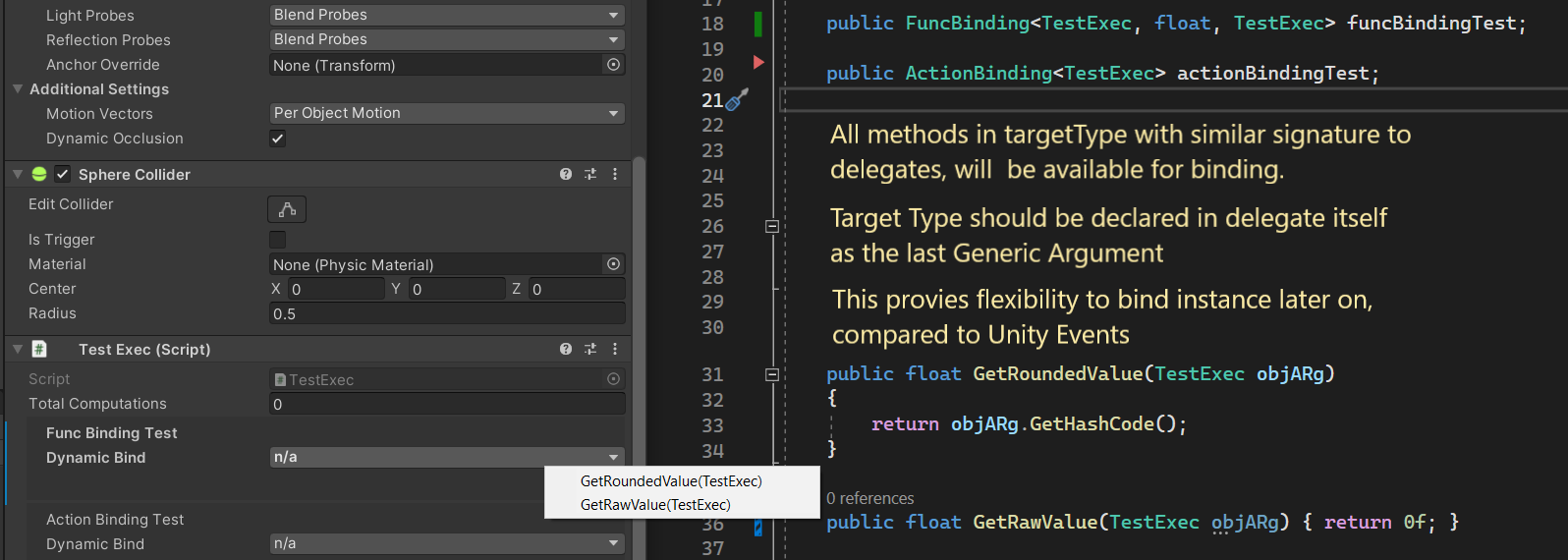
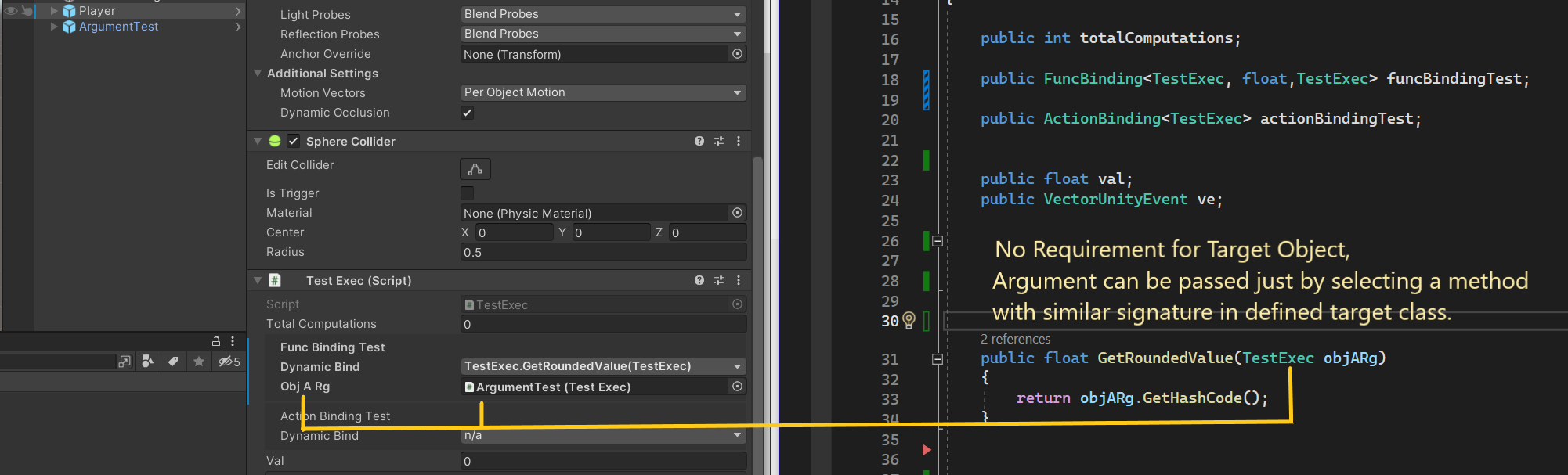
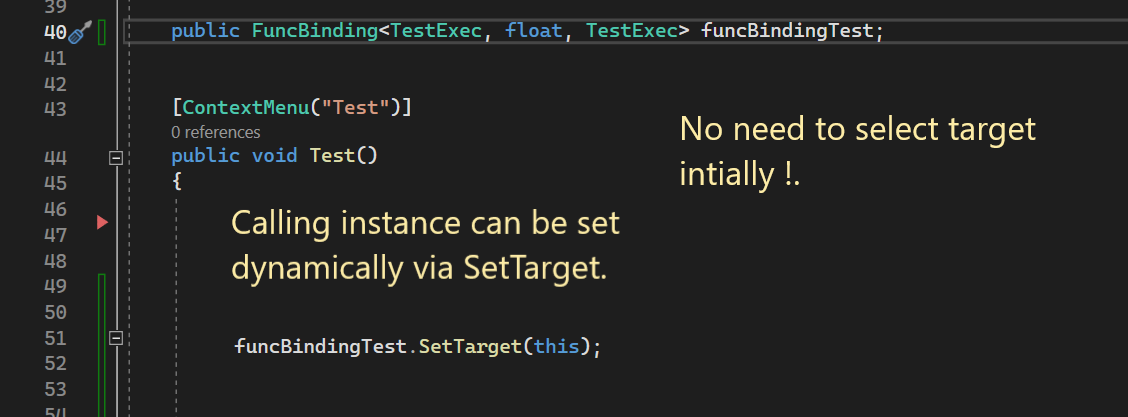
An instanceless delegate binder which lets you assign function in editor without requiring target instance at the time and providing ability to late initialize the event with target invoker.
Pros:
- Insanely Fast compared UnityEvents, Serializable Callback with near performance to native delegates.
- Allows binding instance latey and lets you assign function at edit time without requiring instance.
- Typesafe by default.
- Ideal for mobile devices and handheld where battery life is concerned.
Cons:
-
Binding class need to be resolved at compiletime, This may not be a severe issue but might casue some level of tweaking where assemblies are present.
-
The assignment of the functions are limited to the classtype declared in delegate declaration, child class support will be added later, but it is by design to ensure performance and to provide strong reference info during development.
Benchmarks:
Backend: (IL2CPP)
Compiler Optimization Configuration: Master


Method Selection Without Requiring Instance, but restricted to target Type declared in delegate:
Dynamic Argumemnt Draw similar to unity events:
Set Target Invoker at any point in execution with typesafety and minimal performance hit:
Uses Drawer code from Siccity.SerialiableCallback


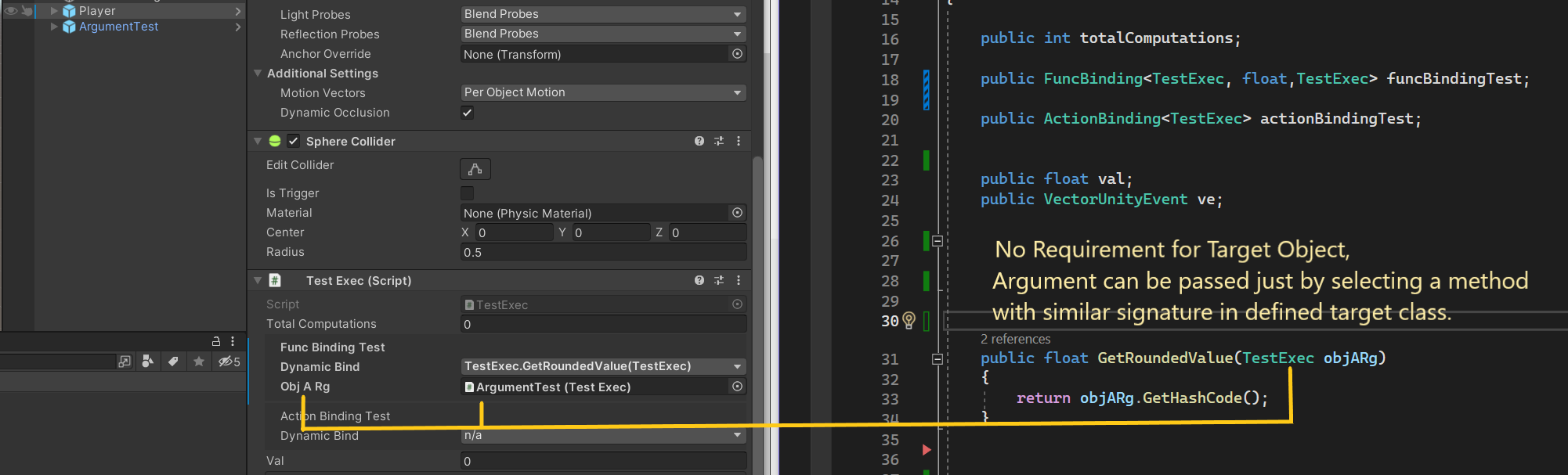

 north sphinx
So I have this MonoBehaviour with abstract SO field. (BoxCollider inherits from ColliderAsset)
Is there a way I can easily inline inspector for this SO into mono behaviour?
It contains gizmos, so modifying it is best without switching between assets constantly.

Basically I want MonoBehaviour to contain an inspector for currently selected asset
waxen sandal
Create a CustomEditor for the MonoBehaviour, create the sub editor in OnEnable (and dispose in OnDisable) then just call OnInspectorGUI?
north sphinx
waxen sandal
Create a CustomEditor for the MonoBehaviour, create the sub editor in OnEnable (...
what's "sub editor"?
waxen sandal
ColliderAsset's editor
waxen sandal
The sub editor is whatever editor you want to show inline, you can create diffrent ones based on the ColliderAsset Implementation if you want
But yeah there's no way to do it without 2 editors
north sphinx
I guess it also won't work with UI toolkit
waxen sandal
Why not
Instead of calling OnInspectorGUI you just add the sub editor to your tree?
north sphinx
waxen sandal
Instead of calling OnInspectorGUI you just add the sub editor to your tree?
but I'm still unsure how to get proper inspector out of untyped SO
waxen sandal
If you have a custom editor for BoxCollider and for SphereCollider (made this up) then it should automatically match the right editor
waxen sandal
When it changes yeah
north sphinx
ok, thanks. WIll try
waxen sandal
Be sure to dispose of them properly
vast tiger
I have this property drawer: https://gdl.space/tomitumubu.cs
But it is visible only using [SerializeField][ReadOnly] int stuff = 5; ? Can property drawer be applied to not serialized field?
vast tiger
Thanks
So if I want to expose that I have to use a custom editor otherwise is not at all possible.
Can custom editor be applied dynamically or do I have to write a custom editor for each script I write to expose a field like that?
Could I do something like create a a custom attribute [ExposeAsReadonly]. Than loop through all MonoBehaviors using GetComponentsInChildren<MonoBehaviour>() and check field.GetCustomAttribute<ExposeAsReadonly>() != null) using Reflection. And then say something like
foreach (var item in from.GetComponentsInChildren<MonoBehaviour>())
{
   // AddCustomEditor(item) ??
}
I suppose it can't because I don't see anything like that in the documentation.
willow jackal
vast tiger
Can custom editor be applied dynamically or do I have to write a custom editor f...
You can override the custom editor for MonoBehavior
vast tiger
willow jackal
You can override the custom editor for MonoBehavior
Do you mean this?
[CustomEditor(typeof(MonoBehaviour)), true]
public class MonoBehaviourEditor : Editor
{}
Yeah
If you go with that, you should see pretty much nothing
Also, you can use Odin or NaughtyAttribute. Both of them do that If I am right
vast tiger
willow jackal
Yeah
It works, lol
I had to add "true"
But then it doesn't show up if I already have a custom inspector in a script...
willow jackal
vast tiger
But then it doesn't show up if I already have a custom inspector in a script...
Obviously 😛
vast tiger
It kinda works lol. https://gdl.space/inayurogid.cs But I'm wondering how can I display unserialized field properly instead of GUILayout.Label();. The solutions on the web suggest SerializedProperty which this isn't, if I understand correctly
 gusty mortar
vast tiger
It kinda works lol. https://gdl.space/inayurogid.cs But I'm wondering how can I ...
gusty mortar
vast tiger
It kinda works lol. https://gdl.space/inayurogid.cs But I'm wondering how can I ...
Wdym by "unserialized field property" ?
vast tiger
gusty mortar
Wdym by "unserialized field property" ?
I mean if this is just private property without [SerializeField]
gusty mortar
From what I see, you use reflection, so you can get your private fields and display them as field using a simple int field for example
It's just a matter of how you draw it
vast tiger
Yes but im just using .toString() instead of proper object / array field
As in screenshot / code above
gusty mortar
Don't you know the type of value in advance ?
vast tiger
Well this was supposed to be a generic solution since its added to all scripts, so no
gusty mortar
Well, if you want to have something different than a ToString, you'll need to cover every possible cases I suppose
But you can access what type your value is with the FieldInfo if I'm not mistaken
vast tiger
But in case of SerializedProperty you don't need to, you just pass it to Property field and it works...
gusty mortar
vast tiger
But in case of SerializedProperty you don't need to, you just pass it to Propert...
Yes, but I think you lose the possibility to do it this simply when using reflection since you're using plain C# object IIRC, plus they are not serialized. You could try converting it to a SerializedObject, but I'm unsure it's possible
vast tiger
Meh, I give up... I'll just use [SerializeField]...
 urban mica
is there a way or plugin that allows for properties to have multiple property fields you can switch between? I'd love a system like godot where you can just as easily pull an image from a noise-based property drawer as from the default one
 prisma musk
Hello, a while ago I made the typical RequireInterface and Drawer classes for assignable interfaces in the inspector. Today I've run into a problem when dropping a prefab onto a field like that. Woudl anyone with more expertise in editor stuff mind checking my little Drawer script?
    public override void OnGUI(Rect position, SerializedProperty property, GUIContent label)
    {
        if (property.propertyType != SerializedPropertyType.ObjectReference)
        {
            const string ERROR_MESSAGE = nameof(RequireInterfaceAttributeDrawer) + " can only be used on object references";
            Debug.LogError(ERROR_MESSAGE);
            return;
        }

        RequireInterfaceAttribute requireInterfaceAttribute = attribute as RequireInterfaceAttribute;

        EditorGUI.BeginProperty(position, label, property);
        EditorGUI.BeginChangeCheck();

        Object obj = EditorGUI.ObjectField(position, label, property.objectReferenceValue, requireInterfaceAttribute.SearchType, !EditorUtility.IsPersistent(property.serializedObject.targetObject));
        if (!EditorGUI.EndChangeCheck()) return;

        if (obj is GameObject gameObject
            && gameObject.TryGetComponent(requireInterfaceAttribute.RequiredType, out var component))
        {
            property.objectReferenceValue = component;
            EditorGUI.EndProperty();
            return;
        }

        property.objectReferenceValue = requireInterfaceAttribute.RequiredType.IsAssignableFrom(obj.GetType())
                                        ? obj
                                        : null;
        EditorGUI.EndProperty();
    }
- Is there any way to serialize a type, other than by its name inside an assembly? The thing is, the type can get renamed, moved to another assembly or both at once, and this approach is not reliable at all. For more context read the next paragraph
- The system that is going to use this type serialization is designed to allow to derive from a certain type, after which the given type can be selected in the inspector of a scriptable object asset, followed by creation of an instance of the selected type at runtime. The most plausible scenario is, the user is going to eventually rename / move the type due to refactoring / project cleanups. The system must retain it's ability to recognize such types
prisma musk
prisma musk
```csharp
public override void OnGUI(Rect position, SerializedProperty prope...
Here is the Attribute class for reference:
public class RequireInterfaceAttribute : PropertyAttribute
{
    public Type RequiredType { get; }
    public Type SearchType { get; }

    public RequireInterfaceAttribute(Type requiredType, Type searchType = null)
    {
        RequiredType = requiredType;
        SearchType = searchType ?? typeof(Object);
    }
}
@hot quarry @past crane @tepid roost just tagging people who responded in other chan
but yeah right now i have a singleton scriptableobject hooked up so i can easily swap between my scenes and spawn my level design prefabs but it's hardcoded as hell

 tepid roost
yeah i added a ton to the create menu as well
but yeah overlays are great for adding tooling around the scene view
queen wharf
Did you just bite the bullet and do that?
ooo
yeah these overlays never came up in google ill read up abit
tepid roost
can be both things up forever or context senstitive stuff
 hot quarry
queen wharf
<@317141358894645248> <@134945562473529344> <@173795534627143680> just tagging p...
hot quarry
queen wharf
<@317141358894645248> <@134945562473529344> <@173795534627143680> just tagging p...
did u edit ur hiearchy with the tree? or is that an asset
queen wharf
Thats a free asset yeah
tepid roost
also for stuff like our grid editor did custom tools as well
queen wharf
hot quarry
heres a good one
thats what im using i believe 😛
Yeah i've only just recently got into custom tooling
i graduated as a game designer but im really taking a liking to it
queen wharf
oo
tepid roost
the tool appears anytime a object with a certain component is selected
then you can enable it to display the tools overlay and paint
hot quarry
queen wharf
i graduated as a game designer but im really taking a liking to it
i absolutely understand that.. i fell off the deep end when i started messing around with editor scripts
made me an audiomanager once.. its like a drag and drop system..
 queen wharf
nooo i still need to re-do my audio stuff
hot quarry
sets up the heiarchy spawns in the audio sources, sets the volume, and creates a singleton with functions to call..
would find the first avail source.. play it.. and disable
tepid roost
yeah go something similar
then i got SO's to contain audio clips, so i can have a random clip for a given name
and be able to weight each option, set volume and random pitch range etc
hot quarry

pretty proud of that one.. yet i dont even use it
got a spawn scene too

its the same as the audio.. drag and drop setup for a test scene
thaz it.. allz i got lol
now IAmBatby got me wanting to make something else lol
queen wharf
hehe
queen wharf
nah i just wanted to find the best way to show a genericmenu the exact same way a normal menuitem is show off
 past crane
queen wharf
<@317141358894645248> <@134945562473529344> <@173795534627143680> just tagging p...
past crane
queen wharf
<@317141358894645248> <@134945562473529344> <@173795534627143680> just tagging p...
one thing you can do is create a static script with strings to build your hierarchy and folder structure instead of hard-coding the path for every menu item. this makes it easy to create, add, edit, or change the path for any menu item . . .


 hot quarry
do u not add hotkeys to ur itemS?
queen wharf
i just want to make that code 1000x cleaner but keep the exact same end result
im not very hotkey pilled as a dev, it's something i gotta work on
queen wharf
oh it's terrible
hot quarry
maybe its the poor discord formatting
queen wharf
no no
its bad
because with menuitems each new listing needs 1-2 dedicated functions
so i gotta mess with genericmenu's to see if i can re-create the looks
hot quarry
u cant iterate or loop to build those either i dont guess
b.c "c# isnt a macro language"
queen wharf
you can with genericmenu's afaik
hot quarry
ive been told that b4
queen wharf
im messin with them now
hot quarry
ohh cool.. TIL
tepid roost
so for generic menus you would need to invoke it from a menu item
queen wharf
just for some reason the only visual example they provide is in osx which is very weird
tepid roost
since the generic menu just pops up at mouse location when you ask it to
tepid roost
why is the macos part weird
its just a menu
will render in the windows style on windows
tepid roost
yeah i am using it, and team is mixed
queen wharf
since im looking for accuracy i don't know the comparison point yknow
tepid roost
i use macOS but half my co-workers use windows
hot quarry
oh yea.. hey ontopic/ offtopic does the newer versions of unity have darkmode menu buttons (dropdowns)
tepid roost
now where are you going to call the generic menu from
hot quarry
like we're talking about.. i seen vertx post a screenshot yesterday with a rigidbody dropdown.. like interpolation or w/e and it had like a 10px grey border.. and both menu choices were that dark grey
looks hella good.. nothing like my dropdowns look
tepid roost
like it wont be attached to the menubar since its literally just a menu that spawns at mouse location
queen wharf
tepid roost
now where are you going to call the generic menu from
I don't mind just having a few hardcoded menuitems to start that off
tepid roost
queen wharf
I don't mind just having a few hardcoded menuitems to start that off
k so you would invoke the hardcoded one, that menu would disapper then bring up the generic one
queen wharf
yeah, if thats possible
tepid roost
yeah its possible
queen wharf
like levels or heists in this shot
 tepid roost
it supports nesting the same way
hot quarry
oh thats cool..
tepid roost
jsut use / in the name
the last arg of AddItem is just a callback function
void with no args
queen wharf
i see
tepid roost
there is one that can pass userdata to the func too
queen wharf
am i going to have issues messing with OnGUI and odin inspector?
tepid roost
but its not type safe so i would just use a closure to wrap any thing extra into a existing function
queen wharf
trying to get the example genericmenu to work and i don't think OnGUI is calling properly
queen wharf
queen wharf
like levels or heists in this shot
I see, sorry this is a silly question. what would i want to get when i've moused over this kind of stuff
tepid roost
?
queen wharf
Like I want to start my genericmenu stuff when I mouse over those type of things like we mentioned but i don't know what function/event im looking to play with to know when my mouse is over those menu items
tepid roost
oh not sure there is a way to do that with the existing menu items
would have to do it on click
it wont be seamless
since the regular menu will go away after you invoke a item, then the generic menu will spawn
tepid roost
yeah GenericMenu is more or less designed for context menus
its realy dumb, like why can the
https://docs.unity3d.com/ScriptReference/Menu.html
let me modify the disabled, and checked state of items
but not add or remove
well its late here, have a good night
queen wharf
good night friend, thank you for the help. i really do appreciate it
queen wharf
hey vertx if you read this, do you happen to know of anyway i would be able to get when you mouse over a MenuItem?
waxen sandal
Don't think you can
 whole steppe
Hey, I made an EditorWindow to help assign meshes to certain generated prefabs (product types). Now I'd like to make this adjustment to a prefab to be undoable. I've tried and tried, but cannot get it to work:
foreach (var productType in _selectedProductTypes)
{
using var scope = new PrefabUtility.EditPrefabContentsScope(AssetDatabase.GetAssetPath(productType));
{
var meshObject = (GameObject)PrefabUtility.InstantiatePrefab(mesh, scope.prefabContentsRoot.transform);
// Parent assignment in InstantiatePrefab adjusts local position, and there is no worldPositionStays option.
meshObject.transform.SetLocalPositionAndRotation(Vector3.zero, Quaternion.identity);
Undo.RegisterCreatedObjectUndo(meshObject, "Create mesh for product type");
PrefabUtility.RecordPrefabInstancePropertyModifications(scope.prefabContentsRoot);
}
}
Undo.SetCurrentGroupName("Assign mesh to product types");```
Does anyone have an idea on how to do this? pine umbra
Hello, I'm trying to find all Prefabs having a specific component in their root. My first attempt was:
.Select(AssetDatabase.LoadAssetAtPath<MyComponent>).Where(prefab => prefab != null)```
but this was extremely slow. So my current implementation is:
```SearchService.Request("p: t:prefab t:MyComponent", SearchFlags.Synchronous)```
which is way faster but it is not perfect. Despite the `Synchronous` flag, it does not appear to be synchronous, since sometimes the assets index is not updated and in those case it fails.
Is there a better way? gray maple
Hey,
is there a way for a non-monobehavior/SO script to have assignable property fields in script inspector like in the screenshot? and if yes, will it still have references when i create instances in the code?
 errant shale
- I discovered the mask field just now. Unfortunately to me it relies on int, which allows me to get 32 values and no more. Can i somehow bypass this limitation to have more values? I have no interest in the mask value particulary, in fact i just need a popup that allows to keep multiple options toggled
 dusk portal
errant shale
- I discovered the mask field just now. Unfortunately to me it relies on int, wh...
dusk portal
errant shale
- I discovered the mask field just now. Unfortunately to me it relies on int, wh...
unity will serialize numeric ulong values but AFAIK the builtin enum flags drawer won't work with ulong enums so you'd have to make your own property drawer
if you want a toggle list of any other kind of value you'd definitely need a custom property drawer, odin's list drawer does that for example
tepid roost
gray maple
Hey,
is there a way for a non-monobehavior/SO script to have assignable propert...
nope not possible
also if you are constructing it in code, you can build it how ever you want, so just pass in the references you need into the constructor
 calm shore
Guys tell me how can I fix this problem with sprites? I don't know what to do with the virtual camera?
please help me fix the problem
gusty mortar
calm shore
Guys tell me how can I fix this problem with sprites? I don't know what to do wi...
Wrong channel + can't help if you don't state the actual problem. It looks fine to me.
gusty mortar
Again, that's vague. What is it supposed to look like ?
calm shore
gusty mortar
Again, that's vague. What is it supposed to look like ?
They should stand straight when the camera moves and not stretch.
gusty mortar
Then go ask for help in #🖼️┃2d-tools. They'll more likely be able to help you fix this issue. My 1st guess is it's just a visual issue due the repeating pattern and high contrast, but there could be a software/rendering issue.
You already asked here... Well be patient and don't cross post
calm shore
gusty mortar
You already asked here... Well be patient and don't cross post
Sorry for spamming messages, it's just this problem from the very beginning of the creation of the project
And I'll try not to spam
gusty mortar
calm shore
Sorry for spamming messages, it's just this problem from the very beginning of t...
You could try reducing the contrast of your pattern (meaning, using 2 closer colors instead of yellow-ish and black-ish) to see if the issue persist.
If you take Sonic which use a similar pattern as an example, it uses close colors
calm shore
gusty mortar
You could try reducing the contrast of your pattern (meaning, using 2 closer col...
Same problem with other tiles.
whole steppe
Do you have some pixel perfect camera setup? If it tries to match a small resolution onto a larger one, I think you can get these sorts of artifacts
gusty mortar
It also could be due to the filtering setting of your sprites
calm shore
whole steppe
Do you have some pixel perfect camera setup? If it tries to match a small resolu...
Where can I set the screen resolution for the camera?

 whole steppe
calm shore
Where can I set the screen resolution for the camera?
whole steppe
calm shore
Where can I set the screen resolution for the camera?
You should be able to get pretty far with Googling "unity pixel perfect camera". Will probably give a better explanation on YouTube than I can give
Filter mode: Point and Compression: None, so I think your import settings should be fine for pixel art
calm shore
whole steppe
Filter mode: Point and Compression: None, so I think your import settings should...
So everything is fine, right?
gusty mortar
calm shore
So everything is fine, right?
It looks right, yes
whole steppe
calm shore
So everything is fine, right?
Sprite import settings: yes. Camera setup: possibly not. Try my Google prompt suggestion 😉
gusty mortar
But the camera, as pointed by ArjanB, can be wrong
calm shore


 gusty mortar
calm shore
gloomy chasm
gusty mortar
calm shore
gloomy chasm
I am deleting a SerializedProperty array element, but after ApplyModifiedProperties it comes back. Any one got any ideas? Something to do with UITK maybe??
 alpine bolt
var editor = Editor.CreateEditor(moduleAsset);
content.Add(editor.CreateInspectorGUI());```has anyone ever made something like this work in UIToolkit? It's for a property drawer@alpine bolt use a IMGUIContainer
_editor = Editor.CreateEditor(actionView.Action);
var container = new IMGUIContainer(() => {
    if (_editor == null || _editor.target == null) return;
    _editor.OnInspectorGUI();
});
Add(container);
With custom UIToolkit PropertyDrawers drawn in that Editor, not possible
tepid roost
ah
well if CreateInspectorGUI is doing UIToolkit stuff and returning a VisualElement think it should work
gloomy chasm
alpine bolt
```cs
var editor = Editor.CreateEditor(moduleAsset);
content.Add(editor.CreateIn...
You want InspectorElement I think
alpine bolt
gloomy chasm
You want `InspectorElement` I think
var assetSerializedObject = new SerializedObject(objectReferenceInPropertyRelative);
Debug.Log(assetSerializedObject.targetObject.name);
var editor = Editor.CreateEditor(objectReferenceInPropertyRelative);
InspectorElement.FillDefaultInspector(content, assetSerializedObject, editor);``` I already tried that. Unfortunately, there seems to be a bug? The `assetSerializedObject.targetObject.name` successfully prints the object's name. However, upon `FillDefaultInspector`, it draws part of the parent serialized object.Huh?
alpine bolt
gloomy chasm
Huh?
What can I say? 🫠
The Log prints the correct object. The Fill method shows the parent object.
gloomy chasm
alpine bolt
What can I say? 🫠
The Log prints the correct object. The Fill method shows the...
Can you show what it looks like? And what you expect? I don't think I am understanding what the issue is
alpine bolt
gloomy chasm
Can you show what it looks like? And what you expect? I don't think I am underst...
Should look like the SO. There are no custom Editor's involved, only this custom property drawer.


Debug.Log => Print:ConfigAsset
gloomy chasm
alpine bolt
Should look like the SO. There are no custom Editor's involved, only this custom...
The issue is probably along the lines of passing it the wrong data would be my first guess
alpine bolt
What do you mean?
gloomy chasm
When you FillDefaultInspector, you might be passing it the MovementController at some point
alpine bolt
gloomy chasm
When you FillDefaultInspector, you might be passing it the MovementController at...
Debug.Log(assetSerializedObject.targetObject.name); // Prints ConfigAsset
var editor = Editor.CreateEditor(objectReferenceInPropertyRelative); //Parent Object Editor```I don't see howWhat is objectRefeInProRel?
alpine bolt
gloomy chasm
What is objectRefeInProRel?
var assetSerializedObject = new SerializedObject(objectReferenceInPropertyRelative);```Can you show the larger code section?
Btw, this is literally what the inspector does internally
That is why I am saying it is probably on your end and not a bug
alpine bolt
gloomy chasm
Can you show the larger code section?
var configAssetSerializedObject = new SerializedObject(configAsset);
Debug.Log(configAssetSerializedObject.targetObject.name); // Prints ConfigAsset
var configAssetEditor = Editor.CreateEditor(configAsset);
InspectorElement.FillDefaultInspector(content, configAssetSerializedObject, configAssetEditor); // Shows MovementController Editor```This is the whole methodI renamed a few variables to be easier to understand
alpine bolt
gloomy chasm
Btw, this is literally what the inspector does internally
What exactly does it do in this context?
calm shore
gusty mortar
https://docs.unity3d.com/Packages/com.unity.render-pipelines.universal@7.1/manua...
Bro,thanks but i got another problem.
this in the end video
gloomy chasm
alpine bolt
What exactly does it do in this context?
This is what the FillDefault is doing, as you can see, not a lot to go wrong https://github.com/Unity-Technologies/UnityCsReference/blob/master/Editor/Mono/UIElements/Inspector/InspectorElement.cs#L529
The code you posted looks fine to me. Maybe try creating a instance of InspectorElement, and passing it the ConfigAsset and let handle the rest and see if that works?
alpine bolt
gloomy chasm
This is what the FillDefault is doing, as you can see, not a lot to go wrong <ht...
That worked actually. I didn't think I could create and instance of InspectorElement. Thanks
gloomy chasm
alpine bolt
That worked actually. I didn't think I could create and instance of InspectorEle...
Nice! 😄
alpine bolt
I don't see why the FillDefaultInspector method draws the other result. Does it have anything to do with the way I created an Editor?
gusty mortar
calm shore
this in the end video
Again in the wrong channel lmao
You character is stuck on the the wall I suppose ? It will require a bit more logic to make it "better", but try adding a PhysicMaterial with a friction of 0 to the collider of your character
calm shore
gusty mortar
Again in the wrong channel lmao
You character is stuck on the the wall I suppos...
Thank you again 👍 👍 👍
gloomy chasm
alpine bolt
I don't see why the FillDefaultInspector method draws the other result. Does it ...
Yeah that is my only guess really. But not sure why. I would have to look at it more to figure it out
queen wharf
Is there a standard way to store data in an editor tooling related script that isn’t a custom editor or MonoBehaviour? Currently using a ScriptableSingleton but was curious if there was a more intended option
 karmic ginkgo
queen wharf
Is there a standard way to store data in an editor tooling related script that i...
karmic ginkgo
queen wharf
Is there a standard way to store data in an editor tooling related script that i...
example of data?
EditorPrefs, SessionState, Editor Resources folder
and scriptables
queen wharf
uhh little to long to explain the entire thing but a list of instanced classes that exist in scene that I add and remove to
karmic ginkgo
does it need to persist between sessions?
prefs/session state i use for most things that dont require inspector
that includes serializing something into a json string
queen wharf
Not necessarily, I don’t mind getting it all back on a session restart. Just want it cached so it only updates when it needs to
karmic ginkgo
for assets editor resources
for any config thing that requires inspector - scriptables
queen wharf
easy then
Is there a good event or function etc when theres a new session and/or assembly reloads and such?
karmic ginkgo
yes, but i have to find it
in my project i detect editor first launch, have timer for compile reload
so both are doable
queen wharf
ooo
karmic ginkgo
 CompilationPipeline.assemblyCompilationStarted
 CompilationPipeline.assemblyCompilationFinished
 AssemblyReloadEvents.beforeAssemblyReload
 AssemblyReloadEvents.afterAssemblyReload
        [InitializeOnLoadMethod]
        private static void Init() => EditorApplication.delayCall += SetLoadingComplete;
the hack for "editor session started"
handles it with a bool lock
bool stored in sessionstate
 worthy wyvern
I can't move my FreeMoveHandle with my mouse:
startControlHandle = Handles.FreeMoveHandle(startControl, Quaternion.identity, size, snap, Handles.SphereHandleCap);
It shows up alright in the Editor. What can be the causes?
gloomy chasm
worthy wyvern
I can't move my FreeMoveHandle with my mouse:
`startControlHandle = Handles.Free...
Are you assigning startControlHandle back to startControl?
 wise forge
Can I get public properties of a ScriptableWizard as SerializedProperties?
I have some properties I want to draw the standard way. In editor windows I'd usually use EditorGUILayout.PropertyField(), but ScriptableWizard doesn't have a serializedObject member like Editor does. Can I somehow cast to SerializedProperty?
worthy wyvern
gloomy chasm
Are you assigning `startControlHandle` back to `startControl`?
that I am, in an if (EditorGUI.EndChangeCheck())
wise forge
wise forge
Can I get public properties of a ScriptableWizard as SerializedProperties?
I ha...
Solved it myself! Just use this code in the wizards DrawWizardGUI method
var property = serializedObject.FindProperty("PropertyName");```
(EDIT: Important to update serialized object, just like in custom editor scripting) tiny rover
hi, i am missing the NavMesh components, they don't exist at all, i don't even have an AI tab under "Window", but i have enabled AI under build-in packages Unity 2022.3 (Also no Navigation Tab)
 blissful burrow
does anyone know if it's safe to use preview packages in asset store releases?
I want to use NativeList<T> from Unity.Collections but it's all preview and spooky and idk if I should
 potent field
Hello, I have this small script to split a "SpriteLibraryAsset." The goal is to separate all the characters into multiple "SpriteLibraryAsset" files to mark them as "Addressables" and load only the ones needed in each scene. However, when creating the ScriptableObject programmatically, internal issues arise.
This is the error:
CreateAsset() should not be used to create a file of type 'spriteLib' - consider using AssetDatabase.ImportAsset() to import an existing 'spriteLib' file instead or change the file type to '*.asset'. This error will in a future release be changed to an exception. UnityEngine.U2D.Animation.EditorSpriteLibraryHelper:SplitSpriteLibraryAsset ()
Does anyone have any ideas on how to correctly create the SpriteLibraryAsset?
Thank you.
 short tiger
blissful burrow
I want to use `NativeList<T>` from `Unity.Collections` but it's all preview and ...
short tiger
blissful burrow
I want to use `NativeList<T>` from `Unity.Collections` but it's all preview and ...
Unity.Collections isn't a preview package for me

 supple willow
same, using Unity ver 2020.3 I can use Collections ver 1.2.4 without it being a preview package
seems from Unity 2020.3.0 it's safe to use
 blissful burrow
oooh I'm on 2019 that's why
I wish this was a little more clear in either the package manager or the docs

anyway thanks!
 atomic sable
blissful burrow
I wish this was a little more clear in either the package manager or the docs
atomic sable
blissful burrow
I wish this was a little more clear in either the package manager or the docs
for future reference, the package docs tell you what unity version it's for when you switch the version top left.
Just realized you can also see that in the picture above.
blissful burrow
this was the first result on google https://docs.unity3d.com/Packages/com.unity.collections@0.0/api/Unity.Collections.NativeList-1.html
which doesn't have that dropdown for some reason
but a button to switch to the latest, and that page has the dropdown
but then I'm also taken out of the NativeList page
ok found my way to that page on the latest
https://docs.unity3d.com/Packages/com.unity.collections@2.2/api/Unity.Collections.NativeList-1.html
worthy wyvern
Vector2 snap = Vector2.one * 0.2f;
float size = HandleUtility.GetHandleSize(endPosition) * 0.2f;
Handles.color = Color.red;
EditorGUI.BeginChangeCheck();
Vector2 endPositionHandle = Handles.FreeMoveHandle(endPosition, Quaternion.identity, size, snap, Handles.SphereHandleCap);
if (EditorGUI.EndChangeCheck())
{
    endPosition = endPositionHandle;
}
This code draws the handle but it can't be dragged with a mouse. This is in a overriden method of an abstract class, which instance is being called in OnSceneGUI(). Is there something I'm not seeing here?
worthy wyvern
Tested that code directly in OnSceneGUI() and it still doesn't work properly. Is there a Unity setting that I missed, like for Scene view?
atomic sable
How do make my window a modal window or a utility window in the UI builder? I'm new to the UI Toolkit.
I enabled editor extension authoring in the UI builder in hopes that would show an option but no luck
and if I have to do it through the uxml file i don't know how.
really i just want to stop it from being docked
gloomy chasm
atomic sable
How do make my window a modal window or a utility window in the UI builder? I'm ...
You set that when you open the window in code
var window = EditorWindow.CreateWindow<MyWindow>();

window.ShowAux();
// Or
window.ShowModal();
// Or
window.ShowUtility();
// etc.

// Or for default dockable
window.Show();
oh so the normal way lol
gloomy chasm
Yup
 gloomy chasm
atomic sable
how do I edit this "filler text"?
gloomy chasm
atomic sable
how do I edit this "filler text"?
In the property panel on the right like normal?
atomic sable
gloomy chasm
In the property panel on the right like normal?
I can't find it
it's a "text field"
gloomy chasm
its there. There should be 3 text fields in the property panel
atomic sable
ohh I see it now. I was looking at the wrong place. I had the actual box selected not the whole thing.
gloomy chasm
Ahh
atomic sable
thx. New to this, I've just always done it the IMGUI way
gloomy chasm
Yeah, welcome aboard the UITK train. Styling is 1000x easier and 10,000x faster haha
atomic sable
yea I'm noticing
atomic sable
gloomy chasm
Yeah, welcome aboard the UITK train. Styling is 1000x easier and 10,000x faster ...
um, one more thing and I'll be on my way. How do I get a reference to a button in c# from my uxml file?
doing this rn (for an overlay):
        var root = new VisualElement() { name = "Bake Path Data Toolbar", tooltip = "Used to back path data to a file for the scene." };

        VisualElement fromUXML = m_VisualTreeAsset.Instantiate();
        root.Add(fromUXML);
        return root;
Get a reference to a button that is in C# or get a reference in C# to a button that is defined in UXML?
atomic sable
gloomy chasm
Get a reference to a button that is in C# or get a reference in C# to a button t...
get a reference in c# to a button that is defined in UXML, sorry
gloomy chasm
atomic sable
get a reference in c# to a button that is defined in UXML, sorry
element.Q
You can give it a type, and or a name, and or a class or list of classes (USS classes, not C# classes)
atomic sable
so for this button, like this?
fromUXML.Q<Button>("bake-button");
 gloomy chasm
Exactly
atomic sable
thanks!
gloomy chasm
Also btw you can do m_VisualTreeAsset.Clone(root); to instiatiate directly in to an existing VisualElement
atomic sable
I don't have an existing visual element (I think), I'm creating an overlay misread your thing sry, i get it!
gloomy chasm
An Overlay is a VisualElement
atomic sable
thx!
gloomy chasm
No problem!
atomic sable
how do i get all the labels in a visual element and set their width? I tried this but doesn't work:
        var label = root.Q<Label>(className: TextField.labelUssClassName);
        new UQueryBuilder<Label>(label).ForEach(a => a.style.minWidth = 20);
It works if I just do it on label, but I have 2 (and I can't rename them, they are locked in the UI builder).
visual stag
atomic sable
how do i get all the labels in a visual element and set their width? I tried thi...
Why not just use USS 
atomic sable
idk, I followed the unity guide on getting started with the UI toolkit, it said to uncheck the USS box when creating an editor window. I'm creating an overlay, it just needs like 2 input fields and a button so i figured I could just sort of wing it instead of really learning the UI toolkit stuff that I should.
how do i use USS?
oh actually i just got it. I needed to put root instead of label. Online they said to use Q then UQueryBuilder, weird.
queen wharf
Where would I start if I wanted to write a C# script dynamically through another scripts code?
 arctic jolt
queen wharf
Where would I start if I wanted to write a C# script dynamically through another...
arctic jolt
queen wharf
Where would I start if I wanted to write a C# script dynamically through another...
honestly? I'd start with rethinking if you actually need that, or if something like interfaces or abstract/virtual classes wouldn't solve the issue you're having.
If you're confident that you NEED to write that, you need to use the System namespace and just make an editor script that will simply create and write to a .cs file at whatever path, then you let unity compile that, and there you go.
But don't do that. If you don't even have an idea where to start, then your issue very likely can be solved by what I mentioned at the beginning.
queen wharf
Unfortunately it somewhat seems like I do have to go this route
im looking to dynamically create these static menuitem functions
 arctic jolt
queen wharf
im looking to dynamically create these static menuitem functions
arctic jolt
queen wharf
im looking to dynamically create these static menuitem functions
can you make whatever guard, civilian and waypointcollection are, to derive from an abstract class, then create a list of that in scriptableSettings, then create a single custom editor in which you'll be able to select what you want from a list and press a button to spawn it? Much less work
arctic jolt
queen wharf
but I like the way menuitems do it 😛
well, if you really just have so much stuff like that, that it's not worth it to write by hand, then make a simple python script to create those functions, then just copy it into that file
it's much less hassle than using C# for that in my experience
queen wharf
Fair, Ill check a look at both ❤️
If I wanted to tackle it in C# with that system namespace, what functions would you suggest i research?
arctic jolt
queen wharf
If I wanted to tackle it in C# with that system namespace, what functions would ...
https://stackoverflow.com/questions/40513414/create-or-open-file-and-then-append-data-to-it
something like this

Stack Overflow
We can use such code to open or create file and then write some data into it (all contents will be replaced).
using (var file = File.Open(path, FileMode.OpenOrCreate))
using (var stream = new
arctic jolt
queen wharf
If I wanted to tackle it in C# with that system namespace, what functions would ...
it was System.IO maybe, I can't remember now
queen wharf
fair haha, tyvm for the hookups
 tawdry kraken
@queen wharf All you need to do is figure out how to generate the text you need, step by step.
This is not entirely uncomplicated, and my own script is 300 lines.
If you are not already familiar with System.IO, then the task might be a tad challenging.
I think it's a good idea to prioritize whether you need it or not.
I can sum up the various classes and methods I used to build mine.
queen wharf
I absolutely do not need it but considering the overall scale of the stuff im writing I figure it might be a fun way to dip my toe into this kinda stuff
I can sum up the various classes and methods I used to build mine.
I'm open ears if you don't mind 😄
tawdry kraken
Here's something you can bookmark for later.
private static string GetScriptFullPath([System.Runtime.CompilerServices.CallerFilePath] string path = null) => path;
private string _scriptPath = GetScriptFullPath();
One more question for me. I want to create a file in the asset database, but when I serialize a file there, it creates tons of errors for me. I cannot use AssetDatabase.CreateAsset because I am not trying to create a UnityEngine.Object asset. This is what I'm trying:
using (FileStream fs = File.Create($"{path}{Filename}"))
        {
            BinaryFormatter bf = new();
            bf.Serialize(fs, points);
            AssetDatabase.Refresh();
        }
 tawdry kraken
using UnityEngine;
Application.dataPath

using System.IO;
Path.GetFileNameWithoutExtension()
Path.GetFileName()
Path.GetExtension()
Path.GetDirectoryName()
Path.GetRelativePath()

string path = "C:\SystemIO\PathNames\UseBackSlash\ButUnity\UsesForwardSlash";
path.Replace('\\', '/') // Make path conform to Unity format.
// Result:  C:/SystemIO/PathNames/UseBackSlash/ButUnity/UsesForwardSlash
Another thing to bookmark:
Makes it easier to get the last item in a path, etc.
public static string[] PathItems(string templateFilePath)
{
    return Path.GetDirectoryName(Path.GetRelativePath(__templatesFolderPath, templateFilePath)).Split(__pathSeparators, StringSplitOptions.RemoveEmptyEntries);
}
And here is how you can include proper indentation:
            string method = @$"
        [MenuItem(""{menuItemPath}"")]
        public static void {methodName}_{_methodCount++}()
        {{
            string templateFilePath = $""{templateFilePath}"";
            ProjectWindowUtil.CreateScriptAssetFromTemplateFile(templateFilePath, $""{newFileName}"");
        }}";
            Debug.Log(method);
            return method;
        }
The @ symbol makes the string include the document spacing and line breaks. (no need for \n or Environment.NewLine)
@queen wharf
You'll have to use Debug.Log() every step of the way.
or you'll go crazy
tawdry kraken
queen wharf
this help will not go to waste, ill let you know how i go
Good stuff 👍
@queen wharf Last example: https://gdl.space/oceyogiguf.nginx (need those double brackets)
PS: Look into AssetPostprocessor at the end, to automate it.
tawdry kraken
atomic sable
One more question for me. I want to create a file in the asset database, but whe...
Look into File.WriteAllText()
atomic sable
I actually got it working, thank you though. Maybe that is the better solution, but I did this and it works:
        AssetDatabase.ImportAsset(path);
        using (FileStream fs = File.Create($"{path}{Filename}"))
        {
            BinaryFormatter bf = new();
            bf.Serialize(fs, points);
        }
        AssetDatabase.Refresh();
i import it before I write it and it doesn't complain
tawdry kraken
since you're using filestream like that, it may be more efficient.
Though WriteAllText automatically creates a file, if I recall correctly.
or overwrites one 💀
atomic sable
yea I want to overwrite.
idk, cus then I'd either need to use File.WriteAllBytes because I'm not writing a string.
so I'd need two streams
memory stream and a file stream
idk, it works, im not gonna touch it. Normally I would use File.WriteAllText
thanks though!!
tawdry kraken
atomic sable
thanks though!!
One reason to use WriteAll, is more readable code.
atomic sable
wym?
atomic sable
wouldn't it be more lines because then I would also need a way to serialize to memory
tawdry kraken
I'm not sure that's necessary, unless there's something I'm missing about what you're doing.
atomic sable
well how would I use WriteAll with an object that is not byte[] or string?
atomic sable
imma just throw it in a method and never look at it again lol
tawdry kraken
File.WriteAllText(JSONUtility.ToJson(obj)); // maybe
 vapid perch
Hi! So I'm trying to make a custom property drawer for a custom class of mine. I want to make it pretty simple and just sort of copy how Vector3s look in the editor. But I'm kind of struggling to get it working right..
public class ViewUnitsDrawer : PropertyDrawer
{
    public override void OnGUI(Rect position, SerializedProperty property, GUIContent label)
    {
        label = EditorGUI.BeginProperty(position, label, property);

        position = EditorGUI.PrefixLabel(position, GUIUtility.GetControlID(FocusType.Passive), label);

        EditorGUI.EndProperty();
    }
}```
Here's the code so far
i'm just trying to get the prefix label to be inline with everything else
right now the variable is nested in 2 arrays in the editor, which may or may not be causing the issue? But even then it should work in that situation
atomic sable
tawdry kraken
```cs
File.WriteAllText(JSONUtility.ToJson(obj)); // maybe
```
i usually do that if I plan on someone looking at the file, but no one needs to look at these files, it's just some extra data that needs to be loaded into a scene.
tawdry kraken
binary better then
vapid perch
I tried looking for help earlier and gave up, trying to do it a different way, but it turns out that its kinda necessary for me to a propertydrawer...
atomic sable
tawdry kraken
binary better then
if you want to see the strangest for loop I've written tho:
            for (float i = min.x; i < max.x; i += Pathfinder.PointDistance)
            {
                for (float j = min.y; j < max.y; j += Pathfinder.PointDistance)
                {
                    pointVector.x = i; pointVector.y = j;
                    if (Physics2D.OverlapCircle(pointVector, pointCastRadius))
                        points.Add((Vector2Serializer)pointVector);

                    infoString = $"Checking point ({i}, {j}) on {working.gameObject}";
                    EditorUtility.DisplayProgressBar($"Baking path info for scene {activeScene.name}...", infoString, progress);
                }
            }
Try adjusting EditorGUI.indentLevel
It is customary to cache it before changing, and then restoring the value at the end.
vapid perch
tawdry kraken
Try adjusting **EditorGUI.indentLevel**
It is customary to cache it before chang...
Thanks! But how do i get the intended indent level if it's in an array?
tawdry kraken
vapid perch
Thanks! But how do i get the intended indent level if it's in an array?
what's in this array?
 tawdry kraken
I'm not sure I understand the question / issue.
vapid perch
How do I get the indent to align with the array from the start? without having to hardcode it to be +4?
like if this value was outside of an array, then it would be indented
here's the current code i have
public class ViewUnitsDrawer : PropertyDrawer
{
    public override void OnGUI(Rect position, SerializedProperty property, GUIContent label)
    {
        int indent = EditorGUI.indentLevel;
        EditorGUI.indentLevel += 4;
        label = EditorGUI.BeginProperty(position, label, property);
        position = EditorGUI.PrefixLabel(position, GUIUtility.GetControlID(FocusType.Passive), label);
        EditorGUI.EndProperty();
        EditorGUI.indentLevel = indent;
    }
}```Is there a variable that tells me that we should be indenting it? since EditorGUI.indentLevel doesn't seem to take into account the built in arrays
tawdry kraken
If you need to code for multiple conditions, they may have different initial indent levels.
Then you can make a switch and have it work both ways.
vapid perch
Is there a way for me to check if we're in an array from the property drawer?
The intent for this property drawer is to basically just act like a Vector3, nothing really special
tawdry kraken
Not entirely sure. I have a theory, but that's at least two rabbit holes.
vapid perch
and I'm just wanting it to have the normal behaviour of Vector3s in the inspector
tawdry kraken
vapid perch
and I'm just wanting it to have the normal behaviour of Vector3s in the inspecto...
It has 12 likes, so will probably work.
vapid perch
It doesn't solve the indentation unfortunately... I just tried it
tawdry kraken
Try restarting Unity before confirming that
The Editor can be buggy when messing around.
vapid perch
All i'm trying to fix right now is the indentation for the PrefixLabel..
vapid perch
oh I was looking at the very last post, which has practically the same code as I do
one second
tawdry kraken
yes, the last post, on the bottom
it has many likes, so I would assume it works, unless you're on a newer version
 tawdry kraken
vapid perch
tawdry kraken
vapid perch
By the way, I made a test setup, and copy/pasted the code from the forums.
Result:
 vapid perch
tawdry kraken
By the way, I made a test setup, and copy/pasted the code from the forums.
Resu...
vapid perch
tawdry kraken
By the way, I made a test setup, and copy/pasted the code from the forums.
Resu...
Neat! My setup has it with 2 nested arrays and not just one... maybe there's something going on with unity?
tawdry kraken
vapid perch
Neat! My setup has it with 2 nested arrays and not just one... maybe there's som...
like this?
public Vector3Clone[,] nested;
actually, that is wrong
nested how?
vapid perch
no, it's a separate class altogther, class A an array of class b which has an array of this viewunit class (effectively a vector3)
 atomic sable
ugh editor giving me so many issues today :) Why is it showing up at the top and not the bottom area?
[ScriptedImporter(1, "pathdata")]
public class ExclusionDataImporter : ScriptedImporter
{
    public override void OnImportAsset(AssetImportContext ctx) { }
}

[CustomEditor(typeof(ExclusionDataImporter))]
public class ExclusionDataImporterInspector : ScriptedImporterEditor
{
    public override void OnInspectorGUI()
    {
        EditorGUILayout.TextField("Test");
        ApplyRevertGUI();
    }
}
 tawdry kraken
Are you using two property drawers?
vapid perch
no, just this one, everything else is unity's default inspector
with the exception of some [SerializeField, Range(0, 360f)] for some variables
but still just unity's default stuff
tawdry kraken
so if you fix it for this scenario, it will break for singles?
to clarify / or rather: can it be fixed without causing more issues, practically?
 tawdry kraken
but that does fix it, right? Looks good to me
vapid perch
the array test is indented too much, when it should be indented just once
vapid perch
yeah... thank you for your help btw! :)
i think this is a case of unity breaking tbh...
tawdry kraken
Those are many :))
But there is a possible workaround
it's just a bit overkill
I'm trying to find the code
/// <summary>
/// Print the serialized properties and their values from a UnityEngine.Object.
/// </summary>
/// <param name="obj"></param>
/// <param name="onlyVisible"></param>
public static void PrintObjectProperties(UnityEngine.Object obj, bool onlyVisible = true)
{
    if (obj == null) return;
    SerializedObject so = new SerializedObject(obj);
    SerializedProperty p = so.GetIterator();

    string header = $"Properties of {obj.name} ({obj.GetType()}) at {AssetDatabase.GetAssetOrScenePath(obj)}";

    void PrintCurrent()
    {
        Debug.Log($"{p.displayName}: {p.propertyPath} ({p.propertyType}: {SerializedPropertyValue(p)})");
    }

    if (onlyVisible)
    {
        Debug.Log("Visible " + header);
        PrintCurrent();
        while (p.NextVisible(true))
        {
            PrintCurrent();
        }
    }
    else
    {
        Debug.Log("All " + header);
        PrintCurrent();
        while (p.Next(true))
        {
            PrintCurrent();
        }
    }
}
Using that, you might be able to discern whether the current property is in an array, or single
but I can't precisely tell you how 🤔
haven't tried this one before
oh wait
there's a more simple way
serializedProperty.propertyPath
@vapid perch
vapid perch
I'll check that out! Thank you!!
vapid perch
Honestly if that doesn't work, I'm just going to give up and hardcode it to +4 indent
but thank you so much for your help!!! :)
I really appreciate it
tawdry kraken
You're welcome 
PS: Tried to recreate your example, but not sure what I was missing.
If you want more help, try to implement the issue there, so I can test myself: https://gdl.space/umokusujax.cs
tawdry kraken
atomic sable
ugh editor giving me so many issues today :) Why is it showing up at the top and...
By "it" I assume you mean the TextField("Test") area?
atomic sable
yea but nevermind, ig that's where it's suppose to render
tawdry kraken
kk
vapid perch
can confirm, this is 100% unity just breaking
the variable is nested 4 times, which is kind of a lot... so i guess i can't really blame unity for breaking here lol
tawdry kraken
private bool PropertyIsNested(SerializedProperty property)
{
    if (property.name == property.propertyPath) return false;
    else return true;
}
If you need to also count the nesting, I think that may be possible by counting the items resulting from:
string[] array = prop.propertyPath.Split(new char[] { '.', '[' });
This seems to work.
private int PropertyNestedLevel(SerializedProperty property)
{
    int n = property.propertyPath.Split(new char[] { '.' }).Length;
    if (n == 1) return n - 1;
    else return n - 2;
}
(fixed)**
supple willow
doesn't that make too much garbage? you could iterate through the chars and just n++ on every '.'
tawdry kraken
supple willow
doesn't that make too much garbage? you could iterate through the chars and just...
Yes, that is true. I realized that before falling asleep 😄 It was late.
public static int NestedLevel(this SerializedProperty property)
{
    int n = 0;
    const char c = '.';
    for (int i = 0; i < property.propertyPath.Length; i++)
    {
        if (property.propertyPath[i] == c)
        {
            n++;
        }
    }
    if (n == 0) return n;
    else return n - 1;
}
Tested. Works for my test scenario.
tawdry kraken
This might be more accurate. https://gdl.space/agucuheceg.cpp
Reduces n per start bracket char
gloomy chasm
tawdry kraken
This might be more accurate. https://gdl.space/agucuheceg.cpp
Reduces n per star...
This might interest you https://docs.unity3d.com/2020.1/Documentation/ScriptReference/SerializedProperty-depth.html
tawdry kraken
gloomy chasm
This might interest you <https://docs.unity3d.com/2020.1/Documentation/ScriptRef...
lol omg, thank you xD
@supple willow @vapid perch
#↕️┃editor-extensions message
Really should have caught that 😅 But it was 4-5 am
supple willow
in that hour, it's a wonder you remembered the syntax correctly :p
gloomy chasm
tawdry kraken
Really should have caught that 😅 But it was 4-5 am
Haha totally understandable.
Though sounds like a normal time to start work to me 😛
vapid perch
tawdry kraken
<@538083574352445461> <@1063028792555212870>
https://discord.com/channels/48922...
Awesome! Thank you!!! :)
worthy wyvern
guys why can I see but not move any Handles
I tried FreeMoveHandle and TransformHandle and I can't grab them with my mouse
omg fixed it
turns out EventType e = Event.current.type; if (e != EventType.Repaint) return;at the beginning is not a good idea at all
 barren moat
How can I get the Scene object from a SceneView?
actually, more specifically, what I want is some way to get SceneView.duringSceneGui for a prefab stage
And i'm trying this:
  static void UpdatePrefabStageLights(SceneView sceneView) {
    var prefabStage = PrefabStageUtility.GetCurrentPrefabStage();
    if (prefabStage.scene == sceneView.scene) {
    }
  }

Got it:
    static void UpdatePrefabStageLights(SceneView sceneView) {
        var prefabStage = PrefabStageUtility.GetCurrentPrefabStage();
        if (prefabStage?.scene == sceneView.camera.scene) {
-
How do i get an icon of a type which is monobehaviour?
-
I'm currently implementing a search window that is populated with types. Those are regular system.type. In a search window, i want to assign a respective icon for every type (they all are definitely monobehaviours) which is only possible when i own a reference to a monoscript/monobehaviour instance. I imagine instantiating objects to simply grab their icon to be hella redundant and slow. Are there any other ways to grab an icon of a type?
barren moat
I'm not 100% sure, but you might be able to use this to get the MonoScript: https://docs.unity3d.com/ScriptReference/MonoScript.FromMonoBehaviour.html and then use https://docs.unity3d.com/ScriptReference/AssetPreview.GetAssetPreview.html to get the icon?
i.e.:
Texture2D GetIcon(MonoBehaviour mb) {
  var monoScript = MonoScript.FromMonoBehaviour(mb);
  return AssetPreview.GetAssetPreview(monoScript);
}
there is probably a better way
errant shale
-
The thing is, i don't own a monobehaviour but a type that is derived from monobehaviour. Just as i mentioned, the only way to get the instance is to instantiate it, but i find this ridiculous. Unless there is no other way at all, i'll try to avoid this
-
I.e. my wanted method signature is
Texture2D GetIcon(Type type) { ... }
Sorry, was googling and I have no idea. good luck!
In the worst case you could create a dictionary of all MonoScript assets in the database.
gusty mortar
errant shale
- The thing is, i don't own a monobehaviour but a type that is derived from mono...
Is this what you're looking for ? https://docs.unity3d.com/ScriptReference/AssetPreview.GetMiniTypeThumbnail.html
 bright storm
I have an editor script which sets some values on a materialpropertyblock of a renderer. This works in editor and when hitting play, but after exiting playmode the material is returning back to the default settings as expected. I need the editorscript to re-apply the materialblock after exiting playmode but cant figure it out without hitting a race condition using EditorApplication.playModeStateChanged
furthermore, EditorApplication.playModeStateChanged is only called when the editorscript is selected in editor, which means this approach wont work
Basically I need to have a bunch of the same item with different basecolor properties which can be set (and seen) in the editor and in playmode without needing to create a million different material assets.
bright storm
figured it out, incase anyone is wondering
[InitializeOnLoad] you can register global callbacks
atomic sable
        private void EditorApplication_playModeStateChanged(PlayModeStateChange obj)
        {
            if (obj == PlayModeStateChange.ExitingEditMode)
            {
                System.IO.File.WriteAllText(savePath, castRadius.ToString());
                Debug.Log(castRadius.ToString());
            }

            if (obj == PlayModeStateChange.ExitingPlayMode)
            {
                string t = System.IO.File.ReadAllText(savePath);
                Debug.Log(t);
                castRadius = float.Parse(t);
                System.IO.File.Delete(savePath);
            }
        }
I just want to make 1 little number stay the same after you exit play mode from what it was before you entered play mode. I can see the debug logs that the number is reading correctly, but it's not being set?
calm shore
Hey guys, how do I make the tilemap transparent so that the player can walk through it?
 livid bison
hello , i am tring to create a serilizable class that has a setup window
[Serializable]
public class WKArgsFloating<T, U> : WKArgsBase where T : WKArgsWindow<U> where U : WKArgsBase
{
    public void ShowWindow()
    {
        T window = ScriptableObject.CreateInstance<T>();
        window.args = this as U;
        window.Init();
    }
}
public abstract class WKArgsWindow<T> : EditorWindow where T : WKArgsBase
{
    public T args;
    public static Vector2 size;
    public abstract void Init();
    private void LostFocus() => Close();
}
i got this so far, is there a simple way to do that?
barren moat
livid bison
hello , i am tring to create a serilizable class that has a setup window
```cs
[...
You can add it to ProjectSettings like this:
https://docs.unity3d.com/ScriptReference/SettingsProvider.html
It's pretty complicated though, annoyingly.
I can show you how I have mine set up if that's what you want.
Does anyone know how to set the grid plane via code?

this is all I can find: https://docs.unity3d.com/ScriptReference/SceneView-showGrid.html
visual stag
barren moat
Does anyone know how to set the grid plane via code?
It looks to be internal m_SceneView.sceneViewGrids.gridAxis = m_Axes[evt.newValue];
GridSettingsWindow.cs:43
barren moat
visual stag
It looks to be internal `m_SceneView.sceneViewGrids.gridAxis = m_Axes[evt.newVal...
Ah, that's a shame.
Maybe worth reflecting...
livid bison
barren moat
You can add it to ProjectSettings like this:
https://docs.unity3d.com/ScriptRefe...
actualy ,i am creating a listview in the setting,but i want different type of elment can be setup by a specific popup
i thought i can make a different argument type ,but serilize them in the same list is impossible so i give up
 calm shore
Hello guys, how do I make the tilemap let the player walk through it?
gloomy chasm
calm shore
Hello guys, how do I make the tilemap let the player walk through it?
This is more of a #🖼️┃2d-tools question. This channel is for discussion around actually creating editor extensions.
 desert grotto
Looking to make an extension I created a plugin and for the life of me I can't find any tutrials or documentation for setting up a github repo to be a plugin. Anyone got a link?
ehhhh, maybe I should have been searching for "package" instead of "plugin". Found something, but any other info is welcomed.
visual stag
desert grotto
ehhhh, maybe I should have been searching for "package" instead of "plugin". Fo...
https://docs.unity3d.com/Manual/CustomPackages.html is the docs for it.
But practically, you can copy the structure from another package. You generally want Runtime and Editor folders with their own assembly definitions, and a package.json file at the root.
If you do copy the structure from another package make sure you delete all the .meta files so Unity regenerates them anew in your package, preventing GUID overlaps.
desert grotto
visual stag
<https://docs.unity3d.com/Manual/CustomPackages.html> is the docs for it.
But pr...
Thanks! That's where I ended up. Walking through it now. As soon as I asked I thought "lemme try package instead of plugin". Thanks for rubber duckin'.
 formal cypress
Hello. How do i visualize a capsule in the editor??
formal cypress
yes please
There is no Gizmos.DrawCapsule or anything alike
but i just chose to use wire cube. since its not a must to use capsule, even capsule would be more accurate
formal cypress
waxen sandal
Not sure if you can disable the handles to change the size
thanks. Let Me try it
errant shale
- I have an array-type serialized property, and an array i need to paste in there. How can i accomplish this? All solutions in the google are about people writing crazy big f*ckers that seem utterly overcomplicated for such a task
waxen sandal
You need to call InsertArrayElementAtIndex for each entry, then GetArrayElementAtIndex then modify the SerializedProperty to whatever data you want
 snow plank
I cannot connect the text that will appear on the screen with the game manager script.
I made the codes exactly as where I learned them, but when I swipe on it, it does not allow me to connect
alpine bolt
spriteEditorDataProvider.SetSpriteRects(spriteRects);
spriteEditorDataProvider.Apply();
textureImporter.SaveAndReimport();``` I'm having some trouble setting the slice settings for my sprites. The apply/revert buttons are not greyed out and on Selection.objects change, it prompts to save/discard/cancel the changes. snow pebble
Why would i be getting a null ref for this line of code:
        public override void OnInspectorGUI()
        {
            base.OnInspectorGUI();
            var polygon = serializedObject.FindProperty("_polygon");
            Debug.Log(polygon.arraySize);
        }
the _polygon is the correct name for it and its a public list - seems it doesn't find it though ?
spark lotus
snow pebble
Why would i be getting a null ref for this line of code:
```csharp
publi...
Show the exact error? Which line throws the error?
Did you assign serializedObject a proper reference?
snow plank
When I set it to return to a certain point, it falls to the ground like this, it does not go straight, what should I do?
 steel wedge
snow plank
When I set it to return to a certain point, it falls to the ground like this, it...
steel wedge
snow plank
When I set it to return to a certain point, it falls to the ground like this, it...
Do you not want it to fall?
snow plank
steel wedge
Do you not want it to fall?
yes
steel wedge
Do they have gravity turned on?
snow plank
it wobbles and bumps into the surface but i want it to come straight and spin
nope
i open it but still the same
steel wedge
Maybe it has something to do with the colliders
snow plank
I set it to rotate only in the x direction from the animation part, it turns back to normal when I turn off the rotation direction
colliders and rigid body setting
 steel wedge
Try freezing the y position
snow plank
passes through the surface and falls into the void
normally there is no problem, but it throws it from the spawnpoint point instead of forwarding it straight
the methods you mentioned reacted like this
steel wedge
Looks like removing the animation remove the wobble
Maybe just add the rotation via code
snow plank
steel wedge
Maybe just add the rotation via code
I will try
steel wedge
snow plank
I will try
Did it work?
snow plank
steel wedge
Did it work?
They suggested a solution but I could not reach the result.
errant shale
- I have a monobehaviour class whose file contains an icon. How can i enforce for every file that contains a derived class to have the same icon? The same situation goes to scriptable object assets
spark lotus
errant shale
- I have a monobehaviour class whose file contains an icon. How can i enforce fo...
You mean you're referencing an asset?
errant shale
spark lotus
You mean you're referencing an asset?
- Excuse me, what?
 safe sorrel
I made a little editor window to let me set a static field that controls which gamemode the game will start in.
It gets cleared every time there's a domain reload (i.e. every time I compile), which is annoying
any idea how I'd make that "stick" better? maybe just use PlayerPrefs?
karmic ginkgo
safe sorrel
any idea how I'd make that "stick" better? maybe just use PlayerPrefs?
SessionState, EditorPrefs
safe sorrel
Oh, SessionState is perfect. Thank you!
actually, EditorPrefs is perfect-er, since that'll survive an editor quit
safe sorrel
neat
snow pebble
how do you prevent loss of focus of inspector when clicking in the scene view ? trying to place things in scene
kinda frustrating i cant find much info for this in docs
queen wharf
snow pebble
how do you prevent loss of focus of inspector when clicking in the scene view ? ...
You can either manually lock the inspector or if your doing editor stuff get and set Selection.activeObject
snow pebble
where would i set that
i dont want to manually lock since i dont normally need to do that for other tools unity provides
in my case im using a scriptable object
so i want to click in scene and it will add the vector3 point to an array
queen wharf
You can literally just set Selection.activeObject and/or Selection.activeGameObject
https://docs.unity3d.com/ScriptReference/Selection.html
snow pebble
that accepts scriptable objects?
snow pebble
lol
visual stag
snow pebble
how do you prevent loss of focus of inspector when clicking in the scene view ? ...
Why not just refocus an element in the inspector?
snow pebble
not sure what you mean by that but apparently you have to do this:
            //maintain focus of object
            if (evt.type == EventType.Layout)
                HandleUtility.AddDefaultControl(0);
inside OnScene event
no idea why
visual stag
I don't have enough information to understand your setup
snow pebble
so i select my scriptable object asset in asset folder
so i can see the inspector for it aka my custom editor
now i want to add points by clicking in the scene window. when i clicked i would no longer have the inspector open on my asset
so it would stop working
or worse if i selected another game object in scene it would switch over to that object being selected but i needed to ignore it
visual stag
It's generally easiest to look at the source for something that does something similar and replicate their structure
snow pebble
yeh i tried to find such a thing but couldn't but i got lucky from some random blog that apparently adds a default control to
fix the issue
im surprised so few people have had this issue in the forums i couldn't even find people asking the question
snow pebble
i dunno why but my custom editor script when casting target to the type is always null, am i missing something to get that to work ?
        void OnEnable()
        {
            SceneView.duringSceneGui += OnScene;
            _data = target as Polygon;
        }
Im inherting from : Editor
so it shouldn't be null 🤔
visual stag
snow pebble
Im inherting from `: Editor`
I mean, you wouldn't have target if you weren't inheriting from Editor
What type is the CustomEditor attribute targeting?
snow pebble
i worked out the issue in the end
 wheat notch
blissful burrow
okay I have a potentially weird question
let's say I have a monobehavior with a serialized list, of a serialized type, that uses a (non-serialized) NativeArray
I've been able to make this work for the most part, making sure to dispose at appropriate times
but the one case I can't seem to solve right now is when I undo deleting an element in that list
my guess is that I have to tap into the serialization, and ensure that the nativearrays are disposed before deserializing, but the ISerializationCallbackReceiver callback is called like every 10th editor frame or something, which would be very, not performant, to just dispose all the time
what happens is that the NativeArray inside the elements that were not removed from the list, leak
I'm assuming this happens because unity replaces the data in place with the serialized data, on deserialization, which means Dispose() won't get called for the old elements in that array
visual stag
I would personally try to avoid having a native collection in a serialized piece of data, it sounds like pain, even in ECS you don't bake native collections, you set them up at startup
blissful burrow
hmmm yeah I just, don't really know how to do it otherwise
since they are associated with a monobehavior and all
visual stag
Hard to say what your data is, but I would probably maintain another data structure in parallel that is indexed into the same way, or is a dictionary, or something to that affect
I don't think there's a once size fits all way to handle it; if you do find a way to get a fancier callback to handle this sort of thing I would like to know
I think it'd be very handy with UITK
blissful burrow
I just wish there was a serialization callback for, this
OnAboutToTrampleYourOldData
visual stag
🦶
I agree, though I vaguely understand why it's like this, every time Unity talks about their serializer I am like "yes, you are dealing with this at a totally different scale than me and my tiny editor"
blissful burrow
the use case is for my Shapes plugin, where I want to cache the generated mesh data from polylines. Each polyline can hold multiple separate segments, and so each segment has a NativeArray of generated mesh data, so that I don't have to regenerate the entire thing for each modification

and so I manage a NativeArray in each polyline segment as well as a master native array in the polyline itself for sending it to the actual mesh
I could just not use NativeArrays at all and just use regular old data but I figured it would be more performant to use native arrays
less data copying etc
visual stag
Yeah I would probably just have a seprate List that's kept at the same size, and if the data is smaller you just dispose of the last element and recalculate them all
seeing as that's only gonna be a nasty operation in the editor
blissful burrow
what do you mean by "if the data is smaller"?
visual stag
if you have too few or too many segments, you either add or remove an element (with your native collection) and update them all
and that'd only happen in the editor under circumstances that did nasty ops with your segments
blissful burrow
oh, the list holding the segments isn't a native list in and of itself
visual stag
yeah, I understand that
I mean that your segment list can be a completely separate list from your native data list
blissful burrow
oh, hmmm yeah that might work
trying to figure out if that will work or if it will have the same issue just in a different place
I'm guessing this is related to how Unity deserializes arrays/lists
and so if the native arrays are outside, it shouldn't be an issue
is the idea, right?
visual stag
Yes, I don't believe it recreates the whole class, just injects the change
 visual stag
The normal cases and API can update the only element that changed and nothing weird happens, it's only the undo and other random cases where things unexpectedly mutate that you rebuild the contents of the native arrays and allocate/dispose of the last elements.
blissful burrow
okay so, instead of
[SerializeField] public List<PolylineSegment> segments;
where each segment has a non-serialized NativeArray, I remove it from the PolylineSegment type, and instead do:
[SerializeField] public List<PolylineSegment> segments = new();
[NonSerialized] List<NativeArray<PolylineVertexData>> segmentVertices = new();
[NonSerialized] List<NativeArray<ushort>> segmentTris = new();```and then rebuild/dispose etc when necessary
visual stag
Yeah, though no harm making a list of PolylineSegmentNative or something that has all the native data that just isn't serializable
blissful burrow
right yeah I could do that
blissful burrow
it seems to work pretty well, thanks!
safe sorrel
karmic ginkgo
https://gist.github.com/pointcache/3e98049a891fbe3308f9e5c79f31f27f
this feels mildly cursed
mode.Set((int) (GameManager.GameMode) EditorGUILayout.EnumPopup((GameManager.GameMode) mode.Get()));
also, sanity checking:
- use
[InitializeOnLoadMethod]to read the value fromEditorPrefson startup - write to
EditorPrefswhenever the user changes the setting
 peak bloom
safe sorrel
actually, EditorPrefs is perfect-er, since that'll survive an editor quit
peak bloom
safe sorrel
actually, EditorPrefs is perfect-er, since that'll survive an editor quit
Those bow down to ScriptableSingleton... pure beauty
 sick apex
When I do a flip with my spaceship cinemaschiene flips the gameobject and camera, how can I disable that?
safe sorrel
sick apex
lol artist tools
karmic ginkgo
safe sorrel
```cs
mode.Set((int) (GameManager.GameMode) EditorGUILayout.EnumPopup((GameManag...
youre not supposed to set/get multiple times a frame
declare, get once in OnEnable, set once in OnDisable
safe sorrel
ah, okay, that's more reasonable
I had gotten mixed up and thought the entire thing was static at first
https://docs.unity3d.com/ScriptReference/EditorWindow.html i shall read the docs before making more uninformed guesses 
karmic ginkgo
@safe sorrel ```cs
public sealed class EnumEditorPrefsValue<T> : EditorPrefsValue<T> where T : Enum
{
public EnumEditorPrefsValue(string name, T defaultValue) : base(name, defaultValue) { }
    public override T Get() => (T)(object)EditorPrefs.GetInt(name, (int)(object)defaultValue);
    public override void Set(T value) => EditorPrefs.SetInt(name, (int)(object)value);
}
oh nice, thanks -- I was thinking about writing that
karmic ginkgo
hm this calls for inversion tbh
safe sorrel
the double cast is really funny to me
enum moment
do you make this an instance field on the editor window class, or a static one?
it probably doesn't matter
I had made everthing static at first because I (mistakenly) thought this was..well, all static
in my defense I think I wrote that before having any coffee
safe sorrel
yeah, I had just completely missed that instances of the class existed
worthy wyvern
I have this UndoRedo function in my Editor class that executes these lines:
private void UndoRedo()
{
  pathBezier = (WaypointPathBezier)pathCreator;
  endPosition = pathBezier.EndPosition;
  endControl = pathBezier.EndControl;
  startControl = pathBezier.StartControl;
}
the last three lines are for Vector2s, they stand for the Bezier controls. They move correctly if I transform the object with the pathBezier
For some unforsaken reason, if I undo after I move the object, sometimes these controls do not come back to their original place. They can move an additional random amount towards the position before the move, e.g. if I move up and undo, some may move down more.~~ Seems that they're locked to the vector of the original move.~~ X and/or y of a random vector can change. The amount moved seeems to be completely random, not just a rounding error. Also some times this error happens every Undo, other times only after a dozen.
Are there any quirks about the Undo system that I should know?
urban mica
is there a way of having sort of userData but for individual SerializedProperty instances? I'm currently storing metadata externally using a ScriptableObjectSingleton, using the Unity Object and the property path, but it's becoming pretty difficult to keep track of stuff like a field being moved in a array, etc.
snow pebble
how can i get mouse click + left control keydown at the same time for editor scripts
given each time the script runs we get the event Event evt = Event.current; but if you ctrl + click thats two events
gloomy chasm
snow pebble
given each time the script runs we get the event `Event evt = Event.current;` bu...
evt.type == EventType.MouseDown && evt.button == 0 && evt.control
gloomy chasm
urban mica
is there a way of having sort of userData but for individual SerializedProperty ...
Nope, that is the only way to go about it sadly. Even stuff like the serialiedProperty.isExpanded 'meta-data' is bound to the path, not the 'data'. So when you move a array element and [0] is expanded, [0] will still be expanded and not the one that you just moved.
Out of curosity, what are you storing per property?
snow pebble
gloomy chasm
`evt.type == EventType.MouseDown && evt.button == 0 && evt.control`
not sure thats the correct api
gloomy chasm
snow pebble
not sure thats the correct api
did ya try it?
gloomy chasm
Hmmm
gloomy chasm
snow pebble
not sure thats the correct api
Oh try Event.current.modifiers == EventModifiers.Control?
snow pebble
im so confused when i recompile or re-open my project my scriptable object loses all its data
i dunno if im missing something in my editor script to make sure it saves
                    serializedObject.Update();
                    var a = targer as TestAsset;
                    EditorUtility.SetDirty(a);
``` tried both of these lines neither workHow can i achieve Transform Like Rotation editor? It converts the Vector3 to Quaternion but it giving me some errors. This is the full problem:
https://forum.unity.com/threads/propertydrawer-inside-serializedobject.1490125/
 uneven urchin
I have a problem. In my game i have setup the buttons that each time you complete a level a button gets interactable, but when I build my game and open it all the buttons are interactable and i get this warning : unable to find playerassemly
gloomy chasm
snow pebble
```
serializedObject.Update();
var a = t...
serializedObject.Update() - This updates the data on the SerializedObject from the target object. So any changes done by other SerializedObject to the target object, or by directly editing the target will then be propagated and reflected in the SerializedObject that Update() was called on. This will clear any changes in the SerializedObject that have not been applied.
serializedObject.ApplyModifiedProperties() - This updates the target object with any changes that were made to the SerializedObject that ApplyModifiedProperties() was called on.
EditorUtility.SetDirty(..) - This tells Unity that the specified object has changed in some way and should be saved. This is only needed when directly editing values on the target object (myTarget.foo = 4;).
worthy wyvern
worthy wyvern
I have this UndoRedo function in my Editor class that executes these lines:
```c...
I've narrowed it down to my "local or global coords" functionality:
endPosition = EditorGUILayout.Vector2Field("End Position", endPosition - localStart) + localStart;
I have a toggle which assigns the Start position to localStart if true and zero if false. If localStart isn't zero, then the bug happens.
gloomy chasm
whole steppe
How can i achieve Transform Like Rotation editor? It converts the Vector3 to Qua...
Not sure off the top of my head why you are getting the exception. If you have a visual element bound to the m_Rotation property then it is that I assume.
However there is no need for m_RotationHint, you can get a Vector3 from a Quaternion by simply doing Vector3 rotationAngles = m_Rotation.eularAngles; And then back by doing m_Rotation = Quaternion.EualarAngles(rotantionAngles);
gloomy chasm
uneven urchin
I have a problem. In my game i have setup the buttons that each time you complet...
Are you talking about buttons in game? #archived-code-general would be the right place to ask about it probably. This channel is for discussing creating editor extensions like new editor windows and inspectors and stuff.
urban mica
gloomy chasm
Nope, that is the only way to go about it sadly. Even stuff like the `serialiedP...
Figured that's the case  , I'm attempting to make a system where I can rightclick any field and add a editor only "resolver" which allows you to select a custom property drawer that fits the value type. So like, I can right click a texture field, select the gradient resolver, then have a gradient property drawer which resolves to a texture.
It's almost there but I just can't find a good way of tracking stuff like values in arrays being swapped. I've got some janky ideas that could work but they're all massive hacks
whole steppe
gloomy chasm
Not sure off the top of my head why you are getting the exception. If you have a...
Yes i know. I've also thought about doing an attribute.
The reason i do this, i wanted to save the vector3 value.
Like, if you convert a Vector3(361,0,0); to Quaternion, it will be okey. But after you get the Euler Angles of that Quaternion, it wont be same as Vector3(361,0,0).
In Transform Component, they store an invisible Vector3 which is can be seen from scene and transform data. That way this problem is be gone.
In mine, it works as the same except the error in arrays. I have also no idea why it does not Synchrone the SerializedObject even i do apply them...
I check the "Undo" tab under the "Edit" label at the top-left corner. It does exactly what i want it just saves. But i realize one thing. It does not shows that it is saved the "m_RotationHint" even it is changed. Instead, it is telling me it saved the "m_Rotation". And when i undo, it undo's the "m_Rotation" and "m_RotationHint". Then where is "ApplyModifiedProperties()" gone? Or maybe i think in wrong way ...
anyone interested: https://forum.unity.com/threads/propertydrawer-inside-serializedobject.1490125/
I think i got an idea. I can just use one Vector3 field instead of Quaternion. And use Property get; set; to get quaternion value!
After hours, found my solution 🙂 Thank you MechWarriror99
Still, there is no quaternion shown in debug tab hahha i wonder how they achieved this...
worthy wyvern
How can I prevent a variable from being recorded to the Undo History? I have a ScriptableObject with a bool variable which I use for ToggleLeft() and Unity phantom records changes to that Toggle, i.e. Ctrl-Z does nothing to that toggle unless I [SerializeField] the bool nvm doesn't happen anymore
worthy wyvern
worthy wyvern
I've narrowed it down to my "local or global coords" functionality:
`endPosition...
I've found a workaround with this: introduced new variables and in EndChangeCheck() assigned them to the class fields. I kinda already did this but assigned to values inside an object of the class.
I recon this is a bug.
safe sorrel
karmic ginkgo
declare, get once in OnEnable, set once in OnDisable
actually, i just realized something
the editor crashes on me more than i close it voluntarily
maybe i do need to proactively save the value 😉
 wanton monolith
Hey 👋 By chance does anyone know if someone already made a more generic version of the LOD Group inspector? This thing here:
 supple willow
wanton monolith
Hey 👋 By chance does anyone know if someone already made a more generic version...
supple willow
wanton monolith
Hey 👋 By chance does anyone know if someone already made a more generic version...
what do you want from the component that the inspector isn't providing?
wanton monolith
supple willow
what do you want from the component that the inspector isn't providing?
I don't want anything from the component, I want to use the editor itself for a different component I have.
More precisely, the bar at the top with lods stacked where you can drag the edges and click the elements etc
supple willow
@wanton monolith I mean what's wrong with it currently? if you pointed out the flaw, we'd be able to find the right solution easier
gloomy chasm
wanton monolith
Hey 👋 By chance does anyone know if someone already made a more generic version...
There isn't sadly, you have to make a custom one your self. You can look at the source code on github though for reference for how to go about it.
blissful burrow
is there any downside to shoving multiple component type definitions into one .cs file?
I imagine I might run into like "oh so if you do that then you can't set a custom icon on a per-script basis" or something
but idk
(they're not meant to be human readable)
(they're very short and auto-generated)
maybe it's fine to keep them separate it just makes me anxious to have such a list in this folder lol
 supple willow
blissful burrow
I imagine I might run into like "oh so if you do that then you can't set a custo...
supple willow
blissful burrow
I imagine I might run into like "oh so if you do that then you can't set a custo...
component types need to be in a file with the same name as the type. so multiple components in one file wouldn't work
the reason being serialization I believe (a component is actually bound to the file asset of the script containing the component type, which is referenced by the file asset's guid. file link also visible in inspector's debug mode, as field m_Script or something)
blissful burrow
oh huh I thought I read that you could have multiple in one file
nevermind then c:
long list it is
supple willow
blissful burrow
oh huh I thought I read that you could have multiple in one file
I think I last tried it on 2020. unless anything has changed since then, I don't think it's possible. would be really useful though
queen wharf
blissful burrow
I imagine I might run into like "oh so if you do that then you can't set a custo...
Out of curiousity, Have you messed with custom monoscript icons much in Unity? I went down a rabbit hole with them trying to figure out why I could never replicate the same mipmapping and overall detail the official unity ones have in stuff like the Component but I could never figure it out. Figured there's a chance you might know something about it 😅
 oblique sky
it may be hard to tell from this picture, but I'm watching one of Adam Younis's videos and he made an editor window that allowed him to see a preview of all the scenes he's made so far. He can move them around, and even link scenes together similarly to nodes in shadergraph.

aside from the fact that I know this is an editor window, I really have no clue how to even approach making something like this. I'm particularly interested in how each node has a preview image of the scene it represents. Anyone have any thoughts on how to make something like this?
gloomy chasm
blissful burrow
oh huh I thought I read that you could have multiple in one file
Yeah, it changed in a more recent version where you can have multiple in the same .cs file.
The only issue I think you would run in to is with the icons I think.
For having all of the components in the folder, it is a bit of a 'hack', but from what I remember you can actually set the hide flag hideInHierarchy on the MonoScript asset to hide it in the assets folder. I could be misremembering. If not, you could set them all as sub assets I think and hide them there. Not 100% sure though since Unity might be treating them diff since they are MonoScripts
gloomy chasm
oblique sky
aside from the fact that I know this is an editor window, I really have no clue ...
It is just a normal node graph (you can find all sorts of info on how to make them and things on github). For the previews.
Probably when the scene is saved, a camera is added to the scene that is positioned so it can see the whole level, and then is rendered to a render texture which is then saved to disk. Then the nodes can just find the preview texture that corresponds to the scene it represents.
oblique sky
gloomy chasm
It is just a normal node graph (you can find all sorts of info on how to make th...
despite working with unity for nearly 5 years now, I still feel like I have so much to learn
thanks man that was very helpful
queen wharf
gloomy chasm
It is just a normal node graph (you can find all sorts of info on how to make th...
@oblique sky Could even be using this perhaps? https://docs.unity3d.com/Manual/scene-templates-editing.html#thumbnail
oblique sky
yet another thing in unity I managed to go years without ever seeing...lmao
 astral oar
is it possible to call functions of the game scripts from editor scripts while in play mode?
visual stag
gloomy chasm
Yeah, it changed in a more recent version where you can have multiple in the sam...
The only issue I think you would run in to is with the icons I think.
Iirc you can't add the additional behaviours to objects except via code. Which is a rather large issue 😄
gloomy chasm
visual stag
> The only issue I think you would run in to is with the icons I think.
Iirc you...
That does sound familiar now that you mention it.
blissful burrow
yeah I'm gonna need to do this soon and I remember it being a mess
visual stag
Imo having lots of files full of like components is very not a concern
The concern would be keeping them organised in the AddComponent menu 😄
supple willow
@visual stag
but do people really use the menu without the search bar? DOTween has a lot of components too, and without unique icons, but I've never seen people complaining about it.
anyways, one way to solve it, if components are of the same parent (and are not UnityEngine.Object), would be to use SerializeReference on a local field and make an inspector that lets the user change that field. so, just one component in the end
visual stag
Sometimes
It's nice to get a complete list of something in the menu. You don't use it in every day application, you use it when you want to say, see every shape a library has to offer
I wouldn't want to lean too hard on SerializeReference unless there was a good reason to do it, and I don't think "too many components" is a good reason
It's currently quite a fragile thing if you do much refactoring
and in the case of extension development you really don't want stuff breaking because of some small change you made to naming, that you cannot fix on the user's side
supple willow
yeah it does come with disadvantages. If the type's name and namespace is bound to not change then it's safe to use, but aside from refactoring, it also comes with a worse performance than normal serialized data. could be too much trouble for a project, or just the right solution. depends on the Type itself really
but as in stability aside from being name bounded, it's pretty much safe in production. I've used and seen people use it in previous projects, sometimes very heavily
 vapid prism
Is there any event I could listen to for when the editor loads/changes layout? I'm inserting some UI elements in to the main toolbar and atm I'm doing it with DidScriptsReload() but if a user uses the Layout menu it doesn't trigger this event again which causes the elements to disappear.
 waxen sandal
vapid prism
Is there any event I could listen to for when the editor loads/changes layout? I...
waxen sandal
vapid prism
Is there any event I could listen to for when the editor loads/changes layout? I...
IIRC it destroys all ui components so you can just check the next frame after destruction?
vapid prism
waxen sandal
IIRC it destroys all ui components so you can just check the next frame after de...
How would I listen for "new frame after destruction" in this case?
waxen sandal
EditorApplication.Update
vapid prism
Hmm yeah I suppose that could work if I don't find a nicer way
supple willow
maybe a EditorApplication.delayedCall during OnDestroy?
vapid prism
There's no OnDestroy available here, at least that I'm aware of? They're UIToolkit elements but even if they were IMGUI I don't see how I could listen for an OnDestroy.
However you did make me realise that I might be able to use DetachFromPanelEvent and combine it with EditorApplication.delayedCall
to re-create them afterwards
peak bloom
yes, DetachFromPanel should be the easiest
supple willow
guess you're in for a trial-and-error approach, try different ways and see which one works. Don't think there's a built-in proper way to do this
blissful burrow
visual stag
The concern would be keeping them organised in the AddComponent menu 😄
they're kinda organized there at least!

 oblique sky
I'm a bit confused with manually repainting UI with methods like EditorWindow.Repaint and VisualElement.MarkDirtyRepaint. If repainting the UI is always called when a field's value is changed, why would you ever need to manually repaint a UI element? I'm not sure how that's ever useful
waxen sandal
If you're doing basic things then you don't have to
But when you're making your own components then you do
Or when not using serializedproperties
oblique sky
I'm still a bit confused. Do custom inspectors / editor windows not repaint themselves when a field is changed? don't all fields automatically subscribe to some repainting delegate with OnInspectorUpdate under the hood?
man I'm not even sure what I don't understand here. I seem to be very far away from understanding this
astral oar
is it possible to check from code if this is set
 supple willow
oblique sky
I'm still a bit confused. Do custom inspectors / editor windows not repaint them...
supple willow
oblique sky
I'm still a bit confused. Do custom inspectors / editor windows not repaint them...
they do repaint regularly on different events (like mouse hover , enter , exit etc.). as Navi said, you don't really have to bother with that for doing basic UIs.
as for it's usecase, the way I see it, there are 2 common scenarios where they're useful. one is when you want regular update on your UI, for animation maybe. second is when you make a change to your UI and it's important to show the results right away, instead of waiting for the next repaint (which usually mean the next mouse event)
oblique sky
supple willow
they do repaint regularly on different events (like mouse hover , enter , exit e...
I see, that makes sense. Thanks man
supple willow
you're welcome mate
 blissful swan
Is there anyway to 'hook into' to the duplicate action in the editor. As in, when a object gets duplicated have the newly created item call a function?
 dense agate
okay, this is some deep stuff which i have not enough knowledge about, maybe one of you can help me.
I build a custom spell system out of a ScriptableObject. Some spells link to other ScriptableObjects for more Data. I would love for my Main InspectorGUI to directly show the Inspector of the linked other Objects. Is there a way to achieve this somehow ?
astral oar
is there a way to send message/call method on runtime objects in play mode from editor scripts?
dense agate
astral oar
is there a way to send message/call method on runtime objects in play mode from ...
you can access the scene structure through an editor script. So calling anything in the scene at playmode "should" be possible. Never tried it tho but it should work.
astral oar
well I have my game controller object in a static variable
and it seems to be null still while in play mode
dense agate
have you tried accessing non statics ?