#✨┃vfx-and-particles
1 messages · Page 36 of 1
 lofty orbit
is there a way to use some modified camera to build a texture like that more efficiently?
 knotty surge
Hello! I have a problem where one of my particle systems (a muzzle flash) is only facing in one direction when it's instantiated from a script.
Instantiate(muzzleFlash, attackPoint.position, Quaternion.identity);
this is what i'm using to instantiate it
attackPoint is just an empty game object, and I believe that the problem is that when the game is running, none of the position or rotation numbers change on the right

I do not have a clue on how to fix it though
 woeful pollen
knotty surge
`Instantiate(muzzleFlash, attackPoint.position, Quaternion.identity);`
woeful pollen
knotty surge
`Instantiate(muzzleFlash, attackPoint.position, Quaternion.identity);`
the Quaternion.identity part of that line determines the rotation. Quaternion.identity is like saying "use the default world rotation." You probably want to use attackPoint.rotation instead, but that's based on some assumptions I'm making about your setup and how you want it to work.
knotty surge
two things
I thought Quaternion.identity said "use the default or parent rotation"
when I change it to attackPoint.rotation it gives me this too cannot convert from "UnityEngine.Quaternion" to UnityEngine.Vector3
woeful pollen
knotty surge
I thought Quaternion.identity said "use the default *or* parent rotation"
there's another parameter that is bool instantiateInWorldSpace. Its default value is true. If you set it to false, then you'll be setting the local rotation and Quaternion.identity will be equivalent to using the parent's rotation.
knotty surge
do I need to get rid of quaternion.identity too?
woeful pollen
knotty surge
when I change it to attackPoint.rotation it gives me this too `cannot convert fr...
you should replace Quaternion.identity with attackPoint.rotation
you want to intantiate at the same position as attackPoint, using the same rotation as attackPoint, right?
knotty surge
oh my gosh it works thank you
yes
I thought I tried that but I must have not typed it right
I'm not very good at this, thank you
woeful pollen
haha no worries, everyone was a beginner at some point. You learn by struggling and muddling through. Happy to help
knotty surge
another quick question, where exactly would I turn off particles moving around due to momentum
I'd like them to just appear as a sort of "effect", but when I move my player around, the muzzle flash moves too
like, it moves around as in more than just being attatched to the gun how it's supposed to be
woeful pollen
you mean like as soon as you instantiate it, you want it to stop following the player and stay in one place in world space?
knotty surge
no, it's hard to explain
it's seems like the particles are affected by physics, but not world physics
like a muffler on a moving car
the air whooshing around it moves the exhaust around after it leaves the muffler
if I shoot then whip my view to one side, the particles look as if they're tied to the barrel of the gun, and as they're going away from the tip, they sort of lag behind and catch up
woeful pollen
knotty surge
if I shoot then whip my view to one side, the particles look as if they're tied ...
and what do you want them to do?
knotty surge
I want the particles to be locked to the gun and just do their animation without interacting with any sort of physics
cause right now it seems like they're having some sort of physics interaction
woeful pollen
I suspect it is not physics per se. What kind of particle system are you using? VFX Graph? Old system?
And when you instantiate the muzzle flash, does it have a parent?
knotty surge
I just right clicked and went to Effects>Particle System
the particle system is parented to the gun but I'm not sure if that's what you meant
oh wait, I think they're parented to attackPoint
woeful pollen
yep, that's what I was asking
knotty surge
which is the empty game object on the gun
woeful pollen
so, I'm still not 100% sure how you want it to look. First thing I would try is having the particle system no longer have the gun as the parent. Just have it have no parent
that should make it not move from its original position after you instantiate it
knotty surge
okay let me try explaining it like this
I want the muzzle flash to move with the gun
but I don't just want the part where it's emitting from to move
I would like all of the particles to move, even the ones after they got emitted
right now the already emitted ones are staying where they are and the ones that are getting newly emitting appear at the gun barrel
woeful pollen
ah
okay
can you screenshot the inspector for your particle system?
you probably need to simulate in local space instead of world space
but I don't know exactly where the setting is off the top of my head
knotty surge
simulation space is set to local
 woeful pollen
okay, so see the Simulation Space option? Toggle that to world and see if you like the effect better
knotty surge
same thing
also I'm not noticing another issue
when the script instantiates the muzzle flash, it appears on the tip of my gun where it should, but also at 0,0,0 in the world
every time I shoot
 woeful pollen
can you show your whole script that is doing the instantiating?
knotty surge
like paste it here?
woeful pollen
yeah, or using a paste site. See #854851968446365696 for posting code guidelines
knotty surge
I can also paste it like this cause it's too big to just be a normal message
you can click to view the whole file in discord without downloading it
woeful pollen
knotty surge
you can click to view the whole file in discord without downloading it
it says could not render file preview. put it on a paste site
knotty surge
okay
Pastebin
Pastebin.com is the number one paste tool since 2002. Pastebin is a website where you can store text online for a set period of time.
almost all of this is from a tutorial video
woeful pollen
okay, and the thing you dragged into muzzleFlash, is it a prefab? Or an object in the scene?
and how many bullets do you fire for each shot?
knotty surge
it's one bullet
and also i believe it's an object in the scene

the highlighted thing is the particle system that I dragged in
woeful pollen
okay, if you're instantiating it it should be a prefab
so you'd drag that object you have highlighted into your project folder
drag the thing from your project folder into the script slot
then delete the thing you have highlighted from the scene
HOWEVER
there is an alternative approach
that instead of instantiating a new one each time
you could toggle the exiting one on and off
in which case, instead of using Instantiate, you'd use muzzleFlash.gameObject.SetActive(true);
and you need to set the particle system to deactivate the game object when it finishes
using the Stop Action setting
knotty surge
okay I dragged it into the project folder, and dragged the thing in the project folder to the script slot
everything still works as normal, but i'm still getting 2 muzzle flash objects
woeful pollen
do you have this script on two objects?
knotty surge
is there an easy way to check?
cause right now I don't think I do, but I will later
woeful pollen
there's a search bar
knotty surge
because every gun needs it
woeful pollen
also, I'm really sorry for ditching you kind of mid issue, but I really need go to go bed...
woeful pollen
good luck with your game!
 shut token
Wasn't sure where to ask this but have a 128x128 terrain and want to do a selection area similar to the GIF (Populous 3)
- was going to make a procedural plane and use the terrain heights and offset (have a simple mesh not using Unity Terrain), and a separate pyramid for "godrays"
- need to also select/highlight an area in between tiles as well

Kinda just wondering if there's a better way than using a mesh on top graphics wise - using URP currently in my own project
 warped gate
i tried randomizing my particle colors per particle but its stuck on one color

for all particles and it doesnt even randomize at all
 dull obsidian
lofty orbit
<@!471083604135378975> could you give me a hint about how i would be using an or...
dull obsidian
lofty orbit
<@!471083604135378975> could you give me a hint about how i would be using an or...
use output particle points context, get the xyz position and set as the rgb color so it will be stored in the texture. set the position with a modulo to wrap the indices around to fill a 2d rectangle for the render texture. you could think of it as a simple non-continuous space filling curve.
an example 4 x 4 texture could contain up to 16 particle indices that look like this:
 0,  1,  2,  3,
 4,  5,  6,  7,
 8,  9, 10, 11,
12, 13, 14, 15
so, similarly, a 1024 x 1024 render texture could hold 1,048,576 particles.
the orthographic camera then looks at this "quad" made of particle points and draws to a render texture that can be red in vfx graph, unpacking the 2d index layout back into the 1d particle index / id
dull obsidian
lofty orbit
is there a way to use some modified camera to build a texture like that more eff...
that's what the layer masking and the custom frame settings on the camera are for, to disable rendering of any objects and effects that aren't necessary / not the vfx graph particle points that holding position data as color data in pixels / texels.
@lofty orbit it's not an ideal workflow but there is no direct to render texture output for vfx graph or shader graph currently. nor is there graphicsbuffer / computebuffer output which would be even better and not require an ortho cam or modulo index wrapping business. i have the graphicsbuffer output working mostly but i haven't had spare time to update my repo in a while and it may break in future unity versions or not work on certain platform and render pipeline combinations
lofty orbit
i see
in that case it seems like i might as well do the the physics calculations on the CPU and just pass the positions to VFX each frame using something like a PropertyBinder point cache?
dull obsidian
lofty orbit
in that case it seems like i might as well do the the physics calculations on th...
or physics on the GPU using compute shaders then use graphics buffer to let vfx graph read
 tardy swan
Can somebody help me with my problem? I'm trying to figure out how to do everything in Unity, but for some reason I can't edit the shader/material settings on my particle effect. The whole tab is grayed out!
What do I do?
 hearty flare
tardy swan
Can somebody help me with my problem? I'm trying to figure out how to do everyth...
hearty flare
tardy swan
Can somebody help me with my problem? I'm trying to figure out how to do everyth...
Create a new particle material and assign it to the renderer module
tardy swan
Yeah, I can't do that.
I can create the material fine, but it won't allow me to drag it in.
hearty flare
where are you dragging it
tardy swan
Into the box looking thing
hearty flare
screenshot the inspector
 hearty flare
That is not the renderer module of the particle system
tardy swan
Then what am I supposed to put the material in?
hearty flare
the renderer module of the particle system
 tardy swan
I don't have that part of the first thing
tardy swan
it ends there
 hearty flare
Click the renderer module
tardy swan
oh my gosh am i that dumb
gosh darn it
thank you
thank you a lot
it helped
but also
i feel dumb
heh
hearty flare
It would be good if it actually looked like a dropdown, I can see how it may be confusing
 elfin pilot
warped gate
i tried randomizing my particle colors per particle but its stuck on one color
elfin pilot
warped gate
i tried randomizing my particle colors per particle but its stuck on one color
It's because you're doing your math on float so the "exactly equal 0" is never hit. Use uint/int in the modulo and compare blocks instead (set by clicking on the cogwheel on top right corner of the block). Colors of the edges indicates the type (uint/int is purple and float is cyan/light blue)
 viscid shuttle
which renderers support the visual effect graph tool?
 quick quiver
HDRP and URP. They initially had some support for built-in renderer but that's gone in recent versions
viscid shuttle
i see, i am gonna experiment with it a little to see what i can do
I want to follow this tutorial just for creating a firework effect but can't find the firework samples anywhere

Unity Learn
With Unity’s Visual Effect Graph, you can choose where particles spawn using predefined volumes and shapes. In this tutorial, using a simple fireworks display, we’ll explore what a position block is and how it can be used to initialize particles. This tutorial also covers sequential spawning blocks and how you can use them to extend basic partic...
using 2019.4 for this
I saw other people also complaining about the resources being nowhere to be found but already 2 years ago
I found them now

Unity Learn
In this project, you will learn how to apply and configure some of the key VFX properties in Unity’s Visual FX Graph tool. You will utilise GPU events to create realistic fireworks effects, and you will learn how to integrate Shader Graph with Visual Effects graph to enhance the look and feel of visual effects. Suggested Skill Level & Prerequisi...
 brave cipher
I've seen it where particle systems can create a ring that expands from a point. Is there a way to do this but with a square share instead?
 atomic magnet
Hey I'm having trouble finding a solution to what should be a simple problem
I want to create a particle that moves from point A to point B with someone erratic movement (to sort of look like lightning)
and I have found guides to make lightning looking particles, plenty of them
but I want the start and end location of the particle to be predefined
looks like what I may want is a line renderer with some randomized x,y values
just need to figure out how to make the last vector3's X position be the same as the stored x position (which is relative to the world, whereas the line render is relative to itself)
 fluid lagoon
 soft hull
How to pass quaternion to visual graph?
soft hull
How to pass quaternion to visual graph?
Can pass it as a Vector4 if you really need to
 worldly linden
i'm trying to get my explosion particle system to emit light on its environment, i have created 2 light prefabs, however they dont seem to be emitting light
 bold kelp
Is there any other way to set up animation sheet material for particle system other than using the legacy shader?
Since the legacy one doesn't use intensity
 radiant night
Particle System to Emit Light on Environment
 robust tide
Does anyone know if the VFX Graph works with Quest 2?
 stable flume
In the vfx graph, when using the Loop And Delay attribute. Is there any way to count how many loops that has passed?
Alternately, is there a way to loop over all poitions in a point cache with some delay to make a smooth particle emitter?
 tacit frigate
Hey so i made a cool little thruster VFX graph for my ship, but at medium to high speeds there is a stutter in the particles - how do i make it smooth?

 sly cobalt
Anyone know of a way to have per-particle motion blur using the default particle system? (per object motion vectors don't seem to accomplish this)
 slate sable
tacit frigate
Hey so i made a cool little thruster VFX graph for my ship, but at medium to hig...
slate sable
tacit frigate
Hey so i made a cool little thruster VFX graph for my ship, but at medium to hig...
What spawn are you using?
 tepid musk
In VFX graph how would I go about orienting a particle towards the camera while keeping it flat on any given direction (shown in red)?

plugging the red arrow into Orient: Look at Line doesn't quite get this desired result
tepid musk
got it :)

 devout steppe
guys i am trying to make firework with particles but in arcamera the particles are not world coordinate
they are hovering over screen
devout steppe
guys how can i change the size of particles , upper one , and how can i limit the height of the particles

 midnight grove
@devout steppe Don't crosspost
devout steppe
midnight grove
<@360434951180779521> Don't crosspost
ok sir
warped gate
https://youtube.com/clip/UgkxY5BwaH8gb_Ap4-olAmktoTzdT2e-H_eH how could i go about recreating this red slash effect

YouTube
5 seconds · Clipped by Meta · Original video "Final Fantasy 7 REMAKE - ALL Character Abilities" by BuffMaister
 icy kelp
Why does my timeline only play one of my two systems?


System 2 is not playing. Even when i switch placed with the other one. Unity 2020.3.20f1
 compact raptor
Is there any pro/con to setting the size in Initialize versus Output in VFX Graph?
viscid shuttle
hello, i am using URP and trying some vfx graph, but the bloom doesn't seem to really do much in the game view

this is the scene view

I was wondering what settings i might need to change for it to also look like this in the game view
 analog cedar
how to spawn just one particle by command from script?
something similar to particle system Emit(int)
midnight grove
viscid shuttle
I was wondering what settings i might need to change for it to also look like th...
Make sure your camera is set to use post processing.
viscid shuttle
oh yeah that was it i forgot that setting
 summer drift
viscid shuttle
oh yeah that was it i forgot that setting
summer drift
viscid shuttle
oh yeah that was it i forgot that setting
I do that all the time.
viscid shuttle
yeah, i have mostly done stuff with the standard renderer so it's a bit different
bold kelp
Heya, does anyone know why my seamless texture still has a breaking line on a mesh? Is there anything special that I need to do with the UVs?

 warm torrent
bold kelp
Heya, does anyone know why my seamless texture still has a breaking line on a me...
warm torrent
bold kelp
Heya, does anyone know why my seamless texture still has a breaking line on a me...
The UV map needs to be laid out correctly that it can repeat, hard to tell from here though
tepid musk
(VFX Graph) How could I store a vector3 in Initialize Particle to be referred to in Update/Output? Seems custom attribute would work if it didn't only allow floats
 wise verge
I'm trying to do a portal effect from one camera's view to another; should I be looking at stacking in the compositor or a custom render pass? (HDRP, deferred)
Coming from old-style graphics I'd just render one camera with a stencil and the other with its inverse...
bold kelp
warm torrent
The UV map needs to be laid out correctly that it can repeat, hard to tell from ...
It's a very basic layout 🤔
 warm torrent
bold kelp
It's a very basic layout 🤔
warm torrent
bold kelp
It's a very basic layout 🤔
So if you apply a repeating texture to it in blender, does it repeat properly?
Scaling the texture may break the tiling
elfin pilot
tepid musk
(VFX Graph) How could I store a vector3 in Initialize Particle to be referred to...
You should be able to set your custom attribute type in the inspector of the node (as well as its name)
bold kelp
warm torrent
So if you apply a repeating texture to it in blender, does it repeat properly?
That was a good idea for testing, because yeah there's no crease here and I did scale the texture in Unity
 warm torrent
bold kelp
That was a good idea for testing, because yeah there's no crease here and I did ...
warm torrent
bold kelp
That was a good idea for testing, because yeah there's no crease here and I did ...
If you scale the texture using a mapping node you might notice that the scale must be an integer
 jade glen
for some reason i can't edit the curves in my particle system, it just changes the color

 bold kelp
warm torrent
If you scale the texture using a mapping node you might notice that the scale mu...
bold kelp
warm torrent
If you scale the texture using a mapping node you might notice that the scale mu...
You're a genius, that is going straight to my notes
Fellow black cat
lofty orbit
does anyone know the deal with "direction" data types in VFX graph?
they sound really useful, but they never seem to work; i end up using vector3's so the math works like it seems it should
lofty orbit
I also have a bit of a tricky question: I want to orient a particle that is being stretched along its velocity to always be facing the camera (for VR)
simply orienting along velocity works pretty well, but it has major flaws in VR https://i.imgur.com/8ehwXvm.mp4
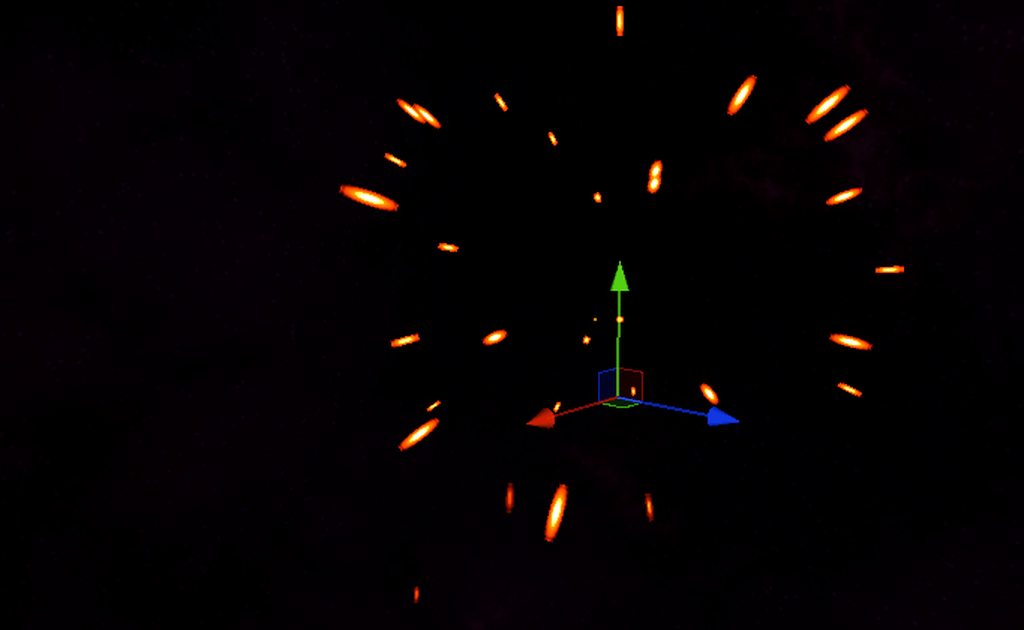
so the problem i need to solve is how to stretch and orient the particle correctly so that it is A: always facing the camera directly, B: rotated correctly about it's local z (forward) axis so that C: it can be stretched by the appropriate amount based on its relative velocity from the cameras perspective
eg: in the edge case example shown above (when the particle is heading toward the camera), the particle should more or less look perfectly circular
lofty orbit
i got something close but it's still a bit off... i need to think about this more carefully...
what i really need to properly calculate is the velocity of the particle relative to the look direction of the camera
like a projection of 3d onto 2d
shouldn't be too hard if i do it like that....
lofty orbit
is this really the best way to get the directions of a transform?

oh shit that's wrong now that i look at it... lol
wise verge
Anyone know of a way to trick the "mirror" into seeing a different location? I'm basically trying to get the HDRP "reflection probe" to make a magic mirror elsewhere
devout steppe
i want to add sound on when the particles start and when end
 fervent horizon
solved it, sorry
 brazen grove
What's the most efficient way to get particles to emit on collision?
lofty orbit
efficient depends on your needs
typically one would use the OnCollisionEnter() callback in monobehaviors... Depending on what particle system you're using, how its set up, and other specifics, different options might be cleaner, easier to implement, more performant, etc...
my favorite method is to link named events (VFX graph) directly to initialization contexts
you can pass in standard and even custom parameters if you set things up right
 vapid wagon
Hi everyone, I have a particle system where I spawn some cartoons words like in the video, I would like the words to be rotated in a certain way based on the angle between the original spawn point and itself to make it less rigid, as in the picture here.
Is there a way I could make it? I'm using the particle shape: "box" to make it spawn randomly around the smoke, with this I don't know is there a way to give them a starting rotation based on the angle between them and the spawn point.

 wintry hearth
Hi ! Is there way to Lerp between two Signed Distance Field (with two Texture3D) or two Meshes when positioning particles ?
(with VFX Graph)
wintry hearth
okay, i found a workaround by lerping attractions & other properties for two stacked conform SDF, but nothing yet for Mesh surface position for example.
 hoary lance
What's the most correct/idiomatic way to get a LineRenderer to draw 'always on top' of everything else in a 3D game?
woeful pollen
hoary lance
What's the most correct/idiomatic way to get a LineRenderer to draw 'always on t...
imo putting a material on it with its render queue set to something late like Overlay
and with a shader that draws on top of everything
 split laurel
Particles flicker on this output node. On line works fine, but can't use a texture. I can't seem to Set Scale particles too. Whatever values I use, 0 effect

I have a 1px x 4px line, but it renders squares. Here you can see the texture I'm using. The squares are the "output".

 inland jasper
I was wondering if someone could help me out. I have fabric in HDRP and I want to add peach fuzz (fine sparse little hairs that in most fabrics) is this something that I can do with VFX graph for a still image? I’m kind of new to VFX graph so any help would be greatly appreciated.
 dull obsidian
wintry hearth
okay, i found a workaround by lerping attractions & other properties for two sta...
dull obsidian
wintry hearth
okay, i found a workaround by lerping attractions & other properties for two sta...
it's not impossible but compared to SDFs it's more difficult and less flexible to work with Mesh data in this way. you may be better off using the Mesh to SDF baker included with Unity, which can also work in real-time via the C# scripting API
unity VFX graph is mainly geared towards dynamic real-time particle systems so while you could use VFX graph with the HDRP hair shader in Unity 2021.2 it's not required for this. You'll want to use the HDRP Hair shader either way with the physically based material model. whether your fuzz strand geometry is imported from 3d modelling software or created in unity with VFX graph or other methods is less important, but for a still image using VFX graph seems like overkill to me. I'd just make the strand geometry in Houdini or Blender, Maya etc whatever you are familiar with and import it into Unity, render with HDRP Hair Shader with Physical material https://docs.unity3d.com/Packages/com.unity.render-pipelines.high-definition@12.1/manual/master-stack-hair.html
inland jasper
@dull obsidian ok makes sense, thank you for your help
Does unity have xpd importer ?
That converts xpd to geo strands
 rugged mural
I am learning Unity 2019 and the particle systems. I googled and looked up online tutorials, but is there a way to have a particle source/render to randomize between multiple 3d objects?
split laurel
I'm using VFX Graph and following some tuts. On the tuts they are using Unity 2020 URP, same as me, but they have Shader Graph field on their Output Particle Quad and I don't

this is mine

I refreshed UI and now all VFX Graphs show Shader Graph field. Makes no sense at all, but it's resolved 🤦♂️

 safe helm
inland jasper
I was wondering if someone could help me out. I have fabric in HDRP and I want t...
safe helm
inland jasper
I was wondering if someone could help me out. I have fabric in HDRP and I want t...
actually for a still image i don't see why not. If you ever do it using this method i would love an update about how it goes. also i think you'd want to bake an SDF or a Point Cache of the mesh for this method, you can do it inside unity.
dull obsidian
inland jasper
Does unity have xpd importer ?
as far as i know there is no XPD import, you'd need to unpack the primitives in Maya export to FBX and import the FBX into Unity, the mesh will have many more vertices but it's to render a still image anyway https://docs.unity3d.com/Manual/HOWTO-ImportObjectsFrom3DApps.html
 dull obsidian
@inland jasper Alternatively, a reason you might want to generate the fuzz strand geometry in VFX graph in real-time (as @safe helm mentioned) is to quickly iterate on the shape and density of the fuzz strand geometry to your liking, without needing to export from Maya, import to Unity, repeat You could use VFX graph particle trails for this (tutorial here: https://www.youtube.com/watch?v=ok42y7WJ7TM) and use the new VFX Graph + Shader Graph integration in 2021.2 to use the HDRP Hair shader. (not covered in tutorial, so refer to documentation here: https://docs.unity3d.com/Packages/com.unity.visualeffectgraph@12.1/manual/sg-working-with.html) It might be more difficult to set up and the performance cost may be much greater versus static geometry. It's a tradeoff that also depends on how comfortable you are with Maya vs Unity VFX Graph in terms of workflow. Regardless of you you generate the geometry i recommend using the Hair shader and Physical Material setting use the Physical material setting as I previously mentioned (here #✨┃vfx-and-particles message)

This tutorial showcases interaction between Unity Visual Effect Graph and Houdini in order to bake point caches and signed distance fields.
Chapters:
00:00 Introduction
01:25 Houdini Setup
03:24 Houdini : Point Cache, Mesh, SDF
12:37 Unity : Set up Base Head / Hair
19:16 Growing Hair as Trails
27:34 Give Shape to the hair
29:42 Collide Hair wit...
Discord
Discord is the easiest way to communicate over voice, video, and text. Chat, hang out, and stay close with your friends and communities.
@inland jasper or if you prefer the Maya workflow, this new FBX Export package with Maya Integration may ease the Maya -> Unity pipeline and reduce iteration time by automating the export and import process https://docs.unity3d.com/Packages/com.unity.formats.fbx@4.0/manual/integration.html
inland jasper
@dull obsidian this is great information, really appreciate it. I will do some simple tests today and see what what works for me. Thanks a million
warped gate
i do not know whats happening with the vfx graph decals
 hot field
I can't import the particle system thing in the brackeys video

Its greyed out for me

 inner topaz
hot field
inner topaz
hot field
beacause that tutoreal is super old
the packages you find there are probably now available in the asset store for free
could be this package
not 100% sure
https://assetstore.unity.com/packages/essentials/tutorial-projects/unity-particle-pack-127325

Get the Unity Particle Pack package from Unity Technologies and speed up your game development process. Find this & other Tutorial Projects options on the Unity Asset Store.
 loud knoll
what do i do about this, yes i pressed the button

 tribal nest
Is there a way to hide the orange outline when previewing a particle?
 midnight grove
In the gizmo drop down at the top of the scene window, turn off selection outline.
 waxen holly
does enabling post processing on the main camera affect performance if you do not have a post porcessing volume enabled on "lower" quality?
warped gate
warped gate
decals are such dogshit
tribal nest
midnight grove
In the gizmo drop down at the top of the scene window, turn off selection outlin...
thanks!
 bright tusk
can someone tell me why there's these streaks in my trail?
 warm torrent
bright tusk
can someone tell me why there's these streaks in my trail?
warm torrent
bright tusk
can someone tell me why there's these streaks in my trail?
The streaks are caused by overlapping polygons / segments
They usually occur at tight turns but I can't say why they're all over it
bright tusk
I'm assuming its not meant to have this many polygons

hmmm. Changing min vertex distance has the biggest effect on it. But nothing i do seems to really help much
 safe helm
warped gate
decals are such dogshit
safe helm
warped gate
decals are such dogshit
Decals in VFX graph spawn facing forward by default, so if you want to project it on the ground, you can set the angle to 90/-90 in the X axis.
warped gate
safe helm
Decals in VFX graph spawn facing forward by default, so if you want to project i...
i did this and it didnt work

it still flickers, partialy dissapears, moves with the screen and other weird things
safe helm
warped gate
i did this and it didnt work
and the orientation is off? also in scene view (sometimes) it looks weird but if you look in the game view it looks normal
warped gate
actually it is a bit better
like a bit as in it still bad and isnt what i want but is better
also the distance is jus
like 2 meters at most
you cant see it
safe helm
you mean the effect bounds ?
warped gate
i mean ig?
idk if its the bounds or sum
i thought the bounds are like per object
per particle i mean
safe helm
you can increase the bounds size at the top of the initialize context that should help. you can also use recorded bounds, i find it very useful
warped gate
safe helm
you can increase the bounds size at the top of the initialize context that shoul...
how do you set that
warm torrent
bright tusk
hmmm. Changing min vertex distance has the biggest effect on it. But nothing i d...
Well the streaks seem to be gone don't they
But you've got a new problem which is the jagged tail
The fix for that is: don't decrease trail size over its length, instead use a texture that tapers off
The traditional type of UV mapping used by the trail and many other things simply can't handle tapers, for math reasons
safe helm
warped gate
how do you set that
Top right if you click control, you'll see this menu, change the type of the system to recorded and press the record button.

you should see the bounds changing in the scene view. and clicking "Apply Bounds" will change the system bound to the recorded values
 warped gate
Alr thanks

 prime dome
Hi, maybe this tutorial can get you started: https://www.youtube.com/watch?v=pDayqvyE7VY

Intermediate level tutorial for Visual Effect Graph:
Chapters:
- 00:00 Introduction
- 01:03 Prepare asset for custom behavior
- 02:00 Sequential Positions
- 03:55 VFX ShaderGraphs
- 08:12 Position Based Behavior
- 14:47 Custom Attributes animated behavior
- 21:47 Control Point Size
- 23:45 Property Binders
- 26:53 (Tip) Quick Expose Properties...
 main viper
prime dome
Hi, maybe this tutorial can get you started: https://www.youtube.com/watch?v=pDa...
main viper
prime dome
Hi, maybe this tutorial can get you started: https://www.youtube.com/watch?v=pDa...
thanks!
its sadly only about editing particles not spawning them
prime dome
@main viper how about this? not perfectly what you requested, but its very close
 main viper
close enough, thank!
 queen cosmos
does vfx graph support hdr colors?
i'm setting the intensity to +2 to +8 but the output mesh (plane) isnt glowing
 kind fox
What's the best way to learn vfx?
elfin pilot
queen cosmos
does vfx graph support hdr colors?
It does but with lit you have to use emissive, diffuse is clamped. Unlit should work
 twin blade
I'm trying to use Graphics.Blit to draw a circle in positions on a rendertexture, but whatever I do, i just get a lot of repeating circles all over the render texture. I tried with both Clamp and Repeat on the texture I Blit with. What am I doing wrong?


 tame cedar
ive got my particles set to burst but each particle appears then dissapears at exactly the same time, how can I add a slight delay to some of the particles?
hearty flare
set their lifetimes to randomise a bit in the emission module
tame cedar
thanks, exactly what I was looking for
warm torrent
@tame cedar You can pace the start by reducing burst Count and increasing Cycles, with some added Interval
main viper
How could I make vfx graph particles orbit this circle with their spawn distance to it? Would the cross product of the axes be a solution?
 elfin pilot
main viper
How could I make vfx graph particles orbit this circle with their spawn distance...
elfin pilot
main viper
How could I make vfx graph particles orbit this circle with their spawn distance...
Hi Max! Rotate3D operator is probably what you're looking for https://docs.unity3d.com/Packages/com.unity.visualeffectgraph@10.8/manual/Operator-Rotate3D.html
main viper
elfin pilot
Hi Max! Rotate3D operator is probably what you're looking for https://docs.unity...
Thanks!
 median jasper
Hey my particle system doesnt seem to have the boxes like Size Over Lifetime and other ones. Anyone know why?
 tame cedar
how can I make it so the particles appear infront of the ground instead of clipping through it?
 onyx lake
tame cedar
how can I make it so the particles appear infront of the ground instead of clipp...
onyx lake
tame cedar
how can I make it so the particles appear infront of the ground instead of clipp...
If you want them to render above everything you can set the ZTest Mode inside the shader to Always.
tame cedar
Oh ok thank you
 steady zephyr
how do I turn "cast shadows" on for VFX graph? outputting lit mesh
 warm torrent
 keen wasp
help pleas
keen wasp
help pleas
Are they behind or in front of the camera
 shadow scarab
how do i make my particles fall down/spread out in a specific angle
warm torrent
shadow scarab
how do i make my particles fall down/spread out in a specific angle
Not sure what you mean by "in an angle"
 small parcel
Hey all!
I'm having some issues with the quality of the particles im trying to render
does anyone know why the scene view is rendered alot clearer then the game view?

 warm torrent
small parcel
does anyone know why the scene view is rendered alot clearer then the game view?
warm torrent
small parcel
does anyone know why the scene view is rendered alot clearer then the game view?
Your game view is zoomed in
small parcel
warm torrent
Your game view is zoomed in
First project so thank you for patience
warm torrent
small parcel
so issue with the camera?
I mean this thing, it's only used for previewing in the editor
 small parcel
okay i put that back to 1 but still same issue
it still seems strangely blurry in the game view
small parcel
warm torrent
I mean this thing, it's only used for previewing in the editor
i need really crisp quality so whatever you recommend to achieve that im all ears
warm torrent
small parcel
okay i put that back to 1 but still same issue
Can you show another picture? The issue there was clearly the zoom so at least that should've improved
small parcel
Yep ofc give me one sec

this project is my child and trying to merge it to Unity
previously on Processing & p5
warm torrent
Hard to say what's wrong with it
I can see some sort of "crunchiness" which reminds me of the filtering unity uses when Render Scale is decreased on the camera or quality settings
 warm torrent
I'd look for the render scale in quality settings just to verify that it's not below 100%
TAA can also cause blurriness, but I'm not all that familiar with HDRP
small parcel
What is TAA?
Oh wait I see it
But uncertain about it
im going over youtube videos but not having much luck
any other sources you could recommend?
warm torrent
small parcel
any other sources you could recommend?
For what specifically?
warm torrent
Hard to identify it
I'd check if it persists in the HDRP sample scene, and verify the render scale quality setting
small parcel
Okay i'll give that a go
elfin pilot
small parcel
does anyone know why the scene view is rendered alot clearer then the game view?
Hi. Yes most probably TAA. You have 2 options for this in the output inspector. "Exclude from TAA" and "Generate Motion Vectors". In your case (small additive particles), the former is probably more appropriate. More info here: https://docs.unity3d.com/Packages/com.unity.visualeffectgraph@10.8/manual/Context-OutputSharedSettings.html
small parcel
elfin pilot
Hi. Yes most probably TAA. You have 2 options for this in the output inspector. ...

Firstly thank you for the reply
And secondly where can I find exclude from TAA?
elfin pilot
In the output inspector. Every VFX graph node makes use of the inspector to display additional settings. So you need to open the VFX in the VFX Graph editor and select the Output Context.
small parcel
Got it, it made a slight improvement I believe
elfin pilot
btw to answer @steady zephyr as well, turning on cast shadows will be in the output inspector too
@small parcel You can try both options and see which works best. Very small fast moving particles are generally the worst case for TAA to handle
steady zephyr
elfin pilot
btw to answer <@!228325391222308875> as well, turning on cast shadows will be in...
thanks for replying. where is the output inspector?
small parcel
but still something is off
small parcel
steady zephyr
thanks for replying. where is the output inspector?
if you open ur vfx graph and then click on the output section
it will appear in the inspector
 steady zephyr
thank you both
elfin pilot
small parcel
Do you suggest having them both toggled?
No I suggest using only exclude from TAA for fast moving small additive particles (the drawback is that some slight flickering may appear on still particles). Generating motion vectors is more meant for particles writing depth in order to remove ghosting with TAA, but if exclude is toggled on, it should have no incidence regarding TAA. Having both can still be relevant in combination with motion blur for instance though (or any custom post process reading velocity buffer)
 wary bramble
Why is my brightly white material creating grey-ish particles?
 azure delta
is there a way i can have trails on some particles and only se the trails without this visual bug happening?

 stoic lark
I'm doing some things in a particle system and changing the "color over lifetime" gradient.., why doesn't the colors match here?
 shadow scarab
how do i make particles affected by gravity?
 azure delta
stoic lark
I'm doing some things in a particle system and changing the "color over lifetime...
azure delta
stoic lark
I'm doing some things in a particle system and changing the "color over lifetime...
can you show the entire window and not just a part of it?
stoic lark
@azure delta
 azure delta
interesting, you have the color selected and everything, thats very strange
azure delta
stoic lark
<@!335584530184273922>
is it the correct color when it spawns tho?
stoic lark
I think so.., it's odd indeed.., could it be some weird windows gamma setting?
azure delta
maybe 
slate sable
stoic lark
I think so.., it's odd indeed.., could it be some weird windows gamma setting?
That usually only happens with HDR on that the color values are much higher and on screenshots everything looks very bright.
This is very weird
slate sable
stoic lark
<@!335584530184273922>
Should all the colors be fully saturated? They all look dull
stoic lark
well at least white should be full on white
the other colors should in this case be a bit dull but given the weirdness of white color you question it (I don't have it in front of me right now to confirm)
 alpine wolf
why cant i see my particles in the game view? i can see them in the scene
hoary lance
Particles are defined by speed and lifetime--if I want particles to travel a specific distance (i.e. from one v3 to another) each time the system is used, is the best way to do this to do the math to calculate and set the lifetime based on the desired speed/distance?
 earnest estuary
Hi, im trying to make a particle system as shown at the time i copied in this weird language video: https://youtu.be/RnG8zez9wZg?t=239. Sadly the video doesnt have a step by step guide so im trying to figure it out only from what i can see in the inspector. So far its not been going great. Here is a video of what ive made. Can somebody help me with this? I would also like to say in advance that im a beginner with particles.

Записаться на курс: https://clck.ru/JUUWx Промокод на скидку: ERBGAMEART
Оплата до 25, старт курса 28 октября.
Создание эффекта ядовитого болота или же атаки ядом для игры с помощью системы частиц на игровом движке Unity. Game effect tutorial.
Ссылка на бесплатное скачивание эффект...
earnest estuary
(The effect at 3:54)
median jasper
Still never got a answer to my question on the unity forums so ima post the link to the forum here
https://answers.unity.com/questions/1882251/particle-boxs-not-showing.html
Unity is the ultimate game development platform. Use Unity to build high-quality 3D and 2D games, deploy them across mobile, desktop, VR/AR, consoles or the Web, and connect with loyal and enthusiastic players and customers.
hoary lance
Not sure if this belongs in URP or here--what is the expected format/settings for a texture/material to be used for a particle system? No matter what I try I can't get it to accept color--the particles are always white
fluid lagoon
Show your modules
hoary lance
Modules? 🤔 Do you mean the texture and materials settings?
This is just one of many combinations of settings I've tried. I have tried importing as sprite, which iirc is correct for built-in, I've tried importing as Default, I've tried going nuts on all the sliders and toggles in both of those

All the checks under advanced
This is the texture itself, I have tried with the background as alpha OR as black, neither work

This is with it as alpha
This is the material. Again this is just the latest of many many settings combinations I have tried

Shader is URP/Particles/Unlit
fluid lagoon
hoary lance
Modules? 🤔 Do you mean the texture and materials settings?
I mean the modules in the particle system
hoary lance
The particle system works fine. I can use the default particles and they show color with this particle system, but my particles do not
Default particle material

Here's with mine
 fluid lagoon
hoary lance
Default particle material
fluid lagoon
hoary lance
Default particle material
Show your material vs the default particle material
Which shader is the default particle material using
hoary lance
Idk how to pull up the default it's "hidden" in the engine
fluid lagoon
hoary lance
Idk how to pull up the default it's "hidden" in the engine
Just click it
fluid lagoon
hoary lance
Default particle material
from here
hoary lance


Looks like white on black for the texture
"Progress"


Got color working at the expense of transparency lol
Closer, but this black ring... 🤔

Okay apparently that was fixed by turning of sRGB 
Sec lemme get the settings together in one screenshot so maybe future searchers can find this
small parcel
Is there anyone here that is interested in hoping on a call with me to help me troubleshoot my VFX project?
would pay per hour ofcourse
I need to finish this project asap and could really benefit from someone skilled to help speed things up
hoary lance
For future searchers: Here is the apparently correct settings for the texture import and material settings to get a White On Black png texture to properly render both the alpha and the color for use in a URP Universal Render Pipeline particle system 
 small parcel
I need to finish this project asap and could really benefit from someone skilled...
small parcel
small parcel
I need to finish this project asap and could really benefit from someone skilled...
Welp I guess I'll just continue poking at my code for now
i contracted a dev to help me create a unity software that spawns particles based on a CVS dataset
but it's not working and the dev isn't responding 😦
i have a script that reads a cvs sheet and creates a game object for each row of data
but really buggy and not really working
 sinful bear
hey does anyone know how to create green effect from this film https://www.youtube.com/watch?v=sL2o82VTxcM 1:17? i mean doing circle and texture coing off centre of it
He's a quick tutorial on how to create a panning texture shader in Unity ShaderGraph. Ask me any question!
Follow me on my socials:
Arstation: https://www.artstation.com/zemasu
Instagram: https://www.instagram.com/mg.zemasu/
Linkedin: https://www.linkedin.com/in/manuelghezzo/
small parcel
small parcel
but really buggy and not really working
whats the best way to spawn VFX particles based on data?
inner topaz
small parcel
whats the best way to spawn VFX particles based on data?
depends on what data.
you can bake it into a texture and use that to feed the data to the VFX system
 lyric phoenix
So I have a particle system that is the child of an empty game object labeled as Player, I have the actual charactercontroller gameObject inside of the Player gameObject and a particle system inside the Player GameObject as well. However, when I start the game, the particle system doesn't show up. The only time it shows up is if it is child of the character controller gameObject and not the Player gameObject.
how do I resolve this issue
small parcel
inner topaz
depends on what data.
you can bake it into a texture and use that to feed the da...
a collection of float values (between -10 ~ + 10) with corresponding time stamps
 harsh bridge
Hey guys!
Has anyone ever used the default lens flare system in a way that looked cool?
I haven't really gone deep with it but it looks pretty bad to me
 scenic torrent
Im trying to edit a particle system in code and I can't get it to change no matter what I do

when I change that value to be its absolute, it doesnt change in inspector, it doesnt change on the object
the debug code says it changed, but it doesnt change
and I cant figure our why or how to fix it
im at my wits end debugging everything, thats 10000% the right object, the right class, the right module, every single thing debugs as right
except it doesnt work at all and nothing changes but debug says it chjanged and I dont know why
earnest estuary
Hi, my particles system changes size so that is always the same size on screen depending on how far the camera is. How to make it not change size?
 slender swallow
Is there any way i can make particles not appear on the ui?
 timid spindle
how do i apply a y force to particles when they are spawned in? i want to create something similar to the particles for when the player is running in minecraft
prime dome
i have many single sprites, i wasnt to create an animated particle but dont know how to turn these into a texture sheet
prime dome
how can i set my particles start rotation?
 hearty flare
prime dome
how can i set my particles start rotation?
hearty flare
prime dome
how can i set my particles start rotation?
It's just the basic "can't modify structs returned by properties" issue https://help.vertx.xyz/programming/common-errors/compiler-errors/cs1612
 burnt kraken
When I call Stop() on my VFX graph component it only happens after 6 seconds or so, any guesses as to what this could be caused by?
scenic torrent
Is it possible to use a particle system as a SpriteMask?
As in, render only inside or only outside of the particle's sprites?

im fairly certain that is what this artist did, but its possible they faked it and those circles arent actually holes but are just identical color to the background
warm torrent
scenic torrent
Is it possible to use a particle system as a SpriteMask?
I don't think particles are able to use SpriteMask specifically, but there are other ways to make that kind of effect
Background color particles is obviously the simplest and least flexible way
It could be a custom particle shader, made with shader graph for example, where a circle that expands based on particle lifetime is multiplied with the sprite's alpha channel
Could be some custom renderer pass that works just like sprite mask, though likely with the drawback that the holes particles will be rendered over any fire particle regardless of distance
One system like this I saw used off-screen camera and particle systems which were rendered to the texture used by the on-screen flames, but that seems kinda expensive and clumsy
scenic torrent
warm torrent
One system like this I saw used off-screen camera and particle systems which wer...
Hmm interesting, thank you for the insights. I agree background and off-screen camera are not very flexible.
I am using Shadergraph. My understanding of materials is that the entire pSystem would use one single material, so how would I control the emission of the 'holes' in shadergraph?
Render pass I could look into. What do you mean by the holes would render regardless of distance?
warm torrent
scenic torrent
Hmm interesting, thank you for the insights. I agree background and off-screen c...
I don't know much about coding it, but if you mask the holes and flames in one pass, holes up close will also cover flames far away, without a workaround of some kind
scenic torrent
Ooooooh like 3D distance I get you now
I'm working in 2D so I hadn't even though of that
warm torrent
In 2D that wouldn't be a problem I suppose
I don't know what you mean by emission of the holes
If they make a hole in the alpha channel, I don't know how they could be emissive
scenic torrent
Oh sorry not emmissive like the 'Emissive' channel
Emit as in how would I create the "particles" in shadergraph and not an actual particle system
The stencil buffer method seems to be easier to achieve though since I am not using 3D
warm torrent
That sounds like the best option
You can't really make particles within the shader graph, but you can get something similar with radial gradients which move and expand according to particle lifetime, with some math
azure delta
i want to hide the part of the mesh that is under the table and only show the part of the mesh that is above the table. I read a little about zMasking but im not sure if that is what i need or if i should write a shader to not render the mesh when under a certain position
warm torrent
azure delta
i want to hide the part of the mesh that is under the table and only show the pa...
In my mind it would be easier to use a vertex shader to clamp the vertex position onto the inside of the table, or above it
So parts under the table would be squeezed into a thin plane
azure delta
yeah, i can see how that is a very easy way to do it 🤔 ill try it out and if i cant figure it out ill be back 
scenic torrent
warm torrent
That sounds like the best option
You can't really make particles within the shad...
Worked on this today but didnt make much progress cutting holes
explored shader graph and stencil related sollutions but nothing came up functional enough
 hearty flare
What can't you assign? That screenshot isn't indicative of anything
 terse ore
i made a smoke vfx graph
i can't assign it
heres a shader graph i made, its a vfx shader graph

i have no option to assign a shader graph
on the vfx graph
(shown in the screenshot)
hearty flare
Go to the editor Preferences and enable Experimental Operators/Blocks
terse ore
thanks!
dull obsidian
@terse ore also, instead of using the basic Visual Effect Target i highly recommend trying out Unity 2021.2 or higher with VFX Graph's** Improved Shader Graph Generation** for HDRP. It is much more flexible and powerful as it is more or less a "regular" Shader Graph as you would make and use for any other material, not just VFX graph. more info here: https://docs.unity3d.com/Packages/com.unity.visualeffectgraph@12.1/manual/sg-working-with.html
viscid shuttle
where can i see which platforms are currently supported for VFX graph with URP
 sturdy forge
I'm not that familiar with the VFX workflow, but I'd like to add some saliva/drooling effect to a beast in one of my cinematics, it would have its jaw wide open near the camera and I'd like to see saliva in the mouth and flowing outside of the mouth. What tools should I be using? VFX graph? Alambic ? Any tutorials covering similar techniques that you know of ?
Aiming for a semi-realistic look, for an high quality cinematic
Thank you
lofty orbit
im having bit of an issue with the spawning of particles and interpolated rigidbodies... During fast motion and turns, the VFX particles are being spawned at the fixed-update spots pertaining to the rigidbody, even if i try spawning them in Update()
the camera itself is attached to an interpolating rigidbody, which is basically the crux of the problem...
... Wondering what my options for addressing this are...
I'm using a big unified graph for everything, and at the moment everything is done in world space (im passing the camera transform into the graph in order to dynamically change things like bounds and other stuff), so i was thinking that I could make the entire graph exist in the camera's local space?
my only issue is that i need pretty much every particle to have a consistent worldspace position (i.e: they dont move with the camera)
lofty orbit
well i figured out a good enough solution; just use the last position instead of the new one
 next steppe
why are my particles just white squares


im using a png for the texture of the material
but its just white squares f
 ashen mirage
Alright, from a quick Docs look it's because your material isn't using a compatible shader for a particle system.
Change your current UI one (UI/Unlit/Detail) to a particle one (under the Particles/ section).
Then set the texture by clicking on the square to the left of the Albedo field.
 true fractal
Why has this happened when I changed my car from transform to rigid body? (before it was a solid black line)
 warm torrent
true fractal
Why has this happened when I changed my car from transform to rigid body? (befor...
warm torrent
true fractal
Why has this happened when I changed my car from transform to rigid body? (befor...
With this little info this is a stab in the dark, but is the rigidbody set to interpolate?
 broken quest
Hello, does anyone know what is the analogue in the Built-in Render Pipeline for the URP particles lit shader?

In build-in I have this(

 hearty flare
have you looked for alternate shaders in the dropdown
broken quest
hearty flare
have you looked for alternate shaders in the dropdown
I tried to put shaders from the list of mobile shaders and regular ones, in all cases my particles disappear
hearty flare
Particles / Standard Surface seems the most relevant
 hearty flare
You probably need to fix the warning - but the preview being pink might indicate something too
 minor glen
how do i make my spark vfx change its length depending on the speed?
 slender swallow
is there any way to make particles not appear on the ui but keep the canvas on screen space
fluid lagoon
put the particles behind the UI (Screen Space - Camera)
Or use Screen Space - Overlay and it will always be in front
 vagrant tinsel
Hi there
how can I set the mesh count for "Output particle mesh"
https://docs.unity3d.com/Packages/com.unity.visualeffectgraph@10.2/manual/Context-OutputParticleMesh.html
the docs say there should be some slider in inspector, but I have none
vagrant tinsel
hearty flare
https://help.vertx.xyz/graphics/vfx-graph/experimental-operators
nvm, literally was that answer
 dawn juniper
Hello, my friends. Can you guys help me with «Object Interaction Outline» I have only found UE4 tutorials on this…

 stiff onyx
im looking for a parameter called "facing" so the sprites in projectiles dont face the camerra. whare can i find that?
without making it itno mesh. i wanna see if i could keep it billboard
 cobalt torrent
Hi, this may be a silly question and not sure where to ask, but if I wanted to recreate the combat for wizard of legend, would the attacks be prefabs or particles with collisions?
 stiff onyx
cobalt torrent
Hi, this may be a silly question and not sure where to ask, but if I wanted to r...
stiff onyx
cobalt torrent
Hi, this may be a silly question and not sure where to ask, but if I wanted to r...
id say if i would make it. prefabs
 undone junco
Hi all
I’m looking for a way to randomize the texture of an output node (VFX Base Color Map). I have three flipbook textures and I need to choose a different one per particle. I was looking into the Probability Sample node, but it doesn’t seem to have a Texture2D input. Can anyone help?
inland jasper
Wondering if anyone could point me to a good example of ambient dust particles in a room
Just some look alive stuff
 scarlet narwhal
in vfx graph: I'm putting an Add Angle node in the output particle quad context. If I put values in the X and Y angles, the particle rotates correctly. If I put a value in the Z angle, it just rotates around the Y axis. Am I missing something?
dawn juniper
Ok, I’ll try
 digital valve
Does anyone know how i could add grass to a mesh using vfx graph in urp ?
(i use a mesh with a custom shader)
scarlet narwhal
I've reduced my problem down to this: if I emit a single particle with a long lifetime, and set it to slowly rotate around an axis, then it works fine around all three axes. If in the Initialize context I set the angle around the X axis to 90, laying the particle flat, then rotating around the X and Y axes still works, but rotating around the Z axis just rotates it around the Y axis but in the opposite direction. Switching between world/local doesn't make a difference.
What is going on?
scarlet narwhal
Ah, it's gimabl lock, and VFX graph doesn't have quaternions.
 steep garden
Guys, I have a canvas, two images and a particle system. All of them rendering in the same layer with ordering 100. Images displayed corretly one behind another according to their hierarchy order. Is there any way to display particles above one image but behind another, same way only controling the hierarchy order? I know it is easy with different layer ordering e.x. 99 for green image, 100 for particles and 101 for red image. But I am curious why I cant control it with hierarchy. Or is any way exists?

 compact zodiac
hey guys, how do I go about making a UI button glow?
and control the glow
I already have a bloom and it does glow a bit, but I want to be able to control the intensity of the glow
compact zodiac
nevermind, I got it working.
 hollow nymph
For some reason my particle systems are showing over my ui how can I stop this
 small dock
Hello, is there a site on the code to change everything about a particle with sample code?
I saw the Unity page and some of the variables are hard to understand
I want to set every variable in script to understand em
But it doesn't have good sample code for every last variable
small dock
ok I think they have example code there now
 pine plover
Hello. new guy here. I've spent the last 5 years messing around in the built in Unity particle editor which I've fallen in love with after finding out how incredibly versatile it is and lately I've been having a field day with experimenting with the HDRP distortion effect, which provides so much more possibilities with the blur effects in here. however I feel that now that mst of these particle systems work with some form of shader graph workflow, I have a bit of difficulty to get the desired effect I want. when I look at blurred distortion particles from the side, they are almost perfect with a good amount of blur that sells the visual of a jet exhausting hot gasses. however if I look at it in the same angle as the emission, the blur (assumedly) multiplies into each other which I feel is too much. is there a way to add a threshold when looking in the same angle while still keeping the blur amount as seen from the side? I tried reducing the blur amount which helps looking at it from behind, but then the blur effect almost completely becomes invisible when viewed from the side


I'm pretty sure it's something in the visual effect graph I have to add, but I have no idea which.
 pine plover
 pine plover
I tried messing around with adding blocks that control the alpha, but alpha only affects the whole particle's opacity, rather than just the amount of blur that needs a certain threshold
small dock
This turned out way better than I had hoped. RIOT August said particle effects are tough last night so I coded this today:
https://www.youtube.com/watch?v=17Qi5Pt4KUc&list=PLOQ-J23AJUfSMF9hRejVPyjTc0Wc9JozM&index=2

Get new random particle effects every play!
EASY! Drag em from the scene into your project and use em in any game! EASY!
Anyone can get in minutes what would take a senior particle dozens of hours to draft!!
FUTURE ASSET ON UNITY ASSET STORE for 47.50$, but email starfightergeneral [AT] gmail.com now and I'll get you a copy for only 15$ paypa...
hearty flare
pine plover
I would try to drive the blur scale based on the view angle (view angle being in relation to the transform the vfx is on)
pine plover
hearty flare
I would try to drive the blur scale based on the view angle (view angle being in...
what block do I use?
hearty flare
No idea, you'd have to do some vector maths I think
pine plover
no idea how I'm supposed to do that without some example
hearty flare
my VFX graph has glitched graphics so excuse that but
I'm also not sure if there's a better way of getting the camera direction
 pine plover
dang I can't make sense of that
hearty flare
Get the forward direction of the camera in local space and forward, and the dot product will be 1 if they're facing in the same direction, 0 if they're at 90 degrees, and -1 if they're the opposite
you can use that number to drive the blur so that when viewing from angles that are in front or behind you have less blur
pine plover
can I make that node graph in the VFX graph of my particle effect?
 hearty flare
Right-click Create Node?
pine plover
hearty flare
Get the `forward direction of the camera in local space` and `forward`, and the ...
I made it into my VFX graph but I still cannot make any sense of it

in what part/block of that graph do I reference the blur?
hearty flare
You will need to change the direction transformed by the camera be forward too

you feed it a value you calculate
pine plover
man, VC would be handy right now
because I think I'm now doing stuff I don't know about
warm torrent
pine plover
because I think I'm now doing stuff I don't know about
You should check out VFX graph tutorials and documentation to get a feel for how nodes are used to manipulate the particle properties
 past lark
Could somebody help me with a (hopefully) simple problem. I've got a couple of VFX graph's, however when playing in the editor none of them work when the start event is triggered until I load the VFX Graph window, then they all work fine for the rest of the play session. However, this is the only way I can get any of them to work as expected. Windows player builds also showing this behaviour (though I cannot fully verify as I can't load the graph window ofc).
 coral pollen
hey guys is there anyway to remove the greenscreen this is a video player component in my camera any help is preciated :))
 minor glen
i was following this tutorial when i realized i don't have a "set position(shape : mesh)" in vfx graph , the tutorial was in 2020.2 and mine is in 2021.2 .am i missing something?https://www.youtube.com/watch?v=ePbeaYuMNK4


Let's see how to spawn particles in an animated character, in a skinned mesh. This technique can be quite useful to create some pretty cool effects for a character or an animated object. Enjoy!
00:00 Intro
00:38 Project Setup
01:17 VFX Graph Setup
03:35 Skinned Mesh to Mesh Script
07:05 VFX Graph Adjustments
08:14 Skinned Mesh to Mesh Final Sc...
hearty flare
minor glen
i was following this tutorial when i realized i don't have a "set position(shape...
 hearty flare
minor glen
i have it on
hearty flare
minor glen
i have it on
Ah, you probably need to use the SampleMesh node or one of the other Mesh nodes to get the same job done
You'd have to look at the changelogs to find why they did that
hearty flare
I presume so
prime dome
how can i make the particles not "cut into" the meshes?

 civic ore
 prime dome
hmm i'll try that out
right now i added a collider that is a bit higher than the ground
 prisma crown
Hello! I'm having an issue with a particle system(s) im trying to make. It's basically a bunch of particles set up to orbit, and is currently parented to the character i'm using. I'm trying to make it so the particle system can be placed down anywhere in the world from that character. However when i tried to set the simulation space accordingly and tried to test it out, as the character moved away the particle system's orbit began to break. instead of it rotating in a fixed circle the whole particle system began to orbit instead of just the rings (video included in the demonstration). Anyone know how I could fix this?
ahh video didnt send hold onm
 pseudo monolith
Hey guys I have a small problem. I want to create a smoke effect to rocket using VFX Graph (this is my first time when I am using it). My rocket is pretty fast so I want rocket just to spawn some of particles then fly away. Particles itself should just fly up. Just it. What I accomplished is smoke flying with rocket which is causing in big speed just not showing particles (but on lower speed particles just follow rocket). What should I do?
 eternal idol
Does lifetime work at all for the output particle mesh node? It seems to be completely ignoring it.
I'm trying to get some spheres to grow and then "pop" like bubbles after a certain amount of time.
 surreal elk
pseudo monolith
Hey guys I have a small problem. I want to create a smoke effect to rocket using...
surreal elk
pseudo monolith
Hey guys I have a small problem. I want to create a smoke effect to rocket using...
Seems like you are using Local position mode. You can try to switch to World mode, then use Position Binder to catch position of the rocket.
pseudo monolith
Okey.... Thanks, but what formula in Graph Bind Position?
surreal elk
pseudo monolith
Okey.... Thanks, but what formula in Graph Bind Position?
Select your vfx in Scene, then Add Component "VFX Property Binder".
 delicate horizon
How can I output to a render texture from a shader, without using a camera? Or, in vfx graph, sample a shader directly, instead of a texture?
@ me..
surreal elk
delicate horizon
How can I output to a render texture from a shader, without using a camera? Or, ...
- In Project window, Create > Shader > Custom Render Texture. You can write your shader code here.
- Create a new material and assign your shader to it, so you can adjust your exposed attributes.
- Create > Custom Render Texture. Assign the material you created.
Btw, you can use "Sample graphic buffer" Node in Unity 2021
delicate horizon
Ohh 🤯 right.. how did I forget the sample graphics buffer lol ty xD
By the way, I was getting errors when trying to make a custom shader graph node in the newest stable unity release, was it somehow omitted?
eternal idol
Can anyone tell me how to get Set Color Over Life to work in VFX Graph while using a custom shader? What does the shader need in it? I have tried multiplying the Sample Texture 2D and the Vertex Color node and then putting the result on the Base Color. It just makes the particle disappear when set to transparent and it gives me a black square when set to opaque. Basically the same results whether it is lit or unlit. If I drag straight from the texture node to the base color the particle shows up correctly but does not read the color change over time.
Using the default "None" shader works and allows me to change the color over time but I need to be able to use a custom shader.
 primal lotus
Does just using vert color for a test not produce expected results either?
eternal idol
Going straight from Vertex Color to the Base Color gives me a white box.
slate sable
eternal idol
Using the default "None" shader works and allows me to change the color over tim...
You can just expose properties in your shader graph and they should show up below the field where you put the shader graph. Then you can just plug in age over life (with sample gradient, if you exposed color) to drive the values by age.
eternal idol
Here is my current shader graph.

Here is my VFX Graph.

For some reason with these setting the visual effect object does not show anything at all.
I can have the default particles show up as whatever color I choose if I go straight from the first multiply node to the base color and use the alpha of the Sample Texture 2D Node but then the color over life does nothing.
It's strange because this is the exact setup that I see coming from a few different tutorials and it seems to work for them just fine.
surreal elk
eternal idol
Here is my VFX Graph.
In VFX graph, use the node "get color" and link to the color (the one you exposed from shader graph).
In shader graph, I think you can link the color to Base Color directly without Vertex Color Node.
slate sable
eternal idol
Here is my VFX Graph.
This is the Color property you are exposing. If you want a color over life you can take the Age over life node, connect the output of it to Sample gradient and connect that to your Color
 eternal idol
@surreal elk @slate sable Thanks for the help. Both methods seem to be working great.
 slow galleon
so I changed the color of a particle to orange but it stay white on the editor..? plz help

 clear spruce
slow galleon
so I changed the color of a particle to orange but it stay white on the editor.....
clear spruce
slow galleon
so I changed the color of a particle to orange but it stay white on the editor.....
Maybe the brightness of the color is too high
clear spruce
slow galleon
so I changed the color of a particle to orange but it stay white on the editor.....
Maybe the brightness of the color is too high
slow galleon
idk..

no matter what color I chose it stay white
unless I chose black then it become invisible
clear spruce
Oh so its not even hdr color
What happens if you disable post processing?
Ig bloom could possibly make colors whiteish
slow galleon
clear spruce
What happens if you disable post processing?
where can I find post processing?
clear spruce
Usually bright colors tend to go towards white and then the bloom indicates the color but if you dont even use hdr color there, it may not be it
 clear spruce
slow galleon
where can I find post processing?
clear spruce
slow galleon
where can I find post processing?
Have you added post processing to your scene?
slow galleon
I don't think I did because idk what is post processing
clear spruce
It just seems like you have some glow on the particle stuff but does it just look like?
slow galleon
wait I came back to scene view and now it's orange, I was looking inside something else which I'm not sure what it was lol
I think it was player scene idk
a scene that only show the player stuff
clear spruce
slow galleon
I don't think I did because idk what is post processing
In case youre interested, post processing is process of adding fullscreen effects on the game that makes the result look nicer such color grading, vignette, glow (like the lazer swords) etc.
slow galleon
I think I'm using post processing

I want to make a rocket flame
Ok I think it's like I want, but now I want the flame to only occur when the player press W or Up arrow key, how can I achieve that?

I think using tag is the right direction but I'm still not sure how to make it work
I'm gona head to code-beginner
 hidden otter
Hello, might anyone know why VFX Graph is not updating when I make changes to the various nodes and blocks? Auto is set, however I almost always have to press Compile or Save for it to update in my Scene view.
I'm using v2020.3.27 in URP
 zinc wagon
hello
Is there a particle setting that can stop your particles from going through the ground?
primal lotus
If the ground is flat theses a collision module
 green valve
Hey, I'm working on bullet impact in my 2d topdown shooter. I'd like to make the particles to be sort of lines bursting from the hit place. How can I make some good-looking lines?
safe helm
hidden otter
Hello, might anyone know why VFX Graph is not updating when I make changes to th...
I don't know why it does that but if you close the graph and open it again it works normally, at least it does for me.
 signal lily
zinc wagon
Is there a particle setting that can stop your particles from going through the ...
signal lily
zinc wagon
Is there a particle setting that can stop your particles from going through the ...
If you are using collisions, unity hates super thin collision boxes for moving objects.
You can make sure you have set collision quality to high but other than that there isn't much you can do other than increase the collision box on where it's going through and make it thiccer.
Thin colliders like mesh or plane/quad colliders don't work very well and Ill recommend optimising your particles to a point you don't need collisions.
There has been scenarios that you don't even need collisions to get the same effect.
signal lily
safe helm
I don't know why it does that but if you close the graph and open it again it wo...
Yeah that happens to me too. I enable and disable a block for it to change.
 past pine
Hi, i'm using a trailrenderer with a custom shader, but at the corners the trail gets jagged up, can anyone give tips how to fix it or is it trail renderers fault?

Also played with most of the trail renderer settings, didn't fix a thing
Also hope this is the right thread :d
signal lily
past pine
Hi, i'm using a trailrenderer with a custom shader, but at the corners the trail...
This happens with the particle system too. I haven't found a fix too. +1 bump
warm torrent
past pine
Hi, i'm using a trailrenderer with a custom shader, but at the corners the trail...
Two main things to reduce this is to increase Min Vertex Distance and to avoid jittery or sharp movements
In some situations adding more than 0 corner vertices along with increasing min vertex distance even more can help, but usually it doesn't
The best thing you can do is to mitigate it
It can't be fully eliminated without implementing some kind of vertex smoothing into the trail renderer itself
past pine
warm torrent
Two main things to reduce this is to increase Min Vertex Distance and to avoid j...
Thanks for answering, I need sharp movements and messing with min vertex distance doesn't give the desired result
But do you know if there some solution already exists with vertex smoothing?
warm torrent
past pine
But do you know if there some solution already exists with vertex smoothing?
I found an asset on the store called "Ara Trails" which aims to fix this issue, but I can't speak for how good/supported/performant it is
atomic magnet
Hey, so I have an issue. I'm working on a 2D game, and in order to use particles properly, the game object they are on needs to be rotated -90 x.... however, I am having my particle do some movement and fly towards a specified point.. the best way I found to do this is transform.LookAt() and RigidBody2D.AddRelativeForce() to move it. This allows me to specify a moving target and have the particle gameObject always fly towards it... only problem is, when my game object looks at the target, its x rotation changes and the particles coming off of it are now flying towards the camera instead of up (so it looks like that arent rising at all)
Whats the best way to approach solving this problem?
https://gfycat.com/definitewigglykawala
particles at the end of this gif

void FollowTargetWithRotation(Vector2 target, float distanceToStop, float speed)
    {
        bool direction = (transform.position.x - target.x < 0);
        if (Vector3.Distance(transform.position, target) > distanceToStop)
        {
            transform.LookAt(target);
            rb.AddRelativeForce((direction?Vector3.right:Vector3.left) * speed, ForceMode2D.Force);
        }
}```LookAt lets you define an "up axis", which if facing depthwise towards the camera could keep the rotation flat when it turns
Your other options are to
-Code the motion so that it moves in world space and doesn't need LookAt
-Design the particle system so that it works correctly regardless of its direction
-Move the particle system to a child object that uses a script to rotate itself to always face the camera's direction
atomic magnet
the 2nd there would be nice, but I looked through all the settings in the particle system and couldnt find anything that'd accomplish that
LookAt has an overload for Vector3.WorldUp
hows that work exactly? like, if I did (0,0,1) would that make it face the target with the z-axis facing the target?
warm torrent
atomic magnet
LookAt has an overload for `Vector3.WorldUp`
hows that work exactly? like, if I ...
On a second thought that alone might not fix the rotation problem
If worldUp is empty, it will attempt to point its own up axis towards world Y when rotating
LookAt is usually meant to be used in 3D space and the worldUp is meant to prevent uncontrollable tilting of the object that's doing the looking
atomic magnet
yea, I figured as much
I know I could do this with transform.translate and Vector2.MoveTowards, but I want to try using Rigidbody2D and add Force, becuase its just less math intensive
zinc wagon
signal lily
If you are using collisions, unity hates super thin collision boxes for moving o...
oh ok
thanks though
 misty shell
Hi guys, I'm creating a Smoke particle system using the Shader Graph however when I add a normal map it gives the particle a green tinge..

Without a normal map:

Normal map enabled but no normal map provided:

Anyone know what could be going on?
Using HDRP
misty shell
misty shell
Anyone know what could be going on?
Fixed it, only seemed to do it near the edge of the camera, and setting the colour removes it anyway (which it didn't before..)
misty shell


Let's learn how to make realistic fire and smoke with VFX Graph!
This video is sponsored by Unity.
● Previous VFX Tutorial: https://bit.ly/2Tbh5Hw
● Download Textures: https://ole.unity.com/smoketextures
♥ Support Brackeys on Patreon: http://patreon.com/brackeys/
···············································································...
 spare raptor
looping in particle system is unchecked still the particle system is looping. Why?
now my impact effect looks like it is burning. It were meant to be sparks
warm torrent
spare raptor
looping in particle system is unchecked still the particle system is looping. Wh...
Not looping means not looping
You could be triggering it too much in code, or it could be a child particle of a looping particle system
spare raptor
warm torrent
Not looping means not looping
You could be triggering it too much in code, or it...
ty
warm torrent
Or it could have a repeating burst emission, but that's unlikely to happen unexpectedly
hidden otter
safe helm
I don't know why it does that but if you close the graph and open it again it wo...
thanks, i just hit save for it to update. it’s slow but it works.
 tardy temple
How can I make a trail look pixelated?
 exotic ferry
uh how do i fix this?

upgraded from urp to hdrp and everytime i save my graph this keeps popping up
exotic ferry
nvm just reinstalled hdrp
 stable panther
How can I get the speed of the game obejct in vfx graph?
prime dome
Why are my particles so black i put them to max white?
 spare bolt

I have no idea what caused this
I dont know if this a code problem or particles problem
 hard dome
I need help, I am trying to export this to unity but when I export the model there is no textures. I have been working on this for hours, someone please help!!

 spare bolt
hard dome
I need help, I am trying to export this to unity but when I export the model the...
spare bolt
hard dome
I need help, I am trying to export this to unity but when I export the model the...
extract materials in unity
hard dome
I tried that and it didnt work
spare bolt
well wait do you have the individual texture files
because if so you can just assemble a material in unity with them
 supple elbow
Hello ! I'm using the particle system, which I animate in order to create a slash attack vfx for one of my projects.
I have an issue with that : I made the attack animation appears in front of my character but when I move and attack the particles go all other the place, staying where they are initially played and making it look weird.
I'd like them to always act the same way as when I'm playing the animation without moving. I want to lock the particles so that they move with the position the animation is played at.
It's probably something very simple to do but I don't find it, so I'd be glad if anyone can help me with that 🙂
(Sorry if it's not very clear, english isn't my native language ^^')
 next pendant
Anytime I move the color of a gradient slot in this graph near black it just defaults to mid-dark grey anyone know why?
 kind aspen
next pendant
Anytime I move the color of a gradient slot in this graph near black it just def...
kind aspen
next pendant
Anytime I move the color of a gradient slot in this graph near black it just def...
Can you explain the problem further ?
 sly forum
Hello guys. I have a little problem with Unity Editor. Particle system problem.
For example, I have a regular particle system.

This one is with standard settings, but I also tried with my own settings for my game.
But it is not important. Particles are not visible in the game (it doesn't matter if the loop is enabled or not)

 proper forum
Having a strange effect. My particles seem to fade and turn completely transparent when the camera looks down at them
 queen nymph
Hello, I'm having an issue with my particle not showing up on the screen for my game. I have programmed it so that if a certain object appears, to activate/play the particle, yet it seems to not do that. I'm pretty sure the code is intact and fine, but it may be a layering issue or something. I have tried changing the layering at the top right yet it does nothing, there is no other layer options to choose towards the bottom. Not experienced with particles what so ever so this is a new experience for me, but I was following guides pretty well, yet running into issues.
 warm torrent
queen nymph
Hello, I'm having an issue with my particle not showing up on the screen for my ...
warm torrent
queen nymph
Hello, I'm having an issue with my particle not showing up on the screen for my ...
Are the particle system and frag script references supposed to be unassigned?
 broken pollen
I’m making a player character for a 3D platformer, and I’m trying to find a way to have an indicator of where they’ll land when they jump - either as a shadow or just a sprite underneath them. Would anyone be able to give me some advice on how to approach this?
warm torrent
broken pollen
I’m making a player character for a 3D platformer, and I’m trying to find a way ...
BiRP has a projector that can do blob shadows
https://docs.unity3d.com/Manual/class-Projector.html
Other rendering pipelines have decal projectors for a similar purpose
broken pollen
warm torrent
BiRP has a projector that can do blob shadows
<https://docs.unity3d.com/Manual/c...
how can i use the built-in pipeline?
warm torrent
broken pollen
how can i use the built-in pipeline?
What do you mean how?
Chances are you're using it already
broken pollen
warm torrent
What do you mean how?
Chances are you're using it already
idk if that's the problem then but i can't add the projector prefabs to my scene
broken pollen
 warm torrent
I have not used the standard assets and I don't know if they even work properly in current year
broken pollen
ah ok
broken pollen
warm torrent
BiRP has a projector that can do blob shadows
<https://docs.unity3d.com/Manual/c...
this documentation says that you have to use the shaders found in standard assets for your projector material, is that true?
warm torrent
broken pollen
this documentation says that you have to use the shaders found in standard asset...
I guess you need those shaders then
Anyway, I can't think of a reason why you would not be able to add the example prefabs to your scene
Even if they were unsupported somehow you should at least be able to get the transforms
broken pollen
i've managed to fix the issue i was having and everything works now
thanks for pointing me in the right direction!
warm torrent
broken pollen
i've managed to fix the issue i was having and everything works now
So, what was the issue?
queen nymph
warm torrent
Are the particle system and frag script references supposed to be unassigned?
Yeah, they get assigned when the game starts.

 golden zenith
Would anyone know if i can export Blender simulations to unity to use as an effect
like smoke or explosions and such
midnight grove
No, Unity uses an entirely different system. You would have to remake your effects with the particle system or VFX graph.
golden zenith
midnight grove
No, Unity uses an entirely different system. You would have to remake your effec...
allright
thanks
 timid carbon
Hi, I have this wierd effect in my scene that particles only get rendered when they are in front of an object. This only happens when i am using a skybox though, when i swich to solid color everything workd. Does anyone know whats going on here and how to fix it?

 clear spruce
timid carbon
Hi, I have this wierd effect in my scene that particles only get rendered when t...
clear spruce
timid carbon
Hi, I have this wierd effect in my scene that particles only get rendered when t...
Seems like depth test mode is reversed
clear spruce
Its usually shader related. Is it particle system or vfx graph?
timid carbon
Its a Particle system
clear spruce
What shader is it using?
timid carbon
I'm not sure, but its an explosion from the default unity particle pack maybe you know
clear spruce
I dont really know. I still think it is shader related issue
timid carbon
any idea on how to fix it?
clear spruce
Idont really know. Id probably try some other shader and see if it works
scenic torrent
How do you "reverse dampen" a particle - I want it to increase speed over its lifetime, not slow down

The particles emit from a circle going negative - inwards, so I can't use Force because Force doesnt care about the original direction
Its easy to slow them down over lifetime, but I cant seem to find a module to speed them up over lifetime
 heady drift
Is there a way to make a particle ONLY SIMULATE its rate over distance? The particle works fine but I don't want it to move.
 neat merlin
hi hi does anyone know how to make particles start position another sprite?
i tried making it a child but the particles still follow the player around
clear spruce
I think thats because youre running out of particles to spawn. There should be some max particle amount/capacity somewhere
If the max amount of particles is set to 1000 and you already have 1000 particles floating around, the particle system/vfx graph will not spawn new particles and instead just waits until some of the particles are dead before spawns anything
 true mountain
Hey, for Visual Effects Graph using the Particle Point output node.
-
Is it more performant to use this rather than using the normal quad output with a particle texture and a super small size for a large number of particles?
-
Is there anyway to change/randomize their size? Im using the screen space size node, but dont see much difference
slate sable
true mountain
Hey, for Visual Effects Graph using the Particle Point output node.
- Is it mor...
I think the Point output particles are rendering as single pixels so with higher resolutions the effects might not look as dense.
It probably is more performant since it doesn't sample any texture at all
 strange stag
Im using Unity 2021.2 and trying to spawn particles using Events.
            var ParticleEvent = Particles.CreateVFXEventAttribute();
            ParticleEvent.SetUint("spawnCount",10);
            ParticleEvent.SetVector3("position",_Transform.position+Vector3.up);
            Particles.SendEvent("Spawn", ParticleEvent);
But it only spawns one particle. it seems to ignore "spawnCount". What am i doing wrong?
strange stag
Anyone?
strange stag
If i do:
ParticleEvent.SetUint("spawnCount",10);
print(ParticleEvent.HasUint("spawnCount"));
It returns false. Whats going on?!
OK....
ParticleEvent.SetFloat("spawnCount",10f);
This works for whatever reason.....
 neon summit
Is there a way to have a custom spawn shape for particles? Like a star, heart, etc.?
In VFX Graph
Alright I just found out that point caches exist
primal lotus
You can also use images
next pendant
How do I make particles appear in the same place/rotation for the local player and the rest of the world? ex: I have a slashing vfx and its playing on the right shoulder in the players view but from a scene view it plays on the players left shoulder
atomic magnet
hey Im not really sure where to ask about this, and im having trouble finding anything about it online, but I want to give my 2d pixel art character a scarf with physics. whats the best way to do this and have it look pixelated like the rest of the art?
 cobalt plover
What particle setting makes particles not appear larger the farther I am away?
 inner linden
strange stag
OK....
```
ParticleEvent.SetFloat("spawnCount",10f);
```
This works for whateve...
inner linden
strange stag
OK....
```
ParticleEvent.SetFloat("spawnCount",10f);
```
This works for whateve...
Hello,
Indeed, spawnCount is a float and it can be counter intuitive.
The reason behind this behavior comes from the spawn context, a constant rate block is implemented this way:
spawnCount += deltaTime * rate;
For instance, we can spawn "half" a particle per frame (deltaTime can be 0.05s with a rate of 10)
At initialize stage, since the first context is simply "consuming" the integer part of spawnCount, the fractional part is always 0 but the storage type is still a floating point.
You can take a look at this post for some usage of the direct link: https://forum.unity.com/threads/new-feature-direct-link.1137253/
inner linden
slate sable
I think the Point output particles are rendering as single pixels so with higher...
👍 The Pixel Output are always rendered with 1 pixel size.
With a Quad output, you can actually get rid off the texture sampling using a ShaderGraph (The Use Base Color Map settings is only available on lit output).
The main difference of performance between a vertex and a quad would be the amount of vertices processed and the rasterizer state.
Side note, you can use quad output and the Subpixel Anti-Aliasing block to force particles to be at least one pixel of the screen : https://docs.unity3d.com/Packages/com.unity.visualeffectgraph@12.1/manual/Block-SubpixelAntiAliasing.html
atomic magnet
this is what I'm trying to accomplish, but cannot find any sort of guide anywhere on it
the cape effect specifically
 gray cedar
my particle system is not working
 cobalt plover
gray cedar
my particle system is not working
cobalt plover
gray cedar
my particle system is not working
Bro u gotta like send screenshots of every setting
Like that doesn’t tell us anything
gray cedar
cobalt plover
Bro u gotta like send screenshots of every setting
i fixed it
cobalt plover
Ayo can particles be 3D objects and not just flat
I want my gun to have bullet casings eject from it but if I can I want it to be a full thing so from the side you see the whole casing
And from the back u see the back of the casing
clear spruce
cobalt plover
Ayo can particles be 3D objects and not just flat
Both vfx graph and particle system supports that. Which one you’re using?
Actually… you could just google
cobalt plover
clear spruce
Actually… you could just google
I see how to make 2 sided but now how to make a particle look like a 3D object
I’m just trying to use the default particle system
I upload to vrchat so Idk if vfx graphs are accepted
clear spruce
cobalt plover
I see how to make 2 sided but now how to make a particle look like a 3D object
Not ”look like 3d”. You can literally use 3d meshes as particles
cobalt plover
clear spruce
Not ”look like 3d”. You can literally use 3d meshes as particles
Oh ok I’m sure if I search those words I’ll find a tutorial
I can’t find tutorials if I don’t know verbages for things
 weary dawn
New to this discord! Does anyone here know how to contain particle Fx within a set boundary? I can't seem to keep some things from wandering off into the distance...
Is there some sort of boundary section I'm missing?
weary dawn
I'm trying to contain these bugs around this mini
clear spruce
weary dawn
I'm trying to contain these bugs around this mini
Take a look at this firefly tutorial https://youtu.be/41hAlLk8AiQ
clear spruce
weary dawn
Looks like “limit velocity over lifetime” is what I was looking for.
they also used wind zones there
weary dawn
Yeah - between those two things I should be able to get it under control. Noise is difficult to control.
clear spruce
Its weird how limited the particle system seems to be but yet you can still do lot of cool stuffs with it if you are good at using it which i don’t
weary dawn
The newer particle systems are much more versatile but I’m stuck with the good ole 2019 non HDRP one for my purposes.
prime dome
Is there any way to access the min/max particle size for particle systems with rendering type mesh? I want the mesh particles to be of consistent size regardless of camera distance
 stray talon
Is there any way to have particle systems preserve their state through having their gameobject or a parent gameobject being disabled and re-enabled later on?
 rigid linden
Hey there ! Im working on some vfx and I dont know why when I'm moving the black color cursor, the alpha is changing and so I cant use black.
Any idea why its doing it and how can I add black without changing alpha ?

 wispy roost
lots of questions in here, I'm going to add mine lol.
I have a rock particle system attached to my shovel. There's a trigger box over the wheelbarrow so that the rocks only start falling when they're inside that trigger box (I'm working in a separate project and didn't update my particles so that's why they're pink blocks, but I think it shows what I'm talking about a little more clearly).
My issue is, the particle system flickers when it's not in the trigger box which I'm assuming is from it checking to see if it's in the box. Is there anything I can do so it stops flickering?
 rigid linden
wispy roost
lots of questions in here, I'm going to add mine lol.
I have a rock particle s...
rigid linden
wispy roost
lots of questions in here, I'm going to add mine lol.
I have a rock particle s...
Could be a stupid question but, did you check the order of your system ? Dont you spawn the particle and then check if you're in the triggerbox ?
wispy roost
rigid linden
Could be a stupid question but, did you check the order of your system ? Dont yo...
I'm still pretty new to unity (I'm more well versed in Unreal) but I just made a particle system component so I'm not sure... I didn't code anything specifically but is there a way to get into the code generated by that component?
safe helm
rigid linden
Hey there ! Im working on some vfx and I dont know why when I'm moving the black...
Are you using additive particles? I believe black means transparent in additive. You'll have to use Alpha mode instead to get blacks.
 little glacier
Hello, I don't know if it's the right place to ask this but I was wondering how to achieve something like this for ability indicators (this image is from Wildstar a dead mmo rip)
 warm torrent
little glacier
Hello, I don't know if it's the right place to ask this but I was wondering how ...
warm torrent
little glacier
Hello, I don't know if it's the right place to ask this but I was wondering how ...
These are usually decal projectors, but a similar effect could be achieved by rendering a sprite on the ground with controlled depth sorting and masking
rigid linden
safe helm
Are you using additive particles? I believe black means transparent in additive....
Nope it was a unity bug, got it ! Thanks anyway for your response !
 plush pond
Hello everyone I need a little help with shape arc circle position. The problem is I cant get it to rotate properly. Position and angle are all good but it doesnt rotate the emitter if I set the angle via custom attribute and if I set the angle manually it works as expected. Am I doing something wrong?

 hallow nymph
(hopefully) quick question i'm sure has been asked 1000x, is there a way to spawn a particle at a specific location and have it say their until killed?
working on a sorta "burning rubber" type thing, and don't really need the smoke to follow the vehicle lel
fluid lagoon
hallow nymph
(hopefully) quick question i'm sure has been asked 1000x, is there a way to spaw...
You need to simulate the particle in world space instead of local space
Most of the nodes etc have an option for that. As far as making it not move, just don't use anything that sets the position after the initial
 somber musk
Hello i want to make clouds that will move. I have plane and i want to make some clouds to go around it so it looks like plane is flying. Ideally using unity particle system.
 midnight yacht
i sliced up my particle spritesheet normally but in the particle system the particles appear half chopped up and half combined with adjacent particles in the sheet?

i dont know the reason
split laurel
What could be causing some particles to shoot off like that?
 safe helm
plush pond
Hello everyone I need a little help with shape arc circle position. The problem ...
safe helm
plush pond
Hello everyone I need a little help with shape arc circle position. The problem ...
There's a node for rotating, and you can change the position in update.
 azure delta
is there any easy fix to make the death sub emitters to face the direction of the normal that it is colliding with? if not ill have to do some extra scripting rather than doing it this way
prime dome
atomic magnet
this is what I'm trying to accomplish, but cannot find any sort of guide anywher...
Could be an animator / blend tree using speed and direction as input.
atomic magnet
never messed with blend trees
next pendant
How do people get this black section on their slash vfx? I cant really wrap my head around it since the alpha makes all the black colored mesh parts transparent

same thing here
 midnight yacht
you make an unlit particle shader and set the color of that thing to black i guess
or not particle but
yeah
🗿
next pendant
like make a separate shader & system and overlap them or? thats what I did here and got something close-ish
 clear spruce
next pendant
How do people get this black section on their slash vfx? I cant really wrap my h...
clear spruce
next pendant
How do people get this black section on their slash vfx? I cant really wrap my h...
Why would black become transparent? If thats the case ig youre doing something wrong
next pendant
I was wrong about that part actually yeah
I guess I just overlap two systems one black and one the other color ?
 twin basin
When turning on Animated Materials in the Scene view, and them being animated, the quality of the textures animated is significantly degraded. Is there a switch somewhere to prevent this happening?
somber musk
Hello. What is best way of making visualization of air. I think i could use particles to it. But i dont know how anyone help?
split laurel
next pendant
like make a separate shader & system and overlap them or? thats what I did here ...
You can also use smoothstep to create another mask
prime dome
Hello,
Hope I m using the right channel for my question. Sorry if I m wrong but I m new to the server. 🙂
Basically I want to reproduce the effect of this video: https://youtu.be/z9qxMBeVWlg?t=138
I have a circle with many little line pieces and then I turn that off to activate a bigger one. But now I have some struggles with following two problems:
How can I create an image/circle line which is dynamically scaleable so I don't need to redo it all the time when I m changing the range?
And when I m scaling the semi transparent picture with the white blur outline how can I scale it bigger without increasing the blur outline space?`
Thx in advance! 😄

Get phone cases and other cool accessories! Each purchase directly supports the channel! - https://teespring.com/stores/mobilegamesdaily-merch
MobileGamesDaily is the best place for the latest mobile games and walkthroughs to hit the itunes and google play store. All videos are in1080p 60fps HD Quality of the best android, iphone games trailers...
warm torrent
prime dome
Hello,
Hope I m using the right channel for my question. Sorry if I m wrong but...
You could post a picture of the effect you've got so far
Didn't exactly specify which effect you're speaking of, a lot of different "line circles" in the video
 viral copper
Hey, I'm sure I'm being dumb, but how do I make particles generated fall in world space once spawned and leave local space?
viral copper
Yeah, nope, it was a bit arcane, but I did it ^^
 hard compass
hi, i'm new to vfx-related stuff and was wondering what's the proper way to instantiate a vfx object at a specific position?
for example i have a "bullet-destruction" burst effect that i want to play at the point of contact when a bullet collides with something
warm torrent
hard compass
hi, i'm new to vfx-related stuff and was wondering what's the proper way to inst...
I'm quite sure they can be instantiated like any old particle effect (or pooled so you move them where needed and play the effect)
There's also a big blog post about optimizing them so all the particle bursts can exist efficiently inside one VFX graph
https://blog.unity.com/technology/upgrading-vfx-in-the-fps-sample-with-visual-effect-graph
hard compass
thanks \o
prime dome
warm torrent
You could post a picture of the effect you've got so far
Didn't exactly specify ...
So basically I have two problems:
I want to scale a dashed circle bigger but I dont want thicker line parts I just want more line parts with the same size (Pic 1).
Second problem during the scale I want a circle with a blur effect to scale up inside of the dashed circle but the blur thickness should stay constant and also not get thicker(Pic 2)

 warm torrent
prime dome
So basically I have two problems:
I want to scale a dashed circle bigger but I ...
warm torrent
prime dome
So basically I have two problems:
I want to scale a dashed circle bigger but I ...
You can't really do the dashed circle with textures alone, you need some type of line or trail renderer
Or have a separate texture for each possible circle size
prime dome
warm torrent
You can't really do the dashed circle with textures alone, you need some type of...
Any preferences trail or line renderer?
warm torrent
prime dome
Any preferences trail or line renderer?
I would personally try to make the effect with particle trails in local space, but I'm more familiar with particles
Line renderer would be my second option
There's also the "Shapes" asset which would be perfect, if you're made of money
If you're familiar with shaders / shader graph you might be able to make the effect with polar coordinate UVs and some maths
prime dome
Okay I will try things out thank you for the help mate 🙂 !
 last copper
Hello, got a little problem regarding my trail renderer and particle components. You can see them disappear and appear as the player gets further or closer. Does anyone have any idea why this might happen?
 worldly fractal
I am trying to figure out if i need to make a system to pool the particle system (for 2021 version) or the particles it creates, what do people usually do for these? does the current particle system automatically pool the generated particles?
the general tutorials dont explain this and mostly explain functionality so i am left somewhat confused on that technicality
clear spruce
worldly fractal
the general tutorials dont explain this and mostly explain functionality so i am...
why you need to know that?
so you're concerned about the performance of particle system right? highly doubt there's anything you can do to optimize it, it's already pretty optimized by unity
worldly fractal
I am concerned with anything spawning multiples of anything xD
but yea from some even more research and asking around i was told i dont have to bother with that since its optimized
thank you a lot for your answer
clear spruce
I don't think theres anything that needs to be pooled. for sure they don't instantiate one gameobject per every particle and then destroy them. those particles are most likely drawn using something like Graphics.DrawMeshInstanced (GPU instancing)
prisma crown
Is there a way to move the collider to the tip of the particles?
 azure delta
having a black color is not the same as having trasparency. the transparency when output as color looks black/white, but when output as transparency its as the name says, transparent
azure delta
next pendant
like make a separate shader & system and overlap them or? thats what I did here ...
^
 gentle hearth
Hello guys, what could be wrong with my particle system, I've made it tile and loop in the shader editor, however it does not when I place it in the game

This moves from left to right over time
But if I place it in my particle system, it's stationary

This does not move from left to right
 prime dome
Do you think it would be possible to make ash clouds such as this on the particle system?

 plucky coyote
primal lotus
plucky coyote
primal lotus
Probably using a combination of mesh & particles though use case makes all the difference
 small bridge
Is it not possible to expose Gradient in Shader Graph?
small bridge
What does the gradient need to be called for "Set Color over Life" to properly change the color
primal lotus
small bridge
Is it not possible to expose Gradient in Shader Graph?
Not at this time
 gray wing
is there a way to view multiple particle systems at the same time in the editor?
primal lotus
There's some kind of particle system editor that you can I think. Last I tried it though the window was flake in my project so it rarely worked
warm torrent
gray wing
is there a way to view multiple particle systems at the same time in the editor?
Selecting two particle systems in a scene allows them to play at the same time in editor
prime dome
ive done like 2 particles but how do i make it so the particles come out the other side?

nvm
 fluid lagoon
 native perch
Why are my particle in a line position instead of circle ?
native perch
Why are my particle in a line position instead of circle ?
could it be that we're seeing the circle from edge-on?
native perch
@fluid lagoon I’m not sure, where would I check that ?
fluid lagoon
look at it in scene view and rotate the view maybe?
 wicked yew
Hello I'm not sure how to explained it but i think there is an approximation in the mouvement of the particle in vfx graph when using total time right ? i set the position of the particle in update so they are doing a circle. thing is that it give me strip inside the circle, at the end i have a disk but if i'm speeding the vfx with VFX control, now i have a circle. I assume it have to do with the update thing but can't find anything on internet
It's lagging a bit because of the capture but we can see the difference when changing the speed
I think it's because i'm using particle strip but not sure
 slate glen
Hi, does anyone know how to prevent the SDF Bake Tool from scaling my mesh? I have two meshes, a default mesh and a mesh with a protrusion. The SDF bake tool scales my second mesh down in proportion to the length of the protrusion, which makes the resulting SDF out of scale with the other SDF
slate glen
slate glen
Hi, does anyone know how to prevent the SDF Bake Tool from scaling my mesh? I ha...
Solution: Make sure the Box Center and Desired Box Size are the same
 outer moth
any ideas why its blurry?
hi guys, im loading a texture from png at runtime, converting to sprite, but when i convert to sprite it seems blurry, like it has bilinear filtering applied, but applying point is not fixing it, this is what i do:
hmm cant paste code
slate glen
outer moth
hi guys, im loading a texture from png at runtime, converting to sprite, but whe...
You guessed my guess: Filtering. If that's not it, maybe there's something going on with your camera settings
slate glen
outer moth
hmm cant paste code
Screenshotting your code and visual result would help
worldly fractal
i have made a projectile with the particle system and im trying to understand how the particle system works with it
i am facing 2 issues i ponder if i have to fix by code or whatnot
my simulation space is in world, and when it collides im testing out bounce and whatnot, but for some reason upon collision the bouncing seems wrong (x is the collision point) as you can see by the weird angle of the material trail

i expected the trail to go something like that

(same for the bounce)
but the trail goes like that instead for some reason upon collision, why?
 native perch
Is there an equivalent to the Twirl node for the VFX graph ?
 viral hamlet
Is there a good way to make a for-loop in vfx graph?
viral hamlet
native perch
Is there an equivalent to the Twirl node for the VFX graph ?
not afaik, you have to roll your own
just implement the code in vfx graph
outer moth
@slate glen thanks, yes it was actually that Sprite.create() was making mipmaps and must have been using them, once i turned that off and applied point filter, looked fine!..
true mountain
Hey, could anyone point me in the right direction for this. I need the "stream" to not be broken up when the fire extinguisher is moved quickly around
 warm torrent
true mountain
Hey, could anyone point me in the right direction for this. I need the "stream" ...
warm torrent
true mountain
Hey, could anyone point me in the right direction for this. I need the "stream" ...
You could try a "ribbon trail" for the particles
So a trail will collect all of them like a chain, hiding the gaps
Also just making the particles wider will reduce the gaps
Another option would be to try emission over distance, which emits more when moved as to not have gaps resulting from motion, but that costs a lot of particles and doesn't help with rotations
true mountain
warm torrent
You could try a "ribbon trail" for the particles
Thanks for the advice 🙌
Ill fiddle around with trails some more
warm torrent
Study the manual, guides and tutorials?
native perch
viral hamlet
just implement the code in vfx graph
alright ty
when I use the hdrp unlit material on my particle system it glows like i want, but the color over lifetime module doesnt work anymore. When I use the default particle material, the color overlifetime module works but its almost doesnt glow. Any suggestions ?


 vestal solar
native perch
when I use the hdrp unlit material on my particle system it glows like i want, b...
vestal solar
native perch
when I use the hdrp unlit material on my particle system it glows like i want, b...
Check in the samples included with the HDRP package (in package manager), there is a particles shader samples that should kind of work woth the legacy particle system
But as a general note, the legacy particle are not supported with HDRP, and you should use VFX graph
 upper torrent
How would I go about randomizing VFX Graph values such as lifetime, to make them unique for every instance in the hierarchy? Ie. I want smoke out of chimneys using the same vfx graph to be randomized
 coral tinsel
there is a Random Number node
Somehow when I add a Spawn particle system with a constant rate connected to a GPUEvent, nothing spawns anymore. When I remove the GPUEvent it works fine, but then it spawns all the time
upper torrent
coral tinsel
there is a Random Number node
Thanks! I didn't know I could set them to per particle strip instead of per particle 🙂
 novel mica
guys i just wanna ask is there any ways to convert a shader script to a shader graph?
clear spruce
novel mica
guys i just wanna ask is there any ways to convert a shader script to a shader g...
More #archived-shaders question (I don’t know any way other than manually recreating the shader)
novel mica
ok ty
 quartz field
Trying to make a looping particle system that every time it ends it loops and has a start delay
 keen knoll
hello, I want to make a "2D endless space runner", so I want to make a stars particle system, how to make it?
 warm torrent
keen knoll
hello, I want to make a "2D endless space runner", so I want to make a stars par...
warm torrent
keen knoll
hello, I want to make a "2D endless space runner", so I want to make a stars par...
The main part would be to use a line or rectangle shape for the emission
keen knoll
how can I archieve that?
viral hamlet
- consistently emit particles at some random positions within the sky
- randomized lifetime, so they disappear over time
- etc..
- update the particles' position during the update phase: positon += speed * direction (actually depends on whether the player is moving - if the player moves in some direction you don't need to update the particles' position to achieve the effect of them moving - if your player is static in your endless runner and "the world moves" you need to update the particles' position
I need to pass a 2d mask which is generated and updated on the cpu to a vfx graph - there a two options:
- store the mask in a single channel 2d texture
- store the mask in a graphics buffer
which approach is generally more efficient?
prime dome
I have a particle system that looks like this, is there a way i could make them spawn less (I mean thats easy) but instead if one spawns then spawn a few more around it like a cloud/group of them?

i want to create a more "foggy" effect if anyone understands what i mean with that 😂
Oh i got it, what i needed was sub emitters
 devout steppe
            ParticleSystem ps = cube.TestBulletObject.gameObject.GetComponentInChildren<ParticleSystem>();
            ps.Play();
why the particles system is not playing

 vernal glacier
Hello there, I have an issue with a particle system. I have the following code:
{
    public ParticleSystem _drool;
    private void OnTriggerEnter2D(Collider2D other)
    {
        Debug.Log("Spla");
        if (other.gameObject.tag == "Player")
        {
            _drool.Play();
        }
    }
    private void OnTriggerStay2D(Collider2D other)
    {
        if (other.gameObject.tag == "Player")
        {
            _drool.Play();
        }

    }
    private void OnTriggerExit2D(Collider2D other)
    {
        if (other.gameObject.tag == "Player")
        {
            _drool.Stop();
        }
    }
}```

The detection works fine but for some reason the particle does not play. But when I check Play on awake and I then enter then leave the Zone, it works just fine. Any help would be very appreciated ❤️What is the point of having both OnTriggerEnter and OnTriggerStay?
vernal glacier
I was experimenting tbh ^^
clear spruce
I think you’re currently telling it to play every frame so it just restarts again and again
Documentation didnt really tell anything about that but it may be that it restarts every time you call play
clear spruce
Np
vernal glacier
Thought I checked that already so I'm a bit mad with myself rn xD
 prime ginkgo


 old mango
Is there any way to change the shader used by flare assets? It looks like it uses a multiply shader, but I would like to change it to use alpha blending. I am trying to make a retro lens flare effect from the 90s which would originally have just been 2d billboarded sprites, no multiply blending there.
 pine needle
 past owl
I tryed to clone Gojo Satoru Skill
past owl
I tryed to clone Gojo Satoru Skill
What would be an easy way to say how you did this? Obviously not just a particle emitter
 sterile mirage
no
sterile mirage
old mango
Is there any way to change the shader used by flare assets? It looks like it use...
no
old mango
Oof. Was hoping not to hear that. Thanks mate
 lilac kite
Hey guys, Any1 able to help me solve this issue where my particle won't render if i look toward the sky?
 novel mica
guys how can i make an effect that particle will come together and form the appearance of a certain game objects, color doesnt matter
 cobalt scarab
The default particle has custom mesh emitter which can be used to shape particles. Not familiar with new vfx.
safe helm
novel mica
guys how can i make an effect that particle will come together and form the appe...
In VFX Graph you can use lots of ways to make the particles in a shape of an object, use sample mesh, SDF or point cache to do that. A and to make the particles change from position to another, take a look at this video, it's about blending between colors but you can use the same concept for position
https://www.youtube.com/watch?v=pDayqvyE7VY
Intermediate level tutorial for Visual Effect Graph:
Chapters:
- 00:00 Introduction
- 01:03 Prepare asset for custom behavior
- 02:00 Sequential Positions
- 03:55 VFX ShaderGraphs
- 08:12 Position Based Behavior
- 14:47 Custom Attributes animated behavior
- 21:47 Control Point Size
- 23:45 Property Binders
- 26:53 (Tip) Quick Expose Properties...
novel mica
safe helm
In VFX Graph you can use lots of ways to make the particles in a shape of an obj...
thx:)
viral hamlet
novel mica
thx:)
https://streamable.com/w8plte something like this?
 novel mica
i found a solution, thank you
 pulsar galleon
Hello all, I'm dipping my toes in the realm of particles and vfx, and for a game I'm making, I'd like to try my hand at item effects akin to Risk of Rain 2. Would anyone know of any resources I could use to get started? Good tutorials, a good platform, etc? Ty in advance!
(Rough example imagebelow, best I could find lol sorry)
https://gameplay.tips/uploads/posts/2020-08/1597264898_3.jpg


 half shadow
hello, i am new and im trying to learn how to make vfx. I have made a cool flaming sword effect, but when i click play it doesnt render ><
it looks cool in the scene, but when i try to play the game. it disappears
 wise vigil
how can I have a png as the image of a particle
pulsar galleon
@wise vigil should be in the material section of the particle effects object
that or renderer
safe helm
wise vigil
how can I have a png as the image of a particle
you can sample a 2D texture in VFX Graph. Take a look at this video
https://youtu.be/hXjNC8pNOTE?t=6422
Join us as we run through the principles of VFX Graph! We'll be making special potions, falling leaves and fire effects. Gain a better understanding of the VFX Graph’s components, Sin Waves, Randomness and Texture as Data. We take audience suggestions throughout the video to illustrate the flexibility of these concepts.
Follow us on Twitch and...
 warm aspen
Hey there! I need help installing this preview: https://www.youtube.com/watch?v=rqMcPZoEc3U

The Visual Effect Graph gives artists of all experience levels the power to create amazing visual effects. This node-based system is both easy to use and flexible, empowering artists to create stunning VFX quickly.
Learn More: http://unity.com/visual-effect-graph
I want to see how they made the table VFX
clear spruce
warm aspen
Hey there! I need help installing this preview: https://www.youtube.com/watch?v=...
Can you provide more information of how you tried to do that and what problems you faced?
warm aspen
clear spruce
Can you provide more information of how you tried to do that and what problems y...
Thank you for answering. The problem is that I can't find a download link
safe helm
warm aspen
I want to see how they made the table VFX
check the video description!
warm aspen
safe helm
check the video description!
I did and it lead me to a"page not found" page
safe helm
warm aspen
I did and it lead me to a"page not found" page
works for me, here is the link for the project https://github.com/Unity-Technologies/SpaceshipDemo

GitHub
Spaceship Demo - AAA Playable First person demo showcasing effects made with Visual Effect Graph and rendered with High Definition Render Pipeline - GitHub - Unity-Technologies/SpaceshipDemo: Space...
warm aspen
Wow. Thank you 🙏 🙏
safe helm
no problem
warm aspen
safe helm
works for me, here is the link for the project https://github.com/Unity-Technolo...
Yeah I definitely clicked the wrong link
safe helm
all good
 sharp latch
https://cdn.discordapp.com/attachments/602917015883350041/953422489986404372/2022031516594801-F1C11A22FAEE3B82F21B330E1B786A39.mp4
How would I go about recreating the little flame trail things on this sword?
 half solar
Hi all, does anyone know whats the structure of .pCache files. Is it
x, y, z coordinates on one line or
x
y
z
i'm trying either way in shadergraph and I'm not getting anything and I don't get why
broken quest
Hello, is there any way to optimize partkills other than playing them behind the game loading screen so that they don't lag on first launch.
Or maybe, if I play particles on one of the scenes, when loading another scene, they will also need to be played during loading, or it will somehow cache from the previous scene. In general, is it necessary to play the particles exactly on the scene in which they will be used in the future
and in general what should I play, I have 10 particle systems in the object, they are not prefabs
I took this object for the sake of the test and played its particles at the beginning of the game, the next time the lags were played, they remained the same, the profiler shows exactly the same values
 surreal elk
half solar
Hi all, does anyone know whats the structure of .pCache files. Is it
x, y, z co...
surreal elk
half solar
Hi all, does anyone know whats the structure of .pCache files. Is it
x, y, z co...
https://forum.unity.com/threads/expose-point-cache-as-blackboard-attribute.856603/#post-6355635
position data is stored as a texture. you can expose in editor by modifying PointCacheImporter.cs

Unity Forum
I'd like to have a ton of particles in my scene coming from multiple baked point caches. For this to be feasible, I want to be able to set point caches...
half solar
surreal elk
https://forum.unity.com/threads/expose-point-cache-as-blackboard-attribute.85660...
Is that still relevant its from 2013
I converted an CSV to .pCache and hope my format is correct in the first place
 surreal elk
half solar
I converted an CSV to .pCache and hope my format is correct in the first place
surreal elk
half solar
I converted an CSV to .pCache and hope my format is correct in the first place
how about use ascii format, then replace ',' into space
half solar
surreal elk
how about use ascii format, then replace ',' into space
FormatException: Input string was not in a correct format.
System.Number.ParseSingle (System.String value, System.Globalization.NumberStyles options, System.Globalization.NumberFormatInfo numfmt) (at <695d1cc93cca45069c528c15c9fdd749>:0)

got it working somehow with the format above
thanks @surreal elk !
upper torrent
HI! If I want my smoke trails to spread out more, in a random fashion towards the end of their lifetime. What would I add to my VFX graph? Or could this be done tinkering with the turbulence?
