
#archived-hdrp
1 messages · Page 83 of 1
 quiet quest
 tawdry tinsel
i dont understand ur question lol
 midnight sundial
so i upgraded from URP to HDRP and this is the only error i have left in my wizard (after clicking fix all), but when i look in the assets in debug mode, it's already enabled. tried restarting unity, didnt work and the fix button doesn't do anything


 candid pawn
@tawdry tinsel What Im trying to do is to have multiple graphic compositor at the same time. Each one producing one different output
midnight sundial
midnight sundial
so i upgraded from URP to HDRP and this is the only error i have left in my wiza...
nvm just reinstalled hdrp
tawdry tinsel
candid pawn
<@!580161346809626624> What Im trying to do is to have multiple graphic composit...
im not sure about that sorry
 dawn sorrel
I'm using the HDRP for my materials, and I'm trying to put an image with a transparent background onto my material. But when it's physically in game, it's not fully transparent. Any fixes?

 scarlet hull
dawn sorrel
I'm using the HDRP for my materials, and I'm trying to put an image with a trans...
scarlet hull
dawn sorrel
I'm using the HDRP for my materials, and I'm trying to put an image with a trans...
A transparent object still does specular reflection by default (think of glass that is transparent but does still have some reflections).
You can untick "preserve specular lighting" in the material surface options to remove it.
dawn sorrel
scarlet hull
A transparent object still does specular reflection by default (think of glass t...
Thanks
 neon jolt
how do i do realtime gi with dynamic objects?
 shrewd moon
neon jolt
how do i do realtime gi with dynamic objects?
shrewd moon
neon jolt
how do i do realtime gi with dynamic objects?
What type of realtime GI?
neon jolt
the one in lighting settings i guess?
scarlet hull
neon jolt
how do i do realtime gi with dynamic objects?
You can apply baked GI to dynamic objects with lightprobes, or for full realtime GI you need to use the screen space GI available in HDRP, or raytraced GI
 sterile mesa
What is: UnityException: CreateImpl is not allowed to be called during serialization, call it from OnEnable instead. Called from ScriptableObject 'SearcherProvider'. https://pastebin.com/rgXynRnQ
Pastebin
Pastebin.com is the number one paste tool since 2002. Pastebin is a website where you can store text online for a set period of time.
I can't even find searcherprovider in my project when I search
I can't find createimpl
The only serialized things in my project are downloaded assets and they ran fine til I upgraded to Hybrid Renderer V2. Even when I fall back to V1, they persist.
neon jolt
scarlet hull
You can apply baked GI to dynamic objects with lightprobes, or for full realtime...
does ssgi affects baked objects?
neon jolt
and another question
how do i make dynamic objects affected by baked shadows?
i know you can use light probes but wouldn't that take alot of time to do?

 iron flame
neon jolt
iron flame
neon jolt
You can try the new experimental APV (Adaptive probe volumes) feature.

APV also affects volumetric fog. The bright fog in the screenshot will be fixed. Don't forget to set the ambiance effect to zero in the fog settings. otherwise it will have applied volumetric fog apv + sky light.
neon jolt
is this automatic?
by i meant
does this take a lot of time? to use in a scene that i shown
scarlet hull
neon jolt
does ssgi affects baked objects?
IIRC ssgi and baked GI will "blend" together, bake gi acting as a fallback for ssgi.
Dynamic objects can't be affected by baked shadows, but you can "cache" the shadowmap for static objects
 median raptor
Hello,
I have a question about lights.
I'm using HDRP and I'm not sure how to handle the lights properly. I use reflectionProbe, but I don't know if that's enough and if I still need to bake the lights as a whole. For example, I have the AreaLight mode: baked and reflectionProbe baked in those places, is it a correct procedure or do I still have to have a lightmapUV and a bake lights?
Thansk for help.
neon jolt
i thought light probes can affect dynamic objects with baked shadows
scarlet hull
neon jolt
i thought light probes can affect dynamic objects with baked shadows
Light probes are for GI only.
Baked shadows are done using shadomasks.
scarlet hull
median raptor
Hello,
I have a question about lights.
I'm using HDRP and I'm not sure how to ha...
To put it short: reflections probes is for baking direct reflections, lightprobes & lightmaps are for global illuminations (light bounces).
So you need both
neon jolt
scarlet hull
Light probes are for GI only.
Baked shadows are done using shadomasks.
what i meant i thought light probes can darken an object when they hit a baked shadows
scarlet hull
Yes, kind of, it's just an indirect effect of the probe being in a shadow environment and receiving less light.
scarlet hull
If you're thinking of direct & "crisp" shadows , neither lightprobes or APV (think of apv like a lot of tightly packed lightprobes) could do it.
Both are for indirect lighting.
You'll have better chance with cached shadowmaps
neon jolt
how do i cache shadowmaps?
scarlet hull
median raptor
scarlet hull
To put it short: reflections probes is for baking direct reflections, lightprobe...
I need to add more lights to the scene, and I just thought reflectionProbe replaces the bake of lights, but since I started to lose power, we didn't know why exactly. Thanks for the answer, maybe I'll deal with it somehow.
neon jolt
i wonder how games actually do shadows
because most games that i played affects dynamic objects (baked shadows)
 keen tulip
scarlet hull
Here : https://docs.unity3d.com/Packages/com.unity.render-pipelines.high-definit...
keen tulip
scarlet hull
Here : https://docs.unity3d.com/Packages/com.unity.render-pipelines.high-definit...
is it possible partially cache shadow map for directional light?
as in cache shadow map only for environment and let if update shadow in every frame for dynamic objects?
median raptor
keen tulip
is it possible partially cache shadow map for directional light?
as in cache sha...
If I'm not mistaken, the Mixed mode should be used for this.
scarlet hull
neon jolt
i wonder how games actually do shadows
Well, in most cases it's the good old shadowmap technique
keen tulip
median raptor
If I'm not mistaken, the Mixed mode should be used for this.
Mixed Cached Shadow Maps? apparently they work for point lights not directional
 inner parcel
keen tulip
is it possible partially cache shadow map for directional light?
as in cache sha...
inner parcel
keen tulip
is it possible partially cache shadow map for directional light?
as in cache sha...
you could use 2 lights affecting 2 layers. the light affecting static components should be cached, and the light affecting dynamic lights would be updated every frame.
second option is using mixed light + shadowmask baking
neon jolt
should i be afraid with realtime shadows?
i mean ravenfield does uses realtime for everything
shadows that is
inner parcel
neon jolt
should i be afraid with realtime shadows?
realtime shadows save a lot of development time.
no need to bake them, no need to setup probes. but yes it consume some extra power.
if you absolutely need to go with realtime shadow, you can provide a settings customization to scale it correctly. users with a relatively potato chip usually are okay with lower graphics but playable fps
 whole fossil
inner parcel
you could use 2 lights affecting 2 layers. the light affecting static components...
whole fossil
inner parcel
you could use 2 lights affecting 2 layers. the light affecting static components...
afaik there can be only 1 directional light that is casting shadows, even if they are cached (at least I think so)
inner parcel
whole fossil
afaik there can be only 1 directional light that is casting shadows, even if the...
oh yes you're right about the number of shadow caster lights in this case. otherwise you can have multiple additional baked shadow lights directional lights aswell
neon jolt
inner parcel
realtime shadows save a lot of development time.
no need to bake them, no need ...
thanks for the answer!
i got 6- fps loss with realtime shadows on one of my scenes
 dreamy fox
keen tulip
Mixed Cached Shadow Maps? apparently they work for point lights not directional
dreamy fox
keen tulip
Mixed Cached Shadow Maps? apparently they work for point lights not directional
It has been added recently, probably the latest 13.x and 14.x package, can find the exact package version later
 glad raptor
I'm trying to bake this hallway, but there are these weird artefacts...

I've played with the settings a lot, Generate Lightmap UV is turned on
scarlet hull
Looks like some bleeding from the dark texels to the brighter ones.
Try tweaking the uv lightmap generations to better split the parts and add more padding ?
glad raptor
scarlet hull
Looks like some bleeding from the dark texels to the brighter ones.
Try tweaking...
In the import settings?
scarlet hull
yes
glad raptor
I tried playing with them, it didn't change much
glad raptor
scarlet hull
yes
 scarlet hull
Tweaking the UVs seems to be the only solution to me, maybe somebody else will have a better idea
inner parcel
glad raptor
I'm trying to bake this hallway, but there are these weird artefacts...
maybe check with Draw mode > baked lightmap and see how the check boxes look like. make sure the boxes are properly lined up with the edges of your mesh
 flat otter
is there a hook/callback to be notified by unity when a frame finished rendering when using camera.render()?
I'm rendering a camera to a RenderTexture and want to do stuff to the texture when the render is complete
dawn sorrel
I'm using the HDRP, and I'm trying to set the background type to uninitialized. I have realized this is not for the HDRP. How would I do the same thing but for HDRP?
 midnight sundial
uh how does it work with lighting and stuff if i used randomly selected skyboxes? or should i just ignore that and just stick to one?
 turbid matrix
@dawn sorrelhttps://docs.unity3d.com/Packages/com.unity.render-pipelines.high-definition@12.1/manual/Override-Visual-Environment.html
(set sky type to none)
 summer dome
@flat otter you can use the callbacks here: https://docs.unity3d.com/ScriptReference/Rendering.RenderPipelineManager.html

 eternal laurel
glad raptor
I've played with the settings a lot, Generate Lightmap UV is turned on
eternal laurel
glad raptor
I've played with the settings a lot, Generate Lightmap UV is turned on
If those dark spots are ridges I doubt the auto generator can handle a proper uv set for that mesh. Better make your own.
flat otter
summer dome
<@!719256564623605771> you can use the callbacks here: https://docs.unity3d.com/...
apparently the endCameraRendering fires before the camera renders
https://twitter.com/FreyaHolmer/status/1332455331109232642

“in Unity 2020.1 HDRP, endCameraRendering is called before the camera renders
:)
(:“
Likes
214
 Twitter
·
scarlet hull
Twitter
·
scarlet hull
Pretty old tweet though. Might be working as intended now
iron flame

Strand based hair rendering and simulation in real-time.
eternal laurel
iron flame
https://portal.productboard.com/unity/1-unity-platform-rendering-visual-effects/...
Now this is what Ive been waiting for
Oh its still in planed... I was hoping this gif means its in progress
 barren goblet
What soft shadow technique HDRPis using now ?
barren goblet
In my perspective, EVSM can only achieve anti-aliasing, but can not achieve soft shadow like PCSS.
scarlet hull
I can poke to ask
scarlet hull
barren goblet
In my perspective, EVSM can only achieve anti-aliasing, but can not achieve soft...
So, according to what I've been said AND that it seems to be set like this in the code (look here : https://github.com/Unity-Technologies/Graphics/blob/f9a5f162ae5a778a5f73eea06d16ba47319f9ffa/com.unity.render-pipelines.high-definition/Runtime/Lighting/Shadow/HDShadowAlgorithms.hlsl#L38 )
it does indeed seem to be EVSM.
It's working for soft shadows however so 🤷♂️
 mossy nymph
can you make objects glow in UDRP i am still new to it and turning on emission just wont work, and there is very few people on youtube covers HDRP
 glacial fossil
what's udrp?
turbid matrix
mossy nymph
can you make objects glow in UDRP i am still new to it and turning on emission j...
same question, what do you mean by that? There's no UDRP here, just Built-in RP, URP or HDRP and we can't tell which of the latter two you mean now
mossy nymph
turbid matrix
same question, what do you mean by that? There's no UDRP here, just Built-in RP,...
i am sorry, i meant HDRP, anyways i managed to fix the problem, i do have another problem though, i have now two render pipelines, HDRP & URP how do i make that only HDRP is working

is it enough with changing the scriptable render pipeline
scarlet hull
mossy nymph
i am sorry, i meant HDRP, anyways i managed to fix the problem, i do have anothe...
If you don't want URP, remove the package from package manager.
Then assign a HDRP asset in the graphic settings, or go through the HDRP wizard to configure the project
mossy nymph
Thank you Remy, i will try that
mossy nymph

i removed the URP asset and added back the HDRP and created a HDRP asset and put it on the scriptable Render Pipeline
later on i added post processing to the scene and i started getting this error, making a good lightning in unity gotta be a headache
i turned off the screen space ambient occlusion and it went away
shrewd moon
mossy nymph
later on i added post processing to the scene and i started getting this error, ...
Not normally a headache, but installing HDRP into an existing project is more difficult than building the project for it from the start, and using the sample scenes as references to get the components and settings right
Installing multiple conflicting pipelines is certainly an added challenge
mossy nymph
shrewd moon
Not normally a headache, but installing HDRP into an existing project is more di...
the thing is i want to do these challenges and learn how to fix it so in the next time if i face anything semiller i will know how to fix it because if i start new project now than i wont learn to fix this issue
shrewd moon
mossy nymph
the thing is i want to do these challenges and learn how to fix it so in the nex...
That is a valid approach, I suppose
From my experience Unity's internal errors that can result from doing things the "wrong" way are often so difficult to fix it's better to skip them entirely
Sometimes it's easier to make a fresh project and move your assets over than it is to fix the packages and settings
mossy nymph
shrewd moon
That is a valid approach, I suppose
From my experience Unity's internal errors t...
alright, but can i move the objects that are in my scene with the scripts and with the settings applied to it?
the only reason i am sticking with HDRP is because the easiness if doing volumetric fog and the flexibility of the options when it comes to post processing
shrewd moon
mossy nymph
alright, but can i move the objects that are in my scene with the scripts and wi...
I'm not sure how moving objects with scripts relates to rendering pipelines
Volumetrics are nice but HDRP does basically everything differently than other pipelines so there are a lot of things to tweak and be mindful of
Light intensity and exposure values are something that are easy to trip up on
mossy nymph
shrewd moon
I'm not sure how moving objects with scripts relates to rendering pipelines
Volu...
agreed, i was trying to increase the intensity of a point light today and i had to give it an intensity of 6000000 in order for me to see the light even tho the whole scene is 1,1,1
shrewd moon
mossy nymph
agreed, i was trying to increase the intensity of a point light today and i had ...
This means that the camera's exposure isn't configured or isn't working properly for whatever reason
It's intended to work in tandem with lights that use real-world accurate units
https://docs.unity3d.com/Packages/com.unity.render-pipelines.high-definition@12.1/manual/Physical-Light-Units.html
dawn sorrel
If HDRP doesn't support Switch anymore, why does HDRP/Lit still have switch in its #pragma only_renderers list?
turbid matrix
it never supported it afaik
they tried to make it work prior official HDPR release (while it was still in preview) but it got fully cut out when the release got closer
but afaik it never properly worked there
if you see some switch stuff there, it's probably some leftover from those old times @dawn sorrel
I do think it was the right call too, considering how big burden it would have been for overall HDRP development (to keep it still compatible with such weak device)
I mean, right call in current situation where HDRP is a separate thing, pretty sure majority wouldn't want this current URP/HDRP split at all
dawn sorrel
turbid matrix
they tried to make it work prior official HDPR release (while it was still in pr...
Huh. Would think forward+ would work with it.
MonHun and DOOM do run on it after all.
mossy nymph
turbid matrix
it never supported it afaik
I WAS Litrally browsing about a problem i have with shaders in HDRP and i stumbeld upon this thread and than i came to discord to ask the question and all the sudden i noticed that you are the same person in this thread as well, what are the odds

anyways i was following a tutorial and in the video they were using PBR graph while in my project i dont have PBR graph since i am using HDRP, whats the workaround?
turbid matrix
you don't need PBR graph anymore, basically Unity has done that last part in my forum comment
I'd really advice following some more up-to-date tutorial though
but for what you are asking now, just make Shader Graph with Lit type and you should be set
SG will look different now from your tutorial too
mossy nymph
i was following brackies hologram tutorial, do u think its outdated?? and if i am looking for more HDRP tutorial where should i look because its hardly nobody covered on youtube
turbid matrix
Brackeys stopped making Unity tutotials and yeah, his stuff is the number one reason people come here asking how to do things in current Unity version
I get why that happens... it's just not the easiest place to start learning these things if you have to learn the same way how to port old stuff to current Unity 🙂
mossy nymph
understandable, i find unity documention are hard to understand since my brain operate like potato
turbid matrix
fortunately, most of the shader graph nodes on old tutorials still exist on current version and work exactly the same
mossy nymph
alright than i will head to work again, thanks for the info
turbid matrix
gl
 livid aspen
Hi, I just added the HDRP package and it looks fine in the game view but in scene view the meshes are pure white
How do I make it so that the meshes are shaded in scene view? A have it set to shaded already
dawn sorrel
Anybody know any approaches to autosetting up materials for custom passes in HDRP?
I kinda need a callback to do shader = Shader.Find("thing") for a newly created custom pass I made but there is no callback for that.
Nvm, even the inline docs examples straight up do in Setup.
 upbeat gale
turbid matrix
upbeat gale
turbid matrix
you shouldn't crosspost here ( #archived-shaders )
mossy nymph
livid aspen
How do I make it so that the meshes are shaded in scene view? A have it set to s...
check the lights, i switched to URP yesterday and i had the same problem till i found out that the lights were extremely strong
btw i made a script that can change the emission color of a material, and i have now a problem that i couldn't solve in my last project which is if i try to change emission color in run time with script than the glow in the emission dissappear.
i will play a clip
the script is changing the color of the emission but the glow goes away and it looks just like normal color
    public Material Mat;
    public bool isInDanger = false;
    float startTime;
    public float speed;
    public Color[] color;

    void Start()
    {
        startTime = Time.time; // time since game started
        var Mat = GetComponent<Renderer>().sharedMaterial; // making a reference to the material so we can enable the emission keyword if you do not want this to affect every object using this
                                                           //material then use "Getcomponent<Renderer>().material" the same goes with setting the color as you can see further down.
        Mat.EnableKeyword("_EMISSION"); // this is making sure this shader has the emission keyword enabled.

    }

    void Update()
    {
        float frac = (Mathf.Sin(Time.time - startTime) * speed);
        GetComponent<Renderer>().sharedMaterial.SetColor("_EmissiveColor", Color.Lerp(color[0], color[4], frac));
    }
here is the script its very easy and simple
inner parcel
mossy nymph
the script is changing the color of the emission but the glow goes away and it l...
probably because of missing color space conversion
    public static void UpdateEmission(Material material, MaterialPropertyBlock block, float newEmission)
    {
        block.SetFloat("_EmissiveIntensity", newEmission);
        Color emissiveColorLDR = material.GetColor("_EmissiveColorLDR");
        Color emissiveColorLDRLinear = new Color(Mathf.GammaToLinearSpace(emissiveColorLDR.r), Mathf.GammaToLinearSpace(emissiveColorLDR.g),
          Mathf.GammaToLinearSpace(emissiveColorLDR.b));
        block.SetColor("_EmissiveColor", emissiveColorLDRLinear * newEmission);
    }
i'm changing the intensity here, you can refactor the logic for changing color instead
mossy nymph
inner parcel
probably because of missing color space conversion
```cs
public static void ...
is block the gameobject your changing the material for?
inner parcel
mossy nymph
is block the gameobject your changing the material for?
you can use sharedMaterial instead if that fits your need
mossy nymph
    [SerializeField] private Material emissiveMatrial;
    private void Start()
    {
        emissiveMatrial = GetComponent<Renderer>().sharedMaterial;
    }
    private void Update()
    {
        emissiveMatrial.enableInstancing = true;
        emissiveMatrial.SetColor("_EmissiveColor", Color.red);
        emissiveMatrial.SetFloat("_EmissiveIntensity", 5f);
    }
isnt this supposed to work, its changing the color of the emission and the intensity is sitting at 2.3 for some reason
you know what? i am changing my intensity in runtime, nothing is happening

i will try to mention these two and see what happen
its so frustrating that the emission intensity isnt responsive during run time
excuss the music
inner parcel
mossy nymph
```cs
[SerializeField] private Material emissiveMatrial;
private void St...
youre not converting the color space at all. when you update the values in inspector, hdrp does it for you.
but in script you have to do it on your own.
i've just shown you how to do it. just try those changes
or look at the hdrp codes in packages yourself to see how they handle it in inspector
mossy nymph
inner parcel
probably because of missing color space conversion
```cs
public static void ...
okey but what do you mean but changing MaterialPropertyBlock to sharedMatrial, didnt really understand, i dont wanna take much of your time
inner parcel
whereever i use block.SetFloat / block.SetColor
use your own sharedmaterial instance there
mossy nymph
okey i will try thanks
dawn sorrel
Does anyone know how to solve this problem with shadows?
 turbid matrix
that's probably SSAO rather than shadows @dawn sorrel
dawn sorrel
turbid matrix
that's probably SSAO rather than shadows <@456226577798135808>
I see. Do you have an idea on how to fix?
turbid matrix
tweak SSAO settings
dawn sorrel
turbid matrix
tweak SSAO settings
Where would I find the settings?
turbid matrix
where ever you've set it... if you haven't added it yourself to volume in scene, it's probably coming from hdrp default volume which you can access via project settings
dawn sorrel
turbid matrix
where ever you've set it... if you haven't added it yourself to volume in scene,...
 turbid matrix
I didn't mean that setting (that's to fully enable or disable it) but if it's really disabled then it's something else
mossy nymph
inner parcel
probably because of missing color space conversion
```cs
public static void ...
btw it works now thank you so much
iron flame
dawn sorrel
Does anyone know how to solve this problem with shadows?
The problem is caused by PCSS (high quality shadow filter). In Directional light, you can correct High shadow settings by increasing the Block sample or by decreasing the Angular diameter.
turbid matrix
if it's from PCSS, then one could also try medium settings for shadow filtering since it's using different algo
 mellow condor
am i stupid or is there no utility to build hdrp mask and detail maps easily?
mellow condor
iron flame
The problem is caused by PCSS (high quality shadow filter). In Directional light...
these artifacts are the bane of my existence
inner parcel
mellow condor
am i stupid or is there no utility to build hdrp mask and detail maps easily?
iron flame
mellow condor
am i stupid or is there no utility to build hdrp mask and detail maps easily?

GitHub
:hammer: Utility to combine color channels from different textures into a single output. - GitHub - andydbc/unity-texture-packer: Utility to combine color channels from different textures into a si...
inner parcel
but its pretty easy to pack your own if you can code for it
mellow condor
thank you both
@iron flame any opinions on how to best use vray-setup source assets?
you're very informed
iron flame
mask texture in channels should be set as
R : metallic
G : Ambient occlusion
A : smoothness
iron flame
mellow condor
<@!542613889909522447> any opinions on how to best use vray-setup source assets?
if that's what you're asking of course. English is not my native language :D
mellow condor
iron flame
if that's what you're asking of course. English is not my native language :D
it's okay thank you - i'm hoping maybe you're aware of written documentation or a plugin that makes it easier to use VRay assets in maya or 3ds max in unity. for example, to bake lighting using vray, or to convert materials
mellow condor
iron flame
if that's what you're asking of course. English is not my native language :D
Can I direct message you? You can find out more about me at benberman.com
mellow condor
has anyone ever seen the material descriptions work
the custom hdrp importers?
i haven't
not once
they fail to correctly import a single thing - 3ds materials, arnold materials, anything
they all have the wrong IDs, it's riddled with typos
mossy nymph
top place to get high quality textures (for free)?
eternal laurel
mossy nymph
top place to get high quality textures (for free)?

Free materials never looked this good! Get 1000+ PBR materials and textures for free under the Public Domain license.
mossy nymph
eternal laurel
https://www.ambientcg.com/
Thank you
dawn sorrel
What is the point of the RTHandle system when CommandBuffer.GetTemporaryRT worked alright?
turbid matrix
@dawn sorrelquote from the PR: RTHandle is a SRP core utility class that helps manage unity RenderTexture resources and has DynamicResolutionHandler support. It is currently being used by HDRP and RenderGraph modules. The class also has built-in support for render target dynamic scaling. This will add dynamic resolution support to URP and unifies URP’s render texture management. It also opens the way for URP to integrate with RenderGraph in the future.
in short, this unifies the RT handling between the two pipelines
dawn sorrel
So if you don't use dynamic scaling in a game, it brings no benefits.
turbid matrix
well, apparently it made dynamic scaling easier
but you've always been able to scale URP so... shrug
dawn sorrel
I kinda liked creating and throwing away temporary RTs every frame.
Shame that's not the best practice anymore then.
turbid matrix
I've used this and the previous api, and the one before it... there's no notable difference in amount of boilerplate between these all, it's just few changes here and there
and I do understand people having to refactor their code all the time pisses them off
kinda hope they'll finally stick with this api now
oh wait, you asked this in #archived-hdrp 😄
thought this was urp
but yeah, it's still there to have utility in core rather than specific to certain SRP
dawn sorrel
Yeah, I'm working on a custom HDRP render pass right now and I'm trying to figure it all out cause my normal buffer copy shader just outputs green haha.
turbid matrix
have you checked with frame debugger etc that the normal buffer contains the data you expect the moment you run that normal buffer copy?
it's been a while since I've played with HDRP buffers, pretty sure normals should be available very early on but do they clear them at some point?
I really wouldn't expect them to
dawn sorrel
Maybe I don't have them valid 🤔
 turbid matrix
some of the internal HDRP buffers had some packing too
dawn sorrel
Oh yeah, so it will look messed up in the debugger, okay.
turbid matrix
so, would probably look how they process the same data themselves in shaders that use it.. or look if those custom pass examples have something on it
dawn sorrel
I am.
It's just their shader API is now confusingly littered with the usage of SS position instead of proper NDC UVs.
Which is in pixels.
turbid matrix
because compute? I honestly don't know
 cobalt bramble
Does someone know why a plain unlit shader that returns a black color does not manage to be completely opaque? Any color is opaque but as soon as I make it black it gets somewhat transparent
In the HDRP render pipeline
turbid matrix
it really bleeds through or just appears lighter than you expect?
could just be autoexposure setting at that point
(or gamma)
cobalt bramble
I have a small example setup that looks like that, my goal is to have everything which is not filled to be plain black

When I put my black plane above it in the scene view it looks like that

Yet in the game view it appears transparent

ah probably the light settings are the issue
okay it seems to be the volumetric fog
mellow condor
is there a good way to automatically layout reflection probes
for baking?
or is that something stupid to do?
mellow condor
better question - can i optimize my cubemaps to have the most resolution in a particular face?
inner parcel
mellow condor
better question - can i optimize my cubemaps to have the most resolution in a pa...
no because that would make the cubemapping incorrect
 vast wraith
Using stencil buffers I created a see through effect with two meshes in the ground. It looks perfectly in the game view preview but whenever I play the game it ignores my settings to make the ground ontop of the effect transparent/not render

like this

stencil settings

nvm just had to change it to static xdxd
mellow condor
inner parcel
no because that would make the cubemapping incorrect
i've been learning a lot thanks for the reply


 shrewd moon
neon jolt
why is this happening?
shrewd moon
neon jolt
why is this happening?
What is "this"?
 queen birch
How do i make a sprite invisible to the inscen lighting but still be scene from the camera while ingame
 safe kelp
Would anyone know how i can fix this Flipping linerender normal issue?
 neon jolt
shrewd moon
What is "this"?
neon jolt
shrewd moon
What is "this"?
transparent surfaces wont show up when viewed from one
scarlet hull
neon jolt
transparent surfaces wont show up when viewed from one
Refraction don't stack up
You can however have a refraction object see transparent object behind if IF the transparent object material is set to "before refraction" rendering pass
dawn sorrel
Anyone hitting shader variant stripping bugs on 2021.2 tech stream?
Over 3 hours of build time.
Bugtracker search is so cancer I can't find the damn confirmed bug while people on the forums said Unity reprod it.
turbid matrix
urp users have complained a ton about it on recent engine versions, haven't seen a lot of complains on the hdrp side
are people on the forums talking about hdrp specifically?
dawn sorrel
turbid matrix
are people on the forums talking about hdrp specifically?
Yes.
There are mentions on the BetterLit thread.
And a different HDRP thread.
I'm waiting for jbooth's response for a request to see which bug tickets he's referring to.
Cause Better Lit has over 11000 shader variants and the build times are over 3 hours.
turbid matrix
ah, that makes more sense
also explains why I haven't seen others complaining about that
dawn sorrel
He said the shader compiler was confirmed borked.
On the forum.
Then closed the thread forever 😂
turbid matrix
I don't think the shader stripping works properly at all for 3rd party content... there's just so many hardcoded decisions made for it
dawn sorrel
Yeah, just bare HDRP is only 6 minutes of build time.
turbid matrix
he probably should make his own setup for shader stripping since he's already hacking around these things
I mean realistically you can't expect Unity to support something that it's not designed to do
dawn sorrel
Why were build times reportedly not a problem before then?
It's just that I am working on customizing BetterLit so I need to understand what changed to write a shader variant processor myself.
neon jolt
scarlet hull
Refraction don't stack up
theres no refractions
queen birch
Is there a way to make a sprite invisible to the Lights in the scene ?
if i put abig square sprite over my map it seems like the lighting dims , or sometimes if i get to close to the plane it will have a big black circle on it from the camera man? lol
Also , in unity is there a diffrece between importing something as .fbx vs .blend?
 true zealot
https://docs.unity3d.com/Manual/ImportingModelFiles.html
Note: Unity’s primary support for Model files
is the FBX format. However, you can save your 3D files from most common 3D modeling software in their native format (for example, .max, .blend, .mb, .ma). When Unity finds these file types in your Assets folder, it calls your 3D modeling software’s FBX export plug-in
, and imports the file. The 3D modeling software must be installed on the same computer as Unity, so in most cases it’s best practice to directly export as FBX from your application into your Assets folder.
queen birch
ok, cause im trying to wrap my head around getting textures from blender into unity rn and its driving me batshit lol
barren goblet
How to find successful projects that are using HDRP?
 silver copper
barren goblet
How to find successful projects that are using HDRP?
silver copper
barren goblet
How to find successful projects that are using HDRP?

All games & tools that have been confirmed to have used the Unity Engine.
Steam games using Unity engine, steam games made with the unity engine.
Theres only a couple where they list the render pipeline but I'd say it's a pretty good list
turbid matrix
@barren goblethttps://steamdb.info/tech/SDK/UnityHDRP/
safe kelp
Hello,
My project has alot of batching, and from what i can find that is kind of a goodthing. But my setpass are also quite high(500-600) next to the basic performance optimization stepts(Like setting HDRP pipeline asset to low, and turning of alot of rendering functions) i cant seem to get a good Fps in my project. Anyone has good knowledge of how to optimize with HDRP? Or where i can find a good knowledge base?
mellow condor
safe kelp
Hello,
My project has alot of batching, and from what i can find that is kind o...
the general approach is to use the profiler and frame debugger to understand what contributes to what rendering time
mellow condor
queen birch
ok, cause im trying to wrap my head around getting textures from blender into un...
it's not really practical, that's why it's not supported anywhere
don't overthink it. create the materials and do a reassignment using the import settings window
it just doesn't take that long
mellow condor
queen birch
if i put abig square sprite over my map it seems like the lighting dims , or so...
that sounds like post processing
mellow condor
dawn sorrel
It's just that I am working on customizing BetterLit so I need to understand wha...
what's your objective?
dawn sorrel
Make the build not take 5 hours.
Well, Jason Booth has confirmed it's a shader compiler bug.
So I guess I won't write a shader variant stripper.
mellow condor
i mean what betterlit feature do you really need?
maybe try to achieve that with shader graph
does anyone have experience baking substance materials?
is it possible to save out the material and texture unity assets it creates, directly from the editor?
i'm trying to work around an issue:
(1) when you assign substance materials to material reassignment slots in a model importer and (2) the machine is opening the scene for the first time
(3) the instanced prefab in a scene is missing the references to those substance materials
HDRP is riddled with issues like this, where i have to open the project once on a build machine
safe kelp
mellow condor
the general approach is to use the profiler and frame debugger to understand wha...
I found out that it is beacause of my terrain and its objects. But i dont seem to be able to optimize it
mellow condor
safe kelp
I found out that it is beacause of my terrain and its objects. But i dont seem t...
it should provide some hints what specifically about the terrain or objects is slow to render
it could also be scripts
without looking critically at the profiler you'll never know
safe kelp
Okay:) thank you!
 summer glacier
silver copper
https://store.steampowered.com/curator/39750107-Games-Made-With-Unity/
summer glacier
silver copper
https://store.steampowered.com/curator/39750107-Games-Made-With-Unity/
oh, I made that list 😄
this was before steamdb engine list became a thing. I recently added URP & HDRP detection to steamdb, so no need for lists anymore
the only issue is it can't detect games that only use il2cpp, although my steam list has some il2cpp games I checked personally to find the RP they used
dawn sorrel
Huh, HDRP's normal buffer isn't cleared by design. That's pretty weird.
inner parcel
mellow condor
i'm trying to work around an issue:
(1) when you assign substance materials to m...
do you commit the meta files after the import?
mellow condor
inner parcel
do you commit the meta files after the import?
yeah
mellow condor
summer glacier
oh, I made that list 😄
this was before steamdb engine list became a thing. I r...
sick dude thanks for steamdb i use it all the time
mellow condor
anyone know the significance of Inl_ versus not, and what Render New Game Object might be referring to?

is there a way to view all the game objects that are hidden from the scene /editor?
mellow condor
it was the planar reflection probes
 odd drum
I'm messing around with HDRP and I can't add any detail meshes to my terrain object because the rendering component is missing, am I missing something stupid? Grass meshes also don't work, nor do instanced meshes
 mellow condor
is there a way to reduce the amount of time spent in HDAdditionalLightData on baked lights?
does HDAdditionalLightData do anything for baked lights?
inner parcel
mellow condor
reduces render per frame by 20%!
which version?
Forward or deferred?
Baked lights are ideally insignificant after the baking process. But they do apply realtime light before baking itself
eternal laurel
mellow condor
reduces render per frame by 20%!
Your telling me the componwnt had 20% overhead on baked lights ?
scarlet hull
Wait what ?
scarlet hull
mellow condor
reduces render per frame by 20%!
I need more info on that please 😅
I did a very quick and dirty scene with 64 baked lights of various types.
Indeed HDAdditionalLightData.LateUpdate() adds some overhead , but in my case that's 0.10 ms total, and 1.3% of frame time.
I'd be curious to know your setup for 20% of frame time :/
eternal laurel
scarlet hull
I need more info on that please 😅
I did a very quick and dirty scene with 64 b...
Thats still hefty for a fully baked light no?
I mean I get it if its mixed but baked should not even be part of any loop
scarlet hull
eternal laurel
I mean I get it if its mixed but baked should not even be part of any loop
Yes, logically it shouldn't. iirc the late update there is used to apply properly the different HD light values to the underlaying light component, when set through script or animations, and the baked lighting case was overlooked.
eternal laurel
Just wrap the whole component in a (!baked) 🤣 😆
scarlet hull
Well, that's an idea 🙂
Also @mellow condor are you profiling in the editor ? Because a lot of the logic in the component is editor only, it might be drastically lower at runtime.
mellow condor
inner parcel
which version?
Forward or deferred?
Baked lights are ideally insignificant after...
2021.2 with deferred.
mellow condor
eternal laurel
Your telling me the componwnt had 20% overhead on baked lights ?
that's correct
 distant hazel
Lateupdate should be skipped entirely unless your lights are animated
mellow condor
scarlet hull
I need more info on that please 😅
I did a very quick and dirty scene with 64 b...
i had a lot of baked lights, as many people do
mellow condor
scarlet hull
I need more info on that please 😅
I did a very quick and dirty scene with 64 b...
i had like 850
mellow condor
scarlet hull
Well, that's an idea 🙂
Also <@!247793168056057857> are you profiling in the ed...
yes i did... and i see that there is editor only code. however it didn't pop up in the trace either
scarlet hull
mellow condor
yes i did... and i see that there is editor only code. however it didn't pop up ...
I did a try with 1024 lights, indeed tanking editor perfs with 23% of frame time.
But in player it's way more negligible, around 0.11 ms for 0.7% of frame time.
I agree it should be 0 and will raise this to the devs, but in the mean time of waiting for a fix, your solution to simply disable the component seems to be a good workaround.
mellow condor
scarlet hull
I did a try with 1024 lights, indeed tanking editor perfs with 23% of frame time...
that's good to know thanks so much for investigating
i should have followed my own advice and profile runtime
New Game Object -> Reflection Probe would also be helpful
overall though the tools were helpful in diagnosing the runtime issues
and all this stuff i'm learning will let me help other people too
scarlet hull
mellow condor
`New Game Object` -> `Reflection Probe` would also be helpful
It's just in a sub menu 🙂
 mellow condor
i meant that
in the profiler
instead of showing Render New Game Object
it says Render Name of Reflection Probe @scarlet hull
scarlet hull
I don't understand @mellow condor 😕
eternal laurel
mellow condor
it says Render Name of Reflection Probe <@!532477925250039820>
Ive never seen this in the profiler and frame debuger. Could it be that you have a reflection probe on a go named New Game Object
mellow condor
#archived-hdrp message @scarlet hull in this screenshot you'll see the profiler showing time in HDRenderPipeline::Render New Game Object
there is no object named New Game Object in my scene, or even as a hideFlags hidden object
it turns out after trial and error that the profiler was referring to a realtime planar reflection probe
i'm sure in the HDRP source somewhere there's new GameObject() and a camera is attached to it
that's used for the reflection probe
scarlet hull
Ohhhh, that kind of makes sense, as the planar probe creates a hiden camera.
mellow condor
mmhmm
would it be helpful to ticket this stuff formally? perhaps through the Graphics repo instead of maybe unity bug reporter
scarlet hull
mellow condor
would it be helpful to ticket this stuff formally? perhaps through the Graphics ...
Bug reporter is our source of truth
mellow condor
i wish there was a github account Unity QA i could just add to my projects to share the source files with you guys
instead of trying to upload a project directory which never works
in my experience, with my real stuff
alternatively i can attach an ssh key to the bug
the project upload is the most cantankerous part of the experience
uploading my 10GB project files
even on my gigabit symmetric fiber
is tough
scarlet hull
You can upload your project to a google drive or some sort of online storage and share the link also
mellow condor
i wanna make the QA folks lives as easy as possible 🙂
scarlet hull
And stripping out "unecessary" folders (hello my friend Library) makes it smaller
Maybe the ssh key is a solution also, but I never tried this personally 😄
eternal laurel
I just take the time to make small repro projects
turbid matrix
scarlet hull
And stripping out "unecessary" folders (hello my friend Library) makes it smalle...
I've done this in past always but then recently I've had many reports from various QA cases that they claim my project is "corrupt"
I've always verified that the project does load with the files I've submitted but apparently it may break some of systems on your end
scarlet hull
turbid matrix
I've always verified that the project does load with the files I've submitted bu...
Oh ? I never heard of that.
turbid matrix
it's happened multiple times for me now
in fact I should probably push new project for one URP bug they closed because my repro was "corrupt"
nobody investigated the actual bug because the repro was broken on their end
my repro project was probably like URP template scene etc
I kinda got the response back in unfortunate moment when I didn't have access to my work computer and kind forgot about it so the case got closed
oh wait
lol, this is even worse
case #1387325 in case any unity employee wants to see it
from staff reply "Unfortunately, the project you provided crashes on every attempt to open it."
I mean, wouldn't that alone be a reason to investigate some issue here?
also...not 100% sure if I stripped the library folder from that case
in addition to this... if you strip library when you submit your bug report, you may actually "fix" the issue by clearing the cache
for example I reported this half a year ago: https://issuetracker.unity3d.com/issues/built-project-is-skipping-frames-when-the-graphics-api-is-set-to-vulkan and the issue I saw here was that Vulkan gave horrible perf on HDRP with multiple HDRP projects where I enabled it. Turned out that the horrible frame skipping always fixed itself if you just wiped the library folder after swapping the editor to use Vulkan. This affected standalone builds btw.
so when I initially submitted the report, I wiped the library folder and got response back that issue can't be reproduced 😄
so... while it's slower to upload the whole thing, I'm now just pushing everything with it. Will still make simplified repro-projects to keep things somewhat reasonably sized
 loud leaf
I've also ran into this with QA, not sure how it happened, the projects are just clean/empty templates with no library folder.
inner parcel
turbid matrix
I've done this in past always but then recently I've had many reports from vario...
so you mean uploading a unity project without Library causes the project to get corrupted?
how is it possible? i thought Library was auto generated based on Assets Packages ProjectSettings
technically the gitignore also excludes Library folder https://github.com/github/gitignore/blob/main/Unity.gitignore and i've never faced any corrupt project issues with any of my project, or any bug report. so this sounds like a news to me
i also delete Library when i do a version update just to keep the cache clean
turbid matrix
@inner parcel not sure if it really is because of that but it's something that i've done when they've mentioned the corruption
it's also possible that QA automation expects some files from there to be present
they have some automatic deployment for various unity versions I think
inner parcel
oh i see. hmm that might be quite possible
 lament brook
i know addressables data files may end up in library
turbid matrix

Game Developers Conference
GDC is the game industry's premier professional event, championing game developers and the advancement of their craft. March 21-25, 2022.
"Take a deep dive into the tech behind the latest real-time cinematic work from Unity's award-winning demo team to learn how photorealistic protagonists come to life. Highlights will include how Unity's Ziva was used to create realistic AI-assisted facial animation, as well as details about new cutting-edge real-time hair technology, all deployed within the Unity Editor. Advanced HDRP lighting and shaders will also be explored."
eternal laurel
, as well as details about new cutting-edge real-time hair technology god I hope that by real time they mean for games and not cinematics 🙂
turbid matrix
slightly related: https://schedule.gdconf.com/session/unity-art-tools-roadmap-a-new-era-of-creativity-presented-by-unity/887045
"In this session, Natasha will discuss the Unity roadmap for art tools such as Weta Digital technology, SpeedTree, Ziva, ArtEngine, and more. Join Natasha as she lays out the two-year roadmap for a state-of-the-art toolchain for artists everywhere, real-time enabled and in the cloud."
I'd really want to see their pricing
Art Engine was complete disaster
eternal laurel
I still think at least pro users should get the SpeedTree libs for free
turbid matrix
can already tell that's not going to happen
eternal laurel
yep
turbid matrix
I doubt we'll even get speedtree editor for free
which is something Unity really should do to give Unity some competitive edge
eternal laurel
honestly I just want nice hair and water that are game ready
turbid matrix
there's been bunch of game engines in past that shipped free speedtree editor
lumberyard and udk
well, two 😄
altho ST editor was only free for first years LY
eternal laurel
I member using unity's own tree creation tool
turbid matrix
yeah I used it for my first Unity project too
eternal laurel
it was sorta graph based too. We can only dream that speedtree can be part of the engine one day
turbid matrix
kinda sad they never developed it further
yeah that would be something
full ST integration inside Unity
I mean they have runtime engine they license but I don't think we can have it with Unity today unless you go with source code license
I'm also still waiting for them to integrate those virtual textures :p
eternal laurel
wait arent VT's already in ?
turbid matrix
would love to know what happened to that setup.. they acquired industry leading VT company... and feels like nobody is actively working on it
there's experimental HDRP support for VT.. it's been pretty much the same for past year or two
no URP support, no procedural VT support, no mobile support
eternal laurel
I remember a demo I played with about a year ago yeah
turbid matrix
yeah I've played with their implementation in past
both with Granite and the HDRP one
but it just feels like someone dropped the ball on this one now
you can't even use addressables for VT's
so you'll basically end up with yet another file structure for VTs alone... that still tie down to your regular project files for the lowest MIPs I think
eternal laurel
well we will get there eventually. I have faith haha
turbid matrix
hmmm, there's also this https://schedule.gdconf.com/session/the-making-of-unitys-latest-flagship-demo-an-achievement-in-graphics-and-rendering-presented-by-nvidia/886894 "Unity’s award winning demo team built Enemies to showcase the latest advancements in graphics and rendering, made achievable on consumer grade hardware through Unity’s High Definition Render Pipeline and implementation of NVIDIA graphics features. Learn how the latest generation of Unity’s digital human pushes the boundaries for the achievement of realistic digital characters with stunning details."
so there's both Unity session and Nvidia session for the demo
eternal laurel
yeah but I feel all this stuff is not really game ready you know?
sure we can have really great digital humans that are alone in a simple scene at 30 fps
turbid matrix
probably not 😄
these tech demos rarely are
even if you could run them on high end hardware at reasonable cost, the workflows to achieve the results wouldn't work in regular production
at least not with Unity's target audience
eternal laurel
my problem with unity's flagship tech demos is that they always build so much custom stuff to achieve them
and dont show most of if
I still remember that first progressive lightmaper demo
even on the best current gpu's it still doesnt bake like in that video 😄
turbid matrix
heh yeah
I really thought it would work like their demo
like you just turn the camera and it instantly updates that part in few seconds
eternal laurel
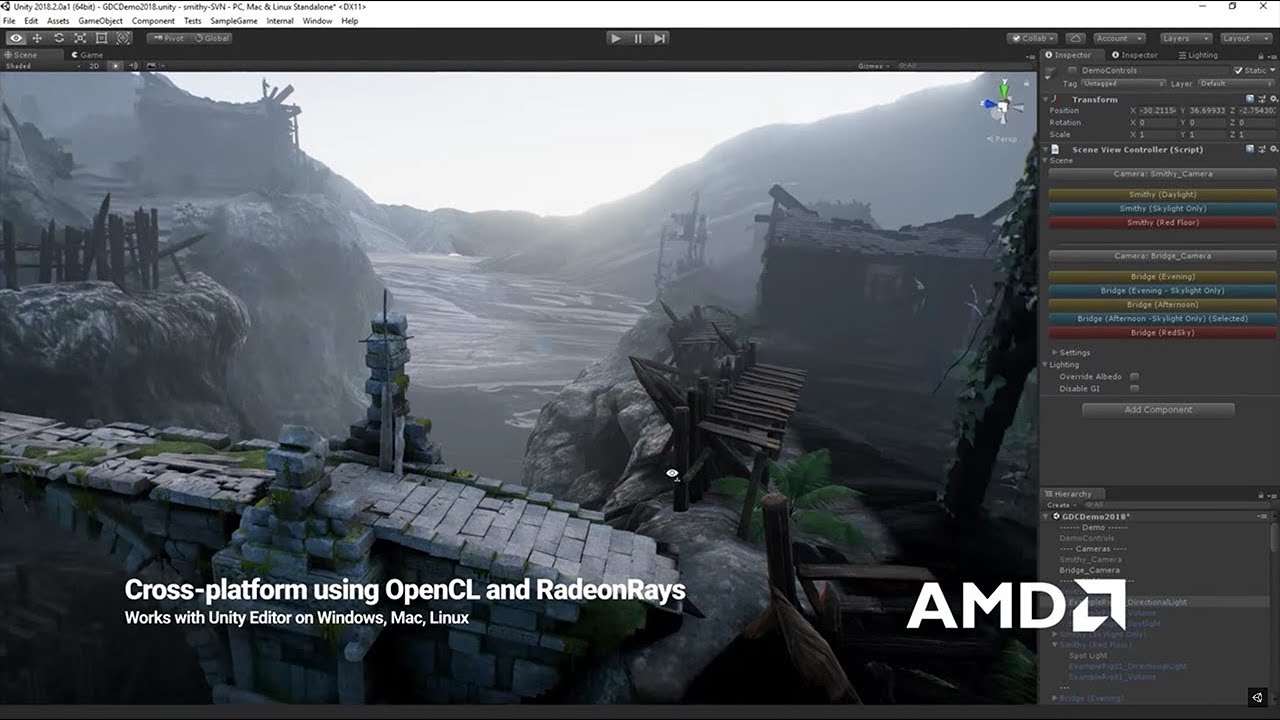
The GPU Progressive Lightmapper is a Real-time path tracer, to bake lighting ~10x faster.
More information: https://on.unity.com/2JO6j8x
turbid matrix
yeah, I remember that one
eternal laurel
thats like the biggest lie unity have told by far
turbid matrix
 eternal laurel
proceeds to wait 30 minutes on a 3080 😄
for the previz bake
cause you never have enough vram for a proper bake
not to mention the HackWeek distributed like baking tech that got silently killed for some reason
I'm still salty about that one too
dawn sorrel
@eternal laureland i blame my rtx 2060 for not even starting the baking process!
so why is that ?
loud leaf
Yeah, GPU baking most of the time doesn't start for me, and if it does, it runs out of vram. (RTX 3080), CPU baking is a lot faster and more accurate anyways. (if you count in the 30 minutes the GPU baker is basically doing "nothing")
I wish they'd improve the RTGI denoiser and/or implement reflection probe luminance/sky luminance importance sampling. No baking, more details, real time, just needs improved sampling and motion rejection.
You can stick to baked lighting forever, but it will always be a waste of baking time, static and low quality, while GPU's keep moving forward and can easily do this in real time now.
I've been working on (real time) reflection probe luminance importance sampling for RTGI for the past 2 weeks, but I feel like it would be way better if the core HDRP team focused on this.
It's a game engine, thanks to static geometry + baked reflection probes, or dynamic geometry + real time time sliced reflection probes we know exactly where light is coming from, but we're still shooting samples in random directions.
eternal laurel
You got any reading material on this technique sounds interesting
loud leaf
There are a lot of articles/lectures on importance sampling in general, for a 2D sky/HDRI you basically calculate the per pixel luminance of the source image and divide this by the total luminance of the source image, which is the PDF (probability density function), then use that to create a CDF (cumulative distribution function) X and XY table, generate a random sample, look up the closest match in the CDF and use those sampling coordinates for biased sampling (towards points with higher luminance), then divide by the PDF to get the unbiased result. To make this work in doors, or with dynamic objects, instead of the HDRI sky, sample the luminance of the (optional real time, time sliced) reflection probe to create a CDF of the RTGI/RTR pixel hemisphere.
eternal laurel
I will look into this thanks
loud leaf
Let me know if you need any help, I can host a sample if needed. 👍
eternal laurel
If you are willing to share stuff on github gist for examole I do prefer to look at actual code too
Im so bussy with other stuff Im not sure when I will be able to get around to it haha
loud leaf
eternal laurel
If you are willing to share stuff on github gist for examole I do prefer to look...
eternal laurel
loud leaf
https://github.com/m0nsky/TextureLuminanceImportanceSampling
Cool stuff thanks. I'm too tired to check it out right now. But I will get to it eventually
loud leaf
A lot of it can be simplified, I have a very tiny HLSL version of this running on top of RTGI now, but the code from the repo should make it easy to understand exactly what's happening.
eternal laurel
I still don't get the main idea( note I have yet looked at the code). When you say RTGI do you mean RayTraced or RealTime? is the idea to somehow sample real time GI from a reflection probe ? Or do we still need to ray trace the scene ?
loud leaf
Ray tracing, using the sky / reflection probe to find out where the light is coming from
summer glacier
loud leaf
There are a lot of articles/lectures on importance sampling in general, for a 2D...
Unreal has a feature called lightmass portal that tells your interiors for example where the light is coming from (in particular sky light), so it can focus it's samples -- this makes a major difference with quality & bake speed
 main rune
Is it possible to bake emissive lighting into light probes?
I can get the emission to work with lightmaps, but not probes :/
 indigo summit
loud leaf
https://github.com/m0nsky/TextureLuminanceImportanceSampling
indigo summit
loud leaf
https://github.com/m0nsky/TextureLuminanceImportanceSampling
Oh that remind me i think Sebastien Lague also do this kind of stuff, and he use compute shader i think
 edgy wyvern
Hey there! What do you guys think about the difference in difficulty when using URP and HDRP? I m not very familiar with the pipelines yet and i m making a game probably only for PCs. While it will be low polygon i am tempted to use HDRP because of the big difference in lighting. Also will it be difficult to convert from HDRP to URP if needed in the future?
glacial fossil
edgy wyvern
Hey there! What do you guys think about the difference in difficulty when using ...
From my experience HDRP is a lot harder to set up than URP. Converting from BiRP/URP to HDRP is guite painful but other way around should be relatively easy. So if you use HDRP, it should be pretty easy to change to URP if you later want
edgy wyvern
glacial fossil
From my experience HDRP is a lot harder to set up than URP. Converting from BiRP...
Thnx the conversion is very good to know, since i would like to have a backup plan if things dont go my way with HDRP or if i later want/need to convert the game to mobile. I think i want to give it a try first. I got plenty of time in my hands and by looking at the results i feel it worth an effort.
indigo summit
Out of curiousity, which AO tech are used in HDRP? GTAO?
mellow condor
mossy nymph
is the sky a cubemap?
it looks like it's all black everywhere
doesn't look like a cube map
turbid matrix
indigo summit
Out of curiousity, which AO tech are used in HDRP? GTAO?
It is gtao
indigo summit
turbid matrix
It is gtao
So, which mean technically hdrp have a screen space bent normal buffer isn't?
mellow condor
is there a way to set the resolution and compression on a baked reflection probe?
nvm
it's just on the asset
what about compression on a shadowmap?
and why are mip maps generated for the reflection probes at runtime?
nevermind
there's a checkbox lol
 cobalt arch
does HDRP support android platform?
glacial fossil
cobalt arch
does HDRP support android platform?
No. And even if it did, it would not perform well enough to be playable
whole fossil
nothing built-in afaik
glacial fossil
dawn sorrel
<@!689758471003963472>
Don’t ping people randomly. If I helped someone here, it doesn’t mean I’m able to help you.
 unreal agate
im not sure which was the right channel specifically to ask this q

but is there any way i can make this ball look better? like less pixellated
inner parcel
unreal agate
but is there any way i can make this ball look better? like less pixellated
you can use Anti aliasing for it
unreal agate
inner parcel
you can use Anti aliasing for it
how do I do that?
 fluid cove
Hello. I need help. We changed our project to hdrp. But we are still having trouble. It is fixable. But we must try to fix it kinda everytime we start project. Can it be because we are using different versions of unity?
2021 and 2022?
 meager bobcat
waittt. can i not use multi pass if i wanna use HDRP in Vr?
 delicate yoke
why do my particles look like this ? they are supposed to be perfect spheres......
 fluid cove
delicate yoke
why do my particles look like this ? they are supposed to be perfect spheres.......
fluid cove
delicate yoke
why do my particles look like this ? they are supposed to be perfect spheres.......
how you made these particles that you have behind wings these air strips?
delicate yoke
thats just two trail renderers
 ebon plinth
Hiya!
Newbie here. Does anyone know how to reduce lighting artefacts along UV seams, for HDRP pipeline?
Cheers
 lament brook
ebon plinth
Hiya!
Newbie here. Does anyone know how to reduce lighting artefacts along UV se...
lament brook
ebon plinth
Hiya!
Newbie here. Does anyone know how to reduce lighting artefacts along UV se...
Could be your normal map isn't importing as such? It shouldn't happen if your normal maps are fine.
barren goblet
hi, why HDRP cannot be used on mobile? nowadays phones can perform deferred rendering well
shrewd moon
barren goblet
hi, why HDRP cannot be used on mobile? nowadays phones can perform deferred rend...
I'd guess it works as long as the device supports compute shaders
Though mobile devices have very different strengths and weaknesses than desktops, and HDRP is designed for the latter so you probably won't get great results
barren goblet
If I make cross platform, use full features on PC, with some features disabled on mobile.
HDRP supports render graph, it's much easier than URP to do this.
barren goblet
render graph is a different thing
it's a coding level tool, to manage resources life cycles, and figure out dependencies.
I tried URP a year ago, but it's too small compare to HDRP, HDRP supports many things including raytracing, these are not easy to move to URP
implement all these things in URP is much tougher than redo in HDRP
so the render graph is solving this, I can use SSAO on mobile, HDRP supports SSAO, RTAO,
I can choose one.
scarlet hull
IIRC we tried running HDRP on mobiles a long ago, and it could just not follow up with fill rate in particular.
Some games successfully shipped on cross platform by using both URP and HDRP, but from what I heard it was very painfull.
We are working on workflows and tooling to help users have cross pipelines projects, but it's not here yet.
Even in newer versions it's very hazardous 😅
barren goblet
scarlet hull
IIRC we tried running HDRP on mobiles a long ago, and it could just not follow u...
why ? with render graph, HDRP is easy to runs look like a light weight pipeline.
is it because HDRP's tile lighting?
though his post process is heavy.
with things like TAA stuffs.
scarlet hull
I haven't tried myself forcing HDRP to run on mobiles for I think 4 years now. Rendergraph is a tool to help monitor and share the ressources used by the GPU like you mentioned it yourself, not a magic wand that makes HDRP faster.
For curiousity I could try again maybe, but currently the ways to go if you want to ship to a broad range of devices (from low end mobiles to g@mer pcs) and a lot of visual features are :
- Built-in RP + plugins
- URP with customisations
- Fork of URP with your changes
- Custom RP
- XPipeline, changing between URP and HDRP depending on the platform
barren goblet
yes, I want to find which visual features cannot be used on mobile, and redo it inside HDRP
and remain the heavy things that can run on PC.
then, with render graph, to dynamic disable some of them, between PC and mobile.
mine is fork of HDRP, lol
scarlet hull
barren goblet
mine is fork of HDRP, lol
Since you're already working on a fork :
There is no "hard" limitation for building on mobile, if you check in our code, there is some pre-build functions where we do a check on the target platforms you're building to and just force stop the build if it's not on the supported list.
Comment out this code and you should theorically be able to build on mobiles
 ripe quail
Does anyone else use IL2CPP with HDRP? I'm having issues with part of it stripping on the high setting
 inner parcel
scarlet hull
I haven't tried myself forcing HDRP to run on mobiles for I think 4 years now. R...
inner parcel
scarlet hull
I haven't tried myself forcing HDRP to run on mobiles for I think 4 years now. R...
sd8 gen1 seems very powerful. it apparently supports volumetric lighting aswell
https://www.qualcomm.com/products/snapdragon-8-gen-1-mobile-platform
A15 is also quite powerful now, compared to its predecessor 4 years ago
 viscid juniper
My texture is not applying to the plane in HDRP.
 shrewd moon
viscid juniper
My texture is not applying to the plane in HDRP.
shrewd moon
viscid juniper
My texture is not applying to the plane in HDRP.
If you turn scene lighting off, does the surface still appear blank? It could be overblown by incorrect exposure values
viscid juniper
shrewd moon
If you turn scene lighting off, does the surface still appear blank? It could be...
Apologies for my lack of experience but where is the option?
If you mean the single directional light, nothing happens
shrewd moon
@viscid juniper There should be a light bulb icon among the scene window's buttons

 shrewd moon
Wait for it
viscid juniper
ok
shrewd moon
That color means it's compiling shaders
shrewd moon
Anyway, disabling the light in scene view would let you see the material even if your scene's exposure values are off
meager bobcat
ok, so why is something like this happening?
 dawn sorrel
I just upgraded to the latest version of HDRP (12.0) so I can use additive normal blending for decals
just like it says here in their documentation: https://i.imgur.com/CbW8fFJ.png
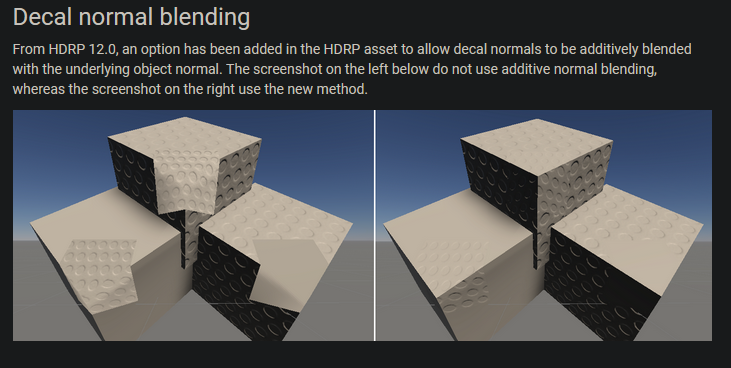
However, I must be blind, because I enabled it in project settings:

Yet I see no option for it all?
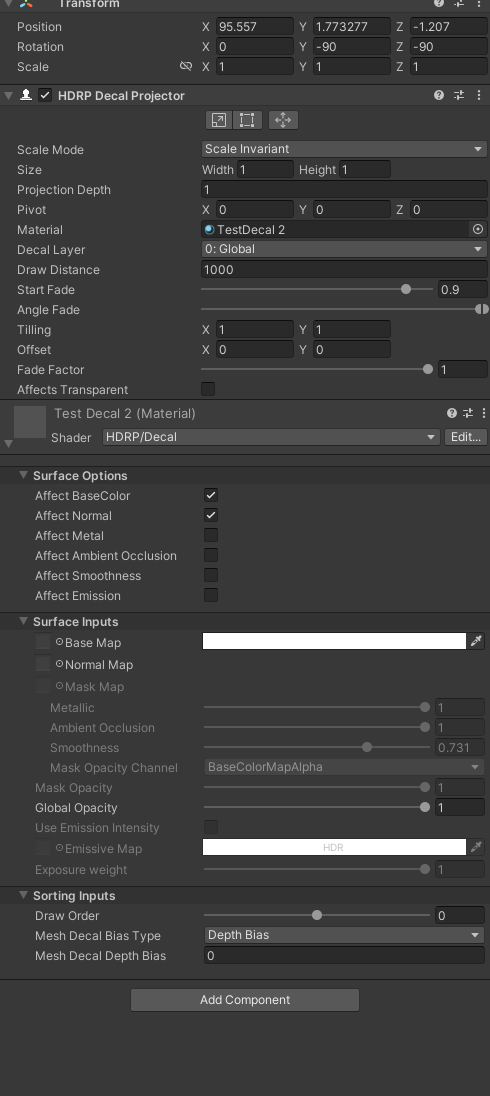
I can barely find any posts about additive normal blending online, could someone please help if you know the solution?
Thanks
shrewd moon
dawn sorrel
However, I must be blind, because I enabled it in project settings:
how about that over there
 dawn sorrel
Yea its on
But that's just enabling it to be useable in the project
I assume there's a toggle for it somewhere on the decal itself, right? @shrewd moon
shrewd moon
dawn sorrel
I assume there's a toggle for it somewhere on the decal itself, right? <@!166982...
Did you test it or just assume?
dawn sorrel
Well I am trying to find the option but I can't find it anywhere
Where else would it be?
shrewd moon
I mean make a decal with a normal map
dawn sorrel
Done
shrewd moon
See if it's additive with the setting on
dawn sorrel
It's not
shrewd moon
See if it stops being additive with the setting off
dawn sorrel
Yea it's not doing anything
but even then, you should always have the option to toggle on additive blending for each individual decal because that makes sense
Did you get it working for your project?
shrewd moon
Working is a strong term, but it does change the appearance a bit
Got a link to the page that introduces the additive normals?
dawn sorrel

GitHub
Unity Graphics - Including Scriptable Render Pipeline - Graphics/whats-new-12.md at master · Unity-Technologies/Graphics
Here's an example, I slapped a decal with a random normal map facing on my ground
and I am toggling affect normal
shrewd moon
Additive normal blending is a method that can be enabled per project
dawn sorrel
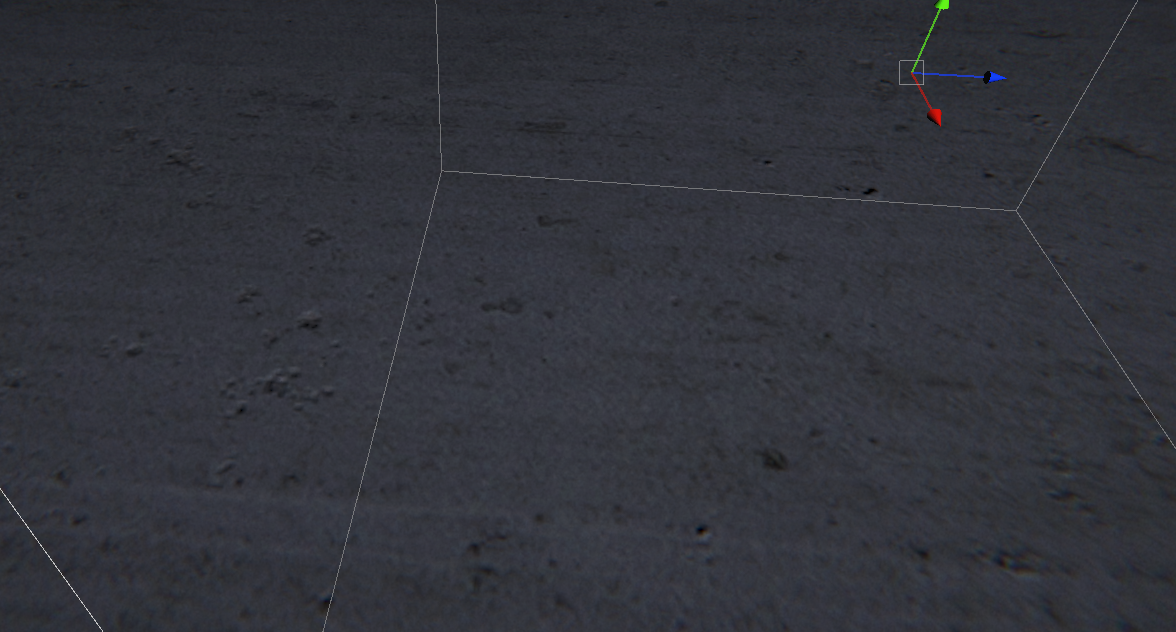

You can see the seam where it stops using the grounds normal map and replaces it with the one I chose
shrewd moon
If you look closely, so does the example image
shrewd moon
additively blended with the underlying object normal
I guess this means object normal specifically, not texture normal
Could've fooled me
dawn sorrel
Oh no
That's exactly what it means
wait
How the hell are you supposed to do decal normal blending then 🤔
shrewd moon
Hmm normal maps with alpha transparency?
shrewd moon
Try this
 dawn sorrel
you can just change the normal blending mode to choose if you wanna replace or add
I did earlier yea
That's very unfortunate
Yep I am testing in my other unity version and its just for object normals
hmm
shrewd moon
I can't seem to find any way to do actual additive normal blending with decals with some searching, but alpha masking the flat parts out should get you a pretty similar effect
dawn sorrel
Yea that would definitely be the go to
There's no way to fetch the normals of a surface that a decal projector is hitting right?
shrewd moon
Worst case you can blend normals in the shader itself
dawn sorrel
Because I wonder if you could somehow solve this in a shader
shrewd moon
Can't say, way outside of my expertise
dawn sorrel
Damn
shrewd moon
If it's critical you could make a shader graph material that blends the normal textures as you want without any decal projectors
dawn sorrel
Part of what I wanted to do is use a decal projector with a lump normal map and be able to drag it across a surface
while retaining the normal map data of the surface its on
I may need to just get creative to find an alternative
meager bobcat
anyone got any ideas why this happens?

 keen pivot
stupid question time, apologies in advance. can one limit framerate and not have to vsync? that is to say i'd like to never go above 60fps, but i dont want to keep skipping to 30fps if i dont hit it from time to time
(DX12 btw)
loud leaf
Application.targetFrameRate = 60; should work afaik.
loud leaf
meager bobcat
anyone got any ideas why this happens?
Seems like over exposure, try lowering your exposure in a volume component.
meager bobcat
loud leaf
Seems like over exposure, try lowering your exposure in a volume component.
hmmm ok
keen pivot
loud leaf
`Application.targetFrameRate = 60;` should work afaik.
i was wondering that but i couldn't see how that relates to vsync...or not
its mostly as i get dips to 55fps from time to time and it doesnt really affect things much but it stutters with vsync
meager bobcat
loud leaf
Seems like over exposure, try lowering your exposure in a volume component.
here?
 loud leaf
Nope, actual post processing exposure
meager bobcat
where do i find that
loud leaf
I'm not on my PC but you should be able to just add a new override for "Exposure" on your post processing volume (assuming you have one)
loud leaf
keen pivot
i was wondering that but i couldn't see how that relates to vsync...or not
I'm not sure if I understand your question correctly but this should be able to limit your framerate without using vsync
meager bobcat
i dont even think i have one, this is what my hierarchy looks like
 loud leaf
Ok, you can just create a new game object, add a volume component, set it to global, add an override for exposure, set it to automatic histogram
meager bobcat
ok, so the Sky and fog volume is not a post processing one right
loud leaf
Nope. You can add post processing to it but it's nicer to put it in a separate volume/gameobject.
meager bobcat
ok thx
oh ok, wait, maybe i shouldve said this, but its only hyper bright in scene view but not like it at all in game view
loud leaf
Sounds like post processing is disabled for the scene view
Currently loading a Unity HDRP project on my chromebook to take a screenshot for you but it will take a while to load
meager bobcat
oh ok, but why would it be disabled in scene view
loud leaf
No idea. Project won't load here but it shouldn't be too hard to find
meager bobcat
ye hopefully
now i have a different problem xd, i found override exposure under the camera settings in scene view, but now my moon is so dark instead xd, but it works ig
inner parcel
keen pivot
its mostly as i get dips to 55fps from time to time and it doesnt really affect ...
Vsync 1x caps the fps to your monitors refresh rate.
Theoretically it gives much smoother fps than setting targetFps to your monitors refresh rate.Your gpu waits until your monitor finishes drawing the complete frame before it pushes the new frame.
But when you set targetFps, unity will induce some delay on the cpu side, depending on how much time is left in the current frame frame, and how much extra time you have left. The cpu induced delay is very unreliable because its very hard to achieve precise thread.sleep duration in modern system
Vsync also reduces screen tearing (that is its main purpose)
dawn sorrel
Since camera stacking doesn't work in HDRP, how do people typically go about handling UI without a second camera?
I saw some postings on the Graphics Compositor but I am unsure if that's the best solution
Typically in URP, you just add a second camera, set it to orthographic, make sure your UI canvas is set to "screen space - camera", set up some masking, and then you're done
but in HDRP you can't do that :\
 sharp linden
hello, i just upgraded my project to HDRP and everything seems to go fine, but im trying to create an area with a bunch of torches on the wall, but some of the lights arent working when i play.
the lights are visible in the scene, with crazy high lighting settings. but when i play they turn off.
sharp linden

see wtf is this?
all of these torches have the exact same light settings
but some are on, and some are off ><
dawn sorrel
sharp linden
all of these torches have the exact same light settings
Have you tried messing around with exposure in your HDRP volumes?
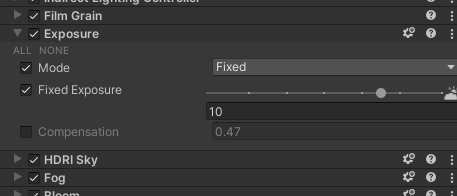
See if changing your exposure changes anything
sharp linden

yeah i have the exposure maxed out to 15
as you can see here i have many torches, but only some of them light up and not others.
concidering all of the torches have the exact same settings. i just cant wrap my head around why only some light up and not others.
 spare goblet
Hello
I am having a strange problem where my terrain is appearing completely white and too bright in hdrp
Even if i remove lights from scene it remains same

 inner parcel
dawn sorrel
Typically in URP, you just add a second camera, set it to orthographic, make sur...
inner parcel
dawn sorrel
Typically in URP, you just add a second camera, set it to orthographic, make sur...
screen space overlay?
shrewd moon
UI already has its own overlay system, no camera stacking required
Unless you need to render non-UI objects as part of the UI
safe kelp
Olla, would anyone know why my shaders bug wheni put my lights on Mixed? iam still baking, but i encoutered this problem before and couldnt figure it out. but now i have dynamic objects in my scene so i also need realtime lighting.
 shrewd moon
safe kelp
Olla, would anyone know why my shaders bug wheni put my lights on Mixed? iam sti...
shrewd moon
safe kelp
Olla, would anyone know why my shaders bug wheni put my lights on Mixed? iam sti...
From what I've heard this happens when there's too many overlapping light ranges
safe kelp
so i need to put the range down, or delete some lights?
safe kelp
shrewd moon
From what I've heard this happens when there's too many overlapping light ranges
So i could stop the bake right now?
safe kelp
shrewd moon
From what I've heard this happens when there's too many overlapping light ranges
and why doesnt it happen when i have my lights on baked?
true zealot
Baked lights are in a texture so there isn't a complex calculation per frame that is limited
safe kelp
true zealot
Baked lights are in a texture so there isn't a complex calculation per frame tha...
allright, i fixed it by reducing the ranges, and putting all lights on baked except for some, on mixed
safe kelp
true zealot
https://help.vertx.xyz/graphics/lighting/light-limits/hdrp
that link helped alot! thank you!
dawn sorrel
shrewd moon
UI already has its own overlay system, no camera stacking required
Unless you ne...
This is my issue
If I want stuff like particle systems on my UI, screen space overlay doesn't cut it
My current work around is a second camera set up with a render texture
And using a raw image on the UI canvas with said render texture
meager bobcat
i have a question, how can i turn an image of space from NASA into a cubemap to use in space emission texture?
inner parcel
meager bobcat
i have a question, how can i turn an image of space from NASA into a cubemap to ...
maybe try this https://jaxry.github.io/panorama-to-cubemap/
once you have 6 textures, it should be fairly easy for you to pack it into one texture
meager bobcat
oh ok thx
meager bobcat
inner parcel
maybe try this <https://jaxry.github.io/panorama-to-cubemap/>
once you have 6 te...
do you think a 16k image is too big for it
inner parcel
meager bobcat
do you think a 16k image is too big for it
depends on your need
meager bobcat
inner parcel
depends on your need
nvm, i forgor to change side face size, so it was trying to compress 1024x1024 to 64x64
what does cookie in directional lights do?
can i for example take a pic of a moon and make it a sprite ontop of the light?
sharp linden
Hello, i have a script that changes the alpha of an object when you enter a collider. It changes the alpha when you enter, but doesnt change it again once you leave the collider. (im trying to make a tree's leaves fade in and out if you go under the tree.)
it doesnt make any sense that it would fade out, but not fade back in.
all of the breakpoints and debug.logs are saying its changing, but its not actually changing.

this is the code im using . OnTriggerEnter calls fadout, and works properly, but OnTriggerExit, doesnt work for some reason. to turn the alpha back to 1f.
sharp linden
also doesnt work with changing the material at runtime either.
seems to be an issue with the OnTriggerExit only.
 harsh forge
So im new to hdrp, I was wondering since HDRP uses its own post processing implementation, can I still change it to apply a cell shade post process, and how much more complicated is it to do so ?
meager bobcat
does HDRP not have Volumetric Clouds anymore?
scarlet hull
meager bobcat
does HDRP not have Volumetric Clouds anymore?
It still has, the feature didn't get removed 😅
meager bobcat
where can i find it tho, cant find the check box in settings
scarlet hull
harsh forge
So im new to hdrp, I was wondering since HDRP uses its own post processing imple...
Some cell/toon shading assets exists that are compatibel with hdrp
scarlet hull
meager bobcat
where can i find it tho, cant find the check box in settings
HDRPAsset + frame settings + volumes
meager bobcat
sooo, when the volumetric clouds check box dosnt exist what do i do then
 scarlet hull
meager bobcat
sooo, when the volumetric clouds check box dosnt exist what do i do then
scarlet hull
meager bobcat
sooo, when the volumetric clouds check box dosnt exist what do i do then
Are you 100% you're on a version that has it and not on an earlier one ?
It was introduced with HDRP 12 in unity 2021.2
harsh forge
scarlet hull
Some cell/toon shading assets exists that are compatibel with hdrp
Nice ty
meager bobcat
scarlet hull
It was introduced with HDRP 12 in unity 2021.2
how do i get 12?? i can only get 10.8? it dosnt even show up
mellow condor
in hdrp
from spots
what is the approach to fix it
i can't reduce per-shadow filtering quality
i need the size of hte spot to be what it is
why does this happen
the filter settings helped
under additional properties
shrewd moon
meager bobcat
how do i get 12?? i can only get 10.8? it dosnt even show up
URP and HDRP versions are largely tied to editor versions
meager bobcat
shrewd moon
URP and HDRP versions are largely tied to editor versions
i think i needa use 2021.2
shrewd moon
Most likely
meager bobcat
can i just switch or is it gon be a problem
meager bobcat
is it dumb to make a script to slightly change the space rotation in a phyically based sky
wait, is volume a script?
meager bobcat
anyone got any good moon settings?
 iron flame

Unity Forum
HDRP's SSR is still very bad. PBR accumulation can only be used on static images such as screenshots. There is no denoising like the EA Stocastic SSR....
 celest adder
does anyone know how to use RTGI with Lightmaps?

so I want to ignore static things that are prebaked
 ivory flint
Hi dev bros, I'm optimizing a scene in HDRP, can anyone jump in and give me some tips on it.
Currently I'm cpu bound with RenderPipelineManager.DoRenderLoop takes up 65.2ms which is the real killer in this scene, while the rendering takes only 2.3ms
https://twitter.com/iamspikebor/status/1502908387767762955?s=20&t=yT51V_szRuqnJTUGN8zROg

Decide to give HDRP optimization learning a go.
Everyone are welcome to give me a tips in this 🧵
Will update the thread every time I make some changes
Unity 2021.2.15f1 | HDRP 12.1.5
The asset used is Snaps Art HD | Sci-fi Urban
#gamedev #madewithunity https://t.co/HW4G4q9f4X
 Twitter
·
iron flame
celest adder
does anyone know how to use RTGI with Lightmaps?
Twitter
·
iron flame
celest adder
does anyone know how to use RTGI with Lightmaps?
Both SSGI and RTGI invalidate all lightmap and light probe data. so it cannot be used with lightmap.
inner parcel
ivory flint
Hi dev bros, I'm optimizing a scene in HDRP, can anyone jump in and give me some...
I think you probably need to learn the better use of profiler.
Keep expanding the hierarchy until you see the exact culprit instead of guessing yourself
Do you have a multi cam setup?
ivory flint
inner parcel
I think you probably need to learn the better use of profiler.
Keep expanding th...
No I only have single cam.
Currently the HDRenderPipeline.RenderCamera code is taking most of my resource
 eternal laurel
Have you tried proffiling a build ?
Also expand it and see what inside is taking resources
shrewd moon
Profiling the build is the only "correct" way to troubleshoot performance
Editor does all kinds of extra business which can skew the result, and the stats window is especially inaccurate from what I hear
eternal laurel
If by especjally inaccurate you mean flat out broken and wrong then I agree haha
 bold wadi
hi everyone, Im pretty confused here xd

When I press Fix, nothing happens, and the SRP batcher is already enabled
 wise olive
Hi, I imported HDRP into my project because I'm experimenting with shader graphs, but now my lighting is messed up. Whenever the camera looks towards an object, the intensity of the light goes up, and whenever the camera looks away from an object, the intensity goes down.

 loud leaf
That's auto exposure
 hollow snow
so i have this setup in my 2d scene right but when i put my shadow intensity to 1 i still want to be able to see the edges of the walls that the player can see. Is there a way to do that?
 ivory flint
eternal laurel
Have you tried proffiling a build ?
ivory flint
eternal laurel
Have you tried proffiling a build ?
@shrewd moon Hi fams, I managed to make 7.4fps to 62fps by going from 2021 to 2022 beta.
2022 will be big improvement for ray tracing effect.
their mainthread raytracing code improve from 65ms to 12ms (80% improvement)
will profile in build and let you guys know
bold wadi
Hey everyone, how do I get rid of this weird lightning effect that disappear when I get closer ?
 ivory flint
at least give before-after bro
loud leaf
ivory flint
with all the raytracing goodies
Vulkan 188-200 fps.
Are you sure ray tracing is enabled? I don't think there is Vulkan RT atm.
ivory flint
loud leaf
Are you sure ray tracing is enabled? I don't think there is Vulkan RT atm.
yea I think not, so that explains the huge fps gain
loud leaf
😄 it happens
It's easy to test if you create a mirror material (100% metallic & smoothness) and try to reflect an object that is not on screen
 cunning ledge
so im a little confused now
why is my hand pure white even after applying the hand texture?

oops, wrong channel i think
shrewd moon
cunning ledge
so im a little confused now
why is my hand pure white even after applying the ha...
"Base Map" of your hand texture looks to be empty
cunning ledge
uh yeah, havent added anything to it
used 3d core on my previous place and i only have a few weeks experience with unity
so dont really know how to change any of those settings to make it work
 lime thistle
Hey Guys,
So I made a procedural Material in Blender and baked a diffuse map and a normal map.
Now both the Maps are 4K and High detailed, however when I make a Unity-Material out of it it looks like in the picture.
I dont really now where the issue is, however if someone had a similar problem and knows a solution, I´d appreceate any help...
 glacial fossil
lime thistle
Hey Guys,
So I made a procedural Material in Blender and baked a diffuse map and...
glacial fossil
lime thistle
Hey Guys,
So I made a procedural Material in Blender and baked a diffuse map and...
You sure you have set the resolution high enough on texture import settings?
lime thistle
glacial fossil
You sure you have set the resolution high enough on texture import settings?
I think I did
bold wadi
Heya everyone, anyone knows what could cause this weird lightning? It fades away when I get closer


 iron flame
lime thistle
Hey Guys,
So I made a procedural Material in Blender and baked a diffuse map and...
iron flame
lime thistle
Hey Guys,
So I made a procedural Material in Blender and baked a diffuse map and...
It's about texture compression (unity texture import settings) and Anisotropic filter(quality settings).
Compress with RGB(A) Compressed BC7 and set the aniso level to 16.
iron flame
bold wadi
Directional light shadow resolution is not high enough. Also, you need to add Shadow to your volume profile on the stage and adjust the cascades. This noisy image is due to the transition between shadow cascades.
bold wadi
iron flame
Directional light shadow resolution is not high enough. Also, you need to add Sh...
love you :D
iron flame
bold wadi
love you :D
Also, don't forget to lower the depth bias. Too low numbers will cause lines on surfaces. 🙂
 bold wadi
Its exactly what I was starting to think about those weird lines, and boom, the solution x)
Though, where can I change that?
It doesn't seem like I have this setting in my light component
 iron flame
bold wadi
It doesn't seem like I have this setting in my light component
iron flame
bold wadi
It doesn't seem like I have this setting in my light component
I don't know why they hide these options. I guess they thought that users would be scared when they saw too many options 😄
shrewd moon
Flat-shaded and non-solid meshes tend to have problems with shadow casting
For such you would usually have smooth shaded variants of the mesh which handle the shadow casting
bold wadi
iron flame
Thanks! Though some of the lines appear to be created by an area light, and changing the bias does make it better, but I can't go above 1, and it seems like the good value is above 1 x)
iron flame
bold wadi
Thanks! Though some of the lines appear to be created by an area light, and chan...
Add a contact shadow to your volume and activate it at the bottom of the light settings.
bold wadi
I did it but it doesn't seem to change the problem, this light affects it (and can't activate the contact shadow)

 lime thistle
iron flame
It's about texture compression (unity texture import settings) and Anisotropic f...
lime thistle
iron flame
It's about texture compression (unity texture import settings) and Anisotropic f...
Oh damm I forgot about that...
Thx for reminding
iron flame
bold wadi
I did it but it doesn't seem to change the problem, this light affects it (and c...
Do not use area light. because of the area light shadow Cone. 120 degree shadow cannot shade the entire 180 degree area light. Use point light
and area light does not support contact shadow.
bold wadi
iron flame
Do not use area light. because of the area light shadow Cone. 120 degree shadow ...
But point light doesn't really do what I want
I want my light to be rectangular
iron flame
bold wadi
I want my light to be rectangular
point light + emission quad + reflection probe. it's midnight here right now :D. I will show you the lighting setup you want tomorrow.
 shy ivy
Does anyone have any experience with using a CustomPass to blit a render from an inactive camera to a RenderTexture? I'm trying to avoid having more than one active camera in the scene for perf reasons—I'm able to use SetRenderTarget and RenderFromCamera to render from inactive cameras for overlays, but when I try to use a RenderTexture, the RT seems to only be updated sporadically (so its content is always out-of-date).
bold wadi
iron flame
point light + emission quad + reflection probe. it's midnight here right now :D...
thanks ^^
 coral atlas
I would like a short explanation about camera stacking in HDRP. I have read the Unity documentation about graphics compositor but I can't make it work. Help please!
whole fossil
don't go that way unless you are working on non-realtime application
if you are going realtime consider custom pass with render from camera or something
iron flame
dawn sorrel
whats the best way to disable dxr per object ?
I don't think there is any other way other than turning it off via Effect Layer or mesh renderer.


 tight ibex
when baking lights with the gpu lightmapper in hdrp 10.5.1 and unity version 2020.3.13f1 (as well as previous versions of both, this has been a long-running problem), lights disable themselves seeming at random after a lightbake. pictured are before and after. the only way to reenable the lights and volumetrics is to delete and recreate it


experimenting a bit further shows that this only happens on lights with shadow map enabled
anyone know why this is happening or have a fix?
coral atlas
whole fossil
don't go that way unless you are working on non-realtime application
Understood, thanks.
dawn sorrel
@iron flamethanks
iron flame
tight ibex
when baking lights with the gpu lightmapper in hdrp 10.5.1 and unity version 202...
Are you using a mixed lighting and shadow mask mod? The shade mask can bake a maximum of 4 overlapping lights. If you use bake indirect mode instead of shadow mask. the problem will be solved
tight ibex
they are mixed lights, i will try that, thank you!
bold wadi
Heya everyone! Im having a little problem there with my light, in fact, I have two.
- Why is the light passing through the object when it's close to it? The shadows work properly but the closer the light is to the object (without being Inside) the bigger the spot gets
- How can I make it so the light source isn't affected by the bloom effect?
 dawn sorrel
Try to change the lights shadow near plane
Or maybe there is issues with the model
I am not sure how young could make it unaffected by bloom because bloom effects all game objects.
dawn sorrel
bold wadi
Heya everyone! Im having a little problem there with my light, in fact, I have t...
You could try using an area light which would distribute the light and bloom so it won’t be noticeable and it will look more realistic
dawn sorrel
bold wadi
Heya everyone! Im having a little problem there with my light, in fact, I have t...
Turning off volumetrics on the light could also work
dawn sorrel
How could I change the anti aliasing settings on runtime through script?
The camera anti aliasing I.e: smaa, fxaa, and Taa.
iron flame
bold wadi
Heya everyone! Im having a little problem there with my light, in fact, I have t...
1 ) shadow near plane
2) effect specular disable
https://media.discordapp.net/attachments/517108768933281843/953300817748852846/unknown.png
 bold wadi
iron flame
1 ) shadow near plane
2) effect specular disable
https://media.discordapp.net/at...
bold wadi
iron flame
1 ) shadow near plane
2) effect specular disable
https://media.discordapp.net/at...
Dude you really are insane x)
bold wadi
dawn sorrel
Try to change the lights shadow near plane
Thanks a lot too :D
Though the affect specular isn't working, the bloom effect is still active
dawn sorrel
bold wadi
Though the affect specular isn't working, the bloom effect is still active
You could use an area light
bold wadi
It doesn't have contact shadows :/
iron flame
bold wadi
Though the affect specular isn't working, the bloom effect is still active
Try increasing the shape radius.
keen pivot
what level of catastrophe can be expected if one was to upgrade the HDRP from 10 to 12 in 2020.3?
assuming its even possible nowadays to do that
shrewd moon
keen pivot
what level of catastrophe can be expected if one was to upgrade the HDRP from 10...
Try it with a backup!
bold wadi
iron flame
Try increasing the shape radius.
Thanks again! Do you, by any chance, know how to add volumetric lights? I see a volumetric parameter in lights components, but it doesn't really look like it changes anything
iron flame
bold wadi
Thanks again! Do you, by any chance, know how to add volumetric lights? I see a ...

We need to reduce
Fog Attenuation Distance
bold wadi
iron flame
About this, what actually are reflection probes? It doesn't seem to change anything at all in my scene
iron flame
bold wadi
About this, what actually are reflection probes? It doesn't seem to change anyth...
Did you bake ?
iron flame
bold wadi
In the lightning tab?
Or the bake button on the reflection probe.
bold wadi
iron flame
Or the bake button on the reflection probe.
I dont think I have it

 iron flame
auto bake is on in the lighting window. that floating bake button is not visible.
iron flame
bold wadi
I dont think I have it
You need to set the box size to coincide with your be blend distance walls.
bold wadi
Doesn't change a thing when I press it :/
bold wadi
iron flame
You need to set the box size to coincide with your be blend distance walls.
Its already the case ^^'
 iron flame
iron flame
iron flame
Are the objects' reflection probe statics turned on?
 scarlet hull
keen pivot
assuming its even possible nowadays to do that
scarlet hull
keen pivot
assuming its even possible nowadays to do that
Should not be possible at all, hdrp 10.x is for 2020.3 , hdrp 12.x for 2021.2
keen pivot
scarlet hull
Should not be possible at all, hdrp 10.x is for 2020.3 , hdrp 12.x for 2021.2
yeah, i just remember you used to be able to install newer packages a couple of years back, but i'd never tried it.
but then some kind of alignment happened
bold wadi
iron flame
Are the objects' reflection probe statics turned on?
That's why Im confused ^^'
iron flame
ok then for an effect like mine. you need to increase the emission value of fluorescent lamps and bake again.
When HDR is enough, it will reflect like light specular on the surface.
bold wadi
iron flame
ok then for an effect like mine. you need to increase the emission value of flu...
I tried increasing it, nothing changes even when I bake
safe kelp
Anyknow know why this is happening?
 shrewd moon
safe kelp
Anyknow know why this is happening?
shrewd moon
safe kelp
Anyknow know why this is happening?
What is "this" exactly?
safe kelp
You tell me XD i have no clue it should look something like this

Same model, Same Scene, Different textures
But why it looks so jacked up i would know
i Found out it has to do with the AO
but how can that ***** the lighting so bad?
shrewd moon
I dunno
Which texture did you switch?
safe kelp
well we remade the textures for the first screen, cause the lower one had alot of Setpasses to go through. So i deleted the AO from the one on top and i get this result

but now alot of color is missing, and it doesnt make sense, because AO doesnt hold color info
scarlet hull
Could it be some lighting issue ?
Like, ambiant (sky) lighting is very intense compared to the directional (or other) light source
safe kelp
scarlet hull
Could it be some lighting issue ?
Like, ambiant (sky) lighting is very intense c...
Could be but that wouldnt explain why it doesnt do it in the second image.
scarlet hull
Honeslty, I didn't really understand what you've changed between your 3 screenshots, I made assumption based on what I saw on this last one only
inner parcel
bold wadi
I tried increasing it, nothing changes even when I bake
is reflection probe enabled in hdrp default settings or camera override?
bold wadi
inner parcel
is reflection probe enabled in hdrp default settings or camera override?
I'll have to check when Im back home, I have no idea x)
 toxic pewter
boys
i need help
when the camera is close to a model it is pink as if the texture/material is missing, but when it is further away it regains its texture
 crimson citrus
Hey everyone, I have a problem with some Unity assets that were made for HDRP and I have no idea how to use their textures. This is the Base Color texture (that should go in Albedo) but I have no idea how to turn it to standard.

and that is the texture for the calendars(big round things, 1 golden 1 rock)

anyone knows how to convert them into "albedo" textures?
bold wadi
inner parcel
is reflection probe enabled in hdrp default settings or camera override?
Where can I see that ?
turbid matrix
crimson citrus
Hey everyone, I have a problem with some Unity assets that were made for HDRP an...
if your assets use stock hdrp shaders (and not shader graphs), you probably can just use the textures as is with built-in's standard shader
crimson citrus
turbid matrix
if your assets use stock hdrp shaders (and not shader graphs), you probably can ...
the problem is that THOSE are the textures
how does that convert into an Albedo?
i put it on a standard material but nothing shows up
i belive they use shader graphs with nodes
turbid matrix
you have to remap the standard materials texture inputs
but if they use SG's, there's probably more to the setup than just assigning the textures
in which case I'd contact the asset publisher
if it's not SG, then HDRP Lit's textures use channel packing that is mostly compatible with built-in's standard shader.. it's not all that well known thing but I think only detail mask is in different channel when using HDRP or built-in (and majority of assets don't use detail maps)
inner parcel
bold wadi
Where can I see that ?
in camera settings in scene. or in hdrp global settings in player settings
bold wadi
It's activated everywhere :/
bold wadi
How can I make it so the light lights up the room in a realistic way? Because that :

Doesn't look realistic

When I get rid of the light, the light level on the walls etc is the exact same, it doesn't "bounce" on walls etc
shrewd moon
bold wadi
How can I make it so the light lights up the room in a realistic way? Because th...
Baked global illumination
bold wadi
Thanks!
oh, now I have those weird lines, I tried playing around with the parameters in volumes but nothing seems to be changing it
 indigo summit
With CustomPass can you render/copy buffer but using different environment volume settings? ie showing two different world setting at the same time ?
eternal laurel
Officially no. I know of this openvdb repo https://github.com/karasusan/OpenVDBForUnity you can poke around it and try to cenvert it to nanovdb

GitHub
Unity plugins for OpenVDB. Contribute to karasusan/OpenVDBForUnity development by creating an account on GitHub.
inner parcel
bold wadi
oh, now I have those weird lines, I tried playing around with the parameters in ...
Don't take me wrong but it seems like you're an absolute beginner in unity (or hdrp)
I recommend this video to all who wish to grasp the basics and workflow of hdrp. its a bit old but should really make you understand a lot.
https://m.youtube.com/watch?v=yqCHiZrgKzs

In this video, you'll learn how to create AAA-quality visuals for current and next-gen games. We’ll also show you HDRP’s key rendering features and how to tune settings for anti-aliasing, lights, shadows, exposure, and more.
Speaker:
Pierre Yves Donzallaz (Senior Rendering & Lighting Artist)
Did you find this video useful? Room for improvement...
bold wadi
inner parcel
Don't take me wrong but it seems like you're an absolute beginner in unity (or h...
Oh you're not wrong at all, it's the first time I get into hdrp, and I have tons of problems or things I want to do but don't know how to x)
 inner warren
Does anyone know how to get the rays cast by the ray tracing to acknowledge the changes in shape of a skinned mesh renderer? I have been trying to create a depth map via using rays to record the depth but the maps I create don't show the fish animating at all. They animate fine in the scene, but that animation doesn't show up in the depth map itself.
shrewd moon
bold wadi
Oh you're not wrong at all, it's the first time I get into hdrp, and I have tons...
How did you come to the conclusion to go with HDRP? I specifically recommended against it when you asked whether it was the right choice
bold wadi
I wanted to have the best results, even if it meant spending hours learning on how to use it
that's why Im using it
shrewd moon
bold wadi
I wanted to have the best results, even if it meant spending hours learning on h...
"Best" is very subjective
HDRP is specifically targeted towards realistic graphics, not lowpoly or cartoony types
bold wadi
Well that's what Im going for
gives the best results for a horror game
and if I never learn, I'll never be able to use it, we all start somewhere
shrewd moon
bold wadi
and if I never learn, I'll never be able to use it, we all start somewhere
It's a lot like starting on hardmode, but I'm sure the experience won't be wasted in any case ^^
glacial fossil
Wish I knew this server existed back in the days I tried using hdrp and then gave up because of some weird bugs
 ebon panther
guys, i made a bake here at unity using hdrp and i don't understand why some "planes" of the modular wall were all stained, and the same ones from above are duplicates of the same plane stenciled as prefab. the same thing happens with the floor, can someone help me?
 shrewd moon
ebon panther
guys, i made a bake here at unity using hdrp and i don't understand why some "pl...
shrewd moon
ebon panther
guys, i made a bake here at unity using hdrp and i don't understand why some "pl...
Check console for errors and the lightmap debug views to see if it's lightmap UV overlap or texel invalidity
ebon panther
shrewd moon
Check console for errors and the lightmap debug views to see if it's lightmap UV...
so, no errors appeared in the console, when I put in the debug lightmap... It did not point out any area that was with overlapping uv, nor in the part of overlapping uv... these panels that are on the wall and floor, are gameobjects of unity itself, I just played a material on top and created a prefab of each... practically the q is on top correct is the same asset of the bottom... are several planes next to each other... I do not know how it can be uvs.
ebon panther
shrewd moon
Check console for errors and the lightmap debug views to see if it's lightmap UV...
Another thing, the ones above are literally Ctrl+D of the one below...
shrewd moon
Texel validity problems then, if not UV map?
 dry rock
no
 noble basalt
could someone please take a look at my problem in #archived-urp I've been waiting for 12+ hours now, asked multiple times yesterday and still got no help.
ebon panther
shrewd moon
Texel validity problems then, if not UV map?


I just think my unity is bugged
 shrewd moon
Hard to guess what else it could be besides one of the two
Overlapping UVs often cause lighting in wrong places just like that, and Unity can be kind of random with the overlaps
Texel invalidity on the other hand causes blocky artifacts, so they seem like likely culprits
ebon panther
I have already cleaned the cache too
How could I solve both, since they are unity's own gameobjects?
shrewd moon
ebon panther
How could I solve both, since they are unity's own gameobjects?
If unity is not giving us any warnings it's really difficult to pin down what the solution is
It looks almost as if the planes are sampling entirely the wrong lightmap, or from the wrong place
ebon panther
why when it is baking, the bottom part gets darker, how bizarre
 shrewd moon
The bake might not look correct at all until it's 100% finished
ebon panther
this I know, but... this dark color is only in the parts that are giving these grotesque errors
no uv's overlapping

@shrewd moon

validity texel disbugged
shrewd moon
Huh, wonder why it didn't show up earlier
ebon panther
I have no idea, unless I needed to bekear again to unbug
shrewd moon
The problem being reported correctly is progress, at least
Check UV overlap view again as well
https://forum.unity.com/threads/faq-blocky-artifacts-appear-when-i-bake-a-scene-how-can-i-fix-them.951444/ here's info on texel invalidity
ebon panther
the overlapped ones don't point to anything, they should be red, correct?
 shrewd moon
Yes, and there should also be console errors so I think that's fine
ebon panther
I marked all the materials as two-sided and it worked

thank you very much @shrewd moon
keen tulip
I'm having problems with shadow and mixed light. Someone please help me out. Baking mode: Baked Indirect
scenario 1:
I use baked directional light. I use mesh with static checkbox ticked (all flags). If i bake light, it works
scenario 2:
I use mixed directional light. Mesh with static checkbox ticked. Cast shadows to on, static shadow caster + contribute GI enabled and receive global illumination set to lightmap. When i dont bake light, i can see the shadow well and good. But after baking the light, the shadow is gone
scenario 3:
Same setup as scenario 2. Mesh renderer gameobject without static checkbox. Now after baking, the shadows are visible.
From what i observe, any gameobject on which I remove the Static checkbox, receives the shadow. When i enable that, it doesn't receive any Mixed light shadow.
Anything wrong with my setup or is it a possible unity bug?
unity 2021.2.12f1
main rune
Anyone know if it's possible to intercept the shadowmaps before the scene is rendered with them? I want to perform some post-processing on them
main rune
keen tulip
I'm having problems with shadow and mixed light. Someone please help me out. Bak...
I think the default behaviour of GI contributing non-static meshes is to use light probes while static uses lightmaps. This might be.. contributing to why this seems so odd
You might have already considered that but I'm not sure if that's included in "same setup as scenario 2"
You might also want to check the lighting window's light maps to see whether they have colour written to them
main rune
Ugh, how do I draw directly to a display? I cannot figure it out for the life of me. I've tried:
- Blitting against null. This renders to... one of the two camera's render textures for god knows what reason (Camera.main?)
- Blitting into null after setting the render target to Display.displays[0]'s colorBuffer and depthBuffer. This breaks with an error saying the depthBuffer is invalid
- Blitting into null after setting the render target to a RenderTargetSetup with the above buffers. This crashes unity
I really don't want to have to make a camera render to Display 1 and then overwrite it, but I can't seem to get anything to render to the first display otherwise.
main rune
It looks like Unity ties the existence of a buffer for the screen to a camera.... Appreciate if someone could confirm
main rune
Aaaand now the camera is rendering a background colour of (r,g,b,0) as (r,g,b,1)... Why?
https://forum.unity.com/threads/post-processing-with-multiple-cameras-is-currently-very-problematic.1028533/
Post processing does not preserve alpha - what the fuck?
Turning post processing off did not fix this issue
main rune
HDRP ostensibly has had camera stacking since 9.0.0, but cameras can't seem to render with alpha < 1 background colours. This seems like a severe issue which entirely invalidates camera stacking in the first place
true zealot

Here it is! Just released:
Enemies
A short film we’ve been working on for a while now on the Demo Team, here at Unity.
Some notes on rendering in the 🧵
https://t.co/1GmFljOdSl #unity #gamedev
Likes
102
 Twitter
·
turbid matrix
Twitter
·
turbid matrix


 inner warren
How do you get rays to properly hit deforming meshes like skinned mesh renderers? my rays never hit the meshes in my scene properly when they animate.
turbid matrix
@inner warren what you mean by rays?
keen tulip
main rune
I think the default behaviour of GI contributing non-static meshes is to use lig...
i'm getting the exact opposite behaviour.
static mesh + mixed light = no shadows
non static mesh + mixed light = getting shadows
edit: switching to shadowmask distance fixed it. probably a bug with baked indirect
inner warren
turbid matrix
<@!209130232123359232> what you mean by rays?
I mean the rays used by the ray tracer
turbid matrix
that doesn't tell anything more
you mean like physics raycasts now, raymarching on compute shader or hardware raytracing?
if last option, then I guess make sure your mesh renderer has RayTracingMode set to DynamicGeometry?
@inner warren
inner warren
turbid matrix
that doesn't tell anything more
its the last one of the three. The mesh renderer I have is already set to dynamic geometry, and I still get this problem where the mesh is treated like it isn't deforming when in the scene itself the mesh is deforming.
turbid matrix
you have new enough HDRP to support skinned mesh rendering with raytracing?
that being said, I think that has been supported since HDRP 10 / Unity 2020
inner warren
I am on hdrp 10.2.2
dawn sorrel
hey

Enemies is the latest project by Unity’s award-winning Demo Team. It showcases Unity’s capabilities for powering high-end visuals in 2022, including the latest improvements to its High Definition Render Pipeline (HDRP), new high-end Adaptive Probe Volume lighting system, an all-new strand-based Hair solution, and an evolved Digital Human toolkit...
when i can see this women in editor ?
finally unity looking like unreal engine
 prime wolf
Do you think there will ever be an analogue of nanite for unity? Maybe the developers are thinking about it, I'm probably sure we'll get something similar in the future, do you think?
 sinful locust
ever is a long time, so I will go with yes 🙂
glacial fossil
dawn sorrel
finally unity looking like unreal engine
don't expect it will run well on your computer tho 😄 . someone told it's running something like 30fps with rtx3090
would be actually fun to try that on my potato laptop
eternal laurel
glacial fossil
don't expect it will run well on your computer tho 😄 . someone told it's runnin...
Thats on ultra settings on 4k resolution 😉
glacial fossil
eternal laurel
Thats on ultra settings on 4k resolution 😉
yeah but it's upscaled from something less than that. buut... actually it doesn't really matter. the upscaler AI's are really smart nowadays and if it looks exactly same as rendered with higher resolution, who cares 🤷♂️
Id still be surprised if it can perform well on 144hz monitor no matter the resolution (now I sound like I have no idea what demo means 😅)
that's fantastic piece of artwork anyways. I honestly thought it was rendered in blender and was still amazed when I first saw that on some stream
turbid matrix
With ultra settings, it runs at 4k 30fps (average of 40fps) on an i7 cpu and rtx 3090.
We've prepared other quality settings to run it on lower hw targets, including consoles. 4k is upscaled - with DLSS on supported hw.
Likes
170
 Twitter
·
Twitter
·
that being said... we are not getting the full demo so none of that directly apply to us
we'll get the digital character, just like we got with heretic
eternal laurel
I dont care as long as the hair package performs well enough for games I will be happy
whole fossil
turbid matrix
we'll get the digital character, just like we got with heretic
Oh crap, you are right. Thats sad...
 glad tartan
yea we never get the full project in editor for any of these demos.
We were only able to download and run built versions on our PC. The First Adam Demo and The Blacksmith were the only ones that we got this for.
Everything else after that was just the full videos and parts of the project that could help us learn and things like that we got in editor.
turbid matrix
book of the dead environment was probably most intact of the demos we got some playable content ourselves
it still missed the cinematics and part of the environment but we at least could run part of the demo
glacial fossil
you gotta hurry to gdc if you want to run that on editor 🙂
inner parcel
glacial fossil
you gotta hurry to gdc if you want to run that on editor 🙂
its just to see it running on an editor.
that editor is also not from public releases. it'd be a fork of the public release with some very specific optimizations just for this project and hardware
whole fossil
I've read somewhere that it supposed to be a vanilla editor this time - but don't quote me on that
oh yeah, didn't had to look too far: https://twitter.com/robcupisz/status/1505876192519499784
Together with Unity R&D we’ve been improving the engine and HDRP during the production. All improvements have either already been released, or are in PRs that are about to land in the coming weeks.
In other words the project runs on a vanilla editor and HDRP.
Likes
126
Twitter
·
summer glacier
To be honest the whole demo is just about the character. It's pretty small scale. I wasn't that interested in it
I find gigaya a lot more interesting. Spaceship demo as well.
The hair package is gonna be cool though.
glacial fossil
Yeah, that gigaya stuff is super interesting. It would be nice to move the camera around the scene and see how the lighting works tho
turbid matrix
I linked Gigaya's livestream VOD timestamp here: #archived-urp message
inner parcel
whole fossil
I've read somewhere that it supposed to be a vanilla editor this time - but don'...
thats a first
eternal laurel
inner parcel
thats a first
They are learning
 past geode
hi everyone, how can i change "LocalVolumetricFog", FogDistance value inside a script?
 lethal sandal
Just setting up an hdrp project and I'm getting some nasty aliasing at the edge of the first shadow cascade, more noticeable at higher shadow map res
 lethal sandal
^ I "fixed" this by overriding shadow distance, doc on converting to hdrp mentions 50 but that made it even worse, default value of 500 seems to work well with my current shadow map res
turbid matrix
Unity is covering "Enemies" on their GDC livestream atm: https://www.twitch.tv/unitytech
 turbid matrix
 dawn sorrel
Hey together 🙂
I have a problem. I want to create a "master material" for my environment in the HDRP, which I use for several different assets. But I also want to add a second normal map for each asset to give each asset individual details.
It is important that the master material is only calculated once and only the additional normal maps are recalculated so that the performance remains good.
Does it work that if I take the HDRP/layer shader and specify the master material as the main layer, that the master material does not have to be recalculated for each HDRP/layer shader? I do not change the master material, but it is present in many different HDRP/layer shaders. Do my thoughts make sense or not? 😄
Would appreciate some help 🙂
dawn sorrel
this is amazing
 dawn sorrel
whats best for unity hdrp ?
rtx 3060 12gb or rtx 3060 8gb but with more speed ?
loud leaf
Really depends on what you're doing in HDRP, if you rely heavily on screen space / volumetric effects, or dealing with 8k PBR, for example. To be honest, I wouldn't buy a GPU now, prices are dropping like crazy, in my area you can currently get a RTX 3080 for the same price the RTX 3060 was 2-3 months ago.
 hidden seal
Is Flora in Gaia Pro the best option right now to get grass details on terrain in HDRP?
I see people talking about painting them as trees but that would drop frames too much for me to do.
I see ppl talking about assets on the store that paint grass in HDRP, can anyone point me to one? I do own Gaia Pro so if Flora is a decent method I will stick with that.
dawn sorrel
hey