#archived-hdrp
1 messages · Page 79 of 1
 summer glacier
 turbid matrix
it works on hdrp? or is that the new thing?
summer glacier
Yup, always did for me. Results are also pretty good.
turbid matrix
I remember it not giving the info if you had certain functionality enabled - which I always had
I've just used nvidia nsight for gpu profiling as it gives very detailed info for everything on the frame
summer glacier
Hmm, never faced that issue. Although it doesn't work with some graphic libraries
turbid matrix
also if one goes for nsight, doing development build from unity is very handy there as dev builds include full shader names, a lot easier to know what you are looking at when it's not just some random numbers
hmmmm, it does work for me too now (unity's own profiler's gpu data)
altho would be awesome if we could get the timeline view in profiler for gpu side too - nsight and other dedicated tools give you this
summer glacier
GPU shows names too and I like the profiler UI
oh yeah good point
What's up with all recent bug reports showing up empty?

is it actually empty, my message + project deleted?
turbid matrix
ah, good that it's not just me

I asked Unity dev about this and the report has it's data on their end so probably some issue on the interface they give us
fogbugz has done this in past occasionally too immediately after the report but usually it's been corrected within 30 minutes or so
summer glacier
Got it, that's good.
Would've been nice to know before. I'm always adding another message incase it was deleted.
 whole fossil
Yeah, it appears empty for me as well, but my report was reproduced so I guess there is no data actually missing
 faint dawn
Sorry for the spam lol, but i realize that this goes here, even to its lightings, its related to hdrp.
Does anybody knows how can i make so the volumetric fog doesn't go through walls and floors?

 iron flame
faint dawn
Sorry for the spam lol, but i realize that this goes here, even to its lightings...
iron flame
faint dawn
Sorry for the spam lol, but i realize that this goes here, even to its lightings...
Can you post a screenshot of your Spot light settings?


 iron flame
faint dawn
iron flame
faint dawn
Light Range 20
Shadow Near plane 0.1
faint dawn
it does work!, but if i move at a certain angle it still goes through the floor

even tho, its much better lol
ty
so if i want to animate it i would have to increase the light range so it doesnt goes through the floor right? theres it not a way to do that automatically?
i mean this
iron flame
faint dawn
ty so much
You can now increase your light Range 🙂
faint dawn

faint dawn
Yo again!, im having this problem, i don't know exactly why i can't see shadows when i get close to an object
but they seem to appear when im far
the same happens on the scene viewer

 faint dawn
i think i fixed it, kinda lol
iron flame
faint dawn
Yo again!, im having this problem, i don't know exactly why i can't see shadows ...
It looks like you've set it up similar to your settings in Spotlight.
turbid matrix
I see the frametiming backend PR hasn't yet landed on latest 2022.1 alphas
wanted to give this a go 🙂 https://github.com/Unity-Technologies/Graphics/pull/5419

GitHub
Purpose of this PR
This PR introduces the Realtime Profiler, which allows users to see cpu/gpu frame timings and bottlenecks detected out of these timings.
Details
Full description of the feature...
ah, soon ™️ "Profiling backend PR has landed in trunk, running some yamato tests against trunk 71d43f7a9c283602dfa9ca30d1612a5f96669ce6 now as a sanity check"
will still take few weeks at least
 wind quiver
faint dawn
wind quiver
faint dawn
i hope to see him play this on stream lol
faint dawn
in a few months, maybe lol
summer glacier
@turbid matrix https://github.com/Unity-Technologies/Graphics/pull/6109

GitHub
This is still a wip PR, more to track than anything.
no info yet though. Tease tactic
turbid matrix
yeah, been following this 🙂
there's water surface types for ocean, river and pool on that atm
 heavy ice
summer glacier
no info yet though. Tease tactic
heavy ice
summer glacier
no info yet though. Tease tactic
I got to create the PR at some point to get it merged 😮 can't make it appear inside the codebase by magic!
summer glacier
heavy ice
I got to create the PR at some point to get it merged 😮 can't make it appear in...
Haha, fair enough
 keen iris
for some reason, the spot light just refuses to put light past that top length there, any ideas?

To show what I mean, I rotated it further
 keen iris
To show what I mean, I rotated it further
keen iris
keen iris
To show what I mean, I rotated it further
oh nvm, it's just the material, still don't know why it happens though
turbid matrix
@keen iris broken normals on mesh?
 eternal laurel
heavy ice
I got to create the PR at some point to get it merged 😮 can't make it appear in...
eternal laurel
heavy ice
I got to create the PR at some point to get it merged 😮 can't make it appear in...
Will this get fancy editor tools or is it just the sim and shaders ?
turbid matrix
I'd expect that kind of tooling to be something left for the terrain team - so you will probably be left on your own
I'm still bit annoyed that Unity teased that layered terrain system years ago and then radio silence on that afterwards.. unreal already got their counterpart, probably because they felt the pressure from Unity's system that never happened 😄
my assumption would be that the water system would just limit itself to visual side of things, offering things like infinite water planes but leaving the actual river / ocean shaping to other tools
heavy ice
eternal laurel
Will this get fancy editor tools or is it just the sim and shaders ?
In the short term HDRP will not deliver tools for environment edition, that would be more in the scope of the environment team yes. that said the system will offer texture to be able to control all the internal parameters (which is not as good as tools, but at least you can build something more easily for your case)
summer glacier
Having used cry engine for a bit, I miss the terrain features there :-
In particular how it works well with the spline system, for roads/rivers and adjusts the heightmap as necessary.
turbid matrix
unreal has all that stuff too, unity just have fallen behind now
I'm sure it's on their radar though, it's just pity we don't get updates on the new environment things anymore
summer glacier
I feel like that stuff is a must for the water system to get rivers and so on
turbid matrix
there are plenty of 3rd party assets that do all that but that's always going to be some kind of dependency hell
(my main issue with relying on 3rd party tooling is that it's never going to be smooth ride on unity betas)
summer glacier
Yeah, ideally you'd less little to no assets with HDRP
Right now only assets I'm using are somewhat hands off and do their own thing.
I've been reading about the splines features, supposed to be coming soon, still not here 🙂
turbid matrix
spline thing is basically just some spline component that let you build your own tooling on top, don't expect some road systems to appear etc 🙂
it's probably overhyped thing by the community too since it's just making spline tooling more unified, not necessarily more fancy
summer glacier
Oh. That's a bummer
turbid matrix
from the early comments from Unity's side, it felt that they really wanted to keep the spline component really bare bones
I asked them to include at least most common helper tools for it, to make it worthwhile but there seems to be some resistance on that part too and we probably don't even get extra data out of the box along spline (like rotation/tilt or scale)
summer glacier
I really expected it to be something that finally stops you from using third party assets for splines, and now we can all use the built-in one. And even for that we're waiting this long, maan.
turbid matrix
I lost most of my interest on that since it really sounded like I'd still need to build everything again on my end while still being constrained by their system
but... we'll see
as for environment work, I could see environment tooling getting some spline love eventually but wouldn't expect to see anything but bare bones spline component in the editor first, with maybe some samples that showcase what you can do with it - which you'd then need to expand yourself into proper road/river etc tool
eternal laurel
There is a build in spline component now ?
turbid matrix
we wish 🙂
it's been teased to come for a long time now

3D spline curve generation & manipulation controls
-
Editing of knots (position, orientation, and tangents)
-
Ability to place/snap knots to surfaces
-
Set & manipulate data points on the spline without affecting its shape
-
Link arbitrary data directly to knots
summer glacier
In true slow unity fashion 😄
turbid matrix
apparently they are going to let us store whatever data we want per spline knot/point but this just means there will have to be custom gizmos for all tools we make with this too - which was the main thing I wanted to avoid with splines
having just bare bones spline component isn't even that complicated to build yourself, main trouble is making the rest of the tooling intuitive
but yeah, getting quite sidetracked from #archived-hdrp now 😄
summer glacier
shh, this channel encompasses everything unity
The SRP realtime profiler was just merged to master
turbid matrix
yup, now to wait for a15 or something where it's functional for us 😄
I don't know which version they are at atm but would assume a15 or a16 would be earliest for this
summer glacier
Sounds about right
turbid matrix
there's apparently some api changes already in the native engine for this but they did some follow up PR that's not on current editors
or well, native engine code rather
summer glacier
on the mention of cry engine
Recently, I played a game called kingdom come deliverance. Best graphics I have ever seen. The terrain & vegetation was unreal, it also had realtime GI with SVOGI which is surprisingly fast.
Made me download CRYENGINE and compare it to HDRP. 🥲 so much stuff built-in into cryengine
although the UX is years behind unity, unity is much more straight forward and artist friendly.
turbid matrix
KDC is still using CE 3, fairly different engine from what they have now
summer glacier
Yup, but still
it's got procedural terrain generation as well.
And a really nice spline system that works alongside the terrain. I noticed they put a lot of love into the terrain & vegetation systems
turbid matrix
they actually did some prebaked gi setup for SVOTI on CE V, they used it for optimizing real-time GI on Hunt where most of the level geometry is just static objects
summer glacier
Interesting
turbid matrix
it's still realtime gi, but they prepared some of the static data for it in the editor
can't remember the details anymore, just remember seeing that stuff while evaluating CE V at that time
summer glacier
Their vegetation/shadows look really nice. Not sure how you'd get the same thing in HDRP.
A dense forest blocks all or 'much' of the ambient light and looks dark
turbid matrix
unity used occlusion probes on book of the dead demo for this
summer glacier
They mentioned it was coming to unity for a bit, didn't they?
forests/vegetation looks so dull and dead without them..
Although I know it's not coming now
turbid matrix
they wanted to merge them back then yes...
I'm guessing APV's could be used for this to some extent
turbid matrix
also my occlusion probe package mod still works on recent Unity versions, but I don't think it ever worked with high intensity lighting on HDRP
when BotD was a thing, they still used old style lighting values, without high exposure values
there's probably something one could do with the high exposure thing... it's just when I briefly tested that years ago, it just rendered whole probe texture map pure white so definitely would need some compensation for it
summer glacier
I've seen APV on github and around. What is the feature?
Can it be used as realtime gi?
turbid matrix
it's pretty static today since you can't bake these probes in real-time
you can just think it as fancier automatic light probe system atm
summer glacier
Interesting
turbid matrix
I'm sure Unity has some plans on using this for more dynamic realtime GI eventually but they are keeping it very hush hush
I don't really see a point of Unity allocating several key HDRP devs to work on this system for this long time period to just have it automatically place probes around, there has to be more to it
summer glacier
Yeah, I'd assume so
 loud leaf
Just updated my ray tracing test projects to 2022.1.0a12, the only difference (editor specific) is that it now hangs a lot.
However, after that I updated my HDRP from august (master) to today's master. I noticed:
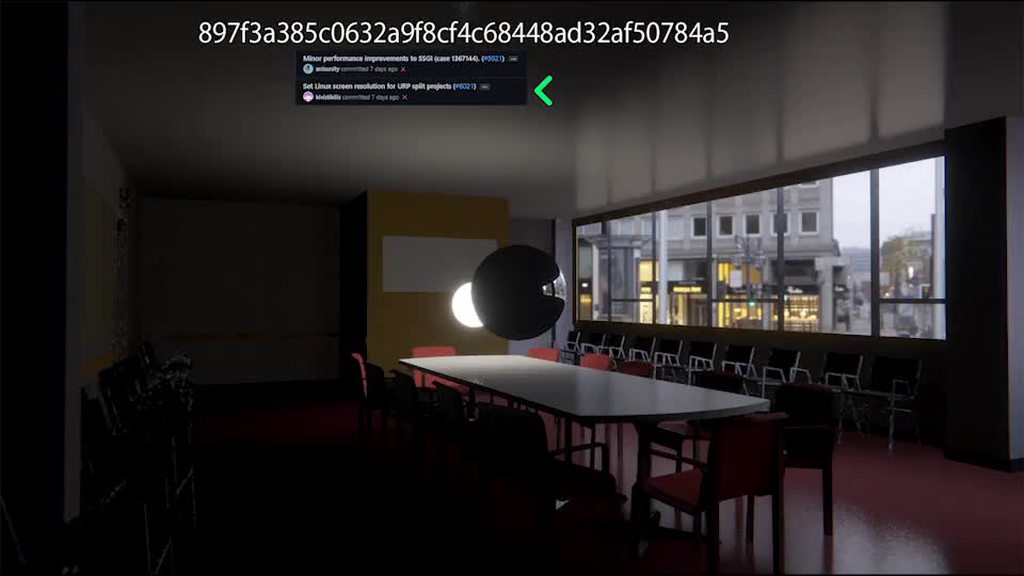
- RTGI denoiser quality has gone down (I can't seem to fix it by simply changing settings in the volume component)
- Everything seems to be flashing
Has anyone ran into this yet?
Before

After

Flashing
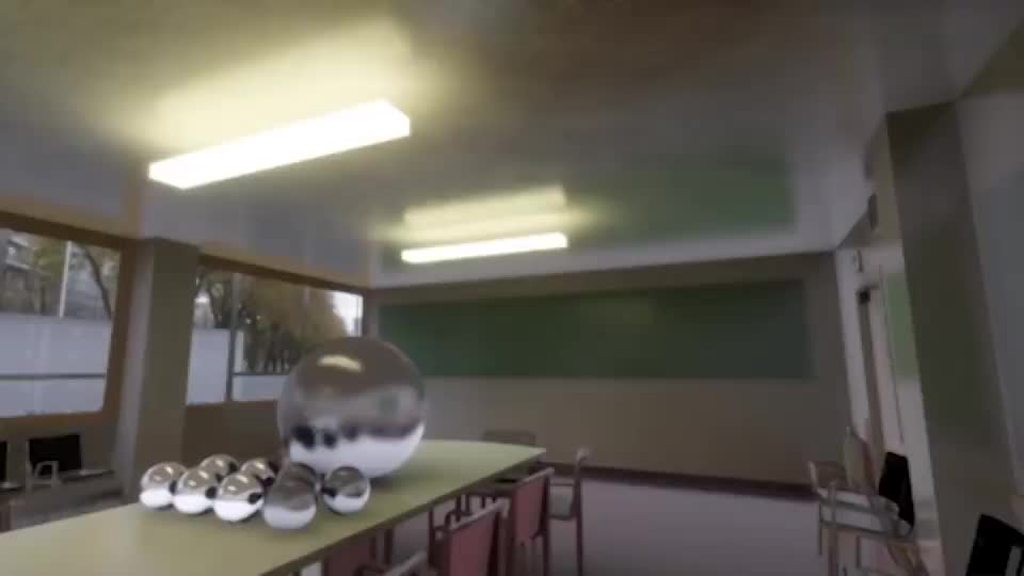
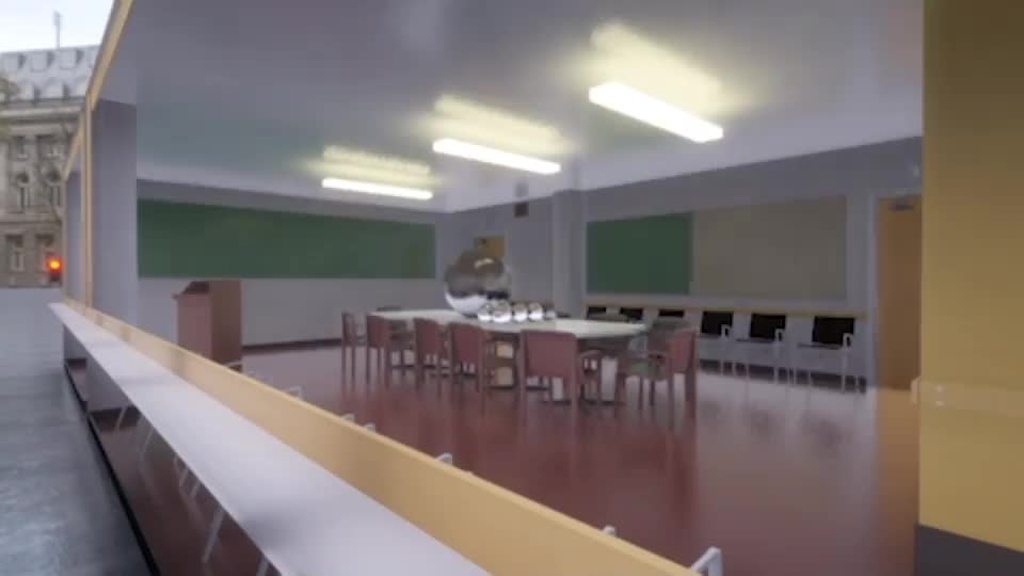 heavy ice
Quite weird...
loud leaf
Two bug reports are on the way, should make it a bit easier than guesswork from the screenshots. Let's hope they get through QA this time 😄
heavy ice
they have been some changes in the denoiser, but mosly perf and tests didn't break
so I am surprised
the flickering is probably engine side
loud leaf
I can help with some extra investigation to spare you some time if you want. I have a feeling the increase in noise is due to PR 5921 (minor ssgi improvements) and the flashing could be a result of the new CullInstances API but I don't know for sure until I investigate
Will wait for the bug report uploads to complete first, I am on slow ADSL 👍
heavy ice
I am really surprised about the denoising regression..
loud leaf
Me too, only thing I can think of is the new point distribution in the diffuse denoiser. I checked it back to back a few times by reverting to an older commit and it's definitely not on the engine side
heavy ice
lemme think
from the code, can't really be the point distribution
if it is that PR, the issue must be somewhere else
loud leaf
I'm not sure but it was the only recent PR that affected the denoiser I think. I will check the result on the commit before and after
turbid matrix
RTGI is kinda funky for me on scene view but that's probably totally different issue
heavy ice
Set directional shadow fallback to 0.0 in the ray tracing settings
turbid matrix
you mean for @loud leaf's issue right?
heavy ice
no for what you are showing
loud leaf
 heavy ice
mmmh shoot
turbid matrix
this one?
 heavy ice
yes
turbid matrix
it doesn't really have impact for this
heavy ice
OK then the problem is elsewhere
turbid matrix
I'm using this from github branch though, haven't checked yet if it happens on stock 2022.1 version
heavy ice
@loud leaf i'll check the issue see if i can figure out what happened
turbid matrix
oh rats, is DLSS active in editor too?
if I put RTGI to use full resolution or quality mode, the white artifact goes away
loud leaf
I disabled DLSS for my testing. But maybe it is causing issues with exposure in your project? @turbid matrix
loud leaf
Interesting 😄
turbid matrix
nah, it still does it with dyn res disabled from both camera + hdrp asset
heavy ice
how is rtgi setup precisely @loud leaf
loud leaf
 loud leaf
You need to enable "Show Additional Properties"
turbid matrix
ah right
loud leaf
It can reject (to avoid ghosting) based on motion vectors
I can't use it because in VR, the player arms/hands will always be noisy 😅
heavy ice
yeah those kind of cases are why it's an option
loud leaf
yep
Ideally it would only reject if your hands are moving too fast but if I remember correctly that wasn't possible at the time
loud leaf
That's running HDRP before the PR (897f3a385c0632a9f8cf4c68448ad32af50784a5), if you swap out the packages for HDRP after the PR you'll notice it changes.
 loud leaf
If you're using the editor I was using (a12) make sure you revert the real time profiler commit (it has not landed on editor side yet)
heavy ice
i am trying with a14 and master
ok indeed repros
checking it out
not sure how possible but okay
Yeah ok
found it
damn
i'll be doing a PR to fix it
loud leaf
Nice, will test it when it's up
loud leaf
I didn't submit that one because I thought QA was going to get confused, but I can submit it
loud leaf
😄
loud leaf
Alright
turbid matrix

GitHub
Purpose of this PR
Adding the basis to support for Fullscreen effects and Blit: https://unity.productboard.com/portal/1-unity-platform-rendering-visual-effects/tabs/373d7e5c-077c-421a-b0e8-7c2dbada...
this part is lovely for HDRP users: "Add a new Target for the Custom Render Textures"
heavy ice
loud leaf
@heavy ice Looks good to me, issue is gone and haven't found any new problems. Fun fact, this also fixed the other flashing issue (case 1375131), I will let QA know they can close it 👍
Hmm I found one thing just now

It's gone after entering play mode, got it on first start after clearing the library.
 vapid matrix
Does anyone know how to change forced screen resolution (hdrp FSR) via script?
turbid matrix
@vapid matrixit's not really fixed value if you change it via script so you could just set it to dynamic then and tweak it like mentioned here https://docs.unity3d.com/Packages/com.unity.render-pipelines.high-definition@12.1/manual/Dynamic-Resolution.html
"HDRP does not scale dynamic resolution automatically."
basically even with dynamic setting, it's up to your own script to tweak the scale of it
at least, that's how I've understood this
turbid matrix
also worth noting that you typically can't change SRP asset values at runtime, it's not just dynamic resolution but in general limitation to all settings in these assets. you can swap between multiple HDRP assets at runtime though
vapid matrix
so how do i change like ssr on and off?
turbid matrix
and to enable/disable feats at runtime, you'd do that via frame settings and volume component overrides
turbid matrix
current setup does make some things really tedious, yes.
vapid matrix
so should i wait for stable 2022 for FSR?
turbid matrix
that's your call 🙂
vapid matrix
and i have strange glitch with ssr on amd 5600g
turbid matrix
I do want to point out that you can have option for DLSS and FSR using just single HDRP Asset though as there's also camera option for enabling both of these
also to override DLSS settings at runtime, you'd do that through the camera options as well

 turbid matrix
only thing you can't do with single HDRP Asset is toggling between FSR and TAAU... for that you need a separate HDRP Asset you swap in place
vapid matrix
it is hard to see, but in dark scenes it is very noticeable
vapid matrix
turbid matrix
only thing you can't do with single HDRP Asset is toggling between FSR and TAAU....
got it
vapid matrix
turbid matrix
also to override DLSS settings at runtime, you'd do that through the camera opti...
yeah i saw
turbid matrix
I don't know what your images are supposed to show but since you highlighted border of the screen, are you talking about missing data on reflections due to lack of screenspace data on that area?
if so, that's normal and expected with any SSR
vapid matrix
 vapid matrix
turbid matrix
if so, that's normal and expected with any SSR
vapid matrix
turbid matrix
if so, that's normal and expected with any SSR
so how do i fix it?
turbid matrix
by not using SSR? 😅
vapid matrix
well...
turbid matrix
reflection probes, planar reflections (if you can afford them), raytraced reflections on DXR gpu's
vapid matrix
reflection probes on hdrp are working kinda strange
turbid matrix
SSR data is always going to be limited to what's available on your screen buffer
you can tweak some values to hide the artifacts a bit but there's no magic bullet for it
vapid matrix
can I extend this buffer to outside of camera
like
render a little bit more than camera see
turbid matrix
there's no such option, no
vapid matrix
ehh
turbid matrix
also it would only really fix the issue with plane like surfaces
(for which you could use those other reflection types too)
turbid matrix
planar reflections would be ideal for this purpose if it's not too expensive for your use case
vapid matrix
im having some issues with setuping them
turbid matrix
I tend to put some mirror material to the plane I want to setup them for, just for the initial alignment
when done, then swap the regular/final material back
by mirror material, I just mean blank new material with metallic and smoothness set to 1
turbid matrix
settings can be scattered all around, yes
vapid matrix
worked

 sinful locust
With HDRP volumetric clouds its not clear how one could create a flying game where you travel through the clouds. They have a local cloud mode, but without the ability to offset the cloudmap when origin shifting, or for the local volume offset to effect the clouds, its not clear how its possible to create the illusion of moving through them over an extended distance. Also for games where 0,0,0 is not the "ground" (say space game) I am also unclear on how to deal with this.
 dreamy fox
turbid matrix
only thing you can't do with single HDRP Asset is toggling between FSR and TAAU....
dreamy fox
turbid matrix
only thing you can't do with single HDRP Asset is toggling between FSR and TAAU....
There is actually a new API I added recently to change filter at runtime with any asset, am on my phone on vacation, but can it is in the dynamic res docs
Can post here next week
Here it is DynamicResolutionHandler.SetUpscaleFilter(Camera camera, DynamicResUpscaleFilter filter) (more info on docs)
 inner parcel
dreamy fox
Here it is DynamicResolutionHandler.SetUpscaleFilter(Camera camera, DynamicResUp...
inner parcel
dreamy fox
Here it is DynamicResolutionHandler.SetUpscaleFilter(Camera camera, DynamicResUp...
does that support FSR? last I vaguely checked in master, it didnt have FSR
or does that go by a diff name?
dreamy fox
It has a different enum name, but it supports it. I am not at my PC so cannot check, but the internal acronym is EASU so something starting with Edge Aware something probably :) Can post precise name next week
inner parcel
EdgeAdaptiveScalingUpres
inner parcel
dreamy fox
It has a different enum name, but it supports it. I am not at my PC so cannot ch...
^this is it. thanks!
vapid matrix
hdrp light artefact?
 turbid matrix
dreamy fox
There is actually a new API I added recently to change filter at runtime with an...
turbid matrix
dreamy fox
There is actually a new API I added recently to change filter at runtime with an...
ah, this makes sense. I now actually see the doc mention for this too... it just kinda gets hidden in the doc
I feel like you should highlight the DynamicResolutionHandler.SetUpscaleFilter(Camera camera, DynamicResUpscaleFilter filter) in code override section somehow to make it pop more, like has been done in "Using dynamic resolution" section
(I mean the highlighting with red color there)
I just briefly glanced over that doc for those and didn't see any mention for the upscale filter change, hence thinking you couldn't do it
and yes, one should read all docs through 😄
dreamy fox
turbid matrix
I feel like you should highlight the `DynamicResolutionHandler.SetUpscaleFilter(...
I think there has been an edting error there, all code should get the different formatting. Will follow up when back home.
sinful locust
Anyone know if there is a scripting API to offset HDRP clouds if you are using floating origin?
summer glacier
sinful locust
Anyone know if there is a scripting API to offset HDRP clouds if you are using f...
I'm not sure although I'm leaning towards a no, if you haven't already you might wanna ask this in the Volumetric Clouds feedback thread, HDRP section

Unity Forum
Also, when changing the earth curvature parameter, if we are not using height based fog, there are no option to hide the clouds beneath the sea level...
sinful locust
Thanks Max, I posted there, looks like there are unity devs active in the thread maybe they will take notice =).
 night lagoon
anyone know how to create a rain effect in hdrp
most of the things i find dont exactly work cuz they're particle systems
 warm coral
Hey, is there a way to get the shadow information in a custom shader? I've been searching and didn't find anything useful
 shrewd moon
night lagoon
most of the things i find dont exactly work cuz they're particle systems
shrewd moon
night lagoon
most of the things i find dont exactly work cuz they're particle systems
VFX graph is your best bet
turbid matrix
 night lagoon
ty
turbid matrix
@keen yew it is a known bug, was introduced few versions ago
Not sure if it has been fixed on most recent betas or not
turbid matrix
@keen yewfor what it's worth, there's one SSR asset on asset store that does it IMHO better for URP than what HDRP SSR has to offer
HDRP SSR works somewhat fine if you have mirror like surface, any rougher material and it's either totally inaccurate or if you use the accumulation mode on it, it'll ghost so badly it's totally unfeasible to use for any fast paced movement (this rules out most of the game use cases)
one of the big pros of going with HDRP is that it ships really well featured, meaning you don't have to rely on 3rd party offerings to get something pretty out of it
@keen yew actually it was the cloud layer that had the issue, not the volumetric clouds (https://forum.unity.com/threads/2021-2-0b14-cloud-layer-always-on-top-not-occluded-by-geometry.1179205/)
no idea which one you were testing with though
issue tracker https://issuetracker.unity3d.com/issues/objects-become-transclucent-slash-see-through-when-cloud-layer-is-turned-on
How to reproduce: 1. Create a new HDRP project 2. In the Hierarchy search bar write "Global" 3. Select the "Volume Global" object 4....
just to make sure, did you have the issue on cloud layers specifically?
ah ok, according to tracker they have fix in review... no idea when it lands 🙂 didn't see relevant PR at quick glance on Graphics git-repo
turbid matrix
@dawn sorrel you probably have a mismatch with exposure and light intensity
if you want to have some easier starting point, run through HDRP Wizard and create a new scene after that, it will have defaults that will work. then replicate something like that on your test scene
turbid matrix
my follow up message should give you a better starting point
HDRP has been designed to be used with realistic lighting values, meaning your light intensities for sun are expected to be quite high. because of this, HDRP defaults to sky + volume exposure setup that's designed to work with such lighting values. if you have some of these off, it'll not work proper
night lagoon
how do i get rid of these jagged shadows

interestingly this is the only shadown in my scene that has this issue
 floral oar
 upbeat badger
floral oar
upbeat badger
floral oar
Good wind animation. Is this speedtree?
turbid matrix
@upbeat badger pretty sure it's this https://assetstore.unity.com/packages/tools/utilities/the-vegetation-engine-159647
to me it's way too restless looking, everything is just wiggling in all directions..
upbeat badger
Yeah the intensity of wind is a bit too much but the overall behaviour of branches and leaves looks really nice. I wish there was something like wind node for shader graph with similar quality to BoTD wind
I will even paint vertexes with different colors for this to work
turbid matrix
BoTD wind was also using prebaked simulation for that specific scene geometry 😄
but they did really good job there
upbeat badger
They were using baked vector fields to make wind direction more realistic but even without that vertex animation looked great
I hope new environment package that is in development will close the gap in regard wind animation and mesh instancing
turbid matrix

I really loved all the detail they put into that demo
kinda pity so few things actually got back to mainline after it
that blog post did seem to neglect the prebaked wind stuff but I'm pretty sure they had some wind baked into some textures named gust etc
turbid matrix

GitHub
Purpose of this PR
⚠️ This PR depends on #6110 (so it needs to be merged after)
Included in this PR:
Fullscreen sub-target for HDRP
HD Scene depth node to sample the depth with mips
HD Samp...
summer glacier
turbid matrix
https://github.com/Unity-Technologies/Graphics/pull/6141
btw is APV HDRP only?
turbid matrix
afaik it's only functional in HDRP atm but I don't think it's been designed to be used with HDRP only
if you look at the APV commits and PRs you can see that actual ProbeVolume is located in core instead of HDRP
GitHub
This PR does a couple of things:
Remove the dependency on shader config. Substituted it with a multi_compile in shader.
Added a multi compile for L1 and L2, at the moment L2 doesn't do any...
this doesn't mean they plan on adding URP support for it, I mean they could but I wouldn't take it as such sign.. it could also be like this just so that custom SRPs can use this functionality easier etc
but on the other hand considering the work they put on APV, I'd still expect it happening for both SRPs at some point
turbid matrix
it's in 2021.2 - which is not in beta anymore 🙂
APV is still experimental on 2021.2 though
summer glacier
turbid matrix
it's in 2021.2 - which is not in beta anymore 🙂
Totally missed it 😄
I was looking forward to the release trailer showing the new features.
Nowhere to be seen
dreamy fox
If interested in APV I have a completely unofficial draft of a documentation (will not resemble this at the end, but it has some basic info if desired) https://github.com/Unity-Technologies/Graphics/commit/d0b072126fad8cbc87f8539dc12c239310abe095 . Our doc team will work on proper docs soon.
 turbid matrix
@summer glacier Unity did put out a blog post about 2021.2 release but it's frankly quite underwhelming (https://blog.unity.com/technology/the-new-unity-20212-tech-stream-release-is-now-available) their earlier 2021.2 beta post was way better in describing what's there
summer glacier
considering they made a release trailer for 2021.1 that had next to nothing
it's crazy to me that 2021.2 doesn't have one, considering the showoff features it got like volumetric clouds
turbid matrix
or all those fancy new URP features...
they could have at least linked to the previous blog post IMHO (https://blog.unity.com/technology/unity-20212-beta-is-available-for-feedback)
 silver copper
would anyone know how to get rid of the effect the textures have on the ground? I assume I need anisotropic textures but I can't turn on mipmaps because my texture filtering is set to point

 grizzled flame
why are you using point filtering
this is the exact situation that anisotropic filtering was created for
eternal laurel
dreamy fox
If interested in APV I have a *completely unofficial* draft of a documentation (...
Im sorry I thought APV was going to provide dynamic GI? Also reading this info about scene list and sets etc somehow reminded me that unity used to have planes for a distributed network bake haha. That would make my dreams come true.
turbid matrix
pretty sure Unity never confirmed that anywhere, it's just users who assume it's the end goal for this
which it might be, but I doubt unity will confirm or deny this
summer glacier
testing APV and I can't really see a difference when using it compared to without

After the bake the probes show up so I assume they're working active
 indigo summit
From my testing it seems APV looks like some kind of improved version of light proxy volume, and not depend on lightprobe on the scene anymore.
i was hoping that it's similar to UE volumetric lightmap tho. . . .
dreamy fox
summer glacier
testing APV and I can't really see a difference when using it compared to withou...
Did you enable the feature on all the various places? (frame settings, asset and project settings). It is a bit of a mess to enable as of now, but will change later.
Also keep in mind that this release is not really meant to be used to light for static geo due to lack of occlusion handling. If you really must (though it'd be against what we planned the release for) you would need a fairly high density.
dreamy fox
indigo summit
i was hoping that it's similar to UE volumetric lightmap tho. . . .
It is similar to volumetric lightmaps, what aspect are you missing? If you tested very long time ago the placement was bad, now it is based on the scene's SDF so more density is close to geometry and less in open space.
indigo summit
dreamy fox
It is similar to volumetric lightmaps, what aspect are you missing? If you teste...
i think mostly the quality, i guess i should try to bake high density APV because i haven't try that
also i notice that each brick always have a 4x4 probe, can this be adjusted?
dreamy fox
indigo summit
i think mostly the quality, i guess i should try to bake high density APV becaus...
Work is always going in that direction, but the data contained in the probes is filled via lightmapper and unfortunately I have no super precise info on the roadmaps there.
No, bricks need to be 4x4x4
But yes, whatever is in master now is meant as a replacement for old light probes and not much more.
indigo summit
i see, alright then. I hope support for static object are considered for the future
or i guess there would be other lightmap/GI system are currently being worked on
dreamy fox
indigo summit
i see, alright then. I hope support for static object are considered for the fut...
Definitively planned to do something for better occlusion.
dreamy fox
 zinc elm
Is this supported on igpus?
zinc elm
Is this supported on igpus?
It should be supported by any GPU supported by HDRP
zinc elm
dreamy fox
It should be supported by any GPU supported by HDRP
But what are supported?
indigo summit
@zinc elm Any GPU that have compute capabilities should be able to run HDRP i think
btw is APV can be nested/splitted? or there's should be only one APV per scene?
oh it can be nested, alright cool
turbid matrix
compute is the hard requirement for HDRP but there's been several issues in past with some older integrated Intel GPU's
it's bit of a moot point though since those gpu's were not even powerful enough to run HDRP properly in the first place
zinc elm
turbid matrix
compute is the hard requirement for HDRP but there's been several issues in past...
Well my laptop can run minecraft at 100 FPS on okay settings like rn
turbid matrix
HDRP aint no minecraft though 🙂
if you want something that runs well on weaker hardware, you should focus on URP or use the old built-in renderer
zinc elm
Well I have intel hd graphics 720 do you know if that's supported
turbid matrix
technically all intel gpu's from past decade are supported... it's just intel's drivers are very lacking + especially the older integrated ones are just too weak
720 sounds like some newer model than what I've tested myself so it might be ok
zinc elm
Oh wait... Was it 720 or 620
 fair bane
Hey guys,
I currently work with decals and try to overwrite the Emission of a decal with another decal. But can't really get it running.

 drifting vault
dreamy fox
Did you enable the feature on all the various places? (frame settings, asset and...
drifting vault
dreamy fox
Did you enable the feature on all the various places? (frame settings, asset and...
in with version and render pipeline i can test that? 😄
fair bane
The black decal seems to overwrite "something" but my guess is this might just be the BaseColor shining through. 🤔
dreamy fox
drifting vault
in with version and render pipeline i can test that? 😄
21.2 onward - Latest 12 and 13 packages should be good.
drifting vault
dreamy fox
21.2 onward - Latest 12 and 13 packages should be good.
thanks!
silver copper
grizzled flame
why are you using point filtering
I'm going for a low texture resolution style, so filtering them would ruin the look
inner parcel
zinc elm
Oh wait... Was it 720 or 620
I used to have a 620 and with stripping everything in hdrp I was able to run on 60fps in 1366x768 res, but again you can run urp with almost half the frame time (~125fps) with same settings.
By stripped I mean no post process, no real-time light, no vfx and everything disabled in the asset
On hdrp 8 I guess
turbid matrix

GitHub
Purpose of this PR
Fixing workflow issue when SRP reloading occurs.
The problem is that all managed and static members (such as the m_Scenes member of the RenderBRG) get blown away when you do a co...
am I only one who keeps reading RenderBRG as RenderBurger?
I try not to.. but it's actually surprisingly hard once you have your mind set to it
whole fossil
well... thanks
turbid matrix
np
whole fossil
I cannot unsee that now 😄
sinful locust
Interesting, the way URP and HDRP handles extreme farclip distances seems to be totally different, at least after they fixed the farclip bug in the final 2021.2 release. I seem to be getting stable rendering even with a nearclip of 0.1 and far clip of 1e+11 in HDRP, where I was not before and in URP it simply stops rendering anything past 2e+6 or so.
I almost missed this due to a spelling error in the release notes: "HDRP: Fixed an issue with TAA causing objects not to render at extremely high far flip plane values."
whole fossil
isn't 1^11 still 1? 😄
sinful locust
no I meant 10,000,000,000
sinful locust
sure, I guess I should have formatted that correctly lol.
whole fossil
nevermind, just me being picky 🙂
sinful locust
 whole fossil
1e+11 is completely different deal than 1^11 😄
 rich ravine
it's just a way of saying 100,000,000,000... Will look silly if they actually show this
sinful locust
whole fossil
1e+11 is completely different deal than 1^11 😄
understood, it was just a brain fart on my part, I normally represent it as 10^n.. but unity uses 1e+n so I mixed the two 🙂
night lagoon
what should i set for maximum for screen space shadows
i set it to 25, is that fine?
vapid matrix
multiple volumes are not working on hdrp?
rich ravine
wdym? it should work..
vapid matrix
but it doesn't
and lightprobes are very dark in unity 2021.2b16
oh wait
stable version is here
vapid matrix
has anyone made SSR for hdrp?
silver copper
oh wow yeah, that was the solution but i had to do it on every texture on the terrain before it worked. Weird, I thought mipmaps would fix that problem. Thanks!
turbid matrix
vapid matrix
has anyone made SSR for hdrp?
you mean beyond the one it ships with?
vapid matrix
turbid matrix
you mean beyond the one it ships with?
Yes, because it is awful (at least on Ryzen 5 5600g)

 whole fossil
do you have light probes baked in a scene?
 summer dome
nothing in the scene is baked currently, everything is instantiated at runtime
the scene is basically empty when pressing play
just to make sure i regenerated a new lighting settings object and cleared all baked data now
whole fossil
just for testing purposes, add one light probe near character, bake it and see what indirect light controller do then
afaik it works with indirect light which is baked on the lightmaps and lightprobes
summer dome
still nothing, i have a feeling this is related to assets being loaded via addressables
yep it's somehow related to being addressable it seems 😦

normal skinned meshes work fine, will keep digging 🙂
turbid matrix
just landed on master https://github.com/Unity-Technologies/Graphics/pull/5962

GitHub
NOTE: PR has lots of files that have lots of actual changes compressed by github, please when reviewing expand the diff.
This PR introduces proper HDR Output support for HDRP.
TL;DR of the features...
now here's hoping URP will get this treatment some day too so it doesn't get left too far behind built-in and HDRP on this regard...
and yes, there's a card on productboard for it but it's on the "under consideration" section so not too hopeful about it
inner parcel
summer dome
normal skinned meshes work fine, will keep digging 🙂
Can you post a screenshot of the skinned mesh component which is not being lit by the probe?
 sweet vault
How can I fix this error? An error occurred while resolving packages:
Project has invalid dependencies:
com.unity.render-pipelines.high-definition: Package [com.unity.render-pipelines.high-definition@12.1.0] cannot be found
It shows up after I made my project
sinful locust
Hmm I noticed this comment in todays blog post, anyone have more info on this?
Finally, we now offer a dedicated custom pass to get a lightweight camera for all UI-related work in response to feedback about the expensiveness of additional cameras.
im also interested. perhaps it is about this: https://github.com/alelievr/HDRP-UI-Camera-Stacking but it doesn't seem too official to mention it in the blog post
GitHub
Optimized implementation of camera stacking for UI only in HDRP. - GitHub - alelievr/HDRP-UI-Camera-Stacking: Optimized implementation of camera stacking for UI only in HDRP.
turbid matrix
pretty sure they referred to that one
 coarse trench
Is there any way to get anti aliasing working for HDRP in differed without using the post process effect..
turbid matrix
you mean, MSAA in deferred? not going to work
coarse trench
Is there any sort of AA that would work anyway with hardware acceleration at draw call time?
turbid matrix
why do you need this?
there's DLSS but it only runs on relatively new nvidia gpu's
coarse trench
I mean nothing really in the post process AA looks any good.
They all have weird glitches or problems.
turbid matrix
there isn't any perfect AA solution regardless how it's done, it's always some kind of tradeoff
coarse trench
yeah but the only trade off I really want is performance.
And since when was DLSS added. Never seen that before than in UE.
turbid matrix
DLSS is on 2021.2
coarse trench
I need to update then. :p
But anyways.
I'd have to write my own AA in glsl I guess then?
I mean there isn't really anything else.
turbid matrix
you have some idea that would work better than on current AA solutions?
coarse trench
Thats actually a dumb idea I should of not said that
but I did do it once for an opengl project
turbid matrix
FXAA is just a smooth filter, MSAA is heavy and can only affect geometric edges, SMAA doesn't catch all aliased edges, CMAA is like SMAA but less complicated, TAA is great but softens the image and can have horrible ghosting, DLSS only works on specific GPU's
super sampling is practically only approach that doesn't have some weird artifacts but most people can't afford to render the scene, say at 4x resolution of their native display resolution
also not sure if you can do SS on HDRP atm
coarse trench
I was wondering if it's a least possible to do MSAA on deferred anyway, not unity specific?
turbid matrix
I personally don't like TAA's side effects but it's still most valid alternative out there
you could do MSAA on deferred but it's kinda expensive and limits what you do with it, there are papers about it
but it's not really feasible to do so which is why people don't do it on game engines like Unity or Unreal
also... why would you do MSAA on deferred with HDRP? HDRP actually has better visuals on forward only path that supports MSAA 🙂
well, for most parts anyway it's more accurate than the deferred path
coarse trench
Because of how lighting works with differed. Way more cheaper and I'm wanting to use a lot of lights. Like a lot.
turbid matrix
the issue with MSAA is that it still can't fix things like specular aliasing or aliasing presented by texturework and it's also quite expensive
either way, your options are limited, either have forward with MSAA or go with deferred and some PPAA
coarse trench
PPAA never heard of that.
coarse trench
Unity seems to say that it has support for AMD FSR. I can't seem to find where to enable it. The closest thing I found to it was a "Dynamic Resolution" setting where I found not mention of FSR it only showed me something for DLSS.
Ok no I just found it in "Default Upscaling filter."
rich ravine
profile it yourself, and tell us?
rich ravine
and why is that 🙂
turbid matrix
@dawn sorrelphysical sky updates are heavy, I don't think the sky itself has big impact otherwise
like, if you need to update some parameter in real-time.. that's where the perf hits happen
turbid matrix
just don't change them?
 night depot
Anyone tried FSR in newest Unity build? Tried turn it on, but nothing happens. Is it should be implemented manually?
turbid matrix
you have to lower the resolution manually
can you "fixed resolution" from dynamic resolution settings for quick testing... to write custom dynamic resolution logic, there's a doc page on HDRP docs
night depot
turbid matrix
you have to lower the resolution manually
So basically I need to set lower resolution and write script so FSR could upscale it?
Genuinely thought that would be like DLSS changing stuff in editor with few clicks
turbid matrix
It is not. All manual
You also need separate AA with FSR, it is not AA solution like DLSS
@night depot ^
night depot

summer glacier
first advice is to use the profiler, there's a CPU and GPU module, it's extremely easy to use and so helpful.
If you care about performance, it's a must know
Physically based sky update mode by default is set to onChanged -- which means it will consume next to nothing unless you're moving the directional light, or changing sky paramaters, it will "update" when it's changed.
It does all it's work on the GPU, a bit heavy, I believe on my GTX 1070 it was around 2ms per update 😄
Slightly increased if you're using volumetric clouds.
The good news is, you can set it to onDemand, and only render it once every few seconds, frames, or whatever you think is good for your project.
In my time of day system, I update it every few seconds. Updating it leads to correct ambient lighting based on the directional light angle.
Unfortunately, there's no frame-slicing (doing the update over a few frames so it costs less) but at least we can render it whenever we want, and not each frame.
summer glacier
night depot
Genuinely thought that would be like DLSS changing stuff in editor with few clic...
I think you misunderstood, maybe not but in case you did -- you can enable it, just tick force screen percentage, and then set your screen % all in the editor. Then it works, does upsampling and everything with the upscaler method you chose (FSR, DLSS, TAU) using the screen percentage you set in the editor.
Dynamic Res needs to be enabled in all the places, camera etc.
You can also change the screen percentage & upscaler method with code. You don't have to do any manual coding to do the upsample itself.
The only thing that requires manual code is dynamic res, as in, the resolution changes itself based on your GPU performance per frame to reach a certain GPU ms goal. You need to setup GPU timings for that and what not.
 pale wigeon
Hi, I'm new to Unity... I tried running a couple of baked light scenes (templates) from the asset store... baking times where anything from 25 min to more than 1 hour 😕
I hope I don't have to wait that amount of time for evry change that I make when re-lighting my game?
does Unity re-do the complete baking calculation from scratch even when there were only small modifications in lighting?
fair bane
No as far as I remember the lighting bake is cached so the first bake will take a while but the upcoming ones will be baked faster. But don't quote me on that since I only heard it from others
@pale wigeon
summer glacier
pale wigeon
Hi, I'm new to Unity... I tried running a couple of baked light scenes (template...
reduce bounces, texels, samples, all effect baking time
for testing, a texel of 5 is good enough with 2-3 bounces
pale wigeon
Thank you.
I did that and it does improve it, but now I'm running into a problem where there are 7 lightmaps to be created but for reason it nevers create the last one
it stays put at 86% completed and the estimated time keeps keeps increasing... 6 minutes left. then 7 min , then 8 min ... 😭
turbid matrix
@pale wigeon also might be worth trying the GPU lightmapper instead of the default CPU one. it's a lot faster
pale wigeon
ok, I think I'm already using that though
summer glacier

GitHub
Unity Graphics - Including Scriptable Render Pipeline - GitHub - Unity-Technologies/Graphics at graphics/gpudriven-visibility
I wonder what that is. Could it be occlusion culling or something similar?
turbid matrix
duh, it's about RenderBurger
 patent sun
how to make render texture CCTV camera in HDRP?
vapid matrix
Hi everyone. Does anyone know, how to fix this artifacts? On first it's like there is missing data about reflections and it appears on screen as black triangle (on the bottom of screen it's like black sphere). Btw my PC is running on Ryzen 5 5600G and 16 gb of ram. Is there are any better solution for SSR? Project is on Unity 2021.2 and last HDRP

 inner parcel
You might be lacking something in post process department. Also some lighting magic. Shadows and GI bring lots of life to the scene
 mortal forge
From my experience, it's quite often post-processing, and then to a lesser extent surface shaders. But no-one can say for sure unless you share pictures, so an NDA will just force people to guess.
shrewd moon
Proper environmental lighting is probably the single biggest thing, but you also need shaders/materials that do what your artstyle needs
Post processing helps
Textures of incorrect size or with incorrect import settings, or problems with mesh such as normals are a common problem with amateur projects
 flat temple
I'm having a weird error when trying to use a volume with a "Depth of Field" effect.
"Error while building Render Graph."
"ArgumentException: Trying to use an invalid resource (pass Depth of Field)."
I did disable DoF in the default camera frame settings long ago, but even putting it back on doesn't solve the problems.
... and I can't find documentation on this error on the net.
Any ideas?
vapid matrix
like asset that was working in standard render pipeline is not working in hdrp
any camera effect is not working AT ALL
any solutions?
summer glacier
vapid matrix
Hi everyone. Does anyone know, how to fix this artifacts? On first it's like the...
I think that's just the limitations of screen-effects
since they're based on what's currently on the screen, corners usually have problems
flat temple
asset that was working in standard render pipeline is not working in hdrp
That's kinda expected. HDRP work very differently, graphic effects need to be built specifically for it.
vapid matrix
so what should i do...
flat temple
Either stay in Standard, or find a version of that asset designed for HDRP - really depend on what it is.
summer glacier
vapid matrix
so what should i do...
What's the issue exactly? Is it materials? If so, as long as you're using the standard shader, you can use a unity-provided upgrade process that will change all your materials to HDRP
vapid matrix
it is not materials. It is keijiro's glitch assets
 dawn sorrel
pale wigeon
it stays put at 86% completed and the estimated time keeps keeps increasing... 6...
dawn sorrel
pale wigeon
it stays put at 86% completed and the estimated time keeps keeps increasing... 6...
Lightmapper will get forever stuck on large unsplit objects.
Like say big buildings.
pale wigeon
oh I see. It's "only" a house though. Any strategies to minimize this kind of problem?
 tame comet
Do HDRP Materials assigned to UI elements not work for overlay canvas? HDRP/Unlit material, using 2020 LTS
summer glacier

so in 2021.2 light probes are like this by default. In previous versions, you had to click on the light probe for it to be visualized.
How do I make it hidden unless I select it, like in previous versions?
 inner palm
this is still happening in the first full release 2021.2.0f1
time to go back to 2021.2.0b13
 craggy arrow
Is there any way I can get a dark scene with HDRP?.... everything is so.... lit... I'm wanting to make a horror game with it but its weird... I cant get anything to be dark... Even with no lights at all. >.>
indigo summit
is there any news for custom pass RendererListDesc to support movecs?
dawn sorrel
craggy arrow
Is there any way I can get a dark scene with HDRP?.... everything is so.... lit....
You can use a HDRI Cubemap and simply attach a black "darkness cubemap", that will make the scene entirely dark other than emission and lights of course:

@craggy arrow
just drag the DarknessCubemap into the HDRI Sky field (where it says Dense Stars on the screenshot)
rich ravine
dawn sorrel
You can use a HDRI Cubemap and simply attach a black "darkness cubemap", that wi...
I mean, you're in hdrp anyway, so you can just override the exposure of the lights
craggy arrow
Yeah I got it dark, by just adding in the Sky and Fog Volume and rotating the sun. Seemed to work for me so far for this purpose
 chrome locust
HOLA!!!
@turbid matrix you sneaky bastard! love you are stalking our work 🙂
basically our new BatchGroupRenderer api is out and about, (aka BRG aka RenderBurger 🍔 )
this is sort of the core of ECS. What we are trying to do is make regular game objects render as fast as ecs objects 🚎
of course, tons of challenges, but so far we are seeing promising results on the CPU. I am doing subwork on top of this to do deferred materials. This is just a different technique to render materials, opens up the possibility of having many other features
For deferred materials you need all your material parameters on the GPU, which render burger gives us (again is the core of dots ecs stack)
anyway, really cool results, will let you guys know when a toy branch is ready 🙂
itd be awesome to see early results on ya'lls projects
 remote forge
(the core of the render burger can also work on URP so long as you have compute ;0 )
rich ravine
chrome locust
this is sort of the core of ECS. What we are trying to do is make regular game o...
what you mean by this is that, it would work outside of ECS ecosystem? if so, thats awesome
chrome locust
partially some things are completely orthogonal to ECS
rich ravine
Oh niice!
chrome locust
some other things are gonna stay slow, hard to say we gotta keep prototyping and pushing this
We cant promise anything, again this is us pursuing a really good internal idea
remote forge
Specifically: We wrote a new API which is a fast path for getting data into GPU memory for rendering and some fast paths for submitting the draws that relate to this data. This data can be injected into the BRG from ECS (the normal way) for from any other custom system you write so long as it conforms to the API. We have been playing around with injecting this data from GameObjects (via c# script in the scene) for MeshRenderers that are 'somewhat static'. It seems to work well and reduce runtime / draw call cost.
But like Kleber says this is mostly really experimental and may never actually ship. But you can see how to use the API in 22.1 and do some experiments for yourself 🙂
summer glacier
chrome locust
this is sort of the core of ECS. What we are trying to do is make regular game o...
Ohh, I like what i'm hearing 😄
looking forward to checking it out
turbid matrix
chrome locust
this is sort of the core of ECS. What we are trying to do is make regular game o...
oh, that sounds amazing if it'll work out
less reasons to dive into ECS land 🤔
turbid matrix
remote forge
(the core of the render burger can also work on URP so long as you have compute ...
appreciate this too 😄
eternal laurel
chrome locust
itd be awesome to see early results on ya'lls projects
You know I have I project with 100k GO's with baked vertex anims. They are GO because I cant get shadergraph to work with DrawMeshInstancedIndirect. If you remember me and ping me I would be happy to test the branch on my stadium crowd😆
vapid matrix
Are there any good solutions for motion blur in hdrp apart from built in?
turbid matrix
haven't seen any other solutions for it
vapid matrix
oh...
Is it hard to make one?
If standard render pipeline had good dynamic lighting, ssr, ssgi, dlss, fsr, rtx, I would change hdrp for standard
Because there is literally nothing what I can do now
dawn sorrel
pale wigeon
oh I see. It's "only" a house though. Any strategies to minimize this kind of pr...
Reduce the lightmap scale on the renderer or split the mesh.
dawn sorrel
vapid matrix
If standard render pipeline had good dynamic lighting, ssr, ssgi, dlss, fsr, rtx...
I don't think Unity is ever touching builtin again. So no DLSS or raytracing there.
turbid matrix
vapid matrix
If standard render pipeline had good dynamic lighting, ssr, ssgi, dlss, fsr, rtx...
there are 3rd party assets for ssr, ssgi, fsr and rtx on built-in RP though
can find most of those free too (besides raytracing)
well actually, Unity does even provide SSR on their PP stack, specifically for built-in only
turbid matrix
enable shadows for the point light
is this HDRP?
URP doesn't have point light shadows until you use the very latest Unity version (2021.2)
@grizzled root^
hdrp can bring a ton more issues, what was the showstopper on URP?
that's perfectly solvable in URP, would start from the things mentioned on the reply you got there
you'll have WAY harder issues to solve if you go for HDRP
turbid matrix
URP 10.6 if you use 2020.3 or if you want more features, then go with the stock URP 12 on 2021.2
inner parcel
turbid matrix
URP 10.6 if you use 2020.3 or if you want more features, then go with the stock ...
but yes urp doesnt have point light shadow, which I guess is there in 2021.1 or plus
vapid matrix
turbid matrix
there are 3rd party assets for ssr, ssgi, fsr and rtx on built-in RP though
Oh yeah? What about hdri and gradient sky? Fog? It would be cool if you can do this in built-in
turbid matrix
you can use cubemaps as sky on built-in... there's Aura (1st verion is free, 2nd is paid app) + countless other solutions for volumetric fog
main issue with all that will be being able to integrate everything in same Unity version as you are essentially dealing with bunch of 3rd party things that may or may not have been designed to work on specific Unity version you are using + they may get interfered by other assets
it's kinda biggest advantage you get on stock HDRP since it's already an integrated package with tons of features
@grizzled rootyeah but URP 2020.3 doesn't support that for realtime point lights
looking at the pink materials and actually seeing sharp point light shadows, I'd say you don't have URP asset assigned to the project yet
meaning, you are probably still looking at built-in renderer
point light shadows were actually added in URP 11 (2021.1 but since that's already unsupported tech release, best option would be to go to 2021.2 directly since it'll become next LTS with some minor changes next spring
or just... stick with baked lighting
(URP point light shadows do work on baked lights regardless of the version)
eternal laurel
anyone here used the accumulation motion blur with DoF in HDRP ? I'm getting really bad artifacts. Perhaps its some settings I need to change but I have no idea. If someone has experienced this issue and can solve it please ping me or dm me or what ever.

 mellow condor
there is no HDRP on iOS at all right? no hacks, no workarounds nothing?
vapid matrix
How to make sword trace in hdrp? Because motion blur built in hdrp is kinda bad
grizzled flame
mellow condor
there is no HDRP on iOS at all right? no hacks, no workarounds nothing?
nope
turbid matrix

Get an overview of the brand new Volumetric Clouds system offered by Unity’s High Definition Render Pipeline (HDRP), along with some of the alternatives available for generating beautiful skies in Unity, including HDRI distortions and Cloud Layers. You’ll learn about the brand new Lens Flare system, which works with both the Universal Render Pip...

I'd really love to have these in URP :p
rich ravine
turbid matrix
I'd really love to have these in URP :p
at least volumetric fog is coming to URP, so I can ditch out my hacky-barely-working volumetric fog 😃
turbid matrix
is it though?
rich ravine
in their roadmap I believe
turbid matrix
I mean it's marked as "under consideration" on productboard yes, but that's not really a firm promise it'll arrive 🙂
haven't seen any related activity on github either
rich ravine
sadly yes, true
turbid matrix
atm, my faith on getting URP volumetrics is basically all set on Aura 3
but that's taking a long time too
rich ravine
Aura only works on built-in, no?
turbid matrix
Aura 3 is built ground up for URP
but it's not out yet
dev hasn't really told much about current state of this project either so will see, I wouldn't expect it to get out this year
that early 2021 obviously didn't happen 😄
latest tweet on the topic was about adding volumetric clouds to the mix... which could have been a mistake that just opened yet another rabbit hole to dive into
sinful locust
Aura author may have ran into some URP specific challenges. I know from my time with URP, render features and post processing like effects that the interface for some of this stuff is still evolving and there are some performance land minds compared to built-in that I never quite figured out.
turbid matrix
there's extra layer of complexity if you want to support VR with URP's renderer features
sinful locust
one of the issues I ran into porting volumetric clouds from built-in to URP was scaling the number of lights. There was a couple orders of magnitude difference, even with deferred enabled... never did figure out if this was me just doing something wrong or what.
In any event, with the HDRP far clip fixes and the huge performance improvements I am seeing between 2021.1 and 2021.2 (in my project HDRP is performing better in intensive situations) I am not seeing a whole let of benefit to going URP, for my project anyway, except for the fact its way easier to use 🙂
summer glacier
I actually did a recent test on performance with HDRP compared to URP. Some performance pulls are being backported to 2021.2, hopefully they land soon
When the extra features are disabled, the performance was almost like URP (0.6~ ms less) although it looked better by default
And when I used shadow caching, it became better

ignore stats window, it's not in-game
heavy scene 'ish' 3D, once things get demanding, HDRP wins
the big issue with HDRP is VRAM, and some things can't be turned off. This all goes against scaling down...
turbid matrix
summer glacier
I actually did a recent test on performance with HDRP compared to URP. Some perf...
this actually depends a ton on the machine you test it with. Even on 2020 cycle stripped down HDRP was quite close to URP perf on high end machines on avg populated scenes. The weaker the system you run it with, the bigger the gap gets though. I actually never saw HDRP win in any case but shadow caching wasn't in yet + HDRP on 2021.2 definitely performs better than HDRP on 2020.
sinful locust
summer glacier
I actually did a recent test on performance with HDRP compared to URP. Some perf...
Where it become really obvious to me is when moving. In HDRP merely moving or changing camera orientation has no real impact, not so with URP in my scenes (which can have a lot of game objects in scene). In addition camera relative rendering saves me a ton of cpu, as I do not need to origin shift nearly as often. As the scenes get more complicated the out of the box performance benefits of URP quickly fall away in my testing.
inner parcel
is your environment tab configured in lighting window?
inner parcel
summer glacier
I actually did a recent test on performance with HDRP compared to URP. Some perf...
you should do the full testing in builds. in editor there's less clear picture. URP was always atleast 2 times faster than HDRP in almost all cases for me (with visuals as close as possible)
also the resolution, your window is at 1149x529 which is lot less for modern machines. as you reduce the rendering resolution, the load on gpu is reduced, shifting the boundness gradually to cpu (in my case atleast where im almost always gpu bound)
inner parcel
have you tried baking the scene?
vapid matrix
is there any other solution to change hdrp asset via script. Because that is very bad.
 summer glacier
inner parcel
also the resolution, your window is at 1149x529 which is lot less for modern mac...
summer glacier
inner parcel
also the resolution, your window is at 1149x529 which is lot less for modern mac...
That was just a test pic, actual test was done in my main res
inner parcel
vapid matrix
is there any other solution to change hdrp asset via script. Because that is ver...
not sure about dlss, but in 2021.2, you have an api to change dynamic filter type at runtime.
although i'm nott sure about dlss tho, worth a check
 inner parcel
summer glacier
That was just a test pic, actual test was done in my main res
inner parcel
summer glacier
That was just a test pic, actual test was done in my main res
so whats the actual frame time? ut'll be interesting to hear about that.
difference between 1ms and 1.6ms is much more than the difference between 33ms and 33.6ms
inner parcel
vapid matrix
but how to change dlss
check for ChangeUpscaleFilter or something like that from the same class. i'm not sure abt the exact name, just inspect it
vapid matrix
inner parcel
check for ChangeUpscaleFilter or something like that from the same class. i'm no...
SetUpscaleFilter only has fsr and TAAU
inner parcel
figured..
i havent used dlss personally, so sorry i dont know if a scripting api exists for that
vapid matrix
okay thanks
turbid matrix
@vapid matrix I'd imagine you can setup HDRP asset to use DLSS but then if you need to toggle to other upscaler, you could toggle the DLSS of from the camera /cameradata instead
you can override it for each camera
this would make it then use the fallback option instead
vapid matrix
i cant even access to dlss toggler
turbid matrix
if you don't see the setting, you probably don't have nvidia package installed
summer glacier
inner parcel
so whats the actual frame time? ut'll be interesting to hear about that.
differe...
Did the test in builds with uncapped FPS --
URP fps is around 5.4ms
HDRP is around 5.8ms
Although, on both the bottleneck was the GPU.
But URP did the main-thread render faster, 3.3ms
HDRP for mainthread was 4.11
I didn't use HDRP shadow caching in this test since it'll give it a big average performance push and wanted to see raw results
inner parcel
whats your pc specs. the results look very interesting
summer glacier
laptop GTX 1070, I7-6700HQ
inner parcel
thats a really surprising result
summer glacier
HDRP GPU: 5.9ms
URP GPU: 6~ms (this is wrong, goes down to 4.6~ms after fixing settings)
Actually URP GPU usage is less, I thought its weird so i checked and forgot to downsample the SSAO
turbid matrix
for such comparisons, would probably good idea to check the results with some gpu frame profiling tool to see what the actual result consists of, otherwise there could be something odd making the result go way off
summer glacier
although URP's SSAO is really bad when downsampled, lots of artifacts and strong pixelation
turbid matrix
I like nsight for that as it gives quick overview
summer glacier
unity profiler gives exact timings for each feature
turbid matrix
it does but it's pain to get the real figures out of it since it doesn't do timeline kinda view for gpu
and unity's profiler doesn't work for graphics jobs on standalone builds
(and you shouldn't do profiling in editor in the first place)
summer glacier
gpu results are the same in editor or build
 quiet quest
Is volumetric clouds still a work in progress
inner parcel
quiet quest
Is volumetric clouds still a work in progress
it has been released is available in 2021.2.1f1
quiet quest
Ty
 nocturne ridge
Hello
I have a HDRP project
When I add a Directional Light to it, my entire scene is scorched

I need to set the Light value to only 5 Lux or something for the light to look natural
That doesn't seem right
What am I missing?
eternal laurel
setting the proper exposure value
nocturne ridge
yeah thanks 😄
but uh
now point lights are invisible even at max Lumen
ah I guess I should use Automatic Exposure and not Fixed?
I don't rly understand why this is necessary though
loud leaf
It allows you to use real world values for lights and cameras instead of inputting some random numbers
inner parcel
nocturne ridge
I don't rly understand why this is necessary though
you can go with the lighting workflow you used to follow previously in legacy pipeline without having to set exposure. but again, you wont be using physically based lighting workflow
inner parcel
nocturne ridge
now point lights are invisible even at max Lumen
the reason why point lights are almost invisible is because in real world in daytime under sunlight, it is hard for you to notice if a bulb is glowing or not. its even hard for you to read anything on your mobile under direct sunlight
nocturne ridge
makes sense
nocturne ridge

I enabled Realtime Global GI, but the indirect lighting is very weak for some reason
I have to set Emission Intensity to high values to get some lighting
but then the objects look weird
Any idea how to fix this?
The red spike on the left is also emissive btw. but it's just not visible :/
inner parcel
nocturne ridge
I enabled Realtime Global GI, but the indirect lighting is very weak for some re...
with hdrp you have indirect light controller which can be attached to volume. also before generating GI in lighting tab, you have indirect multiplier.
theres also an indirect light field for light component. feel free to experiment with all of them
nocturne ridge
Is light leaking here?

 latent quiver
Anyone know how to apply textures to a TerrainLit material? I’m trying out HDRP for the first time and I can’t figure it out. I can’t find any info on the internet new enough, and the docs don’t really tell you anything about it
nocturne ridge
If anyone knows how to fix light leaks with Enlighten Realtime GI, I'd appreciate it a lot
inner parcel
nocturne ridge
If anyone knows how to fix light leaks with Enlighten Realtime GI, I'd appreciat...
try increasing the lightmap padding and resolution. it helps in some cases
nocturne ridge
padding?

Also, any idea what this shadow artifact is about? (that ray going to bottom-left corner)
This happens when I increase the Shape Radius of the point light
How do you fix this?
wtf
 latent quiver
I'm having trouble setting up a skybox

I set it to hdri and made a cubemap but all i get is darkness...
latent quiver
i figured it out\
But I still cant figure out the terrainlit shaders
nvm.. 🤦♂️
i finally got it
okay one last question
my texture painting is really square and patchy.. can I fix that?

 supple briar
Anybody know how I can increase the range for RTX shadows?
When I move the camera back the shadows disappear, but not sure where to find the setting to change this
Nvm I found it 🙂
craggy arrow
My GPU is being sent into overdrive in my game scene and I'm actually having some performance issues. I've been looking at the profiler, but I'm not really sure still where to apply my attention to. Does anyone have some tips on where I can learn to optimize my game a bit better to help on the GPU side?
turbid matrix
I keep mentioning nsight because it gives really nice overview of things @craggy arrow
craggy arrow
Thanks, I will have to look into it
turbid matrix
You do need nvidia gpu for it afaik

 warm topaz
hii, can someone help me with this issue?
https://forum.unity.com/threads/mesh-stretching-after-building.1184836/#post-7582972
Unity Forum
So, we are having some issues with the mesh after building the game.
Initially, we thought it was something related to the material, but after taking...
inner parcel
warm topaz
hii, can someone help me with this issue?
https://forum.unity.com/threads/mesh-s...
is it a static mesh? how is it imported?
if you can create a new empty project and are able to reproduce it, more people might be able to help you out with it
warm topaz
they are all marked as static. Artists are using Blender and importing to the project using these settings:

I can't reproduce it in new project because the issue just emerge when the project has a lot of assets.
We have around 8gbs of textures and 300 meshes..
It was all fine not long ago
warm topaz
actually, neither of them..
we are loading assets using a scriptable containing a list with all the prefabs
inner parcel
If feasible, try the same mesh with asset bundle. I use addressable and our project is over 10gb+ ig.
I haven't had any issue like that
warm topaz
the strange thing is, if we use a PC with a GTX1080Ti, it's everything fine
if it's mine, 1660 Ti, the issue emerges
we plan to use it, but for now.. we need a temporary fix
nocturne ridge
Is it possible to create a light that only lights volumetric fog and nothing else?
I have a bonfire particle effect, and I have one point light above it that is scripted to animate the intensity and position of the light
but my problem is that with volumetric fog enabled, you can see the point light moving up and down
so I'd rather create another light that affects fog in a broader way but doesn't light the rest of the scene
any idea for a solution?
eternal laurel
@nocturne ridge if I remember correctly you can turn off all the light layers of the light and it will still light up volumetrics if it has the checkbox
summer glacier
I wonder which way to go, volumetric clouds or HDRI.
I mean, can you really match HDRI quality? no matter how good the volumetric clouds are
Maybe it depends. Like if you have a time of day, volumetric clouds are a better choice?
inner parcel
i would personally go with hdri unless its local cloud
turbid matrix
can go for way more dynamic effects with less static sky
inner palm
inner palm
this is still happening in the first full release 2021.2.0f1
am I meant to like submit a bug report

is this like an issue with everyone or am I one of the few where the clouds are being drawn on top of everything
is this unity itself or hdrp 12.1
cos going back to the beta I always go back to hdrp 12.0 and maybe that's the reason its working in 2021.2.0b13
summer glacier
inner palm
am I meant to like submit a bug report
known bug, fix soon
inner palm
hopefully, ive been stuck on the beta for a while
is it a problem with hdrp or unity itself
summer glacier
inner palm
is it a problem with hdrp or unity itself
What do you mean? I believe it's an HDRP only feature, so it's HDRP.
should be fixed in the coming patches
inner palm
ahh ok so thats why it hasnt changed between unity versions
summer glacier
HDRP is now part of the engine by default, so you have to wait for the next 2021.2 unity version
turbid matrix
I'm actually not sure if that's even been fixed on github yet, haven't seen such patch
summer glacier
turbid matrix
I'm actually not sure if that's even been fixed on github yet, haven't seen such...
https://github.com/Unity-Technologies/Graphics/pull/5910 should be the one

GitHub
Purpose of this PR
https://fogbugz.unity3d.com/f/cases/1372920/
A recent PR removed the depth buffer binding for the cloud layer, which resulted in cloudlayer appearing on top of geometry.
Testing...
turbid matrix
ah, good catch
so basically fix is this: https://github.com/Unity-Technologies/Graphics/pull/5910/files#diff-4706c613a7edd390f146087c755f439f3c29d8beeeb12ee1cc56127cc52655aa

GitHub
Purpose of this PR
https://fogbugz.unity3d.com/f/cases/1372920/
A recent PR removed the depth buffer binding for the cloud layer, which resulted in cloudlayer appearing on top of geometry.
Testing...
you can apply that fix yourself but it would mean you have to move HDRP package from library/packagecache -folder into your projects packages folder and doing that change locally there
just checked github and that fix has been backported to 2021.2 staging on oct 18 already... you'd think it would be on latest 2021.2 already?
they don't have tag for 2021.2.1 on github but 2021.2.2 definitely has this fix
@inner palm so yeah, it will be fixed on next 2021.2 release then like @summer glacier suggested
inner palm
sweet
turbid matrix
I can't verify if 2021.2.1 already had the fix or not as I don't have that version installed and Unity is kinda lazy on putting those tags for each SRP out
looking at the dates though, it looks like .1 just missed it
 grave stump
Unity 2021.2 HDRP Speedtree 8 Billboard
Good day all,
I've been trying to get the Speedtree 8 material to work with my speedtree billboards, I've checked the "is billboard" toggle, but when I try view it in my scene, there is nothing to see.
Any ideas? Please and thank you.
nocturne ridge
Is it possible to have motion blur that is not affected by movement of the camera?
nocturne ridge
HDBakedReflectionSystem work with HDRP, Either switch your render pipeline or use a different reflection system.
What is this and how do I get rid of this warning?
 glad elbow
 summer glacier
nocturne ridge
Is it possible to have motion blur that is not affected by movement of the camer...
summer glacier
nocturne ridge
Is it possible to have motion blur that is not affected by movement of the camer...
Hmm, I have the same question actually 😄
 lethal carbon
Hello
Instead of changing the transform every time in the update code,
any simple solution to using world space UI to the direction of the screen in hdrp?
(Like URP's camera stacking..... or like this https://youtu.be/uGJ1L0xnEb4)

In this video I will show you how to make Canvas World Space on top of everything in Unity!.
turbid matrix
@glad elbowrun HDRP wizard
just installing the package won't mean HDRP will be enabled (it won't)
 broken hazel
i'm dispatching a compute shader (in a custom pass) and trying to copy the output back to the camera's color buffer, like so
CustomPassUtils.Copy(ctx, ctx.cameraColorBuffer, input);
ctx.cmd.DispatchCompute(rayMarchShader, kernelIndex, threadGroupSize.x, threadGroupSize.y, threadGroupSize.z);
CustomPassUtils.Copy(ctx, output, ctx.cameraColorBuffer);
but i'm getting this error when copying the output back to the camera's color buffer:
Compute shader (RayMarch): Property (output) at kernel index (0) has mismatching output texture dimension (expected 2, got 5)
should i not be copying back to the camera color buffer?
i'm finding very little about this error via google, unfortunately
inner parcel
lethal carbon
Hello
Instead of changing the transform every time in the update code,
any simpl...
what you're looking for is a custom pass. better solution than using a 2nd camera
https://github.com/alelievr/HDRP-Custom-Passes
some examples on how you can use custom passes
broken hazel
broken hazel
i'm dispatching a compute shader (in a custom pass) and trying to copy the outpu...
the solution is you need some includes and to declare your textures in a special way https://forum.unity.com/threads/_cameradepthtexture-in-compute-shader.978639/
 celest ice
should setting materials on decal projectors be a problem? getting a massive number of these:

in 2021.2.1f1
was fine last time I ran the project in 2021.2.0b6
my code is just public void SetAbility(AbilityData data) { ability = data; var decal =GetComponent<DecalProjector>(); decal.material = ability.decalMaterial; } after enabling a decal from a pool
dawn sorrel
not sure where this question belongs, so will try here:
Does Occlusion Culling take the Transparency of a shader into account?
as an example, a chainlink fence, if I made it Occlude Static and put something behind it, would it still show said object because you can see through the transparent parts of the chainlink?
even though it's technically a plane, geometry-wise
grizzled flame
dawn sorrel
not sure where this question belongs, so will try here:
Does Occlusion Culling ...
Good candidates for Static Occluders are medium to large solid GameObjects, such as a wall or a building. To be a Static Occluder, a GameObject must:
Have a Terrain
or Mesh Renderer
component
Be opaque
Not move at runtime
I'm pretty sure it will just assume any object you've marked as static Occluder is opaque
as in - it will assume the entire rendered mesh is opaque
summer glacier
https://forum.unity.com/threads/huge-bottleneck-in-shadows-createumbrashadowculler.1193881/#post-7646038
Burstified GPU occlusion culling maybe for gameobjects 😄
hopefully it'll be a thing, not one of the many cool things we hear about but never land (occlusion probes....)
Unity Forum
Hey guys, I'm using HDRP 12.1.0 + Hybrid Renderer 0.11.0 + Unity 2021.2 to render a rather large scene. Most dynamic objects are GameObjects, and most...
 exotic hare
How can I fix that performance leak?

Disabling all objects in the scene doesn't help too much
summer glacier
exotic hare
How can I fix that performance leak?
You mean the high GPU/CPU ms?
Pretty sure that editor only -- overhead. Make a build with autoconnected profiler, probably will be gone
inner parcel
exotic hare
How can I fix that performance leak?
40ms is too high. What's your pc config
Although it appears to only be a spike with flat line at 16ms
Do you have vsync enabled for editor externally?
exotic hare
inner parcel
40ms is too high. What's your pc config
r5 1600, r9 fury
exotic hare
inner parcel
Do you have vsync enabled for editor externally?
not sure
 cedar bronze
Does anyone have any experience with Render Texture on HDRP? I usually can make it work with transparency on URP by setting Clear Flags and set the color alpha to 0 on the camera, but it seems to be different on HDRP... At the and I can't get the alpha value on the final Render Texture, even after changing the Color Format... I already tried changing the color format on the HDRP asset too... Does anybody have any clues?
turbid matrix
@cedar bronze you mean custom render texture (CRT) asset or using RT's via HDRP custom passes / custom pp passes?
cedar bronze
What I was trying to achieve was to render a 3D object on the canvas. I'm trying to do this using the default Render Texture
I never tried to do this on HDRP, so I don't know if there's a different workflow for that. I can't find anything on the web regarding to this either, I can only find URP and Standard solutions...
turbid matrix
ah, so render via camera. yeah I only remember there being need to change the buffer format but you've done that already
cedar bronze
On the camera I set the background to color and changed it to Green and set the alpha to 0. You can see on the render texture it appears with the background color but no alpha value...

 dense epoch
so i upgraded my unity project to the newest version finally, no errors or anything, but now suddenly the post processing layer and volume will not work with HDRP, it did in the 2018 version so i dunno what gives
 woeful galleon
so ive just stuck my project in hdrp and al lworks fine all converted properly, issue is my particles are just pink and i have no idea how to fix them. Please respond ASAP.
This is the setup on my particle

 strange wadi
woeful galleon
so ive just stuck my project in hdrp and al lworks fine all converted properly, ...
strange wadi
woeful galleon
so ive just stuck my project in hdrp and al lworks fine all converted properly, ...
Not certain as I didn't try using Shuriken in HDRP, but try these https://forum.unity.com/threads/hdrp-particle-system-shaders.643840/

Unity Forum
We are releasing some shaders to provide support for Particle Systems (lit and unlit) in HDRP.
This is not for use with the Visual Effect Graph.
The...
summer glacier
woeful galleon
so ive just stuck my project in hdrp and al lworks fine all converted properly, ...
HDRP officially doesn't support shuriken. Sometimes they make small fixes, but it's not officially supported.
You should use VFX for particles in HDRP
turbid matrix
strange wadi
Not certain as I didn't try using Shuriken in HDRP, but try these https://forum....
I don't think the ones on forum are actually updated anymore. Instead use the "Particle System Shader Samples" from HDRP package (just open Package Manager and navigate to HDRP package and expand it's samples to see it). This is essentially the same thing but actually updated for the HDRP version you use
strange wadi
Yeah, that makes sense, I wasn't sure, just did a quick google for it
summer glacier
turbid matrix
I don't think the ones on forum are actually updated anymore. Instead use the "P...
Oh, so HDRP supports shuriken system?
I thought it didn't and you had to use VFX nowadays
turbid matrix
technically shuriken has always worked with HDRP if you've authored your own SG shaders for it... you could use some of the stock HDRP shaders even I think but they are quite useless for particles as you need extra things for it to be useful.
dense epoch
so i have the post-processing for HDRP set up, although I am trying to access a custom post-processing effect that i put into there but i can't, what exactly do i have to put in in order to access the custom effect?
inner parcel
summer glacier
Oh, so HDRP supports shuriken system?
They were never unsupported in the first place. VFX had some pretty serious limitations back in those days but it's relatively better now.
But anyone who needs a collision or a script callback will still use shuriken over vfx
inner parcel
dense epoch
so i have the post-processing for HDRP set up, although I am trying to access a ...
Put where? Do you have volume reference in the script?
dense epoch
already got it solved
 olive girder
Hey can someone help me setup my scene in hdrp, it runs 40 fps with just some cubes
sinful locust
Do we know any specifics about the upcoming HDRP water system? Should I be expecting something like Crest Ocean System HDRP or more like the existing URP water?
turbid matrix
you know the PR? https://github.com/Unity-Technologies/Graphics/pull/6109
it has few clips of the sim
 worn lodge
I'm using the new clouds ovveride in 2021.2 . But the clouds are rendering over my prefabs. I've looked through the settings but can't seem to fix it. Is this a bug or do I need to change a setting?
 sinful locust
turbid matrix
you know the PR? <https://github.com/Unity-Technologies/Graphics/pull/6109>
sinful locust
turbid matrix
you know the PR? <https://github.com/Unity-Technologies/Graphics/pull/6109>
looking very nice, wonder if they will add the ability to get wave heights so we can add physics
turbid matrix
@worn lodge it's a bug, it's already fixed for the next version
worn lodge
turbid matrix
<@!456730365672030210> it's a bug, it's already fixed for the next version
Thanks. Guees i'll upgrade
turbid matrix
fix should be in 2021.2.2
 frozen mason
Helloo!! how do I make my scene very dark just like in horror games specifically Phasmopobia using HDRP?
This is the area where I have been working on and as you can see, there is not much of a progress.

This is the darkness I want to achieve

I have tried this tutorial, but I didnt achieved the result I want
https://www.youtube.com/watch?v=OXCB-LKCK_Y

Let's take a look at how we can set up Environment Lighting in Unity, using the High Definition Render Pipeline, or HDRP for short!
Learn more about Volumes and Volume Overrides: https://on.unity.com/2L8dHef
Learn more about Environment Lighting in HDRP: https://on.unity.com/35HWYrv
grizzled flame
Use the profiler and frame debugger to diagnose framerate issues. Presumably the increased resolution is why it slows down.
summer glacier
frozen mason
Helloo!! how do I make my scene very dark just like in horror games specifically...
Many ways
You can cover your level (roof) so that no sunlight goes in.
But you will still have ambient light (sky light) everywhere in your level, so it won't be dark yet.
To remove ambient light, set your level to Static (meshes) then set your sun (directional light) to Mixed, and bake the light.
After baking, your level might look weird and not dark. In that case, put a reflection probe and size it to cover your level and then bake the reflection probe.
Now your level is dark/has realistic lighting
Another way is to just lower the directional light intensity.
Third way is to have no sky light, in the global volume set ambient lighting (whatever its called) in Visual enviroment to "Static" and make sure static is set to none in the lighting tab > enviroment.
Now you have no ambient light, so you don't even need to bake, even if your sun intensity is high.
You can also just disable the visual env which will remove the ambient lighting.
the first way is the proper way though. Unless your level is going to be interiors only, with no lighting from outside and you can't go outside. In that case you can just reduce sun intensity to zero or so
Oh also, you can just lower your exposure. You can use "fixed exposure" and lower (or increase it), depending on your scene light, which can lead to a darker look.
The video is important to under HDRP's lighting so it doesn't become a pain for you later on
inner parcel
Click on stats in game tab
inner parcel
frozen mason
This is the darkness I want to achieve
In this image, there's very less impact of ambient lighting. From what I see, most of the visuals in screen are lit by a spotlight (probably a flash light which is held by the main player)
Other than lighting setup as mentioned by Max, make sure you get your exposure right aswell
 long wagon
@vapid matrix Don't cross-post, please. Pick a single channel.
 dawn hare
I usually use URP, but decided to try out HDRP today. I created a new HDRP project, inactivated the default environment(kept first-person controller), created a terrain, and added a bat (3d baseball bat model, found on asset store) as a child of the FPS camera, and positioned it on the side of a camera (where most melees get positioned in most FPS games).
My problem is that when the camera moves, the bat leaves a weird afterimage that is very noticeable (can't add screenshot because the trial dissapears quickly). I don't have any other assets/scripts and this problem is very weird.
Any help is appreciated!
(idk if I'll get any, but couldn't hurt to post here)
turbid matrix
@dawn hare motion blur or taa can cause something like that
I think motion blur is enabled by default on HDRP global asset
 round belfry
in one of the HDRP templates, they use a 3D Perlin Fractal Texture for the volumes, Im wondering how you can add textures like these to volumes as looking around the template I couldnt find how to do it
I figured it out! they use a density volume
dense epoch
i need help severely, can i still use the built in post processing effects in unity without putting a HDRP in the graphics setting?
OR can i have a way to use transparency while having an HDRP in the graphics setting?
 remote edge
Has anyone else attempted to utilize Unity's volumetric clouds with HDRP VR? I can get the clouds looking great in scene view, but they look pretty blurry and unusable in VR.
In scene view:

In VR:

 minor nacelle
hey all, I'm a beginner to unity/ HDRP: I've been trying out the new volumetric clouds system in 2021.2. When I try to Edit> Rendering> Export HDRP Sky to Image I'm getting this error:

"Cannot export sky to a texture, no valid Sky is setup (Also make sure the game view has been rendered at least once)"
I have added an HDRI Sky override to the volume and attached an HDRI image to it. Not sure what sort of 'sky' it's asking me to set up.
I have also rendered the game view before trying to export as image.
supple briar
I need some help, I'm using Unity 2021.2.2f1 and HDRP 13 and my Gizmos don't show up (the ones that display like light cones and stuff) but the actual icon shows up.
Anybody know how to fix this?
round belfry
Not really sure where to ask this, but can Unity generate a 3D perlin texture on its own? I’m sure it can be done with code too.
vapid matrix
How to detect if your player's PC has rtx card?
whole fossil
round belfry
Not really sure where to ask this, but can Unity generate a 3D perlin texture on...
Check out mixture package on github
inner parcel
round belfry
Not really sure where to ask this, but can Unity generate a 3D perlin texture on...
unity supports creating perlin noise in 2d, but you can extend that to 3d. there are many assets in asset store and also many guides to write on your own
inner parcel
vapid matrix
How to detect if your player's PC has rtx card?
https://docs.unity3d.com/ScriptReference/SystemInfo-graphicsDeviceVendorID.html
https://docs.unity3d.com/ScriptReference/SystemInfo-graphicsDeviceID.html
turbid matrix
vapid matrix
How to detect if your player's PC has rtx card?
you'd probably rather want to check if the user have raytracing capable card (as there are other than rtx cards that can do it as well)
 lusty lily
How do i add the new volumetric clouds to my game? I am on unity 2021.2.2f but theres no clouds option under the "sky" category
lusty lily
oh, i need a beta version of unity
lusty lily
how do i update my hdrp to 12 then its at 11?
turbid matrix
by using Unity 2021.2
lusty lily
i am on that version
turbid matrix
then it's HDRP 12
lusty lily
lemme try restarting
turbid matrix
HDRP and URP are part of Unity core packages since Unity 2021.1, you can't even update them manually with package manager alone, they always get new version automatically when you update the Unity itself
@lusty lily can you double check that you truly have that project open in 2021.2 and not some older Unity?
also make sure you don't already have volumetric clouds override on your volume, it doesn't let you add components to the volume that are already there
only way I can think of one being able to accidentally get HDRP 11 into Unity 2021.2 is if you copied HDRP 11 folders there as local packages, Unity can't automatically swap those
but that might not even run as there can be API changes
lusty lily
sorry for not replying, but yeah i think you were right
vapid matrix
turbid matrix
see https://docs.unity3d.com/ScriptReference/SystemInfo-supportsRayTracing.html
Yeah, but it will trigger even on GTX 1060
Maybe some regex that will extract CPU and GPU name from SystemInfo?
turbid matrix
vapid matrix
Yeah, but it will trigger even on GTX 1060
Is this a real issue? You cant tell the future gpu's naming so you cant just enable the feature on one brand rtx cards and have it future proof. I mean you dont even know if the future nvidia gpu's will have rtx prefix...
At most I'd rather just flag models that one doesnt want to support, not the other way around
vapid matrix
Okay, but where to find this list of GPU names that we will get by calling SystemInfo.graphicsDeviceID
grizzled flame
vapid matrix
Okay, but where to find this list of GPU names that we will get by calling Syste...
For example here's all the nvidia ones https://pci-ids.ucw.cz/read/PC/10de
 ornate mist
Hey, I know HDRP is moving fast -- is this documentation out of date? https://docs.unity3d.com/Packages/com.unity.render-pipelines.high-definition@13.1/manual/Creating-a-Custom-Sky.html
I followed it, and no worky. (yes, I did implement the "IMPLEMENT ME").
Shows all the correct setting editors, but in game and scene all I see is the default HDRI and no errors to speak of.
I changed the default shader to make the sky red, but that didn't affect the output.
I'm at that spooky crossroads where I can't tell if I somehow made a mistake or if this is the ever common HDRP documentation desync.
vapid matrix
grizzled flame
Here https://pci-ids.ucw.cz/
So this method will return for example GA102 [GeForce RTX 3090]?
grizzled flame
vapid matrix
So this method will return for example GA102 [GeForce RTX 3090]?
no looks to me like it'll return 2204
especially since the return type is int
also that number is in hexadecimal
so 8708 in base 10
should be easy for you to test.
turbid matrix
@ornate mistprobably stupid question but you did swap HDRP to use your custom sky in it's volume visual settings?
ornate mist
turbid matrix
<@!201236921974784011>probably stupid question but you did swap HDRP to use your...
I appreciate your question! Infact, I created a new empty scene, added a volume set to global with priority 9999, and created a new volume asset with only my sky
turbid matrix
also yeah it's totally possible that doc page isn't all up-to-date. if everything is properly setup, may need to look around the hdrp's own sky settings to spot what has changed
vapid matrix
grizzled flame
especially since the return type is `int`
Oh ok, that makes sense. Thanks
turbid matrix
@ornate mist or if you have some 3rd party sky solution that supports HDRP, could look around how they did the hooks for it
ornate mist
I don't. I saw Keijiro did a thing. I glanced through the repo and it looked the same as the tutorial
turbid matrix
I only have enviro's hdrp beta that does that but there are bunch of others
ornate mist
but i'll download his package and see
turbid matrix
sounds like a good idea yes
 stiff axle
rich ravine
stiff axle
rich ravine
Somehow when I played Elden Ring(network test), the way they made the lod for the fooliage reminded me of Unity. The sudden appearing from low-poly to high-poly looked similar and sorta gave me dejavu of Unity, you know, when you forgot to put fade between transitions of those lods. I doubt they made that game with Unity tho...
summer glacier
@turbid matrix Did you try the new water system in github btw? more about HDRP so moving here
turbid matrix
pretty sure I tried it when it was still hidden on some weirdly named ui pixel branch but I couldn't make it do anything back then 😄
haven't checked the latest progress, only HDRP side thing I've briefly tested has been HDR monitor support but been mostly on URP side lately
(also hope they port that HDR monitor stuff to URP eventually)
summer glacier
Hope so, but I'm not so hopeful 😄
I wonder what will land in URP for 2022. Or still just parity...
turbid matrix
well, it's on productboard but we all know that can take forever to move from "under consideration"
rich ravine
turbid matrix
(also hope they port that HDR monitor stuff to URP eventually)
?

but yeah, still Under Consideration... I think it will land
turbid matrix
yeah that thing
(moved to #archived-urp for urp discussion)
didn't really mean to bring URP stuff here 😄
it's bit juggling between the channels now but I really like the channel split otherwise
feel like URP topics got more traction now that all HDRP talk isn't drowning those URP talks
 late cloak
What is this? it popped up while creating a new HDRP project
 turbid matrix
@late cloak2019?
turbid matrix
yeah they fixed that on 2020.1 or something like that
late cloak
Welp haha
turbid matrix
it's looking like 2022 might be first one where they mark it as production ready
late cloak
Ah alright
turbid matrix
but there's been huge improvements to DX12 on Unity 2021.2
late cloak
So I should be using that?
turbid matrix
if you truly need DX12 (for raytracing?), 2021 is the way to go
late cloak
Idk I just wanna make a good looking game
turbid matrix
for any other reason, better to just stick with DX11
there's no visual difference if you don't use raytracing
and DX11 runs faster on Unity
turbid matrix
I always recommend testing those yourself... see what works for you and what does not
late cloak
Alrighty! Thanks a lot
turbid matrix
HDRP has gotten faster the further the releases go so I always recommend latest (but I get latest tech streams are otherwise risky)
2021.2 is already released and will be eventually 2021.3 LTS
rich ravine
After years of using Unity, tbh, it doesn't matter what versions you're using. We still end up with unfinished features 😆
turbid matrix
 late cloak
rich ravine
After years of using Unity, tbh, it doesn't matter what versions you're using. W...
late cloak
rich ravine
After years of using Unity, tbh, it doesn't matter what versions you're using. W...
And also tons of unfinished projects
rich ravine
in the case of projects, it's just showcasing some new stuffs/techs or to educate new devs.. and just for those purposes... thats common for game engines, UE did it too so nothing wrong with it
 drowsy oxide
can i use hdrp for 2019.2
turbid matrix
yes, altho it's not recommended
Unity hasn't supported 2019.2 for 2 years now
so if you come up with game breaking engine bug... you're on your own
 upper lark
how can I convert from urp to hdrp without change in the materials
It's not changing with the default render settings
also if change the material shader I need to select the textures again
I need a way that all the materials will be changed and the texture will also get applied directly
anyone can help me?
please
summer glacier
You have to change the material to an HDRP compatible material
turbid matrix
there's really no easy way to do that since amazingly nobody bothered to write a conversion script for this... and more amazingly, Unity refuses to make one too despite they really should (have material conversion back and forth between urp<->hdrp)
I guess there's a slim chance they will utilize the new conversion tool for this in the future but I wouldn't count on it
only exception on cross-SRP materials is if you used shader graph for the material... in which case you can just put Universal target to the SG and save and it will work on URP again (altho there can be some HDPR specific nodes which wont work on URP but most operations are still cross-compatible)
@upper lark^
what's even more stupid, most of the URP and HDRP materials actually use same texture packing, so if they unified the shaders properties enough, you could just change the shader type from material and existing texture mappings would stay intact
one ugly workaround I've done sometimes for quick protos is to make a new SG that only implements the texture and float properties of the shader you want to swap it with and then snoop around in the original shader to have matching property names so shader swap on material will automap the fields I need to stay intact
basically what I do myself in production is that I fully avoid all stock shaders and either use shader graphs or otherwise custom shaders. when most materials use shader graphs it doesn't tie your work to one specific SRP
rich ravine
this somehow kinda just there for template

tho it would auto convert wouldn't it? if the shaders used are the defaults (non-custom)
eternal laurel
Any news on the render burger branch? I really want to test it with my crowd
upper lark
turbid matrix
what's even more stupid, most of the URP and HDRP materials actually use same te...
yes I have the problem of assigning the material again for every material
what I can do with the shader graphs?
is it like making a custom shader which can support both hdrp and urp?
turbid matrix
you can do that with shader graphs yes but cross SRP compatibility is more like side product of it, not the main point
you also need URP 10 or newer to be able to do that
(with SGs)
turbid matrix
upper lark
the srp?
SRP = scriptable render pipeline, it's what URP and HDRP are based at. As for the newer SG setup you can this blog post: https://blog.unity.com/technology/introducing-shader-graphs-new-master-stack