#archived-hdrp
1 messages · Page 74 of 1
 spice sparrow
 inner parcel
spice sparrow
new xr project, upgrade to urp, add the attached folder to the assets (all of my...
inner parcel
spice sparrow
new xr project, upgrade to urp, add the attached folder to the assets (all of my...
so basically it happens because of the incompatible shaders?
spice sparrow
not sure
 sterile mesa
you need to pick a material compataible with hdrp
to fudge
Pick a matrial compatible with hdrp and remove old skybox
inner parcel
spice sparrow
not sure
what you can do is, just make a backup of your project. load all materials in your asset database, and check their shader name.
if the name is "Hidden/InternalErrorShader" add them to a list, and then list delete all files from that list.
then try if you can build your project fine
i think for me it got resolved too because i got rid of all hidden/error shaders in 4 beta and then deleted Library folder before opening the project with 5 beta
spice sparrow
ill try it
 lilac crown
Question, I don't know if this is related to the render pipeline but I'm not sure. I'm using URP, and my directional light when I rotate it, the shadows appear to ping pong back and forth very subtly as they grow or shrink
I'm also lerping the rotation of the light, but they seem to be jumping back before they move forward

 shrewd moon
lilac crown
Question, I don't know if this is related to the render pipeline but I'm not sur...
shrewd moon
lilac crown
Question, I don't know if this is related to the render pipeline but I'm not sur...
Have you tried tweaking shadow settings
sterile mesa
Is there a way to use non HDRI skyboxes in HDRP?
lilac crown
shrewd moon
Have you tried tweaking shadow settings
I have tweaked a few things but none of them really worked, that's why I'm asking here to see if anyone knows what setting will work cause I don't 😦
sterile mesa
lilac crown
I have tweaked a few things but none of them really worked, that's why I'm askin...
Try tweaking while game is running
lilac crown
That's what I was doing, I don't even know if it's a setting. I've tried directional light setting, the pipeline settings, and then the lighting window settings but nothing quite fixes it.
I was looking it up and people said something about cascade stuff but that didn't do it either
spice sparrow
inner parcel
what you can do is, just make a backup of your project. load all materials in yo...
all this gave me was a crash
inner parcel
spice sparrow
all this gave me was a crash
show how you did it. the editor code i mean
inner parcel
the crash happened at build?
inner parcel
try deleting Library folder maybe. but be wary that it'll delete all your previously compiled shaders, hence increasing the build time by a lot (but in my case, my shader variants count reduced drastically, so even compiling all shaders from 0 took faster than waiting for all 70k variants to compile)
 dawn sorrel
guys I asked this before and still no one helped me so i will ask it again.. "strange problem.. I have made a shader graph and it is working HOWEVER when I change the color . the material turns invisible ... that happens when the selected color is blue green and purple (range between them) , but red and yellow are showing perfectly... how can I solve that?? thank you"
inner parcel
also in my case, i used an editor script to delete all materials from the project which had invalid shader just for testing
spice sparrow
inner parcel
try deleting Library folder maybe. but be wary that it'll delete all your previo...
i did
inner parcel
well thats very unfortunate then
hopefully it will be addressed in next update completely
spice sparrow
yeah
inner parcel
dawn sorrel
guys I asked this before and still no one helped me so i will ask it again.. "st...
you'll have better luck in #archived-shaders
and in there, you'll also need to explain how you're using your color property in the graph
dawn sorrel
ooooooh i thought it is supposed to be asked here ... sorry and thank you
 shrewd moon
spice sparrow
fuck me ig 😃
shrewd moon
spice sparrow
fuck me ig 😃
28 288? I'm definitely more scared than impressed 😅
spice sparrow
heres the thing
 long wagon
@spice sparrow Should try to research the problem first instead of constantly posting the same thing. https://forum.unity.com/threads/compiling-shader-variants-taking-ages.527724/
spice sparrow
ive been to that exact link at least 10 times
the consensus there is "fuck if i know"
long wagon
There are number of solutions solving it.
spice sparrow
that dont work
ive done every single trick in that thread, and like some other people in the thread, they didnt work for me
spice sparrow
shrewd moon
28 288? I'm definitely more scared than impressed 😅
i dont even have a lot of shaders, i have like, 2 materials that use custom shaders, the rest are all standard urp shader materials
long wagon
And some solutions include stripping unneeded shaders. Which would fix it definitively.
spice sparrow
ive done that
i dont have this problem in unity 2020, its a problem with unity 2021
inner parcel
long wagon
And some solutions include stripping unneeded shaders. Which would fix it defini...
its a regression in 2021.2 urp possible with deferred rendering (i haven't tried that with forward yet)
its reproducible easily and happens in the URP template project aswell. but still no clue why it doesnt happen anymore only in my project
i've ranted my insanely huge 12 hour initial build time on this forum, and seems like they're working on a fix. i dont have a tracker tho
https://forum.unity.com/threads/is-there-a-way-to-avoid-compiling-shader-variants-part-of-the-build-time.609991/
long wagon
I think some solutions included stripping manually as well, just hunting down the shader files.
That might work
inner parcel
in my case, i happened for me in a project using only 3 different shaders (since i wanted to just test deferred rendering and migrated from hdrp)
i used 2 built in shaders for simple lit and lit.
and one custom shader graph based shader for masked map
i only had like 100 materials, 2 scenes and a bunch of materials in Resources.
i tried all the manual stripping i could, removed all renderer features from urp asset (apparently few of them double the variant) but i still couldn't cut the variants count
this is a live screenshot from my 2021.2.0b4
 long wagon
Were you using materials in Resources?
inner parcel
yeah i have bunch of weapons i want to spawn on demand
the same project takes less than 2 hours on hdrp in 2020.3 with around 2k variants for Lit shader (haven't tested on urp because the project is heavily dependent on deferred rendering)
long wagon
Did you clear the Library as well?
inner parcel
yeah ofc i always clear my library to do the initial build time test
 sterile mesa
I have a true question.
One that is easy to think about
I'm making a MMO which may have thousands of players in the same zone (DOnt ask how this is done networking)
Should I be using the URP instead of HDRP?
Even if my game is planning on running for 5+ years?
inner parcel
it depends on many factors. you can do it with hdrp too, but if are willing to make some sacrifices to the visuals, you can get roughly 2x better performance on a stripped down urp compared to a stripped down hdrp.
urp is quite limited for now, but by the time you are worrying about the limitations in urp, i hope and i believe that urp will be on par with the built in
 iron elk
Hello. I just created my first project with HDRP and all of the materials, that are not specular type, are glowing. Can someone explain to me why and how to fix it?

 waxen lantern
spice sparrow
i dont have this problem in unity 2020, its a problem with unity 2021
waxen lantern
spice sparrow
i dont have this problem in unity 2020, its a problem with unity 2021
if i was experiencing this, i would just stick to 2020 LTS in the meantime and attach my 2021 project to a bug report.
spice sparrow
waxen lantern
if i was experiencing this, i would just stick to 2020 LTS in the meantime and a...
im juststicking to 2020 yeah
inner parcel
iron elk
Hello. I just created my first project with HDRP and all of the materials, that ...
you'll need to turn on Direct Specular Lighting in camera frame settings under lighting for only that camera to see specular light
or
Project Settings > Default hdrp settings > enable direct specular light here.
2nd option enables specular for camera in all scenes
 tall bobcat
Oh? Can you kind of explain how you do that? How can you just multiply it by a base gradient like that? Also wouldn't this not change based on distance from the point?
shrewd moon
tall bobcat
Oh? Can you kind of explain how you do that? How can you just multiply it by a b...
Are you using URP? It's easiest to do with Shader Graph
At least compared to coding shaders
 tough pulsar
okey I am backing to it.. How can I make this indoor much darker? (HDRP Physically Based Sky) 😂

 iron flame
tough pulsar
okey I am backing to it.. How can I make this indoor much darker? (HDRP Physical...
iron flame
tough pulsar
okey I am backing to it.. How can I make this indoor much darker? (HDRP Physical...

In this video, you'll learn how to create AAA-quality visuals for current and next-gen games. We’ll also show you HDRP’s key rendering features and how to tune settings for anti-aliasing, lights, shadows, exposure, and more.
Speaker:
Pierre Yves Donzallaz (Senior Rendering & Lighting Artist)
Did you find this video useful? Room for improvement...
shrewd moon
tough pulsar
okey I am backing to it.. How can I make this indoor much darker? (HDRP Physical...
Baked lights are probably the best way to stop ambient light illuminating the interior 😂
tough pulsar
yeah we talked about this situation some time ago and your solution was reflection probes
iron flame
After baking, you can change the brightness with the Indirect Light Controller according to the time of the day.
 tough pulsar
yeah we talked about this situation some time ago and your solution was reflecti...
tough pulsar
tough pulsar
yeah we talked about this situation some time ago and your solution was reflecti...
Yeah I watched this vid but guy is not explaining how to bake lights and I have no idea how to do this in the correct way
shrewd moon
I'm sure you can find light baking guides
Reflection probes can be used to override ambient lighting in situations like these, but using them alone can be a bit unwieldy
If you place a probe in the room and bake it, it'll save the interior as is, with the leaking ambient light, so it doesn't actually fix the problem


 tough pulsar
first baking always take so much time?
shrewd moon
Every bake takes a long time, especially if you have high resolution/samples and/or are using CPU for it
tough pulsar
No Im baking it with RTX
and I have set it to use GPU
so every light/map change I must bake it again? :V
tall bobcat
shrewd moon
Are you using URP? It's easiest to do with Shader Graph
Nah, I'm using the standard basic pipeline (I don't typically mess with render pipeline so I'm assuming that's not URP)

 shrewd moon
tall bobcat
Nah, I'm using the standard basic pipeline (I don't typically mess with render p...
shrewd moon
tall bobcat
Nah, I'm using the standard basic pipeline (I don't typically mess with render p...
I think built-in RP has distance fog that could be used for the same kind of effect
tall bobcat
Yeah I think it works for it. I messed around more and distance fog seems to do the trick
tough pulsar
iron flame
5000 Lux sun
diffuse light multiply 10.000
okey maybe I will upgrade to 2021 where is enlighten for HDRP 😂
lol I accidentally found your YT channel
 opal ibex
Not sure if should post this here or in editor extensions, but i'm having an issue with the URP/HDRP and the PreviewRenderUtility. I have a couple of tools that utilize a custom preview window to display background texture + object + foreground texture. In standard everything works fine, but URP/HDRP the background texture no longer shows up? Code hasn't changed, and i've never had issues in standard. Code basically looks like this ```cs
_previewUtil.BeginPreview(r, background);
            _previewUtil.camera.targetTexture.filterMode = _currentFilterMode;

            if (_bgTexture != null) {
                _bgTexture.filterMode = _currentFilterMode;
                GUI.DrawTexture(new Rect(0, 0, r.width * 2, r.height * 2), _bgTexture, ScaleMode.StretchToFill, true);
            }

            _previewUtil.camera.Render();

            if (_fgTexture != null) {
                _fgTexture.filterMode = _currentFilterMode;
                GUI.DrawTexture(new Rect(0, 0, r.width * 2, r.height * 2), _fgTexture, ScaleMode.StretchToFill, true);
            }

            _previewTexture = _previewUtil.EndStaticPreview();

            GUI.DrawTexture(r, _previewTexture, ScaleMode.StretchToFill, true);
Was tested using 2020.3.13f1 HDRP/URP/Standard and only standard works fine.@iron flamecan u share that project on github ? whats ur repo name ?
iron flame
dawn sorrel
<@!542613889909522447>can u share that project on github ? whats ur repo name ?
Sorry, my internet is very slow right now. I can't upload the project.
 proven harness
I followed a Brackeys tutorial on how to add lights in a 2D scene but they are not showing up in the game view?

 keen tulip
inner parcel
you'll need to turn on Direct Specular Lighting in camera frame settings under l...
keen tulip
inner parcel
you'll need to turn on Direct Specular Lighting in camera frame settings under l...
hello. is there a way to turn off direct specular light for some materials?
i have 2 materials. one needs the specular light and for the other i dont want any. but hdrp lit does not have an option for that. i did reduce the smoothness min max scroller to 0 but my material still gets affected by the specular light
 summer glacier
tough pulsar
okey I am backing to it.. How can I make this indoor much darker? (HDRP Physical...
summer glacier
tough pulsar
okey I am backing to it.. How can I make this indoor much darker? (HDRP Physical...
Reflection probes didn't help me when I was looking into this.
Only real way I found is using Volumes covering your interior and add a gradient sky override, then in the options switch top/bottom etc to Black.
The problem is there will be a light switch when entering the interior...
another option is using a lower exposure value with the volume, the benefit of that is that it blends so it's not as dramatic as the first option, the con is that you'll be back to using random light values until it looks 'right'.
shrewd moon
summer glacier
Only real way I found is using Volumes covering your interior and add a gradient...
https://cdn.discordapp.com/attachments/517108768933281843/869539099130884126/Desktop_2021.07.27_-_14.12.51.03.webm
A custom black cubemap works as well
I suppose you could use something like this temporarily to bake an indoor reflection probe without any outside light leak
What's your problem with the light switch?
tough pulsar
shrewd moon
https://cdn.discordapp.com/attachments/517108768933281843/869539099130884126/Des...
Yeah I finally find out why it is not working for me. It works well only with HDRI sky not the physically based one
shrewd moon
tough pulsar
Yeah I finally find out why it is not working for me. It works well only with HD...
My example is with physically based sky
I think you can tune the brightness of cubemaps dynamically so you could fade the interior cubemap back into darkness when the lights are off
 shrewd moon
Quite sure
tough pulsar
I just changed Ambient Mode to static
but why the ground texture is so bright I dont know
shrewd moon
Your walls seem perfectly unaffected by ambient light
Maybe the issue is with the floor
tough pulsar
changed material and it is the same
okey cleard the baked data and it works
no it doesnt, I had turned off physically based sky override
turned it back on and its the same xD
inner parcel
@spice sparrow now i know why my project doesnt have a high build time. i apparently re created the urp asset and i happened to have removed all these.
if you disable the features mentioned in here, you can get a much faster build time. for me it was a factor of 32 (2^5) and which seems accurate now
but by the looks of it it does look ready and you can use this if you want reduced build time in 2021.
or maybe wait for b6 hoping that this gets merged by then
https://github.com/Unity-Technologies/Graphics/pull/5060
inner parcel
yea
 tall plover
woo! urp bug was solved in most recent build
tall plover
proven harness
I followed a Brackeys tutorial on how to add lights in a 2D scene but they are n...
You are using the Lightweight one, you need to use the Universal
I think his tutorial is kinda outdated as of now
URP is the way to go
proven harness
It works now
tall plover
oh ok
shrewd moon
tough pulsar
Can't find any info about that
2021.2. does for all RPs
Before that only for built-in
tough pulsar
ok so I think its time to learn baking lights in unity :v

 long wagon
If preview is fine it's likely the model UVs are messed up or shader messes them up.
 maiden temple
im a beginner to modeling
how do i model a sphere? I suppose I need to use blender for this or can I do it with probuilder?
if id use a sphere from probuilder i get this uv map

I feel like if i draw straight lines through all sides it would still give me not the result i want but i will try it.
 lunar cargo
tough pulsar
but why the ground texture is so bright I dont know
lunar cargo
tough pulsar
but why the ground texture is so bright I dont know
I am kind out of context. Are you using HDRP with the HDRI Sky override?
If yes, the very white/bright color on everything directly hit by light could be just some bad numbers on the Exposure parameter.

 turbid matrix
@maiden temple you could also just use the default sphere in unity and convert it to probuilder asset if you need it there
tough pulsar
lunar cargo
I am kind out of context. Are you using HDRP with the HDRI Sky override?
If yes,...
No I using physically based sky
shrewd moon
maiden temple
how do i model a sphere? I suppose I need to use blender for this or can I do it...
Why exactly do you want to model a sphere? Every modeling tool I've seen has primitives so we don't have to do that
#🔀┃art-asset-workflow channel is for questions like this
 river lodge
Hello! I'm having huge stutter during first SkinnedMesh rendering. It looks like there are some kind of lazy initialization. How can I fix that?

The issue can be seen in the Profiler
 crystal portal
ok , i've googled and i'm plum googled out. what the fuck does invalid stride for compute buffer mean and where am i to look to fix it. It only happens in the build, and i've hooked up debugger to catch it and it doesn't, even with all exceptions enabled
 proper current
unity wont render it right

there is this blue tint without adding one. the light has one but its on a light yellow and the material is on full white
can someone help
crystal portal
turn on pp layers in editor (to the right of lightbulb button) then go look at camera and lighting settings and lights and shaders blah blah blah
 timber flume
I'm having an issue with flickering point lights in URP. I have about 20 lights in my scene and only a few work at a time, and moving away from some will cause them to turn off. I turned up my object light limit to 8, and seperated the lights onto different game objects so the limit wont be an issue, but that didnt help. I also turned off my post-processing game object but that did nothing. Any idea what would cause this?
timber flume
Nope... I was wrong, it was the light limit.
But then how do I get more than 8 lights at once in URP?
lunar cargo
timber flume
But then how do I get more than 8 lights at once in URP?
AFAIK The only way you can get more than 8 lights on the same object on URP is by using a Deferred Rendering Path https://docs.unity3d.com/Packages/com.unity.render-pipelines.universal@12.0/manual/rendering/deferred-rendering-path.html
Deferred Rendering calculates Lights on a per pixel base instead of a "per pixel per light per object" that Forward Rendering does. The pros of Deferred rendering is this, but note that it also carries some cons.
 eternal laurel
@turbid matrix I got a response for the bug report. They say its by design and the default editor material is only used when creating a new object in the scene, but I cant test this at all right now.
So in conclusion not being able to change the material that gets created from the Create menu is by design 😆
inner parcel
eternal laurel
So in conclusion not being able to change the material that gets created from th...
typical..
that happens to almost all the bug reports i make. either i get a reply saying its not reproducible, or its by design.
for me what has worked is sending a video of it. and then explaining the video with time caption.
but again if you dont want to take this much effort just let it go xD
turbid matrix
yeah sounds pretty typical
I mean I get their point but I'd rather still have option to swap the thing IF it's displayed in the editor
I feel like it's still UX issue if they deliberately show users fields they can never change
as another topic this looks like a decent boost https://github.com/Unity-Technologies/Graphics/pull/5294
GitHub
Purpose of this PR
Optimization of PrepareLightsforGPU on HDRP using burst, in a ECS friendly way. Still work in progress.
Testing status
So far seeing a huge perf boost:
0.055ms (this version of ...
summer glacier
turbid matrix
as another topic this looks like a decent boost https://github.com/Unity-Technol...
i was just gonna link it 😄
this is the second use of burst in HDRP that I can think off
so far
really great stuff, both done by the same guy 😄
Burst in HDRP is opening tons of performance doors and i'm all for it.
 loud leaf
Yeah, looking great 😄
turbid matrix
I really like it. Altho these burst optimizations mainly benefit you if you are CPU bound atm / run HDRP on weaker cpu
my biggest painpoint in highend rig with HDRP is currently on gpu side, but I do see the cpu getting loaded on my weak i3, so these do help there
summer glacier
Unity has major cpu bottleneck problems so this is very welcome.
On the GPU side you can play with dynamic res using the new upscale filters (TAA / FSR)
turbid matrix
I've played a LOT on slimming down HDRP, it's just it has a ton of overhead on gpu side you can't get rid of
this is especially problematic in VR
for example, this is half of the graph of totally slimmed down HDRP
 summer glacier
Oh, VR -- yeah that's tough stuff.
turbid matrix
actual ForwardOpaque is 0.8ms
- which is the part where downres would help
but that's not the main cost even
do note that this is captured from 2070 super and I think at 1440p (not sure but I assume mock vr thing uses native desktop resolution)
URP still flies in comparison
summer glacier
What's your FPS goal?
turbid matrix
I don't have such thing, I'm mainly trying to cut the overhead as far as possible. In VR the goal is to run 90-120Hz natively atm but that depends a lot on the hardware
summer glacier
VR has high FPS requirements that don't go along well with HDRP's overhead, it does better later on the more lights and stuff you have, but the overhead limits the high FPS numbers VR usually requires
turbid matrix
obviously that sub 3ms capture I showed is well under what you need for this but this is relatively empty scene with higher end gpu
URP does the same setup well under 2ms
loud leaf
turbid matrix
my biggest painpoint in highend rig with HDRP is currently on gpu side, but I do...
I do feel like a lot of the CPU usage is being unnecessary "wasted" compared to the GPU. I have a completely stripped HDRP project here with not a single feature enabled and it's struggling to hit 60 fps on my i3 test machine sometimes.
turbid matrix
but things get way worse with HDRP in comparison when you go to weaker gpu's
@loud leaf yeah I assume there is still some correlation on these things
summer glacier
I'm on a GTX 1060 laptop version, and it does pretty well for +60 FPS
GTX 1070*
Also ran the spaceship demo on latest beta + github HDRP, runs pretty well.
Although it's pretty small in scale, I wish unity would do more open world HDRP demos.
turbid matrix
my current low end test rig does this same scene without VR at 1080p near 200fps using HDRP... and it's ancient dualcore i3 with gtx670 in it
that's kinda doable today 😄
loud leaf
I still wonder if clearing and compiling the render graph is necessary every frame or if it's just the naming of these that make it confusing. Same for culling/volume system which it spends a lot of time on, even when not necessary.
inner parcel
yeah im pretty much limited with the GPU in hdrp. even in URP im gpu bound, but it seems like hdrp has quite a lot of overhead which is unavoidable.
one thing i've found if the vfx in my case which takes up too much of the gpu time, but then again i'm not using it as frequent.
I even thought of moving vfx to old shuriken to offload some gpu but oh well
eternal laurel
Hdrp VR we were completly gpu bound. Could not reach 8ms target no matter what
 heavy ice
@loud leaf are you online?
I am currently looking at the bug you reported with the reflection probe and the GI, there is an issue in your setup. (why it is too bright in quality)
There is indeed a small issue, but it is more on the perf side
 chrome locust
summer glacier
really great stuff, both done by the same guy 😄
Burst in HDRP is opening tons ...
chrome locust
summer glacier
really great stuff, both done by the same guy 😄
Burst in HDRP is opening tons ...
The guy himself thanks you! Lol.
This one is gonna be a big one. There's so much features I have to regress. It's gonna be fun to test :) early adopters will be fully welcome. I will need help testing this beast :)
Likely i might roll this one out with a checkbox to ensure we have a kill switch if any feature gets broken.
loud leaf
@heavy ice I'm here
heavy ice
Your reflection probe has a blending region that includes the walls
loud leaf
Kecho, do we need to wait for an update on the editor side or is your PR already compatible?
I will open the repro project now (about RTGI)
heavy ice
The first issue that i see right now is that the perf mode is not taking the sky even if there is no reflection probe
which i am looking at
Also your cluster size was smaller than the size of your room
which mean that when you were at one side of the room, the reflection probe was ignored at the other side (10 meters)
loud leaf
I have it open now. So, the thing is, I am making a ray tracing-only game, no reflection probes. In the repro project I linked, there is no active reflection probe (there is one, disabled, for testing purposes). If there is no light in the room, shouldn't it all be dark, like in the Performance mode?
I don't see how the sky should contribute to RTGI if it can't reach the inside of the room
Only if you'd remove the side wall, it should light up, like in performance mode:
 heavy ice
The performance mode is the issue right now (at least to fit in our convention)
The Sky lights your scene from 3 sources
- Ambient Probe
- Cubemap (in case of a ray tracing miss)
- As a global reflection probe , for additional bounces (if there is no reflection probe)
i'll add an option
to skip it as a global cube map
it will just make things easier for ppl
loud leaf
I understand
heavy ice
when you have a bleing region for a single reflection probe, it blends with the global probe (sky)
in that region
anyway i'll fix the perf and add that toggle
on rtgi and rtr
loud leaf
Will it be possible to replicate the behavior of the current performance mode, in quality mode, using the toggle?
loud leaf
yep
heavy ice
i'll do this and send you the link of the pr for trying it out
loud leaf
I appreciate it 👍
heavy ice
i'll also add the fallback hierarchy for tracing rtgi (as we have it in ssgi and rtr) @loud leaf
loud leaf
Looking good. Yes I think I ran into these situations with both RTGI and RTR, this extra bit of control should be able to make it fit
 dry bone
Not entirely sure if I'm asking this in the right place but does anyone have any idea what is causing these artifacts on the shadows?

I've noticed it only happens when I'm moving and seems to only affect the terrain.
dawn sorrel
I can enable forward+ lighting in 2021.2 beta 😱
iron flame
It wasn't working when I tried it 2 days ago.
dawn sorrel
Dammit 🥲
Only a single directional light is working properly.
All the other light types don't show anything when they are enabled.
And when I disable them, it actually shows the proper lighting.
But it doesn't update with the light settings anymore until I enable and disable it again.
iron flame
dawn sorrel
And when I disable them, it actually shows the proper lighting.
Yes it works (30-20fps) 😄
dawn sorrel
I wouldn't say lights only showing up when they are disabled could be called working 😛
Oh god, and it's pulsating so bad in playmode.
I can't even find a thread on beta forums for this feature.
Oh well.
iron flame
I want Forward+ for my mobile racing game.
Clear coat is forward only.
 dawn sorrel
Hey, at least your game isn't first person and set in a permanent night city 😄
At least deferred works.
When I disable light layers in the pipeline 🤔
iron flame
In my night scene, the Clear coat gets stuck at the light limit. I can add Defered Clear coat. but this is where I need to add an additional render pass (that's the easy part) and make changes to the URP Deferred light shaders (it's a bit tricky).
dawn sorrel
Yeah, not learning how to write deferred shaders is like the primary reason I want forward+ 😛
iron flame
This is Deferred rendering TAA + Dither Clear coat. Errors are not obvious in the screenshot and require TAA to remain open.

TAA disable
 dawn sorrel
Sounds fancy for mobile.
iron flame
iron flame
I want Forward+ for my mobile racing game.
Clear coat is forward only.
SD 835 30 fps
TAA is very effective. Even if I run game in 360P, it looks good with TAA.
summer glacier
iron flame
This is Deferred rendering TAA + Dither Clear coat. Errors are not obvious in th...
urp has TAA?
iron flame
summer glacier
urp has TAA?
https://github.com/sienaiwun/TAA_Unity_URP
I use this. I changed the shader and added the motion vector of the URP 12. I added motion vector to Camera motion blur shader for object motion blur.

GitHub
Temporal Anti-Aliasing(TAA) for Unity’s Universal Render Pipeline - GitHub - sienaiwun/TAA_Unity_URP: Temporal Anti-Aliasing(TAA) for Unity’s Universal Render Pipeline
summer glacier
Oh, nice
I assume URP will get TAA in 2022 otheriwse I'll be disappointed to be honest, now that they have motion vectors in
Hoping for some fancy features to land in 2022 as well, tired of years on development just for feature parity :-
 analog meteor
it’s starting to pick up, lots of new features were added in urp 12
dawn sorrel
Are we supposed to report bugs in beta or...?
Like I'm pretty sure camera stacking is broken in 2021.2.
It makes the screen flicker no matter if it's forward, forward+ or deferred.
summer glacier
dawn sorrel
Are we supposed to report bugs in beta or...?
yes
dawn sorrel
Ugh, I guess I'll try to see if I can repro this.
But first gotta check 68 pages of known issues, blergh.
turbid matrix
@iron flame have you tried URPs own Forward+?
I have no idea if it's even functional yet but this has been in since last May https://github.com/Unity-Technologies/Graphics/pull/4500

GitHub
Purpose of this PR
This PR introduces a Forward+ renderer to URP using clustering. This is experimental and requires opt-in via a scripting define.
Testing status
Verified locally on macOS (AMD GP...
turbid matrix
summer glacier
Oh, nice
that TAA solution that got linked is practically Playdead's TAA from inside, made for Unity 5
I actually did some tweaking with it a while ago, but I feel the image is quite blurry with it
iron flame
Yes, it was merged in May. but i never got it to work properly
turbid matrix
(all TAA's soften image a bit though)
one thing worth noting is that URP TAA port is totally broken in VR with URP 12
I might give porting HDRP's TAA or TAAU a go in the future, I dunno if there's any blockers for the dynamic resolution though because that's handled differently on URP side
TAAU would be lovely there
also of course, I'd rather have Unity do it :p
iron flame
turbid matrix
I might give porting HDRP's TAA or TAAU a go in the future, I dunno if there's a...
I will try this after urp custom post process api :D
turbid matrix
that might take a good while
I feel like the DR could be bigger blocking issue there
custom pp api would just be convenient but renderer features do the job already
also just read back a bit, didn't notice you had already the forward+ discussion there 😄
mb
 iron flame
dawn sorrel
can u plz tell me how i can have same rim motion blur looks insane
iron flame
dawn sorrel
can u plz tell me how i can have same rim motion blur looks insane
I implemented function in urp camera motion blur shader with scene color node in shader graph.
dawn sorrel
i use hdrp
iron flame
can be better. we are still working on it

 dawn sorrel
i was looking for such mb since forever.
timber flume
lunar cargo
AFAIK The only way you can get more than 8 lights on the same object on URP is b...
Theres no option for deferred on my URP asset, and making a new one doesn't give me the option either. Even after updating, still not there
dawn sorrel
@timber flume you have to install 2021.2 beta.
timber flume
Thanks
dawn sorrel
Deferred actually works, I tested it 😳
timber flume
I just updated yesterday which I figured would work but I guess I have to again lol
And 8 light limit thing just really pissed me off, I know nothing about renderers but how am I supposed to work with 8 lights?
dawn sorrel
8 lights per object.
timber flume
I tried putting them on different objects but it did nothing
inner parcel
iron flame
https://media.discordapp.net/attachments/769277876826538035/864500212558069810/i...
planar reflection looks dope aswell. is that the boat attack one?
inner parcel
timber flume
I tried putting them on different objects but it did nothing
8 is the number of objects being affected by that light.
not the number of light objects inside the same parent gameobject
timber flume
That still doesnt really describe the problem I was having, only 8 lights would be on at a time and they would flicker
Either way I need more than that so I'm switching to deferred
dawn sorrel
Is there a way to sort my game objects so that it reduces the number of opengl texture bind calls?
iron flame
inner parcel
planar reflection looks dope aswell. is that the boat attack one?
no, this is HDRP SSR
turbid matrix
iron flame
no, this is HDRP SSR
you've ported it to URP or that shot from HDRP?
iron flame
turbid matrix
you've ported it to URP or that shot from HDRP?
Shot from HDRP
turbid matrix
ah ok
I've looked briefly into SSR with URP, there's basically one really bare bones solution on git + one paid asset that doesn't work in VR (altho SSR is very demanding in VR)
iron flame
I had tested Planar SSR for URP. Now that there is Deferred rendering, a real SSR can be made 😄
inner parcel
iron flame
I had tested Planar SSR for URP. Now that there is Deferred rendering, a real SS...
doesn't look like we'll get official ssr support in urp in near future based on roadmap well unless we're talking about making our own
iron flame

GitHub
Purpose of this PR
This PR add support for "custom velocity" (a.k.a custom motoin vector) , in the sense that it allow to add an extra delta velocity to the existing motion vector...

 iron flame
eternal laurel
Now if only my dream of the hair simulation getting done comes true
iron flame
eternal laurel
Now if only my dream of the hair simulation getting done comes true

GitHub
Purpose of this PR
https://fogbugz.unity3d.com/f/cases/1347291/
The resolved depth pyramid (when MSAA is enabled) is using the MAX depth. However, this creates some problems with DoF at the edges o...
(The last screeshot is using the com.unity.unityhair package in 2021.1, so it was created when testing the backport PR.)
eternal laurel
Interesting. Never heard of this package
Im on a sorta vacation and dont have a unity capable device haha. Have you used it? Does have hair sim or just handles rendering ?
iron flame
eternal laurel
Im on a sorta vacation and dont have a unity capable device haha. Have you used ...
Unity doesn't say it's working on it
eternal laurel
Yeah cause the card on the hdrp product board is under consideration for some time
Maybe that package just has some hair samples in it that are set up with the hdrp hair shader
iron flame

OnMind is using AMD TressFX technology for Korea’s first real-time interactive virtual human ‘SUA’. AMD TressFX uses your GPU to simulate and render high-quality, realistic hair and fur and is available for developers on GPUOpen.
Find out more at https://www.gpuopen.com/tressfx or follow us on Twitter https://twitter.com/GPUOpen
Learn more abou...

 eternal laurel
Yeah TressFX is cool but I dont have the resources to integrate that
dawn sorrel
Cool, camera stacking isn't bugged in beta 6 so I don't have to report it.
Light cookies are tho.
Darnit 😢
inner parcel
dawn sorrel
Cool, camera stacking isn't bugged in beta 6 so I don't have to report it.
that overlay camera flicker?
dawn sorrel
Yeah.
inner parcel
oh well good stuff
turbid matrix
re: hair stuff. I think the whole movec spoofing thing is related to the hair coming to HDRP
they don't typically add things like this unless they have specific reason for it
com.unity.unityhair also doesn't exist yet on public packages registry
summer glacier
what unity version?
summer glacier
it says the gpu is taking 60ms but i can't see it in the profiler
Ideally, build a developement build and autoconnect the profiler
and check the profiler for real results
editor has big overhead + unexpected hiccups effecting perf
inner parcel
53ms gpu doesnt look right even for deep profile. whats your hardware?
expand render the InternalRenderer and keep expanding until you find the last tab. it will show more detailed report such as post process, or anything else
how many cameras do you have btw
summer glacier
Yeah something is very wrong
expand the profiler elements, the expensive ones as malloc mentioned, to find out what is causing this
the profiler is a godsend, learning it is extremely easy and worth every second
inner parcel
its not additive which is the problem
expand this

also 4k draw calls seems to be too much. maybe you do have a complex game but you need to check with that numbers once
 exotic pumice
strange my game is only supposed to be at 720p. 1080p max..im trying to target openGL but even a simple scene and about 6 lights unity struggle
my graphics arent even colored sprites just simple geometric shapes using square sprites
inner parcel
turn off vsync
exotic pumice
inner parcel
turn off vsync
Didn't help
 tidal quest
After adding the Universal render pipeline to my 2d game the sorting order by Y axis doesnt work
Does anyone know how to fix it
Any help is appreciated
dawn sorrel
Is there a way to sort my game objects so that it reduces the number of opengl texture bind calls?
eternal laurel
exotic pumice
Didn't help
4k draw calls is way too much. Batching might be broken for some reason. Check the frame debugger see what is going in there.
eternal laurel
I have no idea how the new 2d lights work but this just seems wrong to me haha
 modest wolf
when baking light maps is there a way to tell unity to not merge certain objects in same uv space when generating them?
eternal laurel
Reading this its something about the settings on the lights and sorting layers
Causing the system to calc each light multiple times
I cant really help since Ive never used 2d lights but its somethibg with the settings and the scene set up
Make sure that the lights on a certain sorting layer have the same blend settingc etc
inner parcel
turn off every gameobject in your scene except your main camera. if you have multiple cameras just dont use more than 1. you can basically achieve most things with a single camera and render pass.
turn on lights one by one. also if theres any missing component in any script remove it.
in urp asset remove all the features you donot use.
remove all the lights from scene just keep 1 active. send screenshot of how that light looks in inspector with all components visible and all tabs opened.
turn on each and every object one by one and keep an eye on your profiler
your lights have insane amount of draw calls. but thats not it. your profiler shows that almost 90% (116ms and just 1 draw call) of your gpu time goes in Device.Present
expand that further to see whats causing it
 pseudo plank
Hi, just started using URP and my imported textures and models have a slight brown tinge to them? I'm using the Gamma colour space and in my material it is black and white, and in-game/editor it looks brown. I created my project from the URP preset. I can find no answers online so hopefully someone smarter than me can figure it out :P
I know it's not a lighting thing because I set sun and ambient light to white and it even shows brown tinge in the model preview window in the fbx import window.
FFS. It was not the render pipelines problem, but instead the compression on the import
dawn sorrel
I have several questions with vfx ...
how do I make the vfx get destroyed when it hits a collider? i just want it to get destroyed
 whole fossil
Maybe try asking in #✨┃vfx-and-particles ?
dawn sorrel
whole fossil
Maybe try asking in <#532260045887373352> ?
no one is active
whole fossil
And thats an excuse to spam the other channels?
 last blade
is URP a stable release good for long term projects?
inner parcel
Unless theres a need for you to write your own c# renderer feature there's no need for URP yet.
URP has less features than built in as of now.
Performance for some people has increased but whereas for some its decreased compared to built in.
To be safe/if youre a beginner start with built in. Theres a long time left until that gets replaced by urp
 true zealot
It depends on the project. Personally I would not use the built-in renderer. It's going to be deprecated, its rendering is less performant, and many of the features that are missing can be found by third parties.
last blade
the main draw for me to URP over the built in was the included decal shader
and also future proofing the project
turbid matrix
For me urp just performs better on computer
shrewd moon
It's definitely stable if you pick a version that's stable
 dense sinew
I added hdrp to my game to see how it will look like then I removed it before I did anything but now my skybox and lighting became stranger how do I fix this
shrewd moon
dense sinew
I added hdrp to my game to see how it will look like then I removed it before I ...
HDRP uses entirely different type of sky and scene lighting
You'll probably have to reconfigure both using your current RP's workflow
It's best to back up your project before making drastic changes like that so you won't have to deal with this sort of problem
 wind quiver
Anyone know why build times are taking upwards of 1 hour? It seems to get stuck on these, I have like 12 unique materials in my project.

Urp 2021.2.0b2 Beta
turbid matrix
could be and issue with the shader stripping logic or some setting on your project that makes the shader preprocessor not being able to strip all unused variants
for what it's worth, while testing URP in some more weird conditions on 2021.2 betas, I've seen build times of 10h with only two custom shader graphs driving all materials on the scene 😅
(using 12 core ryzen)
your cpu will also make a big difference on the build time
wind quiver
i5 7500, not the best, but it still works for most things
turbid matrix

Unity Forum
Hi, I am experiencing some weird, extreme long, build time since I got the latest Unity 2021.2.0b1
On the 2021.2.19a I was able to build it in around...
I'm fairly certain there's something off with the current urp shader preprocessor but I never cared to report it as I'm not testing supported use cases myself
also "optimize mesh data" can make the current builds super slow
wind quiver
i've turned that off
i've tried all the different stripping modes on the builds and it doesn't seem to make a difference
turbid matrix
just to make sure, you have URP asset assigned to the graphics settings, right?
wind quiver
Strip unused, strip all and keep all
wind quiver
turbid matrix
just to make sure, you have URP asset assigned to the graphics settings, right?
yes
turbid matrix
asking only that because without that, that shader preprocessor can't run and it'll compile all shader variants (but that would take way longer than one hour)
on the bright side, once it's done once, next build will be fast again .. until you update the project engine version again
 turbid matrix
yup
turbid matrix
there's also overrides on the Quality settings, so if you don't need more than one asset there, it's beneficial to remove the URP assets from different Quality levels
huh
wind quiver
i built my project yesterday (took an hour, same thing happened with the shader variants), and building today is taking longer
turbid matrix
same project and unity beta version on both days?
it really shouldn't take that long on iterative builds
wind quiver
yep
its a shame because i need cookies for my project, i would use 2020 because apparently its faster when building?
it does seem to keep my shader progress whenever i cancel the build though
so i think it is caching
wind quiver
turbid matrix
there's also overrides on the Quality settings, so if you don't need more than o...
what do you mean by this?

 turbid matrix
if you've assigned multiple different ones, it will compile shader variants that fit all these URP assets configs
if you only ever need one URP asset for whole project, you can leave that field blank afaik and it'll just use the main one from graphics tab
some Unity templates may setup 3 different tiers for SRP assets on different quality settings for example
wind quiver
i installed via package manager, I think i only have one
turbid matrix
should only be one in that case
wind quiver
hopefully unity does something about the times, its really hard to spend 1+ hours building lol
i think i'm gonna downgrade to 2020, the build times are too much, thanks for the help 🙂
turbid matrix
@wind quiver apparently there are some improvements coming to the 2021.2 eventually: https://github.com/Unity-Technologies/Graphics/pull/5060
GitHub
Purpose of this PR
Stripping disabled variants if feature is enabled:
Enabling Light Layers will no longer results 2x variants.
Enabling Render Pass will no longer results 2x variants.
Enabling Re...
wind quiver
oh awesome
crystal portal
besides the built in, i'm scared of any and all render pipelines, how can i be less scared?
turbid matrix
built-in is a lot simpler beast alright, a lot less things to go wrong on your end 🙂
how I see it, your main trouble with SRPs come if you use 3rd party extensions for them, like custom SSAO, PP etc as then you have to rely on asset publishers on keeping up with Unity versions on that - which these people publishing these extensions REALLY struggle with
even if you find your asset has either URP or HDRP support, most of them don't work on latest Unity versions out of the box. For example some of the 3rd party stuff go as far as only even trying to update their stuff for Unity LTS versions only when it comes to SRPs - and even then with some delays after first Unity LTS versions are out for the previous years LTS
the issue with extending this stuff is that Unity likes to change their API's and approaches all the time and Unity does document these changes poorly (read: doesn't document them) so it's kinda huge pain for people running custom stuff
if you stick with what Unity offers with these out of the box, you'll be having a whole lot better time in general
crystal portal
i want to make a outline effect, and all the free shit (kino) is like, i use pipes now
 final idol
having used CreateFreeThreaded() on the Direct3D11CaptureFramePool, how exactly do I go about removing frames in the frame pool? currently it just fills up with frames relative to its number of buffers.

Stores frames captured by the application.
crystal portal
turbid matrix
built-in is a lot simpler beast alright, a lot less things to go wrong on your e...
you just stated what i didn't somehow want to think was true, even though i was told it was true, but i wasn't sure but you said it with such authority that i feel so much better now and i just want to say thank you for that, you have no idea
turbid matrix
@crystal portal worth noting that HDRP especially is quite featured out of the box so you don't really have to rely on 3rd party offerings that much with it
you might get away with stock URP too unless you happen to want specific things URP doesn't support yet
wind quiver
Honestly URP is pretty good right now
I though the render pipelines were extremely scary but using them now is really nice
wind quiver
crystal portal
besides the built in, i'm scared of any and all render pipelines, how can i be l...
I recommend URP from built in
HDRP has so many features, it's extremely easy to get lost in it and lose scope
But the transition is worth it for features like Shader graph (a godsend for a Programmer who doesn't want to learn shader languages lol)
turbid matrix
built-in also has bare bones Shader Graph support now in 2021.2
you just have to install SG package from package manager and you should be good to go
it has some bugs still, reported few and Unity's QA has verified them so would expect some at least get fixed
crystal portal
turbid matrix
built-in also has bare bones Shader Graph support now in 2021.2
wait it does
thats like, why i was thinking about it for shader graph
but it said i needed urp and this frightens me
but i'm on 2020.3
dawn sorrel
Built-in, URP, HDRP: Which one you prefer for horror game?
 tight junco
Just started using HDRP, whenever I use triggers on a controller this menu shows. Can't find much about it on google. How do I disable?

 sinful locust
dawn sorrel
Built-in, URP, HDRP: Which one you prefer for horror game?
sinful locust
dawn sorrel
Built-in, URP, HDRP: Which one you prefer for horror game?
Well given horror games are all about lighting, controlling visibility etc... I would at least consider HDRP if u are willing to put in the extra effort. Its Volume system and volumetric fog may come in handy.
turbid matrix
@tight juncodoes this option still exist on your HDRP version?
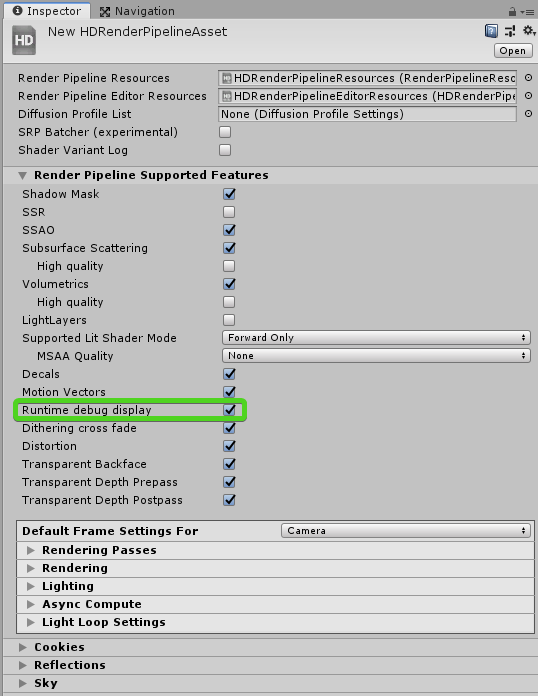
that screenshot is from REALLY old HDRP version, just only image I found with quick googling about the setting
I feel like the recent HDRP's should disable that menu on real release builds but can't remember 100% certain
dev builds should have it
inner parcel
dawn sorrel
Built-in, URP, HDRP: Which one you prefer for horror game?
HDRP has best visuals but requires compute shader and only pc/console. Harder optimization required to get the reqd frame time
URP has best SRP compatibility and can run on all devices. Less features but you can basically make yours if you can
Built in has good features, is compatible for all devices has excessive documentation, APIs will not change for a long time, community support, etc. Shader graph not fully supported. Vfx graph isnt aswell
 solemn leaf
Hi! Is there a way to get rid of these hard edges around close objects in HDRP Depth of field high radius blur? (Tried increasing Buffer format in HDRP asset and increasing sampling)
 keen tulip
does anyone know if the built in pipeline Standard (Specular) shader supports single pass instancing or not?
in VR devices, its only rendered in left eye
@turbid matrix sorry for the ping, but since you seem like a VR guy you might have some idea about it.
summer glacier
solemn leaf
Hi! Is there a way to get rid of these hard edges around close objects in HDRP D...
what version? Are you using temporal AA?
turbid matrix
@keen tulipno idea on the specular shader, I tested regular metallic standard shader recently using OpenXR and SPI on 2021.2 beta and it worked
built-in SG doesn't work in SPI atm, I've sent bug report about it
solemn leaf
summer glacier
what version? Are you using temporal AA?
Unity is 2019.4.25f1
HDRP is 7.6
Using SMAA (tried all others AA options and no difference 🙁 )
solemn leaf
it appears clearly when changing focus distance and creating a depth of field behind out of focus near elements
 loud leaf
HDRP 7.6 is quite old, there have been quite a few improvements to depth of field this year.
This PR in particular will improve your use case (https://github.com/Unity-Technologies/Graphics/pull/3837), the lowest version it was backported to seems to be HDRP 10.x
The minimum editor version required for HDRP 10.x is Unity 2020.2, so your best bet would probably to upgrade to 2020.3 LTS. Make sure you're using something like version control before you try upgrading. 👍
solemn leaf
loud leaf
The minimum editor version required for HDRP 10.x is Unity 2020.2, so your best ...
I see, thank you so much for your help, I will consider upgrading as the fix for this
I've tried the same case in 2020.3 and HDRP 10.5.1 and got this result
 solemn leaf
loud leaf
This PR in particular will improve your use case (https://github.com/Unity-Techn...
solemn leaf
loud leaf
This PR in particular will improve your use case (https://github.com/Unity-Techn...
I guess this is the way to go after
keen tulip
turbid matrix
<@!645583442184241182>no idea on the specular shader, I tested regular metallic ...
thanks for letting me know!
the standard shader works well for me too, but its just the specular shader which just renders on the left eye
loud leaf
solemn leaf
I guess this is the way to go after
Are you able to use physically based DOF in your project or is it too heavy? It should give you the best quality especially in situations like these
solemn leaf
this is using the physically based DoF
 loud leaf
Are you using realistic values for the lens in your physical camera? You could try using custom settings in the dof volume, physically based dof shouldn't break that quickly
I usually look up a lens I like and then replicate the values in the physical camera component. Also, just to make sure, "use physical camera" doesn't mean you're using physically based dof, it is actually a toggle that can be exposed if you enable "Show Additional Properties".

 solemn leaf
loud leaf
I usually look up a lens I like and then replicate the values in the physical ca...
solemn leaf
loud leaf
I usually look up a lens I like and then replicate the values in the physical ca...
Thank you! will try that and post the results
 digital spire
Hi all. Why does the inside liquid does not render properly when I turn the liquid into transparent material?

I render the above pic with opaque and it's render correctly but if I change the material to transparent it turn in to this
 dawn sorrel
digital spire
dawn sorrel
digital spire
are you using blender?
 digital spire
I use FBX
I think it's not my mesh. Using the default sphere also have this problem
 digital spire
Turned out HDRP can't render transparent object behind refraction. I solved this using Raytracing & Recursive Rendering

 indigo summit
@digital spire did you set the liquid rendering pass to Before Refraction ?
 foggy knoll
New Question: Isometric Tilemaps and universal render pipeline for lighting. I have a pretty empty project that I just threw an isometric Z as Y tilemap onto. Got the tilemap working, and then installed the URP, created a URP asset and a 2d renderer, Threw the 2d renderer into the URP asset, and the URP asset into the project settings
Here's the problem. When my materials become lit, the bottom layer is drawn over the top layer. I have no idea why.
foggy knoll
Images incoming


Top picture with light on, bottom picture with light off
SOLVED: After importing URP, my sort axis changed.
turbid matrix
somehow... I don't think I'm going to succeed by waiting here

I mean it's a new tool but it's super raw.. they will be lucky if that is "production ready" by the time 2021.2 ships
so far it has failed to convert any project I've thrown at it
now it's been stuck on first step for 15 minutes and this is really simple scene only
I feel like they took away the old URP material upgrading scripts bit too early
still stuck after 20..
also no cancel / kill option for the conversion so have to go through task manager...
 grizzled flame
The cancel button doesn't work?
turbid matrix
huh, I see it now 😄
nothing seemed to respond but I don't want to do this again just to verify that 😄
turbid matrix
was looking at the URP transparency ordering out of the box:

(someone made a thread about this https://forum.unity.com/threads/order-independent-transparency.758315/)
 pure isle
i can not for the love of me figure out how to light everything without a black shadow

please help me
dawn sorrel
guys, I have an HDRP template and i'm trying to add decals using the decal projector and I just can't, I've watched many tutorials and im doing exactly what they are doing yet it won't work.. I found a forum where a guy had the same problem but he fixed it by turning on decals in the HDRP asset and when I tried to do that I found out that it was already on, what could be the issue?
here's an image of the decal projector

 scarlet hull
dawn sorrel
guys, I have an HDRP template and i'm trying to add decals using the decal proje...
scarlet hull
dawn sorrel
guys, I have an HDRP template and i'm trying to add decals using the decal proje...
It looks like you have some lighting issues mostly that would explain why all the objects are very dark ? I suspect that the directional light intensity is to low, try to set it around 80k
tight junco
Is it possible to change materials to HDRP/Lit and have them maintain their texture? I've got 934 materials I wanna change but I don't wanna have to manually add the textures again ;-;
scarlet hull
tight junco
Is it possible to change materials to HDRP/Lit and have them maintain their text...
In the edit menu :

Or in the HDRP wizard :
 tight junco
You're a god. Thank you ❤️
dawn sorrel
scarlet hull
It looks like you have some lighting issues mostly that would explain why all th...
I cannot believe that actually worked
thanks, I would've spent days figuring this out
Out of anything I would've never thought to look in the lighting
scarlet hull
dawn sorrel
I cannot believe that actually worked
HDRP is set up by default to use physical light units (understand : way higher intensity values than built-in).
The default sky is very bright compared to a directional light with intensity set to 1. What you were seeing is your objects only lit by the ambiant light, but as HDRP alse uses auto exposure by default, and a big part of your screen was showing the sky, the bounced sky light on the objects is way less visible than the direct sky hitting the camera, resulting in very dark objects.
When you've set the directional light intensity to 80k (measure real sun a clear sky is around 80k and 100k lux), the sky and direct light intensity match better and the overall lighting in the scene works.
dawn sorrel
scarlet hull
HDRP is set up by default to use physical light units (understand : way higher i...
ok thanks for the explanation, I just got into HDRP so i'm completely new to it
 edgy tree
Hi, I'm working on a minimap for our strategy game. I'm using compute shader to display positions of our units (into a RenderTexture) and we have few other animated effects showing some events that happen. These animated effects are made with the Shapes asset and we have to use ScreenSpace-Camera canvas for that. So I need to put the effects on top of the render texture and that on top of our camera. I think we have to render it after our main camera and post processing so it doesn't get smudged by TAA. I tried using the HDRP compositor but I'm having trouble setting the right sub layers.
Is there any API for the HDRP compositor so I can change the camera on runtime?
We have a GameBase scene which is the main one (manages levels and switches between normal and VR logic) and a logic scene that contains the player controller with the camera.
Only way for me to set the camera is when I create the camera sub layer and it sets it to MainCamera (this gets reset when I go to playmode) or to move the Camera to our game base scene, drag it to the compositor and then move it back. For some reason that approach doesn't display a cross-scene reference message but it also gets reset on play mode (probably because the logic scene gets loaded after the game base).
I looked in the package code and all methods (including the ones that would actually be useful to me) are in internal classes.
Should I continue trying to somehow get the compositor working or should I try using a custom passes?
scarlet hull
I would suggest to look into o custom pass as compositor is not really optimal for realtime
edgy tree
So I assume the right approach would be to use the DrawRenderers custom pass and let it render my minimap layer after the post processing?
scarlet hull
Yep
spice sparrow
so im on urp, for some reason my walls are having this weird banding going on, im not sure what i should do about it because i dont even know what to call it

its a vr game so i cant really just leave it
it gets very dramatic close to the wall

lowering the tiling fixes it but makes the wall texture look stretched
the culprit was mipmaps
on the emission texture
turbid matrix
scarlet hull
It looks like you have some lighting issues mostly that would explain why all th...
this is problematic as EVERY new HDRP user will have to learn this the hard way unless they start with the bloated HDRP template and go from there. How I do quickly new test scenes myself is just import HDRP package to new 3D template and run HDRP wizard and then create a new scene and pick outdoor HDRP template... but users new to HDRP at least skip that last part and they won't get right volume + lighting values on their scenes by default
scarlet hull
turbid matrix
this is problematic as EVERY new HDRP user will have to learn this the hard way ...
We're working on the template issue and want to provide a sort of "empty HDRP template" project. As for the new scenes, we're also working to address that, we already have the indoor and outdoor scenes like you mentioned
turbid matrix
I can't think of any non-hacky way to making it better though. some wizard could check if the current scene's directional light intensity is in the right ballpark with currently set exposure values but that's bit sketchy
yeah, new blank templates for URP and HDRP would be nice
if it were up for me I'd go as far as making the blank ones defaults and have some pop up asking users if they want to install sample scene along with the template
empty templates should be starting points IMHO
scarlet hull
turbid matrix
if it were up for me I'd go as far as making the blank ones defaults and have so...
We're indeed considering such solutions.
 trail forum
turbid matrix
somehow... I don't think I'm going to succeed by waiting here
trail forum
turbid matrix
somehow... I don't think I'm going to succeed by waiting here
there are several different converters. If you just want to upgrade materials then just initialize material converter and run that converter.
 fiery marsh
It's because your texture is set to Clamp rather than Repeat. (The sampler state allows you to override that in the shader, but you could also fix it by changing the setting on the texture itself)
keen tulip
scarlet hull
We're indeed considering such solutions.
that will be highly appreciated. the hdrp default scene for new projects is really complex for beginners and the lighting results in hdrp are done on trial and error.
the moment i clear light bake from the demo hdrp scene the interior light gets totally bright and as a beginner I have no idea how Unity team decided to keep light and volume at so and so, so that after baking it will look like so great
im not able to explain clearly but i hope you got my point
no clue how unity team had a weird looking scene like this before bake, and then clicked bake and then bam professional looking realistic scene
 tight junco
I'm fairly new to HDRP, and was wondering how to setup a night scene? I'm working on a car game, but whenever I make the scene dark; my car shader turns completely black as it's metallic and smoothness values are 1. Is there a way around this?
dawn sorrel
Gamma or Linear if I am using HDRP?
summer glacier
dawn sorrel
Gamma or Linear if I am using HDRP?
Linear
 feral perch
What version of Unity does URP 7.2.0 support?
 barren goblet
lightmap will be deprecated in 2 years ?
inner parcel
tight junco
I'm fairly new to HDRP, and was wondering how to setup a night scene? I'm workin...
for metallic part to be reflective you can go with reflection probes.
for shine, you need to enable direct specular lighting in camera override or default hdrp settings
 shrewd canopy
hey. anyone experienced hdrp problems ? like having errors in console for hdrp dependencies
shrewd moon
tight junco
I'm fairly new to HDRP, and was wondering how to setup a night scene? I'm workin...
How dark are you making the scene?
inner parcel
shrewd canopy
hey. anyone experienced hdrp problems ? like having errors in console for hdrp d...
sometimes it gets fixed by deleting Library folder which has some bad files in it. but this will reimport your whole project from zero and recompile all shader variants when building player.
if youre on beta its common to see those errors atleast for me.
shrewd canopy
inner parcel
sometimes it gets fixed by deleting Library folder which has some bad files in i...
thats a different approach than any i've heard today. thanks I'm trying it rn
this folder in the root of the project ?

@inner parcel sorry I have tag u
shrewd canopy
hey that seemed to have fixed my problem
 willow coyote
A very strange thing has happened, and it's quite destroying my workflow. I woke up today and this ui option, "Select Material" that was here yesterday, simply just isn't now. I've no idea what's going on, but I'm too afraid to reinstall due to the potential of losing my prefab file paths.

Anyone got a clue?
shrewd canopy
willow coyote
A very strange thing has happened, and it's quite destroying my workflow. I woke...
is it on all the materials ? if not, maybe that's a built-in material ?
willow coyote
It's on every material, yeah.
willow coyote
shrewd canopy
is it on all the materials ? if not, maybe that's a built-in material ?
Yesterday I could click a mesh, then click "select material" to have the file view navigate there and select it. Now the option is just mysteriously gone.
shrewd canopy
seems like youre missing a couple more options as well
 willow coyote
Yes
I used to have those too
I've no clue what happened
@ . @
I'd reinstall but again, very afraid of these thousand or so prefabs breaking
shrewd canopy
can you try creating a new material and see if it works ?
without going into the prefab>material , just straight from the material's inspector
willow coyote

same problem
just made it now
I am using an older version of unity ofc, but shouldn't be an issue. It was working fine this entire time until today haha
shrewd canopy
i'm sorry but i'm out of ideas :(
shrewd canopy
that's weird
dawn sorrel
why does my light do this?
 willow coyote
Further edits: Upon importing solely my assets and their associated metadata files, the UI options disappear again. This is baffling.
inner parcel
willow coyote
Further edits: Upon importing solely my assets and their associated metadata fil...
which version?
willow coyote
2019.1.04 iirc
might be 4.01 also. I can't check till it opens.
Ah ok found a ver file
2019.1.0f2
inner parcel
2019.1.0f2 is like the first ever released version of unity 2019
you should probably migrate your project to 2019.4.xx where xx is the latest version available
willow coyote
I'll see if Tabletop Sim supports a later version, but I don' tthink it does
Either way, it has worked fine so far on this version for almost a year. I just have no clue what happened
inner parcel
it does. there arent much changes from 2019.1 to 2019.4 especially if youre in built in renderer
inner parcel
willow coyote
Either way, it has worked fine so far on this version for almost a year. I just ...
in that case try a project reimport. maybe it'll fix it for you
willow coyote
inner parcel
in that case try a project reimport. maybe it'll fix it for you
After this finishes importing, I'll try a naked TTS project without any of my assets. If that still doesn't work I'll try changing version as you mentioned. What version should I try it with?
inner parcel
according to unity hub, 2019.4.29f1 is the latest version
 willow coyote
Thanks
inner parcel
its still weird to hear that you're getting this now after a whole year of using the same version without any problems.
but then again an upgrade is still worth it because the current version you're at is missing 2 years of bug fixes from unity 2019
willow coyote
Oh huh. That's important to note
That version of Unity is..frustrating.
How do I actually change the version of the project by the way? Do I need to install a new version manually (with unity hub) and then just open that with it?
So ya, naked TTS project has no such issue, it's only once I've imported all my assets. So very strange.
inner parcel
just install a new version in hub with required modules.
then on the project selection screen under the Unity version tab, just select the version you want
willow coyote
Alrighty that'll be my next step
inner parcel
if the only thing you need is Select Material feature, well in inspector itself under the Renderer component, theres a Materials section.
you can click on the material from there and it'll show up in your project window
willow coyote
🙃
I imported some assets and its still working, so.....eeeeeh?? guess i'll get back to you on it.
willow coyote
I added it all back in just one by one to the exact same project (new instance) and version and it just works now, I guess? Thanks fo rthe help anyway. Unity does what Unity wants I guess.
 main spruce
Not sure if this is the best channel for this question. Does anyone know if it's possible to use realtime GI (from 2021.2) with additive scenes that change their position on load? I'm trying to find a way to have GI on a fully procedural level. Additive scene realtime lightmaps work but do not update after the position has changed. If not now, are there any plans for this working in future versions?
 proud gulch
How can I separately render my weapons in HDRP without using another camera (another camera works as long as it doesn't force the game to render the same thing twice)? I also want to stop the weapon from being warped by the original camera's FOV
 keen pivot
okay i has some of the confused, i'm trying to put this into Shader Graph: float4 pos = tex2Dlod(_PosTex, float4(x, y, 0, 0));
there is a sample 2d lod node...but it seems..different
its puts out this: float4 _SampleTexture2DLOD_RGBA = SAMPLE_TEXTURE2D_LOD(Texture, Sampler, UV, LOD);
am i looking at two totally different functions here with similar names?
dense sinew
I removed hdrp from my project and my terrain is pink but it's not letting me fix it
keen pivot
its got the wrong material assign to it
you can swicth to debug and change the material i think
dense sinew
I made the terrain thing new
keen pivot
and its using the default terrain material?
dense sinew
no but when I do i can't paint on it
keen pivot
the default terrain material? not the default normal material?
think its just called Terrain or TerrainLit
dense sinew
ok fixed
keen pivot
noice
dense sinew
I'm making a forest and I want to upgrade to hdrp but the tree stuff don't change what do I do
shrewd moon
dense sinew
I'm making a forest and I want to upgrade to hdrp but the tree stuff don't chang...
What kind of changes are you expecting?
dense sinew
shrewd moon
What kind of changes are you expecting?
the trees stay pink and can't change them to the normal texture
shrewd moon
dense sinew
the trees stay pink and can't change them to the normal texture
Are your trees from an external asset?
dense sinew
shrewd moon
Are your trees from an external asset?
no made them with unity's tree editor
shrewd moon
Then I'm not really sure
dense sinew
the texture is the problem
shrewd moon
The shader probably is, if it's pink
dense sinew
I have no shaders the materials don't seem to be able to upgrade
shrewd moon
Even if you select the problematic materials and choose "Upgrade Selected Materials to High Definition Materials"?
dense sinew
shrewd moon
Even if you select the problematic materials and choose "Upgrade Selected Materi...
yes even that
shrewd moon
Darn
dense sinew
shrewd moon
Darn
 inner parcel
proud gulch
How can I separately render my weapons in HDRP without using another camera (ano...
inner parcel
proud gulch
How can I separately render my weapons in HDRP without using another camera (ano...
you can use custom pass for drawing weapon to prevent clipping. for custom fov im not sure how to achieve that
dawn sorrel
guys I need help with HDRP ray tracing... So I went to the HDRP asset and tried to enable ray tracing and then it said my device couldn't support it and told me to check the documentation and when I did it said that it could support nvidia geforce rtx 2070 super which is exactly what i'm currently using... what's going on?
summer glacier
dawn sorrel
guys I need help with HDRP ray tracing... So I went to the HDRP asset and tried ...
are you using DX12?
 buoyant junco
Should I update my unity version to the newest beta? The Universal Render Pipeline finally introduced deferred rendering, but Idk if i should
dawn sorrel
buoyant junco
Should I update my unity version to the newest beta? The Universal Render Pipeli...
wait finally they did?
about time
dawn sorrel
buoyant junco
yeah. in 2021.2
damn I really need to update unity
buoyant junco
but I don't know if I should upgrade to a beta version
dawn sorrel
buoyant junco
but I don't know if I should upgrade to a beta version
i'd recommend you just wait until it's no longer in beta cuz there might be bugs and issues
but it's really up to you
buoyant junco
alright, how long is that?
dawn sorrel
buoyant junco
alright, how long is that?
idk
how long do they usually take?
In my opinion I just wait for anything in beta
dawn sorrel
buoyant junco
ill find another way to have decals in urp. That is what I needed
I tried coding my own decal system, although it worked it just sucked but that's maybe cuz I suck at coding
I couldn't figure out how to wrap it around edges if it met one, it would just get cut
turbid matrix
@dawn sorrel it def works on my 2070 super. For raytracing I'd suggest going for bleeding edge Unity (2021.2), they keep fixing and making raytracing better all the time. also do run your HDRP Wizard and select HDRP + Raytracing (or RTX or whatever it says) and make sure everything is green there
summer glacier
dawn sorrel
how can I check?
go to project settings, go to Player, uncheck auto graphics for windows, press the + sign and add DX12, and move it to the top
then restart unity
turbid matrix
that HDRP Wizard can swap it to DX12 too for you
summer glacier
dx12 is required for raytracing
turbid matrix
basically just open the wizard select that raytracing tab and hit fix all and let it do it's magic 😄
(that's what most do - instead of manually fixing the settings)
analog meteor
buoyant junco
ill find another way to have decals in urp. That is what I needed

GitHub
A node for Shader Graph that allows you to create custom decals. - GitHub - Harry-Heath/URP-Decal-Node: A node for Shader Graph that allows you to create custom decals.
check this out, works pretty great
dawn sorrel
I am giving up HDRP. I don't understand. Sometimes it's very dark, sometimes it's very bright and sometimes just normal. What's wrong with lighting? in hierarchy I have to click on directional light if the scene is dark in order to make it bright.
I am using 2020.3.12 LTS Do I have to upgrade?
turbid matrix
@dawn sorrel concept of having higher intensity (close to real-life) lighting values is what makes it more tedious for you. basically since the lights have higher intensity, you have to fix the exposure for the camera and sky to match these things too
by default you also have autoexposure enabled for the global volume which kinda hides this
I'd start with fixed exposure values first to get things dialed in and only use the automatic mode if really needed
buoyant junco
analog meteor
https://github.com/Harry-Heath/URP-Decal-Node
thanks
summer glacier
dawn sorrel
I am giving up HDRP. I don't understand. Sometimes it's very dark, sometimes it'...
HDRP can be daunting if you're new to it or the aspect of physical rendering.
To make it less so in the lighting department, you can use fixed exposure, simplifies things a bit
I'm actually wondering, how do you get a night in HDRP? The sun is always there, there's no moon, the sky physically based sky just disappears into the darkness and it doesn't feel like it's the night time.
Or i guess you gotta do it yourself?
turbid matrix
@summer glacierhttps://github.com/Unity-Technologies/FontainebleauDemo/ has night lighting mode but I haven't checked how they did it
GitHub
Fontainebleau demo. Contribute to Unity-Technologies/FontainebleauDemo development by creating an account on GitHub.
I'd assume it's just some HDRI sky swap
shrewd moon
It's all a matter of getting the lux and exposures right, I suppose
eternal laurel
It is plus the moon is a quad at about 3000 on the z away. We initially made our night scenes based on that demo so its good
Also the color temp of moonlight
scarlet hull
Now you could also use the PBSky with a directional light for the moon, and change the celestial body texture to use a moon image.
keen tulip
scarlet hull
Now you could also use the PBSky with a directional light for the moon, and chan...
I have a light which has "Effect physically based sky in settings" I also have it enabled in Sky volume. But the sky stays gray for me. Any ideas?
scarlet hull
keen tulip
I have a light which has "Effect physically based sky in settings" I also have i...
Do you have multiple lights that are trying to affect the PBSky ?
keen tulip
Just 1
scarlet hull
Could it be the fog that is just preventing the sky to be visible ?
keen tulip
I dont have any fog in the scene
scarlet hull
Intensity to low ? If it's not this, I don't really see
keen tulip
I have 2 projects and its works without any problem in project 1 but not in project 2
Both use same 2020.3.2f1
Visual Environment is setup proper. Light Intensity is 0.5 lux else its just too bright and I dont want to use Exposure Volume much. I used 10000lux too and it didnt work. Only 1 light in scene and camera and volume. Nothing else.
Project 1 was created fresh with HDRP. Project 2 was migrated from Unity 2019 few days back if it matters
scarlet hull
Hum, really I don't see on top of my head what is missing
inner parcel
keen tulip
I have 2 projects and its works without any problem in project 1 but not in proj...
just to double cross that theres no silly mistake in here (which we all do very often 😛 )
can you check if Visual Environment volume has physically based selected?
turbid matrix

GitHub
Purpose of this PR
This is a refactor of #4018 made in a way which focuses on backwards compatibility, what-you-use-is-what-you get allocation of targets and without the dynamic scaling changes wh...
RTHandle is a SRP core utility class that helps manage unity RenderTexture resources and has DynamicResolutionHandler support. It is currently being used by HDRP and RenderGraph modules. The class also has built-in support for render target dynamic scaling. This will add dynamic resolution support to URP and unifies URP’s render texture management. It also opens the way for URP to integrate with RenderGraph in the future.
would be lovely to get FSR and DLSS on URP 🙂
inner parcel
about time
 lone glen
how much time will that take?
 turbid matrix
could be minutes, could be days
lone glen
turbid matrix
could be minutes, could be days
what can i do
turbid matrix
wave hands, drink coffee, I don't know 😄
it totally depends if that's expected or not
which is not possible to tell from here without knowing any background of that project
lone glen
turbid matrix
which is not possible to tell from here without knowing any background of that p...
its a space simulator and i wanted to add hdrp for gpu
but when i added it i got an error and this
lone glen
lone glen
but when i added it i got an error and this
Library\PackageCache\com.unity.cinemachine@2.6.9\Editor\PostProcessing\CinemachineVolumeSettingsEditor.cs(240,2): error CS1513: } expected
 teal osprey
Question, I'm using URP, and I'm considering looking into making my own renderer (like my own MeshRenderer).
The motive is that I'm using Tilt Brush art for my VR game, so lots of vertices and strokes, but in the end it's just many long quad strips. Also, the player can only see within 25 meters with linear fog. Most of the art is static and baked, and the lights are all going to be baked as well. I hope that the final renderer could be baked into the lightmap (possibly using emissives). The materials used are custom unlit opaques (no cutoff).
I think I can take advantage of the limited range of stuff I need rendered, the consistent type of meshes rendered, and the consistent tiny pool of materials for some fancy Compute shader-based rendering, with culling, rendering, batching, instancing, and LOD optimizations I couldn't achieve just using the mesh renderer. Also, since my game is exclusively grayscale, I think I can pack the data I need within the compute buffer data limit
I'd like advice on:
- Is this a reasonable task assuming good enough experience in using compute shaders for rendering effects
- Could this approach, with the given constraints, theoretically be used for better results than the rendering solutions available
buoyant junco
How can I turn off fog for a certain camera?
inner parcel
buoyant junco
How can I turn off fog for a certain camera?
theres a OnPreRender and OnPostRender callback. For the camera you want to disable fog attach a script to it. turn off fog in pre render and re enable it in post
buoyant junco
Ok
 brave wharf
does anyone know where terrain layers are found i cant find them anymore 😄
 crimson kettle
brave wharf
does anyone know where terrain layers are found i cant find them anymore 😄
crimson kettle
brave wharf
does anyone know where terrain layers are found i cant find them anymore 😄
why are you asking your question in a completely unrelated channel
why does the particle system have so many "squares"? this is with URP, should i use a different shader for particles?
using a legacy shader fixed it
brave wharf
crimson kettle
why are you asking your question in a completely unrelated channel
bc other ppl dont answer or dont know
 lean estuary
https://cdn.discordapp.com/attachments/517870531991699467/875481148208341052/blixFaceIssue.gif
Does anyone have an idea as to why 3 out of the 6 faces on each cube would be **overlapping **other faces within a mesh? What would most likely be the main issue? Thank you!
 lone glen
lean estuary
https://cdn.discordapp.com/attachments/517870531991699467/875481148208341052/bli...
lone glen
lean estuary
https://cdn.discordapp.com/attachments/517870531991699467/875481148208341052/bli...
Materials queue?
lean estuary
lone glen
Materials queue?
Oh? What's that? Thanks.
lone glen
 limber relic
turbid matrix
<@!643496046227357736>https://github.com/Unity-Technologies/FontainebleauDemo/ h...
limber relic
turbid matrix
<@!643496046227357736>https://github.com/Unity-Technologies/FontainebleauDemo/ h...
this is nice
dawn sorrel
help please, I dont know if it is something i did when running the game , or settings can someone tell me why there are those squares at the other player's face?? thank you

 gloomy condor
I don't understand Project Settings / Graphics Tier Settings. Is this something I should add as a selectable option to my graphics options screen or is it automatically selected based on the user's hardware?
turbid matrix
gloomy condor
I don't understand Project Settings / Graphics Tier Settings. Is this something ...
it's not automatically selected for the end user. how you select this on the end application is up to you. if you don't manually swap the quality level setting using your own scripts, it will by default use the option you had last selected in the editor
gloomy condor
Not quality setting, graphics tier
turbid matrix
oh that one, I thought you meant with SRPs (I think that setting only exists on built-in renderer) 🙂
apparently Unity tries to set that for you (https://docs.unity3d.com/ScriptReference/Graphics-activeTier.html)
I have zero experience on that though, been ages since I've worked with built-in renderer 🙂
turbid matrix
hope that helps someone
there's probably a ton of mistakes there, but may get people going better than without working sample
 outer carbon
Change your display name to something visible please.
turbid matrix
just assign the volume yourself to the script or find it using traditional Unity getters
outer carbon
I wasn't asking you to change as a way to help with your problem. I was asking you to change it, so that it would be visible. Invisible/unselectable names are obnoxious.
 zinc osprey
I'm using URP for lighting in my 2D game, and I'm trying to add lighting to my particle effects, but under the lights section of particles, I can't drag in my 2D point light into the light slot, it only accepts 3D lights.
Am I missing something obvious or can we not attach light to 2D Particle systems?
dawn sorrel
There is no Deferred renderer option why? I am using URP. I want to use deffered renderer but there is no option.
 true zealot
dawn sorrel
There is no Deferred renderer option why? I am using URP. I want to use deffered...
true zealot
dawn sorrel
There is no Deferred renderer option why? I am using URP. I want to use deffered...
Which URP version are you using
dawn sorrel
true zealot
Which URP version are you using
Latest
true zealot
That's not a number
dawn sorrel
true zealot
That's not a number
10.5.1
true zealot
That's not latest
dawn sorrel
true zealot
That's not latest
But there is no update button
true zealot
Probably because you're not on a version of Unity that supports 12.0.0.
I'm not sure if 10.5.1 has deferred, but if it does it doesn't appear in that list, I think it's a switch in the forward renderer?
At least, as of 12.0.0 they have renamed the forward renderer to Universal Renderer and have added the switch in the UI there.
summer glacier
dawn sorrel
But there is no update button
SRP (URP + HDRP) in latest versions of unity are now part of the core of unity. Not a package anymore, they come with the unity download.
Deferred renderer is in 2021.2, which is in beta, not released yet.
true zealot
Technically it's still a package and can be updated
summer glacier
Although you can still download the latest beta to test it out, I think deferred is already in
true zealot
But yes, it's built-in to ensure people have better compatibility. 12.0.0 should be available on the beta.
turbid matrix
true zealot
Technically it's still a package and can be updated
while true, it's not something most can do easily anymore now that SRPs are part of unity core. PM itself will not give you any update options for these anymore on 2021 cycle and you are basically stuck with the version it gives you unless you a) update whole Unity b) grab some different version from github and add all SRP packages manually from it
and yeah, to get deferred in URP, you have to use 2021.2 beta atm
 rain bluff
Hi, everyone. I was wondering if someone could help me out here. I'm trying to set my material's texture to whatever an additional camera is rendering. But my material just appears black. I am using the URP and a custom shader but I don't get any errors. Here is my code: https://gdl.space/yupugubako.cs. Thank you!
keen pivot
so i deciced to have another look at the outline stuff as found here: https://github.com/alelievr/HDRP-Custom-Passes

GitHub
A bunch of custom passes made for HDRP. Contribute to alelievr/HDRP-Custom-Passes development by creating an account on GitHub.
since its moved on a bit
and i'm just wondering really, just using the selection V2 method to draw outlines around some objects, seems to be a 10 fps hit on my target platform.
is drawing lines around things normally this heavy? it doesn't feel right to me
inner parcel
keen pivot
and i'm just wondering really, just using the selection V2 method to draw outlin...
10fps doesnt explain much.
10fps drop from 500fps to 490fps is one thing
and 10fps from 11fps to 1fps is another.
generally you would want to measure ms in profiler to see how much additional impact it has on frame time and also the % of frame time which tells how expensive the particular operation is compared to your whole project
the outline custom pass is a bit expensive tho, i think its because it has to render the outlining object twice (i might be wrong)
keen pivot
inner parcel
10fps doesnt explain much.
10fps drop from 500fps to 490fps is one thing
and 10f...
true, my comment lacked context. in this instance, its a 10fps drop from 89fps to 79fps running uncapped on an xbox
frame time is at a premium, there is no way i can spare that
yet on the face of it, its an effect that doesn't seem to cause a problem for games, yet this seems to be such an issue on HDRP
or at least thats my perception of it
inner parcel
i haven't looked into how the outline is achieved but generally you can optimize it for your need with some compromises
you can start with downsampling
keen pivot
is stencil 'the way' its normally done?
inner parcel
there might be some other approach too i guess
keen pivot
i just lumped a fresnel shader with the Z set to Greater and while its really crude, its almost free
 odd gale
So I was thinking that is it possible to make AAA title or maybe not that quality half that quality projects with "no render pipelines" that is with standard unity 3d projects with no shader gaphs, what you guys think ?
General scope and its capacity to expand over lifetime, as the project grows.
inner parcel
its possible definitely possible to get amazing graphics even without SRP.
take a look at Rust and i guess Escape from tarkov too
odd gale
Nice. Thanks I will do that.
keen pivot
odd gale
So I was thinking that is it possible to make AAA title or maybe not that qualit...
i'm just curious how others see things, why would you want a AAA title with room to grow, and not use HDRP?
 upper palm
very newb question here , i have upgrade my project to URP . I have upgraded my assets to URP and everything its working besides a particle effect
I have tried to change the shader from said particle effect but still not working
How can i fix this ? 😦
odd gale
@keen pivot Yes good point,
Maybe for compatibility sake among different platforms.
@upper palm Edit=>renderpipline->upgrade materials to .... did you did that already?
 odd gale
In shader it says legacy shader
upper palm
i have changed it already to all shaders from URP still not working
unless you can give me more info on how to fix it...
odd gale
Can you try putting urp shader here for checking if it works with that

``code
^ Some legacy shaders do, for example additive particles from Unity 4. Anything using surface shader don't.
If you want to make shaders with blend control and keep your sanity you buy Amplify Shader Editor.
Unity Forum
Hello, in URP, i'm using the Shader URP/Particles/Unlit in 2109.3.1f1
No matter what my combination of Blending Mode and Color Mode settings, I'm...
Check this link
@upper palm I am having similar problem with my project.
BTW so we both on same track 🙂
 odd gale
Nice. Maybe find suitable shadergraph /shader that supports your pipeline.
upper palm
i cant do it this drives me crazy
upper palm
@odd gale i have sent an email to the developer of the asset , i m gonna carry on with the project and fix it later(is this bad practice ? )
odd gale
If thats assets then he should have clearly mentioned which pipeline asset supports or is for, for changing to certain pipeline you can request he should give you pointers.
upper palm
out of boredom may i ask you what project r u working on ?
odd gale
Its underwater life, or something similar, at very start.
It was earlier in 2018.4 but when I changed to urp some shaders failed even though i upgraded via edit_>renderpipline->upgrade to
I am just like you learning. 🙂
upper palm
when i made my first 3 games..... i was just making games.... today i m just adding stuff in unity and then break it 😦
Is it the same for you ?
odd gale
For me upgrading issue is kinda big thing, taking alot of time just to find out that pipeline renders previous shaders to white pink and some other non sense of depcrated methods.
But will over come it, unity is so far so easy.
upper palm
damnnn you are a big shark then !
odd gale
Not really, but would love to be baby shark someday
what about you where do publish google steam or ios market?
upper palm
give yourself some credit, working for someone means you are good at what you do
google play
tiny games only
now i m working on a simple story 3d game with a few levels
odd gale
Yes thats interesting prospective and actually true one too. 🙂
Nice can I play your games ?
upper palm
i would be honored
Spear Depth Hunter is my biggest/best so far . Do not let yourself deceived by the screenshots as the game is quite nice once you start playing , It has skill tree, 2 levels, achivements, leaderboard , and many other things. I lost the files for that game due to a hdd error otherwise i would have worked on it more
also that's the game i learned the most while making it .... both art and programming it took ages 😄
odd gale
Looks nice 40+ ratings too
upper palm
The best thing about that game is that strangers played it and they actually gave me 5 stars for it (even got an email saying how much they have enjoyed the game ) , was the best feeling ever
odd gale
Nice must be great feeling as developer.
upper palm
so you never made a game to publish ? even the tiniest ?:)
odd gale
Have but cant share, NDA agreement.
Also the code i wrote is copyrighted. But i saw your game those fishes you draw it, so its a step towards great opening I blelive. Like dany or somethign similar .
upper palm
i see no worries
odd gale
But takes time who konws.
upper palm
yea like 5000 years
odd gale
haha, well 5000 of us remanins diminished to make one dany on the other hand, if we had similar kinda succes like dany then there would be no dany to remember.
😉
upper palm
it takes huge amounts of time right ?
odd gale
for being dany ?
upper palm
any kind of PR yt/streaming etc
if i m to start a yt channel i would need few months to learn how to edit videos
odd gale
Yeah I guess if you are good at something you eventually get spot light. But well saw many spammers getting ahead in a way. But in general real deal is better even with or without spot light but its important to have fun and meaning in what you do otherwise no point.
Did you made this project in unity 2018 ?
upper palm
i m a man of principle i would not spam for my own gain xD
i cant remember exactly but i know for sure it did not have nested prefabs
odd gale
Say hi to your wife principle from me.
odd gale
yes
 heady obsidian
Hey I'm having some major issues with point filtered pixel art sprites and the way they interact with floating point cameras. Does this have anything to do with Render Pipelines, because all the solutions people are trying to give me have to do with locking my sprites to a pixel grid which I should not have to do, I feel like there's a larger issue with the way they're being told to render
eternal laurel
Seems like you havit the max lights per object limit in urp. You can increase it from the srp asset
 honest jackal
oh, thank you so much, it works now!
 silent beacon
Are HDRP planar reflections at resolutions greater that 1024 working for anyone else. I believe this property is HDRP 11+
i get a wierd artifacting at higher resolutions

at lower it is fine

the chrome gizmo always works, so it has to be the projection onto the plane
ah, at 2048 it seems to only render the skybox
scarlet hull
silent beacon
Are HDRP planar reflections at resolutions greater that 1024 working for anyone ...
Have you checked your settings in the HDRP asset for the "Planar probes atlas size" ?

I guess that what is happening is you're trying to render a probe bigger than the atlas, and it will just fall back to the most relevant cube reflection
eternal laurel
Anybody know where in the HDRP lit shader they handle receiving point spot etc light shadows? I need to copy that part
 vague glacier
I'm currently using v8.2.0 for Unity2D rendering, and I'm encountering a problem with shadows:
I have a composite shadow caster on my scene, and the shadow caster supports either "cast shadows on self" or not. What I'd like is a combination of the two: I'd like shadows to NOT be cast on the nearest wall, but other walls in the same layer would be occluded. The sprites do have normal maps.
I've tried this shader, but it resulted in pink textures on everything:
https://pastebin.com/gcXpQZF1
What I have:

Pastebin
Pastebin.com is the number one paste tool since 2002. Pastebin is a website where you can store text online for a set period of time.
vague glacier
vague glacier
I'm currently using v8.2.0 for Unity2D rendering, and I'm encountering a problem...
 vague glacier
vague glacier
vague glacier
What I would like:
Does anyone know of a way to do this?
 dawn sorrel
I am making horror game using built in. Am I doing right? I tried using hdrp but it was hard.
I think hdrp light is based on skybox and my sky is dark. So that makes my game very dark.
turbid matrix
GitHub
Purpose of this PR
This PR added a doc to guide urp user how to do custom full screen blitting in XR SPI
Fogbugz case https://fogbugz.unity3d.com/f/cases/1335524/
Testing status
ABV
Comments ...
inner parcel
dawn sorrel
I am making horror game using built in. Am I doing right? I tried using hdrp but...
you can still pull off a pretty good looking horror scene in hdrp. make use of spot lights, point lights, emissive materials, good volume setup, volumetric lights (looks cool in dark scenes) and you'll have a nice looking scene
turbid matrix
you got way more tools on making HDRP look good on horror game than with built-in (unless you want to buy tons of 3rd party assets for the built-in)
eternal laurel
Im going to ask again. Does anyone know where in the hdrp lit shader receiving punctual light shadows is handled?
 keen glen
eternal laurel
Im going to ask again. Does anyone know where in the hdrp lit shader receiving p...
keen glen
eternal laurel
Im going to ask again. Does anyone know where in the hdrp lit shader receiving p...
Did you check the source? https://github.com/UnityTechnologies/ScriptableRenderPipeline/blob/master/com.unity.render-pipelines.high-definition/HDRP/Material/Lit/Lit.shader

GitHub
Scriptable Render Pipeline. Contribute to UnityTechnologies/ScriptableRenderPipeline development by creating an account on GitHub.
eternal laurel
I am checking the source wanted to skip the time if anyone knew of the top of their head 🙂
chrome locust
Hey guys, I have finished the first round of optimizations for PrepareLightsForGPU.
Moved a bunch of stuff to burst , using better caching pattern and removing dumb logic.
https://github.com/Unity-Technologies/Graphics/pull/5294
Getting ready now to stabilize this branch and run tests (ensure regression is good).
Please let me know if you guys could test this in your projects and see some CPU gains.
I am seeing around 50%-70% improvement on PS4. Perf might degrade with more shadows, but should be an overall win.
GitHub
Purpose of this PR
Optimization of PrepareLightsforGPU on HDRP using burst, in a ECS friendly way. Still work in progress.
Testing status
So far seeing a huge perf boost:
0.055ms (this version of ...
keen tulip
chrome locust
Hey guys, I have finished the first round of optimizations for PrepareLightsForG...
a dumb question probably, but is that a DOTS specific pr?
chrome locust
no
its for everything.
lights dont have dots support yet anyway
so technically you should be able to sync to this branch and see some perf improvements.
keen tulip
thanks i'll give it a go. PrepareLightsForGPU has been bothering me for a while ever since I've seen this PR first 🧑🎄
keen tulip
honestly at one point i accepted the fact that this is what hdrp performance would look like. but nice to see some improvements on it
eternal laurel
Hey Kleber can I ask you if you know where in the hdrp lit shader receiving shadows from punctual lights is handled. Ive been stuck in meetings all day and cant find the time to look trough the source. Can you point me to it ?
Its somewhere in light loop something or other
chrome locust
EvaluateBSDF_Punctual in com.unity.render-pipelines.high-definition\Runtime\Material\Lit\Lit.hlsl
you will have to dig all the way in ShaderSurface_Punctual
inside you'll find the function EvaluateShadow_Punctual
you'll find there the shadow kernel & filtering
which is huge 🙂
the LightLoop.hlsl is what iterates thourhg the GPU tiled light lists and through macros etc it calls it
turbid matrix
wish we had like one Kleber here all the time so we would get instant answers to all our problems 😄
eternal laurel
I dont think I need to dig that deep. I just have to call something in my custom toon shader to get the shadows and implement them in the custom grading
chrome locust
got it, use the EvaluateShadow_Punctual function
chrome locust
Its declared inside LightEvaluation.hlsl inside Runtime/Lighting
eternal laurel
Ah many thanks you are great
chrome locust
np, its not gonna be easy though. Also be super careful this code isnt public API
so it could change someday although I doubt.
best is to wrap this function with your own custom code so whenever the API changes you have 1 location to look at



 chrome locust
youll have to dig into LightLoopContext and all the boiler plate around
eternal laurel
Thanks a bunch again
chrome locust
if you do it right though your custom lighting will get all the features (RT + screen space etc)
cheers mates. If anybody tests the PR i posted I would greatly appreciate it 🙂 i need content to test the perf results
eternal laurel
Our curent big game is behind on srps so I cant easily pull it in 😫
eternal laurel
7 something I think
keen pivot
i don't know if this is an HDRP only thing or not, but when i baked lighting, some, but not all of my mixed lights stop showing shadows, is this supposed to happen?
as soon as i clear the baked data the shadows come back
the lights are set the same as they are all from the same prefab
eternal laurel
Ah mixed lights using the shadow map have a overlap max limit
I think you cant have more than 5 or 6 overlapping and casting shadows
There is a light overlap debug mode in the scene view. It will paint dropped lights in red
Its if more than 4 lights overlap I just checked
Unity precomputes shadows cast from static GameObjects
onto other static GameObjects, and stores them in a separate Shadowmask Texture for up to 4 overlapping lights. If more than 4 lights overlap, any additional lights fall back to Baked Lighting. Which of the lights fall back to Baked Lighting is determined by the baking system and stays consistent across bakes, unless one of the lights overlapping is modified. Light Probes also receive the same information for up to 4 lights.
Light overlapping is computed independently of shadow receiving objects. So, an object can get the influence of 10 different mixed lights all from the same Shadowmask/Probe channel, as long as those light bounding volumes
don’t overlap at any point in space. If some lights overlap then more channels are used. And, if a light does overlap while all 4 channels have already been assigned, that light will fallback to fully baked.
From the docs
inner parcel
chrome locust
Hey guys, I have finished the first round of optimizations for PrepareLightsForG...
awesome! cant wait to test it out
keen pivot
sweet, will look into that
inner parcel
will there be any significant performance boost for gpu bound games?
keen pivot
eternal laurel
Ah mixed lights using the shadow map have a overlap max limit
well, light overlap view doesnt seem to do anything, looks exaclty the same. unless that means there is no overlaps
i've just purposefully overlapped 4 lights and baking, in theory this wont change it, if i then add another 4 perhaps i'll see the overlap in the view. this being the case, i can rule out overlap as the cause
i'd expect to see some overlap here:
 eternal laurel
@keen pivot Light overlap colors the gizmos red
I should have mentioned that, enable the gizmos in the scene
keen pivot
it doesn't tho 😐

i think you are right, that it is overlap, but i just dont seem to be able to tell
i changed it to realtime and baked again and it looks correct
its a bit of a frame rate drop, i'd rather fix the lights
maybe its not overlap, i have a lot of lights
chrome locust
inner parcel
will there be any significant performance boost for gpu bound games?
Not yet. This is a pure cpu optimization
keen pivot
eternal laurel
I should have mentioned that, enable the gizmos in the scene
seems not to be ligh toverlap, i disabled all except one light. however, if i disable GI static, then that object casts shadows after baking. oddly, the same oject wil cast a shadow from another light when it is static, they lights are identical
dawn sorrel
I switched to URP from built in. Why my project still thinks that I am using built in? Camera has no urp script.
There is no render pipeline asset in my project
keen pivot
create one and assign it in the graphics settings
dawn sorrel
keen pivot
create one and assign it in the graphics settings
My camera also don't have urp script
keen pivot
i'd worry about that after you create the render pipeline asset and then assign it
dawn sorrel
keen pivot
i'd worry about that after you create the render pipeline asset and then assign ...
It used to be create itself if I am using urp.
No need to create
keen pivot
i fyou use a template, if you convert then you have to create it
dawn sorrel
keen pivot
i fyou use a template, if you convert then you have to create it
I am not using template
keen pivot
thats why you have to create the asset and then assign it
dawn sorrel
keen pivot
thats why you have to create the asset and then assign it
Do I have to create urp script for camera too?
dawn sorrel
Not working
dawn sorrel
keen pivot
then, see what happens
My scene is still using built in while my project is urp
keen pivot
its assigned in the graphics settings?
 dawn sorrel
keen pivot
its assigned in the graphics settings?
dawn sorrel
keen pivot
its assigned in the graphics settings?
Yes
keen pivot
okay sorry i dont get it then 😦
inner parcel
dawn sorrel
My scene is still using built in while my project is urp
add them to quality settings aswell
eternal laurel
Many thanks to @chrome locust for the info and pointers. Still some work to do but at least it works now 🙂
 eternal laurel
Again many many thanks Kleber, you save me a whole bunch of time.
 keen pivot
Turns out btw that the light overlap gizmo only works after a shadow map bake.
eternal laurel
Did I forget to mention that ?
iron flame
URP deferred SSR.
https://cdn.discordapp.com/attachments/684013540067115078/878231233266589736/image_123_0060.jpg

 turbid matrix
@iron flame shiny ssrr?
(it works in URP, just tested it few days ago)
that asset doesn't work in URP VR though
iron flame
I add Gbuffer normal to planarSSR shaders written for URP on github 😄
iron flame
turbid matrix
this one? <https://github.com/dreamfairy/Unity_URP_SSR>
exactly this
turbid matrix
this is the paid asset I mentioned: https://assetstore.unity.com/packages/vfx/shaders/fullscreen-camera-effects/shiny-ssrr-2-188638
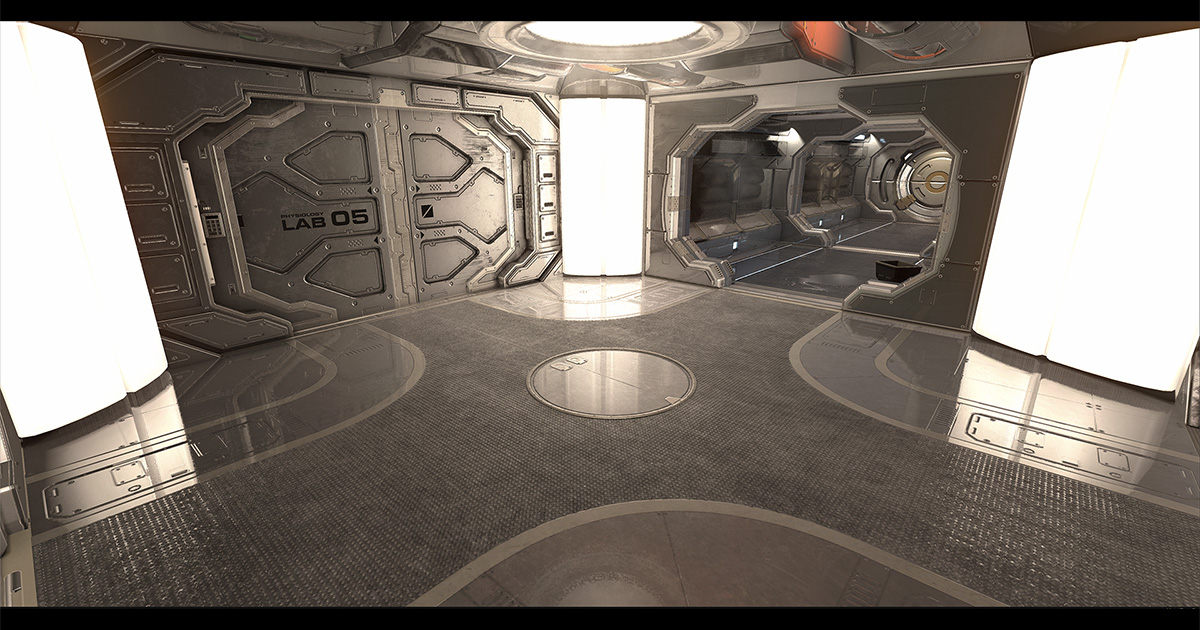
Add depth to your project with Shiny SSRR 2 asset from Kronnect. Find this & more VFX options on the Unity Asset Store.
haven't done perf benchmarking on it so can't tell much from that side
quick test using that asset with URP (chess scene from AMD SSSR demo):

Also some material roughness test with it's fuzziness option: https://cdn.discordapp.com/attachments/814482874157629441/876921409291579433/SSRR-fuzziness.mp4
I do like that it doesn't seem to suffer from temporal filtering issues we have on HDRP SSR and some stochastic SSR solutions
iron flame
turbid matrix
Also some material roughness test with it's fuzziness option: https://cdn.discor...
this looks great. I can send TAA to clean the noise.
turbid matrix
you can get it bit better on mirror reflections if you tweak the settings, those chess pieces are also really hard on SSR 🙂
it also has blur pass which you can conf too in addition to the fuzziness thing
basically if you can accept bit blurred reflections, it's blur pass can get rid of all the noise
I'd love to get this denoiser in Unity though: https://gpuopen.com/fidelityfx-denoiser/

GPUOpen
AMD FidelityFX Denoiser is a set of denoising compute shaders which remove artefacts from reflection and shadow rendering.
main issue on that is that it's only for DX12 and Vulkan
iron flame
HDRP SSR noise is really bad. I want SSGI Denoiser for SSR 😄
SSGI has received great updates.
https://cdn.discordapp.com/attachments/725360382155292702/877551075031392256/image_138_0060.jpg
https://cdn.discordapp.com/attachments/725360382155292702/877553244019253308/image_139_0060.jpg


 turbid matrix
yeah I've also wondered what up the HDRP SSR denoiser, even their own DXR reflection denoiser is way more stable
I do wonder if there's some platform limitation there (haven't checked the denoising code)
I mean, DXR denoisers probably can use higher shader feature set than rest of the HDRP as you can only run DXR on DX12 anyway on Unity HDRP
chrome locust
eternal laurel
Again many many thanks Kleber, you save me a whole bunch of time.
Nice results! Glad to see it working
 upbeat badger
Btw what's up with SSGI in latest 2021.2 beta? I'm getting like 10 fps with it. Even raytracing GI runs a lot better