#archived-hdrp
1 messages · Page 73 of 1
 spring shale
if anyone has any ideas, that'd be helpful
maybe I just need to rip out everything I had for animations and re-import
I had a blend tree setup on the standard pipeline project
for a walk animation
forward/back and strafing
it was working, now it's not playing at all
the animations also used to have this guy

 sterile mesa
beast computer: Ryzen 9 one of the top ones, 64 GB ram, 3200 ms ram, EVO 960 SSD m2, etc etc. My video card tho is just middle road 150$ stuff.
My rendering FPS problem is over. My new problem is: >>>>>>>>>How do I make a HDMI Skybox or rotate one vertically?
 analog meteor
when's urp 12 slated for full release?
 turbid matrix
@analog meteorwhen 2021.2 is out
there's really no clear "experimental" / "preview" / "release" stage anymore on SRPs since they ship with Unity core now. But if you use alpha or beta version of the engine, you can assume the SRPs shipped with that engine preview are not final either
 waxen lantern
turbid matrix
<@!315992630557147136>when 2021.2 is out
waxen lantern
turbid matrix
<@!315992630557147136>when 2021.2 is out
@analog meteor which doesn't have a fixed date but on the current release schedule we can generally assume the 2021.2 official release or any 20XX.2 official release will arrive by the end of the year. more info: https://blog.unity.com/2020/01/29/switching-to-two-releases-in-the-2020-tech-stream

 mortal current
Question:
HDRP and URP does not work with VR, right? I need to export my app for 'Oculus Quest 2', but every single "material reflection" I searched about seemed like something that does use HDRP or URP.
I wanted to make the floor reflect the "buttons and the lower portion of the background", trying with just the Reflection Probe and the shader "Standard (specular setup)" gives me that terrible reflection.
 turbid matrix
@mortal current HDRP and URP work both in VR, HDRP VR is heavy and HDRP doesn't support Quest
mortal current
turbid matrix
<@!172906953436168192> HDRP and URP work both in VR, HDRP VR is heavy and HDRP d...
Thank you. So I probably should look a bit more into URP solutions in this case, right?
As I assume URP isn't that heavy.
turbid matrix
URP and built-in are both fine for VR and Quest
many popular VR games are using URP nowadays
 chrome locust
t-40 mins 😎
 trim bone
wow I see surface shaders are planned on the product board for both renderpipelines
chrome locust
t-25 mins 😉
chrome locust
t-5 mins
 outer carbon
@chrome locust Is there a reason for this countdown?
chrome locust
we are about to release something great 🙂 in 5 mins
that hopefully makes a positive impact on HDRP 🙂
and I want this channel to try it out, since its a great energy/community
BAM:
https://github.com/Unity-Technologies/Graphics/tree/HDRP/FSR
AMD FSR is now public. Please try it and let us know!

GitHub
Unity Graphics - Including Scriptable Render Pipeline - Unity-Technologies/Graphics

FidelityFX Super Resolution @GPUOpen will be available in Unity 2021.2b soon 🎉
Can't wait? Get your hands on #FSR now with the latest release on Github: https://t.co/pKYe9zYREy

 Twitter
·
outer carbon
Twitter
·
outer carbon
Oh that is impressive for sure
 loud leaf
Looking good Kecho, will give it a shot
trim bone
@chrome locust do you work for amd?
chrome locust
trim bone
<@!296006002250088458> do you work for amd?
No I work for unity. But we've been partnering with amd
sterile mesa
Well I made a GOOD ENOUGH HDRI scene by copy pastaing an old skybox in: https://steamcommunity.com/games/658480/announcements/detail/5095244170222661169

High Definition Render Pipeline in
My only regret is it is the same SS as above, lol sorry for droll boredom bros
 summer glacier
Is there anyway to check / get a boolean if dynamic res is enabled or not
and if it is, some function or something to get the current screen percentage?
Checked the doc, no luck
HDRP
 sinful imp
Hey everyone, I'm trying to render a different post process volume on my UI by using a different camera that only renders the UI, but the post processing completely overrides my main camera post processing. I tried following this thread from a couple of years ago, but apparently this just isn't supported in HDRP https://forum.unity.com/threads/is-there-a-way-to-use-two-cameras-with-different-post-processing-settings.550858/

Unity Forum
I have a small 3D object that I'm rendering in the bottom right corner, and for various reasons it's much easier for me to render it using a separate...
If there's no solution in the HDRP, would switching to the URP allow me to achieve this?
chrome locust
summer glacier
and if it is, some function or something to get the current screen percentage?
Check the DynamicResolutionHandler which is an API to get and set any DRS state
summer glacier
chrome locust
Check the DynamicResolutionHandler which is an API to get and set any DRS state
thanks!
turbid matrix
@summer glacier there's a code snippet / sample here too https://docs.unity3d.com/Packages/com.unity.render-pipelines.high-definition@12.0/manual/Dynamic-Resolution.html
turbid matrix
chrome locust
Check the DynamicResolutionHandler which is an API to get and set any DRS state
are there some guidelines for using this with DLSS and FSR btw? So far I've only set the DRS to use fixed lower resolution for testing but surely there's some intended logic on using these. Like, should you even do dynamic resolution changes instead of fixed drop with these or is it preferred etc?
I get that without DLSS and FSR, you'd often prefer dynamic resolution.
it's kinda confusing because there are articles around that imply that DLSS and FSR already do scaling on their various presets but it doesn't really seem to do so with Unity's implementation
 keen tulip
can someone tell me how it is possible to achieve this in scripting in URP?
https://portal.productboard.com/unity/1-unity-platform-rendering-visual-effects/c/688-volume-system-update-frequency
there's no api in the code to call the update function for the volume
turbid matrix
@keen tulip PR for that here: https://github.com/Unity-Technologies/Graphics/pull/4242, without knowing anything on the topic, I'd assume you have to first set the VolumeFrameworkUpdateMode to update on demand and then update it from camera's UpdateVolumeStack
so basically these two:
https://docs.unity3d.com/Packages/com.unity.render-pipelines.universal@12.0/api/UnityEngine.Rendering.Universal.VolumeFrameworkUpdateMode.html
https://docs.unity3d.com/Packages/com.unity.render-pipelines.universal@12.0/api/UnityEngine.Rendering.Universal.CameraExtensions.html#UnityEngine_Rendering_Universal_CameraExtensions_UpdateVolumeStack_UnityEngine_Camera_
mortal current
Hi, it's me again. This time I'd like to thanks @turbid matrix for the URP suggestion earlier.
And now, for the new issue:
The app is rendering the directional light but it does not render any of the point lights or area lights I put. Does anyone knows what could be the reason?

Baking it doesn't make it show up either.
keen tulip
@turbid matrix thanks for the help! i already had set it to update manual in the URP asset but I wasn't unaware that it should be called from the Camera and not the volume
That being said, is there any other way to update just one volume because i have an open world game with multiple volumes and at various places and I dont want to update all of those volumes from the camera anytime i want to update just one
turbid matrix
no idea on that, the new API seems to update all
keen tulip
thanks for the help!
it think that will not be available in anytime in future because i guess its camera which does the updating part and volume is just like a data container which is stored in camera
 inland halo
Hello! I've been struggling with the ambient occlusion in my urp project. When I go to renderer features under the forward renderer apparently there are supposed to be options for it, but I see nothing. I was wondering if I was doing something wrong
 turbid matrix
@inland haloyou use new enough URP to support SSAO?
inland halo
?
turbid matrix
you need at least Unity 2020.2 / URP 10 or newer
 dawn sorrel
this is not a renderquestion but i dont know where to ask it... it might be an error or something .... I made this shader material that moves , which is working... but in the inspector it doesn't move unless i hover my mouse over it and keep on moving the mouse
outer carbon
You need to turn on animated materials in the drop down at the top of your scene window.
dawn sorrel
outer carbon
You need to turn on animated materials in the drop down at the top of your scene...
where is that
and i am in the prefab ... not the scene
outer carbon
It's in one of the dropdowns at the top of the scene window.
dawn sorrel
thanks found it
 brittle crag
hdrp question: this leaf texture material has a strange box around it
how do i remove that?

 true zealot
brittle crag
hdrp question: this leaf texture material has a strange box around it
how do i ...
true zealot
brittle crag
hdrp question: this leaf texture material has a strange box around it
how do i ...
You should probably be using an opaque material with alpha clip. But for transparent materials you probably just have this ticked

it allows specular on transparent surfaces, similar to how glass behaves
brittle crag
i think i already have that
true zealot
You want that unticked
true zealot
Going to need a screenshot of your material settings then I think

 true zealot
hrm, I cannot see why it would be like that, as I can make a material with the same settings that behaves just fine. What HDRP version is this?
brittle crag
where do you find that?
true zealot
in the package manager
true zealot
🪄
brittle crag
🪄
true zealot
Why we continue to work in software is a mystery to us all
brittle crag
yup
 steel bridge
Hey there, I have a big problem with occlusion culling which doesn't behave as expected. Many objets which should be hidden are still visible even if no visibility lines are going to them. I don't understand , i have tried all the values for the occlusion culling baking parameters, and i also set all my walls to occluders/ocludees and my objets to ocludees. If i am watching completly at the opposite for example, these objets are culled correctly so the problem really come from the occlusion process ... I have merged my objects (for example one bed = 1 objet) to reduce drawcalls but now with this problem they are entirely shown in many cases where they should be occluded.
Can somebody help ? Thanks a lot , I searched for hours and found nothing ...

(it's a top view of my scene)
another example :
 loud leaf
Just had a go with FSR + DXR, so far it seems to do better than DLSS, producing cleaner visuals at a higher framerate, both rendering at 60% resolution scale
 proper haven
loud leaf
Just had a go with FSR + DXR, so far it seems to do better than DLSS, producing ...
proper haven
loud leaf
Just had a go with FSR + DXR, so far it seems to do better than DLSS, producing ...
This isn't too surprising, but FSR is substantially worse in areas with significant detail such as hair and foliage as it lacks access to temporal data whereas DLSS 2.0 and above use temporal data to recreate the scene
FSR should just be treated as a very good sharpening filter tbh, it can get very messy very quickly from what I've seen. It could be useful to sharpen some of the blurriness that comes as a result of TAA
(but don't use TAA use SMAA because it's infinitely better thanks)
Unless FSR does anti aliasing as well, which it might, since DLSS does anti aliasing as well as up scaling.
turbid matrix
issue with SMAA is that it leaves a lot of jaggies behind
there's no perfect AA
from traditional AA solutions, CMAA2 is quite interesting as it's a lot simpler (and cheaper) than SMAA but has similar results
kinda bummer it was never merged (there's a version for HDRP here https://github.com/Unity-Technologies/Graphics/tree/HDRP/CMAA2)
proper haven
Idk I'm just salty that TAA has been so widely adopted
Because it just... Doesn't look good
 fringe oak
Hello, I am using URP and I have custom toonshaders, I want to use volumetric lighting, is there an easy way to do the transition to hdrp ?
proper haven
fringe oak
Hello, I am using URP and I have custom toonshaders, I want to use volumetric li...
I think this depends highly on implementation, and I think overwatch uses SMAA extremely well and produces a very clean image with very few jaggies and little blurring. With that being said, CMAA2 looks interesting.
proper haven
fringe oak
Hello, I am using URP and I have custom toonshaders, I want to use volumetric li...
There isn't a one click solution, no, it really depends on what you've done. I would just import the package and deal with the bugs as they come up.
turbid matrix
TAA is great for things that don't move 😄
you can't really beat TAA on certain cases, but it also blurs things in motion and is prone to ghosting if not used carefully with tweaked TAA + materials that work with it. Also foliage in general is problematic with TAA
SMAA is about best you can get on traditional PP AA without typical temporal AA issues (altho SMAA has some temporal variant too afaik but it's not used in Unity I think)
MSAA would be nice for some things but it's pretty broken setup on HDRP since you lose a lot of fancy stuff with it
summer glacier
Anyone knows how you'd change the currently active HDRP asset settings through code?
proper haven
turbid matrix
MSAA would be nice for some things but it's pretty broken setup on HDRP since yo...
My main issue with MSAA is that it only does the edges of polygons and everything else remains aliased, I think that the main downside of SMAA is that you can get flickering that is otherwise eliminated by TAA
but smaa is brilliant
proper haven
summer glacier
Anyone knows how you'd change the currently active HDRP asset settings through c...
Is there a specific setting that you're referring to?
Because that depends
proper haven
turbid matrix
from traditional AA solutions, CMAA2 is quite interesting as it's a lot simpler ...
Do you know of a CMAA2 implementation for ReShade? I've been using SMAA using ReShade instead of TAA in game in Apex Legends and Titanfall 2, since I hate TAA's blurring and Apex doesn't have any other anti aliasing options, and it's been working, but it also blurs text in UI elements which the paper I read on CMAA2 says that it leaved text significantly less blurred
I know this is a really fringe question and that you may not know what reshade even is lol so apologies in advance
summer glacier
proper haven
My main issue with MSAA is that it only does the edges of polygons and everythin...
In general, is there no easy way to access those settings?
proper haven
summer glacier
In general, is there no easy way to access those settings?
I think you replied to the wrong comment, but assuming you meant to reply to your question about changing settings, some of them you can, some of them you can't, just check the unity docs to see what you can and cannot do and how and why
summer glacier
Anyone knows how to apply dynamic res through the API?
My attempts didn't quite work.
    {
        mainCam = Camera.main;
        DynamicResolutionHandler.instance.SetCurrentCameraRequest(true);
        settings.enabled = true;
        settings.dynResType = DynamicResolutionType.Hardware;
        settings.upsampleFilter = DynamicResUpscaleFilter.Bilinear;
        settings.forceResolution = true;
        settings.forcedPercentage = 20.0f;
        DynamicResolutionHandler.instance.Update(settings, null);
        DynamicResolutionHandler.UpdateAndUseCamera(mainCam, settings, null);
        DynamicResolutionHandler.SetDynamicResScaler(DefaultDynamicResMethod, DynamicResScalePolicyType.ReturnsMinMaxLerpFactor);


}```When checking DynRes it says it's on, and that the screenPerc is 20, but it doesn't seem to be active through the camera.
print(DynamicResolutionHandler.instance.DynamicResolutionEnabled()); //prints true
        print(DynamicResolutionHandler.instance.GetCurrentScale());  //prints 0.2 (20)
I tried it without SetDynamicResScaler, same result
summer glacier
If anyone knows and is replying, please tag me.
 eternal laurel
Why did CMAA2 never got merged
🤔
 next crystal
is QualitySettings.softParticles setting still a thing in URP?
dawn sorrel
I started using URP do things get different when it comes to camera ... there are a couple of objects I can't see
they are there in the inspector but the camera can't see them
when I looked into the camera i couldn't see layers it can or can't see
turns out it is a camera seeing layers thing... but what is my alternative in URP
outer carbon
It's the same in URP. Change the culling mask on the camera.
dawn sorrel
someone knows why in URP i have pink prefabs meanwhile in preview of prefab its not pink


 mild stream
chrome locust
https://twitter.com/unity3d/status/1415688281203879936
mild stream
chrome locust
https://twitter.com/unity3d/status/1415688281203879936
i'm confused by the way the announcements are worded. there currently is an FSR preview for HDRP, but "[FSR] will be available in Unity 2021.2b soon" in the tweet or on the forum do not mention HDRP explicitely. will FSR be coming to all render pipelines in a 2021.2b beta, or just for HDRP?
summer glacier
mild stream
i'm confused by the way the announcements are worded. there currently is an FSR ...
only HDRP
currently it's in a special branch, later it'll be in the beta
mild stream
yes exactly. is "later" for HDRP only?
dawn sorrel
I have a question in shader graph, I have a cube and i gave it a moving material... how can i specify the movement direction ON EACH OF ITS FACES
fringe oak
Is there a way to add grass on terrain editor with HDRP ?
 deep aspen
is there any way to use urps render feature to have a material be added ontop of the objects current material and not override it?
ah wait nvm, I figured it out by having my overlay material be transparent
 subtle moat
How do I set lens flare for lights in URP ?
 mystic sand
hey, I started using HDRP for my low poly game but is it a normal that every material is so shiny on it? on standard render pipeline it's not, can I avoid it somehow? Thanks

 fair coral
From the point of efficiency: In a 2D game, should I use Full Rect or Tight Mesh Type Import Settings? Check these 2 screenshots, one is Tight the other is full Rect.


Obviously Triangles and Vertices Count go down a lot, but I wonder if this adds more to the draw calls because of the need to render empty pixels?

Game will run online, WebGL build.
dawn sorrel
your gpus power may not be sufficient
consider changing
or upgrade from vendors website
 deft shoal
Hi gyus! i am using urp and 2d sprites in 3d. Why one side of the sprite is so dark? Environment lighting source is color
 keen tulip
can someone guide me on how to access URP renderer list from c# scripting?
@ 0lento can you help
 barren goblet
how to use FSR in unity ?
turbid matrix
@keen tulipno idea, maybe try sniffing it from URP asset?
@barren gobletyou are using the custom branch from github?
turbid matrix
FSR hasn't been merged yet, so only way to use it today is to take FSR changes from graphics repo on github
barren goblet
and compile to a DLL ?
barren goblet
👍
turbid matrix
as totally another thing, Burst and Mathematics will be HDRP dependencies in the future now that this PR landed https://github.com/Unity-Technologies/Graphics/pull/4921
GitHub
Purpose of this PR
The purpose of this PR is to optimize and ultimately remove the expensive Update() (Editor only) and LateUpdate() (Editor + Runtime) functions in HDRP DecalProjectors.
HDRP Decal...
here's hoping there will be many more places they can find extra perf with Burst now 🙂
URP already uses these for some things
loud leaf
Agreed. 👍
dawn sorrel
sorry wrong section
subtle moat
I thought this was related to render pipelines
summer glacier
mild stream
yes exactly. is "later" for HDRP only?
Obviously it means only HDRP.
It's not in the HDRP beta right now, but later will be -- there are no current plans to bring it to URP or BultIn.

Still looking for help with this
outer carbon
I would keep the settings, just because you'd need to remake those anyway. But everything else you can delete.
turbid matrix
@dawn sorrel if you don't care of the template, you can just start from blank 3D template, import URP package, create URP Asset with it and assign it to graphics settings
 iron flame
URP TAA + Object motion blur
Snapdragon 835 1080P 30 fps
 iron flame

GitHub
Purpose of this PR
Adding new AMD Fidelity FX 1.0 super resolution.
Testing status
Added new yamato tests for pass.
chrome locust
turbid matrix
as totally another thing, Burst and Mathematics will be HDRP dependencies in the...
indeed. I have big plans 🙂
My next big thing will be to push the LightAccessArray so light components can be accessed through burst / jobs. So far its working, seeing huge perf boost. This means I can optimize things like PrepareLightsForGPU in HDRP 🙂 lets hope it all works out
You can see here in my prototype branch I can now access 100s of lights in a parallel fashion. 🙂 so I think the future is bright and we will be able to unlock more CPU perf for HDRP and SRP in general 🙂
 chrome locust
iron flame
https://github.com/Unity-Technologies/Graphics/pull/5152
chrome locust
iron flame
https://github.com/Unity-Technologies/Graphics/pull/5152
Thats right! we just landed this PR. FSR 1.0 is now officially in the unity master line 🙂 🥳
chrome locust
summer glacier
Still looking for help with this
Hey, so right now this API is only meant to be used by the SRPs and not the user, with the exception of the scaler.
The only way to enable / disble DRS is through the quality settings assets, or you injecting a quality setting asset. I am trying right now to propose offering an API to override these settings so the users can do what you are doing easily.
What I can recommend on the meantime is:
- Turn it on always on your quality settings, control it from the camera allow/disable function (use the HDCameraAdditionalData).
- Send a custom dynamic res method through the SetDynamicResCaler function, send your own c# delegate and control from there the percentage. (this only will work on playmode)
This obviously only works on HDRP. URP is not doing anything wiht this at the moment. Let me know if this works / makes sense.
 fallen mica
Hi! Recently, I have started a project using the default URP template that Unity Hub provides.
All works perfectly except for one thing: I clicked on the Bake lighting button that's in the lighting settings and It took like 20 minutes to "bake" but after that time, it was at 0% so I closed it. I saw a button to use the GPU instead of the CPU to bake the lighting so I tryed it. When I clicked on Bake lighting, it crashed after 2 or 3 minutes.
I wonder if I can do something or it's a bug related to the version that I'm using (2021.11.f1).
Thanks for reading! 😄
 modest violet
Hey uh, i dont know where to ask this but does anyone know how to fix/overcome this?
trim bone
@modest violet looks like "z-fighting", simplest way to fix it would be not to overlay your meshes where the faces overlap so exactly.
summer glacier
chrome locust
Hey, so right now this API is only meant to be used by the SRPs and not the user...
Oh, so that's why. Been losing my sanity over this, thanks for the reply!
Your proposal, if it goes through will be very, very useful. Looking forward to it!
chrome locust
summer glacier
Oh, so that's why. Been losing my sanity over this, thanks for the reply!
Your ...
I cant promise itd be ready any time soon. Working on higher priority things atm but will definitely announce a new API here when its ready. That and a better guide for DRS in unity (with everything FSR / DLSS etc and also best practices if possible)
 round holly
Hey, I have a problem.


Like you can see, I can't see my herbs when it's a little too far
I have a 250 detail distance and not a "giant world" someone can help me? I want to see my herbs far, ty.
summer glacier
chrome locust
Hey, so right now this API is only meant to be used by the SRPs and not the user...
By the way, how do you control the type of upscale filter used? Changing it through the scaler works of course, but I'm not quite sure how to change the default filter it chooses. (It picks up the one chosen in the asset menu)
DynamicResolutionHandler.instance.filter = DynamicResUpscaleFilter.ContrastAdaptiveSharpen;
I thought this would do it, but not quite
chrome locust
as I said, the asset is the only way to change the filter. The DynamicResolutionHandler then obeys the filter from the pipeline settings.
The only way is to inject your own asset pipeline unfortunately
summer glacier
I see -- thanks, I appreciate the help.
chrome locust
np, hoping to free up some time and provide an actual API so you can set the filter from anywhere and override the pipeline asset
 tough pulsar
lol, why Lit shader I have in "Failed to compile"? I checked for updates for HDRP but it is up to date

also it works but when I apply there normal map whole material looks weird and I must use another shader
 whole fossil
chrome locust
My next big thing will be to push the LightAccessArray so light components can b...
whole fossil
chrome locust
My next big thing will be to push the LightAccessArray so light components can b...
Super excited! Please keep us posted!
 steep rock
Has anyone else noticed that translucency in HDRP glows in dark areas based on indirect light? Like foliage in shadows is brighter than it should be? I can't find anyone else mentioning this but it's a pretty severe limitation IMO. How are you supposed to create realistic scenes with foliage if it literally glows in the shadows?
Very unnatural (translucency on):

Natural shadowing (translucency off):

Obviously with that specific example it looks fine in the sun with translucency off, but in my other scene it looks terrible in direct sunlight with translucency off, but also looks terrible in shadow with translucency on, so I'm not sure why this is a thing. Why does HDRP add extra light to translucent objects even when they're in shadow?
turbid matrix
just checking that you sure that's HDRP specific issue and not a flaw in the 3rd party asset you are using for the rendering?
@steep rock ^
when not sure, I usually do some comparison test with the same mesh using stock HDRP shaders
the reason I ask is because I've seen a lot of funky broken stuff with 3rd party shaders, especially if they've not been designed directly for the engine version one is currently using
steep rock
@turbid matrix I did exactly that. I tested with the stock HDRP Lit shader on the same mesh and textures (but placed on the terrain by hand rather than as a terrain detail since HDRP doesn't support terrain details yet) and it looked exactly the same.
Although it was in that same sample scene from Nature Renderer so I'll test again with a fresh HDRP project and just copy in the bare minimum (mesh + textures) to test
turbid matrix
ah, that's fair
 eternal laurel
Pretty sure this is fron the directX12 ray tracing demo nothing to do with unity
barren goblet
how can you find me ?
outer carbon
Lol, what does that even mean?
 fervent dove
Have someone faced with a situation where you have an HDRP package installed, but the editor doesn't see it? I've upgraded my project to a new editor version (2021.2 beta) and HDRP 12 package, but the editor behaves like it doesn't know anything about the HDRP package. No hdrp wizard, all materials are pink, their interface is broken, no mention of HDRP in project settings, all HDRP scripts (like camera additional data) turned into missing scripts, etc.
turbid matrix
@fervent dovecurrent betas have issue with HDRP Wizard not showing up unless you've assigned HDRP asset to graphics settings
it's been fixed in github already afaik but fix hasn't propagated to latest beta yet
fervent dove
Hm...that's interesting, but everything else hdrp-related is missing as well...
turbid matrix
also if you can't load HDRP specific scripts, there's probably some error somewhere on the console
compilation errors do prevent the components from loading
barren goblet
barren goblet
@turbid matrix Hi, do you know are there any free scene assets in unity, looks like this PICA PICA scene ?
turbid matrix
I don't think there are any that look like that
there are some raytracing samples though
fervent dove
turbid matrix
also if you can't load HDRP specific scripts, there's probably some error somewh...
Well, here are only two errors related to NuGet and nothing about HDRP. But if you select, for example, a simple HDRP Lit material, there's a warning like "Could not create a custom UI for the shader 'HDRP/Lit" and so on. But no errors.
turbid matrix
I'd start by checking you have HDRP asset assigned to project settings->graphics
fervent dove
No, its not assigned.
turbid matrix
also if you upgraded the project, make sure your package manager is using HDRP 12
fervent dove
But it can't be assigned there, because there's nothing to assign, if I open that window.
turbid matrix
I've seen autoupgrade fail once if I manually interrupted the conversion once
fervent dove
turbid matrix
also if you upgraded the project, make sure your package manager is using HDRP 1...
Yep, it does. I've already reinstalled it a few times.
turbid matrix
right click on some folder on your project tab, select Rendering->HDRP Asset
it will create new one
then assign that there
after that run HDRP Wizard
if it's still grayed out after assigning HDRP asset, just restart the editor
fervent dove
I'm in the middle of the reimporting the library folder tight now, so I can't check this immediately, but I'm pretty sure there will be no "HDRP asset" option there. I don't even have the window - rendering - hdrp wizard tab.

 fervent dove
I mean, my project looks exactly like if it was on built-in. Except the package manager says that HDRP 12 and all dependencies are installed. But that's literally the one and only place that have some signs of the HDRP presence.
fervent dove
So, I had to delete version control package to make HDRP work. Very strange.
fervent dove
But now everything in the scene is invisible for some reason. Objects can be seen only through outline and wireframe view.
turbid matrix
@fervent doveyou need to upgrade your materials to use HDRP shaders
fervent dove
That's weird, because when I deleted version control, there was a system message that indicated that materials will be updated to the latest HDRP version or something like that. And then there was a reimport process for all the mats and meshes.
But everything still remained invisible after that. Although, the rest of HDRP had been restored by that moment.
fervent dove
- Deleted HDRP
- Installed it again
- Did "edit - rendering - materials - upgrade hdrp materials to latest version"
Still get this:

Unity can't even render its own cube with the default mat
turbid matrix
@fervent dovecan you close editor, wipe whole library folder and open the project again
just to make sure there's no funny business on the generated files
fervent dove
Yep, just did exactly that.
turbid matrix
no idea then, hdrp works on my end on latest beta :/
fervent dove
That resulted in a bunch of errors that can be cleared and nothing new:

Then I rebooted the editor one more time and now there are no errors at all and everything is still invisible
🙁
turbid matrix
I dunno, I'd start from fresh project without all those extra packages, then bring them in one by one if you need them
I also very much doubt ASE works on current beta's HDRP without modifications
it might but in past I've always had to update bunch of things from it's HDRP template if running it on some prerelease Unity engine
fervent dove
Well, i'll try to go downgrade to the initial version of the editor I was using before the upgrade and then upgrade first to the latest stable release and then to this beta.
Thanks for helping! 😀
turbid matrix
np
 wise sapphire
i hate render pipelines
turbid matrix
Unity Forum
We are looking to better understand your experiences and needs with render pipelines. Your response will help us make key decisions on future...
 scarlet hull
You need to clean your light bulb
Jokes aside, with a such low resolution image, the "noise" on the tiles (if this is what you call dirty) could be from the texture
Oh, so this is a baked lightmap ? 2 like "2 texels pr unit" ? What is the size of the object you're showing ?
 hexed mulch
Just a quick question: I just started with a new project after some time off.
Properties: URP (2021.1/11.0) and VR (Quest 2 via Link)
When I place some geometry in the scene, I start getting „lighter“ image artifacts when i rotate my head. Just as if some screen-space shadows would leak and stay on the screen (the artifacts move with the headset and are only visible on geometry, as overlay)
 jaunty shell
Hello guys I just started out with using URP and did a small Area, but everything looks super foggy / muddy. What do I need to change/would could couse this?


Medium
One of the most annoying features that comes in with URP is the automatic Fade to grey when moving camera out of certain range. This is…
fixed
turbid matrix
that person would have a really bad time with HDRP with all it's default effects enabled :p
 rapid delta
just created a new HDRP project and scene view is completely white. Game view is fine. Any ideas?
turbid matrix
@chrome locust as heads up, filed two issue reports today related to DLSS: #1352619 and #1352630. These are more of platform side issues but both are related to DLSS
tl:dr; DLSS binaries now deploy on all windows builds, even with non-HDRP 3D template without Nvidia module being installed and... dlss dll's break IL2CPP builds on windows 7 now, I'm assuming the dll's aren't compatible
chrome locust
yes, 1352619 (nvidia binaries) is somethign i complained to the build system guys. I opened several tickets to them
turbid matrix
basically 619 breaks 630 for all windows 7 users
chrome locust
heh!
turbid matrix
because now it's forced there and it can't run
chrome locust
thats no bueno
turbid matrix
should have written that mono builds still work
chrome locust
the build system guys told me no we wont fix it 🙂 so i guess this is soething they will have to address now for sure.
turbid matrix
anyway, I gotta go, just wanted to give heads up 🙂
chrome locust
weird il2cpp would break for w7
turbid matrix
also, Win7 SP1 is currently min spec on Unity 2021.2 so it should work 🙂
it probably fails to load the nvidia dll's since it still works on versions right before the DLSS dll's appeared
it doesn't even load unity player since there's nothing on logs
chrome locust
@turbid matrix take a look at 1332465
its one I opened with a comprehensive reason why I couldnt strip the module on windows.
chrome locust
ah ok 🙂 well the jist is that they didnt want to fix it.
i tried to do the stripping myself but it wouldve required touching jam / internal unity build system
the other question is... wow people still developing on w7
Thank you @turbid matrix for keeping an eye ❤️ i will start moving things internally and get the scripting team on board with stripping.
chrome locust
turbid matrix
(https://issuetracker.unity3d.com/product/unity/issues/guid/1332465)
ok i made it internal. Anyway here is the Gist
 turbid matrix
@chrome locust according to Steam HW survey, 5% are still on Win7 x64. Of course that's a minority still and 90% are on Win10 x64 so it's not a huge issue, that minority can be quite vocal though + Unity officially supports Win 7 still 🙂
chrome locust
super weird though
if it works in mono i dont see why it would break on il2cpp
has to do with how dll is binidng and dot net
turbid matrix
if you bind incompatible dll in mono, I don't think it crashes at all, on c++ side that's instant no go
chrome locust
right
turbid matrix
pretty sure I had situation like that when I wrapped windows.gaming.input dll to Unity, that only runs on Win10
chrome locust
that must be then. Likely mono has more checks and such
the thing is that there should be no code referencing the dll. That is, eveyrhting in c# is wrapped on a #define if you dont use the package.
so in theory, the dll is just sitting there.
turbid matrix
there's of course always possibility that something else broke IL2CPP at the same time 😄
chrome locust
ah but i see, its likely then the module itself is referencing the dll
turbid matrix
would be pretty wild coincidence tho
chrome locust
yep lets see what the scripting team says. They need to help me here because this is way out of my jurisdiction 🙂
i tried to strip but there is no mechanisms in the build system to do so. When I asked, they told me its by design
turbid matrix
yeah I kinda assumed it was different people handling that side but those people are not here 😄
chrome locust
yep no worries will fwd them the bug 🙂
turbid matrix
thanks, appreciate it
chrome locust
once our QA presses on it
 junior lotus
So my shadows are pitch black meanwhile lighted surfaces are bright, how can i make the shadows look bighter please
Also im using URP
turbid matrix
turbid matrix
there's of course always possibility that something else broke IL2CPP at the sam...
and apparently this was the case too https://issuetracker.unity3d.com/issues/il2cpp-player-fails-to-start-on-windows-7
-e: build fails right away with "Fatal error: Failed to load il2cpp" (doesn't even get as far as logging anything in the player log)...
"IL2CPP accidentally started using the CopyFile2 API in the runtime on Windows Standalone, rather than just on UWP (where we intended to use it). This API was added in Windows 8, and thus any binaries using it will not load on Windows 7. "
so, crazy that it happened around the same time as DLSS got added 😄
anyway, there's a fix on the way for that one, so all good
I don't really think Win7 is that meaningful platform anymore, I just happen to have my low end test rig running it as it has everything setup to have oldest possibly supported stuff in. By the time I set it up, Win7 still had bigger user base 🙂
waxen lantern
turbid matrix
would be pretty wild coincidence tho

turbid matrix
junior lotus
So my shadows are pitch black meanwhile lighted surfaces are bright, how can i m...
I don't really use URP but typically those are handled on some place where the ambient light is dealt for the sky afaik. I'd start looking at lighting/environment settings tab.
rapid delta
I'm really stuck and searching for the problem leads me to believe it's not a problem that happens if you just do everything right in the first place. I've created an HDRP project, new scene, and I want to put in some post processing to get some bloom. I've got a global volume and a volume profile with some stuff in it but it's just not having any effect.
 inner parcel
turbid matrix
tl:dr; DLSS binaries now deploy on all windows builds, even with non-HDRP 3D tem...
inner parcel
turbid matrix
tl:dr; DLSS binaries now deploy on all windows builds, even with non-HDRP 3D tem...
ah and here i was thinking that unity had planned dlss for non hdrp aswell
hoping it might be true one day considering how they closed the issue saying that its by design
junior lotus
turbid matrix
I don't really use URP but typically those are handled on some place where the a...
thanks i will try
turbid matrix
@inner parcel it might still change, see this https://forum.unity.com/threads/dlss-binaries-now-ship-with-all-windows-builds-regardless-if-you-use-it.1145339/#post-7353194
also DLSS being supported on HDRP or not is not really the main thing here, what is that they deploy those nvidia DLL's that bloat the build regardless if they user has enabled nvidia support module or not 🙂
you can have HDRP project that doesn't use DLSS for example and then those extra binaries are not needed
I'd imagine most wanting to enable it though
inner parcel
turbid matrix
also DLSS being supported on HDRP or not is not really the main thing here, what...
true. but deleting them manually doesnt stop anything from functionality. so im not super concerned about that
and the last time i tried dlss in hdrp in the update it was released into beta, it still wasn't working for me sadly
turbid matrix
I suppose so, still bit dangerous path if we have to identify extra dll's on our own 🙂
rapid delta
In VFX graph, is there any way I can generate a random number that's unique to a particle, and then use that random number in all the particles spawned from a gpu event on that particle?
 indigo summit
anybody know how to access/modify custom pass property from scripts?
for example this custom pass https://github.com/alelievr/HDRP-Custom-Passes/blob/master/Assets/CustomPasses/Blur/SlightBlur.cs
how to access the radius property?
 buoyant junco
How could I switch from URP to HDRP?
rapid delta
This GPUEvent comes from a trigger on die node. In this state the entire vfx graph doesn't work at all. If I connect the GPUEvent directly to the initialize node, it's fine. Can you only have one spawn context node?
 turbid matrix
@rapid delta I think #✨┃vfx-and-particles is better suited for that question 🙂
inner parcel
the cases in which i know where a restart is required in other engines is when switching the graphics api which isnt possible in unity afaik
to customize settings runtime you can create your own implementation and use PlayerPrefs to flush and read the keys from disk.
apart from that if you're using srp, you can assign separate assets in each Quality level and each of the asset having different settings which you can just switch at runtime
turbid matrix
just swap the API to use current one: https://docs.unity3d.com/Packages/com.unity.render-pipelines.high-definition@12.0/api/UnityEngine.Rendering.HighDefinition.FrameSettingsField.html
also do read this: https://docs.unity3d.com/Packages/com.unity.render-pipelines.high-definition@12.0/manual/HDRP-Asset.html: Unity only allocates memory and builds shader variants for features you enable in the HDRP Asset. This means that you can disable features your project does not use to save memory. Since certain features require shader variants or other resources when Unity builds your project, you can only enable and disable features at edit time. However, it is possible to toggle the rendering of particular features at runtime, just not using the HDRP Asset. Instead, Frame-Settings control the features that cameras in the scene render. Frame Settings can only toggle features that are enabled in the HDRP Asset; they cannot enable features that are disabled.
basically how you'd do this is that you can do multiple higher level HDRP Assets in your Quality levels (like malloc mentioned) for different scalability tiers and then additionally toggle feats on and off from frame settings
combining both will give you best results altho the setup for this is quite clumsy
this isn't enough alone though, you also need to be able to adjust post processing AA from camera and volume settings separately as they have their own scalability settings per effect
if you just want to have something to get you going, you could take a look of free packages like https://openupm.com/packages/net.peeweek.game-options/
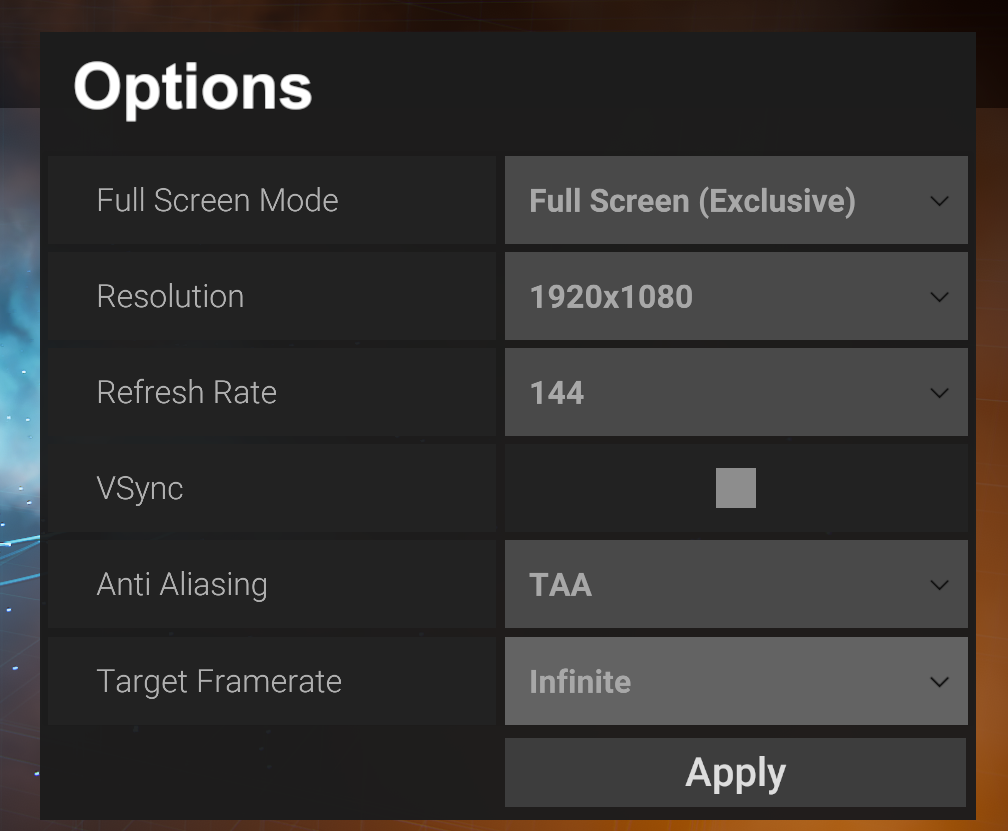
@fair socket^
Unity used that one on this HDRP/VFX tech demo: https://github.com/Unity-Technologies/SpaceshipDemo

GitHub
Spaceship Demo - AAA Playable First person demo showcasing effects made with Visual Effect Graph and rendered with High Definition Render Pipeline - GitHub - Unity-Technologies/SpaceshipDemo: Space...
of course those resolution and refreshrate, fullscreen mode and vsync are all set in various places too 😄
because... reasons
all settings in HDRP are scattered all around
a lot of those reasons are coming from old legacy things where Unity bolted new things on top but kept some of the old structures... so now it's totally mixed bag
 spiral timber
how shader used in Graphics.Blit get vertex data?
 heavy beacon
Can I automatically transfer shaders to match HDRP / URP requirements?
 cobalt idol
Is it possible to change the render buffer format in URP?
cobalt idol
cobalt idol
Is it possible to change the render buffer format in URP?
There is an option for the HDRP pipeline asset, but I can't find the equivalent for URP. The issue I have is that ticking HDR removes the alpha from the buffer in the default format
spiral timber
is it possible to get and change unity built-in shader variables which may be used by other shader globally?
sinful imp
Is there a way to set the source camera of a graphics compositor from a script in the HDRP?
summer glacier
I have a simple locked interior, made with cubes -- yet the visual environment/sun light seems to still effect it and light it up. Anyone knows why?

I'm using the Physically based sky -- when I disable the visual environment and the physically based sky it, it starts acting correctly and goes dark.
Note that the sun is still active.

How do I prevent The environment (physically based sky) from lighting the interior when it seemingly shouldn't?
I can't figure it out, tried everything I can think of.
HDRP
whole fossil
Try adding reflection probe to the inside of the environment
summer glacier
whole fossil
Try adding reflection probe to the inside of the environment
No luck
eternal laurel
Might be stupid but is your directional light casting shadows?
summer glacier
eternal laurel
Might be stupid but is your directional light casting shadows?
Yup, also tried testing all cubes with two sided shadows as well
eternal laurel
Are they the build in cubes ?
summer glacier
eternal laurel
Are they the build in cubes ?
Yup
eternal laurel
Hnn I will have to recreate this cant think of simple solutions off the top of my head
summer glacier
Been really bugging me :/
Two things seem to turn the interiors dark: Turning off both visual env & Phyiscal sky turns it dark
and disabling the light
summer glacier
Sky has 0 exposure, the exposure mode is set to Automatic histogram
although I've tested it with everything else and between
and the light isn't that high, it's at 30515 lux
I don't think there's any indirect lighting, it's realtime
 calm onyx
is there a reason why I'm not seeing all this list even tho I'm on urp?

I only see that much

 jade venture
Heya, I am using the latest unity version with the URP and 2D Render Pipeline. I calculated a mesh as a field of vision. How to hide (darken) everything which is not inside it? I know that for 3D you could use render features as an example. But I am completely clueless how to approach this in 2D.

 pulsar prism
I've created a panel and assigned it a material with HDRP/Unlit shader. (I'm using the HDRP.) In the Scene-View the panel appears yellow, as defined in the material. But in game view it appears blue. What's wrong? Thanks for any hints!

 hollow frigate
Anyone have any guesses as to why my triplanar shader isn't receiving indirect lighting?
summer glacier

Tried reflection probes, shadows, two-sided meshes
it seems to be caused by the visual environment/procedural sky ambient lighting. I want to keep the exterior look, but fix this.
inner parcel
summer glacier
it seems to be caused by the visual environment/procedural sky ambient lighting....
not a fix but more like a hack.
cant you make a local volume for this space with exposure fully down
summer glacier
I can, but at that point i'm not adhering to anything realistic or physical. I'll be running up numbers down and right with no reference hoping it looks right, while the exterior is completely different. I'd rather not go down that rabbit hole.
summer glacier
inner parcel
not a fix but more like a hack.
cant you make a local volume for this space with...
Also, actually since there's so much light inside, toning it down would turn the screen completely white, i'd probably have to turn it up
inner parcel
you should in that case try to reduce the ambient lighting overall. been a long time and i dont remember volume components much, but theres an intensity component out there
summer glacier
I don't think there's anything for that
i can reduce the sky's exposure, but that completely changes how it looks
I tried everything in the indirect lighting controller, no luck
inner parcel
I have a similar scene but with more realistic use case with procedural sky with the ambient light not reaching all corners of it.
I'll look that up for you
summer glacier
sounds good
junior lotus
my first time using HDRP and I came across this issue, can anybody help me?
turbid matrix
@junior lotus it's "normal" behavior. you haven't fixed the exposure
easiest way to fix this is to:
- if not done already, run through HDRP Wizard so everything is green
- after that first step, create a new "outdoor HDRP" scene from the new scene menu entry
- take note of the directional light intensity on that scene (if I remember right, it's 10 000) and then make a prefab out of the volume gameobject on that scene
- go back to your old scene, change your directional light to the same value as on new outdoor scene
- add the volume prefab you just made to your old scene
basically what you see currently is autoexposure trying to correct things. Your sky has very high exposure so autoexposure tints everything else black - unless you only look at the ground
other way to fix that issue is to manually adjust the sky exposure + regular exposure values yourself and match those with your directional light intensity
also worth noting that since you are just starting out with HDPR:
- HDRP has global/default settings set under Graphics settings -> HDRP global/default settings. This is where the default sky and exposure and various PP effects come from you get out of the box.
- you can override the defaults also per scene by putting a global volume in scene and overriding the specific components
junior lotus
thanks a lot
junior lotus
also is there a nature shader in HDRP?
 sick hinge
Hi there! I'm trying to use an overlay camera to render world space UI on top of everything. This camera stack has to output to a render texture that will be visible on a raw image inside a canvas. Right now only the content from the base camera is visible
Does somebody know if it is possible to render a camera stack to a texture?
 hidden karma
Hi, is this the best place to ask a question about a problem I'm having with the URP shader graph ?
 keen monolith
Yo, out of curiousity, does anyone have some kind of cheat sheet to setting up quality settings?
turbid matrix
hidden karma
Hi, is this the best place to ask a question about a problem I'm having with the...
better use #archived-shaders for SG topics 🙂
hidden karma
turbid matrix
better use <#497874081329184799> for SG topics 🙂
cheers
analog meteor
jaunty shell
(this happens to me too, i would also like to know)
 signal osprey
does changing variable resolution on the fly cost something? ie: if I vary the resolution every frame
jade venture
jade venture
Heya, I am using the latest unity version with the URP and 2D Render Pipeline. I...
I solved this by creating a shader for all hideable objects based on the Universal Render Pipeline/2D/Sprite-Lit-Default shader, which uses stencil compare and adding another shader on my mesh with stencil replace.
jaunty shell
analog meteor
(this happens to me too, i would also like to know)
I FIXED IT YEY. I just set "Near Plane" in my Scene light to max (10)
 toxic vine
what is this error, and why is my editor acting crazy after switching to urp
 tough pulsar
summer glacier
it seems to be caused by the visual environment/procedural sky ambient lighting....
tough pulsar
summer glacier
it seems to be caused by the visual environment/procedural sky ambient lighting....
if you will find some solution ping me please because I have this problem too
analog meteor
jaunty shell
I FIXED IT YEY. I just set "Near Plane" in my Scene light to max (10)
oh! i’ll try that out thanks
 light spade
Have you upgraded your shaders?
https://docs.unity3d.com/Packages/com.unity.render-pipelines.universal@12.0/manual/upgrading-your-shaders.html
 shrewd moon
summer glacier
Tried reflection probes, shadows, two-sided meshes
shrewd moon
summer glacier
Tried reflection probes, shadows, two-sided meshes
Did you try baked lighting
summer glacier
shrewd moon
Did you try baked lighting
That's not really a solution, i don't want to use baked lighting for the interiors, although from my testing, the ambient interior lighting is gone, but then again so is the sky/enviroment, not sure what's up with that.
summer glacier
tough pulsar
if you will find some solution ping me please because I have this problem too
No proper solution, the only answer I got so far is setting up a volume around your interior and changing the environment into gradient all black, or none
shrewd moon
The methods you listed aren't capable of blocking ambient light, besides reflection probe under the right circumstances, but that is a form of baked light usually
summer glacier
The other option is to lower the exposure with a volume, but then all light references are out of the window and your back to random light numbers that look right
Even reflection probes didn't really help
shrewd moon
You either need baked light or a realtime GI solution
summer glacier
Maybe enlighten would do the trick
tough pulsar
any good tutorials for baking lights for HDRP?
tough pulsar
summer glacier
Maybe enlighten would do the trick
enlighten is not available in HDRP
shrewd moon
tough pulsar
enlighten is not available in HDRP
It is in 2021.2. onwards
summer glacier
it will be
tough pulsar
shrewd moon
It is in 2021.2. onwards
yeah but this version is unstable afiak
summer glacier
in beta yeah
shrewd moon
@summer glacier On-demand updated reflection probes are an option that could work
 trail flower
camera allowDynamicResolution is a writeable property, but writing in it doesn't affect the value. Is this a known fact?
shrewd moon
But consider that reflections are per-object, so you can't have the interior and exterior walls be the same object
trail flower
in HDRP is that property supposed to be readonly?
summer glacier
shrewd moon
<@!643496046227357736> On-demand updated reflection probes are an option that _c...
I tried realtime and baked, not ondemand although it's about the same no?
shrewd moon
Same as realtime but not as prohibitively expensive
summer glacier
Not sure why but it had next to zero effect on the lighting which comes from the environment/procedural sky
tough pulsar
summer glacier
Not sure why but it had next to zero effect on the lighting which comes from the...
I think that ambient is controlled internal by directional light when using physical sky
try setting your directional light to night for ex. X rotation 185 and you will see results when shadows are blacker
or more blackish
I dont know how to spell it correctly
MORE DARKER
fuck me
summer glacier
Yeah I tried that, didn't get quite the results I wanted, although I didn't try changing the rotation. Will do that next time and report back
shrewd moon
@summer glacier Found one type of solution
Reflection probe of type "custom" with just a black texture as a cubemap
It basically just sets ambient lighting to zero, and then you can switch it out for an on-demand baked cubemap if you want actual reflections
Otherwise if you bake it'll simply bake an image of the interior that's falsely lit by the sky
summer glacier
shrewd moon
<@!643496046227357736> Found one type of solution
Reflection probe of type "cust...
ooh interesting
will test soon
tough pulsar
I get this effect
 shrewd moon
 shrewd moon
It still seems to work in removing the sky "sheen"
Could be competing with some other lighting stuff in your scene, hard to say
shrewd moon

Dunno if it needs to be Cube shape
But nothing special really
Try it in a blank outdoor scene if it doesn't seem to work right
tough pulsar
I create cubemap in Unity with Legacy->Cubemap
shrewd moon
That seems unnecessary
Anyway I don't think it matters how the texture is set up as it has no data in it
Experiment with a blank scene
dawn sorrel
guys I just switched to URP and now 1 simple realtime light is taking like 2 minutes to bake, on top of that, my scene consists of 4 cubes??? Is this normal and also why is it taking so long to bake if it is realtime lights?
The main issue is when it bakes it takes like fricking 97% of my cpu
eternal laurel
Well if you dont want baked lights turn off auto generate
shrewd moon
dawn sorrel
guys I just switched to URP and now 1 simple realtime light is taking like 2 min...
Realtime lights aren't baked at all
Do you have a decent GPU? You can use that for baking, which would be faster
Sometimes the bake progress bar gets stuck
Or for me, always, but it's only a visual bug
dawn sorrel
shrewd moon
Realtime lights aren't baked at all
Do you have a decent GPU? You can use that f...
exactly, what I was thinking
dawn sorrel
shrewd moon
Realtime lights aren't baked at all
Do you have a decent GPU? You can use that f...
I have a pretty good gpu, it's an RTX 2070 super
dawn sorrel
well my cpu is pretty decent as well
dawn sorrel
shrewd moon
CPUs suck at ray tracing
correct
but im asking why is it baking when there is literally 0 baked lightings
???
shrewd moon
Plus you'll probably want to use the CPU power for something else while the bake happens
dawn sorrel
It wasn't like this when I used the default render pipeline
dawn sorrel
shrewd moon
Plus you'll probably want to use the CPU power for something else while the bake...
true
shrewd moon
You can view the bake progress by clicking the blue progress bar
To see what it's working on
dawn sorrel
shrewd moon
To see what it's working on
oh really?
shrewd moon
And to confirm that it's not stuck
What Lightmapper are you using
dawn sorrel
shrewd moon
And to confirm that it's not stuck
What Lightmapper are you using
it isn't stuck, but it takes 2 - 5 minutes
and Im still confused on why tf is it even baking when there is nothing to bake in the first place?
summer glacier
disable auto generate, probably that
dawn sorrel
summer glacier
disable auto generate, probably that
oh yup it is on
im supposed to turn it off?
dawn sorrel
shrewd moon
You can view the bake progress by clicking the blue progress bar
nothing is happening when I try that?
shrewd moon
Maybe it's not baking really
summer glacier
if you don't want it to auto generate, yeah turn it off
shrewd moon
Hard to guess what's happening over there
Do some baking tests in a scene with static geometry and lights to get a feel for what the settings do and how it's supposed to work
dawn sorrel
shrewd moon
Maybe it's not baking really
well if it isn't baking why would it show that it is baking? really weird
dawn sorrel
shrewd moon
Do some baking tests in a scene with static geometry and lights to get a feel fo...
ok
shrewd moon
With an RTX card you might reach like 10-20 second bake times in simple scenes
shrewd moon
dawn sorrel
well if it isn't baking why would it show that it is baking? really weird
There's bug, like I said
dawn sorrel
shrewd moon
There's bug, like I said
well that would explain it
but then what is it doing if it isn't baking?
because it definitely is doing something cuz my cpu goes from 7% to 97% when it says it is baking
shrewd moon
I really don't have an answer to that
You'll have to get more familiar with the lightmapper system
It'll start to make more sense as you use it
dawn sorrel
shrewd moon
It'll start to make more sense as you use it
ok
thanks for the help
I think it is probably I bug with URP
shrewd moon
My advice is to switch to disable automatic baking and enable Progressive GPU lightmapper as the very first thing
are the Screen Space Reflections of HDRP this crunchy for everyone else?
 eternal laurel
dawn sorrel
thanks for the help
eternal laurel
dawn sorrel
thanks for the help
Even with 0 baked lights it will still bake the light coming from the skybox
And 2 mins for a default bake on the cpu is pretty decent. Our bakes take anywhere from 2 to 28 hours
iron flame
shrewd moon
are the Screen Space Reflections of HDRP this crunchy for everyone else?
Ssr default 32 samples are few. It fixes with 96 samples.
dawn sorrel
eternal laurel
And 2 mins for a default bake on the cpu is pretty decent. Our bakes take anywh...
oh
Ok thanks!
dawn sorrel
shrewd moon
My advice is to switch to disable automatic baking and enable Progressive GPU li...
I've also greatly improved speed with baking lights by lowering the resolution of environmental reflections
turbid matrix
iron flame
Ssr default 32 samples are few. It fixes with 96 samples.
I'd be careful with this, even 64 samples tax the gpu a lot
I'd dial that as low as possible where the artifacts are not annoying anymore
dawn sorrel
also when I was adding post processing in URP i noticed that the chromatic aberration looked a lot worse than in the post processing stack for the default render pipeline.. is there anyway I could make it look smother or customize it more?
shrewd moon
I would've rather expected some smoothing option for the artifacts
shrewd moon
dawn sorrel
also when I was adding post processing in URP i noticed that the chromatic aberr...
Well, scriptable render pipeline system is meant to give you the option to implement your own rendering features, and you can apparently make post processing effects using SG
But generally what you see is what you get
URP effects may seem a bit simplistic in some ways compared to built-in, probably because URP is optimized for mobile devices as well
dawn sorrel
shrewd moon
URP effects may seem a bit simplistic in some ways compared to built-in, probabl...
it doesn't matter much anymore, I just ditched URP and went back to built-in for a few reasons
the game is just better with the built-in
nothing works perfectly for every game
 fresh meadow
Noob question, but how can I apply URP affects and bake lighting in a game where the scene is procedurally generated?
dawn sorrel
fresh meadow
Noob question, but how can I apply URP affects and bake lighting in a game where...
I actually don't know, i've never made procedurally generated levels so sorry dude
eternal laurel
Depends on the amount of procedural generation. There is no light bake at runtime
If the game is modular and you construct a level out of prefabs
You can bake for each prefab and then blend the ligjtmaps at runtime
Thats how the elder scrolls blades did it. There was a video somewhere
fresh meadow
Can you make shadows visible at further distances.
turbid matrix
@fresh meadowthere's a distance setting on URP asset
but you have to up the overall shadow resolution for things to not get too blocky if you do so
shrewd moon
fresh meadow
Noob question, but how can I apply URP affects and bake lighting in a game where...
Not normally
You may be able to spawn prefabs with pre-generated lightmaps but the system isn't set up for that
iron flame

GitHub
Gonna be a vaguely long PR description, so
TL;DR:
Temporal Upscaling algorithm for dynamic resolution.
Take into account jittering vector when computing filter weights for TAA high quality.
Reduce...
turbid matrix
yeah, merged now 🙂
been testing that in VR yesterday
basically tested DLSS, FSR and TAAU in HDRP VR, only one that felt useful was TAAU
FSR didn't notably improve the visuals at modest 80% scaling but it did bring big overhead on PP
DLSS however gave extra 4ms to the postprocessing time, meaning you'd have to do really heavy lifting on HDRP itself for it to be worth it
basically in my slimmed down HDRP test, DLSS almost doubled the frametime I got with 80% + TAAU on ~native Quest 2 resolution running at 120Hz
And then I tried URP VR exactly same scene and even with MSAA x4 + FXAA enabled, URP was twice faster than anything I got running on HDRP VR
 weary fog
is TAAU supposed to land in 2021.2?
turbid matrix
considering it's in current master, would expect it to
it's fully functional on current 2021.2 beta so would be weird for them to leave it out but include FSR and DLSS, I just don't see it happening
 ember breach
turbid matrix
And then I tried URP VR exactly same scene and even with MSAA x4 + FXAA enabled,...
ember breach
turbid matrix
And then I tried URP VR exactly same scene and even with MSAA x4 + FXAA enabled,...
HDRP is just big mess I feel like, in empty scene I have max 160fps, URP on my project I have 700fps... even tho is fast would like to see FSR in URP to get even more out of it 😄
 wind badger
is it possible to set the scene view to use my entire URP camera stack?
weary fog
ember breach
HDRP is just big mess I feel like, in empty scene I have max 160fps, URP on my p...
That's only a 5ms difference
sinful imp
is it possible to have layer specific post processing in the HDRP without the use of the compositor?
 opaque crown
Hello, I've been having an issue with LWRP. I'm using the 2019 LTS and have LWRP installed in my project but cannot choose it to create an pipeline asset. Nor can I choose LWRP as my pipeline. I am running Ubuntu 20.04. I've tried to search this, but haven't had much luck. Any thoughts or ideas?
inner parcel
turbid matrix
basically in my slimmed down HDRP test, DLSS almost doubled the frametime I got ...
the last time i tried hdrp android i wasnt even able to build. glad to know that now you can atleat.
what's your frame time in hdrp in quest2?
do you use single or multipass?
turbid matrix
@inner parcel I'm testing PCVR by using Q2 on airlink, native Q2 can't even run HDRP
inner parcel
oh rip. i thought you were on a quest build
turbid matrix
nah, it's not something I'm looking to support
Quest 2 hardware is bit too limited and if you go for oculus store, you are expected to support Q1 as well (altho there's now one game coming only to Q2, resident evil 4)
inner parcel
yeah i usually test things on my quest 1, but usually my standard pipeline project runs fine at 72hz in either of them so im not super concerned about that.
urp is currently too limited for my VR project and hdrp would be nice to have, but its a bummer that hdrp only supports high end pc/console
inner parcel
i might switch to urp probaby once 2021.2 comes out
turbid matrix
I did test built-in renderer at Q2 resolution and 120Hz too, but URP was clearly fastest on that naive and simple test
had the workbench scene running with enlighten realtime gi there on all three renderers
inner parcel
urp is clearly faster in my case too, but it lacks many feature i want to make use of
turbid matrix
yeah it has it's painpoints
URP 12 is better but it's still lacking on things like shadow filtering + it got movecs now but nothing uses them yet
inner parcel
and also for my other pc project i'm still stuck in a confusion between both because hdrp doesnt scale well with low end devices,
and urp is too limited for higher end devices which can make use of hdrp
so its hard to make a project which is fully scalable for all hardwares. just disabling the features in hdrp isnt enough unlike the built in.
so thats why many are still back to built in pipeline
and thats why my quest project is based on built in too. so that in future when srp gets better, theres a slim possibility that i might have 2 options to choose from
turbid matrix
inner parcel
and also for my other pc project i'm still stuck in a confusion between both bec...
you can make HDRP run acceptably on old PC's unless they are some integrated intels, it's mainly the VR perf I'm struggling with
of course URP still runs twice faster on the same computers 😄
I have dualcore i3 + gtx670 on my low end test computer atm and it can do stripped down HDRP quite well
there are tons of small things that are enabled on HDRP that really don't need to be on low end devices
inner parcel
turbid matrix
you can make HDRP run acceptably on old PC's unless they are some integrated int...
my pc project is a fps shooter. the higher the frames i have, the better considering the response time.
but that being said, i've struggled a lot in hdrp to bring the frame time to 16ms on a laptop with i5 7200u + intel hd 630
with standard pipeline i can get upto 100fps (10ms)
with urp i get the same, around 110fps
but with hdrp im unable to come below 30ms mark.
my game looks to be gpu bound even with a rtx 2070s but i get 2ms frame time on that after stripping hdrp
turbid matrix
ah, I got same gpu here on my main rig 🙂
inner parcel
2070s was probably like the best steal in 2020. its not surprising that many have that now xD
turbid matrix
and yeah, I've seen HDRP choke on weaker gpu's in past.. I used to have nvidia GT610 on my test rig in past but it could only do like 14 fps on simple scene
there are some things that go past stripping HDRP asset though, you have to disable a lot of things from frame settings as well
some notable gains can be had by removing SSS and distortion
those are only seen in frame settings
also if you use moblur... this is default hdrp moblur 😄

well, that was bit extreme case as I had forgotten it enabled in VR, it's probably cheaper in desktop
but it's still among the expensive post effects
inner parcel
yep. my game looks very ugly with everything disabled in the default hdrp settings and everything disabled in hdrp asset.
using the lower option whereever i could, be it pp buffer format, custom pass (i use one draw renderer to replace traditional 2nd camera)
inner parcel
i didnt even have any post process in either of my tests
inner parcel
turbid matrix
HDRP runs a ton better if you can lower the resolution
thats promising
turbid matrix
with TAAU you do pay the price for TAA high preset but the lower resolution still gives you more gains
inner parcel
lower resolution doesn't seem to change anything in either of the pipelines as of now for me. is that the same for you?
the change is less than 5% for me on all devices ive tried
turbid matrix
I don't know how that scales on weaker computers though, I've only done TAAU testing for VR in mind, not for low end computers
huh, I guess it depends where you start at
in my case, I'm running VR on 3936 x 1984 resolution @ 120Hz so being able to drop that resolution gives quite notable gains 🙂
inner parcel
on my laptop all the way from 1080p to 720p doesnt change anything much.
same for my desktop tho. i dont have any monitor above 1080p to test it
ah for VR i might give a spin with 2021.2.0f1
just being too careful with that with the built in pipeline
turbid matrix
I don't know how it goes with AMD but at least on nvidia drivers you can select that gpu does the image scaling automatically and then create a custom resolution. I've tested 4k performance on my 1440p monitor that way
inner parcel
oo thats nice. i havent heard about that
turbid matrix
basically that just tells windows there's 4k resolution available but gpu scales it to your native resolution after it's rendered
it's essentially forced super sampling that way
I dunno if there were some driver settings for forcing super sampling directly too
(there could be)
inner parcel
i dont have an amd either.
Had an amd gpu like 4 years ago and probably wont even look in that direction anymore
i could give a try in 4k. i'll see how that goes with my hdrp project and urp version of it with almost no visuals
turbid matrix
tried slimmed down HDRP with FXAA and Enlighten enabled on integrated Intel HD4000, no surprises here

that's at 1080p
same computer, GTX670 runs that in little under 5ms
nobody should target Intel HD4000 with HDRP though
there's still some potential gains to be had by not doing depth prepass and not doing autoexposure but that's not really going to help in the big picture
same thing on URP

gpu time goes from 100ms to 50ms, not that it will matter that much yet either
and finally same thing on URP but with fully baked lighting, previous one was with Enlighten GI:

so, now around 32ms which is acceptable already, but this is also very simple scene
shrewd moon
turbid matrix
URP 12 is better but it's still lacking on things like shadow filtering + it got...
movecs?
turbid matrix
also that final PP pass is FXAA alone, meaning FXAA costs 7.7ms on integrated HD4000 😄
@shrewd moon motion vectors, you need them to be able to do things like Temporal Anti-Aliasing and better motion blur
turbid matrix
nah, Nvidia Nsight
I'm not aware of any tool on Unity editor that gives you proper GPU timings
shrewd moon
Yea me neither
turbid matrix
nsight does work on other brand gpu's too, you miss some of the stats but like in this case, you still get the figures you are after
it's dead simple to use too
microsoft also has PIX that does similar thing but it's targeting DX12
shrewd moon
I'll get right on it
A lot to learn about performance analysis
turbid matrix
it might require nvidia developer account to download it but that shouldn't be an issue
shrewd moon
I had trouble earlier trying to find out why built-in was using 99% GPU, but I couldn't find anything odd in the profiles because the frame times were okay
Not sure if that sort of issue is even visible there
turbid matrix
99% gpu sounds like no vsync
shrewd moon
I considered that, but it was enabled
I do get a stable 700 fps in a simple scene, but I also get that in URP with only 30% GPU use
Suppose there isn't some way to see what the GPU is doing overall, rather than what's happening in the frames
 dreamy fox
Hey! I see some love for TAAU, glad to hear. In terms of its performance, yes at the moment is locked for high quality however keep in mind that:
- Disabling speed rejection (setting to 0) saves a bit of the overhead for high quality.
- Disabling history sharpening (setting to 0) saves a fair bit of the cost of reading the history even at high quality (though I'd definitively suggest against it).
Also I have some plans to make TAA a bit faster, but time for it has not been allocated yet and I am not sure when it will be 🙂
I will also experiment at some point to try having TAAU running with also the medium preset, but I am not so confident it will be a good idea and/or worth it 🙂
turbid matrix
@dreamy fox is TAA going back to compute? I did see some comments that suggested that might still happen
dreamy fox
Yes it is my plan to do so at some point, though unfortunately I have no ETA to give on this as it is just a vague intention rather than an already planned thing. Note that the move will happen only if it will be a perf win, not otherwise.
 cobalt sapphire
Has anyone here used HDRP with the recent screen space global illumination? I am finding the emissive materials get very dull when SSGI is turned on
shrewd moon
Is it normal the Proxy Volume has to be huge like this when using planar reflections?
keen tulip
turbid matrix
there's still some potential gains to be had by not doing depth prepass and not ...
Can you explain how to turn on depth prepass for urp pipeline?
I heard that its been released but i can't seem to find it at all
scarlet hull
shrewd moon
Is it normal the Proxy Volume has to be huge like this when using planar reflect...
Do you really need the proxy volume ?
shrewd moon
scarlet hull
Do you really need the proxy volume ?
Same issue without the proxy volume, but then I can't control it?
Oh, issue is gone if I disable Use Influence as Proxy Volume
So it was still using proxy volume to begin with
Thanks for the idea!
 unborn mountain
turbid matrix
and finally same thing on URP but with fully baked lighting, previous one was wi...
unborn mountain
turbid matrix
and finally same thing on URP but with fully baked lighting, previous one was wi...
What profiler software is this?
 shrewd moon
unborn mountain
What profiler software is this?
shrewd moon
unborn mountain
What profiler software is this?
Nvidia Nsight as we discussed there
unborn mountain
Thanks!
turbid matrix
yes, it's nsight frame profiler

GitHub
Purpose of this PR
Fogbugz: https://fogbugz.unity3d.com/f/cases/1345143/
DLSS has heavy ghost artifacts on pixels that lack velocity. This change uses the color bias mask feature of DLSS to aleviat...
I like that exclude TAA stencil bit got reused this time around. I think SMAA's stencil bits are still separate despite them not being able to be used at the same time with TAA 🙂
turbid matrix
was looking at URP movecs, pretty obvious where this came from 😁 https://github.com/Unity-Technologies/Graphics/blob/master/com.unity.render-pipelines.universal/Shaders/CameraMotionVectors.shader#L1
wouldn't probably be difficult to slap rest of the kMotion to this as half of the shaders are already in URP
summer glacier
Can I not upsample using DynRes? can't get over 100.
iron flame
turbid matrix
wouldn't probably be difficult to slap rest of the kMotion to this as half of th...
I edited the debug script in the test project to run motion vector pass. I replaced velocity with _MotionVectorTexture in camera motion blur shader.

There are a lot of motion blur leaks. Hopefully unity adds some quality motion blur to the URP like Keijiro Kino motion.
 sick fable
Does anybody know why ScriptableRenderContext.DrawRenderers() produces 2 Drawcalls?
Maybe it's got something to do with antialiasing?

The Execute Function of my ScriptableRenderPass looks like this
public override void Execute(ScriptableRenderContext context, ref RenderingData renderingData)
    {
        CommandBuffer cmd = CommandBufferPool.Get();

        var sortingCriteria = renderingData.cameraData.defaultOpaqueSortFlags;
        var drawingSettings = CreateDrawingSettings(m_ShaderTagIdList, ref renderingData, sortingCriteria);
        drawingSettings.overrideMaterial = m_Material;

        context.DrawRenderers(renderingData.cullResults, ref drawingSettings, ref filteringSettings);
        cmd.SetGlobalTexture("_DepthNormals", depthNormalsHandle.Identifier());

        context.ExecuteCommandBuffer(cmd);
        CommandBufferPool.Release(cmd);
}```First I though its because of the SetGlobalTexture()
But this produces the same results
public override void Execute(ScriptableRenderContext context, ref RenderingData renderingData)
    {
        // CommandBuffer cmd = CommandBufferPool.Get();

        var sortingCriteria = renderingData.cameraData.defaultOpaqueSortFlags;
        var drawingSettings = CreateDrawingSettings(m_ShaderTagIdList, ref renderingData, sortingCriteria);
        drawingSettings.overrideMaterial = m_Material;

        context.DrawRenderers(renderingData.cullResults, ref drawingSettings, ref filteringSettings);
        // cmd.SetGlobalTexture("_DepthNormals", depthNormalsHandle.Identifier());

        // context.ExecuteCommandBuffer(cmd);
        // CommandBufferPool.Release(cmd);
}```No, currently it is not possible to go above 100
turbid matrix
Meanwhile, URP VR SPI seems to be a quite mess :) they broke the old blit api in VR and now seriously lack of documentation on how to deal with it. Staff mentioned on the forums you should use DrawMesh instead and that "docs" are essentially the existing URP PP code :)
In result, none of 3rd party render features work in recent urp vr properly and half of the asset publishers have tried to hack it in various different ways
Most just straight up exclude VR support for their URP extensions
sick fable
Probably Its by design, that it issues 2 drawcalls.
If you Enable Depth Prepass, it also generates 2 drawcalls.

Can somebody explain what the ScriptableRenderPass.Configure is doing actually?
Why does it need 2 drawcalls?
eternal laurel
So how can I change what material is created from the asset menu in HDRP ? I already tried to copy and modify the HDRenderPipelineEditorResources and change the DefaultHDMaterial there to have the settings I want, but when I hit Create->Material the build in Lit one is still used
turbid matrix
@eternal laurel does it work on overriding some other shader as default?
eternal laurel
if I change the shader in the default asset ?
turbid matrix
I mean if you put some different material as default that uses say, HDRP SG or Unlit etc, does it work?
eternal laurel
no
turbid matrix
wait, are you changing it from the resources currently assigned for HDRP?
I mean, if you don't have that stuff setup, HDRP Wizard should make a local copy of those files and assign them properly
eternal laurel
Yep the default editor resources assigned in the HDRP Default Settings in the Project Settings is my "custom" one
Then again the wizard did not create it. I had to copy it from the package dir so I can edit it
turbid matrix
which HDRP version is that?
they had some of that non-local config nonsense on the older versions
eternal laurel
11.0.0
turbid matrix
ah, I just checked, you have to manually override the file even today
I don't see a way to override material itself here, there's materials entry but it's empty
I can swap the Shaders->Default PS to whatever and new materials will default to this (just checked)
eternal laurel
do you mean in HDRenderPipelineResources ?
cause I did that and it's still not creating it with the right shader
sick fable
turbid matrix
<@!181547467068669952> <https://docs.unity3d.com/Packages/com.unity.render-pipel...
Thats not what I was referring to.
I was referring to the Drawcall with that name in the Frame Debugger.
Apparently it really has to do with MSAA.
turbid matrix
eternal laurel
do you mean in HDRenderPipelineResources ?
yes
@eternal laurel does HDRP 11 already have Global Settings asset or is that a new thing in HDRP 12?
anyway, the settings would be in project settings->graphics->HDRP default settings if the global settings asset is not a thing yet there
eternal laurel
Im not seeing a global settings asset no
turbid matrix
yeah its probably HDRP 12 thing then
eternal laurel
yeah and there we have Render Pipeline Editor Resources
that contains the default materials
maybe I need to restart unity 🙂
turbid matrix
but yeah, I remember faintly being able to swap the actual material, for me the option to do so is locked on HDRP 12
can't swap this
 eternal laurel
nope restarting did not help
I can swap it

but swapping it and changing the materials does nothing hah
turbid matrix
you could try renaming the asset to make sure it has unique name
it should still be ref matched
I mean the hdrp editor resources file now
eternal laurel
nope renaming it did nothing
turbid matrix
you can see your own asset assigned by the new name on the settings still?
just making sure the editor didn't screw up the assigning
I'm still wondering why they disabled editing for this on HDRP12
could be a bug
eternal laurel
Yeah its my own asset
And the default material on my own asset is my own material
turbid matrix
sounds like it's bugged somewhere alright then
I don't have 2021.1 installed to check that one out
one could always push HDRP as local package and edit the DefaultHDMaterial directly from the HDRP package but that's kinda nonsense way to fixing this if you don't need custom HDRP for other reasons
turbid matrix
I can come up with bunch of hacky ways to fix that but nothing I'd really use in production 😄
eternal laurel
To get the juicy filmic motion blur from the sherman project
turbid matrix
like, you could just put some write protected material somewhere with the same name and symlink that material to packagecache's HDRP package but yeah, that's going to break in so many ways
eternal laurel
At this point doing a custom create menu and telling the artists to use that seems like the most reasonable
hope Unity enjoy the bug report 🙂
turbid matrix
it's probably a minor issue
eternal laurel
I very much doubt it's because the shader is from a custom package
turbid matrix
but if the material swap doesn't work even for local shaders, it's still something they need to fix
eternal laurel
yep my poor artists should not bother with silly custom menus 🙂 haha
turbid matrix
just moving HDPR package alone into Packages folder and pushing that into version control could be still easiest way to patch it temporarily
just have to update HDRP package manually for version control then
you don't need any dependencies on local packages, just the main package
eternal laurel
yeah I will do that if I need to modify it to get the custom motion blur working
turbid matrix
I may have ranted a bit about the URP renderer features here https://forum.unity.com/threads/urp-rendererfeatures-and-stereo-cameras.1117447/#post-7371125
I just find it silly that they can't come up with basic example to get everyone going quickly, especially since it's very clear that people are struggling with this
HDRP docs give nice sample on how to get going on something similar and then users are on their own after that but at least they have some starting point
eternal laurel
Oh dont get ne started
I wasted 2 days to get a fullscreen blut working in urp vr single pass instanced
I had to dig trough the bloom to see what to use
inner parcel
turbid matrix
I may have ranted a bit about the URP renderer features here <https://forum.unit...
nicely said. it seems like most of the good work in documentation is only being done for hdrp and literally nothing seems to be clear for urp in documentation.
when they point to something they have done from their project as a reference instead of a good documentation, it just shows how lazy they are
turbid matrix
I wouldn't use word lazy since I'm sure people have a lot on their plates. It's just when you do big changes like they've done with these, it would be nice to have at least some example how things used to be and how they are now
what sucks in this particular case is that the things Unity staff references people to look at are something that have been built from scratch for current approach, there's no reference to how it used to be
usually when there are some API changes, first thing I do is fire up git and check what has changed on the implementation from old to new days
when you don't have such data, it's immediately a whole lot harder to decipher
it's not insanely hard, it's just tedious and time consuming
inner parcel
turbid matrix
I wouldn't use word lazy since I'm sure people have a lot on their plates. It's ...
they might have lot on their plates true. but imho they shouldn't neglect maintaining a proper documentation for it. leaving people to decipher and figure things out themselves sometimes can be turned into a disaster because whatever they figured out "works" but is not the proper way to do so.
i've found myself in either of the scenario's and it gets frustrating at one point.
besides having lot on their plates doesn't sound like a proper excuse because its not like they are doing some charity to us. people literally are paying hundreds of dollars to buy the assets from store only which gets broken by something like this and slows down the whole system.
not just that, there are so many beginners who just get frustrated because of the lack of documentation and just give up because they have no proper starting point
turbid matrix
ah, I don't really disagree there. I've seen Unity losing edge of their doc side since they moved to package format
before that you got practically some example snippet on most API's
I do rant about this occasionally but it's something that's not really only Unity's issue, it's actually way worse on some other game engines (not an excuse still)
I've always wondered why these game engine manufacturers don't pay extra effort on docs unless it's some super beginner level thing
it seems like every time you get some tad more advanced topic, the assumption is that users can reverse engineer the intended use
and that of course is slow, tedious and wastes everyone's time
 edgy tree
Hi. Has anyone tried making a minimap with interactive elements in HDRP? We are making a strategy game with hundreds of units and all are needed to be on the minimap.
What do you think would be the best approach?
We tried working with the Shapes asset but when we switch the canvas from overlay to screenspace camera. I found some way to work over that on forums, to make the screenspace camera canvas ignore post processing through custompass but it still left some ghosting (maybe TXAA?) artifacts when moving the camera.
We've been using GL class for our prototype but it has lots of limitations and isn't the best to work with.
Any leads on how to make it work or where to look?
 wind fox
On the point of documentation (or lack thereof): where can I find a modern, up-to-date source to implement my custom renderer feature? Seems like something broke in 2021.2b
turbid matrix
@wind foxcan you be more specific on what broke?
there's no official guide at all afaik
wind fox
turbid matrix
<@!260000654045609984>can you be more specific on what broke?
I've been using the DrawFullscreenQuad renderer feature from the Unity examples and until Unity 2021.1 it worked; now, I was toying around with Unity 2021.2b and I found out that it doesn't work anymore, yet the editor doesn't give off any warning (deprecation or compilation errors)
 tall plover
Hi, has any of you experienced a bug with 2D URP where sprites duplicate when moved? Happens on mobile, but not on the editor.
Here's an image.

The first time it happened I thought it had something to do with the URP Pixel Perfect script, but the issue persisted after removing the script from the main camera.
Any help would be greatly appreciated, thanks.
summer glacier
wind fox
I've been using the *DrawFullscreenQuad* renderer feature from the Unity example...
Report a bug using help > report a bug including a small project with the problem
wind fox
tall plover
Here's an image.
This kind of smearing is typical of a camera that's not clearing its buffer, have you checked your camera settings?
wind fox
summer glacier
Report a bug using help > report a bug including a small project with the proble...
Before crying wolf I wanted to make sure if anyone else was experiencing the same issue, I'll send a basic repro then
tall plover
wind fox
This kind of smearing is typical of a camera that's not clearing its buffer, hav...
What should I check?
tall plover
Googled for some mins, found out that the default renderer uses the "clear flags" option for that, which is not present in urp camera settings
But I have solid color selected, so the camera should work correctly
 lucid tangle
having a struggle with the material/shader im using for an ocean - really happy with how it looks when the sea is gentle but once you have tall waves you can see the backface of the wave really clearly through the frontface of each wave and it looks really janky. Any ideas how to fix? - I'm using HDRP ShaderGraph with transparency created by scene depth
 dawn sorrel
nevermind I fixed it after playing around in settings, sorry for cluttering chat
shrewd moon
lucid tangle
having a struggle with the material/shader im using for an ocean - really happy ...
Enabling "ZWrite" in the shader would apparently fix this
Though other transparent objects may pop in front of behind the surface unpredictably
summer glacier
So I've downloaded the github SRP repo
master branch
how would I go into adding it into unity to test new HDRP features?
Cloned it using github desktop, already got git lfs
I'd like to test some new stuff that just got merged into the master branch
I got the latest unity beta version open, how would I go around adding the new packages
 long wagon
summer glacier
I got the latest unity beta version open, how would I go around adding the new p...
long wagon
summer glacier
I got the latest unity beta version open, how would I go around adding the new p...
Top left in the package manager, you can add repository link directly.
(Don't need to clone anything)
summer glacier
'please wait, installing a package'
No loading indication or anything, so I guess I'll have to wait and see if it works out
 long wagon
I would guess you didn't point to the root of repository/branch. You shouldn't be doing it anyway. Latest supported package should be listed in packages. And toggling show experimental packages would give supported experimental options.
light spade
summer glacier
Any other way, or maybe I didn't do it correctly
Here you can see supported git paths: https://docs.unity3d.com/Manual/upm-git.html
I don't know what you're doing, but if you want to get package from Git, then you need to pass directory with package.json in it AFAIK
loud leaf
Hey @summer glacier , what I always do is this. I create a new HDRP project using the hub, let it do it's thing until the project is open in the editor and everything is ready. I then close the editor, navigate to the project directory in windows explorer, go to the "Packages" directory and paste the folders (from the cloned repository) into there until it looks like this (I'll add an image). After that, I delete the "Library" folder (it's in the root of your project), then re-open the project (through the hub) and done.
 summer glacier
loud leaf
Hey <@!643496046227357736> , what I always do is this. I create a new HDRP proje...
summer glacier
loud leaf
Hey <@!643496046227357736> , what I always do is this. I create a new HDRP proje...
Your a legend man, worked perfectly. Thanks!
 spice sparrow
how can i optimise extra cameras? theyre all render targets and theyre taking up a load of cpu usage
im trying to lower their framerate by manually rendering them or something but its not really working
im on urp
i wasnt really getting these performance hits with them before i switched
 keen glen
spice sparrow
im trying to lower their framerate by manually rendering them or something but i...
keen glen
spice sparrow
im trying to lower their framerate by manually rendering them or something but i...
Maybe rethink your usage and try to get down the number of cameras? Not sure, what they are doing and about your whole usecase tho
spice sparrow
lmao i literally just found the problem, i forgot to disable the cameras before calling camera.Render()
so i was just doubling the already high vertex count 5 times a second
no wonder my fps was so low
i went from 70 fps to 200 fps by fixing that
keen glen
spice sparrow
i went from 70 fps to 200 fps by fixing that
😄 okay, great you got it working then, that makes sense 😄
spice sparrow
i cant build with urp, taking hours to compile shader variants
what can i do?

it was 2 hours and 3 build attempts to get to that point
inner parcel
you're not the only one bud (this is my build process taken live)

my peak build time has reached even 12hours in urp on significantly not weak cpu: i7 9700f
dawn sorrel
@loud leafhey man
can u update ur hdrp projects? fsr?

GitHub
Boilerplate HDRP + DXR + DLSS project. Contribute to m0nsky/hdrp_dxr_dlss development by creating an account on GitHub.
this
spice sparrow
inner parcel
you're not the only one bud (this is my build process taken live)
is it every time?
inner parcel
spice sparrow
is it every time?
i bet you're in unity 2021 and it seems like a common problem in here.
it happens mostly when you change anything in the renderer asset or something which triggers the compilation of shader variants.
but after your first build, if you dont touch anything related to material, shader, graphic setting, urp asset, urp renderer, and few player settings like optimze mesh..
then your consequent build will be ready within 5 mins, depending on your project size and your pc power
i've ranted a lot bout it in the forums and filed a bug report of it too by showing the difference in build between 2020 and 2021 and pretty much everyone i know using urp in 2021 has it, surprisingly its only the unity staffs and the qa who arent able to reproduce this regression 😄
spice sparrow
inner parcel
i bet you're in unity 2021 and it seems like a common problem in here.
it happen...
yeah newest beta
so ur saying
no touchy graphics?
sure am glad i got all of that sorted out in one go
i think
my game is multiplayer over steam so i gotta build to test
inner parcel
i just enabled depth texture in one of the assets, and the next build took me 8 hours
inner parcel
spice sparrow
my game is multiplayer over steam so i gotta build to test
in that case i'd advice you to stick with 2020.3
spice sparrow
i cant
inner parcel
dependent on deferred?
spice sparrow
unity 2020 gives me issues
and deferred yeah
i have night vision cameras that use deferred rendering
spice sparrow
inner parcel
i've ranted a lot bout it in the forums and filed a bug report of it too by show...
might apply for unity qa just so i never have this problem again
inner parcel
unity is already 2 weeks late with their beta build
inner parcel
spice sparrow
might apply for unity qa just so i never have this problem again
if you ever get in, please dont turn away important bugs saying "not reproducible" xD
spice sparrow
i will stalk people that report bugs until they help me reproduce it
btw have you had any issues with tree billboarding in urp?
it doesnt work for me
inner parcel
i'll check and let you know. i for my project dont use it
i use decals, but yeah that doesnt work for me either in builds. works fine in editor for this case
inner parcel
and i dont think theres much focus on urp either at this point. i keep a constant eye on PRs and most of them seem to be only for hdrp
spice sparrow
oh great 😃 🔫
spice sparrow
@inner parcel another question, is there anything after forwardlit?
my biggest fear is seeing this finish and then seeing "deferredlit"

and waiting another few hours
inner parcel
yes dont worry. theres one more forward lit with same fp count.
i think it should be "deferred lit" but the message still says forward lit
inner parcel
if you have enabled shader log in urp asset settings, maybe you can create a bug report with the logs.
they'd probably consider actually looking into it instead of saying "not reproducible" when many people have the same problem
spice sparrow
i enabled shader logs but i cant complete a build
it uses up my entire pc and i cant do anything else
inner parcel
yep
it eventually does. but takes a long long time
good thing is, if you cancel the build, your next rebuild will continue from the same shader. rest will be taken from cache
tall plover
wind fox
This kind of smearing is typical of a camera that's not clearing its buffer, hav...
I've checked everything, even created a new camera, but I still have that problem and don't know what to do.
spice sparrow
tall plover
I've checked everything, even created a new camera, but I still have that proble...
screenshot the camera component
tall plover
There

 tall plover
Yep, it was transparent before for some reason, gave it full opacity but it still happens
spice sparrow
thats weird
tall plover
it sure is
I'm downloading a pre release editor to see if it fixes the issue
if it doesn't then guess I can't do anything
cobalt idol
Is URP 12 available on UPM? No matter what I do I can't seem to get the package to appear
turbid matrix
@cobalt idol you can only install it by using Unity 2021.2
cobalt idol
turbid matrix
<@!167003206151438336> you can only install it by using Unity 2021.2
ahh that'll be it - I'm on 2021.1. Cheers!
summer glacier
What do you guys think about the new temporal upsampler?
From the time I tried it out, it was pretty good!
I need to do more testing, but I actually think it looks better than FSR, although FSR does look really good nonetheless for what it is
Also, TAA got some improvements with the Temporal upsample pull, so that's always welcome
 keen junco
Hi guys , This is my understanding of unity render pipeline, is it correct?

 fresh veldt
Anyone managed to work with _CameraSortingLayerTexture and a 2d renderer (URP) ?
turbid matrix
@keen juncono idea what the foreign words mean but I don't think RG is available in URP yet
they want to use it there too afaik but pretty sure it's not being used today there
keen junco
@turbid matrix Hi Oleto ,sorry for the foreign words. this is the english version. Thanks for your answer, Is it correct?
 turbid matrix
I wouldn't document SG going to be in URP at all at this point 🙂 also built-in renderer can be a lot easier to customize in many ways. There's still the black box for the renderer internals there but in a way, part of SRPs are in unity engine side too which we don't have access to
I guess the customization depends how you interpret that
keen junco
Haha, Got it^^, thanks for you answer👍
inner parcel
i might be wrong, but imho you can think SRP as a way for unity to way to expose the rendering part in c# and allow developers to customize it in c# without having the source code for whole engine.
thats probably one of the biggest reason why many AAA games go for unreal because the renderer is very customization friendly and the src code for complete engine is available too
 bleak otter
Is built-in renderer related to SRP in anyway?
inner parcel
i dont think that would be the case. but SRP might still be related to built in, in some ways we might not know of
summer glacier
using HDRP, Is there no way to set a 'start' distance from camera for the fog to start like in Built-in, URP..
The fog attenuation distance doesn't really give acceptable/similar results. Tinkered it with it for ages, just not possible to get the same results. This is already there for built-in and URP.
Unless I'm hopefully missing the feature and it's somewhere out there in a menu?
 gloomy condor
I am unable to exceed 62.5 FPS no matter what I do
 inner parcel
gloomy condor
I am unable to exceed 62.5 FPS no matter what I do
inner parcel
gloomy condor
I am unable to exceed 62.5 FPS no matter what I do
which rp are you using? whats your pc specs
gloomy condor
It appears the problem only happens in the editor. In play mode I get 1000 FPS
Is this a known bug?
inner parcel
my bad i didnt notice the play button.
in that case that should be good enough
gloomy condor
I have spent the entire day profiling different scenarios in editor mode where it is easier to control what is on-screen. Apparently for nothin
In the profiler there's a bunch of things related to culling. But these CPU costs remain there even if I uncheck culling on the camera
bleak otter
vsync is probably applied somehow
inner parcel
In my game which is based on hdrp and targeted for windows pc. i have a in game custom resolution picker for changing the games resolution which uses Screen.SetResolution, but there's absolutely no change in terms of the frame time for a resolution from 1920x1080 to 1024x768 at all in fullscreen(~6ms), but i can see the resolution being changed, and the quality getting decreased. At this point i was convinced that fillrate is not my bottleneck.
Then today coincidentally while testing something, i found out something weird. in my game with max res, i switched to windowed mode using alt+enter, resized my screen to approximately 3/4th of my screen, and pressed back alt+enter to re enter fullscreen and i noticed that my frame time dropped to 4ms.
approximately 3/4th of my screen area would mean a resolution of around 1440x810.
then i tried forced dynamic resolution with 75 percentage in the hdrp asset, and again there was no change in frame time compared to the initial test which yielded 6ms.
any idea whats happening or if it theres something wrong in my test case?
PS: all results were tested on a release build and not editor
 deft ermine
Is there a way to sample the projector depth (in projector space) for decal projectors in HDRP?
dawn sorrel
guys i'm trying to export old rendering to URP, but there's no option for exporting shaders in the Edit menu

i'm looking for the Edit > Render Pipeline > Universal Render Pipeline in 2021.2
also Edit > Rendering has no other option besides Shader Includes
bleak otter
You sure URP is properly installed?
bleak otter
Haven't gone through the process myself. I would just carefully follow the upgrade guide
dawn sorrel
there was no upgrade. I created a fresh URP project
i'm trying to convert shaders imported from external assets
bleak otter
Did you check what is in Rendering?
Oh you mentioned
Maybe it moved with the apparent menu rename
dawn sorrel
Unity Forum
I Created a new project (3, actually) with URP template and is not showing the menu in edit - Render Pipeline - Universal Render Pipeline to upgrade...
you are right lmao
i can't express with the English language how much I hate these changes
 tall bobcat
(Probably not the best place for this) but I'm trying to add like a void-less black at the end of a hallway (something quick). Basically this is an endless game and the visual of the next spaces iterate and it looks like you're going forward


So it would essentially just look like that
tall bobcat
So I guess it would essentially be softening the Far Clipping Planes, but how would I do that?
Kk think I got it.

 main osprey
What will be a good place to start learning about Render Pipelines? Any video/series recommendations?
 shell atlas

How to use URP ? Why should you choose it ? Let's find out.
Let's learn how to use Universal Render Pipeline (URP) in Unity 2019.3
We will also learn how to convert your existing project from built in pipeline to Universal Render Pipeline.
👉Note : In Unity 2019.3 the LWRP or Lightweight Render Pipeline is renamed to Universal Render pipeline ...
would this help
or do you want a more complicated one
main osprey
I basically don't know anything about how RPs work
So yeah
I want to learn how they work and how I can make modifications to them according to my needs
main osprey
shell atlas
https://www.youtube.com/watch?v=HqaQJfuK_u8
Ill check it out thnx
 tight ibex
i'm trying to setup a hdrp custom pass or fullscreen pass that works on ui and preferably uses shader graph
what's the best way to go about this?
shrewd moon
tall bobcat
So I guess it would essentially be softening the Far Clipping Planes, but how wo...
Simpler than this, you could multiply the base texture with a gradient
Multiplying by a radial gradient is how I made the fake light/shadow here

 dire lagoon
hi all any idea why im getting 30fps max in play mode locked in the editor in a blank scene? This didn't used to happen, I've no idea where this frame lock is coming from.
Target Windows (always)
URP
Vsync Off
Settings Low (No Vsync)
Nvidia settings 60fps max
inner parcel
spice sparrow
it uses up my entire pc and i cant do anything else
the new beta 5 is out check it out. and looks like the number of shader variants has reduced drastically.
the variants i see now are well within 2k compared to previous 70k for me
dire lagoon

wondering what is the audio thread is that what it causing my frame lock?
theres nothing in this scene, just a camera/skybox
 dire lagoon
but its not drawing anything
gtx 970
not had this issue before
i tried resetting nvidia settings
inner parcel
which version of unity are you using?
inner parcel
just remove unity from nvidia settings. nvidia drivers are trash
dire lagoon
i dont fully understand the profiler!
ill try updating nvidia
although, i just feel like its me, something im doing wrong!
im trying to work with dots, except everything goes to max 30fps
even 27fps with nothing in scene sometimes locks to that
i thought it was my code that was wrong, but after much optimising, and then testing with no jobs, no code, no objects, 30fps lol
inner parcel
dire lagoon
i dont fully understand the profiler!
learn to use profiler. theres no point fixing your fps issue without knowing whats causing it
dire lagoon
well clicking on the audio thread solved nothing, just said audio thread
anyway, i tried closing everything else on windows
that seemed to fix it, i think
maybe i need to reset my computer, i do maybe once a month!
 pearl tundra
hi, i hope this is the right place to ask this. But i am extremely new to unity, this is my first assignment with the program for my uni course. My game has no missing textures yet when i build it i get a pink screen, i tried a lot of the common solutions i found online such as resetting my graphics settings. I thought it might be URP so i reset all my objects manually to the standard unity shader and am using the default rendering pipeline in project settings. I am using unity 2020.3.14f1
i know this probably isn't a very helpful screenshot, but this is what my build looks like
 dawn sorrel
strange problem.. I have made a shader graph and it is working HOWEVER when I change the color . the material turns invisible ... that happens when the selected color is blue green and purple (range between them) , but red and yellow are showing perfectly... how can I solve that?? thank you
sterile mesa
How do you change the rendering color in HDRP through script? In URP this line always works. In HDRP only sometimes: rend.material.color = new Color(2f, 3f, 6f);
junior lotus
how to do tree leaves in HDRP?
sterile mesa
Render a physical tree or software tree of hierachy?
junior lotus
i mean material
spice sparrow
inner parcel
the new beta 5 is out check it out. and looks like the number of shader variants...

it increased for me
i sent a bug report describing EXACTLY how i got it