#archived-hdrp
1 messages · Page 62 of 1
 eternal laurel
 woven sonnet
if the readonly changes are not on the table, how about some setter?
Hum, not sure to understand, if we remove the readonly keyword, you'll be able to set the cullresult to a custom value. And yes it's the only required change to get it working (at lest from what I remember).
@eternal laurel it's possible that the old code with SetGlobalVectors broke when we enabled render graph or moved to the constant buffer API. I can look at it tomorrow if you want
eternal laurel
@woven sonnet that would be great. Thank you. Feel free to dm me or anything :). When I upgraded to hdrp 10 I made everything work great and the game was coming along nicely until this and we are really set on some liquids in it. Since it's a Christmas game I dont have time to roll my own solution for this haha
I can give you my email too if you want
woven sonnet
dm is fine, thanks 🙂
 turbid matrix
Hum, not sure to understand, if we remove the readonly keyword, you'll be able to set the cullresult to a custom value. And yes it's the only required change to get it working (at lest from what I remember).
@woven sonnet yes, I meant this (and already did it)
woven sonnet
👌 I everything goes well, it will be included in the official HDRP 11 package
turbid matrix
would be nice to get some workaround for 10.x still or this means none of the 2020 LTS versions can do this
(it's mainly affecting asset publishers and people who are not comfortable in modifying the packages
 viscid solstice
I'm trying to change the properties on the HDRenderAsset, but its all based on gets and read only. I'm approaching this, in the attempt of making a settings interface, that copies the HDRenderAsset, and makes a new one with the new changes.
 sand saffron
Hey guys! I've been digging through URP postprocessing sources and trying to reimplement Depth of Field as a separate renderer feature (for reasons!), and have noticed that a part of the API used there is internal (stuff like CameraData.pixelRect off the top of my head), so it made my life slightly more difficult. Is this by design, or is it just a temporary thing because such parts of the API change a lot between versions?
 keen prawn
I would guess it's the same as with them hiding master node api "to update faster and to give said API later in a more refined state"
But I'd still put down a feature request for the API
 patent sun
Is there any way to "bake" volumetric light? so i can have more than 4
viscid solstice
Hey guys, does QualitySettings just not work in HDRP?
turbid matrix
@viscid solstice it should work
You just dont have as many settings that actually apply for it there
But that should be obvious just by looking at it in editor
Most of the settings are set in volumes, frame settings, hdrp assets..
Also you can have diffferent quality levels use differet hdrp assets
 heavy ice
@ripe fable the bistro video/scene is really nice, good job!
 waxen lantern
I would guess it's the same as with them hiding master node api "to update faster and to give said API later in a more refined state"
@keen prawn related FYI, I learned the master node API is in the works now --rather, the master stacks API. moving from the monolithic master node to master stacks was the major breaking change holding that back recently.
keen prawn
That's awesome to know!
waxen lantern
@keen prawn more info: https://forum.unity.com/threads/what-is-next-for-us-at-unity-with-scriptable-render-pipelines.924218/page-4#post-6153538

Unity Forum
I'm sure something like this has been considered (and possibly discarded) already - and I don't have the long-term battle-scarred background of...
keen prawn
That sounds great, hoping to see that implemented soon
Meanwhile I have to pull out Lighting.hlsl to fix hrv2 bugs https://forum.unity.com/threads/hybrid-renderer-v2-0-4-0.847546/page-10#post-6479564

Unity Forum
When upgrading the project, there was no ECS implementation, so it was a pure GameObject scene. I never got to the point where I uploaded the new DOTS...
waxen lantern
@keen prawn ah yes Hybrid Renderer. last time i reported some bugs for Hybrid Renderer in the v1 days, Joachim replied to my ticket directly and said yeah this is all busted and not worth fixing don't worry v2 is coming soon 
keen prawn
Haha, yeah, hoping HRV2 is not going to be stalled too much
It's already kinda doing what I want though apart from some game-breaking bugs
I was using V1 just fine until I needed instanced properties, which are unavailable in V1
And work only with SRP batcher in V2
 ripe fable
@heavy ice Thanks, the scene is publicly available though, I can't take credit for that. It seems like some huge performance gains can be made in the hd ray tracing manager / rtas by updating instead of rebuilding. Is that something you will eventually be working on? Also, I ported VNDF from Eric's paper a while ago and got some good results will it when working with rough surfaces/normals like on rubber tires. Any chance you will be applying VNDF from the recent ssr_improvements branch to RTR?
 indigo summit
Say, how do you get night sky with PhysicalSky in HDRP? or is it currently not supported?
trying to avoid getting pitch black sky at night
 glad tartan
@indigo summit You'll need to put in a night HDRI in the field for night sky
indigo summit
oohh in the space emission slot?
glad tartan
other than that you can use a directional light as the moon and you will kinda have a bluish sky but it won't look natural and still dark
indigo summit
i totally forgot about that slot, alright i'll try it out, Thanks
 whole fossil
@ripe fable could you please share the link to mentioned scene? I am really curious about stuff like this 🙂
turbid matrix
whole fossil
thanks!
I found this when googling couple minutes ago but I was like "lumberyard? naah, I bet guys are talking about something else" 🙂
apart of that I must admit that it looks gorgeous 🙂
 real hill
Does anyone have an idea how to fix this?
turbid matrix
I'd ask where ever aura support is (discord/forum thread etc)
real hill
so it isnt a unity bug?
turbid matrix
looks like messed up custom ui
if I had to guess, aura dev hard coded the ui but didn't take display scaling into account
if that's the case, it's definitely not a unity bug
real hill
well thanks, i'll search up their support then
woven sonnet
@turbid matrix I have a workaround for the readonly cullingResults in the CustomPassContext. It's ugly but for HDRP 10.x I don't have better:
        var cullingResultField = typeof(CustomPassContext).GetField(nameof(CustomPassContext.cullingResults));
        cullingResultField.SetValueDirect(__makeref(ctx), ctx.renderContext.Cull(ref cullingParams));
I tested in the VR demo with HDRP 10.x and it works.
Note that if you're concerned about performance, you can compile a lambda to set this value, here's a great tutorial about how to do so: https://codeblog.jonskeet.uk/2008/08/09/making-reflection-fly-and-exploring-delegates/
(side note: it's not possible right now to change camera parameter without the CustomPassUtils.RenderFrom* functions, because of the constant buffer changes. That's why the effect broke)
turbid matrix
ah, thanks for the info again 🙂
tagging @eternal laurel as well as he asked about the VR demo
 hybrid tangle
Hi, is there a way to manually reset the accumulation buffer when using HDRP+DXR+Path tracing ? My objects move but my camera does not.
waxen lantern
@hybrid tangle I mean as long as "manually" is on the table, you could move the camera a very small amount and then move it right back.
hybrid tangle
Yes, that's what I do but it seems like a hack 🙂 I was expecting something like "camera.resetAccumulationBuffer" or something
waxen lantern
@hybrid tangle this new multi frame accumulation / physical motion blur path tracing API is coming to HDRP 10.0, it may apply to your use case: https://docs.unity3d.com/Packages/com.unity.render-pipelines.high-definition@10.1/manual/Accumulation.html
 fair cave
i use unity 2019.4.8f1 and urp. and everytime i build game i got il2cpp error
any ideas?
i already installed it
turbid matrix
@fair cave without knowing ANYTHING about the error you get, I'd have to guess that if it's windows, you don't have c++ toolchain installed for visual studio
if you click on the first error on console, it should explain what the error is about
fair cave
ok let me send it when im finish. building takes almost an hour for just a small project.......
the thing with c++ toolchain is also that i found on internet. when i check visual installer i got alot of diffrent packages with that
i just installed one now and try again
turbid matrix
@woven sonnet I finally tested this today. That custom pass route is awesome regarding to perf.. I tested this with the new hdrp template scene with it's highest settings. Doing depth capture to same size RT using external camera rendering directly to RT took 3ms extra where I can't even see the extra cost with custom pass doing the depth capture while just looking at the frametime (would need to attach profiler to see it)
I did verify that that setup did fix the culling as well
what's bad about this all though is that if one can't modify that readonly thing, your reflection hack will not do any good if one needs to be able to build with IL2CPP
it's probably fine with mono builds and editor but IL2CPP can't deal with unknown things at compilation time
one thing I did notice that for the custom pass: I had to change the RT format to something else than depth format and that the rendered depth isn't in same range as with external camera capture. I don't know yet if the range is visually different because of the format change or because the full rendering computes something extra for the depth data before putting it into RT
indigo summit
@glad tartan Oh it works, need to also modify the physical sky though. Gotta say it's hard to get it right
 topaz pawn
Does anybody know how to code a custom render pass? I'm using HDRP and I tried to use the built in Render Pass but it did not have the feature that I need. So I am trying to make a simple one that just changes the depth of all objects with a certain layer to be on top (I know that they have that but I will work off of that for what I am attempting to create). If anyone knows please tag when you get back! Thank you!
(Render Passes are these things)
using UnityEngine.Rendering;
using UnityEngine.Rendering.HighDefinition;
using UnityEngine.Experimental.Rendering;

    class RenderPass : CustomPass
    {

        protected override void Setup(ScriptableRenderContext renderContext, CommandBuffer cmd)
        {

        }

        protected override void Execute(ScriptableRenderContext renderContext, CommandBuffer cmd, HDCamera hdCamera, CullingResults cullingResult)
        {

        }
    }
@topaz pawn you've checked these already? https://github.com/alelievr/HDRP-Custom-Passes
topaz pawn
I'll check them out again, but I have looked at them and tried to implement one of them, but failed..
topaz pawn
Alright I've been trying to implement one of those examples but still nothing working.. Either the screen goes gray, or rendered the exact same as normal
@turbid matrix
I've set each variable to the same as in his preview, and copied those scripts. Do You have any other ideas why this isn't working?
turbid matrix
have you tried the example scenes?
topaz pawn
I'm going to try downloading it and opening his project and toying around for a while
turbid matrix
you should see the exact setup you need for those samples there
topaz pawn
Yeah, thanks!
turbid matrix
besides that repo and https://docs.unity3d.com/Packages/com.unity.render-pipelines.high-definition@8.2/manual/Custom-Pass.html, there really isn't all that much info around
but these should get one going still
topaz pawn
Yeah, when I finish what I'm making I'm going to post a video explaining it, so others don't have to go through learning with only two resources
woven sonnet
@turbid matrix nice 🙂 That's a good thing for performances! About the IL2CPP thing there are probably some solutions that can be found around reflection and dlls but I dont' have the time to try that now.
And for the format, if you're using the code from the VR demo, it's writing the depth to the color channel R so we can sample it easily in VFX graph, which can't be done with depth only render textures. In any case I'd expect the depth values to be the same (after a convertion in eye space)
turbid matrix
I do have some weird issue with culling that I'm trying to investigate
for example I've set the another camera to point the new hdrp templates opening area where you got the round platform... for some reason it sometimes culls it out from the custom pass despite the whole platform being in view for both main and the custom pass camera
additionally I did notice that TryGetCullingParameters doesn't actually fetch ortho mode properly (cullingParams.isOrthographic)
but the culling issue I'm currently having for that platform isn't really related to ortho mode, it happens even if I use perspective rendering for both cameras
topaz pawn
@turbid matrix What I'm wanting to achieve is an object that is always rendered on top, kind of like the "Greater Equal" Depth Test mode, although the issue is then it's use the greater Equal Test mode on itself. This makes it appear strange obviously, do you have any tips on how I could make it so they use normal depth with all the objects on the same layer, but then all of those are rendered on the top?
turbid matrix
I dunno, for me these things are always trial and error 😅
if you want to use the depth test mode for that purpose, you probably need to use transparent material(?)
I'm guessing now this is yet another gun rendering on top kinda scenario?
topaz pawn
YUP
lmao
I got it working but like this
So not working, but only where it's clipped
turbid matrix
considering how many keep asking about that, would be nice if Unity provided some example for that use case
topaz pawn
Yes it really would be...
I found an asset on someone who has it and he's selling literally just that for $20
That should show how hard it is just to render something through walls
turbid matrix
this post has a point on the geometry rendering order: https://forum.unity.com/threads/hdrp-weapon-shader.536035/page-2#post-4586113
basically "Queue"="Geometry" is the default but it goes up to Geometry+500 if I remember right
things changed a bit when decal layers got implemented so that just putting +1 may not be enough for this
you don't really have to change the stock shaders to mod the queue point though but you do need to mod some shader to be able to do it
for example you could just make a shader graph for your arms and guns and then look at the generated code, and save that generated code as separate shader, add that queue to the passes that are relevant for it and then just use that shader instead of the shader graph on your material
what does suck on this approach is that you have to do that again every time you change the SG or upgrade HDRP enough for the internal shader API to change
I also think you may be able to actually adjust that queue directly from the materials .mat file (via text editor)
(without any shader edits)
@topaz pawn
I just checked and there's m_CustomRenderQueue on each .mat file
this probably resets every time to the shaders default queue if you modify that material file in the unity editor but at least you can check if it helps before you go doing custom shaders for it
Opaque geometry's queue range is from 2000 to 2500
topaz pawn
Hmm seems confusing
What I'm hoping to do is...
First get the "Less Equal" Depth texture of the weapon (This will get a depth texture of the "normal" look of the weapon)
Then on every pixel of the depth texture with the weapon on it add whatever the whitest/closest point is (move the weapon to appear as a whole, in front of everything else)
and use that as the depth texture
That should work flawlessly?
@turbid matrix
 lethal pagoda
I have a strange problem with transparent materials and face drawing order. When material is set to Opaque the faces are drawn in correct order but as soon as I change material to transparent front faces from behind are drawn first
Anyone knows what might be causing this?
Ah, I forgot to mention, I'm on URP 10.1
 broken lichen
That's not strange, that's just what happens when you disable z-writing on an object.
Which is what setting it to transparent does
There are two ways to avoid this. The simplest (but not that simple) is to draw the same mesh twice: first drawing it invisible but writing its depth to the depth buffer. Then draw it a second time with the regular transparent material
All the triangles behind the front of the mesh will get z rejected
This will require second shader, one that only writes to depth and not to color.
You could then have two materials on one mesh and it will render it twice for you in each material
Or you can use URP's Renderer Feature to do it
The second way to avoid this would not be as solid of a fix, but you can manually set the order of the triangles in the mesh in Blender or whatever.
But that would only fix it for one viewpoint, not all
If you have an object that is mostly opaque, but some transparent parts, I would recommend separating the transparent parts rather than make the whole thing transparent.
lethal pagoda
Hmmm, makes sense. I just want to have things dissolve when they are outside 10x10x10 global position. On URP 9 I was using Advanced Dissolve (https://assetstore.unity.com/packages/vfx/shaders/advanced-dissolve-111598) to do this but it doesn't work on URP 10.1 yet and I wanter to re-implement it myself, also as a learning excercise.
broken lichen
Dissolve is usually done with alpha cutout. Those aren't actually transparent, they still write to the depth buffer.
You would want to make an opaque shader that discards all pixels that are outside the area.
turbid matrix
from 2021.1.0a4 release notes:
* DX12: Optimize ray tracing acceleration structure building on the render thread (roughly 2x speedup).``` trim bone
with that speedup, is it comparable to unreal engine's raytracing implementation?
turbid matrix
I'd imagine it's pretty hard to compare these fairly as the supported feature set is still different
unless you compare different parts of the implementation directly but I don't even know where to get started on that one
trim bone
i dont even know how the featureset differs 🙂
turbid matrix
I'm mostly bummed that Unity's DXR doesn't support shader vertex offset
I have no clue how Unreal does it but they do support it
also, I have no idea if the unreal's solution for that is fast enough to be actually used in games 🙂
it's just, if it works, it would be awesome for anything foliage
currently Unity's DXR supports animation through:
- skinned mesh rendering
- alembic cache
- runtime mesh modifications (via c# mesh api)
trim bone
have to imagine vertex offset will be supported in time
turbid matrix
animating foliage in larger scale is close to impossible without it as even if you modify some mesh you instance or use alembic, you can't rotate the assets or the wind wouldn't match
you could only do it for some hero assets
HDRP ray tracing in Unity 2020.2 has the following limitations:

* Does not support vertex animation.
* Does not supports decals.
* Does not support tessellation.
* Does not support per pixel displacement (parallax occlusion mapping, height map, depth offset).
* Does not support VFX and Terrain.
* Does not have accurate culling for shadows, you may experience missing shadows in the ray traced effects.```that vfx part especially is a bummer too
this means both vfx graph and old shuriken
meanwhile Unreals raytracing does currently support:
- landscape (terrain)
- niagara (supports Sprites, Ribbons, and Mesh emitters) - this is their equivalent to Unity vfx graph
- world position offset (aka vertex offset)
- LODs (afaik this isn't supported in Unity raytracing)
they have a note on that offset thing that their static mesh is enabled per-actor, so it could be that they just do it per instance which could be really heavy
waxen lantern
@turbid matrix really appreciate this limited feature breakdown / comparison.
here's some related info on DX12 raytracing acceleration structure updates that can inform us of possible implementations of these and other features when working with the DXR API: https://microsoft.github.io/DirectX-Specs/d3d/Raytracing.html#acceleration-structure-updates
full blown HDRP features aside, it's also worth looking into what Unity has (and hasn't) exposed for this in the Unity raytracing API built on top of DXR.
 narrow kraken
I have a question. Is Universal Render Pipeline the same thing as Lightweight Render Pipeline from older versions? I'm following an older tutorial and wondering if this still works. (https://www.youtube.com/watch?v=nkgGyO9VG54)

Let's learn how to make 2D lights using the new 2D Renderer in Unity!
● Check out Zenva Academy’s curriculums: https://academy.zenva.com?zva_src=sponsored-brackeys
● Sign up for the free boot camp: https://academy.zenva.com/brackeys
● Project Files: https://github.com/Bracke...
waxen lantern
@narrow kraken yes that is true URP was formerly known as LWRP but it was also renamed due to a major change in scope with many breaking changes made, so a tutorial from that time may cover many things that work differently now and for those features / workflows you will need to do research on those discrepancies yourself in unity URP documentation, release notes, and beyond (like here in this channel 😄)
turbid matrix
@waxen lantern the issue we have with Unity is that native code of raytracing implementation is not something we can access so there are lots of unknowns on the implementation
waxen lantern
@turbid matrix ah good point yeah without a source license for the C++ it's only speculation how they implemented their C# API
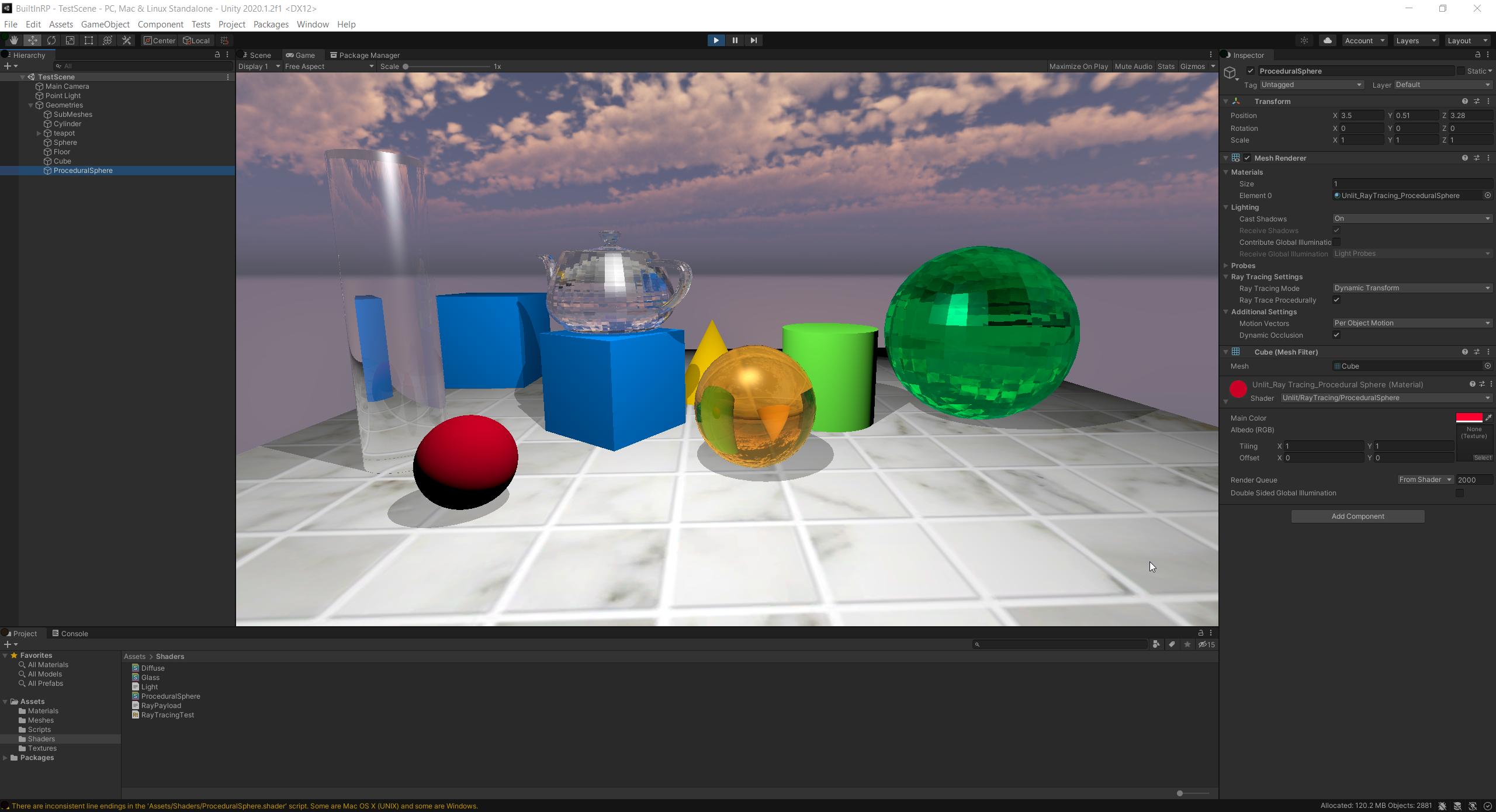
@turbid matrix fwiw a simple example project from the lighting team in Copenhagen using Unity raytracing API with the Built In RP! 🤫 https://forum.unity.com/threads/dxr-raytracing-effect-from-scratch.794928/#post-6266142
Unity Forum
Hi,
I am trying to simulate a simple lidar scanner with DXR. I am running this in a custom pass volume. The problem I have is that the closestHit...
 iron flame
https://theslidefactory.com/see-through-objects-with-stencil-buffers-using-unity-urp/
I want to create holes on objects like this. How can I do in HDRP.

Learn how to set up a Unity project with the Universal Render Pipeline (URP) and then add stencil buffers to create a see through objects effect.
turbid matrix
custom pass is easiest way to get customized stencil pass, technically you could also make custom hdrp shader that has stencil pass tailored for your needs
latter case is kinda pain as you'd have to do it again every time HDRP shader setup changes
totally another thing: https://www.youtube.com/watch?v=qqomQNsLdjA

Streaming Virtual Texturing optimizes the use of graphics resources to improve the quality of your 3D projects. Learn about the significant advantages this texture-streaming technology offers when using many high-resolution textures.
Speaker:
Aljosha Demeulemeester, Graphics ...
iron flame
@turbid matrix thank you.
 main rune
Anyone got a clue why Graphics.DrawTexture() isn't doing anything?
I've got it running in a function called from the RenderPipelineManager.endCameraRendering event so it should be rendering last afaik
main rune
Using GL does fuck all too
I'm really confused - is HDRP just completely incompatible with any of the existing API?
Graphics.DrawTexture(new Rect(0, 0, 5000, 5000), Texture2D.redTexture);
this just doesn't do anything, though it runs
broken lichen
Do you see it in the Frame Debugger?
main rune
It does seem to be there
But doesn't change the visuals at all
Though I am far from proficient with anything involving technical graphics

This appears to be it
broken lichen
I think the issue is that HDRP draws to a render texture which eventually ends up on screen, but this DrawTexture is going directly to screen and not this render texture
I would have assumed that drawing anything directly to the screen at the end would always mean you'd see it
But it's possible that HDRP is drawing its render texture to the screen some point later, after your draw call
main rune
I think you might be right? it's using a bunch of different render targets
I have no idea what to do with that info though unfortunately
broken lichen
You'd need to somehow get that draw call inside the HDRP render loop
main rune
Can't you change the target of a graphics draw?
broken lichen
You can. In your case, you would call Graphics.SetRenderTarget before the draw
main rune
Ah but I don't have a reference to their RT
broken lichen
Yep, that's the problem
turbid matrix
it'll get better once you stop treating it like it's the old renderer
to word it differently, if you try to force it to same mold with old tech, you are not going to have a particularly good time
main rune
Aye, sure. But there's no information anywhere on how to perform similar functions
All I want to do is draw a debug square on the screen
That was trivially easy with the built-in renderer
And nigh impossible with HDRP, seemingly
turbid matrix
official debug draws work the same way as on old setup but they obviously don't work in the actual build if that's required
I don't know if you can do like direct draw on screen with HDRP but you could put the thing directly to RT and display it on screen I suppose
could push the data on screen for example on custom PP pass or custom pass
so yeah, that would be a lot more complicated than just telling something to draw few lines
main rune
Yep
Surely surely it can't be that hard
HDRP is poorly documented, with barely any community support
So I wouldn't be surprised at all
eternal laurel
Hey I came in here to ask how one would go about drawing to a custom render texture in HDRP and you guys are already talking about it cool. I want to make sharpies like in Alyx
turbid matrix
@eternal laurel CRT works as is on HDRP but you can't use HDRP shader graphs to create the CRT shader itself
you can use same crt shaders as before
since CRT rendering is not tied to HDRP in any way (afaik anyway), even the shader snippets on this page work as is: https://docs.unity3d.com/Manual/class-CustomRenderTexture.html
you'd then use the generated RT with HDRP shaders for whatever you needed it for
there are few alternatives you can use to create CRT shaders today.. either old school shader lab or use Amplify Shader Editor and it's CRT shader template to author CRT shaders
in addition, in past at least URP's unlit shader graphs generated shaders were compatible with CRT but I haven't tested that recently
that last case used to be really tricky to get working with HDRP mainly because HDRP used to overwrite the PBR Unlit SG with HDRP variant automatically, so you could only ever use shaders that were generated from SG and not the SG itself. this might not be an issue anymore with shader graph stacks on SRP 9.x+ as you should be able to target the shader generation for URP specifically
actually, you meant like custom RTs as in just some random RT and not the CRT functionality?
but I can imagine that you could use CRT especially for that sharpies use case
eternal laurel
@turbid matrix wait the snippet from the docs works? Oh and thank you for the detail answer. I tought that CG shaders dont work at all on HDRP. At least I remember that being the case.
turbid matrix
snippet on the docs should work as is yes
CRT is special case, you just treat it same as before
eternal laurel
damn that is weird. I remember I had to re-write a bunch of cg shaders to make them work in HDRP. Most of the time it was as basic as changing it to HLSLPROGRAM. Well I guess I will try to make a sharpie tomorrow and share what I did.
turbid matrix
well I don't think CRT even uses HDRP, hence it works like before
this isn't the case if you render anything WITH HDRP
eternal laurel
What do you mean? I can still feed the custom rt into a lets say shadergraph that will then render with HDRP right ?
turbid matrix
yes
only the material you use for actually rendering INTO custom render texture needs to be nonHDRP setup
whatever you do with the generated render texture is up to you, you can feed it into HDRP SG just fine
for example, if you take the CRT shader from this sample https://github.com/keijiro/RDSystem and make a custom SG that shows it on screen, it will work

(I've done that in past when testing this)
eternal laurel
Thank you so much. And man Keijiro always does cool stuff haha
I wonder how Valve did it in Alyx
turbid matrix
I don't really know the scale they had for it there, like could you draw on any surface and would they persist?
in theory, they could have used some procedural virtual texturing to handle all that data
eternal laurel
nah it was specific surfaces First thing I tried
turbid matrix
Unity will have PVT support in the future
I think the API is on Unity core already but not in SRPs
streaming virtual textures work already but their source data need to be prepared ahead of time in editor so that wouldn't help you
anyway, for specific surfaces, you'd just use raycasting to figure out where in the UV space you draw the line and use CRT to fill that data there
it would make it possible to use about any shape even as long as the object can use nonconvex mesh collider so you'd actually get the raycast to return proper UV coordinate
well.. actually I haven't checked if Unity exposes enough things for the latter, I know you definitely can do that in Unreal
eternal laurel
yeah that was my plan. A raycast hit from a mesh collider can return texture coords
turbid matrix
yeah I just saw it here https://docs.unity3d.com/ScriptReference/RaycastHit.html
there's first two texturecoordinates given for you even
eternal laurel
yep It's going to work I was just confused on the CG shader in HDRP lol 😛
turbid matrix
in theory, you could also use decals for this but I dunno if it would help much
basically with mesh decals, you wouldn't need special materials for the surfaces itself but the surface would need to be flat for it to work, or you'd need to have object specific mesh for each mesh decal
(basically trying to say that you'd need to use mesh decals and not decal projection for this type of usage)
eternal laurel
I'm not sure how you will represent the sharpies path with a mesh decal.
turbid matrix
oh I meant that you'd really treat it like with any mesh, you'd just be able to use mesh decal to outputting the CRT on top of the original mesh
but yeah, it may not make things much easier
idea here was that you wouldn't need special shader/material for the normal surfaces, only for the mesh decals that you spawn when needed
could gain some extra freedom with that approach
I now talk about mesh decals specifically, like render decal directly to mesh and not project it (projection would be really difficult)
eternal laurel
ahhh use the mesh decal with the generated CRT to "draw" on any surface. I get it
turbid matrix
yeah
you'd still be limited by the decal size or would need to spawn more decals and CRTs for larger coverage
eternal laurel
yeah. We got the idea today and I think we only need it for a book, or maybe some pieces of paper. It's not a central gameplay feature or anything, just a would be nice to have.
 last grove
This is a dumb question but how is my C++ knowledge gonna help me in anyways for Unity developing?
I know ofc all computer fundamentals are the same but still
just in a more practical way saying
I see a lot of Unity dev positions on the market requires C++ skills, does that mean they must have the source code license?
Or there is some other ways of using C++ in Unity that I'm not aware of
main rune
I don't believe Unity ever releases their source
Nor can you use C++ in Unity out of the box
C++ could be used for a client-server model, maybe? but it seems unlikely that it would be performant or easy to work with for Unity
@turbid matrix Got any ideas for how you'd go about implementing the texture -> RT -> screen process? I'm not familiar with it
 modest valley
I imagine the in progress 2d lighting render pipeline doesn't have a system for dynamic shadows? :(
 main rune
How can I license or use Unity's source code?
We license Unity source code on a per-case and per-title basis via special arrangements made by our business development team. As this can be quite expensive, we do not generally license source code to smaller operations, educational institutions, nor to companies in countries which do not have adequate legal intellectual property protection.
Neither or us are right
turbid matrix
@last grove this is totally wrong channel for this discussion :)
last grove
@main rune that literally means "you can buy it" you dumbass
 true zealot
!warn 529859562090528780 do not insult other community members.
 hoary starBOT
 Naraku#6959 has been warned.
turbid matrix
I imagine the in progress 2d lighting render pipeline doesn't have a system for dynamic shadows? :(
@modest valley what do you mean by this? they have shadow casters
waxen lantern
@last grove i replied to you in #archived-code-general since it's not to do with render pipelines
modest valley
Do they?
I couldn't figure out how to create shadows
I watched some tutorials with it and none of them mentioned it
Is it a component you can add to your sprites? How does it work?
turbid matrix
 buoyant bluff
Anyone know why my black material is crazy bright?
 long wagon
did you leave post processing bloom turned on?
buoyant bluff
I don't have any post processing
Only thing in the scene is the model and the camera
 cinder roost
i just opened my first HDRP project. can i delete the assets included or are they part of the rendering pipeline?
 rich spade
you could delete, but you may want to use them as a guide while you get to grips with setting up HDRP.. when you are confidant, use your own and delete rest
 limber hemlock
hi ! does anyone know if there's a way to disable frustrum culling on certain objects only ?
to prevent this kind of issues.. :(
(using URP)
 tight hazel
Hello i have a problem with my terrain tree leafs, they dont cast shadow to the terrain. Maybe someone here can help me.👀 (using URP)
sand saffron
hi ! does anyone know if there's a way to disable frustrum culling on certain objects only ?
@limber hemlock you can't disable culling, but you can manually change the mesh's bounds from script (see Mesh.bounds) so it is not culled.
long wagon
@tight hazel Don't cross-post
tight hazel
@long wagon sorry dont know which channel matches to the post
long wagon
Pick the most appropriate one. You can always repost later in another.
limber hemlock
@limber hemlock you can't disable culling, but you can manually change the mesh's bounds from script (see Mesh.bounds) so it is not culled.
@sand saffron thanks !
 violet nova
So I removed my previous posts here because I got a bit further, but I'm COMPLETELY stuck and have been for 2 hours now. I have a mesh on layer Mask, and I want certain things to only visible when they are under that mask. I was following an old tutorial using Lightweight Render Pipeline, but despite it still should be working, it's not. The things I want to render only sometimes never do.
What is wrong here? Both Opaque and Transparent Layer Masks are identical, and are everything except for the mask and the things I want hidden when not under the mask are selected.
true zealot
Try using the Frame Debugger and see if that helps you figure out what's going wrong
violet nova
Frame debugger?
I don't even know what I'd be looking at. I've never used a rendering thingy before
true zealot
violet nova
This doesn't help me much at all.
true zealot
you should be able to see if your passes are being rendered
and how they are being rendered into the stencil buffer
violet nova
It just shows what's drawn on screen
And my things that aren't visible, but I don't understand anything about what any of the information means
true zealot
I've not done it before but I believe you can switch the render target to show the stencil buffer?
violet nova
It doesn't seem like you can change the render target
true zealot
In that case you could use RenderDoc to debug it (info pinned to #archived-shaders ) or wait for someone else who knows what they're looking for to come along later
violet nova
I hope they come sooner rather than later. I can do literally NOTHING further until I get this working
violet nova
No, that breaks it further
true zealot
Ah, that exposes another stencil write
violet nova
I don't even know if it's a bug or not because I have absolutely no idea what I'm doing. I'm just following a tutorial made for lightweight render pipeline. From all I can tell, the only difference is that LRP default layer mask was broken into 2 separate masks (opaque and transparent)
true zealot
It'd probably be worthwhile sending the tutorial
violet nova
Here's the one I've been looking at for this. https://youtu.be/CSeUMTaNFYk?t=1108 @true zealot

✅ Get the Project files and Utilities at https://unitycodemonkey.com/video.php?v=CSeUMTaNFYk
Let's make an awesome Line of Sight effect that interacts with walls, enemies outside the Field of View are not visible. Excellent effect for any sort of Stealth or Horror game.
Get S...
The only part that matters is where I liked and the end
true zealot
I have constructed it fairly easily, though in my version of URP there appears to be some annoying bugs
Ignore what layer names I'm using (just testing in a random project)
So I disable my mask and target layers (Objects = Mask, CollidingObjects = Targets)
I make sure that the objects I am rendering to both are using transparent shaders, ie. their render queue is in Transparent.
Particle shaders, Fade shaders, etc should already be in this queue
Then, I set the stencil values on the sub-asset scriptable objects!
Setting them through the main renderer seems bugged for me
and it constantly resets
then I have my random mask thing
and my target
violet nova
Does the mask need a material? That seems to be the only thing that's different so far
true zealot
It needs a transparent material, yes
violet nova
That's probably it. How to I add a material to the mesh?
true zealot
drag it into the material field on the mesh renderer
violet nova
And how do I make a material?
true zealot
violet nova
Ah that did it, kinda!
true zealot
Sounds like you can hopefully figure out the rest 😛
violet nova
Yeah, thanks much! The only problem left is why the mesh is black except for those objects now. How can I turn down the alpha of a material?
true zealot
That's a setting that'd be different per shader
it should be somewhere on the material, perhaps the colour, depends on what material you're using
violet nova
What shader would be best?
true zealot
You could just use the URP Lit shader, just change the surface type to transparent
then you change the alpha in the colour of the Base Map
violet nova
Ah that works! Thanks much!
limber hemlock
Why do I get way higher SetPass Calls when using material property blocks than when using instances ?
The batches count is also exactly the same :(
broken lichen
Are you using URP or HDRP with the SRP Batcher?
limber hemlock
URP, with the SRP batcher enabled
I made a post on the Unity Forums if you want more details : https://forum.unity.com/threads/whats-the-best-way-to-optimize-a-moving-pattern-like-this.1002007/
broken lichen
That's because the SRP Batcher doesn't really support material property blocks
The SRP Batcher shifts thinking from trying to reduce material variants to trying to reduce shader variants
It's smart enough to figure out and batch multiple materials that are using the same shader variants
But when you mix in property blocks, it seems to give up
 fierce viper
light tiles are acting a bit weird in directx 12 in hdrp. the directional light doesn't affect the zone outside of the punctual lights sometimes, causing blinking. is it a bug or is something wrong with my configuration? the lights per tile is well under 24 as seen in the tile debug
this doesn't seem to happen under dx11 or when the punctual lights are off
nvm it solved itself apparently after toggling auto graphics api on and off. its baking shaders rn tho
nvm its back now
whole fossil
guys, I am trying to port some of the incompatible shaders between HDRP 8.2 and 10.1.0, and since it is really not my thing it would be awesome if someone could advise me a bit. Sorry if those questions are dumb, but as I feel comfortable in C# that when it comes to shaders - I'm not 🙂
Besides: if you think that this should be in #archived-shaders - please let me know, but I think it is closely related to this channel purpose.
There are some details about migrating between 8.X to 10.X here: https://docs.unity3d.com/Packages/com.unity.render-pipelines.high-definition@10.1/manual/Upgrading-from-2020.1-to-2020.2.html But I am afraid that those aren't complete or my use case is different.
Basically, I would seek advice on how to tackle shaders issues, for example, I've got an error that states:
Shader error in 'Custom3rdPartyShaderName': use of undeclared identifier 'GetSurfaceAndBuiltinData' at Packages/com.unity.render-pipelines.high-definition/Runtime/RenderPipeline/ShaderPass/ShaderPassPathTracing.hlsl(74) (on d3d11)
Why this leads me to the ShaderPassPathTracing.hlsl? I see that in this Custom3rdPartyShaderName there is a function GetSurfaceAndBuiltinData defined? How those functions are called? Is there any equivalent to the stack trace or something that would lead me to the cause of the problem? Unity Console doesn't print any info that I could use. Basically, I don't know how to start
turbid matrix
@whole fossil you use / need pathtracing?
turbid matrix
I mean if you don't use that part, you could probably just comment out the offending lines and be done with it
pretty sure you'll always get errors for all shaders currently in project regardless if you end up using them or not
I think you should be still be able to build and use normally if the error is on shader code but obviously that specific shader would remain broken
whole fossil
yeah, but I am trying to understand those things and be able to at least adapt them between versions. This is why I am asking for any tips how to read, analyze and process shader code. I simply don't know where to start looking for info
turbid matrix
if you really want to fix the error properly, it's always a bit of a detective work, either finding the notes on upgrade (but you won't even find these if you are early adopter on non released stuff) or just trying to figure what the API changed to by comparing between the old and current implementations in the HDRP etc
once you do it a bit, you'll get faster on finding the required bits but it can still be quite time consuming depending on the scale of the change
whole fossil
another example can be
Shader error in 'AnotherShader': undeclared identifier '_BlendMode' at /Users/username/Projects/Unity/ProjectName/Library/PackageCache/com.unity.render-pipelines.high-definition@10.1.0/Runtime/Material/Material.hlsl(58) (on d3d11)
and what I cannot find to understand is that: what function called that? I am seeing a lot of _BlendMode variables defined, but somehow it fails. I've read that the keywords regarding to blendmode were removed in favor for variable, but something still missing
turbid matrix
for example when I upgrade shaders for my own use, I don't even try to mirror all changes (unless it's trivial), instead I just focus on parts that are actually blocking issues
well, you could try to find where _BlendMode used to be used in stock HDRP shaders / SG templates and see what they have there now
this would be so much faster if github search actually let you search specific versions 🙂
whole fossil
I see. I'll try to dig deep into the source of the pipeline itself - but is there any way to tell what was the path that lead to calling the 58 line in Material.hlsl?
(I am having some troubles understanding how things work in general)
turbid matrix
I'm going to go and assume that in your case the shader that got the original error just included that hlsl file
so you should be able to see the include for it by simple search
you could have some longer chain of includes there I suppose
whole fossil
yeah, you are right. it is by a simple #include
 ebon yarrow
I added a space cubemap to the HDRP Physics Based Sky. And now my floors (inside closed buildings) are reflecting it lol. How can I fix this? If you need screens, let me know I can post them up
turbid matrix
can't you have like local reflection probes indoors ?
technically you could override the sky setup while at indoors too via additional volume (but it could get funky if you can actually look outside from the windows)
 mint rivet
i just started using hdrp in my project, but for some reason most of my materials show up in game as gray
ebon yarrow
Oh yeah, I had issue where all my materials were just flat white when I started my HDRP. I tried to find the reason but there where so many bells and whistles, I ended up throwing it away. Starting a fresh project (just standard, NON-HDRP), then install the HDRP package. And instead of clicking "Fix All" in the wizard, I went through each step and manually set it up. And now it works, and because of that I got a deeper grasp of the HDRP environment overall.
While I was ssetting it up, I noticed a behavior that triggered that very issue on my end. It was in the Sky and Fog Volume gameobject in the scene, in the Volume component, under the Physically Based Sky section in the Miscellaneous category where the Intensity Mode was set to Exposure and the Exposure value being high caused everything to be well...flat white.
mint rivet
that helped a lot, i also figured out that my directional light was really dim
ebon yarrow
👍
ebon yarrow
I ran into shadow flickering on my HDRP setup. I looked around online for solutions, and there seems to be a suggestion that the shadow map resolution or the lightmap resolution is too low? Defaults to 512 or something. They said that they set it to 2k and it fixed the issue. I crawled all over the lighting settings and HDRP settings, and I can't seem to pinpoint where that option is to up the resolution? Can someone help me find it? Or does anyone know what the issue is with the shadows flickering?
I found that if you go to Lighting Settings -> Environment (HDRP) and set the Static Lighting Sky to None It stops flickering. But of course the ambient light disappears too.
If I enable it back on (Using the Physically Based Sky) and in my Sky and Fog Volume change the Visual Environment -> Ambient Mode to Dynamic it also gets rid of the flickering.
Is there a way to fix the flickering while keeping Ambient Mode to Static? Trying to keep my overhead low.
Oh I also found out that this flickering happens inside a Reflection probe. Seems Static Ambient mode is conflicting with Reflection probe. Maybe some settings I should be aware of?
ebon yarrow
Sorry for all this writing. But I think I found the solution, hopefully it doesn't backfire later on. I just lowered the fade distance of the probe down to 10 and it stopped flickering.
turbid matrix
@mint rivet with HDRP, I'd always just run HDRP Wizard once as first step after installing it
after everything is properly setup, if you make a new scene, in older Unity versions you get HDRP compatible lighting on the scene out of the box, with newer Unity versions you get to pick scene type for your new scene from a menu
I know you said you figured it the lighting out but just throwing that out there as it may not be obvious to people
the gray look is kinda issue coming from HDRP default settings assuming you have high intensity lighting on the scene
so you either need to have that high intensity lighting or dial down the exposure and sky setup
 fallow briar
would it actually be possible to have 2 Render Pipelines at the same time?
LWRP and URP... because i got some 2D Elements and some 3D elements which both could get a nice touch of lightning
 winged prairie
URP is able to show 2d elements just fine
fallow briar
then i musst be doing something wrong, because either my 3D lightning works or my 2D lightning works
true zealot
I would assume that if you were using a 2D renderer then it wouldn't do the 3D stuff
but you can have cameras with different renderers iirc
so you could have different stacked cameras for different elements
fallow briar
so like showing the 3D stuff only to Camera1 and the 2D stuff only to a Camera2 which got the Rendering for 2d Lights?
and then merging both?
true zealot
Yup
fallow briar
that sounds kinda complicated 😄 but thanks now that i know its possible i can continue to try
fallow briar
thats what im currently doing
winged prairie
mixing actual 3d and 2d unity constructs sounds very messy 🙂
fallow briar
trying some unique style between mixing 2D and 3D objects, thats with the 2D lightning
yeah like having all items you can interact with as kinda "billboards" and structures and stuff in 3D ... not sure how it will look like but atleast its fun trying 😛
winged prairie
then make them cards/billboards instead of thinking of a 2d pipeline 😄
fallow briar
but 2D lightning seems sooo powerfull 😄
winged prairie
what do you find that you have in 2d but not in 3d?
fallow briar
uhm actually thats a good question... i viewed the tutorial and some things catched my eye but yeah that could also work in 3d..
buuuut i'd have one more question (and im not sure if im right here) buuut:
the one thing is ofc a 3d Model and recieves the shadows, but what shader would i need to use for the other part (a Mesh with currently Unlit/Texture to also cast the shadow on it?
fallow briar
yeah ofc, but there is no Lit/Texture, so would i need to write my own Shader for that ?
winged prairie
Lit supports a main albedo texture.
https://docs.unity3d.com/Packages/com.unity.render-pipelines.universal@7.1/manual/simple-lit-shader.html "Base map". Then enable Alpha Clipping
fallow briar
Hmmm cant seem to get any light on the object... but actually i have like 0 clue what im doing right now , i guess i have to understand the material/shading part a bit more and read some informations about it
winged prairie
Read up on how materials and rendering works. And then read how it works in unity. Might be .... enLIGHTENING.
 glad pecan
hey gang, i have a very simple URP question
how do i create a material with transparency where the opaque parts are 100% solid / opaque?
this blue "crystal" object in foreground has a black and white diffuse map. I would expect the white parts to be SOLID and the black parts to be see-through. The black/alpha parts work fine, but i cannot get the white parts to be 100% solid.
here is the material, i'm using Particle here, but i've tried the standard URP/lit and 'simple lit' also....all behave the same. Any help in advance appreciated thanks! Oh, version 2019.4
(dang should have posted in Shaders)
 icy night
first thing id look at is changing the blend mode
additive will always add on what's behind it, so it'll look transparent
glad pecan
right, of course i tried all the 'blend modes', thanks
 cursive tulip
make it opaque and enable alpha clipping
@glad pecan
if that shows black spots go to the texture file and set alpha source to grayscale
glad pecan
okay, i'll try that. docs say that 'alpha' is only for 1-bit "cut out" effects; but maybe the 'source to greyscale' on the map itself will give me what i want. thanks!
 mighty aurora
Is there like.. an up to date list on what HDRP doesn't support so we can decide if it's worth upgrading? lol
 zinc jay
eternal laurel
zinc jay
eternal laurel
Wait are Light probes just flat out broken now ?
iron flame
I think we finally get AAA quality SSR at Unity.
 drifting vault
@iron flame no RTX? 😄
iron flame
@drifting vault I would like to show the difference, but I couldn't activate Ray Tracing. I'm using Unity 2021 alpha and github HDRP 11.
drifting vault
oh HDRP 11. I was see only HDRP 10.1 on UNity 2021.1a04
whole fossil
iron flame
@whole fossil The reason for this error is I did not increase the sampling rate too much to increase the performance of very high resolution SSR.
128 sample
32 sample
turbid matrix
sure it does look nice when you don't move the camera 😄
due to it's denoiser not really working in motion is making it less AAA quality IMHO
of course we could still have use cases where it wouldn't straight up break but it's pretty bad on larger reflective surfaces
 light copper
Anyone here knowledgeable about HDRP Custom Passes?
I want to try and utilize a custom pass to recreate PS1 style texture distortions.
 mild minnow
Don't know about custom passes but you must disable perspective mapping.
light copper
@mild minnow I've been trying to do that via custom passes in order to change the UV tiling depending on how far the texture is from the camera. I have a script that works in the standard render pipeline, but converting it to HDRP has been a real pain.
Pastebin
Pastebin.com is the number one paste tool since 2002. Pastebin is a website where you can store text online for a set period of time.
Here's the code I'm trying to convert roughly, although mostly I just want the vertex snapping, affline texture mapping, and fog / polygon culling.
 weak oasis
Anyone one knows how to fix "2D sprite disappearing" when placed upon transparent objects and added a material?
 dawn sorrel
umm
why setting low tex size here helps https://i.imgur.com/qHbe1q5.png reduce the build size
but leaving it at default, and setting low size in PlayerSettings/Quality doesnt do anything?
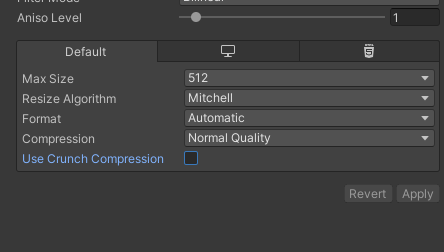
is there no way to set it in quality for all textures?
fierce viper
@iron flame is it scholastic ssr?
iron flame
@iron flame is it scholastic ssr?
@fierce viper no
fierce viper
oh
does it at least look good with slightly rough surfaces? because for me at least the screen texture gets blurred but the reflected object edges don't
looks like it does on the screenshot tho
iron flame
still very noisy, bad performance but looks smooth on rough surfaces.

Unity HDRP 11.x SSR test.
RTX2070 4K 30FPS
#madewithunity #unity3d #hdrp #unityforfilm

 Twitter
·
Twitter
·


looks great but at 4k it drops down to 30 fps. it takes a few seconds to accumulate rays for this clear view.
 atomic wing
Most games drop to 30fps on 4k actually @iron flame, not just unity but unreal & other engines too. It's because it's just about double the pixels for the graphics card to have to render.
iron flame
Most games drop to 30fps on 4k actually @iron flame, not just unity but unreal & other engines too. It's because it's just about double the pixels for the graphics card to have to render.
@atomic wing SSR off 60 fps. Rtx2070
So I'm waiting for half resolution for ssr
then opening ssr wouldn't cause such a big fps drop
rich spade
@dawn sorrel fixing the max size on the import limits the texture size regardless of quality settings, thus reducing build size. While quality settings are designed to be selected by the user and therefore will need to have the highest quality available even if it's not currently used by the user.
drifting vault
@iron flame HDRP 11 was installed via github repo?
 frigid swift
how can i get rid of the fog in the game view? this city facade isnt visible (URP)
im using the default procedural skybox shader with modified color and exposure settings but none of them are affecting the fog
is this a lighting or render pipeline question actually
never mind
i found it in lighting settings
disregard this question
 glass stratus
can someone help me I cant seem to get transparacy to work on materials unity universal render pipline
iron flame
@iron flame HDRP 11 was installed via github repo?
@drifting vault yes.
dawn sorrel
Anybody know why the poly count is displayed wrong? I'm not sure if I can believe it's 62
 clever drum
is it possible to have fog everywhere except around the player so that they can only see clearly up to a distance? someone suggested adding a volume to the player in my forum thread (https://forum.unity.com/threads/fog-except-around-the-player-hdrp.1004751/) but it didn't work
kind of like the maximum distance parameter for the fog override except I want a minimum distance
this in HDRP
clever drum
how do you mean?
dawn sorrel
A marker on top of a player, for example a white dot
clever drum
ok but what then?
dawn sorrel
Then you could see where the players are in the distance
dawn sorrel
Ah, sorry about that
clever drum
but not around the player
as if the player magically dispelled it
no problem
kind of like a "fog of war" effect
imagine a labyrinth where you can't see more than 5 meters in front of you because there is magical fog that prevents it
kind of like that
really it's the inverse of the maximum distance parameter
also regarding your question I don't know why this happens but HDRP seems to display a much lower tri count for some reason
before I changed to HDRP the stats said my scene had 600k tris, then it dropped to 30k-100k after changing to hdrp
dawn sorrel
Hmm... so you are using HDRP
I'm sorry, Im not that experience with that
Posting your question on stackexange could help
clever drum
thanks, I posted on the forum
I'll try stackexchange tomorrow if I don't get any more replies
whole fossil
is custom pass broken in hdrp 10.0.0-preview.27?
all I am getting is black screen even when using empty templates generated from create menu
clever drum
what could cause this "Shader properties can't be added to this global property sheet. Trying to add [blank]" error after changing to HDRP? I keep getting it while still in the editor and it compiles normally, but I get literally hundreds of these errors if I wait long enough. There are 12 blanks, some of which are: _RefractionTex and some variations, like _ST, _TexelSize, _HDR, etc. and GrabTexture and some variations such as GrabTexture_ST, TexelSize and HDR
Alt tabbing seems to prompt these errors
There are 12 of them, each seems to occur 5 times after alt tabbing
 winged quarry
Hey, I asked in #💥┃post-processing but got no help there. Here's my issue and I have no idea what's going on. My post-processing turns off once I hit Play. I'm not messing with it in code at all. The code is only for moving and shooting, so far. I am using HDRP. I can see the effects applied in the editor, but the minute I hit Play, everything turns off, even the skybox darkens... Any ideas or suggestions? Thanks a lot!
 mystic pine
I created hdrp project and there are many folders, which ones are safe to delete? https://prnt.sc/vir887
 whole fossil
afaik animations, art, scenes, scripts, tutorialinfo & readme can be removed if you don't need any samples
mystic pine
I've removed all of them and it worked without problem in 2020.2 but when I delete everything in 2020.1 version it gave errors just fyi
 cobalt idol
in the public enum RenderPassEvent, what do the integer values correspond to? for example, BeforeRenderingTransparents = 450?
I'm looking at URP in particular
I thought this might coincide with the numbers used for priority /Render Queue in the material property inspector, but they don't seem to
clever drum
could someone please help me out with this? https://forum.unity.com/threads/fog-except-around-the-player-hdrp.1004751/ I'm trying to have an area completely devoid of any fog within a large area filled with dense fog to create a fog of war type effect that always follows the player character

Unity Forum
Hey guys!
What would be the best way to have fog everywhere except in a circle around the player? My intention is to have it work kind of like a "fog...
cobalt idol
@clever drum You could make a transparent material which blends with scene color based on depth, and apply it to a plane located some way above the ground, as used for volumetric fog. Then, have it so you attenuate the blend for world space positions near that of the player
clever drum
hmmmmm not sure I understood. So I would have a transparent plane following the player? And the global fog set to the way I want it? I don't understand how this plane would get rid of the fog
cobalt idol
the plane is the fog, but you play a trick in the material to make it appear to have volume - like here: https://cyangamedev.wordpress.com/2019/09/25/cloud-shader-breakdown/

Intro This cloud shader is applied to a flat subdivided plane. The vertex positions are offset vertically based on layered noise, where each layer is moving at a different rate over time to simulat…
you basically take that approach but make the clouds vanish around a specific world space position, which you set to the player's location
clever drum
ohhh cool, thanks a lot! I think this will work
what about for irregular terrain, though? could I possibly have 2 terrain objects, one being the actual terrain and the other just to use its shape for the fog?
cobalt idol
yeah that should work
clever drum
awesome! thank you very much
 past onyx
Quick question
Dose anybody know if stencils are still working on deferred rendering ?
The docs say that the 5 bit isn't used by unity
But when I set it to the 5th bit (32) it's still being ignored
 edgy tree
@past onyx there are two files inside HDRP package. One is called HDStencilUsage.cs.hlsl and has these two lines inside
#define STENCILUSAGE_USER_BIT0 (64)
#define STENCILUSAGE_USER_BIT1 (128)
and then there is HDStencilUsage.cs
///<summary>
    /// Stencil bit exposed to user and not reserved by HDRP.
    /// Note that it is important that the Write Mask used in conjunction with these bits includes only this bits.
    /// For example if you want to tag UserBit0, the shaderlab code for the stencil state setup would look like:
    ///
    ///         WriteMask 64 // Value of UserBit0
    ///         Ref  64 // Value of UserBit0
    ///         Comp Always
    ///         Pass Replace
    ///
    /// Or if for example you want to write UserBit0 and zero out the UserBit1,  the shaderlab code for the stencil state setup would look like:
    ///
    ///         WriteMask MyWriteMask // with MyWriteMask define in C# as MyWriteMask = (UserStencilUsage.UserBit0 | UserStencilUsage.UserBit1)
    ///         Ref MyRef // with MyRef define in C# as MyRef = UserStencilUsage.UserBit0
    ///         Comp Always
    ///         Pass Replace
    /// </summary>
Maybe this helps. :)
I am on the 2020.2 but I'm pretty sure it's the same for 2018+ or at least 2019+
edgy tree
I think the documentation on deferred rendering only applies to built-in render pipeline
Which one are you using?
past onyx
Built in
ebon yarrow
HDRP Material/Lit -> Type Anisotropic. Having a hard time getting the light to bend around the anisotropic angles. I have an anisotropic map (which is using the Red channel), made it from Substance Painter's Anisotropic Angle channel. In SP, it works fantastic. Looks very realistic. But in Unity, you can see the anisotropy, but it's so weak (even with Anisotropy turned up all the way to 1) and it doesn't bend light from Light sources (Point or otherwise), it only bends light from emissive/reflective materials. So when light bounces off it, it "overwrites" the effect essentially. Anyone found a solution or know of anything I might be missing to make this look right?
Maybe some global HDRP settings I need to consider?
 summer arch
I imported Book Of The Dead from Unity, in an empty version 2018.2.20, it did not have any errors, however when I clicked on load book of the dead environment, this thing loads up. And btw, I did this in HDRP, and tried restarting Unity a bazillion times.
When I select an area of it though, it is still there (see the linings).
Any fixes
turbid matrix
https://github.com/Unity-Technologies/Graphics/pull/2629
Add binned lighting (a.k.a. Z-binning) technique to the HDRP. Binned lighting replaces both fine-pruned tiled lighting (a.k.a. FPTL) and clustered lighting techniques. Binned lighting is essentially tiled+.
summer arch
Ok
@turbid matrix , How to enable it though
Since I searched for Binned Lighting, but Google automagically changed it to Baked Lighting.👀
 fallow dome
Hey guys, I have a question. I working on a open world PC game, what
benefit I could see from HDRP or URP compared to built in standard pipeline?
Project is in the beginning phase, so I wat to make proper decision.
rich spade
@fallow dome standard is probably a good starting point, URP and HDRP will give you access to newer features like shader graph and vfx graph. HDRP will limit your target audience by having a higher specification requirement. URP will be faster and usable on a wider range of devices.
This is generalizing a lot, also HDRP requires more time to master and requires a lot more setting up to get scenes lit correctly etc.
The new render pipelines are evolving still getting new features, this can limit store assets as not all producers keep up to date and it's not surprising if they don't support beta versions at all.
So depending on team size, skills and a whole host of other variables you can make the correct decision for your situation.
Remember if you go with standard you can always migrate to URP/HDRP later, ensure backup of project on a git type platform to avoid costly issues and or multiple branches to support different renderers.
fallow dome
@rich spade I am solo developer, so it sounds like standard is way to go for now 👍
I have some problems with lighting and terrain texture, but I will probably figure those out without HDRP
I mean they are working, just could be nicer
current example
whole fossil
guys what is the fastest way to update a texture that is pretty large, ie 1024x1024 or higher in hdrp? I've read somewhere about custom pass rendering depth only? basically i am trying to update a mask for a fog of war (areas - visible, visited and not yet discovered). currently i am using traditional argb texture with setpixels32 (setting as few pixels as possible) but I am wondering if there is any possible faster approach?
rich spade
@fallow dome It's not that bad, not triple A but no dogs dinner either 😉
I dare not share my current work in progress 😆
I'd probably just concentrate on getting the code sorted myself but I always end up taking breaks to improve visuals or try new ideas. so I know it's not an easy thing to do, there are some nice assets on the store which are not too expensive that help with terrain and vegetation. Post processing can help too, SSAO for example can help with shadow and depth.
I'm also probably in the minority of those who thinks URP lighting is better than standard, so maybe I can't comment too much 😄
fallow dome
you sound reasonable, one of a few who weighs the time consume factor and complexity when deciding which one is better
props to you
and glad that you said it was not that bad, since there is so much work remaining regarding visuals
rich spade
@whole fossil I like the idea of a custom RT, you could render a layer of materials to a secondary camera with a delayed update. I'd try to limit updating it as much as possible. if you can get away with scaling / half res it might be quicker too.
fallow dome
oh and it looks so much better when grass is actually moving with wind, not visible on picture ^^
rich spade
that goes without saying ^^
turbid matrix
How to enable it though
@summer arch by waiting for Unity to first implement the this fully? 😄
it's still early days and like seen on that PR description, there's still ton of work to be done
glad tartan
So Binned Lighting will be less expensive than FTPL but has a lower Z resolution than FTPL
 shut haven
Is anybody else gettin' tons of errors while downloading URP?
 royal willow
How does the performance of URP compare to that of the built-in render pipeline for 2D sprite-based games?
 bold totem
Guys is it possible to use two different render pipelines in one project for different scenes? Maybe someone know here :)
broken lichen
@royal willow I doubt you will find much performance improvement there
Unless you for some reason have bad draw call batching on the built-in pipeline which the SRP Batcher is able to do better.
@bold totem I think it's possible, because you just need to switch the renderpipeline asset in GraphicsSettings
Which can be done at runtime
bold totem
Hm, so if I switch a scene it will not affect previos scene? Because, when you usually delete scripts or render pipiline settings, it affects other scenes for the same project, isn't it?
bold totem
Well, if you would write better one that combine two for example
And u delete older one that is not relevant anymore
bold totem
No
In my case, I created two projects with two render pipilines, one in standart and another in universal. I like both of them, but, because in my first project i enjoy halo effect on some objects, while I lose them when I switch to another render pipiline. In another project I created scene with shaders, but it is not supported by standart render pipeline
So I want to combine these two in 1 project but to run with two different render pipelines, because I want to save both shaders and some other aspects of scene nr 1
I know that HDRP supports both effects (halo and shaders) but have never tested
royal willow
@broken lichen Would more information about my game's visual style be useful information in making that assessment?
broken lichen
@bold totem I would highly advise against that. Stick to one render pipeline.
@royal willow I suppose so
royal willow
@broken lichen It's styled like a mid-80's arcade game. Fully 2D. Limited color palette. No lights. Post-processing effects to simulate a CRT monitor. Virtually all in-game graphics on one sprite atlas. Palette-swapping powered by a custom shader and a pre-processing script (outside of Unity) for the sprites; all sprites are R8-formatted, with the R channel being used as an index into a palette.
Also, targeted to run on a wide variety of platforms
bold totem
I just want to include all post processing, vfx graph and so on but i have no idea if my computer will be ok with HDRP @broken lichen
broken lichen
@bold totem You're just missing this halo flare effect in URP?
@royal willow I don't see a reason why URP would be able to run that better that built-in. Especially with no lighting, there's not much left to improve except batching and sorting, which built-in does fine for sprites as far as I know.
bold totem
Yeah, but besides that I saw that lights behave different as well, in comparing from standart renderer, which work for one scene but does not work same good for another @MentallyStable
broken lichen
@royal willow If you can, I would try to do the CRT distortion in the sprites shaders rather than as a post processing effect
Just means you'll have a much easier time porting to mobile
@bold totem Switching render pipelines, while technically probably possible, isn't a documented workflow or in any way recommended by Unity.
royal willow
@broken lichen I'm not skilled enough with shaders to be able to do that, but I'll keep it in mind. I'm mostly using something I bought on the Asset Store (I already checked, it supports URP). Worst case scenario, I can always exclude post effects from mobile. Thank you!
bold totem
🙄Well, that is not fun, maybe I should try HDRP, is it too demanding? Or? @MentallyStable
broken lichen
I've never tried it
 lost furnace
Can anyone please help me figure out how to delete one side of a cube mesh? I can't find a 'delete face' option anywhere.
Thank you so much!
waxen lantern
Anyone here knowledgeable about HDRP Custom Passes?
I want to try and utilize a custom pass to recreate PS1 style texture distortions.
@light copper the real issue here is HDRP is not aimed at being use for anything but state of the art and photorealistic / PBR physically based rendering. So you are going to have a much harder time making this work or finding resources from others on it. URP is really a better for PS1 / PSX playstation 1 style retro rendering as it is already simpler and easier to extend for NPR (non-photorealistic rendering.) You could also use a completely custom render pipeline, keijiro did a PSX style RP but that is quite old and probably is more work in the long run. Here is a relatively recently example of achieving this style for URP available for free: https://github.com/Kodrin/URP-PSX
 light copper
@light copper the real issue here is HDRP is not aimed at being use for anything but state of the art and photorealistic / PBR physically based rendering. So you are going to have a much harder time making this work or finding resources from others on it. URP is really a better for PS1 / PSX playstation 1 style retro rendering as it is already simpler and easier to extend for NPR (non-photorealistic rendering.) You could also use a completely custom render pipeline, keijiro did a PSX style RP but that is quite old and probably is more work in the long run. Here is a relatively recently example of achieving this style for URP available for free: https://github.com/Kodrin/URP-PSX
@waxen lantern
I'll definitely look into this. The real question is whether I can get a similar lighting setup working with URP. The big draw for me with HDRP was that I could get full volumetric lighting, which has a lot of appeal since I'm working on a survival horror game.
Oh, also, I managed to get basic vertex snapping working with HDRP using a custom pass, which got close to the effect I wanted, although I couldn't figure out how to include the lighting data within the unlit HDRP shader that gets generated for use with Custom Passes.
waxen lantern
@light copper cool, well and it's certainly not impossible to achieve in HDRP though you'd want a really good reason why you aren't using URP for this... as i'll take a lot more time and effort and end up with a result that won't support any lower end hardware as the performance overhead of HDRP is so high. and certain things that are more retro 3d like vertex lighting are just built into URP. something youl'll never get from HDRP without hacking it into oblivion
depends on what you are going for though.. if you want raytracing and PSX style effects on top then maybe you are on the right track
some anachronistic hybrid look of future and past
light copper
Mostly, I thought it would be interesting to emulate the feel of a PS1 styled game while retaining a lot of the graphical improvements that have come about over the years.
Low poly models, small textures, and obvious render abnormalities while having volumetric lighting and excellent post processing.
That sort of thing.
light copper
Still, might be too difficult to pull off. I've been hacking at HDRP for a few days now, and while it feels like I'm on the cusp of something, the HDRP code just does not want to work with me.
waxen lantern
Unity has officially stated HDRP isn't really designed for custom lighting or any NPR lighting, only PBR
so you're not crazy
it's by design
light copper
The code is just an impenetrable rat's nest is the problem.
waxen lantern
yeah that too lol
URP is not perfect but better in that regard
HDRP's goal is basically, just try and do what Epic/ Unreal focus on , in a render pipeline... URP for everything else lol
light copper
If there was proper documentation I feel like I could manage it. I'm most of the way there already. But the code just keeps throwing errors that I can't track down because no one has thought to outline what functions are defined where.
waxen lantern
HDRP extensibility is not great as they are just mad rushing to keep up with Epic so yeah it's a rat's nest
at least they are trying, but they are still lagging behind
Unity is trying to do all the things at once is the problem
compete in every market at every level lol
light copper
I'll maybe fork my project over tomorrow. See how URP and that shader you linked work out. Just a pain in the ass feeling like you're almost done but never quite reaching the end.
waxen lantern
yeah i feel you
light copper
I really wish Unity would just focus on maximum versatility and ease of use. They're never going to fully keep up with Unreal in the area of raw out of the box looks. But they don't need to.
waxen lantern
yeah, i generally agree there. maybe in the long long term it will work out but right now it's just all over the place
light copper
It's just so unfocused and it's hurting the community.
Hell, the fact there are multiple render pipelines all being actively used and developed is an issue.
waxen lantern
yeah definitely i mean i get the reasons behind having multiple render pipelines but that should be largely abstracted and portable.. which is apparrently what they are working on now, making it easier to go between RPs but i feel like it isn't going to feel decent for like 5 years lol
light copper
And that's if they don't end up just depreciating a bunch of stuff.
waxen lantern
but in 5 years the landscape will have changed so much a lot of it will be legacy garbage
e.g. all platforms will be gpu compute capable, and all these old hacks and forks to support old hardware can just disappear forever
 pseudo orchid
What settings should I have on my particles so the are rendered in lit scenes im using LWRP
2D game
 random jackal
Whynot URP?
 keen glen
maybe started his project before URP was there
 carmine ermine
I have similar question. Particles are not rendered when there is transparent object behing or nothing. I tried enabling depth texture in render settings did not work. I am using URP
keen glen
Does your camera render in front of the particles? Do the particles get rendered by the camera?
carmine ermine
particles are only rendered when the chest is behind them . I render to RT and use RawImage to show it on ui
this always worked in internal
When I change materal other then URP/Particles It is working...
keen glen
So if the sprite of the box is behind the rendertexture, it renders in like a mask of that box?
carmine ermine
the chest is 3d but somehow like that. You can see it in image i sent earlier
keen glen
Can you just for testing put plane behind the particles? I guess, your rendertexture or something is having any depth info and therefor cant display the particles
 bright jetty
Hey guys, I have a problem on a new URP project. I have only 1 default directional light, and when I change vertical angle of my camera (both in editor view and ingame camera) the light intensity on materials changes aswell. Here's the small example: https://gyazo.com/a586744caf489338bbf75316fea1aee1
Any ideas?
UPD: Okay, that was Fog in Environment tab.
keen glen
@bright jetty you sure its light or just a reflection?
Because, if you check your player object, there is nothing changing light wise or in the shadows. I guess its just a big reflection on your ground surface
bright jetty
Yeah, it was fog
carmine ermine
Can you just for testing put plane behind the particles? I guess, your rendertexture or something is having any depth info and therefor cant display the particles
@keen glen I did it before the particles were visible, when material was opaque. When I turned transparency, they acted like mask and i could see throught them behind the wall.
keen glen
I think something with your camera is going on. Maybe the background color is transparent or what not. Or your particles are using a shader, that is not feeding the depth information.
carmine ermine
That is exactly what i am thinking but I don't know how to fix this.. Camera background is unitiliaze. and using default urp particle shader
keen glen
Can you show your camera inpsector?
keen glen
yeah, as I mentioned, the standard particles do not feed any depth, I guess this was the issue.
dawn sorrel
In URP I can't seem to figure out why my secondary camera (set to overlay) fails to activate during runtime.
In the scene/game view it shows up, but once I click play it's gone.
(game view, without playing) 🔽
(Game view, after clicking play) 🔽
I'm trying to render:
1 layer with post processing
an overlay layer on top with no post-proc.
keen glen
Did you fiddle around with the depth of the two cameras, are they both enabled, what happens if you turn off the postprocessing camera?
@dawn sorrel
 untold gazelle
Just upgraded project to HDRP, everything appears the same grey color, regardless of material and light in the scene?
keen glen
DId you upgrade your materials?
keen glen
Do you have like a sun set in your lighting settings?
untold gazelle
like a directional light?
keen glen
Like Sun Source here
keen glen
Welcome 🙂
dawn sorrel
@keen glen there's no way to play with the depth because the overlay camera is set to overlay. This removes the "priority" parameter and is supposed to just render it on top
 north rover
Hi guys 🙂 My scene keeps flickering in HDRP. Any idea what the cause could be for this? It's super annoying:
whole fossil
I am betting on NaNs being propagated. check if Camera Stop NaNs resolves your issue
or maybe not, since camera is not moving - but it is worth giving a shot
 grizzled wyvern
Question:
Pic in the left is what it is supposed to look like, it looks like that before I baked the scene (Pic on the right is with baked walls and floor). Why is it so flat and lacking shadows? This happens whenever I bake the lights. This is in URP unity 2019.4.14f
 haughty dock
Is HDRP or URP relatively stable for 2020.1 or is it still a waste of time?
rich spade
@haughty dock URP is stable from my experience, just depends on what features you must have as the RP's are still work in progress.
cobalt idol
Hey all, does anyone know if there is away to get exact values from the frame buffer when using the frame analyser? I'm looking for a way to debug shader output. Something like a dropper tool?
 stable cedar
 dry solar
Does anybody know how to achieve a flickering light effect like in half-life alyx/any source game with the URP?
waxen lantern
Hey all, does anyone know if there is away to get exact values from the frame buffer when using the frame analyser? I'm looking for a way to debug shader output. Something like a dropper tool?
@cobalt idol if Unity's built in frame debugger doesn't have per pixel value inspection just use another frame debugger that does like RenderDoc https://docs.unity3d.com/Manual/RenderDocIntegration.html
Does anybody know how to achieve a flickering light effect like in half-life alyx/any source game with the URP?
@dry solar I recommend posting a visual reference in #archived-lighting so people know exactly what you mean.
cobalt idol
Thanks @waxen lantern that is a very helpful suggestion
 upper onyx
I'm using the URP.
When I build rooms out of wall, floor, ceiling blocks, then put spot or point lights in them, light seeps through where to blocks meet (ie where a wall and the ceiling meet).
I tried changing normal bias as was suggested in many places, but it does not change this effect.
cobalt idol
@upper onyx how thick are your walls? I believe this is a common problem if using planes as walls, and one 'fix' is to use walls of finite thickness (eg flatish cuboids)
you said blocks so I thought you might be doing this, just wanted to check!
upper onyx
@cobalt idol The walls do have a thickness:
The weird thing I noticed now, only the wall type on the left lets the light through, the one on the right seems to block the light. But both have exactly the same settings.
The red arrow points to the light that shouldn't be there
 grizzled roost
Hello, is there a way to create custom shadergraph material where you can choose in material if the shader should be transparent or not?
 pastel badge
cobalt idol
pastel badge
cobalt idol
@upper onyx Perhaps only the front faces of the walls are being drawn for shadow casting purposes? Does making the material two sided change things? (I regret I can't remember whether unity uses both sides by default)
 vapid fern
Does URP support changing colours during runtime via SetColor? If not, is there any work around?
 elder merlin
Yes, but the parameter is called "_BaseColor" instead of just "_Color"
vapid fern
Ahh, I see. Thanks. I'm trying a basic example but I can't get it to work! @elder merlin
elder merlin
Oh you're using your own shader, then you define the property names
So it's just _Color
What's your code?
vapid fern
@elder merlin Very basic! https://imgur.com/a/usVyzQJ
 elder merlin
Yes but the code
vapid fern
@elder merlin I put 2 images in that imgur link above. https://i.imgur.com/dRxcFwg.png
 fierce viper
for some reason, my vfx graphs play in editor but not in play mode
vapid fern
@elder merlin Like this?
fierce viper
like, when i play the scene vfx graphs only step when i switch to scene view. when switching back to game view they freeze where they were
elder merlin
No, in the blackboard in the graph you can see 'reference' under the variable name @vapid fern
Just leave the code as before, but replace _Color with that value
vapid fern
@elder merlin That worked. I started to use Shader Graph last week and I wouldn't have known to ever try that if you didn't tell me. Thanks!
iron flame
normal map strength = 0.1
normal map strength = 1.0
HDRP normal map strength has such a problem. Has anyone else noticed this error?
 scarlet hull
@iron flame chicken question : is it properly imported as a normal map ?
iron flame
scarlet hull
<@!542613889909522447> chicken question : is it properly imported as a normal ma...
I wish this was the problem 😄
You can try it with TilesWall_N texture from HDRP Sample materials.
 lofty geyser
Not sure if this is the best place to post this but has anyone had issues with renderer features not working properly in Unity 2019.4.14f1? Using URP 7.5.1
I have a bunch of renderer features I'm using to render transparent objects with DOF, and it works predictably in my previous Unity version (2019.4.9f1) but since upgrading they've all stopped working...
 upbeat trail
How do I transform URP 10.1 _CameraNormals from camera to world ?
glad tartan
This is a cool tool - https://github.com/Unity-Technologies/Graphics/pull/2691

GitHub
Provide a ViewSpace Lighting Tool (Game Camera Only)
Why the PR's needed?
Give a tool that help the lighter to light the scene directly on the Scene View, which is very convenient to setup ...
whole fossil
looks interesting... but what it does?
whole fossil
oh, I think I get it 🙂
 orchid glen
@lofty geyser I'm having issues in URP with transparent objects also, they don't cast shadows no matter what I try. There's specifically a setting to add this, but it's enabled
Works in default pipeline
whole fossil
guys, has anyone tried Multi-display with hdrp? I am getting only white background in build despite that in editor it works just fine
waxen lantern
@whole fossil assuming this means single display build works just fine as well?
just to rule out it being something unrelated to multi-display
 river adder
 silent chasm
when using URP on 2019 this happens
silent chasm
when using URP on 2019 this happens
maybe try upgrading materials to URP
whole fossil
waxen lantern
<@418137128585920513> assuming this means single display build works just fine a...
Yes. Also the main display is working fine as well. Only the secondary gives me blank despite being activated from code
turbid matrix
@silent chasm if you really want help here, better put more effort in asking it, we have no real clue what you think is broken on your screenshot even
when I see people asking why something is broken and slap a screenshot, people then just waste time trying to guess what is actually broken, make effort to help on that and in 9 times out of 10 it's not even the thing the original poster wanted to get a fix for
so.. better just describe your issue better than assume others can guess what you think is going wrong there
@whole fossil I've setup HDRP for multi-display before, didn't encounter anything funny
basically I setup it for triple screen conf where side monitors would render the side views, of course it was heavier than just using nvidia surround etc but it wasn't as bad for perf than I would have assumed back then... but this was a while ago and apparently recent HDRP versions are more heavy for extra cameras so this might not even be feasible to use anymore
whole fossil
Thanks! I'll check again. Maybe I did something wrong. I know about performance but basically i only need canvas with really simple ui on the other monitor so hopefully hdrp will manage ;)
silent chasm
@turbid matrix @river adder its ok i found a way around it
whole fossil
Yeah, I don't know what happened before but I recreated canvas and multidisplay worked just fine in hdrp. Thanks!
patent sun
Is there any way to make more than one cameras on HDRP and not kill performance? For example view from camera on TV or something
turbid matrix
@patent sun it's still going to be quite heavy but you could try playing with custom camera frame settings for the extra cameras
just disable stuff you don't have to use for that view (but when I last tried this on recent HDRP from github, it was quite bugged)
basically the idea here is that you don't really need all the fancy settings for such TV view as you'd use for the main camera rendering
dawn sorrel
It's kinda annoying how all the AAA guys build their own solutions for precomputed realtime GI (or buy Enlighten) and even Unreal doesn't have it. Seems like Unity is the only one potentially researching it(though we're still in the dark what they're doing in there).
waxen lantern
@dawn sorrel true, we are still in the dark about the implementation. what we do know is Unity working on and releasing a new real-time global illumination solution in 2021. it's not something they are potentially researching or only considering doing, they are doing it. even if it gets delayed from 2021.1 it's still very likely to arrive sometime next year:
A real-time GI replacement solution will be delivered in 2021.1
We are also fully committed to delivering a real-time GI replacement solution in 2021.1
source: https://blogs.unity3d.com/2019/07/03/enlighten-will-be-replaced-with-a-robust-solution-for-baked-and-real-time-giobal-illumination/

Unity Technologies Blog
Unity is required to remove Enlighten but will continue support as-is through 2020 LTS. We have a robust replacement for Enlighten Baking with the CPU and GPU Progressive Lightmapper. A real-time GI replacement solution will be delivered in 2021.1. Due to Geomerics shutting down Enlighten as a product, Unity is required to remove Enlighten. Unit...
dawn sorrel
We've had years of release targets being missed though.
Would be spooky if it ended up a voxel based GI with light leaks just like other implementations.
waxen lantern
@dawn sorrel yeah i definitely bet it's gonna be late, 2021.2 more likely. v spooky haha
dawn sorrel
Yeah. Hurry up and gimme my toys, I'm foaming at the mouth watching GDC about lighting here 😄
ebon yarrow
Using HDRP, trying to update material HDRP Lit "_EmissiveColor" via script, not working. How can I update this value?
turbid matrix
Unity already said they are late on the gi (so 2021.1 is unlikely)
mighty aurora
I really haven't found much information on Forward+
It seems really good. There's some gits of it but nothing seemingly that polished.
 desert gale
Is possible to bake prefabs? The scene is too large and my pc too slow, so I can't bake the scene itself. I was wondering if I can bake prefabs instead and so split the scene into several prefabs (one per room)
dawn sorrel
@desert gale yes, with custom editor tools. Check Elder Scrolls Blade Unite talk.
So how come overlay cameras with camera stacking don't double drawcalls? How come I can get shadows and reflections on my first person hands despite them only being visible to the overlay camera? It's great for me but I don't get why it works.
desert gale
ok, thanks
heavy ice
really impressed by the results of Lex4art https://youtu.be/GLsEOqyqaYw
Preparations for STEAM early access release ).
 upbeat badger
I love raytracing
keen glen
If it just was possible on mobile 😄
 marsh marsh
ive had this shadow issue for 6 months now... still havent found a solution
if anyone could help, it would be appreciated
ive tried messing with the resolution, doesnt help. tried messing with cascades... doesnt help.
marsh marsh
well, as you can see the shadow of the mags and the goggles look VERY weird.
@keen glen
the problem is that the shadows get really weird in small areas as seen above
keen glen
Are you using two sided mateirals?
keen glen
cause it looks like your googles are not blocking light in the main part of it, more like an ambient occlusion it actually looks like
keen glen
Its hard to tell from here, if its a quality setting problem or just your model being weird, di doyu test other models?
keen glen
Shadow resolution is low I guess then
keen glen
What are your light settings?
There can be different reasons, the solution of the ground is too low, not sure if this is still an issue today but can be. Than your renderpipeline settings and quality settings too.
marsh marsh
@keen glen no baked lightmaps...
here are the quality settings
Everything is like 4K how is this even possible hahaha
keen glen
Are your models like quite low in scale?
marsh marsh
yes, that soldier is 1,8 meters
tall
theyre realistic in size
cube in comparison
keen glen
Okay, cool. Did you check the normal bias? Like, lower it
marsh marsh
of the directional light?
keen glen
for testing yes
marsh marsh
@keen glen playing with bias caused this
keen glen
Can you put one weapon on the floor and show the result? hard to tell with that full view
marsh marsh
@keen glen ok just a sec, does this seem like an unity bug?
@keen glen the bias didnt affect my 3d models... only the ground
nvm it did
keen glen
Okay for me , this image looks fine
marsh marsh
it did affect everything
@keen glen look closer...
you cant notice it from far away
keen glen
How, should I zoom a low res image? 😉 thx for that image now
marsh marsh
@keen glen can you tell what the issue is?? Ive had this for too long!
keen glen
Let me build a scene quickly
marsh marsh
ok
keen glen
Is this scene or game view?
marsh marsh
scene view, but with lighting and post processing on, so its the same as game view
keen glen
So that rasterize shadow seems to come from the Depth value of your light, up it until its gone?
marsh marsh
yea I know, but that wasnt the original problem, remember? XD
 prime merlin
I already upgrade the materials to hdrp what next?
marsh marsh
@keen glen see?
keen glen
@prime merlin if its a custom shader, it wont update it
keen glen
Well, if you done it yourself, rebuild it or if not, you gotta find another shader or the guy who made it updated it
Yeah, you could use shadergraph, should work with HDRP
@marsh marsh just testing, what could be the issue
marsh marsh
@keen glen alright thanks man! Tell me what you find out asap!
prime merlin
I barely use shaders is it hust drag drop thing
marsh marsh
I really appreciate that
prime merlin
I know it's node based
keen glen
@marsh marsh in your render pipeline asset, lower the shadow distance
@prime merlin I guess you have to do some tutorials on shadergraph then and build your own 🙂
prime merlin
but I mean no easy way to convert ?
marsh marsh
Tried it, but only when the distance is like 10
prime merlin
all right :9 201.4 LTS should be 4 years thanks
keen glen
I have no cascades and 3 on distance
keen glen
marsh marsh
@keen glen, its midnight where im from, is it ok if I go to sleep now and contact you tomorrow??
not gonna force you!
keen glen
Well, just come back here, maybe I am here too
keen glen
no problem, good night over there
 frigid hare
anyone know a good source for where to find a simple blit example for URP? just a custom material on final camera render. I have what I thought was the answer but it's mismatched against my current 2020 URP script overrides (probably because stuff goes immediately out of date)
 languid notch
URP: I have a metal surface (1.0) which is reflecting a panoramic skybox with no problem. I'm animating the sky's rotation ("_Rotation") parameter in a script. The skybox is rotating in the game but the reflection is on the metal surface is not. What am I doing wrong?
I notice that whenever i move the rotation slider in the editor, it recalculates GI. Is the skybox reflection onto the metal surface not realtime (and thus stuck when i try to dynamically chance it at runtime?)
I can find some googles about reflection probes but they're old, before URP it seems. So, just not sure what to do here.
vapid fern
Not sure if this is related to URP but I made a shader with it ever since I installed the pipeline and I'm getting errors that don't seem to affect the appearance of my shader or how my game runs but I still want to get rid of them but I have no idea how.
keen glen
Rebuilding the Library Folder sometimes helps
carmine ermine
Hello,
I migrated our project to 2020 and URP. I have one scenes that has all of the environment, I am re-baking my scene. I used few baked lights that bake light into the light probes. I baked and everything is working exactly as expected . Probes distribute indirect light to RT objects. I have same exact settings in all of my scenes . when i open other scene and additively open the baked scene, the light probes don't work as expected. the RT objects are only influenced by RT light but there is no indirect lighting from light probes. This always work in built in pipeline. Can somebody help me fix the setup here?
 whole breach
Hello :)
I'm having an issue : bright spots behind an alpha blended object appear as black. That goes away when I switch to additive blending, but I really want the alpha blending, is it possible to remove those artifacts ?
Thanks you
 rugged anvil
Hello... I have a question about Camera FOV, in different pipelines... I think. hahaha
I have a rifle scope here I am working on, using a Camera output to a render texture... the FOV on the camera is set to 7.5 for about 4x zoom... and looks good in the Editor (bottom lens). BUT when I hit Play to test, the magnification is gone. Camera view shows up fine, but no longer zoomed in at all. I am in a URP project, this same setup works fine if I am in Standard pipeline. Any ideas what I may be doing wrong?? Or will this just NOT work in current URP?
The FOV does not change on the inspector when I go into Play test, and making any changes to the FOV setting while running does nothing.
 cunning zodiac
Does any one know an easy and reliable way to achieve something similar to _CameraOpaqueTexture on 2d renderer?
I managed to create a custom render pass that saves the screen into a global texture that I can access in a custom shader (not on shader graph, how do i access the global textures in shader graph? no idea), it's not working, i fell I'm close to the solution, but honestly i don't really understand what I'm doing
 rotund quiver
I have a fbx model with smoothed vertex normals in the vertex colors channel, and I use this to extrude them for outline rendering in a shadergraph for a URP render feature.
For some reason, the vertex colors are all 1,1,1,1 in a Windows Player, but they are correct (the smoothed normals...) in the Editor. Any idea what might cause this?
It was this setting in the Player Settings.

 stark elbow
are the URP versions 8 and above ever going to be backported as I'm using the latest LTS version of Unity and assumed URP would always upgradable :/
scarlet hull
That's not the plan, URP (and HDRP) 8 is for 2020.1, and only relevant bug fixes might be backported to 7.x for 2020.4
scarlet hull
I don't think so.
A LTS is ment to get bugfixes, not features
keen glen
@rugged anvil Did you check if the first camera is not rendering the RenderTexture UI Image, like, can you just turn off the main camera and see if you see the second one zoomed in?
 fading atlas
Is it possible to use Multiple Render Targets in a custom pass shader? If so, are there any examples?
Google doesn't appear to index any pages at all mentioning MRT and custom passes together
 tribal cipher
does anyone know if there's a callback in URP/HDRP that is similar to onPostRender of the built-in RP? there is RenderPipelineManager.endCameraRendering, but this one doesn't actually contain depth buffer data anymore, it looks like it has been discarded?
tribal cipher
I think what I want to do is to execute some code in the BeforeImageEffects event, but I'm not sure if there's a C# callback for that?
sand saffron
In URP you can queue a scriptable renderer pass that can be executed on Before Rendering Post Processing event, but I’m not sure if that’s what you’re looking for.
rugged anvil
@keen glen Yes it is using the correct camera for the render texture. Moving the scope object shows it sees what it is pointed at. Just not zoomed in any more.
Though I tracked down my issue further. I forgot to state before that I am also working with VR. And in my testing it seems the issue is with MultiPass stereo rendering in URP, as the zoom works perfectly fine in SinglePassInstanced stereo rendering. But then that breaks a bunch of shaders I had.
 scenic plinth
is there a non outdated version of this anywhere? https://www.youtube.com/watch?v=5AmI2yOx0Nc

Learn how to create a first person shooter style camera in Unity that will not clip through walls, without using multiple cameras. This FPS camera is created using Unity's Lightweight Render Pipeline or LWRP using scriptable render passes. Download the demo project here: https://ole.unity.com/FPSDemo
keen glen
@rugged anvil might be some limitation to not let two cameras takeover the actual dual setup of VR headset/eyes? I have been playing a game where you can use the scope just by looking through it in an VR game, but not sure how this was made, at least, its possible 😉
rugged anvil
@keen glen Yeap that's how scopes and binoculars are in VR, quite emersive. So guess my only choices I can find are either I need to start attempting to convert shaders for single pass stereo rendering if I stay in URP.... or downgrade to Standard Render Pipe.
keen glen
did you read this? @rugged anvil https://docs.unity3d.com/560/Documentation/Manual/VROverview.html , serach for the word scope
The Unity Manual helps you learn and use the Unity engine. With the Unity engine you can create 2D and 3D games, apps and experiences.
dawn sorrel
ok can someone do a YOUTUBE review with UNITY3D's HD rendering pipeline on Apple Silicon AIR M1? There's not a single review that actually tests Game Engines on apple silicon
keen glen
well 😄 its like brand new
and apple is not used to be open about their architecture beside what they want you to know 😄
rugged anvil
@keen glen I have no issues seeing the scope's render texture image with both eyes, it just ignores it's set FOV with multipass stereo in URP.
But if I switch to SinglePass stereo rendering, so the camera's render texture FOV works, my shaders only show in left eye, without converting them.
keen glen
Ah alrighty, ya the docs approach is another one I guess. Hm, never messed with VR that much, just one camera was enough for me. Can you explain why you need multipass there?
rugged anvil
I do not know for sure what I need anymore. Hahaha I guess my "need" is to have the camera fov and my shaders both work. I have some generic Unity info on converting shaders, but not tried it yet.
whole fossil
guys is there a way to add custom scene drawmode in srp? especially in hdrp? Basically what I am trying to do is to somehow debug scene layers. I would like to display somethink like GI Contributors / Receivers overlay in scene based on a object layer
keen glen
@rugged anvil is your shader doing something fancy on the render texture?
rugged anvil
Nope. Most of the shaders are part of our solar/weather system... the other is for my parallax corrected RedDot/Holo sights.
clever drum
Guys I really need help. At first these errors were pretty harmless, but now I'm thinking they are connected to other problems I've been having
I get these errors that just keep adding up
This has been happening since I changed my project to HDRP
A weeks ago the count of new entries of the same error grew more slowly, usually in increments of 4
Now they just keep adding up several times a second
There are also these other errors
I've made 2 forum threads about this and gotten no response
The game still compiles, by the way
keen glen
Did you try to clear the library folder?
clever drum
@keen glen Sorry I just saw your message. No, I did not know I had to do that (or I haven't tried if you are just suggesting a generic fix). I am updating to the latest LTS version now and will do that soon if the errors persist. Thanks
keen glen
If updating to a newer version is not a thing, that might do the trick already
clever drum
that took a really, really long time but unfortunately did not work
However I noticed that before I opened my scene the error did not show up
So it's probably something in it
now I'm also getting another error
this alloc_temp_thread
keen glen
Are you using like any plugins? Custom shaders or so?
clever drum
I have a ton of assets but the error started before I put them in the project
Other than that I only had uMMORPG which comes with a few assets
I think I will duplicate my project and delete assets one by one until I find the culprit
Thanks for your help
keen glen
yeah, thats what I would have suggested, or empty project and put them in, dunno what makes more sense
turbid matrix
saw https://github.com/alelievr/Mixture linked in https://github.com/Unity-Technologies/Graphics/pull/2751
GitHub
Mixture is a powerful node-based tool crafted in unity to generate all kinds of textures in realtime - alelievr/Mixture
that's quite neat
also didn't realized 2020.2 came with addition to Custom Render Texture API: https://docs.unity3d.com/2020.2/Documentation/ScriptReference/CustomRenderTextureManager.html
turbid matrix
Also... rip framegraph https://github.com/Unity-Technologies/Graphics/pull/2739
GitHub
Purpose of this PR
This PR removes all the non-rendergraph code path from HDRP.
Remove toggle in the HDRP default settings
Remove toggle in the debug window
Remove non render graph yamato tests
...
 storm peak
Anyone know what's the problem here? In scene view blur works correctly but in the game view it doesnt. Using unlit material with distortion on image.
scarlet hull
turbid matrix
Also... rip framegraph https://github.com/Unity-Technologies/Graphics/pull/2739
Why RIP ?
turbid matrix
@scarlet hull "This PR removes all the non-rendergraph code path from HDRP." ?
scarlet hull
Yep, first we enabled rendergraph by default, and now it's the only way to go.
Or are your refering to "framegraph" as the previous code ?
turbid matrix
I thought the PR removed the previous framegraph approach
maybe I interpret the comments wrong here but what I would have expected to happen instead would have been that RG would have been enabled by default and the old setup would have been still there, that PR comment made it sound like the current approach was removed
I didn't actually check the code though
looking at the code, it does seem like the old approach is wiped for a lot of old code from components so it's not just a swapping the default
seems bit risky to me to jump directly to the new thing but I'm sure this has been carefully considered and tested
I know RG has been in the codebase for over year and that there's been big effort recently to get it done, it's just I would have expected the old approach to stay there for a while after swapping the default
scarlet hull
But that would also mean more code and more maintenance for upcoming features.
turbid matrix
I guess it makes sense since despite RG has been there along with the old approach for year+, RG was never officially supported option
so with this approach there's only one setup to support at the same time
UE4 just directly swapped to RG on 4.22, they didn't have two setups running at once there either
 opaque trail
How do I turn off auto exposure in HDRP?
I've set it to fixed in the default volume settings, but it still automatically adjusts exposure
turbid matrix
you probably have some volume in the scene itself that overrides that default then
also 1 is bit odd value, if you want to remove the exposure adjustment fully, put the fixed value to 0 and it's like it never happened
@opaque trail ^
waxen lantern
also didn't realized 2020.2 came with addition to Custom Render Texture API: https://docs.unity3d.com/2020.2/Documentation/ScriptReference/CustomRenderTextureManager.html
@turbid matrix this is great thanks for the heads up! and about alelievr's Mixture! now, if we could use compute shaders for this and not just fragment / pixel then custom render textures might actually be useful to me. without it i'm stuck rolling my own approach. also still funny how much of a misnomer "custom" render texture is.. it seems exactly the opposite. it's a wrapper that inherits from render texture with a bunch of boilerplate in there for the most common use cases. which is notably, handy. but afaik it means you have to use the conventional "non-custom" render texture API to actually implement anything in a custom or bespoke way.
 opaque trail
how do you turn off SRP batching?
turbid matrix
@opaque trail https://docs.unity3d.com/ScriptReference/Rendering.GraphicsSettings-useScriptableRenderPipelineBatching.html
basically you just do GraphicsSettings.useScriptableRenderPipelineBatching = false; to turn it off
true zealot
It's also exposed in the URP Asset
under the Advanced dropdown at the bottom on my version
 blissful lake
Hi people, Im really hoping someone can assist. When loading my project it gave errors to be fixed regarding HDRP. After telling unity to fix the errors the project loaded but now my UMA Character is just purple. I have attempted to reimport UMA2 with no change, and following a port about changing _MainTex in materials to _BaseMap it flashes normal then goes purple again. Im lost as to where to look to correct this
 mellow lance
Have you tried going to Window > Render Pipelines > HD Render Pipeline Wizard and clicking the "Upgrade project materials to HDRP" button?
blissful lake
yes I did, no change
actually correction - I done it from Edit -> Render Pipelines
will try from window menu and see if it helps
after upgrading materials I get this in console
the uma recipe is no longer valid? :/
this seems to be the culprit, but no idea what to amend it to after the upgrade
the options I can use
just been trying to use _NormalMap (since the type is showing normal), but getting even more errors in the console than before, so Im getting really confused. I know nothing about shaders so Im kinda out of my depth
is there any way to remove hdrp from the project? It was working fine until it wanted to add that
indigo summit
turbid matrix
saw https://github.com/alelievr/Mixture linked in <https://github.com/Unity-Tech...
Oh this is pretty cool
waxen lantern
Hi people, Im really hoping someone can assist. When loading my project it gave errors to be fixed regarding HDRP. After telling unity to fix the errors the project loaded but now my UMA Character is just purple. I have attempted to reimport UMA2 with no change, and following a port about changing _MainTex in materials to _BaseMap it flashes normal then goes purple again. Im lost as to where to look to correct this
@blissful lake i'm guessing UMA is a 3rd party asset? you should contact the asset publisher about HDRP compatibility. custom shader materials do not automatically upgrade, the author needs to upgrade them manually
frigid hare
Is it possible in either URP or Built-in to selectively render a bunch of objects to a buffer, then access that buffer later in the final rendering steps? e.g. a custom bloom effect only for objects with a certain material?
keen glen
@frigid hare Just guessing it is possible. You might find a value in your shader to catch up, like zdepth or similar. If I am not wrong, you can assign your postprocess to different cameras, maybe you can fiddle around with layers too, so the camera with the custom effect only renders your material specific layer gameobjects
frigid hare
Thanks for the ideas. I had a bit more of a look into it and not much so far. Had an idea for trying via RTs in built in, just inefficient I think.
glad tartan
Mixture seems cool. Will be checking it out later today, especially the 3d textures for density volumes. Was Mixture made with the NodeGraphProcessor?
In the docs for the new Eye Shader it mentions Hair Material instead of Eye Material - https://github.com/Unity-Technologies/Graphics/blob/master/com.unity.render-pipelines.high-definition/Documentation~/eye-shader.md
GitHub
Unity Graphics - Including Scriptable Render Pipeline - Unity-Technologies/Graphics
broken lichen
@glad tartan Yeah, it's from the same person that made NodeGraphProcessor
glad tartan
Yea, I know it's from the same person. I'm just wondering if he used NodeGraphProcessor to make it or it's running on default Graph View, or the newer Graph Foundation
 plucky meteor
How can i modify fog, and maybe even env lighting settings using a Volume in URP?
The manual does provide fog as an example, but then does not expand on how to do that. All i see is post processing options in my volume profile
So i dont want volumentric fog, i just want to change the fog values when i enter a volume
i have none of those components 😒
 fiery marsh
@plucky meteor Don't think you can do it through volumes. The URP docs prior to 8.3 are a bit misleading as the Volumes page is basically a copy of the HDRP volumes page, which has components like that.
I think you can control fog and stuff like ambient lighting in URP via the RenderSettings class. https://docs.unity3d.com/ScriptReference/RenderSettings.html
plucky meteor
Hm ok, thanks for the answer. Ill see if i can make my own overrides
 digital knot
this doesn't 100%ly fit here, but does anyone have experience with the Unity Recorder Package? The recordings look nice with stable fps and everything, but the scene has a very low fps when i press record
whole fossil
probably not the best place for questions like this, but it is because you are recording and playing at the same time. it will happen when you will be using unity recorder
waxen lantern
Will new versions of URP be supported by 2019.4 version or it is only 2020s feature?
@keen yew the entire idea of a LTS long term support release (from Unity or any other software) is to only provide bug fixes and not new features as this provides maximum stability. Some companies and teams might have the resources to back-port newer render pipeline features on their own or pay Unity for custom features, but if you are doing that, It can start to defeat the point of an LTS and you might want to just upgrade to a recent final. It really depends on the specific project needs.
 pure galleon
so i made a skeletal animation rig, then I installed the URP, but then the rig didn't update the materials in the rig
keen glen
if they custom, unity wont update them automatically, you also have to at least click the update thing in the menu
pure galleon
yeah, i did that, it didn't work, so I just remade it
 buoyant mural


