#archived-hdrp
1 messages · Page 59 of 1
 fierce viper
 fickle shuttle
An excellent restriction on keywords in unity shaders, so great that hdrp itself uses 90+ keywords and it turns out there is absolutely nothing left for custom shaders, I cleaned the project yesterday and deleted a bunch of unnecessary ones, but I also deleted the necessary ones, there are 4-5 custom shaders left , and what if I need another Shader?
The more the team and I work on the project the more we realize that unity is not capable of working with large scale projects and this is disappointing.
 dawn sorrel
@fickle shuttle isn't that cause you're using global keywords. From what I gathered in the docs, you can still use local ones.
fickle shuttle
you can but not always
dawn sorrel
@candid basin very interesting, it shows up as the proper color all the way until UberPostProcess
I feel like this would be a known issue if it's common 🤔
Got rid of PS completely, now the color is wack in Final Blit Pass. Maybe this is a format mismatch or smth.
dawn sorrel
Tried plugging in a simple color shader into a Blit and Fullscreen Quad features from the URP samples repo, same result. Guess I'll have to write this off as one of idiosyncracies I have to accept and move on.
 fiery marsh
Seems strange. I'm not having any issues with blitting a solid colour in URP.
 inner parcel
URP is good until you have a combined mesh scene. Having upto 8 maximum lights for a mesh sucks bad
dawn sorrel
@fiery marsh try using a Blit pass that outputs a solid color.
fiery marsh
@dawn sorrel That's what I'm doing, and it's basically an identical colour for me.
 umbral crystal
I think I saw some bug fixes in URP that mentioned doing incorrect color space conversions. Check the patch notes vs your version
dawn sorrel
I'm on the latest 8.2 tho 😅
fiery marsh
I'm in 2020.1.2f & 8.2.0
dawn sorrel
So same setup.
fiery marsh
I'm actually using a slightly different blit that the one unity uses in their example, but it should work the same way
dawn sorrel
I guess it's this commit https://github.com/Unity-Technologies/Graphics/commit/a41eca3566d512926b481c4e7bbad1f10bc62fb0

GitHub
…plied (#1280)
-
Fixed color grading and camera stacking.
-
Added camera stacking and color grading tests
-
Added changelog
-
Updated materials
-
removed unnecessary test. 125 already ...
That is a giant embed, oof.
dawn sorrel
Alright, thanks. I can deal with eyeballing inspector color until it matches the screen for now if it means I have to upgrade to a preview otherwise.
 oblique bane
Hi, anyone know where is double sided ?
 true zealot
@oblique bane 3rd option
oblique bane
@true zealot ty sorry for my question ^^
dawn sorrel
while following this video https://www.youtube.com/watch?v=F5l8vP90EvU&t=1s, I noticed that I can't attach the New 2D Renderer Data to the Universal Render Pipeline Asset

We have a new 2D Renderer for 2D games, which includes the features 2D Lights and 2D Shadows! In this video, we're going to take a look at how we can use Unity 2019 and the Universal Render Pipeline (URP) to add 2D Lights and Shadows to our 2D games!
Download the Lost Crypt p...
what do I do?
 waxen lantern
URP is good until you have a combined mesh scene. Having upto 8 maximum lights for a mesh sucks bad
@inner parcel I think the idea is that if you need more per object lights than that, to use Deferred render path.
 polar light
How do i access camera in script in HDRP?
 elfin crown
@polar light just like in every other RP. With Camera.main
polar light
Nope, the BackgroundType is not there
There's clearFlags, but that doesnt seem to change anything
fiery marsh
I think there's a HDAdditionalCameraData component that also gets attached to the gameobject, assuming it's like what URP does too.
 turbid matrix
yeah, both SRPs have their own additional data for camera, I don't remember if you could access those data through it though
I know HDRP has HDCamera
I've done this in past but can't really remember which place held the data you could change (I always just check things when needed)
 indigo summit
i totally forgot about this but is The "Batch Breaking Cause" also applied to SRP Batcher?
polar light
Im so lost. How do i access HDCamera?
Found it
HDAdditionalCameraData acd = Camera.main.GetComponent<HDAdditionalCameraData>();
acd.clearColorMode = HDAdditionalCameraData.ClearColorMode.Sky;```
I dont get why it's also named differently here... marsh marsh
I'm using URP, and my shadows are super messed up. they have very pixelated edges. Any ideas?
 gritty vapor
Increase the cascade number
Here in your pipeline assets @marsh marsh
Make it like 4 cascades instead of whatever you ahve now
Does anyone know how to do realtime shadows with an interior only scene? Mixed lighting doesn't seem to work. I want to bake most of my lighting obviously but have the player shadow realtime
waxen lantern
is deferred supported yet in urp?
Nope not even in 10
@inner parcel It will be, the docs for URP 10.0 are not finished yet. The Graphics roadmap and the Graphics github repo are more up to date sources of information on this progress 🙂
https://portal.productboard.com/unity/1-unity-graphics/tabs/3-universal-render-pipeline
Product roadmap and feature requests. Welcome to our product portal.
GitHub
Purpose of this PR
Deferred renderer support.
Testing status
Manual Tests: What did you do?
[ X ] Opened test project + Run graphic tests locally
[ X ] Built a player
Yamato: (Select your branch...
inner parcel
Whatever the status of docs and repo, it's still not supported. It'll be supported "soon" they say. I was talking in matter of the present if it's currently there or not in the current discussion, nothing else
 waxen yacht
https://www.youtube.com/watch?v=F5l8vP90EvU
I was trying to follow along with this tutorial but at around 3:04 when the sprites are supposed to turn black mine do not. The scene just stays lit as if I hadn't even added the renderer.
We have a new 2D Renderer for 2D games, which includes the features 2D Lights and 2D Shadows! In this video, we're going to take a look at how we can use Unity 2019 and the Universal Render Pipeline (URP) to add 2D Lights and Shadows to our 2D games!
Download the Lost Crypt p...
waxen lantern
@inner parcel I understand, I wish it was already available / final release as well., This the design intention anyway --that's all I mean. A Forward render path optimized for 8 per object lights with the Deferred render path coming soon. It may be available to preview with Unity 2020.2 beta and its associated URP version. From information I've gathered, release for URP Deferred rendering is being targeted for later this year alongside 2020.2.
inner parcel
Damn that's a wonderful news
waxen yacht
Please if anyone know how to fix this, I am completly lost.
inner parcel
@waxen yacht look at the shaders, if they're lit types
Not sure what exactly is the shader in URP, but Unlit shaders don't have any effect because of light. Even without light, they have the same color as you see in the texture
 cursive tulip
URP´s 2D shadows dont work on Android?
waxen lantern
@cursive tulip they should work. I think something other than just Android is the reason you are having trouble.
Do the shadows work in Unity Editor? maybe something about a specific Android device or have you tested multiple? It's hard to say without more info
dawn sorrel
while following this video https://www.youtube.com/watch?v=F5l8vP90EvU&t=1s, I noticed that I can't attach the New 2D Renderer Data to the Universal Render Pipeline Asset
We have a new 2D Renderer for 2D games, which includes the features 2D Lights and 2D Shadows! In this video, we're going to take a look at how we can use Unity 2019 and the Universal Render Pipeline (URP) to add 2D Lights and Shadows to our 2D games!
Download the Lost Crypt p...
please help, I have no idea what to do. is it because I updated unity?
cursive tulip
Do the shadows work in Unity Editor? maybe something about a specific Android device or have you tested multiple? It's hard to say without more info
@waxen lantern yep,they work in the editor, then i tried making a build of my game for Android and they dont work and seem to fall back to an unlit view
My phone is a Redmi Note 9S
Nevermind,i had a different pipeline asset set in quality settings for medium and low quality levels (which i dont use) and Android´s default quality setting is not the highest
dawn sorrel
I freaking fixed my issue with colors on URP.
I failed to mention that I send colors using CommandBuffer.SetGlobalColor.
And it doesn't do colorspace conversion as opposed to Material.SetColor.
As I understand it, the inspector colors arrive in Gamma space. So to get the correct global color, I just gotta do cmd.SetGlobalColor(Prop, myColor.linear)
Now I don't have to have 2 different code paths in post processing and mesh shaders, what a relief.
dawn sorrel
Damn, so that CodeFunctionNode they added and then privated is actually what they use right now for the builtin nodes.
waxen lantern
Now I don't have to have 2 different code paths in post processing and mesh shaders, what a relief.
@dawn sorrel heads up you soon won't really be able to call conventional (vert/frag/surface) material shaders "mesh shaders" as mesh shader refers to a completely new shader pipeline
dawn sorrel
I wouldn't bet on Unity adding support very quickly 😄
waxen lantern
@dawn sorrel maybe, maybe not. they added raytracing support relatively quick, by Unity standards anyway. though task & mesh shaders don't have the same hype train. i suspect they will add it once it's available in UE5 at the very least, and to maintain "complete" DirectX 12 support for these next gen consoles. 😁 we'll see.
I hear you though, I wouldn't bet on that horse 🐎 either lol
 safe basin
arg work has slowed to a crawl .. anyone untangle this annoyance>
which Post Processing Volume should I be using? URP in 2019.x
 solid lava
Think one is package required for built-in. One already comes with urp
Think left is urp and right is package
marsh marsh
How can I get rid of those weird things under the goggles? Those things can be seen on various places in my scene.
They're like messed up shadows or something...
 harsh swan
@marsh marsh Idk, you can try to disable shadow casting from glasses
It's in a Mesh Renderer options
marsh marsh
I don't want to disable the shadows though
that got rid of it, sure but now there are no shadows.
harsh swan
@marsh marsh If you want your shadows softer, you can try adjusting directional light settings (select your light source in the hierarchy)
marsh marsh
Ok thanks! I'll make sure to try it out later, going outside to grab some fresh air.
 ebon panther
guys, does anyone know any asset's or software q allow me to make a hdri image? for example, I have a gigantic construction, just that it is off the island, I don't want to leave the render distances high, so I want to put this construction in the hdri of my volume.
 drifting vault
@ebon panther use 360 Unity recorder from Package Manager
you can capture 3 PNG photos with different exsposure and then combine then in one single HDR photo in Photoshop
 cursive coyote
Question: Is it possible to allow the user to control the render scale of URP at runtime?
For example, as an option to boost performance at the cost of resolution?
 bitter plank
converting a 2D project to 3D, what needs to be done to enable shadows? I have a directional light in the scene, realtime and baked GI both enabled, and my (3D) objects with Opaque materials set to cast & receive shadows, but getting nothing in scene or game view
creating a fresh 3D project works as expected
cursive tulip
Question: Is it possible to allow the user to control the render scale of URP at runtime?
@cursive coyote i also tried to find something related to that before but i have not found anything,so pls if anyone finds something mention @ me too
 candid basin
hmm you can access it like this
here
the 'asset' property returns the current render pipeline asset for the current quality setting.
but not sure if you can set it that way as well
 restive arch
Try baking the lighting
restive arch
For some reason, URP doesnt render any materials. The objects arent even rendering pink.
umbral crystal
Do you have a MeshRenderer on the objects?
 plain mural
how do i fix lighting on a new hdrp scene?
i am literally using the same volume profiles as the sample scene, yet lighting does not work at all
 sour night
Tried checking the documentation for unity's UnityEngine.Rendering.PostProcessing but couldnt find anything, is it possible to toggle post processing
as in like everything at once, not individual components (ping if reply pls)
 gilded maple
Anyone know what could cause these weird transparency glitches with HDRP ?
I also get the same kind of glitches when using my integrated graphics on low settings
 runic fox
Is there some kind of order determinism for Graphics.Blit method? Is it drawn before or after scene geometry?
 broken lichen
It happens immediately
runic fox
Can I somehow guarantee its rendered before other game objects in the scene?
broken lichen
Where are you calling it?
broken lichen
@runic fox Are you using URP or the built-in render pipeline?
runic fox
HDRP
broken lichen
OnPreRender isn't called for SRPs
Maybe you can use RenderPipelineManager.beginCameraRendering
plain mural
are you only supposed to notice the effects of volumetric lighting when facing towards the light source?
 astral void
I'm using URP, why is my pointlight not lighting up my enclosed area?
using the directional light still works.
 dim saddle
After switching to HDPR, everything looks good in the sun. But when you look from behind, it doesn't even show the textures. How would i fix this? every object has this and they all gets this brownish color
 scarlet hull
@astral void The light is set to "baked mode", did you actually try to bake the lighting ?
astral void
I think auto bake is on, but I'll double check that right now
yeah it's on auto gen. manually baking it didn't change it
scarlet hull
@dim saddle I'm pretty sur this is because the dark areas are underexposed and you need to bake the sky light
Intensity is to small then to light up the "blob" ?
astral void
No change even on intensity 1 million 😬
it's so weird, before I used URP everything was lit fine.
directional light does work.
hmm but only on realtime or mixed, not on baked...
scarlet hull
It's hard to tell on this shape, but the object does have the normals facing inwards, right ?
scarlet hull
Does it have proper lightmapping uvs ?
astral void
uhh
not sure about that, I don't think I worked with UVs before
I suppose that could be the culprit 😬
scarlet hull
Yeah, no UVs = no baked map can be displayed
Just tick "generate lightmap uv" in the model importer
astral void
great, now I know what's wrong :)
it's procedurally generated terrain, it's not imported
scarlet hull
Weeeelllll, good luck with that 😄
astral void
huh
well I had it set to baked because I got these warnings:
there's still no light even on realtime mode
scarlet hull
Now it's weird
scarlet hull
have you tried with a regular mesh, like the basic cube/sphere ?
astral void
I'll try that
 pastel wren
Hey there, I just upgraded my project to urp and everything has turned pink in SCENE VIEW ONLY, the gamemode is totally fine. Any help pls?
scarlet hull
So, you did try to "Upgrade Project Materials to URP Materials" ?
astral void
@scarlet hull this gets weirder and weirder... creating a default sphere mesh, it is not lit by my existing point light, but if I create a new point light, it is lit by that.
scarlet hull
Well, I have no idea what's happening to you and never encountered this @pastel wren
sorry
pastel wren
Ok wait imma send a sceenshot
scarlet hull
@astral void Well, if this point light existed before URP, maybe it upgraded badly (shouldn't happen though), and I would suggest sticking with the new one 😄
astral void
well I have yet to determine whether a new point light will light up the generated mesh :p
time to test that
oh wait the original light does light up the default sphere mesh, I just have to turn the intensity waaaay up
I think the intensity value is just used differently between the default pipeline and URP
an intensity value of 3,000,000 seems to light everything up fine!
astral void
I just installed URP too, isn't the pink thing normal?
pastel wren
lol
astral void
I had it too until I had it properly set up
pastel wren
no my cornea died cuz of it
astral void
go to Project Settings -> Graphics
make sure this is set to a URP settings asset
pastel wren
it is
astral void
that's all I can help you with, I got started with URP 30 minutes ago 😂
astral void
nah URP is lit
 brave coral
Is that a pun?
astral void
if you want it to be
scarlet hull
For the light intensity issue you have : isn't your mesh just enormous ? 😄
fiery marsh
@pastel wren Your scene view seems to be set to "Sprite Mask"? I'm not sure what that is, but I'd try other settings there.
Usually I just use "Shaded"
astral void
For the light intensity issue you have : isn't your mesh just enormous ? 😄
@scarlet hull yeah the "blob" as you call it has a radius of 2048 units :) but in the default pipeline that doesn't seem to matter for point sources.
but I guess in that way this pipeline works better, because it makes more sense this way.
scarlet hull
I don't remember all the details, but iirc legacy didn't have proper light attenuation
astral void
yeah seems that way
dawn sorrel
How would I force a particle system/3d mesh to use rendermode - overlay?
astral void
as a student just working on a passion project in Unity (solo for now), what are the considerations between using standard pipeline, URP and HDRP? Considering I have software engineering experience, but am new to 3D graphics. My project is 3D and focused on procedural terrain generation.
candid basin
@astral void if it's focused on terrain gen it'll be mostly focused on game code right? and not so much rendering focused
I think you'll enjoy using URP, tinkering with it and modifying/adding to the render pipeline
marsh marsh
I'm using URP, and I'm wondering how can I increase my shadow distance in the pipeline settings without losing shadow quality?
 stray nova
Is there some way in URP to fake volumetric lighting?
dawn sorrel
new beta is out
drifting vault
that cool but Remy (no ping) when new HDRP 10x paclage will be out? 😄
waxen lantern
Is there some way in URP to fake volumetric lighting?
@stray nova all cg lighting is "fake." just varying degrees of mimicry that (usually) trade off between quality and performance.
here is a thread on the unity forum discussing some options for volumetric lighting with URP https://forum.unity.com/threads/volumetric-light-solution-for-urp.834328/

Unity Forum
Hi there! I know that URP is pretty fresh, but if someone have or working on Volumetric Light solution for URP?
I know that HDRP has own volumetric...
that cool but Remy (no ping) when new HDRP 10x paclage will be out? 😄
@drifting vault you are being a bit sarcastic 😁 i think but in any case... likely sometime later this year / within the next 4 months. i doubt anyone at Unity is going to provide a more specific timeframe until release is imminent. especially as the commitment this year and next is one of fewer releases, with higher quality / reliability == longer development cycles. can't have it both ways
 drifting vault
yea, just last one was released in august 03 , want to have more fresh toys 
waxen lantern
@drifting vault maybe Santa will put HDRP 10 under a convincingly rendered Xmas tree 🎄for us this year.
drifting vault

stray nova
@waxen lantern you rock. Thanks.
waxen lantern
I'm using URP, and I'm wondering how can I increase my shadow distance in the pipeline settings without losing shadow quality?
@marsh marsh Not sure exactly but I do know that "Shadow Settings Improvements" is an In Progress item on the URP roadmap. It may apply to your use case. Click on it for more info and you can also provide feedback https://portal.productboard.com/unity/1-unity-graphics/tabs/3-universal-render-pipeline
Product roadmap and feature requests. Welcome to our product portal.
turbid matrix
GitHub
Purpose of this PR
This PR removes the CloudLayer because it needs to be reworked.
Disables the appropriate test and remove related docs.
Waiting for yamato to work again
Automated Tests: What did ...
cursive coyote
anyone ever get this issue with URP?
NullReferenceException: Object reference not set to an instance of an object
UnityEngine.Rendering.DebugManager.UpdateActions () (at Library/PackageCache/com.unity.render-pipelines.core@7.3.1/Runtime/Debugging/DebugManager.Actions.cs:176)
UnityEngine.Rendering.DebugUpdater.Update () (at Library/PackageCache/com.unity.render-pipelines.core@7.3.1/Runtime/Debugging/DebugUpdater.cs:18)
sometimes it just spams my console with this until I restart unity
i'm on the latest LTS release of 2019
i have no idea what causes it or how to fix it
only happens after I build (for WebGL), maybe once every 5-8 builds
plain mural
How do i make my underground lighting darker in hdrp? the ambient light is bleeding in
 whole fossil
https://github.com/Unity-Technologies/Graphics/pull/1804
@turbid matrix do you think that your concerns have been heard? I didn't expected such drastic action as removal
GitHub
Purpose of this PR
This PR removes the CloudLayer because it needs to be reworked.
Disables the appropriate test and remove related docs.
Waiting for yamato to work again
Automated Tests: What did ...
 sudden anchor
Hello I have two questions about ray tracing in Unity,
- How does ray tracing works in Unity? How good is works? Is it really worth it?
- Is there a way to make my game support "RTX ON RTX OFF" that you can just press a key and the game (if some reloading needed it's fine) will switch ON and OFF from using Ray Tracing
sudden anchor
Anyone?
umbral crystal
You asked a question at 4am. In those last four hours, did you try using the RTX capabilities?
Also, RTX support is in preview, so... Keep that in mind
 glad tartan
Is anyone here using Unity 2020.2 beta 1 or 2? Since Beta 1 the Package Manager is always blank and doesn't load anything.
I'm trying to see if this is a known issue or it's just happening to me.
 ripe fable
I'm on beta 2, I'll check.
yeah it's broken
This correctly populates the list but it broken on startup.
 heady apex
Hello! Using HDRP, is there a way to make an object receive light from a light source but not shadows from that same light source?
dawn sorrel
Do I need to install the latest beta to get URP 10?
Nvm, found the table here https://docs.unity3d.com/Packages/com.unity.render-pipelines.universal@10.0/manual/requirements.html
plain mural
How do i make my underground lighting darker in hdrp? the ambient light is bleeding in
turbid matrix
@whole fossil could be, or they just need more time to make the cloud layer improvement to get out and they don't want the wip-version to be there on first official 10 HDRP
technically as long as they don't ship feature in actual release, they don't have to support it
dawn sorrel
URP or built-in render pipeline for VR?
waxen lantern
@dawn sorrel Well, there is no definitive choice between Built-in RP, URP, and HDRP for VR or otherwise. It depends on your project requirements / scope, target platform(s,) team members, and timeline.
dawn sorrel
its hard to chose, I guess I would favor whichever is most compatible with VR rendering and post processing effects compatible with VR
 autumn ember
any way how to make a volumetric lightning in 2019.4 hdrp?
i havent found any asset or tutorial for 2019.4
 raw oriole
how do i change the canvas side of a textmeshpro ui? i'm following the roll a ball guide, but my canvas is much smaller than the one in the guide
raw oriole
nevermind, i figured it out
 modern bough
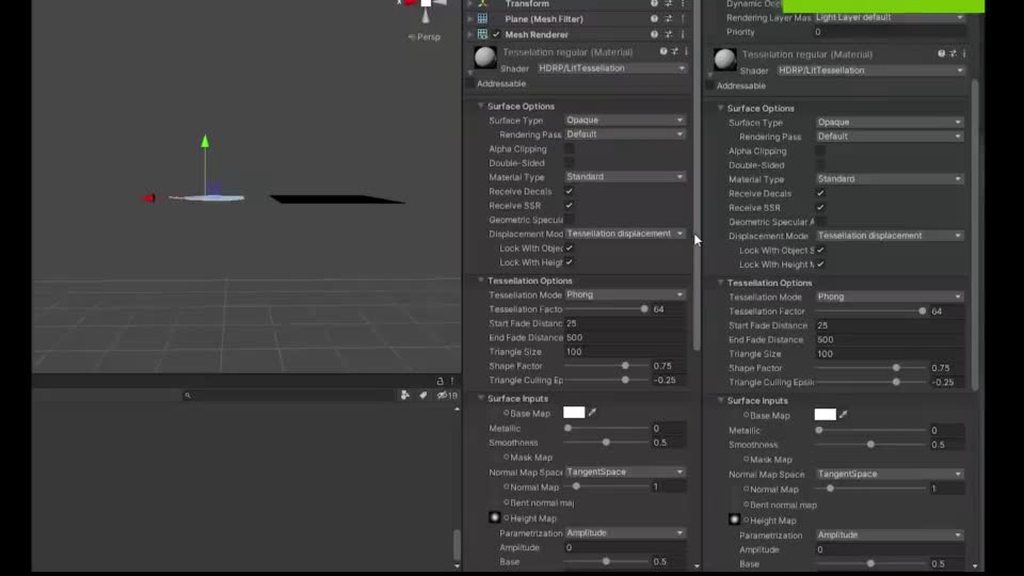
A custom mesh on the left and a unity plane on the right are both using the same HDRP LitTesselation material. Does anyone know why the shader displaces my custom mesh in such a weird way?
The mesh itself looks like:
waxen lantern
any way how to make a volumetric lightning in 2019.4 hdrp?
i havent found any asset or tutorial for 2019.4
@autumn ember Unity 2019.4 is just the LTS edition of 2019.3 they are virtually identical aside from additional bug fixes and reliability. So this official tutorial should work for 2019.4: https://www.youtube.com/watch?v=EF5jy30ebVw
In this video, we're gonna take a look at adding Volumetric Lights to your Unity scenes, using Unity 2019.3 and HDRP! Volumetric Lighting helps improve the quality of your scenes by allowing light sources to affect the Volumetric Fog in the scene.
Download the Fontainebleau p...
 dreamy flax
how to pull hdrp github unity
How can i pull hdrp projects form git hub
or git desktop
glad tartan
@dreamy flax Go to the SRP Repo on Github - https://github.com/Unity-Technologies/Graphics
Select **Code **-> Open With GitHub Desktop
GitHub
Unity Graphics - Including Scriptable Render Pipeline - Unity-Technologies/Graphics
dreamy flax
Then
i click on add project with unity hub and its all pink
then i have to make a package of it and then make a new hdrp project and then import to it
and then its shows the actual textures
 distant cradle
can someone help me? this project was in 2019 version and i needed to add universal render pipeline to the project and i couldnt access scene lighting setting bc unity crashed everytime with the error below so i decided to upgrade to 2020 version and still have the same problem 😦 (this started happening after i added urp)
 fervent dust
is there any way to have different RPs between scenes?
turbid matrix
yes
unload your other SRP scene, assign different SRP asset, load scene for that SRP you just loaded your asset for
@fervent dust
it's tricky to author scenes with different SRPs though as you'd basically need to do the same in editor too to edit them
you'd also need both SRP packages installed at the same time (and be using same SRP version for both)
fervent dust
oh wow. sounds tricky indeed! thank you!
 vale solar
Hi,
I have a weird problem with HDRP.
I have my lighting setup in my scene with the DefaultSceneRoot prefab. I can tweak settings of the Sky And Fog Volume prefab, but everytime I restart Unity, all my settings get resetted. I saed my scene, and every other part of it gets saved correctly, except for the Sky And Fog Volume gameobject with its components
drifting vault
@vale solar do not touch default Sky and Fog volume. Try dublicate that and after that tweak?
 hallow stirrup
Hello everyone, I'm working on a 2D online game, and me and my partners realized yesterday that the build uses 2000-3000Mb RAM on an empty scene (with only character) in 2 different computers and it uses only 300Mb RAM in same build and same scene with 2 others computers. Does anybody would have any track on this kind of stuff ? I didn't have time checking Memory Profiler yet but I'll do ofc, I just wonder why it would happen on different computers.
waxen lantern
@hallow stirrup could be a memory leak, related to something platform/hardware/driver specific
@hallow stirrup just a shot in the dark though. and i'm not sure how or if it relates to #archived-hdrp at all.
 queen pawn
How do you guys recommend doing your texture scaling in general?
 heady anchor
candid basin
heady anchor
candid basin
https://forum.unity.com/threads/strange-camera-depth-buffer-behavior-with-custom-render-pass.929487/
Unity Forum
Hi there,
I've encountered a quite strange situation that I don't seem to be able to make any sense of. Here it is:
- ScriptableRendererFeature with...
Anyone having similar experiences?
dawn sorrel
@candid basin I gave up on that and just moved to URP 10 where you just declare that your pass needs depth and you get all renderers with shaders that have a special depth pass in a texture.
Also normals buffer, woo.
waxen lantern
@dawn sorrel Nice, because of the new Deferred path I presume
dawn sorrel
No.
They just render all renderers with a depth only shader pass in a separate depth prepass.
Ah wait no, that pass only packs the nornals.
candid basin
@dawn sorrel do you have a code example of that?
vale solar
So I use HDRP and Physicsally Based Sky which works pretty good during day time. However, when it turns into nightt, everything becomes pitch dark, and I obviusly would like to see even if it's night time. How would you recommend me to solve this problem? (I'm pretty new to HDRP)
drifting vault
@vale solar in HDRP Physicsally Based Sky you can apply special cubemap for night skybox. so when time become night or almost night - you will able to see stars on the sky for example.
vale solar
@drifting vault Where?
drifting vault
here you go @vale solar
vale solar
Thanks
But how do you make the rotating moon like it works in case of the sun?
@drifting vault
drifting vault
well here you have to do some custom code 
waxen lantern
@drifting vault @vale solar adding a moon / support for additional celestial bodies to the physically based sky seems like a reasonable new feature request as well.
@vale solar in the meantime here is the doc for custom sky API in HDRP: https://docs.unity3d.com/Packages/com.unity.render-pipelines.high-definition@8.2/manual/Creating-a-Custom-Sky.html
vale solar
Thanks
drifting vault
well if you will fly to space for a while in scene with Physicsally Based Sky, then you will enter to space. So maybe better to add 3d Model of moon?
vale solar
Idk, won't fly to the space in my game 😂
waxen lantern
@drifting vault You've been playing Outer Wilds recently I take it? 🌝
drifting vault
no, i playing games very rare =D
My favorite game its play with Unity URP/HDRP features 😄
waxen lantern
I hear you
vale solar
How do I set a surface texture for my moon representative directional light? If I set it, I get this weird result
waxen lantern
 sharp scroll
hi guys! I have this simple issue where OnPreRender event doesn't get called, shouldn't this work? or did URP/ SRP remove this event? (OnEnable gets called and yes there are cameras rendering)
trying to send per camera data to the GPU before rendering
dawn sorrel
There's RenderPipeline.BeginCameraRendering.
And RenderPipeline.BeginFrameRendering.
Right there in the table.
The actual events are probably on the UniversalRenderPipeline class.
@candid basin cs public override void AddRenderPasses(ScriptableRenderer renderer, ref RenderingData renderingData) { if(!IsValidState()) return; sketchOutlinePass.ConfigureInput(ScriptableRenderPassInput.Normal | ScriptableRenderPassInput.Depth); sketchOutlinePass.Renderer = renderer; sketchOutlinePass.Setup(combineSketchOutlineMaterial, blurMaterial, Settings.OutlineThickness, Settings.DepthSensitivity, Settings.NormalsSensitivity, Settings.BlurPassCount, Settings.BlurSize); renderer.EnqueuePass(sketchOutlinePass); }
 cobalt idol
Does the GPU profiler work with URP?
I just tried profiling a scene and it seems like everything gets filed under 'other'
ahh, it was Frame Timing Stats was disabled
 nimble dagger
I have a weird issue with DrawMeshInstancedIndirect. For some reason it stops drawing textures on the Y axis of my mesh if the size is bigger than 96x96. Is there some sort of limit to ComputeBuffer or DrawMeshInstancedIndirect?
Lower than 96x96 draws squares as expected. Matches wireframe verts.
Bigger than 96x96, 122x122 in this case, draws a rectangle on camera (wrong, should be square) but a square wireframe in scene view (which is correct).
The only variable element is the vert position, those seem to be setup correctly according to the scene view.
 hazy dune
In universal render pipeline, how do I add support for vertex lighting after my pixel lights run out?
what is the api to get access to the vertex lights in shader code?
it is supported, but I just never see it in shader code
dawn sorrel
in HDRP, which event is expected to actually work when using DrawMesh with a property block?
basically, I am trying to redirect a previous onPreCull event to draw an overlay highlight over an item in the world. My methods are rendered corretly on the legacy renderer, my DrawMesh calls are going through with all the correct materials, arguments, but on the HDRP, nothing is rendered.
 main walrus
Could someone tell me why it is that the further you're from a mirror (planar reflection probe or non-planar reflection probe), the brighter the reflection? In the preview it looks correct/ask dark as it should
 pine vault
are there any guides on updating default renderer shaders to URP? I'm completely lost and sick of having basically zero documentation on what the heck I'm doing, and shader graph is not even close to meeting my needs.
 kindred kiln
Can I get some help with box projection?
inner parcel
@pine vault goto material, change to any urp shader, reassign texture
nothing much would be different for urp in your case i think
whole fossil
have you guys tried it? is it good?
dawn sorrel
Is it possible to make a custom light shafts render feature for URP?
drifting vault
@whole fossil yep. good until you will move your camera soo fast.
whole fossil
why? some sort of bleeding or artifacts happening then?
drifting vault
well try that, its easy to activate =D
Maybe my GTX1660Ti so slow for full screen SSGI
dawn sorrel
oo
I'll try it
also I just tried out the new AO feature in URP 10. It's AWESOME!
I'm very excited about what's going into URP and HDRP recently.
I'm just really hoping they can add a screen space volumetric (sun/light shafts) effect to URP, as well as SS reflection.
drifting vault
well since URP support DX11 and do not support anymore DX10 and DX9, they can implement normal volumetric light
that was nessery for DX9 for example, that not able to handle 3d noise volumes
dawn sorrel
Oh wow, ok that's interesting
drifting vault
but SSVL can be good for mobiles??? GLES 3.0 and VUlcan???
dawn sorrel
Well in UE4 for example, it tells you what options are unsupported for mobile.
They could simple have a note "unsupported for mobile" or something like that.
I feel like a lot of games don't need full volumetric, though. Just some screen space light shafts and lens flares would be the main things, and those I believe would work perfectly fine for mobile.
At that point it's more of a directionally based bloom effect.
I'm not sure how baking volumetric works, btw. I know it's a thing, but nothing I've played around with yet. I've only just started using HDRP again.
drifting vault
you are right 😄
dawn sorrel
well Unity's been stuck like this for forever
Aight I had to force quit Unity and reopen it. Now it's baked very quickly.
Damn... SSGL looks really really good.
pine vault
@inner parcel i should have specified custom shaders in there somewhere, sorry
waxen lantern
They could simple have a note "unsupported for mobile" or something like that.
@dawn sorrel It's not that simple because at this point some mobile devices have compute shader support "high end mobile," some do not, or graphics API feature support is not complete.. or not enough raw compute power "low / mid end mobile"
it used to be more clear cut but now it's getting blurry.. in some part due to Apple's latest mobile chips in iPhone / iPad being so powerful
there's also the new Qualcomm XR2 that will be in the Oculus Quest 2 and other devices... technically "mobile" but quite a powerful GPU with modern graphics API support
inner parcel
@inner parcel i should have specified custom shaders in there somewhere, sorry
@pine vault
There are many reasons to think about in here before you move to URP then.
Unity doesn't have a proper porting documentation because not all projects are meant to be port using a general method. Each projects have different requirements and not all can follow the same procedure. You'll need to figure this part yourself.
First it's unknown that if you made this shader yourself, or you got it from an asset or copied the code from web.
Option A - You made the shader yourself
Then probably have heard about shader graph too if I'm not wrong. Apart from the existing URP shader, you can use shadergraph to create shaders you need. So if you were the one to create the shader, then shadergraph should be easier to follow up for you
Option B - You got shader from an asset, or a code you don't understand
In this case I'd suggest that you learn shader graph too because that'll help down the line to become a better dev. But if you're hitting a time constraint and you don't have time for that, my suggestion is you don't need URP in the first place.
If you want to do neither then you can simply use the textures with anyone of the URP shader itself, although the results might not be the same.
You can even contact the developer or the source to make a shader supported in URP.
I have listed all the possible ways you can try, which one you adapt is upto you
pine vault
I personally made the shader and have found shadergraph to be too limiting to duplicate it
I'm using multiple passes and for some reason it only seems to check the first pass, but I otherwise got each individual pass working.
no idea what I'm doing wrong or what I can do to make the otber passes work, since the alternative would be 3 materials on a single object, or, worse, 3 duplicate objects at the same position
I could get it down to one pass if I could have multiple stencil blocks per pass, but I don't know if that's possible and just want to get the dang thing working before worrying about optimization
broken lichen
@pine vault URP is different from built-in, in that it doesn't automatically draw all the passes in a shader. It only draws the first valid pass it finds.
So the alternatives you mentioned are the only simple way I've found to emulate multi-pass shaders
Another alternative is to use renderer features to extend the render pipeline to specifically draw each pass when it comes across that specific shader
pine vault
christ, glad that was literally anywhere in the docs.
broken lichen
But that's a lot more work than separating it into different materials and adding them all to the same renderer
pine vault
guess I'm dropping URP for good then, this kinda limitation just keeps happening
I'd rather write my own shaders by hand than deal with the limitations of shadergraph and there's like, no official documentation for writing pipeline shaders outside of it
broken lichen
You might be able to modify the URP source code to force it to draw all passes, but I haven't looked into it
I would guess that is in the C# side rather than the native side
pine vault
I'd rather just use the bit that works, to be frank :/
it's a shame, too, because there were some bits of shadergraph that I like
it's just not useful for everything I would want to do
dawn sorrel
Here's what screen space global illumination looks like in HDRP now. It really does look good. There are only reflection probes, no light probes. And in play mode, it updates live. So the effect is stronger from some angles, which looks fairly realistic.
I took a screenie of the spot light prop there, because that asset is infamous for having odd shading on its base from sky reflection. But that's now absent with SSGI.
The wood board orange color also now automatically bleeds onto surrounding surfaces.
And the reflections on the hard hat are more accurate to the world lighting space, rather than basic spot shines only.
I'm very happy with this new feature. Good job Unity!
drifting vault
yea, here is test for showcase better examples =D
https://youtu.be/UmIKJb3sZEQ
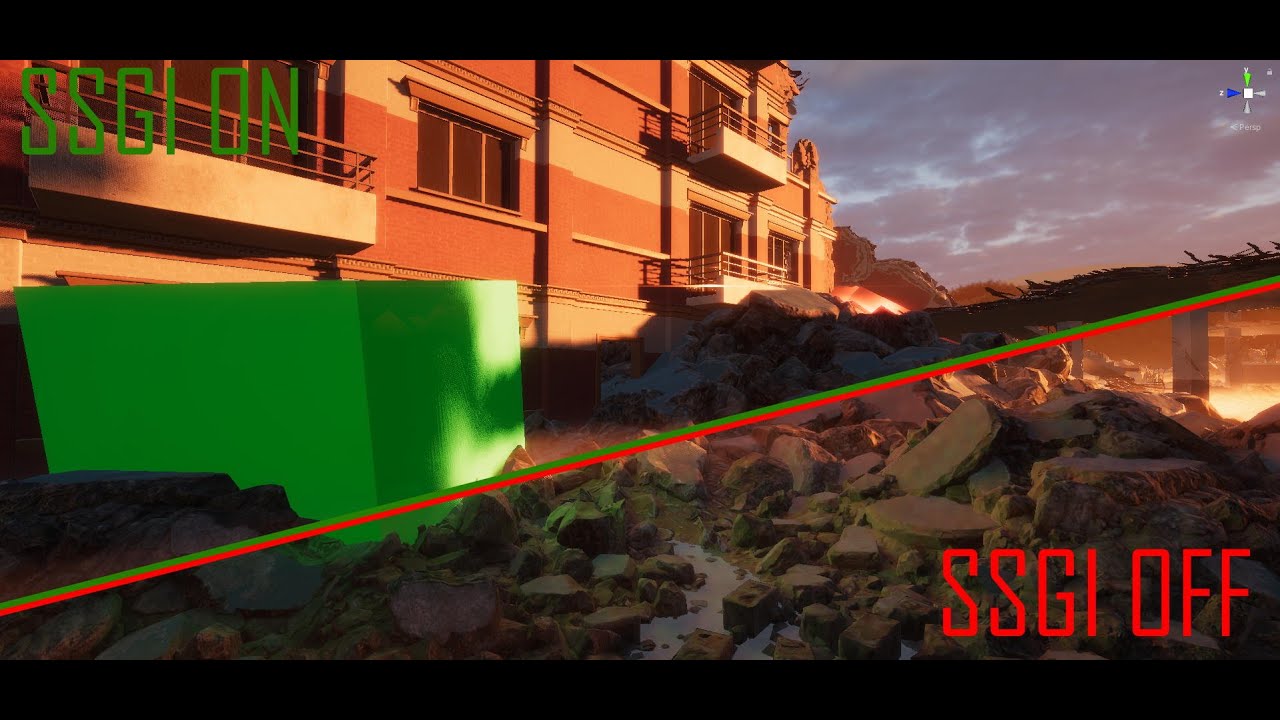
In this video i showcase the experimental screen space GI effect that come with HDRP 9.x and still in experimental branch.
This effect working well and perform well on GTX1660Ti .
last one scene is really cool example to show how light reflect form orange building and everything around become orange 😄
waxen lantern
@drifting vault nice edit haha. hype 🦾
whole fossil
is there any info about what are required steps to enable SSGI? I think that enabling it in hdrp default settings and adding volume override isn't enough
are probe volumes are needed?
waxen lantern
are probe volumes are needed?
@whole fossil doubtful since it's ScreenSpace based
@whole fossil since HDRP 10.0 is still in beta, the docs are not complete yet, but I'd imagine it's a process very similar to enabling SSR: https://docs.unity3d.com/Packages/com.unity.render-pipelines.high-definition@10.0/manual/Override-Screen-Space-Reflection.html
whole fossil
Also thought so, but I've enabled it in default frame settings and added override to volume and still nothin
waxen lantern
@whole fossil are the lights and materials in your scene set up for significant light bouncing? i.e. if SSGI is enabled are you 100% sure the effects are noticeable? the effect of global illumination can often be extremely subtle.
https://portal.productboard.com/unity/1-unity-graphics/c/146-screen-space-global-illumination-ssgi
says here " It works in the same way as the Screen Space Reflection override " so it seems something else is missing
HDRP now supports screen-space global illumination (SSGI) as a fallback for ray-traced global illumination (RTGI). It is an algorithm that accesses indirect diffuse lighting the environment generates. It works in the same way as the [Screen Space Reflection override](https://g...
whole fossil
yeah, you are right. it does work 🙂
the effect on the small scenes is pretty subtle. I'll dive further into this 🙂
waxen lantern
@whole fossil i'd start by removing all lights but one, and also disabling environment / skybox lighting, lightmaps / baked lighting, etc
@whole fossil heck, just download a cornell box 3d model
whole fossil
yeah, I get it now 🙂
waxen lantern
@whole fossil may not need it, but for what it's worth: https://github.com/LucasReSilva/Cornell-Box

GitHub
Several Cornell Box files. Contribute to LucasReSilva/Cornell-Box development by creating an account on GitHub.
whole fossil
sure, awesome 🙂 didn't knew how it is called tbh
 serene zephyr
 broken hazel
this is probably a silly problem, my ScriptableRendererFeature keeps losing references sets in the inspector when entering playmode
so the Shader i set in the inspector gets reset to null, for instance
oh weird, it keeps the correct value when set in the ForwardRendererData asset that contains the Feature, but not when set on the Feature asset itself
(in 2019.4.4f1)
 deft pivot
Hey all, can we stack cameras in Lightweight RP 2D in Unity 2019.4?
waxen lantern
@deft pivot I haven't used it yet but according to the docs it is available of URP 8.2 which is the version bundled and verified with Unity 2019.4. By the way, Lightweight RP was renamed Universal RP.
Camera Stacking allows you to create effects such as a 3D model in a 2D UI, or the cockpit of a vehicle.
https://docs.unity3d.com/Packages/com.unity.render-pipelines.universal@8.2/manual/camera-stacking.html
candid basin
@dawn sorrel URP 10.0 is so much better than 8.0
I like a lot of the changes they did
dawn sorrel
👍
turbid matrix

GitHub
Purpose of this PR
Light AABB generation is the first part of the light list generation algorithm (used for tiled and clustered lighting).
Had to recreate #1574 because our branches are extremely d...
drifting vault
more FPS in Unity? 😄
true zealot
I assume they're amused at the change from DUMB_COMPILER to OBTUSE_COMPILER
They both seem like pretty poor names tbh 😛
 gloomy wing
is there any way to make a tilemap emit light using URP 2D?
we have a tilemap with lights and are using 2D render pipeline
with URP
how would we go about making the tilemap emit light?
waxen lantern
heh https://github.com/Unity-Technologies/Graphics/pull/1906/commits/70859f772d85c17f665f535b5494e8feebcfdd5454
@turbid matrix @ripe fable The "conversation" link still works, even though the commits are hidden it seems:
https://github.com/Unity-Technologies/Graphics/pull/1906
GitHub
Purpose of this PR
Light AABB generation is the first part of the light list generation algorithm (used for tiled and clustered lighting).
Had to recreate #1574 because our branches are extremely d...
I assume they're amused at the change from
DUMB_COMPILERtoOBTUSE_COMPILER
@true zealot yeah a very cheeky comment here on that as well haha 😄
gloomy wing
;-;
 faint nymph
Dumb
turbid matrix
ah, I just had extra 54 on the link
no idea how that happened
GitHub
SSR Improvement
The improvement:
We use VNDF Importance Sampling
Temporal accumulation controllable with the new parameter 'Accumulation Amount' (0 No accumulation, 1 Accumulation ...
https://user-images.githubusercontent.com/55133890/93493895-af0cd900-f90c-11ea-99bd-edd6055c6692.png

Temporal accumulation controllable with the new parameter 'Accumulation Amount' (0 No accumulation, 1 Accumulation uses multiple frames). More accumulation generate more ghosting
this doesn't sound promising
you should always rather reject the bad data than let it ghost
I just tested this and it has this strong blur on rough surfaces that clearly accumulates for a long period of time
this happens even with default accumulation of 0.125, but it's also quite noisy still
the issue here is that reflections will look a lot different in motion than in still frame
actually... it takes like full second to converge if you want to get rid of all the noise (with accumulation factor ~0.5)
so.. that's not going to fly on realtime applications
one would think they could blur some of that stuff in addition, but looking at the PR commits, there was some blur stuff actually taken out
candid basin
In URP 10.x whenever I change a parameter in the inspector of my custom renderer feature, the editor lags
This isn't happening on 8.2.0
Anybody know why?
And if I keep dragging around variables, eventually I get this error
Is anybody experiencing the same issue?
 median raptor
Hi, anybody knows this error?
when I create particles, sometimes it throws me this error
waxen lantern
one would think they could blur some of that stuff in addition, but looking at the PR commits, there was some blur stuff actually taken out
@turbid matrix Screen Space Reflections looks a lot more like Ray Traced Reflections now for better and worse ha
maybe that's why? they are perhaps going to implement a common filtering technique for both of them and improve them in parallel, so they needed to rebuild SSR from the ground up to increase commonality? It's just my guess, but it would make sense considering SSGI is considered a "fallback" for RTGI... that SSR and RTR would follow suit. Also... the details in that PR SSR Improvement #1928 support this hypothesis:
Purpose of this PR
SSR will give us a better match with Pathtracer.
I just tested this and it has this strong blur on rough surfaces that clearly accumulates for a long period of time
@turbid matrix But yes it certainly has a strong need for improvement or at least more filtering and denoising options in any case.
dawn sorrel
SSAO in URP looks SO GOOD now!!! AO off:
AO on:
I think this might even look better to me than SSAO in HDRP!
And it's much faster too!
 strong ore
turbid matrix
strong ore
turbid matrix
@waxen lantern just to be clear, the SSR algo under the hood is still the same, they just do different sampling for rough surfaces
for perfectly smooth surfaces, it works pretty much the same as it did before
same artifacts, same visuals
and that temporal accumulation got added but I don't think it's feasible to use this way for games
waxen lantern
@waxen lantern just to be clear, the SSR algo under the hood is still the same, they just do different sampling for rough surfaces
@turbid matrix ah i see
and that temporal accumulation got added but I don't think it's feasible to use this way for games
@turbid matrix hey now! walking simulators are games, too!
turbid matrix
it doesn't really work for those either if the reflections cover bigger surface :/
I guess this could work for some small puddles and stuff, will need to test further
turbid matrix
I'm also wondering where this artifact comes from:
it moves with camera and is not visible on all angles
it's also not visible before the denoiser has converged (in movement), it only appears when it gets closer to blurred result
this new SSR also pretty much requires TAA as your AA algo
SMAA looked horrible with it
 worldly gorge
Can anybody help me get started with Unity 2D lighting? I started a URP project and did all the steps in the manual, but I'm getting an error telling me to do something I thought I did do:
 long wagon
@worldly gorge In Create > Rendering > URP There's a 2d renderer (experimental) you need to create it and set in the URP asset swapping in the renderer list on top
Oh yea, I think you have it assigned, I think this is what you also need to do.
long wagon
That's strange, I've dropped 2d light in both 2020 and 2019 they don't have errors, even when it's not set on the camera as 2d experimental renderer
worldly gorge
This is 2019.4.9f1. I started a URP project and tried to create a scene with 2d lighting - that's it.
long wagon
I've replicated the error only when specifically set wrong renderer in the URP asset.
worldly gorge
I don't suppose there's a sample Project floating around with URP 2d lighting I could just start from? This URP starting point has a lot of crap in it.
URP asset?
fiery marsh
Is it maybe overriding the URP asset with a different one in the quality settings? I know that's possible, but don't know if it would cause that warning/error.
worldly gorge
I did try creating the 2d renderer data again just now.
long wagon
Yea, I don't have any renderer set in quality settings and it works for me, maybe the wrong one sitting there
worldly gorge
Ooo, looks like the quality settings might be the issue. Definitely looks wrong.
fiery marsh
Yeah if it's blank it'll use the one assigned in the Graphics tab. The URP template sets up multiple URP assets and assigns them for each quality. In this case you probably want to remove those.
worldly gorge
Yup, that was it! Thank you very much!
fiery marsh
Or just make sure each quality has the 2D renderer assigned
worldly gorge
Seriously, though, invisible overrides are kinda crazy, aren't they? Shouldn't any setting being overridden by the Quality settings have some kind of notice/warning next to it?
 iron flame
I'm also wondering where this artifact comes from:
@turbid matrix I think the problem with SSR is the calculation of Full resolution. 4K is also becoming unusable. Apart from that, its dotted structure is removed with TAA. There was Denoising, but I turned it off because it was running 1 FPS and I used it for a few weeks as it was.
 gaunt marlin
guys, you know why in my editor looks nice but in build looks all white? Im using URP
 dense moth
what do i do if hdrp wizard keeps throwing null reference exceptions?
dawn sorrel
How would I go about changing the rendermode of a 3d mesh from rendermode - worldspace to rendermode - overlay?
dense moth
hdrp = garbage. sorry unity this shit is impossible
dawn sorrel
What version are you using Micken?
dense moth
LTS
dawn sorrel
LTS 20??.?.????
dense moth
2019
dawn sorrel
That narrows it down to like 15 options
It should be like 2019.4.9f1 or something like that
dense moth
ikr. nice "long term support" they keep changing the version
dawn sorrel
LTS versions are iffy, I learned as much from playing VRchat. But knowing exactly which version you're using is definitely helpful here.
dense moth
2019.4.8f1
dawn sorrel
DM me a screenshot of the null reference exceptions it's throwing.
waxen lantern
ikr. nice "long term support" they keep changing the version
@dense moth Hold up. Let's clarify something. The major version for this LTS will always be 2019.4 The minor version number changes because Unity makes reliability / maintenance updates and critical bug fixes, without new features or breaking changes for compatibility. If they never updated it, that wouldn't be providing LTS (Long Term Support.) same definition with Ubuntu LTS and Windows Enterprise LTS. it's literally what LTS means
dense moth
That's true. I'm speaking as a user though.
These updates should be automatic.
waxen lantern
@dense moth Yeah that's fair. an auto update option to the latest major version would be nice 👍
dawn sorrel
I think I've fixed his issue anyways though, just gotta wait for an update.
waxen lantern
@dense moth fwiw this is where you can check what HDRP version (7.3.1) is verified for the Unity Editor version (2019.4) https://docs.unity3d.com/2019.4/Documentation/Manual/com.unity.render-pipelines.high-definition.html

if you haven't double checked that already
dense moth
i had 7.3.1, but i just noticed another patch to LTS so i'm gonna download that and try again
dawn sorrel
Also when you do that try making the project and importing only HDRP
If it's not throwing errors than it's VFXgraph that's causing your grief, just like I thought it was.
waxen lantern
going forward Unity is just pre-installing the verified Render Pipelines ( and related packages VFX graph, shader graph) and making it not so easy to accidentally install a non-verified RP.. i think this change has only been put in since 2020 versions just fyi
dawn sorrel
I'm still trying to figure out Unity's built in RP.
(Trying to render over unity's UI)
Landon you actually seem like you'd be a good person to bug about this, mind if I hit you with a DM?
waxen lantern
Also when you do that try making the project and importing only HDRP
@dawn sorrel I usually just start with the HDRP sample project instead of adding HDRP to a project , but then I have to remove all the various stuff i don't need. I wish there were ultra simple / bare templates for each RP with almost nothing in them
@dawn sorrel we can just talk about it here; then everyone can benefit.
if I let people DM me all the time i'd have to start charging them a consulting fee, nothing personal 😁
dawn sorrel
Fair point. Anyways, what I'm going for here is a shader that is COMPLETELY unaffected by everything (Lighting, other shaders, particles, etc.) I've got most of that covered, but there are still things that render over me.
Including unity's UI
waxen lantern
Apparently Unity Hub will allow downloading new templates and making your own? Then i could just do it myself. i haven't tried the latest beta tho
dawn sorrel
I want my shader/particle system to render over even these arrows/symbols.
waxen lantern
@dawn sorrel let's move this to #archived-shaders actually
 tight pendant
I googled this and got no hits, weirdly: is there some kind of service, paid or peer-to-peer, that will help me bake my Unity lightmaps?
turbid matrix
Yay for this 😀 https://github.com/Unity-Technologies/Graphics/pull/1934
GitHub
Please read;
PR Workflow for the Graphics repository:
All PRs must be opened as draft initially
Reviewers can be added while the PR is still in draft
The PR can be marked as “Ready for Review” onc...
pine vault
so, we are testing some things out with the forward renderer in URP and found these boxes; what are they for?!
I guess the more pertinent question is: how do you use them
I did some searching but wasn't able to find anything.
 mossy ruin
Hey all. I'm currently on URP 7.3.1 in a 2019.4.8f1 project. It's not a production project and I want to play around with URP 10 to get SSAO, but I can't find any documentation on how to upgrade URP version. Any tips? Is there a git repo I need to manually install or something?
I found this git repo: https://github.com/Unity-Technologies/Graphics/tree/v10.0.0-preview.32, but trying to add it via import from git url, but it said it was an invalid package.
I also tried downloading the flagged release as .tar.gz, but couldn't add it as a tarball. After extracting it, I found a package.json file in the universal folder and tried adding it via "import from disk" but it threw this error:
Cannot perform upm operation: Unable to add package [file:D:/Downloads/Graphics-10.1.0-preview.2.tar/Graphics-10.1.0-preview.2/com.unity.render-pipelines.universal]:
Package com.unity.render-pipelines.universal@file:D:\Downloads\Graphics-10.1.0-preview.2.tar\Graphics-10.1.0-preview.2\com.unity.render-pipelines.universal has invalid dependencies or related test packages:
com.unity.render-pipelines.core (dependency): Package [com.unity.render-pipelines.core@10.1.0-preview.2] cannot be found
com.unity.shadergraph (dependency): Package [com.unity.shadergraph@10.1.0-preview.2] cannot be found [NotFound]
UnityEditor.EditorApplication:Internal_CallUpdateFunctions()
Nevermind. URP 10.x is only compatible w/ 2020.2+. However, if anyone searches for this in the future, the extract tarball and add from disk using package.json is the right route to take for installing local packages. The error it threw is because I'm using an older version of Unity.
pine vault
@fiery marsh someone who knows you from another server recommended we ask you if you knew anything about the shader passes under the render features of the forward renderer?
 solemn sundial
After integrating URP into my project I can no longer build the headless server for my game.
Here's the console log: https://hatebin.com/qyhatvbnnp
Any idea why this could be?
candid basin
@pine vault which shader passes?
In the renderobjects renderer feature?
Those are just to choose which shader pass to use
 last orchid
Hey guys!
I have a small issue with the URP 2D Renderer, maybe someone here can help me out :)
I wanted to customize the lighting so I changed the shaders for point lights and the lighting.hlsl function, both files being located in the library. Unfortunately Unity re-imports the package whenever I open Unity and the change is gone. I didnt find a way to solve this, yet. Is there a way I can force the 2D renderer to use my customized pointlight shader and the lighting.hlsl in my projects folder instead of the library default?
candid basin
Basically @pine vault the renderobjects feature draws objects with an override material right?
For that it uses context.drawrenderers
But it has to decide which objects to draw to begin with
If you leave those shader passes entries empty
The pass will draw all objects with the tag
SRPDefaultUnlit, UniversalForward and LightweightForward
But so you can put your own in there
If you'd like
But I believe if you put a single one in there, those original ones will not be used!
It's not like they are 'additional tags' I think
This is the code btw
fiery marsh
Yeah, I think it's the "LightMode" tag in the shader too for defining it, right?
So, Tags{"LightMode" = "UniversalForward"} or whatever custom tag you want there.
Yeah, it is actually labelled as LightMode tags in the version I'm using (8.2.0) instead. But I guess they've changed that in newer versions? Can see why it's a little less clear now.
drifting vault
@turbid matrix no examples how its looks? "Add decal angle fading + clean tech debt in decal"
candid basin
@fiery marsh yeah shader pass name is confusing indeed
Light mode tag should be better
turbid matrix
@drifting vault none but it's pretty self-explanatory
see "Start and End Angle Fade" on this WIP doc: https://github.com/Unity-Technologies/Graphics/blob/b1a0916546ef4ce79c9193d52f4ac1cc0042cdcc/com.unity.render-pipelines.high-definition/Documentation~/Decal-Projector.md#properties
this feat is tied to the Decal Layers, apparently it doesn't work without them
I'm guessing they only prepare some buffer with decal layers which would prevent using it without layers but I haven't actually checked the implementation
feels bit weird because you'd want that functionality regardless of the decal layers being there or not
pine vault
ah, alright! I'm gonna do some more digging and see if this is useful for what I need. thank you!
pine vault
also, Cyan, I was linked to your blog and have been reading through it; a bunch of stuff that's been frustrating me wrt lack of documentation has popped up there, so thank you for what you've done!
 gritty briar
Why does my post-processing not work? I'm using URP, and it works in the scene view, but not in-game. My PP volume is global, so it should affect all cameras?
dense moth
i was in here being a jerk yesterday about HDRP, i'm sorry hdrp is great.
i solved my problem with URP 👍
 sturdy rivet
everything is on the camera solid color, so not black, it can be the default blue
pine vault
I got my shadow shaders up and running on URP with the renderer features, thank you so much Cyan and Alexander!
this might have enabled my project to work properly!
pine vault
so, question time again :P
are there ways to like, separate lighting information in a way you can modify it before pushing everything to be displayed
essentially, I want to start with a render of a scene with only ambient light, then, for each light in the scene, render it with a mask and add that to the render texture
pine vault
essentially, I'm doing custom shadows and want to be able to mess with the lights.
waxen lantern
@pine vault ah okay, i was about to say, it's difficult to understand what you're asking if you only ask about ways to get there without stating what the desired end result is exactly. :)
pine vault
right, I should have just started with the thing I'm trying to do
I've read a bunch of help posts that are like 'how do I do x thing' and then there's 3 pages of 'what are you trying to do' before someone suggests a much easier way of doing that thing, but I went and fell into that same trap >.<
waxen lantern
oh yeah it happens to everyone regardless of experience / skill. it's called the XY problem.
@pine vault anyway, what are the custom shadows / lighting for in the first place? a non-photo realistic art style?
pine vault
yes
waxen lantern
or something about gameplay focus, etc
pine vault
I'm working with relatively detailed character models and want shadow edges to be as perfect as possible, so I've been implementing shadow volumes
everything else is pretty clearly doable at this point, but actually impacting the lights is the question at this point.
since that's something unique to unity that I can't just easily search up
waxen lantern
@pine vault but your target platform(s) are not suitable for HDRP?
pine vault
bingo, this is the only relatively demanding thing I'm doing.
everything else is using really simple lighting models
waxen lantern
then URP is intended to have more custom lighting extensibility anyway, aside from deferred render path not released for URP yet (in next 6 months likely)
pine vault
right, that's why I'm using it over the legacy renderer
I managed to find a way to get the thing that was bothering me about URP working with the help of some folks here
and also, like
waxen lantern
@pine vault you could render each light in a separate pass each to a buffer or render texture and then composite them. It sounds awfully expensive though maybe you can do these at half res or something and composite with full res albedo
pine vault
part of it is to see if I can
anyway, it's time for me to go rest
I'll be around tomorrow if there's more questions you have
waxen lantern
it starts to sound like a form of custom deferred rendering may be what you want since doing things like this can start to defeat the optimizations of forward /tiled rendering for mobile GPUs. it's "possible" but whether it's feasible or at all performant depends largely on exactly what your target hardware platforms are.
pine vault
mostly trying to target lower-end PCs
something that's maybe a few years out of date, but was made to play games
waxen lantern
okay that shouldn't be too bad.
pine vault
my game wouldn't even really function on mobile, and, chances are, deferred rendering will be implemented well before I can even imagine a release.
I actually know very little about deferred rendering, to be honest.
I get the basics of how forward rendering works, but haven't learned the first thing about deferred
other than like, it enables things that would not really be performant otherwise
waxen lantern
yeah especially when it comes to custom lighting
pine vault
do you have any resources that would be a good place to start reading, just for the general concept?
waxen lantern
@pine vault this is how i first learned about deferred lighting / rendering anyway: https://matthewragan.com/2018/03/22/touchdesigner-deferred-lighting-point-lights/
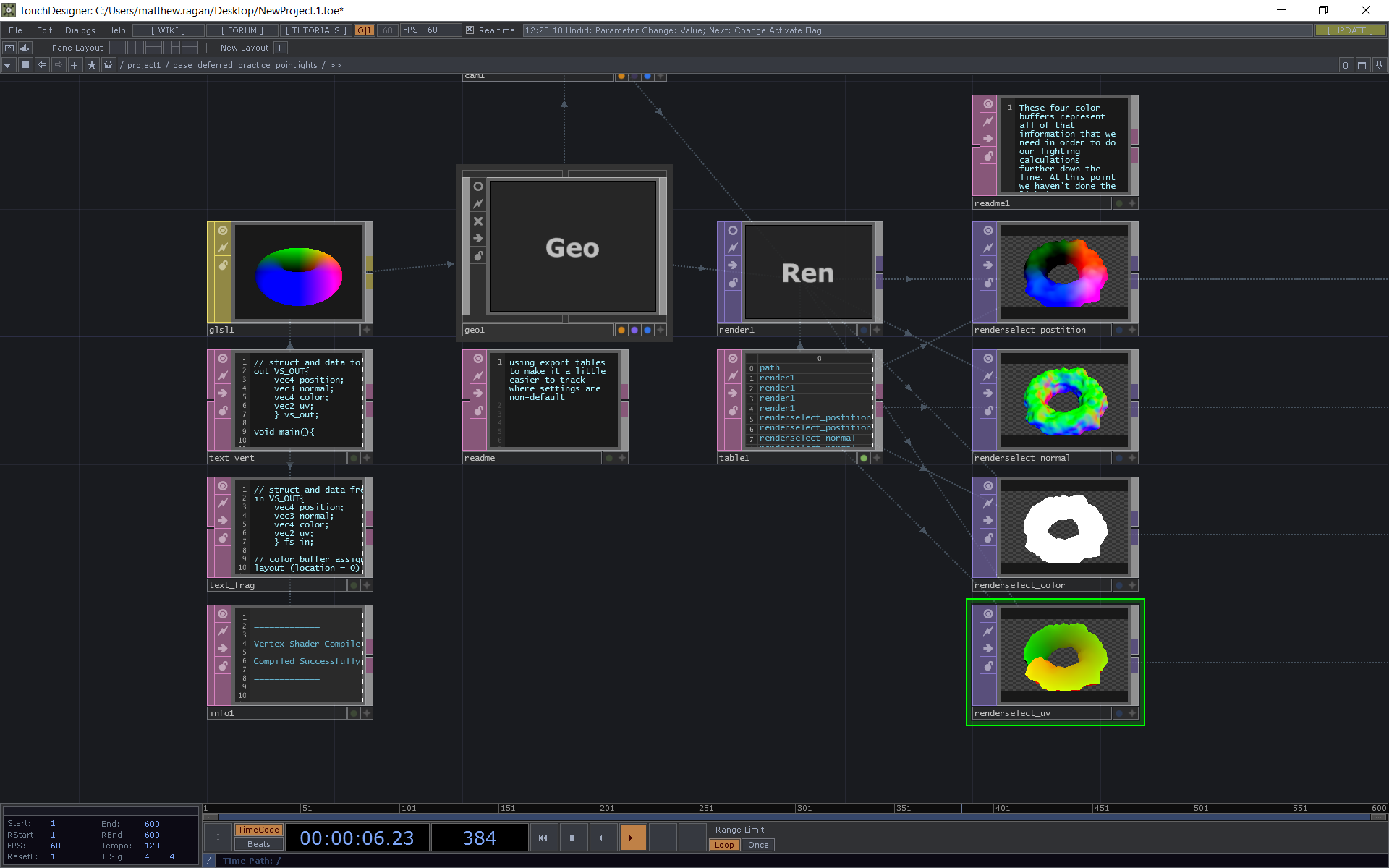
A bit ago I wanted to get a handle on how one might approach real time rendering with LOTS of lights. The typical openGL pipeline has some limitations here, but there’s a lot interesting pote…
pine vault
thank you! will probably give this a readthrough before my appt tomorrow
waxen lantern
@pine vault and here's an overview of deferred in regards to Unity 5: https://blog.theknightsofunity.com/forward-vs-deferred-rendering-paths/

We'll show you how to work with modern (programmable) graphics pipelines and optimize lighting performance through deferred rendering paths in Unity.
turbid matrix
old forward vs deferred perf comparisons with lights don't really apply the same way to a modern renderer, like HDRP is for example that uses tiled and clustered rendering
 heavy ice
I've been going through the ray tracing forum and i've seen two users complaining about the DXR performance mode "being completely broken" for 5 months. While we appreciate to have user feedback, we cannot fix or make anything with such comments. If you think a behavior is unexpected please post a precise case with a detailed repro or log a precise issue through the bug system and we will surely have a look at it. We have pretty large coverage for the DXR tests, so packaged are never released "completely broken" features, but there may be edge cases that we did not encounter or missing doc that we did not write.
turbid matrix
@heavy ice I tested DXR GI performance mode few days back and it still keeps flashing white (exposure issue) as you move the camera around
quality mode doesn't do this
I'm always on HDRP/staging from git so I've tested it with somewhat recent version and latest 2020.2 beta 2
turbid matrix
I'm on latest Win10 platform update and I keep nvidia drivers up-to-date but I can give specific versions if it helps
probably did on that last test as I just tested it on HDRP template
I can doublecheck this with latest staging and new template
heavy ice
when you say template, i guess you mean the construction one right?
turbid matrix
yes
if I can repro this, I can also push a new bug report with DXR configured so that it does this if it helps
but I believe you already have a repro project like this submitted already
oh
that was for it completely blowing out the exposure
now it mainly flashes quickly
anyway, I'll retest this now with latest everything and record a short clip so you'll see what I'm talking about
hmmm, it does actually work now for me properly with current staging, but it's been something that doesn't always trigger for me in past too. it keeps then happening again after some editor restart
I guess it's really hard to repro because of that too
one thing to note is that when this has happened, it's been always coupled with DXR reflections
ripe fable
@heavy ice I made the post on the forum (m0nsky), if you need any info let me know
I just updated it too with some additional info
turbid matrix
hmmm, I rolled back 100 commits from current hdrp/staging head and can't repro atm either
this puzzles me as I did test this on 11th this month using same 2020.2.0b2 and it did flash then, but the version I tried then was way newer than this 100 commits old one
it's a pain as it's a thing that just sometimes reappears
ripe fable
Yes, it's kind of random, unfortunately
Sometimes it works fine for a couple of hours, then "completely breaks" (scene turns white because of wrong preExposition) for days.
heavy ice
so i see two problems
in the thing you shared
there is the black steps on the floor
that thing i was never able to repro it
but i've seen it before in bug reports
turbid matrix
I haven't seen that shadow stepping in a long time anymore
but I've seen it in past
heavy ice
for now i don't have a solution for it
the flashing exposure thingy is more surprising
what are the exact steps when you open the template to have to
just switch from perf to quality?
or enable ray tracing?
turbid matrix
basically have DXR reflection enabled, have DXR GI enabled and in perf mode
I've also deleted all baked lighting from the scene, including all probes (mainly to only see RT result)
ripe fable
https://github.com/m0nsky/hdrp10_issues
It's 2 months old but to see it in action, load up this repository until the game view is visible, then restart your editor, then right click in the game view a couple of times and the scene will turn white.

GitHub
Contribute to m0nsky/hdrp10_issues development by creating an account on GitHub.
turbid matrix
but right now, I'm unable to see any oddities
ripe fable
I can't reproduce it on my RTX 3080
ripe fable
RTX 2070
heavy ice
when it was reproing?
turbid matrix
Drakos had 2070 and I have 2070 super
I'm also now installing A18 that project was built with to see if it repros there
one thing that has definitely changed meanwhile here is that I've gotten some win10 updates and have updated nvidia drivers
but it doesn't feel like a driver issue (but who knows)
ripe fable
About the other issue ("shadow stepping"), I can just load up com.unity.template-hd in 2020.1 & 2020.2 and it immediately happens.
turbid matrix
on that project or recent staging?
ripe fable
Fresh staging pull
turbid matrix
hmmm,it's probably not included on that repo even
btw, I can't repro the issues on a18 and your repo atm either
I guess I'll try rolling back those gpu drivers, just to see what happens
well, same deal, can't repro
I'll test the com.unity.template-hd thing now
I can see some shadow issue on that project but I'm not sure if it's really related to that old thing
heavy ice
I tried the projet you shared @ripe fable
turbid matrix
this isn't DXR issue
heavy ice
i am not able to repro
heavy ice
the shadow thing you are showing is a known issue, it is tackled
not related to DXR no
turbid matrix
but yeah, I'm unable to repro the DXR issues atm myself too
ripe fable
I can't repro it on my RTX 3080 either, so I am now thinking it could have been a driver issue? There are multiple people that were having the 'overexposure' issue for a long time, last time I had it was last week, before upgrading GPU.
turbid matrix
I tried it with 2 month old nvidia drivers too but it still worked
ripe fable
Back then I tried everything, even a windows reinstall didn't help.
turbid matrix
so I can't really find any proper pattern here
only thing I can't easily roll back is windows updates but it really feels more like unity side thing
so, I guess we now just hope it doesn't reappear and be happy
turbid matrix
I still hate things that sometimes just break without any good reason 😄 these are the most annoying bugs
ripe fable
I wouldn't be surprised if this issue randomly reappeared tomorrow
 bold helm
I am still waiting for DLSS in Unity, I am generally quite disappointed at Unity how they just don't care about new technologies and lack so far behind. Something has to be done asap.
turbid matrix
yeah, I'd love to hear what's the deal with DLSS currently as well
it's currently giving Unreal really huge advantage especially if you do raytracing
umbral crystal
Unreal has the advantage of not being half broken. Every time I turn around, something is broken in Unity
I feel like I spend about half my time with "why isn't this working?" than making my thing, and I'm honestly starting to lose patience
 keen pivot
would this be a better place to ask if anyone knows what screen space shadows do and what they are good for and when they are not good for? i cant find any docs that tell me what they do beyond "shadows that are in screen space"
HDRP, which i think is the only thing that has it
 narrow whale
umbral crystal
narrow whale
umbral crystal
URP has 2D. If you starting a new project, I would try the latest version of that first
I see many improvements to 2D in the changelog each patch, so it's under active development
umbral crystal
Well, what I mean by "new" is that you're not planning on shipping a game you spent the last year making in the next month or two
You can update it, but you may need to budget time to deal with the pinkness for a bit. I'd also recommend you copy the project, or make a branch, just for upgrading and migrating
 quick gate
I cant get ssr working in hdrp
I turned it on everywhere
But i still only see the skybox being reflected
umbral crystal
I think you need reflection volumes, or some sort of volume.... I forget exactly
whole fossil
I doubt it since it is screen space
 main trellis
check on enable SSR in material setting maybe?
cursive tulip
yeah afaik its just turn on and it should work
check the hdrp asset to have ssr on
and your effect volume to have ssr
and enabled
keen pivot
SSR only reflect on surfaces with smoothness of 0.9 or more if that helps
bold helm
Unreal has the advantage of not being half broken. Every time I turn around, something is broken in Unity
@Benjamin#2367 I agree
SRP (especially HDRP) and DX12 are super buggy, crash all the time and aren’t production ready. Super annoying to use as well and the performance is horrible.
Standard with 3rd party assets is currently the best way to get good visuals in Unity, especially if you aren’t a graphics programmer.
And Unity is doing nothing about it
Me and my studio will probably switch to another engine (either custom built or Unreal Engine 5 in that case) if Unity doesn’t finally get their stuff together and fix their engine... And keep in mind that we are commercial customers and they don’t even care about us...
broken lichen
@bold helm If your team is capable of making a custom engine, would it not also capable of doing custom rendering in Unity?
 magic crow
Hello! I was adjusting lights within the project and the entire scene is black/white now. They are set as baked and static, all of the objects i notice all have white shaders but with the correct textures/materials on them. Does anyone have an idea of why they turned solid white and how to revert them to normal?
bold helm
@bold helm If your team is capable of making a custom engine, would it not also capable of doing custom rendering in Unity?
@broken lichen Well first off, we aren’t currently capable of making a custom engine. That is simply a future plan which we currently do not have the resources for.
Second, we HAVE made a custom rendering system built on top of the Standard renderer (as SRP is currently too unstable), however we have issues integrating new technologies and middleware as they would require source access which we do not have, and Unity doesn’t give support for custom low-level libraries either, and Unity working with such companies does not seem to happen either
turbid matrix
And Unity is doing nothing about it
@bold helm they are doing things to improve this all the time. Judging HDRP for DX12 isnt fair IMO as they clearly tell it is still in preview. They've done a ton of improvements for DX12 and perf on 2020.2 but there is not yet a single nonpreview HDRP 10 out (but 2020.2 isnt out officially either)
Stable nonpreview DX12 for hdrp is currently targeted at 2021 cycle so that wont leave preview this year
Also worth noting is that while dx12 works on unreal now, it took a long time to mature there as well
Having gone through unreal 4's growing pains on the first years of it's existance, I would expect a lot of preview level functionality on their new and promoted ue5 functionality. UE used to be the unstable one for years - before Unity started pushing their rendering rework
turbid matrix


Unity HDRP custom pass effect example (old-school frame feedback effect) https://t.co/4ympOfHrXl https://t.co/lZuYGmmFEX
Likes
255
 Twitter
also this just got merged to staging https://github.com/Unity-Technologies/Graphics/pull/353
(HDRP debug modes for vertex density and quad overdraw)
 atomic wedge
Hello everyone !, guys who faced this problem?
"gfx.waitforpresent semaphore"
At the moment I am using:
CPU: AMD Ryzen 3 3100,
GPU: ASUS 1650,
Memory: 16GB (DDR4 3100)
SSD: 250gb Kingston,
HDRP: 7.4.3, TVE 1.6.0, Amplify Imposters (for Billboards) GPUi Instancer (for Tress and Details), Occulusion - Baked.
Recently I noticed that GPU instantiation works very badly, for example:
When I start the scene, everything looks good, but as soon as I start approaching the grass or in the thick of the forest, these jumps "gfx.waitforpresent" appear, Each tree has 3 materials (and each of them uses GPU Instancing), the same grass uses GPU Instancing.
I would be grateful for any help who would help me deal with this problem.
P.S: I read the forum, I also turned off VSync and NVIDIA Overlay, and Graphics Jobs, nothing helped ..
Maybe someone has some examples of using GPU Instancing in vegetation?
 glad elbow
without hdrp
with hdrp
the best i can do with hdrp is this
how can i make it like the first image in hdrp?
bold helm
@bold helm they are doing things to improve this all the time. Judging HDRP for DX12 isnt fair IMO as they clearly tell it is still in preview. They've done a ton of improvements for DX12 and perf on 2020.2 but there is not yet a single nonpreview HDRP 10 out (but 2020.2 isnt out officially either)
@turbid matrix I have been trying HDRP for 2 years by now, and on DX12 it crashes every like 5 minutes.
waxen lantern
@bold helm I get that you are frustrated, but the reality is DX12 for HDRP isn't finished yet. So let's not judge it as if Unity is saying it's production ready --No one has said that. It's about expectations. If a feature in "preview" is unstable --that is to be expected. You also presumed that "nothing is being done about it". Yet as @turbid matrix has said, a large amount of work is being done on it right now, with DX12 for HDRP due to reach stable next year 2021. You can even see the work yourself happening everyday via the pull requests and commits on the Unity Graphics github repo. https://github.com/Unity-Technologies/Graphics
When a feature is no longer in preview and is declared "production ready" then you can be outraged at Unity if something is really broken. But in these recent messages you're just making yourself look misinformed and disgruntled that Unity hasn't prioritized your specific project and use case over the countless others.
GitHub
Unity Graphics - Including Scriptable Render Pipeline - Unity-Technologies/Graphics
we have issues integrating new technologies and middleware as they would require source access which we do not have, and Unity doesn’t give support for custom low-level libraries either, and Unity working with such companies does not seem to happen either
@bold helm A few points to clarify here as well. This is a rather vague statement that seems in reality a specific problem you are having with your project(s.) Virtually any company may obtain a Unity source license by contacting sales here: https://store.unity.com/contact
I've worked for companies that had it, though I'd recommend just paying Unity to make you a custom build in the case that you really need it rather than having a fork of the entire source code your company needs to maintain on their own.
Unity also has an extensive native plug-in API https://docs.unity3d.com/Manual/NativePlugins.html
including a low-level native plug-in interface: https://docs.unity3d.com/Manual/NativePluginInterface.html
so when you say "Unity doesn’t give support for custom low-level libraries" that in itself is inaccurate. It sounds more likely that something about Unity's native plug-in API perhaps isn't compatible with or working out for your use case?
Unity Store
Unity is the ultimate real-time 2D, 3D, AR, & VR development engine. Contact us. Just fill out the form and we’ll get back to you as soon as we can.
atomic wedge
@waxen lantern Could you help me?
waxen lantern
@atomic wedge as i understand gfx.waitforpresent is often the CPU waiting for the GPU do to work, meaning your performance issue is GPU bound and may warrant further profiling with the GPU profiler, not just the CPU profiler. I also highly recommend the standalone process profiler in Unity 2020.1 if you are able to upgrade your project, it will give more accurate results.
turbid matrix
@glad elbow you need to be more specific... we don't know what you mean to be different. do you mean ambient lighting, motion blur or something else?
glad elbow
i want to make the minimap transparent again
bold helm
@bold helm A few points to clarify here as well. This is a rather vague statement that seems in reality a specific problem you are having with your project(s.) Virtually any company may obtain a Unity source license by contacting ....
@landon.vfx#0001 I am not in the possession of doing so, I asked our financial department whether we could obtain a source license and they told me that we couldn’t with no further explanation given. I am unsure about the Native Plugin Interface, I’ll look into that, thank you very much. It seems I was misinformed
waxen lantern
@bold helm no worries, for all I knew you had already gone that that route and had an issue with it, but i wanted to clarify for people watching in this channel even if you already well knew.
turbid matrix
Unity does have native plugin interface for the rendering but I've never seen it being used with SRPs, no idea if it's purely for built-in renderer only
it's been years since I've even touched anything that used it, last time it was when porting Nvidia's HBAO+ integration to newer Unity but that was many years ago
that's kinda thing that wouldn't normally even require native plugin but I guess nvidia wanted to keep their proprietary code strictly on native side (they don't give full HBAO+ c++ side source code normally to devs either)
@glad elbow I dunno how you overlay that but can't you just use transparent shader for that?
on HDRP you'd usually want to use after postprocessing pass for it (only available on HDRP Unlit)
glad elbow
how can i do that for something like this
actually all i need is making that "Background Color" transparent but its alpha doesnt change anything
turbid matrix
few things to note:
- you didn't really tell if you render that camera directly on top of existing image, if you do, that's not supported out of the box, you'd need to use the perf expensive compositor feature
- if you render camera to render texture and use that on the UI, then you probably need to enable 16bit color buffer for HDRP as the 10bit one which is enabled by default doesn't have alpha channel
in latter case, also make sure your RT actually has color format that has alpha
I haven't tried this myself so just throwing these things from what I've seen people doing in past to solve that, I could miss some additional things
glad elbow
few things to note:
- you didn't really tell if you render that camera directly on top of existing image, if you do, that's not supported out of the box, you'd need to use the perf expensive compositor feature
- if you render camera to render texture and use that on the UI, then you probably need to enable 16bit color buffer for HDRP as the 10bit one which is enabled by default doesn't have alpha channel
@turbid matrix its not a texture that camera just is rendering certain models in orthographic
in latter case, also make sure your RT actually has color format that has alpha
what is RT?
turbid matrix
render texture
if you look at your cameras "output" section, it lets you render directly to render texture
you can then use this texture on your UI like any regular texture
(at least I think Unity referred RT's as Render Textures, I think Unreal uses term Render Target for the same thing)
you commonly use this technique on racing games if you need to render rearview mirrors on cars etc
waxen lantern
@turbid matrix the ubiquity of RT as an acronym for Render Texture / Target is also increasingly threatened by RT as an acronym for "Ray Tracing" 
turbid matrix
that too 🙂
waxen lantern
Unity does have native plugin interface for the rendering but I've never seen it being used with SRPs, no idea if it's purely for built-in renderer only
@turbid matrix @bold helm in this case I think one would use the native plug-in interface for rendering as an alternative to SRPs altogether. And even bypassing as much of the Built-In RP as is possible (e.g. only using Built-In RP to display the final frame rendered by the Graphics API in the context of the Native Plug-In.) the example Visual Studio project apparently works with DirectX 12, per Unity in the previously linked documentation. I can't vouch for its viability myself, though. It's definitely getting into "Here Be Dragons" territory for me. As such, It may very well have limitations and considerations I am not knowledgeable of.
bold helm
We currently have a custom lighting and material as well as Post Processing in use with the built-in RP with minimal reliance on outside graphics technology, so we directly take the raw render out from the graphics API and process it, we have found this to be our best way to do these things currently as SRP is simply changing too often and currently leads to worse performance.
I’ll definitely look into tho NPI tho ad that opens up a whole new world of possibilities
However since I am not that much of a programmer (I am a technical artist) I might have some issues with it.
 trim bone
is it normal to have 1 additional set pass call per visual effect graph rendered item in a scene?
 last cipher
anyone know why 1 batch in the frame debugger would cause the stats window to change with 30 batches?
ah never mind i found it
30 draw calls in the batch 🙃
waxen lantern
is it normal to have 1 additional set pass call per visual effect graph rendered item in a scene?
@trim bone yes that is to be expected afaik. the current workaround is to consolidate multiple visual effects into a single vfx graph. there is an item on the vfx graph roadmap to address this called "Effect Instancing." see the #✨┃vfx-and-particles channel's pinned messages there is a link to the roadmap there.
trim bone
@waxen lantern thanks!
candid basin
@last cipher cool project
I've seen it on twitter
those are skinned mesh renderes right? does gpu instancing work with them?
fiery marsh
I'm pretty sure they are regular meshes with vertex displacement for animation. I think ryan shared a tool a while ago
candid basin
ah neat
candid basin
btw is that SSAO from the new URP 10.x?
last cipher
it is!
glad tartan
@last cipher the stats window dosent properly show stats for the SRPs. Only recently (during the 2020.2 alpha and HDRP 10) the FPS now works decently for HDRP
The other stats still aren't displaying correctly so I wouldn't pay too much attention to that
 rain flower
Hey, I decided to start a new project with 2D Renderer, any recommendations related to this menu here?
Are there any "perfect" settings for 2D Renderer, or something I can disable because it doesn't matter for 2D and wastes performance?
waxen lantern
@rain flower there are no perfect settings that fit all projects. it really depends on your project requirements and target platform(s)
@rain flower if anything, I would leave them at default settings for now until you have a particular need to adjust them
rain flower
Windows, not really concered with performance. I will probably have gradients and vector graphics
An maybe 2D shadows/lights
I set MSAA to 2x and switched color space from Gamma to Linear (not in this menu)
waxen lantern
just enable everything and crank everything up and see what happens then i guess.
you won't see much until you have a full scene in your project though, maybe play around with these settings using an example project that has 2d light and shadow already set up
rain flower
I will probably just make my project and then play around with setting later
waxen lantern
but yeah like idk , increase the per object lights from 4 to 8, enable cast shadows for additional lights, etc
@rain flower aside from linear color and AA those settings you'll probably want for fancy lighting and a windows pc can handle
rain flower
but yeah like idk , increase the per object lights from 4 to 8, enable cast shadows for additional lights, etc
@waxen lantern // That applies for 2D too?
waxen lantern
@rain flower idk honestly but it won't hurt
rain flower
I will probably test it later then
keen pivot
Hi, please forgive me for asking here as i asked the same thing on another channel, but since @waxen lantern has vfx in the name i'm guess this person might know
how can i recreate this radian velocity pattern in vfx?
i had something working but it was applying every update so the whole effect was spinning
like a galaxy
i want to set this value when the particle is fired, not after it has
waxen lantern
@keen pivot let's keep that in #✨┃vfx-and-particles please, thanks
keen pivot
yeah, its in there if you could check it out, thanks
rain flower
@waxen lantern // Number of additional lights per object changes nothing
Yep, from what I see, both Lighting and Shadows tab change nothing
waxen lantern
@rain flower okay those URP settings would be for mixed 3D rendering then i suppose / 2.5D. maybe there is a 2D render asset with its own settings?
indigo summit
https://twitter.com/ShaderBits/status/1308784960090722304
Make me wondering how is it going with the HDRP Water WIP though 🤔


Testing a method to combine gerstner waves with shallow water simulation. Particles read the waves and feed back into the sim.
I'm doing a livestream tomorrow @2pm showing upcoming #UE4 .26 Water tools (waves, caustics, foam etc).
Be sure to stop by!
#UnrealEngine #GameDe...
Retweets
740
Likes
3758
Twitter
atomic wedge
Hello guys everyone, who can help me with shaders ?, I have one problem
scarlet hull
turbid matrix
Make me wondering how is it going with the HDRP Water WIP though 🤔
@indigo summit I wouldn't be surprised if the HDRP water was shelved for the time being. I mean considering Unity is now making URP and HDRP play ball on same projects together, doing more SRP specific functionality is going against all that
of course it's not all that simple but still, haven't seen any progress on the water since SRP repo changed to Graphics and that's a long time ago
indigo summit
ah right, totally forgot about that thing
turbid matrix
kinda wish Unity did this sooner, right now asset store publishers are starting to support URP and HDRP and everyones systems assume that you only have either installed because that's how Unity told to use these in past
so even when Unity does get URP and HDPR to coexist nicely on same project, it'll take years again for 3rd parties to catch up
indigo summit
yikes. . .
turbid matrix
but.. such is dev
keen pivot
does the ray tracing in HDRP offer any performance benefits, or only visual benefits?
not sure how else to word it
like is there any instance you can use ray-tracing in place of legacy ways of doing things and then the same or better lighting actually runs faster?
turbid matrix
in general, anything raytraced is going to be slower but if you just talk about like shadows, then it's more tricky to fairly compare
RT shadows aren't terribly heavy in comparison to some other RT effects and to get similar fidelity on traditional shadow technologies could get expensive as well... but these definitely don't exist because they would be more performant
there are tons of similar examples to give here, like if you absolutely need to realtime capture reflections offscreen, that can be very expensive without raytraced reflections
but if you compare RT effects to commonly used screenspace effects like SSR and SSAO without RT though, they will be more expensive
 manic kindle
Does anyone has some experience with the HDRP (without RT) settings regarding performance / fps? What does impact the framerate heavily, where is a good starting point to try different settings?
 spiral ginkgo
whats the best way to reduce batches? I was trying out 2 different Earth map libraries, and one of them is able to get like 1000 batches and 500+fps with an order of magnitude more vertices and tris while the other gets like 30 fps and 20k batches after i tried merging some building meshes together.
 twilit radish
" I wasn't use URP settings. I just opened project in 3D and i imported Post Processing. Now i created URP settings and i added it to "Graphics" but now i can't see any Post Processing effect. This problem came after i imported URP. Something wrong with URP? Thanks. "
Can you guys help me with that? And my second question is i build apk and installed on my phone. bloom effects are really bad. but on my friend phone they are perfect any settings for that? (my phone note 3, friend'sphone xiamo note 8) Thanks.
waxen lantern
https://twitter.com/ShaderBits/status/1308784960090722304
Make me wondering how is it going with the HDRP Water WIP though 🤔
@indigo summit knowing how Ryan Brucks has been developing Niagra VFX features for this particle and ocean surface interaction, it aligns with some similar features in development in VFX graph that could at least be integrated with a 3rd party water system for HDRP like Crest
Testing a method to combine gerstner waves with shallow water simulation. Particles read the waves and feed back into the sim.
I'm doing a livestream tomorrow @2pm showing upcoming #UE4 .26 Water tools (waves, caustics, foam etc).
Be sure to stop by!
#UnrealEngine #GameDe...
Retweets
863
Likes
4463
Twitter
I could honestly do it right now with my own custom VFX graph add-ons and have had it in mind for a while since before seeing this, but lately i've been more focused on the fluid particle to surface indirect rendering method and also helping out with FluvioFX real-time SPH fluid sim project. https://twitter.com/landon_vfx/status/1297414999082536960?s=20


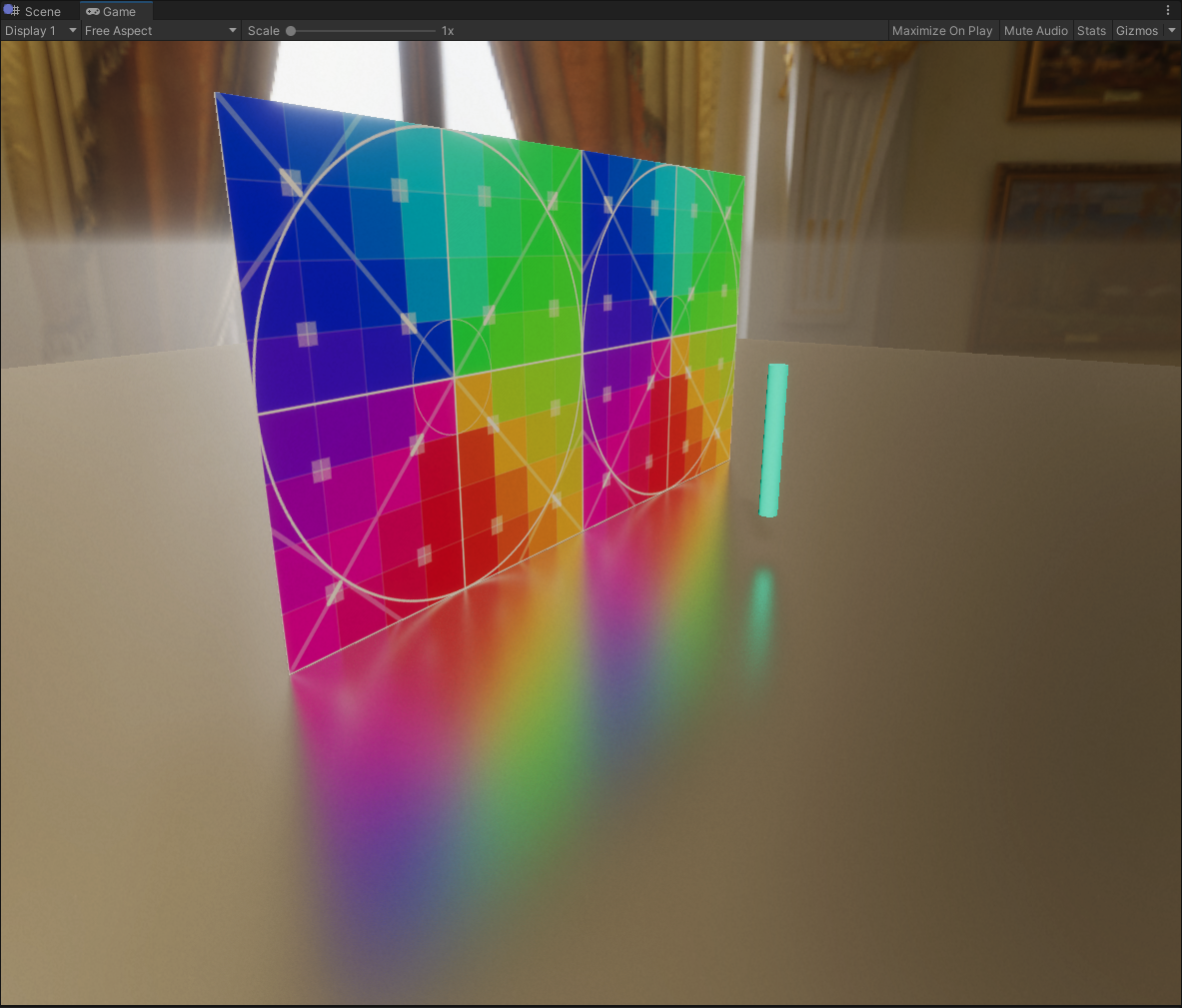
real-time fluid simulation and rendering #madewithunity #unity3d https://t.co/LBeubKOCXz
Twitter
 sour vault
Q: How do you blit to the screen using a material in a render pass?
cmd.Blit(SourceCamTarget, BuiltinRenderTextureType.CurrentActive,effectMat); context.ExecuteCommandBuffer(cmd);
This is not working.
Actually, It does seem to be doing something. But it seems to be overwritten by post processing.
indigo summit
@waxen lantern well water and ocean are possible in HDRP of course, it's just integrate them with VFX might take a while. i'm always wondering how to trigger breaking wave particles from ocean wave
heavy ice
@ripe fable Nice video with the dancing character, but the title doesn't relate at all to the content
ripe fable
I agree. My initial implementation/understanding of the subject was also wrong (I have no experience in this field), I'm trying to learn as I go
I hope to be able to correctly implement VNDF today though, seeing as it could help with less noisy performance mode
I saw your (?) todo about Eric's paper in RaytracingReflections.compute so I guess it's just a matter of time before it lands on staging, but it's an interesting subject and I'm eager to learn
heavy ice
VNDF instead of NDF reduces slightly the noise of the signal pre-denoising, don't expect anything spectacular.
ripe fable
yep
Every little bit helps for realtime though
I thought I had it working correctly in the video, but I noticed it was stretching the bottom half of my reflections
manic kindle
hey dear devs! does anybody know how Unity determines the shader variants that needs to be compiled on an initial build (when the shader cache is empty)? is it just going through linked shaders in existing project materials? I know about the shader variants collections and how to record them and to load them on startup, but I wonder specifically how I could speed up the initial build time.
waxen lantern
@manic kindle I don't have specific answers to your questions but I do know that Unity is very aware that shader and shader variant compilation time needs improvement and is targeting these optimizations to be finished by the end of this release year: https://blogs.unity3d.com/2020/05/06/faster-builds-with-the-new-caching-shader-preprocessor-experimental/

Unity Technologies Blog
Shader compilation is a lengthy process that involves several steps. One of the first steps is preprocessing the shader source. Unity 2020.1 beta introduces the Caching Shader Preprocessor, a new custom solution to perform this compilation step. It is up to 25% faster than the...
@manic kindle Other than that, if you really want to cut down compile times significantly, keep hardware solutions in mind. I highly recommend going for a CPU with more cores over raw clock speed, So, usually AMD over Intel for price to performance in many core CPUs for an ideal game dev workstation.
 glad pecan
(asked in Lighting, no response)
hey gang, lighting question
how can i create lights that Bake into my light probes....but do NOT bake when i generate lightmaps?
i setup a separate new Layer (ex Characterlights) and threw the light in there, but its' still baking into the world geo around it
suggestions?
long wagon
@glad pecan Please don't cross post. Have some patience.
 inner palm
man is URP actually going to replace the standard render pipeline in the future? The transparent shader really struggles with rendering closer objects in front of the ones behind it
that happens in the standard render pipeline too, but at least the cutout transparent shader doesn't do it
glad pecan
i believe URP will replace Standard, but it will get Deferred
waxen lantern
@inner palm @glad pecan yes i predict that will happen eventually (URP deferred is being worked on right now) but it will take a long time for URP to have full feature parity with Built-in RP and I think even longer before Unity officially announces deprecation of Built-in RP.
hey gang, lighting question
how can i create lights that Bake into my light probes....but do NOT bake when i generate lightmaps?
FYI all, i replied to @glad pecan's question in the #archived-lighting channel.
fiery marsh
@inner palm I imagine that's because the cutout shader in the built-in RP wasn't actually transparent. You can make an opaque shader with alpha clipping and it sorts correctly, you just can't have semi-transparency / alpha blending then. Can do that in URP too.
 meager valley
I'm having some issues with URP's 2D lights and shadows. I'm using a point light that's casting shadows, and it works great, except when you're getting close to a wall that's supposed to cast shadows to the other side of it. The closer you get, the less area the shadow covers.
I'm having trouble finding information on this, or even putting it to words for a google search. Does anyone know anything about this?
dawn sorrel
@sour vault is this a custom scriptable pass?
 molten quest
Hello guys. I'm having issues with 2D lights and URP. My whole scene (every object with Sprite-Lit-Default) gets evenly lit as soon as I create any light whatsoever (even a low intensity small point light).
dawn sorrel
Hello, I'm trying to setup HDRP in my project, however when I enable it and update all my materials, everything is dark and doesn't show any color at all.
i uh
i increased the intensity of my light
which fixed it
manic kindle
@manic kindle I don't have specific answers to your questions but I do know that Unity is very aware that shader and shader variant compilation time needs improvement and is targeting these optimizations to be finished by the end of this release year: https://blogs.unity3d.com/2020/05/06/faster-builds-with-the-new-caching-shader-preprocessor-experimental/
@waxen lantern Thanks for the answer. I got an solution on the forum: https://forum.unity.com/threads/srp-switcher-speed-up-initial-build-times.976668/
Unity Technologies Blog
Shader compilation is a lengthy process that involves several steps. One of the first steps is preprocessing the shader source. Unity 2020.1 beta introduces the Caching Shader Preprocessor, a new custom solution to perform this compilation step. It is up to 25% faster than the...
Unity Forum
Dear community
I'm working on a SRP switch functionality in unity, which allows us to switch the project's render pipeline between URP & HDRP. We...
waxen lantern
@manic kindle nice! thanks for replying back with your thread and additional info from Unity.
@manic kindle I take it you don't have time to wait for Unity to tackle hybrid URP / HDRP shaders themselves?
@manic kindle I'm also curious if anyone's tried to build HDRP for a Nintendo Switch dev kit? Even though HDRP isn't technically supported, on a feature level it seems like it could run, just not very well optimized.
Is it just poor performance or is it impossible to build at all?
turbid matrix
I replied to that thread
@manic kindle I take it that you are the original poster there?
waxen lantern
@turbid matrix oh nice of course you would have something to say on this haha
turbid matrix
I've done a lot of experiments on SRP swapping in past, back in the LWRP days and now recently with SRP 10 since it helps a lot on the materials (like mentioned on the post)
I'd write some small editor tool to swap between the SRPs in editor too if I were to author a game this way
so far I've just been prototyping this to see if it's even feasible
I'd need the runtime swap mainly because URP VR and low end HW on URP just runs so much better than stripped down HDRP
if HDRP actually had proper low quality performance mode, I wouldn't even consider this
one thing to note here is that you don't really see the HDRP / URP perf difference as easily on modern rigs, I can make both run almost as fast on my high end dev rig
but once doing testing on old i3 and old geforce GPU, the difference is like night and day
anyway, SRP swapping is something Unity itself wants to support during next years dev cycle
(not necessarily runtime swapping but making it easier to keep both SRPs for different targets on same project)
waxen lantern
I'd need the runtime swap mainly because URP VR and low end HW on URP just runs so much better than stripped down HDRP
@turbid matrix runtime swap on initial load? just so you don't need two different builds / executables? I assume you aren't switching RPs back and forth in real-time, other than for quick testing maybe.
turbid matrix
@waxen lantern same build is basically the biggest requirement for me but it doesn't really matter as it ends up working in same way regardless
I can do it live
basically how you do it is when you load a new scene, instead of doing it the normal way, you just:
- swap to SRP asset you want to use
- load scene without cameras, volumes and lights
- load additively SRP specific scene with cameras, volumes and lights
then if you need to swap to another SRP:
- you unload the additive SRP specific scene
- swap the SRP asset
- load new scene
- load SRP scene additively
you get the drift
why you need the additive scenes is because cameras and lights have additional SRP specific data components that hide and show different things from those cameras and lights and if you have both SRPs data components at once, it messes everything up
as for volumes, that's even more tricky atm as they at first glance seem like the same thing but there's apparently some hidden data there which can screw things up if you just use same volume on main scene
I'm assuming these SRP specific data components is something that they will allow to coexist in 2021 cycle, at least would be logical to
I'd probably move the data components to SRP core if it were me and then have each SRP to act as some sort of components to it so you could hook in x amount of them there with single setup
but Unity probably has some plan for this already
one thing to note here too is that even if you are fine by doing separate builds per SRP, like if you only want URP for Switch and HDRP for rest, you still need some convenient way to swap between these in the editor and you end up with solution that's still pretty close to what runtime swapping would do
one thing I forgot to note here is that if you use SRP specific shaders, you have to setup materials per SRP but that's been covered on the forum thread too
manic kindle
@manic kindle I take it you don't have time to wait for Unity to tackle hybrid URP / HDRP shaders themselves? :smiletears:
@waxen lantern I think some ppl managed to change the source code to run HDRP on the switch, it's just not optimised at all. But I don't have that from first hand and a Unity representative told me in a private meeting to avoid this practise and to stick with URP. @turbid matrix wow thanks for your addition to the thread. Will answer on the forum, in order to also let other ppl know.
one thing to note here too is that even if you are fine by doing separate builds per SRP, like if you only want URP for Switch and HDRP for rest, you still need some convenient way to swap between these in the editor and you end up with solution that's still pretty close to what runtime swapping would do
@turbid matrix yap, I'm working on a convenient workflow for the team in the editor atm. But it works quite painlessly for the moment, but I'm 100% sure I'm forgetting things. Stuff I haven't even looked at are lightmaps, probes etc.
turbid matrix
if you do high intensity lighting on HDRP, everything related to lights would be different
manic kindle
why you need the additive scenes is because cameras and lights have additional SRP specific data components that hide and show different things from those cameras and lights and if you have both SRPs data components at once, it messes everything up
@turbid matrix for the moment I have just have a URP and HDRP camera in the scene and activate / deactivate them and delete the automatically generated data component of the former SRP on the cam.
if you do high intensity lighting on HDRP, everything related to lights would be different
@turbid matrix haha yeah.. that's what I'm afraid of 🙂
turbid matrix
@turbid matrix for the moment I have just have a URP and HDRP camera in the scene and activate / deactivate them and delete the automatically generated data component of the former SRP on the cam.
that would work too I suppose, you just have to make sure no users activates those by accident
because if they by accident enable the disabled GO, it'll screw up the components immediately
manic kindle
because if they by accident enable the disabled GO, it'll screw up the components immediately
@turbid matrix good point! Need to consider this.
turbid matrix
I also thought about using prefab instantiation for this but for me, additive scene per SRP was easier
that prefab thing could work nicely though, like have a tool that detects existing (srp specific) prefabs on scene, deletes them on swap and instantiates the other ones
that way you could still edit the prefabs itself in the editor
manic kindle
That's right, but I like the additional scene solution also. Seems to be better separated this way.
turbid matrix
basically if you have lighting on additive scene, I believe all baked lighting data applies to it as well
I haven't really tested this either as I only have realtime dynamic lights
manic kindle
basically if you have lighting on additive scene, I believe all baked lighting data applies to it as well
@turbid matrix yap it does. We did this for anohter game.
And I think the Lightmapper does not really consider which SRP is active
turbid matrix
the lighting values will be different between the SRPs though if you config them like designed
for HDRP you'd use totally different scale
if you are fine with old style lighting intensities, then it might be able possible to reuse that data but I'm not sure if it's still stored in a way that's SRP specific
 upbeat trail
why isn't ShadowCaster SRP batching compatible ?
turbid matrix
I'm wondering about URP/HDRP configuration setup again... Unity plans these to be able to coexist in the future... but yet the new URP volume stuff is using somewhat different Volume setup
it looks the same but it's actually different implementation, different classes etc
so what I'm wondering, why doesn't Unity instead do the baseline for these components again in core so they use same setup for all SRPs
now if you put volume in scene, you have to have right SRP assigned for the volume to become compatible with that SRP
I just tested URPs upcoming sky volume thing which looks identical to what HDRP has right now (visual environment component to pick the sky time and individual component per sky for the sky settings)
but since the component classes are in URP files and HDRP's equivalent in HDRP files, you can't just swap the SRP asset and use the same volume and sky as they look the same but are not
I'm guessing Unity has some plans for this that we users don't know yet about
dense moth
I did all this work in URP with vfx and shaders. It all worked and looked well in editor but when i make a build absolutely nothing renders at all except my ui scene
it's impossible to debug 😦
waxen lantern
@dense moth vfx as in Visual Effect Graph? Not sure if it's your issue exactly but FYI it's still in preview for URP. VFX graph is only production ready for HDRP.
it's impossible to debug 😦
@dense moth Also, to this point, I recommend attaching a frame debugger to your development build such as Unity's own remote frame debugger, or RenderDoc or the others listed on this page: https://docs.unity3d.com/Manual/FrameDebugger.html
dense moth
thanks
 worthy quest
hola
anyone noticed the step node in shader graps not working properly in the latest non-preview 2020 version?
 gleaming crow
Why is vegetation shader not implemented into hdrp yet man
waxen lantern
Why is vegetation shader not implemented into hdrp yet man
@gleaming crow because there's so need for a unique shader? you can use HDRP/Lit shader for vegetation.
- Create a new material call it "Vegetation" etc
- for Shader select "HDRP/Lit"
- For Material type select "Subsurface scattering." aka SSS
- Then for Diffusion Profile select "Foliage"
gleaming crow
For the terrain
If you select the vegetation paint brush, it says that the shader is not supported for this render pipeline
Which I would think is a MVP feature
waxen lantern
@gleaming crow Ah I see, I didn't know that existed. I personally stay away from Unity’s terrain system altogether in favor of procedural generation in 3rd party 3D content creation software like Houdini, Blender, etc.
gleaming crow
I’m starting to think that’s the way to go, but the terrain system already has tree placement tools along with the ability to change height of certain areas, as a pose to having to edit it in blender and reimport it
I don’t see why the detail shader hasn’t been implemented yet
With the ability to create high fidelity visuals with HDRP, you would kind of assume it would be functional by now
waxen lantern
@gleaming crow is this what you mean? https://docs.unity3d.com/Manual/terrain-Grass.html
"Grass and other details currently only work in the built-in render pipeline and Universal Render Pipeline (URP)."
waxen lantern
got it yeah that's unfortunate. Hopefully because they are making it * extra high definition* or taking some special approach for HDRP lol 😆 but i have no idea
gleaming crow
Hopefully they do something about it soon
I’m having to use the tree section, which means I can’t layer vegetation because once you fill a certain area with one prefab, you can’t then go over it with another type of prefab
waxen lantern
@gleaming crow ah i found a forum thread with more info, SebLagarde at Unity say Alternative solutions are being worked on for HDRP, and there is also someone that hacked regular terrain grass/detail shader support into HDRP on their own if you want to try that.
https://forum.unity.com/threads/is-terrain-grass-working-on-hdrp-yet.628963/
Unity Forum
As the title, does it still come out as pink or does it at least draw now?
gleaming crow
Oh wow thank you
It also begs the question why don’t they just use this (or something similar) as a temporary solution
Until they make an official shader
waxen lantern
@gleaming crow this is the repo linked from the thread btw, it hasn't been updated since March 2019, though. I've no idea if it works in newer releases https://github.com/flamacore/UnityHDRPTerrainDetailGrass

GitHub
A very simple detail shader for the new Terrain engine 2018.3+ - flamacore/UnityHDRPTerrainDetailGrass
gleaming crow
Thanks
To be fair the terrain system hasn’t been updated since the 2nd world war so it should work fine
waxen lantern
lmao
keen pivot
not sure if this is the right channel for this, but since i'm using HDRP, maybe it is. i'm trying to make an object hightlight/or outline when its occluded, i can do this in shader graph and set the ZTest to greater, but the problem is that other items within the gameobject occluded the material and cause it to constantly highlight. this cant be a new problem people solve, whats the trick i'm missing here?
turbid matrix
@gleaming crow HDRP terrain grass is supposed to arrive in next years cycle.. it's still unclear if it's going to be regular terrain setup we have now or something new (like they suggested it would be in past)
if you need to have grass today on HDRP, there are several foliage instancing assets that support HDRP on the asset store but nothing built-in (unless you count tree placement tool on terrain which can be used to place grass meshes too)
https://www.humblebundle.com/software/unity-games-and-game-dev-assets-software also has one on the last tier but I haven't used it so can't tell how good it is
waxen lantern
@turbid matrix @gleaming crow In that same forum thread above, people mention using gpu particle systems like vfx graph to place and render grass / details which is incredibly performant, but you either have to bake a point cache and / or come up with your own approach / tools to read values from a texture or points that you paint with a "brush"
but yeah you'd think there'd be an asset filling this gap for the most common use cases anyway
gleaming crow
@turbid matrix thanks for the info
dense moth
yesterday i was having a problem with builds containing VFX, shaders, and URP not rendering anything.
I solved the problem by creating a shader variant collection and specifying it as preloaded shader. It also reduce build time drastically
waxen lantern
@dense moth glad you found a solution! and thanks for sharing it
 late schooner
stupid question, but what is unity's level of native subd surface import
looks like there's a tickbox for quad and triangle, but no others (this would be like gregory patches or that call of duty quadtree research paper)
 compact nexus
Another stupid question but i assume hdrp is too much for vr as your basically rendering everything twice?
gleaming crow
@gleaming crow this is the repo linked from the thread btw, it hasn't been updated since March 2019, though. I've no idea if it works in newer releases https://github.com/flamacore/UnityHDRPTerrainDetailGrass
@waxen lantern Very old link (2016), tried and didn't work :/
waxen lantern
@gleaming crow it was updated in spring of 2019 you can see on the commits. but still old enough to not be compatible with latest HDRP without modifications anyway
gleaming crow
Yeah it doesn't seem to affect the detail shader section of the terrain in any way