#archived-hdrp
1 messages · Page 12 of 1
 whole crag
 vocal fulcrum
Is it possible to render a camera image to a RT for each axis per frame, but also apply accumulation on all 6 individual renders?
https://docs.unity3d.com/Packages/com.unity.render-pipelines.high-definition@10.0/manual/Accumulation.html using something like this?
as I want to add this rt's to another rt which is a cubemap, but with raytracing enabled (:
 scarlet hull
@vocal fulcrum Technically, all of this should be possible, but ofc not in realtime.
vocal fulcrum
scarlet hull
<@197058147167371265> Technically, all of this should be possible, but ofc not i...
great! I don't need it in real-time, so that's not an issue. i'll try it out
thank you
scarlet hull
@whole crag Sorry, I've barely used the compositor so I can't really talk for this one and the bugs you're mentioning.
And stacking cameras is generally not recommanded, prefer to use custom passes if possible
@vocal fulcrum talking of the compositor (if it's not to much bugged), this tool might help you do what you want.
whole crag
hey, its alright ^^
i've switched to URP because I've realised hdrp is a bit much for my project
vocal fulcrum
scarlet hull
<@197058147167371265> talking of the compositor (if it's not to much bugged), th...
never heard of it! will look into it
scarlet hull
vocal fulcrum
never heard of it! will look into it
From what I remember, you set up 6 camera looking in the 6 directions required for a cubemap, set them in the compositor to render to different layers, and compose the layers together to a cubemap using a shader.
vocal fulcrum
cool, currently I'm just using 1 camera to generate a cubemap, so I'll try this!
vocal fulcrum
scarlet hull
From what I remember, you set up 6 camera looking in the 6 directions required f...
is there any way to convert the 6 textures into a cubmap in shadergraph? couldnt find anythign on it, so maybe I need to go down another route
scarlet hull
vocal fulcrum
is there any way to convert the 6 textures into a cubmap in shadergraph? couldnt...
Nothing out of the box.
The easy way is to use scripts to copy the 6 texture into the 6 faces of a cubemap.
Else you can use a custom render texture in cubemap format and a shadergraph that writes to the cubemap with these textures, but you'll ahve to figure out the XYZ to UV maths yourself
 wide crown
Hi guys, Im using a custom pass to do silhouetting behind objects, and it works but only in the editor. As soon as I make a build of the game it renders both the sillhoutte material as well as the original mat. The confounding thing is that I have a seperate project that the pass is from that works fine, both build and editor. And I have just gone through and made every single HDRP setting Identical and it still doesnt work, Im sure im missing something but I cant for the life of me figure out what.

Editor

Build

And all of the pipeline stuff has been directly imported from a project where the effect is working, I just cant ficure out why its working in the editor and not in the build
https://github.com/alelievr/HDRP-Custom-Passes This is the project with the effects

GitHub
A bunch of custom passes made for HDRP. Contribute to alelievr/HDRP-Custom-Passes development by creating an account on GitHub.
 stuck orchid
Why is it so hard to find a good HDRP outline shader?
Is there any thing that HDRP does to make it way harder than usual?
 harsh basalt
I think it's just because less people are using HDRP
It's easy to write an outline shader in HDRP.
 topaz ravine
stuck orchid
Why is it so hard to find a good HDRP outline shader?
topaz ravine
stuck orchid
Why is it so hard to find a good HDRP outline shader?
There is a good outline shader in the HDRP samples, check the high-definition rp packages, go to samples tab, check fullscreen samples, there is an outline (fullscreen) but a good one
 wispy burrow
why does my local volumetric fog render weird based on its distance to camera (its' weird when I'm further away), and then even disappears, even tho my distance fade is set to 10000?
scarlet hull
wispy burrow
why does my local volumetric fog render weird based on its distance to camera (i...
Check the volumetric fog distance in your volume settings.

This is the max distance at which volumetric fog is rendered. The local fog volume fade distance is to define at which distance this local object doesn't affect the fog rendering anymore.
And for the "waves" that ar visible, this is because your local fog box is very thin, as much that it does fill uniformly the screen space voxels of the volumetric fog
wispy burrow
scarlet hull
Check the volumetric fog distance in your volume settings.
hmmm I don't have a fog in my volume and there's no global settings for it 👀 does that mean that it's just using the default values? or am I looking in the wrong place?
 scarlet hull
wispy burrow
hmmm I don't have a fog in my volume and there's no global settings for it 👀 do...
scarlet hull
wispy burrow
hmmm I don't have a fog in my volume and there's no global settings for it 👀 do...
Those are the global volume settings. Look in you scene if you have something like a "sky and fog settings" object with a volume component.
That said, you can still add a fog override in the global ones, but if it gets overrided by the scene, it won't have visible effects 😅
wispy burrow
ohhh I see it now, I was only looking at the local fog volume and didn't see it there so I thought it must be in the global settings, thanks! is there any downside to setting them very high? I have a top down game so it's not that a lot of fog would be rendered while playing, I was just editing this for being able to zoom out in scene view and see the whole fog for debugging, since I'm doing some fancy fog of war stuff 😅
 scarlet hull
wispy burrow
ohhh I see it now, I was only looking at the local fog volume and didn't see it ...
scarlet hull
wispy burrow
ohhh I see it now, I was only looking at the local fog volume and didn't see it ...
Well, the higher the distance, the more you "spread" the voxels and loose precision
wispy burrow
scarlet hull
Well, the higher the distance, the more you "spread" the voxels and loose precis...
you mean with actual camera distance, not with this setting right? as in if I keep the camera in the same place but change this setting I assume the precision is the same
scarlet hull
wispy burrow
you mean with actual camera distance, not with this setting right? as in if I ke...
No, if the camera doesn't move, but you increase the volumetric fog distance, the precision (on the Z axis) will be reduced.
The volumetric fog buffer has a defined constant size, if you increase the distance, the voxel are more spread on the z axis, and thus, you will loose precision as they will be more streched
wispy burrow
oh wow you're right, just editing the value in the inspector I can see it now  thanks for pointing this out!
 whole fossil
wide crown
And all of the pipeline stuff has been directly imported from a project where th...
whole fossil
wide crown
And all of the pipeline stuff has been directly imported from a project where th...
probably the shader gets stripped during the build. make sure the material/shader is referenced somehow or use always loaded objects in project settings (or something like this, I don't remember how it is called)
wide crown
I tried that, I could try more I just give up I spent around 7 hours tweaking every single thing and I got nothing, I set it up to be Identical and the only thing I can find that was different was the version of HDRP, which I cannot update
.13 vs .14 no updates pending
 buoyant vortex

I have some blurry textures when my camera is too far.
I've tried turning off all post processing and it's still kind of blurry, anyobody know how to fix this?
 formal crow
it might be because of mipmaps
buoyant vortex
formal crow
it might be because of mipmaps
Ah, just fixed it, I had to turn on generate mipmaps.
 leaden meadow
Hi Guys , Is there any way to import custom lightmap uv channel made in 3ds max or blender ?
That's what happen , left fbx of 2 separate object but unwrapped together on the 2nd channel , 4096px layout. Import them into unity , Generate Lightmaps UV Disabled , and it gives me a 256px lightmap resolution

It shift and moves uv cluster on its own. Is there any way to prevent that ?
scarlet hull
leaden meadow
Hi Guys , Is there any way to import custom lightmap uv channel made in 3ds max ...
If you want to fit a 4k lightmap to that object, you need to set the lightmap size to 4k, and the object renderer "scale in lightmaps" value to something supidly high so it will be forced to take the full lightmap texture size
 fluid merlin
wispy burrow
why does my local volumetric fog render weird based on its distance to camera (i...
fluid merlin
wispy burrow
why does my local volumetric fog render weird based on its distance to camera (i...
Yes.... happens to me at times as well, it's very annoying. You can mitigate it by changing the dimensions of the fog. Also, you can add a 3d noise texture to it and set the scroll speed on x to like 0.1 and the fog will move. HDRP 12.1.13 comes with sample 3d textures.
leaden meadow
scarlet hull
If you want to fit a 4k lightmap to that object, you need to set the lightmap si...
Yes but it still distribute lightmap channel uvs accorgind to unity and not according to the imported lightmaps uv
 halcyon sinew
how can i get colored translucentshadows to work

i have it on HDRP + DXR
and i have a translucent material

and all these r on
and not much shadowing is happening
halcyon sinew
figured it out
halcyon sinew
using a decal and shader, is there a way i can make it only show up in the shadow, and fade out near the edges? I know the fading has to do with Fresnel but when i add it the effect dissapears.
 scarlet hull
leaden meadow
Yes but it still distribute lightmap channel uvs accorgind to unity and not acco...
scarlet hull
leaden meadow
Yes but it still distribute lightmap channel uvs accorgind to unity and not acco...
Oh, I didn't get the "two objects on the same lightmaps" thing ... I don't know if it is possible to handle this and keep them bound together when unity lightmapping kicks in ...
halcyon sinew
halcyon sinew
using a decal and shader, is there a way i can make it only show up in the shado...
Or only render behind it so wherever it's occluding that'd be fine
halcyon sinew
halcyon sinew
using a decal and shader, is there a way i can make it only show up in the shado...
Or only where the mesh of the object is intesecting with stuff
leaden meadow
scarlet hull
Oh, I didn't get the "two objects on the same lightmaps" thing ... I don't know ...
Let's try to flip the question. Is there a way to export fbx with the lightmap uv's made by unity ? i tried to export them but it still refer to original uv's and not those made by lightmapping
wispy burrow
is there a way to have local volumetric fog's shader run in scene window too? I have a realtively simple custom animated smoke, but even when the game plays I only see it animate in the game window, in the scene window it just stays static (but renders tho)
stuck orchid
I'm getting mixed answers about Unity and Multipass... Does HDRP support MultiPass? I'm trying to write a Outline shader using a mask and fill pass but only the 1st pass is being rendered
 eternal laurel
SRP’s in general including HDRP do not support multi pass shaders. For HDRP the preferred way is to use the custom pass system. A bunch of examples can be found here https://github.com/alelievr/HDRP-Custom-Passes
GitHub
A bunch of custom passes made for HDRP. Contribute to alelievr/HDRP-Custom-Passes development by creating an account on GitHub.
eternal laurel
wispy burrow
is there a way to have local volumetric fog's shader run in scene window too? I ...
Click the effects button on the scene view and select always refresh
leaden meadow
Hey guys ,to my understanding , raytracing is for preview only into the viewport before baking the lighting. It's not possible to build a windows application running raytrace lighting only right ?
 loud leaf
Is there any technical reason why SSR lighting uses inverse exposure multiplier? (I removed this in my local fork because it was always giving me issues in custom code because of the opposite workflow compared to diffuse)
I see there is a todo:
Raytrace reflection use the current frame exposure - TODO: currently the buffer don't use pre-exposure.
In LightEvaluation.hlsl

 shrewd moon
 dry turtle
why do I have this weird shadow when camera is close to the ground
dry turtle
why do I have this weird shadow when camera is close to the ground
Looks like an SSAO artifact
But could also be related to shadow distance / cascades
shrewd moon
leaden meadow
Hey guys ,to my understanding , raytracing is for preview only into the viewport...
I have never heard it being "just for preview", where'd you get that?
dry turtle
formal crow
does it happen with other textures as well?
yes
formal crow
shrewd moon
I have never heard it being "just for preview", where'd you get that?
he might confuse it with using pathtraceing to preview baked GI which is not a feature yet in unity
shrewd moon
formal crow
he might confuse it with using pathtraceing to preview baked GI which is not a f...
Path tracing also works both in editor and build just fine
 lone kite
Hey everyone, is it possible to change the exposure for a second camera without changing the exposure for the main camera in HDRP?
formal crow
lone kite
Hey everyone, is it possible to change the exposure for a second camera without ...
yeah, just apply a different post processing volume on that 2nd camera
 remote wren
is it possible to get local volumetric fog to actually reach all the way to the far clip planes? as far as I can find, it will only reach to the far clip distance in a radial fashion and therefore doesn't reach the corners of the camera frustum etc... is this just a limitation of HDRP volumetric fog?
shrewd moon
remote wren
is it possible to get local volumetric fog to actually reach all the way to the ...
Why do you need it to reach the corners? Usually that kind of appearance is avoided
fluid merlin
remote wren
is it possible to get local volumetric fog to actually reach all the way to the ...
Yes, I use global and then a local for moving ground fog that extends all the way to the far clip (250 in this example). You can avoid radial using blendistances and 3D textures with a scroll speed setting.
https://i.imgur.com/3LO6JY9.jpg
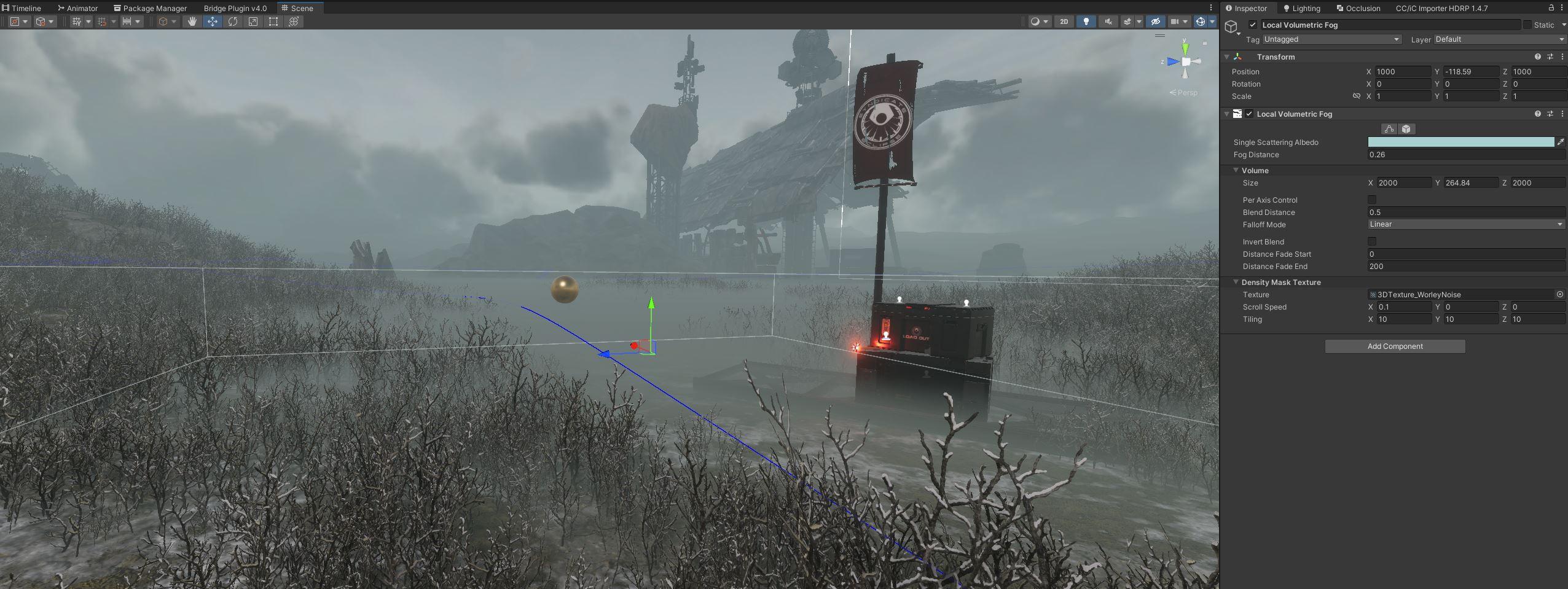 remote wren
shrewd moon
Why do you need it to reach the corners? Usually that kind of appearance is avoi...
remote wren
shrewd moon
Why do you need it to reach the corners? Usually that kind of appearance is avoi...
Because my game is more "top-down", so I get this sort of effect which looks ridiculous
 remote wren
fluid merlin
Yes, I use global and then a local for moving ground fog that extends all the wa...
remote wren
fluid merlin
Yes, I use global and then a local for moving ground fog that extends all the wa...
I'm not sure how this would fix my issue - I'm concerned with how deep the fog goes, so I can blend the close edges and I can scroll things etc, but that doesn't change whether the far corners are reached etc
I think I just need to find a way to do HDRP depth/linear fog and hide it but trying to figure out if I can get local volumetric to do what I want without having to add that on top
fluid merlin
remote wren
I'm not sure how this would fix my issue - I'm concerned with how _deep_ the fog...
Ahhh sorry, I see what you're trying to do now. Nope, Unity HDRP fog won't do that at all.
wispy burrow
is there some way to disable the DX12 backend and use something else in HDRP? I'm getting a lot of weird Unity crashes that point to it, e.g. this, happens literally when I just run my game in editor doing nothing but watchng my fog animate
========== OUTPUTTING STACK TRACE ==================

0x00007FFAF5BC9EEF (Unity) RenderColorSurfaceD3D12Base::operator=
0x00007FFAF5921146 (Unity) GfxDevice::SetBackBufferColorDepthSurface
0x00007FFAF5BE48E6 (Unity) GfxDeviceD3D12Base::SetBackBufferColorDepthSurface
0x00007FFAF5BE4862 (Unity) D3D12Window::SetAsActiveWindow
0x00007FFAF7304E3F (Unity) GfxDeviceWorker::RunCommand
0x00007FFAF730753F (Unity) GfxDeviceWorker::RunExt
0x00007FFAF730766D (Unity) GfxDeviceWorker::RunGfxDeviceWorker
0x00007FFAF57DBA75 (Unity) Thread::RunThreadWrapper
0x00007FFBF3A6257D (KERNEL32) BaseThreadInitThunk
0x00007FFBF53CAA58 (ntdll) RtlUserThreadStart
tried in 2022 and 2023, getting a crash in both 
 open tree
what's the name of these type of sliders? They have min and max value in one. I want to add similar feature to shader graph materials, is it possible?

 true zealot
open tree
what's the name of these type of sliders? They have min and max value in one. I ...
true zealot
open tree
what's the name of these type of sliders? They have min and max value in one. I ...
A MinMaxSlider
wispy burrow
dumb question but if I just have one scene and one global "Sky and Fog Global Volume" with the Volume component on it, is there any reason to put anything on it and not on the DefaultSettingsVolumeProfile asset instead? the in-scene volume is just "in-addition to" the global profile right?
I'm just trying to minimize the amount of places where I play around with global settings
oh wait, I guess if I don't assign that profile to the in-scene volume it won't be applied tho, right? I'm not entirely sure how the multiple layers of config work from the docs
wispy burrow
why do I only see some parts of the scene and not everything when I turn on path tracing?
 pulsar skiff
is there a way to make decals appear when using path tracing? since all my decals disappeared as soon as i enabled path tracing.
fluid merlin
pulsar skiff
is there a way to make decals appear when using path tracing? since all my decal...
It's still not there... even in hdrp v17. There was a note from a year ago from a Unity dev in the forums that it was being worked on.
Here's what doesn't work yet:
https://docs.unity3d.com/Packages/com.unity.render-pipelines.high-definition@17.0/manual/path-tracing-limitations.html
formal crow
pulsar skiff
is there a way to make decals appear when using path tracing? since all my decal...
https://portal.productboard.com/8ufdwj59ehtmsvxenjumxo82/c/2254-path-tracing-decals?utm_medium=social&utm_source=portal_share its supported with unity 2023.2
open tree
can anyone confirm this, according to my knowledge raytracing doesn't support vertex animation yet. I mean, if I manipulate vertex in shader(like wind effect for vegetations) it will not show in raytraced effects (reflections).
right?
scarlet hull
open tree
can anyone confirm this, according to my knowledge raytracing doesn't support ve...
right
 hoary starBOT
@pastel hawk No invite links.
 lucid gate
I thought it would be good to test my prototype with the build function, only to find that it freezes at the first corridor. I spent hours trying to find the culprit and was able to trace it to this gameobject.
2 questions, why and how can I do better in the future? Nothing was apparent from the crash logs.
edit: Oh i should mention, within the editor, nothing indicated that this gameobject later would give problems.
edit2: Basically it's just a very thin probuilder mesh, and the hole was made with the experimental boolean function.. Never ever? 🤷🏽♂️
 wispy burrow
is it dumb to use ssgi/ssr and realtime lighting only just to save myself from having to bake during level design all the time? i feel like i can just iterate so much faster with it
formal crow
wispy burrow
is it dumb to use ssgi/ssr and realtime lighting only just to save myself from h...
no, those are actual techiques used in AAA games
 forest axle
are there good alternatives to volumetrics that is performance friendly for android
 zinc lichen
Regarding BatchRendererGroup (BRG); there is a method to set the global bounds BatchRendererGroup.SetGlobalBounds(Bounds bounds) and the documentation states it would be used internally for culling. This seems not to be working though? At least for frustum culling? Is that right?
I could make frustum culling work by implementing an AABB frustum check manually in OnPerformCulling but should I have to?
Also the global bounds seem not to be accessible, so I have to cache them manually as well?
I find the BRG documentation a bit lacking. Has someone a pointer to some resources where I can learn more about good practice when it comes to using BRG?
eternal laurel
When using BRG frustum culling is up to you to implement, the bounds will simply not render anything outside those boundaries regardless of where the camera is.
A good practice is to run a frustum cull job from OnPerformCulling and use the results of that to fill your draw commands
lone kite
formal crow
yeah, just apply a different post processing volume on that 2nd camera
How do I do that? Is there a way to assign the volume to a specific camera?

 dim arch
Does anyone know how to get volumetric lighting work underwater in the new HDRP Water system? I'm trying to make an underwater flashlight, but the volumetric disappears, presumably because the Fog volume does not apply underwater (though it seems to reduce visibility underwater too, so maybe Fog works underwater, but the volumetric aspect doesnt?)
formal crow
lone kite
How do I do that? Is there a way to assign the volume to a specific camera?
If i remember right there should be? I could be wrong tough
formal crow
dim arch
Does anyone know how to get volumetric lighting work underwater in the new HDRP ...
What version are you on?
lone kite
formal crow
If i remember right there should be? I could be wrong tough
No, just an option to make it a local volume but its okay.
Thanks @formal crow
dim arch
formal crow
What version are you on?
2023.2.14f1
formal crow
dim arch
2023.2.14f1
Underwater volumetric fog is only supported in unity 2023.3 onward
dim arch
formal crow
Underwater volumetric fog is only supported in unity 2023.3 onward
Thanks a lot, where did you find this information, just for future reference? I'm sure it's some unity page, but I often find it kind of hard to navigate some parts of the docs
 minor depot
dim arch
Thanks a lot, where did you find this information, just for future reference? I'...
minor depot
dim arch
Thanks a lot, where did you find this information, just for future reference? I'...
It's actually in a really obscure spot, I happen to know this just by pure chance. Here's the github commit on Unity's repo. I think it's in the latest beta (possibly the next one I'm not sure)
https://github.com/Unity-Technologies/Graphics/commit/a2792de62b64c032b9b71f855356fd689840052d
GitHub
When placing volumetric fog under a water surface, it wouldn't render correcly.
Fixed that and also added support of sampling the caustics texture in the volumetric fog to have nice caustic...
dim arch
minor depot
It's actually in a really obscure spot, I happen to know this just by pure chanc...
Cheers mate
formal crow
dim arch
Thanks a lot, where did you find this information, just for future reference? I'...
i have seen it in the HDRP 17 changelog, https://docs.unity3d.com/Packages/com.unity.render-pipelines.high-definition@17.0/manual/whats-new-17.html#water-system
 dawn sorrel
We recently upgraded to hdrp and been fine so far but today out of nowhere (haven't touched lighting) all my models in scene view and prefabs are super over exposed. Zooming out to a normal level they're completely white and have to practically be on the object before I can see any colour... Never had this happen before in 5yrs of unity dev. Anyone got ideas? Isn't happening at runtime.
fluid merlin
dawn sorrel
We recently upgraded to hdrp and been fine so far but today out of nowhere (have...
Does it happen in the Unity hdrp template demo scene? If not, it might be something in the volume override of one of your scenes. You can try to disable the gameobject the sky/fog volume is on and see if that does it.
I’ve seen odd stuff like that with a subsurface scattering profile missing.
If it happens in the Unity demo scene, you might have to create a new HDRP profile for the project. The hdrp wizard can fix it or make a new one.
One last thing might be to clear any baked lighting, the lightmap setup or files might be corrupted for the scene.
 spark ivy
I've got a major catch 22 problem. My Packages Cache folder is full of bad shaders from the wrong pipeline BUT I'm locked out of deleting them by some sort of permissions error. I really don't understand, but I need permission from myself. Only I can't give the permission.
I'm in Windows 10
Cannot compile or anything until I fix this.
Thinking of just copying my project
fluid merlin
spark ivy
I've got a major catch 22 problem. My Packages Cache folder is full of bad shade...
I can't say I've had permissions issues with Unity, but I have had library problems with Unity. Fastest way to solve, new project, reinstall packages, copy in the asset folder.
shrewd moon
It may be related to the common wisdom that you should not create a unity project in any OS system folder or otherwise restricted path
 signal osprey
where is the option to turn on gpu occlusion culling?
 digital spire
signal osprey
where is the option to turn on gpu occlusion culling?
digital spire
signal osprey
where is the option to turn on gpu occlusion culling?
I assume you're on 6000? It's in the project setting
signal osprey
digital spire
I assume you're on 6000? It's in the project setting
no GPU occlusion in 14?
digital spire
Best way to check is to look for GPUResident drawer. It's group together.
If your version doesn't have it then it mean it's not supported in your version.
 signal osprey
how is that related to GPU occlusion?
digital spire
signal osprey
how is that related to GPU occlusion?
This might answer your question?
 signal osprey
digital spire
This might answer your question?
signal osprey
digital spire
This might answer your question?
sounds super complicated
i guess there is no dynamic occlusion in hdrp
digital spire
signal osprey
i guess there is no dynamic occlusion in hdrp
There are but it's just in the newer version. we can't use it in production yet.
digital spire
signal osprey
sounds super complicated
The gist of it is that they rely gpu resident drawer code to cull thing
spark ivy
fluid merlin
I can't say I've had permissions issues with Unity, but I have had library probl...
Thank you
spark ivy
shrewd moon
It may be related to the common wisdom that you should not create a unity projec...
It's not that. I made a special drive for Unity. 😛 It should feel pretty stoked about it
Hmm. Set all the privilages on the folder to admin and restarted. Actually got to delete it. weee
And now for unity to throw a fit XD
spark ivy
Seems okay
I'm having MAJOR issues with processor overheat though. I can play Baulders Gate 3 on quite high settings, but if I place three generic trees into a blank scene in this game my processor tries to cook itself
Just trying to do an indoor scene right now, and it's not jittering but my processor is 77 degrees Celsius for four walls.
I don't know how I'm going to be able to build my game like this
 wraith blaze
spark ivy
Seems okay
wraith blaze
spark ivy
Seems okay
What cpu and motherboard combo do you have
I had a similar issue and it mostly affects 12th gen - 14th gen intel cpu's
spark ivy
wraith blaze
What cpu and motherboard combo do you have

I've put the same assets into a blank project, and it caps out about 60 Celsius in editor mode for a demo scene game map.
So part of it is def my addons.
But, seriously, this is a new PC
spark ivy
wraith blaze
You have the same issue i had
Oh?
wraith blaze
By default some motherboards auto overclock the cpus to some weird voltages just for 200 mhz increase in speed
You need to turn that off in the bios
loud leaf
It's better to continue this discussion in another channel/pm, this has nothing to do with HDRP.
wraith blaze
If i remember correctly the setting on my asus board was something along the lines off enforce all limits on or off
wraith blaze
loud leaf
It's better to continue this discussion in another channel/pm, this has nothing ...
Will do
spark ivy
wraith blaze
If i remember correctly the setting on my asus board was something along the lin...
Thanks a lot. Could you explain more in dms?
 hollow frigate
Does anyone know what happened to this?
Would be fantastic for what I'm currently working on, but I can't find any other mention of it anywhere
Unless it just got rolled into the volumetric fog override?
scarlet hull
hollow frigate
Unless it just got rolled into the volumetric fog override?
The fog is now controller solely through the fog volume override component, but only with exponential + volumetric fog, linear fog has been removed.
signal osprey
digital spire
The gist of it is that they rely gpu resident drawer code to cull thing
interesting to know. i thought that HDRP had compute shader per polygon cluster culling like Unreal.
fluid merlin
signal osprey
interesting to know. i thought that HDRP had compute shader per polygon cluster...
Unity is working on trying to improve the culling, but it's not in a good state (prior to version 2023 I think). I've been trying to find out if hi-z will be in frustum culling with GPU Resident Drawer.
signal osprey
fluid merlin
Unity is working on trying to improve the culling, but it's not in a good state ...
thanks for the heads up. it's hard to tell what's production ready in unity
I use both Unreal and Unity
fluid merlin
Yeah, I work in UE5 as well... Unity HDRP is like 6-7 years behind it, but I see unity probably disassociating with realistic gamedev tracks after the restructuring. I think they want to return to low-poly stylized low resource gameplay, and try to push AI to fake geometry as a way to having the lack of things you need to high end realistic gameplay like a character workflow pipeline, biome generation, virtualized geometry, and a real dynamic realtime global illumination system.
Chris Kahler is working on "nanotech", which is nanite for Unity. It's probably like 80% of the way there right now in development. It's closer to Nanite than the Unity China one.
Also, the developer of Htrace is working on a new version which does raytracing voxel-based GI. It's the closest thing I've seen to Lumen lighting in Unity.
https://twitter.com/Passer1dae/status/1702646980462194847
Testing GI with moving objects and changing lighting conditions
#gamedev #indiedev #unity3d

 Twitter
·
signal osprey
fluid merlin
Yeah, I work in UE5 as well... Unity HDRP is like 6-7 years behind it, but I see...
Twitter
·
signal osprey
fluid merlin
Yeah, I work in UE5 as well... Unity HDRP is like 6-7 years behind it, but I see...
why are you still in the Unity ecosystem?
your prediction makes a lot of sense. skipping a tech generation, so to speak.
digital spire
The new real time gi will be base on apv which is unfortunate😕 seeing how much adjustment volume you have to manually place to fix light leak, I can't imagine it working well for dynamic object at all.
fluid merlin
signal osprey
why are you still in the Unity ecosystem?
This is my last Unity game, after this one, I'm working on the next one solidly in UE. I really liked Unity for it's C# adoption and ease of adoption of disparate tech stacks (at the time). I feel like Unity was a better game engine than UE (prior to v4). When I saw HDRP showcased, the "Adam" work for example, I was like whoa, okay, I need to give HDRP a shot.... 6 years later, I still see really smart devs struggling with Fog & baked lighting in a way that just doesn't make sense for a mature engine.
fluid merlin
digital spire
The new real time gi will be base on apv which is unfortunate😕 seeing how much ...
Yeah, the APV feels like yet another "patch" to try to make GI responsive in different light conditions. The challenge is currently moving from dark to light (or light to dark) in various scene lighting setups. Unity is working on Dynamic Realtime Global Illumination to fix that exact shortcoming, but it still relies on the existing solution architecture for achieving GI.
signal osprey
fluid merlin
This is my last Unity game, after this one, I'm working on the next one solidly ...
oh man you just helped me make a decision. i was holding on unity like an abusive relationship 😅
from my attempts i thought HDRP may need one more try but it just isn't well conceived
APV is just old spherical harmonic static light probes from unity 3 isn't it?
fluid merlin
signal osprey
APV is just old spherical harmonic static light probes from unity 3 isn't it?
Pretty much, instead of the sparse grid you get a larger grid within a volume. So with the volume you can get a richer bake from complex lighting. It's essentially the same tech though.
signal osprey
fluid merlin
Pretty much, instead of the sparse grid you get a larger grid within a volume. ...
it scales well so i get why they chose that
with hardware at least.
digital spire
Yeah i think that is the case. Because let's be real, the main thing unity have over unreal have always been mobile. So they need something that work on mobile
And things like lumen are not so i guess it got deprioritized by management
I just wish htrace dev release his work already lol
Been agess
fluid merlin
2D, Mobile, VR has always been a safe space for Unity.
I think HDRP was way for them to dip their toe in GPU intensive games and film, but now, it's like a high maintenance sports car that I feel like they don't want to own but drive around to impress the neighbor.
The GDC Unity Roadmap is out now btw (presentation was on Monday I think)
https://www.youtube.com/watch?v=o9AGkB9nnkc

Discover the latest developments in the Unity Engine and how they’re supported through additional tools and services to maximize your creative freedom and efficiency, while enabling you to produce gorgeous, immersive games that will wow players over and over.
In this video, we show you how to achieve fantastic graphics fidelity and flexibility...
digital spire
On topic of APV. I recently try the 6000 version. It's usable. Disbale dilation and set min probe to 0.5. Work in most case with minimal adjustment need. But havn't test in large scene yet. It's pretty dense at 0.5 distance.
signal osprey
I like using 3d texture for dynamic object lighting. Bakery's can be cut down to just 1 sample, which is cheap these days.
digital spire
3d texture eat a lot of vram though
Not sure about the perf comparison. Apv eat more perf the denser the probe is
signal osprey
on large world, yeah probably
digital spire
0.5 might make it approch the 'too much' threshold
signal osprey
i only have 500^3 worlds
signal osprey
digital spire
Not sure about the perf comparison. Apv eat more perf the denser the probe is
oh really.
digital spire
signal osprey
oh really.
Yeah. If u tries baking 0.1 probe distance you'll see 😂
 sullen atlas
Hi, I'm trying to upgrade a project to hdrp. I'm encountering this weird bug only in isometric view
it happens when moving the camera or when changing the camera orthographic size
the main light source is a directional light with these settings atm

anyone has any clue why this is happening?
oh I just noticed its not supported XD
 blissful dust
 honest cypress
I was inspired by the gdc roadmap presentation and downloaded unity 6
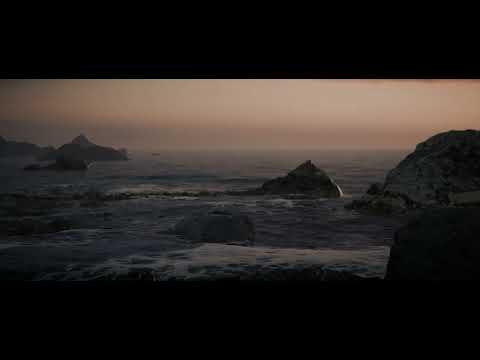
I would not consider HDRP for a VR project unless you have a highly controlled demo environment, such as if you're providing archviz services or running a VR arcade
HDRP is front-loaded performance wise. You pay a lot up front, but it scales well as you build rich environments. In a VR game, you can't afford big rich worlds even in the best scenario, even on PC.
All things equal, HDRP is just slower than URP in smaller VR-friendly scenes, you're paying a lot for heavy duty hidden machinery so to speak, that you will never use.
That's performant, works in URP, and VR? And is cheap or free? I would start on github.
People play it loose with the terminology
If I had to say, I'd say that "volumetric lights" is referring to the lights themselves, while volumetric fog refers to the system as a whole. But that won't always be the case, people will name their volumetric systems however they name em.
 long scarab
most HDRP work in VR, and performance is manageable, you just need to get rid of expensiv post processing stuff; but you need to target like GTX1080+ kind of GPUs. But I agree that on URP you get much better support for VR by Unity , as they seem to care mostly for the mobile / standalone stuff, for which HDRP doesn't work at all
digital spire
Quest fat maybe = urp
 flint mist
How do I increase the range of shadow visibility while in inspector?
fluid merlin
honest cypress
I was inspired by the gdc roadmap presentation and downloaded unity 6
That looks great... what is the light setup (pathtraced or ?) and sky solution used?
honest cypress
fluid merlin
That looks great... what is the light setup (pathtraced or ?) and sky solution u...
Adaptive probe volumes with SSGI. The sky is an HDRI with procedural distortion enabled to give it a little bit of motion.
There is also volumetric fog
And a whole lot of other effects
Screen space GI
Screen space AO
Screen space reflections
Contact shadows
Ocean system
Tessellated terrain
Volumetric fog
Bloom
Motion blur
Other misc image effects
Adaptive Probe Volumes
Ocean system
Rendering 13m tris
This is just a cinematic test and I'm going to strip away graphics features that aren't contributing to the look of the image. Such as contact shadows.
I also need to tweak some quality settings, and avoid too much overlap between some features like SSGI and SSAO, where I likely don't need both.
Targeting minimum 60 fps at native 4K on an rtx 4080, and I'm about there already, but I like to be as optimized as possible.
Still WIP
fluid merlin
Well done, looks amazing
honest cypress
thanks, I enjoy answering questions 😄
I have a few of these environments in the works, and am aiming to get at least one published on the asset store by around the end of the year, I'm busy with work and want to enjoy my summer so progress is slow
minor depot
honest cypress
Screen space GI
Screen space AO
Screen space reflections
Contact shadows
Ocean s...
What are you using for assets? How much instancing vs unique assets everywhere is there, and are you using the gpu resident drawer?
Looks incredible by the way
honest cypress
Thank you! The assets are my own photogrammetry scans. There are about a dozen completely unique rocks, with about a dozen cliff variations made by distorting a cliff wall scan and piecing them together into formations. I haven't looked at the GPU resident drawer or GPU occlusion culling yet.
The dozen or so completely unique rocks doesn't include additional scans for things like terrain textures.
I have a trip planned for May where I will get hopefully another 25 scans or so for this collection.
minor depot
Wow, those are borderline quixel quality, and its so much cooler you did it yourself
minor depot
honest cypress
Thank you! The assets are my own photogrammetry scans. There are about a dozen c...
If you instance assets a lot the gpu resident drawer helps a bunch, especially with reducing triangle count if you use occlusion. No idea what the current bottleneck is but reducing on 13M triangles would probably help
honest cypress
Triangles don't matter much when on high end graphics cards
honest cypress
minor depot
If you instance assets a lot the gpu resident drawer helps a bunch, especially w...
Trying it out. Tris cut in half, batches are down too, but my FPS is comparable if not slightly worse.
Yeah with or without I'm still getting around 55-67 fps at 4k
I'll need to try building standalone to see for sure
I do love this water though
honest cypress
minor depot
If you instance assets a lot the gpu resident drawer helps a bunch, especially w...
The famous unreal engine 5.0 demo where they showcased nanite for the first time, you hear about how the raw scene is billions of triangles, but what people tend to miss is that the actual triangles being rendered on-screen were still around 100 million
IIRC
Of course nanite has lots of other optimizations too, but still. AAA games can be up the tens of millions of tris rendered.
For this my triangle target is fairly loose, but I'd probably let myself go up to 15-20m, depending on what performance I get as I continue to work on it
minor depot
honest cypress
The famous unreal engine 5.0 demo where they showcased nanite for the first time...
Huh, I guess it makes sense. I've never used a card better than a 1660 so triangles are still somewhat important to me.
minor depot
honest cypress
I do love this water though
That is some really nice water
honest cypress
Yup I'm very impressed with the hdrp team
minor depot
Have you tried out the underwater effects? They look a lot nicer in the newer betas
honest cypress
Waiting to see lots of asset flip games on steam in the next two years with random oceans that cut your FPS in half and are so poorly lit that you can't even tell what they are
honest cypress
minor depot
Have you tried out the underwater effects? They look a lot nicer in the newer be...
Yes the underwater effects look amazing
And I was surprised to see there are automatic caustics that even affect volumetric fog
It's shockingly unified
formal crow
honest cypress
It's shockingly unified
dude, the water system is my fav HDRP system, they cooked with that one
and the best part is that you can render water on any custom mesh
 trim bluff
hey everyone! so these just started popping up in my console when i try to build my game, anyone have any ideas?
cant find much online or im just terrible at finding sources

no idea what any of this is
okay i restarted the engine and it works now, awesome, love that
wispy burrow
uhm so I had a working indoor-ish setup with HDRP, then messed up something and now my scene looks like this 😅 I remember it looking like this before too, but I forgot what was the fix ... seems if I add a directional light with non-zero intensity it kinda fixes it, but ... that seems like a bad solution considering I have a ton of lights in the scene already

these are my visual environment & exposure settings

oh never mind, my reflection probes were set to on-enable, just pressing play fixed things 😅
 sly atlas
Does anyone have any idea what is causing this issue? Whenever the camera rotates slightly downward, lighting changes All volumes are global, not local.
topaz ravine
Unity6 is pretty insane, I have a 3060 6gb, I made a quick record out of my MeteoVFX demo, that use a lot of custom buffer, tessellation a lot, etc on this template scene and :
using the older version of Unity I was sacrificing to much quality using the HDdynamic resolution and native upscaler to be able to run this demo using DXR stup, even 1080p was downgrade a bit when the scene is the most charged, now with STP I can run 2K render in Editor without problem and the quality is a lot higher, even more in 1080p in comparison, the upscaler do a very good job in anycase so. The in Editor 2K render are around 30fps, the latency/gamefeel regarding inputs it's very good. I think in fact that it allow to deploy DXR setup to more gamers
topaz ravine
Some upscalers are a little bit buggy or broken regarding some custom pass functionnalities I use : I have some Fullscreen and some Blit operation (before rendering) to draw custom buffers/rt, and a Wetness pass (After Opaque Depth and Normal)
It look like I totally break DLSS 2 which return me a red color from one of the customRenderTexture I use during a blit operation from before rendering
I tryed FidelityFX2.0 too, but I guess there is an isssue because some of my custompass was encoded at another dimension than the screen, so I could see my roughness and normal buffer kinda offset from the camera because of resolution or viewport size.
About default upscaler CatmullRom have no issue, so I use it for now.
The TAA upscaler is kinda producing an effect on my buffers too, it look like it force my rendertextures from before rendering to refresh and produce glitchy result each frame (using catmullrom this buffers are stable)
fluid merlin
I can never get DLSS upscaling to work right in Unity, I haven't tried v6 though. When I turn it on, the Game window zooms in like 32x and whatever I adjust on the camera or game window never fixes it. Posts in the forums suggests it's a bug... I sort of just gave up on it.
topaz ravine
it's like a report, yes i'll may copy paste it to a forum tread too
spark ivy
Hey guys. I'm having issues with applying materials to models I've made myself in Blender. any ideas why they would do this?


Granyness is a shader. Don't worry about it

This one was meant to just be a blackout

I have gotten the texture working on singular, solid, objects

But I can't tell what I'm doing wrong
Any ideas?
eternal laurel
Seems like janky uv’s to me
topaz ravine
spark ivy
Any ideas?
you obviously need to generate clean UV in blender fr this objects
spark ivy
topaz ravine
you obviously need to generate clean UV in blender fr this objects
Ah okay. Any tips on that? They aren't unwrapping cleanly
 languid wedge
spark ivy
Ah okay. Any tips on that? They aren't unwrapping cleanly
languid wedge
spark ivy
Ah okay. Any tips on that? They aren't unwrapping cleanly
look up some tutorials on uv unwrapping on yt, or just select all faces->press u->smart uv unwrap
topaz ravine
or ask in #🔀┃art-asset-workflow
spark ivy
languid wedge
look up some tutorials on uv unwrapping on yt, or just select all faces->press u...
Thank you
 ebon kiln
Using HDRP. trying to investigate this GPU usage spike here but Unity isn't showing me what's causing it, nor do the GPU ms numbers match. What's happening here?
 true zealot
ebon kiln
Using HDRP. trying to investigate this GPU usage spike here but Unity isn't show...
true zealot
ebon kiln
Using HDRP. trying to investigate this GPU usage spike here but Unity isn't show...
Why have you not expanded the hierarchy? Are we to assume that that's all it shows?
ebon kiln
true zealot
Why have you not expanded the hierarchy? Are we to assume that that's all it sho...

this still isn't helpful
Render Camera is apparently using 13ms, but all the stuff inside of it clearly doesn't add up to 13ms. So whatever is causing these random spikes is a mystery to me, even with deep profiling enabled.
 radiant furnace
Does anyone know of any easy ways of adding a pixelation effect to a HDRP project?
I tried the method of adding a render texture and passing it as a raw image but Its not rly working
topaz ravine
radiant furnace
I tried the method of adding a render texture and passing it as a raw image but ...
a fullscreen custom pass After Post Process? you need fraction on the uv of the screen
radiant furnace
I tried applying a custom pass but it didnt really do much other than soften the edges not sure why
I could send you ss of my shader graph and the video I followed
fluid merlin
radiant furnace
Does anyone know of any easy ways of adding a pixelation effect to a HDRP projec...
RichFX for Hdrp, there’s a pixelation effect.
 whole fossil
is there a reason why DrawRenderersCustomPass doesn't exposes renderingLayerMask (but only LayerMask)? It would be super useful, and RendererListDesc already supports it
or - maybe there is a some clever way to extend it to support renderinglayermask?
 alpine hound
I just started an HDRP project and I got my normal materials to work on my assets as long as I drag the purple asset in and then the material. Now I want to paint trees and it will only paint them purple and not with the material iv already tried to upgrade all materials to HDRP and the ones just in the scene which is how I got the first part to work but it still seems broken for mass placing trees and painting them.

 hot locust
I'm using HDRP and pulled in the StarterAssets/ThirdPersonController. The three materials for the character showed up as pink so I convered them to HDRP. That didn't fix the problem. I noticed that they were all using the "Universal Render Pipeline/Lit" shader so I changed each to "HDRP/Lit" instead. They no longer showed up as pink and seem correct in the project window, as each looks like a different shade of shiny grey/white/blue material. However, while the character in the scene view is no longer pink they don't look correct - instead of looking like a combination of those colored materials it looks totally white. Can anyone point out what I'm doing wrong?
formal crow
 olive kayak
Is there any way to fix this?
olive kayak
Is there any way to fix this?
enable the skybox in the toolbar
formal crow
hot locust
I'm using HDRP and pulled in the StarterAssets/ThirdPersonController. The three...
there should be an URP to HDRP converter in the wizard
hot locust
I selected Window/Rendering/HDRP Wizard. That brought up a dialog. I CTRL-clicked the three pink materials (after re-importing to get them back to their original state) so that they were all selected and then clicked on the dialog's "Convert Selected Built-in Materials to HDRP". That brought up another dialog stating that "The upgrade will overwrite 3 selected materials. Make sure to have a project backup...." I clicked "Proceed" and...nothing. No error message, no progress bar, no completion message. The materials are still pink and the shader for each is still "Universal Render Pipeline/Lit". So, it doesn't look like that did anything. Any idea what's going wrong?
 olive knoll
helloo, can anyone tell me why the transparent shader see's through the render texture I'm displaying in my scene? I put a cube behind it to test, and as you can see in the photo, instead of seeing the canvas' raw image/render texture, it sees the cube. Its a super basic hdrp transparent shader. I've tried setting the canvas to world space and screen space, nothing changes. I'm stumped.
(I'm in your basic hdrp project, sending media pipe face data into unity. this isn't an AR project/doesn't use mobile)
 topaz ravine
olive knoll
helloo, can anyone tell me why the transparent shader see's through the render t...
topaz ravine
olive knoll
helloo, can anyone tell me why the transparent shader see's through the render t...
I guess what you see is the cube depth (because what's outside the cube look darker) so your canvas ui shader may not be depth writing, it look like your "face mask" is a mesh too, check if it's transparent it should need depth writing too to have correct shadowing, ao etc
 safe kelp
Would anyone know why my complete lighting turns of when i turn anything from raytracing on?
 elder harbor
Uhhh, why is this happening? I need to disable and re-enable the volume to make it work. This also happends in build.
Custom volumes are enabled in quality settings.
or it's just the fog that buggs out
fluid merlin
elder harbor
Uhhh, why is this happening? I need to disable and re-enable the volume to make ...
It looks like you have a Sky & Fog volume as well, try changing the priority on the volume or if you need the volume to change when you get near the table, use a local volume.
elder harbor
oh my
I totaly forgot about that sky and fog volume thank you. I've been trying to fix this for 2 days now XD
pulsar skiff
Any way to change the reflection and specular color of a material i hdrp?
Through shader graph maybe?
Id much prefer a shader that already comes with hdrp since i dont want to set up evreything that already exists in the default lit shader, but i am willing to create my own shader graph if thats the only option ive got
I just want a material to have red ish reflections
 sinful ether
What is this weird error?

First I tought it had something to do with the constraints of my reflection probe... but non the less...
shrewd moon
pulsar skiff
I just want a material to have red ish reflections
HDRP/Lit gives plenty of options for this
With the Standard as the Material Type, metallic workflow is used
This means that specular reflections inherit the color of the Base Map
Alternatively you can set Material Type to Specular Color to define color of reflections separately from diffuse
sinful ether
I've also made a real clean model of a simple room in Blender. Unwrapped the uv's and so on... but It wont bake lightmaps? Any ideas I'm stumped...
 pulsar skiff
shrewd moon
HDRP/Lit gives plenty of options for this
With the Standard as the Material Type...
pulsar skiff
shrewd moon
HDRP/Lit gives plenty of options for this
With the Standard as the Material Type...
Can i also provide a specular color map for the material? And if i set the workflow specular, will the same ol mask maps work or will i need to modify my mask maps?
shrewd moon
pulsar skiff
Can i also provide a specular color map for the material? And if i set the workf...
I expect the metallic channel of the mask map will be ignored
As you can see the specular field has a slot where you can provide your specular map
pulsar skiff
shrewd moon
I expect the metallic channel of the mask map will be ignored
As you can see the...
Wait. So i cant make my materials metallic anymore? How do i go about doing that then?
Im making my materials on substance painter btw, if that matters.
shrewd moon
pulsar skiff
Wait. So i cant make my materials metallic anymore? How do i go about doing that...
What exactly do you want
Metallicness is a sum of factors that determine how light reflects and how it's tinted, not some abstract slider or checkbox
If you override the specular tint, it's not really metallic as far as the PBR standard is considered
The main difference between a metallic glossy surface and a nonmetallic glossy surface is that the metallic reflections are tinted by the surface color, nonmetallic reflections are not
pulsar skiff
shrewd moon
What exactly do you want
i want a metallic material, with around 0.5 roughness, that has a dark, blue ish color, that has purple ish reflections and specular color, like this material that ive created in blender :
 shrewd moon
pulsar skiff
i want a metallic material, with around 0.5 roughness, that has a dark, blue ish...
shrewd moon
pulsar skiff
i want a metallic material, with around 0.5 roughness, that has a dark, blue ish...
Blender's "specular tint" affects only glancing reflections, so it's more a type of iridescence

 pulsar skiff
shrewd moon
Blender's "specular tint" affects only glancing reflections, so it's more a type...
pulsar skiff
shrewd moon
Blender's "specular tint" affects only glancing reflections, so it's more a type...
makes sense
thanks
🙏
sinful ether
I fixed my issue:
 signal osprey
honest cypress
signal osprey
honest cypress
nice rocks. water highlight look plastic, could be your bloom settings
pulsar skiff
shrewd moon
Blender's "specular tint" affects only glancing reflections, so it's more a type...
is there a way to have iridescence and subsurface scattering at the same time?
dim arch
I'm trying to make an underwater base in Unity, with the new water system. Does anyone know how to go about removing the underwater effect inside the base itself? I tried to make a Water Excluder in the shape of a big cube, but when you walk inside the cube, it stops working. Am I doing something wrong, or does anything else exist for this feature, or is maybe a planned feature?
signal osprey
pulsar skiff
is there a way to have iridescence and subsurface scattering at the same time?
with shader graph only, unfortunately there is no layered material in hdrp
digital spire
pulsar skiff
is there a way to have iridescence and subsurface scattering at the same time?
Have u tried this? It has sss but not sure if there are irisdescent
https://docs.unity3d.com/Packages/com.unity.render-pipelines.high-definition@14.0/manual/Layered-Lit-Shader.html
Oh it doesnt support irisdescent. 💔
 weak lantern
hey, I have a clipping issue with my axe and terrain. I thought to go with Physics Detection and IK but I found that I can Render Axe On Top. I'm using HDRP and with two Custom Passes (Always, Less Equal) and Injection point before Post Process and culling it from the Camera, it work fine, But I got to many Issues such as I can't see the Axe Shadow anymore, Axe get blurry when I move ?, My character Hands are not Renderer like it holds the Axe. So do you have any suggestion? I will send some Image
weak lantern
weak lantern
hey, I have a clipping issue with my axe and terrain. I thought to go with Physi...
the video is before I adding the Custom Passes
first Pass

Second Pass

Axe is top of my hands

do you have any suggestion about the correct setup?
this make to many issues if I could fix some of them I would only enable it when attacking to ground or something like that
hot locust
I'm looking at trees in Unity/HDRP and noticed that as I slowly move closer what looks like self-shadowing gradually increases. I thought this was some kind of cross-fading/transitioning between the shadow state of two LOD geometries but then read that Unity doesn't support that (unless you write your own shader, which isn't the case here) and in any event I was able to reproduce the effect without being anywhere near an LOD transition. Can anyone explain what I'm seeing?
hot locust
Here's an example. Look closely and you'll see that the shadow intensity increases from left to right as I moved slightly closer to the object.
 topaz ravine
2.35:1, large fov, large scene
shrewd moon
topaz ravine
2.35:1, large fov, large scene
Looks good but note that showcasing is meant to go into #1180170818983051344
topaz ravine
shrewd moon
Looks good but note that showcasing is meant to go into <#1180170818983051344>
sorry spazi I moved it to devlogs
hot locust
What can be done to minimize the poor shadowing seen here when objects are near the ground and the light source's direction is fairly vertical?
 shrewd moon
hot locust
What can be done to minimize the poor shadowing seen here when objects are near ...
shrewd moon
hot locust
What can be done to minimize the poor shadowing seen here when objects are near ...
Looks like your shadow distance is way too high, or you're not using cascades, or shadow resolution is generally low
hot locust
@shrewd moon ...thanks - it was shadow distance. I need it fairly high, though. Can you recommend any specific quality settings that might help mitigate the quality deficiency regardless? I've tried a couple of things with no luck thus far.
shrewd moon
hot locust
<@166982635950702592> ...thanks - it was shadow distance. I need it fairly high...
Shadow cascades
hot locust
I have them enabled - count set to 4. I'd presume you're talking about tweaking the split distances?
I've monkeyed around with them a bit - changes the effect but thus far haven't been able to get anything that seems particularly better.
Ah, ok - figured it out. Thanks for the help.
minor depot
hot locust
What can be done to minimize the poor shadowing seen here when objects are near ...
Somewhat unrelatedly, try messing with the radius of your directional light, you have some PCSS artifacts
hot locust
I imported a set of simple rocks into an HDRP project, each of which has its own dedicated material, each of which consists of just a base texture and a normal map. The rocks/materials all show up as pink. So, I selected all of the materials and clicked "Edit/Rendering/Materials/Convert Selected Built-in Materials to HDRP", which seems to fix many of these issues. In this particular case, though, the rocks/materials remained pink. When I select one of the materials I can see its two textures in the Inspector and both the base RGB and the normal map look fine. The materials all use the "Mobile/Bumped Diffuse" shader. Can anyone suggest what I need to do to resolve the problem?
shrewd moon
hot locust
I imported a set of simple rocks into an HDRP project, each of which has its own...
The automatic conversion tends to fail with shaders that have no counterpart to convert them to
Still you can always create new materials/shaders and assign those
If the one that remains pink is the bumped diffuse, it should be easy to replace with HDRP Lit material
It only has a normal map and a base color map
hot locust
Yeah - that's what I'm currently aiming to do - manually recreate them. Slow and tedious....
shrewd moon
hot locust
Yeah - that's what I'm currently aiming to do - manually recreate them. Slow an...
Additionally if you swap the shader of a material it'll keep the property values and references that have the same name, commonly stuff like base texture, smoothness, bump map and some more
hot locust
I tried the swapping the shader to HDRP/Lit but that didn't do anything.
I'm still pretty new to Unity. Figured out how to create the material and can assign it to a rock instance in the world. Noticed that upon an LOD switch it went back to the pink material. So, went into the rock's prefab and dragged the material onto that. That assigned the material to LOD 0. How do you assign the material to all LODs of a given prefab?
shrewd moon
hot locust
I tried the swapping the shader to HDRP/Lit but that didn't do anything.
"Didn't do anything" doesn't sound right
It should change the material's appearance in some way if it was pink to begin with
shrewd moon
hot locust
I'm still pretty new to Unity. Figured out how to create the material and can a...
Select them all and assign the material to the renderer then
hot locust
Select all of the LODs while in the prefab view?
shrewd moon
If you're working with prefabs, edit the source prefab rather than creating local overrides on the prefab's instances
shrewd moon
hot locust
Select all of the LODs while in the prefab view?
Yes, they are separate gameobjects with their own Renderers
hot locust
Yes, I figured. Not sure I'm following you, though. So, I double-clicked on the prefab in the project view, which brought up the prefab view. I dragged the new material onto the rendered object, which apparently assigned it to LOD 0, since out in the game world it's only non-pink when I'm very close to it. So, how do you "select all of the LODs" in this view?
That is...I can move the camera back to gain access to the next LOD and drag-drop the material onto that, and then repeat for the LOD after that, etc.. I'm sure there's a more efficient way, though. Sounds like you are saying there's some way to select all of the LODs and do a single drag-drop of the new material, yes? If so, can you clarify exactly how to do that?
shrewd moon
hot locust
Yes, I figured. Not sure I'm following you, though. So, I double-clicked on th...
Can you show a screenshot of your prefab's hierarchy?
hot locust
Sure.
 shrewd moon
hot locust
Sure.
shrewd moon
hot locust
Sure.
This is the inspector, not the hierarchy
hot locust
Thought you must have misspoke. This is just a test map - literally just a few rock instances, each with a few LODs beneath them.
shrewd moon
hot locust
Thought you must have misspoke. This is just a test map - literally just a few ...
Every prefab has a gameobject hierarchy
I recall LOD mesh renderers are stored in the prefab hierarchy as child gameobjects
Selecting those lets you multi-edit the mesh renderers, including material reference
hot locust
Yes - that's the three LODs I mentioned. Ah, ok, though, I get what you're saying and that makes perfect sense. Thanks.
shrewd moon
hot locust
Yes - that's the three LODs I mentioned. Ah, ok, though, I get what you're sayi...
Hm, still if you edit the material asset they all use there's no need to reassign them all
Changing the shader and properties is not practically different from making a new material
The render pipeline converters may have a hiccup every now and then, so trying to auto-convert again may help
Custom shaders won't ever be converted however
hot locust
I've had this problem before, or something similar. Raised the issue a few days ago in either this channel or 'shaders'. That particular issue was related to a URP shader being used so I thought if I changed the shader to HDRP/Lit - after converting the materials - it would start working but it didn't. This problem seemed similar so instead of changing the shader going the route of recreating and re-assigning the materials made sense. That worked. As someone fairly new to Unity, the pink materials that often can't be automatically converted are a major problem as you run into them everywhere.
shrewd moon
Pink material's that can't be converted are a symptom of incompatible render pipeline
Most assets include only materials for select RPs
There doesn't seem to be any logical reason why swapping the shader to HDRP Lit would still keep the material pink
It's most likely a different material being observed in this case
hot locust
I don't get why these materials couldn't be converted. I never changed the shader - still on Mobile/Bumped Diffuse while I'm in an HDRP project. I literally just created six materials, slapped the same base texture and bump map on them, and threw those new materials onto the prefabs. What's your theory on why this needed to be done in the first place?
I'll wager it'll often be the same thing with a lot of these other third-party assets filled with pink materials but don't yet understand why.
 opal mica
Hi! I was wondering if there's anyone who can clear up some things around static batching, the SRP batcher and GPU instancing. I've been trudging through the documentation but I still feel confused.
I understand it as though SRP batching is enabled by default, and disables GPU instancing, and is generally more performant than both GPU instancing and static batching. Is that correct?
In that case, when should I use GPU instancing and static batching?
Thanks!
formal crow
use GPU instancing when you have a very large number of foliage, particle systems or decals
static batching for everything not moving
and SRP batching will handle all the dynamic objects
you can use them all togheder
the priority kinda goes like this: Static Batching >> SRP Batching >> GPU Instancing
as for performance it depends
I think static batching is more performant, but it comes at the cost of high memory usage since it creates a copy of every batched mesh so if you have a huge forest your memory usage might go into space, also static batching only works with static objects, obviously
SRP batching works with both dynamic objects and static objects, but it only supports meshes and the material must be compatible
GPU Instancing should be used for what the SRP and Static batching doesn't support, for example: particle systems or decals
opal mica
That's great info, thank you! Do I need to enable SRP batching in HDRP somehow? And does GPU instancing work when SRP batching is active?
formal crow
SRP is enabled by default, you dont need to touch it
SRP batching takes priority above GPU instancing
but for stuff that SRP batching doesnt support GPU instancing will work on those even if you have SRP batching enabled in the project
opal mica
Yeah that's how I've understood it
Yeah I'll try it out, thanks for clearing this stuff up for me!
formal crow
but yeah, for particle systems and decals is when you want to use GPU instancing
leaden meadow
Hi Guys , using unity 6 beta. Raytracing top , baked lighting ( sun baked ) bottom. May I know how to previsualize what am I going to bake ? It's like rolling the dice everytime....was reading about newest gpu renderer that was close to GPU Bakery Lightmap plugin , is that true ? What's new in this 6 ?

It doesn't matter if you use raytrace , path trace or unity default. What you see into the viewport is not what are you going to bake
shrewd moon
leaden meadow
Hi Guys , using unity 6 beta. Raytracing top , baked lighting ( sun baked ) bott...
The baked result is incorrect
It has bounce lighting but it's missing direct lighting
leaden meadow
exactly
leaden meadow
shrewd moon
The baked result is incorrect
It has bounce lighting but it's missing direct lig...
That's the setting. All meshes static of course

Look at the baked lighting it seams to be correct but it's not visible in viewport
 shrewd moon
leaden meadow
Look at the baked lighting it seams to be correct but it's not visible in viewpo...
shrewd moon
leaden meadow
Look at the baked lighting it seams to be correct but it's not visible in viewpo...
Have you viewed it through the game view?
leaden meadow
oh shhhhhhhhhhhhhhhhhhh....post process ( raytrace ) turned off
 leaden meadow
oh shhhhhhhhhhhhhhhhhhh....post process ( raytrace ) turned off
leaden meadow
leaden meadow
oh shhhhhhhhhhhhhhhhhhh....post process ( raytrace ) turned off
Ok it seams to be working. Tks for support btw!! Quite new to unity world
shrewd moon
leaden meadow
oh shhhhhhhhhhhhhhhhhhh....post process ( raytrace ) turned off
Ray tracing shouldn't be required for baked lighting, but I don't know your setup or workflow
This looks more like what I'd expect from mixed lighting
leaden meadow
shrewd moon
Ray tracing shouldn't be required for baked lighting, but I don't know your setu...
I'm trying to previsualize the lighting before baking the light like you do in cycles for example
Otherwise you need to roll the dice baking upon baking and you loose hours
shrewd moon
leaden meadow
I'm trying to previsualize the lighting before baking the light like you do in c...
Baked lighting should work without this visual issue with ray tracing disabled, is what I'm saying
It's a totally separate system
leaden meadow
shrewd moon
Baked lighting should work without this visual issue with ray tracing disabled, ...
Yeah i know , but the baked lighting is not properly visible on meshes if post process with raytracing is enabled...that's what is happening. I'll write unity team to understand why it could be the nth bug
@shrewd moon
loud leaf
That is expected. RTGI writes to the BuiltinData bakeDiffuseLighting, which means your baked lightmaps are getting overwritten by the RTGI volume override. Combined with the default fallback hierarchy (the reason why the result seems too bright) and the denoiser radius (the reason why your result is so blurry), you'll get that end result.
leaden meadow
loud leaf
That is expected. RTGI writes to the BuiltinData `bakeDiffuseLighting`, which me...
Tks man. All clear!!!
Another thing , is it possible to tell unity to use imported 2nd uv map channel to bake the lighting ?
loud leaf
The lower you set your denoiser radius (0.1 for example) the sharper things will get, but also the more chance your result will be noisy. This is something you'll have to calibrate for your project (or maybe even per environment, depending on if you have lots of smaller lights)
leaden meadow
loud leaf
The lower you set your denoiser radius (0.1 for example) the sharper things will...
Yup i understood. Need to play a bit
loud leaf
leaden meadow
Another thing , is it possible to tell unity to use imported 2nd uv map channel ...
I can't help you with this one, sorry!
leaden meadow
no worries man
shrewd moon
leaden meadow
Another thing , is it possible to tell unity to use imported 2nd uv map channel ...
It does use it unless Generate Lightmap UVs is enabled and overwrites that channel
If it's not enabled and there's no UV1 data, it uses UV0 instead
leaden meadow
Ok but have a look at this. Right hand side is 2048px uv layout of 2 separate meshes. Left unity is baking at 128 or 256px and it's shifting and moving uv clusters on its own

Different padding and different uv position
 runic trellis
How long does it take to create a build for windows/pc?
fluid merlin
runic trellis
How long does it take to create a build for windows/pc?
Depends... could be anywhere from several mins to hours, depending on unity version, shaders, texture sizes, assets used, etc.
eternal laurel
Has anyone done experiments with RTGI, raytraced shadows and VR in HDRP? Even with dlss we could not get acceptable framerstes on a 3090ti. I wonder if there are some tricks we can do.
eternal laurel
RTGI itslef is not needed we can use a mix of APV and SSGI but even with 1 sample on the raytraced shadows from a single directional light the frame time was at about 23ms.
 jagged prairie
eternal laurel
Has anyone done experiments with RTGI, raytraced shadows and VR in HDRP? Even wi...
jagged prairie
eternal laurel
Has anyone done experiments with RTGI, raytraced shadows and VR in HDRP? Even wi...
As long as your scene doesnt consist of too much geometry, you can use RTGI in performance mode with a short ray lenth and with full reso turned off. You should also enable forced screen percentage (and also the render percentage for raytraced effects) and keep that as low as possible (think dlss works best between 50% to 70%)..
Raytraced shadows are even more expensive , do you really need them?? Theres almost no difference.. You could try playing around with shadow settings in the hdrp asset and with your cascades/distance (and shadow resolution).
eternal laurel
If you ask me there is a huge difference between raytraced shadows and even PCSS, we also kinda need the coloured shadows.
jagged prairie
Do you use raytraced contact shadows too?
eternal laurel
No, that totally killed the perf
jagged prairie
Whats your shadow resolution and frametime without them..? You could allow mixed cached shadows, reduce shadow filtering quality/maximum screen space shadow count/ precision and use the r8g8b8a8 (as long it doesnt affect your colored shadows) and play around until you find some balance between quality and perf
You should also never render 100% of your screen, keep that value as low as possible. Otherwise its almost impossible to get even above 60 fps with a normal scene as either the gpu or the render threat will bottleneck your frametime
eternal laurel
Without them we are hitting 90fps in VR with 4k dir shadows.
I think we should fiddle withbthe dlss settings since for now we just used the defaults
long scarab
eternal laurel
Has anyone done experiments with RTGI, raytraced shadows and VR in HDRP? Even wi...
There seems to be an issue with DX12 and VR; I did a bug report which got accepted already by Unity. We see drop of GPU performance by factor 3 on near empty scene in builds. So I doubt that RTX will be feasible with VR as long as DX12 is broken.
eternal laurel
Can you link the issue tracker ?
long scarab
Reproduction steps: 1. Open the attached project "ReproProj" 2. Open the “/Assets/SampleSceneXR.unity” Scene 3. Connect the Quest de...
runic trellis
Does it normally take 3 hours to create a build for pc?
 digital spire
runic trellis
Does it normally take 3 hours to create a build for pc?
digital spire
runic trellis
Does it normally take 3 hours to create a build for pc?
it depends on if this is your first clean build, or how many unique shader you have, how large a scene is, how powerful your pc is, are you on HDD perhaps? or other reasons
 steady storm
Is this a bug or something? Every single time I click anywhere in the Unity Editor or if I tab out and back in it will load this exact message every time. I restarted Unity & my PC.
 runic trellis
It takes forever when the 'watershader' shows up during a build, is there a way to disable it?
 digital spire
runic trellis
It takes forever when the 'watershader' shows up during a build, is there a way ...
digital spire
runic trellis
It takes forever when the 'watershader' shows up during a build, is there a way ...
Disable water rendering in hdrp asset. Make sure all your quality doesn't have it enabled
 twin holly
i have these local volumetric clouds, but when I turn on a water volume (ocean) the clouds seem to be culled as if they are rendered behind the ocean (whereas the shadows are still rendered on top for some reason). I am aware this could be fixed with a custom pass, but I have no clue how to do that or where to even start


im making a jet game where you're supposed to be able to fly inside of and above clouds, and i'd rather not make them not local
scarlet hull
twin holly
i have these local volumetric clouds, but when I turn on a water volume (ocean) ...
This has been fixed only in most recent version, starting somewhere in 2023.2
pulsar skiff
Does anyone know of any good and free, tree model/collection assets for hdrp?
formal crow
pulsar skiff
Does anyone know of any good and free, tree model/collection assets for hdrp?
book of the dead sample
twin holly
scarlet hull
This has been fixed only in most recent version, starting somewhere in 2023.2
here's the funny thing im running 2023.3.13f1
scarlet hull
twin holly
here's the funny thing im running 2023.3.13f1
That might be a bug ... It should "just work". Could you file a bug report with your project or a subset that would allow us to identify the issue ?
fluid merlin
formal crow
book of the dead sample
Wow... someone updated it to work with 2022.2.9f1... I'm shocked.
twin holly
scarlet hull
That might be a bug ... It should "just work". Could you file a bug report with ...
Sure, i just wasnt sure if I had to write a custom pass for it or not
wait a minute
oh i am stupid
i am not running on 2023.3.13 im running on 2022.3.13
scarlet hull
twin holly
i am not running on 2023.3.13 im running on 2022.3.13
Ah, that changes everything 🙂
twin holly
updated yay

 stark egret
ok iv spent like 40minutes trying to fix this, HOW do you remove the Skybox from reflections with HDRP?

This is an enclosed space
i even built a box around the thing to double check
Iv got a reflection probe in place that does not show the skybox

As you can see the room is infact sealed


Thoughts? I want SSR but this is really annoying
With and without SSR


Skybox is in both...so how i get rid o it?
Ever tried altering the Custom Frame Settings to Not show the Sky in reflections
 shrewd moon
stark egret
ok iv spent like 40minutes trying to fix this, HOW do you remove the Skybox from...
shrewd moon
stark egret
ok iv spent like 40minutes trying to fix this, HOW do you remove the Skybox from...
Reflection probe is the fallback reflection for where SSR is lacking data
Skybox is the fallback for reflection probes where none exist locally
It's not generally recommended to try to "remove" it
The correct method would be to bake a reflection probe for that room
Plan B might be to use the indirect lighting controller to tune down reflection intensity locally, but I don't know if that also affects SSR
With that you'd get black instead of specular reflections which doesn't tend to look right
stark egret
wwell the ships gonna fly so i cant bake it
shrewd moon
stark egret
wwell the ships gonna fly so i cant bake it
Probes can be moved after baking
stark egret
So if i bake it, it can follow the object?
Did not know that
so I guess i just make it a child and it moves with it?
shrewd moon
stark egret
so I guess i just make it a child and it moves with it?
I think that should work
fluid merlin
Ran into something today that I havent had to deal with before and slightly stumped. So I have a dark room in an outdoor scene but there's fog in the environment, I don't want fog in the dark room because the fog slightly lights things up. If I wrap the dark room with a box volume and turn off fog, if you're inside the dark room and looking out, you see the environment without fog which looks janky.
https://i.imgur.com/UDZU7W6.jpeg
https://i.imgur.com/5gs7897.jpeg
Is there a way to exclude fog in an area without a loval volume? Don't think so, but thought I'd ask...
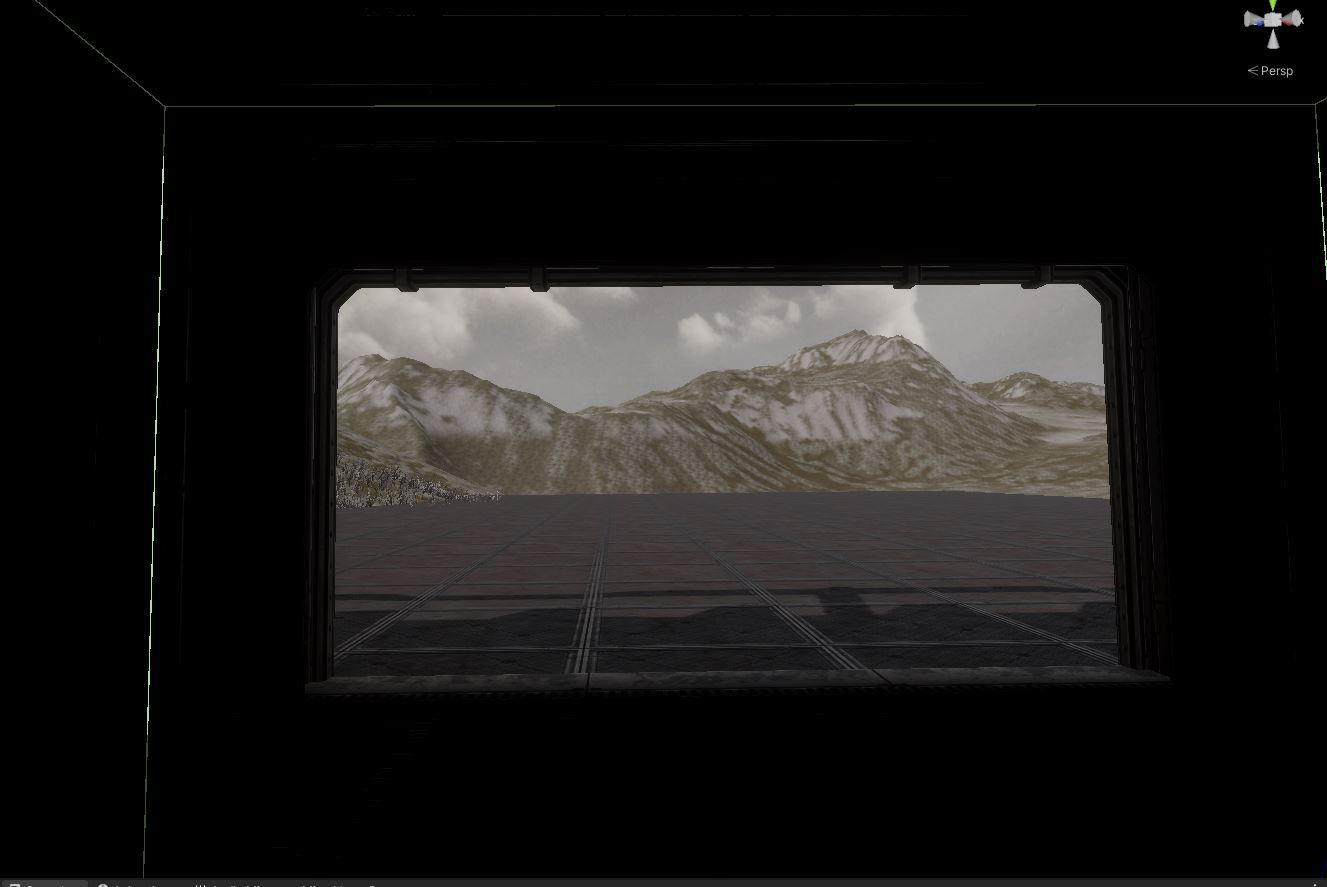

eternal laurel
fluid merlin
Ran into something today that I havent had to deal with before and slightly stum...
Local fog volume with a very high value should do that
fluid merlin
eternal laurel
Local fog volume with a very high value should do that
Will give that shot
 mint urchin
is hdrp opengl or directx?
scarlet hull
mint urchin
is hdrp opengl or directx?
DirectX / Vulkan / Metal
mint urchin
scarlet hull
DirectX / Vulkan / Metal
is there a way for me to check this in my project settings? i cant seem to find it
digital spire
mint urchin
is there a way for me to check this in my project settings? i cant seem to find ...
Player setting graphic api
scarlet hull
mint urchin
is there a way for me to check this in my project settings? i cant seem to find ...
It's in the "Player" section of project settings, you need to disable "Auto Graphics API" for your platform :
 mint urchin
oh ok completely looked over that, thx for helping
scarlet hull
Else, the curent API is displayed in the top window bar of the editor
mint urchin
im getting these very weird normals, I tried both OpenGL and DirectX but this didn't change the issue. It also has nothing to do with my shader as I tried putting it on the default material shader but this also didn't change the issue. In blender it looks completely fine. Someone who might know where the problem lies?
 long scarab
mint urchin
im getting these very weird normals, I tried both OpenGL and DirectX but this di...
long scarab
mint urchin
im getting these very weird normals, I tried both OpenGL and DirectX but this di...
do you use normal maps? if yes, check if they are really imported as normal maps
mint urchin
yeah i use them, i also put them as normal map when importing
mint urchin
aha i found it, for some reason my fog just messes it up completely
eternal laurel
Bake reflection probes, assign proper textures to the materials and play around with the volume settings until you get something good.
olive knoll
hello, does anyone know how to make anything that is placed on the surface of a transparent shader invisible when viewed from behind the transparent shader? And make anything that goes through the shader from the front, also disappear, while maintaining the visibility of anything behind it that is viewed from the front (like the white panel in my example - I want to see the pannel but not the part of the cube that goes through the transparent shder, if that makes sense)?
I'm in HDRP 2022.3.1 - I've tried playing with Depth Write and Depth Test but so far nothing works. I've also tried via script to manually force the render queue order, no success there either.

 scarlet hull
olive knoll
hello, does anyone know how to make anything that is placed on the surface of a ...
scarlet hull
olive knoll
hello, does anyone know how to make anything that is placed on the surface of a ...
If you are always "cutting" with a flat plate, it would be easier to make a dedicated shader on the cube that handles the intersection with alpha clip
 vague steppe
is the screenspace GI still screenspace even when set to raytracing mode or whatever its called?
loud leaf
It's a screen space effect that uses off screen data
 glacial fossil
vague steppe
is the screenspace GI still screenspace even when set to raytracing mode or what...
glacial fossil
vague steppe
is the screenspace GI still screenspace even when set to raytracing mode or what...
as I understand it, I wouldn't really call it screen space, it's not using the depth and color buffers as other "real" screen space effects but ray traces instead. in some sense ray tracing is always screen space because the rays are casted from the camera forwards and not the other way around though
pulsar skiff
Where can i change thr ambient color of my scene?(shadows)
scarlet hull
pulsar skiff
Where can i change thr ambient color of my scene?(shadows)
That's in the volume of your scene (add one if there is none)
- visual environment volume component to select the sky type
- the matching sky volume component to change the sky and as an effect, the ambiant probe
hot locust
I've set the "Max Distance" for shadows in two places in Project Settings but neither is affecting the distance at which shadows are rendered. Can anyone explain?
That is...I've set the distance to 25 but shadows are being calculated much farther away than that.
Disabling shadows in both of those areas isn't actually disabling shadows, either.
eternal laurel
There is a shadows setting on the volume component for hdrp
Or change then in the default volume settings
Or the hdrp asset
im sure there is probably one more place for settings in the current mess
hot locust
I'm in HDRP Global Settings.
I can disable shadows via Graphics/HDRP Global Settings/Frame Settings/Shadow Maps. On another project I was able to modify the shadow distance via tweaking the aforementioned "Max Distance" values on that page. Any idea why that might not be working now?
pulsar skiff
scarlet hull
That's in the volume of your scene (add one if there is none)
- visual environme...
Thank you 🙏
eternal laurel
hot locust
I can disable shadows via Graphics/HDRP Global Settings/Frame Settings/Shadow Ma...
Max distance is in the volume settings not the frame settings
Same place were you set the cascade splits
Also every light has it’s own max distance for shadows. We use that
hot locust
Anyone got an idea as to what's happening here? The vertical branch of the tree looks ok at first and as I move to the right it slowly gets clipped out, as illustrated in the series of included pics. (The horizontal plane is getting clipped, too.) I'm 2-3 meters away from the tree with a small (0.03) near plane but regardless tried Unity's "Dynamic Clipping" (pictured) but that had no effect.
 pulsar skiff
Guys does a opaque material with alpha clipping cause overdraw and performance impact?
glacial fossil
pulsar skiff
Guys does a opaque material with alpha clipping cause overdraw and performance i...
It seems in theory at least alpha clipping is bit worse than just alpha blended geometry https://forum.unity.com/threads/is-alpha-clipping-better-for-performance.1359176/. It entirely depends on the case whether you should or should not care about the performance hit as it is very minimal, most likely you shouldn't
I remember seeing some post about alpha clipping being quite bad on mobile devices due to some weird technical reasons, but cannot find the post anymore. As we are are on #archived-hdrp, I assume you are not targeting low-end devices anyways so more than likely the answer is no, you shouldn't care about the insignificantly small performance difference at all. You would need to have massive amounts of alpha clipped geometry covering your screen in order for it to make any difference and even then, writing to depth buffer could save you that overhead by not having to render pixels behind the objects closer to you
shrewd moon
glacial fossil
It seems in theory at least alpha clipping is bit worse than just alpha blended ...
This doesn't mention it but I assume alpha blending still quickly loses when you have many overlapping alpha blends
Or I would assume they're skipped with opaque alpha clipping entirely
glacial fossil
shrewd moon
This doesn't mention it but I assume alpha blending still quickly loses when you...
yup, that's what I wanted to point out at the end of my second message
TLDR: alpha clipping isn't slow by any means, don't optimize unless you have a (performance) problem
pulsar skiff
Thank you for the in depth explanation.
 fluid forge
Hi everyone, it's the first time I've had this error, I don't understand how to resolve it
 mint urchin
im not sure but is it ok to delete the readme object?
 glacial fossil
mint urchin
im not sure but is it ok to delete the readme object?
glacial fossil
mint urchin
im not sure but is it ok to delete the readme object?
yes
 modern sun
Hello!
I'm playing around with the water system and found some weird behavior and would like to know if there is a way to mitigate this.
My goal is to create a first person game and I noticed that when you look up and the camera is very close to the water surface, you see this square effect and sometimes a black thick circle around it depending on how near it is.
Anyone know why this happens?
https://streamable.com/na52mq
 formal crow
modern sun
Hello!
I'm playing around with the water system and found some weird behavior an...
formal crow
modern sun
Hello!
I'm playing around with the water system and found some weird behavior an...
thats the refraction effect
try turning on screen space refraction
modern sun
formal crow
try turning on screen space refraction
Where?
formal crow
modern sun
Where?
in the volume
shrewd moon
This doesn't seem related to hdrp specifically
Dev diaries are meant to go in #1180170818983051344
glacial fossil
- no advertisements in the help channels
- posting on multiple channels is not allowed
 topaz fable
I got it and render pipeline is HDRP and its about animations but i will add next one in DEVLOGS
fluid forge
fluid forge
Hi everyone, it's the first time I've had this error, I don't understand how to ...
does anyone know how to solve it?
formal crow
fluid forge
does anyone know how to solve it?
press the fix button
fluid forge
formal crow
press the fix button
Already done, it doesn't solve anything
 torpid elm
fluid forge
does anyone know how to solve it?
torpid elm
fluid forge
does anyone know how to solve it?
Redownload the hdrp package 🤷♂️
 viral cliff
lil' scene i made using unity's hdrp

 sage shard
thats fire
 pale sigil
Hi, I hope this is the correct forum. I have a strange situation with fog and volumetric lights in 2022.3.17 HDRP.
My original scene shows volumetric spotlights correctly, and they are baked.
I " Save as" into a new scene to make changes.
The new scene doesn't show volumetric lights even though everything is the same.
Solutions to try and fix:
I deleted the volume, and created a new one. The fog is black (interior scene, no directional light). Local volumetric fog is black.
Turning on a direct light lightens the fog, but I don't need or want a direct light.
I created new lighting settings
Problems:
The HDRP settings are superseding the Volume in my scene (Sky & Fog).
Question: Why are volumetric lights behaving differently when I Save As into a new scene? Why is fog behaving so strangely?
Edit: I found that duplicating the light, switching it to realtime, removing affect diffuse & specular, removing the cookie, and adjusting intensity, then returning it to Baked keeps the volumetric light effects.
formal crow
viral cliff
lil' scene i made using unity's hdrp
the volumetric lighting is too thicc
minor depot
formal crow
the volumetric lighting is too thicc
Doesn't look generally foggy enough for the headlights to be THAT bright
fluid forge
torpid elm
Redownload the hdrp package 🤷♂️
Done, nothing changes
pulsar skiff
How do i disable specular, but keep reflections on a material?
formal crow
pulsar skiff
How do i disable specular, but keep reflections on a material?
metalic?
 old nexus
how do i get water volume to reflect clouds in realtime
 formal crow
old nexus
how do i get water volume to reflect clouds in realtime
formal crow
old nexus
how do i get water volume to reflect clouds in realtime
realtime relfections
SSR, RTX or probe
 old nexus
still same result tho

 magic glacier
I am trying to have a camera with transparent background output to a render texture and then render on UI but something fails to read the alpha.
My color buffer format and post processing formats on the hd render pipeline asset have all been set to R16G16B16A16 and the render texture has been set to R16G16B16A16_UNORM yet still the alpha value in the RT preview is blank and the camera renders the color background (that has 0 alpha obviously) normally.
Is there anything else I should look for or could this be a bug? Unity 2022.3.24 HDRP 14.0.10
scarlet hull
 prime basalt
Try to tweak the SSR settings to have a bigger ray distance, else this looks like some expected behaviour
shrewd moon
prime basalt
SSR is still broken in HDRP?
You also will want reflection probes as fallback for where SSR has nothing to reflect, being limited to screen space
prime basalt
i tweaked some settings it is now temporal and acceptable
minor depot
prime basalt
i tweaked some settings it is now temporal and acceptable
If you can afford it, make sure to use the pbr accumulation algorithm, it looks a lot nicer
mint urchin
hey guys i just made a new HDRP project but when I opened it it looked like this, someone who knows what's happening here and how I could fix this?
 mint urchin
seems because the name was too long
 south girder
mint urchin
hey guys i just made a new HDRP project but when I opened it it looked like this...
south girder
mint urchin
hey guys i just made a new HDRP project but when I opened it it looked like this...
Try resetting the layout or choosing a different layout
magic glacier
magic glacier
I am trying to have a camera with transparent background output to a render text...
Bumping. Still an issue.
I tried updating my project to Unity 2023.2 but it still persists.
Never mind found the solution. I forgot the per-quality settings of the HDRP system. I set the color buffer to 16 on my quality asset and it worked.
 minor forum
Would it be possible for emissive light to scatter through fog? I'm working in HDRP but the Fog doesn't seem to react to everything. I wanted to reproduce a similar effect but other than the spotlights i wouldn't know how to achieve the other highrise lights in the image. Any ideas? ^^
 formal crow
minor forum
Would it be possible for emissive light to scatter through fog? I'm working in H...
formal crow
minor forum
Would it be possible for emissive light to scatter through fog? I'm working in H...
you mean volumetric lighting?
of course
make sure you have volumetric fog enabled
minor forum
i do but Emissive shaders don't interact with fog, especiallu the volumetric one
minor forum
formal crow
of course
so i was wondering if there's a proper way
 daring totem
minor forum
i do but Emissive shaders don't interact with fog, especiallu the volumetric one
daring totem
minor forum
i do but Emissive shaders don't interact with fog, especiallu the volumetric one
I don't think the emission has volumetric light
minor forum
daring totem
I don't think the emission has volumetric light
It doesn't seem like, so how can something like this be recreated in engine? I'm trying to figure out what would be actually needed to make a similar effect. I'm thinking a light reacting volumetric fog shader.... perhaps?
 lime hearth
made with hdrp

 unborn forge
minor forum
Would it be possible for emissive light to scatter through fog? I'm working in H...
unborn forge
minor forum
Would it be possible for emissive light to scatter through fog? I'm working in H...
would area lights instead of emissives for the building?
unborn forge
does anyone know if the hdrp water has a way to enable screen space reflections?
 unborn forge
Nm
lime hearth
minor forum
i do but Emissive shaders don't interact with fog, especiallu the volumetric one
only spot lights interact with volumetric fog
lime hearth
unborn forge
does anyone know if the hdrp water has a way to enable screen space reflections?
no way
lime hearth
old nexus
still same result tho
reinstall should help
lime hearth
viral cliff
lil' scene i made using unity's hdrp
cool, but volumetric fog from headlights and bloom is too thick (if you wanted to make it realistic)
 harsh sleet
does anyone know how to fix compositor error

The compositor was disabled due to a validation error in the configuration.
UnityEngine.Rendering.HighDefinition.Compositor.CompositionManager:Start () (at ./Library/PackageCache/com.unity.render-pipelines.high-definition@14.0.9/Runtime/Compositor/CompositionManager.cs:347)
my scene looks like this
 minor depot
minor forum
i do but Emissive shaders don't interact with fog, especiallu the volumetric one
minor depot
minor forum
i do but Emissive shaders don't interact with fog, especiallu the volumetric one
You need volumetric lightmap data for emissive shaders to work with fog, you can use APV for that. (APV affects volumetric fog)
That's the only way to do it, since emissive shaders only provide real light when lightmaped
If you're just trying to make a still frame the path tracer could do it too I presume
minor forum
minor depot
You need volumetric lightmap data for emissive shaders to work with fog, you can...
So emissive lights (and i suppose the area lights too are included in that category) don't interact with volumetric fog, but you can have them handled with apv and the apv do interact with fog?
minor depot
minor forum
So emissive lights (and i suppose the area lights too are included in that categ...
Yeah
minor forum
I do have another question though cause this might kill this solution entirely.... Emissive shaders can only be baked into reflection probes at Intensity 1 (even if you set them at 10)
if that's the case for any type of l8 probe...
minor depot
minor forum
I do have another question though cause this might kill this solution entirely.....
Really? Hdrp uses an HDR format for reflection probes
minor forum
That's what it looks like on my project, ssgi fallbacks on reflection probes and the amount of light on fallback mode corresponds to an intensity 1 emissive
It is catching the hdr resulting color but definitely not the intensity level
let me show you this cause to me it's a big problem... like very big
That's an intensity 8 emissive, with and without a reflection probe enabled
realtime, high resolution, multiplier 1 (to be sure)
minor depot
That should be solved by falling back to apv instead of reflection probes
minor forum
it's experimental for now , right? let me see if i can try it on 2022 lts
minor depot
minor forum
it's experimental for now , right? let me see if i can try it on 2022 lts
Yeah, it's a lot better in the latest betas, but those won't be ready for a while
minor forum
minor depot
Yeah, it's a lot better in the latest betas, but those won't be ready for a whil...
You know what... there's no option for Probe Volumes in SSGI fallbacks
( i know this was about fog volumes, it's probably a bit broadly about transferring light data between components at this point...)
fluid forge
Hi everyone, how could I resolve this error? I can't solve it, I also tried clicking on "fix" but nothing happens, I also tried re-downloading the HDRP package

 exotic harness
which Dynamic Resolution Type is better? Software or Hardware?
 meager echo
Are there any decent guides for converting a shader from URP to HDRP?
I've got a shell based compute chader that I put together for use in the URP but would like to migrate it to the HDRP for use there as well.
 lime hearth
 ruby haven
anybody know why this happens?
ruby haven
anybody know why this happens?
Increase the number of samples
256 optimal
topaz ravine
exotic harness
which Dynamic Resolution Type is better? Software or Hardware?
If you plan to use HDDynamic resolution and Unity's upscalers you will consider Software, if using DLSS it's better Hardware I guess
unborn forge
why does hdrp water only reflect clouds and lights with ssr instead of objects as well?
 alpine geyser
hello, I am trying to make a game using HDRP but it takes a lot of RAM, is there a way to optimize it?
I also have another issue, when I build my game (free aspect) or (16:9) but there are black bars appearing on the side. I suppose it is default. Please help me with my issue.
fluid merlin
alpine geyser
hello, I am trying to make a game using HDRP but it takes a lot of RAM, is there...
Depends on what you consider "a lot" but textures usually take up the most memory and you can compress them (look into Crunch compression). HDRP is usually targeted to "next generation hardware" so you need decent gaming rig to run it.
You can set the resolution in a number of ways, such as the camera settings or get the available resolutions and set it with Resolution.
https://docs.unity3d.com/ScriptReference/Screen-resolutions.html
https://docs.unity3d.com/ScriptReference/Screen.SetResolution.html
alpine geyser
fluid merlin
Depends on what you consider "a lot" but textures usually take up the most memor...
thank you, it is the matter of fact that I am using around 32 gb RAM but it is still lagging (low fps). And the changing of resolution did help with lagging but now it looks worse and the resolution did not fix my second issue.
alpine geyser
fluid merlin
Depends on what you consider "a lot" but textures usually take up the most memor...
Also, just a note -> My game is targeted at new-gen devices (PC, PS, Xbox)(The high end versions of PC, PS and Xbox). But I still think 32 gb ram should be enough to run a game.
even PS5 games typically use 16 gb RAM
fluid merlin
alpine geyser
thank you, it is the matter of fact that I am using around 32 gb RAM but it is s...
A lot of this depends on the design and what you have going on. Unity is very much a blank slate game engine and it will allow you to add things to the point where you can overload everything and get < 10fps and it won't ever warn you. So you're probably going to need to use profiler to help hunt down your resource issue. Low fps can be caused by many things in Unity, from too many lights & shadows to too many tris in the scene. Does this just happen in Build or in the Play mode in the editor?
fluid merlin
Not that this is your situation, but it's common for starting devs to get some prototyping assets going (gaia, first person shooter, emerald ai, etc) in a large terrain with a forest and some buildings and the game will run at < 20 fps.
eternal laurel
alpine geyser
thank you, it is the matter of fact that I am using around 32 gb RAM but it is s...
Use the memory profiler to identify what is taking up so much ram https://docs.unity3d.com/Packages/com.unity.memoryprofiler@1.0/manual/index.html
 topaz stone
When I open the default HDRP project I get this error. It crashes before I can do anything. Is there any way to open Unity without loading the scene?
 formal crow
topaz stone
When I open the default HDRP project I get this error. It crashes before I can d...
formal crow
topaz stone
When I open the default HDRP project I get this error. It crashes before I can d...
from the looks of it, HDRP is too heavy for your GPU
topaz stone
I just need to access some of the non-scene stuff that I don't think I can just see from the actual project directory like a few settings.
formal crow
settings from assets or project are serialized to a file, try looking for that file to get your settings
if its an asset, navigate to the meta file of that asset
project settings are in the project settings folder at the root of your project
 soft crater
does anyone know how to implement floating origin with visual environment unity 2022
without using the unity 6 beta version
alpine geyser
Hello again, does anyone know how to apply oculltion culling(sorry for the wrong spelling)
formal crow
alpine geyser
Hello again, does anyone know how to apply oculltion culling(sorry for the wrong...
mark all your non movable objects static > open the occlusion culling window > bake
fluid forge
Hi everyone, I have a problem with the directional light, if I only use the directional light, it doesn't catch the shadows of the windows, whereas if I use a point light, it takes the lights
This is with Point light

This is with only directional light
 shrewd moon
fluid forge
This is with only directional light
shrewd moon
fluid forge
This is with only directional light
Post only to one relevant channel at a time please
fluid forge
shrewd moon
Post only to one relevant channel at a time please
yes sorry , done, I was confused, I apologized in the other room
 tardy temple
For context, I am pratically a novice when it comes to using Unity. My issue right now is that I downloaded a pack from the Unity store but when I upload it to my scene, the assets are pink. I followed any and all tutorials I could find online to fix this issue—which mainly involved doing Window->Rendering->Render Pipeline Converter—and while it fixed some models, it didn't fix the rest and I cannot for the life of me figure out how to fix it. If someone could help me or direct me to a video that could help it would be much appreciated
I apologize if this isn't the right channel to ask, from looking at the others I thought it would be
 rotund ridge
tardy temple
For context, I am pratically a novice when it comes to using Unity. My issue rig...
rotund ridge
tardy temple
For context, I am pratically a novice when it comes to using Unity. My issue rig...
Pink textures means there are shading issues, maybe it didn't convert them because some were customs shaders
shrewd moon
tardy temple
For context, I am pratically a novice when it comes to using Unity. My issue rig...
You should use assets that are compatible with your project's render pipeline
Automatic conversion only works with Unity's own shaders
topaz ravine
I was kicking my head around since few days, On Unity6 (and maybe earlyer version), using RenderFromCamera() in a custom pass will make crash using FSR2 and DLSS if the source camera for this function (even ghosted and disabled and lower depth) is bind to a target rendertexture (it may be a color format story)
the solution is to just set no render target and render to the destination buffer directly
or set the custom pass to after post process, but in case of writing custom stuff in RT before rendering using renderfromcamera will crash (as I used a RT as target to force camera rect size)
 compact elbow
Hi all. Having an issue with HDRP 2D view in the editor. Can HDRP work in 2D editor mode or am I missing a profile somewhere, or a setting?

It flickers and artifacts all over the place. Game view also does it when in orthographic mode. Changing the visual environment does nothing. You can work in orthographic mode in HDRP right? It's not my project and I don't work in 2D but someone else is having the issue.
looks like orthographic/2D mode is not supported by HDRP by the looks of it.
Well there you go. Learn something new every day.
 dense sinew
I'm trying to make a night sky but it gets too dark how can I light it up.


If I change my directional light by a bit it then becomes too bright
viral cliff
dense sinew
I'm trying to make a night sky but it gets too dark how can I light it up.
maybe try adding exposure
mess with some settings, compensation
if it doesnt work, try combining with changing some stuff of the directional light
dawn sorrel
One message removed from a suspended account.
unborn forge
dawn sorrel
One message removed from a suspended account.
Do you have denoising turned on or are your samples to low?
dawn sorrel
unborn forge
Do you have denoising turned on or are your samples to low?
One message removed from a suspended account.
unborn forge
dawn sorrel
One message removed from a suspended account.
What are you currently using?
dawn sorrel
unborn forge
What are you currently using?
One message removed from a suspended account.
unborn forge
dawn sorrel
One message removed from a suspended account.
Try 64 and if you haven’t already try turning up the denoise radius higher
Also check second denoiser pass
dawn sorrel
unborn forge
Try 64 and if you haven’t already try turning up the denoise radius higher
One message removed from a suspended account.
unborn forge
Are you on a low quality?
dawn sorrel
One message removed from a suspended account.
unborn forge
Everything looks fine to me
Ig keep messing with settings or look up a tutorial to fix it
Or maybe try messing with the bounce count
dawn sorrel
One message removed from a suspended account.
unborn forge
Try looking around google to see if other people have had a similar problem
 cyan raptor
how do i change the exposore of that preview window again?
 dense sinew
I'm getting this grey bit on my transparent textures how can I fix it? This started happening with hdrp
 weak lantern
hey, I was changing the HDRP Assets and deleting the Perform and Balanced from my project, and then I renamed the high fidelity, suddenly my project broke and now everything is weird. (Unity 6)


I just changed the name ...
I did reimport the project and assets, Checking other Scenes. creating new HDRP assets and assigning them, Clear the Cache, but none of them worked


 dusk tree
Hi all, just created a brand-new HDRP project and I'm experiencing issues with shadows looking odd
I've tried changing shadow quality settings in the HDRP asset as well as the render settings but no luck so far
Any idea how to prevent this flickering / dithering effect?
 minor depot
dusk tree
Hi all, just created a brand-new HDRP project and I'm experiencing issues with s...
minor depot
dusk tree
Hi all, just created a brand-new HDRP project and I'm experiencing issues with s...
Change shadow filtering to medium or reduce the directional light's radius
TAA can also help hide some of the noise but in general the PCSS implementation was pretty broken before around 2023.2
dusk tree
minor depot
Change shadow filtering to medium or reduce the directional light's radius
Ahh yes I see, I've just modified the radius and it appears that's causing the effect
Thank you 👍
weak lantern
weak lantern
it got fixed, just delete all the Assets and Settings and let HDRP wizard fixing them
shrewd moon
dusk tree
Hi all, just created a brand-new HDRP project and I'm experiencing issues with s...
TAA is used to smooth the dither of high quality shadows
By default TAA is enabled in the Game camera, but not in Scene window as it requires "always refresh"
So in most cases it's a problem that only occurs in the editor
Many effects in HDRP rely on TAA for denoising
dusk tree
shrewd moon
TAA is used to smooth the dither of high quality shadows
By default TAA is enabl...
That makes sense, I checked the main cam and no anti-aliasing was enabled, switching it to TAA has fixed that issue
Thanks :)
soft crater
Unity 6 crashes when moving the camera too rapidly
shrewd moon
soft crater
Unity 6 crashes when moving the camera too rapidly
Repro and report a bug
We're not gonna do much with that information
!bug
hoary starBOT

🪲 To make bug reporting as quickly as possible, we made a bug reporting application for you. When running Unity choose Help->Report a Bug in the menu, or you can access it directly through the executable in the directory where Unity is installed. It will also launch automatically if you experience a crash.
📝 If your bug report is to do with Documentation, either an error, typo, or omission, you can report it by scrolling to the bottom of the page where you found the issue and click ‘Report a problem on this page’!
💡If your report is to do with a new feature idea, you can check the Unity Product Roadmaps page to see if your idea has already been planned.
For more complete instructions on how to report bugs, access: https://unity3d.com/unity/qa/bug-reporting
wraith blaze
soft crater
Unity 6 crashes when moving the camera too rapidly
Is this with cinemachine or not?
Instead of mine crashing unity i was getting random camera jitters
While rb interp was on
soft crater
wraith blaze
Is this with cinemachine or not?
no cinemachine
does rb interp crash it?
wispy burrow
does the order of post processing effects in HDRP volumes matter? looking at this https://docs.unity3d.com/Packages/com.unity.render-pipelines.high-definition@14.0/manual/Post-Processing-Execution-Order.html looks like the order is fixed no matter how I put it in the volume, right?
 flint sigil
How do we cull lights in HDRP? Do we need to build our own system for it? Right now I am at 30 FPS because WorldLightManager.Collect is taking 20MS, this is obviously because I have a ton of lights - over 500 - They are very far away though. But I was expecting the Fade parameter to control culling for the light they all have a fade range of 50, but it seems like it makes no difference.
Also I deep profiled, and most of the time is spent accessing transforms for the lights. in the collect step. How do you guys handle this? Do you manually cull lights by enabling/disabling them ?
 digital spire
flint sigil
How do we cull lights in HDRP? Do we need to build our own system for it? Right ...
digital spire
flint sigil
How do we cull lights in HDRP? Do we need to build our own system for it? Right ...
Fade range doesn't do that. Manually writting script to disble/enable light still offer more perf.

Gist
Unity HDRP light fade distance optimizer. GitHub Gist: instantly share code, notes, and snippets.
flint sigil
Yeah, so I was right it doesnt cull at all. I was really stunned since this is running on a 4090 at 30 fps, with white boxes and lights only. I reckon I just need to implement this in ECS side and should be golden 🙂 Thank you @digital spire
pulsar skiff
hello guys!
im trying to fix weapon clipping in unity HDRP but i don't want to scale down the weapon or move the arms up.
since scaling down the weapon made it so that my muzzle flash light effected the weapon model way to much compared to the environment, and floating point precision error shows up way sooner then normal, i dont want to do that.
any way to do this while having the weapon model still receive lighting from the environment and having VFX graph work for muzzle flashes?
maybe custom passes?(i did try to do that one but SSAO messed up the effect and showed through the weapon)
here is me facing issues from a while back trying to fix it with custom passes. ssao and also decals ig. i dont know why it looks like this.
digital spire
pulsar skiff
hello guys!
im trying to fix weapon clipping in unity HDRP but i don't want to s...
https://github.com/alelievr/HDRP-Custom-Passes
Try the RenderWithNormalBuffer sample one
GitHub
A bunch of custom passes made for HDRP. Contribute to alelievr/HDRP-Custom-Passes development by creating an account on GitHub.
pulsar skiff
digital spire
https://github.com/alelievr/HDRP-Custom-Passes
Try the RenderWithNormalBuffer sa...
hey for some reason my vfx graphs dont show up. any fixes for that?
also... weapon clipping is not fixed

oh wait, you mean im supposed to use this ALONG SIDE my previus set up?
digital spire
Maybe, i'm not that good with shader stuff. But the idea is to render the weapon depth to main camera buffer so ssao doesn't mess up your custom pass weapon. Then you could overlay the weapon again with another custom pass.. As for why muzzle flash doesn't show up, i honestly don't know.
modern sun
Hey, does anyone make use of the Mask texture in the HDRP/Lit material? It's because I'm trying to make use of the textures from Polyhaven and it only has a texture with 3 channels - AO/Rough/Metal, while the Mask from Unity requires four, RGBA.
So the material ends up getting this weird glossy effect and I'm not sure how to modify the import settings to match the correct look, given you can choose a range of options for how it's gonna import the channels. There's some errors getting thrown too when selecting Unlit Draw Mode:
DX11: Texture index out of range
Anyone have an idea on this?
I'm fooling around with Unity 6 and HDRP 17.
 wraith blaze
digital spire
https://github.com/alelievr/HDRP-Custom-Passes
Try the RenderWithNormalBuffer sa...
wraith blaze
digital spire
https://github.com/alelievr/HDRP-Custom-Passes
Try the RenderWithNormalBuffer sa...
Goldmine i found here
shrewd moon
modern sun
Hey, does anyone make use of the Mask texture in the **HDRP/Lit** material? It's...
The mask texture should be imported as not sRGB (color texture) and then you need to rearraign the color channels
The new Swizzle feature of import settings can do so easily
If polyhaven's color channels are in the order you describe, you need to swizzle them like this:

Taking metallic from the third channel, AO from the first, setting Detail Mask to 1 since there is no mask, and getting roughness from the second channel and flipping it to be smoothness
modern sun
shrewd moon
The mask texture should be imported as _not_ sRGB (color texture) and then you n...
I believe so, this is the options the website gives us:
 modern sun
shrewd moon
Taking metallic from the third channel, AO from the first, setting Detail Mask t...
modern sun
shrewd moon
Taking metallic from the third channel, AO from the first, setting Detail Mask t...
For Detail I was trying to set to 0.
shrewd moon
modern sun
I believe so, this is the options the website gives us:
Did it work?
Note that Unity doesn't use DX normal maps
modern sun
Just a sec, let me show the result. Scene and game render are giving different results for some reason but I'm guessing Unity 6 is just glitchy.
Scene render
Game render
modern sun
shrewd moon
Note that Unity doesn't use DX normal maps
So it uses OpenGL?
shrewd moon
modern sun
So it uses OpenGL?
Yes
Looks like the normal map is of wrong type here, and possibly not imported as a normal map either
Also double check that you're using "one minus" for the roughness map because Unity doesn't use roughness
And that only the diffuse map has sRGB enabled
modern sun
nvm i'm dumb
shrewd moon
Few are not!
modern sun
Now it looks much better, thanks to you @shrewd moon
shrewd moon
modern sun
Now it looks much better, thanks to you <@166982635950702592>
Better, though much glossier than I'd expect
The ground also
modern sun
It needs some tweaking and the ground needs to be fixed also
shrewd moon
modern sun
It needs some tweaking and the ground needs to be fixed also
The most important kind of tweaking is the sort that ensures the materials appear as advertised in the preview
PBR materials in theory do not change appearance between lighting engines
Once you know for sure your import process makes correct results, then start tweaking the variables for a particular look
But it's kind of a trap to end up trying to fix a faulty import process by correcting values by hand
modern sun
shrewd moon
But it's kind of a trap to end up trying to fix a faulty import process by corre...
I think so too, it's kinda weird it's not displaying like in the website.
This model looks broken, the FBX file doesn't even come with the leaves mesh.
shrewd moon
modern sun
https://polyhaven.com/a/jacaranda_tree
From the preview and the texture I can tell the bark is mean to have a very low smoothness
Perhaps you didn't flip it from roughness, and/or didn't set it as a non-color texture
modern sun
This is the imported "ARM" texture (AO/Roughness/Metallic)

It gets super smooth without changing this setting on the Material
 shrewd moon
modern sun
It gets super smooth without changing this setting on the Material
shrewd moon
modern sun
It gets super smooth without changing this setting on the Material
How about using G instead of 1-G this time, and full range Smoothness Remapping?
If it acts like it's not flipped when it's flipped, maybe it'll do the opposite when not flipped
modern sun
shrewd moon
How about using G instead of 1-G this time, and full range Smoothness Remapping?
I think it's best to just create my own mask, these textures aren't made for Unity

 shrewd moon
modern sun
I think it's best to just create my own mask, these textures aren't made for Uni...
shrewd moon
modern sun
I think it's best to just create my own mask, these textures aren't made for Uni...
Unity's PBR maps are not different from any other engine's PBR maps, it's an external standard
Aside from the roughness-smoothness flip
Mask maps have the same maps but in different orders
@modern sun One thing you can additionally test is the AutodeskInteractive HDRP shader
It uses roughness and separate textures instead of mask maps
modern sun
shrewd moon
<@713504411158315108> One thing you can additionally test is the AutodeskInterac...
I'm gonna try that then.
shrewd moon
When I was learning mask maps it was weirdly easy to get it wrong, even with textures that were 100% meant to be used with Unity
Usually because of some color space conversion problems
modern sun
shrewd moon
When I was learning mask maps it was weirdly easy to get it wrong, even with tex...
Did you had to learn through trial and error too?
shrewd moon
modern sun
Did you had to learn through trial and error too?
Yes
If you want to send me the diffuse and mask maps of the bark specifically, I could try to confirm that the swizzling works here as I expect it to
Or I guess just the mask map could be enough
modern sun
shrewd moon
If you want to send me the diffuse and mask maps of the bark specifically, I cou...
It's on the polyhaven link, all free. You just have to select the textures you want alongside the FBX file.
The mask specifically is labeled as AO/Rough/Metallic
 latent cosmos
Why am I having these error's in my shader graph does anybody have any ideas, it says "GraphName" doesn't have a color propery but almost all of my master shaders which uses diffuse(albedo - basecolor same things) textures has this BaseColor Texture2D parameter (project upgraded to HDRP from URP btw). And even if I rename it to some other thing it still pops up with different explanation but this time it says where's my basecolor dude

 leaden quartz
Does anyone have any idea why my game view (1st picture) looks so different (worse imo) compared to my editor view (2nd picture)

 leaden quartz
appears to have resolved this by clearing the lighting data (even thought it was never baked)
pulsar skiff
Hey guys.
Im trying to fix weapon clipping i hdrp and i have an issue.
At first i tried this and it did work fine but SSAO and decals showed up through the weapon mesh.
pulsar skiff
digital spire
https://github.com/alelievr/HDRP-Custom-Passes
Try the RenderWithNormalBuffer sa...
Then i also added this along side that and ssao no longer shows up through the gun but... decals still do
Also after adding this custom pass, made it so that now, motion blur is extremely intense on my weapon models
 civic hamlet
Hello everyone, as you can see, my fog combined to my clouds is bugging
Does someone know why I have that bug ?
fluid merlin
civic hamlet
Hello everyone, as you can see, my fog combined to my clouds is bugging
It's been a bug since 2021.3... it can sometimes go away with adjusting the quality of the clouds. It seems to be tied to both Shadow cloud settings and Quality of the clouds.
 rose vault
Why is my local volumetric fog texture not scrolling?
I set the scrolling to some scroll speed and it doesn't change regardless of how I change the values
it's just static
experiencing weirdness with fog in general...
rose vault
ffs I didn't have always refresh on but I forgot it doesn't scroll until I hit play (I checked and it wasn't scrolling on my camera view)
unborn forge
where did the earth curvature and local clouds settings go for volumetric clouds in Unity 6
 last agate
Hey !
I'm using decals

so it's working like I want, my character will be a decal on the wall
but when I move it to a vertical wall, my decal don't work anymore

I have to turn it manually, is it normal?

maybe the way I work isn't the best way to do a character that will display like a grafiti on the wall
south girder
last agate
I have to turn it manually, is it normal?
Yes. It will project the decal on the Z axis/blue arrow
last agate
south girder
Yes. It will project the decal on the Z axis/blue arrow
but it's annoying no?
what I understood about decals is that it will be automatically done
fluid merlin
last agate
what I understood about decals is that it will be automatically done
Decals don't wrap across different planes, there's a little tiny itsy bitsy white arrow that shows the plane they will cast against. There was an old asset called Decalicious that could wrap around multiple planes, similar to vertex painting, but it's been gone for years now.
last agate
fluid merlin
Decals don't wrap across different planes, there's a little tiny itsy bitsy whit...
hmm, ok so I have to manage that part manually
lime hearth
should i make minecraft movie rendered on game engine🤣


 nocturne ore
lime hearth
should i make minecraft movie rendered on game engine🤣
nocturne ore
lime hearth
should i make minecraft movie rendered on game engine🤣
story mode fr?
lime hearth
one more render

 calm zodiac
I just upgraded from URP to HDRP and everything seems alright, except lights nor emissions from materials are showing. Any ideas?
nvm, fixed it by disabling HDRI Sky in the default HDRP settings
shrewd moon
calm zodiac
nvm, fixed it by disabling HDRI Sky in the default HDRP settings
That's not in most cases a correct fix
If you want to change the sky, you'd prefer changing it per scene in a volume override
The real reason why lights and emissions aren't showing is because HDRP uses different intensity units from URP, so lights from URP are simply too dim unless the scene is absolutely dark so automatic exposure can bring them to view
calm zodiac
shrewd moon
That's not in most cases a correct fix
If you want to change the sky, you'd pref...
I was setting lights to like 5000000 units and still completely nothing
shrewd moon
calm zodiac
I was setting lights to like 5000000 units and still completely nothing
Light brightness is always relative to exposure
HDRP uses real world light units so there are many drastically different metrics
calm zodiac
shrewd moon
Light brightness is always relative to exposure
okay thank you, I will look into redoing my earlier "fix"
fluid merlin
shrewd moon
That's not in most cases a correct fix
If you want to change the sky, you'd pref...
Yup... also the lights thing seems to be a bug at times. I had an older scene that had a light from pre-hdrp and the light component had some of the older settings and wouldn't get temp, etc even though it had the HD component on it. I had a blink a few times to make sure I wasn't seeing things. The fix was to delete and re-add the light component. Ghost of Unity past still floating around 👻
 keen stratus
hi
eternal laurel
you guys know the runtime rendering debugger right ? This page goes into some detail on how to extend it https://docs.unity3d.com/Packages/com.unity.render-pipelines.high-definition@17.0/manual/add-controls-to-the-rendering-debugger.html but does anyone know how to add custom and additional profile markers to the Detailed Stats/ Profiling scopes ?
eternal laurel
short answer you cant
 white lagoon
hello guys, I have a HDRP environment and when I add any object to it, the object become very shiny is there anything that I can do other than changing the object material to HDRP/unlit ?
 digital spire
white lagoon
hello guys, I have a HDRP environment and when I add any object to it, the objec...
digital spire
white lagoon
hello guys, I have a HDRP environment and when I add any object to it, the objec...
You need to see what's your camera exposure. And adjust the intensity of light accordingly
topaz ravine
that's likely the ambiant probe that overbright this character
shrewd moon
#1180170818983051344 is for showcases
 waxen forge
hi guys, how i fix this?
 waxen forge
I don't know where I change this
 vapid bronze
any fix for hdrp underwater flickering?
 still sandal
vapid bronze
any fix for hdrp underwater flickering?
still sandal
vapid bronze
any fix for hdrp underwater flickering?
i think this was discussed in the forum post
it might have been a slightly different issue
but some underwater edge case
check the pinned water system forum post
vapid bronze
can you link it?
still sandal
Unity Forum
Hi,
Over the past few months, we have started an effort to provide an out of the box Water System solution for the High Definition Render Pipeline....


somewhere here @vapid bronze :P
 sterile folio
Hey I was wondering if anyone knew how to get light direction in HDRP 7.3.1s shader graph? All the tutorials I find say to use the "Main Light Direction" node but that's not in this version, is there some workaround I could use? For context I'm trying to create a simple cel shader
topaz ravine
HDRP 7.3.1s is old!
 calm zodiac
Hi, I'm working with HDRP for the first time and I'm trying to get volumetric clouds to work, however, I'm getting a checkered pattern and weird results no matter what I try. Internet hasn't been much help. Any ideas?

Switching to local clouds fixes the clouds themselves, but breaks anything other than them.
 calm zodiac
this seems to only be happening in scene view though. In game cameras don't seem to be affected.
so fix is not necessary.
 obsidian lynx
Can anyone help me understand this flickering? Trying to implement HDRP's baked lighting. I've set all the environment as static, my scene has 8 spotlights spread around the roof, with volumetrics + shadows enabled.
 pastel drum
How does the Crest HDRP water system compare to Unity 6's HDRP water system? What are the tradeoffs between the two?
weak lantern
pastel drum
How does the Crest HDRP water system compare to Unity 6's HDRP water system? Wh...
actually, this is my question too, I asked it anywhere but couldn't get any good results. however, I spent a day working with the Unity 6 HDRP water system, and the only thing I can say "Nice Job Unity Team". the quality and performance are on another level. I just wished there was an easier way to make a custom River/Lake (not in 3D software) exactly like the crest.
pastel drum
weak lantern
actually, this is my question too, I asked it anywhere but couldn't get any good...
Thanks for the feedback!
 keen warren
Hey everyone! How would you approach remaking this scene in Unity? Would you use a Physics Based Sky, or some other way?
 shrewd moon
keen warren
Hey everyone! How would you approach remaking this scene in Unity? Would you use...
shrewd moon
keen warren
Hey everyone! How would you approach remaking this scene in Unity? Would you use...
Physically Based Sky is meant to simulate looking from inside the atmosphere out
It doesn't seem applicable
Probably a HDRi if it doesn't need to move or change
But you may get a better fidelity with meshes and particles
keen warren
shrewd moon
But you may get a better fidelity with meshes and particles
I'm thinking of using meshes and particles. I'm just having trouble setting up the lighting. In my scene, the sun doesn't shine so brightly, objects don't drop volumetric shadows. It looks pretty ugly, tbh.
 shrewd moon
keen warren
I'm thinking of using meshes and particles. I'm just having trouble setting up t...
shrewd moon
keen warren
I'm thinking of using meshes and particles. I'm just having trouble setting up t...
Do the positions of the planet and sun need to change?
keen warren
No. The background is static
shrewd moon
Then the volumetrics could be baked to a texture or to the HDRi
Or faked, as the example might be doing with lens flares
Any real volumetrics will be restricted to a limited range around the camera
Distance fog is rarely a viable option at all in space because there's no horizon to blend it with, which is why your asteroids have an unnaturally bright silhouette
A lot of the appearance of the example comes from post processing
There's bloom and a good color grading that highlights reflections from the sky
keen warren
Sounds complicated. So, the usual fog wouldn't work with large-scale space scenes like this?
While planet and sun are static, asteroids are dynamic, and we need volumetrics to introduce the sens of scale and distance
shrewd moon
Though there rarely is noticeable fog in space, volumetrics can help do that
Distance fog is by its nature extremely limited, it can only fade to a solid color or to the skybox
It only really looks like fog if you're in an environment where the visibility is limited so the silhouettes can be concealed
keen warren
Sounds reasonable. Are there any other ways to achieve the volumetric effect?
fluid merlin
keen warren
I do something somewhat similar in an intro scene... There's a lot to it, so in short, global fog, local fog, hdri, light w/ srp flare unity package, DoF... lots of tweaking on light fog.
 shrewd moon
Looks like it's rather taking place in a sauna than space to me but I guess that's up to preference
fluid merlin

 rocky latch
pastel drum
How does the Crest HDRP water system compare to Unity 6's HDRP water system? Wh...
rocky latch
pastel drum
How does the Crest HDRP water system compare to Unity 6's HDRP water system? Wh...
I have used both extensively. The Unity water system looks better but has no support for rivers, and even if you built that the underwater fog won’t work for them. It kinda assumes your water surfaces will be flat.
Crest works for everything. Very nice system, but I dislike the way it handles shadows and it doesn’t look good under all lighting conditions (bit of an issue with dynamic time of day)
formal crow
rocky latch
I have used both extensively. The Unity water system looks better but has no sup...
but the HDRP water system has support for rivers
its one of the options you have when you create a new water object
and you can also modify the flow of the river with a flow map
rocky latch
There's just no way to create them
Manually drawing a flow map in Photoshop is hardly doable either. It's missing authoring tools for rivers.
formal crow
you mean a river spline?
rocky latch
Yes
formal crow
i mean, you can generate a mesh with the spline package and render the water on that
rocky latch
That's what I did. The results weren't great though (some overlapping) and underwater wouldn't work because it assumes the mesh is flat
Crest doesn't have the overlapping issue because there's only one water surface and the spline tools act as height modifiers
formal crow
if by overlapping you mean the mesh and water rendering on top of eachother you can just disable the mesh renderer
i love that you can use any mesh with the water system and create water tubes like this
 rocky latch
And it'll be hollow on the inside
formal crow
i mean, it wouldnt make any sense on how you can get underwater view with a shape like this
you can try doing composite box colliders
rocky latch
Yeah I think I’ll just solve Crest’s lighting issues instead
 iron isle
I just switched my project over to HDRP and it looks a million times better than before. Only issue is I have just a few meshes that show all black while the rest shows fine. It's all baked lighting with a reflection probe. Not rly sure why everything except these objects looks good. Anyone know of anything I can try to do about it?
 digital spire
iron isle
I just switched my project over to HDRP and it looks a million times better than...
digital spire
iron isle
I just switched my project over to HDRP and it looks a million times better than...
Try debugging the light map. Maybe there are problem with uv or backface etc
minor depot
Looks a bit like lightmap uv artifacting. Check chapter 9 of this guide
https://forum.unity.com/threads/lightmapping-troubleshooting-guide.1340936/
Unity Forum
Introduction
I developed this guide in order to help developers get the most out of Baked Global Illumination (GI) in the Unity Editor. Here, I unpack...
iron isle
digital spire
Try debugging the light map. Maybe there are problem with uv or backface etc
wdym by that? I'm not finding an option to debug the lightmap. i can view the baked lightmaps as a list but it doesn't allow me to do anything to them.
iron isle
minor depot
Looks a bit like lightmap uv artifacting. Check chapter 9 of this guide
https://...
This seems right, i think I have a few UV overlaps or possible gaps in certain meshes. So it's not possible to light them until the UV is perfect?
I think that might be a real problem because the human is animated by Mixamo..
digital spire
iron isle
I think that might be a real problem because the human is animated by Mixamo..
You should not light map skinmesh(or anything that move). Use light probes for dynamic objects.
digital spire
iron isle
This seems right, i think I have a few UV overlaps or possible gaps in certain m...
Did u auto generate uv for light map in fbx already? If so, then u can try increase the light map scale of the problematic mesh renderer.
shrewd moon
iron isle
wdym by that? I'm not finding an option to debug the lightmap. i can view the ba...
The debug views for lightmap UV overlap and texel invalidity can only be used after baking lightmaps in the current editor session
I can see a lot of the errors there are texel invalidity from exposed backfaces
Instructions to fix that are in the lightmap troubleshooting post
Animated meshes can't be lightmapped so you need light probes and reflection probes as well to illuminate them properly
 onyx lark
The default HDRP template I used created four HDRP Assets:
- HDRP Balanced
- HDRP High Fidelity
- HDRP Performant
- HDRenderPipelineAsset
The first three are assigned to quality levels. The last one is the default render pipeline asset in my Graphics settings
Is it correct to say that the last one does nothing? I have no quality level without an asset assigned to it
iron isle
I ended up switching to mixed lighting and it seems to have fixed all the errors I had in purely baked lighting 🙂
 still sandal
its fucking raw
 tame dock
Hey Everyone I have an issue / question regarding rendering on different platforms. I have a simple hdrp project as an example of my issue. I created a red material cube and have a camera facing it. Now when I use the same project on two different PCs the rendering results are not the same. Is that expected behaviour?
I am using unity 2022.3.19 version
Both pcs use windows 11
I also tried it with Ubuntu 18.04 installed on one of the pcs and get there also different resutls
Is that a setting issue on my end?
I am using realtime lighting
Can that be the issue?
To generate the images I use the following code:
using UnityEngine;
using UnityEngine.Rendering;
using UnityEngine.Experimental.Rendering;
public class Test : MonoBehaviour
{
public Camera precamera;
public RenderTexture rt;
private int count=0;
// Start is called before the first frame update
void Start()
{
precamera=GetComponent<Camera>();
int width=1920;
int height=1080;
rt= new RenderTexture(width, height, 0,GraphicsFormat.B8G8R8A8_UNorm);
precamera.targetTexture = rt;
}
// Update is called once per frame
void Update()
{
    GetComponent<Camera>().Render();
}
void OnEndCameraRendering(ScriptableRenderContext context, Camera camera)
{
        if(camera !=precamera){
        return;
    }
        RenderTexture currentRT = RenderTexture.active;
    count=count+1;
    RenderTexture.active = rt;
    Texture2D tex = new Texture2D(rt.width, rt.height, TextureFormat.BGRA32, false);
    tex.ReadPixels(new Rect(0, 0, rt.width, rt.height), 0, 0);
            tex.Apply();
    RenderTexture.active = currentRT;
    byte[] bytes;
    bytes = tex.EncodeToPNG();
    string path = "t"+count.ToString()+".png";
    System.IO.File.WriteAllBytes(path, bytes);

}


void OnDisable(){
    RenderPipelineManager.endCameraRendering -= OnEndCameraRendering;
}
//enable rendering when sim starts
void OnEnable(){
    RenderPipelineManager.endCameraRendering += OnEndCameraRendering;
}
//triggered when a image was rendered we call then for reading the data back from GPU
}
And manually trigger the camera render
I disabled all hdrp volumetric effects to better identify the culprintp
onyx lark
and they're all slightly different?
by "volumetric effects" are you talking about post-processing as a whole?
still sandal
how are you verifying that they are indeed different?
onyx lark
i am also wondering what that entails!
looks like they're writing to a file and then comparing them
Some HDRP post-processing effects are random (and can be smoothed out with TAA), so that can be a factor
tame dock
They are off by about 1 to two pixels
I verify by comparing the PNG images
So I store the PNG images and run pixel wise comparison
Today I just used the same system with two different graphics card for comparison

Here is an example
Of the differences between the two pngs
scarlet hull
tame dock
This could be due to temporal anti aliasing.
When changing the active RT, iirc the history buffer is force refreshed.
You can try to disable TAA, or wait some frames (something like 8 or 16) before reading the pixels.
tame dock
i found out then when i use the same os and the same graphics card such effects do not happen
@scarlet hull Post Anti-aliasing was set to no anit-aliasing on the camera
scarlet hull
tame dock
i found out then when i use the same os and the same graphics card such effects ...
Maybe some dither pattern that varies from platform or graphics card. Do you have "dithering" enabled on the camera ?
Some other effects like volumetric ligthing relies on frame accumulation, did you try to wait some frames like I suggested ?
One thing that could be worth to try, is to compare a capture using the same GPU, from linux using vulkan, and windows using vulkan. Beeing the same API is should give the same result.
Is there a reason why you are trying to achieve pixel perfect same images on different platforms/apis ?
tame dock
@scarlet hull here is the difference between an image on windows and linux with the same gpu
 tame dock
scarlet hull
Is there a reason why you are trying to achieve pixel perfect same images on dif...
tame dock
scarlet hull
Is there a reason why you are trying to achieve pixel perfect same images on dif...
i am building a simulation software for creating datasets. The software should generate the same results regardless of the hardware its running on. I would be fine if it would be OS related, but as of now every graphics cards generates slightly different results. The pixel perfect images are necessary as the images are feed into algorithms that analyze them to predict motion
tame dock
scarlet hull
Maybe some dither pattern that varies from platform or graphics card. Do you hav...
i updated source code above it now stores the pictures in individual files instead of overwritting the same picture. There were no difference between consecutive images recorded on the same pc
scarlet hull
tame dock
i updated source code above it now stores the pictures in individual files inste...
You mean, without overwritting, it works now ?
tame dock
scarlet hull
You mean, without overwritting, it works now ?
sorry my answer above was missleading only images on the same pc recorded after each other
scarlet hull
tame dock
sorry my answer above was missleading only images on the same pc recorded after ...
I'm starting to think there is no way to solve your issue.
Different hardwares can handle calculations a bit differently, this also apploies to the APIs and driver versions with the same hardware, and this ends up to floating point precisions differences.
Internally, we encountered the exact same issue in our automated graphic tests, and the only way to handle it was to allow some margin of error in the tests.
tame dock
this is the difference image with dithering off on camera and in the hdrp rendering settings pcs with two different graphcis cards both windows 11

@scarlet hull so unfortunately turning dithering off does not solve the issue
tame dock
scarlet hull
I'm starting to think there is no way to solve your issue.
Different hardwares c...
Thank you alot for your help! I appreciate itt At least i know its not a fault on my code that causes this problem 😄
still sandal
chalk it up to cosmic ray interference
 peak bear
Hi everyone,
So i have that problem where my reflections looks weird and not at all like the ones in substance, what would you think does that? The normal is on normal and I'm using PNG 16bits in 2048p and using maskmap. I'm not using crunch compression and i use the normal quality for compression. Seems to be the normal but I have no clue why...


 left prawn
I'm making a underwater horror game using HDR,P I have a i7 CPU, 16GB of RAM, and a RTX 4050, but can only get a stable 13 FPS any tips on how i can optimize my Game?
rotund ridge
left prawn
I'm making a underwater horror game using HDR,P I have a i7 CPU, 16GB of RAM, an...
With no more informations it is hard to help you, what's rendering on the screen ?
left prawn
rotund ridge
With no more informations it is hard to help you, what's rendering on the screen...
 rotund ridge
How is this 4.5 M tris ???
 rotund ridge
What is it spawning ? Does it have LODS ?
 left prawn
rotund ridge
What is it spawning ? Does it have LODS ?
left prawn
rotund ridge
What is it spawning ? Does it have LODS ?
so it didnt change much
rotund ridge
Then find where thoses tris are coming from
left prawn
raytracing is off
 rotund ridge
whith almost nothing but the vehicle on screen you should not have that many

 rotund ridge
how many poly does the terrain have ? Is it a whole mesh for everithing ?
left prawn
left prawn
i turned off the entrie map
its not the terrain i set the whole map set active to false that was the result
its also the bulit in terrain
 rotund ridge
Ok, what are the other thing being displayed on screen ?
left prawn
and this is the sub i am using: https://assetstore.unity.com/packages/3d/vehicles/sea/sf-orca-explorer-247525

Elevate your workflow with the SF#ORCA Explorer asset from CGPitbull. Find this & other Sea options on the Unity Asset Store.
left prawn
rotund ridge
Ok, what are the other thing being displayed on screen ?
I turned off the sub
 left prawn
no
south girder
It could be at least split into multiple meshes, that could help
rotund ridge
Thats weird cus on the asset store it says Poly count: Polys/28.794 - Verts/30.340 - Tris/54.740
Which is very far from 4millions
left prawn
rotund ridge
Which is very far from 4millions
I know which makes so much more unbelievable
rotund ridge
Can you check the mesh on blender ? Poly count, wireframe etc
 left prawn
rotund ridge
Can you check the mesh on blender ? Poly count, wireframe etc
left prawn
rotund ridge
Can you check the mesh on blender ? Poly count, wireframe etc
i will do that now

that does not make any sense
rotund ridge
Ok thats weird
left prawn
because this is what i get when i remove the sub in unity
 rotund ridge
there is something else in the prefab in unity ?
left prawn
rotund ridge
there is something else in the prefab in unity ?
a whole bunch of lights

 rotund ridge
I would try to put it in a new blank scene to see the polycount maybe
 left prawn
rotund ridge
I would try to put it in a new blank scene to see the polycount maybe
left prawn
rotund ridge
I would try to put it in a new blank scene to see the polycount maybe
Empty scene
 rotund ridge
Oh so there is a problem with the prefab mesh
Can you try to disable every part of the mesh one by one so you see which one is so big ?
left prawn
just the model prefab that the asset comes in
 rotund ridge
300k is still much more than anounced in the asset store lmao

 south girder
I think the triangle/vert count might be affected by lights that cast shadows

 south girder
I think the triangle/vert count might be affected by lights that cast shadows
south girder
south girder
I think the triangle/vert count might be affected by lights that cast shadows
Yep just confirmed, this is the case
left prawn
south girder
Yep just confirmed, this is the case
Yeah you were right i how can i fix this instead of turning off the shadows completely
 rotund ridge
You could bake light on the sub cockpit maybe ?


