#archived-hdrp
1 messages · Page 5 of 1
 chrome locust
 loud leaf
Ultra Performance could be used at 1440p, it's just going to give you horrible quality (except in HDRP)
chrome locust
i think what happens is that hdrp just lets you render at 1440p native
in dlss you tell it "give me ultra performance" it doesnt give you a %
it gives you a hard resolution.
loud leaf
Why does it not scale the internal resolution from 50% to 33% (when changing from Maximum Performance to Ultra Performance) ?
Hmm.
chrome locust
the API gives you a hard resolution
my point is
nvidia has designed these modes to be hard wired to the resolution.
i mean we could recompute a percentage 😄
loud leaf
I haven't checked out the API, somehow I can not get any matches when searching through the HDRP package, but it does feel kind of weird getting the best quality out of the worst mode.
chrome locust
it does. But thats NVIDIA's decision to hard wire these modes to resolution
let me show you the C api, its public actually 1 sec
 woven belfry
Oh I see, How can I enable it ?
chrome locust
@loud leaf https://github.com/NVIDIA/DLSS/blob/main/include/nvsdk_ngx_helpers.h#L69
Function signature:
NGX_DLSS_GET_OPTIMAL_SETTINGS(
NVSDK_NGX_Parameter *pInParams,
unsigned int InUserSelectedWidth,
unsigned int InUserSelectedHeight,
NVSDK_NGX_PerfQuality_Value InPerfQualityValue,
unsigned int *pOutRenderOptimalWidth,
unsigned int *pOutRenderOptimalHeight,
unsigned int *pOutRenderMaxWidth,
unsigned int *pOutRenderMaxHeight,
unsigned int *pOutRenderMinWidth,
unsigned int *pOutRenderMinHeight,
float *pOutSharpness)

GitHub
NVIDIA DLSS is a new and improved deep learning neural network that boosts frame rates and generates beautiful, sharp images for your games - DLSS/nvsdk_ngx_helpers.h at main · NVIDIA/DLSS
As you can see, this spits out the desired With and depth based on the input.
we pass the current resoltuion, say 1080x1920
loud leaf
yeah
chrome locust
nvidia spits out back 1080x1920 when InPerfQualityValue
is Ultra
we can really implement whatever behaviour we want on top
but thats just how nvidia handles it.
loud leaf
Could there be an issue in the API call? I don't want to be a smartass and doubt your work here, but even at 4K, I'm not getting the expected result.
 shrewd moon
woven belfry
Oh I see, How can I enable it ?
shrewd moon
woven belfry
Oh I see, How can I enable it ?
If you have TAA enabled in your game camera, you won't need to enable it in the scene view
If you still want to do that though you have the option to check it on from Scene Camera menu
And as the prompt states you also need Always Refresh on

 chrome locust
loud leaf
Could there be an issue in the API call? I don't want to be a smartass and doubt...
chrome locust
loud leaf
Could there be an issue in the API call? I don't want to be a smartass and doubt...
lets do the following, ill reopen the ticket, and take a look at it. Just for you.
Yeah maybe ive been dismissive of this. Ill triple check for good measure 👌
I agree though, its confusing. If there is an issue, I think we might just have to bite the bullet and close the gap. I have to check other games to see how they are handling this.
I dont agree with how nvidia chose these settings, or the fact that they want to own this part of our render pipeline. Preciely because support issues like this occur and leave us the engine developers scrambling
loud leaf
All good, thanks a lot. I do see both UltraPerformance and UltraQuality as possible inputs for NVSDK_NGX_PerfQuality_Value in the "DLSS_Programming_Guide_Release" PDF, maybe UltraQuality is getting passed? (which currently seems to be missing from UI in HDRP)
loud leaf
What I mean that the "Ultra Quality" seems to be missing on the user end
chrome locust
they were experimental
loud leaf
(which does get shipped with games these days) Edit : I got confused with Quality / Maximum Quality here
Hmm
chrome locust
GitHub
NVIDIA DLSS is a new and improved deep learning neural network that boosts frame rates and generates beautiful, sharp images for your games - DLSS/RTX UI Developer Guidelines.pdf at main · NVIDIA/DLSS
loud leaf
Thanks
chrome locust
We can only ship and support Quality, Balanced, Performance, Ultra-Performance
@loud leaf this is your ticket right?

If so, could you send me the .data capture, and include also the GPU capture ? (enable the GPU module on the top left part of the profiler).
loud leaf
My ticket didn't include any performance metrics, unless QA added them.
I do understand different modes won't always give the expected performance increase, but visual quality on Ultra Performance does seem a lot higher than Maximum Performance.
chrome locust
If you can send me privately a gdrive download link or attachment the .data thatd be great. Yeah these captures show CPU spikes as well
yeah because i think ultra performance is doing it at highest res. Ultra perf only kicks in at highest res
is not doing % as you expected.
ill take a look again. Might just have to recalculate the % 🙂
loud leaf
chrome locust
If you can send me privately a gdrive download link or attachment the .data that...
I don't have any captures, I think QA did them.
chrome locust
@loud leaf i got some news
you were %100 right.
I was absolutely wrong. There is a bug. And is just a facepalm. Let me show you the diff:

= vs > ...
This safety check was acutally ignoring Ultra Perf setting 😦 I made the assumption this was working. Thanks to you i tripled check everything in the pipeline and found the issue.
loud leaf
It happens 😄 (at least I make mistakes all the time)
chrome locust
Im very sorry for being a hard head. I will get a fix up and running asap
loud leaf
All good 👍
chrome locust
FYI I implemented this debug menu in the HDRP debugger so you can see the behind the scenes.

its shipping already, not sure if you have used it, but I was able to find the issue clearly when I tested 6k and still saw 6k as the output resoltuion 😁
loud leaf
I've came across that section but forgot to use it in this case
chrome locust
yeah, always use it. You can track all camera states. Each row in that table also means a lot of memory and state that nvidia dlss keeps for history buffers.
Its a straight look into device memory, we can track all the views active in your game this way. So keep an eye on it!
also remember: we have the injection points, this is something we added to help you mitigate perf on DOF & post.
Additionaly, we have some changes coming up to PBR dof that makes it 60% faster 🙂 so keep an eye on it.
loud leaf
I've tried the different injection points but haven't been able to get any good results with it so far. I also occasionally (couple times an hour) come across this weird DLSS jitter issue where part of the sky (or geometry) keeps on jittering forever, I can't quite pinpoint where it's coming from, it seems to have something to do with changing DLSS modes at runtime.
chrome locust
good news too, seams like this bug only affected ultra performance mode
good stuff. Go community! expect a fix soon across 2022.2, 2023.1 and 2023.2+. Cheers and thanks again @loud leaf 🙂
loud leaf
Ah, I found out why I haven't had any luck with the injection points. Half my TextureHandles break when I change the injection point to "After Post Process", the same effect as disabling DLSS. 🤔
Edit: it also messes up the height of the textures when changing the injection point. The TextureHandles are marked as dynamicResolution. If I set dynamicResolution to false, the "after post" injection point works, but now my TextureHandles break with the "before post" injection point.
woven belfry
shrewd moon
If you have TAA enabled in your game camera, you won't need to enable it in the ...
it's strange it helped a little but still looks odd

strange.
different lighting shows problem 1 on vid but not so much shadows problem :\
 crystal frigate
woven belfry
strange.
crystal frigate
woven belfry
strange.
Not sure but maybe its the near plane of the camera or shadow bias
 stone holly
is there a way i can do camera stacking (like to remove weapon clipping)
because i know HDRP doesnt do it the same was as URP
 digital spire
woven belfry
strange.
digital spire
woven belfry
strange.
screenshot your setting of shadow in global volume.
you might need to increase the cascade blend and reduce shadow distance in the global volume.

after increasing the border

 worn swan
Hello guys, supposedly SpeedTree should function in HDRP now, but I can't get wind to work.
I use HDRP/Nature/SpeedTree8 shader and a pack from asset store
 unkempt sedge
Color Buffer Format The format of the color buffer that HDRP will use for rendering, using R16G16B16A16 instead of R11G11B10 will double the memory usage but help you to avoid banding. R16G16B16A16 is also required for Alpha-Output.
Why do HDRP only has this two color formats?
why no R8G8B8A8?
 ripe quail
stone holly
is there a way i can do camera stacking (like to remove weapon clipping)
ripe quail
stone holly
is there a way i can do camera stacking (like to remove weapon clipping)
Custom pass is how it's done in HDRP
Camera stacking like you're used to is either not recommended or not supported outright, can't remember
it would torpedo your FPS for no good reason
ripe quail
GitHub
Optimized implementation of camera stacking for UI only in HDRP. - GitHub - alelievr/HDRP-UI-Camera-Stacking: Optimized implementation of camera stacking for UI only in HDRP.
these guys made UI stacking, but just figure out custom passes, it's the way you're supposed to do it
it's not hard
stone holly
thanks bro!
ripe quail
stone holly
thanks bro!
For instance, this is what I do to make my UI show on top of everything:

You just nest a custom pass volume in your camera, you target a layer you set that has your weapon on it, and you override its depth to Always so it shows on top of everything
idk this probably isn't perfect, I'm actually here to ask a question about this 😄 but hopefully it gets you started
stone holly
thanks man this is huge
ripe quail
Has anyone figured out how to make Screen Space Camera UI elements not be affected by post processing?

omg I just figured it out
@stone holly This will apply to you too
make sure you disable your gun layer from your camera's culling mask
it shouldn't be necessary... maybe it won't hurt anything though...
ripe quail
I've tried HDRP, URP, built-in... I prefer HDRP most 🙂
stone holly
I love URP its a really nice inbetween
ripe quail
It seems like it can do pretty much everything
Little things drove me insane about URP, but I loved how good its performance is.
at least in a blank scene 🤣
stone holly
ripe quail
It seems like it can do pretty much everything
i think (From my experience anyway) HDRP is unitys attempt to catch up with unreal engine. but theres so many kinks and bugs and missing features its not viable
although someone else may have had a completely different experience which is fair enough
stone holly
ripe quail
at least in a blank scene 🤣
ive always made games in URP and ive never really had to worry about performance unless im handling forest scenes
 floral oar
created a** "Mask" **map creator if anyone is interested in it.

gives you a preview at the bottom when creating it
 digital spire
stone holly
i think (From my experience anyway) HDRP is unitys attempt to catch up with unre...
digital spire
stone holly
i think (From my experience anyway) HDRP is unitys attempt to catch up with unre...
Are you sure it's missing feature? Or could it be that there is no easy and bad hack like camera stacking in BRP? 😅
For me, I could never go back to built in because hdrp have a lot of features out of the box that do not exist in the built in.
 scarlet hull
unkempt sedge
why no R8G8B8A8?
scarlet hull
unkempt sedge
why no R8G8B8A8?
HDRP is built to work with HDR values, and R8G8B8A8 can't store them.
floral oar


GitHub
Creates mask maps used for HDRP. . Contribute to IMTIBIT/MaskMapGenerator development by creating an account on GitHub.
if anyone needs a generator for maps used for lit materials.
scarlet hull
IMHO I'd prefer this one, with channels selection settings : https://github.com/andydbc/unity-texture-packer
But it's nice to see people still experimenting with this 🙂
 eternal laurel
Anyone know why fixed exposure would take up 15 ms ?

 stiff bramble
Hey can anyone recommend a way to make a custom lens shader in HDRP? I'd like to simulate a panoramic/fisheye camera (the lens distortion post process doesn't give me what I want)
worn swan
eternal laurel
Anyone know why fixed exposure would take up 15 ms ?
What's below this dropdown?
eternal laurel
just the compute dispatch that says 0.00ms
stone holly
digital spire
Are you sure it's missing feature? Or could it be that there is no easy and bad ...
yeah thats why I use URP
floral oar
scarlet hull
IMHO I'd prefer this one, with channels selection settings : https://github.com/...
Oh sweet thank you! Really only made mine because I have been having issues with using bridge as my exporter which usually packs maps for me. Thanks for that link though!
 mellow condor
vfx graph performance of large, numerous transparent particles improved massively
unkempt sedge
why no static batching?
is merging meshes bad?
Will it increase performance for level with a lot of small objects?
small props
i`m planning to write a system to merge meshes for HDRP/URP (i have a lot of small props / modular buildings).
Is it worth it? will it ever increase performance?
scarlet hull
It will still help offload some work from the cpu, as it will have less things to batch together with the SRP batcher.
But things need to be merged together in a "culling efficient" way
unkempt sedge
I will do it like mesh combine studio 2.
in a grid of 16x16
But it will only increase cpu performance and no gpu?
for realtime lighting it is good because it can decrease shadow casters too, right?
scarlet hull
Some performance profile would be needed to know what are the gains, but from my knowledge :
- you will still send the same amount of triangles to the GPU, so this will not have an effect, or minimal
- but you have less objects to display, so less stress on CPU for culling and srp batch
- batches will contain less objets, maybe gain on GPU ?
- you will however loose potential perf since you won't have multiple instances of the same mesh anymore
 whole fossil
mellow condor
vfx graph performance of large, numerous transparent particles improved massivel...
whole fossil
mellow condor
vfx graph performance of large, numerous transparent particles improved massivel...
do you have some specific unity version in mind?
unkempt sedge
scarlet hull
Some performance profile would be needed to know what are the gains, but from my...
I see. I`m already using entities graphics/dots so CPU should not be a big problem i think
mellow condor
whole fossil
do you have some specific unity version in mind?
between 2021.3.10 and 2021.3.22 there has been a big improvement
eternal laurel
eternal laurel
Anyone know why fixed exposure would take up 15 ms ?
Im still very curious about this. Changing from Dx12 to 11 lowered the time to 9ms. And even stranger its not present in a build( it takes what I would consider a normal amount of time)
Unity versions is 2022.9
It’s also somehow tied to the amount of objects in the scene as far as I can tell
unkempt sedge
Is it possible to use buffer format R11G11B10 with render texture+transparency?
can i use different render buffer format for different cameras?
unkempt sedge
i have a paperdoll on my game

Do i really need to double bandwidth to use it? R11G11B10 is enough for my game.
 topaz ravine
unkempt sedge
Is it possible to use buffer format R11G11B10 with render texture+transparency?
topaz ravine
unkempt sedge
Is it possible to use buffer format R11G11B10 with render texture+transparency?
I am afraid that you will need to stick with the R16B16G16A8 (in the hdrp color buffer format), and at least R8G8B8A8 as the custom buffer format, if you want to capture transparency in a buffer, btw , some transparent shader like hair may have issue with this technique as the are compute a lot throught the render process.
unkempt sedge
Is there a better way to do it? render with background on green then remove?
topaz ravine
You can stick with your R11G11B10 settings if you use a Draw Renderer Custom Pass in an empty buffer rather than drawing pixel from a camera
unkempt sedge
What is a custom pass? i`m using UI Toolkit. Does it works with render textures?
i have icons in UI Toolkit on top of the paperdoll
 topaz ravine
A custom pass is the way to create buffer and use it the rendering in HDRP
color/depth or custom data
it a bit technic btw
unkempt sedge
Do you think it can work with day/night system? my paperdoll is always on "day"
i`m using custom light layers
(What i think is it will render on top of everything. Right?)
topaz ravine
explain me, you want to draw a character in card this way?
 topaz ravine
ok so it will render on top of everything only if you setup the card this way
unkempt sedge
what is a card?
topaz ravine
your final image result 🙂
unkempt sedge
a render texture i see
topaz ravine
let's say you have an empty renderTexture (full black/alpha) that you use in an image in a Canvas, you can fill this render texture pixels with a custom buffer using only the pixel of the character (draw render) or from a camera (already drawn pixel)
topaz ravine
let me copy paste some usefull link
your light layer should not be an issue with this solution
okey, so this is the Repo for alexlievr that do a lot of exemples but not your specifically : https://github.com/alelievr/HDRP-Custom-Passes
anyway, there is CopyBuffer exemple that show you how to take pixel from a camera and inject to a render Texture with custom format if needed

GitHub
A bunch of custom passes made for HDRP. Contribute to alelievr/HDRP-Custom-Passes development by creating an account on GitHub.
So you already have two solution here : 1- setup a camera, and fill your render texture with the Copy Buffer exemple
2- don't setup a camera, use the renderTexture as the destination buffer and directly use Draw Renderer into this, (you will need a custom DrawRenderer Custom pass script) to output the pixel to a Render Texture rather than the Camera
the second solution is better, you wont have to care about alpha, just drawing pixel, you can even inject your background pixel (in the render texture) just before the draw Renderer step, use depth or not, etc
unkempt sedge
@topaz ravine Hey, this is really cool
i have another system i`m using cameras too
this is my minimap

What is it? a navmesh renderer to a texture then i add outline
Do you think the second solution is valid for minimap as well?
topaz ravine
your setup camera is good and it is working as expected, but you have multiple camera, and custom pass would give you more perfomance and flexibility
topaz ravine
@unkempt sedge I send you a Draw Renderer to Custom Buffer (custom pass) script, it will allow you to start quickly


 topaz ravine
note : it's safer to put the custom pass "before post process" to have the correct result
unkempt sedge
topaz ravine
<@379324258054176768> I have smthing that work
Hey, thank you. I will try it today 🙂
 iron siren
Hi, would anybody be able to tell me why my scene if full white in HDRP ? I've disabled all lights and volumes and set the project settings to have 0 multiplier on exposure so I get a black scene but to no avail. It's working fine, full black, in another empty scene but in this scene, it's white despite lights and volumes being disabled.
 shrewd moon
iron siren
Hi, would anybody be able to tell me why my scene if full white in HDRP ? I've d...
shrewd moon
iron siren
Hi, would anybody be able to tell me why my scene if full white in HDRP ? I've d...
As I understand you shouldn't ever disable all volumes from an HDRP scene because they're required to calculate the baseline exposure and environmental lighting
iron siren
Oh
shrewd moon
I'd try to move volume and light properties over from a scene where they work, and then try to disable other gameobjects in the scene that may be causing the problem
topaz ravine
it may be the look of the default exposure you have in the HDRP settings
iron siren
Got it, thanks
topaz ravine
@unkempt sedge the solution I gave you don't draw shadows :/ My bad
unkempt sedge
topaz ravine
<@379324258054176768> the solution I gave you don't draw shadows :/ My bad
Is it possible to draw shadows?
Or post processing
topaz ravine
post process yes, i am looking at the shadows question
 jovial latch
I am able to drag a material from a shader graph into my script, but I want to switch to loading it from a file with Resources.Load<Material>(materialPath).
How do I access it from file instead of dragging it into the inspector?

 maiden flume
Can someone tell me why I get this cut off lighting when I use a generated texture atlas? The lighting is normal with a generic imported texture. The material is a default HDRP/Lit material. Am I missing something?
Edit: for anyone curious, it's something to do with mipmapping levels. Editing the global material mip bias with the rendering debugger to a negative value fixes it.


 buoyant turret
Anyone can help me use SSGI in my hdrp template project?


enabled everywhere, in the frame settings and in the hdrp pipeline asset
however the volume still wont accept it???

do i need something else? directx 12?
scarlet hull
buoyant turret
however the volume still wont accept it???
You mean you can't add the SSGI volume component to one of you volume profiles ?
buoyant turret
scarlet hull
You mean you can't add the SSGI volume component to one of you volume profiles ?
yes, when i add the ssgi component to the global volume it shows that error
despite checking these checkbox shown previously
scarlet hull
buoyant turret
despite checking these checkbox shown previously
Did you try in a scene volume ?
Does the current active pipeline asset/quality level have SSGI enabled ?
buoyant turret
buoyant turret
isnt this the active one?
scarlet hull
Not forcefully, if you have an other pipeline asset assigned to the current quality level, it will be that one that is used
buoyant turret
oh yeah, that was the issue, thjanks for helping!
are these all the options though?
 scarlet hull
Yep
 dawn sorrel
Does anyone else have terrible performance issues when using Planar Reflections
 little meteor
Hi there, new around and just would need some lil assistance.
I used an unlit shader graph in order to make a material for an object, as to give it a black hole/magic orb effect. I managed to do it in a URP and seem to work fine on the HDRP, yet the Rotation node doesn't appear on when the material is applied.
The graphs itself show that the rotation should be there but it doesn't move at all once in the scene.

Not sure if it would be better to go in VFX-and-Particle for this question, if so let me know
nvm, I just realized I needed to start the play button for HDRP to see the effect 
eternal laurel
little meteor
nvm, I just realized I needed to start the play button for HDRP to see the effec...
Also make sure to tick animated materials in the scene view
whole fossil
dawn sorrel
Does anyone else have terrible performance issues when using Planar Reflections
Yep
 soft pike
Why is this issue still a thing after 10 years? https://forum.unity.com/threads/hdrp-no-longer-compiles-game-and-scene-views-are-gray-and-black.794562/

Unity Forum
I'm experiencing this issue and it's only associated with HDRP this happens in any project, any scene, any drive, even tried redownloading a fresh...
 runic bay
For HDRP & shader graph, is it possible to get additional light sources through a node?
otherwise I imagine I'll need to write a custom node to fetch additional light source
little meteor
I've been making an Unlit shader graph thinking i could place it in an Output Particle Mesh within a Visual Effect Asset yet it doesnt seem to be a thing unless i'm wrong?
 scarlet hull
runic bay
For HDRP & shader graph, is it possible to get additional light sources through ...
scarlet hull
runic bay
For HDRP & shader graph, is it possible to get additional light sources through ...
No node will provide you that, and iirc nobody tried to do it before.
In theory, you should be able to get the light sources in shadergraph when rendering a transparent object or opaque with shader setup forced to forward
scarlet hull
little meteor
I've been making an Unlit shader graph thinking i could place it in an Output Pa...
Support for URP/HDRP shadergraph has been added only recently in VFX graph, you need to use the Visual Effect target :

 shell yoke
Im not sure whether to post this in HDRP or Terrain or lighting or shaders LOL. But i'm having weird DX12 flickering on trees that are part of the terrain system (hand placed trees are fine as a prefab) and if I revert back to DX11 - they work as intended as they should.
EDIT - Turns out in a build this doesn't happen. So it's a gameview thing. I'll try to dig further into this at some point.
little meteor
scarlet hull
Support for URP/HDRP shadergraph has been added only recently in VFX graph, you ...
Oooh thanks
unkempt sedge
How do i render a mesh to RT every frame? without flickering
 glacial fossil
unkempt sedge
How do i render a mesh to RT every frame? without flickering
glacial fossil
unkempt sedge
How do i render a mesh to RT every frame? without flickering
Why are we making assumption that it will cause flickering?
glacial fossil
We should try to fix the flickering, not try to do the same thing again
glacial fossil
I see no reason why they wouldnt
 ionic kindle
any idea why I'm seeing bloom in scene view and not in game view?
shrewd moon
You're using the debug inspector, is what I assume you refer to
 languid iris
shrewd moon
You're using the debug inspector, is what I assume you refer to
languid iris
shrewd moon
You're using the debug inspector, is what I assume you refer to
yeah, i figured that out 😔
unkempt sedge
Is it worth it to have lower poly meshes for shadows?
will it reduce gpu usage at all?
unkempt sedge
glacial fossil
Why are we making assumption that it will cause flickering?
I managed to make it work on lateupdate but it is using camera matrices (when camera moves it moves the content of command buffer)
is there a way to remove it?
            var projectionMatrix = Matrix4x4.Ortho(-1, 1, -1, 1, 0.3f, 10.0f);

            cmd.Clear();

            cmd.SetRenderTarget(Image.mainTexture as RenderTexture);
            cmd.ClearRenderTarget(true, true, Color.clear);

            cmd.SetViewMatrix(Matrix4x4.LookAt(Vector3.up, Vector3.zero, Vector3.up).inverse);
            cmd.SetProjectionMatrix(projectionMatrix);


            cmd.DrawMesh(mesh, Matrix4x4.identity, RendererMaterial, 0);
this is what i`m trying on LateUpdate. I want to always render the mesh at 0,0 without movement/rotation
unkempt sedge
glacial fossil
Why are we making assumption that it will cause flickering?
The problem was that command buffers are broken on HDRP
the view and projection matrix don`t work at all
iron siren
Hi everybody, I'm trying a simple HDRP scene but I can't figure out how to enable all the screen space options required ?

I've opened my HDRenderPipelineGlobalSettings.asset and ticked all the shadows, reflection and refraction checkbox I could find but it still tells me it's not enabled ?
What am I missing?
scarlet hull
iron siren
What am I missing?
Not the global settings, but the HDRP asset it self
You can also see it in the project settings / quality / hdrp section
iron siren
scarlet hull
Not the global settings, but the HDRP asset it self
How do I know which one is currently used?
scarlet hull
It is the one assigned to the current active quality level
Or if there is none, the one set in the graphic settings
iron siren
Got it, thanks!
 naive garden
hello hello, i've been trying to create an environment that has dark interiors but the exterior is completely bright, how ever when i add the directional light to the scene the light emitted by it still passes the walls of the interior areas and makes it look unnatural


the images are of the interior when the directional light is turned off and on
naive garden
and yes shadow maps is enabled
scarlet hull
naive garden
hello hello, i've been trying to create an environment that has dark interiors ...
The issue is probably more related to ambiant lighting.
If you are using the physically based sky, it's intensity is bound to the directional, and it is the sky itself that leaks into the interrior.
You need to bake lightprobes and reflection probes of the interior to block the ambiant, or force an other sky in the volume when the camera is inside the room
naive garden
I did try light probes but they take hours for me to bake for some reason, and the other solution is not exacly viable because there are mirrors
Isnt there a simpler solution like simply unlinking the background image from the ambient light?
shrewd moon
naive garden
Isnt there a simpler solution like simply unlinking the background image from th...
The simplest solution is likely to use the Indirect Lighting Controller override to locally remove the effect of ambient light
https://docs.unity3d.com/Packages/com.unity.render-pipelines.high-definition@12.1/manual/Override-Indirect-Lighting-Controller.html
The proper solution would be to bake global illumination and probes
That's a bit of an involved workflow to learn, but if you correctly tune the bake settings and exclude unnecessary objects you may be able to cut down the bake time to minutes or seconds
 lusty oyster
hello, how do i fix those pixels. SSGI causes them to happen. And the other problem is that i cant disable SSGI because it handles all the indirect light. (Rooms in my game are procedurally generated)


scene has no direct light, area, point or spot light. Everything is indirect
scarlet hull
lusty oyster
hello, how do i fix those pixels. SSGI causes them to happen. And the other prob...
SSGI algorithm is noisy, that's just how it is done.
Why don't you simply use area (rectangle) lights for the ceiling lights ?
lusty oyster
i'll try but i dont get the result i really want
will try again btw
thanks for reply
scarlet hull
I would really discourage to light everything with only indirect lighting (unless you are going full raytrace), this is why direct lights are for
 loud leaf
Does SSGI not have a denoiser? And are you using TAA?
lusty oyster
i hate being new to unity
loud leaf
Don't worry about it 👍
 leaden quartz
Does anyone have any idea why with my custom pass volume the object on the screenshot almost appears transparent or something as you can see other objects through it


I want to render the object on the first screenshot on top of everything
naive garden
shrewd moon
The simplest solution is likely to use the Indirect Lighting Controller override...
I will try to use the indirect lighting controller, how ever it requires the usage of light layers, what are those exacly?
scarlet hull
naive garden
I will try to use the indirect lighting controller, how ever it requires the us...
Not at all, the indirect lighting controller is a volume override component
 scarlet hull
naive garden
scarlet hull
naive garden
Hum, indeed.
I imagine that in your case it can be usefull in a interior/exterior scenario.
But it is not a requirement to use the component.
Here is the doc about light layers : https://docs.unity3d.com/Packages/com.unity.render-pipelines.high-definition@11.0/manual/Light-Layers.html
shrewd moon
naive garden
You can uncheck any/all of those features as needed
naive garden
alrighty thanks for the help!, i think i'll manage from now on
 worldly jetty
~~I'm having an issue that's hard to search up, and I feel like it's related to my hdrp configuration/settings/package etc.
My vfx graph particles look different than the video guides I follow. Am I missing something simple? Seems like my particles aren't as sharp as the videos I see.~~
Restarting seemed to fix the issue 
shrewd moon
worldly jetty
~~I'm having an issue that's hard to search up, and I feel like it's related to ...
At a glance it looks like your particles are much bigger, and there's much fewer of them
A few dozen vs a couple of million in this case, looks like
 deep wigeon
Hi, Currently im working with HDRP (for the 1st time). And i made a relative large outdoor scene,
Used the BotD Environment, the Unity HDRP terrain demo scene, and NatureManufacture - Meadow environment. fo the assets.
Currently The terrain is densly populaded with stuff.
I have a Physically based sky Set up the sun repaced with moon,
and i ve some some volumetric fog to boost up the visuals and hide the reduced Draw distance (Camera Far Clipplane 100).
it looks nice. my problem hovever is that i have 10-20 fps. (RTX 2080)
- the tree distance on the rettail settings is basically binary full distance or nothing...
- if i set evrithing to dynamic i have 7-20K batches if i sate than to static i have 7-20K batches...
- if i deactivate evrithing in the scene and i only have the FPS controller i have 7-20K batches...
Occlusioon culling is baked.
WTF?
deep wigeon
Same Frame...


 scarlet hull
deep wigeon
Same Frame...
scarlet hull
deep wigeon
Same Frame...
Looking at the frame debugger, I'm not so much surprised.
If you go deeper in the GBuffer pass for example, you could check and see if some of the objects are explicitely breaking the batch (it should be written in the window).
It would also be worth checking the profiler
deep wigeon
the profiler just says GFX wait for Present
scarlet hull
Well, there can't be only that, you should look for something like a "Render" command.
Also enable the gpu profiler
deep wigeon
ok and the other stuff that im rendering PINES 1 by one ant they are well our the occlusion are...
a

it says other...
scarlet hull
Oh wow, that's not really helping.
And what about the CPU part, you should be able to unroll the rendering and see which part of the loop takes the most time
deep wigeon
evry part of the rendering...
like this one which i tryed mybe thi one helps.. but.. it does not...
 scarlet hull
Oh wow. So a lot of time is spent on the LOD system :/
deep wigeon
im digging ...
HDRenderPipeline.PrepareLightsForGPU()
5.12ms
this looks a bit too much for a single directional light and a spotligt.
scarlet hull
Did you enable light layers maybe ?
deep wigeon
what is super starnge:

 deep wigeon
scarlet hull
Did you enable light layers maybe ?
deep wigeon
scarlet hull
Did you enable light layers maybe ?
i dont know... im a URP guy... who just messing around with stuff
im not changed anything lights related...
except sky...
shrewd moon
I guess you'd want it as Screen Space - Overlay
Please try to stay in the relevant channel
 tardy meadow
shrewd moon
I guess you'd want it as Screen Space - Overlay
Please try to stay in the releva...
tardy meadow
shrewd moon
I guess you'd want it as Screen Space - Overlay
Please try to stay in the releva...
Isn't this an issue with HDRP? I need SS - Camera for 3d objects
shrewd moon
tardy meadow
Isn't this an issue with HDRP? I need SS - Camera for 3d objects
It's not a #archived-lighting issue, I mean
If it fits multiple topics you should only post to one at a time
 lost garnet
Issue, so I have no idea why this happens but in hdrp for 2021.3.19f1 unity memory usage gradually increases. For no reason. Now I have tested this on a blank brand new 3d hdrp template and left it for an hour and it crept up to 50 gigs. On a blank template, is there a memory leak on that version?
 frigid goblet
i can't select my custom mesh into shader graph, it doesn't show anything :(
I inputted a material and a 3d object to my scene, but when I open shader graph it doesn't show my custom mesh there and I am so confused
 slow aurora
right now im converting to HDRP (from URP its painful trust) and for some reason the shader graph rendering the leaves is working differently on HDRP... it uses vertex positions and whatnot, but if i remove the connection to vertex position, the leaves go back to where they should be, but it doesnt cut out the leaves properly
so this is to make the trees blow in the wind

tree with vertex position connected

oh wait i fixed the second part, but i do need that vertex position fixed
it looks the exact same on URP
so im not sure why its not working on HDRP
slow aurora
also can anyone tell me if these shadows are realistic, if not how to fix them, and then how to stop the shadows from being so blocky

stuff in the background is snow btw
slow aurora
slow aurora
tree with vertex position connected
and this still applies, but one thing I did figure out is that setting the transform to do absolute world space to object space also puts the leaves on the tree correctly
scarlet hull
slow aurora
and this still applies, but one thing I did figure out is that setting the tran...
Yep, the absolute world was the fix. So the remaining issue is leaves cutout ?
scarlet hull
slow aurora
also can anyone tell me if these shadows are realistic, if not how to fix them, ...
Yep, they look correct. To have better but more expensive shadows you can increase the shadow resolution for what seems to be a point light, and also enable high quality shadow filtering
slow aurora
scarlet hull
Yep, they look correct. To have better but more expensive shadows you can increa...
I already did this, they are still really blocky as shown in the image
I even tried 8192 shadows but that just causes my whole scene to illuminate
slow aurora
scarlet hull
Yep, the absolute world was the fix. So the remaining issue is leaves cutout ?
No the leaves are cutout, here is my issue
Absolute world puts the leaves on the tree but they dont blow in the wind anymore like they do on URP and I dont know what the hell is different
shrewd moon
slow aurora
also can anyone tell me if these shadows are realistic, if not how to fix them, ...
With high quality shadow filtering, the shadow sharpness depends on light source size/diameter
scarlet hull
slow aurora
No the leaves are cutout, here is my issue
Absolute world puts the leaves on the...
Can you show the nodes setup ?
shrewd moon
Tweaking bias values may help the disconnected shadows or "peter panning"
Screen space shadows additionally can improve that
slow aurora
I didnt see any change when enabling SSS
Npt sure why
And biases seem to add a second shadow
shrewd moon
If your light source is a spot light, shadow casting will struggle with angles above 100° or so
slow aurora
But maybe just my lighting setup
slow aurora
shrewd moon
If your light source is a spot light, shadow casting will struggle with angles a...
Oh
Any workarounds or should i use another light source
And if so, which one?
Btw what does SSS even do??? I havent seen a single difference
slow aurora
scarlet hull
Can you show the nodes setup ?
Sure just a minute
 molten surge
I'm trying to create a daylight cycle in my game. I've got a nice setup going but it kills fps. Even if I'm updating the sun's rotation every 0.2 seconds. Any tips?
Just figured out it's because I'm using physically based sky
slow aurora
@scarlet hull here is some of the graph
 scarlet hull
slow aurora
<@532477925250039820> here is some of the graph
scarlet hull
slow aurora
<@532477925250039820> here is some of the graph
I'm mostly interested in the part that affects the position, to try to understand why the leaves are missing

 scarlet hull
hum 🤔
So, in URP this worked, and if you disconnect the vertex position ouput the leaves show ?
slow aurora
yes
and this shows the leaves
but if i set the transform to World -> Object instead of Absolute world
it shows
nop
i meant it doesnt show, but absolute world does show it, but World -> Object is how it is in URP
its really weird
and also with World -> Object the leaves will render in the sky for some stupid reason, and it seems affect by view position,
its so weird
scarlet hull
slow aurora
i meant it doesnt show, but absolute world does show it, but World -> Object is ...
Not, this is expected, HDRP uses relative rendering : positions are relative to the camera position, so you need to use absolute world in your HDRP shaders
slow aurora
well then why do the leaves not move now
scarlet hull
slow aurora
well then why do the leaves not move now
Oh wait ... did you also try to look in play mode ?
slow aurora
oh you are right lol
why didnt it work before though]
whatever, anyways im gonna post a video here
showing a complete mess of broken stuff, and im not sure why
scarlet hull
It's just the time node : unless you enable "always animate" in the scene view, it won't change value
slow aurora
thank you though!
slow aurora
https://www.youtube.com/watch?v=a8aJJlh16XA here is the HDRP thing
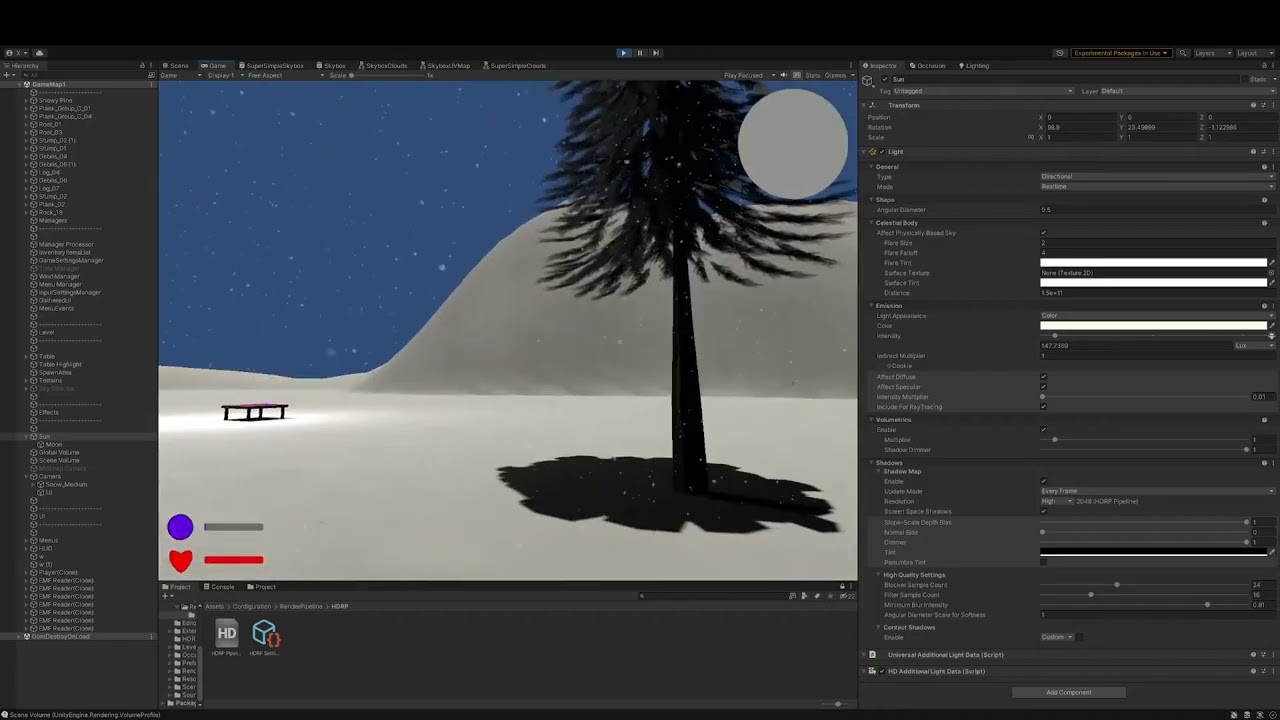
@shrewd moon @peak finch video is kinda long but it goes over some issues
i can highlight the main ones with a timestamp
0:35 why is the tree got broken depth?
1:17 shadows are so fucked here
1:36 SSS breaks lighting lol
2:13 here im pointing out the sky not working
and then i show the physically based sky is enabled
3:30 turning off anti-aliasing permenantely broke my minimap lol
4:35 here im trying to use the sun, and then when I change intensity multiplier its SO BRIGHT
for now reason seemingly
and then i mess with lighting for a while
5:32 shadows are blocky but thats likely the model
 peak finch
seems to me like switching to HDRP is a bad move, granted since your running into a lot of issues
slow aurora
7:08 here i start looking at this cube, it looks like its floating from the shadows, but its not
peak finch
the tree with "broken depth" is actually just a material issue
you should be using alpha cutoff
slow aurora
i am using it
just probably not correctly
9:30 realllllly weird issues where the sky overrides every other thing
peak finch
the intensity for the lighting in HDRP is normal
slow aurora
10:00 more lighting issues
slow aurora
peak finch
the intensity for the lighting in HDRP is normal
but its at like 2 lumens and still very bright
13:10 im assuming this is just screen space GI
peak finch
because you don't have any post processing
slow aurora
peak finch
because you don't have any post processing
i do
peak finch
no tonemapping
 peak finch
oh there is
ok can we zero in on single issues first?
you dumped a bunch of problems in here that you run into and want fixed
its a bit much
so whats something that you want to tackle first
slow aurora
sure, how about figuring out why my post effects arent working, lemme check something first
the only thing that seems to work is SSGI
if i turn it off i see a big effect
but everything else doesnt seem to work
peak finch
no vingette or other effects are working?

 peak finch
show us the settings on your unity camera
slow aurora


 peak finch
why not set both to global post processing?
slow aurora

^ this is why
i dont want my UI to be affected by DoF
and other effects
i tried just turning off post on the URP cam but all of post turned off
 dense sinew
I want to use the volumetric clouds but I'm using the terrain system and the trees don't work. Any suggestions how I can keep terrain and have hdrp?
 indigo summit
anyone here using hdrp and BRG?
i can't make the script from the SRTTest repo to work
shrewd moon
indigo summit
anyone here using hdrp and BRG?
Meaning BatchRendererGroup?
indigo summit
yep
shrewd moon
Not me, but now I know what that is
indigo summit
this is the script that i mean https://github.com/Unity-Technologies/Graphics/blob/master/Tests/SRPTests/Packages/com.unity.testing.brg/Scripts/RenderBRG.cs

GitHub
Unity Graphics - Including Scriptable Render Pipeline - Graphics/RenderBRG.cs at master · Unity-Technologies/Graphics
 nocturne orchid
Anyone have any ideas why my terrain is only letting me use 4 layers?
 eternal laurel
Brg
slow aurora
hdrp go wee
 plain helm
Has anyone here used HDAdditionalCameraData.CustomRender
shell yoke
Did diffusion profiles move or stop working on 2022.2.15? I cannot add a diffusion profile to my material and cannot find where it's at in settings anymore.
scarlet hull
shell yoke
Did diffusion profiles move or stop working on 2022.2.15? I cannot add a diffusi...
Diffusion profiles are now only set throught volume components, as such, you can set them in the default volume profile from the global settings
You will have to add the override if it's not there already
shell yoke
Are you talking about the "Diffusion profile list" for the Volume where post processes and such are at? If so I added it and added my diffusion profile to it, but I still cannot add it to my material sadly.
scarlet hull
Hum, I don't see why it would allow to assign a diffusion profile 🤔
Maybe you've just found a legit bug
Is it also not working if you try to do in on the material asset inspector (not the object inspector) ?
shell yoke
If you mean clicking on the material and trying to drop it into the profile box - still doesn't work. Let me try rebuilding library.
Sadly that didn't work. let me try a new project just to see if it might be something I did with my project
New project works, so something in my other project caused it lol
shell yoke
really weird man, I import my assets from old to new project and it doesn't work again.
shell yoke
Got around it by not importing any of the settings stuff
dense sinew
Is there a way how I can use trees and HDRP at the same time. If yes how
 haughty coral
Any ideas how to fix these absurd values I have to use for intesity to make the spotlight visible even in the slightest? Or is it normal for HDRP. It is a fresh project so I haven't messed anything up yet (probably).
 scarlet hull
haughty coral
Any ideas how to fix these absurd values I have to use for intesity to make the ...
scarlet hull
haughty coral
Any ideas how to fix these absurd values I have to use for intesity to make the ...
Totally expected.
In outdoor, the environment and sun light are VERY intense, and to have a spot light visible in sunlight you need crazy high energy
haughty coral
scarlet hull
Totally expected.
In outdoor, the environment and sun light are VERY intense, an...
So it is, thanks!
shell yoke
@haughty coral also keep in mind to mess with the exposure post process, this can help a lot in tweaking your lighting just right for your needs
haughty coral
shell yoke
<@641734627647815682> also keep in mind to mess with the exposure post process, ...
Thanks. After switching from URP this all looks like a madness to me now. But hopefully slowly I will manage to set this all up
loud leaf
It works just like a real camera / light
 hidden karma
Hey guys,
I'd like to know if there's a way around this issue - I can't have subsurface scattering and metallic at the same time in HDRP shadergraph and my boss wants a singular uber-shader that covers all our needs, which includes SSS and metallicity. Is there some fundamental reason why HDRP cannot do both of these at the same time?
I know HDRP is a deferred pipeline, so perhaps values that are mapped either to metallicity or SSS are overlapped?
whole fossil
is something like triplanar decal shader possible in hdrp?
I am thinking about solution for blood splatters which could affect all surfaces in given volume
 polar epoch
I'm using HDRP for the first time, and I want to create a scene in space. I want volumetric lighting in all lights even though it might not be accurate with how space actually is. The issue with it that I'm having is that for the volumetric lighting to exist I need Fog.
The issue with this fog is that it fades things far away. I don't want it to do this, or at least not the way it's doing it.
The way fog works in my project right now is that it's based on the world Y-axis. Obviously space doesn't have a Y-axis, so it looks strange. The ideas scenario is for the scene to have no visible fog so that you can see any object from any length. I'd like to have this while still being able to have volumetric lights. Anyone know of a setup that would result in this?
The right object is close and clearly showing a good volumetric light. The left object is big and very far away. It's visibly "cut" through the world XZ-axis due to the fog.
**TLDR: **I want to remove the fog covering the white sphere in the distance while keeping the volumetric light on the right.
 dawn sorrel
Why does eveything turn white when I disable stupid exposure
I hate exposure so much
eternal laurel
dawn sorrel
I hate exposure so much
Whats your problem with exposure exactly?
shrewd moon
dawn sorrel
Why does eveything turn white when I disable stupid exposure
All visual brightness in HDRP is relative to exposure, so you should never disable it
Settle on a Fixed exposure level if you wish to minimize its effect
dawn sorrel
Yeah I did Fixed Exposure
eternal laurel
Since hdrp is made to be physically accurate I suggest learning how real life exposure works in cameras
 jagged rain
I have a following setup in a scene:
- Directional lightning with global volume
- A closed room with point light and box volume
I am trying characters from Character Creator 4, but when I place them inside a closed room there occurs an extreme case of subsurface scattering. It goes away when I disable the directional light. Any ideas how to prevent that? Would also like to know why the directional light doesn't impact any lightning inside a room except for few body parts.
 slow aurora
how do I profile what objects and what lights specifically are taking a long time to render? I havent seen anything like that in the profiler
just calls from the cpu saying DispatchCompute
and whatnot
even if im reading the GPU frame debug
 fossil canopy
https://i.imgur.com/EXyKHx8.jpeg when looking at the GBuffer in renderdoc, what specifically are RT0-3 used for? I assume RT0 is albedo, but what are the other 3 used for?
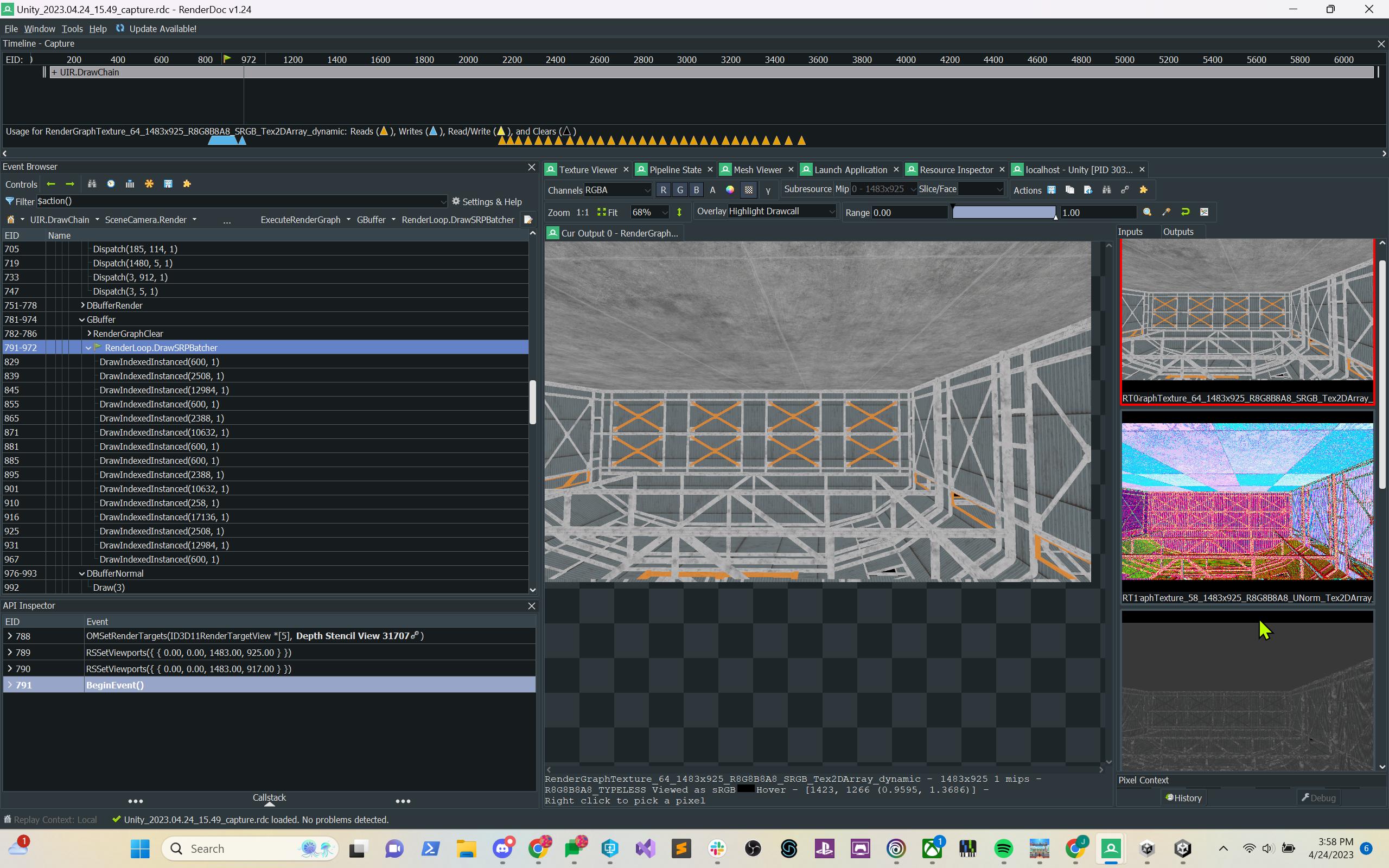 eternal laurel
Should be diffuse specular normal and emissive
 long scarab
jagged rain
I have a following setup in a scene:
- Directional lightning with global volume
...
long scarab
jagged rain
I have a following setup in a scene:
- Directional lightning with global volume
...
Looks that there is no thickness (map) applied to the ear material. What you see is transmission of SSS. There is also a slider on the Shadows post processing override which sets the influence on transmission, maybe you lowered this?
ionic kindle
for the life of me cannot figure out this weird issue, play mode isn't getting some post processing
e.g. bloom and tonemapping
but scene view has them
loud leaf
Camera custom frame settings?
Also, did HDRP Global Settings change recently or did I mess something up? I can't seem to actually remove things there anymore. (latest alpha/git)
I lost some performance (~10%) in just a few weeks so I'm kind of suspecting that 😄
It did really make things cluttered for sure, having to search through this gigantic list to see difference between profiles. They all look exactly the same which (at least for me) makes this currently unusable.
I wonder if this is merged in latest alpha or only in master for the time being, I only really need the recent DLSS + DoF fixes. I don't think there's an easy way to see this these days.
 unborn light
Hey! Don't know if I should post this over in #archived-code-advanced but either way what I'm wondering is:
Is there any way to evaluate the density of the HDRP local clouds at a point in world space? This data obviously exists somewhere but can it be read? If all the code is running on the GPU I assume that would mean to do the same calculation on the CPU for that one point - that part is doable for a custom shader say, but recreating all the required parameters exactly might not be realistic. Any thoughts?
loud leaf
You could try digging into this part of the PR that introduced beer shadow maps for volumetric clouds (https://github.com/Unity-Technologies/Graphics/commit/7ec51fcf924e60985c9adfccf252fcd6e6061c92)
 unborn light
loud leaf
You could try digging into this part of the PR that introduced beer shadow maps ...
unborn light
loud leaf
You could try digging into this part of the PR that introduced beer shadow maps ...
Thanks! I'll take a gander
fossil canopy
What are some reasons that you might want to create a Custom Post Process instead of a CustomPass? For doing stuff that might require several operations / sub-passes, like Bloom typically does?
or for implementing complex things like custom anti-aliasing and whatnot?
 unborn light
loud leaf
unborn light
loud leaf
This is in a compute shader, so even if it was theoretically possible to extract the data I don't think it would be feasible, you would have to write everything to a buffer and then sample from the buffer on the CPU side. Sounds like a recipe for failure unfortunately
Oh well, that was about what I expected, but thanks for the input
lost garnet
from reading internal code, seems to be memory release related
 reef karma
looking for a good industrial asset pack. also really looking for like an airport asset pack. Anyone know of some?

ArtStation
This industrial Harbour asset pack is a product our team at elite3d created for the Unity asset store. We worked on a wide variety of modular, detailed assets ranging from large structural elements as well as cargo ships, shipyard cranes and warehouses. I was responsible alongside Beatriz Morales, Marco Antonio Meireles, Elisa Consolini and Rick...

Elevate your workflow with the High Detail Airport - Full Version asset from VIS Games. Find this & other Environments options on the Unity Asset Store.
this one aint too bad
ionic kindle
loud leaf
Camera custom frame settings?
those are all greyed out even if I tick the box to enable it
so nothing's being changed there at least I think
 gilded portal
Hi!
I'm currently having a problem where the intensity in some of my lights just.... change. Without me doing anything to them.
I'm using version control and I am 100% sure my scene did not have such strong lights in them. What the hell is happening? Is Unity this unreliable?
It feels like Unity just decided to change the light measurement unit on its own while keeping the value.
shrewd moon
gilded portal
Hi!
I'm currently having a problem where the intensity in some of my lights jus...
What kind of lights, illuminating what kind of materials? In what circumstances does the lighting "change"?
gilded portal
I see what's happening now, sorta: for some reason, my light's intensity measurement units are being changed while the value is kept.
400 Lux is too much but 400 Lumens is acceptable for my scene for example. I've found out that, for reasons still unknown to me, pushing scenes to a git repo has a random chance of absolutely trashing my light's intensity units.
 serene harness
Hi, I would like to change my skybox so I added a new one but I have a line that appeared, can someone help me to solve this problem? i have it with every hdr i use
 lusty oyster
hello, I am not so good at hdrp, and I faced this problem: https://youtu.be/TrKlY2mzZMg
area lights are disappearing when not looking, is there any way to fix it and still use ssgi?

even after disabling ssgi nothing happens
 left horizon
lusty oyster
even after disabling ssgi nothing happens
left horizon
lusty oyster
even after disabling ssgi nothing happens
I dunno much about HDRP, but URP in general has a limit on simultaneous lights shining on an object plus a light priority system
You could try raising the number of allowed lights in the URP pipeline asset. or maybe you need to set some of the ceiling lights as "important".
I don't know if it's related but since nobody else has replied maybe you could try it out.
lusty oyster
there's 2 area lights and one is disabled
dense sinew
Anyone know how I can use hdrp with trees
molten surge
Why does rotating a directional light with a physically based sky kill fps so much. I'm losing like 20-30 frames over it
eternal laurel
Well updating the physically based sky every frame is really expensive
 ancient jay
Hi everyone, with the latest editor update 2022.2.17f1, I lost the reference of Rendering.HighDefinition and can't able to find the new reference. Did you guys find how to fix that problem?
lusty oyster
lusty oyster
hello, I am not so good at hdrp, and I faced this problem: https://youtu.be/TrKl...
So basically all i have on the scene is 4 point lights and 1 area light, 4 indirectional lights.
Limit to all light was maxed, so it's not about that. Disabling ssgi doesnt help too. Changing HDRP asset doesnt help either. All i think that it's something about unity. Any help is apperciated!
left horizon
lusty oyster
So basically all i have on the scene is 4 point lights and 1 area light, 4 indir...
Well I put that in Google and someone said that area lights culling isn't a box, but rather a sphere that's based on the range value.
So when not looking directly at the light it will turn off if you are outside of it's range setting.
...pretty weird stuff.
Maybe bumping the light's range value higher would make it not cull it so easily.
left horizon
Haha
molten surge
eternal laurel
Well updating the physically based sky every frame is really expensive
Even at a lower update rate (24fps), I still lose a lot of performance
eternal laurel
The only advice I can give is to lower the number of bounces and increase the update period settings
 quiet cove
yo, I switched to HDRP and switched from gamma to linear, but now my spotlight doesnt work, what do I do?
shrewd moon
quiet cove
yo, I switched to HDRP and switched from gamma to linear, but now my spotlight d...
Could be a lot of reasons
A potential one is that due to camera exposure values HDRP light intensities would be much higher
 full steeple
does skinned mesh renderer support vertex cuz it seems i cannot paint on skinned mesh
shrewd moon
full steeple
does skinned mesh renderer support vertex cuz it seems i cannot paint on skinned...
Support vertex what? Vertex color?
What are you painting with
lusty oyster
how do I fix that? there are two ref. probes matching size of rooms and ssgi enabled. I need to make the lights mix smoothly

what setting controls that?
shrewd moon
full steeple
using polybrush
I wouldn't be surprised if it was not designed to work on skinned mesh renderers, but from what I know about PolyBrush you might be able to paint on the same mesh on a mesh renderer component rather than skinned mesh renderer component
Skinned mesh renderer uses the same mesh data but simply additionally reads vertex groups to deform the mesh
shrewd moon
lusty oyster
how do I fix that? there are two ref. probes matching size of rooms and ssgi ena...
"blend distance"
full steeple
shrewd moon
I wouldn't be surprised if it was not designed to work on skinned mesh renderers...
it works i got it to work however its very unstable and i have to paint way out of bounds
still doesnt apply to all the mesh but only a small part
 onyx lark
just started seeing this warning after bumping to Unity 2022.2.17f1 w/ HDRP 14.0.7
The package cache was invalidated and rebuilt because the following immutable asset(s) were unexpectedly altered:
Packages/com.unity.render-pipelines.high-definition/Runtime/RenderPipelineResources/HDRenderPipelineRuntimeResources.asset
this kind of thing usually happens when I accidentally try to modify a package asset
dunno if it's just on my end, or if it is unity doing something goofy now
actually, I should really just do a reimport-all now
loud leaf
I always clear the library/logs/etc after changing editor or hdrp version.
onyx lark
it's happening in another project too, pretty soon after converting to 2022.2.17f1. I guess that's not the same as a full reimport?
you'd think it would be...
interestingly, I was also getting warnings that file modification times didn't make sense
i forget exactly what it said though
onyx lark
well, that's gone, but now I'm getting a very curious error
Invalid AABB inAABB
UnityEngine.Canvas:SendWillRenderCanvases ()
it triggers when I...walk to a certain part of my level. After that happens a certain shader will cause the whole screen to black out (but only existing instances of objects using a material with that shader)
i think this is something going wrong in my UI, but the resulting breakage is very weird
ah, disabling my UI makes that error go away, but the funky blackout problem remains. perhaps they're both being triggered by the same thing..
further 🦆 adventures: my shader was spitting out NaNs
the shader also uses world-space positions
this, along with the invalid AABB error, makes it sound like I'm just doing a Big Whoopsie with a transform somewhere
now I just need to find it...
(but, this means it's not an HDRP problem!)
onyx lark
yup, sorted: i was dividing by zero in one place (while only happened if the player was in a very dark area, like I had just created a few minutes ago...). this caused my shader to explode and also set an Image's fill value to NaN.
loud leaf
Classic 😄 glad you fixed it.
 terse basalt
Hi. One question, is there a way to move the volumetric clouds in the Y axis please? Like, I have some kind of floating origin system, that teleports the player back to the origin when it goes further than 9000 units from origin, but when it teleports, the clouds just stay there, like this:
Like, I know you can move the X and Z axis by changing the shape offset, but the Y axis doesn't move everything up or down 😦
lusty oyster
uh, stupid question. how do I make the ceiling not black? ref. probe is not working + ssgi disabled

with ssgi enabled everything looks like that
 shrewd moon
lusty oyster
uh, stupid question. how do I make the ceiling not black? ref. probe is not work...
shrewd moon
lusty oyster
uh, stupid question. how do I make the ceiling not black? ref. probe is not work...
Reflection probes only apply reflections
Light probes also apply ambient lighting to dynamic objects
lusty oyster
thanks!
 molten reef
Use APV
shrewd moon
APV and baked lightmapping are both potential and viable solutions here but there are drawbacks to both
I wouldn't off-handedly recommend either without knowing how the lighting in the scene specifically needs to work
ionic kindle
does anyone know why certain post processing effects are missing from my playmode and build? I'm not seeing any bloom anywhere except the scene view.
shrewd moon
ionic kindle
does anyone know why certain post processing effects are missing from my playmod...
Which post processing effects exactly?
ionic kindle
shrewd moon
Which post processing effects exactly?
I think it was things like bloom, ambient occlusion
 misty portal
How do i create a day and night system in HDRP? how do i match exposure to sun intensity?
At day 130.000 intensity / 14 exposure
At night 1 intensity / - 1 exposure
but between values don`t match if i use lerp
Is there a formula to match sun intensity to exposure?
 kind tartan
I can't seem to install HDRP in Unity 2021 LTS

Neither there or in the template starting, can't see URP either
shrewd moon
kind tartan
Neither there or in the template starting, can't see URP either
It doesn't show even by searching?
 misty portal
Is there a formula for day night system at all?
exposure/light intensity
How do exposure works? is it exponential? linear? or what?
shrewd moon
misty portal
Is there a formula for day night system at all?
You can utilize real world light measurements for both
Additionally both sliders give you presets when you click the little icon

 misty portal
But i have a day - night system
It is dynamic
How to make it good when it transition between day to night
It looks good on both day and night but bad between
misty portal
@shrewd moon Do you know how to make it more smooth?
Any guide about the math of exposure/sun intensity
shrewd moon
misty portal
<@166982635950702592> Do you know how to make it more smooth?
I don't
Since they're both standardized units I assume there's explanations for them out there somewhere
I assume the problem could be that one of them is logarithmic and the other is exponential or linear or something else, so they take a diverging path if you lerp them
kind tartan
shrewd moon
It doesn't show even by searching?
I didn't update the launcher, now I see it, thanks
shrewd moon
misty portal
I was searching for EV100 but i don`t understand it
If all else fails I guess you could find what exposure and intensity values match, plot some matching values on a graph and try to figure out which math function they resemble
But I'm hoping there's an easier way or some simpler theory from someone
It can be really difficult to find the relevant parts of a scientific standard in articles not written from our game dev angle
 gritty moon
So I use Ray Trace HDRP if I turn on Recursive render, the shadow were bad but the transparency were spot on, if turn it off, the shadow were right but the transparency were bad any idea why this happen?


 supple fractal
Hi, any tips for this problem ?
 topaz ravine
Quality>HDRP>Lighting>Shadows>Maximum Shadows on Screen
if you do want to limit it its normal to have the warning
supple fractal
thanks
misty portal
shrewd moon
If all else fails I guess you could find what exposure and intensity values matc...
I have it nearly working with AnimationCurve but it is so hard to get it smooth
misty portal
misty portal
I have it nearly working with AnimationCurve but it is so hard to get it smooth
IntensityValue = Mathf.Pow(2.0f, ExposureValue * 1.19f) + 1.0f;
I got it
it why but this value is smooth
 ebon kiln
trying to use decal projectors and splines to make a road, but it obviously doesn't curve correctly. What's the correct way of doing this?

 echo willow
Hi there. When I enable DLSS in my project the screen space reflections dissappear. Is this something unavoidable or is there a setting I can change? Thanks!
topaz ravine
ebon kiln
trying to use decal projectors and splines to make a road, but it obviously does...
you better generate a spline mesh, check out some of the asset store suff like Easy Road ( https://assetstore.unity.com/packages/3d/characters/easyroads3d-free-v3-987), your road will be a lot easyer to customize using a mesh, another way is to use spline package and/or some addionnal tooling like probuilder
ebon kiln
topaz ravine
you better generate a spline mesh, check out some of the asset store suff like E...
Unity has built-in spline support in the 2022 version, but idk if it can be used for a road like that. I’ll mess around with it.
 signal osprey
wtf, culling layers don't work in hdrp like in BRP?
quiet cove
WHAT THE FUKRKKKR

I js switched to hdrp
wtf is going on
why is this happening 😭

ive been working on a map for 2 weeks straight
and i switched to hdrp cuz the asset pack im using supports it
now everything fked up
loud leaf
Use version control, don't switch engine version / rendering pipeline mid project, etc
shrewd moon
quiet cove
why that happened
Sky appears uninitialized and there's probably no exposure set up
HDRP needs a lot of configuration to work right
I would personally much prefer to import game assets into a project created using HDRP template than to install HDRP into a project
 fluid merlin
quiet cove
and i switched to hdrp cuz the asset pack im using supports it
fluid merlin
quiet cove
and i switched to hdrp cuz the asset pack im using supports it
Switching the pipeline to HDRP is a long road... Your scene is rendering incorrectly probably due to a couple of things. First is the global volume is probably missing, create a new scene using the HDRP preset (indoor or outdoor, whatever your scene is) and then copy the directional light and sky/fog volume into your scene. That's going to be the fastest. Also, the terrain might be an issue if you have a terrain since the HDRP materials sets changed for terrain and the HDRP wizard doesn't convert it. The other situation is probably other shaders you're using, every shader in your scene must be an HDRP shader. The HDRP wizard can't convert 3rd party shaders and HDRP is not backward compatible, so you'll have to replace every shader in your scene with HDRP ones.
Depending on how far you are in your process, it's probably better to go back or start over... Migrating from Standard to HDRP for a project that is well under way isn't advised.
There are some Unity tutorials, but they're about 5 years old at this point and don't cover all the changes up to the latest version of HDRP.
https://www.youtube.com/watch?v=GyPSXDZi0NQ

Find out more about HDRP: https://ole.unity.com/hdrpblog
Step by step guide: https://on.unity.com/2zpHdXJ
The High Definition Render Pipeline (HDRP) is a high-fidelity Scriptable Render Pipeline built by Unity to target modern (Compute Shader compatible) platforms.
In this series of video, we're going to take a look at HDRP, and see how we can...
 twin cargo


It seems like the new infinite ocean draws over the clouds. Has anybody else ran into this issue?
The ocean is well below the clouds. So there is no real intersection.
I've tried creating a second volume settings asset with a lower priority that only contains the Water Volume, same result.
I've also tried rendering the ocean on a separate camera with lower depth, but then no water is drawn at all
This is btw with local clouds enabled
twin cargo
Exactly the same view with ocean turned on (left) & off (right)


 frank gull
Idk if it is related to HDRP, but anyway. I have an emission map, but when I use it some pixels are showing up in the wrong areas (no mistakes with an emission map). Using HDRP/Lit shader.
 shrewd moon
frank gull
Idk if it is related to HDRP, but anyway. I have an emission map, but when I use...
shrewd moon
frank gull
Idk if it is related to HDRP, but anyway. I have an emission map, but when I use...
My guess is that they're on the same UV map and the UV regions are too close to each other
Mip mapping effectively blurs textures far away so they can bleed over to adjacent UV regions
 empty remnant
any tips on using reflection probes in hdrp
my metallic chanel picks up the sky when indoors
frank gull
shrewd moon
My guess is that they're on the same UV map and the UV regions are too close to ...
omg ty, the problem was with mip mapping
 sterile mesa
HDRP question: In space, how do you make giant nebula, or other huge objects that won't take up a lot of frames per second?
I want to put big fun objects in my space game, like nebula, forests, giant squids n stuff, sparkly particle effects... Doesn't really matter much which...
I'm looking for dazzling effects that take up a lot of the screen and very little processing power for HDRP...
Anyone know of any? What techniques should I use? What techniques should I avoid?
shrewd moon
frank gull
omg ty, the problem was with mip mapping
If my guess was right that means mip mapping is not the problem, rather mip mapping is revealing a problem with the mesh's UV mapping
sterile mesa
I have a mesh that only renders one side? Why? https://rumble.com/embed/v2k6by8/?pub=sbycb
scarlet hull
sterile mesa
I have a mesh that only renders one side? Why? https://rumble.com/embed/v2k6by8/...
Can't see the link because I'm in france.
But I guess it is an expected behaviour : Meshes by defail will only display the "front face" (indicated by the triangles order), to show front and back face you need to enable it in the material settings.
digital spire
scarlet hull
Can't see the link because I'm in france.
But I guess it is an expected behaviou...
he enabled it.

ugh, the video is very blurry XD I can barely make sense what's going on
but also, why not use HDRI instead of that set up?
 unique narwhal
when using an unlit shader or just trying to set the background to a solid color - it always appears darker
how can I render just a solid color in hdrp and have it be the same as the hex code?
shrewd moon
unique narwhal
when using an unlit shader or just trying to set the background to a solid color...
Generally you don't
The colors that go in are processed in many ways because HDRP doesn't use gamma color space and is designed to always use HDR tonemapping and camera exposure, all of which alter the colors that come out
unique narwhal
that's a sad limitation :/
shrewd moon
unique narwhal
that's a sad limitation :/
There might be workarounds but I'm not aware of them
With custom passes you might be able to exclude some of the processing applied to them
Screen space UI canvas is rendered separately from the scene or camera so that likewise may skip some of the color transformations
If all else fails custom renderer features probably gives you most control over how to render graphics in the render pipeline
 magic glacier
All material previews in the asset window are total black. That also applies to prefab previews which use a material, any ideas on how to fix it?

 trim ridge
Is Path Tracing compatible with terrain trees and detail grass?
 inland olive
Is there any blogged experience or guide on trimming down HDRP to achieve better performance and reduce CPU usage? Maybe switching to URP from HDRP? My sis and I are having difficulties with our game and it is too late to start over and remake the game on URP. Our university assignment is due in two weeks.
Our game is a shoulder view game with some FPS elements (we hunt stray balloons in the woods, mountains) and really put a lot of work in the game already. We have many materials and shader graphs done for HDRP. When I simply change packages, our game is all black.
fluid merlin
inland olive
Is there any blogged experience or guide on trimming down HDRP to achieve better...
There's a few HDRP profiles under Project Settings->Quality, there's one for "Performant", you can try that. also check this thread:
https://forum.unity.com/threads/mega-runtime-performance-tips-thread-unity-hdrp-guide-to-better-runtime-unity-performance.1169837/
A few years ago I went from standard (at 60fps) to HDRP (12fps) and you learn a few things along the way... I'm now at over 100fps.
Overall the big cpu/gpu wasters:
- Don't use highpoly game objects, use models that are "game ready" (usually under 75k tris), ideally with LODs
- Turn off shadows on lights that don't need shadows and volumetrics as well. You can set distances on lights, shadows, and volumetrics if you need them. You have the click Show Addt'l properties, Unity hides them by default!)
- Don't use shadows on point lights, they eat cpu cycles, use spotlights if you want shadows.
- Shadows on the directional light kills performance on nature scenes, so don't use it if you don't have to.
- Every tutorial for a script or from the asset store will have you put code in Update() or LateUpdate(), if your code doesn't need to run in every frame, move it to an Invoke or InvokeRepeating
- Realtime reflection probes kills performance, used baked if you need them
- High quality settings for Depth of Field and Volumetric fog also kills performance, use low quality for these if you need them
- If you have thousands of objects in your scene, like trees etc, you need to use an Instancer, there's a few on the asset store like Nature Renderer or Vegetation Studio Pro or the one that comes with Gaia. Be prepared to update your shaders to support them.
HDRP is pretty much known as a "high-end" pipeline, so you need a CPU/GPU combo that aren't more than 4 years old in general. You'd be surprised how many people are still doing desktop gaming using hardware more than 6 years old.
inland olive
fluid merlin
There's a few HDRP profiles under Project Settings->Quality, there's one for "Pe...
We got offer to release on Xbox One, using publisher. They told us we could use HDRP on old console, but need it a bit faster.
 dark niche
Hi, i switched my project from standard to hdrp, but now i want to switch it back, so i undid everything, but now how can i change all the changed materials from hdrp rendering to standard
long scarab
dark niche
Hi, i switched my project from standard to hdrp, but now i want to switch it bac...
there is no easy way back afaik. best option is to go back in your version control, if possible (if you don't have version control, now it's the time to get started with;)
you can of course manually convert the materials back.
eternal laurel
inland olive
We got offer to release on Xbox One, using publisher. They told us we could use ...
Unity Forum
This is HDRP focused, with a focus on HDRP specific optimizations. Like shadow caching.
Most tips on here apply to all render pipelines though.
I'll...
misty portal
Can i have intersection foam on HDRP water?
eternal laurel
I believe that is supported yes
misty portal
eternal laurel
I believe that is supported yes
Do you know how? Do you use it yourself?


 vapid bronze
what is volumes are needed for interiors?
glacial fossil
vapid bronze
2 problems
1: light shadows are noisy

- The easiest way is to use baked lighting
shrewd moon
vapid bronze
2 problems
1: light shadows are noisy
TAA is required to denoise shadow filtering
In scene view it is off by default
 severe ember
posted this is in unity-talk but it seems more appropriate here. Is anyone else having issues with path tracing?
as in you enable it, it semi works, but on disabling it causes raster performance to just tank?
 waxen lantern
severe ember
posted this is in unity-talk but it seems more appropriate here. Is anyone else ...
waxen lantern
severe ember
posted this is in unity-talk but it seems more appropriate here. Is anyone else ...
what version of unity editor? if i were you i would try the latest alpha as path tracing is still in active development. also does the performance issue persist after you restart the editor?
i think you'll be hard pressed to find many people by the wayside in the discord using path tracing. i use ray tracing and have only tested path tracing for some ground truth comparison. i've seen some talk of path tracing in the unity forums but rarely here.
if the issue still occurs in the latest alpha. I recommend filing a bug report, you'll get a response relatively quick.
severe ember
Thank you for the response, I am indeed on the latest alpha and did find a bug report filed. It doesn't seem to be fixed though and it's a bug that I've reproduced in numerous versions. Just thought i'd try my luck here heh😅
loud leaf
Yes, I've had that issue for 2+ years now, I've also done a bug report for it, I'll check the status
I only work with ray/path tracing in HDRP and I've just gotten completely used to restarting every 5 mins
Issue was confirmed on april 25, nothing more after that
@severe ember what GPU are you using by the way?
severe ember
well this is comforting to an extent! I'm on a 3060ti. I also noticed the issue isn't as prominent in the latest alpha version, like it does happen but not as often and nor is the drop as bad as before. It's still very prominent though and it just causes issues/crashes. I'm trying to use it with render streaming for my thesis and stuff just becomes VERY janky when I enable RT accelerated features.
I've tried a buttload of Unity versions/Drivers and what not, but the jankiness/issues are still a thing 😦
severe ember
I am not alone!!!
If you have any info on a fix anytime soon please message me, I have to present my project in like 20 days and I'm just bashing my head for a fix
loud leaf
I have a feeling it's going to take a while
I have another issue (one that's breaking future progress for me) that was confirmed on feb 20, nothing since then.
They have a very different work culture compared to where I come from (not even talking about features being broken for a long time, like DoF and XR, but the fact that some issues should have been caught before landing, that would get me in a lot of trouble)
severe ember
Am currently pulling an all-nighter working on my thingy, after playing around a bit with the latest alpha build, RT features at least seem fine and work well(not much degradation), but I can't find anything that mitigates PT braking the scene. This got me thinking if I can perhaps replace in-game PT mode with Octane. @loud leaf Do you have any info if it can be used during runtime for screenies?
severe ember
aand it just broke again, ignore all of the above 🙂 🤮
severe ember
update: my lightmaps are also now disappearing during runtime🫠
 velvet comet
so my HDRP's behaving weirdly atm - scene view previews scenes fine but camera previews and game view are all black for some reason - no idea why
this is in Unity 2022.2.2f1
sample scenes and new scenes are black as well camera-wise
Tried to build my project and it also appears with a black screen
waxen lantern
loud leaf
I only work with ray/path tracing in HDRP and I've just gotten completely used t...
ah ok yeah my guess is some kind of editor mode memory allocation / deallocation issue.
velvet comet
velvet comet
Tried to build my project and it also appears with a black screen
Fixed by changing graphics API from DX11 to Vulkan but causes massive render issues, will try DX12 instead
Same thing still, this is incredibly weird, but only occurs with volumetric clouds enabled. Any idea why this is happening?

 harsh basalt
vapid bronze
2 problems
1: light shadows are noisy
harsh basalt
vapid bronze
2 problems
1: light shadows are noisy
try to lower the Angular Diameter.
terse basalt
Hi. Does anyone know if there's a way to move/offset the volumetric clouds in the Y axis please?
severe ember
velvet comet
Same thing still, this is incredibly weird, but only occurs with volumetric clou...
HDRP is quite janky, or at least for me. Sometimes it needs some restarts or fiddling with settings before things start looking right. Also try an LTS version just to be safe.
 twilit swift
How can I fix this? The trees are using the nature shaders but I'm in HDRP, this is from a built in project.

Ping when reply please.
harsh basalt
terse basalt
Hi. Does anyone know if there's a way to move/offset the volumetric clouds in th...
There is a parameter that controls the height of the clouds
harsh basalt
twilit swift
How can I fix this? The trees are using the nature shaders but I'm in HDRP, this...
Make your own using shader graph or download a free shader on assets store.
velvet comet
Howdy, no idea what the correct term for this is but having a new issue in regards to volumetric fog. At night time, using a volumetric light lets you see through areas that are otherwise pitch black (bottom right) - even when you should not be able to (should be capped by the light range?)
Any idea how to eliminate that issue, if there is a way?
(example with volumetric fog off and on respectively)

 terse basalt
harsh basalt
There is a parameter that controls the height of the clouds
terse basalt
harsh basalt
There is a parameter that controls the height of the clouds
but it can't be negative as far as I'm concern
harsh basalt
terse basalt
but it can't be negative as far as I'm concern
The only solution for that is to set the height low and move your whole environment up.
terse basalt
harsh basalt
The only solution for that is to set the height low and move your whole environm...
The thing is that I need to be able to fly above the clouds too.
Like, it's a flight game, with big maps and so in order to prevent floating-point problems, I have to move everything closer to the origin once the player goes more than a certain distance from the origin. The problem is that with the clouds I can't move them in the Y axis up to a certain point or anything like that, as they are not a gameobject you can move around.
I don't know if I explained it correctly😅
harsh basalt
terse basalt
The thing is that I need to be able to fly above the clouds too.
Like, it's a ...
In hdrp you only need to consider the physics floating point because it's Camera Relative Rendering. Here is how you can shift the physics origin: https://docs.unity3d.com/ScriptReference/Physics.RebuildBroadphaseRegions.html
 terse basalt
Oh I didn't know that
Then I can go like 10000000 units away from the origin and the meshes will now shake like they did with URP?
Edit: Well meshes themselves don't suffer form distortion but child objects are just going everywhere😅. I'm guessing that's because of the physics floating origin?
harsh basalt
Yes. In hdrp the world origin is always moving with the camera. You can also change the physics origin in physics setting - Broadphase Type
terse basalt
and for an endless or huge map what would be the best option to avoid having problems?
 harsh basalt
The second one.
Since I never built a very large open world before, that's all I know about.
You can check this topic on the unity forum: https://forum.unity.com/threads/floating-point-errors-and-large-scale-worlds.526807/
Unity Forum
Hello,
I am currently working with a team on a project involving a large scale world.
I currently believe Unity supports anything up to 99,999.99...
terse basalt
okay thank you so much 😄
harsh basalt
You are welcome
terse basalt
Looks like right now the child meshes still break, and the camera positions too as the transforms are still using the same amount of digits and so the error is still there. Like, physics work fine, but the actual transforms don't, that's why I thought moving everything was the only possible solution😅
severe ember
Hello peeps, anyone have any idea why my lightmaps are randomly disappearing during runtime? I checked the lighting data and Unity knows where it is but the lightmaps just aren't visible 😦
harsh basalt
terse basalt
Looks like right now the child meshes still break, and the camera positions too ...
Are you using some object with a very large scale?
Like very big terrain
terse basalt
well terrain is kinda big yes, like each tile is around 25000 units. But terrain looks okay, the problem is with the aircraft
harsh basalt
Can you share some screenshots with me?
terse basalt
Sure. Let me record what I mean real quick
 merry heart
I'm getting a material error in HDRp on this terrain, is there any way I can reset it to default or fix it?
 harsh basalt
merry heart
I'm getting a material error in HDRp on this terrain, is there any way I can res...
harsh basalt
merry heart
I'm getting a material error in HDRp on this terrain, is there any way I can res...
Go to terrain setting and set the material to hd default terrain lit
terse basalt
harsh basalt
Can you share some screenshots with me?
As can be seen, in the interior cockpit, at far distances the buttons inside the cockpit just move around, which doesn't happen near the origin
Like, the child meshes are kinda jumping around
harsh basalt
terse basalt
Like, the child meshes are kinda jumping around
Other than that, everything works fine?
terse basalt
Yeah I think so
Other than stuff randomly moving, physics do work as if they were near the origin
twilit swift
Hi, how can I fix this rendering cubes that shows up in the screen when looking at lights?
 severe ember
twilit swift
Hi, how can I fix this rendering cubes that shows up in the screen when looking ...
severe ember
twilit swift
Hi, how can I fix this rendering cubes that shows up in the screen when looking ...
had the same issue, noticed it appears mostly when I have RT stuff enabled. A unity restart should fix this
twilit swift
severe ember
had the same issue, noticed it appears mostly when I have RT stuff enabled. A un...
RT? What's RT?
severe ember
twilit swift
RT? What's RT?
RayTracing features
twilit swift
You mean that.
severe ember
yes chief
glacial fossil
twilit swift
Hi, how can I fix this rendering cubes that shows up in the screen when looking ...
https://forum.unity.com/threads/hdrp-tile-cluster-lights-rendering-bug.667234/. Do you have a lot of lights in the scene?
twilit swift
glacial fossil
<https://forum.unity.com/threads/hdrp-tile-cluster-lights-rendering-bug.667234/>...
Yes, but all of the lights works fine, the cubes showing are just like rendering chunks.
glacial fossil
twilit swift
Yes, but all of the lights works fine, the cubes showing are just like rendering...
They are lighting tiles that can have maximum of 24 lights affecting them
twilit swift
glacial fossil
They are lighting tiles that can have maximum of 24 lights affecting them
I have at least between 2 and 3 light sources per light.
And each tower light generator has 4 lights on them.
Anywas it crashed.
 severe ember
glacial fossil
They are lighting tiles that can have maximum of 24 lights affecting them
severe ember
glacial fossil
They are lighting tiles that can have maximum of 24 lights affecting them
hmm this is weird I had the same issue even though my scene had a single directional light 😦
 paper knoll
Hello?
I need some help with a scene where I added ray traced GI
for some reason it looks really awful and not good plus not realistic at all

any helps pls?
paper knoll
hello???????????
I need some help for real
man it looks awful
how can I fix the fog

why no body replies to me
 steel meteor
paper knoll
how can I fix the fog
steel meteor
paper knoll
how can I fix the fog
Are you using two cameras? I've seen this issue before when using more than 1 camera and for some reason the fog gets stacked.
If you do have multiple cameras try disabling fog under 'custom frame settings' on one of them.
If you only have 1 camera then I don't know 🤷♂️
paper knoll
steel meteor
Are you using two cameras? I've seen this issue before when using more than 1 ca...
i am using 3 cameras
but the scene is showed by only one camera
steel meteor
Try it out on the non-main cameras and see what happens.
paper knoll
cant
the problem is that
my mesh is really big
really really big in size
man its really awful and a pain
pls any idea on how to fix
steel meteor
OK, but that doesn't stop you trying to disable fog on the cameras to see if that's the issue.
paper knoll
steel meteor
OK, but that doesn't stop you trying to disable fog on the cameras to see if tha...
??
steel meteor
Select your cameras and in the custom frame settings, disable the fog.
paper knoll
steel meteor
Select your cameras and in the custom frame settings, disable the fog.
hmmmmmm
let me try
man same problem occured when i increased the size from 1 to 50

if I decrease the size back to 1 then it looks all fine
 steel meteor
What's inside 'untitled3'? If you scale that then all the children get scaled to. And why you want to scale to 50, just keep it 1.
paper knoll
steel meteor
What's inside 'untitled3'? If you scale that then all the children get scaled to...
all the meshes only
used in the scene
steel meteor
paper knoll
all the meshes only
Maybe you need to a global processing volume, add a fog override and play with the values.
If you're just using the default hdrp settings and then scaling all your models, maybe those settings no longer work properly with the new scale.
paper knoll
steel meteor
Maybe you need to a global processing volume, add a fog override and play with t...
i have a global processing volume
paper knoll
steel meteor
Maybe you need to a global processing volume, add a fog override and play with t...
added yea also thinking the same
paper knoll

I added that in untitled 3
now got it outside
fixed it
by increasing fog distance
sorry for troubling
anyways thx for helping out
steel meteor
Cool. I was just going say, you may need to increase some of your fog values.
paper knoll
lol
also why ray traced GI and shadows kind of glitch when I increase the size
ray traced shadows are glitching
 sturdy shadow
Does anyone know if it is possible to pass a array of positions, instead of matrices when using gpu instancing (fixed scale/rotation). Cant find any examples online, thanks a lot
fluid merlin
paper knoll
I need some help with a scene where I added ray traced GI
Sadly there's no environment presets, getting RT GI is a huge amount of workflow. I played around with the test scene from Unity and yeah, it's really hard to configure to get a nice look and you have to use a bunch of tricks to workaround things. There is an excellent (but already outdated) tutorial on it from Unity/Nvidia here that covers all the tricks needed: https://www.youtube.com/watch?v=ad9f_nKU0ZA
fluid merlin
sturdy shadow
Does anyone know if it is possible to pass a array of positions, instead of matr...
As far as I know, it's not possible. I believe Unity only accepts 4x4 transformation matrices for GPU instancing... You might check the code for GPU Instancer by GurBu, the dev has a way to change an instance at runtime, like rotation that I don't believe is being handled by the shader. My guess though is that it's just resubmitting the matrix.
sturdy shadow
@fluid merlin Thank you
 shrewd moon
twilit swift
How can I fix this lines and the reflections?
shrewd moon
twilit swift
How can I fix this lines and the reflections?
Don't use SSR for mirror-clear reflections
Use box projected reflection probes, a planar reflection probes or ray tracing, whichever most appropriate
 woeful galleon
anyone got any idea whats going on here? The only 2 non static objects in my scene are extremely bright for some reason. There is one area light in the middle of the scene with these settings. There is also a global volume setup like this and a reflection probe


oh and these are my light bake settings
 twilit swift
shrewd moon
Use box projected reflection probes, a planar reflection probes or ray tracing, ...
twilit swift
shrewd moon
Use box projected reflection probes, a planar reflection probes or ray tracing, ...
And how can I fix everything shaking?
shrewd moon
twilit swift
And how can I fix everything shaking?
The picture is not shaking on my end so I'm not sure of the specific type we're troubleshooting
Does everything keep shaking if you disable SSR?
twilit swift
shrewd moon
The picture is not shaking on my end so I'm not sure of the specific type we're ...
Yes.
twilit swift
shrewd moon
The picture is not shaking on my end so I'm not sure of the specific type we're ...
The picture is not shaking because it's just that, a picture.
shrewd moon
twilit swift
The picture is not shaking because it's just that, a picture.
This fascinates me
If you can get a video clip of the action I may be able to get some ideas
The only non-reflection related shaking that comes to mind is floating point coordinate errors, but those shouldn't occur in HDRP
twilit swift
shrewd moon
This fascinates me
If you can get a video clip of the action I may be able to ge...
There.
shrewd moon
twilit swift
This reminds me of the kind of wiggling temporal antialiasing does internally to sample "between" pixels for an ultimately smooth image
Not sure why we would be seeing it though
twilit swift
shrewd moon
This reminds me of the kind of wiggling temporal antialiasing does internally to...
It only happens when light is disabled.
I mean in the editor.
shrewd moon
twilit swift
It only happens when light is disabled.
Do you have TAA enabled in the scene window viewport camera settings?
twilit swift
shrewd moon
Do you have TAA enabled in the scene window viewport camera settings?
Ah, it was that.
Thx.
woeful galleon
woeful galleon
anyone got any idea whats going on here? The only 2 non static objects in my sce...
Anyone got a clue what's happening here? I've been picking it apart for like an hour now with still no luck
shrewd moon
woeful galleon
anyone got any idea whats going on here? The only 2 non static objects in my sce...
What kind of material do those characters have?
woeful galleon
A couple, the head is a default unity material thats just orange with some reflectivity, and the rest are just image textures
shrewd moon
What material do the "image textures" have
woeful galleon
Just default hdrp lit materials with an image base colour
shrewd moon
Usually this happens if the shaders are outputting negative or NaN values
That shouldn't happen with HDRP's own materials but it might be useful to see them
Make sure you don't have more than one global volume
woeful galleon
Uh OK 1s I'll send a screenshot
thats the like body texture of one of the characters

thats its head

wait there is 2 global volumes
thats probably it
shrewd moon
woeful galleon
thats probably it
Was it? 
woeful galleon
nope just finished rebaking
same issue still
did just realise i was baking with the wrong environment profile too, gonna try changing that now
nope the issue persists
shrewd moon
woeful galleon
same issue still
Static objects are not affected by baking so that's unlikely to be the issue
Unless the problem is passed over to light probes or reflection probes, but that seems unlikely
I'd try troubleshooting it with different meshes with different materials
Just to try to find a circumstance where the issue does not occur on a dynamic mesh
woeful galleon
got it
if its relevant my baked lightmaps look like this which seems a little odd
 shrewd moon
woeful galleon
if its relevant my baked lightmaps look like this which seems a little odd
shrewd moon
woeful galleon
if its relevant my baked lightmaps look like this which seems a little odd
Possibly
Indirect Intensity above 1 can make the lightmapping brighter, but not by that much I think
Might be worth a try to keep it at 1
woeful galleon
yep ill try that
Nope that wasnt it either
completely default cylinder does the same

if i make it static its completely fine
 shrewd moon
woeful galleon
if i make it static its completely fine
shrewd moon
woeful galleon
if i make it static its completely fine
Making it static fixes it even before baking again?
That seems very bizarre
woeful galleon
ive just found out it something to do with light probes. If i disable them its fine. If i re enable them it goes back to the weird light thing
with vs without

 shrewd moon
woeful galleon
ive just found out it something to do with light probes. If i disable them its f...
shrewd moon
woeful galleon
ive just found out it something to do with light probes. If i disable them its f...
Good catch, explains why dynamic objects are affected
A totally new problem for me though
I'd try doing simple test bakes in a new scenes with a very minimalist setup using some default cubes and default light settings to try to get the problem to not occur
woeful galleon
still messing it now, it just seems like non static objects are way more effected by light than the rest of the scene.
 shrewd moon
Once you have a functioning specimen, you can start comparing them
With baked lightmapping static objects are (by default) lit by the lightmaps and dynamic objects are lit by probes
You'll need to find out what's causing the probes to get crazy light intensities into them
Light probes essentially are just for sampling points in space for light values during the bake
woeful galleon
i might have just spotted something, gonna need to rebake tho
but it seems like if a dynamic object is within the range circle thing of an area light this happens
woeful galleon
nope i was wrong on that. Ive moved to point lights now and its working so much better. Thanks for all your help!
i also just found amazing tool you can use to adjust the intensity of light probes! No idea why this isnt in unity by default

GitHub
Light Probe Intensity Adjustment Tool for Unity3D. Contribute to kemalakay/lightprobes development by creating an account on GitHub.
twilit swift
I just created a new HDRP project and this happens every time I open it.
 woeful galleon
twilit swift
I just created a new HDRP project and this happens every time I open it.
woeful galleon
twilit swift
I just created a new HDRP project and this happens every time I open it.
are your graphics drivers up to date? nvidia does that to my desktop occasionally
twilit swift
woeful galleon
are your graphics drivers up to date? nvidia does that to my desktop occasionall...
It only happens on this particular project.
woeful galleon
im noticing a message in your console, could this be something to do with it?
 scarlet hull
It means that the editor is trying to load the layout you had in you previous session, probably with visible windows/tabs from plugin/packages that are not available in your new project.
merry heart
how do i get emissive maps working in a hdrp scene? it's working on the material but not in the game/scene view

 scarlet hull
merry heart
how do i get emissive maps working in a hdrp scene? it's working on the material...
scarlet hull
merry heart
how do i get emissive maps working in a hdrp scene? it's working on the material...
What should be emissive in that case ?
Pay attention to the emission values, they need to be high enough to be visible in the plain sunlight of your scene, that is pretty high by default
You could also play with the exposure weight, to fully bypass the exposure system
fluid merlin
merry heart
how do i get emissive maps working in a hdrp scene? it's working on the material...
What Remy said... check your global volume on exposure and bloom.
merry heart
exposure weight let's me mess around with it, thanks :D
 twilit swift
My unity HDRP project just froze after I hit the play button to stop the play mode.
And audio keeps working.
What can I do?
I'm trying to kill the process from Task Manager, though editor closed but it's still in the task manager and it doesn't goes off.
full steeple
so i'm having this issue where i have a big outside environment but the textures are flickering, i am currently using SMAA and when i use TAA and bring down speed rejection it kinda works but everyting becomes slow. Is there a way to use SMAA but not having to worry about the texture flickering?
twilit swift
full steeple
so i'm having this issue where i have a big outside environment but the textures...
Just deactivate the TAA.
full steeple
twilit swift
Just deactivate the TAA.
so you mean no anti alliasing at all, that still gives me the flickering
shrewd moon
full steeple
so i'm having this issue where i have a big outside environment but the textures...
TAA depends on correct motion vectors to avoid "trailing"
Not sure what problem causes them to not work exactly
I don't see it becoming "slow" so I assume you mean the trail blur that happens
full steeple
yes yes the trail blur
 river tundra
What's the best way to add grass in HDRP without lag? I don't understand why HDRP does not support terrain details like grass
 topaz ibex

Get the Advanced Terrain Grass package from forst and speed up your game development process. Find this & other Terrain options on the Unity Asset Store.
river tundra
topaz ibex
https://assetstore.unity.com/packages/tools/terrain/advanced-terrain-grass-10001...
Any free alternative? broke atm
topaz ibex
https://www.youtube.com/watch?v=Afo-Nwu_7Js might work
Seeing the success of the last timelapse video, I decided to make another one, but way more improved version of some Unity terrain editing.
I used the VFX graph with a script to generate grass, instead of using grass meshes, which would be way slower and more graphics intensive. It's not perfect, but I think you can improve it if you want to.
(...
harsh basalt
Which version are you using? I think starting from the 2021 version hdrp does support terrain details. Also there are lots of free repositories about GPU instancing on GitHub.
harsh basalt
river tundra
Any free alternative? broke atm

GitHub
Demo scenes and Shaders for HDRP in Milk_Instancer01 - GitHub - Milk-Drinker01/Milk_Instancer_HDRP: Demo scenes and Shaders for HDRP in Milk_Instancer01
digital spire
river tundra
What's the best way to add grass in HDRP without lag? I don't understand why HDR...
what did you mean? HDRP does support instanced detail(grass and other) rendering.
river tundra
I'm talking about the paint details section

Like this
If it does work and i'm just dumb lmk
digital spire
river tundra
I'm talking about the paint details section
yes. it works on 2021 onward iirc. older version of HDRP doesn't support these.
 river tundra
digital spire
yes. it works on 2021 onward iirc. older version of HDRP doesn't support these.
river tundra
digital spire
yes. it works on 2021 onward iirc. older version of HDRP doesn't support these.
What version are you using rn
I was using 2021.3.15F1
I'll try a newer version
digital spire
river tundra
I was using 2021.3.15F1
I'm on 2021.3.16f1. it should work for you. what exactly happen?
river tundra
I was talking about Grass Textures not Detail meshes, since Detail meshes really tank performance
I can try to use detail meshes and keep them at low quantities
digital spire
river tundra
I was talking about Grass Textures not Detail meshes, since Detail meshes really...
you mean grass texture like this? It just a matter of creating a double side quad for your grass and then add it to the detail tab.

since the automate method that directly create the quad mesh from texture for you like built it rp terrain doesn't exist in HDRP
river tundra
digital spire
you mean grass texture like this? It just a matter of creating a double side qua...
Got it, Thank you 👍
 opal mica
Hello!
Does anyone know how you're supposed to use the Diffusion Profile Override in a local volume?
I want to use the override to change the diffusion profile on a material upon entering a Volume. The only diffusion profile I've assigned is the one I want to use, and it's listed in the HDRP Global Settings with the rest of the diffusion profiles, but the override still defaults to the green-tinted profile. If I apply the diffusion profile directly to the material it works as intended, so it must be that the override defaults to the default profile even though I've assigned the one I want to use.
Here are a couple of pictures:


 scarlet hull
opal mica
Hello!
Does anyone know how you're supposed to use the Diffusion Profile Overrid...
scarlet hull
opal mica
Hello!
Does anyone know how you're supposed to use the Diffusion Profile Overrid...
The overrides is not made to replace the diffusion profiles on the materials, but to change the list of stored diffusion profiles in memory
The data stores on the material is a hash of the diffusion profile, serving as a pointer. If you remove the required profile from the list (with the override), it will point to nothing and the material will have rendering issues.
To change the diffusion profile of your material, well, you need to change it on the material, and be sure to have it in the active list.
opal mica
I see, thank you! But if I have both the desired profile as well as the profile currently assigned on the material selected in the override, the override should make it so that only those two profiles are (temporarily) the only two in the list of stored diffusion profiles, and the profile with the highest priority should be applied to the material? If not, what is the override even for?
scarlet hull
You mean the volume with the highest priority ? There is no priority for the diffusion profiles, just an active list of them.
The override is, like I said before, to change the list of diffusion profiles currectly stored in memory.
Because diffusions profiles are used in deffered shading, a way is needed to store their information in the GBuffers. But storing all the data was not possible (way to many memory required), so only an "index" is stored that points the the matching value of the list.
If at the moment of rendering to the GBuffers the material diffusions profiles doens't match one of the list, it stores an "invalid" value in the buffer, resulting in pink-insh diffusion
If you have the current and desired profiles in the list, you should just have to change the assigned profile on the material to the desired one 🤔
opal mica
Hmm, okay. It seems I've misunderstood the point of the override then. I think I was also unclear about needing to change the diffusion profile during runtime. I have a local volume with different exposure and indirect lighting settings compared to the global volume in the scene, because I want interiors to be lit differently than the outside. The problem is that upon entering the local volume, the player arms light up like a christmas tree because of the subsurface scattering, and I just assumed the diffusion profile override existed to address that. Is there another way I should be handling differences in lighting between interiors and exteriors?
 scarlet hull
Wowzy.
I'm very surprised that the diffusion profile does this, it should not emit more light then it recieves, something else must be wrong here 😅
Or ... oh I see the issues, it's because it's in shadow of the directional light, and it ignores the shadowing for transmission (something that got fixed recently)
opal mica
Hmm, okay, is there something I can do about it? Or is my best bet just to shut off the sun while I'm inside interiors haha?
scarlet hull
Trying to think of solutions 😅
opal mica
Haha, no worries! I really appreciate the help!
scarlet hull
Shutting off the light is a bit aggressive, as it would probably break some visuals like windows I guess ?
One option could be light layers : once inside, disable the directional light layer for those arms
opal mica
Hmm, okay. I'm a bit inexperienced with light layers, is "directional light layer" a specific thing?
scarlet hull
Sorry for the shortcut, what I meant is :
Assign a specific light layer for the directional light, and when entering a building remove this layer from the light layermask of the object
opal mica
All right, I'll check that out! Thanks for the help! And by the way, when you said the shadow transmission thing was fixed recently, does that mean that it is fixed in later versions of Unity?
scarlet hull
I'm not at work so don't have access to all the infos :/
I know the fix landed, probably for 2023.1, but not sure if it was backported
opal mica
All right, cool! Have a good day!
scarlet hull
opal mica
All right, cool! Have a good day!
Oh, hey, found an other solution 🙂
opal mica
I'm all ears! ^^
scarlet hull
Just set the directional transmission multiplier to 0 😄 :
 fluid merlin
river tundra
What's the best way to add grass in HDRP without lag? I don't understand why HDR...
fluid merlin
river tundra
What's the best way to add grass in HDRP without lag? I don't understand why HDR...
I have the same issue as you, but I use either Nature Renderer or Vegetation Studio Pro. Sadly, Vegetation Studio Pro is almost abandonware at this point, since the dev has been gone for a year. The issue then becomes placement, you have to use something that will inject mesh details into the terrain, like Vegetation Spawner, it will override the Unity setting and place mesh details into the details section.
https://i.imgur.com/bOKYlj3.png
opal mica
scarlet hull
Just set the directional transmission multiplier to 0 😄 :
Worked like a charm! You're a lifesaver ^^
 fierce jolt

after I bake, and it compresses, that turns to black
during baking its just fine, but once it finishes it does that
its the exact same as the sidewalk on the other side, so it dosent make sense
fluid merlin
fierce jolt
after I bake, and it compresses, that turns to black
I had the same thing happen with a scene, a mesh was offset a bit from the reflection probes. You might need to adjust your reflection probes. If you're running a newer version of unity you can also try the new volume light probe to see if that fixes it. How I got there to troubleshoot was to temporarily setup realtime global illumination and if it doesn't happen there, the issue is with probes.
fierce jolt
Alright, thank you so much 
 desert inlet
Sorry to bother but I've got a question I've fallen short on an answer too. In bringing in store bought assets that claim compatability to HDRP I've had an issue with the (shader) import settings not behaving as intended and rendering materials. I have followed all the import steps from unity for updating materials and the packages updates for HDRP. Is there a place they need to be linked to functionally render? Thank you and sorry again! Example of one of the shaders I am currently trying to get functioning.
 fluid merlin
desert inlet
Sorry to bother but I've got a question I've fallen short on an answer too. In b...
fluid merlin
desert inlet
Sorry to bother but I've got a question I've fallen short on an answer too. In b...
Usually you don't have to do anything else to get an HDRP shader to render once it's assigned to the material. However, what's very common with asset store custom shaders in assets is that they're only made for a **specific **version of HDRP. You'll often see HRDP 10.x, HDRP 12.x, for shader compatibility or specific versions of Unity. Often if you have a shader that was created for HDRP 10, it may not work in HDRP 12, so the dev has to provide you an updated shader. Your best bet is to contact the dev for support and tell them which HDRP and Unity version youre using and if there's a shader update for your version of HDRP and/or Unity.
desert inlet
Ah! Thank you! That would make a lot of since!
sterile mesa
I have a very basic question with a video around 30 seconds: How do I put a 2d texture on a HDRP object?
 sterile mesa
reddit
0 votes and 2 comments so far on Reddit
 queen pumice
Hey guys, when using Graphics.DrawMeshInstancedIndirect am I supposed to take any additional actions to make shadows work properly?
I have issues with directional light shadows, like shadow projected on the caster itself, or appearing/disappearing shadows when camera is rotated
harsh basalt
queen pumice
Hey guys, when using `Graphics.DrawMeshInstancedIndirect` am I supposed to take ...
I think you need to draw the same mesh extra time for shadow only.
 lethal reef
Hey, i have a problem, i cant enable screen space global illumination
 harsh basalt
lethal reef
Hey, i have a problem, i cant enable screen space global illumination
harsh basalt
lethal reef
Hey, i have a problem, i cant enable screen space global illumination
You need to go to the HDRP quality asset and enable ssgi there
lethal reef
harsh basalt
You need to go to the HDRP quality asset and enable ssgi there
ahhhhh ok thks it works
queen pumice
harsh basalt
I think you need to draw the same mesh extra time for shadow only.
found out I messed up the inverted matrices
though I still have this black hole in between cascades 🤔


 dawn sorrel

basically i can see the red thing
but i cannot see it in 2d

i already checked that there is no layer above it
and still not seeing it in 2d 😦
any idea why?
fluid merlin
dawn sorrel
any idea why?
Could be a lot of things... In the image above, the camera looks like it's facing the reverse of the object, if the material on the object isn't set up for Double-Sided, the reverse side won't render. It could also be that the layer of the gamejobject inst included in the culling mask of the camera.
 peak monolith
I just switched my project to HDRP and my characters (imported from Readyplayer.me) are all pink, and their materials can't seem to be edited. How can I bring back their textures?

 long moon
Do you need to bake culling for the camera to use Frustrum culling, or is that automatic?
 minor storm
unity have something like runtime virtual texture(unreal engine)?
fluid merlin
peak monolith
I just switched my project to HDRP and my characters (imported from Readyplayer....
It's because you have a custom shader... those don't work in Unity HDRP. You have to find the HDRP shader for that asset if the developer made one, otherwise you're out of luck. If it's a simple model, export the material or make a copy of it, set it Standard, apply the Albedo, Metal, Normal maps and then run the HDRP wizard on that copy of the material. It only works for simple models or materials that don't have any special effects.
fluid merlin
long moon
Do you need to bake culling for the camera to use Frustrum culling, or is that a...
Frustum is automatic, occlusion culling has to be baked (which, no one bothers because in Unity it's actually worse for performance)
fluid merlin
minor storm
unity have something like runtime virtual texture(unreal engine)?
It's still an experimental Unity package
https://docs.unity3d.com/Manual/svt-requirements-compatibility.html
 wintry vault
Does anyone know how to make a camera render a RenderTexture. Everything that has been suggested by old Unity forums doesnt work.
I have tried this as many of the old forums suggest: Graphics.Blit(renderTexture, GetComponent<Camera>().activeTexture); But it doesnt work.
Or at least not for me.
scarlet hull
wintry vault
Does anyone know how to make a camera render a RenderTexture. Everything that ha...
Assign the render texture as target to the camera ?
wintry vault
scarlet hull
Assign the render texture as target to the camera ?
Is that not the wrong direction. I want to render what is on my render texture, not output to it?
scarlet hull
Oh, sorry, lets put this on the early morning excuse ok ? 😅
You could do this by using a fullscreen custom pass for example, simply showing the render texture
Or just slap it on a quad with an unlit material 😄
wintry vault
I think the latter ended up well
I was thinking how I could do that well with the camera, turns out you can use a RawImage from the UI and just fullsize it to the canvas
That worked well
scarlet hull
Yes, that's even simpler
sturdy shadow
Does anyone know of any resources on how to use GPU instancing with SRP?
Thanks in advance guys
fluid merlin
sturdy shadow
Does anyone know of any resources on how to use GPU instancing with SRP?
Thanks...
There's a bunch of tutorials on Youtube, this one below gives a nice overview, the restrictions section is probably the highlight. A lot of people don't realize that Unity's solution is limited to 1:1 for mesh & material. Overall there's two kinds Direct Instanced and Indirect Instanced, the later is more powerful and efficient but you have to modify your shader to use it. It's much better for static objects... if you rotate something and need every-frame shadows on it, that kills performance.
https://www.youtube.com/watch?v=e5WXx4PQXpU
I use instancing for asteroid fields, in this exaggerated example, I generated 500k asteroids in a belt and still got 300fps...
https://i.imgur.com/WaCi2Ts.jpg
 hollow urchin
Welp... installed hdrp and everything is now pink
 fluid merlin
hollow urchin
Welp... installed hdrp and everything is now pink
fluid merlin
hollow urchin
Welp... installed hdrp and everything is now pink
There's an HDRP Wizard that can convert materials that use the standard shader. If you were using any 3rd party shaders, you have to get the HDRP version of those shaders. The HDRP shader also needs to be specific for the version of HDRP, so for example, some HDRP shaders that are designed for v10 don't work in v12, etc. Check out youtube videos on the HDRP wizard.


 shrewd moon
hollow urchin
Well... I'm just remaking all textures from scratch...
shrewd moon
hollow urchin
Well... I'm just remaking all textures from scratch...
Why not use the converter?
hollow urchin
The project is something simple, I didn't think that would warrant a need to download something to convert less than a dozen textures
shrewd moon
hollow urchin
The project is something simple, I didn't think that would warrant a need to dow...
The HDRP wizard / pipeline converter are a part of HDRP
hollow urchin
shrewd moon
The HDRP wizard / pipeline converter are a part of HDRP
where do I find this converter?
nvm... found it
fluid merlin
Prepare yourself... HDRP is a long journey 😅
hollow urchin
all of that just because I want to make a simple shader to simulate water...
oh well... at least the knowledge will remain
shrewd moon
hollow urchin
all of that just because I want to make a simple shader to simulate water...
You don't need a scriptable render pipeline to make shaders
You don't even need HDRP to use Shader Graph
hollow urchin
well... too late now...
fluid merlin
If your game is stylized low poly, HDRP is going to a rough go of it for a few reasons. Standard & URP are more performant as HDRP is geared for higher end hardware like consoles and modern gaming PC's. You get a lot of power in HDRP with lighting and materials, but it comes at a cost.
long moon
fluid merlin
Frustum is automatic, occlusion culling has to be baked (which, no one bothers b...
Thanks!
 safe forge
Does anyone know how to get good reflections out of HDRP? Here is a simple scene i setup (cube/sphere are smooth=0, floor is metal=1 smooth=1). I've cranked up every in the volume and pipeline settings but it still looks like rubbish. What am I missing?


 loud leaf
What's rubbish about it?
Screen space reflections can't reflect anything that's not visible on screen, so this is as good as they will get.
safe forge
The reflection of the bottom of the cube is missing, and the reflection from the underside of the sphere just kind of grainily disappears
If it put the cube and sphere on a mirror surface in real time it would not look like this basically
loud leaf
I know what you mean, but you need to either bake a reflection probe or use real time ray tracing if you want to catch the missing pieces in the reflections.
Currently this looks like pure screen space reflections, they can only reflect what's on screen (and the under side of the cube doesn't exist on screen)
fluid merlin
The unity video covers reflections and refractions in good detail:
https://www.youtube.com/watch?v=Bfdz-ErXq4w

In this video, we're going to take a look at Reflections and Refractions in HDRP, the High Definition Render Pipeline in Unity 2019.3!
More information on HDRP Reflections: https://on.unity.com/2Ww9iqF
More information on HDRP Refractions: https://on.unity.com/2YAHq7t
safe forge
Ok thanks, i'm getting much better results with using reflection probes:

The tricky part is setting up all your different probes so that the reflections look good for every camera position that might be used.
scarlet hull
@safe forge For planar(-ish) reflections in particular, HDRP has a dedicated planar reflection probe that will work well in you case