#🏃┃animation
1 messages · Page 28 of 1
 agile solstice
 sonic stirrup
agile solstice
Did you confirm you have only one armature, not several?
sonic stirrup
agile solstice
Did you confirm you have only one armature, not several?
yes, i used one armature and extended bones from it using tab
agile solstice
sonic stirrup
yes, i used one armature and extended bones from it using tab
Then your problem might not be one of the two most common ones
Impossible for me to do more than guess
sonic stirrup
agile solstice
Then your problem might not be one of the two most common ones
Impossible for me...
ig something is wrong with my laptop or my configs ig?
agile solstice
sonic stirrup
ig something is wrong with my laptop or my configs ig?
Unlikely
Most probably you're not doing the correct steps
If you're following a tutorial you may be doing something incorrectly, or have a faulty or outdated tutorial
sonic stirrup
yea prob
but due to that reason, i gave up on animation and started coding since i already knew coding
agile solstice
sonic stirrup
but due to that reason, i gave up on animation and started coding since i alread...
You'll find that all disciplines of game development require the exact same precision and creative thinking when following instructions and troubleshooting problems
sonic stirrup
agile solstice
You'll find that all disciplines of game development require the exact same prec...
yea, no in case of animation, i tried to find solution for 3 months
im much better off in coding
it takes me 10 min to 30 min at most 1-2 hr because im learning unity module and vector module
agile solstice
What you're trying to do is more of a 10 minute thing to learn than a 3 month thing
https://youtu.be/gdOaUv0_TC8 this shows you the basics in ten minutes
(If you're using Blender 4.0 or newer the shortcut to select a bone in weight paint mode is alt + left click rather than ctrl + left click)
 fast swan
- no advertisements in the help channels
- posting on multiple channels is not allowed
 hasty scroll
Yeah I found that and then when I tried it it was like switching back and forth every frame for some reason
agile solstice
hasty scroll
Yeah I found that and then when I tried it it was like switching back and forth ...
It should not be doing that, unless you have animation layers, blend trees or blend transitions that override the property at a partial weight and end up conflicting
hasty scroll
ok
agile solstice
hasty scroll
ok
Or possibly if you have both scripts and the Animator trying to overwrite the property
You shouldn't need to set the property on every keyframe either because of this
hasty scroll
idk what I just did but it just started working lol
 pliant tulip
agile solstice
pliant tulip
pliant tulip
agile solstice
pliant tulip
I can't see the text but in this case this mainly tells you if the charge animation interrupts falling or idle
Still, I believe it's a problem with your movement code rather than of the animator, since jumping and running conditions are both allowed to be true after / right at the moment of landing
pliant tulip
agile solstice
I can't see the text but in this case this mainly tells you if the charge animat...


 pliant tulip
agile solstice
Still, I believe it's a problem with your movement code rather than of the anima...
pliant tulip
agile solstice
Still, I believe it's a problem with your movement code rather than of the anima...
the code instead of the animator?
agile solstice
pliant tulip
the code instead of the animator?
Your code is setting the parameters for the animator
The animator is set to "charge" when Jump and isRunning are true
We can see that happening when landing from a jump
Maybe your code shouldn't allow that in this case, or maybe you want an extra parameter for when a charge should happen specifically
pliant tulip
pliant tulip


 pliant tulip
agile solstice
Maybe your code shouldn't allow that in this case, or maybe you want an extra pa...
pliant tulip
agile solstice
Maybe your code shouldn't allow that in this case, or maybe you want an extra pa...
hmmm... an extra parameter... or somehting to do with the code..
agile solstice
pliant tulip
hmmm... an extra parameter... or somehting to do with the code..
Both
Parameters are how the scripts communicate with an Animator
pliant tulip
pliant tulip
well here from the running thing


 pliant tulip
agile solstice
Both
Parameters are how the scripts communicate with an Animator
pliant tulip
agile solstice
Both
Parameters are how the scripts communicate with an Animator
so... what scripts shoudl I show?
agile solstice
pliant tulip
so... what scripts shoudl I show?
Are these your Animator and your movement scripts that you're dealing with?
pliant tulip
yeah
idk, but this one also have the script

https://gdl.space/udigupepod.cpp this is the coding from the player script for the frogjump
https://gdl.space/lidizevizo.cs and this is from the charge on the animator
agile solstice
pliant tulip
idk, but this one also have the script
What for?
pliant tulip
agile solstice
What for?
I posted the codes below here
agile solstice
Primarily you need to decide when exactly the charge animation should and should not start, and make your parameter sets and transition conditions reflect that
Seems rather clear that the wrong animation is playing because you're setting parameters that make it so
So you need to decide on a way to prevent that
pliant tulip
agile solstice
Seems rather clear that the wrong animation is playing because you're setting pa...
I don't know how
agile solstice
pliant tulip
I don't know how
Maybe you want a bool for "charge" when a charge should happen, whatever that means, rather than any time landing from a jump
I have no clue what your states mean or when you expect them to play precisely, so I can't hand you any finished solution
Animation transitions occur when their parameter conditions are met, that you clearly know
So the challenge is deciding exactly how the character controller's state should correspond to animator state
The way you've tied everything directly to input makes that a bit difficult
pliant tulip
ok, imma try
pliant tulip
agile solstice
Maybe you want a bool for "charge" when a charge should happen, whatever that me...
also, i fixed that it not doing the charge animation when lands on the ground right now, but the jump still kinda glitched bu doing the jump animation twice
hasty scroll
Kinda Hard to explain but I have been watching this video on how to do top down movement. Basically I have 5 animations. Player_Idle, Player move left, move right etc. In the video that I have been following it says the exact code that I have rn Ive been staring at his screen then my screen, then his screen for 2 hours. Is there anything wrong that is with my code that maybe has been updated over the past few years?


 azure mortar
hi i begin in unity and i want to launch an animation wich i create when the player collide the object but this code didn't work mayeb its not the right way to do it but im stuck so if cyou can help me it will be very nice
 hasty scroll
azure mortar
hi i begin in unity and i want to launch an animation wich i create when the pla...
hasty scroll
azure mortar
hi i begin in unity and i want to launch an animation wich i create when the pla...
what is the error its giving you?
 whole fog
hasty scroll
whole fog
hasty scroll
it just says you didn't assing animator in the inspector
whole fog
azure mortar
hi i begin in unity and i want to launch an animation wich i create when the pla...
looks like you didn't assing the animator
make it public so you can see it in the inspector and then drag the game object that has the animator in it
it's not the best way but it's the easy way
hasty scroll
I found what you meant but I'm not sure that kind of thing you put there
 whole fog
hasty scroll
I found what you meant but I'm not sure that kind of thing you put there
whole fog
hasty scroll
I found what you meant but I'm not sure that kind of thing you put there
first select the game object that has this script
not the script it self
hasty scroll
okay
whole fog
and drag the game object that has Animator on empty animator
azure mortar
hasty scroll
what is the error its giving you?
its not giving any error but it just dont do anything
azure mortar
whole fog
make it public so you can see it in the inspector and then drag the game object ...
like that ? because it didn't work either 😭
 whole fog
azure mortar
like that ? because it didn't work either 😭
whole fog
azure mortar
like that ? because it didn't work either 😭
Can you show the animator?
I mean the animator window
azure mortar
whole fog
I mean the animator window
Sorry I'm very lost with the unity animation system 😭 yesterday when I closed unity I was having the animator window but today after relaunched unity I don't see it and when I click on the asset of my animation it opens a window but I cant see the animation
Thanks you for helping and sorry I'm a little new in all this things 😅
 lunar forum
azure mortar
Sorry I'm very lost with the unity animation system 😭 yesterday when I closed u...
lunar forum
azure mortar
Sorry I'm very lost with the unity animation system 😭 yesterday when I closed u...
You can open the animation window by going to "Window" at the top of your editor and then pressing animation
 wise ether
hello everyone, somebody knows why my morphers don't work when I import they from 3ds max to unity ? for the context: my character has a skin modifier above the morpher modifier and there is the export settings from 3ds max. There is other thing to importate or change in the export settings ?
(the animation in 3ds max and the result in unity)
 spare bloom
im confused on why the smg shoot animation doesnt work and the pistol shoot animation works fine but the smg shoot animation just dont wanna play idk why
 hybrid tinsel
wise ether
hello everyone, somebody knows why my morphers don't work when I import they fro...
hybrid tinsel
wise ether
hello everyone, somebody knows why my morphers don't work when I import they fro...
Because unity doesn't support 3dsmax modifiers.
hybrid tinsel
spare bloom
im confused on why the smg shoot animation doesnt work and the pistol shoot anim...
You don't really show anything useful bit ig might be tgat you are copying the avatar from another model instead of making one from that model.
spare bloom
hybrid tinsel
You don't really show anything useful bit ig might be tgat you are copying the a...
thats what im doing with the pistol and it works fine
hybrid tinsel
spare bloom
thats what im doing with the pistol and it works fine
And yet here we are.
Generally you only want to copy the avatar if they are in fact the same model, just with different animations.
spare bloom
hybrid tinsel
Generally you only want to copy the avatar if they are in fact the same model, j...
they are the same model but diff animations
wise ether
hybrid tinsel
Because unity doesn't support 3dsmax modifiers.
..... so there's really no solution for that issue ?!
 sage brook
Hi, is there a way to play the animation once in preview? I can find is a discussion about this from 2018 but it seems like the solutions there are outdated
spare bloom
i seriously dont know whats wrong and it doesnt play the smg animations ngl
spare bloom
I'm so confused ngl
hybrid tinsel
spare bloom
i seriously dont know whats wrong and it doesnt play the smg animations ngl
Have you tried create avatar for it just to see it it works?
spare bloom
hybrid tinsel
Have you *tried* create avatar for it just to see it it works?
Wdym create an avatar?
It already has one
hybrid tinsel
wise ether
..... so there's really no solution for that issue ?!
No need to panic. There are several potential solutions, depending on your needs. You can bake the modifier to a point cache, you can use blendshapes instead, you could use vertex animation textures, probably other options too(I am not a max user myself)
hybrid tinsel
spare bloom
It already has one
And it isn't working.
So that is one possible solution.
 wise ether
hybrid tinsel
No need to panic. There are several potential solutions, depending on your needs...
wise ether
hybrid tinsel
No need to panic. There are several potential solutions, depending on your needs...
ok thanks, I will trying these options
spare bloom
hybrid tinsel
Change that.
OOOOH OKAY OKAY I will try and see
 rich owl
I'm trying to make a walk blend tree with root motion clips, but the positions seem to get messed up on the character whenever I enter play mode. Any ideas on how to fix this?

 spare bloom
hybrid tinsel
No, like where it says Copy From Other Avatar
spare bloom
hybrid tinsel
No, like where it says Copy From Other Avatar
i tried and it didnt work 
spare bloom
spare bloom
i seriously dont know whats wrong and it doesnt play the smg animations ngl
Does anyone know how to fix this?
spare bloom
I am hoping someone finds a way to fix that
 gritty silo
Is it possible to generate an avatar mask from a GameObject that doesn't have any rigging? My character is similar to a mii (just a body, floating head, and floating arms) in 2d so I haven't been using a rig to animate them, but now I need an avatar mask for some animation layers and can't seem to find out how to make one.
agile solstice
rich owl
I'm trying to make a walk blend tree with root motion clips, but the positions s...
Tried restarting the editor? Tried changing the variables during play mode? Checked if it works despite the issue visually
hybrid tinsel
gritty silo
Is it possible to generate an avatar mask from a GameObject that doesn't have an...
You can create one via code pretty simply. Not ideal, but until they att a ui function to do it...
rich owl
agile solstice
Tried restarting the editor? Tried changing the variables during play mode? Chec...
Yeah it went away after restarting, but its weird bc it even affected another project on a different version of unity that i opened to check
hybrid tinsel
spare bloom
I am hoping someone finds a way to fix that
Well, you don't really give any details so it is hard to guess if the avatar mismatch wasn't causing it. Try reimporting the exported file into blender to make sure it works, make sure that all modifiers are applied.
spare bloom
hybrid tinsel
Well, you don't really give any details so it is hard to guess if the avatar mis...
in blender works perfectly fine
\in blender i mean
the pistol ahs the same exact settings n everything
but well itsd a pistol
and works fine
but for some reason the smg is acting up idk why
This is pain
 loud sparrow
I have an animator with a custom script attached to it. I want to pass in stuff to this script but it wont let me put anything into it. Im not sure why

(before it was Animator[]) but i changed it to see if it didnt like the type
it cant see anything either?
 spare bloom
does anyone know how to fix this? cause i seriously am really confused and dont know what to do anymore to fix it , i did everything as the pistol and the pistol animations work fine but the smg animations just decide to not work for some reason , i searched the internet for solutions and answers but no one had the same problem as mine so i couldnt really find anything really , i tried making the animations again and exporting them in unity , i tried reimporting them and they still seem to not work for some reason , im confused and not sure why they dont work , i really need some help
hybrid tinsel
spare bloom
does anyone know how to fix this? cause i seriously am really confused and dont ...
So do the bone transforms animate?
Were there any import errors?
 twin musk
what am i supposed to choose here? (using the Bird game object) also sorry for a question like this its my first time doing this

 shadow obsidian
twin musk
what am i supposed to choose here? (using the Bird game object) also sorry for a...
shadow obsidian
twin musk
what am i supposed to choose here? (using the Bird game object) also sorry for a...
Depends on what you want to do of course
ALL of those things are on the bird gameobject
twin musk
i have the bird game object and i want to add a flapping animation
i have a wing sprite i just need to attach to the object i guess and animate it
shadow obsidian
twin musk
i have the bird game object and i want to add a flapping animation
Oh... i was gonna suggest the sprite renderer for swapping out different sprites, which would be the easiest
But with SEPARATE wings, that makes it a bit harder
I guess it would be the transform of those wings? Not sure. That is outside my experience
spare bloom
hybrid tinsel
Were there any import errors?
No import errors
spare bloom
hybrid tinsel
So do the bone transforms animate?
If the animation doesn't work then I guess not
In blender it works fine
But in unity for some reason doesn't work at all
hybrid tinsel
You keep saying that, yes. And there are a lot of ways for it to 'not work,' one of which would be for the bones to animate but the skin to not properly follow the armature.
spare bloom
hybrid tinsel
You keep saying that, yes. And there are a lot of ways for it to 'not work,' one...
And how can I exactly fix that? Like the skin to properly follow the armature
hybrid tinsel
Well, first you can check if the bones are animated, like I said
spare bloom
hybrid tinsel
Well, first you can check if the bones are animated, like I said
Sorry but if I may ask , how can I check if the bones are animated?
Since they were animated in blender
But in unity
Doesn't seem like it
hybrid tinsel
Generally, I'd select one that I know is supposed to move and see if it animates.
Sidenote: did you openm up the animation clip and make sure it has any keyframes in it?
spare bloom
hybrid tinsel
Sidenote: did you openm up the animation clip and make sure it has any keyframes...
It does have keyframes in it yesterday when I checked
hybrid tinsel
And none of the tracks in it have errors(yellow text)?
spare bloom
hybrid tinsel
Generally, I'd select one that I know is supposed to move and see if it animates...
I saw that bones are just transforms in unity so I should look for the barrel transform?
hybrid tinsel
Yes.
spare bloom
hybrid tinsel
And none of the tracks in it have errors(yellow text)?
No errors or yellow text
spare bloom
hybrid tinsel
Yes.
Okie dokie 
hybrid tinsel
You can also apply the bone renderer from the animation rigging package to view it with blender style bones
spare bloom
hybrid tinsel
You can also apply the bone renderer from the animation rigging package to view ...
OOOH that's so cool
I will see when I get home
spare bloom
hybrid tinsel
You can also apply the bone renderer from the animation rigging package to view ...
unfortunately seems like the barrel bone isnt moving
 zenith olive
I am trying to learn Animation Rigging. My problem is that when I click "Restore Bind Pose" my player model will face down in T-Pose. Then I checked my mesh, and the mesh was facing down. I imported the fbx file to Maya and exported it with this setting: "Up Axis:Y" then imported it to Unity again. But the mesh is still facing down.


 uncut osprey
Ignore the floating gun, I have an idle animation here that plays when standing still, but the second I start moving my guy just ascends and starts floating. But in blender all of my animations are at the same height. Frankly I can't figure out why this is happening


 tawny hamlet
i'm having this problem where when i put animator on my slime and press play it's size become so big does anyone have any idea how to fix this? i would appreciate the tips and help


 swift tide
I'm blending between 2 animations (which were fine before), I reimported the idle animation and now when they blend it causes some weird root jitter. Anytime they blend it causes the root to be displaced. Why is this?
I'm not animating the root from what I know
swift tide
tawny hamlet
i'm having this problem where when i put animator on my slime and press play it'...
In animation export you might have to export at 0.01 scale
tawny hamlet
swift tide
In animation export you might have to export at 0.01 scale
like in... blender sorry i dont have any idea where or what is animation export
swift tide
Ah I assumed you exported the animation
swift tide
tawny hamlet
like in... blender sorry i dont have any idea where or what is animation export ...
Try adjusting the Scale factor of the animation in its import settings to like 0.01
 tawny hamlet
swift tide
Try adjusting the Scale factor of the animation in its import settings to like ...
tawny hamlet
swift tide
Try adjusting the Scale factor of the animation in its import settings to like ...
ok i will try it
tawny hamlet
swift tide
Try adjusting the Scale factor of the animation in its import settings to like ...
thank you so much for the help it works but now i have a new problem with it when it walks he is not facing front and he become so small that i cant see it 
NVM fix it heheheehehee 
spare bloom
spare bloom
unfortunately seems like the barrel bone isnt moving
Anyone know how to fix the bonenot moving?
 celest crag
@nova dagger #1180170818983051344
 nova dagger
okay
wise ether
little update for them who would want to know how to make the morphers working from 3dsmax to unity with a skin modifier above it: I found this video in the abysses of the Autodesk forums, it's really dumb as solution, you have to cut the modifier skin and just past above the morphershttps://www.youtube.com/watch?v=tyPfEO2kuto
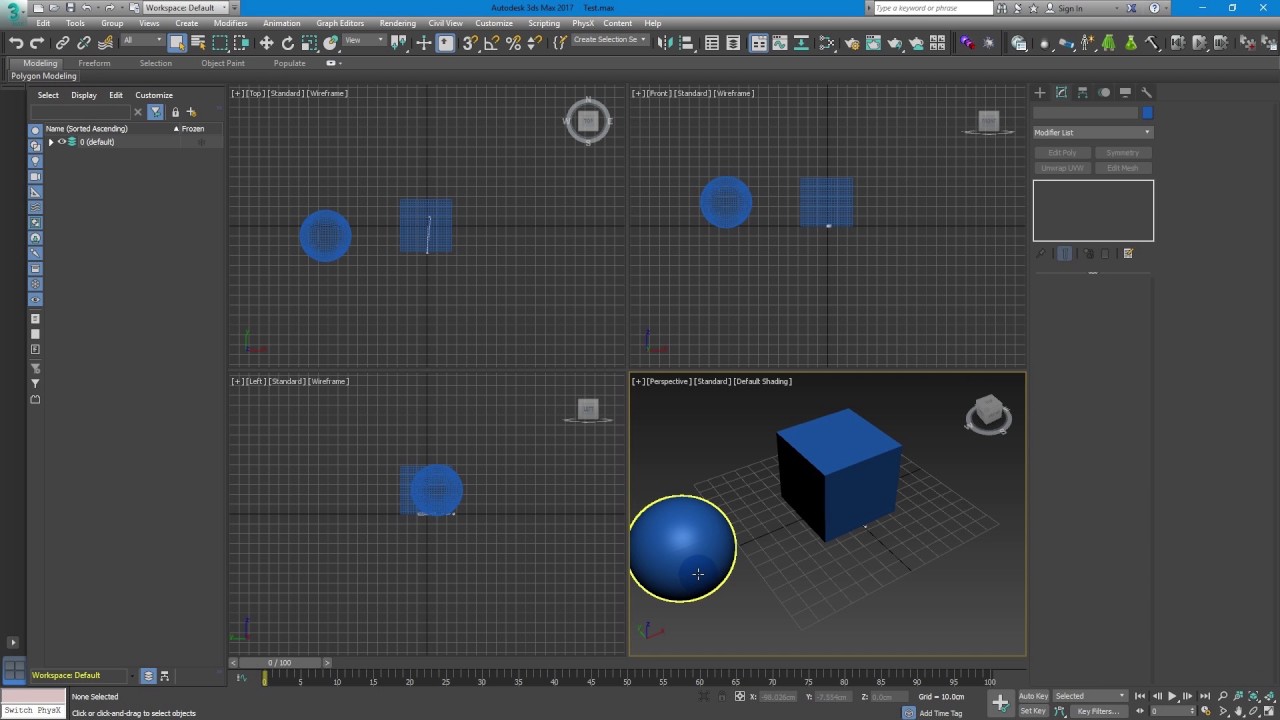
There's a f***ing bug in 3Ds Max 2017. When we try to export FBX with target morphs (Morpher modifier), sometimes the file comes out without the Morpher.
In this video, I show you how to reproduce the bug, so you know how to avoid it, and how to fix models you've already worked on.
Fix at 2:00
swift tide
Is there an equivalent for “Mesh Space Rotation Blend" from Unreal in Unity? Where a layered animation say from the spine up, wont use the spines rotation, so the upperbody stays stabilized?
 vivid yoke
Not strictly a game showcase, but my mad Blender skills xD https://www.youtube.com/watch?v=vBj3aGjORDE&ab_channel=FunFunZeroOne

After watching a couple of Blender tutorials, it was time for an adventure! Enjoy the journey of creating an artistic representation of a coffee cup stain and mad Blender skills from a developer turned 3D modeler.
Music by:
Horde Of Geese by Alexander Nakarada (CreatorChords) | https://creatorchords.com
Music promoted by https://www.free-stock-...
spare bloom
spare bloom
Anyone know how to fix the bonenot moving?
My only guess on why it's not moving is something to do when I was rigging the gun otherwise I'm not sure
 karmic dagger
anybody experienced in getting enemy animations working with A* pathfinding active?
shadow obsidian
karmic dagger
anybody experienced in getting enemy animations working with A* pathfinding ac...
What relation do the two have in your code?
karmic dagger
@shadow obsidian i have a blend tree that takes the horizontal deltaPosition.x and y and uses it to trigger the blend tree, but it was skipping around. i messed around for hours and got it working using "LastMoveX" which was basically how it sounds... but unity crashed and i lost my progress and even though the code is the same, whatever i did in the animator is messed up 🤨
spare bloom
spare bloom
My only guess on why it's not moving is something to do when I was rigging the g...
my guess was right , i rerigged the smg and did every animation again n everything but now the barrel is uh acting weird in unity even tho in blender looks normal
nvm my smg file didnt save properly
fixed it
hybrid tinsel
spare bloom
My only guess on why it's not moving is something to do when I was rigging the g...
Are you using any modifiers on the bone or just manual keyframes?
 twin surge
Hey guys. I have ik and child constraints on my fps weapon rig(meaning bones are not parented but anjmated to look like they are) set up for some of my bones in blender, but after exporting to unity as fbx, there seems to be a bit of wobble.
Geometries that looked completely locked together in blender, now wiggle out of place, like my weapon magezine.
Any way to fox this?
I turned off keyframe reduction and it still isnt fixed.
 lunar bronze
I have 2 animations, one that changes the rotation of a gameobject, which transitions into the second animation, which sets the color of a gameobject.
My issue is that the second animation also RESETS the rotation made from the first animation. Why??
 dense agate
lunar bronze
I have 2 animations, one that changes the rotation of a gameobject, which transi...
dense agate
lunar bronze
I have 2 animations, one that changes the rotation of a gameobject, which transi...
Maybe the bake into pose setting?
lunar bronze
This isn't on an avatar, I don't see those options
hybrid tinsel
lunar bronze
I have 2 animations, one that changes the rotation of a gameobject, which transi...
Are you animating the root? Is root motion enabled?
spare bloom
hybrid tinsel
Are you using any modifiers on the bone or just manual keyframes?
Yeah using the mirror modifier
But I rerigged the smg and it works perfectly now
hybrid tinsel
spare bloom
Yeah using the mirror modifier
Right, like I said modifiers need to be baked before export or they won't work.
spare bloom
hybrid tinsel
Right, like I said modifiers need to be baked before export or they won't work.
Oh damn , didn't know that
Oh well
twin surge
twin surge
Hey guys. I have ik and child constraints on my fps weapon rig(meaning bones are...
assistance please?
 fierce jewel
Guys, how animations are made smooth ?
Like jumping and then walking or running
I have an example video, watch this! How can we achieve these types of movements in unity?
 fathom finch
fierce jewel
I have an example video, watch this! How can we achieve these types of movements...
fathom finch
fierce jewel
I have an example video, watch this! How can we achieve these types of movements...
is Unreal Engine, There was probably a lot of production behind using Xsens
fierce jewel
fathom finch
is Unreal Engine, There was probably a lot of production behind using Xsens
Ooh okay, got it
Thanks for the info bro
 hollow portal
I attempted to follow Brackey's Scene Transition tutorial and finished it, but I can't seem to stop the transition animation from playing whenever I start my game
Is there a way to prevent that from happening? Because his tutorial did not cover that part
hybrid tinsel
fierce jewel
I have an example video, watch this! How can we achieve these types of movements...
That seems to be a mix of techniques; might be using motion matching, it maybe just good transitions. Also seems to be using ik limbs and physical sim for the ragdolling.
dense agate
fierce jewel
I have an example video, watch this! How can we achieve these types of movements...
motion matching?
maybe
 stuck sable
What are some good resources for learning the correct use cases for Animator setups?
So far, I've seen two code based methods, one which simply calls animations directly through code, aand another, which uses a complex wrapper for doing the same.
Assuming I need one character to be capable of performing an extremely long list of possible animations (It's going to be for a turn-based RPG), where should I look for info on how to integrate unity's Animator component with such a long list of one-off animations that don't really need transitions as firmly as other usecases?
hybrid tinsel
stuck sable
What are some good resources for learning the correct use cases for Animator set...
Not at a computer so I don't have link handy, but you probably should check out the talk by the devs of Firewatch on the subject. Similar usecase with a bunch of one-off animations on top of regular ones.
https://youtu.be/8VgQ5PpTqjc ah, found it

Using real-world examples from Firewatch and Recore, this talk goes through what it takes to make shipping quality animation controllers in Mecanim. It explains how to set up a First-Person character with full body awareness and how the team at Armature set up their AI to work with a variety of body types. It also shows the use of Animation Even...
stuck sable
It sounds like I should be skipping Mecanim as much as possible, for something more turn-based.
fierce jewel
Yeah, it may be motion matching, isn't there any website that provides motion matched animations??
Is there so much difference between unreal and unity in terms of animation??
One last question, how to implement that type of small animations like stopping suddenly while running?
fierce jewel
hybrid tinsel
That seems to be a mix of techniques; might be using motion matching, it maybe j...
Oops! I forgot to add it to this reply
dense agate
fierce jewel
Yeah, it may be motion matching, isn't there any website that provides motion ma...
you could do the stop to run in mecanim too
hybrid tinsel
fierce jewel
Yeah, it may be motion matching, isn't there any website that provides motion ma...
There are a few motion matching systems for unity, though unreal's is probably in a better state right now it also depends a lot on the wuality if the animation data.
Yiu can achieve similar results without motion matching but it will take intermediate animations and soforth.
 glossy marsh
spare bloom
unfortunately seems like the barrel bone isnt moving
glossy marsh
spare bloom
unfortunately seems like the barrel bone isnt moving
where do u get ur gun sounds?
spare bloom
glossy marsh
where do u get ur gun sounds?
I forgot the site but I just searched like pistol shoot sounds or smg shoot sounds and I found them
glossy marsh
ohki thnks
spare bloom
Np
 hearty parrot
Guys, what kind of problem does it cause if it stays on Generic option instead of Humanoid when I add animation?
Because the character I bought from mixamo named Mutant has a knife like thing instead of his left hand, I cannot select the Humanoid box because the Left Hand is missing.
You can ping me when you answer my question thanks.
hybrid tinsel
hearty parrot
Because the character I bought from mixamo named Mutant has a knife like thing i...
As long as the overall structure of a humanoid is there you can still use humanoid.
Using generic is not generally a problem unless you need humanoid features.
Specifically retargeting, mecanim ik, etc.
 jade sand
How can I set the transitions for an NPC or the animations?
 hybrid tinsel
jade sand
How can I set the transitions for an NPC or the animations?
hybrid tinsel
jade sand
How can I set the transitions for an NPC or the animations?
It looks like you have already set a couple, so did you have a specific difficulty?
jade sand
hybrid tinsel
It looks like you have already set a couple, so did you have a specific difficul...
Well I didn't know how this was going
 spare parcel
In Unity 2022.3 I have some issue with the TimeLine, I have one to control the scene and one inside the character but when I switch from one to another, the second one (the timeline inside the character) is uncontrollable, the cursor gets back to 0 and the play didn't work at all. Could be because Animation Rigging?
 vernal kiln
Hey, i am working on an fps (and i already set up animation rigging/investe kinematics)
my question is, when i spawn a gun on the player, how do i make the hands move to it, or how do i play animations, for example shooting or reloading with the hands included, if i add the animation to the gun, don't the hands have to be children to be animated? And if i include the hands in the animation, once i change the hands they will be marked missing in every animation.
So how do i make this stuff
stuck sable
Okay, so, after doing some research, I think I know how I want to handle my turn-based game's different variant attack animations, but I'm not totally sure what I want is possible, since Mekanim can be a bit rough with simpler applications like this.
Is it possible to;
- Modify an Animator Override's clips during runtime?
- Create a list of Animator Overrides during runtime and set clips to them then?
I plan on having one "Attack" animation in my Animator Component, which is played directly, and use code to change which clip is in that state, so I can have a Scriptable Object that contains every possible Attack Animation, using scripts to swap them out based on what the player chooses.
My rationale for this is that I want all entities in battle that are humanoid to share one library of attack animations, and have all of them be capable of all types of attacks, but I am worried this will result in tons of overhead, since every enemy would need to have an animator component with a state for every possible attack, which is heavy on processing, memory, and worst of all, development time, especially if I end up wanting to have an extremely large library of possible "moves"
It seems wiser, then, to have one "attack" animation defined in Mekanim, which is modified directly by taking Animation Clips from a Scriptable Object Array and replacing it with one set in that list.
stuck sable
Sorry, is this more of a code question? I wasn't sure which channel to put this in
hybrid tinsel
spare parcel
In Unity 2022.3 I have some issue with the TimeLine, I have one to control the s...
Does it still happen without animation rigging?
hybrid tinsel
stuck sable
Okay, so, after doing some research, I think I know how I want to handle my turn...
- Yes
- Not automatically
stuck sable
I'd like option 1, or the resources for where I can find out more about it. I've looked at the documentation, but I wasn't able to figure out how one would go about changing an Animator Override's clips through code
My end goal is basically just to have an animation state whose clip is decided purely through code and a list of Animation Clips
hybrid tinsel
stuck sable
I'd like option 1, or the resources for where I can find out more about it. I'v...
I believe that you'd just set the AnimatorState.motion directly
On mobile right now so can't do much research
I believe that you might also be able to replace by clip name, but I wouldn't recommend that.
stuck sable
So basically, I have a node in my animator, "Attack", and in code, I just do something like getting the Attack state, and setting the AnimatorState.motion of that to a specific animation clip in the assets folder, which I have a reference to?
would I even need to use an Animator Override for that?
Like I said, my plan is to use a scriptable object that contains a list of every Animation clip I want, and use that list to substitute in and out various clips to the "attacking" state
hybrid tinsel
You should be able to do that without an override, yes.
spare parcel
hybrid tinsel
Does it still happen without animation rigging?
Nope 😅
hybrid tinsel
Then strong maybe!
twin musk
I'm trying to set up animations for my player but the pivot points wont change even when I click apply, and I don't know what to do 😦


Nevermind, I figured it out 🙂
hybrid tinsel
twin musk
I'm trying to set up animations for my player but the pivot points wont change e...
You have 'center' mode enabled in inspector.
Oh, I see you got it
 covert zealot
hi im experimenting a good amount of time now but how can i change the framerate of my animation?
covert zealot
how are 20k people online but no one replies hello?
 uncut salmon
Maybe they're not interested in answering you. You change the frame rate on the animation tab, at the top left.
covert zealot
ok ty
shadow obsidian
covert zealot
how are 20k people online but no one replies hello?
20k people that have joined the server at some point in their lives and happen to have an app instance open on some device (even in the background).
Not 20k people actively checking this channel of this server.
There are only about 2 to 5 people that actively help in this channel
Just to help show what is happening.
Good luck with everything!
covert zealot
shadow obsidian
20k people that have joined the server at some point in their lives and happen t...
well fair point
hybrid tinsel
covert zealot
hi im experimenting a good amount of time now but how can i change the framerate...
You also asked a phenomenally difficult question if you want a correct/in-depth answer. Osteel's suggestion for changing the sample rate will be useful for the specific purposes of changing the framerate of a sprite flipbook. Unless you manually control the animator playback by script there is no way to actually control the framerate outside of the unity recorder.
Your question was also vague because there are multiple possible things you might mean. Setting the framerate of the entire game, for instance, could be a suitable solution for your needs. Or if what you actually care about is the speed of the animation.
The biggest issue, of course, is that unity does not calculate animations in terms of frames at all, but rather in terms of time. Other than sprite flipbooks, it doesn't really have a proper understanding of frames at the animator level.
So in effect, changing the sample rate changes the way the data is read but the game still evaluates the current time in an animation once per game-frame.
So the way you deal with that depends a lot on the specific effect that you want.
 sand inlet
hi guys, I've encountered an issue and is in dire need of help
I made a model in blender fully animated, with 2 attached clothes that are also animated (cloak_Armature, skirt_Armature)

but somehow when imported to unity, only the Equier, which is the main body, the one where all the clothes armatures are parented to, part is animated


The cloak_Armature, that is containing the animation for the cloak, can not be animated at all.
Although its very clear that the cloak_Armature contains animations of the cloak in blender


can someone help me out please, I've been scratching my head for a while now, and its my first time importing animation from blender to unity as well.
sand inlet
Wowzers, I figured it out, the answer was animation layers, damn Im dumb
 zinc grail
When I play my animation in preview in the scene view it doesn't move away
but on play mode it moves away a little
I made the animation in blender and there are no mistakes in there
How do I solve this?
 gloomy sky
I'm trying to do choppy animation, which means I would use a lower framerate in my spritesheet. However, I also need that animation's speed to get faster (as the game goes on) and using the speed change in unity causes the framerate to appear smoother as more frames are now passing by. Is there a way to make an animation faster but skipping frames to still make it appear choppy but also get faster?
hybrid tinsel
gloomy sky
I'm trying to do choppy animation, which means I would use a lower framerate in ...
Probably would want to make separate animations for each speed interval.
fathom finch
I experience a problem when I am configuring an Avatar set to Humanoid. The inspector menu stays stuck, and I have to close and reopen, it also seems that the changes are not stored (in this case put it back to T Pose, and although all the errors are resolved in the Rig tab of the model it still says that there is an error, as if it was not saved.
use Unity 6 B15


 coarse depot
I am trying to make my NPC jump a little bit using a position based animation. The way it is setup is that the default animation is a 4-directional Idle blend tree based off of the NPC's facing direction values. Then a trigger called "hop" is called and it transitions from 'any state' to 'CharacterHop' which is an animation that only manipulates the position of the sprite.
The issue I'm having is that the sprite renderer of the character is changed to facing down when the character hop animation is played. I'm assuming this is because it is the sprite Renderer's default sprite (assigned to the prefab). Is there anyway I can prevent this from happening?


Both transitions have exit time and transition duration set to Zero.
Heres a gif showing the issue in play mode. When the character hop animation is played the character sprite changes despite no sprite changes being present on the hop animation.
 coarse depot
Nvm, I solved the issue. If the animator is not given a sprite it will default back to the sprite assigned outside of play mode. So, to combat this I moved my physics based animation to a separate animation layer and have it activated there so that both the idle and hop animations are playing at the same time. Note that you may have to change the new animation layer's settings
 true zodiac
not even sure if i'm asking in the right channel... keep trying to get unity to auto geometry in the sprite editor and getting this error message every time

can't find anything about it online

enabled full stack trace and it's blank lol
agile solstice
true zodiac
enabled full stack trace and it's blank lol
You can't really debug problems within the editor itself
Mostly you can just try restarting it, deleting Library, patching the editor, trying to reproduce the bug in a new project or considering upgrading to a newer feature version of the editor
true zodiac
agile solstice
You can't really debug problems within the editor itself
Mostly you can just try...
thank ye, updated and now getting a totally different error?
 agile solstice
true zodiac
thank ye, updated and now getting a totally different error?
agile solstice
true zodiac
thank ye, updated and now getting a totally different error?
I recall seeing that a bunch in some versions but if it doesn't break anything, there's no need to worry
true zodiac
agile solstice
I recall seeing that a bunch in some versions but if it doesn't break anything, ...
unfortunately it does break it, as it doesn't allow me to auto geometry
agile solstice
true zodiac
unfortunately it does break it, as it doesn't allow me to auto geometry
Which editor version are you using now and were using before?
 fossil reef
I imported an animation that enlarges an object and makes in smaller again
but now the object has a fixed size in unity even if I make it smaller it has the starting size from the animation
I dont want that but it still has to change its scale
how do I do that cause I know its possible it always worked normal before

 frosty crag
Hello uhm im trying to create a UI wherein if the enemy hits the main character a heart score is gone. How do i connect the script to the animation of the health bar?
true zodiac
agile solstice
Which editor version are you using now and were using before?
2021.3.19f1 before and 2022.3.25f1 now which i believe is the most up-to-date
covert zealot
hybrid tinsel
Your question was also vague because there are multiple possible things you migh...
but the weird thing is if I just drag like a few sprites in the scene at the same the frame rate of the animation is set to 12fps. but if I create an animation and then drag the sprites into the timeline its set to 60 fps.
agile solstice
true zodiac
2021.3.19f1 before and 2022.3.25f1 now which i believe is the most up-to-date
Usually you want to get the newest of 2021.3. if you're on that
going to 2022.3. is a leap that can break stuff of introduce new problems
true zodiac
agile solstice
Usually you want to get the newest of 2021.3. if you're on that
going to 2022.3....
can i reasonably go back?
hybrid tinsel
covert zealot
but the weird thing is if I just drag like a few sprites in the scene at the sam...
That is because when creating an empty animation it assumes that you're creating it for a general 3d object. When creating from a Sprite it uses different defaults.
covert zealot
hybrid tinsel
That is because when creating an empty animation it assumes that you're creating...
so what can i do about it?
hybrid tinsel
Live with it, I suppose. Though note that is not the framerate, it is the sample rate.
You can set it to whatever you want
covert zealot
ok
 vague nymph
Hi everyone. I'm beginner in Unity. I want to ask if I downloaded model from low poly pizza. It is without T Pose. And I attach to this model in Unity animation from mixamo and have something like that at the screen. My guess is that I need to open 3D model in Blender and stay it in T Pose and the next download animation for this model. Correctly?
 fleet glen
Hello I currently am implementing combat animations into my game and have the input working for a punch attack but when my animation is transitioning back to the idle state my character just gets stuck on the last frame of my punch attack and can not go back to the idle state. I keep trying to reset the trigger back to false after it is turned on but it wont. can anyone help?
 eager arch
So i made a spineIK script for my player, but when used in combination with animations it breaks as im using Lerp for the IK, the animation moves the bones to another pos causing the lerp to break, the workaround i found was this hellish thing, is there a correct way to do this, i don't think avatarMasks would work as it moves the bones to Tpose every frame
yeah i will cache the *90, /90 values
 covert zealot
hi im currently animating my 2d character but cant figure out the transitioning if i walk the animation gets played to late when the player may have already stopped moving somebody know what i could do about it?
 charred ermine
my models are all getting contorted when the game runs
dense agate
fleet glen
Hello I currently am implementing combat animations into my game and have the in...
maybe because of the varaible punch ?
fleet glen
dense agate
maybe because of the varaible punch ?
I will be looking into this further tomorrow thank you
hybrid tinsel
covert zealot
hi im currently animating my 2d character but cant figure out the transitioning ...
Might have exit times enabled in the transition?
hybrid tinsel
charred ermine
my models are all getting contorted when the game runs
That isn't much to go on.
hybrid tinsel
fleet glen
Hello I currently am implementing combat animations into my game and have the in...
First of all, that is a bool and not a trigger. Second, you didn't post code so it is hard to tell what could be wrong
 small zodiac
cant see my animations when i click on it, does anyone have a solution to this problem
agile solstice
small zodiac
cant see my animations when i click on it, does anyone have a solution to this p...
this bar is clickable for revealing the asset preview
 hearty parrot
Hi, When I press the W and A or D keys at the same time, that is, when I start running towards the left and right diagonally, the jumping animation does not start.
Is this related to the codes or do I need to make another setting in the Animator window?
If you want to understand better, I can make a video
you can see when i jump while holding W and A key** isJumping **parameter the tick mark comes and goes for 0.1 seconds
agile solstice
hearty parrot
You'd want to confirm the transitions to the jumping state are correct and don't have Exit Time enabled
I would prefer to use blend trees and animation layers for movement rather than trying to have a transition from everything to everything
hearty parrot
i was think too i must use blend tree but really complitated
how its work i dont know and all blend tree tutorials is english 😄
i can search in google or youtube blend tree tutorial but if you know really good tutorial can you send me link please ?
agile solstice
hearty parrot
i was think too i must use blend tree but really complitated
It's no more complex than having multiple synced animations you can blend between using one or more variables
I haven't watched this but it's probably a decent tutorial: https://youtu.be/m8rGyoStfgQ
I just read the documentation
The main benefit is that you can have many movement animations in it and only need one transition in and one out for another state, like jump
Layers let you blend between whole state machines using a variable
hearty parrot
thank you i will watch
 glass cove
Hey hi! So i imported a couple blender animations i made and while the FBX animation previews looks perfect, the animation solo preview looks a bit constrained (ears and clothes dont bend) and thats how it looks in play time too.
What could that difference be? (First one is the faulty, but they are the same anim file)


 little sluice
Anyone experiemce this issue with the Timeline where the buttons don't seem to appear? The record, lock, mute buttons on each layer
Using unity 2022
When reinstalling the Timeline package, I get two debug logs stating that Dark.uss was not downloaded
What is that?
 tardy ginkgo
can someone help please
 uncut salmon
Someone said to check the animation doc in this channel and you opted to just regurgitate your question.
The animator you're running doesn't have the Attack parameter which is just repeating what your error is saying.
tardy ginkgo
what is a parameter
its problably stupid for yall but im honnestly not understanding this error
problem solved thanks Osteel
 clear current
Hi i have this animation where the player falls to the floor. in the animator it works. i have change the motion to root transform thinking that was the issue but no fix. what happend is the animation just players in the standing postion
hybrid tinsel
glass cove
Hey hi! So i imported a couple blender animations i made and while the FBX anima...
Is it a humanoid rig or generic?
glass cove
hybrid tinsel
Is it a humanoid rig or generic?
I figured it was exactly that, i apreciate that you pointed it out anyway! 😄
 rustic axle
hi im not much of an animator, i made a walking animation and the first and last keys are the initial position, and there is a pause between each cycle of the walk because of this but idk how to make it so that it doesnt but still looks smooth
clear current
clear current
Hi i have this animation where the player falls to the floor. in the animator it...
any ideas
clear current
rustic axle
hi im not much of an animator, i made a walking animation and the first and last...
select all the keyframes
Right click on one of them
Set the option to "Auto" give that ago
you could also play about with linear on the curve tab at the bottom

 brazen shuttle
Hi all, I have made a 3d model in blender with shape keys and I want to move it to unity but when I just pass (in fbx format), the shape keys disappear.
I don't know if it's because I have to select some option when exporting it.
small zodiac
so i uploaded my model and animations and somereason one of my animations proportions are wrong does anyone know how to fix this
 minor field
How do I start my Timeline animation at the gameobject's current position and end it at the position I want? Is there a way to do this?
or at least start at the current position and smoothly move to the start position of the timeline animation?
I just need to start with the player's position and end at an exact spot using timeline
 pallid thistle
pretty much a noob to character animation. im making a game that gets a voice over, and i want my characters to move their mouths accordingly. is there a tool that does essentially the same job as VRChat, where the audio clip moves the blendshapes of every sound of the alphabet (that i made for my model) automatically for me?
 tender tusk
Mecanim animators, what is the correct way to have the Avatar (rig) match the 3rd party animation Avatar I'm using?
If I attached the animation to my character and Play the scene, my character walks "bow-legged" like they're riding a horse. The reason for that is because my character's skeleton legs are wider than the animation rig I'm using. I can correct that by matching my rig to theirs in the Avatar Definition > Configuration area. That fixes my problem, but if I have a variety of skeletons for clothing, I need to fix all of those as well. Or if Im using an animation from a different person that the first, say they decide to have the legs spaced differently, then that animation will be off too.
Is there an easier way to make sure my character's Avatar (rig) matches to whatever animation I'm using without having to edit the avatar?


As you can see from my screenshots, my character's legs are spaced wider when the scene is Playing due to the Avatar setup like in the left image. Maybe there's a way to have my character's legs match the position and rotation of the animation, regardless of how my Avatars legs are positioned?
Or if I have to change all my Avatars (rigs) manually for my characters and clothing, how can I copy and paste all the positions and rotations exactly the same for all my rigs? I can Load/Save the mapping using Mecanim, but not the positioning.
 bleak harness
I was making a hotline Miami type thing and cannot seem to get my walk animation to play when I walk. Anyone have any suggestions or videos? It says it has to be switched to legacy but when I do that it breaks everything
 pine badge
Hi all
I can't seem to record/key in value changes in the inspector for some scripts/variable
Right clicking some script shows the "Add Key" option
But for some others, it's not there

 pine badge
Hi all
I can't seem to record/key in value changes in the inspector for some scr...
pine badge
pine badge
Hi all
I can't seem to record/key in value changes in the inspector for some scr...
Wait i just realized even tho the "Add Key" option doesn't appear and the variable field doesn't turn red in the inspector, changing its value does add a keyframe on the animation tab..
Weird
 random spoke
Hi all i have this really awkward animation that i want seamlessly looped but i cant seem to find the timing because there is no point where all the keys line up. Can someone help me find a way to do this?

nvm i got it :0
stuck sable
Unity's humanoid animation retargeting still works if you have rigs with different proportions right?
I'm working on avatar stuff, and wanted to know if it was feasible to retarget animations between two rigs like this, with a "generic rig", and then some fancier, distorted one for something like an ogre
 hybrid tinsel
stuck sable
Unity's humanoid animation retargeting still works if you have rigs with differe...
hybrid tinsel
stuck sable
Unity's humanoid animation retargeting still works if you have rigs with differe...
That is what it is for, yeah. You'll probably want to enable foot IK with suchblarge proportion differencea, to avoid issues.
stuck sable
hybrid tinsel
That is what it is for, yeah. You'll probably want to enable foot IK with suchbl...
Gotcha! Thank you, I THOUGHT that was what it was for, but I was having trouble finding examples of people using such large proportional differences
My plan is to use one rig to make an animation library scriptable object, then assign animations to the states through code, which makes no sense if they can't be retargeted to ALL the characters in the game
hybrid tinsel
random spoke
Hi all i have this really awkward animation that i want seamlessly looped but i ...
Can you just cut it and add new keys to force a loop?
hybrid tinsel
stuck sable
Gotcha! Thank you, I THOUGHT that was what it was for, but I was having trouble...
Here's an example of the difference in such a situation https://i.imgur.com/JXfpNCm.mp4
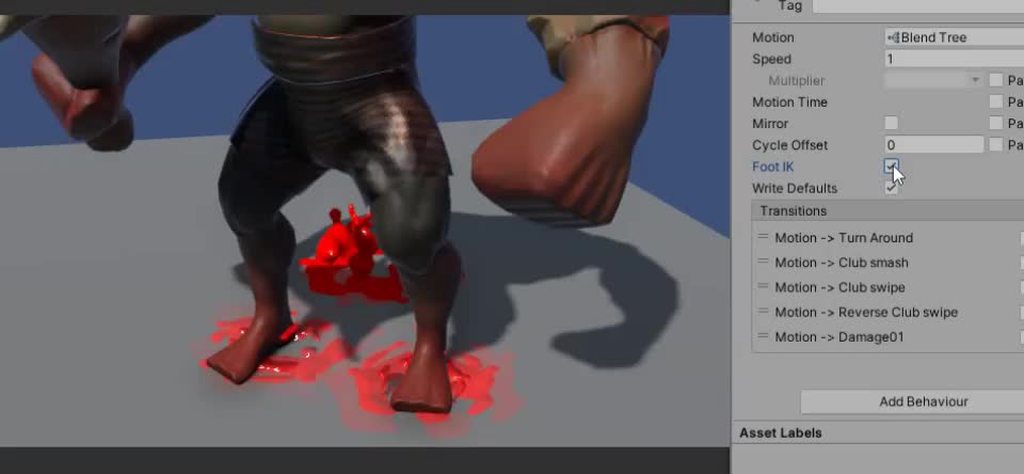
Where this guy has really short legs(proportion wise)
stuck sable
Interesting!
spare parcel
In unity 2022.3.5 the avatar configuration didn't work and It's gray

Also closing and reopening the Inspector it works...but just until I click on Apply, or any bones.. then it gets back to gray 😕

Also I get this error in Inspector, maybe could be usefull
UnityEditor.AvatarSubEditor.ApplyRevertGUI () (at <477bdcb097d4488eae58cbed17286dd8>:0)
UnityEditor.AvatarMappingEditor.OnInspectorGUI () (at <477bdcb097d4488eae58cbed17286dd8>:0)
UnityEditor.AvatarEditor.EditingGUI () (at <477bdcb097d4488eae58cbed17286dd8>:0)
UnityEditor.AvatarEditor.OnInspectorGUI () (at <477bdcb097d4488eae58cbed17286dd8>:0)
UnityEditor.UIElements.InspectorElement+<>c__DisplayClass72_0.<CreateInspectorElementUsingIMGUI>b__0 () (at <477bdcb097d4488eae58cbed17286dd8>:0)
UnityEngine.GUIUtility:ProcessEvent(Int32, IntPtr, Boolean&)```I made a try with unity 2022.3.26 but the issue remain
Also, if I click any node or interface on the Inspector, it gets grayed again... damn 😦
 arctic sentinel
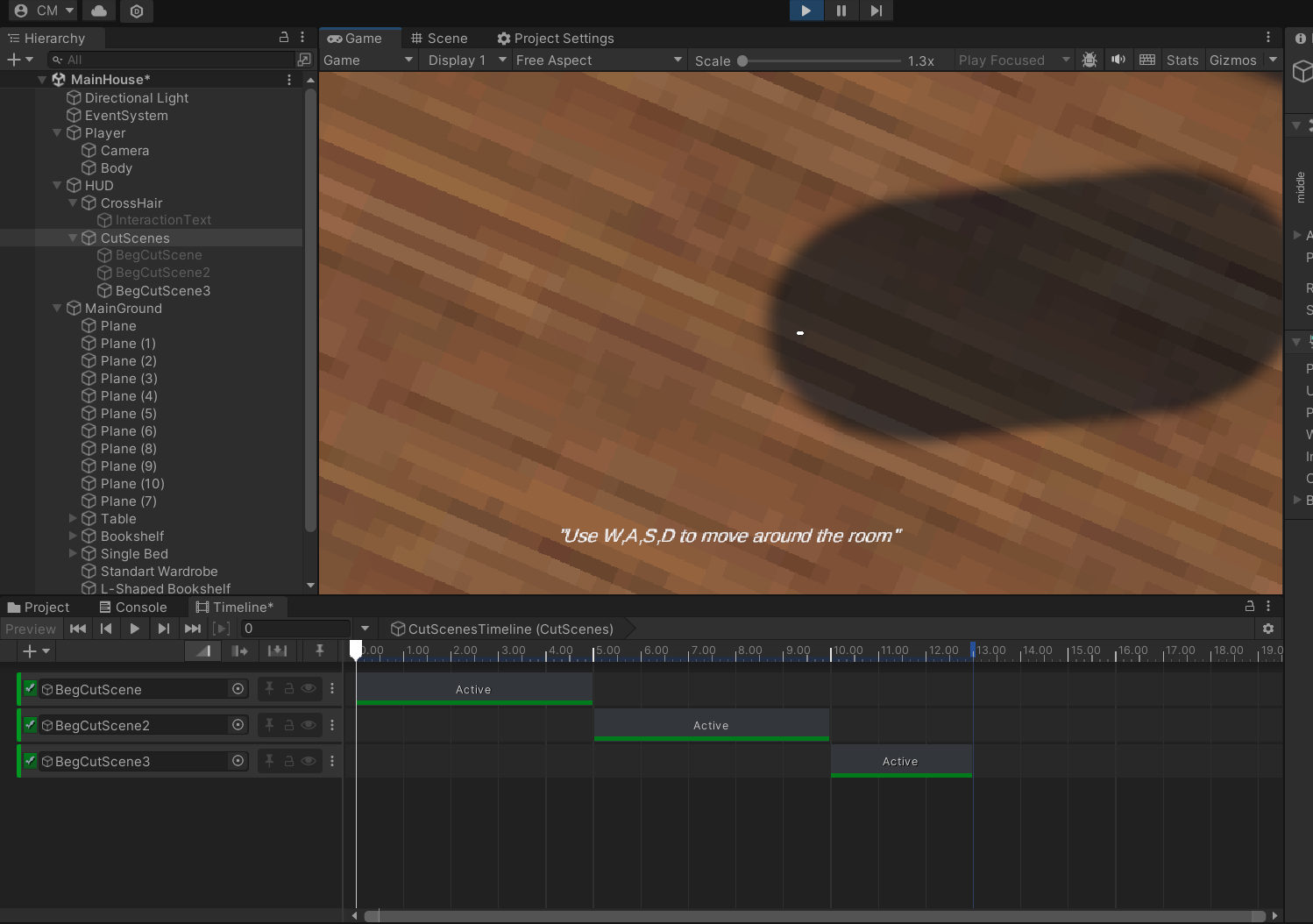
https://gyazo.com/f7b06fe24895d9b6259a4dc9d4bbe0eb
how do i get my last Animation from timeline off the screen
 stuck sable
hybrid tinsel
Here's an example of the difference in such a situation https://i.imgur.com/JXfp...
stuck sable
hybrid tinsel
Here's an example of the difference in such a situation https://i.imgur.com/JXfp...
So, enabling foot IK, I'm having some issues with the retargeting, since the IK proportions aren't quite right

Is there a way to adjust this without making multiple animations?
The only way I can think to correct it would be to make sure all my rigs are scaled, such that their foot IK is always proportional with the "base model". Are there any issues that could emerge from that?
hybrid tinsel
Well, it will always be an approximation meant to look good in most cases. You can do some fiddling with limits in the avatar but especially for an extreme case like yours there is only so much it can do.
stuck sable
Gotcha
What I'll probably do is just use a variable for whether or not to use foot IK on any given model.
hybrid tinsel
You can also try enabling translation DOF
Which probably won't help in this particular case, but it might.
spare parcel
Maybe I got the problem but Unity still giving the the gray Inspector anyway....
The problem is that the fingers have all the same name and maybe that's drives Unity crazy? 🤔
 spare parcel
Thanks to CoPilot I've been able to fix the issue, and now it's working perfectly (in Unity 2021) now I can grab the fbx and the meta file into 2022... in hope a fix will comes out soon 🙄
 random spoke
Hi all. I am a little stuck. I have i character set up with the new 2D IK and 2D animation package and have animated it using the targets. I now want the character to execute basic foot placement. I have already created a second IK solver for each limb to override the current animation. But i need the animation still playing because otherwise it will look static. Any help?]


https://www.youtube.com/watch?v=PIcNwka8r8Q&t=24s
here is the video i have based myself off of

First pass on procedural animation applied to quadrupeds.
This is a work in progress and is subject to some future improvements, but I'm already happy with the current result !
Next step : insects !
Sneaky Snitch by Kevin MacLeod
Link: https://incompetech.filmmusic.io/song/4384-sneaky-snitch
License: https://filmmusic.io/standard-license
spare parcel
Ok in the case anyone else got the Grey Avatar Inspector bug, I've made a thread in the forum explaining why and how to fix it: https://forum.unity.com/threads/unity-2022-3-25-and-26-avatar-editor-grey-inspector.1587228/

Unity Forum
If you have fingers with the same name Unity editor didn't work, I've explained the bug in Discord, but I guess making a new post could help more...
 plucky plover
Hey guys,
maybe someone would be able to help with syncing 2 animations of 2 different objects? I have 2 different animations (the player that has an animation of opening a door and the door itself, that has an animation of opening) I'm having some trouble making, that those two animations would be synced without any delay 😦 Is that even possible to do? If not, how should I manage to do these kinds of animations/interactions?
 proud tapir
WHY WONT IT LET ME TICK THE MIRROR OPTION
 hybrid tinsel
proud tapir
WHY WONT IT LET ME TICK THE MIRROR OPTION
hybrid tinsel
proud tapir
WHY WONT IT LET ME TICK THE MIRROR OPTION
Is it humanoid?
proud tapir
Fortnite Jonesy
hybrid tinsel
plucky plover
Hey guys,
maybe someone would be able to help with syncing 2 animations of 2 dif...
I'd just use a Timeline.
hybrid tinsel
proud tapir
Fortnite Jonesy
I don't speak random zoomer meme. Translate?
proud tapir
he jonsey
plucky plover
hybrid tinsel
I'd just use a Timeline.
u r a god man
i was searching for a tool like this! tyvm
 robust basalt
i created a system to play overlay animations, Those overlays have only one layer and I switch avatar masks at runtime depending on the overlay animation being played
video about the problem switching avatar mask parts using SetHumanoidBodyPartActive make the animation reset and jitter
https://www.youtube.com/watch?v=OZFz1DV94Lo
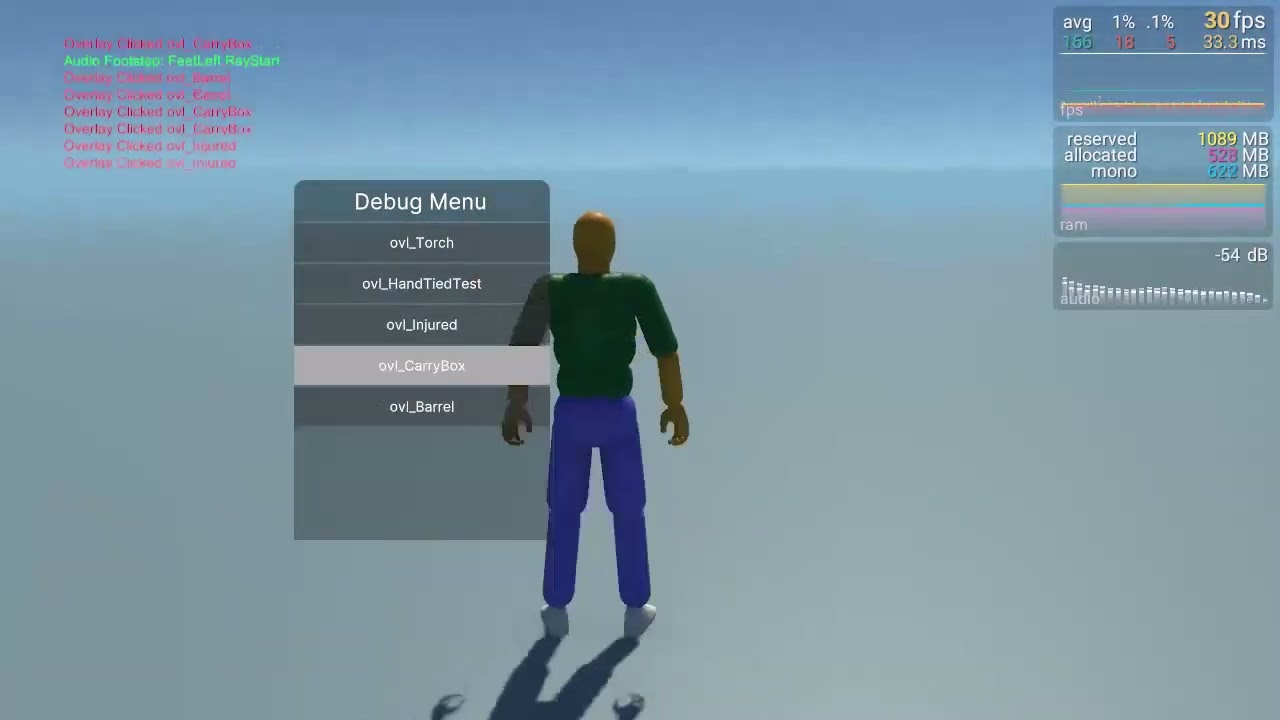
using SetHumanoidBodyPartActive at runtime make the whole animation reset
trying to find solution for that
Script to Replicate the behavior
[SerializeField] private AvatarMask OverrideLayerAvatarMask; // AvatarMask attached to the override layer
private bool isActive = true;
private void Update()
{
    OverrideLayerAvatarMask.SetHumanoidBodyPartActive(AvatarMaskBodyPart.Body, isActive);
    isActive = !isActive;
}
hey can somebody tell me how i set up diagonal movement animations in my topdown 2d game? i got the animation and for example my walkUpRight animation should play if my MoveX value is greater than 0 and my MoveY value is greater than 0. but all it does is colmpletely ignoring it and just switching really fast between the walkUp and the walkRight animation.
somebody know how to fix it?
 gray badger
hi, i've made my animator transition from the idle animation to the run animation when a horizontal input (when grounded) is used, but when i hold down the button, it plays the animation once instead of playing it until a horizontal input isn't detected anymore


any advice here? not sure where i've gone wrong, considering i've got it moving now anyway
 astral echo
I just realized the animation events system is pretty much useless since there's no guarantee that events actually get triggered. Are there any good alternatives I could use?
or should I just switch to coroutines or something
 normal copper
That's what I did for my first project but it was a nightmare tbh
astral echo
yeah I did that before and it kinda sucked
I'm working on a pretty big project and I'm focusing on making it easy to add new behaviors, including animations... so it seems like it would be really cumbersome
so I might have to make a more robust and efficient custom event system
still a pain though, I wish unity would just fix the existing system
normal copper
You might be able to make use of something like a callback to ensure that everything you need to get done actually happens
astral echo
hmm I'm not experienced with callbacks but I might look into that
hybrid tinsel
covert zealot
hey can somebody tell me how i set up diagonal movement animations in my topdown...
Without seeing how you set it up, it is hard to say what could be happening.
hybrid tinsel
gray badger
any advice here? not sure where i've gone wrong, considering i've got it moving ...
You are using a trigger instead of a bool.
gray badger
hybrid tinsel
You are using a trigger instead of a bool.
yea wasn't the issue, had a piece of code that wasn't right and then the scene transition was wrong
thanks tho
hybrid tinsel
astral echo
I just realized the animation events system is pretty much useless since there's...
They should trigger when that frame is evaluated. So most problems stem from incorrectly set transitions or by manually setting the state time. An alternative would be using state machine behaviors, which are guaranteed to trigger but are not tied to a specific point in the animation.
astral echo
hybrid tinsel
They should trigger when that frame is evaluated. So most problems stem from inc...
the problem is that frames aren't guaranteed to be evaluated, especially if the animation speed is modified. I've now implemented a somewhat functional system with coroutines.
the events that weren't being triggered were on animations with exit time 1 and transition time 0, with the event being close to the middle of the clip.
twin musk
Hey there people, question about rigged models, especially in the environment
Say i wanted to use a rigged door model with a complex opening animation
and this door is all over the game's map
From my understanding a skinned mesh is expensive on performance, so what are some good practices for animating the environment?
and the only platform I want my game on is PC
 ionic spear
Guys im encountering this weird bug with my animation. Whenever I start the sliding animation (GunDown Animation), it works fine, but when the anim starts in this specific time frame towards the end of the shoot animation, it like freezes for a little then goes down.. Does anyone know a fix. The shoot animation is activated by a trigger
astral echo
twin musk
Hey there people, question about rigged models, especially in the environment
Sa...
well it depends what kind of animation it is. if it's deforming the mesh, you're probably gonna have to use a skinned mesh. otherwise you could just do it through direct transform animation or object-bone parenting.
 tiny bane
Hello everyone I need your help please. Firstly I don't understand why my avatar moves from its location when I touch the timeline. Then in the part of the video where the animation is playing I cannot resolve the problem of the can moving even though I have related it to the avatar's hand. Thanks in advance
hybrid tinsel
twin musk
Hey there people, question about rigged models, especially in the environment
Sa...
If the animation is rigid(no flexible parts) then you don't need to use a skinned mesh.
That said, unless you plan to use a lot of them uou are probably fine. Though if you are really worried you can use static models and only activate the skinned version when needed.
 devout ember
is there a way to override animation values in code? like if i want to set the scale of a bone that is being animated in code or something
the staff is part of the characters body, and i want it to disappear when he throws it away

i thought to just make the scale of it 0 but if its being animated by other things then i cant do that can I
agile solstice
devout ember
is there a way to override animation values in code? like if i want to set the s...
With a script in LateUpdate, or with Animation Rigging package that works on top of the Animator
devout ember
agile solstice
With a script in LateUpdate, or with Animation Rigging package that works on top...
what would i do with the animation rigging package? I have it installed in my game but only for the bone renderer thing
glossy marsh
how do i fix that stopping bug thingy
idk what causes it and i am new to animations soo
 charred badger
Hey there, this is Jayden, your friendly animator! 🎨 If you're in need of some creative assistance or looking to collaborate on a project, feel free to shoot me a DM. I'm here to bring your ideas to life!✨
hybrid tinsel
glossy marsh
how do i fix that stopping bug thingy
Did you not set the animation to loop?
glossy marsh
oh wait
glossy marsh
hybrid tinsel
Did you not set the animation to loop?
its now doing this weird thhing
hybrid tinsel
glossy marsh
its now doing this weird thhing
Looks like an animation meant for root motion but with root motion disabled
You can try baking the root motion curves
glossy marsh
how do i do that?

 somber smelt
Hello ! I followed that quick tutorial https://www.youtube.com/watch?v=imbIsNAvUpM to animate a quadruped on Blender, but it ends with 4 armatures and when I try to export in Unity I get all the armatures split for the animations clips.. Would you know what to do to get only 1 clip ? ( u can see I've several clips for each armatures bc I tried using the Action Editor ( on blender ) to resolve the issue but still not working for now )

Learn how to model, rig and animate a walking character in 15 minutes! We'll create a quadruped that can walk in any direction, using a combination of curves, constraints and armature. Then we'll tie it all together with random movement, giving it life and personality!
If you want to support the channel: https://patreon.com/polyfjord
Instagram...
somber smelt
about my issue : found out myself after hours on it.. just need to unselect " NLA Strips " and " All actions " in the baking animation option for export !
 livid nimbus
Hey, I'm trying to make a simple (very basic) climbing system and it works fine but i do not have any idea about how to make a smooth transition between the climbing animation and when the player reached the end (video). Any ideas how to handle this issue?
agile solstice
livid nimbus
Hey, I'm trying to make a simple (very basic) climbing system and it works fine ...
Do you have an animation for going from climbing to standing?
livid nimbus
agile solstice
Do you have an animation for going from climbing to standing?
but i could implement it my question is how to smoothly "teleport" the player when playing this animation
agile solstice
livid nimbus
but i could implement it my question is how to smoothly "teleport" the player wh...
If you're doing the climbing with root motion, you may be able to blend into the standing pose with the animator
Otherwise I expect you'd lerp the player's position from wall to ledge when reaching it
livid nimbus
agile solstice
If you're doing the climbing with root motion, you may be able to blend into the...
kk thanks
 eternal nova
how can I add first person animations? like when im standing still I want a idle animation to play,when walking I want a walking animation to play. all the videos I find are hard to understand cause they don't explain things properly and they edit the video and everything is too fast.
 shy knoll
Hey everyone question because I’m looking it up but can’t seem to find one, is it possible to make an animation slowly become bigger? Making an asteroid animation an idk how to slowly make it become bigger in Unity
devout ember
I am trying to access an FBX and extract the Animation Clips from it. I am currently doing that like this:
ModelImporter modelImporter = AssetImporter.GetAtPath(assetPath) as ModelImporter;
if (modelImporter == null)
{
    Debug.LogError("Failed to get ModelImporter for the FBX Object!");
    return animationClips;
}
ModelImporterClipAnimation[] clipAnimations = modelImporter.defaultClipAnimations;
I need to convert these clips to AnimationClips. How can i do this? I can’t seem to typecast.
 willow glade
For a fps game i am moving the gun through script for aiming.But when i play the reload animation it has a offset
i want it to play reload while aiming like cod
agile solstice
willow glade
For a fps game i am moving the gun through script for aiming.But when i play the...
Aiming could be an animation on another layer, or you could be moving a parent object above the animator
 exotic flicker
Hey, i need to do animation on unity or blender ?
 wraith river
How to make sure Animator and Unity script are in sync?
I use this IF check to fire an animation
if (animator.GetInteger("LType") == 0)
i set this integer to zero at the end of animation with state behaviour
but surprisingly, even though the animation finished, and the if-check passes successfuly, and theres a second attempt to fire the animation again, but it wont fire this time
because Animator is still on cooldown or something. Perhaps its still exitting, i mean maybe its in the "transition" that happens after the animation? im not sure
    // OnStateExit is called when a transition ends and the state machine finishes evaluating this state
    override public void OnStateExit(Animator animator, AnimatorStateInfo stateInfo, int layerIndex)
    {
        animator.SetInteger("LType", 0);
    }
Can you not just use a trigger?
wraith river
hybrid tinsel
Can you not just use a trigger?
will trigger force the animation?
hybrid tinsel
wraith river
will trigger force the animation?
A trigger is just a bool that turns off when any transition uses it.
wraith river
i see
i guess not having to turn it off myself gives some advantage. I think my script that was turning the INTEGER off (setting to 0) was breaking stuff
it seems to work better with triggers
wraith river
but i still have the issue with tracking if i can fire the animation again
 sour belfry
Does anyone have a solution to easily animate mixamo characters ? (I want to do my own animations)
eternal nova
my character is suppose to walk is there a solution?
 wraith river
so i tested my options, and animator behaviour (OnStateExit) calls a bit too late, but animator events dont pass enough data in parameters, and would require me to duplicate my anims to make these limited params work.
perhaps ill go with OnStateUpdate, and check each frame for normalized time or something. this has animator.GetLayerName(layerIndex), so i can get the name of layer this way.
 slow wigeon
Is anyone here familiar with Animancer?
 gleaming oar
why is it saying this i think it should be fine


 dusky fulcrum
dont know if this is the right place to ask but do you guys have any feedback for my animations(its supposed to be reload, hands will be added)
 hybrid tinsel
dusky fulcrum
dont know if this is the right place to ask but do you guys have any feedback fo...
hybrid tinsel
dusky fulcrum
dont know if this is the right place to ask but do you guys have any feedback fo...
Seems a bit rigid, but hard to say for sure without hands since that can add a lot of personality.
 devout rock
How do I use a baked cloth animation on a humanoid avatar? I want the clothing bones to be used as well. Otherwise, the clothes are completely stiff and that's not what I want.
 south obsidian
yo guys i wanna ask how to make the animation transitions go automatically from one to another , because it seems the way i set it up the transition happens after the first animation finishes its duration
i want once i do an input that triggers an animation to make the animation happen immediately instead of the waiting for the old animation to finish its duration
dusky fulcrum
hybrid tinsel
Seems a bit rigid, but hard to say for sure without hands since that can add a l...
true thanks should probably work on adding arms next
 tiny onyx
hi guys is it really impossible to animate a slash for this character in unity like chat gpt says like i have the bones seprated but i dont know what should be the prepration phase before the swing

 storm galleon
My blendtree seems to be configured properly and my script seems to be functioning - but there is an issue with some of the animations. Particular any of the backwards animations are not working (the bottom 3). I have verified that my backwards movement is triggering at 0.5 speed as it should, but i still am hitting the forward animation
 hybrid tinsel
devout rock
How do I use a baked cloth animation on a humanoid avatar? I want the clothing b...
hybrid tinsel
devout rock
How do I use a baked cloth animation on a humanoid avatar? I want the clothing b...
You need to enable the additional bones in the importer
hybrid tinsel
south obsidian
i want once i do an input that triggers an animation to make the animation happe...
Disable has exit time on the transition
hybrid tinsel
tiny onyx
hi guys is it really impossible to animate a slash for this character in unity l...
What the fuck does chat gpt have to do with it?
You probably should draw additional angles for some of the body parts if you want a slashing animation to look goid, but you could probably get away with what you have.
hybrid tinsel
storm galleon
My blendtree *seems* to be configured properly and my script seems to be functio...
That is a very strange layout... what is the logic behind it?
storm galleon
hybrid tinsel
That is a very strange layout... what is the logic behind it?
I changed it a bit with backwards having negative speed to be more logical, still issues though

the 0.5 values in movement are for strafing (forward left for example)
hybrid tinsel
What issues?
storm galleon
Well now my character isn't even leaving the idle animation state
here is my transition info

and I am verifying that the blend tree is getting the right speed values when inputting movement
hybrid tinsel
The blend tree settings don't matter if you never leave idle.
 pliant tulip
what should I add on the paint there to make it look like waterfall?
 hybrid tinsel
pliant tulip
what should I add on the paint there to make it look like waterfall?
hybrid tinsel
pliant tulip
what should I add on the paint there to make it look like waterfall?
Splashing at the bottom?
pliant tulip
hybrid tinsel
Splashing at the bottom?
almost something like that, and the texture on the paint waterfall to make it look like it's going down
pliant tulip
how's this?
tiny onyx
hybrid tinsel
What the fuck does chat gpt have to do with it?
You probably should draw additi...
man this is hard i spent 4 hours scrollin through every software in the planet and also unity but i cant animate simple slash for this character does this require some type of animation expert or what
 ornate dirge
How do you draw weapons between the player and arm.
tiny onyx
ornate dirge
How do you draw weapons between the player and arm.
i have a seprate layer of the sword and the arm but im completly noob at animation so i dont know how to even draw it

 ornate dirge
Are all 2d characters built like thos?
tiny onyx
ornate dirge
Are all 2d characters built like thos?
its just one 2d character but yea its buit in layers so i can have some flexebilty in unity
 dense magnet
Hey! I am having a super hard time understanding blendshapes and bone rigs for facial mocap or mocap in general. I have so many questions and I simply don't know what to google to get the answers.
- Do I need to rig a face to use blendshapes?
- Do blendshapes only get used on faces
- Where can I find a writeup on what blendshapes are and how to create them
- A workflow on using blendshapes with ARKit
- WHy use blendshapes over a normal bone rig in the face .
So many questions and I am not even sure if the questions I am asking are correct. I would really appreciate some guidance. I really want to get into full body mocap (I have an Iphone + Mocopi)
pliant tulip
is this paint waterfall good?
hybrid tinsel
pliant tulip
how's this?
Not too into the scroll; I'd suggest a shine that stays in one spot but wobbles to suggest movement
hybrid tinsel
tiny onyx
i have a seprate layer of the sword and the arm but im completly noob at animati...
I'd probably rig the point and base of the sword with separate bones so you can change the perspective, at tge very least. Maybe add some vfx slashy lines.
The ideal would be to have a couple torso angles and a couple arm pose drawings, but with clever use of bones you can fake a lot, especially for quick motions.
hybrid tinsel
dense magnet
Hey! I am having a super hard time understanding blendshapes and bone rigs for f...
Big list, probably should ask some if those in more appropriate channels.
By 'rig' do you specifically mean with bones? If so, no for 1.
2. No
3. Google.
4. #🤯┃augmented-reality
5. Easier to set up because all you need are correctly named blendshapes which can be unique per model with no predefined structure.
pliant tulip
hybrid tinsel
Not too into the scroll; I'd suggest a shine that stays in one spot but wobbles ...
oh? #🏃┃animation message and this?
hybrid tinsel
I mean it looks ok and gets the point across but it is more of a stylistic preference
pliant tulip
hybrid tinsel
I mean it looks ok and gets the point across but it is more of a stylistic prefe...
uhh? i don't get the difference
 covert perch
can anybody help me out on this problem?
I've already properly set up the parameter in the transition conditions, but its still not recognizing it

is it because of my GetComponentInChildren?
 orchid peak
covert perch
is it because of my GetComponentInChildren?
orchid peak
covert perch
is it because of my GetComponentInChildren?
yeah most likely you are getting the PAttack
But I wonder why you are doing it this way where you are getting a component instead of just having references in the script.
covert perch
orchid peak
But I wonder why you are doing it this way where you are getting a component ins...
actually you're right, let me try that out.
orchid peak
Ok
covert perch
I'm new to this too, so I apologize if I don't know which is more efficient 
orchid peak
covert perch
I'm new to this too, so I apologize if I don't know which is more efficient <a:m...
Every expert programmer has their start. It’s also courageous to reach out for help as many don’t and they are the ones who quit. Just keep going.
pliant tulip
paint waterfall
shadow obsidian
pliant tulip
paint waterfall
pliant tulip
ok, but it's a nice paint waterfal animation?
agile solstice
pliant tulip
paint waterfall
Looks adequate to me, but the way all your pixels are warping with the camera movement is giving me instant motion sickness
 sleek dirge
I need some advice on how to go about this animation thing.
I am making a character creator, using blend shapes and the lot.
But I also want to incorporate things like, back posture.
I have these poses on a seperate animation layer with an avarat mask just for the spine and made and have been using a blend space to go between the two poses.
I have two issues though:
- Using addative on the animation layer does not impact the posture of the characrer
- using override make the walk animation look stiffer
how can I go about affectively doing this?
(Things to note. Base animation layer and is also override with no layer mask)
pliant tulip
agile solstice
Looks adequate to me, but the way all your pixels are warping with the camera mo...
what?
agile solstice
pliant tulip
what?
Especially in the first video you can see the pixels of all the sprites shifting and warping
pliant tulip
agile solstice
Especially in the first video you can see the pixels of all the sprites shifting...
uhhh... i don't see anything
 tough zinc
Has anyone got any tips for animating a humanoid more proficiently?
I can just about make an idle animation but it always looks.. Weird with juttering and odd movements despite a few hours messing with the curves and i'm curious if there are any tips or tricks 😅
 reef sand
Is it possible to use the animation created in blender by script to use in unity?
 winter sparrow
Is it possible to amimate inspector values? For example, I want to animate the cameras orthographic lens value
 chrome canyon
So I fixed the problem that Ears and hat couldnt be parented to the head
New problem, IT DOESNT FIX ANYTHING
when imported into unity, the ears and hat do not follow the head

any help would be appriciated
hybrid tinsel
winter sparrow
Is it possible to amimate inspector values? For example, I want to animate the c...
That specific value is one of the few wgich can't be directly animated. Yiy can just control it via script and animate that, though.
No idea why.
hybrid tinsel
reef sand
Is it possible to use the animation created in blender by script to use in unity...
As long as it can be baked to bones, point cache, or vat then yes.
 nocturne badger
chrome canyon
nocturne badger
chrome canyon
if you could send the code for what you have on them rn i could problly help
nocturne badger
can anyone give me a random idea
chrome canyon
nocturne badger
if you could send the code for what you have on them rn i could problly help
i have no code for this, i just want to edit the character so that the hat and ears are childed to the head
chrome canyon
i do have the model in blender btw, if thats any use
i can child them right in both blender and unity, but when transported to unity, they follow the main bone, under armature, not the head bone
nocturne badger
make a new head bone and see what happens thats weird
chrome canyon
if you look at the picture above, the ears / head are under the head bone, and the head bone moves with animations right, but the skin mesh renders dont even go with the bone if you transform the head in any way
or scale, or rotate the head
they ONLY follow the base bone, and no bones under it
nocturne badger
have you checked if you have the ears under any thing else
chrome canyon
if you look at the picture, the heirachy is on the left, and the ears object is on the right
i delete the ears, the ears go away FULLY
nocturne badger
that is really weird i have never had that happen thats REALY weird
chrome canyon
is there something you would need from me to help figure out whats happening?
also to be noted, editing the ear transform does NOT influnce the ears in any way
when you move, the animation for the hip bone is applied to the ears and hat
nocturne badger
idk honestly ive only had that happen in 2-d not 3-d what i did wont work for this tho
chrome canyon
i got sent a fbx for just the ears and hat by my teammate
so that may fix it, but i still want to know what i did wrong so i can do it in this way in the future
nocturne badger
check what he has on the ears that might fix it
chrome canyon
i want to know how to edit my own models
you mean the object?
he just sent me fbx files
nocturne badger
ok ask him to send you a copie of the hole thing
nocturne badger
oh then i dont know if you have the full copy then somthing may be messed up with the x and y movement
idk man
chrome canyon
i guess the idea for the things he sent me is its a seperate model, with its own import
it does work and follow the head, but i have no clue why this one doesnt
nocturne badger
idk ive never heard of movement no moving
chrome canyon
it does move the thing which is wierd, but its like its child to main bone and not head
nocturne badger
do you have your head bone on a different file?
chrome canyon
as you see in the picture i sent, no
nocturne badger
ok try p utting on a differnt one
chrome canyon
a different ear?
nocturne badger
no no no your head bone to your ear make those in a new file not two different ones
chrome canyon
but the head has to be part of the armature that had all the other bones, if im not mistaken
im not trying to contridict, im just a bit confused
nocturne badger
i am too hang on ill try something rq and ill be back
nocturne badger
chrome canyon
im not trying to contridict, im just a bit confused
ok idk i can do it but that weird
you cant
chrome canyon
you shouldnt be able to make the head bone its own model because its a bone in another model
if im understanding it
i just wish i knew why this isnt working
 nocturne badger
maybe it is your head bone is to close to you main
chrome canyon
my head is in the right position for a head, its under the right bone for mixamo animations
if i take off the hat/ears, the model does just fine
nocturne badger
idk
chrome canyon
i feel like it has something to do with an setting of the ears/hat
just let it go for now, maybe someone else knows more. Thank you for trying to help
chrome canyon
An update to the question, for clarification for those who want to take a crack. This is the ears and hat being a seperate skin mesh render from the body of the character, they were selected and split in blender then uploaded to unity. They do not follow any transforms of either themselves or the head, only transforms applied to base bone work on them (Main in heirachy) I want them to work with transforms of the head, and follow it like any other child would. What ways are there of doing this, and do i have to seperate them from the character? They share the same texture file(the body and the ears/hat), and there is no direct bone associated with hat and ears

 errant shard
I don't know anything about skinned meshs but I know my regular meshs.. and the scales look odd to me.. depending on the scales all the way up the chain.. and down.. them being off could throw normal stuff way offcenter when rotating and etc.. might be something helpful there
chrome canyon
i used that as a way to show that the transforms do not work at all
the transforms do not work at all, no move, no postion, no scale, and also that is in the current frame of an animation inside the game, so its a little off anyhow
errant shard
I'm not skilled in animation and rigs.. if I have problems with an asset I usually take it into mixamo and let it rerig it for me with its little wizard thing
chrome canyon
mixamo will rig it, but the problem is that it combines the ears and hat with the base mesh / base armature,
chrome canyon
imported as a humanoid, mesh from current model, 4bones
errant shard
whats it act like with a generic rig? Did u model this or is it an asset?
chrome canyon
Generic and humanoid work the same way, just cant do sword swing with generic, and when i change player model i gotta change all animations i imported from mixamo for it. this way a model done by a teammate in the class, they dont really know how it works either
errant shard
I'm not on a PC atm do i can't really help like I normally would try.. just trying to throw out some ideas
chrome canyon
no clue if its part of an asset or something
i dont mind the help, i really appriciate it, just trying to give you information on what you ask incase it helps fix
errant shard
I think it's a model problem.. you'd have to somehow take it into blender or a 3d software and parent the hat to the headbone.. instead of the root bone.. either that or export the hat separately as a normal fbx model and parent that to the head transform in unity.. so it's just tracking that instead
chrome canyon
i have it in blender actually
thats EXACTLY what i did believe it or not
i do not know if i parented it wrong, or if something happens when importing to unity

 faint trellis
Hey there! Could someone help me with this asset? For context, I downloaded an animated and rigged ghost for the unity store with 12 different animations. However, I cannot for the life of me figure out how to apply these animations. If anyone could help that would be great

 tiny onyx
hi guys will there be a 2d mixamo i struggled for days to do simple slash animation for this 2d character i tried everything but cant do it i tried using unity inverse kinamatics but still cant do it

 lucid reef
tiny onyx
hi guys will there be a 2d mixamo i struggled for days to do simple slash animat...
lucid reef
tiny onyx
hi guys will there be a 2d mixamo i struggled for days to do simple slash animat...
Sorry, I don't know how to fix this, but if no one knows how to help you then, i recommend you asking on the unity forum.
 rustic edge
hi Guys, i got the hand to move towards the gun using inverse kinematics, however its not letting me rotate the armature on the hand to a better position and make it look better, i tried rotating the armature in scene view, the armature of the hand that is attached to the grip via IK does not rotate / move, but the other arm's armature does rotate,
 tiny onyx
lucid reef
Sorry, I don't know how to fix this, but if no one knows how to help you then, i...
tiny onyx
lucid reef
Sorry, I don't know how to fix this, but if no one knows how to help you then, i...
yea i asked there
twin musk
hi can someone guide me with this thing
i need to make 2d animations withg a spite sheet
but idk how to do that
ive nevert worked on 2d before
hybrid tinsel
tiny onyx
hi guys will there be a 2d mixamo i struggled for days to do simple slash animat...
You haven't given much to work with in terms of stuff we can offer advice on; you haven't even really described what you're trying to do beyond the vague 'I want a slash'
chrome canyon
chrome canyon
An update to the question, for clarification for those who want to take a crack....
Hi guys, I'm still having this issue. just a bump. any help is appriciated
tiny onyx
hybrid tinsel
You haven't given much to work with in terms of stuff we can offer advice on; yo...
yea i cant desribe it more and i learned today that is 2d and specfically animation is not for me after trying every software on the planet including unity
2d animation was the hardest thing i faced in my entire games development
chrome canyon
i feel like 2d animation is just a matter of changing pixels to create/emulate movement in the picture, no harm to any 2d animators, getting that right is HARD.
chrome canyon
tiny onyx
yea i cant desribe it more and i learned today that is 2d and specfically animat...
but if you ever want to try 2d animation, try explaining the situation to those who want to help, like WHY you want a slash and WHAT is the slash being used for, do you want a slash of a sword affereffect, a slash for like and / or, or something else, the more context you give about the immidiate situation, the more people can help.
faint trellis
Can someone help? I am trying to animate a ghost moving forward using the 12 animation provided with the asset I downloaded and while I can get the ghost to move forward, when it gets to the idle position, it teleports back and I don't know how to make it update to the new position
 chrome canyon
Egg, look at the model base
chrome canyon
faint trellis
Can someone help? I am trying to animate a ghost moving forward using the 12 ani...
is the Apply root motion box checked?, i mean wherever the animator is
faint trellis
@chrome canyon Yes it is
 chrome canyon
which idle do you mean, idle6?
faint trellis
Yes
chrome canyon
so its on the tip of my tongue whats wrong. It finishes animation but then resets back to previous position. I just cant figure it out, letme try out something
faint trellis
@chrome canyon Sure, would it help you at all if I send over the project file?
chrome canyon
Try unticking the loop of the animation
also you may uncheck Root transform position - bake into pose in the animation setting, the actual animation
faint trellis
@chrome canyon I'm not sure how to do that as it doesn't appear in the settings where it should be. I did untick loop animation though
 chrome canyon
faint trellis
<@210192490840457218> I'm not sure how to do that as it doesn't appear in the se...
chrome canyon
faint trellis
<@210192490840457218> I'm not sure how to do that as it doesn't appear in the se...
The loop in the animator, the root transform position bake is right where that blank spot is
are you sure thats the animation file for the fly_forward egg?
"no animation data means theres no animation in that file
faint trellis
@chrome canyon Yes, sorry, I was looking at the wrong thing before I think. Thank you for being so patient with me, I really appreciate it since I'm fairly new. The following is the screen I'm supposed to be looking at, correct?

 willow terrace
Can you ping me when your problem is solved, so I don't post 2 question at same time.
chrome canyon
you can post it, ill help if i know what the problem is
faint trellis
@chrome canyon Here it is scrolled all the way down
 willow terrace
Well thx. I have a problem of teleportation at the end of a animation (like him?). Is it possible to get the position at the end of the animation so I can move the object to the correct position. When the animation is playing, I don't see any movement in the transform tab.
chrome canyon
faint trellis
<@210192490840457218> Here it is scrolled all the way down
OH found it! in the file that imports the model itself, go to the rig panel, check if root node is set to NONE instead of the model, then click update in the rig panel of the animation file
 wanton furnace
anyone knows why the animation works only once and then it doesnt?
chrome canyon
willow terrace
Well thx. I have a problem of teleportation at the end of a animation (like him?...
is this different animations, or the same animation with a couple of poses?
wanton furnace
i disabled this because otherwise the animation would just keep looping after pressing the button, which is not really what i want
 chrome canyon
wanton furnace
i disabled this because otherwise the animation would just keep looping after pr...
chrome canyon
wanton furnace
i disabled this because otherwise the animation would just keep looping after pr...
Haruko did you create a transition back to idle after performing the animation?
wanton furnace
if you mean this, yeah
 willow terrace
chrome canyon
is this different animations, or the same animation with a couple of poses?
willow terrace
chrome canyon
is this different animations, or the same animation with a couple of poses?
Few any animations linked together. the stand up is the only one that move the armor.
 wanton furnace
this is my first time working with animations in unity i really just need a quick and dirty way, its just for a course i dont really care about at uni
chrome canyon
ok, this is about the same issue as i was helping with the other person, give me a moment Herobrain
willow terrace
chrome canyon
ok, this is about the same issue as i was helping with the other person, give m...
of course. Pin me when ready
chrome canyon
wanton furnace
this is my first time working with animations in unity i really just need a quic...
show me a picture of the animator, looks something like Herobrain is showing
chrome canyon
willow terrace
Few any animations linked together. the stand up is the only one that move the a...
Please try the options i just gave last to eggegg
then tell me if bake into pose is checked
chrome canyon
willow terrace
of course. Pin me when ready
ohh are you talking about when he stands up, then is teleported a tiny bit when he brings out the sword
willow terrace
chrome canyon
ohh are you talking about when he stands up, then is teleported a tiny bit when ...
yep
chrome canyon
so what i think is happening is its a problem with root motion during the standing up, that it teleports him back to start before the sword animation gets played?
willow terrace
yes, the animation after stand up doesn't have a offset, so the animator place back the armor.
faint trellis
@chrome canyon Ok, I think I did this correctly. After assigning the root node to "ghost", I now have these root position options

 chrome canyon
it seems like humanoid doesnt have an option for that
chrome canyon
faint trellis
<@210192490840457218> Ok, I think I did this correctly. After assigning the root...
if you had it as a humanoid model before, might want to change it back to that, that doesnt seem to be the issue
chrome canyon
willow terrace
yes, the animation after stand up doesn't have a offset, so the animator place b...
do you have loop animation true in the standing up one
willow terrace
chrome canyon
do you have loop animation true in the standing up one
I don't
 faint trellis
chrome canyon
if you had it as a humanoid model before, might want to change it back to that, ...
faint trellis
chrome canyon
if you had it as a humanoid model before, might want to change it back to that, ...
I never had it as humanoid, it was always set to generic
chrome canyon
faint trellis
I never had it as humanoid, it was always set to generic
alright, well doesnt matter now, no clue what happened, i dont know how to help you, may want to search "animation sets model back to starting location after playing" I swear i just got told what this was but for the life on me i cant figure out. Its a button somewhere that i dont remember
chrome canyon
willow terrace
I don't
You seem to know a bit more then i do honestly, i recoomend the same thing as i recommended to egg, im sorry i dont have the time, as both i dont wanna waste your time, and that i have a game dev project i have to work on myself
willow terrace
I understand, I will post when I will find the fix.
willow terrace
chrome canyon
You seem to know a bit more then i do honestly, i recoomend the same thing as i ...
good luck with your project.
chrome canyon
chrome canyon
An update to the question, for clarification for those who want to take a crack....
thank you! Actually im still needing help here as im totally confused what is going wrong with this, waiting on someone with more knowledge to enlighten me on how silly my mistake is
wanton furnace
chrome canyon
show me a picture of the animator, looks something like Herobrain is showing
 chrome canyon
wanton furnace
chrome canyon
wanton furnace
could i also see the script that runs when you press the button?
wanton furnace
i didnt use a script, i just attached the game object with the animator and animation to the button and adjusted the properties

i did more research into it, right now im adding a script onto the game object to control that lol
 silent iron
does anybody know why the animation aint playing
willow terrace
willow terrace
Well thx. I have a problem of teleportation at the end of a animation (like him?...
I found a janky fix for my teleportation problem with a c# code. Doesn't look that good but still better than nothing:
 lean kindle
damn i really could have recorded that better
willow terrace
if(_animator.GetCurrentAnimatorStateInfo(0).IsName("draw2") && !moved)
            {
                transform.position += new Vector3(0, 0, 1);
                moved = true;
            }
this code detect whent the animation end and place at the good position
lean kindle
Does anyone understand why it takes so long for this animation to be transitioned? The bool is set the second I click.
(Sorry for the repost, video was trash lol)
willow terrace
make the idle smaller in the transisiton
lean kindle
Make the idle smaller?
willow terrace
 willow terrace
slide the blue triangle

and move to the start

here

should look like this

left of the image would be 0:00
lean kindle
Oh I think I fixed it
willow terrace
willow terrace
I found a janky fix for my teleportation problem with a c# code. Doesn't look th...
Video of the c# code that fix the teleportation problem (janky but better than nothing):
willow terrace
lean kindle
Oh I think I fixed it
Good
lean kindle
🤔 The animation seems fine but in game it still hasn't changed
silent iron
silent iron
does anybody know why the animation aint playing
anyone?please?
lean kindle
Newest video showing off changes and how its still quite delayted
ah.. Found the issue but no clue how to fix it
It's like these animations have to finish before they change
Ohhh okay I fixed it by disabling "has exit time"
true zodiac
very confused about some issues i'm having with the sprite editor

trying to auto geometry the legs
 karmic mountain
silent iron
does anybody know why the animation aint playing
karmic mountain
silent iron
does anybody know why the animation aint playing
Your video is a MPNG format... Try making it an mp4.
true zodiac
if i hit generate for all visible, it works with everything visible

but if i set the head and body to not be visible so only the legs are affected
karmic mountain
true zodiac
That looks sick
 true zodiac
karmic mountain
That looks sick
true zodiac
karmic mountain
That looks sick
thank you :) sprite drawn by a friend
true zodiac
true zodiac
i can find nothing online that answers why this is occuring
true zodiac
true zodiac
no idea why and baffled as to what to do or how to get around it
just tried the same thing with a completely different asset in an otherwise empty project and got this error

they are psb files
faint trellis
Would anyone be willing to hop on a discord call where I can share my screen to figure out better what could be wrong? For the past couple of hours I have still been having issues with my root motion and my ghost character who, after moving forwards, teleports back to his previous position
hybrid tinsel
true zodiac
no idea why and baffled as to what to do or how to get around it
Bug report it
hybrid tinsel
faint trellis
Would anyone be willing to hop on a discord call where I can share my screen to ...
You have root motion enabled and loop pose disabled?
faint trellis
@hybrid tinsel Yep, I do. At this point though since my final is due tomorrow and I'm gonna be on the road all day, I decided not to work on it anymore. Instead, I've moved on to working on an interactable door but I've also run into issues. Currently, I am following this tutorial (https://www.youtube.com/watch?v=3cJ_uq1m-dg) "How to make a door in VR - Unity tutorial" but something is already going wrong at the 2:05 as when I test the collider similar to how th guy in the video does, the cube just goes straight through the door
▶ Grab the code on patreon : https://www.patreon.com/ValemVR
▶ Join the discord channel : https://discord.gg/5uhRegs
Hey you, yes you reading this ! Are you struggling to make good physics in your VR game ? Or just want to be better at it ? Well if you do, this is the tutorial you need and if you enjoyed it, make sure to Subscribe and leave a L...
Additionally, in this video, you can see the gate door moving slightly with nothing touching it which is super confusing
hybrid tinsel
if it is using physics and you start it awake and in an unstable position it will attempt to stabilize
faint trellis
@hybrid tinsel I'm not sure how it could be in an unstable position, I'll try to figure that out—it looks like it detaching from the hinge somehow. I'm still not sure though why it won't interact with the cube though like in the video
Yeah it's weird, the left is when I run it and the right is it beforehand

 hybrid tinsel
faint trellis
Yeah it's weird, the left is when I run it and the right is it beforehand
hybrid tinsel
faint trellis
Yeah it's weird, the left is when I run it and the right is it beforehand
I'm not seeing colliders
But that looks a lot like two slightly penetrating colliders trying to not penetrate
chrome canyon
chrome canyon
An update to the question, for clarification for those who want to take a crack....
Hello! Still need help, when anyone is able to get to it
silent iron
why isn't my animation playing?
dense magnet
I for the life of me can not figure this out. I download a character from cgTrader and uploaded it to Mixamo. I imported it into Unity and I also created a unique avatar.

Now, when attempting to download a mixamo animations, I get this error
    Transform 'pelvis' for human bone 'Hips' not found

UnityEngine.GUIUtility:ProcessEvent (int,intptr,bool&)```I am really trying to avoid having an avatar per downloaded animation
storm galleon
Hey guys I have a full body "Shoot animation" when for stationary, and then I have a full body "move animation" and then an upper body "shoot animation". I am trying to combine the upper body shoot with full body run for a shoot while running animation.
I've messed around with an upper body layer that gets weight 1 when moving + shooting, but it looks really choppy when transitioning from idle shoot -> movement, or movement shoot -> idle. Is there a better way to go about this?
agile solstice
storm galleon
Hey guys I have a full body "Shoot animation" when for stationary, and then I ha...
Where's your choppiness coming from?
Are you smoothing the layer weight change in any way?
storm galleon
agile solstice
Where's your choppiness coming from?
Well in layer (fuill body) I have:
Idle Animation
Movement
Full body shoot
Upper body layer with mask I have:
Idle
Movement
Upper body shoot
Say I am in base layer (not moving), and I initiate the shoot animation. If I start moving before it finishes it swaps me to layer 2 and cuts the animation off. I don't have any sort of weight smoothing, maybe that would do the trick?
agile solstice
storm galleon
Well in layer (fuill body) I have:
Idle Animation
Movement
Full body shoot
Uppe...
You're always "in" all layers, and their state machines will be running
Layer weight will determine how much of the layer is blended over lower priority layers
If the cause of the choppiness is that you're snapping weight from 0 to 1 in one choppy instant, then smoothing it will help that specific issue
In this case you probably want to use a Synced layer
Since you effectively want Full Body Shoot and Upper Body Shoot to play simultaneously whenever the character is shooting, and blend between them with layer weight based on whether the character is moving or not
storm galleon
Gotcha. Never really understood how syncing worked - but I would just sync the Upper Body shoot layer to the full body one? Or create a new one below both of those?
agile solstice
storm galleon
Gotcha. Never really understood how syncing worked - but I would just sync the U...
Layer state machines are always running
So, synced layers run synchronously with another so it also must have the same states
 sullen bear
The animation sinks into the ground, how can I fix this?
 chrome canyon
An update to the question, for clarification for those who want to take a crack....
chrome canyon
chrome canyon
An update to the question, for clarification for those who want to take a crack....
Hello! this still confuses me
 inland stirrup
Hi can i get some help its about anystate in animator?
shadow obsidian
inland stirrup
Hi can i get some help its about anystate in animator?
You should just ask. If someone can help they will. What's up?
inland stirrup
once the attack animator is triggered its not going back to the pervious state it was at so for example Idlle -> Attack, Attack -> Idle
 shadow obsidian
inland stirrup
once the attack animator is triggered its not going back to the pervious state i...
shadow obsidian
inland stirrup
once the attack animator is triggered its not going back to the pervious state i...
Do you have a transition from HeroKnight_Attack1 to Idle?
It doesn't look like it
 shadow obsidian
So no. You do not
So once it goes to HeroKnight_Attack1 it can never go to any other state
inland stirrup
i tried to make transation back to anystate but it won't let me connect
shadow obsidian
inland stirrup
i tried to make transation back to anystate but it won't let me connect
Anystate cannot be transitioned TO
You really should not use it like this at all, really
inland stirrup
shadow obsidian
Anystate cannot be transitioned TO
figured that out the hard way
shadow obsidian
It is more for things that you never leave. Like a death state, where the game ends and you reload the scene
shadow obsidian
inland stirrup
how should i got about it?
Stop using anystate. Transition from idle and wherever else you need to that attack (and back)
inland stirrup
because adding it to he monstrosity i created is just a headache to process
shadow obsidian
If you think THAT is a monstrosity, then buckle in lol
But look into blendtrees and animation layers
inland stirrup
i love my life decision 🥲
shadow obsidian
inland stirrup
i love my life decision 🥲
I will say! I am not the best with animation. Someone else may have a better idea. That is just my understanding.
inland stirrup
ight till then the monstrosity it is
inland stirrup
in sprite editor when i go to custom physics shape and create a squad i am unable to select the vertices of the sqaure to move it the only way i can is by holding control but the moves the whole line and not the vertice
chrome canyon
Turns out! im just jumping way into the air when i do any animation! i have no clue on how to fix this.
Its making the object above untitled, mesh, change positions
 mellow zealot
so, using the animation rigging package, i'm getting this sort of lagging-behind thing with some bones when moving their effectors in LateUpdate
is there a way to mitigate this?
 arctic crypt
Hello Fellow developers!
Can someone help me with a problem. I got a character and animations for my game from mixamo (Online character and animation platform). In all the running animations the player moves from it's position but I want it to animate on a single place so I can control movement through my script. Can any one help me in this regard?
 crimson wing
Hey. I have a player and i have two animations made. One for Idle and one for Walking. How can i make it so when you start the game its the idle thats playing and not the walk? its connected correctly on the Animator. And i wanted to ask how can i make it so you move and play the correct animation?
hybrid tinsel
mellow zealot
so, using the animation rigging package, i'm getting this sort of lagging-behind...
If you move the effectors after the animation rig has run for that feame, you just won't see results till the next frame.
hybrid tinsel
crimson wing
Hey. I have a player and i have two animations made. One for Idle and one for Wa...
You say it is connected correctly, but if it was connected correctly then it would be working.
hybrid tinsel
arctic crypt
Hello Fellow developers!
Can someone help me with a problem. I got a character a...
You need to use 'bake into pose' for tbose motions.
crimson wing
hybrid tinsel
You say it is connected correctly, but if it was connected correctly then it wou...
bro did not responded to my question 😭
shadow obsidian
crimson wing
bro did not responded to my question 😭
You should show the animator that you showed in the code channel.
But yeah, what pinball said is accurate. IF it was connected correctly, it would be working. Since it goes to run immediately, it is not connected correctly. Something with the transition is wrong. I don't think you showed that earlier?
hybrid tinsel
crimson wing
bro did not responded to my question 😭
'Bro' didn't really post a question with enough information that there could be an answer.
If you are asking how the entire process of setting up an animator and movement script, that is more something suited to a tutorial since that's way more than one question.
If you are asking 'what did I connect incorrectly,' you'd need to show us how it is connected.
 jagged trellis
Hello anyone
Please I need someone to tell me what could happen to an animation done in blender ,but when export to unreal engine ,the animation is moving backward ,what could have caused that , is it blender or unreal engine stuffs?
This is the video of the unreal moving backward , but in blender it moves in the right position
 proud ember
jagged trellis
This is the video of the unreal moving backward , but in blender it moves in the...
proud ember
jagged trellis
This is the video of the unreal moving backward , but in blender it moves in the...
This is the Unity Discord server. If you want help with Unreal Engine questions, it's better to ask on the Unreal Source Discord server. Anyway, this seems to be a root motion issue. The movement from the root bone is repeated on top of the motion from the character controller. Also, it seems that the animation scales the model down. The first issue should be fixed on the engine side, but the second is better fixed on the animation side.
jagged trellis
Thanks
 vivid portal
I animated this in blender
is it possible to export to unity and have the same animations?
It uses shape keys for the three states of the parachute, and then a displacement modifier to mimic how it sways in the wind
 fossil hill
this is more like an import stuff thing, but if my animation doesn't reach the expected frame rate on the animation external tool (blender in this case). It is gonna cause even more performance issues when running it in game right?
vivid portal
fossil hill
this is more like an import stuff thing, but if my animation doesn't reach the e...
not if you bake it
you can export as alembic and unity has a plugin in the package manager to import it
when you export as alembic it automatically bakes the animation
fossil hill
vivid portal
you can export as alembic and unity has a plugin in the package manager to impor...
alembic? What is that?
vivid portal

works perfectly with my parachute
just install the alembic package from the package manager
fossil hill
But what is that? I am importing the whole scene or what?
vivid portal
you can select which objects to export
also, what are you animating?
If it's a single part or something like a piece of cloth, this works great
fossil hill
vivid portal
also, what are you animating?
It's just a simple mesh with a fast moving tail
It's supposed to be an enemy with like a bunch of different animation clips
vivid portal
I'd say for that you should just export it with the rig
although I haven't used rigs before
I'm just in the same situation with my parachute animation and alembic solved my issue
hybrid tinsel
The only way to tell how it will perform in unity is to test it; there are too many things that will affect framerate in blender.
fossil hill
I mean, the tail is pretty demanding on blender, since it is recalculating each frame the position of each frame due to the constraints, which I am not sure they work in unity
Just exported some rigging and animated it on unity it self
 ashen mesa
Guys, did anybody here had to deal with changing Animator's controller in runtime? So I have base weapon-less player animations and two controller overrides: dagger and rifle. On weapon selection I reassign animator.runtimeAnimatorController accordingly.
When I pick riffle from bare hand, all is good. Similarly, taking dagger first is also fine. But when I switch to rifle first and then pick dagger, then the transform is off as seen on the bottom image. In editor if I do any interaction with Animator component, e.g. turn enabled on & off, the weapon goes to its normal state. Like I said, when dagger is picked first all is good, so the animation itself is fine. It seems I'm doing something wrong with switching the animator controllers.
 fossil hill
ashen mesa
Guys, did anybody here had to deal with changing Animator's controller in runtim...
fossil hill
ashen mesa
Guys, did anybody here had to deal with changing Animator's controller in runtim...
Maybe just straigh up change the whole player object from frame to frame
ashen mesa
fossil hill
Maybe just straigh up change the whole player object from frame to frame
Sorry, didn't get it.
fossil hill
Have several objects stored, each for every set of anumations you want, and swap between them when needed
ashen mesa
Basically rifle-character and dagger-character? That surely would have many side effects, in addition to needing to sync their data like hp etc.
fossil hill
ashen mesa
Basically rifle-character and dagger-character? That surely would have many side...
That should probably be stored somewhere else, like the UI or the parent of the whole player
And don't really need to sync much, just make sure that the end and enter frame are close enough that they seem odd
ashen mesa
Hmm. I see. I didn't even consider that, thank you, I'll keep that as an option.
One thing I've noticed is that if I change to weapon-less between these two then all the animations are good. So, perhaps I should put this intermediate state for a frame.
 gilded briar
yo how do i import mesh from blender with animations and camera shake that i made in blender ?
storm galleon
Is it possible to have a blend tree assigned as a motion animation
like importing a blend tree to that section
 agile solstice
storm galleon
Is it possible to have a blend tree assigned as a motion animation
agile solstice
storm galleon
Is it possible to have a blend tree assigned as a motion animation
You can have blend trees of blend trees, if that's what you mean: https://youtu.be/HeHvlEYpRbM?t=106
storm galleon
I don't think so - but I have two layers that are synced. And the only difference is I have different animations in the motion section
But it doesn't seem like there is a way to have a blend tree in that spot
agile solstice
storm galleon
I don't think so - but I have two layers that are synced. And the only differenc...
You don't think what? Did you watch the video?
You choose between a motion field and a blend tree, it doesn't seem like a necessary option to be able to set a blend tree in the motion field
storm galleon
I don't think so as in that's not what I am looking for
Trying to think how to explain it
agile solstice
Hmm so you already have a motion field that you want to override with a blend tree in the synced layer?
storm galleon
Since I have layer 1 and 2 synced, I can't have different states in each. Instead I have the same state in each layer but a different animation in the motion field to override it
Layer 1

Layer 2
 storm galleon
agile solstice
Hmm so you already have a motion field that you want to override with a blend tr...
storm galleon
agile solstice
Hmm so you already have a motion field that you want to override with a blend tr...
ya exactly
I want to be able to put a blend tree in the motion input on layer 2
agile solstice
I don't know if that kind of override is possible
I would guess that the simplest workaround is to start with a blend tree but have only one type of motion in it in the base layer
A blend tree with no more than one type of motion is not different from a non-blend tree motion after all, I think
storm galleon
Well it technically already is a blend tree in layer 1
which is fine
I just want it to be a different blend tree in layer 2
agile solstice
storm galleon
I just want it to be a *different* blend tree in layer 2
You can't override the motions within the nested blend trees?
storm galleon
agile solstice
You can't override the motions within the nested blend trees?
I figured it out, you can actually just right click it and click "Create new blend tree in state"
storm galleon
except now i have the issue where my two layers (lower body running <-> upper body shooting) syncing is messing with my gameplay because I want to be able to increase my shoot rate but it increases my leg speed XD
hybrid tinsel
That's what syncing means...
fossil reef
I know this is a pretty broad question but what are some creatures that are easy to animate?
I m making a 3d low poly game and I want some enemies that are easy/easier to animate
agile solstice
fossil reef
I know this is a pretty broad question but what are some creatures that are easy...
Preferably fantastical ones with less limbs and joints than would be realistic
Besides that it comes down to artistic familiarity with the subject
fossil reef
agile solstice
Preferably fantastical ones with less limbs and joints than would be realistic
what would examples of those be? Slimes snakes lovecraftian octopuses jellyfish worms fish?
agile solstice
fossil reef
what would examples of those be? Slimes snakes lovecraftian octopuses jellyfish ...
snake bodies and tentacles require a lot of joints
Something with a low number of stubby limbs is better
Behold the ideal form: 
fossil reef
I see, thanks a lot!
 earnest kestrel
Hello, i am using synchronization layers for different weapons (unarmed, bow, 1h, 2h). for all my weapons i have a single long animation clip that does a full combo, but for unarmed i have 3 sepparate ones. since all others use a single clip, the unarmed one should also be a single clip. is there a way to merge 3 animation clips into 1?
 dapper rune
My animation plays but his arm is inside of him?
 hybrid tinsel
fossil reef
I know this is a pretty broad question but what are some creatures that are easy...
hybrid tinsel
fossil reef
I know this is a pretty broad question but what are some creatures that are easy...
Can't get easier than humanoids, as long as you can use mecanim humanoid animations :D
So skeletons, goblins, etc
storm galleon
Can anyone provide to me a good scenario to use root motion?
rustic axle
hi, i have a sword animation that i added to the enemy but it the properites are markeed in yellow and says missing. Is there a way to assign the properties to a different object? in other words, in both the player and the enemy they have a rightr hand, so for the enemy i want to assign its right hand to the properties.
 sweet berry
I have a super simplistcic animation. It's literally just a slime jumping. I'd like the slime to tilt forward whilst in the air, but the animation also seems to override his Y rotation. Is it possible to only animation rotation on a single axis? Or perhaps even just have the differences be relative?
(I immediately found 'Root Motion' after sending this. Disregard.)
hybrid tinsel
storm galleon
Can anyone provide to me a good scenario to use root motion?
"You have an animation designed for root motion and want to use it."
hybrid tinsel
storm galleon
Can anyone provide to me a good scenario to use root motion?
More generally, for times when you want the animation to drive motion. Especially useful when the animation doesn't have a constant linear speed for the root node.
fossil reef
are we supposed to animate the transform of the empty parent object or the actual mesh? cause I animated the parent object to move up and down and now it spawns at a fixed transform location somewhere else on the map
agile solstice
fossil reef
are we supposed to animate the transform of the empty parent object or the actua...
Animator overrides component properties, which in the case of transforms set the position relative to parent transform, or the scene if no parent
So often it's better to animate only the visual gameobjects as children of the gameobject that handles movement or physics
@sweet berry same to you
Root motion is an alternative to that where animation-driven movement is suitable
fossil reef
got it thank you!
 silver tusk
im having an issue in my prototype
where animations for my player stay stuck in idle when looking at a large crowd of enemies
sorry if this is not the appropriate channel as the issue is not code related, but in the footage you can see stutters in the animation that happens when you look towards a large crowd of enemies (there are many more enemies hidden behind the wall)
the player's animations
if i look at them the animation gets stuck to idle
 quasi fable
Kinda looks more like an issue with how you turn and walk than the enemies being there?
silver tusk
quasi fable
Kinda looks more like an issue with how you turn and walk than the enemies being...
no when theres 5 enemies the animations work fine
when i look at the animator window
it says that that everything is working properly
wth
btw this is an android build
storm galleon
ill let u finish up ur thought doll 😛
silver tusk
and i had weird issues with the player's animator not working when building the game that i somehow fixed
silver tusk
storm galleon
ill let u finish up ur thought doll 😛
thanks brother
storm galleon
I have a blend tree for shooting a bow and arrow upward, downdward, forward (blending based on fps camera pitch). I instantiate my arrow at a certain point in the bow animation, so I have each animation in the blend tree having a key frame. I think there might be an issue where multiple instantiates are happening because of this (I get two arrows, one that flows normally and one that goes straight into the ground strangely). Any thoughts?
hybrid tinsel
storm galleon
I have a blend tree for shooting a bow and arrow upward, downdward, forward (ble...
Either have a cooldown on arrows firing, or maybe if all the events happen on the same frame collect all firing events from a single frame and then instantiate a single arrow at the end of the frame no matter how many events were triggered?
 spare kayak
What is the best way to make walking backwards look better?
silver tusk
spare kayak
What is the best way to make walking backwards look better?
specific backwards animations
and lower the speed when walking backwards
spare kayak
silver tusk
specific backwards animations
and what should the parameters be to make that transition to the backwards animation?
silver tusk
spare kayak
and what should the parameters be to make that transition to the backwards anima...
do you have a blend tree?
spare kayak
silver tusk
do you have a blend tree?
I dont think so?

Like this?
(i'm very new to animation)
silver tusk
spare kayak
I dont think so?
i recommend you to make one
also check if the y input is negative, if it is, play the walk backwards anim
silver tusk
spare kayak
(i'm very new to animation)
thats a non modular way of doing it
spare kayak
silver tusk
thats a non modular way of doing it
is there like a video you reccomend watching about this?
im down to learn i didnt know there was a different way than just this
silver tusk
spare kayak
is there like a video you reccomend watching about this?
Learn how to animate characters in Unity 3D with dynamic animations from blend trees!
This beginner-friendly tutorial is a complete walkthrough of one dimensional blend trees and how we can use blend trees to create new animations for our characters using float parameters
ACCESS PROJECT FILES & SUPPORT THE CHANNEL:
💛 https://www.patreon.com/iH...
@spare kayak will your character implement strafing
spare kayak
Thanks!
dapper rune
anyone know how to hide specific animation packs instead of having to search through hundreds of animations through every animation pack for the exact animation i want (the search is hard cuz alot of them have close to the same name)
hybrid tinsel
spare kayak
What is the best way to make walking backwards look better?
Playing a walk forward animation backwards just looks weird because the character is putting their center of gravity forward. So backwards walks should have the opposite.
dapper rune
Hm, i placed a camera on a models head. then procedeed to animate, it worked perfectly giving me an fov then it just shit itself. and now clips far off left of his head
hybrid tinsel
dapper rune
Hm, i placed a camera on a models head. then procedeed to animate, it worked per...
Any additional details?
dapper rune
not really i mean, i have several cinemachine cameras. im animating on timeline, seems every time i replay the animation it gets further and further
hybrid tinsel
Ah, see, that is a a lot more detail.
dapper rune
oop
hybrid tinsel
You are using cinemachine; what kind of vcam are you using?
 hybrid tinsel
Try disabling the noise?
dapper rune
alright
hybrid tinsel
Do you have other vcams in the same brain?
dapper rune
not sure how to seperate brains... haha
im new to the cinemachine stuff
from the few tutorials i watched
they all use the same ones
 hybrid tinsel
Do you even need cinemachine for a single camera with no parameters?
dapper rune
as you can see its far off his actual head
dapper rune
hybrid tinsel
Do you even need cinemachine for a single camera with no parameters?
wait.
i may be stupid
thanks 😄
hybrid tinsel
dapper rune
i may be stupid
Believe me, it happens to everyone =p
dapper rune
im mostly using cinemachine to animate the camera movement n stuff
but considering its locked to the head
i dont think it matters yeah
seems like some weird shite is going on when i use it anyway
hybrid tinsel
Cinemachine vcams often have difficulty sticking to parents when you just parent the transforms rather than using the constraints. Remember that the vcam is essentially just an offset being sent to the actual camera, so there can be delays and desync from animated objects. You can often fix that by adjusting when in the frame cinemachine evaluates... but often for something simple like this it is easier to just use a plain old camera.
dapper rune
gotcha 😄
 loud mountain
Not sure if this is the proper channel, but I'm looking for the best way to do animation for 2d pixel art if I want to have swappable items in the hands, like different guns for example. I'd like to animate using spritesheets and not separate the character into multiple parts and animate them individually using keyframe animation (as I assume that would be hard to get to look right with lower res pixel art), but is there an easier way to do this besides creating duplicate spritesheets for the character animations for each weapon in the game? If I were breaking the character up into multiple sprites, I imagine this would be easy to do by just drawing the weapon sprite as a child of the hand object
hybrid tinsel
loud mountain
Not sure if this is the proper channel, but I'm looking for the best way to do a...
Well, you will at least need to draw each frame for the weapons themselves.
In some cases, combining sprites is enough
 tidal lance
Hey, using Timeline, how do I throw a physics object with an animation, and immediately let physics take over?
brazen shuttle
Do you know if there is a way to mix animations of a 3d model with a lypsinc script using shape keys of the same 3d model?
Is that as I try to run both at the same time I always get stuck in one of the two. Thanks you.
 true glen
Hey Im pretty new to animations, is there a better way to do this?
Im basically setting IsRowing to true, and thereby enabling Row, when the player moves forward, and vice versa for Row Reverse
My main questions are:
- Can I somehow get rid of that new state? I dont have an Idle state, my Idle is just simply no animation
- Can I somehow make it to have both forward and backward in one? I tried setting the animator speed to -1 by code, but that just stopped the animation completely

 lapis ruin
true glen
Hey Im pretty new to animations, is there a better way to do this?
Im basically...
lapis ruin
true glen
Hey Im pretty new to animations, is there a better way to do this?
Im basically...
- I believe there must be a default state for every state machine and sub state machine. But default state is only chosen when conditions checks for all other states fail, so you can manage it with conditions.
- Try check the Parameter after the
Mirroroption and select your bool?
true glen
lapis ruin
1. I believe there must be a default state for every state machine and sub state...
Mirror didnt work, BUT I didnt even know the parameters button was used in this way, so I could set a Speed multiplier, multiply by -1, and that does the trick
spare parcel
anybody here?
I have an issue with rigging 😅

The body should work just on spine but it rotate everything... looks like

Ahh nevermind, nothing to do with rigging was about my script 😅😅😅
agile solstice
spare parcel
The body should work just on spine but it rotate everything... looks like
Looks like Spine_01 is the parent of all the other bones, as it usually is
Unless you have a separate bone for the hip
spare parcel
agile solstice
Looks like Spine_01 is the parent of all the other bones, as it usually is
Nope I'm using an aim system and I've removed " aimWorldPosition.y = transform.position.y; // Maintain the character on his Y"
So I was rotating on Y the entire character by following the cursor.
spare parcel
agile solstice
Looks like Spine_01 is the parent of all the other bones, as it usually is
Did the Rig is working also on runtime created gameObject?
Something like
{
    bwSystemInputs = GetComponent<BWSystemInputs>();
    thirdPersonController = GetComponent<ThirdPersonController>();
    animator = GetComponent<Animator>();

    target = new GameObject();
    target.name = gameObject.name + "'s Target";
    target.transform.position = defaultTargetPosition;

    AssignTargetToIK(target.transform);
}```

and AssignTargetToIK do this
private void AssignTargetToIK(Transform target)
{
WeightedTransformArray bodySourceObject = bodyAim.data.sourceObjects;
WeightedTransformArray handSourceObject = rightAndAim.data.sourceObjects;
bodySourceObject.Add(new WeightedTransform(target, 1));
handSourceObject.Add(new WeightedTransform(target, 1));
bodyAim.data.sourceObjects = bodySourceObject;
rightAndAim.data.sourceObjects = handSourceObject;
}
Which looks fine on Inspector, and the target is assigned, but IK won't works at all 🤦♂️
Ok, I found the bug in the code 😁
 void zealot
so I have an asset with an animation controller that I dont understand. It worked in a previous proect and I brought it into a new one All of the assets are there, but for soe reason they animations are not updating the mesh. I have no idea how to go about troubleshotting this. The animations work to preview in the animation window when you select the obect with the animator, and I can see the states of the animator getting switched in the editor, but this isnt updating the models animations at runtime for some reason, and Im not really sure how to go about figuring out why
moving the bones around in the editor works, Ive duplicated out the animation controller and taken off the script which interfaces with it to control things, and am pulling values around within the animation controller, but I'm not seeing anythig update there
hybrid tinsel
void zealot
so I have an asset with an animation controller that I dont understand. It worke...
Is there a type mismatch between the object you are animating and the controller? (generic vs humanoid for example)
I'd also make sure you haven't left out any scripts or the like.
tidal lance
tidal lance
Hey, using Timeline, how do I throw a physics object with an animation, and imme...
Hey. Could someone help me out with this?
Like, imagine that I want a character in a cutscene to throw a ball, and once it's out of his hand, it retains the speed the animation gave it after switching to rigidbody physics.
 spare quarry
(I don't know anything about animations so Im lost here...)
So I imported and idle animation and I added the animator to the character, but its not working... Maybe I added it in the wrong place or something?

 rugged galleon
How do i stop the animation such that it resets to time 0? I have to do it using the Animation component
hybrid tinsel
tidal lance
Hey, using Timeline, how do I throw a physics object with an animation, and imme...
I mean, that's a complicated question even before considering Timeline.
Easiest it to treat it like any projectiles, though. (Unless you really desperately need to have it be physically accurate to the animation.)
 cosmic jetty
how do i invert curves/bone position or whatever when making animations in unity? i want the tail to be exactly flipped to the other side
 agile solstice
cosmic jetty
how do i invert curves/bone position or whatever when making animations in unity...
agile solstice
cosmic jetty
how do i invert curves/bone position or whatever when making animations in unity...
Could try scaling Tail_Start -1 on X
cosmic jetty
where do i input that?
 sturdy anvil
I am stuck with my animation
when the state variable is selected, it's supposed to go to that specific path, run one animation once, then loop the next animation until a variable change
however, it continues to loop the animation that's supposed to run once


figured it out
transition to self was enabled
ok now it loops between the two
okay so it transitions to itself with a transition with 100% delay
sturdy anvil
😭
this animator isn't doing what I want
DAMMIT THAT'S SO DUMB
I can't reuse variable states
so I had to use -1
 serene jasper
has anyone managed to import adobe animate sprites relatively easily? i'm kinda struggling to do so
i have sprites made in adobe animate and i'm trying to export them and get them in my game
hybrid tinsel
serene jasper
i have sprites made in adobe animate and i'm trying to export them and get them ...
What is the difficulty?
serene jasper
hybrid tinsel
What is the difficulty?
elaborate, bit confused on what you mean by that
agile solstice
serene jasper
elaborate, bit confused on what you mean by that
You didn't specify what part you're having trouble with or how
serene jasper
ah
i'm trying to export and import my sprites but they're all misaligned which makes them look jittery
i'm wondering how i could fix that and if there's a way to use something like a spritesheet xml file
agile solstice
serene jasper
i'm trying to export and import my sprites but they're all misaligned which make...
are you per chance using automatic slicing?
Or are they misaligned before export
Or do they become misaligned at some later point
serene jasper
i believe they're all misaligned since the whole thing gets squished together as a sprite sheet
agile solstice
serene jasper
i believe they're all misaligned since the whole thing gets squished together as...
When does that happen in your process?
serene jasper
agile solstice
When does that happen in your process?
after adobe animate creates a sprite sheet when i click "generate spritesheet"
agile solstice
serene jasper
after adobe animate creates a sprite sheet when i click "generate spritesheet"
Does the generate option offer relevant settings? How did you confirm the misalignment happens at that point?
 uncut salmon
At the top right of the animation window, there's a drop down that lets you show the sample rate.
 lofty tree
uncut salmon
At the top right of the animation window, there's a drop down that lets you show...
lofty tree
uncut salmon
At the top right of the animation window, there's a drop down that lets you show...
where
 agile solstice
lofty tree
where
agile solstice
lofty tree
where

 uncut salmon
Wrong dotted dropdown. Look at that's circled in Spazis screemshot.
uncut salmon
What did you change the sample to?
agile solstice
lofty tree
why is it still going fast
If you want to change the speed of animation you should space out the keyframes by selecting them and stretching out the selection
Sample rate is not the speed of an animation but the "resolution" of keyframes
lofty tree
Alright thanks
 elder vault
there's a weird discrepancy in my animation (obviously you can't tell from the image but I'll explain it)
For some reason, I can see the hair being animated in Blender, and I can even see it being animated in the Unity animation preview window for the model, but for some reason, during runtime and in the Animator Controller, the hair isn't animated at all


