#🏃┃animation
1 messages · Page 7 of 1
 amber swallow
 glad anchor
it was not it, thanks tho
 hollow blade
all this is stored in AnimationClip
https://docs.unity3d.com/ScriptReference/AnimationClip.html

this looks helpful for that
https://forum.unity.com/threads/modifying-animation-clips-through-script.460544/#post-3180130
Unity Forum
Hi,
I hate it when the position of objects in the scene doesn't match the one the animation starts. Copying and pasting transforms from scene to...
 digital pecan
hollow blade
all this is stored in AnimationClip
https://docs.unity3d.com/ScriptReference/Ani...
digital pecan
hollow blade
all this is stored in AnimationClip
https://docs.unity3d.com/ScriptReference/Ani...
thanks
 abstract cradle
Hello there 🙂 , I am trying to import my model with animation into Unity, but it seems like someone put a grenade inside my model when importing it to Unity. The model is seperated into different collections, and it not one entire mesh, can that be the problem?

I want to know if that can be the problem, before I remesh the entire thing xd
It is because they aren't connected... oh no... So much work ; (
 covert hull
abstract cradle
Hello there 🙂 , I am trying to import my model with animation into Unity, but i...
covert hull
abstract cradle
Hello there 🙂 , I am trying to import my model with animation into Unity, but i...
what if you go back and Apply transforms in Blender?
abstract cradle
covert hull
what if you go back and Apply transforms in Blender?
Nope, that messes with the entire model, also because I have modifiers which makes sure the hands position is on the arm, and those modifiers does not apply to Unity sadly
covert hull
ok well you should dupe your collection, apply all modifiers and then look and see the diff (just to test) if its clean in Unity, also, try exporting with no animation and see if its clean (either model) to see if that also has an impact. but I am pretty sure Unity doesn't handle your modifiers and what not anyway and its probably doing a convert to FBX either internally or at some point, so i mean its probably best practice to do the apply transforms 'then' do your modifiers
and for me... i always dupe my collection. apply all transforms and modifiers, and start combining into 1 mesh anyway just for less draw calls and etc
digital pecan
So I noticed that after importing a skinned mesh renderer, I cannot add a leaf to the skeleton (it'll do nothing), but I can add in-between nodes that are functional. Why is that?
 random wyvern
how do i animate the z axis on 2d rigs
i cant make my walk cycle look like a walk cycle
it still renders behind


ok the bone depth how do u animate that
random wyvern
random wyvern
ok the bone depth how do u animate that
ok i did it
i figured it out

god thats painful
my rig is 2d
 brisk sphinx
Could anyone tell me if its better to have a 3d model in blender and rig it and animate it then export it to unity or should I just export the model now ands then animate it?
 reef sand
brisk sphinx
Could anyone tell me if its better to have a 3d model in blender and rig it and ...
reef sand
brisk sphinx
Could anyone tell me if its better to have a 3d model in blender and rig it and ...
I don't think there is a single answer to that, but my starting point would be to observe Unity is not designed to create animation clips. It uses them. So if you know how to create the animation clips in Blender, I would do it there.
brisk sphinx
Ok thank you
reef sand
(You can create animation clips in Unity - but it is not a great experience)
Personally, I use a lot of animation clips created by other people. I then apply them to the characters I have. But it lacks depth of personality (no individualism).
brisk sphinx
I see, I might do that, I am a complete beginner so maybe I would benefit from that
reef sand
If a beginner, there are some free assets in the Unity asset store that can move characters around. I think its a good way to learn. Get something going, then tweak to improve bits rather than starting completely from scratch. (At least that is what I am doing! Lol!)

Discover the best assets for game making. Choose from our massive catalog of 2D, 3D models, SDKs, templates, and tools to speed up your game development process.
brisk sphinx
thank you very much
 stone cradle
i have a model and a bunch of animations all in separate files but i need to combine them so i can import them to unity as humanoid animations. anyone know how to do this?
ive tried importing them all to blender but im not sure how to assign more than the one i have selected in the action editor + there are a lot of animations so anything that includes manually cycling thru each animation will probably take too long unless i can figure out how to do it with python
reef sand
Hopefully a Blender expert will answer, but I believe you want to combine (I don't know how to) the model and the animation clips, then export as an FBX file. You then import the FBX file into Unity, and in the Inspector you can mark the FBX as "humanoid" which will convert the animation clip from "generic" to "humanoid" for you (you need an avatar description for this to work - maps your bone names onto the Unity humanoid concepts that the humanoid animation clips rely on).
I have not had many problems with the FBX import, but I have no experience on the Blender side.
 quick crypt
Any Blender Rigger here? I am tired of figuring out how to make a rig that works with mocaponline.com animations 😩.
I was trying to replace the character of Br200
 topaz gazelle
greetings all
is it possible to import modifier based animation from blender to Unity ?
- with fbx format
modifier based is more like bending tool, wave modifier etc
 agile solstice
stone cradle
ive tried importing them all to blender but im not sure how to assign more than ...
agile solstice
stone cradle
ive tried importing them all to blender but im not sure how to assign more than ...
I believe by default the fbx exporter is supposed to include all actions in the file, even irrelevant ones
This may not happen due to some vague reasons, such as "enable start/end keying" setting being enabled
Exporting actions may also fail if the animation preview FPS in blender is too low, below 60 or so
It's very finicky, but you have another option which is to combine all the clips into one end to end, and separate them in unity's importer
agile solstice
topaz gazelle
greetings all
is it possible to import modifier based animation from blender to ...
No
Only skinned mesh animation and shape keys (and point caches, I suppose) are compatible between the two
topaz gazelle
agile solstice
No
Only skinned mesh animation and shape keys (and point caches, I suppose) are ...
copy that Spazi thx
I really appreciate it
wait but how to bake animation from wave modifier
https://www.youtube.com/watch?v=KMIkOhTSP1U
np I'll start with this
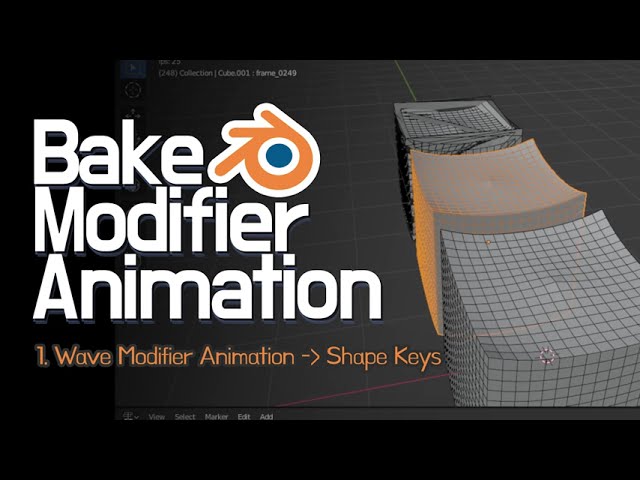
- Blender에서 Modifier로 만든 애니메이션을 Shape Keys로 Bake하는 방법입니다. 외부로 가져가야 하는 상황에서 유용하게 사용할 수 있습니다. 버전은 3.0.0 입니다.
한글 자막 있습니다 :)
#Blender #Modifier #BakeAnimation #Shapekeys
agile solstice
topaz gazelle
wait but how to bake animation from wave modifier
You should start by looking into what kind of point cache formats Unity does support, it's not a very broad selection iirc
Do note that it's kind of an unusual workflow to try to get blender's modifiers exported into the game engine, usually you'd create similar effects using vertex shaders instead
 hybrid tinsel
Or something like the deform package
 woeful vapor
hey, is there any way in unity's animation editor to manually set the start and end keyframes, and place keyframes before/after those? it's hard to make nice looping animation when you can't do that
 jade quartz
you can copy the keyframes of the start and paste them somewhere then create the keyframes in the middle then adjust their distance for the speed of the animation
woeful vapor
if I understand correctly that's a lot more tedious than it'd be on say, blender
all I really want to do is to offset the keyframes on my character's right arm, but I can't since some of them are at the start and end
agile solstice
woeful vapor
if I understand correctly that's a lot more tedious than it'd be on say, blender
You're right about that
Blender is a fully fledged suite of animation tools, Unity is not
jade quartz
I have a question: doest the root motion also works on the Y axis?
 sharp blaze
I saw mutliple videos stating animation transitions are better for 3d games and u should use code based logic to set Animations directly instead of transitions for 2d games. What do you guys think?
agile solstice
sharp blaze
I saw mutliple videos stating animation transitions are better for 3d games and ...
It depends
Sprite animations cannot benefit from transition blends or additive/weighted layering, so most of the features of the Animator will be wasted
However, the Animator is still a good tool for creating a state machine which is useful for controlling when an animation is allowed to start
So in that sense it's better to use the Animator than to put in effort to code a similar state machine again, but you might not need a system like that
Personally I'd use it because with many animations and conditions you'll usually need some system that determines priority, and you can still use features like layers and transition offsets
sharp blaze
agile solstice
Personally I'd use it because with many animations and conditions you'll usually...
Ok, I will use transitions then. Its tedious setting every transition to "0 transition time" and uncheck "exit time". But I will use it for the time being
agile solstice
sharp blaze
Ok, I will use transitions then. Its tedious setting every transition to "0 tran...
True, I wish there was a better way though I guess I'm used to doing it by now
The orange dot is the object's origin
I don't know the precise reason for it, but probably something to do with how animations are hierarchically stored transform values, so they're dependent on the parent transforms as well
jade quartz
Does the root motion also works on the Y axis?
hybrid tinsel
jade quartz
Does the root motion also works on the Y axis?
Yes, IF you have it set to. For a humanoid, Y axis root motion is separate from XZ root motion so you have to make sure that both are enabled.
 loud nexus
Hi Everyone! I hope everyone is doing very well.
I am trying to figure out the meaning/use of this curve in the animations window. I asked on the Unity Forum but seems no answer there.

Unity Forum
Hi everyone!
I have been trying to figure out what this curve does, or what it represents:
[ATTACH]
This comes from the documentation, but I cannot...
Some animations have a straight line, while others are like on the ss... Anyone knows what it is? and what it does? and why is it important? : )
Thanks in advance!
reef sand
I don't "know", but the documentation page has an example without the graph and instead a warning "Cannot preview transition: source state does not have motion". So I guess its a visual cue of motion to help blend between clips (so the before and after positions line up nicely)
jade quartz
hybrid tinsel
Yes, IF you have it set to. For a humanoid, Y axis root motion is separate from ...
But what if i am not using a humanoid rig, but just unity builtin animator with keyframes. There the only way to say that you are using root motion is on the animator component, the animation doesnt contain any reference to the root motion
hybrid tinsel
jade quartz
But what if i am not using a humanoid rig, but just unity builtin animator with ...
If you are just animating the root in the animation, then that's all you need to do.
 astral sparrow
When creating a player or enemy in unity, I've learnt that it's best practise to attach the sprite renderer to a child game object so that you can easily reposition the sprite. However, doing this means that the animator also needs to be attached to the child game object, which means you don't have any access to the functions from the parent game object for animation events . Does anyone know a way around this?
jade quartz
hybrid tinsel
If you are just animating the root in the animation, then that's all you need to...
But I swear it doesn't work just on the Y axis
maybe the problem is the character controller, but im not sure how to solve it
hybrid tinsel
jade quartz
But I swear it doesn't work just on the Y axis
It definitely does. https://i.imgur.com/Bgr52iS.mp4
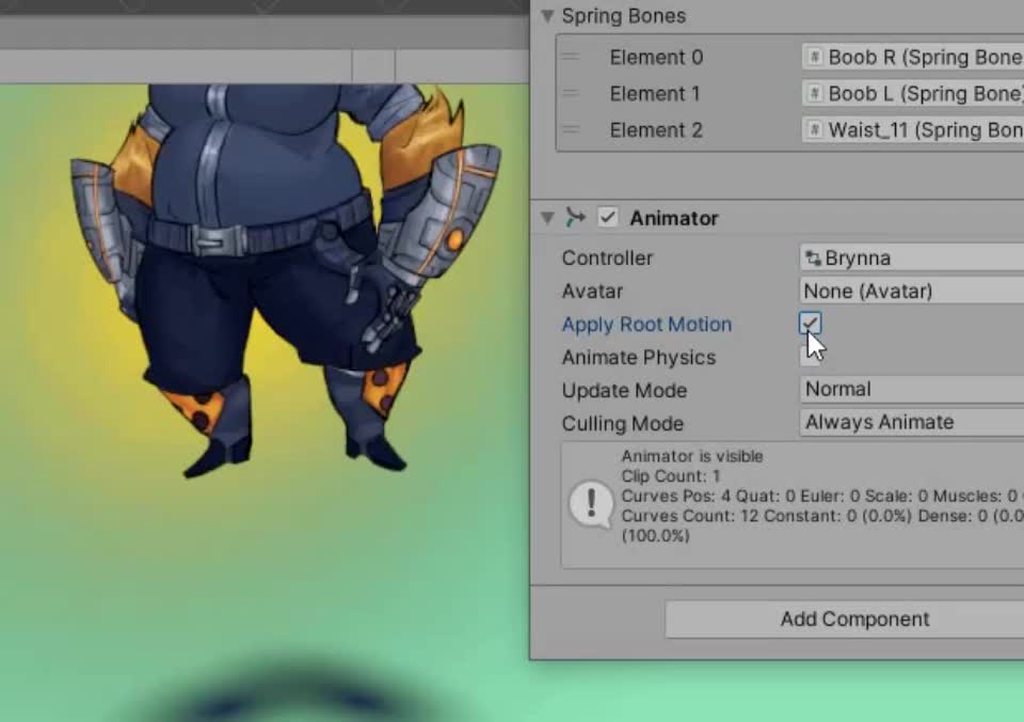
I just took an animation and added a bit of y motion to the root
hybrid tinsel
jade quartz
maybe the problem is the character controller, but im not sure how to solve it
I see you have physics and gravity on it. So you probably need to go into OnAnimatorMove() and add a physics force. Otherwise the root moves up and it just falls back to the ground
That's just a guess based on your screenshot.
 tawny torrent
When rigging a model for Unity, is it problematic to have a root bone from the model origin that's a parent of the hips, like so?

This is something I've been told to do in the past, but I'm wondering if it's a bad habit, since it seems to complicate using Mixamo etc.
 weak ore
Eye movement animation
 void atlas
Im having a lot of trouble with my pieces working how they should. As you can see the boots, shirt, etc are all stretching way too much and just disconnecting with one another. Im using Rigify and following this tutorial basically by the book https://www.youtube.com/watch?v=mnP54h3x6_Y. He has the precise seeking on the progress bar if you need to see what I was trying to do.


Let's model and rig a low poly Luke Skywalker character from Star Wars in Blender 2.93
Check out my course with a detailed explanation of my workflow and all the tricks: https://polygonrunway.com
Limited early access with 50% discount: https://polygonrunway.com/p/3d-characters-and-illustrations
Human Base Meshes: https://gum.co/bvYzz
Download...
 half kite
I have a problem with a "StandUp" animation, when it stops playing I transition back to my Idle animation, but that transition causes the character to slide about a meter forward. Any idea why? FYI root motion is disabled on the animator.
jade quartz
hybrid tinsel
I see you have physics and gravity on it. So you probably need to go into `OnAni...
The only physics related line of code I have is:
isGrounded = Physics.CheckSphere(groundCheck.position, groundDistance, groundMask);
could the problem be that I move the character controller by a vector with the y component on zero?
Is there a way I can send the code not in the chat here
hybrid tinsel
tawny torrent
When rigging a model for Unity, is it problematic to have a root bone from the m...
It might be problematic for mixamo, but unity can handle it fine
@weak oreIf you're using a mecanim humanoid and have the eye bones rigged, it has eye look IK controls built in
hybrid tinsel
jade quartz
could the problem be that I move the character controller by a vector with the y...
That could be. And you can put it on pastebin.
hybrid tinsel
jade quartz
The only physics related line of code I have is:
isGrounded = Physics.CheckSpher...
What does the gravity in your script do? I see it right there in your controller inspector.
 jade quartz
I had it for testing at the beginning but right now the lines that use it are commented
jade quartz
hybrid tinsel
That could be. And you can put it on pastebin.
Ok thx
I’ll send it in 30 mins
jade quartz
@hybrid tinsel https://pastebin.com/Nstb18Ve
Pastebin
Pastebin.com is the number one paste tool since 2002. Pastebin is a website where you can store text online for a set period of time.
hybrid tinsel
You have a lot of stuff commented out
You might be better off starting with a clean script that just does the stuff you want
Also, that's kinda weird to use an int for speed
And you have gravity turned off on your character controller?
And I thought you were using root motion
jade quartz
hybrid tinsel
Also, that's kinda weird to use an int for speed
Yep that s weird, but it's because it was for testing and i had the three movement animations on a blend tree
hybrid tinsel
I mean, for testing purposes I'd just take the script off entirely and see what happens
jade quartz
I just tried with a script that only has this:
anim = GetComponent<Animator>();
if (Input.GetKeyDown(KeyCode.Space))
{
anim.SetBool("Jump", true);
}
jade quartz
hybrid tinsel
And you have gravity turned off on your character controller?
how do I check it? I don't have a rigidbody attached to the character
I can get it to work by disabling the character controller at the beginning of the animation and enable it at the and, but I didnt really want to use this solution since it disables the collider
hybrid tinsel
I'm not at a computer to experiment
 uneven pagoda
Hi guys
How do I implement a reload animation?
Like
My gun is a separate game object that is instantiated during runtime and you can drop your gun, get new one, etc.
I want to make it partially baked like have a generic pistol animation and use animation rigging to snap the hand to the proper location
How would I do that
Do I just like rig up the whole thing in blender, then split the gun and character rig and bake it separately, then use animation rigging in unity to move the hand to the right spot with transforms attached to the gun for the specific location like magazine, side, safety, etc?
And then when you reload you just have the gun script play the gun half of the animation and the player script play the player half?
Or am I overthinking it and there's a much simpler and better way to do it
jade quartz
@hybrid tinsel So I just found out that if you apply root motion and bake the Y into the animation it does apply Physics.Gravity, even if normally gravity is not applied to a character controller.
Also using characterController.SimpleMove() automatically applies gravity, while characterController.Move() doesnt
I actually tried disabling the character controller while playing the animation. The jump in place works perfectly but the moving jump doesnt (the character makes a smaller jump than the one I animated and then it just falls through the ground
weak ore
YoungDev2384If you re using a mecanim
 finite zealot
Hey, I'm having trouble figuring out why my animation refuses to run.
Basically I have a melee combat system with left/right, up, and down slashes and animations for right/up/down that work normally. I then have another set of animations for right/up/down slashes in the air and they never seem to show more than a frame of their animation.
I am pretty poor at explaining but this is what my animator looks like right now.


Since I have 2D frame based animations I think it's better if I should just stop doing this and find another way
nvm I answered my question and found a video to avoid animator hell by Lost Relic Games
hybrid tinsel
finite zealot
nvm I answered my question and found a video to avoid animator hell by Lost Reli...
I hate that video so much.
finite zealot
I'm starting to realize how much of my code was pushed over the edge by it
hybrid tinsel
Hm?
And if I were doing it I'd probably combine the air slashes and ground slashes into two substates
finite zealot
how do I go about doing that?
hybrid tinsel
And maybe combine each of those into a blend
Likely not a blend for 2d frame based
You can just 'create substate' and it is like a mini state machine inside a state
So you can just have a transition to 'air slashes' and then inside that you can decide which slash to use
 raven bolt
My character avatar seems to be acting weird. When I press play it goes from tpos to this weird pose and it locks movement for all bones so nothing can move . This is from the animator since when I turn it off it goes back to normal. It also seems to be the same pose as the on in muscle mapping tab:


it also seems to place the camera behind the head for some reason. I have no animations on it and it moves the whole body backwards about 8 units
 quasi fable
SO what are you expecting the character to do exactly, and why?
raven bolt
quasi fable
SO what are you _expecting_ the character to do exactly, and why?
I expect the character to do nothing, it should stay in tpos since I haven't had any code acting on it in play mode
quasi fable
raven bolt
I expect the character to do nothing, it should stay in tpos since I haven't had...
but you have an animator on it
raven bolt
what is weird is that while in play mode, turning the animator on and off will move it back and forth between normal and that weird pose.
quasi fable
presumably the animator is putting it in that pose
raven bolt
quasi fable
but you have an animator on it
yeah but no animations
quasi fable
There's nothing in the state machine at all?
raven bolt
quasi fable
There's nothing in the state machine at all?
zip and zilch
so yeah nothing
I have it because I will use it for IK but I haven't started that yet
raven bolt
quasi fable
There's nothing in the state machine at all?
I have found that it is specifically because of the avatar, when I remove that it doesn't happen.
does IK need to have an avatar? If not then I can just keep that null as a quick fix
reef sand
The reason for that position is humanoid characters use a "muscle" system where muscles go from -1 to +1. E.g. the lower leg rotates at the knee from straight down to up behind the body (kicking his own butt). The default value of 0 is then half way between the two extremes. If you have an Avatar Description, the animator assumes its humanoid mode, and all muscle values will be zero, which ends up in that particular pose (everything at half way between extremes of movement). Unlike generic bone rotations, with humanoid all muscles always kick in (defaulting to zero). You can use IK to override it, and you can use Avatar Masks to combine different animation clips. But with Humanoid animation, it would just "leave it alone" if you don't change a muscle value (which differs to generic clips where you can adjust only some bones instead of all bones).
 weary condor
How do I add an animation curve to a sprite?
hybrid tinsel
raven bolt
yeah but no animations
That is the problem. That pose is the 'no animation' pose for humanoids. (All muscles at 50%)
If you want a t pose as the default, make a single frame animation with a t pose
 unreal adder
yo im trying to change the speed of a animation but i cant, ive been stuck on this for a week
and also transition of animations
 nova grotto
Is there a downside to extracting Animation Clips out of a .fbx file in Unity?
I imported a bunch of animations from Mixamo and they come with an fbx, but i don't need all these models, only the clips.

 uncut salmon
Yep, that's fine
nova grotto
uncut salmon
Yep, that's fine
what about the Rig import settings, like animation type, or avatar source, or skin weights?
It's not clear to me what exactly Unity does here tbh.
agile solstice
nova grotto
what about the Rig import settings, like animation type, or avatar source, or sk...
The clips that appear inside the file are generated at the moment you apply import settings
nova grotto
agile solstice
The clips that appear inside the file are generated at the moment you apply impo...
Do you know the difference between the 'source' avatar field in the .fbx rig import settings and the 'avatar' field in the Animator component?
agile solstice
nova grotto
Do you know the difference between the 'source' avatar field in the .fbx rig imp...
Not familiar with it, but I trust the relevant page in the docs might explain it
https://docs.unity3d.com/Manual/FBXImporter-Rig.html
 mint sandal
i have an animation i downloaded from mixamo, when i open it in blender, or any other viewing program it works fine, but when i put it in unity it just sorta shakes around, can someone help
heres the animation just in case
wait nevermind, the animation i chose was just bugged
reef sand
I get the occasional bad one from Mixamo too. I duplicate the animation clip (a copy is made outside the FBX) and try to fix it sometimes (you cannot modify inside the FBX file).
 crisp jungle
Is there an easy way to play a sprite animation using an image component? I already have it setup so that the image component takes the first frame of the animation as its sprite, and gets the right animation controller. But nothing happens when I try to play the animation - it says 'sprite missing'
I think you can add an 'image sprite' property to the animation itself, but then I assume you won't be able to use that animation with spriterenderers.
uneven pagoda
uneven pagoda
How do I implement a reload animation?
I need help
Still have no idea
uneven pagoda
ive made a slight improvement to the original plan:
have the magazine be a separate gameobject, and when reloading parent the magazine to the hand, eliminating the need for a reload animation just for the gun
 hollow shale
Hello, I was making animations for my character, using Sprite, i don't know why it dissapear for one frame, any idea how to fix it?
 hybrid tinsel
unreal adder
yo im trying to change the speed of a animation but i cant, ive been stuck on th...
hybrid tinsel
unreal adder
yo im trying to change the speed of a animation but i cant, ive been stuck on th...
You can set the speed in the state inspector of the animator
hybrid tinsel
hollow shale
Hello, I was making animations for my character, using Sprite, i don't know why ...
You don't actually show the animation window so it is hard to guess.
hollow shale
I fixed the issue, thanks for your help though.
 lime helm
When working with additive animation, are there options to change the way the additive solves to the final pose?
I'm looking to apply an additive in mesh space/root space as opposed to local space bone transforms. Does anyone have experience with additives in this way?
reef sand
lime helm
When working with additive animation, are there options to change the way the ad...
My only experience with mesh transformations is blend shapes (shape keys in Blender)... or shaders (but they are hard to control).
hollow shale
Hi, for some reason the red character keeps floating when the sprite animation ends, any idea how to fix?

 lime helm
reef sand
My only experience with mesh transformations is blend shapes (shape keys in Blen...
lime helm
reef sand
My only experience with mesh transformations is blend shapes (shape keys in Blen...
Ah yep. My use case is with skeletal animation. So its not exactly a mesh transformation it's the way in which the delta is calculated for the individual bones.
hybrid tinsel
hollow shale
Hi, for some reason the red character keeps floating when the sprite animation e...
Set the pivots for each frame correctly
hollow shale
hybrid tinsel
Set the pivots for each frame correctly
How so?
hybrid tinsel
hollow shale
How so?
By setting the pivots for each frame correctly.
 daring birch
Heyyo! I am trying to set up the animations for my project and I have a basic understanding of using the unity animation state machine already. But I wanted to freshed up my knowledge and watch some tutorials. All top tutorials suggest to handle the animation transitions in code, rather than in the unity animation state machine. Why so? I struggle to find the more classic approach of using transitions between the states. I really dont want more code to clogg up and add noise to my scripts. Any advice?
lime helm
I'm not a programmer, so feel free to disagree here. From what I've seen the trade off is clog up scripts or clog up your animator state machines. Bear in mind I'm still trying to work out my own best practices for work too, but from my experience, having some kind of generic animation handler in your scripts is a good way to ensure things don't get confusing, and can greatly reduce the number of crazy transitions you need to create. Functionality like that has saved me and our programmers a lot of time.
I suppose the thinking here would be, if you need to play a one off animation of say a character opening a chest on button press. Rather than creating a state and a transition and a trigger parameter, you could call the state once in code.
As far as state machine work is concerned, I've found that encapsulating functionality within layers and encapsulating variety within sub-state machines, has helped keep things organised.
daring birch
Thank you for the advice and taking the time to write it out
I guess I need to learn how to use states in code then, or rather what a good hybrid approach is of using both systems at once
Ive never used the visual scripting state graph before, is that worth using for this purpose?
lime helm
There's a moment here (timestamped) that might be a good place to start. This talk also has a lot of good advice for building a reliable and somewhat readable animator controller, that still manages to house a lot of complexity: https://youtu.be/8VgQ5PpTqjc?t=1489

Using real-world examples from Firewatch and Recore, this talk goes through what it takes to make shipping quality animation controllers in Mecanim. It explains how to set up a First-Person character with full body awareness and how the team at Armature set up their AI to work with a variety of body types. It also shows the use of Animation Even...
This in particular if you're looking for that hybrid approach:

 weary sandal
this is the transmission @brave storm

 brave storm
weary sandal
this is the transmission <@136926228341850112>
brave storm
weary sandal
this is the transmission <@136926228341850112>
Movement -> Idle, not other way around
 brave storm
Yeah so your Speed goes momentarily to 0 when you change directions
weary sandal
yes
brave storm
So how are you settings Speed in your code?
weary sandal
anim.SetFloat("Speed", move_direction.sqrMagnitude);
this is the only referenece to speed from my code
brave storm
Yeah you need to apply some smoothing to that move_direction.sqrMagnitude
Maybe have a private float, speedSmoothed.
Update it like speedSmoothed = Mathf.MoveTowards(speedSmoothed, move_direction.sqrMagnitude, someSpeed * Time.deltaTime);
Then use that as your "Speed" float
weary sandal
i am gonna try it
brave storm
someSpeed you can try something like 1 or 2 first.
weary sandal
brave storm
``someSpeed`` you can try something like 1 or 2 first.
I dont think that solves my problem.
This just makes my character move smoothly right?
brave storm
No, it makes the speed parameter move smoothly... Only the animation transition is affected by that
weary sandal
using UnityEngine;
public class player_movement : MonoBehaviour
{
[SerializeField] private Rigidbody2D rb;
[SerializeField] float speed;
Vector2 move_direction;
private Animator anim;
private float facing_ud = -1;
private float facing_rl;
private float speed_smoothed;
public Sprite Facing_up; public Sprite Facing_down; public Sprite Facing_right; public Sprite Facing_left;
private void Awake()
{
anim = GetComponent<Animator>();
}
void Update()
{
speed_smoothed = Mathf.MoveTowards(speed_smoothed, move_direction.sqrMagnitude, speed * Time.deltaTime);
move();
anim.SetFloat("Horizontal", move_direction.x);
anim.SetFloat("Vertical", move_direction.y);
anim.SetFloat("Speed", move_direction.sqrMagnitude);
    anim.SetFloat("Facing_rl", facing_rl);
    anim.SetFloat("Facing_ud", facing_ud);
    if (Input.GetKeyDown(KeyCode.W)) { facing_ud = 1; facing_rl = 0; this.gameObject.GetComponent<SpriteRenderer>().sprite = Facing_up; }
    if (Input.GetKeyDown(KeyCode.S)) { facing_ud = -1; facing_rl = 0; this.gameObject.GetComponent<SpriteRenderer>().sprite = Facing_down; }

    if (Input.GetKeyDown(KeyCode.A)) { facing_rl = -1; facing_ud = 0; this.gameObject.GetComponent<SpriteRenderer>().sprite = Facing_left; }
    if (Input.GetKeyDown(KeyCode.D)) { facing_rl = 1; facing_ud = 0; this.gameObject.GetComponent<SpriteRenderer>().sprite = Facing_right; };
}

private void move()
{
    move_direction = new Vector2(Input.GetAxisRaw("Horizontal"), Input.GetAxisRaw("Vertical")).normalized;
    rb.velocity = new Vector2(move_direction.x * speed, move_direction.y * speed);
}
}
this is my code
brave storm
It prevents the parameter going to 0 too fast if youre just changing directions
weary sandal
if it helps
brave storm
You aren't doing anything with speed_smoothed.
brave storm
It's supposed to go on this line
anim.SetFloat("Speed", move_direction.sqrMagnitude);
like this
anim.SetFloat("Speed", speed_smoothed);
Lol maybe show that code then..?
brave storm
weary sandal
ok i havent tried that
Why not? That's what I explained at first
weary sandal
i am new to unity
brave storm
This feels like a waste of time
brave storm
weary sandal
<@136926228341850112> it still doesnt help
What am I supposed to answer to this?
Provide more info, and the code you used
Put it in a paste site this time #854851968446365696
weary sandal
My problem is that it changes into defualt sprite beetween animations
weary sandal
@brave storm i fixed it i just needed to set this paramter to zero

 tawny comet
Can someone please tell me how I can play two different animations in a single scene? All my objects start using the animation that I selected last for a different object
hollow blade
tawny comet
Can someone please tell me how I can play two different animations in a single s...
are you sure that you did set different animator controller for each object?
maybe your inspector is locked without you noticing
tawny comet
hollow blade
are you sure that you did set different animator controller for each object?
may...
uhhh how do i do that first thing? im pretty sure that could be it
hollow blade
the animator controller is the thing linked in the animator component on your object
tawny comet
ah i see, so should i manually make one, because the animation doesnt have one, or is it supposed to be there automatically?
lime helm
Animator controllers are assets to manage clips and build state machines. You can use them to control which animation is played. You may want different animators per character or object but in some cases you can share functionality across one animator controller and have multiple characters or objects use that one controller. You would have to make these assets manually yes and assign them. https://docs.unity3d.com/Manual/class-AnimatorController.html
 gray flower
hi i cant figure out why this happen but when i go blender>mixamo>unity the mesh is not showing every other mesh and blender>unity works but no blender>mixamo>unity
the small window thingy shows the model but when i drag in the scene it just doesnt show up
lime helm
gray flower
hi i cant figure out why this happen but when i go blender>mixamo>unity the mesh...
The assets you're getting out of mixamo, is that purely bone keyframe data? That might explain why you arent seeing a mesh in the scene view because bone data has no rendered preview in the scene. And it could be that when you have been exporting from blender you're exporting the bones and the mesh to one fbx, in which case you would be able to see the animated mesh in scene view ... i think. The inspector window will show you the current mesh that is assigned through the Unity avatar system.
gray flower
even with no animation imported it still comes from mixamo wrong
just the character
i just figured what happened
when i imported it into blender back it was just super small
lime helm
lol the classic
gray flower
i scaled it to 100 in unity and now it works good
uncut salmon
@pulsar cradle You can use the forums to post jobs. #📖┃code-of-conduct
uneven pagoda
https://www.youtube.com/watch?v=xkC5LFTBOi8&ab_channel=dubnubdubnub
is animation rigging supposed to do this?

I thought that the red boxes are where unity tries to put the hands


if the offset was fixed then it wouldnt be too much of a problem
but I think I did something wrong to have it end up like this
what I want to do is snap the hands to the grip of the current gun
and the current gun may change so I have coded up a script to just copy the position of the gun grip transform to TempLHandGrip and TempRHandGrip
and when gun switches snap to new pos
 halcyon ocean
is there a way to animate only a sinlge axis of rotation
lime helm
uneven pagoda
Part of your issue will be because you're using a two bone IK constraint but your arms have four bones in them. Is this a rigify skeleton from Blender?
 lime helm
halcyon ocean
is there a way to animate only a sinlge axis of rotation
lime helm
halcyon ocean
is there a way to animate only a sinlge axis of rotation
yes, you could add keys in the animation window to specific animation curves, and ignore all the others.
uneven pagoda
lime helm
Part of your issue will be because you're using a two bone IK constraint but you...
yes
lime helm
Okay. The problem with rigify is that it adds bones into the hierarchy of the arms and legs as twist bones. Typically in games if you want those twist bones you would have your standard to bone limb setup and then add the twist bones as leaf bones, so they don't break the hierarchy. This way you can still get your two bone IK calculation, and it will be easier to LOD those leaf bones if you wanted to.
uneven pagoda
lime helm
Okay. The problem with rigify is that it adds bones into the hierarchy of the ar...
will doing this fix the funny acting cube?
lime helm
I mean it's not that the cube is acting funny, it's the bones you're trying to control that's acting funny. Essentially you're trying to control four bones using a calculation that is intended to control two bones. But yes if you reduce the number of bones in the arm to two, then your two bone IK should behave more predictably.
uneven pagoda
lime helm
I mean it's not that the cube is acting funny, it's the bones you're trying to c...
ok I will try it out
uneven pagoda
@lime helm
https://www.youtube.com/watch?v=583R9LgRZPA&ab_channel=samyam
I am following this tutorial, and it seems like their rig has 2 bones for the arm but still has the same problem
is this a case of the 2 bone ik incorrectly configured?

Learn how to add animations to your characters via Mixamo (free characters and animations) and the Animator component. We will learn how to add pre-existing animations and also add dynamic and procedural animations using Unity's Animation Rigging Package.
First, we'll choose a model and animation in Mixamo, import it into Unity and set up a Hum...
the thing is I am using GRT and I am scared of messing with the rig


i am going insane
this is a clean scene with no networking
and the cubes are where the hands are
aghhhh
I figured it out its the aim rig
that is throwing everything off

please ignore the piss poor weight painting and obvious clipping
but uh
how do I fix this and keep the cubes and hands together while still using the aim rig


 reef sand
I just wanted to make sure I understood the problem. Is it because the hands are not following your effectors (the cubes)?
uneven pagoda
they only dont follow the effectors when the camera is rotated, leading to the aim rig being activated by the aim target gameobject that is attached to the camera


and the camera is rotated 99% of the time so yes, the hands are not following the effectors
reef sand
My heirarchy is a little different. Note: I set it up once, it worked, so did not touch it afterwards (lol!).
uneven pagoda
honestly I would do the same if it worked
reef sand
 uneven pagoda
do you have an aim rig?
reef sand
Hmmm, I use effectors to move the hands around. I might not be using the aim rig though - I am just doing IK.
uneven pagoda
 reef sand
I was just wondering if your targets being not children was getting all the rotations etc messed up.
No, I am not using an aim rig then. I am just using effectors for IK.
I am just using a Two Bone IK Constraint. No experience with the aim constraint sorry.
reef sand
Maybe both are trying to rotate things at the same time, so colliding?
uneven pagoda
honestly the part that throws me off the most is the fact that the cubes move along with the rest of the body when the camera rotates
though the degrees they rotate is less than the hands, so then there is a not fixed distance between them depending on camera angle

this is when the camera is not rotated, the effectors are where the hands are

looking all the way up

all the way down
reef sand
My effectors are on the Left Arm IK_target nodes, which are children of the Left Arm IK. Yours is off somewhere else if I understand your hierarchy correctly. I was wondering if it was getting confused as a result...??
uneven pagoda
 uneven pagoda
reef sand
My effectors are on the Left Arm IK_target nodes, which are children of the Left...
uneven pagoda
reef sand
My effectors are on the Left Arm IK_target nodes, which are children of the Left...
could be, I am going to move them
reef sand
When you use the aim constraint, do you set the two bone IK constraint weight to zero? (I assume you have two sets of constraints?)
 reef sand
Have you tried setting the IK weight to zero when you use the aim constraint? See if it changes anything?
 reef sand
I will try adding a aim constraint to my character and see what happens
uneven pagoda
ill set both to half
setting both to half just means the arms dont get to where they need to be
and moving the target to where hint is just seems to break everythign

playing a walking animation seems to throw the cubes off too

dont mind the horrendous blend tree that breaks her fingers
but even animations seem to throw off the effector cubes
reef sand
I think i am seeing the same thing. When I put an aim on the neck, it worked fine. When I put an aim on the spine (which is an ancestor of the arms), the arms are moving and getting offset from the effectors for the hands. I wonder if changing the order of the rigs makes a difference. Going to try and put the aim before the arm IK
Yes, I reordered the constraints and it helped in my case.

I put the Head Aim constraint (which is really the neck) and Spine Aim before the arm Two Bone constraints and it started working for me. The hands tracked the effectors even though the body was rotating.
It must be the Two Bone IK is calculated assuming the spine in its current position, then the Aim constraint rotates the hands.
But I am not seeing any change when I move the camera around. Its always the same...
uneven pagoda
do you have your aim target parented to the camera?
reef sand
Note with the neck and spine both at weight 1, the head rotates too far. I had to set both to 0.5 to get the head pointing the right direction... but maybe the order is a problem again.
No, I dropped a sphere into the scene to look at, not the camera.
uneven pagoda
k
reef sand
I was just using a project I had handy, and its a VR app - the camera is controlled by the headset, so its a bit weird.
uneven pagoda
ah

im gonna try having the aim rig above the arm
no difference
did you put the multi aim constraint on the Rig Setup?
i mean the rig
reef sand
Try merging the AimRig and ArmRig into one rig? Then putting the aim above the Two Bone constraints? (As an experiment)
 reef sand
Yes
 reef sand
I was scrolling back, the RigSetup you listed two rigs, with the Arm rig first then the Aim rig second - so it was probably alwasy doing arms, then aim was coming along and messed it up
uneven pagoda
and even with animations!!

rock steady!
sweet
I really appreciate your help man
reef sand
No problem. It was interested to learn about it too. I had written my own "look at" script, so never tried the aim constraint.
So it seems with multiple constraints, you have to get the ordering just right.
uneven pagoda
I only wanted the arms, but the tutorial I was following then put the multi aim right after so I just said might as well
yeah
and just stick to one rig
hmm

haha
reef sand
I have a love hate relationship with Animation Rigging. I use Sequences as well, and every so often it breaks (they don't play well together).
uneven pagoda
I dont know what I did but my Animator tab is now completely empty bruh
oh
fixed
reef sand
😅
uneven pagoda
seemed to be a product of unity crashing
just had to hit the play button a couple of times
I really appreciate your help man
reef sand
Good luck with it! I don't see many people talking about Animation Rigging, so always happy to share learnings. I saved away that video you shared to watch later.
uneven pagoda
reef sand
Good luck with it! I don't see many people talking about Animation Rigging, so a...
strange byproduct of merging both the 2 bone and multi aim into 1 rig is that you dont get the widget for the aim target
but id take that with working effectors over the other way around anytime
reef sand
I think you can split them out again. I think on the "Rig" component you can just flip the order of the child rigs listed there.
uneven pagoda
I will as you said, keep it if it works haha
reef sand
Yes, I do that a lot with Unity!!!
lime helm
Glad to see you sorted it out
 fair siren
Hello, i have a very basic question that i cant figure out even searching in internet (im that dumb). How can i updated the character offsets after every animation clip so it does not reset to the starting point?
agile solstice
fair siren
Hello, i have a very basic question that i cant figure out even searching in int...
Sounds like you'll want to look into root motion if your goal is to move the character's transform using animations
 hybrid moth
https://gyazo.com/9058ebd4ebe47af60a4bc095388c7092
can Unity do this with particle or something ?

can't find on any tutorial tbh
agile solstice
hybrid moth
https://gyazo.com/9058ebd4ebe47af60a4bc095388c7092
can Unity do this with parti...
Sure you can do that with particles and bake it to a mesh
But if you're already doing that in blender, why not just use that?
If you're into coding you make make any kind of procedural geometry generators
hybrid moth
agile solstice
Sure you can do that with particles and bake it to a mesh
But if you're already ...
yoo Spazi thx to replied
I'm not quiet sure how to bake the particles animation on blender
I wish its read pretty well as if it's exported to .fbx for Unity
agile solstice
hybrid moth
yoo Spazi thx to replied
I'm not quiet sure how to bake the particles animation...
iirc particles in blender can be applied like any other modifier
Converting Particle Systems to meshes in Unity requires calling some method in script, which escapes me at the moment, but you probably don't want that workflow anyway
 severe sierra
Hey so I am making this game where the player can choose from multiple guns (it is 2d) and i have animations for the first gun in his hand for him to run and jump and stuff, but if I want him to have a different gun to I have to remake the same animations just like the other one but with the changed sprites? Or is there an easier way to accomplish that without making a million animations for each gun I want to add?
reef sand
hybrid moth
https://gyazo.com/9058ebd4ebe47af60a4bc095388c7092
can Unity do this with parti...
No idea about blender to Unity, but it looks like leaf objects are scaling bigger. So I assume could do as a particle and emit from a sphere scaling over lifetime…. Could also do a shader that scales vertices I think, but it’s hard to control the timing that way. (Eg can do trees waving in wind via a shader)
halcyon ocean
how do you animate only a sinlge axis of rotation
hybrid moth
agile solstice
iirc particles in blender can be applied like any other modifier
Converting Part...
unfortunately particle not be able to applied as keyframes : (
in this case I'm using hair (object) particle
 safe vault
Whenever I make animations, first I make them in blender and then import to unity. For one of my animations, I used shapekeys. For some reason though, it properly plays the shapekeys in the animation preview window for unity but it does not work when the animation occurs in game. Anyone have a way to fix this?
hybrid moth
safe vault
Whenever I make animations, first I make them in blender and then import to unit...
what kind of animation ?
safe vault
just an animation for my character
its just an attack but I used a shapekey to show his tongue shooting out
hybrid moth
safe vault
just an animation for my character
you might to reworks it on Unity
safe vault
K
agile solstice
hybrid moth
unfortunately particle not be able to applied as keyframes : (
in this case I'm ...
No, particles are fundamentally not controlled with keyframed motion, they obey the particle system's properties
I misunderstood what you meant by "this", if you refer to the scaling motion
If so, you'd probably want to look into XOrdinary99's suggestions, but it's hard to give precise answers without knowing your precise goals
reef sand
safe vault
its just an attack but I used a shapekey to show his tongue shooting out
How do you apply the shape key (BlendShape) in Unity normally? I dont use Blender but instead use VRoid Studio to create characters, then use the UniVRM package to import the characters (available on GitHub). UniVRM includes some extra stuff for supporting shape key animation, but I ended up writing my own component on top to make animation easier - it mixes multiple shape keys more gracefully (I use it for facial expressions, like the 52 ARKit blendshapes for different parts of the face movement). I don't have any experience any other way of animating shape keys sorry, but I certainly animate them all the time (but via my own component).
(And that component is built upon UniVRM from GitHub.)
https://docs.unity3d.com/Packages/com.unity.live-capture@1.0/manual/index.html is Unity's facial capture solution, which includes ability to stick out tongue, in case anything useful there as well.
 dim nexus
is there something like adobe character animator for unity ? i like to use that for unity if there is a way to motion tracking 2d characters just like that simple ?
 forest jay
dim nexus
is there something like adobe character animator for unity ? i like to use tha...
forest jay
dim nexus
is there something like adobe character animator for unity ? i like to use tha...
character animator is buggy
reef sand
dim nexus
is there something like adobe character animator for unity ? i like to use tha...
Its not that simple, but I do that sort of thing with 3D characters. I started with Character Animator, then moved to Unity to do 3D animation. (There are other choices that might be better, but that is what I did!)
I blog at extra-ordinary.tv/blog on bits I am learning along the way for the 3D side if any help. E.g. using VTuber software like VSeeFace to turn webcam into body movements etc..
 candid night
Are there any asset pack that have animations like when harry potter cast spells from wand?
uncut salmon
Look on the asset store and find out 🤷♂️
reef sand
Also note there are lots of other sites that have animations as well (mixamo, actorcore, etc) so google searches can help too
 mild goblet
I have a question about animations in unity. I have downloaded two Mixamo animations, a running and a jumping. When the player jumps, I want the jump animation to pause halfway through and then continue when the player touches back down. I'm not seeing a way to do this within animator
agile solstice
mild goblet
I have a question about animations in unity. I have downloaded two Mixamo animat...
You would split the jumping animation into two (or more) clips, each with their own animation state
This way you can make "jumping" transition to "landing" only when the player becomes grounded again after the jump
You can also have different mid-air animations in between, based on vertical velocity
mild goblet
Thanks
 twin musk
So I'm animating a wall going down after someone stands next to it how would I do that I can't find conditions
so how would I do that?
Nevermind
I found it
 untold lake
how do you disable the camera not rendering meshes because it is to close for single meshes?
agile solstice
untold lake
how do you disable the camera not rendering meshes because it is to close for si...
What do you mean by "not rendering"
untold lake
I think it s called offace culling, which makes my mesh not render when the camera is too close or in a bad angle
 lean sage

Near clipping plane makes objects very close to the camera not render
if that's not what you mean, maybe show a video
and explain how it's related to animation
untold lake
I fixed it by adding a skinned mesh renderer
 fathom sandal
hey guys
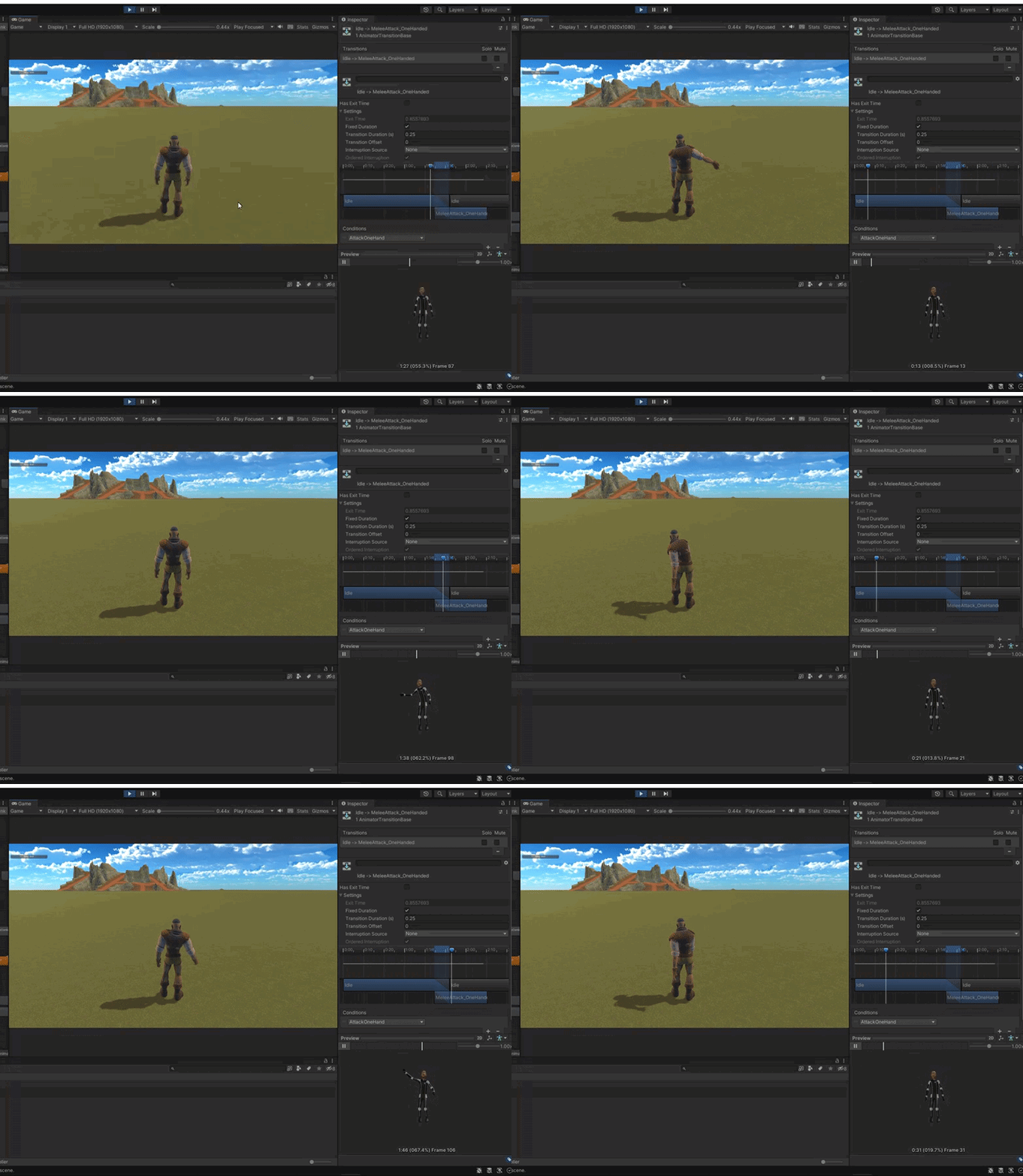
can anyone tell me why my unit isent playing the annimation correctly ?
forest jay
brother & sister I need a hint,
is it true if we already have a motionclip for the meshes,
we no longer be able to use other motionclip for materials ?
agile solstice
forest jay
brother & sister I need a hint,
is it true if we already have a motionclip for t...
No? Not perfectly sure what that means
You cannot have multiple animator states playing separately at the same time within a single state machine, but you can have them on different animation layers
hybrid tinsel
fathom sandal
can anyone tell me why my unit isent playing the annimation correctly ?
What's wrong with it?
hybrid tinsel
forest jay
brother & sister I need a hint,
is it true if we already have a motionclip for t...
Can you restate your problem?
fathom sandal
@hybrid tinsel its supposed to raise the arm above the shoulder like the annimation in the preview
hybrid tinsel
fathom sandal
<@172484507788771328> its supposed to raise the arm above the shoulder like the ...
Your transition is way too long, probably
It's like a quarter of the attack animation, so you'll be losing a lot of the initial arm motion there.
fathom sandal
@hybrid tinsel ok the transition duration or how do i change that ?
hybrid tinsel
Transition duration, yes
fathom sandal
@hybrid tinselhm i doont think thats it ill show u
like this when im running its kinda ok but not when standing still
@hybrid tinsel
agile solstice
fathom sandal
https://gyazo.com/25d0f979939f620caf8db3f647fd5a31
Looks like it's being half-blended with another animation state, probably on another layer
hybrid tinsel
fathom sandal
like this when im running its kinda ok but not when standing still
It looks like the running state has the arms raised further so there isn't as much conflict?
Either that or your transition for that state is different
You also might have a bad avatar mask, or like Spazi said extra layers. You don't show us enough to tell. What happened when you changed the duration?
fathom sandal
hmm
but its not tho

like this is what avatar mask im using for the attack layer
what dose the "ik" do ?
mild goblet
How do I know if a Mixamo animation is compatible with a model?
hybrid tinsel
mild goblet
How do I know if a Mixamo animation is compatible with a model?
If one mixamo animation works, they all should
reef sand
fathom sandal
what dose the "ik" do ?
IK is "inverse kinematics". You move the target point for the hand or foot, and software works out how to bend the arm joints to achieve that position. It simplifies animation (but it can look less good).
 rapid lynx
hey guys
which IK constraint is best for a spine
usnig animation rigging
in unity
rapid lynx
is there a component that lerps a position of an object betwean 2 poitns?

or do i have to make a script for it
quasi fable
rapid lynx
is there a component that lerps a position of an object betwean 2 poitns?
PositionConstraint?
rapid lynx
strange why the Hint doesnt affect the knee?

in animation preview mode
only when i select the handler and try to move him
then it refreshes and affects the rig
reef sand
quasi fable
PositionConstraint?
Two Bone IK Constraint from Animation Rigging? Not sure what LERP means in this context. The Two Bone IK constraint is for legs and arms with a knee/elbow.
lime helm
rapid lynx
hey guys
which IK constraint is best for a spine
usnig animation rigging
in unit...
There's a good demo of how the Twist Chain Constraint can be used to control the spine of a character in a nice way: https://youtu.be/9IBhQMYYYWs?t=1192

Animators, rigging technical artists and developers can all benefit from the Animation Rigging package. The package provides a library of rig constraints that can be used to procedurally control skeletal animation at runtime. Unity 2019.3 lets you keyframe the rig constraints in Timeline to author new animation clips in the Unity Editor. Learn h...
Otherwise if you want true IK there's the Chain IK Constraint, but you might find you have a little less control over that:
 lime helm
rapid lynx
is there a component that lerps a position of an object betwean 2 poitns?
lime helm
rapid lynx
is there a component that lerps a position of an object betwean 2 poitns?
If you just want something that lerps between two positions you might do well with a Blend Constraint:
 rapid lynx
ok thanks guys
rapid lynx
lime helm
If you just want something that lerps between two positions you might do well wi...
position constraint actually satisfies that
 calm cargo
I'm generating a model on the fly at runtime and adding an animator manually, along with the Rig hierarchy and the skinned objects (cosmetics) into the hierarchy. Despite the hierarchy matching the imported model (left) placed as a prefab into the scene manually, the one created on the fly (right) won't animate the skinned objects - but it does seem to be animating the rig bone objects.
Any ideas? I've tried doing animator.Rebind() after creating the hierarchy but it doesn't seem to do anything. I also tried manually assigning the rootBone of the SkinnedMeshRenderers manually, but no change. If I manually create the objects in the scene and add/setup the animator in the inspector it seems to work fine.
 calm cargo
Well, this was fun. Turns out the SkinnedMeshRenderer has a Transform[] of bones that are bound to the prefab. Since the prefab bones aren't moving, neither is the mesh. To fix, you can either instantiate the entire hierarchy and strip out the unused cosmetics... Or you can add a new cosmetic and remap the entire Transform[] array of bones that it links to. Animator.Rebind() does not do this automatically.

    private GameObject AttachCosmetic(GameObject prefab, Transform parent, Transform[] rigBones)
    {
        GameObject cosmetic = Instantiate(prefab, parent);
        cosmetic.name = prefab.name;
        SkinnedMeshRenderer smr = cosmetic.GetComponent<SkinnedMeshRenderer>();
        smr.rootBone = rigBones.First(x => x.name == smr.rootBone.name);
        Transform[] newBones = new Transform[smr.bones.Length];

        for (int i = 0; i < smr.bones.Length; i++)
        {
            newBones[i] = rigBones.First(x => x.name == smr.bones[i].name);
        }

        smr.bones = newBones;
        return cosmetic;
}```No short-shorts?
rapid lynx
hey guys, so my hand has a 2bone ik, and the shoulder has a multirotation and a parent constraint and is parented to the shoulder bone
the problem is that when i rotate the shoulder it offsets the target for the 2bone ik constraint for the arm
i tryed making the target a child of the shoulder but that just moves the arm itself automatically
im not sure how to set it up
ok parenting the IK itself made it work

 hexed gazelle
can someone explain to me the criteria of when an animation can be compatible with a model? for example, how is it that humanoid animations can work on a ogre/orc despite they are dis-proportionate, thank you
rapid lynx
its not the model
but the rig that matters
you can share the same rig with any humanoid creature
@hexed gazelle
in unity you make an avatar out of a rig and share the avatar
check tutorials
hexed gazelle
rapid lynx
its not the model
cheers
 ocean basalt
I have an issue with my character's IK legs. For context the small red circles are the positions ik goal position target being applied, one for the right foot and one for the left. The problem is the feet do not go to this position, but stretch out like shown.
Left & Right Foot IK Weight = 1 :

Left & Right Foot IK Weight = 0 : (No IK being applied, the feet are still clipping through the ground)

The circles adapt as they should and work, but the problem is the feet arent going to these positions
https://paste.ofcode.org/Jc2ebUSLK3ChmLyZ8mza7p IK code im using
Left Foot Pos and Right Foot Pos vector3s are simply debug, so ignore those
 ocean basalt
Please ping me if anyone knows how to fix this
ocean basalt
I just tested my IK script with a model and rig from mixamo and it worked
when activating gizmos i could see red and blue debug circles placed where they should be (shoulders, head, feet)
But when i look at my rig in play mode the circles are very far away from the rig

Spheres are off in the distance
and not on the player model
ocean basalt
I was able to fix the issue
reef sand
hexed gazelle
can someone explain to me the criteria of when an animation can be compatible wi...
It is not guaranteed to work - it just often does. Humanoid defines a set of standard muscles (with strength -1 to +1) which the AvatarDescription maps on to bones and the rotation of the two extremes. So an animation on a character with really long arms may fail, but you can fiddle with the extremes in the Avatar Description and hopefully get it to work (or fiddle the bone positions etc). It works pretty well 95% of the time I think (but extreme characters can fail).
That is, the humanoid animation says "lower leg should be at muscle strength +1" which on a normal character would be straight down from the knee. It is up to the avatar description on your ogre to say what you want that to mean - do you always want buckled legs etc.
hexed gazelle
reef sand
It is not guaranteed to work - it just often does. Humanoid defines a set of sta...
Cheers
rapid lynx
what constraints do you guys use for fingers?

im trying twist constraint but it doesnt work as well
 little sluice
Anyone know if it's possible to create a humanoid rig for a character that has some additional animated bones?
hybrid tinsel
Yes.
little sluice
hybrid tinsel
Yes.
Oh wait nevermind
crisp jungle
For one-off FX, is it more normal to have one FX object prefab with a bunch of different animations for the different FX, or to have an individual prefab and animation controller for each one?
hybrid tinsel
crisp jungle
For one-off FX, is it more normal to have one FX object prefab with a bunch of d...
The former. Though you can also use a timeline track instead, which lets you mix objects with and without animators in the same sequence.
 lament vessel
Is there a way to change the prites of a frame to frame animation through code? Much like how an animator override works, but then changing sprites instead of animations?
I.e. I have an animation set up for the right set of sprites. Is there an easy way make one for the left set of sprites?
 agile solstice
lament vessel
I.e. I have an animation set up for the right set of sprites. Is there an easy w...
agile solstice
lament vessel
I.e. I have an animation set up for the right set of sprites. Is there an easy w...
No easy way whatsoever
You'd have to make a new system for Animator to use so it doesn't animate with direct sprite references, but by changing sprite indices on a pre-defined swappable sprite array
agile solstice
lament vessel
well fudgenuggets. I'll have to think of something then
Though I haven't triend making such a component yet, I don't think there's anything fundamentally complex about it
Just make sure the sprite-swapping parts run in the editor as well
The Animator can animate any exposed component variable, so it's not picky about custom components
lament vessel
I was gonna look at the animator api and see if I can change things on runtime
so that I can put all the sprites in a scriptable object
and then the animation would loop through the sprites of the object
agile solstice
lament vessel
I was gonna look at the animator api and see if I can change things on runtime
I don't think there's need to poke at the Animator itself
I believe the root of the problem is that Unity only refers sprites by their internal ID, detached from their original sprite sheet
But if you swap the sprites reference with a custom component which is controlled by the Animator, it'd skip that hassle
lament vessel
yeah, similar to the Animator Override 🙂
 lusty pebble
I'm having a problem with Animation Rigging. The arms are both on Two Bone IK with hand targets (blue and red boxes in images). But the hands will randomly pop up in the air ignoring the IK. Any ideas where to look for this issue?


 rapid lynx
lusty pebble
I'm having a problem with Animation Rigging. The arms are both on Two Bone IK w...
rapid lynx
lusty pebble
I'm having a problem with Animation Rigging. The arms are both on Two Bone IK w...
maybe some parenting issue or offset issue, fiddle with the settigns
 tender cedar
Hello everyone. I am making a 2d pixel art title screen for my game and there will be a lot of animation and it's pretty extensive and detailed. It has a lot of moving parts. What is the better format for this type of thing for a video game title screen. MP4 or GIF? Can GIF handle a complex animation like that?
agile solstice
tender cedar
Hello everyone. I am making a 2d pixel art title screen for my game and there wi...
If you need to play video, use a video fromat like mp4
Video formats are pretty bad for pixel art though, it's usually better to have each moving part as its own image sequence if that's viable
Never use gif for anything outside of the web, really
It's not supported by Unity and will have to be converted back into a raw image sequence, or what's left of it after gif compression
agile solstice
tender cedar
<@166982635950702592> So you would recommend a sprite sheet then?
Yes, if you've got like animated objects or moving characters that make up the scene
Conversely if you need a new full-screen sprite for every frame then I'm not sure if that's the best option
tender cedar
@agile solstice It's a landscape with clouds, foliage, stationary characters (breathing of course), city in the background with lighting, a firepit in the foreground. So there's a lot of individual moving pieces.
So if I'm understanding the best case scenario... have a sprite sheet of each moving piece and then layer them?
Within the scene
agile solstice
tender cedar
So if I'm understanding the best case scenario... have a sprite sheet of each mo...
Yep, so the frames will be tiny and you can re-use them, and some moving objects like clouds wouldn't need frames at all
hybrid tinsel
tender cedar
So if I'm understanding the best case scenario... have a sprite sheet of each mo...
If the pixel art is largely limited animation, something like spritedicing can be used too https://github.com/Elringus/SpriteDicing

GitHub
Unity extension for lossless sprite texture compression - GitHub - Elringus/SpriteDicing: Unity extension for lossless sprite texture compression
rapid lynx
guys
i have an animation rig constraints setup
and i want to insert only the bones in the animation
not the controllers
how to do that
 heavy mural
how do i stop the cat from jumping up? and instead just doing animation on the ground
 lusty pebble
I'm having a problem with Animation Rigging. The arms are both on Two Bone IK w...
lusty pebble
lusty pebble
I'm having a problem with Animation Rigging. The arms are both on Two Bone IK w...
I found out the problem occurs only in the middle of a blend tree. So I have an idle/walk blend tree. When the tree value is set completely to idle or walk then the Animation rig acts normally. When if the tree value is somewhere blending between idle/walk then the hands pop up out of position. Any idea how to fix this?
topaz gazelle
greetings ....

hello is there any chance for me to play those motion clip with animation controller at once ?
topaz gazelle
currently I need to play the scene to look the whole clip ..
hybrid tinsel
topaz gazelle
hello is there any chance for me to play those motion clip with animation contro...
Can you rephrase the question?
 lapis elk
can i import a model with its bone rig from blender to unity and then animate in unity itself? if yes how can i see the rigged bones in unity editor
agile solstice
lapis elk
can i import a model with its bone rig from blender to unity and then animate in...
You generally don't want to, even if you can, since Blender is a fully equipped animation suite, whereas Unity's tools are incredibly basic for that
lapis elk
agile solstice
You generally don't want to, even if you can, since Blender is a fully equipped ...
ohh, but im kinda trying to import this animation but it kinda wont work 😭 and i gave up on that
lapis elk
agile solstice
So what's the root of the problem?
idk too, like uh idk if im importing it right or idk if unity wont accept it
like
i have two hands and i rigged it and for the weapon whihc is a knife i added a another bone and connected the hand bone with the knofe bone using constraints child of thingy, so now when i import the whole animation
and play in the unity is js played the hands animation
the knife wont be attached to the hand it js stays in the air while the stab animation plays
agile solstice
"Child of" constraint is not exportable, but you can simply use parenting or parent constraint to replicate its function in Unity
lapis elk
agile solstice
"Child of" constraint is not exportable, but you can simply use parenting or par...
ohhhh but that wont stick to the hands while animating in blender
or idk how to do it right? 😭
ill try it rn
@agile solstice it wont stay attached when i parent it 😭
lapis elk
it wont stick to the hands no matter what i do 😞
candid night
any opninons on plask free mocap?
lapis elk
lapis elk
it wont stick to the hands no matter what i do 😞
i fixed it
 viral slate
Do any of you have a link to a tutorial that’s be useful to me? I’m pretty new and I want to make something from blender like a “lever” interactive and usable in VR unity.
reef sand
candid night
any opninons on plask free mocap?
No experience with it - but mentioning move.ai and deep motion.com as similar services.
 reef zodiac
hello, as a part of my university program, we have mocap but the software has a small bug where every time you retarget, the skeleton's rest pose gets really messed up, like really. I'm just wondering if there's a way to fix it in Unity. I can try to import it into Blender but when export it to Unity, the animation gets weird, as if it loses keyframes
this is the rest mode

the first half sounds how the animation is supposed to look like, the second is what happens to it after Blender
and this is the t-pose in Blender
 reef sand
reef zodiac
hello, as a part of my university program, we have mocap but the software has a ...
reef sand
reef zodiac
hello, as a part of my university program, we have mocap but the software has a ...
I don't know for sure, but I doubt it. Unity can create animation clips, but its not a strong point of Unity. Unity does have APIs allowing you to manipulate animation clips etc, but there is no "just take this broken clip and make it do what I want it do do" magic wand. You would have to understand first in what way it is broken, then see if can fix that.
reef zodiac
reef sand
I don't know for sure, but I doubt it. Unity can create animation clips, but its...
Well I’m not looking for an easy way, just want to know if it’s even possible
hybrid tinsel
candid night
any opninons on plask free mocap?
Don't wear a skirt while trying it.
reef zodiac
What about the Blender issue? I can certainly say that it’s not just mocap animations. Even Mixamo animations get messed up like that
reef sand
reef zodiac
Well I’m not looking for an easy way, just want to know if it’s even possible
There are APIs for manipulating animation clips. What I don't know is how to "un-mess" it. E.g. did the root position just change? I have never seen that sort of thing before, so don't know what to suggest there. Is it corrupted beyond recovery? It certainly looks weird!
reef zodiac
Well technically, I can put it into Blender and fix the rest pose and everything but the issue is importing into Unity
reef sand
reef zodiac
What about the Blender issue? I can certainly say that it’s not just mocap anima...
Lots of people use Blender to create animation clips that they import into Unity. So it certainly should be able to work. Are you using humanoid or generic animation clips? I am trying to think of a reason why an animation clip would work in Blender, but when you export it then it does not work in Unity. Strange.
Are you exporting as an FBX file? That is what I see most people doing.
reef zodiac
Yes, I am exporting FBX, I have played around with export parameters like NLA and etc. nothing works. The weirdest part is that if I import it back into Blender then everything works fine
hybrid tinsel
reef zodiac
the first half sounds how the animation is supposed to look like, the second is ...
Where the hell is Matt in unity?
reef sand
If you double click on the animation clip, can you open it in an Animation window in Unity? Are you seeing a long list of bone names down the left side? If you scrub the timeline are you seeing values for the bone rotations etc change? (My random guess is the bone names different for the model you are using for playback, so only some bones are being moved and the rest ignored.)
reef zodiac
I’ll check it tomorrow when I get to work again. I appreciate the help though
reef sand
It certainly is weird though. The fact that you can round trip makes me think the animation clip itself is correct, but the bone names are different so its not controlling the character fully.
reef zodiac
But, some info on it. If I straight import the animation file from the mocap without putting it through Blender, it works, well, except the rest pose part
So I’m not sure if it’s the bone names
reef sand
I don't have an explanation for that - maybe someone with more blender experience can come up with theories on that one.
hybrid tinsel
reef zodiac
But, some info on it. If I straight import the animation file from the mocap wit...
My guess is that the rest pose is corrupted, which doesn't matter as much in Blender for the actual animation but it completely destroys unity's retargeting, which is based on the rest pose.
reef zodiac
Yeah, this is more Blender than Unity
reef zodiac
hybrid tinsel
My guess is that the rest pose is corrupted, which doesn't matter as much in Ble...
That’s my main objective rn, trying to figure how to fix the rest pose
hybrid tinsel
What is the original mocap format?
reef zodiac
Mcp
hybrid tinsel
Can you just graft in a reference rest pose for the first frame?
reef zodiac
I haven’t actually. It’s mainly because we only have that class once a week so getting access to Vicon software is quite challenging. I will try though. Although the teachers that lead the course know themselves that the rest pose gets corrupted but they said that UE can fix it but never tried with Unity
And no, I’m not that person who’s gonna go “well if you can do it in UE then you can do it in Unity”. This is my whole reason for this research: to find out
 strange wedge
hello, trying to understand what I should be doing, I made my model in Blender then using riggify I created the rig then exported as FBX with only deform bones and removed leaf bones but in unity I still have like 300+bones with the MCH bones and all that which I don't care about.
What am I supposed to do? Not used riggify? Remake a rig on top of riggify and just export that somehow? Like I am so confused why this is so complicated.
Thanks
agile solstice
lapis elk
it wont stick to the hands no matter what i do 😞
It doesn't look like the knife is attached to the hand in any way here
 hallow yarrow
Is it possible to animate directly inside unity instead of baking it in blender?
agile solstice
hallow yarrow
Is it possible to animate directly inside unity instead of baking it in blender?
Sure, but the tools are very limited
hybrid tinsel
reef zodiac
And no, I’m not that person who’s gonna go “well if you can do it in UE then you...
Yeah, I'm just saying that this might be a known issue or adjustable export setting in your mocap software
Like how both blender and mixamo have specific unity compatible rigs
 twin trail
hey im working on a 2d animation for a character and after I drag in the first frame into the animator it does not let me drag in another one
anyone know a way to fix this?
nvm I think I figured it out
twin musk
i have an animator with two layers, one where i want to animate the sprite and have that on constantly, another where i want to animate a movement under a condition
the sprite animation doesn't play on the second layer by default even though it's the layer default state, what am i doing wrong here?
 delicate sun
Hello, I have "Running" set at "AnyState" but "Running" doesn't start animating until "Walking" has finished, does anyone know why this happens..?

Afaik, "Any state" makes the animations transition right away and interrupt each other, correct me if I'm wrong
 fervent gazelle
Am I capable of just, for animation, doing something like putting a spritesheet in the renderer sprite component and do something like player.getComponent<SpriteRenderer>().sprite.frame = 2 in a script?
I feel like that whole animator mess is a bit much for literally "Your frame count changes if you are moving"
And especially so since I'll have to put that on every enemy and particle.
delicate sun
@fervent gazelleYou want multiple sprites to have the same animation?
fervent gazelle
Ye I guess I will want that at some point
For now I just have one thing that needs it's frames to tick up as it moves
delicate sun
Not sure I'm following
fervent gazelle
I wasn't following what you said either TBH
But Imma put it simple
I have a character, and I want to be able to change it's sprite in a script instead of having to learn that whole animation screen mess.
Or do you think it would be better to just get into that animation system for something as simple as making a character display a short walk cycle as they walk, as that's about the most complicated thing I plan to animate in my game.
delicate sun
It's a whole sprite sheet? I think it'd be simpler to just animate it
fervent gazelle
3 images total
delicate sun
@fervent gazellehttps://youtu.be/hkaysu1Z-N8?t=105
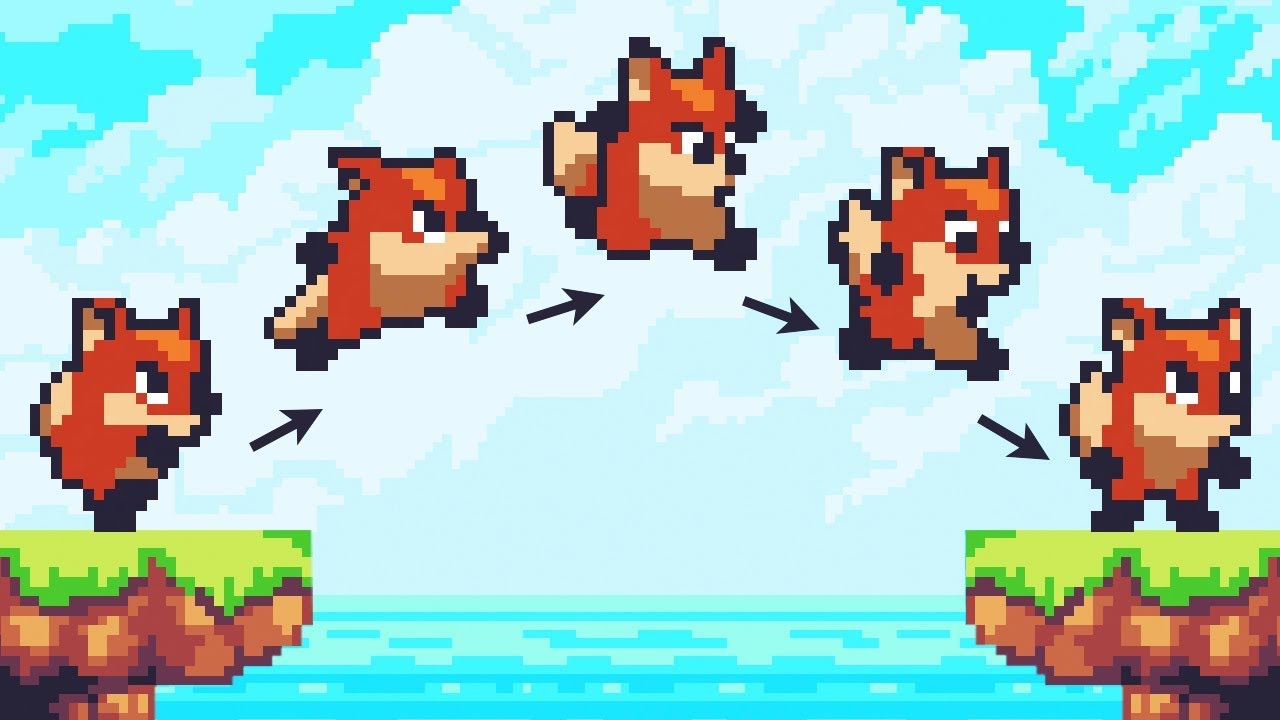
Let’s animate our character!
● Check out Skillshare: https://skl.sh/brackeys8
● Watch Player Movement: https://youtu.be/dwcT-Dch0bA
● Download the Project: https://bit.ly/2KK5AG8
● Character Controller: https://bit.ly/2MQAkmu
● Get the 2D Sprites: https://bit.ly/2KOkwjt
♥ Support Brackeys on Patreon: http://patreon.com/brackeys/
···········...
fervent gazelle
Ah, thanks
delicate sun
Yw
delicate sun
delicate sun
Hello, I have "Running" set at "AnyState" but "Running" doesn't start animating ...
Figured it out
hybrid tinsel
delicate sun
<@717466505406709772>https://youtu.be/hkaysu1Z-N8?t=105
Every time someone links a Brackeys tutorial, a puppy and/or fairy dies.
 pale aurora
I need help viewing some game animations
fervent gazelle
aaaaaaaaAAAAA A A A A A A A A A Help me I don't know what I'm doing

 pale aurora
 odd mango
just play your animation while viewing the gameobject in scene view
odd mango
just play your animation while viewing the gameobject in scene view
im trying to view these animations
wait im gonna get a pic

this kind of animation file
I know this animation file here

is linked to this cutscene prefab thing


 odd mango
fervent gazelle
odd mango
fervent gazelle
does that parameter exist in the code you're using?
fervent gazelle
In the scripts? No.
It's defined in and purely restricted to the animator
For now
odd mango
then how is it supposed to change or anything
fervent gazelle
It's not yet
I just want my game to load for now
But the compile error stops that
 fervent gazelle
I see
That breaks things
I misunderstood how everything worked.
odd mango
pale aurora
how to fix
well first you need to open the code
pale aurora
odd mango
well first you need to open the code
i heard that If I delete the code that will remove these, im purely trying to view the animations and models so i think maybe that will be fine
odd mango
pale aurora
i heard that If I delete the code that will remove these, im purely trying to vi...
click on the models, go to the animation tab
pale aurora
odd mango
click on the models, go to the animation tab
ok
odd mango
you'll see a button with animation names and a little down arrow
if you're on the right model it'll have the animation you want to see

 pale aurora
 pale aurora
odd mango
go to window > animation > animation
pale aurora
odd mango
go to window > animation > animation
do i drag the animations there?
odd mango
you should just be able to click on the animation and it'll appear there
or double click, sorry
 odd mango
okay now click on the model that animation belongs to
pale aurora
odd mango
okay now click on the model that animation belongs to
i tried but something weird is happening
normaly they both belong to this cutscene and are both selected like this

but rn when i click on them they individually get selected like this

 odd mango
then click on the parent gameobject
sorry thought they were diff models
the parent should be the one that says cutscenecontext

 odd mango
hmm
that gameobject doesnt have an animator
you'll need to find which one has the animator
when you do the animation tab wont be greyed out
it'll look like this

 odd mango
pale aurora
this one has an animator component i think
odd mango
pale aurora
this one has an animator component i think
you need to drag in a component with a similar name that looks like this where it says none in the animator

 odd mango
then drag em in and see what works
pale aurora
I drag them into the controller?
when i click play to test them it always brings me here

where its just no models there
odd mango
pale aurora
 pale aurora
odd mango
pale aurora
odd mango
so after i drag those in do i need to add the animation file as well or am I meant to press play game?
like this
 odd mango
i recommend looking at a video on the animation in unity
pale aurora
I have looked at quite a few
all of them are generally on creating game animations wich didnt help me much
pale aurora
odd mango
i recommend looking at a video on the animation in unity
but do you know how i can go about viewing the animations now that I attached the controllers?
odd mango
is your animation tab greyed out or not
if not itll have the animation name and you will be able to press the play button next to it
pale aurora
 agile solstice
pale aurora
all of them are generally on creating game animations wich didnt help me much
agile solstice
pale aurora
all of them are generally on creating game animations wich didnt help me much
The fundamentals of how the Animator and animation clips work are the same across the board regardless of the purpose
pale aurora
odd mango
is your animation tab greyed out or not
is this what you mean by greyed out?

i dragged into the animator component and it did this
 odd mango
then its the wrong one
if you just downloaded this stuff without knowing how any of it connects or works
thats your problem
pale aurora
i mean all im trying to do is playing an animation it should be easy enough
I think Ive jus been looking at a lot of the worng videos
odd mango
yeah well if you dont know what animator is connected to what model then you wont be able to play those animations dude
the animations dont just play
pale aurora
i know the animator is linked to the cutscene models
they have matching names so its easy to find them
basically theres this set of models


this controller (and 2 other ones that are the same name but numbered)
and these two

 odd mango
pale aurora
odd mango
pale aurora
wrong animator
you need the first one or one that isnt numbered i would assume
it says all the bones or whatever are missing
pale aurora
what do the bones look like
pale aurora
pale aurora
oh yeah this too
are these it?
odd mango
i have no idea
odd mango
wait it might
be
it says you're also missing the avatar
so drag avatar into the avatar slot

 odd mango
pale aurora
odd mango
pale aurora
that means you have the wrong animator
you seriously need to watch tutorials or look at documentation
pale aurora
I added an animation to cutscene content and one of the models started animating sideways 😳

this is as far as ive gotten
pale aurora
odd mango
you seriously need to watch tutorials or look at documentation
any decent ones you know of?
 restive herald
Hello I'm having some issues, my enemy animations are not playing i don't know why the model just stands still during play mode but animation is working properly in preview
And when I assign avatars to animator controllers of my enemy models it sinks half through the plane the waist downwards would be below the plane
 shut plover
hey guys why my multi aim constraint not working?
hybrid tinsel
pale aurora
I need help viewing some game animations
This isn't a server for ripping assets from games. 
pale aurora
hybrid tinsel
This isn't a server for ripping assets from games. <:UnityChanNo:885169594770272...
bro in what way is playing an animation from a public model "ripping models"
im not ripping anything
agile solstice
Ripped and distributed by someone else doesn't mean "public" exactly
pale aurora
agile solstice
Ripped and distributed by someone else doesn't mean "public" exactly
it wasn't by someone else it was on the official site for fan use they uploaded an assets folder for the community with the animations models all that, and literally what does that have to do with viewing them, there is no ripping process here, I never mentioned how to rip them or asked, that's just pointless to bring up, like Ive just spent days trying to figure this out and bro wants to talk about something completely unrelated, to clarify what im asking here is there are a set of models, they have a set of animation files belonging to each, im trying to get the animations to sucessfully play with the models
thats literally it
hybrid tinsel
I'm not your fucking bro, and explaining politely will get you a lot further than whiny aggression.
agile solstice
If they really are officially distributed, then it's fine
pale aurora
yeah i already cleared that up before idk why that guy wanted to attack me all of a sudden
its all good tho not that deep tbf
agile solstice
pale aurora
yeah i already cleared that up before idk why that guy wanted to attack me all o...
It's nothing personal, sorry for the accusation
Happens way too often that people come here with ripped models which are against the rules, and are a problem for us because they tend to come with a bunch of ripping errors we end up spending ages troubleshooting
pale aurora
yeah thats completely fine I undestand why you'd want to make sure
thanks for being understanding
hybrid tinsel
I mean, you did previously ask about using unity explorer with that same game.
pale aurora
hybrid tinsel
I mean, you did previously ask about using unity explorer with that same game.
thats a mode for free cam wich i now know isnt allowed
why are you bringing this up exactly?
agile solstice
In any case it's incredibly tedious (and mostly pointless for us) to hunt down problems in complex character setups which none of us here made or has any familiarity with, compounded by any possible problems left over from failed attempts to make it work
My advice still is to learn to know Unity's animation system better, so you know all the necessary steps to make it function
pale aurora
yep thats what im doing rn, I realise that will probably help what im trying to do
hybrid tinsel
can anyone help me with extracting and viewing bendy and the ink machine game animations with characters? is pretty clear cut.
Just where did they make this public release?
shut plover
shut plover
hey guys why my multi aim constraint not working?
help pls
 novel skiff
I made this one for my endless runner bossfight. But i am wondering whether I am putting a lot of efford for such a simple boss fight. I mean should I keep my monsters designs simpler? Cause all the animation is going to take a while..
 agile solstice
shut plover
help pls
agile solstice
shut plover
help pls
I can't spot any problems, but I would verify that the correct character's correct bone is being constrained, and that no other constraints are overriding its motion
Beyond that you could download the Animation Rigging's sample scenes from the package manager for an example of multi-aim constraint to compare your implementation with to find the problem
shut plover
ok thank you im gonna try that
agile solstice
novel skiff
I made this one for my endless runner bossfight. But i am wondering whether I am...
No one can answer that without an intimate understanding of your abilities, your project's constraints or how complex the animations must be
novel skiff
True that. So let me explain it to you.
This is the aesthetic of the game. Every now and then it has a boss fight. Kinda dark but pegi12+.
This is the other boss of the game so I wanted a gorilla based one now. But in comparison with other tutorials I fee that putting bones and all is so much extra work.

https://youtu.be/cXefXSD2SM0 this one is the one I am referring to.

In this unity and C# tutorial we will create a boss battle using animation transitions and state machine behaviors !
By the end of the video you'll know how to make a boss character with multiple stages of difficulty, random attack patterns, health bars and you'll also have a stronger understanding of how to use State Machine Behaviors and Unit...
hybrid tinsel
novel skiff
I made this one for my endless runner bossfight. But i am wondering whether I am...
Would simpler art make the animation easier? I mean, you've got four limbs and a head, how much further would you simplify things?
novel skiff
Okay let me rephrase it. Should I got for simpler ideas in the first place?
Like the one in the vid
hybrid tinsel
novel skiff
This is the aesthetic of the game. Every now and then it has a boss fight. Kinda...
What on earth is with that backwards sliding?
novel skiff
You mean the fact that it walks back?
hybrid tinsel
I dunno; it is hard say what works best; you are already using very limited animation and at some point there's just not much more you can remove
hybrid tinsel
novel skiff
You mean the fact that it walks back?
I mean during the video, you can see the level scroll back, but the character slides back further than everything else, making him look like he's moonwalking despite his feet moving forwards
Like he's not attached to the ground
novel skiff
Yeah cause he technically deaccelerates
He is still moving with the map but slower to go a bit to the back
Haha ill work on it then
Alright ill proceed with that monster

 sturdy topaz
Hello, do DOTween animations belong in this channel?
How to properly change a gameobject's parent while it is performing a dotween animation?
Because if I do it, the animation just stops and the object teleports to 0,0,0 coordinates (setparent's keep world position is set to true so it shouldn't do this).
restive herald
How can I stop my ai from looping it's using root motion and unity's navmesh it walks and loops back to the starting point if I disable root motion in the animator controller it moves but still loops not in the same position
agile solstice
sturdy topaz
Hello, do DOTween animations belong in this channel?
How to properly change a g...
Technically I guess they do belong here, but I expect there's more people experienced with it in the coding channels than here
hybrid tinsel
 oak mantle
i dont know what to do
oak mantle
i dont know what to do
Change your name, and then check the pinned messages in #archived-urp
Unless you actually have an animation issue and neon pink is just your aesthetic
 marble epoch
Hi, is there a way to turn a mesh transparent via the animator?
like in 2d, where you just animate the alpha of a spirte
 gloomy haven

Is there any way i can get more than 60 frames here?
I imported this animation from blender but unity is cutting off a big chunk of it
gloomy haven
I really need this done tonight so if anyone could hit me up it would be appreciated
hybrid tinsel
gloomy haven
I imported this animation from blender but unity is cutting off a big chunk of i...
Do you have it separated into takes in the file?
 graceful trout
hi its just a little issue, how can i make a shoot animation when i click the mouse button instead of it still playing the idle with the muzzle flash
hybrid tinsel
graceful trout
hi its just a little issue, how can i make a shoot animation when i click the mo...
Add a transition to the shoot animation at the appropriate time
 noble marsh
Hi everyone. I've been trying to animate a 2d sprite and what I do in one clip seems to be affecting a completely different clip in the same sprite.
Would really appreciate if anyone could shed some light on how to stop this from happening and the reason why its happening?
noble marsh
literally trying to make different idle animations for one sprite/character and they seem to be affecting each other.
For example if I move a leg in one animation clip i go to the next clip and that leg has been affected by the change I made in the other animation clip
 humble orbit
Anyone an blender animator looking for work?
Dm me and reply to me here so I know to accept your message request
 queen mortar
i have an animation of a door closing and the animation works fine when scrubbing through it but when it plays with the animator they are waaay off from where they should be
they worked before and ive tried re making the controller & animations
queen mortar
delicate sun
I want the character to hold the gun, I know I could do that by making the gun a child of the hand(Bone), but how can I change the gun's layer compared to the other body parts of the character? Is it even possible?

 trim hatch
sprite render sorting layer
delicate sun
trim hatch
sprite render sorting layer
Yeah but that controls the sprite as a whole, however, I want the gun to be below the left arm but above everything else, y'know?
If it isn't even possible through unity, I'll try something else
trim hatch
then you would have to have done it inside photoshop or whatever it is you use
or have it included in the sprite sheet if you use one
delicate sun
Yeah that was my "2nd" solution to the problem, but I would've preferred something else other than messing with the sprite
queen mortar
queen mortar
i have an animation of a door closing and the animation works fine when scrubbin...
does anyone know?
(reply as i dont think anyone was alive when i posted it)

 proper spoke
oak mantle
can someone help me please
proper spoke
oak mantle
can someone help me please
hey, are you using URP?
little sluice
I'm just scratching my head at this. Trying to use Multi Aim Constraint for this zombie's head and for some reason, it just spazzes out like this
 lone chasm
Question, and I don't know if this has been answered already, but if you're using Aim Constraint on the Animation Rig for an NPC to get them to look at the player when they approach or interact with them, you obviously don't want the head to rotate a full 180 degrees to see the player behind them. Is there a way I can tell Unity that if a character is behind the NPC, the animation has to physically turn the NPC around to face the player?
little sluice
lone chasm
Question, and I don't know if this has been answered already, but if you're usin...
For that, you can look into Vector3.Dot()
The Unity docs can go into more detail, but basically it gives you a float between -1 and 1 based on two Vector3s that you pass through.
The more similar the Vector3s are to each other, the closer the output gets to 1. If they're perpendicular, it gets closer to 0, and if they're opposite, it gets closer to -1
From there you can say that if the Dot product is less than 0 (meaning the player is behind the enemy), then do the logic to rotate the enemy towards the player
lone chasm
It's a little advanced topic right now, but I'll keep that in mind. Thanks!
So basically, I can associate a float variable to say that if a player is behind an NPC (but not directly behind), the head rig rotates to a maximum distance so that the NPC is "looking at the player"
I'm assuming with Aim Constraint you can set a maximum amount the head rotates right?
little sluice
lone chasm
I'm assuming with Aim Constraint you can set a maximum amount the head rotates r...
Yeah, you can put a min and max angle limit
 reef sand
little sluice
I'm just scratching my head at this. Trying to use Multi Aim Constraint for this...
reef sand
little sluice
I'm just scratching my head at this. Trying to use Multi Aim Constraint for this...
Well... it is a Zombie.... (and no, I have no idea why its doing that! There was another case however that multiple constraints on the same bone behaved differently based on the order they were added.)
agile solstice
little sluice
I'm just scratching my head at this. Trying to use Multi Aim Constraint for this...
My guess would be that the up axis of the aim constraint might not actually be pointing up, which might happen if the model is exported with rotations
As mentioned it's a good idea to rule out conflicting constraints also
little sluice
I think it has to do with this ragdoll animator component I have attached. It also later led to a StreamHandle error
 glass cloak
Okay I got a tricky problem: I am doing a full body awareness FPS and have the main character set up. He has an IK system attached to him and has the proper masking to separate the lower body in movement and upper body movement. However there is a problem with this set up: if the upper body mask includes the root node in being masked, the leg animations are kind of broken and sort of suspend in air. However, if the root node is not masked, the upper body is not stabilized and the IK system goes out of whack when the character strafes either left or right. How do I get the best of both worlds in this situation?
graceful trout
hybrid tinsel
Add a transition to the shoot animation at the appropriate time
i tried doing that and putting it into the code as a bool, but when i shoot it just doesnt work
hybrid tinsel
graceful trout
i tried doing that and putting it into the code as a bool, but when i shoot it j...
You aren't showing us your code, your animator, or your transition so it is hard to offer specific suggestions.
 proven abyss
For some reason the additive layer doesnt show on the character ingame. The animation does get called and runs but it doesnt show ingame.
I've done this many times before but somehow it just wont work now. Any Ideas?
 proven abyss
The trigger gets called too (which calls the animation) and the animation runs all the way through but it doesnt show during runtime.
It does in the editor
 earnest kestrel
I have animations for 8 movements (forward, forward&left, left, left&back, etc...). I have animator parameters for all the necessary animations (horizontal speed, vertical speed). How the hell do I prevent having a super messy animator controller state machine? Since you can transition from all the states to all others I would need 8! (36) transitions at least.
earnest kestrel
got the answer, blend trees. oh yeah baby
twin musk
is it possible to export from blender having Z forward on each bone? (not the root object)
 bleak ember
Hey guys, I'm having a problem using Two Bone IK for 2021.3.14f1 as it seems my animator is overriding this as when I remove my animation controller from my animator it works
Does anyone know why the animator might be overriding it
I do have IK Pass selected
I want to say its due to this issue:
 hybrid tinsel
bleak ember
I want to say its due to this issue:
hybrid tinsel
bleak ember
I want to say its due to this issue:
That is saying that you are trying to directly animate humanoid transforms using animation clips, which you can't do.
bleak ember
hybrid tinsel
That is saying that you are trying to directly animate humanoid transforms using...
It only shows up when I turn on the Two Bone IK
Does that mean Two Bone IK is using animation clips?
bleak ember
So for anyone having the same problem as me, I actually instead decided to write my own code using the IK Goal methods that can be found in the example here: https://docs.unity3d.com/Manual/InverseKinematics.html
hybrid tinsel
That's what I usually do. I haven't done much with the animation rigging package so I dunno what's causing the problem.
 spice sandal
Hello everyone, I added a simple trail to the bullets using line renderer, but sometimes it creates a weird glitchy effect especially when moving, like shown in the pic
 shut plover
agile solstice
I can't spot any problems, but I would verify that the correct character's corre...
shut plover
agile solstice
I can't spot any problems, but I would verify that the correct character's corre...
cant even find why Multi Aim Constraint not working xd
agile solstice
shut plover
cant even find why Multi Aim Constraint not working xd
Did the samples help any?
shut plover
agile solstice
Did the samples help any?
nah i checked
its the same
no result on google xd
agile solstice
shut plover
nah i checked
its the same
Could be conflicting constraints then
Note that the hierarchy order determines the evaluation order of constraint components, which can make or break it
I would try to copy the relevant parts of the armature and recreate the constriants in isolation to rule out conflicts
lusty pebble
I'm having trouble modifying some mixamo animations in Unity. I've imported some animations. But i wanted to add a custom animation; so I picked an animation that has the initial pose I want. I then deleted all the other keyframes (except first frame). I then copied the frame 0 keys to the end of the animation and customized the values. This worked fine and I've got my custom animation. The problem is I now want to make another custom animation which starts with the last frame from my previous animation. I duplicate the previous animation clip; and copy the end keyframe to the keyframe 0; but the pose has now changed. The position of the character no longer makes the end of the previous animation.

Then problem seems to be from the Root Q and Root T values which don't seem to like being copied/pasted?
lusty pebble
Nevermind i found that i needs to have the animation clip "Bank Into Pose" set to Center of mass for the root transform
 median mortar
I tried adding override track but i am also not change translate rotate along with animation clip any fix for this. And character moves back to original position if i play timeline, How can i bake the positionand rotation on timeline in editor. plze mention me in solution
 whole bone
I am not able to use 4joint arm in humanoid rig, am I?

if so then how are you ppl dealing with candy wrapper on wrists?
hybrid tinsel
Candy wrapper?
 fair rover
I'm sure this is asked a lot but anyway, is there no way so use an animator to fade an image out and keep the color changes after the animation is done?
I tried adding an event at the end of the animation to hopefully change the fade color directly in the game object's image but that didn't work
    public void setPersistentTransparency(float alpha)
    {
        Color newC = Color.black;
        newC.a = alpha;
        gameObject.GetComponent<Image>().color = newC;
    }

placing the event at the end of the timeline didn't work either
whole bone
hybrid tinsel
Candy wrapper?
when the mesh twists like a candy wrapper when you rotate a body part
especially prominent with wrists
 hybrid tinsel
whole bone
when the mesh twists like a candy wrapper when you rotate a body part
especially...
hybrid tinsel
whole bone
when the mesh twists like a candy wrapper when you rotate a body part
especially...
I believe that usually you'd spread the animation out over wrist and forearm to minimize that? Human wrists don't twist like that, after all
If you're going to twist the wrist bone, you should probably adjust the skin weights so that it is affecting more of the forearm.
hybrid tinsel
 agile solstice
hybrid tinsel
If you're going to twist the wrist bone, you should probably adjust the skin wei...
agile solstice
hybrid tinsel
If you're going to twist the wrist bone, you should probably adjust the skin wei...
I guess that's the intent here
Two wrist bones: one for twisting with widely spread out weights, and another for just bending with a narrow weight influence
I haven't tried it yet but I think Animation Rigging lets you skip bones in the hierarchy with a two-bone IK, and use some kind of copy rotation for the additional bones instead
Don't know about how it is in Avatar system
hybrid tinsel
The problem is that the mocap formats mecanim is built to work with don't use an extra twist bone there
hybrid tinsel
I've HEARD that you can use twist bone rigs with mecanim with some additional setup, but most people just adjust things using HumanDescription.lowerArmTwist
abstract cradle
It dosen't accept sprites
 covert heath
I was working on a 3 hit combo for my game with a countdown that lets you still activate the next attack if you press again within 3 seconds, though now my Animator starts the animation, gets stuck on frame 1 until the counter is on 0 and then plays the animation. I tried excluding all the combo code and just have the first attack animation play on the button press without any countdown code (just commented it out) but this makes it get stuck infinitely on the first frame. does anyone know what the issue is? it seems to me like it's a problem with either the Animator or the animation itself but I can't figure it out
 abstract cradle
It dosen't accept sprites
abstract cradle
abstract cradle
It dosen't accept sprites
I found a fix
 vernal wind
Hi! when I assign an animation to my character the character legs suddenly look all weird. I tried various things nothing works. I am using 2019.4.4f version. I know there were some bugs in older Unity versions. Any suggestions for workarounds?
 hybrid tinsel
vernal wind
hybrid tinsel
vernal wind
Are you using the right avatar for you character?
vernal wind
hybrid tinsel
Are you using the right avatar for you character?
How do I know if the avatar is wrong / right?
hybrid tinsel
 daring silo
Is there anything like: on unity avatar system?
daring silo
Is there anything like: on unity avatar system?
When using a humanoid avatar definition for humanoid animation clips, blending us is 'pose space' (that is, using 'muscle' values rather than bone rotations.)
For generic animations, they are blended in object space.
I'm not certain what 'mesh space' refers to specifically in unreal.
vernal wind
I also did play around with this though per Unity forum and no luck
 hybrid tinsel
vernal wind
How do I know if the avatar is wrong / right?
hybrid tinsel
vernal wind
How do I know if the avatar is wrong / right?
Was it made for the character or imported from anither one?
You can test it in the avatar setup window.
vernal wind
hybrid tinsel
Was it made for the character or imported from anither one?
You can test it in t...
It should be made for the character I believe..I mean I bought Synti asset so can't be 100% sure
the avatar seems fine but not sure to check for specifically:

 hybrid tinsel
Well, you can test the parameters to see if you get weird results
Your screenshot looks like the avatar or a larger character was applied to it
vernal wind
hybrid tinsel
Your screenshot looks like the avatar or a larger character was applied to it
How were you able to tell?
hybrid tinsel
The wacky pose
vernal wind
hybrid tinsel
The wacky pose
Is there a way to adjust scale perhaps? Cause this avatar seems to be the one that came with the asset. and you are referring to the wacky pose in the avatar detail? It looks fine to me...but I don't know what I am looking at ;]
reef sand
vernal wind
Is there a way to adjust scale perhaps? Cause this avatar seems to be the one th...
You could try another idle or walk animation - e.g. download a free one from mixamo.com. You can then compare to the standard characters there. I wonder about if Foot IK is on (overriding the animation), whether you have an avatar mask on (e.g. masking out the bottom half of the character), or the avatar definition is not correct for the legs (the two extremes of muscles are not set correctly). But easiest thing is to start with another animation clip that is known to work, eg in the preview window. Select the animation clip and drag the character model into the animation preview window and watch it - does it work properly there? Less work.
hybrid tinsel
Yeah, those are all good suggestions. The first think I'd check is the import settings, to make sure that the avatar is based on that object and not imported.
Foot IK usually would have such a big difference only when the character has very odd proportions, rather than just size- but it is certainly worth checking anyway.
The 'use an animation that works' suggestion is good, but only if you have a known working animation 😄
vernal wind
reef sand
You could try another idle or walk animation - e.g. download a free one from mix...
thank you! I will try that! Unfortunately it seems like every animation tends to break randomly. It works and then bam breaks.
 sand parcel
Anyone know how to downgrade 2D Animation? Current version im using has a bug and the newer versions arent available in my unity version
hybrid tinsel
sand parcel
Anyone know how to downgrade 2D Animation? Current version im using has a bug an...
Unfortunately, I am pretty sure that you can't downgrade below version... 6? without downgrading your editor as well. Not certain about that.
reef sand
vernal wind
thank you! I will try that! Unfortunately it seems like every animation tends to...
I feel your pain ... almost every time I use Unity 😂 (okay, I exaggerate ... a bit)
Although it usually turns out to be my fault
hybrid tinsel
You might be able to get an older version from the github repository, not sure if it will be compatible though
 brisk edge
Anyone that can help me figure out Blendshapes for a VTube avatar ?
I am stuck at the VRM BlendShape Proxy part
Basically the part when you need to double click on that to open the blendshape expressions part i can't click it, it's not letting me
hybrid tinsel
brisk edge
Anyone that can help me figure out Blendshapes for a VTube avatar ?
The VRM discord probably can
vernal wind
hybrid tinsel
Yeah, those are all good suggestions. The first think I'd check is the import se...
the import settings look ok. the issue is even if I turn off the animation the character is perminantly broken. I fixed it! Apprently I had to turn off IK
brisk edge
hybrid tinsel
The VRM discord probably can
VRM Discord?
hybrid tinsel
Yes. A discord for people using the addons you need help with
brisk edge
hybrid tinsel
Yes. A discord for people using the addons you need help with
you can DM it to me
hybrid tinsel
sand parcel
hybrid tinsel
Unfortunately, I am pretty sure that you can't downgrade below version... 6? wit...
My version is 6.07, ** https://forum.arongranberg.com/t/installed-from-package-manager-get-older-version-instead/8250** This person is having the same issue as me. The Unity dev there said they released a patch for 2021.1 which im current using but I dont have access to the updated version to get the fix. https://issuetracker.unity3d.com/issues/animations-look-different-in-preview Here it says its fixed for 2022 as well. I guess I have to update to 2022 to get this fixed then unless you know of any work arounds
When playing an animation clip in the Animation Window's preview mode, which is animating transforms, and the hierarchy contains IK ...
hybrid tinsel
sand parcel
My version is 6.07, ** https://forum.arongranberg.com/t/installed-from-package-m...
I've not had the problem myself, and it says on there that it is fixed as far back as 5.1.1
sand parcel
Have you seen any similar issue? The keyframes are fine and it seems perfect until I actually click play
@hybrid tinsel
reef sand
brisk edge
VRM Discord?
I like Suvidriels discord for VRM discussions.
hybrid tinsel
sand parcel
https://i.gyazo.com/ae192481c762e2f0195ff8ef17b4dfd0.mp4
I've not seen that issue.
sand parcel
hybrid tinsel
I've not seen that issue.
Not there when the game is actually playing so thats fine for now, just annoying. Thanks for the help
vernal wind
reef sand
You could try another idle or walk animation - e.g. download a free one from mix...
you were right on the IK! that was it!
daring silo
hybrid tinsel
When using a humanoid avatar definition for humanoid animation clips, blending u...
I had some problems that i fixed with IK
 gentle meadow
Hi all, I'm trying to make a character grab a joystick with IK (this is because the joystick moves with player input so I'm using IK to make the hand follow the joystick). Is there some way to automatically IK the fingers so they grab a mesh?
 small latch
Hi, so I draw using inkscape as my main art program. And I have to export every single part and rearrange everything once it's in unity just so I can animate it, which gets very tedious very quickly. I was wondering it there is any easy way of converting a svg file to psd/psb and keeping all of the layers intact for animation. I tried importing an svg file into the art program Krita but the layers are lost and become one. I wanted to know if there is any free and easy solution to fix this problem. Any help is appreciated. 🙂
sharp blaze
what does this error mean

 storm orchid
Hi I have a space background for my 2d game and I want to make an animation clip of astroids falling in the background can someone explain how I can do this?
twin musk
I still have a wee problem with the Animation Rigging Package if anyone has any insight, forum post is here:
https://forum.unity.com/threads/animation-rigging-errors.1371846/

Unity Forum
I was in 2022.1.23f1 and all of a sudden my animation rigs are giving a bunch of errors and I have no idea why...
All the references are done...
uncut salmon
Don't crosspost, have some patience please.
When you animate something's position, it has final say of the position. You need to child your artwork to an empty and animate the child instead. This will require you remake the animation so that the positions you're animating are local to the parent.
 ebon holly
https://gyazo.com/0c729b312b46c612ae740d285df01754.mp4
I would love to start adding gear to my game! I am wondering what the best way to do this will be. As you can see I have a hat on my character now, but it's not animated. Just for show.
Am I supposed to separate the body into 3 pieces (hat, head, and body), and animate each piece of gear, layering it on top of the other one? Is that the general way to do it? If so, I'm concerned about how I'm supposed to sync up all the animations with each other. If I equip a piece of gear in the middle of my idle animation, won't the new idle animation for the body armor for example be out of sync until a movement command is made? I guess I could reset all character animations whenever a piece of gear is equipped?
There's also sprite swapping, but I'm not sure what to do.
twin musk
ebon holly
https://gyazo.com/0c729b312b46c612ae740d285df01754.mp4
I would love to start ad...
You should be able to use individual sprites for the clothes and weapons etc, parent them to the body sprite then just fiddle with the sorting layers so the hat and weapon are rendered first
ebon holly
I think what I'm going to end up doing is creating an animator controller for each piece of gear and pairing that with what you just said, sorting the new animating piece of gear on top of the body of the player.
twin musk
That way you can have hats / weapons fly off and such if they get hit also
you could even make it an achievement!
Achievement Unlocked: Never Leave Your Hat Behind
When you pick it back up 🙂
ebon holly
twin musk
you could even make it an achievement!
Achievement Unlocked: Never Leave Your H...
Haha wonderful. I might just have to implement something like that. Things ended up working quite well by combining the two methods. https://gyazo.com/c01cd3c239ae3fb106e46d99f3002bf3.mp4
The robe needs some work though.
twin musk
ebon holly
Haha wonderful. I might just have to implement something like that. Things ended...
looks good!
heavy mural
is there a way to not change my character position during animation from the animation?
stop the animation from movingg my character, i want to move character myself
uncut salmon
heavy mural
stop the animation from movingg my character, i want to move character myself
No, see here from someone asking the same thing
#🏃┃animation message
 burnt magnet
hello how would I stop the rest of the code from executing until a animation is done
 green wigeon
If im modeling and rigging my character in blender, would most people suggest animating it in blender as well? Or is it recommended to animate in Unity
 crisp verge
burnt magnet
hello how would I stop the rest of the code from executing until a animation is ...
crisp verge
burnt magnet
hello how would I stop the rest of the code from executing until a animation is ...
I also came here to ask the same thing today, I am wondering if I must create different methods that are executed by the clip timeline instead?
For instance I am playing the animation for shooting a projectile, then spawning the projectile. But of course the animation is started playing at the same time as spawning the projectile. Do I start the animation, and then wait for the specified time for the right frame? I dislike having lots of timers
green wigeon
if im not mistaken there are ways to trigger methods and actions from animations
crisp verge
My controller has a single integer parameter called animation, with each clip having a condition that checks the value. Is this the correct way to use it?
Everything loops back to 'idle' which is annoying but I'm not sure how else to make it work
 twin musk
Still seeking answers to my Animation Rigging issue...kinda stuck until I know if it's a Unity problem or a me problem XD
Anyone who may have any guidance would be appreciated, here's the forum link:
https://forum.unity.com/threads/animation-rigging-errors.1371846/
Unity Forum
I was in 2022.1.23f1 and all of a sudden my animation rigs are giving a bunch of errors and I have no idea why...
All the references are done...
hybrid tinsel
twin musk
Still seeking answers to my Animation Rigging issue...kinda stuck until I know i...
Have you tried upgrading your unity version?
twin musk
hybrid tinsel
Have you tried upgrading your unity version?
Yeah I upgraded to 2022.2 and it's still giving me the error.
Someone had a smiliar issue in another thread and said they solved it by changing what root object the rigs were in, but i cant seem to get it working no matter where they are...still testing

 heavy mural
Any way to make so that my character is doing the animation on the ground instead of in the air?

 compact sorrel
how can i move this animation line?
 green wigeon
Can you change the curve applied to an animation which is imported into your game?
In one of the animations ive imported, id like to disable interpolation between keyframes, can this be done in the import settings or do i need to duplicate and modify the animation in unity to accomplish this
lone chasm
I’m not really getting a clear answer on this, but is it possible to have a rigged character in Unity and animate that character in engine instead of animating in an external app before importing it?
 burnt cairn
Hey! Does anybody know how i can get a animation made for another gameobject apply on a different game object with their original position being the same?
burnt cairn
heavy mural
Any way to make so that my character is doing the animation on the ground instea...
Reset the origin in the 3d software?
green wigeon
lone chasm
I’m not really getting a clear answer on this, but is it possible to have a rigg...
yes, but depending on what youre trying to do, and what external software your using, it can be easier or harder
it really just depends on context
Is there any simple way to limit the framerate of an animator without limiting the framerate of the entire game?
I want the animator to interpolate between frames at a lower framerate than the rest of the game
this can be done manually by defining shitloads of keyframes and using constant interpolation between them, but id rather not have to modify every single one of my animations manually to accomplish this, especially because im importing them from blender
having a solution to apply that same lower frame rate to every single animation dynamically would be ideal
forest jay
yo
I just make set of animation for my A.R and I plan it for loop
but since it's a reveal animation, sometimes it doesn't start from beginning
the beginning of the clip is from nothing, and it's started to reveal
but sometimes, it started playing from the middle of the clip
twin musk
Still seeking answers to my Animation Rigging issue...kinda stuck until I know if it's a Unity problem or a me problem XD
Anyone who may have any guidance would be appreciated, here's the forum link:
https://forum.unity.com/threads/animation-rigging-errors.1371846/
Unity Forum
I was in 2022.1.23f1 and all of a sudden my animation rigs are giving a bunch of errors and I have no idea why...
All the references are done...
lone chasm
green wigeon
yes, but depending on what youre trying to do, and what external software your u...
The main reason I was asking was because, at least for cutscenes, I would preferably like to use a one-stop solution to animate and have the scene rendered in real-time. Not to mention I’m not so sure about learning two separate software at the same time.
Unless, I’m going to assume it’s possible to import the animation of your rig and you camera positioning from Blender?
green wigeon
Not 100% sure about the camera positioning thing but yes you can import animations from blender

 whole bone
Are humanoid avatars still used or do ppl prefer to go with generic rigs now?
reef sand
lone chasm
I’m not really getting a clear answer on this, but is it possible to have a rigg...
Yes. It’s generally more painful than external apps designed for that purpose
reef sand
burnt cairn
Hey! Does anybody know how i can get a animation made for another gameobject app...
If the animation is an animation clip it should be applyable to other characters. How are you doing the animation at present?
In case a helpful clue, in Timeline there are track offsets and scene offsets. The first is what you describe. The latter uses the position of the character at the start of the scene
reef sand
lone chasm
The main reason I was asking was because, at least for cutscenes, I would prefer...
I do all my animation in Unity, but cheat using animation clips from asset store plus animation rigging package for IK animation. I also use VTuber software with webcam etc. So yes, it is possible. Just lower quality tools and depends on sophistication of animation you are after
reef sand
whole bone
Are humanoid avatars still used or do ppl prefer to go with generic rigs now?
I always use humanoid when I can because I am lazy and want to reuse animation clips others have created as often as possible! 😉
 dire crow
anyone know why this is happening

it does this when the character isn't slanted forward in their running pose
weight painted and all
nvm got it fixed
heavy mural
