#🏃┃animation
1 messages · Page 2 of 1
 safe vault
 hybrid tinsel
you need to have the scene object selected
safe vault
oh shoot wait things are coming togethrr
@hybrid tinsel as you can see the animator works and the idle animation plays, but it wont play anything other than the idle animation
hybrid tinsel
And the runnins state has the running animation attached?
safe vault
yes
hybrid tinsel
do you have any states or transitions marked solo?
safe vault
YESSS IT WORKS
I played around with it and we good
ive honestly never been more happy
 alpine heron
Hi, for my animation although it's only like 1/10 of a second and my shoot speed is like every second my animation for some reason doesn't play every time I shoot
It plays like half of the time
hybrid tinsel
alpine heron
Hi, for my animation although it's only like 1/10 of a second and my shoot speed...
There are multiple possible reasons but that generally is caused by the script calling for the animation at times when the animator is in the wrong state and/or in a transition already that can't be interrupted.
alpine heron
k
 normal patio
Hey guys 🙂
So I finally want to start working with Unity again and create a 2D sidescroller (mobile). I got my hands on a few Charactermodels (example attached) and now I want to learn how to animate them for idle, walking and attack scenarios.
I found this from Brackeys https://www.youtube.com/watch?v=eXIuizGzY2A but it's from 2018 and I am not too sure how up to date this is or if there is a new, better and easier way to animate them. Anyone can help? 🙂


Wanna learn how to make your characters come alive? Then Skeletal Animation is for you!
This video is sponsored by Unity.
You need to use Unity 2018.3 or later to use these tools.
Unity is hosting a 2D Challenge - Check it out: https://ole.unity.com/2dchallenge
● Rigging documentation: https://bit.ly/2S1Xn04
● IK documentation: https://bit.l...
hybrid tinsel
normal patio
Hey guys 🙂
So I finally want to start working with Unity again and create a 2D ...
That brackeys tutorial wasn't very good even when it came out, but unfortunately there is a lack of good ones. The official unity one that came out around the same time was better, but it is also somewhat out of date.
My suggestion is to read through the manual, because it covers stuff that the tutorials don't.
And feel free to ask questions in here 
 proven otter
quick question, how do I use position movement in my animation without it effecting my players movement if you understand what I mean.
hybrid tinsel
proven otter
quick question, how do I use position movement in my animation without it effect...
Don't animate the position of the root of the hierarchy and it won't affect the object's position.
proven otter
hybrid tinsel
Don't animate the position of the root of the hierarchy and it won't affect the ...
Ok thank you
hybrid tinsel
normal patio
Hey guys 🙂
So I finally want to start working with Unity again and create a 2D ...
As for newer, better, easier ways, unity now supports importing layers as separate sprites 'in place' which makes setting up character rigs a lot easier. Though you can still use the 'single layer, spread out pieces' method.
normal patio
hybrid tinsel
As for newer, better, easier ways, unity now supports importing layers as separa...
Any video or link for that? 🙂
hybrid tinsel
 stoic zinc
hey all when I do this little recoil animation it has like a weird bouncing effect it's supposed to just go up and down once. Any idea why this might be?
when I preview it it looks normal albeit a bit fast
hybrid tinsel
Could be animation transitions overlapping
stoic zinc
hybrid tinsel
Could be animation transitions overlapping
that was it!!!
looks sooooo much better now
 shut plover
guys i how can animation play one when loop?
if i do not put it in loop then animation will play one when i hold button
but when it loop it will be like video
normal patio
hybrid tinsel
<@220901055108481024> https://docs.unity3d.com/Packages/com.unity.2d.psdimporter...
Ty!
 faint fjord
Hello there
How can i change the "Red arrow" orientation ?

I can change the orientation and bake it into pose, but the correction is not working when i use an avatar mask on a second layer
I exported my animation from Mixamo

 agile solstice
 sage marlin
Why im having this error
sage marlin
Why im having this error
Looks like you're trying to use an animation even to call a method, but there's no script to call the method on

 sage marlin
agile solstice
Looks like you're trying to use an animation even to call a method, but there's ...
sage marlin
agile solstice
Looks like you're trying to use an animation even to call a method, but there's ...
i have object and function set
 charred belfry
Please don't cross-post
sage marlin
sorry
agile solstice
sage marlin
The method is called from elsewhere so it needs to be public
 main mirage
can someone help me a bit to animate my character?
 frail fern
im trying to Export this Rube Goldberg animation i made in Blender to Unity
but everytime i export the Moving Animations are in random Places in Unity
and not where they should be
and sometimes they're weirdly Scaled and rotated
hybrid tinsel
frail fern
and sometimes they're weirdly Scaled and rotated
Did you apply all transforms?
 rare leaf
does anyone know how to do a simple animation transition when a animation ends
 fallen arch
rare leaf
does anyone know how to do a simple animation transition when a animation ends
fallen arch
rare leaf
does anyone know how to do a simple animation transition when a animation ends
connect the arrow to the next transition. check the box for exit time, set exit time to 1
Is there a reason i should NOT animate the parameter of my animation controller?
 hybrid tinsel
fallen arch
Is there a reason i should NOT animate the parameter of my animation controller?
hybrid tinsel
fallen arch
Is there a reason i should NOT animate the parameter of my animation controller?
Can you go into more detail?
fallen arch
i have an order of states, first image shows the logic i expected to happen since when "menu state" has no animation, it keeps the 0.4 float value. But when i add an animation that just sets another float from 0 to 1. it makes the previous float back to 0(second image)
All states are Write defaults off


there is no other layer, i am just trying to set up logic for a future project
 raven kelp
is it possible to prevent animations in a blend tree based off a condition, for example i would like to prevent the forward movement animation when two characters are two close together however would like to still be able to use the sideways movement animations
 quick wasp
Anyone know how to use Skeletal Animations to make wings flap? Like this
 hybrid tinsel
quick wasp
Anyone know how to use Skeletal Animations to make wings flap? Like this
hybrid tinsel
quick wasp
Anyone know how to use Skeletal Animations to make wings flap? Like this
Something like this(sorry, didn't have a bird handy)
 quick wasp
hybrid tinsel
Something like this(sorry, didn't have a bird handy)
quick wasp
hybrid tinsel
Something like this(sorry, didn't have a bird handy)
Sorry I don't understand. New to this, wanna know if it's possible to know if to get into it
hybrid tinsel
 quick wasp
hybrid tinsel
https://i.imgur.com/xjFfWne.mp4
quick wasp
hybrid tinsel
https://i.imgur.com/xjFfWne.mp4
oooo
Thanks! That's basic right? No special set up?
hybrid tinsel
That's it. You can add more bones for special effects of course
You can do stuff like scale the tip to fake perspective(which is why it is sideways), etc, or add a bone midway between them that can be used for more shape and use a constraint to keep it in position as you move the tip.
But the basic effect is just like that
You probably still want it to be a child of the object above it, just rearranged like that to make animating easier
quick wasp
hybrid tinsel
But the basic effect is just like that
Awesome! Thanks a lot!
rare leaf
i just set up my animation transitions and the idle animation works but not m run or walk when i move it just stays on the idle animation
fallen arch
Depending on the logic, you need a condition
hybrid tinsel
You need your code to control the animator too
normal patio
hybrid tinsel
As for newer, better, easier ways, unity now supports importing layers as separa...
https://www.youtube.com/watch?v=vLDK0eHwsho
Is this one more up to date?

Using Unity's amazing 2D stack (2D animation, PSD Importer, Sprite Swap), you can streamline your 2D workflow for a huge production boost to your development. We'll use IK (inverse kinematics) to assist us creating life like animations as well as setting up an easy way to swap sprites out, like weapons and armor. Not only that, we will reuse the...
hybrid tinsel
I've not watched that one
A quick look shows that that one is out of date in that he is using 2d animation 5.x so anything about sprite swapping will be inaccurate
Though I stick to 5.x myself so
(Because fuck the changes they made)
Ok, watching it, that tutorial is significantly better than the brackeys one though it still isn't perfect.
At least he uses a root bone
I'll admit that I still haven't found a really good tutorial for 2d rigging in unity.
 autumn nebula
Hey, I was wondering if I could ask some general Unity animation questions here?
fallen arch
autumn nebula
Hey, I was wondering if I could ask some general Unity animation questions here?
keep in mind vague questions are extremely hard to impossible to answer.
"why is my game not working?"
it is not something we can answer.
"What is the difference between Override and additive animation layer?"
Would be something we can explain
autumn nebula
fallen arch
keep in mind vague questions are extremely hard to impossible to answer.
"why is...
I agree, no vague questions.
Just wanted to be polite first I guess
I'm currently making a train game and animating the wheels in Blender, but when I add the exported FBX into Unity, none of the animations play. I was told they would play automatically at runtime.
And my goal is to control the speed of the animations based on how fast the train is moving.
fallen arch
Basically your question is:
"Where is my animation from blender in my unity project?"
my area of expertise is mostly related to VRChat and CVR. When you are exporting an fbx model, there should be an animation checkmark.
have you allowed that option?

 hybrid tinsel
autumn nebula
I'm currently making a train game and animating the wheels in Blender, but when ...
hybrid tinsel
autumn nebula
I'm currently making a train game and animating the wheels in Blender, but when ...
Do the animations show up in the import window in unity for the object but not play in the scene? Or are there no animations showing up in the file when imported? Or are the animations present but incorrect somehow?
autumn nebula
I found the animations in the object within the inspector
There are a ton of animations I didn't count on being there and when I imported everything, it came with a couple animation controllers
I'm trying my best not to be vague. I appreciate the help.

Disregard me for now, I am in a rabbit hole. I'll come back if I have an actual question or something worth inputting.
 silent nacelle
Is there a way to check the parameter type? Which is float which is int for example
 hybrid tinsel
silent nacelle
Is there a way to check the parameter type? Which is float which is int for exam...
hybrid tinsel
silent nacelle
Is there a way to check the parameter type? Which is float which is int for exam...
The textbox for a float has a decimal point, the box for an int does not. A bool is a square, a trigger is a circle.
silent nacelle
hybrid tinsel
The textbox for a float has a decimal point, the box for an int does not. A bool...
No. The LeftFoodIK is float but it doesn't show 0.0
hybrid tinsel
silent nacelle
No. The LeftFoodIK is float but it doesn't show 0.0
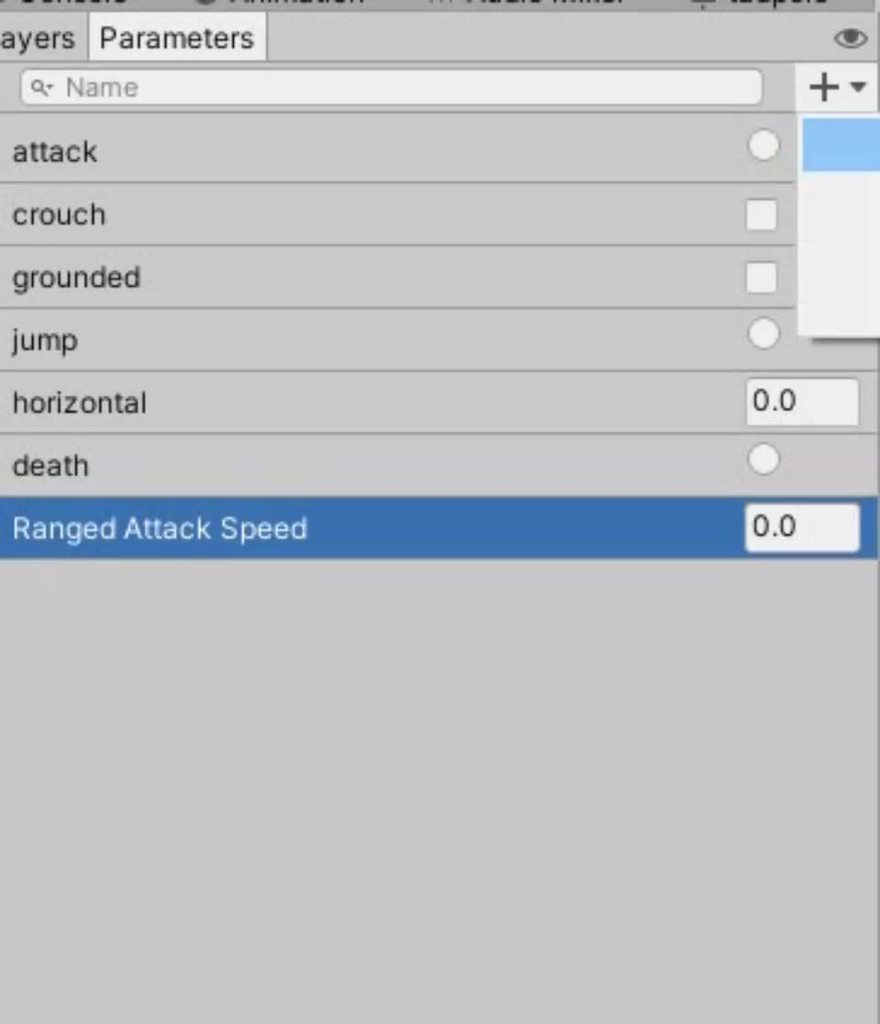
I'm not typing those decimal points.
silent nacelle
hybrid tinsel
https://i.imgur.com/bdEdMlr.mp4
What Unity version?
hybrid tinsel
2021.1, but it has been like that since at least 2019.x
silent nacelle
erm, why aren't mine. There might be some setting...
hybrid tinsel
I agree that it is dumb that it doesn't just give you a mouseover tooltip or a list or something to show the types
Are you sure it's a float? Can you type a decimal into it?
 hybrid tinsel
Odd. It won't let me type a decimal into an int and it won't display a float without a decimal, for me.
silent nacelle
yeah the document have that decimal too :/
 hybrid tinsel
But yeah, either some setting, or something broke 
fallen arch
silent nacelle
Is there a way to check the parameter type? Which is float which is int for exam...
Create a transition
If the options you have are just great or less; it is a float
Great less equal non equal; it is an integer
 twin musk
is what someone can help me to make the animation of moving my character
 slim vigil
anyone know any good videos about how to make animations work in 3d
 marble frigate
but i cant do it without the spine thingy
 honest jewel
Hey guys. I got a character with cameras and lights. The body turns left and right when the camera does so that's good. The only problem is that when I aim up or down, the mesh (arm that holds the light and head) don't turn up and down

so when I do this I see my light going up and down but my arm just sticks there motionless
and when I look down I can see trough part of my nose
I made a armature inside and made a little walking animation
I was wondering if I could also make a simple animation for looking up and down, that just the head and the arm follow the camera/light?
Euhm... yes 🙂
Oh
Wait me? I mean... I do the best I can I guess
 glacial flume
I tried using an animation I got from Mixamo but it just makes my character crouch
But it works elsewhere
I used this one
 stoic zinc
is there a checkbox that's just like "doesn't automatically do transition?" I have this animation that's autoplaying as soon as I press play but I can't figure out why, I'm looking at another animation that seems the same but doesn't autoplay

 glacial flume
Is it set as default animation?
glacial flume
Then thats why then?
stoic zinc
 stoic zinc
but why is it going to knockout if knockout isnt the default?
mightve miscommunicated
glacial flume
Because the transition meats the requirments are met
stoic zinc
oh!
glacial flume
On this u set the requirments for it to change animation

You can see it in the inspector tab
 hybrid tinsel
stoic zinc
hybrid tinsel
stoic zinc
Why are you using debug mode?
glacial flume
When u wanna change animation u set in ur script animator.SetFloat("[Floatname]", [value needed to transition])
stoic zinc
hybrid tinsel
Why are you using debug mode?
LOL THAT'S IT
there was a dumb error when I opened unity
and I just forgot to leave debug mode
glacial flume
loooool
hybrid tinsel
It can be useful sometimes but generally it will just get confusing
glacial flume
I didt think to ask about that 😭
 slim zinc
Hi, I've been working on a multiplayer project recently, and everything has been (mostly) fine. I've figured out almost all my issues with very little help, but I'm completely confused with this one. My animations aren't playing. Basically I have a player prefab that spawns in each player, and there's an animator on top of that. The animations aren't playing though. Not even the idle animation. Please help me. I can link the tutorials I used for networking, but the newest tutorial was for synced movement by dapper dino. I'm quite confused
hybrid tinsel
slim zinc
Hi, I've been working on a multiplayer project recently, and everything has been...
Are your animations meant to be synced, or is is just a standard animator?
slim zinc
mirror is handling the syncing but the animator isn't working
I don't think
https://mirror-networking.gitbook.io/docs/components/network-animator
using this for the syncing

 quartz juniper
glacial flume
I tried using an animation I got from Mixamo but it just makes my character crou...
quartz juniper
glacial flume
I tried using an animation I got from Mixamo but it just makes my character crou...
idk where else does it works ( i assume it works only on the xbot that you downloaded) but
if you want to retarget animation try making both models humanoid
Here's an example if it applied successfully
 hybrid tinsel
slim zinc
mirror is handling the syncing but the animator isn't working
hybrid tinsel
slim zinc
mirror is handling the syncing but the animator isn't working
Ah, I have no real familiarity with using mirror
slim zinc
ok
 graceful girder
Noobie question most likely, is it possible to use Animations to move objects around a gridded map? Movement should be relative to object and the animation should next start where it last left off.
Kind of like this

So after four animations the cube would end u pat that final arrow position.
 tiny juniper
Hello, im having issues with using the anystate, it has a very noticable lag when switching between animations, any way to fix this?
hybrid tinsel
graceful girder
Noobie question most likely, is it possible to use Animations to move objects ar...
Yes, it is possible. You can enable root motion for the second part.
It won't be actually be 'grid motion' but if your animation moves the right distance you should be fine.
graceful girder
hybrid tinsel
It won't be actually be 'grid motion' but if your animation moves the right dist...
Thank you very much! I thought root motion was black magic not to be trifled with, but I'll explore that option since it would be perfect to have move tokens that cover a grid
hybrid tinsel
Not black magic at all- it just means that any motion on the root will actually be 'saved.' So if you move forward with root motion, you start from there when the next animation happens.
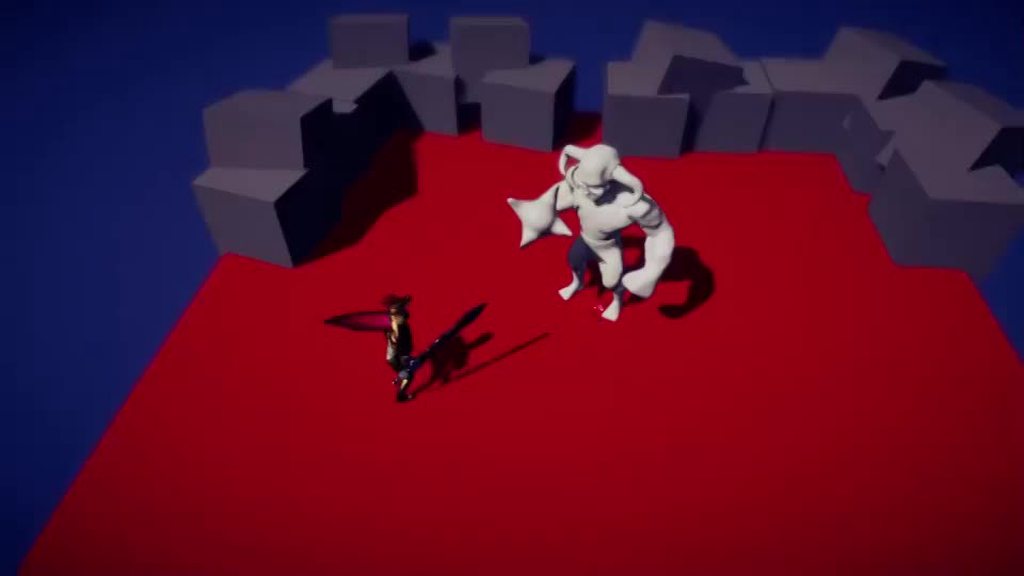
You can see here the monster has root motion, the knight does not

 clear totem

 hexed quail
Could anyone tell me why this keeps happening when i try to apply root motions to rigify animations?
 hybrid tinsel
Wrong bone selected as root probably?
 quartz ore
Is it possible to make animations in Unity without add-ons or do you need an outside program?
Dunno how to do it but I need two specific animations for my platformer.
 cosmic oyster
quartz ore
Is it possible to make animations in Unity without add-ons or do you need an out...
cosmic oyster
quartz ore
Is it possible to make animations in Unity without add-ons or do you need an out...
Cant you just use the animator window
?
cosmic oyster
clear totem
pls say how to make running keyframe
Google run cycle and you find some images that help you with where what leg should be at what time
quartz ore
I'll have to look into that, i tried googling how to animate in unity and everything says to use Blender
cosmic oyster
clear totem
Smth like this should help
 cosmic oyster
hexed quail
Could anyone tell me why this keeps happening when i try to apply root motions t...
cosmic oyster
hexed quail
Could anyone tell me why this keeps happening when i try to apply root motions t...
You either messed up the bones or the weightpaint
quartz ore
cosmic oyster
What kind of animation do you need ?
Well Im really just needing "player holding their arms forward" for pushing a box
And "Hanging from grate above them, climbing forward one arm at a time"
cosmic oyster
2d or 3d ?
quartz ore
3d
cosmic oyster
Is the charachter riged ?
quartz ore
Yee, im using a character I found on the asset store
cosmic oyster
Then you should be able to do it in the animator in unity
And if your not good at animating you could also get some animations from mixamo
I think
For free
quartz ore
ohhh ill look into them, ive been browing the asset store and just couldnt find these two animations I need :P
cosmic oyster
Your welcome
 devout pumice
Hi, I'm using the timeline, and I got a little problem: Why I can't see all the view of the lines? like, only with a limited view from 1 to -1?

nvm, I opened the animation window
main mirage

I want to add this tail to my dinosaur and wanted to animate it in unity. I rigged it and all, but after applying the changes and dropping it in the hierarchy, it shows up as a regular image, without bones. Why is that?
(I was following a brackeys tutorial)
hybrid tinsel
quartz ore
Is it possible to make animations in Unity without add-ons or do you need an out...
Absolutely possible. I do most of my animation directly in unity.
hybrid tinsel
devout pumice
Hi, I'm using the timeline, and I got a little problem: Why I can't see all the ...
Can you not zoom out?
hybrid tinsel
main mirage
(I was following a brackeys tutorial)
That's your problem :/ He ALWAYS leaves out important steps.
hybrid tinsel
main mirage
I want to add this tail to my dinosaur and wanted to animate it in unity. I rigg...
If it is not imported as a 'character rig' using the psd importer, you need to add a sprite skin component in the scene to use the bones.
quartz ore
hybrid tinsel
Absolutely possible. I do most of my animation directly in unity.
I lucked out by that Mixamo thing existing. They didn't have exactly what I needed but close enough overall
hybrid tinsel
I mostly work in 2d so I never got into that habit, but it is a great resource.
stoic zinc

this animation plays one time when the game starts up and I was wondering if you had any ideas how to fix that? I added an exit time but it still didn't fix it
hybrid tinsel
stoic zinc
this animation plays one time when the game starts up and I was wondering if you...
You mean the animation marked in yellow?
stoic zinc
hybrid tinsel
You mean the animation marked in yellow?
yah that one :0
hybrid tinsel
stoic zinc
yah that one :0
That is the default state; it is what the animator starts in when instantiated.
stoic zinc
oh I mean sorry
it does the fire animation once
automatically
but doesn't loop back
hybrid tinsel
When you say 'automatically' you mean the transition fires. Is the trigger for it starting active?
And are the conditions to go back to idle not satisfied?
stoic zinc
hybrid tinsel
When you say 'automatically' you mean the transition fires. Is the trigger for i...
no the trigger isn't active when starting the scene
stoic zinc
hybrid tinsel
Do you have something SETTING it?
how do you mean setting?
stoic zinc
hybrid tinsel
Your code that sets the trigger in the animator
ahhhh no, I turned off all the code things and it still started the animation when I pressed play
hybrid tinsel
Show the animator out of play mode?
 hybrid tinsel
stoic zinc
no the trigger isn't active when starting the scene
hybrid tinsel
stoic zinc
no the trigger isn't active when starting the scene
Right in your screenshot, you have the trigger defaulting to on
If the game starts with the trigger active, guess what happens
stoic zinc
hybrid tinsel
Right in your screenshot, you have the trigger defaulting to on
oh is that the little dot?
on the left?

her?
 stoic zinc
slay!!!!!!!!!!
 slim trail
So, I'm trying to set up an idle animation situation.
I have 1 'base state'; when in this state, code transitions it to a random one of the other states.
I then have the animation return to that base state with an exit time.
The base state has transitions to other states (move, jump, etc.)
I want to be able to get the animation to transition from "Idle 2" to "move". The idea being that "Idle 2" is transitioning to "base state" (With an exit time), which has a transition to "move". But I can't seem to interrupt "Idle 2 -> base state" with "base state -> move" at all.
"Idle 2 -> base state" transition has "Interruption source: Next State" so I'm not sure what's wrong. I might be badly misinterpreting what interruptions are.
 rancid fern
Good morning, I'm having problems with animations in unity, when I put my model to run another animation, only some bones receive animation
clear totem
cosmic oyster
Google run cycle and you find some images that help you with where what leg shou...
ik about the run cycle steps just cant draw it on a 16x16 canvas :\ thanks for help tho
cosmic oyster
clear totem
ik about the run cycle steps just cant draw it on a 16x16 canvas :\ thanks for h...
wait
cosmic oyster
clear totem
ik about the run cycle steps just cant draw it on a 16x16 canvas :\ thanks for h...
heres a run cycle i made on a16x16 canvas it might help you

 timber field
I can't seem to make animations work, when I open the anim file it doesn't make me add any png or anything except events
feel free to ping me
timber field
I think I've solved
hybrid tinsel
slim trail
So, I'm trying to set up an idle animation situation.
I have 1 'base state'; w...
I believe that the interruption can't happen until the exit time, which takes precedence. But should be able to after the transition actually begins.
hybrid tinsel
rancid fern
Good morning, I'm having problems with animations in unity, when I put my model ...
Do both models share a hierarchy and naming for all elements, and/or are they both properly configured humanoid animations on a humanoid model?
 silk viper
anyone use the animation rigging package? Just trying to use the chain IK scripts, need to do animate parts individually for something so im just jusing chain IKs. I'll put 2 for the arms and everything is fine, but if i add another 2 for legs then the whole thing just stops working. Anyone know whats up with that?
hybrid tinsel
silk viper
anyone use the animation rigging package? Just trying to use the chain IK script...
Can you be more specific about 'stops working'?
slim trail
hybrid tinsel
I believe that the interruption can't happen until the exit time, which takes pr...
Got a solution; ended up making a variable that tracked if they were in idle, and set up a single transition from each idle state to 'exit' in the substate (conditional on isIdle being false). Then have another transition back to 'idle Base' (with an exit time) which is when the script allocates a new idle animation.
Then all the other transitions just go directly from the idle sub-state machine to wherever I need them.
This has the animations play in full if uninterrupted, but has them interrupted immediately if anything happens that would make them not-idle.
Now to add more idle animations I just need 2 transitions from the new idle animation. And to add more ways out of idle, I just need to add a single transition.
 austere crescent
I was doing an animation, but now every time I drag and drop something into the scene, it's asking me to create a new animation; how can I put an end to this behaviour?
hybrid tinsel
austere crescent
I was doing an animation, but now every time I drag and drop something into the ...
Can you be more specific? The only 'create animation on dragging into scene' is supposed to be when you drag a set of sprites into the scene at once
Unless I'm misunderstanding
austere crescent
When I drag my sprite to the scene, it's prompting me to create a new animation instead of inserting the sprite into the scene 🥲
Ooh nvm
austere crescent
hybrid tinsel
Can you be more specific? The only 'create animation on dragging into scene' is ...
yeahh
 rocky fossil
Hello I made a elevator using animation, the problem is when I get on the elevator it goes up but my player controller remains at the place where it was standing. Even though my elevator has collider why it just go through me how can I solve this?
rancid fern
hybrid tinsel
Do both models share a hierarchy and naming for all elements, and/or are they bo...
The animations are inside the original model file, so the skeleton is the same as the base model
clear totem
cosmic oyster
heres a run cycle i made on a16x16 canvas it might help you
Omg. Thnks bro this is really gonna help a lot
 coral umbra
How can I make blender manage the animations like in Unity ? https://www.youtube.com/watch?v=ulHdTanVzLk
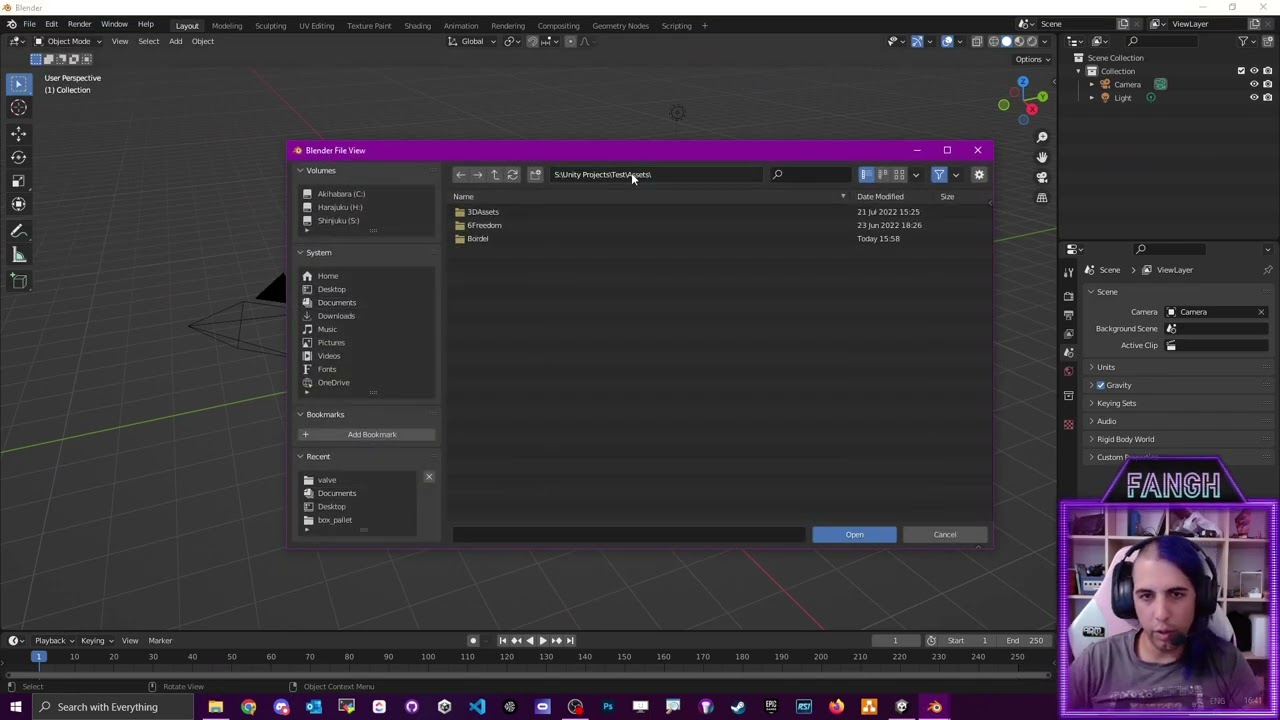
Importing an animation in blender then export the same animation cause weirds things
agile solstice
coral umbra
How can I make blender manage the animations like in Unity ? https://www.youtube...
Exporting to FBX always mangles and swaps around data unpredictably, especially with animations
Here you're doing it twice so the errors stack up
Ideally you'd only ever export from blender to unity
coral umbra
@agile solstice I am unable to do thoses two things in blender :
A) Object B is children of Object A. object A moves, object B moves, export only one animation. (without armature)
B) Object B is children of Object A. object A doesn't move. Object B moves. Exported FBX only have keyframe on object B.
Are you able to to that ?
agile solstice
coral umbra
<@166982635950702592> I am unable to do thoses two things in blender :
A) Object...
It creates extra animation clips but that's not really a problem
Works the same in unity as in blender when CubeA|CubeA_move and CubeB|CubeB_move are both on the parent object
Not sure why it also makes a CubeA|CubeB_move and CubeB|CubeA_move
coral umbra
agile solstice
It creates extra animation clips but that's not really a problem
in Unity, to create (A) I only need one animation clip. I would like blender to give me also one clip. If I have multiple clips, how do I merge them ? (without creatin layers in Unity)
agile solstice
You can move multiple objects in one action, no?
coral umbra
I succeeded to do B
agile solstice
@coral umbra My mistake, you can only animate bone hierarchies within an action, not object hierarchies
Apparently
Unity considers bones simply empties when importing
You would use a Child Of constraint to parent whole objects to specific bones, as you can't do that with normal parenting
coral umbra
succeeded to do B with this option
 hybrid tinsel
rancid fern
The animations are inside the original model file, so the skeleton is the same a...
hybrid tinsel
rancid fern
The animations are inside the original model file, so the skeleton is the same a...
Do you get any errors on the import for that animation? When you open it in the animation window does it have any curves marked in yellow? Does the avatar have any warnings?
 azure sorrel
Anyone knows where I can find an animation of a humanoid character walking with a flashlight?
I have the flashlight... I just want a walking animation with an arm still and in front to hold a flashlight
hybrid tinsel
azure sorrel
I have the flashlight... I just want a walking animation with an arm still and i...
I'd probably just use IK for that instead of searching for a whole separate animation
azure sorrel
hybrid tinsel
I'd probably just use IK for that instead of searching for a whole separate anim...
Good idea! Thanks!
timber field
can you blend 2d animations?
hybrid tinsel
timber field
can you blend 2d animations?
Depends on the type of animation. Flipbooks, no. Bone animations, yes. Other types, maybe.
timber field
Bone animations
hybrid tinsel
Then yes.
timber field
Tomorrow I'll check better, thank you
rocky fossil
Hello I made a elevator using animation, the problem is when I get on the elevator it goes up but my player controller remains at the place where it was standing. Even though my elevator has collider why it just go through me how can I solve this?
 unborn echo
I'm trying to do a simple circle-wipe transition for moments in one scene. A circle moves from off-screen right to off-screen left, covering the screen for a brief moment inbetween. However, when the transition is called again, the viewport can see the circle moving from end -> start before doing the transition again. Any tips on how to fix this? Anything helps. Thanks!
hybrid tinsel
rocky fossil
Hello I made a elevator using animation, the problem is when I get on the elevat...
Animations and physics don't work together very well; it takes a lot of fiddling. You'll need a kinematic rigidbody on the elevator's collider, at the very least.
 hollow needle
hybrid tinsel
Animations and physics don't work together very well; it takes a lot of fiddling...
hollow needle
hybrid tinsel
Animations and physics don't work together very well; it takes a lot of fiddling...
If it's an enclosed elevator, it would be a good opportunity to swap scenes without the player noticing! Doors close, world changes, doors open, no need to move the elevator. Move the world!
From a relativistic standpoint it's the same anyway 🙂
 mental badger
In this image there is a motion time parameter that I am using (its ticked and setup with a float in my actual project) and currently passing in time in seconds but im getting crazy animations. Am I meant to be passing in a normalizedTime (0-1) instead??
 mental badger
okay for anyone interested I went back and rewrote my code to use normalizedTime and it works now, unity docs never specified that it was not a normal time in seconds though
 outer anvil
hello if I have a spine animation but I want to use the unity rigging system is there a way for me to import the rig into unity or do I need to recreate it
Thanks in advance
also what is the easiest way to copy a spine animation and use the unity rigging system if that is possible.
 tulip beacon
Hello, can someone help me with an issue I have been having getting my model to animate in unity?
Well essentially this is my issue:
-
I used to have some generic model I found online as my character. It is a humanoid rig and has a bunch of animations from many different sources
-
I made a custom model and have it rigged complying with the humanoid standards in unity. (I can configure the avatar to do the all the different poses in the "Configure Avatar -> Muscle and Settings Menu)
-
When I replace my player model with the new model, assign the new avatar, and use the same animator controller, the model is stuck in a T-pose. Even in the animation preview (in my animator state diagram), it is stuck in the tpose
-
If I manually put a premade animation controller instead of the runtime controller, the animation plays on my custom model. Hence I dont think it is a rigging issue


you can see in the second pic that when i use the runtime controller, its stuck in the tpose. When I manually set it to be one of the animations, it plays the animation properly, hence I dont think the rig itself is the issue?
Even in the animation preview the model is stuck in a tpose though
tulip beacon
^I think I figured it out. When I select "optimize game object", it doesnt seem to import the rig. Any ideas why?
hybrid tinsel
Yeah, Motion Time documentation is halfassed.
hybrid tinsel
unborn echo
I'm trying to do a simple circle-wipe transition for moments in one scene. A cir...
Make the transition length zero
hybrid tinsel
outer anvil
hello if I have a spine animation but I want to use the unity rigging system is ...
I'm actually not sure how the spine runtime interacts with unity systems; have you asked on their forum?
 bleak pebble
Anybody here?
Why is my character just shrink when I enter a play mode
I didn't put a script in my character


Why?
And also some people suffer from this problem

bleak pebble
hybrid tinsel
I'm actually not sure how the spine runtime interacts with unity systems; have y...
Can you help me I'm desperate
bleak pebble
tulip beacon
Can you help me?
Sorry pls
2 months ago my animation is working fine
hybrid tinsel
bleak pebble
Sorry pls
Don't fucking spam and @ random people
bleak pebble
Sorry about that
Are you gonna help me?
Welp ok then
Screw it unity doesn't help me in any way either
azure sorrel
I am having a problem with the animation positioning.
I have a character that when gets damaged he gets knocked back a couple of steps... and that animation is playing fine. But at the end he was supposed to go back to Idle, which he does. But he does not go to idle a couple of steps back where was pushed, he basically floats back to the position he was before and goes to idle animation there.
Is there a way I can set some sort of position offset for the animations?
basically I want the character to go into idle where the other animation ended
 visual oar
azure sorrel
I am having a problem with the animation positioning.
I have a character that w...
visual oar
azure sorrel
I am having a problem with the animation positioning.
I have a character that w...
I'm having sort of the same problem. I have character who is supposed to move forward while playing the "run" animation. First it did not move at all, now I've enabled "bake into pose" for the "Root Transform Position (XZ)" and he does move, however when the animation ends the character is teleported to his initial position. I've been looking for a solution for a while, if I find anything I'll let you know
Oh, and if you were to find a solution feel free to text me, I'm new to animations and I don't really know how what to do ^u^'
azure sorrel
visual oar
I'm having sort of the same problem. I have character who is supposed to move fo...
I ended up being able to adjust it by messing it with the Bake Into Pose options and the exit time and fixed duration options in the trasitions on the animator.
visual oar
azure sorrel
I ended up being able to adjust it by messing it with the Bake Into Pose options...
great for you man :)
 zenith pumice
I have a mesh that needs to be attatched to two different bones but cannot use the Skinned Mesh Renderer component because the program I am exporting it to cannot handle Skinned Mesh Renderer properly, can anyone help?
 reef barn
I forget what to do to make sure my legs still animate if I'm using Animation Rigging on my upper body.
 oblique anchor
Hey so if I have something like a staff that attaches to a hand bone, I know I link that object to that hand bone in unity so the guy is using it. That's all straight forward. But say I want crystals floating around the staff continuously. I'm assuming I can have the staff and crystals as one object with bones to animate it. If it's just a single floating animation do I just have it repeat like it's in idle? Then if I want the crystals to animate during a spell I'm assuming that staff object needs it's own animator controller that triggers it's individual animation on the spell activation trigger? This is all my assumptions lol. Figured I’d ask before I spend the time to find out I’m wrong
hybrid tinsel
azure sorrel
I am having a problem with the animation positioning.
I have a character that w...
That position offset for animation is called 'root motion' and is a setting you can enable.
 nimble drum
I watched some tutorials about root motion and ask me if I can use it for my attack animation. The player jump's 2m forward and lands. if he collides with an enemy he's playing an hit animation.
Does this work with root motion?
 hollow bay
@cedar ruin for non-skeletal animations I guess my best choice is the anim controller override and just creating clips per sprite sheet?
 cedar ruin
hollow bay
<@209684227720085505> for non-skeletal animations I guess my best choice is the ...
cedar ruin
hollow bay
<@209684227720085505> for non-skeletal animations I guess my best choice is the ...
Yeah, I guess so. Not very experienced with 2d animations.
hollow bay
Thanks 🙂
hollow bay
Found the way to do it - Sprite Libraries and Sprite Resolver (then animating the Sprite Resolver instead of the Sprite Renderer)
hybrid tinsel
nimble drum
I watched some tutorials about root motion and ask me if I can use it for my att...
Yes.
 zenith aurora
Fellas
Animation layers does not work
i made a layer and the animation is clearly playing in the animator menu
but when i increase weight it does nothing just the base layer animations
hybrid tinsel
zenith aurora
Animation layers does not work
You have them in the right order?
zenith aurora
Im pretty sure
hybrid tinsel
Show your setup? The state is definitely playing in play mode?
You have the avatar mask set up correctly?
nimble drum
hybrid tinsel
Yes.
Thanks
Yesterday I made a lot of new animations in blender.
I hope I'm able to integrate them in unity.
Is it true that if you delete your character model and add the same file again it runs normally?
My biggest problem is still the import from blender
hybrid tinsel
nimble drum
Thanks
Yesterday I made a lot of new animations in blender.
I hope I'm able to i...
Not entirely sure what you mean by Is it true that if you delete your character model and add the same file again it runs normally? but as long as the .meta file isn't deleted you can replace a file with one of the same name and it will at least attempt to keep references intact. I prefer to move the new version in using the file explorer outside of unity, replacing the original, and then returning to unity to let it reimport.
nimble drum
hybrid tinsel
Not entirely sure what you mean by `Is it true that if you delete your character...
I tried it before an hour and nothing worked anymore 😅
Now it's running again.
hybrid tinsel
It is generally safer to replace the model directly than to delete and then replace.
nimble drum
I saved the project before I tried but saved the changes automatically 😒
hybrid tinsel
Yeeeah, the project file doesn't hold any asset data.
And deleting an onbject from inside the editor will delete the meta file.
Like I said, anything like that you need to do in the file explorer
twin musk
Hey guys, got a question. Let's say I make some animations purely for cinematics and not gameplay, should I put all the cinematic animations inside the animator, and just set parameters, or should I do it through code and have it play the Animation clip?
hybrid tinsel
twin musk
Hey guys, got a question. Let's say I make some animations purely for cinematics...
In most cases, you'd use Timeline for that though you absolutely can use the other options.
twin musk
hybrid tinsel
In most cases, you'd use Timeline for that though you absolutely can use the oth...
Would playing it through code with an animationclip work?
hybrid tinsel
Yeah, sure, but 99% of the times I see peeps attempting it they just keep reinventing the wheel over and over
So go ahead but...
twin musk
So besides Timeline, what could I do?
hybrid tinsel
I mean, you can do whatever you want really. You could write code to control each vertex if you had some deep, abiding urge to.
Using an animator state machine can work, manually triggering animations can, writing your own playables can work.
Though I suggest against that last one, having done it, unless you really need to
 velvet geyser
animationController.GetCurrentAnimatorStateInfo(entryAndExitAnimationLayer).normalizedTime >= 1
According to the stuff I've read on the internet, this bool should act as a way to tell if the animation in the current layer is finished. But I'm using it in a WaitUntil yield and it seems to wait forever.
hybrid tinsel
velvet geyser
`animationController.GetCurrentAnimatorStateInfo(entryAndExitAnimationLayer).nor...
You have your layer correct? Have you tried debug logging the output to make sure it is what you expect?
Is the animation moving to the next state(thus setting the normalizedTime to zero) before the WaitUntil is evaluated(It evaluates after the animator each frame, iirc between update and lateupdate)
velvet geyser
hybrid tinsel
Is the animation moving to the next state(thus setting the normalizedTime to zer...
I thought of that and tried having a WaitForEndOfFrame inbetween the animations being played and the WaitUntils running, but no luck
@hybrid tinsel I think I figured it out
@hybrid tinsel That code doesn't run in the WaitUntil, it runs in a property referenced in the WaitUntil. So it's calculated once and stays that value forever
wait no
@hybrid tinsel because there's a debug message in the property and that's running every frame
hybrid tinsel
And the debug is giving the expected value?
velvet geyser
hybrid tinsel
And the debug is giving the expected value?
the debug message is continuously stuck at zero
hybrid tinsel
And you have your layer correct? And are referencing the correct animator?
velvet geyser
hybrid tinsel
And you have your layer correct? And are referencing the correct animator?
I know I'm referencing the correct animator and there's only one layer
If I could find the name of the animation it would be easier
as in print the one currently playing
stoic zinc
Hey all I have this animation that has been really funky for a while and I can't figure out why

it seems like theres some weird overlapping happening and I don't know how to fix it
the gun kindof rattles after doing the shooting animation like it's trying to start it again
velvet geyser
@hybrid tinsel okay I figured it out, since the animation was optional, none had started playing so there wasn't anything in progress and finishing.
stoic zinc
pinball kitty single handedly carrying the animation help channel
velvet geyser
thanks @hybrid tinsel
@stoic zinc might be because you've got an exit time? The animation is supposed to play immediately right?
stoic zinc
velvet geyser
<@297958826248896512> might be because you've got an exit time? The animation is...
nah if there's no exit time it just plays constantly forever once I click once
thanks tho
velvet geyser
@stoic zinc you disabled looping on the clip right?
hybrid tinsel
stoic zinc
it seems like theres some weird overlapping happening and I don't know how to fi...
There IS some overlapping. Your transition is too long there.
 stoic zinc
hybrid tinsel
There IS some overlapping. Your transition is too long there.
stoic zinc
hybrid tinsel
There IS some overlapping. Your transition is too long there.
how do I change transition length?
hybrid tinsel

You can also change the exit time, or use a percentage duration. The important thing is that you don't want the transition still going that long if you have enough movement at the start of the 'fire' clip to still be seen even at that low a weight
stoic zinc
hybrid tinsel
You can also change the exit time, or use a percentage duration. The important t...
okay it's fixed! but.....
now it's doing something else lol
when I click it takes such a long time to actually do the animation
hybrid tinsel
stoic zinc
when I click it takes such a long time to actually do the animation
gonna need more info than that
 keen cloud
is it possible to change order in layer during animation
 median folio
Hello, does anyone know why does this keep happening?

the model just snaps down when i click play
these are my settings

 rich meadow
idk if dis is a channel for showin work of animations if so am in the right place, if not pls tel me am wrong xD, in any case, here's smth i am really damn proud of, i usually suck at making animations, like ded ass, but i am in love with this one, opinions would be appriciated :D thx in advance
 agile solstice
rich meadow
idk if dis is a channel for showin work of animations if so am in the right pla...
agile solstice
rich meadow
idk if dis is a channel for showin work of animations if so am in the right pla...
#archived-art-asset-showcase
Looks nice though
rich meadow
agile solstice
<#497873819898478596>
Looks nice though
thx, will upload em there next time xD, and thx apprciaite it :D
 finite aspen
I’ve been dancing around this beginner Q for a while and it’s cost me too much time - generally what’s the easiest way to set a skinned mesh into a pose in-editor without hitting play
 smoky cipher
Is it possible to offset an animation? Not like a cycle offset, a position one
The sprites of the animation center themselves on my character position, but the sprite of my animation is wider than the idle sprite, which means by centering itself on my player's position, the actual sprite of my player gets more to the left, how could I fix that?
All my researches are doomed because searching for an animation offset always redirects me to the cycle offset
Here's the idle sprite

Here's the attack sprite

So if they center on the same point, the second one will just be offset 
smoky cipher
Another issue, the gap under the character, but it's pretty much the same issue
 tired basin
smoky cipher
Here's the idle sprite
tired basin
smoky cipher
Here's the idle sprite
you need to set the pivot point on the two sprites correctly. In the sprite editor (that you're screenshotting here) you can set the pivot point, and it will treat that as the "center" of the sprite for most purposes. Set it in the same place relative to the character in all of them and your animation will line up correctly. I like to use the point right at the base of the character's feet where the sprite "touches the ground" as my pivot. That helps for sorting order issues in a lot of cases.
You may need to also toggle some settings to look at the sprite's pivot rather than center. I think SpriteRenderer has that setting for sorting order stuff, but I don't remember what else has that toggle
smoky cipher
tired basin
You may need to also toggle some settings to look at the sprite's pivot rather t...
Okay thanks a lot, I'll take a look!
smoky cipher
tired basin
You may need to also toggle some settings to look at the sprite's pivot rather t...
Works like a charm! I just don't like the fact that the white particle can switch it's position if I change input too quickly (see at the end), do you know how I could fix that?
Cause I'm making my rigidbody flip when I change direction, so it changes everything that's attached to it, but I don't want that effet to switch, but I guess I'd have to make it a different animation or a particle system for it to not flip with my rigidbody? Or not make my whole rb flip I guess
tired basin
smoky cipher
Works like a charm! I just don't like the fact that the white particle can switc...
yeah, you'd have to make the particle independent of the character. Particle system or separate gameobject.
smoky cipher
tired basin
yeah, you'd have to make the particle independent of the character. Particle sys...
Hm yeah okay, I'll check that later haha, it's good enough for now, but thanks a lot for helping!
 blissful oar
any of you ever run into a problem where your avatar will insist on being upsidedown in unity despite the fact that all your transforms have been applied in blender?
Cause this is what my guy is supposed to be doing

But anytime I go into play mode or try to animate him in any way he just

Hes also like this in the menu where you set up the humanoid rig settings
All the origins are set to 0,0,0 and all transforms are applied to both rig and mesh so I’m just A Bit stumped
hybrid tinsel
Is it actually a humanoid rig?
blissful oar
 blissful oar
hybrid tinsel
Is it actually a humanoid rig?
blissful oar
hybrid tinsel
Is it actually a humanoid rig?
There is a humanoid rig
marble frigate
blissful oar
There is a humanoid rig
okay, are you sure you assigned a humanoid avatar?
and are you sure that youre not using humanoid animations made in unity
cause unity fucks up the humanoid rig whenever you try to animate it
cause it cant handle humanoid animations
blissful oar
i import into unity, touch nothing but the rig settings menu aaaaand

the humanoid rig is upside down
hybrid tinsel
And if you import the file back into blender?
Did you bake and apply all transforms?
blissful oar
hybrid tinsel
Did you bake and apply all transforms?
Yes
hybrid tinsel
Do you have the right transform set as the root?
 lone goblet
Hi, for some reason, I've had models in my game gradually freezing in their animation poses or cringing in a fetal position in editor. I have no idea why this is happening, I'm just working and then suddenly they're all locked into those poses rather than their normal T-Pose.
The ones that are cringing happened last night when I was adjusting the frame on an animation exclusive to a prefab variant of these and now I can't get them out of it. Many of them share animation controllers, but not all of the ones with the same controllers are affected. Any ideas?


They are usually all T-posing in their positions and I have no idea why they aren't anymore
 random saddle
How would I animate an object's y axis so it follows a sine curve. I want to use the animation editor as doing via script is too laggy for my trash laptop, an I want to try seeing if using animation editor is better.
this is the script I have for it rn

the top one is for an idle movement for the object
and the second one is for when moving
also I want it with minimum keyframes
if its possible
for perfomance
 foggy snow
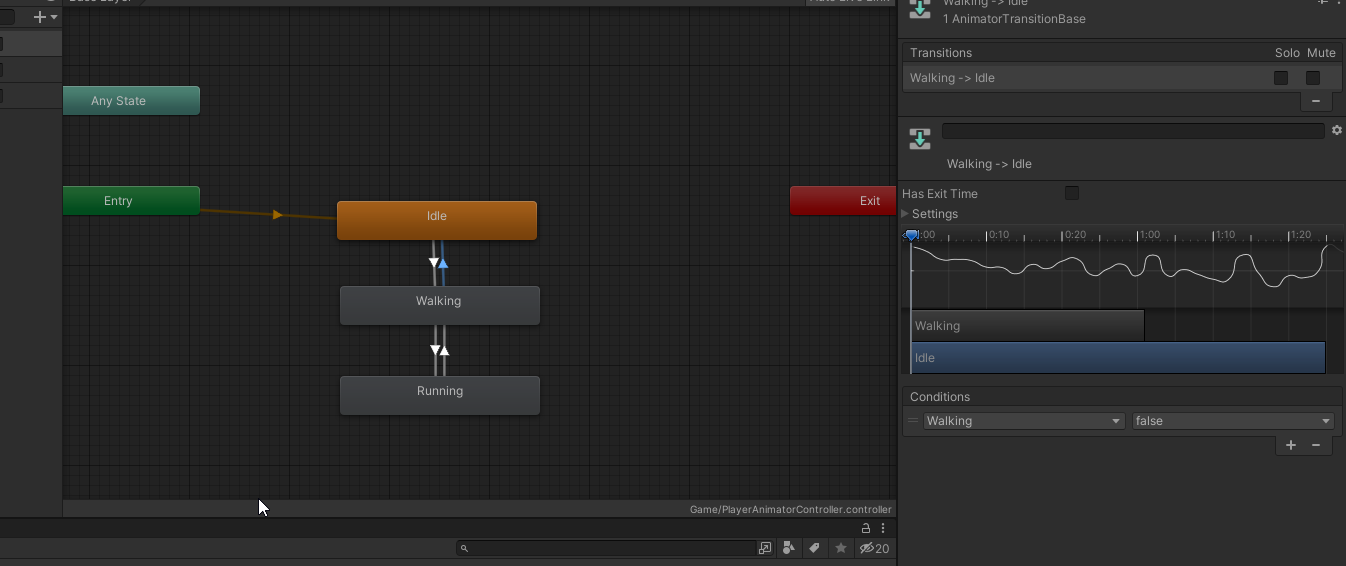
Hi there! I'm trying to set up super basic run and walk animation transitions with a movement asset I bought, I had it all working, everything was fine, but now the Walking animation is acting like it has exit time when it very clearly doesn't, and because of the 'exit time' it fails to go into running and skips back to idle, is there somewhere else the animation could be overriding the transition exit times?
https://i.imgur.com/tbToNWp.png
 rocky fossil
Hello, I have made a cycle of animation using trigger condition , there are two trigger condition in whole cycle, but after completing half of the cycle both the trigger get checked by itself and other half cycle get completed even though I don't want it
Is there any setting I have missed?
 timber terrace
Hi, I'm currently learning to make an fps game and right now I'm kinda stuck at animations for the gun and arms. Is it better to make custom animations or just use IK?
agile solstice
timber terrace
Hi, I'm currently learning to make an fps game and right now I'm kinda stuck at ...
Those are not mutually exclusive
IK in unity is mainly a tool for creating dynamic animation which adapts to changing circumstances at runtime, often used in conjunction with authored animation clips
 cold pecan
smoky cipher
Works like a charm! I just don't like the fact that the white particle can switc...
cold pecan
smoky cipher
Works like a charm! I just don't like the fact that the white particle can switc...
that looks great
smoky cipher
cold pecan
that looks great
Thanks ❤️
timber terrace
agile solstice
Those are not mutually exclusive
IK in unity is mainly a tool for creating dynam...
ok thanks
 wheat kraken
I was hoping someone experienced with animators could tell me if they see any potential problems with this approach to syncing the animations of two avatars. My intent is to use Any State to select the animation I want to play, with one animator acting as leader, and the other following using this method:
https://forum.unity.com/threads/sync-animations-on-multiple-objects.430114/
        {
            for (int i = 0; i < toAnim.layerCount; i++)
            {
                toAnim.Play(fromAnim.GetCurrentAnimatorStateInfo(i).fullPathHash, i, fromAnim.GetCurrentAnimatorStateInfo(i).normalizedTime);
                toAnim.SetLayerWeight(i, fromAnim.GetLayerWeight(i));
            }
        }
Having used Any State in the past with VRChat, I'm somewhat familiar with it, and it seems like a good way to allow me to both select a sub state to jump into with a series of animations I want to play, and immediately jump out to start a new series of animations without needing a ton of transitions back. I'm aware I'll need to uncheck "can transition to self" to make it work, though I'm concerned there might be some other pitfalls I'm not aware of with this setup. For example, I'm not sure if it's possible for the animator to actually be IN the Any State, and if it ever is, if the above code will still run correctly, or crash.

Unity Forum
What is the best way to sync identical animations on two objects?. I have two buttons attached to a canvas – I set an animation controller up on each...
I'm also curious about the Interruption Source option... The docs aren't super clear on what it does.
https://docs.unity3d.com/Manual/class-Transition.html#TransitionInterruption
"The transitions in AnyState are always added first in the queue, then other transitions are queued depending on the value of Interruption Source:"
I don't undestnand what this means at all. What queue are they referring to here? If the conditions are met, it transitions to the next state, right? So what's getting queued up here? And what does it mean to be in a state and queue transitions from the NEXT state? I just don't get it!
wheat kraken
Actually, I just found this nice tutorial on how interruptions work... So I guess I just need to know if my plan to use AnyState here with the sync code has any obvious flaws...
https://www.gamedeveloper.com/design/unlocking-unity-animator-s-interruption-full-power

Game Developer
The interruption mechanism in Unity’s Animator tool is often misused or completely skipped altogether, but what most people does not realize, is that most of th
 spice rain
I have the animator cull mode set to CullCompletely, which works for frustum culling I believe but it doesn't change on LOD culling.
Is there a good way to stop animations when LOD culling?
And / Or is there a way to get the animator to enable disable upon LOD culling? I tried doing a renderer.isVisible but it ALWAYS returns false, even if the players are in the camera or not, or LOD culled or not

 split flare
I have two states of crouching. Idle and walking. But transition between idle to walking is ignored and i don't understand why. I checked 2 times is speed goes to greater than 0.1 and yes it goes but this transition never happens.
 hybrid tinsel
split flare
I have two states of crouching. Idle and walking. But transition between idle to...
hybrid tinsel
split flare
I have two states of crouching. Idle and walking. But transition between idle to...
The float is being updated?
split flare
yes
 supple grotto
hey i want to make an animation that i can start with a c# function and not when i press play how do i do that?
 tropic remnant
using System.Collections;
using System.Collections.Generic;
using UnityEngine;

public class ButtonAnimation : MonoBehaviour
{
    public Animator m_Animator;

    // Update is called once per frame
    void Update()
    {
        if (Input.GetMouseButtonDown(1))
        {
            Debug.Log("yo");
            m_Animator.SetTrigger("test");
        }
    }
}```
the animation doesn't work when i right click
and i get a message from the debug log
what am i doing wrong?
 kind sail
how can i let an animation play instantly after pressing a button, without a transition time?
tropic remnant
tropic remnant
```cs
using System.Collections;
using System.Collections.Generic;
using UnityEng...
someone?
agile solstice
tropic remnant
someone?
You're setting trigger "test" but the one in animator is named "Picked up"?
tropic remnant
WAIT WRONG IMAGE

using System.Collections;
using System.Collections.Generic;
using UnityEngine;

public class ButtonAnimation : MonoBehaviour
{
    public Animator m_Animator;

    // Update is called once per frame
    void Update()
    {
        if (Input.GetMouseButtonDown(1))
        {
            Debug.Log("yo");
            m_Animator.SetTrigger("test");
        }
    }
}```now its good
but what am i doing wrong
tropic remnant
anyone?
agile solstice
tropic remnant
Is the trigger the transition condition, and can the state transition into itself?
tropic remnant
agile solstice
Is the trigger the transition condition, and can the state transition into itsel...
about the first one im sure that it is but wdym by the second part?
agile solstice
tropic remnant
about the first one im sure that it is but wdym by the second part?
States should have a "can transition into self" checkbox or something along the lines
tropic remnant
how do i check
agile solstice
tropic remnant
how do i check
Click on the state, look at inspector
 agile solstice
tropic remnant
agile solstice
tropic remnant
the state, not any state
tropic remnant
agile solstice
_the_ state, not any state
ive never done that but i clicked on the test state
 agile solstice
tropic remnant
agile solstice
tropic remnant
the "state" in question is "clicking animation"
A lot of these mysteries can be solved just by clicking and inspecting things to see what you find
 agile solstice
tropic remnant
u mean that?
agile solstice
tropic remnant
u mean that?
I'm going off of memory
Can you find "can transition to self" somewhere?
tropic remnant
i can't find it anywhere
agile solstice
@tropic remnant How about in the transition from any state?
 hybrid tinsel
split flare
yes
hybrid tinsel
split flare
yes
Can you show a picture of your animator in play mode while the character's moving?
split flare
hybrid tinsel
Can you show a picture of your animator in play mode while the character's movin...
nvm, i used a blend tree and it worked lol
and put a transition between middle air - exit
hybrid tinsel
tropic remnant
but what am i doing wrong
You need to pay attention to what is on your screen. Error messages aren't just cosmetic.

@restive scaffold can you be more specific about your problem?
 restive scaffold
the animator sometimes hangs on animations, sometimes some animations end too quick, other play when they shouldn't
just buggy all around
 alpine moss
Hi
how can I change the running animation in the starter asset character?
hybrid tinsel
restive scaffold
the animator sometimes hangs on animations, sometimes some animations end too qu...
That's odd. But still too vague to guess at what is wrong unless you're using a bunch of 'any state' transitions.
restive scaffold
I'm using 0 any state transitions
hybrid tinsel
alpine moss
Hi
how can I change the running animation in the starter asset character?
Open the animator asset and change the clip used for the run.
hybrid tinsel
restive scaffold
I'm using 0 any state transitions
Well then you'll need to show more information to guess at a problem. That was just my 'no information guess' 😛
restive scaffold
well maybe that's the problem that its not just 1 problem
I can't ever put my finger on it
hybrid tinsel
Well yeah, but you still haven't shown your code or your animator so I still can't do much more than wild guesses.
 lavish heart
Using a 2D blendtree, how do I freeze the character in place when the XY values are 0, given that a walking animation is taking place when they aren't 0? I don't want it to return to idle (think robot legs)
EDIT: I figured it out, setting the blendtree to "2d freeform directional" and adding an empty Animation to 0,0 gives the preferred effect. It also helps to have 2 sets of Motions, one near zero at relative speed, to maintain the animation motion instead of taking tiny steps
hybrid tinsel
lavish heart
Using a 2D blendtree, how do I freeze the character in place when the XY values ...
An alternative would be to just use separate states for moving and non-moving rather than a blend tree.
lavish heart
I tried that, but it always returned to either the default pose or the separate state's pose
 karmic root
Im trying to setup a basic animation tree, where my animator can come in, and just use a Animation Override Controller for all of the Enemies.
I have this setup currently for the "Basics"
However, the issue that I'm "running into" is that some Enemies might have 1 Attacks, some might have 5, MAYBE one in the future, has 20. (Highly unlikely) Who knows.
What would be the best way to setup the attack animation portion?
 karmic root
Would this be the best way to go about it?
Basically, exit states will depend on if they're walking or not, choose attack based on int, then exit?


 prime aspen
I have a problem.
Root motion on generic (non-humanoid) rig is not working.
On every engine I test root motion it is plugn play working. Unreal and Godot Engine, but not on Unity
hybrid tinsel
karmic root
Would this be the best way to go about it?
Basically, exit states will depend o...
That's basically how I did it
hybrid tinsel
prime aspen
I have a problem.
Root motion on generic (non-humanoid) rig is not working.
...
That's literally a third of the engines you tried where it didn't.
Did you set the correct root motion node?
oblique anchor
Not sure if this is the right channel, I’m curious if there is a good way for something like a 3D bridge to be invisible but shadows can be cast on it. Like a secret path kinda thing. I’m having a hard time figuring out how to make something transparent but the shadows still cast over it.
hybrid tinsel
oblique anchor
Not sure if this is the right channel, I’m curious if there is a good way for so...
Wrong channel(you want #archived-shaders) but yes, there are ways to do it; it would depend on which rendering path you are using.
supple grotto
can someone tell me how to disable animations from starting at start
hybrid tinsel
supple grotto
can someone tell me how to disable animations from starting at start
Have the default state be empty.
supple grotto
ok thx
prime aspen
hybrid tinsel
That's literally a third of the engines you tried where it didn't.
Did you set ...
Yes. Its kind of working when activating "reset pose" but than the rotation of the root node is not baked in.
I read as well that on older Unity versions all worked. On new versions its broke and not fixable.
Maybe write a own root motion over c#.
So root motion not for generic rigs like it seems. Only huamanoid rigs.
And try to use it as humanoid rig the skinning is extremely off and looks only weird.
 covert hull
Can I edit X Y Z curves of a transform at the same time in the animation timeline editor?
i select 3, grab a handle, drag and it does X not Y or Z
not move, change the bezier handles

 wraith jackal
hey guys im having trouble with animation
everytime i rotate my object when its in the recording button it just snaps back to its original position
 fleet forge
Hi, when I move my joystick slowly my character does this. any ideas on how to fix this?
 hybrid tinsel
Do you have the right input system? Is the animator on the right object? Did you set up the transition conditions correctly?
 livid plume
hybrid tinsel
Do you have the right input system? Is the animator on the right object? Did you...
livid plume
hybrid tinsel
Do you have the right input system? Is the animator on the right object? Did you...
i fixed the issue, basically i had a transition set up as a bool before because i was using a bool system. when i switched over to trigger, i just made trigger parameters with the same name, but i think changing the name by making a new one worked
 near sierra
so encountering an issue where the sprite renderer is not changing even when the sprite resolver selects a different sprite. The sprite in question does not have a bone attached so could that be a potential culprit for this?
slim trail
transform.position += m_Animator.deltaPosition;
I'm using this to move the character ( in OnAnimatorMove()) while they're isKinematic. It works perfectly fine for most animations. One animation in particular though does not work reliably; sometimes going the right distance, sometimes not at all, or sometimes in the wrong direction (sideways instead of forward).
My guess is that there's a problem somewhere in the animator (Because that code references... nothing else, and still gives this buggy sort of execution), but this animation has the same settings as all the other ones I'm using. The transition to it is just like another similar transition that does work.
None of the other code that changes transform.position is the problem (disabling it all does not prevent the erratic behavior).
Are there some settings in the animation import or transitions or something that might cause this/ I should look into?
The animation moves the character forward while rotating them 180 degrees, then moves them down. Confirmed already that the root bone's doing that motion (it is). That it's so inconsistent is the weird thing.
 unique knot
in animator, what might be possible reason for two clips having same property preventing each other from editing said property?
two clips both edit the same property, only one of them is running at the time but one clip prevents another from editing said property
if I remove it from clip A, clip B can then animate the property
and it doesn't seem to happen the other way around, editing property in clip B doesn't prevent clip A from playing correctly
agile solstice
unique knot
in animator, what might be possible reason for two clips having same property pr...
In what context are you playing multiple clips at the same time? Layers, transitions, blend trees or multiple animators per chance?
unique knot
agile solstice
In what context are you playing multiple clips at the same time? Layers, transit...
there's only one animator in entire object tree, only one clip is playing at the time, but property being edited in one of the clips seems to prevent another clip from editing the same property
also very simple setup in that there's only one layer
agile solstice
unique knot
there's only one animator in entire object tree, only one clip is playing at the...
Two clips that don't play at the same time shouldn't have any impact on each other
I feel like some piece of info is missing
unique knot
agile solstice
Two clips that don't play at the same time shouldn't have any impact on each oth...
entire animator looks like this - we always start in "Start", then immediately move to either A or transition to B depending on what state parameter is set (which can be set to either 1 or 2 right now, equivalent of A or B)

so flow goes like this - either we start in A and then want to move to B with transition animation in between, or we go immediately to B without A using different transition
two animations are in these two transitions
"Transition state A to B" plays correctly, "Transition to state B" plays partially correctly, only animating properties that aren't in that first transition
if I remove these properties from "Transition state A to B", then they are animated correctly in "Transition to state B"
so, State B have two possible entry points from two different transitions
agile solstice
unique knot
so, State B have two possible entry points from two different transitions
I don't see anything problematic here, other than maybe the unnecessary transition states between transitions
Once a transition has completed, no other clip should have any effect
And if a transition is in process, it should lerp the modified properties of both states
 blazing knoll
Hey, very dumb question but I'm trying to play an animation at the start of the game but when I press play, it doesn't start the animation... I've added the code, my animation is real and everything seems right and I've stared at it for a long time and I can't figure out what is missing
here is the code (very basic) :
public Animator anim;
    public string animName;

    void Start()
    {
        anim.Play(animName);
    }


dm me if you can help me
or just here
and ping
blazing knoll
nvm
 analog radish
guys, I have 2 problems:
- the falling animation after jumping and landing on the higher platform takes its time to stop
- the falling animation doesn't start without jumping
twin musk
question:
im trying to follow a simple animation tutorial but im missing things,
can someone explain why the animations on the Free Jammo character have no properties in the inspecter for rigging or a method to change type to Humanoid?

 granite kite
how do you delete transitions
analog radish
granite kite
how do you delete transitions
you click on a transition and click this minus in the inspector
 hybrid tinsel
twin musk
question:
im trying to follow a simple animation tutorial but im missing things,...
hybrid tinsel
twin musk
question:
im trying to follow a simple animation tutorial but im missing things,...
For imported animations those will be in the inspector for the imported object.
twin musk
hybrid tinsel
For imported animations those will be in the inspector for the imported object.
the image i included is the inspector for the animation. its not there.
for the model, i have already switched it....
anyways in the time since, ive made my situation just worse so i think im just guna start from scratch,
hybrid tinsel
twin musk
the image i included is the inspector for the animation. its not there.
for the ...
Like I said, imported animation clips don't have that option in their own inspector, but only in the inspector for the importer.
 toxic orbit
Can this character be downloaded from somewhere?

I would love to use this character for all my animations.
granite kite
analog radish
you click on a transition and click this minus in the inspector
sorry poorly phrased an entry
analog radish
what
granite kite
analog radish
what
i want to get rid of this
 analog radish
then select the transition and click that minus in the inspector
 granite kite
analog radish
then select the transition and click that minus in the inspector
granite kite
analog radish
then select the transition and click that minus in the inspector
thank you
 timber badger
is there anyway to stop an animation instantly or like restart it, because right now I have 2 states one for pulling an item out and the other for putting it away (no animation for that one it just disables the renderer) but if I quickly switch between taking out the item and switching from the item, it will play the animation part of the way through because on the animator it seems to keep running the animation when I switch off
yea when the state changes to put away the item the take out item state continues playing for about half a second and if I switch back in that time it will play the take out item animation part of the way through and then restart it
 mint yoke
how would i make a toggleable animation for like a lever? so if the lever is up and i press it it goes down and vice versa?
toxic orbit
toxic orbit
Can this character be downloaded from somewhere?
I FOUND HIM!
https://github.com/Unity-Technologies/Benchmark/blob/master/Assets/Prefabs/Locomotion/Animations/DefaultAvatar.fbx

GitHub
Contribute to Unity-Technologies/Benchmark development by creating an account on GitHub.
 civic citrus
Can anyone point me in the right direction on how to change the animations on a prefab clone without changing the animations on all the other instances? I thought it'd be as easy as making a new controller with all the new animations attached to it but that doesnt seem to be working
hybrid tinsel
civic citrus
Can anyone point me in the right direction on how to change the animations on a ...
Making a new prefab variant with a different controller should do it. What kinds of trouble are you having?
 twilit compass
Hello, i'm having a slight issue... i have this sprite spreedsheet that is 49 frames. I would like to splice it and make a sprite animation out of it. Unity is saying something about parameters or something and not letting me splice the 49 frames. Does any one know how i can get this animation to work? pls @ me. i wont hear other wise
 twilit compass
nvm
 ancient zealot
Hello, i'm trying to make a simple running left or right animation in 2D, and to use the mirror system to not have to duplicate animations for nothing. However the mirror parameter in the node does not work.
The idle and running animations do play correctly though so it's only the mirroring thing that has issues. Here's how I change the bool:
if (animator.gameObject.activeSelf & animator != null && animator.isActiveAndEnabled)
        {
            if (agent.isStopped)
            {
                animator.SetBool("running", false);
            }
            else
            {
                animator.SetBool("running", true);
                if (name == "Combatant")
                {
                    print(agent.steeringTarget.x < transform.position.x);
                }
                animator.SetBool("mirror", agent.steeringTarget.x < transform.position.x);
            }

        }
Which is correctly read at runtime, see last screenshot
Any idea why this 2D Animation won't mirror ?

 civic citrus
hybrid tinsel
Making a new prefab variant with a different controller should do it. What kinds...
civic citrus
hybrid tinsel
Making a new prefab variant with a different controller should do it. What kinds...
Hey thanks for the response, I got it working thanks
hybrid tinsel
ancient zealot
Hello, i'm trying to make a simple running left or right animation in 2D, and to...
You can't mirror 2d animations in the animator(or any generic animations, for that matter). It is a humanoid only feature.
It doesn't flip the animation, it swaps the movement of the right limbs with the left limbs.
ancient zealot
hybrid tinsel
You can't mirror 2d animations in the animator(or any generic animations, for th...
aaah, thanks. Is there a way to easily mirror a 2D animation that dosn't rotate the whole object in case I want to use the orientation for something else ?
EDIT: In case somebody else sees this, you can use yourObject.getComponent<SpriteRenderer>().flipX = true , it will affect the animation
 stark lintel
unity ik don`t work
hybrid tinsel
ancient zealot
aaah, thanks. Is there a way to easily mirror a 2D animation that dosn't rotate ...
You can also set the scale to negative on one axis.
hybrid tinsel
stark lintel
unity ik don`t work
Is that a question or an answer?
ancient zealot
hybrid tinsel
You can also set the scale to negative on one axis.
then all the children of the parent object will be inverted. This solution does not affect a lifebar attached to the component for example
 clever shale
How to reset layer state on weight change?
Like I have a block animation and it plays, but when I set layer to the 0 it fully reset.
hybrid tinsel
ancient zealot
then all the children of the parent object will be inverted. This solution does ...
That can be a benefit, too.
 inner folio
why when i import my sprite into the scene it doesn't have any bones??
 hybrid tinsel
inner folio
why when i import my sprite into the scene it doesn't have any bones??
hybrid tinsel
inner folio
why when i import my sprite into the scene it doesn't have any bones??
Because you didn't add a sprite skin component?
raven kelp
Is it possible to set up a IK in such a way where it will start and stop at certain point of a animation. For example, i have a animation for throwing a punch, i want to use IK in the middle of the animation to target the enemy at the correct time and then stop using IK after the animation is completed.
hybrid tinsel
raven kelp
Is it possible to set up a IK in such a way where it will start and stop at cert...
Depends on what type of IK, but yes.
The easiest way is usually to animate the IK weight directly; that works for most IK systems.
raven kelp
hybrid tinsel
Depends on what type of IK, but yes.
Okay that’s good to know
Does anyone know of a way, to make a punch animation target to the head of another character. I’ve tried to implement chain ik constraint on both arms to target the head which does work however the chain IK completely overrides all animations that exist on that arm (the actual punching) regardless of weight which from what I understand is what it’s meant to do so I can’t really complain on that front but I’m not sure of a work around to achieve the results I’m looking for.
hybrid tinsel
raven kelp
Does anyone know of a way, to make a punch animation target to the head of anoth...
I've not tried it with animation rigging package IK but you should be able to use the built in mecanim IK if it is a humanoid
Just make sure that IK pass is active on your animator layer
agile solstice
raven kelp
Does anyone know of a way, to make a punch animation target to the head of anoth...
https://youtu.be/hs2goLjUz4U this is a bit long but I think that specific kind of use case is covered here for the Animation Rigging package
 hollow vapor
If I want to trigger an entire animation, I can use an Animator Controller and use bools/triggers to play the animation. If I didn't want to play an entire animation, but rather just advance/minus some frames of it, would that be possible?
(I'm trying to build a system kind of like the one in Heavy Rain, where player inputs control animation progress)
agile solstice
hollow vapor
If I want to trigger an entire animation, I can use an Animator Controller and u...
You can set the clip progress in script
https://docs.unity3d.com/ScriptReference/AnimationState-normalizedTime.html
hollow vapor
Thank you!
hybrid tinsel
agile solstice
You can set the clip progress in script
<https://docs.unity3d.com/ScriptReferenc...
Just remember that there is no concept of 'frames,' only time, in an anim file. Other than that, you absolutely can.
alpine moss
how to change clips in the starter assets charcatar
twin musk
has anyone tried animation batching with URP skinnedmeshrenderer?
agile solstice
twin musk
has anyone tried animation batching with URP skinnedmeshrenderer?
What kind of batching?
twin musk
agile solstice
What kind of batching?
i've been trying to get animation instancing work with URP materials (multiple materials per prototype, even). I found some modified shaders in the gh issues for URP, but they don't seem to work. I don't have the experience to make my own custom shader, that's for sure 😂
https://github.com/Unity-Technologies/Animation-Instancing
**they seem to work but it doesn't render colors and transforms the mesh in a weird way
twin musk
i think this problem far exceeds my shader skills so i have to give up 💀
 mild sleet
What's the best practice for pixel spritesheet animations that are relatively simple? Let's say all your characters have a simple blink animation that consists of three frames. Do you:
a) import the three frames and use those to make a blink animation for each character (example: you have 1 second of the eyes open, 1/5 second of eyes half shut, 1/5 second of eyes shut, etc.)
b) create the animation first in your art program as several frames, and import the entire spritesheet that contains all of them? (now you're importing a sprite sheet that contains, say, like 8 frames of the eyes open, 2 of the eyes half shut, 2 of the eyes shut)
Or does none of this matter because the sprite is 64x64 and is super small.
I'm just trying to figure out the proper workflow for creating animations. It does seem like it's easier just to use the art program to create the full animation, but it seems like it's creating more frames than necessary, if that makes sense.
agile solstice
mild sleet
What's the best practice for pixel spritesheet animations that are relatively si...
No reason to duplicate frames
mild sleet
ok, thanks!
twin musk
What did I do wrong here please help?
 raven kelp
I'm having an issue trying to target a punch to the head of an opponent, I've got a two-bone constraint set up however it completely overrides the jab animation I have set up which you can see playing on the left changing the rig weight or constraint weight seems to do nothing and neither does turning off or on IK pass on the different animation layers. https://imgur.com/a/Ag2wg4y
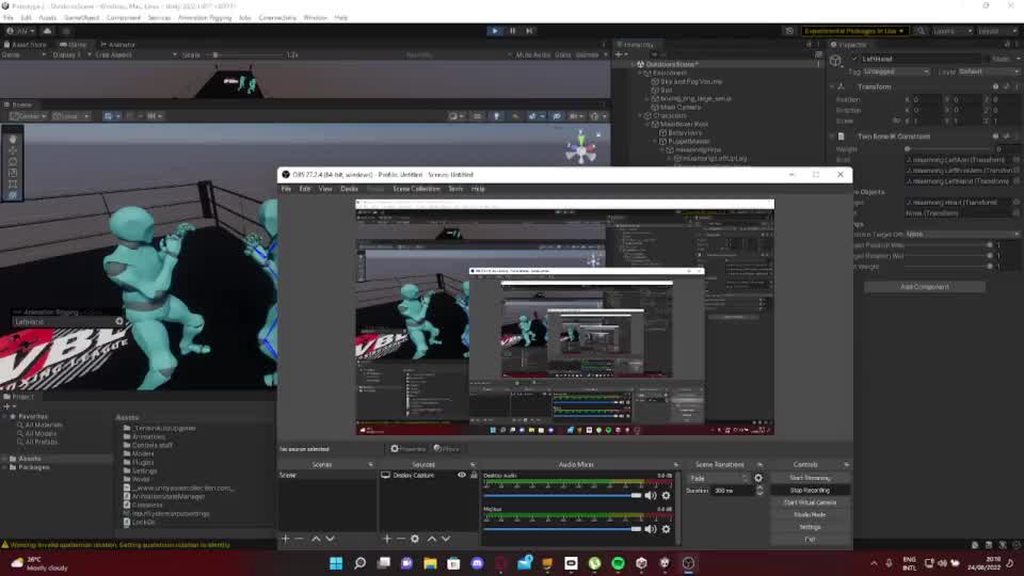
 sly surge
hey does anyone know how to animate a humanoid rig for a VRM/VSFavatar i realy dont know how to do it even making the animation in blender wont do the job because i cant aply the rig of the model i want to make move (vrmavatar rig dont want to be put in another model so i cant import animation without it behing buged as hell) thank you
 frosty mesa
Hi, I've never animated in Unity/Blender before
Basically I'm kind of lost on where to begin creating my own character animations.
But I want to do so in a way that's very compatible with Unity, and that'll let me swap out the models for my own characters whenever I have them.
Is anyone willing to give some tips on how to get started?
I would love to use the Jammo model and rig as a base, but it doesn't seem to have any animation controllers when I import it into unity.
 sturdy current
trying to make 2 animations work at the same time, and a muzzle flash effect cause im enlarging and descaling a object for the muzle flash
for more context and in very simple terms and short story I have a rotating cylinder for a revolver and a flash but however I can only make 1 of them do 1 thing at once, I would also be wanting to put it on a vrc avatar / vrc ready because im giving the model to a friend
slim trail
So I'm trying to get an animation to move the player (Via transform.position += playerState.m_Animator.deltaPosition;). It's supposed to move them forward a ways, then down, and rotate them during this process.
The rotation works fine. (Though is notably not done with m_Animator.deltaRotation).
One of two things happens when I trigger the "climb down" script:
1: It works and puts the character pretty much right where I want them.
2: The character instead shimmies a bit to the left (or right. It's inconsistent), but about 1/3 as far to either side as she should be going forward, then drops 'down' into the ground they were on.
Which of those 2 states happens seems to be random as far as I can tell. I have not found anything that makes one happen more or less frequently. (I can, far as I can tell, get any of these results from going over the same edge, at the same angle, the same speed, and from the same distance.
The animation looks fine in preview... but the transition seems to suggest the character would be ascending (rather than staying level), then descending back to where they were.
Animation was done in blender if that helps.
I'm wondering how can I make (1) happen, and have (2) not happen?
 flat cobalt
Why my camera keep floating while spamming "Walking forward" button?


When i remove animator component. the problem is gone.
slim trail
Also, I have a 'climb downwards' animation in the animator which is just Climb up run in reverse. This was working fine in 2019.3, but after updating to 2022.1, at the end of each loop, it puts the character where they'd be if the animation hadn't been reversed. Root motion is on, of course.
I can't find any sort of setting that might have had a value defaulted back or something.
Do I just need to make a separate animation for climbing down?
(both 'climb ups' below result in ascending +1 y units after a loop, while the first one I want to move -1 y units instead. It moves as if it were doing this, so that right before the loop, it's nearly at -1y. it then immediately jumps to +1 y, and starts 'climbing down' from there, until it's almost at 0, then jumps to +2y, etc.)

 spare yoke
After setting up 5 different characters using mixamo I'm suddenly experiencing an issue.
I download the animation, using the character model from mixamo, but when I place in the animator it's not mapping to my model.
None of my other characters have had this issue. I've tried with multiple animations but had the same problem each time. Any ideas?
 sly surge
@spare yoke same problem here
spare yoke
sly surge
<@197468278803791873> same problem here
It's very strange. I've tried with and without skin, FBX regular and FBX for unity. All the same problem.
median folio
Hello, does anyone know why this keeps happening when I try to add animations to my model?
 novel ferry
Hi, how could I make my character correctly rotating up and down,like this? I want to use Multi Aim Constraint
novel ferry
novel ferry
Hi, how could I make my character correctly rotating up and down,like this? I wa...
Currently it does it like this
median folio
Fixed, for whatever reason the scale factor affected it's position
twin musk
how can I read vertex positions for each frame from an AnimationClip, SkinnedMeshRenderer and Animator (not sure if i need the Animator object for this) ?
novel ferry
novel ferry
Hi, how could I make my character correctly rotating up and down,like this? I wa...
Please somebody help me with this
 pastel kraken
Greetings all!
I am a 3d animator, but I am at a shop that has a whole new cast and crew.
I am looking for information on rigging characters for Unity.
Base package will be Maya (several cuts), and possibly Blender.
I'm looking for information on getting characters FROM Maya into Unity.
Is there a rigging or advanced animation channel around here?
Anyone wanna answer a few simple questions (in DM is fine)?
novel ferry
novel ferry
Currently it does it like this
The problem is, that I dont have a bone that looks directly to the front
 crystal python
how do i get this scrip to my character?

Player platformer controller
how do i bring in the script?
 hybrid tinsel
twin musk
What did I do wrong here please help?
hybrid tinsel
twin musk
What did I do wrong here please help?
 hybrid tinsel
spare yoke
After setting up 5 different characters using mixamo I'm suddenly experiencing a...
hybrid tinsel
spare yoke
After setting up 5 different characters using mixamo I'm suddenly experiencing a...
You don't have it set as humanoid?
hybrid tinsel
pastel kraken
Greetings all!
I am a 3d animator, but I am at a shop that has a whole new cast...
This is as good a channel as you'll find on this server for that.
spare yoke
hybrid tinsel
You don't have it set as humanoid?
None of them are humanoid and thry worked fine before
hybrid tinsel
spare yoke
None of them are humanoid and thry worked fine before
For non humanoids, the rig hierarchy and the naming of all bones has to be identical
There is no automatic remapping for non-humanoids
hybrid tinsel
raven kelp
I'm having an issue trying to target a punch to the head of an opponent, I've go...
IK pass is for mecanim IK.
hybrid tinsel
clever shale
Any state Animation interrupts by others.
Can't understand you.
 rugged mason
We have a problem syncing the animation with our serverside (non Unity server) motions. The monster moves a distance in a given time in the client, and we should make the same distance in the same time on the server as well (using root motion). How can we get info about a run animation, how much it moves in the world in a loop cycle (if we can get this info, we can calculate how much it moves by milliseconds).
We tried it with AverageVelocity/duration, but on some monster it works, on some of them not, and if we use scale, it completely screw things up. Any idea, how can we deal with this case?
crystal python
when i walking, my walking animation is not activate. why? my script problem ?

 main portal
crystal python
when i walking, my walking animation is not activate. why? my script problem ?
main portal
crystal python
when i walking, my walking animation is not activate. why? my script problem ?
do you set the speed of value in the animator?
crystal python
main portal
do you set the speed of value in the animator?
I set it 2
crystal python
main portal
do you set the speed of value in the animator?
 main portal
but you added a float variable like this?
 crystal python
main portal
but you added a float variable like this?
crystal python
main portal
but you added a float variable like this?
 main portal
this parameter has to be set by your script to 2
or whatever you want it to be
you can test it: if you set this manually to 1 in the input field, your character should run.
crystal python
main portal
you can test it: if you set this manually to 1 in the input field, your characte...
the walking animation are activate, but it doesn't switch to standing animation when it's stand
@_@"
 main portal
how do you set the speed?
crystal python
crystal python
i change the value here from 0 - 1
crystal python
crystal python
@_@"
it's work for walking animation
crystal python
crystal python
@_@"
but just keep animated walking, no changing to standing
main portal
You change the Value in a script right?
crystal python
crystal python
just on paramter
main portal
If you change it manually, it should switch between the animations.
But if you want it to do it automatically, when you stop moving with your character, you have to change the speed value in a script.
crystal python
main portal
If you change it manually, it should switch between the animations.
But if you w...
let me discover a while HAHA
crystal python
main portal
If you change it manually, it should switch between the animations.
But if you w...
is that anyway i can video call with u give me some tutorial 😹
main portal
Nope sorry. There are several tutorials out there that cover this basic stuff.
https://www.youtube.com/watch?v=tveRasxUabo

In this Unity 2021 beginner tutorial I show how to setup an animator controller for a simple model we created with Blender that has skeletal animations. I add two triggers to activate the states for the animation (open and close) and then I write a C# script that uses the attached Animator controller to play the animations when the Keys O or C a...
crystal python
main portal
Nope sorry. There are several tutorials out there that cover this basic stuff.
h...
this is great
my walking animation working now
but
hahah
when its turn left, its doesn't changing the animation

i added this two script that grab from youtube tutorial
work when its turn right walking
but when its turn left it's not working
crystal python
crystal python
anyone here know why ? when its turn left it's not working
ancient zealot
Hello, I tried having a 2D death animation stay on the last frame, character down on the ground, forever after the animation play.
For that I set the animation to Wrap Mode: Clamp forever. However, the animation loops on itself anyway. I checked that the trigger is called only once so that's not the issue. Any idea what could be wrong ?


(if there's another solution to lock on the last frame instead of looping, I'll take it)
 rose pond
blend tree is not outputting correctly for (-1,0)... (west state). all other states work fine, so stumped on why that one doesn't.

it even works in another tree this one was duplicated from
rugged mason
how can I calculate the move speed of a run animation with root motion? So for example I got an animation with 24 frames and it moves 100.0 on Y position in 3ds max. How does this translates in Unity? Without rigidbody or anything like that. Just the base speed without any additional components
I see there is an avarageSpeed of the AnimationClip but even if I multiply that with the frame count it doesn't matches
how this gets calculated?
and in OnAnimatorMove the deltaPosition is not a fixed value, it's constantly changing in every tick
so this is my average speed:

and this is the deltaPosition.z:

I spent a day or more trying to calculate how this gets calculated but I still don't have any succes
 agile solstice
 shell escarp
How do I stop entry?
shell escarp
How do I stop entry?
"Stop"?
Do you mean you want entry state to be another state besides Swing?
agile solstice
So make an empty state
shell escarp
so I just made a blank square animation lol

Is this correct? or is this just dumb?
agile solstice
The animator is a state machine for the reason that every possible state can be presented within
shell escarp
hm! okay
crystal python
hello, if i wanted to do an rigging animation in unity, expected result is when i attacking the effect appear.
or its has to be done in spine software?
 hybrid tinsel
crystal python
hello, if i wanted to do an rigging animation in unity, expected result is when ...
hybrid tinsel
crystal python
hello, if i wanted to do an rigging animation in unity, expected result is when ...
You'd have to be more specific about what you wanted, but you haven't described anything you'd need spine for there.
crystal python
hybrid tinsel
You'd have to be more specific about what you wanted, but you haven't described ...
My question is, if i want to do a attack animation with " effect appearing " as attached 1st image above.
"purely done inside unity"
"OR MUST BE DONE IN SPINE PRO" ?
 crystal python
hybrid tinsel
You'd have to be more specific about what you wanted, but you haven't described ...
crystal python
hybrid tinsel
You'd have to be more specific about what you wanted, but you haven't described ...
what i wanted was the effect appear during my animation.
 crystal python
hybrid tinsel
You'd have to be more specific about what you wanted, but you haven't described ...
crystal python
hybrid tinsel
You'd have to be more specific about what you wanted, but you haven't described ...
do u get what i saying ?
hybrid tinsel
crystal python
My question is, if i want to do a attack animation with " effect appearing " as ...
You don't need spine for that.
Unity can handle that just fine
crystal python
hybrid tinsel
Unity can handle that just fine
i couldn't find the tutorial from youtube @_@
hybrid tinsel
Well, you probably need better search terms, since that stuff mostly falls under VFX
crystal python
i only can animate the bone
crystal python
hybrid tinsel
Well, you probably need better search terms, since that stuff mostly falls under...
okay
hybrid tinsel
You can animate nearly any property that can be serialized.
crystal python
hybrid tinsel
Well, you probably need better search terms, since that stuff mostly falls under...
unity vfx 2d?
hybrid tinsel
About 1,970,000 results on google for that exact search
crystal python
hybrid tinsel
About 1,970,000 results on google for that exact search
LOL
anyway, i'll figure out
hybrid tinsel
If you have more specific questions we can definitely try to help but it is hard to cover everything
 west perch
Hi everybody, I have an idle animation where I choose the position and rotation of my character's ankles and toes
But when she wears high heels, I'd like to add an offset to the rotation
Like 45 degree for the ankle and -25 degree to the toes
It there a way to do that without having to using animation masks?
west perch
Indeed, I tried in LateUpdate and I've been able to add an offset to my bones, nice. Thanks!
rose pond
Hiya, im working on a top down 2d game. I'm currently scratching my head at an issue I can't really think of a solution for. I have a "base model" layer, and I've added a "face layer" as a gameobject child of the player, with a sprite renderer and animator. this object holds the face.
the problem im having is, i don't really know what layer to put them on? if i put the face on the layer right above the player, it works fine. but that creates a problem. anytime i want to use the transparency axis on the Y, the face doesn't follow the same pivot point settings as the body, because it's on a higher layer. (fence is on layer 1, base is on layer 1, face has to be on layer 2 for example. face always shows above fence).
sorting groups!!!!!!
hybrid tinsel
Seems you got it already 😄
 wet pecan
Hello I have a bug, so I'm following a tutorial online and i imported my own custom assets with animation. So in blender the character stays on the ground while moving (https://gyazo.com/5be46d4f91b748a936989cd0bafa5c3a) however once i imported in unity the guy seemingly floats (https://gyazo.com/e5a9ea8c17fa27930197cdd9ef9f9d04 i know its a different animation but the problem is still there) anyone knows whats causing this and possible fix for this?


 fiery lichen
I have a question
im making a fps shooter tpe thing
and so i need 2 pair of arms
one for everyone else to see
and one for the localplayer
i just copy pasted the arms
and gave them their own animator
but they still follow the main arms animations
and the spine i assigned them to doesnt seem to work
it still follows the original spine
how can i fix this
rose pond
Hi! So I have a animationcontroller_base for my base character. I also have a animaitoncontroller_face for custom character faces. The best method of swapping faces for a player in-game is probably just accessing that AC_face and changing the Motions in it, correct?
 lethal scarab
I have a GameObject with one of the animations controlling their position but it locks their position even if its not on that animation is their a way to get around this?
 wooden stirrup
Question: I am importing animations from Mixamo for use in an existing character, using layer masks, and upon activating these animations , such as aiming a pistol, the arms appear offset, either too far right or too far left, when it should be straight and center. What can I do to resolve this?
hybrid tinsel
wooden stirrup
Question: I am importing animations from Mixamo for use in an existing character...
Edit the root offsets in the animation importer? Alternatively, mask more or less aggressively
 austere oyster
I am trying to download some animations from Mixamo. It used to work flawlessly before. But now, whatever animation I download plays as a T-Pose when I try to preview it. Any idea on how I can fix this?

I didn't set it as humanoid but other animations are working normally.
See the running animation is working

 gloomy berry
when downloading from Mixamo, make sure you choose the FBX for Unity

and yeah, YOU MUST set it as humanoid
accordingly to the type of the model you download from mixamo
austere oyster
Ohh okayy, I'll try that
Oh fuck right, I was selecting the wrong Format 
Tysm, Excuse my stupidity 😭
gloomy berry
goodluck
austere oyster
It's still not working ;-;
So I do have to make it Humanoid?
How may i do that?
 ancient zealot
Hello, I'd like to copy an animation until it fills the parent's size, the same way a sprite can be repeated to cover the whole parent. Is that possible ? otherwise how would I go about dynamically covering a plane with enough burning flame animation to fill it, without knowing its size in advance ?

 fickle raptor
Hello. I have created animation sequence in blender, exported model to fbx; my animation sequence was exported as animation clip in Unity.
How do I use it?
fickle raptor
Nevermind, I found it.
Had to add animation controller, placed my imported animation clip in it to Entry state
Then added it to object on scene
hybrid tinsel
ancient zealot
Hello, I'd like to copy an animation until it fills the parent's size, the same ...
That is more of a shader thing, and it would depend on the specifics of what you're trying to do.
fiery lichen
I have a question
im making a fps shooter tpe thing
and so i need 2 pair of arms
one for everyone else to see
and one for the localplayer
i just copy pasted the arms
and gave them their own animator
but they still follow the main arms animations
and the spine i assigned them to doesnt seem to work
it still follows the original spine
how can i fix this
 mortal brook
Quick question guys.. how do I make an instant transition from one animation to another?
The transition condition is a Trigger I set by code

for some reason the transition is slow.. like really slow
Tried to uncheck "has exit time" but nothing changed
also the transition from right to left goes through back first for some reason
oh.
For some reason the instant I ask a question I just resolve it by myself..
I was constantly setting the trigger when changing to the same animation as the one which already was playing
twin musk
I'm trying to script a weapon so that it will play an animation when a specific button is pressed.
Code:
public class Repulsor : Weapon
{
    private Animator anim;
    // Start is called before the first frame update
    void Start()
    {
        anim = GetComponent<Animator>();
    }

    // Update is called once per frame
    void Update()
    {
        if (Input.GetButtonDown("Fire2") && anim != null)
        {
            Debug.Log("Repulsor Engaged");
            anim.Play("Scene");
        }
    }
}
However, it doesn't play the animation whenever I press Fire2 (though it will log Repulsor Engaged), and for some reason it will play upon Awake.

Did I set something up incorrectly?
tired basin
twin musk
However, it *doesn't* play the animation whenever I press `Fire2` (though it wil...
yes, it is playing on Awake because you have Scene as your default state in the animation controller
and you're using the Animator component instead of the AnimationController component
tired basin
twin musk
Alrighty then, I'll try to set one of those up.
hold on, I'm typing out detailed instructions. You're half in one camp and half in another
twin musk
👌
tired basin
you should...
On your game object
- Change your Animator to an AnimationController with the AnimationController asset you've shown in your screenshot as its controller
In your code:
- Change the Animator to an AnimationController
- change
anim.Play("Scene");toanim.SetTrigger("Shoot");
In your animation controller asset:
- Add a parameter of type trigger called "Shoot"
- Add an empty animation state. Right click on it and set it as your default state.
- Add a transition from your default state to the Scene state with the "Shoot" trigger as its condition
- Add a transition from the Scene state back to the default state with no conditions. This one should have "Has Exit Time" checked and set the exit time to the end of the animation (ie 1.0)
(not sure what your animation is, choose a name for the trigger that actually describes what's happening if "Shoot" is incorrect)
twin musk
tired basin
(not sure what your animation is, choose a name for the trigger that actually de...
"Scene" was the name of the animation clip that occurred.
"Fire" was a... package? I guess?
Errors are popping up 'cuz it doesn't seem to know what an AnimationController is.
Anyway, is this the AnimationController component?
 tired basin
twin musk
Errors are popping up 'cuz it doesn't seem to know what an `AnimationController`...
tired basin
twin musk
Errors are popping up 'cuz it doesn't seem to know what an `AnimationController`...
my bad, it is called the AnimatorController
twin musk
tired basin
my bad, it is called the AnimatorController
Same deal.
twin musk
twin musk
Anyway, is this the `AnimationController` component?
Ok, so since that ain't it, I don't know where to find it.
It doesn't pop up whenever I go for Add Component.
AH
That's what's missing.
You didn't say anything about adding another library.
using UnityEditor.Animations;
if it is in UnityEditor, it wont work in a build
tired basin
oh, I'm an idiot. Sorry, sent you on a wild goose chase
you want an Animator component
(but not Animation component)
and the thing you drag into the Animator's Controller slot is the AnimationController (which is the state machine you took a screenshot of)
twin musk
Wait I had an Animator component first.
tired basin
yeah, sorry
twin musk
Ok whatever, lol. 🤣
twin musk
Ok.
twin musk
tired basin
and you still had to do the trigger thing
So I have this:
public class Repulsor : Weapon
{
    private Animator anim;
    // Start is called before the first frame update
    void Start()
    {
        anim = GetComponent<Animator>();
    }

    // Update is called once per frame
    void Update()
    {
        if (Input.GetButtonDown("Fire2") && anim != null)
        {
            Debug.Log("Repulsor Engaged");
            anim.SetTrigger("Shoot");
        }
    }
}
And it doesn't recognize the trigger.
I mean, I don't have a Shoot trigger.
But I've no idea what I should put in its place.
twin musk
tired basin
but the state machine was set up wrong
So how do I set it up correctly?
tired basin
twin musk
So how do I set it up correctly?
Everything I said there was correct except the name of the component on the game object
twin musk
Thanks for the reminder... 😅
tired basin
I'm going to bed now, but good luck! You can figure it out
twin musk
👌
Thanks for all you've done thus far.
I hope I can crack this tonight.
...
Wait shoot... how do I add parameters to an Animator?
hybrid tinsel
twin musk
Wait shoot... how do I add parameters to an Animator?
The menu
 twin musk
Thanks. 😄
Now how do I get my gun to restart the animation in the midst of the animation?
'Cuz it won't restart if it's in the middle of the animation.
hybrid tinsel
twin musk
Now how do I get my gun to restart the animation in the midst of the animation?
You set the time of the animation state to zero
 peak hawk
hey guys, everyone in beginner code said my coding was correct, but there seems to be an issue in my transition and i need help
essentially, im trying to add an attack animation
when i check the animation trigger in the animation window, the animation plays fine in the game window
the issue is, when playing the game the animation wont play
it seems my code wont trigger the animation, despite everything checking out
can anyone help?

Pastebin
Pastebin.com is the number one paste tool since 2002. Pastebin is a website where you can store text online for a set period of time.
hybrid tinsel
Show your animator?
peak hawk
oh woops wait i did something
now im getting an error
the variable animator of player has not been assigned
hybrid tinsel
I'll admit, naming your Animator animator throws me for a loop every time I see it. It isn't wrong per se, but definitely awkward 😄
peak hawk
haha yeah sorry about that. if it makes it easier i can change it!
hybrid tinsel
So, show your animator window?
peak hawk
wait! i think i fixed it!
it was a stupid mistake, my prefab was being edited but my relative model wasnt
sorry guys lol
hybrid tinsel
Hah, it happens to everyone
wraith jackal
hey guys when i click record to animate my character
it goes into a sitting position and everytime i move a limb it just snaps back to default position
how do i fix this?
hello?
hybrid tinsel
wraith jackal
hello?
Hello!
hybrid tinsel
It sounds like you're trying to animate a mecanim humanoid with an improperly set up avatar?
wraith jackal
hmm
idk what that means 🤣
ive had this issue before with an older game of mine and i fixed it but have forgotten how
do u want to see a visual demonstration of it?
hybrid tinsel
I have a pretty good idea of what you mean.
Anyway, editing animations for humanoids inside unity is a real pain in the ass, sadly.
Their official answer on 'how to do it' is 'don't do it.' You can in fact do it by editing the muscles rather than the transforms, but that is of course not very convenient.

I personally disagree with them, but that's literally the guy who coded mecanim so it doesn't matter what I think 😛
wraith jackal
hmm
true
well lukcily
i think i just fixed it
my animator had an Avatar
so i just removed the avatar (set it to none) and now its fixed
why did it fix
hybrid tinsel
Because without an avatar it is treated as generic and not humanoid
https://forum.unity.com/threads/creating-new-animations-with-animation-rigging-using-the-animation-window.874645/ this shows a workaround you can use (with limitations) that doesn't break the humanoid setup
Unity Forum
Hi all,
So I have been messing about with the animation rigging package for a little while now, and I have come across something really annoying. I'm...
hybrid tinsel
For a humanoid you need an avatar. For generic you don't.
wraith jackal
hybrid tinsel
Because without an avatar it is treated as generic and not humanoid
Im struggling wiith that workaround
He says to create a copy with a generic rig
So not a humanoid rig, but yet im still getting the same result
hybrid tinsel
I'm not sure, then.
You're heading into untested and specifically counter-to-design waters so...
 pure stratus
how to make an animation without applying transfrom
median folio
Hello, is there a reason why the sphere collider is not following the animations?
 uncut salmon
median folio
Hello, is there a reason why the sphere collider is not following the animations...
uncut salmon
median folio
Hello, is there a reason why the sphere collider is not following the animations...
Is the collider a child of the bone?

 acoustic roost
median folio
i put it here
acoustic roost
median folio
i put it here
has to be a child of the rig > mixamorig:Hips and go down to neck or head bone.
hybrid tinsel
pure stratus
how to make an animation without applying transfrom
Can you be more specific?
pure stratus
i sloved it
but
how do i make an animation wait till finish
if (onDoor == true)
{
if (Input.GetKeyDown(KeyCode.B))
{
animator.Play("back_d2");
onDoor = false;
cams.enabled = true;
        }
    }
Again, could use more detail of what you want to happen
graceful girder
I have a prefab with an Animator and three animations.
- It's a piece on a puzzle board.
- It can animate by going forward, turning left or turning right.
How can I programmatically acquire the prefab's animator and trigger any of these actions? Should I be asking in scripting?
 keen owl
I have a problem wtih importing my animation into Blender, i want to export two objects each with animation into unity. One is the weapon the other is the hands.
In Blender everything looks fine:
But if i export those two objects with the animations the animations get off-sync:
Does somebody know what the problem is i really dont know
agile solstice
pure stratus
first play the animation back-d2
Enable a condition that triggers transition to first animation
Use "has exit time" on a transition to second animation to make it happen automatically
Play() method skips the animator's state machine so you'd have to implement your own wait checks if you don't want to use animator conditions for some reason
hybrid tinsel
keen owl
Does somebody know what the problem is i really dont know
Just how are you syncing the two objects?
 spice coral
Hello! I'm very new to development and I just have a quick question. I have a 2D box player character and when he jumps, I want him to do a spin (a la Geometry Dash). Can anyone help me with this?
civic citrus
Not sure if this goes here, I'm trying to get an animation event to change a scene when the animation finishes playing, but the scene doesn't change for some reason, any ideas?
nevermind I got it
keen owl
hybrid tinsel
Just how are you syncing the two objects?
Rn I just connected the two animations with the idle state, I will try to play the animations with an code later
 cyan mauve
might be a dumb question, but does anyone know how I can swap a character's animations into new ones without having to redo everything?
agile solstice
cyan mauve
might be a dumb question, but does anyone know how I can swap a character's anim...
This is called animation retargeting and is one the problems the Avatar system aims to solve
Maybe Animation Rigging has also got some updates regarding that since the last time I checked
cyan mauve
is something like manually replacing the fbx file with an identical one that has different animations feasible?
the new animations are also the exact same length
agile solstice
cyan mauve
is something like manually replacing the fbx file with an identical one that has...
If the mesh and animations are authored using the same rig then yes I suppose
cyan mauve
guess I'll try
near sierra
dunno if this is the place to ask but, will ,in the foreseeable future, Unity support file formats that have layers like .csp, .kra, .xcf, etc?
twin musk
animator.GetCurrentAnimatorClipInfo(0); only gives the the first Idle animation clip
is there any secret unity trick that would get me both

i totally dont expect a solution
crystal python
Issue below:
MissingComponentException: There is no 'Animator' attached to the "ComboHits" game object, but a script is trying to access it.
You probably need to add a Animator to the game object "ComboHits".
my script :
https://gdl.space/qemehuxoko.cpp
Expected result combo hit
I aldy put combohit script on the character

 crystal python
anyone know how to resolve?
agile solstice
For starters you must have selected the correct gameobject with the animator component to edit the animation clip, it must have a sprite renderer component and the images need to be of type sprite
(and have hit the red record button iirc)
Most likely you missed one step or another in the tutorial
hybrid tinsel
near sierra
dunno if this is the place to ask but, will ,in the foreseeable future, Unity su...
If you write an asset processer for it, unity will import it.
near sierra
asset processor?
hybrid tinsel
twin musk
`animator.GetCurrentAnimatorClipInfo(0);` only gives the the first Idle animatio...
It should give an array of all clips. Are you looking only at [0] of the array?
 hybrid fractal
i currently have an animation that works in every instance except for the game view itself
it plays in the game view when i run it from the animation tab, it runs in the preview model
and it runs on que in the animator
the object just doesn't update and i cannot figure out why
the animation runs on a seperate layer and changes the sprite of a child object
hybrid tinsel
hybrid fractal
it plays in the game view when i run it from the animation tab, it runs in the p...
Sounds like a problem with your script?
Or with your conditions
hybrid fractal
conditions work, same with the script.
or at least i think
i play the animator and the game at the same time and the animation runs in the animator
but nothing happens in the preview
crystal python
crystal python
Issue below:
MissingComponentException: There is no 'Animator' attached to the "...
Anyone know how to resolve?


 hybrid tinsel
wraith jackal
hybrid tinsel
wraith jackal
What DOES it do?
wraith jackal
Oh no problem i fixed the issue
wraith jackal
Hey guys i cant change speed of my animation
No matter what value i set it wont change
 trim lynx
Hi,
How is it possible that only 0:00 gets shown but not 0:01 and 0:02? What could be wrong?
I put an event for each one of them and only the first the one gets called

 round dust
Well I think maybe 0:02 won’t be called out since the animation ends just there
Add a key into 0:02 to make sure it is triggered
trim lynx
round dust
Well I think maybe 0:02 won’t be called out since the animation ends just there
No it gets called on other animations
Also 0:01 doesn't get called
round dust
Well then how did you set up calling the events?
Did you try using Debug.Log to see if they get called correctly?
trim lynx
round dust
Did you try using Debug.Log to see if they get called correctly?
Yes
I neither see the animations (0:01), nor the events get called (0:01 and 0:02)
Only 0:00 works properly
ancient zealot
Any idea why my simple 2D animation is stuck on the first frame ? The other ones work correctly. I activate it this way
gameObject.GetComponent<Animator>().SetBool("blazingField", true);
And you can see it at runtime in the last screenshot


seems to work during the preview too
 hollow lark
I could use someone with experience in Unity Playables API to consult with my animation contractor and help us with some lacking documentation. We're doing some novel things and Unity just absolutely doesn't document. Looked at alternatives like Mechanim and Animancer but they don't solve the underlying issues with Playables either.
One issue is that Playables doesn't support layering weighted animations that also have avatar masks. Figuring out how to blend animations with our framework we built on playables while sorting sprites has been a nightmare thanks in part to the lack of documentation.
If anyone out there is or knows an expert, I'd love to talk to them.
agile solstice
ancient zealot
Any idea why my simple 2D animation is stuck on the first frame ? The other ones...
If the bool remains true and the cllip can transition to self from any state, I expect the animation will restart every frame
ancient zealot
what is the point of the Can transition to self option then ? If it just loop on itself
agile solstice
ancient zealot
what is the point of the Can transition to self option then ? If it just loop on...
Trigger conditions, for one
It's adviced to not use Any State overly zealously precisely because how easy it is to get stuck in loops and ignore the state machine with it
 old pond
where do i see the animations on an object?
trim lynx
trim lynx
Hi,
How is it possible that only 0:00 gets shown but not 0:01 and 0:02? What co...

agile solstice
trim lynx
<:UnityChanHuh:885169594711539842>
Are you totally sure only the first one is called? What do the events do? Do you have transitions that interrupt the state? Do the events fire if you space them out further out in the clip?
trim lynx
agile solstice
Are you totally sure only the first one is called? What do the events do? Do you...
Currently not home, will check the last 2 again as soon as I get back
fiery lichen
Question:
im making a fps shooter tpe thing
and so i need 2 pair of arms
one for everyone else to see
and one for the localplayer
i just copy pasted the arms
and gave them their own animator
but they still follow the main arms animations
and the spine i assigned them to doesnt seem to work
it still follows the original spine
how can i fix this
twin musk
i made animation of fps arms and use child of constraint to the arms keep position of the gun, someone know why when i export it to the unity there are two independent animations in one only the weapon moves and in the second only the arms

 hexed vector
Okay so theoretically, if i have a mesh that is distorted with shapekeys in blender, and i want it to change when a value changes in unity, could i do that? Or should I put looping sections on a timeline and set the frame ranges based on a value?
trim lynx
agile solstice
Are you totally sure only the first one is called? What do the events do? Do you...
If in the middle of execution of the following animation, the condition becomes true for another animation (or maybe it already was true), will this animation get halted and it won't reach the end?
agile solstice
trim lynx
If in the middle of execution of the following animation, the condition becomes ...
If a condition triggers transition then yes it will be interrupted