#📲┃ui-ux
1 messages · Page 61 of 1
 silver summit
then I guess I have to make the Panel bigger than my Canvas (which will be screen size) and allow to zoom in/out
but how to get the final image from the Panel?
so, like this
 silver summit
Okay, I've tried by getting pixels from the rect of my Panel, but... it won't work if the Panel is bigger than my screen size

is it possible to do it this way? Can I somehow access the pixel data that is out of bounds?
 mortal robin
silver summit
then I guess I have to make the Panel bigger than my Canvas (which will be scree...
mortal robin
silver summit
then I guess I have to make the Panel bigger than my Canvas (which will be scree...
You make a special camera for taking the picture. have it render to a RenderTexture (of your desired size) instead of the display.
silver summit
Okay, I've done it, although it is a bit hacky. Indeed a second camera with 1080x1920 RT works, but it needs a screen space - camera render mode on Canvas
and since I can't attach two cameras to one canvas, I have to make a separate canvas, that will be visible to the RT camera
so it's two cameras and two canvases really
anyway, thanks for the tip @mortal robin ❤️
 broken sedge
i want to make overlay image on this image

 void mango
broken sedge
i want to make overlay image on this image
void mango
broken sedge
i want to make overlay image on this image
overlay image..?
 broken sedge
i just want to overlay an image over that image
void mango
add another image...
broken sedge
bruh
this whole layout of the item constraint by different layout

i want to bring that green image infront of item
 broken sedge
ok
void mango
soo click the green image
broken sedge
yes
void mango
can you show the inspector
broken sedge


 void mango
can I see the hierachy?
broken sedge
 void mango
hmm
Unity is the ultimate game development platform. Use Unity to build high-quality 3D and 2D games, deploy them across mobile, desktop, VR/AR, consoles or the Web, and connect with loyal and enthusiastic players and customers.
broken sedge
@void mango thanks
broken sedge
how can i fix this white canvas

 neon terrace
Quick question, but when working with UI, is it dumb to work in free aspect mode? I feel like when i work in free aspect and then select an aspect ratio, all of my elements just look bad automatically. Or does that even matter at all?
 brittle crag
neon terrace
Quick question, but when working with UI, is it dumb to work in free aspect mode...
brittle crag
neon terrace
Quick question, but when working with UI, is it dumb to work in free aspect mode...
It is just about offset I think, maybe create your UI with a stretched ratio so you when it is in free mode it cannot be worse, oh and you can use expand mode in canvas component.
 valid gulch
@jade python It changes back when I start the scene.
 desert flax
programmer trying unity for a side project
how should I go about making my UI?
from what I see I need to create a canvas, so far so good
but then theres 2 main options:
1)render mode - screen space - overlay:
I can make my crosshair just appear on the screen
BUT the canvas size is huge, what do I do with it? I can shrink it but where do I put it?
2)render mode - world space:
I can put health bar on top of characters, great
I can make the size whatever I need, but wont it be abstracted by in world elements?
what is a good method to make my UI?
I will need it to have shooter elements
and also allow me to open a map and use the mouse to mark things
I will need enemy health bars and maybe more pop ups
 gusty hearth
Is there a way to grab multiple ui element (specifically buttons) and move them all by the same amount? when I try to do it, it moves them all to the same height
 mild kernel
It won't physically let you, or no more than 6 characters appear?

 mild kernel
First of all, use TextMeshPro for text. Secondly, you need to expand rect transform. It's getting cut off because it's too small.
 slow garden
ah ok
mild kernel
You can press R and drag the edges to expand it.
slow garden
why is my actual game in a different screen size than it should be

i set it to 3:5 in the engine and this is thick
not tall
it cuts the top off
 frigid zephyr
how can I make a model render on top of a ui layer
im building a character designer
and i want a preview to render on top of a panel

I want the character to appear in the panel on the left
broken sedge
guys i have overlay ui i want to know the ui that is behind that ui
broken sedge
frigid zephyr
is it 2d or 3d?
frigid zephyr
its a 3d game but the ui is 2d
the model is 3d
the editor is 100% seperate from the main game by scene
broken sedge
frigid zephyr
its a 3d game but the ui is 2d
then add the plane and player and remove the ui to see the world space
 mint egret
Everytime I try to instantiate a UI prefab it always go wrong. Sometimes its too big, too small and sometimes just spawns on a random position.
and i parent the gameobject to a canvas
idk what's happening
broken sedge
guy why its have spacing , why not aligning like the parent
itemBoxImage.gameObject.transform.SetParent(nearbyItem.transform);
its should start from yellow and fill it

i added the content why its showing me like this

 tall wraith
watch a tutorial
brittle crag
Hello, when navigating in game menus, is it better to instantiate/destroy each new menu for example level select, settings, pause... or everything should be already on the map and we mask/show what we need?
 mellow sapphire
Any way to support RTL languages? I have found a plugin (https://github.com/pnarimani/RTLTMPro) but it requires replacing all textmeshpro components. Is there any better/quicker way to do this?

GitHub
Right-To-Left Text Mesh Pro for Unity. This plugin adds support for Persian and Arabic languages to TextMeshPro. - GitHub - pnarimani/RTLTMPro: Right-To-Left Text Mesh Pro for Unity. This plugin ad...
slow garden
how do i add an image to an image, i have the image in my assets but it wont drag into the actual imagea
also the image is not the same as in paint
 west crow
Hello, I'm having a problem with my game's UI, I'm making a list with items, however, as you can see in the image, the items are going beyond the limit of the panel, how can I fix this?

 tough wind
Is there a way to make the second item in a drop down list be shown by default? I want the 5 Letter Words to be the default selection, but for the list to still have the option of 4 letters. I just want the list to be in order rather than having it go 5 -> 4 ->6 -> 7, etc

cause right now it shows the 4 letters words by default since thats the first thing in the list
 slow garden
does anyone know what we're doing?
tough wind
^
valid gulch
How do I disable TMP_InputField wrapping when it has multiple lines? It resets back to wrapped when I start the scene.
valid gulch
tough wind
Is there a way to make the second item in a drop down list be shown by default? ...
There should be a value perameter that you can set to the index you want to be shown at the start.
valid gulch
west crow
Hello, I'm having a problem with my game's UI, I'm making a list with items, how...
Use a mask component.
west crow
valid gulch
Use a mask component.
Worked, thank you!
tough wind
valid gulch
There should be a value perameter that you can set to the index you want to be s...
oh you're right! Thanks so much!
 stuck dust
Hey. I'm not entirely sure if this q is related to this channel or not
I have a video clip in my assets folder. It's format is mp4, and I can easily watch It's preview in the inspector
however, when I drag it into an object (a 3d default cube for instance), when the game plays I can hear the audio, but the video Isn't playing, only the audio
the video players component is supposed to override cube's material with the video, but it doesn't and cube keeps It's default texture
I'm using Universal Render Pipeline, just in case
 gusty jacinth
Hi guys, so I accidently deleted TMP Material and then I quickly added it, but now I need to set it again for EVERY TMP I have, is there a way to set it on every TMP like to set it default for every TMP or something?
 low pike
gusty jacinth
Hi guys, so I accidently deleted TMP Material and then I quickly added it, but n...
low pike
gusty jacinth
Hi guys, so I accidently deleted TMP Material and then I quickly added it, but n...
Change the inspector to 'Debug' and then add the material to the SDF

your question doesn't make sense to me
gusty jacinth
lol yea I get it idk why I wrote that, anyway it works
thanks
@low pike acctually it worked on some scenes but now I added TMP text and again it doesnt have Font Asset
 low pike
that's not because of the material being deleted
that's the font asset (SDF) not being set.. you'll have to go through and add those manually
low pike
If you put t:TextMeshProUGUI in the scene search box, you'll get a list of just GameObjects with TMP on
low pike
you can shift select to get all of them and set on more than 1 at a time
gusty jacinth
yes but then I put material on them and still wont show text
gusty jacinth
low pike
you can shift select to get all of them and set on more than 1 at a time
I deleted LiberationSans SDF
like whole liberation
still wont work
low pike
Why would deleting it work?
gusty jacinth
even if I added material and everything
low pike
If you delete anything it goes in the recycle bin, just restore it and everything should be back
gusty jacinth
low pike
Why would deleting it work?
nono I deleted that first so thats why I now dont have material
gusty jacinth
low pike
If you delete anything it goes in the recycle bin, just restore it and everythin...
recycle bin?

I deleted one of this
low pike
you don't know what the recycle bin is?
gusty jacinth
I know but are there things I delete in unity??
I didnt knew that
I restored but still wont work
bruh still it wont workkkk
I tried everything
silver summit
Hey, I have a problem with TMP. When I add apostrophes to text, it will change its position a bit lower. There are no other changes in component, or object transform.

 sterile oasis
Hi im having a really weird issue with TMP being pixelated for some reason
This is how normal tmp looks in a new project

this is how tmp looks in my current project

both have exact same settings (worldspace, scale, etc)
 frosty pewter
What material is that
I'm doubting that it's using one of the Distance Field shaders
frosty pewter
Can you screenshot that? Was the Font Atlas created with the default SDFAA too?
sterile oasis
 sterile oasis
frosty pewter
Can you screenshot that? Was the Font Atlas created with the default SDFAA too?
sterile oasis
frosty pewter
Can you screenshot that? Was the Font Atlas created with the default SDFAA too?
probably i havent changed anything
frosty pewter
You can check
sterile oasis
sorry where can i check that
sterile oasis
 frosty pewter
Hrm, seems okay. You could try regenerating it without HINTED to see if that fixes the issue, but I still can't think of why it would look that way unless your hierarchy had some strange scaling
stuck dust
stuck dust
Hey. I'm not entirely sure if this q is related to this channel or not
I have a ...
Does anyone know?
 azure flame
stuck dust
Does anyone know?
azure flame
stuck dust
Does anyone know?
Make sure the video is using supported codec. mp4 is just a container.
stuck dust
azure flame
Make sure the video is using supported codec. mp4 is just a container.
It's this, I checked in VLC. Is it supported? sorry I'm not familiar with how codecs work

also, I even played the video in the game with "Camera Far Planes" and also "Camera Near Planes", they both worked pretty well. but when I switch it to "Override Material" it doesn't work
stuck dust
azure flame
<https://docs.unity3d.com/Manual/VideoSources-FileCompatibility.html>
at this point, I'm pretty pretty sure It's just something with URP. I made a blank new 3d project and imported my video, also dragged it into a default cube. It played the video very well
 jagged monolith
I'm not certain material override mode is supported @stuck dust. Try a rendertexture instead
stuck dust
jagged monolith
I'm not certain material override mode is supported <@!461616723393642536>. Try ...
Worked! Thanks! ❤️
 velvet dome
so i tried out using the render texture in hdrp multiple times but i always get these weird overlapping effects. anyone an idea why?

 sullen arrow
Should UI elements, specifically pixel art, be put in the scene as images or sprites under the canvas?
low pike
If they're part of the UI.. then UI. If they're part of the game.. then a SpriteRenderer
 oblique blaze
Anyone familiar with Unity / post build scripts and ios? Looking to change the AutoCapitalizationType property to AutoCapitalizationType.None
I am aware that the class I need to access is [built_xc_project]/Classes/UI/Keyboard.mm
However I am a little stuck on how to edit this property from my unity class
low pike
low pike
google "unity how to create tmp font asset"
 glacial drift
thanks!
 frozen thorn
i don't understand anything

look where the photo is and where the button is and in the camera they appear overlayed
but when i put the picture under it it doesn't
mortal robin
frozen thorn
look where the photo is and where the button is and in the camera they appear ov...
Because when you use Screen Space Overlay mode canvases, Unity shows the canvas as 1 unit = 1 pixel in scene view
this is just a scene view anomaly
the canvas will be overlaid onto the screen as pixels directly
frozen thorn
yes in doltish language?
mortal robin
What part are you confused about
frozen thorn
1st of all i can't see my camera angles and measurement
2nd i can't set this image as background cuz idk how
mortal robin
Your background is a sprite in the game world
using a SpriteRenderer
you can think of it as a physical billboard in the world with a particular position and size etc
the UI, since your canvas is in Screen Space Overlay mode (this is a setting on the canvas), is simply overlaid on your screen after all the cameras have drawn the game world
the UI is NOT IN THE GAME WORLD
due to the mode you have your canvas in
so it doesn't matter where your camera is
the UI will always be drawn on screen as shown
you should press the Gizmos button at the top right of the scene view to enable gizmos
that will let you see things like the extents of the canvas, your camera's view etc
frozen thorn
sure but how can i see my camera angles
mortal robin
frozen thorn
sure but how can i see my camera angles
wdym by this?
You can see your camera's view frustum and its position/orientation by selecting it in the hierarchy and making sure Gizmos are enabled
frozen thorn
thank you for gizmos
I really appreciate i didn't know that me from India

where is the sprite editor?

like this
 elder shadow
I've been having some weird issues where my worldspace ui will break when loading or exiting the scene, but disabling and enabling it will cause it to work again. There are no attatched scripts apart from vertical layout groups and content filters. The hierarchy is that the scroll area has the pink objects, which are also vertical layout groups that contain the red ones. It seems that all the red ones are being ignored but when I rebooted unity it started breaking in a different way so im not sure if thats significant. The scroll area also cannot move while its in the glitched state
 opal helm
How do you change the rotation of a sprite so it points a different direction while maintaining rotation of 0,0,0?
This:
to
This:

 elder shadow
opal helm
How do you change the rotation of a sprite so it points a different direction wh...
elder shadow
opal helm
How do you change the rotation of a sprite so it points a different direction wh...
What I tend to do is keep the sprite rotated, but give it an empty parent that keeps the 0,0,0 and work with that from scripts. Also lets you do scale without messing things up too
opal helm
hmm I'll try that, thanks!
mortal robin
opal helm
How do you change the rotation of a sprite so it points a different direction wh...
Another option is to rotate the image in Photoshop or Gimp
 tough wind
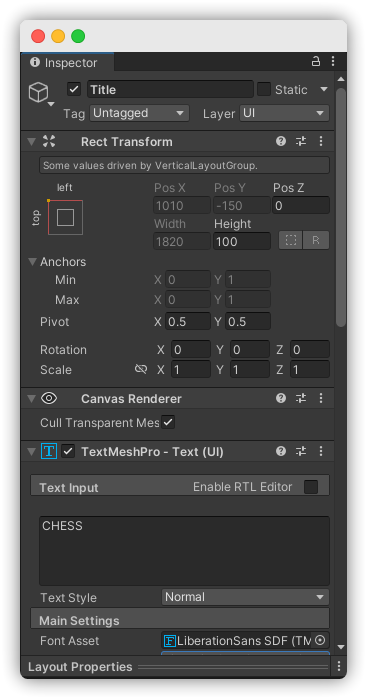
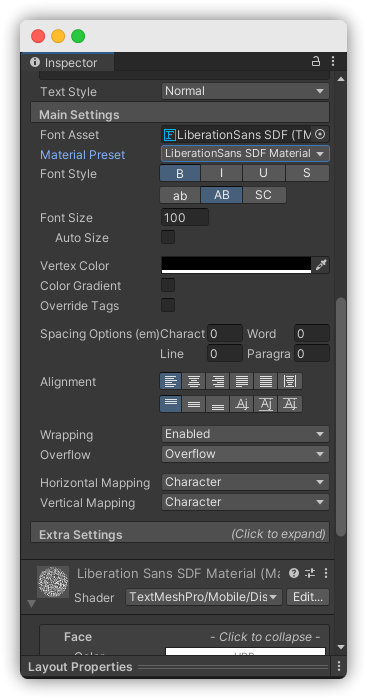
Im using a TextMeshPro, and in the canvas it has two boxes. The grey one I can adjust in the rect transform but whats the yellow one?

nevermind got it, its the margins in Extra Settings
mortal robin
 shell halo
What's this flower thing and what does it do?
shell halo
What's this flower thing and what does it do?
It's the anchors for your UI element/RectTransform

 gusty hearth
how do I change the amount the slider moves per key press? I current have a slider with 0 as min value and 1 as max value and every time I press the arrow keys it moves down or up by 0.1, is there a way to change that?
 sterile wedge
gusty hearth
how do I change the amount the slider moves per key press? I current have a slid...
sterile wedge
gusty hearth
how do I change the amount the slider moves per key press? I current have a slid...
show screenshot of your slider component
gusty hearth
sterile wedge
show screenshot of your slider component
 sterile wedge

Unity Forum
Anyone know of a way to make the new Slider bar allow for step intervals? I want to have a quality slider That allows for 5 different settings.
this might help @gusty hearth
gusty hearth
thanks
 compact ravine
I have a main menu scene and a game scene that both have ui setup in a very similar way using a UI object - Canvas - then the buttons and other things, for some reason the buttons on my main menu have no intractability but my in game buttons do, could someone help?
sterile wedge
compact ravine
I have a main menu scene and a game scene that both have ui setup in a very simi...
Do you have an EventSystem in your main menu scene
compact ravine
sterile wedge
Do you have an EventSystem in your main menu scene
That was the problem, it works now thanks 👍
 cyan sentinel
Is anyone using Unity UIElements and can tell, if its production ready?
low pike
I would say no, not yet.. but ask in #🧰┃ui-toolkit as that's what it's been called for ages now
 outer gate
How come when I add a source image to a button, it shows up all squashed? The actual source image isn't like that but it shows up in Unity like this.

If I elongate it to the right size, it changes the size of the clickable area as well which causes it to block the lower buttons. I just want the source image itself to be properly sized to fit with the button
low pike
show us the inspector for that image
also, press T to use the UI tools
You shouldn't be using the normal 3d tools, you've changed the scale there and that's a bad thing to do for UI ... keep the scale at 1,1,1 and change the width/ height of things
outer gate
 low pike
(change the scale during animations)
low pike
outer gate
that's the inspector for the sprite, not the image.. I meant the inspector for the image component
outer gate
oh
ok

Right now I have not changed the size at all
this is that size it is when simply putting it in there
outer gate
 low pike
still can't see the RectTransform because you minimized it
 low pike
1- set x and y pos to 0,0
2- set to 1, 1, 1 (always keep scale at 1,1,1)
3- tick preserve aspect ratio

oh, sorry.. 1 might not matter.. ignore that
 low pike
Now, to change the size of it to what you want... change the width/height
outer gate
Okay
I set both width and height to 800

If I set the height any smaller, it will shrink the width and the height of the image
There is still the issue of it enlarging the actual clickable area as well though
low pike
that's because preserve aspect keeps it the right dimensions
disable that to see how it looks
low pike
it'll distort and look poo
 low pike
and seriously, press T when your cursor is over the scene to use the UI tools
I reckon you wanna press the 2D button along the top too, go into 2d mode while you're doing UI
outer gate
Alrighty

This square here, is this the actual button?
Oh yeah, it is
I just don't understand how to get rid of all this extra space and just have it snap tightly around the image...
low pike
The square is for the RectTransform you have selected, I can't tell from that if it's the button with that image or not
low pike
outer gate
your image has a lot of dead space around it though
Open it in PS and trim all the alpha space away
outer gate
Alright
 coarse anvil
How do you actually use the Navigation on a button? I keep ending up at this tutorial https://learn.unity.com/tutorial/ui-navigation#5e5d3b5fedbc2a18774d09b6 but it just explains how to set up the Navigation modes/settings, but not how to actually bind it to an Input action (I'm using the new Input System)
For context, I'm just trying to make a main menu that is navigable by pressing the arrow keys (Later I'll add gamepad support, etc)
outer gate
low pike
Open it in PS and trim all the alpha space away
This solved the issue, thanks~
coarse anvil
I ended up figuring it out! I had to SetSelectedGameObject() in my event system and now it magically works!
coarse anvil
Is there any way to open the DefaultInputActions asset? I can't seem to figure it out. I want to make my own InputActions and use it as a base
mortal robin
coarse anvil
Is there any way to open the `DefaultInputActions` asset? I can't seem to figure...
Yes you can open it and even duplicate it. Easiest way to find it is make a new InputSystemUIInputModule and it will be populated there by default
If you click on it once it will open in the project window to the location

 versed lantern
 fast jacinth
and how do i make it so the ammo count is the same as
fast jacinth
and how do i make it so the ammo count is the same as
link your weapon script with your UI Manager script and set the UI Text value to your ammo count
fast jacinth
ty
versed lantern
I didn't do it yet but it should be pretty simple
 thorn grotto
Hey, We are looking for a UI artist for the Game Innovation Jam (Ends 24th March). DM if your interested and I will send details.
 whole cape
#💻┃unity-talk message, continuing from this
Discord
Discord is the easiest way to communicate over voice, video, and text. Chat, hang out, and stay close with your friends and communities.
this is the code that creates the text and buttons ```cs
GameObject container = UIUtils.CreateView(canvas.transform, "ModList - Loaded Plugins");
view = container.transform.parent.parent.gameObject;
        GameObject mods = new GameObject("ModListLoadedPlugins");
        mods.AddComponent<VerticalLayoutGroup>();
        mods.transform.SetParent(container.transform);
        mods.GetComponent<RectTransform>().anchoredPosition = new Vector2(360f, -250f);

        List<string> pluginNames = new List<string>();
        foreach (var info in Chainloader.PluginInfos)
        {
            string key = info.Key;
            string[] nameSpaces = key.Split('.');
            string name = nameSpaces[nameSpaces.Length - 1];

            pluginNames.Add($"<color=green>{name} <size=12><alpha=#32>({key})</size></color>");
        }
        string text = pluginNames.Join(delimiter: "\n");

        modsText = UIUtils.CreateText(mods.transform, text);
        modsText.overflowMode = TextOverflowModes.Page;

        GameObject pages = new GameObject("ModListPageSelection");
        var pagesLayout = pages.AddComponent<HorizontalLayoutGroup>();
        pages.transform.SetParent(container.transform);
        pagesLayout.childControlHeight = true;

        UIUtils.CreateButton(pages.transform, "Next >", NextPage);
        TextMeshProUGUI pageCount = UIUtils.CreateText(pages.transform, $"{modsText.pageToDisplay}/{modsText.textInfo.pageCount}");
        pageCount.alignment = TextAlignmentOptions.Midline;
        UIUtils.CreateButton(pages.transform, "< Prev", PrevPage);
and heres the UIUtils class
low pike
So the text is a child of the button.. correct? I can't see where teh text would do anything to the parent.
The pages layoutgroup is probably setting the height of the button
 night valley
i'm slightly bothered by the Selectable class having all the visual transition options i'm not going to use - but there's no more barebones version of Selectable, and i'd just have to implement aallll the interfaces and navigation logic myself if i wanted one, right?
and i get that storing a handful of unused colors and sprite references and floats isn't gonna be much in the end but it's kind of a matter of principle
low pike
just set the transition to 'none'?
night valley
yes that does hide the stuff in the inspector but it's still all pointlessly serialized in the scene data (afaik), and again i get that that much doesn't really matter but i was just wondering if there was an alternative
 whole cape
how can i prevent my canvas from scaling with the screen size?
 sharp oracle
Is there a way to draw a box around a UI element dynamically, without having to have a sprite for every size box?
whole cape
low pike
So the text is a child of the button.. correct? I can't see where teh text would...
i've tried everything i can't seem to change the height
it gets smaller when i change the minHeight in a layout element, but it wont change going below 0
 tawdry crystal
how do i make so that in every mobile resolution the ui is the same
mortal robin
sharp oracle
Is there a way to draw a box around a UI element dynamically, without having to ...
Use a 9-scaled image
er, 9-sliced
sharp oracle
Yes, I have found that I can do that if I install the 2D sprite package. Didn't realize that came built in and wasn't an asset or something
Next question: What's the proper way to re-select something if you click off of a UI selectable and press a navigation button? Like if you have a gamepad to navigate menus, and you click somewhere on the screen to deselect the UI, navigation no longer functions. Is there a way I can make it either re-select the last thing, or at least go to the default selected item when everything's deselected?
mortal robin
Well the way to force something to be selected is EventSystem.current.SetSelectedGameObject
But how to get that to work nicely with a gamepad navigation button etc?
The new input system ui input module has a checkbox for "deselect on clicking nothing" or something
I would say turn that off if you're using it
sharp oracle
So there's not a built in thing for it? I can make a script for it but I've ended up re-implementing so many UI functions I wanted to make sure it didn't already exist
mortal robin
If it's old input system then not sure what the best way is
I think that it's somewhat unusual to be using a mouse AND a gamepad, but it is something that needs to be handled.
sharp oracle
It's the new input system, but I do want this sort of deselecting behavior. It's more of a tool than a game, you could switch between setting things up with a mouse/keyboard and testing something out with a gamepad
It's a weird use case but it is likely someone will want to switch between the two control modes
sharp oracle
Is there no way to do "Automatic but override a single direction" navigation mode? Or is it all or nothing?
low pike
whole cape
i've tried everything i can't seem to change the height
then you haven't tried everything/ the correct things!
For anyone to help further, you're going to have to show us screenshots of the recttransforms and layoutgroup settings
low pike
sharp oracle
Is there a way to draw a box around a UI element dynamically, without having to ...
Use an asset for it https://assetstore.unity.com/packages/tools/gui/procedural-ui-193375
@lofty urchin #💻┃unity-talk message
This looks like you're using the wrong TMP, but it's hard to tell because you didn't show the inspector.
You want to use UI -> Canvas and UI -> Text TMP
 lofty urchin
i already have a canvas in use for my lives and score
wil that effect it
@low pike
 low pike
none of that is your inspector
 low pike
What does it look like in the game view ?
 low pike
so there's nothing wrong with it
lofty urchin
well....
low pike
When editing the UI the, the canvas is HUGE in the scene view
lofty urchin
yes
low pike
and you've positioned the text in the bottom left
 low pike
I do not understand that msg
 low pike
Stop pinging me and be patient, I'm not just talking to you..
If you want text there then position it there.. or use a world space canvas
lofty urchin
how do i use a world space canvas
low pike
The canvas you have is HUGE because it's the size of the screen, where you position something on it is where it will be on screen.
low pike
lofty urchin
how do i use a world space canvas
You'll need to find a tutorial
lofty urchin
where
 supple vale
Hello, which is better Old UI system or UI toolkit? Should I switch to this?
Does it use html/css or idk?
low pike
UIToolkit is xml/uss (kinda css..) .. and then c# to interegrate too.. 3 things to do
it's not production ready yet either, really
supple vale
low pike
UIToolkit is xml/uss (kinda css..) .. and then c# to interegrate too.. 3 things ...
Does it uses GPU or CPU
is it easier than regular one?
or better
low pike
tough to say, I'm used to the current one, been using it for years
UIToolkit is new, feels more complicated and I've only used for editor windows
supple vale
ok, thanks for answer!
 high blaze
idk where to ask this, but i am very new to unity, and i am wondering if there is a way to have code-changeable text in the scene, not the ui. I cant just put a image material on a plane because i need to be able to change what it says based on user input.
For example: I want text where each of the planes are:
 mortal robin
high blaze
idk where to ask this, but i am very new to unity, and i am wondering if there i...
mortal robin
high blaze
idk where to ask this, but i am very new to unity, and i am wondering if there i...
Yep that's what the TextMeshPro and TextMesh components are for.
high blaze
but those go onto the canvas dont they?
fast jacinth
why is it like this? the first is the canvas second is game tab and third is when I hit play


^^^^ on max play
 magic walrus
https://i.imgur.com/gALHLOF.jpg
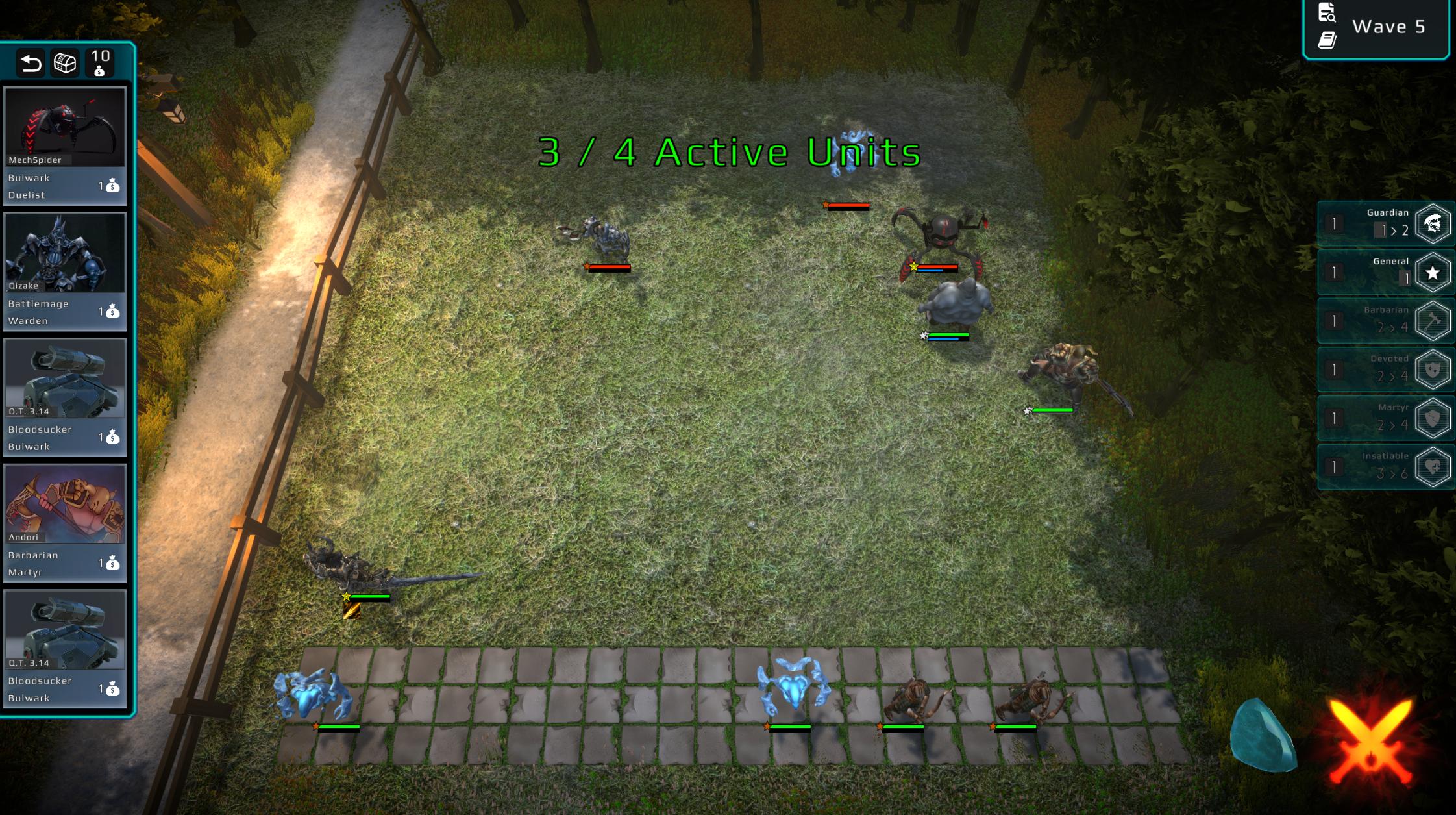
i feel like my UI looks a little plain, does anyone have any general suggestions how to make things pop a bit more?i think it's mostly the shop (middle left section) that needs something, but im not sure exactly
 mortal robin
fast jacinth
why is it like this? the first is the canvas second is game tab and third is whe...
mortal robin
fast jacinth
why is it like this? the first is the canvas second is game tab and third is whe...
Because of how your anchors etc are set up
 tight cosmos
magic walrus
https://i.imgur.com/gALHLOF.jpg
i feel like my UI looks a little plain, does an...
tight cosmos
magic walrus
https://i.imgur.com/gALHLOF.jpg
i feel like my UI looks a little plain, does an...
in my opinion it doesn't look very plain, it's fine
though that active units popup font looks a bit unnatural
sharp oracle
Is there a way to change how much a Slider moves when you press one of the navigation directions while it's selected? Using new Input System, pressing left or right changes the slider by 0.1, and I'd like to be able to tweak that value per-slider
sharp oracle
magic walrus
https://i.imgur.com/gALHLOF.jpg
i feel like my UI looks a little plain, does an...
Having some sort of bar or other UI element across the bottom and top would go a long way to frame the screen better. The open space across the middle makes it look a bit empty. Consider this screenshot of Teamfight Tactics that has some UI elements in the top and bottom center of the screen:

If you don't have functional UI to go there at least give it a bar or something so it doesn't just look naked
low pike
high blaze
but those go onto the canvas dont they?
There’s a non-canvas version of the tmp component
mortal robin
high blaze
but those go onto the canvas dont they?
Not at all
You're thinking of Text (TextMeshPro) aka TextMeshProUGUI
high blaze
Oh ok ty
tough wind
why are there these black lines on the corners of the outline? Any way to get rid of them?

 sterile wedge
What's the dif between TextMeshPro and TextMeshProUGUI? Online I found someone who said " one would be used for UI (Canvas) elements, and the other for meshes in 3D world space."
But what exactly does that mean..? are TextMeshPros just treated as 3D objects in the scene then?
sterile wedge
Thank you Osteel
 tepid thicket
Is it possible to render a world space canvas only on one side, like a plane ?
 zinc idol
fast jacinth
why is it like this? the first is the canvas second is game tab and third is whe...
zinc idol
fast jacinth
why is it like this? the first is the canvas second is game tab and third is whe...
to get rid of that, is by downgrading urp to verified version, only the verified is to install in almost everything in built-in or registry packages
brittle crag
Hello, when navigating in game menus, is it better to instantiate/destroy each new menu for example level select, settings, pause... or everything should be already on the map and we mask/show what we need? (modifié)
 normal pollen
Unity UI default sprites are ugly.. can I change it somehow, so when I create default ui elements they have different sprites
sterile wedge
brittle crag
Hello, when navigating in game menus, is it better to instantiate/destroy each n...
The latter. Instantiating and destroying repeatedly is never a good choice
 icy vector
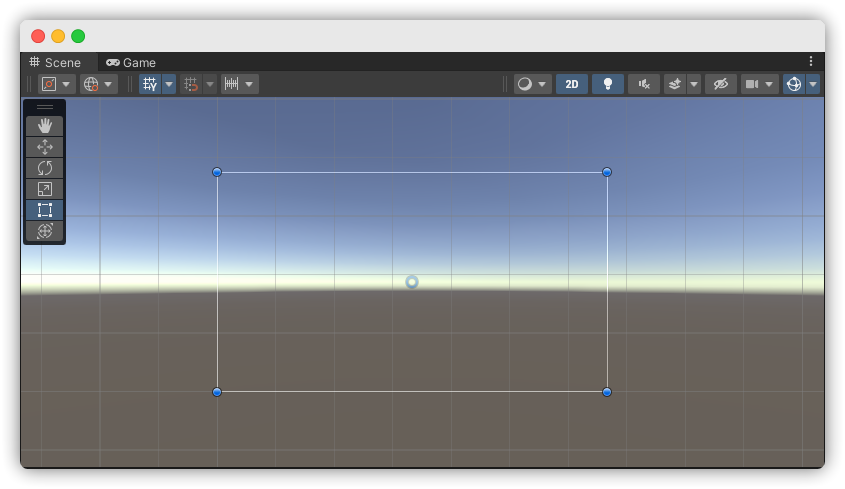
https://i.imgur.com/nKI89dD.png hi so uhm the UI shows up in game view fine but it shows like this in scene view
 mortal robin
icy vector
https://i.imgur.com/nKI89dD.png hi so uhm the UI shows up in game view fine but ...
mortal robin
icy vector
https://i.imgur.com/nKI89dD.png hi so uhm the UI shows up in game view fine but ...
Yeah this is how Screen Space - Overlay UI works
If you zoom out you'll see it in the scene view, but it's shown as 1 pixel = 1 unit
so it'll look huge
icy vector
i zoomed out
mortal robin
not sure what you have selected there though
icy vector
but its still not there
icy vector
mortal robin
not sure what you have selected there though
the canvas
mortal robin
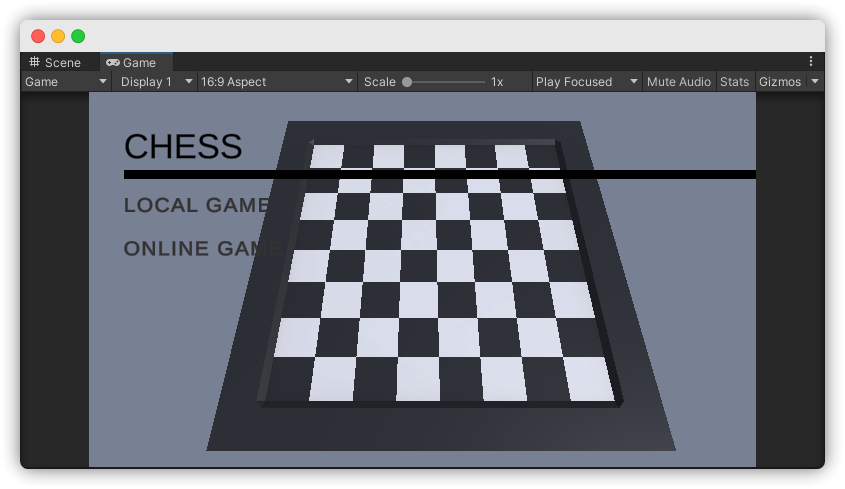
what are we supposed to be seeing that we are not seeing exactly?
 mortal robin
icy vector
https://i.imgur.com/uNxOB37.png
mortal robin
icy vector
https://i.imgur.com/uNxOB37.png
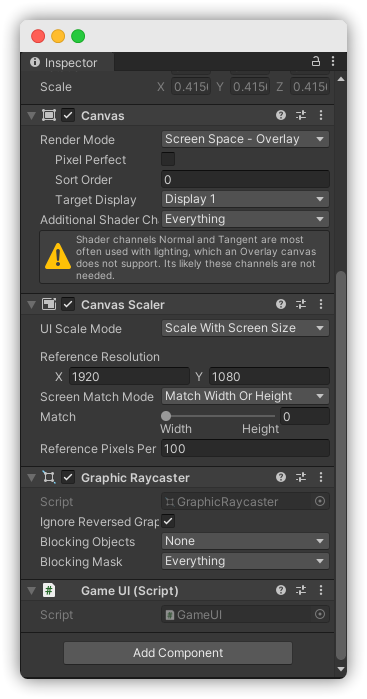
ok and - what are your canvas settings?
show some of the objects etc
icy vector
 mortal robin
icy vector
https://i.imgur.com/nKI89dD.png hi so uhm the UI shows up in game view fine but ...
mortal robin
icy vector
https://i.imgur.com/nKI89dD.png hi so uhm the UI shows up in game view fine but ...
Also do you have any layers hidden in the scene view?
mortal robin
one of the dropdowns in the top right of scene view is a layer thingy
 rustic dragon
Heyas;
I'm planning to have my dialog box have rounded corners. What would be a good way to have my text (TextMeshPro text) respect a shape like this? As currently I can only ever get the text to be a square.
 tough wind
why does changing the outline of one TextMeshPro object, change the outline of all of them?
 mortal robin
tough wind
why does changing the outline of one TextMeshPro object, change the outline of a...
mortal robin
tough wind
why does changing the outline of one TextMeshPro object, change the outline of a...
because you're changing the outline on the material that they're all using
high blaze
is there any way to set a text field to have the text inputted in a text input without code?
mortal robin
high blaze
is there any way to set a text field to have the text inputted in a text input w...
Every time you create an InputField that's the default setup
(though the opposite of what you said - InputField writes the input text to a Text component
high blaze
mortal robin
(though the opposite of what you said - InputField writes the input text to a Te...
can i chaneg which text it writes to though
mortal robin
high blaze
can i chaneg which text it writes to though
of course
it's all configured in the inspector
high blaze
i couldnt find it, itreid a bunch of stuff but it didnt work. what is the property (idk what its called)?
oh found it
mortal robin
 high blaze
thank you
is there some way to duplicate it?
because now the text doesnt show up in the input field
mortal robin
Well you could also duplicate the text yourself to another text component via the On Value Change event
 silver valley
is there a way to automatically resize rect transform so it fits the content?
low pike

 deep ridge
So I'm really not sure why the image is this big. I set it to 1920 by 206 but it still extends past the box and I can't change the canvas size.
 low pike
1- Press T to change to the UI tools
2- Press the '2d' button at the top of the scene view to change to the 2D view for easier UI manipulation
3- What width is your canvas set to?

 low pike
so.. you set your image to dimensions that are bigger than the canvas
The canvas will change size depending on the screen
deep ridge
Well, I don't understand why its locked to that, when developing usually its 1920x1080
low pike
read the docs on anchors and the presets
low pike
deep ridge
Well, I don't understand why its locked to that, when developing usually its 192...
because of the screensize
game view changes it, the gameview is deffinitely not at 1080p
got it in free aspect?
deep ridge
that'll be why. it is
low pike
change that to 16:9
tough wind
Hi i'm having this problem where the Outline component is adding some black lines to the corners of my text box, anyone know why?
 deep ridge
changed to 16:9, its even smaller now.
tough wind
tough wind
Hi i'm having this problem where the `Outline` component is adding some black li...
If I bump up the outline X&Y, the lines get weirder
 low pike
deep ridge
changed to 16:9, its even smaller now.
low pike
deep ridge
changed to 16:9, its even smaller now.
now change the canvas scalar to scale with screen size and set the reference res to 1080

slide match to whatever works for you
deep ridge
Okay, so would this still work if someones playing on a different resolution screen?
deep ridge
well, when I set the game back to free aspect it doesn't work so
low pike
don't work in free aspect
deep ridge
Then why does it work in my other scene. huh
low pike
you've set a hard size for the width/ height.. the image won't change size
you have to use the anchors/ presets.. read the docs and learn them
low pike
deep ridge
Then why does it work in my other scene. huh
because its setup differently ¯_(ツ)_/¯
deep ridge
... Okay. If you say so. Also, I know full well what the anchors do. That still did not fix that.
low pike
You're not stretching it to the width of the cavnas
 deep ridge

you mean this?
It displays fine in-game, just seems to be bigger than the canvas in editor.
low pike
that will stretch to all 4 corners, but you can stretch with just width/ height/ mid/ top/bottom.. etc
deep ridge
what the
 low pike
canvas height isn't 1080?
deep ridge
Okay, set it to that. Why can't images just get imported as is though. I designed the UI in photoshop to be the right size
deep ridge
But they don't. I have the canvas set to 1920 x 1080
low pike
You didn't
deep ridge
Well, I do now.
low pike
Click the "set native size" button on the image component
deep ridge
Think I have it working now.
 low pike
deep ridge
Okay, set it to that. Why can't images just get imported as is though. I designe...
low pike
deep ridge
Okay, set it to that. Why can't images just get imported as is though. I designe...
To clear this up.. as I've just realized we're not talking the same thing.
Images do get imported the same as they were made in PS (or wherever). Importing just means putting it in the project window and have the settings set to UI/Sprite... which converts it to the correct format for the Image component (a sprite)
Assigning a sprite to an image component won't auto setup the sizes because.. it does't know what size you want it to be, that's why the "Set native size" button is there. This bit is not importing an image.. but, I believe, the bit you meant.
deep ridge
Right. Call me blind but I can't actually find that setting "set native size"
I do have it set to "Sprite and UI" for all the images I've imported.
low pike
deep ridge
Right. Call me blind but I can't actually find that setting "set native size"
it only shows up on the image component set to the 'Simple' image type
 bronze marlin
Is it possible to change the mip map bias of a sprite atlas? can do it on individual textures, but can't figure out how to do it to an atlas
 heavy sapphire
I'm just getting started with learning UIs and have a problem. Some of my TMP buttons are registering hovering / clicks when they shouldn't be.

Well my mouse doesn't show on the screenshot I guess, but it is above the play button, and nothing should be changing colors, but the options button is. Anyone know what causes this / how to fix it?
mortal robin
heavy sapphire
I'm just getting started with learning UIs and have a problem. Some of my TMP bu...
go into scene view
look at your buttons
with gizmos turned on
See where their rect transforms actually lie
heavy sapphire
mortal robin
See where their rect transforms actually lie
That's what I see
 mortal robin
what do you have selected
heavy sapphire
The play button
heavy sapphire
I don't know ;-;
heavy sapphire
 heavy sapphire
What should the raycast padding be? Right now it's just 0 for all of the options
mortal robin
0 is good
heavy sapphire
mortal robin
0 is good
Yuhp still broken
sharp oracle
Trying to get overflowed UI text to scroll, but the ScrollRect overflow mode seems to do absolutely nothing at all. How would I go about doing this? I want the text to slowly pan horizontally until it hits the end, then restart from the beginning.
low pike
Dont have weird scales like this. UI scale should always be 1,1,1 .. use the height/width fields to change the size of the rect

(world space canvases should only have the parent with a scale <1, and scales can change for animations.. but static and generally scales should always be 1,1,1)
mortal robin
I thought scale for canvas components was generally controlled by the canvas scaler and greyed out 🤔
been a bit since I touched UI though
low pike
the Canvas scale is greyed out, unless it's a world space canvas
all the UI components below a canvas can have their scale edited
mortal robin
ah right, ok
 dapper flare
 low pike
The image isn't a child of a canvas, it cannot be displayed
dapper flare
my images wont render with the canvas renderer
low pike
If you'd have just done what @mortal robin told you to do in the first place, you'd be editing images ages ago
Right mouse click -> UI -> Image
canvas renderer is needed, but a CANVAS is needed as a parent
 low pike
that is what I said, yes
 mortal robin
dapper flare
mortal robin
dapper flare
Why'd you pick world space canvas?
just - before we go further
I want to make sure you understand what that means
dapper flare
does that mean it'll appear underneath other objects?
mortal robin
it means it appears in the game world
like a sheet of paper
screen space canvases are drawn directly on he screen, like a normal UI
dapper flare
if i use something other than world space does that mean the image has to be flat?
mortal robin
Then you can't exactly use UI for it, unless you use a render texture to draw an image rendered with a separate camera
low pike
Ignore that for now, you don't even understand the basics of UI
mortal robin
Yeah you need to revisit that later
low pike
You haven't even got a canvas setup correctly
dapper flare
so youre saying a cant cull images unless they're a canvas, and i cant use a canvas unless its a hud, and a hud can only be flat?
sharp oracle
Trying to get overflowed UI text to scroll, but the ScrollRect overflow mode seems to do absolutely nothing at all. How would I go about doing this? I want the text to slowly pan horizontally until it hits the end, then restart from the beginning.
low pike
dapper flare
so youre saying a cant cull images unless they're a canvas, and i cant use a can...
so youre saying a cant cull images unless they're a canvas
Yes
and i cant use a canvas unless its a hud
err.. what?
and a hud can only be flat?
A UI doesn't have to be flat on to the screen, it can be rotated. Ignore for now.. just learn how to setup and use a UI first
 mortal robin
frozen thorn
mortal robin
frozen thorn
you have like a grey color applied to the SpriteRenderer
and it's greyish in the first place
so that combination ends in a darker gray
frozen thorn
thx but why does it disappear after playing it for 2 times in a row
like i have 3 scenes a main one after that a 2nd level and than a congratulation scene that on button pressed takes u back to the main scene
mortal robin
What does any of this have to do with UI?
frozen thorn
but after i click that button/ after the ball fells out of the map it disappears forever
 tight narwhal
how do i fix the visible red on the outside of the bar
 mortal robin
tight narwhal
how do i fix the visible red on the outside of the bar
mortal robin
tight narwhal
how do i fix the visible red on the outside of the bar
make the black thicker? Use a sprite mask?
Make the red image smaller?
tight narwhal
how i use sprite mask
i try but couldnt get it to work how i wanted it to
it either wrote red over the black or just inside making the overlay not red
actually i was using normal mask
sprite mask doesnt seem to work on ui
mortal robin
sorry yes, mask
tight narwhal
this my result
 mortal robin
nah you'd create a mask the same size as the black image, but filled in
and you'd have the reed be "visible inside mask"
or whatever that setting is
honestly it'd be so much easier to just make the red image slightly smaller
 mortal robin
you have weird scaling going on
or something like that
and/or you need pixel perfect enabled on your canvas
tight narwhal
fixed by making a second filled sprite to use as a mask thanks for ur help

 neat sorrel
Hey, im new to UI in unity and I feel a bit lost.
I often fall into a problem which is putting everything into
horizontal/vertical layouts to make things scale "properly"
but then I want one children element to have a set size yet still
effect other elements in the layout and everything keeps breaking.
I dont make any complex ui, just super basic menus with sections and
I sometimes need to fix stuff directly by script, which I feel is
wrong when I cant use the UI system for such basic tasks (its my fault).
I watch tutorials on YT and run into problems not covered in them,
but most of the time i try to tinker with ui myself.
The problem is that I cant gain intuition for it, it is often
"click this - doesnt work, click this, oh it does what i want"
but this is not backed by full understanding of what im doing.
I want to learn UI properly and im scared that by doing it the "at least it works" way
will solidify wrong methods in me.
Do you have any tips/links that could help me grasp core fundamentals?
(fundamentals as in making the ui look how i want it to look, not make it look good, like color theory etc.)
sterile wedge
neat sorrel
Hey, im new to UI in unity and I feel a bit lost.
I often fall into a problem w...
You want one child to have set size? Look into layout element
mortal robin
neat sorrel
Hey, im new to UI in unity and I feel a bit lost.
I often fall into a problem w...
You'll want to first understand this:
https://docs.unity3d.com/Packages/com.unity.ugui@1.0/manual/UIBasicLayout.html
Then this:
https://docs.unity3d.com/Packages/com.unity.ugui@1.0/manual/UIAutoLayout.html
 ruby saffron
Hi, I am facing a problem since a while. I am working with UI in AR, but I think the problem is more in the UI part. I create a canvas and when I put it in the world space everything is correct, but when I put it in the screen space overlay I can't see the canvas. The x and y coordinates are too far away, but I can't change them, because it seems that they are driven by another canvas element. What am I doing wrong? I can change the hierarchy as much as I want, but I can't get it right.
low pike
ruby saffron
Hi, I am facing a problem since a while. I am working with UI in AR, but I think...
show us a video/ screenshots of the issue - and of the setup
sharp oracle
Is there a way I can have an object be part of a vertical layout group and also stretch vertically to fit its contents? If I try to put a content size fitter on it it conflicts with the vertical layout
The layout group is not set to control child height, only width, and the content fitter is only set to expand height
mortal robin
sharp oracle
Is there a way I can have an object be part of a vertical layout group and also ...
I think the typical way is put a content size fitter on it and ignore the warning it gives you
IIRC it works fine
sharp oracle
All right. It feels like the right way to do most UI stuff always feels like a janky workaround
 quasi river
hi all, im having a bit of trouble with a text mesh pro input field - I want to text to get smaller so the text fits with more content but the auto size thing does not seem to work that way
I have min size set to 18 and max to 48 but it always chooses the min
sharp oracle
quasi river
hi all, im having a bit of trouble with a text mesh pro input field - I want to ...
Did you adjust the min and max of the auto size?

 sharp oracle
Is the size of your UI element big enough to fit its area?
What's the recttransform of this text look like?
quasi river
ahhar! yes thanks, for some reason its set really small
 rotund juniper
okay my ui box thing is f'ed up someone help
i'll send some screens first
this is what mine looks like

this is what it's supposed to look like

this is how i edited the sprite

and i can t figure out what i did wrong
this is what it looks like in the scene
 ruby saffron
low pike
show us a video/ screenshots of the issue - and of the setup
ruby saffron
low pike
show us a video/ screenshots of the issue - and of the setup
This is the hierarchy, the inspector with the grayed rect transform where I can not change anything, and what is seen through the main camera. As you can see, the x and y coordinates of the canvas are really high, so I would guess this is the problem, but I can not change them.
 low pike
change it back to world space -> set pos to 0 -> change back to screen space
ruby saffron
I already tried this, but the x and y values go back to these coordinates all the time
Only the z value is staying the same
sharp oracle
Is there a way to use automatic navigation but remain inside a panel? Like, I have a popup window with a lot of UI stuff in it and I would very much like to not have to manually wire the whole thing up, but I don't want the navigation to go outside the bounds of this window while it's in there
 severe solstice
can anyone help with masks? i have a problem where i have 2 particle systems: each a child of a mask object. how can i make the particle systems only mask to their respective masks?
 low pike
ruby saffron
I already tried this, but the x and y values go back to these coordinates all th...
low pike
ruby saffron
I already tried this, but the x and y values go back to these coordinates all th...
Looking at my canvases, now I'm at the comp with Unity - the position doesn't matter, mine aren't at 0 and still shows up on screen.
Is your camera showing the UI layer?

 dapper idol
How do I add UI effects such as fading in and fading out, or do UI animations?
low pike
I use DOTween http://dotween.demigiant.com/documentation.php .. it has a lot of extensions which make it easy to fade a canvasgroup or colour, and move things around
dapper idol
Thanks!
sharp oracle
Working on making a scrolling text element, and I need to know if the rightmost part of the text is further right than the rightmost part of the box its in. Original plan was to just use RectTransform.rect.xMax and compare but those are in local space so I'm not entirely sure the best way to go about this. Is there some way to get the world-space rect of a RectTransform or am I gonna have to use... math?
 shrewd geode
ello does aynone know any good inventory tutorials
 coral cape
so I am having a weird problem where I can no longer click on any UI Elements. It was working before, until I recently start working on adding more UI controls in a different canvas. Then when I went back and test out the code, the old canvas just suddenly stop working. Any idea how I can troubleshoot this? I checked that all controls does have raycast checked.
 median iris
Any chance you're missing an EventSystem?
coral cape
I have two event system one is active and the other is inactive. Do they need to be in the same canvas group?
Trying something out here.
Yeah that's not it. I've duplicated the event system and make sure that each canvas have their own event system. but nope. Oddly enough, there was a pop up that can receive user input, and going through the other canvas, I can still interact UI in there. Not sure why this'd be a problem on a completely separate canvas?
was missing the graphic Raycaster... thanks
severe solstice
severe solstice
can anyone help with masks? i have a problem where i have 2 particle systems: ea...
help?
low pike
coral cape
Yeah that's not it. I've duplicated the event system and make sure that each can...
You only need 1 event system at a time, no matter how many canvases you have or how many scenes are loaded.
The event system does not need to be on the canvas, which is why it auto matically gets created as a separate game object
 narrow token
Hmm, how can I make the bottom panels position "absolute"? So when I resize the parent panel it stays. Need to animate it so that the panel increases in height and the bottom panel appears through the mask.
 low pike
Can you show a video of what's happening, I'm not clear on what you want
narrow token
Sure

I want the bottom to stay
so it gets hidden
I have it anchored to the bottom now so it does make sense that it would move. I just don't know what I should set it as
low pike
first thought.. align the panel you want to stay still to the top
low pike
that should be ok, unless you have differently sized cards
low pike
excellent
narrow token
every day I get one step closer to finally understanding anchors properly
low pike
Been doing UI for years, I still have to think about it some times.. especially with layoutgroups and auto resizing/ etc
narrow token
Yeah, yesterday I realized how bad it was to use Free Aspect while doing UI stuff
when its set to scale with screen size
low pike
A lot of peeps make that mistake early on
For all the UI elements (bar the canvas) keep all your scales at 1,1,1 too
narrow token
👍
@low pike hmm, how would you scriptwise increase its height? I'm using LeanTween to animate the size but I can't use the deltaSize from Rect Transform using that 🤔
Could probably do it without LeanTween and write my own solution but not a fan
low pike
I use DOTween
I used to use LeanTween up until I started a job in 2017, they were using DOTween so I swapped, and it's much better, simpler code (unless LT has changed in the past ~5 years)
@narrow token ^
narrow token
Interesting, so do you think it supports animating/lerping rect transform height?
because I know for a fact leantween does not
low pike
DOTween def does, I use it for everything
narrow token
Sweet. Will replace Leantween then 👌
low pike
DOTween is the evolution of HOTween, a Unity Tween Engine
narrow token
low pike
http://dotween.demigiant.com/documentation.php

was really simple to figure out :)
low pike
narrow token
https://streamable.com/u1gqal yay
Nicely done
 sand mantle
Hey everyone. So I made a Scroll Rect that has a Grid Layout containing 3D Objects in it. Yet, when I try to drag, to scroll it, nothing happens. What am I missing?

 low pike
Did you create the scroll with this?
 sand mantle
low pike
Did you create the scroll with this?
sand mantle
low pike
Did you create the scroll with this?
No, I used Scroll Rect since it's in 3D Space, there's no Canvas. Maybe that's impossible?
low pike
scroll rect is a UI component, it's for UI
sand mantle
low pike
scroll rect is a UI component, it's for UI
Isn't it the same thing for Grid Layout?
low pike
grid layout is for UI too, but it's clearly working there
they're different things though, just because one works doesn't mean the other will
grid layout is just organising the child transforms
sand mantle
Searching online I did find people that scrolled through 3D objects but no example, do you have an idea how this could be achieved?
Maybe if I put all of this in a World Space Canvas or something?
sand mantle
Okay, here's my new setup with the same issue. I tried adding "Image" which is fully transparent and above everything. and use it as a view port, same result though. Any ideas? Canvas is contained in "Collection UI Test".


 low pike
setup the scroll view to work with UI first.. then add 3d to it
I don't think you've got your scroll rect setup correctly because you just added the component
adding it via the create menu above, gives you all this
 sand mantle
@low pike very fair point, can't even get that to work in world space..
low pike
You'll need an EventSystem in the scene, which auto gets added with a canvas/ scroll view via the create menu
If you don't have that, UI won't be interactable at all
sand mantle
low pike
You'll need an EventSystem in the scene, which auto gets added with a canvas/ sc...
a.k.a Event Camera, correct?
It does work in my Main UI (not world space)
hmm..
low pike
sand mantle
a.k.a Event Camera, correct?
no
sand mantle
yet it does work in the Main UI?
 low pike
yep that's the bastard
create a new canvas with a scroll view on it .. don't change it to world space .. set it up and make sure it scrolls -> THEN change it to world space, and see if it scrolls
sand mantle
Okay it does! now I gotta figure out how to fix the proportions and such.
Alright so I added the cubes. It KINDA works but it stays stuck when I drag (goes back to initial position), like if everything was in the viewport already.

Drag does work though so it's a start.
Is there a way I can scale the Grid Layout based on the space it's children take?

Nvm I don't think I need this!
Tysm @low pike, didn't think I would get there!
low pike
np
sharp oracle
Is there a way to use automatic navigation but remain inside a panel? Like, I have a popup window with a lot of UI stuff in it and I would very much like to not have to manually wire the whole thing up, but I don't want the navigation to go outside the bounds of this window while it's in there
sand mantle
This might end up being a coding question.. not sure: is possible to make sure that my "Content" from my Scroll View, takes the size of it's children? As of right now I can make it work manually and could probably do a hotfix through code, but wanted to know if there was a clearner way to go about this? This is kinda related to the thing I said I probably didn't have to do, right above this haha..
 sand mantle
Okay, turns out this is called "Content Size Fitter".
severe solstice
how do i make a ui object only mask to its parent mask
sharp oracle
Is there a way to make a UI Input not "trap" the navigation selection if you're using a gamepad? It waits for you to submit or escape from it which is annoying if you're just trying to navigate past it with a gamepad
valid gulch
I am making a game with money popups whenever you earn something, and I cannot click a button if it passes over it. Can I make buttons clickable thru something, a.k.a can I make it so I can click thru UI?
sharp oracle
valid gulch
I am making a game with money popups whenever you earn something, and I cannot c...
Disable "Raycast Target" in the things you want to click through
valid gulch
sharp oracle
Disable "Raycast Target" in the things you want to click through
I was looking for that in the text element, turns out it was in the canvas. I turned that off and it works. Thanks.
azure flame
Can also use canvas groups to turn off several elements
coral cape
This is unusual.... Do not know why the value of this rect Transform is updating even at editor mode (not playing)

All of the components on this game object are disabled and there's no other root component that could alter it's behaviour....
 bronze otter
hey gang is it possible to stop the tmp input field from submitting when the user clicks away?
I only want my field to submit on enter
mortal robin
bronze otter
hey gang is it possible to stop the tmp input field from submitting when the use...
I don't think it does submit when clicking away 🤔
 mild pilot
Hi all
I'm getting
Cannot instantiate objects with a parent which is persistent. New object will be created without a parent.
After i moved my canvas hierarchy to DDOL
Why is this not allowed? Does UI canvas need/must not be in DDOL?
I'm adding ui at runtime btw. Static menu is i guess unaffected
I also unpacked the canvas (the whole hierarchy was a prefab), but also didn't solve it
Setting the parent of a transform which resides in a Prefab Asset is disabled to prevent data corruption (GameObject:
mild pilot
Nvm, restarting fixed it.. just wonderful
sterile wedge
What do you mean by layers?
sand mantle
Is there a way I keep TextMeshPro UI alignment in 3D Space?
Even though the object is at the same distance from the camera it seems like the text is more to the left (when the object is on the left of the screen) in one case, and more to the right (when the object is on the right of the screen) in another.. not sure why this happens or how to go about fixing this.
 sterile wedge
sand mantle
Is there a way I keep TextMeshPro UI alignment in 3D Space?
Even though the obje...
sterile wedge
sand mantle
Is there a way I keep TextMeshPro UI alignment in 3D Space?
Even though the obje...
show your TextMeshPro inspector
sand mantle
sterile wedge
show your TextMeshPro inspector
Did realize that the text wasn't fully flush with the model so that could be part of it. Seems better now!
 mild pilot
Nvm, restarting fixed it.. just wonderful
mild pilot
mild pilot
Nvm, restarting fixed it.. just wonderful
Nvm again
This error keeps coming back once in a while, i just dont get it
 broken cliff
Can i make it so that i can navigate in my main menu without having to click on something first?
bronze otter
mortal robin
I don't think it does submit when clicking away 🤔
Rip it does for me haha
My settings look like this btw


TMP input fields have always done this for me though. I just never got around to figuring out why
It's reassuring to hear that this is not the intended behaviour though
mortal robin
bronze otter
you're specifically calling OnSubmitr for SubmitField in OnEndEdit
OnEndEdit gets called when it loses focus
bronze otter
Hmmm you know now that I think about it I guess that could make sense. What would be the euivalent of OnSubmit though?
Did they just not include an event for this?
bronze otter
mortal robin
you're specifically calling OnSubmitr for SubmitField in OnEndEdit
(Forgot to tag you)
mortal robin
bronze otter
Did they just not include an event for this?
what is "this"?
What event are you trying to capture
bronze otter
Specifically the user hitting submit (enter)
I don't want it to fire when the box is deselected
mortal robin
bronze otter
I don't want it to fire when the box is deselected
Add an EventTrigger component to it
and set up an event for OnSubmit
or your own custom script implementing https://docs.unity3d.com/Packages/com.unity.ugui@1.0/api/UnityEngine.EventSystems.ISubmitHandler.html
bronze otter
I was trying to avoid something like this but yeah it seems like you have to
This thread says the same https://forum.unity.com/threads/inputfield-onsubmit-vs-inputfield-onendedit.280006/
Unity Forum
I noticed in RC1 the input field api has changed and I dont like the change. With OnSubmit I got expected behavior -> when I pressed return the event...
Seems like a pretty obvious omission though
 lofty nova
Hi, do you know how i could make little wipe effect on the tittle? I've tried to search how i could do that but i cannot find any tutorials

The intro sequence and title screen from Kirby's Return to Dreamland. All footage was captured using dolphin emulator, and OBS.
I do not own this.
 dire ravine
why are anchor points stuck like this for my pause menu prefab? it shrinks to that size in game obviously but i dont know how to amke htem bigger
 bronze otter
lofty nova
Hi, do you know how i could make little wipe effect on the tittle? I've tried to...
bronze otter
lofty nova
Hi, do you know how i could make little wipe effect on the tittle? I've tried to...
I can't say for sure how they do it but an "easy" way to do it without any traditional animations or anything is to use a technique similar to this one https://www.youtube.com/watch?v=LnAoD7hgDxw&ab_channel=Makin'StuffLookGood

In this Visual Case Study, we use shaders to recreate the various screen transitions seen in Pokemon and other RPGs.
Support me on Patreon:
https://www.patreon.com/DanMoran
Unity Documentation - Platform specific rendering differences:
http://docs.unity3d.com/Manual/SL-PlatformDifferences.html
Get the Assets for this Video here:
http://danjoh...
Create a gradient texture that'll define the timing of the wipe and then write a shader to use that texture to add a wipe that moves over time
lofty nova
bronze otter
I can't say for sure how they do it but an "easy" way to do it without any tradi...
Thanks a lot
bronze otter
Np!
normal pollen
Sup, how make a text to not get blurry when closing, zooming to it? I know I can switch in font settings in character dropdown to unicode and update font size so it gets sharp, but I also have some japanese/chinese characters and they disappear, how to handle it, do you know?
mild kernel
If you're using TMPro, it shouldn't be blurry?
normal pollen
I am not, never used it, seems like i have to take a look at this
mild kernel
You need to use TMPro and not the Text component.
Nothing really changes other than switching to that component. Plus it has a ton more features.
normal pollen
Thanks and yet another thing to learn excellent
dire ravine
yeah TMPro is a must for text features
dire ravine
dire ravine
why are anchor points stuck like this for my pause menu prefab? it shrinks to th...
bump on this, not sure how to fix
 strong river
Can somebody help me with aspect ratios? Ready to export and so DAMN frustrated...game works great in my preview..builds look shit
mortal robin
strong river
Can somebody help me with aspect ratios? Ready to export and so DAMN frustrated...
You can change the resolution in the game window to whatever you want to make sure it looks good and fix it in the editor
strong river
If I having it look good in the window how do I get it to look exactly like that in the build? Because buildling it with the same pixel resolution doesn't do it:/
So confused....I'm sure I'm just missing something but damn if it isn't frustrating!
it's like my button ui's are working, but image ui's are moved
mortal robin
strong river
If I having it look good in the window how do I get it to look exactly like that...
It does. If you set the resolution in the game view and then build and un in that resolution it will be the same
strong river
I'm trying to export to WebGL would that matter?
mortal robin
the only thing that matters is the presented resolution really.

 low pike
dire ravine
why are anchor points stuck like this for my pause menu prefab? it shrinks to th...
low pike
dire ravine
why are anchor points stuck like this for my pause menu prefab? it shrinks to th...
This isn't enough information to give you the exact fix. You're using the wrong tool for UI too (press T).
Whatever is selected is set to stretch to each corner of it's parent UI element.
The pause background is stretched beyond the canvas.
You can't drag those anchor gizmos outside of a canvas, but you can set the value to >1 in the inspector - though I wouldn't recommend it.
normal pollen
Any way how to quickly replace every single UI Text component with Text Mesh Pro so it looks exactly the same and I dont have to go through every single component myself manually?
median iris
@normal pollen
you could probably write an Editor Script for that.
Get all Text Components,
check their settings (fontsize, alignment, fontstyle and whatever you want), remove the Text Component, add TextMeshProUGUI Component, apply the settings
That would be my idea
normal pollen
Yeah, I thought there is already something in Unity or assetstore, I'll check what I can do thanks
median iris
Afaik Unity doesnt have a functionality to replace the old Text Components with TMP ones, but I can't speak for the AssetStore
low pike
Replacing the font file won't be straight forward. The Text component uses a normal font file, TMP uses SDF files, created from the font file
normal pollen
Yep, I've started writing a simple EditorWindow tool, I have another TMP font asset in place so I can put in there and replace
dire ravine
low pike
This isn't enough information to give you the exact fix. You're using the wrong ...
I just happened to have the scale tool open. My canvas is 1920x1080, but this is scaling to a much lower resolution. But I just set the anchor points to 0 and stopped caring about getting it perfect lol thanks though
sharp oracle
Is there a way to make a UI Input not "trap" the navigation selection if you're using a gamepad? It waits for you to submit or escape from it which is annoying if you're just trying to navigate past it with a gamepad
low pike
dire ravine
I just happened to have the scale tool open. My canvas is 1920x1080, but this is...
make sure the scale of UI elements are all at 1,1,1 (only the canvas won't be)
The canvas will change scale depending on the scene view size -> don't use free aspect when doing UI
dire ravine
yes, they're all 1,1,1
low pike
sharp oracle
Is there a way to make a UI Input not "trap" the navigation selection if you're ...
Is there a parent navigation element that can be used instead? And don't include the input navigation ?
sharp oracle
low pike
Is there a parent navigation element that can be used instead? And don't include...
Actually, that could be a pretty solid workaround I think. I already have a generic system in place for navigating based off of confirm/cancel as well as direction, so I can just make it go into the Input whenever you press confirm while selecting the parent. I'll give that a go
 rapid ferry


 low pike
your button scale is too small, set it back to 1,1,1
rapid ferry
ok
low pike
all UI elements should have their scale at 1,1,1... to change the size edit the width/ height
rapid ferry
ok
rapid ferry
low pike
your button scale is too small, set it back to 1,1,1
too big

my daily newspaper is set to 1,1,1 too
 lean panther
rapid ferry
too big
lean panther
rapid ferry
too big
It’s supposed to be small compared to the canvas. The canvas will be massive compared to normal objects usually
Don’t compare the button with the newspaper
Click the canvas on the hierarchy and press f with your mouse over the scene view
It’ll expand the screen so you can properly see the canvas
rapid ferry
 low pike
rapid ferry
too big
low pike
rapid ferry
too big
In the scene view UI is HUGE, and that is correct
low pike
rapid ferry
my daily newspaper is set to 1,1,1 too
It's a sprite renderer, which is in world space, a normal GameObject... it's not UI.
low pike
You can't drag sprites from the project window into the hierarchy if you want them to be UI.
 low pike
Yep, and you've got it in the bottom left
rapid ferry
so how can i put the button in the right spot if it is too big
actually my camera functions as the canvas right now
nvm it works
i just sized my things, it appears on the camera now, thank you carwash
low pike
You really need to learn the basics of UI, go here and follow the relevant UI tutorials http://learn.unity.com
severe solstice
does anybody know how to make a ui element only mask to its parent mask? i have 2 particle systems each with a mask as their parent. one particle system is still going into the mask of the other particle system. how do i fix this and make the particle systems only mask to their respective mask?
low pike
don't have them as children of both masks
severe solstice
theyre not
they are seperate

as you can see, the red and green particles leave their parent masks
 low pike
Just to be clear.. because of the channel we're in ... you're using the UI Mask to try and mask the particle system? And those masks are part of a canvas hierarchy?
a quick google shows me particle systems have their own masks, so I assume this is what you want? https://www.youtube.com/watch?v=wjtNGV9GNrw
if that's the case, then you should ask in #✨┃vfx-and-particles if that video doesn't help and you need further help

Effect Animation - How to creat 3d effect animation for game
Game effect tutorial - How to use Mask Particle in Unity 2017
► Link package : http://twineer.com/8kmf
Email: namtv28@gmail.com
severe solstice
low pike
Just to be clear.. because of the channel we're in ... you're using the UI Mask ...
yes they are
severe solstice
low pike
a quick google shows me particle systems have their own masks, so I assume this ...
wait i just attach a sprite mask component to it and it works?
low pike
I skimmed the video without sound.. so.. follow the video and see
severe solstice
fixed... thanks for your help
 sacred pine
Unsure if this is the right place to ask this but, I have a scrollrect where I have gameobjects and in Scene view it looks completely fine and how it should be but when I press play it messes up like this. If I then move any of the gameobjects even slighty, everything snaps correctly again and looks fine. What might be causing this?

 lunar walrus
When I lower the resolution it does this can someone help me?

 mortal robin
lunar walrus
When I lower the resolution it does this can someone help me?
mortal robin
lunar walrus
When I lower the resolution it does this can someone help me?
wdym by "this"?
what are we looking at
lunar walrus
I don't understand why the canvas isn't scaling after the resolution
mortal robin
What is your canvas scaler setting set to?
narrow token
How do I make a child object render on top of the parent? Basically I have a panel with a border but the border acts as a background. I want it to be on top so I tried creating a child panel and have that render the background and then set the Z to minus but that did nothing.
lunar walrus
mortal robin
What is your canvas scaler setting set to?
how do I check
sterile wedge
narrow token
How do I make a child object render on top of the parent? Basically I have a pan...
the lower it is on the hierarchy, the more in front it is when it comes to UI
mortal robin
lunar walrus
how do I check
By looking at your canvas scaler's inspector
narrow token
sterile wedge
the lower it is on the hierarchy, the more in front it is when it comes to UI
ahh thanks
 tight gazelle
Does anyone know why the ui looks like this when i play the scene?
 low pike
got any layoutgroups on the parent ?
tight gazelle
None that I initially saw
tight gazelle
Could it be something from the code?
low pike
Your code? Maybe, you haven't given anything to go off
tight gazelle
https://hatebin.com/yzqymlmyvm
This is what it looks like
tight gazelle
Wait I found out the problem
median iris
Small question, i have a TMP_InputField, deactivated Restore on ESC Key and my text is still being reset when I press ESC, is this intended behaviour? 🤔
 fossil bluff
@modest jungle
 modest jungle

 real topaz
 frosty pewter
Correctly anchor it or use a layout that anchors it. https://docs.unity3d.com/Packages/com.unity.ugui@latest/index.html?subfolder=/manual/UIBasicLayout.html
 flint flare
Could anyone help me in DMs with Rectangle Rect / Grid Layout real quick?
 frigid zephyr
is it possible to put a ui element on an object like a panel?
to fit the constrains of the panel

to move this ui element onto the plane
but im not sure
frigid zephyr
anyone know? i looked but didnt find anything
lunar walrus
mortal robin
By looking at your canvas scaler's inspector
when I make it scale to screensize it zooms in way to much
I need help
low pike
frigid zephyr
to move this ui element onto the plane
change the canvas to 'world space'
low pike
that would be the easiest way to keep it with it, yes
you'll need to change the scale of the canvas gameobject too
leave all child of the canvas at 1,1,1
 narrow token
I've added the button component to a panel to be able to fire click events easily, now I want to add the Transition Color tint. What Target Graphic should I choose to make the panel change color?
narrow token
Got it working, can't really make sense of why it didn't work before tbh
rapid ferry
What software do you use for ui menu textures?
low pike
any paint program you're comfortable with
rapid ferry
Yea I'm not comfortable with any I know
That's why I'm asking
 glacial granite
affinity designer is 50 bucks and a one time payment (compared to adobes subscription model)
then you have gimp and inkscape on the freeware side of things
mortal robin
Also Krita on the free side
sharp oracle
How would I make a horizontal layout group where the first element has a fixed width of some value, then the second element fills all remaining space? The way I thought I'd do it doesn't work:
- Layout on parent object, set to control width and force expand width
- Layout element on fixed object, set to preferred and max size for the value I want
- Layout element on the second object, flexible width checked
Okay, I have continued messing with it and I have somehow gotten it working and I have no idea what I did that was different from what I posted
I think just doing stuff in a different order seemed to have fixed it somehow
frigid zephyr
is there a way to make a grid of a ui element
mortal robin
frigid zephyr
is there a way to make a grid of a ui element
Yep, GridLayoutGroup
frigid zephyr
Ah ok
 young spire
Can someone help me out? I have no idea what's causing this.
in the editor game view this works fine but if I build it to my phone, text works well on initial load of the game scene, but then if i exit to menu, and then from the menu press play to go back to game view, the text doesn't load in. Again this is only happening on a phone build and not in unity when play testing
neon terrace
if i have an image that is 512x256, do i set the pixels per unit to the largest number? in this case, 512?
or actually, how the heck does it work anyway? i never understood it
neon terrace
seems like it's dependent on the width actually cuz if i apply 512 as the ppu it fits nicely
a lil blurry but each ship is exactly 1 unit apart
 jagged monolith
sharp oracle
Okay, I have continued messing with it and I have somehow gotten it working and ...
jagged monolith
sharp oracle
Okay, I have continued messing with it and I have somehow gotten it working and ...
This is the true Unity UI experience
sharp oracle
jagged monolith
This is the true Unity UI experience
I'm glad I'm not the only person who thinks Unity UI was coded by Warhammer 40K Orks
 frosty pewter
yours has no children
 frosty pewter
there is only one child
frigid zephyr
ok
is there a method to take ONE object and replicate it across the canvas, and still access it as if it came from a table
indexed by a number
so one button gets replicated and given a unique number
frosty pewter
No.
frigid zephyr
is it possible via scripting
frosty pewter
Sure
frigid zephyr
it would seem like it but from a logistical standpoint it seems very complex
maybe not for someone else but im not particularly good at spacing things let alone in scripting
frosty pewter
You wouldn't need to space it out because you can just let the grid layout do that
frigid zephyr
so I can instantiate a new button, give it a unique number to index, and have the grid layout space it
frosty pewter
Yes


 barren totem
Hey guys !
I'm trying to make a simple thing and can't find much help on google : I want to draw a rectangle in a canvas directly in the Canvas (not with a script).
I though the "Stretch" on the rect transform with help me do it it but I can't do anything else than simply center it :
I want to make a simple black rectangle as a border to the red healthbar.


 low pike
sprite renderes aren't for UI,
Don't drag sprites from the project window into the hierarchy for UI
rmb -> UI -> Image -> drag sprite into 'sprite' field on the image component
barren totem
this part is for the health bar displayed directly under the player sprite, is it not something that should be put under the player entity in the hierarchy ?
low pike
I want to draw a rectangle in a canvas directly in the Canvas (not with a script).
You said you wanted it on a canvas. Canvases are for UI, which don't use sprite renders.
Sprite renderers don't use RectTransforms either.. though they may work with them
barren totem
ah yeah, it's my second project, and the only UI I had previously was on a canvas
this time, I want the health bar under the player entity, but the player entity stays in the center of the screen, so the health bar could be put relatively to the screen (although that may not be the best)
low pike
it's fine to use a sprite render
when health is at 50%.. what do you want it to look like? What does it look like behind the bar?
If you want the red to get shorter and reveal black behind it, then all you have to do for an "outline" is have a black box that's slightly bigger than the red box.. so when the red gets smaller, the black is revealed
barren totem
managed to do this, using the rmb -> UI -> Image to make a black rectangle as the border, and a grey one as the background
(and duplicated the whole this as a yellow energy bar)

I know that it's not the best thing because the health bar is centered based on the camera and the camera centered on the player, instead of both being centered on the player, but it should do it for now 😄
low pike
excellent
 inland obsidian
When do I actually have to enable Raycast Target on images? I usually turn it off just to prevent possible errors in the future
low pike
when you need them to block the raycast
inland obsidian
low pike
when you need them to block the raycast
But it seems that you usually don't want that right? I wonder why Unity has it set to true by default
low pike
because usually you do want it
jagged monolith
You don't wanna go around clicking buttons that are hidden behind other UI
 runic venture
ContentSizeFitter seems to always be one step behind when the child TextMeshPro changes text
neon terrace
is it possible with the content size fitter to expand this panel without making it look like.. well, bad?
or i do i need a really basic square panel to make it look good?


never used the content size fitter before. it's a neat thing but i feel like there are some limits with non square panels
it also has a vertical layout group on it
sterile wedge
neon terrace
is it possible with the content size fitter to expand this panel without making ...
you need to slice the background image
perhaps tile it, judging by the grid pattern it has
neon terrace
its looking better now

too bad there is a single row of rectangles instead of squares but it works and no one will notice it
now im not understanding why the last element is outside of the panel uh
fixed that too lmao, thanks again wytea!
sterile wedge
haha what? totally beamed the solution for that bit into your head
neon terrace
sterile wedge
haha what? totally beamed the solution for that bit into your head
wait wym xD
sterile wedge
nvm 🙂
neon terrace
XD but yea i was mainly thanking you about the tiling thing
https://www.youtube.com/watch?v=pX1UC0Gh8KI this could be useful for anyone else who needs it

Unity Sprite Scaling for beginners
Welcome to MetalStorm Games where you will learn how to make 2D and 3D games using the Unity Game Engine. My channel has a focus on Game Development for the beginner to intermediate level of programmer and game creator using C#. Please click the subscribe button if you would like to follow for more game develo...
 mighty obsidian
Hi I have a doubt can someone help me please how to bring worldspace canvas over the overlay canvas?
 tidal socket
mighty obsidian
Hi I have a doubt can someone help me please how to bring worldspace canvas over...
tidal socket
mighty obsidian
Hi I have a doubt can someone help me please how to bring worldspace canvas over...
Change the screenspace canvas to worldspace, tweak their sorting layer...
mighty obsidian
tidal socket
Change the screenspace canvas to worldspace, tweak their sorting layer...
I want to do the reverse of what you say like highlight one of worldspace canvas with a black screen in the overlay canvas
tidal socket
mighty obsidian
I want to do the reverse of what you say like highlight one of worldspace canvas...
Reverse? I mean you could change the screenspace canvas to worldspace, lower its sorting layer.. For the worldspace canvas you want overlayed, increase its sorting layer..
mighty obsidian
tidal socket
Reverse? I mean you could change the screenspace canvas to worldspace, lower its...
Thanks let me try it
dire ravine
When I instantiate a UI prefab with the following code, all of the anchors get set stupidly small. (see editor screenshot) Its anchored to the canvas, which shoudl not be doing that to it, as its anchors are as large as the screen. How do I set them back to 0 position when instantiating with code? (Alternatively, not have it be modified in the first place)

 mortal robin
dire ravine
When I instantiate a UI prefab with the following code, all of the anchors get s...
mortal robin
dire ravine
When I instantiate a UI prefab with the following code, all of the anchors get s...
wdym by "the anchors get set stupidly small"?
dire ravine
see screenshot of the rect transform
dire ravine
makes it look like this
 mortal robin
well how is it set up in the prefab?


 dire ravine

when dragging the prefab in via editor it doesn't do anything weird, but the anchors change like that only when instantiating
mortal robin
try using the form of Instantiate that takes the parent
you shouldn't need any of the other stuff
PauseMenuInstance = Instantiate(PauseMenu, ParentCanvas.transform);```and comment out the other lines
 trail trail
So, I have a 32x32 9 Slice image that I'm looking to plop in for some UI elements.
I have the 9 Slice setup correctly, however when placing it in the UI, the scale is like.. super off? Everything looks really weird?
What could be causing this issue?

 mortal robin
trail trail
So, I have a 32x32 9 Slice image that I'm looking to plop in for some UI element...
mortal robin
trail trail
So, I have a 32x32 9 Slice image that I'm looking to plop in for some UI element...
what's the issue? The thickness of the border?
trail trail
mortal robin
what's the issue? The thickness of the border?
Yup
mortal robin
trail trail
Yup
What happens if you change the pixels per unit. Maybe to 1?
trail trail
So, I think I figured it out. This was set to 32, as I was making the assumption, 32 x 32 assets? Anyways, changing that to 100, and the image pixels per unit multiplyer to 1, fixed it.

 tardy rose
I cant find text or button under ui. how can i add them?
 sterile wedge
tardy rose
I cant find text or button under ui. how can i add them?
sterile wedge
tardy rose
I cant find text or button under ui. how can i add them?
Use textmeshpro
tardy rose
but textmeshpro has different things inside
sterile wedge
Text mesh pro is better
If you insist, it's under the legacy option
But it's legacy for a reason
tardy rose
okay thank you
cyan sentinel
Hey there, is there a way to update the textStyle of a tmpro at runtime that I defined in a scriptableobject?
 small grove
Hi, I am making a simple inventory system and I was wondering can I add 3d objects as images to the slot instead of making a picture for each one?
cyan sentinel
small grove
Hi, I am making a simple inventory system and I was wondering can I add 3d objec...
You can with a rendertexture for example or just placing the 3d objects if your UI is camera space. But you do not really want to show all items in the inventory at once. That might kill performance when you get to a point of having a lot of 3d objects with a lot of polygons
sterile wedge
cyan sentinel
Hey there, is there a way to update the textStyle of a tmpro at runtime that I d...
Not sure what you mean by text style, but you might be able to do something with rich text