#📲┃ui-ux
1 messages · Page 58 of 1
 mortal robin
 wise shadow
don't know what other channel i'd put this in, but i'm having some issues with materials not tiling
 stone pollen
damn, that worked!
Thanks.
 strange sentinel
yo idk if this is the place to ask but i got a main menu set up and im new to unity and c#, can anyone help me get an OnMouseOver Function to Enlarge the text elements on buttons when i hover over them
i think i can handle the scripting part but i dont know if 1) id need multiple scripts for each text/button or if i can attach it all to a parent/the main menu object i have with all of my buttons attached or 2) where id attach it, if i would attach it (if multiple) to the TMP text attached to the button or the Button itself, probably the TMP text right?
 rigid summit
to each, simplest
otherwise you will go insane trying to filter and process events, its probably way over your head atm
you can write a script that has a field target
similar to Button, it also has a target
the root rect is receiving events, but the target gets animated
this way you can attach the script to for example transparent rect, and it will receive events instead of the small rect target
@strange sentinel
strange sentinel
rigid summit
<@!301354156873220099>
cheers thankyou
gonna be honest i did not understand alot of it but with what i got ill go experiment and find out
 quaint hazel
bumpies
 mild kernel
quaint hazel
bumpies
mild kernel
quaint hazel
bumpies
Unity has a Vector Graphics packages for SVG support.
quaint hazel
yh but it doesnt work for ui
atleast i havnt been able to
sprites work but not images
mortal robin
quaint hazel
sprites work but not images
Sprites are what you use for UI
 fluid ginkgo
Why hasn't UI been pushed off onto another thread that's on another core where the target device has a separate, spare core?
mild kernel
Perhaps you can suggest it:
https://support.unity.com/hc/en-us/articles/205692319-How-do-I-submit-feedback-about-Unity-
fluid ginkgo
mild kernel
Perhaps you can suggest it:
https://support.unity.com/hc/en-us/articles/20569231...
are you joking?
mild kernel
No?
fluid ginkgo
after 10+ years of troubles with the performance of UI transforms and dirtying and all the other issues of the UI system, and the growth of multi-core cpus to the point that 4+ cores is the norm on mobile phones... you really think they need this suggested to them? I'm seriously asking.. why hasn't it been done?
mild kernel
Who are you asking, here?
fluid ginkgo
Anyone that uses UI and thinks they might know why it hasn't been done.
Of all the things that a game engine does, can you think of anything more appropriate to existing on another thread than the UI?
mild kernel
Nope
fluid ginkgo
Neither can I. that's why I'm very curious as to why it doesn't at least have a thread of its own (like Audio) and why it's not been given priority access to one of the many inactive cores on just about all modern devices, consoles and computers.
Correspondingly, Input should be on its own thread, and polling at whatever is the fastest rate wanted from the lowest latency input device connected to the target platform. Between them, the input thread and the UI thread could decide if an input is for the UI, or for the game, and pass through that which is for the game, and block that which is to be swallowed by the UI.
If I also need to suggest that, to a 30+ billion dollar company, there's no hope for SRP, ever.
 azure flame
@fluid ginkgo Not a place for rants. You're going for a record today. You've been directed already to a proper place where to provide input on development.
fluid ginkgo
Do you happen to know why UI isn't on its own thread? @azure flame ?
azure flame
fluid ginkgo
Do you happen to know why UI isn't on its own thread? <@!306009802096771072> ?
fluid ginkgo
It's not a suggestion. It's a question.. WHY IS IT NOT?
If you don't know the answer, that's fine. I thought someone might know a reason why it's not on a thread of its own.
If there's a good reason why it's not on a thread of its own, that will inform my usage. And the usage of most everyone else.
fluid ginkgo
You seem as unsure as I am. I don't see how UI needs to be part of the main thread, and I honestly can't think of anything more appropriate to threading offload than UI (especially since it has differing update criteria to most/all game logic).
Physics has been (especially Box2D) very successfully offloaded to other threads and Jobs, and is significantly more entwined with most games and their logic. Similar to Audio, we call at UI to update it. So I don't see "logical" reasons for not pushing UI to other threads. Are there other reasons it might be stuck on the main thread?
diegetic UI might be the exception. It might always need to be on the main thread, so that it can be in the same transforms computational "world" as the world objects. But most UI is not diegetic.
strange sentinel
i loaded up my project and for some reason my background is in my Canvas
whenever i take it out of my canvas
it disappears completely from my scene view
i have literally no idea why
mild kernel
If your background is in your canvas, it's using a RectTransform which can't exist outside of a canvas.
If you don't want to use the UI for your background, create a sprite instead.
strange sentinel
i wouldnt mind usually however it seems to be messing with particles
my particles are never picked up by the camera and seem to not be able to be shown infront of my background whatsoever
my main camera in scene view also started showing completely blue today lmao so many issues today that idk where they came from
mild kernel
Then use a sprite. Screen space canvases are literally that, in screen space. It sits on top of everything.
strange sentinel
if i put my particle generator inside the canvas would it work or nah
mild kernel
No, particles are in world space. There are assets and third party particle systems that work on UI you could research.
strange sentinel
so i cant just slap a particle generator in the foreground infront of my UI main menu
camera doesnt even pick it up so i assume not
 worn grove
You can get particles working in UI but you need a canvas that renders using a camera for them to show, and their sort order and layer need to be correct.
 lost ridge
Hey!
I was wandering...
I made a Sprite atlas
but it doesn't use as showed inside the profiler
do I need to take all image component and re-assign it ?

Also how it's possible to have different material instance for a copy of the same UI ??
(Take a look at the Background Blur being twice)
It's EXACTLY the same parameters!!
 desert blade
if you ever find out tell me lol
you will probably need to do something using camera nearclipplane
i dont know what you mean overlap tho
like you can do a horizontal layout group
it seems like you are doing it already tho
 midnight hound
Heya, i'm having a very weird issue with TextMeshPro:
https://i.gyazo.com/1e2db28831a9bd65539d85466ce2166b.mp4
Basically, whats happening is that i manually put together text flow (since linked text isnt sufficient for what i need it to do). when getting the overflow character index, it doesnt work on the first load, but loading the text again, the overflow index is being picked out correctly. Is this a bug, or am i missing something?
it essentially boils down to this
...
textObject.text += text;
textObject.ForceMeshUpdate();
...
int lastChar = textObject.firstOverflowCharacterIndex;
...
string newText = textObject.text.Substring(lastChar).TrimStart(' ');
textObject.text = textObject.text.Substring(0, lastChar);
... // textobject changed to the second one here
textObject.text = newText;
any idea how to work around this issue?
(i hope this is the right channel to ask)
 sturdy night
Does anyone know to make text scale with a background Image?
say I have a jpeg of Google search, and I have text from unity on top of the image, when the resolution changes, the text gradually moves away from the search bar. Are there any tricks to keep text in a certain spot regardless of resolution?
azure flame
If you use the same type on anchor on both the Image element and text they will be resized the same way.
 rugged rover
How can I skew text so that it's in the shape of a trapezoid?
As in, I'd like to be able to translate only the top two corners of this to give it a slanted effect.

 sterile wedge
rugged rover
As in, I'd like to be able to translate only the top two corners of this to give...
sterile wedge
rugged rover
As in, I'd like to be able to translate only the top two corners of this to give...
there are some resources out there if you look up "how to skew ui unity"
 humble juniper
How do I get the screen at Start of the compiled Game, where I can select the Resolution and if windowed or not. (do not need any quality settings)
Somehow this is gone in my project, so on my iMac it always starts in 5k Fullscreen - runs fine, but sometimes I would prefer a smaller windowed version.
 jagged monolith
humble juniper
How do I get the screen at Start of the compiled Game, where I can select the Re...
jagged monolith
humble juniper
How do I get the screen at Start of the compiled Game, where I can select the Re...
This is an old feature that has been removed unfortunately
humble juniper
Ah ok
 sharp ravine
Is there no way to align UI? My OCD is killing me not being able to know if my UI is flushed!
 digital kayak
sharp ravine
Is there no way to align UI? My OCD is killing me not being able to know if my U...
digital kayak
sharp ravine
Is there no way to align UI? My OCD is killing me not being able to know if my U...
you can check the positions (compare the numbers) of the rects, if you want to automatically snap to something there are pivots and anchors, and layout groups too
and if i remember correctly if the rect is a child of another image then it can snap to that parent when you change size
sharp ravine
digital kayak
you can check the positions (compare the numbers) of the rects, if you want to a...
Not what I’m looking for unfortunately…
That’s work I’m not looking to do (trying to figure out those positions), weird such a simple UI feature is not available…
digital kayak
i mean there are many tools to align ui that i listed
manually checking the numbers is just one
there are probably some things on the asset store that can assist, i think there's another ui system called ui toolkit or something
humble juniper
And there is no way in newer versions to select resolution or windowed/fullscreen at the start of the compiled game/app (development build)?
mortal robin
humble juniper
And there is no way in newer versions to select resolution or windowed/fullscree...
You can do this, you just have to make your own.
 cedar ember
Hey guys, how do you expand the size of the boxes?

I can't seem to extend the box for How to Play
sterile wedge
cedar ember
Hey guys, how do you expand the size of the boxes?
Click on your scene view and press T
You should be in a mode where you can drag the boxes
 cloud lintel
Can I convert GraphicsFormat into TextureFormat?
 boreal remnant
Hey gang, I have a question that's a bit out there,
Does anyone know of a mobile app developed in Unity, that has very sleek and responsive UI, and is available on the app store?
 rapid ferry
Hi I tried creating a custom dropdown it is opening correctly and I want to close it when clicked on outside of the dropdown content area how to acheive this?
jagged monolith
Have a look at the built-in dropdown @rapid ferry I think it does that by just adding a plane over everything else under the dropdown
mortal robin
boreal remnant
Hey gang, I have a question that's a bit out there,
Does anyone know of a mobile...
sure, Pokemon Unite
 winged wren
I am having an issue where when you open game for the first time (doesn't matter if it is in editor, or android), the UI is slightly off. When in Unity Editor, I press Game tab, then get back to Scene again, it fixes itself. It's not an issue for me to do it in the Editor, but how to fix it in Android?

 obtuse tangle
If I build my game with the game tab's resolution left on a selected one (let's say 1920x1080 for example, which is 16:9) and then opened the game on a screen that's let's say 20:9, would that show objects that are not supposed to be viewed by the camera? Or would it be resized via bars or whatever to fit the selected resolution?
 mighty oar
Do I need a collision box on Buttons to call OnMouseOver() like with other objects, or?
jagged monolith
For UI components you should use the IPointerEnter/Exit interface
 runic venture
The components are all crunched together in the inspector, and I can't scroll

 lost lake
Hello, How do you Z order elements on a Canvas when you use a Grid Layout and Hierarchical sorting conflicts with the Grid order?
 nocturne valley
attach a canvas component to whatever I want to change the sorting order on
 twilit wraith
Hey, is there a way to link two ui elements so that when one is selected, it doesn't deselect the other?
Or is there a way to make it so an input field continue to register the keyboard even when not selected?
 near locust
Hello! I'm currently trying to make a drag and drop system for an inventory UI. So i have a grid of cells in which can generate item icons. I'm using the IDragHandler interfaces to be able to drag them. However when calling "OnBeginDrag" and changing the parent of the item object, the object seems to be offset until its parent is set back to a cell
I put a red dot for the mouse's position
 mortal robin
twilit wraith
Or is there a way to make it so an input field continue to register the keyboard...
mortal robin
twilit wraith
Or is there a way to make it so an input field continue to register the keyboard...
You will have to do some of your own coding for a secondary "selection" and/or adding text to the non selected input field
near locust
Problem fixed: made the dragged UI object a child of the canvas
 polar thistle
I'm making some widgets today and was playing around with masks. Is there any way to mask an image and move the mask around without the child object moving as well? I don't want to have to code a bunch of movement stuff ... but it looks like masks only mask child objects, not siblings above/below them in the heirarchy, which means the child objects depend on the mask location
 velvet seal
Is there a way for a derived class to hide a field from a parent class in the inspector without making a custom editor for the whole thing?
polar thistle
[HideInInspector]
But I'm not 100% sure what you mean "hide a field from a parent class".. you just mean hide the field in the inspector?
digital kayak
rapid ferry
how do i make any text to show in front of a sprite?
is the text on the canvas and is the sprite a gameobject
rapid ferry
sprite is not but yes the text is in canvas
oh also the text goes over the sprite when the layering is under 0
so text will appear on my sprite when the sprite is layered -1
nvm its working
nvm its not
polar thistle
if they're in the same layer, then make sure the text game object is below the sprite object in the heirarchy
you can do this programmatically with SetAsLastSibling(), or if you're in the editor, just drag the game objects up/down in the heirarchy:
ParentContainer
|
+--Sprite
+--Text
rapid ferry
there's still a problem

it still dosent work after putting the text in canvas
do i need to make all my asset layers below 0?
halp pls this is a school project due in sunday
 ivory mulch
Hey guys, I have an issue. My UI seems to be ultra low quality for some reason. There is no compression on it, doesnt seem to fix anything.

The smaller images are not supposed to be pixelated
rapid ferry
oh i need to put the sprite layers under 0
ivory mulch
Quick question. How do I prevent my health bar from moving? I am using the slider component
https://gyazo.com/7921163d058d871dff9c400262e2a393

 bold mountain
Opinions on using a rendertexture to use a 3d object as.. a visual representation of an inventory?
on the ui
like, say, a 3d shelf or table, or display stand, populated with animated 3d objects
(or rigidbodies)
 real arch
bold mountain
Opinions on using a rendertexture to use a 3d object as.. a visual representatio...
real arch
bold mountain
Opinions on using a rendertexture to use a 3d object as.. a visual representatio...
if you render the image just once and then just load the image from chache , sure that could work
bold mountain
I was hoping to have it live, coming from another camera
real arch
just for one object at the time?
if its only for one object then it can work
not if you are trying to have like 10+ Objects renderd every frame
bold mountain
was picturing like a bookcase type thing with cubbyholes, and have spinning 3d objects to represent the inventory items
probably too fat eh
I guess I could find out myself with an experiment
would it just be like.. rendering the 3d mini-scene twice, or is there a lot of overhead for an every-frame rendertexture
 feral temple
How can I retrieve/change POS Y in Code directly?
When I access Recttransform.position.Y its -361 something
I need to to change the -50 value directly
 sterile wedge
feral temple
How can I retrieve/change POS Y in Code directly?
When I access Recttransform.p...
sterile wedge
feral temple
How can I retrieve/change POS Y in Code directly?
When I access Recttransform.p...
anchoredPosition
rapid ferry
how can i make a slider fill image not to stretch?
 hazy lake
Hey guys ! I have a problem
Im having issues with scaling for different screens
How do i make my game look good on every display?

Like here it s elongated
sterile wedge
You’d need to set the anchoring of your UI elements properly
hazy lake
It s set to by doing alt and the bottom most right option
sterile wedge
It’s a little in-depth for me to explain, but there is a UI tutorial in unity learn
Usually you use stretch a lot
hazy lake
 hazy lake
sterile wedge
Usually you use stretch a lot
hazy lake
sterile wedge
Usually you use stretch a lot
No not really
It s a 16:9 image
And it streched a lot
sterile wedge
You can also use preserve aspect ratio in your Image component
hazy lake
Oh thanks
sterile wedge
hazy lake
No not really
This is my experience. Perhaps you have yours set differently. There are many ways to do UI, hence why it’s a bit difficult to tell you what you could do
But at least you’ve discovered the anchoring bit on your own
digital kayak
hazy lake
How do i make my game look good on every display?
what setting is your canvas scaler in?
hazy lake
digital kayak
what setting is your canvas scaler in?
Scale with screen
 torn python
when i drag to scroll, the animation is smooth, but when i use scroll wheel it gets choppy
is there a fix?
 coral echo
Hello. i need to make Scroll Viewer which would have table with informations (string) from other scripts. I have problem to make table (dont know how) and problem the table would change size of new informations ... i saw some String table in UI document but i dont know if i can use it into scrollview and i dont have it in assets. Doesnt anyone know what to do?
i would do it as 40 texts but i have problem with resizing the bounds
real arch
@coral echo try seperating the issues
first try to make a table
then you can see what you need to do to get it to adjust the scroll content size
coral echo
real arch
<@!434730926749253632> try seperating the issues
first try to make a table
then...
yea i did it. ty!
torn python

i want my button to hover green whenever it's selected
is there a way to 'select' a button using code?
azure flame
torn python
is there a way to 'select' a button using code?
The last answer shows how, using EventSystem https://answers.unity.com/questions/945867/highlight-button-via-script-at-runtime.html
torn python
ty
 reef jasper
I'm having a real brainfart moment. On a canvas, how do I get an image to scale itself to fit behind a TMP text object, based on the text content? Like a basic frame
azure flame
Depending on settings text will resize its RectTransform, I think with dynamic anchor you can fit image there as a child to it will resize.
Nope, this way you'll have to update rect manually.
@reef jasper Content size fitter on the text object will resize it set correctly, then child image with stretch anchor. It will have to use custom material to be sorted under the text.
reef jasper
azure flame
<@!319199401098870786> Content size fitter on the text object will resize it se...
Thanks : ) I have no idea what the Content Size's "Unconstrained" vs "Preferred Size" means but Preferred seemed to be the only setting doing something
cedar ember
How can you maintain the look of the game on different screens? I'm confused with what to use in the UI
azure flame
cedar ember
How can you maintain the look of the game on different screens? I'm confused wit...
Use anchors in relative position and set canvas scaler component to the one you need.
If you use reference resolution you can fix the look for any screen, but it will resize smaller, there are trade offs. Experiment with that components and screen sizes to desired effect.
Keep in mind that you will have to size the camera view accordingly. There are tutorials for that online.
cedar ember
Hmmm, I see
I take that back, I honestly did not understand what you said
But, I'll check on tutorials online and see what they did
azure flame
Things to lookup - canvas scaler component is on the root canvas. And how RectTransform anchors work for relative positioning.
reef jasper
azure flame
<@!319199401098870786> Content size fitter on the text object will resize it se...
Uh, so about that custom material, I didn't think I'd get lost but I underestimated how involved that might've been. How would I go about tempering with the layering?
azure flame
Eh, I tester with URP material shader it worked fine. The default material which is when it's not set at all, I think will draw the child over the parent, since UI is sorted by hierarchy. But if you use non UI shader text will be sorted above it and it will become background
Might be problematic sorting it this way if more UI overlap on the screen
If it's become the problem you can use default UI shader on the image and instead place it above the text to be under it, and resize its rect through code to set the same size as the text rect.
reef jasper
Ay, I think I'll have to do that, I don't seem to be able to overwrite that hierarchy shenanigans even when swapping materials around which is bizarre, shader settings are also greyed out no matter what material.
Hierarchy layering is proving itself a very silly design choice
azure flame
No, you need to create your own material asset to assign there
It's greyed out when material is unset aka using the default material.

Hierarchy sorting makes sense internally, since canvas has own way of rendering entire thing when UI components used.
Allows for optimizations, I think.
reef jasper
Oh some options are actually greyed out with custom materials, but not all, I missed that
But when the positional logic depends on hierarchy I have to say it's very silly to constrain the two together?
azure flame
That's why they have Layout components to manage that. I might have missed some configuration that would allow to do that with just components
reef jasper
I see :')
Also this is hilarious, it works in scene view but not game view, hah, I'll find workarounds I guess
 azure flame
Usually it's the other way around, you resize the image and fit the text. Since doing it other way around could break layout
reef jasper
ah, uh, I thought that was what we were trying to do? That does sound like; text content deciding how big the image size should be, yes?
azure flame
reef jasper
I'm having a real brainfart moment. On a canvas, how do I get an image to scale ...
Not sure I understand, your question was to resize the image to text. Other way around is basically a button component does that, just pick appropriate text formatting.
reef jasper
If I right click and create a preset button the image texture doesn't do anything to fit around the text, it is stationary. The text simply wraps. Surely that's not ideal for anything
reef jasper
alright but that's not... that's not really relevant to the image resizing question any more. Either way, I just find it rather silly to constrain text inside a stationary box instead of intuitively allowing the option to stretch the box to frame the text
rapid ferry
Hi, I have a situation where one of my sliders' fills won't show up in game. It's anchored just like the rest and the value updates as intended. Any help would be appreciated, thanks.
 empty sparrow
hey guys, I am making a cubic mining game and I want to make counter that count how much cubes I destroyed with specific tags and another counter that count how much cube from specific tags in scene, and I don't know how to do that.
rapid ferry
empty sparrow
hey guys, I am making a cubic mining game and I want to make counter that count ...
Declare an int cubeA and cubeB and wherever you destroy the cube add
    cubeA += 1;
else if(cube.gameObject.C
ompareTag("Cube B"))
    cubeB += 1;```

Make sure to add the tags in the editorand wherever you change scene also change cubeA and cubeB to 0
empty sparrow
rapid ferry
Declare an int cubeA and cubeB and wherever you destroy the cube add
```if(cube...
is the cube variable the text?
rapid ferry
i just used cubeA and cubeB as an example, but you would change them to whatever the different tagged cubes you wish to count are. They're integers, not text.
empty sparrow
no i mean if(cube.gameobject) this cube is it the text vareable?
rapid ferry
oh, that's the cube that's being destroyed
you'd probably want to store the cubeA and cubeB values on another script and just access it
 north magnet
hello, I am making a button object but when I click the button it doesn't execute the function. Can anyone lend me their knowledge? Thank you very much.

also when I hover over the button it doesn't transition into the new sprite
 empty juniper
how do I use toggles? To be specific, how do I add the bool that I want it to change. I input my script in the On Value Changed thing, but my public bool is not appearing
 obsidian loom
north magnet
hello, I am making a button object but when I click the button it doesn't execut...
obsidian loom
north magnet
hello, I am making a button object but when I click the button it doesn't execut...
Maybe this can help?
https://stackoverflow.com/questions/46850003/unity-canvas-button-not-working/46853063#:~:text=Run the game in the,next to the field pointerEnter

Stack Overflow
I added a canvas component to one of my images to override default layer order sorting. Turns out the button controls on that panel have stopped working?
Has anyone any idea about this in Unity? I...
north magnet
I solved it! I needed to add a Graphic Raycaster to my canvas
obtuse tangle
I have a button that's being handled with IPointerUp and IPointerDown Handlers. I want to catch the case when the finger is pressing the image/button (the script is on an image) but moves away from it while it's still touching the screen. Would IPointerEnter & Exit help?
 dense terrace

My textmesh pro text hasn't been working for a while (it shows up as pink boxes), and it seems like my shaders are too outdated for my hdrp project or something. I've tried reimporting tmrpo many times, but nothing seems to work. Any ideas how to fix this?
 candid umbra
fr some reason when i try to drag my inputfeild into one of the slots its just not working

like im trying to drag it in but its just giving me an X mark

this is my code
 frosty pewter
candid umbra
fr some reason when i try to drag my inputfeild into one of the slots its just n...
frosty pewter
candid umbra
fr some reason when i try to drag my inputfeild into one of the slots its just n...
show your input field
candid umbra
in the hierarchy?
frosty pewter
in the inspector

 frosty pewter
That is a text mesh pro input field, which is different. use TMP_InputField
candid umbra
oh ok
ty
wait what do i put in my code?
cause when i try to type it in its giving me an error
frosty pewter
You need to import the namespace
frosty pewter
your IDE should suggest it
 craggy condor
Hello! Newbie question: if my game has a camera moving all around the place, but I want to have a static 2D UI too, what's the best way to do it? Should I have two cameras, one zooming around the game and another camera "looking" at static UI elements, and combine these two views? Or should it be done in some other way?
I tried searching for UI tutorials but just found fancy ingame 3d menus and other complicated stuff I don't need.
digital kayak
craggy condor
Hello! Newbie question: if my game has a camera moving all around the place, but...
if your UI canvas isn't in world space then it should stay with the camera as it moves
so no need to have more than one camera
 foggy wave
i have 2 cameras in my game and UI element but i want the UI to show in seoncd camera only not first one, how to do that ?
digital kayak
foggy wave
i have 2 cameras in my game and UI element but i want the UI to show in seoncd c...
you can set the UI to camera space and set the camera to be the second camera
foggy wave
digital kayak
you can set the UI to camera space and set the camera to be the second camera
any other way ?
digital kayak
foggy wave
any other way ?
disable or hide the canvas whenever you switch over to the other camera
 low pike
@amber hornet This is the resolution we use.. but mostly because that's what the designer chose when he started designing the apps
 sterile wedge
i usually use 720x1280
cloud lintel
How can I center the Content child object of a of a Scroll View's viewport?
It always anchors to the left
 sacred wadi
how i can display a message through code like when the player dies show on the screen you died?
mortal robin
sacred wadi
how i can display a message through code like when the player dies show on the s...
Show a UI text element
sacred wadi
mortal robin
Show a UI text element
thank you
 amber hornet
low pike
<@!382946082692268032> This is the resolution we use.. but mostly because that's...
amber hornet
low pike
<@!382946082692268032> This is the resolution we use.. but mostly because that's...
Thanks
 sand prism
I love the mask I have over my elements right now, it's not something that would be efficient to do manually for each UI element- but I don't want the mask affecting what is hoverable or not..
by "hoverable" I mean a unity Event Trigger that is not firing when the UI element is "masked"
all UI elements under the mask parent have Maskable set to false but are still effected by the mask.
How can I solve this?
sand prism
I ended up creating a new parent without a mask for the element that was outside of the other mask to work.. but it seems odd and would like an explanation if anyone knows whats up
sacred wadi
Hello how to show this ui text when the player die?

 timber elbow
sacred wadi
Hello how to show this ui text when the player die?
timber elbow
sacred wadi
Hello how to show this ui text when the player die?
With code. Just activate the text gameobject when the player dies.
 hexed harness
I want to add an imput field to the UI, with multiple line support, but I don't know to to display multiple lines at once on the screen, currently only one line is shown
Can anyone help to fix this?
 wild cairn
hey, any clue why textmeshpro is looking like this in camera view?

in scene view, it looks like this

using unity 2020.1.14 & URP
 ocean parcel
How do I center the layout elements in a horizontal layout group ?
ocean parcel
nevermind i had to use a grid layout group
mortal robin
ocean parcel
nevermind i had to use a grid layout group
You can center with a horizontal group
 dry plover
wild cairn
hey, any clue why textmeshpro is looking like this in camera view?
dry plover
wild cairn
hey, any clue why textmeshpro is looking like this in camera view?
it does the same thing to me
 fierce oak
Does anybody know of a video or tutorial that gives details on the Dos and Don’ts of VR UI?
It just occurred to me that this might be a good place to ask about that. We tried making the facial UI screen space way back when but found out that with how much your own head jitters simply due to humans moving and shaking more than they know they are, the UI felt like it was constantly jiggling and it was hard to focus on, so we ended up having to make the canvas world space and trying to make the head UI lerp towards your head direction so it doesn’t jitter with your head
And we’ve since had a lot of issues coming up with a good way to make the UI (especially the resolution of text) feel close to your head and super readable, basically like a screen space canvas, but lerping toward your head rotation so it doesn’t jitter...
 fresh hamlet
Hey all, not sure if this is the place to ask, but I'm working on a Nintendo Switch port of my game which is normally played using a mouse.
I've implemented a way to move the mouse cursor with the analog stick, but I also would like the player to be able to point the joycon at the TV so it acts as a cursor.
Technically I have an idea how to do this (gyro), but I'm thinking how I should approach this from a ux perspective: how does the player know they can point at the screen, and how do you prompt them to calibrate the cursor? Should this be a toggle in the options menu, or is that too obscure?
low pike
Wii games just used to auto display a hand when the remote was pointing at the screen
 lime kite
Hi there, does anybody knows how to block Physics2D.Raycast through clicking on ui?
mortal robin
lime kite
Hi there, does anybody knows how to block Physics2D.Raycast through clicking on ...
- Physics2D.raycast doesn't interact with UI stuff at all.
- If you are trying to click on 2D objects you should use Physics2D.GetRayIntersection instead
- If you want to easily let UI elements block such things, the better thing to do is use the event system for clicking on your 2D sprites instead of doing your own raycast. For example using things like IPointerDownHandler, IPointerClickHandler interfaces.
 river charm
lime kite
Hi there, does anybody knows how to block Physics2D.Raycast through clicking on ...
river charm
lime kite
Hi there, does anybody knows how to block Physics2D.Raycast through clicking on ...
Check ICanvasRaycastFilter
 surreal shore
I want to do something in Unity, and I'm not entirely sure how to approach it conceptually. I have a prefab containing a 3d model. I want to attach to that model a 2d overlay/billboard, that doesn't scale with the camera, as a label or marker.
Something like this:

I need to do it as a prefab, not hard coded into a scene, as I'm Instantiating the prefabs into my scene with a script.
cedar ember


Is there a way for the camera to scale on different resolutions like how you can do it with the UI?
It's pretty bad if the game shows/hide some elements due to the resolution of the game (Ping me if you got an idea what to do)
 young cargo
cedar ember
young cargo
cedar ember
see if any of this helps https://www.febucci.com/2018/10/unity-ui-tutorial/
or you want to scale the world, not ui? maybe not then
i feel like you shouldn't see more or less of the game depending on the resolution
cedar ember
young cargo
i feel like you shouldn't see more or less of the game depending on the resoluti...
Yeah, I'm trying to do this, but I can't find the solution to it yet
young cargo
cedar ember
Yeah, I'm trying to do this, but I can't find the solution to it yet
is your camera ortho?
cedar ember
Yes
young cargo
i guess that makes sense
i'm not sure offhand how to solve it though, sorry 😦 i would google about scaling consistently with an orthographic camera
cedar ember
It's all good. THanks for trying to help me out
I'll deal with this tomorrow, then. Got school things to handle now
mortal robin
The basic approach is just adjusting the orthographicSize of the camera to show everything
you'll have to do a little math with:
- the world space "range" that you want to ensure is shown
- the aspect ratio of the game display area (aka Screen)
orthographicSize always represents the height in units of the world that the camera shows
if you want to show a specific height, you're done. If you want to show a specific width then you have to do a little math with the aspect ratio
reef jasper
How can I disable the dynamic vertical spacing on my TMPro UI? It changes depending on what characters are typed
nocturne valley
Am I stuck with using the new UI Builder editor window if I want to use UnityEngine.UIElements.Button? It's not a monobehavior so I don't see how I could access it in my normal scripts
low pike
reef jasper
How can I disable the dynamic vertical spacing on my TMPro UI? It changes depend...
show us what you mean
low pike
nocturne valley
Am I stuck with using the new UI Builder editor window if I want to use UnityEng...
Classes don't have to be MonoBehaviour to be referenced
but pop into #🧰┃ui-toolkit and ask there
nocturne valley
I'm learning that you have to query the xml file for the button you want to reference it, so the new Buttons aren't drag n drop GameObject buttons that work with a monobehavior script
 sacred atlas
How do I check if my mouse is hovering over,entering,leaving a UI button ? OnMouseOver() does not work
I found this

Game Development Stack Exchange
I have an image that I have setup to move around and zoom in and out from. The trouble is the zoom can be done from anywhere in the scene, but I only want it to zoom when the mouse is hovering over...
seems to work but not sure if that is the right way to do it
Esentially I have multiple buttons on my UI
and they contain images inside of them, you can click on them to activate something, but just hovering over them tells you the info about what will happen when you click on it instead
mortal robin
sacred atlas
How do I check if my mouse is hovering over,entering,leaving a UI button ? OnMo...
You should be using either:
- The Event Trigger component
- Your own custom script with IPointerEnterHandler, IPointerExitHandler, etc...
OnMouseOver is some janky old deprecated thing that's not part of the UI/Event System
sacred atlas
Thank you !
mighty oar
Might someone be able to help here, I'm not too sure how to get the little message text to appear infront of the thing in the way of it
 mortal robin
mighty oar
Might someone be able to help here, I'm not too sure how to get the little messa...
mortal robin
mighty oar
Might someone be able to help here, I'm not too sure how to get the little messa...
It needs to be lower down in the hierarchy to appear in front
mighty oar
perfect, thank you :)
 agile raft
Yoo guys, how to clean that dirty color on top of my game over title ? it's using text mesh pro btw.
 digital kayak
agile raft
Yoo guys, how to clean that dirty color on top of my game over title ? it's usin...
digital kayak
agile raft
Yoo guys, how to clean that dirty color on top of my game over title ? it's usin...
this seems like it may be an issue with your font asset
does this happen on the default font
 tight mortar
Hi!
I'm pretty sure this has been asked millions of times, but I cannot find anything.
I have a texture that is pure white (255-255-255) with rounded corners, and no opacity on it. (alpha 255). When I add a panel to any Unity UI, and set the background of said panel to be my texture, it's not white, but gray...
speaking of a screen space UI
If I take a screenshot, and use the color picker in PS, it tells me the UI is 235-235-235 instead of the 255 255 255 white
mortal robin
tight mortar
Hi!
I'm pretty sure this has been asked millions of times, but I cannot find an...
Do you have a canvas group?
tight mortar
No, just a scaler on the Canvas
mortal robin
tight mortar
No, just a scaler on the Canvas
what's the color set to on the Image component?
tight mortar
pure white (255-255-255) with alpha of 255 as well
This is the color difference. Left being the screenshot and right is the actual texture overlaid in PS
 mortal robin
tight mortar
This is the color difference. Left being the screenshot and right is the actual ...
mortal robin
tight mortar
This is the color difference. Left being the screenshot and right is the actual ...
postprocessing on your camera?
 ionic beacon
When you create a button, the label is automatically created as a child text element
 next smelt
So I'm not sure what's going on here, but I've got two UI buttons on the bottom of my game's title screen that open URLs using Application.OpenURL
The weird thing is that it opens the given URl twice instead of just once, anybody knows what's going on here?
ionic beacon
Can't say much without seeing code/setup
Probably the onclick function has been registered twice
next smelt
ionic beacon
Can't say much without seeing code/setup
I use bolt but I'll try to make it as C# as i possibly can- (there's no UI specific section in bolt's discord so im improvising by coming here)
next smelt
ionic beacon
Probably the onclick function has been registered twice
ok that's going to be harder than i thought
 slender oyster
im having issues importing fonts with japanese characters for my game using text mesh pro
does anyone know what character set i should be using to generate the font assets?
slender oyster
ok so i found the range of characters in the unicode database
and it's U+4E00 to U+9FFF
 steep haven
Are there any tutorials on creating "ScalingUI?" I have some UI on gameObjects. I want it to scale bigger when the player is far away and smaller when the player is near to it.
 rapid geyser
Hello ! Are there any UI or UX designer here who I could ask to have a look at my game and give a bit of feedback? I've been working on it for 4 years and it's released on Steam. It's a map editor for pen & paper games. I'd love to improve the UI/UX more but I might need a bit of feedback to know how to best improve it
digital kayak
rapid geyser
Hello ! Are there any UI or UX designer here who I could ask to have a look at m...
if you send it here then someone can comment
rapid geyser
digital kayak
if you send it here then someone can comment
Wasn’t sure if I was allowed to post a link

Please note: The free version will be for players to join games and features a demo version of the map editor. To use the map editor to its full extent and host games to your friends please have a look at the Pro version DLC! You will get access to thousands of objects, plenty of features for map making and much more!Ever wish you could play you...
Any tips on how to improve you guys might have are very much appreciated ! Thank you!
jagged monolith
rapid geyser
Any tips on how to improve you guys might have are very much appreciated ! Thank...
Since you're asking in this channel, I'll say that the UI looks very Unity Default ™️ 😅 I would recommend thinking about what kind of style you would like and then go searching for some asset packs, there are quite a few out there
This is just judging by the videos and screenshots
rapid geyser
The UI has been reworked from what is in the screenshots @jagged monolith. I’ll update them when I find the time
 coral cape
Hi all, I made a drag and drop control, but now when I drop an element to another canvas group, the element gets resized unevenly. How can I have a list of element in a canvas group resize evently every time I drop an element?
coral echo
Hello I hope it belongs here. Im using unity editor to make open dictionary(file dialog) to open/save the file (get path) but it doesn't work in build game. Don't you know any way to create it? I was thinking about using windows form svn
coral cape
coral echo
Hello I hope it belongs here. Im using unity editor to make open dictionary(file...
Are you calling the windows' API call to open the dialog prompt or are you using your own custom dialog browser?
coral echo
coral cape
Are you calling the windows' API call to open the dialog prompt or are you using...
Now I'm using this: https://docs.unity3d.com/ScriptReference/EditorUtility.OpenFilePanel.html
 coral cape
That's only meant for Editor usage only.
Hence the EditorUtility -> https://docs.unity3d.com/ScriptReference/EditorUtility.html
coral echo
But it doesn't work in build :/ so I'm searching for build
coral cape
Right, because the function you used only works for editor, not build. You may need to create your own UI to handle save operation. Usually in this case here, you'd best prefer to save the files in your application persistence path instead for the sake of keeping your game safe from unwanted harm to someone's computer.
Imagine someone complains that they can't save their game in a protected folder path?
May I ask is there a reason you need to ask the client for a location to save... whatever you want them to save?
coral echo
coral cape
May I ask is there a reason you need to ask the client for a location to save......
Yea I want to :/
coral cape
Is there a reason?
Whatever your reason it may be, my answer won't change. You'd need to create your own dialog prompt to handle this.
coral echo
My task is copy UI from XNA to unity and user can save file on wanted path
coral cape
I'm sure there's plugin or other asset package that you can download to save yourself the time and effort to create a dialog box to ask the user to save the file.
coral echo
I found one but I don't understand how work with packages (I'm new with this)
GitHub
A native file browser for unity standalone platforms - GitHub - gkngkc/UnityStandaloneFileBrowser: A native file browser for unity standalone platforms
This one
When I opened the package in my project I got errors with plugins perhaps I have every setting same :/
coral cape
Did you see the notes?
coral echo
Do you mean readme?
digital kayak
coral cape
Hi all, I made a drag and drop control, but now when I drop an element to anothe...
how are you setting the parent of the image?
and what do you mean by unevenly resizing
coral cape
digital kayak
how are you setting the parent of the image?
transform.SetParent( parent.transform );
So when I drag and drop element, for some reason it ended up shrinking and shrinking down. I had preferred width and size, but no matter how many time I reset the scale or it's orientation, it keeps shrinking width wise.
coral echo
coral cape
Did you see the notes?
Yea I did. I set everything as it wants to
coral cape
coral echo
Yea I did. I set everything as it wants to
Then you got options, #💻┃code-beginner for more assistance with the error, or make your own UI and handle everything from there.
digital kayak
coral cape
So when I drag and drop element, for some reason it ended up shrinking and shrin...
if you set the parent in the editor (without code) does it also act this way
coral echo
coral cape
Then you got options, <#497874004401586176> for more assistance with the error, ...
Oki ty 
coral cape
digital kayak
if you set the parent in the editor (without code) does it also act this way
Again, I can't do this in editor time, as code and draggable events only occur in runtime. Beside, I know for certain that at editor time, it'll scale all object accordingly, but it only affects when I drag and drop into the control. The Canvas group or the horizontal/vertical stack layout component doesn't appear to uniformly scale all controls.
digital kayak
coral cape
Again, I can't do this in editor time, as code and draggable events only occur i...
if it definitely works out of runtime you can try LayoutRebuilder.ForceRebuildLayoutImmediate after setting the parent or enabling and disabling (with a wait for frame in between) the layout group
coral cape
digital kayak
if it definitely works out of runtime you can try `LayoutRebuilder.ForceRebuildL...
This did not fix. Checking out the canvas.forceUpdatecanvases
Looks expensive to call every time I drop an element...
digital kayak
i find enabling and disabling the layout group works as well
either way you'll need to rebuild the layout group and so any other layout group (any ui element with relative positions) will also need rebuilding
 visual brook
Not really sure if this question belongs in here, but i want to make a 2d badge that will sit in a position in my 3d world and always face my player (so if the player rotates the 2d badge rotates to face the player) - im not sure what this really requires so i was hoping someone could help point me in the right direction. i figure this is a ui question since a badge like that seems like it would be more of ui type of deal
digital kayak
if you're really worried about performance you should avoid layout groups and try to make your own (or find a lighter one online) although i don't have much experience with that
visual brook
the use case is that i may have one game object (say, a tank) drive on to a piece of terrain occupied by a building, and i want to hide the building and show an icon that tells the player that there is a building in that terrain spot, its just not being shown since something else is there
coral cape
Right now the performance is within the reasonable range. I have a few UI elements, nothing expensive or anything. Just quite annoyed that UI element doesn't uniform scale properly when it gets dropped or added to the collection.
digital kayak
visual brook
Not really sure if this question belongs in here, but i want to make a 2d badge ...
you could do this with a worldspace canvas
coral cape
visual brook
Not really sure if this question belongs in here, but i want to make a 2d badge ...
worldspace canvas, then update your Icon to match the same rotation as your camera to achieve that billboard effect.
digital kayak
unity's recalculating order is a little weird and clashes with the inserting of things into code leading to situations like these
visual brook
I'll look into that, thanks guys
 still vector

anyone know why unity UI gizmo are buggy as hell lately ?
we can't modify or select anchors anymore

the gizmos are from the UI on the right, and if we click them, it de-selects our element
we can't do any UI modification anymore (currently on 2021.2.1f1 Mac OSX)
They actually seem to still be usable, but their renderer seems totally broken, and you need to "guess" where the to click
Like there is a very very big offset between where you need to do the action, and where it is rendered
wild cairn
dry plover
it does the same thing to me
changing from FXAA fixed it for me, in case it's still an ongoing issue for u
 still vector
Seems there has been an issue which has been made, if anyone is experiencing the same problem and wants to add visibility to it, cast your votes 🙂 https://issuetracker.unity3d.com/issues/tool-handles-are-invisible-in-scene-view-when-certain-objects-are-selected
Steps to reproduce: 1. Create a new project 2. Create or select Main Camera in Hierarchy 3. Select Move Tool in Scene View 4. Observ...
 outer widget
How do I create this with Unity UI components ? It's the thing you swipe right/left the dot changes accordingly and you change page according to the dot or whatever.
 still vector
outer widget
How do I create this with Unity UI components ? It's the thing you swipe right/l...
still vector
outer widget
How do I create this with Unity UI components ? It's the thing you swipe right/l...
I believe you are talking about a Carousel
still vector
and that those little dots are just stylized radio buttons, which are synced to the Carousel state, to show it's progression
surreal shore
I was advised to ask this again here:
How do I make a vertical layout group take the height of all its children combined?
 fluid sinew
Why is my UI messed up in the webGL version and works fine on Desktop with the same resolution?

all my other screen scale properly, it's just this one Canvas that is messed up somehow...
For reference, this is how the proper layout looks
 azure flame
Use Canvas scaler with reference resolution options, so layout won't depend on actual resolution.
fluid sinew
I have the Canvas Scaler Setup like this but it is still giving me problems. I'm using some custom scripts on the buttons for animations so I figure that has something to do with it, but on a different screen in my game it works just fine, even though those buttons also have the script... (and the script should just be affecting the y axis anyway, not the x)

🤔 when exactly is the CanvasScaler doing all it's scaling and positioning? Because I am saving the starting Positions of my buttons for animation reference in Start(), so if that happens before the Canvas Scaler does it's thing, this might be the reason yes?
fluid sinew
fluid sinew
🤔 when exactly is the CanvasScaler doing all it's scaling and positioning? Bec...
Okay I think I'm on to something here, something about the WebGL is at a different pace then the desktop versions and that is throwing off the Scale. I tried setting a different Canvas as my starting screen, if I then switch to the starting screen everything works as intended
fluid sinew
Okay so I got it fixed and my last post was on the right track. It is a timing issue of WebGL. I now have an intro canvas that gets displayed for less then a second before switching over to my main menu and everything is working flawlessly 🤷♂️
Can't believe I wasted 4 hours of my life for this...
surreal shore
I'm trying to get something to appear in a ScrollView starting at the top, and scrolling down as the list is built up. It's currently starting in the middle and scrolling up/down at the same time
Not sure how to explain it better than that
I can't figure out what I'm doing wrong, I have another ScrollView that's working correctly.
But this one just refuses to do what I want it to


Pictures to illustrate
I try changing the Pos X and Pos Y to 0 and it just changes back
azure flame
Make sure your content object anchored to the top
azure flame
Also you are using layout groups, they move things around, set them to top center or left
surreal shore
They are :/
azure flame
Your content object has weird coordinates as well. It should be just centered
Experiment with it. Copy component values from the working one if you lost.
surreal shore
I have. I can't see anything I haven't clicked on at this point
Believe me, I wouldn't be asking if I hadn't tried everything I could xD
azure flame
Just create a default, clean one, only add layout component with top left and see how it works.
Make that work then examine what's wrong.
Specifically copy values from the default content object, you should not have touched it, it is driven by the scroll components
Only add layout control on it and it work out of the box
surreal shore
Oh ffs, now my thing isn't working even outside of the scroll view.
It's Content Size Fitter
Content Size Fitter is making it expand in both directions.
How do I make Content Size Fitter expand down only?
azure flame
It works perfectly by default. besides layout component you usually would want a Size Fitter so the content object would be trimmed to content. You don't need to touch anything else on it.


 azure flame
surreal shore
How do I make Content Size Fitter expand down only?
azure flame
surreal shore
How do I make Content Size Fitter expand down only?
Default setup also adds stuff on the bottom just fine
surreal shore
Default Setup is 'Unconstrained', it isn't doing anything at all
azure flame
Just like it says. You want Preferred size instead

 surreal shore
https://answers.unity.com/questions/1461424/content-size-fitter-alignment-issue.html
It appears the issue is this Pivot parameter
Unity is the ultimate game development platform. Use Unity to build high-quality 3D and 2D games, deploy them across mobile, desktop, VR/AR, consoles or the Web, and connect with loyal and enthusiastic players and customers.
azure flame
Make sure your child objects setup properly as well so fitter can take their dimensions. Might want to add Layout Element component on them to fix that
sturdy night
Doesn anyone know how to make the scrollbar slider be smooth when using the arrow keys?
currently, it's only smooth while using the mouse to drag it
coral cape
How can I move the UI elements via code? I've tried anchoredPosition, localposition, and position. All done nothing...
hazy lake
What is a good flat and modern font?
mortal robin
hazy lake
What is a good flat and modern font?
Jetbrains Mono is good and completely free: https://www.jetbrains.com/lp/mono/
There's also Roboto: https://fonts.google.com/specimen/Roboto
And other free fonts on Google fonts.
hazy lake
mortal robin
There's also Roboto: https://fonts.google.com/specimen/Roboto
And other free fon...
Yes! Roboto is what i mean it s super professional looking and it s free
 limpid shale
whats a good method to implement radio buttons with?
in the ui
not the gui class since I know that has toggle-able buttons that work as radio buttons, but im looking for things that work as UI elements.
oh lol just saw toggle
should have looked a little more
limpid shale
its kinda weird cause I was googling for a bit about radio buttons and toggles but I kept finding stuff about the GUI ones and not the UI ones
then I just stumbled onto them
is there a way to have a toggle change the colour of a background image?
I could stack the same image as a different colour for the toggle, but I think that could cause some graphical bugs around the edges of the background sprite
oh then again the layering actually looks decent
mortal robin
limpid shale
is there a way to have a toggle change the colour of a background image?
You can select any graphic you want as the transition target
You can also do it in a script of course
limpid shale
I can, the problem is that i want the colour transition to work for toggle, not for when it's selected since then it can be deselected while I want that option to remain selected.
like, when the button is toggled, I want it to remain orange until another toggle button in the same group has ben pressed
which can be achieved by recolouring the check mark and making it the same sprite as the background, but it feels like a janky solution to the problem that requires more image draws than necessary
obtuse tangle
I'm confused. By pressing W I can't seem to be able to move UI objects around. Did something change?
 tender drum
All of a sudden the alpha in our UI is not working on a specific device model... we didn't do anything except upgrading to 2020.3.22....
UI looks good as always on editor and rest of devices but one of the test ones its like its ignoring the alpha values in the UI..... very strange... any ideas?
this is how should look

and this is how it looks on that specific device (iphone 11 pro max)

we built again, reinstalled... made sure we have the same build... nothing... on that device thats how it looks now...
any hint.. idea ... suggestion? Im ccompletely lost
 obsidian yarrow
Does anyone know how you can get an editor component in the editor to show a multi-select dropdown for a bitmask ([System.Flags] enum)
because it seems it still only lets you select one even when using the flags component
 slow crane
Hey guys, move event is sent each time a UI movement input is done, right? it doesn't play if there was actual movement through the menu. (like, even if there are no options to the left or right you still get sound)
 burnt swift
why does it look so strange in unity?
 mortal robin
burnt swift
why does it look so strange in unity?
mortal robin
burnt swift
why does it look so strange in unity?
Compression in import settings
 mortal robin
Just disable compression
burnt swift
now theres more

 lucid yarrow
hello, I'm having troubles with Content Size Fitter again, where the height isn't set as I'd like.
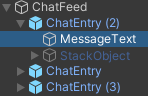
this is my hierarchy:
https://i.imgur.com/YI4fYBF.png
ChatFeed has Vertical Layout Group (control child size and child force expand for height are unchecked),
MessageText's height is dynamic (multiline and rich-text with size) and has ContentSizeFitter (Preferred Height) (this looks good, height is readonly and set as expected)
But how do I make ChatEntry fit to height of MessageText height, so that the chat entries don't overlap? Nested Content Size Fitter is no good, and I've tried various combinations of Layout Element but no go - the height is always set at 0 (or some minimum value that I set, but not the dynamic height of the child).
current output is https://i.imgur.com/s7ihQ9E.png
 lucid yarrow
so it appears the solution is to add a vertical / horizontal layout group to ChatEntry, even though it has one object
pretty messed up
 boreal moat
I have a row of image icons under a horizontal layout group panel. How do I center the whole panel based on which image icon I select? Thanks
 tight cosmos
Hey guys is it possible to have my UI canvas in edit mode viewed directly on the viewport rather than a huge rectangle in world?
obtuse tangle
Why doesn't pressing W to move a UI object allow me to move it?
 primal basin

my transform gizmo is in the corner, it remains there even when I have a button on screen
Unity version 2021.2.2f1
mortal robin
primal basin
Unity version 2021.2.2f1
Looks. like your Gizmo Handle Position is set to Center
Maybe you want it to be Pivot?
 warped moss
Is it possible to make text appear on collision and go away after a few seconds?
I tried doing so
but it keeps on
saying something which I really don't know.
mortal robin
Everything's possible with the right code
azure flame
warped moss
saying something which I really don't know.
Something that you should post when asking a question. Use coroutine for timed events
warped moss
 warped moss
azure flame
Something that you should post when asking a question. Use coroutine for timed e...
warped moss
azure flame
Something that you should post when asking a question. Use coroutine for timed e...
Sorry forgot to send an image
using System.Collections;
using System.Collections.Generic;
using UnityEngine;
using UnityEngine.UI;

public class StartScript : MonoBehaviour {

    public GameObject uiObject;

    void start()
    {
        uiObject.SetActive(false);
    }

    void OnTriggerEnter (Collider player)
    {
        if (player.gameObject.tag == "Player")
        {
            uiObject.SetActive(true);
            StartCoroutine("WaitForSec");
        }
        IEnumerator WaitForSec()
        {
            yield return new WaitForSeconds(5);
            Destroy(uiObject);
            Destroy(gameObject);
        }
    }
}
Read the full error. This usually happens when you try to start it on the inactive object.
warped moss
 azure flame
Did you try starting it by method not by string?
string overload might not know about local methods.
StartCoroutine(WaitForSec());
azure flame
When you place a method inside another method, it called a local method. String version of the coroutine does not know to look in local methods it seems.
It shouldn't be used anyway
 twin olive
I want a event trigger component on a button that is stored in a scroll Rect. But I want to be able to scroll though the scroll rect with my mouse over the buttons and that not stop me scroll has any one dealt with this before?

 mortal robin
 grave seal
You have Child Force Expand Height on
grave seal
mortal robin
You have Child Force Expand Height on
ty <3
obtuse tangle
obtuse tangle
Why doesn't pressing W to move a UI object allow me to move it?
Any clue? Have they changed it?
rapid ferry
i sent over my project to someone but they said the text was off, so i put on "scale with screen size" in canvas. if im using freeaspect what do i put for the general resolution
and also how will i know if it actually scales properly
timber elbow
rapid ferry
and also how will i know if it actually scales properly
You can try setting different screen sizes in game tab and seeing how your ui scales to them.
rapid ferry
timber elbow
You can try setting different screen sizes in game tab and seeing how your ui sc...
alright ty
rapid ferry
timber elbow
You can try setting different screen sizes in game tab and seeing how your ui sc...
for some reason it still isn't scaling right
timber elbow
rapid ferry
for some reason it still isn't scaling right
Yeah, it's tricky to get it working on different resolutions
 shadow yew
Is there a way to make my minimap render texture higher resolution? I'm getting weirdness on my icons.
 timber elbow
Gotta put some thoughts into what anchors you're using.
rapid ferry
what is anchors
everything i have is just anchored to the center
i didnt know it made a difference
timber elbow
rapid ferry
what is anchors
You can anchor it relative to the sides and other different options. I suggest looking at some ui tutorials that explain this.
coral echo
Hello. Im using dynamic resolution changing for my UI. On game looks fine (as expected) but when I built the game UI is ruined. I changed resolution to full hd resolution ( I use windowed). It builds same as in unity editor, but when I start making the window bigger it starts being more ruined. (Smalling is fine). Ruining: corners of panels go over camera view the camera view (even UI is locked on camera view) ... Literally mess... Doesn't anyone know how to cure this? I hope I described the problem well
primal basin
mortal robin
Looks. like your Gizmo Handle Position is set to Center
That doesn't change it
primal basin
fixed the issue
rapid ferry
I am not sure if my question should be asked here but this is really important, I dont know if i pressed a key accidentally or not but now when I open a prefab , the gizmo of movement goes somewhere specific.. i dont know why or how this happened
I think to the middle of the UI that I made for the prefab
 mortal robin
rapid ferry
mortal robin
rapid ferry
you have your gizmo tool thingy set to Center instead of Pivot
What that looks like precisely depends on your Unity version, but something like this
 rapid ferry
mortal robin
you have your gizmo tool thingy set to Center instead of Pivot
rapid ferry
mortal robin
you have your gizmo tool thingy set to Center instead of Pivot
what am I supposed to pick out of those ?
rapid ferry
mortal robin
but you should play with them and see what they do to get familiar with it.
I get terrified i am gonna mess something up and not know how to get back to how things were 😅
mortal robin
rapid ferry
I get terrified i am gonna mess something up and not know how to get back to how...
they're just two very simple toggles
rapid ferry
but thank you i will try it after my backup is finished
@mortal robin I can't find it 😅 i am on unity 2020.3
found it
thank you
rapid ferry
hi i am trying to import text mesh pro and i get this error how do i fix it ?
 mortal robin
rapid ferry
hi i am trying to import text mesh pro and i get this error how do i fix it ?
mortal robin
rapid ferry
hi i am trying to import text mesh pro and i get this error how do i fix it ?
how did you install the package?
rapid ferry
mortal robin
how did you install the package?
it was in the project as default and it said install essentials so i did and that came up and then i removed it and installed it from package manager
rapid ferry
mortal robin
how did you install the package?
its the same on any project i make on any version
 flat crystal
Hey guys, I've got the weirdest bug in a year of game development with Unity.
I created a new text with TMPro, and no matter what font I use, I can't use the V (in caps) character.
The log says:
The character with Unicode value \u0056 was not found in the [Dogica SDF] font asset or any potential fallbacks. It was replaced by Unicode character \u0020 in text object [Wave status].
UnityEngine.Debug:LogWarning (object,UnityEngine.Object)
TMPro.TextMeshProUGUI:SetArraySizes (TMPro.TMP_Text/UnicodeChar[]) (at Library/PackageCache/com.unity.textmeshpro@3.0.6/Scripts/Runtime/TMPro_UGUI_Private.cs:1274)
TMPro.TMP_Text:ParseInputText () (at Library/PackageCache/com.unity.textmeshpro@3.0.6/Scripts/Runtime/TMP_Text.cs:1902)
TMPro.TextMeshProUGUI:OnPreRenderCanvas () (at Library/PackageCache/com.unity.textmeshpro@3.0.6/Scripts/Runtime/TMPro_UGUI_Private.cs:1644)
TMPro.TextMeshProUGUI:Rebuild (UnityEngine.UI.CanvasUpdate) (at Library/PackageCache/com.unity.textmeshpro@3.0.6/Scripts/Runtime/TextMeshProUGUI.cs:216)
UnityEngine.Canvas:SendWillRenderCanvases ()
I repeat, no matter what font I use (in this text I'm using Dogica), it will return this error, and it will not write the letter...
Even if I use a character form the basic font of TMPro
mortal robin
flat crystal
The character with Unicode value \u0056 was not found in the [Dogica SDF] font a...
Cosmic ray?
Try restarting your computer
flat crystal
I'm having this bug in my code since months
 polar sparrow
Hey guys - I got particles to appear in my ui, but how can i get them to appear behind buttons?
So in front of the background, but behind the buttons
 azure edge
Trying to get this canvas layout stuff working, but just not sure how to get the behavior I’m looking for.
I’ve got a scroll view, and the content GO in it has a HorizontalLayout component, AND a ContentSizeFitter- (set to horizontal constraint : minimum)
The objects it arranges horizontally are added dynamically at run time, and the content area DOES indeed expand horizontally as these columns are added. If more objects are added than fit in the scroll view area, the horizontal scroll bar shows up: this part works perfectly.
On the COLUMN prefab itself, a VerticalLayout component is attached, and I WANT to add a ContentSizeFitter, so it will expand vertically as elements are added to the column. But I get a warning in the editor that this element is control by a layout group, and so ContentSizeFitter shouldn’t be used. (If I try it anyway, and set vertical constraint to “minimum”, all the elements just overlap each other and the column does not expand in height.)
So, how can I do this? (Have a column that vertically expands when elements are added to it, where the column itself is an element of a horizontal layout group.)
azure edge
flat crystal
I'm having this bug in my code since months
total shot in the dark- check the language setting on your PC. Don't THINK that would effect ONLY character capital V, but worth double checking.
flat crystal
What should I look for?
My language is set to Italian (I can set it to english, but I doubt it would change anything), just as my keyboard
Idk what other settings I should look for
azure edge
"I doubt it would change anything" alas, me too- but it's the only suggestion I've got 😦
flat crystal
If it was an OS error, wouldn't it cause all my V characters to break?
Oh, by the way, this doesn't work only in my project, in other projects it works
azure edge
flat crystal
Oh, by the way, this doesn't work only in my project, in other projects it works
AH, then certainly not a computer settings. This also makes the solution simple, but time consuming. create a new project, import things 1 at a time till it breaks the capital V (or do it as a kind of binary search- try importing one half, then the other, when you find which half breaks it, start over using only half of THAT section... etc..)
oh, you culd also try deleteing the libraray folder in the project first... could be corruption in there.
flat crystal
Okay, I'll try that
 opaque belfry
Hey guys, I have a question about the Canvas Scaler. When I'm building an UI targeted at full HD and a user has a 4k screen, do the graphics get scaled up? So, when I have a 512x512 pixels graphic, might that look blurry? What's the best practice here? Building an UI for the highest resolution I want to support so that the UI just gets scaled down for lower resolutions?
azure edge
opaque belfry
Hey guys, I have a question about the Canvas Scaler. When I'm building an UI tar...
yes, that is what I'd do: Use the largest graphic possible. (Of course if memory becomes an issue, perhaps not, but that's rare nowadays)
opaque belfry
Alright 🙂 and having a 4k graphic scaled down to fit full HD is no issue?
azure edge
I see no issue with this, except large memory usage.
@flat crystal say, did either of those help with your issue from yesterday?
flat crystal
Yeah! thanks
I figured out it was a weird setting in the font setting
I changed it and everything worked 😄
azure edge
apply two materials to it.. one with normal back face culling, the second using front-face culling.
 half raft
This is going to be really basic, but how do I make a button not be fucking useless? It's not recognizing when the mouse is over it, it's not recognizing when it's being clicked, Google is not helping. It's just sitting there on the screen doing nothing, and yes, I have changed the colors associated with hovering and pressing. I double checked to make sure nothing was blocking the raycasting even though it's a blank fucking canvas, and yeah, nothing was blocking the raycasting.
The button is also set to interactable, so it isn't that
And I do have an event system
mortal robin
half raft
And I do have an event system
Does your event system have an Input Module on it?
Does your canvas have a Graphic Raycaster component on it?
half raft
Yes, and yes
mortal robin
Which input system are you using?
the old one or new one
And can you show some screenshots of your setup?
half raft
I don't know, I didn't know there were two input systems now
mortal robin
half raft
I don't know, I didn't know there were two input systems now
then you're using the old one
half raft
This is the Event Manager
 half raft
mortal robin
then you're using the old one
half raft
mortal robin
then you're using the old one
Great.
half raft
 mortal robin
that looks good. And where is it in the hierarchy?
half raft
Button settings, It's literally just a default button, I haven't even done anything with it yet, I'm just trying to get it to work on the most basic level
 mortal robin
ok that looks good... and now - your canvas settings?
half raft
 half raft
You know, it's just my fucking luck for the most basic of shit to break specifically because I'm the one using it
Maybe it's the new input system
Where is the new input system
 mortal robin
If active input handling says Input Manager (Old) then you're good
mortal robin
half raft
This is the Event Manager
Plus the Standalone input manager would have complained here if you were on the new system
half raft
Yeah, says Old
mortal robin
half raft
Can you show the Text object?
Have you changed that at all?
Oh here's one thing to check too
Play your game and have the Event System selected in the inspector/hierarchy
half raft
Nope, I had this issue at first with a button I tried to customize, I have since deleted that and just plopped in a default button just to figure out what the fuck was happening
mortal robin
and look in the preview window for the Event System as you mouse over the button
half raft
mortal robin
Play your game and have the Event System selected in the inspector/hierarchy
Yeah, tried this fix, doesn't update with fuckin' anything
half raft
It literally does not change
mortal robin
Can you save your scene
try a fresh scene
just put a button in it
all the other stuff should come automatically
see if that works
half raft
This is already as fresh as a scene gets but sure
Exact same problem

This is what is displaying in the event system all of the time, no matter what my mouse is doing
@steep grove Problem is, I can't even get the button to detect when it is being clicked
I do not have the time to care about scripting the button if it can't even tell it has been clicked
I know how to script the button. I put a script on the button to debug log that it has been pressed, and guess what, that script didn't work
so I deleted the button
And tried with a new button
Same problem
 steep grove
so, I haven't used the unityui in a while, but, I use to have to make a script that would get the button component
the button doesn't just do things on its own. It is detecting it is being clicked
but you don't have it doing anything when it is clicked
frosty pewter
It does have hover states that should be clear whether it's working or not
I'm honestly interested in knowing why it's not working - the setup looks good at first glance
half raft
steep grove
the button doesn't just do things on its own. It is detecting it is being clicke...
There's some new bullshit system where you have to put in a gameobject with the button and use voids in that gameobject to make the button do shit, and it sucks, but there's no other option
frosty pewter
"new" ie. every old haha
half raft
I don't care if it's new or old or rotting in the same grave as Larry King, all I give half of a shit about is that it doesn't work
frosty pewter
Perhaps try deleting and instancing a new event system
then I can only suggest restarting Unity, it all looks correct
half raft
Tried restarting unity, nothing. Tried a new event system, nothing.
steep grove
do this real fast just for simple testing make a new script, just do
public class ButtonExample : MonoBehaviour
{
  Button button;
  void Start()
  {
    button = GetComponent<Button>(OnButtonClick);
  }

  void OnButtonClick()
{
  Debug.Log("Button Clicked");
}
}
and put it on the object
err hold on, I typed that all out in here, let me make sure lol
frosty pewter
half raft
Tried restarting unity, nothing. Tried a new event system, nothing.
Apparently you need to make sure that the Input Manager has matching axes and buttons as the input module
half raft
Great. Wish I knew that before deleting all of the commands in the default input manager and making my own input manager buttons.
steep grove
@half raft
using UnityEngine;
using UnityEngine.UI;

public class IntField : MonoBehaviour
{
    Button button;
    void Start()
    {
        Button button = GetComponent<Button>();
        button.onClick.AddListener(OnButtonClick);
    }
    void OnButtonClick()
    {
        Debug.Log("Button Clicked");
    }
}
is the correct way, not the previous way I posted, sorry
you don't have to do it this way, the UI buttons let you select to do something on click
mortal robin
half raft
Great. Wish I knew that before deleting all of the commands in the default input...
oh that's why then 😛
you can reset it
half raft
I'm so fucking tired of this shit. Right, let me reset it.
Can I at least rename the axes once I reset it?
frosty pewter
Well, you've enlightened me to a new way to break UGUI events at at least.
Yeah I imagine if you rename then in the input module too nothing will break
mortal robin
half raft
Can I at least rename the axes once I reset it?
yes as long as you update the StandaloneInputModule as well
half raft
The fucking- You know what, sure, never mind, I'm not gonna even ask what that means
mortal robin
half raft
This is the Event Manager
This component here
StandaloneInputManager
see how it has axis names?
half raft
Those all have to match?
mortal robin
to the axes in the input manager, yes
mortal robin
half raft
Alright, now it works
clearing out the input manager is not something people typically do 😛 Sorry that took so much to diagnose
half raft
Yeah, well, I was never warned by any of my tutorial things that it would have massive implications down the line
So I just set the thing to the amount of controls I needed and figured it wouldn't be an issue. Clearly that made too much sense.
mortal robin
half raft
So I just set the thing to the amount of controls I needed and figured it wouldn...
I'm surprised you weeren't getting any errors in your console about trying to use undefined axes
Or were you?
If so that would have been a hint
half raft
I wasn't getting any errors
 wise prairie
half raft
I wasn't getting any errors
wise prairie
half raft
I wasn't getting any errors
Sorry you suffered. But I found solace in sympathising and remembering a million times I've been down similar paths in Unity's Wonderland of Wonk.
And you write way too well to be permitted happiness all the time.
half raft
wise prairie
And you write way too well to be permitted happiness all the time.
I have zero clue what that means
mortal robin
I think he means ignorance is bliss
 sturdy patrol
 wise prairie
half raft
I have zero clue what that means
wise prairie
half raft
I have zero clue what that means
The annoyance that caused you to seethe and write so eloquently and hilariously about the foibles of Unity - you suffer for your art. Like Phil Collins spitting out some of the best love songs of all time, whilst broken hearted. Or akin to that, of a type.
half raft
wise prairie
The annoyance that caused you to seethe and write so eloquently and hilariously ...
Ah, yes, a game where you tilt a board to roll a ball, the pinnacle of art
wise prairie
half raft
Ah, yes, a game where you tilt a board to roll a ball, the pinnacle of art
MarbleMadn3ss!
half raft
... Holy shit it is marble madness, I didn't even know that game existed before
wise prairie
You're forgetting the 3. Like Wip3out. You're special, because you're Lord Earl of A Balanced Breakfast, the third!
And Super Monkey Ball 3 still hasn't been made.
quaint hazel
For world UI is there a way to make the text reasonable sized without a super small font size
digital kayak
quaint hazel
For world UI is there a way to make the text reasonable sized without a super sm...
use textmeshpro and click on autosize, then you can make the textbox smaller and the text will fit into it
you can also decrease the scale of the canvas
quaint hazel
digital kayak
you can also decrease the scale of the canvas
Changing the values in the canvas scaler did nothing but changing the transform did so I did that.
Works ok now
 keen edge
I have a small issue, with the Scrollbar handle being frozen, I can scroll my chat with the mouseball , but the scrollbar(handle) is not movable)
 azure flame
Also testing any component functionality start with the default one. Recreate from the default one and track down changes up to a point when you start getting problems to find out what's causing it.
And this is Event System debug data I was talking about. It appears only at runtime, need to extent the window from the bottom.

It will show you if something blocking raycasting to the bar handle
keen edge
The event system didnt show anything, but the funny thing is that before this issue, the Handle was shrinking quite fast, the problem is by clicking this and that random things related to that, i've make it not shrink and dissapear, into not being able to be used at all, smart me
keen edge
azure flame
Also testing any component functionality start with the default one. Recreate fr...
Update the issue in theory is in the scrollView, i've added as you advised a brand new Scrollbar, it get's "fronzen" once i add it in
 azure flame
I mean create entire default thing and reconstruct what you have in steps, so you know when it fails.
Entire ScrollView
keen edge
Aha I see, i'm working on a chat for a online game + Mirror
 bronze marlin
is it possible to get all pointer events in ugui? i'd love to put a component on a canvas, or even an event system and receive callbacks when any game object is clicked/dragged/hovered etc
 chrome elbow
hi please ive been asking for help nobody seems to respond.. i would like to know why my mini map is looking like this

 chilly lion
Is this okay for a PauseMenu? I'm planning to re-use the same Canvas for HUD. The PauseMenu gameObject is also a panel
 digital kayak
chrome elbow
hi please ive been asking for help nobody seems to respond.. i would like to kno...
digital kayak
chrome elbow
hi please ive been asking for help nobody seems to respond.. i would like to kno...
how should it look like?
chrome elbow
digital kayak
how should it look like?
 digital kayak
chrome elbow
digital kayak
chrome elbow
what mode is your canvas in, and have you tried increasing the scale of the object
chrome elbow
digital kayak
what mode is your canvas in, and have you tried increasing the scale of the obje...
yes but it looks ugly and right now i tried it again on a different save and i got this (sending screenshot)
it shouldnt be like this

its really not like i can mess up these few steps all i did was add a render texture size 512x512
 digital kayak
click on preserve aspect on the image
chrome elbow
digital kayak
click on preserve aspect on the image
where would i locate this
digital kayak
chrome elbow
where would i locate this
it shows when you drag the sprite in
 chrome elbow
digital kayak
it shows when you drag the sprite in
chrome elbow
digital kayak
it shows when you drag the sprite in
its a raw img i used with a render texture
digital kayak
chrome elbow
its a raw img i used with a render texture
have you clicked on set native size?
chrome elbow
digital kayak
have you clicked on set native size?
its just a bigger rectangle lol
digital kayak
i'm not sure
chrome elbow
u and me both
jagged monolith
Show the RectTransform settings @chrome elbow
chrome elbow
jagged monolith
Show the RectTransform settings <@!233582636042420224>
where do i find this?
jagged monolith
On your map object
chrome elbow
 jagged monolith
The object with the rawimage, not the canvas
chrome elbow
 jagged monolith
You should set your Canvas Scaler to scale with screen size bttw
chrome elbow
jagged monolith
You should set your Canvas Scaler to scale with screen size bttw
sorry im new to unity wehre can i find this
jagged monolith
On the first image you shared
You should really go through a minimap tutorial, there are a few on youtube
chrome elbow
jagged monolith
You should really go through a minimap tutorial, there are a few on youtube
i mean i went through 2 and nobody explains these things lol
i shouldnt be getting errors at this stage like this all i did was add a raw img and a render texture before that mini map looks fine
 jagged monolith
chrome elbow
i shouldnt be getting errors at this stage like this all i did was add a raw img...
jagged monolith
chrome elbow
i shouldnt be getting errors at this stage like this all i did was add a raw img...
Try following a tutorial from scratch like this one. it's not perfect but it will get you most of the way. https://www.youtube.com/watch?v=28JTTXqMvOU
Your render texture in the screenshot has really strange dimensions so just leave your own stuff behind for 7 minutes and try the tutorial
chrome elbow
jagged monolith
Your render texture in the screenshot has really strange dimensions so just leav...
lol i am telling you this is the exact same steps this isnt really helpful its like the same thing over and over.. the dimesions are not the issue they are exactly the same as my dimensions.. there is something going on with the script most probably because he did nothing that i didnt already do and i followed his tutorial to a T
i could try this in a new save and we can see that it will work just fine because i did it before indicated in my first screenshot
chrome elbow
chrome elbow
.
keen edge
Hi guys, one noob question again , how do i stop my Conent from being able to be scrolled when there is no content? I mean if you write in chat, you should be able to see and scroll only the chatting part, not to be able to see extra spaces into the infinite

i've tried masking and masking 2D, but then it struck me it has no logic, because it's not showing text, outside of the chat area...
found the Content Size Fitter, in a youtube tutorial, not sure but i don't think it was what im supposed to have there
 cyan sentinel
keen edge
found the Content Size Fitter, in a youtube tutorial, not sure but i don't think...
cyan sentinel
keen edge
found the Content Size Fitter, in a youtube tutorial, not sure but i don't think...
I guess you first want to align the text to bottom, not top, right? and then you can use the content size fitter on the concent inside your viewport of your scrollrect.
keen edge
cyan sentinel
I guess you first want to align the text to bottom, not top, right? and then you...
the text is already aligned at bottom, but after adding the Content Size Fitter, it messed my text to go to the middle basically when I use it for vertical fit, it just makes the content Height go to 0, i've tried to re-create from the begging the whole thing , now the scrolling doesnt work again haha, pepega developer
keen edge
cyan sentinel
I guess you first want to align the text to bottom, not top, right? and then you...
i've sent you a friend request if you could help me , we could talk the details in private
cyan sentinel
keen edge
i've sent you a friend request if you could help me , we could talk the details ...
Sorry, not going to do private support here
keen edge
cyan sentinel
Sorry, not going to do private support here
im not saying for free
cyan sentinel
Yeah, but I dont have time to do support, as I got a project going. Just hopping in and out here
keen edge
oh well :), ok np, thx anywya
azure flame
Not a place for it, if you want to post a job opportunity use links in #📖┃code-of-conduct
keen edge
azure flame
Not a place for it, if you want to post a job opportunity use links in <#4978675...
it;'s not so much of a job, rather a private request-offer but ok, i will delete my message, ty
 mossy forge
How can I force the child image in the content horizontal layout group to height expand but keep its scale?
 azure flame
Image has a preserve aspect ratio settings
If it's not exposed in the inspector (don't have the thing open right now) set appropriate image type so it won't rescale
mossy forge
azure flame
Image has a preserve aspect ratio settings
oh ty didnt see that
 civic notch
I wonder is there any asset that makes UI really easy?
I found unity UI's to be a little weird at times, just overcomplicated
And hard to achieve some things that id think would be out of the box
Like scroll view is weirding me out
I feel like i have little control aswell
azure edge
civic notch
I wonder is there any asset that makes UI really easy?
scroll view IS a weird one.. make sure you are aware of the "content size fitter" component- I've found those very useful on the "content" object.
visual brook
Is there a good way to make the scroll view work in world space?
or do i need to resize every sub component to try to make it fit lol
shadow yew
I'm struggling to figure out a solution to ui consistency. Each of those character panels are duplicates. The healthbar is slightly smaller or larger depending on where it is positioned. I'm sure this is some sort of snapping behavior but how do I fix it?
 rapid ferry
anyone know a fix for this its text mesh pro and i got it from the package manager its the TMP essentials package

 torpid quiver
how to i make it so when i press a button it shows/hides a menu(i use the new input system but it shouldn't matter)
sterile wedge
torpid quiver
how to i make it so when i press a button it shows/hides a menu(i use the new in...
Break it down. How to do something on button click. How to show/hide a menu
torpid quiver
I just need to show hide script I can make the button press
 runic tiger
How do you guys normally handle screen navigation in UI heavy games and with non linear flow between screens? Just wanted an idea in terms of an architecture.
 dawn sinew
whats wrong with this text
 karmic oxide
dawn sinew
whats wrong with this text
karmic oxide
dawn sinew
whats wrong with this text
it scales with the box, disable dynamic scaling for it in the editor
dawn sinew
oh k
 true steppe
Hi, I have a problem with a Scroll Rect which does not want to scroll :
https://www.noelshack.com/2021-46-6-1637422021-screenshot.png
https://www.noelshack.com/2021-46-6-1637422021-screenshot.png
The "Albert etc ..." list of button are located in the panel1 object which is the content (and child) of the ScrollRect object.
Yet nothing scrolls ... Thanks (I made the wrong image, normally the Grid Layout Group is located in the panel1 object, not with the scroll rect)

 safe hull
I'm trying to make a 2d panel ui/menu .. but it looks extremely small / unfocused. Any ideas what I have messed up?
 sterile wedge
 ionic jackal
When I select UI Components why do they draw in the top left?
ionic jackal
When I select UI Components why do they draw in the top left?
Are they a child of a canvas?
ionic jackal
sterile wedge
Are they a child of a canvas?
I found out the issue, it's a bug with Unity 2021.2.1
sterile wedge
safe hull
I'm trying to make a 2d panel ui/menu .. but it looks extremely small / unfocuse...
Dont use scale 2x
sterile wedge
ionic jackal
I found out the issue, it's a bug with Unity 2021.2.1
Weird, cool
ionic jackal
Fixed it by upgrading to 2021.2.3
yeah weirdly the gizmos came back when you disabled them
lol
not sure how you make that bug but it was kinda funny
safe hull
@sterile wedgeMy scale is actually .5 .. but I simply increased the fond size a lot, and now it looks a lot more sensible
sterile wedge
safe hull
<@!244756049637146625>My scale is actually .5 .. but I simply increased the fond...
Also, use TextMeshPro instead of Text if you’re not already
safe hull
@sterile wedge Always? Or textmesh for world text and text for canvas text ?
sterile wedge
safe hull
<@!244756049637146625> Always? Or textmesh for world text and text for canvas te...
Always
I was refering to using the ui text of textmeshpro btw..
sterile wedge
sterile wedge
Also, use TextMeshPro instead of Text if you’re not already
When i said Text here, i meant unity’s UI text
 magic isle
Question:
How can I display the text from the inspector to the game/scene view? I just imported textmeshpro packages. Is there some simple step I glossed over?
 magic isle
update: it fixed itself after I alt tabbed for a while
true steppe
Hi, my scroll rect don't want to scroll and i don't know why (I tried everything, without viewport, with, without content size fitter, with etc etc ...)

 obtuse monolith
Are there extensions or libraries for 'traditional' UIX?
Hunting through the references reveals that I might be able to cobble together my own window manager, etc. by leveraging existing UI components and building an event system around them.. But this feels like reinventing the wheel and a lot of work.
Attached are some examples of 'traditional' UI.


Best way to describe it would be.. Winforms for unity haha
Okay, may have answered my own question, there's a winforms port here https://github.com/Meragon/Unity-WinForms
Maybe it'll even work
GitHub
A Windows Forms port for Unity3d. Contribute to Meragon/Unity-WinForms development by creating an account on GitHub.
Nah doesn't work 😓
 mild sparrow
Trying to set some canvas UI elements to match positions with an object (for things like health bars, pop up text, etc.) but am running into an issue.
I've got my camera set to Screen Space - Camera, but when I use the code below it sets the rect transform position of the UI to something crazy like 7560, 7506, -4320 even though the correct WorldToScreenPoint position should be -220, -131, 10. Any ideas why this would be the case?
public class WorldSpaceUI
{
    [SerializeField] Camera _camera;
    [SerializeField] Transform _target;
    [SerializeField] Vector3 _offsetPosition;

    void Start() {
        _camera = _camera ? _camera : Camera.main
    }

    void LateUpdate() {
        Vector3 targetWorldPosition = _camera.WorldToScreenPoint(_target.position);
        transform.position = targetWorldPosition + _offsetPosition;
    }
}
 dim prawn
I'm having a slight problem with going back to a specific scene for my UI
the buttons in the first 3 scenes work but everything after that doesn't
never mind
I found out I didn't have an EventSystem for those scenes ._.
 graceful bough
This is a beginner question, but how do I increase the size of a texture in a GUI skin? I have a custom cursor system using a GUIskin but all the textures are tiny
 hardy creek
HI. So I have a mobile game that I want to pop up a panel when the user taps on a game object. How do I make the panel pop up at the position of the gameobject?
The gameobject is a fish that moves
mild kernel
You can use a world space canvas and simply position it like you would any other object. At the fish's position with some offset on the height.


 mild kernel
If that achieves what you want, then yes.
hardy creek
Ok, now to make it only appears when I want, do I deactivate the canvas component or the panel component?
mild kernel
Ideally you enable/disable the canvas component.
hardy creek
Thank you, really helped.
Now I have another question
If I put a background image, will it interfere with other game objects?
If so, how to avoid it?
safe hull
I'm instantiating a prefab and parenting it to a canvas. I set the position as a new Vector3(0,0,0). However, the instantiated version seems to appear at a really weird location and with an even weirder size. What could be causing that ?
 digital kayak
safe hull
I'm instantiating a prefab and parenting it to a canvas. I set the position as a...
digital kayak
safe hull
I'm instantiating a prefab and parenting it to a canvas. I set the position as a...
these things happen when you parent it after instantiating, simple fix would be to pass in the parent as an argument when you instantiate
what position are you setting? if you're setting transform.position that's not what appears in the inspector which would be rect transform's anchoredPositon
safe hull
@digital kayak thanks man .. just set the canvas as the parent on instantiation, and it works like a charm!
I can now die in my game, get alerted about it, and respawn!
obtuse monolith
Many many hours to accomplish this and a few problems to boot.
No idea why multiple windows do not work, I guess I have to write window selection somehow..
The windows themselves are just generic instances of a class based on name of button, no idea how to define custom functionality. Might have to wind up prefabbing every window which would be hell.
Dubious as to whether I'll be even able to render camera viewports in windows too!
I'm confused as to why producing such a basic ux in unity contains such difficulties
 upper narwhal
the ui child object doesnt scale along with the panel? How do I make it so that the white slots scales along with the panel?


Ping me if you know the answer!
steep haven
upper narwhal
the ui child object doesnt scale along with the panel? How do I make it so that ...
Two ways: First scale the parent object. By doing that you should be able to scale the child object. Second, use some sort of layout (horizontal layout in your case). When you expand on the parent, it will automatically scale the child objects.
I'm trying the change the color of TextMeshPro-Text element. However, when I change the color, all other TextMeshPro-Text elements also change their color. I'm creating a "new" gameObject for this but its still happening. Any ideas how to resolve this?
azure edge
I have a scroll view on my canvas. It shows a bunch of columns, and users can scroll vertically, or horizontally. I’d like to make the column headers NOT scroll vertically, only horizontally- such that they are always visible with the contents of their column.
I’m initially thinking I’ll need to do a vertical scroll view INSIDE a horizontal scroll view- but want to see if anyone had a better idea first.
 odd falcon
Hey gamers, I am getting items in a dictionary which are instantiated button prefabs so that I can activate them, However when they are activated, I can't navigate through the buttons
 mortal robin
odd falcon
Hey gamers, I am getting items in a dictionary which are instantiated button pre...
mortal robin
odd falcon
Hey gamers, I am getting items in a dictionary which are instantiated button pre...
did you select any of the buttons initially?
e.g. EventSystem.current.SetSelectedGameObject(displayInvetry.itemsDisplayed[0].j.Value.gameObject);
odd falcon
oo yeah, I was trying to do that through code (hence the 3 random lines of random utter bullcrap)
lemme try that
crap
Argument 1: cannot convert from 'int' to 'InventorySlot'
mortal robin
well I made some guesses about what some of those things are
odd falcon
I also am not sure if I can use indexing on the dictionary since I am not using a sorteddictionary
mortal robin
and no you cant
odd falcon
yeah
mortal robin
My point is just set one of them sleected initially
you don't have to use that exact code.
odd falcon
I tried making a sorted dictionary but I couldn't figure out how to implement IComparable
mortal robin
Why are you using a Dictionary at all
what's the key
why isn't it just a list or array of buttons
odd falcon
The key is a "inventorySlot" which is a public class
it's just the way I set up my inventory

but yeah
This is just, really poopy tbh
true steppe
Apparently we cannot make a list that scrolls if the objects contained in the content of the scroll rect (like buttons), have OnClick Events, how to have a scroll rect with buttons and OnClick events therefore? (https://forum.unity.com/threads/scroll-rect-not-scrolling-at-all.523723/)
Reference to my problem : #📲┃ui-ux message
azure edge
true steppe
Apparently we cannot make a list that scrolls if the objects contained in the co...
this doesn't sound right, I put buttons in my scrollviews, and it works fine.
true steppe
Ah 😦 I saw another post that seems to me to concern the same problem: https://answers.unity.com/questions/1564463/how-do-i-have-clickable-buttons-in-a-scroll-rect.html
https://answers.unity.com/questions/902929/scroll-not-working-when-elements-inside-have-click.html
 nocturne gull
is there a proper standard for like, making and using 2d prefabs? i tried making a prefab of a trading card but depending who i parent it to in the scene its size varies wildly and i just don't understand the system here.
my card is a gameobject with an image component, and it has textmeshes as its children to display stats and stuff.
sterile wedge
nocturne gull
is there a proper standard for like, making and using 2d prefabs? i tried making...
UI needs to be a child of a canvas
and if they're set to stretch, they will stretch
nocturne gull
newb question, is applying the canvas component to the ui not enough?
mortal robin
nocturne gull
is there a proper standard for like, making and using 2d prefabs? i tried making...
I highly recommend not making your 2D card game out of UI elements
Many people have gone down this road only to realize after several months they had made a mistake
nocturne gull
alright. the only reason i made it an image tbh is cause you can only apply a button component to an image(??) and i needed the card to be "clickable"
im sure there's other solutions to that though..
mortal robin
there are other solutions to that indeed
You can even use the same event system that UI buttons use
you just have to give your card a collider and a script with IPointerClickHandler on it
(and your camera needs a PhysicsRaycaster)
nocturne gull
not quite as elegant... but nothing about unity seems to be
mortal robin
You could also use an EventTrigger
instead of a custom script with IPointerClickHandler
that will let you set up a callback function from the inspector the same way you can with a Button
nocturne gull
hmm
i'll look into that i spose. gonna be pretty important when the whole game is click based
mortal robin
Handling the clicking is the easy part
But - look at any popular card game out there.
Their cards are not UI elements
nocturne gull
valid
im kinda just prototyping something so i was just trynna get something usable
turns out it ain't
sterile wedge
mortal robin
I highly recommend _not_ making your 2D card game out of UI elements
why? What's the downside of using UI?
mortal robin
sterile wedge
why? What's the downside of using UI?
You see these cards flying and flipping and swooping around, and rendering shadows?
https://youtu.be/thg9uezSaxY?t=45
Try doing that with UI.
nocturne gull
mortal robin
You could also use an EventTrigger
could you expand on this? I think I want to handle clicking a card in the hand and make it send it to the field, but I want to do so using an external Round Manager script that handles actions and stuff, rather than putting that functionality in the card script where i'd prefer there to just be data.
mortal robin
nocturne gull
could you expand on this? I think I want to handle clicking a card in the hand a...
It works the same way that the onClick thing in the Button component works
nocturne gull
mortal robin
It works the same way that the onClick thing in the Button component works
For some reason event triggers aren’t firing on my sprites.
Also would I be able to do from a different script sprite.stuff.onclick like with the button component.
mortal robin
nocturne gull
For some reason event triggers aren’t firing on my sprites.
Also would I be abl...
Did you add colliders to the sprites?
Did you add a Physics Raycaster to your camera?
Do you have an event system in your scene?
And yes you can do exactly the same stuff you can with the button on click
nocturne gull
Yeah 2d collider and eventsystem comes built in with my canvas. I might’ve missed the raycast on the camera
How do I get an event component from a script? Is EventTrigger a component type? I thought it might not be cause it didn’t autocomplete but maybe it needs to be imported
mortal robin
nocturne gull
How do I get an event component from a script? Is EventTrigger a component type?...
You don't need to get EventTrigger from anywhere
you just set up the listeners in the EventTrigger inspector
same way you you do for a button on click handler
nocturne gull
mortal robin
You don't need to get EventTrigger from anywhere
right; i was asking cause i currently initialize a list of button cards in a loop and add a listener to each one in script to determine which card gets placed down on click (keeps track of list order). i wasn't using the inspector for that cause prefabs and the script using those onclick events weren't on the card.
maybe im doing it the dumb way tho
mortal robin
nocturne gull
right; i was asking cause i currently initialize a list of button cards in a loo...
It's easier to just do this with your own custom class in my opinion, but if you want to do it from code you add an EventTrigger.Entry to this list: https://docs.unity3d.com/Packages/com.unity.ugui@1.0/api/UnityEngine.EventSystems.EventTrigger.html#UnityEngine_EventSystems_EventTrigger_triggers
nocturne gull
well, i thought i needed to do it from code, and i oft prefer to, but if i don't need to im happy to try simpler methods
mortal robin
nocturne gull
well, i thought i *needed* to do it from code, and i oft prefer to, but if i don...
Well yes you do need to do it from code from your description, but doing it from code with a custom IPointerClickhandler script would be easier than doing it from code with EventTrigger, in my humble opinion
nocturne gull
mortal robin
Well yes you do need to do it from code from your description, but doing it from...
Ah, I see, course course. How’s a pointerclickhandler script work, then? I haven’t used that yet, and I’d rather not overcomplicate things for myself from the get go.
mortal robin
nocturne gull
Ah, I see, course course. How’s a pointerclickhandler script work, then? I haven...
You simply attach a script to the object that implements the IPointerClickHandler interface
true steppe
there is a way to limit navigation ui only in the gameobject parent ? thx (cant use explicit)
 mental notch
I don't know how I managed to do this by accident but I also don't know how to fix it. I'm trying to make a simple inventory UI that has 3D objects rendered on it to show what items are currently stored. I've set up the canvas to run with a camera overlay and a second camera off in the distance with its culling mask set to only show the UI, and the object I want to render also on the UI layer, which from everything I can find online seems like it'd be all you have to do to get this effect
But for whatever reason that I cannot fathom, instead, the object is somehow acting like a culling mask and turning the UI transparent wherever it would be rendered, like so:

whereas in the Scene view it's just a normal object like anything else

does anyone know what might be causing this effect? I can't find anything about this kind of issue online elsewhere
 pulsar fractal
Hey, maybe someone here have an idea how can i stretch the scroll views to looks like this (1st photo) on different resolutions? When im using the stretch in rect transform it looks like this on different resolution: (second photo)

 mortal robin
pulsar fractal
Hey, maybe someone here have an idea how can i stretch the scroll views to looks...
mortal robin
pulsar fractal
Hey, maybe someone here have an idea how can i stretch the scroll views to looks...
Are you using a VerticalLayoutGroup?
pulsar fractal
mortal robin
Are you using a VerticalLayoutGroup?
I'm using Grid Layout Group in child (content gameobject)

Also Content Size Fitter
Even without them it looks the same
 marble steppe
Is there a way to have spine animations in the Canvas Space? I was exoerimenting with the idea to have something like this for UI elements whenever you shake your phone:
www.youtube.com/watch?v=H4MTeKT0QFY
But at first glance this won't work with the image component, right?
 olive garden
i am having this problem with unity where it looks fine before i press play but if i press play i am having this weird border thing https://cdn.discordapp.com/attachments/687749280617725960/913055711393636382/unknown.png https://cdn.discordapp.com/attachments/687749280617725960/913055711762714644/unknown.png
any idea why?
https://cdn.discordapp.com/attachments/687749280617725960/913055827596828672/unknown.png
https://cdn.discordapp.com/attachments/687749280617725960/913055960241696818/unknown.png
is it just me?


 olive garden
hhmm
 verbal mauve
hi everyone
i'd like to anti-alias my UI canvas
i don't care how
i just want it to work
 loud jay
Hi, I'm new and currently trying to learn Unity by myself without tutorials. Trial and error method. I built something there and everything works fine inside. The problem arises when I build the game, the values in the Text class object do not change. I do not understand why. I checked the engine with Debug.Log () and everything should work fine.
Anyone help sort this out?
mortal robin
loud jay
Hi, I'm new and currently trying to learn Unity by myself without tutorials. Tri...
Not without seeing your code we can't
Also are you getting any errors in console?
 glossy cosmos
how do i get these fonts to go into the font assets thing?
 mortal robin
glossy cosmos
how do i get these fonts to go into the font assets thing?
mortal robin
glossy cosmos
how do i get these fonts to go into the font assets thing?
You create a font asset

Unity Learn
In this tutorial, we’ll learn how to set up Font Assets, the core of all text in TextMesh Pro.
glossy cosmos
mortal robin
You create a font asset
ohh ok ty
loud jay
mortal robin
Also are you getting any errors in console?
NOpe i dont have any errors in console
loud jay
mortal robin
Not without seeing your code we can't
https://pastebin.com/TYKEQaKB look problem is with variables in line 71-75.
Pastebin
Pastebin.com is the number one paste tool since 2002. Pastebin is a website where you can store text online for a set period of time.
mortal robin
loud jay
https://pastebin.com/TYKEQaKB look problem is with variables in line 71-75.
What's going wrong with it? Is the code actually running?
limpid shale
what is a good resolution to build at for mobile devices in portrait mode?
mortal robin
limpid shale
what is a good resolution to build at for mobile devices in portrait mode?
I usually use 1080x1920 as my reference resolution, but you'll want to test with a wide range of aspect ratios. Mobile device displays exist of a wide range of resolutions/aspect ratios.
limpid shale
Thank you! Ill use that
yea, ill have to build it for more resolutions, but atm Im just testing for iphones
 signal pelican
Hi. I want to make a Popup Windows which will open after clicking a Word in TextMeshPro. Do you have any ideas for that?
TMP can handle link tags
loud jay
mortal robin
What's going wrong with it? Is the code actually running?
Yes the code is working but please watch this video... These names are not substituted in "Game.mp4" but i can see them in the engine
I just don't know what's going on. I dont understand the error ...Someone had like me? does anyone know what happened and can give some hints?
mortal robin
loud jay
Yes the code is working but please watch this video... These names are not subs...
What do you mean by "I can see them in the engine"?
Which text fields am I supposed to be looking at?
Can you please show useful information like the console window and/or the inspector for one of the text objects when showing a video?
Also show the inspector for your script
loud jay
mortal robin
What do you mean by "I can see them in the engine"?
Which text fields am I suppo...
I mean Unity. I told about this field.
 mortal robin
loud jay
I mean Unity. I told about this field.
mortal robin
loud jay
I mean Unity. I told about this field.
looks like they are updating to me?
What are you expecting them to show that they are not showing?
Sorry the language is a bit confusing to me since I don't speak... Polish?
loud jay
mortal robin
looks like they are updating to me?
Yes, this is the intention for them to update and change. In Unity, everything works perfectly. But when I build it, it doesn't just show these fields. I don't understand why. Yes, it's Polish. I am studying for now and it is easier for me to understand all the work in the native language ..
In this video, the game I built and run from the exe file just shows me my variables ... In this video, the game I built and run from the exe file just shows me my variables and they just don't change and there should be some names and numbers right away.
mortal robin
loud jay
In this video, the game I built and run from the exe file just shows me my varia...
I see. Have you checked the player logs? THere may be errors there
Log file locations can be found here: https://docs.unity3d.com/Manual/LogFiles.html
loud jay
mortal robin
I see. Have you checked the player logs? THere may be errors there
I was reading the files and found no error. I actually saw the script being executed correctly and that everything was starting correctly ...
 elfin kestrel
I am unsure why my text mesh pro character obtains a black box around it when i increase the outline on it
Outline Thickness: 1
