
#📲┃ui-ux
1 messages · Page 55 of 1

 chrome kettle
@ashen basin Text object is a child of the button object
 ashen basin
yes

are you saying that its not possible..?
im kind of new so sorry if i seem dumb
chrome kettle
You can change the color of the text in the inspector if you select it in the hierarchy
ashen basin
yes but i want it to change in game
when its selected
otherwise its going to be white
this is what the button looks like originally
 ashen basin
i want the text to be orange, not the entire button
ashen basin
ashen basin
i want the text to be orange, not the entire button
and this when its selected
instead of the entire button, i want the text to be highlighted when its selected
ashen basin
ashen basin
like this
like this
chrome kettle
Ah, when it's selected
The text is a separate object and can't react to the button by itself
It would need a script to detect when the button object is highlighted and then change its color accordingly
 low pike
chrome kettle
The text is a separate object and can't react to the button by itself
It would n...
low pike
chrome kettle
The text is a separate object and can't react to the button by itself
It would n...
nah.. just drag the TMP game object into here
 chrome kettle
low pike
nah.. just drag the TMP game object into here
chrome kettle
low pike
nah.. just drag the TMP game object into here
Oh good thing you caught that!
low pike
Didn't catch it.. I knew it 😉
chrome kettle
Caught my mistake, I mean
chrome kettle
Always good to know what the default functionality is capable of
Even if most of it gets replaced for the sake of control and polish, everything that can be customized to preference without replacing is saved time and effort
 brave iris
Hi! Has anyone done some Text Mesh pro custom char validation? :)
https://pastebin.com/8v2hiTca
I've got a script here, almost perfect, but i have a little problem with the underscore part.
See, when i type 3 letters, it inputs automatically an underscore (see L22's comment), then when i type 3 more letters, it does it again. And it works perfectly!
But, if i backspace my way and erase the underscore manually (which is the only way to do it), and i try to input a character, it will input it, without inputting any underscore. And until there, it's normal, but i just don't know how i can modify that
 azure flame
if this event doesn't get called after re edit, might have to detect what runs instead. Or call it manually after re edit
 pastel halo
hey guys, i have a very simple ui system where you press esc to open a pause menu (if my bool called gameispaused is = to true, resume) and one button is an options button which loads another ui for settings. how do i make it so when esc is pressed with the options ui active, it doesn't close all the uis (because it calls the resume function) but it closes only that options ui and still left with the pause menu? i have been fiddling around with the code trying to get it to work with lots of if statements using "activeSelf" but cant find a way. here is my code for it:
https://sourceb.in/APkJQKS5Au
 storm kettle
how do i fix the outline ?
 chrome kettle
storm kettle
how do i fix the outline ?
chrome kettle
storm kettle
how do i fix the outline ?
It looks like you used a square sprite that has a grey outline, and stretched that
In that case use a sprite that doesn't have a grey outline
 lapis swallow
So I have my UI on screen space - overlay, and my camera has a pixel perfect camera with crop X,Y and strech fill. Whenever I resize my game view to a point that black bars appear, the UI animation leaves this kind of trail behind until I resize the window again. Any ideas how I could fix it?

 bright pond
Hello! I just tested my first little game on a Mac but the text wasn't appearing in my first level. I only have two available scenes at the moment, a Main Menu and Level 1. The text appeared in the Main Menu but not on the Level. When exiting the level, the Main Menu still showed the text. I don't know if it will appear in Unity because I am building it on Windows and cannot test it in Unity on my Mac. I found this link but I don't really understand what they are talking about, if someone could elaborate on what they are saying that would be greatly appreciated. 😃 https://forum.unity.com/threads/text-does-not-show-in-build-with-macos-metal.571345/

Unity Forum
I'm having an odd issue I'm not sure how to resolve. When I run my build on a mac & metal everything appears fine at my login screen etc; but as soon...
 rapid ferry
can i get a little design opinion
i've got 4 weapons and the ui is color coded to the 1 of 4 worlds you find that object in, the worlds have a color theme to them
that's fine
but the inventory system has 16 other things for the other button
should i be consistent with the theme and color the ui to the world they're found in
or make all the items used for the other button a single themed color, since they're all like items
 tough nimbus
So, I'm creating the UI for my inventory and I'm trying to lay out the inventory slots with headers like in this mockup image. The problem is, none of the existing layout components seem to work for what I'm trying to do, that is, have a grid with variable column sizes (1 column for header rows, 3 for inventory slot rows). I've tried looking at flexible grid layout scripts other people have made but I haven't found one that works like this. If someone could point me in the right direction that would be greatly appreciated.

 sturdy shuttle
@tough nimbus it looks like instead of doing a grid you'll want to do a bunch of horizontal layout groups, and then use a vertical layout group on all of those
or you can still use grids for the item slots, and leave the text as regular text and use vertical layout groups on those.

the content gameobject should have this

and each "grid slots" group should have this
 tough nimbus
Thanks, I'll try that
 surreal oxide
I want to move the position of a piece of UI based on whether it is above or below the middle of the screen
            {
                transform.localPosition = new Vector3(0f, 30f, 0f);
            }
            else
            {
                transform.localPosition = new Vector3(0f, -30f, 0f);
}```sorry for the formatting
the code works okay but in the middle of the screen it ping pongs between the 2 positions
what's the best workaround for that?
 dire vale
Hi, I don't know if these questions I have belongs to this channel, but are related with UI Builder
I'm using Unity 2021.1.5f to make an app that needs a lot of UI
I downloaded the UI Builder and UI toolkit
and I'm having all these errors

and some more... Anyone knows how could I fix it?
and another more question is... the minimum of a canvas size is 100x100??!! What Do I have to do if I want to create a line with a player name and a couple of buttons?!

paint power
thanks a lot!

 low pike
because you have to resize and reposition it
Unity Learn
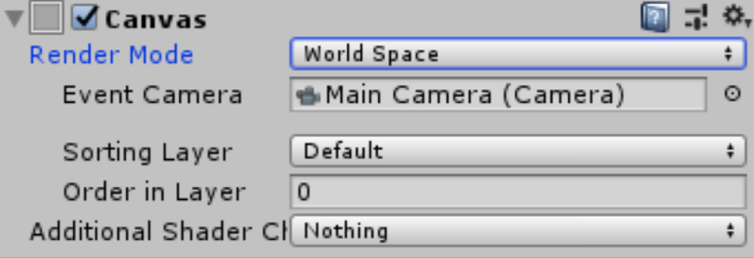
Unity features several different types of User Interface options that allow users to create UI that precisely fit their applications needs. There are two main types of UI categories: Screen Space and World Space. In this tutorial, you will learn to create a Worldspace UI.
 forest linden
oh ok
rapid ferry
how do i go about fading an image from transparent to opaque over time?

 echo jolt
Anyone know how to make an images alpha 0 but only where an other image overlaps it? I remember doing this a long time ago but cant remember how, i think there was a shader i applied to the image or something
 mortal robin
echo jolt
Anyone know how to make an images alpha 0 but only where an other image overlaps...
mortal robin
echo jolt
Anyone know how to make an images alpha 0 but only where an other image overlaps...
there's something called a mask
there's a sprite mask and a UI mask
look into those
rapid ferry
how do i go about fading an image from transparent to opaque over time?
mortal robin
interpolate the alpha
 pine estuary
Hello
Can anyone tell me/ give a source as to how I can make my Icons and text UI look less blurry? I'm in the process of making a mobile game

 raven stag
pine estuary
Hello
Can anyone tell me/ give a source as to how I can make my Icons and text U...
raven stag
pine estuary
Hello
Can anyone tell me/ give a source as to how I can make my Icons and text U...
in the inspector for the image set the compression to none and filter to point (no filter)
pine estuary
raven stag
in the inspector for the image set the compression to none and filter to point (...
I did
Could it be the canvas scaler?
thats the issue
raven stag
pine estuary
Could it be the canvas scaler?
could be
what do you have the settings as
pine estuary
 raven stag
is your image texture type set to Sprite (2D an UI)
pine estuary
yes
pine estuary
one sec
raven stag
alright
pine estuary
 raven stag
hmm
pine estuary
 raven stag
can you send a pic of how the image is supposed to look
 pine estuary
yea
raven stag
hmmm
pine estuary
For this game I prefer for the image to be small
Its probably the way how I exported
raven stag
maybe try setting the canvas reference resolution to 800x600
pine estuary
ok ima see
raven stag
pine estuary
Its probably the way how I exported
how to did you export it
pine estuary
quick png
 pine estuary

ok
nah still the same. So strange. I don't want to have to buy icons from the store
but I might have to
raven stag
what program are you using to make the art?
pine estuary
photoshop
pine estuary
ok ima do that real quick
raven stag
ok
pine estuary
still looks the same sadly
pine estuary
Which is odd because I've made pixel art in the past that looks. but maybe I've forgot something
ok

it looks slightly better in game
thank you @raven stag Ima remake the art and see if I can change a few more things to see if it makes the difference
raven stag
alright glad its working better
pine estuary
I believe I found the issue. Looks waayy better now. I just set the scale for both the image and text to 1 on the x,y, and z

@raven stag
raven stag
glad you got it working!
raven stag
rapid ferry
guys my button doesnt work, any reasons why?
how is it not working?
rapid ferry
raven stag
how is it not working?

its just a simple tester because i deleted my whole shop after it didnt work
heres the hierarchy

the image has a button component, and yes ive tried the normal button
and yes nothing is blocking it
i was told to go to this channel not begginer code because nobody could help me there
can you help me @raven stag please?
i do have working buttons but i couldnt even c opy and paste them over
nm im dum
i figured ity out
tough nimbus
Using Unity 2020.3.12f1, is there a way to force layout groups to update? Mine keep getting messed up when adding new elements but if I interact with them at all they go to where they are supposed to be.
mortal robin
tough nimbus
Using Unity 2020.3.12f1, is there a way to force layout groups to update? Mine k...
tough nimbus
Okay, it seems that didn't fix my problem. The problem seems to be arising from having grid layout groups with content size fitters nested inside a vertical layout group. The elements of the vertical layout group squish halfway inside of eachother on start and fix themselves if I change any values in the editor. Anybody know how to fix this?
 viral olive
Please help half of my UI elements are invis

anyone
please
is here anyone?
@rapid ferry
low pike
pine estuary
I believe I found the issue. Looks waayy better now. I just set the scale for bo...
this doesn't look like the heart image component has "preserve aspect ratio" ticked
low pike
viral olive
show the inspector and hierarchy for those items not showing
 agile nest
 mortal robin
viral olive
Please help half of my UI elements are invis
mortal robin
viral olive
Please help half of my UI elements are invis
you you using Screen Space - Camera?
 exotic depot
I want my game to render the scene in a 4:3 viewport so that I can put my ui in the borders. It would kind of look like what the mini snes does to fill the screen while emulating games, except the border is part of the game and it will have information. How would I set cameras up to do this? I use the frustum of the camera to tell enemies if they are allowed to shoot, so I don't want to have to cover up the sides of the scene view if possible.

I see there is a way to change the aspect in code and I was hoping for a built in way to do it in the inspector. I guess if I write a monobehavior that always executes I can just manage the aspect ratio like that. This doesn't seem like the cool guy way to make it work though.
 earnest ruin
@exotic depot render to texture?
You should be able to render whatever camera you want onto a canvas image then you'll have the space you need on the sides without clipping the camera frustrum
rapid ferry
viral olive
Please help half of my UI elements are invis
is tranform's scale set to 0 i had the same issue
 bright dagger
hey quick question regarding TMPs;
I got two copies of the same prefab in my scene with the some TMP_Text component but one shows up all blurry after setting its content via code during runtime, like this - anyone knows what the issue is here? It fixes itself if I manually modify values like color in the inspector while the program is running

 river dew
hey can someone suggest me some tutorial or any source related to making responsive UI......bcoz i have tried some google search nd you tube video regarding the same but problem isn't resolved
 north magnet
what is MeshRenderer
low pike
north magnet
what is MeshRenderer
This isn't a UI question 🤣
Typing that exact question in google will give you the information you desire
https://www.google.com/search?q=what+is+MeshRenderer&oq=what+is+MeshRenderer&aqs=chrome..69i57&sourceid=chrome&ie=UTF-8
north magnet
oh ok
north magnet
how do I get the textmeshpro text component in code? is it <TextMeshPro Text> or <TextMeshProText> or something?
 low pike
I use TextMeshProUGUI ... but I think TMP_Text is ok too
north magnet
UGUI requires a canvas, but I chose MeshRenderer
 merry wing
UIToolkit: I've got a scrollview with it's flex-shrink set to 0 but it won't shrink down any smaller than the items in it (making it completely useless). It doesn't feel like this should be hard. Anyone got any pointers?
dixed it. If I set a height for the scrollview, even though that doesn't affect anything, that solves it.
 bitter juniper
In this example the user is in "scanning" mode and when that mode is selected, certain items in the environment are highlighted to indicate those are objects you can "scan." What would be the proper term to refer to those items/objects? Active items? Active objects? Active components? Interactive item?

 native siren
I am using UGUI for this menu. The parent is a vertical layout group. Each row needs to have the red box be an exact width, and the blue box needs to grow in the remaining space. Is there a layout group that does this out of the box or do I have to write one?
Edit: in case anyone was wondering, i figured it out. i added 'layout element' to the blue box and set the horizontal layout group component on the parent to 'control child size = true'

 mental forge
hey all, im trying to get a scroll view working - with some text mesh text inside but its not really behaving itself and letting me scroll to the end (it always snaps back)
chrome kettle
mental forge
hey all, im trying to get a scroll view working - with some text mesh text insid...
TMP in the package manager has some examples you can import which I think include scroll view implementations too
 timid rock
Why is my canvas a square even though I chose 1920x1080?

 thin canyon
read this and see if ya find anything:
https://forum.unity.com/threads/canvasscaler-aspect-ratio-issue.476971/

Unity Forum
Lets say I have three resolutions: 1920x1200, 1600x1200 and 1920x1080. All of them have the same DPI in fullscreen provided that display shows black...
timid rock
thin canyon
read this and see if ya find anything:
https://forum.unity.com/threads/canvassca...
thx
timid rock
thin canyon
read this and see if ya find anything:
https://forum.unity.com/threads/canvassca...
it doesnt help 😦
i found my problem
but i dont know how to fix it

why cant i change the Height?
 jade cliff
what is the best way for me to make a font from a sprite sheet? All tutorials that I have found are based on single colored sprites, but my sprite sheet uses multiple colors.

 upbeat locust
@timid rock can i see the hierarchy the canvas component is attached to
oh and also show me your game view tab, you might have set your resolution to a fixed size like 4:3
timid rock
upbeat locust
<@!283264296597848064> can i see the hierarchy the canvas component is attached ...
 upbeat locust
okay and now the game tab
timid rock
 upbeat locust
i think the canvas is trying to fit into your screen space
so its ignoring the resolution youre setting
upbeat locust
oh alright then awesome
timid rock
timid rock
Why is my canvas a square even though I chose 1920x1080?
it looked like this before
 ripe hornet
Anyone know how I can fix this?
chrome kettle
ripe hornet
Anyone know how I can fix this?
This is called z-fighting
It happens when a surface is within another surface, or when a surface is so far away that the the camera runs out of depth accuracy and doesn't know which surface is in front
Your UI is too far away if it's world space, or your camera's near and far clipping planes are too far away from each other
Either or both
 lavish stump
What would cause a button to scale down (at runtime), if I took it from one gameobject and placed it on another gameobject via transform.SetParent?
chrome kettle
lavish stump
What would cause a button to scale down (at runtime), if I took it from one game...
I believe anchors are inherited with hierarchy
Anchors define how an UI element and its children scale with screen size
lavish stump
hmm, i'll look into it.
Its actually the canvas, scaled to 3+ making the button (1) seem even smaller.
timid rock
timid rock
Why is my canvas a square even though I chose 1920x1080?
I have the same problem as yesterday
why are the values different

 vivid viper
i need help on handling aspect ratios. it can be in code, it can be in unity itself, i just want a game that will look good on any device
by good i mean it doesnt goes off the screen or collide
anyone?
 mortal wharf
well you're not really asking for help with a specific problem so it'd be hard for people to help you
vivid viper
hm
this explains it?

score is only "e"
because it gets off screen
right side gets off screen too
timid rock
vivid viper
right side gets off screen too
change your canvas size
vivid viper
timid rock
change your canvas size
then its small for other phones
oh wait
hm?
i dont get it
still help
 mild kernel
You need to properly anchor your UI elements. If they're all anchored to the center of the canvas, they won't scale or move when the resolution changes.
If this is new to you, then find some tutorials on how UI works.
ripe hornet
chrome kettle
Your UI is too far away if it's world space, or your camera's near and far clipp...
The canvas is in "Screen Space" and no matter what I set the clipping planes too, it didn't fix it. It's only happening in the editor, any other ideas?
 frank jewel
ripe hornet
The canvas is in "Screen Space" and no matter what I set the clipping planes too...
frank jewel
ripe hornet
The canvas is in "Screen Space" and no matter what I set the clipping planes too...
Maybe activate/deactivate the objects to narrow down to what is causing the problem
 vernal girder
trying to get the unity ui Builder working
44 warnings and 42 errors

any idea why?
vernal girder
so i open up the UXML file and this is what comes up
 native siren
Does anyone know how to fix this issue? The green box has a HorizontalLayoutGroup component. I want to have 2 text items in there. The second one needs to grow the remainder of space, if any.
The issue is that even if I disable line wrapping and set to 'ellipsis' on the first text item, it will still continue to add to the width which causes the second item to clip through the parent bounds. If I set the second text item to right align, then it will not get pushed off but the first item will continue to grow through/behind it.
It seems like the issue comes down to having control child size set to true... I'm guessing this may not be possible and I may just have to make it a single text field and modify the contents :\

 rain axle
Anybody know what's the correct way to pre-focus a button in an UIDocument (using the new prerelease UI Toolkit)? I believe this used to be handled by the First Selected option on the Event System component, but there's only one GameObject for the entire UIDocument. Seems like a basic thing to be adding code to a script to do. As far as I can tell, no gamepad or keyboard input events are processed until one of the buttons in an UIDocument are focused; only mouse input works without doing a someButton.focus(); in a script.
 sturdy narwhal
Hi!
Would appreciate if you guys could help me and my small team deciding on how to deal with vision cones in our game! UX is damn hard
https://www.reddit.com/r/Unity3D/comments/p4wh8y/should_vision_cones_have_the_same_color_across/
reddit
0 votes and 2 comments so far on Reddit
 pseudo apex
sturdy narwhal
Hi!
Would appreciate if you guys could help me and my small team deciding on how...
pseudo apex
sturdy narwhal
Hi!
Would appreciate if you guys could help me and my small team deciding on how...
Vision cones are usually a tool for the player to let them know where not to go. So to put it in a blunt manner, as long as the area is in a colour that easily is understood as bad, it doesn't matter if they overlap tbh. As a player, you will naturally see how the "nasty zones" move and understand how to avoid them. The player itself doesn't need a cone, but might need an indicator of what object is in the way of shooting for example.
Friendly targets only need indicators if they directly affect gameplay. For example if you are trying to lure a friendly target to a spot, like a cat or something. But I would recommend using a different mechanic than a cone for that since it's nice to users, especially colour blind people, if the symbols (a cone for example) specifically indicated one thing... In your case, cones might indicate danger while other circles around characters might indicate hearing and so on.
 autumn kernel
I don't know what happened, but the environment completely blackened me, materials set to white, changing the material (color) also doesn't help.
 ripe hornet
frank jewel
Maybe activate/deactivate the objects to narrow down to what is causing the prob...
ripe hornet
frank jewel
Maybe activate/deactivate the objects to narrow down to what is causing the prob...
It happens even if theres just 1 text box on an empty scene

 tired timber
I added a Scroll View but for some reason when I change the size on the Scrollbar Vertical and save it, it goes back to 1.
 glacial aspen
Can anyone recommend any software to make a UI with?
Just not something paid like Photoshop
 gentle palm
my button in UI is not working unless i click multiple times. Whats the problem here?
rapid ferry
gentle palm
my button in UI is not working unless i click multiple times. Whats the problem ...
Hmmmm what does the button do?
Is it an issue with what the button does or its registering
gentle palm
@rapid ferry it goes back to menu screen
there is a fade transition between the scene transitions
rapid ferry
gentle palm
<@456226577798135808> it goes back to menu screen
Ok so it should have displays right? Like darkening and changing color?
Does it change color and darken properly or is it not doing what you want it too do first click
gentle palm
it changes the alpha 0 to 1 (transparency)
i am using time scale to go back to menu screen
gentle palm
i got it thanks @rapid ferry
rapid ferry
Ok!
 limpid shale
how do I get a text mesh pro input field to update?
I've made a button that toggles the visibility of a password input field and it is working in the code, but the input field is not updating
is there an additional step after changing the content type of the tmp input field?
its changing content types in the inspector, unless if there is another way to do it
mortal robin
limpid shale
I've made a button that toggles the visibility of a password input field and it ...
wdym by "updating" exactly?
limpid shale
well, like do I need to call something to update an input field
cause im assigning a new content type
but nothing is happening when it is called from code
mortal robin
you're trying to change the content type of the input field at runtime?
What's the use case for that? Why not just use two separate input fields?
limpid shale
but when I manually change the content type in the inspector it works as it get validated again
its for a show password function
mortal robin
Uh you sure you have to chang ethe content type for it to show/hide?
limpid shale
Well, I wasnt sure if I had too, it doesnt seem right, but that is what ive seen so far when looking up how to do this
like, having a bool in the password content type of the input field to show or hide the password makes more sense
as there are cases where a user may need to see a password
mortal robin
maybe just use two different Text components and switch between them in code; https://docs.unity3d.com/Packages/com.unity.textmeshpro@1.3/api/TMPro.TMP_InputField.html#TMPro_TMP_InputField_textComponent
Or wait
mortal robin
limpid shale
Well, I wasnt sure if I had too, it doesnt seem right, but that is what ive seen...
limpid shale
that would work
oooh! ill have a look at the update
Thank you for the help!
yep that did it
Thank you!
 crisp radish
does anyone know how to make a vertical layout group scale based on the size of its elements
so it grows or shrinks based on the amount of elements it has per say
 small ether
Anyone know why my healthbar is not parenting exactly on top of the enemy gameObject?
when I move the camera it appear really far away from the object
azure flame
@small ether Make sure your bar resets local coordinates after instantiation. You also want to billboard it to always face the player.
small ether
azure flame
<@!764223583869730816> Make sure your bar resets local coordinates after instant...
yeh I have a billboard script I just disabled it
but it's happening to all my UI
at least all that uses world space it isn't sitting ontop of the parent properly
 old cape
Post the code related to positioning it
small ether
there is none
i didnt think i needed to use code to position it to the parent
so i need to add some form of positioning code?
azure flame
It depends on your setup. You can make UI part of the mob even.
small ether
so im just testing it out
Ive got a simple rock
added UI > canvas > panel and reset all the transforms
but when i run it the UI is still offset from the object
azure flame
Make sure whatever you are parenting it to has correct position. Use scene view to inspect things, debug coordinates.
small ether
okay I'm trying all sorts of fixes but nothing is really working
all I want is for the canvas to be parented exactly to the object, but i dont think i need code to do that
as the canvas is a child with no local offset
im using a cinemachine main camera and then the UI is rendered through a child secondary camera
but again I dont know why that would cause problems
AH GOT IT
woo
my secondary camera FOV setting were different to my main camera so it was causing a parallax effect
thanks for your help
 chrome rampart
So for some reason when I build my menu stuff stretches weirdly. Help! Image of stretching attached
 azure flame
Don't rescale components, only set image size.
chrome rampart
azure flame
Don't rescale components, only set image size.
wdym
azure flame
@chrome rampart Your slider is distorted. Reset scale and set width and height instead
Only Canvas scaler has to do scaling to the mode selected.
chrome rampart
azure flame
<@!524680711752646666> Your slider is distorted. Reset scale and set width and h...
the scale is 1,1,1
azure flame
Look through hierarchy. It's oval.
 azure flame
Look through hierarchy. It's oval.
azure flame
azure flame
Look through hierarchy. It's oval.
Means your parent or child has distorted scale
chrome rampart
azure flame
Means your parent or child has distorted scale
nothing has distorted scale
chrome kettle
99% sure it inherits distorted scale from a parent object, their anchor points or a canvas scaler
mortal robin
chrome rampart
So for some reason when I build my menu stuff stretches weirdly. Help! Image of...
I believe there's a "preserve aspect" checkbox on the Image component you could use.
 empty quail
why

 verbal rune
what the hell
 rancid bough

 tepid oar

 torpid dagger
guys help him
 midnight adder
admin pls?
torpid dagger
oh no
 lament spear
<@&502880774467354641>
 late stirrup
bro kill your disc lol
tepid oar
<@&502880774467354641>
verbal rune
<@&502884371011731486>
 shadow loom
why
torpid dagger
he cant do it
 harsh cradle
Oh hello
 deft surge
Lol
torpid dagger
he needs help guys
lament spear
<@&502884371011731486>
tepid oar

 near hemlock
wow look at me I'm a tough guy that raids the unity server. my meat is huge and my intellect unparalleled
lament spear
Thank you!
 bleak badger
this is madness
verbal rune
<@&502884371011731486> please help
torpid dagger
and there he goes
 muted anchor
wtf lmao
torpid dagger
rest in peace, man
 lilac vine
hahahah
 uneven rain
lmao
torpid dagger
he just needed some help
 frosty pewter
One ping is enough, christ
midnight adder
cool ❤️
tepid oar
He's an advanced developer, he doesnt have time for rules and such things
 placid escarp
Lmao
deft surge
You're a unity server member? Name every member!
muted anchor
well never mind i just got one ping
 frail wedge
wut?
lilac vine
well this was unexpected
shadow loom
thank you
 winter crag
mass ping?
 normal path
Block him and ignore. Mods were pinged. Night yall
 worn knot
well thats one thing that brought unity to this place
late stirrup
lol. have a good night folks
torpid dagger
why am i blue
near hemlock
why the ui-ux room specifically anyway?
 iron briar
the
ping
 goodbye again until the next time this happens
placid escarp
goodbye again until the next time this happens
placid escarp
Why in this specific channel anyway
lilac vine
Goodnight people, have a wonderful day/night !
near hemlock
To be fair it's been a while
 warm ore
Goodnight everyone
 novel hemlock
pong where
tepid oar
same time next month?
worn knot
anyone wanna be my friend and make a unity game together
near hemlock
Anyway let's stay on topic
 alpine ingot
why was I just pinged
frosty pewter
Move along people.
 jade crater
what?
warm ore
tepid oar
same time next month?
Sounds good to me
jade crater
worn knot
anyone wanna be my friend and make a unity game together
lol
shadow loom
theres a random stupid people pinging everyone
 vernal ridge
I'm trying to read Ready Player 2, cursed ping.
placid escarp
Thanks mods, night guys
frosty pewter
They have been banned Move along.
 hoary basin
can someone help me with this? idk why the left eye can be seen but the right eye cant
im new to this unity thing. I just started yesterday ;-;
frosty pewter
The left eye is in front in the Z axis
Either you use the Z axis to sort between these things, or you give them different orders in the layer, or different sorting layers
hoary basin
so i have to create sorting layers?
oh wait it worked!
i just put a 0 in the Position

 raw ravine
usually you can just drag it to the right position in the hieararchy
cant remember if the bottom stuff is first or the top stuff is first
rapid ferry
Has the sprite editor asset been deleted or changed?? I can't find it... I want to make my own sprites for buttons and other UI elements in my 3D project... any lead on what to do?
frank jewel
rapid ferry
Has the sprite editor asset been deleted or changed?? I can't find it... I want ...
you have to click on the sprite in the project window, and then there is a sprite editor button in the inspector
rapid ferry
frank jewel
you have to click on the sprite in the project window, and then there is a sprit...
I didn't find it
oh wait it shows an error to get 2d sprite
thanks
 neat jolt
Hey, I'm having trouble with the my camera. I would like it to scale vertically rather than horizontally when I change the aspect ratio in the game view, so that the camera gets taller or shorter rather than getting wider or narrower. How would I go about doing this?
 final quest
yeah its there when the script itsnt on
mild kernel
Like, immediately if you disable it at runtime, it appears? 🤔
mild kernel
Sorry, can you confirm then. What's the z value of your UI when it's not running, and what is it at when you are (when it breaks).
final quest
when not playing Canvas is at 90, most things are 0 but i just realised that the empty game object and the text inside have different z axies 🤔
ill reset them all to 0
ok now the canvas is at 90 but everything inside is 0
when it breaks its at -935.3073 (same as before)
mild kernel
And this is after setting the z-value on your script (and thus the position of the object) to 90 in your code?
Just to force it to match?
 mild kernel
The whole screen to viewport conversion is confusing me, since your canvas is dealing in world space. But at the very least, your object's z shouldn't be -900. Something else must be applying positioning to it as well that isn't this script.
Comment out line 52 and run it? (As in, apply not transformation via this script)
final quest
its a blank game object with only the script on it Q_Q
and I created it so there shouldnt be anything else referencing it, im running that test out
it works when its commented out
O_O
mild kernel
Can you show your latest code again?
final quest
with it commented out?
its the exact same as above just commented out
this might not be helpful, but I swapped to a different variant of the code and the same thing is happening
 mild kernel
Well, then I'm stumped as to why this object is jumping to z:-900 ...
It's probably something simple, it always is.
mild kernel
This is a world space canvas, right?
final quest
it wasnt before but i changed it to world space and same thing
it was screen space camera before
i dunno if thats a head slap moment
mild kernel
If it's a world object, it needs to be world space. If it's in screen space, you need to move the rectTransforms instead. At least in this case (which is in 2D space).
Did you get this parallax code somewhere? Does it show how they implemented it?
final quest
yeah 2 videos and a sight
I beilieve i implemented them exactly like they did
i may be wrong tho
oh wait they were using screen space overlay
mild kernel
Yeah, maybe go through it again just to be sure you have a match.
final quest
ayy its working sighty better
but now it goes to the center of the screen lool
but now its actually on the screen!
damn it would be amazing tho if it worked with camera >_>
 eager flower
 final quest

wait i can get it to appear on the screen but changing the canvases y positon 🤔
on screen space camera
mild kernel
So maybe it was fine all along, and it's just the parallax code that's making it fall off the view.
final quest
what de fuck
 mild kernel
Sweet success
mild kernel
Well, the code must change the rectTransform (notice the transform type in your inspector), not the transform.position.
final quest
is it a straight change
so just turning all the transform.positon to rectransformation
mild kernel
Kind of. You would start by setting the rectTransform.anchoredPosition. This is a Vector2 since you're in screen space.
But the tutorial should either be using that, or if it's using world coordinates, then be using a world canvas. That's what I'm confused about (assuming you got all this from a tutorial).
final quest
my programmer came to save me Q_Q hes gonna take a look at it and if it doesnt work ill redo the code with the rec transform

Learn how to create a main menu and a parallax background that moves based on your mouse cursor's position using Unity's UI in this 2D Top Down RPG Game Dev Tutorial
// DISCORD
https://discord.gg/hDZU4zKWRx
// CHECK OUT MY GAME
https://play.google.com/store/apps/details?id=com.TylerPottsDev.BananaToss
// FOLLOW ME
Twitter: https://twitter.com...
also heres the tutorial i was using
it was using overlay
 mild kernel
Ah, this is a child object of the canvas. Okay I understand the code now.
final quest
yeah same with mine
 quasi gust
hey friends I have two buttons that are using pointerevents to scale up when hovered over
as far as I can tell the two prefabs doing this are exactly the same, but one of them isn't aligned correctly with it's hover zone, if that makes sense
hovering over button A works great, hovering over button B is offset by about 50% of the sprite, so that you need to put your mouse about a sprite length away from it to get the hover
I've been looking at these prefabs for an hour and they're identical, any advice would be appreciated
just confirmed that the pivot values are indeed .5 .5 for each
low pike
post screenshots of the prefab rectransforms.. their parents.. show a video
quasi gust
can do thanks one sec
here is an overview of the hierarchy and inspectors

here is a video of the two buttons, A being top left and functioning properly
thanks so much for any guidance
low pike
quasi gust
this is too small.. can't see anything
 low pike
From the video, it looks like only the outer arrows cause the hover event?
quasi gust
the item that causes the hover event is the background image
if you click 'open original' on that image you'll get full res
low pike
All UI scale should be 1,1,1 by default btw... only change this on the animation. Use the height/width fields to size things to what you want
quasi gust
the reason I'm changing scale instead of height/width is that the height/width of the transform are used to take a pixel coord from the texture, to function as a color picker
that aspect of the buttons works and has been working, it's a recent development that the secondary button is problematic
low pike
keep the values uniform then
x,y,z should all be the same values
Does everything have 'Raycast Target' ticked?
low pike
nothing else that could be blocking it?
quasi gust
there was something else blocking it
just dialed into that, good shout. sorry for spinning your wheels, had an invisible UI element in a different hierarchy just chilling there
my bad, thanks for the help troubleshooting @low pike , appreciated
low pike
np - we've all been there
 modest spindle
Why it wont allow me to generate

 heady phoenix
Is there any way to remove this undesired "see-through" effect that happens when adding a canvas group component with lowered down alpha?

(MOCKUP) This is the desired result that I want

 woeful sandal
any designers willing to take a look at my ui colour palette and help me improve it?
 brittle mason
is there a way to force resolution to stay at 1920x1080
 vapid delta
Guessing someone here is good with UI design? I need to finish my game's Results screen for the multiplayer modes and I am having trouble with it not looking like shit lmao
The layout is not great for this

 magic walrus
i was wondering if anyone has any feedback for this Teamfight Tactics style shop. the first 3 units are placeholder but the last 2 are what i was going for, an image of the unit, it's name and synergies. the background color's are the unit's rarity

im thinking maybe the font isnt the most easily readable, but when in full screen i think its pretty easy to read
vapid delta
this is acceptable
 native siren
I didn't realize having rotated text was such a tricky thing to do... I couldn't accomplish it with USS in UIToolkit so I changed to UGUI and... still doesn't work right 
I want my text to fill this black vertical bar, but have the text rotated 90 degrees CCW so that the width of the text is like the height of the black bar..
But rotating it in the transform makes it go all whacko mode. Attempting to use the 'stretch' no longer works and the anchors aren't where they're supposed to be.

 cyan sentinel
native siren
I didn't realize having rotated text was such a tricky thing to do... I couldn't...
cyan sentinel
native siren
I didn't realize having rotated text was such a tricky thing to do... I couldn't...
Isnt it just anchoring to the left, then set the width to the height of your screen and rotate it codewise?
 native cairn
Can someone help me please?
cyan sentinel
native cairn
Can someone help me please?
you gettin some errors there
that might break your whole game from working and running scripts
native cairn
cyan sentinel
you gettin some errors there
Not related to the UI though
cyan sentinel
native cairn
Not related to the UI though
well, just ignore it then, if you want 😄 it still breaks a lot of scripts, if you dont fix them... I would never debug with errors coming in, first get them out or disable the scripts causing them, then try again to handle the UI
native cairn
cyan sentinel
well, just ignore it then, if you want 😄 it still breaks a lot of scripts, if y...
I did
cyan sentinel
native cairn
I did
Phew, you want help or do I? 😄 So, what does the component look like when running the game in game view? can you drag the scrollbar or use mousewheel to scroll?
native cairn
The canvas is in world space because this is for VR
I want to be able to scroll by changing the scroll value
native siren
cyan sentinel
Isnt it just anchoring to the left, then set the width to the height of your scr...
Yeah that may work. I don't know why it's not doable through the WYSIWYG editor though.. it's a pretty basic feature.
cyan sentinel
native siren
Yeah that may work. I don't know why it's not doable through the WYSIWYG editor ...
well the "old" UI might not be updated that much with features tho, but yeah, there are a lot of querks in the UI system, that I would love to see changed
cyan sentinel
native cairn
The canvas is in world space because this is for VR
So the rest of the UI is working, only the scrolling isnt?
native cairn
Yes
Should I downgrade the UI or check if I'm using the correct version?
Gonna head out to the gym first
Thanks for the help bro
native siren
I've used Unity for ~6 years and its UI frameworks are definitely the worst thing about it in my experience.
UIToolkit would be incredible if we could have CSS3 rules, but I don't see that ever happening.
cyan sentinel
native cairn
Thanks for the help bro
Is the content being masked correctly? There seem to be some querks with scrolling and UI in VR, maybe better for #🥽┃virtual-reality to ask 🙂
 flat gate
Guys, why when I change the color of the button, it becomes transparent?
Before

after
 low pike
you've set the alpha to 0 in that second screenshot
flat gate
Where is it
low pike
..in the colour picker
flat gate
low pike
..in the colour picker
ok, thanks 😅
 tepid dirge
Hi @low pike
Here is the ss of the canvas
 low pike
I need to see the canvas component that isn't showing completely
tepid dirge
low pike
I need to see the canvas component that isn't showing completely
Do u need to see the value of each? Or components can be minimized.
low pike
hide this (click where the two horizontal lines are) and scroll up so the Canvas component is visible

actually
you've got the camera culling mask set to UI.. so that means the Layer must be set to UI for any game objects you want this camera to see
 tepid dirge
low pike
you've got the camera culling mask set to UI.. so that means the Layer must be s...
tepid dirge
low pike
you've got the camera culling mask set to UI.. so that means the Layer must be s...
Ya I already set😂
Here is the complete components
 tepid dirge
low pike
you've got the camera culling mask set to UI.. so that means the Layer must be s...
tepid dirge
low pike
you've got the camera culling mask set to UI.. so that means the Layer must be s...
There are some bugs in my project, so sorry for wasting your time.
I am using Vuforia AR and it now allow two Camera inside
 velvet dome
I need to know how to setup this textcontroller but i dont know how and i cannot find any tutorials on the internet about this. Does anyone know how to do this?
 low pike
tepid dirge
There are some bugs in my project, so sorry for wasting your time.
low pike
tepid dirge
There are some bugs in my project, so sorry for wasting your time.
np - glad you sorted it while I was afk
tepid dirge
low pike
np - glad you sorted it while I was afk
Thanks :)
native cairn
cyan sentinel
Is the content being masked correctly? There seem to be some querks with scrolli...

I believe so
Not related to VR I think, but thanks anyway
velvet dome
velvet dome
I need to know how to setup this textcontroller but i dont know how and i cannot...
I got it
 carmine cliff
guys, how usable is the new ui toolkit/runtime when it comes to scrollviews, alignment and responsive design? the ui of the game i'm working on is getting quite extensive/nested and ugui is impressively non performant when it comes to deep hierarchys and position recalcuations etc.. and was wondering whether the new ui system is worth switching to
 mild pilot
Hi, is it possible to keep an inputField's focus while u drag some other Slider of a scrollbar?
Clicking the scrollbar loses the inputField's focus
magic walrus
how would i go about making it where the blue box is pushed to the left of the red box, but then if the inventory slots (red box) are turned off/empty, the blue box would go to the edge of the screen as it does now
 mortal robin
Horizontal Layout Group
magic walrus
so would that be a gameobject with the horizontal layout group, and then these two ui have to be childed to that? im really bad with UI stuff, sorry if thats a noob question
mortal robin
yes
and you'd have to configure everything correctly
like the pivots and the settings on the horizontal layout group etc..
just play around with it in the editor until it behaves properly when you disable/enable the red box stuff
magic walrus
sounds good, thanks for the tips!
magic walrus
how do you go about makign a tooltip only take up as much space as it needs? like the top one id like to be smaller vertically, 2nd one is alright. is that a content size fitter or something else?
 azure flame
Yes, fitter used to resize to the children.
With UI components it can be tricky nesting several layout components and fitters, so may need to use additional containers to separate them further in hierarchy.
 void surge
I have a canvas that has an image and a sprite on it. For some
reason I am unable to change one image to be in front of the other.
My game is 2D.
What I've tried:
-Moving one above the other in the hierarchy.
-Screen - Space Overlay and Camera for the canvas settings.
-Moving the Sprite off the canvas and changing the sorting orders of both.
-Creating sorting layers to assign them to.
-Creating 2 layers and assigning them appropriately.
-Messing with the Z axis(doubtfully).
-Ensuring that the layers are all set to visible.
-Using an image instead of a sprite and adding a canvas to both images and
using the override sorting option.
-Creating an empty game object on the canvas and putting the image as a
child of said object.
-Adding a canvas component to said parent game object and using override
sorting.
-Doing a back flip and landing it.
-Going for a walk to see if I can think of the reason why this isn't
working properly.
-Restarting Unity.
-Restarting my computer.
Any help is appreciated <3.
Also the sprite's transform is being set the the mouse position every frame
azure flame
Make sure you are using Image component with canvas.
 azure flame
Canvas does not have a lot of sorting options. Create a clean new canvas and move around a couple of images in hierarchy to see how it works.
 loud dawn
How can I make it, that the canvas is for all resolutions on the same place?
azure flame
Canvas has a canvas scaler component. You can set it up to be consistent with the screen.
loud dawn
Thanks
native cairn
I have been having issues witht the ScrollBar on my game. It works on Editor however it doesn't work on Play mode. I made a video showing my setup and the issue

(I already debugged without the errors and the issue still happens)
Anyone has any idea of why that happens?
 worthy karma
Can I put a layout group on top of layout element from previous layout group?
It seems like unity cannot attach a new layout group to an element of a previous layout group. So unity takes the main LOG in hierarchy and puts all the LOE in there. So... Why?
 waxen estuary
Hello, I am currently porting my UI to UI toolkit, however now I need to attach my UI element to an actual object in world. Is there a way to do so with UI Toolkit or do I have to resort to the standard UI system here ?
 full sleet
does anybody know how to fix UI buttons not working. they are interactable and yes i have an event system. idk whats wrong here. PLS HELP
magic walrus
is there an easy way to keep these two TMP objects lined up by the "/" ? it ends up in different places atm because of current and max value of the health and mana.
i was thinkign i could just type a / manually, and have 4 TMPs, one for current hp, current mana, and max hp/mana. but just wondering if theres an easier way to do it with the 2 objects?

 neon crest
I would think the four fields IS the easy way. Otherwise you're going to have to maintain som really gross font measuring code
magic walrus
how do you go about adding an offset for a tooltip? im doing something like this in update
        Vector2 position = Input.mousePosition;
        Vector2 offset = new Vector2(OffsetX, OffsetY);

        float pivotX = position.x / Screen.width;
        float pivotY = position.y / Screen.height;

        rectTransform.pivot = new Vector2(pivotX, pivotY);
        transform.position = position + offset;
and this works fine, but the issue is when i switch around different resolutions, an offset value that looks right for one resolution might be too much or too little for another
 zealous ether
What is the hotkey or command for swapping positions on these without having to re-do the whole button setup?
 frosty pewter
hotkey can only be activated by crying
(because it does not exist)
Newer versions of Unity have made them reorderable
You can go into debug mode of the inspector and manually reorder the array
 glacial sandal
How do I change scenes using drop-down
 wheat blade
I'm trying to generate HSV sliders at runtime but having issues creating the background sprite for the saturation slider - it has a bit of white right at the end of the slider while the hue/vibrance sliders do not -

     private Texture2D SaturationStrip (int density, float hue1)
     {
         var satTex = new Texture2D (density, 1);
         var colors = new Color[density];
         for (int k = 0; k < density; k++)
         {
             colors[k] = Color.HSVToRGB (hue1, (1.0f * k) / density, 1);
         }
         satTex.SetPixels (colors);
         satTex.Apply ();
         return satTex;
     }
Kinda harder to see in the screenshot but its definitely there - i use essentially the same code for generating the hue/vibrance backgrounds
 woeful citrus
my UI completely breaks every single time I trigger a recompile during play mode by editing a script. Meaning I can't unpause the game (since I usually pause to make changes). It's making rapid prototyping with play mode impossible, which is sad because it used to work. is this workflow just broken now?
native cairn
I have been having issues witht the ScrollBar on my game. It works on Editor however it doesn't work on Play mode. I made a video showing my setup and the issue
(I already debugged without the errors and the issue still happens)
Anyone has any idea of why that happens?
 daring raven
Is there a trick to make unity UI vertical navigation not stupid? (here pressing down on the back button goes to the 4th list item when obvious I want it to go to the first one). I think if I make the back button much wider it works. It's something to do with the angle of the centre of the button to the centre of the higher list items being too 'steep'? Why not just go down unity ?!?!

-_-; (I have navigation: "Vertical" set FWIW)

 carmine cliff
How about you chill and ask politely instead? Dunno...just a suggestion 🙂
 stone relic
sorry
but i don't have alot of time
the arial font is working
the custom font was working but it's broke for no reason
 carmine cliff
restart unity, check font size, change font, check the transform scaling, retry rebuilding the font asset file
those are the first things i would try
stone relic
carmine cliff
restart unity, check font size, change font, check the transform scaling, retry ...
all the custom fonts have the same problem
any font i import to the project
becomes to this
carmine cliff
have you restarted unity? I had that happen to me once and the only thing that worked was restarting unity for some reason
stone relic
carmine cliff
have you restarted unity? I had that happen to me once and the only thing that w...
nope didn't work
carmine cliff
recheck the material/shader of the text (I'm assuming this is TMpro)
carmine cliff
no problem
stone relic
idk why this didn't work when i didn't restart unity
carmine cliff
yeah it happened to me once too... i can't explain it...maybe it regenerates the font or reimports something...dunno... glad it worked
low pike
daring raven
Is there a trick to make unity UI vertical navigation not stupid? (here pressing...
I've never used the navigation, always set it to "none"
- Does moving the pivot have the same effect as resizing?
- If all else fails, you can set the navigation explicitly
 weak knoll
hey im trying to get the anchored position but i just cant get it print (0.0, 0.0)
what im doing wrong?
 native cairn
I have been having issues witht the ScrollBar on my game. It works on Editor however it doesn't work on Play mode. I made a video showing my setup and the issue
https://www.youtube.com/watch?v=PJHffnMoDrg
(I already debugged without the errors and the issue still happens)
Anyone has any idea of why that happens?
daring raven
low pike
I've never used the navigation, always set it to "none"
- Does moving the pivot...
Moving the pivot was a good idea! But sadly didn't work. Thanks though. I generate the list items at runtime so setting the navigation manually is a pain but seems to be the way to go. Not the end of the world. Thanks for responding.
low pike
weak knoll
hey im trying to get the anchored position but i just cant get it print (0.0, 0....
show us the insepctor for textBackground and the sceneview with that rect transform selected, with the UI tools enabled
weak knoll
 low pike
you didn't do the secont bit
UI tools selected shows this in the scene view, not the axis

 low pike
that's at pos 0,0
with that selected, in the scene view, just move it anywhere - dont' change anything else
then check your output
weak knoll
ok yeah so this isnt my problem i guess...my need is to place the hand on the start of the text, how can i do it?
when i start the game this is the hand position

i tried to make it work for like 2 days and i just cant figure it out 😮💨
low pike
I would get the left hand side of the RecTransform and off set the hand from left

Stack Overflow
I have a UI Canvas with render mode world space set. For all UI elements that belong to this canvas, I am seeing 'left', 'right', 'top' and 'bottom' variables in the RectTransform component in the ...
weak knoll
ok so i tried this:
gameObject.GetComponent<RectTransform>().position = new Vector3(textBackground.offsetMin.x, textBackground.offsetMin.y);
but it aint working
low pike
"aint working" is not a very good description of what the problem is
weak knoll
sorry,
this is the result

changed to anchoredPosition
gameObject.GetComponent<RectTransform>().anchoredPosition = new Vector3(textBackground.offsetMin.x, textBackground.offsetMin.y);
and this is the result

 daring dragon
why is unity orangd
weak knoll
oh lol this is colored when im in play mode
mortal robin
it's just a setting in preferences
low pike
@weak knoll for UI (that is overlay/ screenspace) always have the scale set to 1,1,1 (only change when animating). To resize things use width/ height
mild pilot
Can anyone explain why i have this random gap on the bottom?
I'm trying to make a bar graph with image as the border. The image is the yellow line.
In certain resolution the line sits at the bottom just fine, but as i rescale in height, the layouting seems to "snap" to certain pixels? And so in this pic the layout didn't snap close enough and then there's this little gap..


 steel tapir
is there an implementation for text animation that allows for colors/jitters to be applied to individual characters/words? i've done some (light) research, but i haven't found anything helpful besides making a new text element for every desired animation.
is there a better way to do this or do i just have to deal with it?
 bleak flower
i have a button that is working in the editor but not in the final build
 night herald
Any thoughts on how I can fix these issues? In the red the lines on the houses aren't very prominent until quite close. In the green the lampposts are not visible at all in the distance. And in the blue the lines in the road sort of flicker at that distance. I am using TAA and removed mipmaps on the texture of the road so far.

A video to help visualise it a bit.
lavish stump
Hope I'm in the right channel. How does one alphabetize entries in a scrollview? Like, by button names. Thanks in advance.
 knotty turret
night herald
Any thoughts on how I can fix these issues? In the red the lines on the houses a...
knotty turret
night herald
Any thoughts on how I can fix these issues? In the red the lines on the houses a...
Antialiasing will actually cause meshes to vanish at a distance. The short answer is there are a few options. You can use a shader with heavier lines, increase the mesh sizes so they are bigger than 1 pixel in the distance. But antialiasing is going to make that worse. You also want to increase the clipping distance of the camera just in case - but to me it appears the mesh is <1px wide at that distance and aliasing is scrubbing it
knotty turret
lavish stump
Hope I'm in the right channel. How does one alphabetize entries in a scrollview?...
You would need to do that via script I believe
lavish stump
knotty turret
You would need to do that via script I believe
Yeah, I would have to learn Linq. I was wondering if there was another way.
knotty turret
lavish stump
Yeah, I would have to learn Linq. I was wondering if there was another way.
I believe the answer is no, it doesn’t support any sorting or filtering I know of. LinQ isn’t bad at all though, and handy to know
I’d write a script but code is my friend
lavish stump
knotty turret
I believe the answer is no, it doesn’t support any sorting or filtering I know o...
Ok, thanks for the help. Going to learn Linq.
gentle palm
My buttons are not working suddenly, what is the problem??
frosty pewter
did you delete an Event System from the scene
night herald
knotty turret
Antialiasing will actually cause meshes to vanish at a distance. The short answ...
Will the clipping distance work if it's one mesh? As far as I understood it was separate meshes that are fixed with the clipping distance?
knotty turret
night herald
Will the clipping distance work if it's one mesh? As far as I understood it was ...
Yes it will
night herald
Thanks for the help.
knotty turret
You are thinking occlusion culling I think
 terse echo
Who pinged me
 fast pulsar
Hello, is there anyway to make it so that when my Text TMP gets bigger the background image also resizes?
low pike
Which is the parent? the TMP or the image?
low pike
 low pike

 main haven
my scoring system doesn't work and it spams the following error
ArgumentException: Input Button Submit is not setup.
To change the input settings use: Edit -> Settings -> Input
Please help.
 verbal sand
main haven
my scoring system doesn't work and it spams the following error
ArgumentExcepti...
verbal sand
main haven
my scoring system doesn't work and it spams the following error
ArgumentExcepti...
did you do the steps it suggests?
mortal robin
main haven
my scoring system doesn't work and it spams the following error
ArgumentExcepti...
did you try going to edit -> settings -> Input
mortal robin
and did you verify there is an axis there called "Submit"?
It's there by default btw
main haven
It's not there
mortal robin
you must have removed it then
main haven
very likely
mortal robin
I believe theere's a thing there to reset the input manager to defaults
or you can manually add your own Submit axis
main haven
I'll do the latter because if I reset it it will also remove the inputs I added for other things
Ok I resetted it. that fixed the error but now I have another one..
 sage lava
how do i make children of a ui invisible if out of the parent's bounds?
low pike
Use a mask
worthy karma
How can I switch to fullscreen in this tab?
 mild kernel
Click the Maximize On Play at the top right.
azure flame
@worthy karma Don't post off-topic media
mild kernel
But also, you can't do true full screen within the editor, you'll have to make a build to get that experience.
worthy karma
Fogsight, I couldn't find more appropriate channel to send this message than ui-ux
mild kernel
worthy karma
Fogsight, I couldn't find more appropriate channel to send this message than ui-...
Gifs. You're not allowed post off topic reaction gifs/memes. (It was deleted).
worthy karma
Ah yeah clear
 rose bobcat
worthy karma
How can I switch to fullscreen in this tab?
rose bobcat
worthy karma
How can I switch to fullscreen in this tab?
There is this asset which a colleague used when doing UI work
https://assetstore.unity.com/packages/tools/utilities/fullscreen-editor-69534
I think there are a couple like it, but all about the same price

Use the Fullscreen Editor from Muka Schultze on your next project. Find this utility tool & more on the Unity Asset Store.
rapid ferry
Am I able to ask for support in this channel
mild kernel
rapid ferry
Am I able to ask for support in this channel
Not official Unity support, no. You can ask for questions related to any of the topics in the discord.
rapid ferry
Well then, I have this problem viewing a prefab in my 2d ui. I do not see it in my game view


 mortal robin
rapid ferry
mortal robin
rapid ferry
I wouldn't put a particlesystem on a canvas like that
certainly not with a CanvasRenderer
rapid ferry
Im new to unity so I am unsure how it works
mild kernel
Particles exist in world space, not screen space. You either need use a render texture, or use something like the UIExtensions that has UIParticles:
https://bitbucket.org/UnityUIExtensions/unity-ui-extensions/wiki/Home
(Or find another asset that does it).
mortal robin
or just position the particle system in the right place according to some UI anchor - but translating canvas space to world space is not always straightforward.
screen space -camera with a plane distance of 100 is a good starting point though. You will be able to see 3D objects in front of that UI as long as they're within 100 units of the camera
frosty pewter
https://github.com/mob-sakai/ParticleEffectForUGUI is the one I have used
earnest ruin
Its kind of hard to see in the pic, but the gray edge is slightly translucent for the last few pixels. The sprite is a 9sliced png that doesn't have any translucent pixels in the corners like that.

 sweet pond
earnest ruin
Its kind of hard to see in the pic, but the gray edge is slightly translucent fo...
sweet pond
earnest ruin
Its kind of hard to see in the pic, but the gray edge is slightly translucent fo...
how is your sprite texture being compressed / filtered?
check the image in the inspector

 timber elbow
Can you record a video of that?
 worn pagoda
Of what specifically?
low pike
The problem you're having, Let's see it in action and how it clicks things in the background
timber elbow
didn't watch it through 😄
worn pagoda
Lol
timber elbow
What're the values of the raycast padding?
worn pagoda
0 all
low pike
Unity is the ultimate game development platform. Use Unity to build high-quality 3D and 2D games, deploy them across mobile, desktop, VR/AR, consoles or the Web, and connect with loyal and enthusiastic players and customers.
timber elbow
That should be irrelevant if he's using OnMouseOver though.🤔
low pike
I think the second answer on there is the better solution
timber elbow
@worn pagoda share the code for clicking the button?
 timber elbow
worn pagoda
Yep one sec
timber elbow
worn pagoda
Yep one sec
Could you check what your event system shows when you hover over the button, when menu is open? Take a screenshot.
worn pagoda
 fathom plume
Use your anchor widget
Sorry im new to most of this, what do you mean by event system
fathom plume
worn pagoda
Use your anchor widget
Doesnt work
worn pagoda
fathom plume
Doesnt work
Are you holding alt while clicking the anchor point?
timber elbow
worn pagoda
Sorry im new to most of this, what do you mean by event system
select the event system in the hierarchy. There should be info on the bottom of the inspector. Take a screenshot of it when you hover over the button.
low pike
worn pagoda
Sorry im new to most of this, what do you mean by event system
When you create UI for the first time in a scene, an EventSystem game object is also created. This is required for interacting with UI
fathom plume
worn pagoda
Are you holding alt while clicking the anchor point?
doesnt work with this too
worn pagoda
timber elbow
Could you check what your event system shows when you hover over the button, whe...
 worn pagoda
fathom plume
doesnt work with this too
worn pagoda
fathom plume
doesnt work with this too
Sorry not sure then
timber elbow
worn pagoda
Is that when you hover over the button?
worn pagoda
Yes
low pike
Don't think I've ever used it
timber elbow
worn pagoda
Yes
Do you have several event systems in your scene perhaps?
worn pagoda
Nope
timber elbow
worn pagoda
Nope
try typing that in your hierarchy search bar: t: EventSystem
 worn pagoda
Ah yeah just one
timber elbow
Hmmm... Well, guess the solution that Carwash gave should work.
worn pagoda
But wouldnt that mean putting it on every game object you can click apart from the canvas
timber elbow
Yeah. Alternative is not to use OnMouseOver.
worn pagoda
Yeah dont really want to do that, ill keep trying things
timber elbow
or make some base class for all your objects that use OnMouseOver and add that condition there.
worn pagoda
You mean make a class that uses the on mouse over with the condition and then use that instead?
timber elbow
use it as a base class for all your other classes that need OnMouseOver.
I'd just change OnMouseOver to IPointerEnterHandler or whatever you call that interface.
I bet that event is blocked by ui properly
low pike
worn pagoda
But wouldnt that mean putting it on every game object you can click apart from t...
no.. just the things that you interact with
worn pagoda
Thats still quite a few objects
And then it would also stop me from clicking them when the menu isnt open as well
worn pagoda
timber elbow
or make some base class for all your objects that use OnMouseOver and add that c...
I dont think i understood you correctly what exactly do you mean?
timber elbow
worn pagoda
I dont think i understood you correctly what exactly do you mean?
Nevermind. I didn't think it through. It's still possible, but a bit complicated with my solution. It would be better to use IPointerEnterHandler events instead.
worn pagoda
I dont know IPointerEnterHandler events either
Oh nvm i found the docs
So its like onCollisionEnter
timber elbow
ummm... Depends on how you look at it.
frank jewel
how do I set a game object to send a signal that can be used to change my UI text?
fathom plume
Hey guys, i am instantiating an object with vertical layout group and i need to get height of it, but on first frames its 0 how can get this?
mortal robin
frank jewel
how do I set a game object to send a signal that can be used to change my UI tex...
Look into events in C#
timber elbow
fathom plume
Hey guys, i am instantiating an object with vertical layout group and i need to ...
It should take a frame or so to recalculate the height based on the contents.
mortal robin
fathom plume
Hey guys, i am instantiating an object with vertical layout group and i need to ...
earnest ruin
sweet pond
how is your sprite texture being compressed / filtered?
... The default is set to point and for no reason this one imported as bilinear.
sweet pond
and compression?
fathom plume
Guys, how to add this elements to the end, so parent will move down and fix the position of first element?
mortal robin
fathom plume
Guys, how to add this elements to the end, so parent will move down and fix the ...
A combination of settings on the layout group and the pivot/anchor preset of the layout group's Recttransform
Experiment with it.
 rigid sage
i have a inventory panel thing thats partly transparent that id rather be opaque but i cant figure out how to fix it (the png isnt transparent)
 trail spruce
Don't know if anyone will find it super useful, but I got tired of opening Photoshop and making placeholder icons for a ton of RPG items. So I made a program that generates them instead.
It merges words from wordlist.txt with template.png
Outputs the icons into ./generated
Source for the rightfully-paranoid
using System;
using System.IO;
using System.Collections.Generic;
using System.Drawing;

namespace PlaceholderIconGenerator
{
    class Program
    {
        static void Main(string[] args)
        {
            Console.WriteLine("PlaceholderIconGenerator, CreativeCommons BY-NC-SA, Grady Lorenzo, github.com/gradylorenzo");
            Console.WriteLine("Press any key..");
            Console.ReadKey();

            GenerateIcons();
        }

        private static void GenerateIcons()
        {
            foreach(string w in GetWordList())
            {
                Bitmap newIcon = LoadTemplate();

                PointF location = new PointF(newIcon.Width / 2, newIcon.Height / 2);
                Font arialFont = new Font("Arial", 22);
                StringFormat format = new StringFormat
                {
                    Alignment = StringAlignment.Center,
                    LineAlignment = StringAlignment.Center
                };

                using (Graphics graphics = Graphics.FromImage(newIcon))
                {
                    graphics.DrawString(w, arialFont, Brushes.White, location, format);
                }

                if (!Directory.Exists("./generated"))
                {
                    Directory.CreateDirectory("./generated");
                }
                newIcon.Save("./generated/" + w + ".png");
            }
        }

        private static Bitmap LoadTemplate()
        {
            return (Bitmap)Image.FromFile("./template.png");
        }

        private static string[] GetWordList()
        {
            List<string> words = new List<string>();
            StreamReader file = new StreamReader("./wordlist.txt");

            string line;
            while((line = file.ReadLine()) != null)
            {
                words.Add(line);
                Console.WriteLine(line);
            }

            return words.ToArray();
        }
    }
}```Hey guys, how to change height and width based on text
 magic cliff
Button does not work at all
 low pike
fathom plume
Hey guys, how to change height and width based on text
low pike
fathom plume
Hey guys, how to change height and width based on text
if it's just the height/width of the game object with the text on.. then give it a content size fitter and change to prefered size for both
low pike
magic cliff
Button does not work at all
by "post more details/ screenshots" I meant stuff that would be useful
magic cliff
low pike
by "post more details/ screenshots" I meant stuff that would be useful
idk what else i could explain
low pike
the setup?
show the hierarchy?
the inspector(s) for the button/ canvas/ other things involved?
you've replied to a msg that wasn't for you 🤔
magic cliff
low pike
you've replied to a msg that wasn't for you 🤔
ahh that was embarrasing
what happened to my chat
lol
The "ToMenu" is the "Menu" on the scene, and when it is clicked it loads Menu scene
The inspector of "ToMenu"

 low pike
background... what's on that ?
magic cliff
low pike
background... what's on that ?
panel
magic cliff
low pike
with an image and raycast target?
im not sure, i exited unity
low pike
and will block the button
magic cliff
so what should i do
low pike
In the hierarchy, move "background" up, so that it is directly below "PauseMenu"
UI is rendered in order from top to bottom
 pulsar hatch
hello guys, i have multiples scene in my project but have a situation :


i have two camera
one is overlay, but on another scene
so the main cam dont find my overlay cam
have you an idea to help me ?
 granite oar
Anybody any clue why my sprite is ignoring the Color from Image. Material is the UI/Default shader.
And it works fine with the knob sprite included in standard unity for example
 fathom plume
How to fold all sizes and resize the "Message"?


And size of "Message" will be like this

 thick portal
So I have this background that I want to put in menu, it's 80 by 128 pixels. it looks like this

But when I add that texture to UI panel
it's streched like this

 frank osprey
Tiling the texture should do the trick, no? You might need to remove the leftmost or rightmost column so it tiles correctly
 cold thistle
Hey everyone, i have a shop as you can see
 thick portal
frank osprey
Tiling the texture should do the trick, no? You might need to remove the leftmos...
thick portal
frank osprey
Tiling the texture should do the trick, no? You might need to remove the leftmos...
uhm how do I do that?
cold thistle
But when i change the aspect ratio

Everything except these shop packs resize
i want my shop packs to resize too
 frail jewel
UI anchors
cold thistle


 frank osprey
thick portal
uhm how do I do that?
frank osprey
thick portal
uhm how do I do that?
In the sprite import settings, set the sprite as "Sprite - 2D and UI".
Then set the sprite mode to "Tiled". I don't remember if it's in the import settings, or in the Image component of your object, but it's definitely an option. Then as you increase the size of the object your image will repeat itself and stay uniform.
 pearl inlet
cold thistle
a bit buggy
pearl inlet
cold thistle
a bit buggy
lol
cold thistle
ok got it working
thick portal
frank osprey
In the sprite import settings, set the sprite as "Sprite - 2D and UI".
Then set ...
I can't find that option "tiled"
I found sprite mode
but it has single, multiple and polygon
frank osprey
thick portal
but it has single, multiple and polygon
Okay, so the option is on the Image component of your object, as I said earlier
verbal sand
i think its called wrap mode -> repeat in the import settings
frail jewel
cold thistle
ok got it working
UI scaling is a complex topic, you should watch a tutorial on it, Or if its wrong. you'll have to do it all again anyway.
 olive arch
Does anyone knows how Doozy UI handles components sizes for different screen sizes?
carmine cliff
what is the correct way in unity UI Toolkit to display crisp text? I am using a font asset and can change the font fine but the text is just not crisp. I'm not even sure what's going on.

should i just be using TTF directly ? (coz whenever i do so, the text disappears completely)
rapid ferry
What's the best way to handle large, multiple UI windows?
So for me, I have a management menu
There may be windows for say, employee management, products, etc
carmine cliff
UGUI sucks with handling large multiple ui windows
i had to switch to the vastly undocumented and incomplete UI Toolkit in the hopes a final release happens before my launch
ugui is not made for a large amount of nested, responsive/auto-resizing elements. you can still do it with anchors and content size fitters and vertical/horizontal layouts and splitting the ui in separate canvases etc but at the end of the day, you'll just be digging in water
pseudo apex
As long as you have nested canvases, it's usually okay though
carmine cliff
wasn't our experience... when you have a ui that resembles more a dynamic website with dynamic scrollviews everywhere, it starts showing it's shortcomings
pseudo apex
True, but if you reach that point, might be worth considering rethinking the UI making it more efficient.
That sounds like some WPF console app to me, which are not necessarily known to be the most pleasing to work with.
carmine cliff
depends on the project you're working on i guess
tbh ui toolkit has been a breath of fresh air... no content size fitters and vertical layout hacks and resizing of children to make it fit etc...
pseudo apex
Yeah, it's more like css+JS in a sense.
carmine cliff
i'm still trying to understand how fonts work though... i got this error everywhere : UnassignedReferenceException: The variable m_Material of FontAsset has not been assigned.
You probably need to assign the m_Material variable of the FontAsset script in the inspector.
and it's assigned... if it means in the text settings file
if anyone can offer any insight i'd be greatly appreciative hehe
pseudo apex
Using TMP?
carmine cliff
nope... ui toolkit uses Text core or whatever they're calling it... it's like a clone of tmpro
pseudo apex
oh right
carmine cliff
infact that is the same exact error that tmpro shows
UnassignedReferenceException: The variable m_Material of FontAsset has not been assigned.
You probably need to assign the m_Material variable of the FontAsset script in the inspector.
UnityEngine.TextCore.Text.TextGenerator.GenerateTextMesh (UnityEngine.TextCore.Text.TextGenerationSettings generationSettings, UnityEngine.TextCore.Text.TextInfo textInfo) (at /Users/bokken/buildslave/unity/build/Modules/TextCoreTextEngine/Managed/TextGenerator.cs:933)
UnityEngine.TextCore.Text.TextGenerator.GenerateText (UnityEngine.TextCore.Text.TextGenerationSettings settings, UnityEngine.TextCore.Text.TextInfo textInfo) (at /Users/bokken/buildslave/unity/build/Modules/TextCoreTextEngine/Managed/TextGenerator.cs:315)
UnityEngine.UIElements.TextCoreHandle.Update (UnityEngine.UIElements.MeshGenerationContextUtils+TextParams parms, System.Single pixelsPerPoint) (at /Users/bokken/buildslave/unity/build/ModuleOverrides/com.unity.ui/Core/Text/TextHandle.cs:173)
UnityEngine.UIElements.UIR.Implementation.UIRStylePainter.DrawTextCore (UnityEngine.UIElements.MeshGenerationContextUtils+TextParams textParams, UnityEngine.UIElements.ITextHandle handle, System.Single pixelsPerPoint) (at /Users/bokken/buildslave/unity/build/ModuleOverrides/com.unity.ui/Core/Renderer/UIRStylePainter.cs:414)
UnityEngine.UIElements.UIR.Implementation.UIRStylePainter.DrawText (UnityEngine.UIElements.MeshGenerationContextUtils+TextParams textParams, UnityEngine.UIElements.ITextHandle handle, System.Single pixelsPerPoint) (at /Users/bokken/buildslave/unity/build/ModuleOverrides/com.unity.ui/Core/Renderer/UIRStylePainter.cs:381)
UnityEngine.UIElement
so weird
pseudo apex
I'm seeing some people having this happen because they accidentally had two components of the same type to an object...
Might be something similar happening but in the UI
carmine cliff
dunno, been battling this for a few days tbh
even recreating a fresh project
it starts working fine, then you add a button somewhere and these errors start popping up randomly
pseudo apex
Might be worth having a look around the editor and on your game objects to make sure all things are assigned.
I know Unity sometimes clear up those things which is a pain.
Might be worth submitting a ticket to the unity team in that case with as much help you can give them.
If you have walked through your game objects and made sure nothing is unassigned ofc.
carmine cliff
have you worked with ui toolkit yet ?
curious to know what the proper workflow is for fonts
pseudo apex
You mean how to properly add your own fonts and work with them?
carmine cliff
well yeah basically haha
the only thing i found is that you have to create a text core asset (which i did), create a text settings file (which i did), assign it to the panel settings file (which i did)... and then apparently that should be the default font... but it's not... setting the font asset from within the USS files, changes the font but they're blurry
pseudo apex
I believe that if you are using unity 2021.1 you have access to font assets in the style properties.. should just be set straight up in the editor from what I have experienced.
 pseudo apex
is it only in runtime?
pseudo apex
seems like there are a lot of tickets regarding this in the unity issue tracker...
pseudo apex

Unity
Unity is the ultimate game development platform. Use Unity to build high-quality 3D and 2D games, deploy them across mobile, desktop, VR/AR, consoles or the Web, and connect with loyal and enthusiastic players and customers.
carmine cliff
at least i know i'm not crazy and that it's a real issue lol
pseudo apex
might be related and might not, have seen some other people claiming it's related to HDRP and so on...
carmine cliff
yeah that's not it coz i'm on urp... mehhh thank so much for your help. hopefully they fix their stuff soon coz most mmo's didn't take this long to finish lofl
pseudo apex
I'm not really sure, have not experienced a lot of font changing myself, is there a pixel/unit or anything of the likes in on the fonts much like other assets?
carmine cliff
there is, sample point size... the second you touch that field, font asset file becomes corrupted and ruins the whole ui
pseudo apex
eeeeh
carmine cliff
and you have to go manually change the references in each uss class
yeh it's very annoying
pseudo apex
Yeah, that doesn't seem very stable yet.
carmine cliff
there is already a ticket for the same error i'm facing
seems like i'm not alone on this...at least
pseudo apex
yeah, that for sure sounds like a problem if changing one of the size values just busts the entire toolkit
carmine cliff
that's what you get with betas i guess
but when you have no alternative, you gotta wait or work with what you have
native cairn
I have been having issues witht the ScrollBar on my game. It works on Editor however it doesn't work on Play mode. I made a video showing my setup and the issue
https://www.youtube.com/watch?v=PJHffnMoDrg
(I already debugged without the errors and the issue still happens)
Anyone has any idea of why that happens?
thick portal

How can I fit this field
so it takes full screen
ratio is the same, field is 80x128 pixels
and this aspect ratio is 800x1280 as you can see
 fading seal
Is there a way to tell a Unity UI (panel/window etc) a virtual position of a mouse and have it detect if it is hovering over a UI element? basically a virtual mouse all through code?
verbal sand
native cairn
I have been having issues witht the ScrollBar on my game. It works on Editor how...
no idea whats causing it but the value jumping to -8 on start would be where i start the debugging process, figure out what causes that and go from there
native cairn
verbal sand
no idea whats causing it but the value jumping to -8 on start would be where i s...
Yeah, the strange thing is that there is no script messing with the scrollbar
verbal sand
i'd assume its some interaction with the scroll view, you could try disabling scripts till it doesnt happen anymore
earnest ruin
How tf do RectTransform anchors work? Because if I change the anchor point from top-left to bottom-right the position values don't change.
mortal robin
earnest ruin
How tf do RectTransform anchors work? Because if I change the anchor point from ...
it explains everything
earnest ruin
Idk, it still doesn't make a ton of sense. How can the position of an recttransform be the same if the anchor is in the topleft or the bottom-right?
verbal sand
When all the anchor handles are together the fields displayed are Pos X, Pos Y, Width and Height. The Pos X and Pos Y values indicate the position of the pivot relative to the anchors.
its not an absolute position
 wary plover
Alright guys got a good one for ye
I have a renderTexture I'd like to use as my primary "View" of the scene
it currently is visible as expected in the game preview window, but when I click run, it disappears and I just see the output from the default camera instead
limpid shale
dang I was just about to ask more about rect transforms
thought ive done something like that before
ill see if I can find it
I will ask, how can I get a popup to appear below a input field?
I already have the popup in a seperate canvas and the input field is making it appear correctly, its just the positioning that is a nightmare
how have you got the camera set up? is it more than one?
please help
native cairn
verbal sand
i'd assume its some interaction with the scroll view, you could try disabling sc...
I also did that, there are no scripts messings with the scrollbar at all, that is why I'm so weirded out by this haha
 green arch
how can i change the ui so it matches all resolutions? right now if i create a canvas and build it on 1080 x 1920 and playtest on a lower resolution, everything breaks and gets in or out the game view.
mortal robin
green arch
how can i change the ui so it matches all resolutions? right now if i create a c...
look into the different canvas scaler options and also familiarize yourself with https://docs.unity3d.com/Packages/com.unity.ugui@1.0/manual/UIBasicLayout.html
also make use of the resolution picker dropdown in game view to test various game resolutions in the editor.
green arch
did that, and it works! i changed to scale with screen size. thank you!!!
 coral moss
I have a problem because I do not know how to extend Siede_panel (see photo 1) so that when playing in full screen, its height is adjusted, but I do not mean changing it manually by the scale

and screeen in game

ok i am rapair this

 mortal robin
thick portal
is there any way to put prefab game object on top of the canvas image?
mortal robin
thick portal
is there any way to put prefab game object on top of the canvas image?
You have to use a Screen Space - Camera or World Space canvas
prefab or not is irrelevant
thick portal
where is that world space canvas?
mortal robin
it's a setting on the canvas
thick portal
should I add event camera ?
verbal sand
native cairn
I also did that, there are no scripts messings with the scrollbar at all, that i...
so if you disable literally everything besides the scroll view components the same still happens?
mortal robin
If you are using the event system
thick portal
 mortal robin
yep - that warning is pretty straightforward
mortal robin
thick portal
<@!179367739574583296> Now the canvas is not showing properly
if it's a world space canvas you need to position it properly in front of the screen
thick portal
 mortal robin
I wouldn't take switching to a world space canvas from a screen space canvas lightly
thick portal
oh okay
mortal robin
switching to Screen Space - Camera is probably more straightforward