#📲┃ui-ux
1 messages · Page 52 of 1
 mortal robin
then unity considers each sprite as separate
and you can assign them individually in your keyframes to the UI Image's sprite property
 rustic rain
I'll give that a shot, thanks!
Does anyone know if the preview package UIToolkit (previously UIElements) will improve any of this?
Unity UI seems to be stuck in a bit of a dead space in terms of improvement / modernisation atm
 earnest brook
I have to get the position of a ui image relative to another ui image how can i do that?
 bronze otter
Hey guys I have a toggle that I set to interactible = true/false in code
For some reason changing this value in code does not immidiately update the button color
 quartz sail
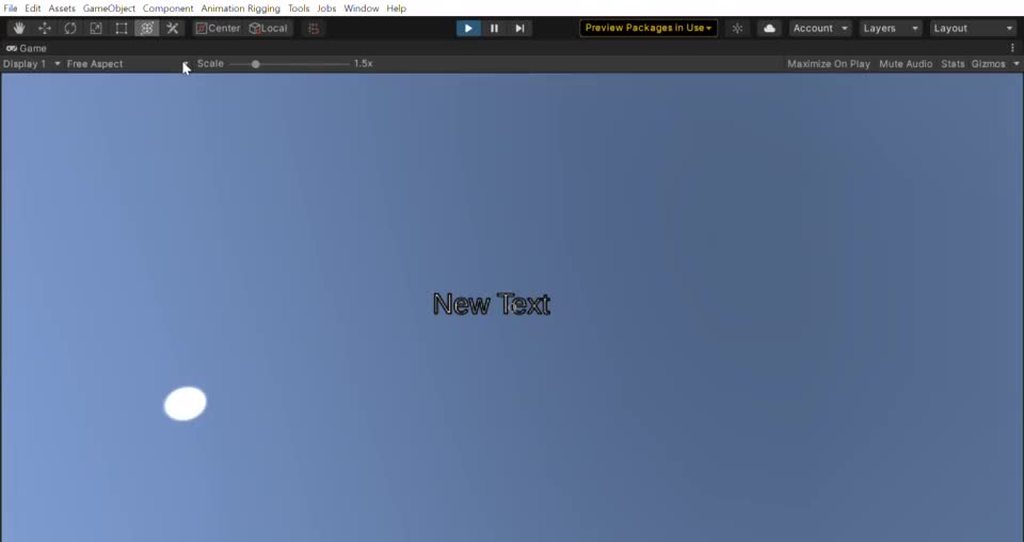
why when i add a text object from UI > Text, this happens?

 jagged monolith
Because the canvas is scaled to your game view, and 1 pixel in screen space = 1 meter
If you want it scaled to your world you'll need to set the canvas type to world space and set the scale to something like 0.001
mortal robin
quartz sail
why when i add a text object from `UI > Text`, this happens?
normal, expected
 glass wren
I have overlapping images with click event triggers, how can I click through alpha = 0 zones to trigger the lower images?
Things I've tried: custom border, outline, physics shape in sprite editor with mesh type tight, r/w enabled plus alphaHitTestMinimumThreshold = 0.5f, swearing, Image component set to Use Sprite Mesh...
jagged monolith
presumably you would have to toggle 'raycast target' on the button's image component based on the alpha value
glass wren
Yes, that's what alphaHitTestMinimumThreshold is for (supposedly), though I'd find it very handy if raycasts would respect the pretty little meshes I drew in the sprite editor.
To reiterate, what I'd really like to do is turn off 'raycast target' on just the transparent parts of the image.
jagged monolith
Ah shoot I found some code for that last week... let me try and find it
I was thinking about something else turns out
glass wren
The alpha threshold thing would have been perfect, maybe it's just reading the png wrong
jagged monolith
Let me try it real quick
It works as expected for me @glass wren
Did you set your image sprite texture to read/write enabled?
glass wren
I did.
jagged monolith
What does your script look like?
glass wren
It was a Pointer Click Event pointing to a Debug.Log printing out the name of the clicked element
jagged monolith
Where you set your AlphaThreshold i mean
glass wren
        image = gameObject.GetComponent<Image>();
image.alphaHitTestMinimumThreshold = 0.f;}```Sorry, that was a copying mistake, I've tried 0.5f, 0.9f, 0.1f, 1f
jagged monolith
And you've applied the script to all image components that make up the buttons?
glass wren
That's correct
glass wren
I worked around it by changing everything to non-overlapping rectangles, which is a bit of a compromise but I'll make it work.
Now I'm struggling with pointer event triggers not firing on worldspace UI elements, can you recommend a good worldspace UI tutorial that involves clicks? I did set an Event Camera.
 placid kiln
Anyone can help me showing item image on canvas when pick up before going to inventory.
glass wren
glass wren
Now I'm struggling with pointer event triggers not firing on worldspace UI eleme...
turns out: backwards canvas, all is well
earnest brook
How can i drag a uielement in a world space canvas? I ve tried doing that for ages but never got it to work.
 neon crest
This is sorta a newb question I think, but all my googling keeps on turning up docs and forum threads about antique versions of Unity....
I want to figure out what UI element the center of my screen is pointing at if any. Conceptually I want to raycast from the center of the camera and hit UI only, but doing that literally with a Physics raycast doesn't work. Do I have to set something up to get that to work, or is there a different sort of cast entirely I need to be doing?
mortal robin
neon crest
This is sorta a newb question I think, but all my googling keeps on turning up d...
You should be able to hook into the GraphicRaycaster
graphicRaycaster.Raycast(evetnData, results);
You will need to construct a PointerEventData with the correct screen coordinates
I think all you need to populate is https://docs.unity3d.com/2018.1/Documentation/ScriptReference/EventSystems.PointerEventData-position.html
neon crest
Ok. Does the canvas need anything special to hit? An event system?
Graphicsraycast was the thing Google kept turning up but it brought me to ancient docs and hitting “show me the current docs” went nowhere and a subsequent search from there found nothing. So maybe i was getting thrown off the trail by a quirky website
mortal robin
neon crest
Graphicsraycast was the thing Google kept turning up but it brought me to ancien...
yeah the docs are kind of a mess for the UI stuff because after 2019 they suddenly threw all that stuff onto the separate docs.unity3d.com/Packages URL
with the different UI and everything
neon crest
Ahh. Ok, I’ll try to keep that in mind
mortal robin
neon crest
Ok. Does the canvas need anything special to hit? An event system?
If it's helpful at all here's some code I use occasionally to debug event system issues:
            var es = EventSystem.current;
            List<RaycastResult> results = new List<RaycastResult>();
            PointerEventData ed = new PointerEventData(es);
            ed.position = Mouse.current.position.ReadValue();
            es.RaycastAll(ed, results);
Debug.Log($"raycast results are {string.Join(", ", results.Select(r => r.gameObject.name))}");```that's doing a RaycastAll on the Event System which does a raycast on all raycasters in my scene
but you should be able to do a raycast with a specific raycaster, such as the GraphicRaycaster
neon crest
I had noticed with other stuff that I slways landed on prehistoric docs, but it usually brought me to the current one
Thanks, that’s a big help
 bleak zinc
could anyone help me figure out why my TMP text elements are reverting when I save
 rapid ferry
some of my world to screen point icons overlapping the HUD icons how to resolve this
neon crest
mortal robin
If it's helpful at all here's some code I use occasionally to debug event system...
That worked perfectly, thanks again. I was a little worried things would be weird because I'm projecting my UI elements into world-space, but apparently that's not an issue
rapid ferry
Any thoughts?
rapid ferry
for me clear flags missing in camera where is it located?
rapid ferry
Oh wait are you talking to me?
 dense dune
Question: I would like my in-game UI to look something like this - with the colors saturated and bright/a little bit broken. I have no idea how to achieve this, ideas?
 mortal robin
dense dune
Question: I would like my in-game UI to look something like this - with the colo...
mortal robin
dense dune
Question: I would like my in-game UI to look something like this - with the colo...
looks like a bloom post processing effect
dense dune
but how do I apply it to the UI?
mortal robin
dense dune
but how do I apply it to the UI?
You do the postprocessing on the camera that is rendering UI
 ionic wharf
I have a problem with my fonts
I'm using TextMeshPro, but some font have this problem after convert
The fonts have this square alpha border
How can I fix it? :/
(Maybe need zoom the image)

The square border only shows when I use Outline and Underlay properties
I was trying put a Border in my fonts :/
 azure flame
ionic wharf
I have a problem with my fonts
I'm using TextMeshPro, but some font have this pr...
azure flame
ionic wharf
I have a problem with my fonts
I'm using TextMeshPro, but some font have this pr...
That's usually happens when applying effects on a smaller resolution font. Use TMP font asset creator to bump up atlas resolution to x512 or more
(that background is color of neighbors in the atlas bleeding in)
Oh yea, if just resolution is not enough put higher padding number.
ionic wharf
azure flame
That's usually happens when applying effects on a smaller resolution font. Use T...
Isn't worked :/
I try all the resolution, but keep the problem :/
azure flame
Set higher padding.
ionic wharf
azure flame
Oh yea, if just resolution is not enough put higher padding number.
I'll try it
ionic wharf
azure flame
Set higher padding.
When you say "Padding", is the letter space?
azure flame
 ionic wharf
Ah, right
I was searching in TextMeshPro
 ionic wharf
@azure flame It worked
Very thanks by your help ❤️
rapid ferry
is there a tutorial to show which objects are interactable like the ones in sims?
dense dune
mortal robin
You do the postprocessing on the camera that is rendering UI
uhm with the "classic" postprocessing it does not seem to work, adding bloom does not affect the UI (I made sure to add it to the layers affected by postprocessing)
mortal robin
dense dune
uhm with the "classic" postprocessing it does not seem to work, adding bloom doe...
Is your UI actually being rendered on a camera? Or are you using Screen Space Overlay?
dense dune
ach you are right. screen space overlay
mortal robin
You need to use either Screen Space Camera or World Spasce
then it will be actually rendered by a specific camera
dense dune
aaah ok now it works. Amazing thanks!!
I will probably need to set up a camera just to render the UI. will it impact performance a lot?
mortal robin
nah it's pretty standard practice
As long as you're not using HDRP
HDRP is special 🙂
dense dune
ok im not 😄
mhmh I need more help sorry 😆 basically I want two separate sets of post-processing effects for the two cameras
but the second camera, i can't get it to apply any effect, even with a post-processing layer attached to it
maybe because its parent is the main camera?
I apply the post-processing layer, but it seems like the second camera is ignoring it. if I render the UI on the first camera, then I see the effects applied to the UI as well (of course switching the camera in the canvas)
I'm confused because basically these two cameras have everything in common but the layers they render, and the post-processing is applied to only one of them
mortal robin
dense dune
I'm confused because basically these two cameras have everything in common but t...
#💥┃post-processing I'm not really an expert on it. Maybe there's some relationship between parent/child cameras for postprocessing? Try unparenting them for a minute to see what happens
dense dune
mortal robin
<#497873924504420362> I'm not really an expert on it. Maybe there's some relatio...
already tried did not solve it
ill ask there!
 gusty gulch
do I have to pay money to use impact in my game?
 median iris
if your question is about Software for PixelArt, I'd suggest to check out Aseprite
https://www.aseprite.org/

Animated sprite editor & pixel art tool
 candid umbra
Hi, so i want to toggle on and off bloom in the settings menu, but idk the code to do that
median iris
then check out Krita, Gimp, Paint.NET or do a Google search for "free PixelArt software" 😀
 distant hill
how can I make an horizontal group with image and text - where:
- the image would match the group height, and width would match height.
- the text width will fill the space
?
I believe I got the 1st one, just not sure how to do the 2nd one
candid umbra
candid umbra
Hi, so i want to toggle on and off bloom in the settings menu, but idk the code ...
Does anyone know how to?
 zenith loom
Hey hey, hello ! I'm trying to upgrade an (heavy) project from 2018 LTS to 2019 LTS. I've noticed a changes into the UI that i doesn't understand well.
Say we have a UI -A-, with a Canvas and a Graphic Raycaster. Canvas sorting order is 0.
We have a UI -B-, with a Canvas and Graphic Raycaster. Canvas sorting order is also 0.
-B- is below -A- in the hierarchy, so -B- is display in front of -A-. 2018 to 2019 doesn't change that.
However, for raycast, 2018 and 2019 behave differently. Imagine -A- and -B- have a button at the same place on the screen (so button -A- is hidden by button -B-) :
- In 2018, it clicks on -B-
- In 2019, it clicks on -A-
Is there something i'm missing ? Why Canvas rendering depends on hierarchy but not graphic raycaster in 2019 ? Why does it change ?
Thanks !
 woeful panther
Has anyone encountered issues with Text Mesh Pro (text) becoming unreadable when changing resolutions in a build?
 candid gust
how do i animate the text in a similiar way? cant really find anything online
 neon crest
Do you just mean the typewriter effect?
I can't vouch for any of these, but there's a few free solutions out there like this:
https://github.com/redbluegames/unity-text-typer
A thread on it with some approaches:
https://forum.unity.com/threads/typewriter-jitter-and-wave-effects-at-once.532184/
and a pretty inexpensive asset (50% off right now) for doing that and others:
https://assetstore.unity.com/packages/tools/gui/text-animator-for-unity-158707

GitHub
Text typing effect for Unity uGUI Text components. Contribute to redbluegames/unity-text-typer development by creating an account on GitHub.

Unity Forum
Hello,
For our game, we want to allow dialogue to have various text effects at different points. For example, if a character is scared some of their...

Use the Text Animator for Unity from Febucci Creations on your next project. Find this GUI tool & more on the Unity Asset Store.
mortal robin
candid gust
how do i animate the text in a similiar way? cant really find anything online
The most straightforward thing is to just use TextMeshPro and animate this property: https://docs.unity3d.com/Packages/com.unity.textmeshpro@2.0/api/TMPro.TMP_Text.html?q=Tmp_Text#TMPro_TMP_Text_maxVisibleCharacters
 fluid crater
hi
i have an questions about UI in Unity
I've made a cursor as png for my game and background is transparent
but somehow there is still a little white thing visible on my cursor
ok fixed by rescaling cursor img
 unborn rivet
Hey, quick question: I have a few buttons that use vector images as source. The edges look - well, not continuous? the images have their scales preserved. what could cause this?
 mortal robin
unborn rivet
Hey, quick question: I have a few buttons that use vector images as source. The ...
mortal robin
unborn rivet
Hey, quick question: I have a few buttons that use vector images as source. The ...
This is just antialiasing - or a lack thereof.
If it's scene view, there's no way to antialiasing in scene view as far as I know
If it's game view - antialiasing depends on your render pipeline as it's a postprocess effect
 open hearth
Does anyone know why my ScrollRect isn't cutting off those background images?
mortal robin
open hearth
Does anyone know why my ScrollRect isn't cutting off those background images?
Are the images Maskable?
 open hearth
mortal robin
Are the images Maskable?
open hearth
mortal robin
Are the images Maskable?
You mean the Image on the Viewport right? that one is maskable.
The background images are not.
It's so strange to me that the masking works on the text and yellow buttons, but not on the backgrounds.
I have another window with the same alternating background for a list, and there it works. The only difference is that the hierarchy of that object is way less complex. But the mask should cut anything within right?
Oh, I didn't have a Source Image set, since I just needed a simple color. (like in your example)
Setting a Source Image and making it maskable indeed fixes the issue.
Thank you very much! 🙂
 tropic badge
Hello, I am experiencing ui flickering glitch when running the built app. The issue does not exist in the editor (2020.1), occurs on multiple computers and builds. Seems to be similar to the ones described in topics regarding U2019 and previous versions:
https://answers.unity.com/questions/1696721/ui-flicker-glitch.html
Any ideas how to handle it?
Unity is the ultimate game development platform. Use Unity to build high-quality 3D and 2D games, deploy them across mobile, desktop, VR/AR, consoles or the Web, and connect with loyal and enthusiastic players and customers.
 vapid tusk
I have a somewhat similar issue on my GUI. Anyone has an idea why this happens?


This happens only on my build specifically on android. On the editor, it works just fine
It kinda flickers, appearing then disappearing.
 obsidian blade
Is there a way to make Shader graph work with Screen Space Overlay?
mortal robin
obsidian blade
Is there a way to make Shader graph work with Screen Space Overlay?
in what way is it not working with SSO?
obsidian blade
unlit shader appears in scene view but not in play mode
as soon as i put my canvas in screen space camera, i can see the shader in play mode
 molten whale
Small little question. So I have a Dropdown menu in a Canvas.
When I hide this Dropdown menu in the inspector and I use a script to change it's values when it goes back to .setactive(true) it gives me a reference error. Although when this object is active and when I change the values via the script, the object has no reference error.
Is there a way to make this not happen?
 glacial fossil
How to make good ui with very high quality?
 lethal breach
For UI design. I know how to use the UI > Mask component to have the masking sprite be the boundary for all of it's children images...however, in this particular case, I'm looking for just the opposite. Is there a way I can use a sprite as a mask but rather to be a cutout instead?
mortal robin
If Graphics.DrawTexture poor form? I want to display a reduced-opacity version of an icon under my mouse as the user drags it around.
lethal breach
mortal robin
If Graphics.DrawTexture poor form? I want to display a reduced-opacity version o...
Is that icon a sprite? Or do you draw it at runtime?
mortal robin
it's a sprite
I know I can make a separate GameObject but I'm feeling extra lazy right now
lethal breach
Why not just instantiate a copy, set lower opacity, and then move it based on mouse pos?
Oh lol
lethal breach
I think it would be the easiest way to do it.
I know, don’t you hate it? Writing all that code and creating a whole thing just for a tiny effect?
I feel your pain.
mortal robin
it's a lot of gruntwork
lethal breach
Indeed. We are the grunts of the industry though, so...
You have any suggestions for my question? @mortal robin
mortal robin
I'm terrible with Masks unfortunately
lethal breach
Ok. No worries.
mortal robin
I thought tehre was some setting for Image that was like "Hide if masked" or "show if masked"
idk where that went though
lethal breach
Yeah just disables being affected by mask. But not invert it.
mortal robin
Oh it's on SpriteRenderer

but that's SpriteRenderer, not UI Image
¯_(ツ)_/¯
Oh I see Unity - assigning a UI image to a field is grounds for crashing today huh?
👀
How do I make this dragged image follow my mouse position perfectly instead of lagging behind?
What I've tried so far:
- just adding eventData.delta to the anchoredPosition
- adding eventData.delta * canvasScaler.scaleFactor
- adding eventData.delta / canvasScaler.scaleFactor
None of these worked right.
lethal breach
mortal robin
How do I make this dragged image follow my mouse position perfectly instead of l...
I found that using delta and canvas scaling to be cumbersome. It was easier for me to just get the mouse position instead, and copy it to the draggable with an offset.
And be sure to perform this in the Update, so that you get the most smoothest, lagless result.
 marble hollow
Hey, I had a question about buttons. I know this is technically related to AR, but it wouldn't hurt to ask here as well. My canvas UI buttons work fine in 2D, but once I try to use the same button with AR Foundation, the buttons is able to be pressed but doesn't do anything. Any thoughts?
mortal robin
@lethal breach 🥳
This ended up being the secret formula:
Vector2 mousePos = Mouse.current.position.ReadValue();
Vector3 mousePos3 = mousePos.WithZ(canvas.planeDistance);
Vector3 worldPoint = canvas.worldCamera.ScreenToWorldPoint(mousePos3);
dragPlaceholderImage.transform.position = worldPoint;```The damn anchored position stuff is so inscrutable.
lethal breach
I know.
mortal robin
I'm using the OnDrag event still not Update(). Is that a mistake?
lethal breach
Oh no. It’s good. As long as your end result is desired, it’s good.
 fervent tide
tropic badge
Hello, I am experiencing ui flickering glitch when running the built app. The is...
fervent tide
tropic badge
Hello, I am experiencing ui flickering glitch when running the built app. The is...
Hello, it would be great if someone from Unity could address our issue. Right now we cannot proceed with development because of it.
jagged monolith
If you need attention from unity then submit a bug report and make a forum post @fervent tide
fervent tide
I was hoping to get a quicker response than the 'official' way, I thought that's the purpose of this discord.
neon crest
This discord is more of a community volunteer thing, there's little to no official presence
jagged monolith
No, this is a community discord
fervent tide
ok, my bad then. thanks for the info though 🙂
 muted kiln
anyone have a problem with textmesh going invisible in game screen but looking fine in scene window when you press the 2D button
this is if i dont press the 2D button on top

and this is when i do

 fierce oak
This might be better off in here... any idea why my TextMeshPro text is rendered behind a sprite (hidden) when viewed from underneath, but it's rendered on top of it (visible) when viewed straight-on or from above the text?
I don't want it to be hidden from any angle, I want the text completely visible at all times
 solar marlin
fierce oak
This might be better off in here... any idea why my TextMeshPro text is rendered...
solar marlin
fierce oak
This might be better off in here... any idea why my TextMeshPro text is rendered...
Check all the z tranforms of your ui elements, You can also play with the sorting order.
fierce oak
That's just the thing, you can't change sorting order of TMP objects
And shifting on the Z doesn't help
 late zephyr
Can someone give the idea why even as I selected "Point (no filter)" the cursor is still blurred? The cursor texture is 16x16 if it matters.

 unkempt veldt
I have some UIToolkit stuff which works fine in editor play mode, but when I try to use it in a build I get a warning saying "Style sheet not found for path [...]". Any ideas what could cause it, and how to resolve it?
mortal robin
it means you have some RectTransforms with negative scales or sizes
Usually happens due to your anchor/pivot setup
unborn rivet
by dragging from the right side, going over the left and keep going
neon crest
Does a Canvas have to have a particular relationship to the Event System in the scene in order to receive clicks? Like, does it have to be attached to or a child of the same object with the Event System component? I've got a canvas that doesn't seem to notice any mouse inputs and I'm trying to figure out what the requirements are.
mortal robin
neon crest
Does a Canvas have to have a particular relationship to the Event System in the ...
No the EventSystem can be anywhere in the hierarchy
even in a different scene.
What kind of canvas is it?
i.e. which canvas render mode?
neon crest
Screenspace Overlay
I haven't dug into it too much yet, so I may have missed something obvious. Just wasn't sure if that could be a factor
mortal robin
If you're at a complete loss - this is my "Hail Mary" event system debugging snippet, which you can put in Update:
            var es = EventSystem.current;
            List<RaycastResult> results = new List<RaycastResult>();
            PointerEventData ed = new PointerEventData(es);
            ed.position = Mouse.current.position.ReadValue();
            es.RaycastAll(ed, results);
Debug.Log($"raycast results are {string.Join(", ", results.Select(r => r.gameObject.name))}");```I haven't done heavy UI work to date so I don't have a handy mental checklist 🙂
Looks useful, thanks
mortal robin
(obviously switch the mouse position for normal input system if you're using that)
neon crest
All input system here 🙂
rapid ferry
what's the difference between <ui:UXML... and <engine:UXML ?
What decides the namespace prefix?
i guess it's the xmlns
 tribal notch
https://streamable.com/bpu3sa why doesn't textcolor update unless I save? I've upgraded a 2020 project to 2021.1.5f1, which I suspect may be the cause
 dense dune
hi all. Question about color palettes and color schemes. Do you think that the UI should have the same palette as the game? or should they be different? I'm thinking about using a slightly different set of colors for the UI and for the world
 gleaming echo
mortal robin
How do I make this dragged image follow my mouse position perfectly instead of l...
gleaming echo
mortal robin
How do I make this dragged image follow my mouse position perfectly instead of l...
Hello. This is unrelated to your question, but how were you able to record this video/snippet? I am asking so that if I need to display what I'm working on, I may do so. Thank you
Hello, how can I detect between touching an on-screen joystick or on-screen buttons and everything else?
mortal robin
gleaming echo
Hello. This is unrelated to your question, but how were you able to record this ...
I used OBS
gleaming echo
mortal robin
I used OBS
Ahh ok. Thank you
 azure flame
@barren mirage If you move your text to clear space can you see it?
 barren mirage
azure flame
<@!222418832436756480> If you move your text to clear space can you see it?
barren mirage
azure flame
<@!222418832436756480> If you move your text to clear space can you see it?
nope
barren mirage
barren mirage
this is from inputfield
rapid ferry
gui layer

 barren mirage
rapid ferry
gui layer
barren mirage
rapid ferry
gui layer
yeah its on ui layer
and same position in Z as the button, which is visible
 rapid ferry
make new canvas ui and make the layer 2
barren mirage
and then add the input there?
azure flame
barren mirage
and same position in Z as the button, which is visible
UI is sorted by default using its order in hierarchy
barren mirage
azure flame
UI is sorted by default using its order in hierarchy
yeah tried putting button up and down in the hierarchy, still can see button but not the text input
azure flame
So one of the causes you could've overidden render order
barren mirage
barren mirage
yeah tried putting button up and down in the hierarchy, still can see button but...
I did this like right now, not before
azure flame
Just turn off existing canvas and recreate what you have with default components without messing with properties
barren mirage
I can try recreate it yeah

wellp
sorry for the messages guys, recreating it seemed to fix it
Thanks buds
 weary violet
great success!
somewhere along the line you must have pressed one of the everpresent dont do that buttons
azure flame
Things you have on the bottom in UI hierarchy will be drawn on top
weary violet
they are everywhere..
azure flame
Another way to debug what's obscuring UI is to use EventSystem inspector (extend it on the bottom) at runtime to mouse over the element, to see what's on top.
lethal breach
I'm using TextMeshPro, that is part of an animation controlled by an Animator Controller. In a particular state, the text needs to swap the Material Preset (as labeled in inspector). In the Animation dopesheet, this is linked under TextMeshPro > Shared Material.
I set everything up, and when the animation enters that particular state, the inspector does indeed show the Material Preset actually swap...however the Game and Scene view does not reflect the changes. But while the game is playing, I can actually click the Material Preset dropdown in the inspector and choose that already choose material, then the game/scene actually performs the update.
Why doesn't the animator update the swapped material? And how can I make this happen?
mortal robin
Anyone know where I can find documentation about what these different content types do for TMPro InputField? I know they limit the types of data that can be entered but I'd like to know more precisely what they allow or not.
 neon crest
Good question; one of the things I've learned about "Name" in particular is that there's almost no filtering you can do there that makes universal sense.
 sand prism
Does unity still not have dynamic gradients in their UI ?
left corner right corner whatever
Tried every which way to get an extension off git (with transparency!)
it's all broken and buggy, this area feels super underappreciated considering how many modern games use gradients in their UI-
mortal robin
neon crest
Good question; one of the things I've learned about "Name" in particular is that...
from my testing so far it seems to disallow numbers and most "normal" special characters but I was still able to type in this:

So I'm not sure if it's really a useful setting
sand prism
even big names like riot have had this, I would just manually whitelist(or blacklist not sure the right term.. a list of banned characters lol)
neon crest
Numbers are... probably safe to eliminate? But at work we've just kinda stopped doing anything because we're always wrong SOMEWHERE 🙂 Even first/last name is a problem
I guess aside from "This isn't entirely whitespace right?"
sand prism
yeah, easier
"Is this one of the allowed characters?"
If not, probably something sketchy and return invalid
mortal robin
My main concern is that the name you enter here is going to be used as the name of the folder where your saved games are stored so it needs to be filesystem kosher
I'll probably just do a whitelist
neon crest
Ah, yeah. We also have that problem when creating new users who then need home folders. We run the name through a filesystem sanitization method while allowing the entry to be whatever they wanted
mortal robin
neon crest
Ah, yeah. We also have that problem when creating new users who then need home f...
hmm that's an option too I suppose
neon crest
and, we show them the "proposed" name that we're going to use for them to change if needed/desired
But THAT field does limit input to "OK for filesystem" stuff
mortal robin
neon crest
But THAT field does limit input to "OK for filesystem" stuff
how are you doing that part? A custom input validator?
neon crest
Basically yes. I looked up the rules for names on APFS (and previously HFS) and went from there. If it just disallows a small list of things, then it was a blocklist.
I think we've gone back and forth on whether spaces should become _ or not since the filesystem doens't care.
mortal robin
Modern filesystems are surprisingly lenient with filenames I've noticed
neon crest
There's also the trouble with Unicode having a lot of ways to store the same thing, so we settled on decomposing all Unicode characters
mortal robin
But I may end up just being a hell of a lot more restrictive than that
I don't plan on internationalizing this thing really
neon crest
Well, maybe not, but you certainly can have a domestic user with an accented name 🙂
mortal robin
yeah accents I will certainly allow.. I'm more talking about stuff like ¶•ºª
neon crest
But accents are where you get into the composition issue
mortal robin
doesn't seem to be an issue for OSX:
neon crest
I spent a month, literally an entire month debugging a problem a work that I first determined only happened to FRENCH users which was super baffling. Ultimately discovered that the default drive name for them had and accented é, and depending on how we composed our string comparisons sometimes it'd fail.
neon crest
It is; this issue I'm describing was in the macOS installer 🙂 It's just the way unicode works
But the solution there was also easy; I made sure to do -decomposedStringWithCanonicalMapping: on any path-string before comparison. There's probably something similar in most languages that have competent Unicode support
mortal robin
Presuming I'm just creating files I think it should be fine though?
 neon crest
Yeah, APFS considers itself just a "dumb database" and completely doens't care what you store as a filename
mortal robin
and NTFS?
neon crest
I'm much less familiar but I believe it's the same. Windows has a lot more legacy with filenames that they try to preserve though; in both cases it can be more a matter of what you can slip by the layers on top than what hte filesystem technically cares about. The most obvious example being the \ or / path seperator TECHNICALLY being legal in filenames if you can somehow get it to the FS layer 🙂
neon crest
Yeah. Windows in general has a whole lot more oddities like that because they care a LOT more than Apple about maintaining backward compatability forever
mortal robin
indeeed
Microsoft seems to have good documentation: https://docs.microsoft.com/en-us/windows/win32/fileio/naming-a-file#file-and-directory-names

All file systems supported by Windows use the concept of files and directories to access data stored on a disk or device.
neon crest
Yeah, they usually do
mortal robin
Oh there's also this - https://docs.microsoft.com/en-us/dotnet/api/system.io.path.getinvalidpathchars?view=net-5.0 But I wonder if and how this will work in Unity, if it's running on a Mac for example
Gets an array containing the characters that are not allowed in path names.
of course with a warning that it's not guaranteed to be a complete set T_T
neon crest
I wonder if other platforms are WHY they don't guarantee it
Can you just simplify it and directly ask them for a name for the folder and put heavy restriction on it? Seperate from their name entirely if you still need that for something else?
People get kinda offended when they can't enter their actual names sometimes, but I think they're a lot more forgiving of folder names
mortal robin
Maybe I just won't use the name as a folder name. I had the idea that I could just iterate the folders to show the available profiles, but maybe I'll just put the name/folder mapping in its own file and be done with it
Then they can write anything they want
The folders themselves don't need to be user friendly
neon crest
That sounds safest
Or stick a metadata file in the folder that says who it was created for so it's resilient against user renaming
lethal breach
mortal robin
Anyone know where I can find documentation about what these different content ty...
Were you able to figure it out, or you still wondering?
sand prism
Why would my TMP text work under a mask but my unity images do not?
trying to use a scroll view + vertical layout group but it's just clearing the text at mask edge, not actually masking the images themselves (buttons associated with the text so on)
 bright dagger
hi, I have a (hopefully) pretty simple question: I have a panel and that panel has a child that's a text with dynamic content. The RectTransform of the text object has a size that's determined by its contents (using a content size fitter) which works fine; now I want to achieve the same for the parent panel (the panel is supposed to be just as big as the text object, basically) but using a content size fitter with"Preferred Size" settings there just puts it size to 0,0. What am I doing wrong?
rapid ferry
do i need TextMeshPro for UI Toolkit / UI Elements? Can I uninstall that package, or I still need it as a dependency?

 novel dust
alright side note on this
I realized it's when the camera moves around
actually it's both
fixed it
 plain totem
I'm thinking of doing something like this with a Slider but I'm not sure if that's the right tool.
My idea was to overlap sliders that display the different information I need.
In this example the blue represents the current value. The green range represents a goal and the red represents a dangerous range.
Should I try this with something else? Is what I'm thinking possible with Sliders?

 obsidian crag
Yes it is possible. With 3 sliders (green, blue, red), disable the Slider Background for the blue and red one.

 plain totem
Wow, I really appreciate that!
 thorny coyote
Is it possible to use blending modes on UI elements? Like multiply, overlay, screen etc?
 cobalt tulip
hi anyone here know how to change a colour of text on click of toggle?
I have attached a script to the toggle
public void SetFullScreen(bool isFull)
{
Screen.fullScreen = isFull;
}
but how can I change the text colour?
here is teh fullscreen toggle script
but unable to change the colour with if statement
mortal robin
cobalt tulip
hi anyone here know how to change a colour of text on click of toggle?
myText.color = someColor;
@mortal robin can I do this in the fullscreen script?
or better make a new script just for this?
mortal robin
cobalt tulip
<@!179367739574583296> can I do this in the fullscreen script?
You can do anything you want
If you want both things to happen together, it's easier to put them in the same script
cobalt tulip
yeah but how to access to the text?
as it's not part of the toggle label
it's TMP text component acting as a label
cobalt tulip
yes
mortal robin
you reference it like any other component in Unity
cobalt tulip
ok, will try it thanks, I am noob sorry for so many questions
mortal robin
This is the simplest way to reference any component in the same scene as your script: https://help.vertx.xyz/?page=Programming/Variables/Other Members/Serializing Component References
that example uses a Transform, but you can use TMP_Text or anything else you want
 frosty pewter
yes, your IDE should be able to tell you what it is
if you're using VS there's a lightbulb you can click on (or alt-enter I think)
cobalt tulip
Also I want to know general asset making guide for UI in unity, whenever I make an asset it looks out of size
or way too small
cobalt tulip
why is unity standard text pixelated?
is text mesh pro is the only way to do this?
are there any alternatives to text mesh pro?
neon crest
Seems like they should hide the default one unless they see it's already in your project or you check some "Show me the garbage" checkbox
 uncut thorn
for ui builder are you supposed to have one uidocument and replace the current place on it? or create a new uidocument for each screen
rapid ferry
I'm getting this error on my PlayerStatus.cs file

public class PlayerStatus : MonoBehaviour
{
    //public string userName;

    //STATS
    //SECONDARIES
    public SecondaryStats currentSecondary;
    public SecondaryStats maxSecondary;

    //PRIMARY
    public PrimaryStats currentPrimary;
    public PrimaryStats basePrimary;


    // Start is called before the first frame update
    void Start()
    {
        StatSetup(10, 10, 10, 10, 10);
    }

    // Update is called once per frame
    void Update()
    {

    }
    void StatSetup()
    {
        basePrimary = new PrimaryStats(str, agi, intl, stam, spr);
        currentPrimary = new PrimaryStats(basePrimary.strength, basePrimary.agility, basePrimary.intellect, basePrimary.stamina, basePrimary.spirit);

        maxSecondary = new PrimaryStats(currentPrimary.stamina * 10, currentPrimary.intellect * 10, currentPrimary.agility * 10);
        currentSecondary = new SecondaryStats(maxSecondary.health, maxSecondary.magic, maxSecondary.energy);
    }
}
public class PrimaryStats
{
    public int strength, agility, intellect, stamina, spirit;

    public PrimaryStats()
    {
        strength = str;
        agility = agi;
        intellect = intl;
        stamina = stam;
        spirit = spr;
    }
}
public class SecondaryStats
{
    public int health, magic, energy;

    public SecondaryStats()
    {
        health = heal;
        magic = mag;
        energy = nrg;
    }
}
I had 10 errors originally but its reduced down to 5 after changing some of the Classes
 cyan solstice
need help with a png Error: "Only textures with widht/height being multiple of 4 can be compressed to DXT5 format" in unity the pic is 2048x49 but its 2208x64 so why all other png are working except this one
uncut thorn
anyone have uitoolkit experience for a quick chat about how to use the uidocument?
if for example i have a start menu pause menu and end menu should all of those be considered a different ui document that get enabled/disabled
or should it be 1 ui document that you swap out the ui tree with?
 steel sand
Hey there.
I'm currently working with a TextmeshPro Inputfield and wanna be able to have buttons that make the selected text bold or underlined when clicked.
I already have the buttons and can technically already insert tags like <b> and </b> around the selected word, but I can't figure out how to make it toggleable.
Is there anyone who can help me with that?
 last dagger
How can we turn bytes[][] to image?
mortal robin
but you'll need it to be a 1d array first
that's assuming your data is in a supported binary format.
If it's just like, raw color data in an array I think you'd have to make your own Texture2D and write the code to loop through and set the pixel colors one by one
last dagger
ok thx
rapid ferry
can i use the ui toolkit with the new input system im confused
 tawdry aurora
frosty pewter
There's almost no reason to use default text
tawdry aurora
frosty pewter
There's almost no reason to use default text
Localization
 mild kernel
Localization has nothing to do with the need for using the old outdated text component.
obsidian crag
rapid ferry
can i use the ui toolkit with the new input system im confused
Yes, the way it interacts with UI is still through Raycast from Mouse/Touch input.
What issue are you experiencing?
If your button is not capturing input, check if your Canvas object also contains a Graphic Raycast. This is a common thing to happen.
rapid ferry
i just saw the comparison page on unity docs and it said integration with the input system was "planned" so that got me confused
and your message is confusing as well because "canvas" is from uGUI isn't it?
tawdry aurora
mild kernel
Localization has nothing to do with the need for using the old outdated text com...
Try Chinese on tmp and you'll see 😂
Text is perfectly fine, you just don't get the fancy distance field rendering
neon crest
@rapid ferry When I was experimenting with UI Toolkit, it had integration with Input System. If I recall correctly it's not the "default" but you swapped one class for another I think. It was pretty simple.
 jade gust
the button component's onclick can't call functions with multiple variables when setting it up through the editor right
if i split up my function into seperate ones with single arguments, does unity always run them in the order that they are in the editor?
mild kernel
Probably. You can also just use the IPointerDown interface and skip the editor.
jade gust
oh ok yeah, this seems like a better way to do it
there are also drag and drop interfaces, neat
rapid ferry

Unity Forum
I am applying a Face texture to a TMP object and then adding 0.01 to the SpeedX and SpeedY values. This animation is going to be the main screen of my...
I'm getting this issue in TMP, can anyone help??
jagged monolith
jade gust
if i split up my function into seperate ones with single arguments, does unity a...
normally yes, but it's not guaranteed, is the official line
 heady ice
anyone know how to make text mesh pro text not get covered by a mask
 real arch
heady ice
anyone know how to make text mesh pro text not get covered by a mask
real arch
heady ice
anyone know how to make text mesh pro text not get covered by a mask
you can disable the Mistakable option in the "Extra Settings" section of the text object

 sharp belfry
Is there any easy way to replace a text component with a TextMeshPro component without having to redo the text?
jagged monolith
sharp belfry
Is there any easy way to replace a text component with a TextMeshPro component w...
Sounds like an editor script that wouldn't be too much work to make
rapid ferry
I am getting a unique glitch, So my glitch is that I have a text which is score which is on top of the screen so now when I run the game in Unity it works but when I build the game the score text comes down and same for the main menu button which I have I am getting this error from today afternoon I did not change anything but idk why this is happening can anyone help me fix it?
 modern swift
hi im super new but my main camera is like this and i cant change the horizontal length without changing the entire size of the camera

this happened when i changed the size of the unity window btw
jagged monolith
try #💻┃unity-talk @modern swift
modern swift
alright
jagged monolith
What do you mean by 'come down' @rapid ferry? Show a screenshot and a screenshot of your rectTransforms
jagged monolith
screenshots are fine
rapid ferry
Alrigh
wait
the score in unity

the score in the build

the text
see
it comes down
it's happening from today
@jagged monolith
jagged monolith
And your RectTransform for the text?
 jagged monolith
You need to anchor it to the top of the screen
rapid ferry
like this?
 rapid ferry
jagged monolith
You need to anchor it to the top of the screen
rapid ferry
jagged monolith
You need to anchor it to the top of the screen
would this work?
@jagged monolith
jagged monolith
Should be better
rapid ferry
jagged monolith
Should be better
thank you so much
obsidian crag
modern swift
hi im super new but my main camera is like this and i cant change the horizontal...
On the Game View, set the Aspect Ratio for what you want it to be on the final game. It seems you are using a 4:3 aspect ratio, so your Canvas camera will follow that.
Also, you are rendering the background with the canvas system or using a Sprite?
 analog goblet
Would there be a reason EventSystem.current.currentSelectedGameObject; wouldn't return the UI element currently being hovered over? pointerEnter and raycast debug data from the EventSystem inspector return the correct elements, but currentSelectGameObject always returns null
mortal robin
analog goblet
Would there be a reason ``EventSystem.current.currentSelectedGameObject;`` would...
simply hovering over a UI element doesn't select it
You would have to click on it or navigate to it. It also needs to be a Selectable of some kind
either a Button, Toggle, InputField, or a base Selectable component that you've manually added.
analog goblet
Hm, I see. Would there be any way to extract that pointerEnter or current raycast data from eventsystem? The forums have not been very helpful with that
Would like to avoid inheriting from the input module
mortal robin
analog goblet
Hm, I see. Would there be any way to extract that pointerEnter or current raycas...
What are you trying to do? You can use an EventTrigger component or attach your own script that implements the IPointerEnterHandler interface if you want to get pointer enter events
which includes a PointerEventData parameteer
analog goblet
Trying to access which image is being hovered over from a centralized HUD script
mortal robin
You'd attach a script to the image that calls back to that centralized HUD script
analog goblet
Is there any way to avoid that bloat?
mortal robin
You could do your own raycasting in Update. Something like:
PointerEventData ed = new PointerEventData();
ed.position = Input.mousePosition;
List<RaycastResult> results = new List<RaycastResult>();
EventSystem.current.RaycastAll(ed, results);
(that's more or less untested pseeudocode)
analog goblet
This would incur the cost of two raycasts - the EventSystem's automatic raycast and the custom raycast, correct?
mortal robin
yeah
it's also one raycast per Raycaster in the scene
I would probably just put a script on the image
it's really not that heavy
analog goblet
damn, alright
it's icons in an ability wheel, and I'm trying to avoid setting up a bunch of parameters for each icon
and possible generate them in script
 steady kraken
I have a sprite and I gave it the button module but it's not working they are not in a canvas and tI have an event system

 wispy mantle
Increase pixels per unit
 snow mauve
Does anyone have any good resources on UI design fundamentals? Not necessarily just for games, as I'm planning to revamp my twitch page themed around the game I'm working on too. I'm very new to the concept of UI design and I'm not too sure where to start
 raw nest
does anyone know how to make to so that the mouseEnter pointerevent does NOT include the gameobjects children in the event too?
 deft remnant
Is it possible to add Mesh to a Unity UI Text for Canvas
weary violet
I'm having problems setting up an anchor, in order to have consistant anchoredpositions when resolution changes - anyone have a min or two to help me troubleshoot this? 😄
weary violet
The position doesn't scale properly with screen resolution, I thought thats what anchoredpositions were for! shrug. (this is a video of how I -want- it to work, at larger resolutions 😛
mild kernel
Firstly, you shouldn't be working in Free Aspect mode. You need to pick a base resolution to use.
Then, set up your canvas to scale with screensize, and set the reference resolution to the resolution you've chosen.
Then you can start anchoring your work, and for things like the background, have it stretch the entirety of the screen.
weary violet
Alrighty Osteel, I'll give it a shot... I have a feeling changing from free aspect mode will break all my other offsets which.. do scale properly -_-
mild kernel
It probably will break them, yeah. But better to sort out your UI scaling now than further down the line when you have to change more.
Always be changing your resolution in the drop down to test any new UI you make. But make it first with your reference resolution to ensure it's properly placed.
weary violet
yeah, been through this process once before, a week or so ago - basically gotta reposition everything in the ui
everything was working and scaling properly in free aspect - soooo before I reposition all of my ui elements, imma try and get the tooltip positioned right, and if I can't.. ill likely revert to free aspect and go back to troubleshooting it..?
well everything else, beside the tooltip position, I mean
mild kernel
Well, just try changing the free aspect to different resolutions now and see if your UI still works. If it does, then I guess you got lucky.
weary violet
ahhhh, totally works though, fixed my tooltip lining up problems when scaling up resolution
prooooobably because it's set bigger than my desktop resolution so it's.. scaling down
lol
Works great now, thanks again Osteel - here's a vid of it working properly in full screen mode
I'll have to go around and adjust the ui components to their new positions, but that should be minor
 oak karma
Is it possible to stack two cameras and have one render the ui with upscaled render texture to pixelate the ui? Ive been trying to get it working but it either starts looking really weird or just makes the layers rendered by the other camera invisible
obsidian crag
oak karma
Is it possible to stack two cameras and have one render the ui with upscaled ren...
You can stack two cameras, one for game and other for the UI.
But in your case it is not needed. Stacking 2 cameras will just make it lose some performance since you can solve it with just one.
The cheapest way to do pixelated UI is doing it by hand. Use a pixelated font, pixelated sprites and etc.
 north briar
whats a good place to start learning unity UI?
weary violet
north briar
whats a good place to start learning unity UI?
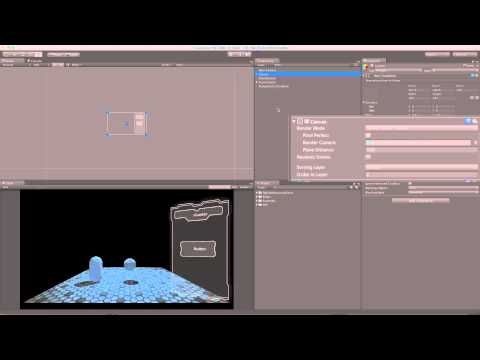
Unity Learn
This tutorial covers User Interface (UI) Components available in Unity, including Canvas, Button, Image, Text, Slider, and more.
azure flame
Either have it pixel perfect, have AA applied, or bump up resolution and anti-alias edges yourself in original to have it better resizable.
make sure it's not scaled and uses original resolution
Try playing with canvas scaler reference pixels per unit
 hushed lynx
what filter mode have you have for the sprite?
try bilinear/trilinear
might be that
azure flame
There's a button on Image component Set Native size
if you have it high res filtering would work better.
 low pike
have the scale at 1,1,1 and use height/width to change its size
 violet oracle
hi! I enable Control Child Size on an Horizontal Layout Group. Is there any way to exclude an element from being controlled?
Typically I've got an image that must not be controlled, other elements yes
 acoustic olive
I have several different messages that need to be displayed on a UI element depending on the game situation. (I.e pick up something, enemy in range, round started, game over, etc)
What's the best way to store these string messages? Can I store them on a different file that's not a monobehavior, and then call on them when needed?
I plan to display them on a single UI TMPro box, that would be blank normally, and display appropriate messages based on the events.
Thanks!
violet oracle
@acoustic olive perhaps you could put them in a TextAsset then at runtime you parse your text (json? xml? yaml?) so you can access the texts you need
I usually go with json for langs, it's easier to edit for me & clients
acoustic olive
violet oracle
<@!607106538200498176> perhaps you could put them in a TextAsset then at runtime...
any good resource out there to get me started?
jagged monolith
Yes @violet oracle, add a layout element component, which has an option for ignoring layout
 graceful patrol
anyone know why this ugliness is happening to my text? It's not in the scene, but shows up on camera

here's it in scene view
 violet oracle
acoustic olive
any good resource out there to get me started?
violet oracle
acoustic olive
any good resource out there to get me started?
sorry didn't see.. there is JsonUtility included with Unity, or there is Json.net as an asset on the assetstore. If you know json, there are quite easy to use!
violet oracle
jagged monolith
Yes <@!253578322053693442>, add a layout element component, which has an option ...
Thanks!
 nova sandal
Hey all, can anyone explain why my PlayerDetails_UIObj object is becoming null by the times it''s called in createPlayerDetails()? - It works fine in start, but is null when it is next called. it's assigned in the inspector,
 mortal robin
nova sandal
Hey all, can anyone explain why my PlayerDetails_UIObj object is becoming null b...
mortal robin
nova sandal
Hey all, can anyone explain why my PlayerDetails_UIObj object is becoming null b...
probably two different instances of this class
Try putting this:
if (PlayerDetails_UIObj == null) Debug.Log($"My ui object is null!. My name is {name}.", this.gameObject);
then when you see that pop up in the console - click on it ONE TIME
Unity will take you to the object that has the null reference
low pike
graceful patrol
anyone know why this ugliness is happening to my text? It's not in the scene, bu...
what component are you using for the text?
- Image
- Text
- TextMeshPro
- Other?
low pike
nova sandal
Hey all, can anyone explain why my PlayerDetails_UIObj object is becoming null b...
can't tell from this code..
- Is something destroying that gameobject?
- GetComponent somewhere?
also, method names should start with a capital
rapid ferry
Why can I only see my tmp text in the game view ?
more specifically its shown as lines on the x and y plane which end when they intersect
An example
 mortal robin
rapid ferry
I had to zoom out tons but supposedly thats the corner of the canvas
mortal robin
rapid ferry
I had to zoom out tons but supposedly thats the corner of the canvas
If it's a screen space canvas it's shown in scene view as 1px = 1 unit
Which means it shows up very large
2km long for a standard 1920 x 1080 resolution :)
rapid ferry
Man, that's big. I don't really see why they would do it that way but each to their own
what is the USS/UI Toolkit equivalent of Canvas Scaler and dynamic resolution canvases?
i just define widths in percentages like in CSS?
that's it?
rapid ferry
How can I store a tmp with public variables and change its text
 thorn tusk
Hey, is there any announced Roadmap with release time for UI Toolkit ?
 sharp oracle
Is it possible to use a mesh in an overlay-space UI? I want to make text boxes that have animatable shapekeys for different dialogue box effects. The only way I can really think to do that would be to make them meshes in Blender and create the blendshapes there, but I still want an overlay UI
rapid ferry
this doesn't do anything, anyone has experienced this? trying to create a font asset

i assume i need a font asset for a ttf for stroke effects
 proper vessel
any idea why when i close my inventory UI, open it and <button>().Select() it doesn't show the Selected Sprite?


it selects it... like if i end on a different slot it will always start from that slot.. but doesn't show the "selected" sprite
the commented eventSystem.SetSelectedGameObject is the exact same behavior
proper vessel
hmmm... i dunno why it works but i found a hack of just adding button.OnSelect(null) after the the .Select() and it works fine....
graceful patrol
Anyone know why these lines are showing up in my text? It appears in-game but not in the scene view

Scene view:
 graceful patrol
low pike
what component are you using for the text?
- Image
- Text
- TextMeshPro
- Other?
graceful patrol
low pike
what component are you using for the text?
- Image
- Text
- TextMeshPro
- Other?
Oh sorry, it's a regular Text component
low pike
I haven't used the regular text component in probably 5 years now.. if it was TMP, I was going to ask if you scale is 1,1,1?
graceful patrol
Is the text component bad? I have TMP but I just ended up using regular text
low pike
The text component gets blurry when you increase the font size
Unity bought TMP and integrated it for a reason
graceful patrol
I'm just confused why it's showing up on camera and not in scene view
low pike
different cameras, different rendering, different stuff
 glossy crane
Is there a way to use text mesh pro to do a multi-select dropdown?
low pike
yes of course, anything you can do with Text, you can do with TMP.. and more.. and better
glossy crane
low pike
yes of course, anything you can do with Text, you can do with TMP.. and more.. a...
How? I'm not seeing a multi-select option. And the checkmark only appears in the last selected item.
 brazen wasp
glossy crane
How? I'm not seeing a multi-select option. And the checkmark only appears in the...
brazen wasp
glossy crane
How? I'm not seeing a multi-select option. And the checkmark only appears in the...


They offer ways you can override how many options to select
 silent vessel
Hey, is it possible to assign text not to the canvas but to a 3d object on the map?
low pike
You can either use a TextMeshPro component (there's one that doesn't require a canvas).
Or, use a worldspace canvas.
 glossy crane
brazen wasp
glossy crane
brazen wasp
After looking at the code, the answer is "no". There is no way for multiselect to exist for dropdown. Dropdown only supports 1 selected index, as indicated by the value. And it is not possible to make a duplicate TMP_Dropdown class have a set of selected indices, unless there is a way to gain access to TweenRunner<T> and FloatTween, both of which appear to be internal classes.
low pike
silent vessel
But, why I can't see text?
you've probablyused the wrong textmeshpro.. you've used the one that requires a canvas

use that one, if you don't want a canvas
@silent vessel
silent vessel
low pike
<@!693143479718641714>
okey, thank u my friendo
low pike
@abstract zealot click on fillrect.. it will ping the object you need to look at
click on that object
 abstract zealot
ohh
abstract zealot

How do I fix this? the sliders background is above the fill area
for some reason
mild kernel
The order in the hierarchy defines the draw order for the canvas.
 agile tangle
I’m looking for a UI similar to this. Does anyone know how hard it would be to replicate it or if it’s on the Unity asset store?

 low pike
your skills will need to be fairly advanced to replicate it
low pike
..have you looked?
rapid ferry
guys which image formats are preferred in UI Toolkit? textures or sprites?
agile tangle
I have. I was wondering if anyone had seen something similar
low pike
rapid ferry
guys which image formats are preferred in UI Toolkit? textures or sprites?
neither of those are an image format
png/ jpg/ bmp/ tga/ etc are image formats
rapid ferry
thanks for the edu
low pike
Textures are generally png's. Sprites are generally png's too.. but can be jpg/ bmp
rapid ferry
guys which texture types are preferred in UI Toolkit? textures or sprites?
low pike
sprites
at a guess
nope.. I googled (like you could have...) and the docs say texture
https://docs.unity3d.com/Packages/com.unity.ui@1.0/api/UnityEngine.UIElements.Image.html
oo, and scroll down further.. sprite
and vector image
rapid ferry
My question is one which is preferred, if there's an optimization benefit.
And I can read thanks, I know both sprites and textures are supported, as the documentation says.
 shy scarab
What should I default the size of a canvas to? 1080p? 1440p? 4k?

 remote burrow
My build keeps screwing up my walls and cieling in my 2D game. If I try to canvas it... it just disappears. Is anyone good at tweaking things so they fit right? just testing out Windows builds at the moment, 16:9.
mortal robin
shy scarab
What should I default the size of a canvas to? 1080p? 1440p? 4k?
Whatever you want. It's the resolution that you'll be using to layout the UI
 dusty hawk
I have some text on a UI speedometer that I would also like to add to the interior of the car, is there a better way to do it other than 3D text? I was thinking about render textures but I'm not sure that would do anything. I'm also planning to do the same with slider bars but I don't see any solutions to that
 mortal robin
You can use a world space canvas
sharp belfry
Is there a way to append an image (like, a symbol) to a textmeshpro such that the symbol will always be right after the text?
You can anchor it to the rect transform of the TMP, but the rect transform doesn't change based on how long the text is
low pike
sharp belfry
You can anchor it to the rect transform of the TMP, but the rect transform doesn...
You just need to set it up correctly
 sharp belfry
Thanks, guess I haven't found the setting for dynamic size rect transform

 sharp belfry
💯
unborn rivet
how would one animate an image in the UI? (with a spritesheet)
 young cargo
unborn rivet
how would one animate an image in the UI? (with a spritesheet)
young cargo
unborn rivet
how would one animate an image in the UI? (with a spritesheet)
i think you basically use an animator and update the sprite in the sprite component at whatever timings
 high sparrow
hey guys, do you know how can I make "3d hud" like in satisfactory? I mean this rotated panels or something

 old cape
Tried rotating UI elements? Try different screen modes if it doesn't work
high sparrow
I tried to rotate but it didn't give me expected result
what you mean with "screen modes"?
mortal robin
high sparrow
hey guys, do you know how can I make "3d hud" like in satisfactory? I mean this ...
I think it's probably just a flat UI with some post processing applied
And maybe some extra raycasting logic for the fact that it's curved
mild kernel
If it's in screen space, you can't. If you're using a world space canvas, then it's just normal 3D space.
sharp belfry
low pike
You just need to set it up correctly
I replicated all shown settings and doesn't work for me. The image bobs to the left and right inconsistently with the text. Does the image have certain settings?
sharp belfry
(trying to figure out how to do gifs)
sharp belfry
low pike
<@!172559624744992777> and the group parent
 low pike
Can't see all your TMP settings there.. have you ticked right aligned?
selected, it's not a tick box.
sharp belfry
Oh, you can't see the content filler on the TMP, which has horizontal on preferred
TMP is left top aligned. Can't change it
low pike
I mean this


 sharp belfry
low pike
<@!172559624744992777> it depends on the pivot of the group parent
sharp belfry
low pike
<@!172559624744992777> it depends on the pivot of the group parent
❤️
Now I can sleep
rapid ferry
Am I correct to assume that in UIElements, elements like Label, Button, Image are just re-definitions of VisualElement in the schema, with added properties? In other words, they are just fancy wrappers and otherwise I could just add everything as a VisualElement?
nevermind, seems like their engine class equivalents have inherited functionality
 celest turret
Hi :=) I have a problem that I can only move my mouse around, about 3/4 of the screen. 1/4 of the right side, my mouse just won't go there... Anyone experienced anything like this before?
^^ Monitor problem it seems like. Switching monitor works :=)
 glacial aspen
Anyone know why this happens?
https://imgur.com/a/Gvn0VQ1
Why does it squish like that?
mortal robin
glacial aspen
Anyone know why this happens?
https://imgur.com/a/Gvn0VQ1
Looks like you have it as a child of a non-uniformly scaled object
 gilded chasm
bad UX is like running a marathon with a lil cube of tempered glass in your shoe
 glacial aspen
mortal robin
Looks like you have it as a child of a non-uniformly scaled object
glacial aspen
mortal robin
Looks like you have it as a child of a non-uniformly scaled object
Thanks. I fixed it. Previously, I changed my player y scale instead of adjusting its character controller height.
 rapid ferry
it's correct, backspace deleting works
but not typing
(I can set the .value property programmatically, right?)
gilded chasm
yes
also there is Value and Text

and Label
Label is the label on the textfield

Text is what is shown within the field
and Value is the value contained within the field. Value and Text should be automatically sync'd
rapid ferry
i think my environment is broken somewhere
 rapid ferry
yeah
low pike
rapid ferry
I can't type in it, what am I missing?
I don't think you have to do anything to get it working. I'm created them through code and just messed with the flex of them for size and can input
Use the UIelements Debug thing and the picker.. see if there's something in the way?
gilded chasm
yeah, something might be eating the click/focus
rapid ferry
the whole thing is just weird for me
unless I specify a custom font & background, they don't even get rendered
i'll check the debug
low pike
That aint right
gilded chasm
textfield may be too tiny
if it's too small the letters will get cutoff or not rendered
rapid ferry
it's 160px
i'm not able to pick the element, only its parent
should the parent be focusable too?
rapid ferry
so is this like in the only UI system, where you had to enable raycasting on all parents?
nah, that doesn't seem to have an affect
gilded chasm
make a brand new UIDocument and try it again and see if you can even get a vanilla text field to work
if it doesn't work then your setup is broken
if it works then your textfield might be broken
I managed to break a lot of things by 'being too smart'
like, with ListViews I would try to individually focus each element and make each element focusable which turned out to be a no-no
Instead I was supposed to use the ListView's built-in selection functions to access each element and handle controller navigation
rapid ferry
it's already a vanilla, so I guess my setup is broken
i don't have a Liberation Sans in my project
not sure if that's an issues
no any font asset, I don't know how to create one, the context menu item won't react
i'll try creating a fresh project, see how it's supposed to work (if it does at all)
gilded chasm
 gilded chasm
sounds like maybe a botched package install
rapid ferry
do i need to add com.unity.ui and com.unity.ui.builder manually to the packages?
I've read somewhere on the forums that I don't, because it gets automatically installed
is that true or a hoax?
i'm 99% convinced this package is broken

 rapid ferry
yeah same
i'll just wait for 2021.2 LTS
i've been trying to resolve this issue for ~2 weeks now, reached my personal boiling point
gilded chasm
I surpassed mine earlier today
I now have 2 categories of problems:
Category I [TMFJ] (That's MY F-in' Job)
Category II [TYFJ] (That's YOUR F-in' Job)
Within these 2 categories, there are 3 subcategories of difficulty:
Grade C: Easy and straightforward to fix.
Grade B: I have to do a bit of reverse-engineering and research which ultimately leads to a straightforward fix.
Grade A: Substantial R&D required to track down the problem and additional subsystems must be created to solve the problem.
Category I Problems: I will solve all grades of difficulty.
Category II Problems: I will only solve Category C and will reluctantly solve Category B difficulty issues because it's not my F-n job, and, if the person responsible for the broken system does their F-in job, it will render my work redundant.
Also, as long as I'm solving YFJ, I can't solve MFJ, and other people who rely on me to do MFJ can't do THEIR FJs
I've burnt so much time on Grade A Category II issues that really, I'm not being paid to deal with them and I feel like a goalie going out to score goals. The goalie's job is to secure the goal, not make goals. If all the professionals of the world set out to do someone else's jobs rather than their own, a fine mess we would all be in.
sharp belfry
adjusting the pivot didn't actually change the behavior of the image
although it looks like you can achieve the same behavior by just parenting the image to the text, and giving the text a content size filler
 restive hound
hi guys, is it possible to create the entire ui of a game with ui builder at the moment?
I need heath bars, some buttons and sliders but not a lot more
 opaque wharf
I want to have a wheel with buttons on (think of a slot machine). The player can move the selection up and down to see different items. The player can only select items in the "primary" (most central) position, but can see the items below and above (In the pic they have selected 1, and can see 16 & 2)
What would be a good way to do this? My first thought is a world space Canvas for each item slot, and simply enable / disable the buttons when it spins. However I don't know if this would be bad in any way. Secondly, I could have one Canvas, and try to do some trickery with the scale / rotation of the Sprites to mimic them "turning" away from the camera. This option seems much harder to do in clean way though...
(Forgive the crude picture!)
 distant hill
Anyone knows how a big sliding factory "door" is called ?
I'm thinking on such doors you can see in movies, usually where they go to a secret base or something like that, press a button on the wall or secret thing - and a very wide door is being opened - usually looks like multiple sliding doors being moved to the left from the right.
Rings any bells?
mortal robin
distant hill
Anyone knows how a big sliding factory "door" is called ?
I'm thinking on such d...
like a barn door
or hangar doors
distant hill
not sure about barn door, google images show barn-door-look-alike mostly
hanger doors look more like it though! thanks 🙂

 low pike
 wary ore
guys is there way to fade/gradient the bottom of this ui image?
wary ore
guys is there way to fade/gradient the bottom of this ui image?
what component are you using to display it, just a default Image?
wary ore
low pike
what component are you using to display it, just a default Image?
yup
anyways i did it with shader
low pike
Yep, was gonna say a shader
I've seen assets on the store you can do with with - I use MPUI kit, that lets you have a gradient
wary ore
low pike
I've seen assets on the store you can do with with - I use MPUI kit, that lets y...
I was basically making ui template thing for someone and didn't wanna include much third party assets so I made a custom shader
unborn rivet
Hey, quick question, i have some UI text, how can I make it blurry? I want to unblur it when the user clicks a button
 modern lava
I want a Scroll View ui component that stretches to fit the screen on android. I have the canvas set to Screen Space -Overlay. I have the canvas scaler set to Scale With Screen Size. Screen Match Mode set to Expand. I have the scroll view rect transform set to Stretch on both x and y. I have viewport and content set the same. When I run this the content of the scroll view is barely visible because the mask is tiny. What am i missing here?
 elfin holly
To create a main menu do I need to make a new project separate from the game project or I could put the menu in the same project as the game?
mortal robin
elfin holly
To create a main menu do I need to make a new project separate from the game pro...
Same project - different Scene
 burnt ridge
I'm trying to use UI Toolkit, I get texts rendered just fine in the editor but fails on Android build with this error https://i.imgur.com/O3NnuEa.png
 low pike
unborn rivet
Hey, quick question, i have some UI text, how can I make it blurry? I want to un...
low pike
unborn rivet
Hey, quick question, i have some UI text, how can I make it blurry? I want to un...
gonna need a shader for it
unborn rivet
i see, thanks @low pike
 snow rain
how can i mask out a part of a button?
 rich ivy
Please let me know if there's a better channel for this.
I'm having a hard time figuring out scaling and location for TextMeshPro (and possible also Canvas). I'm trying to get the text which is currently in the middle of the screen to appear near the bottom left-hand corner of the screen. I have the location set, but the TextMeshPro object doesn't move (will post screenshot of the settings next).


This is the game view when Play is running. The text updates just fine - I can control it with a script - but I cannot get it to appear where I want it. I suspect this has something to do with the fact that the Canvas is so much larger than the virtual camera viewports in Scene view, although I have no idea why the text appears in the middle of the screen if that's the case (it's well outside the camera viewports in Scene view)
The TextMeshPro YouTube channel doesn't appear to have any videos on the topic, although I'm going through all of them now to see if it's mentioned anywhere.

(if there are any other screenshots which would help, let me know. I don't want to flood the channel)
mortal robin
rich ivy
(if there are any other screenshots which would help, let me know. I don't want...
I recommend reading this:
https://docs.unity3d.com/Packages/com.unity.ugui@1.0/manual/UIBasicLayout.html
rich ivy
mortal robin
I recommend reading this:
https://docs.unity3d.com/Packages/com.unity.ugui@1.0/m...
That helped, thank you. I also figured out that I was being confused by the two separate rectangles in the TextMeshPro object - turns out the other one represented the margins, which are hidden under "Extra Settings". Everything works now, although I'm still weirded out by the fact that the Canvas is shown as being so much larger than the camera viewports in Scene view (even though everything lines up fine in Game view).
jagged monolith
That's because 1 unit in screen space = 1 unity unit in world space, so if your canvas is 1920 pixels wide, that means it's 1920 meters wide in the scene @rich ivy
rich ivy
jagged monolith
That's because 1 unit in screen space = 1 unity unit in world space, so if your ...
Then how is it that the text lines up with the camera using the same viewport coordinates?
The lower-left camera has a size of 0.3 W x 0.4 H; the TextMeshPro anchors are also 0.3 and 0.4, yet the text lines up with the top right-hand corner of the lower-left camera. Shouldn't the text be way outside the viewport, if the canvas is so much larger?
(to clarify, I'm not arguing; just trying to make sense of this)
mortal robin
rich ivy
Then how is it that the text lines up with the camera using the same viewport co...
It depends on your canvas settings
if you are using Screen Space - Overlay - then the coordinates are raw screen coordinates
if you are using SCreen Space - Camera - then the coordinates are relative to the camera's viewport
rich ivy
mortal robin
It depends on your canvas settings
Aha, that makes much more sense now. Thank you.
 static badger
Hi team! Using textmeshpro and attached a button component to my text. I want it to change colour in hover - but the textmeshpro object doesn’t seem to work like a text object. Any advice?
mortal robin
static badger
Hi team! Using textmeshpro and attached a button component to my text. I want it...
Just set the TMPro Text as the "target graphic" for the Button component
 fervent leaf
I have a problem with a prefab I made in one project and imported in another. For some unexplainable reason, the layout is not the same, even in prefab mode.


when I look at all the values in the rect transform, even those driven by the content size fitters and the layout groups, they are all exactly identical, but for some reason, the text is not anchored where it should be

could it be because both projects use a different version of textmeshpro?
ok I can confirm... the culprit was indeed TMP. Weird
static badger
mortal robin
Just set the TMPro Text as the "target graphic" for the Button component
Thank you!
 silent sigil
Does UI Toolkit have to use TMP SDF fonts or is there a well supported way to work just from the fonts directly? Are there any visual downsides (other than performance, I'm sure) from doing it this way?
 icy warren
Does anyone know where I could find a rounded rectangle sprite with a soft shadow around it? Like this:

 coarse gull
Hi, i'm asking myself, why canvas text have not the same position between my scene and the game preview, some one have a clue ?
 mortal robin
coarse gull
Hi, i'm asking myself, why canvas text have not the same position between my sce...
mortal robin
coarse gull
Hi, i'm asking myself, why canvas text have not the same position between my sce...
You should read this - https://docs.unity3d.com/Packages/com.unity.ugui@1.0/manual/UIBasicLayout.html
silent sigil
Does 2021.1 still need any packages to use UI Toolkit in runtime? I'm trying to figure out how to just get a document displayed in the scene in this version.
 lucid yarrow
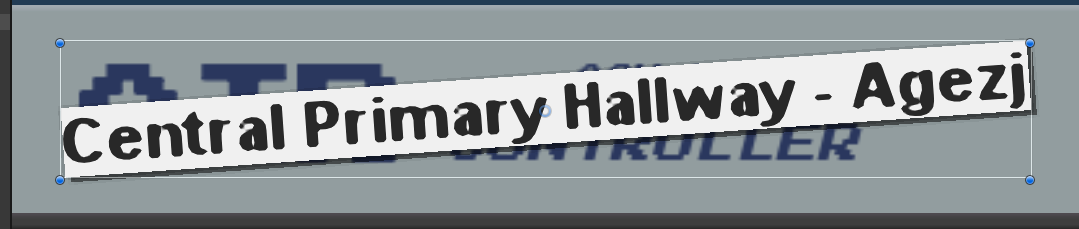
how can I antialias the edges of that label?
looks awful - the white is just an image component with no source image
wispy mantle
lucid yarrow
https://i.imgur.com/kvTlcKQ.png
maybe try using a white square as a source image and see if that looks better
lucid yarrow
it's the same for images, too
wispy mantle
lucid yarrow
it's the same for images, too
https://gamedev.stackexchange.com/questions/139626/is-ui-anti-aliasing-broken-in-unity-5-6/142951#142951 try this (wow this is an old issue)

Game Development Stack Exchange
I have a project that was started in Unity 5.5. When I open it in 5.6, most 2D graphics look like they're not anti-aliased: left is 5.6, right is 5.5
What you see there are UI Images in a Canvas....
lucid yarrow
ah yep, we're using Screen Space Overlay
that's unfortunate
I'm not sure how much effort it'll be to convert to use Screen Space Camera
and about the last comment, how would I enable mipmapping here?
Thank you for helping
alright I just enabled mipmapping on a white image (source image set), no go : /
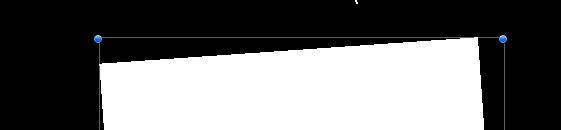 wispy mantle
try the alpha transparency trick?
lucid yarrow
I assume they mean add an outline component?
wispy mantle
like add a border of transparent pixels around the square
lucid yarrow
ahh right
I don't think it'll help; happens within the image too

hang on, let me try adjusting settings on that
ok yep, that'll do the trick -> transparent border in the texture
thanks @wispy mantle!
 frail jewel
Can anyone tell me whats goin on?

All my other Ui is perfect, just this is being weird
Like what

 dense apex
Try resetting the anchor point
frail jewel
I've moved it all over the shop, changed the heirarchy layout and it just wont go
this makes it sit in the right place, But it wont scale properly, i don't think
 mild kernel
Are you changing this inside of prefab mode?
mild kernel
Check and make sure the local prefab in the scene doesn't have an override. Otherwise, revert the position if it does.
I usually make layout changes on the local prefab though and override specifically because of what you're experiencing.
frail jewel
Ooo i didn't know about this, thank you :))
rapid ferry
icy warren
Does anyone know where I could find a rounded rectangle sprite with a soft shado...
Da best interface is “no interface” 😅😂


😅
icy warren
rapid ferry
Da best interface is “no interface” 😅😂
Huh?
rapid ferry
Just some “words from the verse” 😶🌫️ I dunno 🤷♂️
silent sigil
Is com.unity.ui.runtime necessary to use UI Toolkit in runtime in 2021.1, or is it included in the editor?
 clear ether
silent sigil
Is `com.unity.ui.runtime` necessary to use UI Toolkit in runtime in 2021.1, or i...
clear ether
silent sigil
Is `com.unity.ui.runtime` necessary to use UI Toolkit in runtime in 2021.1, or i...
It is included (I can see the UI builder and UI document as a component so I guess that's part of ui runtime)
silent sigil
Weird. I'm not seeing UI Document as a component in a fresh project in 2021.1
rapid ferry
How do I fix this? I enabled FullScreen in project settings on Native Resolution and everything is cut off.


 jovial laurel
Not sure if this is the right chat buuut i was wondering how i can Deactive certain UI Elements when im opening my Project on Mobile?
 limber night
Whats the most efficient way to draw a 3D text in world space~~ always facing the camera~~?
example: Wow Character names
proper vessel
@limber night lookup "Billboards"
So i have an inventory.. it has an "InventorySlot" which have UI buttons. The buttons change sprites using the built in Sprite Swap (target graphic, highlighted sprite, pressed sprite, etc...).. However, i want to make it so that if the button is pressed and the InventorySlot has no item (null) then i want to swap to a different pressed sprite. I hate UI
tribal notch
why does my text look so blurry when I build my game to desktop?
 azure flame
Use TextMesh Pro don't scale UI items manually.
 gloomy marten
rapid ferry
How do I fix this? I enabled FullScreen in project settings on Native Resolution...
gloomy marten
rapid ferry
How do I fix this? I enabled FullScreen in project settings on Native Resolution...
is it canvas menu?
If it is, check canvas scaler scaling mode, then also check the anchors of every menu item
gloomy marten
limber night
Whats the most efficient way to draw a 3D text in world space~~ always facing th...
TextMesh or TexhMeshPro with Look At Camera script
 soft sparrow
When I prefab my UI in order to drag into into my main scene (options menu) the text is blank but the text boxes are there

 languid olive
soft sparrow
When I prefab my UI in order to drag into into my main scene (options menu) the ...
languid olive
soft sparrow
When I prefab my UI in order to drag into into my main scene (options menu) the ...
I had similar bug, when I opened my project and canvas loses his original scale, I chose play mode and then editor mode again, I'm not sure that it will help you but just try
rapid ferry
Anyone knows how to mask an FBX mesh within a UI scrollview?
I am using a secondary Camera to show the Canvas UI but my FBX doesnt mask like the TMP text does. I am lost.
mortal robin
rapid ferry
Anyone knows how to mask an FBX mesh within a UI scrollview?
I am using a second...
UI masks can only mask UI elements. You'd have to display the 3D model with an Image or RawImage component in the UI for the mask to work.
rapid ferry
mortal robin
UI masks can only mask UI elements. You'd have to display the 3D model with an I...
oh. What about changing the shaders? I have been looking into that but nothing much Im afraid. Is there a way to render an FBX as an image at runtime without really exporting it as a PNG? I have been using FBX all over and I dont want to have 2 types
mortal robin
rapid ferry
oh. What about changing the shaders? I have been looking into that but nothing m...
You can do a setup like this:
- Create a render texture
- Create a second camera, with the target texture sdet to the render texture. Now the camera will render to the RenderTexture
- Create a RawImage component in your UI (make sure to use the Unlit/Texture shader on the RawImage)
- Set the RenderTexture as the texture for the RawImage component
then your second camera will render to that UI element essentially
rapid ferry
I do have a second camera just to display the canvas. Thank you. I will give it a shot
mortal robin
You would probably want a third camera for this
a camera that is just pointing at this 3d model
rapid ferry
But what if I have a list of these FBX? I have a text and an FBX next to it in a scrollview. The issue was that the FBX was not masking. Would your method above work for multiple models?
mortal robin
it will but for it to be practical you'll probably want to get a little creative
it might not be practical to have N cameras pointing at N models with N RenderTextures
so maybe one camera pointing at a column of models and moving up and down along with the scroll view, and rendering to a single RenderTexture
you'll have to play around with it ¯_(ツ)_/¯
do the models have to move around?
Cna they just be static images of the models?
You might be better off just generating the images ahead of time
rapid ferry
nope they are just stationary like png images
mortal robin
and then just using a regular old Image
oh then yeah, generate the images ahead of time
rapid ferry
hmmm
mortal robin
probably worth creating a scene where you can sort of do a "photoshoot" of them 🙂
I made a similar thing for my current project where it's a separate scene that essentially takes a list of 3D models, spawns them into the scene, saves a snapshot image of them in my project, and then moves to the next model
then I use those images in my UI
rapid ferry
I was initially using pngs but the quality were not good, so we moved to fbx to keep the vector files but the UI Canvas is not happy with that. This was why I had been looking into different options. The only other option I was considering was disabling the FBX as they touch the bounds of the parent gameobject.
Thank you for your advise 😄
rapid ferry
Hi! I dont get the TMPro <link="id"> tag. Do I have to assign tags to links in a different setting? Cant I just >link="https://www.google.com/"<?
Does it have any built-in functionality?
frail jewel
Why can you not have shaders / materials on overlay canvas objects?
mortal robin
rapid ferry
Hi! I dont get the TMPro <link="id"> tag. Do I have to assign tags to links in ...
mortal robin
It's not a hyperlink tag
rapid ferry
Oh I get it now. Many thanks
 cyan path
how do i use a "simple" image type instead of sliced for a scrollbar?
 burnt ridge
is it possible to copy a VisualElement's style to another VisualElement through code?
or just straight up copy a while element
open hearth
Is it possible to let the Line Renderer draw a line relative to its object position?
The line shows up with 'Use World Space' enabled, but then it does just that: it is relative to the world space.
When I disable that, it just disappears instead of being relative to the window I made.
hmm, it seems you can't bind the line renderer to your UI.
Isn't it completely useless then? 😛
in case anyone is able to help me, this is my problem:
in the Scene view, the canvas blows up my UI to this scale:

my camera is way down the bottom left corner:

in game it matches both layers perfectly:

but the line renderer sticks in the same place as shown in picture one.
I could calculate the position it has to be in manually I guess, recalculating all points of the line renderer every time I drag the window around, but that seems horrible for performance.
Any ideas?
azure flame
Line renderer has option to use local or global positions
open hearth
I see 'Use World Space'
azure flame
If you want to move it you should use local
open hearth
If enabled it is relative to 0,0 in the world.
If disabled it is relative the the position of the window, but it doesn't scale down going from the scene view to game view like I showed in the pictures above.
For some reason it is not considered part of the Canvas and thus not rescaled?
azure flame
If some of your points are in different spaces, i.e. UI versus world, update smaller amount of points relevant accordingly to one or another
open hearth
I'm sorry, what is that supposed to mean? 🙂
azure flame
You want a line from UI to the map?
open hearth
I want a graph in the window using line renderer.
azure flame
Then parent it to UI and use local space. Canvas should be in Camera space I think for this to work.
open hearth
Not sure what you mean.
It is one of the grandchildren of a gameobject 'UI' which has a canvas component.
The canvas is set to Screen Space - Overlay
azure flame
Are you coordinating line renderer with UI?
If you want to use line renderer with UI, UI has to be in the world or camera space.
open hearth
But what do you mean by that?
azure flame
Screen Space - Overlay coordinates relate to current resolution.
azure flame
open hearth
But what do you mean by that?
Set canvas to Screen Space - Camera.
Then use local coordinates on line renderer
open hearth
That will remove all my UI, but yes it shows a line.
azure flame
parenting it to UI
open hearth
It seems that's not a solution that will work in my case.
It voids a lot of code written for the UI with Screen Space Overlay in mind
Also it seems this Line Renderer doesn't work with masks and scrollview, the line only gets removed when the last point is out of sight..
azure flame
You can always build a graph from a small square and a dot to round corners using them in images and resizing them.
open hearth
I guess I will try that. Sounds like a lot more work tho 😛
But I don't think I have that many options now.
 buoyant ravine
Anyone have any experience working with menu input using an axis/controller, but in a dynamic scripting system as the options get changed on navigation. Just wondering if there's a place to look for information on how to use the axis but not having constant input, or get a fluid user experience.
distant hill
I have 3 objects: A, B, and now adding C.
Object B(z=0) is in front of object A(z=10).
Is there a way to put object C infront of object B, but behind object A?
 sinful rampart
distant hill
I have 3 objects: A, B, and now adding C.
Object B(z=0) is in front of object A(...
sinful rampart
distant hill
I have 3 objects: A, B, and now adding C.
Object B(z=0) is in front of object A(...
how about changing their position in hierarchy? (lower = front)
buoyant ravine
erm, C(z=1-9), or that
distant hill
@sinful rampart well I don't want to switch A and B order, so just changing order isn't really possible.
Since I need him to be higher than 10, and lower than 0, at the same time xd
sinful rampart
distant hill
<@!223599237026283520> well I don't want to switch A and B order, so just changi...
hm.. could using a mask help?
distant hill
mm not sure what you mean?
sinful rampart
@distant hill if i understand correctly, u want: C > B, A > C and B > A? (where '>' = in front of)
 vernal girder
is adobe XD worth using for a UI?
mild kernel
Sure, if it gets the job done.
 silk coral
my slider background is slightly larger than my max fill, how do i make it the same size as max fill?
 mortal robin
silk coral
my slider background is slightly larger than my max fill, how do i make it the s...
mortal robin
silk coral
my slider background is slightly larger than my max fill, how do i make it the s...
anchors and pivots Gabe
mortal robin
silk coral
<@!179367739574583296>
basically - the two objects are just two separate UI elements
you need to resize them
the way you position and size UI elements... well go to the top of that page I linked - it's basically the UI placement/sizing bible
silk coral
is there like a magic number i need to use for scaling, or just trial and error
mortal robin
silk coral
is there like a magic number i need to use for scaling, or just trial and error
I very rarely touch scaling for UI elements.
Let the canvas scaler deal with that
distant hill
sinful rampart
<@334712004394614787> if i understand correctly, u want: C > B, A > C and B > A...
sorry, didn't see that one ><
but yes that is what I want
was thinking it might be possible with the sorting layer feature, not exactly sure how it works between layers though so can't get it to work
jagged monolith
open hearth
hmm, it seems you can't bind the line renderer to your UI.
Isn't it completely u...
Not sure if I understand completely, but this collections of extensions has a UI LineRenderer
https://bitbucket.org/UnityUIExtensions/unity-ui-extensions/wiki/Home
 shrewd sapphire
hello, anyone knows how to move the bacteria to overlay the image instead?
 azure flame
@shrewd sapphire If you want to easily mix sprite renderers and UI using distance to the camera, set Canvas to Camera space. Otherwise you need manipulate draw order directly.
shrewd sapphire
oh so it concerns Z position if it's that?
sinful rampart
distant hill
was thinking it might be possible with the sorting layer feature, not exactly su...
np i forgot to ping properly 😛
i cant figure out a way to make this work.. i'll try and think of something but if u manage to find a solution, notify me (cause i got curious :P)
distant hill
@sinful rampart currently I'm just animating the Z property of A, in a specific animations and places.
Sadly I'll have to repeat it in various places and animations, which is what I wanted to avoid.
But cool, thanks
shrewd sapphire
azure flame
<@!317590856058273794> If you want to easily mix sprite renderers and UI using d...
got it done sir thankyou
 coral cape
Is it possible to mask Text object in world space?
rapid ferry
Hi! Is there any way I can make a layout element be basically ignored by a layout group when trying to place its elements?

Here's an example of the problem I have right now the text, being longer, is displacing the visual elements at the left. Making it look real wonky
I want it to just place the text at the right of it after calculating the visual elements sizing
Disregard that, using minWidth helps. Are there any unseen consequences over using minWidth over preffered width?
 forest slate
Hi, i was wondering if anyone with Illustrator knowledge can help. is there a way i can remove the stroke lines from this image in a way that creates gaps between all the shapes?

like i want to remove them and not end up with this...

 narrow ruin
by illlustrator you mean Adobe Illustrator? if so, you can set your strokes to a dashed/dotted lines
and play around with the properties to set the gaps
 true jungle
Anyone have tutorials for large menus and/or character selection with text?
mortal robin
rapid ferry
Hi! Is there any way I can make a layout element be basically ignored by a layou...
There's a checkbox on LayoutElement to ignore layout.
 molten tapir
Hey is it possible for the Toggle Component in the editor window to do the inverse of the selected object instead of just setting to what the toggle component's bool currently is? or would I need to rather create a monobehaviour attach it to the obj and just do something like
bool myweirdbool = !myweirdbool;
To Visualize:
Toggle Component:
On --> Off
Object Being Toggled:
Off --> On
Another Object Being Toggled:
On --> Off
So its just toggling the inverse of its current state
 quick ocean
I don't see hdr color option in the color window. How do I enable that ?
frosty pewter
[ColorUsage(true, true)]
quick ocean
not with code, in general for color window
frosty pewter
You don't
quick ocean
Here
 frosty pewter
If the field is not accepting HDR color, it does not accept HDR color.
quick ocean
I have seen in some tutorials they are using the same for intensity
Can you shed some light on this ?
frosty pewter
Only fields marked as HDR show an HDR color picker
if you are not seeing an HDR colour picker, the field is not HDR
Some materials have an extra slider for intensity instead of it being an HDR field


 frosty pewter
There is the HDR emission field
 quick ocean
ok so if I want to have to have the hdr field for UIs would it be possible ?
frosty pewter
I don't think there are any HDR UI shaders by default, you can certainly make them though
quick ocean
ok
 restive slate
Is there a way to make a drop-down list always open? I've looked online and it doesn't seem like anyone really knows.
I'm wanting to use a drop down list to display my inventory, so it's easy to edit and refresh the list. But there doesn't seem to be an easy way to keep it always open.
dense apex
@empty juniper Left panel, click to anchor to centre, alt click the red button to stretch there. Right panel, click to anchor to centre, alt click green button to stretch right side

 empty juniper
dense apex
<@!466200079125053442> Left panel, click to anchor to centre, alt click the red ...
empty juniper
dense apex
<@!466200079125053442> Left panel, click to anchor to centre, alt click the red ...
Thanks
 dry matrix
So Unity crashed, and upon reopening my project certain UI elements have changed size for seemingly no reason, why?
Its not really that big of an issue, just an annoyance finding out what sizes i had for everything, but I have a feeling this is going to repeat
And the crash didnt cause the sizes to reset, the sizes were set long before the crash and I save after every change
Ok, I figured it out, for whatever reason the canvas size has changed to 1102x620, a resolution ive come to fucking despise
I really do not understand canvases after hours of messing with it
Why that resolution? Its so random, even applying a layout element to its parent doesnt make it the resolution i want
I had it working earlier but for whatever reason its reverted back
sorry for rambling but this is so fucking annoying
ok i figured it out lol i was using the wrong resolution in the game tab. but i still dont understand canvases
mortal robin
dry matrix
ok i figured it out lol i was using the wrong resolution in the game tab. but i ...
This might help a bit: https://docs.unity3d.com/Packages/com.unity.ugui@1.0/manual/script-CanvasScaler.html
 old bane
Is it possible to have crisp think lines in unity without having to create multiple variations at different resolutions? The type of line work i'm referring to is like icons that might be 1 or 2 pixel in thickness.
Because sometimes you can get uneven thickness when the screen moves. I've looked at the SVG importer, but the effect still happens. Is there anyway around this?
mortal robin
old bane
Is it possible to have crisp think lines in unity without having to create multi...
Look into "pixel perfect" canvases etc
old bane
Tried it, but I still ended up with a lot of jittery pixels, as if they are fighting to fill the pixel area. Even tried the pixel perfect camera. i'm gonna try it again, but i'm not sure if we are just trying to have the icons too thin. For example one of the icons if a circle with about 1 or 2 pixel thickness border, where this border, but its not even all around.
May be there was something I was missing.
I'll give those another go.
old bane
Yeah I think its finding the balance between pixel snapping positions, because you can't get things in the exact position, but i guess this is closer to what we want thanks, @mortal robin
 dusk linden
Anyone ever had an issue where prefab UI is just missing when trying to edit the prefab? When my game loads, the UI is there. But it doesn't show up in the editor which makes it impossible to make changes.
In game:

Prefab Editor:

If this isn't the right place to ask this question please lemme know
mortal robin
dusk linden
Anyone ever had an issue where prefab UI is just missing when trying to edit the...
is the background part of the prefab? or part of the scene you're instantiating it into
dusk linden
Part of the prefab. I did just do a project upgrade when I upgraded from Unity 2020.1 to Unity 2020.3. Maybe something got corrupted?
This is my Hiearchy:

Hero Item has the frame
Which, oddly enough, is set and does appear if I click on the Target Graphic selector:

Oh woops, that doesn't show the Image component, I'll just show my whole inspector. The "Source Image" is frame_heroItem_normal, which is set:
 old bane
Just another quick one, this image shows a panel that has items that get revealed and hidden. The red section shows how the pixel snapping pushes the underlying object. I did this because it was easier that having image slices with one object.
So with pixel perfect enabled, is there a way to prevent the pixel snapping to different position as in the screenshot? Sorry if its not clear what i'm saying.

 neon solstice
Hi guys, Im using UI Builder and I cant seemed to rename uxml that is added repeatedly into a ScrollView. The picture below shows 2 inventory slots but they cannot be rename, so Unity was throwing errors about it. Anyone has any idea on how to solve this?

 fading seal
If I were building a UI Interaction from scratch, What components must I have in the scene for Unity UI to work?
I am going to make a custom raycaster and assign it on a layer and make the ui objects only interact with that layer.
Another option would be to make a box collider set as trigger that is very narrow and deep that tells the system that I selected UI elements within 10 meters of the controller etc.
I would use the XR System but I dont want to reuse the scripts because I made my own using the new input system and it would run polling data scripts 2 times and want to keep it as optimized as possible. (plus, the code I wrote gives a lot more otions and prevents multiple firings).
 north crater
Does anyone know how to force the UI to stay in place. It changes position whenever i accidentally resize the game tab.
How do I make sure the UI does not change sizes if the resolution is diff.
 lilac zephyr
I have two world space canvases attached to the player and the obstacle (I copy-pasted the player health bar canvas onto the obstacle)

it automatically rotates towards the screen, but for some reason it's stretched out with the obstacle health bar canvas
nvm I figured it out
it's because the obstacle is bigger
still can't figure out how to fix it though
i don't know at this point
rapid ferry
anyone know why the UI is OK in the game view on play:

but gets messed up in build?

the sprites/images/text get artifacts for whatever reason.
 fathom pecan
I am aware of Canvas.referencePixelsPerUnit property for the sprite.
https://forum.unity.com/goto/post?id=1794443#post-1794443
Based on the post, I need to set value to 1 for world space UI sprite, and 100 for overlay and screen space UI. Since the post was years ago, I am wondering whether a workaround exists for built-in UI in 2020.3.10.
Unity Forum
I am struggling a bit trying to get a button with a sliced sprite. My ortographic camera size is 5 and I am creating a menu using a World Space canvas....
jagged monolith
lilac zephyr
still can't figure out how to fix it though
You can't have the canvas parented under a scaled transform. You need to structure your hierarchy differently so that the scale of all transforms above the canvas are the same on X, Y and Z
 granite oar
I'm working with GUILayout.BeginArea. Which I want to create in an existing UI element. Does someone know how to convert from RectTransform to the rect needed in BeginArea (so in pixels)
I've tried a lot of approaches, but none are working
granite oar
I know, but it want to make them, manually. Like the picture I need to generate the tree view with imgui. But I would like to generate it in an existing RectTransform (with easy background etc.)
 rapid ferry
has anyone ever used UI Builder recently? i cant seem to find anything that is helpful
i mean as a guide
rapid ferry
If I have a complex ui element, such asa card, if I want to generate an entire PNG of it of X and Y size, how would be the go to manner?
There's tons of small elements separated so walking in the image files and setting pixel isn't the most efficient one.
low pike
rapid ferry
has anyone ever used UI Builder recently? i cant seem to find anything that is h...
Docs for the UIToolkit/ Builder are... crap.
I've used the UIBuilder a little bit recently, but mostly to figure out what I've done wrong in code and what I should be doing
rapid ferry
I wanted to test it out today, for the same reason as you I think
I've made a package for myself, to use on my games (I had to make it a package because I have to make a new mobile game every 2 weeks) and I had a very bad ui logic in there
low pike
I'm using it for an editor window
rapid ferry
I wanted to check and see how I could do it better
low pike
packages are ace 👍
low pike
odin is cool, had it for years - though never actually use it 😄
rapid ferry
Oh I loved it, it can be very satisfying
low pike
I'm making a Unity asset, I can't use odin for the editor window
rapid ferry
Ah I see
Anyway this new ui builder and ui toolkit seems very nice, I hope they release it very soon
It's a real pain in the butt to import the ui toolkit
low pike
I don't think it'll be verified, or whatever term Unity use, for a long time
rapid ferry
I mean probably you are right
There were some tutorials from a year ago about it, and it doesn't seem to be any different from then
low pike
I don't think they've added worldspace ability to it yet? Or only just recently added it
rapid ferry
I'm not really sure on that one
I spend waaay too long trying to implement it and get it working, and after that I was just way too frustrated to work on it more, so I just closed that project
low pike
yep - same